En
User’s Manual
DIGITAL CAMERA
Quick Start Guide 6
“Point-and-Shoot” Modes (i and j) 11
Viewing Photographs 11
Deleting Unwanted Photographs 11
Recording Movies 12
Camera Menus 13
Caring for the Camera 14
Troubleshooting 14
Specifications 15
For Your Safety 27
Notices 29
Bluetooth and Wi-Fi (Wireless LAN) 33
The Camera Body 3
• Read this manual thoroughly before using the camera.
• To ensure proper use of the camera, be sure to read
“For Your Safety” (027).
• After reading this manual, keep it in a readily accessible
place for future reference.
2
Package Contents
❏ D5600 camera
❏ DK-25 rubber eyecup
❏ BF-1B body cap
❏ EN-EL14a rechargeable Li-ion
battery (with terminal cover)
❏ AN-DC3 strap
❏ User’s Manual (this booklet)
❏ Warranty
❏ MH-24 battery charger (plug adapter supplied in countries or regions
where required; shape depends on country of sale)
Purchasers of the lens kit option should con rm that the package also
includes a lens. Memory cards are sold separately. Cameras purchased
in Japan display menus and messages in English and Japanese
only; other languages are not supported. We apologize for any
inconvenience this may cause.
D5600 Model Name: N1538
About the Reference Manual
For more information on using your Nikon camera, download a pdf copy of
the camera Reference Manual from the website listed below.
http://downloadcenter.nikonimglib.com/
Nikon User Support
Contact a Nikon representative for technical assistance with the operation of
your Nikon product or products. For information on the Nikon representatives in
your area, visit http://www.nikon-asia.com/support.
Nikon Manual Viewer 2
Install the Nikon Manual Viewer 2 app on your smartphone or tablet to view
Nikon digital camera manuals, anytime, anywhere. Nikon Manual Viewer 2
can be downloaded free of charge from the App Store and Google Play.
3
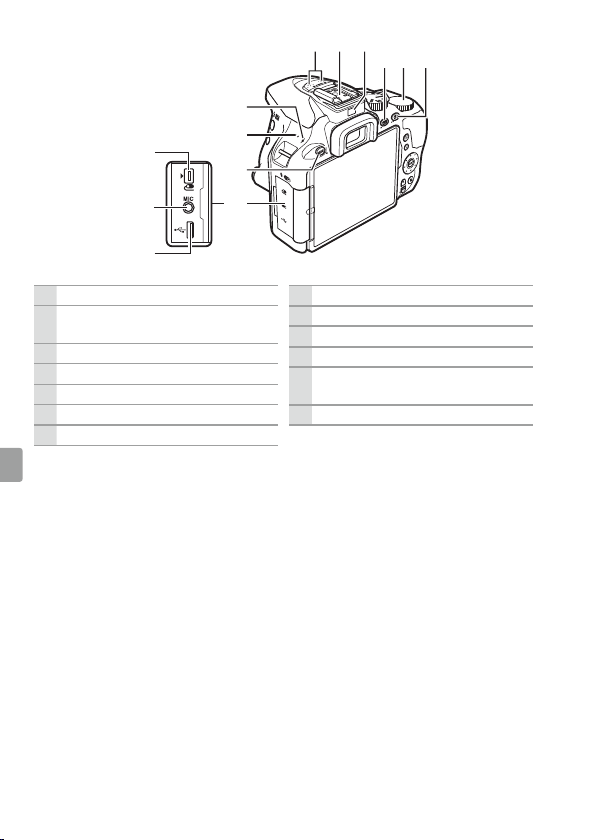
The Camera Body
14
12
13
1516
8
9
11
10
18
67
3
4
5
2
1
17
1 AF-assist illuminator
Self-timer lamp
Red-eye reduction lamp
2 Power switch
3 Shutter-release button
4
E/N button
5 Movie-record button
6 Live view switch
7 Mode dial
8 Built-in ash
9
M/Y button
10 Eyelets for camera strap
11 Fn button
12 Mounting mark
13 Lens release button
14
s/E button
15 Mirror
16 Lens mount
17 CPU contacts
18 Body cap
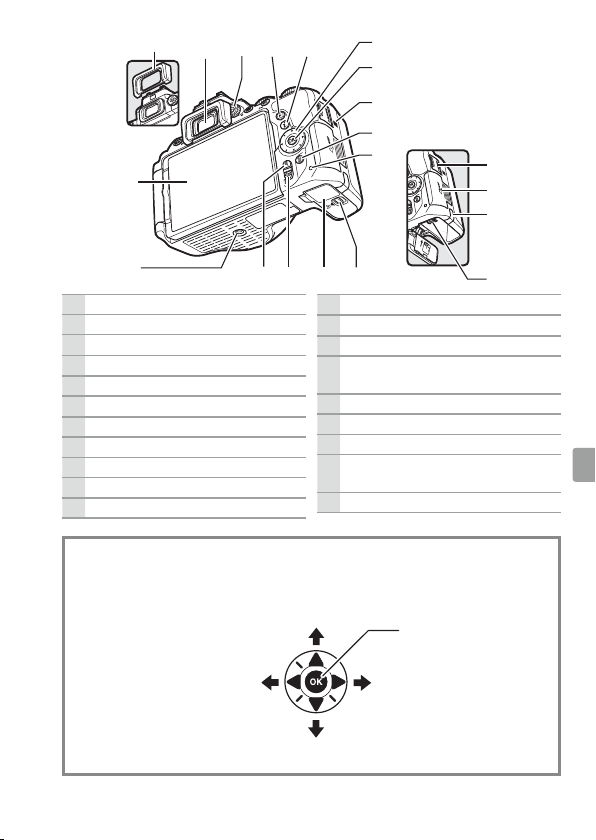
4
29
30
31
28
27
26
20 2119
22 23 24
25
19 Stereo microphone
20 Accessory shoe (for optional ash
units)
21 Eye sensor
22
R (information) button
23 Command dial
24
A/L button
25 Connector cover
26
G button
27 Speaker
28
Focal plane mark (E)
29 USB connector
30 Connector for external
microphone
31 Accessory terminal
5
32
47
33 34 35
36
37
39
40
38
414244 43
51
50
49
48
46
45
32 View nder eyepiece
33 Diopter adjustment control
34
K button
35
P button
36 Multi selector
37
J (OK) button
38 N-Mark (NFC antenna)
39
O button
40 Memory card access lamp
41 Battery-chamber cover latch
42 Battery-chamber cover
43
W/Q button
44
X button
45 Tripod socket
46 Touch-sensitive vari-angle
monitor
47 Rubber eyecup
48 HDMI connector cover
49 Memory card slot cover
50 Power connector cover for
optional power connector
51 Battery latch
A The Multi Selector
In this manual, operations using the multi selector are represented by 1, 3,
4, and 2 icons.
1: Press the multi selector up
4: Press the multi
selector left
2: Press the multi selector
right
3: Press the multi selector down
J button (select)
6
Quick Start Guide
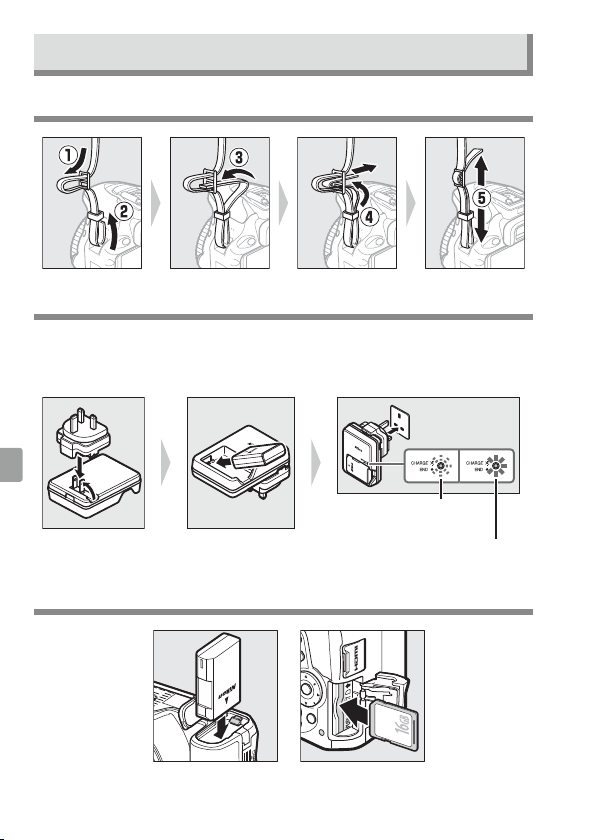
Attach the Camera Strap
Charge the Battery
If a plug adapter is supplied, raise the wall plug and connect the plug
adapter as shown below at left, making sure the plug is fully inserted.
Insert the battery and plug the charger in.
Battery charging
Charging complete
Insert the Battery and a Memory Card
7
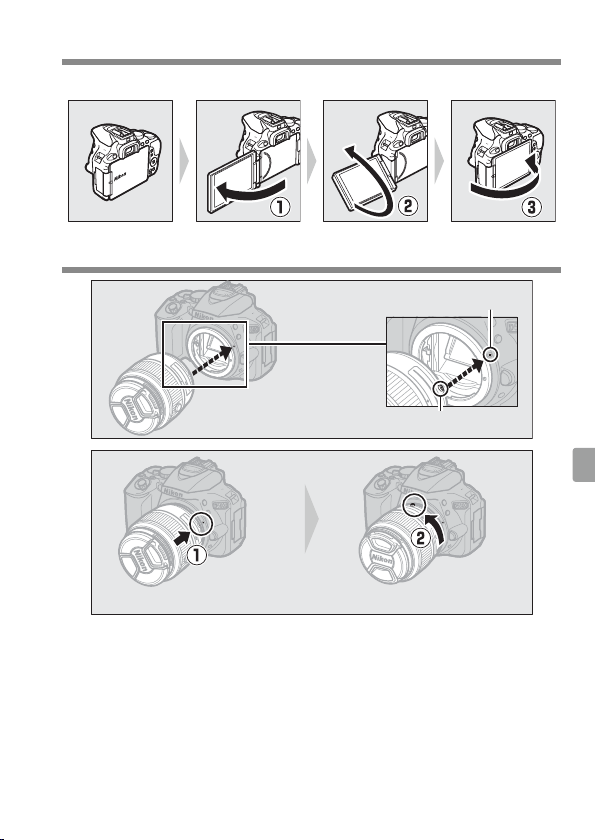
Open the Monitor
Open the monitor as shown. Do not use force.
Attach a Lens
Mounting mark (camera)
Mounting mark (lens)
Rotate the lens as shown until it clicks into place.
8
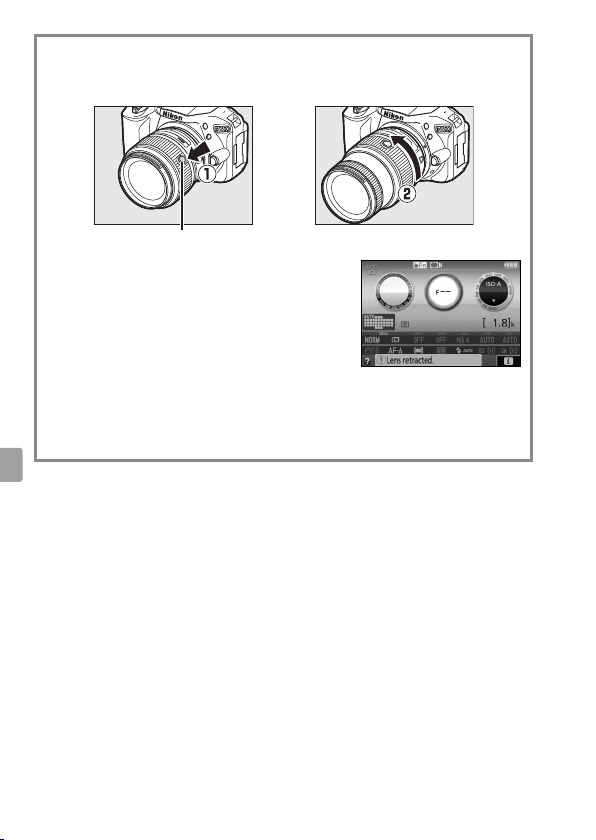
A Lenses with Retractable Lens Barrel Buttons
Before using the camera, unlock and extend the lens. Keeping the retractable
lens barrel button pressed (q), rotate the zoom ring as shown (w).
Retractable lens barrel button
Pictures can not be taken when the lens is
retracted; if an error message is displayed as a
result of the camera having been turned on with
the lens retracted, rotate the zoom ring until the
message is no longer displayed.
A Removing Lenses
To remove the lens, turn the camera o and press and hold the
lens-release button on the front of the camera while rotating
the lens in the direction opposite that shown above.
9
Camera Setup
❚❚ Setup from a Smartphone or Tablet
1
Download and install the SnapBridge app.
The app is available free from the Nikon website
(http://snapbridge.nikon.com), the Apple App Store®, and
GooglePlay™.
2
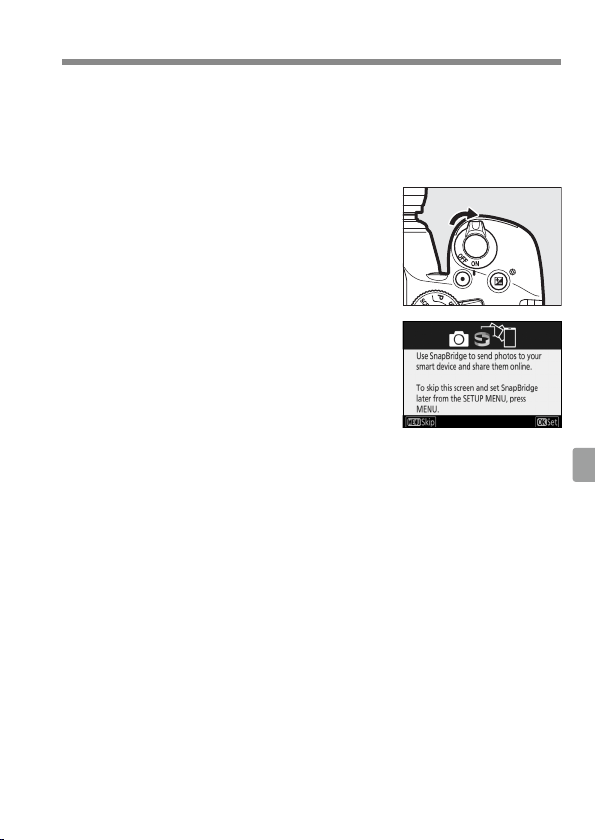
Turn the camera on.
A language-selection dialog will be
displayed; press 1 and 3 to highlight a
language and press J to select.
3
Press J when the dialog at right is
displayed.
4
Pair the camera and the smart device.
• Android devices with NFC support: After checking that NFC is enabled
on the smart device, touch the camera H (N-Mark) to the NFC
antenna on the smart device to launch the SnapBridge app.
• iOS devices and Android devices without NFC support: Press the camera
J button. The camera will wait for a connection; launch the
SnapBridge app on the smart device and follow the on-screen
instructions to tap the name of the camera you want to pair with.
5
Check the authentication code.
Press J on the camera and tap PAIR on the smart device (the
button may vary with the smart device).
10
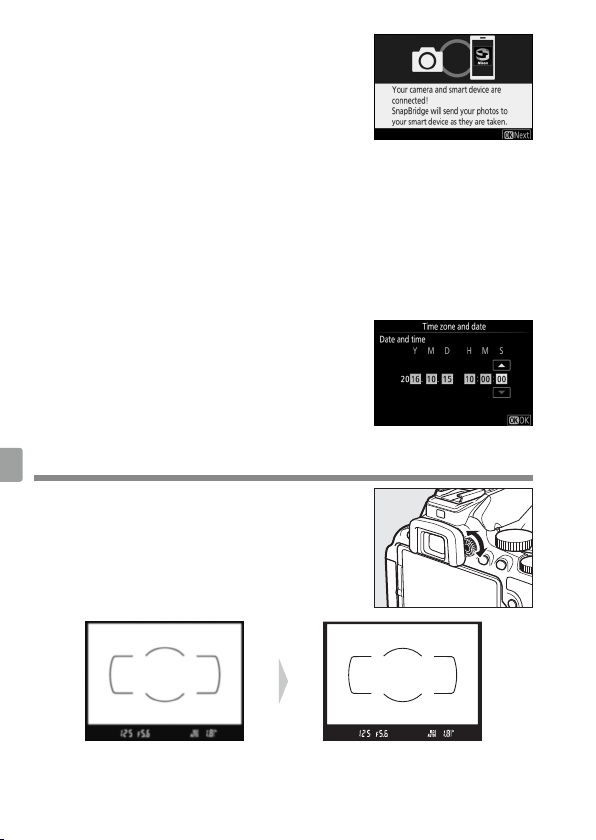
6
Press J when the dialog at right is
displayed.
If the camera displays Unable to
connect., the display will change after a
short pause. Return to Step 4.
7
Follow the on-screen instructions.
Follow the instructions displayed by the camera and smart device
to complete the setup process.
❚❚ Setup from the Camera Menus
1
Turn the camera on.
A language-selection dialog will be displayed; press 1 and 3 to
highlight a language and press J to select.
2
Press G and set the camera clock.
After setting time zone, date format, and
daylight saving time options, use the
multi selector and J button to set the
camera clock.
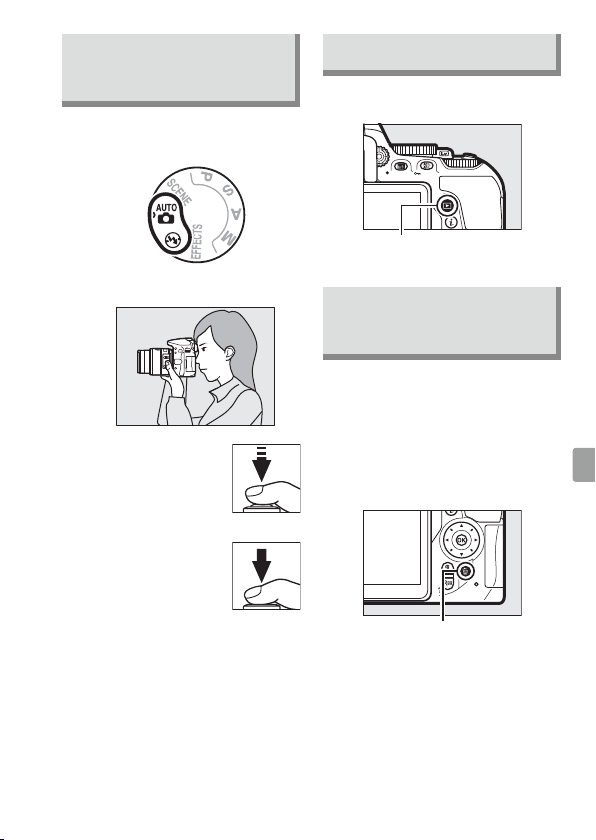
Focus the View nder
After removing the lens cap, rotate the
diopter adjustment control until the AF
area brackets are in sharp focus. When
operating the control with your eye to the
view nder, be careful not to put your ngers
or ngernails in your eye.
View nder not in focus View nder in focus
11
“Point-and-Shoot”
Modes (i and j)
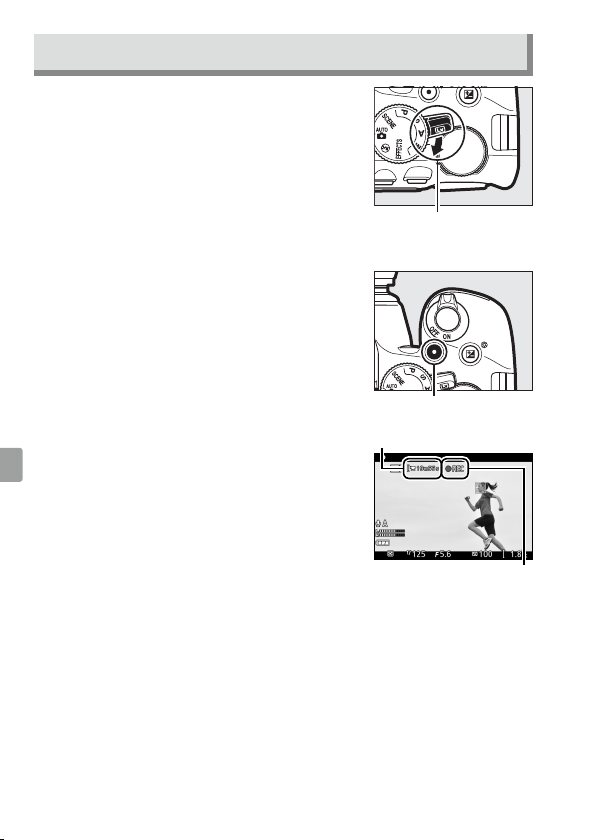
1
Rotate the mode dial to i
or j.
2
Frame the photograph.
3
Press the
shutter-release
button halfway
to focus.
4
Smoothly press
the shutter-
release button
the rest of
the way down to take the
photograph.
Viewing Photographs
Pressing K displays a picture in
the monitor.
K button
Deleting Unwanted
Photographs
Note that photographs can not be
recovered once deleted.
• Press the O button. A
con rmation dialog will be
displayed; press the O button
again to delete the image and
return to playback.
O button
• To exit without deleting the
picture, press K.
12
Recording Movies
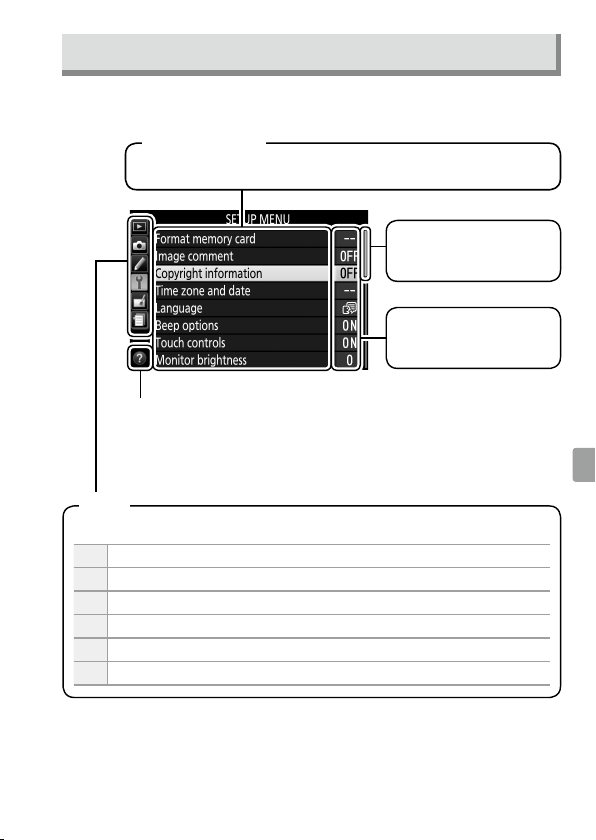
1
Rotate the live view switch.
The view through the lens will be
displayed in the monitor.
Live view switch
2
Press the shutter-release button halfway to focus.
3
Press the movie-record button to start
recording.
Movie-record button
A recording indicator and the time
available are displayed in the monitor.
Time remaining
Recording indicator
4
Press the movie-record button again to end recording.
5
Rotate the live view switch to exit live view.
13
Camera Menus
Most shooting, playback, and setup options can be accessed from the
camera menus. To view the menus, press the G button.
Help icon
If the help icon is displayed, you can press the W(Q) button
to view help for the currently selected item.
Choose from the following menus:
D
Playback
C
Shooting
A
Custom Settings
B
Setup
N
Retouch
m Recent Settings / OMy Menu
Tabs
Options in current menu.
Menu options
Slider shows position
in current menu.
Current settings are
shown by icons.
14
Caring for the Camera
❚❚ Storage
When the camera will not be used for
an extended period, turn the camera
o and remove the battery. Do not
store in locations that:
• are poorly ventilated or subject to
humidities of over 60%
• are next to equipment that
produces strong electromagnetic
elds, such as televisions or radios
• are exposed to temperatures above
50°C (122°F) or below –10°C (14°F)
❚❚ Cleaning
Camera Body
Use a blower to remove dust and
lint, then wipe gently with a soft, dry
cloth. After using the camera at the
beach or seaside, wipe o sand or
salt with a cloth lightly dampened in
distilled water and dry thoroughly.
Important: Dust or other foreign matter
inside the camera may cause damage
not covered under warranty.
Lens, Mirror, and View nder
These glass elements are easily
damaged. Remove dust and lint with
a blower. If using an aerosol blower,
keep the can vertical to prevent
the discharge of liquid. To remove
ngerprints and other stains, apply a
small amount of lens cleaner to a soft
cloth and clean with care.
Monitor
Remove dust and lint with a blower.
When removing ngerprints and
other stains, wipe the surface lightly
with a soft cloth or chamois leather.
Do not apply pressure, as this could
result in damage or malfunction.
* Do not use alcohol, thinner, or other
volatile chemicals.
Troubleshooting
❚❚ Battery/Display
The camera is on but does not respond: Wait
for recording to end. If the problem
persists, turn the camera o . If the
camera does not turn o , remove
and reinsert the battery or, if you
are using an AC adapter, disconnect
and reconnect the AC adapter. Note
that although any data currently
being recorded will be lost, data
that have already been recorded
will not be a ected by removing or
disconnecting the power source.
View nder is dark: Insert a fully-charged
battery.
Displays turn o without warning: Choose
longer delays for Custom Setting c2
(Auto o timers).
View nder display is unresponsive and dim:
The response times and brightness of
this display vary with temperature.
Fine lines are visible around active focus
point or display turns red when focus point
is highlighted: These phenomena are
normal for this type of view nder and
do not indicate a malfunction.
❚❚ Shooting (All Modes)
Camera takes time to turn on: Delete les
or folders.
15
Speci cations
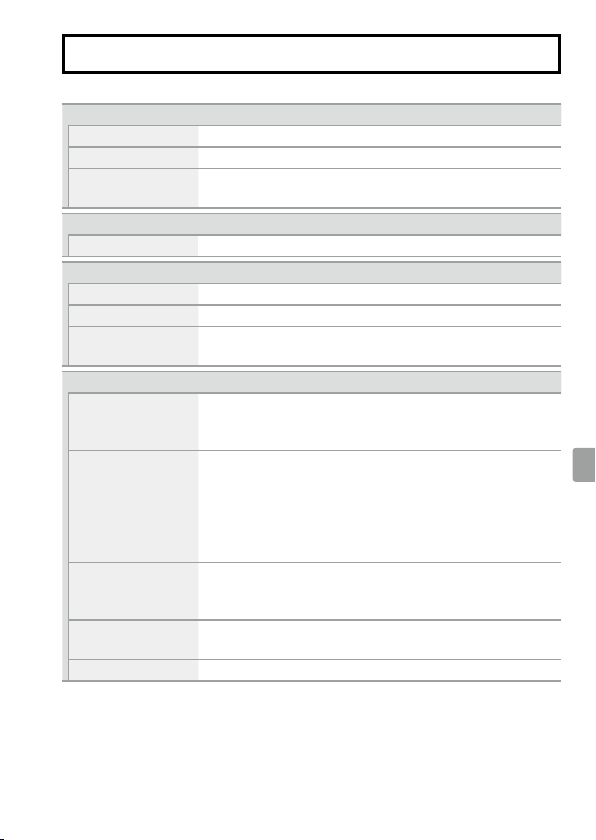
❚❚ Nikon D5600 Digital Camera
Type
Type Single-lens re ex digital camera
Lens mount Nikon F mount (with AF contacts)
E ective angle of view Nikon DX format; focal length equivalent to approx. 1.5×
that of lenses with FX format angle of view
E ective pixels
E ective pixels 24.2 million
Image sensor
Image sensor 23.5 × 15.6 mm CMOS sensor
Total pixels 24.78 million
Dust-reduction System Image sensor cleaning, Image Dust O reference data
(CaptureNX-D software required)
Storage
Image size (pixels) • 6000 × 4000 (Large)
• 4496 × 3000 (Medium)
• 2992 × 2000 (Small)
File format • NEF (RAW): 12- or 14 bit, compressed
• JPEG: JPEG-Baseline compliant with ne (approx.
1:4), normal (approx. 1:8), or basic (approx. 1:16)
compression
• NEF (RAW)+JPEG: Single photograph recorded in both NEF
(RAW) and JPEG formats
Picture Control System Standard, Neutral, Vivid, Monochrome, Portrait,
Landscape, Flat; selected Picture Control can be
modi ed; storage for custom Picture Controls
Media SD (Secure Digital) and UHS-I compliant SDHC and SDXC
memory cards
File system DCF 2.0, Exif 2.3, PictBridge
16
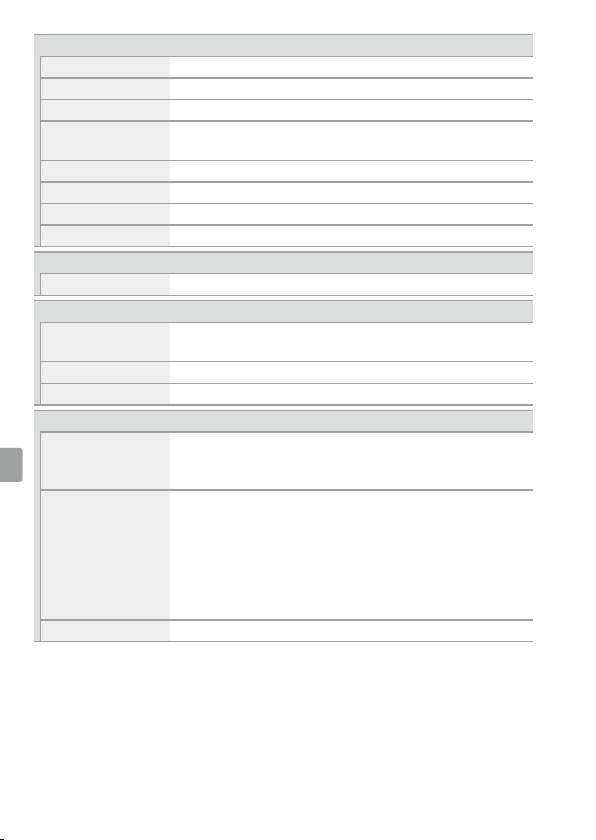
View nder
View nder Eye-level pentamirror single-lens re ex view nder
Frame coverage Approx. 95% horizontal and 95% vertical
Magni cation Approx. 0.82× (50mm f/1.4 lens at in nity, –1.0m
–1
)
Eyepoint 17mm (–1.0m
–1
; from center surface of view nder
eyepiece lens)
Diopter adjustment –1.7 – +0.5m
–1
Focusing screen Type B BriteView Clear Matte Mark VII screen
Re ex mirror Quick return
Lens aperture Instant return, electronically controlled
Lens
Autofocus support Autofocus is available with AF-S, AF-P, and AF-I lenses.
Shutter
Type Electronically-controlled vertical-travel focal-plane
shutter
Speed / – 30s in steps of / or /EV; Bulb; Time
Flash sync speed X = /s; synchronizes with shutter at /s or slower
Release
Release mode
8 (single frame), ! (continuous L), 9 (continuous H),
J (quiet shutter release), E (self-timer); interval timer
photography supported
Frame advance rate
• !: Up to 3fps
• 9: Up to 5fps (JPEG and 12-bit NEF/RAW) or 4fps
(14-bit NEF/RAW)
Note: Frame rates assume continuous-servo AF, manual or
shutter-priority auto exposure, a shutter speed of /s
or faster, Release selected for Custom Setting a1 (AF-C
priority selection), and other settings at default values.
Self-timer 2s, 5s, 10s, 20s; 1 – 9 exposures
17
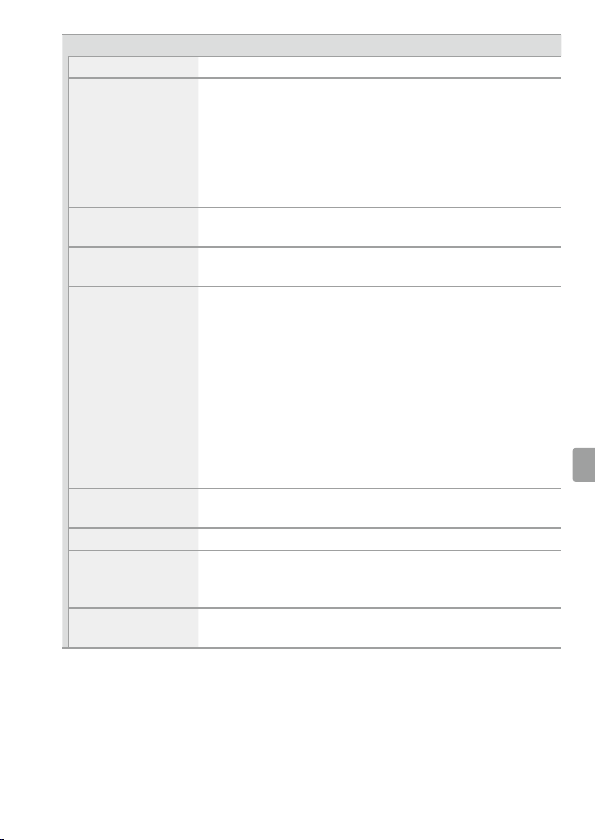
Exposure
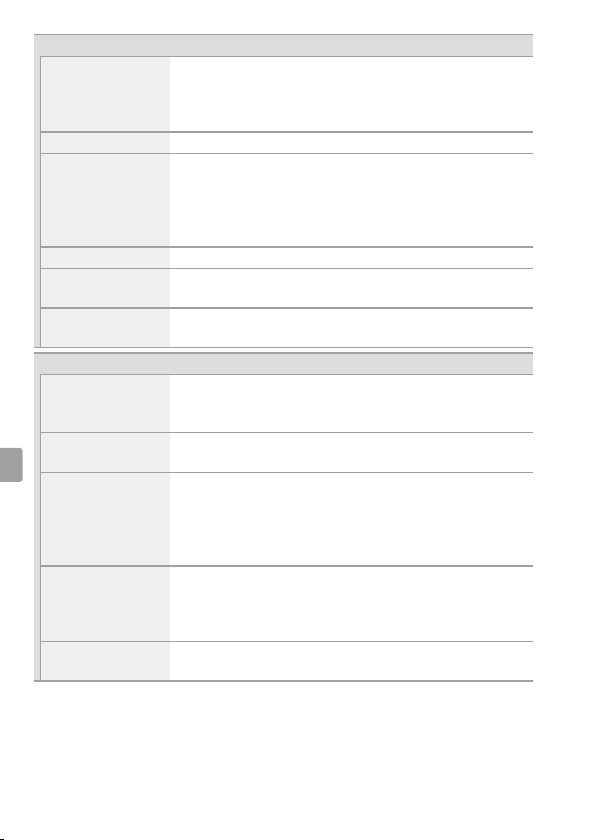
Metering mode TTL exposure metering using 2016-pixel RGB sensor
Metering method • Matrix metering: 3D color matrix metering II (type G,
E, and D lenses); color matrix metering II (other CPU
lenses)
• Center-weighted metering: Weight of 75% given to 8-mm
circle in center of frame
• Spot metering: Meters 3.5-mm circle (about 2.5% of
frame) centered on selected focus point
Range (ISO100, f/1.4
lens, 20°C/68°F)
• Matrix or center-weighted metering: 0 – 20EV
• Spot metering: 2 – 20EV
Exposure meter
coupling
CPU
Mode
Auto modes (iauto; jauto, ash o ); programmed
auto with exible program (P); shutter-priority auto (S);
aperture-priority auto (A); manual (M); scene modes
(kportrait; llandscape; pchild; msports; nclose
up; onight portrait; rnight landscape; sparty/
indoor; tbeach/snow; usunset; vdusk/dawn; wpet
portrait; xcandlelight; yblossom; zautumn colors;
0food); special e ects modes (%night vision; Ssuper
vivid; Tpop; Uphoto illustration; ' toy camera e ect;
(miniature e ect; 3selective color; 1silhouette;
2high key; 3low key)
Exposure compensation C
an be adjusted by –5 – +5EV in increments of / or /EV
in P, S, A, M, h, and % modes
Exposure lock
Luminosity locked at detected value with A(L) button
ISO sensitivity
(Recommended
Exposure Index)
ISO 100 – 25600 in steps of /EV. Auto ISO sensitivity
control available
Active D-Lighting
YAuto, ZExtra high, PHigh, QNormal, RLow,
!O
18
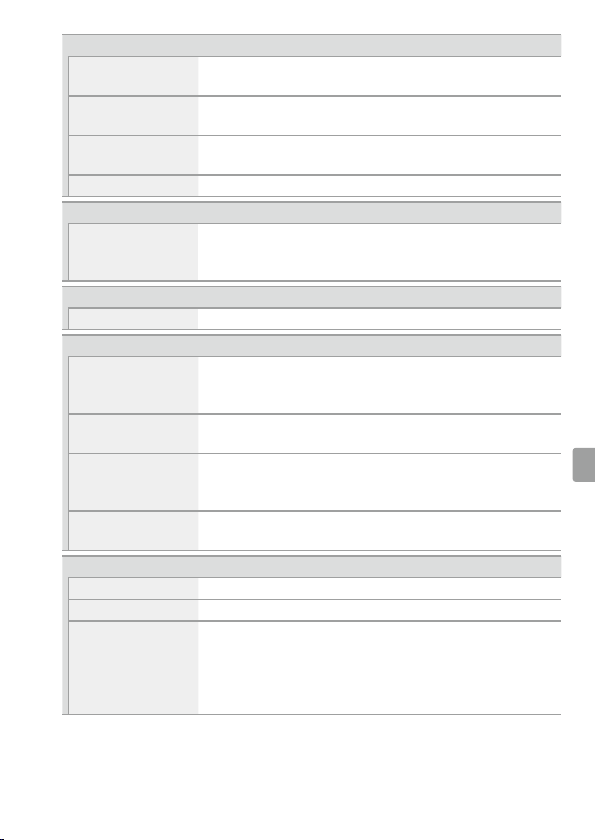
Focus
Autofocus Nikon Multi-CAM 4800DX autofocus sensor module with
TTL phase detection, 39 focus points (including 9 cross-
type sensors), and AF-assist illuminator (range approx.
0.5 – 3m/1ft 8in. – 9ft10 in.)
Detection range –1 – +19EV (ISO 100, 20°C/68°F)
Lens servo • Autofocus (AF): Single-servo AF (AF-S); continuous-servo AF
(AF-C); auto AF-S/AF-C selection (AF-A); predictive focus
tracking activated automatically according to subject
status
• Manual focus (MF): Electronic range nder can be used
Focus point Can be selected from 39 or 11 focus points
AF-area mode Single-point AF, 9-, 21-, or 39- point dynamic-area AF,
3D-tracking, auto-area AF
Focus lock Focus can be locked by pressing shutter-release button
halfway (single-servo AF) or by pressing A(L) button
Flash
Built-in ash
i, k, p, n, o, s, w, S, T, U, ': Auto ash with auto
pop-up
P, S, A, M, 0: Manual pop-up with button release
Guide Number Approx. 12/39, 12/39 with manual ash (m/ft, ISO 100,
20°C/68°F)
Flash control TTL: i-TTL ash control using 2016-pixel RGB sensor is
available with built-in ash; i-TTL balanced ll- ash for
digital SLR is used with matrix and center-weighted
metering, standard i-TTL ash for digital SLR with spot
metering
Flash mode Auto, auto with red-eye reduction, auto slow sync, auto
slow sync with red-eye reduction, ll- ash, red-eye
reduction, slow sync, slow sync with red-eye reduction,
rear-curtain with slow sync, rear-curtain sync, o
Flash compensation Can be adjusted by –3 – +1EV in increments of / or /EV
in P, S, A, M, and h modes
19
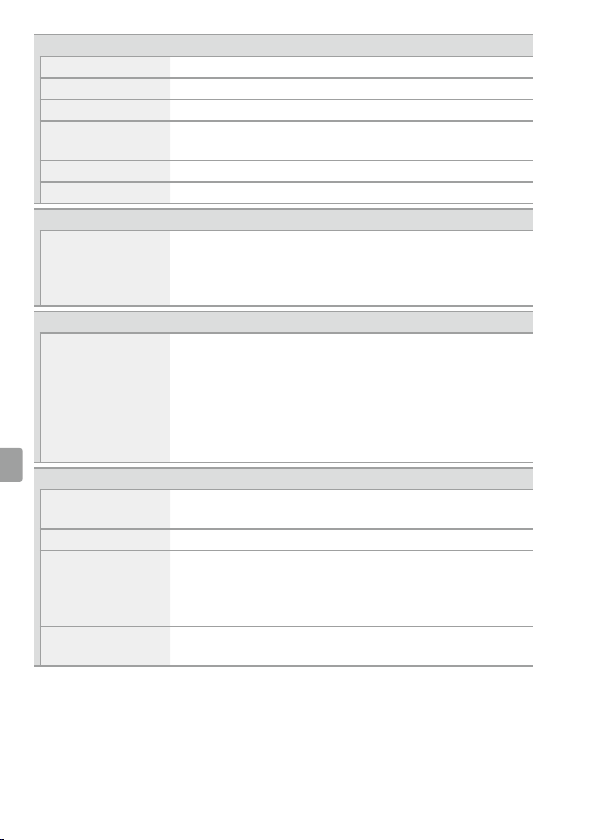
Flash
Flash-ready indicator Lights when built-in ash or optional ash unit is fully
charged; blinks after ash is red at full output
Accessory shoe ISO 518 hot-shoe with sync and data contacts and safety
lock
Nikon Creative Lighting
System (CLS)
Nikon CLS supported
Sync terminal AS-15 sync terminal adapter (available separately)
White balance
White balance Auto, incandescent, uorescent (7 types), direct sunlight,
ash, cloudy, shade, preset manual, all except preset
manual with ne-tuning.
Bracketing
Bracketing types Exposure, white balance, and ADL
Live view
Lens servo • Autofocus (AF): Single-servo AF (AF-S); full-time-servo AF
(AF-F)
• Manual focus (MF)
AF-area mode Face-priority AF, wide-area AF, normal-area AF, subject-
tracking AF
Autofocus Contrast-detect AF anywhere in frame (camera selects
focus point automatically when face-priority AF or
subject-tracking AF is selected)
Automatic scene
selection
Available in i and j modes
Movie
Metering TTL exposure metering using main image sensor
Metering method Matrix
Frame size (pixels) and
frame rate
• 1920 × 1080; 60p (progressive), 50p, 30p, 25p, 24p
• 1280 × 720; 60p, 50p
Actual frame rates for 60p, 50p, 30p, 25p, and 24p are
59.94, 50, 29.97, 25, and 23.976fps respectively; options
support both ★high and normal image quality
20
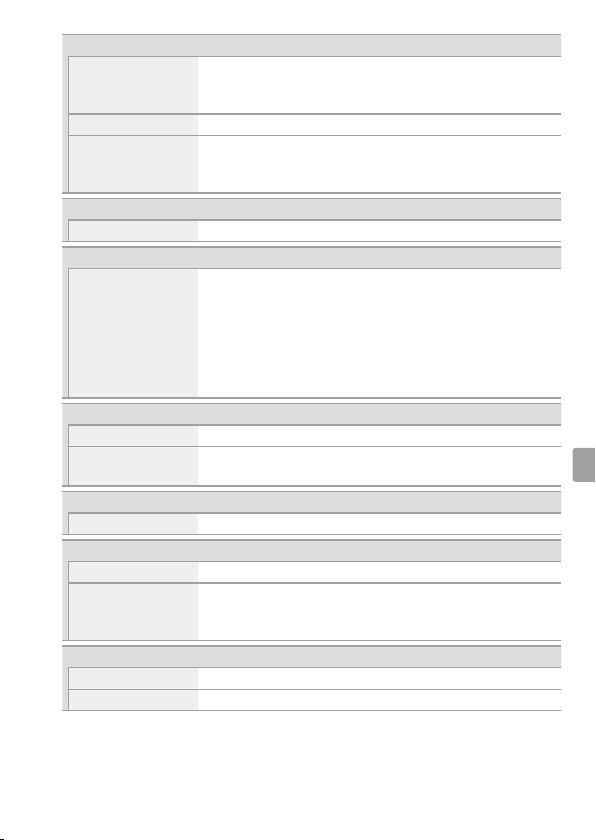
Movie
File format MOV
Video compression H.264/MPEG-4 Advanced Video Coding
Audio recording format Linear PCM
Audio recording device Built-in or external stereo microphone; sensitivity
adjustable
ISO sensitivity ISO 100 – 25600
Other options Time-lapse movies
Monitor
Monitor 8.1cm/3.2-in. (3:2), approx. 1037k-dot (720 × 480 ×
3 = 1,036,800dots), TFT vari-angle LCD touch screen
with 170° viewing angle, approx. 100% frame coverage,
brightness adjustment, and eye-sensor controlled on/o
Playback
Playback Full-frame and thumbnail (4, 12, or 80 images or
calendar) playback with playback zoom, playback zoom
cropping, playback face zoom, movie playback, photo
and/or movie slide shows, histogram display, highlights,
photo information, location data display, auto image
rotation, picture rating, and image comment (up to 36
characters)
Interface
USB Hi-Speed USB with Micro-USB connector; connection to
built-in USB port is recommended
HDMI output Type C HDMI connector
Accessory terminal • Wireless remote controllers: WR-1, WR-R10 (available
separately)
• Remote cords: MC-DC2 (available separately)
• GPS units: GP-1/GP-1A (available separately)
Audio input Stereo mini-pin jack (3.5mm diameter); supports
optional ME-1 stereo microphones
21
Wireless/Bluetooth
Wireless • Standards: IEEE 802.11b, IEEE 802.11g
• Operating frequency: 2412 – 2462 MHz (channels 1 – 11)
• Authentication: Open system, WPA2-PSK
Bluetooth Communication protocols: Bluetooth Speci cation Version 4.1
Range (line of sight) Approximately 10m (32ft) without interference; range
may vary with signal strength and presence or absence
of obstacles
NFC
Operation NFC Forum Type 3 Tag
Supported languages
Supported languages Arabic, Bengali, Bulgarian, Chinese (Simpli ed and
Traditional), Czech, Danish, Dutch, English, Finnish,
French, German, Greek, Hindi, Hungarian, Indonesian,
Italian, Japanese, Korean, Marathi, Norwegian, Persian,
Polish, Portuguese (Portugal and Brazil), Romanian,
Russian, Serbian, Spanish, Swedish, Tamil, Telugu, Thai,
Turkish, Ukrainian, Vietnamese
Power source
Battery One EN-EL14a rechargeable Li-ion battery
AC adapter EH-5b/EH-5c AC adapter; requires EP-5A power
connector (available separately)
Tripod socket
Tripod socket / in. (ISO 1222)
Dimensions/weight
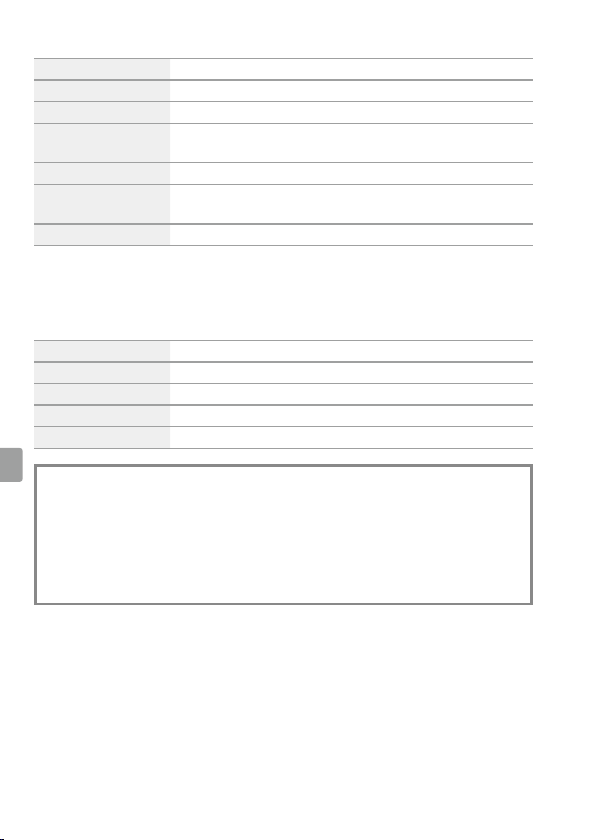
Dimensions (W×H×D) Approx. 124 × 97 × 70mm (4.9 × 3.9 × 2.8in.)
Weight Approx. 465g (1lb 0.4oz) with battery and memory card
but without body cap; approx. 415g/14.7oz (camera
body only)
Operating environment
Temperature 0°C – 40°C (+32°F – 104°F)
Humidity 85% or less (no condensation)
22
❚❚ MH-24 Battery Charger
Rated input AC 100 – 240 V, 50/60 Hz, 0.2 A maximum
Rated output DC 8.4 V/0.9 A
Supported batteries Nikon EN-EL14a rechargeable Li-ion batteries
Charging time Approx. 1 hour and 50minutes at an ambient
temperature of 25°C (77°F) when no charge remains
Operating temperature 0°C – 40°C (+32°F – 104°F)
Dimensions (W×H×D) Approx. 70 × 26 × 97mm (2.8 × 1.0 × 3.8 in.), excluding
plug adapter
Weight Approx. 96 g (3.4 oz), excluding plug adapter
The symbols on this product represent the following:
mAC, pDC, qClass II equipment (The construction of the product is double-
insulated.)
❚❚ EN-EL14a Rechargeable Li-ion Battery
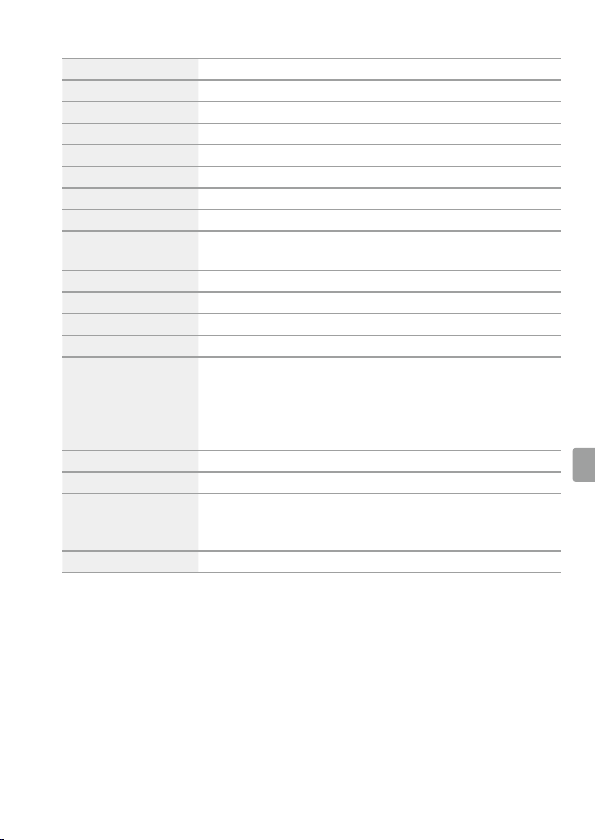
Type Rechargeable lithium-ion battery
Rated capacity 7.2V/1230mAh
Operating temperature 0°C – 40°C (+32°F – 104°F)
Dimensions (W×H×D) Approx. 38 × 53 × 14mm (1.5 × 2.1 × 0.6in.)
Weight Approx. 49g (1.7oz), excluding terminal cover
A Battery Life
The movie footage or number of shots that can be recorded with fully-
charged batteries varies with the condition of the battery, temperature, the
interval between shots, and the length of time menus are displayed. Sample
gures for EN-EL14a (1230 mAh) batteries are given below.
• Photographs, single-frame release mode (CIPA standard): Approximately 970shots
• Movies: Approximately 70 minutes at 1080/60p
23
❚❚ AF-P DX NIKKOR 18–55mm f/3.5–5.6G VR
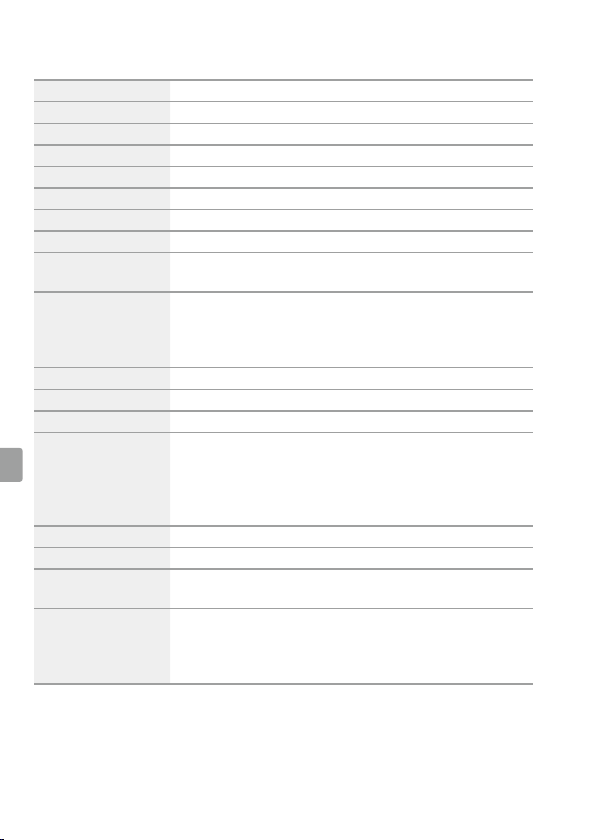
Type Type G AF-P DX lens with built-in CPU and F mount
Focal length 18 – 55mm
Maximum aperture f/3.5 – 5.6
Lens construction 12 elements in 9 groups (2 aspherical lens elements)
Angle of view 76° – 28° 50´
Focal length scale Graduated in millimeters (18, 24, 35, 45, 55)
Distance information Output to camera
Zoom Manual zoom using independent zoom ring
Focusing Autofocus controlled by stepping motor; separate focus
ring for manual focus
Vibration reduction Lens shift using voice coil motors (VCMs)
Minimum focus distance 0.25m (0.9ft) from focal plane at all zoom positions
Diaphragm blades 7 (rounded diaphragm opening)
Diaphragm Fully automatic
Aperture range • 18mm focal length: f/3.5 – 22
• 55mm focal length: f/5.6 – 38
The minimum aperture displayed may vary depending
on the size of the exposure increment selected with the
camera.
Metering Full aperture
Filter-attachment size 55mm (P = 0.75 mm)
Dimensions Approx. 64.5 mm maximum diameter ×62.5 mm
(distance from camera lens mount ange when lens is
retracted)
Weight Approx. 205 g (7.3oz)
24
❚❚ AF-P DX NIKKOR 70–300mm f/4.5–6.3G ED VR and AF-P DX NIKKOR 70–300mm
f/4.5–6.3G ED
Type Type G AF-P DX lens with built-in CPU and F mount
Focal length 70 – 300mm
Maximum aperture f/4.5 – 6.3
Lens construction 14 elements in 10 groups (including 1 ED lens element)
Angle of view 22° 50´ – 5° 20´
Focal length scale Graduated in millimeters (70, 100, 135, 200, 300)
Distance information Output to camera
Zoom Manual zoom using independent zoom ring
Focusing Autofocus controlled by stepping motor; separate focus
ring for manual focus
Vibration reduction
(AF-P DX NIKKOR
70–300mm f/4.5–6.3G
ED VR only)
Lens shift using voice coil motors (VCMs)
Minimum focus distance 1.1 m (3.7 ft) from focal plane at all zoom positions
Diaphragm blades 7 (rounded diaphragm opening)
Diaphragm Fully automatic
Aperture range • 70mm focal length: f/4.5 – 22
• 300mm focal length: f/6.3 – 32
The minimum aperture displayed may vary depending
on the size of the exposure increment selected with the
camera.
Metering Full aperture
Filter-attachment size 58 mm (P = 0.75 mm)
Dimensions Approx. 72mm maximum diameter × 125mm (distance
from camera lens mount ange)
Weight • AF-P DX NIKKOR 70–300mm f/4.5–6.3G ED VR: Approx. 415 g
(14.7oz)
• AF-P DX NIKKOR 70–300mm f/4.5–6.3G ED: Approx. 400 g
(14.2oz)
25
❚❚ AF-S DX NIKKOR 18–140mm f/3.5–5.6G ED VR
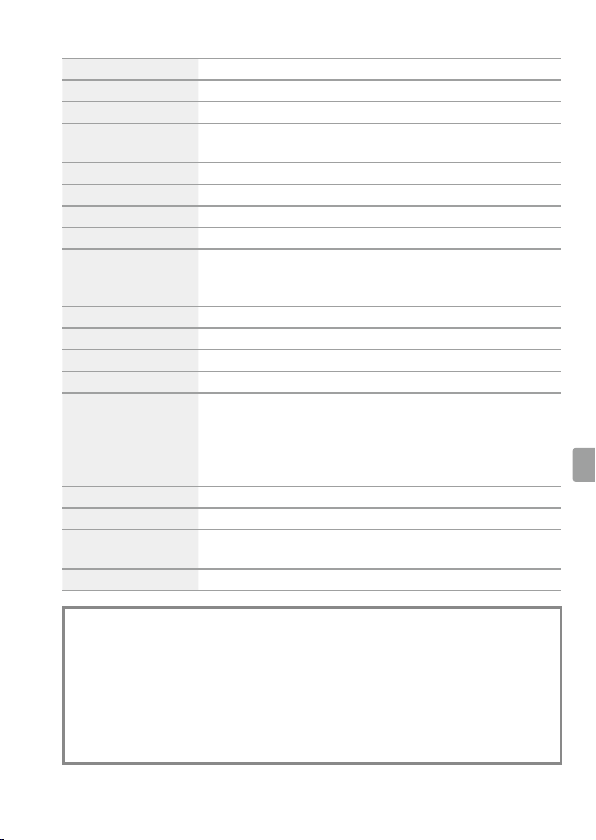
Type Type G AF-S DX lens with built-in CPU and F mount
Focal length 18 – 140mm
Maximum aperture f/3.5 – 5.6
Lens construction 17 elements in 12 groups (including 1 ED lens element,
1aspherical lens element)
Angle of view 76° – 11° 30´
Focal length scale Graduated in millimeters (18, 24, 35, 50, 70, 140)
Distance information Output to camera
Zoom Manual zoom using independent zoom ring
Focusing Nikon Internal Focusing (IF) System with autofocus
controlled by Silent Wave Motor and separate focus ring
for manual focus
Vibration reduction Lens shift using voice coil motors (VCMs)
Minimum focus distance 0.45m (1.48ft) from focal plane at all zoom positions
Diaphragm blades 7 (rounded diaphragm opening)
Diaphragm Fully automatic
Aperture range • 18mm focal length: f/3.5 – 22
• 140mm focal length: f/5.6 – 38
The minimum aperture displayed may vary depending
on the size of the exposure increment selected with the
camera.
Metering Full aperture
Filter-attachment size 67mm (P = 0.75mm)
Dimensions Approx. 78mm maximum diameter × 97mm (distance
from camera lens mount ange)
Weight Approx. 490g (17.3oz)
• Unless otherwise stated, all measurements are performed in conformity
with Camera and Imaging Products Association (CIPA) standards or
guidelines.
• All gures are for a camera with a fully-charged battery.
• Nikon reserves the right to change the appearance and speci cations of the
hardware and software described in this manual at any time and without
prior notice. Nikon will not be held liable for damages that may result from
any mistakes that this manual may contain.
26
❚❚ Trademark Information
IOS is a trademark or registered
trademark of Cisco Systems, Inc.,
in the United States and/or other
countries and is used under license.
Windows is either a registered
trademark or a trademark of Microsoft
Corporation in the United States and/
or other countries. Mac, OS X, Apple®,
App Store®, the Apple logos, iPhone®,
iPad®, and iPod touch® are trademarks
of Apple Inc. registered in the U.S.
and/or other countries. Android is a
trademark of Google Inc. The Android
robot is reproduced or modi ed
from work created and shared by
Google and used according to terms
described in the Creative Commons
3.0 Attribution License. PictBridge
logo is a trademark. The SD, SDHC,
and SDXC logos are trademarks of
the SD-3C, LLC. HDMI, the HDMI logo
and High-De nition Multimedia
Interface are trademarks or registered
trademarks of HDMI Licensing LLC.
Wi-Fi and the Wi-Fi logo are
trademarks or registered trademarks
of the Wi-Fi Alliance. N-Mark is a
trademark or registered trademark of
NFC Forum, Inc., in the United States
and/or other countries.
The Bluetooth® word mark and logos
are registered trademarks owned by
Bluetooth SIG, Inc. and any use of
such marks by Nikon Corporation is
under license.
All other trade names mentioned
in this manual or the other
documentation provided with
your Nikon product are trademarks
or registered trademarks of their
respective holders.
“Made for iPod,” “Made for iPhone,”
and “Made for iPad” mean that
an electronic accessory has been
designed to connect speci cally to
iPod, iPhone, or iPad, respectively,
and has been certi ed by
the developer to meet Apple
performance standards. Apple is
not responsible for the operation
of this device or its compliance
with safety and regulatory
standards. Please note that the
use of this accessory with iPod,
iPhone, or iPad may a ect wireless
performance.
❚❚ Conformity Marking
The standards with which the camera
complies can be viewed using the
Conformity marking option in the
setup menu.
❚❚ FreeType License (FreeType2)
Portions of this software are copyright
© 2012 The FreeType Project
(http://www.freetype.org). All rights
reserved.
❚❚ MIT License (HarfBuzz)
Portions of this software are copyright
© 2016 The HarfBuzz Project
(http://www.freedesktop.org/wiki/
Software/HarfBuzz). All rights
reserved.
27
For Your Safety
To prevent damage to property or injury to
yourself or to others, read “For Your Safety”
in its entirety before using this product.
Keep these safety instructions where all
those who use this product will read them.
DANGER: Failure to observe the
precautions marked with this icon carries
a high risk of death or severe injury.
WARNING: Failure to observe the
precautions marked with this icon could
result in death or severe injury.
CAUTION: Failure to observe the
precautions marked with this icon could
result in injury or property damage.
WARNING
• Do not use while walking or operating a
motor vehicle.
Failure to observe this precaution could
result in accidents or other injury.
• Do not disassemble or modify this
product. Do not touch internal parts that
become exposed as the result of a fall or
other accident.
Failure to observe these precautions could
result in electric shock or other injury.
• Should you notice any abnormalities
such as the product producing smoke,
heat, or unusual odors, immediately
disconnect the battery or power source.
Continued operation could result in re,
burns or other injury.
• Keep dry. Do not handle with wet hands.
Do not handle the plug with wet hands.
Failure to observe these precautions could
result in re or electric shock.
• Do not let your skin remain in prolonged
contact with this product while it is on or
plugged in.
Failure to observe this precaution could
result in low-temperature burns.
• Do not use this product in the presence
of ammable dust or gas such as
propane, gasoline or aerosols.
Failure to observe this precaution could
result in explosion or re.
• Do not directly view the sun or other
bright light source through the lens or
camera.
Failure to observe this precaution could
result in visual impairment.
• Do not aim the ash or AF-assist
illuminator at the operator of a motor
vehicle.
Failure to observe this precaution could
result in accidents.
• Keep this product out of reach of
children.
Failure to observe this precaution could
result in injury or product malfunction. In
addition, note that small parts constitute
a choking hazard. Should a child swallow
any part of this product, seek immediate
medical attention.
• Do not entangle, wrap or twist the straps
around your neck.
Failure to observe this precaution could
result in accidents.
• Do not use batteries, chargers, or AC
adapters not speci cally designated
for use with this product. When using
batteries, chargers, and AC adapters
designated for use with this product,
do not:
- Damage, modify, forcibly tug or bend
the cords or cables, place them under
heavy objects, or expose them to heat
or ame.
- Use travel converters or adapters
designed to convert from one voltage
to another or with DC-to-AC inverters.
Failure to observe these precautions could
result in re or electric shock.
• Do not handle the plug when charging
the product or using the AC adapter
during thunderstorms.
Failure to observe this precaution could
result in electric shock.
28
• Do not handle with bare hands in
locations exposed to extremely high or
low temperatures.
Failure to observe this precaution could
result in burns, or frostbite.
CAUTION
• Do not leave the lens pointed at the sun
or other strong light sources.
Light focused by the lens could cause re
or damage to product’s internal parts.
When shooting backlit subjects, keep
the sun well out of the frame. Sunlight
focused into the camera when the sun is
close to the frame could cause re.
• Turn this product o when its use is
prohibited. Disable wireless features
when the use of wireless equipment is
prohibited.
The radio-frequency emissions produced
by this product could interfere with
equipment onboard aircraft or in hospitals
or other medical facilities.
• Remove the battery and disconnect the
AC adapter if this product will not be
used for an extended period.
Failure to observe this precaution could
result in re or product malfunction.
• Do not touch moving parts of the lens or
other moving parts.
Failure to observe this precaution could
result in injury.
• Do not re the ash in contact with or in
close proximity to the skin or objects.
Failure to observe this precaution could
result in burns or re.
• Do not leave the product where it
will be exposed to extremely high
temperatures, for an extended period
such as in an enclosed automobile or in
direct sunlight.
Failure to observe this precaution could
result in re or product malfunction.
DANGER (Batteries)
• Do not mishandle batteries.
Failure to observe the following
precautions could result in the batteries
leaking, overheating, rupturing, or
catching re:
- Use only rechargeable batteries
approved for use in this product.
- Do not expose batteries to ame or
excessive heat.
- Do not disassemble.
- Do not short-circuit the terminals by
touching them to necklaces, hairpins, or
other metal objects.
- Do not expose batteries or the products
in which they are inserted to powerful
physical shocks.
• Do not attempt to recharge EN-EL14a
rechargeable batteries using chargers
not speci cally designated for this
purpose.
Failure to observe this precaution
could result in the batteries leaking,
overheating, rupturing, or catching re.
• If battery liquid comes into contact with
the eyes, rinse with plenty of clean water
and seek immediate medical attention.
Delaying action could result in eye
injuries.
WARNING (Batteries)
• Keep batteries out of reach of children.
Should a child swallow a battery, seek
immediate medical attention.
• Do not immerse batteries in water or
expose to rain.
Failure to observe this precaution could
result in re or product malfunction.
Immediately dry the product with a towel
or similar object should it become wet.
29
• Discontinue use immediately should
you notice any changes in the batteries,
such as discoloration or deformation.
Cease charging EN-EL14a rechargeable
batteries if they do not charge in the
speci ed period of time.
Failure to observe these precautions
could result in the batteries leaking,
overheating, rupturing, or catching re.
• Prior to disposal, insulate battery
terminals with tape.
Overheating, rupture, or re may result
should metal objects come into contact
with the terminals. Recycle or dispose of
batteries in accord with local regulations.
• If battery liquid comes into contact with
a person’s skin or clothing, immediately
rinse the a ected area with plenty of
clean water.
Failure to observe this precaution could
result in skin irritation.
Notices
• No part of the manuals included with this
product may be reproduced, transmitted,
transcribed, stored in a retrieval system,
or translated into any language in any
form, by any means, without Nikon’s prior
written permission.
• Nikon reserves the right to change the
appearance and speci cations of the
hardware and software described in these
manuals at any time and without prior
notice.
• Nikon will not be held liable for any
damages resulting from the use of this
product.
• While every e ort has been made to
ensure that the information in these
manuals is accurate and complete, we
would appreciate it were you to bring any
errors or omissions to the attention of the
Nikon representative in your area (address
provided separately).
Notice for Customers in Canada
CAN ICES-3 B / NMB-3 B
Notices for Customers in Europe
CAUTION: RISK OF EXPLOSION IF BATTERY
IS REPLACED BY AN INCORRECT TYPE.
DISPOSE OF USED BATTERIES ACCORDING
TO THE INSTRUCTIONS.
This symbol indicates that
electrical and electronic
equipment is to be collected
separately.
The following apply only to
users in European countries:
• This product is designated for separate
collection at an appropriate collection
point. Do not dispose of as household
waste.
• Separate collection and recycling helps
conserve natural resources and prevent
negative consequences for human health
and the environment that might result
from incorrect disposal.
• For more information, contact the retailer
or the local authorities in charge of waste
management.
This symbol on the battery
indicates that the battery is to
be collected separately.
The following apply only to
users in European countries:
• All batteries, whether marked with this
symbol or not, are designated for separate
collection at an appropriate collection
point. Do not dispose of as household
waste.
• For more information, contact the retailer
or the local authorities in charge of waste
management.
30
Notices for Customers in the U.S.A.
The Battery Charger
IMPORTANT SAFETY INSTRUCTIONS—
SAVE THESE INSTRUCTIONS
DANGER—TO REDUCE THE RISK OF
FIRE OR ELECTRIC SHOCK, CAREFULLY
FOLLOW THESE INSTRUCTIONS
For connection to a supply not in the
U.S.A., use an attachment plug adapter
of the proper con guration for the
power outlet if needed. This power unit
is intended to be correctly oriented in a
vertical or oor mount position.
Federal Communications Commission (FCC) Radio
Frequency Interference Statement
D5600
This equipment has been tested and found
to comply with the limits for a Class B digital
device, pursuant to Part 15 of the FCC
rules. These limits are designed to provide
reasonable protection against harmful
interference in a residential installation.
This equipment generates, uses, and
can radiate radio frequency energy and,
if not installed and used in accordance
with the instructions, may cause harmful
interference to radio communications.
However, there is no guarantee that
interference will not occur in a particular
installation. If this equipment does cause
harmful interference to radio or television
reception, which can be determined
by turning the equipment o and on,
the user is encouraged to try to correct
the interference by one or more of the
following measures:
• Reorient or relocate the receiving antenna.
• Increase the separation between the
equipment and receiver.
• Connect the equipment into an outlet on
a circuit di erent from that to which the
receiver is connected.
• Consult the dealer or an experienced
radio/television technician for help.
CAUTIONS
Modi cations
The FCC requires the user be noti ed that
any changes or modi cations made to this
device that are not expressly approved
by Nikon Corporation may void the user’s
authority to operate the equipment.
Interface Cables
Use the interface cables sold or provided
by Nikon for your equipment. Using other
interface cables may exceed the limits of
Class B Part 15 of the FCC rules.
Notice for Customers in the State of
California
WARNING: Handling the cord on this product
may expose you to lead, a chemical known
to the State of California to cause birth
defects or other reproductive harm. Wash
hands after handling.
Nikon Inc., 1300 Walt Whitman Road,
Melville, New York 11747-3064, U.S.A.
Tel.: 631-547-4200
Notice Concerning Prohibition of
Copying or Reproduction
Note that simply being in possession of
material that has been digitally copied or
reproduced by means of a scanner, digital
camera, or other device may be punishable
by law.
• Items prohibited by law from being copied or
reproduced
Do not copy or reproduce paper money,
coins, securities, government bonds, or
local government bonds, even if such
copies or reproductions are stamped
“Sample.”
The copying or reproduction of paper
money, coins, or securities which
are circulated in a foreign country is
prohibited.
Unless the prior permission of the
government has been obtained, the
copying or reproduction of unused
postage stamps or post cards issued by
the government is prohibited.
31
The copying or reproduction of stamps
issued by the government and of certi ed
documents stipulated by law is prohibited.
• Cautions on certain copies and reproductions
The government has issued cautions
on copies or reproductions of securities
issued by private companies (shares, bills,
checks, gift certi cates, etc.), commuter
passes, or coupon tickets, except when a
minimum of necessary copies are to be
provided for business use by a company.
Also, do not copy or reproduce passports
issued by the government, licenses issued
by public agencies and private groups, ID
cards, and tickets, such as passes and meal
coupons.
• Comply with copyright notices
Under copyright law, photographs or
recordings of copyrighted works made
with the camera can not be used without
the permission of the copyright holder.
Exceptions apply to personal use, but note
that even personal use may be restricted
in the case of photographs or recordings
of exhibits or live performances.
Disposing of Data Storage Devices
Please note that deleting images or
formatting memory cards or other data
storage devices does not completely erase
the original image data. Deleted les can
sometimes be recovered from discarded
storage devices using commercially
available software, potentially resulting in
the malicious use of personal image data.
Ensuring the privacy of such data is the
user’s responsibility.
Before discarding a data storage device or
transferring ownership to another person,
erase all data using commercial deletion
software, or format the device and then
completely re ll it with images containing
no private information (for example,
pictures of empty sky). Be sure to also
replace any pictures selected for preset
manual. Before discarding the camera or
transferring ownership to another person,
you should also use the Wi-Fi > Reset
connection settings option in the camera
setup menu to delete any personal network
information. Care should be taken to avoid
injury when physically destroying data
storage devices.
AVC Patent Portfolio License
THIS PRODUCT IS LICENSED UNDER THE AVC PATENT
PORTFOLIO LICENSE FOR THE PERSONAL AND NON-
COMMERCIAL USE OF A CONSUMER TO (i) ENCODE VIDEO
IN COMPLIANCE WITH THE AVC STANDARD (“AVC
VIDEO”) AND/OR (ii) DECODE AVC VIDEO THAT WAS
ENCODED BY A CONSUMER ENGAGED IN A PERSONAL AND
NON-COMMERCIAL ACTIVITY AND/OR WAS OBTAINED FROM
A VIDEO PROVIDER LICENSED TO PROVIDE AVC VIDEO. NO
LICENSE IS GRANTED OR SHALL BE IMPLIED FOR ANY OTHER
USE. ADDITIONAL INFORMATION MAY BE OBTAINED FROM
MPEG LA, L.L.C. SEE http://www.mpegla.com
Use Only Nikon Brand Electronic
Accessories
Nikon cameras are designed to the highest
standards and include complex electronic
circuitry. Only Nikon brand electronic
accessories (including chargers, batteries,
AC adapters, and ash accessories) certi ed
by Nikon speci cally for use with this Nikon
digital camera are engineered and proven
to operate within the operational and safety
requirements of this electronic circuitry.
The use of non-Nikon
electronic accessories
could damage the
camera and may void
your Nikon warranty. The use of third-party
rechargeable Li-ion batteries not bearing
the Nikon holographic seal shown at right
could interfere with normal operation
of the camera or result in the batteries
overheating, igniting, rupturing, or leaking.
For more information about Nikon brand
accessories, contact a local authorized
Nikon dealer.

32
D Use Only Nikon Brand Accessories
Only Nikon brand accessories certi ed by Nikon speci cally for use with
your Nikon digital camera are engineered and proven to operate within its
operational and safety requirements. THE USE OF NON-NIKON ACCESSORIES COULD
DAMAGE YOUR CAMERA AND MAY VOID YOUR NIKON WARRANTY.
A Before Taking Important Pictures
Before taking pictures on important occasions (such as at weddings or before
taking the camera on a trip), take a test shot to ensure that the camera is
functioning normally. Nikon will not be held liable for damages or lost pro ts
that may result from product malfunction.
A Life-Long Learning
As part of Nikon’s “Life-Long Learning” commitment to ongoing product
support and education, continually-updated information is available on-line
at the following sites:
• For users in the U.S.A.: http://www.nikonusa.com/
• For users in Europe and Africa: http://www.europe-nikon.com/support/
• For users in Asia, Oceania, and the Middle East: http://www.nikon-asia.com/
Visit these sites to keep up-to-date with the latest product information, tips,
answers to frequently-asked questions (FAQs), and general advice on digital
imaging and photography. Additional information may be available from
the Nikon representative in your area. See the following URL for contact
information: http://imaging.nikon.com/
33
Bluetooth and Wi-Fi (Wireless LAN)
This product is controlled by the United States Export Administration Regulations (EAR). The
permission of the United States government is not required for export to countries other
than the following, which as of this writing are subject to embargo or special controls: Cuba,
Iran, North Korea, Sudan, and Syria (list subject to change).
The use of wireless devices may be prohibited in some countries or regions. Contact a Nikon-
authorized service representative before using the wireless features of this product outside
the country of purchase.
Notice for Customers in the U.S.A. and Canada
This device complies with Part 15 of FCC Rules and Industry Canada licence-exempt RSS
standard(s). Operation is subject to the following two conditions: (1) this device may not
cause interference, and (2) this device must accept any interference, including interference
that may cause undesired operation of the device.
FCC WARNING
The FCC requires the user to be noti ed that any changes or modi cations made to this
device that are not expressly approved by Nikon Corporation may void the user’s authority
to operate the equipment.
FCC Radio Frequency Interference Statement
Note: This equipment has been tested and found to comply with the limits for a Class B
digital device, pursuant to part 15 of the FCC Rules. These limits are designed to provide
reasonable protection against harmful interference in a residential installation. This
equipment generates, uses and can radiate radio frequency energy and, if not installed
and used in accordance with the instructions, may cause harmful interference to radio
communications. However, there is no guarantee that interference will not occur in a
particular installation. If this equipment does cause harmful interference to radio or
television reception, which can be determined by turning the equipment o and on,
the user is encouraged to try to correct the interference by one or more of the following
measures:
• Reorient or relocate the receiving antenna.
• Increase the separation between the equipment and receiver.
• Connect the equipment into an outlet on a circuit di erent from that to which the receiver
is connected.
• Consult the dealer or an experienced radio/TV technician for help.
Co-location
This transmitter must not be co-located or operated in conjunction with any other antenna
or transmitter.
Nikon Inc., 1300 Walt Whitman Road, Melville, New York 11747-3064, U.S.A.
Tel.: 631-547-4200
34
FCC/IC RF Exposure Statement
The available scienti c evidence does not show that any health problems are associated
with using low power wireless devices. There is no proof, however, that these low power
wireless devices are absolutely safe. Low power wireless devices emit low levels of radio
frequency energy (RF) in the microwave range while being used. Whereas high levels of
RF can produce health e ects (by heating tissue), exposure of low-level RF that does not
produce heating e ects causes no known adverse health e ects. Many studies of low-
level RF exposures have not found any biological e ects. Some studies have suggested
that some biological e ects might occur, but such ndings have not been con rmed by
additional research. The D5600, which is equipped with a LBEE5UW1FS (FCC ID:VPYLB1FS /
IC ID:772C-LB1FS) Wireless LAN Module, has been tested and found to comply with FCC/IC
radiation exposure limits set forth for an uncontrolled environment and meets the FCC radio
frequency (RF) Exposure Guidelines in Supplement C to OET65 and RSS-102 of the IC radio
frequency (RF) Exposure rules. Please refer to the SAR test report that was uploaded to FCC
website.
Notices for Customers in Europe
Hereby, Nikon Corporation, declares that the D5600 is in compliance with the
essential requirements and other relevant provisions of Directive 1999/5/EC.
The declaration of conformity may be consulted at
http://imaging.nikon.com/support/pdf/DoC_D5600.pdf
Notice for Customers in Singapore
Trade Name:
Model: D5600
This device complies with radio-frequency regulations. The content of certi cation labels not
a xed to the device is given below.
Complies with
IDA Standards
DA103423
Notice for Customers in Jordan
Notice for Customers in the United Arab Emirates

35
Security
Although one of the bene ts of this product is that it allows others to freely connect for the
wireless exchange of data anywhere within its range, the following may occur if security is
not enabled:
• Data theft: Malicious third-parties may intercept wireless transmissions to steal user IDs,
passwords, and other personal information.
• Unauthorized access: Unauthorized users may gain access to the network and alter data
or perform other malicious actions. Note that due to the design of wireless networks,
specialized attacks may allow unauthorized access even when security is enabled.
• Unsecured networks: Connecting to open networks may result in unauthorized access. Use
secure networks only.
No reproduction in any form of this manual, in whole or in part (except
for brief quotation in critical articles or reviews), may be made without
written authorization from NIKON CORPORATION.
6MB37611-02