Operating and installation
instructions
Steam ovens
To avoid the risk of accidents or damage to the appliance it is essen-
tial to read these instructions before it is installed and used for the
first time.
en-GB M.-Nr. 11 244 840

Contents
2
Warning and Safety instructions...................................................................... 6
Caring for the environment .............................................................................. 14
Guide to the appliance...................................................................................... 15
Steam oven ......................................................................................................... 15
Accessories supplied .......................................................................................... 16
Controls.............................................................................................................. 17
On/Off sensor control.......................................................................................... 18
Display................................................................................................................. 18
Sensor controls ................................................................................................... 18
Symbols............................................................................................................... 20
Using the appliance........................................................................................... 21
Selecting a menu option ..................................................................................... 21
Changing a setting in a list .................................................................................. 21
Changing the setting with a segment bar ........................................................... 21
Selecting a function or operating mode.............................................................. 22
Entering numbers ................................................................................................ 22
Entering letters .................................................................................................... 22
Activating MobileStart ......................................................................................... 23
Description of functions ................................................................................... 24
Water container ................................................................................................... 24
Condensate tray .................................................................................................. 24
Temperature ........................................................................................................ 24
Cooking duration................................................................................................. 24
Noises.................................................................................................................. 24
Heating-up phase................................................................................................ 25
Cooking phase .................................................................................................... 25
Steam reduction .................................................................................................. 25
Oven interior lighting ........................................................................................... 25
Before using for the first time .......................................................................... 26
Miele@home........................................................................................................ 26
Basic settings...................................................................................................... 27
Cleaning for the first time .................................................................................... 28
Set the correct boiling point for water................................................................. 29
Settings .............................................................................................................. 30
Settings overview ................................................................................................ 30
Opening the “Settings” menu.............................................................................. 32
Language ......................................................................................................... 32
Time..................................................................................................................... 32

Contents
3
Date ..................................................................................................................... 33
Lighting................................................................................................................ 33
Display................................................................................................................. 33
Volume................................................................................................................. 34
Units .................................................................................................................... 34
Keeping warm ..................................................................................................... 35
Steam reduction .................................................................................................. 35
Recommended temperatures.............................................................................. 35
Water hardness ................................................................................................... 36
Safety .................................................................................................................. 37
Miele@home........................................................................................................ 38
Remote control.................................................................................................... 39
Activating MobileStart .................................................................................... 39
RemoteUpdate .................................................................................................... 39
Software version.................................................................................................. 40
Showroom programme........................................................................................ 40
Factory default..................................................................................................... 40
Minute minder.................................................................................................... 41
Main and sub-menus ........................................................................................ 43
Operation............................................................................................................ 44
Changing values and settings for a cooking programme.................................... 45
Changing the temperature.............................................................................. 46
Setting cooking durations .............................................................................. 46
Changing the set cooking durations .............................................................. 47
Deleting the set cooking durations................................................................. 47
Interrupting a cooking programme...................................................................... 48
Cancelling a cooking programme ....................................................................... 49
General notes..................................................................................................... 50
The advantages of cooking with steam .............................................................. 50
Suitable containers.............................................................................................. 50
Condensate tray .................................................................................................. 50
Shelf level ............................................................................................................ 51
Frozen food.......................................................................................................... 51
Temperature ........................................................................................................ 51
Cooking duration................................................................................................. 51
Cooking with liquid.............................................................................................. 51
Your own recipes................................................................................................. 51
Steam cooking................................................................................................... 52
Eco Steam cooking ............................................................................................. 52

Contents
4
Notes on the cooking tables ............................................................................... 52
Vegetables........................................................................................................... 53
Fish...................................................................................................................... 56
Meat .................................................................................................................... 59
Rice ..................................................................................................................... 61
Grain.................................................................................................................... 62
Pasta ................................................................................................................... 63
Dumplings ........................................................................................................... 64
Dried pulses ........................................................................................................ 65
Hen's eggs ......................................................................................................... 67
Fruit ..................................................................................................................... 68
Sausages............................................................................................................. 68
Shellfish ............................................................................................................... 69
Mussels ............................................................................................................... 70
Menu cooking (cooking whole meals)................................................................. 71
Sous-vide (vacuum) cooking ............................................................................ 73
Further applications .......................................................................................... 81
Reheat ................................................................................................................. 81
Defrost................................................................................................................. 84
Blanching............................................................................................................. 87
Bottling ................................................................................................................ 87
Disinfect items .................................................................................................... 90
Prove dough ........................................................................................................ 90
Heating damp flannels ........................................................................................ 91
Dissolve gelatine ................................................................................................. 91
Decrystallise honey ............................................................................................. 92
Melt chocolate..................................................................................................... 92
Make yoghurt ...................................................................................................... 93
Cook bacon......................................................................................................... 94
Sweat onions....................................................................................................... 94
Extracting juice with steam ................................................................................. 95
Skinning vegetables and fruit.............................................................................. 96
Apple storage ..................................................................................................... 96
Making eierstich .................................................................................................. 96
Automatic programmes .................................................................................... 97
Categories ........................................................................................................... 97
Using automatic programmes............................................................................. 97
User programmes.............................................................................................. 98
Note for test institutes ...................................................................................... 101

Contents
5
Cleaning and care ............................................................................................. 102
Cleaning the steam oven front ............................................................................ 103
Cleaning the oven compartment......................................................................... 103
Cleaning the water container .............................................................................. 104
Accessories ........................................................................................................ 104
Cleaning the side runners.................................................................................... 105
Descaling the steam oven ................................................................................... 105
Problem solving guide ...................................................................................... 107
Optional accessories ........................................................................................ 110
Service................................................................................................................ 111
Contact in the event of a fault ............................................................................. 111
Warranty .............................................................................................................. 111
Installation.......................................................................................................... 112
Safety instructions for installation ....................................................................... 112
Building-in dimensions ....................................................................................... 113
Installation in a tall unit................................................................................... 113
Installation in a base unit................................................................................ 114
Side view ........................................................................................................ 115
Connection and ventilation............................................................................. 116
Installing the steam oven..................................................................................... 117
Electrical connection ........................................................................................... 118
Conformity declaration ..................................................................................... 120

Warning and Safety instructions
6
This steam oven complies with all applicable safety requirements.
Inappropriate use can, however, lead to personal injury and mater-
ial damage.
Read the operating and installation instructions carefully before us-
ing the steam oven. They contain important information on safety,
installation, use and maintenance. This prevents both personal in-
jury and damage to the steam oven.
In accordance with standard IEC/EN60335-1, Miele expressly and
strongly advises that you read and follow the instructions in the
chapter on installing the steam oven as well as the safety instruc-
tions and warnings.
Miele cannot be held liable for injury or damage caused by non-
compliance with these instructions.
Keep these instructions in a safe place and pass them on to any
future owner.

Warning and Safety instructions
7
Correct application
This steam oven is intended for use in domestic households and
similar working and residential environments.
This steam oven is not intended for outdoor use.
The steam oven is intended for domestic use only to steam-cook,
defrost and reheat food.
All other types of use are not permitted.
The steam oven can only be used by people with reduced phys-
ical, sensory or mental capabilities, or lack of experience and know-
ledge, if they are supervised whilst using it, or have been shown how
to use it in a safe way and recognise and understand the con-
sequences of incorrect operation.
This steam oven is supplied with a special lamp to cope with par-
ticular conditions (e.g. temperature, moisture, chemical resistance,
abrasion resistance and vibration). This special lamp must only be
used for the purpose it is intended for. It is not suitable for room
lighting. Replacement lamps may only be fitted by a Miele authorised
person or by Miele Service.

Warning and Safety instructions
8
Safety with children
Activate the system lock to ensure that children cannot switch on
the steam oven inadvertently.
Children under 8 years of age must be kept away from the steam
oven unless they are constantly supervised.
Children aged 8 and older may only use the steam oven without
supervision if they have been shown how to use it in a safe manner.
Children must be able to understand and recognise the possible
dangers caused by incorrect operation.
Children must not be allowed to clean the steam oven unsuper-
vised.
Please supervise children in the vicinity of the steam oven and do
not let them play with it.
Risk of suffocation due to packaging material. Whilst playing, chil-
dren may become entangled in packaging material (such as plastic
wrapping) or pull it over their head, presenting the risk of suffocation.
Keep packaging material away from children.
Risk of injury caused by hot surfaces and steam. Children’s skin is
far more sensitive to high temperatures than that of adults. During
operation, steam will escape out of the ventilation outlet. The door
glass and control panel of the steam oven heats up.
Do not let children touch the steam oven when it is in operation.
Keep children well away from the steam oven until it has cooled
down and there is no danger of injury.
Risk of injury from the open door.
The oven door can support a maximum weight of 8kg. Children
could injure themselves on an open door.
Do not let children sit on the open door, lean against it or swing on it.

Warning and Safety instructions
9
Technical safety
Unauthorised installation, maintenance and repairs can cause
considerable danger for the user. Installation, maintenance and re-
pairs must only be carried out by a Miele authorised technician.
Never use a damaged steam oven. It could be dangerous. Check
it for visible signs of damage before using it.
Reliable and safe operation of this steam oven can only be as-
sured if it has been connected to the mains electricity supply.
The electrical safety of this appliance can only be guaranteed
when correctly earthed. It is essential that this standard safety re-
quirement is met. If in any doubt please have the electrical installa-
tion tested by a qualified electrician.
Before connecting the appliance to the mains supply, ensure that
the connection data on the data plate (voltage and frequency) match
the mains electricity supply.
This data must correspond in order to avoid the risk of damage to
the appliance. Consult a qualified electrician if in any doubt.
Do not connect the steam oven to the mains electricity supply by
a multi-socket adapter or an extension lead. These do not guarantee
the required safety of the appliance (fire hazard).
For safety reasons, this steam oven may only be used when it has
been built in. This is necessary to ensure that all electrical compon-
ents are shielded.
This steam oven must not be used in a non-stationary location
(e.g. on a ship).
Never open the casing of the appliance. Tampering with electrical
connections or components and mechanical parts is highly danger-
ous to the user and can cause operational faults.

Warning and Safety instructions
10
While the appliance is under warranty, repairs should only be un-
dertaken by a Miele authorised service technician. Otherwise the
warranty is invalidated.
Miele can only guarantee the safety of the appliance when genu-
ine original Miele replacement parts are used. Faulty components
must only be replaced by Miele spare parts.
If the plug is removed from the connection cable or if the cable is
supplied without a plug, the appliance must be connected to the
electrical supply by a suitably qualified electrician.
If the connection cable is damaged, it must be replaced with a
special connection cable (see “Electrical connection”).
During installation, maintenance and repair work, the appliance
must be disconnected from the mains electricity supply.
If the steam oven is installed behind a furniture front (e.g. a door),
do not close the furniture front while the steam oven is in use. Heat
and moisture can build up behind the furniture front when closed.
This can result in damage to the steam oven, the housing unit and
the floor. Leave the furniture door open until the steam oven has
cooled down completely.
In areas which may be subject to infestation by cockroaches or
other vermin, pay particular attention to keeping the appliance and
its surroundings clean at all times. Any damage caused by cock-
roaches or other vermin will not be covered by the warranty.

Warning and Safety instructions
11
Correct use
Risk of injury caused by hot surfaces and steam. The steam oven
gets hot during operation. You could burn yourself on the oven com-
partment, side runners, accessories, food or steam.
Wear oven gloves when placing hot food in the oven or removing it
and when adjusting oven shelves, for example, in a hot oven com-
partment.
Risk of injury caused by hot food.
Food may spill or splash around when placing it into the oven or re-
moving it. The food can cause burns.
When placing cooking containers into the oven or removing them,
make sure that the hot food does not spill.
Risk of injury caused by hot water.
At the end of a cooking programme, hot water left in the steam gen-
erator is pumped back into the water container. Take care not to tip
the water container when taking it out of the appliance.
Do not use the steam oven to heat up or bottle food in sealed jars
and tins.
Pressure will build up inside them and they can explode causing
damage to the appliance, as well as the risk of injury and scalding.
Plastic dishes which are not heat and steam-resistant melt at high
temperatures and can damage the appliance.
Use only heat-resistant (to 100°C) and steam-resistant plastic
dishes. Follow the manufacturer’s instructions.
Food which is stored in the oven compartment can dry out and
the moisture released can lead to corrosion damage in the steam
oven. Do not leave food in the oven compartment and do not use
any cooking containers which are susceptible to corrosion.
Risk of injury from the open door. You could bang into the open
door or trip over it. Avoid leaving the door open unnecessarily.

Warning and Safety instructions
12
The door can support a maximum weight of 8kg. Do not sit on or
lean against an open door, and do not place heavy objects on it.
Also make sure that nothing can get trapped between the door and
the oven cavity. The steam oven could get damaged.
When using a small electrical appliance, e.g. a hand-held blender,
near the steam oven, care should be taken that the cable of the ap-
pliance cannot get trapped by the steam oven door. The insulation
on the cable could become damaged, giving rise to an electric shock
hazard.

Warning and Safety instructions
13
Cleaning and care
Risk of injury due to electric shock. The steam from a steam
cleaning appliance could reach live electrical components and cause
a short circuit. Do not use a steam cleaner to clean the appliance.
Scratches on the door glass can result in the glass breaking. Do
not use abrasive cleaners, hard sponges, brushes or sharp metal
tools to clean the door glass.
The side runners can be removed (see “Cleaning and care –
Cleaning the side runners”).
Refit the side runners correctly.
Try to avoid the interior walls being splashed with food or liquids
containing salt. If it does happen, wipe these away thoroughly to
avoid corrosion to stainless steel surfaces inside the cabinet.
Accessories
Only use genuine original Miele accessories and spare parts with
this appliance. Using accessories or spare parts from other manu-
facturers will invalidate the warranty and Miele cannot accept liabil-
ity.

Caring for the environment
14
Disposal of the packing mater-
ial
The packaging is designed to protect
the appliance from damage during
transportation. The packaging materials
used are selected from materials which
are environmentally friendly for disposal
and should be recycled.
Recycling the packaging reduces the
use of raw materials in the manufactur-
ing process and also reduces the
amount of waste in landfill sites.
Disposing of your old appli-
ance
Electrical and electronic appliances of-
ten contain valuable materials. They
also contain specific materials, com-
pounds and components, which were
essential for their correct function and
safety. These could be hazardous to hu-
man health and to the environment if
disposed of with your domestic waste
or if handled incorrectly. Please do not,
therefore, dispose of your old appliance
with your household waste.
Please dispose of it at your local com-
munity waste collection / recycling
centre for electrical and electronic ap-
pliances, or contact your dealer or
Miele for advice. You are also respons-
ible for deleting any personal data that
may be stored on the appliance being
disposed of. Please ensure that your
old appliance poses no risk to children
while being stored prior to disposal.
Guide to the appliance
15
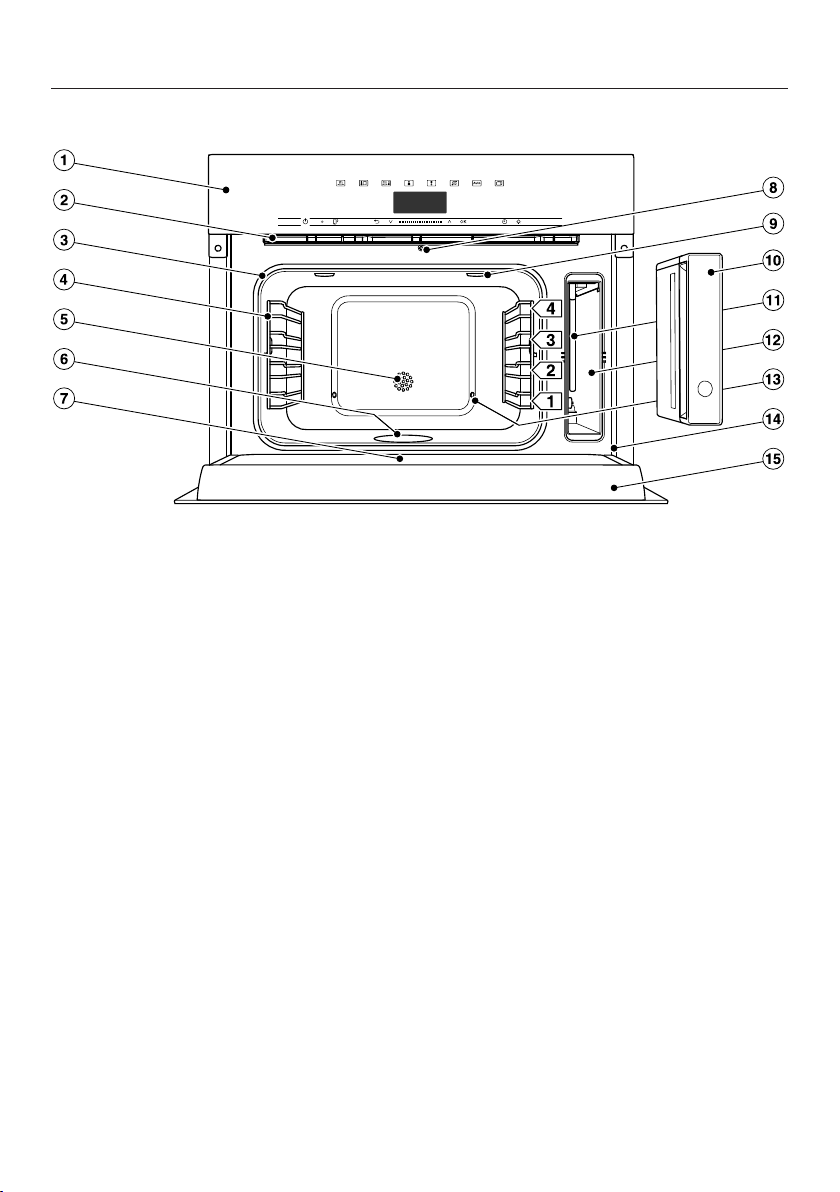
Steam oven
a
Control elements
b
Ventilation outlet
c
Door seal
d
Side runners with 4shelf levels
e
Temperature sensor
f
Floor heater element
g
Drip channel
h
Automatic door release for steam reduction
i
LED oven interior lighting
j
Water container with removable spill guard
k
Suction tube
l
Compartment for water container
m
Steam inlet
n
Front frame with data plate
o
Door
Guide to the appliance
16
A list of the models described in these
operating and installation instructions
can be found on the back page.
Data plate
The data plate is located on the front
frame, visible when the door is open.
The data plate states the model num-
ber, the serial number as well as con-
nection data (voltage, frequency and
maximum rated load).
Please have this information to hand,
should you need to contact Miele re-
garding any questions or problems.
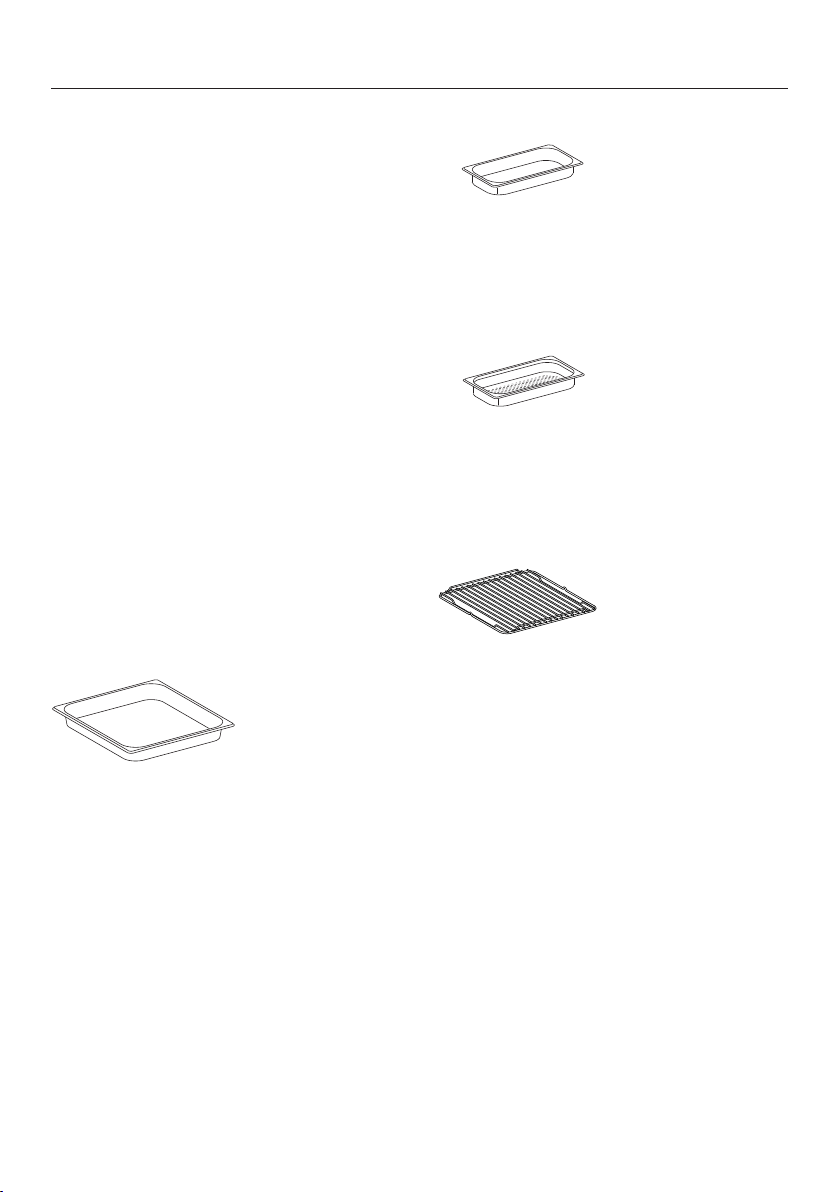
Accessories supplied
The accessories supplied with your ap-
pliance as well as a range of optional
ones are available to order from Miele
(see “Optional accessories”).
DGG1/1–40L
1 condensate tray
For collecting excess moisture.
You can also use the condensate tray
as a cooking container.
375x394x40mm (WxDxH)
DGG 1/2-40L
1 solid cooking container
Gross capacity 2.2litres /
Usable capacity 1.6litres
375 x 197 x 40mm (W x D x H)
DGGL 1/2-40L
2 perforated cooking containers
Gross capacity2.2litres /
Usable capacity 1.6litres
375 x 197 x 40mm (W x D x H)
DMSR 1/1L
1 rack for placing your own crockery on
Descaling tablets
For descaling the appliance
Voucher/Miele steam oven cookbook
A selection of the best recipes from the
Miele test kitchen
Controls
17
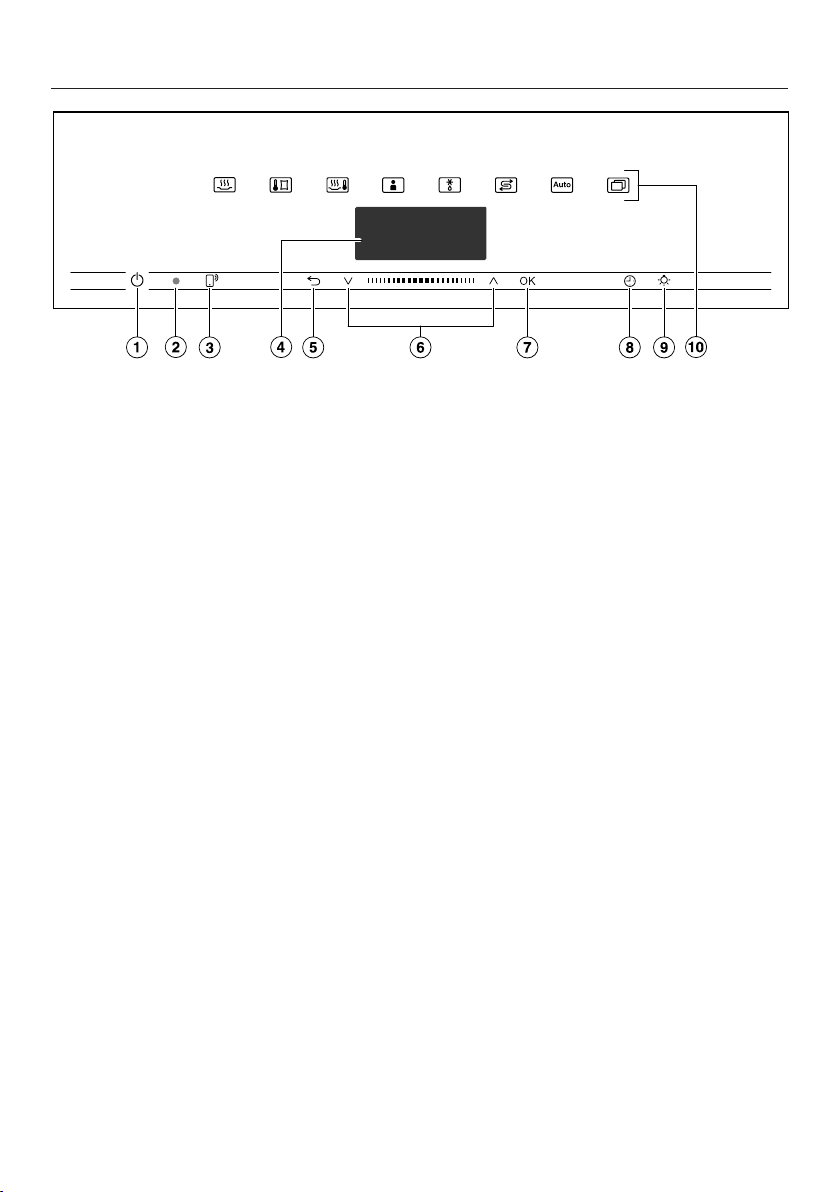
a
Recessed On/Off sensor control
For switching the steam oven on and
off
b
Optical interface
(For Miele Service only)
c
sensor control
For controlling the steam oven via
your mobile device
d
Display
For displaying the time of day and
information on operation
e
sensor control
For going back a step and for chan-
ging menu options during a cooking
programme
f
Navigation area with andarrow
buttons
For scrolling through lists and for
changing values
g
OKsensor control
For selecting functions and saving
settings
h
sensor control
For setting a minute minder, the
cooking duration or the start or end
time for the cooking programme
i
sensor control
For switching the oven interior light-
ing on and off
j
Sensor controls
For selecting functions, automatic
programmes and settings

Controls
18
On/Off sensor control
The On/Off sensor control is re-
cessed and reacts to touch.
Use this sensor control to switch the
steam oven on and off.
Display
The display is used for showing the
time of day or information about func-
tions, temperatures, cooking durations,
automatic programmes and settings.
After switching the steam oven on with
the On/Off sensor control, the main
menu will appear, prompting you to Se-
lect function.
Sensor controls
The sensor controls react to touch.
Every touch of a sensor is confirmed
with an audible keypad tone. You can
turn this keypad tone off using Fur-
ther| Settings| Volume| Keypad tone.
If you want the sensor controls to re-
spond even when the steam oven is
switched off, select the Display| Quick-
Touch| Onsetting.
Sensor controls above the display
For information on the functions and
operating modes, see “Main and sub-
menus”, “Settings”, “Automatic pro-
grammes” and “Further applications”.

Controls
19
Sensor controls under the display
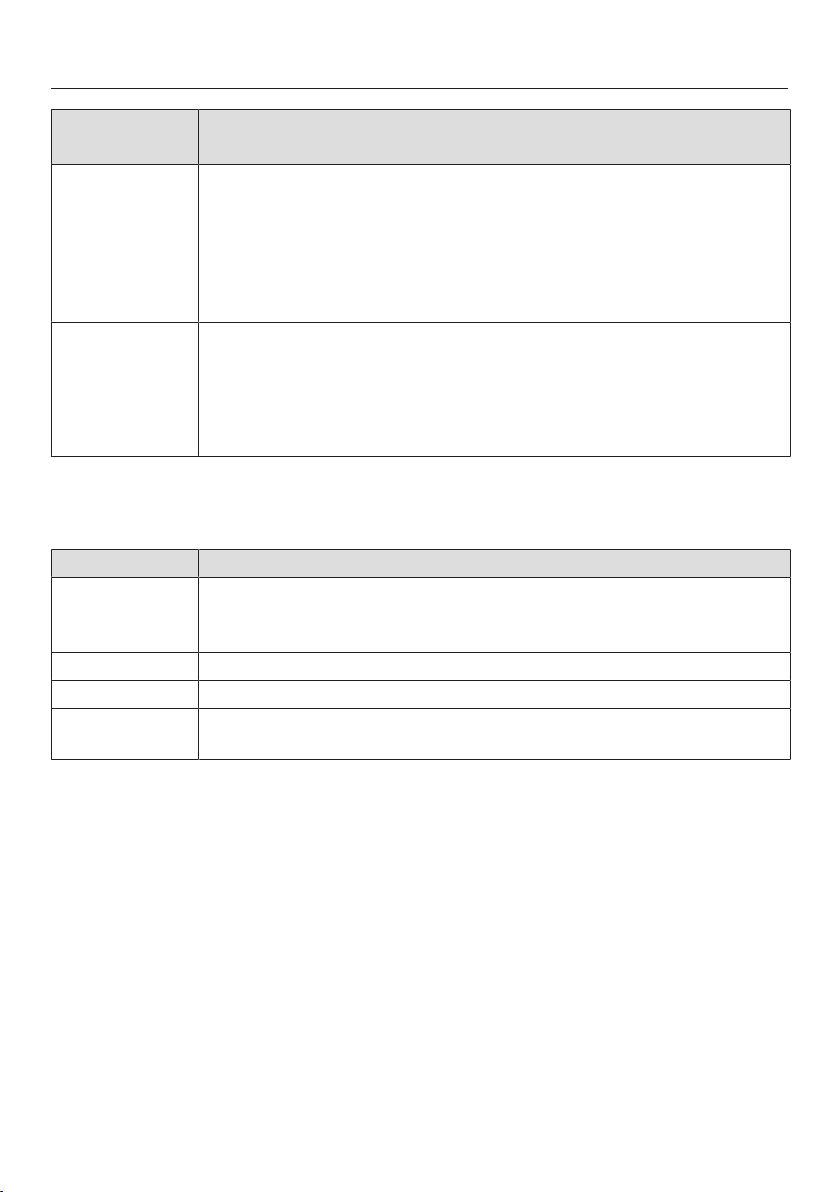
Sensor con-
trol
Function
If you want to control the steam oven from your mobile device,
you must have the Miele@home system, switch on the Remote
controlsetting and touch this sensor control. The sensor control
then lights up orange and the MobileStart function is available.
As long as this sensor control is lit, you can control the steam
oven via your mobile device (see “Settings – Miele@home”).
Depending on which menu you are in, this sensor control will
take you back a level or back to the main menu.
If a cooking programme is in progress at the same time, use this
sensor control to change values and settings such as the tem-
perature or cooking duration for the programme, or to cancel the
programme.
In the navigation area, use the arrow buttons or the area
between them to scroll up or down in the selection lists. The
menu options will be highlighted one after the other as you scroll
through them. The desired menu option must be highlighted be-
fore you can select it.
You can change the values or settings that are highlighted by us-
ing the arrow buttons or the area between them.
OK Functions highlighted in the display can be selected by touching
the OKsensor control. The selected function can then be
changed.
Confirm withOK to save changes.
If information appears in the display, selectOK to confirm the
message.
Controls
20
Sensor con-
trol
Function
If no cooking programme is in progress, you can use this sensor
control to set a minute minder (e.g. when boiling eggs) at any
point.
If a cooking programme is in progress at the same time, you can
set a minute minder, the cooking duration and a start or end time
for the programme.
Select this sensor control to switch the oven interior lighting on
and off.
Depending on the setting selected, the oven interior lighting
switches off after 15seconds or remains constantly switched on
or off.
Symbols
The following symbols may appear in the display:
Symbol Meaning
This symbol indicates that there is additional information and ad-
vice about using the appliance. Press the OKsensor control to
confirm the information.
Minute minder
A tick indicates the option which is currently selected.
Some settings, e.g. display brightness and buzzer volume are se-
lected using a bar chart.

Using the appliance
21
Use the and arrow buttons or the
area between them in the navig-
ation area to use the steam oven.
As soon as you reach a value, message
or setting you need to confirm, the
OKsensor control will light up orange.
Selecting a menu option
Touch the or arrow buttons or
swipe to the right or left in the
area until the desired menu
option is highlighted.
Tip: If you press and hold the arrow
button, the list continues scrolling auto-
matically until you release the arrow
button.
Confirm your selection withOK.
Changing a setting in a list
Touch the or arrow buttons or
swipe to the right or left in the
area until you reach the de-
sired value or the desired setting is
highlighted.
Tip: A tick will appear beside the cur-
rent setting.
Confirm withOK.
The setting is now saved. This will take
you back to the previous menu.
Changing the setting with a
segment bar
Some settings are represented by a bar
with seven segments. If all
of the segments are illuminated, the
maximum value is selected.
If none of the segments are illuminated,
or only one of them is, the minimum
value is selected or the setting is
switched off altogether (e.g. volume).
Touch the or arrow buttons or
swipe to the right or left in the
area until you reach the de-
sired setting.
Confirm your selection withOK.
The setting is now saved. This will take
you back to the previous menu.

Using the appliance
22
Selecting a function or operat-
ing mode
The sensor controls for the functions
and operating modes (e.g. Further)
are located above the display (see
“Controls” and “Settings”).
Touch the sensor control for the de-
sired function.
The sensor control on the fascia panel
lights up orange.
Under Further, scroll through the
lists until the desired menu option is
highlighted.
Set the values for the cooking pro-
gramme.
Confirm withOK.
Changing the function
You can change to another function
during a cooking programme.
The sensor control for the previously
selected function lights up orange.
Touch the sensor control of the new
function or operating mode.
The new function appears in the display
with its corresponding recommended
values.
The sensor control for the new function
lights up orange.
Under Further, scroll through the
lists until you reach the desired menu
option.
Entering numbers
Numbers that can be changed are high-
lighted.
Touch the or arrow buttons or
swipe to the right or left in the
area until the desired number
is highlighted.
Tip: If you press and hold an arrow but-
ton, the numbers continue scrolling
automatically until you release the arrow
button.
Confirm withOK.
The changed number is now saved.
This will take you back to the previous
menu.
Entering letters
Letters are entered via the navigation
area. It is best to select short names.
Touch the or arrow buttons or
swipe to the right or left in the
area until the desired charac-
ter is highlighted.
The character you have selected will
appear in the top line of the display.
Tip: A maximum of 10 characters can
be used.
You can delete the characters one at a
time with.
Select the rest of the characters.
Once you have entered the name, se-
lect.
Confirm withOK.
The name is now saved.

Using the appliance
23
Activating MobileStart
Select the sensor control to activ-
ate MobileStart.
The sensor control lights up. You
can operate your steam oven remotely
with the Miele@mobile app.
Directly operating the steam oven
takes priority over operating it via the
remote control function on the app.
You can use MobileStart as long as
the sensor control is lit up.

Description of functions
24
Water container
The maximum filling volume is 1.5litres
and the minimum is 0.5litres. There are
markings on the water container. The
upper marking must never be ex-
ceeded.
Water consumption depends on the
type of food and the duration of cook-
ing. The water may need to be topped
up during cooking. Water consumption
is increased if the door is opened dur-
ing cooking.
The water container is removed using a
push/pull system: push gently on the
water container to remove it.
At the end of a cooking programme, hot
water left in the steam generator is
pumped back into the water container.
The water container must be emptied
after each use involving steam.
Condensate tray
Place the condensate tray on shelf level
1 when using perforated containers.
This collects any drops of liquid and al-
lows these to be removed easily.
You can also use the condensate tray
as a cooking container if necessary.
Temperature
Some functions have a pre-set recom-
mended temperature. This temperature
can be altered for a single programme,
a specific programme stage or within
the given range for a programme. You
can alter the recommended temperat-
ure in 5°C increments, or 1°C incre-
ments in sous-vide cooking (see “Set-
tings – Recommended temperatures”).
Cooking duration
You can set the cooking duration from
1minute (00:01) to 10hours (10:00). If
the cooking duration exceeds
59minutes you have to enter it in hours
and minutes. Example: Cooking dura-
tion 80minutes = 1:20.
During steam cooking, the cooking dur-
ation does not begin until the set tem-
perature is reached.
Noises
You will hear a pumping sound when
the appliance is switched on, during
use and after switching it off. This is the
sound of water being pumped through
the system and is quite normal.
When the steam oven is in use, you will
hear a fan noise.

Description of functions
25
Heating-up phase
While the steam oven is being heated
up to the set temperature, the display
will show Heating-up and the rising oven
compartment temperature.
When cooking with steam, the duration
of the heating-up phase will depend on
the quantity and the temperature of the
food. In general the heating-up phase
will last for approx.7minutes. The dur-
ation will be longer if you are cooking
refrigerated or frozen food. The heating-
up phase may also last longer if cook-
ing temperatures are low or if you are
using the Sous-vide cooking func-
tion.
Cooking phase
The cooking phase begins when the set
temperature is reached. During the
cooking phase, the duration remaining
will be shown in the display.
Steam reduction
If you are cooking at a temperature of
approx. 80°C or above, the steam oven
door will automatically open a little
shortly before the end of the cooking
time to allow some of the steam to es-
cape. Steam reductionwill appear on the
display. The door closes again automat-
ically.
Steam reduction can be switched off
(see “Settings – Steam reduction”). With
steam reduction switched off, a lot of
steam will escape when the door is
opened.
Oven interior lighting
For energy-saving reasons, the oven in-
terior lighting has been set at the fact-
ory to go out after the programme has
begun.
If you want it to stay on all the time the
oven is on, you will need to alter the de-
fault setting (see “Settings – Lighting”).
If the door is left open at the end of a
cooking programme, the oven interior
lighting will switch off automatically
after 5minutes.
The lighting can be switched on for
15seconds by touching the button
on the control panel.
Before using for the first time
26
Miele@home
Your steam oven is equipped with an
integrated WiFi module.
In order to use it, you will need:
- a WiFi network,
- the Miele@mobile app, and
- a Miele user account, which can be
created from the Miele@mobile app.
The Miele@mobile app will guide you as
you connect your steam oven to your
home WiFi network.
Once your steam oven is connected to
your WiFi network, you can use the app
for a number of actions, including the
following:
- Getting information on the operating
status of your steam oven
- Retrieving information on your steam
oven’s current cooking programmes
- Stopping cooking programmes that
are in progress
Connecting your steam oven to your
WiFi network will increase energy con-
sumption, even when the steam oven is
switched off.
Make sure that the signal of your
WiFi network is sufficiently strong in
the place where your steam oven is
installed.
Availability of the WiFi connection
The WiFi connection shares a frequency
range with other appliances (including
microwave ovens and remote control
toys). This can give rise to sporadic or
even complete connection failures.
Therefore, the availability of featured
functions cannot be guaranteed.
Miele@home availability
The ability to use the Miele@mobile app
depends on the availability of the
Miele@home service in your country.
The Miele@home service is not avail-
able in every country.
For information about availability,
please visit www.miele.com.
Miele@mobile App
The Miele@mobile App is available to
download free of charge from the Apple
App Store
®
or from the Google Play
Store™.

Before using for the first time
27
Basic settings
The following settings must be made
before starting up for the first time. You
can change these settings again at a
later time (see “Settings”).
Risk of injury caused by hot sur-
faces.
The steam oven gets hot during op-
eration.
For safety reasons, the steam oven
may only be used when it has been
fully installed.
The steam oven will switch on auto-
matically when it is connected to the
electricity supply.
Setting the language
Select the desired language.
Confirm withOK.
If you have selected the wrong lan-
guage by mistake, proceed as de-
scribed in “Settings – Language”.
Setting the location
Select the desired location.
Confirm withOK.
Setting up Miele@home
Set up “Miele@home”will appear in the
display.
To set up Miele@home now, se-
lectContinue and confirm withOK.
To set it up at a later date, selectSkip
and confirm withOK.
See “Settings – Miele@home” for in-
formation on setting up at a later
date.
To set up Miele@home now, select
the desired connection method.
You will then be guided by the display
and the Miele@mobile app.
Setting the date
Set the year, then the month, and fi-
nally the day.
Confirm withOK.
Setting the time
Set the time of day in hours and
minutes.
Confirm withOK.

Before using for the first time
28
Setting the water hardness level
Contact your local water supplier to
find out the hardness of the water in
your area.
More information can be found under
“Settings – Water hardness”.
Select your local water hardness on
the appliance.
Confirm withOK.
Completing the commissioning pro-
cess
Follow any further instructions in the
display.
The oven is now ready for use.
Cleaning for the first time
Remove any protective wrapping and
stickers from the steam oven and ac-
cessories.
The appliance has undergone a func-
tion test in the factory. Residual water
from this testing may have trickled
back into the cabinet during transport-
ation.
Cleaning the water container
Remove the water container.
Remove the spill guard.
Wash the water container by hand.
Cleaning accessories/oven compart-
ment
Take all accessories out of the oven.
Wash the accessories in a mild solu-
tion of washing-up liquid and hot wa-
ter or in the dishwasher.
The interior of the steam oven has
been treated at the factory with a con-
ditioning agent.
To remove this, clean the oven com-
partment with a clean sponge and a
mild solution of washing-up liquid
and hot water.

Before using for the first time
29
Set the correct boiling point for
water
Before cooking food for the first time,
you must adjust the steam oven to the
boiling temperature of the water, which
varies depending on the altitude of
where the steam oven is located. This
process also flushes out the compon-
ents of the appliance that carry water.
This procedure must be carried out
to ensure trouble-free functioning of
your appliance.
Distilled water, carbonated water and
other liquids may damage the steam
oven.
Only use cold, fresh tap water (be-
low 20°C).
Remove the water container and fill it
up to the maximum marker.
Push the water container into the ap-
pliance.
Then run the steam oven for
15minutes using the Steam cook-
ing function (100°C). Proceed as
described in “Operation”.
Setting the correct boiling point for
water following a house move
If you move house, the appliance will
need to be re-set for the new altitude if
this differs from the old one by 300m or
more. To do this, descale the appliance
(see “Cleaning and care – Descaling the
steam oven”).

Settings
30
Settings overview
Menu option Available settings
Language ...| deutsch| english| ...
Location
Time Show
On*| Off| Night dimming
Clock format
12 h| 24 h*
Set
Date
Lighting On
“On” for 15 seconds*
Off
Display Brightness
QuickTouch
On| Off*
Volume Buzzer tones
Melodies*
Solo tone
Keypad tone
Welcome melody
On*| Off
Units Weight
g*| lb/oz| lb
Temperature
°C*| °F
Keeping warm On
Off*
Steam reduction On*
Off
Recommended temperat-
ures
Water hardness 1°dH| ...| 15°dH*| ...| 70°dH
* Factory default setting

Settings
31
Menu option Available settings
Safety Sensor lock
On| Off*
System lock
On| Off*
Miele@home Activate| Deactivate
Connection status
Set up again
Reset
Set up
Remote control On*
Off
RemoteUpdate On*
Off
Software version
Showroom programme Demo mode
On| Off*
Factory default Appliance settings
User programmes
Recommended temperatures
* Factory default setting

Settings
32
Opening the “Settings” menu
In the Further| Settings menu, you
can personalise your steam oven by ad-
apting the factory default settings to
suit your requirements.
SelectFurther.
SelectSettings .
Select the desired setting.
You can check settings or change them.
Settings cannot be changed while a
cooking programme is in progress.
Language
You can set the desired language and
location.
After selecting and confirming your
choice, the language you have selected
will appear in the display.
Tip: If you have selected the wrong lan-
guage by mistake, select the
sensor control. Follow the symbol
to get back to the Language sub-
menu.
Time
Show
Select how you want the time of day to
show in the display when the steam
oven is switched off:
- On
The time is always visible on the dis-
play.
If you also select the Display| Quick-
Touch| On setting, all sensor controls
react to touch straight away.
If you also select the Display| Quick-
Touch| Off setting, the steam oven
has to be switched on before it can
be used.
- Off
To save energy, the display does not
light up. The steam oven has to be
switched on before it can be used.
- Night dimming
To save energy the time only shows
in the display between 05:00 and
23:00. The display remains dark at all
other times.

Settings
33
Clock format
The time of day can be displayed in the
24 or 12-hour format (24 hor12 h).
Set
Set the hours and the minutes.
If there is a power cut, the current time
of day will reappear once power has
been restored. The time of day is saved
for approx. 150hours.
If the steam oven has been connected
to a WiFi network and signed into the
Miele@mobile app, the time will be
synchronised based on the location
setting in the Miele@mobile app.
Date
Set the date.
Lighting
- On
The oven interior lighting is switched
on during the entire cooking period.
- “On” for 15 seconds
The oven interior lighting switches off
15seconds after a cooking pro-
gramme has begun. Press the
sensor control to switch the oven
interior lighting on again for
15seconds.
- Off
The oven interior lighting is switched
off. Press the sensor control to
switch on the oven interior lighting for
15seconds.
Display
Brightness
The display brightness is represented
by a bar with seven segments.
-
Maximum brightness
-
Minimum brightness
QuickTouch
Select how the sensor controls should
respond when the steam oven is
switched off:
- On
If you have also selected the Time|
Show| On or Night dimming setting, the
sensor controls will also respond
when the steam oven is switched off.
- Off
Independently of the Time| Show set-
ting, the sensor controls only re-
spond when the steam oven is
switched on, as well as for a certain
amount of time after switching it off.

Settings
34
Volume
Buzzer tones
If buzzers are switched on, a buzzer will
sound when the set temperature is
reached and at the end of a set time.
Melodies
At the end of a process, a melody will
sound several times in intervals.
The volume of the melody is represen-
ted by a bar with seven segments.
-
Maximum volume
-
Melody is switched off
Solo tone
At the end of a process, a continuous
tone will sound for a period of time.
The pitch of this continuous tone is rep-
resented by a segment bar.
-
Maximum pitch
-
Minimum pitch
Keypad tone
The volume of the tone that sounds
each time you touch a sensor control is
represented by a bar with seven seg-
ments.
-
Maximum volume
-
Tone is switched off
Welcome melody
The melody that sounds when you
touch the On/Off sensor control can
be switched on or off.
Units
Weight
For automatic programmes, you can set
the weight of food in grams (g), pounds/
ounces (lb/oz) or pounds (lb).
Temperature
You can set the temperature in degrees
Celsius (°C) or degrees Fahrenheit (°F).

Settings
35
Keeping warm
Using the Keeping warm function you
can keep food warm after cooking.
Food is kept warm at a pre-set temper-
ature for a maximum of 15minutes. You
can cancel the keeping warm process
by opening the door or touching the
sensors.
Please note that delicate food, espe-
cially fish, can continue cooking whilst
being kept warm.
- On
The Keeping warmfunction is switched
on. When cooking with a temperature
of approx. 80°C or above, this func-
tion is active after approx. 5minutes.
The food is kept warm at a temperat-
ure of 70°C.
- Off
The Keeping warm function is switched
off.
Steam reduction
- On
If you are cooking at a temperature of
approx. 80°C or above, the steam
oven door will automatically open a
little shortly before the end of the
cooking duration. The function stops
excessive steam escaping when the
door is opened. The door closes
again automatically.
- Off
If steam reduction is switched off, the
Keeping warm function is also auto-
matically switched off. With steam re-
duction switched off, a lot of steam
will escape when the door is opened.
Recommended temperatures
If you often cook with different temper-
atures, it makes sense to change the re-
commended temperatures.
After selecting this menu option, a list
of functions will appear in the display.
Select the desired function.
The recommended temperatures are
displayed along with the available tem-
perature range.
Change the recommended temperat-
ures.
Confirm with OK.
Settings
36
Water hardness
The steam oven must be adjusted to
the local water hardness level to ensure
that it works correctly and to ensure
that descaling is carried out at the cor-
rect interval. The harder the water is,
the more frequently the steam oven
needs to be descaled.
Contact your local water supplier to find
out the hardness of the water in your
area.
If you use bottled water, such as min-
eral water, make sure it is not carbon-
ated. Adjust this setting depending on
the calcium content. The calcium con-
tent is specified on the label of the
bottle in mg/lCa
2+
or ppm (mgCa
2+
/l).
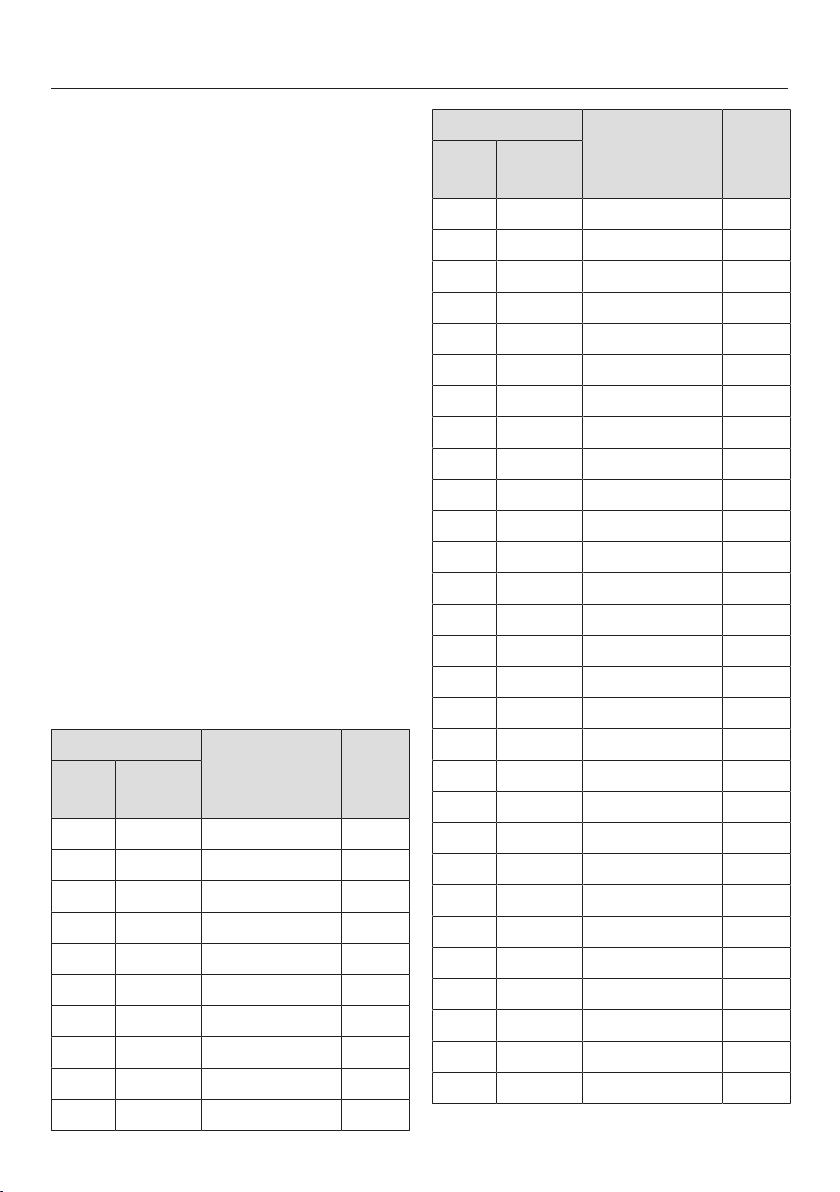
You can set the hardness level between
1°dH and 70°dH. The hardness level is
set to 15°dH by default.
Select your local water hardness on
the appliance.
Confirm withOK.
Water hardness Calcium content
mg/lCa
2+
or
ppm (mgCa
2+
/l)
Setting
°dH mmol/l
1 0.2 7 1
2 0.4 14 2
3 0.5 21 3
4 0.7 29 4
5 0.9 36 5
6 1.1 43 6
7 1.3 50 7
8 1.4 57 8
9 1.6 64 9
10 1.9 71 10
Water hardness Calcium content
mg/lCa
2+
or
ppm (mgCa
2+
/l)
Setting
°dH mmol/l
11 2.0 79 11
12 2.2 86 12
13 2.3 93 13
14 2.5 100 14
15 2.7 107 15
16 2.9 114 16
17 3.1 121 17
18 3.2 129 18
19 3.4 136 19
20 3.6 143 20
21 3.8 150 21
22 4.0 157 22
23 4.1 164 23
24 4.3 171 24
25 4.5 179 25
26 4.7 186 26
27 4.9 193 27
28 5.0 200 28
29 5.2 207 29
30 5.4 214 30
31 5.6 221 31
32 5.8 229 32
33 5.9 236 33
34 6.1 243 34
35 6.3 250 35
36 6.5 257 36
37–45 6.6–8.0 258–321 37–45
46–60 8.2–10.7 322–429 46–60
61–70
10.9–12.5 430–500 61–70

Settings
37
Safety
Sensor lock
The sensor lock prevents the cooking
programme being switched off by mis-
take or settings being changed. Apart
from the On/Off sensor control, the
activated sensor lock prevents the
sensor controls and fields in the display
from working a few seconds after a pro-
gramme has been started.
- On
The sensor lock is activated. Touch
the OKsensor control for at least
6seconds to deactivate the sensor
lock for a short period of time.
- Off
The sensor lock is deactivated. All
sensor controls react to touch as nor-
mal.
System lock
The system lock prevents the steam
oven being switched on by mistake.
The minute minder and the MobileStart
function can still be used when the sys-
tem lock is active.
The system lock will remain activated
even after a mains outage.
- On
The system lock has been activated.
Before you can use the steam oven,
touch the OKsensor control for at
least 6seconds.
- Off
The system lock is deactivated. You
can use the steam oven as normal.

Settings
38
Miele@home
The steam oven is a Miele@home-
compatible appliance. Your steam
oven is fitted ex-works with a WiFi
communication module and is suitable
for wireless communication.
There are a number of ways of connect-
ing your steam oven to your WiFi net-
work. We recommend connecting your
steam oven to your WiFi network using
the Miele@mobile App or via WPS.
- Activate
This setting is only visible if
Miele@home is deactivated. The WiFi
function is reactivated.
- Deactivate
This setting is only visible if
Miele@home is activated.
Miele@home remains set up, the WiFi
function is switched off.
- Connection status
This setting is only visible if
Miele@home is activated. The display
shows information such as the WiFi
reception quality, network name and
IP address.
- Set up again
This setting is only visible if a WiFi
network has already been set up. Re-
set the network settings and immedi-
ately set up a new network connec-
tion.
- Reset
This setting is only visible if a WiFi
network has already been set up. The
WiFi function is deactivated and the
WiFi connection will be reset to the
factory default. You must set up a
new WiFi connection to be able to
use Miele@home.
The network settings should be reset
whenever a steam oven is being dis-
posed of or sold, or if a used steam
oven is being put into operation. This
is the only way to ensure that all per-
sonal data has been removed and
the previous owner will no longer be
able to access the steam oven.
- Set up
This setting is only visible if no WiFi
connection has been set up yet. You
must set up a new WiFi connection to
be able to use Miele@home.

Settings
39
Remote control
If you have installed the Miele@mobile
app on your mobile device, have ac-
cess to the Miele@home system and
have activated the remote control func-
tion (On), you can use the MobileStart
function and for example retrieve in-
formation about steam oven cooking
processes that are in progress or end a
process that is in progress.
The steam oven requires max. 2W
when operating in networked standby.
Activating MobileStart
Select the sensor control to activ-
ate MobileStart.
The sensor control lights up. You
can operate your steam oven remotely
with the Miele@mobile app.
Directly operating the steam oven
takes priority over operating it via the
remote control function on the app.
You can use MobileStart as long as
the sensor control is lit up.
RemoteUpdate
The RemoteUpdatemenu option is only
displayed and can only be selected if
the requirements for using
Miele@home have been met (see “Be-
fore using for the first time –
Miele@home”).
The RemoteUpdate function is used for
updating the software in your steam
oven. If an update is available for your
steam oven, it will automatically down-
load it. Updates will not be installed
automatically. They must be initiated
manually.
If you do not install an update, you can
continue to use your steam oven as
usual. However, Miele recommends in-
stalling updates.
Activating/deactivating
The RemoteUpdate function is activ-
ated as standard. Available updates will
be downloaded automatically but will
only be installed if you initiate installa-
tion manually.
Deactivate RemoteUpdate if you do not
want any updates to be downloaded
automatically.

Settings
40
Running RemoteUpdate
Information about the content and
scope of an update will be provided in
the Miele@mobile app.
A message will appear in your steam
oven display if a software update is
available.
You can install the update immediately
or postpone this until later. When the
steam oven is switched on again, you
will be reminded about the update.
Deactivate RemoteUpdate if you do not
want to install the update.
The update may take several minutes.
Please note the following information
about the RemoteUpdate function:
- You will only receive a message when
an update is available.
- Once an update has been installed, it
cannot be undone.
- Do not switch the steam oven off
during the update. Otherwise, the up-
date will be aborted and will not be
installed.
- Some software updates can only be
carried out by the Miele Customer
Service Department.
Software version
The software version is intended for the
Miele Customer Service Department.
You do not need this information for do-
mestic use.
Showroom programme
This function enables the steam oven to
be demonstrated in showrooms without
heating up. This setting is not needed
for domestic use.
Demo mode
If you have demo mode activated,
Demo mode is activated. The appliance will
not heat up will appear when you
switch the steam oven on.
- On
Touch the OKsensor control for at
least 4seconds to activate demo
mode.
- Off
Touch the OKsensor control for at
least 4seconds to deactivate demo
mode. You can then use the steam
oven as normal.
Factory default
- Appliance settings
Any settings that have been altered
will be reset to the factory default
settings.
- User programmes
All User programmes will be deleted.
- Recommended temperatures
Any recommended temperatures that
have been changed will be reset to
the factory default settings.

Minute minder
41
Using the Minute minderfunc-
tion
The minute minder can be used to
time other activities in the kitchen,
e.g.boiling eggs.
The minute minder can also be used at
the same time as a cooking programme
for which the cooking duration start and
finish times have been set (e.g. as a re-
minder to stir the food or add season-
ing, etc.).
The maximum minute minder time
that can be set is 59minutes and
59seconds.
Setting the minute minder
If you have selected the Display| Quick-
Touch| Offsetting, you will need to
switch the steam oven on before set-
ting the minute minder. The minute
minder can then be seen counting
down in the display when the steam
oven is switched off.
Example: you want to boil some eggs
and set a minute minder duration of
6minutes and 20seconds.
Select the sensor control.
SelectMinute minder if a cooking pro-
gramme is in progress at the same
time.
The prompt Set00:00min appears.
Using the navigation area, set 06:20.
Confirm withOK.
The minute minder duration is now
saved.
When the steam oven is switched off
the minute minder duration counts
down in the display and appears in-
stead of the time of day.
If you are cooking at the same time,
and the minute minder duration will
appear at the bottom of the display.
If you are in a menu, the minute minder
counts down in the background.
At the end of the minute minder dura-
tion, will flash, the time will start
counting up and a tone will sound.
Select the sensor control.
If required, confirm withOK.
The buzzer will stop and the symbols in
the display will go out.
Changing the minute minder duration
Select the sensor control.
SelectMinute minder if a cooking pro-
gramme is in progress at the same
time.
SelectChange.
Confirm withOK.
The minute minder duration selected
appears.
Change the duration set for the
minute minder.
Confirm withOK.
The altered minute minder duration is
now saved.

Minute minder
42
Deleting the minute minder duration
Select the sensor control.
SelectMinute minder if a cooking pro-
gramme is in progress at the same
time.
SelectDelete.
Confirm withOK.
The minute minder duration is now de-
leted.
Main and sub-menus
43
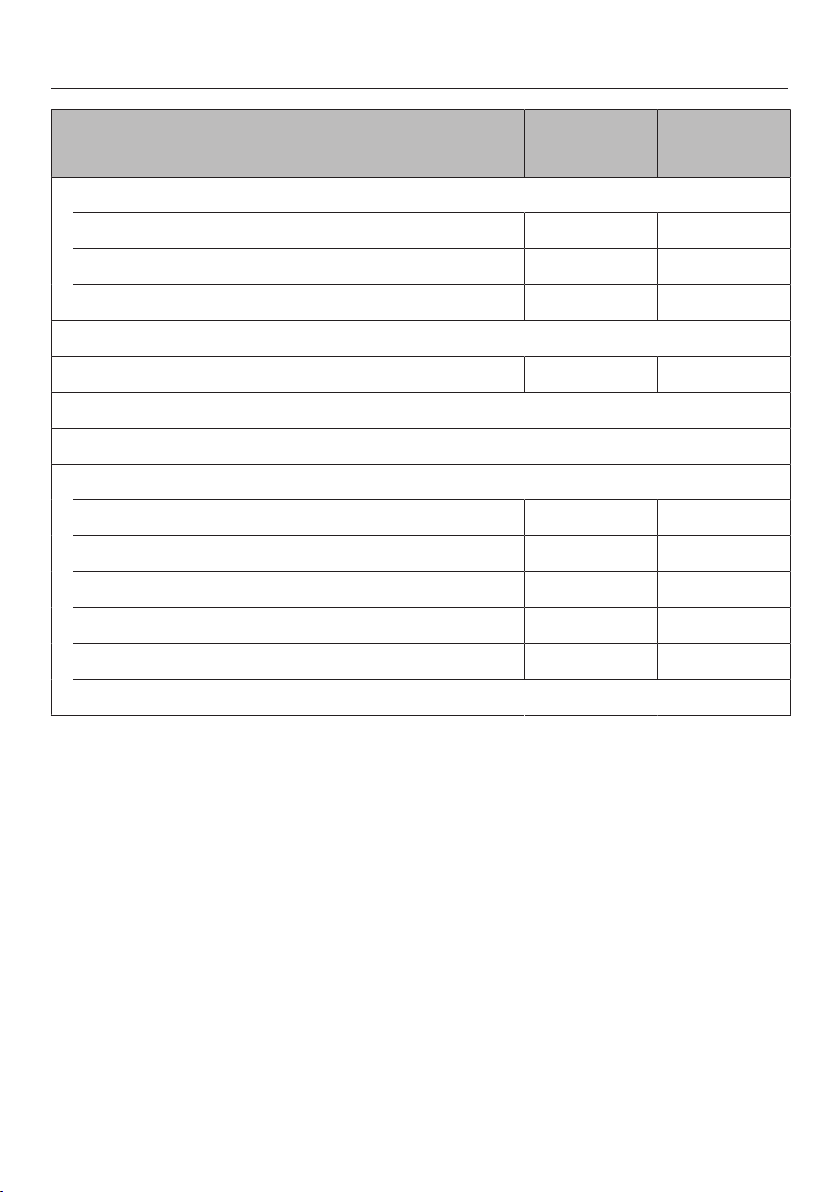
Menu Recommen-
ded value
Range
Oven functions
Steam cooking 100 °C 40–100 °C
Sous-vide 65 °C 45–90 °C
Reheat 100 °C 80–100 °C
User programmes
Defrost 60 °C 50–60 °C
Descale
Automatic programmes
Further
Blanching – –
Bottling 90 °C 80–100 °C
Disinfect items – –
Prove dough – –
Eco Steam cooking 100 °C 40–100 °C
Settings

Operation
44
Switch the steam oven on.
The main menu will appear.
Distilled or carbonated water or other
liquids could damage the steam
oven.
Only use cold, fresh tap water (be-
low 20°C).
Fill the water container and push it
into the appliance.
Place the condensate tray on shelf
level 1 when using perforated con-
tainers.
Place the food in the oven.
Select the desired function.
The function and the recommended
temperature will appear.
Change the recommended temperat-
ure if necessary.
The recommended temperature will be
accepted within a few seconds. You
can change the temperature sub-
sequently via the sensor.
Confirm with OK.
The required and the actual temperature
will appear and the heating-up phase
will begin.
You will see the temperature increasing.
A buzzer will sound when the set tem-
perature is reached for the first time.
After cooking, select the sensor for
the selected function to end the
cooking programme.
Risk of injury caused by hot
steam.
A great deal of hot steam can escape
when the door is opened. The steam
can cause burns.
Step back and wait until the hot
steam has dissipated.
Take the food out of the oven.
Switch the steam oven off.

Operation
45
Cleaning the steam oven
If necessary, remove the condensate
tray from the oven compartment and
empty it.
Risk of injury caused by hot wa-
ter.
At the end of a cooking programme,
hot water left in the steam generator
is pumped back into the water con-
tainer.
Take care not to tip the water con-
tainer when taking it out of the appli-
ance.
Remove the water container.
Remove the spill guard and empty
the water container.
After each use, clean and dry the
whole appliance as described in
“Cleaning and care”.
Make sure the spill guard engages
correctly when installing it.
Leave the appliance door open until
the oven compartment is completely
dry.
Refilling the water
If water needs replenishing during the
programme, a tone will sound and the
display will prompt you to refill the con-
tainer with fresh water.
Take out the water container and re-
plenish the water.
Push the water container into the ap-
pliance.
The cooking programme is resumed.
Changing values and settings
for a cooking programme
Depending on the function, as soon as
a cooking programme is in progress,
you can use the sensor control to
change the values or settings for this
programme.
Select the sensor control.
Depending on the function, the follow-
ing settings appear:
- Temperature
- Duration
Changing values and settings
Select the desired value or setting
and confirm withOK.
Change the value or setting and con-
firm withOK.
The cooking programme will restart with
the new values and settings.

Operation
46
Changing the temperature
You can permanently reset the recom-
mended temperature to suit your
cooking preferences by selecting Fur-
ther| Settings| Recommended
temperatures.
Select the sensor control.
Select Temperature and confirm with
OK.
Change the desired temperature via
the navigation area.
Confirm withOK.
The cooking programme will restart with
the new desired temperature.
Setting cooking durations
Cooking results can be impaired if
there is a long delay between the
food being placed in the oven and
the start of cooking. Fresh food can
change colour and even spoil.
Select as short as possible a time
until the cooking programme starts.
You have placed the food in the oven
compartment, selected a function and
the required settings such as the tem-
perature.
By entering Duration, Finish at or Start at
via the sensor control, you can auto-
matically switch the cooking pro-
gramme off or on and off.
- Duration
Enter the desired cooking duration
for the food. The heating will switch
off automatically once this duration
has elapsed. The maximum cooking
duration that can be set depends on
the function that you have selected.
- Finish at
Specify when you want the cooking
programme to end. The oven heating
will switch off automatically at the
time you have set.
- Start at
This function will only appear in the
menu if you have set aDuration or Fin-
ish attime. WithStart at, you have to
specify when you want the cooking
programme to start. The oven heating
will switch on automatically at the
time you have set.

Operation
47
Select the sensor control.
Set the desired times.
Confirm withOK.
Touch the sensor control to return
to the menu of the selected function.
Tip: You can also adjust the cooking
duration directly via the navigation area.
The cooking duration does not begin
until the set temperature is reached.
If you are cooking at a temperature of
approx. 80°C or above, Steam reduc-
tion will appear in the display shortly
before the end of the cooking duration
and the door will automatically open a
little.
Wait until Steam reduction goes out in
the display before opening the door
and removing the food from the oven.
A new cooking programme can only
be started if the automatic door re-
lease is retracted into its original po-
sition. Do not push it in manually as
this could damage it.
Changing the set cooking durations
Select the sensor.
Select the desired time.
Confirm with OK.
Select Change, if required.
Change the set time.
Confirm with OK.
Touch the sensor to return to the
menu of the selected function.
These settings will be deleted in the
event of a power failure.
Tip: You can also adjust the cooking
duration directly via the navigation area.
Deleting the set cooking durations
You can delete the Duration in the Steam
cooking, Sous-vide and Eco
Steam cooking functions.
Select the sensor.
Select the desired time.
Confirm with OK.
Select Delete.
Confirm with OK.
Touch the sensor to return to the
menu of the selected function.
If you delete Duration, the set times for
Finish at and Start at are also deleted.
If you delete Finish atorStart at, the
cooking programme will start using
the cooking duration set.
Tip: You can also delete the cooking
duration directly via the navigation area.

Operation
48
Interrupting a cooking pro-
gramme
A cooking programme is interrupted as
soon as the door is opened. The oven
heating switches off. Set cooking dura-
tions will be saved.
Risk of injury caused by hot
steam.
A great deal of hot steam can escape
when the door is opened. The steam
can cause burns.
Step back and wait until the hot
steam has dissipated.
Risk of injury caused by hot sur-
faces and food.
The steam oven gets hot during op-
eration. You could burn yourself on
the oven compartment, side runners,
accessories or the food itself.
Use oven gloves when placing food
in the oven compartment or remov-
ing it and when working in the hot
oven compartment.
When placing cooking containers
into the oven or removing them,
make sure that the hot food does not
spill.
The cooking programme will resume
when the door is closed.
When the door is closed, the pressure
has to equalise, which can cause a
whistling sound.
The steam oven will heat up again and
the display will show the temperature in
the oven compartment as it rises. Once
the set temperature has been reached,
the display will show the time left as it
counts down.
The cooking programme will finish
early if the door is opened in the last
minute of cooking.

Operation
49
Cancelling a cooking pro-
gramme
You can cancel a cooking programme
using the function sensor control that
lights up orange or using the sensor
control.
The oven compartment heating and
lighting will then switch off. Any cooking
durations set will be deleted.
Touch the function sensor control to re-
turn to the main menu.
Cancelling a cooking programme
without a set cooking duration
Touch the sensor control for the se-
lected function.
The main menu will appear.
Or: select the sensor control.
SelectCancel process.
Confirm withOK.
Cancelling a cooking programme
with a set cooking duration
Touch the sensor control for the se-
lected function.
Cancel process? appears in the display.
SelectYes.
Confirm withOK.
Or: select the sensor control.
SelectCancel process.
Confirm withOK.
SelectYes.
Confirm withOK.

General notes
50
This section contains general informa-
tion. You will find more detailed inform-
ation about particular foods and how to
cook them in the other sections.
The advantages of cooking
with steam
Almost all vitamins and minerals are re-
tained as the food is not immersed in
water.
Cooking with steam also retains the
true taste of the food better than con-
ventional cooking. We therefore recom-
mend seasoning the food after it has
been cooked. Food also retains its
fresh, original colour.
Suitable containers
Cooking containers
This steam oven is supplied with stain-
less steel cooking containers. Other
containers, in a variety of sizes, both
perforated and solid, are available as
optional extras (see “Optional accessor-
ies”). This enables you to choose the
most suitable container for the food you
are cooking.
It is best to use perforated containers
for steam cooking. The steam can
reach the food from all sides and the
food is cooked evenly.
Your own containers
You can also use your own containers.
However, please note the following:
- Containers must be heat-resistant to
100°C and able to withstand steam.
With plastic containers please check
with the manufacturer that they are
suitable for use in a steam oven.
- Thick-sided containers such as por-
celain, ceramic, or stoneware are not
very suitable for using with steam.
Due to their thick sides, they do not
conduct heat well and as a result
cooking durations will be consider-
ably longer than those given in the
tables.
- Place the cooking container on the
rack or in a suitable container, and
not on the oven floor.
- Ensure that there is a gap between
the upper rim of the container and
the top of the cooking compartment
to allow sufficient steam into the con-
tainer.
Condensate tray
Place the condensate tray on shelf level
1 when using perforated containers.
This collects any drops of liquid and al-
lows these to be removed easily.
You can also use the condensate tray
as a cooking container if necessary.

General notes
51
Shelf level
You can select any shelf level. You can
also cook on several levels at the same
time. This will not alter the cooking dur-
ation.
When using more than one deep con-
tainer at the same time for steam cook-
ing, it is best to offset them on their run-
ners and to leave at least one level free
in between them.
Always insert cooking containers and
the rack between the rails of the shelf
level supports so that they cannot tip.
Frozen food
The heating up phase for frozen food is
longer than for fresh food. The greater
the quantity of frozen food, the longer
the heating up phase.
Temperature
During steam cooking, the temperature
does not exceed 100°C. Almost all
foods can be cooked at this temperat-
ure. Some types of food, such as ber-
ries, need to be cooked at lower tem-
peratures to prevent them from burst-
ing. See the relevant sections in these
operating instructions for more details.
Cooking duration
During steam cooking, the cooking dur-
ation does not begin until the set tem-
perature is reached.
In general, the cooking durations for
cooking with steam are the same as for
cooking food in a saucepan. More in-
formation about any factors which may
affect the cooking duration is given in
the relevant sections.
The quantity of food does not affect the
cooking duration. 1kg of potatoes will
take the same time to cook as 500g.
Cooking with liquid
When cooking with liquid only fill the
cooking container ²/₃full to prevent the
liquid spilling when the cooking con-
tainer is removed from the oven.
Your own recipes
Food which is cooked in a pot or a pan
can also be cooked in the steam oven.
The cooking durations in the steam
oven will be the same. Please note that
food will not be brown or crisp when
cooking with steam.

Steam cooking
52
Eco Steam cooking
You can use the Eco Steam cooking func-
tion to save energy during steam cook-
ing. This function is suitable mainly for
cooking fish and vegetables.
We recommend following the cooking
durations and temperatures from the
tables specified in “Steam cooking”.
You can cook for longer if necessary.
When cooking starchy foods such as
potatoes, rice and pasta, the best
function to use is Steam cooking .
Settings
Further | Eco Steam cooking
Notes on the cooking tables
Follow the instructions on cooking dur-
ations, temperatures and cooking
notes.
Selecting the cooking duration
The cooking durations given are
guidelines only.
We recommend selecting the shorter
duration initially. You can cook for
longer if necessary.

Steam cooking
53
Vegetables
Fresh
Prepare fresh vegetables in the usual
way, i.e. wash, clean and cut them up.
Frozen food
Frozen vegetables do not need to be
defrosted beforehand, unless they have
been frozen together in a block.
Frozen and fresh vegetables which take
the same length of time to cook can be
cooked together.
If vegetables have frozen together in
clumps, break these up before cooking
with steam. Follow the manufacturer’s
instructions on the packaging regarding
cooking duration.
Cooking containers
Food such as peas or asparagus
spears, which have little or no space
between them, will take longer to cook
because the steam has less space to
work in. For an even result, it is best to
use a shallow container for these types
of food, and only fill it about 3-5cm
deep. When cooking large quantities di-
vide the food between 2 or 3 shallow
containers rather than using one deep
one.
Different types of vegetables which take
the same length of time to cook can be
cooked together.
Use solid containers for vegetables
which are cooked in liquid.
Shelf level
To avoid any colour transfer when cook-
ing vegetables with a distinctive colour
(e.g. beetroot) in a perforated container,
do not place other food underneath the
perforated container.
Cooking duration
The cooking duration depends on the
size of the food and how well cooked
you want it, just as it does with conven-
tional cooking methods. Example:
Waxy potatoes, cut into quarters:
approx. 17minutes
Waxy potatoes, cut in half:
approx. 20minutes
Settings
Automatic programmes | Vegetables
| ... |
or
Steam cooking
Temperature: 100°C
Cooking duration: see table

Steam cooking
54
Vegetables [min]
Artichokes 32–38
Cauliflower, whole 27–28
Cauliflower, florets 8
Beans, green 10–12
Broccoli, florets 3–4
Chantenay carrots, whole 7–8
Chantenay carrots, halved 6–7
Chantenay carrots, chopped 4
Chicory, halved 4–5
Chinese cabbage, chopped 3
Peas 3
Fennel, halved 10–12
Fennel, sliced 4–5
Kale, chopped 23–26
Waxy potatoes, peeled
whole
halved
quartered
27–29
21–22
16–18
Mainly waxy potatoes, peeled
whole
halved
quartered
25–27
19–21
17–18
Floury potatoes, peeled
whole
halved
quartered
26–28
19–20
15–16
Kohlrabi, cut into batons 6–7
Pumpkin, diced 2–4
Corn on the cob 30–35
Chard, chopped 2–3

Steam cooking
55
Vegetables [min]
Peppers, diced or sliced 2
New potatoes, firm 30–32
Mushrooms 2
Leeks, sliced 4–5
Leeks, halved lengthways 6
Romanesco, whole 22–25
Romanesco, florets 5–7
Brussels sprouts 10–12
Beetroot, whole 53–57
Red cabbage, chopped 23–26
Black salsify, whole 9–10
Celeriac, cut into batons 6–7
Asparagus, green 7
Asparagus, white, whole 9–10
Carrots, chopped 6
Spinach 1–2
Spring cabbage, chopped 10–11
Celery, chopped 4–5
Swede, chopped 6–7
White cabbage, chopped 12
Savoy cabbage, chopped 10–11
Courgettes, sliced 2–3
Sugar snap peas 5–7
Cooking duration

Steam cooking
56
Fish
Fresh
Prepare fresh fish in the usual way, i.e.
clean, gut and fillet.
Frozen food
Fish does not need to be fully defrosted
before cooking. Defrost so that the sur-
face is sufficiently thawed to take herbs
and seasoning. Depending on the thick-
ness of the fish, 2 - 5 minutes should be
enough.
Preparation
Add some lemon or lime juice to fish
before cooking. The citric acid helps the
flesh stay firm.
It is not necessary to season fish with
salt when cooking with steam as this
method retains the minerals which give
the fish its unique flavour.
Cooking containers
If using a perforated container, grease it
first.
Shelf level
When cooking fish in a perforated con-
tainer at the same time as cooking
other types of food in other containers,
place the container with the fish directly
above the glass or collecting tray (de-
pending on the model) to catch any li-
quid and so avoid any transfer of fla-
vours to other food.
Temperature
85°C – 90°C
For gently cooking delicate types of
fish, such as sole.
100°C
For cooking firmer types of fish, e.g.
cod and salmon.
Also for cooking fish in sauce or stock.
Duration
The cooking duration depends on the
thickness and the texture of the fish,
and not on the weight. The thicker the
fish, the longer the cooking duration. A
3 cm thick piece of fish weighing 500 g
will take longer to cook than a 2 cm
thick piece of fish weighing 500 g.
The longer fish cooks, the firmer its
flesh will become. Use the cooking dur-
ations given in the chart. If you find that
the fish is not cooked sufficiently only
cook it for a few minutes more.
When cooking fish in sauce or stock,
we recommend that you increase the
cooking duration quoted by a few
minutes.

Steam cooking
57
Tips
- Adding herbs and spices, such as
dill, will help bring out the full flavour
of the fish.
- Cook large fish in swimming position.
To help maintain the shape of the
fish, place a small cup or similar up-
side down in the cooking container,
and arrange the fish belly-side down
over the cup.
- You can use any fish scraps, e.g. fish
heads, bones, tails etc to make a fish
stock. Place the fish scraps together
with some mixed vegetables in a
solid cooking container and add cold
water. Cook at 100°C for 60 to
90minutes. The longer the cooking
duration, the stronger the stock.
- Preparing fish au bleu is a method in-
volving cooking the fish in water with
vinegar, at different proportions de-
pending on the recipe. It is important
not to damage the skin of the fish.
This method is suitable for cooking
carp, trout, tench, eel and salmon.
Settings
Automatic programmes | Fish | ... |
or
Steam cooking
Temperature: see table
Cooking duration: see table

Steam cooking
58
Fish [°C] [min]
Eel 100 5–7
Perch fillet 100 8–10
Seabream fillet 85 3
Trout, 250g 90 10–13
Halibut fillet 85 4–6
Cod fillet 100 6
Carp, 1.5kg 100 18–25
Salmon fillet 100 6–8
Salmon steak 100 8–10
Salmon trout 90 14–17
Basa fillet 85 3
Rosefish fillet 100 6–8
Haddock fillet 100 4–6
Plaice fillet 85 4–5
Monkfish fillet 85 8–10
Sole fillet 85 3
Turbot fillet 85 5–8
Tuna fillet 85 5–10
Pike perch fillet 85 4
Temperature Duration

Steam cooking
59
Meat
Fresh
Prepare the meat in the usual way.
Frozen food
Meat should be thoroughly defrosted
before cooking in the steam oven (see
“Special applications” – “Defrost”).
Preparation
For meat which needs to be seared be-
fore being cooked, e.g. for a stew, sear
the meat in a pan on the hob first.
Duration
The cooking duration depends on the
thickness and the texture of the meat,
and not on the weight. The thicker the
piece of meat, the longer the cooking
duration. A piece of meat weighing
500g which is 10 cm thick will take
longer to cook than a piece of meat
weighing 500g which is 5 cm thick.
Tips
- To retain the flavourings, use a per-
forated cooking container. Place an
unperforated cooking container un-
derneath in order to collect the con-
centrate. You can use the concentrate
to enhance your sauces or freeze it
for later use.
- Boiling fowl, back or top rib and meat
bones can be used to make stock.
Place the meat together with the
bones and some mixed vegetables in
a cooking container and add cold
water. The longer the cooking dura-
tion, the stronger the stock.
Settings
Automatic programmes | Meat | ... |
or
Steam cooking
Temperature: 100°C
Cooking duration: see table

Steam cooking
60
Meat [min]
Leg steak, covered with water 110–120
Pork knuckle 135–140
Chicken breast 8–10
Hock 105–115
Top rib, covered with water 110–120
Veal strips 3–4
Gammon slices 6–8
Lamb stew 12–16
Poularde 60–70
Turkey roulades 12–15
Turkey escalopes 4–6
Short rib, covered with water 130–140
Beef goulash 105–115
Whole chicken, covered with water 80–90
Topside 110–120
Cooking duration
Steam cooking
61
Rice
Rice swells when cooked and needs to be cooked in liquid. The proportion of rice
to liquid will vary depending on the type of rice.
The rice absorbs all the liquid during the cooking process and so none of the nutri-
ents are lost.
Settings
Automatic programmes | Rice | ... |
or
Steam cooking
Temperature: 100°C
Cooking duration: see table
Ratio
Rice : Liquid
[min]
Basmati rice 1:1.5 15
Parboiled rice 1:1.5 23–25
Round grain rice
Pudding rice
Risotto rice
1:2.5
1:2.5
30
18–19
Brown rice 1:1.5 26–29
Wild rice 1:1.5 26–29
Duration
Steam cooking
62
Grain
Grain swells during cooking and needs to be cooked in liquid. The proportion of
grain to liquid depends on the type of grain.
Grain can be cooked whole or cracked.
Settings
Automatic programmes | Grain | ... |
or
Steam cooking
Temperature: 100°C
Cooking duration: see table
Ratio
Grain : Liquid
[min]
Amaranth 1:1.5 15–17
Bulgur 1:1.5 9
Green spelt, whole 1:1 18–20
Green spelt, cracked 1:1 7
Oats, whole 1:1 18
Oats, cracked 1:1 7
Millet 1:1.5 10
Polenta 1:3 10
Quinoa 1:1.5 15
Rye, whole 1:1 35
Rye, cracked 1:1 10
Wheat, whole 1:1 30
Wheat, cracked 1:1 8
Duration
Steam cooking
63
Pasta
Dry pasta
Dry pasta swells when it is cooked and needs to be cooked in liquid. The liquid
must cover the pasta. Using hot liquid gives better results.
Increase the cooking time stated by the manufacturer by approx.¹/₃.
Fresh food
Fresh pasta, such as the kind you can buy from the supermarket chilled counter,
does not need to absorb water. Cook fresh pasta in a greased perforated con-
tainer.
Separate any pieces of pasta which have stuck together and spread them out in
the cooking container.
Settings
Automatic programmes | Pasta | ... |
or
Steam cooking
Temperature: 100°C
Cooking duration: see table
Fresh [min]
Gnocchi 2
Knöpfli 1
Ravioli 2
Spätzle 1
Tortellini 2
Dry pasta,
covered with water
Tagliatelli 14
Vermicelli 8
Duration
Steam cooking
64
Dumplings
Ready made boil-in-the-bag dumplings need to be well covered with water as oth-
erwise they can fall apart. This is because even though they have been soaked in
water beforehand they will not absorb enough moisture.
Cook fresh dumplings in a greased, perforated container.
Settings
Automatic programmes | Pasta | ... |
or
Steam cooking
Temperature: 100°C
Cooking duration: see table
[min]
Sweet dumplings 30
Yeast dumplings 20
Boil-in-the-bag potato dumplings 20
Boil-in-the-bag bread dumplings 18–20
Duration
Steam cooking
65
Dried pulses
Soak pulses for at least 10 hours in cold water before cooking. Soaking makes the
pulses more digestible and shortens the cooking duration required. Soaked pulses
must be covered with liquid during cooking.
Lentils do not need to be soaked before cooking.
With unsoaked pulses a certain ratio of pulses to liquid is required depending on
variety.
Settings
Automatic programmes | Pulses | ... |
or
Steam cooking
Temperature: 100°C
Cooking duration: see table
Soaked
[min]
Beans
Kidney beans 55–65
Adzuki beans 20–25
Black beans 55–60
Pinto beans 55–65
Haricot beans 34–36
Peas
Yellow split peas 40–50
Green split peas 27
Duration
Steam cooking
66
Unsoaked
Ratio
Pulses : Liquid
[min]
Beans
Kidney beans 1:3 130–140
Adzuki beans 1:3 95–105
Black beans 1:3 100–120
Pinto beans 1:3 115–135
Haricot beans 1:3 80–90
Lentils
Brown lentils 1:2 13–14
Red lentils 1:2 7
Peas
Yellow split peas 1:3 110–130
Green split peas 1:3 60–70
Duration

Steam cooking
67
Hen's eggs
Use a perforated container to boil eggs in the steam oven.
The eggs do not need to be pierced before cooking as they are gradually warmed
during the heating up phase and so do not burst when they are cooked with
steam.
When using a solid container for making egg dishes such as scrambled eggs, re-
member to grease it first.
Settings
Automatic programmes | Hen's eggs | ... |
or
Steam cooking
Temperature: 100°C
Cooking duration: see table
[min]
Small
soft
medium
hard
3
5
9
Medium
soft
medium
hard
4
6
10
Large
soft
medium
hard
5
6–7
12
Extra large
soft
medium
hard
6
8
13
Duration
Steam cooking
68
Fruit
Cook fruit in a solid container so that
none of the juice is lost. If you wish to
cook fruit in a perforated container,
place a solid container directly under-
neath it to collect the juice.
Tip: You can use the juice which has
collected in the solid container to make
a glaze for a fruit flan.
Settings
Automatic programmes | Fruit | ... |
or
Steam cooking
Temperature: 100°C
Cooking duration: see table
[min]
Apple chunks 1–3
Pear chunks 1–3
Cherries 2–4
Mirabelle plums 1–2
Nectarine/peach chunks 1–2
Plums 1–3
Quinces, diced 6–8
Rhubarb chunks 1–2
Gooseberries 2–3
Cooking duration
Sausages
Settings
Automatic programmes | Sausages
| ... |
or
Steam cooking
Temperature: 90°C
Cooking duration: see table
Sausages [min]
Frankfurters 6–8
Bologna sausages 6–8
Veal sausages 6–8
Duration

Steam cooking
69
Shellfish
Preparation
Defrost frozen shellfish before cooking with steam.
Peel, remove and discard the intestines, and then wash the shellfish.
Cooking containers
If using a perforated container, grease it first.
Duration
The longer shellfish are cooked, the tougher they become. Use the cooking dura-
tions given in the chart.
When cooking shellfish in sauce or stock, we recommend that you increase the
cooking duration quoted by a few minutes.
Settings
Automatic programmes | Shellfish | ... |
or
Steam cooking
Temperature: see table
Cooking duration: see table
[°C] [min]
Crevettes 90 3
Prawns 90 3
King prawns 90 4
Small shrimps 90 3
Lobster 95 10–15
Large shrimps 90 3
Temperature Duration
Steam cooking
70
Mussels
Fresh food
Danger of food poisoning from spoiled mussels.
Spoiled mussels can cause food poisoning.
Only cook mussels which are closed.
Do not eat mussels which have not opened after being cooked.
Steep fresh mussels in water for a few hours before cooking to rinse out any sand.
Then scrub the mussels thoroughly to clean them.
Frozen food
Defrost frozen mussels before cooking.
Duration
The longer mussels are cooked, the tougher they become. Use the cooking dura-
tions given in the chart.
Settings
Automatic programmes | Mussels and clams | ... |
or
Steam cooking
Temperature: see table
Cooking duration: see table
[°C] [min]
Barnacles 100 2
Cockles 100 2
Mussels 90 12
Scallops 90 5
Razor clams 100 2–4
Venus clams 90 4
Temperature Duration
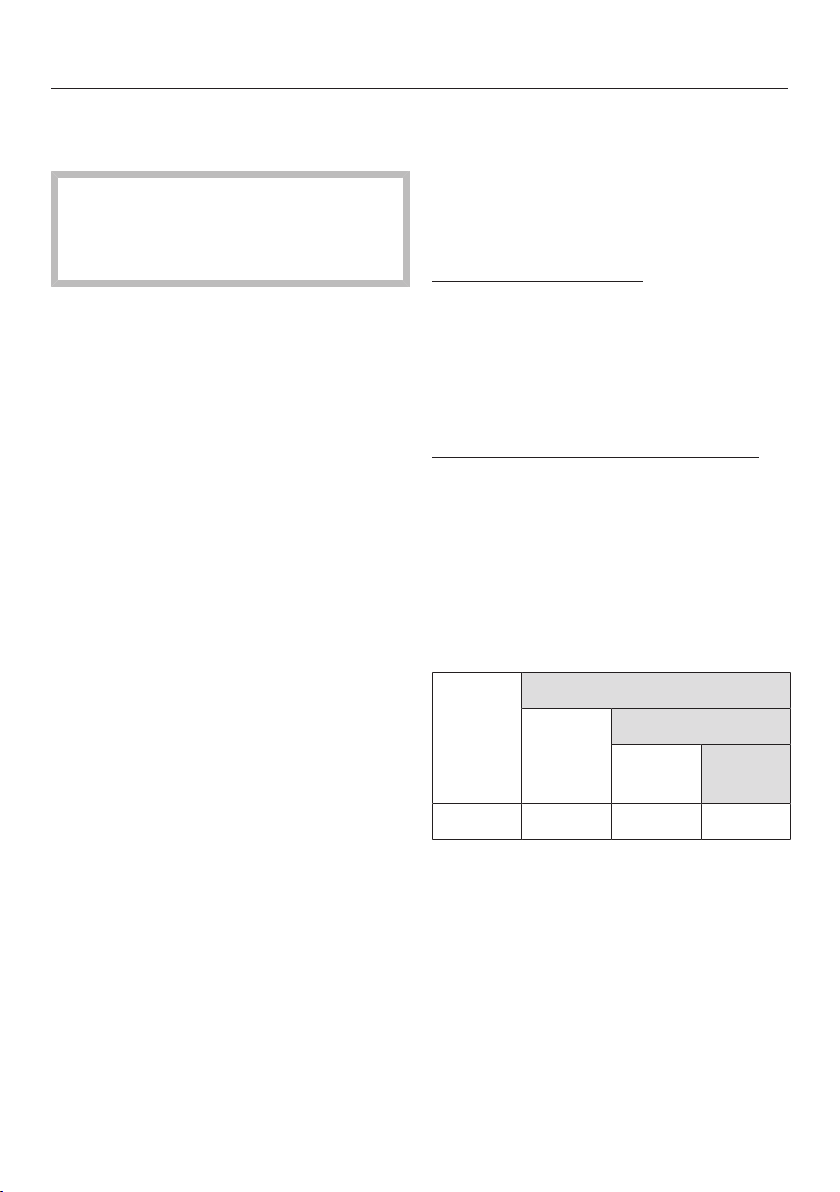
Steam cooking
71
Menu cooking (cooking whole
meals)
Before cooking meals with the
manual menu cooking function,
switch off steam reduction (see “Set-
tings – Steam reduction”).
When cooking a menu, you can com-
bine different foods with different cook-
ing durations, e.g. fish fillet with rice
and broccoli.
The food is placed in the steam oven
compartment at different times so that
each item is ready at the same time.
Shelf level
Place foods that produce a lot of liquids
(e.g. fish) or have a distinctive colour
(e.g. beetroot) directly above the glass
tray or condensate tray (depending on
the model). This avoids any transfer of
flavour or colour to other food and pre-
vents liquid dripping onto food below it.
Temperature
Whole meals should be cooked at a
temperature of 100°C as this is the
temperature required to cook the major-
ity of foods.
Do not cook a whole meal at the lowest
temperature when different temperat-
ures are required for different types of
food, e.g. 85°C for seabream and
100°C for potatoes.
If the recommended cooking temperat-
ure for the food is 85°C for example, try
cooking it at 100°C and testing the res-
ult. Some delicate types of fish with a
soft structure, e.g. sole and plaice will
become very firm when cooked at
100°C.
Duration
If you are increasing the recommended
temperature, shorten the cooking dura-
tion by approx. ¹/₃.
Example
Food cooking durations
(see cooking tables in “Steam cooking”)
Parboiled rice 24minutes
Rosefish fillet 6minutes
Broccoli 4minutes
Calculation of set cooking durations:
24minutes minus
6minutes=18minutes (1stcooking
duration: rice)
6minutes minus 4 minutes=2minutes
(2nd cooking duration: rosefish fillet)
Remaining time=4minutes (3rdcook-
ing duration: broccoli)
Cook-
ing dur-
ation
24min. – rice
6min. – fish fillet
4min. –
broccoli
Settings 18min. 2min. 4min.

Steam cooking
72
Cooking a whole menu
Place the rice in the oven compart-
ment first.
Set the 1st cooking duration:
18minutes.
After the 18minutes, place the fish
into the appliance.
Set the 2nd cooking duration:
2minutes.
After the 2minutes, place the broc-
coli into the appliance.
Set the 3rd cooking duration:
4minutes.

Sous-vide (vacuum) cooking
73
With this gentle cooking method, food
is cooked slowly and at a low, constant
temperature in vacuum packaging.
With vacuum cooking, no moisture
evaporates during cooking and all nutri-
ents and flavours are retained.
The cooking result has an intensive
taste and food is cooked evenly.
Use only fresh food which is in a
good condition.
Ensure hygienic conditions and that
food has not been out of the refriger-
ator too long, e.g. during transporta-
tion.
Use only heat-stable, boiling-resist-
ant vacuum sealing bags.
Do not cook food in the sales pack-
aging, such as vacuum-packed
frozen food as it is possible that the
packaging used is not suitable for
vacuum cooking.
Do not use the vacuum sealing bag
more than once.
Vacuum-seal the food in a chamber
system vacuum sealer only.

Sous-vide (vacuum) cooking
74
Important usage notes
For best cooking results, follow the in-
structions below:
- Use herbs and spices more sparingly
than with conventional methods be-
cause the impact on the taste of the
food will be stronger.
You can also cook the food un-
seasoned and add seasoning after
cooking.
- The cooking duration is reduced
when salt, sugar and liquids are ad-
ded.
- The food becomes firmer if acidic in-
gredients such as lemon or vinegar
are added.
- Do not use alcohol or garlic as this
can produce unpleasant flavours.
- Only use vacuum sealing bags that
match the size of the food. If the va-
cuum sealing bag is too big, too
much air can remain inside.
- If you want to cook several items of
food in one vacuum sealing bag, put
them side-by-side in the bag.
- If you want to cook food in several
vacuum sealing bags at once, put the
bags side-by-side on the rack.
- The cooking durations depend on the
thickness of the food.
- With higher temperatures and/or
longer cooking durations, the appli-
ance may run low on water. Check
the display from time to time.
- Keep the door closed during the
cooking programme. Opening the
door will prolong the cooking pro-
gramme and can change the cooking
result.
- Cooking at a lower temperature and
for a longer duration can result in in-
creased residual water in the cooking
compartment. This does not affect
the cooking results.
- Temperatures and cooking durations
from sous-vide recipes cannot al-
ways be emulated exactly. Alter the
settings to achieve the degree of
cooking you want.

Sous-vide (vacuum) cooking
75
Tips
- In order to reduce cooking times, you
can vacuum-seal food items 1–2
days before the cooking programme.
Store the vacuum-sealed food in the
refrigerator at no more than 5°C. In
order to preserve quality and flavour,
the food should be cooked no later
than 2 days afterwards.
- Freeze liquids such as marinades be-
fore vacuum-sealing to prevent them
from escaping from the bag.
- Fold the edges of the vacuum sealing
bag outwards for filling. This will give
you clean, perfect seams.
- If you do not want to eat the food
straight after cooking, put it in iced
water immediately and allow it to cool
down completely. After this, store the
food at temperatures no greater than
5°C.
This way, you can retain the food’s
quality and flavour while keeping it
fresh for longer.
Exception: Poultry must be eaten
straight after the cooking programme.
- After cooking, cut the vacuum sealing
bag on all sides for easier access to
the food.
- Briefly fry meat and firm types of fish
(such as salmon) before serving for a
roasted aroma.
- Use the stock or marinade of veget-
ables, fish or meat to make a sauce.
- Serve the food on pre-warmed
plates.

Sous-vide (vacuum) cooking
76
Using the Sous-vide function
Rinse the food with cold water and
dry it.
Place the food in a vacuum sealing
bag and add spices or liquid if de-
sired.
Vacuum-seal the food in a chamber
system vacuum sealer.
Place the condensate tray on shelf
level 1.
For the best cooking results, place
the rack on shelf level 2.
Place the vacuum-sealed food on the
rack (next to each other if there are
several bags).
Select Sous-vide.
Change the recommended temperat-
ure if necessary.
Confirm with OK.
Set further settings as necessary (see
“Operation”).
Possible reasons for unsatis-
factory results
The bag has opened:
- The seal was not clean or strong
enough and has opened.
- The bag was damaged by a sharp
bone.
The food has an unpleasant or strange
taste:
- Incorrect storage of the food; the
food was kept out of the refrigerator
for too long.
- The food was contaminated with
bacteria before it was vacuum
sealed.
- Too much of ingredients such as
spices was added.
- The bag or seal was not in perfect or-
der.
- The vacuum was insufficient.
- The food was not eaten or chilled im-
mediately after cooking.
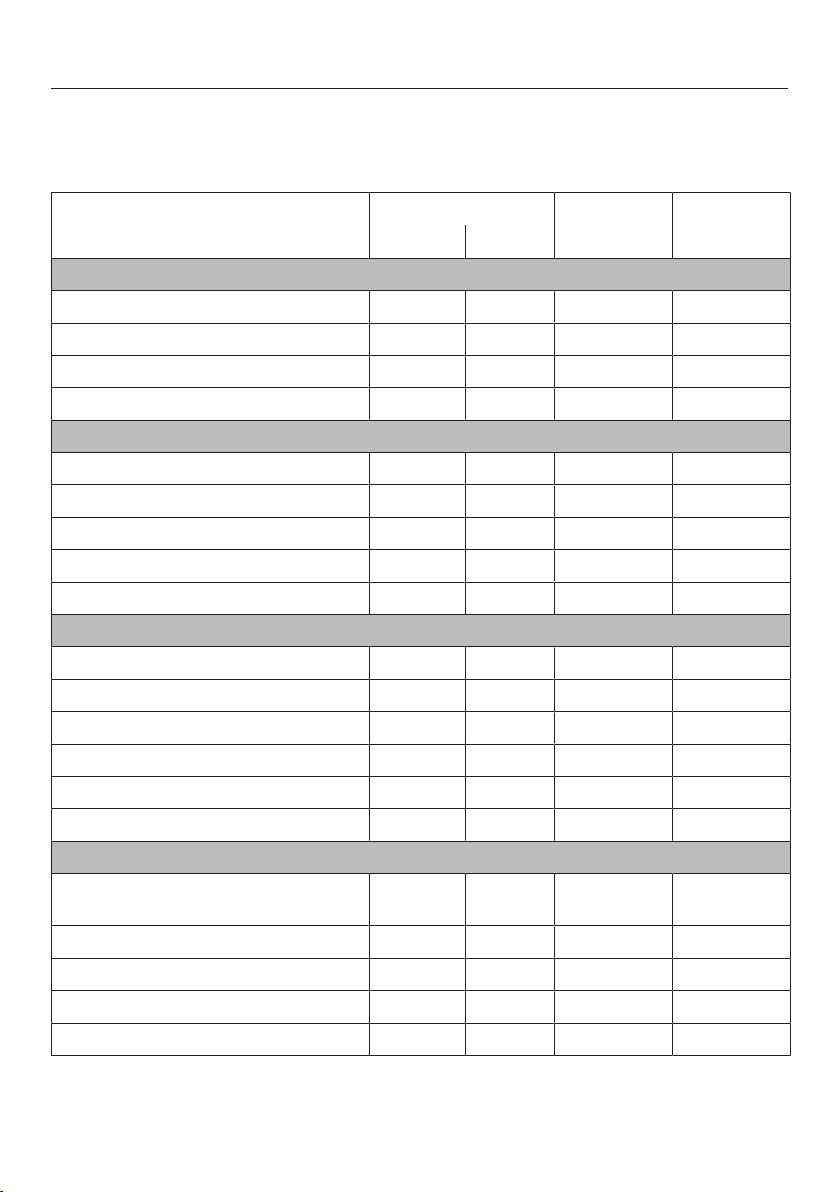
Sous-vide (vacuum) cooking
77
The cooking durations given in the tables are guidelines only. We recommend se-
lecting the shorter duration initially. You can cook for longer if necessary. The
cooking duration only begins when the set temperature is reached.
Food Added in advance [°C] [min]
Sugar Salt
Fish
Atlantic cod fillet, 2.5cm thick x 54 35
Salmon fillet, 2–3cm thick x 52 30
Monkfish fillet x 62 18
Pikeperch fillet, 2cm thick x 55 30
Vegetables
Cauliflower florets, medium to large x 85 40
Hokkaido pumpkin, sliced x 85 15
Kohlrabi, sliced x 85 30
Asparagus, white, whole x x 85 22–27
Sweet potato, sliced x 85 18
Fruit
Pineapple, sliced x 85 75
Apples, sliced x 80 20
Baby bananas, whole 62 10
Peaches, halved x 62 25–30
Rhubarb chunks 75 13
Plums, halved x 70 10–12
Other
Beans, white, soaked in a ratio of 1:2
(beans to liquid)
x 90 240
Prawns, peeled and deveined x 56 19–21
Hen's egg, whole 65–66 60
Scallops, removed from shell 52 25
Shallots, whole x x 85 45–60
Temperature Duration
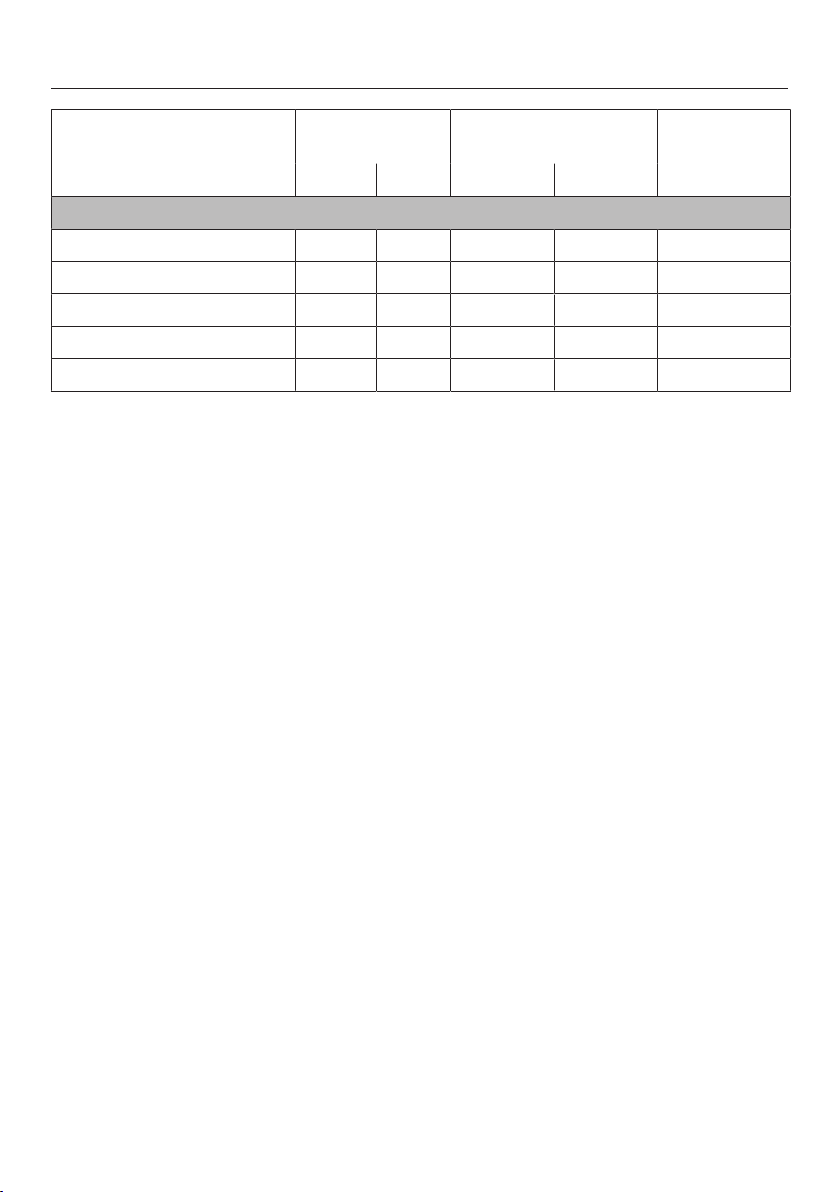
Sous-vide (vacuum) cooking
78
Food Added in ad-
vance
[°C] [min]
Sugar Salt Medium* Done*
Meat
Duck breast, whole x 66 72 35
Saddle of lamb 58 62 50
Beef fillet steak, 4cm thick 56 61 120
Beef rump steak, 2.5cm thick 56 – 120
Pork tenderloin, whole x 63 67 60
Temperature Duration
* Degree of cooking
The “well done” cooking degree uses a higher core temperature than “medium”, but results are
not the same as being well-done in the traditional sense.

Sous-vide (vacuum) cooking
79
Reheating
Only reheat brassicas, such as kohlrabi
and cauliflower, in combination with a
sauce. Without sauce, an unpleasant
cabbage-like taste and grey-brown col-
our may develop.
Food with a short cooking duration or
which continues cooking during re-
heating, such as fish, is not suitable
for reheating.
Preparation
Place the cooked food into ice water for
approx. 1hour directly after cooking.
The rapid cooling prevents the food
from continuing to cook, which helps
retain the optimum cooked condition.
Then store the food in the refrigerator at
a maximum temperature of 5°C.
Please note that the quality of the
food decreases the longer it is
stored.
We recommend that you do not store
the food in the refrigerator for longer
than 5days before reheating.
Settings
Sous-vide
Temperature: see table
Duration: see table
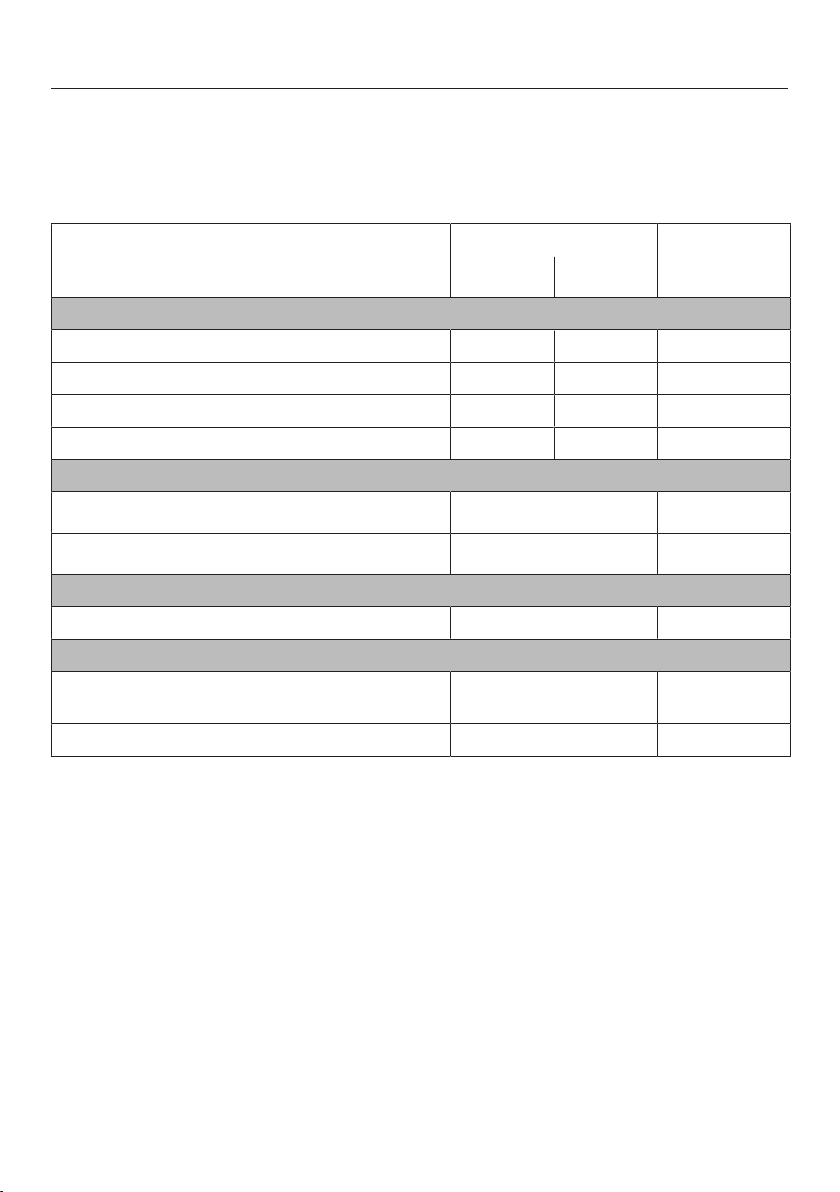
Sous-vide (vacuum) cooking
80
Reheating with the Sous-vide function
The durations specified in the table are guidelines only. You can increase the dura-
tion if necessary. The cooking duration only begins when the set temperature is
reached.
Food [°C]
2
[min]
Medium
1
Done
1
Meat
Saddle of lamb 58 62 30
Beef fillet steak, 4cm thick 56 61 30
Beef rump steak, 2.5cm thick 56 – 30
Pork tenderloin, whole 63 67 30
Vegetables
Cauliflower florets, medium to large
3
85 15
Kohlrabi, sliced
3
85 10
Fruit
Pineapple, sliced 85 10
Other
Beans, white, soaked in a ratio of 1:2
(beans to liquid)
90 10
Shallots, whole 85 10
Temperature, Time
1
Degree of cooking
The “well done” cooking degree uses a higher core temperature than “medium”, but results are
not the same as being well-done in the traditional sense.
2
Durations apply to vacuum-sealed food with an initial temperature of approx. 5°C (refrigerator
temperature).
3
Reheat only in sauce.

Further applications
81
Reheat
To reheat food which was cooked us-
ing the sous-vide method, use the
Sous-vide function (see “Sous-vide
– Reheating”).
The steam oven is very effective at re-
heating food gently, without drying it
out or cooking it further. The food will
reheat evenly and does not need to be
stirred during the reheating process.
You can reheat individual dishes or
plated meals which have been prepared
previously (e.g. meat, vegetables and
potatoes).
Suitable containers
Small quantities can be reheated on a
plate, larger quantities should be placed
in a cooking container.
Time
The number of plates or containers has
no bearing on the time.
The times listed in the table relate to an
average portion per plate. Increase the
duration for larger quantities.
Tips
- Do not reheat large items, such as a
joint of roast meat, whole. Divide it
into portions and reheat these as
plated meals.
- Compact items, such as stuffed pep-
pers, roulades or dumplings, should
be cut in half.
- Reheat sauces separately. Exceptions
are dishes such as goulash, which is
cooked in sauce.
- Cover food when reheating it to avoid
steam condensing on the crockery.
- Please note that breaded items, such
as schnitzel, will not retain their crisp-
ness when they are reheated.
Heating food
Cover the food being warmed up with
a plate or foil that is resistant to tem-
peratures up to 100°C and to steam.
Place the food on the rack or in a
cooking container.
Settings
Reheat
or
Steam cooking
Temperature: 100°C
Duration: see chart
Further applications
82
The durations specified in the table are guidelines only. We recommend selecting
the shorter duration initially. You can increase the duration if necessary.
Food * [min]
Vegetables
Carrots
Cauliflower
Kohlrabi
Beans
6–7
Side dishes
Pasta
Rice
3–4
Potatoes, halved lengthways 12–14
Dumplings 15–17
Meat and poultry
Sliced meat, 1.5cm thick
Roulades, sliced
Goulash
Lamb stew
5–6
Meatballs 13–15
Chicken escalopes
Turkey escalopes
7–8
Fish
Fish fillets, 2cm thick 6–7
Fish fillets, 3cm thick 7–8
Plated meals
Spaghetti with tomato sauce 13–15
Roast pork, potatoes, vegetables 12–14
Stuffed pepper (halved), rice 13–15
Chicken fricassee, rice 7–8
Vegetable soup 2–3
Creamy soup 3–4

Further applications
83
Food * [min]
Consommé 2–3
Stew 4–5
Duration
* These times apply to food heated on a plate and covered with a plate.

Further applications
84
Defrost
It is much quicker to defrost food in the
steam oven than at room temperature.
Risk of infection from bacteria.
Bacteria such as salmonella can
cause life-threatening food poison-
ing.
It is particularly important to observe
food hygiene rules when defrosting
fish and meat, and in particular when
defrosting poultry.
Do not use the liquid produced dur-
ing defrosting.
Process the food as required as soon
as it has been defrosted.
Temperature
60 °C is the best temperature for de-
frosting.
Exception: 50 °C for minced meat and
game
Before and after defrosting
Remove any packaging before defrost-
ing.
Exceptions: Leave bread, biscuits and
cakes in their packaging as otherwise
they will absorb moisture and become
soft.
Allow food to stand at room temperat-
ure for a few minutes after defrosting.
The standing time is necessary to allow
the even distribution of heat from the
outside to the inside.
Cooking containers
Use a perforated container with a glass
or condensate tray underneath it when
defrosting food which will drip, such as
poultry. This way food will not be lying
in defrosted liquid.
Food which does not drip can be de-
frosted in a solid container.
Tips
- Fish, for instance, does not need to
be fully defrosted before cooking. De-
frost so that the surface is sufficiently
thawed to take herbs and seasoning.
Depending on the thickness of the
fish, 2–5 minutes is generally enough.
- When defrosting food which has
frozen together, e.g. berries and meat
portions, separate them half-way
through the defrosting time.
- Do not refreeze food once it has
thawed.
- Defrost frozen pre-cooked meals ac-
cording to the instructions on the
packaging.
Settings
Defrost
or
Steam cooking
Temperature: see chart
Defrosting duration: see chart
Standing time: see chart
Further applications
85
The durations specified in the table are guidelines only. We recommend selecting
the shorter defrosting time initially. You can increase the defrosting time longer if
necessary.
Frozen food Quantity [°C] [min] [min]
Dairy products
Sliced cheese 125g 60 15 10
Quark 250g 60 20–25 10–15
Cream 250g 60 20–25 10–15
Soft cheese 100g 60 15 10–15
Fruit
Apple sauce 250g 60 20–25 10–15
Apple chunks 250g 60 20–25 10–15
Apricots 500g 60 25–28 15–20
Strawberries 300g 60 8–10 10–12
Raspberries/currants 300g 60 8 10–12
Cherries 150g 60 15 10–15
Peaches 500g 60 25–28 15–20
Plums 250g 60 20–25 10–15
Gooseberries 250g 60 20–22 10–15
Vegetables
Frozen in a block 300g 60 20–25 10–15
Fish
Fish fillets 400g 60 15 10–15
Trout 500g 60 15–18 10–15
Lobster 300g 60 25–30 10–15
Small shrimps 300g 60 4–6 5
Ready meals
Meat, vegetables, side dishes/
stew/soup
480g 60 20–25 10–15
Meat
Roast meat, sliced 125–150g each 60 8–10 15–20
Further applications
86
Frozen food Quantity [°C] [min] [min]
Minced meat
250g 50 15–20 10–15
500g 50 20–30 10–15
Goulash
500g 60 30–40 10–15
1000g 60 50–60 10–15
Liver 250g 60 20–25 10–15
Saddle of hare 500g 50 30–40 10–15
Saddle of venison 1000g 50 40–50 10–15
Cutlets/chops/sausages 800g 60 25–35 15–20
Poultry
Chicken 1000g 60 40 15–20
Chicken thighs 150g 60 20–25 10–15
Chicken escalopes 500g 60 25–30 10–15
Turkey legs 500g 60 40–45 10–15
Baked goods
Puff pastries/yeast-dough
pastry
– 60 10–12 10–15
Creamed mixture cakes/biscuits 400g 60 15 10–15
Bread/rolls
Bread rolls – 60 30 2
Rye bread, sliced 250g 60 40 15
Wholegrain bread, sliced 250g 60 65 15
White bread, sliced 150g 60 30 20
Temperature Defrosting time Standing time

Further applications
87
Blanching
Blanch vegetables before freezing
them. Blanching helps maintain the
quality of the produce when it is frozen.
Blanching vegetables also helps them
retain their original colour.
Put the prepared vegetables into a
perforated cooking container.
Once blanched, plunge the veget-
ables into ice cold water to cool them
down quickly. Drain them well.
Settings
Further | Blanching
or
Steam cooking
Temperature: 100°C
Blanching time: 1minute
Bottling
Only use unblemished, fresh produce
which is in good condition for bottling.
Glass jars
Use clean glass jars and accessories
and check them for any defects. Glass
jars with twist off lids or glass lids with a
rubber seal are suitable.
Make sure that all the jars are the same
size so that bottling is carried out
evenly.
After you have filled the jars with the
bottled produce, clean the glass rims
with a clean cloth and hot water and
then seal the jars.
Fruit
Sort fruit carefully, rinse it briefly but
thoroughly and allow it to drain. Take
great care when cleaning soft fruit as it
is very delicate and squashes easily.
Remove any peel, stalks, cores or
stones. Cut up large fruit. For example,
cut apples into slices.
If you are bottling fruit with stones (e.g.
plums, apricots) without removing the
stones, pierce the fruit several times
with a fork or wooden skewer as other-
wise it will burst.

Further applications
88
Vegetables
Rinse, clean and cut up vegetables.
Vegetables should be blanched before
bottling to help them retain their colour
(see “Special applications” – “Blanch-
ing”).
Fill volume
Fill the glass jars with produce up to a
maximum of 3cm below the rim. Do
not pack it down as this will damage
the cell walls of the produce. Tap the jar
gently onto a cloth to help distribute the
contents evenly. Fill the jars with liquid.
The produce must be completely
covered.
Use a sugar solution for fruit and a salt
or vinegar solution for vegetables.
Tips
- Make use of residual heat by leaving
the jars in the oven for 30 minutes
after it has switched off.
- Then cover the jars with a cloth and
allow to cool for approx. 24 hours.
Bottling food
Place the rack in shelf level1.
Place the jars on the rack. The jars
must not touch each other.
Settings
Further | Bottling
or
Steam cooking
Temperature: see table
Bottling duration: see table
Further applications
89
Food to be bottled [°C] * [min]
Berries
Currants 80 50
Gooseberries 80 55
Cranberries 80 55
Fruit with stones
Cherries 85 55
Mirabelle plums 85 55
Plums 85 55
Peaches 85 55
Greengages 85 55
Fruit with pips
Apples 90 50
Apple sauce 90 65
Quinces 90 65
Vegetables
Beans 100 120
Broad beans 100 120
Gherkins 90 55
Beetroot 100 60
Temperature Duration
* Bottling times apply to 1.0l jars. If using 0.5l jars, reduce the duration by 15minutes. If using
0.25l jars, reduce the duration by 20 minutes.

Further applications
90
Disinfect items
The steam oven can be used to disin-
fect baby bottles and other containers
so that at the end of the programme
they are as germ free as they would
have been had they been boiled. Check
beforehand that all parts, teats etc. are
declared by the manufacturer to be heat
resistant to 100°C and also that they
can withstand hot steam.
Dismantle, clean and thoroughly rinse
baby bottles. All parts of the bottles
must be completely dry before they are
reassembled to keep them germ free.
Place the individual items on the rack
or in a perforated container (on their
sides or with the opening facing
downwards) ensuring that they do not
touch one another to allow hot steam
to reach them from all sides.
Settings
Further | Disinfect items
Duration: 1minute to 10hours
or
Steam cooking
Temperature: 100°C
Duration: 15minutes
Prove dough
Prepare the dough according to the
recipe.
Place the dough, uncovered, in a
bowl on the rack.
Settings
Further | Prove dough
Duration: as per recipe instructions
or
Steam cooking
Temperature: 40°C
Duration: as per recipe instructions

Further applications
91
Heating damp flannels
Moisten the flannels and then roll
them up.
Place them beside one another in a
perforated cooking container.
Settings
Automatic programmes | Special | Heat
damp flannels
or
Steam cooking
Temperature: 70°C
Cooking duration: 2minutes
Dissolve gelatine
Soften gelatine leaves by leaving
them in a bowl of cold water for
5minutes. The gelatine leaves have
to be fully covered with water. Re-
move the gelatine leaves from the
bowl and squeeze them out. Empty
the bowl. Place the squeezed gelatine
leaves back in the bowl.
Place gelatine powder in a bowl and
add water according to the instruc-
tions on the packaging.
Cover the bowl and place on the
rack.
Settings
Automatic programmes | Special | Dis-
solve gelatine
or
Steam cooking
Temperature: 90°C
Cooking duration: 1minute

Further applications
92
Decrystallise honey
Loosen the lid and place the jar of
honey in a perforated container.
Stir the honey once during the cook-
ing duration.
Settings
Automatic programmes | Special | De-
crystallise honey
or
Steam cooking
Temperature: 60°C
Cooking duration: 90minutes (irre-
spective of the size of jar or the amount
of honey in the jar)
Melt chocolate
You can use the steam oven for melting
any type of chocolate.
When using a cake covering, place it in
a perforated cooking container, leaving
it in its packaging.
Break the chocolate into small
pieces.
Place larger quantities in a solid
cooking container and smaller quanti-
ties in a cup or a bowl.
Cover the container or the dish with a
lid or with foil that is resistant to tem-
peratures up to 100°C and to hot
steam.
Stir large quantities once halfway
through cooking.
Settings
Automatic programmes | Special | Melt
chocolate
or
Steam cooking
Temperature: 65°C
Cooking duration: 20minutes

Further applications
93
Make yoghurt
To make yoghurt, you will need either
fresh live yoghurt or yoghurt culture,
obtainable from health food shops.
Use natural yoghurt with live culture and
without additives. Heat-treated yoghurt
is not suitable.
The yoghurt must be fresh (short stor-
age time).
You can use either unchilled long-life
milk or fresh milk.
Long-life milk can be used as it is – no
further preparation is required. Fresh
milk must first be heated to 90°C (do
not boil it) and then cooled down to
35°C. Fresh milk will give a better set
than long-life milk.
The yoghurt and milk should have the
same percentage fat.
Do not move or shake the jars whilst
the yoghurt is thickening.
Immediately after preparation, leave the
yoghurt to cool in the fridge.
How well home-prepared yoghurt sets
will depend on the consistency, fat con-
tent and the cultures used in the starter
yogurt. Not all yoghurts are suitable for
use as starter yoghurt.
Tip: When using yoghurt enzyme,
yoghurt can be made from a milk /
cream mixture. Mix³/₄litre milk
with¹/₄litre cream.
Mix 100g yoghurt with 1l milk or
make up the mixture with yoghurt en-
zyme, following the instructions on
the packaging.
Pour the mixture into jars and seal the
jars.
Place the sealed jars into a perforated
cooking container or on the rack. The
jars must not touch each other.
Straight after the cooking duration
has finished, place the jars in the re-
frigerator. Take care not to shake the
jars unnecessarily.
Settings
Automatic programmes | Special |
Make yoghurt
or
Steam cooking
Temperature: 40°C
Duration: 5hours
Possible reasons for unsatisfactory
results
Yoghurt has not set:
Incorrect storage of starter yoghurt, too
much time out of the refrigerator, e.g. in
transportation, damaged packaging,
milk not sufficiently heated.
Liquid has separated:
The jars were moved, yoghurt was not
cooled down quickly enough.
Yoghurt is gritty:
Milk was overheated or in poor condi-
tion, milk and starter yoghurt not evenly
stirred.

Further applications
94
Cook bacon
The bacon does not brown.
Place the bacon (diced or rashers) in
a solid cooking container.
Cover the container with foil that is
temperature-resistant up to 100°C
and resistant to steam.
Settings
Automatic programmes | Special |
Render fat
or
Steam cooking
Temperature: 100°C
Cooking duration: 4minutes
Sweat onions
Sweating means cooking the onions in
their own juices, with the addition of a
little fat if necessary.
Cut the onions up into small pieces
and place them in a solid cooking
container with a little butter.
Cover the container with foil that is
temperature-resistant up to 100°C
and resistant to steam.
Settings
Automatic programmes | Special |
Sweat onions
or
Steam cooking
Temperature: 100°C
Cooking duration: 4minutes

Further applications
95
Extracting juice with steam
This appliance is ideal for extracting
juice from soft, firm and hard fruit.
It is best to use overripe fruit, as the
riper the fruit, the greater the quantity of
juice produced. Very ripe fruit will also
produce a more intense flavour.
Preparation
Sort and clean the fruit. Cut out any
blemishes.
Remove the stalks from grapes and
morello cherries as these are bitter. Ber-
ries do not need to have their stalks re-
moved.
Cut larger fruit such as apples into
chunks of approximately 2cm in size.
The harder the fruit, the smaller the
pieces should be.
Tips
- Try experimenting with mild and tart
fruit.
- Adding sugar will increase the quant-
ity of juice produced and improve the
flavour. Sprinkle the fruit with sugar
and leave to absorb for a few hours
before juicing. For 1kg of sweet fruit
add 50–100g of sugar, and for 1kg
of tart fruit add 100–150g of sugar.
- If you wish to bottle the juice rather
than consume it straight away, pour it
whilst hot into hot, sterilised bottles,
and then seal immediately with steril-
ised tops.
Extracting juice from fruit
Put the prepared fruit into a perfor-
ated cooking container.
Place a solid container or a glass or
condensate tray (depending on the
model) underneath to catch the juice.
Settings
Steam cooking
Temperature: 100°C
Duration: 40–70minutes

Further applications
96
Skinning vegetables and fruit
Cut a cross in the top of tomatoes,
nectarines, etc. This will allow the
skin to be removed more easily.
Place the fruit/vegetables in a perfor-
ated cooking container.
To blanch almonds, it is important to
plunge them into cold water as soon
as they are taken out of the oven,
otherwise the skin cannot be re-
moved.
Settings
Steam cooking
Temperature: 100°C
Duration: see table
Food [min]
Apricots 1
Almonds 1
Nectarines 1
Peppers 4
Peaches 1
Tomatoes 1
Duration
Apple storage
You can treat homegrown apples in the
steam oven to increase the length of
time for which you can store them.
Once treated, the apples will keep for 5
to 6months when stored in a dry, cool
and well-ventilated place. This method
is only suitable for apples and not for
other types of fruit.
Settings
Automatic programmes | Fruit | Apples |
Whole
or
Steam cooking
Temperature: 50°C
Preserving time: 5minutes
Making eierstich
Mix 6eggs with 375ml milk (do not
beat into a foam).
Season the egg and milk mixture and
pour into a solid cooking container
greased with a little butter.
Settings
Steam cooking
Temperature: 100°C
Cooking duration: 4minutes

Automatic programmes
97
The wide range of automatic pro-
grammes enables you to achieve excel-
lent results with ease.
Categories
The automatic programmes are sor-
ted into categories to provide a better
overview. Simply select the appropriate
programme for the type of food you are
cooking and follow the instructions in
the display.
Using automatic programmes
Select Automatic programmes.
A list will appear.
Select the desired food category (e.g.
Fish).
The automatic programmes available
for the category selected will then ap-
pear.
Select the desired automatic pro-
gramme.
Follow the instructions on the display.
Tip: Use Info to display information
such as how to place or turn the food
depending on the cooking programme.
Usage notes
- The degree of cooking is represented
by a bar with seven segments. Using
the navigation area you can set the
desired degree of cooking.
- The weights specified in the auto-
matic programmes refer to the weight
per piece. For example, you can cook
just one piece of salmon weighing
250g or 10 pieces of salmon, each
weighing 250g, at the same time.
- The steam oven compartment needs
to cool to room temperature before
starting an automatic programme.
- When you place food into the hot
oven compartment, be careful when
opening the door. Hot steam may es-
cape. Step back and wait until the
steam has dissipated. Avoid contact
with hot steam, and do not touch the
hot oven compartment walls. Danger
of burning and scalding.
- For some automatic programmes, the
start time can be delayed using Start
at or Finish at.
- Select the sensor control to can-
cel an automatic programme. When
Cancel process? appears, select Yes
and confirm with OK.
- If by the end of an automatic pro-
gramme the food is not cooked
enough for your taste, select Cont.
cooking.
- Automatic programmes can also be
saved as User programmes. To do this,
select the sensor control after an
automatic programme has finished.

User programmes
98
You can create and save up to 20 of
your own programmes.
- You can combine up to 9cooking
stages to accurately programme your
favourite or most frequently used re-
cipes. In each cooking stage, you
can select settings such as the func-
tion, temperature and cooking dura-
tion.
- You can enter the name of the pro-
gramme for your recipe.
When you call up and start your pro-
gramme again, it will run automatically.
There are different ways of creating a
user programme:
- At the end of an automatic pro-
gramme or special application, save
it as a user programme.
- Save a cooking programme after run-
ning it with a set cooking duration.
Then enter a programme name.
Creating user programmes
Select User programmes.
Select Create programme.
You can now specify the settings for the
first cooking stage.
Follow the instructions in the display:
Select and confirm the desired set-
tings.
Select Finish cooking stage.
All settings for the first cooking stage
have now been set.
You can add more cooking stages, for
example, if you want to add another
cooking function to follow on from the
first.
If additional cooking stages are re-
quired, select Add cooking stage and
proceed as per the 1st cooking stage.
If you want to check the settings or to
change them at a later date, select the
cooking stage in question.
When you have finished setting all the
cooking stages, selectSave.
Enter the programme name.
Select.
A message will appear in the display
confirming that the programme name
has been saved.
Confirm withOK.
You can start the saved programme im-
mediately, delay the start or change the
cooking stages.

User programmes
99
Starting user programmes
Place the food in the oven compart-
ment.
Select User programmes.
Select the desired programme.
Select Allow.
Depending on the programme settings,
the following menu options appear in
the display:
- Start now
The programme will start immedi-
ately. The oven heating will switch on
immediately.
- Finish at
Specify the time when you want the
programme to stop. The oven heating
will switch off automatically at the
time you have set.
- Start at
Specify the time when you want the
programme to start. The oven heating
will switch on automatically at the
time you have set.
- Show cooking stages
A summary of your settings will ap-
pear on the display.
Select the desired menu option.
The programme selected will begin
straight away or at the time set.
At the end of the programme, select
the sensor control.
Changing cooking stages
Cooking stages in automatic pro-
grammes that have been saved under
a different name cannot be changed.
Select User programmes.
Select the programme you want to
change.
Select Change programme.
Select the cooking stage that you
want to change orAdd cooking stage
to add another cooking stage.
Select and confirm the desired set-
tings.
If you want to start the modified pro-
gramme without changing it, se-
lectStart programme.
SelectSave when you have changed
all the settings.
A message will appear in the display
confirming that the programme name
has been saved.
Confirm withOK.
The saved programme has been
changed and you can start it immedi-
ately or delay the start.

User programmes
100
Changing the name
Select User programmes.
Select the programme you want to
change.
Select Change name.
Change the programme name.
Select.
A message will appear in the display
confirming that the programme name
has been saved.
Confirm withOK.
The programme has been renamed.
Deleting user programmes
Select User programmes.
Select the programme you want to
delete.
Select Delete programme.
Confirm the request with Yes.
The programme is deleted.
Go to Further| Settings| Factory
default| User programmes to delete all
user programmes at the same time.
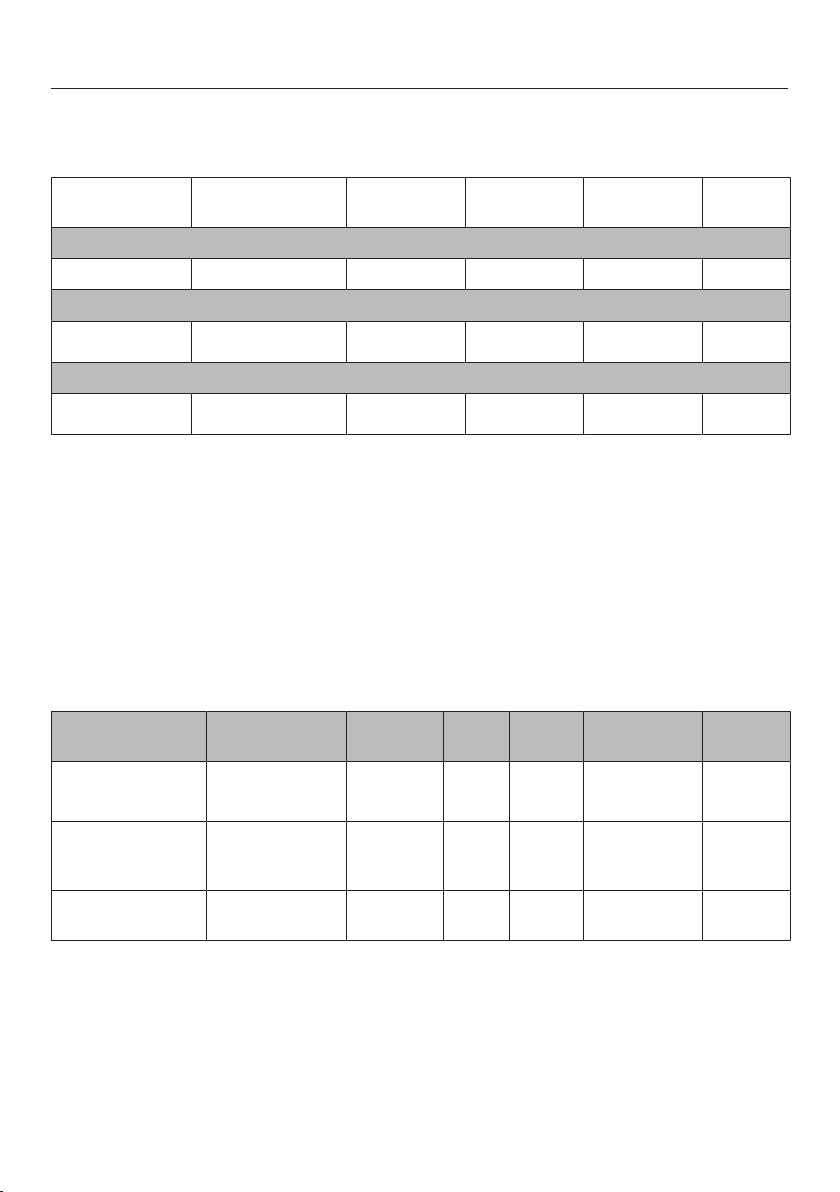
Note for test institutes
101
Test food in accordance with EN 60350-1 (steam cooking func-
tion)
Test food Cooking con-
tainer(s)
Quantity [g]
1
2
[°C]
[min]
Steam replenishment
Broccoli (8.1) 1x DGGL 1/2-40L 300 Any 100 3
Steam distribution
Broccoli (8.2) 2x DGGL 1/2-40L max.
Any
3
100 3
Appliance capacity
Peas (8.3) 4x DGGL 1/2-40L 875 in each
2, 4
4
100
5
Shelf level(s), Temperature, Cooking duration
1
Place the glass tray or condensate tray (depending on the model) in shelf level1.
2
Place the test food in a cold oven compartment (before the heating-up phase begins).
3
Place 2x DGGL 1/2-40L containers adjacent to one another in the shelf level.
4
Place 2x DGGL 1/2-40L containers adjacent to one another in each of the shelf levels.
5
The test is finished when the temperature measures 85°C in the coolest place.
Menu cooking test food
1
(steam cooking function)
Test food Cooking con-
tainers
Quantity
[g]
2
[°C] Height [cm] [min]
Potatoes, waxy,
quartered
3
1x1/2DGGL–
40L
800 4 100 – 17
Salmon fillet,
frozen, not defros-
ted
1x1/2DGGL–
40L
4x150 2 100 <2.5
≥2.5≤3.2
>3.2
9
10
11
Broccoli florets 1x1/2DGGL–
40L
600 3 100 – 4
Shelf level, Temperature, Cooking duration
1
For instructions, see “Steam cooking – Menu cooking”.
2
Place the glass tray or condensate tray (depending on the model) on shelf level1.
3
Place the 1st test food item (potatoes) in the cold oven compartment (before the heating-up phase
begins).

Cleaning and care
102
Risk of injury caused by hot sur-
faces.
The steam oven gets hot during op-
eration. You could burn yourself on
the oven compartment, side runners
or accessories.
Allow the oven compartment, side
runners and accessories to cool be-
fore cleaning.
Risk of injury due to electric
shock.
The steam from a steam cleaning ap-
pliance could reach live electrical
components and cause a short cir-
cuit.
Never use a steam cleaner for clean-
ing.
Surfaces can discolour or alter if un-
suitable cleaning agents are used.
All surfaces are susceptible to
scratching. Scratches on glass can in
some circumstances lead to break-
age.
Use only domestic washing-up liquid
to clean the appliance.
Remove all cleaning agent residues
immediately.
Do not use cleaning agents or wash-
ing-up liquids containing aliphatic
hydrocarbons as these could cause
the seals to swell.
If soiling is left on for any length of
time, it may become impossible to
remove.
Surfaces may suffer discolouration or
damage.
It is therefore best to remove any
soiling immediately.
The appliance and accessories
should be cleaned and dried thor-
oughly after each use.
Leave the appliance door open until
the oven compartment is completely
dry.
Tip: If the appliance is not going to be
used for a longer period of time – during
a holiday, for example – it should be
thoroughly cleaned and dried before-
hand to prevent the build-up of odours
and so on. Leave the door open after-
wards.

Cleaning and care
103
Unsuitable cleaning agents
To avoid damaging the surfaces of your
appliance, do not use:
- Cleaning agents containing soda,
ammonia, acids or chlorides
- Cleaning agents containing descaling
agents
- Abrasive cleaning agents, e.g.
powder cleaners and cream cleaners
- Solvent-based cleaning agents
- Stainless steel cleaning agents
- Dishwasher cleaner
- Glass cleaning agents
- Cleaning agents for ceramic glass
hobs
- Hard, abrasive brushes or sponges
(e.g. pot scourers, brushes or
sponges which have been previously
used with abrasive cleaning agents)
- Melamine eraser blocks
- Sharp metal scrapers
- Wire wool
- Stainless steel spiral pads
- Spot cleaning with mechanical clean-
ing agents
- Oven cleaners or sprays
Cleaning the steam oven front
Clean the appliance front with a
clean, soft sponge and a solution of
warm water and washing-up liquid.
After cleaning, wipe the surfaces dry
using a soft cloth.
Tip: A clean, damp microfibre cloth
without cleaning agent can also be
used.
Cleaning the oven compart-
ment
The oven compartment, the door seal,
the drip channel and the inside of the
door should be cleaned and dried after
each use.
Remove:
- condensate using a sponge or ab-
sorbent cloth
- light, greasy soiling with a clean
sponge and a solution of washing-up
liquid and hot water.
After cleaning, wipe the surface with
clean water to remove any cleaning
agent residues.
Then wipe the surfaces dry using a
cloth.
After prolonged use, the floor heater
can become discoloured by drops of
liquid, but this does not impair the
function.

Cleaning and care
104
The door seal is designed to last the
lifetime of the appliance. Should it for
any reason need replacing, please
contact the Customer Service De-
partment (see the end of these oper-
ating instructions).
Cleaning the automatic door opener
Ensure that the door opener does
not become soiled with food
residues.
Wipe away soiling immediately with
a clean sponge and a solution of
washing-up liquid and hot water.
After cleaning, wipe the surface with
clean water to remove any cleaning
agent residues.
Cleaning the water container
Remove the water container after
each use.
Remove the spill guard.
Empty the water container.
Rinse the water container by hand
and then dry it to prevent limescale.
Push the spill guard back onto the
water container. Make sure the spill
guard engages correctly.
Accessories
All accessories are dishwasher safe.
Cleaning the condensate tray, rack
and cooking containers
Wash and dry the condensate tray,
rack and cooking containers after
each use.
Any bluish discolouration on the
cooking containers can be removed
with vinegar. Then rinse with clean
water.
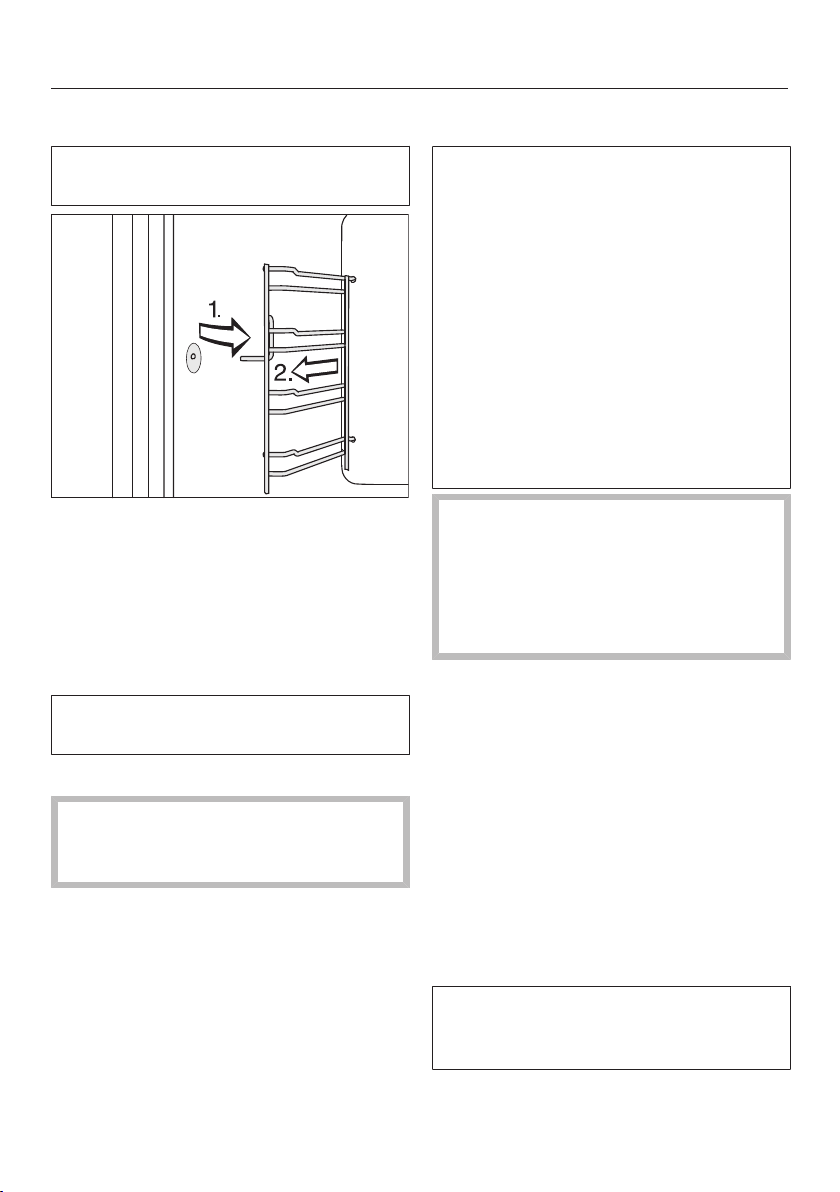
Cleaning and care
105
Cleaning the side runners
The side runners are suitable for
cleaning in a dishwasher.
Pull the side runners out of holder (1.)
and remove them (2.).
The side runners can be washed in
the dishwasher or by hand with a
solution of warm water and a little
washing-up liquid applied with a
clean sponge or cloth.
Reassemble by following these in-
structions in reverse order.
Carefully refit the side runners.
If the side runners are not correctly
inserted, there is no anti-tip protec-
tion.
Descaling the steam oven
We recommend using Miele descaling
tablets (see “Optional accessories”) to
descale the appliance. These have
been specially developed for use with
Miele appliances to optimise the de-
scaling process. Other descaling
agents, which contain other acids be-
sides citric acid and/or other undesir-
able substances, such as chlorides for
example, could cause damage to the
product. Moreover, the descaling res-
ult required could not be guaranteed if
the descaling solution was not of the
appropriate concentration.
Do not spill descaling agent onto
metal surfaces. This can cause
marks to appear.
However, should any descaling
agent get onto these surfaces, wipe
it away immediately.
The steam oven has to be descaled
after a certain number of operating
hours. When it needs descaling, the
number of uses remaining will be shown
in the display. The steam oven will lock
after the last remaining cooking pro-
cess.
We recommend that you descale the
appliance before it locks out.
During the descaling process, the water
container must be rinsed out and re-
filled with fresh water.
The Start at and Finish at functions are
not available while descaling is being
carried out.

Cleaning and care
106
Switch the steam oven on and select
Descale.
The message Please wait will appear on
the display. The descaling process is
being prepared. This may take several
minutes. As soon as the appliance is
ready you will be prompted to fill the
water container.
Fill the water container with lukewarm
fresh tap water up to the level
marker and drop 2Miele descaling
tablets in it.
Wait until the descaling tablets have
dissolved.
Push the water container into the ap-
pliance.
Confirm with OK.
The time remaining will appear in the
display. The descaling process will now
begin.
Do not switch the steam oven off dur-
ing the descaling process, otherwise
the whole process will have to be star-
ted from the beginning again.
The water container will need emptying
and refilling with fresh tap water twice
during descaling.
Follow the instructions on the display.
Confirm each with OK.
Once the time left has elapsed, Fin-
ishedwill appear on the display and a
buzzer will sound.
Switch the steam oven off.
Remove the water container and take
out the spill guard.
Empty and dry the water container.
Allow the oven compartment to cool
down.
Then dry the oven compartment.
Leave the appliance door open until
the oven compartment is completely
dry.

Problem solving guide
107
Many malfunctions and faults that can occur in daily operation can be easily
remedied. Time and money will be saved because a service call will not be
needed.
The following guide may help you to find the reason for a malfunction or a fault,
and to correct it.
Problem Cause and remedy
You cannot switch the
appliance on.
The fuse has tripped.
Reset the trip switch in the fuse box or replace the
fuse in the plug (see data plate for minimum fuse
rating).
There may be a technical fault.
Disconnect the appliance from the mains connec-
tion for approximately 1minute by:
– Tripping the relevant mains fuse or unscrewing
the fuse completely, or
– Switching off the residual current protection
device
If, after resetting the trip switch in the mains fuse
box or the residual current protection device, the
steam oven will still not turn on, contact a qualified
electrician or Miele Service.
The oven compartment
does not heat up.
Demo mode is active.
The steam oven can be operated, however, the heat-
ing elements will not work.
Deactivate demo mode (see “Settings – Show-
room programme”).
The oven compartment has been warmed up by a
warming drawer in operation underneath it.
Open the door and let the oven compartment cool
down.

Problem solving guide
108
Problem Cause and remedy
The sensor controls do
not respond.
You have selected the Display| QuickTouch| Off set-
ting. So when the steam oven is switched off, the
sensor controls do not respond.
As soon as the steam oven is switched on, the
sensor controls will respond. If you want the
sensor controls to always respond even when the
steam oven is switched off, select the Display|
QuickTouch| Onsetting.
The steam oven is not connected to the power sup-
ply.
Check that the steam oven plug is correctly inser-
ted into the socket.
Check whether the fuse has tripped. Contact a
qualified electrician or the Miele Customer Service
Department.
There is a fault with the controls.
Touch and hold the On/Off sensor control until
the display switches off and the steam oven re-
starts.
The fan can still be
heard after the appli-
ance has been switched
off.
The fan is still running.
The appliance is fitted with a fan which removes
steam from the oven. The fan will continue to run for
a while after the appliance has been switched off. It
will switch itself off automatically after a while.
A humming sound can
be heard after switching
on the appliance, during
operation and after
switching off the appli-
ance.
It is quite normal and does not indicate any fault
with the appliance. It happens when water is being
pumped through the system.
After moving house, the
steam oven no longer
switches from the heat-
ing-up phase to the
cooking phase.
The boiling temperature of the water has changed as
the altitude of the new location for the appliance dif-
fers from the old one by at least 300m.
To adjust the boiling temperature, you need to de-
scale the steam oven (see “Cleaning and care –
Descaling the steam oven”).

Problem solving guide
109
Problem Cause and remedy
During operation an un-
usually large amount of
steam escapes, or
steam escapes from
parts of the oven where
it does not usually.
The door is not properly closed.
Close the door.
The door seal is not correctly fitted.
Press it in all the way round the door to make sure
it is fitted evenly.
The door seal is damaged, e.g. cracks can be seen.
Replace the door seal.
This can be ordered from Miele (see the end of this
booklet for contact details).
A whistling sound is
heard when the appli-
ance is switched on
again.
When the door is closed, the pressure has to equal-
ise, which can cause a whistling sound. This is not
a fault.
The Start at and Finish at
functions are not avail-
able.
The temperature in the oven compartment is too
high, e.g. after a programme has finished.
Open the door and let the oven compartment
cool down.
These functions are not available with Descale.
The oven interior light-
ing is not working.
The lamp is defective.
Call Miele Service to have the lamp replaced.
F44 Communication fault
Switch the steam oven off and then back on again
after a few minutes.
If the same message appears again, call the Ser-
vice Department.
F and other fault codes Technical fault.
Switch the appliance off and contact Miele.

Optional accessories
110
Miele offer a comprehensive range of
useful accessories as well as cleaning
and conditioning products for your
Miele appliances.
These products can be ordered through
the Miele Webshop.
They can also be ordered from Miele
(see end of this booklet for contact de-
tails) or from your Miele dealer.
Containers
Miele offers a wide range of containers.
Their dimensions and functions are
tailored perfectly to Miele appliances.
Detailed information on the individual
products is available on the Miele web-
site.
- Perforated cooking containers in vari-
ous sizes
- Solid cooking containers in various
sizes
Cleaning and care products
- Descaling tablets (6)
- All-purpose microfibre cloth
for removing finger marks and light
soiling

Service
111
Contact in the event of a fault
In the event of any faults which you
cannot remedy yourself, please contact
your Miele dealer or the Miele Customer
Service Department.
You can book a Miele Customer Ser-
vice Department call-out online at
www.miele.com/service.
Contact information for the Miele Cus-
tomer Service Department can be
found at the end of this document.
Please quote the model identifier and
serial number of your appliance (Fabr./
SN/Nr.) when contacting the Miele Cus-
tomer Service Department. This inform-
ation can be found on the data plate.
Please note that telephone calls may be
monitored and recorded for training
purposes and that a call-out charge will
be applied to service visits where the
problem could have been resolved as
described in this booklet.
This information is given on the data
plate, which is visible on the front frame
of the oven when the door is fully open.
Warranty
For information on the appliance war-
ranty specific to your country please
contact Miele. See back cover for ad-
dress.
In the UK, your appliance warranty is
valid for 2 years from the date of pur-
chase. However, you must activate your
cover by calling 0330 160 6640 or re-
gistering online at www.miele.co.uk.

Installation
*INSTALLATION*
112
Safety instructions for installation
Risk of damage from incorrect installation.
Incorrect installation can cause damage to the steam oven.
The steam oven must only be installed by a qualified person.
The connection data (frequency and voltage) on the steam oven’s
data plate absolutely must correspond with those of the electricity
supply in order to ensure that no damage can occur to the steam
oven.
Compare this data before connecting the appliance. If in any doubt,
consult a qualified electrician.
Multi-socket adapters and extension leads do not guarantee the
required safety of the appliance (fire hazard). Do not use them to
connect the steam oven to the power supply.
The socket should be easily accessible after the steam oven has
been installed.
The steam oven must be positioned so that you can see the con-
tents of a cooking container placed on the top shelf level. Otherwise
there is a risk of injuries or spillages of hot food.
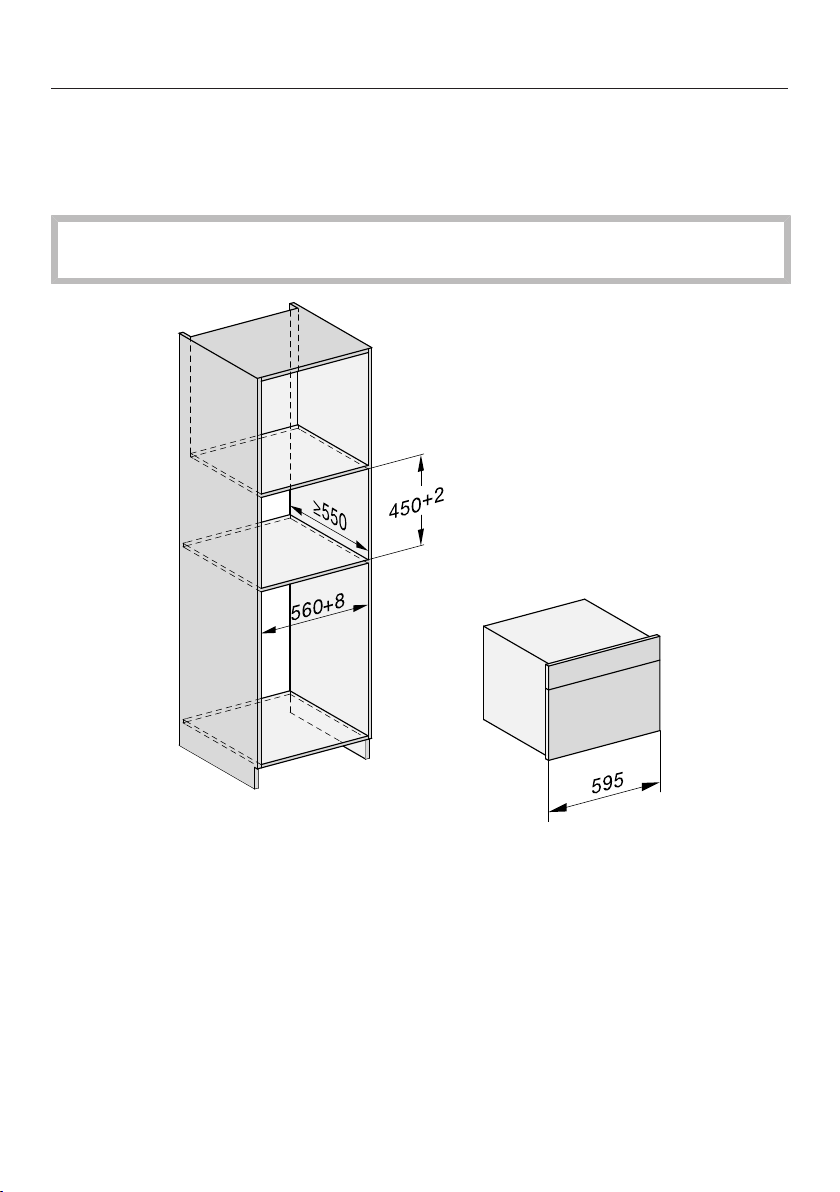
Installation
*INSTALLATION*
113
Building-in dimensions
All dimensions are given in mm.
Installation in a tall unit
The furniture housing unit must not have a back panel fitted behind the build-
ing-in niche.
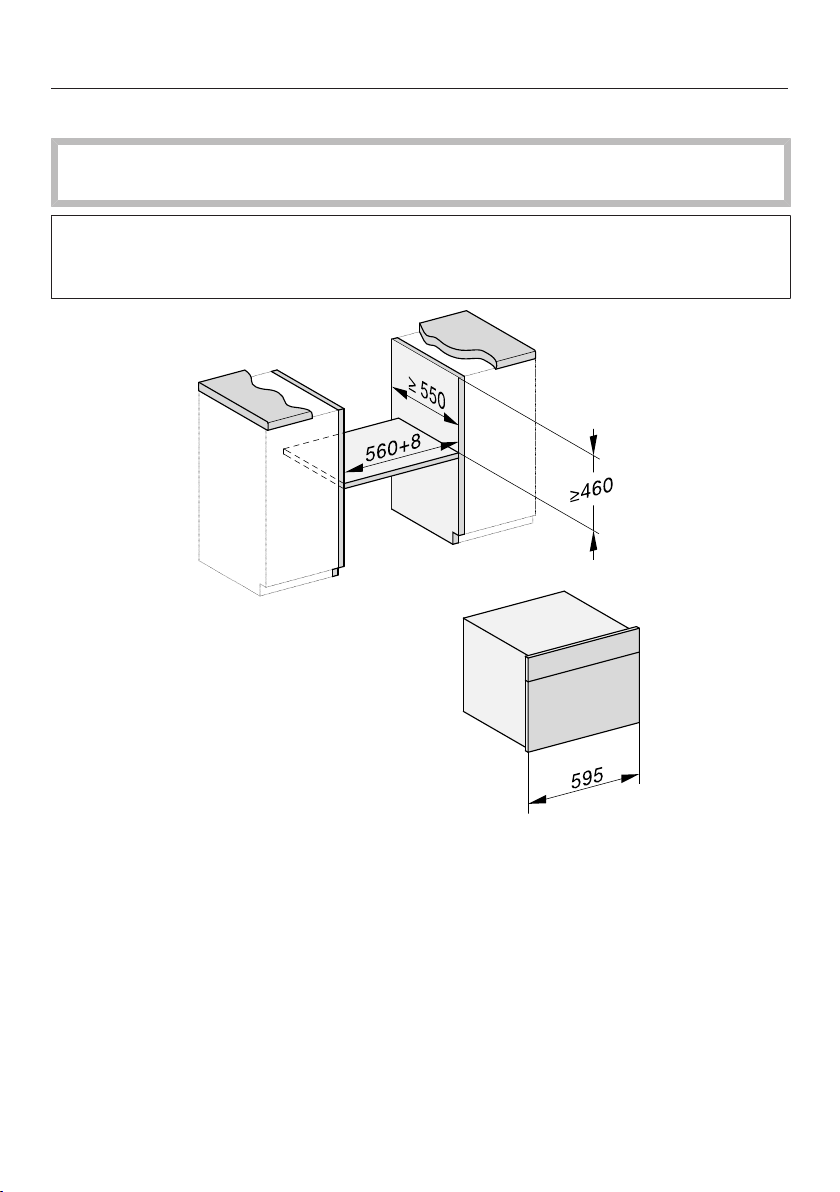
Installation
*INSTALLATION*
114
Installation in a base unit
The furniture housing unit must not have a back panel fitted behind the build-
ing-in niche.
When building the steam oven into a base unit underneath an electric or induc-
tion hob, please also observe the installation instructions for the hob as well as
the building-in depth required for the hob.
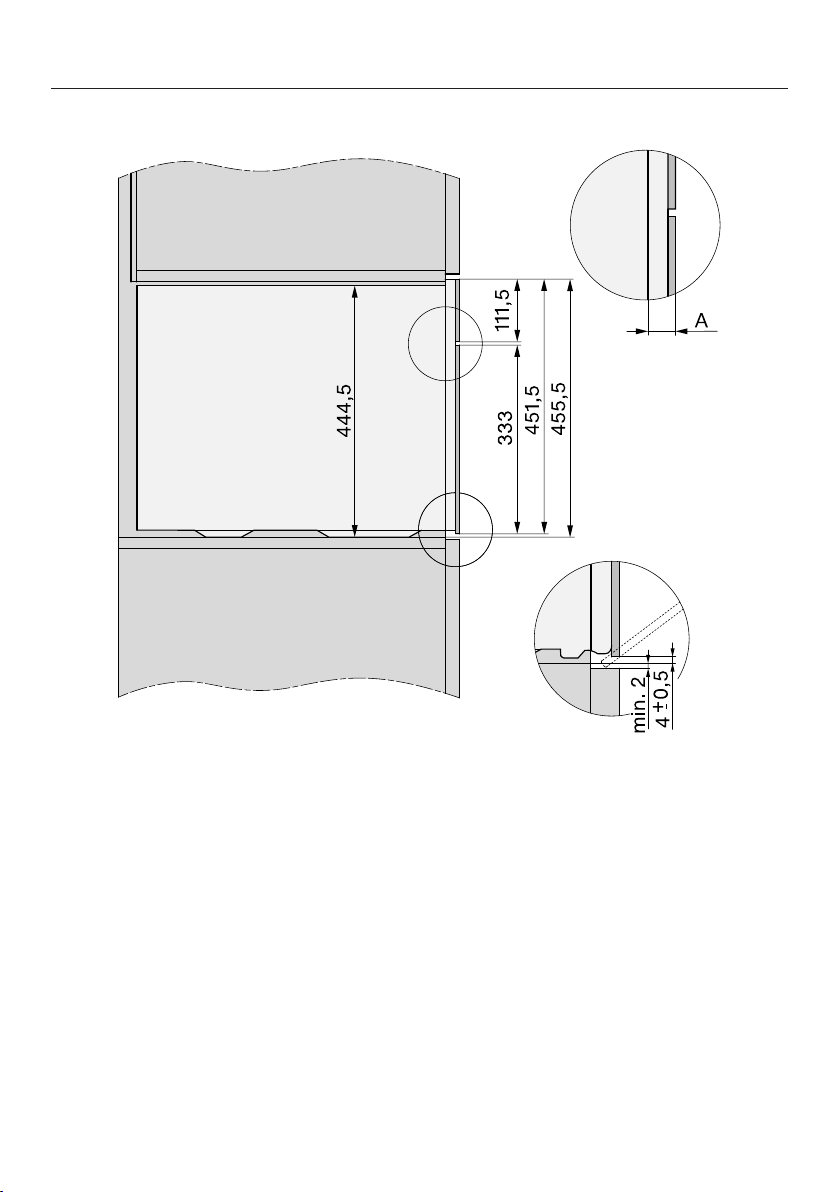
Installation
*INSTALLATION*
115
Side view
A Glass front: 22mm
Metal front: 23.3mm
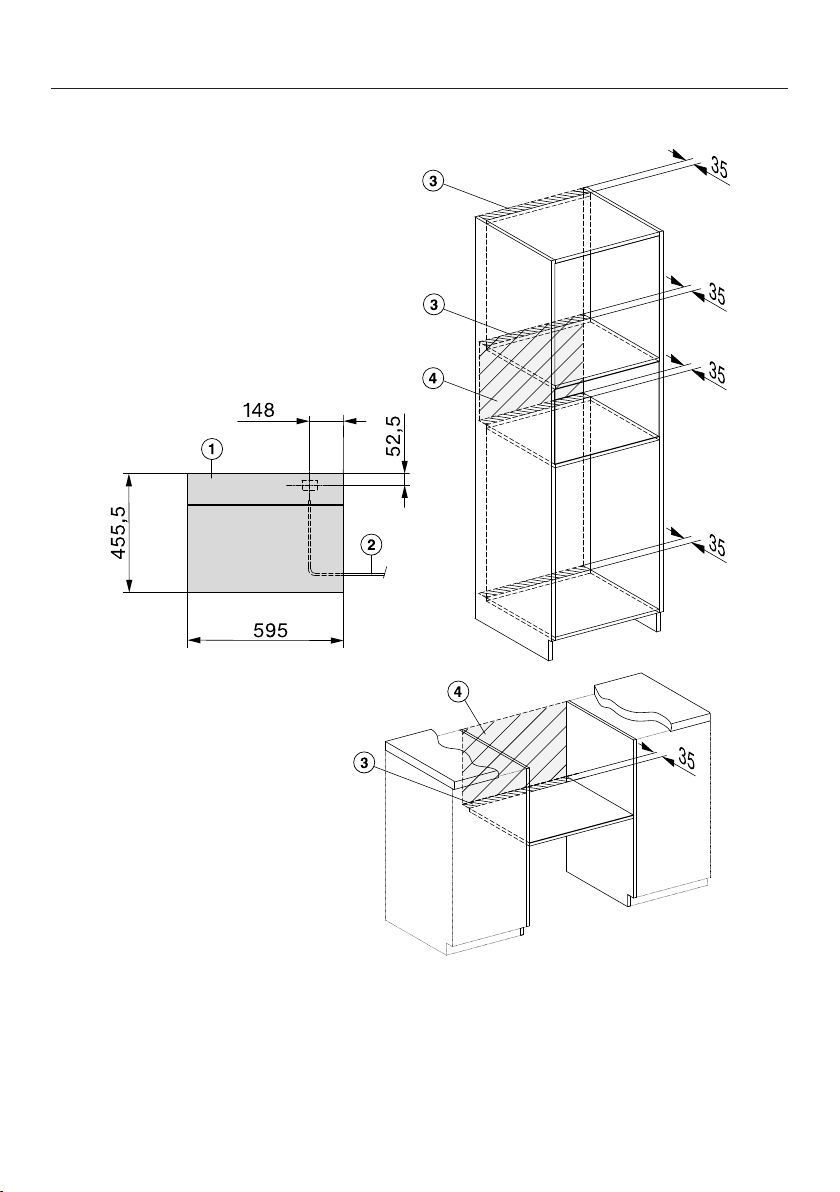
Installation
*INSTALLATION*
116
Connection and ventilation
a
View from the front
b
Power cable, L = 2000mm
c
Ventilation cut-out, min. 180cm
2
d
No connections permitted in this area
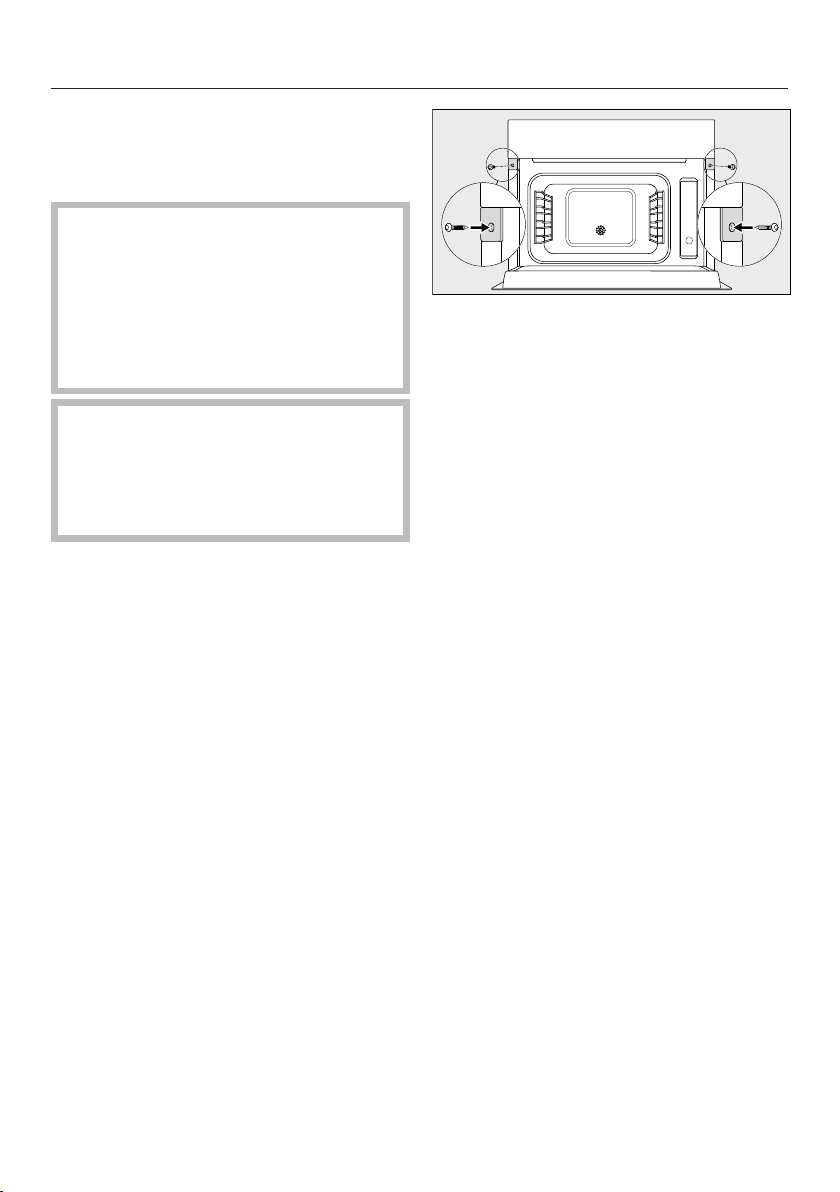
Installation
*INSTALLATION*
117
Installing the steam oven
Connect the mains cable to the
steam oven.
Risk of damage from incorrect trans-
portation.
Lifting the steam oven by the door
handle could cause damage to the
door.
Use the handle cut-outs on the side
of the casing to lift the appliance.
The steam generator may malfunc-
tion if the steam oven is not on a
level surface.
The maximum deviation from the ho-
rizontal that can be tolerated is 2°.
Push the steam oven into the housing
unit and align it.
When doing so make sure that the
power cable does not get trapped or
damaged.
Open the door.
Secure the steam oven to the side
walls of the unit using the wood
screws supplied (3.5x25mm).
Connect the steam oven to the elec-
tricity supply.
Check all functions of the steam oven
are working correctly in accordance
with the operating instructions.

Installation
*INSTALLATION*
118
Electrical connection
We recommend that you connect the
steam oven to the power supply using a
suitable switched electrical socket. This
makes it easier to perform servicing
work. The socket must be easily ac-
cessible after the steam oven has been
installed.
Risk of damage from incorrect
connection.
Installation, repairs and other main-
tenance work by unqualified persons
could be dangerous. Miele cannot be
held liable for unauthorised work.
Miele cannot be held liable for dam-
age or injury caused by the lack of or
inadequacy of an on-site earthing
system (e.g. electric shock).
If the plug is removed from the con-
nection cable or if the cable is sup-
plied without a plug, the steam oven
must be connected to the electrical
supply by a suitably qualified electri-
cian.
If the socket is no longer accessible,
or if a hard-wired connection is in-
stalled, an additional means of dis-
connection must be provided for all
poles. A suitable means of discon-
nection would include switches with
an all-pole contact gap of at least
3mm. These include circuit break-
ers, fuses and contactors. The re-
quired connection data is provided
on the data plate. Please ensure that
these details match the electrical
supply.
After installation, ensure that all elec-
trical components are shielded and
cannot be accessed by users.
Total power rating
See data plate
Connection data
The connection data is quoted on the
data plate. Please ensure these match
the household mains supply.
Residual current device
For extra safety, it is advisable to pro-
tect the steam oven with a suitable re-
sidual current device (RCD) with a trip
range of 30mA.
Replacing the mains connection
cable
When replacing the mains connection
cable, please use cable type H05VV-F
with a suitable cross-section. These
cables are available from the manufac-
turer or from Miele Service.

Installation
*INSTALLATION*
119
Disconnecting from the mains
Risk of electric shock from mains
voltage.
There is a risk of electric shock if the
appliance is reconnected to the
mains supply during repair or service
work.
After disconnection, ensure the ap-
pliance cannot be switched back on
by mistake.
To disconnect the appliance from the
mains power supply, do one of the fol-
lowing depending on installation:
Safety fuses
Completely remove the fuse links
from the screw caps.
Automatic circuit breakers
Press the test button (red) until the
middle button (black) springs out.
Built-in circuit breakers
For circuit breakers of at least type B
or C, switch the lever from 1 (on) to 0
(off).
Residual current device (RCD)
Residual current device: switch the
main switch from 1 (on) to 0 (off) or
press the test button.

Conformity declaration
120
Miele hereby declares that this steam
oven complies with Directive 2014/53/
EU.
The complete text of the EU declaration
of conformity is available from one of
the following internet addresses:
- Products, Download from
www.miele.co.uk
- For service, information, operating in-
structions etc: go to
www.miele.co.uk/domestic/cus-
tomer-information-385.htm and enter
the name of the product or the serial
number
Frequency band
of the WiFi mod-
ule
2.4000GHz –
2.4835GHz
Maximum trans-
mission power of
the WiFi module
<100mW



United Kingdom
Miele Co. Ltd., Fairacres, Marcham Road, Abingdon, Oxon, OX14 1TW
Tel: 0330 160 6600, Internet: www.miele.co.uk/service, E-mail: [email protected]
Australia
Miele Australia Pty. Ltd.
ACN 005 635 398
ABN 96 005 635 398
1 Gilbert Park Drive
Knoxfield, VIC 3180
Tel: 1300 464 353
Internet: www.miele.com.au
Miele Electrical Appliances Co., Ltd.
1-3 Floor, No. 82 Shi Men Yi Road
Jing' an District
200040 Shanghai, PRC
Tel: +86 21 6157 3500
Fax: +86 21 6157 3511
E-mail: [email protected],
Internet: www.miele.cn
China Mainland
Miele (Hong Kong) Ltd.
41/F - 4101, Manhattan Place
23 Wang Tai Road
Kowloon Bay, Hong Kong
Tel: (852) 2610 1025
Fax: (852) 3579 1404
Email:
Website: www.miele.hk
Hong Kong, China
Miele India Pvt. Ltd.
Ground Floor, Copia Corporate Suites
Plot No. 9, Jasola
New Delhi - 110025
Tel: 011-46 900 000
Fax: 011-46 900 001
E-mail: customercare@miele.in
Internet: www.miele.in
India
Miele Ireland Ltd.
2024 Bianconi Avenue
Citywest Business Campus
Dublin 24
Tel: (01) 461 07 10
Fax: (01) 461 07 97
E-Mail: [email protected]
Internet: www.miele.ie
Ireland
Malaysia
Miele Sdn Bhd
Suite 12-2, Level 12
Menara Sapura Kencana
Petroleum
Solaris Dutamas No. 1
Jalan Dutamas 1
50480 Kuala Lumpur, Malaysia
Phone: +603-6209-0288
Fax: +603-6205-3768
Miele New Zealand Limited
IRD 98 463 631
8 College Hill
Freemans Bay, Auckland 1011
New Zealand
Tel: 0800 464 353
Internet: www.miele.co.nz
New Zealand
Miele Pte. Ltd.
29 Media Circle
#11-04 ALICE@Mediapolis
Singapore 138565
sTel: +65 6735 1191
Fax: +65 6735 1161
E-Mail: [email protected]
Internet: www.miele.sg
Singapore
Miele (Pty) Ltd.
63 Peter Place
Bryanston 2194
P.O. Box 69434
Bryanston 2021
Tel: (011) 875 9000
Fax: (011) 875 9035
E-mail: [email protected]
Internet: www.miele.co.za
South Africa
Miele Appliances Ltd.
Showroom 1
Eiffel 1 Building
P.O. Box 114782 - Dubai
Tel. +971 4 3044 999
Fax. +971 4 3418 852
800-MIELE (64353)
E-Mail: [email protected]
Website: www.miele.ae
United Arab Emirates
Manufacturer:
Miele & Cie. KG, Carl-Miele-Straße 29, 33332 Gütersloh, Germany
Thailand
Miele Appliances Ltd.
BHIRAJ TOWER at EmQuartier
43rd Floor Unit 4301-4303
689 Sukhumvit Road
North Klongton Sub-District
Vadhana District
Bangkok 10110, Thailand
Sheikh Zayed Road, Umm Al Sheif

M.-Nr. 11 244 840 / 02en-GB
DG 7440