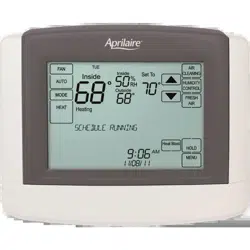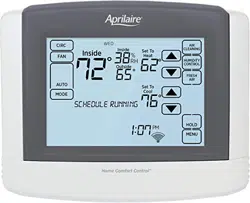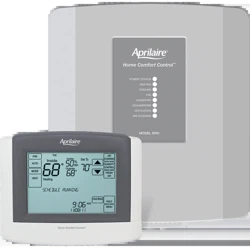
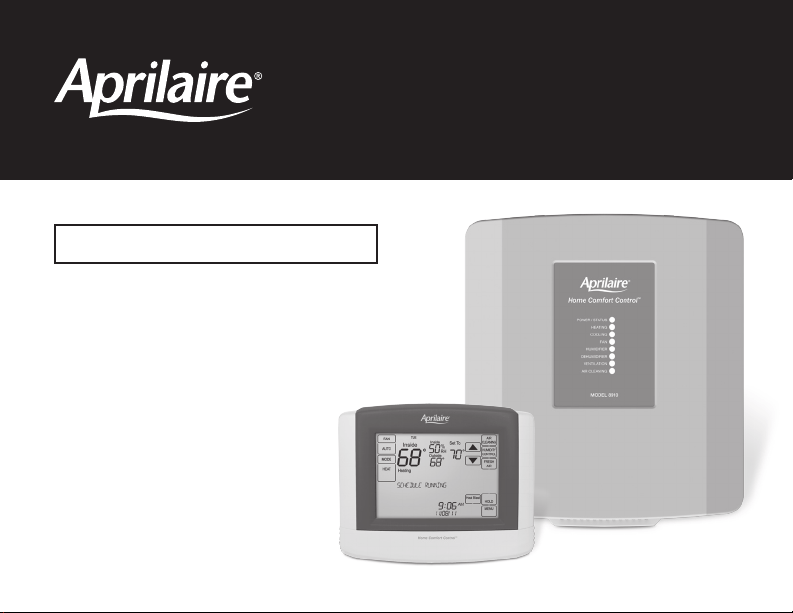
Home Comfort Control
™
Model 8910
Owner’s Manual
Includes Operating
Instructions and
Warranty Information
READ AND SAVE THESE INSTRUCTIONS

2 3
WARNING
Do not use sharp instruments to press touch screen. Only use your fingertips.
Home Comfort Control features ..................3
Controls & display overview ...................4-5
Equipment control module LEDs ..................6
TAblE Of CONTENTS
AbOUT yOUR NEW HOME COMfORT CONTROl
™
OpERATION
INDOOR AIR QUAlITy fUNCTIONS
Select system mode
(EM HEAT/HEAT/OFF/COOL/AUTO)................7
Change temperature set point....................7
Select fan setting (ON/AUTO/CIRC) ...............8
Clean screen .................................8
Maintenance reminders.........................9
Screen lockout ................................9
Battery installation ...........................10
Event-Based
™
air cleaning . . . . . . . . . . . . . . . . . . . 11-12
Humidity control..............................13
Automatic mode .........................13-14
Manual mode ...........................15-16
If dehumidification is installed..............17-19
If dehumidification is done with air conditioner ...20
Fresh Air.................................21-22
AbOUT yOUR NEW HOME COMfORT CONTROl
™
HOME COMfORT CONTROl fEATURES
•Indoorairqualitycontrol.
– Humidification automatic or manual control.
– Dehumidification.
– Event-Based
™
air cleaning.
– Ventilation with temperature and humidity limits.
•Temperaturecontrol.
•HeatBlast
™
raises the room temperature 3°F to 5°F.
•Optionalwirelessoutdoortemperaturesensoravailable.
•Largetouchscreenwithadjustablebacklight–constantbacklightavailable.
•Messagecenterprovidesfeedback,instructionsandservicereminders.
•7dayprogrammabilityorseparatelyprogrammableweekday/weekendschedules.
•Userinterfacecanberemovedfromthewallforeasyprogramming(batteriesmustbeinstalled).
•Frontbatterydooraccessforfast,easyreplacement.
•Displaysroomtemperature,roomhumidity,temperaturesetting,andoptionaloutdoortemperature.
•Programmablefancontrolwithfancirculationmode.
•Easytousetemperaturecontrolcanoverrideprogramscheduleatanytime.
pROGRAMMING
Set time and date ............................23
Understanding program schedules ............24-25
Progressiverecovery ..........................25
Changing program schedules ................26-27
Heat Blast
™
..................................28
Programscheduleholds
Temporary .............................28-29
Permanent . . . . . . . . . . . . . . . . . . . . . . . . . . . . . . . . 29
Vacation............................... 30-31
SETUp MENU
How to enter the setup menu
to change settings ............................32
Usersystemsettingstable ..................33-34
WARRANTy
Limited warranty .............................35
Warranty registration..........................35
2 3
WARNING
Do not use sharp instruments to press touch screen. Only use your fingertips.
Home Comfort Control features ..................3
Controls & display overview ...................4-5
Equipment control module LEDs ..................6
TAblE Of CONTENTS
AbOUT yOUR NEW HOME COMfORT CONTROl
™
OpERATION
INDOOR AIR QUAlITy fUNCTIONS
Select system mode
(EM HEAT/HEAT/OFF/COOL/AUTO)................7
Change temperature set point....................7
Select fan setting (ON/AUTO/CIRC) ...............8
Clean screen .................................8
Maintenance reminders.........................9
Screen lockout ................................9
Battery installation ...........................10
Event-Based
™
air cleaning . . . . . . . . . . . . . . . . . . . 11-12
Humidity control..............................13
Automatic mode .........................13-14
Manual mode ...........................15-16
If dehumidification is installed..............17-19
If dehumidification is done with air conditioner ...20
Fresh Air.................................21-22
AbOUT yOUR NEW HOME COMfORT CONTROl
™
HOME COMfORT CONTROl fEATURES
•Indoorairqualitycontrol.
– Humidification automatic or manual control.
– Dehumidification.
– Event-Based
™
air cleaning.
– Ventilation with temperature and humidity limits.
•Temperaturecontrol.
•HeatBlast
™
raises the room temperature 3°F to 5°F.
•Optionalwirelessoutdoortemperaturesensoravailable.
•Largetouchscreenwithadjustablebacklight–constantbacklightavailable.
•Messagecenterprovidesfeedback,instructionsandservicereminders.
•7dayprogrammabilityorseparatelyprogrammableweekday/weekendschedules.
•Userinterfacecanberemovedfromthewallforeasyprogramming(batteriesmustbeinstalled).
•Frontbatterydooraccessforfast,easyreplacement.
•Displaysroomtemperature,roomhumidity,temperaturesetting,andoptionaloutdoortemperature.
•Programmablefancontrolwithfancirculationmode.
•Easytousetemperaturecontrolcanoverrideprogramscheduleatanytime.
pROGRAMMING
Set time and date ............................23
Understanding program schedules ............24-25
Progressiverecovery ..........................25
Changing program schedules ................26-27
Heat Blast
™
..................................28
Programscheduleholds
Temporary .............................28-29
Permanent . . . . . . . . . . . . . . . . . . . . . . . . . . . . . . . . 29
Vacation............................... 30-31
SETUp MENU
How to enter the setup menu
to change settings ............................32
Usersystemsettingstable ..................33-34
WARRANTy
Limited warranty .............................35
Warranty registration..........................35
4 5
CONTROlS & DISplAy OVERVIEW – HOME SCREEN
AbOUT yOUR NEW HOME COMfORT CONTROl
CONTROlS & DISplAy OVERVIEW – MAIN MENU
AbOUT yOUR NEW HOME COMfORT CONTROl
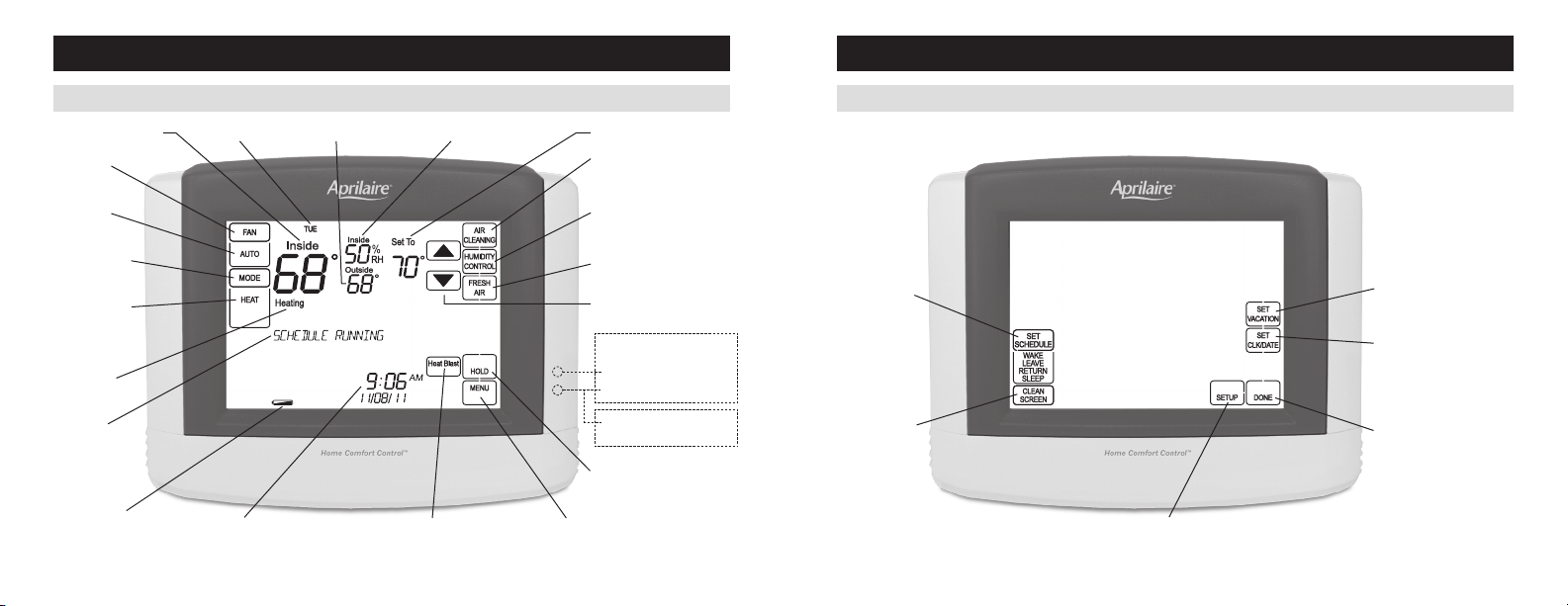
NOTE:BackLIgHTIsacTIvaTEDwITHFIrsTBUTTOnPrEssanDaUTOMaTIcaLLyTUrnsOFF.
FAN MODE
BUTTON
FAN MODE
SETTING
sysTEMMODE
BUTTON
sysTEMMODE
SETTING
LOwBaTTEry
INDICATOR
CURRENT TIME & DATE MAIN MENU BUTTONHEAT BLAST BUTTON
TEMPEraTUrEaDJUsTMEnT
AIR CLEANING BUTTON
(ENTERS EVENT-BASED
™
AIR
CLEANING CONTROL SCREEN)
HUMIDITycOnTrOLBUTTOn
(EnTErsHUMIDITycOnTrOL
SCREEN)
FRESH AIR BUTTON (ENTERS
VENTILATION CONTROL SCREEN)
HOLD BUTTON
(SETS OR CLEARS HOLD)
HEAT pUMp ONly
EMErgEncyHEaTOr
aUXILIaryHEaT(rED)
sysTEMFaULT(yELLOw)
MAINTENANCE REMINDER
(yELLOwFLasHIng)
INDICATORS SHOW THROUGH HOUSING
EQUIPMEnT
STATUS
MESSAGE
CENTER
(SCROLLING TEXT)
rOOMTEMPEraTUrE
cUrrEnTDay TEMPEraTUrEsETTIngOUTDOOrTEMPEraTUrE
rOOMrELaTIvEHUMIDITy
SET SCHEDULE
BUTTON
UsErsysTEMsETTIngs
CLEAN SCREEN
(LOCKOUT TOUCH
SCREEN FOR 30
SECONDS)
SET VACATION HOLD
(HOLD–TO TIME AND DATE)
SET CURRENT
TIME AND DATE
DONE BUTTON
(EXIT MENU)
4 5
CONTROlS & DISplAy OVERVIEW – HOME SCREEN
AbOUT yOUR NEW HOME COMfORT CONTROl
CONTROlS & DISplAy OVERVIEW – MAIN MENU
AbOUT yOUR NEW HOME COMfORT CONTROl
NOTE:BackLIgHTIsacTIvaTEDwITHFIrsTBUTTOnPrEssanDaUTOMaTIcaLLyTUrnsOFF.
FAN MODE
BUTTON
FAN MODE
SETTING
sysTEMMODE
BUTTON
sysTEMMODE
SETTING
LOwBaTTEry
INDICATOR
CURRENT TIME & DATE MAIN MENU BUTTONHEAT BLAST BUTTON
TEMPEraTUrEaDJUsTMEnT
AIR CLEANING BUTTON
(ENTERS EVENT-BASED
™
AIR
CLEANING CONTROL SCREEN)
HUMIDITycOnTrOLBUTTOn
(EnTErsHUMIDITycOnTrOL
SCREEN)
FRESH AIR BUTTON (ENTERS
VENTILATION CONTROL SCREEN)
HOLD BUTTON
(SETS OR CLEARS HOLD)
HEAT pUMp ONly
EMErgEncyHEaTOr
aUXILIaryHEaT(rED)
sysTEMFaULT(yELLOw)
MAINTENANCE REMINDER
(yELLOwFLasHIng)
INDICATORS SHOW THROUGH HOUSING
EQUIPMEnT
STATUS
MESSAGE
CENTER
(SCROLLING TEXT)
rOOMTEMPEraTUrE
cUrrEnTDay TEMPEraTUrEsETTIngOUTDOOrTEMPEraTUrE
rOOMrELaTIvEHUMIDITy
SET SCHEDULE
BUTTON
UsErsysTEMsETTIngs
CLEAN SCREEN
(LOCKOUT TOUCH
SCREEN FOR 30
SECONDS)
SET VACATION HOLD
(HOLD–TO TIME AND DATE)
SET CURRENT
TIME AND DATE
DONE BUTTON
(EXIT MENU)
6 7
EQUIpMENT CONTROl MODUlE lEDs
AbOUT yOUR NEW HOME COMfORT CONTROl
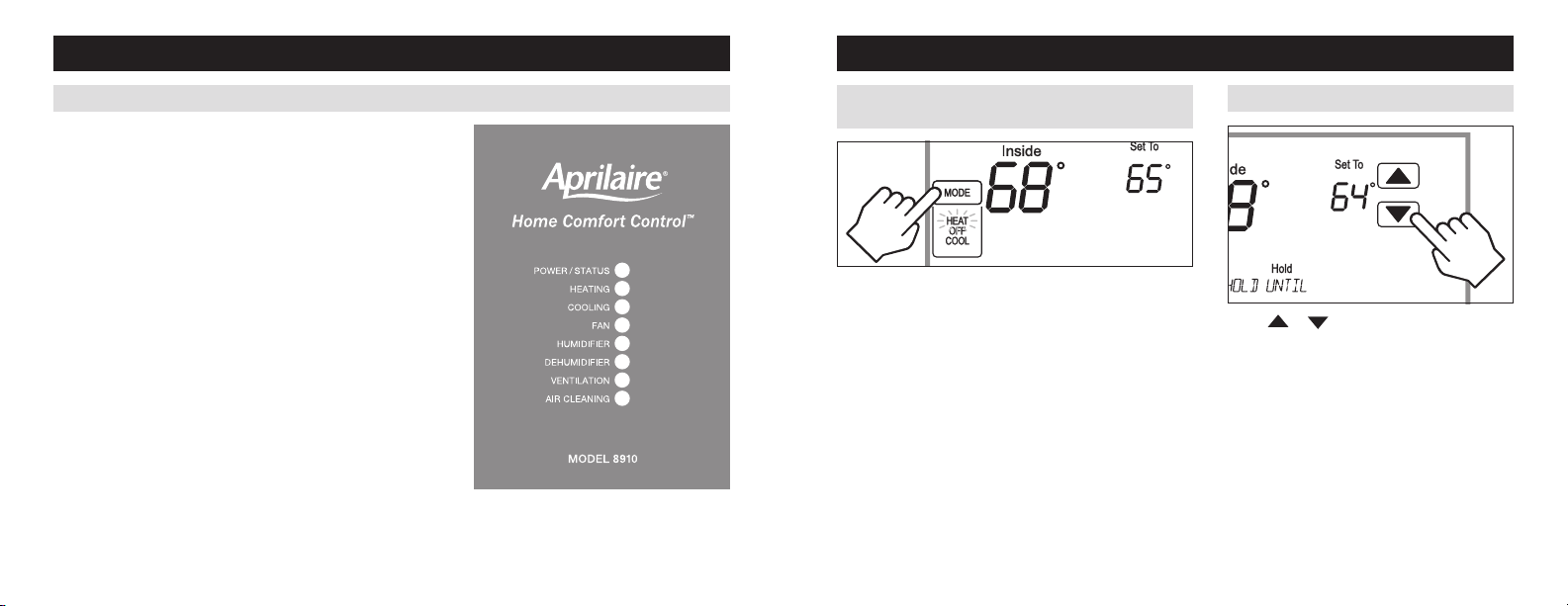
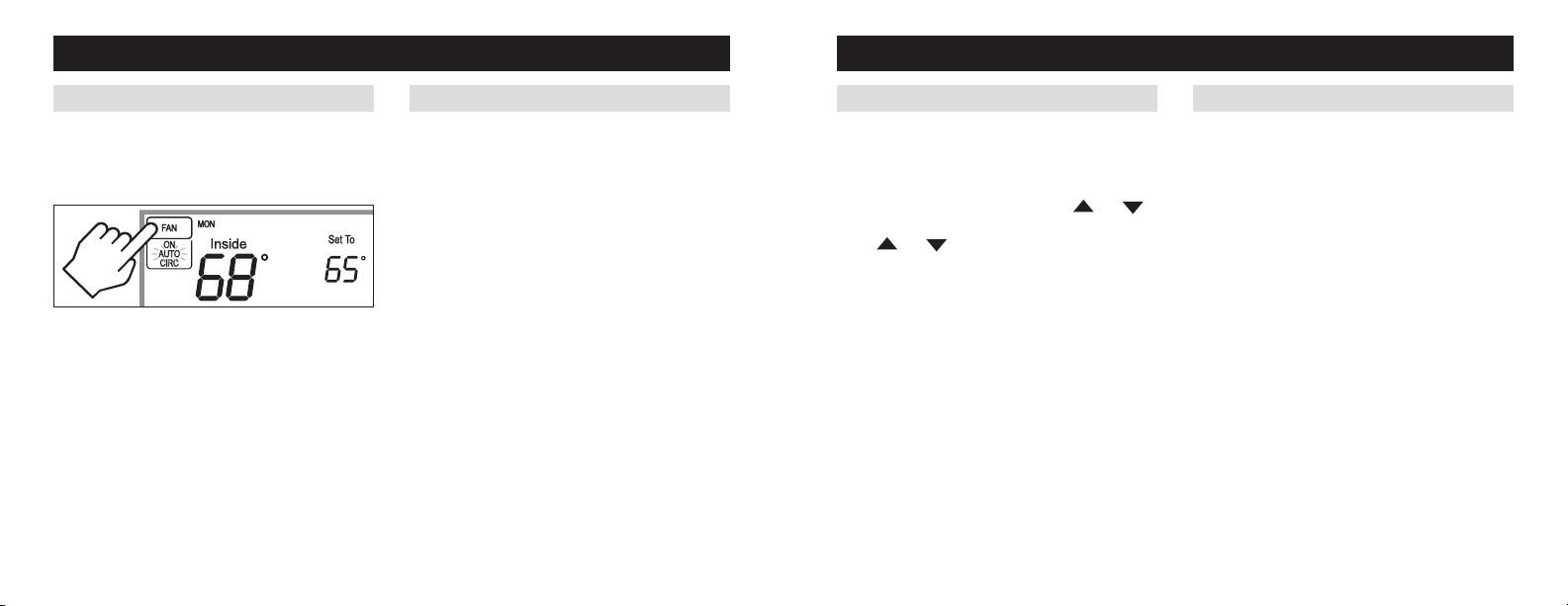
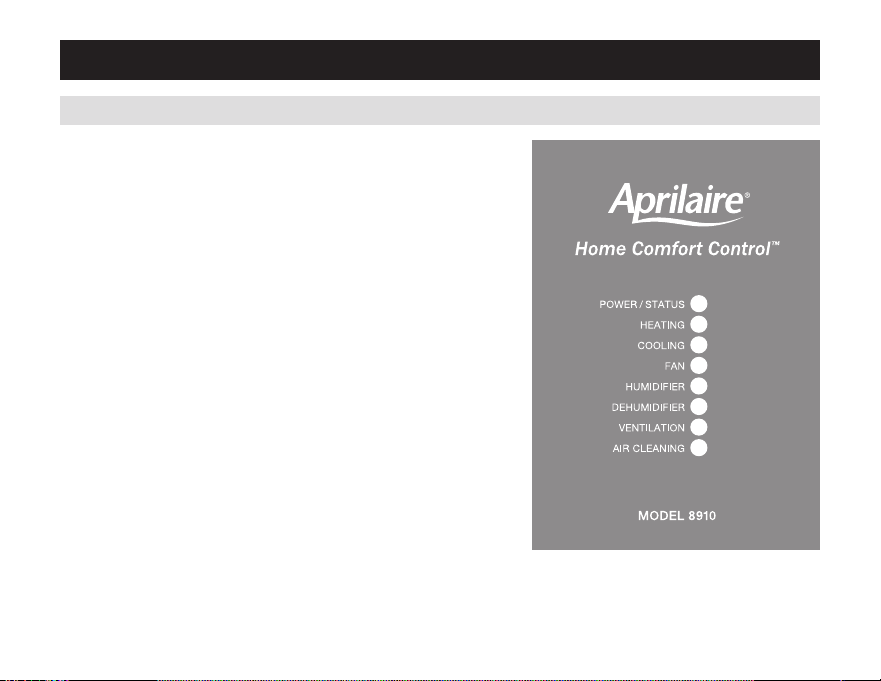
pOWER/STATUS – On solid during normal operation. Flashes
whenconnectiontotheHomecomfortcontrolislost,andat
power-upwhiletheconnectionisbeingestablished.
HEATING – On when heating outputs are active.
COOlING – On when cooling outputs are active.
fAN – On when fan output is active.
HUMIDIfIER – On when humidifier output is active.
DEHUMIDIfIER – On when dehumidifier output is active.
VENTIlATION – On when ventilation output is active.
AIR ClEANING – On when air cleaner output is active.
OpERATION
press [MODE] to select:
EM HEAT: (only for heat pumps with auxiliary heat) Home
Comfort Control controls auxiliary heat. Heat pump will not
operate in EM HEAT mode.
HEAT: Home Comfort Control controls only the heating system.
Off: Heating and cooling systems are off.
COOl: Home Comfort Control controls only the cooling system.
AUTO:(ifenabledininstallersetup)Homecomfortcontrol
automatically selects heating or cooling depending on the
indoor temperature.
press [DONE]tosaveandexit,Or[CANCEl] to exit without
saving. The Home Comfort Control will save and exit if nothing
is pressed within 10 seconds.
press or toadjustthecurrentsetpoint.
(seeProgramscheduleHoldsonpages28-31for
more information.)
SElECT SySTEM MODE
(EM HEAT/HEAT/OFF/COOL /AUTO)
CHANGE TEMpERATURE SET pOINT

6 7
EQUIpMENT CONTROl MODUlE lEDs
AbOUT yOUR NEW HOME COMfORT CONTROl
pOWER/STATUS – On solid during normal operation. Flashes
whenconnectiontotheHomecomfortcontrolislost,andat
power-upwhiletheconnectionisbeingestablished.
HEATING – On when heating outputs are active.
COOlING – On when cooling outputs are active.
fAN – On when fan output is active.
HUMIDIfIER – On when humidifier output is active.
DEHUMIDIfIER – On when dehumidifier output is active.
VENTIlATION – On when ventilation output is active.
AIR ClEANING – On when air cleaner output is active.
OpERATION
press [MODE] to select:
EM HEAT: (only for heat pumps with auxiliary heat) Home
Comfort Control controls auxiliary heat. Heat pump will not
operate in EM HEAT mode.
HEAT: Home Comfort Control controls only the heating system.
Off: Heating and cooling systems are off.
COOl: Home Comfort Control controls only the cooling system.
AUTO:(ifenabledininstallersetup)Homecomfortcontrol
automatically selects heating or cooling depending on the
indoor temperature.
press [DONE]tosaveandexit,Or[CANCEl] to exit without
saving. The Home Comfort Control will save and exit if nothing
is pressed within 10 seconds.
press or toadjustthecurrentsetpoint.
(seeProgramscheduleHoldsonpages28-31for
more information.)
SElECT SySTEM MODE
(EM HEAT/HEAT/OFF/COOL /AUTO)
CHANGE TEMpERATURE SET pOINT

8 9
press [MENU] to enter the main menu.
press [ClEAN SCREEN]todisablethetouchscreen
for 30 seconds for cleaning.
Note: Use a soft damp cloth to clean the screen. Use
water or household glass cleaner. Do not spray liquids
directly on the screen.
ClEAN SCREENSElECT fAN SETTING (ON/AUTO/CIRC)
press [fAN] to select:
ON: Fan runs continuously. Use this mode for maximum
air circulation/filtering.
AUTO: Fan runs only when the heating or cooling
system is on.
CIRC:sameasaUTO,butensuresthefanisonforat
least30minutesperhour.Usethismodeforabalance
of energy savings and air circulation/cleaning.
press [DONE]tosaveandexit,Or[CANCEl] to exit
without saving. The Home Comfort Control will save and
exit if nothing is pressed within 10 seconds.
OpERATION OpERATION
When the fan mode is changed during a program event
it remains in that mode until the next event starts. The
fanmustbeprogrammedtoFanOninthescheduleto
run continuously through all events.
MAINTENANCE REMINDERS
Maintenanceremindersaresetupbytheinstallerto
indicate when the equipment is due for service. If a
maintenancereminderisdisplayed,callyourHvac
dealerforservice.Theycanbeclearedbypressing
[MENU] to enter the main menu. press
and
selectyEstoserviceremindersandthenpress [Next].
press
and toselectyEsforeachreminder
you would like to reset. press [Next] to go to the next
reminder or [back] to go to a previous reminder. press
[DONE] to reset the selected service reminders.
SCREEN lOCKOUT
TheusercandisablecertainfeaturesoftheHome
comfortcontrol.(seeUsersystemsettingTableon
pages33-34fordetails.)Thisfeaturecanbeoverridden
bypressingandholding[MENU] for 7 seconds.
8 9
press [MENU] to enter the main menu.
press [ClEAN SCREEN]todisablethetouchscreen
for 30 seconds for cleaning.
Note: Use a soft damp cloth to clean the screen. Use
water or household glass cleaner. Do not spray liquids
directly on the screen.
ClEAN SCREENSElECT fAN SETTING (ON/AUTO/CIRC)
press [fAN] to select:
ON: Fan runs continuously. Use this mode for maximum
air circulation/filtering.
AUTO: Fan runs only when the heating or cooling
system is on.
CIRC:sameasaUTO,butensuresthefanisonforat
least30minutesperhour.Usethismodeforabalance
of energy savings and air circulation/cleaning.
press [DONE]tosaveandexit,Or[CANCEl] to exit
without saving. The Home Comfort Control will save and
exit if nothing is pressed within 10 seconds.
OpERATION OpERATION
When the fan mode is changed during a program event
it remains in that mode until the next event starts. The
fanmustbeprogrammedtoFanOninthescheduleto
run continuously through all events.
MAINTENANCE REMINDERS
Maintenanceremindersaresetupbytheinstallerto
indicate when the equipment is due for service. If a
maintenancereminderisdisplayed,callyourHvac
dealerforservice.Theycanbeclearedbypressing
[MENU] to enter the main menu. press
and
selectyEstoserviceremindersandthenpress [Next].
press
and toselectyEsforeachreminder
you would like to reset. press [Next] to go to the next
reminder or [back] to go to a previous reminder. press
[DONE] to reset the selected service reminders.
SCREEN lOCKOUT
TheusercandisablecertainfeaturesoftheHome
comfortcontrol.(seeUsersystemsettingTableon
pages33-34fordetails.)Thisfeaturecanbeoverridden
bypressingandholding[MENU] for 7 seconds.
10 11
OpERATION
Batteries are not required for proper operation. The user
interface is powered from the Equipment Control Module.
Batteriesprovideback-upfortheclockintheeventofa
power loss.
TheHomecomfortcontrolhasamemorybackupthat
saves the Home Comfort Control’s settings in case of a
powerinterruption.Thesystemsettingswillberetained
buttheclockwillresetafter90secondswithnobattery
or Equipment Control Module power.
Theresetbuttonlocatedunderthebatterycovercan
beusedtoresettheHomecomfortcontroltofactory
defaults.
RESET
BUTTON
bATTERy INSTAllATION
WARNING
The reset button should only be used by the installer.
INDOOR AIR QUAlITy fUNCTIONS
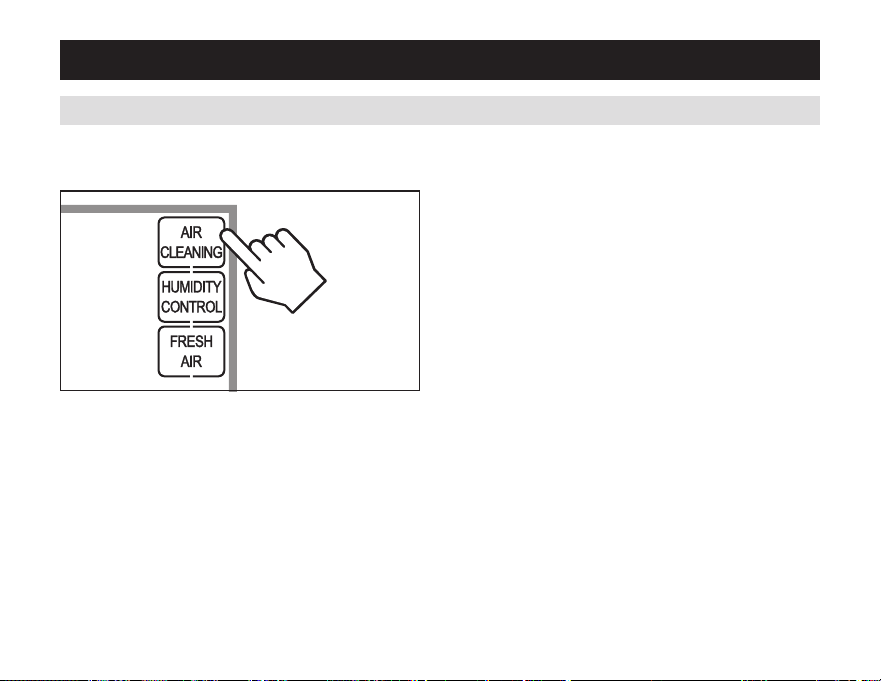
press [AIR ClEANING] on the Home screen to enter
the Air Cleaning screen.
Ifinstalled,aircleaningcanoperateinfivedifferent
modes. Air cleaning will activate the fan for the purpose
of air cleaning.
Off: The air cleaner will not call the fan for the purpose
of air cleaning. Note:Ifaircleaningisinstalled,air
cleaning will still occur during normal fan operation
duringheating,coolingorotherindoorairqualityevents.
Constant Clean: This option will provide the maximum
amountofaircleaningavailable.Theaircleanerwillbe
activefor24hoursaday,sevendaysaweek.
Automatic: The air cleaner will run a minimum of
30 minutes every hour. The air cleaner will monitor
the amount of time your heating and cooling system
runs; if 30 minutes is not reached the air cleaner will
automatically turn on. This will maximize the amount of
air cleaning while minimizing energy consumption.
Event Clean (3 hour cycle):whenselected,theair
cleaner will run for 3 hours continuously and then return
tothemostrecentmodeofOff,automatic,orconstant
Clean. This option only cleans the air when needed; an
examplewouldbeaftervacuuming.
Allergies (24 hour cycle): When seasonal allergies
spikeandoutsideairqualityisatitsworst,choose
thisoption.youraircleanerwillruncontinuouslyfor
24hours,thenreturntothemostrecentmodeofOff,
automatic,orconstantclean.
Note: The Home Comfort Control will manage fan and
air cleaning selections when the selections overlap.
EVENT-bASED
™
AIR ClEANING
10 11
OpERATION
Batteries are not required for proper operation. The user
interface is powered from the Equipment Control Module.
Batteriesprovideback-upfortheclockintheeventofa
power loss.
TheHomecomfortcontrolhasamemorybackupthat
saves the Home Comfort Control’s settings in case of a
powerinterruption.Thesystemsettingswillberetained
buttheclockwillresetafter90secondswithnobattery
or Equipment Control Module power.
Theresetbuttonlocatedunderthebatterycovercan
beusedtoresettheHomecomfortcontroltofactory
defaults.
RESET
BUTTON
bATTERy INSTAllATION
WARNING
The reset button should only be used by the installer.
INDOOR AIR QUAlITy fUNCTIONS
press [AIR ClEANING] on the Home screen to enter
the Air Cleaning screen.
Ifinstalled,aircleaningcanoperateinfivedifferent
modes. Air cleaning will activate the fan for the purpose
of air cleaning.
Off: The air cleaner will not call the fan for the purpose
of air cleaning. Note:Ifaircleaningisinstalled,air
cleaning will still occur during normal fan operation
duringheating,coolingorotherindoorairqualityevents.
Constant Clean: This option will provide the maximum
amountofaircleaningavailable.Theaircleanerwillbe
activefor24hoursaday,sevendaysaweek.
Automatic: The air cleaner will run a minimum of
30 minutes every hour. The air cleaner will monitor
the amount of time your heating and cooling system
runs; if 30 minutes is not reached the air cleaner will
automatically turn on. This will maximize the amount of
air cleaning while minimizing energy consumption.
Event Clean (3 hour cycle):whenselected,theair
cleaner will run for 3 hours continuously and then return
tothemostrecentmodeofOff,automatic,orconstant
Clean. This option only cleans the air when needed; an
examplewouldbeaftervacuuming.
Allergies (24 hour cycle): When seasonal allergies
spikeandoutsideairqualityisatitsworst,choose
thisoption.youraircleanerwillruncontinuouslyfor
24hours,thenreturntothemostrecentmodeofOff,
automatic,orconstantclean.
Note: The Home Comfort Control will manage fan and
air cleaning selections when the selections overlap.
EVENT-bASED
™
AIR ClEANING
12 13
INDOOR AIR QUAlITy fUNCTIONS
Air Cleaning Screen
EVENT-bASED
™
AIR ClEANING (CONTINUED)
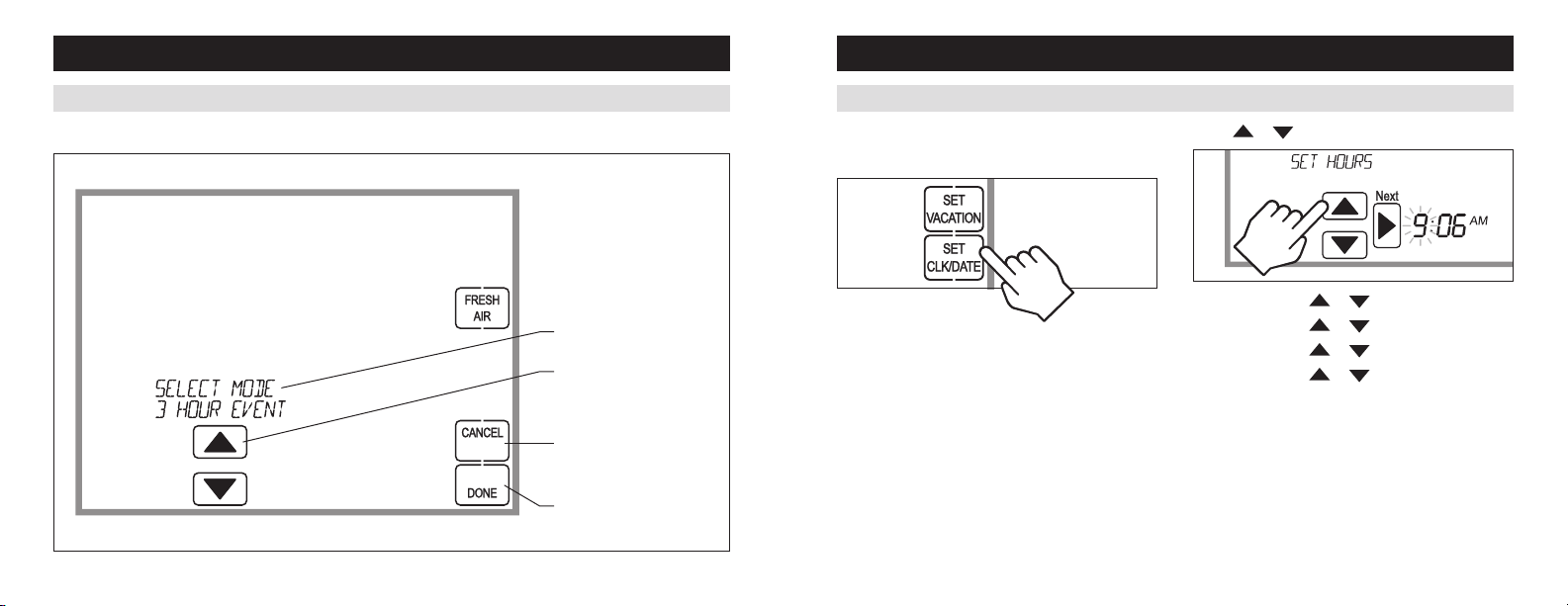
AIR CLEANING MODE
SELECTION
AIR CLEANING MODE
aDJUsTMEnT
CANCEL BUTTON
(EXIT AIR CLEANING)
DONE BUTTON (SAVE MODE
AND EXIT AIR CLEANING)
INDOOR AIR QUAlITy fUNCTIONS
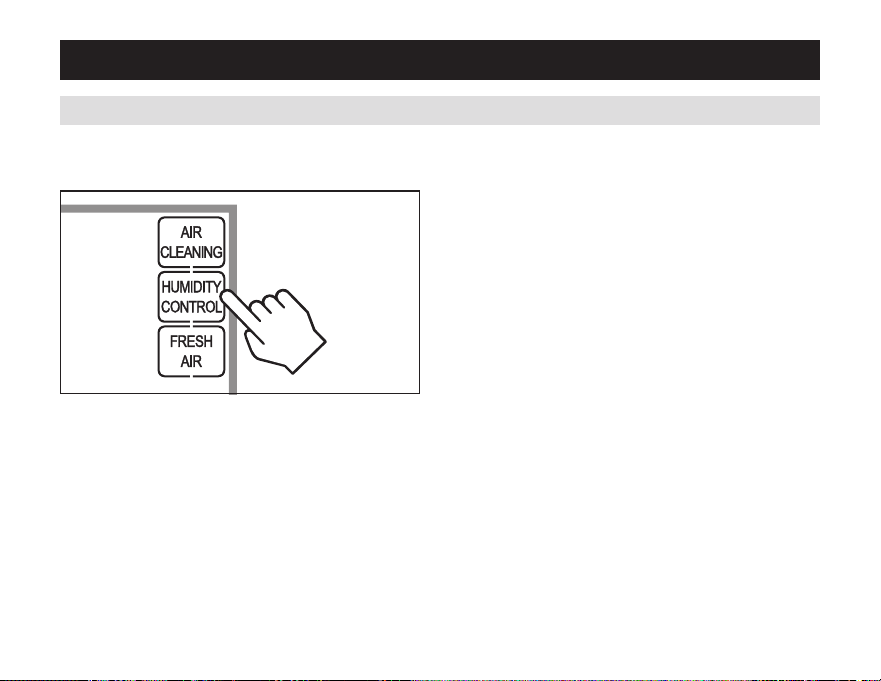
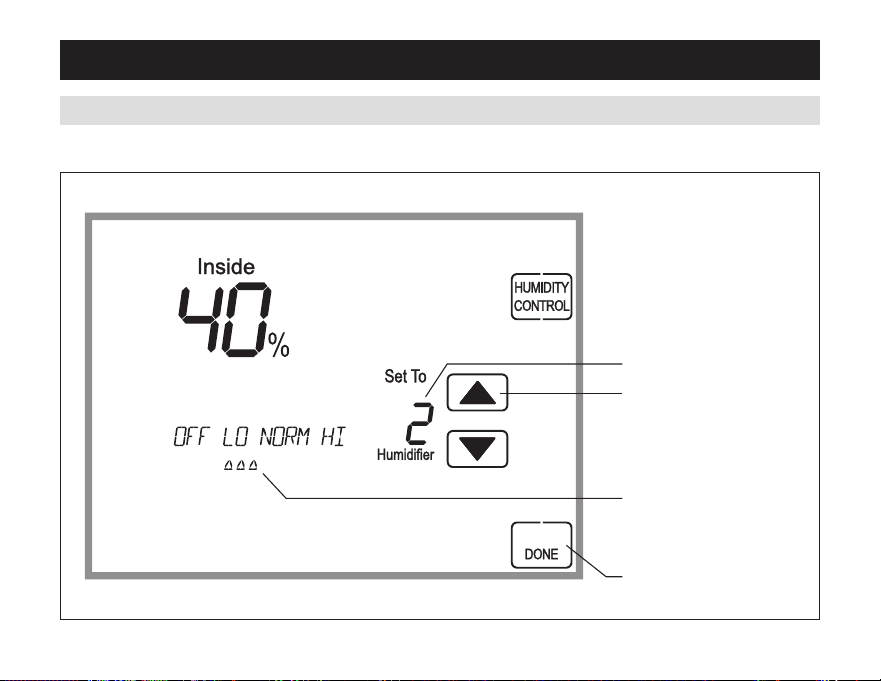
press [HUMIDITy CONTROl] on the Home screen to
enter the Humidity Control screen.
TheHumiditycontrolscreencanbeusedtocontrolboth
humidification and dehumidification.
Ifhumidificationisinstalleditcanbecontrolledintwo
modes,automaticormanual.
automaticormanualmodeisconfiguredbytheinstaller.
To determined which mode the Home Comfort Control is
setto,seethediagramsonpages14and16.
HUMIDITy CONTROl
In automatic mode you will receive the optimum
amount of humidity so that your home and its
furnishings are protected from the damaging effects
of excess condensation or low humidity during heating
season.Thecontrolautomaticallyadjustsyourhome’s
rHbasedontheoutdoortemperature.
The humidity setting needs to be set initially to
meet your home’s conditions.Pleasefollowthese
stepswhenadjustingyourcontrol.
1.adjustthehumiditysettingto“3”whichiswithin
normal range. During the next 24-48 hours it may
benecessarytoadjustthesettingformoreorless
humidity,dependingonyourpersonalcomfortand
home’s requirements.
2. During the coldest portion of the first heating
season,minoradjustmentsmaybenecessary.Thisis
dependent upon your home’s construction.
TherHinyourhomewillnowbeaccuratelycontrolled
to meet your needs and should not need further
adjustmentduringfutureheatingseasons.
12 13
INDOOR AIR QUAlITy fUNCTIONS
Air Cleaning Screen
EVENT-bASED
™
AIR ClEANING (CONTINUED)
AIR CLEANING MODE
SELECTION
AIR CLEANING MODE
aDJUsTMEnT
CANCEL BUTTON
(EXIT AIR CLEANING)
DONE BUTTON (SAVE MODE
AND EXIT AIR CLEANING)
INDOOR AIR QUAlITy fUNCTIONS
press [HUMIDITy CONTROl] on the Home screen to
enter the Humidity Control screen.
TheHumiditycontrolscreencanbeusedtocontrolboth
humidification and dehumidification.
Ifhumidificationisinstalleditcanbecontrolledintwo
modes,automaticormanual.
automaticormanualmodeisconfiguredbytheinstaller.
To determined which mode the Home Comfort Control is
setto,seethediagramsonpages14and16.
HUMIDITy CONTROl
In automatic mode you will receive the optimum
amount of humidity so that your home and its
furnishings are protected from the damaging effects
of excess condensation or low humidity during heating
season.Thecontrolautomaticallyadjustsyourhome’s
rHbasedontheoutdoortemperature.
The humidity setting needs to be set initially to
meet your home’s conditions.Pleasefollowthese
stepswhenadjustingyourcontrol.
1.adjustthehumiditysettingto“3”whichiswithin
normal range. During the next 24-48 hours it may
benecessarytoadjustthesettingformoreorless
humidity,dependingonyourpersonalcomfortand
home’s requirements.
2. During the coldest portion of the first heating
season,minoradjustmentsmaybenecessary.Thisis
dependent upon your home’s construction.
TherHinyourhomewillnowbeaccuratelycontrolled
to meet your needs and should not need further
adjustmentduringfutureheatingseasons.
14 15
INDOOR AIR QUAlITy fUNCTIONS
Humidity Control Screen for Humidification in Automatic Mode
HUMIDITy CONTROl (CONTINUED)
HUMIDIFIcaTIOnsETPOInT
HUMIDIFIEraDJUsTMEnT
AUTOMATIC MODE:
INDICATION OF HUMIDIFICATION
sETPOInTLEvEL
DONE BUTTON
(EXITHUMIDITycOnTrOL)
INDOOR AIR QUAlITy fUNCTIONS
HUMIDITy CONTROl (CONTINUED)
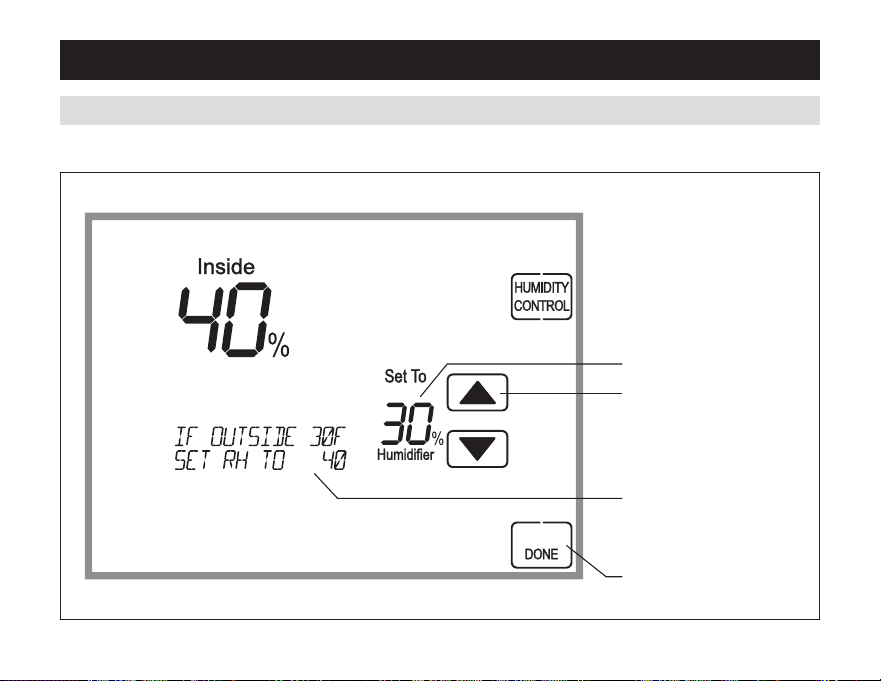
In manual mode it is important to anticipate a drop in
outdoor temperature and reduce the setting accordingly
to avoid excessive condensation. Use the following
tabletodeterminetheproperrHsetting.
Outdoor Temperature/Indoor Relative Humidity
Outside Temperature Recommended RH
+50°F 50%
+40°F 45%
+30°F 40%
+20°F 35%
+10°F 30%
0°F 25%
-10°F 20%
-20°F 15%
14 15
INDOOR AIR QUAlITy fUNCTIONS
Humidity Control Screen for Humidification in Automatic Mode
HUMIDITy CONTROl (CONTINUED)
HUMIDIFIcaTIOnsETPOInT
HUMIDIFIEraDJUsTMEnT
AUTOMATIC MODE:
INDICATION OF HUMIDIFICATION
sETPOInTLEvEL
DONE BUTTON
(EXITHUMIDITycOnTrOL)
INDOOR AIR QUAlITy fUNCTIONS
HUMIDITy CONTROl (CONTINUED)
In manual mode it is important to anticipate a drop in
outdoor temperature and reduce the setting accordingly
to avoid excessive condensation. Use the following
tabletodeterminetheproperrHsetting.
Outdoor Temperature/Indoor Relative Humidity
Outside Temperature Recommended RH
+50°F 50%
+40°F 45%
+30°F 40%
+20°F 35%
+10°F 30%
0°F 25%
-10°F 20%
-20°F 15%
16 17
INDOOR AIR QUAlITy fUNCTIONS
Humidity Control Screen for Humidification in Manual Mode
HUMIDITy CONTROl (CONTINUED)
HUMIDIFIcaTIOnsETPOInT
HUMIDIFIEraDJUsTMEnT
MANUAl MODE:
scrEEncycLEsrEcOMMEnDED
HUMIDIFIcaTIOnsETPOInTs
FOR VARIOUS OUTDOOR
TEMPEraTUrEs
DONE BUTTON
(EXITHUMIDITycOnTrOL)
INDOOR AIR QUAlITy fUNCTIONS
HUMIDITy CONTROl (CONTINUED)
If dehumidification is installed the Home Comfort
controlcanbeconfigured,throughtheinstallerset-up,
to control dehumidification with either a whole home
dehumidifier or with the air conditioning.
The Home Comfort Control will allow you to set the
desiredhumidity(%rH)levelinyourhomeandcanbe
used to turn the dehumidification On or Off.
Usethedehumidificationadjustmenttosetthe
dehumidification setpoint to 60% when first installed.
Allow dehumidification to run until the initial setpoint
isreached,beforedecidingifyouwanttochangethe
humidity setting.
Raise the setting if you prefer the air to be
less dry; this will reduce the amount of time that
dehumidification runs.
lower the setting if you prefer the air to be
more dry; this will increase the amount of time that
dehumidification runs.
yourcomfortisthebestmeasureofhowtwoadjust
yoursetting.whenfirstinstalled,yourdehumidifier
has to remove all the moisture that is initially in your
home. The home acts like a sponge so the moisture in
the materials of your home is at the same level as the
air.afterdryingtheair,thematerialsofthehomewill
releasethemoisturebackintotheairuntiltheyare
againatthesamelevel.asaresult,itisnotuncommon
for dehumidification to operate for an extended period
of time when it is first installed.
16 17
INDOOR AIR QUAlITy fUNCTIONS
Humidity Control Screen for Humidification in Manual Mode
HUMIDITy CONTROl (CONTINUED)
HUMIDIFIcaTIOnsETPOInT
HUMIDIFIEraDJUsTMEnT
MANUAl MODE:
scrEEncycLEsrEcOMMEnDED
HUMIDIFIcaTIOnsETPOInTs
FOR VARIOUS OUTDOOR
TEMPEraTUrEs
DONE BUTTON
(EXITHUMIDITycOnTrOL)
INDOOR AIR QUAlITy fUNCTIONS
HUMIDITy CONTROl (CONTINUED)
If dehumidification is installed the Home Comfort
controlcanbeconfigured,throughtheinstallerset-up,
to control dehumidification with either a whole home
dehumidifier or with the air conditioning.
The Home Comfort Control will allow you to set the
desiredhumidity(%rH)levelinyourhomeandcanbe
used to turn the dehumidification On or Off.
Usethedehumidificationadjustmenttosetthe
dehumidification setpoint to 60% when first installed.
Allow dehumidification to run until the initial setpoint
isreached,beforedecidingifyouwanttochangethe
humidity setting.
Raise the setting if you prefer the air to be
less dry; this will reduce the amount of time that
dehumidification runs.
lower the setting if you prefer the air to be
more dry; this will increase the amount of time that
dehumidification runs.
yourcomfortisthebestmeasureofhowtwoadjust
yoursetting.whenfirstinstalled,yourdehumidifier
has to remove all the moisture that is initially in your
home. The home acts like a sponge so the moisture in
the materials of your home is at the same level as the
air.afterdryingtheair,thematerialsofthehomewill
releasethemoisturebackintotheairuntiltheyare
againatthesamelevel.asaresult,itisnotuncommon
for dehumidification to operate for an extended period
of time when it is first installed.

18 19
INDOOR AIR QUAlITy fUNCTIONS
HUMIDITy CONTROl (CONTINUED)
Energy Saving Tip #1:
adjustthesettingtobeashighasiscomfortableto
reduce dehumidification run time – if it feels clammy or
smellsdampormoldylowerthesetting.Tosaveenergy,
turn the dehumidifier control OFF when you open your
windowsjustasyouwouldwithairconditioning.
Energy Saving Tip #2:
If vacating your home for an extended period in
thesummer,settherHat60%andsetthecooling
setpointashighasyouarecomfortablesettingittoin
cooling mode. Consult with appropriate professionals
regarding the highest temperature that is safe for your
pets or possessions. This will keep the humidity at a
controlled level to help prevent mold while minimizing
the amount of the cooling energy used. Vacation hold
isaconvenientwaytoadjustthedehumidificationand
coolingsetpointwhenyouwillbeaway.
INDOOR AIR QUAlITy fUNCTIONS
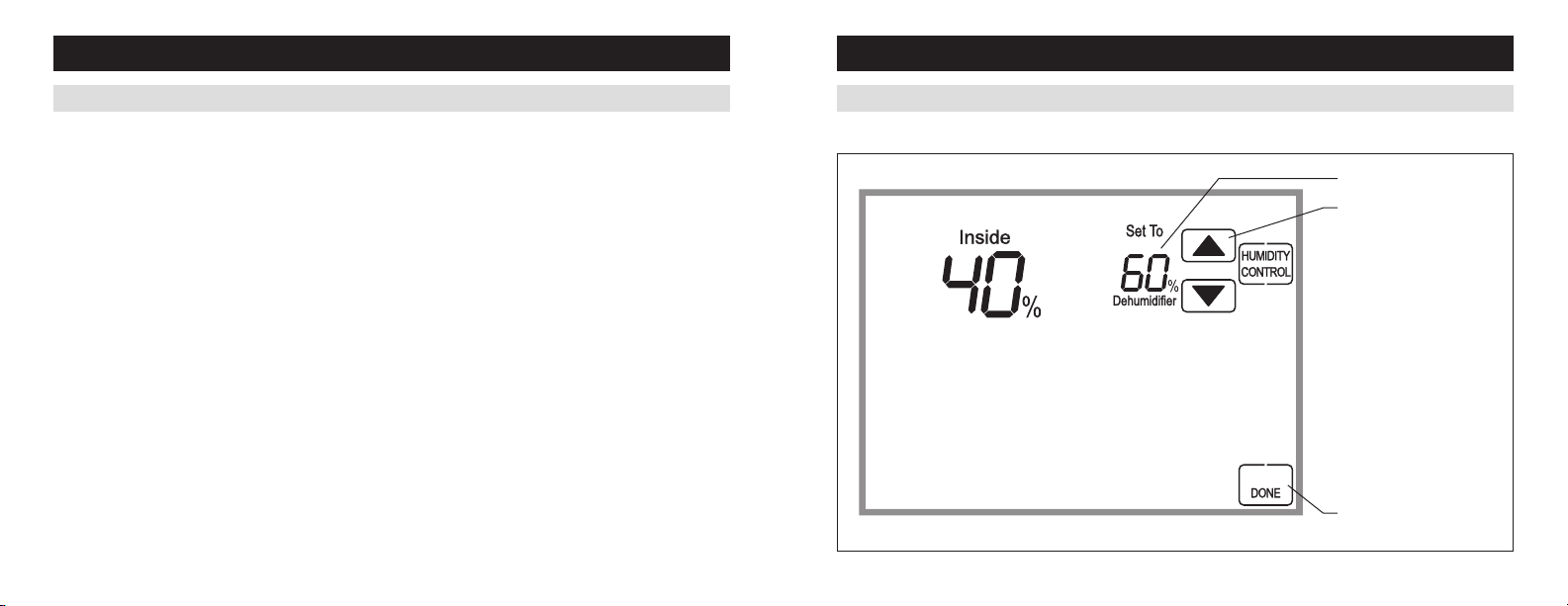
Humidity Control Screen with only Dehumidification Installed
HUMIDITy CONTROl (CONTINUED)
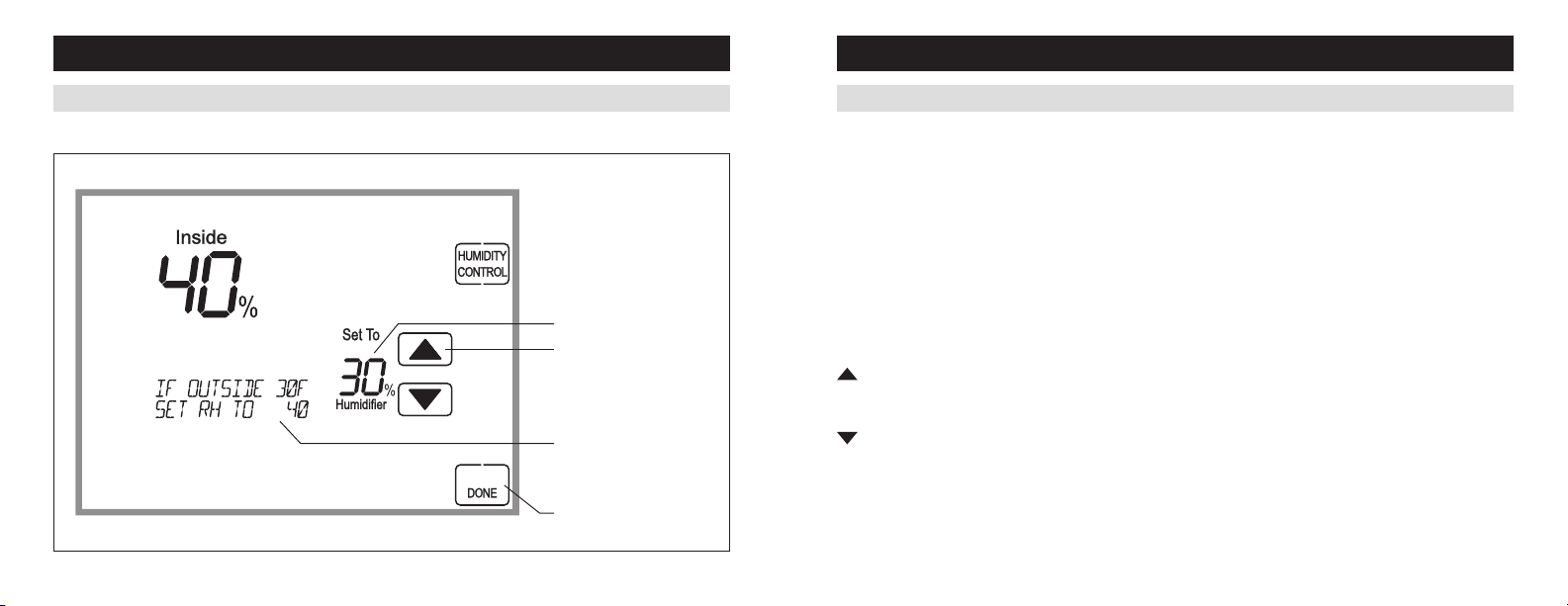
DEHUMIDIFIcaTIOnsETPOInT
DEHUMIDIFIEraDJUsTMEnT
DONE BUTTON
(EXITHUMIDITycOnTrOL)

18 19
INDOOR AIR QUAlITy fUNCTIONS
HUMIDITy CONTROl (CONTINUED)
Energy Saving Tip #1:
adjustthesettingtobeashighasiscomfortableto
reduce dehumidification run time – if it feels clammy or
smellsdampormoldylowerthesetting.Tosaveenergy,
turn the dehumidifier control OFF when you open your
windowsjustasyouwouldwithairconditioning.
Energy Saving Tip #2:
If vacating your home for an extended period in
thesummer,settherHat60%andsetthecooling
setpointashighasyouarecomfortablesettingittoin
cooling mode. Consult with appropriate professionals
regarding the highest temperature that is safe for your
pets or possessions. This will keep the humidity at a
controlled level to help prevent mold while minimizing
the amount of the cooling energy used. Vacation hold
isaconvenientwaytoadjustthedehumidificationand
coolingsetpointwhenyouwillbeaway.
INDOOR AIR QUAlITy fUNCTIONS
Humidity Control Screen with only Dehumidification Installed
HUMIDITy CONTROl (CONTINUED)
DEHUMIDIFIcaTIOnsETPOInT
DEHUMIDIFIEraDJUsTMEnT
DONE BUTTON
(EXITHUMIDITycOnTrOL)

20 21
INDOOR AIR QUAlITy fUNCTIONS
HUMIDITy CONTROl (CONTINUED)
If dehumidification is done with the air conditioner,theHomecomfortcontrolwillcoolupto3°Fbeyondthe
coolingsetpointfordehumidification.noteovercoolingmaynotbesufficienttomeettodehumidificationsetpoint.
INDOOR AIR QUAlITy fUNCTIONS
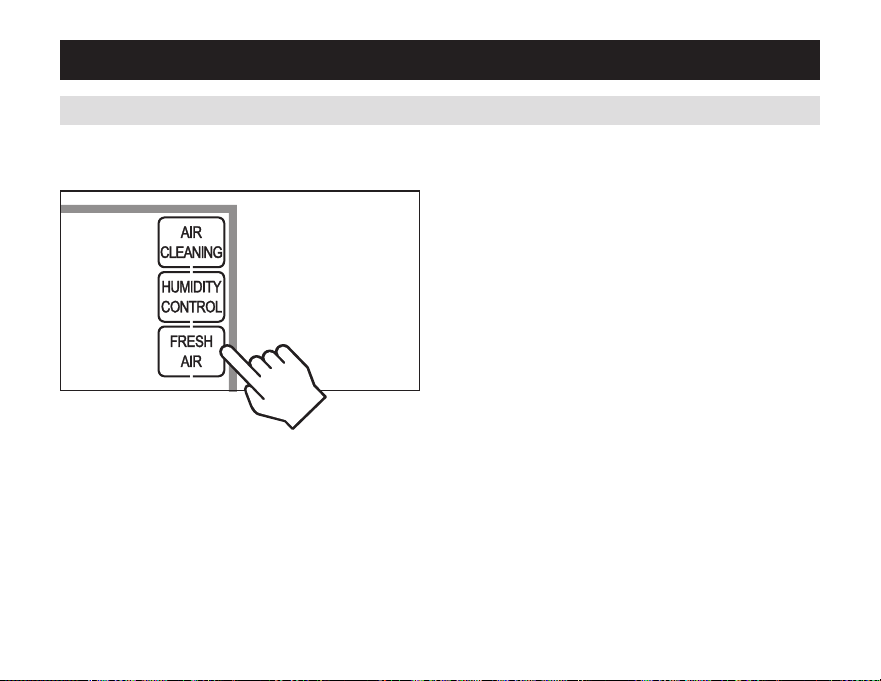
press [fRESH AIR] on the Home screen to enter the
Fresh Air screen.
Ifventilationisinstalled,Freshaircanoperateinfour
different modes.
Off: Ventilation will not run.
Automatic:ventilationwillcyclebasedonthe
parameterssetbytheinstallertomeetyourhome’s
ventilation requirements.
3 Hour Event:ventilationwillbeconstantlyenergized
for 3 hours and then the fresh air mode will return to
Off or Auto (Hourly) depending on which was mode was
most recently active. This option is used when fresh air
isneeded.anexamplewouldbeaftercooking.
24 Hour Event:ventilationwillbeconstantlyenergized
for 24 hours and then the fresh air mode will return to
Off or Auto (Hourly) depending on which was mode was
most recently active. This option is used when a large
amountoffreshairisdesired.anexamplewouldbea
daywithdesirableoutdoorconditions.
fRESH AIR
20 21
INDOOR AIR QUAlITy fUNCTIONS
HUMIDITy CONTROl (CONTINUED)
If dehumidification is done with the air conditioner,theHomecomfortcontrolwillcoolupto3°Fbeyondthe
coolingsetpointfordehumidification.noteovercoolingmaynotbesufficienttomeettodehumidificationsetpoint.
INDOOR AIR QUAlITy fUNCTIONS
press [fRESH AIR] on the Home screen to enter the
Fresh Air screen.
Ifventilationisinstalled,Freshaircanoperateinfour
different modes.
Off: Ventilation will not run.
Automatic:ventilationwillcyclebasedonthe
parameterssetbytheinstallertomeetyourhome’s
ventilation requirements.
3 Hour Event:ventilationwillbeconstantlyenergized
for 3 hours and then the fresh air mode will return to
Off or Auto (Hourly) depending on which was mode was
most recently active. This option is used when fresh air
isneeded.anexamplewouldbeaftercooking.
24 Hour Event:ventilationwillbeconstantlyenergized
for 24 hours and then the fresh air mode will return to
Off or Auto (Hourly) depending on which was mode was
most recently active. This option is used when a large
amountoffreshairisdesired.anexamplewouldbea
daywithdesirableoutdoorconditions.
fRESH AIR
22 23
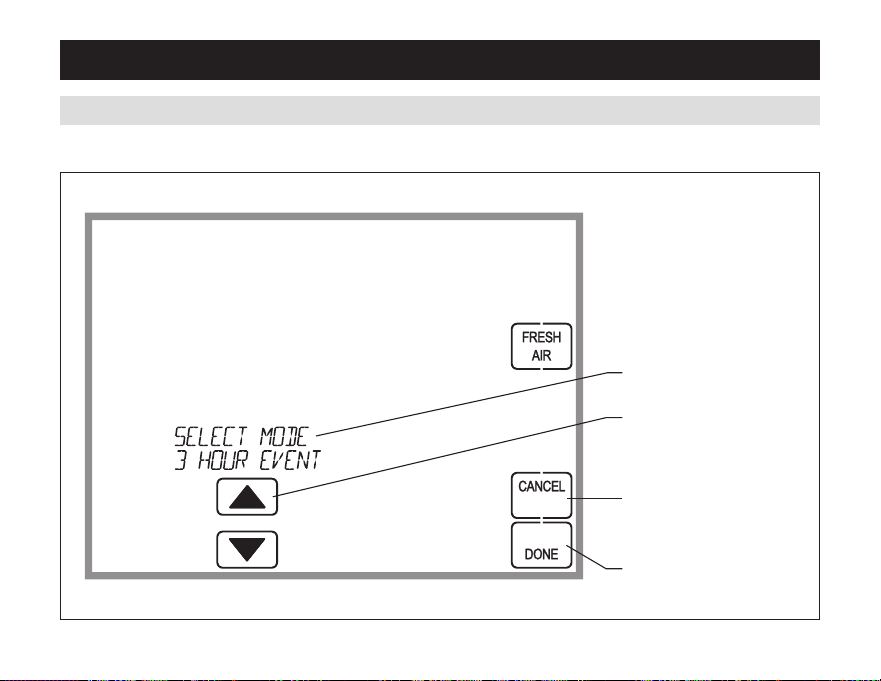
INDOOR AIR QUAlITy fUNCTIONS
fresh Air Screen
fRESH AIR (CONTINUED)
FRESH AIR MODE SELECTION
FrEsHaIrMODEaDJUsTMEnT
CANCEL BUTTON
(EXIT FRESH AIR)
DONE BUTTON (SAVE MODE
AND EXIT FRESH AIR)
pROGRAMMING
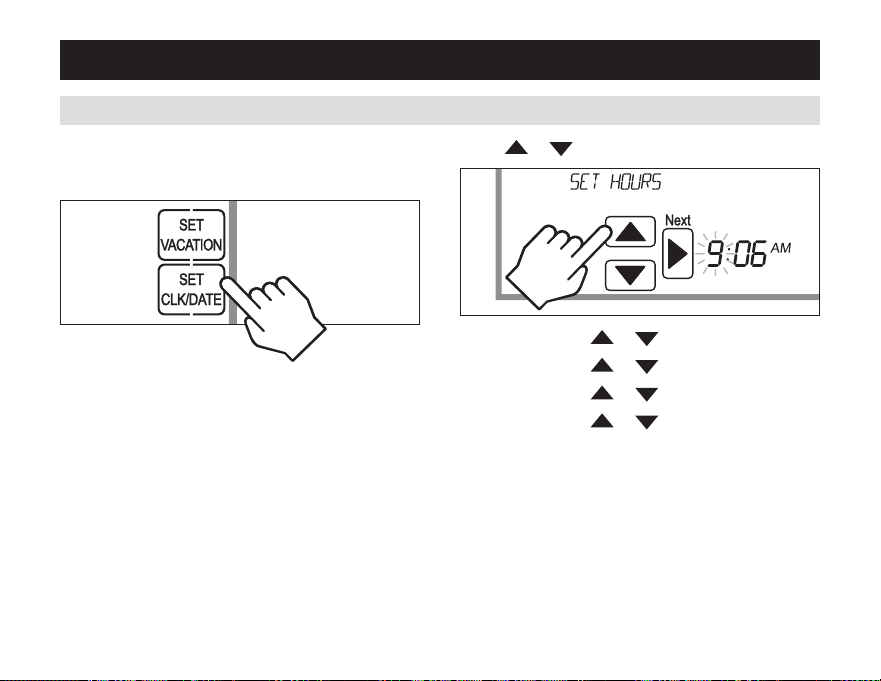
press [MENU] to enter the main menu.
press [SET ClK/DATE] to enter clock menu.
SET TIME AND DATE
press or to set the hour.
press [Next],then or to set the minute.
press [Next],then
or to set the month.
press [Next],then
or to set the day.
press [Next],then
or to set the year.
press [DONE]tosaveandexit,Or[CANCEl] to exit
without saving. The Home Comfort Control will save and
exit if nothing is pressed within 20 seconds.
22 23
INDOOR AIR QUAlITy fUNCTIONS
fresh Air Screen
fRESH AIR (CONTINUED)
FRESH AIR MODE SELECTION
FrEsHaIrMODEaDJUsTMEnT
CANCEL BUTTON
(EXIT FRESH AIR)
DONE BUTTON (SAVE MODE
AND EXIT FRESH AIR)
pROGRAMMING
press [MENU] to enter the main menu.
press [SET ClK/DATE] to enter clock menu.
SET TIME AND DATE
press or to set the hour.
press [Next],then or to set the minute.
press [Next],then
or to set the month.
press [Next],then
or to set the day.
press [Next],then
or to set the year.
press [DONE]tosaveandexit,Or[CANCEl] to exit
without saving. The Home Comfort Control will save and
exit if nothing is pressed within 20 seconds.
24 25
UNDERSTANDING pROGRAM SCHEDUlES
pROGRAMMING
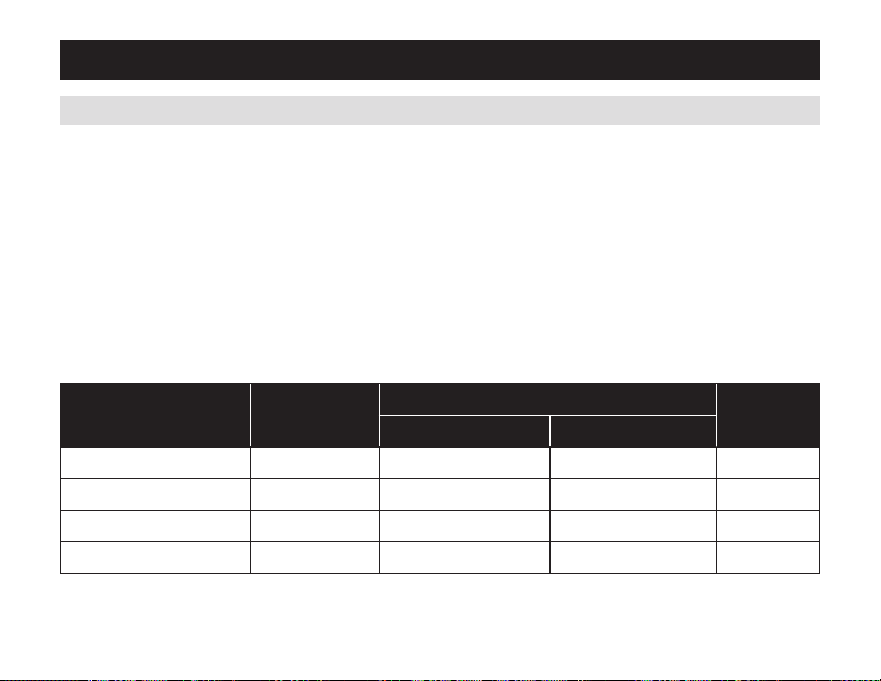
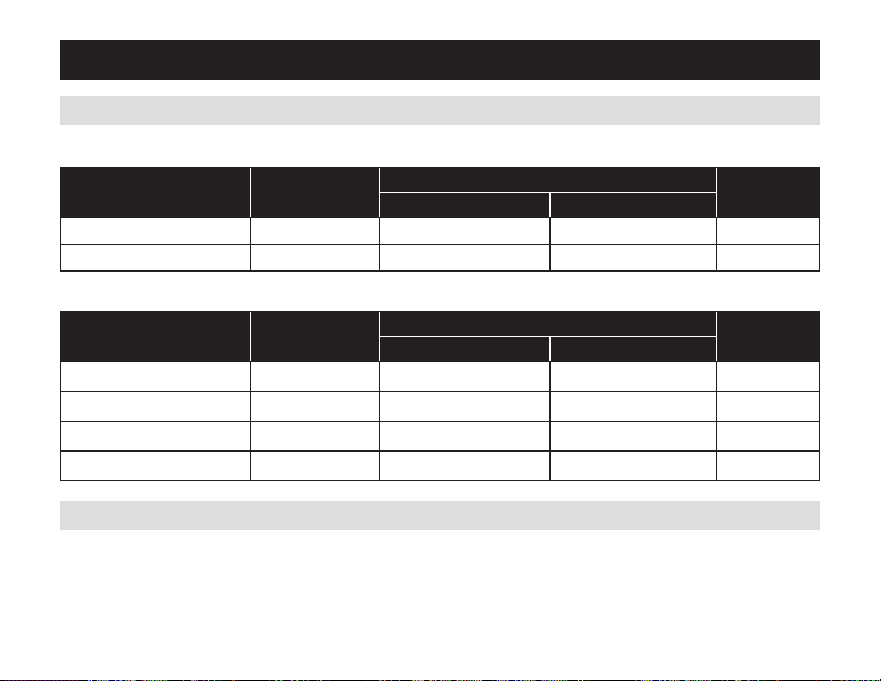
The daily schedule is split into four sections:
WAKE: temperature you would prefer to wake up to.
lEAVE: temperature when you are away from the house.
RETURN: temperature you would prefer to return home to.
SlEEp: temperature you would prefer while sleeping.
Thetimesshowninthetablebelowarethedefaults.Thestarttimeandtemperatureofeachsectioncanbechanged
tofityourschedule.(seechangingProgramschedulessectiononpages26-27.)
ThisHomecomfortcontrolispre-settousethefollowingprogramsettings(seetablebelow).werecommendthese
settings,sincetheycanreduceyourheating/coolingexpenses.Thefanprogramispre-settoaUTOforallevents.
Event designator Start time
Set temperature
fanHeat Cool
WAKE 6:00AM 70°F (21°C) 78°F (26°C) AUTO
LEAVE 8:00AM 62°F (17°C) 85°F (29°C) AUTO
RETURN 5:00PM 70°F (21°C) 78°F (26°C) AUTO
sLEEP 10:00PM 62°F (17°C) 82°F (28°C) AUTO
Event designator Start time
Set temperature
fanHeat Cool
WAKE
LEAVE
RETURN
sLEEP
UNDERSTANDING pROGRAM SCHEDUlES (CONTINUED)
pROGRAMMING
Optionally,theHomecomfortcontrolcanbesettoatwoeventschedule.(seesetupMenuonpage32.)
Usethetablebelowtoassistinmodifyingtheschedule.
Event designator Start time
Set temperature
fanHeat Cool
WAKE 6:00AM 70°F (21°C) 78°F (26°C) AUTO
LEAVE 10:00PM 62°F (17°C) 82°F (28°C) AUTO
pROGRESSIVE RECOVERy
TheProgressiverecoveryfeatureallowstheHomecomfortcontroltoactivatetheheatingandcoolingequipment
pRIOR to a scheduled event in order to reach the desired temperature at the start of that scheduled event.
Example:IfthewakEtimeis6am,andthetemperatureis70°,theheatwillcomeonbefore6am,sothe
temperatureis70°bythetimeyouwakeat6am.
24 25
UNDERSTANDING pROGRAM SCHEDUlES
pROGRAMMING
The daily schedule is split into four sections:
WAKE: temperature you would prefer to wake up to.
lEAVE: temperature when you are away from the house.
RETURN: temperature you would prefer to return home to.
SlEEp: temperature you would prefer while sleeping.
Thetimesshowninthetablebelowarethedefaults.Thestarttimeandtemperatureofeachsectioncanbechanged
tofityourschedule.(seechangingProgramschedulessectiononpages26-27.)
ThisHomecomfortcontrolispre-settousethefollowingprogramsettings(seetablebelow).werecommendthese
settings,sincetheycanreduceyourheating/coolingexpenses.Thefanprogramispre-settoaUTOforallevents.
Event designator Start time
Set temperature
fanHeat Cool
WAKE 6:00AM 70°F (21°C) 78°F (26°C) AUTO
LEAVE 8:00AM 62°F (17°C) 85°F (29°C) AUTO
RETURN 5:00PM 70°F (21°C) 78°F (26°C) AUTO
sLEEP 10:00PM 62°F (17°C) 82°F (28°C) AUTO
Event designator Start time
Set temperature
fanHeat Cool
WAKE
LEAVE
RETURN
sLEEP
UNDERSTANDING pROGRAM SCHEDUlES (CONTINUED)
pROGRAMMING
Optionally,theHomecomfortcontrolcanbesettoatwoeventschedule.(seesetupMenuonpage32.)
Usethetablebelowtoassistinmodifyingtheschedule.
Event designator Start time
Set temperature
fanHeat Cool
WAKE 6:00AM 70°F (21°C) 78°F (26°C) AUTO
LEAVE 10:00PM 62°F (17°C) 82°F (28°C) AUTO
pROGRESSIVE RECOVERy
TheProgressiverecoveryfeatureallowstheHomecomfortcontroltoactivatetheheatingandcoolingequipment
pRIOR to a scheduled event in order to reach the desired temperature at the start of that scheduled event.
Example:IfthewakEtimeis6am,andthetemperatureis70°,theheatwillcomeonbefore6am,sothe
temperatureis70°bythetimeyouwakeat6am.
26 27
pROGRAMMING
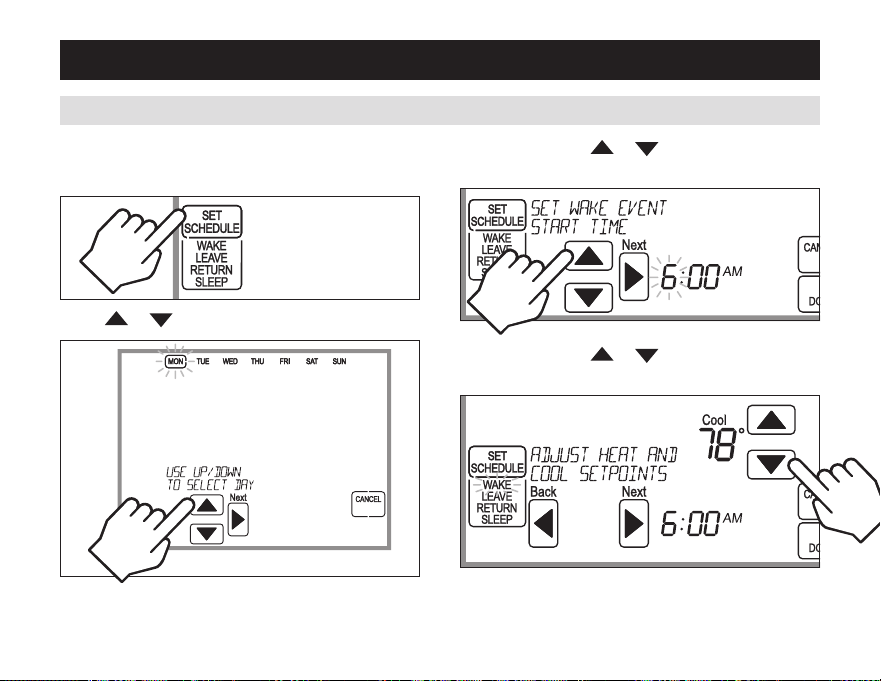
press [Next],then or to set the start time of
the first event.
press [MENU] to enter the main menu.
press [SET SCHEDUlE] to enter schedule programming.
CHANGING pROGRAM SCHEDUlES
press or to select the day.
press [Next],then or to set the setpoints of
the first event.
Note: This step is not displayed for weekday/weekend
schedules.
pROGRAMMING
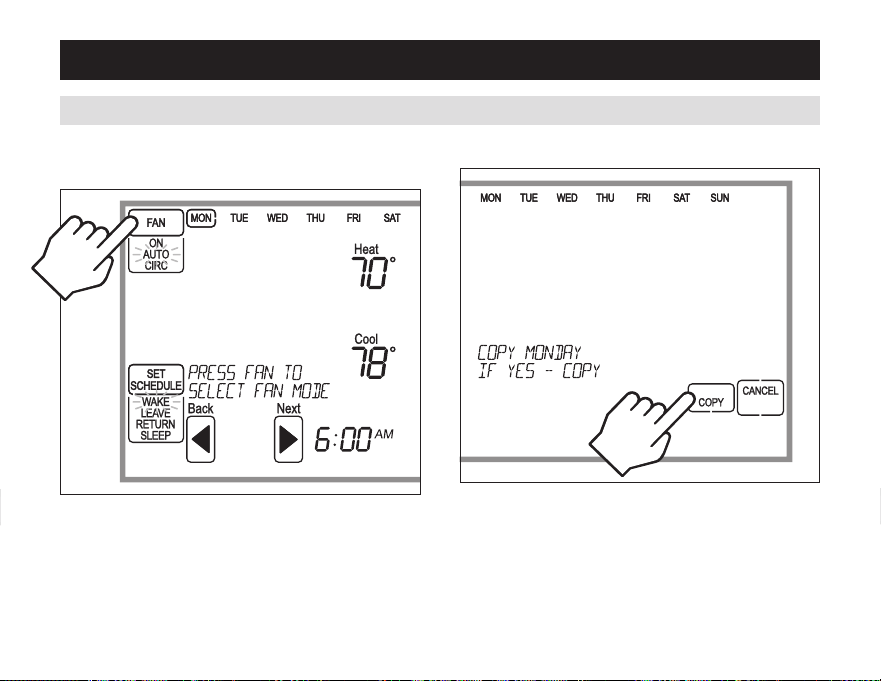
press [Next],then[fAN] to set the fan mode of the
first event.
CHANGING pROGRAM SCHEDUlES (CONTINUED)
press [Next] to advance to the next event.
repeataboveprocessforeachremainingevent.
press [DONE] to save the schedule for the day.
TheHomecomfortcontrolwilldisplaythecOPyoption.
press [COpy]tocopythescheduleofthedayjust
programmed to any other day.
OR
press [CANCEl] to proceed to the next day and repeat
theaboveprocess.
26 27
pROGRAMMING
press [Next],then or to set the start time of
the first event.
press [MENU] to enter the main menu.
press [SET SCHEDUlE] to enter schedule programming.
CHANGING pROGRAM SCHEDUlES
press or to select the day.
press [Next],then or to set the setpoints of
the first event.
Note: This step is not displayed for weekday/weekend
schedules.
pROGRAMMING
press [Next],then[fAN] to set the fan mode of the
first event.
CHANGING pROGRAM SCHEDUlES (CONTINUED)
press [Next] to advance to the next event.
repeataboveprocessforeachremainingevent.
press [DONE] to save the schedule for the day.
TheHomecomfortcontrolwilldisplaythecOPyoption.
press [COpy]tocopythescheduleofthedayjust
programmed to any other day.
OR
press [CANCEl] to proceed to the next day and repeat
theaboveprocess.
28 29
pROGRAMMING
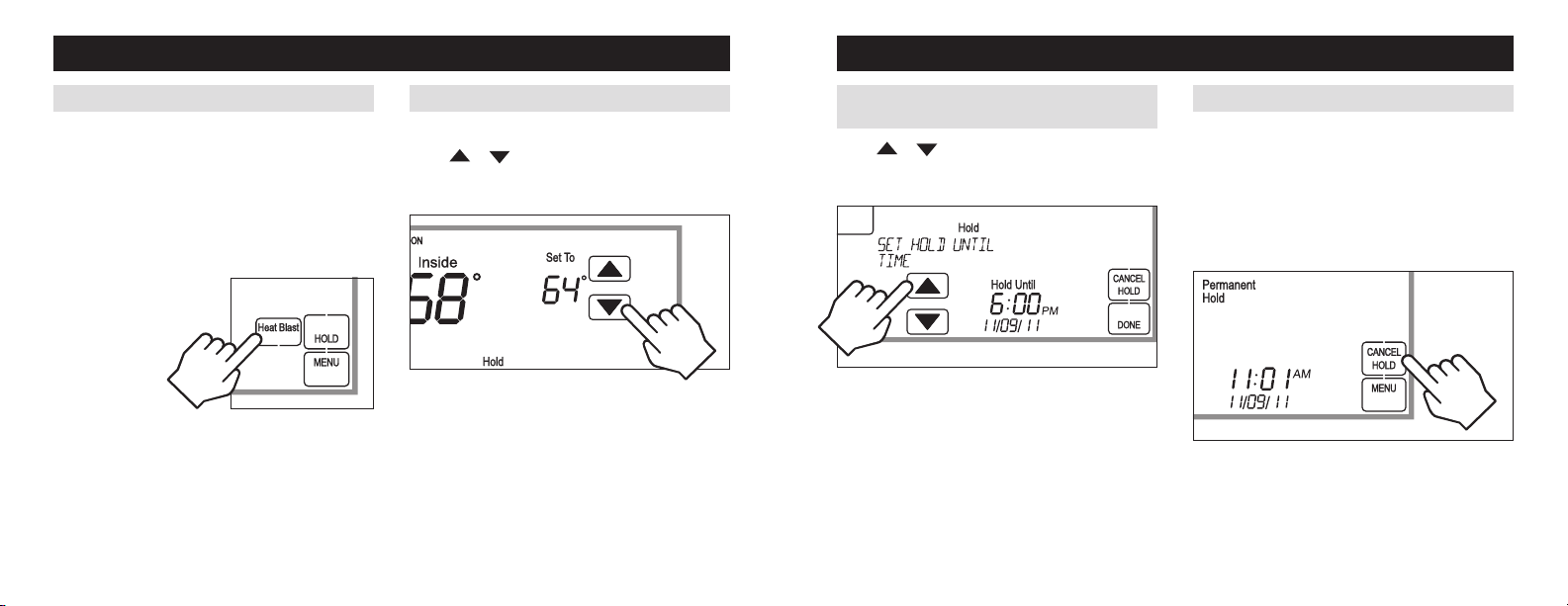
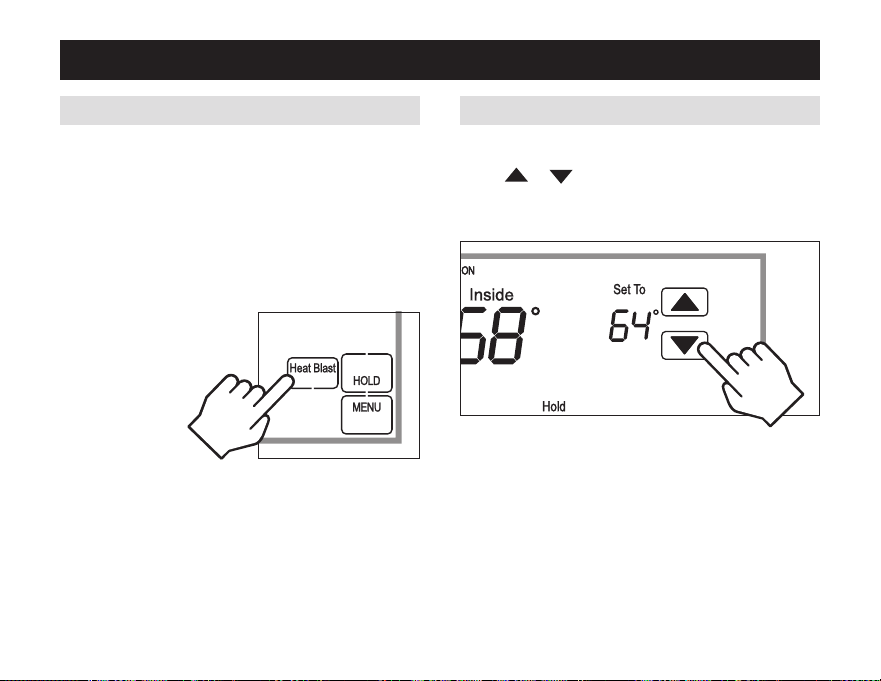
TEMpORARy pROGRAM HOlD
press
or toimmediatelyadjustthetemperature
when the schedule is running. This will temporarily hold
the temperature setting until the next scheduled event.
pROGRAM SCHEDUlE HOlDS – TEMpORARy
Heat Blast
™
will raise the current room temperature 3°F
to5°Fbasedontheinstallerset-up,andthenresume
normal operation.
press [Heat blast] to activate Heat Blast.
Note:HeatBlastbuttonisonlyavailableifitisenabled
in the Installer Setup and the Home Comfort Control is
in Heat or Emergency Heat mode.
To cancel Heat Blast
press [CANCEl],or
[Heat blast],orthe
temperatureadjust
buttons.
HEAT blAST
™
pROGRAMMING
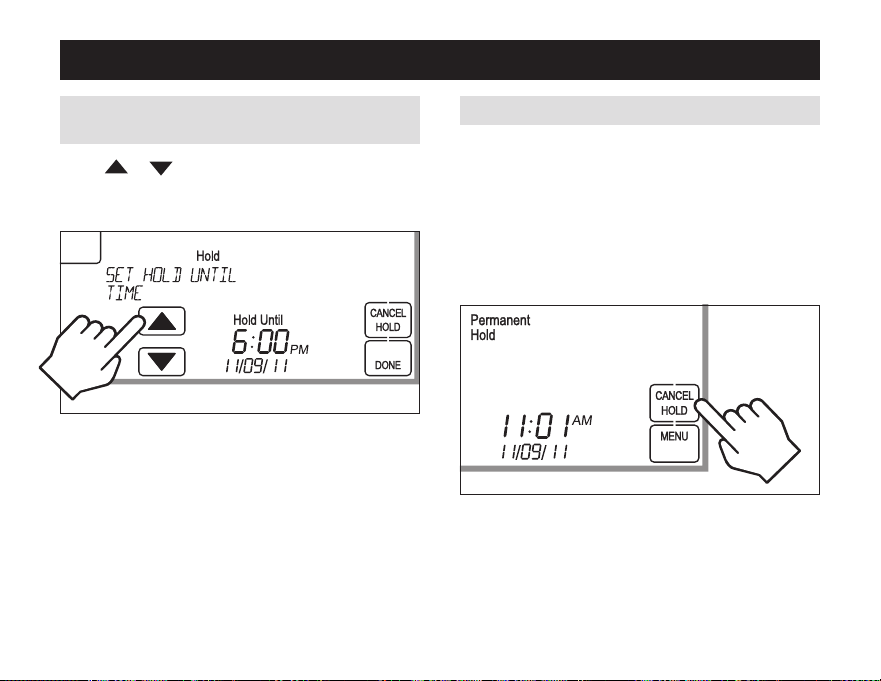
pERMANENT pROGRAM HOlD
press [HOlD] to permanently hold the temperature at
its current setting while the schedule is running. This
will override the temperature settings for all events.
withtheHomecomfortcontrolinPermanentHold,the
temperaturesettingandfanmodecanbeadjustedand
will stay at that setting until the hold is cancelled.
TocancelthePermanentHold,press [CANCEl HOlD].
pROGRAM SCHEDUlE HOlDS – pERMANENT
press
or toadjusttheendtimeofthehold.If
endtimeisnotadjusted,theTemporaryHoldwillendat
the start of the next event.
TocanceltheTemporaryHold,press [CANCEl HOlD].
pROGRAM SCHEDUlE HOlDS – TEMpORARy
(CONTINUED)
28 29
pROGRAMMING
TEMpORARy pROGRAM HOlD
press
or toimmediatelyadjustthetemperature
when the schedule is running. This will temporarily hold
the temperature setting until the next scheduled event.
pROGRAM SCHEDUlE HOlDS – TEMpORARy
Heat Blast
™
will raise the current room temperature 3°F
to5°Fbasedontheinstallerset-up,andthenresume
normal operation.
press [Heat blast] to activate Heat Blast.
Note:HeatBlastbuttonisonlyavailableifitisenabled
in the Installer Setup and the Home Comfort Control is
in Heat or Emergency Heat mode.
To cancel Heat Blast
press [CANCEl],or
[Heat blast],orthe
temperatureadjust
buttons.
HEAT blAST
™
pROGRAMMING
pERMANENT pROGRAM HOlD
press [HOlD] to permanently hold the temperature at
its current setting while the schedule is running. This
will override the temperature settings for all events.
withtheHomecomfortcontrolinPermanentHold,the
temperaturesettingandfanmodecanbeadjustedand
will stay at that setting until the hold is cancelled.
TocancelthePermanentHold,press [CANCEl HOlD].
pROGRAM SCHEDUlE HOlDS – pERMANENT
press
or toadjusttheendtimeofthehold.If
endtimeisnotadjusted,theTemporaryHoldwillendat
the start of the next event.
TocanceltheTemporaryHold,press [CANCEl HOlD].
pROGRAM SCHEDUlE HOlDS – TEMpORARy
(CONTINUED)
30 31
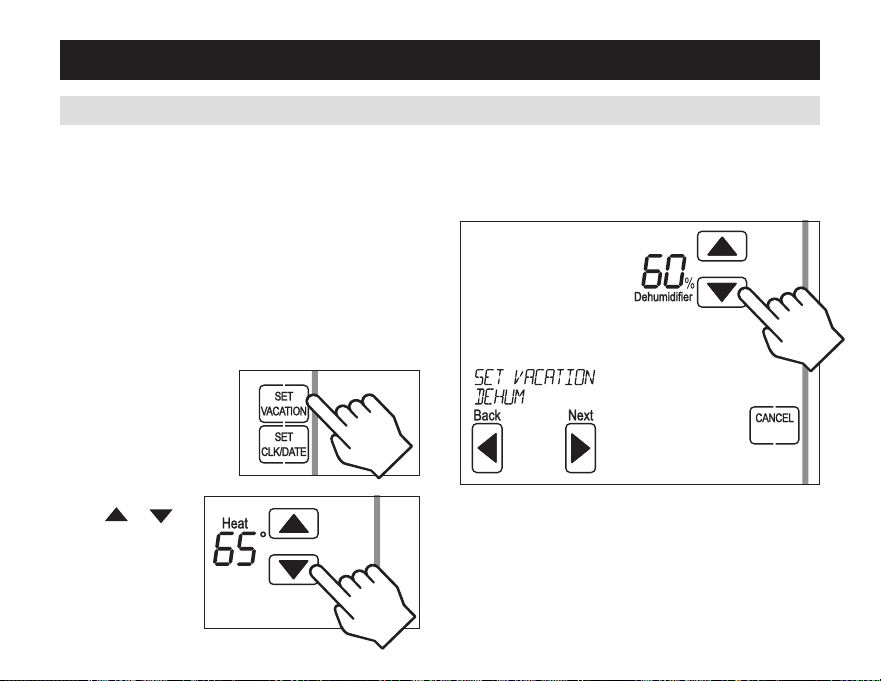
VACATION pROGRAM HOlD
This energy saving feature allows you to suspend the
programmed schedule for extended periods of time. The
temperature and dehumidification setpoint (optional)
youselectwillbemaintained24hoursadayuntilthe
vacation program hold end date and time. Once the
enddateandtimehavebeensurpassed,thepreviously
programmed schedule will resume. If you return earlier
thanexpected,press [CANCEl HOlD] to resume the
programmed schedule.
press
or
toadjustthe
temperature setting.
press [MENU] to enter
the main menu.
press [SET VACATION]
to enter vacation
program hold.
pROGRAMMING
press [NEXT],thenadjustthedehumidificationsetting.
Note: If dehumidification in vacation mode is not
enabledthisstepwillbeskipped.
pROGRAM SCHEDUlE HOlDS – VACATION
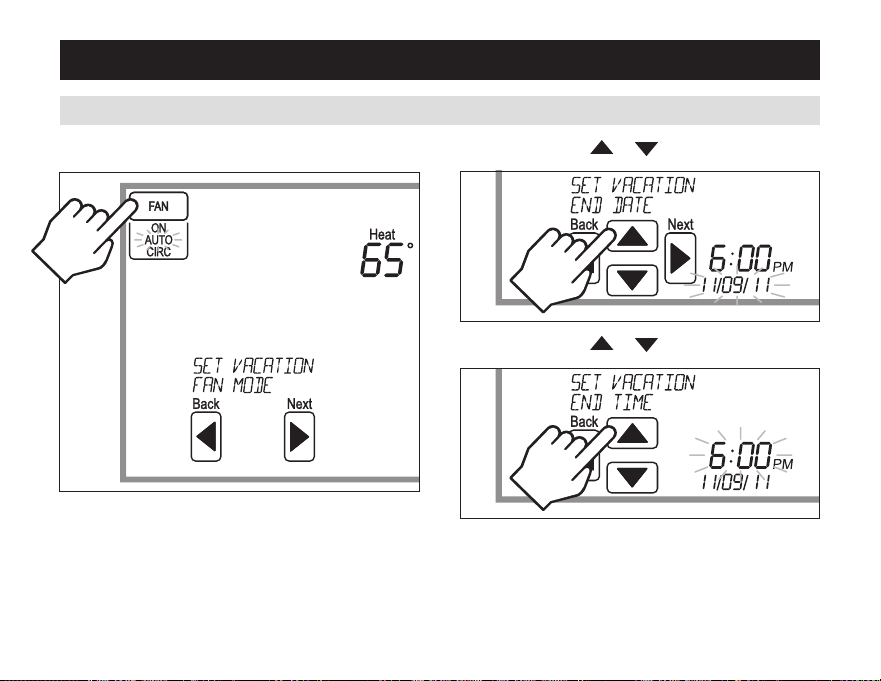
pROGRAMMING
press [Next],then or to set end date.
press [Next],then or to set end time.
press [DONE]tosaveandexit,Or[CANCEl] to exit
without saving. The Home Comfort Control will save and
exit if nothing is pressed within 20 seconds.
pROGRAM SCHEDUlE HOlDS – VACATION (CONTINUED)
press [Next],then[fAN] to set the fan mode.
30 31
VACATION pROGRAM HOlD
This energy saving feature allows you to suspend the
programmed schedule for extended periods of time. The
temperature and dehumidification setpoint (optional)
youselectwillbemaintained24hoursadayuntilthe
vacation program hold end date and time. Once the
enddateandtimehavebeensurpassed,thepreviously
programmed schedule will resume. If you return earlier
thanexpected,press [CANCEl HOlD] to resume the
programmed schedule.
press
or
toadjustthe
temperature setting.
press [MENU] to enter
the main menu.
press [SET VACATION]
to enter vacation
program hold.
pROGRAMMING
press [NEXT],thenadjustthedehumidificationsetting.
Note: If dehumidification in vacation mode is not
enabledthisstepwillbeskipped.
pROGRAM SCHEDUlE HOlDS – VACATION
pROGRAMMING
press [Next],then or to set end date.
press [Next],then or to set end time.
press [DONE]tosaveandexit,Or[CANCEl] to exit
without saving. The Home Comfort Control will save and
exit if nothing is pressed within 20 seconds.
pROGRAM SCHEDUlE HOlDS – VACATION (CONTINUED)
press [Next],then[fAN] to set the fan mode.
32 33
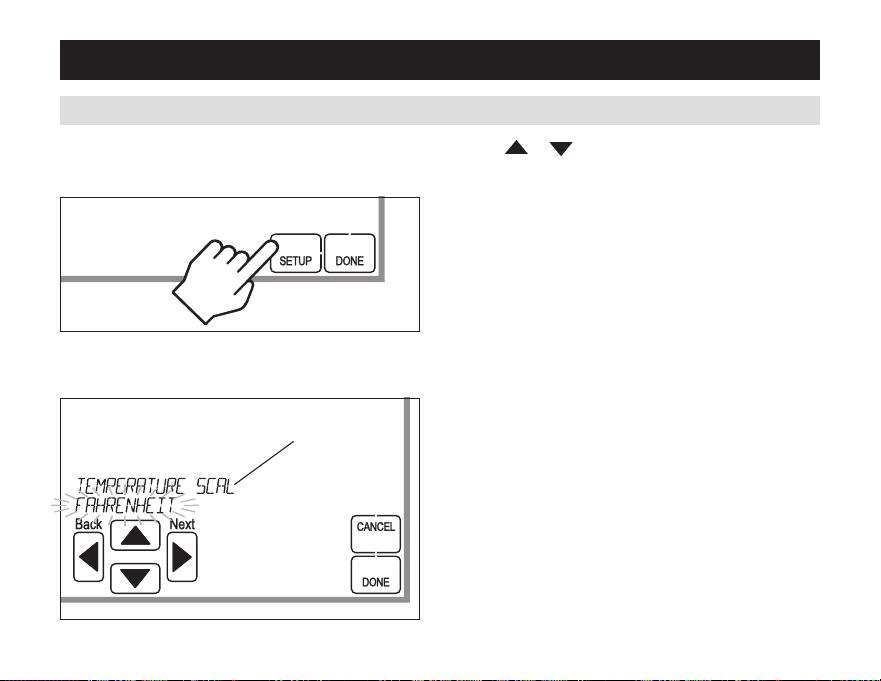
SETUp MENU
HOW TO ENTER THE SETUp MENU TO CHANGE SETTINGS
press [MENU] to enter the main menu.
press [SETUp] to enter the setup menu.
press
or toadjustthesetting.(selectedoption
flashes.)
Press[DONE]tosaveandexit,Or[CANCEl] to exit
without saving.
The Home Comfort Control will discard changes and exit
if nothing is pressed within 60 seconds.
press [Next] or [back] to page through the settings
(the setting is displayed in the message center).
MESSAGE CENTER
(SCROLLING TEXT)
USER SySTEM SETTINGS TAblE
SETUp MENU
Thefollowingtableisthelistofthesettingsandtheirdetails.Defaultsettingsareshowninbold.
User system
setting Description factory default setting (bold) and setting range
Temperature
scale
Set the Home Comfort Control
to Fahrenheit or Celsius mode
fahrenheit
Celsius
Screen lockout Screen lockout level
Off : No lockout
Partiallockout
Full lockout
Partiallockouttype (onlyavailablewhenscreen
lockout is set to partial lockout)
Allow changes to fan Mode, System Mode and Setpoints
Allow changes to Fan Mode and Setpoints only
Allow changes to Setpoints only
Max Temp Setpoint
Change in Lockout
Select temperature setpoint
limits(onlyavailablewhen
screen lockout is set to partial)
3 degrees
0 to 20 degrees
Max Dehum
Setpoint Change in
Lockout
Select dehumidification setpoint
limits(onlyavailablewhen
screen lockout is set to partial)
5 percent RH
0 to 15 percent RH
Events per day numberofprogramevents
per day.
4 events per day
2 events per day
32 33
SETUp MENU
HOW TO ENTER THE SETUp MENU TO CHANGE SETTINGS
press [MENU] to enter the main menu.
press [SETUp] to enter the setup menu.
press
or toadjustthesetting.(selectedoption
flashes.)
Press[DONE]tosaveandexit,Or[CANCEl] to exit
without saving.
The Home Comfort Control will discard changes and exit
if nothing is pressed within 60 seconds.
press [Next] or [back] to page through the settings
(the setting is displayed in the message center).
MESSAGE CENTER
(SCROLLING TEXT)
USER SySTEM SETTINGS TAblE
SETUp MENU
Thefollowingtableisthelistofthesettingsandtheirdetails.Defaultsettingsareshowninbold.
User system
setting Description factory default setting (bold) and setting range
Temperature
scale
Set the Home Comfort Control
to Fahrenheit or Celsius mode
fahrenheit
Celsius
Screen lockout Screen lockout level
Off : No lockout
Partiallockout
Full lockout
Partiallockouttype (onlyavailablewhenscreen
lockout is set to partial lockout)
Allow changes to fan Mode, System Mode and Setpoints
Allow changes to Fan Mode and Setpoints only
Allow changes to Setpoints only
Max Temp Setpoint
Change in Lockout
Select temperature setpoint
limits(onlyavailablewhen
screen lockout is set to partial)
3 degrees
0 to 20 degrees
Max Dehum
Setpoint Change in
Lockout
Select dehumidification setpoint
limits(onlyavailablewhen
screen lockout is set to partial)
5 percent RH
0 to 15 percent RH
Events per day numberofprogramevents
per day.
4 events per day
2 events per day
34 35
USER SySTEM SETTINGS TAblE (CONTINUED)
SETUp MENU
User system
setting Description factory default setting (bold) and setting range
Backlight intensity Backlight intensity as a
percentage of full on
100
Selection of 0 – 100%
Daylight savings Enableordisableautodaylight
savings
OFF
Second Sunday in March to the first Sunday in November
FirstsundayinapriltothelastsundayinOctober
Reset Service
reminders
Clears the Change Air Filter and
HVAC and Dehumidifier Service
reminders if they are active
and resets the start date to the
current date.
clearsthechangewaterPanel
reminder if it is active. If the
remindersissettotimed,the
clockwillbereset.
No
yes
Visit us on-line at www.aprilaire.comtoregisteryouraprilaireproduct.Ifyoudonothaveon-lineaccess,pleasemailapostcardwithyour
name,address,phonenumber,productpurchasedanddateofpurchaseto:researchProductscorporation,P.O.BOX1467,Madison,wI53701
your Warranty Registration information will not be sold or shared outside of this company.
WARRANTy REGISTRATION
HOME COMfORT CONTROl
™
fIVE yEAR lIMITED WARRANTy
yourresearchProductscorporationaprilaire
®
Home Comfort Control
™
isexpresslywarrantedforfive(5)yearsfromdateofinstallationtobefree
from defects in materials or workmanship.
researchProductscorporation’sexclusiveobligationunderthiswarrantyshallbetosupply,withoutcharge,areplacementforanyHomecomfort
controlwhichisfoundtobedefectivewithinsuchfive(5)yearperiodandwhichisreturned,togetherwiththedateofinstallation,nolaterthan
thirty(30)daysaftersaidfive(5)yearperiodbyyoutoeitheryouroriginalsupplierortoresearchProductscorporation,Madison,wisconsin53701.
THIswarranTysHaLLnOTOBLIgaTErEsEarcHPrODUcTscOrPOraTIOnFOranyLaBOrcOsTsanDsHaLLnOTaPPLyTODEFEcTs
InwOrkMansHIPOrMaTErIaLsFUrnIsHEDByyOUrInsTaLLErascOnTrasTEDTODEFEcTsInTHEHOMEcOMFOrTcOnTrOLITsELF.
IMPLIEDwarranTIEsOFMErcHanTaBILITyOFFITnEssFOraParTIcULarPUrPOsEsHaLLBELIMITEDInDUraTIOnTOTHEaFOrEsaID
FIvE yEar PErIOD. rEsEarcH PrODUcTs cOrPOraTIOn’s LIaBILITy FOr IncIDEnTaL Or cOnsEQUEnTIaL DaMagEs, OTHEr THan
DaMagEsFOr PErsOnaLInJUrIEs, rEsULTIngFrOMany BrEacHOF THEaFOrEsaID IMPLIED warranTIEsOr THEaBOvE LIMITED
warranTyIsEXPrEssLyEXcLUDED.THIsLIMITEDwarranTyIsvOIDIFDEFEcT(s)rEsULTFrOMFaILUrETOHavETHIsHOMEcOMFOrT
cOnTrOLInsTaLLEDByaQUaLIFIEDHEaTInganDaIrcOnDITIOnIngcOnTracTOr.IFTHELIMITEDwarranTyIsvOIDDUETOFaILUrE
TOUsEaQUaLIFIEDcOnTracTOr,aLLDIscLaIMErsOFIMPLIEDwarranTIEssHaLLBEEFFEcTIvEUPOnInsTaLLaTIOn.
somestatesdonotallowlimitationsonhowlonganimpliedwarrantylastsortheexclusionorlimitationofincidentalorconsequentialdamages,
sotheaboveexclusionsorlimitationsmaynotapplytoyou.
This warranty gives you specific legal rights and you may also have other rights which vary from state to state.
Thisequipmentif installedin strictaccordancewith themanufacturer’sinstructions,complies with thelimits foraclass Bcomputing device
pursuanttosubpartJofPart15ofFccrules.
34 35
USER SySTEM SETTINGS TAblE (CONTINUED)
SETUp MENU
User system
setting Description factory default setting (bold) and setting range
Backlight intensity Backlight intensity as a
percentage of full on
100
Selection of 0 – 100%
Daylight savings Enableordisableautodaylight
savings
OFF
Second Sunday in March to the first Sunday in November
FirstsundayinapriltothelastsundayinOctober
Reset Service
reminders
Clears the Change Air Filter and
HVAC and Dehumidifier Service
reminders if they are active
and resets the start date to the
current date.
clearsthechangewaterPanel
reminder if it is active. If the
remindersissettotimed,the
clockwillbereset.
No
yes
Visit us on-line at www.aprilaire.comtoregisteryouraprilaireproduct.Ifyoudonothaveon-lineaccess,pleasemailapostcardwithyour
name,address,phonenumber,productpurchasedanddateofpurchaseto:researchProductscorporation,P.O.BOX1467,Madison,wI53701
your Warranty Registration information will not be sold or shared outside of this company.
WARRANTy REGISTRATION
HOME COMfORT CONTROl
™
fIVE yEAR lIMITED WARRANTy
yourresearchProductscorporationaprilaire
®
Home Comfort Control
™
isexpresslywarrantedforfive(5)yearsfromdateofinstallationtobefree
from defects in materials or workmanship.
researchProductscorporation’sexclusiveobligationunderthiswarrantyshallbetosupply,withoutcharge,areplacementforanyHomecomfort
controlwhichisfoundtobedefectivewithinsuchfive(5)yearperiodandwhichisreturned,togetherwiththedateofinstallation,nolaterthan
thirty(30)daysaftersaidfive(5)yearperiodbyyoutoeitheryouroriginalsupplierortoresearchProductscorporation,Madison,wisconsin53701.
THIswarranTysHaLLnOTOBLIgaTErEsEarcHPrODUcTscOrPOraTIOnFOranyLaBOrcOsTsanDsHaLLnOTaPPLyTODEFEcTs
InwOrkMansHIPOrMaTErIaLsFUrnIsHEDByyOUrInsTaLLErascOnTrasTEDTODEFEcTsInTHEHOMEcOMFOrTcOnTrOLITsELF.
IMPLIEDwarranTIEsOFMErcHanTaBILITyOFFITnEssFOraParTIcULarPUrPOsEsHaLLBELIMITEDInDUraTIOnTOTHEaFOrEsaID
FIvE yEar PErIOD. rEsEarcH PrODUcTs cOrPOraTIOn’s LIaBILITy FOr IncIDEnTaL Or cOnsEQUEnTIaL DaMagEs, OTHEr THan
DaMagEsFOr PErsOnaLInJUrIEs, rEsULTIngFrOMany BrEacHOF THEaFOrEsaID IMPLIED warranTIEsOr THEaBOvE LIMITED
warranTyIsEXPrEssLyEXcLUDED.THIsLIMITEDwarranTyIsvOIDIFDEFEcT(s)rEsULTFrOMFaILUrETOHavETHIsHOMEcOMFOrT
cOnTrOLInsTaLLEDByaQUaLIFIEDHEaTInganDaIrcOnDITIOnIngcOnTracTOr.IFTHELIMITEDwarranTyIsvOIDDUETOFaILUrE
TOUsEaQUaLIFIEDcOnTracTOr,aLLDIscLaIMErsOFIMPLIEDwarranTIEssHaLLBEEFFEcTIvEUPOnInsTaLLaTIOn.
somestatesdonotallowlimitationsonhowlonganimpliedwarrantylastsortheexclusionorlimitationofincidentalorconsequentialdamages,
sotheaboveexclusionsorlimitationsmaynotapplytoyou.
This warranty gives you specific legal rights and you may also have other rights which vary from state to state.
Thisequipmentif installedin strictaccordancewith themanufacturer’sinstructions,complies with thelimits foraclass Bcomputing device
pursuanttosubpartJofPart15ofFccrules.

P.O.Box1467•Madison,wI53701-1467•Phone:800/334-6011 •Fax:608/257-4357
www.aprilaire.com
61000849 12.11
B2205645A
PatentPending
©2011aprilaire–adivisionofresearchProductscorporation