Installation
Microwave Oven
Instructions
Built-In Trim Kits
1
❒ BEFORE YOU BEGIN
Read these instructions completely and carefully.
•
IMPORTANT — Save these instructions
for local inspector’s use.
•
IMPORTANT — Observe all governing
codes and ordinances.
• Note to Installer – Be sure to leave these
instructions with the Consumer.
• Note to Consumer – Keep these instructions for
future reference.
• Skill level – Installation of this appliance requires
basic mechanical and electrical skills.
• Completion time – 1 to 3 hours
• Proper installation is the responsibility of the
installer.
• Product failure due to improper installation is not
covered under the Warranty.
• This kit is for use on models:
JEM25DMBB, JEM25DMWW, PEM31DMBB,
PEM31DMWW, PEM31SMSS, ZEM200SF,
ZEM200BF and ZEM200WF.
• This kit is UL listed for installation alone or over
any GE/GE Profile single electric wall oven.
• Do not alter or modify any part of this kit or
the oven.
• For easier installation and personal safety, we
recommend that two people install this microwave
oven.
• Unplug the microwave oven before attempting
installation of this kit.
WARNING — This oven must be plugged
into a properly grounded 3-hole, 120 volt receptacle
as required by the National Electrical Code.
Questions? Call 800.GE.CARES (800.432.2737) or Visit our Website at: ge.com
PARTS INCLUDED
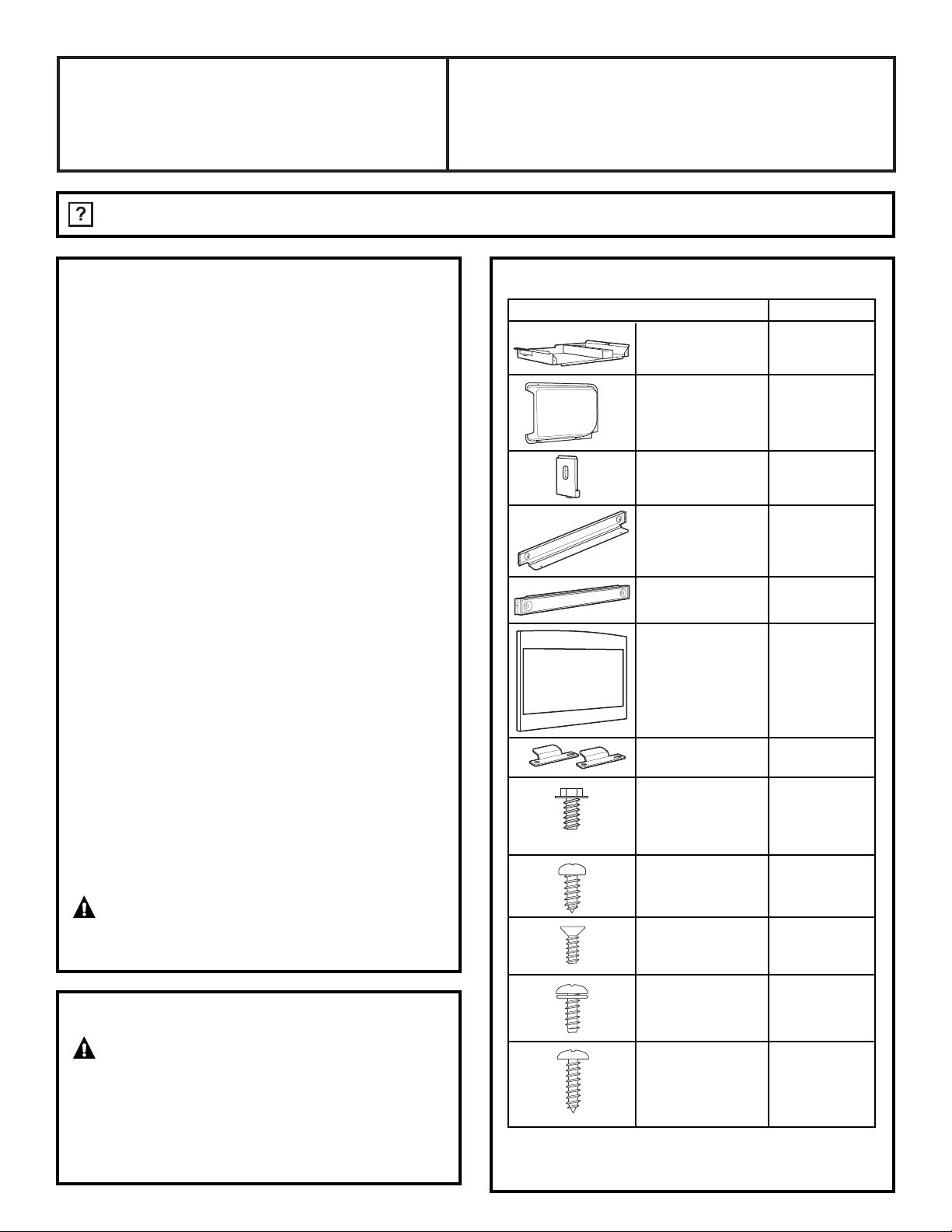
PART QUANTITY
❒ Base Pan 1
❒ Back Cover 1
❒ Side Bracket 1
❒ Upper Bracket 1
❒ Bottom Bracket 1
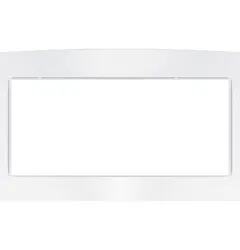
❒ Trim Kit 1
❒ Base Support 2
Brackets
❒ 5 mm x 10 mm 2 required
Screw A 2 extra
❒ 4 mm x 10 mm 1 required
Screw B 2 extra
❒ 4 mm x 12 mm 4 required
Screw C 2 extra
❒ 4 mm x 10 mm 10 required
Screw D 2 extra
❒ 4 mm x 16 mm 4 required
Screw E 2 extra
NOTE: This kit has extra screws to prevent the
technician from spending extra time locating a
replacement in case they lose one during installation.
FOR YOUR SAFETY:
WARNING — Before beginning the
installation, switch power off at service panel and lock
the service disconnecting means to prevent power
from being switched on accidentally. When the
service disconnecting means cannot be locked,
securely fasten a prominent warning device,
such as a tag, to the service panel.
JX827
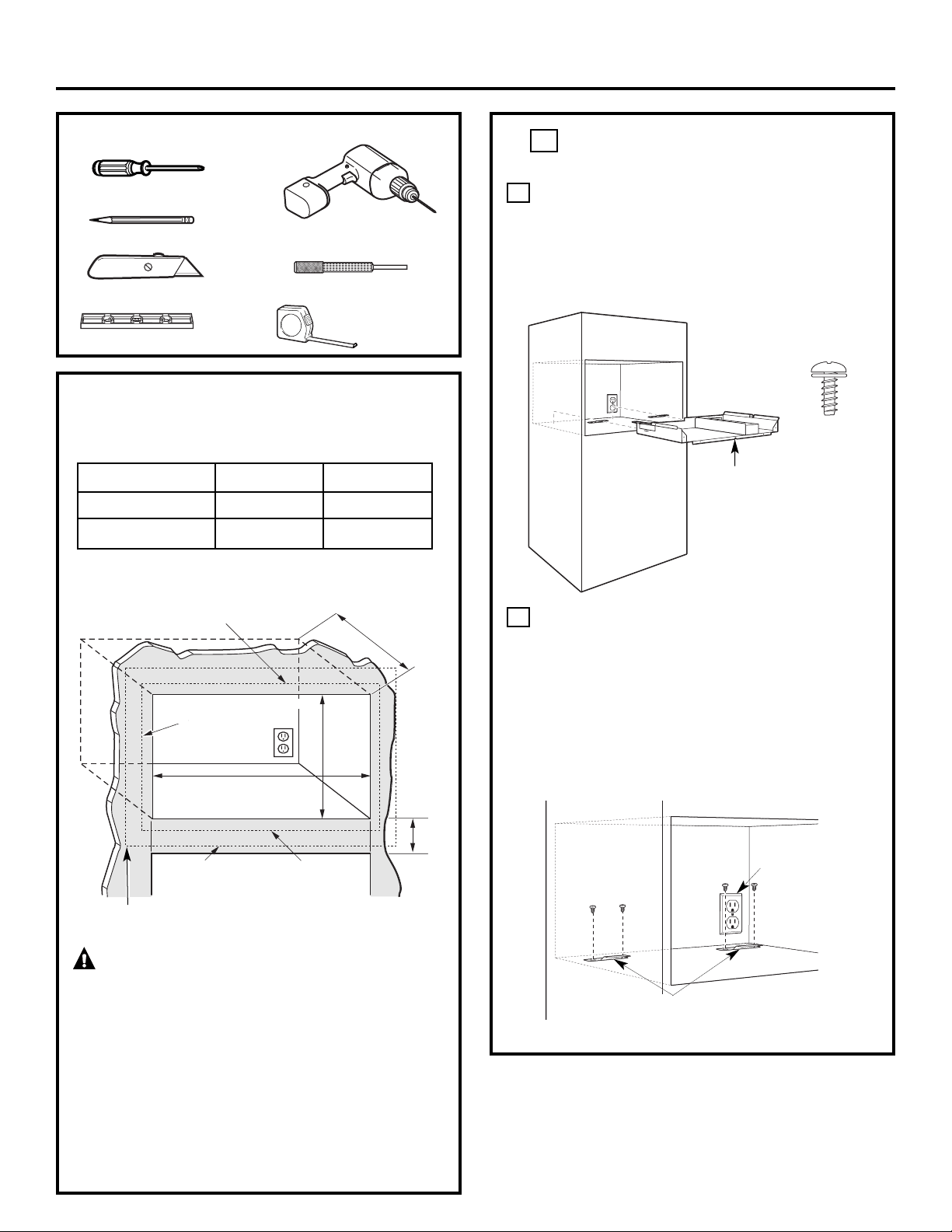
❒
LOCATE AND INSTALL THE REAR
HOLDDOWN SUPPORTS
Set Base Pan into the front cabinet microwave
oven cutout and center it right and left. Push
back until the front flange is against the cabinet
front wall. Using the V-notch in the Base Pan
front flange, mark the location of the V-notch
on the cabinet to use as a reference.
Slide the two Base Support Brackets from the
rear into the slots in the Base Pan. The tongues
of the Base Support Brackets should protrude
into the base, be centered in the slot, and be
into the slot as far as they will go. Mark and
drill four 3/32″ diameter holes. Mount the Base
Support Brackets using four Screws (D). Both
Base Support Bracket tongues should now be
centered in the slotted holes in the base and
be into the base as far as they can go.
B
A
1
❒ CUTOUT DIMENSIONS
Allow 1
1
/4″ for the overlap of the Microwave Oven
Trim Kit over all the edges of the cutout.
WARNING
— This trim kit uses air flow from
the top, bottom and sides of the trim frame. Blocking
the air flow can cause the microwave to function
improperly and may cause damage to the microwave.
Allow a 1″ clearance beyond the edge of the trim
frame to provide proper air flow.
FOR INSTALLATION ABOVE A BUILT-IN OVEN:
Microwave oven should be installed on a 3/8″
plywood base and supported by 2x4 or 1x2
equivalent runners on all sides. Base must be
capable of supporting a minimum of 100 lbs.
Dimension Trim Kit Cutout
Height 16
3
⁄4″ 15±
1
⁄16″
Width 26
1
⁄4″ 24
7
⁄8″±
1
⁄16″
2
Installation Instructions
Min. depth with receptacle outside cutout – 16″
Min. depth with receptacle inside cutout – 18″
120 volt – 60 Hertz grounded power receptacle.
120V/60 Hertz
Grounded
Power Outlet
Base
Support
Brackets
Screw D
V Notch
TOOLS YOU WILL NEED
❒
2 Phillips Screwdrivers (#1 & #2)
❒
Drill with 3/32″ Drill Bit
❒
Centerpunch or nail
❒
Pencil
❒
Knife
❒
Level
❒
Tape Measure
Depth
Height
1
1
⁄4″ Overlap
Width
1
1
⁄4″ Overlap
1″ Clearance
beyond trim frame
(on all sides)
3″ Min.
1
1
⁄4″ overlap
Bottom of trim kit must be
minimum of 36″ from floor
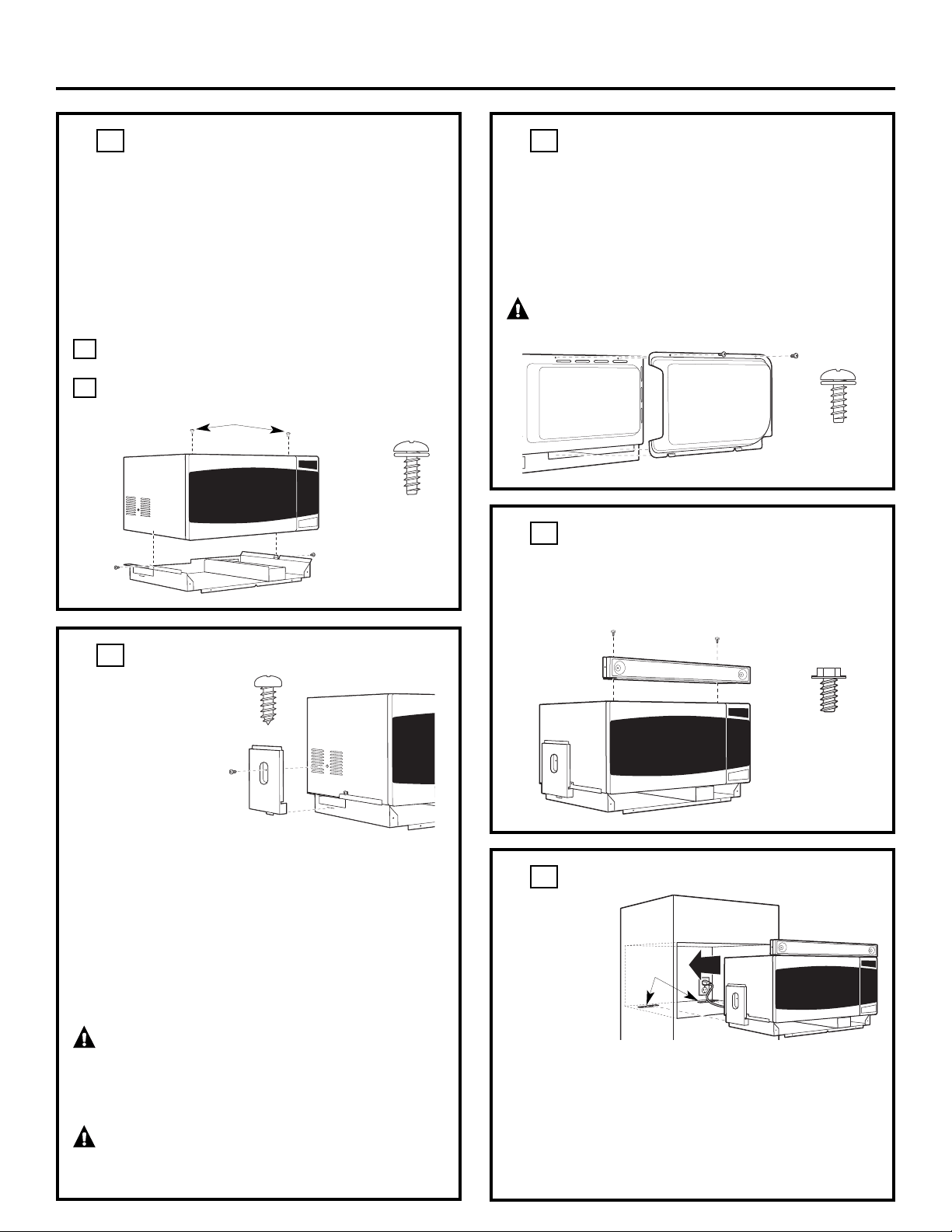
❒
INSTALL THE TOP BRACKET
Install by placing the Top Bracket on the front edge of
the top of the oven, and aligning the two screw holes.
Drive two screws (A) through the Top Bracket, and
into the top of the oven.
5
❒
INSTALL THE BACK COVER
Use the tabs on the bottom of the Back Cover to place
the Back Cover on the Base Pan at the bottom of the
open slot (just below the bottom edge of the oven).
Lift the Back Cover up and into place against the back
surface of the oven, and align the screw holes. Drive
two screws (D) through the Back Cover and into the
back surface of the oven.
CAUTION — Start all screws before
tightening any one screw.
4
❒
INSTALL THE MICROWAVE OVEN
Plug the power
cord into the
wall receptacle.
Slide the
microwave
oven assembly
gently into the
cabinet, using
care not to pinch the power cord. Be sure to keep
the assembly centered as it slides back to where the
tongue of the Base Support Bracket goes through the
rear slots. The top edges of the Base Pan should now
be centered right to left in the opening. The Base Pan
and Top Bracket front flange should be tight against
the cabinet, and the V-notch should match up with
the mark (made in Step 1) on the cabinet.
6
❒
INSTALL THE SIDE BRACKET
Install by inserting the
tab of the Side Bracket
into the slot on the left
side of the Base Pan,
just below the bottom
edge of the oven. Lift
the Side Bracket up and
into place against the
side of the oven, and
align the screw hole in
the side bracket with the dimple in the oven. Carefully
drive one screw (B) through the Side Bracket into the side
of the oven, using a screwdriver or power drill. Be sure
the Side Bracket is tight against the side of the oven.
NOTE: Some ZEM200 models do not have a dimple for
installation of the Side Bracket. If your model does not have
a dimple, use the Side Bracket to first mark the correct
location. Make sure that the mark is centered between the
columns of vents. Then, using a screwdriver or power drill,
carefully drive the screw through the oven surface.
WARNING — If the Side Bracket is
removed from the oven for usage without the trim kit,
hazardous situations can be avoided by reinstalling
Screw B into the hole between the louvers on the side
of the oven.
WARNING
— Do not use a drill bit to
create the screw hole. This can damage the oven
cavity and create an unsafe oven.
3
❒
INSTALL THE BASE PAN
Disconnect the microwave oven from the receptacle.
Remove everything out of the microwave oven,
including packing, temperature probe, Owner’s
Manuals, turntable and turntable support. Remove the
two top plug buttons from the top of the microwave
oven cabinet. Use a knife to pry up the plug buttons,
using care not to scratch the microwave oven. A clear
protective film has been applied to some microwave
ovens and trim kits. If applied, remove the film. Place
the microwave oven on the base pan.
Secure the base pan to the oven by inserting
2 screws (D).
Centered left to right.
B
A
2
3
Installation Instructions
Remove 2 front plug buttons
Screw D
Screw B
Back Surface
of Oven
Screw D
Screw A
Rear
Slots
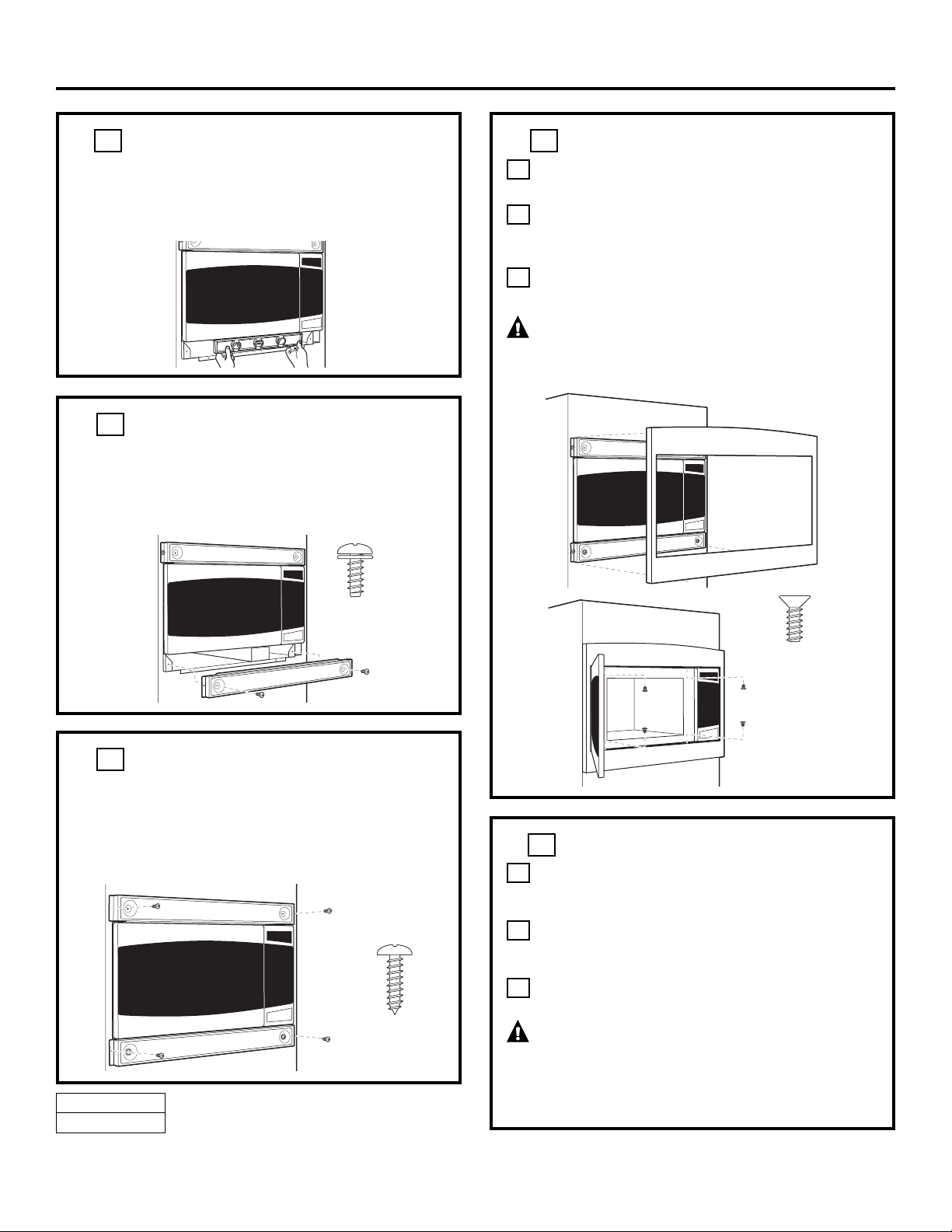
❒
SECURE THE TOP AND BOTTOM
BRACKETS TO THE CABINET
Ensure the Top and Bottom Bracket front flanges
are tight against the cabinet, and that the screw holes
are aligned. Drive 4 screws (E) through the Top and
Bottom Brackets into the cabinet.
9
❒
INSTALL THE TRIM KIT FRAME
Position the assembled Trim Kit frame around
the oven.
Open the oven door, and locate the 4 screw
holes (two on the top and two on the bottom
edge of the door frame).
Secure the Trim Kit by driving four screws (C)
through the oven into the Trim Kit.
CAUTION — Start all screws before
tightening any one screw. Do not overtighten screws
since it can cause misalignment of top/side strips.
C
B
A
10
❒
INSTALL THE BOTTOM BRACKET
Install by placing the Bottom Bracket on the front
of the Base Pan and flush with the bottom of the
oven. Align the two screw holes, and drive two
screws (D) through the Bottom Bracket into the
Base Pan.
8
DE68-03364A
49-40554
4
Installation Instructions
05-07 JR
Printed in Malaysia
Screw E
Screw C
Screw D
READ CAREFULLY. KEEP THESE INSTRUCTIONS.
❒
CHECK LEVELING
Check the leveling by placing a level at the front and
sides of the microwave. It may be necessary to add
wood shims under the bottom duct to level the
microwave front-to-back or side-to-side.
7
❒
REPLACE ANY LOOSE ITEMS
Your trim kit is now fully installed. Replace
the turntable and turntable support that was
removed from inside the microwave oven.
Keep these installation instructions and extra
screws for future reference and need. Do not
place them in the microwave oven.
Replace the house fuse, or close the circuit
breaker to restore power at the service panel.
WARNING — If the Side Bracket is
removed from the oven for usage without the trim kit,
hazardous situations can be avoided by reinstalling
Screw B into the hole between the louvers on the side
of the oven.
C
B
A
11