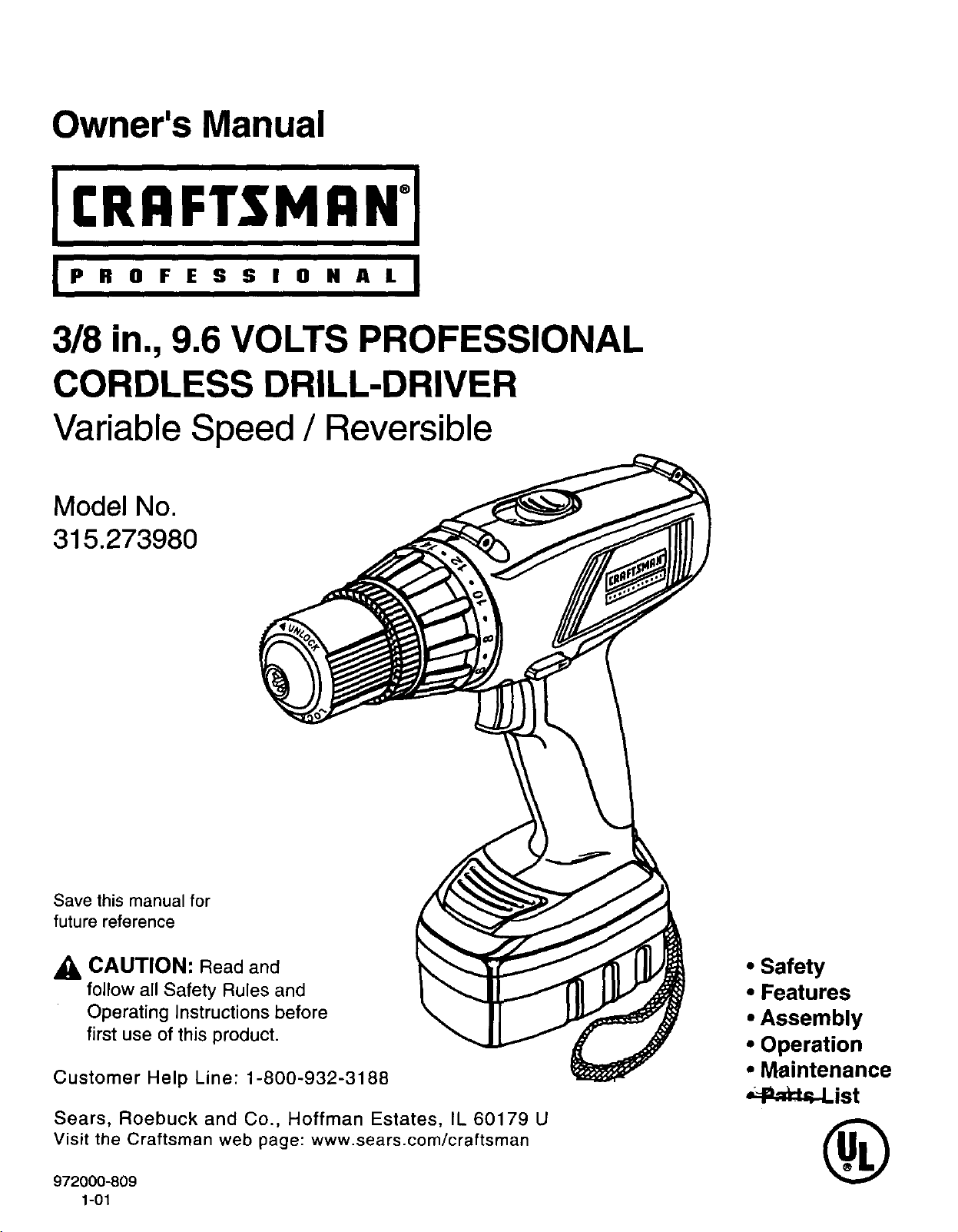
Owner's Manual
IP R 0 F E S S I 0 N A L I
318in., 9.6 VOLTS PROFESSIONAL
CORDLESS DRILL-DRIVER
Variable Speed / Reversible
Model No.
315.273980
Save this manual for
future reference
_, CAUTION: Read and
follow all Safety Rules and
Operating Instructions before
first use of this product.
Customer Help Line: 1-800-932-3188
Sears, Roebuck and Co., Hoffman Estates, IL 60179 U
Visit the Craftsmen web page: www.sears.com/craftsman
972000-809
1-01
• Safety
• Features
• Assembly
• Operation
• Maintenance
_l=,_,-List
®
TABLE OF CONTENTS
• General Safety Rules ................................................................................................................................................. 2-3
• Specific Safety Rules/Symbols .................................................................................................................................. 3-5
• Features ..................................................................................................................................................................... 5-7
• Assembly ....................................................................................................................................................................... 8
• Operation .................................................................................................................................................................. 9-14
• Maintenance ................................................................................................................................................................ 15
• Accessories ................................................................................................................................................................. 16
• Warranty ...................................................................................................................................................................... 16
• Exploded View And Repair Parts List ......................................................................................................................... 17
• Parts Ordering / Service .............................................................................................................................................. 18
_lh WARNING: Read and understand an instructions.
Failure to follow all instructions listed below, may
result in electric shock, fire and/or serious personal
injury.
SAVE THESE INSTRUCTIONS
Work Area
• Keep your work area clean and well lit. Cluttered
benches and dark areas invite accidents.
• Do not operate power tools in explosive atmo-
spheres, such as in the presence of flammable
liquids, gases, or dust. Power tools create sparks
which may ignite the dust or fumes.
• Keep bystanders, children, and visitors away while
operating a power tool. Distractions can cause you
to lose control.
Electrical Safety
• Do not abuse the cord, Never use the cord to carry
the charger. Keep cord away from heat, oil, sharp
edges, or moving parts. Replace damaged cords
immediately. Damaged cords may create a fire.
• A battery operated tool with integral batteries or a
separate battery pack must be recharged only with
the specified charger for the battery. A charger that
may be suitable for one type of battery may create a
risk of fire when used with another battery. Use battery
only with charger listed.
MODEL BATTERY PACK CHARGER
315.273980 Item No._-11019 Item No. _-11040
(982390-001) (981399-001)
• Use battery operated tool only with specifically
designated battery pack. Use of any other battedes
may create a risk of fire. Use only with battery pack
listed.
Personal Safety
• Stay alert, watch what you are doing and use
common sense when operating a power tool. Do
not use tool while tired or under the influence of
drugs, alcohol, or medication. A moment of inatten-
tion while operating power tools may result in serious
personal injury.
• Dress properly. Do not wear loose clothing or
jewelry. Contain long hair. Keep your hair, clothing,
and gloves away from moving parts. Loose clothes,
jewelry, or long hair can be caught in moving parts.
• Avoid accidental starting. Be sure switch is in the
locked or off position before inserting battery
pack. Carrying tools with your finger on the switch or
inserting the battery pack into a tool with the switch on,
invites accidents.
• Remove adjusting keys or wrenches before turn-
ing the tool on. A wrench or a key that is left attached
to a rotating part of the tool may result in personal
injury.
• Do not overreach. Keep proper footing and bal-
ance at all times. Proper footing and balance enable
better control of the tool in unexpected situations.
• Use safety equipment. Always wear eye protection.
Dust mask, non-skid safety shoes, hard hat, or hearing
protection must be used for appropriate conditions.
2
Tool Use end Care
• Use clamps or other practical way to secure and
support the workpiece to a stable platform. Holding
the work by hand or against your body is unstable and
may lead to loss of control.
• Do not force tool. Use the correct tool for your
application. The correct tool will do the job better and
safer at the rate for which itis designed.
• Do not use tool If switch does not turn it on or off.
A tool that cannot be controlled with the switch is
dangerous and must be repaired.
• Disconnect battery pack from tool before maldng any
adjustments, changing accessories, or storing the tool.
Such preventive safety measures reduce risk ofstarting the
tool accidentally.
• Store Idle tools out of reach of children and other
untrained persons. Tools are dangerous in the hands
of untrained users.
When battery pack Is not in use, keep it away from
other metal objects like: paper clips, coins, keys,
nails, screws, or other small metal objects that can
make a connection from one terminal to another.
Shorting the battery terminals together may cause
sparks, burns, or a fire.
Maintain tools with care. Keep cutting tools sharp
and clean. Properly maintained tools, with sharp
cutting edges are less likely to bind and are easier to
control.
• Check for misalignment or binding of moving parts,
breakage of pads, and any other condition that may
affect the tool's operation. If damaged, have the tool
serviced before using. Many accidents are caused by
poorly maintained tools.
• Use only accessories that are recommended by
the manufacturer for your model. Accessories that
may be suitable for one tool, may create a risk of injury
when used on another tool.
Service
Tool service must be performed only by qualified
repair personnel. Service or maintenance performed
by unqualified personnel could result in a risk of injury.
When servicing a tool, use only identical replace-
ment pads. Follow instructions in the Maintenance
section of this manual. Use of unauthorized parts or
failure to follow Maintenance Instructions may create a
risk of shock or injury.
Hold tool by Insulated gripping surfaces when performing an operation where the cutting tool may contact
hidden wiring. Contact with a "live' wire will make exposed metal parts of the tool "live" and shock the operator.
AddlUonal Rules For Safe Operation
Know your power tool. Read operator's manual
carefully. Learn its applications and limitations, as
well as the specific potential hazards related to
this tool. Following this rule will reduce the risk of
electric shock, fire, or serious injury.
Make sure your extension cord is in good condi-
tion. When using an extension cord, be sure to
use one heavy enough to carry the current your
product will draw. A wire gage size (A.W.G.) of at
least 16 Is recommended for an extension cord
100 feet or less in length. A cord exceeding 100
feet Is not recommended. If In doubt, use the next
heavier gage. The smaller the gage number, the
heavier the cord. An undersized cord will cause a
drop in line voltage resulting in loss of power and
overheating.
Important Rules for Battery Tools
Battery tools do not have to be plugged into an
electrical outlet; therefore, they are always in
operating condition. Be aware of possible hazards
when not using your battery tool or when chang-
ing accessories. Following this rule will reduce the
risk of electric shock, fire, or serious personal injury.
• Do not place battery tools or their batteries near
fire or heat. They may explode. Following this rule
will reduce the risk of electric shock, fire, or serious
personal injury.
• Do not charge battery t()ol in a damp or wet
location. Following this rule will reduce the risk of
electric shock, fire, or serious personal injury.
• Your battery tool should be charged in a location
where the temperature is more than 50°F but less
than 100°F. Following this rule will reduce the risk of
electric shock, fire, or serious personal injury.
Under extreme usage or temperature conditions,
battery leakage may occur. If liquid comes in
contact with your skin, wash immediately with
soap and water, then neutralize with lemon juice
or vinegar. If liquid gets into your eyes, flush them
with clean water for at least 10 minutes, then seek
immediate medical attention. Following this rule will
reduce the risk of serious personal injury.
Important Safety Instructions For Charger
• Save these Instructions. This manual contains
important safety and operating instructions for
battery charger part number 9-11040 (981399-001).
Following this rule will reduce the risk of electric
shock, fire, or serious personal injury.
• Before using battery charger, read all instructions
and cautionary markings in this manual, on
battery charger, and product using battery
charger. Following this rule will reduce the risk of
electric shock, fire, or serious personal injury.
• To reduce risk of injury, charge only nickel-
cadmium and nickel metal hydride type recharge-
able batteries. Other types of batteries may burst
causing personal Injury and damage. Following this
rule will reduce the risk of electric shock, fire, or
serious personal injury.
• Do not expose charger to rain or snow. Following
this rule will reduce the risk of electric shock, fire, or
serious personal injury.
• Use of an attachment not recommended or sold
by the battery charger manufacturer may result In
a risk of fire, electric shock, or injury to persons.
Following this rule will reduce the risk of electric
shock, fire, or serious personal injury.
• To reduce risk of damage to charger body and
cord, pull by charger plug rather than cord when
disconnecting charger. Following this rule will
reduce the risk of electric shock, fire, or serious
personal injury.
• Make sure cord Is located so that It will not be
stepped on, tripped over, or otherwise subjected
to damage or stress. Following this rule will reduce
the risk of serious personal injury.
• An extension cord should not be used unless
absolutely necessary. Use of improper extension
cord could result in a risk of fire and electric shock. If
extension cord must be used, make sure:
a. That pins on plug of extension cord are the
same number, size and shape as those of
plug on charger.
b. That extension cord is properly wired and in
good electrical condition; and
c. That wire size is large enough for AC ampere
rating of charger as specified below:
Cord Length (Feet) 25' 50' 100'
Cord Size (AWG) 16 16 16
Note: AWG = American Wire Gage
• Do not operate charger with a damaged cord or
plug. If damaged, have replaced immediately by a
qualified serviceman. Following this rule will reduce
the risk of electric shock, fire, or serious personal
injury.
• Do not operate charger if it has received a sharp
blow, been dropped, or otherwise damaged In any
way; take it to a qualified serviceman. Following
this rule will reduce the risk of electric shock, fire, or
serious personal injury.
• Do not disassemble charger; take it to a qualified
serviceman when service or repair Is required.
Incorrect reassembly may result in a risk of
electric shock or fire. Following this rule will reduce
the risk of electric shock, fire, or serious personal
injury.
• To reduce the risk of electric shock, unplug
charger from outlet before attempUng any mainte-
nance or cleaning. Turning off controls will not
reduce this risk. Following this rule will reduce the
risk of electric shock, fire, or serious personal injury.
• Do not use charger outdoors. Following this rule will
reduce the risk of electric shock, fire, or serious
personal injury.
• Disconnect charger from power supply when not
In use. Following this rule will reduce the risk of
electric shock, fire, or serious personal injury.
_k DANGER: RISK OF ELECTRIC SHOCK. DO NOT
TOUCH UNINSULATED PORTION OF OUTPUT
CONNECTOR OR UNINSULATED BATI'ERY TERMI-
NAL.
Save these instructions. Refer to them frequently
and use them to Instruct others who may use this
tool. If you loan someone this tool, loan them
these Instructions also. Following this rule will
reduce the risk of electric shock, fire, or serious
personal injury.
4
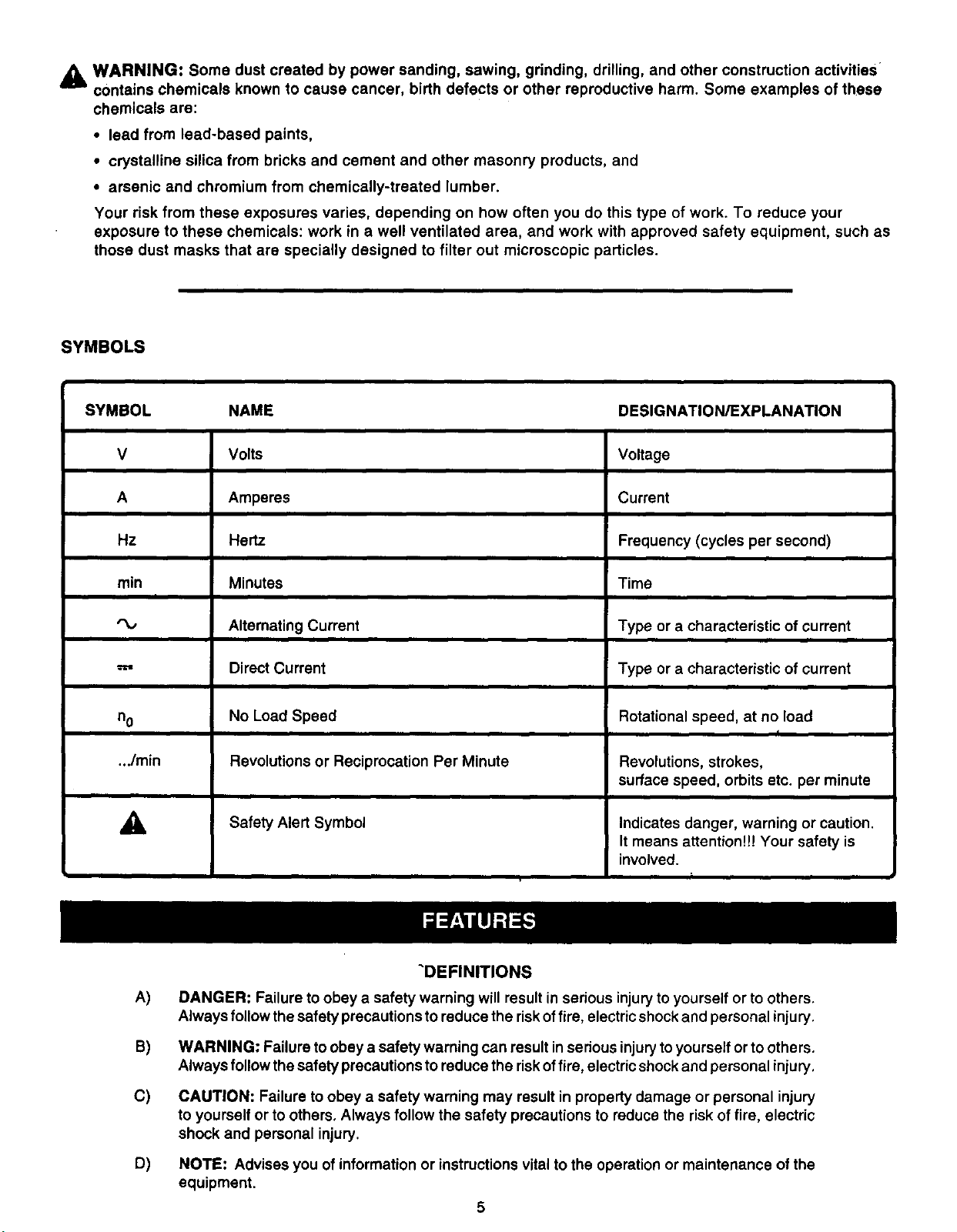
WARNING: Some dust created by power sanding, sawing, grinding, drilling, and other construction activities
contains chemicals known to cause cancer, birth defects or other reproductive harm. Some examples of these
chemicals are:
• lead from lead-based paints,
• crystalline silica from bricks and cement and other masonry products, and
• arsenic and chromium from chemically-treated lumber.
Your risk from these exposures varies, depending on how often you do this type of work. To reduce your
exposure to these chemicals: work in a well ventilated area, and work with approved safety equipment, such as
those dust masks that are specially designed to filter out microscopic particles.
SYMBOLS
SYMBOL NAME DESIGNATION/EXPLANATION
V Volts Voltage
A Amperes Current
Hz Hertz Frequency (cycles per second)
min Minutes Time
I
Alternating Current Type or a characteristic of current
='=' Direct Current Type or a characteristic of current
nO No Load Speed Rotational speed, at no load
I
.../rain Revolutions or Reciprocation Per Minute Revolutions, strokes,
surface speed, orbits etc. per minute
,_ Safety Alert Symbol Indicates danger, warning or caution.
It means attention!!! Your safety is
involved.
A)
B)
C)
D)
"DEFINITIONS
DANGER: Failure toobey a safety warning will result in serious injuryto yourself or to others,
Always follow thesafety precautions to reduce the riskoffire, electricshock and personal injury,
WARNING: Failure to obey a safety warning can result in sedous injurytoyourself or to others.
Always follow thesafety precautions to reduce the riskoffire, electricshock and personal injury.
CAUTION: Failure to obey a safety warning may result in property damage or personal injury
to yourself or to others, Always follow the safety precautions to reduce the risk of fire, electric
shock and personal injury.
NOTE: Advises you of information or instructions vital to the operation or maintenance of the
equipment.
5
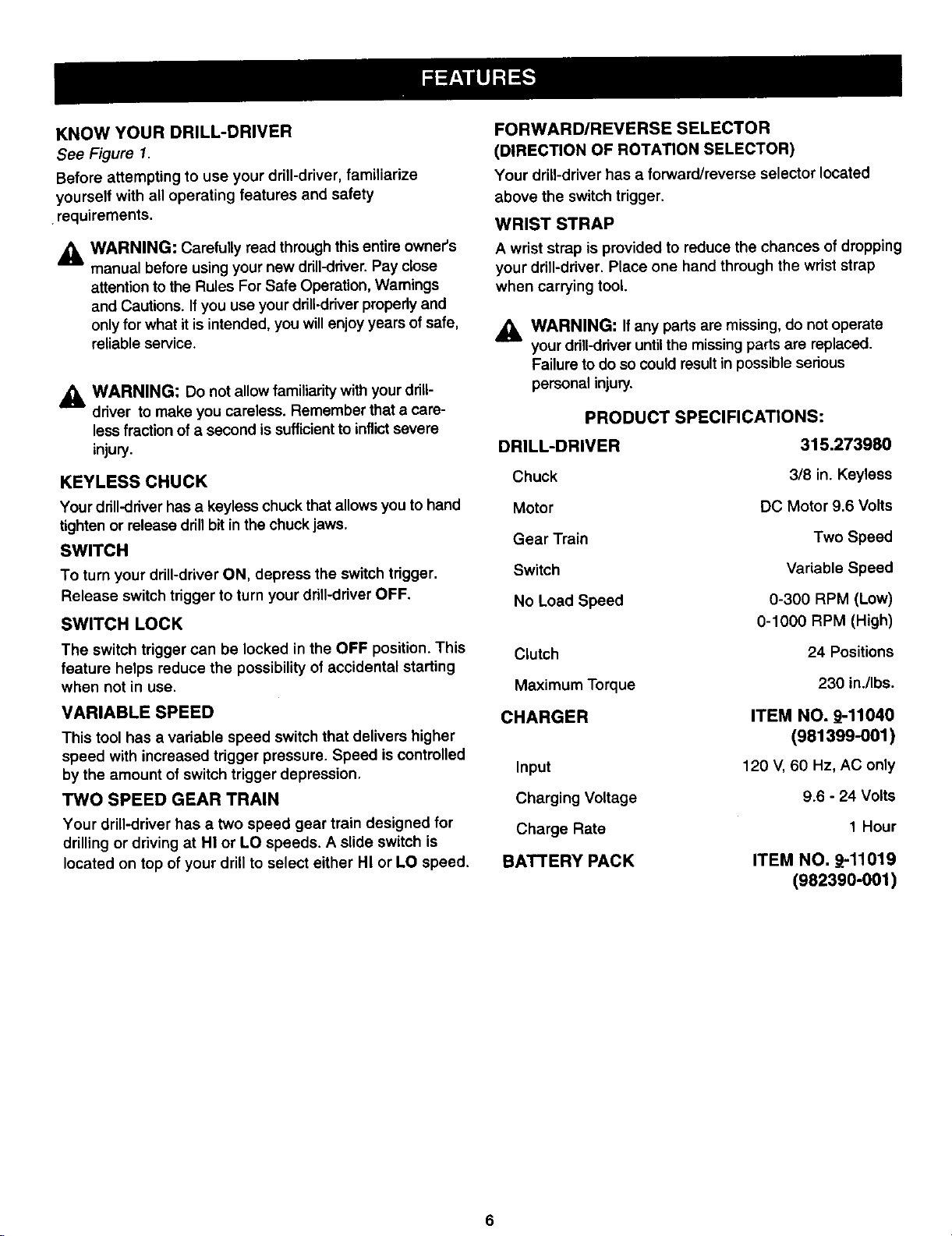
KNOW YOUR DRILL-DRIVER
See Figure 1.
Before attempting to use your drill-driver, familiarize
yourself with all operating features and safety
.requirements.
_i WARNING: Carefully read through this entire owner's
manual before using your new drill-driver.Pay close
attentionto the Rules For Safe Operation, Warnings
and Cautions. Ifyou use your drill-driverproperly and
onlyfor what itis intended, you willenjoyyears of safe,
reliable service.
_, WARNING: Do not allow familiarity with yourdriU-
driver to make you careless. Remember that a care-
less fraction of a second issufficientto inflictsevere
injury.
KEYLESS CHUCK
Your drill-driverhas a keyless chuck thatallows you to hand
tighten or release drillbit in the chuck jaws.
SWITCH
To turn your drill-driverON, depress the switch trigger.
Release switch trigger to turn your drill-driverOFF.
SWITCH LOCK
The switch trigger can be locked in the OFF position. This
feature helps reduce the possibility of accidental starting
when not in use.
VARIABLE SPEED
This tool has a variable speed switch that delivers higher
speed with increased trigger pressure. Speed iscontrolled
by the amount of switch trigger depression.
TWO SPEED GEAR TRAIN
Your drill-driver has a two speed gear train designed for
drilling or driving at HI or LO speeds. A slide switch is
located on top of your drill to select either HI or LO speed,
FORWARD/REVERSE SELECTOR
(DIRECTION OF ROTATION SELECTOR)
Your driU-driverhas a forward/reverse selector located
above the switch trigger.
WRIST STRAP
A wrist strap is provided to reduce the chances of dropping
your drill-driver. Place one hand through the wrist strap
when carrying tool.
WARNING: If any parts are missing, do not operate
your drill-driveruntilthe missingparts are replaced.
Failureto do so could resultin possibleserious
personal injury.
PRODUCT SPECIFICATIONS:
DRILL-DRIVER 315.273980
Chuck
Motor
Gear Train
Switch
No Load Speed
Clutch
Maximum Torque
CHARGER
Input
Charging Voltage
Charge Rate
BATTERY PACK
3/8 in. Keyless
DC Motor 9.6 Volts
Two Speed
Variable Speed
0-300 RPM (Low)
0-1000 RPM (High)
24 Positions
230 in./Ibs.
ITEM NO. 9-11040
(981399-001 )
120 V, 60 Hz, AC only
9.6 - 24 Volts
1 Hour
ITEM NO, _-11019
(982390-001)
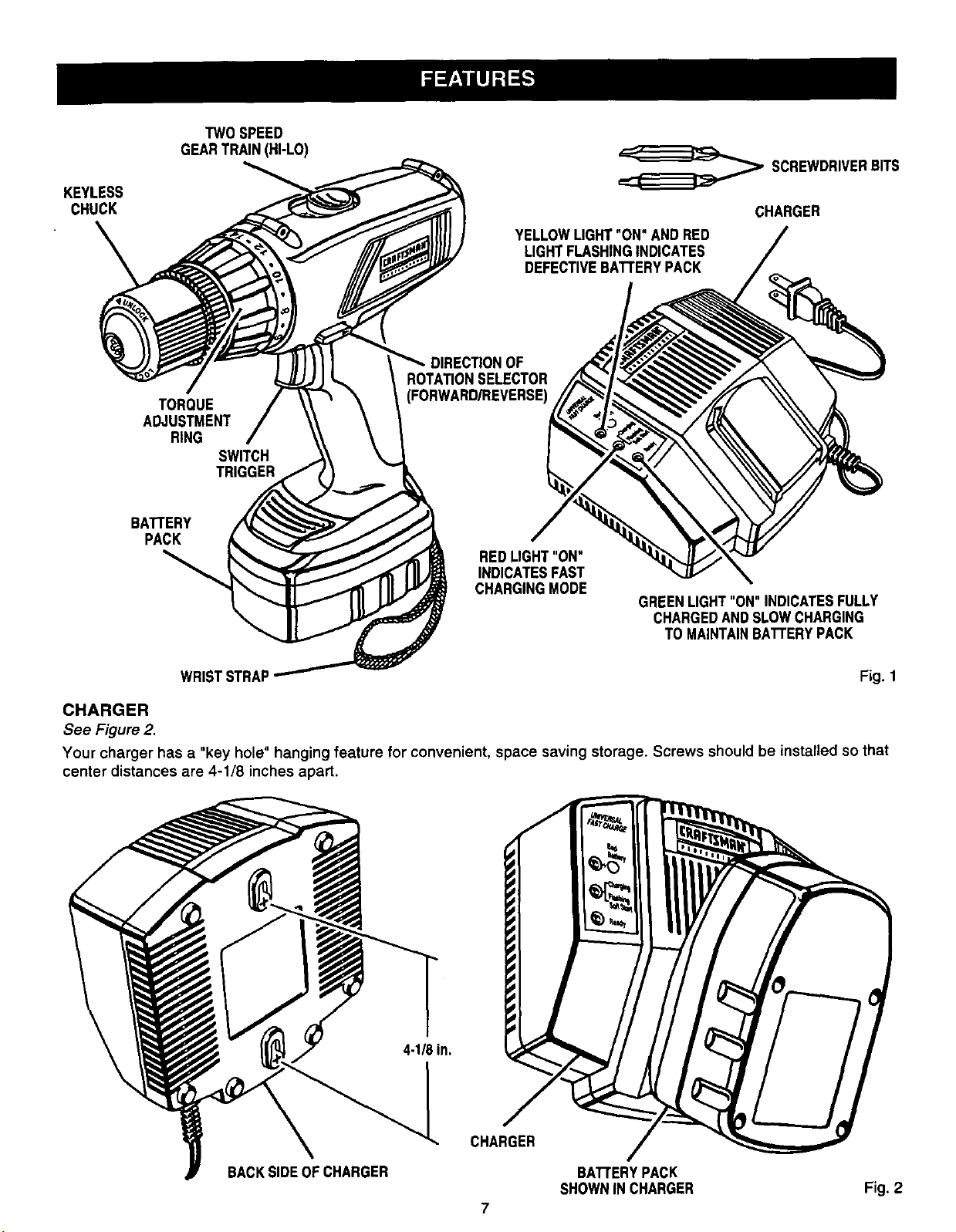
KEYLESS
CHUCK
\
TWO SPEED
GEARTRAIN(HI-LO)
,___ SCREWDRIVERBITS
CHARGER
YELLOWUGHT"ON" ANDRED
LIGHTFLASHINGINDICATES
DEFECTIVEBATrERYPACK
TORQUE
ADJUSTMENT
RING
SWITCH
TRIGGER
DIRECTIONOF
ROTATIONSELECTOR
(FORWARD/REVERSE)
BA'I3'ERY
PACK
REDLIGHT"ON"
INDICATESFAST
CHARGINGMODE
GREENLIGHT"ON" INDICATESFULLY
CHARGEDANDSLOWCHARGING
TOMAINTAINBAI"rERYPACK
WRISTSTRAP Fig. 1
CHARGER
See Figure 2.
Your charger has a "key hole" hanging feature for convenient, space saving storage. Screws should be installed so that
center distances are 4-1/8 inches apart.
4-1/8in.
BACKSIDEOFCHARGER
CHARGER
BAI"FERYPACK
SHOWNINCHARGER Fig, 2
7
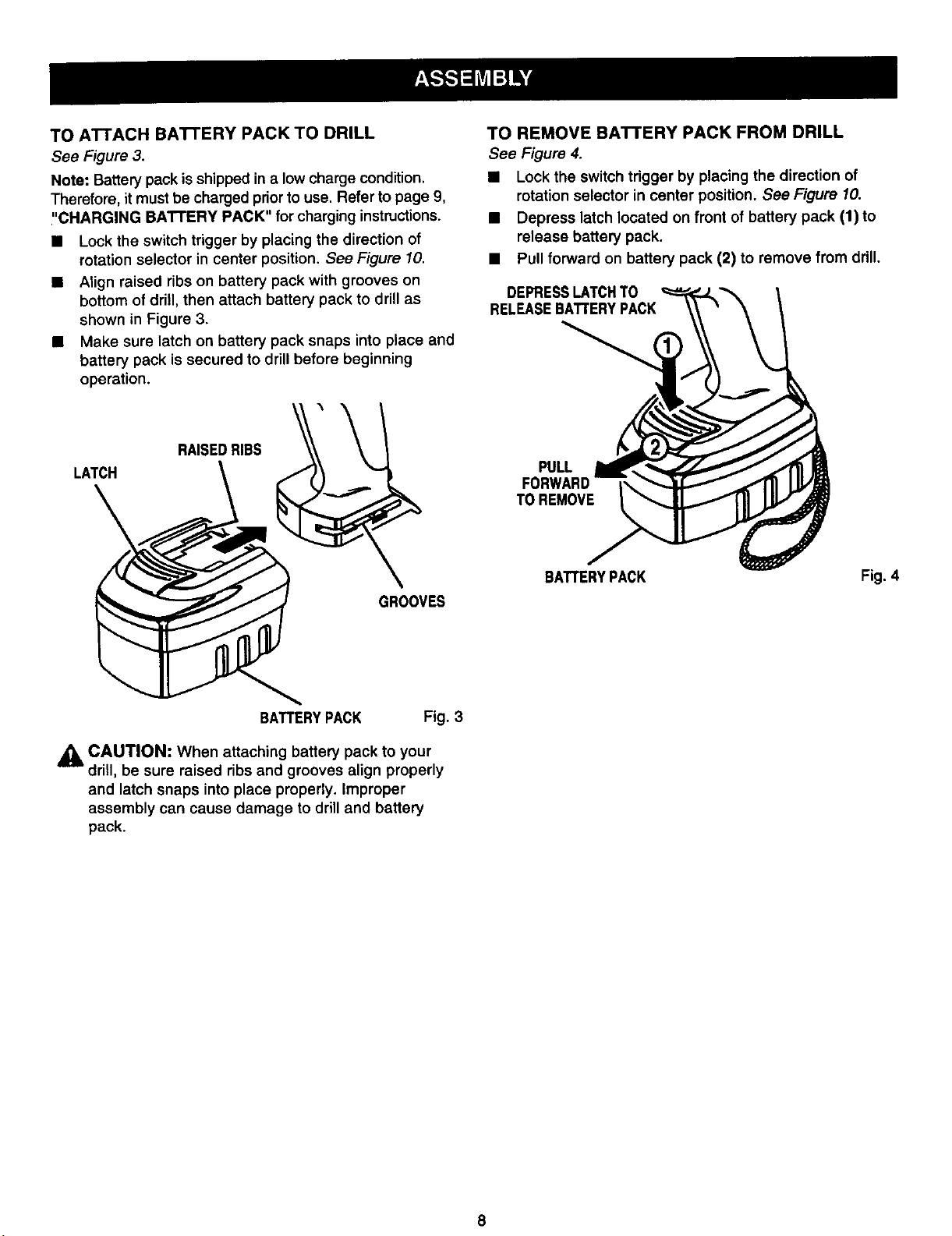
TOAI-I'ACH BA'I-I'ERYPACKTO DRILL
See Figure 3.
Note: Battery pack is shipped in a low charge condition.
Therefore, it mustbe charged priorto use. Refer to page 9,
"CHARGING BATTERY PACK" for charging instructions.
• Lock the switch trigger by placing the direction of
rotation selector in center position. See Figure 10.
• Align raised ribs on battery pack with grooves on
bottom of drill, then attach battery pack to drill as
shown in Figure 3.
• Make sure latch on battery pack snaps into place and
battery pack is secured to drill before beginning
operation.
TO REMOVE BATTERY PACK FROM DRILL
See Figure 4.
• Lock the switch trigger by placing the direction of
rotation selector in center position, See Figure 10.
• Depress latch located on front of battery pack (1) to
release battery pack.
• Pull forward on battery pack (2) to remove from drill.
DEPRESSLATCHTO
RELEASEBATTERYPACK
LATCH
\
RAISEDRIBS
GROOVES
PULL
TOREMOVE
BATTERYPACK Fig. 4
BATTERYPACK Fig. 3
CAUTION: When attaching battery pack to your
drill, be sure raised ribs and grooves align properly
and latch snaps into place properly. Improper
assembly can cause damage to drilland battery
pack.
8
WARNING: Always wear safety goggles or safety
glasses with side shields when operating tools.
Failure to do so could result in objects being thrown
into your eyes, resulting in possible serious injury.
CHARGING BA'I-rERY PACK
The battery pack for this tool has been shipped in a low
charge condition to prevent possible problems. Therefore,
you should charge it until light on front of charger changes
from red to green.
Note: Batteries will not reach full charge the first time they
are charged. Allow several cycles (drilling followed by
recharging) for them to become fully charged.
TO CHARGE
• Charge battery pack only with the charger provided.
• Make sure power supply Is normal house voltage,
120 volts, 60 Hz, AC only.
• Connect charger to power supply.
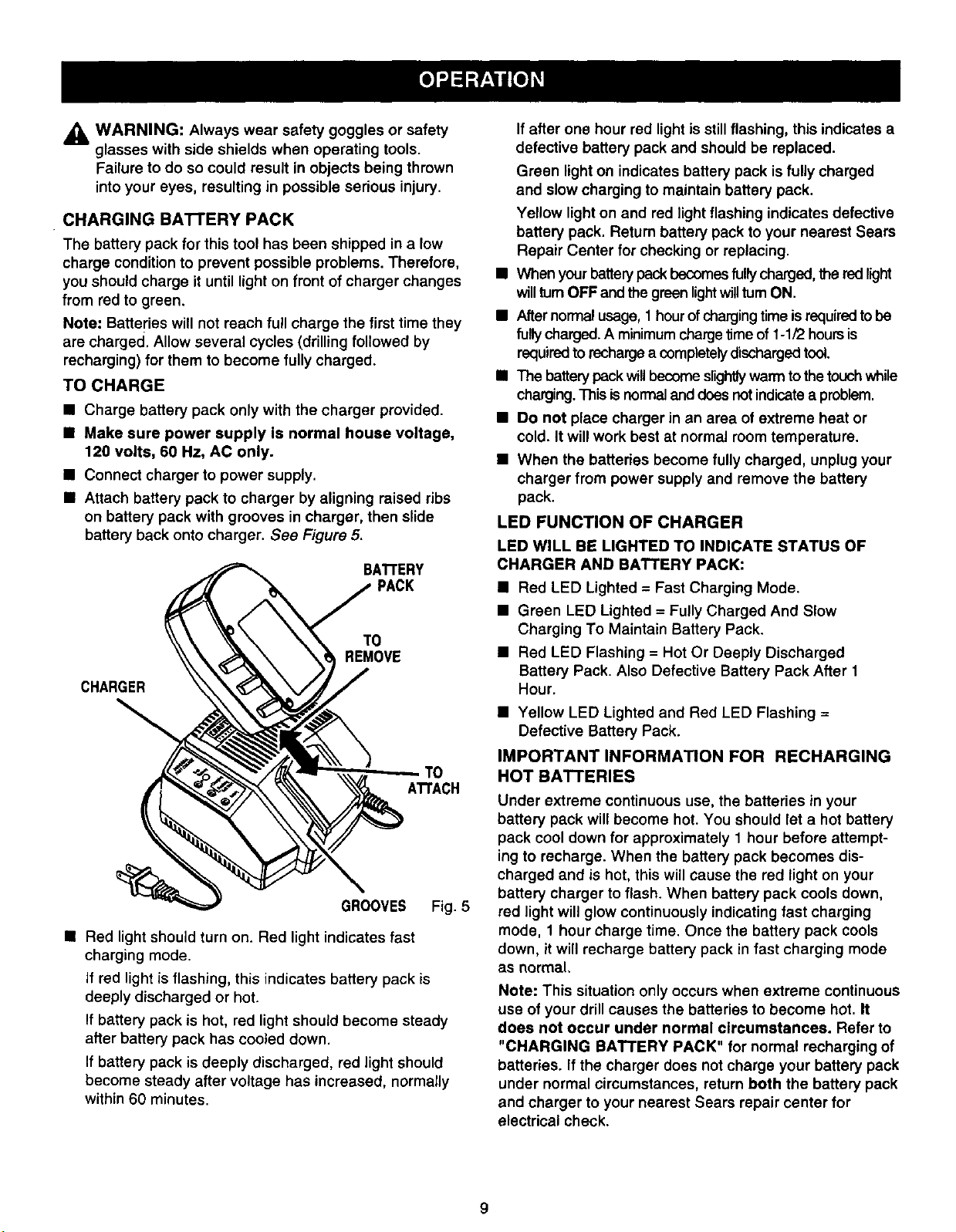
• Attach battery pack to charger by aligning raised ribs
on battery pack with grooves in charger, then slide
battery back onto charger. See Figure 5.
BATrERY
PACK
CHARGER
TO
REMOVE
ATrACH
GROOVES Fig. 5
• Red light should turn on. Red light indicates fast
charging mode.
If red light is flashing, this indicates battery pack is
deeply discharged or hot.
If battery pack is hot, red light should become steady
after battery pack has cooled down.
If battery pack is deeply discharged, red light should
become steady after voltage has increased, normally
within 60 minutes.
Ifafter one hour red light is still flashing, this indicates a
defective battery pack and should be replaced.
Green light on indicates battery pack is fully charged
and slow charging to maintain battery pack.
Yellow light on and red light flashing indicates defective
battery pack. Return battery pack to your nearest Sears
Repair Center for checking or replacing.
• When your battery pack becomes fully charged,the red light
will turnOFF and the green lightwillturn ON.
• After normal usage, 1 hour of charging time is required to be
fully charged. A minimum charge time of 1-1/2 hours is
required to recharge a completely discharged tool.
• The battery pack will become slightlywarm to the touch while
charging. This is normal and does not indicate a problem.
• Do not place charger in an area of extreme heat or
cold. It will work best at normal room temperature.
• When the batteries become fully charged, unplug your
charger from power supply and remove the battery
pack.
LED FUNCTION OF CHARGER
LED WILL BE LIGHTED TO INDICATE STATUS OF
CHARGER AND BATTERY PACK:
• Red LED Lighted = Fast Charging Mode.
• Green LED Lighted = Fully Charged And Slow
Charging To Maintain Battery Pack.
• Red LED Flashing = Hot Or Deeply Discharged
Battery Pack. Also Defective Battery Pack After 1
Hour.
• Yellow LED Lighted and Red LED Flashing =
Defective Battery Pack.
IMPORTANT INFORMATION FOR RECHARGING
HOT BATTERIES
Under extreme continuous use, the batteries in your
battery pack will become hot. You should let a hot battery
pack cool down for approximately 1 hour before attempt-
ing to recharge. When the battery pack becomes dis-
charged and is hot, this will cause the red light on your
battery charger to flash. When battery pack cools down,
red light will glow continuously indicating fast charging
mode, 1 hour charge time. Once the battery pack cools
down, it will recharge battery pack in fast charging mode
as normal.
Note: This situation only occurs when extreme continuous
use of your drill causes the batteries to become hot. It
does not occur under normal circumstances. Refer to
"CHARGING BATTERY PACK" for normal recharging of
batteries. If the charger does not charge your battery pack
under normal circumstances, return both the battery pack
and charger to your nearest Sears repair center for
electrical check.
INSTALLINGBITS
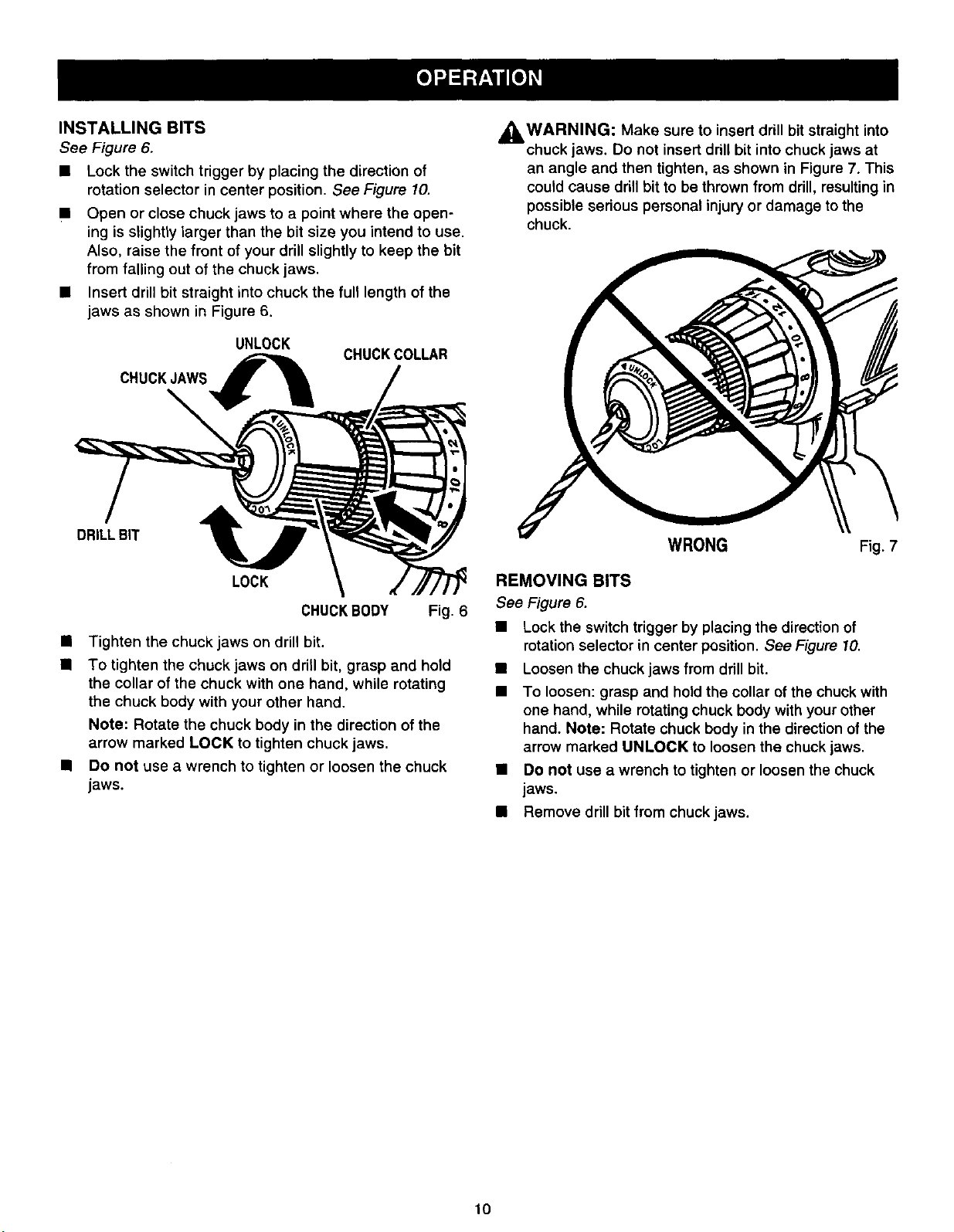
See Figure 6.
• Lock the switch trigger by placing the direction of
rotation selector in center position. See Figure 10.
• Open or close chuck jaws to a point where the open-
ing is slightly larger than the bit size you intend to use.
Also, raise the front of your drill slightly to keep the bit
from falling out of the chuck jaws.
• Insert drill bit straight into chuck the full length of the
jaws as shown in Figure 6.
UNLOCK
CHUCKJAWS__
CHUCKCOLLAR
WARNING: Make insert drill bit straight into
,_ sure to
chuck Jaws."Do not insert drill bit into chuck jaws at
an angle and then tighten, as shown in Figure 7. This
could cause drill bit to be thrown from drill, resulting in
possible sedous personal injury or damage to the
chuck.
DRILLBIT
LOCK
CHUCKBODY Fig. 6
• Tighten the chuck jaws on drill bit.
• To tighten the chuck jaws on drill bit, grasp and hold
the collar of the chuck with one hand, while rotating
the chuck body with your other hand.
Note: Rotate the chuck body in the direction of the
arrow marked LOCK to tighten chuck jaws.
• Do not use a wrench to tighten or loosen the chuck
jaws.
WRONG Fig. 7
REMOVING BITS
See Figure 6.
• Lock the switch trigger by placing the direction of
rotation selector in center position. See Figure 10.
• Loosen the chuck jaws from drill bit.
To loosen: grasp and hold the collar ofthe chuck with
one hand, while rotating chuck body with your other
hand. Note: Rotate chuck body in the direction of the
arrow marked UNLOCK to loosen the chuck jaws.
• Do not use a wrench to tighten or loosen the chuck
jaws.
• Remove drill bit from chuck jaws.
10
SWITCH
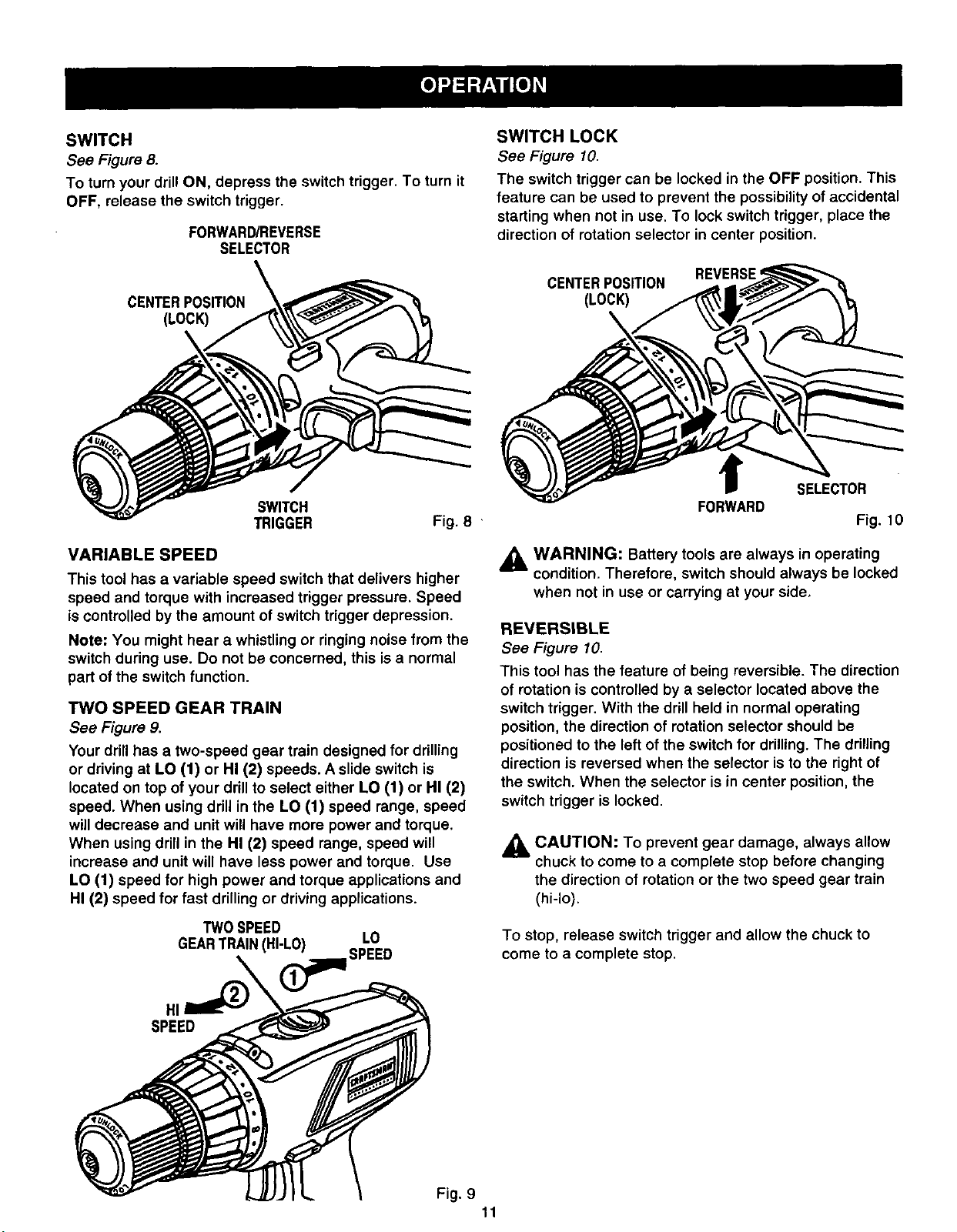
See Figure 8.
To turn your drillON, depress the switch trigger. To turn it
OFF, release the switch trigger.
FORWARD/REVERSE
SELECTOR
CENTERPOSITION
(LOCK)
SWITCH LOCK
See Figure 10.
The switch trigger can be locked in the OFF position. This
feature can be used to prevent the possibility of accidental
starting when not in use. To lock switch trigger, place the
direction of rotation selector in center position.
REVERSE
CENTERPOSITION
(LOCK)
SWITCH
TRIGGER Fig. 8 "
VARIABLE SPEED
This tool has a variable speed switch that delivers higher
speed and torque with increased trigger pressure. Speed
is controlled by the amount of switch trigger depression.
Note: You might hear a whistling or ringing noise from the
switch during use. Do not be concerned, this is a normal
part of the switch function.
TWO SPEED GEAR TRAIN
See Figure 9.
Your drill has a two-speed gear train designed for drilling
or driving at LO (1) or HI (2) speeds. A slide switch is
located on top of your drillto select either LO (1) or HI (2)
speed. When using drill in the LO (1) speed range, speed
will decrease and unit will have more power and torque.
When using drill in the HI (2) speed range, speed will
increase and unit will have less power and torque. Use
LO (1) speed for high power and torque applications and
HI (2) speed for fast drilling or driving applications.
TWO SPEED
GEARTRAIN(HI-LO) LO
SPEED
SELECTOR
FORWARD
Fig. 10
,_ WARNING: Battery tools are always in operating
condition. Therefore, switch should always be locked
when not in use or carrying at your side,
REVERSIBLE
See Figure 10.
This tool has the feature of being reversible. The direction
of rotation is controlled by a selector located above the
switch trigger. With the drill held in normal operating
position, the direction of rotation selector should be
positioned to the left of the switch for drilling. The drilling
direction is reversed when the selector is to the right of
the switch. When the selector is in center position,the
switch trigger is locked.
,_ CAUTION: To prevent gear damage, always allow
chuck to come to a complete stop before changing
the direction of rotation or the two speed gear train
(hi-lo).
To stop, release switch trigger and allow the chuck to
come to a complete stop.
HI
SPEED
Fig. 9
11
KEYLESSCHUCK
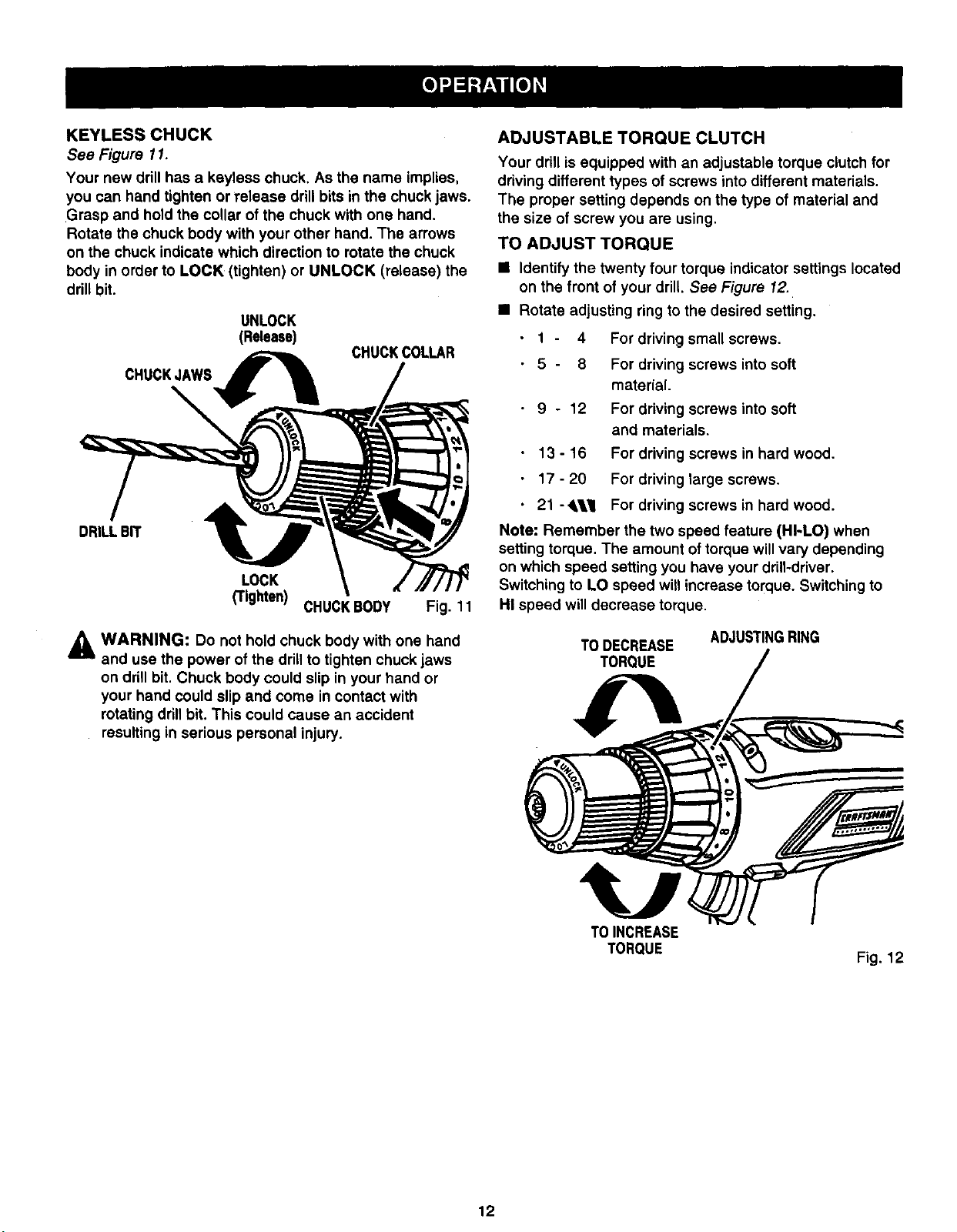
See Figure 11.
Your new drill has a keyless chuck. As the name implies,
you can hand tighten or release drill bits in the chuck jaws.
Grasp and hold the collar of the chuck with one hand.
Rotate the chuck body with your other hand. The arrows
on the chuck indicate which direction to rotate the chuck
body in order to LOCK (tighten) or UNLOCK (release) the
drill bit.
UNLOCK
(Release)
CHUCKJAWS_
CHUCKCOLLAR
DRILLBIT
LOCK
_ighten) CHUCKBODY Fig. 11
,_ WARNING: Do not hold chuck body with one hand
and use the power of the drill to tighten chuck jaws
on drill bit. Chuck body could slip in your hand or
your hand could slip and come in contact with
rotating drillbit. This could cause an accident
resulting in serious personal injury.
ADJUSTABLE TORQUE CLUTCH
Your drill is equipped with an adjustable torque clutch for
driving different types of screws into different materials.
The proper setting depends on the type of material and
the size of screw you are using.
TO ADJUST TORQUE
• Identify the twenty four torque indicator settings located
on the front of your drill. See Figure 12.
• Rotate adjusting ring to the desired setting.
1 - 4 For driving small screws.
5 - 8 For driving screws into soft
material.
9 - 12 For driving screws into soft
and materials.
13 - 16 For driving screws in hard wood.
17 - 20 For driving large screws.
21 -,l_l For driving screws in hard wood.
Note= Remember the two speed feature (HI-LO) when
setting torque. The amount of torque will vary depending
on which speed setting you have your drill-driver.
Switching to LO speed will increase torque. Switching to
HI speed will decrease torque.
ADJUSTINGRING
TO DECREASE
TORQUE
TOINCREASE
TORQUE
Fig. 12
12
APPLICATIONS
(Use drill-driver only for the purpose listed below)
• Drilling in wood.
• Drilling in ceramics, plastics, fiberglass, and lami-
nates.
• Drilling in both hard and soft metals.
• Using driving accessories, such as driving screws
with screwdriver bits.
• Mixing paints.
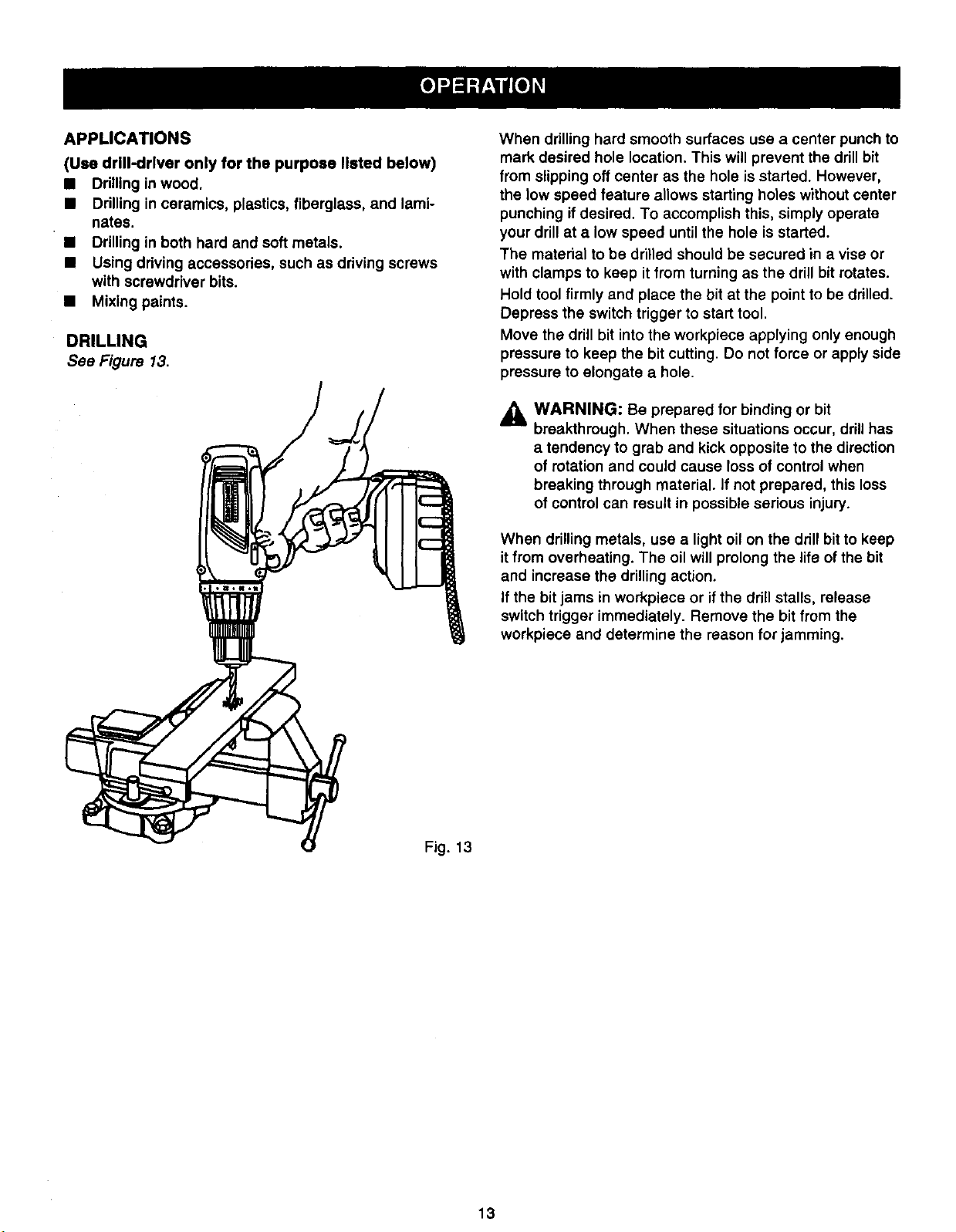
DRILLING
See Figure 13.
c--
r-
c--
When drilling hard smooth surfaces use a center punch to
mark desired hole location. This will prevent the drill bit
from slipping off center as the hole is started. However,
the low speed feature allows starting holes without center
punching if desired. To accomplish this, simply operate
your drill at a low speed until the hole is started.
The material to be drilled should be secured in a vise or
with clamps to keep it from turning as the drill bit rotates.
Hold tool firmly and place the bit at the point to be drilled.
Depress the switch trigger to start tool.
Move the drill bit into the workpiece applying only enough
pressure to keep the bit cutting. Do not force or apply side
pressure to elongate a hole.
,_ WARNING: Be prepared for binding or bit
breakthrough. When these situations occur, drill has
a tendency to grab and kick opposite to the direction
of rotation and could cause loss of control when
breaking through material. If not prepared, this loss
of control can result in possible serious injury.
When drilling metals, use a light oil on the drill bit to keep
it from overheating. The oil will prolong the life of the bit
and increase the drilling action.
If the bit jams in workpiece or if the drill stalls, release
switch trigger immediately. Remove the bit from the
workpiece and determine the reason for jamming.
Fig. 13
13
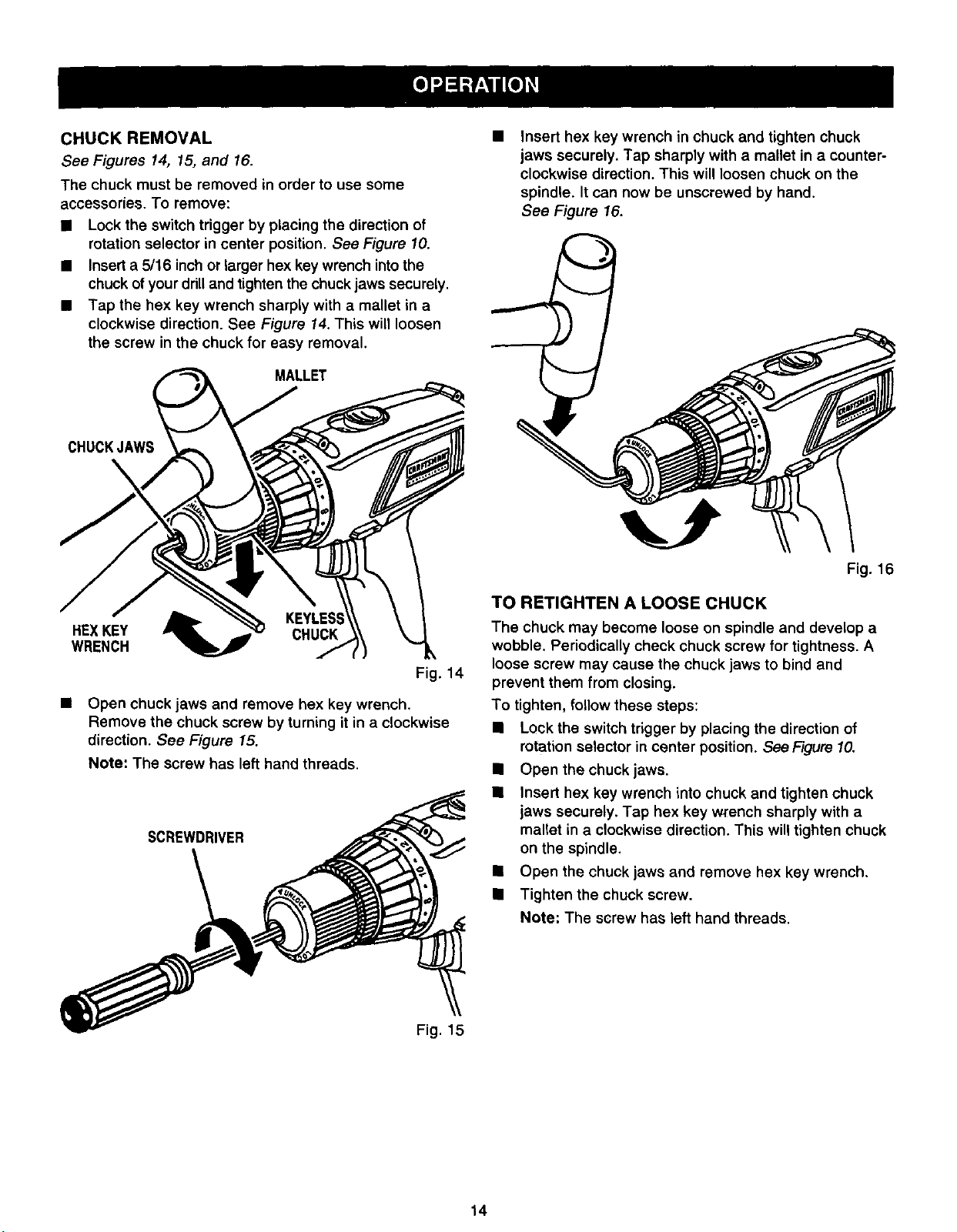
CHUCK REMOVAL
See Figures 14, 15, and 16.
The chuck must be removed in order to use some
accessories. To remove:
• Lock the switch trigger by placing the direction of
rotation selector in center position. See Figure 10.
• Insert a 5/16 inch or larger hex key wrench into the
chuck of your drill and tighten the chuck jaws securely.
• Tap the hex key wrench sharply with a mallet in a
clockwise direction. See Figure 14. This will loosen
the screw in the chuck for easy removal.
MALLET
CHUCKJAWS
HEXKEY CHUCK
WRENCH
Fig. 14
• Open chuck jaws and remove hex key wrench.
Remove the chuck screw by turning it in a clockwise
direction. See Figure 15.
Note: The screw has left hand threads.
SCREWDRIVER
Insert hex key wrench in chuck and tighten chuck
jaws securely. Tap sharply with a mallet in a counter-
clockwise direction. This will loosen chuck on the
spindle. It can now be unscrewed by hand.
See Figure 16.
Fig. 16
TO RETIGHTEN A LOOSE CHUCK
The chuck may become loose on spindle and develop a
wobble. Periodically check chuck screw for tightness. A
loose screw may cause the chuck jaws to bind and
prevent them from closing.
To tighten, follow these steps:
• Lock the switch trigger by placing the direction of
rotation selector in center position. See Figure10.
• Open the chuck jaws.
• Insert hex key wrench into chuck and tighten chuck
jaws securely. Tap hex key wrench sharply with a
mallet in a clockwise direction, This will tighten chuck
on the spindle.
• Open the chuck jaws and remove hex key wrench,
• Tighten the chuck screw.
Note: The screw has left hand threads.
Fig. 15
14
,_ WARNING: When servicing use only identical
Craftsman replacement parts. Use of any other
parts may create a hazard or cause product damage,
Avoid using solvents when cleaning plastic pads. Most
. plastics are susceptible to damage from various types of
commercial solvents and may be damaged by their use.
Use clean cloths to remove dirt, carbon dust, etc.
_1 WARNING: Do not at any time let brake fluids,
gasoline, petroleum-based products, penetrating oils,
etc. come in contact with plastic parts. They contain
chemicals that can damage, weaken, or destroy
plastic.
Do not abuse power tools. Abusive practices can
damage tool as well as workpiece.
Only the parts shown on parts list, page 17, are intended
to be repaired or replaced by the customer. All other parts
should be replaced at a Sears Service Center.
_lL WARNING: Do not attempt to modify this tool or
create accessories not recommended for use with
this tool. Any such alteration or modification is
misuse and could result in a hazardous condition
leading to possible serious personal injury.
BATTERIES
The battery pack for your drill-driver is equipped with 8
nickel-cadmium rechargeable batteries. Length of service
from each charging will depend on the type of work you
are doing.
The battedes in this tool have been designed to provide
maximum trouble free life. However, like all batteries, they
will eventually wear out. Do not disassemble battery pack
and attempt to replace the batteries. Handling of these
batteries, especially when wearing rings and jewelry,
could result in a serious burn.
To obtain the longest possible battery life, we suggest the
following:
• Store and charge your batteries in a cool area.
Temperatures above normal room temperature will
shorten battery life.
• Never store batteries in a discharged condition.
Recharge them immediately after they are
discharged.
• All batteries gradually lose their charge. The higher
the temperature the quicker they lose their charge. If
you store your tool for long periods of time without
using it, recharge the batteries every month or two.
This practice will prolong battery life.
To preserve natural resources, please
recycle or dispose of batteriesproperly.
This product contains nickel-cadmium
batteries. Local, state or federal laws
may prohibit disposal of nickel-cadmium
batteries in ordinary trash.
Consult your local waste authority for information
regarding available recycling and/or disposal options.
BATTERY PACK REMOVAL AND PREPARATION
FOR RECYCLING
A
WARNING: Upon removal, cover the battery pack's
terminals with heavy duty adhesive tape. Do not
attempt to destroy or disassemble battery pack or
remove any of its components. Nickel-cadmium
batteries must be recycled or disposed of properly.
Also, never touch both terminals with metal objects
and/or body parts as short circuit may result. Keep
away from children. Failure to comply with these
warnings could result in fire and/or serious injury.
15
ThefollowingrecommendedaccessoriesarecurrentlyavailableatSearsRetailStores.
• 6-Pc. Extra Length Magnite Power Bit Set
• 30-Pc. Power Screwdriver/Nutdriver Set and Case
• 17-Pc. Power Screwdriver/Nutdriver Set and Case
• High Speed Bits (For Wood or Metal)......3/4 in. Max,
_1 WARNING: The use of attachments or accessories not listed might be hazardous.
WARNING:
The operation of any power tool can result in foreign objects being thrown into your eyes, which can
result in severe eye damage. Before beginning power tool operation, always wear safety goggles or
safety glasses with side shields and a full face shield when needed. We recommend Wide Vision
Safety Mask for use over eyeglasses or standard safety glasses with side shields, available at Sears
Retail Stores.
WARRANTY
FULL ONE YEAR WARRANTY ON rRRFTSMRN PROFESSIONAL CORDLESS DRILL-DRIVER
If this I:RRFTSMRN Professional Cordless Drill-Driver fails due to a defect in matedal or workmanship within one year
from the date of purchase, Sears wil! repair it, free of charge.
WARRANTY SERVICE IS AVAILABLE BY SIMPLY RETURNING THE TOOL TO THE NEAREST SEARS STORE OR
SEARS SERVICE CENTER IN THE UNITED STATES,
This warranty gives you specific legal rights, and you may also have other rights which vary from state to state.
Sears, Roebuck and Co., Dept. 817WA, Hoffman Estates, IL 60179
SAVE THESE INSTRUCTIONS
16
I
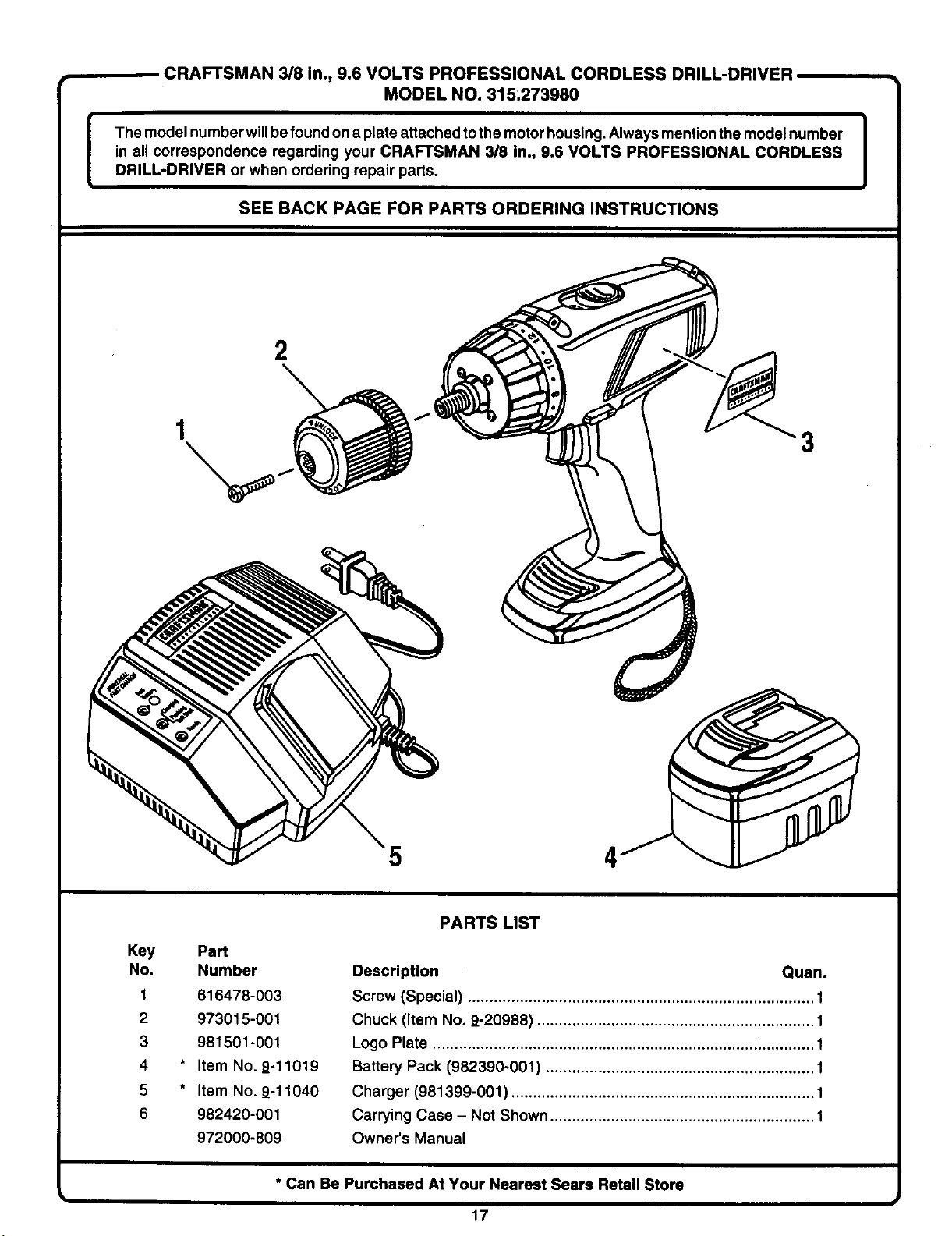
CRAFTSMAN 318 In., 9.6 VOLTS PROFESSIONAL CORDLESS DRILL-DRIVER
MODEL NO. 315.273980
The model number willbe found on a plate attached tothe motorhousing. Always mention the model number
in all correspondence regarding your CRAFTSMAN 3/8 in., 9.6 VOLTS PROFESSIONAL CORDLESS
DRILL-DRIVER or when ordering repair parts.
SEE BACKPAGEFOR PARTS ORDERINGINSTRUCTIONS
2
"3
5
4
Key PaN
No. Number
1 616478-003
2 973015-001
3 981501-001
4 * Item No. 9-11019
5 * Item No. 9-11040
6 982420-001
972000-809
PARTS LIST
Description Quan.
Screw (Special) ................................................................................ 1
Chuck (Item No. 9-20988) ................................................................ 1
Logo Plate ........................................................................................ 1
Battery Pack (982390-001) .............................................................. 1
Charger (981399-001 ) ...................................................................... 1
Carrying Case - Not Shown ............................................................. 1
Owner's Manual
* Can Be Purchased At Your Nearest Sears Retail Store
u
17
For repair of major brand appliances in your own home...
no matter who made it, no matter who sold it!
1-800-4-MY-HOME sMAnytime, day or night
(1-800-469-4663)
www.sears.com
To bring in products such as vacuums, lawn equipment and electronics
for repair, call for the location of your nearest Sears Parts & Repair Center.
1-800-488-1222 Anytime, day or night
www.sears.com
For the replacement parts, accessories and owner's manuals
that you need to do-it-yourself, call Sears PartsDirect sM!
1-800-366-PART 6 a.m. - 11 p.m. CST,
(1-800-366-7278) 7 days a week
www.sears.condpartsdirect
To purchase or inquire about a Sears Service Agreement:
1-800-827-6655
7 a.m. - 5 p.m. CST, Mon.- Sat.
y para ordenar piezas con entrega a domicilio:
1-888-SU-HOGAR s.
(1-888-784-6427)
Para pedir servicio de reparacibn a domicilio, Au Canada pour service en fran_ais:
1-877"LE'FOYER sM
(1-877-533-6937)
I SEARS 1
HomeCentrar
® Registered Trademark / TM Trademark of Sears, ROebuck and Co.
TM
© Sears, Roebuck and Co, ® Marca Regist rada / Marca de F&brica de Sears, Roebuck and Co.

