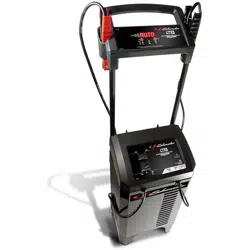
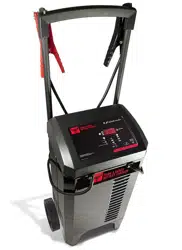
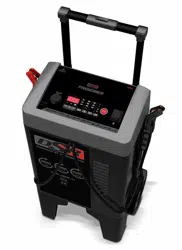
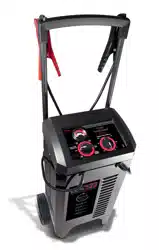
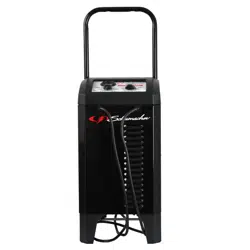
Remove all cord wraps and uncoil the cables prior to using the battery charger.
Included with your charger are two cord wrap cleats for storage of the clamp cables. To install, align the two tabs with the two receptacles on the back of the charger and push until you hear a snap.
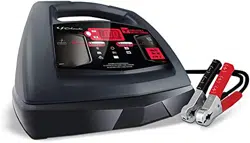
CONTROL PANEL
DIGITAL DISPLAY
The Digital Display gives a digital indication of voltage or % of charge. The display will show the battery VOLTAGE when the charger is not charging a battery. When it goes into charging mode, the display will automatically change to (to show charging has started) and then show the percent-of-charge of the battery being charged and either 6 or the battery voltage determined by the charger). If you manually stop the charging process (by pressing the Rate Selection button) before the battery is fully charged, the display will show .
NOTE: During charging, the display will go into sleep mode and will not show the percentage of charge or voltage of the battery. To turn the display back on, press the Display button.
DISPLAY BUTTON
Use this button to set the function of the digital display to one of the following:
(Battery %) – The digital display shows an estimated charge percentage of the battery connected to the charger’s battery clamps.
(Voltage) – The Digital Display shows the voltage at the charger battery clamps, in DC volts.
RATE SELECTION BUTTON
Use this button to select one of the following:
6<> 2A CHARGE/MAINTAIN – For charging small and large batteries. Not recommended for industrial applications.
30 A BOOST – For quickly adding energy to a severely discharged or large capacity battery prior to Engine Start.
100 A ENGINE START – Provides additional amps for cranking an engine with a weak or run-down battery. Always use in combination with a battery.
LED INDICATORS
CLAMPS REVERSED (red) LED flashing: The connections are reversed.
(yellow/orange) LED lit: The charger is charging/boosting the battery.
CHARGED/MAINTAINING (green)
LED lit: The battery is fully charged and the charger is in maintain mode.
NOTE: See Operating Instructions for a complete description of the charger modes.
BATTERY TYPE BUTTON
Use this button to select the type of battery.
- Used in cars, trucks and motorcycles, these batteries have vent caps and are often marked “low maintenance” or “maintenance-free”.
This type of battery is designed to deliver quick bursts of energy (such as starting engines) and has a greater plate count. The plates are thinner and have somewhat different material composition. Standard batteries should not be used for deep-cycle applications.
- The Absorbed Glass Mat construction allows the electrolyte to be suspended in close proximity with the plate’s active material. In theory, this enhances both the discharge and recharge efficiency. The AGM batteries are a variant of Sealed VRLA (valve regulated lead-acid) batteries. Popular uses include high-performance engine starting, power sports, deep-cycle, solar and storage batteries.
OPERATING INSTRUCTIONS
CHARGING A BATTERY IN THE VEHICLE
Turn off all the vehicle’s accessories.
Keep the hood open.
Clean the battery terminals.
Place the charger on a dry, non- flammable surface.
Lay the AC/DC cables away from any fan blades, belts, pulleys and other moving parts.
Connect the battery, following the precautions listed in sections 6 and 7.
Connect the charger to an electrical outlet.
Select the battery type and desired rate.
When charging is complete, disconnect the charger from the AC power, remove the clamps from the vehicle’s chassis, and then remove the clamp from the battery terminal.
CHARGING A BATTERY OUTSIDE OF THE VEHICLE
Place battery in a well-ventilated area.
Clean the battery terminals.
Connect the battery, following the precautions listed in sections 6 and 7.
Connect the charger to the electrical outlet.
Select the battery type and desired rate.
When charging is complete, disconnect the charger from the AC power, disconnect the negative clamp, and finally the positive clamp.
A marine (boat) battery must be removed and charged on shore.
BOOST MODE
To select the Boost mode, press the Rate Selection button until the yellow/ orange 30A Boost LED lights solid. The LED will light solid if battery is properly connected and the boosting process will start. While in Boost mode, the display will show the voltage. If a bad battery is detected, the display will show and an error code.
NOTE: Boost mode will remain energized until the Rate Selection button is pressed.
CHARGE/MAINTAIN MODE
To select this mode, press the Rate Selection button until the yellow/orange 6<>2A Charge/Maintain LED lights. The LED will light solid if battery is properly connected and the charging process will start. The display will show the charger voltage. To change the mode on the display, press the Display button. When the battery is fully charged, the green Charged/ Maintaining LED will light. If charging cannot be completed, the display will show and an error code. The battery may be bad; have it checked.
NOTE: If the voltage of the battery is under 12.7V, the charger will automatically go into Boost mode, to quickly add energy to the battery. To abort/skip the temporary Boost and force the charger into the Charge/Maintain mode, press the Rate Selection button again (while still boosting).
AUTOMATIC CHARGING MODE
When an Automatic Charge is performed, the charger switches to the maintain mode automatically after the battery is charged.
ABORTED CHARGE
If charging cannot be completed normally, charging will abort. When charging aborts, the charger’s output is shut off and the display will show and an error code. Do not continue attempting to charge this battery. Check the battery and replace, if necessary.
DESULFATION MODE
The display will show when a sulfated battery is detected, and the charger will go into desulfation mode. If the desulfation is not successful after 10 hours, the charger will go into abort mode. The display will show.
COMPLETION OF CHARGE
Charge completion is indicated by the green Charged/Maintaining LED. When lit, the charger has switched to the maintain mode of operation.
MAINTAIN MODE (FLOAT MODE MONITORING)
When the green Charged/Maintaining LED is lit, the charger has started maintain mode. In this mode, the charger keeps the battery fully charged by delivering a small current when necessary. If the charger has to provide its maximum maintain current for a continuous 12 hour period, it will go into abort mode (see Aborted Charge section). This is usually caused by a drain on the battery or the battery could be bad.
MAINTAINING A BATTERY
The SC1308 charges and maintains both 6V and 12V batteries.
NOTE: The maintain mode technology allows you to safely charge and maintain a healthy battery for extended periods of time. However, problems with the battery, electrical problems in the vehicle, improper connections or other unanticipated conditions could cause excessive current draws. As such, occasionally monitoring your battery and the charging process is required.
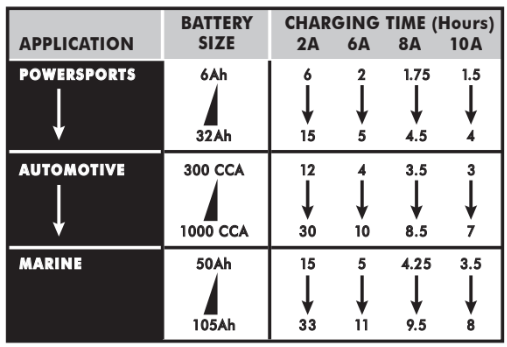
BATTERY CHARGING TIMES
Times are based on a 50% discharged battery and may change, depending on age and condition of battery.
USING THE ENGINE START FEATURE
Your battery charger can be used to jump start your car if the battery is low. Follow all safety instructions and precautions for charging your battery. Wear complete eye protection and protective clothing.
WARNING: Using the ENGINE START feature WITHOUT a battery installed in the vehicle could cause damage to the vehicle’s electrical system.
NOTE: During extremely cold weather, or if the battery is under 2 volts, boost the battery for 5 minutes before cranking the engine.
NOTE: If you have charged the battery and it still will not start your car, do not use the Engine Start feature, or it could damage the vehicle’s electrical system. Have the battery checked.
1. With the charger unplugged from the AC outlet, connect the charger to the battery following the instructions given in Charging a Battery in the Vehicle.
2. Plug the charger AC power cord into the AC outlet.
3. With the charger plugged in and connected to the battery and chassis, select the Engine Start rate. If the battery is properly connected, the yellow/orange 100A Engine Start LED will light solid and the display will show . If display shows , check the battery connections. If the display does not show , check the battery connections. When the Engine Start output is enabled the display will show .
4. Crank the engine until it starts or 5 seconds pass. If the engine does not start, wait a few minutes before cranking again. This allows the charger and battery to cool down.
NOTE: After 3 minutes in Engine Start mode, the charger will enter into a cool- down period of 180 seconds, to allow the charger and the battery to cool down.The digital display indicates the remaining cool down time in seconds. It starts at 180 and counts down to 0. After 3 minutes, the digital display will change from displaying the countdown to displaying .
5. If the engine fails to start, use the 30A Boost rate for 5 more minutes before attempting to crank the engine again.
6. After the engine starts, unplug the AC power cord before disconnecting the battery clamps from the vehicle.
7. Clean and store the charger in a dry location.
NOTE: If the engine does turn over but never starts, there is not a problem with the starting system; there is a problem somewhere else with the vehicle. STOP cranking the engine until the other problem has been diagnosed and corrected.
USING THE BATTERY VOLTAGE TESTER
With the charger unplugged from the AC outlet, connect the charger to the battery, following the instructions given in previous sections.
Plug the charger AC power cord into the AC outlet.
Press the Battery Type button until the correct type is indicated.
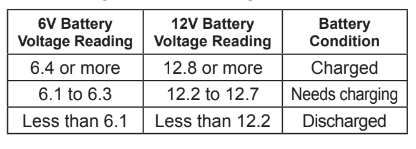
Read the voltage on the digital display. Keep in mind that this reading is only a battery voltage reading; a false surface charge may mislead you. Compare the reading to the following chart.
TESTER AND CHARGER
When first turned on, the unit operates only as a tester, not as a charger. Selecting a charge rate activates the battery charger and deactivates the tester. Pressing the Rate Selection button when the Engine Start LED is lit (except during the 180 second cool down) will shut off the charger and activate the tester.
POWER-UP IDLE TIME LIMIT
If no button is pressed within 10 minutes after the battery charger is first powered up, the charger will automatically switch from tester to charger if a battery is connected. In that case, the charger will be set to the Boost rate and AGM battery type.
TESTING AFTER CHARGING
After the unit has been changed from tester to charger (by selecting a desired rate), it remains a charger. To change the battery charger back to a tester, press the Rate Selection button until all rate LEDs are off.
NOTE: The battery tester is only designed to test batteries. Testing a device with a rapidly changing voltage could yield unexpected or inaccurate results.
USING THE ALTERNATOR PERFORMANCE TESTER
With the charger unplugged from the AC outlet, connect the charger to the battery, following the instructions given in previous sections.
Plug the charger AC power cord into the AC outlet.
Start the vehicle, rev the engine at 2000 rpm for 30 seconds and turn on the vehicle’s headlights or other accessories.
Read the voltage on the digital display. If you get a reading between 13.4 volts and 14.6 volts, the alternator is working properly. If the reading is less than volts or more than 14.6 volts, refer to your vehicle’s manual or have the charging system checked by a qualified technician.
MAINTENANCE AND CARE
A minimal amount of care can keep your battery charger working properly for years.
Clean the clamps each time you are finished charging. Wipe off any battery fluid that may have come in contact with the clamps to prevent corrosion.
Occasionally cleaning the case of the charger with a soft cloth will keep the finish shiny and help prevent corrosion.
Coil the input and output cords neatly when storing the charger. This will help prevent accidental damage to the cords and charger.
Store the charger unplugged from the AC power outlet in an upright position.
Store inside, in a cool, dry place. Do not store the clamps clipped together, on or around metal, or clipped to the cables.
TROUBLESHOOTING AND ERROR CODES
Error Codes
CODE
DESCRIPTION
REASON/SOLUTION
The battery voltage is still under 10V (for a 12V battery) or 5V (for a 6V battery) after 2 hours of charging.
The battery could be bad. Have it checked or replaced.
The charger has detected a sulfated battery.
The charger will go into desulfation mode. If the desulfation is not successful after 10 hours, the charger will go into abort mode.
The charger cannot desulfate the battery.
The battery could not be desulfated; have it checked or replaced.
The battery was unable to reach the “full charge” voltage.
May be caused by trying to charge a large battery or bank of batteries on too low of a current setting. Try again with a higher current setting or have the battery checked or replaced.
The connections to the battery are reversed.
The battery is connected backwards. Unplug the charger and reverse the connections to the battery.
The charger was unable to keep the battery fully charged in maintain mode.
The battery won’t hold a charge. May be caused by a drain on the battery or the battery could be bad. Make sure there are no loads on the battery. If there are remove them. If there are none, have the battery checked or replaced.
The charger detected that the battery may be getting too hot (thermal runaway).
The charger automatically shuts the current off if it detects the battery may be getting too hot. Have the battery checked or replaced.
If you get an error code, check the connections and settings and/or replace the battery.
Troubleshooting
PROBLEM
POSSIBLE CAUSE
SOLUTION
Battery clamps do not spark when touched together.
The charger is equipped with an auto-start feature. It will not supply current to the battery clamps until a battery is properly connected. The clamps will not spark if touched together.
No problem; this is a normal condition.
The charger will not turn on when properly connected.
AC outlet is dead.
Poor electrical connection.
Check for open fuse or circuit breaker supplying AC outlet.
Check power cord and extension cord for loose fitting plug.
Engine start does not work.
Drawing more than 100 amps.
Crank time varies with the amount of current drawn. If cranking draws more than 100 amps, crank time may be less than 5 seconds.
Failure to wait 3 minutes (180 seconds) between cranks.
When the countdown from 180 to 0 is displayed, wait until the display shows for the next crank.
The charger may be overheated.
The thermal protector may have tripped and needs a little longer to reset. Make sure the charger vents are not blocked. Wait and try again.
Battery may be severely discharged.
On a severely discharged battery, use the 30A Boost rate for 10 to 15 minutes, to help assist in cranking.
I cannot select a 6V or 12V setting.
The charger is equipped with Auto Voltage Detection, which automatically detects the voltage and charges the battery.
No problem; this is normal.
I press the display button, but do not see the percentage of charge.
When first connected to a battery, the display shows voltage only.
This is normal. The percentage of charge is only displayed during charging.
The display shows
The battery voltage is still below 10V (for a 12V battery) or 5V (for a 6V battery) after 2 hours of charging.
The battery may be defective. Make sure there are no loads on the battery. If there are, remove them. If there are none, have the battery checked or replaced.
The display shows
Desulfation was unsuccessful, after 10 hours.
The battery may be defective. Have battery checked or replaced.
The display shows
Lack of progress is detected after 12 hours in Maintain mode.
The battery won’t hold a charge. May be caused by a drain on the battery or the battery could be bad. Make sure there are no loads on the battery. If there are remove them. If there are none, have the battery checked or replaced.
 (to show charging has started) and then show the percent-of-charge of the battery being charged and either 6 or the battery voltage determined by the charger). If you manually stop the charging process (by pressing the Rate Selection button) before the battery is fully charged, the display will show
  .
. DISPLAY BUTTON
 (Battery %) – The digital display shows an estimated charge percentage of the battery connected to the charger’s battery clamps.
 (Voltage) – The Digital Display shows the voltage at the charger battery clamps, in DC volts.
 RATE SELECTION BUTTON
 6<> 2A CHARGE/MAINTAIN – For charging small and large batteries. Not recommended for industrial applications.
 30 A BOOST – For quickly adding energy to a severely discharged or large capacity battery prior to Engine Start.
 100 A ENGINE START – Provides additional amps for cranking an engine with a weak or run-down battery. Always use in combination with a battery.
 CLAMPS REVERSED (red) LED flashing: The connections are reversed.
 (yellow/orange) LED lit: The charger is charging/boosting the battery.
 CHARGED/MAINTAINING (green)
 BATTERY TYPE BUTTON
 - Used in cars, trucks and motorcycles, these batteries have vent caps and are often marked “low maintenance” or “maintenance-free”.
 - The Absorbed Glass Mat construction allows the electrolyte to be suspended in close proximity with the plate’s active material. In theory, this enhances both the discharge and recharge efficiency. The AGM batteries are a variant of Sealed VRLA (valve regulated lead-acid) batteries. Popular uses include high-performance engine starting, power sports, deep-cycle, solar and storage batteries.
 and an error code.
 when a sulfated battery is detected, and the charger will go into desulfation mode. If the desulfation is not successful after 10 hours, the charger will go into abort mode. The display will show
 .
.
 , check the battery connections. If the display does not show
  .
.