F
IGIDAi
E
TABLE OF CONTENTS
Important Safety Instructions .......................... 2-3 Operating Instructions ........................................ 5-10
Product Registration .......................................... 4 Care and Cleaning .......................................... 11
Packaging ......................................................... 4 Energy Saving Ideas ..................................... 11
Normal Sounds .................................................. 4 Before You Call .................................................. !2
Atr Conditioner Features ...................................... 5 Major Apphance Limited Warranty ...................... 13
www frigidaire com USA 1-888-775-6937 www frigidaire ca Canada 1-800-668-4606
v
This USE & CARE MANUAL provides specific operating instructions for your model Use the room air conditioner only as
instructed in this USE & CARE MANUAL These instructions are not meant to cover every possible condition and situation that
may occur. Common sense and caution must be practiced when installing, operating, and maintaining any appliance
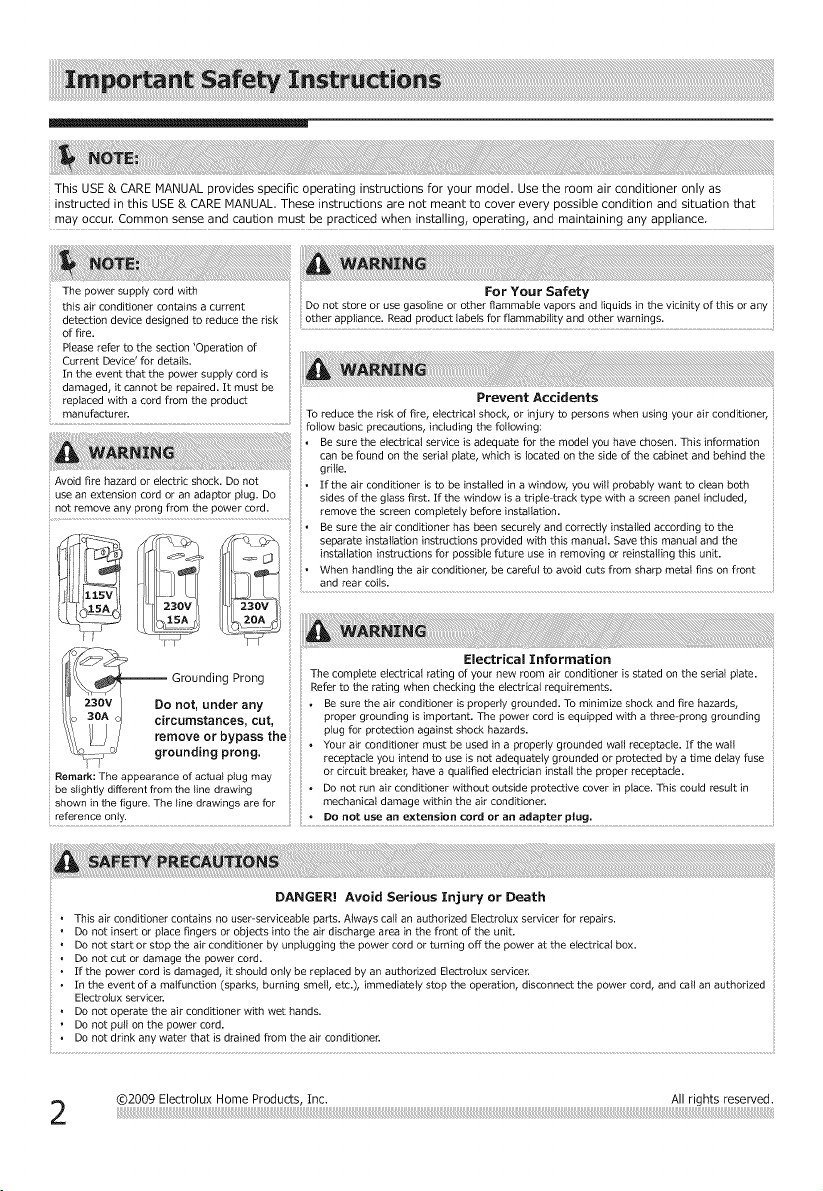
The power supply cord with
this air conditioner contains a current
detection device designed to reduce the risk
of fire•
Please refer to the section 'Operation of
Current Device' for details•
In the event that the power supply cord is
damaged, it cannot be repaired• It must be
replaced with a cord from the product
manufacturen
+i+i
DO not store or use gasoline or other flammable vapors and liquids in the vicinity of this or any
other appliance• Read product labels for flammability and other warnings•
For Your Safety
Prevent Accidents
+oreducether+skoffire,olectr+ca+shock,or+njurytop....... h.... +ngy.... +.... d+tioner,
........................................................................ follow basic precautions, including the following:
+ Be sure the electrical service is adequate for the model you have chosen• This information
can be found on the serial plate, which is located on the side of the cabinet and behind the
grille•
+ If the air conditioner is to be installed in a window, you will probably want to clean both
sides of the glass first• If the window is a triple-track type with a screen panel included,
remove the screen completely before installation•
Be sure the air conditioner has been securely and correctly installed according to the
_ _ installation instructions for possible future use in removing or reinstalling this unit.
+ When handling the air conditioner, be careful to avoid cuts from sharp metal fins on front
and rear coils•
II++_\ _GroundngProng ++ + The complete etectricat rating of your new room air conditioner is stated on the serial plate.
_ %_I Refertotheratingwhencheck+ngtheeiectr+ca_requ+..... ts.
lit 23ov I Do not, under any • Be sure the air conditioner is properly grounded• To minimize shock and fire hazards,
/'i o 3OA j circumstances cut proper grounding is important. The p ....... d is equipped with a three-prong grounding
\\\ II I I _+_ovorb '_++&e++ plugforprotectionagainstshocki_azards.
\\\ _j/ re e yp ;i ++*Yourarcondtionermustbeused naproperygroundedwa receptace Ifthewa
L% _7_ ground ng prong • •
• receptacle you _ntend to use is not adequately grounded or protected by a time delay fuse
Remark The a earance of actual lu ma or c rcu t breaker have a qua fled e ectr c an nsta the proper receptac e
PP P g Y
be slightly different from the line drawing .... • Do not run air conditioner without outside protective cover in place• This could result in
shown in the figure. The line drawings are for mechanical damage within the air conditioner•
reference only. + DO not use an extension cord or an adapter plug.
Avoid fire hazard or electric shock• Do not
Jse an extension cord or an adaptor plug. Do
Do not insert or place fingers or objects into the air discharge area in the front of the unit.
Do not start or stop the air conditioner by unplugging the power cord or turning off the power at the electrical box.
Do not cut or damage the power cord.
If the power cord is damaged, it should only be replaced by an authorized Electrotux servicer•
In the event of a malfunction (sparks, burning smell, etc.), immediately stop the operation, disconnect the power cord, and call an authorized
Electrotux servicer.
• Do not operate the air conditioner with wet hands•
• Do not pull on the power cord.
• Do not drink any water that is drained from the air conditioner.
CAUTION! Avoid Injury or damage to the unit or other property
• Provide occasional ventilation during use. Do not direct affflow at fireplaces or other heat related sources as this could cause flare ups or make
units run excessively.
• Do not climb on or place objects on outdoor part of the unit.
, Do not hang objects off the unit.
• Do not place containers with liquids on the unit.
• Turn off the air conditioner at the power source when it will not be used for an extended period of time.
• Periodically check the condition of the unit's installation accessories for any damage.
• Do not apply heavy pressure to the radiator fins of the unit.
• Operate the unit with air filter in place.
• Do not block or cover the intake grille, discharge area and outlet ports.
Ensure that any electrical/electronic equipment is one yard away from the unit.
, Do not use or store flammable gases near the unit.
i
READTHIS SECTION BEFOREATTEHPTING TO OPERATEAIR CONDITIONER.
Unit must be upright for one hour prior to operating.
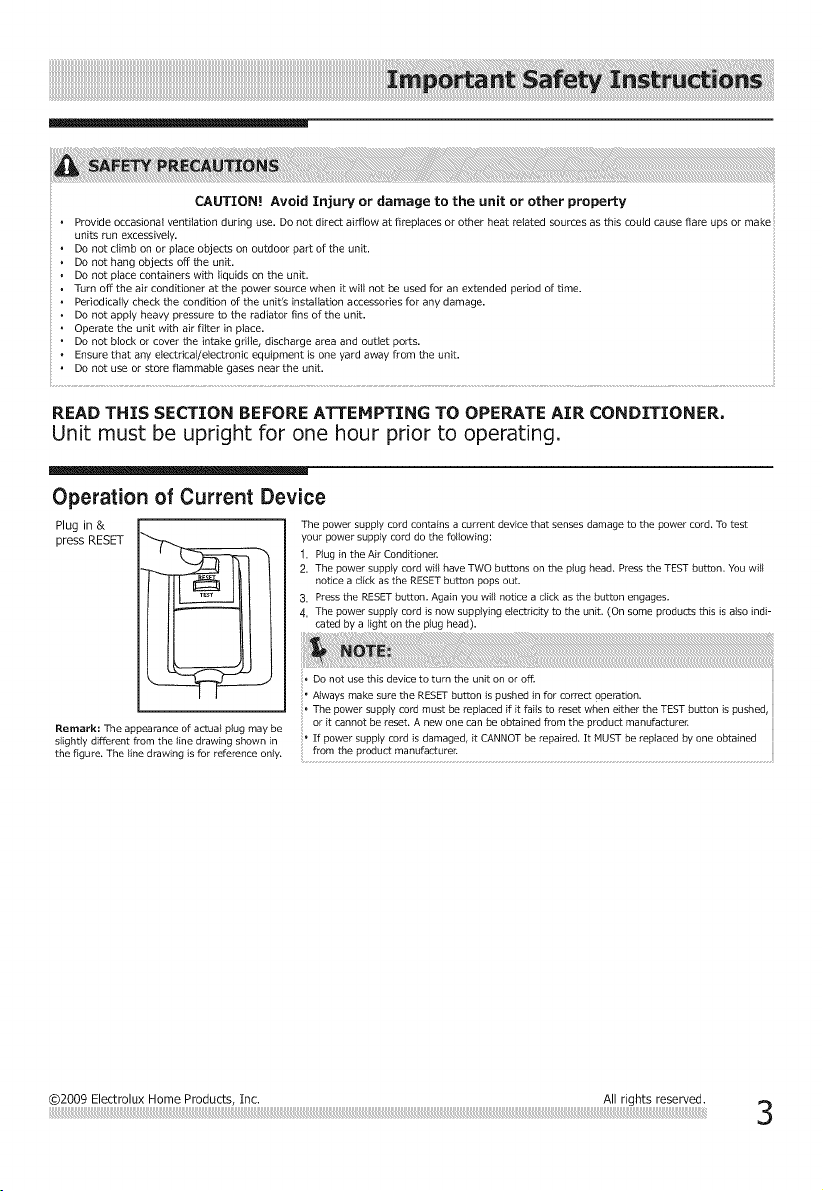
Operation of Current Device
Plug in & The power supply cord contains a current device that senses damage to the power cord. To test
press RESET
Remark: The appearance of actua_ plug may be
slightly different from the _ine drawing shown in
the figure. The _ine drawing is for reference only.
your power supply cord do the following:
1. P}ug in the Air Conditioner.
2, The power supply cord will have TWO buttons on the plug head. Press the TEST button. You will
notice a click as the RESET button pops out.
3. Press the RESET button. Again you will notice a click as the button engages.
4, The power supply cord is now supplying elec_tricity to the unit. (On some products this is also indi-
cated by a light on the ptug head).
, Do not use this device to turn the unit on or off.
' Always make sure the RESET button is pushed in for con-ect operation.
The power supply cord must be replaced if it fails to reset when either the TEST button is pushed,
or it cannot be reset. A new one can be obtained from the product manufacturer.
If power supply cord is damaged, it CANNOT be repaired. It MUST be replaced by one obtained
from the product manufacturer.
@2009 Electrolux Home Products, Inc. All rights reserved.
Product Registration Record Your Hodel and Serial Numbers
Record in the space provided below the model and serial numbers. On all models, the
serial plate is located on the outside of the cabinet,
Model No
Serial No
Register Your Product
The self-addressed PRODUCT REGISTRATION CARD should be filled in completely,
signed and returned to the Frigidaire Company.
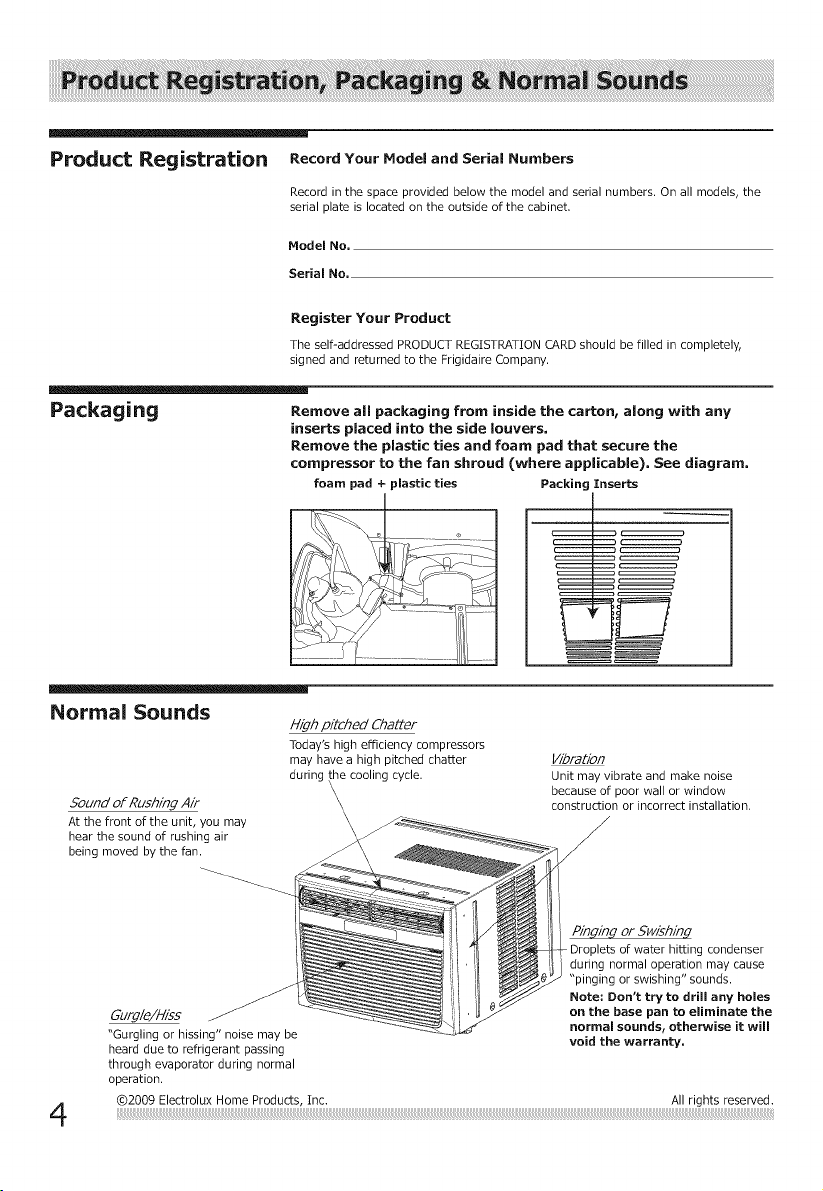
Packaging Remove all packaging from inside the carton, along with any
inserts placed into the side louvers,
Remove the plastic ties and foam pad that secure the
compressor to the fan shroud (where applicable). See diagram.
foam pad + plastic ties Packing Inserts
Normal Sounds
Sound of Rushing Air
At the front of the unit, you may
hear the sound of rushing air
being moved by the fan.
High pitched Chatter
Today's high efficiency compressors
may have a high pitched chatter
during the cooling cycle.
\
\
\
\
Vibration
Unit may vibrate and make noise
because of poor wall or window
construction or incorrect installation.
4
Gurgle/Hiss
"Gurgling or hissing" noise may be
heard due to refrigerant passing
through evaporator during normal
operation.
Pinging or Swishing
- Droplets of water hitting condenser
during normal operation may cause
"pinging or swishing" sounds.
Note: Don't try to drill any holes
on the base pan to eliminate the
normal sounds, otherwise it will
void the warranty.
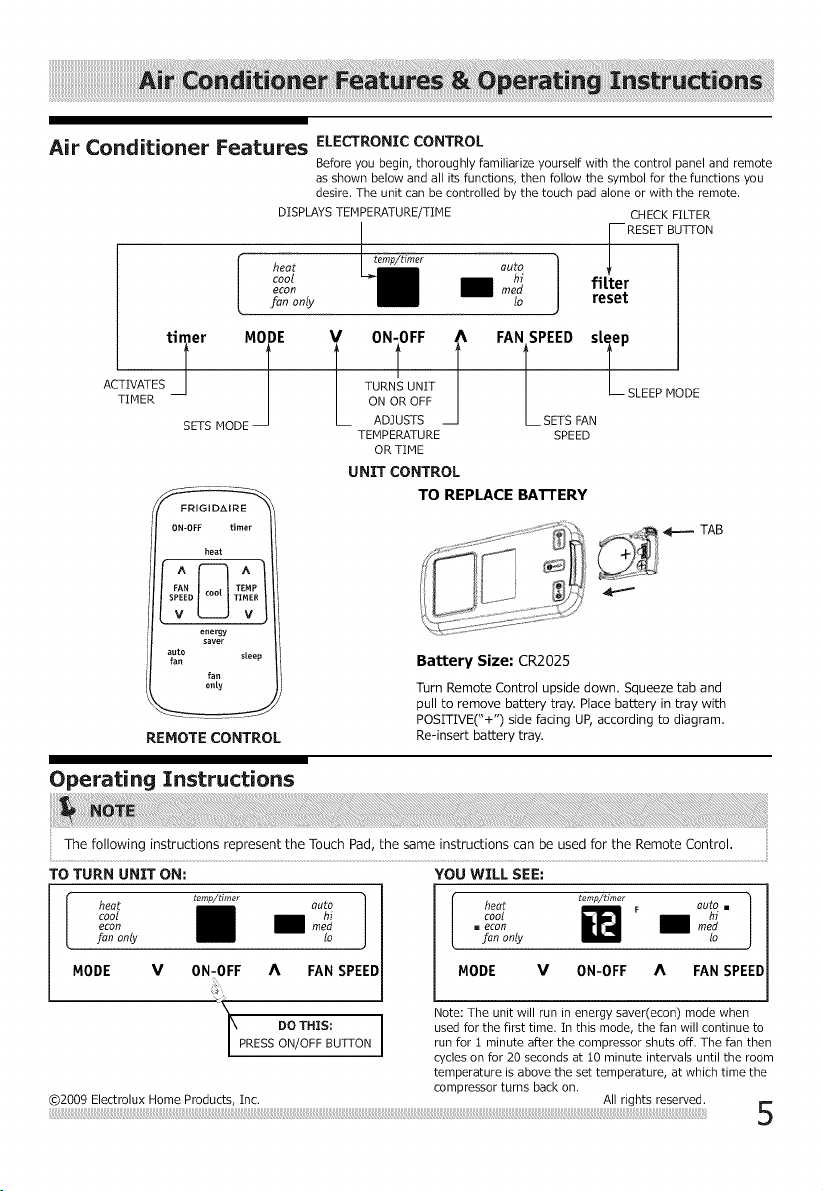
Air Conditioner Features ELECTRONICCONTROL
Before you begin,thoroughly familiarizeyourselfwith the controlpanel and remote
as shown below and allitsfunctions,then followthe symbol for the functionsyou
desire.The unitcan be controlledby the touch pad alone or with the remote.
DISPLAYS TEMPERATURE/TIME CHECK FILTER
-- RESET BUTTON
econ 1 mh_ filter
fan only lo reset
ACTIVATESti_erTIMER-- MiE
SETS MODE
l TURNS UNIT -- SLEEP MODE
ON OR OFF
ADJUSTS L SETS FAN
TEMPERATURE SPEED
OR TIME
FRIGIDAIRE
0N-0FF timer
heat
FAN TEFIP
SPEED TIMER
V _ V
energy
saver
auto sleep
fan
fan
only
REMOTE CONTROL
UNIT CONTROL
TO REPLACE BATTERY
TAB
Battery Size: CR2025
Turn Remote Controlupsidedown. Squeezetaband
pulltoremove batterytray.Placebatteryintraywith
POSITIVE("+")sidelacingUP,accordingtodiagram.
Re-insert battery tray.
Operating Instructions
TO TURN UNIT ON:
i heat tamp/Umer auto
COOl
.... ll
fan only to
MODE V 0N-0FF A FAN SPEED
I PRESS ON/OFF BUTTON
YOU WILL SEE:
©2009 Electrolux Home Products, Inc.
cool F auto
..... mm
fan only lo
MODE V 0N-0FF A FAN P D
Note: The unit will run in energy saver(econ) mode when
used for the first time. In this mode, the fan will continue to
run for 1 minute after the compressor shuts off. The fan then
cycles on for 20 seconds at 10 minute intervals until the room
temperature is above the set temperature, at which time the
compressor turns back on.
All rights reserved. _..
b
Operating Instructions
(continued)
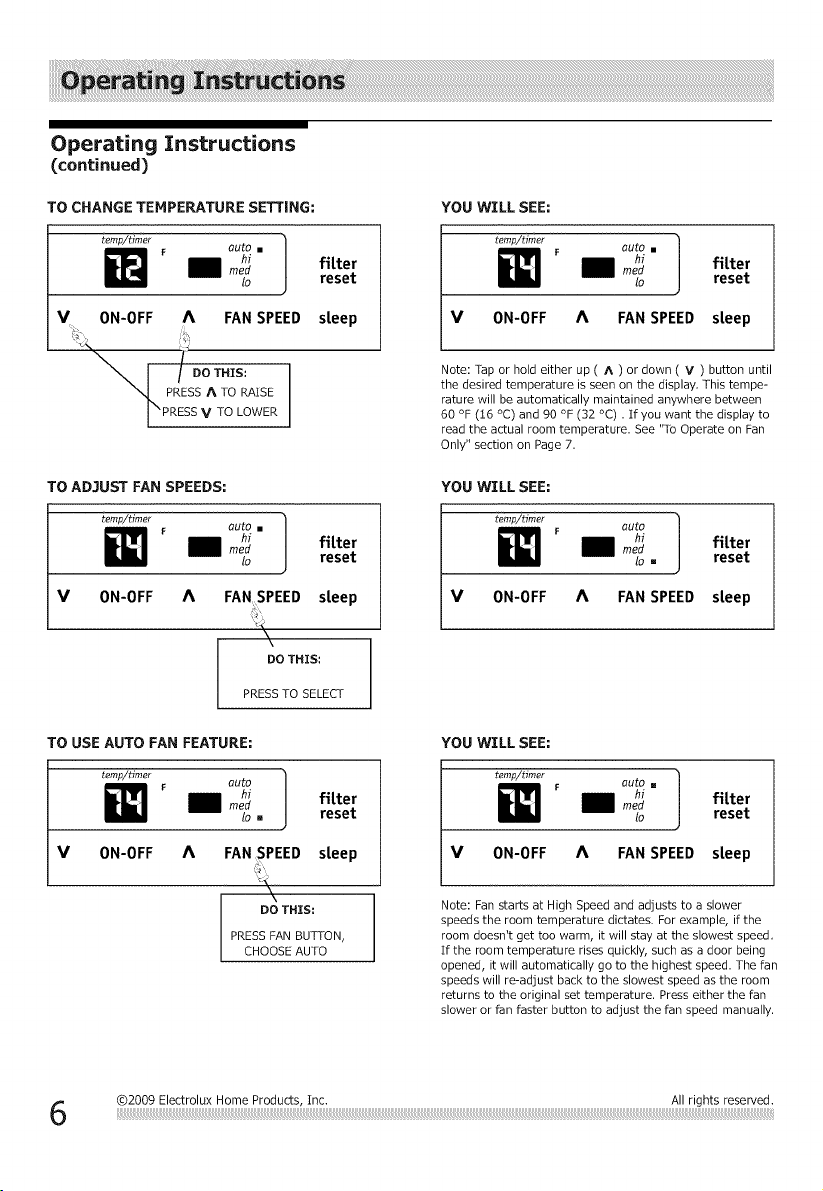
TO CHANGE TEMPERATURE SETTING:
f tem_/_imer ]
F auto []
mh_ fitter
lo reset
V 0N-0FF A FAN SPEED steep
_I, PRESS A TO RAISE
I "PRESS V TO LOWER
YOU WILL SEE:
temp/dmer ]
auto []
lo
fitter
reset
V 0N-0FF A FAN SPEED steep
Note: Tap or hold either up ( ^ ) or down ( V ) button until
the desired temperature is seen on the display, This tempe-
rature will be automatically maintained anywhere between
60 °F (16 °C) and 90 °F (32 °C) . If you want the display to
read the actual room temperature. See "To Operate on Fan
Only" section on Page 7.
TO AD3UST FAN SPEEDS:
temp/timer
V 0N-OFF
F auto [] |
mh_" ] fitter
_o reset
A FANSPEED steep
\
DO THIS;
YOU WILL SEE:
temp/timer ]
auto
!o []
fitter
reset
V 0N-OFF A FAN SPEED steep
PRESS TO SELECT
TO USE AUTO FAN FEATURE:
temp/timer ]
i_! F auto
mh_ fitter
to _ reset
V 0N-0FF A FAN SPEED steep
YOU WILL SEE:
temp/timer 1
i_ F auto []
mh_ fitter
io reset
V ON-OFF A FAN SPEED steep
DO THIS;
PRESS FAN BUTTON,
CHOOSE AUTO
Note: Fan starts at High Speed and adjusts to a slower
speeds the room temperature dictates. For example, if the
room doesn't get too warm, it will stay at the slowest speed,
If the room temperature rises quickly, such as a door being
opened, it will automatically go to the highest speed. The fan
speeds will re-adiust back to the slowest speed as the room
returns to the original set temperature. Press either the fan
slower or fan faster button to adiust the fan speed manually.
Operating Instructions
(continued)
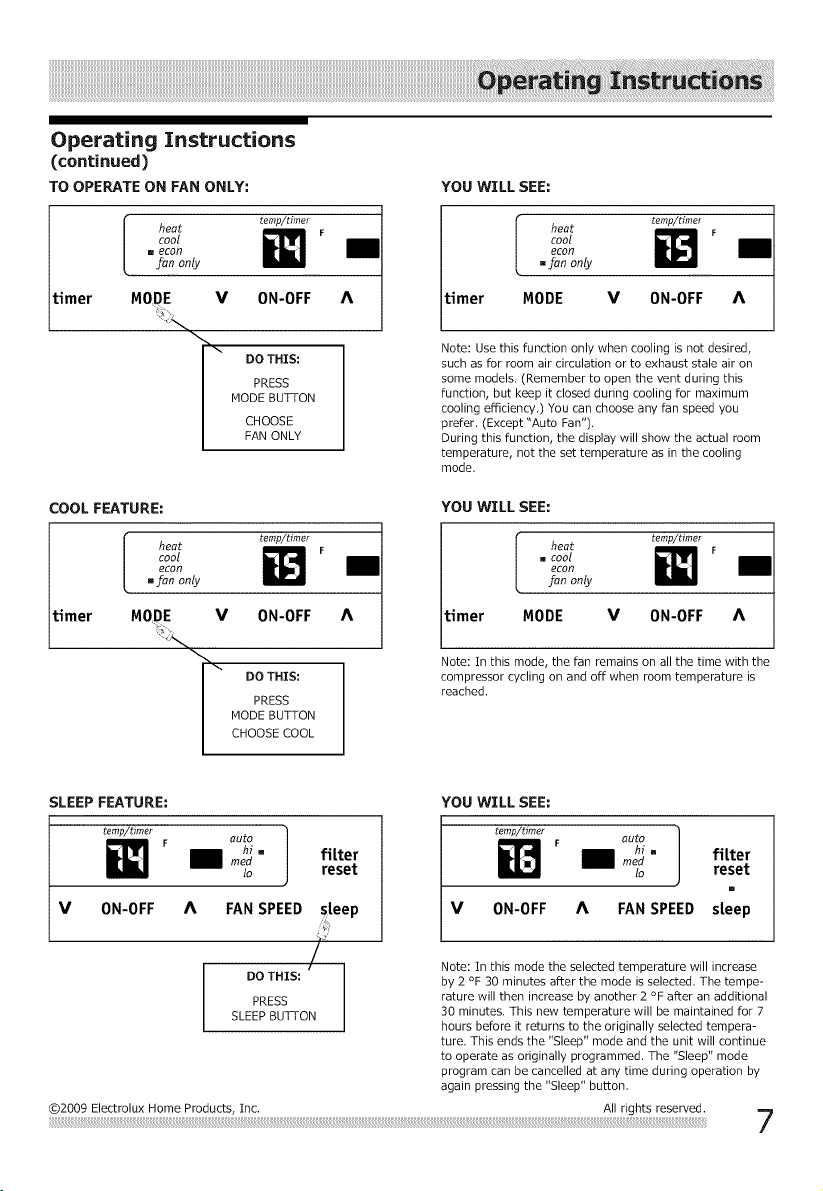
TO OPERATE ON FAN ONLY:
timer [ temp/timer
heat _1 F
[]c
fanonly
MODE V ON-OFF
DO THIS:
PRESS
MODE BUTTON
CHOOSE
FAN ONLY
YOU WILL SEE:
timer I t_,_plti,_r
heat i_ F
c%
.fan only
MODE V ON-OFF
Note: Use this function only when cooling is not desired,
such as for room air circulation or to exhaust stale air on
some models. (Remember to open the vent during this
function, but keep it closed during cooling for maximum
cooling efficiency,) You can choose any fan speed you
prefer, (Except "Auto Fan").
During this function, the display will show the actual room
temperature, not the set temperature as in the cooling
mode.
timer
COOL FEATURE:
I heat temp/timer
cool F
econ
[]fan only
V 0N-OFF
\[\ DO THIS:
PRESS
MODE BUTTON
CHOOSE COOL
YOU WILL SEE:
r heat temp/timer
[]COOl F
L
econ
J=anonly
timer MODE V ON-OFF
Note: In this mode, the fan remains on all the time with the
compressor cycling on and off when room temperature is
reached.
SLEEP FEATURE: YOU WILL SEE:
temp/timer 1
W F auto
m_ _ fitter
to reset
V ON-OFF A
FAN SPEED steep
@2009 Electrolux Home Products, Inc.
V ON-OFF A FAN SPEED
fi[ter
reset
[]
steep
Note: In this mode the selected temperature will increase
by 2 °F 30 minutes after the mode is selected. The tempe-
rature will then increase by another 2 °F after an additional
30 minutes. This new temperature will be maintained for 7
hours before it returns to the originally selected tempera-
ture. This ends the "Sleep" mode and the unit will continue
to operate as originally programmed. The "Sleep" mode
program can be cancelled at any time during operation by
again pressing the "Sleep" button,
All rights reserved.
Operating Instructions
(continued)
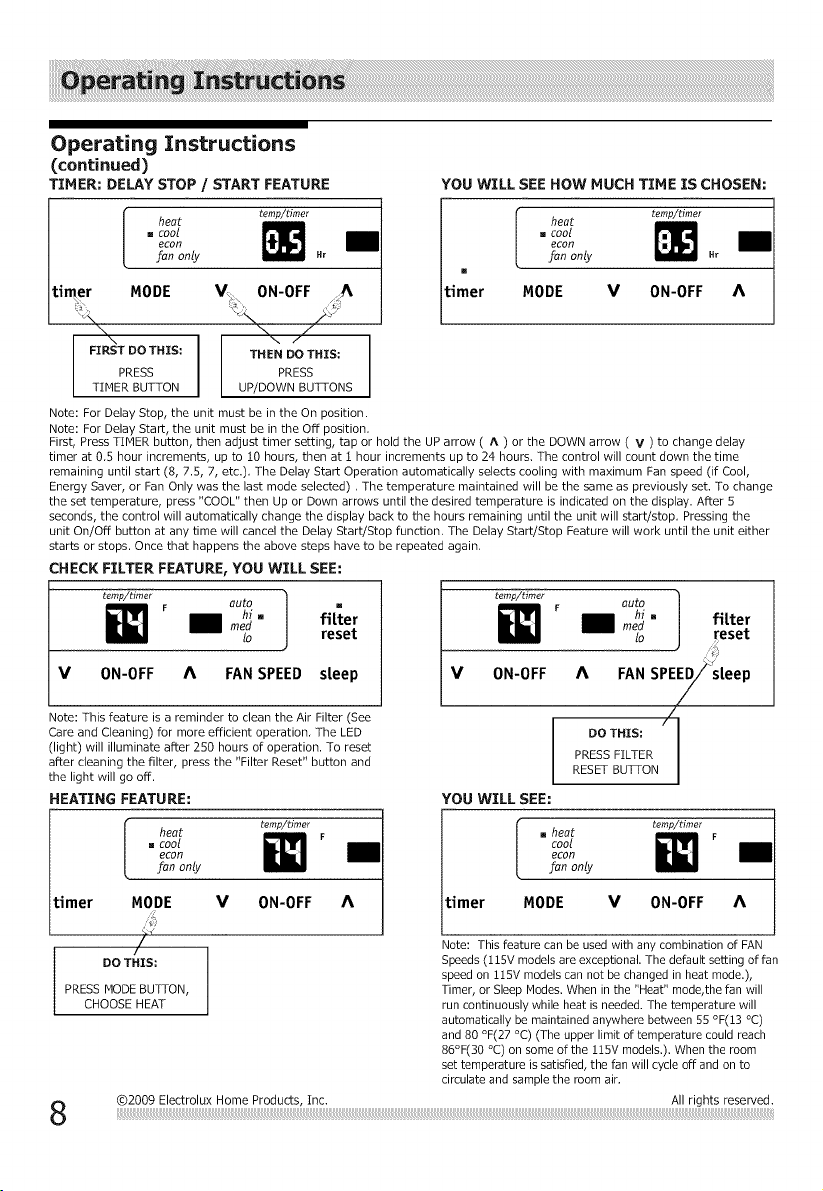
TIMER; DELAY STOP / START FEATURE
timer l " coo_heat temp/tim_,
[an only .r
MODE ON-OFF
\
FIRST DO THIS;
PRESS
TIMER BUTTON
Note: For Delay Stop, the unit must be in the On position.
Note: For Delay Start, the unit must be in the Off position,
THEN DO THIS;
PRESS
UP/DOWN BUTTONS
YOU WILL SEE HOW MUCH TIME IS CHOSEN;
timer [ " econC°°lheat temp/tim_r
[an only .r
[]
MODE V ON-0FF
First, Press TIMER button, then adjust timer setting, tap or hold the UP arrow ( A ) or the DOWN arrow ( V ) to change delay
timer at 0,5 hour increments, up to 10 hours, then at t hour increments up to 24 hours. The control will count down the time
remaining until start (8, 7.5, 7, etc.), The Delay Start Operation automatically selects cooling with maximum Fan speed (if Cool,
Energy Saver, or Fan Only was the last mode selected), The temperature maintained will be the same as previously set. To change
the set temperature, press "COOL" then Up or Down arrows until the desired temperature is indicated on the display. After 5
seconds, the control will automatically change the display back to the hours remaining until the unit will start/stop, Pressing the
unit On/Off button at any time will cancel the Delay Start/Stop function, The Delay Start/Stop Feature will work until the unit either
starts or stops. Once that happens the above steps have to be repeated again.
CHECK FILTER FEATURE_YOU WILL SEE:
8
Operating Instructions
(continued)
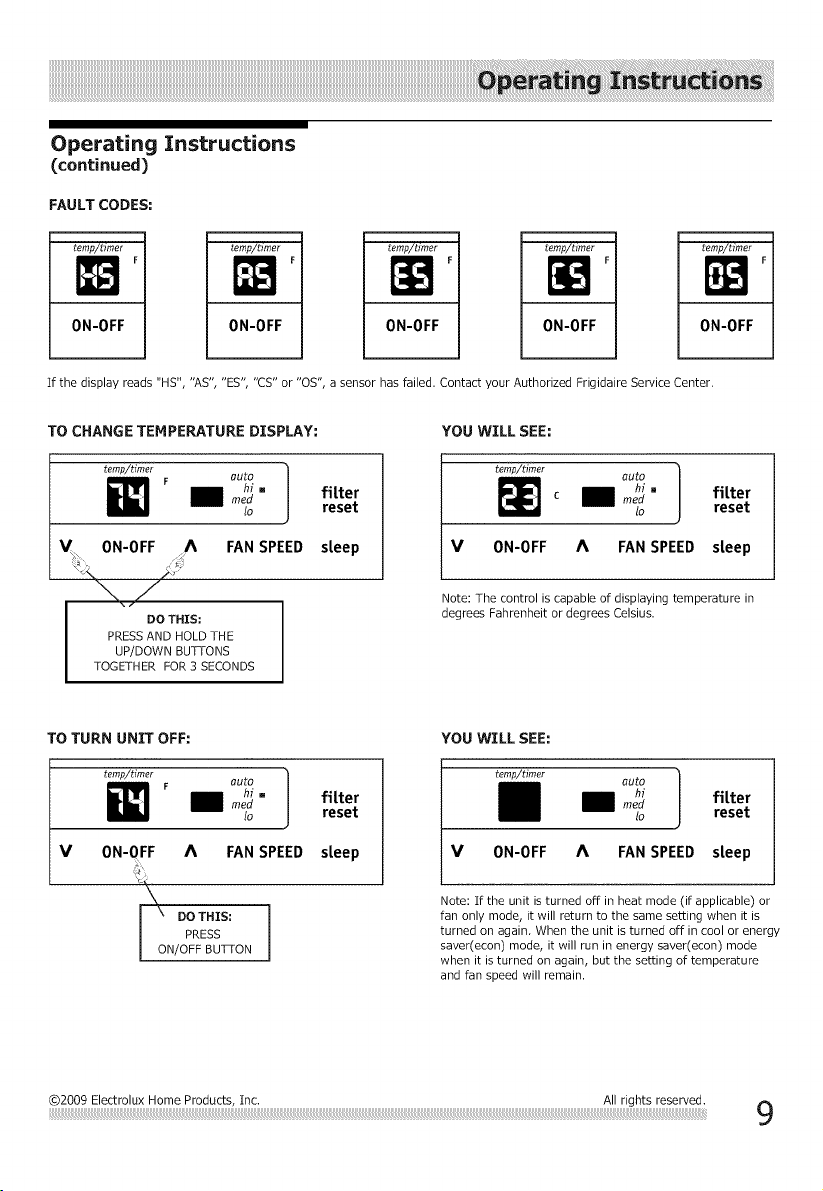
FAULT CODES:
ternp/timer
ON-OFF
temp/timer
IN'
0N-0FF
temp/timer
ON-OFF
temp/timer
ON-OFF
]
mrj
ON-OFF I
If the display reads "HS", "AS", "ES', "CS" or "OS", a sensor has failed. Contact your Authorized Frigidaire Service Center.
TO CHANGE TEMPERATURE DISPLAY:
temp/timer
auto ]
mh_" fitter
lo reset
ON-OFF FAN SPEED steep
DO THIS;
PRESS AND HOLD THE
UP/DOWN BUTTONS
TOGETHER FOR 3 SECONDS
YOU WILL SEE:
temp/timer
C
auto ]
meh/:" fitter
lo reset
V ON-OFF A FAN SPEED sleep
Note: The control is capable of displaying temperature in
degrees Fahrenheit or degrees Celsius.
TO TURN UNIT OFF:
temp/timer
F auto 1
mh_" fitter
to reset
V ON-OFF A FAN SPEED
DO THIS;
I PRESS ]
ON/OFF BUTTON
steep
YOU WILL SEE:
temp/timer
auto ]
mh_ fitter
to reset
V ON-OFF A FAN SPEED steep
Note: If the unit is turned off in heat mode (if applicable) or
fan only mode, it will return to the same setting when it is
turned on again, When the unit is turned off in cool or energy
saver(econ) mode, it will run in energy saver(econ) mode
when it is turned on again, but the setting of temperature
and fan speed will remain,
@2009 Electrolux Home Products, inc. All rights reserved.
!!iii¸
Operating Instructions
(continued)
ADDITIONAL THlrNGS YOU SHOULD KNOW
Now that you have mastered the operating procedure, here are more features in your control that you should become familiar with.
• The "Cool" circuit has an automatic 3 minute time delayed start if the unit is turned off and on quickly. ,/_
This prevents overheating of the compressor and possible circuit breaker tripping. The fan will continue
to run during this time.
There is a 2-Second delay for the compressor shutting down when selecting FAN ONLY/HEAT. This is to cover the possibility of
having to roll through to select another mode.
The control will maintain the set temperature within 2 degrees Fahrenheit, between 60F and 90F degrees in cool mode, 55F
and 80F degrees in heat mode(the upper limit of temperature could reach 86F degrees on some of the 115V models).
After a power outage, the unit will memorize the last setting and return the unit to the same setting once power is restored.
Figure :[ (VENT CLOSED)
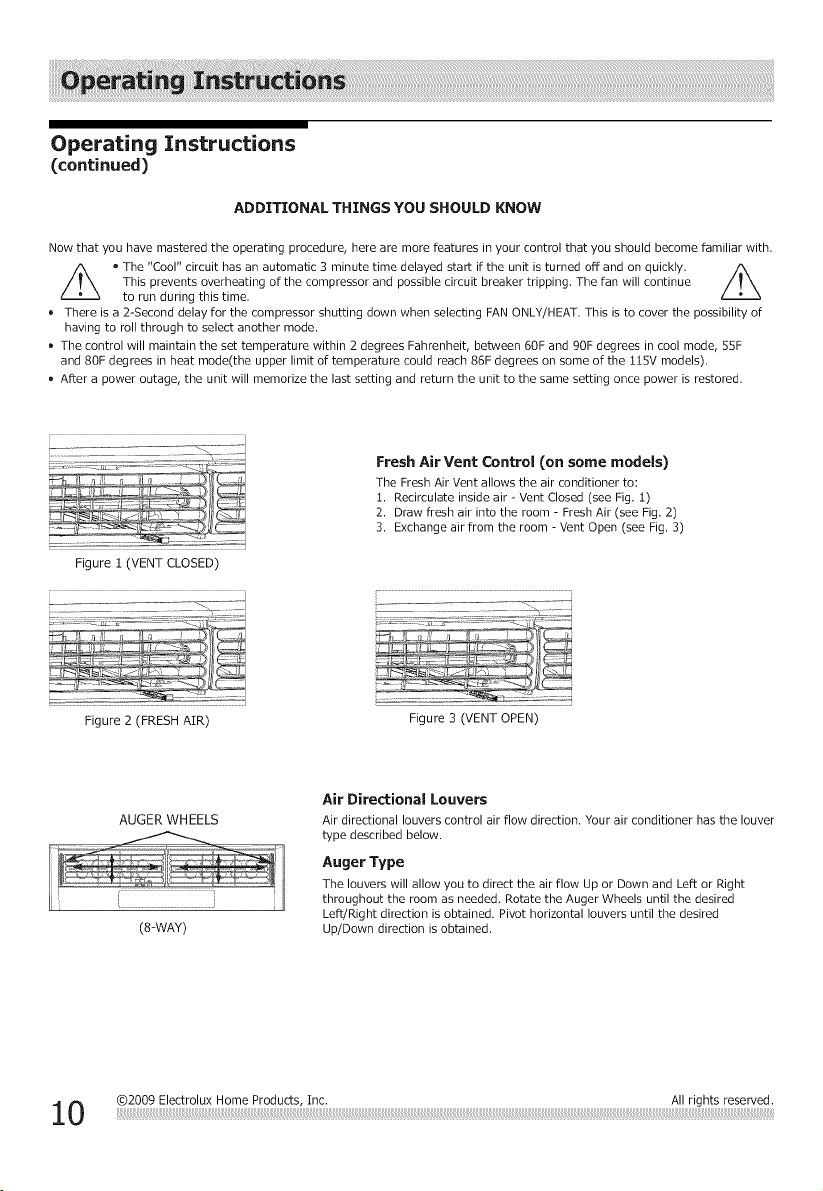
Fresh Air Vent Control (on some models)
The Fresh Air Vent allows the air conditioner to:
1. Recirculate inside air - Vent Closed (see Fig, 1)
2. Draw fresh air into the room - Fresh Air (see Fig, 2)
3. Exchange air from the room - Vent Open (see Fig. 3)
Figure 2 (FRESH AIR)
Figure 3 (VENT OPEN)
AUGER WHEELS
(8=WAY)
Air Directional Louvers
Air directional louvers control air flow direction. Your air conditioner has the louver
type described below.
Auger Type
The louvers will allow you to direct the air flow Up or Down and Left or Right
throughout the room as needed. Rotate the Auger Wheels until the desired
Left/Right direction is obtained. Pivot horizontal louvers until the desired
Up/Down direction is obtained.
i!i!i!i!i!i!i!i!i!i!i!i!i!i!i!i!i!i!i!i!i!i!i!i!i!i!i!i!i!i!i!i!i!i!i!i!i!i!i!i!i!i!i!i!i!i!i!i!i!i!i!i!i!i!i!i!i!i!i!i!i!i!i!i!i!i!i!i!i!i!i!i!i!i!i!i!i!i!i!i!i!i!i!i!i!i!i!i!i!i!i!i!i!i!i!i!i!i!i!i!i!i!i!i!i!i!i!i!i!i!i!i!i!i!i!i!i!i!i!i!i!i!i!i!i!i!i!i!i!i!i!i!i!i!i!i!i!i!i!i!i!i!i!i!i!i!i!i!i!i!i!i!i!i!i!i!i!i!i!i!i!i!i!i!i!i!i!i!i!i!i!i!i!i!i!i!i!i!i!i!i!i!i!i!i!i!i!i!i!i!i!i!i!i!i!i!i!i!i!i!i!i!i!i!i!i!i!i!i!i!i!i!i!i!i!i!_!_iii_!i!i!_i!i!_,i!_!_iii_i!_i!i_i!i!i!i!!i_!i!i! _i_!!!!!!i! i!_i!i!i!i!i_ i!i!i
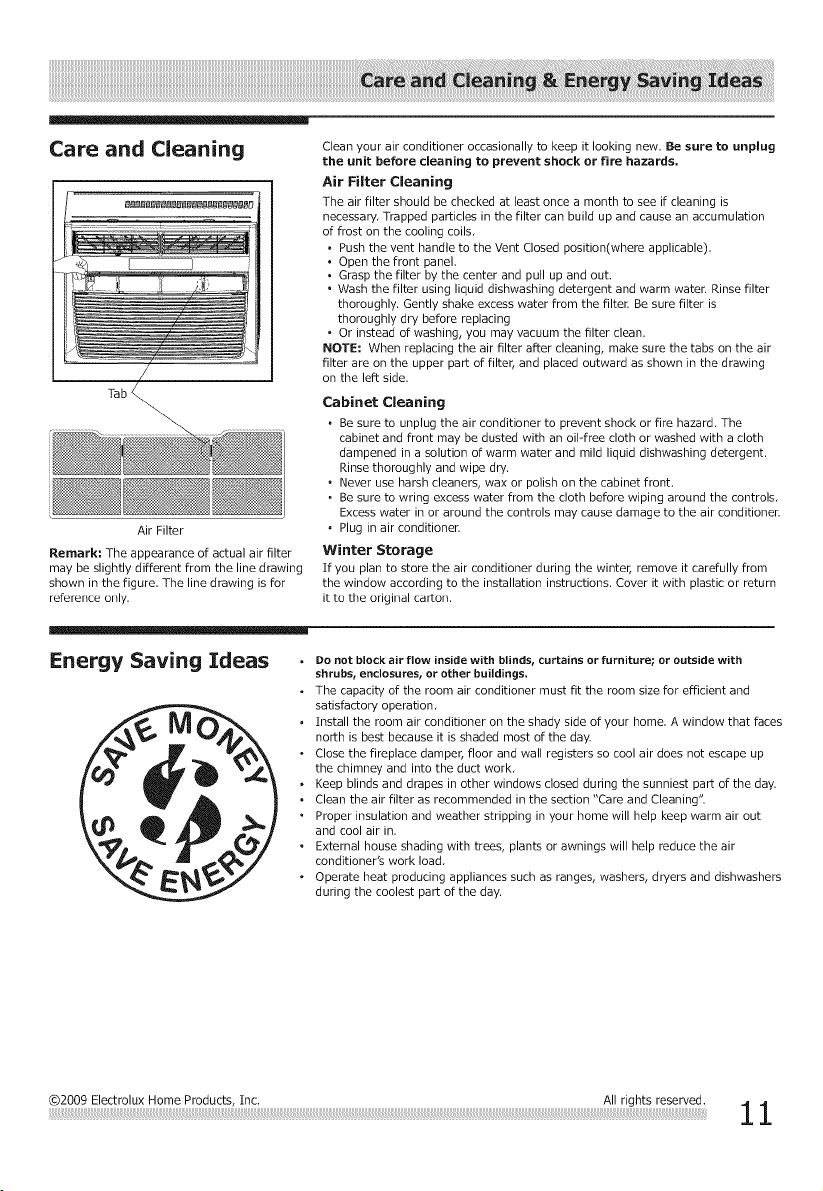
Care and Cleaning
Tab
Air Filter
Remark: The appearance of actual air filter
may be slightly different from the line drawing
shown in the figure. The line drawing is for
reference only.
Clean your air conditioner occasionally to keep it looking new. Be sure to unplug
the unit before cleaning to prevent shock or fire hazards.
Air Filter Cleaning
The air filter should be checked at least once a month to see if cleaning is
necessary, Trapped particles in the filter can build up and cause an accumulation
of frost on the cooling coils,
• Push the vent handle to the Vent Closed position(where applicable).
• Open the front panel,
• Grasp the filter by the center and pull up and out.
• Wash the filter using liquid dishwashing detergent and warm water. Rinse filter
thoroughly. Gently shake excess water from the filter. Be sure filter is
thoroughly dry before replacing
• Or instead of washing, you may vacuum the filter clean.
NOTE: When replacing the air filter after cleaning, make sure the tabs on the air
filter are on the upper part of filter, and placed outward as shown in the drawing
on the left side.
Cabinet Cleaning
, Be sure to unplug the air conditioner to prevent shock or fire hazard. The
cabinet and front may be dusted with an oil-free cloth or washed with a cloth
dampened in a solution of warm water and mild liquid dishwashing detergent.
Rinse thoroughly and wipe dry.
° Never use harsh cleaners, wax or polish on the cabinet front.
• Be sure to wring excess water from the cloth before wiping around the controls,
Excess water in or around the controls may cause damage to the air conditioner.
° Plug in air conditioner.
Winter Storage
If you plan to store the air conditioner during the winter, remove it carefully from
the window according to the installation instructions. Cover it with plastic or return
it to the original carton.
Energy Saving Ideas •
o
,
o
o
.
Do not block air flow inside with blinds, curtains or furniture; or outside with
shrubs, endosuresr or other buildings,
The capacity of the room air conditioner must fit the room size for efficient and
satisfactory operation,
Install the room air conditioner on the shady side of your home. A window that faces
north is best because it is shaded most of the day.
Close the fireplace damper, floor and wall registers so cool air does not escape up
the chimney and into the duct work,
Keep blinds and drapes in other windows closed during the sunniest part of the day.
Clean the air filter as recommended in the section "Care and Cleaning".
Proper insulation and weather stripping in your home will help keep warm air out
and cool air in.
External house shading with trees, plants or awnings will help reduce the air
conditioner's work load,
Operate heat producing appliances such as ranges, washers, dryers and dishwashers
during the coolest part of the day.
@2009 Electrolux Home Products, Inc. All rights reserved.
1 1
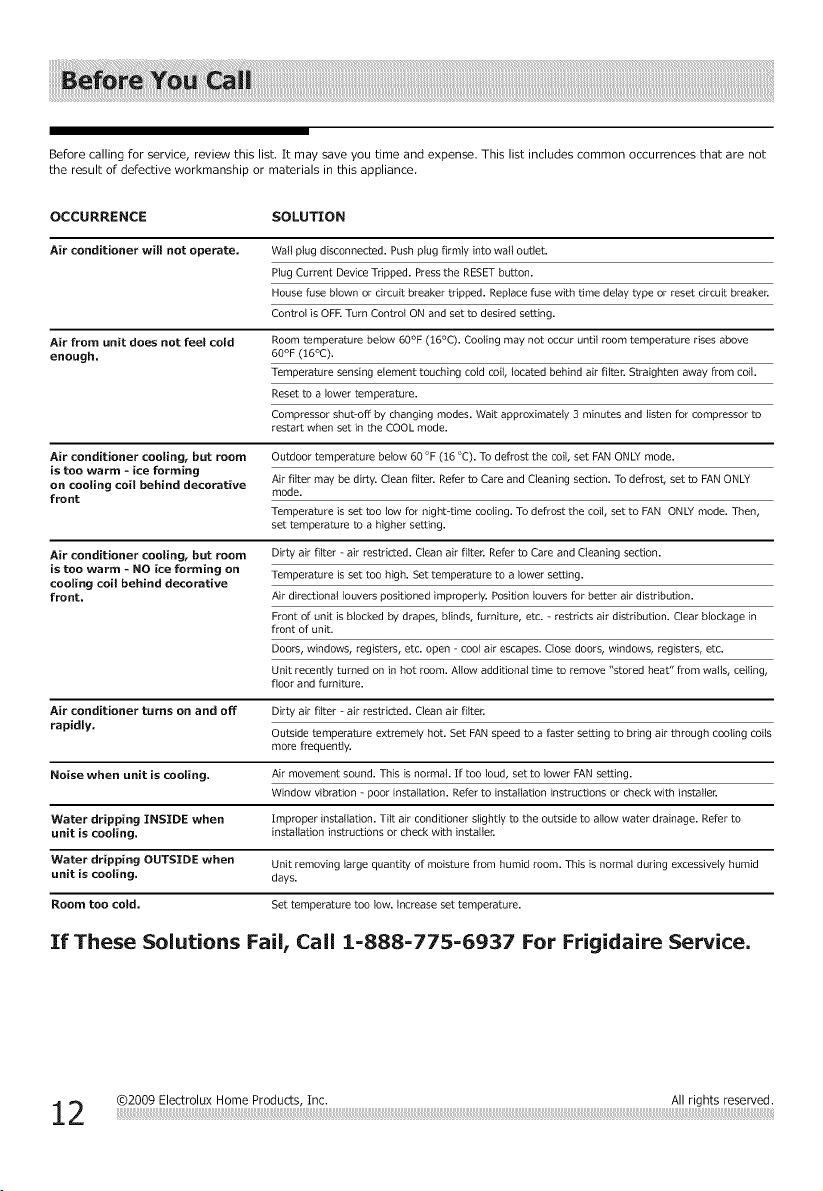
Before calling for service, review this list, It may save you time and expense, This list includes common occurrences that are not
the result of defective workmanship or materials in this appliance
OCCURRENCE SOLUTION
Air conditioner will not operate.
Air from unit does net feel cold
enough.
Wall plug disconnected. Push plug firmly into wall outlet.
Plug Current Device Tripped. Press the RESET button.
House fuse blown or circuit breaker tripped. Replace fuse with time delay type or reset circuit breaker.
Control is OFR Turn Control ON and set to desired setting.
Roomtemperature below 60°F (16°C). Cooling may not occur until room temperature rises above
60°F (:[6°C).
Temperature sensing element touching cold coil,located behind air filter. Straighten away from coil.
Resetto a lower temperature.
Compressor shut-off by changing modes. Wait approximately 3 minutes and listen for compressor to
restart when set in the COOL mode.
Air conditioner cooling_ but room
is too warm - ice forming
on cooling coil behind decorative
front
Outdoor temperature below 60 °F (16 °C). To defrost the coil, set FAN ONLY mode.
Air filter may be dirty. Clean filten Refer to Care and Cleaning section. To defrost, set to FANONLY
mode.
Temperature is set too tow for night-time cooling. To defrost the coil, set to FAN ONLY mode. Then,
set temperature to a higher setting.
Air conditioner coeling_ but room
is too warm - NO ice forming on
cooling coil behind decorative
front.
Dirty air filter - air restricted. Clean air filter. Refer to Care and Cleaning section.
Temperature is set too high. Set temperature to a lower setting.
Air directional louvers positioned improperly. Position louvers for better air distribution.
Front of unit is blocked by drapes, blinds, furniture, etc. - restricts air distribution. Clear blockage in
front of unit.
Doors, windows, registers, etc. open - cool air escapes. Close doors, windows, registers, etc.
Unit recently turned on in hot room. Allow additional time to remove "stored heat" from walls, ceiling,
floor and furniture.
Air conditioner turns on and eft
rapidly,
Dirty air filter - air restricted. Clean air filter.
Outside temperature extremely hot. Set FAN speed to a faster setting to bring air through cooling coils
more frequently.
Noise when unit is cooling. Air movement sound. This is norm& If too loud, set to lower FAN setting.
Window vibration - poor installation. Refer to installation instructions or check with installer.
Water dripping INSIDE when Improper installation. Tilt air conditioner slightly to the outside to allow water drainage. Refer to
unit is cooling, installation instructions or check with installer.
Water dripping OUTS][DE when Unit removing large quantity of moisture from humid room. This is normal during excessively humid
unit is cooling, days.
Room toe cold, Set temperature too low. increase set temperature.
If These Solutions Fail, Call 1-888-775-6937 For Frigidaire Service.
Your appliance is covered by a limited two-year warranty and a limited 3-5 year warranty on the sealed system (the compressor,
condenser, evaporator and tubing), For two years from your original date of purchase, Electrolux will pay all costs for repairing or
replacing any parts of this appliance that prove to be defective in materials or workmanship when such appliance is installed,
used and maintained in accordance with the provided instructions, From the third to the fifth year from your original purchase
date, Electrolux will repair or replace any parts in the Sealed Refrigeration System (compressor, condenser, evaporator and tubing_
that prove to be defective in materials or workmanship, In years 3-5, the consumer will be responsible for diagnostic, labor and
)arts costs as well as any removal, transportation and reinstallation expenses which are incurred during service on components
other than those covered under the Sealed Refrigeration System 5-year warranty.
Exclusions
This warranty does not cover the following:
1. Products with original serial numbers that have been removed, altered or cannot be readily determined.
2. Product that has been transferred from its original owner to another party or removed outside the USA or
Canada.
3. Rust on the interior or exterior of the unit.
4. Products purchased "as-is" are not covered by this warranty.
5. Food loss due to any refrigerator or freezer failures.
6. Products used in a commercial setting.
7. Service calls which do not involve malfunction or defects in materials or workmanship, or for appliances not
in ordinary household use or used other than in accordance with the provided instructions.
8. Service calls to correct the installation of your appliance or to instruct you how to use your appliance.
9. Expenses for making the appliance accessible for servicing, such as removal of trim, cupboards, shelves,
etc., which are not a part of the appliance when it is shipped from the factory.
10. Service calls to repair or replace appliance light bulbs, air filters, water filters, other consumables, or knobs,
handles, or other cosmetic parts.
11. Surcharges including, but not limited to, any after hour, weekend, or holiday service calls, tolls, ferry trip
charges, or mileage expense for service calls to remote areas, including the state of Alaska.
12. Damages to the finish of appliance or home incurred during installation, including but not limited to floors,
cabinets, walls, etc.
13. Damages caused by: services performed by unauthorized service companies; use of parts other than
genuine Electrolux parts or parts obtained from persons other than authorized service companies; or external
causes such as abuse, misuse, inadequate power supply, accidents, fires, or acts of God.
DISCLAIMER OF IMPLIED WARRANTIES; LIMITATION OF REMEDIES
CUSTOMER'S SOLE AND EXCLUSIVE REMEDY UNDER THIS LIMITED WARRANTY SHALL BE PRODUCT REPAIR OR
REPLACEMENT AS PROVIDED HEREIN. CLAIMS BASED ON IMPLIED WARRANTIES, INCLUDING WARRANTIES OF
MERCHANTABILITY OR FITNESS FOR A PARTICULAR PURPOSE, ARE LIMITED TO ONE YEAR OR THE SHORTEST
PERIOD ALLOWED BY LAW, BUT NOT LESS THAN ONE YEAR, ELECTROLUX SHALL NOT BE LIABLE FOR
CONSEQUENTIAL OR INCIDENTAL DAMAGES SUCH AS PROPERTY DAMAGE AND INCIDENTAL EXPENSES
RESULTING FROM ANY BREACH OF THIS WRITTEN LIMITED WARRANTY OR ANY IMPLIED WARRANTY. SOME
STATES AND PROVINCES DO NOT ALLOW THE EXCLUSION OR LIMITATION OF INCIDENTAL OR CONSE-
QUENTIAL DAMAGES, OR LIMITATIONS ON THE DURATION OF IMPLIED WARRANTIES, SO THESE LIMITATIONS
OR EXCLUSIONS MAY NOT APPLY TO YOU, THIS WRITTEN WARRANTY GIVES YOU SPECIFIC LEGAL RIGHTS.
YOU MAY ALSO HAVE OTHER RIGHTS THAT VARY FROM STATE TO STATE.
If You Need
Service
Keep your receipt, delivery slip, or some other appropriate payment record to establish the warranty period
should service be required. If service is performed, it is in your best interest to obtain and keep all receipts.
Service under this warranty must be obtained by contacting Electrolux at the addresses or phone
numbers below.
This limited warranty only applies in the USA and Canada, In the USA, your appliance is warranted by Electrolux Major Appliances
North America, a division of Electrolux Home Products, Inc, In Canada, your appliance is warranted by Electrolux Canada Corp,
Electrolux authorizes no person to change or add to any obligations under this warranty. Obligations for service and parts under
this warranty must be performed by Electrolux or an authorized service company. Product features or specifications as described
or illustrated are subject to change without notice.
USA
1.800.944.9044
Electrolux Major Appliances
10200 David Taylor Drive
Charlotte, NC28262
Electrolux
Canada
1,800.265.8352
Electrolux Canada Corp.
5855 Terry FoxWay
Mississauga, Ontario, Canada
L5V 3E4
©2009 Electrolux Home Products, Inc. All rights reserved.
13