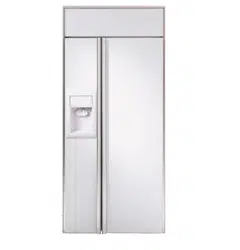
Owner’s
Manual
Side-by-Side
36″,42″,48″
Built-In Refrigerators
Consumer Information
Built-In Refrigerators
2
Introduction
Your new Monogram refrigerator makes an eloquent statement of style, convenience and kitchen
planning flexibility. Whether you chose it for its purity of design, practical storage arrangements
or assiduous attention to detail—or for all of these reasons—you’ll find that your Monogram
refrigerator’s superior blend of form and function will delight you for years to come.
The Monogram refrigerator was designed to provide the flexibility to blend in with your kitchen
cabinetry. Decorative door insert panels allow it to match your kitchen cabinets or blend with
your kitchen decor. Through a series of product choices, the Monogram refrigerator can be
beautifully integrated into the kitchen.
Since this is designed to be a built-in product, custom panels are required on the front
of the Monogram refrigerator. Consult your kitchen designer or cabinetmaker for your
customized look.
The information on the following pages will help you operate and maintain your
refrigerator properly.
If you have any questions, visit our website at: www.monogram.com
Contents
Consumer Services
Important Phone Numbers . . . . . . . . . . . . .31
Model and Serial Numbers . . . . . . . . . . . . . .3
Problem Solver . . . . . . . . . . . . . . . . . . . .25–28
Product Registration . . . . . . . . . . . . . . . . . . .3
Safety Instructions . . . . . . . . . . . . . . . . . . . 4–7
Smartwater Filter Performance
Data Sheet . . . . . . . . . . . . . . . . . . . . . . . . . .29
State of California Water Treatment
Device Certificate . . . . . . . . . . . . . . . . . . . . .30
Warranty . . . . . . . . . . . . . . . . . . . . Back Cover
Care and Cleaning
Cleaning—Outside and Inside . . . . . . . . . . .19
Cleaning—Condenser . . . . . . . . . . . . . . . . .24
Light Bulb Replacement . . . . . . . . . . . . 20–23
Moving and Vacation . . . . . . . . . . . . . . . . . .24
Master Light Switch . . . . . . . . . . . . . . . . . . .21
Operating Instructions
Automatic Icemaker . . . . . . . . . . . . . . . . . . .12
Climate Control Drawer . . . . . . . . . .13, 14, 16
Control Lock . . . . . . . . . . . . . . . . . . . . . . . .14
Ice and Water Dispenser . . . . . . . . . . . .10, 11
Shelves and Bins . . . . . . . . . . . . . . . . . . .17, 18
Storage Pans . . . . . . . . . . . . . . . . . . . . . .15, 16
Temperature Controls . . . . . . . . . . . . . . . . . .8
Water Filter Cartridge . . . . . . . . . . . . . . . . . .9
3
If you
received a
damaged
refrigerator
Immediately contact the dealer (or builder)
that sold you the refrigerator.
Save time
& money
Before you request service, check the
Problem Solver in the back of this manual.
It lists causes of minor operating problems that
you can correct yourself.
If you
need
service
To obtain service, see the Consumer Services
page in the back of this manual.
We’re proud of our service and want you to be
pleased. If for some reason you are not happy
with the service you receive, here are steps to
follow for further help.
For customers in the USA:
FIRST, contact the people who serviced your
appliance. Explain why you are not pleased.
In most cases, this will solve the problem.
NEXT, if you are still not pleased, write all the
details—including your phone number—to:
Manager, Customer Relations
GE Appliances
Appliance Park
Louisville, KY 40225
For customers in Canada:
FIRST, contact the people who serviced your
appliance. Explain why you are not pleased.
In most cases, this will solve the problem.
NEXT, if you are still not pleased, write all the
details–including your phone number to:
Manager, Consumer Relations
Camco Inc.
1 Factory Lane, Suite 310
Moncton, N.B. E1C 9M3
Consumer Information
Built-In Refrigerators
Before
using your
refrigerator
Read this manual carefully. It is intended
to help you operate and maintain your new
refrigerator properly.
Keep it handy for answers to your questions.
If you don’t understand something or need
more help, there is a list of toll-free consumer
service numbers included in the back section
of this manual.
OR
Visit our Website at: www.monogram.com
Write
down the
model &
serial
numbers
You’ll see them on a label above the freezer
compartment behind the grille panel.
These numbers are also on the Consumer
Product Ownership Registration Card
included with this manual.
Before sending in this card, please write these
numbers here:
Model Number
Serial Number
Use these numbers in any correspondence or
service calls concerning your refrigerator.
4
IMPORTANT SAFETY INSTRUCTIONS
REFRIGERANTS
All refrigeration products contain refrigerants,
which under federal law must be removed prior
to product disposal. If you are getting rid of an
old refrigeration product, check with the
company handling the disposal about what
to do.
w DANGER: RISK OF CHILD ENTRAPMENT
Child entrapment and suffocation are not
problems of the past. Junked or abandoned
refrigeration products are still dangerous…
even if they will sit for “just a few days.”
If you are getting rid of your old appliance,
please follow these instructions to help
prevent accidents.
Before You Throw Away Your Old
Refrigeration Product:
• Take off the doors.
• Leave the shelves in place so that children
may not easily climb inside.
READ AND SAVE THESE INSTRUCTIONS
w WARNING – When using
this appliance, always exercise basic safety
precautions, including the following:
• Use this appliance only for its intended
purpose as described in this Owner’s Manual.
• This refrigerator must be properly installed
in accordance with the Installation
Instructions before it is used.
• Do not allow children to climb, stand or
hang on the shelves in the refrigerator.
They could damage the refrigerator and
seriously injure themselves.
• After your refrigerator is in operation,
do not touch the cold surfaces in the
freezer compartment, particularly when
hands are damp or wet. Skin may adhere
to these extremely cold surfaces.
• Do not store or use gasoline or other
flammable vapors and liquids in the
vicinity of this or any other appliance.
• In refrigerators with an automatic icemaker,
avoid contact with the moving parts of the
ejector mechanism, or with the heating
element located on the bottom of the
icemaker. Do not place fingers or hands on
the automatic icemaking mechanism while
the refrigerator is plugged in.
• Keep fingers out of the “pinch point” areas:
clearances between the doors and between
the doors and cabinet are necessarily small.
Be careful closing doors when children are
in the area.
• Unplug your refrigerator before cleaning
and making repairs. NOTE: We strongly
recommend that any servicing be performed
by a qualified individual.
• Before replacing a burned-out light bulb,
set the Master Light switch in the OFF
position to turn off the lights in order to
avoid contact with a live wire filament.
(A burned-out light bulb may break when
being replaced.) NOTE: Setting the
refrigerator temperature controls to OFF
does not remove power to the light circuit.
• Do not refreeze frozen foods which have
thawed completely.
5
IMPORTANTES INSTRUCTIONS DE SÉCURITÉ
RÉFRIGÉRANTS
Tous les appareils de réfrigération contiennent
des réfrigérants qui, conformément aux lois
fédérales, doivent être enlevés avant toute
élimination de l’appareil. Si vous vous
débarrassez de vieux appareils de réfrigération,
vérifiez, auprès de la société qui s’occupe de
leur élimination, ce que vous devez faire.
w DANGER! RISQUES POUR LES ENFANTS
Les enfants pris au piège ou morts d’asphyxie
sont toujours d’actualité. Les appareils de
réfrigération abandonés sont toujours aussi
dangereux, même si on n’attend que “quelque
jours” pour s’en débarasser. Si vous ne gardez
pas votre ancien appareil, veuillez suivre les
directives ci-dessous afin de prévenir les
accidents.
Avant de vous débarasser de votre vieux
appareil de réfrigération:
• Démontez les portes.
• Laissez les clayettes en place afin d’empêcher
les enfants de grimper à l’intérieur.
LIRE ET CONSERVER CES INSTRUCTIONS
w
AVERTISSEMENT :
Lorsque vous utilisez le réfrigérateur,
observez toujours certaines précautions
de base, notamment :
• N’utilisez le réfrigérateur que pour son usage
prévu, comme décrit dans le présent manuel.
• Installez le réfrigérateur conformément aux
directives d’installation avant de l’utiliser.
• Ne laissez pas les enfants grimper, s’asseoir,
se tenir debout ni se pendre aux clayettes du
réfrigérateur. Ils pourraient endommager le
réfrigérateur et se blesser gravement.
• Une fois le réfrigérateur en marche, ne
touchez pas les surfaces froides du
congélateur, surtout si vous avez les mains
humides ou mouillées : la peau risque
d’adhérer à ces surfaces très froides.
• N’entreposez et n’utilisez pas d’essence ou
autres vapeurs et liquides inflammables à
proximité de cet appareil ou de tout autre
appareil électroménager.
• Pour les réfrigérateurs dotés d’une machine
à glaçons automatique, évitez le contact avec
les pièces mobiles du mécanisme éjecteur, ou
avec l’élément chauffant situé à la partie
inférieure de la machine à glaçons. Ne posez
pas les doigts ou les mains sur le mécanisme
de la machine à glaçons pendant que le
réfrigérateur est branché.
• Éloignez les doigts des parties du
réfrigérateur où l’on peut facilement se
pincer : les espaces entre les portes et les
placards sont toujours étroits. Soyez prudent
lorsque vous fermez les portes de l’appareil
en présence des enfants.
• Débranchez votre réfrigérateur avant
de le nettoyer et de le réparer.
REMARQUE : Nous vous recommandons
vivement de confier toute réparation à un
technicien qualifié.
• Avant de remplacer une ampoule grillée,
mettez le commutateur de lumière principale
en position OFF (arrêt) pour éteindre la
lumière afin d’éviter tout contact avec un
fil sous tension. (Une ampoule grillée
peut se briser pendant l’opération).
REMARQUE : Lorsque vous placez les
commandes de température du réfrigérateur
sur OFF (arrêt), l’alimentation électrique
de l’ampoule n’est pas coupée.
• Ne faites PAS recongeler des aliments
surgelés qui ont complètement dégelé.

6
SAVE THESE INSTRUCTIONS
IMPORTANT SAFETY INSTRUCTIONS
HOW TO CONNECT ELECTRICITY
Do not, under any circumstances, cut or
remove the third (ground) prong from the
power cord. For personal safety, this appliance
must be properly grounded.
The power cord of this appliance is equipped
with a 3-prong (grounding) plug which mates
with a standard 3-prong (grounding) wall
outlet to minimize the possibility of electric
shock hazard from this appliance.
Have the wall outlet and circuit checked
by a qualified electrician to make sure the
outlet is properly grounded.
Where a standard 2-prong wall outlet is
encountered, it is your personal responsibility
and obligation to have it replaced with
a properly grounded 3-prong wall outlet.
Use of a GFI (Ground Fault Interruptor) is not
recommended for the refrigerator outlet.
The appliance should always be plugged into
its own individual electrical outlet which has
a voltage rating that matches the rating plate.
This provides the best performance and also
prevents overloading house wiring circuits
which could cause a fire hazard from
overheated wires.
DO NOT USE AN ADAPTER PLUG TO
CONNECT THE REFRIGERATOR TO
A 2-PRONG OUTLET.
DO NOT USE AN EXTENSION CORD
WITH THIS APPLIANCE.
Never unplug an appliance by pulling on the
power cord. Always grip the plug firmly and
pull straight out from the outlet.
Repair or replace immediately all power cords
that have become frayed or otherwise damaged.
Do not use a cord that shows cracks or abrasion
damage along its length or at either end.
When moving the appliance, be careful not to
roll over or damage the power cord.

7
CONSERVEZ CES DIRECTIVES
IMPORTANTES INSTRUCTIONS DE SÉCURITÉ
RACCORDEMENT ÉLECTRIQUE
Ne coupez ni retirez en aucun cas la troisième
broche (mise à la terre) de la fiche du cordon
d’alimentation. Pour votre sécurité, cet
appareil doit être correctement mis à la terre.
Le cordon d’alimentation de cet appareil est
muni d’une fiche à 3 broches (mise à la terre)
qui se branche dans une prise mural ordinaire
à 3 alvéoles (mise à la terre) pour réduire au
minimum les risques du chocs électriques.
Faites examiner la prise de courant et le circuit
par un électricien qualifié pour vous assurer
que la prise est correctement mise à la terre.
Si la prise murale est du type standard
à 2 alvéoles, il vous incombe de la faire
remplacer par une prise à 3 alvéoles
correctement mise à la terre.
L’utilisation d’un interrupteur de défaut
à la terre (GFI–Ground Fault Interruptor)
nést pas recommandé pour la prise de
courant du réfrigérateur.
La machine à glaçons doit toujours être
branché dans sa propre prise de courant,
dont la tension nominale est identique à
celle indiquée sur la plaque signalétique. Cette
précaution est recommandée pour garantir un
rendement optimum et éviter une surcharge
des circuits électriques de la résidence, ce qui
pourrait créer un risque d’incendie par
surschauffe des fils.
N’UTILISEZ PAS UNE FICHE D’ADAPTATION
POUR RACCORDER LE RÉFRIGÉRATEUR
DANS UNE PRISE MURALE À 2 ALVÉOLES.
N’UTILISEZ PAS DE CORDONS
PROLONGATEURS AVEC CET APPAREIL.
Ne débranchez jamais l’appareil en tirant le
cordon d’alimentation. Saisissez fermement
la fiche du cordon et tirez droit pour la retirer
de la prise.
Réparez ou remplacez immédiatement tout
cordon effiloché ou endommagé. N’utilisez
pas un cordon fendillé ou présentant des
signes d’usure.
Lorsque vous déplacez l’appareil du mur,
faites attention de ne pas la faire rouler
sur le cordon d’alimentation afin de ne pas
l’endommager.
8
Temperature Controls
Built-In Refrigerators
Temperature
controls
Changing
display
temperatures
from °F to °C
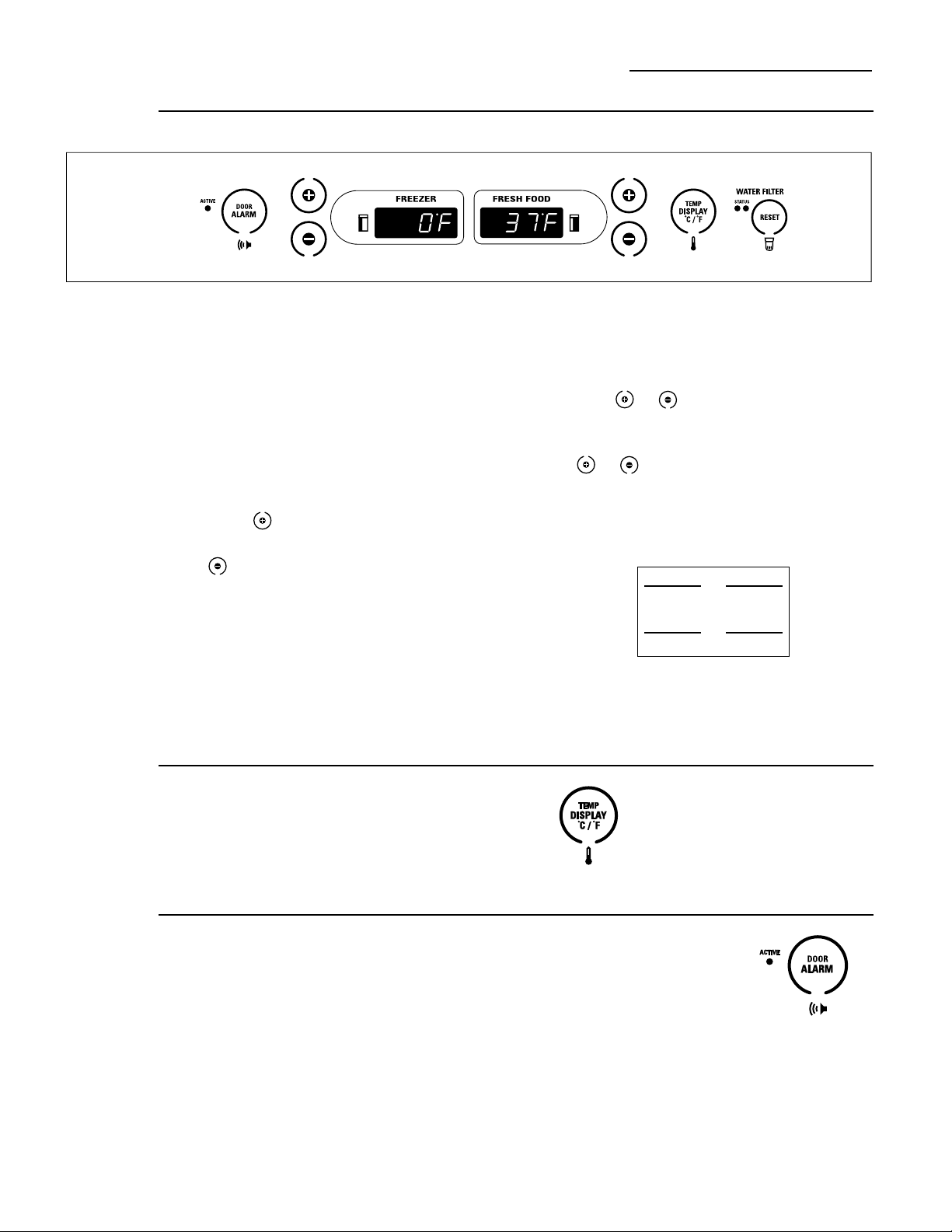
To change the temperature display
between Fahrenheit and Celsius, press
Temp Display °C/°F.
The temperature display shows the actual
temperature of the freezer and fresh food
compartments. The actual temperature may
vary slightly from the set temperature based
on factors such as door opening, amount of
food, defrost cycling and room temperature.
To turn off the cooling system in both the
freezer and fresh food compartments, press
either pad until both displays show OFF.
To turn the cooling system on, press either
pad. The preset temperatures of 0°F and
37°F will appear in the display.
To check the current temperature setting
for the fresh food or freezer compartment,
press the or pad once. After 5 seconds,
the display will return to the actual temperature.
To change the temperature settings, press
the or pads. Allow 24 hours for the
refrigerator to reach the temperature you
have set.
Temperature Ranges
Low High
Fresh Food
Freezer
NOTE: Setting the controls to OFF stops
cooling, but does not shut off electrical power
to the refrigerator.
34°F
1°C
–6°F
–21°C
45°F
7°C
+6°F
–14°C
Door
alarm
To turn the Door Alarm feature on, press
DOOR ALARM once. The ACTIVE light will
come on. To turn it off, press it again.
On models with a dispenser, the Door Alarm
feature is located on the dispenser panel on
the front of the freezer door.
When the DOOR ALARM
is active, the alarm will flash
and beep if you keep the
door open for more than
2 minutes.
Preset Settings:
Allow 24 hours to reach these preset temperatures.
9
Water filter
cartridge
Cartridge
Holder
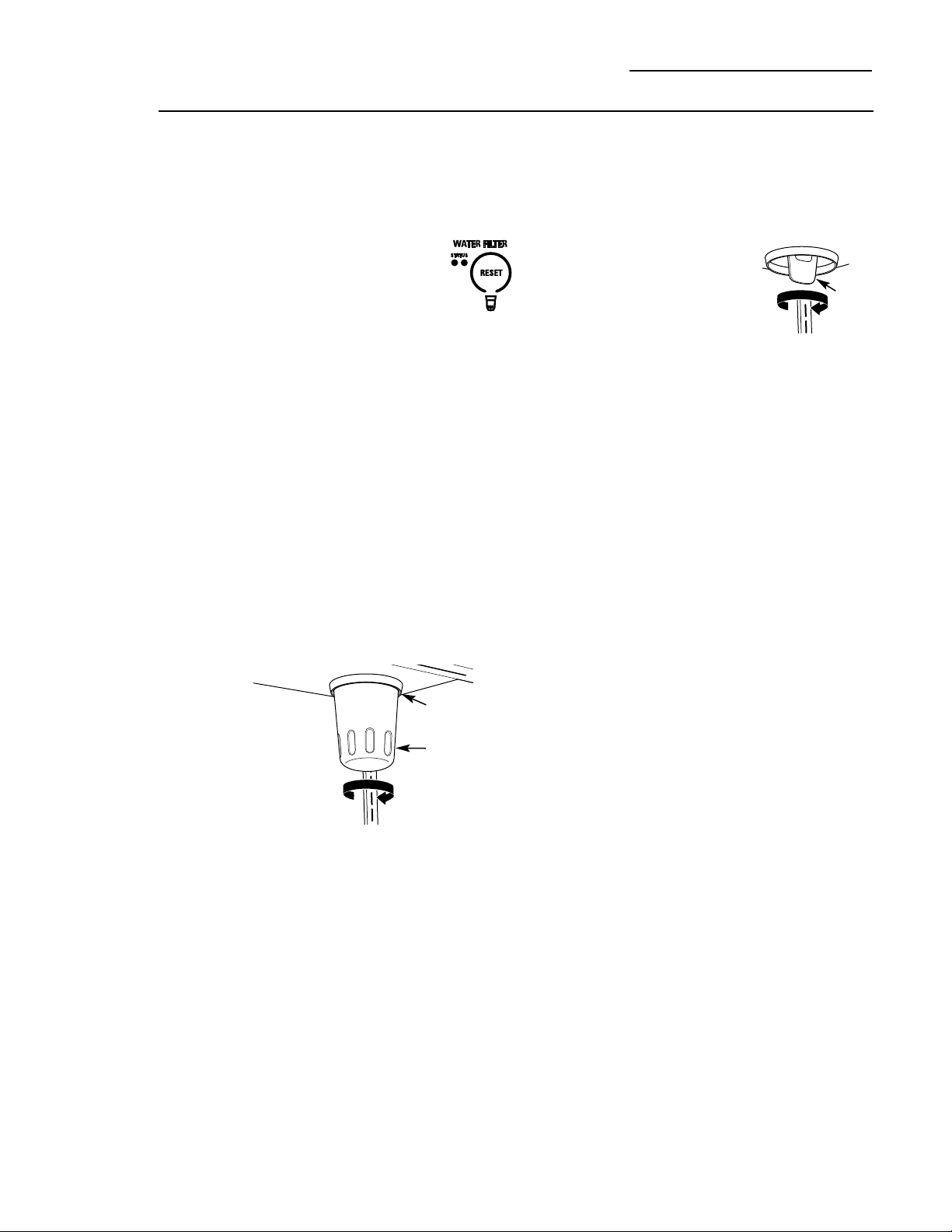
Slowly turn it to the right.
Do not overtighten.
Filter
Cartridge
The water filter cartridge is located in the
back upper right corner of the refrigerator
compartment.
To Replace the Filter:
The filter cartridge is designed
to filter 500 gallons of water
(lasting approximately 12 months).
It should be replaced when the
status light turns red or if you notice
the ice cubes getting hollow or small.
Installing the Filter Cartridge:
1. Remove the old cartridge by slowly turning
it to the left. A small amount of water may
drip down. Do not pull down on the cartridge.
2. Fill the new cartridge with water from the
tap to allow for better flow immediately after
installation.
3. Line up the arrow on the cartridge with the
center of the holder. Do not push it up into
the holder.
4. Slowly turn it to the right until the cartridge
stops. It will rotate about 1/4 turn. DO NOT
OVERTIGHTEN.
To Reset the Filter Status Light:
Press and hold the RESET pad for 3 seconds.
Filter Bypass Plug:
You must use the filter bypass plug:
a) if you have a household
reverse osmosis water system
b) if a replacement filter is not
available.
The icemaker and dispenser will not operate
without the filter or filter bypass plug installed.
Replacement Filters:
To order additional filters in the United States,
call GE Parts and Accessories, 800.626.2002.
GWF
Suggested Retail $34.95
Customers in Canada should consult the yellow
pages for the nearest Camco Service Center.
Filter
Bypass
Plug
Water Filter Cartridge
Built-In Refrigerators
10
Dispenser
with
glass-touch
controls
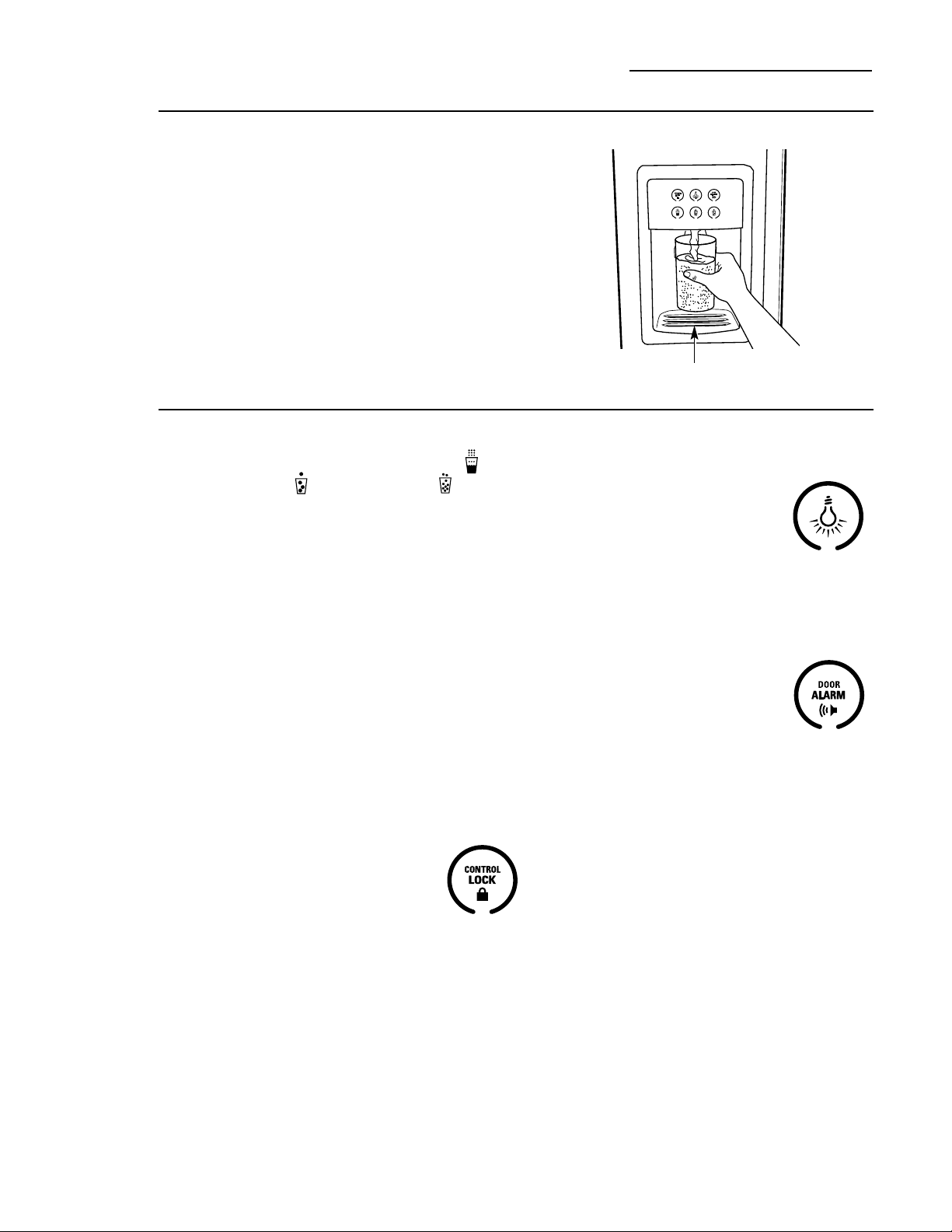
How it Works
The electronic controls on the dispenser are
truly interactive. The control panel is equipped
with a proximity sensor that causes the panel
to light up as you approach the dispenser
(approx. 2 inches). To make a selection,
simply touch the graphic for the feature you
want, and the halo for that feature will light
up. When you walk away from the refrigerator,
the lighted graphics switch off automatically.
Spill Shelf
Ice & Water Dispenser (on some models)
Built-In Refrigerators
How to Use
To dispense water or ice: select WATER ,
CUBED ICE or CRUSHED ICE .
Then press the glass gently against the
top of the dispenser cradle.
The spill shelf is not self-draining. To reduce
water spotting, the shelf and its grille should
be cleaned regularly.
If no water is dispensed when the refrigerator
is first installed, there may be air in the water
line system. Press the dispenser cradle for at
least two minutes to remove trapped air from
the water line and to fill the water system.
To flush out impurities in the water line,
throw away the first gallon of water.
CAUTION: Never put fingers
or any other objects into the ice crusher
discharge opening.
Locking the Dispenser:
Touch CONTROL LOCK for
3 seconds to lock the dispenser
and control pad. To unlock,
touch it again for 3 seconds.
Dispenser Light:
This feature turns the night light
on and off. The light also comes
on when the dispenser cradle is
pressed. If this light burns out,
it should be replaced with a 6 watt
12V maximum bulb. The bulb is
available through GE Parts and Accessories,
800.626.2002. Order part number WR02X10675.
Door Alarm:
To turn the Door Alarm feature
on, touch DOOR ALARM once.
To turn it off, press it again.
When the DOOR ALARM
is active, the alarm will flash and beep if you
keep the door open for more than 2 minutes.
11
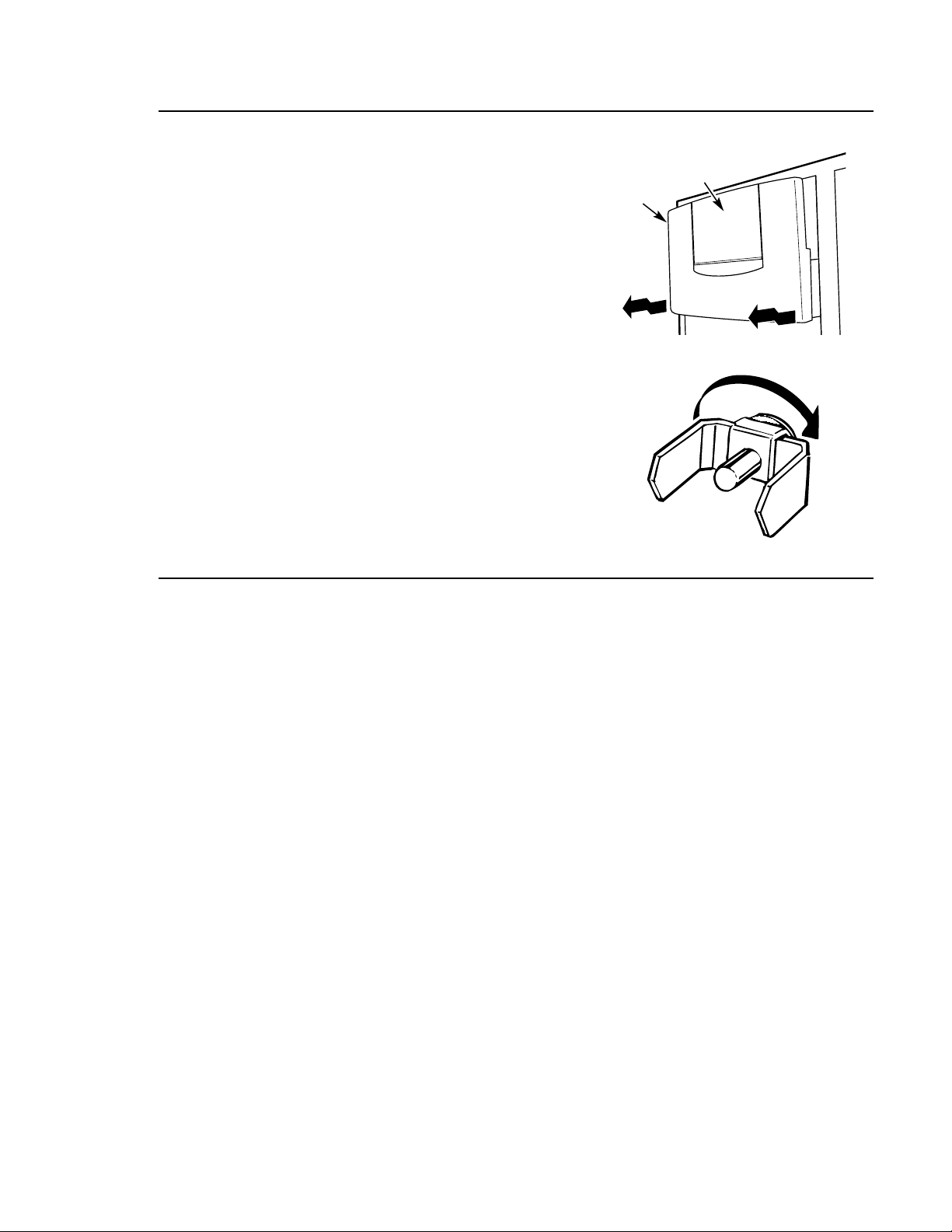
Ice storage
bin
To remove:
Lift up the access door to reach the icemaker.
Set the icemaker power switch to the O (off)
position. With the access door closed, support
the storage bin at the bottom while slightly
lifting. Pull bin straight out.
To replace:
Slide the bin back until the tab on the bin
locks into the slot on the shelf. If the bin
does not go all the way back, remove it and
rotate the drive mechanism 1/4 turn. Then
push the bin back again.
Important
facts about
your ice
& water
dispenser
• Do not add ice from trays or bags to the
storage bin. It may not crush or dispense well.
• Avoid overfilling glass with ice and use of
narrow or extra-tall glasses. Backed-up ice
can jam the chute or cause the door in the
chute to freeze shut. If ice is blocking the
chute, poke it through with a wooden spoon.
• Beverages and foods should not be
quick-chilled in the ice storage bin.
Cans, bottles or food packages in the
storage bin may cause the icemaker
or auger to jam.
• To keep dispensed ice from missing
the glass, put the glass close to, but not
touching, the dispenser opening.
• Some crushed ice may be dispensed even
though you selected CUBES. This happens
occasionally when a few cubes accidentally
get directed to the crusher.
• After crushed ice is dispensed, some water
may drip from the chute.
• Sometimes a mound of snow will form on
the door in the ice chute. This condition is
normal and usually occurs when you have
dispensed crushed ice repeatedly. The snow
will eventually evaporate.
• Dispensed water is not ice cold. For colder
water, simply add crushed ice or cubes
before dispensing water.
• The first glass of water dispensed may be
warmer than the following ones. This is
normal.
• To eliminate drips on the spill shelf, tilt the
glass in slightly when dispensing water.
Rotate
Drive
Mechanism
Ice Storage Bin
Access Door
12
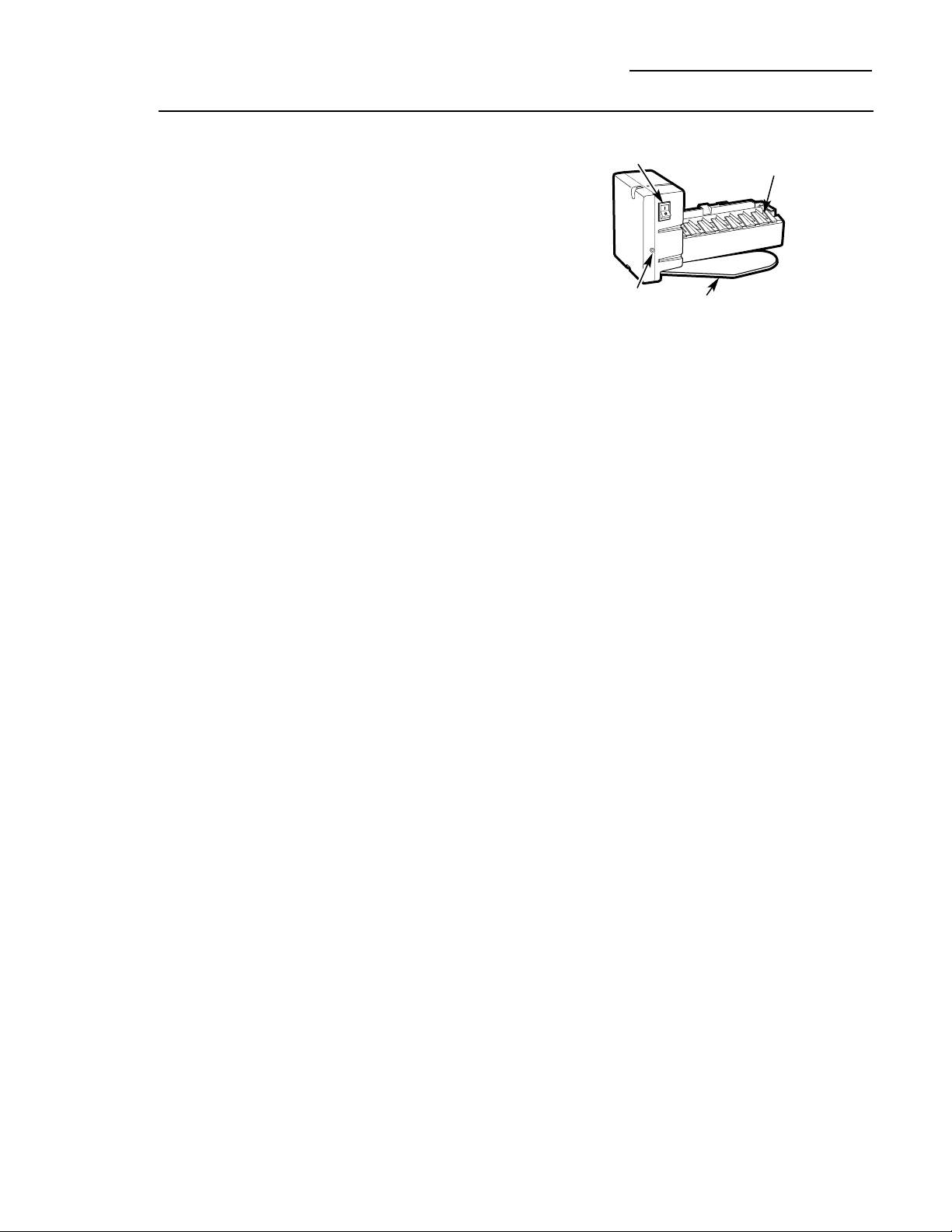
Automatic
icemaker
A newly-installed refrigerator may take
12–24 hours to begin making ice.
The icemaker will produce seven cubes per
cycle—approximately 15 cycles in a 24-hour
period, depending on freezer compartment
temperature, room temperature, number of
door openings and other use conditions.
If the refrigerator is operated before the water
connection is made to the icemaker, set the
power switch to O (off).
When the refrigerator has been connected
to the water supply, set the power switch to
I
(on). The green light will come on.
Throw away the first full bucket of ice.
Be sure nothing interferes with the sweep
of the feeler arm.
When the bin fills to the level of the feeler
arm, the icemaker will stop producing ice.
It is normal for several cubes to be joined
together.
If ice is not used frequently, old ice cubes
will become cloudy, taste stale and shrink.
After the icemaker has been turned on again,
there will be a delay of about 45 minutes
before the icemaker resumes operations.
NOTE: In homes with lower-than-average
water pressure, you may hear the icemaker
water valve cycle on several times when
making one batch of ice.
Automatic Icemaker
Built-In Refrigerators
Icemaker
Feeler Arm
Power Switch
Green Power
Light
13
Climate
Control
drawer
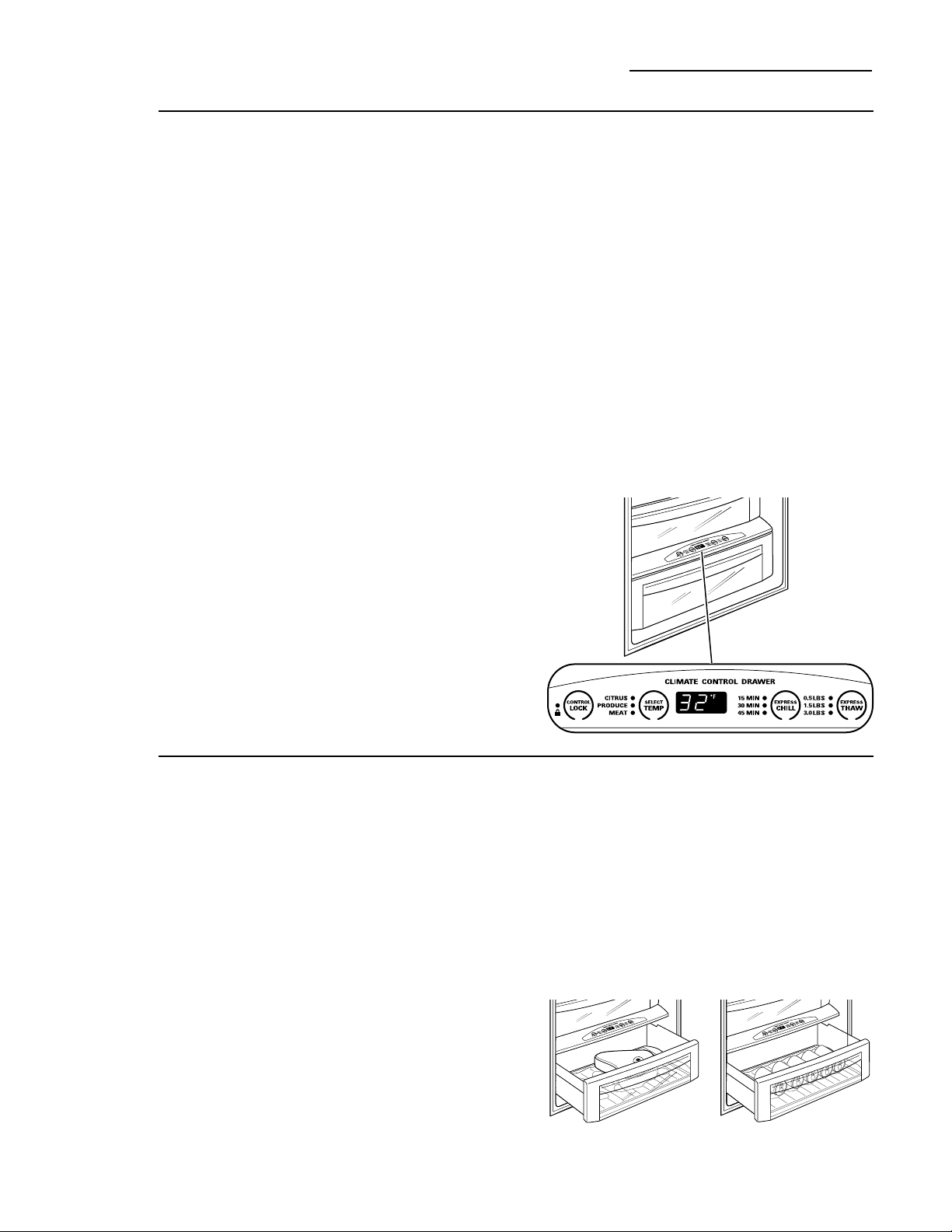
How it Works
The Climate Control feature is a system of
dampers, a fan, a temperature thermistor,
a heater and a specially designed tray.
The Climate Control drawer can be used
to chill items quickly, thaw foods quickly or
store items at their optimum temperatures.
The drawer is tightly sealed to prevent the
drawer’s temperature from causing temperature
fluctuations in the rest of the refrigerator.
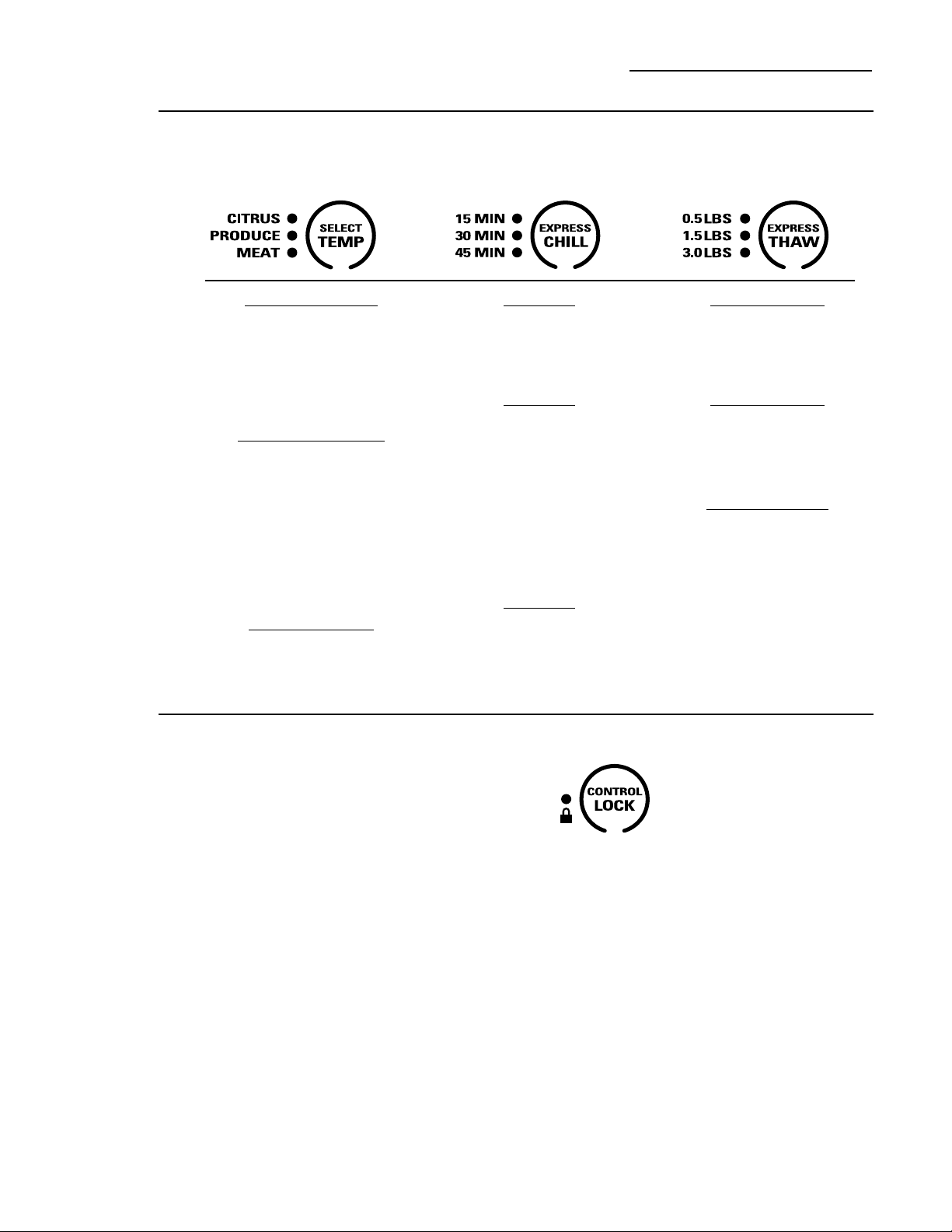
SELECT TEMP—Use this feature to store
items at their optimum temperatures.
The CITRUS setting will maintain a drawer
temperature of 43°F by cycling a small
heater off and on as needed. The PRODUCE
setting will maintain the drawer temperature
at 34°F by drawing in additional cold air as
needed. The MEAT setting will maintain the
drawer temperature at 32°F by drawing in
additional cold air as needed.
EXPRESS CHILL—This feature can be used
to cool items in minutes, rather than hours.
Extra cool air is circulated throughout the
drawer. Once the cycle is complete, the
drawer will revert to the pre-set fresh food
temperature.
EXPRESS THAW—This feature thaws items
in hours rather than days. Food is gently
thawed in a cool environment by circulating
air throughout the drawer. Temperature is
maintained in the drawer by cycling a small
heater off and on as needed. Once the thaw
cycle is complete, the pan will automatically
adjust to a temperature of 32°F to store the
food at its optimum temperature.
Climate Control Tray—Besides using the
specially designed Climate Control tray
when using the drawer, it can also be used
as a chilled serving tray to keep foods cold.
NOTE: By turning the controls on the Climate
Control drawer off, the drawer can be used as a
standard sealed produce pan. The temperature
inside the drawer will be the same as the fresh
food compartment.
How to Use
1 Empty the drawer. Place the tray in the
drawer. Place the items on the tray and
close the drawer completely.
2 Select the Express Thaw,™ Express Chill™ or
Select Temp™ pad. The display will come on.
Press the pad until the light appears next
to the desired setting. Use the chart on the
next page to determine the best setting.
• To stop a feature before it is finished,
press that feature’s pad until no options
are selected and the display is off.
• During Express Thaw™ and Express Chill,™
the display on the controls will count
down the time remaining in the cycle.
• After the Express Thaw™ cycle is
complete, the drawer will reset to the
MEAT setting (32°F) to help preserve
thawed items until they are used.
• The displayed actual temperature of the
Climate Control drawer may vary slightly
from the SET temperature based on usage
and operation environment.
NOTE: For food safety reasons, it is
recommended that foods be wrapped in
plastic wrap when using Express Thaw.™
This will help contain meat juices and
improve thawing performance.
Express Thaw™
Express Chill™
Climate Control Drawer
Built-In Refrigerators
14
Citrus Setting (43°F)
• Oranges, Lemons, Limes,
Pineapple, Cantaloupe
• Beans, Cucumbers,
Tomatoes, Peppers,
Eggplant, Squash
Produce Setting (34°F)
• Strawberries, Raspberries,
Kiwifruit, Pears, Cherries,
Blackberries, Grapes, Plums,
Nectarines, Apples
• Asparagus, Broccoli, Corn,
Mushrooms, Spinach,
Cauliflower, Kale, Green
Onions, Beets, Onions
Meat Setting (32°F)
• Raw Meat, Fish and Poultry
15 Minutes
• 1 Beverage Can (12 oz)
• 2 Small Juice Boxes
(6–8 oz each)
30 Minutes
• Wine (750 ml bottle)
• 2 to 6 Beverage Cans
(12 oz each)
• 2 Plastic 20 oz Bottles of
Beverage
• 4 to 6 Small Juice Boxes
(6–8 oz each)
• 3 Foil Juice Packets
45 Minutes
• 2 Liter of Beverage
• 1/2 Gallon of Juice
• Gelatin—1 package
0.5 Lbs. (4 hours)
• Individually Wrapped
Filet Mignon (0.5 lb)
• Hamburger Patties (0.5 lb)
1.5 Lbs. (8 hours)
• Chicken Breasts (1.5 lbs)
• Ground Beef (1.5 lbs)
• Steak (1.5 lbs)
3.0 Lbs. (12 hours)
• Chicken Breasts (3.0 lbs)
• Ground Beef (3.0 lbs)
• Steak (3.0 lbs)
Climate
Control
chart
NOTE: Results may vary depending on packaging, starting temperature and other food traits.
Climate Control Drawer
Built-In Refrigerators
Control
lock
Control Lock
Press and hold this pad for 3 seconds to
lock the settings for the Climate Control
drawer. To unlock, press and hold for
another 3 seconds.
15
• Artichokes
• Asparagus
• Beets, topped
• Blueberries
• Carrots
• Celery
• Cherries
• Corn
• Cucumbers
• Currants
• Greens, leafy
• Lettuce
• Parsley
• Peas, green
• Radishes
• Rhubarb
• Spinach
• Tomatoes, ripe
• Broccoli
• Brussels sprouts
• Cabbage
• Cauliflower
• Green onions
• Parsnips
• Turnips
Sealed
deli pan
Use the Sealed Deli Pan for the convenient
storage of lunch meats and cheese, hors
d’oeuvres, spreads and snacks. The pan and
shelf to which it is attached can be adjusted
to any height.
Storage Pans
Built-In Refrigerators
Sealed
produce
pans
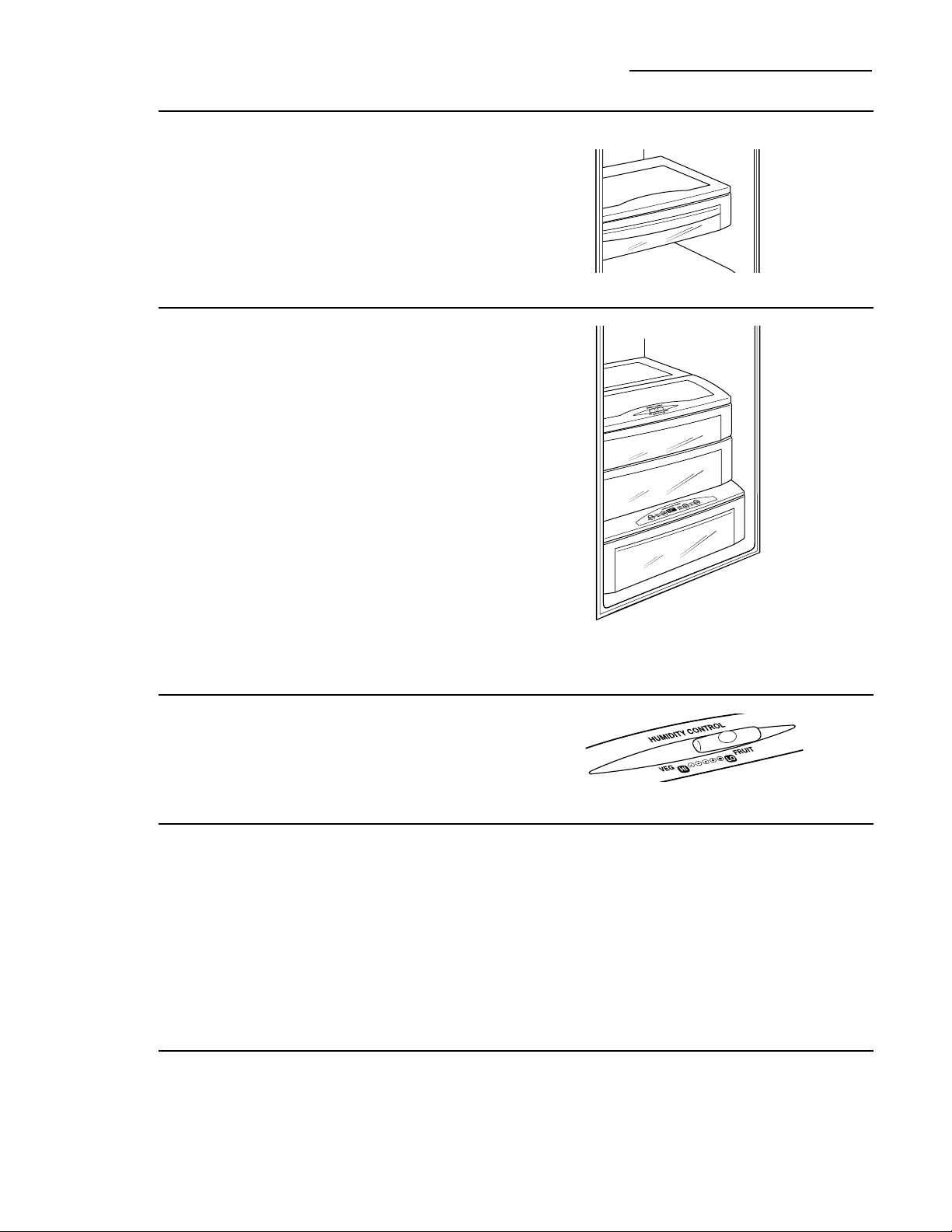
The top pan has adjustable humidity levels for
the higher humidity levels required by most
vegetables and lower humidity levels required
for most fruits.
The second pan is designed to provide
constant high humidity levels.
Make sure the drawers are closed completely
to maintain the correct humidity level.
NOTE: The Climate Control drawer can be
used as another sealed produce pan by turning
the controls on the Climate Control drawer off.
The temperature inside the drawer will be the
same as the fresh food compartment.
How long produce can be stored will depend
upon the type of food and its condition when
placed in the pans.
Adjustable
humidity
control
Slide the control all the way to the VEG (HI)
setting to provide high humidity. Slide the
control all the way to the FRUIT (LO) setting
to provide lower humidity levels.
High
humidity
storage
Storing unwrapped foods in a high humidity
environment keeps foods fresh by retaining
the natural moisture content of foods such as:
As in any refrigerated storage area, it is
recommended that foods with strong odors
be stored wrapped—foods such as:
• Apples
• Apricots
• Grapes
• Mushrooms
• Nectarines
• Oranges
• Peaches
• Pears
• Raspberries
• Squash,
summer
• Strawberries
• Tangerines
Low
humidity
storage
Lower humidity storage should be used for
items such as:
16
Drawer
and pan
removal
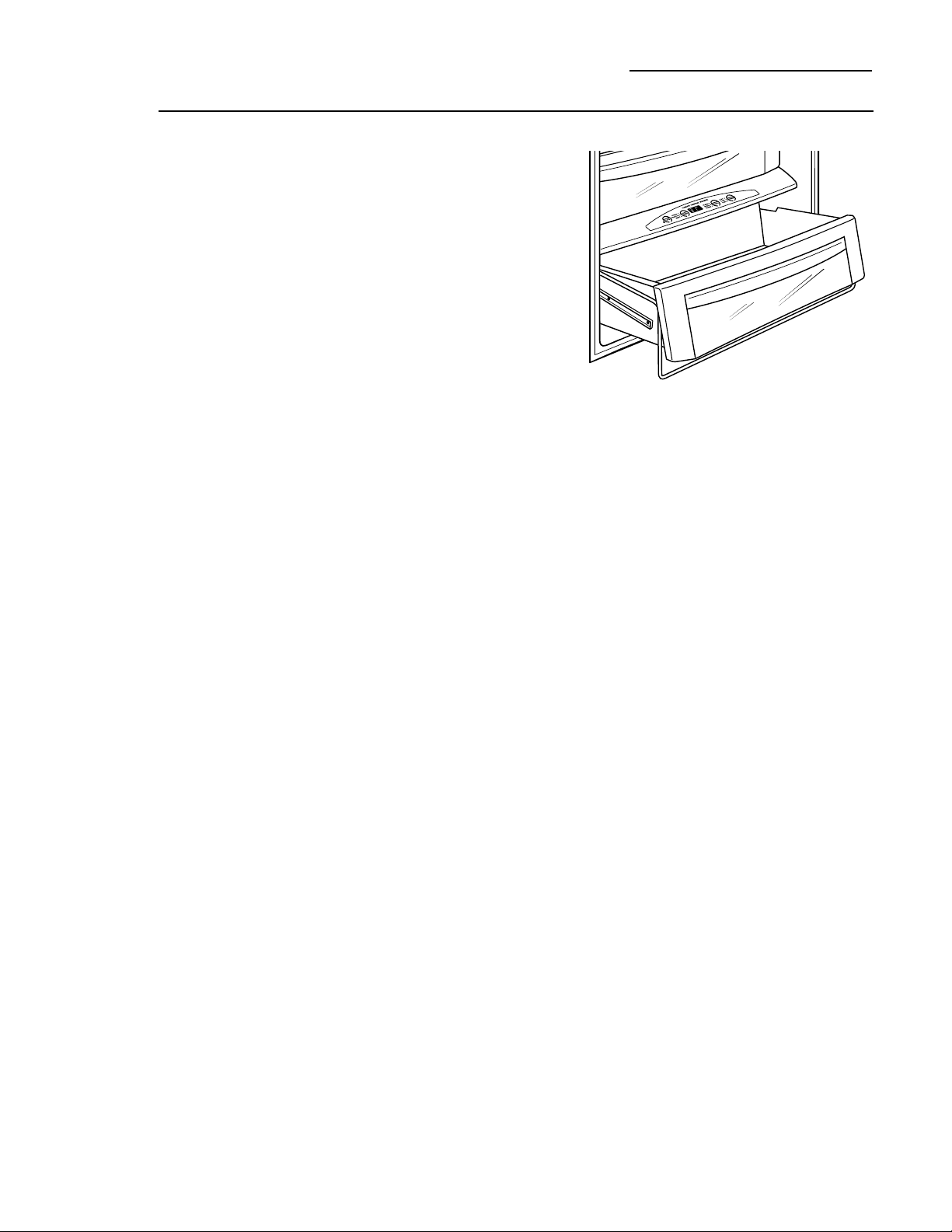
To remove a drawer or pan:
1. Pull the pan out to the stop position.
2. Lift the front of the pan up and out of
the wire holder.
3. Lift the back of the pan up and out.
To replace a pan:
1. Place the back of the pan in the wire holder,
making sure the wire holder fits into the
grooves on the back of the pan.
2. Lower the front of the pan into the wire
holder.
3. Press firmly on the top of the pan to snap it
into the wire holder.
Climate Control Drawer and Storage Pans
Built-In Refrigerators
17
How to
rearrange
your shelves
Tempered glass shelves in the fresh food
compartment and wire shelves in the freezer
compartment are adjustable, enabling you to
make efficient shelf arrangements to fit your
family’s food storage needs.
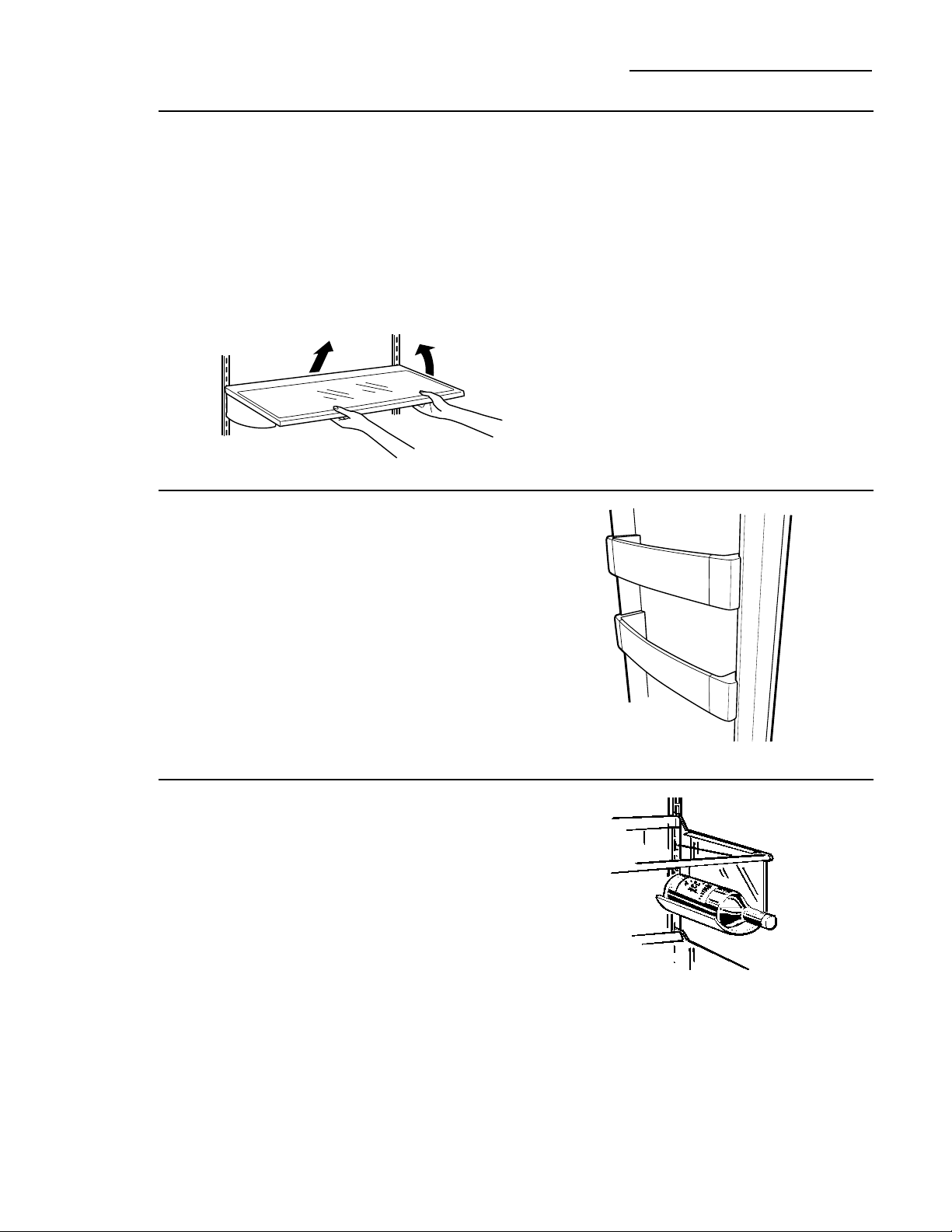
To remove shelves:
Tilt shelf up at front, then lift it up and out
of tracks on rear wall of refrigerator.
To replace shelves:
Select desired shelf height. With shelf front
raised slightly, engage top lugs in tracks at rear
of cabinet. Then lower front of shelf until it
locks into position.
Shelves and Bins
Built-In Refrigerators
Door bins
All door bins, except for the deep gallon door
bin, are adjustable and can be moved up and
down to meet your storage needs. The deep
gallon door bin can be removed for cleaning.
To remove any bin:
Lift the bin up and slide it toward you.
Removable
wine rack
The rack can be attached to the left or
right side of any shelf. It is designed to hold
a bottle, including a 2 liter bottle, on its side.
18
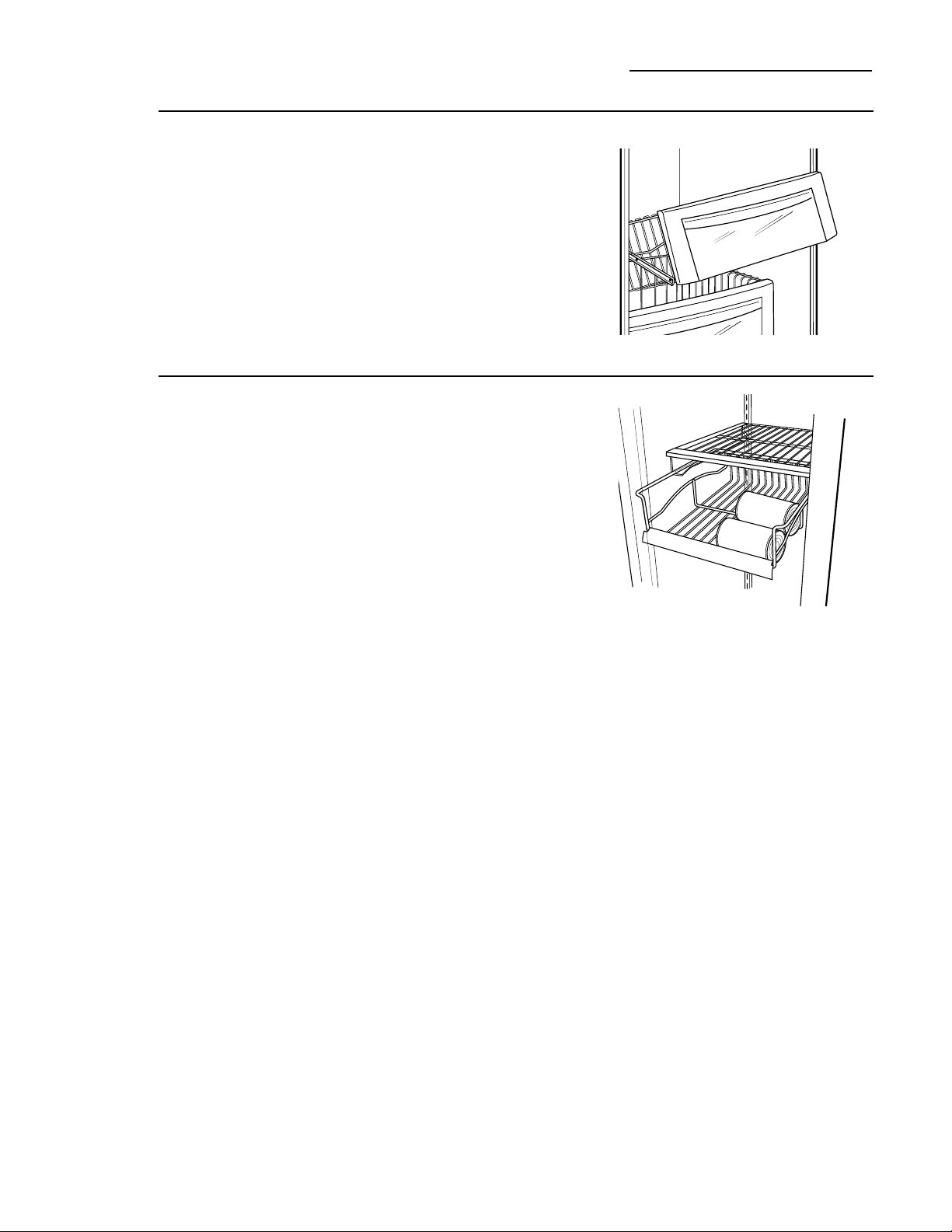
Freezer
baskets
Wire slide-out freezer baskets can be pulled out
for easy access to frozen foods.
To remove:
Pull basket out. Lift the front of the basket up
and then take it out.
Shelves and Bins
Built-In Refrigerators
Freezer
juice rack
This slide-out rack can be used to easily access
frozen juices or foods.
19
Cleaning
outside
The spill shelf and the
area beneath it should
be cleaned periodically
with a mild liquid dish
detergent.
Dispenser cradle—Before cleaning, lock the
dispenser by touching CONTROL LOCK for
3 seconds to prevent activating the dispenser.
Clean with warm water and a mild liquid
dish detergent. Rinse thoroughly and
wipe dry. Unlock the dispenser by touching
CONTROL LOCK for 3 seconds.
Door handles and trim—Clean with a cloth
dampened with soapy water. Dry with a soft
cloth.
Keep the outside clean. Wipe with a clean
cloth lightly dampened with mild liquid dish
detergent. Dry with a clean, soft cloth.
Do not wipe the refrigerator with a soiled
dish cloth or wet towel. These may leave
a residue that can damage the finish. Do not
use scouring pads, powdered cleaners, bleach
or cleaners containing bleach because these
products can scratch and damage the finish.
Stainless steel—Regularly clean and polish
the Stainless Steel Door Panels and Handles
(on some models) with a commercially
available stainless steel cleaner such as Stainless
Steel Magic™ to preserve and protect the fine
finish. Stainless Steel Magic is available through
GE Parts and Accessories, 800.626.2002, or
GEAppliances.com. Order part number
WX10X15.
Do not use appliance wax or polish on the
stainless steel.
Care and Cleaning
Built-In Refrigerators
Cleaning
inside
Turn off power at the circuit breaker or
fuse box before cleaning. If this is not
practical, wring excess moisture out of
sponge or cloth when cleaning around
switches, lights or controls.
Use warm water and baking soda solution—
about a tablespoon (15 ml) of baking soda
to a quart (1 liter) of water. This both cleans
and neutralizes odors. Thoroughly rinse
and wipe dry.
Other parts of the refrigerator—including
door gaskets, meat and vegetable drawers,
ice storage bin and all plastic parts—can be
cleaned the same way.
Do not wash any plastic refrigerator parts
in the dishwasher.
Do not wash the aluminum Climate Control
tray in the dishwasher. The aluminum will
discolor in the dishwasher.
Avoid cleaning cold glass shelves with hot water
because the extreme temperature difference
may cause them to break. Handle glass shelves
carefully. Bumping tempered glass can cause it
to shatter.
WARNING –Halogen lights
generate intense heat. Be certain power is off
and lamps have sufficient time to cool before
attempting to replace.
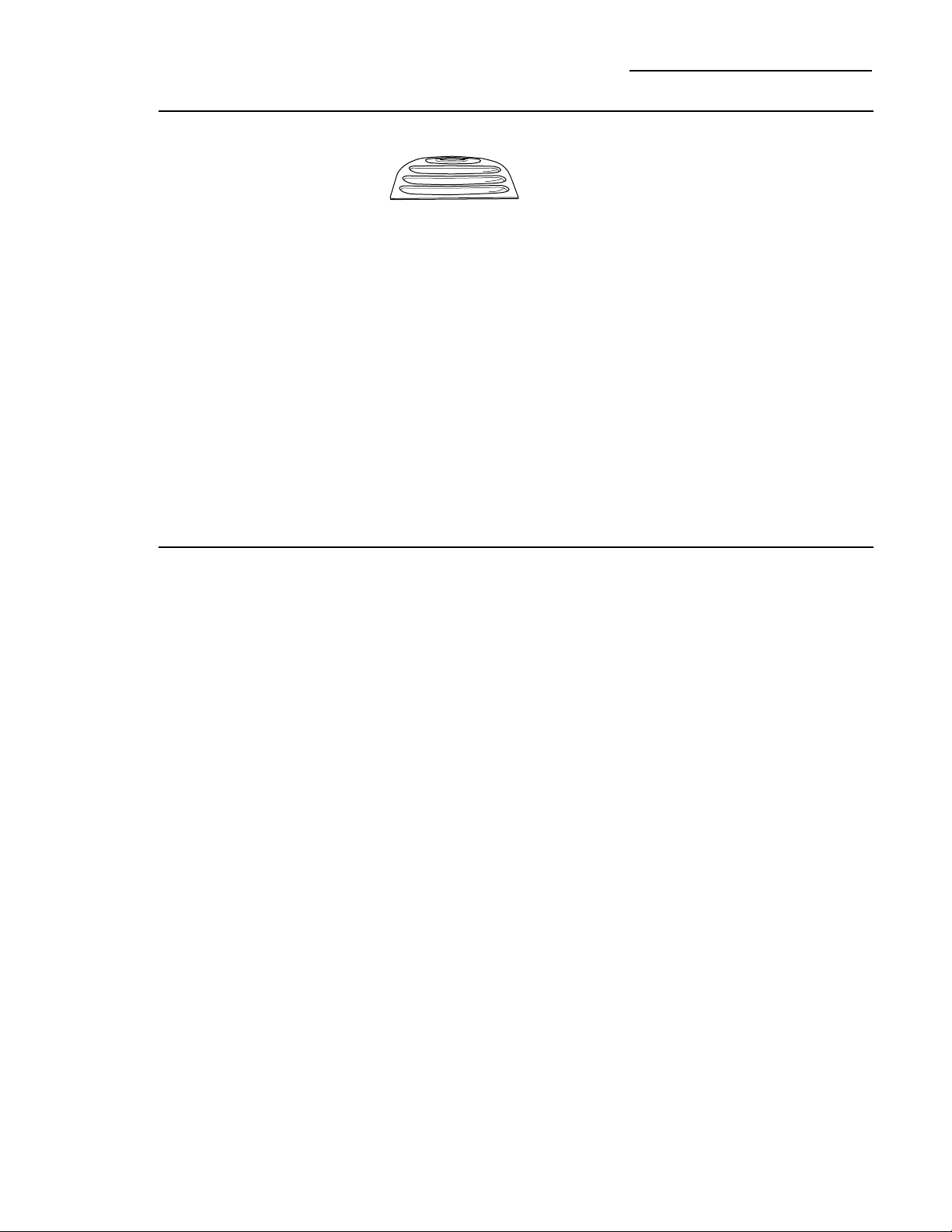
Power to the lamps can be turned off at the
Master Light switch located behind the grille
panel at the top of the refrigerator.
Turning the temperature control to OFF
does NOT remove power to the light circuits.
AVERTISSEMENT :
Les ampoules halogènes produisent une
chaleur intense. Assurez-vous de bien couper
le courant et de laisser suffisamment de temps
aux ampoules pour leur permettre de se
refroidir avant d’essayer de les remplacer.
Vous pouvez couper le courant en utilisant
le commutateur de lumière principale situé
derrière le panneau grillagé en haut du
réfrigérateur.
Vous NE COUPEZ PAS l’alimentation
électrique du réfrigérateur des circuits de
lumières en mettant le bouton de contrôle
de température en position OFF (arrêt).
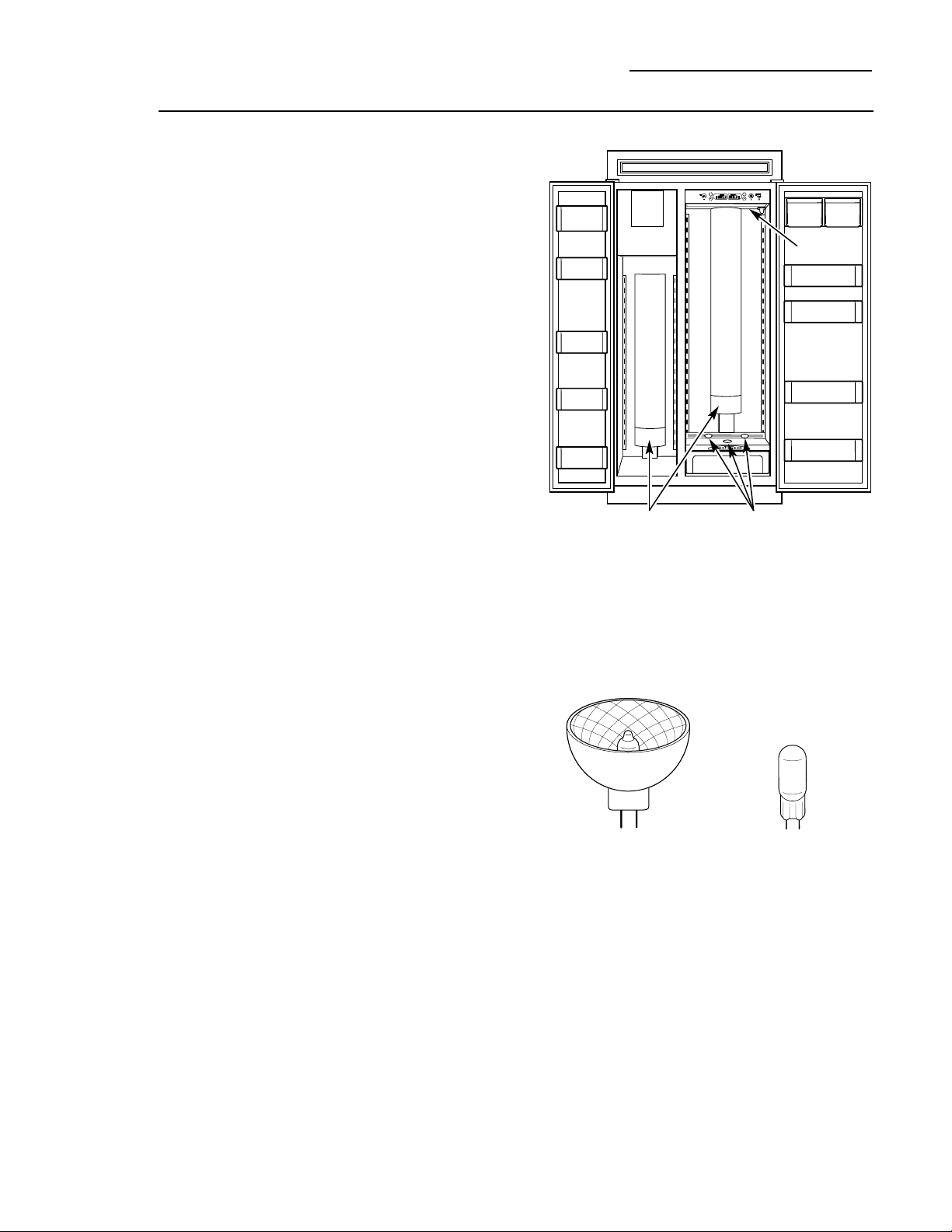
The refrigerator uses two types of halogen
bulbs:
Type 1 The columns along the back wall
of the fresh food and freezer
compartments are lit up by lamps
located behind the top pan in the
fresh food compartment and the
bottom basket in the freezer
compartment.
Type 2 These lamps are located inside the
light shield at the top of the fresh food
compartment and on top of the
Climate Control drawer at the bottom
of the fresh food compartment.
Type 1 bulbs have a life expectancy of
about 2000 hours. Type 2 bulbs have a life
expectancy of about 2000 hours. However,
if the bulbs do need to be replaced, they
can be purchased at hardware, general retail
and home improvement stores or through
GE Parts and Accessories, 800.626.2002.
20
Light bulb
replacement
Care and Cleaning
Built-In Refrigerators
Type 2
Type 1
Type 1
This is a 35 watt, 12 volt,
Type MR11 bulb.
If ordering through
GE Parts and Accessories,
order part WR02X11183.
Type 2
This is a 20 watt, 12 volt,
Type T bulb.
If ordering through
GE Parts and Accessories,
order part WR02X11184.
Type 2
21
Using
the Master
Light switch
This feature turns off the lights in the fresh
food and freezer compartments.
The switch is located behind the grille panel
at the top of the refrigerator. Lift up the panel
to access the switch.
The switch is located
behind the grille panel.
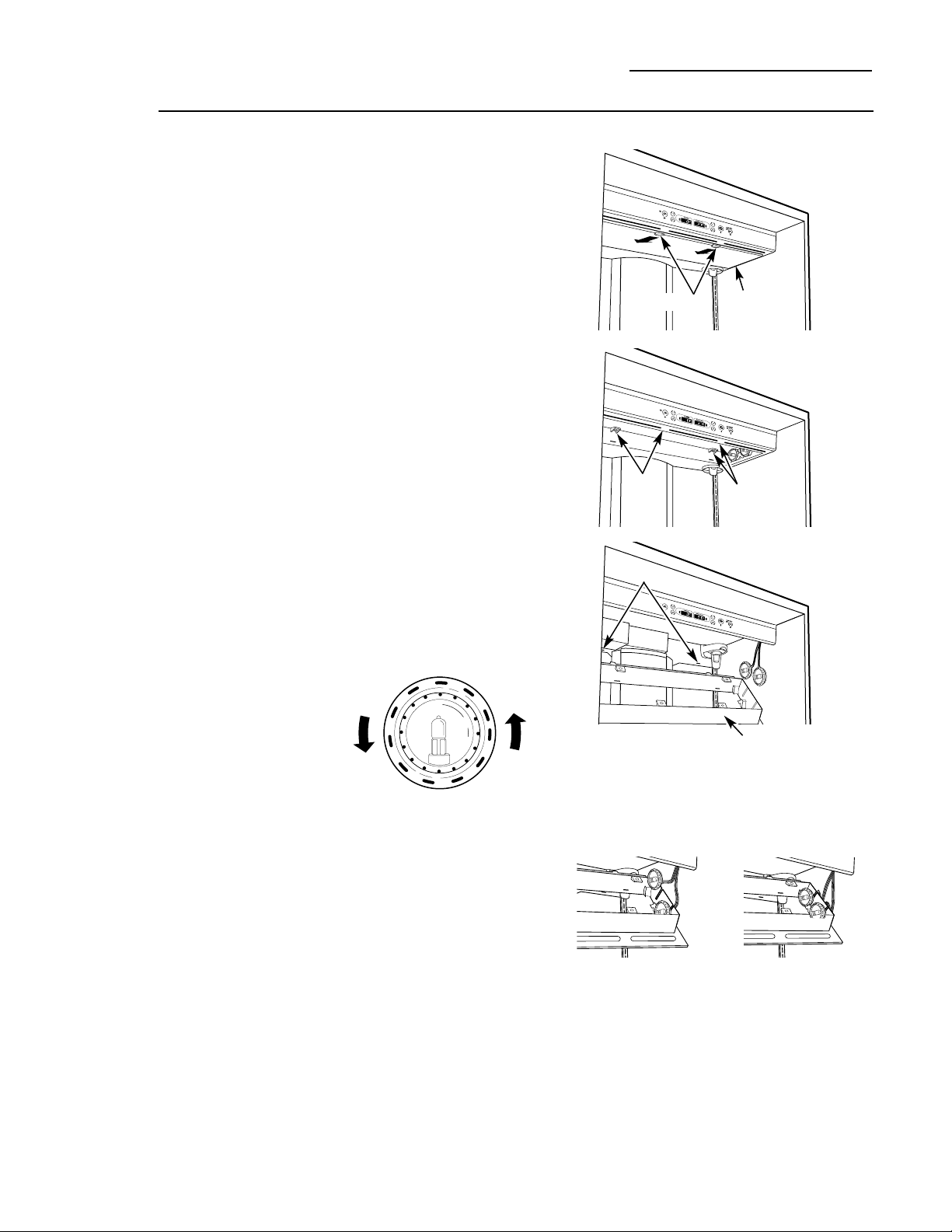
Type 1 bulb
replacement
NOTE: Before replacing the bulbs, review
the light bulb information and WARNING
on page 20.
Replacing Type 1 bulbs located in lamps
behind the top pan in the fresh food
compartment and the bottom freezer basket
in the freezer compartment:
1. Set the Master Light switch to the OFF
position (see Using the Master Light switch)
and allow the lamps to cool.
2. To access the lamps in the fresh food
compartment, remove the top pan.
See Drawer and Pan Removal section.
2. To access the lamps in the freezer
compartment, remove the bottom freezer
basket. See Freezer Baskets section.
3. On the back wall there is a curved light
shield. Grasp each end of the light shield.
Pull the shield toward you and the tabs
on the shield will release from the slots in
the housing.
4. Remove the glass above the bulbs by pulling
it straight out.
NOTE: Always follow bulb manufacturer’s
directions for handling and replacing bulbs.
5. Remove the bulb by holding the base and
pulling straight up. Replace with a new bulb.
6. Replace the glass by sliding it into place.
Then replace the light shield by resting the
top lip of the shield on top of the light
housing. Then press the sides until the tabs
pop into the slots in the housing.
WARNING –The light shield must
be replaced or the heat from the bulb could
damage the refrigerator.
AVERTISSEMENT :
Vous devez remettre en place l’écran à lumière
pour ne pas endommager votre réfrigérateur
avec la chaleur produite par l’ampoule.
7. Reset the Master Light switch to the ON
position.
Light Shield
NOTE: Before replacing the bulbs, review
the light bulb information and WARNING
on page 20.
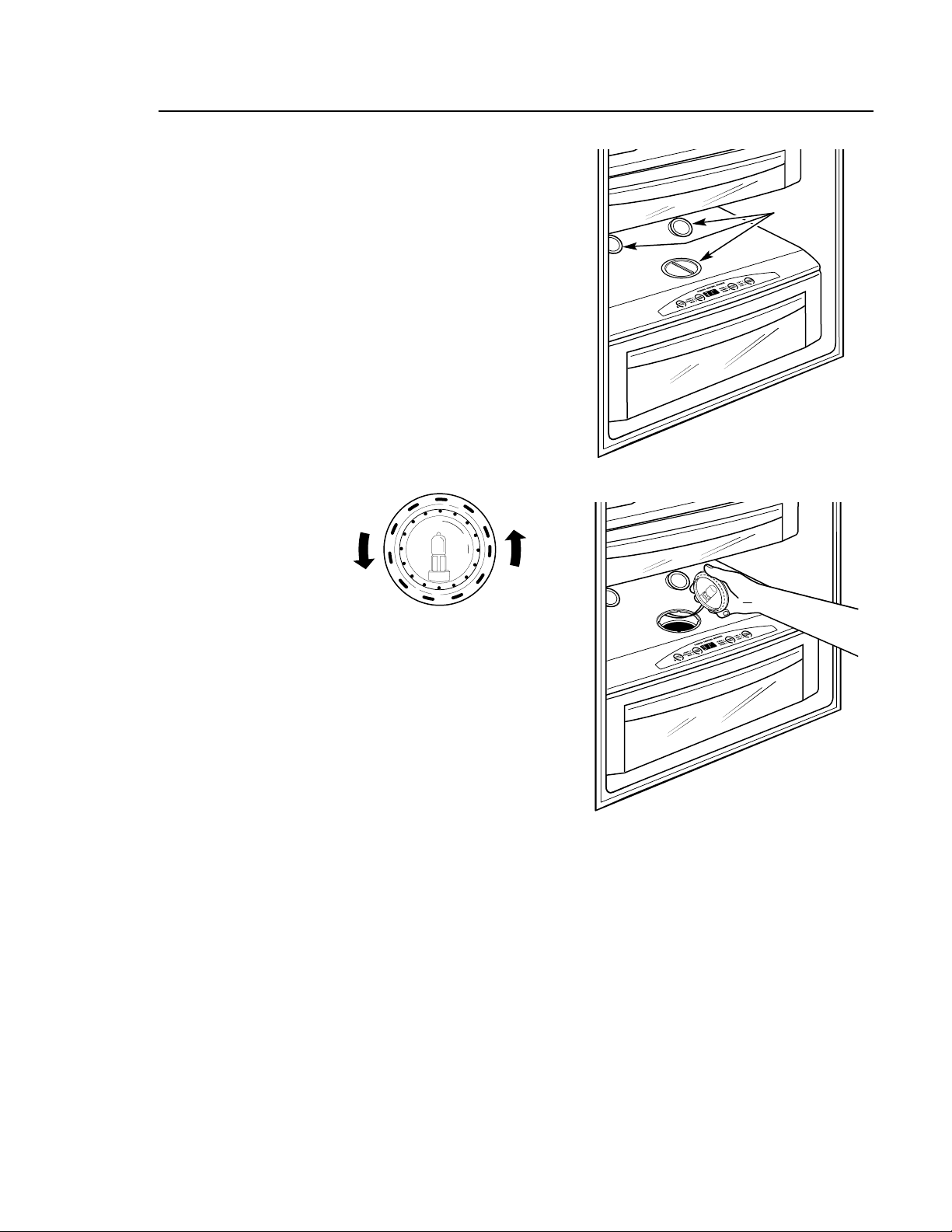
Replacing Type 2 bulbs in lamps located inside
the light shield at the top of the fresh food
compartment:
1. Set the Master Light switch to the OFF
position (see Using the Master Light switch)
and allow the lamps to cool.
2. If the Water Filter Cartridge is installed,
remove it and replace with the filter
bypass plug.
3. Holding the light shield with one hand,
rotate the support tabs until they clear the
front of the light shield. Then push back on
the light shield, lower the shield at the front
and take out.
4. Remove the 4 screws securing the light
housing to the ceiling. There are two screws
at the front and two at the back.
5. Lower the light housing at the front, then
pull it toward you so the tabs at the back of
the light housing come out of the slots on
the back wall. The lamp assemblies will
release from the holders.
6. Turn the lamp
protector to
access the bulb.
NOTE: Always follow bulb manufacturer’s
directions for handling and replacing bulbs.
7. Remove the bulb by holding the base and
pulling straight out. Replace with a new bulb
and replace the lamp protector.
WARNING –Lamp protectors
must be replaced or the heat from the bulb
could damage the refrigerator.
AVERTISSEMENT :
Vous devez remettre en place les écrans
protecteurs des ampoules pour ne pas
endommager votre réfrigérateur avec la
chaleur produite par les ampoules.
8. Holding up the light housing, place each
lamp assembly in its holder. Feed the
attached wires through the slots and tuck
the wires outside the side of the light
housing.
9. Insert the tabs on the back of the light
housing in the slots on the back wall.
Raise the light housing into position and
secure with the four screws.
10. Replace the light shield and rotate the
support tabs back out so they support the
front of the shield.
11. Remove the filter bypass plug and replace
with the Water Filter Cartridge. Reset the
Master Light switch to the ON position.
22
Type 2 bulb
replacement
Care and Cleaning
Built-In Refrigerators
Upper light
shield
Screws
Screws
Slots
Light housing
Support tabs
23
Type 2 bulb
replacement
NOTE: Before replacing the bulbs, review
the light bulb information and WARNING
on page 20.
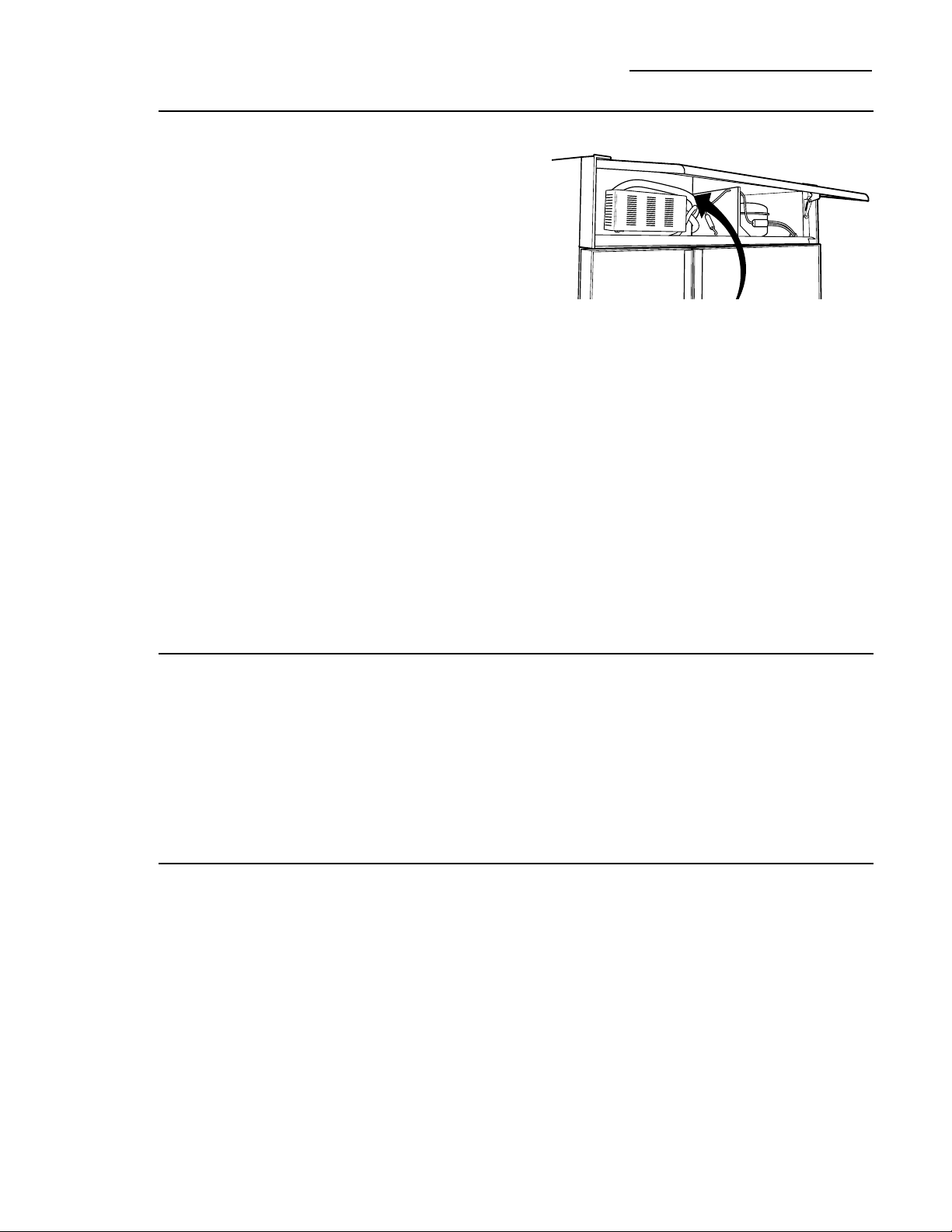
Replacing Type 2 bulbs in lamps located in the
top of the Climate Control drawer:
1. Set the Master Light switch to the OFF
position (see Using the Master Light switch)
and allow the lamps to cool.
2. To access the lamps, remove the second
produce pan. See Drawer and Pan Removal
section.
3. The lamps at the back, that face up, can be
lifted out. To access the lamp that shines
into the Climate Control drawer, twist the
holder until the arrow points towards the
back of the refrigerator, then lift up.
4. Turn the lamp
protector to
access the bulb.
NOTE: Always follow bulb manufacturer’s
directions for handling and replacing bulbs.
5. Remove the bulb by holding the base and
pulling straight out. Replace with a new bulb
and replace the lamp protector.
WARNING –Lamp protectors
must be replaced or the heat from the bulb
could damage the refrigerator.
AVERTISSEMENT :
Vous devez remettre en place les écrans
protecteurs des ampoules pour ne pas
endommager votre réfrigérateur avec la
chaleur produite par les ampoules.
6. Reset the Master Light switch to the ON
position.
Lower lamp
assemblies
Climate Control drawer lamp
24
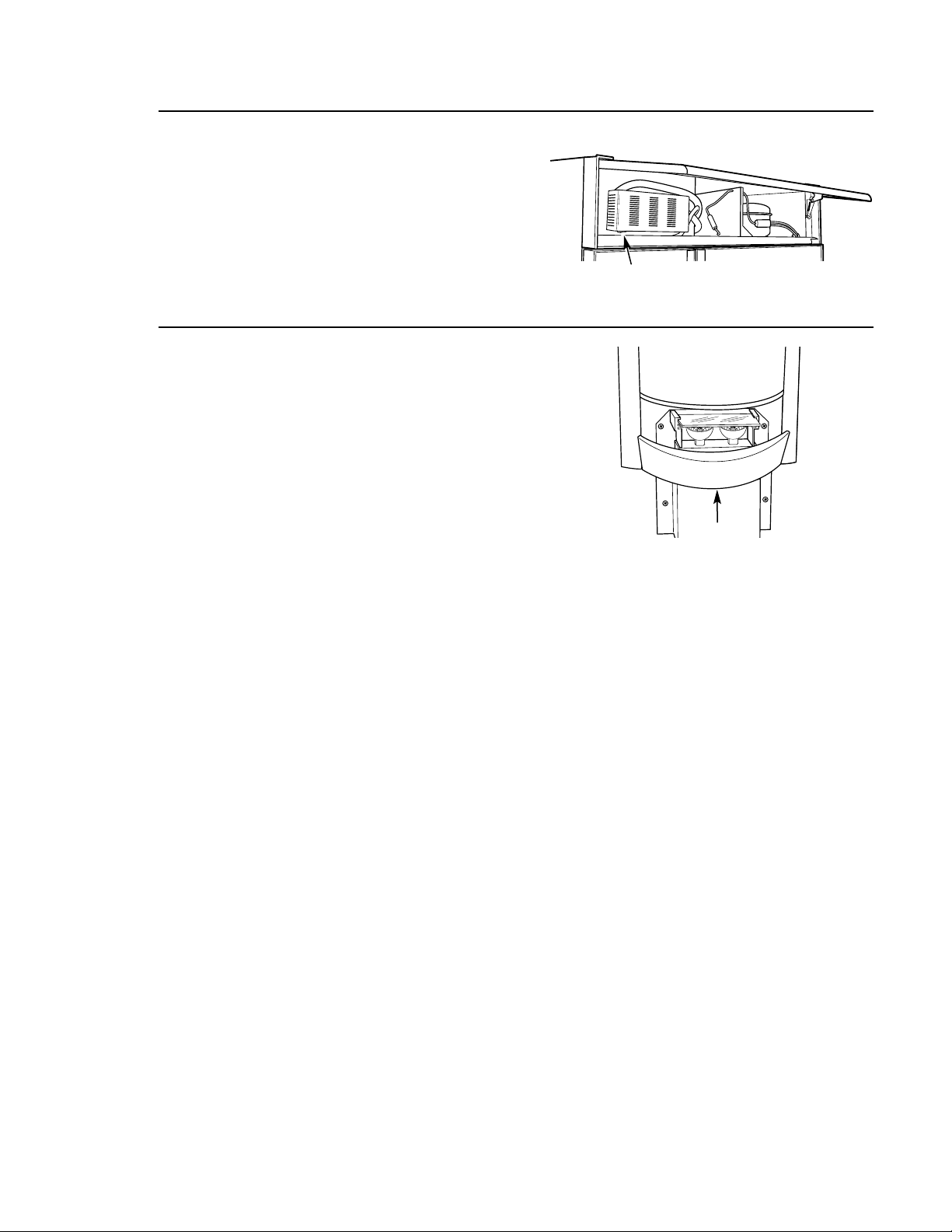
Cleaning the
condenser
There is no need for routine condenser
cleanings in normal home operating
environments. However, in environments
that may be particularly dusty or greasy,
the condenser should be cleaned (at least
annually) for efficient refrigerator operation.
To clean the condenser:
w WARNING:
The condenser fins have sharp edges. Wear
a long-sleeved shirt and gloves to safely clean
the condenser.
1. Turn off the power at the circuit breaker
or fuse box. Wait about 30 minutes for
the condenser area to cool.
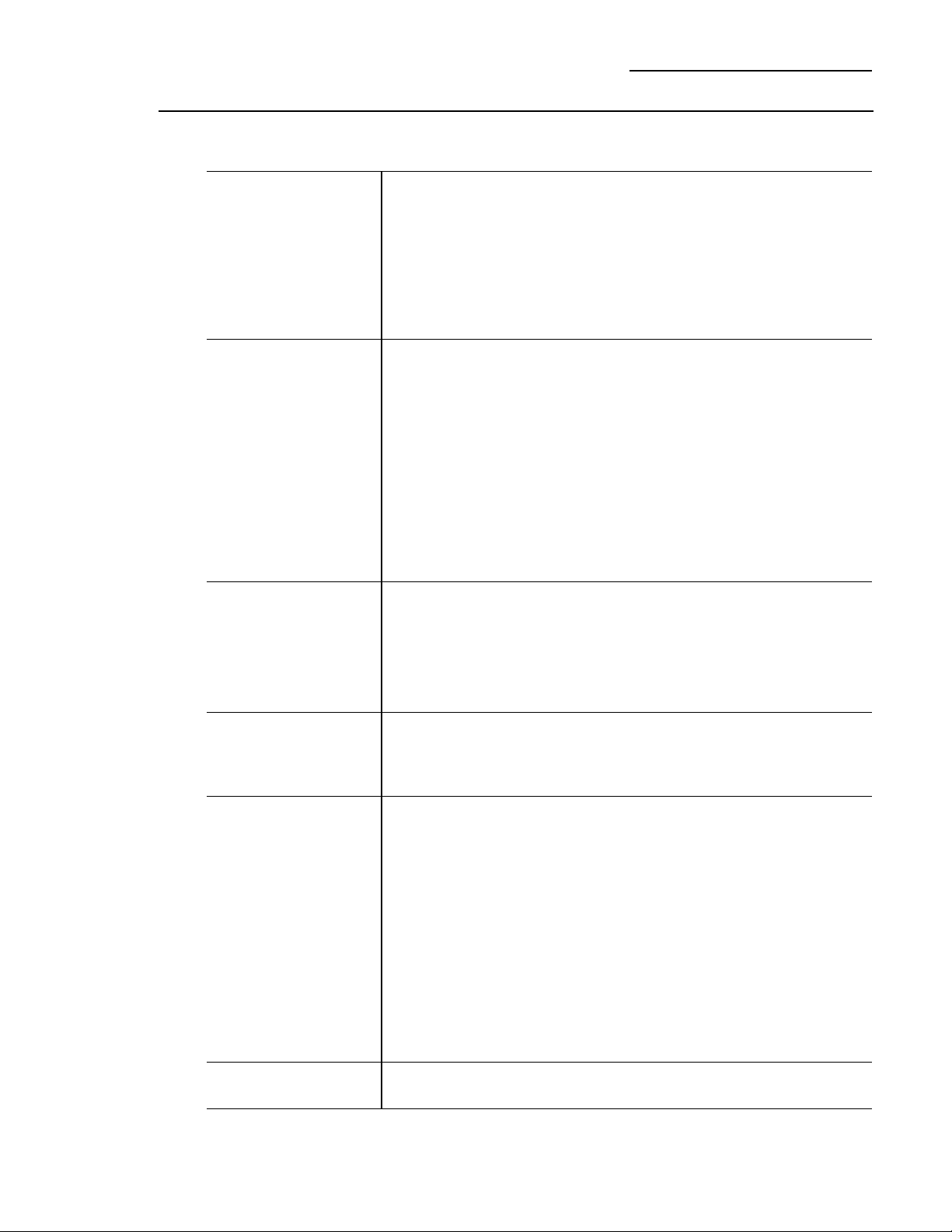
2. Raise the grille panel at the top of the
refrigerator to reach the condenser.
The condenser fins have sharp edges.
Wear a long-sleeved shirt and gloves
to safely clean the condenser.
The condenser is located at the very back
of the machine compartment on the right
behind the compressor. The condenser
fins are not visible from the front.
3. To clean the condenser, reach back
through the middle section of the machine
compartment to the right with a soft bristle
brush and loosen dust and lint on the
condenser fins.
4. Use a vacuum hose to remove soil.
Care and Cleaning
Built-In Refrigerators
Preparing
for vacation
For long vacations or absences, remove food
and shut off power to the refrigerator at the
fuse box or circuit breaker. Clean the interior
(see Cleaning Inside). Leave doors open.
For shorter vacations, remove perishable foods
and leave controls at regular settings. However,
if the room temperature is expected to drop
below 60°F (16°C), follow the same instructions
as for long vacations.
Set the icemaker power switch to the O (off)
position and be sure to shut off the water
supply to the refrigerator.
Preparing
to move
Secure all loose items such as grille, shelves
and drawers by taping them securely in place
to prevent damage.
Be sure the refrigerator stays in an upright
position during moving.
Condenser location
25
Questions?
Use this
problem
solver!
The Problem Solver
Built-In Refrigerators
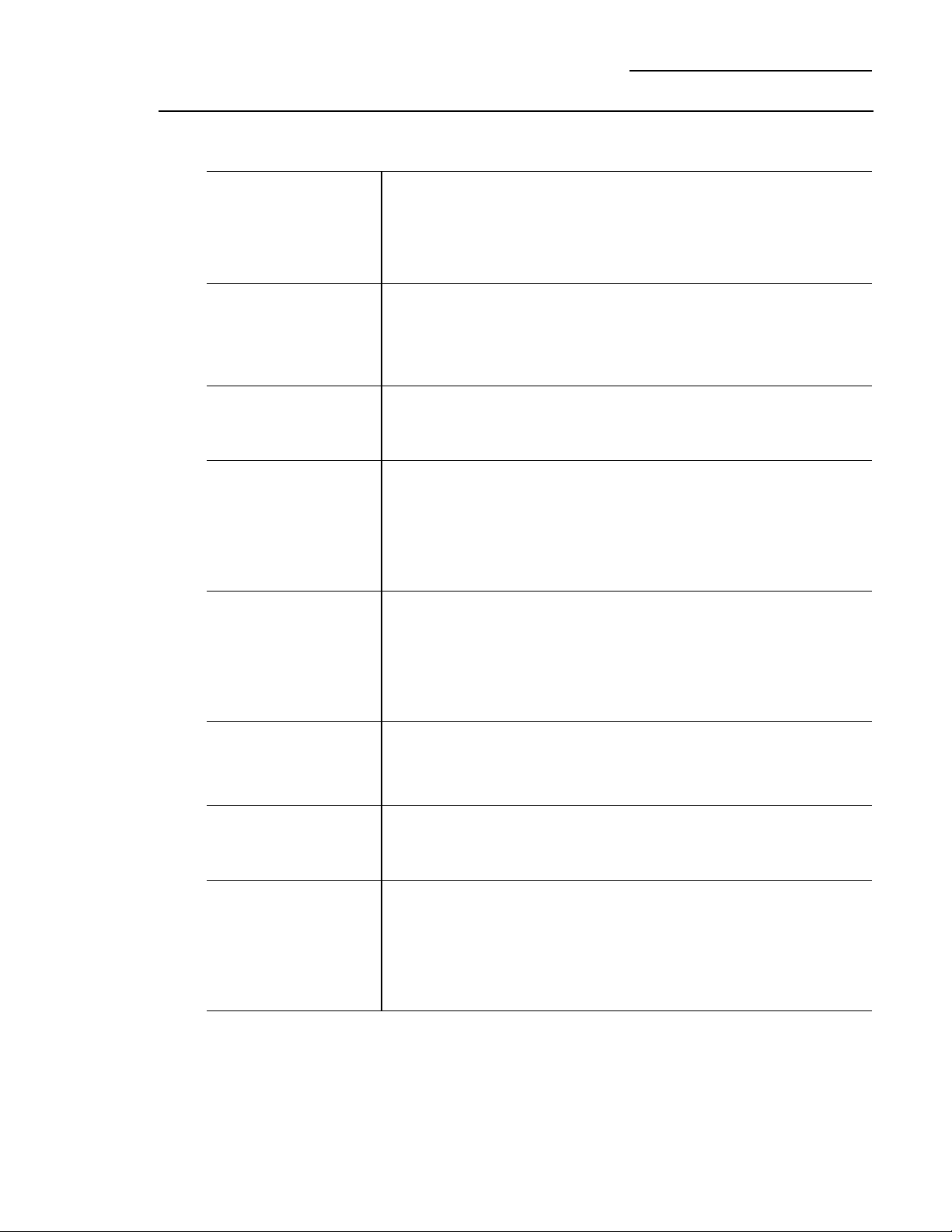
PROBLEM POSSIBLE CAUSE
REFRIGERATOR • May be in defrost cycle when compressor does not operate for about
DOES NOT OPERATE 30 minutes.
• Temperature control set at OFF.
• If interior light is not on, refrigerator may not be plugged in at
wall outlet.
• The fuse is blown/circuit breaker is tripped. Replace fuse or reset
the breaker.
MOTOR OPERATES • Normal when refrigerator is first plugged in. Wait 24 hours for the
FOR LONG PERIODS refrigerator to completely cool down.
OR CYCLES ON AND
• Often occurs when large amounts of food are placed in refrigerator.
OFF FREQUENTLY
This is normal.
• Door left open or package holding door open.
• Hot weather or frequent door openings. This is normal.
• Temperature controls set at the coldest setting. See Temperature
Controls.
ACTUAL • Refrigerator just plugged in. Allow 24 hours for system to stabilize.
• Door open for too long. Allow 24 hours for system to stabilize.
• Warm food added to refrigerator. Allow 24 hours for system
to stabilize.
• Defrost cycle is in process. Allow 24 hours for system to stabilize.
VIBRATION OR • Refrigerator is not level. See Installation Instructions.
RATTLING
(Slight vibration
is normal.)
OPERATING • Normal fan air flow—one fan blows cold air through the
SOUNDS fresh food and freezer compartments—another fan cools
the compressor motor.
• These NORMAL sounds will also be heard from time to time:
• Defrost water dripping.
• Refrigerant boiling or gurgling.
• Cracking or popping of cooling coils caused by expansion and
contraction during defrost and refrigeration following defrost.
• Ice cubes dropping into the bin and water running in pipes
as icemaker refills.
• The icemaker water valve will buzz when the icemaker fills
with water.
DOOR NOT CLOSING • Refrigerator is not level. See Installation Instructions.
PROPERLY
(Modern refrigerators
with more storage
space and a larger
freezer require
more operating time.
They start and stop
often to maintain
even temperatures.)
TEMPERATURE
NOT EQUAL TO SET
TEMPERATURE
26
Questions?
Use this
problem
solver!
The Problem Solver
Built-In Refrigerators
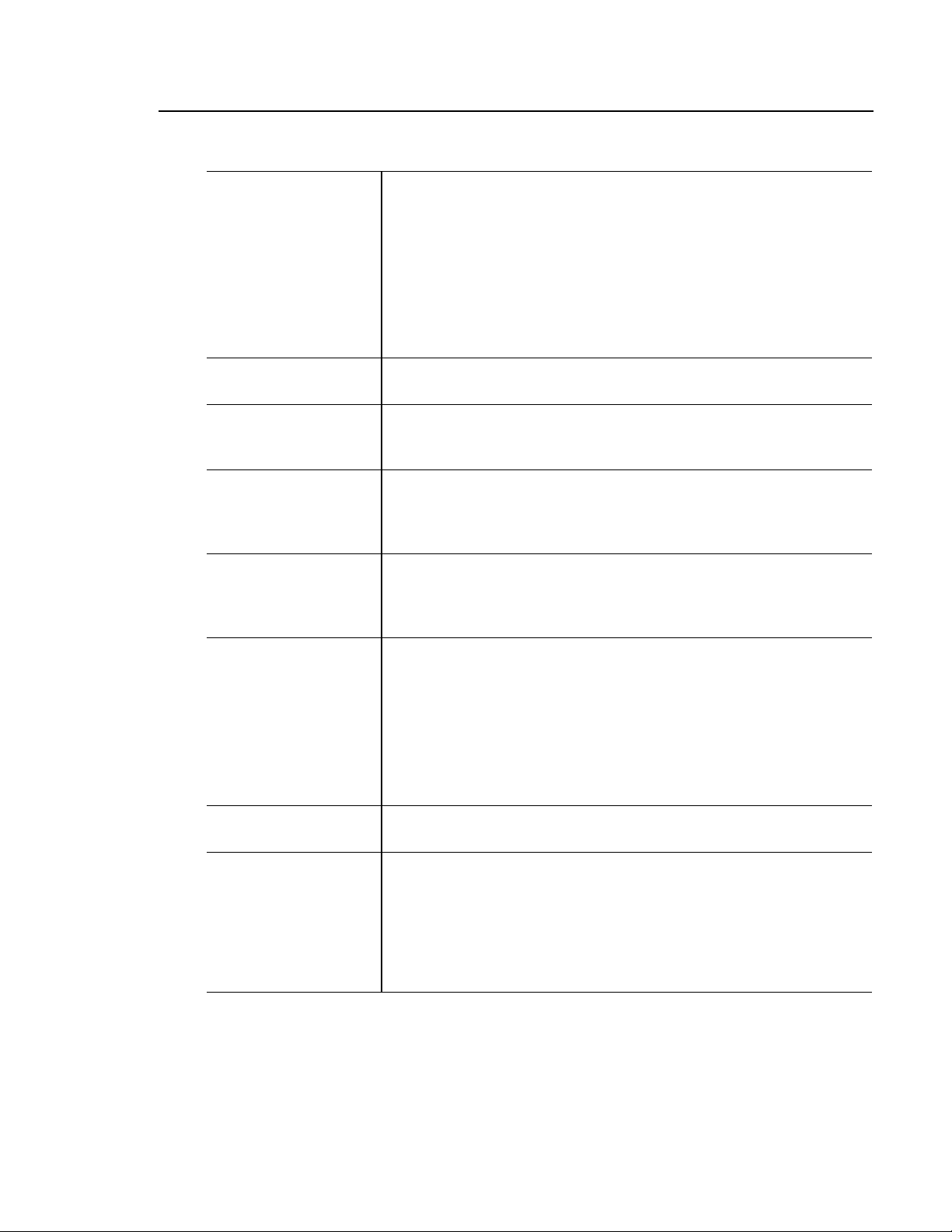
PROBLEM POSSIBLE CAUSE
FRESH FOOD • Temperature controls not set cold enough. See Temperature Controls.
• Warm weather or frequent door openings.
• Door left open for long time.
• Package may be holding door open.
FROST OR ICE • Door left open or package holding door open.
• Too frequent or too long door openings.
SLOW ICE CUBE • Door may have been left open.
FREEZING
• Freezer compartment is too warm. Set the freezer to a colder
temperature.
ICE HAS • Old cubes need to be discarded.
ODOR/TASTE
• Ice storage bin needs to be emptied and washed.
• Unsealed packages in fresh food and/or freezer compartments
may be transmitting odor/taste to ice.
• Poor-tasting incoming water. Replace water filter.
AUTOMATIC • Icemaker power switch is in the O (off) position.
• Water supply turned off or not connected.
• Freezer compartment too warm.
• Piled up cubes in storage bin may cause icemaker to shut off
too soon. Level cubes in bin.
MOISTURE FORMS • Not unusual during periods of high humidity. Wipe surface dry.
ON CABINET
SURFACE BETWEEN
THE DOORS
MOISTURE • Too frequent or long door openings.
COLLECTS INSIDE
• In humid weather, air carries moisture into refrigerator when doors
are opened.
REFRIGERATOR • Foods with strong odors should be tightly covered.
HAS ODOR
• Check for spoiled food.
• Interior needs cleaning. See Care and Cleaning.
• Keep open box of baking soda in refrigerator; replace every
3 months.
OR FREEZER
COMPARTMENT
TOO WARM
CRYSTALS ON
FROZEN FOOD
(Frost within package
is normal.)
ICEMAKER
DOES NOT WORK
27
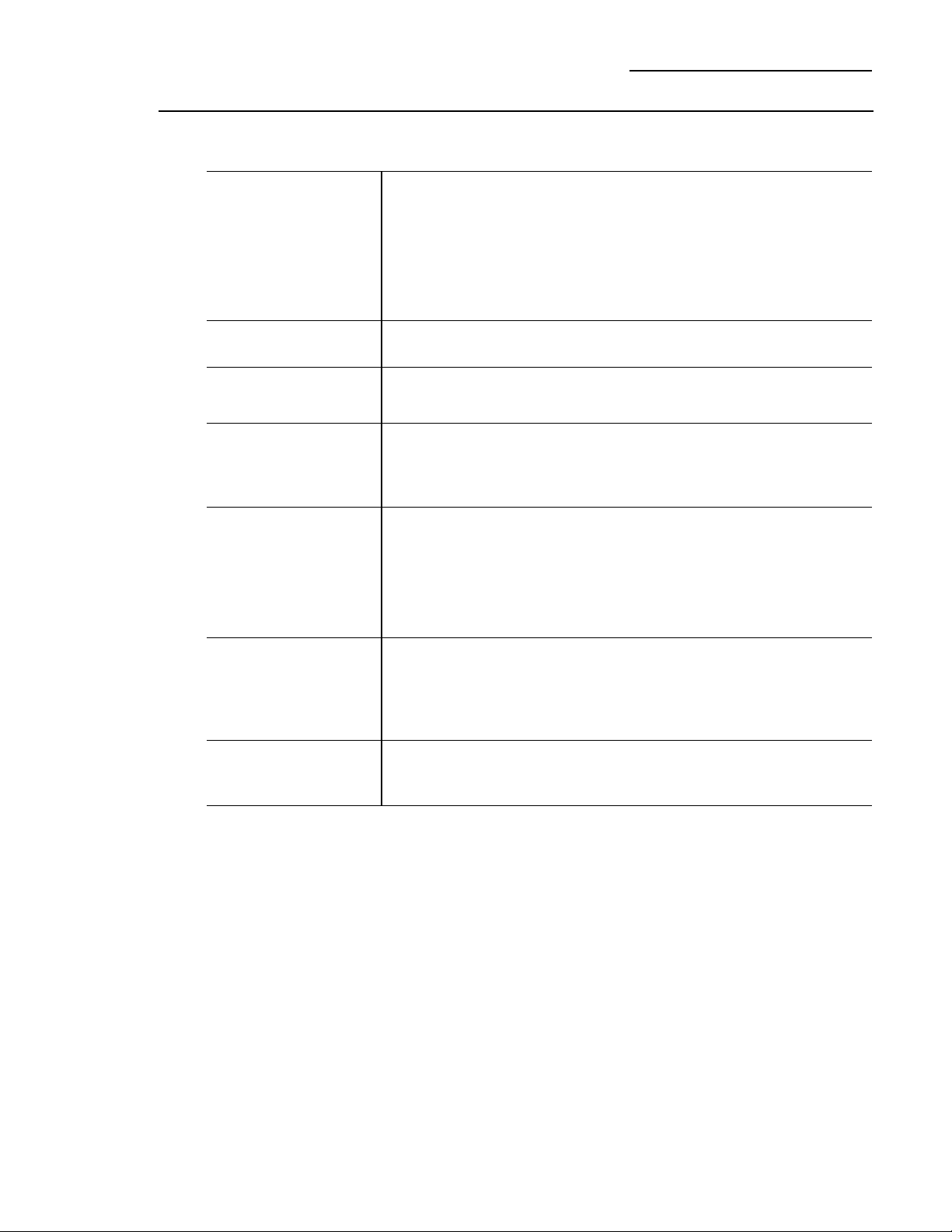
PROBLEM POSSIBLE CAUSE
INTERIOR LIGHT • No power at outlet.
DOES NOT WORK
• Light bulb needs replacing. See Care and Cleaning.
• Master Light switch is in the OFF position.
• The refrigerator is equipped with a safety feature that turns off
the refrigerator lights when the doors have been opened for an
extended period. Once the refrigerator doors are closed and the
lights have had time to cool, they will again come on automatically
when the doors are opened.
SMALL OR • Water filter clogged. Replace the filter or use the filter bypass plug.
HOLLOW CUBES
WATER ON • If you use an extra tall glass or pitcher, or overfill a glass or pitcher,
THE FLOOR you may be jamming the cubes in the funnel chute. They can fuse
inside the chute and drop out later, leaving water or ice on the floor.
UNEVEN SPACING
• Kitchen cabinets are not level or square. Call the installer or
OR GAPS
BETWEEN cabinetmaker.
DOORS AND
KITCHEN CABINET
POOR DOOR • Fresh food door needs adjusting. See Installation Instructions.
• Refrigerator is not level. See Attention Installer Instructions.
ICE DISPENSER • Icemaker turned off or water supply turned off. Turn on icemaker
DOES NOT WORK or water supply.
• Ice cubes are frozen to the icemaker feeler arm. Remove cubes.
• Irregular ice clumps in storage bin. Break up with fingertip pressure
and discard remaining clumps.
• Freezer may be too warm. Adjust freezer control to a colder setting,
one position at a time, until clumps do not form.
WATER HAS POOR • Water dispenser has not been used for a long time. Dispense water
TASTE OR ODOR until all water in system is replenished.
WATER IN FIRST • Normal when refrigerator is first installed. Wait 24 hours for the
GLASS IS WARM refrigerator to completely cool down.
• Water dispenser has not been used for a long time. Dispense water
until all water in system is replenished.
• Water system has been drained. Allow several hours for replenished
supply to chill.
ALIGNMENT OR
ONE DOOR HIGHER
THAN THE OTHER
28
Questions?
Use this
problem
solver!
The Problem Solver
Built-In Refrigerators
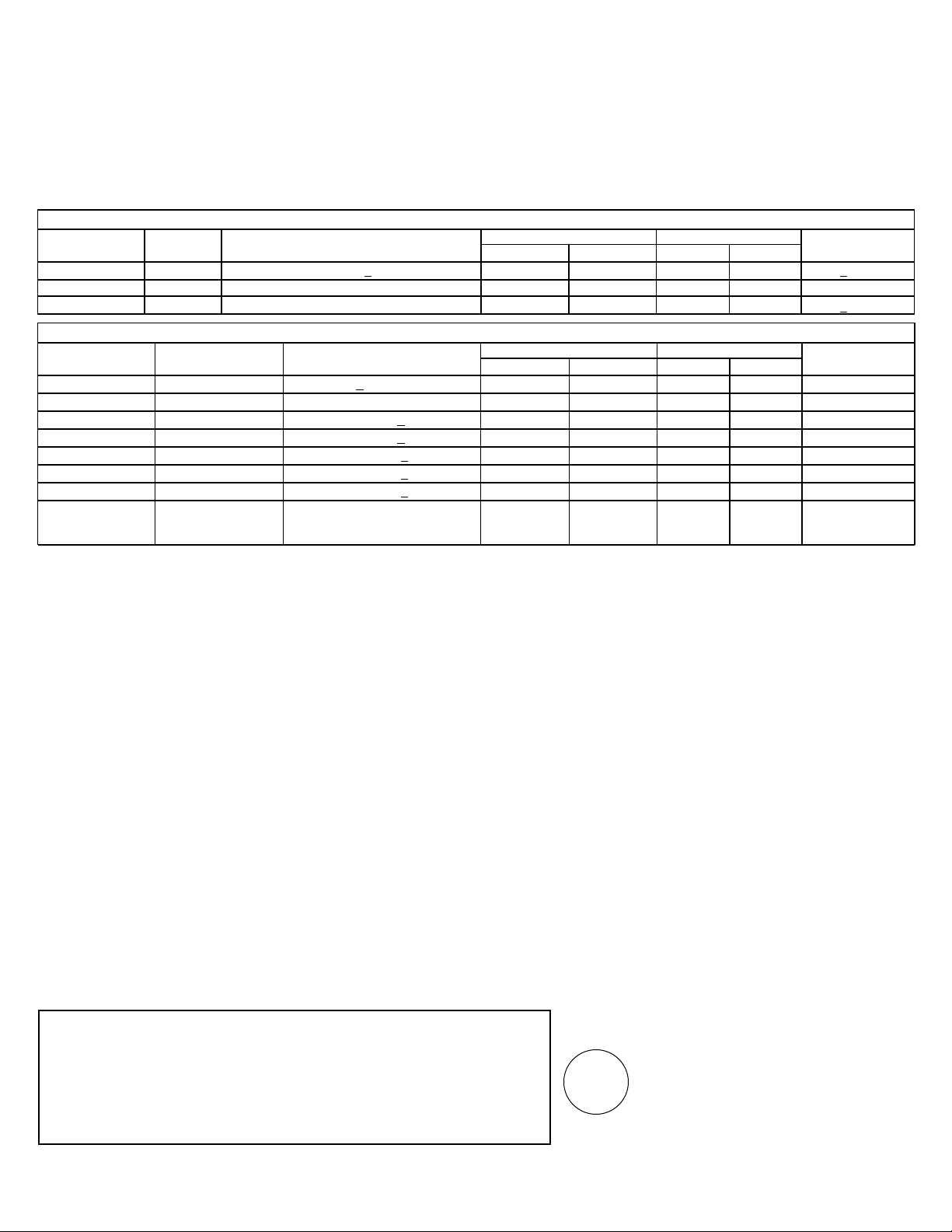
PROBLEM POSSIBLE CAUSE
WATER DISPENSER • Water supply line turned off or not connected.
DOES NOT WORK
• Water filter clogged. Replace the filter or use the filter bypass plug.
• The CONTROL LOCK on the dispenser has been activated.
To unlock the dispenser, touch CONTROL LOCK for 3 seconds.
• Air may be trapped in system. Press the dispenser arm for at least
2 minutes.
WATER SPURTING • Newly installed filter cartridge. Run water from the dispenser for
FROM DISPENSER 3 minutes (about one and a half gallons).
NO WATER OR ICE • Supply line or shutoff valve is clogged. Call a plumber.
PRODUCTION
• Water filter clogged. Replace the filter or use the filter bypass plug.
CUBED ICE WAS • Last setting was CRUSHED ICE. A few cubes were left in the crusher
SELECTED BUT from the previous setting. This is normal.
CRUSHED ICE
WAS DISPENSED
FOOD IS NOT • Packaging. Increase time or re-package in plastic.
THAWING/CHILLING
• Wrong weight selected. Select a larger weight.
• Item with high fat content. Select a larger weight.
• Not using the Climate Control tray. Place items on tray and allow
space in between items for better air flow.
SELECT TEMP • Fresh Food temperature control is set at warmest setting.
FEATURE ON This is normal. In order to minimize energy usage, the Select Temp
CLIMATE CONTROL feature is disabled when the Fresh Food control is set at the
DRAWER IS NOT warmest setting.
WORKING
CLIMATE CONTROL • Control Lock feature is active. Press and hold the CONTROL LOCK
DRAWER CONTROLS pad on the Climate Control drawer for 3 seconds.
DO NOT WORK
29
Manufactured for: General Electric Company, Louisville, KY 40225
Performance Data Sheet
SmartWater Filtration System
GWF / HWF Cartridge
This system has been tested according to NSF/ANSI 42/53 for reduction of the substances listed below.
The concentration of the indicated substances in water entering the system was reduced to a concentration
less than or equal to the permissible limit for water leaving the system, as specified in NSF/ANSI 42/53.*
(100% safety factors built in for unmetered usage)
Standard No. 42: Aesthetic Effects
Parameter USEPA Influent Effluent % Reduction Min. Required
MCL Challenge Concentration Average Maximum Average Minimum Reduction
Chlorine — 2.0 mg/L + 10% 0.02 ppm 0.05 ppm 98.90% 97.37% > 50%
T & O — — — — — — —
Particulate** — at least 10,000 particles/mL 3,978 7,800 98.00% 96.10% > 85%
Standard No. 53: Health Effects
Parameter USEPA Influent Effluent % Reduction Min. Required
MCL Challenge Concentration Average Maximum Average Minimum Reduction
Turbidity 1 NTU*** 11 + 1 NTU*** 0.07 NTU 0.1 NTU 99.71% 99.59% 0.5 NTU
Cysts
99.95% Reduction
Minimum 50,000 L 26 55 99.97% 99.95% > 99.95%
Lead at pH 6.5 15 ppb 0.15 mg/L + 10% 1 ppb 1 ppb 99.37% 99.37% 0.010 mg/L
Lead at pH 8.5 15 ppb 0.15 mg/L + 10% 1.8 ppb 4.3 ppb 98.8% 97.13% 0.010 mg/L
Lindane
0.0002 ppm
0.002 mg/L + 10%
0.00005 ppm 0.00005 ppm
91.93% 91.93% 0.0002 mg/L
Atrazine
0.003 ppm
0.009 mg/L + 10% 0.002 ppm 0.003 ppm 76.19% 64.28% 0.003 mg/L
2,4-D
0.100 ppm
0.210 mg/L + 10% 0.042 ppm 0.090 ppm 84.89% 67.63% 0.07 mg/L
Asbestos
99%
10
7
to 10
8
fibers/L; 0.32 MFL/ml 1.2 MFL/ml 99.95% 99.82% 99%
fibers greater than
10 micrometers in length
* Tested using a flow rate of 0.5 gpm; pressure of 60 psig; pH of 7.5 ± 0.5; temp. of 20° ± 2.5°C
** Measurement in Particles/ml. Particles used were 0.5–1 microns
*** NTU=Nephelometric Turbidity units
Operating Specifications
Capacity: certified for up to 300 gallons (1135 l); up to six months for models without a replacement filter indicator light; up to
one year for models with a replacement filter indicator light
Pressure requirement: 40–120 psi (2.8–8.2 bar), non-shock
Temperature: 33–100ºF (0.6–38ºC)
Flow rate: 0.5 gpm (1.9 lpm)
General Installation/Operation/Maintenance Requirements
Flush new cartridge at full flow for 3 minutes to purge out trapped air.
Replace cartridge when flow becomes too slow.
Special Notices
Installation instructions, parts and service availability, and standard warranty are included with the product when shipped.
This drinking water system must be maintained according to manufacturer’s instructions, including replacement of filter
cartridges.
Do not use with water that is microbiologically unsafe or of unknown quality without adequate disinfection before or after
the system. Systems certified for cyst reduction may be used on disinfected water that may contain filterable cysts.
The contaminants or other substances removed or reduced by this water treatment system are not necessarily in your water.
Check for compliance with the state and local laws and regulations.
Note that while the testing was performed under standard laboratory conditions, actual performance may vary. Systems must
be installed and operated in accordance with manufacturer’s recommended procedures and guidelines.
NSF
®
System Tested and Certified by NSF International against ANSI/NSF Standard 42 & 53
for the reduction of:
Standard No. 42: Aesthetic Effects
Chemical Unit
Taste and Odor Reduction
Chlorine Reduction
Mechanical Filtration Unit
Particulate Reduction, Class I
Standard No. 53: Health Effects
Chemical Reduction Unit
Lead and Atrazine Reduction
Lindane and 2,4-D Reduction
Mechanical Filtration Unit
Turbidity Reduction
Cyst and Asbestos Reduction
30
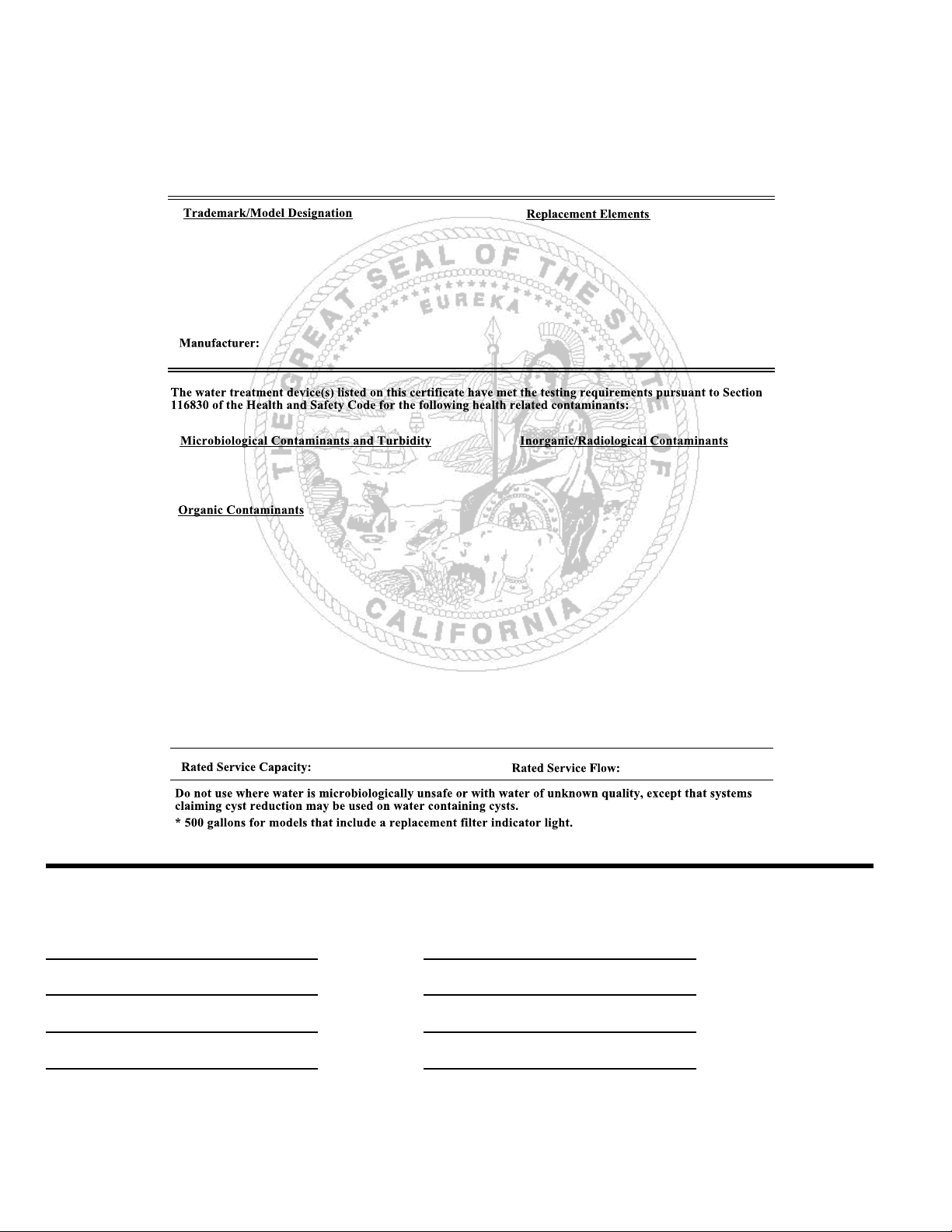
State of California
Department of Health Services
Water Treatment Device
Certificate Number
Date Issued: May 30, 2000
Date Revised: February 9, 2001
1434
00 -
GE Smart Water Filtration Systems - GWF06 GWF06
GE Smart Water Filtration Systems - GWF GWF
Hotpoint Refrigerator Systems - HWF HWF
General Electric Appliances
Cysts (protozoan)
Turbidity
Asbestos
Lead
Atrazine
Lindane
2,4-D
300 gallons* 0.5 gpm
For Purchases Made In Iowa: This form must be signed and dated by the buyer and seller prior to the consummation of
this sale. This form should be retained on file by the seller for a minimum of two years.
BUYER: SELLER:
Name Name
Address Address
City State Zip City State Zip
Signature Date Signature Date
31
With the purchase of your new Monogram appliance, receive the
assurance that if you ever need information or assistance from GE,
we will be there. All you have to do is call—toll- free!
GE Answer
Center
®
In the USA:
800.626.2000
Whatever your question about any Monogram major appliance, GE Answer Center
®
information service is available to help. Your call—and your question—will be answered
promptly and courteously. And you can call any time. GE Answer Center
®
service is open
24 hours a day, 7 days a week.
OR
Visit our Website at: www.monogram.com
In Canada, call 1.888.880.3030.
In-Home Repair
Service
In the USA:
800.444.1845
In Canada:
1.888.880.3030
A GE consumer service professional will provide expert repair service, scheduled at a time
that’s convenient for you. Many GE Consumer Service company-operated locations offer
you service today or tomorrow, or at your convenience (7:00 a.m. to 7:00 p.m. weekdays,
9:00 a.m. to 2:00 p.m. Saturdays). Our factory-trained technicians know your appliance
inside and out—so most repairs can be handled in just one visit.
Service Contracts
In the USA:
800.626.2224
In Canada:
1.888.880.3030
You can have the secure feeling that GE Consumer Service will still be there after your
warranty expires. Purchase a GE contract while your warranty is still in effect and you’ll
receive a substantial discount. With a multiple-year contract, you’re assured of future
service at today’s prices.
Parts and
Accessories
In the USA:
800.626.2002
In Canada:
1.888.880.3030
Individuals qualified to service their own appliances can have parts or accessories sent
directly to their home. The GE parts system provides access to over 47,000 parts…and all
GE Genuine Renewal Parts are fully warranted. VISA, MasterCard and Discover cards
are accepted.
User maintenance instructions contained in this manual cover procedures intended to be
performed by any user. Other servicing generally should be referred to qualified service
personnel. Caution must be exercised, since improper servicing may cause unsafe operation.
For Customers
With Special
Needs…
In the USA:
800.626.2000
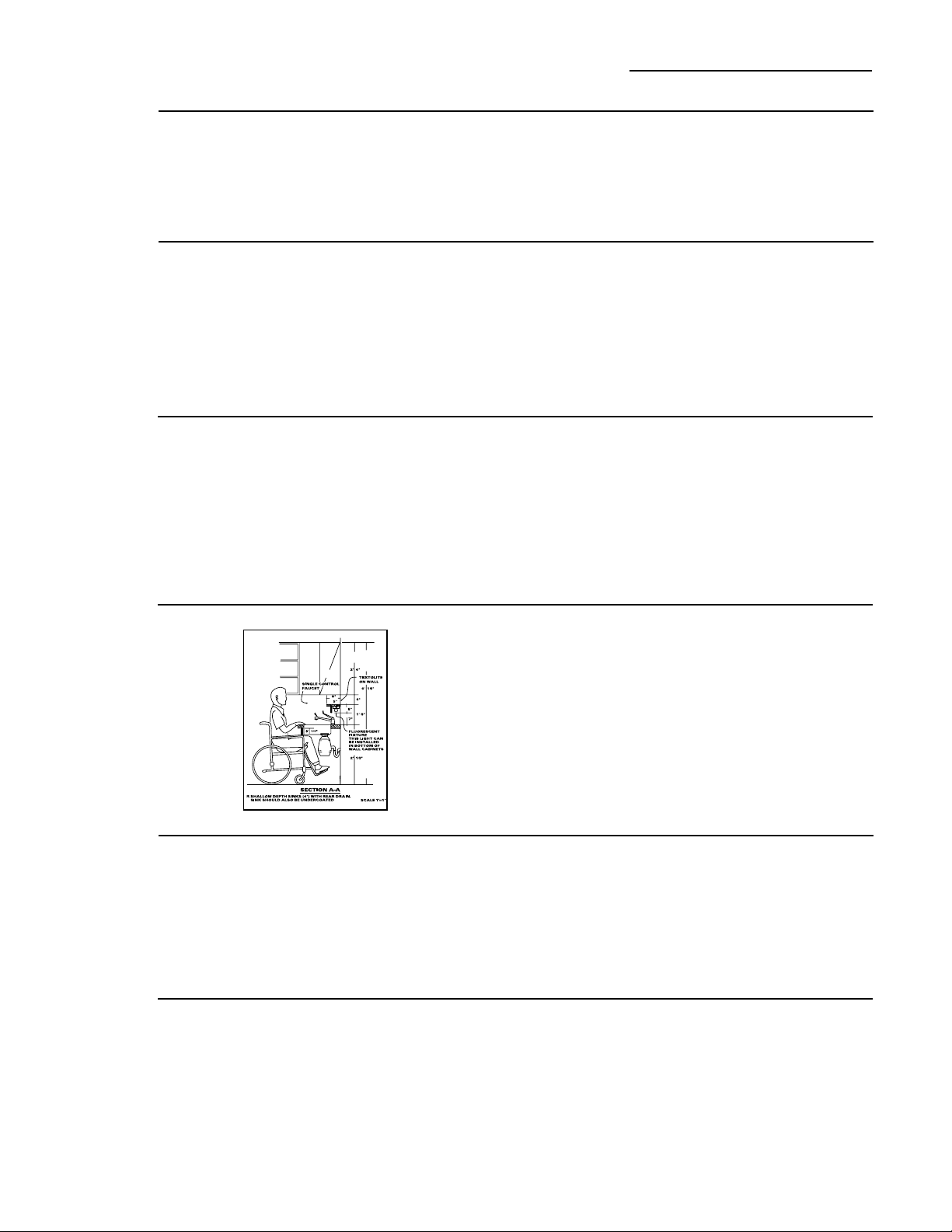
GE offers Braille controls for a variety of GE appliances, and
a brochure to assist in planning a barrier-free kitchen for persons
with limited mobility.
Consumers with impaired hearing or speech who have access to a
TDD or a conventional teletypewriter may call 800.TDD.GEAC
(800.833.4322) to request information or service.
Consumer Services
Built-In Refrigerators
Warranty
Built-In Refrigerators
YOUR MONOGRAM REFRIGERATOR WARRANTY
Staple sales slip or cancelled check here. Proof of original purchase
date is needed to obtain service under warranty.
WHAT IS
COVERED
From the Date
of the Original
Purchase
FULL TWO-YEAR WARRANTY
For two years from date of original purchase, we will provide, free of charge, parts and service labor in
your home to repair or replace any part of the refrigerator that fails because of a manufacturing defect.
FULL FIVE-YEAR WARRANTY
For five years from date of original purchase, we will provide, free of charge, parts and service labor
in your home to repair or replace any part of the sealed refrigerating system (the compressor, condenser,
evaporator and all connecting tubing) that fails because of a manufacturing defect.
LIMITED ADDITIONAL SEVEN-YEAR WARRANTY ON THE SEALED SYSTEM
For the sixth through twelfth year from the date of the original purchase, we will provide, free of
charge, replacement parts for any part of the sealed refrigerating system (the compressor, condenser,
evaporator and all connecting tubing) that fails because of a manufacturing defect. You pay for
the service trip to your home and for service labor charges.
LIMITED LIFETIME WARRANTY ON FULL EXTENSION SLIDES
From the date of the original purchase we will provide, free of charge, replacement parts for
any part of the full extension slides that fails because of a manufacturing defect. You pay for the
service trip to your home and for service labor charges.
LIMITED THIRTY-DAY WARRANTY ON WATER FILTER CARTRIDGE
From the date of the original purchase we will provide, free of charge, replacement parts for
any part of the water filter cartridge that fails because of a manufacturing defect. During this limited
thirty-day warranty, we will also provide, free of charge, a replacement water filter cartridge.
This warranty is extended to the original purchaser and any succeeding owner for products
purchased for ordinary home use in the 48 mainland states, Hawaii, Washington, D.C. or Canada.
In Alaska the warranty is the same except that it is LIMITED because you must pay to ship
the product to the service shop or for the service technician’s travel costs to your home.
All warranty service will be provided by our Factory Service Centers or by our authorized Customer
Care
®
servicers during normal working hours.
Should your appliance need service, during warranty period or beyond, in the USA call
800.444.1845. In Canada: 888.880.3030.
Some states/provinces do not allow the exclusion or limitation of incidental or consequential
damages, so the above limitation or exclusion may not apply to you. This warranty gives you specific
legal rights, and you may also have other rights which vary from state to state/province to province.
To know what your legal rights are in your state/province, consult your local or state/provincial
consumer affairs office or your state’s Attorney General.
Warrantor in USA: General Electric Company,
Louisville, KY 40225
Warrantor in Canada: Camco Inc.
WHAT IS NOT
COVERED
• Service trips to your home to teach you how
to use the product.
• Replacement of house fuses or resetting of
circuit breakers.
• Damage to the product caused by accident,
fire, floods or acts of God.
• Failure of the product if it is used for other
than its intended purpose or used commercially.
• Damage caused after delivery.
• Improper installation, delivery or maintenance.
If you have an installation problem, contact
your dealer or installer. You are responsible
for providing adequate electrical, plumbing
and other connecting facilities.
• Replacement of the light bulbs or water filter
cartridge other than as noted above.
• Replacement of the water filter cartridge due
to water pressure that is outside the specified
operating range or due to excessive sediment
in the water supply.
• Loss of food due to spoilage (in the USA only).
• Incidental or consequential damage caused by
possible defects with this appliance.
162D3947P009
49-60295
Printed in the United States
25742-01 10-03 JR

