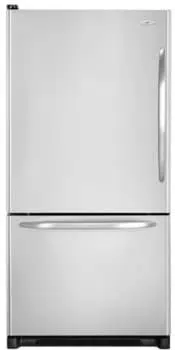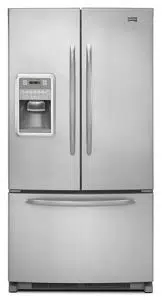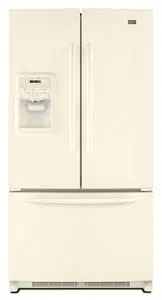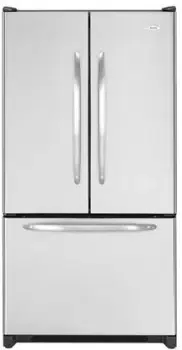
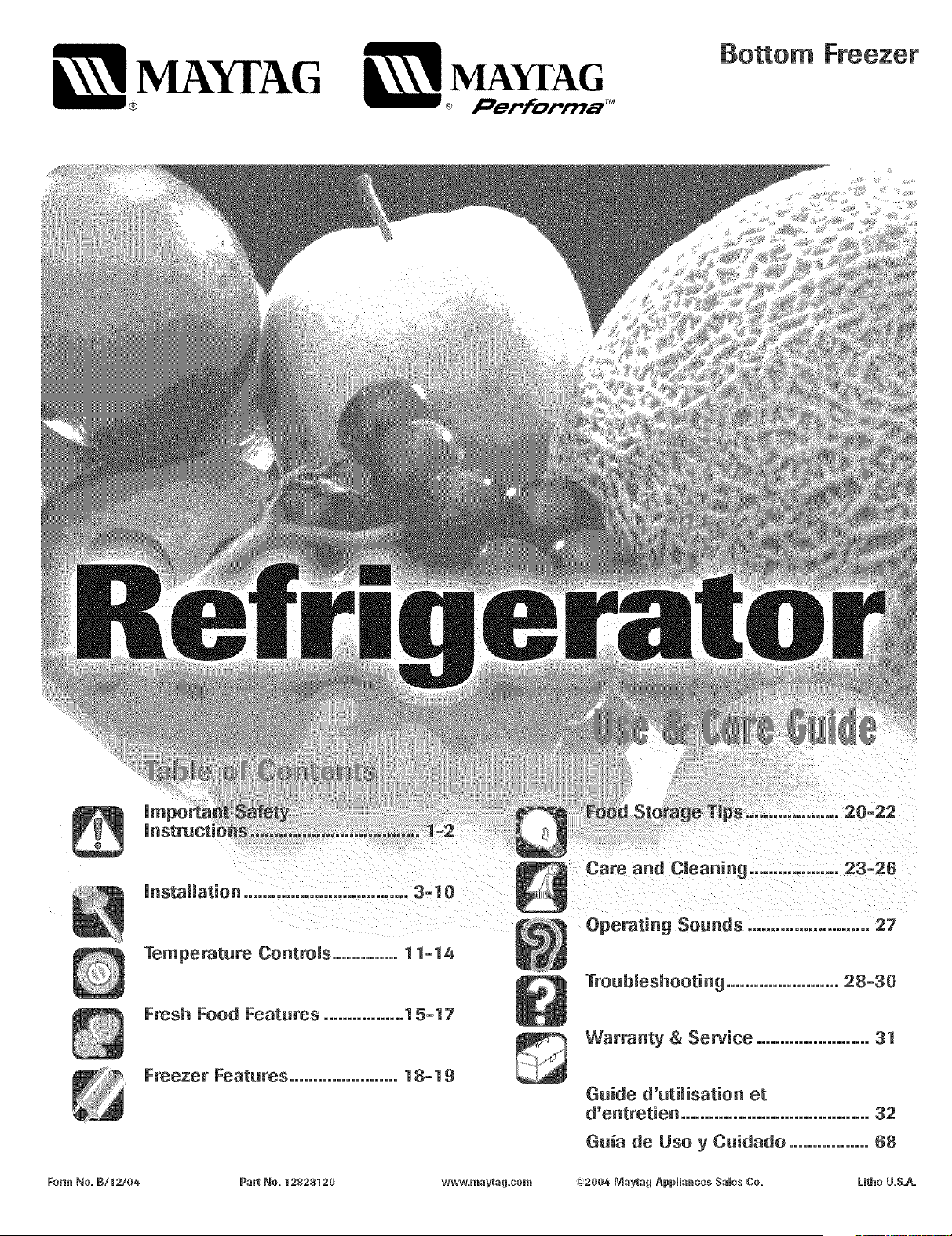
MAYI'AG MAYI'AG
® l_e_forma TM
Bottom Freezer
Form No. B/t2/06
What Need to }(now About
Safety nsttuctions
Warning and Important Safety Instructions appearing in
this guide are not meant to cover all possible
conditions and situations that may occur. Common
sense, caution and care must be exercised when
installing, maintaining or operating appliance.
Always contact the manufacturer about problems or
conditions you do not understand.
Recognize Safety Symbols, Words,
Labels
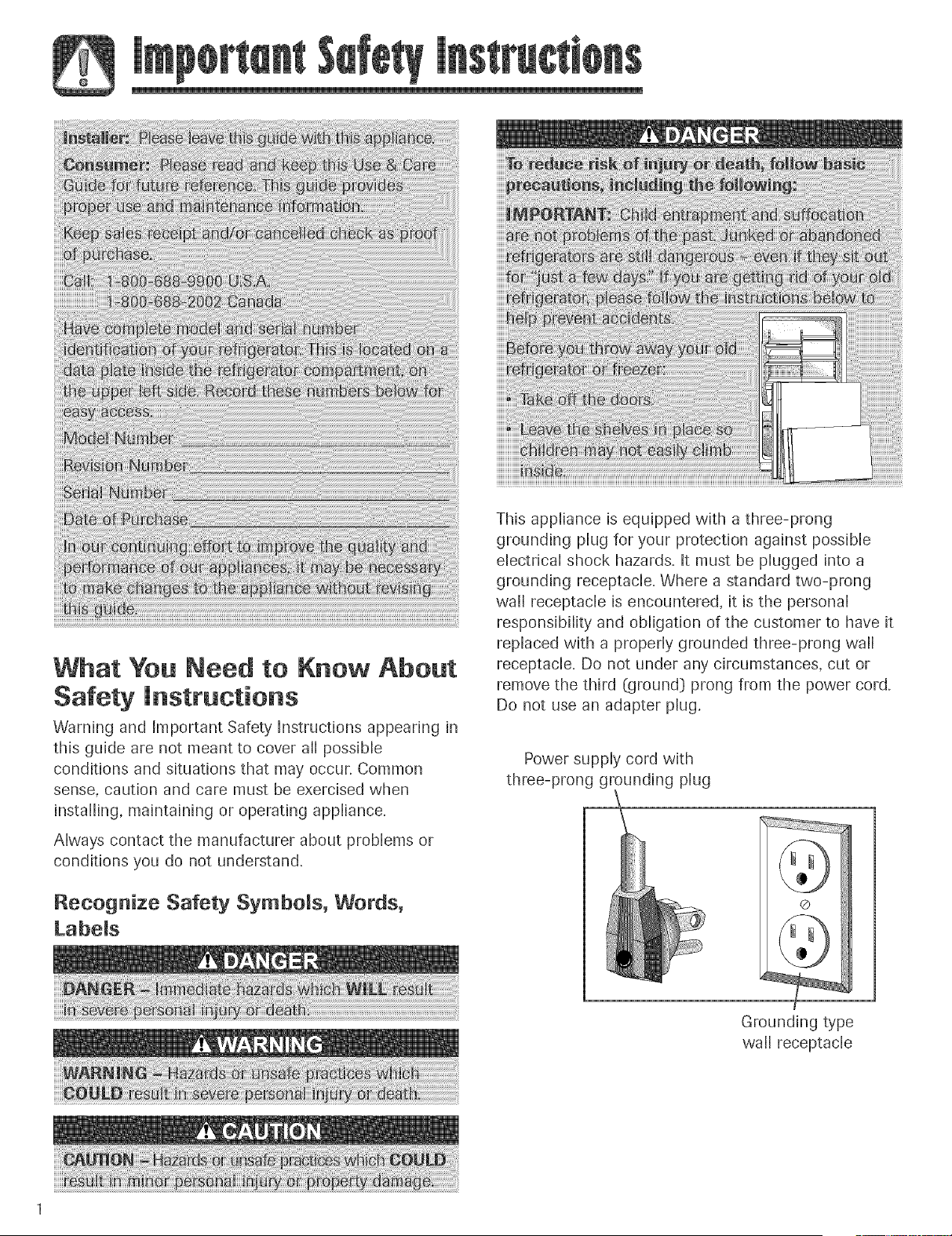
This appliance is equipped with a three-prong
grounding plug for your protection against possible
electrical shock hazards. It must be plugged into a
grounding receptacle. Where a standard two-prong
wall receptacle is encountered, it is the personal
responsibility and obligation of the customer to have it
replaced with a properly grounded three-prong wall
receptacle. Do not under any circumstances, cut or
remove the third (ground} prong from the power cord.
Do not use an adapter plug.
Power supply cord with
three-prong grounding plug
Grounding type
wall receptacle
SAVE TH ESE l NSTRUCTIONS
Your refrigerator was packed carefully for shipment.
Remove and discard shelf packaging and tape. Do not
remove the serial plate.
Do not install refrigerator near oven, radiator or other
heat source. Wfnot possible, shield refrigerator with
cabinet material.
Do not install where temperature falls below 55° F
(13° C} or rises above 110° F (43° C}. Malfunction
may occur at this temperature.
Refrigerator is designed for indoor household
application onlyo
Measuring the Opening
When installing your refrigerator, measure carefully.
Allow Y2 space at top and '/2"space behind the
machine compartment cover (located in the rea0 for
proper air circulation.
Subfiooring or floor coverings (i.e. carpet, tile, wood
floors, rugs} may make your opening smaller than
anticipate&
Some clearance may be gained by using the leveling
procedure under Leveling.
UMPORTANT: If refrigerator is to be installed into a
recess where the top of the refrigerator is completely
covered, use dimensions from floor to top of hinge cap
to verify proper clearance.
Transporting Your Refrigerator
NEVER transport refrigerator on its side. If an
upright position is not possible, lay refrigerator on its
back. Allow refrigerator to sit upright for
approximately 30 minutes before plugging it in to
assure oil returns to the compresson Plugging the
refrigerator in immediately may cause damage to
internal parts.
Use an appliance dolly when moving refrigerator.
ALWAYS truck refrigerator from its side or
back-NEVER from its front.
Protect outside finish of refrigerator during transport
by wrapping cabinet in blankets or inserting padding
between the refrigerator and dolly.
Secure refrigerator to dolly firmly with straps or
bungee cords. Thread straps through handles when
possible. Do not overtighten. Overtightening
restraints may dent or damage outside finish.
To enhance the appearance and maintain performance
the refrigerator should be level
Note
Complete any required door reversal, panel
installation and/or a water supply connection,
before leveling.
Materials Needed:
3/8"hex head driver
Carpenter's level
1. Remove toe grille.
Grasp firmly and pull outward
to unclip.
2. Remove bottom bracket cover(s}.
Place the eraser end of a pencil or similar blunt
tool in the cover notch.
, Use slight pressure to pry the
cover loose.
Continue to maintain
downward pressure to the
notched side of the cover while
swinging it oft
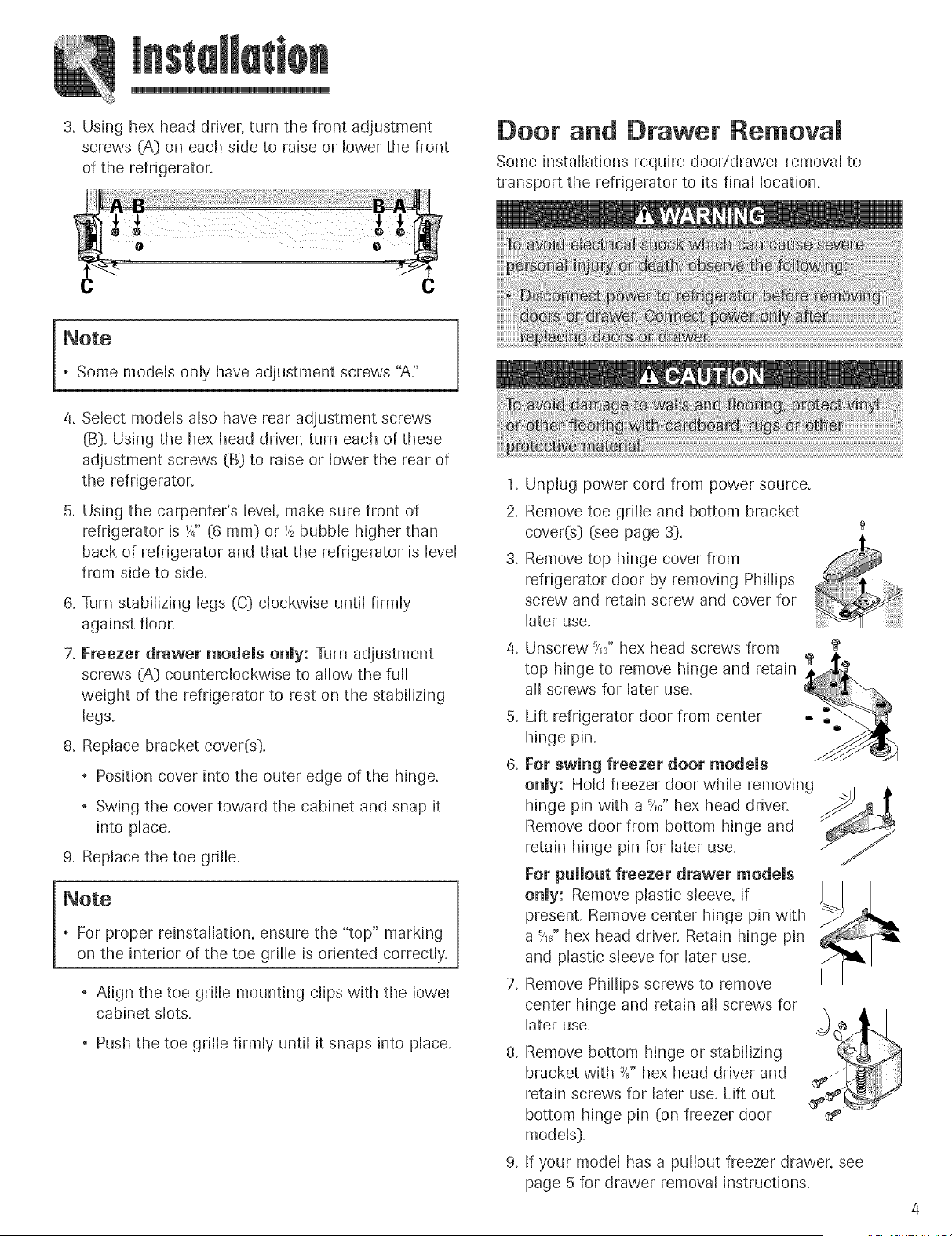
3. Usinghexheaddriver,turnthe frontadjustment
screws(A}on eachsideto raiseor lowerthe front
of therefrigerator.
Door and Drawer Removam
Some installations require door/drawer removal to
transport the refrigerator to its final location.
, Some models only have adjustment screws "A."
4. Select models also have rear adjustment screws
(B}. Using the hex head driver, turn each of these
adjustment screws (B} to raise or lower the rear of
the refrigerator.
5. Using the carpenter's level, make sure front of
refrigerator is '/4" (6 ram} or '/_bubble higher than
back of refrigerator and that the refrigerator is level
from side to side.
& Turn stabilizing legs (C} clockwise until firmly
against floor,
7, Freezer drawer models only: Turn adjustment
screws (A} counterclockwise to allow the full
weight of the refrigerator to rest on the stabilizing
legs.
8. Replace bracket cover(s}.
, Position cover into the outer edge of the hinge.
, Swing the cover toward the cabinet and snap it
into place.
9. Replace the toe grille.
, For proper reinstallation, ensure the "top" marking
on the interior of the toe grille is oriented correctly.
, Align the toe grille mounting dips with the lower
cabinet slots.
, Push the toe grille firmly until it snaps into place.
.
2.
.
6.
Unplug power cord from power source.
Remove toe grille and bottom bracket
cover(s} (see page 3}. t
Remove top hinge cover from
refrigerator door by removing Phillips
screw and retain screw and cover for
later use.
Unscrew ?,}' hex head screws from
top hinge to remove hinge and retain
all screws for later use.
Lift refrigerator door from center
hinge pin.
For swing freezer door modems
onmy: Hold freezer door while removing
hinge pin with a _,}' hex head driver,
Remove door from bottom hinge and
retain hinge pin for later use.
For pullout freezer drawer models
onmy: Remove plastic sleeve, if
present. Remove center hinge pin with
a t,}' hex head driver, Retain hinge pin
and plastic sleeve for later use.
Remove Phillips screws to remove
center hinge and retain all screws for
later use.
8. Remove bottom hinge or stabilizing
bracket with _" hex head driver and
retain screws for later use. Lift out
bottom hinge pin (on freezer door
models}.
9. If your model has a pullout freezer drawer, see
page 5 for drawer removal instructions.
Pullout Freezer Drawer
(select modds)
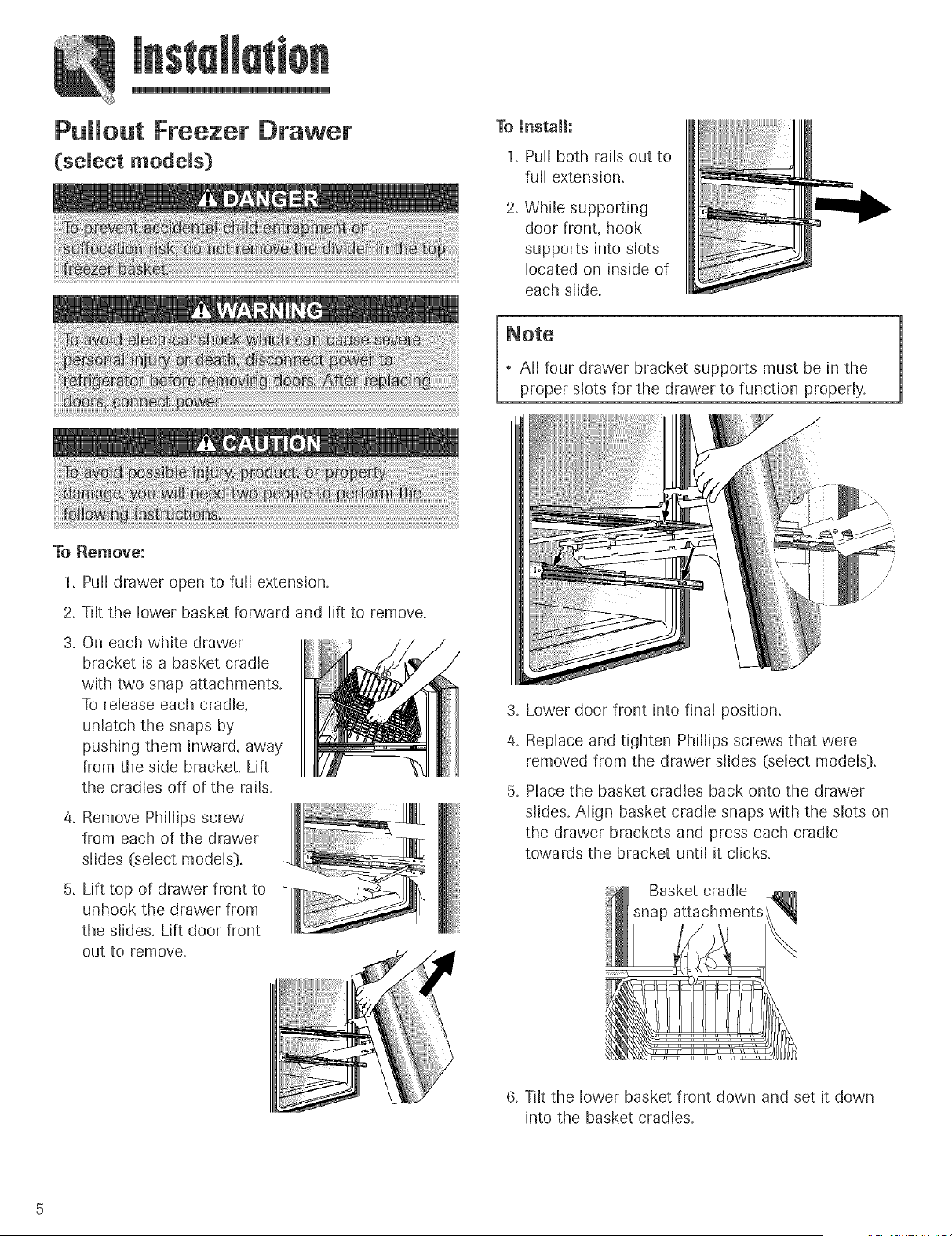
To [nstall:
1, Pull both rails out to
full extension.
2. While supporting
door front, hook
supports into slots
located on inside of
each slide.
, All four drawer bracket supports must be in the
proper slots for the drawer to function properly.
To Remove:
1. Pu[[ drawer open to fuji extension.
2. Tilt the lower basket forward and lift to remove.
3. On each white drawer
bracket is a basket cradle
with two snap attachments.
To release each cradle,
unlatch the snaps by
pushing them inward, away
from the side bracket. Lift
the cradles off of the rails.
4, Remove Phillips screw
from each of the drawer
slides (select models[},
5, Lift top of drawer front to
unhook the drawer from
the slides, Lift door front
out to remove,
.
4.
.
Lower door front into final position.
Replace and tighten Phillips screws that were
removed from the drawer slides (select models),
Place the basket cradles back onto the drawer
slides. Align basket cradle snaps with the slots on
the drawer brackets and press each cradle
towards the bracket until it clicks.
Basket cradle
6, Tilt the lower basket front down and set it down
into the basket cradles.
ReinstaHation of the Doors
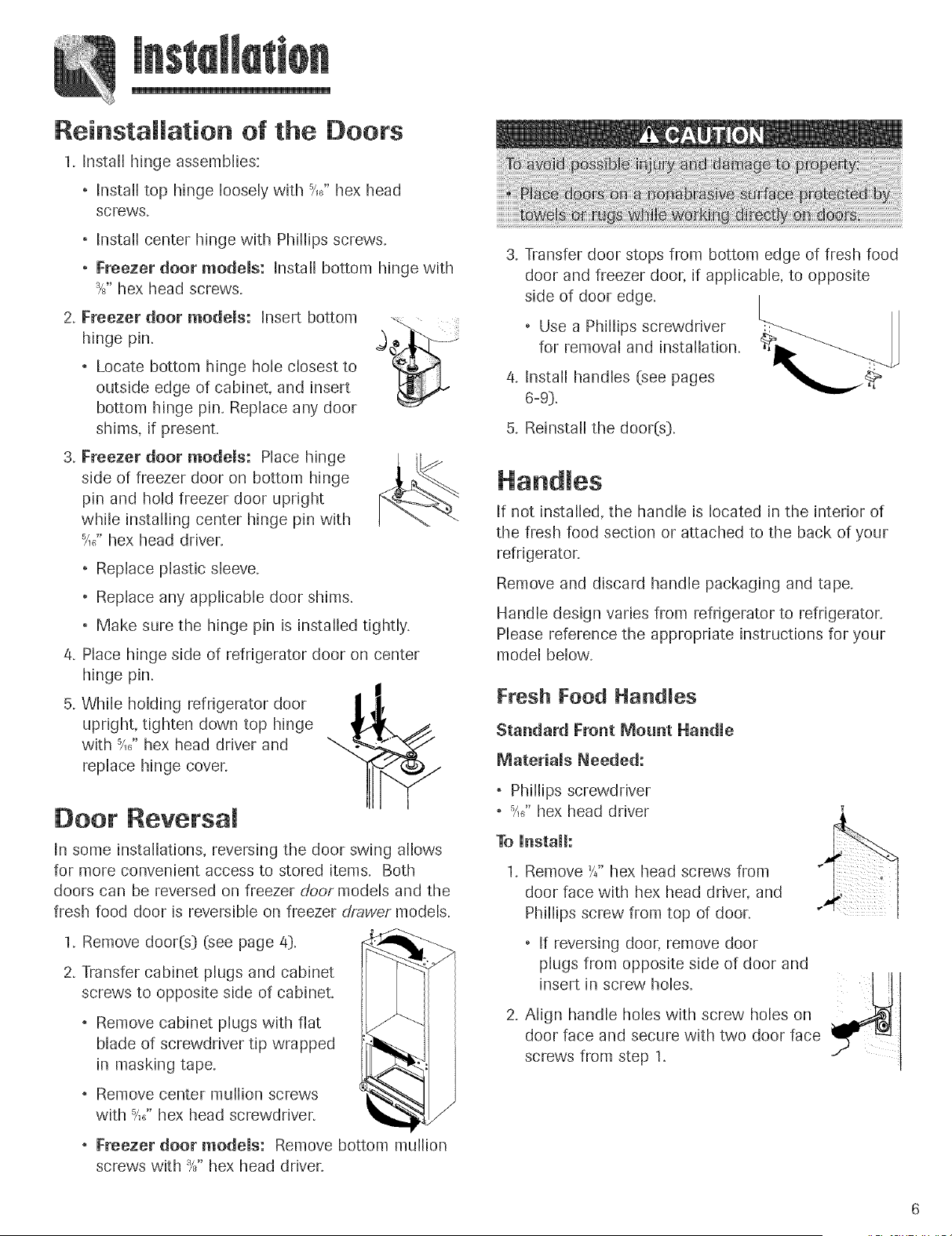
1, Install hinge assemblies:
. Install top hinge loosely with _/,6"hex head
screws.
Install center hinge with Phillips screws.
Freezer door modems: Install bottom hinge with
_" hex head screws.
2. Freezerhingepin.d°°r modems: Insert bottom __.j
Locate bottom hinge hole closest to
outside edge of cabinet, and insert
bottom hinge pin. Replace any door
shims, if present.
3. Freezer door modems: Place hinge
side of freezer door on bottom hinge
pin and hold freezer door upright
while installing center hinge pin with
_/,_,"hex head driver.
Replace plastic sleeve.
Replace any applicable door shims.
, Make sure the hinge pin is installed tightly.
4. Place hinge side of refrigerator door on center
hinge pin.
5. While holding refrigerator door
upright, tighten down top hinge
with -?X' hex head driver and
replace hinge coven
Door Revetsam
In some installations, reversing the door swing allows
for more convenient access to stored items. Both
doors can be reversed on freezer door models and the
fresh food door is reversible on freezer drawer models.
I,Remove door(s} (see page 4},
2. Transfer cabinet plugs and cabinet
screws to opposite side of cabinet.
, Remove cabinet plugs with flat
blade of screwdriver tip wrapped
in masking tape.
, Remove center mullion screws
with _/,_,"hex head screwdriver.
, Freezer door models: Remove bottom mullion
screws with Ys" hex head driver.
3. Transfer door stops from bottom edge of fresh food
door and freezer door, if applicable, to opposite
side of door edge.
Use a Phillips screwdriver
for removal and installation.
4. Installhandles (see pages
6-9].
5, Reinstall the door(s}.
If not installed, the handle is located in the interior of
the fresh food section or attached to the back of your
refrigerator.
Remove and discard handle packaging and tape.
Handle design varies from refrigerator to refrigerator.
Please reference the appropriate instructions for your
model below.
Fresh Food Handles
Standard Front Mount Handle
Materiams Needed:
. Phillips screwdriver
. -_/,_"hex head driver
To Unstall:
1. Remove h" hex head screws from
door face with hex head driver, and
Phillips screw from top of door.
. If reversing door, remove door
plugs from opposite side of door and
insert in screw holes.
2. Align handle holes with screw holes on
door face and secure with two door face
screws from step 1.
.
To
1.
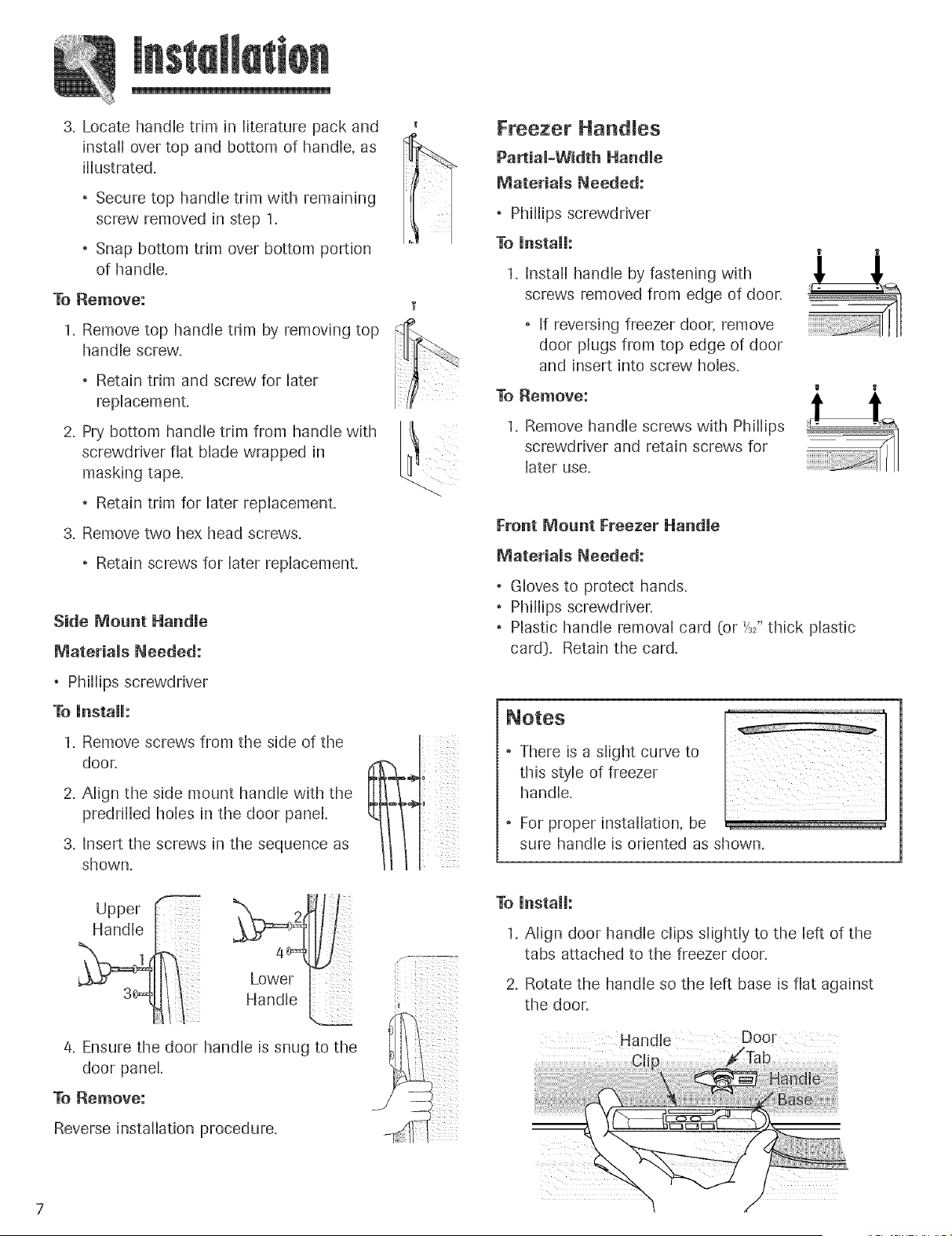
Locate handle trim in literature pack and
install over top and bottom of handle, as
illustrated.
, Secure top handle trim with remaining
screw removed in step 1.
Snap bottom trim over bottom portion
of handle.
Remove:
Remove top handle trim by removing top
handle screw.
Retain trim and screw for later
replacement.
2. Pry bottom handle trim from handle with _t
screwdriver flat blade wrapped in
masking tape.
Retain trim for later replacement.
3. Remove two hex head screws.
Retain screws for later replacement.
Side Mount Handle
Materials Needed:
Phillips screwdriver
To Unstall:
1. Remove screws from the side of the
door.
2. Align the side mount handle with the
predrflled holes in the door panel.
3. Insert the screws in the sequence as
shown.
Freezer Nandles
Partiam_Width Nandme
Materiams Needed:
, Phillips screwdriver
To UnstaH:
1. Install handle by fastening with
screws removed from edge of door.
If reversing freezer door, remove
door plugs from top edge of door
and insert into screw holes.
To Remove:
1. Remove handle screws with Phillips
screwdriver and retain screws for
later use.
Front Mount Freezer Nandle
Materiams Needed:
Gloves to protect hands.
Phillips screwdriver.
Plastic handle removal card (or h2" thick plastic
card). Retain the card.
, There is a slight curve to
this style of freezer
handle.
" For proper installation, be
sure handle is oriented as shown.
Upper
Handle
.... Lower
,andrei
4. Ensure the door handle is snug to the
door panel.
To Remove:
Reverse installation procedure.
To UnstaH:
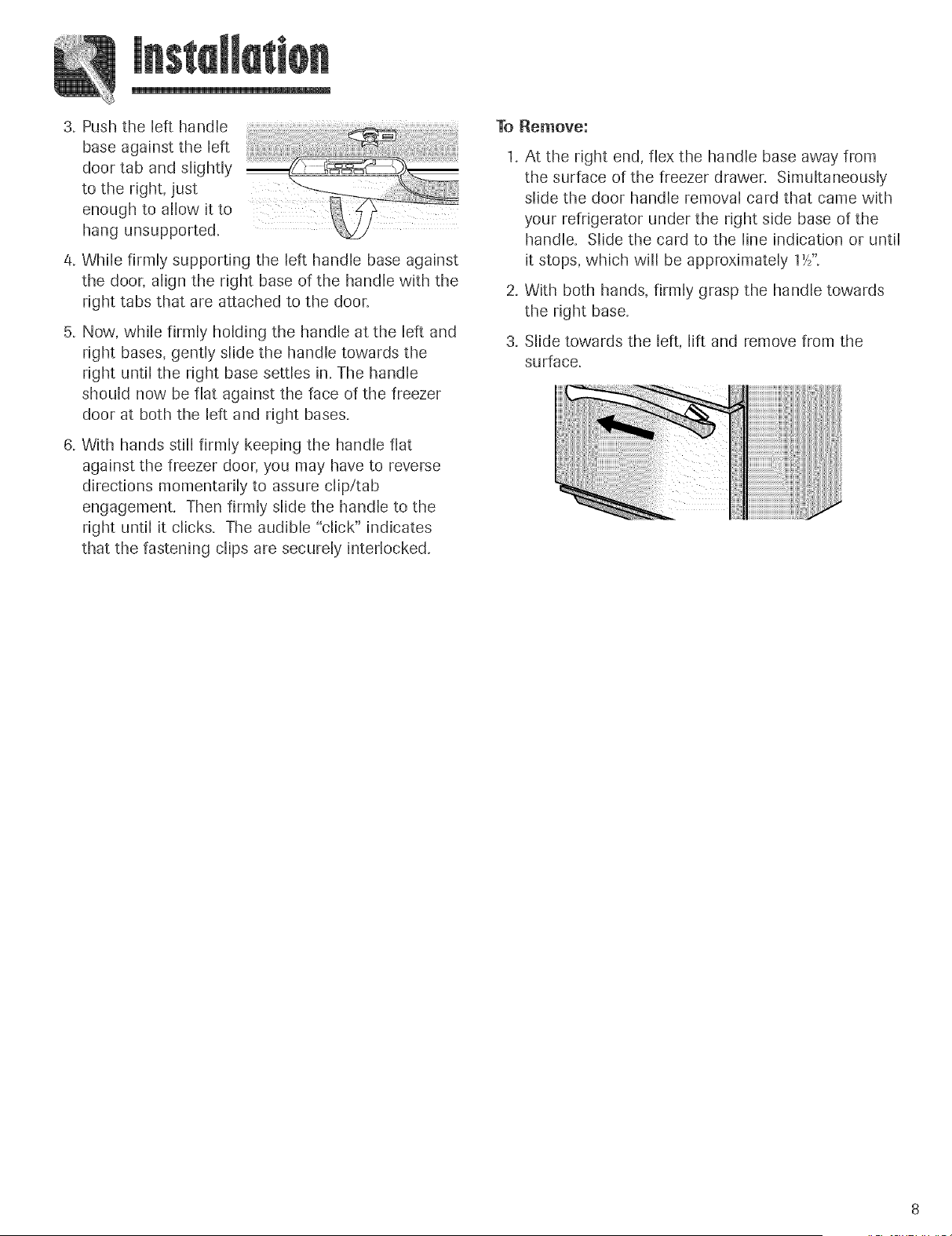
1. Align door handle clips slightly to the left of the
tabs attached to the freezer door.
2. Rotate the handle so the left base is flat against
the door.
Handle Door
J_
3. Push the left handle
base against the left
door tab and slightly
to the right, just
enough to allow it to
hang unsupported.
4. While firmly supporting the left handle base against
the door, align the right base of the handle with the
right tabs that are attached to the door.
5. Now, while firmly holding the handle at the left and
right bases, gently slide the handle towards the
right until the right base settles in. The handle
should now be flat against the face of the freezer
door at both the left and right bases.
6, With hands still firmly keeping the handle flat
against the freezer door, you may have to reverse
directions momentarily to assure clip/tab
engagement. Then firmly slide the handle to the
right until it clicks. The audible "click" indicates
that the fastening clips are securely interlocked.
To Remove:
1. At the right end, flex the handle base away from
the surface of the freezer drawer. Simultaneously
slide the door handle removal card that came with
your refrigerator under the right side base of the
handle. Slide the card to the line indication or until
it stops, which will be approximately 1't/'.
2. With both hands, firmly grasp the handle towards
the right base.
3. Slide towards the left, lift and remove from the
surface.
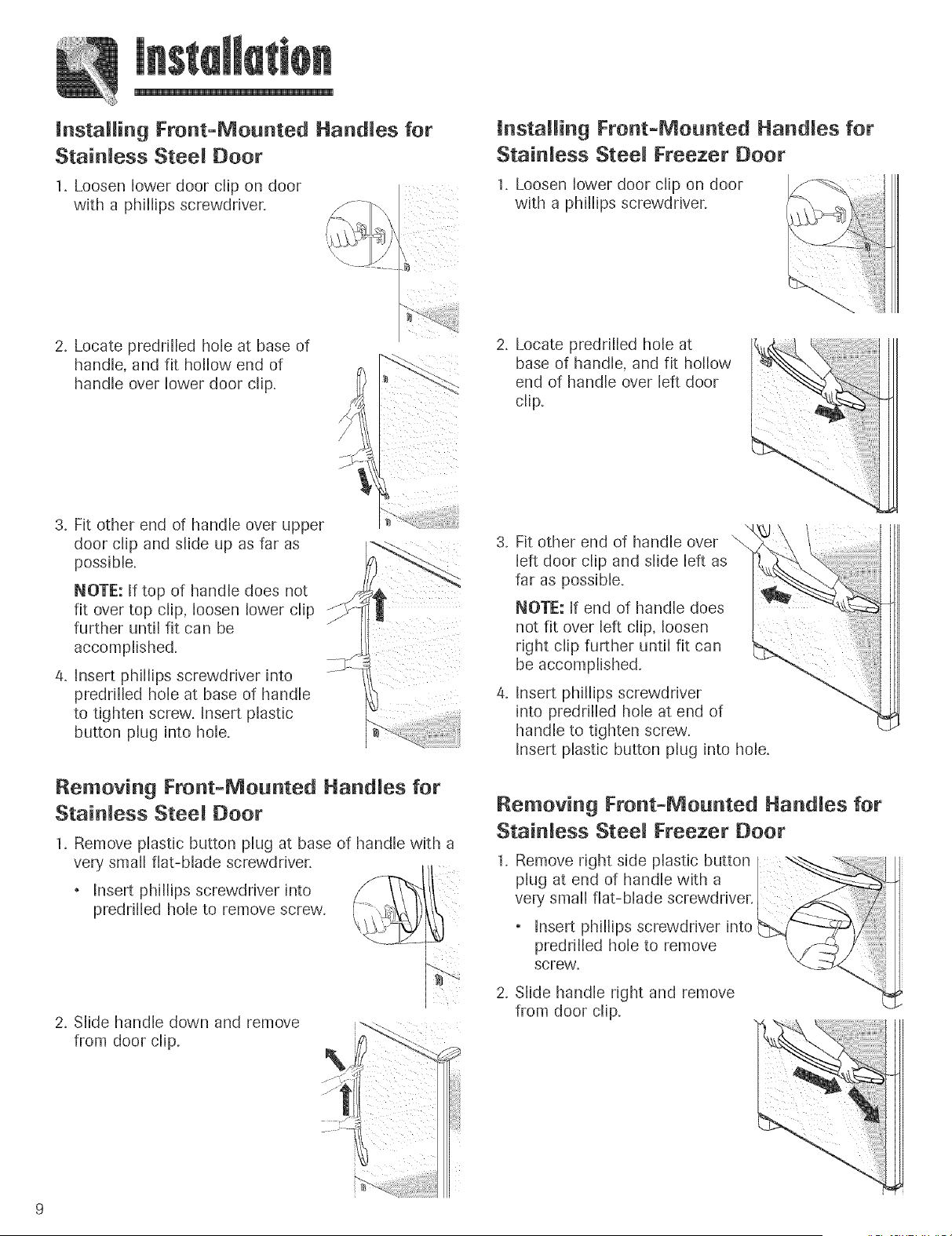
installing Front-Mounted Handles for
Stainless Steel Door
1. Loosen lower door clip on door
with a phillips screwdriver.
installing Front-Mounted Handles for
Stainless Steel Freezer Door
1. Loosen lower door clip on door
with a phillips screwdriver.
2. Locate preddlled hole at base of
handle, and fit hollow end of
handle over lower door clip.
3. Fit other end of handle over upper
door clip and slide up as far as
possible.
NOTE: If top of handle does not
fit over top clip, loosen lower clip
further until fit can be
accomplished.
/4. Insert pNllips screwdriver into
predrilled hole at base of handle
to tighten screw. Insert plastic
button plug into hole.
J
Removing Front-Mounted Handles for
Stainless Steel Door
1. Remove plastic button plug at base of handle with a
very small flat-blade screwdriver.
, Insert phillips screwdriver into /f/-_ 1
predrilled hole to remove screw.
2. Slide handle down and remove
from door clip.
2. Locate predrilled hole at
base of handle, and fit hollow
end of handle over left door
clip.
.
.
Fit other end of handle over \
left door clip and slide left as
far as possible.
NOTE: If end of handle does
not fit over left clip, loosen
right clip further until fit can
be accomplished.
Insert phillips screwdriver
into predrilled hole at end of
handle to tighten screw.
Insert plastic button plug into hole.
Removing Front-Mounted Handles for
Stainless Steel Freezer Door
1. Remove right side plastic button
plug at end of handle with a ....
very small flat-blade screwdriver.
, Insert phillips screwdriver into
predrilled hole to remove
screw.
2. Slide handle right and remove
from door clip.
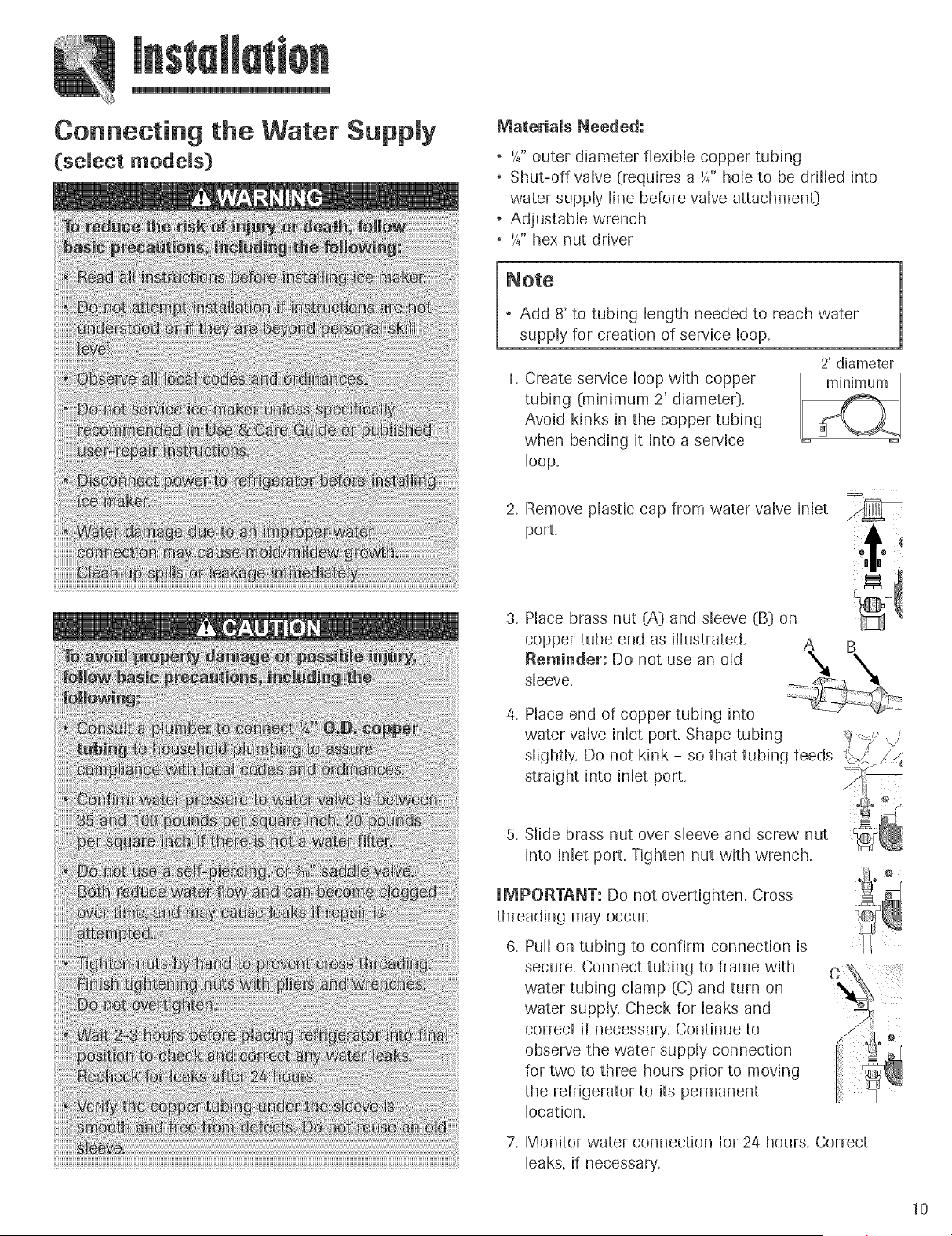
Connecting the Water Supply
(select models)
Materials Needed:
* '4" outer diameter flexible copper tubing
* Shut-off valve (requires a h" hole to be drilled into
water supply line before valve attachmenO
* Adjustable wrench
* '4" hex nut driver
* Add 8' to tubing length needed to reach water
supply for creation of service loop.
Create service loop with copper
tubing (minimum 2' diameteO.
Avoid kinks in the copper tubing
when bending it into a service
bop,
2' diameter
Remove plastic cap from water valve inlet
port.
Place brass nut (A} and sleeve (B} on
copper tube end as illustrated,
Reminder: Do not use an old
sleeve.
B
Place end of copper tubing into
water valve inlet port. Shape tubing
slightly, Do not kink - so that tubing feeds
straight into inlet port.
5. Slide brass nut over sleeve and screw nut
into inlet port. Tighten nut with wrench.
UMPORTANT: Do not overtighten. Cross
threading may occur.
Pull on tubing to confirm connection is
secure. Connect tubing to frame with
water tubing clamp (C) and turn on
water supply, Check for leaks and
correct if necessary. Continue to
observe the water supply connection
for two to three hours prior to moving
the refrigerator to its permanent
location.
7. Monitor water connection for 2/4 hours. Correct
leaks, if necessary.
10
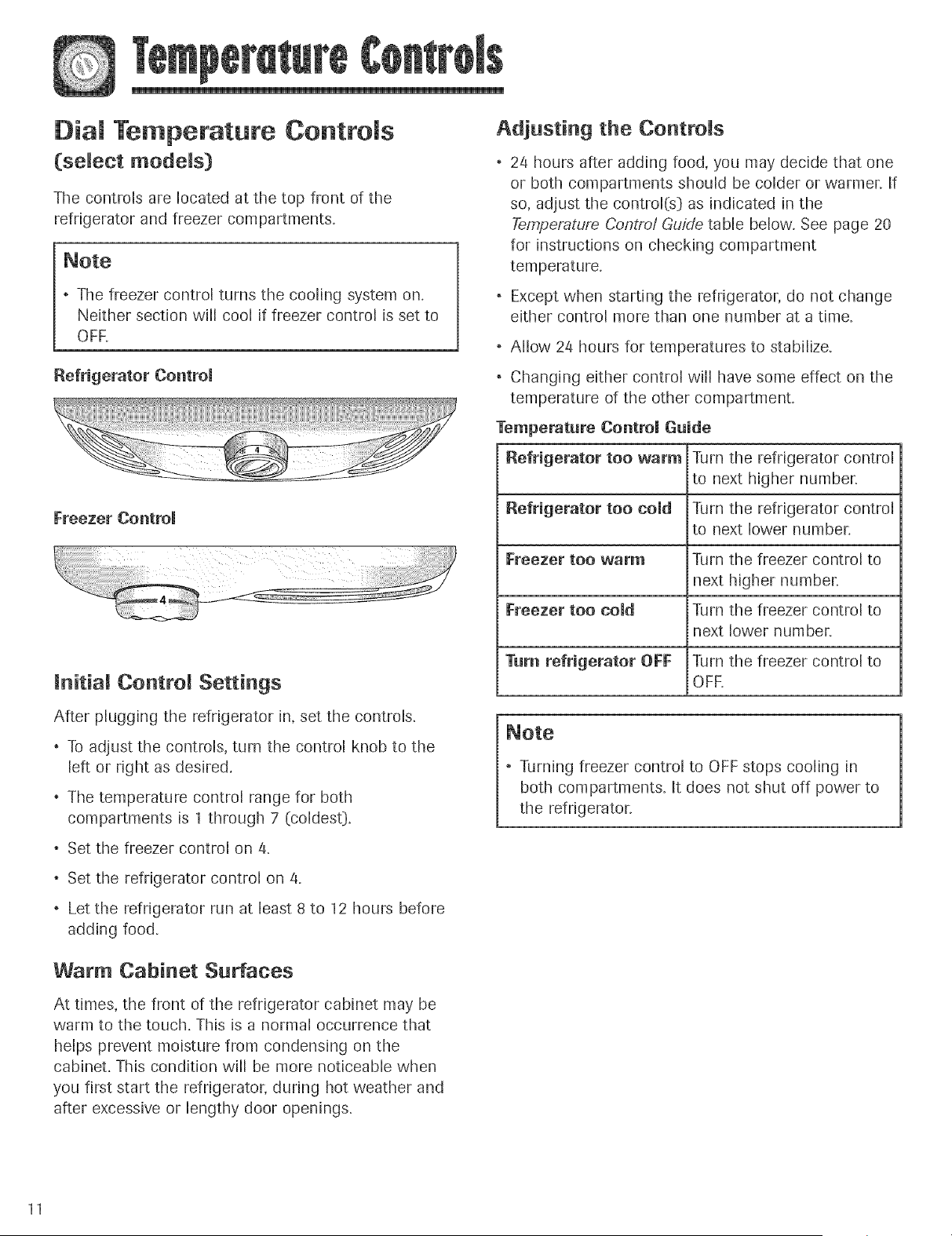
Dial Temperature Controls
(select models)
The controls are located at the top front of the
refrigerator and freezer compartments.
* The freezer control turns the cooling system on.
Neither section will cool if freezer control is set to
OFF,
Freezer Control
linitial Control Settings
After plugging the refrigerator in, set the controls.
* To adjust the controls, turn the control knob to the
left or right as desired.
* The temperature control range for both
compartments is 1 through 7 (coldest).
* Set the freezer control on 4.
* Set the refrigerator control on 4.
* Let the refrigerator run at least 8 to 12 hours before
adding food.
Adjusting the Controls
24 hours after adding food, you may decide that one
or both compartments should be colder or warmer, if
so, adjust the control(s) as indicated in the
Temperature Control Guide table below. See page 20
for instructions on checking compartment
temperature.
* Except when starting the refrigerator, do not change
either control more than one number at a time.
* Allow 2/4 hours for temperatures to stabilize.
* Changing either control will have some effect on the
temperature of the other compartment.
Temperature Control Guide
Refrigerator too warm Turn the refrigerator control
to next higher number.
Refrigerator too cold Turn the refrigerator control
to next lower number.
Freezer too warm Turn the freezer control to
next higher number.
Freezer too cold Turn the freezer control to
next lower number.
Turn refrigerator OFF Turn the freezer control to
OFF.
* Turning freezer control to OFF stops cooling in
both compartments. It does not shut off power to
the refrigerator.
Warm Cabinet Surfaces
At times, the front of the refrigerator cabinet may be
warm to the touch. This is a normal occurrence that
helps prevent moisture from condensing on the
cabinet. This condition will be more noticeable when
you first start the refrigerator, during hot weather and
after excessive or lengthy door openings.
11
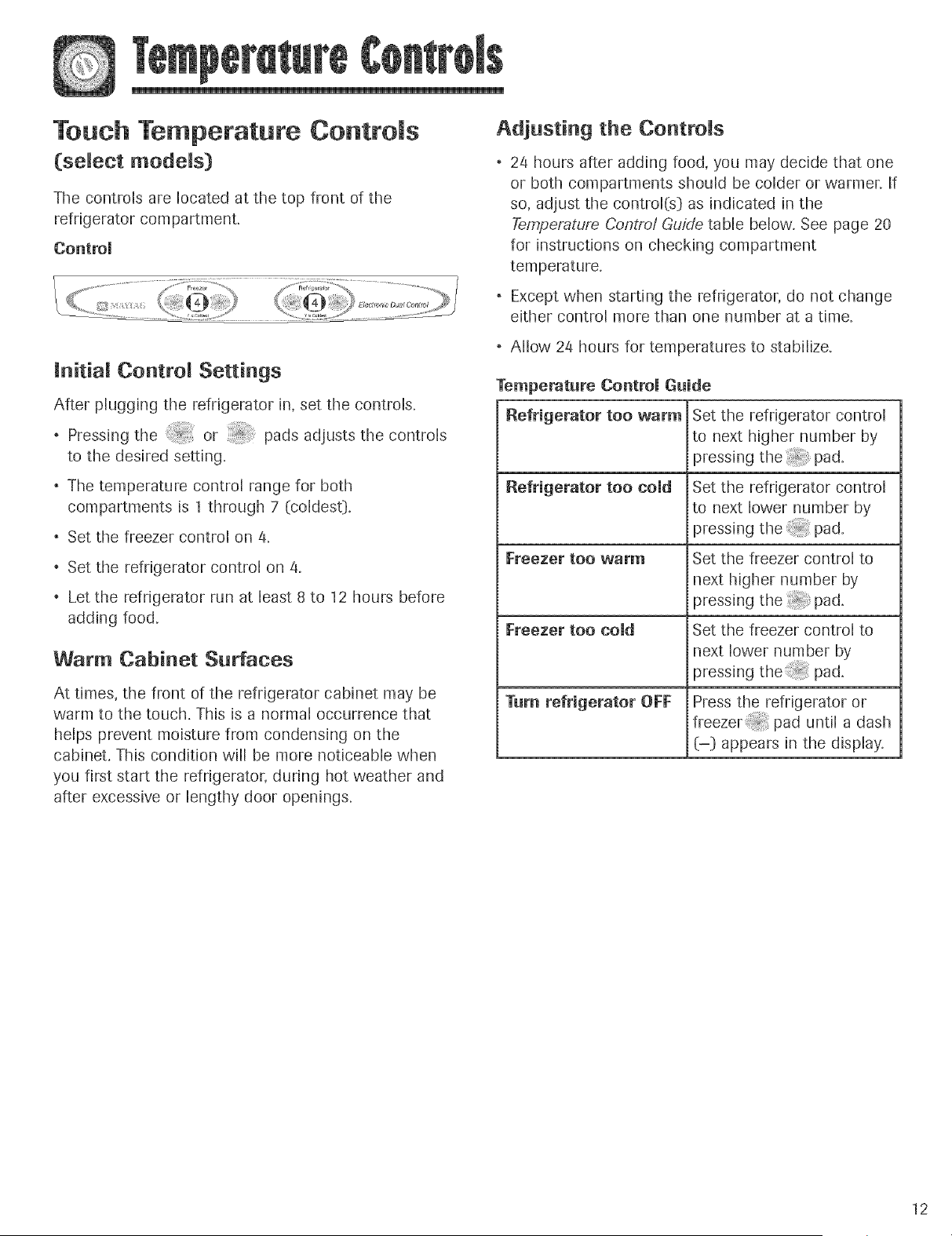
Touch Temperature Controls
(select models)
The controls are located at the top front of the
refrigerator compartment.
Controm
initial Control Settings
After plugging the refrigerator in, set the controls.
* Pressing the _ or _ pads adjusts the controls
to the desired setting.
* The temperature control range for both
compartments is 1 through 7 (coldes0.
* Set the freezer control on a.
* Set the refrigerator control on/4.
* Let the refrigerator run at least 8 to 12 hours before
adding food.
Warm Cabinet Surfaces
At times, the front of the refrigerator cabinet may be
warm to the touch. This is a normal occurrence that
helps prevent moisture from condensing on the
cabinet. This condition will be more noticeable when
you first start the refrigerator, during hot weather and
after excessive or lengthy door openings.
Adjusting the Controls
24 hours after adding food, you may decide that one
or both compartments should be colder or warmer, if
so, adjust the control(s) as indicated in the
Temperature Control Guide table below. See page 20
for instructions on checking compartment
temperature.
* Except when starting the refrigerator, do not change
either control more than one number at a time.
* Allow 2/4 hours for temperatures to stabilize.
Temperature Control Guide
Refrigerator too warm Set the refrigerator control
to next higher number by
pressing the_ pad.
Refrigerator too cold
Freezer too warm
Freezer too cold
Turn refrigerator OFF
Set the refrigerator control
ito next lower number by
pressing t h e p ad.
Set the freezer control to
i next higher number by
pressing the _ pad.
Set the freezer control to
next lower number by
pressing the_ pad.
Press the refrigerator or
i freezer ;:pad untiladash
(-) appears in the display.
12
13
Triple CoomCmimate Control
(select models)
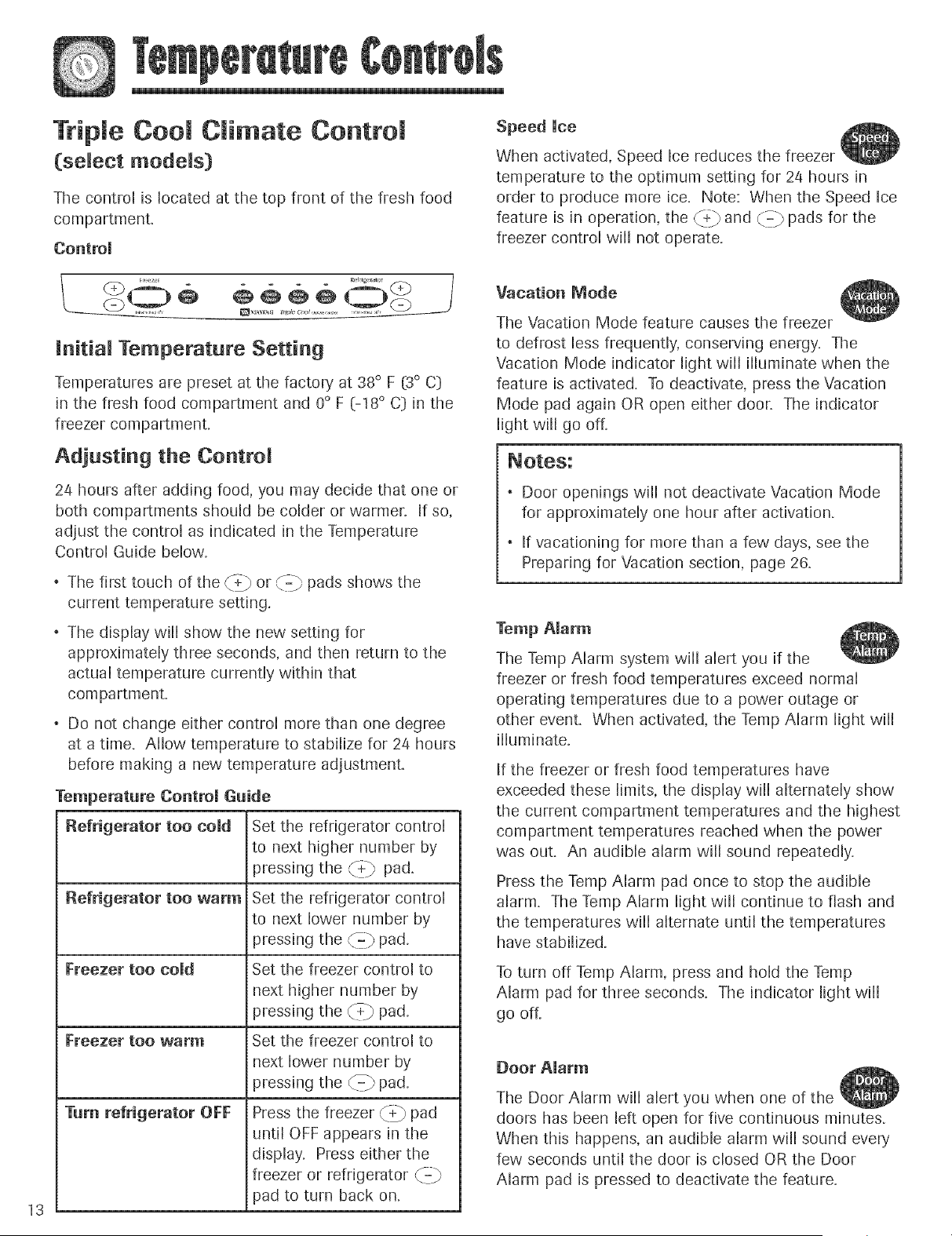
The control is located at the top front of the fresh food
compartment.
Controm
Initial Temperature Setting
Temperatures are preset at the factory at 38 ° F (3° C)
in the fresh food compartment and 0° F (-18 ° C) in the
freezer compartment.
Adjusting the Control
2/4 hours after adding food, you may decide that one or
both compartments should be colder or warmen if so,
adjust the control as indicated in the Temperature
Control Guide below.
"--_ pads shows the* The first touch of the _$jb or \_
current temperature setting.
* The display will show the new setting for
approximately three seconds, and then return to the
actual temperature currently within that
corn partment.
* Do not change either control more than one degree
at a time. Allow temperature to stabilize for 24 hours
before making a new temperature adjustment.
Temperature Controm Guide
Refrigerator too cold
Refrigerator too warm
Freezer too cold
_reezer 11OOw_rnl
Turn refrigerator OFF
Set the refrigerator control
to next higher number by
pressing the {4-} pad.
Set the refrigerator control
to next lower number by
pressing the {z pad.
Set the freezer control to
next higher number by
pressing the _+} pad.
Set the freezer control to
next lower number by
pressing the {c=} pad.
Press the freezer/_ pad
until OFF appears in the
display. Press either the
freezer or refrigerator _=_
pad to turn back on.
Speed Uce
When activated, Speed ice reduces the freezer
temperature to the optimum setting for 2a hours in
order to produce more ice. Note: When the Speed Ice
feature is in operation, the _4:} and {.z pads for the
freezer control will not operate.
Vacation Mode
The Vacation Mode feature causes the freezer
to defrost less frequently, conserving energy. The
Vacation Mode indicator light will ilhminate when the
feature is activated. To deactivate, press the Vacation
Mode pad again OR open either door. The indicator
light will go off.
* Door openings will not deactivate Vacation Mode
for approximately one hour after activation.
* if vacationing for more than a few days, see the
Preparing for Vacation section, page 26.
Temp Alarm
The Temp Alarm system will alert you if the
freezer or fresh food temperatures exceed normal
operating temperatures due to a power outage or
other event. When activated, the Temp Alarm light will
illuminate.
If the freezer or fresh food temperatures have
exceeded these limits, the display will alternately show
the current compartment temperatures and the highest
compartment temperatures reached when the power
was out. An audible alarm will sound repeatedly.
Press the Temp Alarm pad once to stop the audible
alarm. The Temp Alarm light will continue to flash and
the temperatures will alternate until the temperatures
have stabilized.
To turn off Temp Alarm, press and hold the Temp
Alarm pad for three seconds. The indicator light will
go off.
Door Alarm
The Door Alarm will alert you when one of the
doors has been left open for five continuous minutes.
When this happens, an audible alarm will sound every
few seconds until the door is closed OR the Door
Alarm pad is pressed to deactivate the feature.
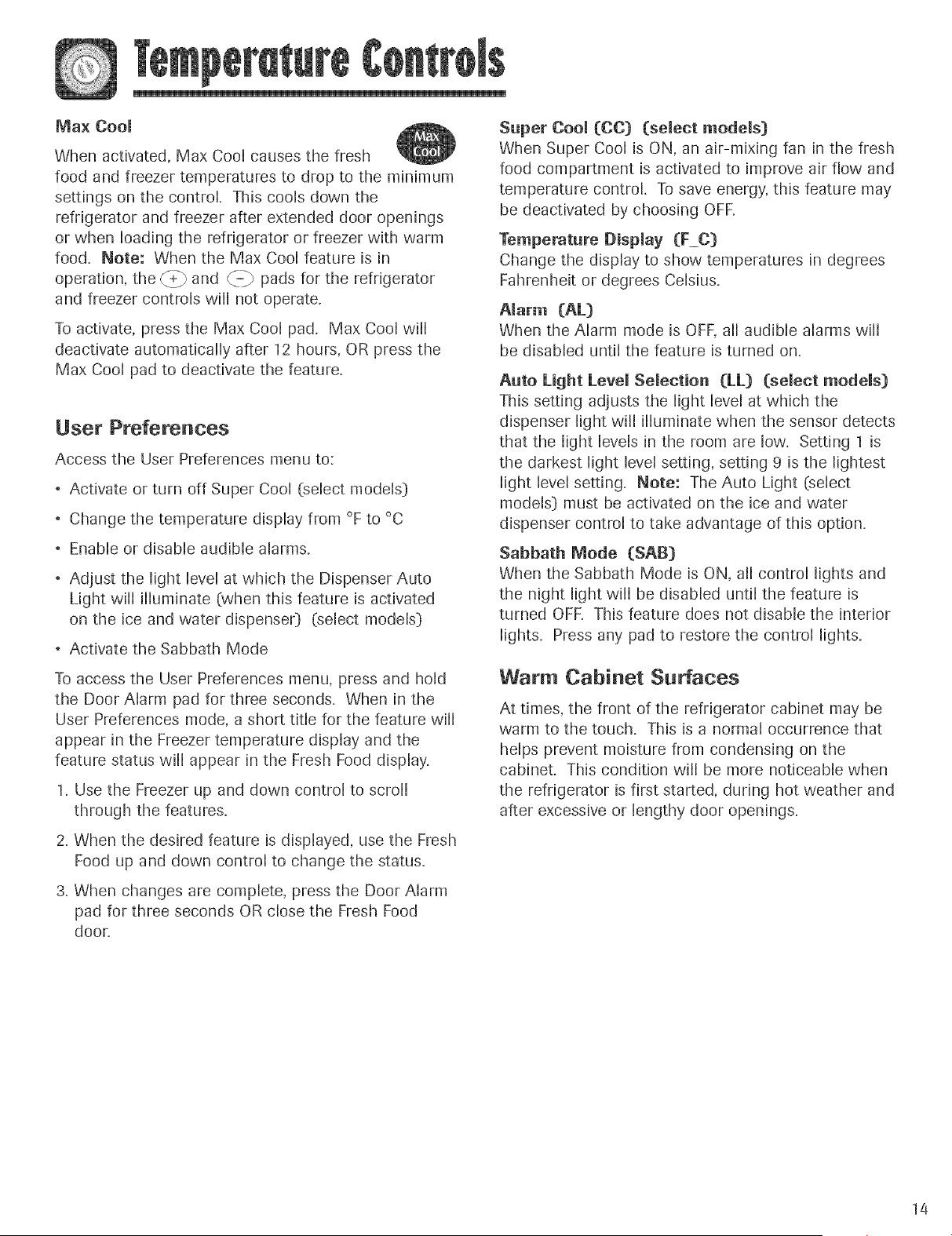
Max Cool
When activated, Max Cool causes the fresh
food and freezer temperatures to drop to the minimum
settings on the control. This cools down the
refrigerator and freezer after extended door openings
or when loading the refrigerator or freezer with warm
food. Note: When the Max Cool feature is in
operation, the _4:_ and _b pads for the refrigerator
and freezer controls will not operate.
To activate, press the Max Cool pad. Max Cool will
deactivate automatically after 12 hours, OR press the
Max Cool pad to deactivate the feature.
User P_'efe_'enoes
Access the User Preferences menu to:
Activate or turn off Super Cool (select models)
Change the temperature display from °F to °C
Enable or disable audible alarms.
Adjust the light level at which the Dispenser Auto
Light will illuminate (when this feature is activated
on the ice and water dispenser} (select models}
Activate the Sabbath Mode
To access the User Preferences menu, press and hold
the Door Alarm pad for three seconds. When in the
User Preferences mode, a short title for the feature will
appear in the Freezer temperature display and the
feature status will appear in the Fresh Food display.
1. Use the Freezer up and down control to scroll
through the features.
2. When the desired feature is displayed, use the Fresh
Food up and down control to change the status.
3,When changes are complete, press the Door Alarm
pad for three seconds OR close the Fresh Food
door,
Super Cool (CO] (select models}
When Super Cool is ON, an air-mixing fan in the fresh
food compartment is activated to improve air flow and
temperature control. To save energy, this feature may
be deactivated by choosing OFK
Temperature Display (F_C)
Change the display to show temperatures in degrees
Fahrenheit or degrees Celsius.
Alarm (AL)
When the Alarm mode is OFF, all audible alarms will
be disabled until the feature is turned on.
Auto Light Level Selection (LL) (select models[}
This setting adjusts the light level at which the
dispenser light will ilhminate when the sensor detects
that the light levels in the room are low. Setting 1 is
the darkest light level setting, setting 9 is the lightest
light level setting. Note: The Auto Light (select
models} must be activated on the ice and water
dispenser control to take advantage of this option.
Sabbath Mode (SAB}
When the Sabbath Mode is ON, all control lights and
the night light will be disabled until the feature is
turned OFK This feature does not disable the interior
lights. Press any pad to restore the control lights.
Warm Cabinet Surfaces
At times, the front of the refrigerator cabinet may be
warm to the touch. This is a normal occurrence that
helps prevent moisture from condensing on the
cabinet. This condition will be more noticeable when
the refrigerator is first started, during hot weather and
after excessive or lengthy door openings.
14
Your refrigerator has either Spill-Catcher TM or non-
seamed Shemves, The Spill-Catcher TM shelves have a
spill retainer edge which allows for easier clean up and
some are equipped with the Easy Gmide slide out
feature. To slide out (select models}, grasp the front of
the shelf and pull forward. Push in the shelf to return
to the original position.
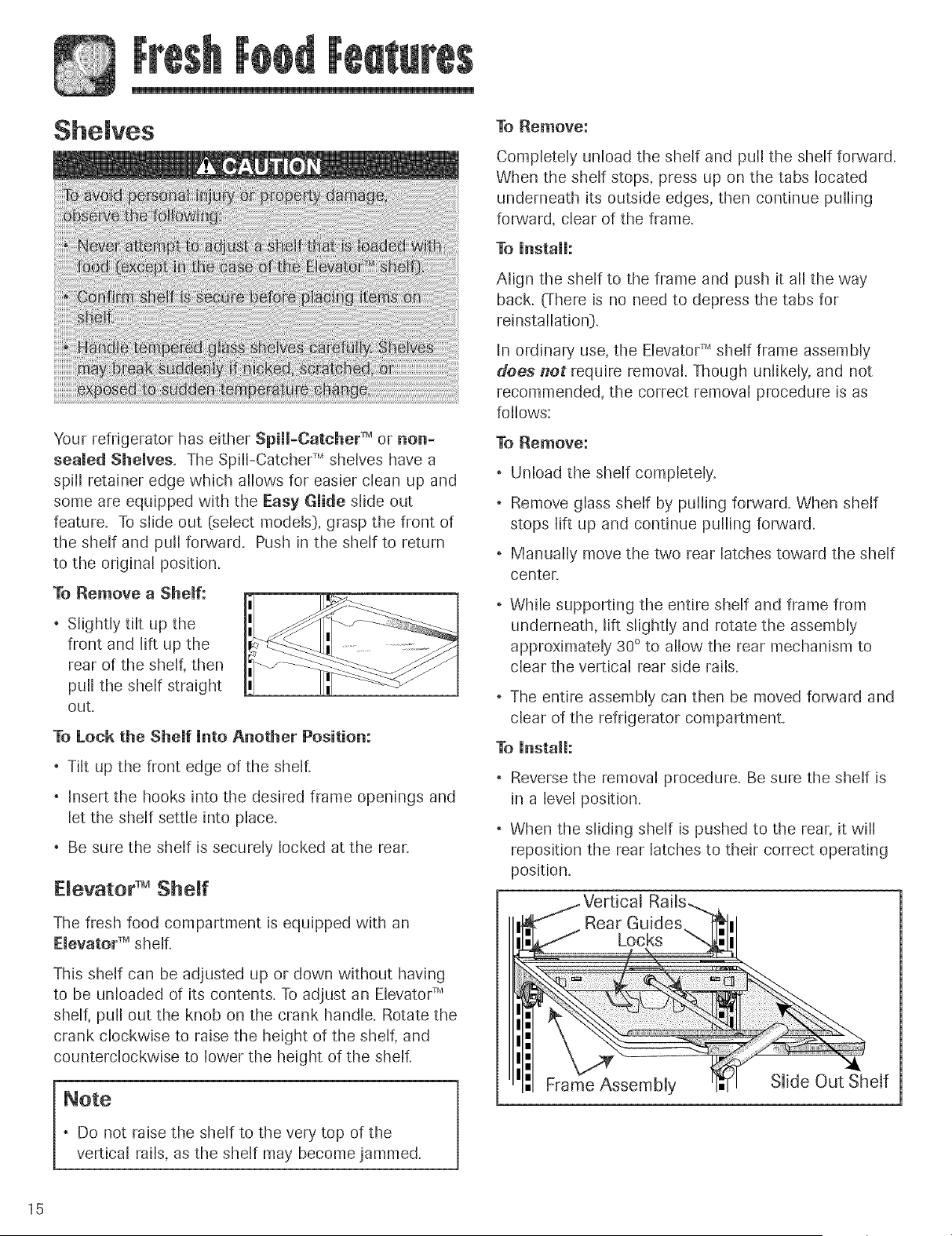
To Remove a Shelf:
. Slightly tilt up the
front and lift up the
rear of the shelf, then
pull the shelf straight
out+
To Lock the Shemf Unto Another Position:
. Tilt up the front edge of the shelf.
, Insert the hooks into the desired frame openings and
let the shelf settle into place.
Be sure the shelf is securely locked at the rear
Devator TM Shelf
The fresh food compartment is equipped with an
Elevator TM shelf.
This shelf can be adjusted up or down without having
to be unloaded of its contents. To adjust an Elevator TM
shelf, pull out the knob on the crank handle. Rotate the
crank clockwise to raise the height of the shelf, and
counterclockwise to lower the height of the shelf.
, Do not raise the shelf to the very top of the
vertical rails, as the shelf may become jammed.
To Remove:
Completely unload the shelf and pull the shelf forward.
When the shelf stops, press up on the tabs located
underneath its outside edges, then continue pulling
forward, clear of the frame.
To UnstaH:
Align the shelf to the frame and push it all the way
back. (There is no need to depress the tabs for
reinstallation}.
In ordinary use, the Elevator TM shelf frame assembly
does net require removal. Though unlikely, and not
recommended, the correct removal procedure is as
follows:
To Remove:
, Unload the shelf completely.
. Remove glass shelf by pulling forward. When shelf
stops lift up and continue pulling forward.
Manually move the two rear latches toward the shelf
center
While supporting the entire shelf and frame from
underneath, lift slightly and rotate the assembly
approximately 30 ° to allow the rear mechanism to
clear the vertical rear side rails.
, The entire assembly can then be moved forward and
clear of the refrigerator compartment.
To Install:
, Reverse the removal procedure. Be sure the shelf is
in a level position.
, When the sliding shelf is pushed to the rear, it will
reposition the rear latches to their correct operating
position.
Frame Assembly
Slide Out Shelf
15
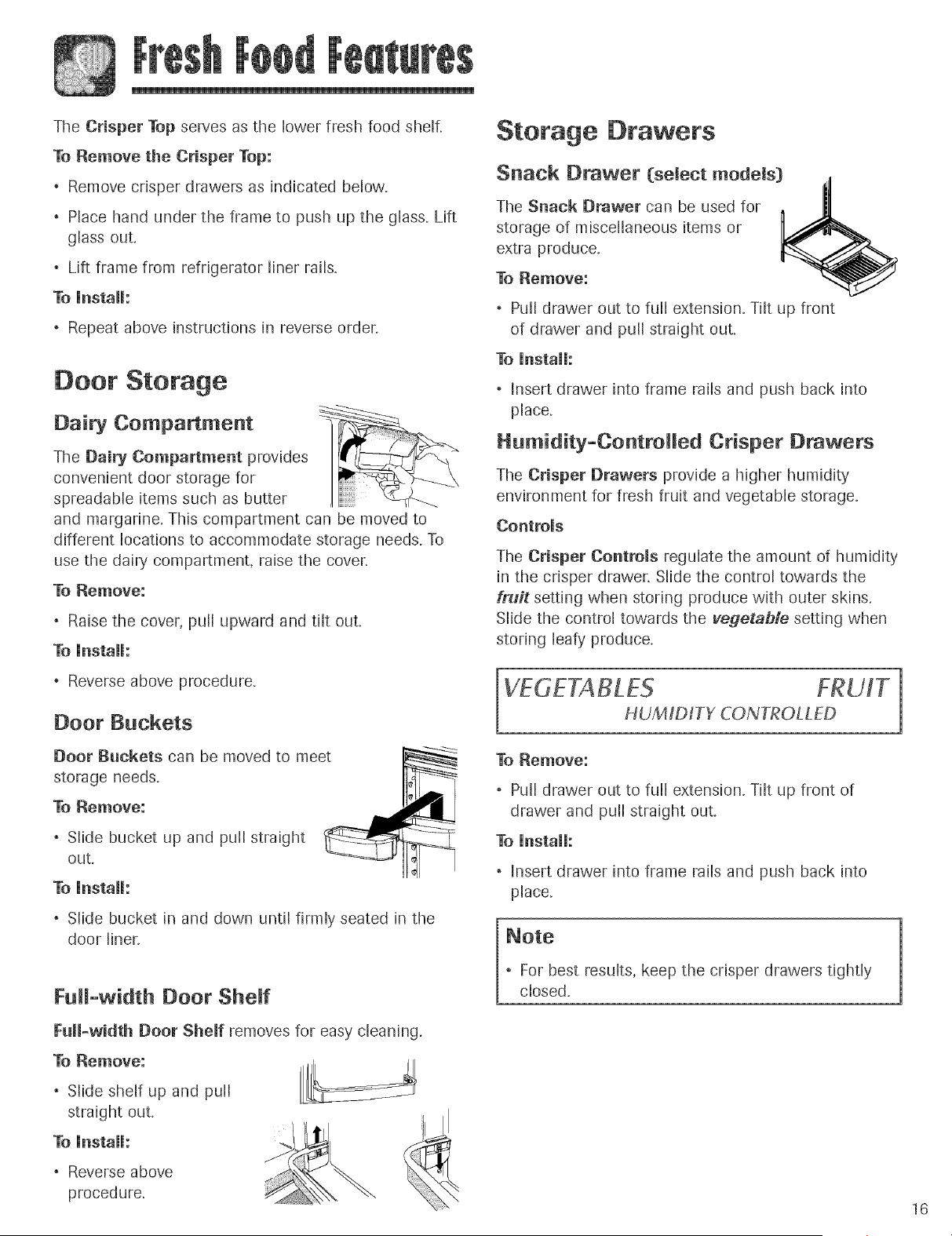
TheCrisperTopservesasthe lowerfreshfoodshelf.
To Remove the Crisper Top:
, Remove crisper drawers as indicated below.
, Place hand under the frame to push up the glass. Lift
glass out.
Lift frame from refrigerator liner rails.
To [nstalh
, Repeat above instructions in reverse order`
Door Storage
Dairy Compartment
The Dairy Compartment provides
convenient door storage for
spreadable items such as butter
and margarine. This compartment can be moved to
different locations to accommodate storage needs. To
use the dairy compartment, raise the coven
To Remove:
Raise the cover, pull upward and tilt out
To [nstaH:
Reverse above procedure.
Door Buckets
Door Buckets can be moved to meet
storage needs.
To Remove:
Slide bucket up and pull straight
ouL
To [nstai[:
Slide bucket in and down until firmly seated in the
door liner`
Full-width Door Sheff
Full-width Door Shelf removes for easy cleaning.
To Remove:
, Slide shelf up and puil
straight out.
To [nstalh
Reverse above
procedure.
Storage Drawers
Snack Drawer (select models) ,_
The Snack [}rawer can be used for . II
storage of miscellaneous items or
extra produce. _ _--_..
q
To Remove:
Pull drawer out to full extension. Tilt up front
of drawer and pull straight ouL
To [nstaih
, Insert drawer into frame rails and push back into
place.
Humidity-Controlled Crisper Drawers
The Crisper Drawers provide a higher humidity
environment for fresh fruit and vegetable storage.
Controls
The Crisper Controls regulate the amount of humidity
in the crisper drawer, Slide the control towards the
fruit setting when storing produce with outer skins.
Slide the control towards the vegetable setting when
storing leafy produce.
HUMID/TY CONTROLLED 1
To Remove:
. Pull drawer out to full extension. Tilt up front of
drawer and pull straight out.
To [nstaih
, Insert drawer into frame rails and push back into
place.
, For best results, keep the crisper drawers tightly
close&
16
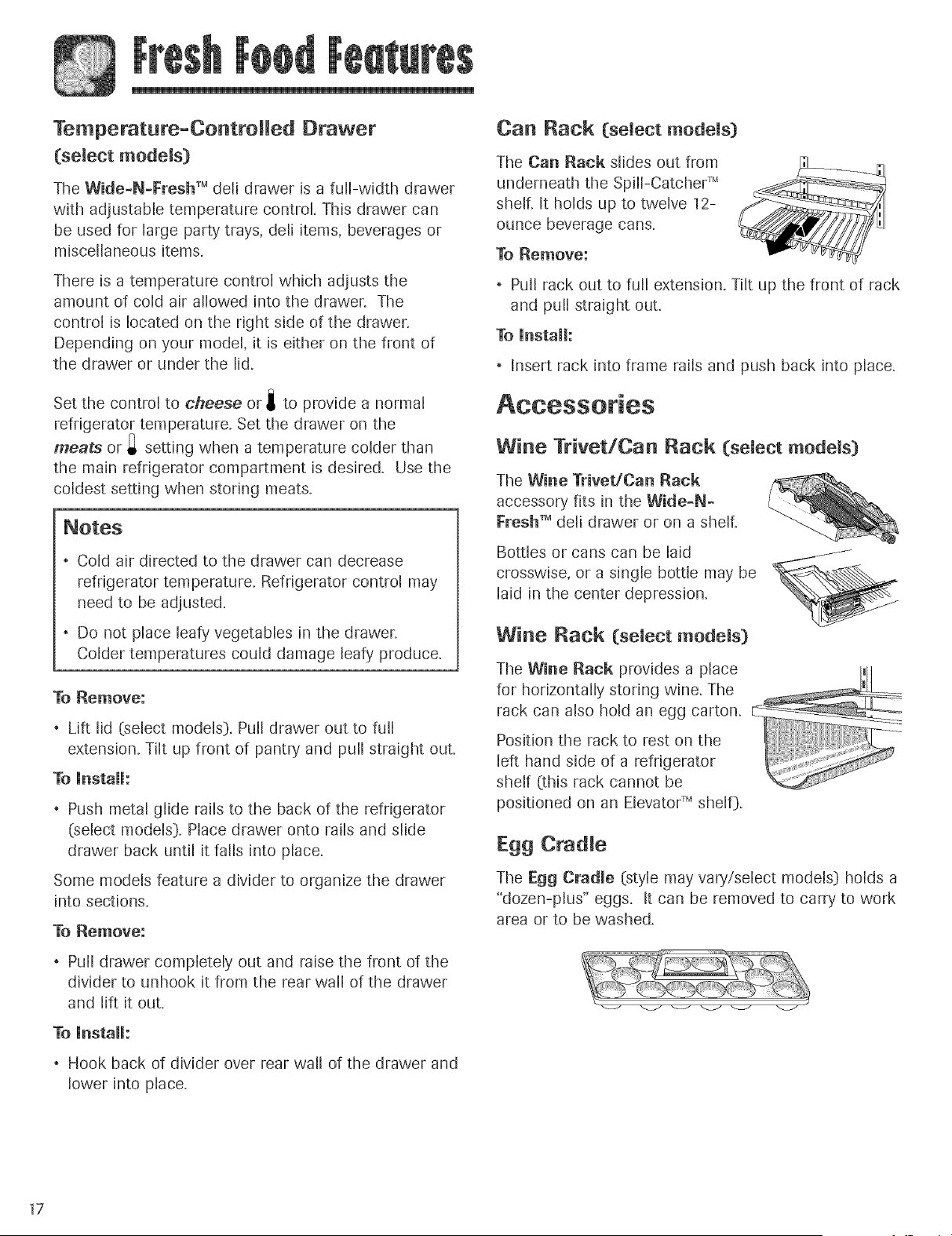
Temperatura-ControHed Drawer
(select models)
The Wide-N-I:resh TM dell drawer is a full-width drawer
with adjustable temperature control. This drawer can
be used for large party trays, dell items, beverages or
miscellaneous items.
There is a temperature control which adjusts the
amount of cold air allowed into the drawer. The
control is located on the right side of the drawer.
Depending on your model, it is either on the front of
the drawer or under the lid.
Set the control to cheese or i to provide a normal
refrigerator temperature. Set the drawer on the
meats or _ setting when a temperature colder than
the main refrigerator compartment is desired. Use the
coldest setting when storing meats.
. Cold air directed to the drawer can decrease
refrigerator temperature. Refrigerator control may
need to be adjusted.
Do not place leafy vegetables in the drawer.
Colder temperatures could damage leafy produce.
To Remove:
Lift lid (select models). Pull drawer out to full
extension. Tilt up front of pantry and pull straight ouL
To instalh
. Push metal glide rails to the back of the refrigerator
(select models). Place drawer onto rails and slide
drawer back until it fails into place.
Some models feature a divider to organize the drawer
into sections.
To Remove:
, Pulldrawer completely out and raise the front of the
divider to unhook it from the rear wall of the drawer
and lift it out.
To UnstaJJ:
Hook back of divider over rear wall of the drawer and
lower into place.
CaR Rack (select models)
The Can Rack slides out from
underneath the SpflFCatcher TM
shelf. It holds up to twelve 12-
ounce beverage cans.
To Remove:
. Pull rack out to full extension. Tilt up the front of rack
and pull straight out.
To instalh
, Insert rack into frame rafts and push back into place.
Wine Trivet/Can Rack (select models)
The Wine TrivedCan Rack
accessory fits in the Wide-N-
Fresh TM deli drawer or on a shelf.
Bottles or cans can be laid
crosswise, or a single bottle may be
laid in the center depression.
Wine Rack (select models)
The Wine Rack provides a place i_ll
for horizontally storing wine. The
rack can also hold an egg carton.
Position the rack to rest on the
left hand side of a refrigerator
shelf (this rack cannot be
positioned on an Elevato¢ Mshelf).
Egg Cradle
The Egg Cradle (style may vary!select models) holds a
"dozen-plus" eggs. It can be removed to carry to work
area or to be washed.
17
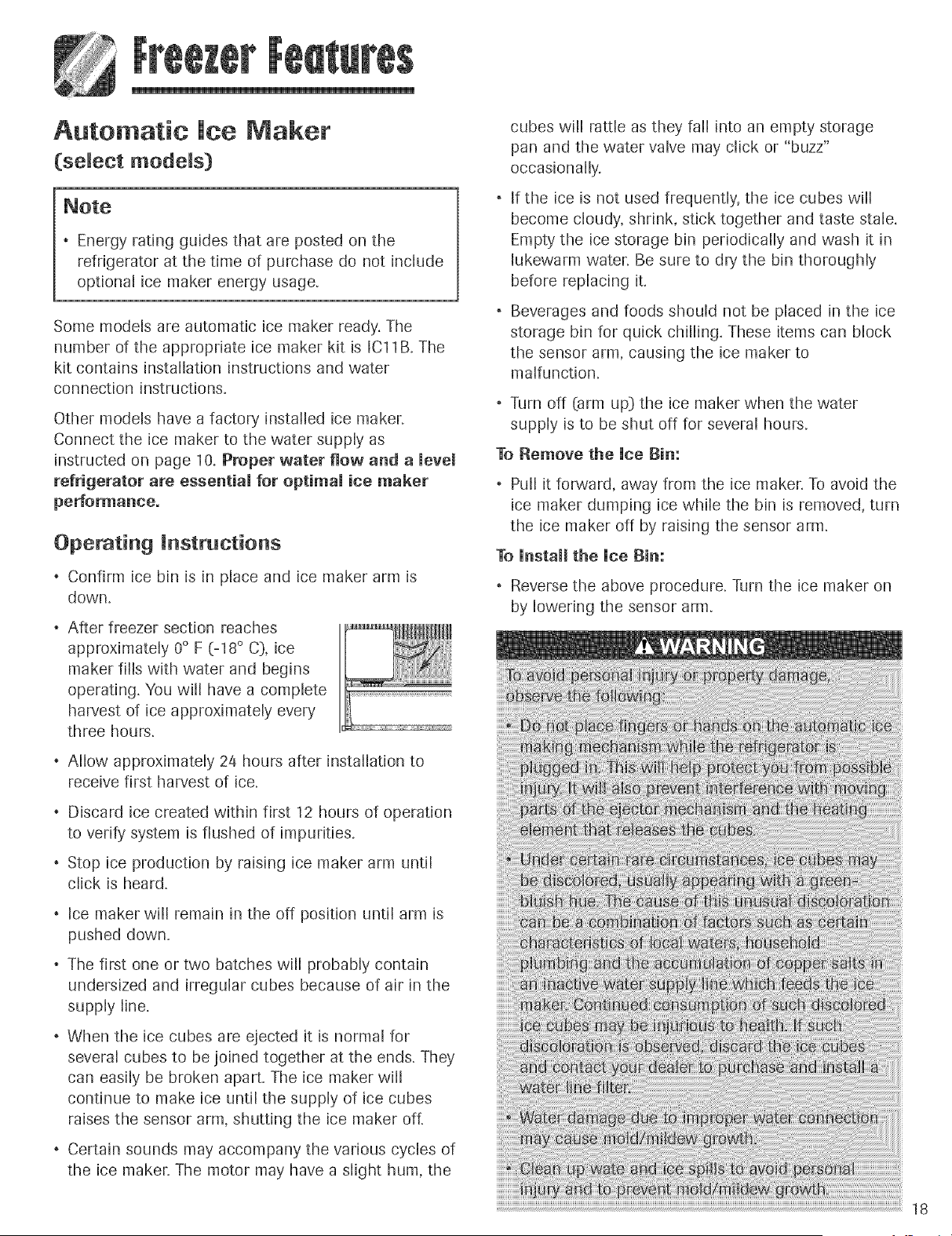
Automatic ice Maker
(select models}
. Energy rating guides that are posted on the
refrigerator at the time of purchase do not include
optional ice maker energy usage.
Some models are automatic ice maker ready. The
number of the appropriate ice maker kit is IC11B. The
kit contains [nstalDtion instructions and water
connection instructions.
Other models have a factory installed ice maker.
Connect the ice maker to the water supply as
instructed on page 10. Proper water flow and a level
refrigerator are essential for optimal ice maker
performance.
Operating instructions
. Confirm ice bin is in place and ice maker arm is
down.
. After freezer section reaches
approximately 0° F (-18 ° C), ice
maker fills with water and begins
operating. You will have a complete
harvest of ice approximately every
three hours.
. Allow approximately 24 hours after installation to
receive first harvest of ice.
Discard ice created within first 12 hours of operation
to verify system is flushed of impurities.
, Stop ice production by raising ice maker arm until
click is heard.
, Ice maker w[[[ remain in the off position until arm is
pushed down.
, The first one or two batches will probably contain
undersized and irregular cubes because of air in the
supply line.
. When the ice cubes are ejected it is normal for
several cubes to be joined together at the ends. They
can easily be broken apart. The ice maker will
continue to make ice until the supply of ice cubes
raises the sensor arm, shutting the ice maker oft
, Certain sounds may accompany the various cycles of
the ice maker. The motor may have a slight hum, the
cubes will rattle as they fall into an empty storage
pan and the water valve may click or "buzz"
occasionally.
If the ice is not used frequently, the ice cubes will
become cloudy, shrink, stick together and taste stale.
Empty the ice storage bin periodically and wash it in
lukewarm waten Be sure to dry the bin thoroughly
before replacing it.
Beverages and foods should not be placed in the ice
storage bin for quick chilling. These items can block
the sensor arm, causing the ice maker to
malfunction.
, Turn off (arm up} the ice maker when the water
supply is to be shut off for several hours.
To Remove the Uce }}in:
, Pull it forward, away from the ice maker. To avoid the
ice maker dumping ice while the bin is removed, turn
the ice maker off by raising the sensor arm.
To Unstall the Uce Bin:
, Reverse the above procedure. Turn the ice maker on
by lowering the sensor arm.
19
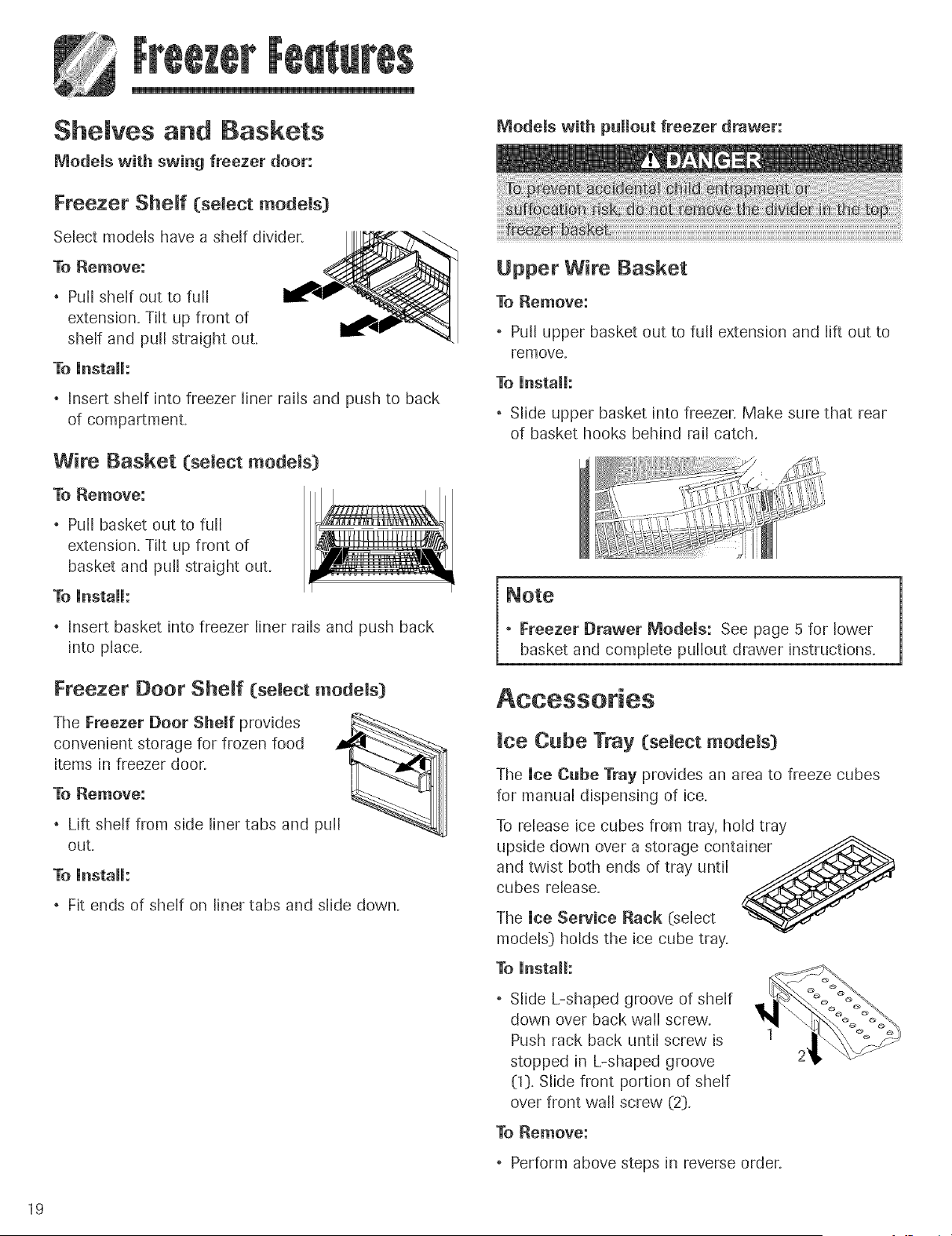
Shemves and gaskets
Modems with swing freezer door:
Freezer Shelf (select models)
Select models have a shelf divider.
To Remove:
, Pull shelf out to full
extension. Tilt up front of
shelf and pull straight out.
To Unstalh
, Insert shelf into freezer liner rails and push to back
of compartment.
Wire Basket (select models)
To Remove:
, Pull basket out to full
extension. Tilt up front of
basket and puff straight out.
To UnstaH:
Insert basket into freezer liner rails and push back
into place.
Freezer Door Sheff (semect models}
The Freezer Door Sheff provides
convenient storage for frozen food
items in freezer door.
To Remove:
, Lift sheJf from side liner tabs and pu[[
out+
To install:
, Fit ends of shelf on liner tabs and slide down.
Models with pullout freezer drawer:
Upper Wire Basket
To Remove:
, Pull upper basket out to full extension and lift out to
remove,
To Install:
, Slide upper basket into freezer. Make sure that rear
of basket hooks behind rail catch.
, Freezer Drawer Models: See page 5 for lower
basket and complete pullout drawer instructions.
ice Cube Tray (select models)
The ice Cube Tray provides an area to freeze cubes
for manual dispensing of ice,
To release ice cubes from tray, hold tray
upside down over a storage container
and twist both ends of tray until
cubes release.
The ice Service Rack (select
models} holds the ice cube tray.
To install:
, Slide L-shaped groove of shelf
down over back wall screw.
Push rack back until screw is
stopped in L-shaped groove
(1}, Slide front portion of shelf
over front wall screw (2},
To Remove:
, Perform above steps in reverse order.
Fresh Food Storage
. The fresh food compartment of a refrigerator should
be kept between 34° and 40° F (1° and 4° C} with an
optimum temperature of 37° F (3° C}. To check the
temperature, place an appliance thermometer in a
glass of water and place in the center of the
refrigerator. Check after 24 hours. If the temperature
is above 40° F (4° C} adjust the controls as explained
on pages 11-14.
. Avoid overcrowding the refrigerator shelves. This
reduces the circulation of air around the food and
results in uneven cooling.
Fruits and Vegetables
, The crisper drawers trap humidity to help preserve
the fruit and vegetable quality for longer time periods
see page 16.
, Sort fruits and vegetables before storage and use
bruised or soft items first. Discard those showing
signs of decay.
Always wrap odorous foods such as onions and
cabbage so the odor does not transfer to other foods.
, While vegetables need a certain amount of humidity
to remain fresh, too much humidity can shorten
storage times (especially leafy vegetabbs}. Drain
vegetables well before storing.
, Wait to wash fresh produce until right before use.
Meat and Cheese
, Raw meat and poultry should be wrapped securely
so leakage and contamination of other foods or
surfaces does not occur.
, Occasionally mold wJJl develop on the surface of
hard cheeses (Swiss, Cheddar, Parmesan}. Cut off at
least an inch around and below the moldy area. Keep
your knife or instrument out of the mold itselL Do not
try to save individual cheese slices, soft cheese,
cottage cheese, cream, sour cream or yogurt when
mold appears.
Dairy Food
, Most dairy foods such as milk, yogurt, sour cream
and cottage cheese have freshness dates on their
cartons for appropriate length of storage. Store these
foods in the original carton and refrigerate
immediately after purchasing and after each use.
Frozen Food Storage
, The freezer compartment of a refrigerator should be
kept at approximately 0° F (-18 ° C}. To check the
temperature, place an appliance thermometer
between the frozen packages and check after 2a
hours. If the temperature is above 0° F (-18 ° C},
adjust the control as described on pages 11-14.
, A freezer operates more efficiently when it is at least
two-thirds fulk
Packaging Foods for Freezing
To minimize dehydration and quality deterioration use
aluminum foil, freezer wrap, freezer bags or airtight
containers. Force as much air out of the packages as
possible and be sure they are tightly sealed. Trapped
air can cause the food to dry out, change color and
develop an off-flavor (freezer burn}.
, Overwrap fresh meats and poultry with suitable
freezer wrap prior to freezing.
, Do not refreeze meat that has completely thawed.
Loading the Freezer
Avoid adding too much warm food to the freezer at
one time. This overloads the freezer, slows the rate of
freezing and can raise the temperature of frozen
foods.
, Leave space between the packages so cold air can
circulate freely, allowing food to freeze as quickly as
possible.
Avoid storing hard-to-freeze foods such as ice cream
and orange juice on the freezer door shelves. These
foods are best stored in the freezer interior where the
temperature varies less with door openings.
Refer to the Food Storage Chart on pages 21 and 22 for
approximate storage times.
2O
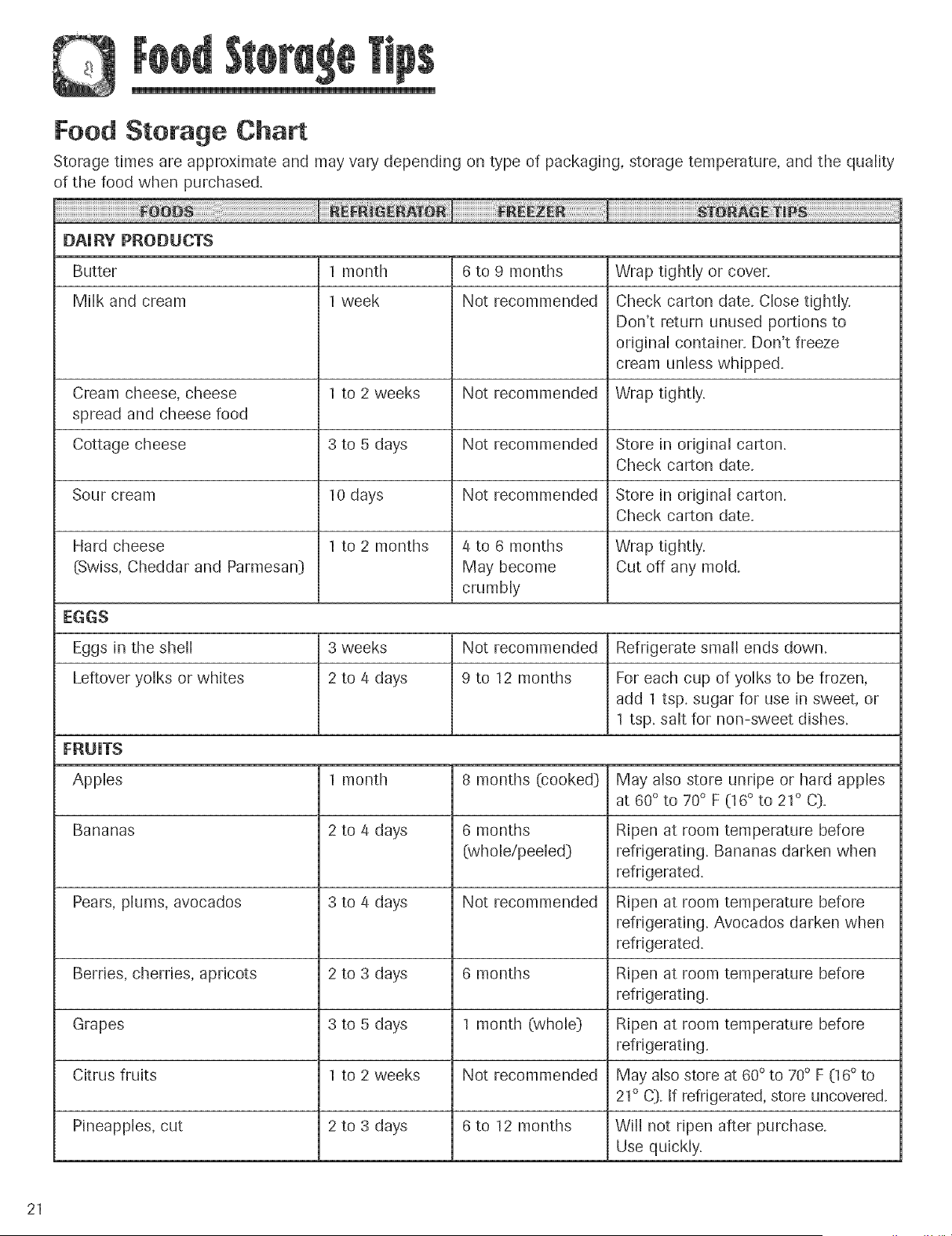
Food Storage Chart
Storage times are approximate and may vary depending on type of packaging, storage temperature, and the quality
of the food when purchased.
[}AURY PRODUCTS
Butter 1 month 6 to 9 months Wrap tightly or cover.
Milk and cream 1 week Not recommended Check carton date. Close tightly.
Don't return unused portions to
odginal container. Don't freeze
cream unless whipped.
Cream cheese, cheese 1 to 2 weeks Not recommended Wrap tightly.
spread and cheese food
Cottage cheese 3 to 5 days Not recommended Store in original carton.
Check carton date.
Sour cream 10 days Not recommended Store in odginal carton.
Check carton date.
Hard cheese 1 to 2 months 4 to 6 months Wrap tightly.
(Swiss, Cheddar and Parmesan} May become Cut off any mold.
crumbly
EGGS
Eggs in the shell 3 weeks Not recommended Refrigerate small ends down.
Leftover yolks or whites 2 to 4 days 9 to 12 months For each cup of yolks to be frozen,
add 1 tsp. sugar for use in sweet, or
1 tsp. salt for non-sweet dishes.
FRUUTS
,Apples 1 month 8 months (cooked} May also store unripe or hard apples
at 60° to 70° F (16 ° to 21° C}.
Bananas 2 to 4 days 6 months Ripen at room temperature before
(whole/peeled} refrigerating. Bananas darken when
refrigerated.
Pears, plums, avocados 3 to 4 days Not recommended Ripen at room temperature before
refrigerating. Avocados darken when
refrigerated.
Berries, cherries, apricots 2 to 3 days 6 months Ripen at room temperature before
refrigerating.
Grapes 3 to 5 days 1 month (whole} Ripen at room temperature before
refrigerating.
Citrus fruits 1 to 2 weeks Not recommended May also store at 60 ° to 70° F (16° to
21° C}. If refrigerated, store uncovered.
Pineapples, cut 2 to 3 days 6 to 12 months Will not ripen after purchase.
Use quickly.
21
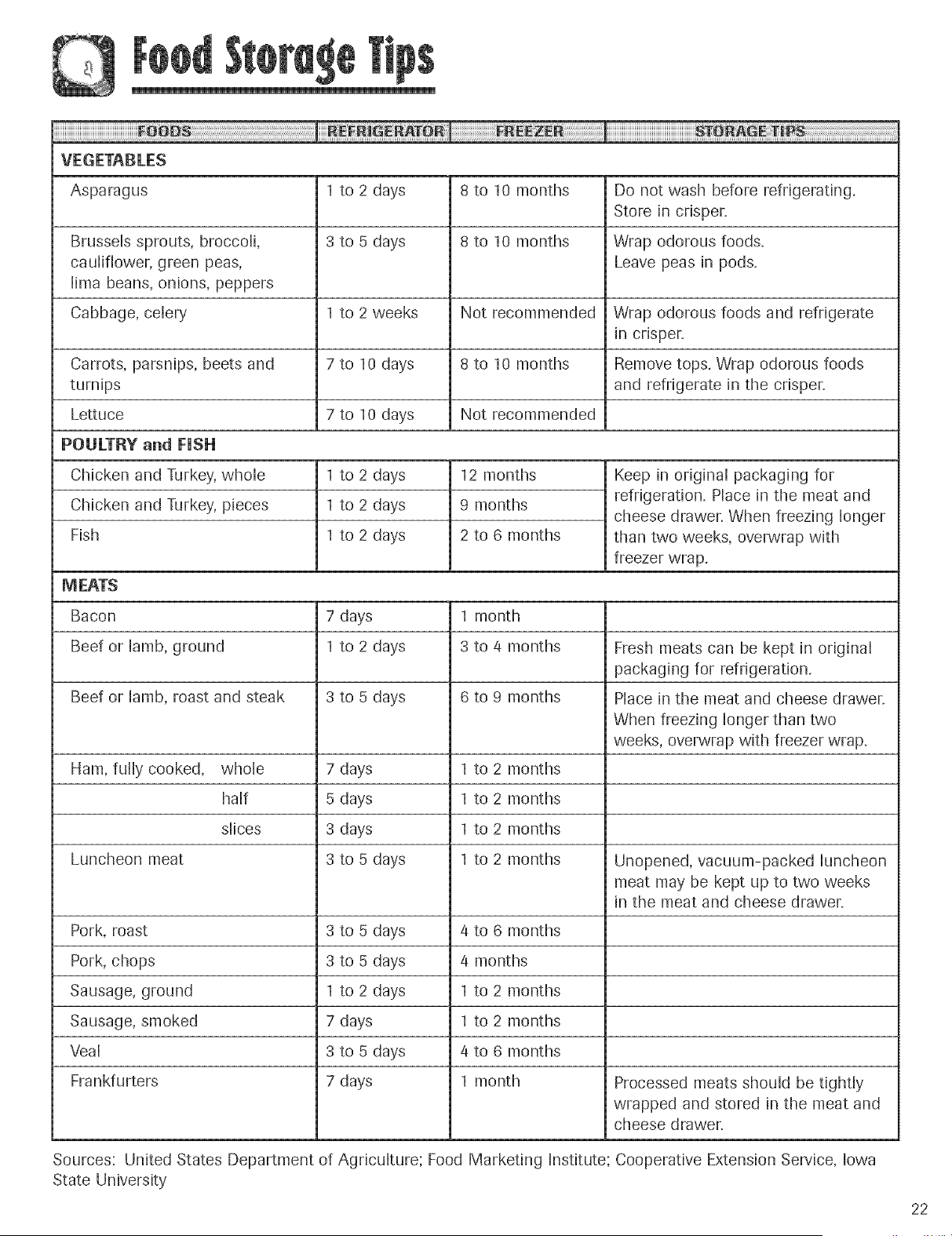
VEGETABLES
Asparagus 1 to 2 days 8 to 10 months Do not wash before refrigerating.
Store in crisper.
Brussels sprouts, broccoli, 3 to 5 days 8 to 10 months Wrap odorous foods.
cauliflower, green peas, Leave peas in pods.
lima beans, onions, peppers
Cabbage, celery 1 to 2 weeks Not recommended Wrap odorous foods and refrigerate
in crisper.
7 to 10 days 8 to 10 months Remove tops. Wrap odorous foods
and refrigerate in the crisper.
7 to 10 days Not recommended
Carrots, parsnips, beets and
turnips
Lettuce
POULTRY and FUSH
Chicken and Turkey, whole
Chicken and Turkey, pieces
Rsh
I to 2 days
I to 2 days
I to 2 days
12 months
9 months
2 to 6 months
Keep in original packaging for
refrigeration. Place in the meat and
cheese drawer. When freezing longer
than two weeks, overwrap with
freezer wrap.
MEATS
Bacon 7 days 1 month
Beef or lamb, ground 1 to 2 days 3 to 4 months Fresh meats can be kept in original
packaging for refrigeration.
Beef or lamb, roast and steak 3 to 5 days 6 to 9 months Place in the meat and cheese drawer.
When freezing longer than two
weeks, overwrap with freezer wrap.
Ham, fully cooked, whole 7 days I to 2 months
half 5 days 1 to 2 months
slices 3 days 1 to 2 months
Luncheon meat 3 to 5 days 1 to 2 months Unopened, vacuum-packed luncheon
meat may be kept up to two weeks
in the meat and cheese drawer.
Pork, roast 3 to 5 days 4 to 6 months
Pork, chops 3 to 5 days 4 months
Sausage, ground 1 to 2 days 1 to 2 months
Sausage, smoked 7 days 1 to 2 months
Veal 3 to 5 days 4 to 6 months
Frankfurters 7 days 1 month Processed meats should be tightly
wrapped and stored in the meat and
cheese drawer.
Sources: United States Department of Agriculture; Food Marketing Institute; Cooperative Extension Service, Iowa
State University
22
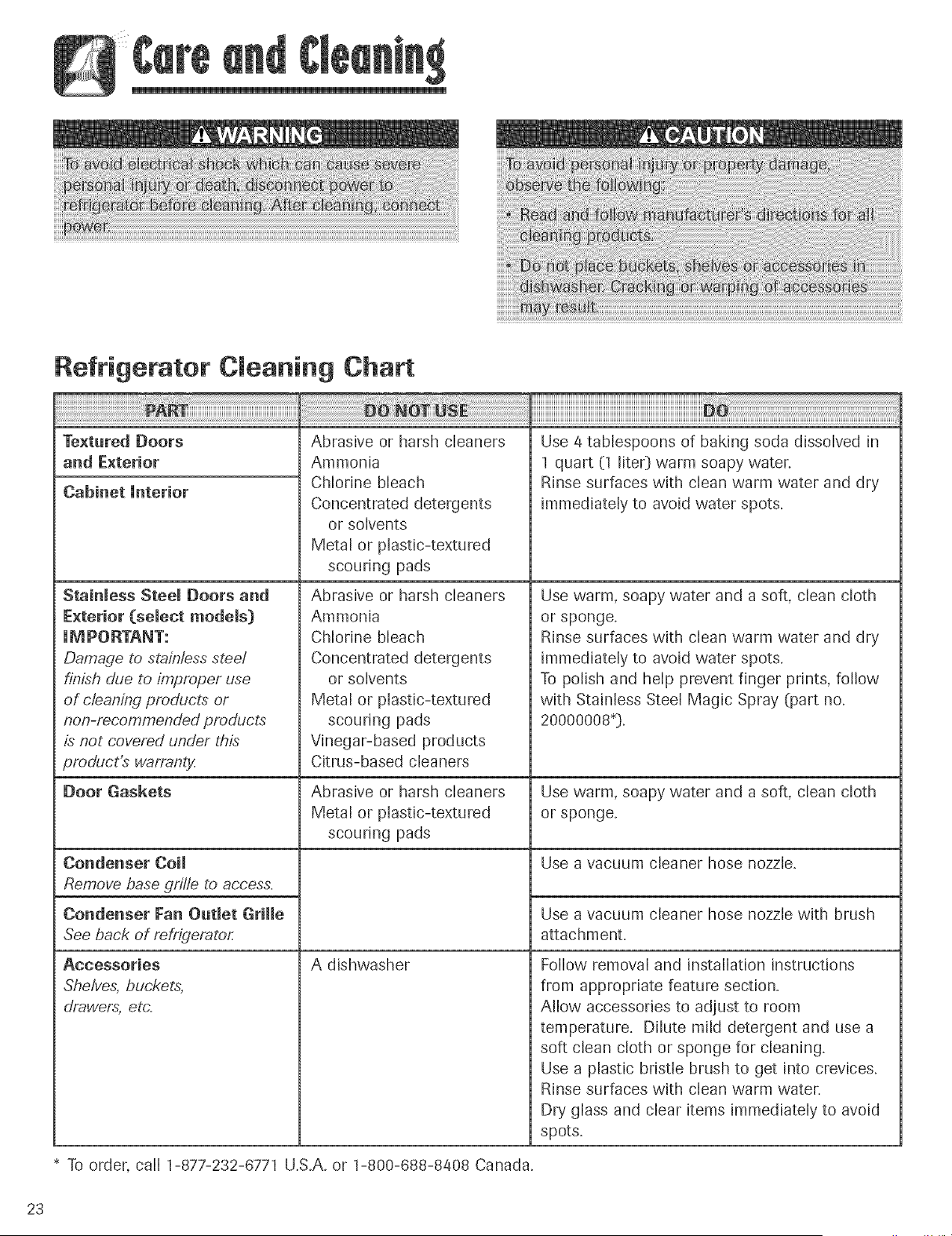
TexturedDoors
and Exterior
Cabinet Unterior
Stainless Steel Doors and
Exterior (select models}
UM PORTANT:
Damage to stainless stee/
finish due to improper use
of clean,;ng products or
non-recommended products
is not covered under this
product_ warranty
Door Gaskets
Condenser Coil
Remove base grille to access=
Condenser Fan Outlet Grille
See back of refrigerator
Accessories
Shelves, buckets,
drawers, etc=
Abrasive or harsh cleaners
Ammonia
Chlorine bleach
Concentrated detergents
or solvents
Metal or plastic-textured
scouring pads
Abrasive or harsh cleaners
Ammonia
Chlorine bleach
Concentrated detergents
or solvents
Metal or plastic-textured
scouring pads
Vinegar-based products
Citrus-based cleaners
Abrasive or harsh cleaners
Metal or plastic-textured
scouring pads
A dishwasher
Use a tablespoons of baking soda dissolved in
I quart (1 lite0 warm soapy water.
Rinse surfaces with clean warm water and dry
immediately to avoid water spots.
Use warm, soapy water and a soft, clean cloth
or sponge.
Rinse surfaces with clean warm water and dry
immediately to avoid water spots.
To polish and help prevent finger prints, follow
with Stainless Steel Magic Spray (part no.
20000008_}.
Use warm, soapy water and a soft, clean cloth
or sponge.
Use a vacuum cleaner hose nozzle.
Use a vacuum cleaner hose nozzle with brush
attachment.
Follow removal and installation instructions
from appropriate feature section.
Allow accessories to adjust to room
temperature. Dilute mild detergent and use a
soft clean cloth or sponge for cleaning.
Use a plastic bristle brush to get into crevices.
Rinse surfaces with clean warm water.
Dry glass and clear items immediately to avoid
spots.
* To order, call 1-877-232-6771 U.S.A. or 1-800-688-8408 Canada.
23
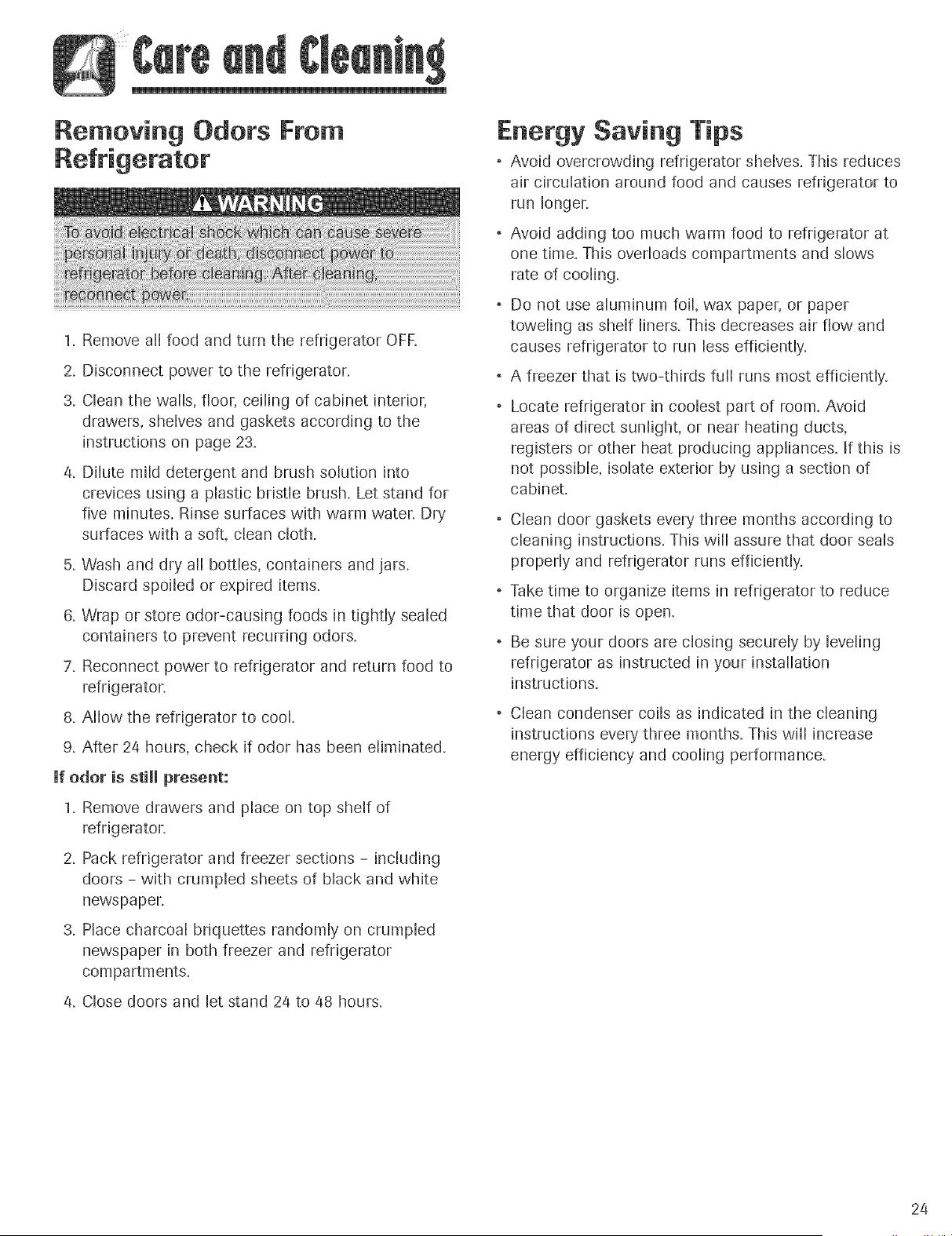
Removing Odors Fro
1. Remove all food and turn the refrigerator OFR
2. Disconnect power to the refrigerator.
3. Clean the walls, floor, ceiling of cabinet interior,
drawers, shelves and gaskets according to the
instructions on page 23.
4. Dilute mild detergent and brush solution into
crevices using a plastic bristle brush. Let stand for
five minutes. Rinse surfaces with warm waten Dry
surfaces with a soft, clean cloth.
5. Wash and dry all bottles, containers and jars.
Discard spoiled or expired items.
6. Wrap or store odor-causing foods in tighdy sealed
containers to prevent recurring odors.
7. Reconnect power to refrigerator and return food to
refrigeraton
8. Allow the refrigerator to cool.
9. After 24 hours, check if odor has been eliminated.
Ufodor is stHmpresent:
1. Remove drawers and place on top shelf of
refrigeraton
2. Pack refrigerator and freezer sections - including
doors - with crumpled sheets of black and white
newspapen
3. Place charcoal briquettes randomly on crumpled
newspaper in both freezer and refrigerator
compartments.
4. Close doors and let stand 24 to 48 hours.
Fnergy Saving Tips
, Avoid overcrowding refrigerator shelves. This reduces
air circulation around food and causes refrigerator to
run longer.
Avoid adding too much warm food to refrigerator at
one time. This overloads compartments and slows
rate of cooling.
, Do not use aluminum foil, wax paper, or paper
toweling as shelf liners. This decreases air flow and
causes refrigerator to run less efficiently.
o A freezer that is two-thirds fuji runs most efficiently.
Locate refrigerator in coolest part of room. ,@old
areas of direct sunlight, or near heating ducts,
registers or other heat producing appliances. If this is
not possible, isolate exterior by using a section of
cabinet.
Clean door gaskets every three months according to
cleaning instructions. This will assure that door seals
properly and refrigerator runs efficiently.
Take time to organize items in refrigerator to reduce
time that door is open,
Be sure your doors are closing securely by leveling
refrigerator as instructed in your installation
instructions.
, Clean condenser coils as indicated in the cleaning
instructions every three months. This will increase
energy efficiency and cooling performance.
24
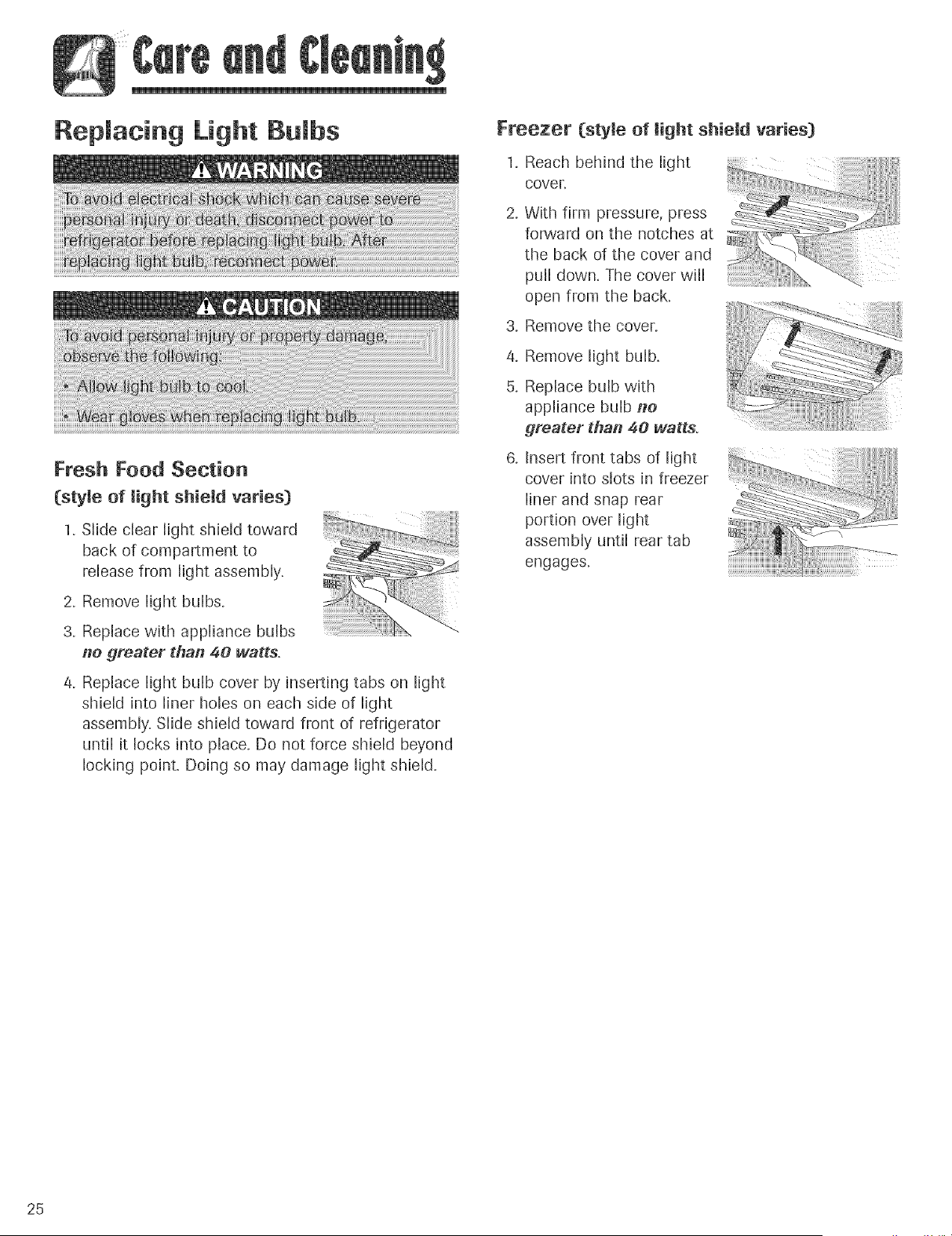
Replacing Light Bulbs
Fresh Food Section
(style of light shiemd varies)
1. Slide clear light shield toward
back of compartment to
release from light assembly.
2. Remove light bulbs.
3. Replace with appliance bulbs
#e greater tha# 40 watts.
4_
Replace light bulb cover by inserting tabs on light
shield into liner holes on each side of light
assembly. Slide shield toward front of refrigerator
until it locks into phce. Do not force shield beyond
locking point. Doing so may damage light shield.
Freezer (style of light shield varies)
Reach behind the light
cover.
With firm pressure, press
forward on the notches at
the back of the cover and
pull down. The cover will
open from the back.
3. Remove the cover.
4_
5.
Remove light bulb.
Replace bulb with
appliance bulb #e
greater tha# 40 watts.
Insert front tabs of light
cover into slots in freezer
liner and snap rear
portion over light
assembly until rear tab
engages.
25
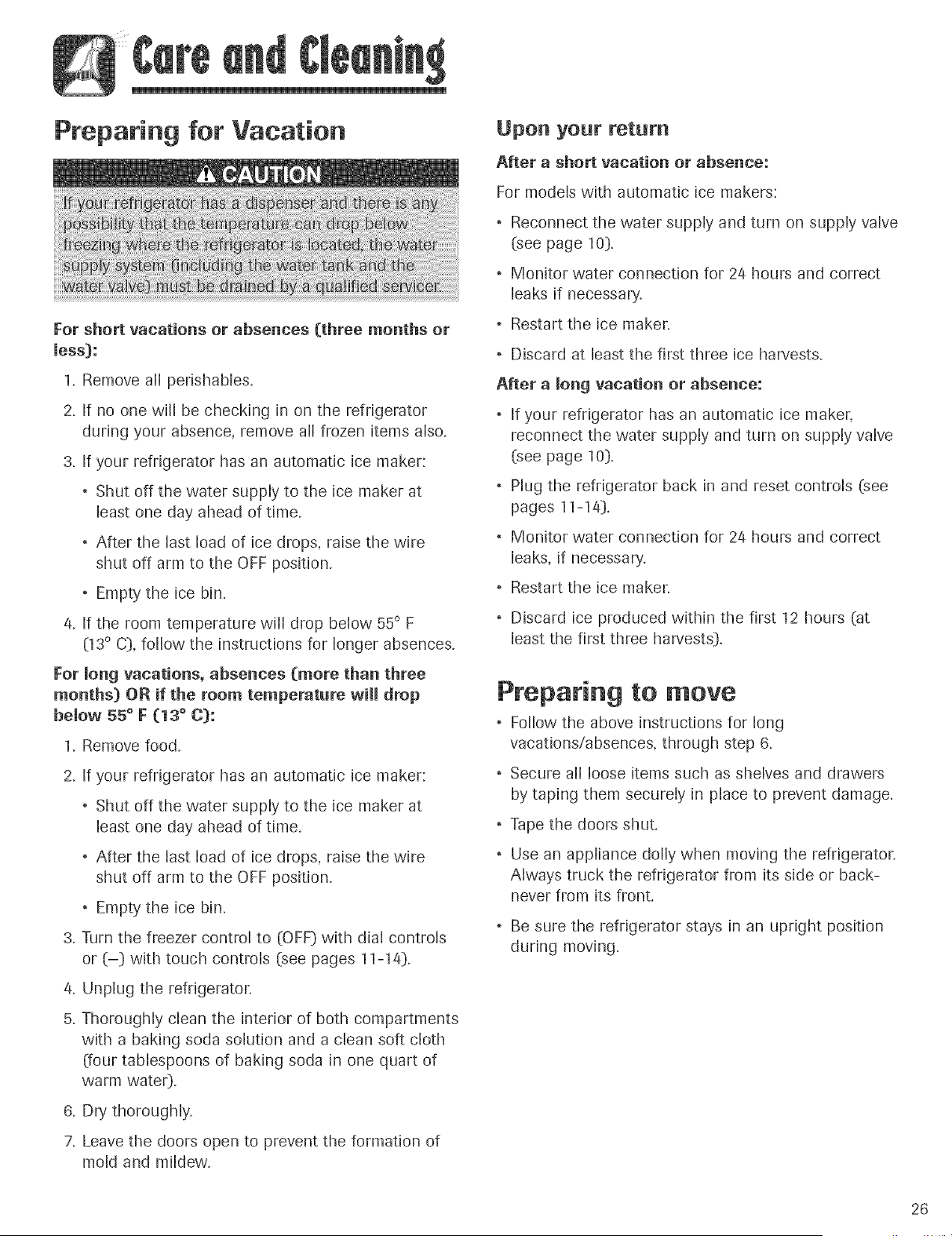
Preparing for Vacation
For short vacations or absences (three months or
mess):
1. Remove all perishables.
2. If no one will be checking in on the refrigerator
during your absence, remove all frozen items also.
3. If your refrigerator has an automatic ice maker:
Shut off the water supply to the ice maker at
least one day ahead of time.
After the last load of ice drops, raise the wire
shut off arm to the OFF position.
Empty the ice bin.
/4. If the room temperature will drop below 55 ° F
(13° C}, follow the instructions for longer absences.
For long vacations, absences (more than three
months) OR if the room temperature will drop
bemow 55 ° }: (13 ° C):
1. Remove food.
2. If your refrigerator has an automatic ice maker:
, Shut off the water supply to the ice maker at
least one day ahead of time.
After the last load of ice drops, raise the wire
shut off arm to the OFF position.
Empty the ice bin.
3. Turn the freezer control to (OFF} with dial controls
or (-}) with touch controls (see pages 11-1/4}).
/4. Unplug the refrigerator.
5. Thoroughly clean the interior of both compartments
with a baking soda solution and a clean soft cloth
(four tablespoons of baking soda in one quart of
warm wate0.
6. Dry thoroughly.
7. Leave the doors open to prevent the formation of
mold and mildew.
Upon your return
After a short vacation or absence:
For models with automatic ice makers:
Reconnect the water supply and turn on supply valve
(see page 10}).
Monitor water connection for 2/4 hours and correct
leaks if necessary.
Restart the ice maker.
Discard at least the first three ice harvests.
After a mong vacation or absence:
If your refrigerator has an automatic ice maker,
reconnect the water supply and turn on supply valve
(see page 10}).
Plug the refrigerator back in and reset controls (see
pages 11-1/4}).
Monitor water connection for 2/4 hours and correct
leaks, if necessary.
Restart the ice maker.
o Discard ice produced within the first 12 hours (at
least the first three harvests}).
Preparing to move
Follow the above instructions for long
vacations!absences, through step 6.
Secure all loose items such as shelves and drawers
by taping them securely in place to prevent damage.
Tape the doors shut.
Use an appliance dolly when moving the refrigerator.
Always truck the refrigerator from its side or back-
never from its front.
Be sure the refrigerator stays in an upright position
during moving.
26
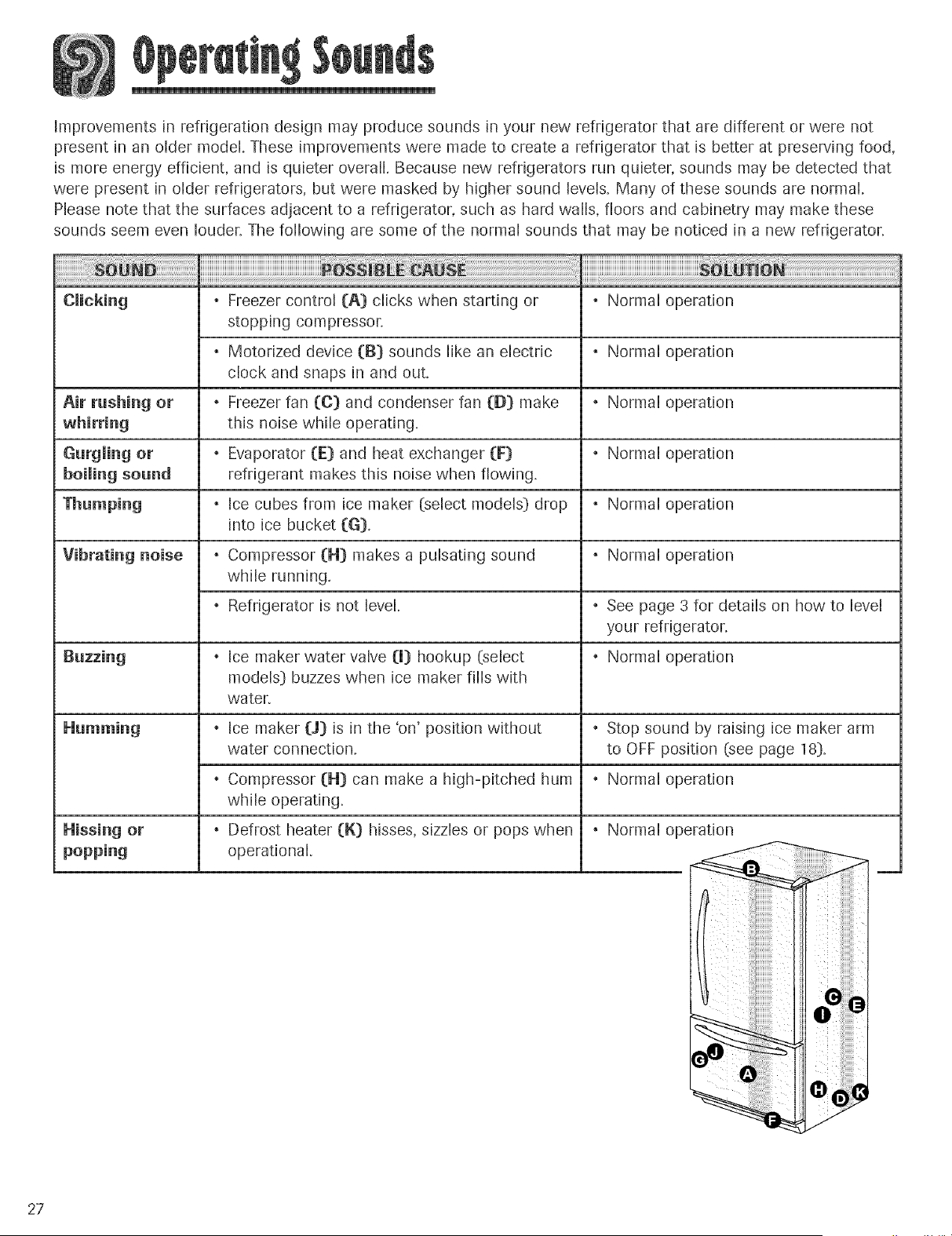
Improvementsin refrigerationdesignmayproducesoundsin yournewrefrigeratorthat aredifferentorwerenot
presentin an oldermodel.Theseimprovementsweremadeto createa refrigeratorthatis betterat preservingfood,
is moreenergyefficient,andisquieteroverall.Becausenewrefrigeratorsrunquieter,soundsmaybedetectedthat
werepresentin olderrefrigerators,butweremaskedbyhighersoundlevels.Manyofthesesoundsarenormal.
Pleasenotethatthe surfacesadjacentto a refrigerator,suchashardwalls,floorsandcabinetrymaymakethese
soundsseemevenlouder`Thefollowingaresomeof the normalsoundsthat maybenoticedin a newrefrigerator.
Freezercontrol(A) clickswhenstartingor . Normaloperation
stoppingcompressor.
Motorizeddevice(B} soundslikean electric . Normaloperation
clockandsnapsin andout.
Air rushing or _ Freezerfan (C} andcondenserfan([}} make _ Normaloperation
this noisewhileoperating.
Gurglingor _ Evaporator(E} andheatexchanger(F} _ Normaloperation
boiling sound refrigerantmakesthisnoisewhenflowing.
. Icecubesfrom icemaker(selectmodels}drop . Normaloperation
into ice bucket(G}.
Vibrating noise . Compressor (H} makes a pulsating sound . Normal operation
while running.
. Refrigerator is not level. . See page 3 for details on how to level
your refrigerator,
Buzzing . Ice maker water valve (U} hookup (select . Normal operation
models_) buzzes when ice maker fills with
water,
. Ice maker (J} is in the 'on' position without . Stop sound by raising ice maker arm
water connection, to OFF position (see page 18}.
. Compressor (H} can make a high-pitched hum . Normal operation
while operating.
Hissing or . Defrost heater (K} hisses, sizzles or pops when . Normal operation
popping operational.
27
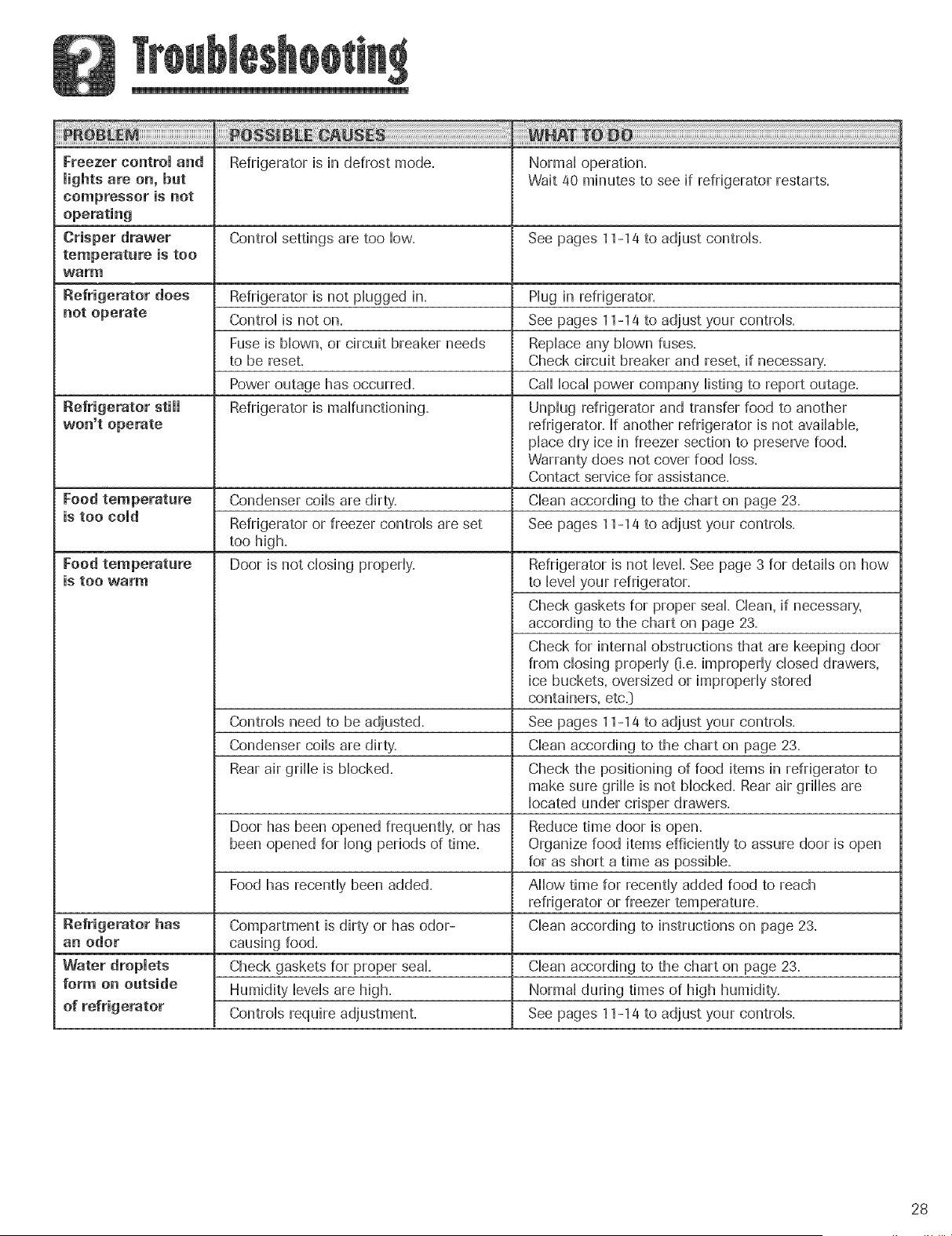
Freezercontroland Refrigeratorisin defrostmode, Normaloperation,
lightsareon,but Wait40minutestoseeif refrigeratorrestarts,
compressoris not
Crisper drawer Control settings are too Iow_ See pages 11-14 to adjust control&
temperature is too
warm
Refrigerator does Refrigerator is not plugged in, Plug in refrigerator,
not operate Control is not on, See pages 11-14 to adjust your controls,
Fuse is blown, or circuit breaker needs Replace any blown fuses,
to be reset, Check circuit breaker and reset, if necessary,
Power outage has occurred, Call local power company listing to report outage,
Refrigerator is malfunctioning, Unplug refrigerator and transfer food to another
won't operate refrigerator, If another refrigerator is not available,
place dry ice in freezer section to preserve food,
Warranty does not cover food loss,
Contact service for assistance,
Food temperature Condenser coils are dirty, Clean according to the chart on page 23,
is too cold Refrigerator or freezer controls are set See pages 11-14 to adjust your controls,
too high,
Door is not closing properly,Food temperature
is too warm
Refrigerator is not level, See page 3 for details on how
to level your refrigerator,
Check gaskets for proper seal, Clean, if necessary,
according to the chart on page 23,
Check for internal obstructions that are keeping door
from closing properly O,e,improperly closed drawers,
ice buckets, oversized or improperly stored
containers, etc,]
Controls need to be adjusted, See pages 11-14 to adjust your controls,
Condenser coils are dirt}/, Clean according to the chart on page 23,
Rear air grille is blocked, Check the positioning of food items in refrigerator to
make sure grille is not blocked, Rear air grilles are
located under crisper drawers,
Door has been opened frequently, or has Reduce time door is open,
been opened for long periods of time, Organize food items efficiently to assure door is open
for as short a time as possible,
Food has recently been added, Allow time for recently added food to reach
refrigerator or freezer temperature,
Refrigerator has Compartment is dirty' or has odor- Clean according to instructions on page 23,
an odor causing food,
Water droplets Check gaskets for proper seal, Clean according to the chart on page 23,
form on outside Humidity levels are high, Normal during times of high humidity,
Controls require adjustment, See pages 11-14 to adjust your controls,
28
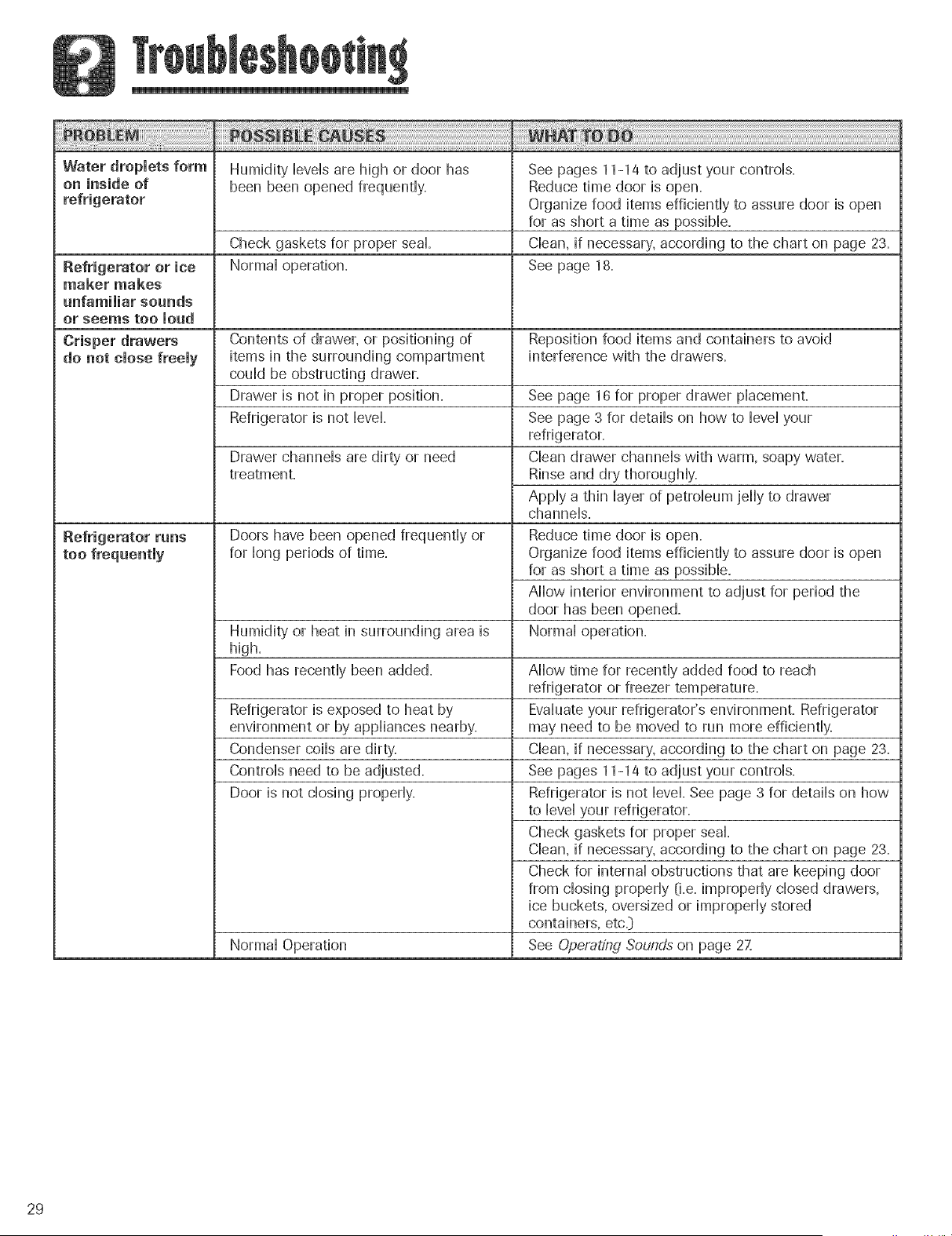
Waterdropletsform Humidityieveisarehighordoorhas Seepages11-14toadjustyourcontrois.
on insideof beenbeenopenedfrequently Reducetimedooris open.
Organizefooditemsefficientlytoassuredoorisopen
forasshortatimeaspossible.
Checkgasketsforproperseal. Clean,if necessary,accordingtothechartonpage23.
Refrigeratoror ice Normaloperation. Seepage18.
makermakes
unfamiliarsounds
orseemstooloud
Crisper drawers Contents of drawer, or positioning of Reposidon food items and containers to avoid
do not close freely items in the surrounding compartment interference with the drawers.
couid be obstructing drawer.
Drawer is not in proper position.
Refrigerator is not Hovel
Refrigerator runs
too frequently
Drawer channeis are dirty or need
treatment.
Doors have been opened frequentiy or
for ]ong periods of time.
Humidity or heat in surrounding area is
high.
Food has recentiy been added.
Refrigerator is exposed to heat by
environment or by appiiances nearby.
Condenser coiis are dirty.
Controis need to be adjusted.
Door is not dosing properiy.
Normal Operation
See page 16 for proper drawer placement.
See page 3 for details on how to level your
refrigerator.
Clean drawer channels with warm, soapy water.
Rinse and dry thoroughly.
Apply a thin layer of petroleum jelly to drawer
channels.
Reduce time door is open.
Organize food items efficiently to assure door is open
for as short a time as possible.
Allow interior environment to adjust for period the
door has been opened.
Normal operation.
Allow time for recently added food to reach
refrigerator or freezer temperature.
Evaluate your refrigerator's environment. Refrigerator
may need to be moved to run more efficiently.
Clean, if necessary, according to the chart on page 23.
See pages 11-14 to adjust your controls.
Refrigerator is not level. See page 3 for details on how
to level your refrigerator.
Check gaskets for proper seal
Clean, if necessary, according to the chart on page 23.
Check for internal obstructions that are keeping door
from closing properly (i.e. improperly closed drawers,
ice buckets, oversized or improperly stored
containers, etc.}
See Operating Sounds on page 271
29
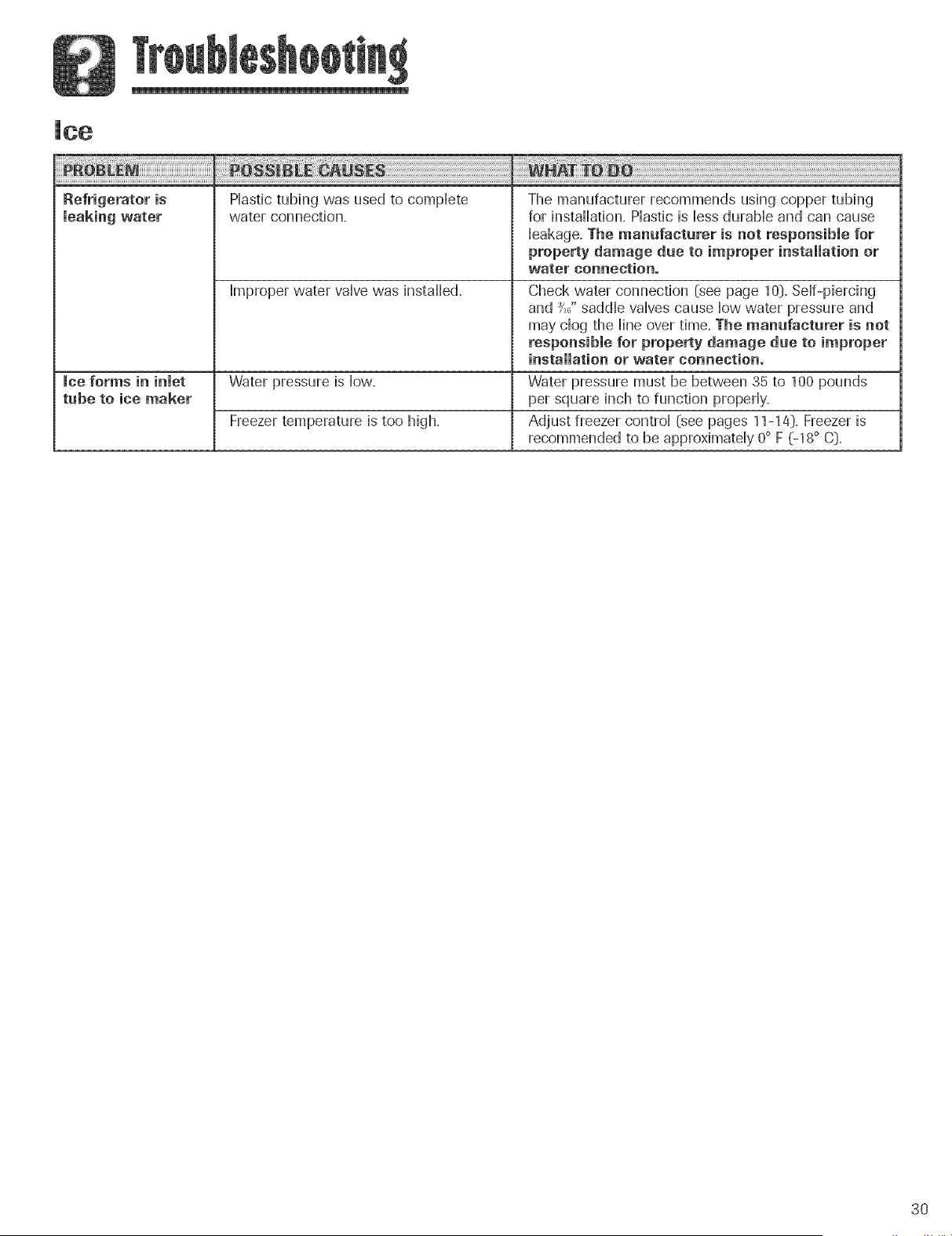
Refrigeratoris
leaking water
Plastic tubing was used to complete
water connection,
The manufacturer recommends using copper tubing
for installation, Plastic is less durable and can cause
leakage, The manufactarer is not responsible for
property damage due to improper installation or
water connection.
Improper water valve was installed. Check water connection (see page 10_.Self-piercing
and _,_"saddle valves cause low water pressure and
may clog the line over time. The manufacturer is not
responsible for property damage due to improper
installation or water connection.
ice forms in inlet Water pressure is low= Water pressure must be between 35 to 1O0pounds
tube to ice maker per square inch to function properly=
Freezer temperature is too high= Adjust freezer control (see pages 11-14D=Freezer is
recommended to be approximately 0° F (-18° C:)=
3O
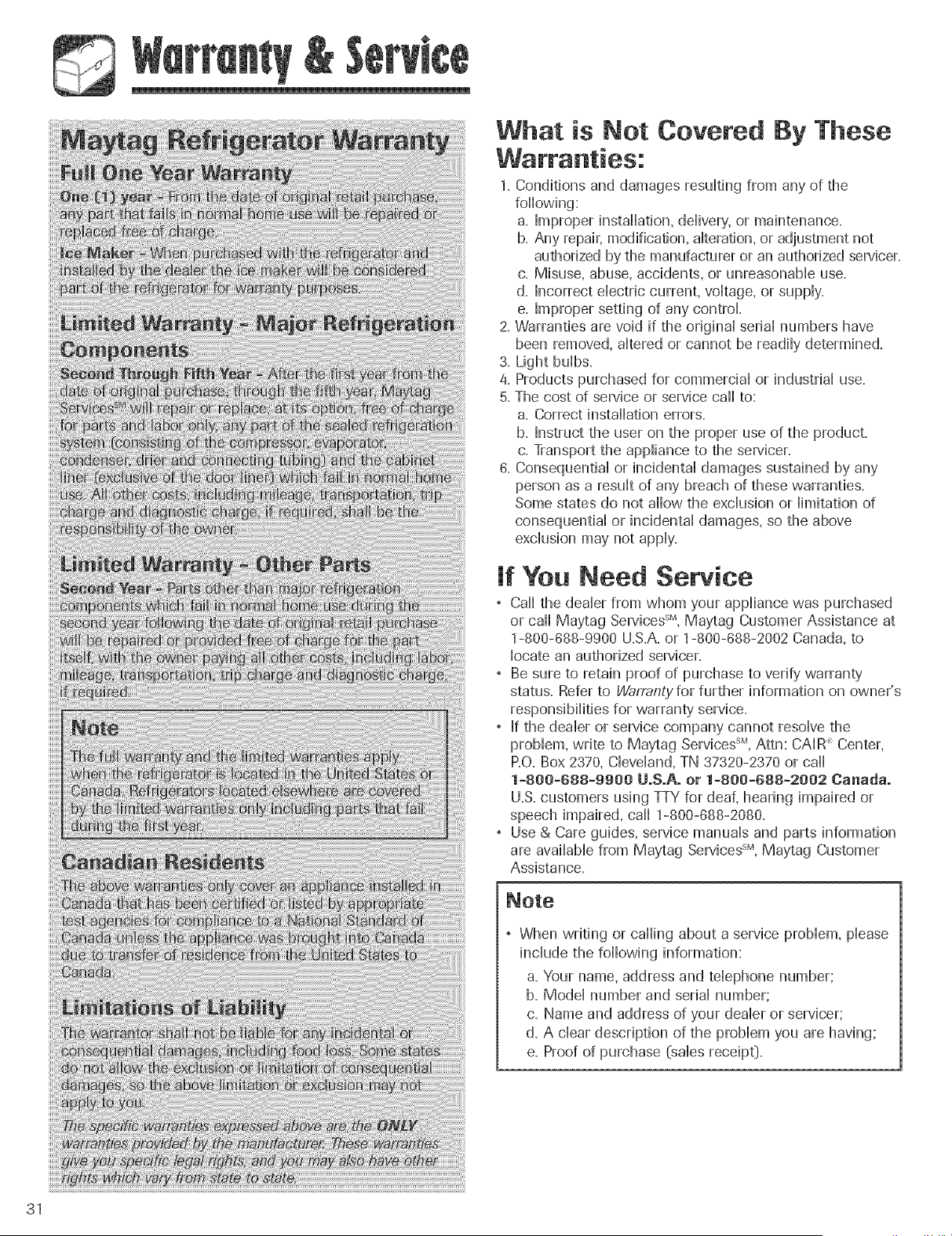
What is Not Covered
By These
1. Conditions and damages resulting from any of the
following:
a. Improper installation, ddivery, or maintenance.
b. Any repair, modification, alteration, or adjustment not
authorized by the manufacturer or an authorized servicer.
c. Misuse, abuse, accidents, or unreasonaMe use.
d. Incorrect dectdc current, voHtage,or suppHy.
e. Improper setting of any control
2. Warranties are void if the odginaHsedaHnumbers have
been removed, altered or cannot be readiHydetermined.
3. Light buHbs.
4. Products purchased for commercial or industrial use.
5. The cost of service or service call to:
a. Correct installation errors.
b. Instruct the user on the proper use of the product.
c. Transport the appliance to the servicer.
8. Consequential or incidental damages sustained by any
person as a result of any breach of these warranties.
Some states do not allow the exclusion or limitation of
consequential or incidental damages, so the above
exclusion may not apply.
If You Need Service
, Call the dealer from whom your appliance was purchased
or call Maytag ServicessM,Maytag Customer Assistance at
1-800-888-9900 U.S.A.or 1-800-888-2002 Canada, to
locate an authorized servicer.
• Be sure to retain proof of purchase to verify warranty
status. Refer to Warran(yfor further information on owner's
responsibilities for warranty' service.
, If the dealer or service company cannot resolve the
problem, write to May'tag ServicessM,Attn: CAIR _Center,
P.O.Box 2370, Cleveland, TN 37320-2370 or call
1-800-688-9900 UoSoAoor 1-800-688-2002 Canada°
U.S. customers using TTY for deaf, hearing impaired or
speech impaired, ca]] 1-800-888-2080.
• Use & Care guides, service manuals and parts information
are avai]aMe from Maytag ServicessM,Maytag Customer
Assistance.
° When writing or calling about a service problem, please
include the following information:
a. Your name, address and telephone number;
b. Model number and serial number;
c. Name and address of your dealer or servicer;
d. A clear description of the problem you are having;
e. Proof of purchase (sales receipt_.
31