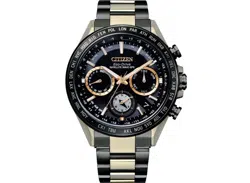

INSTRUCTION MANUAL

ENGLISH
FRANÇAIS
ESPAÑOL
DEUTSCH
ITALIANO
PORTUGUÊS
中文(繁体字)
中文(简体字)
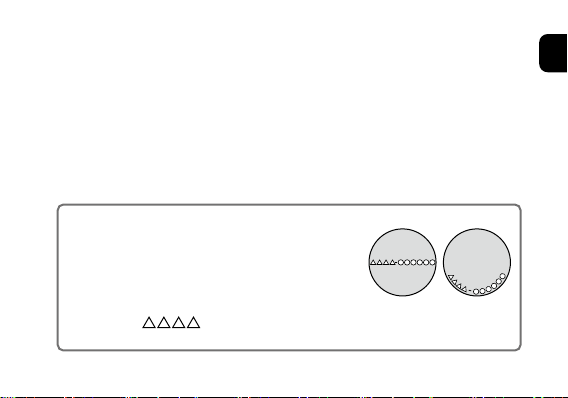
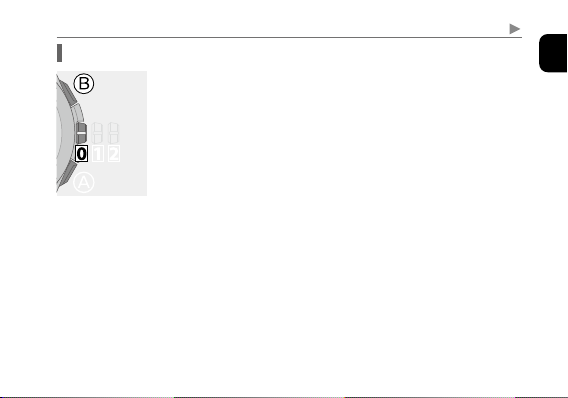
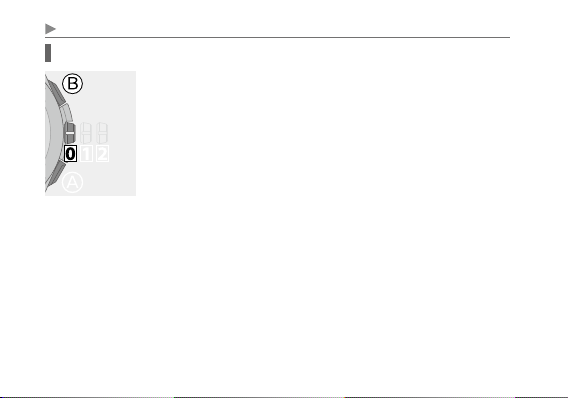
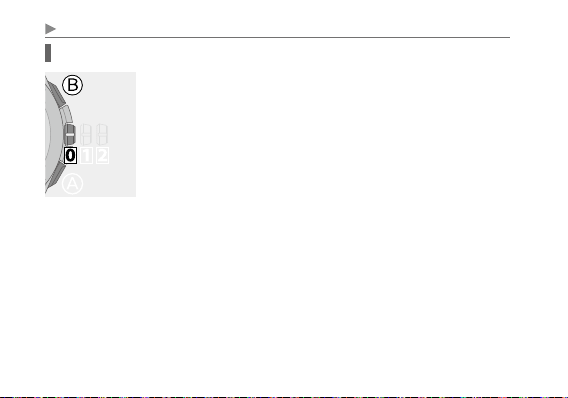
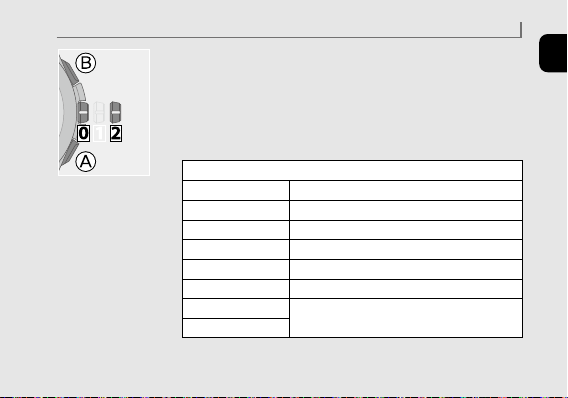
To check the movement number
A case number—4 alphanumeric characters and 6 or
more alphanumeric characters—is engraved on the
case back. (Figure on the right)
The first 4 characters of the case number represent
the movement number of the watch. In the example
on the right, “
” is the movement number.
Thank you for your purchase of this Citizen watch.
Before using the watch, read this instruction manual carefully to ensure
correct use.
After reading the manual, store it in a safe place for future reference.
Be sure to visit the Citizen website at http://www.citizenwatch-global.com/ .
Here you will find a variety of information such as electronic setting guides,
answers to frequently asked questions, Eco-Drive recharging information and
more.
Engraving position example
The engraving position may
differ depending on watch
model.
1
English
Safety precautions — IMPORTANT
This manual contains instructions that should be strictly followed at all times
not only for optimal use, but to prevent any injuries to yourself, other persons or
property. We encourage you to read the entire booklet (especially, pages
98
to
111
)
and understand the meaning of the following symbols:
■ Safety advisories are categorized and depicted in this manual as follows:
DANGER
Highly likely to cause death or serious injury
WARNING
Can cause serious injury or death
CAUTION
Can or will cause minor or moderate injury or damage
2
■ Important instructions are categorized and depicted in this manual as follows:
(Following symbols are examples of Pictograms.)
Warning (caution) symbol followed by prohibited matters.
Warning (caution) symbol followed by instructions that should be
followed or precautions that should be observed.
Safety precautions
3
English
4
■
Light-Level Indicator
Indicates current power generation amount in 7 levels.
It can be used as a reference for choosing a good charging place.
■
Eco-Drive
Never needs a new battery. This watch is fueled by light.
Features
■
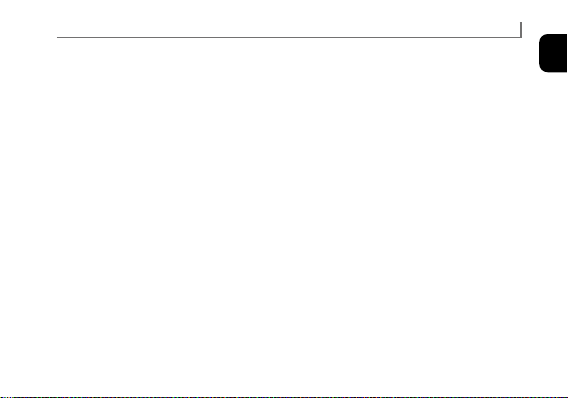
Satellite Wave-GPS
Receives location and time information sent from
GPS satellites and adjusts the time and calendar on
the watch automatically.
5
English
* “Eco-Drive” is an original technology of Citizen.
Features
■
World time
Indicates the time around the world by choosing one of 39 time zones.
■
±5-second average monthly accuracy
Keeps high accuracy without time signal reception.
■
Dual time
Shows two different times in parallel—home time and local time.
The two times can be interchanged easily.
■
Chronograph
Measures up to 24 hours in 1/20 second increments.
■
Alarm
Sounds at the time set every day.
■
Perpetual calendar
No need for monthly and leap-year date correction until February 28, 2100.

6
CONTENTS
Before using this watch ..........................
10
Band adjustment ........................................
11
Protective stickers .......................................
11
How to use a specially designed crown/button ...........
12
Component identification ........................
14
About dual time indication ..............................
16
Changing the mode .............................
17
Checking the power reserve and power generation
amount .......................................
24
Checking the power reserve .............................
25
Checking power generation amount
(Light-Level Indicator) ...................................
28

7
English
CONTENTS
Checking the reception result of the satellite signal ..
31
Setting the world time ..........................
33
Checking the time zone setting for the home time .......
34
Obtaining location information from satellite signals .....
40
Setting the time zone manually. . . . . . . . . . . . . . . . . . . . . . . . . .
42
Interchanging the home time and local time .............
44
Receiving time information ......................
45
Setting summer time (DST) ......................
52
Using the chronograph ..........................
56
Using alarm ....................................
58
Continued on the next page
8
CONTENTS
Charging your watch ............................
62
Information on satellite signal reception ...........
68
Checking and adjusting leap second setting .............
73
Checking and adjusting the rollover number setting .....
76
Adjusting the time and calendar manually .........
80
Troubleshooting ................................
86
Checking and correcting the reference position ..........
86
Symptom and Remedies ................................
90
10
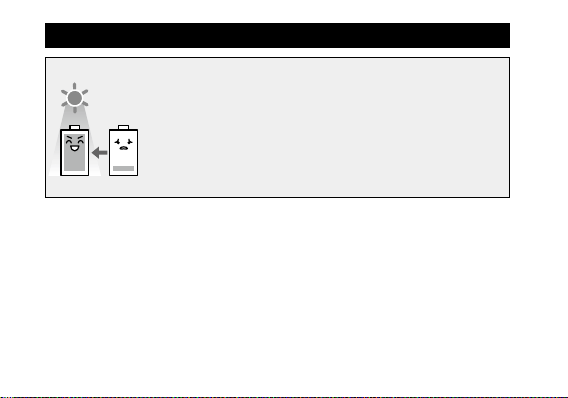
This watch has a rechargeable cell which is charged by exposing
the dial to light.
Expose the dial to direct sunlight regularly to charge the watch.
For details of charging, see page
62
.
• Especially, satellite signal reception is power-consuming. Be
sure to keep your watch sufficiently charged.
After unpacking, the following must be done before setting the time and calendar
(page
45
or
80
).
1
Checking the current power reserve (page
24
)
2
Setting the world time (page
33
)
3
Checking leap second setting (page
73
)
Before using this watch
11
English
Before using this watch
Band adjustment
We recommend seeking the assistance of an experienced watch technician
for sizing of your watch. If adjustment is not done correctly, the bracelet may
unexpectedly become detached leading to loss of your watch or injury.
Consult an authorized service center.
Protective stickers
Be sure to remove any protective stickers that may be on your watch (case back,
band, clasp, etc.). Otherwise, perspiration or moisture may enter the gaps between
the protective stickers and the parts, which may result in a skin rash and/or
corrosion of the metal parts.

12
Before using this watch
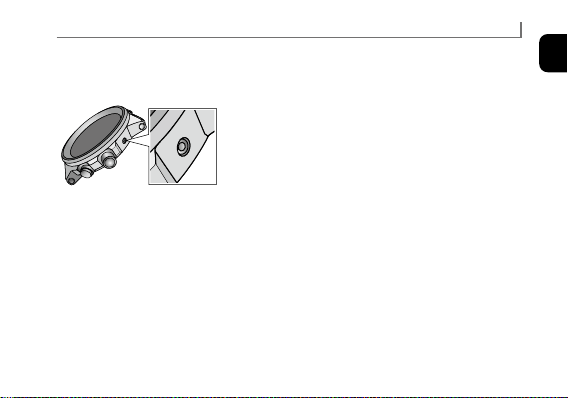
How to use a specially designed crown/button
Some models are equipped with a specially designed crown and/or push button to
prevent accidental operation.
Screw down crown/button
Unlock the crown/button prior to operate your watch.
Unlock Lock
Screw down
crown
Rotate the crown
counterclockwise until
it releases from the
case.
Push the crown in to the
case. With gentle pressure
towards the case, rotate the
crown clockwise to secure
it to the case. Be sure to
tighten firmly.
Screw down
push button
Rotate the
locking screw
counterclockwise, and
loosen until it stops.
Rotate the locking screw
clockwise, and tighten
firmly.
13
English
Recessed button
Press the button with a non-marring narrow-tipped object such as a wooden
toothpick.
• Metal objects may cause marring or scratching of
the button.
Before using this watch
14
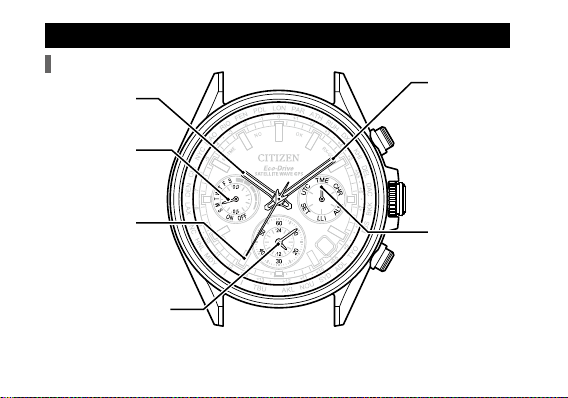
Component identification
• The illustrations in this instruction manual may differ from the actual appearance
of your watch.
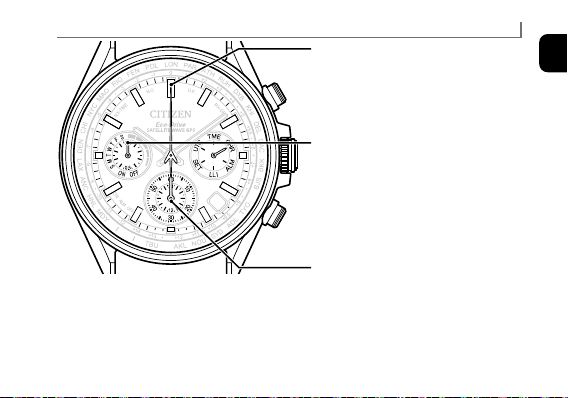
Minute hand
Mode hand
Hour hand
Function hand
Second hand
Dual time indication
Button
Ⓑ
Button
Ⓐ
Crown
Hands and buttons
7
15
English
Component identification
7
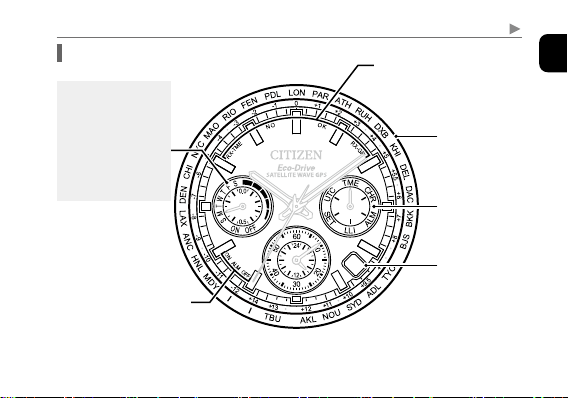
• A solar cell is under the dial.
Reception-in-progress
indication (RX-TME/RX-GPS)
Reception result indication
(OK/NO)
Mode
indication
Place name/
time zone
Date indication
Alarm setting indication
(ALM ON/OFF)
Indications of the
function hand
• Day of week
• Power reserve level
(5 levels)
• Summer tim
e (DST)
(
ON/OFF
)
Indication
Continued on the next page
16
Component identification
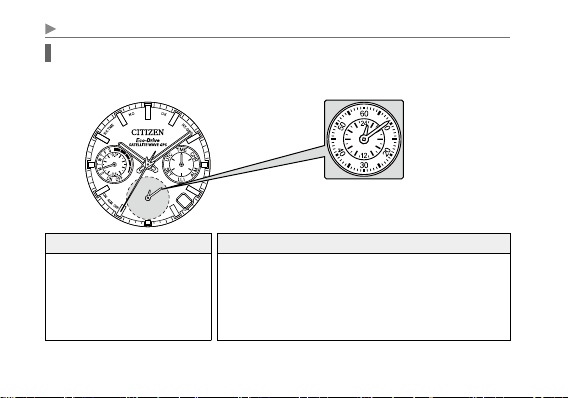
About dual time indication
This watch is equipped with the dual time function: two times are indicated in
parallel.
Home time Local time
The time shown by the hour/
minute/second hands and day of
week/date indications.
Time shown by the dual time indication.
• Indications differ depending on the mode of the watch.
For details, see “Changing the mode” (page
17
).
• Local time can show the time other than home time.
• Time is in 24-hour format.
• Local time move in conjunction with home time.
Dual time indication
7
17
English
Changing the mode
This watch features six different modes (functions). The method to change the
mode and indication for each mode are explained below.
Changing the mode
1
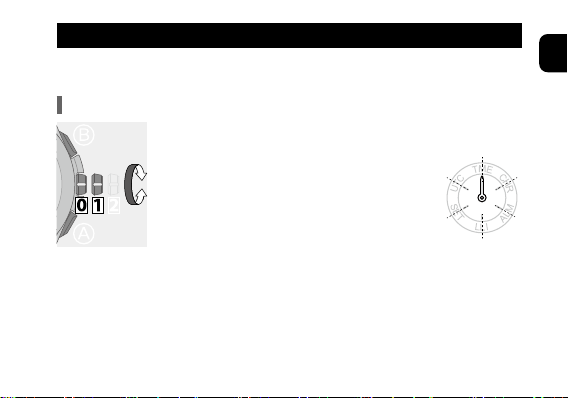
Pull the crown out to position
1
.
The second hand points to 30 second and stops.
2
Rotate the crown to change the mode.
• Turn the crown so that the mode hand
points to the marker of the desired mode
securely.
3
Push the crown in to position
0
to finish
the procedure.
The watch changes indication according to the selected
mode.
Continued on the next page
18
Changing the mode
Indication in each mode (when the crown is in position
0
)
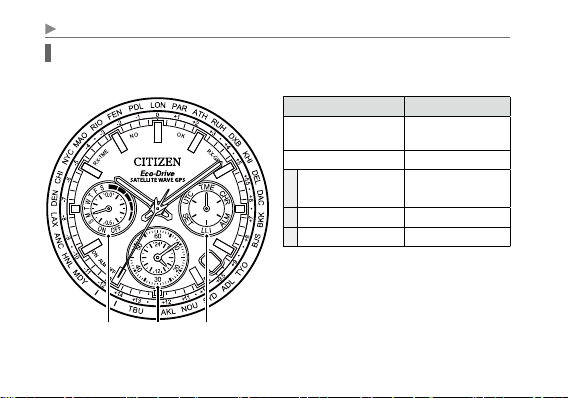
TME (ordinary time) mode
Hand and indication Content
Hour, minute and second
hands
Home time
Date indication
Date (home time)
A Function hand
Day of week (home
time)
B Dual time indication
Local time
C Mode hand
TME
7
B CA
19
English
Changing the mode
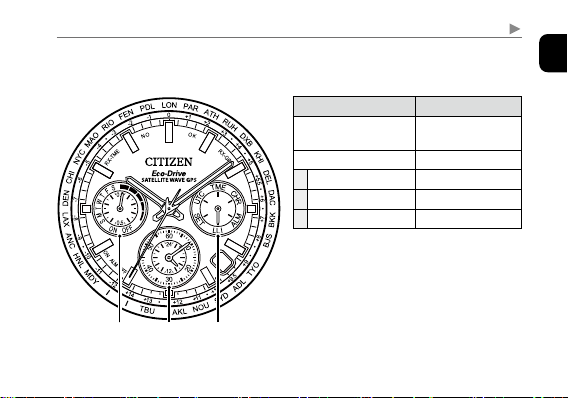
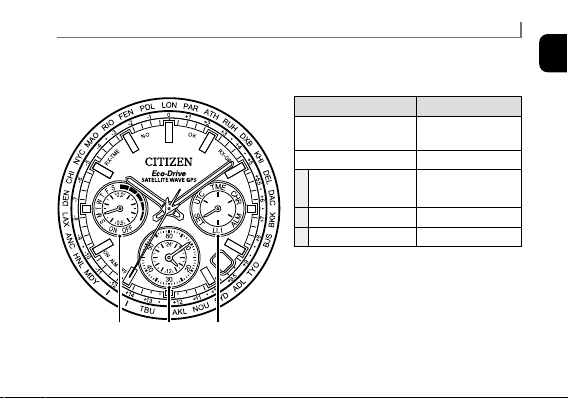
LLI (Light-Level Indicator) mode
Mode for checking the level of power generation amount.
Continued on the next page
Hand and indication Content
Hour, minute and second
hands
Home time
Date indication
Date (home time)
A Function hand
Power reserve level
B Dual time indication
Local time
C Mode hand
LLI
7
B CA
20
Changing the mode
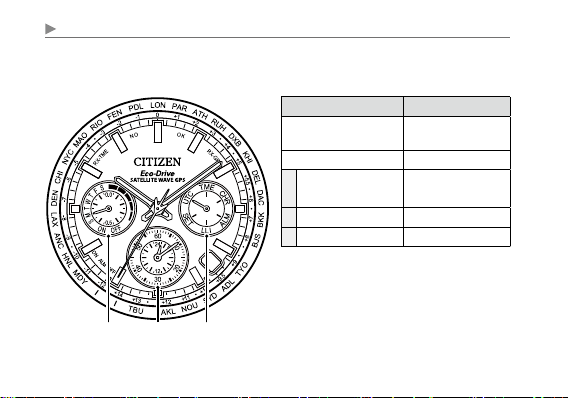
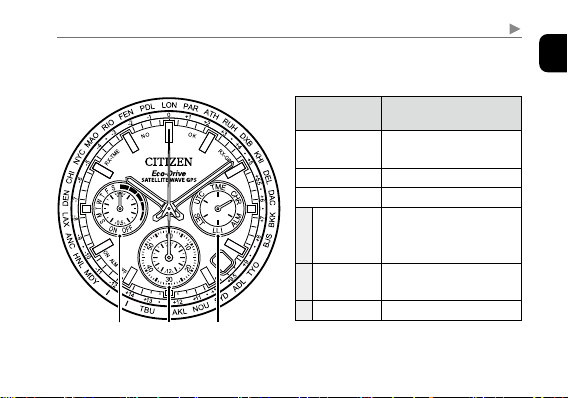
UTC (Coordinated Universal Time) mode
Mode where the dual time indication always shows UTC.
Hand and indication Content
Hour, minute and second
hands
Home time
Date indication
Date (home time)
A Function hand
Day of week (home
time)
B Dual time indication
UTC
C Mode hand
UTC
7
B CA
21
English
Changing the mode
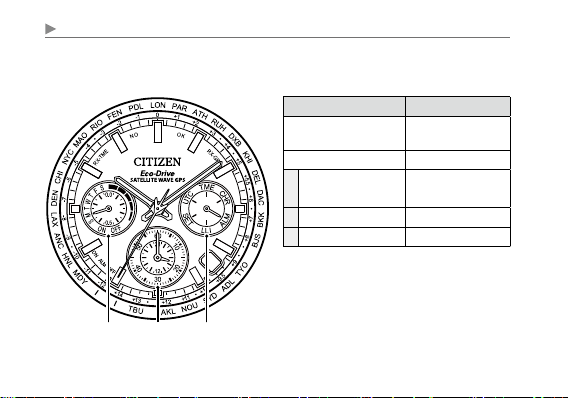
CHR (chronograph) mode
• For details of use, see page
56
.
Continued on the next page
Hand and
indication
Content
Hour and minute
hands
Hour and minute of home
time
Second hand
Chronograph second
Date indication
Date (home time)
A
Function
hand
1/20 chronograph second
(only when chronograph
stops)
B
Dual time
indication
Chronograph hour and
minute
C Mode hand
CHR
7
B CA
23
English
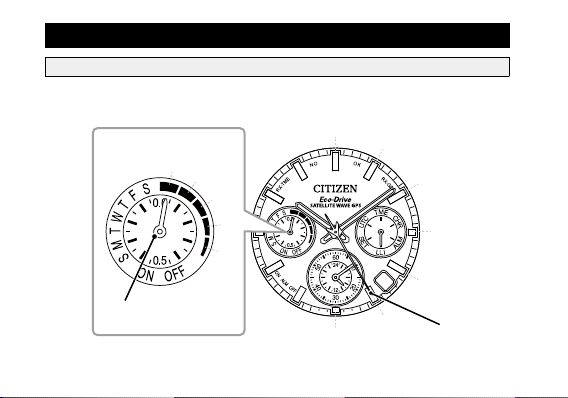
SET (set) mode
Mode for setting time and calendar manually.
Changing the mode
Hand and indication Content
Hour, minute and second
hands
Home time
Date indication
Date (home time)
A Function hand
Day of week (home
time)
B Dual time indication
Local time
C Mode hand
SET
7
B CA
25
English
Checking the power reserve and power generation amount
Checking the power reserve
1
Change the mode to [
TME
] or [
UTC
] and push the
crown in to position
0
.
2
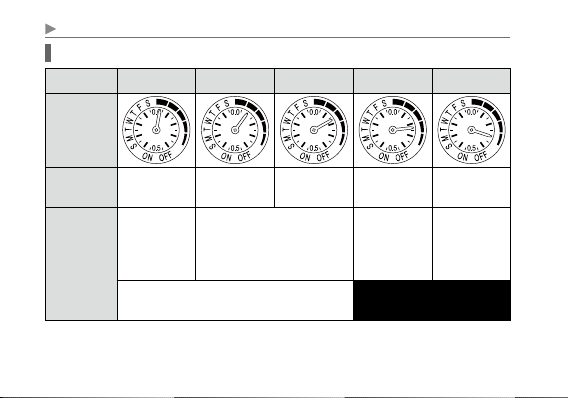
Press and release the upper right button
Ⓑ
.
The function hand indicates the power reserve in levels (page
26
) and the second hand indicates the current time zone
setting of the home time.
• The power reserve level is always shown in the [
LLI
] mode.
3
Press and release the upper right button
Ⓑ
to finish
the procedure.
The second hand returns to indicate the seconds.
• The hand returns automatically in 10 seconds without
pressing the button.
26
Checking the power reserve and power generation amount
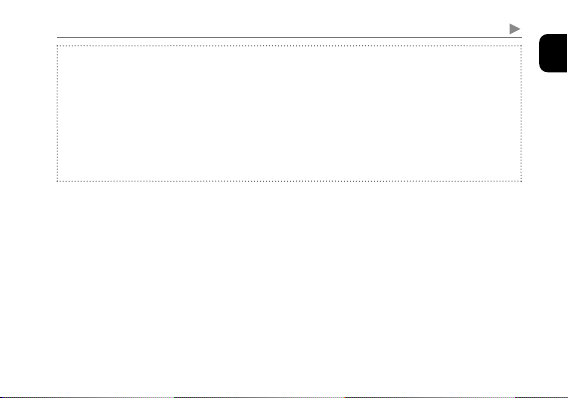
Indication of power reserve in levels
Level
4 3 2 1 0
Power reserve
level scale
Duration
(approx.)
1.5 - 1 year
1 year - 10
months
10 -
4 months
4 months - 5
days
5 days or
shorter
Meaning
Power reserve
is sufficient.
Power reserve is OK.
Power reserve
is getting low.
Insufficient
charge
warning has
started.
OK for normal use. Charge immediately.
27
English
Checking the power reserve and power generation amount
CAUTION
• At the power reserve level “0”, the second hand starts to move once every two
seconds (insufficient charge warning function, page
64
). Some functions
become unavailable while this function is activated. For details, see page
65
.
• The function hand points to “OFF” and does not indicate the level of power
reserve when temperature of the watch is too high or too low.
(non-chargeable state)
Check it again at a location of suitable temperature.
28
Checking the power reserve and power generation amount
Checking power generation amount (Light-Level Indicator)
1
Change the mode to [
LLI
] and push the crown in to
position
0
.
The function hand indicates the power reserve in levels (page
26
).
2
Press and release the upper right button
Ⓑ
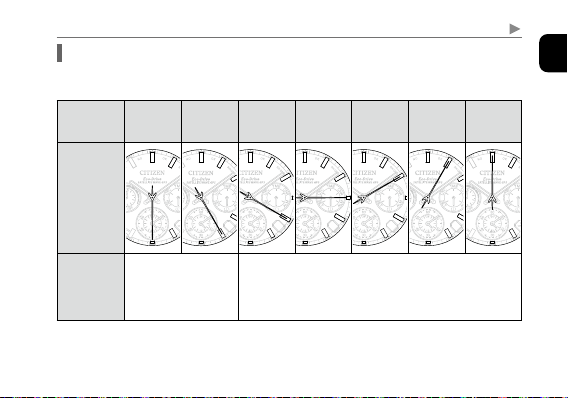
.
The second hand indicates power generation amount in
levels (page
29
).
• Power generation amount is measured in 1-second interval
and indicated in levels.
3
Press and release the upper right button
Ⓑ
to finish
the procedure.
The second hand returns to indicate the seconds.
• The hand returns automatically in 30 seconds without
pressing the button.
29
English
Checking the power reserve and power generation amount
Indication of power generation amount in levels
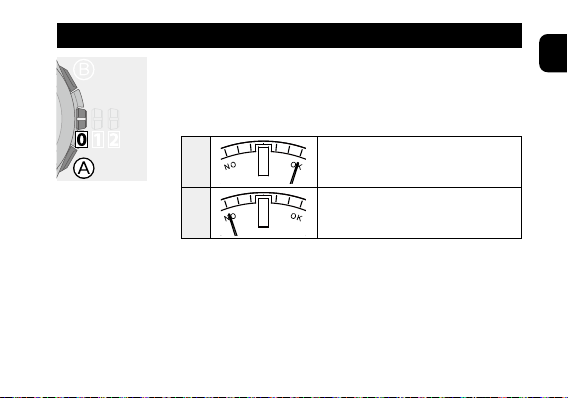
The level of power generation amount means power being generated by the solar
cell represented in 7 levels (0 - 6).
Level
6 5 4 3 2 1 0
Level scale
of power
generation
amount
7
7
7
7
7
7
7
7
7
7
7
7
7
7
7
7
7
7
7
7
7
7
7
7
7
7
7
7
7
7
7
7
7
7
7
7
7
7
7
7
7
7
7
7
7
7
7
7
7
Meaning
Sufficient power
generation for
charging.
Charge in a brighter location where the level of power
generation amount reaches “5” or “6”.
Continued on the next page

30
Checking the power reserve and power generation amount
CAUTION
• Light level indication will change as brightness changes. In addition, the level
may vary even under the same brightness due to the entry angle of light to the
dial of the watch or other elements.
• The level may also vary in the same environment depending on difference of
models.
• The light level indication of “6”, indicates light being received is equivalent to a
cloudy outdoors (about 10,000 lux illuminance) or a brighter location.
• Use the level of power generation amount as a general reference only.
31
English
1
Change the mode to [
TME
] or [
UTC
] and push the
crown in to position
0
.
2
Press and release the lower right button
Ⓐ
.
The second hand indicates the result of the last reception.
OK
Reception was successful.
NO
Reception failed.
• The indication shows the result of the last reception,
regardless types of received information, or information of
location or time.
Checking the reception result of the satellite signal
Continued on the next page
32
Checking the reception result of the satellite signal
3
Press and release the lower right button
Ⓐ
to finish
the procedure.
The second hand returns to indicate the seconds.
• The hand returns automatically in 10 seconds without
pressing the button.
About the reception result
The previous reception result is stored for 6 days and “
NO
” is indicated after that.
33
English
Setting the world time
This watch can indicate the time around the world according to which of 39 time
zones (offsets from UTC—Coordinated Universal Time) is chosen.
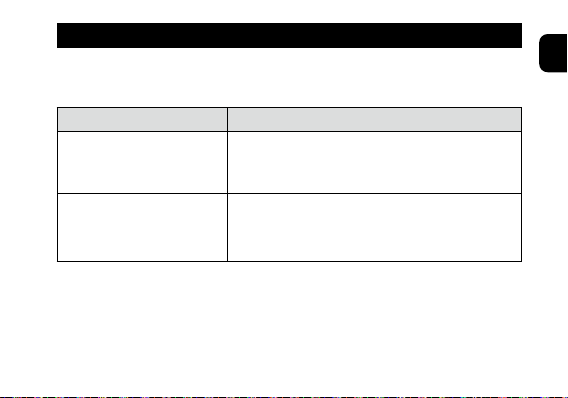
You can set offsets from UTC through any of the two ways below.
Method What to set
Obtaining location information
from satellite signal (page
40
)
The time zone for the home time is set automatically and
time and calendar are adjusted based on the chosen zone.
Setting the time zone manually
(page
42
)
The time zones for the home time and local time are set
manually.
• Summer time (DST) information is not contained in the satellite signal. Adjust
the setting manually before and after the summer time (DST) period (page
52
).
34
Setting the world time
Checking the time zone setting for the home time
1
Change the mode to [
TME
] or [
UTC
] and push the
crown in to position
0
.
• Proceed to the next step after the hands stop.
2
Press and release the upper right button
Ⓑ
.
The second hand points the current time zone setting of the
home time and the function hand indicates the power reserve in
levels (page
24
).
• See “How to read indication of the world time setting”
(page
35
) and “Table of time zones and representative
places” (page
36
).
3
Press and release the upper right button
Ⓑ
to finish
the procedure.
The second hand returns to indicate the seconds.
• The hand returns automatically in 10 seconds without
pressing the button.
35
English
Setting the world time
7
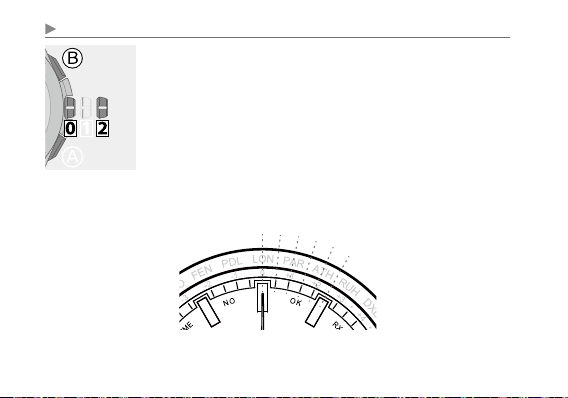
How to read indication of the world time setting
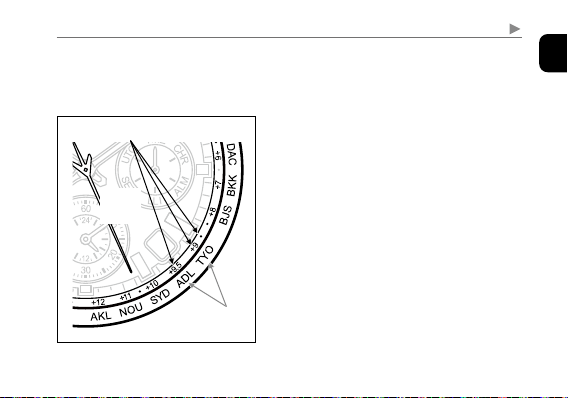
The watch has 39 time zone markers with several representative area names. A time
zone is set by pointing the second hand at one of the markers.
Representative
place
Time zone marker
Second
hand
In the illustration on the left, the second hand
points to 26 seconds and time zone setting is
“+10.5”.
• Time zones are represented by offsets from
UTC.
• Time zone markers and area names may
differ from the illustration in some models.

36
Setting the world time
Time zone
Second
hand
Area name Representative area
0
0 sec.
LON
London
+1
2 sec.
PAR
Paris
+2
4 sec.
ATH
Athens
+3
6 sec.
RUH
Riyadh
+3.5
7 sec.
—
Tehran
+4
8 sec.
DXB
Dubai
+4.5
9 sec.
—
Kabul
+5
10 sec.
KHI
Karachi
+5.5
12 sec.
DEL
Delhi
+5.75
13 sec.
—
Kathmandu
+6
14 sec.
DAC
Dhaka
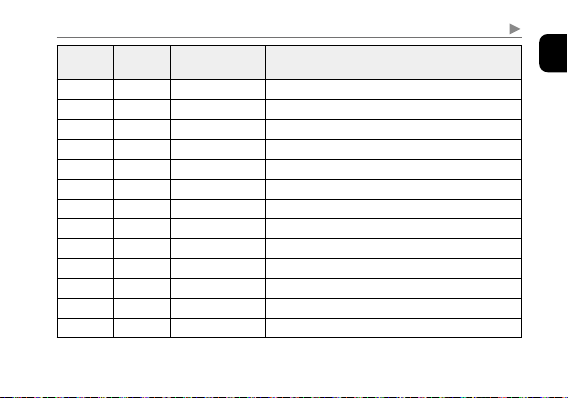
Table of time zones and representative places
• Countries or regions may change time zones for various reasons.
• The information of the time zones and its applicable areas is that as of January 2018.
37
English
Setting the world time
Time zone
Second
hand
Area name Representative area
+6.5
15 sec.
—
Yangon
+7
16 sec.
BKK
Bangkok
+8
18 sec.
BJS (HKG)
Beijing/Hong Kong
+8.5
19 sec.
—
Pyongyang
+8.75
20 sec.
—
Eucla
+9
21 sec.
TYO
Tokyo
+9.5
23 sec.
ADL
Adelaide
+10
25 sec.
SYD
Sydney
+10.5
26 sec.
—
Lord Howe Island
+11
27 sec.
NOU
Noumea
+12
29 sec.
AKL
Auckland
+12.75
31 sec.
—
Chatham Islands
+13
32 sec.
TBU
Nuku‘alofa
Continued on the next page
38
Setting the world time
Time zone
Second
hand
Area name Representative area
+14
34 sec.
CXI
Kiritimati
-12
36 sec.
—
Baker Island
-11
38 sec.
MDY
Midway
-10
40 sec.
HNL
Honolulu
-9.5
41 sec.
—
Marquesas Islands
-9
42 sec.
ANC
Anchorage
-8
44 sec.
LAX
Los Angeles
-7
46 sec.
DEN
Denver
-6
48 sec.
CHI
Chicago
-5
50 sec.
NYC
Ne w Yo rk
-4
52 sec.
MAO
Manaus
-3.5
53 sec.
—
St. John’s
-3
54 sec.
RIO
Rio de Janeiro
39
English
Setting the world time
Time zone
Second
hand
Area name Representative area
-2
56 sec.
FEN
Fernando de Noronha
-1
58 sec.
PDL
Azores
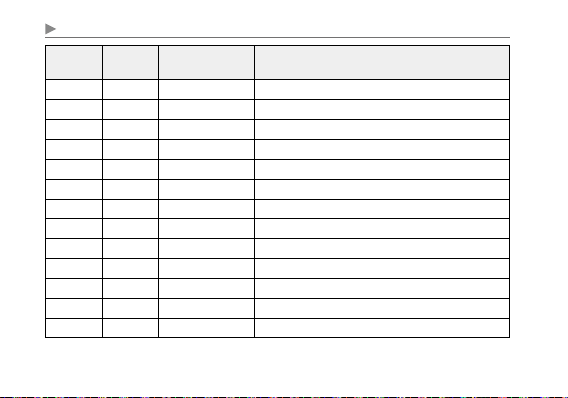
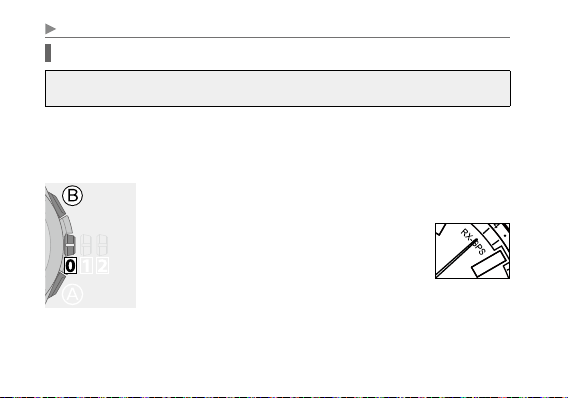
• The offsets in the table are based on the standard time.
• When choosing a time zone for a country or area that observes summer time
(DST) during the summer period, first apply its time zone then activate the
summer time (DST) setting (page
52
).
40
Setting the world time
Obtaining location information from satellite signals
It is recommended to receive the satellite signals outdoors with the wide-open
sky. For details, see “Information on satellite signal reception” (page
68
).
The time zone for the home time is set automatically by obtaining location
information and time and calendar are consequently adjusted based on the chosen
zone.
• It may take 30 seconds - 2 minutes to obtain location information.
1
Change the mode to [
TME
] or [
UTC
] and push the
crown in to position
0
.
2
Press and hold the upper right button
Ⓑ
for 2 seconds until the second hand points
“RX-GPS”.
• Release the button as the hands points “RX-
GPS”. Reception starts.
41
English
Setting the world time
After finishing the reception, the second hand indicates the new setting and returns
to indicate the seconds.
• To cancel the reception, press and hold any button until the second hand returns
to indicate the seconds.
About obtaining location information
The time zone may not set appropriately when location information is obtained in
a border of time zones, even if the information is correct.
• You can also execute time zone setting manually. (page
42
)
• The information of the time zones and its applicable areas is that as of January
2018.
42
Setting the world time
Setting the time zone manually
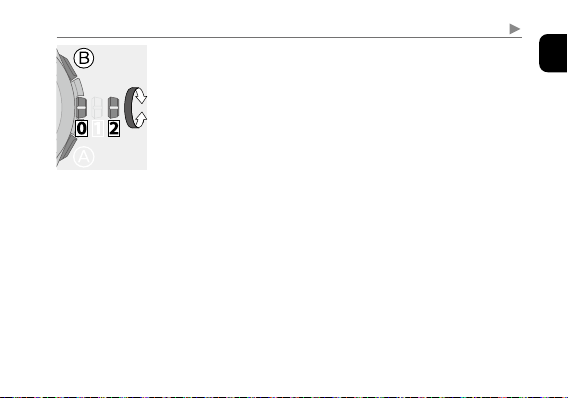
1
Change the mode to [
TME
] or [
LLI
] and pull the
crown out to position
2
.
The second hand indicates the current time zone setting of
the home time.
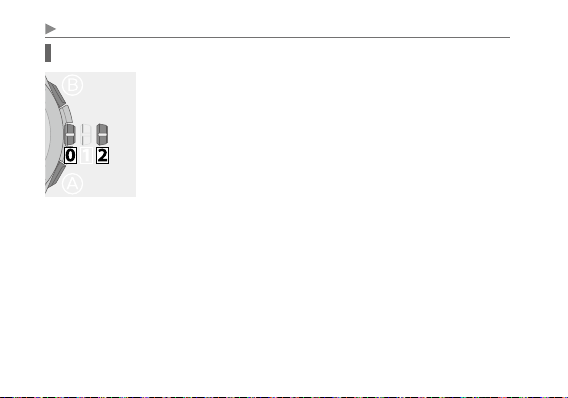
• When the mode is [
UTC
], you can only change the time
zone setting of the home time.
• In this time, you can also change the setting of summer
time (DST) by pressing button
Ⓐ
.
For details, see page
52
.
43
English
Setting the world time
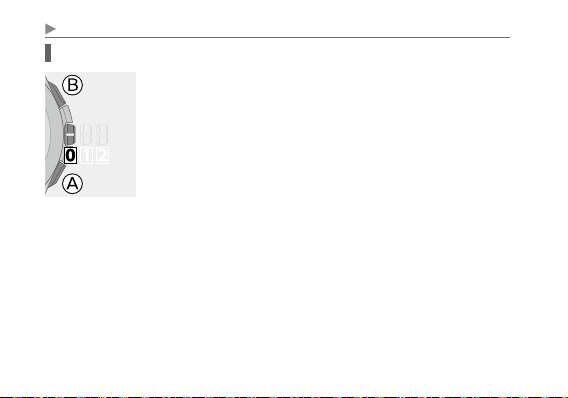
2
Press and release the upper right button
Ⓑ
.
The second hand indicates the current time zone setting of
the local time.
• Each time you press button
Ⓑ
, the minute hand of setting
target slightly moves and the target (home time/local time)
of time zone setting changes alternately.
3
Rotate the crown to choose a time zone.
Time indication changes.
4
Push the crown in to position
0
to finish the
procedure.
The second hand returns to indicate the seconds.
44
Setting the world time
Interchanging the home time and local time
1
Change the mode to [
TME
] or [
LLI
] and push the
crown in to position
0
.
2
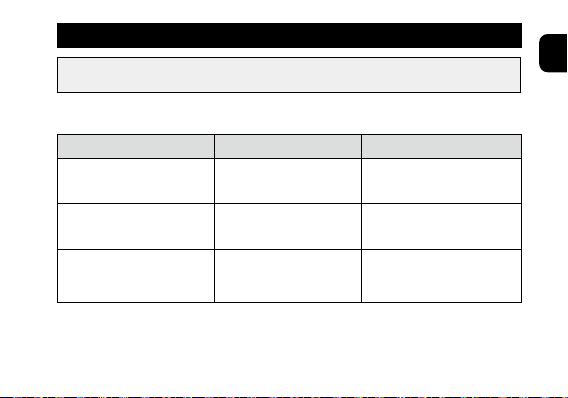
Press and release both the lower right button
Ⓐ
and
upper right button
Ⓑ
simultaneously.
A confirmation tone sounds and the home time and local
time interchange.
• Date and day of week indication follows the new home time
after the interchange.
45
English
Receiving time information
It is recommended to receive the satellite signals under the wide-open sky. For
details, see “Information on satellite signal reception” (page
68
).
You can use the three types of reception below to receive time information. You can
also check the result of the previous reception (success or fail). (page
31
)
Type Use Time required (approx.)
Time reception
(page
46
)
Normal reception for time
and calendar adjustment
3 - 30 seconds
Leap second reception
(page
48
)
Reception for the leap-
second-setting adjustment
36 seconds - 13 minutes
Automatic time reception
(page
50
)
Reception executed
automatically when some
conditions are fulfilled.
3 - 30 seconds
• Location information is not obtained while receiving time information. Execute
world time setting (page
33
) beforehand.
46
Receiving time information
Time reception (time required: about 3 - 30 seconds)
Reception for time and calendar adjustment.
• It may take more time for reception when difference in time is large or calendar
was set manually.
1
Change the mode to [
TME
] or [
UTC
] and push the
crown in to position
0
.
2
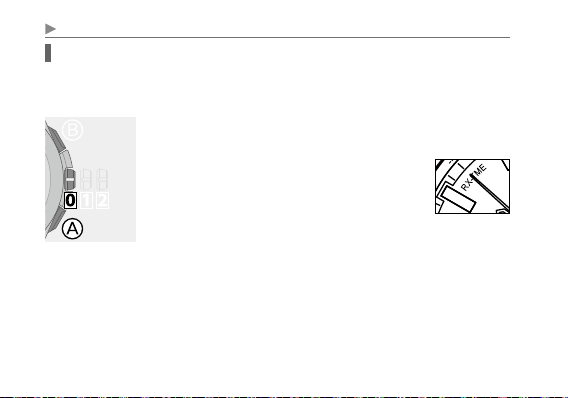
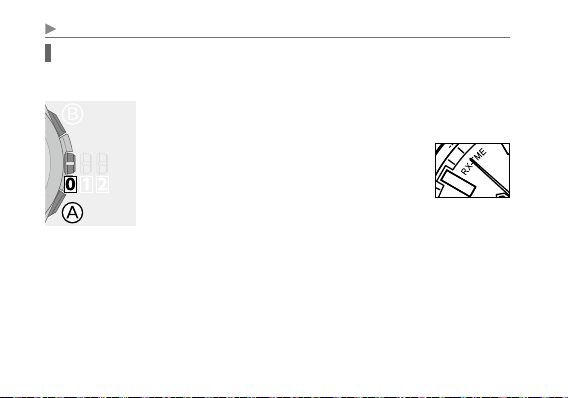
Press and hold the lower right button
Ⓐ
for 2 seconds until the second hand points
“RX-TME”.
• Release the button as the hands points “RX-
TME”. Reception starts.
47
English
Receiving time information
After finishing the reception, the second hand indicates the reception result (page
31
) and returns to indicate the seconds.
• To cancel the reception, press and hold any button until the second hand returns
to indicate the seconds.
• The time of the local time is also corrected automatically following its time zone
setting.
When the time or calendar is still incorrect even after reception
Check the settings of world time (page
33
) and summer time (DST) (page
52
).
If the time is still incorrect after that, execute leap second reception (page
48
).
The leap second may be updated.
• Summer time (DST) information is not contained in the satellite signal.
48
Receiving time information
Leap second reception (time required: about 36 seconds - 13 minutes)
Reception for the leap-second-setting adjustment.
• You can also execute leap second setting manually. (page
73
)
1
Change the mode to [
TME
] or [
UTC
] and push the
crown in to position
0
.
2
Press and hold the lower right button
Ⓐ
for 7 seconds or more.
• Release the button after the second hand
points “
RX-TME
” and turns fully around to
point “
RX-TME
” again. Reception starts.
49
English
Receiving time information
After finishing the reception, the second hand indicates the reception result (page
31
) and returns to indicate the seconds.
• To cancel the reception, press and hold any button until the second hand returns
to indicate the seconds.
• The time of the local time is also corrected automatically following its time zone
setting.
When the time or calendar is still incorrect even after reception
Check the settings of world time (page
33
) and summer time (DST) (page
52
).
• Summer time (DST) information is not contained in the satellite signal.

50
Receiving time information
Automatic time reception
The watch starts time reception automatically when the conditions belows are
fulfilled:
• The watch has not received satellite signals for 6 or more days.
• The watch dial is being exposed to strong direct sunlight for 20 seconds or more.
• The crown is in position
0
and the mode is [
TME
] or [
UTC
]
• The time of the home time is between 6:00AM and 6:00PM.
• The second hand does not move in two-second interval (page
64
).
51
English
Receiving time information
To cease to use automatic time reception
Set the mode to other than [
TME
] and [
UTC
] to use the watch.
About automatic time reception
Automatic time reception may be delayed in the following cases:
• The second hand started to move once every two seconds (insufficient charge
warning) after the last time reception:
Automatic time reception is executed 6 days or more after the insufficient charge
warning stopped by charging the watch.
• Time zone setting of the home time was changed:
Automatic time reception is executed 6 days or more after the moment of the
changing of the setting.

52
Setting summer time (DST)
Summer time (Daylight Saving Time: DST) is a system adopted in some countries/
areas to gain an extra daylight during summer.
This watch can display summer time (DST) or standard time according to the time
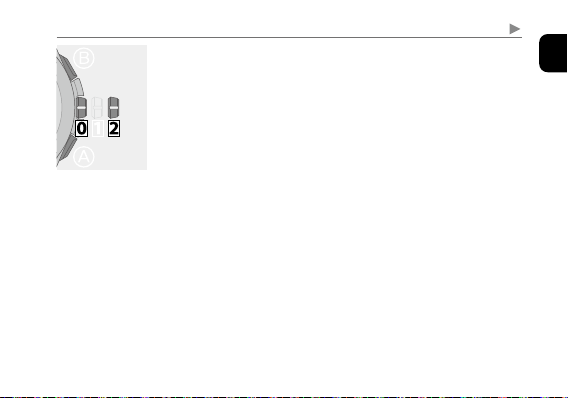
zone selected.
• You can change settings of summer time (DST)/standard time indication
separately for the home time and the local time.
• Summer time (DST) information is not contained in the satellite signal. Adjust
• The setting manually before and after the summer time (DST) period.
• The summer time (DST) period varies depending on the country or area.
• The summer time (DST) rules may change depending on the country or area.
53
English
Setting summer time (DST)
1
Change the mode to [
TME
] or [
LLI
] and pull the
crown out to position
2
.
The function indication indicates summer time (DST)
setting of the home time (
ON/OFF
) (page
54
).
• When the mode is [
UTC
], you can only change summer
time (DST) setting of the home time.
Continued on the next page
54
Setting summer time (DST)
2
Press and release the lower right button
Ⓐ
.
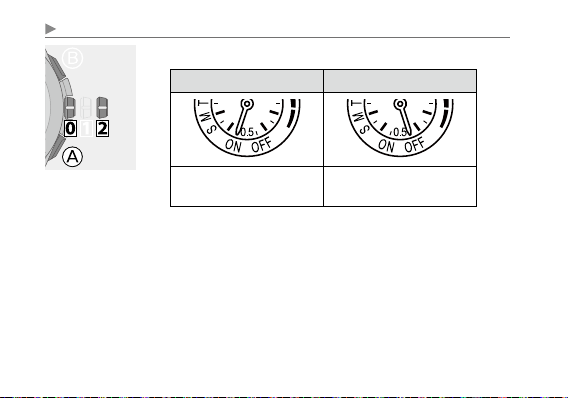
ON OFF
Summer time (DST) is
indicated.
The standard time is
indicated.
• Each time you press the button, the summer time (DST)
• setting (
ON/OFF
) changes alternately.
55
English
3
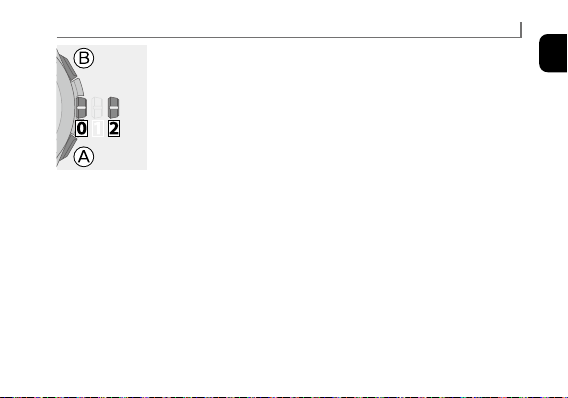
Press and release the upper right button
Ⓑ
.
The function indication indicates summer time (DST)
setting of the local time (
ON/OFF
).
• Each time you press button
Ⓑ
, the minute hand of setting
target slightly moves and the target (home time/local time)
of time zone setting changes alternately.
4
Press and release the lower right button
Ⓐ
to change
summer time (DST) setting of the local time.
5
Push the crown in to position
0
to finish the
procedure.
The second hand returns to indicate the seconds.
Setting summer time (DST)
56
Using the chronograph
The chronograph on this watch can measure up to 23 hours 59 minutes 59.95 seconds
in 1/20 second increments.
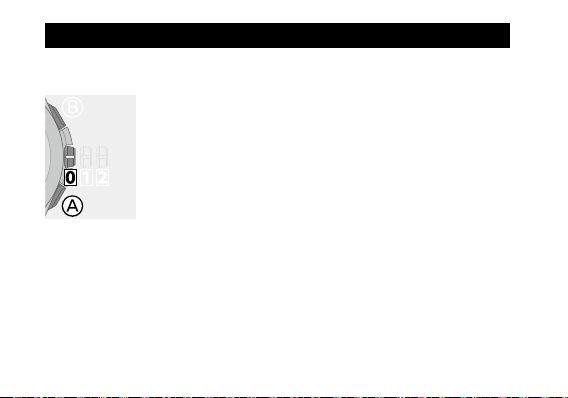
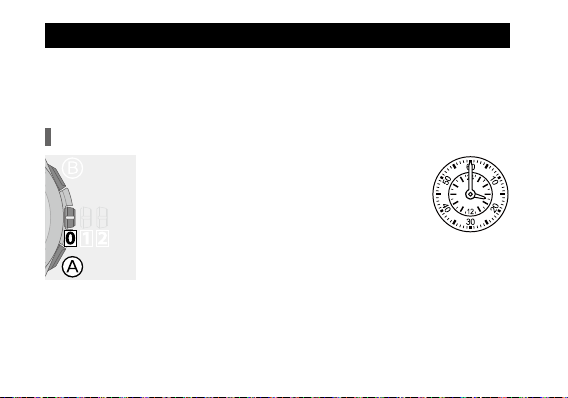
1
Change the mode to [
CHR
] and push the crown in to
position
0
.
The chronograph hands move to indicate 0.00 second.
2
Start measurement.
• See the next page for the method of measurement.
• Pulling out the crown will stop and reset the chronograph.
3
Change the mode to [
TME
] and push the crown in to
position
0
to finish the procedure.
The second hand returns to indicate the seconds.
57
English
7
Using the chronograph
Button
Ⓑ
:
Start/stop
1/20 chronograph seconds are indicated only
when the chronograph is stopped.
Button
Ⓐ
:
Reset
Press and release this button to reset the
chronograph after timing.
• After 24 hours of continuous chronograph operation, the chronograph
automatically stops and is reset.
• The hour hand, minute hand and date indication indicate the time of the home
time.
Chronograph second
1/20 chronograph second
Chronograph hour and minute
58
Using alarm
The alarm time is based on the home time.
• The alarm is set in a 24-hour format.
• Take care when changing the time zone setting of the home time after setting
alarm.
Checking the alarm setting
1
Change the mode to [
ALM
] and push the
crown in to position
0
.
The dual time indication indicates the current
alarm time setting.
2
Press and release the lower right button
Ⓐ
.
The second hand indicates the current alarm
setting (
ALM ON/OFF
).
e.g. 7:00 a.m.
59
English
Using alarm
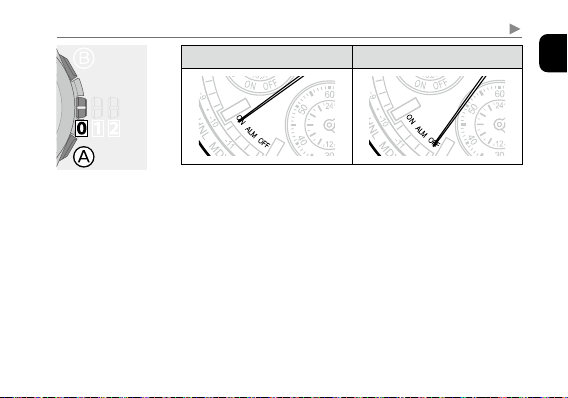
ALM (alarm) ON ALM (alarm) OFF
7
7
• Alarm setting indication (
ALM ON/OFF
) stops in 10
seconds and returns to indicate the seconds automatically.
Pressing button
Ⓐ
also ends the indication.
• Press and hold button
Ⓑ
for 2 seconds or more to monitor
the alarm sound.
3
Change the mode to [
TME
] and push the crown in to
position
0
to finish the procedure.
The second hand returns to indicate the seconds.
60
Using alarm
Changing alarm setting
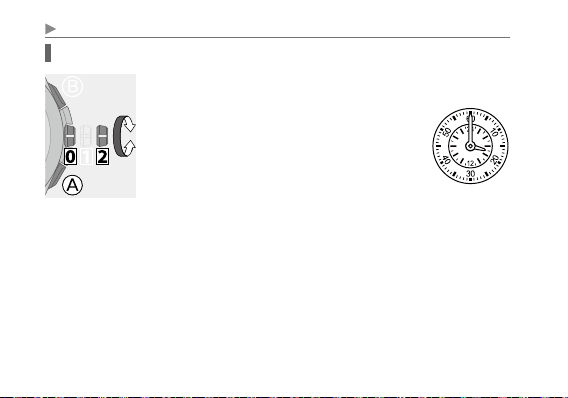
1
Change the mode to [
ALM
] and pull the crown out to
position
2
.
The dual time indication indicates the current
alarm time setting and the second hand shows
the current alarm setting (
ALM ON/OFF
).
• The hour and minute hands may
automatically move to provide a clear view
of the alarm time setting.
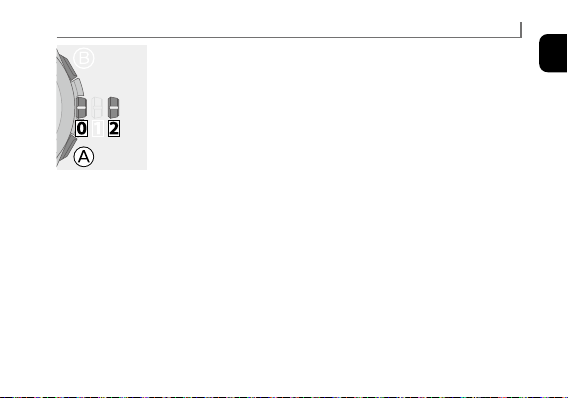
2
Rotate the crown to set the alarm time.
• If you rotate the crown quickly a few times, the hand will
move continuously. To stop the rapid movement, rotate the
crown in either direction.
61
English
Using alarm
3
Press and release the lower right button
Ⓐ
to set the
alarm setting (
ALM ON/OFF
).
• Each time you press button
Ⓐ
, the setting alternates
between
ALM ON
and
ALM OFF
.
4
Change the mode to [
TME
] and push the crown in to
position
0
to finish the procedure.
The second hand returns to indicate the seconds.
62
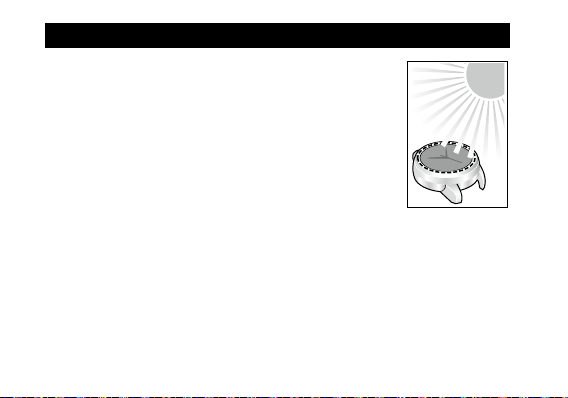
This watch has a rechargeable cell which is charged by
exposing the dial to light, such as direct sunlight or fluorescent
lamps (refer to page
66
for charging guidelines).
For optimal performance, be sure to:
• Put the watch in a location where the dial is exposed to bright
light such as by the window even when it is not used.
• Expose its dial to direct sunlight for 5 or 6 hours at least every
half-a-month.
• Avoid leaving it in dark places for long periods of time.
Charging your watch
63
English
Charging your watch
CAUTION
• This watch contains a large-capacity rechargeable cell for performing power-
consuming satellite signal reception. This large capacity cell takes more time to
charge than those found in other Eco-Drive watches.
• If the surrounding temperature falls below 0°C (32°F) or exceeds 40°C (104°F),
the “
Charge suspension temperature detection function
” will activate and
charging will not be possible.
• Do not charge the watch at a high temperature (about 60°C (140°F) or higher)
as doing so may cause movement malfunction.
• If the watch is obscured from light by long sleeves frequently, supplemental
charging may be needed to ensure continual operation.
• The watch stops charging automatically after finishing (overcharging prevention
function). The function prevents damage to performance of the watch and
rechargeable cell due to overcharging.
Continued on the next page
64
Charging your watch
When the watch reaches a low charge state
(insufficient charge warning function)
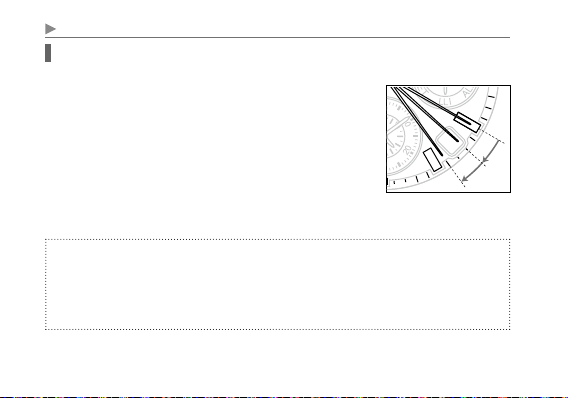
When the power reserve becomes low, the second hand
moves once every two seconds. This is the insufficient
charge warning function. Be sure to fully charge your watch
immediately as outlined on page
66
.
• When the watch is sufficiently charged, the second hand
will move normally.
• If you do not charge the watch for 5 days or longer after
the insufficient charge warning movement has begun, the watch will be depleted
of all power and stop.
CAUTION
• If you do not charge the watch for 30 days after it has stopped, recharging will not
be possible (over discharge detection function).
Consult an authorized service center if no hands start to move even after charging
a stopped watch for one day or more exposing to direct sunlight.
7
65
English
Charging your watch
During the insufficient charge warning state
The time and date is indicated correctly.
• In any mode other than [
UTC
], indication is the same as that in the [
TME
] mode.
Operations below are available:
• Checking power generation amount
• Setting the world time
• Adjusting the time and calendar manually
• All Reset
You cannot execute operations other than above such as obtainment of location
information or reception of satellite signals.
Continued on the next page

66
Charging your watch
Charging time by environment
Below are the approximate charging times when exposing to light continuously.
Please use this table as a general reference only.
Environment
Illuminance
(lx)
Charging time (approx.)
To work for one day
To start working
normally when the
cell is discharged
To become fully
charged when the cell
is discharged
Outdoors (sunny)
100 000 4 minutes 5.5 hours 50 hours
Outdoors (cloudy)
10 000 25 minutes 40 hours 270 hours
20 cm (8 inches) away
from a fluorescent
lamp (30W)
3 000 1.5 hours 150 hours −
Interior lighting
500 8 hours − −
•
Exposing to direct sunlight is recommended to charge your watch.
A fluorescent lamp or interior lighting does not have sufficient illumination to
charge the rechargeable cell efficiently.
67
English
Power save function
The hour, minute and second hands stop automatically to save power when the dial
of the watch has not been exposed to light for a long time.
• The watch is still running internally to keep the time and calendar correctly even
after the power save function has activated.
• The alarm will not sound while the power save function is activated.
• The power save function is not activated when the position of the crown is
1
or
2
.
• The power save status ends and the hands return to indicate the current time as
the watch is operated or the dial is exposed to light and power generation starts.
Duration without additional charging after charging the watch fully
About 1 year and 6 month in normal use.
• When using functions in the frequency below: time reception every 6 days,
chronograph 1 hour a day and alarm once a day.
• The watch will keep running internally for up to 5 years with the power save
function.
Charging your watch

68
Information on satellite signal reception
This watch receives time information from satellites to indicate the time and
calendar.
It also obtains location information from them to indicate time appropriate in the
area where it is actually used.
For receiving the satellite signal
Satellite signal reception is power-consuming. Be sure your watch has a sufficient
charge before executing reception.
• The average monthly accuracy of this watch is ±5 seconds even if a satellite signal
is not received.
• Use the function to see the result of the previous reception (success or fail) (page
31
) effectively to try to execute reception in best frequency.
69
English
Information on satellite signal reception
Cautions regarding receiving the satellite signal
Do not perform signal reception while operating a vehicle as doing so is
extremely dangerous.
• If the second hand is moving once every two seconds (insufficient charge
warning function), you cannot perform satellite signal reception. Charge the
watch sufficiently before attempting signal reception.
• Even when this watch receives the signal successfully, the accuracy of the
displayed time will be dependent on the reception environment and internal
processing.
• The automatic correction feature of this watch is supported until 28/2/2100.
• Summer time (DST) information is not contained in the satellite signal. Adjust
the setting manually before and after the summer time (DST) period.(page
52
)
Continued on the next page
70
Information on satellite signal reception
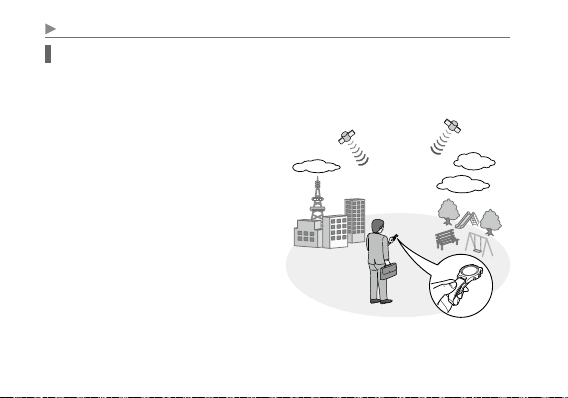
When receiving the satellite signal
As shown in the picture below, make sure you are in an area with few surrounding
trees, buildings, or other objects which may obstruct the satellite signal. Face the
dial towards the sky and perform signal reception.
• For successful reception there should be
a clear view of the sky as depicted in the
illustration when attempting to receive
the satellite signal.
• Reception may fail due to the positions
of satellites when you try to receive their
signals.
71
English
Information on satellite signal reception
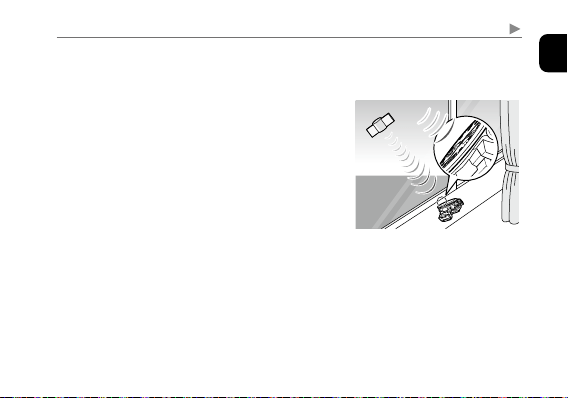
Receiving signals indoors near a window
Place the watch near a window with a wide view of the sky and orient the dial in an
obliquely upward direction to the sky.
• Signal reception from some satellites is required
for obtaining location information. It is possible
that location information cannot be obtained
while time information can be received in the
same place.
Outdoor signal reception is recommended for
obtaining location information.
• It may be difficult to receive satellite signals
through special types of window glass.
Continued on the next page
72
Information on satellite signal reception
Poor reception areas
It may be difficult to receive the satellite signal under certain environmental
conditions or in certain areas.
Areas with obstructions above the watch
Nearby objects which emit magnetism or
electrical interference
• Indoors or underground
• Areas surrounded by tall buildings or trees
• When the weather is cloudy or rainy, or
during a thunderstorm
etc.
• High-voltage electric cables, railway lines /
overhead cables, airports, and transmission
facilities.
• Electrical appliances and OA equipment
• Mobile telephones in the process of calling/
transmitting
• Mobile telephone base stations
etc.
73
English
Information on satellite signal reception
Checking and adjusting leap second setting
This watch displays the time by applying the leap second to the International
Atomic Time information received from satellites.
The leap second may be applied once a few years and the leap second setting on the
watch is automatically adjusted when it is applied.
Check and adjust the leap second setting manually following the steps below when
it is not adjusted automatically.
For details on leap seconds, you can find a list of leap seconds at the website
of IERS (INTERNATIONAL EARTH ROTATION & REFERENCE SYSTEMS
SERVICE):
http://hpiers.obspm.fr/eop-pc/earthor/utc/TAI-UTC_tab.html
Continued on the next page
74
Information on satellite signal reception
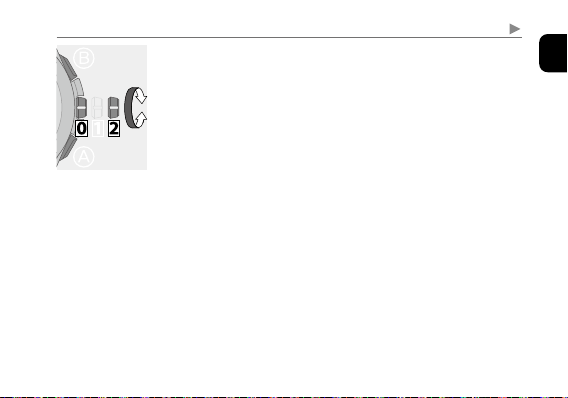
1
Change the mode to [
SET
] and pull the crown out to
position
2
.
The second hand stops.
2
Press and hold upper right button
Ⓑ
for 2 seconds or
more.
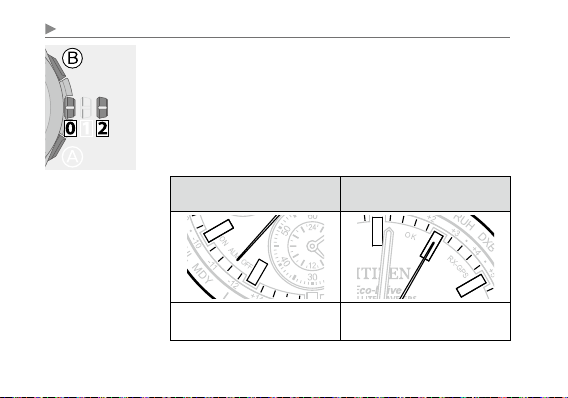
Using the “0:00:00” position as the starting point, the minute
and second hands indicate the leap second setting.
When the leap second setting is “-37
seconds”
When the leap second setting is “-65
seconds”
7
7
The hands point to “0 minute 37
s e c o n d s ”.
The hands point to “1 minute 5
s e c o n d s ”.
75
English
Information on satellite signal reception
3
Turn the crown to adjust the setting if the leap second
is not correct.
• Adjustable range is from 0 to ‒90 seconds.
4
Change the mode to [
TME
] and push the crown in to
position
0
to finish the procedure.
The second hand returns to indicate the seconds.
76
Information on satellite signal reception
Checking and adjusting the rollover number setting
In order for this watch to correctly process the week information* received from
the satellite, a rollover number for each time period is set. The rollover numbers are
normally updated automatically.
If the rollover number setting is incorrect, the time and date may not be indicated
accurately. Check the rollover number setting and adjust it if it is incorrect.
* Called “Week number”. Weeks are represented with numbers from 0 to 1023
(approx. 20-year cycle).
77
English
Information on satellite signal reception
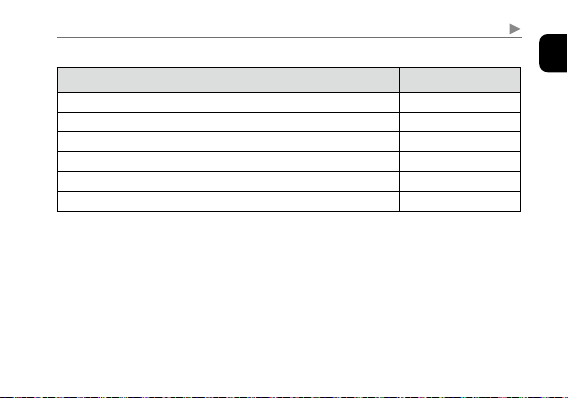
Table of rollover number and time period
Time period (Coordinated Universal Time, GMT) Rollover number
22/8/1999 (Sun) 0:00 –
0
7/4/2019 (Sun) 0:00 –
1
21/11/2038 (Sun) 0:00 –
2
7/7/2058 (Sun) 0:00 –
3
20/2/2078 (Sun) 0:00 –
4
6/10/2097 (Sun) 0:00 – 22/5/2117 (Sat) 23:59
5
Continued on the next page
78
Information on satellite signal reception
1
Change the mode to [
SET
] and pull the crown out to
position
2
.
The second hand stops.
2
Press and hold upper right button
Ⓑ
for 2 seconds or
more.
The second and minute hands indicate the leap year setting.
3
Press and hold the upper right button
Ⓑ
for 7 seconds
or more.
The second hand indicates the current rollover number setting.
Indication of the rollover number
7
0
1
2
3
4
5
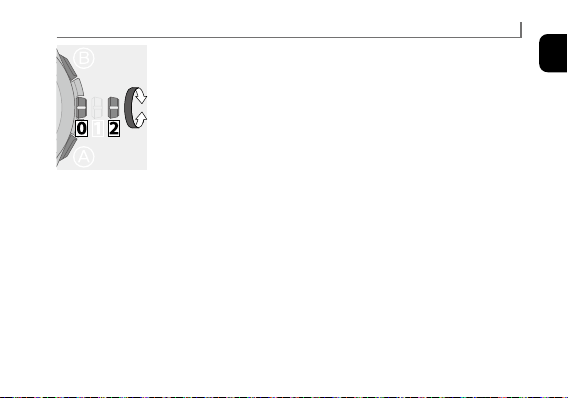
79
English
4
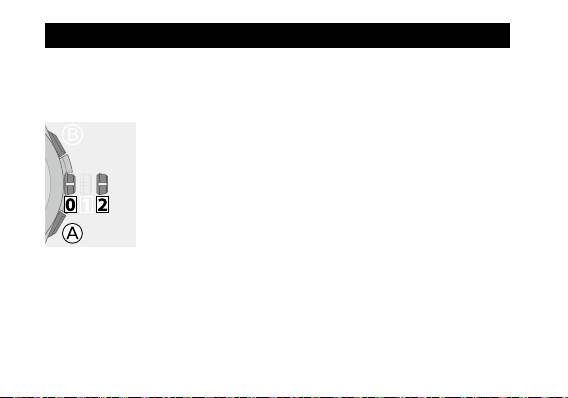
Turn the crown to adjust the setting if it is not correct.
• Adjustable range is from “0” to “5”.
• See “Table of rollover number and time period” (page
77
)
and set the correct rollover number.
5
Change the mode to [
TME
] and push the crown in to
position
0
to finish the procedure.
The second hand returns to indicate the seconds.
Information on satellite signal reception
80
You can set the time and calendar of the home time manually.
• Execute world time setting (page
33
) beforehand.
• The time of the local time is corrected automatically following its time zone
setting after setting the home time manually.
1
Change the mode to [
SET
] and pull the crown out to
position
2
.
The second hand stops.
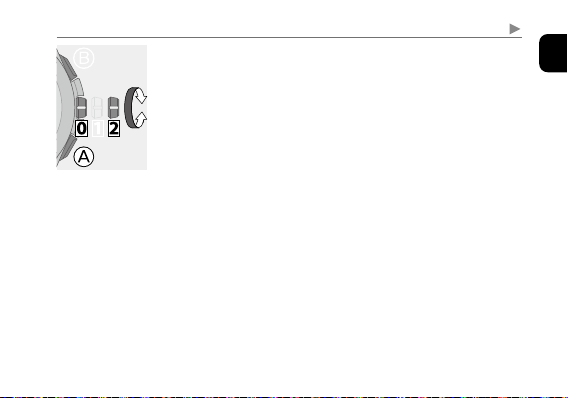
2
Press and hold the lower right button
Ⓐ
for 2 seconds
or more.
The minute hand slightly moves and time and calendar
become adjustable.
Adjusting the time and calendar manually
81
English
Adjusting the time and calendar manually
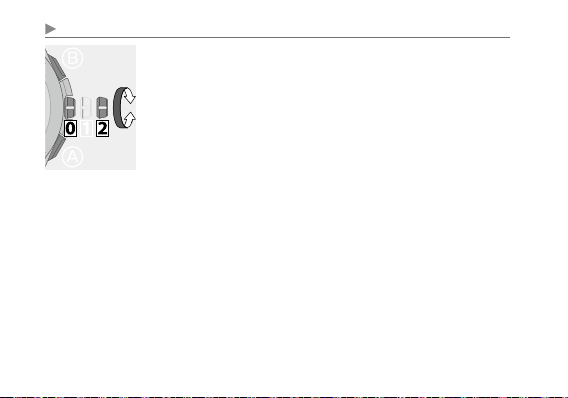
3
Press and release the lower right button
Ⓐ
repeatedly
to change the hand/indication to be corrected.
• Each time you press button
Ⓐ
, the target changes as
follows:
Hour and minute → date → year/month →
day of week → (back to the top)
• The hands and indications slightly moves when they
become adjustable.
Continued on the next page
82
Adjusting the time and calendar manually
4
Rotate the crown to adjust the hand/indication.
• Hour, minute and date move in conjunction with one
another. Be sure to set the proper AM or PM time.
Change
of date indication shows it just became AM.
• Year and month are indicated with the second hand. Set
them referring to page
84
.
• Date indication changes to the next as the function hand
rotates 5 times.
• When you rotate the crown quickly a few times, the hand/
indication will move continuously. To stop the rapid
movement, rotate the crown in either direction.
5
Repeat steps 3 and 4.
83
English
Adjusting the time and calendar manually
6
Push the crown in to position
0
in accordance with a
reliable time source.
The second hand starts moving from 0 second.
7
Change the mode to [
TME
] to finish the procedure.
84
Adjusting the time and calendar manually
7
7
12
1
2
3
4
5
6
7
8
9
10
11
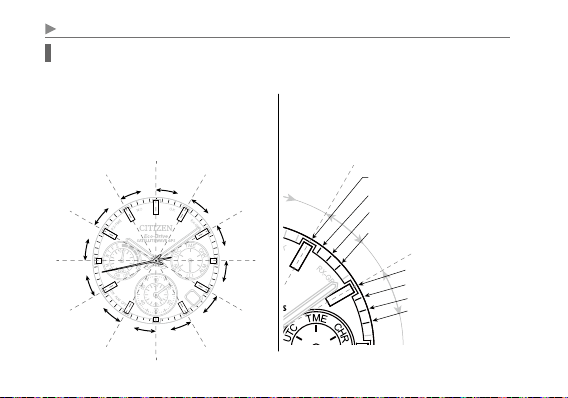
Month and year indications
Set the year and month with the position of the second hand.
“Month” corresponds to one of the 12
zones shown in the figure below.
Each number means month.
“Year” corresponds to the years since
leap year and indicated with markers in
the zone of each month.
Years since leap year:
0
(Leap year)
0
Years since leap year:
1
1
Years since leap year:
2
2
Years since leap year:
3
3
85
English
Adjusting the time and calendar manually
Actual year
Years since leap
year
Second hand position
2016 2020 2024 2028 2032
0
(Leap year)
Hour marker
2017 2021 2025 2029 2033
1
1st min. marker
2018 2022 2026 2030 2034
2
2nd min. marker
2019 2023 2027 2031 2035
3
3rd min. marker
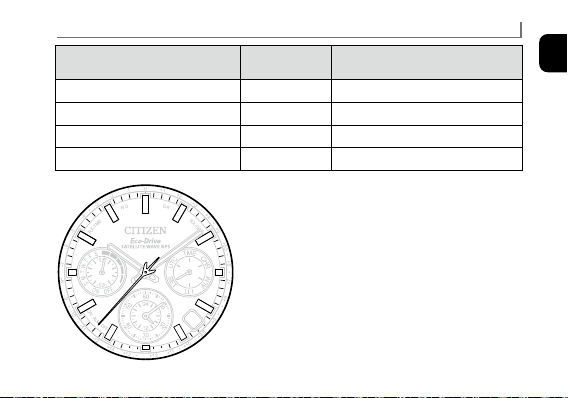
Examples: Position of the second hand when
setting July 2018
You can find that the years since leap year of 2018
is “2” from the table and the second hand must be
set to the 2nd minute marker of July zone.
7
86
Checking and correcting the reference position
If the time or calender is not shown correctly even after proper reception of the
time signal, check whether the reference position is correct.
• If the hands and indication do not reflect the correct reference position, the time
and calendar will not be indicated accurately even if the signal is received.
What is the reference position?
The base position of all hands and calendar
to properly indicate the various functions of
this watch.
• Hour, minute and second hands:
0 hour 00 minute 0 second
• Date indication:
midway between “31” and “1”
• Function hand: “0.0” (just upright)
• Dual time indication: 0 hour 00 minute
Correct reference positions
Troubleshooting
31
1
31
1
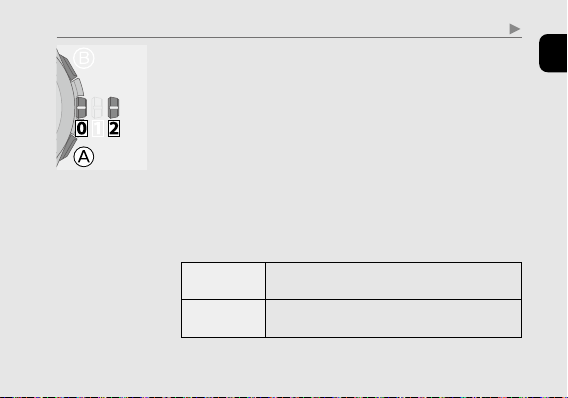
87
English
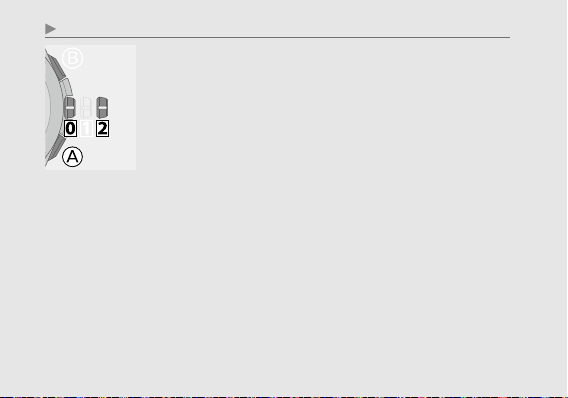
Troubleshooting
1
Change the mode to [
CHR
] and pull the crown out to
position
2
.
The second hand, function hand and dual time indication
point to 0 position and stop.
2
Press and hold the lower right button
Ⓐ
.
The hands and date start to move to the current reference
positions stored in memory.
• Release the button as the hands start to move.
• Some hands show special movement to adjust their
position.
3
Check the reference positions of them referring to the
illustration of the previous pages.
Correct
Push the crown in to position
0
to finish the
procedure. Set the mode to [
TME
] after that.
Wrong
Proceed to step 4 in the next page and correct the
reference position.
Continued on the next page
88
Troubleshooting
4
Press and release the lower right button
Ⓐ
.
The function hand slightly moves and the hand and date
indication become adjustable.
5
Press and release the lower right button
Ⓐ
repeatedly
to change the hand/indication to be corrected.
• Each time you press the button, the target changes as
follows:
Function hand/date indication → Dual time indication
→ Hour and minute hands → Second hand →
(Back to the top)
• The hands slightly moves when selected to show they
become adjustable.
89
English
Troubleshooting
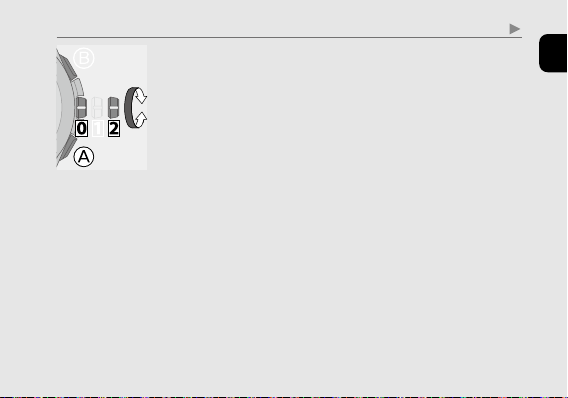
6
Rotate the crown to adjust the hand/indication.
• When you rotate the crown quickly a few times, the hand/
indication will move continuously. To stop the rapid
movement, rotate the crown in either direction.
7
Repeat steps 5 and 6.
8
Push the crown in to position
0
.
9
Change the mode to [
TME
] to finish the procedure.
90
Troubleshooting
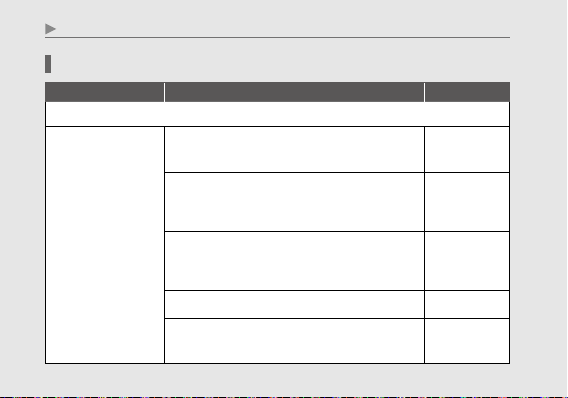
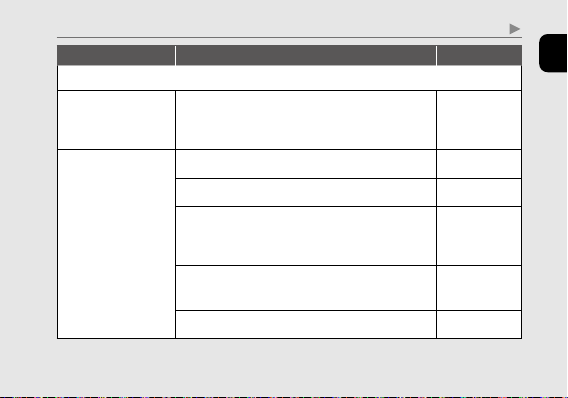
Symptom and Remedies
Symptom Remedies
Page
Problems with satellite signal reception
Reception is
unsuccessful.
Check whether the mode is [
TME
] or [
UTC
].
−
When the second hand moves once every two
seconds, the watch cannot receive the signals.
Charge the watch.
65
Avoiding places where the satellite signal may be
obstructed and objects which emit noise, face the
dial towards the sky and start reception.
72
Remove the watch from your wrist and try again.
−
If the remedies above do not solve the problems,
consult an authorized service center.
−
91
English
Troubleshooting
Symptom Remedies
Page
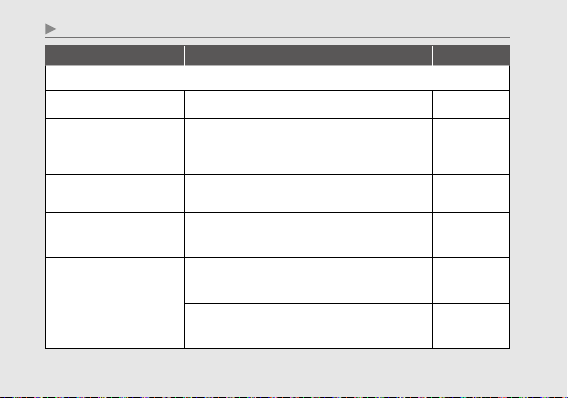
Problems with satellite signal reception (continued)
Automatic time
reception does not
work correctly.
Check whether the mode is [
TME
] or [
UTC
].
50
The correct time
and calendar are
not indicated after
successful reception.
Check the world time setting.
33
Check the summer time (DST) setting.
52
Execute leap second reception if the time and
calendar is still incorrect even after executing
time reception.
48
Check and adjust the settings of leap second and
rollover number.
73, 76
Check and correct the reference position.
86
92
Troubleshooting
Symptom Remedies
Page
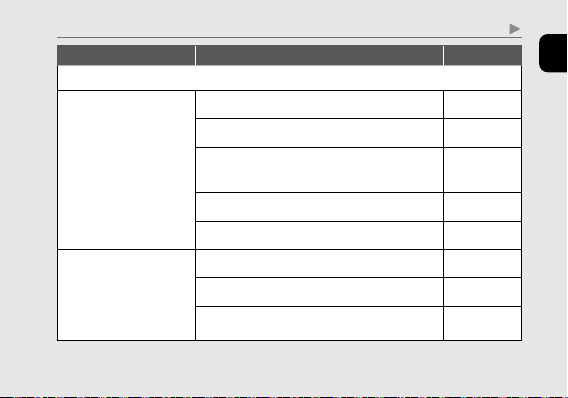
Movement of a hand seems strange
Indication is incorrect. Check the mode.
17
The power reserve is not
indicated.
Charging may be stopped (non-chargeable state).
Check it again at a location of suitable
temperature.
27
The second hand moves
once every two seconds.
Charge the watch.
62
The second hand does not
move.
Push the crown in to position
0
in any mode
other than [
CHR
].
−
No hands move.
Charge the watch in direct sunlight until the
second hand moves normally.
66
If the remedies above do not solve the problems,
consult an authorized service center.
−
93
English
Troubleshooting
Symptom Remedies
Page
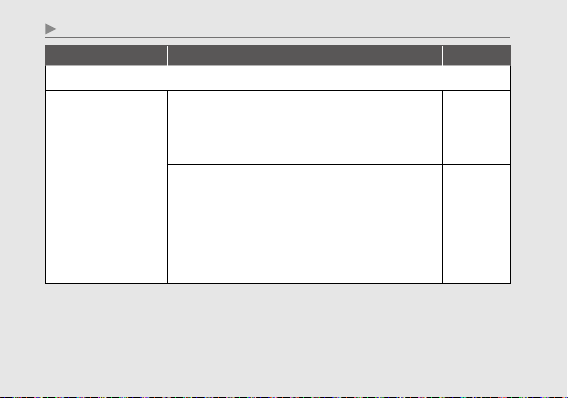
Time/calendar is abnormal.
Time/calendar is
incorrect.
Check the world time setting.
33
Check the summer time (DST) setting.
52
Receive the satellite signal to adjust the time and
calendar.
45
Check and correct the reference position.
86
Adjust the time and calendar manually.
80
Time is incorrect though
the world time setting
is correct and reception
of the satellite signal
succeeded.
Check the summer time (DST) setting.
52
Check and correct the leap second setting.
73
Check and correct the reference position.
86
94
Troubleshooting
Symptom Remedies
Page
Charging and other problems
The watch does not
work even though it is
charged.
If the surrounding temperature falls below 0°C (32°F)
or exceeds 40°C (104°F), the “Charge suspension
temperature detection function” will activate and
charging will not be possible.
62
If the “Over discharge detection function” is activated,
charging is not possible. If the watch does not work
after exposing the dial to direct sunlight for more
than one day, it is possible that the rechargeable cell
has over discharged. Consult an authorized service
center.
64
95
English
Troubleshooting
Symptom Remedies
Page
Charging and other problems (continued)
The watch stops
immediately after it is
charged.
Charge the watch for 2 to 3 days in direct sunlight.
If the second hand starts moving once every two
seconds the watch is being charged correctly.
Continue charging even when the second hand starts
moving normally.
If no change can be seen, consult an authorized
service center.
−
Do not want to receive
satellite signals.
Change to any mode other than [
TME
] and [
UTC
].
Automatic time reception is ceased.
51

96
Troubleshooting
Be sure to perform the following operations after All Reset.
1
. Correct the reference positions.
After All Reset, the watch is in the reference position adjustment
mode. Refer to step 4 and after on page
88
.
2
Set the world time.
Obtaining location information: See page
33
.
When you set it manually, execute also time and calendar setting
(page
45
or
80
).
Resetting the watch — All Reset
When the watch does not work properly, you can reset all the settings. If the power
reserve is insufficient, charge the watch first.
97
English
1
Change the mode to [
CHR
] and pull the crown out to
position
2
.
2
Press and hold buttons
Ⓐ
and
Ⓑ
at the same time for
4 seconds or more and release them.
Alarm sounds as the buttons are released and the hands
move to their current reference position.
The setting values after All Reset
Calendar
January of leap year (5-second position)
World time
Time zone (offset) 0 (LON), London
Reception result
NO
Summer time (DST)
OFF at all time zones
Alarm setting
OFF
Alarm time
0:00AM
Leap seconds
No change after All Reset
Rollover number
Troubleshooting
98
Eco-Drive watch handling precautions
<Always Make Sure to Recharge Frequently>
t 'PSPQUJNBMQFSGPSNBODFZPVSXBUDITIPVMESFNBJOGVMMZDIBSHFE
t-POHTMFFWFTNBZJOIJCJUMJHIUUSBOTNJTTJPOUPZPVSXBUDI
5IJTNBZSFTVMUJOZPVSXBUDIMPPTJOHDIBSHF*OUIFTFDBTFT
TVQQMFNFOUBMDIBSHJOHNBZCFOFDFTTBSZ
t8IFOZPVUBLFPGGUIFXBUDIQMBDFJUJOBCSJHIUMPDBUJPOUPFOTVSF
PQUJNBMQFSGPSNBODF
99
English
Eco-Drive watch handling precautions
CAUTION
Recharging Precautions
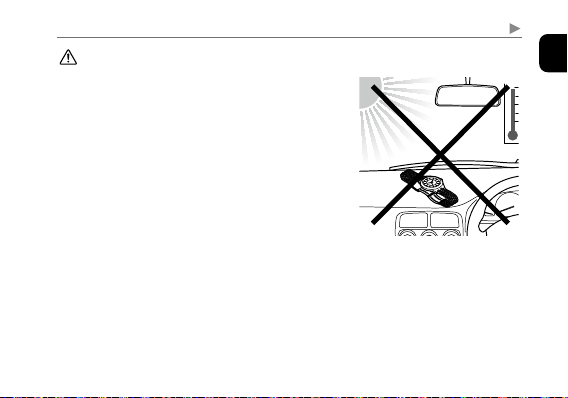
t%POPUDIBSHFUIFXBUDIBUBIJHIUFNQFSBUVSFBCPVU
¡$¡'PSIJHIFSBTEPJOHTPNBZDBVTFUIF
NPWFNFOUUPNBMGVODUJPO
Examples:
t$IBSHJOHUIFXBUDIUPPDMPTFUPBMJHIUTPVSDF
XIJDIHFOFSBUFTBMBSHFBNPVOUPGIFBUTVDIBTBO
JODBOEFTDFOUMBNQPSIBMPHFOMBNQ
8IFODIBSHJOHVOEFSBOJODBOEFTDFOUMBNQCF
TVSFUPMFBWFDNJODIFTPSNPSFCFUXFFOUIF
MBNQBOEUIFXBUDIUPBWPJEFYQPTJOHUIFXBUDIUP
FYDFTTJWFIFBU
t$IBSHJOHUIFXBUDIJOBMPDBUJPOXIFSFUIFUFNQFSBUVSF
NBZCFDPNFFYUSFNFMZIJHITVDIBTPOUIFEBTICPBSE
PGBWFIJDMF
100
Eco-Drive watch handling precautions
<Replacement of Rechargeable Cell>
t5IJTXBUDIVUJMJ[FTBTQFDJBMSFDIBSHFBCMFDFMMUIBUEPFTOPUSFRVJSFQFSJPEJDBMSFQMBDFNFOU
)PXFWFSQPXFSDPOTVNQUJPONBZJODSFBTFBGUFSVTJOHUIFXBUDIGPSBOVNCFSPGZFBSTEVF
UPXFBSPGJOUFSOBMDPNQPOFOUTBOEEFUFSJPSBUJPOPGPJMT5IJTNBZDBVTFTUPSFEQPXFSUP
CFEFQMFUFEBUBGBTUFSSBUF'PSPQUJNBMQFSGPSNBODFXFSFDPNNFOEIBWJOHZPVSXBUDI
JOTQFDUFEFWFSZZFBSTGPSQSPQFSPQFSBUJPOBOEDPOEJUJPODIFDL
WARNING
Handling of Rechargeable Cell
t5IFSFDIBSHFBCMFDFMMTIPVMEOFWFSCFSFNPWFEGSPNUIFXBUDI
*GGPSBOZSFBTPOJUCFDPNFTOFDFTTBSZUPSFNPWFUIFSFDIBSHFBCMFDFMMGSPNUIFXBUDILFFQ
PVUPGUIFSFBDIPGDIJMESFOUPQSFWFOUBDDJEFOUBMTXBMMPXJOH
*GUIFSFDIBSHFBCMFDFMMJTBDDJEFOUBMMZTXBMMPXFEDPOTVMUBEPDUPSJNNFEJBUFMZ
t%POPUEJTQPTFPGUIFSFDIBSHFBCMFDFMMXJUIPSEJOBSZHBSCBHF1MFBTFGPMMPXUIFJOTUSVDUJPOT
PGZPVSNVOJDJQBMJUZSFHBSEJOHDPMMFDUJPOPGCBUUFSJFTUPQSFWFOUUIFSJTLPGGJSFPS
FOWJSPONFOUBMDPOUBNJOBUJPO
101
English
WARNING
Use Only the Specified Battery
t/FWFSVTFBCBUUFSZPUIFSUIBOUIFSFDIBSHFBCMFDFMMTQFDJGJFEGPSVTFJOUIJTXBUDI
"MUIPVHIUIFXBUDITUSVDUVSFJTEFTJHOFETPUIBUJUXJMMOPUPQFSBUFXIFOBOPUIFSUZQFPG
CBUUFSZJTJOTUBMMFEJGBDPOWFOUJPOBMXBUDICBUUFSZPSPUIFSUZQFPGCBUUFSZJTJOTUBMMFEJO
UIFXBUDIBOEUIFXBUDIJTSFDIBSHFEUIFSFJTUIFSJTLPGPWFSDIBSHJOHXIJDINBZDBVTFUIF
CBUUFSZUPSVQUVSF
5IJTDBODBVTFEBNBHFUPUIFXBUDIBOEJOKVSZUPUIFXFBSFS
8IFOSFQMBDJOHUIFSFDIBSHFBCMFDFMMBMXBZTNBLFTVSFUPVTFUIFEFTJHOBUFESFDIBSHFBCMF
DFMM
Eco-Drive watch handling precautions
102
Water resistance
WARNING
Water Resistance
• Refer to the watch dial and/or the case back for the indication of the water resistance of your
watch. The following chart provides examples of use for reference to ensure that your watch is
used properly. (The unit “1bar” is roughly equal to 1 atmosphere.)
• WATER RESIST(ANT) ××bar may also be indicated as W.R.××bar.
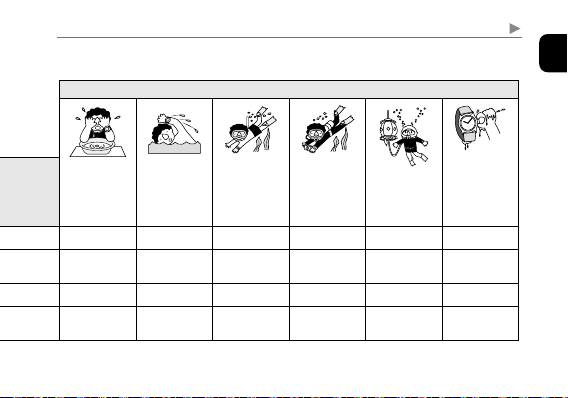
Water-related use
Minor
exposure to
water (washing
face, rain, etc.)
Swimming
and general
washing work
Skin diving,
marine sports
Scuba diving
using an air
tank
Saturation
diving using
helium gas
Operate the
crown or
button when
the watch
is wet
Name
Indication
Specification
Dial or Case back
Non water-resistant — Non water-resistant
NO NO NO NO NO NO
Everyday use water-resistant
watch
WATER RESIST Water-resistant to 3 atmospheres
OK NO NO NO NO NO
Upgraded everyday use water-
resistant watch
W. R. 5 bar Water-resistant to 5 atmospheres
OK OK NO NO NO NO
W. R. 10/20 bar
Water-resistant to 10 or 20
atmospheres
OK OK OK NO NO NO
103
English
Water resistance
Water-related use
Minor
exposure to
water (washing
face, rain, etc.)
Swimming
and general
washing work
Skin diving,
marine sports
Scuba diving
using an air
tank
Saturation
diving using
helium gas
Operate the
crown or
button when
the watch
is wet
Name
Indication
Specification
Dial or Case back
Non water-resistant — Non water-resistant
NO NO NO NO NO NO
Everyday use water-resistant
watch
WATER RESIST Water-resistant to 3 atmospheres
OK NO NO NO NO NO
Upgraded everyday use water-
resistant watch
W. R. 5 bar Water-resistant to 5 atmospheres
OK OK NO NO NO NO
W. R. 10/20 bar
Water-resistant to 10 or 20
atmospheres
OK OK OK NO NO NO
104
Water resistance
• Non-water resistant models are not designed to come into contact with any moisture. Take
care not to expose a watch with this rating to any type of moisture.
• Water resistance for daily use (to 3 atmospheres) means the watch is water resistant for
occasional accidental splashing.
• Upgraded water-resistance for daily use (to 5 atmospheres) means that the watch may be worn
while swimming, but is not to worn while skin diving.
• Upgraded water-resistance for daily use (to 10/20 atmospheres) means that the watch may be
worn while skin diving, but not while scuba or saturated diving using helium gas.
105
English
Precautionary items and usage limitations
CAUTION
To Avoid Injury
• Be particularly careful when wearing your watch while holding a small child, to avoid injury.
•
Be particularly careful when engaged in strenuous exercise or work, to avoid injury to yourself
and others.
• Do not wear your watch while in a sauna or other location where your watch may become
excessively hot, since there is the risk of burns.
• Be careful when putting on and taking off your watch, since there is a risk of damaging your
fingernails, depending on the manner in which the band is fastened.
• Take off your watch before going to bed.
106
Precautionary items and usage limitations
CAUTION
Precautions
•
Always use the watch with the crown pushed in (normal position). If the crown is of the screw
lock-type, make sure it is securely locked.
• Do not operate the crown or any push buttons when the watch is wet. Water may enter the
watch causing damage to vital components.
• If water enters the watch or the watch fogs up and does not clear up even after a long time,
consult your dealer or an authorized service center for inspection and/or repair.
• Even if your watch has a high level of water resistance, please be careful of the following.
- If your watch is immersed in sea water, rinse thoroughly with fresh water and wipe with a
dry cloth.
- Do not pour water from a tap directly onto your watch.
- Take off your watch before taking a bath.
• If seawater enters the watch, place the watch in a box or plastic bag and immediately take it in
for repair. Otherwise, pressure inside the watch will increase, and parts (crystal, crown, push
button, etc.) may come off.
107
English
Precautionary items and usage limitations
CAUTION
When Wearing Your Watch
<Band>
•
Leather bands and rubber (urethane) bands will deteriorate over time due to perspiration dirt.
Because of the natural materials, leather band will be worn, deformed, and discolored over
time. It is recommended to replace the band periodically.
•
The durability of a leather band may be affected when wet (fading, peeling of adhesive), owing
to the properties of the material. Moreover, wet leather may cause a rash.
• Do not stain a leather band with substances containing volatile materials, bleach, alcohol
(including cosmetics). Discoloration and premature aging may be occurred. Ultraviolet light
such as direct sunlight may cause discoloration or deformation.
• It is recommended to take off the watch if it gets wet, even if the watch itself is water-resistant.
• Do not wear the band too tightly. Try to leave enough space between the band and your skin
to allow adequate ventilation.
• The rubber (urethane) band may be stained by dyes or soil present in or on clothing or other
accessories. Since these stains may not be removable, caution is required when wearing
your watch with items that tend to easily transfer color (articles of clothing, purses, etc.). In
addition, the band may be deteriorated by solvents or moisture in the air. Replace with a new
one when it has lost elasticity or become cracked.
108
Precautionary items and usage limitations
CAUTION
When Wearing Your Watch (continued)
• Please request adjustment or repair of the band in the following cases:
- You notice an abnormality with the band due to corrosion.
- The pin of the band is protruding.
• We recommend seeking the assistance of an experienced watch technician for sizing of your
watch. If adjustment is not done correctly, the bracelet may unexpectedly become detached
leading to loss of your watch or injury.
Consult an authorized service center.
<Temperature>
• The watch may stop or the function of the watch may be impaired in extremely high or low
temperature. Do not use the watch in places where the temperature is outside the operating
temperature range as stated in the specifications.
<Magnetism>
• Analog quartz watches are powered by a step motor that uses a magnet. Subjecting the watch
to strong magnetism from the outside can cause the motor to operate improperly and prevent
the watch from keeping time accurately.
Do not allow the watch to come into close proximity to magnetic health devices (magnetic
necklaces, magnetic elastic bands, etc.) or the magnets used in the latches of refrigerator
doors, clasps used in handbags, the speaker of a cell phone, electromagnetic cooking devices
and so on.
109
English
Precautionary items and usage limitations
<Strong Shock>
• Avoid dropping the watch or subjecting it to other strong impact. It may cause malfunctions
and/or performance deterioration as well as damage to the case and bracelet.
<Static Electricity>
• The integrated circuits (IC) used in quartz watches are sensitive to static electricity. Please
note the watch may operate erratically or not at all if exposed to intense static electricity.
<Chemicals, Corrosive Gasses and Mercury>
• If paint thinner, benzene or other solvents or products containing these solvents (including
gasoline, nail-polish remover, cresol, bathroom cleaners and adhesives, water repellent, etc.)
are allowed to come into contact with the watch, they may discolor, dissolve or crack the
materials. Be careful when handling these chemicals. Contact with mercury such as that used
in thermometers may also cause discoloration of the band and case.
<Protective Stickers>
• Be sure to remove any protective stickers that may be on your watch (case back, band, clasp,
etc.). Otherwise, perspiration or moisture may enter the gaps between the protective stickers
and the parts, which may result in a skin rash and/or corrosion of the metal parts.
110
Precautionary items and usage limitations
CAUTION
Always Keep Your Watch Clean
• Rotate the crown while it is pressed in fully and press the buttons periodically so they do not
become stuck due to accumulations of foreign matter.
•
The case and band of the watch come into direct contact with the skin. Corrosion of the metal
or accumulated foreign matter may result in black residue coming from the bracelet when
exposed to moisture or perspiration. Be sure to keep your watch clean at all times.
• Be sure to periodically clean the bracelet and case of your watch to remove accumulated
dirt and foreign matter. In rare circumstances, accumulated dirt, foreign matter may cause
irritation with the skin. If you notice this, discontinue wearing the watch and consult your
physician.
• Be sure to periodically clean foreign matter and accumulated materials from the metal band,
synthetic rubber strap (polyurethane) and/or metal case using a soft brush and mild soap. Be
careful not to allow moisture on the case if your watch is not water resistant.
• Leather bands may become discolored by perspiration or dirt. Always keep your leather band
clean by wiping with a dry cloth.
111
English
Caring for Your Watch
• Wipe any dirt or moisture such as perspiration from the case and crystal with a soft cloth.
• For metallic, plastic or synthetic rubber (polyurethane) band, clean it with soap and a soft
toothbrush. Be sure to thoroughly rinse the band after cleaning to remove any soap residue.
• For a leather band, wipe off dirt using a dry cloth.
• If you will not be using your watch for an extended period of time, carefully wipe off any
perspiration, dirt or moisture and store in a proper location, avoiding locations subject to
excessively high or low temperatures and high humidity.
<When Luminous Paint is used for your watch>
The paint on the dial and hands helps you with reading the time in a dark place. The
luminous paint stores light (daylight or artificial light) and glows in a dark place.
It is free from any radioactive substance or any other material harmful to a human body or
environment.
• The light emission will appear bright at first and then diminish as time passes.
• The duration of the light (“glow”) will vary depending on the brightness, types of and
distance from a light source, exposure time, and the amount of the paint.
• The paint may not glow and/or may dissipate quickly if exposure to light was not sufficient.
Precautionary items and usage limitations
112
Specifications
Model
F950
Type
Analog solar-powered watch
Timekeeping accuracy
(without reception)
Average monthly accuracy: ±5 seconds when worn at normal operating
temperatures between +5°C (41°F) and +35°C (95°F)
Operating temperature
range
‒10°C (14°F) to +60°C (140°F)
Display functions
• Time: Hours, minutes, seconds
• Calendar: Date, day of week
• Dual time: Hour, minute
• Power reserve: 5 levels
• Power generation amount: 7
levels
Maximum run time
from full charge
• When fully charged, the watch runs without additional charging in
normal use: Approximately 1.5 years
(When saving power: Approximately 5 years)
• Power reserve upon insufficient charge warning function:
Approximately 5 days
Battery
Rechargeable cell (lithium button cell), 1pc.
113
English
Additional
functions
• Solar power function
• Overcharging prevention function
• Insufficient charge warning function
(two-second interval movement)
• Over discharge detection function
• Charge suspension temperature
detection function
• Uncharged state indication function
• Power reserve indication (in five
levels)
• Light-Level Indicator (power
generation amount indication
function in seven levels)
• Power save function
• Satellite time signal reception
function
• Location information obtainment
function
• Confirming reception status
(
RX-GPS/RX-TME
)
• Indicating the result of the last
reception (
OK/NO
)
• World time—39 time zones
• Summer time (DST)
(ON/OFF
)
• Dual time function (hour and
minute)
• Home time/local time interchanging
function
• Chronograph function
• Alarm function (
ALM
ON/OFF
)
• Perpetual calendar
(until February 28th, 2100)
• Antimagnetic performance/
Impact detection function/
Automatic hand correction function
(
for hour, minute and second hands)
Specifications and contents of this booklet are subject to change without prior
notice.
Specifications
European Union directives conformance statement
Hereby, CITIZEN WATCH CO.,LTD. declares that
this product is in compliance with the essential requirements
and other relevant provisions of directive 2014/53/EU and all
other relevant EU directives.
You can find your product’s Declaration of Conformity at
“http://www.citizenwatch-global.com/ ”.

*
Model No.CC4
Cal.F950
CTZ-B8199 ①