WWW.GOWISEUSA.COM
GW22821/GW22826

2
Product Introduction ................................. 3
Important Safeguards ................................. 4
Electromagnetic Fields ................................ 6
Product Structure and Features......................... 7
Before First Use ..................................... 9
How to Use Your Air Fryer ............................. 10
Cooking Guide....................................... 15
Cleaning Your Air Fryer................................ 17
Troubleshooting ..................................... 18
Warranty............................................ 19
Table of Contents

3
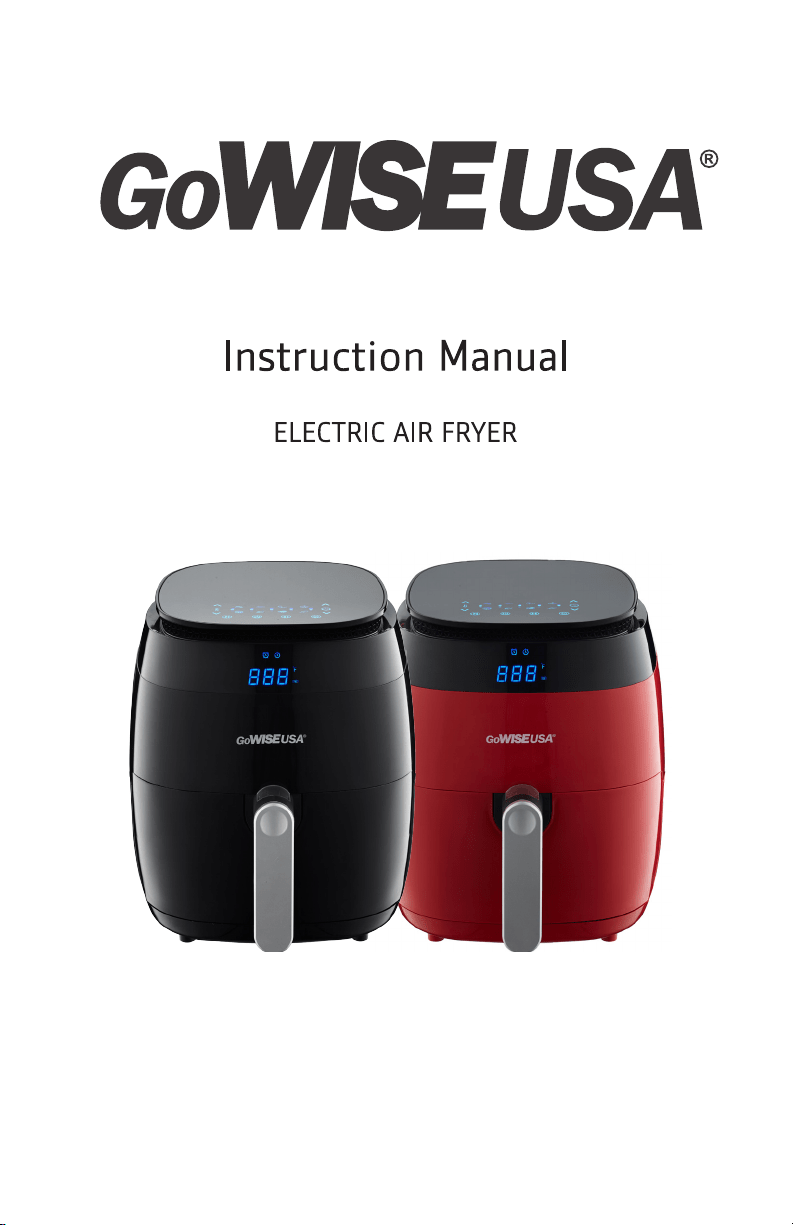
GoWISE USA would like to introduce the GW22821 (Black) and
GW22826 (Red) Air Fryers with Rapid Air Technology. Rapid
Air Technology is a new technique for preparing food that
traditionally needs to be fried in oil. Rapid Air Technology works
by quickly circulating hot air around the Air Fryer pan. The best
part — it heats food in all directions and most dishes cook with
little to no oil.
This 3.7-quart air fryer features 8 built-in pre-sets including Fries,
Pork, Shrimp, Cake, Chicken, Steak, Fish, and Pizza. It offers a wide
temperature range from 180°F-400°F and a cooking timer up to
30 minutes with an alarm feature that can be set to 5, 10 or 15
minutes to remind you to check what’s cooking. Air frying offers a
healthier and easier way to cook in 30 minutes or less.
Product Introduction

4
Important Safeguards
1. READ THE ENTIRE MANUAL BEFORE ATTEMPTING TO OPERATE.
2. Keep the box and packing material for storage.
3. Do not immerse the cord, plug, or any part of the appliance in
water or any other liquids to avoid electric shock.
4. Keep all the ingredients in the basket to prevent any contact
from heating elements.
5. Do not cover the air inlet and air outlet when the appliance is
on.
6. Do not fill the pan with oil. Filling the pan with oil may cause a
fire hazard.
7. Do not touch the inside of the appliance while it is operating.
8. Do not use the appliance if there is any damage to the plug,
main cord, or other parts.
9. Do not go to any unauthorized person to replace or fix the
appliance.
10. Keep the cord away from hot surfaces.
11. Do not plug in or use the appliance with wet hands.
12. Make sure that the appliance is plugged into the wall socket
properly.
13. Make sure that the appliance is out of reach of children,
especially when the fryer is operating.
14. Do not connect the appliance to an external timer switch.
15. Do not place the appliance on or near combustible materials,
such as a tablecloth or curtain.

5
16. Do not place the appliance against a wall or any other
appliances. Leave at least 5 inches of free space around and
above the appliance.
17. Do not place anything on top of the appliance.
18. Do not use the appliance for any other purposes other than
described in this manual.
19. Do not leave the appliance unattended while it is operating.
20. During hot air frying, hot steam is released through the air
outlet openings. Keep your hands and face at a safe distance
from the steam and from the air outlet opening. Be careful of
hot steam and air when you remove the pan from the appliance.
Any accessible surface may become hot during use.
21. Immediately unplug the appliance if you see dark smoke coming
out from the appliance. Wait for the smoke emission to stop
before you remove the pan from the appliance.
22. Ensure that the appliance is placed on a horizontal, even, and
stable surface.
23. This appliance is designed for household use only. It is not safe
to use in environments such as staff kitchens, farms, motels,
and other non-residential environments.
24. The warranty is void if the appliance is used for professional
or semi-professional purposes, or it is not used according to
instructions.
25. Always wait 30 minutes for the appliance to cool down before
handling or cleaning it.
Important Safeguards - Continued

6
Electromagnetic Fields (EMF)
This GoWISE USA Air Fryer complies with all standards regarding
Electromagnetic fields (EMF). Under proper handling, there is
no harm done to the human body based on available scientific
evidence.
If you have any questions regarding your Air Fryer, please contact
Customer Service at 855-233-9199 or [email protected].
7
Product Structure & Features
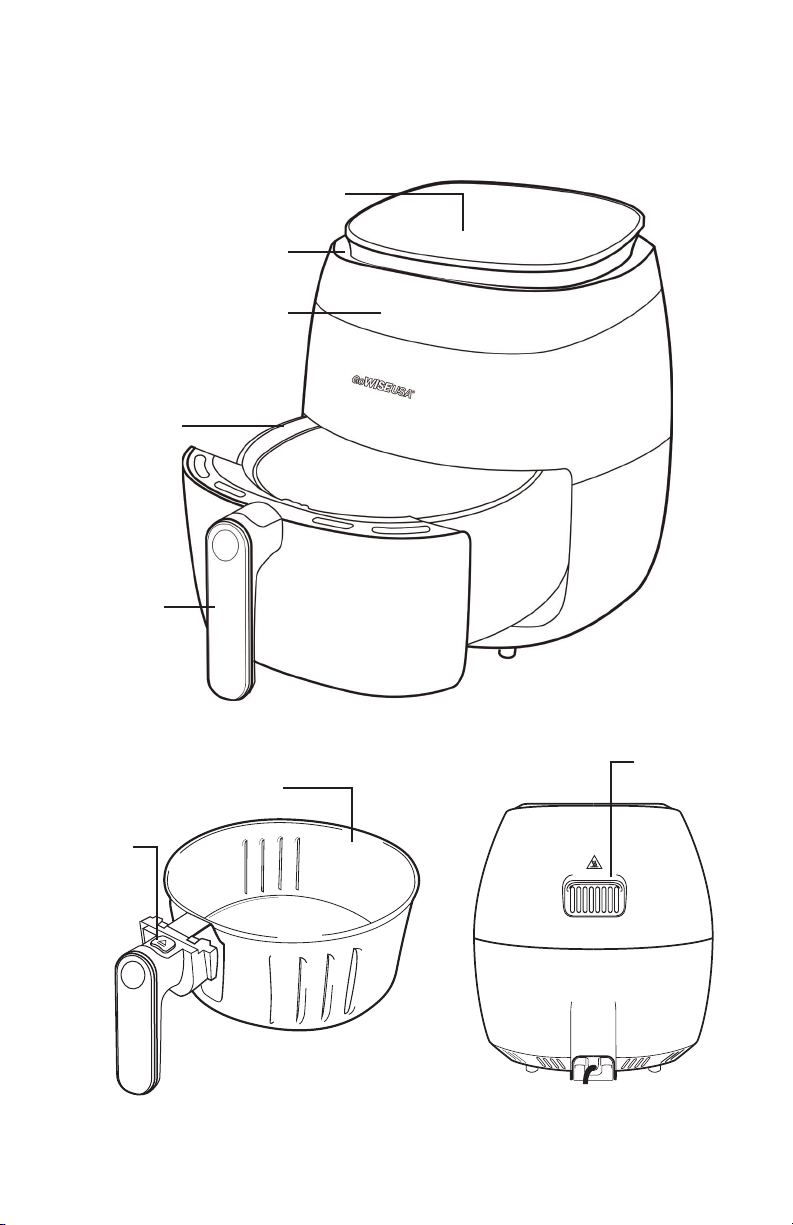
LCD CONTROL SCREEN
LCD DISPLAY
AIR INLET
HANDLE
PAN
AIR OUTLET
FRY BASKET
BASKET
RELEASE
BUTTON
8
Product Structure & Features - continued
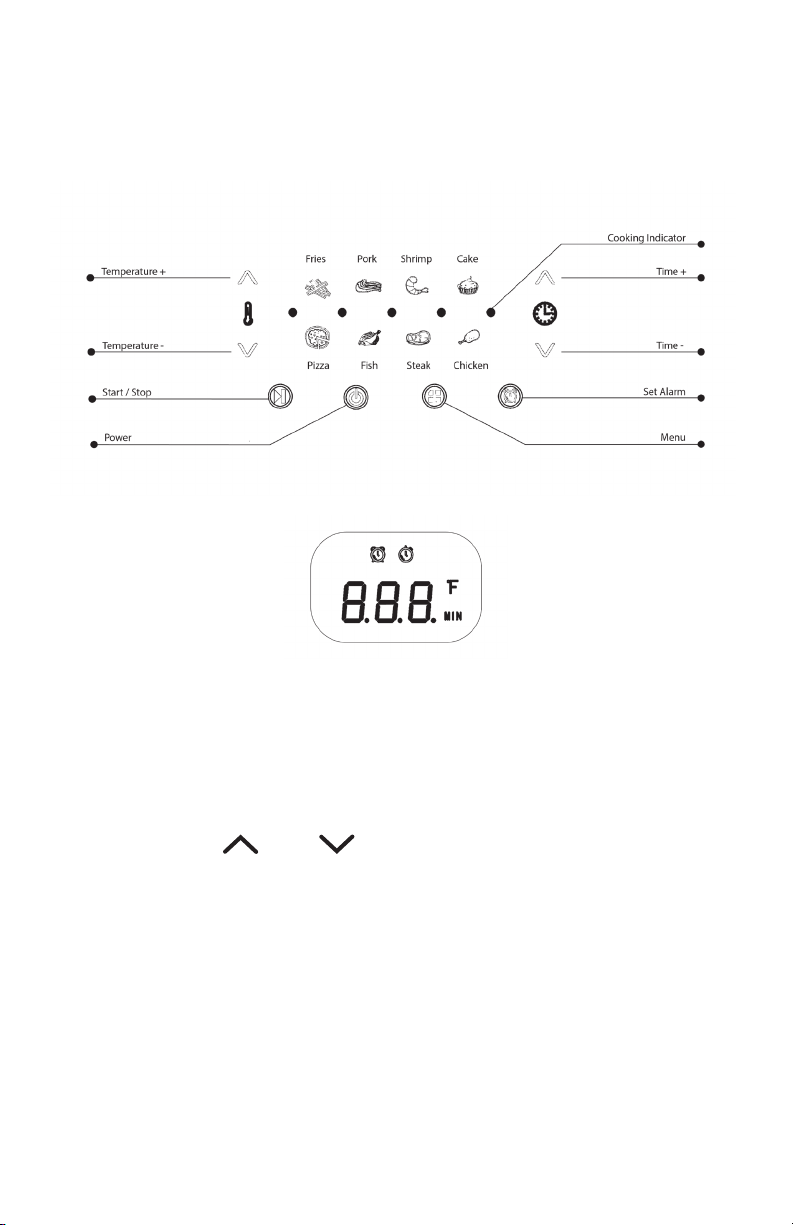
To cycle through the pre-set cooking programs, press the Power
icon, then press the Menu icon. You can adjust time or temperature
by pressing the “ ” or “ ” icons.

9
Before First Use
1. Remove all packaging materials, stickers, and labels.
2. Clean the basket and pan with hot water, soap, and a non-
abrasive sponge.
3. Wipe the inside and outside of the appliance with a clean cloth.
NOTE: DO NOT fill pan with oil or lard. The appliance uses rapid air
circulation to fry.

10
How to Use Your Air Fryer
1. Place the air fryer on a flat and even surface. DO NOT PLACE
THE AIR FRYER ON A SURFACE THAT IS NOT HEAT RESISTANT.
2. Place the basket in the pan. DO NOT FILL THE PAN WITH OIL OR
ANY OTHER LIQUID.
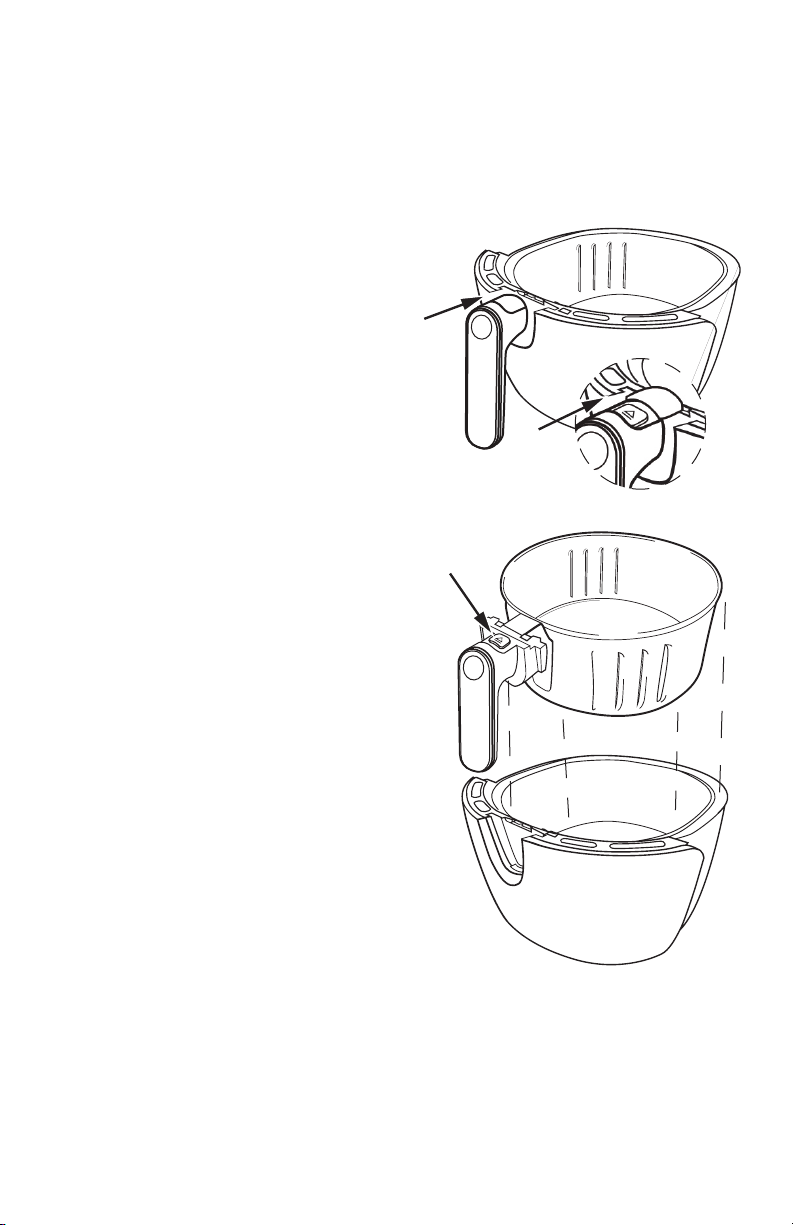
3. Place the ingredients in the basket and then slide the basket
and pan back into the appliance. The LCD screen should light
up. NOTE: The basket is equipped with a button guard that
ensures safe detachment. Simply slide the button back to
detach the basket from the pan.
4. Press the Power icon and set cooking time and temperature by
either choosing one of the 8 pre-set cooking programs using
the Menu icon or manually set time and temperature with “ “
or “ “ icons.
NOTE: To select a different program or to make changes to the
time and temperature after the air fryer has started, press the
“Start/Stop” button. Set a different program, then press the
“Start/Stop” button again.
5. Once you have selected the settings, press the Power icon to
start the cooking cycle. Five dots in the middle of the display
will blink one at a time horizontally, indicating the cooking

11
cycle has begun. If the five dots are blinking at once, the air
fryer is in standby mode.
6. There are some foods that you may need to shake midway
through the cooking cycle to ensure even cooking. To do
this, slide the pan out of the air fryer by the handle (the air
fryer will automatically power down), then carefully shake the
ingredients. NOTE: It is recommended to detach the basket
from the pan to shake ingredients. Be sure to detach the basket
and pan safely to avoid injury and scalding.
CAUTION: DO NOT SLIDE BACK THE BUTTON ON THE HANDLE
DURING SHAKING, THIS WILL DETACH THE BASKET FROM THE
PAN. If shaking the ingredients in the pan is difficult, first place
pan on a pot holder, then release the basket, then shake the
basket.
7. Slide the pan and basket back into the air fryer by carefully
aligning the track inside the air fryer with the rim of the pan. If
you are unable to insert the basket into the air fryer, try lifting
the handle as you are sliding the basket into the fryer.
8. After sliding the pan back into the air fryer, it will automatically
power back up.
How to Use Your Air Fryer - continued

12
9. When the cooking time has been reached, the timer will beep
five times. After the timer beeps, the fan will stop shortly after
(approx. 20 seconds).
10. Slide the pan out of the air fryer and place it on a pot holder.
NOTE: Oil from the ingredients will gather in the bottom of the
pan. Be careful when sliding the pan out of the air fryer.
11. To remove the ingredients, slide the button guard back and
press the release button on the handle to free the basket from
the pan. Carefully pour ingredients out of basket onto plate.
NOTE: for diagram turn to Page 13.
12. If you are using tongs, make sure to use non-abrasive, non-
metal tongs to avoid scratching the non-stick coating on the
basket.
13. Insert the basket back into the fryer, press the Power icon
and the fan will run for approx. 20 seconds, then will go into
standby mode. NOTE: You must unplug the fryer to turn it off
completely.
How to Use Your Air Fryer - continued
13
How to Use Your Air Fryer - continued
Detaching the basket
A Slide back button guard to
reveal the air fryer basket
release button
B Press basket release
button while pulling up
handle to free the basket
from the pot
CAUTION: NEVER PRESS THE
RELEASE BUTTON DURING SHAKING;
THIS WILL DETACH THE BASKET
FROM THE PAN.
To order replacement parts please
contact GoWISE USA® customer
service at 855-233-9199 or visit our
website at www.gowiseusa.com.

14
Setting the Alarm Function
The alarm function alerts the user to check food in 5, 10, or 15
minutes into the set cooking time.
1. Press the Power Icon and choose either one of the cooking
presets or manually set a time.
2. Press the “Alarm” button displayed with the alarm clock icon.
This function will give you an option to set up in 5, 10, or 15
minutes.
3. Once you have chosen an alarm time, press the “Start/Stop”
button to start the fryer. Both the cooking pre-set, and alarm
icons should be blinking during the cooking cycle. NOTE:
The alarm function will alert the user in the chosen interval
depending on the set cooking time. For example, if the fryer is
set to 30 minutes with an alarm function set up for 10 minutes,
the fryer will beep every 10 minutes within the 30-minute cook
cycle.
4. To turn off the alarm function, press the “Start/Stop” icon.
Then press the “Alarm” button repeatedly until you see the set
temperature.
How to Use Your Air Fryer - continued

15
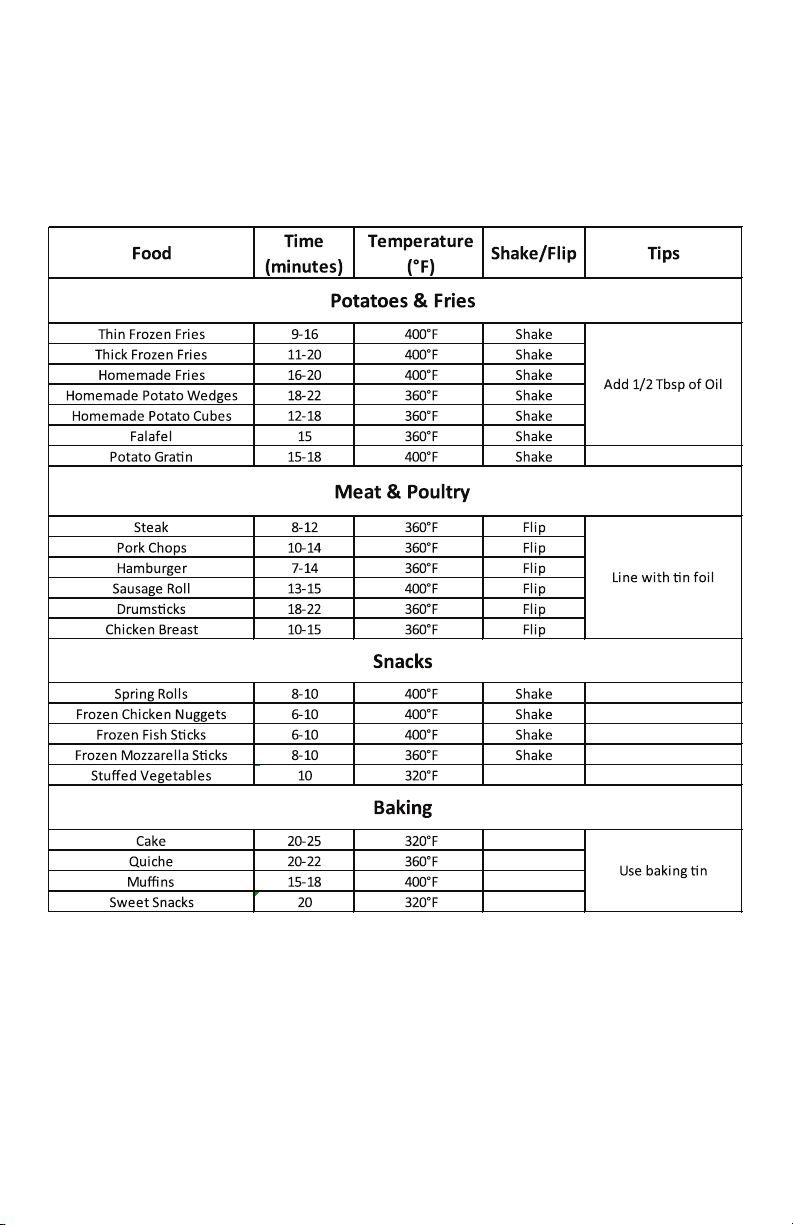
The table below is a guide that will help you with setting the time
and temperature for certain ingredients.
NOTE: Please keep in mind that because ingredients differ in size,
shape, brand, and origin, we cannot guarantee that this is the best
setting for the ingredients you have.
Rapid Air Technology reheats the air inside the fryer instantly;
therefore, removing the pan from the air fryer for a brief period of
time will not interrupt the cooking process.
TIPS:
• Small ingredients usually require shorter cooking time
compared to larger ingredients.
• Shaking smaller ingredients midway through the cooking
process will ensure the ingredients cook more evenly and
give a better result. Adding a very little amount of oil to fresh
potatoes will give it a crispier result.
• Do not cook extremely oily ingredients in the air fryer.
• Snacks that can be prepared in a traditional oven can also be
prepared in the air fryer.
• The recommended quantity of fries to allow for a crispy result
is 17.5 oz.
• Pre-made dough requires shorter cooking time than homemade
dough. When making cake, quiche or ingredients with filling,
use a baking tin or oven dish in the fryer basket.
• You can also use the air fryer to heat ingredients. Set the
temperature to 180° F for up to 10 minutes.
Cooking Guide
16
Cooking Guide - continued
If you have any questions regarding your air fryer, please contact
Customer Service at 855-233-9199 or [email protected].

17
Cleaning Your Air Fryer
1. Clean the fryer after every use. Unplug the fryer. ALWAYS WAIT
UNTIL THE FRYER HAS COOLED TO A SAFE TEMPERATURE
BEFORE HANDLING.
2. Wipe the outside of the fryer with a damp cloth.
3. Clean the pan and basket with hot water, soap and non-
abrasive sponge. You can remove any stuck-on food by using a
degreasing liquid soap. For any hard-to-remove food, soak the
pan in hot water.
4. Clean the inside of the appliance with a lightly dampened non-
abrasive sponge or cloth. Be careful not to get the inside of the
appliance too wet and never submerge in water.
5. Clean the heating element with a cleaning brush to remove any
food debris.
18
Troubleshooting

19
Warranty
General Warranty excludes refurbished / auction items.
GoWISE USA has a 1-year limited warranty for all products. Products are
warrantied against defects in materials and workmanship for 1 year from
the date of purchase, when used in accordance with the instructions
provided. This warranty does not cover damages or wear resulting from
accident, misuse, abuse, commercial use, or unauthorized adjustment
and/or repair.
GoWISE USA shall not be liable for loss of use or any other incidental,
consequential or indirect costs, expenses or damages. There are no
express warranties except as listed above. This warranty gives you
specific legal rights and you may have other rights which vary from state
to state.
CALL 855-233-9199 for RETURN INSTRUCTIONS
WE DO NOT SERVICE PRODUCTS OUTSIDE THE 48 CONTINENTAL UNITED
STATES. WE WILL SHIP TO A FREIGHT FORWARDER FOR CUSTOMERS.
NOTE: Customers are responsible for all return shipping costs. When
item(s) are returned under warranty as being defective, they are
thoroughly tested to verify manufacturer defect. If any item(s) are
determined to be in proper working order after testing, all shipping cost
to have the product returned to the customer will be the responsibility of
the customer.
Return Period: 30 Days
All return requests must be made within 30 days from the date our
customers purchase their product(s). Refunds are only applicable during
the 30-day return period and may be subject to restocking fees up to
15% of the original purchase amount. If the product is defective within
30 days, GoWISE USA will cover the cost of return shipping. However,
a photo and/or video from the customer is required to receive a pre-
paid shipping label. If the product is missing any accessories that were

20
included in the original packaging/shipment, or the product is damaged,
altered or used, the item may no longer be eligible for a refund or
replacement. Any decision of refund and/or replacement will be decided
at the discretion of GoWISE USA.
NOTE: Customer are responsible for all return shipping costs after 30
days.
Defective/Freight Damaged:
Products that are within the 30-day return period and have been
determined by customer service to be defective are qualified for a return
label for the product to be returned to GoWISE USA for inspection and
testing. GoWISE USA will provide a return shipping label for defective
product(s) only. Customers must contact the carrier (shipping company)
for products that have arrived damaged after initial transit. Clear
photographic and video proof of damage and/or defective product(s) is
REQUIRED prior to GoWISE USA authorizing the return of any product.
Purchase from 3rd Parties:
In order for the GoWISE USA customer service team to lookup the
warranty information regarding the product(s), the original order
information and/or proof of purchase is required. Without this
information, GoWISE USA will be unable to move forward with providing
a replacement under warranty, as we do not know the date or origin of
the purchase. GoWISE USA does not have a working business relationship
with 3rd party selling sites or services or individuals which are not
listed below as one of our authorized retailers. GoWISE USA is not
responsible for making inquiries to such 3rd parties for the purpose of
obtaining documentation. It is the responsibility of the person(s) making
the warranty claim to provide original documentation such as order
information and/or a receipt so that customer service can process the
request. Any claim made under GoWISE USA warranty guidelines must be
Warranty - continued

21
made by original purchaser of the product(s). Any defective product(s)
will be replaced as long as the issues with the device fall within warranty
guidelines.
Authorized Retailers:
Amazon
GoWISE USA
WayFair
Houzz
Home Depot
etailz
MorningSave.com
Bed Bath & Beyond
Jet.com
Walmart.com
Warranty - continued
22
23
www.gowiseusa.com