
User Guide
User Guide
1
1
W
W
e
e
l
l
c
c
o
o
m
m
e
e
IF9064 asing the IF9064. Your IF9064 is packaged with the following state of
the art features:
VGA Camera
2.4 Inch screen
Audio Player
FM Radio
King Movie
Video and FM Recording
Dual SIM (GSM + GSM)
T-Flash Card support (up to 8 GB)
Hindi Language Support
I
I
m
m
p
p
o
o
r
r
t
t
a
a
n
n
t
t
:
:
1
1
.
.
P
P
l
l
e
e
a
a
s
s
e
e
r
r
e
e
a
a
d
d
t
t
h
h
e
e
c
c
o
o
n
n
t
t
e
e
n
n
t
t
s
s
o
o
f
f
t
t
h
h
i
i
s
s
m
m
a
a
n
n
u
u
a
a
l
l
t
t
o
o
f
f
u
u
l
l
l
l
y
y
u
u
t
t
i
i
l
l
i
i
z
z
e
e
t
t
h
h
e
e
f
f
e
e
a
a
t
t
u
u
r
r
e
e
s
s
o
o
f
f
t
t
h
h
i
i
s
s
p
p
h
h
o
o
n
n
e
e
.
.
2
2
.
.
P
P
l
l
e
e
a
a
s
s
e
e
r
r
e
e
a
a
d
d
t
t
h
h
e
e
G
G
u
u
i
i
d
d
e
e
l
l
i
i
n
n
e
e
s
s
s
s
e
e
c
c
t
t
i
i
o
o
n
n
p
p
r
r
o
o
v
v
i
i
d
d
e
e
d
d
w
w
i
i
t
t
h
h
t
t
h
h
i
i
s
s
R
R
e
e
f
f
e
e
r
r
e
e
n
n
c
c
e
e
g
g
u
u
i
i
d
d
e
e
.
.
Page 2

User Guide
Table of Contents
1
1
Welcome ................................................................................................ 2
2
2
Know Your Phone ................................................................................... 6
2
2
.
.
1
1
Keys and Parts ........................................................................................................ 6
2
2
.
.
2
2
Insert SIM Card ....................................................................................................... 6
2
2
.
.
3
3
Keys and Parts ........................................................................................................ 7
2
2
.
.
2
2
Insert Sim Card ....................................................................................................... 7
2
2
.
.
3
3
Insert Memory Card ............................................................................................... 7
3
3
Basic Operations .................................................................................... 7
3
3
.
.
1
1
Switch Phone ON/OFF ............................................................................................ 7
3
3
.
.
2
2
Unlock the phone ................................................................................................... 8
3
3
.
.
3
3
Make a call ............................................................................................................. 8
4
4
Notable Features .................................................................................... 9
4
4
.
.
1
1
Secure your Phone ................................................................................................. 9
4
4
.
.
2
2
Blacklist .................................................................................................................. 9
5
5
Call History ............................................................................................. 9
5
5
.
.
1
1
Call History ............................................................................................................. 9
6
6
Phone book .......................................................................................... 10
6
6
.
.
1
1
Create Contact...................................................................................................... 10
6
6
.
.
2
2
SMS ...................................................................................................................... 10
6
6
.
.
3
3
Call ....................................................................................................................... 10
6
6
.
.
4
4
Delete .................................................................................................................. 10
6
6
.
.
5
5
Delete multiple ..................................................................................................... 11
6
6
.
.
6
6
Move contacts ...................................................................................................... 11
Page 3

User Guide
6
6
.
.
7
7
Add to Blocklist..................................................................................................... 11
6
6
.
.
8
8
Add to Whitelist ................................................................................................... 11
6
6
.
.
9
9
Import/Export Contacts ........................................................................................ 11
6
6
.
.
1
1
0
0
Send vCard ......................................................................................................... 11
6
6
.
.
1
1
1
1
Others ................................................................................................................ 12
6
6
.
.
1
1
2
2
Most used .......................................................................................................... 12
6
6
.
.
1
1
3
3
Groups................................................................................................................ 12
7
7
Audio player ......................................................................................... 12
8
8
Camera ................................................................................................. 13
9
9
Messages.............................................................................................. 13
9
9
.
.
1
1
Write message ................................................................................................
...... 13
9
9
.
.
2
2
Use message Templates ........................................................................................ 13
9
9
.
.
3
3
Voice mail server .................................................................................................. 14
9
9
.
.
4
4
Settings ................................................................................................................ 14
9
9
.
.
5
5
Message capacity ................................................................................................. 14
1
1
0
0
Multimedia ........................................................................................ 15
1
1
0
0
.
.
1
1
Video Recorder ................................................................................................... 15
1
1
0
0
.
.
2
2
Video Player ....................................................................................................... 15
1
1
0
0
.
.
3
3
FM Radio ............................................................................................................ 15
1
1
0
0
.
.
4
4
Images viewer .................................................................................................... 16
1
1
0
0
.
.
5
5
Sound Recorder .................................................................................................. 16
1
1
1
1
File Manager ...................................................................................... 16
1
1
1
1
.
.
1
1
File Manager ...................................................................................................... 16
1
1
2
2
Game .................................................................................................. 17
1
1
2
2
.
.
1
1
Bubble Bash 2 ..................................................................................................... 17
1
1
2
2
.
.
2
2
Ninja Up ............................................................................................................. 17
Page 4

User Guide
1
1
2
2
.
.
3
3
Sky Gift ............................................................................................................... 17
1
1
2
2
.
.
4
4
Danger Dash ...................................................................................................... 17
1
1
2
2
.
.
5
5
Sokoban ............................................................................................................. 17
1
1
2
2
.
.
6
6
Snake.................................................................................................................. 17
1
1
2
2
.
.
7
7
Tetri s .................................................................................................................. 18
1
1
3
3
Organizer ............................................................................................ 18
1
1
3
3
.
.
1
1
Bluetooth ........................................................................................................... 18
1
1
3
3
.
.
2
2
Calendar ............................................................................................................. 18
1
1
3
3
.
.
3
3
Alarm ................................................................................................................. 18
1
1
3
3
.
.
4
4
World Clock ....................................................................................................... 19
1
1
3
3
.
.
5
5
Torc h .................................................................................................................. 19
1
1
3
3
.
.
6
6
Calculator ........................................................................................................... 19
1
1
3
3
.
.
7
7
Unit Converter .................................................................................................... 19
1
1
3
3
.
.
8
8
Stopwatch .......................................................................................................... 19
1
1
3
3
.
.
9
9
Clock .................................................................................................................. 19
1
1
3
3
.
.
1
1
0
0
Folder Lock ....................................................................................................... 20
1
1
3
3
.
.
1
1
1
1
SIM toolkit ........................................................................................................ 20
1
1
4
4
Settings .............................................................................................. 20
1
1
5
5
Services .............................................................................................. 21
1
1
5
5
.
.
1
1
Internet .............................................................................................................. 21
1
1
6
6
User Profile ........................................................................................ 21
1
1
7
7
Health and Safety Precautions ........................................................... 21
1
1
8
8
Taking Care of Your Device ................................................................. 24
Page 5
User Guide
2
2
K
K
n
n
o
o
w
w
Y
Y
o
o
u
u
r
r
P
P
h
h
o
o
n
n
e
e
2
2
.
.
1
1
K
K
e
e
y
y
s
s
a
a
n
n
d
d
P
P
a
a
r
r
t
t
s
s
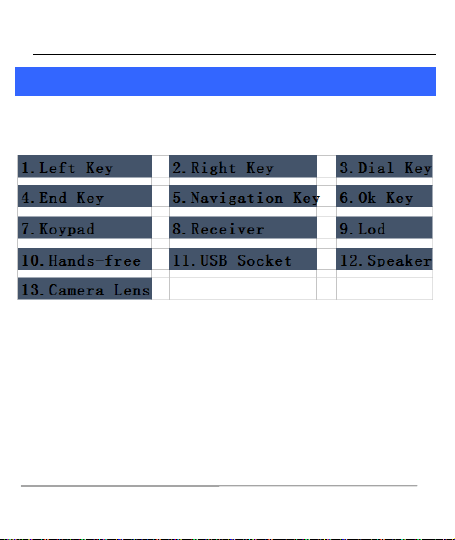
Important keys and parts are listed here for you to use the phone better.
2
2
.
.
2
2
I
I
n
n
s
s
e
e
r
r
t
t
S
S
I
I
M
M
C
C
a
a
r
r
d
d
The IF9064 is a Dual SIM mobile phone allowing you to use two SIM
Cards.
1. Switch off the mobile phone and remove the rear cInsert SIM Card
Page 6

User Guide
2
2
.
.
3
3
K
K
e
e
y
y
s
s
a
a
n
n
d
d
P
P
a
a
r
r
t
t
s
s
2
2
.
.
2
2
I
I
n
n
s
s
e
e
r
r
t
t
S
S
i
i
m
m
C
C
a
a
r
r
d
d
1. Switch off the phone and remove the rear cover and the battery.
2. Insert the Sim card into the slot.
3. Finally, insert the battery and the rear cover of the mobile phone.
2
2
.
.
3
3
I
I
n
n
s
s
e
e
r
r
t
t
M
M
e
e
m
m
o
o
r
r
y
y
C
C
a
a
r
r
d
d
1. Switch off the phone and remove the rear cover and the battery.
2. Insert the memory card into the slot.
3. Finally, insert the battery and the rear cover of the mobile phone.
Note: Use only compatible memory cards approved byA27. Incompatible
cards may damage the slot or corrupt the data stored in the card.
3
3
B
B
a
a
s
s
i
i
c
c
O
O
p
p
e
e
r
r
a
a
t
t
i
i
o
o
n
n
s
s
3
3
.
.
1
1
S
S
w
w
i
i
t
t
c
c
h
h
P
P
h
h
o
o
n
n
e
e
O
O
N
N
/
/
O
O
F
F
F
F
To switch ON/OFF your phone, press and hold the End key for a few
seconds.
Page 7
User Guide
3
3
.
.
2
2
U
U
n
n
l
l
o
o
c
c
k
k
t
t
h
h
e
e
p
p
h
h
o
o
n
n
e
e
If you do not use the phone for a while, the screen is replaced with a
locked screen.
1. Press any key to activate the screen.
2. Press Left key, and then press * key.
3
3
.
.
3
3
M
M
a
a
k
k
e
e
a
a
c
c
a
a
l
l
l
l
You can make a call in the following ways:
Enter the desired number in standby mode and press
the Call key to make the call.
Go to Menu > Phonebook and then select and dial the
desired number.
Just press the Call key to dial the contacts listed in Call
logs.
You can also dial a contact from the messages.
Page 8

User Guide
4
4
N
N
o
o
t
t
a
a
b
b
l
l
e
e
F
F
e
e
a
a
t
t
u
u
r
r
e
e
s
s
4
4
.
.
1
1
S
S
e
e
c
c
u
u
r
r
e
e
y
y
o
o
u
u
r
r
P
P
h
h
o
o
n
n
e
e
M
M
e
e
n
n
u
u
>
>
O
O
r
r
g
g
a
a
n
n
i
i
z
z
e
e
r
r
>
>
F
F
o
o
l
l
d
d
e
e
r
r
L
L
o
o
c
c
k
k
>
>
P
P
h
h
o
o
n
n
e
e
L
L
o
o
c
c
k
k
e
e
d
d
Let you lock/unlock your phone via a security password which you can
change anytime.
The default security code to unlock the phone is 1234.
Note: After you activate the phone lock, you would be asked for a
password when you power on your phone next time.
4
4
.
.
2
2
B
B
l
l
a
a
c
c
k
k
l
l
i
i
s
s
t
t
M
M
e
e
n
n
u
u
>
>
S
S
e
e
t
t
t
t
i
i
n
n
g
g
s
s
>
>
S
S
e
e
c
c
u
u
r
r
i
i
t
t
y
y
>
>
B
B
l
l
a
a
c
c
k
k
l
l
i
i
s
s
t
t
Blacklist undesired SMS senders and caller so that you do not receive
SMS and calling from them.
5
5
C
C
a
a
l
l
l
l
H
H
i
i
s
s
t
t
o
o
r
r
y
y
5
5
.
.
1
1
C
C
a
a
l
l
l
l
H
H
i
i
s
s
t
t
o
o
r
r
y
y
M
M
e
e
n
n
u
u
>
>
C
C
a
a
l
l
l
l
H
H
i
i
s
s
t
t
o
o
r
r
y
y
Tip: Directly access the call logs of by pressing the Call key in idle mode.
Page 9

User Guide
The Call log lists the calls you have recently dialed, received, missed for
SIM1 and SIM 2.
Press the Left/right navigation keys to access various call logs and work
on the call history.
6
6
P
P
h
h
o
o
n
n
e
e
b
b
o
o
o
o
k
k
Your phonebook stores all your saved contacts for anytime use. Your
phonebook data can be stored in your SIM card or your phone memory.
You can manage your contacts from here.
M
M
e
e
n
n
u
u
>
>
P
P
h
h
o
o
n
n
e
e
b
b
o
o
o
o
k
k
6
6
.
.
1
1
C
C
r
r
e
e
a
a
t
t
e
e
C
C
o
o
n
n
t
t
a
a
c
c
t
t
M
M
e
e
n
n
u
u
>
>
C
C
o
o
n
n
t
t
a
a
c
c
t
t
s
s
>
>
L
L
e
e
f
f
t
t
K
K
e
e
y
y
>
>
N
N
e
e
w
w
6
6
.
.
2
2
S
S
M
M
S
S
Menu > Contacts > Left Key>SMS
6
6
.
.
3
3
C
C
a
a
l
l
l
l
Menu > Contacts > Left Key>Call
6
6
.
.
4
4
D
D
e
e
l
l
e
e
t
t
e
e
Menu > Contacts > Left Key>Delete
Page 10

User Guide
6
6
.
.
5
5
D
D
e
e
l
l
e
e
t
t
e
e
m
m
u
u
l
l
t
t
i
i
p
p
l
l
e
e
M
M
e
e
n
n
u
u
>
>
C
C
o
o
n
n
t
t
a
a
c
c
t
t
s
s
>
>
L
L
e
e
f
f
t
t
K
K
e
e
y
y
>
>
D
D
e
e
l
l
e
e
t
t
e
e
m
m
u
u
l
l
t
t
i
i
p
p
l
l
e
e
I
I
n
n
t
t
h
h
e
e
C
C
o
o
n
n
t
t
a
a
c
c
t
t
s
s
l
l
i
i
s
s
t
t
,
,
s
s
e
e
l
l
e
e
c
c
t
t
t
t
h
h
e
e
e
e
n
n
t
t
r
r
y
y
y
y
o
o
u
u
w
w
a
a
n
n
t
t
t
t
o
o
d
d
e
e
l
l
e
e
t
t
e
e
.
.
6
6
.
.
6
6
M
M
o
o
v
v
e
e
c
c
o
o
n
n
t
t
a
a
c
c
t
t
s
s
M
M
e
e
n
n
u
u
>
>
C
C
o
o
n
n
t
t
a
a
c
c
t
t
s
s
>
>
L
L
e
e
f
f
t
t
K
K
e
e
y
y
>
>
M
M
o
o
v
v
e
e
I
I
n
n
t
t
h
h
e
e
C
C
o
o
n
n
t
t
a
a
c
c
t
t
s
s
l
l
i
i
s
s
t
t
,
,
s
s
e
e
l
l
e
e
c
c
t
t
t
t
h
h
e
e
e
e
n
n
t
t
r
r
y
y
y
y
o
o
u
u
w
w
a
a
n
n
t
t
t
t
o
o
m
m
o
o
v
v
e
e
.
.
6
6
.
.
7
7
A
A
d
d
d
d
t
t
o
o
B
B
l
l
o
o
c
c
k
k
l
l
i
i
s
s
t
t
M
M
e
e
n
n
u
u
>
>
C
C
o
o
n
n
t
t
a
a
c
c
t
t
s
s
>
>
L
L
e
e
f
f
t
t
K
K
e
e
y
y
>
>
A
A
d
d
d
d
t
t
o
o
B
B
l
l
o
o
c
c
k
k
l
l
i
i
s
s
t
t
Blacklist undesired SMS senders and caller so that you do not receive
SMS and calling from them.
6
6
.
.
8
8
A
A
d
d
d
d
t
t
o
o
W
W
h
h
i
i
t
t
e
e
l
l
i
i
s
s
t
t
6
6
.
.
9
9
I
I
m
m
p
p
o
o
r
r
t
t
/
/
E
E
x
x
p
p
o
o
r
r
t
t
C
C
o
o
n
n
t
t
a
a
c
c
t
t
s
s
M
M
e
e
n
n
u
u
>
>
C
C
o
o
n
n
t
t
a
a
c
c
t
t
s
s
>
>
L
L
e
e
f
f
t
t
K
K
e
e
y
y
>
>
I
I
m
m
p
p
o
o
r
r
t
t
/
/
E
E
x
x
p
p
o
o
r
r
t
t
Y
Y
o
o
u
u
c
c
a
a
n
n
c
c
o
o
p
p
y
y
,
,
I
I
m
m
p
p
o
o
r
r
t
t
o
o
r
r
E
E
x
x
p
p
o
o
r
r
t
t
c
c
o
o
n
n
t
t
a
a
c
c
t
t
s
s
e
e
n
n
t
t
r
r
i
i
e
e
s
s
s
s
t
t
o
o
r
r
e
e
d
d
i
i
n
n
t
t
h
h
e
e
S
S
I
I
M
M
c
c
a
a
r
r
d
d
t
t
o
o
t
t
h
h
e
e
p
p
h
h
o
o
n
n
e
e
m
m
e
e
m
m
o
o
r
r
y
y
a
a
n
n
d
d
v
v
i
i
c
c
e
e
-
-
v
v
e
e
r
r
s
s
a
a
.
.
6
6
.
.
1
1
0
0
S
S
e
e
n
n
d
d
v
v
C
C
a
a
r
r
d
d
M
M
e
e
n
n
u
u
>
>
C
C
o
o
n
n
t
t
a
a
c
c
t
t
s
s
>
>
L
L
e
e
f
f
t
t
K
K
e
e
y
y
>
>
S
S
e
e
n
n
d
d
v
v
C
C
a
a
r
r
d
d
Page 11

User Guide
6
6
.
.
1
1
1
1
O
O
t
t
h
h
e
e
r
r
s
s
S
S
p
p
e
e
e
e
d
d
d
d
i
i
a
a
l
l
M
M
e
e
n
n
u
u
>
>
C
C
o
o
n
n
t
t
a
a
c
c
t
t
s
s
>
>
L
L
e
e
f
f
t
t
K
K
e
e
y
y
>
>
O
O
t
t
h
h
e
e
r
r
s
s
>
>
S
S
p
p
e
e
e
e
d
d
d
d
i
i
a
a
l
l
S
S
e
e
t
t
s
s
p
p
e
e
e
e
d
d
d
d
i
i
a
a
l
l
a
a
n
n
d
d
v
v
i
i
e
e
w
w
m
m
e
e
m
m
o
o
r
r
y
y
s
s
t
t
a
a
t
t
u
u
s
s
.
.
M
M
e
e
m
m
o
o
r
r
y
y
s
s
t
t
a
a
t
t
u
u
s
s
M
M
e
e
n
n
u
u
>
>
C
C
o
o
n
n
t
t
a
a
c
c
t
t
s
s
>
>
L
L
e
e
f
f
t
t
K
K
e
e
y
y
>
>
c
c
o
o
n
n
t
t
a
a
c
c
t
t
s
s
e
e
t
t
t
t
i
i
n
n
g
g
s
s
O
O
t
t
h
h
e
e
r
r
s
s
>
>
M
M
e
e
m
m
o
o
r
r
y
y
s
s
t
t
a
a
t
t
u
u
s
s
Check the memory status of SIM, and Phone.
6
6
.
.
1
1
2
2
M
M
o
o
s
s
t
t
u
u
s
s
e
e
d
d
Menu> Contacts > Most used
View the contacts that most used.
6
6
.
.
1
1
3
3
G
G
r
r
o
o
u
u
p
p
s
s
Menu> Contacts > Groups
Press the Left/Right navigation key to access the Group tab. Set up a
list of numbers with similar preferences such as ringtone, profile etc.
7
7
A
A
u
u
d
d
i
i
o
o
p
p
l
l
a
a
y
y
e
e
r
r
The phone comes with an inbuilt audio player that plays all your favorite
songs stored in the phone memory or memory card.
Page 12
User Guide
While in music mode, press the Left key to choose
various music options
Adjust Volume: Press * and # keys to adjust volume
8
8
C
C
a
a
m
m
e
e
r
r
a
a
Press the left key in camera mode to choose various settings
Shortcut keys: Press the number keys on the phone’s keypad to choose
various settings.
9
9
M
M
e
e
s
s
s
s
a
a
g
g
e
e
s
s
9
9
.
.
1
1
W
W
r
r
i
i
t
t
e
e
m
m
e
e
s
s
s
s
a
a
g
g
e
e
M
M
e
e
n
n
u
u
>
>
M
M
e
e
s
s
s
s
a
a
g
g
e
e
s
s
>
>
W
W
r
r
i
i
t
t
e
e
m
m
e
e
s
s
s
s
a
a
g
g
e
e
>
>
N
N
e
e
w
w
S
S
M
M
S
S
You can compose and send SMS . Pressing the
L
L
e
e
f
f
t
t
K
K
e
e
y
y during/after
composing the message gives you a host of messaging features
.
.
9
9
.
.
2
2
U
U
s
s
e
e
m
m
e
e
s
s
s
s
a
a
g
g
e
e
T
T
e
e
m
m
p
p
l
l
a
a
t
t
e
e
s
s
Menu > Messages > Templates
Enter into preset message templates and use them. These preset
Page 13

User Guide
templates can save you time if the theme of your message is the same as
those existing in the template.
9
9
.
.
3
3
V
V
o
o
i
i
c
c
e
e
m
m
a
a
i
i
l
l
s
s
e
e
r
r
v
v
e
e
r
r
Menu > Messages > Voice mail server
You can activate voicemail service to redirect your incoming calls (based
on your call settings) to a voicemail server and retrieve them later via
SMS alerts.
To divert incoming calls to a voicemail server, go to Settings>Phone tab >
Call Divert> Voice> (choose the desired call divert condition)> Activate>
Phone Number/Voicemail Number.
9
9
.
.
4
4
S
S
e
e
t
t
t
t
i
i
n
n
g
g
s
s
M
M
e
e
n
n
u
u
>
>
M
M
e
e
s
s
s
s
a
a
g
g
e
e
s
s
>
>
O
O
p
p
t
t
i
i
o
o
n
n
s
s
>
>
S
S
e
e
t
t
t
t
i
i
n
n
g
g
s
s
You can set your desired parameters for SMS, push message and Others.
9
9
.
.
5
5
M
M
e
e
s
s
s
s
a
a
g
g
e
e
c
c
a
a
p
p
a
a
c
c
i
i
t
t
y
y
M
M
e
e
n
n
u
u
>
>
M
M
e
e
s
s
s
s
a
a
g
g
e
e
s
s
>
>
O
O
p
p
t
t
i
i
o
o
n
n
s
s
>
>
M
M
e
e
s
s
s
s
a
a
g
g
e
e
c
c
a
a
p
p
a
a
c
c
i
i
t
t
y
y
View the memory status of your SMS .
Page 14
User Guide
1
1
0
0
M
M
u
u
l
l
t
t
i
i
m
m
e
e
d
d
i
i
a
a
1
1
0
0
.
.
1
1
V
V
i
i
d
d
e
e
o
o
R
R
e
e
c
c
o
o
r
r
d
d
e
e
r
r
M
M
e
e
n
n
u
u
>
>
M
M
u
u
l
l
t
t
i
i
m
m
e
e
d
d
i
i
a
a
>
>
V
V
i
i
d
d
e
e
o
o
R
R
e
e
c
c
o
o
d
d
e
e
r
r
Press the left key in camera mode to choose various settings
Shortcut keys: Press the number keys on the phone’s keypad to choose
various settings.
1
1
0
0
.
.
2
2
V
V
i
i
d
d
e
e
o
o
P
P
l
l
a
a
y
y
e
e
r
r
M
M
e
e
n
n
u
u
>
>
M
M
u
u
l
l
t
t
i
i
m
m
e
e
d
d
i
i
a
a
>
>
V
V
i
i
d
d
e
e
o
o
P
P
l
l
a
a
y
y
e
e
r
r
Let you play videos stored in your phone or memory card.
Press 2 key while playing a video to change the display mode.
1
1
0
0
.
.
3
3
F
F
M
M
R
R
a
a
d
d
i
i
o
o
M
M
e
e
n
n
u
u
>
>
M
M
u
u
l
l
t
t
i
i
m
m
e
e
d
d
i
i
a
a
>
>
F
F
M
M
r
r
a
a
d
d
i
i
o
o
Your phone comes with an FM radio to let you listen to FM channels.
Go to Options> Search Channels> Auto Search to fill up
the channels.
Press the number keys on your keypad in accordance to
the channel list.
Page 15

User Guide
Press OK key to start/stop the radio.
Press the Up or Down key to increase/decrease the
volume.
Press the Left key for various radio options.
1
1
0
0
.
.
4
4
I
I
m
m
a
a
g
g
e
e
s
s
v
v
i
i
e
e
w
w
e
e
r
r
M
M
e
e
n
n
u
u
>
>
M
M
u
u
l
l
t
t
i
i
m
m
e
e
d
d
i
i
a
a
>
>
I
I
m
m
a
a
g
g
e
e
s
s
v
v
i
i
e
e
w
w
e
e
r
r
Let you to view your saved images. You can also send the images via
MMS or Bluetooth or use it as contact icon or wallpaper, etc.
1
1
0
0
.
.
5
5
S
S
o
o
u
u
n
n
d
d
R
R
e
e
c
c
o
o
r
r
d
d
e
e
r
r
M
M
e
e
n
n
u
u
>
>
M
M
u
u
l
l
t
t
i
i
m
m
e
e
d
d
i
i
a
a
>
>
S
S
o
o
u
u
n
n
d
d
r
r
e
e
c
c
o
o
r
r
d
d
e
e
r
r
You can record surrounding sounds using this feature.
1
1
1
1
F
F
i
i
l
l
e
e
M
M
a
a
n
n
a
a
g
g
e
e
r
r
1
1
1
1
.
.
1
1
F
F
i
i
l
l
e
e
M
M
a
a
n
n
a
a
g
g
e
e
r
r
M
M
e
e
n
n
u
u
>
>
F
F
i
i
l
l
e
e
M
M
a
a
n
n
a
a
g
g
e
e
r
r
Page 16
User Guide
To manage the space of phone or memory card.
1
1
2
2
G
G
a
a
m
m
e
e
1
1
2
2
.
.
1
1
B
B
u
u
b
b
b
b
l
l
e
e
B
B
a
a
s
s
h
h
2
2
Menu >Game>Bubble Bash 2
1
1
2
2
.
.
2
2
N
N
i
i
n
n
j
j
a
a
U
U
p
p
Menu >Game>Ninja Up
1
1
2
2
.
.
3
3
S
S
k
k
y
y
G
G
i
i
f
f
t
t
Menu >Game>Sky Gift
1
1
2
2
.
.
4
4
D
D
a
a
n
n
g
g
e
e
r
r
D
D
a
a
s
s
h
h
Menu >Games>Danger Dash
1
1
2
2
.
.
5
5
S
S
o
o
k
k
o
o
b
b
a
a
n
n
Menu >Games>Danger Dash
1
1
2
2
.
.
6
6
S
S
n
n
a
a
k
k
e
e
Menu >Games> Snake
Page 17

User Guide
T Your devices is supported Snake to take your free time.
1
1
2
2
.
.
7
7
T
T
e
e
t
t
r
r
i
i
s
s
Menu >Games> Tetris
1
1
3
3
O
O
r
r
g
g
a
a
n
n
i
i
z
z
e
e
r
r
1
1
3
3
.
.
1
1
B
B
l
l
u
u
e
e
t
t
o
o
o
o
t
t
h
h
Menu > Organizer > bluetooth
1
1
3
3
.
.
2
2
C
C
a
a
l
l
e
e
n
n
d
d
a
a
r
r
Menu > Organizer >calendar
To arrange your journey according to calendar.
1
1
3
3
.
.
3
3
A
A
l
l
a
a
r
r
m
m
M
M
e
e
n
n
u
u
>
>
O
O
r
r
g
g
a
a
n
n
i
i
z
z
e
e
r
r
>
>
A
A
l
l
a
a
r
r
m
m
To use the alarm service available with your mobile phone.
Page 18

User Guide
1
1
3
3
.
.
4
4
W
W
o
o
r
r
l
l
d
d
C
C
l
l
o
o
c
c
k
k
Menu > Organizer > World Clock
1
1
3
3
.
.
5
5
T
T
o
o
r
r
c
c
h
h
Menu > Organizer > To rch
To turn on/off FlashLight.
1
1
3
3
.
.
6
6
C
C
a
a
l
l
c
c
u
u
l
l
a
a
t
t
o
o
r
r
Menu > Organizer > Calculator
To provide a calculator with 4 basic functions to facilitate simple
calculations.
1
1
3
3
.
.
7
7
U
U
n
n
i
i
t
t
C
C
o
o
n
n
v
v
e
e
r
r
t
t
e
e
r
r
1
1
3
3
.
.
8
8
S
S
t
t
o
o
p
p
w
w
a
a
t
t
c
c
h
h
Menu > Organizer > Stopwatch
1
1
3
3
.
.
9
9
C
C
l
l
o
o
c
c
k
k
Menu >Organizer>Clock
Set up time, time will have ring tone hint
Page 19
User Guide
1
1
3
3
.
.
1
1
0
0
F
F
o
o
l
l
d
d
e
e
r
r
L
L
o
o
c
c
k
k
Menu >Organizer >Folder Lock
1
1
3
3
.
.
1
1
1
1
S
S
I
I
M
M
t
t
o
o
o
o
l
l
k
k
i
i
t
t
Menu > Organizer> SIM tool kit
1
1
4
4
S
S
e
e
t
t
t
t
i
i
n
n
g
g
s
s
Choose various preferences to customize your handset according to your
requirements. You can set:
Phone Settings
Display
Security
Call settings
Connections
Page 20
User Guide
1
1
5
5
S
S
e
e
r
r
v
v
i
i
c
c
e
e
s
s
1
1
5
5
.
.
1
1
I
I
n
n
t
t
e
e
r
r
n
n
e
e
t
t
Menu > Services>Internet
1
1
6
6
U
U
s
s
e
e
r
r
P
P
r
r
o
o
f
f
i
i
l
l
e
e
Menu > User Profile
1
1
7
7
H
H
e
e
a
a
l
l
t
t
h
h
a
a
n
n
d
d
S
S
a
a
f
f
e
e
t
t
y
y
P
P
r
r
e
e
c
c
a
a
u
u
t
t
i
i
o
o
n
n
s
s
Please read these simple guidelines. Not following them may be dangerous
or illegal.
Your phone is designed not to exceed the limits of emission of radio
waves recommended by international guidelines.
SAR (specific absorption rate) is the measurement of body-absorbed
RF quantity when the phone is in use. SAR value is ascertained
according to the highest RF level generated during laboratory tests.
The SAR value of the phone may depend on factors such as proximity
to the network tower, use of accessories or other accessories.
S
S
A
A
R
R
C
C
o
o
m
m
p
p
l
l
i
i
a
a
n
n
c
c
e
e
Page 21
User Guide
Use a wireless hands-free system (headphone, headset) with a low
power Bluetooth emitter.
Please keep your calls short and use SMS whenever more convenient.
This advice applies especially to children, adolescents and pregnant
women
Prefer to use your cell phone when the signal quality is good.
People having active medical implants should preferably keep the cell
phone at least 15 cm away from the implant.
Maintain a preferable distance of 15 mm from the device.
Do not use the phone while driving. When you have to use the phone,
please use the personal hands-free kit.
Please do not put the phone onto any passenger seat or any place
from which it may fall down in case of vehicular collision or
emergency braking.
Flight is influenced by interference caused by the phone. It is illegal to
use a phone on the airplane. Please turn off your phone during a flight.
S
S
A
A
R
R
R
R
e
e
c
c
o
o
m
m
m
m
e
e
n
n
d
d
a
a
t
t
i
i
o
o
n
n
s
s
S
S
a
a
f
f
e
e
D
D
r
r
i
i
v
v
i
i
n
n
g
g
D
D
u
u
r
r
i
i
n
n
g
g
F
F
l
l
i
i
g
g
h
h
t
t
Page 22
User Guide
Your Phone’s radio waves may interfere with the functioning of
inadequately shielded medical devices. Consult a physician or the
manufacturer of the medical device to determine whether they are
adequately shielded from external Radio Frequency. Switch off your
device when regulations posted instruct you to do so.
To avoid potential interference with implanted medical devices such as a
pacemaker or cardioverter defibrillator:
Always keep your phone at least 15.3 centimeters (6 inches) from the
medical device.
Do not carry the wireless device in a breast pocket.
Turn off the phone if there is any reason to suspect that interference is
taking place.
Follow the manufacturer directions for the implanted medical device.
If you have any questions about using your wireless device with an
implanted medical device, consult your health care provider.
Please turn off your phone when you are close to a gas station or in the
vicinity of any place where fuel and chemical preparations, or any other
dangerous goods are stored.
I
I
n
n
H
H
o
o
s
s
p
p
i
i
t
t
a
a
l
l
s
s
U
U
n
n
s
s
a
a
f
f
e
e
A
A
r
r
e
e
a
a
s
s
Page 23

User Guide
1
1
8
8
T
T
a
a
k
k
i
i
n
n
g
g
C
C
a
a
r
r
e
e
o
o
f
f
Y
Y
o
o
u
u
r
r
D
D
e
e
v
v
i
i
c
c
e
e
Your device is a product of superior design and craftsmanship and should be
handled with care: The following suggestions will help you protect your
phone:
Keep the device dry. Precipitation, humidity, and all types of liquids or
moisture can contain minerals that will rust electronic circuits. If your
device does get wet, remove the battery without turning on the
device, wipe it with a dry cloth and take it the service center.
Do not store the device in high or cold temperature. High
temperatures can shorten the life of electronic devices and damage
batteries.
Do not use or store the device in dusty, dirty areas. Its moving parts
and electronic components can be damaged.
Do not attempt to open the device other than as instructed in this
guide. Repairing this phone by yourself other than our authorized
service agents/centers goes against the warranty rules.
Do not drop, knock, or shake the device. Rough handling can break
internal circuit boards and fine mechanics.
Do not use harsh chemicals, cleaning solvents, or strong detergents to
clean the device. Only use a soft, clean, dry cloth to clean the surface
of the device.
Page 24
User Guide
Do not store your device near magnetic fields or allow your device to
come in contact with magnetic fields for extended period of time.
Please put the battery in a cool and well-ventilated place out of direct
sunlight. We recommend you to charge the battery at room
temperature range.
Batteries have life cycles. If the time that the battery powers
equipment becomes much shorter than usual, the battery life is at an
end. Replace the battery with a new battery of the same make and
specification.
Do not discard the battery with household trash. Please dispose of
used battery according to your local environmental laws and
guidelines.
Use manufacturer approved batteries, chargers, accessories and
supplies.IF9064 will not be held responsible for user’s safety when
using unapproved accessories or supplies.
B
B
a
a
t
t
t
t
e
e
r
r
y
y
R
R
e
e
c
c
o
o
m
m
m
m
e
e
n
n
d
d
a
a
t
t
i
i
o
o
n
n
s
s
:
:
R
R
e
e
c
c
y
y
c
c
l
l
e
e
Y
Y
o
o
u
u
r
r
H
H
a
a
n
n
d
d
s
s
e
e
t
t
Page 25
User Guide
1. The colors and specifications shown/mentioned in the user manual
may differ from the actual product. Images shown are for
representation purpose only. Other product logos and company
names mentioned herein may be trademarks or trade names of their
respective owners.
2. KKT Ultra keeps the right to make modifications to any of the content
D
D
i
i
s
s
c
c
l
l
a
a
i
i
m
m
e
e
r
r
s
s
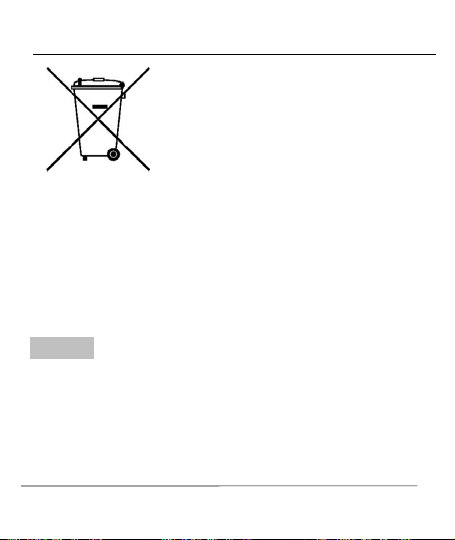
The WEEE logo (shown at the left) appears on
the product (battery, handset, and charger) to
indicate that this product must not be disposed
off or dumped with your other household
wastes. You are liable to dispose of all your
electronic or electrical waste equipment by
relocating over to the specified collection point
for recycling. of such hazardous waste.
Specified collection points for recycling of such hazardous waste.
Collection and proper recovery of your electronic waste equipments at
the time of disposal will allow us to help preserve the environment.
Recycling of the electronic waste equipment will ensure safety of
human health and environment. For more information on best practices
for disposal of electronic and electrical waste, please visit to our web
site: www.micromaxinfo.com/weee.php.
Page 26
User Guide
in this user guide without public announcement in advance. The
content of this manual may vary from the actual content displayed in
the mobile phone. In such a case, the latter shall govern.
All rights reserved. Reproduction, transfer, distribution or storage of part
or all of the contents in this document in any form without the prior
written permission of IF9063 is strictly prohibited.
FCC Statement
1. This device complies with Part 15 of the FCC Rules. Operation is
subject to the following two conditions:
(1) This device may not cause harmful interference.
(2) This device must accept any interference received, including
interference that may cause undesired operation.
2. Changes or modifications not expressly approved by the party
responsible for compliance could void the user's authority to operate the
equipment.
NOTE:
This equipment has been tested and found to comply with the limits for a
Class B digital device, pursuant to Part 15 of the FCC Rules. These limits
are designed to provide reasonable protection against harmful
interference in a residential installation.
C
C
o
o
p
p
y
y
r
r
i
i
g
g
h
h
t
t
s
s
Page 27

User Guide
This equipment generates uses and can radiate radio frequency energy
and, if not installed and used in accordance with the instructions, may
cause harmful interference to radio communications. However, there is
no guarantee that interference will not occur in a particular installation.
If this equipment does cause harmful interference to radio or television
reception, which can be determined by turning the equipment off and on,
the user is encouraged to try to correct the interference by one or more
of the following measures:
Reorient or relocate the receiving antenna.
Increase the separation between the equipment and receiver.
Connect the equipment into an outlet on a circuit different from that to
which the receiver is connected.
Consult the dealer or an experienced radio/TV technician for help.
SAR Information Statement
Your wireless phone is a radio transmitter and receiver. It is designed and
manufactured not to exceed the emission limits for exposure to
radiofrequency (RF) energy set by the Federal Communications
Commission of the U.S. Government. These limits are part of
comprehensive guidelines and establish permitted levels of RF energy for
the general population. The guidelines are based on standards that were
developed by independent scientific organizations through periodic and
thorough evaluation of scientific studies. The standards include a
Page 28

User Guide
substantial safety margin designed to assure the safety of all persons,
regardless of age and health. The exposure standard for wireless mobile
phones employs a unit of measurement known as the Specific
Absorption Rate, or SAR. The SAR limit set by the FCC is 1.6 W/kg. * Tests
for SAR are conducted with the phone transmitting at its highest certified
power level in all tested frequency bands. Although the SAR is
determined at the highest certified power level, the actual SAR level of
the phone while operating can be well below the maximum value. This is
because the phone is designed to operate at multiple power levels so as
to use only the power required to reach the network. In general, the
closer you are to a wireless base station antenna, the lower the power
output. Before a phone model is available for sale to the public, it must
be tested and certified to the FCC that it does not exceed the limit
established by the government adopted requirement for safe exposure.
The tests are performed in positions and locations (e.g., at the ear and
worn on the body) as required by the FCC for each model. The highest
SAR value for this model phone when tested for use at the ear is
0.934W/Kg and when worn on the body, as described in this user guide,
is 1.136W/Kg(Body-worn measurements differ among phone models,
depending upon available accessories and FCC requirements). While
there may be differences between the SAR levels of various phones and
at various positions, they all meet the government requirement for safe
exposure. The FCC has granted an Equipment Authorization for this
model phone with all reported SAR levels evaluated as in compliance
with the FCC RFexposure guidelines. SAR information on this model
Page 29

User Guide
phone is on file with the FCC and can be found under the Display Grant
section of http://www.fcc.gov/ oet/fccid after searching on
FCC ID: 2AQXU‐V11 Additional information on Specific Absorption
Rates (SAR) can be found on the Cellular Telecommunications Industry
Asso-ciation (CTIA) web-site at http://www.wow-com.com. * In the
United States and Canada, the SAR limit for mobile phones used by the
public is 1.6 watts/kg (W/kg) averaged over one gram of tissue. The
standard incorporates a sub-stantial margin of safety to give additional
protection for the public and to account for any variations in
measurements.
Body-worn Operation
This device was tested for typical body-worn operations. To comply with
RF exposure requirements, a minimum separation distance
of 10mm must be maintained between the user’s body and the handset,
including the antenna. Third-party belt-clips, holsters,
and similar accessories used by this device should not contain any
metallic components. Body-worn accessories that do not meet these
requirements may not comply with RF exposure requirements and
should be avoided. Use only the supplied or an approved antenna.
Page 30