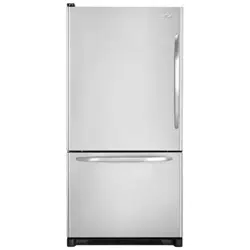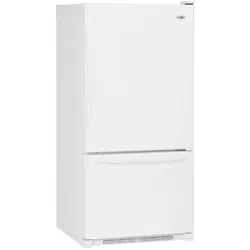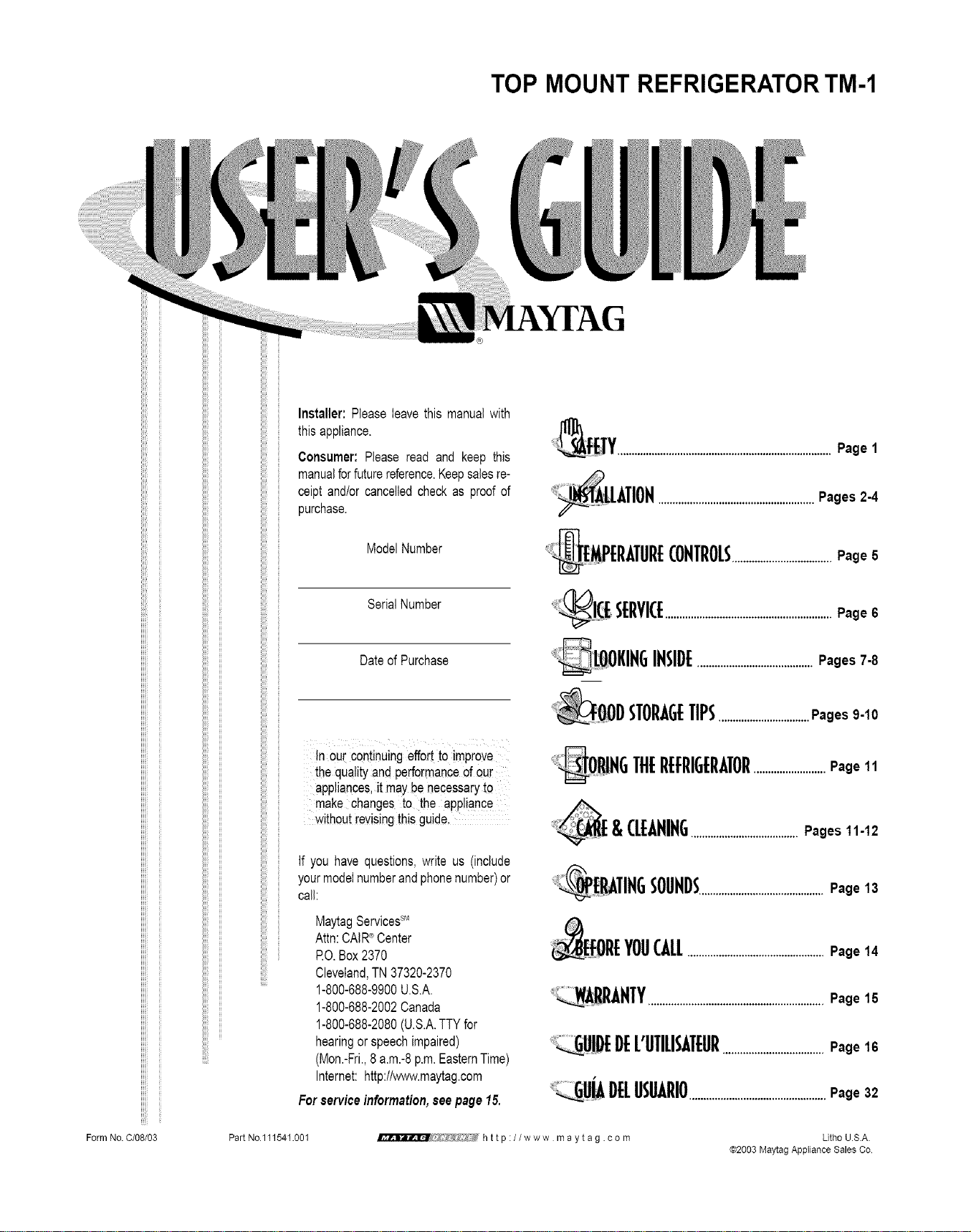
TOP MOUNT REFRIGERATORTM-1
Form No. C/08/03
Installer: Pleaseleavethis manualwith
thisappliance.
Consumer:Pleaseread and keep this
manualforfuturereference.Keepsalesre-
ceiptand/orcancelledcheckas proofof
)urchase.
ModelNumber
SerialNumber
DateofPurchase
!n ourcontinuingeffortto improve
the qualityand performanceof out"
appliances,it maybenecessaryto
make changesto the appliance
withoutrevisingthisguide,
If you havequestions,write us (include
yourmodelnumberandphonenumber)or
call:
MaytagServicessM
Attn:CAIR_Center
RO.Box2370
Cleveland,TN37320-2370
1-800-688-9900U.S.A.
1-800-688-2002Canada
1-800-688-2080(U.S.A.TTYfor
hearingorspeechimpaired)
(Mon.-Fri.,8a.m.-8p.m.EasternTime)
Internet:http://www.maytag.com
Forserviceinformation,seepage15.
...........................................................................Page 1
_/_AuATION......................................................Pages 2-4
@MPERATURECONTROLS...................................Page G
_ SERVICE..........................................................Page 6
_LOOKIN6 INSIDE........................................Pages 7-8
DSTORAGETIPS................................Pages 9-10
_OR!HG TilERffRIGERATOR.........................Page11
& CleANING ......................................Pages 11-12
_ EP,ATIflG................ _OUND_............................................Page 13
FOREYOUCALL................................................Page 14
R_NTY.............................................................Page15
!DEDEL'UTILISATEUR...................................Page16
_UJA I)ffUS_RIO................................................Page32
Part No.111541.001
http://www maytag .corn
Litho U.S.A.
@2003 Maytag Appliance Sales Co.
TO
Warning and Important Safety Instruc-
tions appearing in this manual are not
meant to cover all possible conditions
and situations that may occur. Common
sense, caution and care must be exer-
cised when installing, maintaining or
operating this appliance.
Always contact your dealer, distributor,
service agent or manufacturer about
problems or conditions you do not under-
stand.
RECOGNIZE SAFETY
SYMBOLS, WORDS,
LABELS
DANGER _ immediate hazards which
WILL result in severe personal injury
or death.
WARNING - Hazardsor Unsafeprac_
tices which COULD result in severe
personal injuryor death.
CAUTION. Hazards or unsafe prac.
tices which COULD resultin minor
personal injury or product or property
damage.
When using your appliance,
always follow basic precautions.
Use the refrigerator onlyfor its intend-
ed purpose.
Toprevent possibility of hazard due to
electrical shock, never plug the refrig-
erator into a receptacle which has not
been grounded adequately and in
accordancewith the local and national
electrical codes. See _. warning and
the grounding instructions that follow.
Unplug the refrigerator before clean-
ing or replacinga light bulb.
In case of powerfailure, minimize door
openings. If the power failure is of a
long duration, protectthe food byplac-
ing blocks of dry ice on top of the
packages or check with a local frozen
foods locker about temporary storage.
Frozenfoods which havethawed com-
pletely should not be refrozen.
Any electrical service cord that
becomes frayed or damaged should
be immediately repaired or replaced.
Never unplug your appliance by
pulling on the power cord.
Yourrefrigerator should not be operat-
ed in the presence of explosivefumes.
Children should not climb, hang or
stand on the shelves of this refrigera-
tor.
IMPORTANT: Child entrapment and suf-
focation are not problems of the past.
Junkedor abandoned refrigeratorsare still
dangerous...even if they will sit for "just a
few days."Ifyou are getting rid of your old
refrigerator,please follow the instructions
belowto help preventaccidents.
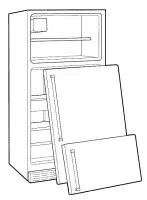
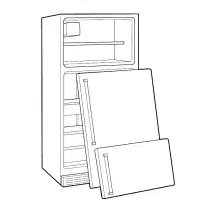
Takeoff the doors.
Leave the
shelves in
place so
that child-
ren may
not easily
climb in-
side.
........................................................
operate on a normal 1!5 volt, 15
amp, 60 cycle !ine.There should
be a separate, grounded circuit
serving this appliance only. DO
not use an extension cord, Do
not use anydevice that will alter
the electrical performanceof this
appliance.
This appliance is equipped with a three-
pronged grounding plug for your protec-
tion against possible electrical shockhaz-
ards. It must be plugged into a grounding
receptacle. Where a standard two-prong
wall receptacle is encountered, it is the
personal responsibility and obligation of
the customer to have it replaced with a
properly grounded three-prong wall
receptacle. Do not under any circum-
stances, cut or remove the third (ground)
prong from the power cord. Do notuse an
adapter plug.
POWER SUPPLY CORD
WITH 3-PRONG
GROUNDING PLUG
GROUN_DI G TYPE
WALL RECEPTACLE
1
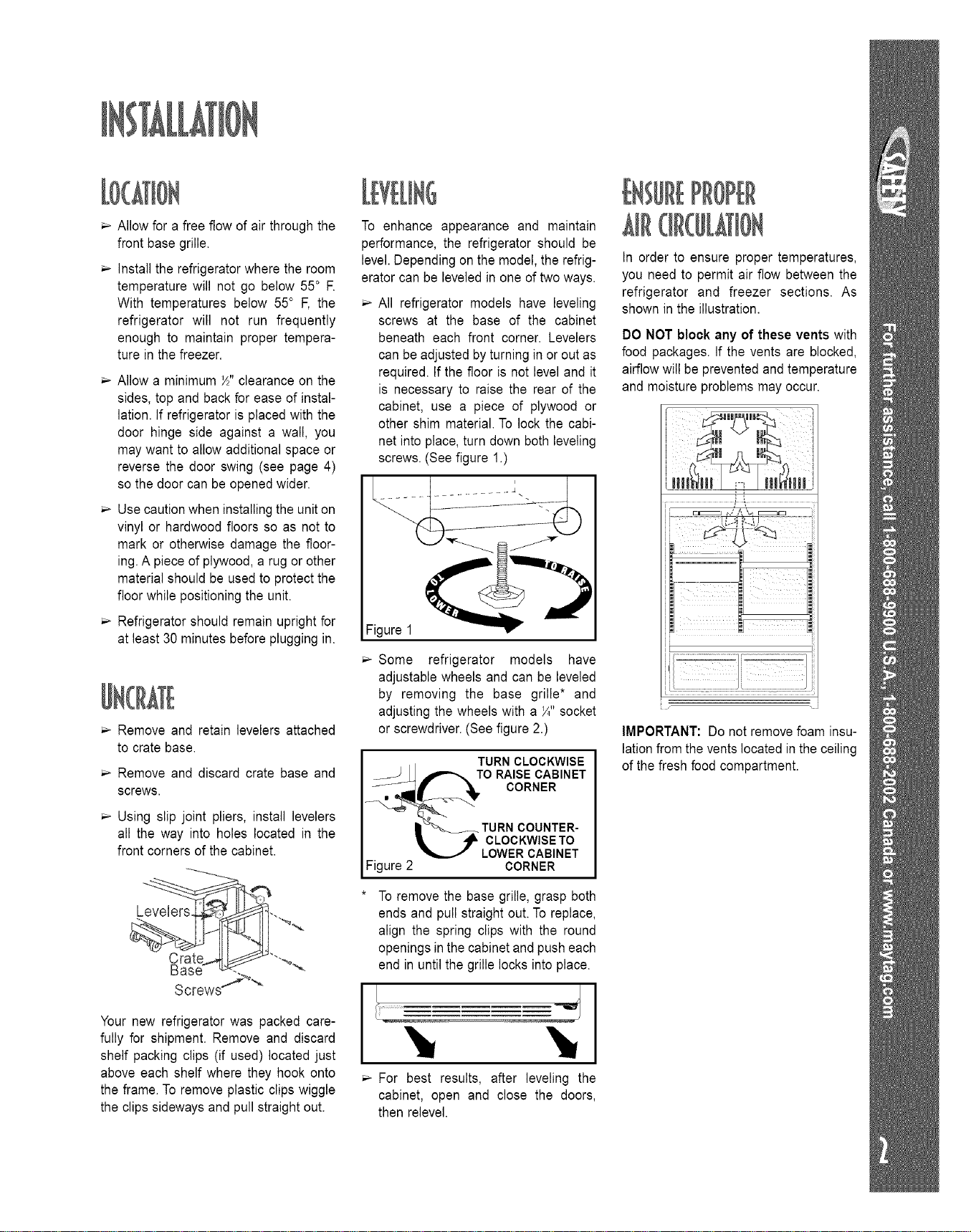
Allow for a free flow of air through the
front base grille.
Install the refrigerator where the room
temperature will not go below 55° R
With temperatures below 55° F, the
refrigerator will not run frequently
enough to maintain proper tempera-
ture in the freezer.
Allow a minimum _" clearance on the
sides, top and back for ease of instal-
lation. If refrigerator is placed with the
door hinge side against a wall, you
may want to allow additional space or
reverse the door swing (see page 4)
so the door can be opened wider.
Use caution when installing the unit on
vinyl or hardwood floors so as not to
mark or otherwise damage the floor-
ing.A piece of plywood, a rug or other
material should be used to protect the
floor while positioning the unit.
Refrigerator should remain upright for
at least 30 minutes before plugging in.
Remove and retain levelers attached
to crate base.
Remove and discard crate base and
screws.
Using slip joint pliers, install levelers
all the way into holes located in the
front corners of the cabinet.
©
Screws_ "_
Your new refrigerator was packed care-
fully for shipment. Remove and discard
shelf packing clips (if used) located just
above each shelf where they hook onto
the frame. To remove plastic clips wiggle
the clips sideways and pull straight out.
To enhance appearance and maintain
performance, the refrigerator should be
level. Dependingon the model, the refrig-
erator can be leveled in one of two ways.
All refrigerator models have leveling
screws at the base of the cabinet
beneath each front corner. Levelers
can be adjusted byturning in or out as
required. If the floor is not level and it
is necessary to raise the rear of the
cabinet, use a piece of plywood or
other shim material. To lock the cabi-
net into place, turn down both leveling
screws.(See figure 1.)
Figure 1
Some refrigerator models have
adjustable wheels and can be leveled
by removing the base grille* and
adjusting the wheels with a _" socket
or screwdriver.(See figure 2.)
TURN CLOCKWISE
TO RAISE CABINET
CORNER
Figure 2
TURN COUNTER-
CLOCKWISETO
LOWER CABINET
CORNER
* To remove the base grille, grasp both
ends and pull straight out. To replace,
align the spring clips with the round
openings inthe cabinet and pusheach
end in untilthe grille locks into place.
For best results, after leveling the
cabinet, open and close the doors,
then relevel.
t;UREPROPER
In order to ensure proper temperatures,
you need to permit air flow between the
refrigerator and freezer sections. As
shown in the illustration.
DO NOT block any of these vents with
food packages. If the vents are blocked,
airflow will be prevented and temperature
and moisture problems may occur.
i i i i_
J
IMPORTANT: Do not remove foam insu-
lationfrom the vents located in the ceiling
of the fresh food compartment.
}
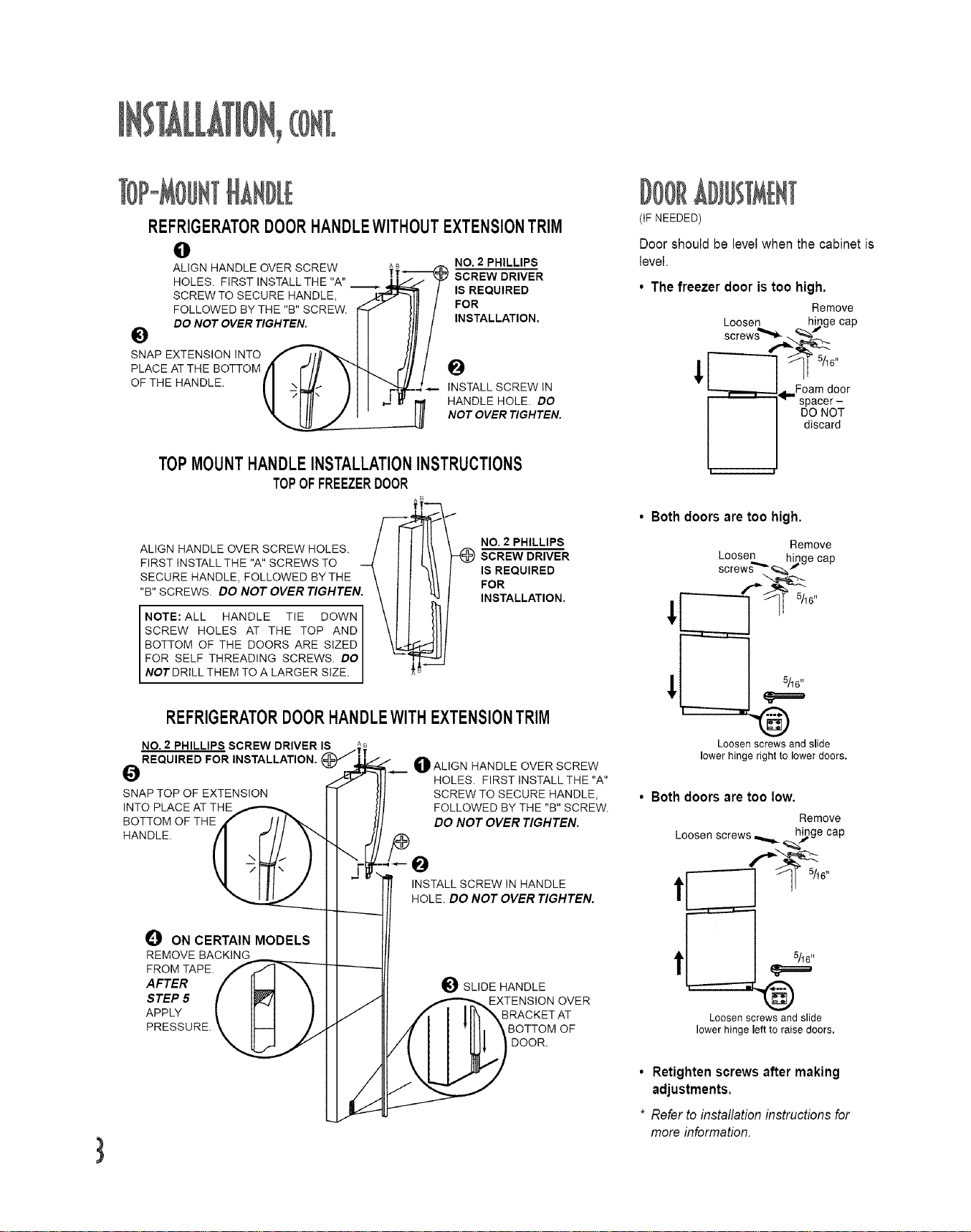
REFRIGERATORDOORHANDLEWITHOUTEXTENSIONTRIM
e
ALIGN HANDLE OVER SCREW NO. 2 PHILLIPS
HOLES. FIRST INSTALLTHE "A" SCREW DRIVER
SCREW TO SECURE HANDLE, IS REQUIRED
FOLLOWED BY THE "B" SCREW. FOR
(tF NEEDED)
Door should be levelwhen the cabinet is
level.
• The freezer door is too high.
Remove
Loosen h_,ge cap
_._" D0 NOT 0 VER TIG HTEN. INSTALL ATION. screw s=,,,_._-__
SNAP EXTENSION INTO -- -
PLACE AT THE BOTTOM O _ _]_ 5/t6''
OF THE HANDLE. INSTALL SCREW IN
HANDLE HOLE. DO
NOT OVER TIGHTEN.
TOPMOUNTHANDLEINSTALLATIONINSTRUCTIONS
TOPOFFREEZERDOOR
ALIGN HANDLE OVER SCREW HOLES. / _-_ NO. 2PHILLIPS
FIRST INSTALL THE "A"SCREWS TO I II__{ I I SCREW DRIVER
SECURE HANDLE, FOLLOWED BYTHE \ ] I IS REQUIRED
"B" SCREWS. DO NOT OVER TIGHTEN. \ I ! FOR
INSTALLATION.
NOTE:ALLHANDLET,EDOWNI \11
SCREW HOLES AT THE TOP AND I \II
BOTTOM OF THE DOORS ARE SIZED I \1_
FOR SELF THREADING SCREWS. DO I _'_
NOT DRILL THEM TO A LARGER SIZE. I iA
REFRIGERATORDOORHANDLEWITHEXTENSIONTRIM
NO. 2 PHILLIPS SCREW DRIVER IS
REQUIRED FOR INSTALLATION,
O
SNAP TOP OF EXTENSION
INTO PLACE AT THE
BOTTOM OF THE
HANDLE.
OALIGN HANDLE OVER SCREW
HOLES. FIRST INSTALL THE "A"
SCREW TO SECURE HANDLE,
FOLLOWED BY THE "B" SCREW.
DO NOT OVER TIGHTEN.
_JP ON CERTAIN MODELS
REMOVE BACKING
FROM TAPE.
AFTER
STEP 5
APPLY
PRESSURE.
INSTALL SCREW IN HANDLE
HOLE. DO NOT OVER TIGHTEN.
e SLIDE HANDLE
EXTENSION OVER
BRACKET AT
BOTTOM OF
DOOR.
- , , _,,,Foam door
-- spacer-
DO NOT
discard
I !
• Both doors are too high.
!
!
Remove
LcOrOSwe_...=,;_ h_ ge cap
Loosen screws and slide
lower hinge right to lower deers.
• Both doors are too low.
Remove
Loosen screws_ h_ge cap
Loosen screws and slide
lower hinge left to raise doors,
• Retighten screws after making
adjustments.
* Refer to installation instructions for
more information.

Tools Required: Phillips screwdriver,
5/16" socket and ratchet, putty knife or
5/16" end wrench.
1. Removethe hinge cap and set aside.
2. Remove screws and hinge with a
5/16" socketwrench and set aside.
3. Carefully lift and removefreezer door.
4. Remove screw and hinge arm from
top of the refrigerator door.
5. Carefully lift and remove refrigerator
door.
6. Remove grille cover and set aside.
7. Remove hinge plate from lower cor-
ner of refrigerator and secure iton the
opposite side.
8. Remove the plate from the underside
of the refrigerator door and secure it
on the opposite side.
9. Remove the plate from the underside
of the freezer door and secure it on
the opposite side.
10. Removethe plug buttonsfrom tops of
freezer and refrigerator doors and
replace them on the opposite side.
11. Removescrew hole plugs from top of
cabinet and replace on the opposite
side.
12. Remove washers and stem from the
inside of the hinge plate and place
them on the outside of the hinge
plate.
13. Carefully replace refrigerator door on
the hinge plate in lower corner.
14. Slide the hinge arm into place and
secure with screw.
15. Carefully place freezer door on top of
hinge arm use foam door spacer to
set gap.*
16. Slide top hinge into place on freezer
door and secure screws with 5/16"
wrench.
17. Snap hinge cap securely in place.
18. Replace grille cover.
Remember to plug in your refrigerator
and reset the controls to the appropriate
setting(s).
(IF NEEDED)
5//16 ii
Rest door on a non-scratching surface.
Too
A. Remove left screw.
B. Open door and lift. Rest door on a
non-scratching surface.
J 4,
Remove hinge plate assembly.Rest door
on a non-scratching surface.
Do not discard the foam door spacer.
Doors may settle with use.
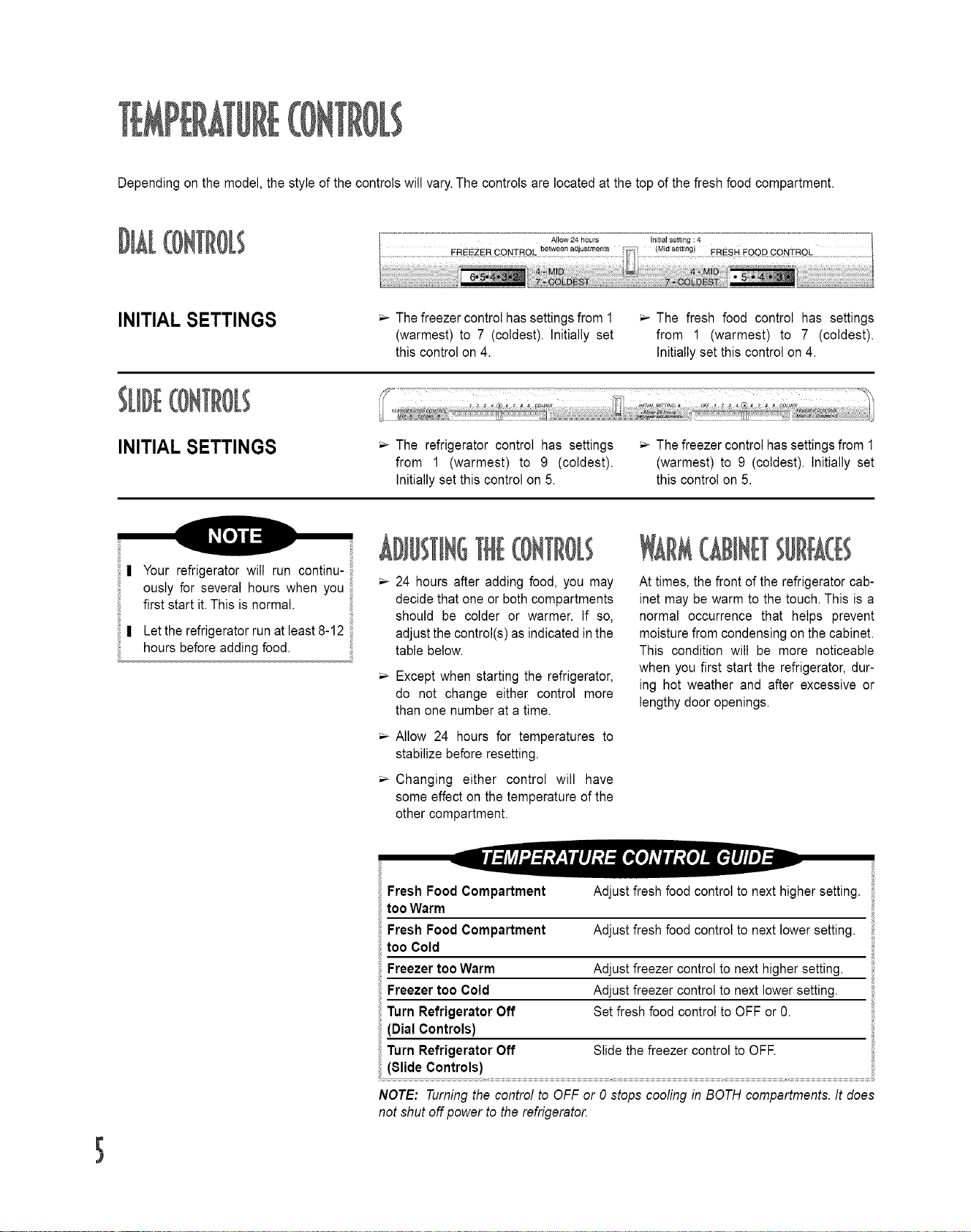
Dependingonthemodel,thestyleofthecontrolswilvary.Thecontrolsarelocatedatthetopofthefreshfoodcompartment.
INITIAL SETTINGS
Thefreezer control has settingsfrom 1 _ The fresh food control has settings
(warmest) to 7 (coldest). Initially set from 1 (warmest) to 7 (coldest).
this control on 4. Initially set this control on 4.
INITIAL SETTINGS
The refrigerator control has settings _ Thefreezer control has settingsfrom 1
from 1 (warmest) to 9 (coldest). (warmest) to 9 (coldest). Initially set
Initially set this control on 5. this control on 5.
| Your refrigerator will run continu-
ously for several hours when you
first start it.This isnormal.
| Letthe refrigerator run at least 8-12
hours before adding food.
111(II[IO[;
24 hours after adding food, you may
decidethat one or bothcompartments
should be colder or warmer. If so,
adjust the control(s)as indicated in the
table below.
Except when starting the refrigerator,
do not change either control more
than one number at a time.
Allow 24 hours for temperatures to
stabilize before resetting.
Changing either control will have
some effect on the temperature of the
other compartment.
GIIII 11111111
At times, the front of the refrigerator cab-
inet may be warm to the touch. This is a
normal occurrence that helps prevent
moisturefrom condensing on the cabinet.
This condition will be more noticeable
when you first start the refrigerator, dur-
ing hot weather and after excessive or
lengthy door openings.
f
Fresh Food Compartment
tooWarm
Fresh Food Compartment
too Cold
Freezer too Warm
Freezer too Cold
Turn Refrigerator Off
(Dial Controls)
Turn Refrigerator Off
(81ideControls)
Adjust fresh food control to next higher setting.
Adjust fresh food control to next lower setting.
Adjust freezer control to next higher setting.
Adjust freezer control to next lower setting.
Set fresh food control to OFF or 0.
Slide the freezer control to OFE
NOTE: Turningthe control to OFF or 0 stops cooling in BOTH compartments. It does
not shut off power to the refrigerato_
Some models are equipped with ice cube
trays.To releasethe icecubes from a tray,
hold the tray upside down and twist both
ends.
The ice bin (select models) either slides
into rails under an ice cube tray rack or
stacks on top of the ice cube trays.
Energy rating guides that are post-
ed on the refrigerator at the time of
purchase do not include optional
ice maker energy usage.
Some models are automatic ice maker
ready.The number of the appropriate ice
maker kit needed for installation into
these models appears on the data plate.
The kit contains installation instructions
and water connection instructions.
Other models have a factory installed ice
maker. Connect the ice maker to the
water supply as instructed in the separate
instructions furnished with the refrigera-
tor.Proper waterflow and a level refrig-
erator is essential for optimal ice
maker performance.
After your refrigerator has been connect-
ed to the water supply, move the sensor
arm intothe down position.The ice maker
will fill with water when the freezer reach-
es the proper temperature.
Some ice makers are equipped with an
adjustable sensor arm that allows you to
adjustthe amountofice inyourice storage
trayfor times when less ice is needed.
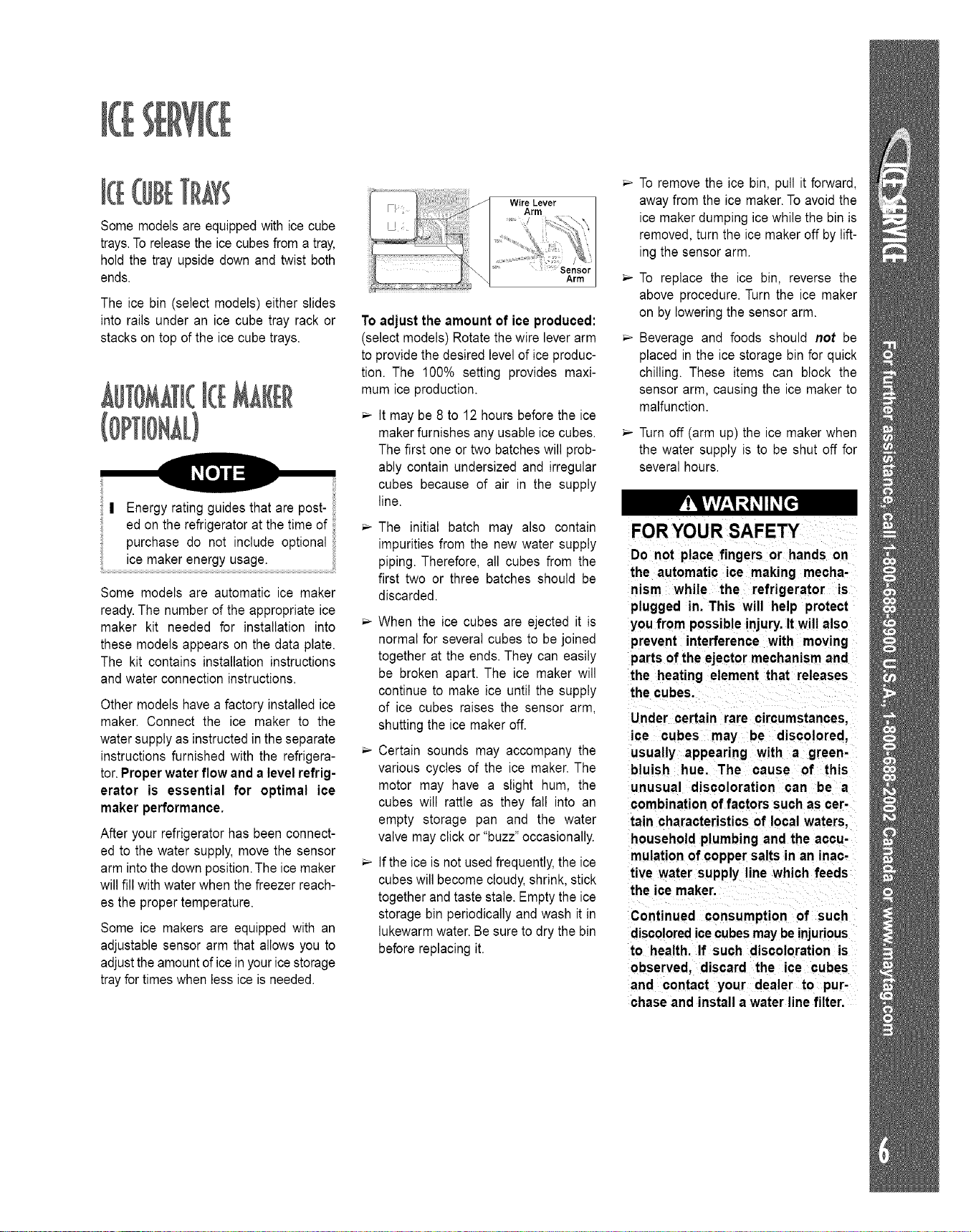
WEreLever
Arm
Arm
To adjust the amount of ice produced:
(select models) Rotate thewire leverarm
to provide the desired levelof iceproduc-
tion. The 100% setting provides maxi-
mum ice production.
It may be 8 to 12 hours before the ice
maker furnishes any usable icecubes.
The first one or two batches will prob-
ably contain undersized and irregular
cubes because of air in the supply
line.
The initial batch may also contain
impurities from the new water supply
piping. Therefore, all cubes from the
first two or three batches should be
discarded.
When the ice cubes are ejected it is
normal for several cubes to be joined
together at the ends. They can easily
be broken apart. The ice maker will
continue to make ice until the supply
of ice cubes raises the sensor arm,
shutting the ice maker off.
Certain sounds may accompany the
various cycles of the ice maker. The
motor may have a slight hum, the
cubes will rattle as they fall into an
empty storage pan and the water
valve may click or "buzz"occasionally.
If the ice is not used frequently,the ice
cubes will become cloudy,shrink, stick
together and taste stale. Emptythe ice
storage bin periodically and wash it in
lukewarmwater. Be sure to dry the bin
before replacing it.
To remove the ice bin, pull it forward,
away from the ice maker.Toavoid the
ice maker dumping icewhile the bin is
removed, turn the ice maker off by lift-
ing the sensor arm.
To replace the ice bin, reverse the
above procedure. Turn the ice maker
on by lowering the sensor arm.
Beverage and foods should not be
placed in the ice storage bin for quick
chilling. These items can block the
sensor arm, causing the ice maker to
malfunction.
Turn off (arm up) the ice maker when
the water supply is to be shut off for
several hours.
FOR YOUR SAFETY
Do not place fingers or hands on
the automatic ice making mecha-
nism while the refrigerator is
plugged in. This will help protect
you from possible injury. Itwill also
prevent interference with moving
parts of the ejector mechanism and
the heating element that releases
the cubes.
Under certain rare circumstances,
ice cubes may be discolored,
usually appearing with a green-
bluish hue. The cause of this
unusual discoloration can be a
combination offactors such as cer-
tain characteristics of local waters,
household plumbing and the accu-
mulation of copper salts in an inac-
tive water supply line which feeds
the ice maker.
Continued consumption of such
discoloredicecubesmaybeinjurious
to health. If such discoloration is
observed, discard the ice cubes
and contact your dealer to pur-
chase and install a water linefilter.
7
Your refrigerator has either 8pill-
Catcher TM or Tempered Glass 8helves.
The Spill-CatcherTM shelves have a spill
retainer edge which allows for easier
clean up, and some are equipped with
the Easy Glide slide out feature.
To slide out (select models), grasp the
front of the shelf and pull forward.Push in
the shelf to return to the original position.
Toremove a shelf, slightly lift up the rear
of the shelf and pull the shelf straight out
Tolock the shelf into another position, tilt
up the front edge of the shell Insert the
hooks into the desired frame openings
and let the shelf settle into place, being
sure the shelf is securely locked at the
rear.
Never attempt to adjust a shelf
that is loaded with food (except
TM
in the case of the Elevator
8helf).
ELEVATOR TM SHELF
(select models)
The fresh food compartment may also be
equipped with an ElevatorTM Shelf. This
shelf has a spill retainer edge for easy
cleanup. It also has the convenient slide
out feature that allows easy access to
items stored at the rear of the shelf.
This shelf can be adjusted up or down
without havingto be unloaded of its con-
tents. To adjust an ElevatorTM Shelf, pull
out the knob on the crank handle. Rotate
the crank clockwise to raise the height of
the shelf, and counterclockwise to lower
the height of the shelf.
To remove the ElevatorTM shelf for occa-
sional cleaning, completely unload the
shelf and pull the shelf forward.When the
shelf stops, press up on the tabs located
underneath its outside edges, then con-
tinue pulling forward, clear of the frame.
To reinstall, align the shelf to the frame
and push it all the way back. (There is no
need to depress the tabs for reinstalla-
tion).
In ordinary use, the ElevatorTM shelf with
the frame assembly does NOT require
removal.Though unlikely,and not recom-
mended, the correct removal procedure
is as follows:
Unload the shelf completely, raise the
shelf to its highest possible position.
While supporting the shelf and frame
from the front, press both locks inward.
Lift slightly and tilt the frame assembly to
allow the rear guides to clear the vertical
rails.
To reinstall, tilt the frame assembly while
depressing bothlocks, reposition the rear
guide behind the vertical rails. When the
shelf is level, release the locks allowing
the shelf to latch in the correct position.
VERTICAL RAILS
ADJUSTABLE FREEZER
SHELF (select models)
To remove the shelf, lift the left end up
about 3 inches; pull the right end bars out
ofthe sidewall cups.Toreplacethe shelf,
reposition the removable support plugs
on the left side wall to the desired level
and reverse the removal procedure.
Other models have a partial width freezer
shelf. This shelf is positioned on the left
side of the freezer compartment by
mounting into the left side wall.
EXPANDABLE-WIDTH
FREEZER SHELF
(select models)
The shelf adjusts sideways to open up a
full-height space for tall packages, such
as pizza.The leg on the right side of the
shelf slides to make this adjustment.
The shelf can also adjust to two heights.
To adjust the shelf height, remove the
shelf from the freezer.Slide the leg out of
the channels and reinsert the leg in the
alternate height position.Return the shelf
to the freezer, inserting the left end into
the liner cups.
DOOR STORAGE
Pick-Off Door Bins (select models) are
roomy enough to handle gallon-plus
sized containers.They are adjustable and
can be easily removed.
To remove, lift the bin front up until it
clears the retainers on the door liner then
pull the bin straight out
Toreplace, reverse the above procedure.
Other models are constructed with
durable, Fixed Door 8helves with the
gallon-plus storage capacity.
Some refrigerator and freezer door
shelves have Keepers to secure bottles
and other containers in place when the
door is being opened or closed. The
keepers are easily adjusted by sliding
from side to side.
The Tall Bottle Retainer (select models)
is designedto prevent tall bottlesfrom tip-
ping forward. It is easily adjusted by slid-
ing from side to side.
RACKS
The Multi-Can Rack (select models)
suspends from one of the spill-proof
refrigerator shelves. It hooks over the
wires found in the framework under the
shelf.The sloped design allows for cans
to roll forward as one is removed. (This
rack cannot be positioned under an
ElevatorTM shelf.)
The Multi-Use Rack (select models)
provides a place for horizontally storing
wine. The rack also can hold canned bev-
erages or an egg carton.
Position the rack to rest on the left hand
side of a refrigerator shelf (this rack can-
not be positioned on an ElevatorTM shelf).
Your refrigerator has either a 8hack
Center Drawer or an Adjusti-TempTM
Drawer.
For models with the Adjusti-TempTM
Drawer, a control is located on the shelf
front above the drawer. Simply slide the
control knob left or right to adjust the in-
ternaltemperature ofthe drawer.
For cheese storage, slide the control
to the left.To achieve a lower temper-
ature within the drawer when storing
fresh meat, poultry or fish, slide the
control to the right.
The Snack Center drawerdoes not have
an adjustable temperature capability.
To remove the Snack Center Drawer or
Adjusti-Temp Drawer for cleaning:
pull the drawer out until it stops
lift the drawer up slightly and pull itout
Toreplace the drawer, reverse the above
procedure.
This drawer can be positioned as desired
on either the left or right sideof the refrig-
erator cabinet.
For best results, keep this drawer closed
tightly.
The Crispers provide storage for fruit
and vegetables.There is a humidity con-
trol located on the crisper shelf above
each of the crisper drawers.
Forfruit storage,slide the crisper con-
trol to the left to provide lower humidi-
ty conditions in the drawer.
Forvegetable storage,slidethe crisper
control to the right to provide higher
humidity conditions inthe drawer.
Toremove a crisper drawer for cleaning:
pull out the crisper until it stops
tilt the drawerfront up and pull it out
Toreplace a crisper drawer:
align the drawer inthe tracks
lift the drawerfront and slide in
For best results, keep the crispers tightly
closed.
To remove the Crisper Top:
lift the front edge of the shelf
pull the shelf straight out
To replace the Crisper Top:
set the rear bars on the support
pushthe shelf back untilthefront edge
can be lowered intoplace
Your refrigerator may come equipped
with an Egg Cradle (style may vary). It
can be removed to be washed or carried
to a work area.
To use the Dairy Compartment, raise
the cover.Thedairy compartment may be
equipped with a Keeper to secure food
itemsin place. If your model hasthe dairy
keeper,simply slide itfrom sideto sidefor
desired placement.
In some models, the dairy compartment
can be removed.
The 81ide Out Freezer Basket (select
models) isfound inthe mainfreezer com-
partment. It is a convenient storage area,
providing easy access to itemsstored in
the rear of the freezer. Slide the basket
out to reach or store frozen foods.
Toremove the basket:
pull the basket until itstops
lift and pull the basketout
To replace the basket, reverse the
removal procedure.
The Drop Down Freezer Basket (select
models) isfound on the lower shelf of the
freezer door.This area provides space for
frozen fooditemsthat tend toshift or slide
(such as bagged vegetables).
Thefreshfoodcompartmentof a
refrigeratorshouldbekeptbetween
34°Fand40°Fwithanoptimumtem-
peratureof37° ETocheckthetem-
perature,placean appliancether-
mometerinaglassofwaterandplace
inthecenteroftherefrigerator.Check
after24hours.Ifthetemperatureis
above40° F adjustthecontrolsas
explainedonpage5.
Avoidovercrowdingtherefrigerator
shelves.Thisreducesthecirculationof
air aroundthefoodandresultsin
unevencooling.
FRUITS AND VEGETABLES
Storage in the crisper drawers traps
moisture to help preserve the fruit and
vegetable quality for longer time peri-
ods. (Refer to page 8).
Sort fruits and vegetables before stor-
age and use bruised or soft itemsfirst.
Discard those showing signs of decay.
Always wrap odorous foods such as
onions and cabbage so the odor does
not transfer to other foods.
While vegetables need a certain
amount of moisture to remain fresh,
too much moisture can shorten stor-
age times (especially leafy vegeta-
bles). Drain vegetables well before
storing.
MEAT AND CHEESE
Raw meat and poultry should be
wrapped securely so leakage and
contamination of other foods or sur-
faces does not occur.
Occasionally mold will develop on the
surface of hard cheeses (Swiss,
Cheddar, Parmesan). Cut off at least
an inch around and below the moldy
area. Keep your knife or instrument
out of the mold itself. The remaining
cheese will be safe and flavorfulto eat.
Do NOT try to save individual cheese
slices, soft cheese, cottage cheese,
cream, sour cream or yogurt when
mold appears.
DAIRY FOOD
Most dairy foods such as milk, yogurt,
sour cream and cottage cheese have
freshness dates on their cartons for
appropriate length of storage. Store
these foods in the original carton and
refrigerate immediately after purchas-
ing and after each use.
Thefreezer compartment of a refriger-
ator should be kept at approximately
0° E To check the temperature, place
an appliance thermometer between
the frozen packages and check after
24 hours. If the temperature is above
0 F,adjust the control asdescribed on
page 5.
A freezer operates more efficiently
when it is at least two-thirds full.
PACKAGING FOODS FOR
FREEZING
To minimize dehydration and quality
deterioration use aluminum foil, freez-
er wrap, freezer bags or airtight con-
tainers. Force as much air out of the
packages as possible and be sure
they are tightly sealed.Trappedair can
cause the food to dry out, change
color and develop an off-flavor (freez-
er burn).
Overwrap fresh meats and poultry
with suitable freezer wrap prior to
freezing.
Do not refreeze meat that has com-
pletely thawed.
LOADING THE FREEZER
Avoid adding too much warm food to
the freezer at one time.This overloads
the freezer, slows the rate of freezing
and can raise the temperature of
frozen foods.
Leavespace between the packagesso
cold air can circulate freely, allowing
food tofreeze as quickly as possible.
Avoid storing hard-to-freeze foods
such as ice cream and orangejuice on
the freezer door shelves. These foods
are best stored in the freezer interior
where the temperature varies less with
door openings.
Refer to the Food Storage Chart on
page 10 for approximate storage
times.
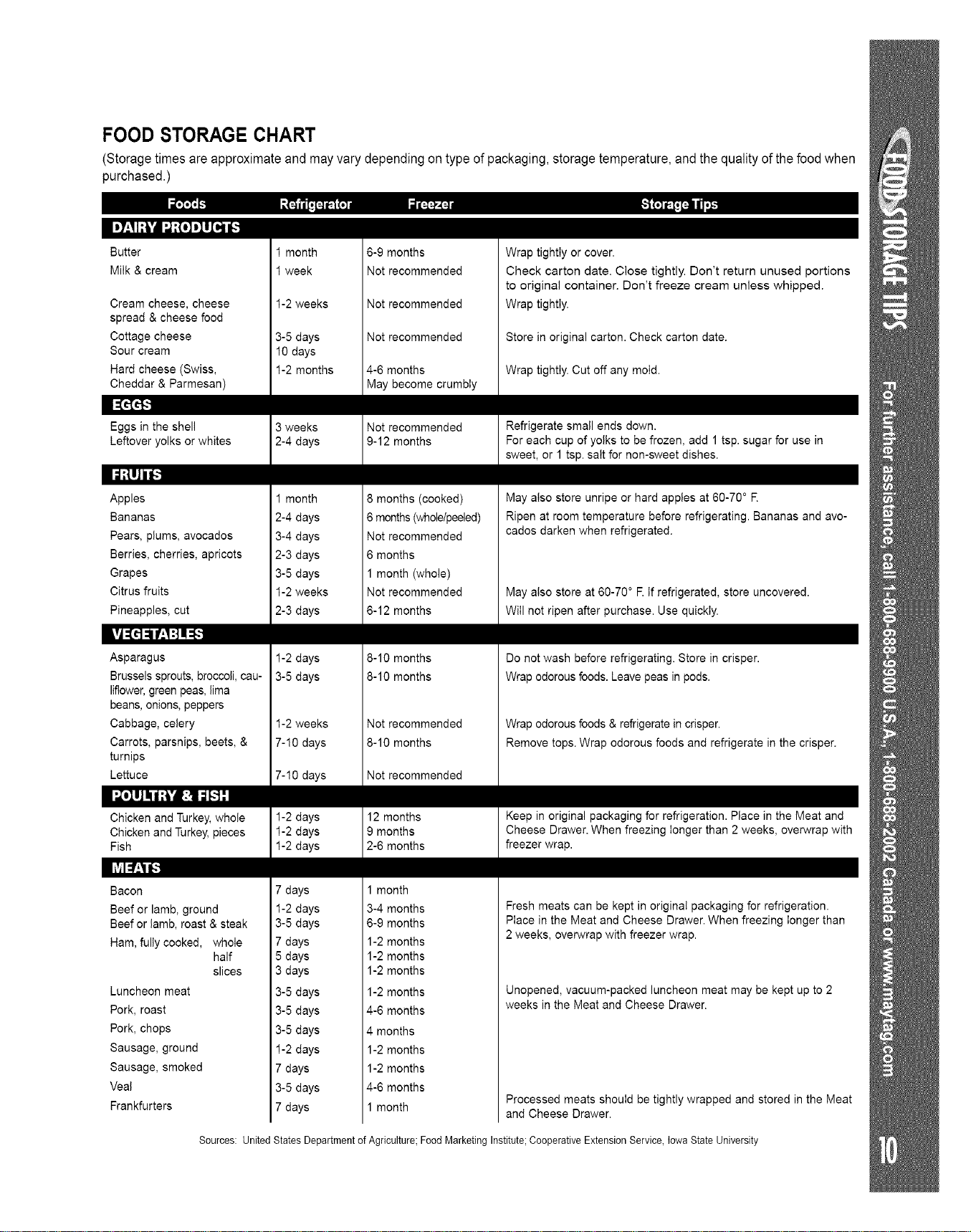
FOOD STORAGE CHART
(Storagetimes are approximate and may vary depending on type of packaging,storage temperature, and the quality of the foodwhen
purchased.)
I=7.'II;]¢dId:{o]=lUI_I[.1
Butter
Milk & cream
Cream cheese, cheese
spread & cheese food
Cottage cheese
Sour cream
Hard cheese (Swiss,
Cheddar & Parmesan)
m_'k'r
Eggs in the shell
Leftover yolks or whites
miik'JiF
Apples
Bananas
Pears, plums, avocados
Berries, cherries, apricots
Grapes
Citrus fruits
Pineapples, cut
ml'ilfllfil:l
Asparagus
Brussels sprouts, broccoli, cau-
liflower, green peas, lima
beans, onions, peppers
Cabbage, celery
Carrots, parsnips, beets, &
turnips
Lettuce
•.,TolmJki .'_'4_:] )([.I-'i
Chicken and Turkey, whole
Chicken and Turkey, pieces
Fish
Bacon
Beef or lamb, ground
Beef or lamb, roast & steak
Ham, fully cooked, whole
half
slices
Luncheon meat
Pork, roast
Pork, chops
Sausage, ground
Sausage, smoked
Veal
Frankfurters
1 month
1 week
1-2 weeks
3-5 days
10 days
1-2 months
3 weeks
2-4 days
1 month
2-4 days
3-4 days
2-3 days
3-5 days
1-2 weeks
2-3 days
1-2 days
3-5 days
1-2 weeks
7-!0 days
7-!0 days
1-2 days
1-2 days
1-2 days
7 days
1-2 days
3-5 days
7 days
5 days
3 days
3-5 days
3-5 days
3-5 days
1-2 days
7 days
3-5 days
7 days
6-9 months
Not recommended
Not recommended
Not recommended
4-6 months
May become crumbly
Not recommended
9-12 months
8 months (cooked)
6 months (wholelpeeled)
Not recommended
6 months
1 month (whole)
Not recommended
6-12 months
8-10 months
8-10 months
Not recommended
8-10 months
Not recommended
12 months
9 months
2-6 months
1 month
3-4 months
6-9 months
1-2 months
1-2 months
1-2 months
1-2 months
4-6 months
4 months
1-2 months
1-2 months
4-6 months
1 month
Wrap tightly or cover.
Check carton date. Close tightly. Don't return unused portions
to original container. Don't freeze cream unless whipped.
Wrap tightly.
Store in original carton. Check carton date.
Wrap tightly. Cut off any mold.
Refrigerate small ends down.
For each cup of yolks to be frozen, add 1 tsp. sugar for use in
sweet, or 1 tsp. salt for non-sweet dishes.
May also store unripe or hard apples at 60-70 ° R
Ripen at room temperature before refrigerating. Bananas and avo-
cados darken when refrigerated.
May also store at 60-70 ° E If refrigerated, store uncovered.
Will not ripen after purchase. Use quickly.
Do not wash before refrigerating. Store in crisper.
Wrap odorous foods. Leave peas in pods.
Wrap odorous foods & refrigerate in crisper.
Remove tops. Wrap odorous foods and refrigerate in the crisper.
Keep in original packaging for refrigeration. Place in the Meat and
Cheese Drawer. When freezing longer than 2 weeks, overwrap with
freezer wrap.
Fresh meats can be kept in original packaging for refrigeration.
Place in the Meat and Cheese Drawer. When freezing longer than
2 weeks, overwrap with freezer wrap.
Unopened, vacuum-packed luncheon meat may be kept up to 2
weeks in the Meat and Cheese Drawer.
Processed meats should be tightly wrapped and stored in the Meat
and Cheese Drawer.
Sources: United States Department of Agriculture; Food Marketing Institute; Cooperative Extension Service, Iowa State University
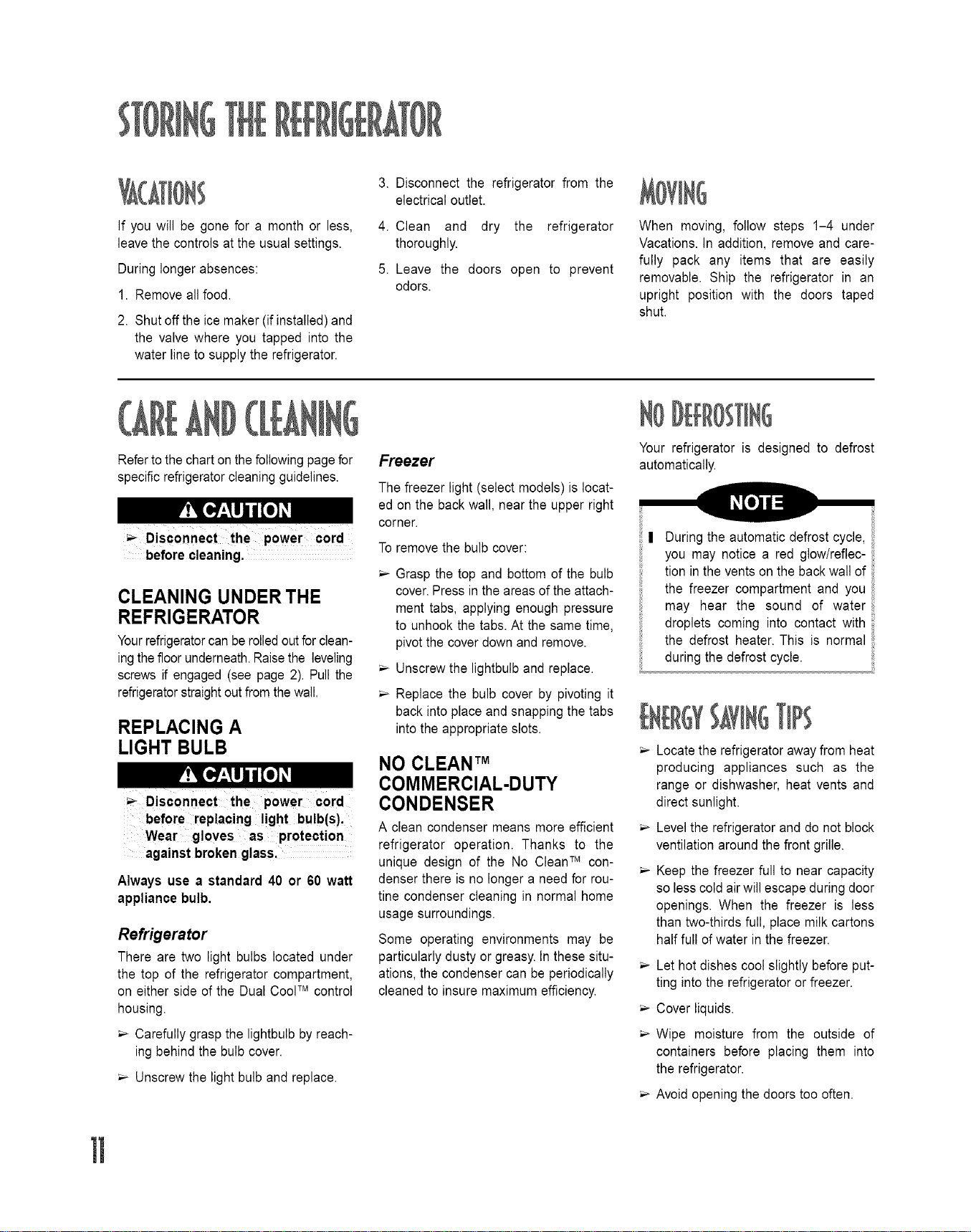
If you will be gone for a month or less,
leavethe controls at the usual settings.
During longer absences:
1. Remove all food.
2. Shutoff the ice maker (if installed) and
the valve where you tapped into the
water line to supply the refrigerator.
3. Disconnect the refrigerator from the
electrical outlet.
4. Clean and dry the refrigerator
thoroughly.
5. Leave the doors open to prevent
odors.
When moving, follow steps 1-4 under
Vacations. In addition, remove and care-
fully pack any items that are easily
removable. Ship the refrigerator in an
upright position with the doors taped
shut.
Referto thechart onthe followingpage for
specific refrigeratorcleaningguidelines.
Disconnect the power cord
before cleaning.
CLEANING UNDER THE
REFRIGERATOR
Yourrefrigeratorcanbe rolledoutforclean-
ingthe floorunderneath.Raisethe leveling
screws if engaged (see page 2). Pull the
refrigeratorstraightout fromthe wall.
REPLACING A
LIGHT BULB
Disconnect the power cord
before replacing light bulb(s),
Wear gloves as protection
against broken glass,
Always use a standard 40 or 60 watt
appliance bulb.
Refrigerator
There are two light bulbs located under
the top of the refrigerator compartment,
on either side of the Dual CoolTM control
housing.
Carefully grasp the lightbulb byreach-
ing behind the bulb cover.
Unscrew the light bulb and replace.
Freezer
The freezer light (select models) is locat-
ed on the back wall, near the upper right
corner.
Toremove the bulb cover:
Grasp the top and bottom of the bulb
cover.Press in the areas of the attach-
ment tabs, applying enough pressure
to unhook the tabs. At the same time,
pivot the cover down and remove.
Unscrew the lightbulb and replace.
Replace the bulb cover by pivoting it
back into place and snapping the tabs
into the appropriate slots.
NO CLEAN TM
COMMERCIAL-DUTY
CONDENSER
A clean condenser means more efficient
refrigerator operation. Thanks to the
unique design of the No CleanTM con-
denser there is no longer a need for rou-
tine condenser cleaning in normal home
usage surroundings.
Some operating environments may be
particularly dusty or greasy.In these situ-
ations, the condenser can be periodically
cleaned to insure maximum efficiency.
Your refrigerator is designed to defrost
automatically.
n During the automatic defrost cycle,
you may notice a red glow/reflec-
tion in the ventson the back wall of
the freezer compartment and you !i
may hear the sound of water
droplets coming into contact with
the defrost heater. This is normal
during the defrost cycle.
Locate the refrigerator awayfrom heat
producing appliances such as the
range or dishwasher, heat vents and
direct sunlight.
Levelthe refrigerator and do not block
ventilation around the front grille.
Keep the freezer full to near capacity
so less coldair will escape during door
openings. When the freezer is less
than two-thirds full, place milk cartons
half full of water in the freezer.
Let hot dishes cool slightly before put-
ting into the refrigerator or freezer.
Cover liquids.
Wipe moisture from the outside of
containers before placing them into
the refrigerator.
Avoid opening the doors too often.
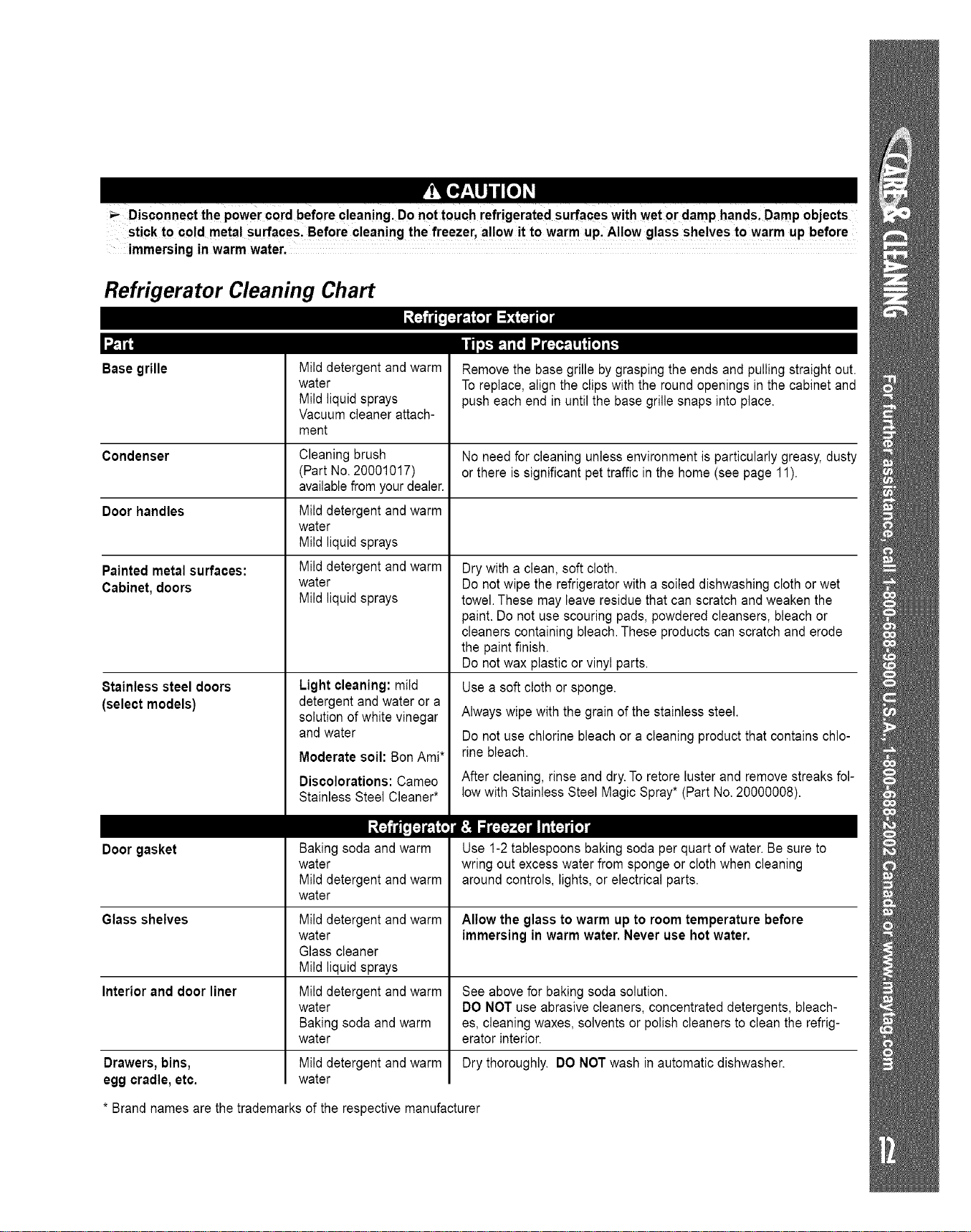
Disconnect the 0wer cord beforecleaning Do nottouch refrigerated surfaces with wet or damp hands Damp objects
p . ,
sti0k to cold metal surfaces, Before cleaning the freezer, allow it to warm up,Allow glass shelves to warm up before
immersing in warm water.
Refrigerator Cleaning Chart
Base grille
ii,_.-_-.l,1,I u=o_-],i o], _
Mild detergent and warm
water
Mild liquid sprays
Vacuum cleaner attach-
ment
Remove the base grille by grasping the ends and pulling straight out.
Toreplace, align the clips with the round openings in the cabinet and
push each end in until the base grille snaps into place.
Condenser No need for cleaning unless environment is particularly greasy,dusty
or there is significant pet traffic in the home (see page 11).
Door handles
Painted metal surfaces:
Cabinet, doors
8tainless steel doors
(select models)
Door gasket
Glass shelves
Interior and door liner
Cleaning brush
(Part No.20001017)
availablefrom your dealer.
Mild detergent and warm
water
Mild liquid sprays
Mild detergent and warm
water
Mild liquid sprays
Light cleaning: mild
detergent and water or a
solution of white vinegar
and water
Moderate soil: BonAmi*
Discolorations: Cameo
Stainless Steel Cleaner*
Baking soda and warm
water
Mild detergent and warm
water
Mild detergent and warm
water
Glass cleaner
Mild liquid sprays
Mild detergent and warm
water
Baking soda and warm
water
Mild detergent and warm
water
Drawers, bins,
egg cradle, etc.
Dry with a clean, soft cloth.
Do not wipe the refrigerator with a soiled dishwashing cloth or wet
towel.These may leave residue that can scratch and weaken the
paint. Do not use scouring pads, powdered cleansers, bleach or
cleaners containing bleach.These products can scratch and erode
the paint finish.
Do not wax plastic or vinyl parts.
Use a soft cloth or sponge.
Always wipe with the grain of the stainless steel.
Do not use chlorine bleach or a cleaning product that contains chlo-
rine bleach.
After cleaning, rinse and dry.Toretore luster and remove streaks fol-
low with Stainless Steel Magic Spray* (Part No. 20000008).
Use 1-2 tablespoons baking soda per quart of water.Be sure to
wring out excess water from sponge or cloth when cleaning
around controls, lights,or electrical parts.
Allow the glass to warm up to room temperature before
immersing in warm water. Never use hot water.
See above for baking soda solution.
DO NOT use abrasive cleaners, concentrated detergents, bleach-
es, cleaning waxes, solvents or polish cleaners to clean the refrig-
erator interior.
Dry thoroughly. DO NOT wash in automatic dishwasher.
* Brand names are the trademarks of the respective manufacturer
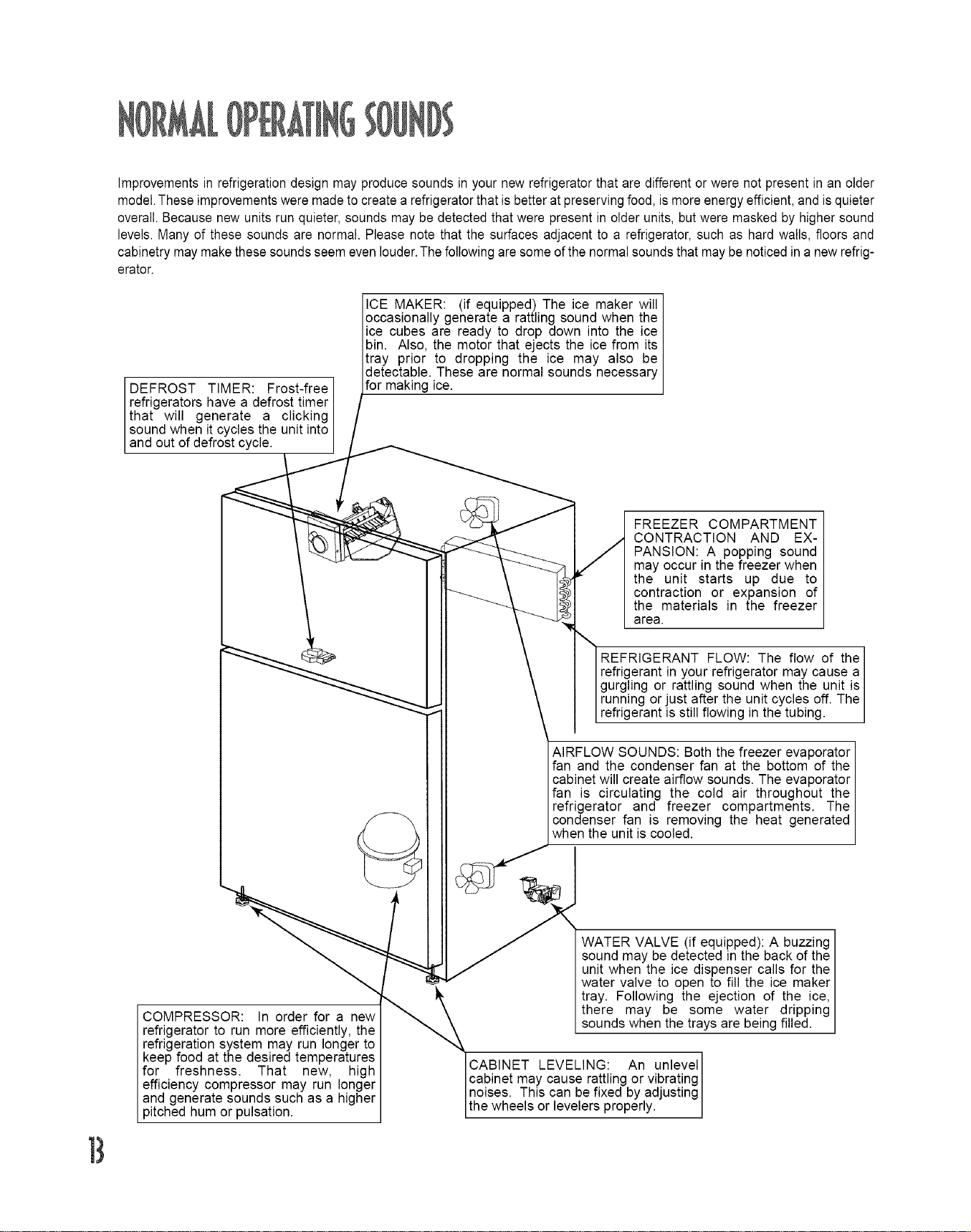
Improvementsinrefrigerationdesignmayproducesoundsinyournewrefrigeratorthataredifferentorwerenotpresentinanolder
model.Theseimprovementsweremadetocreatearefrigeratorthatisbetteratpreservingfood,ismoreenergyefficient,andisquieter
overall.Becausenewunitsrunquieter,soundsmaybedetectedthatwerepresentinolderunits,butweremaskedbyhighersound
levels.Manyofthesesoundsarenormal.Pleasenotethatthesurfacesadjacenttoarefrigerator,suchashardwalls,floorsand
cabinetrymaymakethesesoundsseemevenlouder.Thefollowingaresomeofthenormalsoundsthatmaybenoticedinanewrefrig-
erator.
DEFROST TIMER: Frost-free I
refrigerators have a defrost timer I
that will generate a clicking I
sound when it cycles the unit into
and out of defrost cyc e.
ICE MAKER: (if equipped) The ice maker will
occasionally generate a rattling sound when the
ice cubes are ready to drop down into the ice I
bin. Also, the motor that ejects the ice from its
tray prior to dropping the ice may also be I
detectable. These are normal sounds necessary
for mak ng ce.
COMPRESSOR: In order for a new
refrigerator to run more efficiently, the
refrigeration system may run longer to
keep food at the desired temperatures
for freshness. That new, high
efficiency compressor may run longer
and generate sounds such as a higher
pitched hum or pulsation.
FREEZER COMPARTMENT
CONTRACTION AND EX-
PANSION: A popping sound
may occur in the freezer when
the unit starts up due to
contraction or expansion of
the materials in the freezer
area.
REFRIGERANT FLOW: The flow of the]
refrigerant in your refrigerator may cause a/
gurgling or rattling sound when the unit is/
running or just after the unit cycles off. The/
refrigerant is still flowing in the tubing. J
AIRFLOW SOUNDS: Both the freezer evaporator
fan and the condenser fan at the bottom of the
cabinet will create airflow sounds. The evaporator
fan is circulating the cold air throughout the
refrigerator and freezer compartments. The
condenser fan is removing the heat generated
when the unit is cooled.
WATER VALVE (if equipped): A buzzing
sound may be detected in the back of the
unit when the ice dispenser calls for the
water valve to open to fill the ice maker
tray. Following the ejection of the ice,
there may be some water dripping
sounds when the trays are being filled.
CABINET LEVELING: An unlevel]
cabinet may cause rattling or vibrating /
noises. This can be fixed by adjusting /
the wheels or levelers properly. J
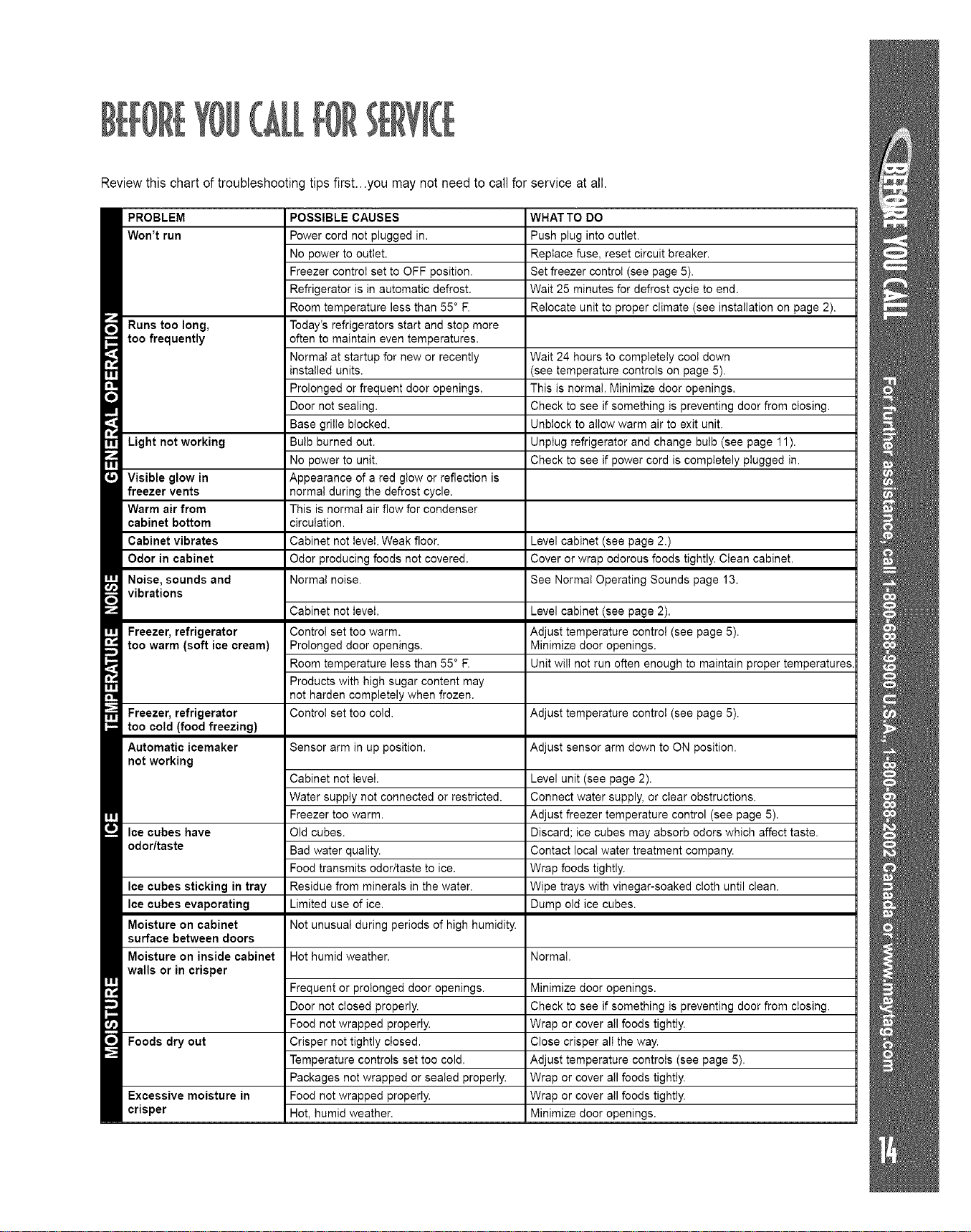
Reviewthis chart of troubleshooting tips first...you may not need to call for service at all.
rl
R
II
,'t.
rl
i
i
ill
i
I
r r_,J i;i i,. i; ill
Won't run
Runs too long,
too frequently
Light not working
Visible glow in
freezer vents
Warm air from
cabinet bottom
Cabinet vibrates
Odor in cabinet
Noise, sounds and
vibrations
Freezer, refrigerator
too warm (soft ice cream)
Freezer, refrigerator
too cold (food freezing)
Automatic icemaker
not working
Ice cubes have
odor/taste
Ice cubes sticking in tray
Ice cubes evaporating
Moisture on cabinet
surface between doors
Moisture on inside cabinet
walls or in crisper
Foods dry out
Excessive moisture in
crisper
Power cord not plugged in.
No power to outlet.
Freezer control set to OFF position.
Refrigerator is in automatic defrost.
Room temperature less than 55° R
Today's refrigerators start and stop more
often to maintain even temperatures.
Normal at startup for new or recently
installed units.
Prolonged or frequent door openings.
Door not sealing.
Base grille blocked.
Bulb burned out.
No power to unit.
Appearance of a red glow or reflection is
normal during the defrost cycle.
This is normal air flow for condenser
circulation.
Cabinet not level. Weak floor.
Odor producing foods not covered.
Normal noise.
vvrl/,_.l iIJ I,,#l*.l
Push plug into outlet.
Replace fuse, reset circuit breaker.
Set freezer control (see page 5).
Wait 25 minutes for defrost cycle to end.
Relocate unit to proper climate (see installation on page 2).
Wait 24 hours to completely coo! down
(see temperature controls on page 5).
This is normal. Minimize door openings.
Check to see if something is preventing door from closing.
UnbIock to allow warm air to exit unit.
Unplug refrigerator and change bulb (see page 11).
Check to see if power cord is completely plugged in.
Level cabinet (see page 2.)
Cover or wrap odorous foods tightly. Clean cabinet.
See Normal Operating Sounds page 13.
Cabinet not level.
Control set too warm.
Prolonged door openings.
Room temperature less than 55° R
Products with high sugar content may
not harden completely when frozen.
Control set too cold.
Level cabinet (see page 2).
Adjust temperature control (see page 5).
Minimize door openings.
Unit will not run often enough to maintain proper temperatures.
Adjust temperature control (see page 5).
Sensor arm in up position. Adjust sensor arm down to ON position.
Cabinet not level.
Water supply not connected or restricted.
Freezer too warm.
Old cubes.
Bad water quality.
Food transmits odor/taste to ice.
Residue from minerals in the water.
Limited use of ice.
Not unusual during periods of high humidity.
Level unit (see page 2).
Connect water supply, or clear obstructions.
Adjust freezer temperature control (see page 5).
Discard; ice cubes may absorb odors which affect taste.
Contact local water treatment company.
Wrap foods tightly.
Wipe trays with vinegar-soaked cloth until clean.
Dump old ice cubes.
Hot humid weather. Normal.
Frequent or prolonged door openings.
Door not closed properly.
Food not wrapped properly.
Crisper not tightly closed.
Temperature controls set too cold.
Packages not wrapped or sealed properly.
Food not wrapped properly.
Hot, humid weather.
Minimize door openings.
Check to see if something is preventing door from closing.
Wrap or cover all foods tightly.
Close crisper all the way.
Adjust temperature controls (see page 5).
Wrap or cover all foods tightly.
Wrap or cover all foods tightly.
Minimize door openings.
T¥
Full OneYearWarranty
For one (1) year from the date of original retail
purchase, any part that fails in qormal home
use will be repaired or replaced free of charge.
Ice Maker - When purchased with the refriger-
ator and installed by the dealer the ice maker
will De considered part of the refrigerator for
warranty purposes.
Limited Warranty - Major Refrigeration
Components
Second Through Fifth Year - After the first
year from the date of original retail purchase.
througn the end of the fifth year, Maytag
ServicessMwil repair or replace, at its option.
free of charge forparts and labor only,any part
of the sealed refrigeration system [consisting
of the compressor, evaporator, condenser.
drier and connecting tubing) and the cabinet
liner (exclusive of the door linerl which fail in
normal home use. All other costs, including
mileage, transportation, trip charge and diag-
nostic charge, if required, shall be the respon-
sibility of the owner.
Limited Warranty - Other Parts
Second Year - Parts other than major refriger-
ation components which fail in normal home
use during the second year following the date
of original retail purchase will be repaired or
provided free of charge for the part itself, with
the owner paying all other costs, ncluding
labor, mileage, transportation, trip charge and
diagnostic charge, if required.
Please note: The full warranty and the limited
warranties apply when the refrigerator is locat-
ed in the United States or Canada.
Refrigerators located elsewhere are covered
by the limited warranties only including parts
that fail during the first year.
Limitations of Liability
The warrantor shall not be liable for any inci-
dental or consequential damages, incJuding
food loss.Some states do not allow the exclu-
sion or limitationof consequential damages,so
the above limitation or exclusion may not apply
to you.
The specific warranties expressed above are
the ONLY warrantiesprovided by the manufac-
turer. These warranties give you specific
legal rights,and you may also haveother rights
which vary from state to state
I;
1. Conditions and damages resulting from any of the following:
a. Improper installation, delivery,or maintenance.
b. Any repair, modification, alteration, or adjustment not authorized bythe
manufacturer or an authorized servicer.
c. Misuse, abuse, accidents, or unreasonable use.
d. Incorrect electric current, voltage, or supply.
e. Improper setting of any control.
2. Warranties are void if the original serial numbers have been removed,
altered, or cannot be readily determined.
3. Light bulbs.
4. Products purchased for commercial or industrial use.
5. The cost of service or service call to:
a. Correct installation errors.
b. Instruct the user on the proper use of the product.
c. Transportthe appliance to the servicer.
6. Consequential or incidental damages sustained by any person as a result
of any breach of these warranties. Some states do not allow the exclusion
or limitation of consequential or incidental damages, so the above exclu-
sion may not apply.
To purchase accessories or replacement parts not covered by your
product warranty:
Please haveyour model and serial numbers ready and call our parts
specialists at 1-877-232-6771 U.S.A.or 1-800-688-8408 Canadafrom
7 a.m.to 7 p.m.central time Monday through Friday.
| Call the dealer from whom your appliance was purchased or call Maytag
ServicessM,Maytag Customer Assistance at 1-800-688-9900, USA or
1-800-688-2002 Canada to locate an authorized servicer.
| Be sure to retain proof of purchase to verify warranty status. Refer to
WARRANTY for further information on owner's responsibilities for war-
ranty service.
| If the dealer or service company cannot resolve the problem, write to
Maytag Servicess_,Attn: CAIR<_Center, RO. Box 2370, Cleveland, TN
37320-2370, or call 1-800-688-9900 U.8.A. or 1-800-688-2002 Canada.
U.S.customers using TTY for deaf, hearing impaired or speech impaired,
call 1-800-688-2080.
NOTE: When writing or calling about a service problem, please include
the following information:
a.Your name, address and telephone number;
b. Model number and serial number;
c. Name and address of your dealer or servicer;
d. A clear description of the problemyou are having;
e. Proof of purchase (sales receipt).
| User's guides, service manuals and parts information are available from
Maytag ServicessM,Maytag Customer Assistance.
T
MAYTAG 403 West Fourth Street North • EO. Box 39 • Newton, Iowa 50208