A Specia
to
Dear Bosch Range Owner:
Thank you and congratulations on the purchase of your Bosch Electric Range. Whether
you are an expert chef or an aspiring cook, we know that your new range will exceed
your expectations. Decades of knowledge and experience are built into this range
making it among the highest quality, most versatile and most efficient available.
We ask that you read this manual thoroughly before using your new range. Please pay
particular attention to the safety precautions printed at the front of this book and the
numerous safety hints and cautions placed throughout. Also, be sure to familiarize
yourself with the proper operation of the range and its cleaning and maintenance
procedures. Adherence to these instructions and procedures will assure that you
realize the full potential of your new Bosch range as well as maintain it for years of
dependable use.
Thank you and good cooking,
BSH Home Appliances Corporation
f _'_ WARNING
When properly cared for, your new Bosch range has
been designed to be a safe, reliable appliance. Read all
instructions carefully before using this range. These
precautions will reduce the risk of burns, electric shock,
fire, and injury to persons. Do not operate the oven or
cooktop controls if the glass is broken. Food splatter or
cleaning solution may penetrate a broken control panel
and create a risk of electric shock. Contact a qualified
technician immediately should your glass control panel
become broken. When using kitchen appliances, basic
safety precautions must be followed, including those in
the following pages.
,. j
INPORTANT SAFETY NOTICE
The California Safe Drinking and Toxic
Enforcement Act requires the Governor of
California to publish a list of substances
known to the state to cause cancer, birth
defects or other reproductive harm, and
requires businesses to warn customers of
potential exposure to such substances.
The elimination of soil during self-cleaning
generates some by-products which are on
the list.
The fiberglass insulation in self-dean ovens
gives off very small amounts of formaldehyde
during the first several cleaning cycles.
Exposure to these substances can be
minimized by:
!. Providing good ventilation when cooking
with gas
2. Providing good ventilation during and
immediately after self cleaning the oven.
3. Operating the unit according to the
instructions in this manual.
The Bosch range referred to thoughout this manual is manufactured by BSH Home Appliance Corp.
Impel:ant SafetyInstructions .............................................................................!
Getting Familiar with Your Range ....................................................................... 3
Setting Up Your Range
Setting and Changing the Clock ............................................................................ 5
Setting the Functions ........................................................................................... 6
Accessing and Using the Select Functions Menu .............................................. 6
Volume ........................................................................................................ 7
Change Temperature ..................................................................................... 7
Temperature Format ..................................................................................... 7
Lock Keys ..................................................................................................... 7
Language Option .......................................................................................... 7
Clock Display ................................................................................................ 8
Oven Temperature Offset .............................................................................. 8
Demo Mode .................................................................................................. 8
Reset Defaults .............................................................................................. 8
Sabbath Feature ........................................................................................... 8
The Cooktop
Cooktop Features ................................................................................................ 9
Operating the mTwisT Cooktop ............................................................................. 1!
The Oven
Oven (cut here) Features ..................................................................................... !2
Oven Modes = Bake and Convection Bake .............................................................. 13
Oven Modes = Broil and Convection Broil ............................................................... !4
Oven Modes = Convection Roast ........................................................................... !5
Oven Modes = Dehydrate ..................................................................................... !6
Selecting the Mode .............................................................................................. !7
Using the Timer (s) ............................................................................................. 18
Using Timed Cook ............................................................................................... !9
Using the Probe (some models) ............................................................................ 20
The Warming Drawer .............................................................................................. 21
Care and Cleaning
Cooktop .............................................................................................................. 23
Oven .................................................................................................................. 25
Self Help, Maintenance, Etc,
Cookware Selection Guide .................................................................................... 28
(cut here)
Maintenance
Removing the Oven Door .............................................................................. 29
Replacing the Oven Light .............................................................................. 29
Self Help
Cooktop (cut here) ........................................................................................ 30
Oven (cut here) ............................................................................................ 3:_
Customer Service and Warranty ........................................................................... 32
Pleaseread al instructionsbefore using this appliance,
APPLIANCE SAFETY
Thisappliancemust be properlyinstalledand grounded by
a qualifiedtechnician,Connect onlyto properlygrounded
outlet, Refer to Installation Instructionsfor details.
This appliance should be serviced only by a qualified service
technician. Contact the nearest authorized service center
for examination, repair or adjustment.
• Do not repair or replace an,i" part of the range unless
specifically recommended. Refer service to an authorized
servicer.
Do not operate this appliance if it is not working properly
or if it has been damaged, until an authorized servicer has
examined it.
Use this appliance only for its intended use as described in
this manual. If you have any questions, contact the
manufacturer.
Do not cover or block any openings on this appliance.
Do not use corrosNe chemicals, vapors, or nonfood produets
in this appliance, This type of range is specifically designed
to heat or cook. Itis not designed for industrial or laboratory
use. The use of corrosive chemicals in heating or cleaning
will damage the appliance.
In the event that personal clothing or hair catches fire,
DROP AND ROLL IMMEDIATELY toextinguish flames,
Do not allow children to use this appliance unless closely
supervised by an adult. Children and pets should not be left
alone or unattended in the area where the appliance is in
use. They should never be allowed to sit or stand on any
)art of the appliance.
A
To reduce the risk of injury to persons, in the event of a
grease fire, observe the following:
In the event of a grease fire SMOTHERFLAHESwith a close-
ff_ting lid, cookie sheet, or other metal tray, then turn off the
elements. BE CAREFULTO PREVENTBURNS.If the flames do
not go out immediately, EVACUATEAND CALLTHE FIRE
DEPARTMENT.
Do not use water, including wet dishcloths or towels on grease
fires. A violent steam explosion may result.
SHOTHERFLAHESfrom other types of food fires with baking
soda. NEVERuse water on cooking fires.
NEVERPICK UPA FLAHING PAN.You may be burned.
ALWAYShave a working SMOKEDETECTORnear the kitchen.
LEAVETHE HOODVENTILATORON when fiamb_ing food.
® Use an extinguisher ONLY IF:
Youknow you havea ClassABCextinguisher,andyou already
know how to operate it.
The fire is small and contained in the area where it started.
The fire department is being called.
You can fight the fire with your back to an exit.
RANGE SAFETY
Tie long hair so that it does not hang loose.
The heating elements may be hot even though they are not
red in color. Interior surfaces of an oven become hot enough
to cause burns.
Do not touch heating elements or interior surfaces of oven
during operation.
During and after use, do not touch or let clothing or other
flammable materials contact the heating elements or the
interior surfaces of the oven until they have had sufficient
time to cool.
The trim on the sides of the oven door may become hot
enough to cause burns.
Use care when opening the door. Open the door slightly to
let hot air or steam escape before removing or replacing
food.
Do not heat unopened food containers. Build=up of pressure
may cause the container to burst and cause injury.
Always place oven racks in desired location while oven is
cool. If a rack must be moved while oven is hot, do not let
potholder contact the hot heating elements.
Use only dry potholders. Moist or damp potholders on hot
surfaces may result in burns from steam. Do not let potholder
touch hot heating elements. Do not use a towel or other
bulky cloth.
Keep the oven free from grease build up.
Do not place food directly on oven bottom.
When using cooking or roasting bags in the oven, follow the
manufacturer's directions.
Do not use aluminum foil to line oven bottoms, except as
suggested inthis manual. Improper installation of aluminum
foil many result in a risk of electric shock or fire.
To avoid electric shock, do not operate the oven without the
light bulb cover in place.
COOKTOP SAFETY
Do not cook on a cooktop in which the glass top has broken.
If the cooktop glass should break, do not use it or attempt
to dean or fix it, Cleaning solutions and spillovers may
penetrate the broken cooktop and create a risk of electric
shock. Turn off eleetdc circuit to the cooktop and call an
authorized service agency immediately.
When using the cooktop, DO NOT TOUCN TNE NOT
COOKING AREAORTNE IMMEDIATE SURROUNDING
AREA, Even though dark in color, these areas may be hot.
Areas adjacent to the elements may become hot enough to
cause burns. Never let clothing, potholders, or other
flammable materials come in contact with a cooking area
until it has cooled.
Usehigh heat settings on the cooktop only when necessary Use
low to medium settings to heat oil slowly.
Nevermove a panof hot oil, especiallya deep fat fryer. Wait until
it is cool.
Page i
Please read all instructions before using this appliance.
COOKTOP SAFETY (cont'd}
Neverleavethecooktopunattended,Boiloverscancausesmoke
and possiblydamage thecooktop,
Holdthehandleofthepan topreventmovement oftheutensil
when stirring or turning food.
Other than the use of metal pans, only certain types of glass,
heatproof glass ceramic, ceramic, earthenware, or other glazed
utensils are suitable for cooktop use.Other types of utensils may
break with sudden temperature changes. Use only on low or
medium heat settings according to the utensil manufacturer's
directions.
OVEN SAFETY
To reduce the risk of fire:
Do not store flammable materials in or near the oven.
Do not use water on a grease fire. Smother fire OFuse
a dry chemical or foam=type extinguisher.
Have an appropriate fire extinguisher available and
highly visible near any cooking appliance.
Do not use the cavity for storage purposes. Do not
leave paper products, cooking utensils OFfood in the cavity
when not being used.
If materials inside the oven should ignite, keep oven
door dosed.Turn off oven and disconnect the circuit at the
circuit breaker box.
Do not block any vent openings.
Never use the oven to warm or heat a room. This can
damage the oven parts.
Never wear loose=fitting or hanging garments while
using the appliance. Be careful when reaching for items
stored over the range. Flammable material could be ignited
if brought in contact with hot surface units or heating
elements and may cause severe burns.
Do not allow anyone to climb, stand or hang on the
oven door, warming drawer door, storage drawer or
cooktop. This can damage the range and even tip it over,
causing severe personal injury.
Have the installer show the location of the circuit
breaker or fuse. Mark it for easy reference.
WARMING DRAWFR SAFETY
To reduce the risk of fire, electric shock, or
injury to persons:
Do not store flammable materiams in the warming
drawer.
Use care when opening the warming drawer. Open door
slightly and methot air or steam escape before removing
or replacing food.
, Do not place food in unopened containers in the
warming drawer, Pressure could build up and cause
container to burst.
$ELF-CLFANING SAFETY
Confirm that the door locks and will not open once the
door lock indicator icon appears. If the door does not
lock, touch OFF and do not run Self-Clean. Phone
800/944=2904 for service.
Note: During a normal Self-Clean cycle, the door will not
lock until the oven reaches 4500 R In a Delayed Self-Clean
cycle, the door locks immediately.
Do not clean the oven gasket. It is essential for agood seal.
Care should be taken notto rub, damage, move or remove
the oven gasket.
Do not use commerdal oven cleaners or oven liner protective
coatings of any kind in or around any part of the oven.
Clean only oven parts listed in this manual.
Before self-cleaning the oven, remove the broiler pan,
oven racks, oven probe, other utensils and wipe out
excess soft spillage,
REGARDING PET BIRDS:
Birdshave verysensitiverespiratorysystems,Keep petbirds
outofthekitchenorotherrooms where kitchenfumes could
reach them. During self clean, fumes are released that may
be harmful to birds. Other kitchen fumes such as overheating
margarines and cooking oils may also be harmful.
CAUTION
Items of interest to children should
not be stored in cabinets above a
rangeor on the backsplash of a range.
Children climbing on the range to
reach items could be seriously injured.
Page 2
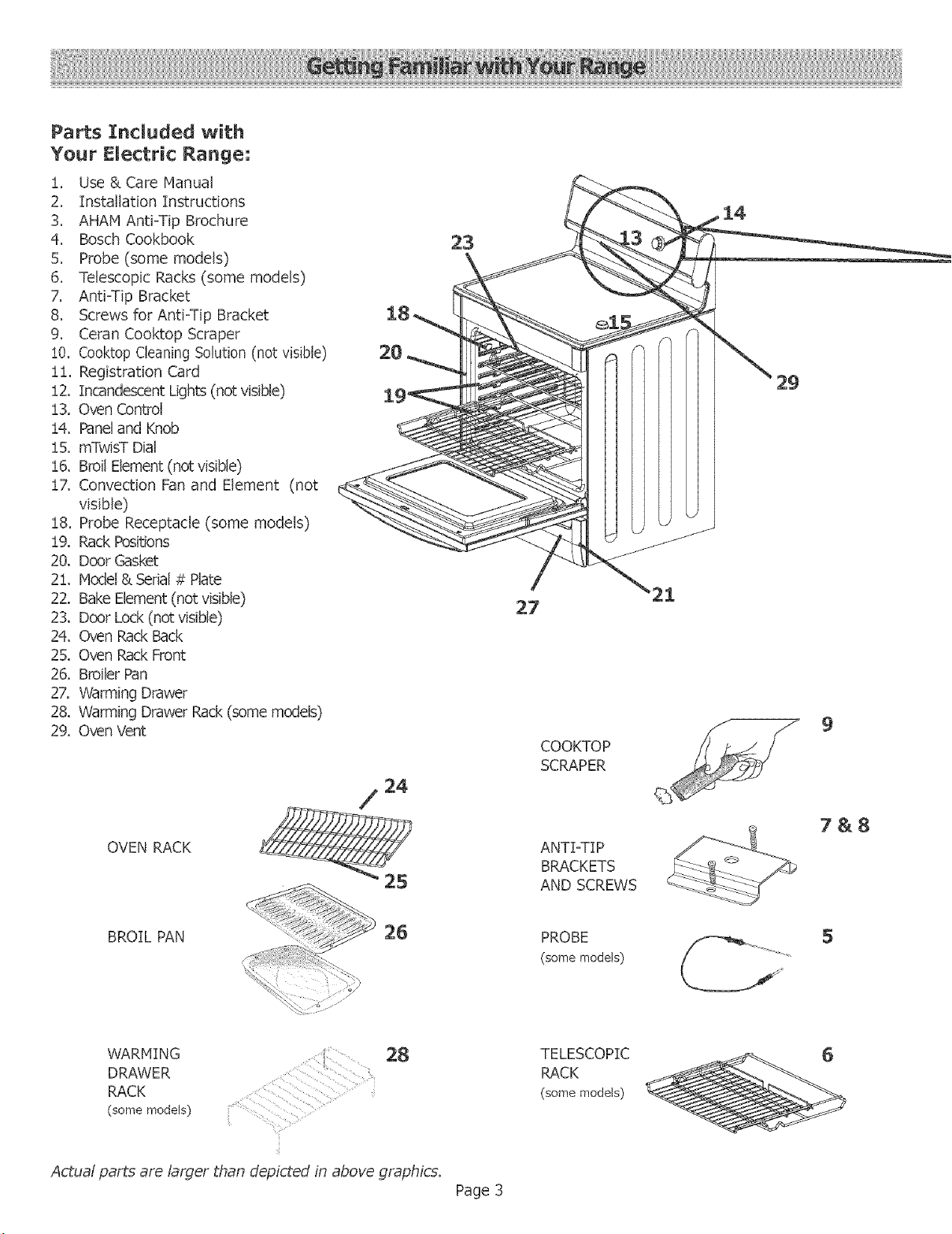
Parts ]Included with
Your Electric Range:
!. Use & Care Manual
2, Installation Instructions
3, AHAM Anti-Tip Brochure
4, Bosch Cookbook
5, Probe (some models)
6, Telescopic Racks (some models)
7. Anti-Tip Bracket
8. Screws for Anti-Tip Bracket
9, Ceran Cooktop Scraper
!0, Cooktop Cleaning Solution (not visible)
ii, Registration Card
!2, Incandescent Lights (not visible)
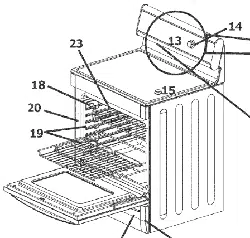
13, Oven Control
i4. Paneland Knob
15. mTwisT Dial
t6. Broil Element (notvisible)
!7. Convection Fan and Element (not
visible)
!8. Probe Receptacle (some models)
!9, Rack Positions
20, Door Gasket
2!. Model & Serial # Plate
22. Bake Element (not visible)
23. Door Lock (not visible)
24. Oven Rack Back
25. Oven Rack Front
26. Broiler Pan
27, Warming Drawer
28. Warming Drawer Rack (some models)
29. Oven Vent
OVEN RACK
COOKTOP
SCRAPER
ANTI-TI P
BRACKETS
AND SCREWS
9
7&8
BROIL PAN
PROBE
(some models)
5
WARMING
DRAWER
RACK
(some models)
28
L_
TELESCOPIC
RACK
(some models)
6
Actual parts are larger than depicted in above graphics.
Page 3
Light
Cooking Mode___
Temperature
Start
Off Temperature
Preheator Pro_e
Probe
Temperature Indicator
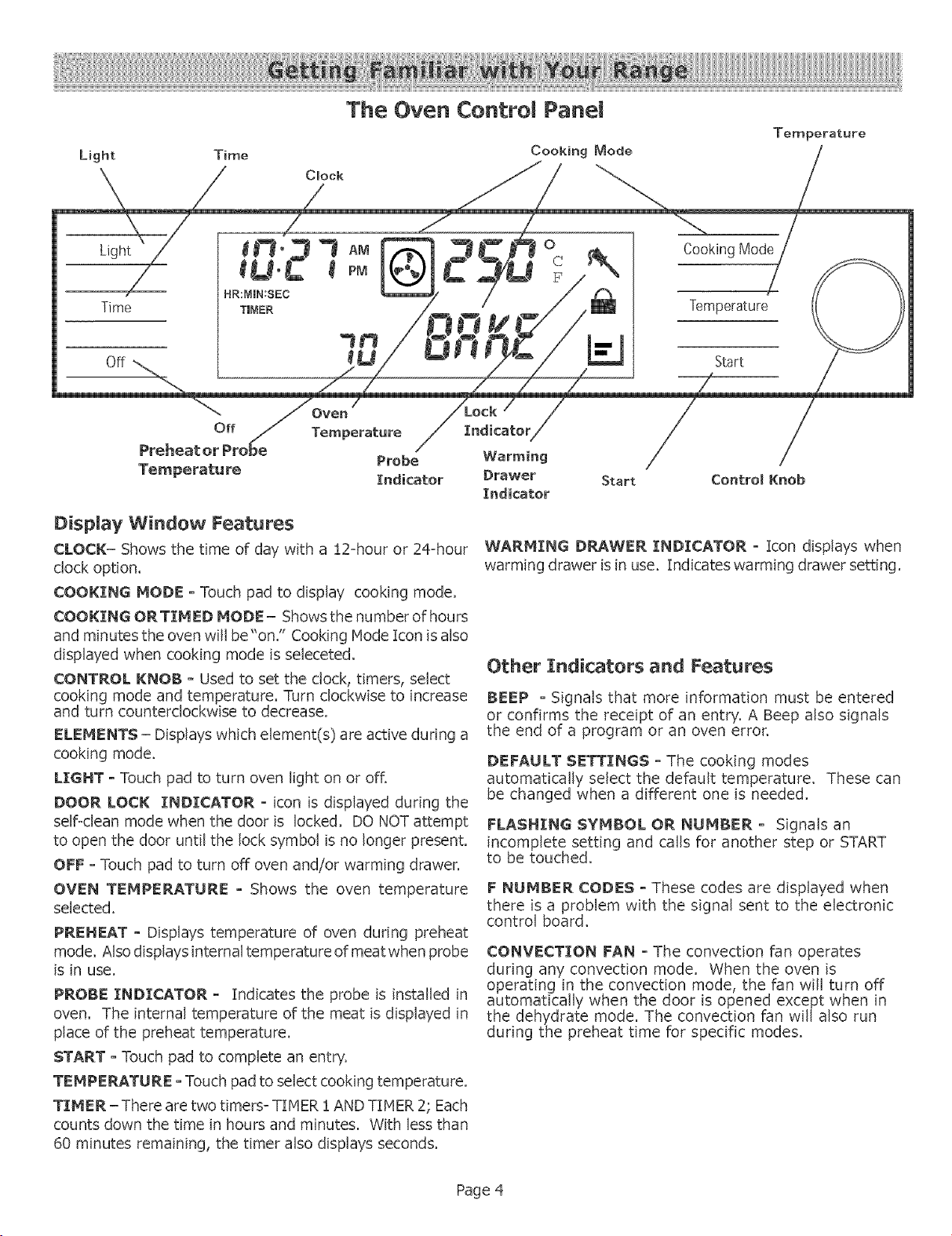
Display Window Features
CLOCK= Shows the time of day with a !2=hour or 24=hour
clock option.
COOKING MODE o Touch pad to display cooking mode.
COOKING ORTIMED MODE- Shows the number of hours
and minutes the oven will be"on." Cooking lode Icon is also
displayed when cooking mode is seleceted.
CONTROL KNOB - Used to set the clock, timers, select
cooking mode and temperature. Turn clockwise to increase
and turn counterclockwise to decrease.
ELEMENTS - Displays which element(s) are active during a
cooking mode.
LIGHT o Touch pad to turn oven light on or offi
DOOR LOCK INDICATOR o icon is displayed during the
self<lean mode when the door is locked, DO NOT attempt
to open the dOOr until the lock symbol is no longer present,
OFF oTouch pad to turn off oven and/or warming drawer,
OVEN TEMPERATURE o Shows the oven temperature
selected.
PREHEAT o Displays temperature of oven during preheat
mode. Also displays internal temperature of meat when probe
is in use.
PROBE INDICATOR o Indicates the probe is installed in
oven. The internal temperature of the meat is displayed in
place of the preheat temperature.
START - Touch pad to complete an entry.
TEMPERATURE - Touch pad to select cooking temperature.
TIMER-There are two timers- TIHER :[ AND TIMER 2, Each
counts down the time in hours and minutes. With less than
60 minutes remaining, the timer also displays seconds.
Indicator
Warming
Drawer
:Indicator
Start ControlKnob
WARMING DRAWER INDICATOR o Icon displays when
warming drawer is in use. Indicates warming drawer setting.
Other Indicators and Features
BEEP o Signals that more information must be entered
or confirms the receipt of an entry. A Beep also signals
the end of a program or an oven error.
DEFAULT SETTINGS o The cooking modes
automatically select the default temperature. These can
be changed when a different one is needed.
FLASHING SYMBOL OR NUMBER o Signals an
incomplete setting and calls for another step or START
to be touched,
F NUMBER CODES o These codes are displayed when
there is a problem with the signal sent to the electronic
control board.
CONVECTION FAN o The convection fan operates
during any convection mode. When the oven is
operating in the convection mode, the fan will turn off
automatically when the door is opened except when in
the dehydrate mode. The convection fan will also run
during the preheat time for specific modes.
Page 4
Setting the Clock (after power to the range has been off)
Always set the clock after installation or after a power failure. Once power returns to the oven, the clock defaults to 12:00 am.
The time of day is displayed in hours and minutes.
The clock time will appear during all oven operations except when the timer or a timed cooking operation is running_
The oven is preset to a 12=hour clock and indicates AM and PM.
Note: To switch to a 24 hr. clock, see "Select Function" section.
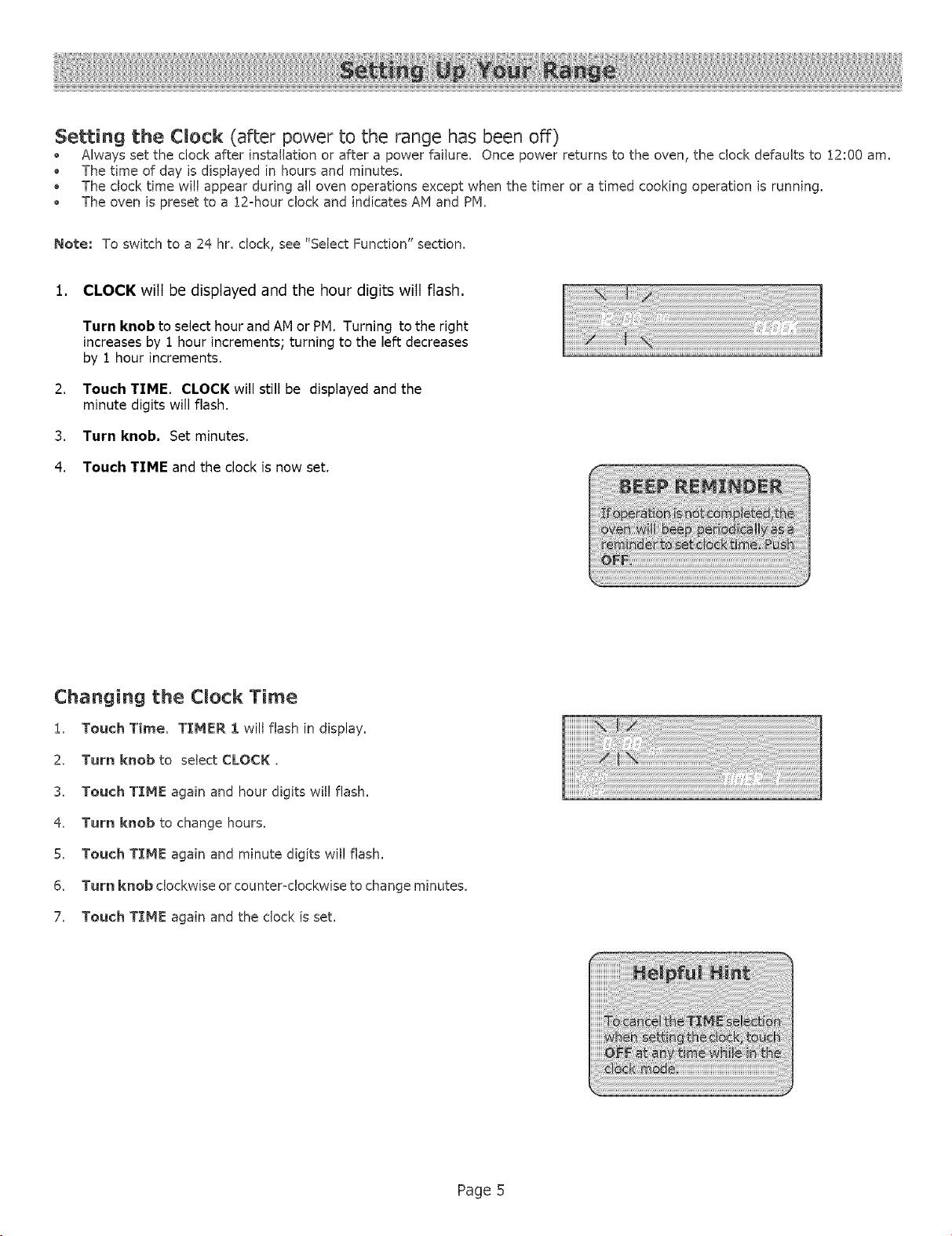
1. CLOCK will be displayed and the hour digits will flash.
2.
3.
4.
Turn knob to select hour and AN or PM. Turning to the right
increases by 1 hour increments; turning to the left decreases
by 1 hour increments.
Touch TIME. CLOCK will still be displayed and the
minute digits will flash.
Turn knob. Set minutes.
Touch TIME and the clock is now set.
Changing the Clock Time
1. Touch Time. TIMER 1 will flash in display.
2. Turn knob to select CLOCK,
3. Touch TIME again and hour digits wil! flash.
4. Turn knob to change hours.
5. Touch T[ME again and minute digits wil! flash.
6. Turn knob clockwise or counter<lockwise to change minutes.
7. Touch TIME again and the clock is set,
Page 5
SELECT FUNCTIONS is the section of the menu where you can set or change the following features on your range:
VOLUME (decrease or increase loudness
of control beeps)
G
TEMPERATURE FORMAT (switch temperature
scale to Fahrenheit or Celsius)
TIHE FORMAT (!2 hr or 24 hr)
LOCK KEYS (oven control pad lockout )
ABC
@
DEHO
©
LANGUAGE OPTION (for display; select English,
Spanish, or French)
CLOCK DISPLAY (yes or no)
OVEN TEHPERATURE OFFSET (used to
calibrate the oven temperature)
DEMO MODE (used by appliance stores)
RESET DEFAULTS (change ai/function settings
back to original factory settings)
SABBATH FFJ_TURE(for religiousfaiths with"no
work" requirements on the Sabbath)
NOTE: In the event of a power failure, the functions return
to the factory settings and will need to be reset.
Accessing and Using the Select Functions
Menu
To access the SELECT FUNCTIONS menu, touch and hold
COOKING RODE touch pad forfive(5) seconds.
SELECT FUNCTION is displayed.
!. Turn knob to desired feature.
2. Press START to choose any function, and turn knob
to choose any sub-functions.
3. After selecting feature, touch OFF.
4. Touch OFF again to exit the select functions menu.
Page 6
_ BEEP VOLUHE
Thevolumeofthecontrolbeepcanbechanged from LOW
(softest)to HIGH (loudest).
The control default for beep volume is Medium.
Changing the beep vomu_e
!. Access SELECT FUNCTION Menu.
2. Turn knob clockwise slowly: until VOLUME is displayed.
3, Touch START.
4. Turn kneb to select volume level Low, Medium or High.
5. Touch START.
o
o
CHANGE TEMPERATURE
The oven has been preset to the Fahrenheittemperature
scale,
The feature allows you to switch between Fahrenheitand
Celsiustemperature.
Changing the Temperature Scale
i. Access SELECT FUNCT%ON Menu,
2. Turn knob dockwise slowly untiL SELECT TEHP FoCis
displayed.
3, Touch START.
4, Turn knob to select Fahrenheit (F) or Celsius (C).
5. Touch START to accept new selection.
LOCK KEYS
The keypad can be locked for safety"purposes,
This feature can be used to prevent changes to the oven
function,
TTME FORMAT
The clockcan be setto a 12-hror 24=hr
format.
The oven default for clock format is :[2-hr,
Changing the TIHE FORHAT
!. Access SELECT FUNCTION Menu.
2. Turn knob clockwise slowl_Luntil TIHE FORHAT is
displayed.
3. Touch START,
4. Turn knob to select !2 hr or 24 hr format,
5. Touch START to accept new selection.
LoeMng or UnloeMng the Oven Control Panem
1. Access SELECT FUNCTION Menu.
2. Turn knob dockwise slowly until LOCK KEYS is
flashing.
3. Touch START. KEY PAD LOCKED is displayed, The
display will beep if a key is pressed to indicate that the
keypad is locked.
4. To unlock keypads, touch COOING MOD£ and hold for
5 seconds. Display will read UNLOCKING KEY PAl).
5. When unlocked, the clock will again appear in the display.
Note: This function DOES NOT lock oven door,
ABC LANGUAGE DISPLAY
Language choices are English,Spanish, and French.
English is the default language.
Changing the Language Display
!. Access SELECT FUNCTION Menu.
2. Turn I_ob dockwiseslow_ untildesiredlanguageisdisphyed.
3. Touch START,
4. Turn knob clockwise to select a different language
5. Touch START to accept a language change.
Page 7
_ CLOCK DISPLAY(ON or OFF)
* Clock time display can be turned off.
, The default display is on.
Turning the Clock Display ON or OFF
1. Access SELECT FUNCTION Menu.
2. Turn knob clockwise stowt_Luntil CLOCK DISPLAY is
displayed.
3. Touch START.
4. Turn knob once and ON or OFF will appear indisplay.
5. Touch START to accept new selection.
©
o
RESET DEFAULTS
This feature is used to change all the"Select Functions"
settings back to the original factory" settings (or
defaults),
Resetting the factory settings.
1. Access SELECT FUNCTIONS Menu,
2. Turn knob clockwise slowbLuntil RESET DEFAULTS
is displayed,
3. Touch START. DisplayFeadsSELECTFUHCTIOHS.
_%VEN TEMPERATURE OFFSET
Changing the Oven Temp Offset
i. Access SELECT FUHCTION Menu.
2. Turn knob clockwise slowl_Luntil OVEN TEHP OFFSET
is displayed.
3. Touch START. 0° F is displayed,
4. Turn the knob to the right to increase temperature
+25°F and to the left to decrease =25° temperature.
5. Touch START to accept a temperature change.
O_v!O DE!O MODE
The demo mode is for appliance store use only.
o
The oven will bakefor 48hours before automaticallytuming
off.
Oven or warming drawer cannot be operating to set the
Sabbath Feature.
Setting the Sabbath Feature
i, Access SELECT FUNCTIONS Menu.
2. Turn knob clockwise until SABBATH OPTIOH
appears.
3. Touch START. BAKE will show in display and
temperature will flash.
4. Turn knob to set oven temperature.
5. Turn oven light on if desired (touch LIGHT).
Hote: The light cannot be changed after this point. It will
stay on or off, as selected, during the entire Sabbath
mode.
6. Touch START. Oven starts after 5 seconds.
Hete: The probe CANHOT be used during the Sabbath
mode.
While baking in Sabbath mode, the display will show SABBATH
and the BAKE icon will be displayed. The clock will be off and
no temperature will show in the display.
During the Sabbath mode, only the off key will operate.
Press Off at any time during the Sabbath mode to
end the mode and turn off the oven°
At end of 48 hours, the oven will turn OFF automatically and
the display will show SABBATH END. Touch OFF to return
to time of day.
Page 8
Before Using the Cooktop
• Remove all packing materials and labels from the cooktop
surface.
While cool, wipe with a dean, damp sponge and dry.
Apply the Cooktop Cleaning Creme packaged with the
range. Buff with a dean cloth. See Care and Cleaning
Section,
There may be a slight odor during the first several uses;
this is normal and will disappear.
Optimum cooking results depend on the proper cookware
being selected and used.
The cooking surface will hold the heat and remain hot up
to 30 minutes after the elements have been turned off.
Read and understand all safety precautions and Use and
Care Manual information prior to operating.
Precautions for Long Life and Good
Appearance of the Surface
Regular, daily care using the Cooktop Cleaning Creme will
protect the surface and make it easier to remove food soil
and water spots.
• The ceramic glass cooking surface is a durable material
resistant to impact but not unbreakable if a pan or other
object is dropped on it.
o Never cook food directly on the glass,
Avoid placing a wok support ring, trivet or other metal
stand on the glass surface.
Do not use the glass surface as a cutting board.
Do not slide cookware across the cooking surface; it may"
scratch the glass.
Do not place wet pans on the glass surface.
Retained Heat
The glass cooking surface retains heat and stays hot after
the element(s) have been turned off. The retained heat may
be used to hold foods at serving temperatures for a short
time. If a hot surface light is on, use caution when working
or cleaning around the cooktop as the cooktop is still hot.
Temperature Limiters
Each radiant heating element has its own sensor to protect
the glass cooking surface from extreme high temperatures.
The limiters will operate automatically by cycling the element
off regardless of the cook setting.
Although cycling is normal, any one of the following conditions
can activate the limiter and cause it to cycle on and off more
than usual:
The base of the pan is not making full contact with the
heating surface (due to a warped or uneven base).
The pan is too small for the size of the element.
The pan has boiled dry.
The material or shape of the pan is slow to transfer the
heat.
Radiant Elements
Bosch UltraSpeed TM radiant elements use a wire ribbon located
under the ceramic glass surface to provide the heat for cooking.
These radiant elements will cycle on and off by design (see
Temperature Limitersat left.) There are 9 heat setting positions
from 9 (high) to ! (low) and a special setting for keep warm.
Dual Element
The dual element consists of two radiant ribbon elements
within the same heating area. Either the small inner element
or both the inner and outer elements may be selected for use,
depending on the size of cookware.
Triple Element (Some Models)
The TripleElement,locatedinthe leftfrontposition,consists
of three radiant ribbon elements within the same heating
area, one, two or three elements can be selected.
• Defaults to largest element.
Touch POT SIZING once for medium size.
Touch POT SIZING twice for small size.
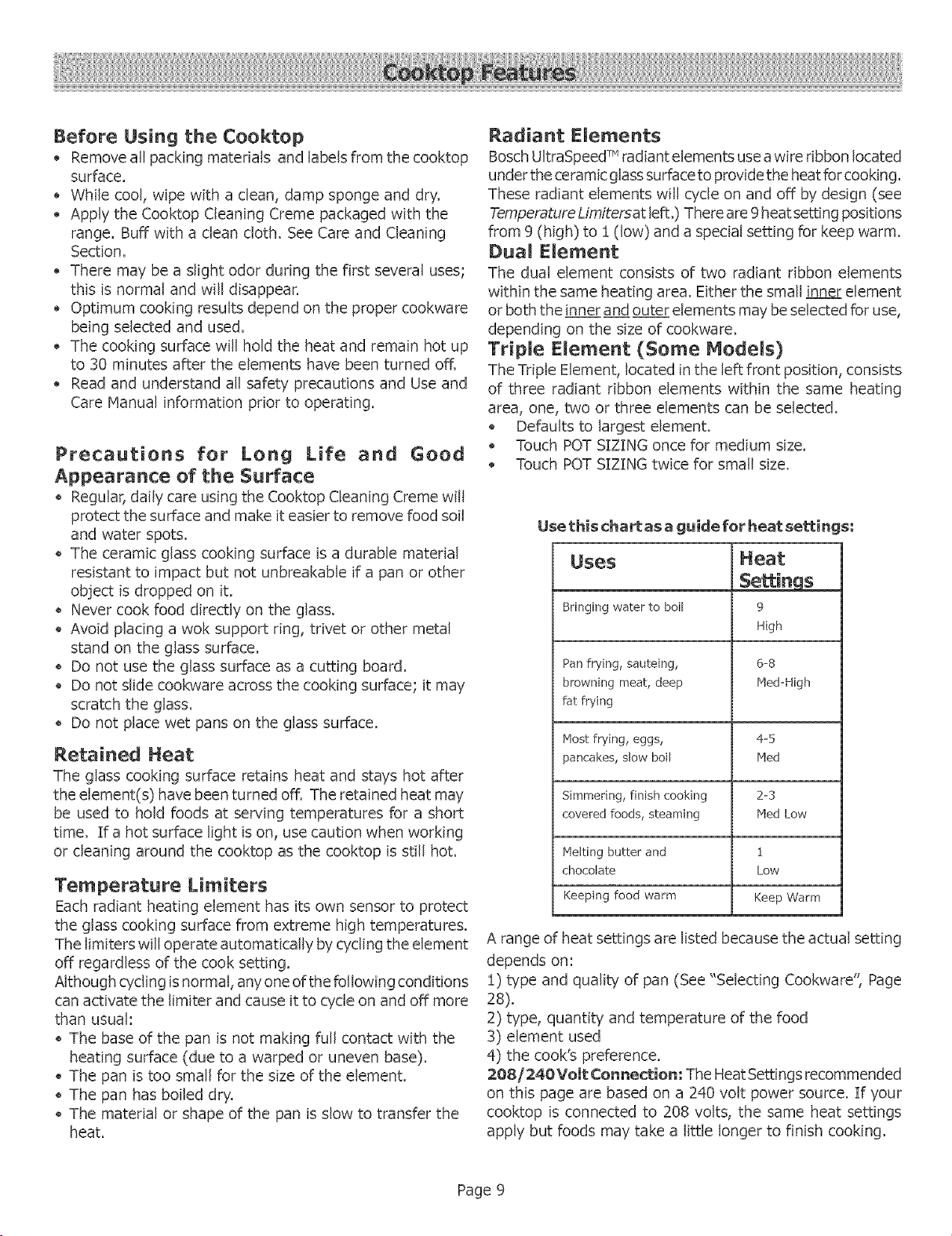
Use thischart as a guide for heat settin{
Heat
Settings
9
High
Uses
Bringing water to boil
Pan frying, sauteing, 6-8
browning meat, deep Meal-High
fat frying
Most frying, eggs, 4-5
pancakes, slow boil Meal
Simmering, finish cooking 2-3
covered foods, steaming rVledLow
Melting butter and 1
chocolate Low
Keeping food warm Keep Warm
A range of heat settings are listed because the actual setting
depends on:
1) type and quality of pan (See "Selecting Cookware', Page
28).
2) type, quantity and temperature of the food
3) element used
4) the cook's preference.
208/240 Volt (Sonnection; The Heat Settings recom mended
on this page are based on a 240 volt power source. If your
cooktop is connected to 208 volts, the same heat settings
apply but foods may take a little longer to finish cooking.
Page 9
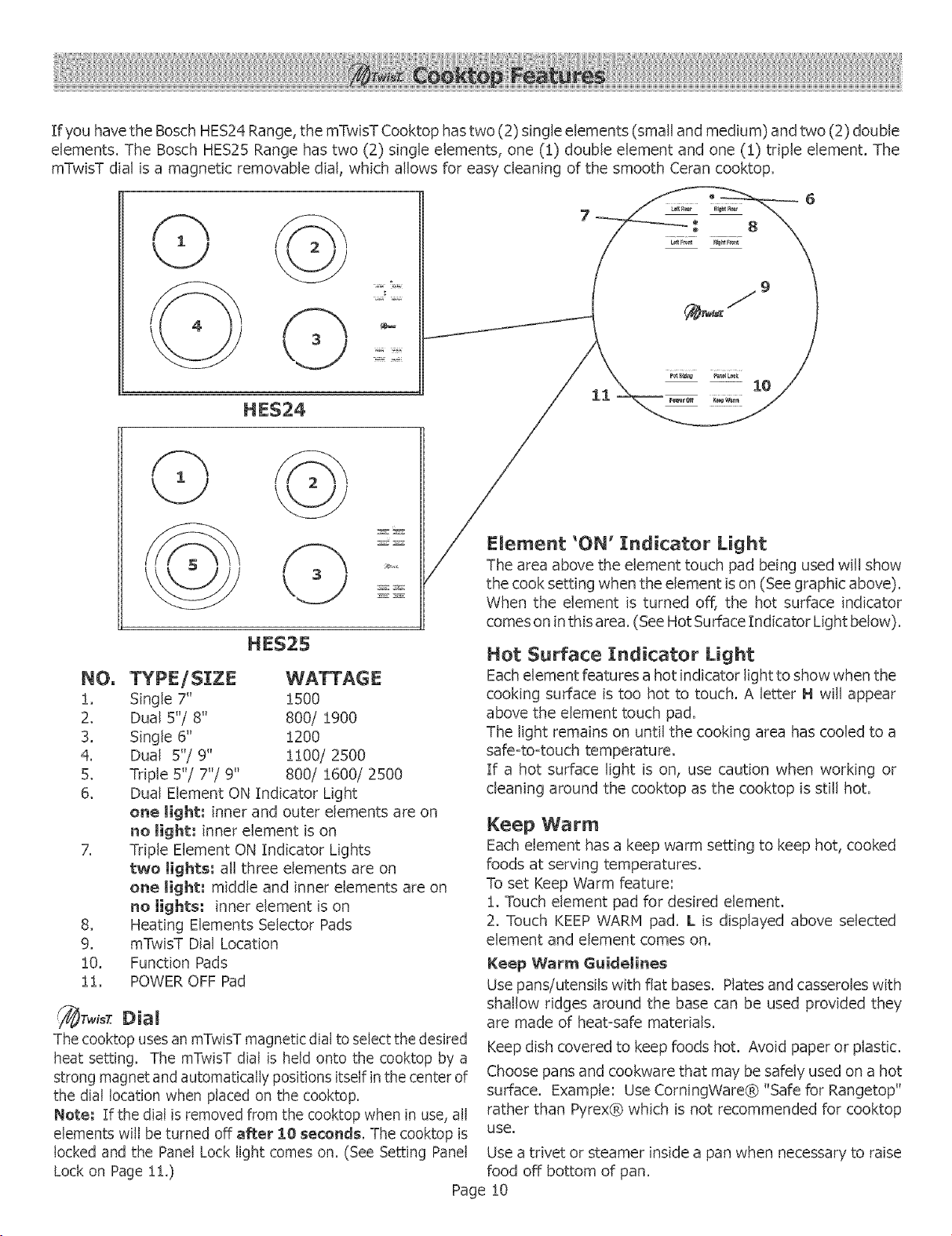
IfyouhavetheBoschHES24Range,themTwisTCooktophastwo(2)singleelements(smallandmedium)andtwo(2)double
elements.TheBoschHES25Rangehastwo(2) singleelements,one(1)doubleelementandone(1)tripleelement.The
mTwisTdialisa magneticremovabledial,whichallowsfor easydeaningofthesmoothCerancooktop.
©
HE$24
HES25
NO. TYPE/SIZE
1. Single 7"
2. Dual 5"/8"
3. Single 6"
4. Dual 5"/9"
5. Triple 5"/7"/9"
6.
7_
8_
9.
!0.
!!.
1500
800/ 1900
1200
1100/2500
800/ 1600/2500
Dual Element ON Indicator Light
one light: inner and outer elements are on
no tight: inner element is on
Triple Element ON Indicator Lights
two tights; all three elements are on
one light; middle and inner elements are on
no lights: inner element is on
Heating Elements Selector Pads
mTwisT Dial Location
Function Pads
POWER OFF Pad
_TwisT Dial
The cooktop uses an mTwisT magnetic dial to select the desired
heat setting. The mTwisT dial is held onto the cooktop by a
strong magnet and automatically positions itself in the center of
the dial location when placed on the cooktop.
Note; If the dial is removed from the cooktop when in use, all
elements will be turned off after IO seconds. The cooktop is
locked and the Panel Lock light comes on. (See Setting Panel
Lock on Page 11.)
Element 'OI!" Indicator Light
The area above the element touch pad being used will show
the cook setting when the element is on (See graphic above).
When the element is turned off, the hot surface indicator
comes on in this area. (See Hot Surface Indicator Light below).
Hot Surface Indicator Light
Each element features a hot indicator light to show when the
cooking surface is too hot to touch. A letter I-! will appear
above the element touch pad.
The light remains on until the cooking area has cooled to a
safe-to-touch temperature.
If a hot surface light is on, use caution when working OF
cleaning around the cooktop as the cooktop is still hot.
Keep Warm
Each element has a keep warm setting to keep hot, cooked
foods at serving temperatures.
To set Keep Warm feature:
1. Touch element pad for desired element.
2. Touch KEEP WARM pad. L is displayed above selected
element and element comes on.
Keep Warm Guidelines
Use pans/utensils with flat bases. Plates and casseroles with
shallow ridges around the base can be used provided they
are made of heat=safe materials.
Keep dish covered to keep foods hot. Avoid paper or plastic.
Choose pans and cookware that may be safely used on a hot
surface. Example: Use CorningWare® "Safe for Rangetop"
rather than Pyrex® which is not recommended for cooktop
use,
Use a trivet or steamer inside a pan when necessary to raise
food off bottom of pan.
Page !0
General Operation of Cooktop
The range has touch pads and a magnetic dial to operate the
cooktop. When touching the glass of a touch pad, such as an
element or function pad, use the flat part of the finger and
touch the center of the pad. A beep will sound when touching
any of these pads.
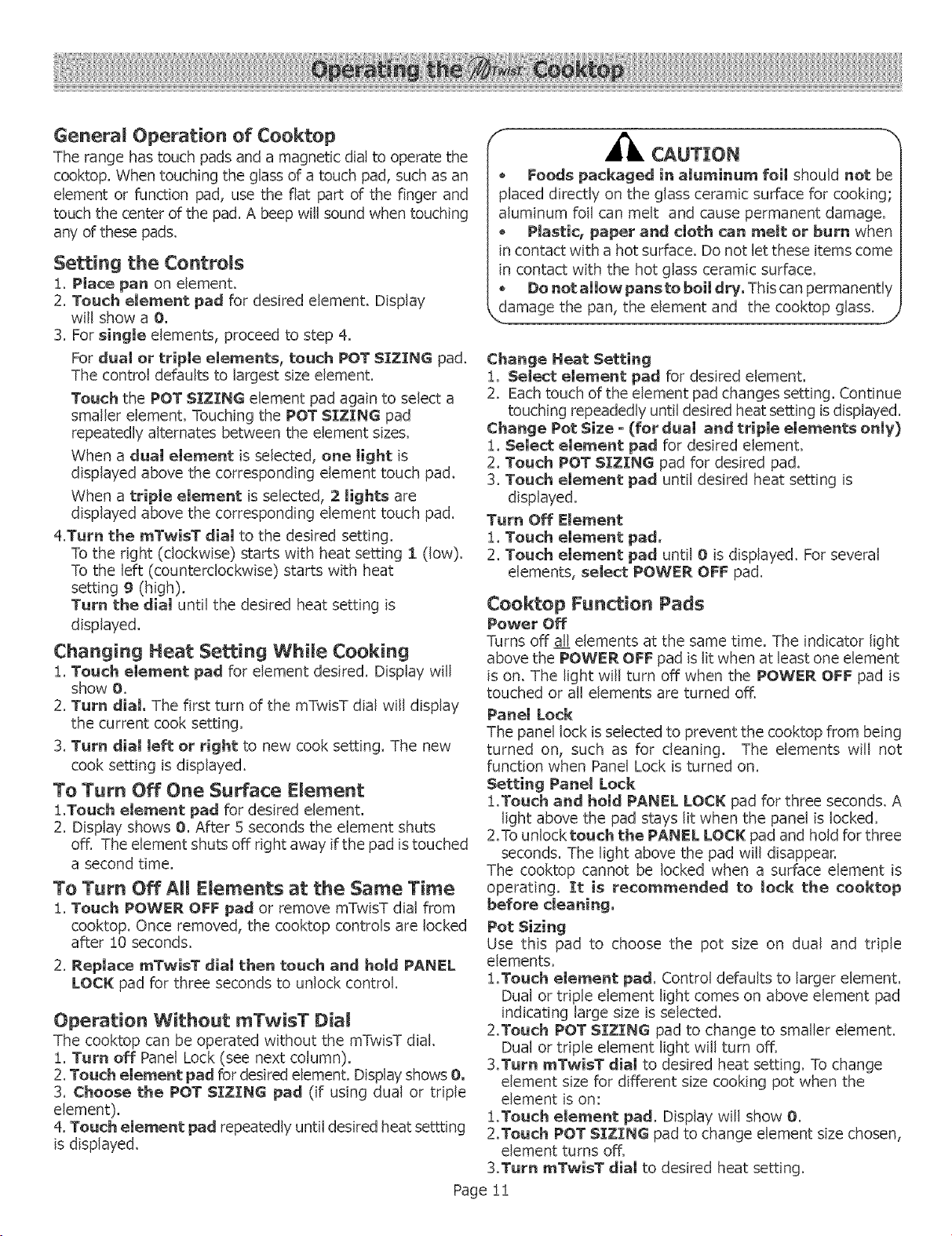
Setting the Controls
!. Place pan on element.
2. Touch element pad for desired element. Display
will show a O.
3. For single elements, proceed to step 4.
For dual or triple elements, touch POT SIZING pad.
The control defaults to largest size element.
Touch the POT SIZING element pad again to select a
smaller element. Touching the POT SIZING pad
repeatedly alternates between the element sizes.
When a dual element is selected, one Hght is
displayed above the corresponding element touch pad.
When a triple element is selected, 2 lights are
displayed above the corresponding element touch pad.
Zt.Tum the mTwisT dial to the desired setting.
To the right (clockwise) starts with heat setting I (low).
To the left (counterclockwise) starts with heat
setting g (high).
Turn the dial until the desired heat setting is
displayed.
Changing Heat Setting While Cooking
1. Touch element pad for element desired. Display will
show O.
2. Turn dial. The first turn of the mTwisT dial will display
the current cook setting.
3. Turn dial left or right to new cook setting. The new
cook setting is displayed.
To Turn Off One Surface Element
1.Touch element pad for desired element.
2. Display shows O. After 5 seconds the element shuts
off. The element shuts off right away if the pad is touched
a second time.
To Turn Off All Elements at the Same Time
!. Touch POWER OFF pad or remove mTwisT dial from
cooktop. Once removed, the cooktop controls are locked
after !0 seconds.
2. Replace mTwisT dial then touch and hold PAHEL
LOCK pad for three seconds to unlock control.
Operation Without mTwisT Dial
The cooktop can be operated without the mTwisT dial.
!. Turn off Panel Lock (see next column).
2. Touch element pad for desired element. Display shows O,
3. Choose the POT SIZING pad (if using dual or triple
element).
zLTouch element pad repeatedly until desired heat settting
is displayed.
F Z/,
CAUTION
* Foods packaged in aluminum foil should not be
placed directly on the glass ceramic surface for cooking,
aluminum foil can melt and cause permanent damage.
, Plastic, paper and cloth can melt or burn when
in contact with a hot surface. Do not let these items come
in contact with the hot glass ceramic surface.
* Do not allow pans to boil dry. This can permanently
damage the pan, the element and the cooktop glass.
J
Change Heat Setting
!. Select element pad for desired element.
2. Each touch of the element pad changes setting. Continue
touching repeadedly until desired heat setting is displayed.
Change Pot Size o (for dual and triple elements only)
!. Select element pad for desired element.
2. Touch POT SIZING pad for desired pad.
3. Touch element pad until desired heat setting is
displayed.
Turn Off Element
1. Touch element pad.
2. Touch element pad until O is displayed. For several
elements, select POWER OFF pad.
Cooktop Function Pads
Power Off
Turns off all elements at the same time. The indicator light
above the POWER OFF pad is lit when at least one element
is on. The light will turn off when the POWER OFF pad is
touched or all elements are turned offi
Panel Lock
The panel lock is selected to prevent the cooktop from being
turned on, such as for cleaning. The elements will not
function when Panel Lock is turned on.
Setting Panel Lock
1.Touch and hold PANEL LOCK pad forthreeseconds,A
lightabove the pad stayslitwhen the panelislocked,
2.Touniocktouch the PANEL LOCK pad and holdforthree
seconds,The lightabove the pad willdisappear,
The cooktop cannot be lockedwhen a surfaceelement is
operating. It is recommended to lock the cooktop
before cleaning.
Pot Sizing
Use thispad to choose the pot size on dual and triple
elements.
!.Touch element pad. Control defaults to larger element.
Dual or triple element light comes on above element pad
indicating large size is selected,
2.Touch POT SIZIHG pad to change to smaller element.
Dual or triple element light will turn off.
3.Turn inTwisT dial to desired heat setting, To change
element size for different size cooking pot when the
element is on:
!.Touch element pad, Display will show O.
2.Touch POT SIZING pad to change element size chosen,
element turns off.
3.Turn mTwisT dial to desired heat setting.
Page 11
Oven Racks
Your oven has three racks: 2 fiat and one telescopic or three
fiat. They are designed with a stop so they will stop before
coming completely out and not tilt.
_'_ CAUTJ[ON: TO AVOID POSSIBLE BURNS, PLACE
OVEN RACKS IN DESIRED POSITIONS BEFORE
TURNING THE OVEN O@. ALWAYS USE OVEN HITTS
WHEN THE OVEN IS WARM.
Removing from oven: Grasp rack firmly on both sides and
pull rack toward you. When the stop is reached, tilt rack up
and pull the rest of the way out.
Repiadng in oven: Grasp rack firmly on both sides. Tilt
rack upto allow stop into rack holder. Bring rackto a horizontal
position and push the rest of the way" in. Rack should be
straight and flat, not crooked.
Telescopic Rack: The telescopic rack allows for easier
access to cooking food. To use, pull out both sections first.
When stop is reached, pull out top section until stop is reached.
To remove telescopic rack, with top section in dosed
position, grasp entire rack (both sections) firmly on both
sides. When the stop is reached, tilt rack up and pull the rest
of the way" out.
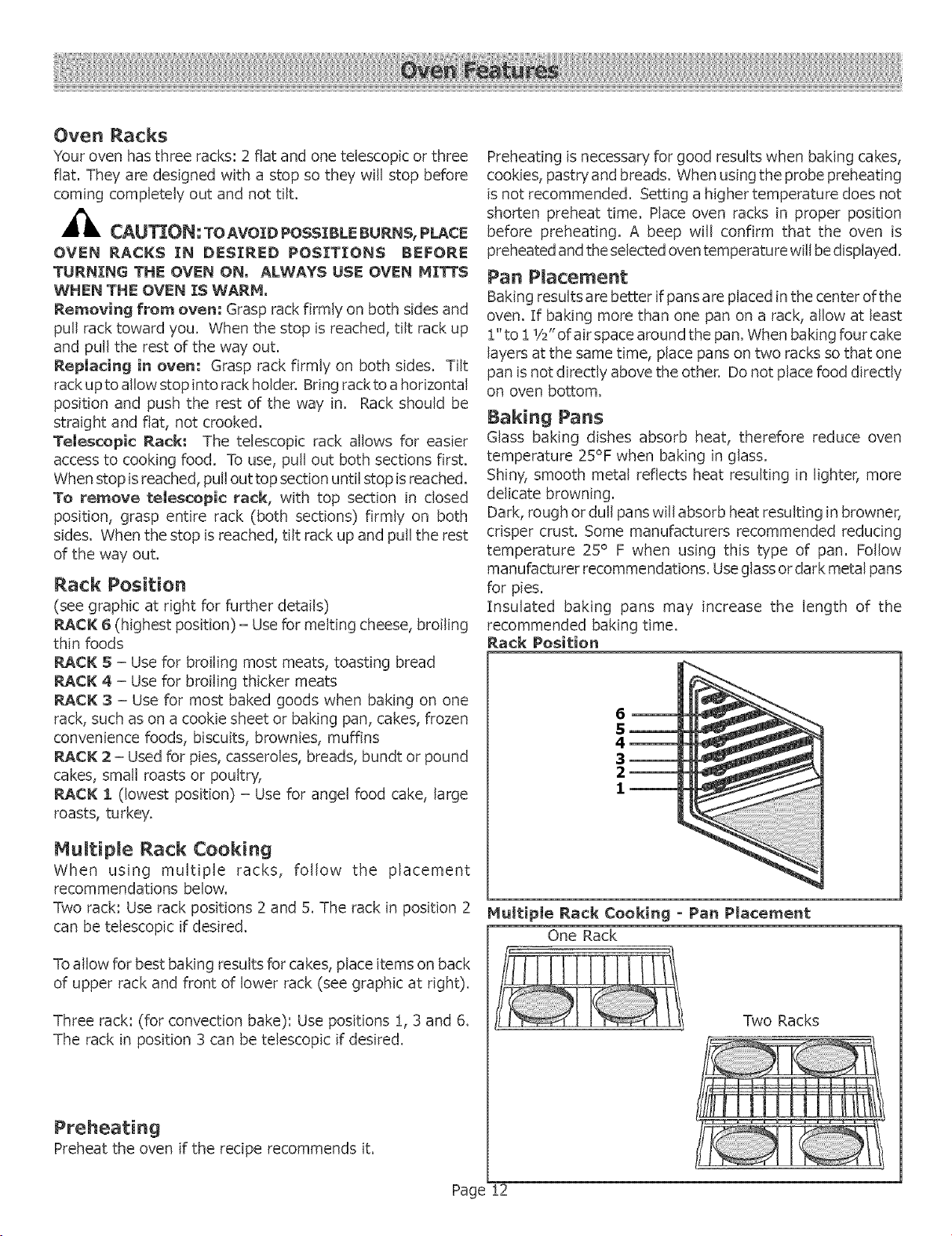
Rack Position
(see graphic at right for further details)
RACK 6 (highest position) = Use for melting cheese, broiling
thin foods
RACK S = Use for broiling most meats, toasting bread
RACK 4 = Use for broiling thicker meats
RACK 3 = Use for most baked goods when baking on one
rack, such as on a cookie sheet or baking pan, cakes, frozen
convenience foods, biscuits, brownies, muffins
RACR 2 = Used for pies, casseroles, breads, bundt or pound
cakes, small roasts or poultry,
RACK 1 (lowest position) = Use for angel food cake, large
roasts, turkey.
Multipme Rack Cooking
When using multiple racks, follow the placement
recommendations below.
Two rack: Use rack positions 2 and 5. The rack in position 2
can be telescopic if desired.
To allow for best baking results for cakes, place items on back
of upper rack and front of lower rack (see graphic at right).
Three rack: (for convection bake): Use positions 1, 3 and 6.
The rack in position 3 can be telescopic if desired.
Preheating
Preheat the oven if the recipe recommends iL
Preheating is necessary for good results when baking cakes,
cookies, pastry and breads. When using the probe preheating
is not recommended. Setting a higher temperature does not
shorten preheat time. Place oven racks in proper position
before preheating. A beep will confirm that the oven is
preheated and the selected oven temperatu re will be displayed.
Pan Placement
Baking results are better if pans are placed in the center of the
oven. If baking more than one pan on a rack, allow at least
!" to ! 1/2"of air space around the pan. When baking four cake
layers at the same time, place pans on two racks so that one
pan is not directly above the other. Do not place food directly
on oven bottom.
Baking Pans
Glass baking dishes absorb heat, therefore reduce oven
temperature 25% when baking in glass.
Shiny, smooth metal reflects heat resulting in lighter, more
delicate browning.
Dark, rough or dull pans will absorb heat resulting in browner,
crisper crust. Some manufacturers recommended reducing
temperature 25° F when using this type of pan. Follow
manufacturer recommendations. Use glass or dark metal pans
for pies,
Insulated baking pans may increase the length of the
recommended baking time.
Rack Position
6_ 41
5_
4_
3_
2_ <_
Hultiple Rack Cooking o Pan Placement
One Rack
Two Racks
Page !2
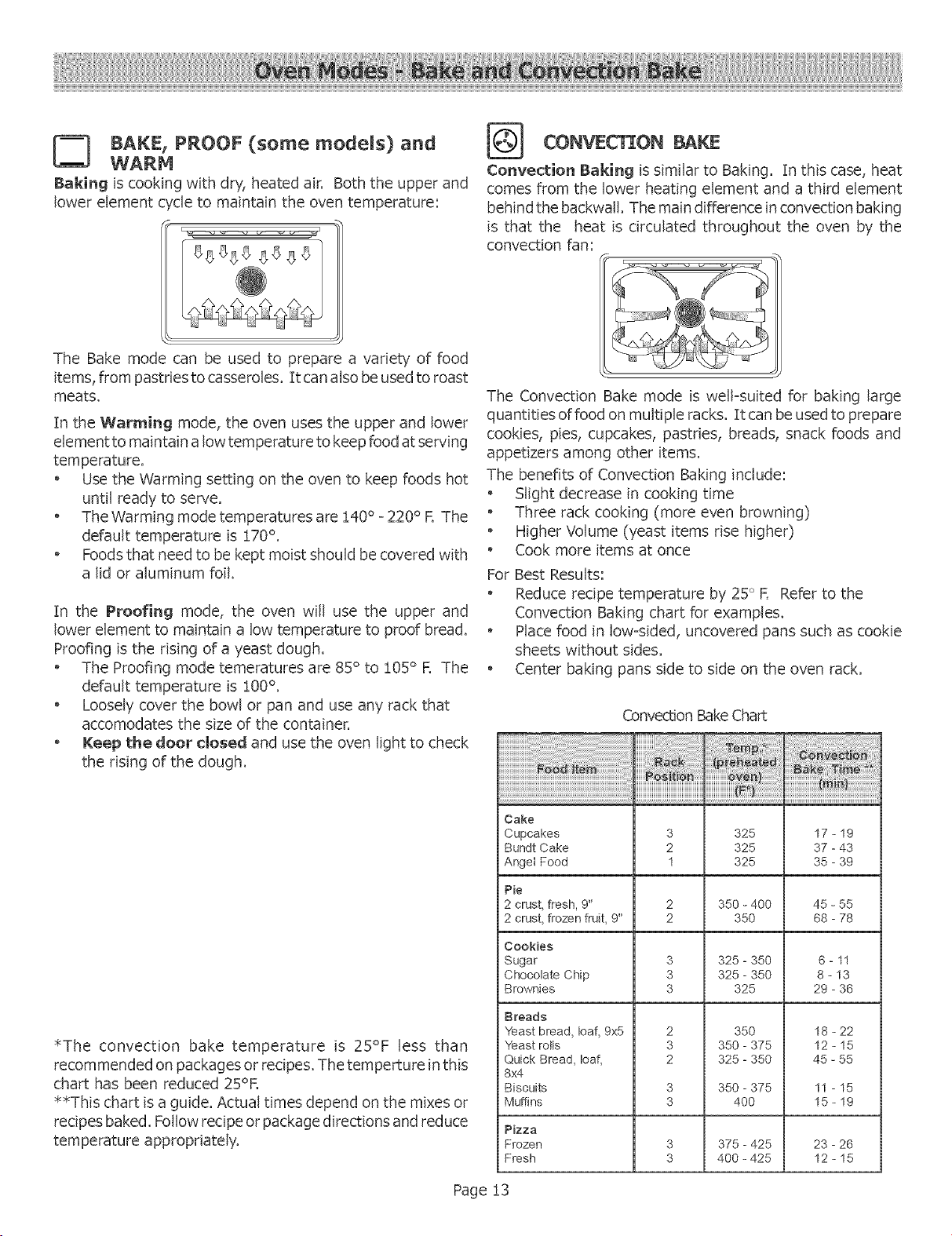
BAKE, PROOF (some models) and
Baking is cookin( with dry, heated air, Both the upper and
lower element c',de to maintain the oven temperature:
The Bake mode can be used to prepare a variety of food
items, from pastdesto casseroles. 1roan also be used to roast
meats.
In the Warming mode, the oven uses the upper and lower
element to maintain a low temperature to keep food at serving
temperature.
, Use the Warming setting on the oven to keep foods hot
until ready to serve.
o The Warming mode temperatures are !40 ° - 220 ° R The
default temperature is !70 °.
o Foods that need to be kept moist should be covered with
a lid or aluminum foil.
In the Proofing mode, the oven will use the upper and
lower element to maintain a low temperature to proof bread.
Proofing is the rising of a yeast dough.
, The Proofing mode temeratures are 85 ° to !05 ° R The
default temperature is !00 °.
o Loosely cover the bowl or pan and use any rack that
accomodates the size of the container.
, Keep the door dosed and use the oven light to check
the rising of the dough.
*The convection bake temperature is 25°F less than
recommended on packages or recipes. The temperture in this
chart has been reduced 25°R
*_This chart is a guide. Actual times depend on the mixes or
recipes baked. Follow recipe or package directions and reduce
temperature appropriately.
CONVEC ON BAKE
Convection Baking is similar to Baking. In this case, heat
comes from the lower heating element and a third element
behind the backwall. The main difference in convection baking
is that the heat is drculated throughout the oven by the
convection fan:
The Convection Bake mode is well-suited for baking large
quantities of food on multiple racks. [t can be used to prepare
cookies, pies, cupcakes, pastries, breads, snack foods and
appetizers among other items.
The benefits of Convection Baking include:
, Slight decrease in cooking time
o Three rack cooking (more even browning)
o Higher Volume (yeast items rise higher)
o Cook more items at once
For Best Results:
o Reduce recipe temperature by 25° F. Refer to the
Convection Baking chart for examples.
o Place food in low-sided, uncovered pans such as cookie
sheets without sides.
o Center baking pans side to side on the oven rack.
Convection Bake Chart
Cake
Cupcakes 3 325 17 - 19
Bundt Cake 2 325 37 - 43
Anget Food 1 325 35 - 39
Pie
2 crust, fresh, 9" 2 350 - 400 45 - 55
2 crust, frozen fruit, 9" 2 350 68 - 78
Cookies
Sugar 3 325 - 350 6 - 11
Chocolate Chip 3 325 - 350 8 - 13
Brownies 3 325 29 - 36
Breads
Yeast bread, loaf, 9x5
Yeast rotts
Quick Bread, loaf,
8x4
Biscuits
Muffins
2
3
2
350
350-375
325-350
18-22
12-15
45-55
3 350 - 375 11 - 15
3 400 15 - 19
Pizza
Frozen 3 375 - 425 23 - 26
Fresh 3 400 - 425 12 - 15
Page !3
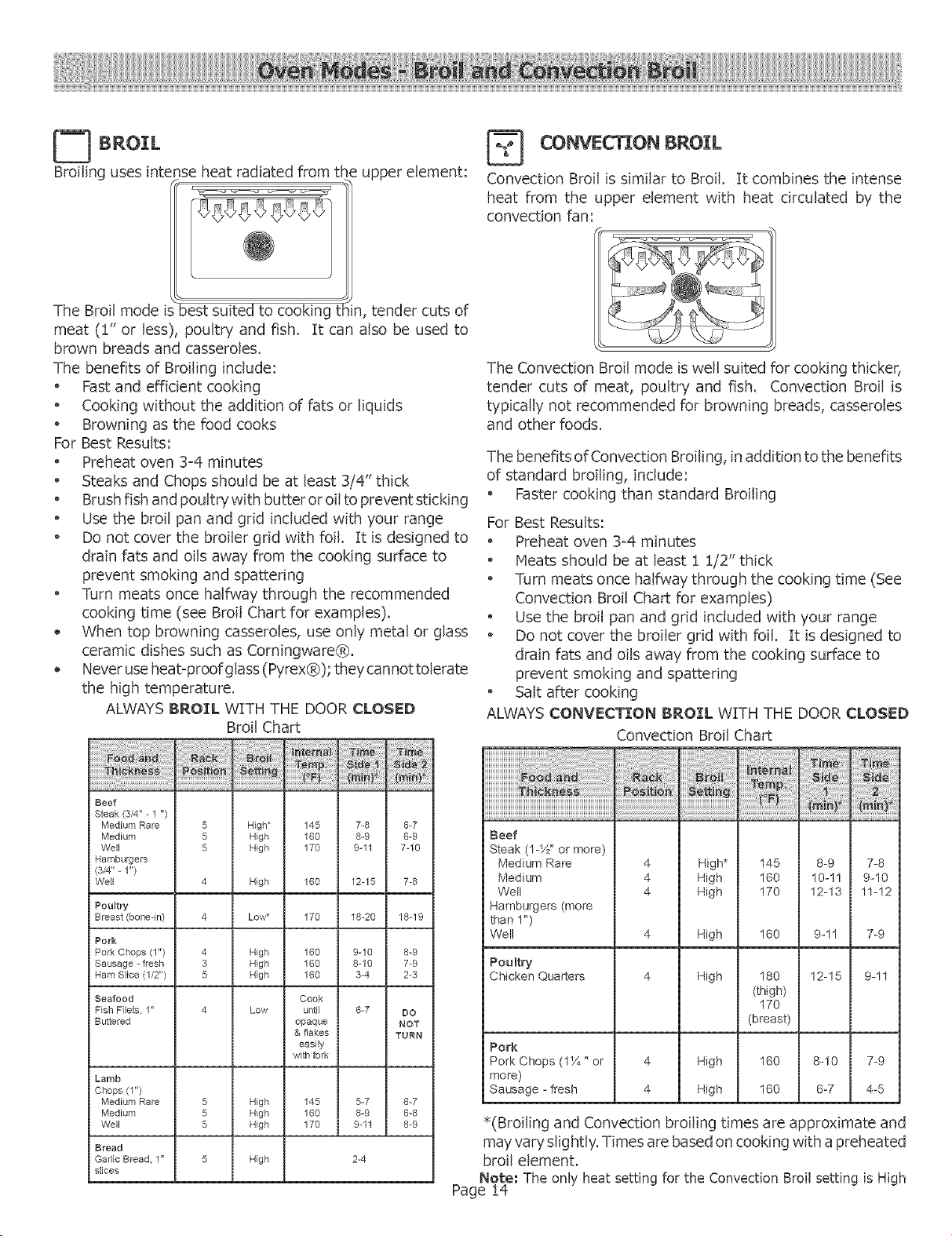
BROIL
Broiling uses intense heat radiated from the upper element:
The Broil mode "best suited to cooking tl: n, tender cuts of
meat (!" or less), poultry and fish. It can also be used to
brown breads and casseroles.
The benefits of Broiling include:
o Fast and efficient cooking
o Cooking without the addition of fats or liquids
o Browning as the food cooks
For Best Results:
Preheat oven 3=4 minutes
Steaks and Chops should be at least 3/4" thick
o Brush fish and poultry with butter or oil to prevent sticking
o Use the broil pan and grid included with your range
o Do not cover the broiler grid with foil. It is designed to
drain fats and oils away from the cooking surface to
prevent smoking and spattering
Turn meats once halfway through the recommended
cooking time (see Broil Chart for examples).
When top browning casseroles, use only metal or glass
ceramic dishes such as Corningware®.
Never use heat=proof glass (Pyrex®); they cannot tolerate
the high temperature.
ALWAYS BROIL WITH THE DOOR CLOSED
Broil Chart
iiiililiiiii!!!!!!!!ii i_ _ii_i_i!!i
Beef
Steak (3/4" - 1 ")
Medium Rare 5 High* 145 7-8 6-7
Medium 5 High 160 8-9 6-9
Well 5 High 170 9-11 7-10
Hamburgers
(3/4"- 1")
Well 7-84 High 160 12-15
Poultry
Breast(bone-in) 4 Low* 170 18-20 18-19
Pork
Pork Chops (1") 4 High 160 9-10 8-9
Sausage - fresh 3 High 160 8-10 7-9
Ham Slice (1/2") 5 High 160 3-4 2-3
Seafood Cook
Fish Filets, 1" 4 Low until 6-7 DO
Buttered opaque NOT
& flakes TURN
easily
with fork
Lamb
Chops (1")
Medium Rare 5 High 145 5-7 6-7
Medium 5 High 160 8-9 8-8
Well 5 High 170 9-11 8-9
Bread
Gadic Bread, 1"
slices
High 2-4
CONVECtiON BROIL
Convection Broil is similar to Broil. It combines the intense
heat from the upper element with heat circulated by the
convection fan:
The Convection Broil mode is well suited for cooking thicker,
tender cuts of meat, poultry and fish. Convection Broil is
typically not recommended for browning breads, casseroles
and other foods.
The benefits of Convection Broiling, in addition to the benefits
of standard broiling, include:
o Faster cooking than standard Broiling
For Best Results:
, Preheat oven 3=4 minutes
, Meats should be at least 1 !/2" thick
o Turn meats once halfway through the cooking time (See
Convection Broil Chart for examples)
, Use the broil pan and grid included with your range
o Do not cover the broiler grid with foil. It is designed to
drain fats and oils away from the cooking surface to
prevent smoking and spattering
, Salt after cooking
ALWAYS CONVECTION BRO]:L WITH THE DOOR CLOSED
Convection Broil Chart
Beef
Steak (1-Y_" or more)
Medium Rare 4 High* 145 8-9 7-8
Medium 4 High 160 10-11 9-10
Well 4 High 170 12-13 11-12
Hamburgers (more
than 1")
Well 4 High 160 9-11 7-9
Poultry
Chicken Quarters 4 High 180 12-15 9-11
(thigh)
170
(breast)
Pork
Pork Chops (I_A" or 4 High 160 8-10 7_9
more)
Sausage - fresh 4 High 160 6-7 4-5
*(Broiling and Convection broiling times are approximate and
may vary slightly. Times are based on cooking with a preheated
broil element.
Note." The only heat setting for the Convection Broil setting is High
Page !4
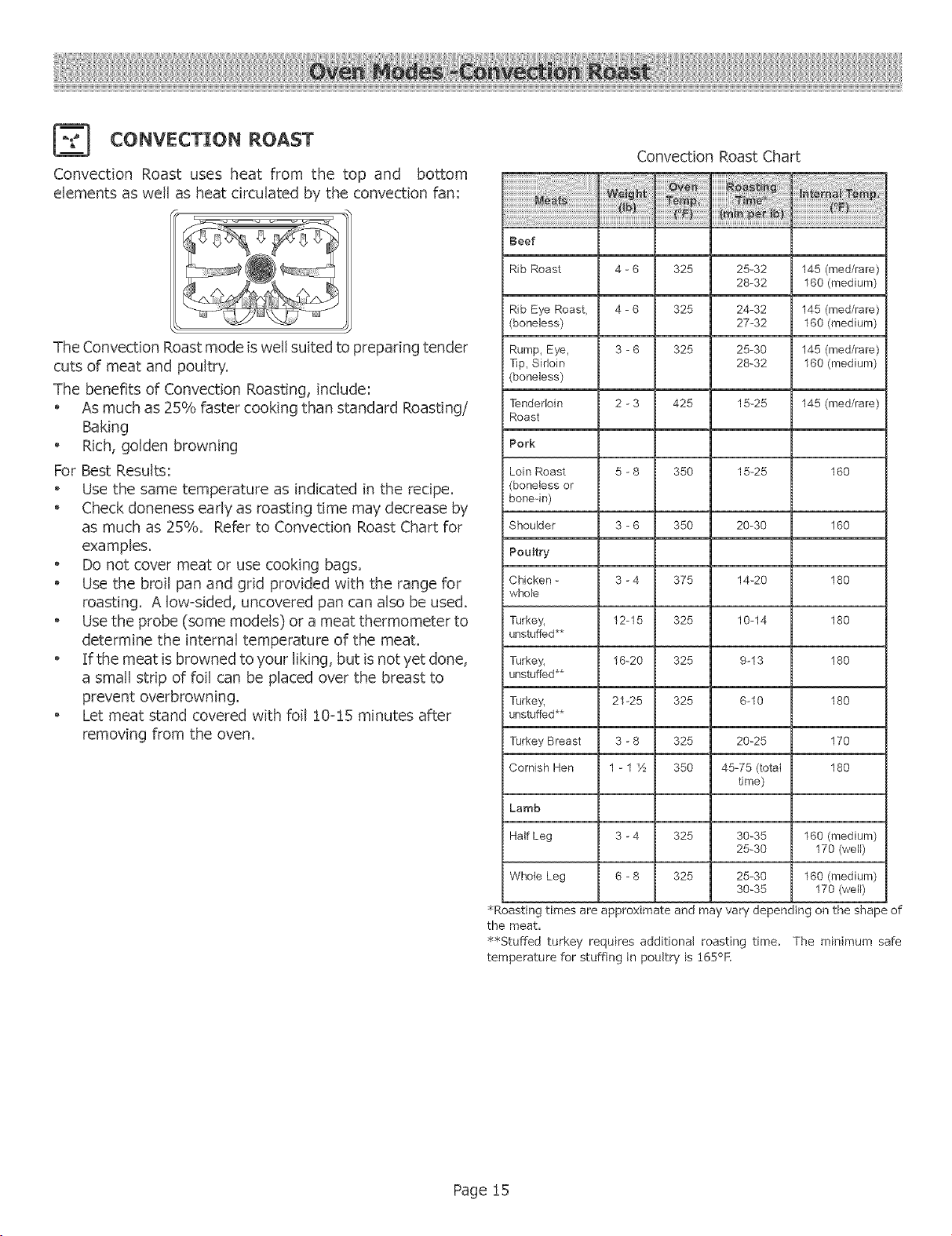
CONVECTION ROAST
Convection Roast uses heat from the top and bottom
elements as well as heat circulated by the convection fan:
The Convection Roast mode is well suited to preparing tender
cuts of meat and poultry.
The benefits of Convection Roasting, include:
As much as 25% faster cooking than standard Roasting/
Baking
Rich, golden browning
For Best Results:
Use the same temperature as indicated in the recipe.
Check doneness early as roasting time may decrease by
as much as 25%. Refer to Convection Roast Chart for
examples.
o Do not cover meat or use cooking bags.
o Use the broil pan and grid provided with the range for
roasting. A low-sided, uncovered pan can also be used.
o Use the probe (some models) or a meat thermometer to
determine the internal temperature of the meat.
o If the meat is browned to your liking, but is not yet done,
a small strip of foil can be placed over the breast to
prevent overbrowning.
Let meat stand covered with foil !0-!5 minutes after
removing from the oven.
Convection Roast Chart
Reef
Rib Roast 4 - 6 325 25-32 145 (reed/rare)
28-32 160 (medium)
Rib Eye Roast, 4 - 6 325 24-32 145 (med/rare)
(boneless) 27-32 180 (medium)
Rump_ Eye, 3 - 6 325 25-30 145 (med/rare)
T]p_ Sirloin 28-32 160 (medium)
(boneless)
Tenderloin 2 - 3 425 15-25 145 (reed/rare)
Roast
Pork
i Loin Roast
(boneless or
bone-in)
5-8 350 15-25 160
Shoulder 3 - 6 350 20-30 160
Poultry
Chicken - 3 - 4 375 14-20 180
whole
Turkey_ 12-15 325 10-14 180
unstuffed**
Turkey_ 16-20 325 9-13 180
unstuffed**
Turkey_ 21-25 325 6-10 180
J unstuffed**
Turkey Breast 3 - 8 325 20-25 170
Cornish Hen 1 - 1 1½ 350 45-75 (total 180
time)
Lamb
Half Leg 3 -4 325 30-35 160 (medium)
25-30 170 (well)
Whole Leg 6 -8 325 25-30 160 (medium)
30-35 170 (well)
_Roasting times are approximate and may vary depending on the shape of
the meat,
_Stuffed turkey requires additional roasting time. The minimum safe
temperature for stuffing in poultry is 165°K
Page 15
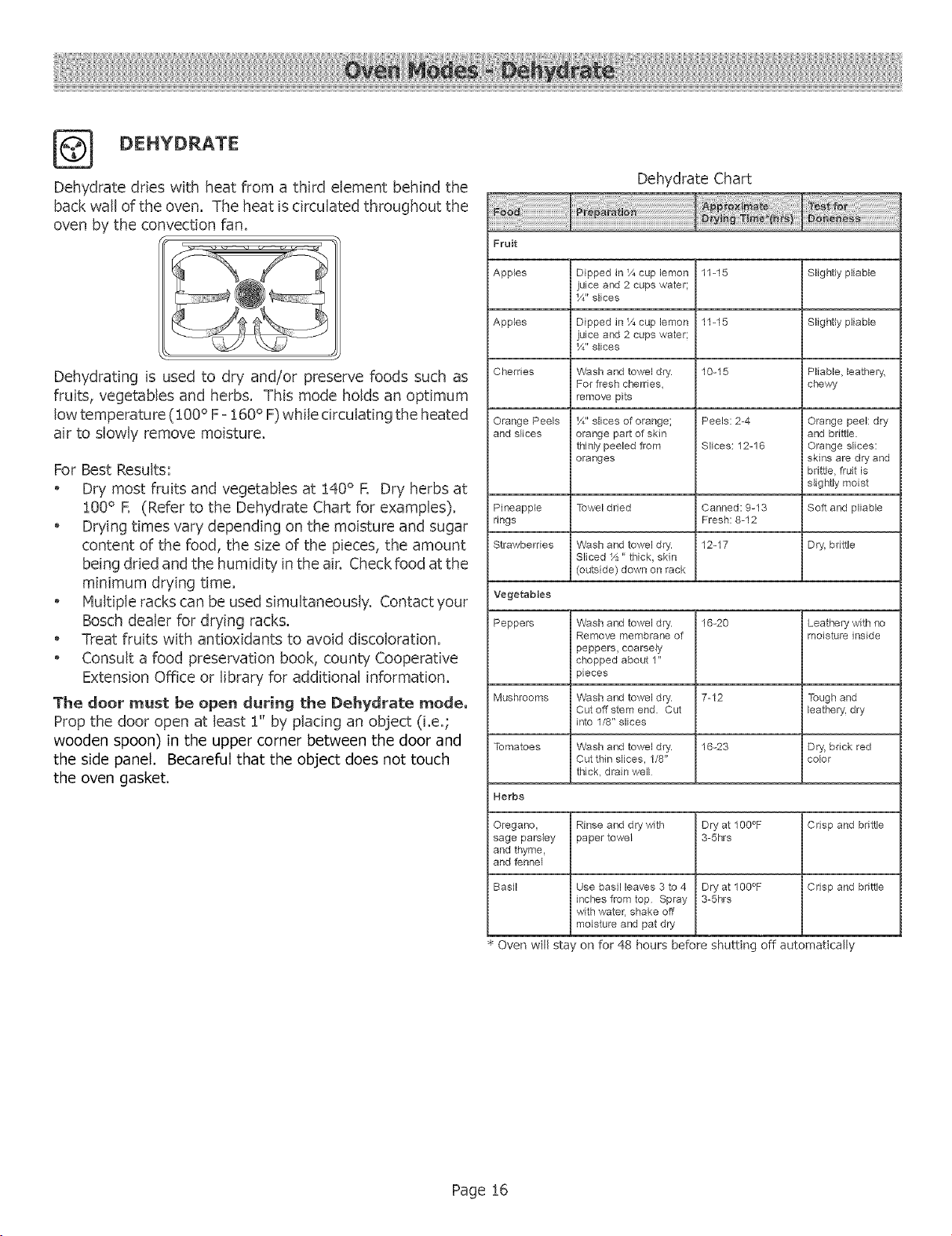
DEHYDRATE
Dehydrate dries with heat from a third element behind the
back wall of the oven. The heat is circulated throughout the
oven by the convection fan.
Dehydrating is used to dry and/or preserve foods such as
fruits, vegetables and herbs. This mode holds an optimum
low temperature (100 ° F =160° F) while circulating the heated
air to slowly remove moisture.
For Best Results:
Dry most fruits and vegetables at 140° R Dry herbs at
100° R (Refer to the Dehydrate Chart for examples).
Drying times vary depending on the moisture and sugar
content of the food, the size of the pieces, the amount
being dried and the humidity in the air. Check food at the
minimum drying time.
o Multiple racks can be used simultaneously. Contact your
Bosch dealer for drying racks.
o Treat fruits with antioxidants to avoid discoloration.
o Consult a food preservation book, county Cooperative
Extension Office or library for additional information.
The deer must be open during the Dehydrate mode,
Prop the door open at least 1" by placing an object (i.e.;
wooden spoon) in the upper corner between the door and
the side panel. BecarefuI that the object does not touch
the oven gasket.
Dehydrate Chart
Fruit
Apples Dipped in 1/,cup lemon 11-15 Slightly pliable
juice and 2 cups water;
1/4"slices
Apples Dipped in 1/4cup lemon 11-15 Slightly pliable
juice and 2 cups water;
1/4"slices
Cherries Wash and towel dry. 10-15 Pliable, leathery,
For fresh cherries, chewy
remove pits
Orange Peels 1/4" slices of orange; Peels: 2-4 Orange peel: dry
and s_ices orange part of skin and brittle.
thinly peeled from Slices: 12-16 Orange slices:
oranges skins are dry and
brittle, fruit is
slig htly moist
Pineapple Towel dried Canned: 9-13 Soft and pliable
rings Fresh: 8-12
Strawberries Wash and towel dry. 12-17 Dry', brittle
Sliced _½" thick, skin
(outside) down on rack
Vegetables
Peppers Wash and towel dry. 16-20 Leathery' with no
Remove membrane of moisture inside
peppers, coarsely
chopped about 1"
pieces
Mushrooms Wash and towel dry. 7-12 Tough and
Cutoffstem end. Cut leathery', dry
into 1/8" slices
Tomatoes Wash and towel dry. 16-23 Dry, brick red
Cut thin slices, 1/8" color
thick, drain well
Herbs
Oregano, Rinse and dry with Dry at 100°F Crisp and brittle
sage parsley paper towel 3-5hrs
and thyme,
and fennel
Basil Use basil leaves 3 to 4 Dry at 100°F Crisp and brittle
inches from top Spray 3-5hrs
with water, shake off
moisture and pat dry
• Oven will sta on for 48 hours before shutting off automatically
Page 16
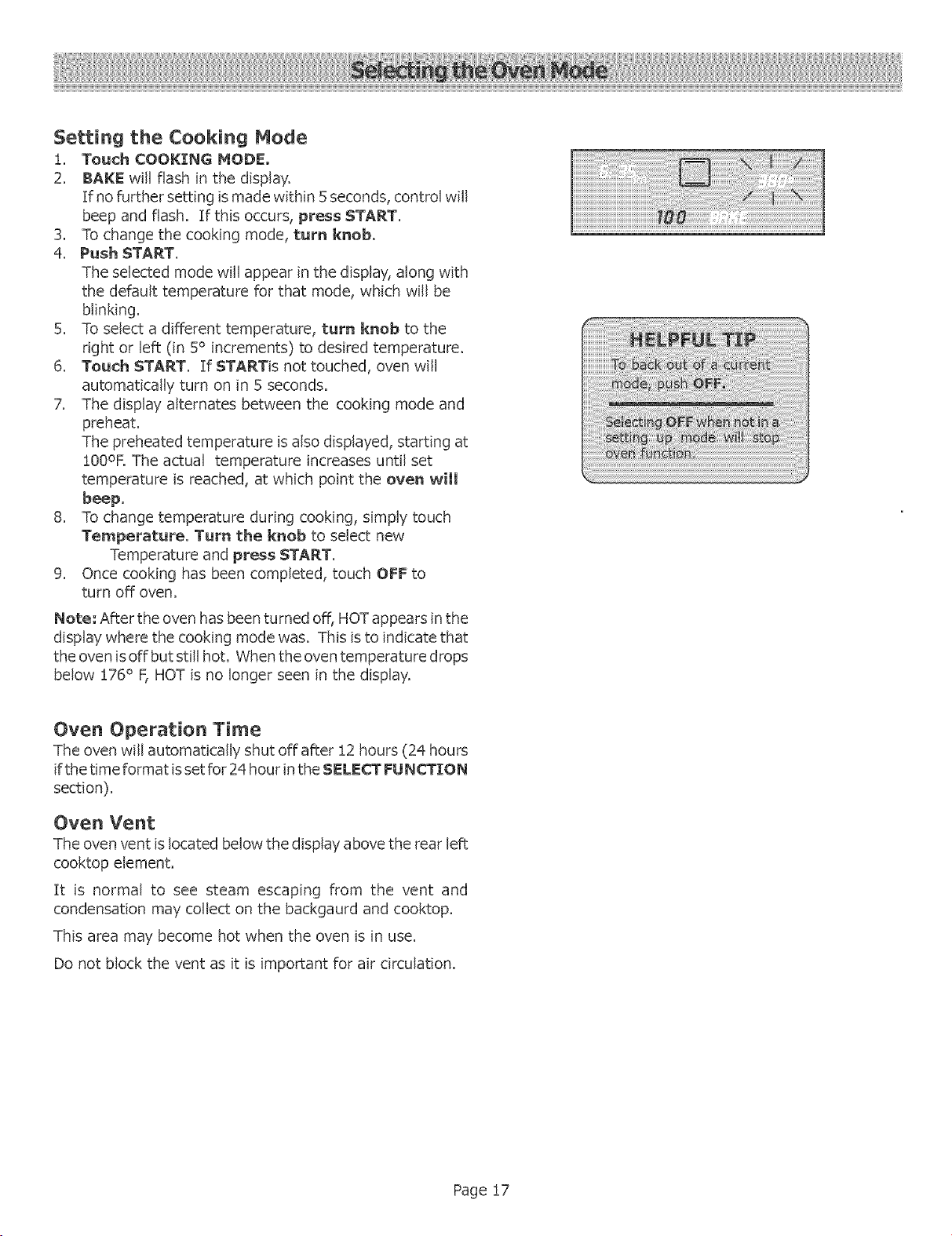
Setting the Cooking Mode
i. Touch COOKING MODE,
2. BAKE willflashinthe display,
Tfno furthersettingismade within5 seconds,controlwill
beep and flash. If this occurs, press START.
3, To change the cooking mode, turn knob.
4. Push START.
The selected mode will appear in the display, along with
the default temperature for that mode, which will be
blinking.
5. To select a different temperature, turn knob to the
right or left (in 5° increments) to desired temperature.
6. Touch START. If STARTis not touched, oven will
automatically turn on in 5 seconds.
7. The display" alternates between the cooking mode and
preheat.
The preheated temperature is also displayed, starting at
!00OF. The actual temperature increases until set
temperature is reached, at which point the oven will
beep,
8. To change temperature during cooking, simply touch
Temperature. Turn the knob to select new
Temperature and press START.
9. Once cooking has been completed, touch OFF to
turn off oven.
Note: After the oven has been turned off, HOT appears in the
display where the cooking mode was. This is to indicate that
the oven is off but still hot. When the oven temperature drops
below :[76° F, HOT is no longer seen in the display.
Oven Operation Time
The oven will automatically shut off after :[2hours (24 hours
if the time format is set for 24 hour in the SELECT FUNCTION
section).
Oven Vent
The oven vent is located below the display above the rear left
cooktop element.
It is normal to see steam escaping from the vent and
condensation may collect on the backgaurd and cooktop.
This area may become hot when the oven is in use.
Do not block the vent as it is important for air circulation.
Page !7
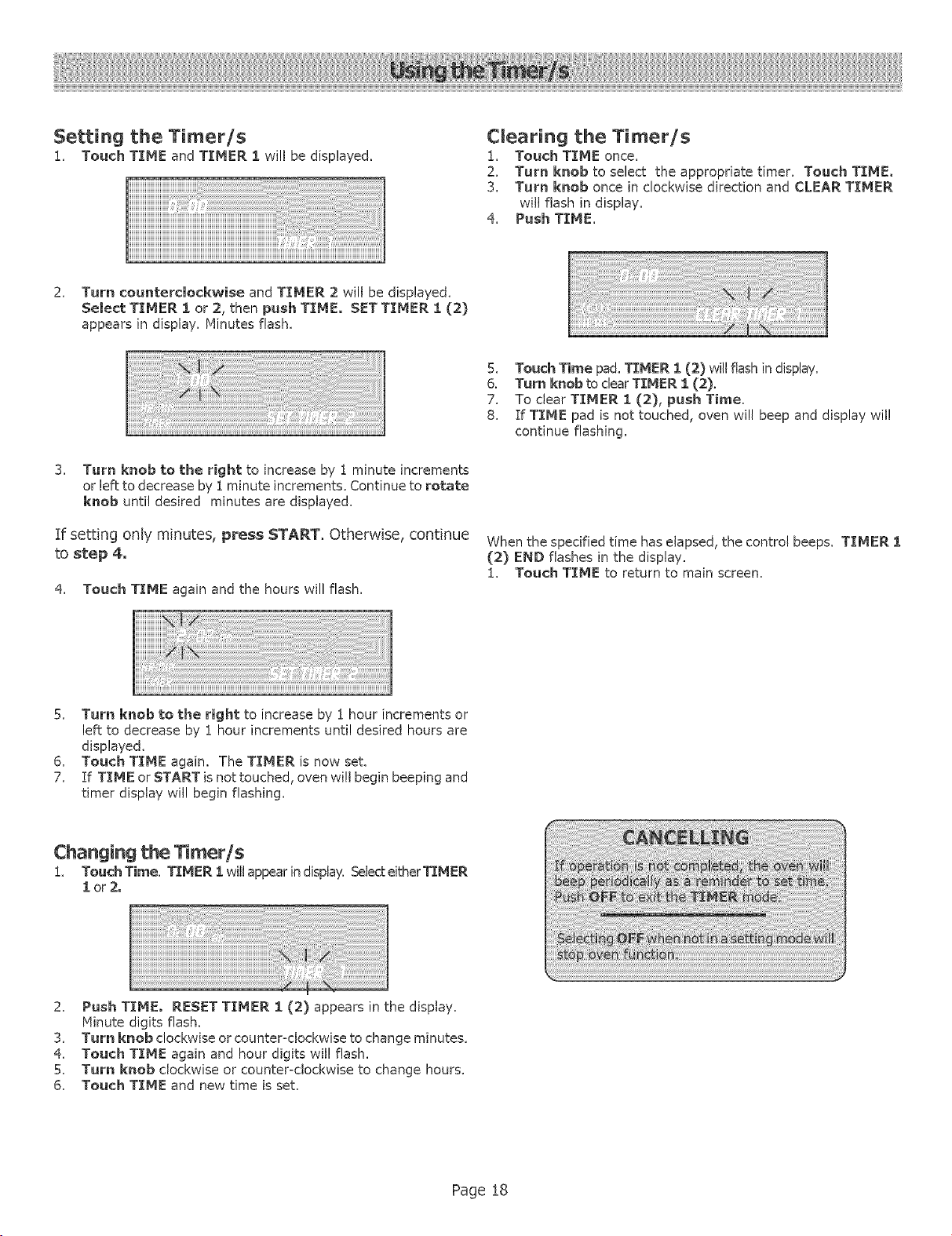
Setting the Timer/s
1_ Touch TIME and TIMER 1 will be displayed.
Cmearing the Timer/s
1. Touch TIME once.
2, Turn knob to select the appropriate timer. Touch TIME,
3. Turn knob once in clockwise direction and CLEAR TIMER
will flash in display.
4. Push TIME.
2. Turn counterclockwise and TIMER 2 will be displayed.
Select TIMER i or 2, then push TIME. SET TIMER I (2)
appears in display. Minutes flash.
3. Turn knob to the right to increase by 1 minute increments
or left to decrease by i minute increments. Continue to rotate
knob until desired minutes are displayed.
If setting only minutes, press START. Otherwise, continue
to step 4.
4. Touch TIME again and the hours will flash.
5. Touch Time pad. TIMER 1 (2) will flash in display.
6. Turn knob to clear TIMER I (2).
7. To clear TTMER I (2), push Time.
8. If TIME pad is not touched, oven will beep and display wil!
continue flashing.
When the specified time has elapsed, the control beeps. TIMER 1
(2) END flashes in the display.
1. Touch TIME to return to main screen.
5. Turn knob to the right to increase by 1 hour increments or
left to decrease by 1 hour increments until desired hours are
displayed.
6. Touch TIME again. The TIMER is now set.
7. If TIME or START is not touched, oven will begin beeping and
timer display wil! begin flashing.
Changing the limer/s
1. Touch Time. TIMER 1 will appear in display. Select either TIMER
lor2o
2. Push TIME. RESET TIMER 1 (2) appears in the display.
Ninute digits flash.
3. Turn knob clockwise or counter<lockwise to change minutes.
4. Touch TIME again and hour digits wil! flash.
5. Turn knob clockwise or counter=clockwise to change hours.
6. Touch TIME and new time is set.
Page 18
TheTIMEDCOOK feature sets the oven to a cooking mode for a set period of time and then turns it off, The TIMED COOK
feature is available for each of the following oven modes: Bake, Convection Bake and Convection RoasL
Be sure that the time-of-day dock displays the correct
time before beginning, See "Changing the Clock Time"
to adjust the time,
Setting a Timed Mode
!. Touch COOKING MODE.
2. BAKEwillbedBplayed. Toselectadifferentcookingmode, turn
the knob,
3. Touch START.
4, Turn knob to select desired temperature.
Note: time required for the oven to reach temperature must be
included in the set cooking tLme.
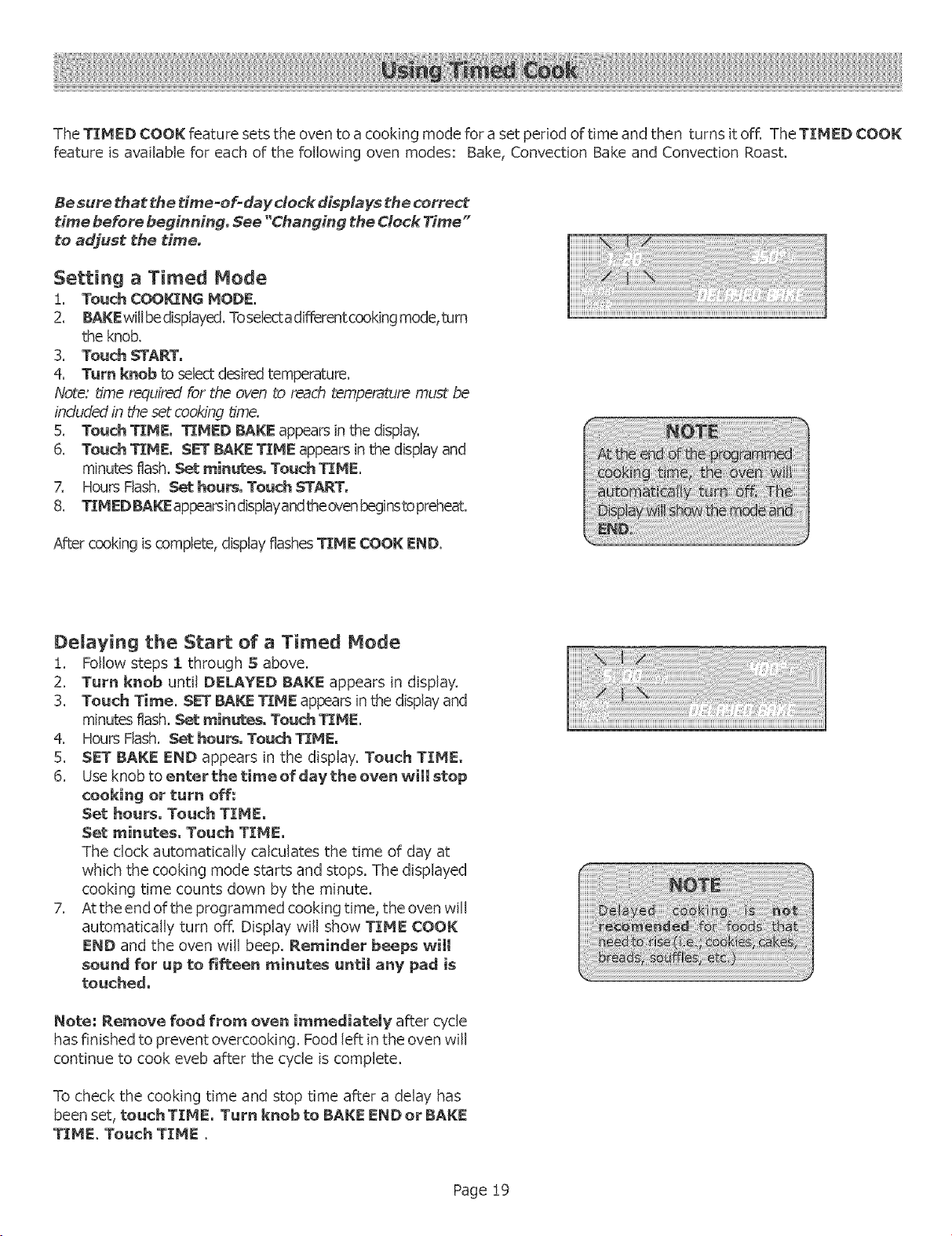
5. Touch TIME, TIMED BAKE appears in the display.
6. Touch TIME, SE-r BAKE TIME appears in the display and
minutes flash. Set min_s. Touch TIME.
7. Hours Flash. Set hours, Touch START,
8. TIMED BA_ appearsindisplayandthe c_,enbeginsto preheat.
After cooking is complete, display flashes TIME COOK END.
iiiiiiiiiiiiiiiiiiiiiiiiiiiiiiiiiiiiiiiiiiiiiiiiiiiiiii !iiii iiiiiiiii!i i!iiiii iiiiiiiiiiiiiiiiiiii:illiiiiiiiiiiiiiii!!!!!!!!!!!!i
Delaying the Start of a Timed Mode
!. Follow steps 1 through S above.
2. Turn knob until DELAYED BAKE appears in display.
3. Touch Time. SET BAKE TIME appears in the display and
minutes flash. Set minutes. Touch TIME.
4. Hours Flash. Set hours, Touch TIME,
5. SET BAKE END appears in the display. Touch TIME,
6. Use knob to enter the time of daV the oven will etop
cooking or turn off:
Set hours, Touch TIME,
Set minutes, Touch TIME,
The clock automatically calculates the time of day at
which the cooking mode starts and stops. The displayed
cooking time counts down by the minute.
7. At the end of the programmed cooking time, the oven will
automatically turn off. Display will show TIME COOK
END and the oven will beep. Reminder beeps will
sound for up to fifteen minutes until any pad is
touched.
Note; Remove food from oven immediately after cycle
has finished to prevent overcooking. Food left in the oven will
continue to cook eveb after the cycle is complete.
To check the cooking time and stop time after a delay has
been set, touch TIME, Turn knob to BAKE END or BAKE
TIME. Touch TIME.
Page 19
. The probe can be used to determinethe internal doneness
or the"EN D" tem peratu re of many foods, especially meats
and poultry.
The temperature range for the probe is !35°F to 200°F
(57°C tO 93°C),
, Preheating the oven is not recommended when using the
probe. A hot oven will impair your ability to easily connect
the probe to the receptacle and into the meat.
Oven temperature can be set for !00°F up to 450°F (38°C
up to 232°C).
INSERTING THE PROBE
Insertthe probe tipintothe food item.
• Formeats, insertthe probe tipintothe thickestpart
and not touch bone, fat,or gristle.
o Forlargepoultry"productsand turkeys,insertthe
probe in the thickest part of the inner thigh.
For other foods, such as a meatloaf, the probe tip
should be located in the center of the thickest part of
the food.
USING THE PROBE
1. Prepare meat and place in roasting pan (or on rack in
roasting pan as recipe specifies). Insert the probe into
the meat (See "Inserting the Probe", above).
2. Make sure the probe is not touching gristle, fat, bone, the
roast rack or the pan.
3. Place roasting pan with meat in cold oven on recommended
oven rack. Plug probe into the probe receptacle. The
probe symbol will appear in display.
Note: The probe temperature can only be set when
the probe is installed in the oven°
4. Touch COOKING MODE and select BAKE,
CONVECTION BAKE or CONVECTION ROAST. The
default oven temperature will appear.
5. Turn knob to change temperature if necessary'.
6. Touch START,
7. Turn knob to set the probe temperature (desired end
temperature of the food.
8. Touch START.
The chosen oven temperature is displayed in the upper
right hand corner of the display.
, The probe temperature is displayed in the center to the
left of the cooking mode. It increases in 5°F
increments until the chosen temperature is reached.
The oven is preheated when the beep signals once.
When the set probe temperature is reached, END
appears in display and oven turns off.
To change only the oven temperature, touch
TEHPERATURE, OVEN TEMP will flash in the display.
Turn the knob to desired tern peratu re and press START
twice.
To change the probe temperature, touch
TEHPERATURE. The oven temperature will flash.
Press STARTand the PROBE TEMP will flash. Turn
the knob to desired temperature and press START
again.
PROBE USE TIPS
The oven is well insulated and the retained heat will
continue to cook the meat after the oven has shut off.
For this reason, remove the meat from the oven as
soon as the control beeps.
Since meat continues to cook after being removed
from the oven, set the internal (probe) temperature 5
= 10 degrees below the desired final internal
temperature. Allow "standing time" (!0 = 20 minutes)
before carving the meat.
Always use the handle of the probe for inserting and
removing. Use a potholder to remove since the probe
becomes hot.
Remove the probe from the oven when it is not being
used.
o The probe cannot be used with frozen meats. For
best results, completely thaw meats before using
the probe.
Note; Always remove probe from oven when cooking is
complete. The probe symbol will remain in the display until
the probe is removed. Do not leave probe attachment in oven
during self=dean. Oven will not selfodean with the probe
installed in the oven.
Page 20
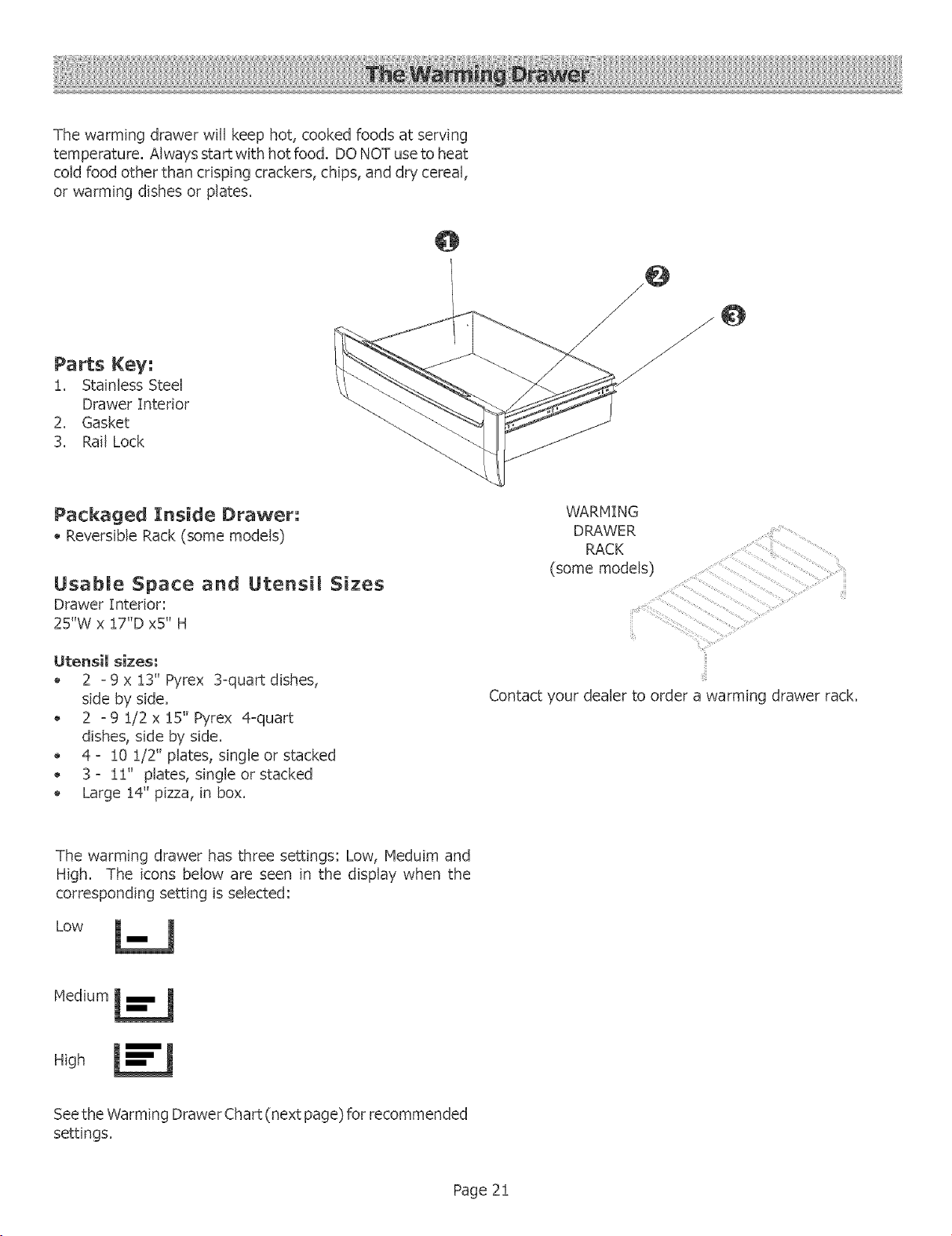
Thewarmingdrawerwillkeephot,cookedfoodsat serving
temperature.Alwaysstartwithhotfood.DONOTuseto heat
coldfoodotherthancrispingcrackers,chips,anddrycereal,
orwarmingdishesorplates.
Parts Key:
1. Stainless Steel
Drawer Interior
2. Gasket
3. Rail Lock
Packaged Inside Drawer;
Reversible Rack (some models)
Usable Space and Utensi[ Sizes
Drawer Interior:
25"W x 17"D x5" H
Utensil sizes:
2 - 9 x 13" Pyrex 3-quart dishes,
side by side.
2 ° 9 1/2 x 15" Pyrex 4-quart
dishes, side by side.
4 ° !0 1/2" plates, single or stacked
3 o 12' plates, single or stacked
Large 1#' pizza, in box.
WARMING
DRAWER
RACK
(some models)
Contact your dealer to order a warming drawer rack.
The warming drawer has three settings: Low, Heduim and
High. The icons below are seen in the display when the
corresponding setting is selected:
Low
Medium L_
High
Seethe Warming Drawer Chart (next page) for recommended
settings.
Page 2!
Using Your Warming Drawer
Food should be a serving temperature (above !40 ° F) before
being placed in the warming drawer,
The warming drawer can be used with or without a rack.
Preheat with rack in place if using that arrangement. It
fits side to side.
Preheat empty" serving dish while preheating drawer,
Add cooked, hot food in cooking utensil or to heat-safe
serving dishes.
Food may be kept hot in its cooking container ortransferred
to a heat-safe serving disk
Aluminum foil may be used to cover food.
Setting the Temperature
Set Temp with Oven Centre[
Warming drawer settings are Low, Hedium, and High.
The temperatures range from
132-149°F on Low
!50-!80°F on Medium
18! to 200°F on High
To keep several different foods hot, set the temperature to
the food needing the highest setting. Place item needing the
highest setting toward the side of the drawer and item needing
less heat on the rack or in the center of the drawer bottom.
Warming Empty Serving Bowls and Pmates
Use only heat-safe dishes.
Hay use reversible rack, in low position to raise utensil
from direct contact with bottom of drawer.
Warm on setting appropriate for utensil.
Check dish temperature during warming period.
, Place empty plates or dishes in a cold warming drawer.
Do not preheat.
Crisping Stale Items
Place food in low sided dishes or pans.
Preheat on Low.
Check crispness after 45 minutes. Add time as needed.
Preheating
, For best results, always preheat warming drawer when
warming food.
, Preheat times are as follows:
Low: !0 minutes
Medium: !5 mintues
High: 20 minutes
DO NOT LINE DRAWER WITH ALUMINUM FOIL,
CAUTION:
Plasticcontainersorplasticwrap
can melt ifindirectcontactwith
the draweror a hotutensil,Ifit
meltsontothe drawer,itmay"not
be removable.
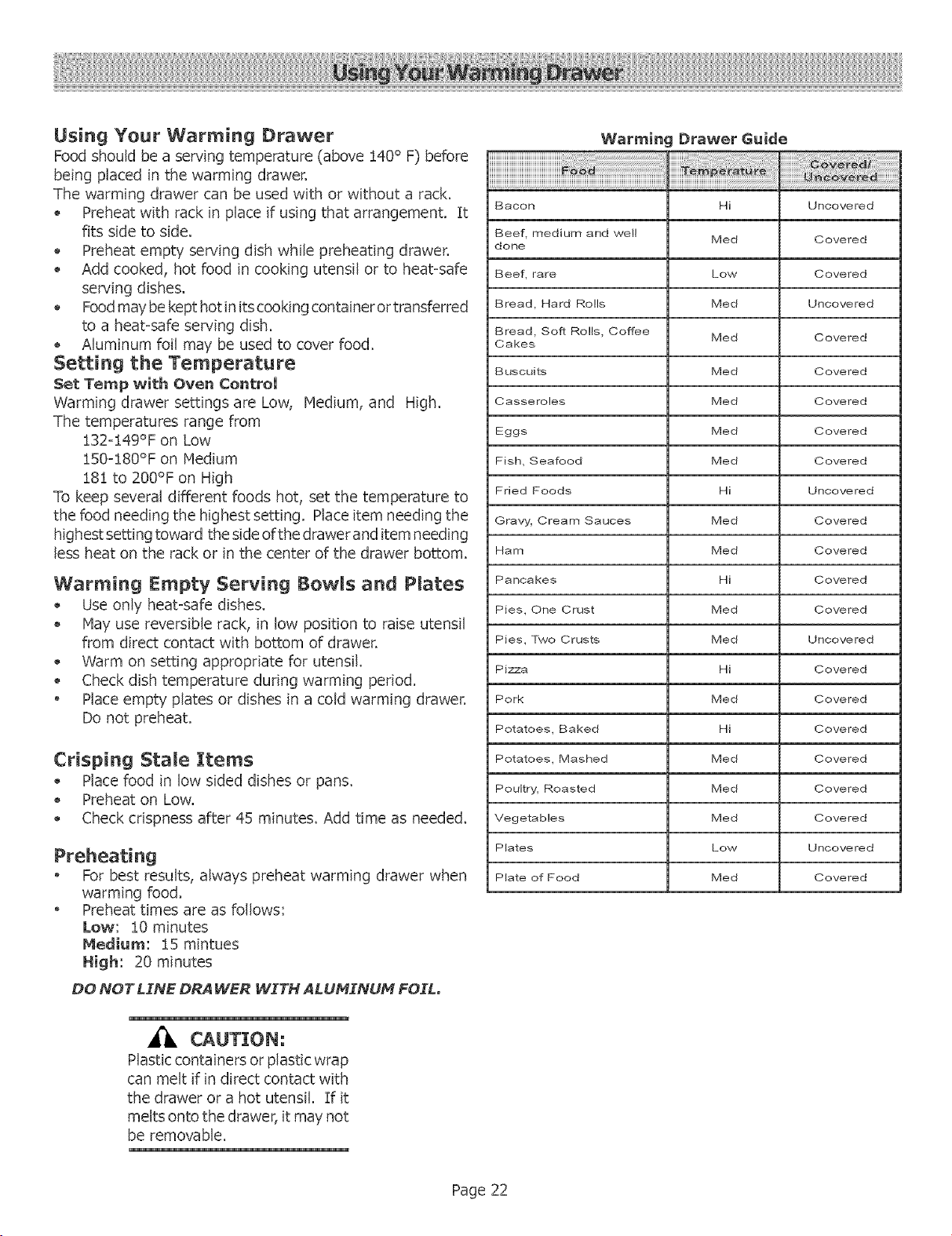
Warming Drawer Guide
Bacon Hi Uncovered
Beef, medium and well
Med Covered
done
Beef, rare Low Covered
Bread, Hard Rolls Med Uncovered
Bread, Soft Rolls, Coffee
Med Covered
Cakes
Buscuits Med Covered
Casseroles IVied Covered
Eggs Med Covered
Fish, Seafood Med Covered
Fried Foods Hi Uncovered
Gravy, Cream Sauces Med Covered
Ham Med Covered
Pancakes Hi Covered
Pies, One Crust Med Covered
Pies, Two Crusts Med Uncovered
Pizza Hi Covered
Pork Med Covered
Potatoes, Baked Hi Covered
Potatoes, Mashed Med Covered
Poultry, Roasted Med Covered
Vegetables Med Covered
P_ates Low Unoove red
P_ate of Food Med Covered
Page 22
Before Use Care
Care is easy when preventative steps are taken. For example,
apply a small amount of Cooktop Cleaning Creme (packaged
with range) on a daily basis.
This provides a protective film that makes it easy to remove
water spots or food spatters. The temperature of the cooking
surface reduces the protective qualities of this cleaner. It
must be reappiied before each use.
Use a clean cloth and apply Cooktop Cleaning Creme before
each use to remove dust or metal marks that can occur on the
counter level surface between uses.
Dally Cleaning Techniques
!, Clean the surface when it is completelV cool with the
Cooktop Cleaning Cr_me.
Exception: Remove Dry Sugar, Sugar Syrup, Tomato
Products and Milk immediately with the razor blade
scraper (See Care and Cleaning Chart, next page).
2, Wipe off spatters with a dean, damp sponge or paper
towel. Rinse and dry. Use white vinegar if smudge remains;
rinse.
3. Apply a small amount of the Coektop Cteaninc3
Crea_. When dry, buff surface with a clean paper towel
or cloth.
Do Not Use the Following Cleaners
® Gtass cleaners which contain ammonia or chlorine
bleach. These ingredients may"permanently etch or stain
the cooktop.
® Caustic Cleaners
Oven cleaners such as Easy"Off<_'may" etch the cooktop
surface.
® Abrasive Cleaners
Metal scouring pads and scrub sponges such as Scotch
Brite _ can scratch and / or leave metal marks.
$oapofiHed scouring pads such as SOS R_can scratch the
surface.
Powdery deaners containing chlorine bleach can
permanently stain the cooktop.
Flammable cleaners such as lighter fluid or WD=40.
CAUTION
Do not use any kind of cleaner on the glass while the surface
is hot, use only the razor blade scraper. The resulting fumes
can be hazardous to your health. Heating the cleaner can
chemically attack and damage the surface.
Cleaning the _T_T. DiaL
Remove from cooktop. Wipe with hot, soapy cloth, rinse and
dry. The dial can also be washed in the dishwasher_ Do not
soak or wash in dishwasher.
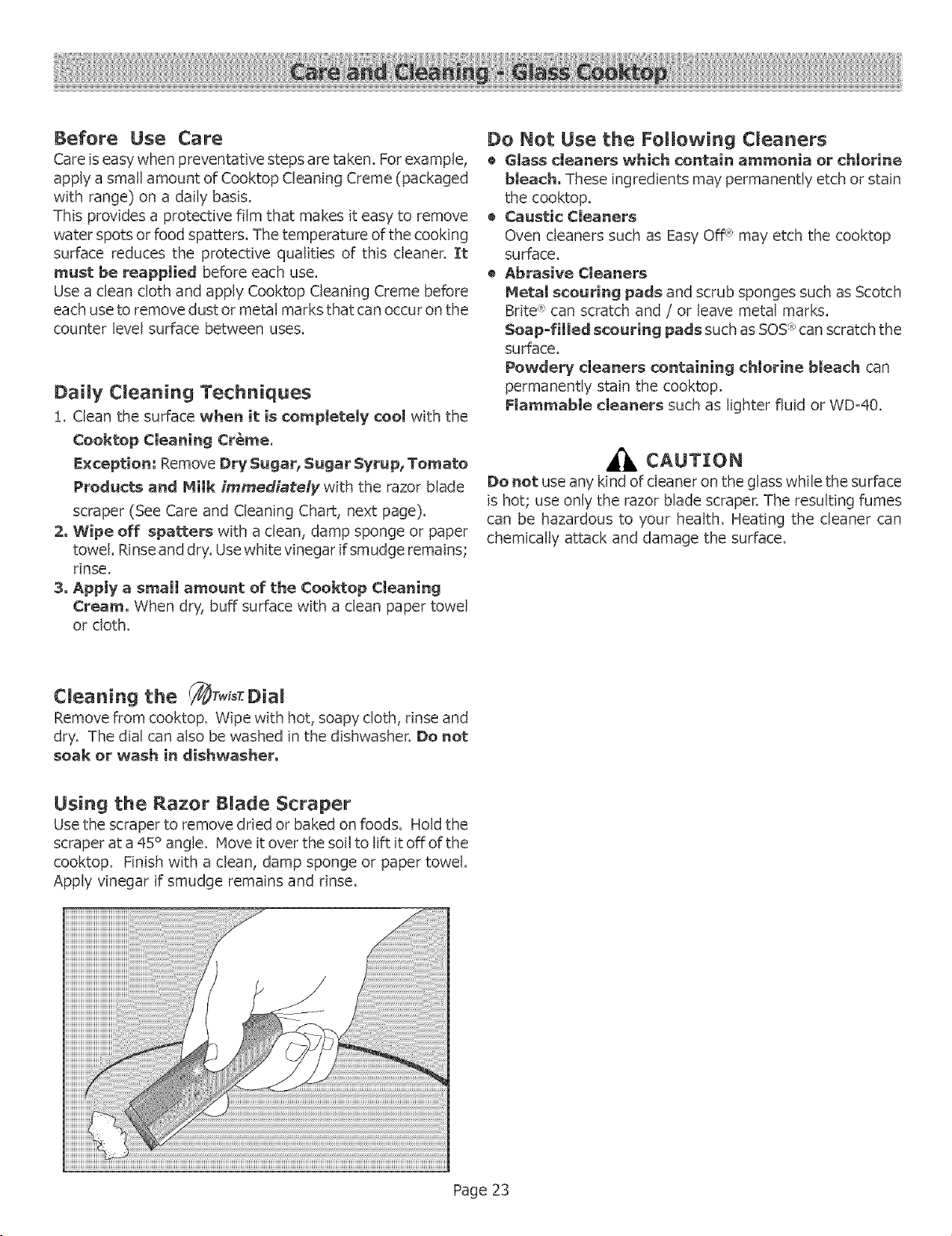
Using the Razor Blade Scraper
Use thescraperto remove driedor baked on foods,Holdthe
scraperata 45° angle,Move itoverthe soilto liftitoffofthe
cooktop, Finishwitha clean,damp sponge or paper towel
Apply vinegar if smudge remains and rinse.
Page 23
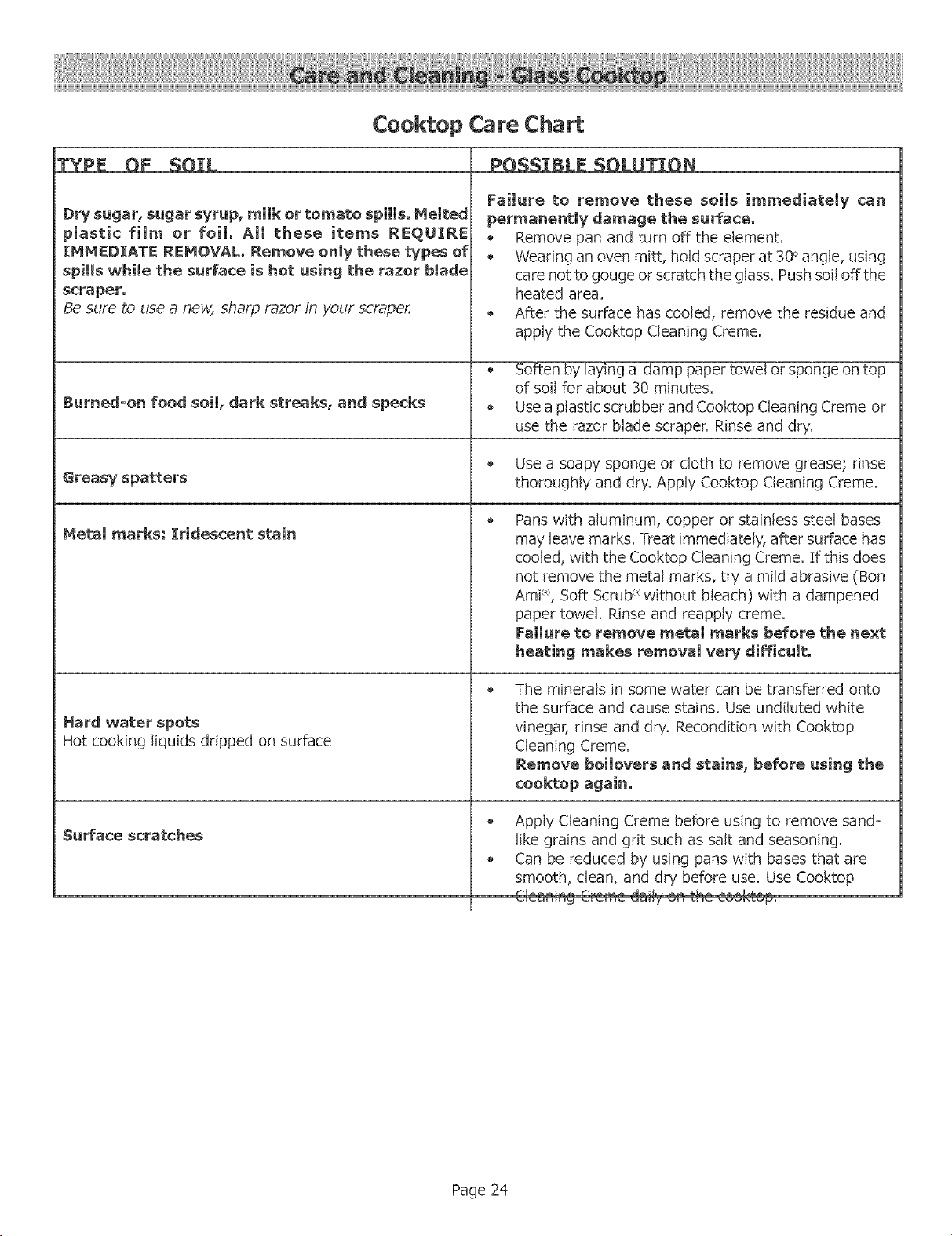
Cooktop Care Chart
TYPE OF SOIL
DW sugar, sugar syrup, milk or tomato spills. Melted
plastic film or foil. All these items REQUIRE
IHM[D[ATE REHOVAL. Remove only these types of
spills while the surface is hot using the razor blade
scraper.
Be sure to use a new, sharp razor in your scraper.
POSSIBLE SOLUTION
Failure to remove these soils immediately can
permanently damage the surface,
Remove pan and turn off the element.
Wearing an oven mitt, hold scraper at 30 ° angle, using
care not to gouge or scratch the glass. Push soil off the
heated area.
After the surface has cooled, remove the residue and
apply the Cooktop Cleaning Creme.
_ing a damp paper towel or sponge on top
of soil for about 30 minutes.
Burnedoon food soil, dark streaks, and specks • Use a plastic scrubber and Cooktop Cleaning Creme or
use the razor blade scraper. Rinse and dry.
Use a soapy sponge or cloth to remove grease; rinse
Greasy spatters thoroughly and dry. Apply Cooktop Cleaning Creme.
@
Hetal marks: Iridescent stain
Hard water spots
Hot cooking liquids dripped on surface
Surface scratches
Pans with aluminum, copper or stainless steel bases
may leave marks. Treat immediately, after surface has
cooled, with the Cooktop Cleaning Creme. If this does
not remove the metal marks, try a mild abrasive (Ben
Ami% Soft Scrub R'without bleach) with a dampened
paper towel. Rinse and reapply creme.
Failure to remove metal marks before the next
heating makes removal very difficult.
The minerals in some water can be transferred onto
the surface and cause stains. Use undiluted white
vinegar, rinse and dry. Recondition with Cooktop
Cleaning Creme.
Remove bei[overs and stains, before using the
cooktop again.
Apply Cleaning Creme before using to remove sand-
like grains and grit such as salt and seasoning.
Can be reduced by using pans with bases that are
smooth, clean, and dry before use. Use Cooktop
Page 24
Self Cleaning the Oven
Bosch ovens feature a self-cleaning function that eliminates
the manual labor involved with cleaning your oven. During
self-cleaning, the oven uses a very"high temperature to burn
away food soil and grease.
• It is common to see smoke and/or an occasional flame-
up during the Self-Clean cycle, depending on the content
andamount of soil remaining in the oven. If a flame
persists, turn off the oven and allow it to cool before
opening the door to wipe up the excessive food soil.
• In the Self-Clean Mode, the door latch is automatically
activated when the oven reaches 350° E This
ensures that the door cannot be opened while the oven
interior is at high clean temperatures.The door
lock symbol will appear in the display at this point. The
door will not lock until the ovenreaches 4S0 ° F.
When the lock symbol appears in the display,
gently pull on the door to confirm that it is locked.
• The oven light does not operate during this mode.
During Self-Clean, the kitchen should be well ventilated
to help eliminate odors associated with Self-Clean, Odors
will lessen with use.
Four hours is the preset length of cleaning. The range
can also be set to clean for 3 or 5 hours.
The mode automatically stops at the end of the clean
hours.
When the oven heat returns to 350 ° F after cleaning, the
automatic door lock will release and the door can be
opened,
Preparing the Oven for Self (:lean
i. Remove all utensils and bakeware.
2, Remove oven racks, If oven racks are left in the oven
during the self-clean cycle, they will permanently lose the
shiny finish and change to a dull dark finish, See Oven
Cleaning Chart for proper care,
3, Wipe up any soft soil spills and grease with paper towels,
Excess grease will cause flames and smoke inside the
oven during self-cleaning.
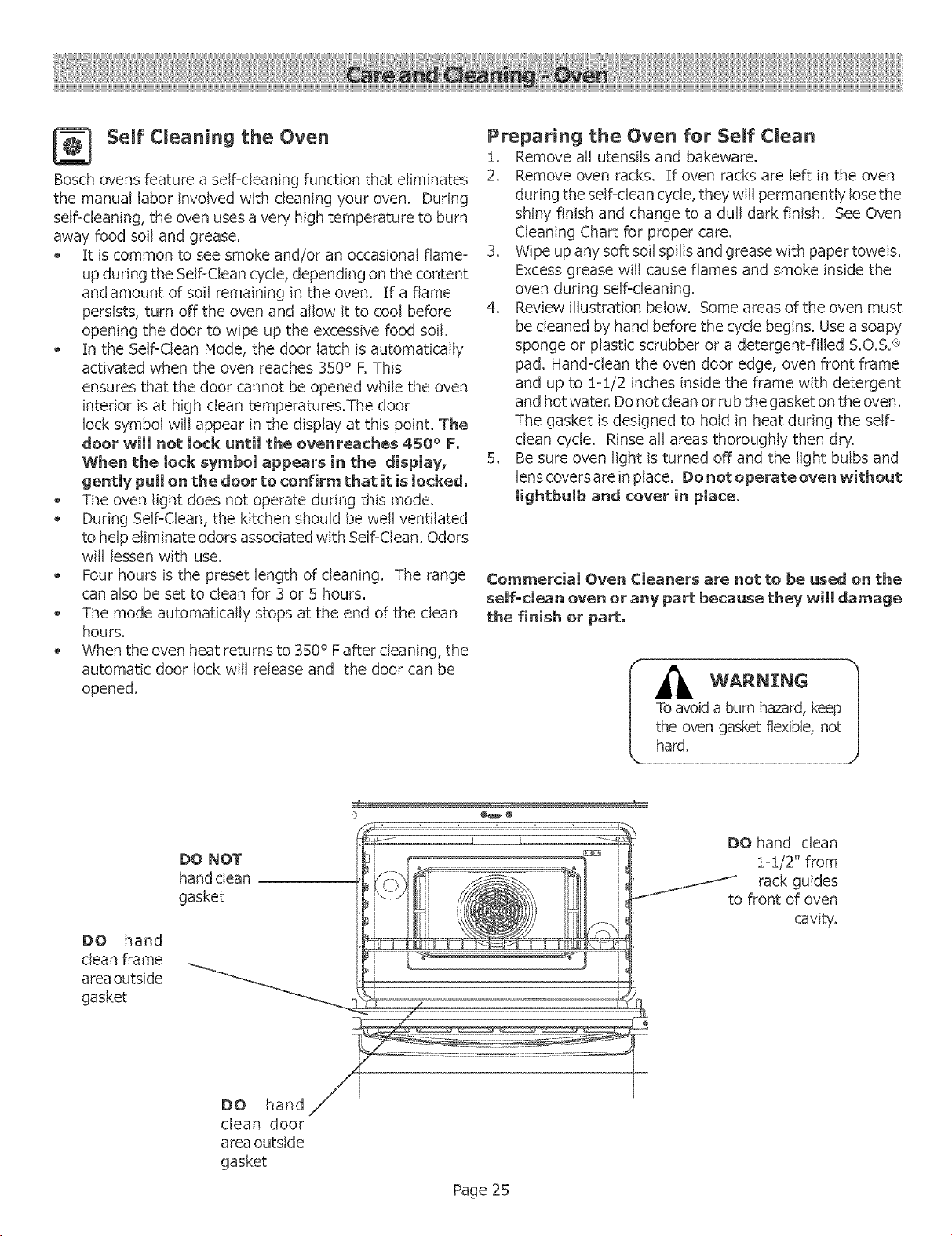
4. Review illustration below. Some areas of the oven must
be cleaned by hand before the cycle begins. Use a soapy
sponge or plastic scrubber or a detergent-filled S.O.S. <_
pad, Hand-clean the oven door edge, oven front frame
and up to i-i/2 inches inside the frame with detergent
and hot water. Do not clean or rub the gasket on the oven,
The gasket is designed to hold in heat during the self-
clean cycle. Rinse all areas thoroughly then dry.
5, Be sure oven light is turned off and the light bulbs and
lens covers are in place, Do net operate oven without
Iightbulb and cover in place.
Commercial Oven Cleaners are not to be used on the
self-clean oven or any part because they will damage
the finish or part,
I __Ov_ednaburn hazard, keep I
gasket flexible, not
DO hand
clean frame
area outside
gasket
DO NOT
hand clean
gasket
DO hand
clean door
area outside
gasket
Page 25
DO hand clean
i-i/2" from
rack guides
to front of oven
cavity,
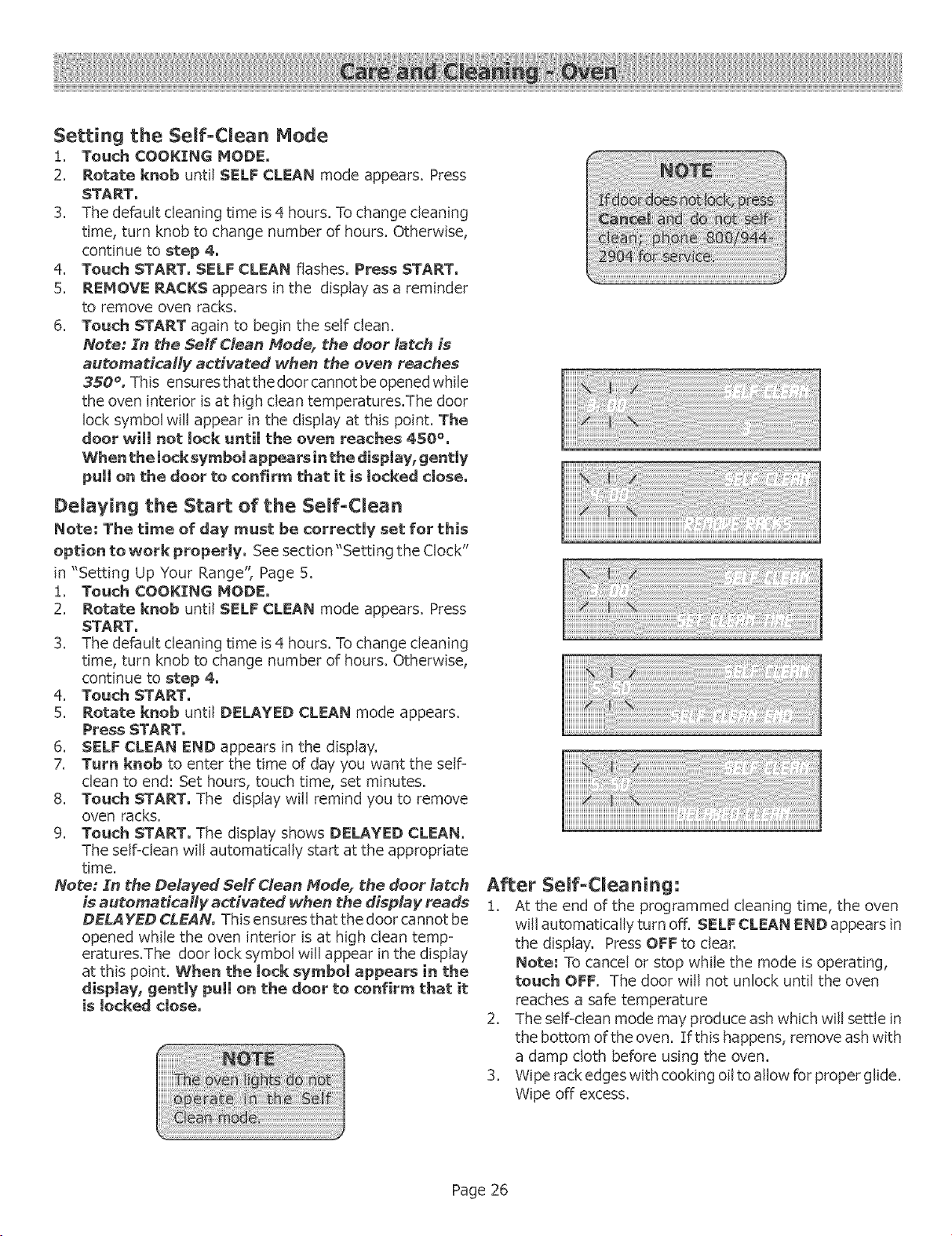
Setting the, Serf-Clean Mode
!, Touch COOKING MODE.
2. Rotate knob until SELF CLEAN mode appears. Press
START.
3. The default cleaning time is 4 hours. To change cleaning
time, turn knob to change number of hours. Otherwise,
continue to step 4.
4. Touch START. SELF CLEAN flashes. Press START.
5. REMOVE RACKS appears in the display as a reminder
to remove oven racks.
6. Touch START again to begin the self clean.
Note: Zn the 5elf Clean Mode, the door latch is
automatically activated when the oven reaches
350 °, This ensures that the door cannot be opened while
the oven interior is at high dean temperatures.The door
lock symbol will appear in the display at this point. The
door will net tock aatil the even reaches 4SO%
When the locksymboi appears in the dispJa¥, gentmy
pull on the door to confirm that it is locked dose,
Delaving the Start of the Serf-CLean
Note: The time of day must be correctly set for this
option to work property. See section"Setting the Clock"
in "Setting Up Your Range", Page 5.
i, Touch COOKING MODE.
2. Rotate knob until SELF CLEAN mode appears. Press
START.
3. The default cleaning time is 4 hours. To change cleaning
time, turn knob to change number of hours. Otherwise,
continue to step 4.
4. Touch START.
5. Rotate knob until DELAYED CLEAN mode appears.
Press START.
6. SELF CLEAN END appears in the display.
7. Turn knob to enter the time of day you want the self-
clean to end: Set hours, touch time, set minutes.
8. Touch START. The display will remind you to remove
oven racks.
9. Touch START. The display shows DELAYED CLEAN.
The self-clean will automatically start at the appropriate
time.
Note: Sn the Delayed 5eff Clean Mode, the door latch
is automatically activated when the display reads
DELAYED GLEAN° This ensures that the door cannot be
opened while the oven interior is at high dean romp=
eratures.The door lock symbol will appear in the display
at this point. When the tock symbol appears in the
display, gently puti on the door to confirm that it
is locked close,
After Self-Cleaning:
!. At the end of the programmed cleaning time, the oven
will automatically turn off. SELF CLEAN END appears in
the display. Press OFF to dear.
Note; To cancel or stop while the mode is operating,
touch OFF. The door will not unlock until the oven
reaches a safe temperature
2. The self-dean mode may produce ash which will settle in
the bottom of the oven. If this happens, remove ash with
a damp cloth before using the oven.
3. Wipe rack edges with cooking oil to allow for proper glide.
Wipe off excess.
Page 26
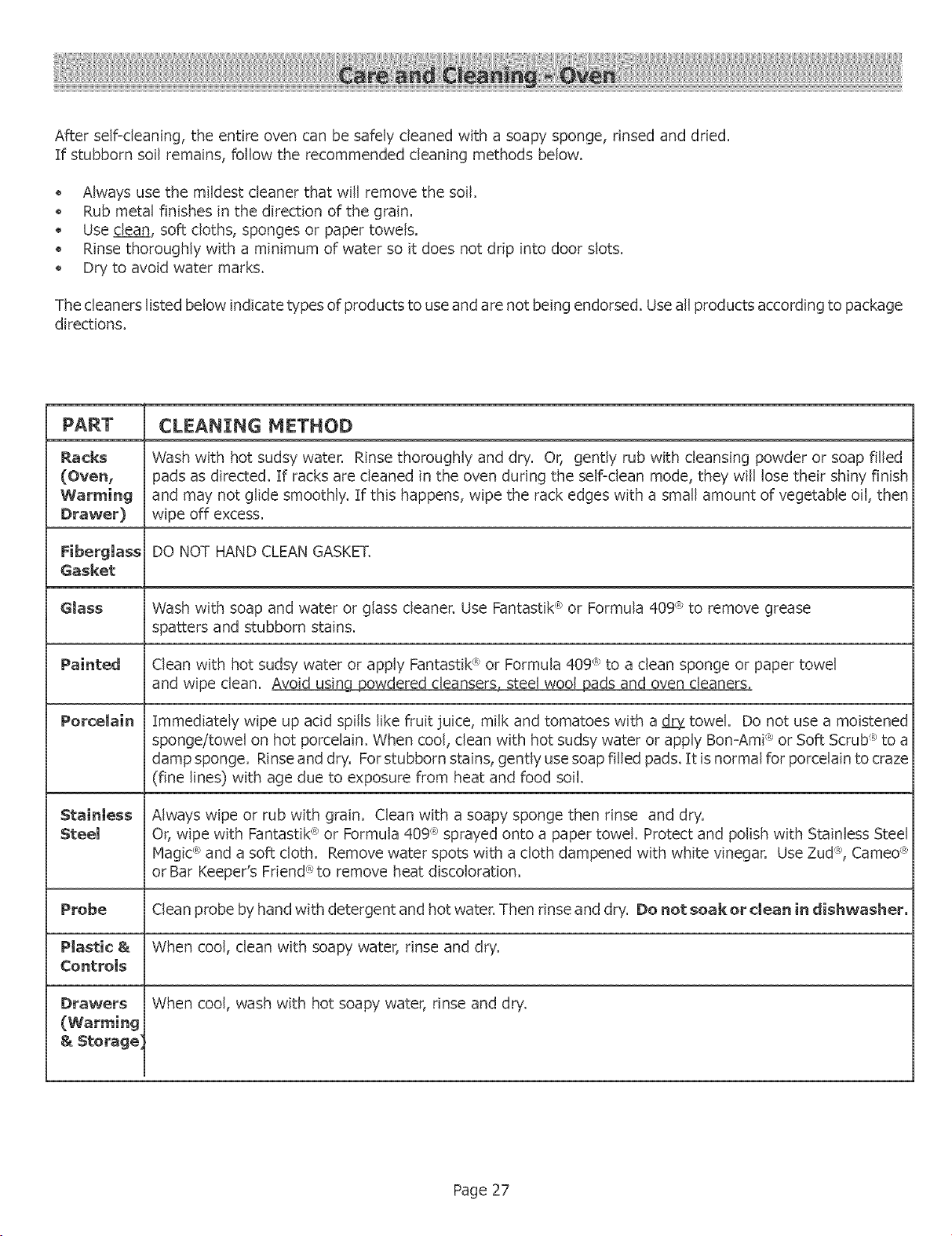
Afterself-cleaning,theentireovencanbesafelycleanedwitha soapysponge,rinsedanddried.
If stubbornsoilremains,followthe recommendedcleaningmethodsbelow.
Alwaysusethemildestcleanerthatwill removethesoil.
Rubmetalfinishesin the directionof thegrain.
Usedean,softcloths,spongesor papertowels.
Rinsethoroughlywitha minimumof waterso it doesnotdripintodoorslots.
Dryto avoidwatermarks.
Thecleanerslistedbelowindicatetypesofproductsto useandarenotbeingendorsed.Useallproductsaccordingtopackage
directions.
CLEANING HETHOD
Racks Wash with hot sudsy water. Rinse thoroughly and dry. Or, gently rub with cleansing powder or soap filled
(Oven, pads as directed. If racks are cleaned in the oven during the self=dean mode, they will lose their shiny finish
and may not glide smoothly. If this happens, wipe the rack edges with a small amount of vegetable oil, then
Drawer) wipe off excess.
Fiberglass DO NOT HAND CLEAN GASKET.
Gasket
Glass Wash with soap and water or glass cleaner. Use Fantastik ® or Formula 409 ® to remove grease
spatters and stubborn stains.
Painted
Porcelain
Clean with hot sudsy water or apply Fantastik _*or Formula 409 <_to a clean sponge or paper towel
and wipe clean. Avoid using Dowdered cleansers, steel wool pads and oven cleaners.
Immediately wipe up acid spills like fruit juice, milk and tomatoes with a _eLY=towel. Do not use a moistened
sponge/towel on hot porcelain. When cool, clean with hot sudsy water or apply Bon=Ami_' or Soft Scrub R'to a
damp sponge. Rinse and dry. For stubborn stains, gently use soap filled pads. It is normal for porcelain to craze
(fine lines) with age due to exposure from heat and food soil.
Always wipe or rub with grain. Clean with a soapy sponge then rinse and dry.
Or, wipe with Fantastik ® or Formula 409 _ sprayed onto a paper towel. Protect and polish with Stainless Steel
Magid _ and a soft cloth. Remove water spots with a cloth dampened with white vinegar. Use Zud R_,Cameo ®
or Bar Keeper's Fdend:_'to remove heat discoloration.
Probe Clean probe by hand with detergent and hot water. Then rinse and dry. Do not soak or clean in dishwasher°
Plastic & When cool, clean with soapy water, rinse and dry.
Controls
Drawers When cool, wash with hot soapy water, rinse and dry.
(Warming
& Storage]
Page 27
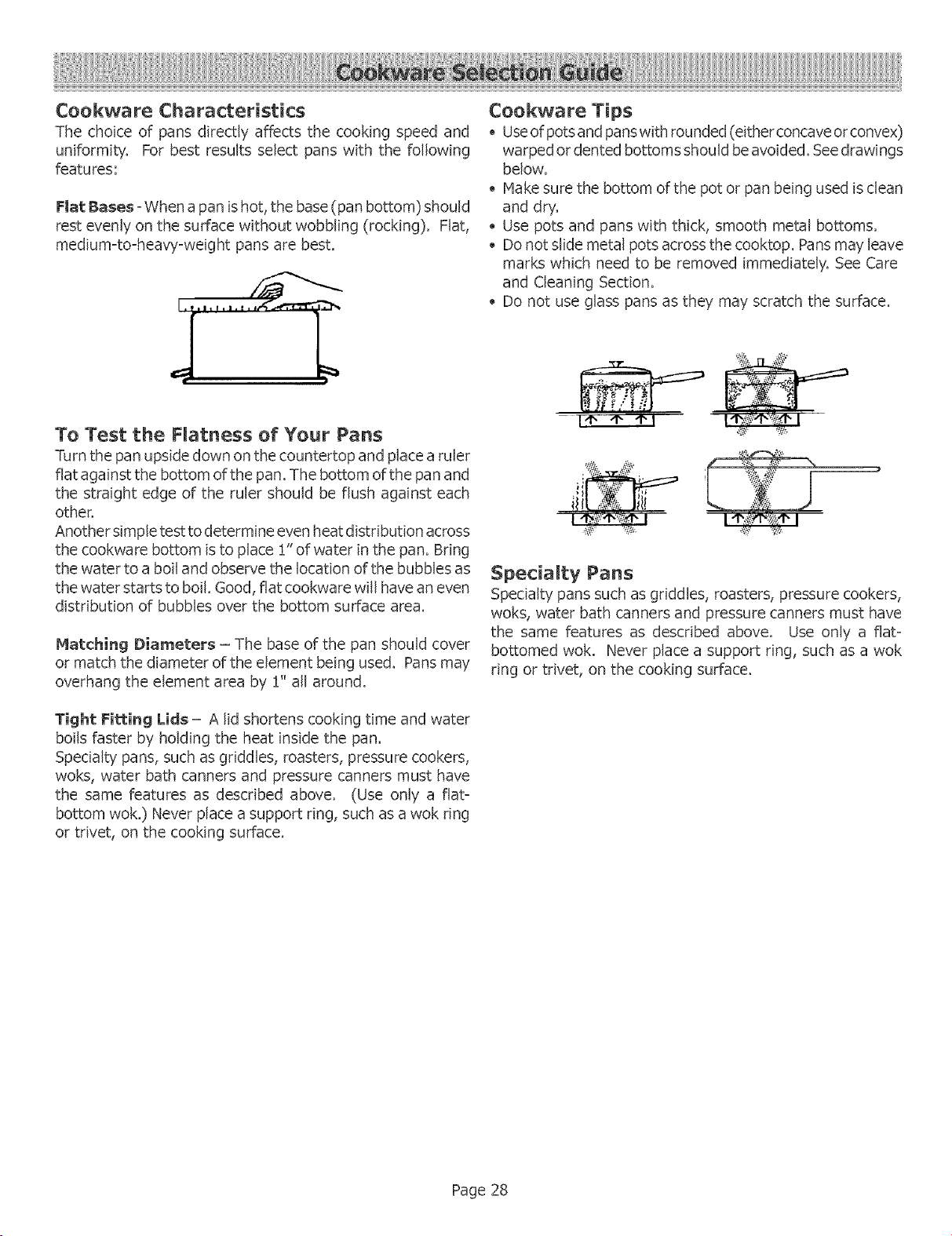
Cookware Characteristics
The choice of pans directly affects the cooking speed and
uniformity, For best results select pans with the following
features:
Fiat Bases - When a pan is hot, the base (pan bottom) should
rest evenly on the surface without wobbling (rocking). Flat,
medium-to=heavy=weight pans are best.
To Test the F_atness of Your Pans
Turn the pan upside down on the countertop and place a ruler
fiat against the bottom of the pan. The bottom of the pan and
the straight edge of the ruler should be flush against each
other.
Another simple test to determine even heat distribution across
the cookware bottom is to place !" of water in the pan. Bring
the water to a boil and observe the location of the bubbles as
the water starts to boil. Good, flat cookware will have an even
distribution of bubbles over the bottom surface area.
Matching Diameters - The base of the pan should cover
or match the diameter of the element being used. Pans may
overhang the element area by !" all around.
Tight Fitting Lids - A lid shortens cooking time and water
boils faster by holding the heat inside the pan.
Specialty pans, such as griddles, roasters, pressure cookers,
woks, water bath canners and pressure canners must have
the same features as described above. (Use only a flat=
bottom wok.) Never place a support ring, such as a wok ring
or trivet, on the cooking surface.
Cookware Tips
Useof pots and pans with rounded (either concave or convex)
warped or dented bottoms should be avoided. See drawings
below.
Make sure the bottom of the pot or pan being used is clean
and dry.
Use pots and pans with thick, smooth metal bottoms.
Do not slide metal pots across the cooktop. Pans may leave
marks which need to be removed immediately. See Care
and Cleaning Section.
Do not use glass pans as they" may scratch the surface.
I,t, "r" _ I e} '_,
Specialty Pans
Specialty pans such as griddles, roasters, pressure cookers,
woks, water bath canners and pressure canners must have
the same features as described above. Use only a flat=
bottomed wok. Never place a support ring, such as a wok
ring or trivet, on the cooking surface.
Page 28
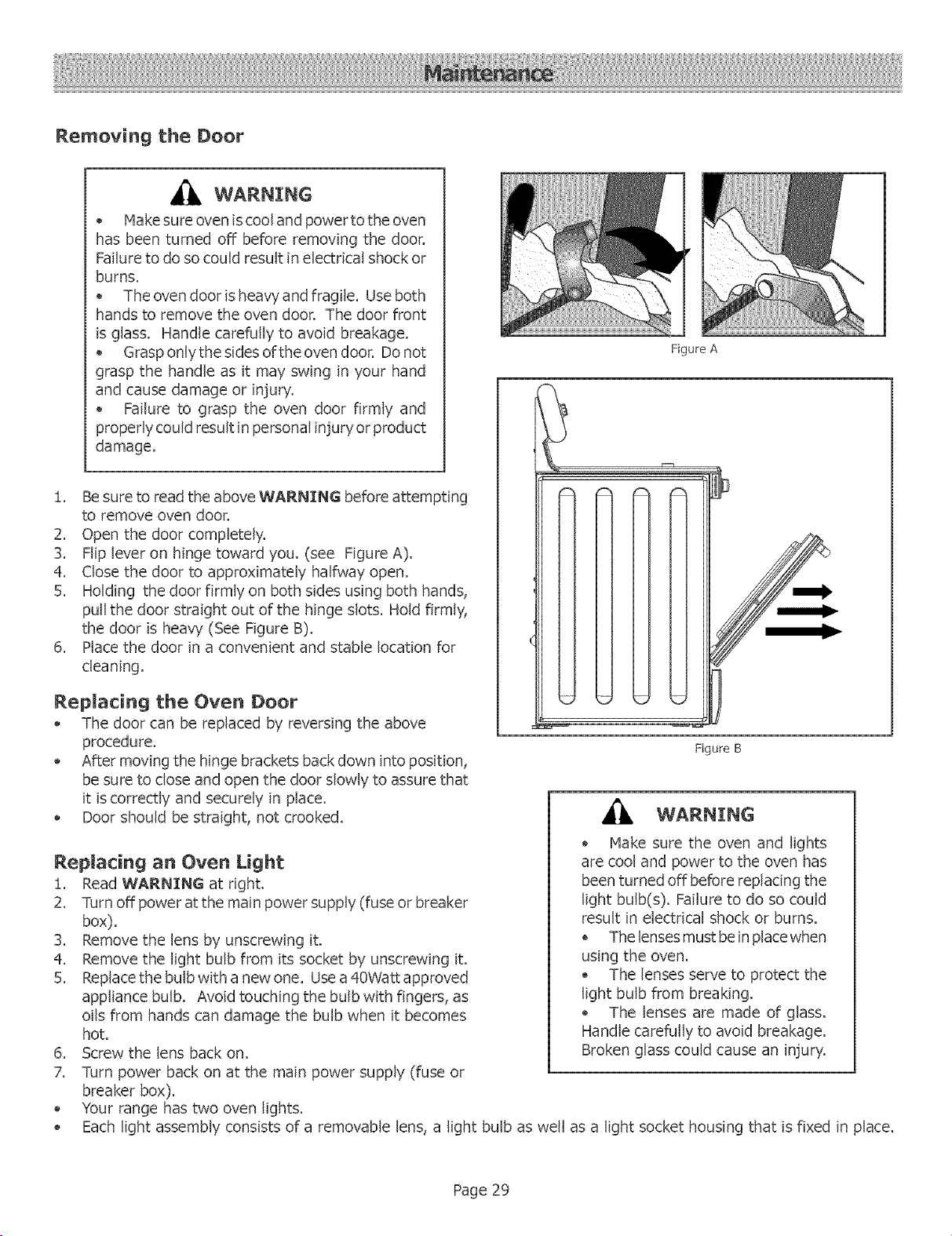
Removing the Door
WARNING
* Make sure oven is cool and powerto the oven
has been turned off before removing the door.
Failure to do so could result in electrical shock or
burns.
The oven door is heavy and fragile. Use both
hands to remove the oven door. The door front
is glass. Handle carefully to avoid breakage.
Grasp only the sides of the oven door. Do not
grasp the handle as it may swing in your hand
and cause damage or injury.
Failure to grasp the oven door firmly and
properly could result in personal injury or product
damage.
!. Be sure to read the above WARNING before attempting
to remove oven door.
2. Open the door completely.
3. Flip lever on hinge toward you. (see Figure A).
4. Close the door to approximately halfway open.
5. Holding the door firmly on both sides using both hands,
pull the door straight out of the hinge slots. Hold firmly,
the door is heavy (See Figure B).
6. Place the door in a convenient and stable location for
cleaning.
Replacing the Oven Door
The door can be replaced by reversing the above
procedure.
After moving the hinge brackets back down into position,
be sure to close and open the door slowly to assure that
it is correctly and securely in place.
Door should be straight, not crooked.
Replacing an Oven Light
i. Read WARNING at right.
2. Turn off power at the main power supply (fuse or breaker
box).
:3. Remove the lensby unscrewingit.
4. Remove the lightbulbfrom itssocketby unscrewingit.
5. Replace the bulb with a new one. Use a 40Watt approved
appliance bulb. Avoid touching the bulb with fingers, as
oils from hands can damage the bulb when it becomes
hot.
6. Screw the lens back on.
7. Turn power back on at the main power supply (fuse or
breaker box).
Your range has two oven lights.
FigureA
FigureB
WARNING
* Make sure the oven and lights
are cool and power to the oven has
been turned off before replacing the
light bulb(s). Failure to do so could
result in electrical shock or burns.
o The lenses must be in place when
using the oven.
o The lenses serve to protect the
light bulb from breaking.
o The lenses are made of glass.
Handle carefully to avoid breakage.
Broken glass could cause an injury.
Each light assembly consists of a removable lens, a light bulb as well as a light socket housing that is fixed in place.
Page 29
To avoid unecessary service charges, check these suggestions before calling for service.
SUGGESTED SOLUTIONS
E(ement cyc)es on the highest setting _ This is normal. The temperature ((miter operates
automatically to protect the glass ceramic surface from
extreme high temperature damage.
Element cycles more than usual
Pan base is warped and not making full contact with the
heating surface.
Base diameter of pan is too small for the size of the
element.
Pan ingredients have boiled dry.
Matedal of pan is a poor heat conductor_ heat transfers
too slowly.
A slight odor is noticeable when an element is turned on . This is normal with new cooktops and will disappear
after several uses.
Cooktop controls wi(I not turn on
Replacement razor blades for the scraper
Cooking results are not what was expected
Replacement mTwisT dial for cooktop
Check the power source to see if a fuse has blown or if
the circuit breaker tripped.
Check power supply.
Cooktop panel is locked. Touch and hold PANEL LOCK
pad until indicator light turns off.
The scraper is packaged with single-edge, stainless steel
blades. Use a standard single-edge blade for
replacement.
The cooktop is not level.
Cooking pan does not fit the surface being used.
Cookware is not the type or size recommended.
If an additional dial is required, call !-800-944-2904 and
order replacement part #5060003783.
Page 30
OVEN PROBLEM PROBLEM SOLVING STEPS
The oven mode or temperature selected or the numbers The knob was turned too rapidly, Turn knob slower until
selected do not appear in the display correct wording or temperature appears. Review manual
instructions when setting clock, timer, or Self-Clean.
Oven door is locked and wi[[ not release, even after cooling Turn the oven off atthe circuit breaker and wait 5 minutes.
Turn breaker back on. The oven should reset itself and
will be operable.
Oven is not heating Check the circuit breaker or fuse box to your house. Ha ke
sure there is proper electrical power to the oven. Hake
sure the oven temperature has been selected.
Oven is not cooking evenly
Check oven calibration. Adjust calibration if necessary
(see Oven Temperature Offset). Refer to cooking charts
for recommended rack position. Always reduce recipe
temperature by 25°F when baking with Convection Bake
mode.
Oven temperature is too hot or too cold The oven thermostat needs adjustment. See Oven
Temperature Offset,
Oven light is not working properly Replace or reinsert the light bulb if loose or defective,
Touching the bulb with fingers may cause the bulb to
burn out,
Oven light stays on Check for obstruction in oven door, Check to see if hinge
is bent,
Cannot remove lens cover on light There may be a soil build=up around the lens cover, Wipe
lens cover area with a clean dry towel prior to attempting
to remove the lens cover,
Oven will not SeIFC[ean properly
Clock and timer are not working properly
Porcelain chips
"F" and a number appears in display and control beeps
Allow the oven to cool before running SeIFClean. Always
wipe out loose soils or heavy spillovers before running
SelfiClean. If oven is badly soiled, set oven for a five-
hour Self-Clean. See Preparing the Oven to SeiFClean.
Hake sure there is proper electrical power to the oven.
See the Clock and Timer sections.
When oven racks are removed and replaced, always tilt
racks upward and do not force them to avoid chipping the
porcelain.
This is a fault code. If a"F" code flashes, press Offto clear
the display and stop beeping. Reset oven if necessary. If
fault code remains and beep continues, record fault code,
cancel oven and call authorized servicer.
With a new range there is strong odor when oven is This is normal with a new range and will disappear after
turned on a few uses. Operating the self-dean cycle will also"burn-
off" the smell more quickly.
Page 31
ThewarrantiesprovidedbyBSHHomeAppliancesCorp.inthisStatementof LimitedVv'arrantyapplyonlytotheBSHElectric
FreestandingRange("Range")soldto you,thefirstusingpurchaser,providedthatthe Rangewaspurchased(1)foryour
useandnotfor resaleand(2) in theUnitedStatesor Canadaandis locatedin the countryof purchase.Asusedin this
Statementof LimitedWarranty,theterm"Dateof Installation"shallreferto theearlierofthedatetheRangeisinstalledor
ten(!0) businessdaysafterthedatethe Rangeissoldtothefirstusingpurchaser,thewarrantiesstatedhereinapplyonly"
to thefirst usingpurchaserandarenottransferable.
Standard Limited Warranty
BSH warrants that its Range is free from defects in materials and workmanship for a period of twelve (!2) months from the
Date of Installation. During the warranty period, BSH or its authorized service center will repair or replace, at its sole option,
any Range that proves to have been defective under conditions of normal use without charge. All removed parts and
components shall become the property of BSH, at BSH's option. All replaced and/or repaired parts shall assume the identity
of the original part for purposes of this warranty" and this warranty shall not be extended with respect to such parts.
E×tended Limited Warranty
BSH further warrants that the electric heating elements and controls of the Range and the ceramic glass of the Range shall
be free from defects in materials for a period of time beginning on the twelfth (!2th) month from the Date of Installation
and continuing until the sixtieth (60th) month from the Date of Installation ("extended warranty period"). During the extended
warranty period, BSH will replace any" electric heating elements, electric controls, or ceramic glass of the Range that proves
to have been defective under normal conditions of use without charge, excluding any labor (including but not limited to labor
charges incurred in the removal and reinstallation of any" Range ), transportation, and!or shipping costs incurred in the
performance of this extended warranty. All replaced parts covered under this paragraph shall assume the identity" of the
original for purposes of this extended warranty and this warranty" shall not be extended with respect to such parts.
Other Conditions of the Limited Warranties
The warranties provided in this Statement of Limited Warranty exclude defects or damage resulting from (!) use of the Range
in other than its normal and customary" manner (commercial use of the Range shall not be deemed normal or customary),
(2) misuse, abuse, accidents or neglect, (3) improper operation, maintenance, installation or unauthorized service, (4)
adjustment or alteration or modification of any kind, (5) a failure to comply with applicable state, local, city, and county
dectrical and!or building codes, (6) spills of food or liquid, and (7) external forces such as floods, fires, acts of God or other
circumstances beyond BSH's control. Also excluded from this warranty" are scratches and damages on external surfaces and
exposed parts of Range on which the serial numbers have been altered, defaced of removed.
To the extent allowed by law, this warranty sets out your exclusive remedies with respect to products covered by" it, whether
the claim arises in contract or tort (including strict liability and negligence) or otherwise. BSHwill not be liable for consequential
or incidental damages, losses, or expenses. THIS WARRANTY IS IN LIEU OF ALL OTHER EXPRESSWARRANTIES. ANY
WARRANTY IMPLIED BY LAW,WH ETHERFOR MERCHANTABILITY OR FITNESS FORA PARTICULARPURPOSEOR OTHERWISE,
SHALL BE EFFECTIVE ONLY FORTHE PERIOD THAT THIS EXPRESSWARRANTY IS EFFECTIVE. No attempt to alter, modify,
or amend this warranty shall be effective unless authorized in writing by an officer of BSH.
How to Obtain Warranbj_ Service
To obtain warranty service for the Range, you should contact the nearest BSH authorized service center or the BSH Customer
Support Call Center, 555! McFadden Avenue, Huntington Beach, CA 92649, 800/944=2904.
NOTICE 1"O CALIFOP, NIA OWNEP,$
If your Range needs warranty service and there is no authorized BSH service center reasonably close to you, you may notify"
the BSH reseller from whom you purchased the Range. If the BSH reseller fails to repair or replace the defective parts, or
partially refund your purchase price (where applicable), you may"have the Range repaired at any large appliance repair shop
or center and you will be reimbursed for all reasonable expenses provided the costs are substantiated in writing and the work
performed is covered by" this warranty. BSH shall not reimburse any" repair costs hereunder which exceed the depreciated
value of the Range.
Page 32

BSHreserves the right to change specifications or design without notice, Some modeHs are certified for use in Canada, BSH is
not responsibHe for products which are transported from the United States for use in Canada, Check with your HocaH Canadian
distributor or deaHer, BSH Home AppHiances, Corporation, 5551 McFadden Avenue, Huntington Beach, CA 92649,
For the most up to date criticaH instaHHation dimensions by fax, use your fax handset and caHH 702/833-3600, Use code #8030,
5551 McFadden Avenue, Huntington Beach, CA 92649 ° 800/944-2904
5060003400 Rev, B ° © BSH Home Appliances Corporation 2003 ° Litho U, S, A, 8/03