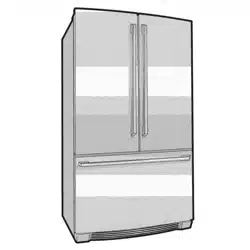
ETB2502H-A, ETB2502H-H, ETB2302H-A,
ETB2302H-H, ETB2802H-A, ETB2802H-H,
ETB3400H-A, ETB3400H-H, ETB3700H-A,
ETB3700H-H, EBB2802H-A, EBB2802H-H,
EBB3400H-A, EBB3400H-H, EBB3700H-A,
EBB3700H-H, EME2800H-A, EME2800H-H,
EME3700H-A, EME3700H-H
ENG
0000000000
User Manual
EN - English
Refrigeration
OM Refresh III_VT.indd 12OM Refresh III_VT.indd 12 7/6/2561 BE 09:257/6/2561 BE 09:25
Thank You for choosing Electrolux!
CONTENTS
Being ensured the permissible content ůŝŵŝƚĂƟŽŶ of
some toxic chemicals (RoHS compliant)
(According to the Circular No. 30/2011/TT-BCT, Vietnam,
dated 10
th
August, 2011)
Important Safety Information .............................................
3
Installing and Cleaning the Refrigerator .....................
4
Temperature Control ..............................................................
5
LED Lighting ..............................................................................
7
Door Storage Bins ..................................................................
7
Crisper Bin .................................................................................. 7
Deodorizer .................................................................................
8
Refrigerator Features .............................................................
9
Food Storage Guide .............................................................
16
Troubleshooting .......................................................................
17
Noise .............................................................................................
18
- Storing Vegetables
- Storing Fruits and Small Items
Congratulations and thank you for choosing an Electrolux refrigerator/
freezer. We are sure you will find your new appliance a pleasure to use.
Before you start using the appliance, we recommend you read through
the entire user manual which
describes the appliance and its many
functions. To avoid any unnecessary risks, misuse or hazards that may
be present when using a new electrical appliance, it is important you
read the safety instructions carefully. We recommend you keep this user
manual for future reference and pass it on to future owners. After
unpacking the appliance, please check that it is not damaged. If in
doubt, do not use the appliance but contact you local Electrolux
Customer Care Centre.
2
OM Refresh III_VT.indd 12OM Refresh III_VT.indd 12 7/6/2561 BE 09:257/6/2561 BE 09:25
ENVIRONMENTAL TIP
Disposal information for users
Most of the packing materials are recyclable. Please
dispose these materials through your local recycling
depot or place them in appropriate collection containers.
If you wish to discard this appliance, please contact
your local authorities and ask for the correct method of
disposal. These products are RoHS compliance.
Conditions of use
This appliance is intended to be used in household and
similar applications such as,
• Staff kitchen areas in shops, offices and other
working
enviroments;
• Farm house and by clients in hotels, motels and
other residential type enviroments;
• Bed and breakfast type environments;
• Catering and similar non-retail applications;
Please read the
user manual carefully and keep it
in a handy place for later reference.
The symbols you see in this manual have the
following meanings:
WARNING
This symbol indicates information concerning your
personal safety.
CAUTION
This symbol indicates information on how to avoid
damaging the appliance.
i
TIPS AND INFORMATION
This symbol indicates tips and information about the
use of the appliance.
ENVIRONMENTAL TIP
This symbol indicates tips and information about
economical and ecological use of the appliance.
MEANING OF SYMBOLS
This symbol indicates to never do this.
This symbol indicates to always to this.
TIPS AND INFORMATION
i
Important: Check for any damages or marks. If you
find that the refrigerator is damaged or marked,
you must report this within 7 days if you wish to claim
for damages/marks under the manufacturer’s warranty.
This does not affect your statutory rights.
WARNING
If pressurised aerosol containers bear the
word ‘Flammable’ and/or a small flame
sysbol, do not store them inside any
refrigerator. If you do so, you may cause
an explosion.
When you dispose of refrigerators and freezers, remove
all doors. Children can suffocate if they get trapped
inside. This refrigerator contains isulation formed with
flammable blowing gases. Avoid safety hazards by
carefully disposing of this appliance.
WARNING
This appliance must be plugged into its own dedicated
220-240V, 50/60Hz AC electrical outlet
Ensure that the electrical outlet is properly earthed to
ground. Consult a qualified electrician if you are unsure.
Do not use an extension cord or adapter plug.
If the power cord is damaged, it must be replaced by
manufacturer, its service agent or similarly qualified
personnel in order to avoid a hazard.
Unplug the appliance before cleaning and before
changing the light bulb to avoid electric shock.
Never unplug
the appliance by pulling on the power
cord. Always grip the plug firmly, and pull straight out of the
receptacle to prevent damaging the power cord.
Choose a location that is not too cold for installation.
The temperature should be above 10 degrees
o
C.
Put the appliance in a dry place, avoiding areas of
high moisture or humidity.
Do not place the appliance in frosty or unprotected
areas, such as in a garage or on a verandah.
Do not place the appliance in direct sunlight.
Do not place the appliance near stoves, fires or
heaters.
The plug must be accessible when the appliance is
in position.
WARNING
Never let children play with the refrigerator.
Never store fizzy drinks in the freezer compartment.
Never try to repair the refrigerator on your own.
Never use electric heaters or dryers to defrost the
freezer because you can receive an electric shock.
Never use electrical appliances inside the storage
areas.
This appliance is not intended for use by persons (including
children) with reduced physical, sensory or mental capabilities,
or lack of experience and knowledge, unless they have been
given supervision or instruction concerning use of the appliance
by a person responsible for their safety. Children should be
supervised to ensure that they do not play with the appliance.
Please follow these tips;
WARNING
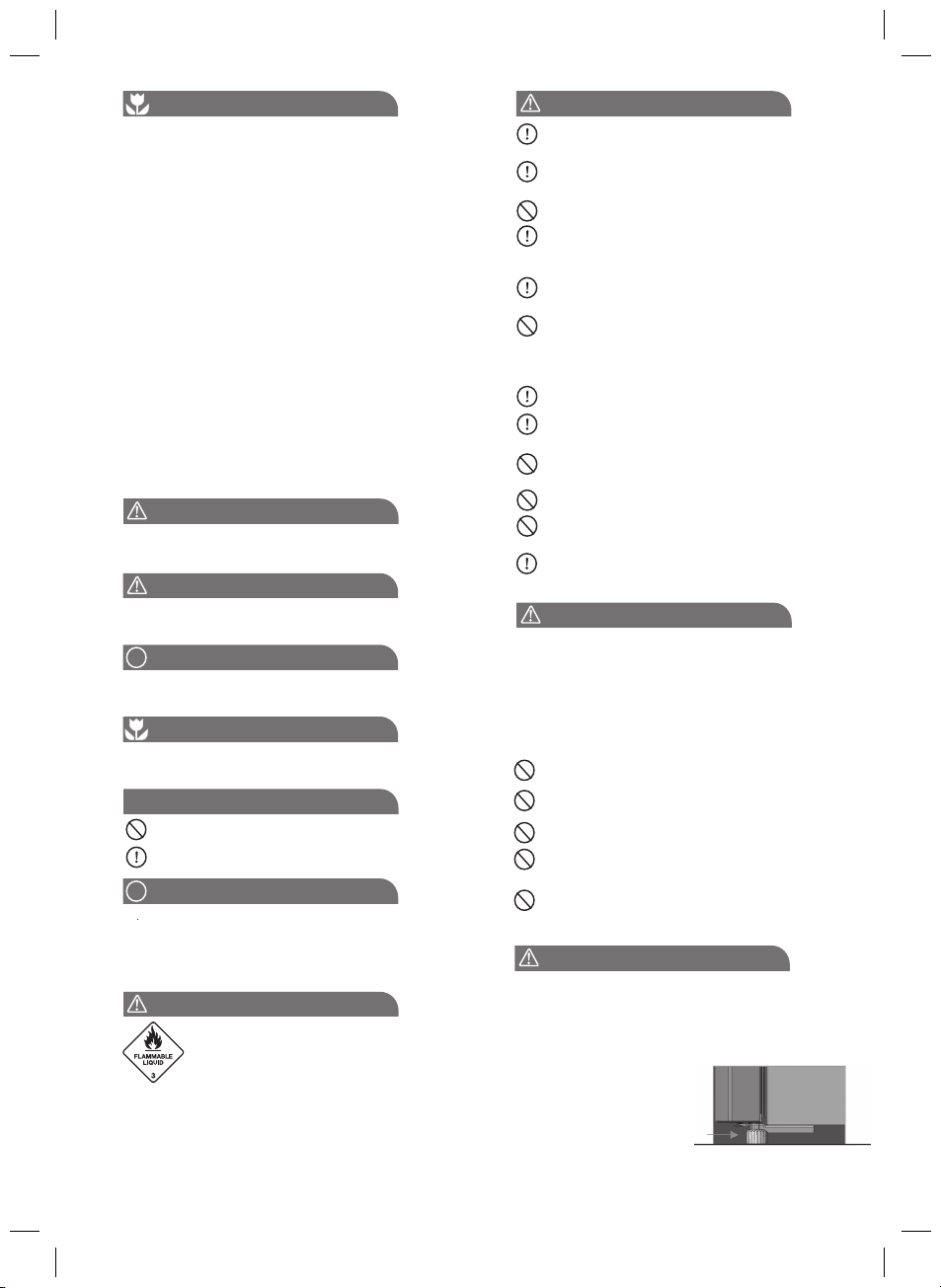
Stability Foot
When you refrigerator is in place, wind down the stability
foot to the floor to stabilise it. Lift the front of the
refrigerator to take the weight off the stability foot, then
turn it 1/4 turn further to ensure firm contact with the floor.
Side View
Stabilising
foot wound
down
If you do move the
refrigerator, remember
to wind it back up, to
allow the refrigerator
to roll. Remember to
reset it when reinstalling.
3
OM Refresh III_VT.indd 12OM Refresh III_VT.indd 12 7/6/2561 BE 09:257/6/2561 BE 09:25
R600A REFRIGERANT WARNING
• This appliance contains flammable R600a refrigerant.
Avoid safety hazards by carefully installing, handling,
servicing and disposing of this appliance. If your
appliance contains R600a it will be indicated on the
rating plate inside the appliance.
• Ensure that the tubing of the refrigerant circuit is not
damaged during transportation and installation.
• In the event any damage accidentally occurs, keep the
appliance away from open fires and any devices that
produce sparks or arcs and luminaries during normal or
abnormal operation, and unplug the appliance at the
power point. Call authorized service for necessary
action and advice.
• Leaking refrigerant may ignite vent area if leak occurs.
• The room for installing appliance must be at least 1m3
per 8g of refrigerant. The amount and type of refrigerant
in the appliance can be found on the rating plate inside
the appliance.
• Do not damage the refrigerant circuit.
• Do not use electrical appliances inside the food storage
compartments of the appliance, unless they are of the
type recommended by the manufacturer.
• Keep ventilation openings, in the appliance enclosure
or in the built-in structure, clear of obstruction.
• Do not use mechanical devices or other means to
accelerate the defrosting process, other than those
recommended by the manufacturer.
WARNING
Installing Your New Refrigerator
• Do not use a steam cleaner. If live components come
in contact with the condensing steam, they may short
circuit or cause an electric shock.
• Do not plug the appliance into a timer fitted to the
power point.
• Do not put your appliance on an uneven surface.
• Do not store explosive substances such as aerosol cans
with flammable propellant in the appliance.
• Do not store fizzy drinks in the freezer compartment.
• Never try to repair the refrigerator on your own. Use
only a qualified or authorised service person for repairs.
• Never use electric heaters or dryers to defrost the
freezer because you can receive an aelectric shock.
Clean the refrigerator thoroughly according to instruction,
and wipe away any dust that has accumulated during
shipping.
Check that the floor is level. If it is not then adjust the
provided levelling leg so product is level and stable.
We recommend that you let your refrigertor run for two
to three hours before you put any food in it. This will allow
you to check that it is operating properly and that
enough cool air is going to the freezer.
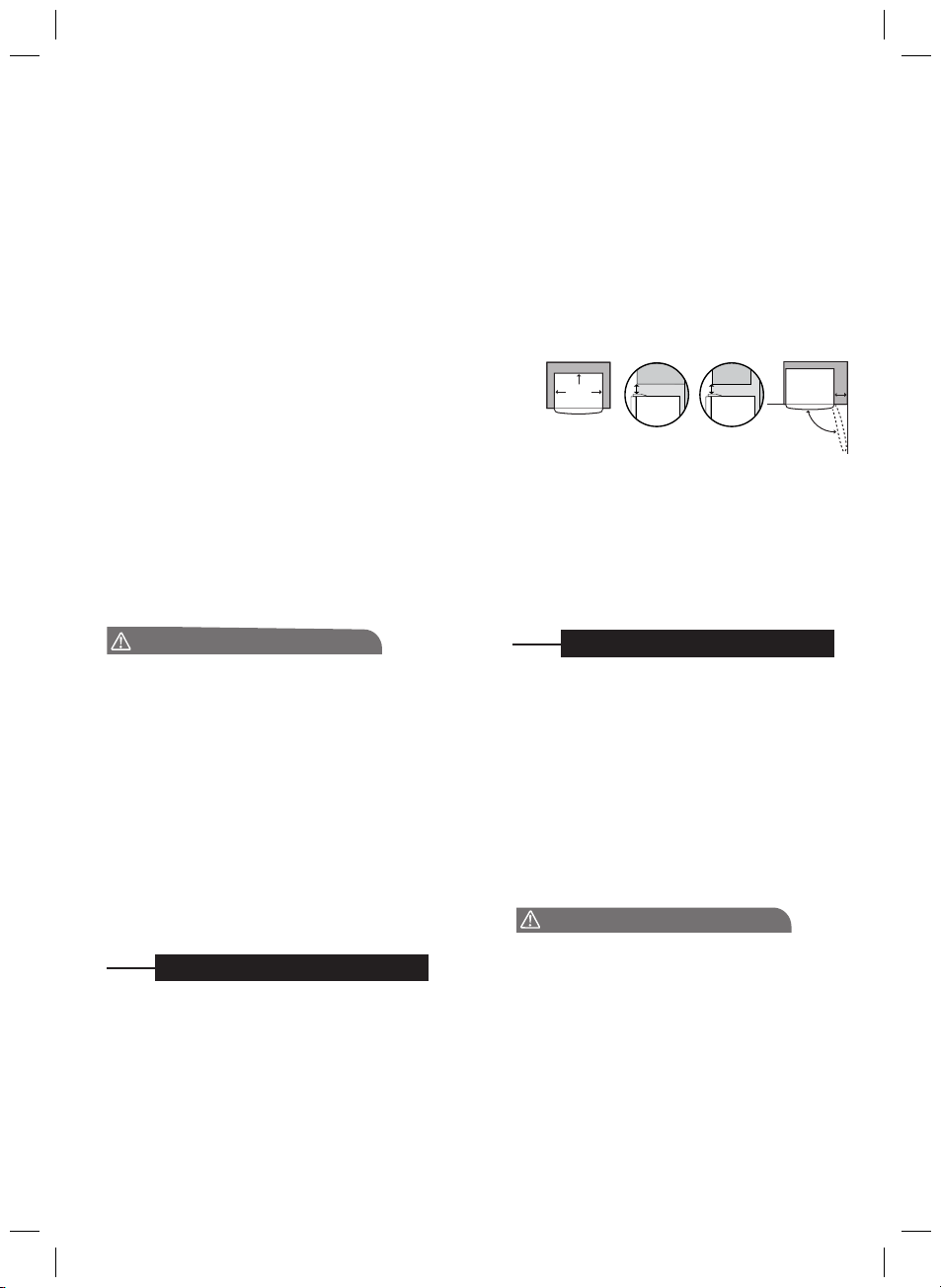
Clearance around your Top and Bottom Mount refrigerator
• Allow a minimum of 30mm clearance on both sides of the
refrigerator.
• Allow 50mm clearance at the back of the refrigerator.
• Allow a minimum of 10mm clearance above the hinge cover.
• If you do not have a cupboard with allowance for air ow
above the refrigerator, the recommended clearance area on
top increases to 90 mm.
• When positioned in a corner area, spacing of at 350mm on
the hinge side will allow the doors to open enough to enable
the removal of bins and shelves.
50mm
Recommended
airspace
CABINET
DOOR
30mm
30mm
350mm
NOTE: In installation where both sides and the rear of the
refrigerator are not enclosed by cabinetry eg the refrigerator
is placed against a wall, the clerance between the rear of
refrigerator and the wall should not be greater than 75mm.
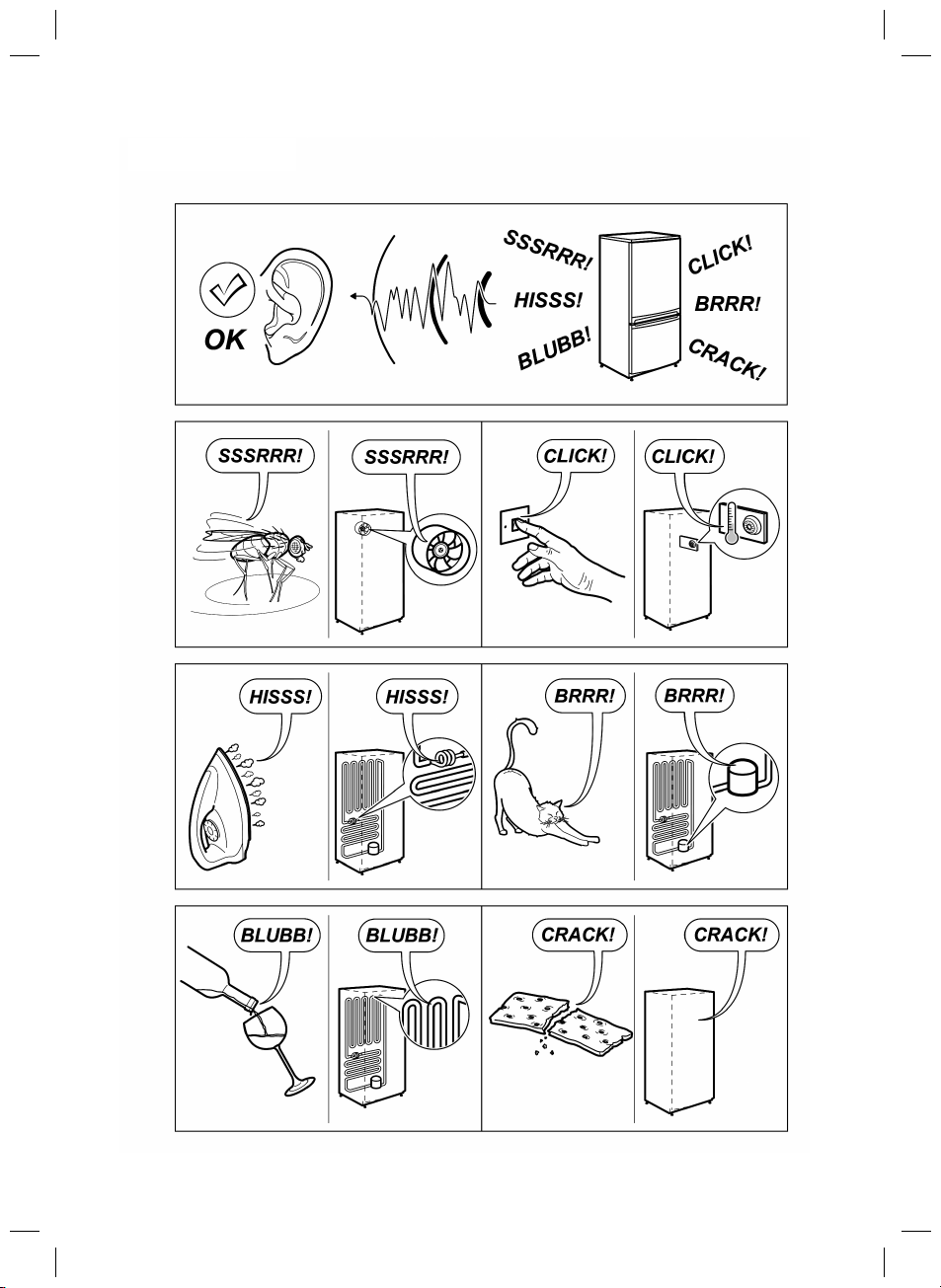
You refrigerator uses energy efficient components that may
produce different noises (Refer “Noises” page for examples)
to your old refrigerator. Occasionally a gurgling sound of
refrigerator flowing or the sound of parts expanding and
contracting can be hard. These noises are quite normal.
WARNING
Cleaning Your Refrigerator
Exterior
You should only clean your refrigerator with lukewarm
soapy water and a soft cloth. Rinse with clean water
and then wipe the surface with a soft clean cloth to
remove any soap residue.
Interior
You should clean the refrigerator interior regularly. Wash the
interior with a soft cloth and lukewarm soapy water.
Thoroughly dry all surfaces and removable parts. Avoid
getting water on refrigerator controls. If you have taken out
any removable parts, replace them and switch the power
on before restocking the refrigerator with food. Naturally,
you should keep the interior of your refrigerator hygenic by
promptly and thoroughly wiping up any food spills.
Naver use hot water, solvents, commericail, caustic or
abrasive cleaners, or scourers to clean this appliance as
they will damage it. Many commercially available cleaning
products and detergents contain solvents that will damage
your refrigerator. When cleaning, use only a soft cloth and
lukewarm soapy water.
90 mm
10 mm
4
OM Refresh III_VT.indd 12OM Refresh III_VT.indd 12 7/6/2561 BE 09:257/6/2561 BE 09:25
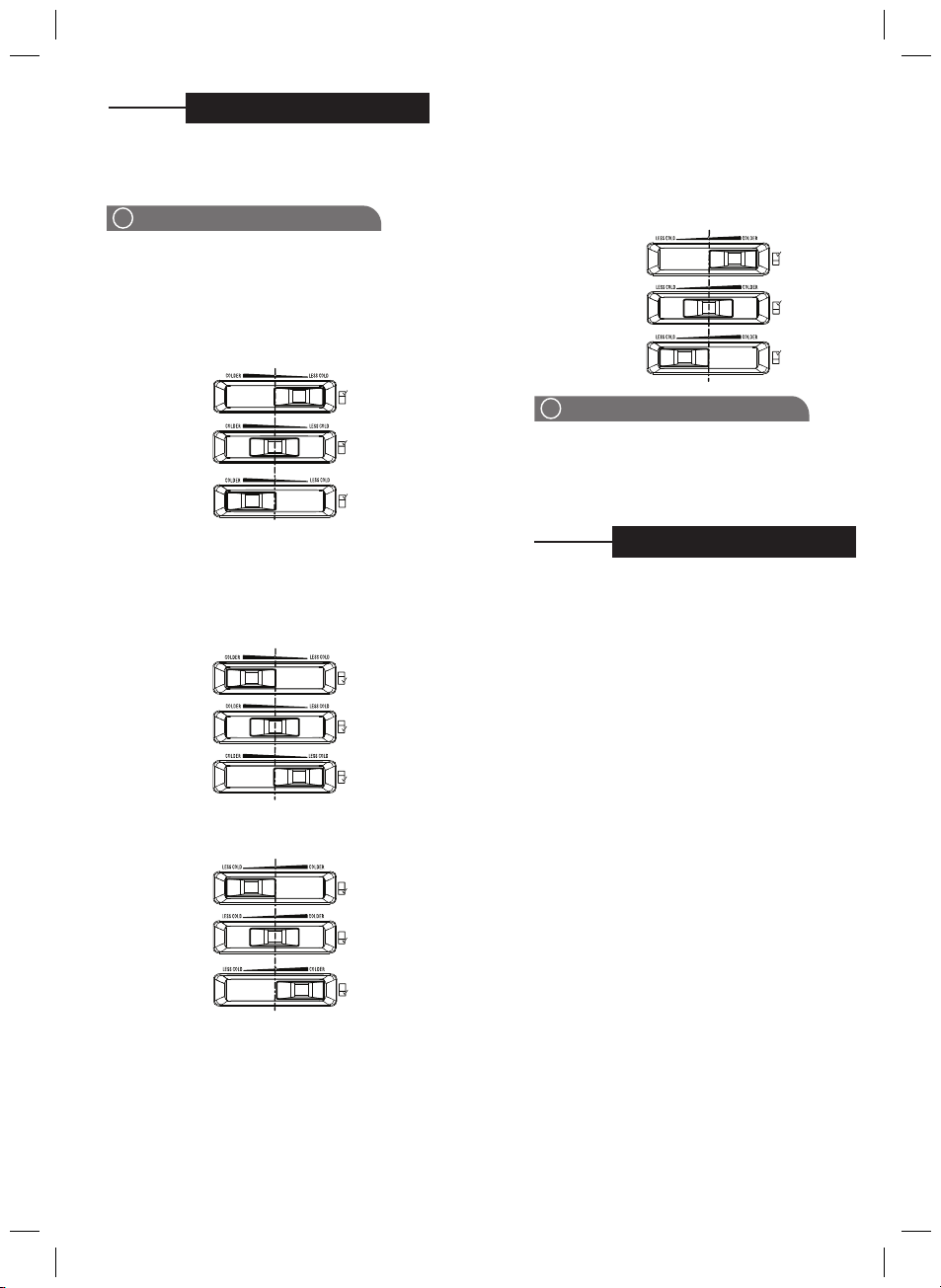
TEMPERATURE CONTROL
TIPS AND INFORMATION
i
When you first turn on the refrigerator, set both the
refrigerator and freezer temperature control to normal.
Please refer to the below section for information on
adjusting refrigerator and freezer temperature.
1. Select the refrigerator control
2. Slide the control to the left to set it to colder
3. Slide the control to the right to set less cold
Refrigerator temperature setting recommendation
Set to colder
Set to normal
Set to less cold
Refrigerator temperature adjustment
1. Select the refrigerator control
2. Slide the control to the left to set it to less colder
3. Slide the control to the right to set cold
Refrigerator temperature setting recommendation
Set to colder
Set to less cold
DOOR ALARM
TIPS AND INFORMATION
i
Setting the freezer temperature to colder is not
recommended for normal or very hot climate condition
as this will limit the cooling capacity to other sections of
the refrigerator. In very cold climate the freezer will need
to be set colder.
If the refrigerator door is left open longer than two minutes,
a buzzer will sound. Re-set the alarm by pressing the Light
switch or closing the door.
Changing setting
When you change the temperature settings, make small
adjustment
s and
wait 24 hours before assessing
whether
you need to make any
further changes.
F
or
T
op Fr
eezer models
Freezer
temperature setting recommendation
Summer
(Higher than 35
°C)
Set to normal
Winter
(Under
15
°C)
Refrigerator temperature adjustment
Set to normal
Freezer temperature setting recommendation
Summer
(Higher than 35
°C)
Set to normal
Winter
(Under 15
°C)
For Bottom Freezer models
5
OM Refresh III_ID.indd 20OM Refresh III_ID.indd 20 7/6/18 9:02 AM7/6/18 9:02 AM
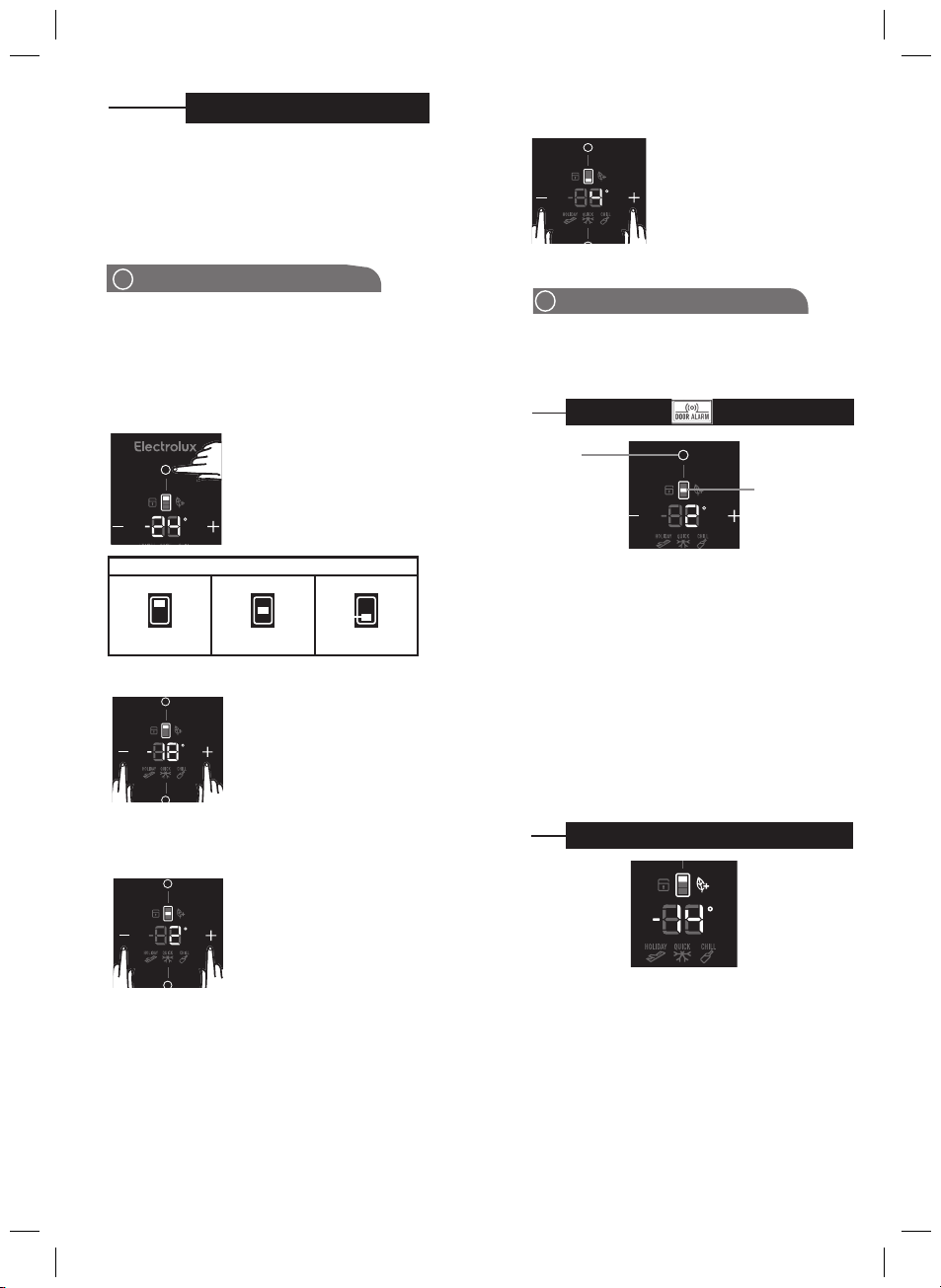
TEMPERATURE CONTROL
TIPS AND INFORMATION
i
We recommend that when you start your refrigerator for
the first time, the temperature for the refrigerator is to set
to 3
°C
and the freezer to -18
°C .
If you want to change
the temperatures, use the instructions below. You should
make only small adjustments and wait 24 hours to see
whether you need to make further changes.
When you set a temperature, you set an average
temperature for the whole appliance cabinet. Temperatures
inside each compartment many vary, depending on how
much food you store and where you place it. High or low
room temperature may also affect the actual temperature
inside the appliance.
For Multi Top Freezer models
How to select the compartment to set temperature
Freezer Selected Middle Selected Food Selected
Compartment Icon Display
Use “Compartment Select” button
to highlight freezer, middle or fresh
food compartment temperature
setting.
Adjusting the middle temperature
1. Press left “<” arrow button to
make the middle colder in
1
°C
steps.
2. Press right “>” arrow button to
make the middle warmer in
1
°C
steps.
1. Press left “<” arrow button to
make the fr
eezer colder in 1
°C
steps.
2. Press right “>” arrow button to
make the freezer warmer in 1
°C
steps.
The Freezer temperature range: -23
°C
to -14
°C
Adjusting the freezer temperature
The Middle temperature range: -12
°C
to 3
°C
The Refrigerator temperature range: 0
°C
to 7
°C
1. Press left “<” arrow button to
make the middle colder in
1
°C
steps.
2. Press right “>” arrow button to
make the middle warmer in
1
°C
steps.
i
TIPS AND INFORMATION
Coldest freezer setting is not recommended in normal
and very hot climates as this will limit the cooling to the
refrigerator sections. In very cold climates the freezer will
need to be set colder.
Press
“Compartment
select” button to
silence alarm.
Compartment
icon will pulse
every 0.5 seconds.
Door Alarm
If the fresh food door is left open longer than two
minutes. The buzzer will sound and “Compartment
icon” and “Compartment select button” will pulse every
0.5 seconds. Press “Door Switch” or close the door to
stop alarm. Press any button to silence alarm. Alarm
sound will mute for 8 minutes if the door is still open. If
the alarm resounds then pressing the button again will
silence the alarm for a further 8 minutes. When door alarm
is activated, all other functions are locked out.
Energy efficiency
Your appliance has been designed with energy
efficiency in mind and can operate in any of three
modes (NORMAL, ECO, HOLIDAY), depending on the
level of efficiency sought.
ECO Mode
When the green “ECO” icon is illuminated, it means your
appliance is set to run in an ecologically
The “ECO” icon will appear when setting Freezer
compartment temperature from -18°C to -17°C, Middle
compartment temperature from -2°C to 4°C and Fresh
food compartment temperature from 3°C to 7°C.
If any compartment temperature setting is outside of this
range, or the Quick Freeze function is activeed, the “ECO”
icon will disappear.
6
OM Refresh III_VT.indd 12OM Refresh III_VT.indd 12 7/6/2561 BE 09:257/6/2561 BE 09:25
Adjusting the refrigerator temperature
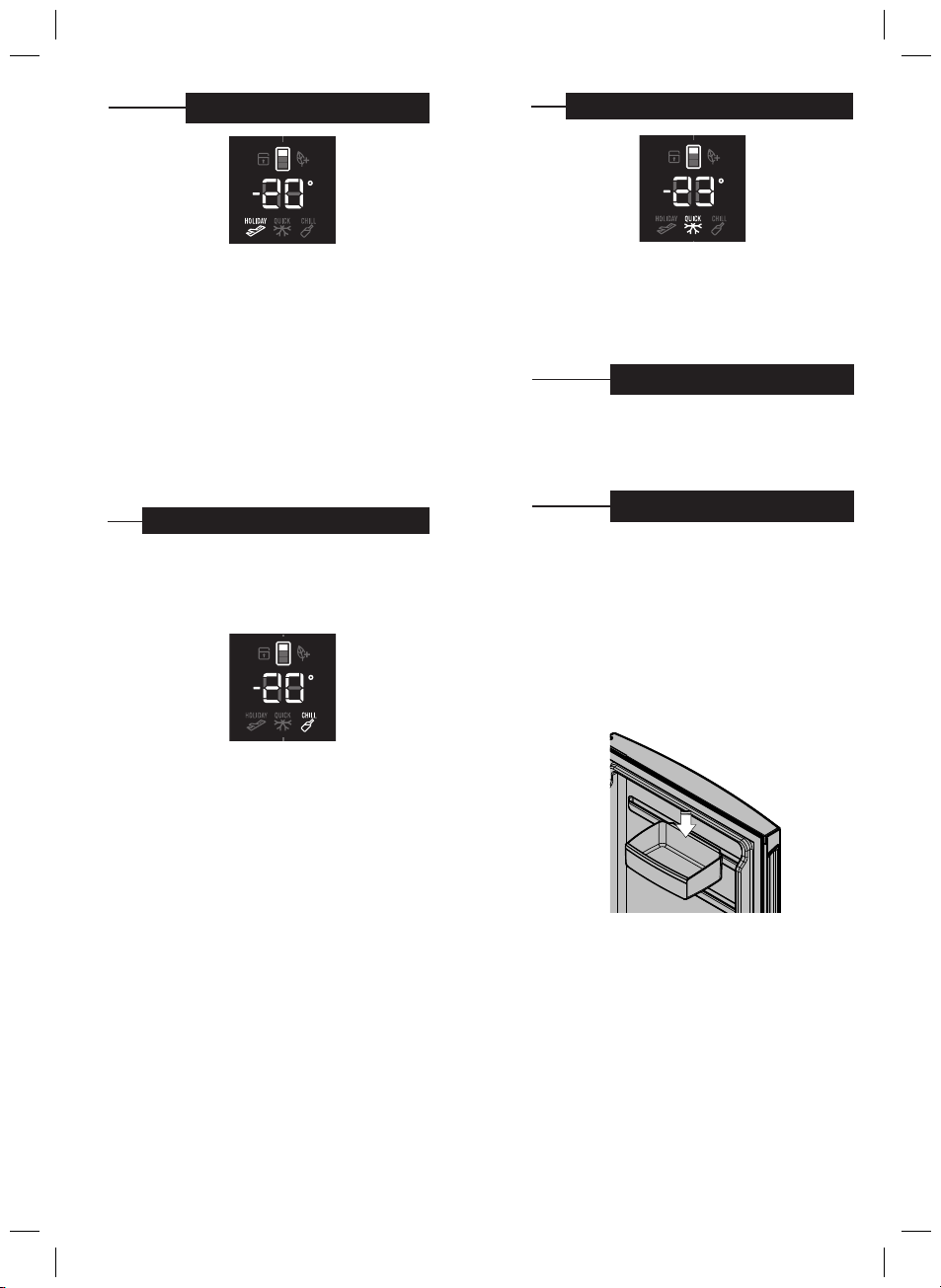
Holiday Mode
Holiday mode is designed to take advantage of maximum
energy efficiency when you will be away from your appliance
for an extended period. Press “Modes” button to select
holiday mode until “HOLIDAY” icon illuminates. “ECO” icon
stay on if temperature setting still in the Eco mode range.
Holiday mode can be activated while the door is opened.
Manually enabled Holiday mode must be manually
deactivated. Automatic Holiday mode (30hours of on
human interaction) deactivates if button is pressed on the
display or door is opened.
NOTE: Holiday mode is designed to operate with minimum
door opening (e.g. if fridge is used for long term storage),
frequent door opening in Holiday mode could lead to food
spoilage.
Drink Chill Mode
Use the Drink Chill Model for chilling drinks in the
freezer,
sounding an alarm after 20 minutes (defalt) to remind you
to remove the bottles. Press the “Modes” button to select
drinks chill mode. “CHILL” icon will illuminate. The numerical
display will change to “20”
The minimum time adjustment is 5 minutes and maximum
time is 30 minutes.
Adjust the timer by using arrow button “<” and “>”.
Each button touch will add or decrease 5 minutes to the
chill time.
Suggested chilling times:
• 10 minutes for cans of drink
• 20 minutes for bottles of wine
• 30 minutes for bottles of soft drink
NOTE: When drinks chill alarm ia activated, all other
functions are locked out.
Quick Freeze Mode
Use the quick freezer mode when you add a large
amounts of food to the freezer compartment. The freezer
compartment temperature will show -23°C. (This
temperature cannot be changed while pressing the
“Modes” button to select quick freeze will now operate
for 90 minutes then switch to normal operation.)
Your refrigerator is fitted with long life LED lighting. In the
unlikely event the LED lights should ever fail, then the LED
lights need to be serviced by a qualified technician. Refer
to page 14 for contact details.
LED Lighting
This section tells you how to make the most of the many
useful features of the refrigerator and how to clean them.
You can adjust the refrigerator bins to meet different
storage needs.
FEATURES
Door storage bins (shelves)
Both the refrigerator and freezer have door storage
bins. You can adjust the refrigerator bins to meet
different storage needs. All the door bins are completely
removable for cleaning. If you want to remove or adjust a
bin, lift and tilt to remove. To replace, tilt the top and push
bin down until the support lugs lock it in place.
Store safe compartment (where fitted)
You can use this compartment to store food and other
items. To operate lock, push up to open and down to
lock.
Crisper bin
Storing vegetables
Use the crisper bin to store vegetables, fruits or small
items. You can adjust the humidity inside the bin by
sliding the humidity control.
7
OM Refresh III_VT.indd 12OM Refresh III_VT.indd 12 7/6/2561 BE 09:257/6/2561 BE 09:25
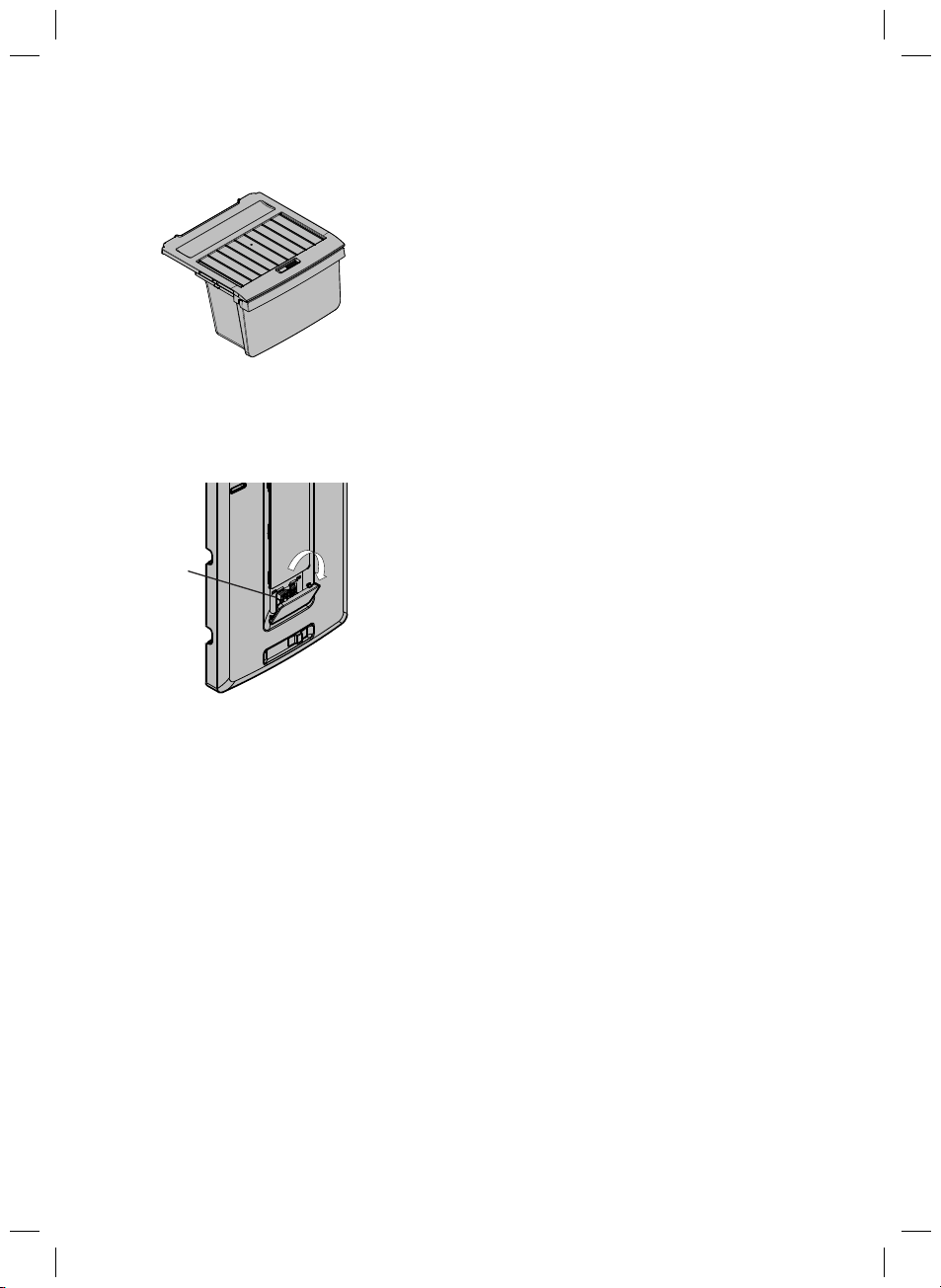
Storing fruits and small items
You can store fruits in the crisper bin, but do remember to
lower the humidity via
the humidity can be adjusted by the
sliding the lever on the humidity control.
Deodorizer
Your refrigerator is fitted with
Nano copper deodorizer
to assist with the removal of food odours inside your
refrigerator. Keeping the food covered and wrapping it
in plastic will also help to reduce the odours inside your
refrigerator.
Deodorise
8
OM Refresh III_VT.indd 12OM Refresh III_VT.indd 12 7/6/2561 BE 09:257/6/2561 BE 09:25
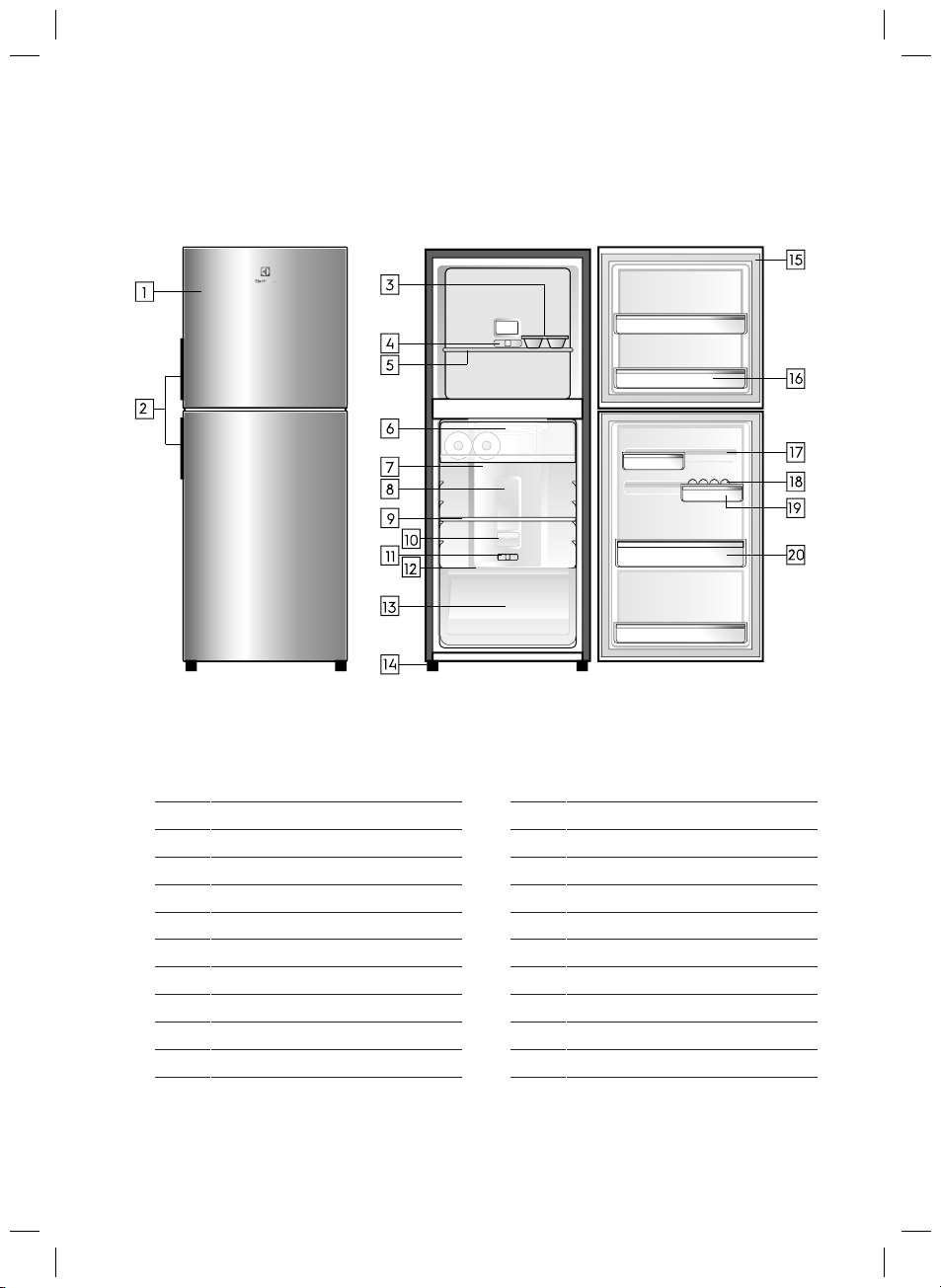
• ETB2302H-A
• ETB2302H-H
OM Refresh III_VT.indd 9OM Refresh III_VT.indd 9 7/6/2561 BE 09:257/6/2561 BE 09:25
TTOP FREEZER FEATURES
1 Doors
12
Slide Control Refrigerator
2 Door Handles
13
Humid
ity Sli
de
3 Ice Tray
14
Crisper
4
15
Feet
5
Slide Control Freezer
16
Gaskets
6
Freezer Shelf
17
Door Bins
7
Chill room
18
FlexStor Rails
8
Multi Flow
19
E
gg Tra
y
9
Refrigerator Light
20
10
Shelf
Bottle Bins
11
Deodoriser Cover Refrigerator
The details of the refrigerator feature:
FlexStor Bins
9
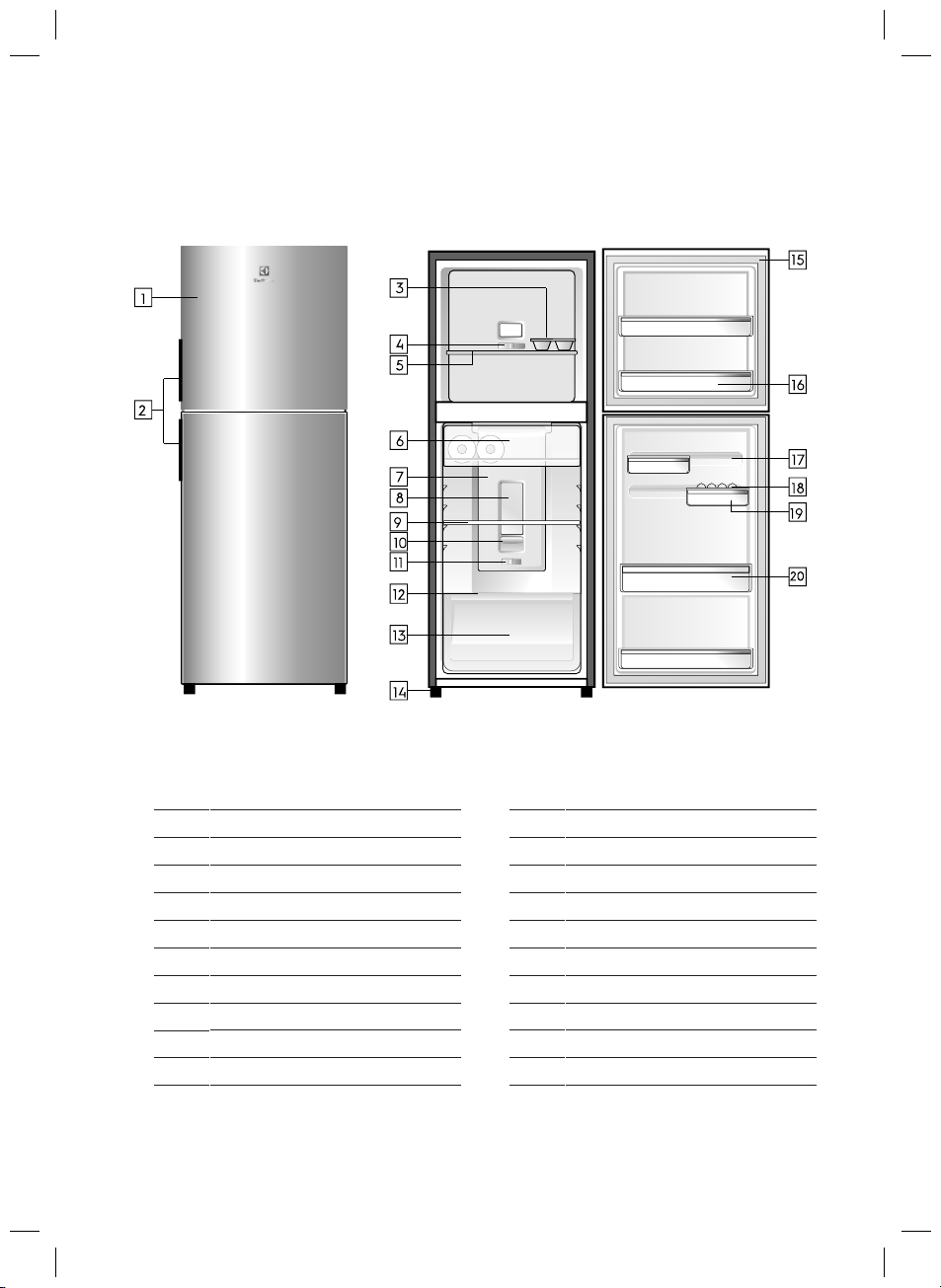
• ETB2502H-A
• ETB2502H-H
OM Refresh III_VT.indd 10OM Refresh III_VT.indd 10 7/6/2561 BE 09:257/6/2561 BE 09:25
TOP FREEZER FEATURES
1 Doors
12
Slide Control Refrigerator
2 Door Handles
13
Humid
it
y
Slid
e
3 Ice Tray
14
Crisper
4
15
Feet
5
Slide Control Freezer
16
Gaskets
6
Freezer Shelf
17
Door Bins
7
Chill room
18
FlexStor Rails
8
Multi Flow
19
Egg Tra
y
9
Refrigerator Light
20
10
Shelf
Bottle Bins
11
Deodoriser Cover Refrigerator
The details of the refrigerator feature:
FlexStor Bins
10
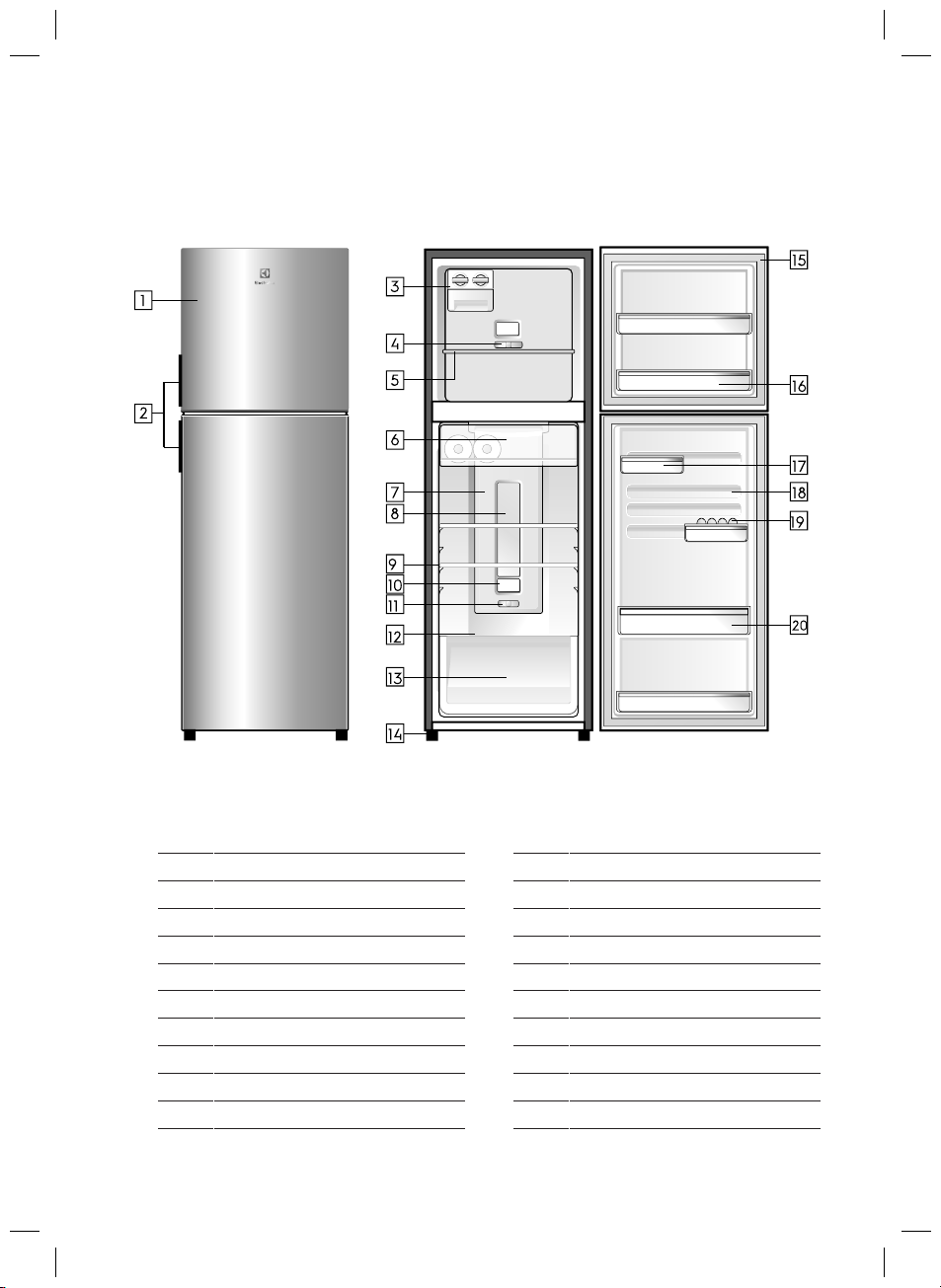
• ETB2802H-A
• ETB2802H-H
OM Refresh III_VT.indd 11OM Refresh III_VT.indd 11 7/6/2561 BE 09:257/6/2561 BE 09:25
TOP FREEZER FEATURES
1 Doors 11 Slide Control Refrigerator
2 12 Door Handles Humidity Slide
3
Ice Twist & Serve
13 Crisper
4 14 Feet
5
Slide Control Freezer
15 Gaskets
6 16
Freezer Shelf
Door Bins
7
Chill room
17 FlexStor Bins
8
Multi Flow
18 FlexStor Rails
9
Refrigerator Light
19
Egg Tray
10
Shelves
20 Bottle Bins Deodoriser Cover Refrigerator
The details of the refrigerator feature:
11
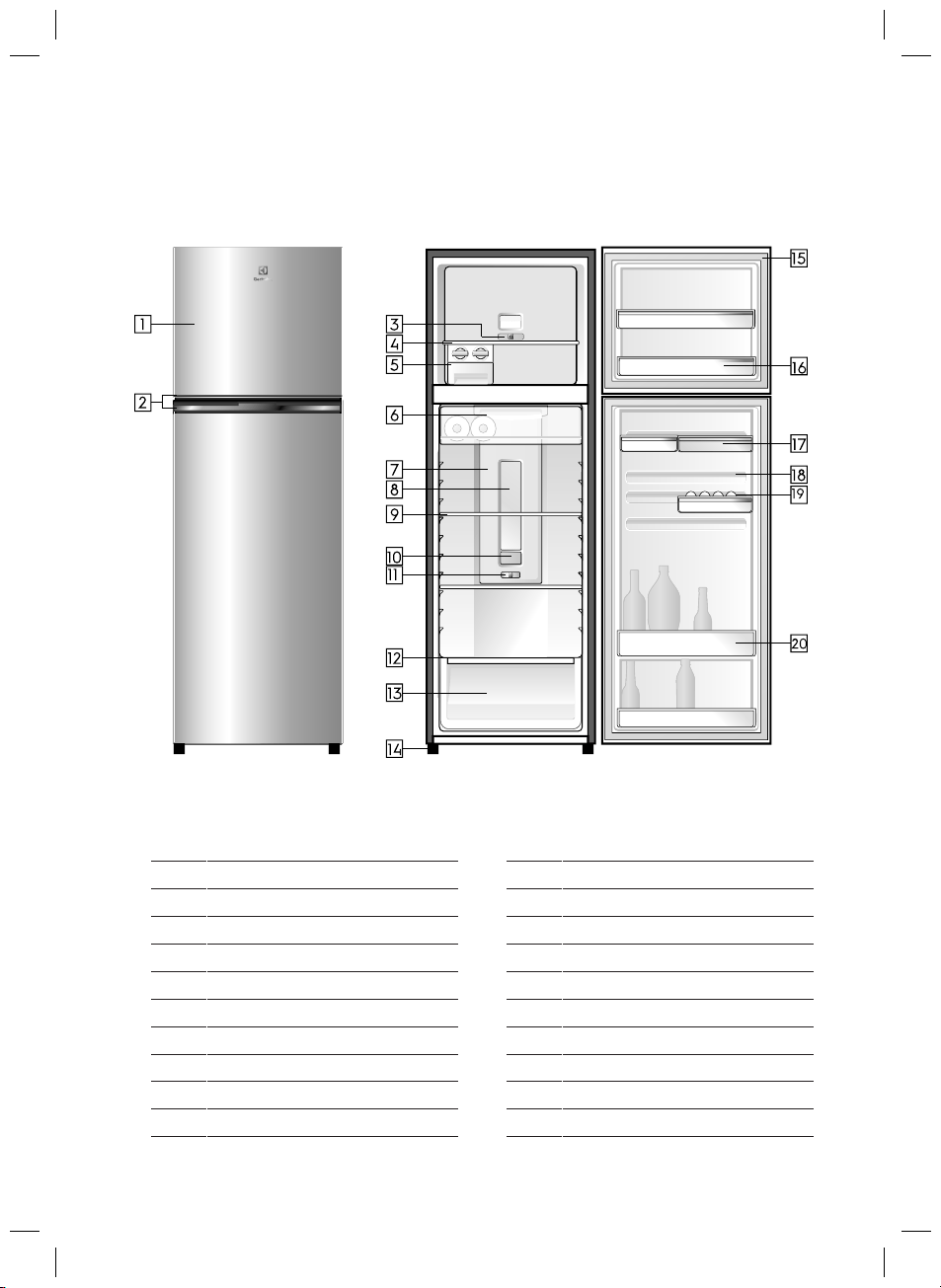
• ETB3400H-A • ETB3700H-A
• ETB3400H-H • ETB3700H-H
OM Refresh III_VT.indd 12OM Refresh III_VT.indd 12 7/6/2561 BE 09:257/6/2561 BE 09:25
TOP FREEZER FEATURES
1 Doors 11
Slide Control Refrigerator
2 12 Door Handles Humidity Slide
3 13 Crisper
4 14 Feet
Slide Control Freezer
5
Freezer Shelf
15 Gaskets
6 16
Ice Twist & Serve
Door Bins
7
Chill room
17
FlexStor Rails
8
Multi Flow
18
Egg Tray 9
Refrigerator
Light
19
10
Shelves
20 Bottle Bins Deodoriser Cover Refrigerator
The details of the refrigerator feature:
FlexStor Bins
12
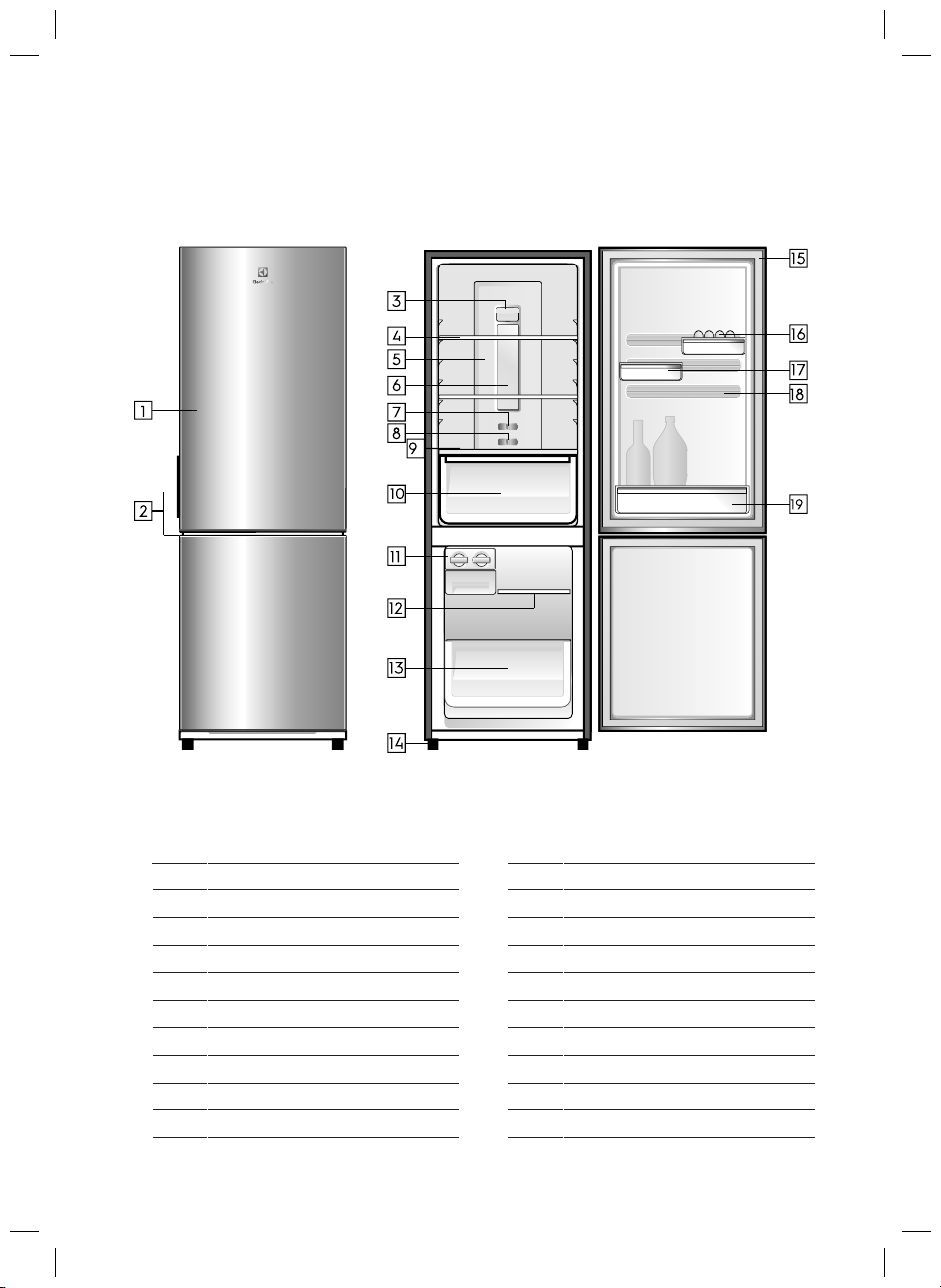
• EBB2802H-A
• EBB2802H-H
OM Refresh III_VT.indd 13OM Refresh III_VT.indd 13 7/6/2561 BE 09:257/6/2561 BE 09:25
BOTTOM FREEZER FEATURES
1 Doors
11
Ice Twist & Serve
2 12 Door Handles
Freezer Shelf
3
13
4 14
Freezer Drawer
Deodoriser
Cover
5
Shelves
15
Feet
6 16
Multi Flow
Gaskets
7
Refrigerator Light
17
Egg Tray
8
Slide Control Refrigerator
1
8
FlexStor Bins
9
Slide Control Freezer
19
FlexStor Rails
10
Humidity Slide
Bottle Bins
Crisper
The details of the refrigerator feature:
13
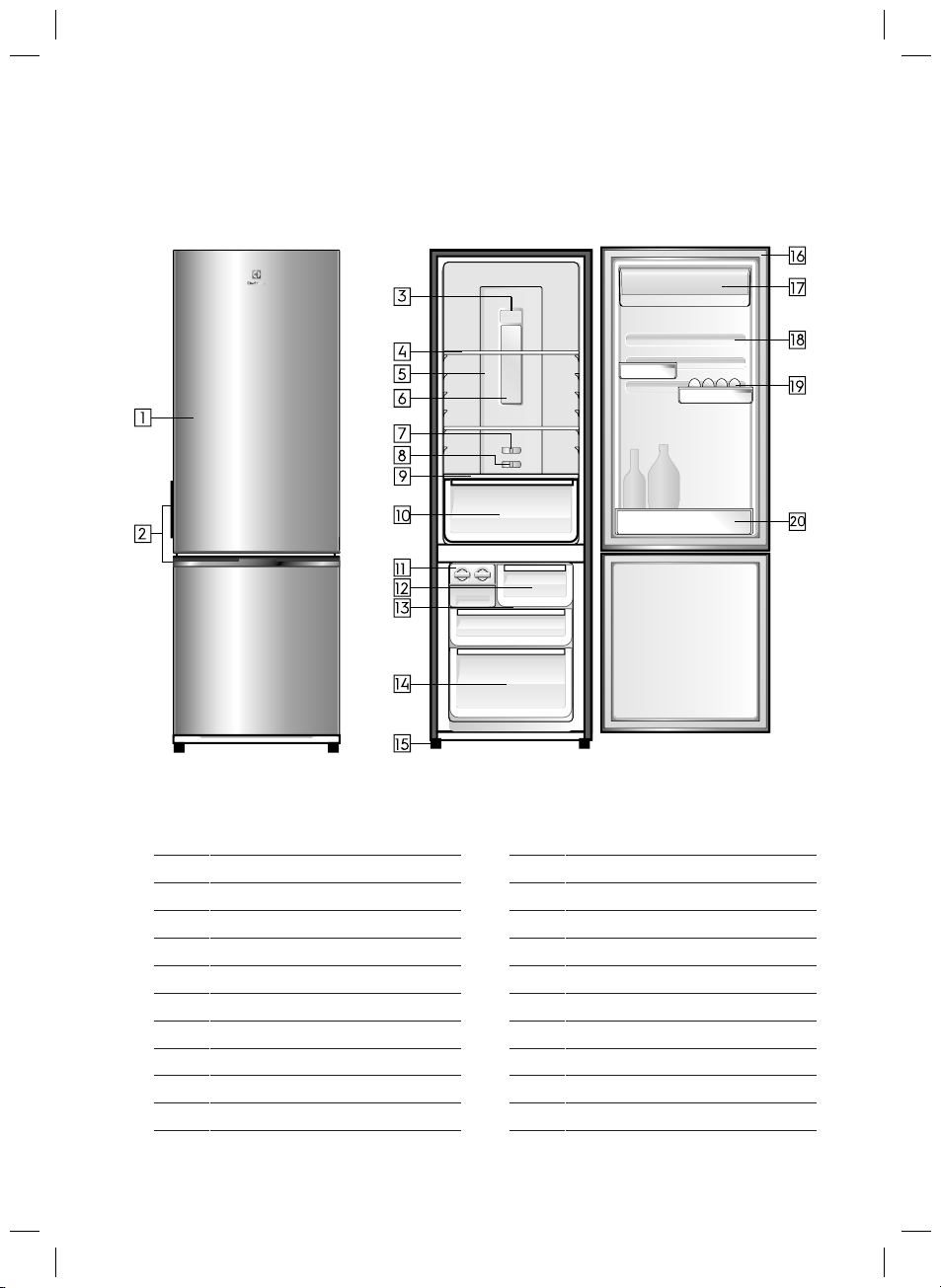
• EBB3400H-A • EBB3700H-A
• EBB3400H-H • EBB3700H-H
OM Refresh III_VT.indd 14OM Refresh III_VT.indd 14 7/6/2561 BE 09:257/6/2561 BE 09:25
BOTTOM FREEZER FEATURES
1 Doors 11
Ice Twist & Serve
2 12 Door Handles
Meat Drawer
3
13
Crisper
4 14
Feet
Deodoriser Cover
5
Shelves
15
Gaskets
6 16
Multi Flow
FlexStor Bins
7
Refrigerator Light
17
8
Slide Control Refrigerator
18
Egg Tray
9
Slide Control Freezer
19
Freezer Shelf
FlexStor Rails
10
Humidity Slide
20
Bottle Bins
Crisper
The details of the refrigerator feature:
14
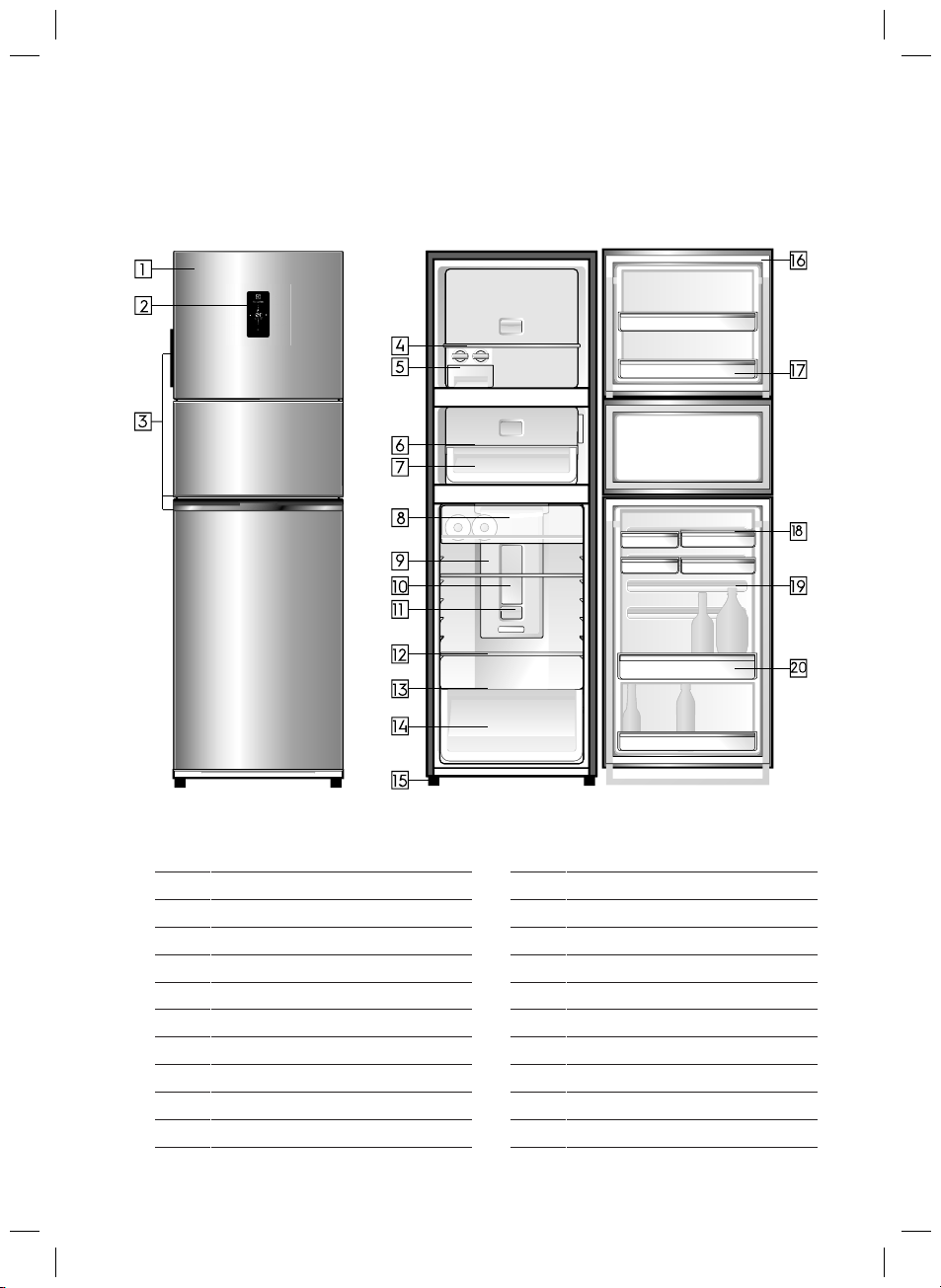
• EME2800H-A • EME3700H-A
• EME2800H-H • EME3700H-H
OM Refresh III_VT.indd 15OM Refresh III_VT.indd 15 7/6/2561 BE 09:257/6/2561 BE 09:25
MULTI TOP FREEZER FEATURES
1
Doors
11
Refrigerator Light
2 12
Temperature Control Refrigerator
Deodoriser
Cover refrigerator
3
Door handles
13
Shelves
4 14
Humidity Slide
5
Ice Twist & Serve
15
Crisper
6 16
Freezer Shelf
Feet
7 17
Gaskets
8
Mid Door Shelf
18
FlexStor Bins
9
Mid Door Bin
19
Egg Tray
10
Chill Room
20
FlexStor Rails
Multi Flow
The details of the refrigerator feature:
Bottle Bins
15
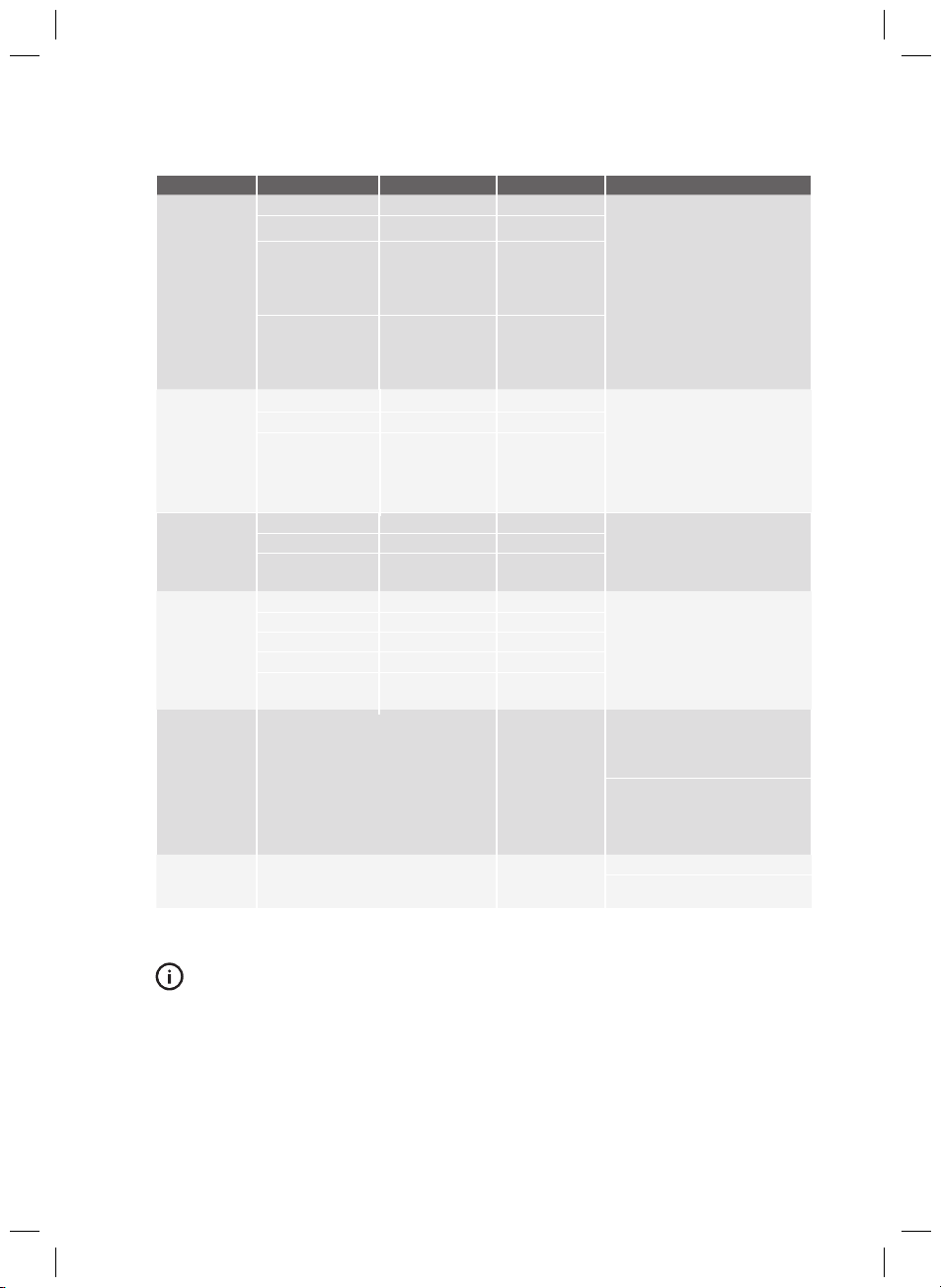
FOOD STORAGE GUIDE
CATEGORY PRODUCT REFRIGERATOR FREEZER STORAGE TIPS
MEAT
Sausages and
Mince
1-2 Days 2-3 Months
Kee
p cold m
e
at at th
e
back of the
refrigerator where it is coldest.
Plastic can cause meat to sweat if
stored in refrigerator for more
than a day.
Roast can take up to 48 hours to
defrost properly, transfer frozen
roast to the refrigerator 2 days
before use.
Chops and Steak 3-4 Days 4-6 Mont
hs
Cold M
e
ats 3-5 Da
ys
4-6 Mo
n
t
hs
Roasts 3-5 Days 12 Months
POULTRY
Chicken 1-2 Days 2 Months
If poult
ry takes o
n
a
smell
or
colour you are unsure about it is
best to throw it out.
Whole eggs are not suitable for
freezing, slightly beaten eggs may
be frozen for four months.
Roast Chicken 3-5 Days 12 Months
Eggs 6 Weeks Not Suitable
SEAFOOD
Whole fi
sh and fillets
2-3 Days 2 Months
Store in an airtight contain
er or foil.
Never freeze prawns in salty water
as this will dehydrate the flesh.
Lobster and crabs 1-2 Days 2 Months
Prawns 1-2 Days 2 Months
DAIRY
Milk Until Expiry Date Not Suitable
If dairy takes on a smel
l or colour
and you are unsure about it, it is
best to throw it out.
Depending on the variety hard
cheese can last from 2 weeks to
2 months.
Yoghurt 7- 10 Days Not Suitable
Hard Cheeses 2 Weeks – 2 Months 2 Months (Grated)
Soft Cheeses 1-2 Weeks Not Suitable
Butter 8 Weeks 12 Months
FRUIT &
VEGETABLES
Every fruit and vegetable has
a
different shelf life. Some stay fresh
for a couple of days e.g beans,
others can last for a couple of
months e.g. onions.
8-12 Months
When freezing
chop and blanch
in small porti
ons.
Keep vegetables in the cri
sper
and away from the air vents to
avoid freezing.
Don’t wash fruit and vegetables
before storing them in the refrigerator
as this can make them susceptible to
rotting.
LEFT OVERS
Homemade meals 3-4 Days 2-6 Months
Store in sealed
container.
Freeze meals in sm
all portion sizes
to limit wastage.
IMPORTANT
Pl
eas
e note,
use
thi
s information as a guide only, actual
storage times will vary depending on how you use your
refrigerator, climatic conditions and the freshness of the food.
16
When your appliance is
not operating
Problem Solution
If the temperature
in the refrigerator
is too cold
If there are odours
inside the refrigerator
When there is
refrigerator noise
If the temperature
in the refrigerator
is too warm
• Check that the power cord is plugged into the power outlet properly
and that the outlet is switched on.
• Try running another appliance from the same power outlet. If no
power is coming out from the outlet, you may have a blown fuse or
tripped your household power supply circuit.
• Try adjusting the temperature control to a slightly colder position.
• It is normal for the freezer fan to NOT operate during the automatic
defrost cycle or for a short time after the refrigerator is turned on.
• Your refrigerator uses energy efficient components that may produce
different noises from your old refrigerator.
• Occasionally, a gurgling sound of the refrigerant flowing or the sound
of parts contracting or expanding may be heard.
• These sounds are quite normal. If the refrigerator is rattling or making
vibrating noises, check that it is level and adjust levelling foot.
• The interior may need cleaning
• Some foods may produce strong odours and need to be tightly
sealed.
• Check that the refrigerator has enough clearance at the sides, back
and top. Refer to the installation instructions in this manual.
• Refer to ‘Temperature Control’ section.
• The door may have been opened for too long or too frequently.
• Food containers or packaging may be holding the door
• Refer to ‘Temperature Control’ section.
• Increase the temperature to avoid high energy consumption.
If you find that something is wrong with your refrigerator, you can carry out some easy
checks before calling for service. You may be able to fix the problem and save time
and costs, and spare yourself from some inconvenience.
TROUBLESHOOTING
If the problem persists after you have made the above mentioned checks, contact your
nearest service centre or the dealer where you bought the refrigerator from. Be ready to
quote the model number which is stated on the label found at the inner plastic
compartment liner wall of the refrigerator.
Important notice
Before calling a service technician, please check carefully the operating instructions,
service booklet and warranty terms and conditions.
SERVICE REQUEST
,ŽŶŐ<ŽŶŐ
17
OM Refresh III_VT.indd 12OM Refresh III_VT.indd 12 7/6/2561 BE 09:257/6/2561 BE 09:25
Noise
18
OM Refresh III_VT.indd 12OM Refresh III_VT.indd 12 7/6/2561 BE 09:257/6/2561 BE 09:25

NOTES
........................................................................................................................................................
........................................................................................................................................................
........................................................................................................................................................
........................................................................................................................................................
........................................................................................................................................................
........................................................................................................................................................
........................................................................................................................................................
........................................................................................................................................................
........................................................................................................................................................
........................................................................................................................................................
........................................................................................................................................................
........................................................................................................................................................
........................................................................................................................................................
........................................................................................................................................................
........................................................................................................................................................
........................................................................................................................................................
........................................................................................................................................................
........................................................................................................................................................
........................................................................................................................................................
........................................................................................................................................................
........................................................................................................................................................
........................................................................................................................................................
........................................................................................................................................................
........................................................................................................................................................
........................................................................................................................................................
........................................................................................................................................................
........................................................................................................................................................
........................................................................................................................................................
........................................................................................................................................................
........................................................................................................................................................
........................................................................................................................................................
OM Refresh III_ID.indd 20OM Refresh III_ID.indd 20 7/6/18 9:02 AM7/6/18 9:02 AM
........................................................................................................................................................
........................................................................................................................................................
........................................................................................................................................................
........................................................................................................................................................
Share more of our thinking at electrolux.com.
P/No: A12081643
electrolux.com/shop
OM Refresh III_VT.indd 12OM Refresh III_VT.indd 12 7/6/2561 BE 09:257/6/2561 BE 09:25
CHI TIẾT LIÊN HỆ BỘ PHẬN CHĂM SÓC KHÁCH HÀNG CỦA ELECTROLUX
Vietnam
Domestic Toll Free: 1800-58-88-99
Tel: (+84 8)3910 5465
Electrolux Vietnam Ltd
Floor 9th, A&B Tower
76 Le Lai Street - Ben Thanh Ward - District 1
Ho Chi Minh City Vietnam
Office Tel: (+84 8) 3910 5465
Office Fax: (+84 8) 3910 5470
Email: [email protected]