DOE
Compliant
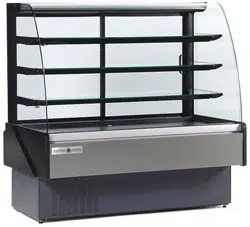
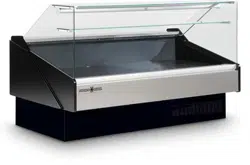
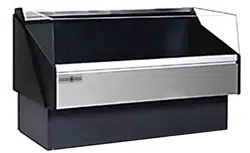
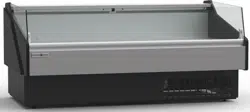
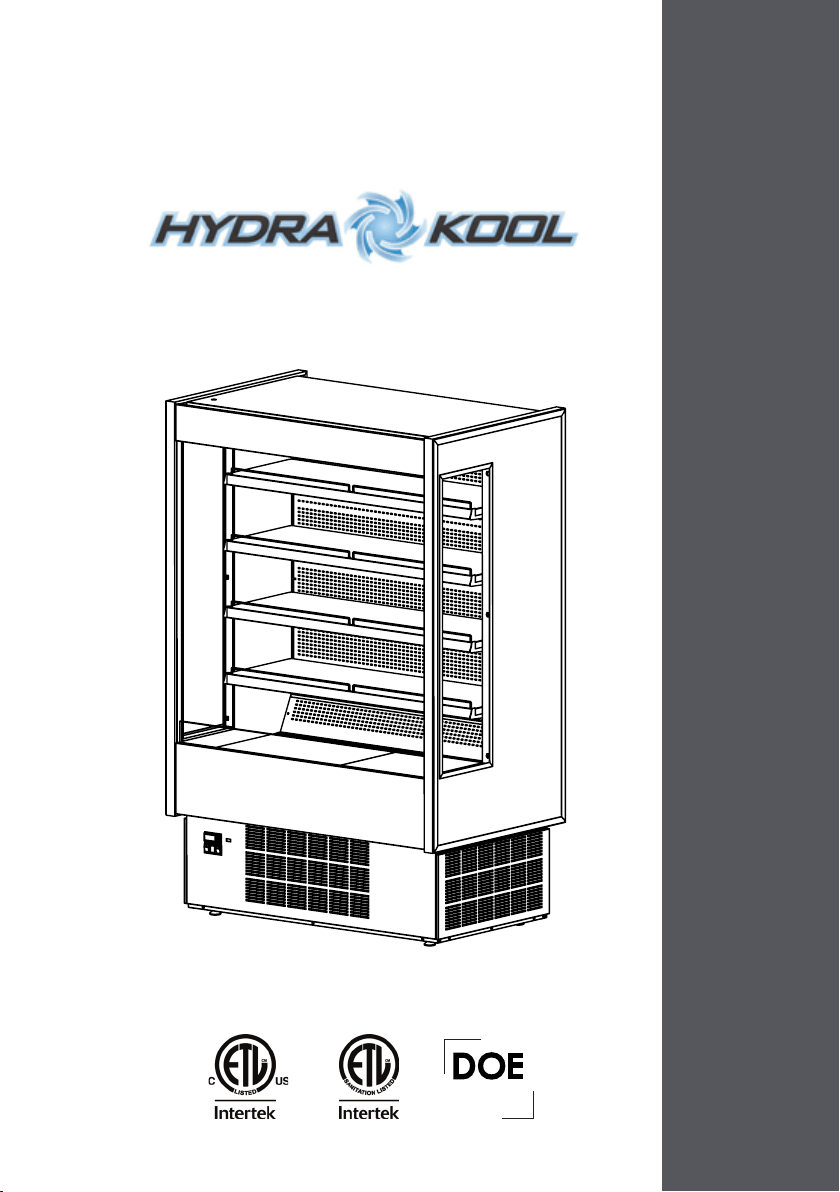
KGH SERIES - INSTALLATION AND OPERATION MANUAL - V0
2
MVP GROUP CORPORATION
5659 Royalmount Ave.
Montreal, QC, Canada
H4P 2P9
Telephone: (514) 737-9701
Toll Free Telephone: (888) 275-4538
Fax: (514) 342-3854
Toll Free Fax: (877) 453-8832
Email: sales@mvpgroupcorp.com
Website: www.mvpgroupcorp.com

3
INDEX
1 General information 5
1.1 Case description 5
2 Getting started with your KGH series 26
2.1 Location 26
2.2 Uncrating 27
2.2.1 Front and sides assemblies
2.3 Check for damage 28
2.4 Control panel and main features 29
2.5 Check serial, model numbers and requested options 33
2.6 Warning/Caution labels 35
2.7 Check your electrical installation 41
2.8 Electrical, drain and refrigeration connections (remotes only) 41
2.9 Joining 42
2.10 Plugging and start 48
3 Refrigeration 52
3.1 Self contained refrigeration equipment and defrost 52
3.2 Refrigeration loads (remotes only) 54
4 Electrical 54
4.1. Electrical specifications data 54
4.2. Electrical service receptacles (optional)
4.3. Electrical diagrams 56
4.5. Electronic controller 96
5 Maintenance 99
5.1 Exterior cleaning 99
5.2 Interior cleaning
5.3 Shelf removing/adjustment 99
5.4 Sliding doors removal
5.5 Light substitution 100
5.6 Panels and protection grill removal 101
5.7 Condensator cleaning 102
5.8 Evaporator cleaning 102
5.9 Evap Pan cleaning 104
6 Service/Troubleshooting 106
6.1 Service record 106
7 Warranty 110
8 Notes 111

4
This page has been left blank intentionally.

5
1 General information
1.1 Case description
KGH series model (number) system.
KGH OF 40 S
AAA BB CC D
AAA
BB
CC
D
Model variation
OF-Open front
FD-Front doors
OS-Open front slim line
DS-Front doors slim line
ES-Open front with electrical
shutter
MS-Open front with manual
shutter
Length
40''
50''
60''
80''
Type of Unit.
S-Self Contained
R-Remote
D-Dry
Basic model
|
|
|
|
|
|
|
|
|
|
|
|
|
|
|
|
|
6
KFM SERIES
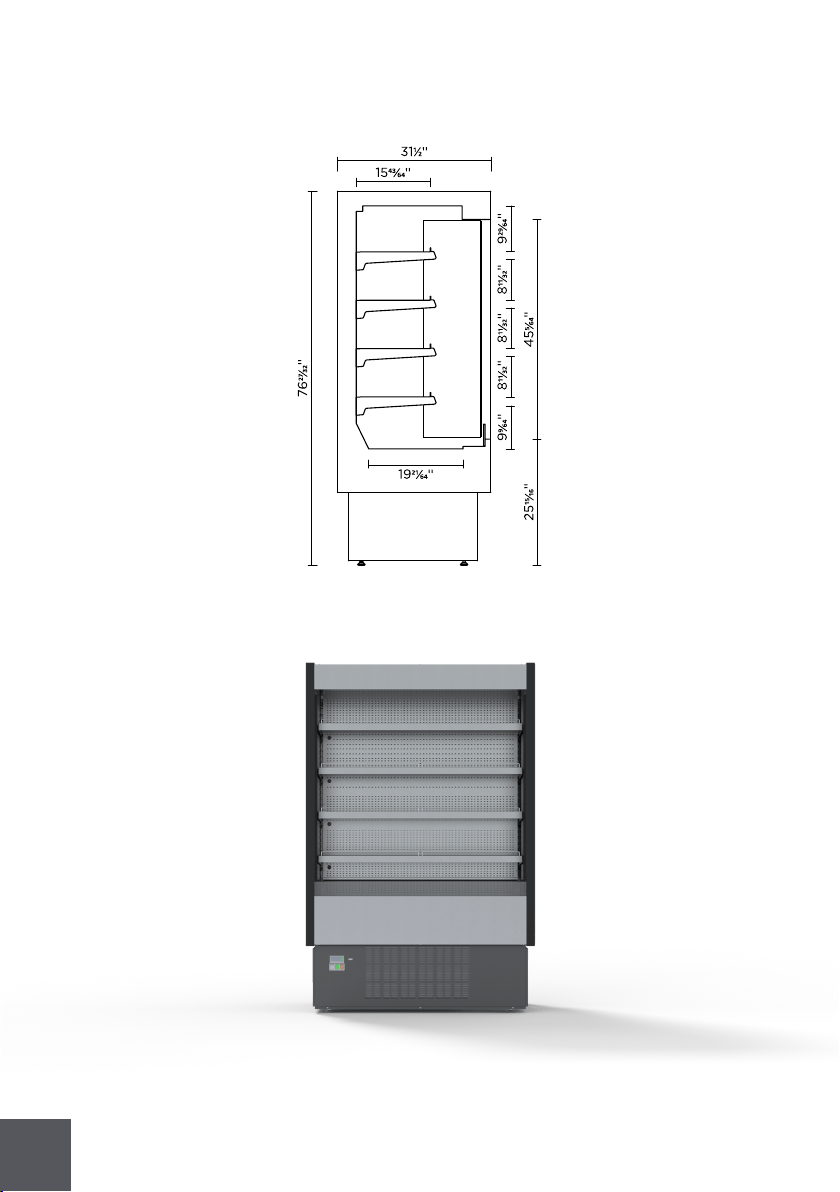
KGH-OF-S(R)(D)
KGH-OF-S(R)(D)
7
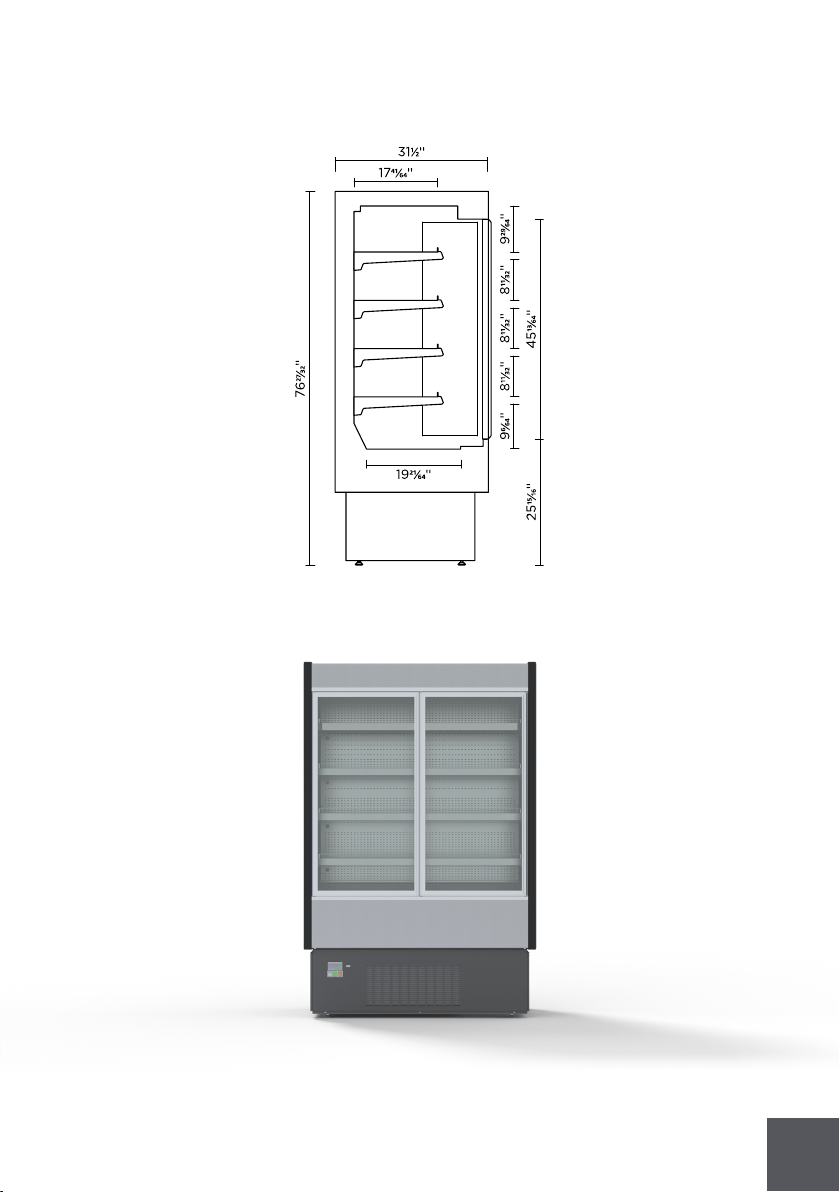
KGH-FD-S(R)(D)
KGH-FD-S(R)(D)
8
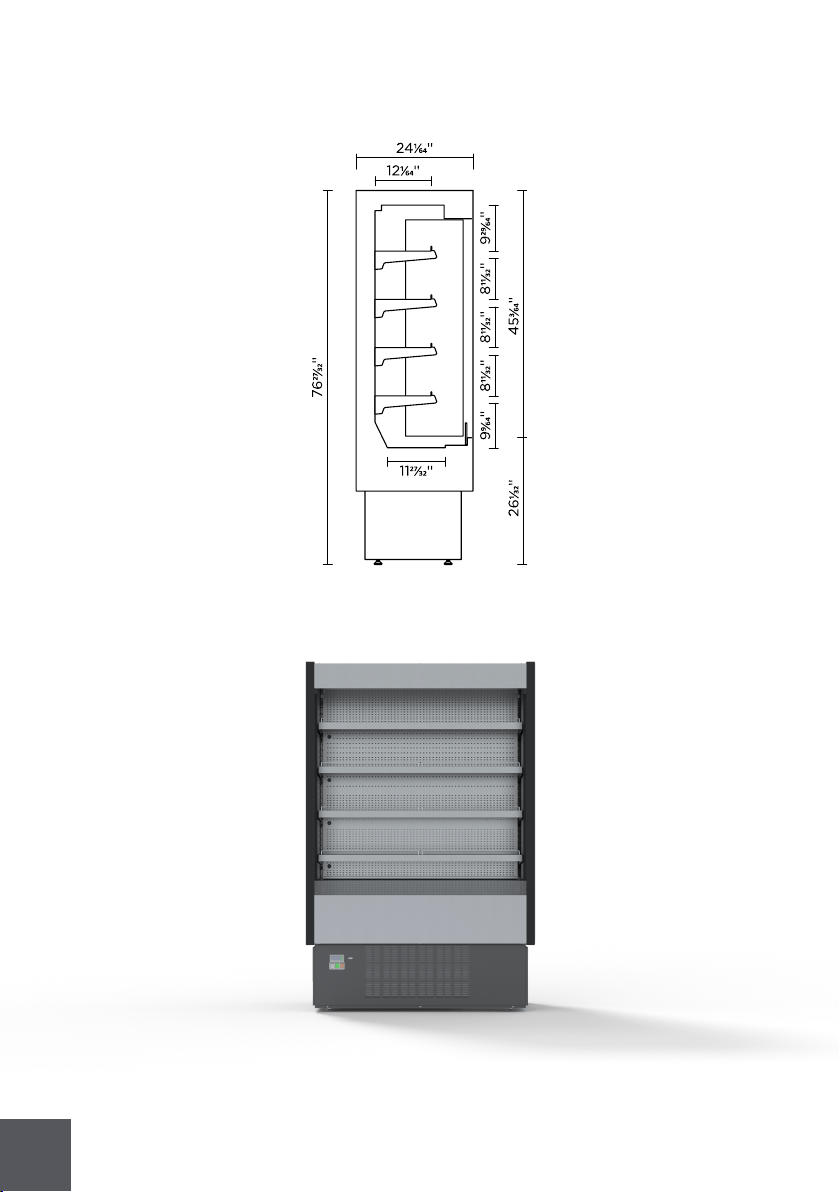
KGH-OS-S(R)(D)
KGH-OS-S(R)(D)
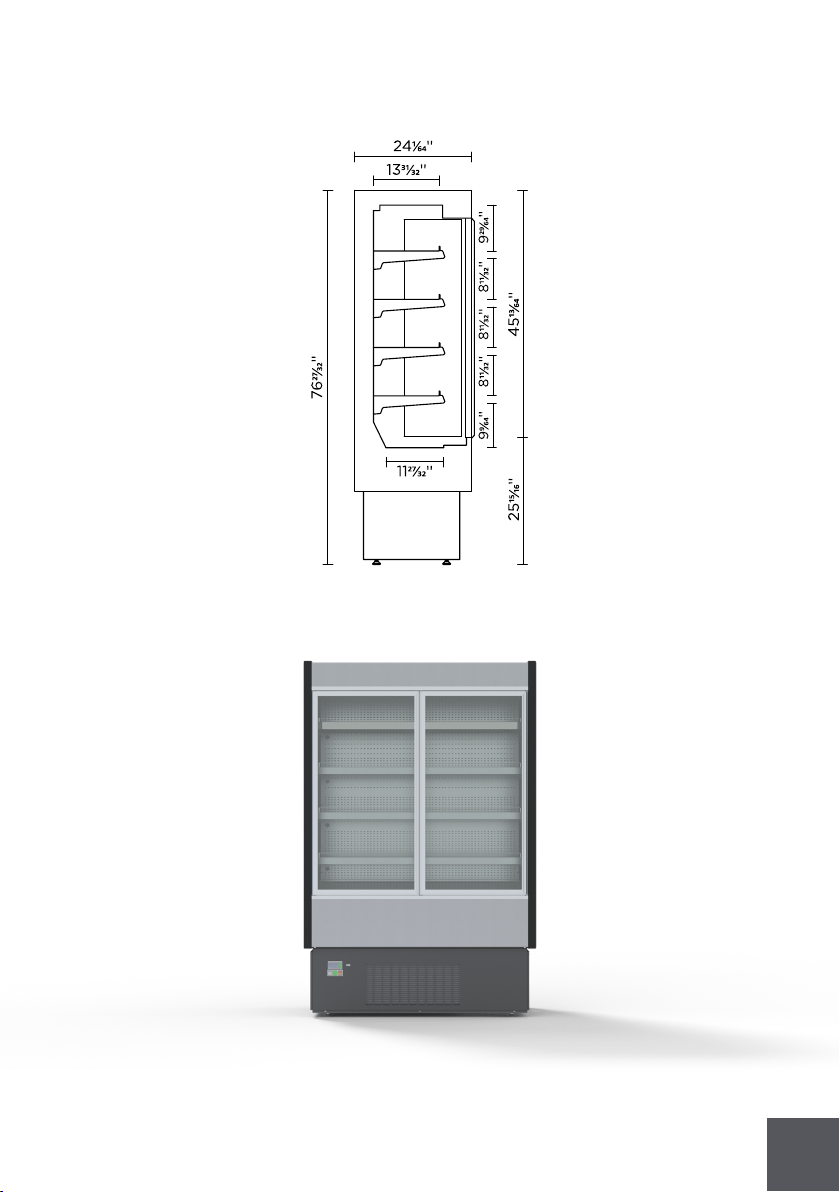
9
KGH-DS-S(R)(D)
KGH-DS-S(R)(D)
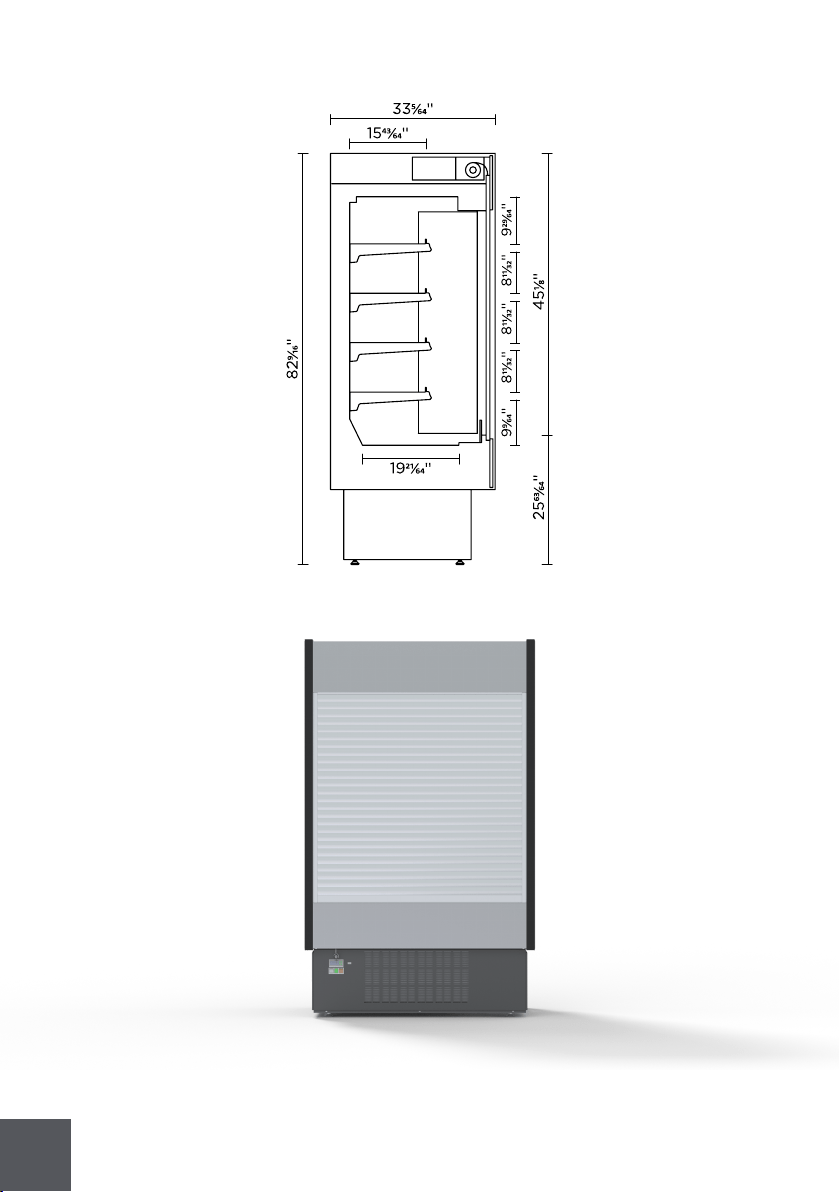
10
KGH-ES-S(R)(D)
KGH-ES-S(R)(D)
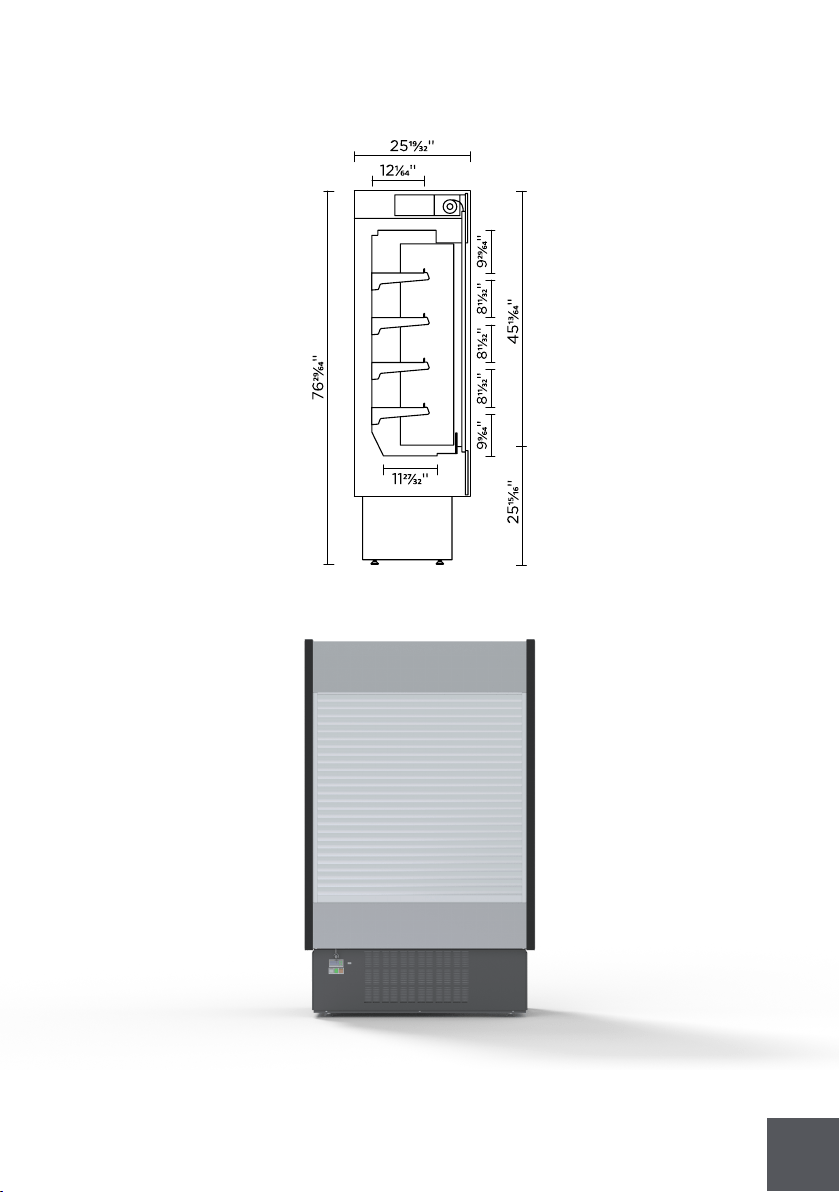
11
KGH-MS-S(R)(D)
KGH-MS-S(R)(D)
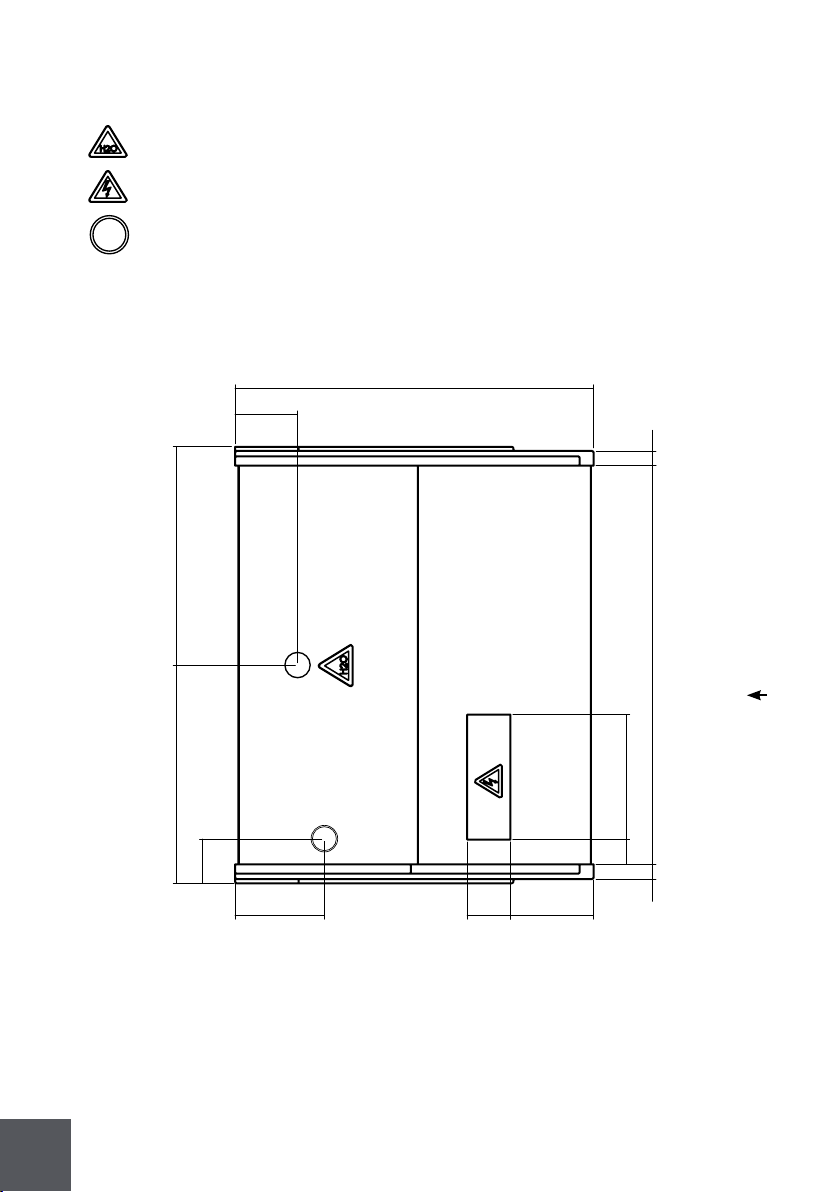
12
3''
2''
8''
5''
9''
12''
34''
21''
6''
2''
38''
5''
21''
KGL-OF-40-S(R)
Front
Implantation
Drain outlet
Electrical board
Refrigeration piping
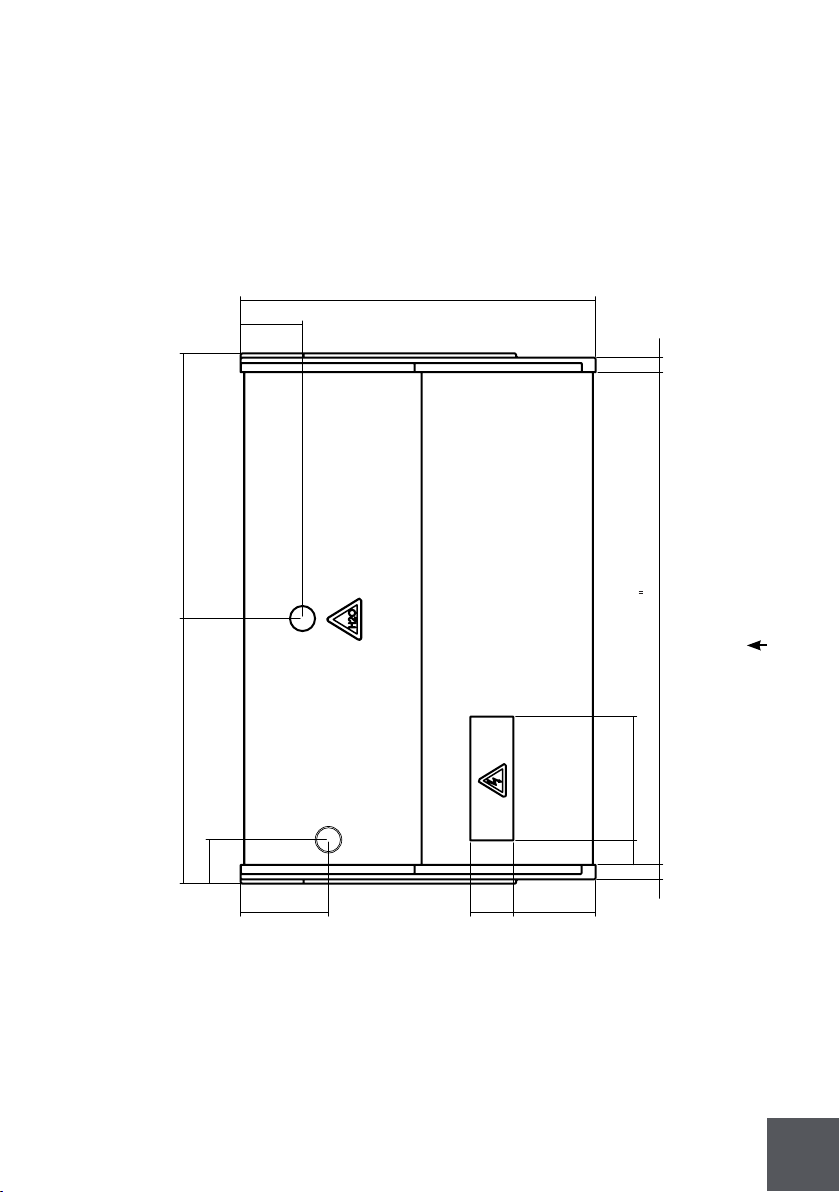
13
34''
6''
26'' 25''
5''
8''9''
5''
3''
2''
12''
47
2''
KGL-OF-50-S(R)
Front
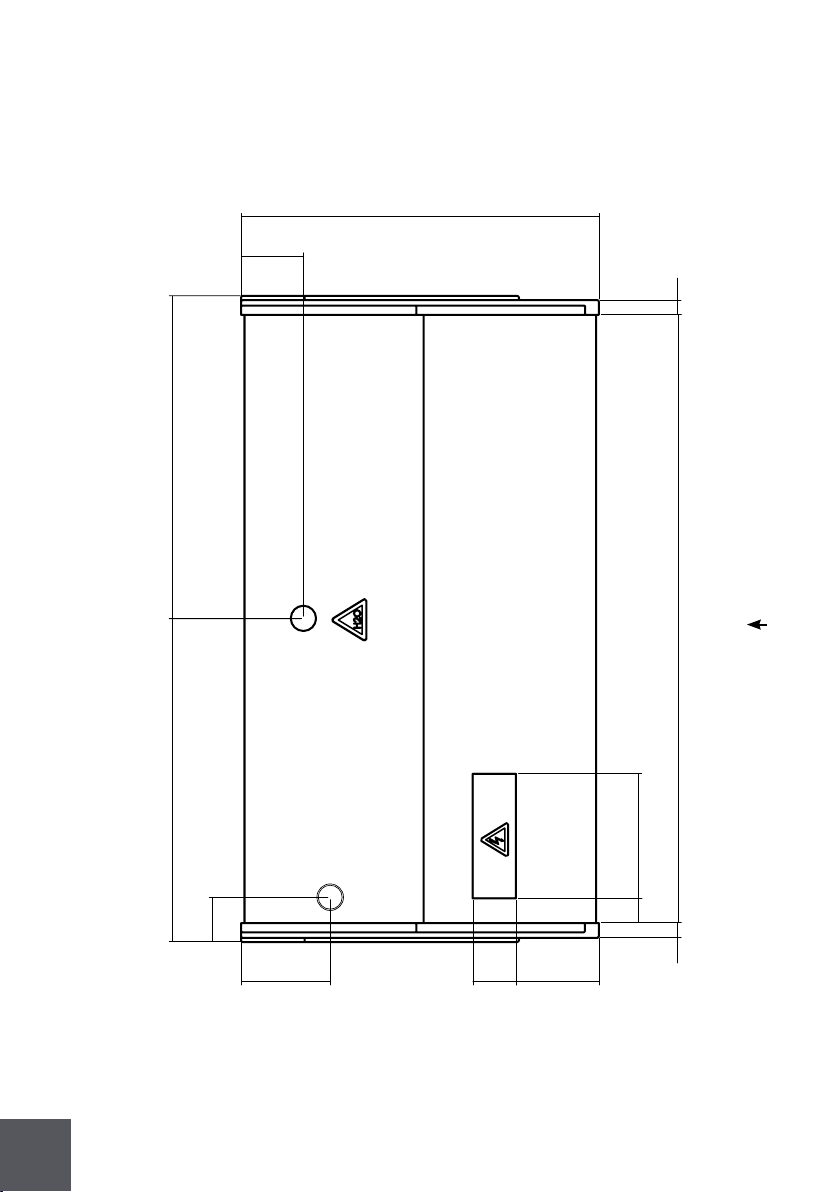
14
KGL-OF-60-S(R)
Front
34''
6''
31''
31''
5''
3''
2''
12''
57''
2''
8''9'' 5''
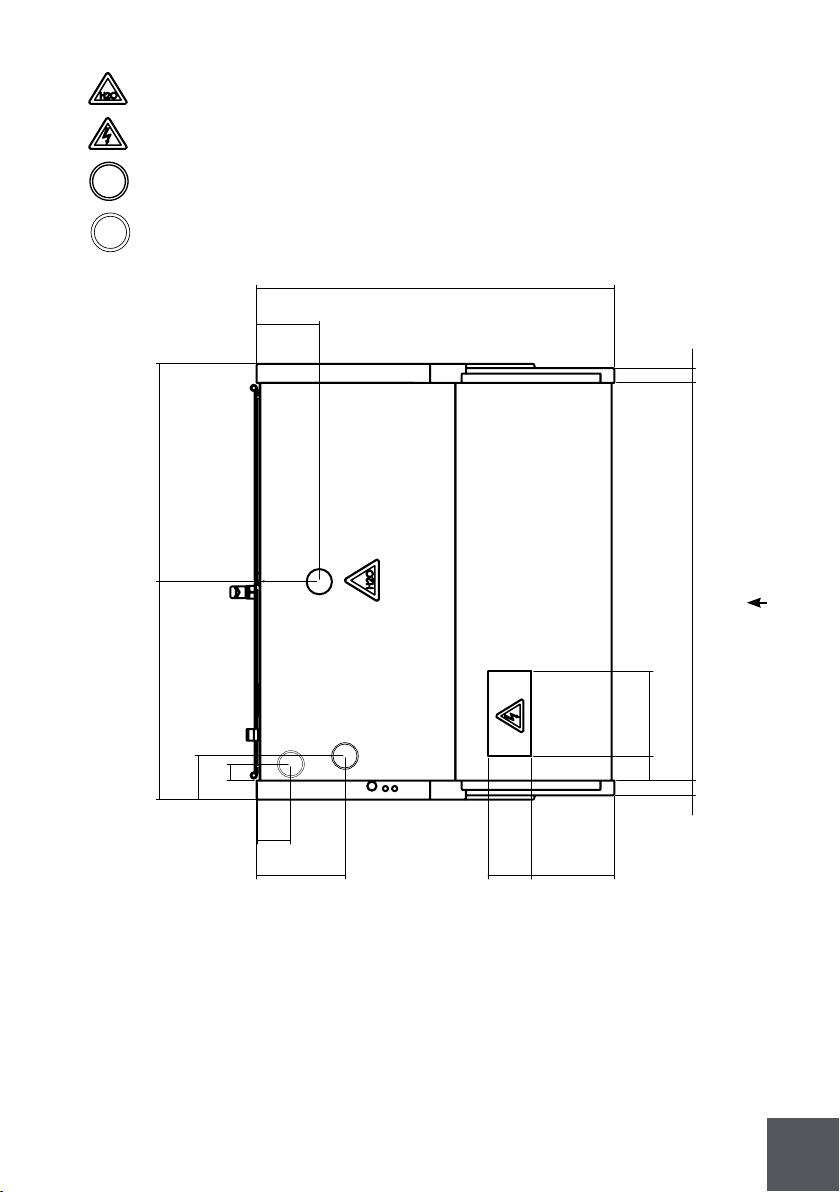
15
34''
6''
26''
25''
5''
8''9'' 5''
3''
2''
8''
38''
2''
4''
2''
KGL-RS/RM-40-S(R)
Front
Drain outlet
Electrical board
Refrigeration piping
Electrical wiring
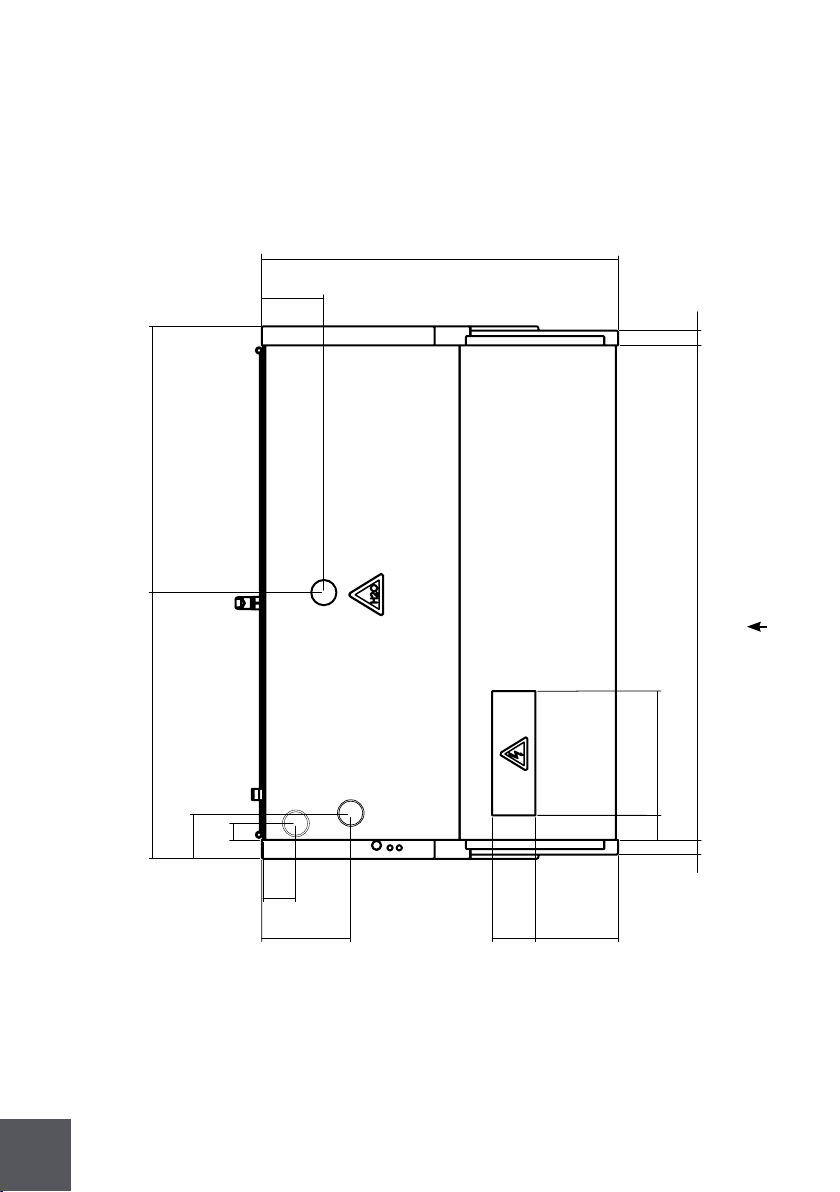
16
KGL-RS/RM-50-S(R)
Front
34''
6''
26'' 25''
5''
8''9''
5''
3''
2''
12''
47''
2''
4''
2''
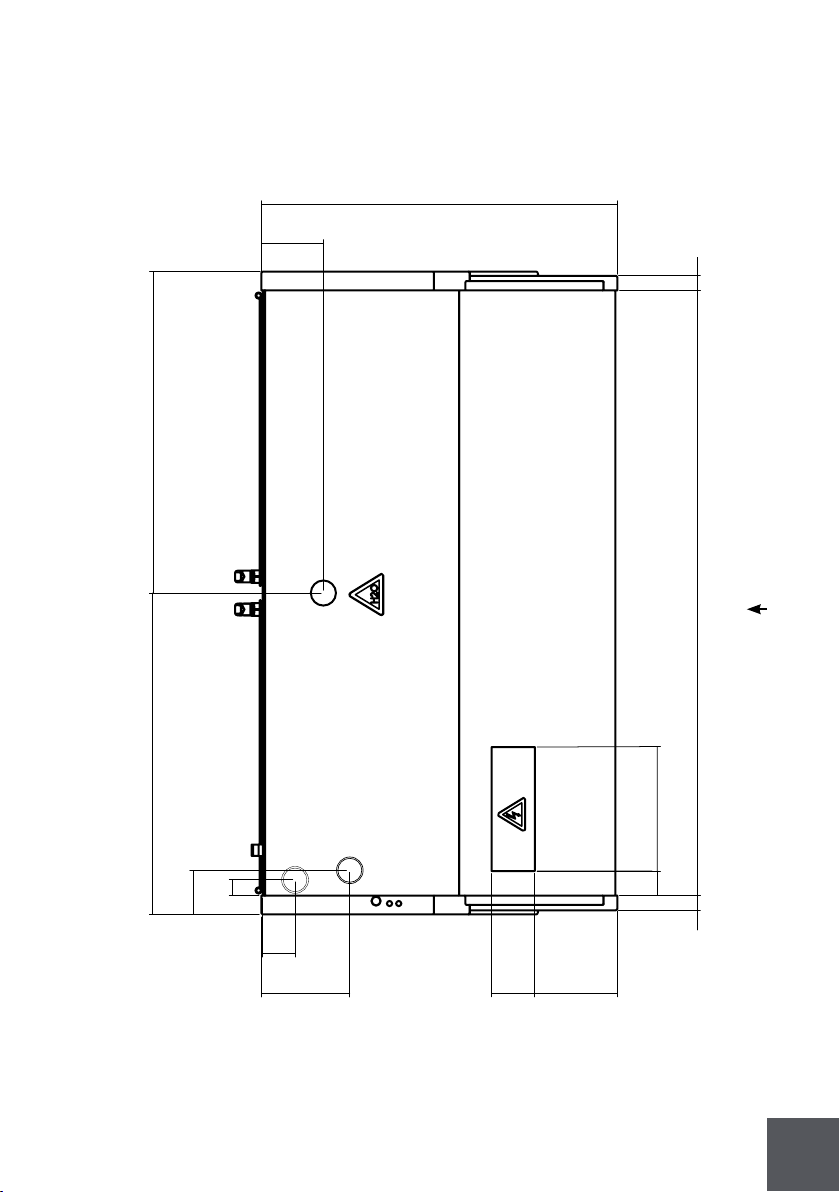
17
KGL-RS/RM-60-S(R)
Front
34''
6''
31''
31''
5''
3''
2''
12''
57''
2''
8''9'' 5''
4''
2''
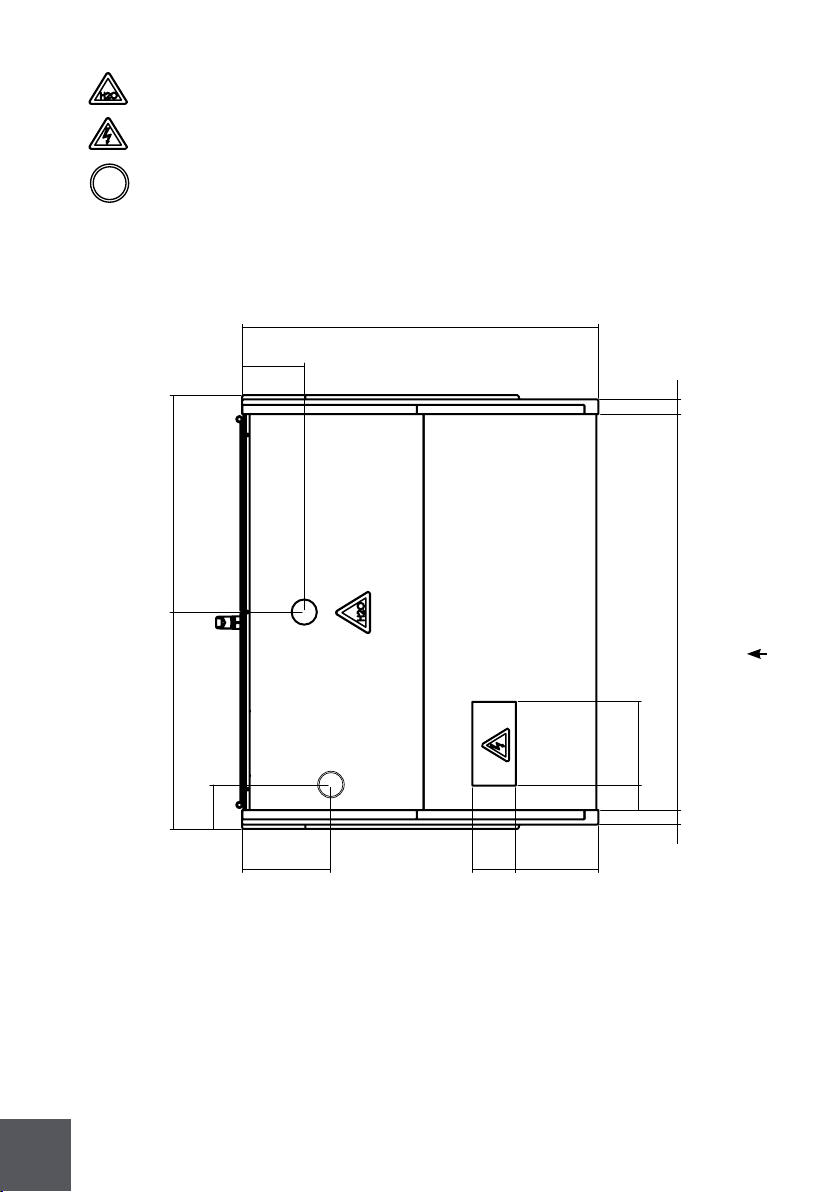
18
34''
6''
21'' 21''
5''
8''9'' 5''
3''
2''
8''
38''
2''
Front
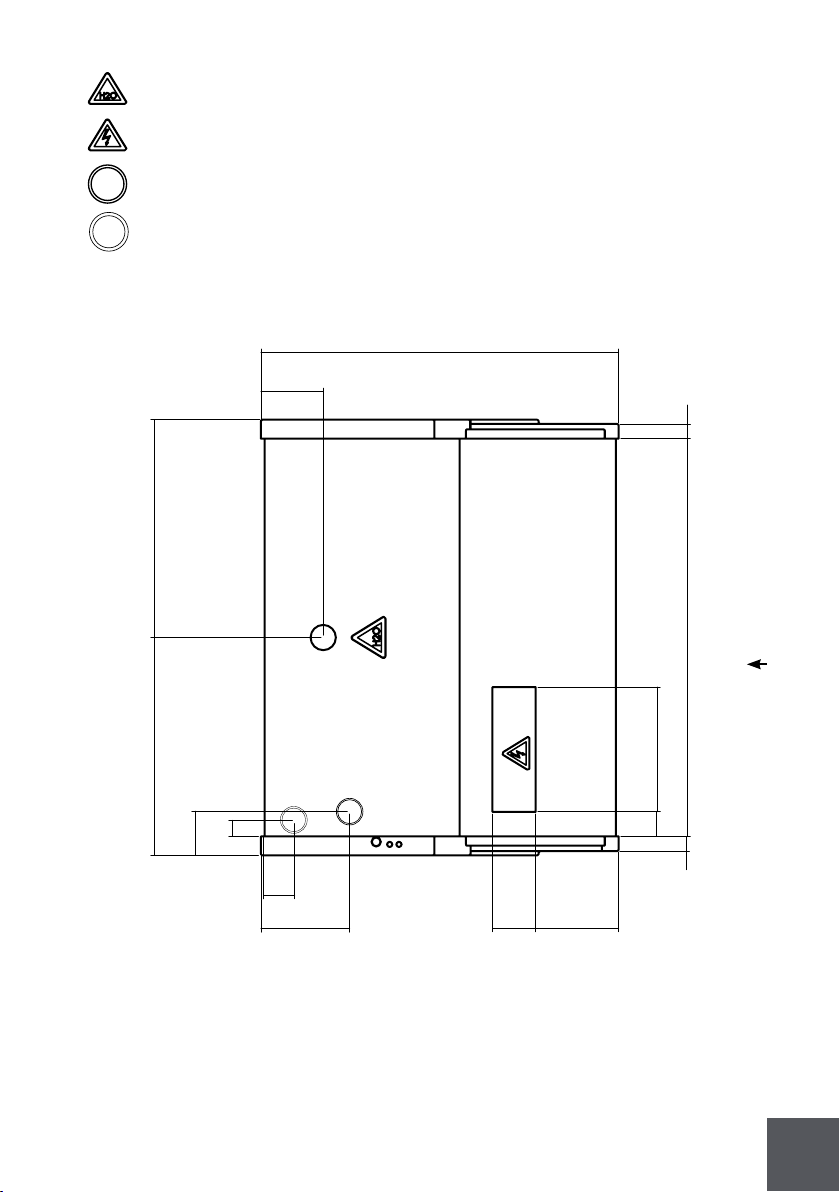
KGL-DL-40-S(R)
Drain outlet
Electrical board
Refrigeration piping
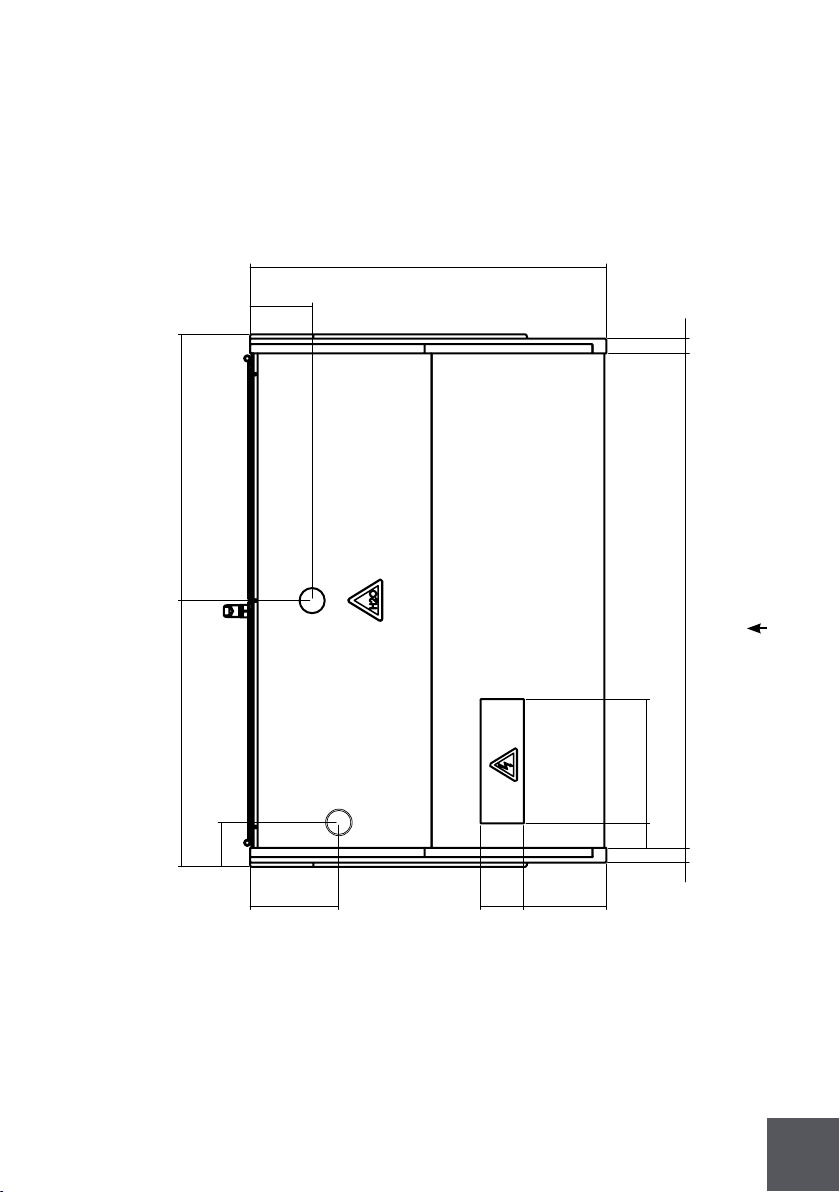
19
34''
6''
25'' 26''
5''
8''9'' 5''
3''
2''
12''
47''
2''
Front
KGL-DL-50-S(R)
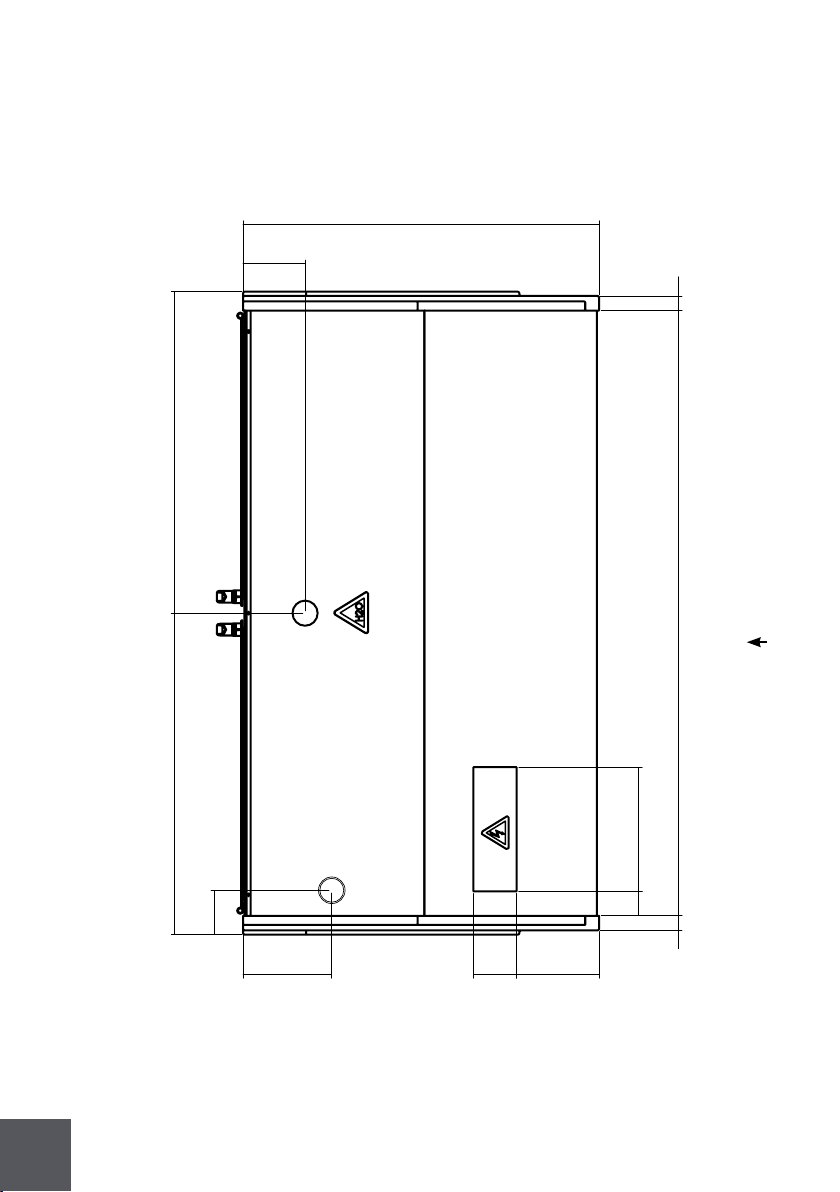
20
34''
6''
31'' 31''
5''
8''9'' 5''
3''
2''
12''
57''
2''
Front
KGL-DL-60-S(R)
21
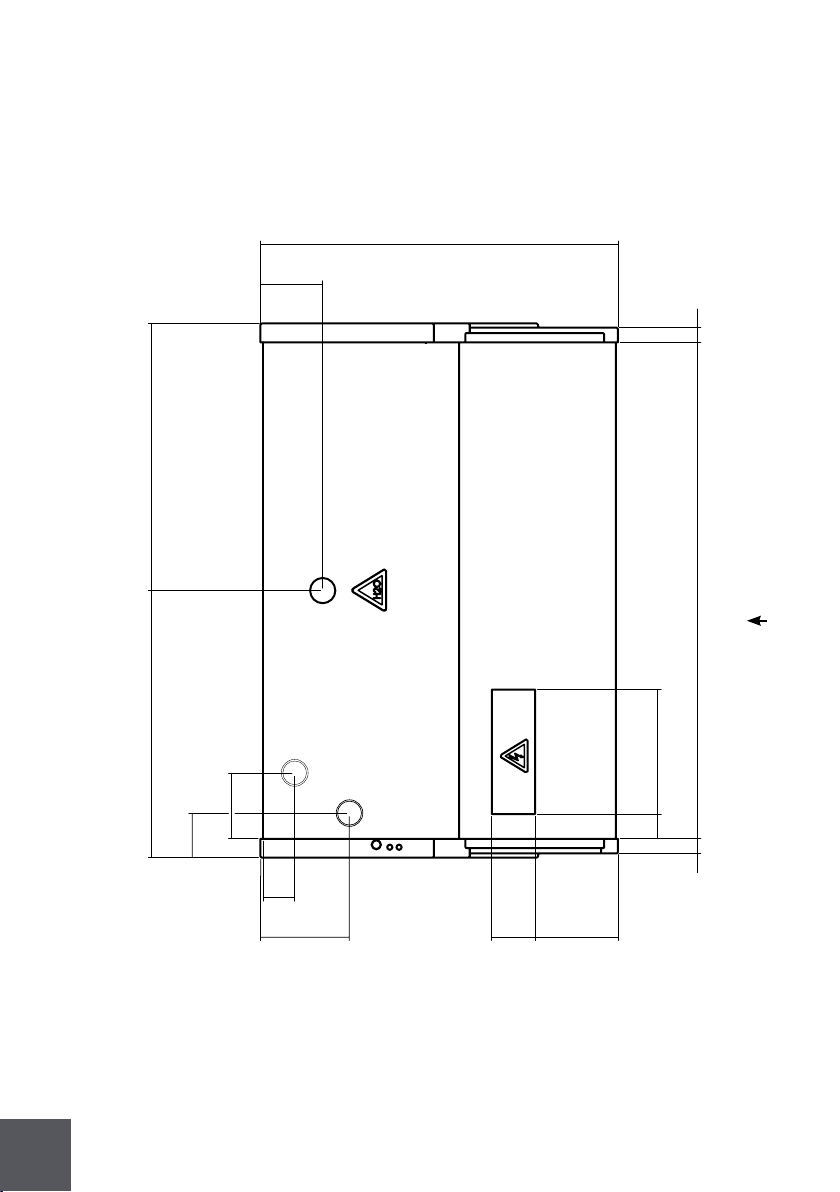
34''
6''
21''
21''
5''
8''
9''
5''
3''
2''
12''
2''
3''
2''
38''
Front
KGL-OS-40-S(R)
Drain outlet
Electrical board
Refrigeration piping
Electrical wiring
22
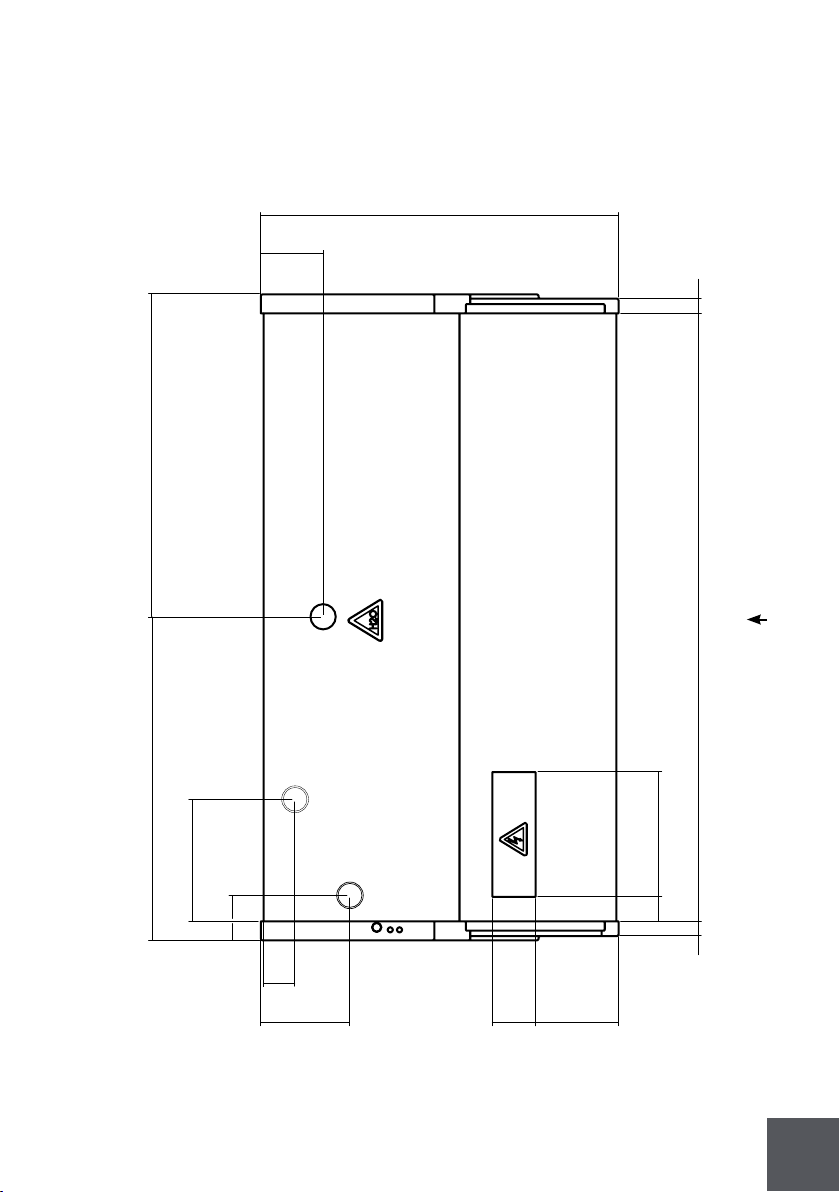
34''
6''
25''
26''
5''
8''9''
5''
3''
2''
12''
2''
3''
7''
37''
Front
KGL-OS-50-S(R)
23
Front
KGL-OS-60-S(R)
34''
6''
31'' 31''
5''
8''9'' 5''
3''
2''
12''
57''
2''
12''
3''

24
KGH series intended for multipurpose are type 1 equipment - 75°F/55%RH.
Temperature for open front cases is set for 36°F.
Temperature for door cases is set for 32°F.
The shelves have a 31 lb/ft2 loading limit.
Model
Dimensions
(LxDxH in inches)
Service
dimensions
(LxDxH in inches)
15,9
23,3
29,1
35,6
46,6
23,2
29
35,6
45,5
15,3
19,0
23,3
15,3
19,1
23,4
23,3
29,1
35,6
46,6
Volume (ft³)
28'' x 311'' x 76''
401³'' x 311'' x 76''
50'' x 311'' x 76''
601'' x 311'' x 76''
78'' x 311'' x 76''
40'' x 321'' x 76''
501'' x 321'' x 76''
601'' x 321'' x 76''
78'' x 321'' x 76''
401³'' x 24'' x 76''
501'' x 24'' x 76''
60'' x 24'' x 76''
401³'' x 24'' x 76''
501'' x 24'' x 76''
601'' x 24'' x 76''
401³'' x 331'' x 82''
501'' x 331'' x 82''
601'' x 331'' x 82''
78'' x 331'' x 82''
28'' x 43'' x 76''
401³'' x 43'' x 76''
50'' x 43'' x 76''
601'' x 43'' x 76''
78'' x 43'' x 76''
40'' x 51'' x 76''
501'' x 56³'' x 76''
601'' x 52'' x 76''
78'' x 571³'' x 76''
401³'' x 33³'' x 76''
501'' x 33³'' x 76''
60'' x 33³'' x 76''
401³'' x 51'' x 76''
501'' x 56³'' x 76''
601'' x 52'' x 76''
401³'' x 44'' x 82''
501'' x 44'' x 82''
601'' x 44'' x 82''
78'' x 44'' x 82''
KGH-OF-30-S(R)
KGH-OF-40-S(R)
KGH-OF-50-S(R)
KGH-OF-60-S(R)
KGH-OF-80-S(R)
KGH-FD-40-S(R)
KGH-FD-50-S(R)
KGH-FD-60-S(R)
KGH-FD-80-S(R)
KGH-OS-40-S(R)
KGH-OS-50-S(R)
KGH-OS-60-S(R)
KGH-DS-40-S(R)
KGH-DS-50-S(R)
KGH-DS-60-S(R)
KGH-ES/MS-40-S(R)
KGH-ES/MS-50-S(R)
KGH-ES/MS-60-S(R)
KGH-ES/MS-80-S(R)
|
|
|
|
|
|
|
|
|
|
|
|
|
|
|
|
|
|
|
|
|
|
|
|
|
|
|
|
|
|
|
|
|
|
|
|
|
|
|
|
|
|
|
|
|
|
|
|
|
|
|
|
|
|
|
|
|
25
2 Getting started with your KFM series
2.1 Location
To your new equipment perform well please respect the following warnings:
This is type 1 equipment, inte nded to work with 75°F / 55%RH.
This equipment is intended for maintaining temperature only.
Be sure products are not ambient temperature (must be cold)
This equipment must be located in an indoor environment.
Check for airdrafts and avoid them.
Air movement from ac units shouldn’t be directed to the equipment.
The equipment must not be directly or indirectly exposed to the sun.
Check for rejected heat from another refrigeration units and avoid that.
Place the equipment in a levelled floor.
Do not obstruct the air way in front of the condenser.
Make sure there is a drain preparation (Remotes only).
Models to be positioned against a wall keep a safe distance of 2''.
After servicing always close the doors.
Make sure you have a suitable electrical installation.
This equipment should be handled by a qualified technician.
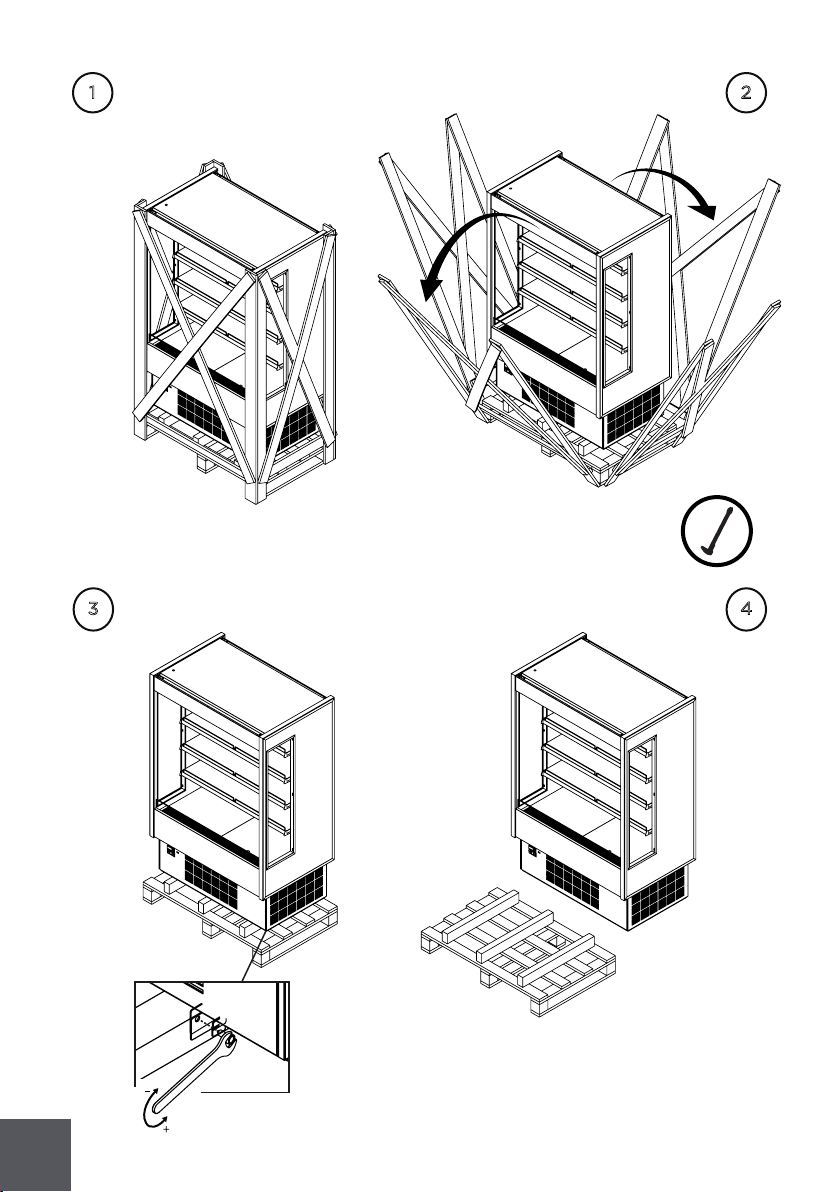
2.2 Uncrating
All operations must be done carefully.
All plastic protective films must be removed before using the equipment for
the first time.
26
1
2
3
4
27
2.2.1 Front and sides assemblies
4x - PRT01M04130
2
1
2.3 Check for damage
At the end of production HYDRA KOOL products are carefully inspected. No damaged
units are sent out.
HYDRA KOOL doesn’t take responsibility for damage between factory and client.
Possible damage on the unit must be checked to file a claim near the transportation
company.
The unit must be checked in the following points:
Exterior panels
Doors
Shelves
Glasses
Paint job
Door handles
Top structure

28
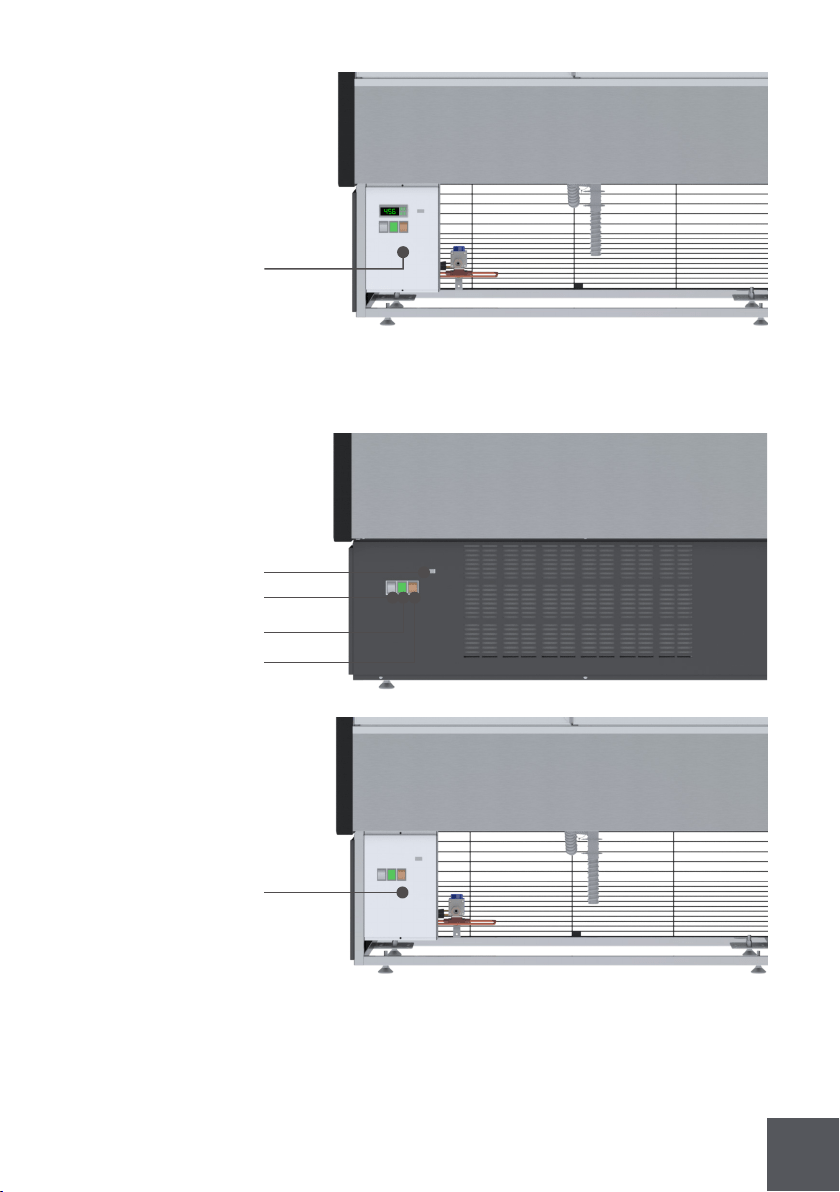
Self contained control panel
(KGH-OF/FD/OS/DS/ES/MS)
Hot key connector
Electronic controller
Light switch
Power signal
Condensing unit switch
Hot key connector
Electronic controller
Light switch
Power signal
Condensing unit switch
Electrical board
2.4 Control panel and main features
The pictures below, shows the main features and all necessary controls
29
Power signal
Condensing unit switch
Remote control panel
(KGH-OF/FD/OS/DS/ES/MS)
Electrical board
Dry control panel
(KGH-OF/FD/OS/DS/ES/MS)
Electrical board
Hot key connector
Light switch
30
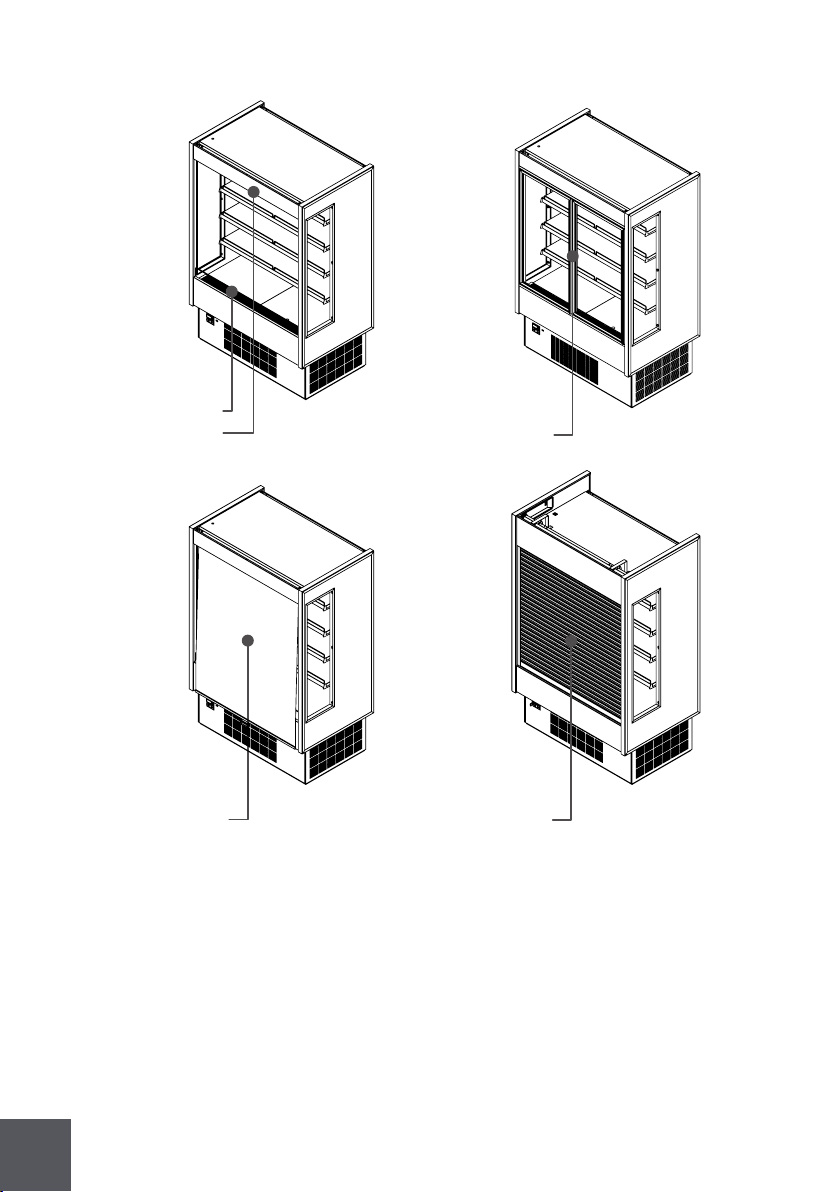
2.5 Check serial, model numbers and requested options
Before start your equipment, check the serial number, model numbers and
requested options.
This inspection should be made visually in the following items:
Night curtain
Shutter
Return air grille
Discharge air grille
Hinged doors
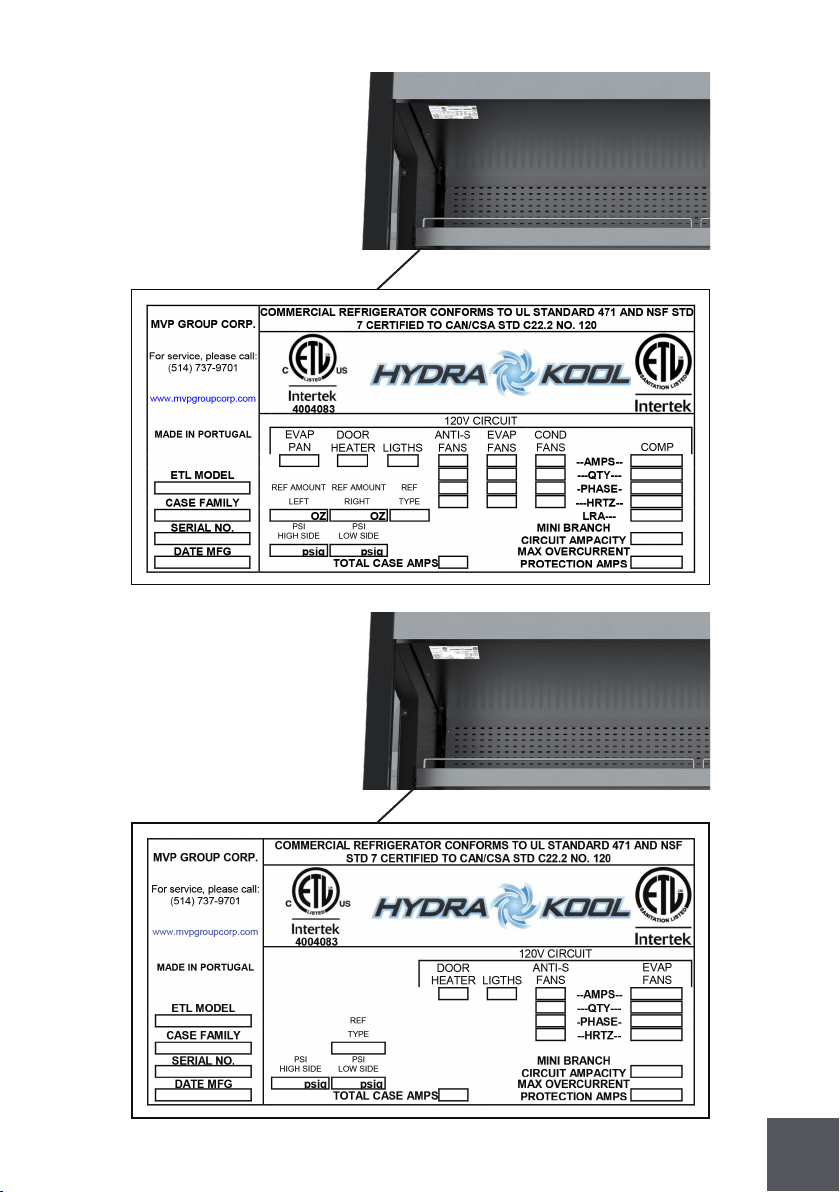
31
Self contained numbers
Remote numbers
32
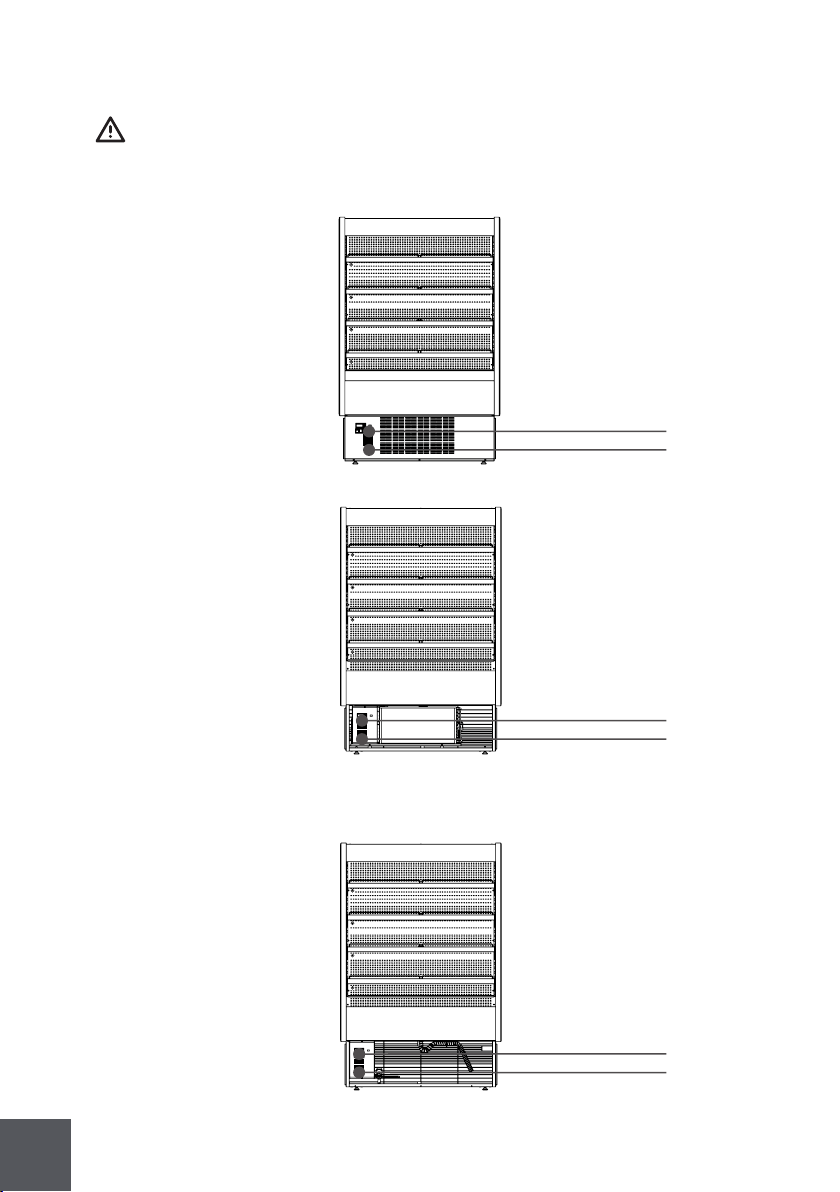
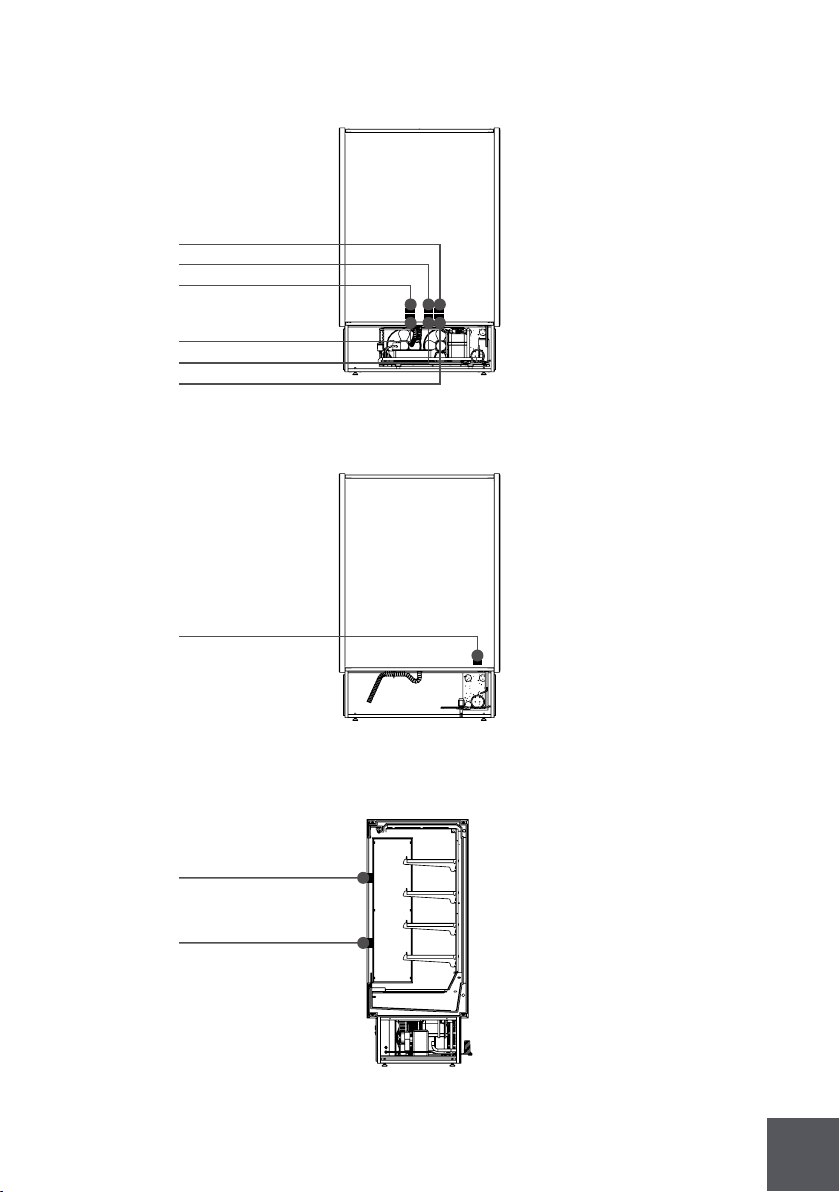
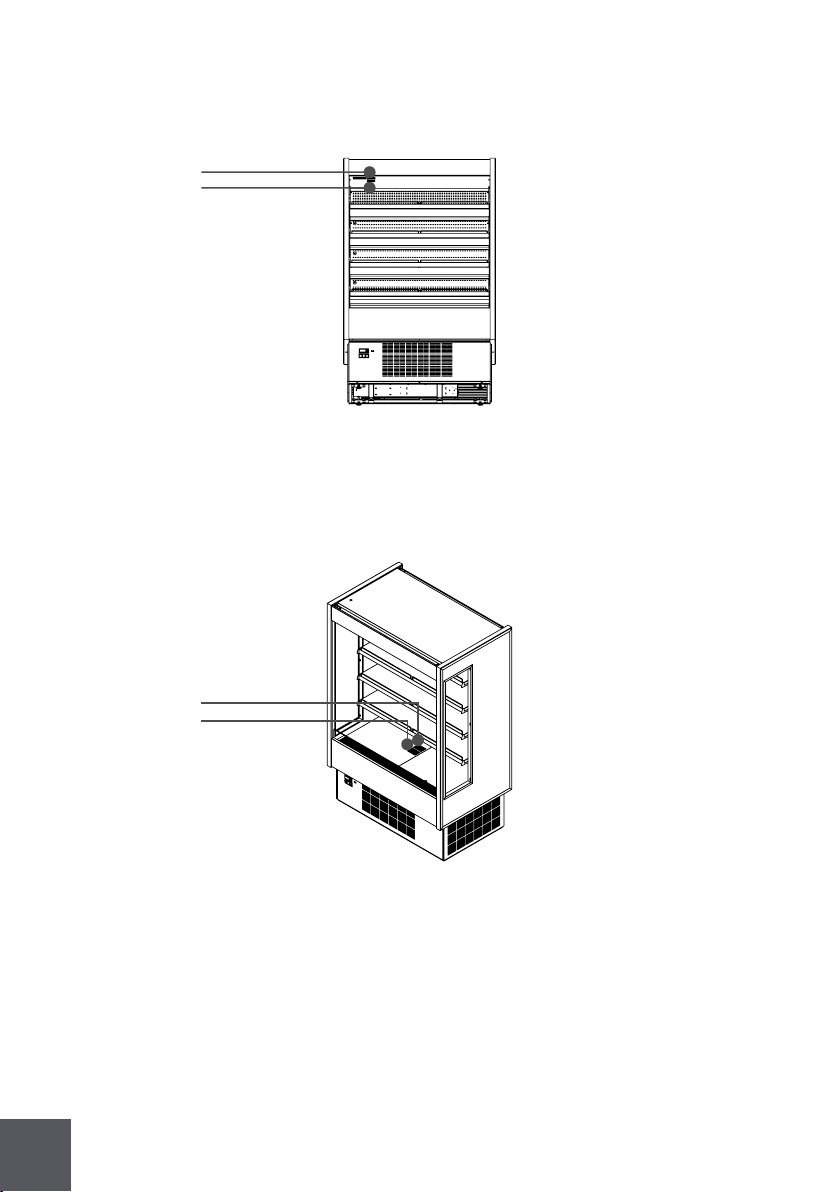
2.6 Warning/Caution labels
Before starting, HYDRA KOOL products have caution and warning labels to be
respected.
Self contained labels
Label 5
Label 6
Label 9
Label 10
Label 9
Label 10
Remote labels
33
Label 1
Label 9
Label 11
Label 7
Self contained labels (Shutter rails)
Self contained labels
Label 12
Label 10
Label 2
Label 15
Label 8
Remote labels
34
Self contained and Remote labels (evaporator)
Label 13
Label 14
Self contained and Remote labels
Label 3
Label 4
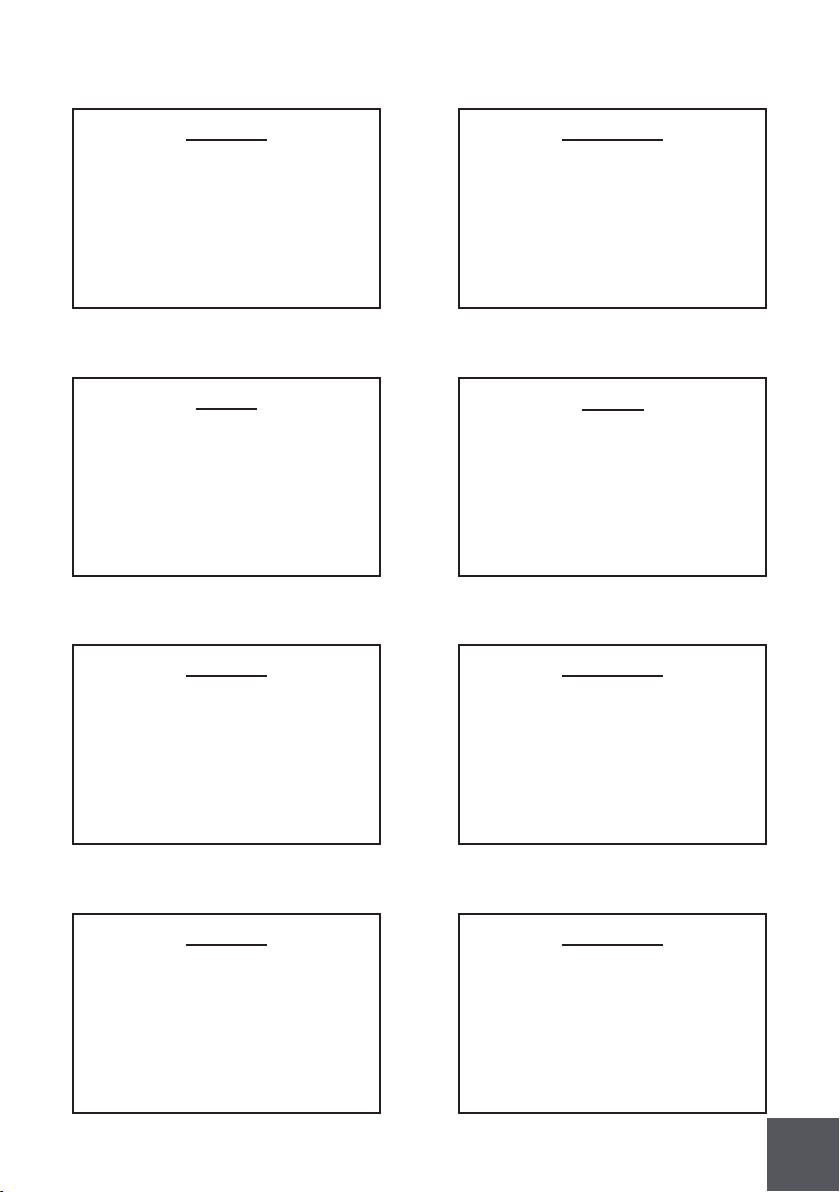
35
ATTENTION
PIÈCES MOBILES.
NE FAIRE PAS
FONCTIONNER AVEC
DES PIÈCES ENLEVER
CAUTION
MOVING PARTS.
DO NOT OPERATE UNIT
WITH (PART) REMOVED
Label 1 Label 2
Label 3 Label 4
Label 5 Label 6
Label 7 Label 8
CAUTION
CONDENSING UNIT SWITCH ONLY
CAUTION
FOR THE SHUTTER CORRECT
OPENING AND CLOSING OPER-
ATION, IT IS MANDATORY FOR
ALL THE SHUTTER RAILS TO BE
CLEAR AND UNOBSTRUCTED
ATTENTION
INTERRUPTEUR DE L'UNITÉ DE
CONDENSATION UNIQUEMENT
ATTENTION
POUR OUVERTURE ET FERME-
TURE CORRECTE DU VOLET
ROULANT, IL EST OBLIGATOIRE
POUR TOUTES LES COULISSES
DU VOLET ROULANT D'ETRE DE-
GAGEES ET DEBARRASSEES
-NOTE-
CETTE VITRINE TYPE 1 EST
CONÇUE POUR FONCTION-
NER SELON LES CONDITIONS
DU MAGASIN ET NE DOIT
DÉPASSER
75 F AND 55% R.H.
-NOTE-
TYPE 1 EQUIPMENT - AMBIENT
LOCATION MUST NOT EXCEED 75
F AND 55% R.H.

36
Label 11 Label 12
CAUTION
HOT PARTS.
DO NOT OPERATE UNIT
WITH (PART) REMOVED
ATTENTION
PIÈCES BRULANTES.
NE FAIRE PAS
FONCTIONNER AVEC LES
PIÈCES ENLEVER
CAUTION
HAZARDOUS MOVING PARTS.
DO NOT OPERATE UNIT
WITH DECK PANS
ATTENTION
PIÈCES MOBILES
DANGEREUSES. NE FAIRE
PAS FONCTIONNER AVEC
DES PIÈCES ENLEVER
Label 13
Label 15
Label 14
WARNING
NO SUITABLE FOR USE WITH
AMMONIA
Label 9 Label 10
ATTENTION
RISQUE DE CHOC
ELECTRIQUE.
AVANT TOUT TRAVAIL
COUPER LE COURANT
CAUTION
RISK OF ELECTRIC SHOK.
DISCONNECT ALL
POWER BEFORE
SERVICING UNIT
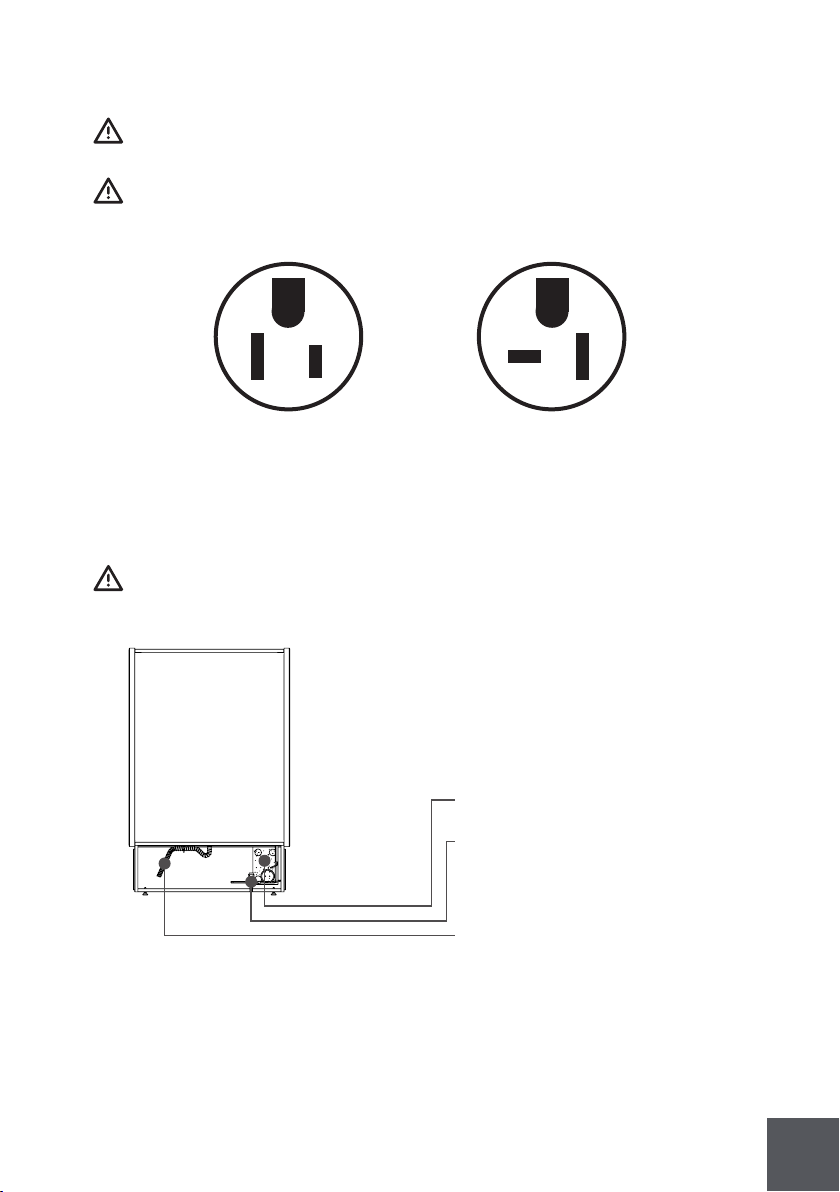
37
2.7 Check your electrical installation
This equipment can be connected to an outlet with 115V/ 60Hz/ 1 phase or
220V/ 60Hz/ 1 phase.
For the wright connection check tension and frequency stated I the marking
plate.
2.8 Electrical, drain and refrigeration connections (remotes only)
Installation and service must be performed by a qualified technician.
Nema-5-15P
All electrical connections must be
done from the electrical board
Equipments for remote installation
come with nitrogen under
pressure and an easy prep kit
(tubing connections needed only)
for installation.
Prepare a drain installation
Nema-5-20P
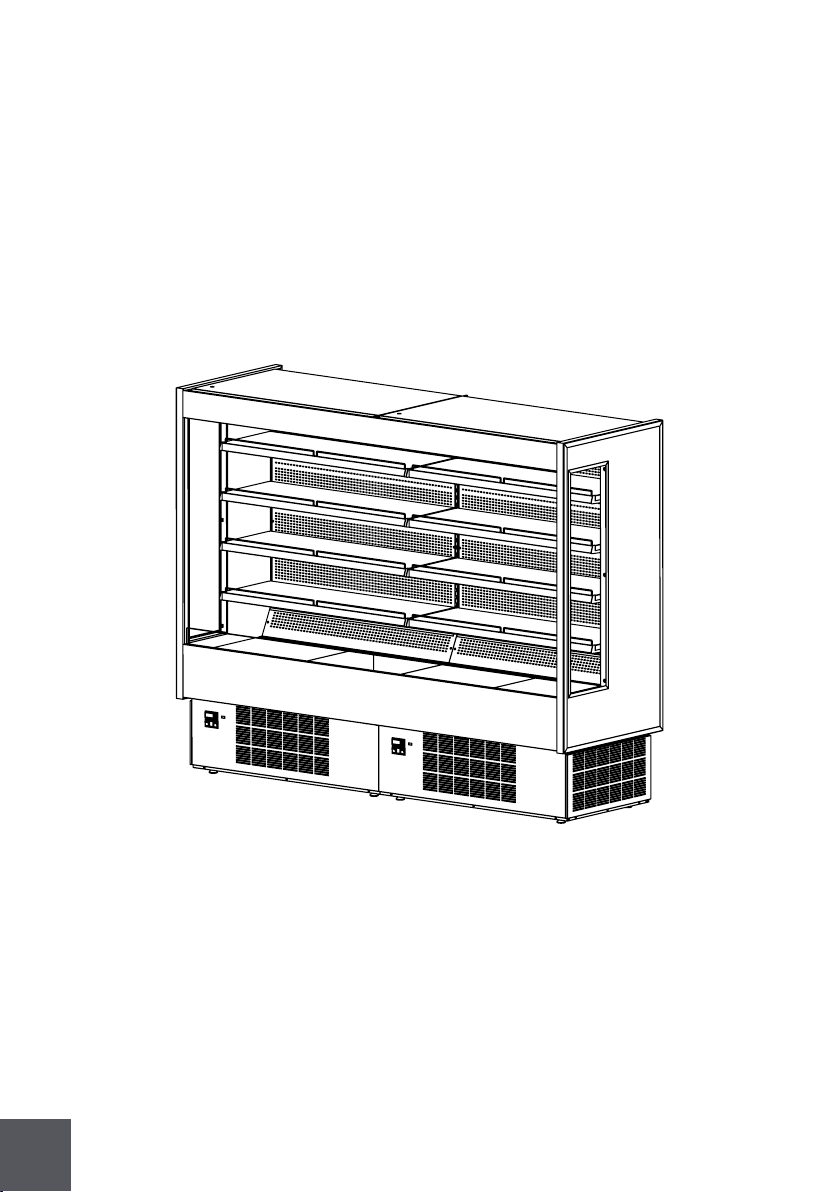
38
2.9 Joining
For joining follow the steps described.
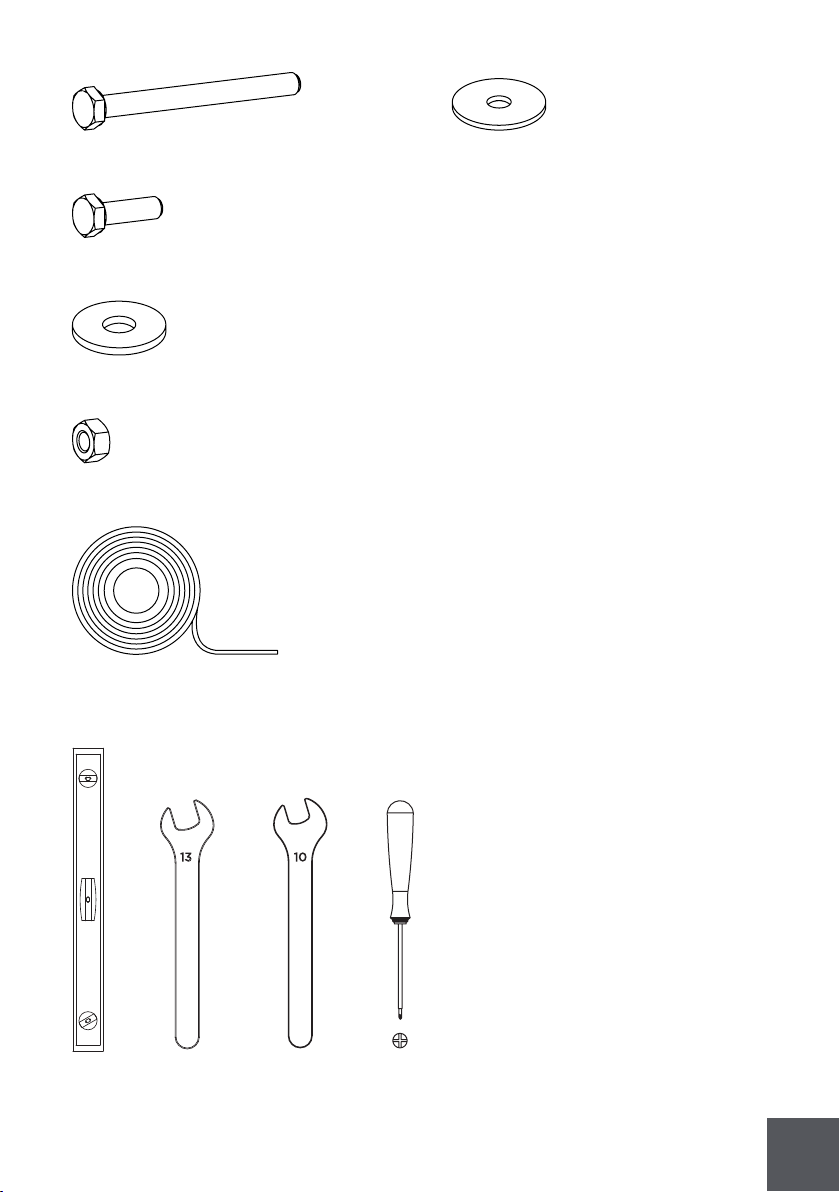
39
1x
1x
1x
13 10
8x - ANL00601002
3x - PAR00601011 DIN933 M6x65
8x - PAR00601007 DIN933 M6x20
14x- ANL00501006 DIN9021 M6
11x - PRC00101006 DIN934 M6
2X FIT00000316 A100 04 (298⁄'')
1x
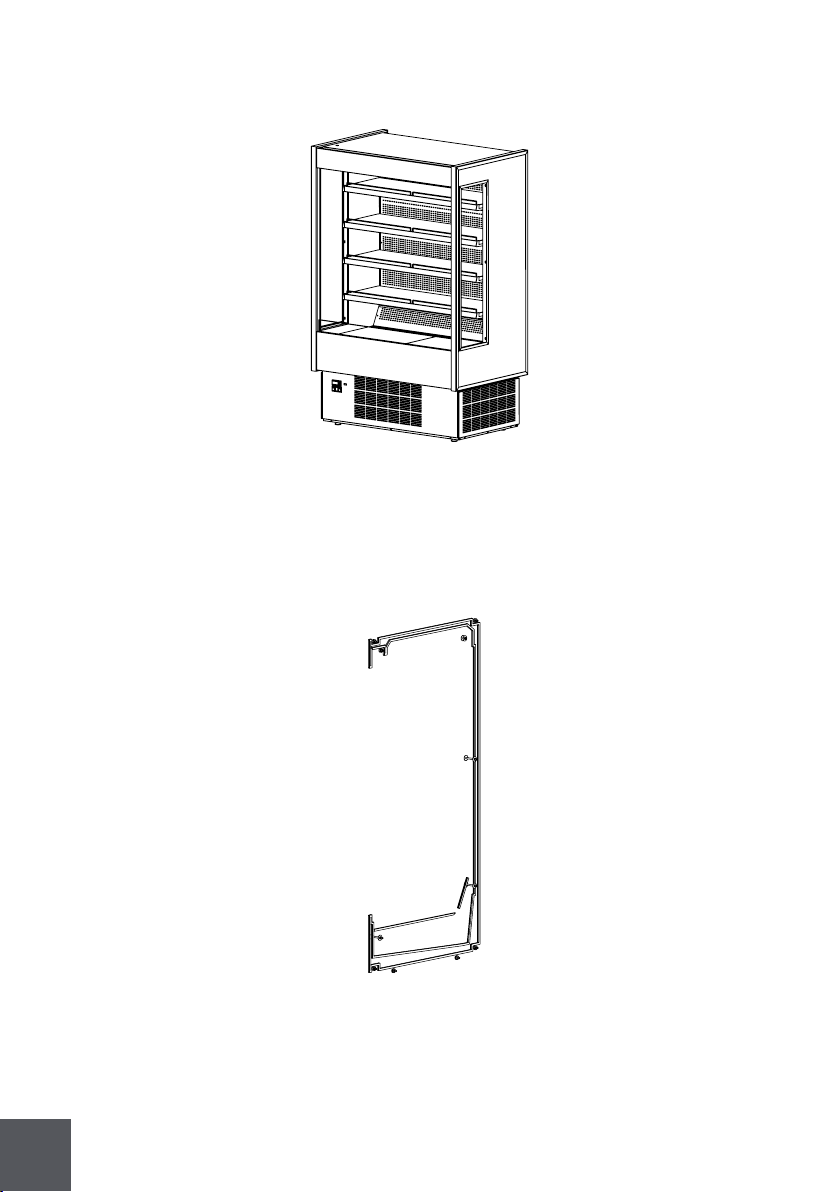
40
KIT0001U01000
2x KGH-OF
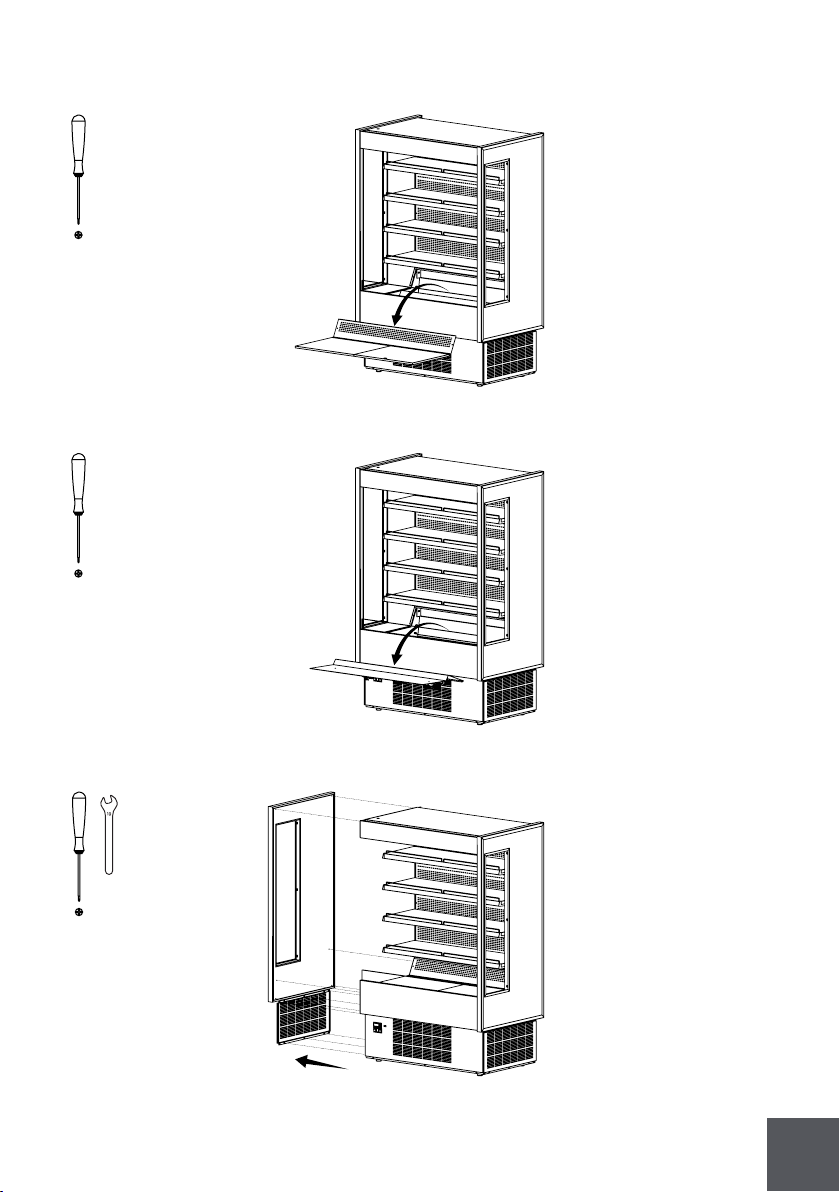
41
10
10
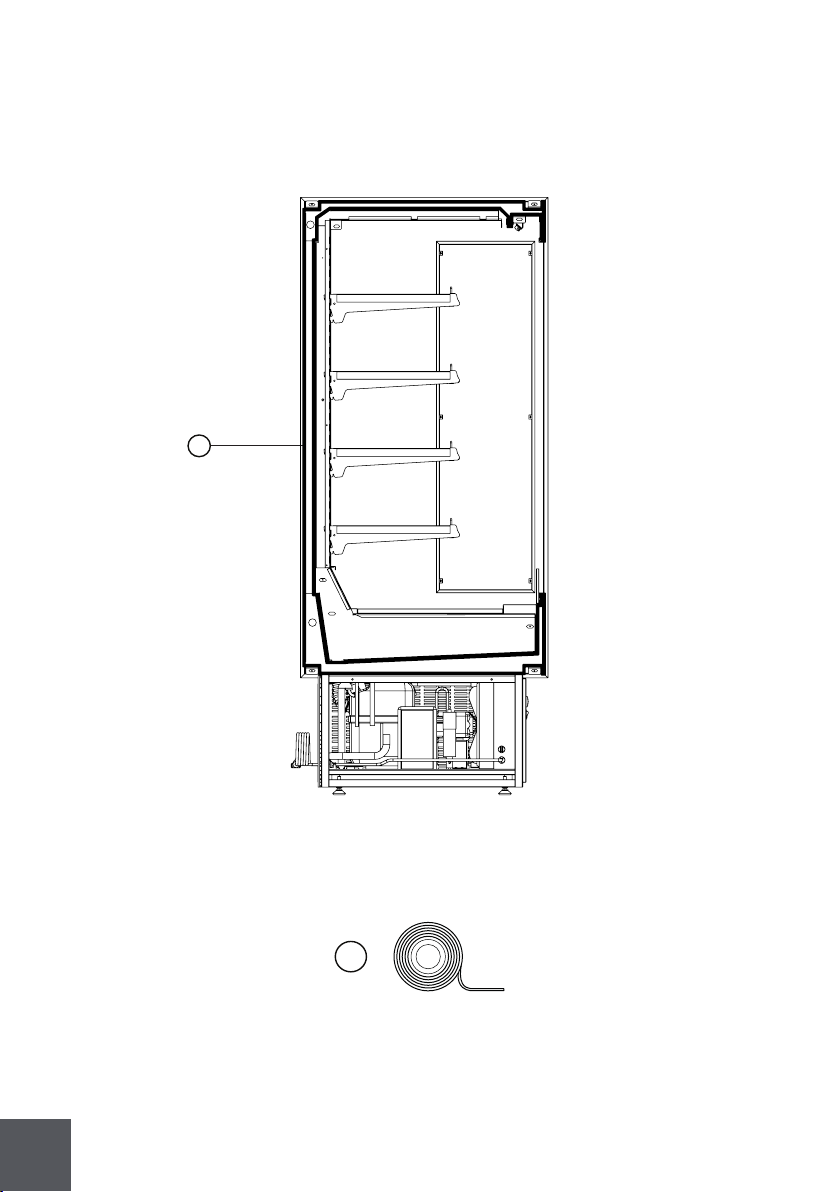
42
2X - FIT00000427 (91 )
G
G
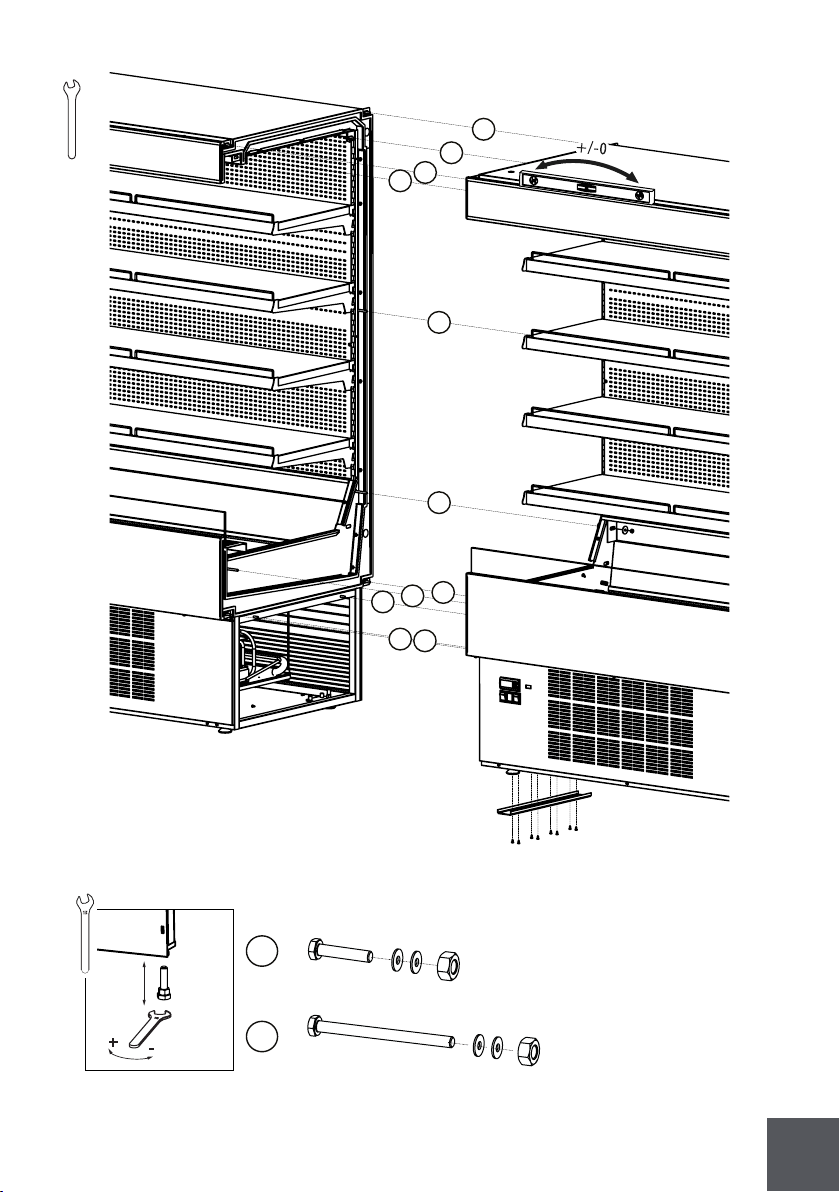
43
B
C
1x - DIN933 M6x80
2x - DIN9021 M6
1x - DIN934 M6
1x - DIN933 M6x20
2x - DIN9021 M6
1x - DIN934 M6
13
13
+
-
10
B
C
C
B
B
B
B
C
B
B
B
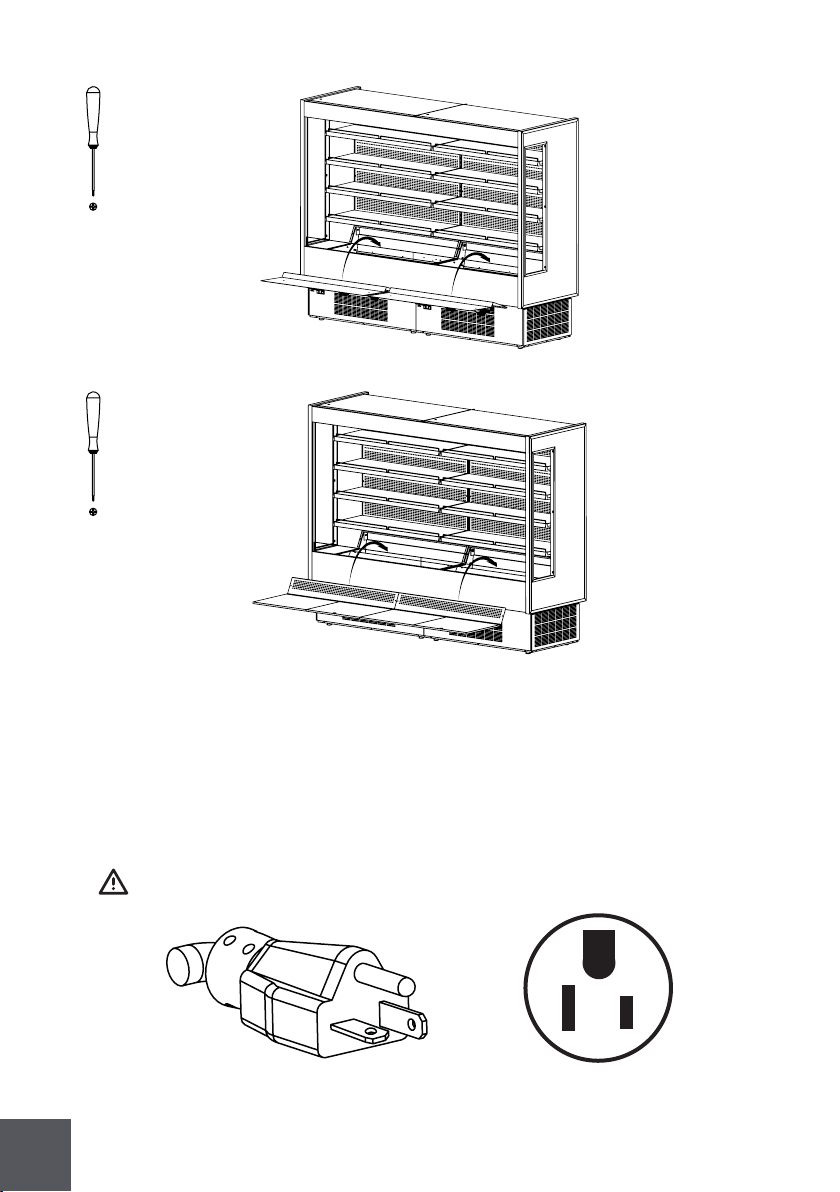
44
Nema-5-15P
2.10 Plugging and start
To start your equipment follow the steps:
1 - Check for page with parameters inside the manual.
2 - After uncrating and placed the equipment respecting all warnings set in 2.1 chapter,
and all switches are set to off position, connect the equipment.
Make sure you have the correct outlet!

45
3 - Check lights, using button referenced on chapter 2.4. If not working consult the
maintenance chapter. KGH-OF/FD/OS/MS only.
3.1 - For KGH-ES, lights and shutter are controlled by key referenced on 2.4 chapter.
Turn the key to check lights and shutter. (Open shutter = lights ON)
Open or close shutter only when needed to prevent motor burning.
4 - Check for shutter normal operation.
Keep shutter rails clear for proper operation.
Turn the key to control the shutter.
Close
Open
5 - Turn ON power button referenced in 2.6 chapter.
Noise will be heard when compressor starts! If compressor doesn’t start, call a
technician!
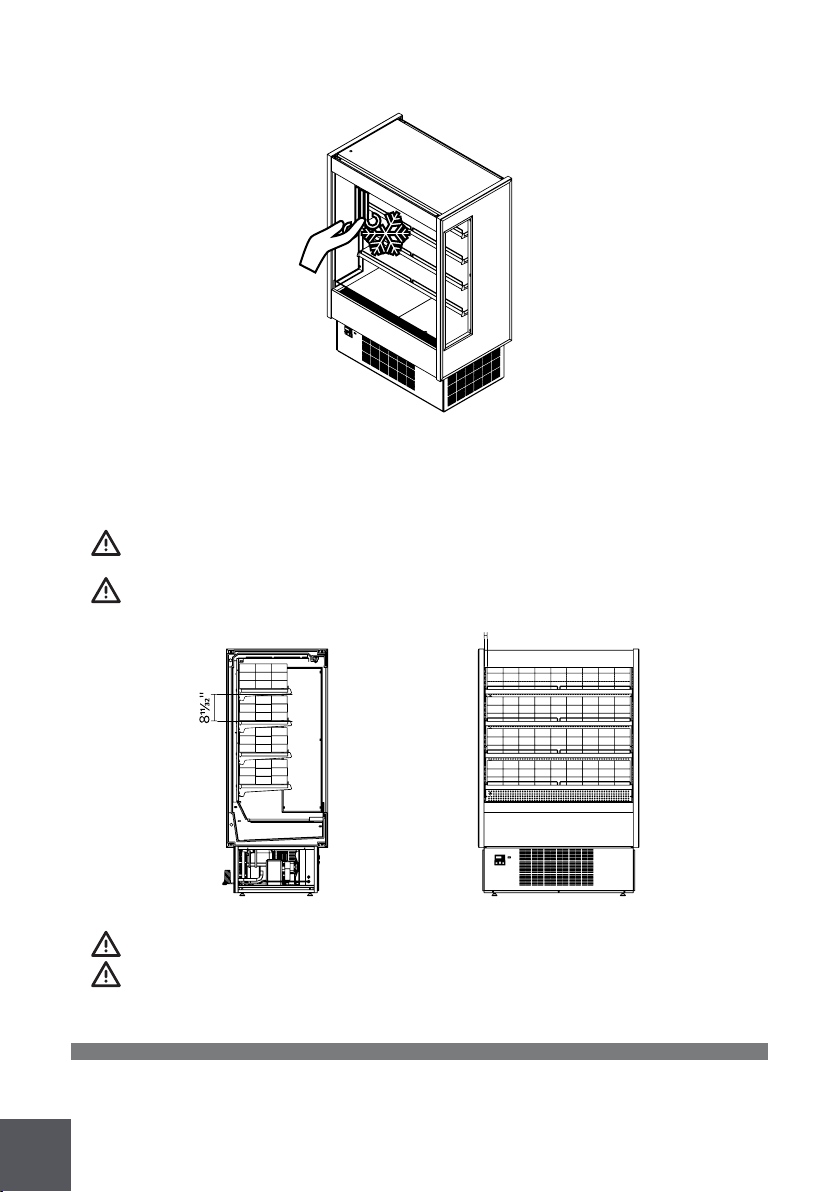
46
7 - Before loading, leave the equipment working for about 2h.
8 - Load your KGH-Series.
Loading must be done respecting loading limits and weight per square foot
mentioned in page xx. This equipment is intended for maintaining
temperature, be sure the products are cold, and not ambient temperature.
Volumes inside must respect the refrigerated shelf area.
After loading check for any obstruction in the discharge and return air grilles.
Maintain doors closed after loading (KGH-FD/DS models only).
9 - If any problem encountered, see troubleshooting or call a qualified technician!
3 Refrigeration
3.1 Self contained refrigeration equipment and defrost
The refrigeration equipment it’s laid out in the base of the equipment.
6 - Check for air movement in the discharge grille.
1''

47
Evap pan
Compressor
Fan
Filter
Condenser
Controller

48
All self contained KGH series use the following equipment: capillary tube, finned coil
ventilated systems (condenser/evaporator), hermetic compressor, electrical water
evaporation system .
Model
Circuit
pressure
(psig)
Refrigerant
and charge
(OZ)
Defrost
R 404A xx
R 404A xx
R 404A xx
R 404A xx
R 404A xx
R 404A xx
R 404A xx
R 404A xx
R 404A xx
R 404A xx
R 404A xx
R 404A xx
R 404A xx
R 404A xx
R 404A xx
Automatic 4/day
Automatic 4/day
Automatic 4/day
Automatic 4/day
Automatic 4/day
Automatic 2/day
Automatic 2/day
Automatic 2/day
Automatic 2/day
Automatic 4/day
Automatic 4/day
Automatic 4/day
Automatic 2/day
Automatic 2/day
Automatic 2/day
High side Low side
174
174
174
174
174
174
174
174
174
174
174
174
174
174
174
331
331
331
331
331
331
331
331
331
331
331
331
331
331
331
KGH-OF/ES/MS-30-S
KGH-OF/ES/MS-40-S
KGH-OF/ES/MS-50-S
KGH-OF/ES/MS-60-S
KGH-OF/ES/MS-80-S
KGH-FD-40-S
KGH-FD-50-S
KGH-FD-60-S
KGH-FD-80-S
KGH-OS-40-S
KGH-OS-50-S
KGH-OS-60-S
KGH-DS-40-S
KGH-DS-50-S
KGH-DS-60-S
|
|
|
|
|
|
|
|
|
|
|
|
|
|
|
|
|
|
|
|
|
|
|
|
|
|
|
|
|
|
|
|
|
|
|
|
|
|
|
|
|
|
|
|
|

49
3.2 Refrigeration loads (remotes only)
Installation of remote equipment must be done by a qualified technician
Model
BTU*/h
4793
6940
7565
9383
13881
2615
3425
3582
4479
2615
3425
3582
TS2
TS2
TS2
TS2
TS2
TS2
TS2
TS2
TS2
TS2
TS2
TS2
TS2
TS2
TS2
00
00
00
00
00
00
00
00
00
00
00
00
00
00
00
Expansion
valve type
*values presented are indicative for 14°F evap, and 90°F ambient.
KGH-OF/ES/MS-30-R
KGH-OF/ES/MS-40-R
KGH-OF/ES/MS-50-R
KGH-OF/ES/MS-60-R
KGH-OF/ES/MS-80-R
KGH-FD-40-R
KGH-FD-50-R
KGH-FD-60-R
KGH-FD-80-R
KGH-OS-40-R
KGH-OS-50-R
KGH-OS-60-R
KGH-DS-40-R
KGH-DS-50-R
KGH-DS-60-R
|
|
|
|
|
|
|
|
|
|
|
|
|
|
|
|
|
|
|
|
|
|
|
|
|
|
|
|
|
|
50
4 Electrical
4.1. Electrical specifications data
Electrical data can be found on the marking plate.
Standard equipment depending on the model type includes led lighting in all shelves
and top, electrical shutter and anti sweat heaters.
Model
Fans
EVP CND
0,70
0,70
1,05
0,70
0,70
1,05
0,55
0,90
1,1
0,55
0,90
1,1
3,33
8,33
8,33
3,33
8,33
8,33
1
1
1
20,73
26,33
26,93
20,73
26,33
26,93
Lights
0,15
0,2
0,25
0,15
0,2
0,25
Compressor
F.L.A./L.R.A.
16/64
16,2/83
16,2/83
16/64
16,2/83
16,2/83
Electrical shutter
Evap pan
Total amps
(self contained)
115V/60Hz/1 phase
The data regards to standard options only.
KGH-OF/MS-30-S
KGH-OF/MS/OS-40-S
KGH-OF/MS/OS-50-S
KGH-OF/MS/OS-60-S
KGH-OF/MS-80-S
KGH-ES-30-S
KGH-ES-40-S
KGH-ES-50-S
KGH-ES-60-S
KGH-ES-80-S
KGH-FD/DS-40-S
KGH-FD/DS-50-S
KGH-FD/DS-60-S
KGH-FD/DS-80-S
|
|
|
|
|
|
|
|
|
|
|
|
|
|
|
|
|
|
|
|
|
|
|
|
|
|
|
|
|
|
|
|
|
|
|
|
|
|
|
|
|
|
|
|
|
|
|
|
|
|
|
|
|
|
|
|
|
|
|
|
|
|
|
|
|
|
|
|
|
|
|
|
|
|
|
|
|
|
|
|
|
|
|
|

51
Model
Fans
EVP CND
Lights
Compressor
F.L.A./L.R.A.
Electrical shutter
Evap pan
Total amps
(self contained)
220V/60Hz/1 phase
The data regards to standard options only.
KGH-OF/MS/OS-60-S
KGH-OF/MS-80-S
KGH-ES-60-S
KGH-ES-80-S
|
|
|
|
|
|
|
|
|
|
|
|
|
|
|
|
|
|
|
|
|
|
|
|
Model
Total amps
(remotes
only)
0,85
0,9
1,3
1,36
1,81
1,85
1,9
2,3
2,36
2,81
KGH-OF/MS-30-R
KGH-OF/MS/OS-40-R
KGH-OF/MS/OS-50-R
KGH-OF/MS/OS-60-R
KGH-OF/MS-80-R
KGH-ES-30-R
KGH-ES-40-R
KGH-ES-50-R
KGH-ES-60-R
KGH-ES-80-R
KGH-FD/DS-40-R
KGH-FD/DS-50-R
KGH-FD/DS-60-R
KGH-FD/DS-80-R
|
|
|
|
|
|
|
|
|
|
|
|
|
|
52
4.2. Electrical service receptacles (optional)
Service receptacles are not intended nor suitable for large motors or other
external appliances. Only for scales and lighted displays.
Type
Max. amps
xx
Receptacle ampacity
GFCI
|
53
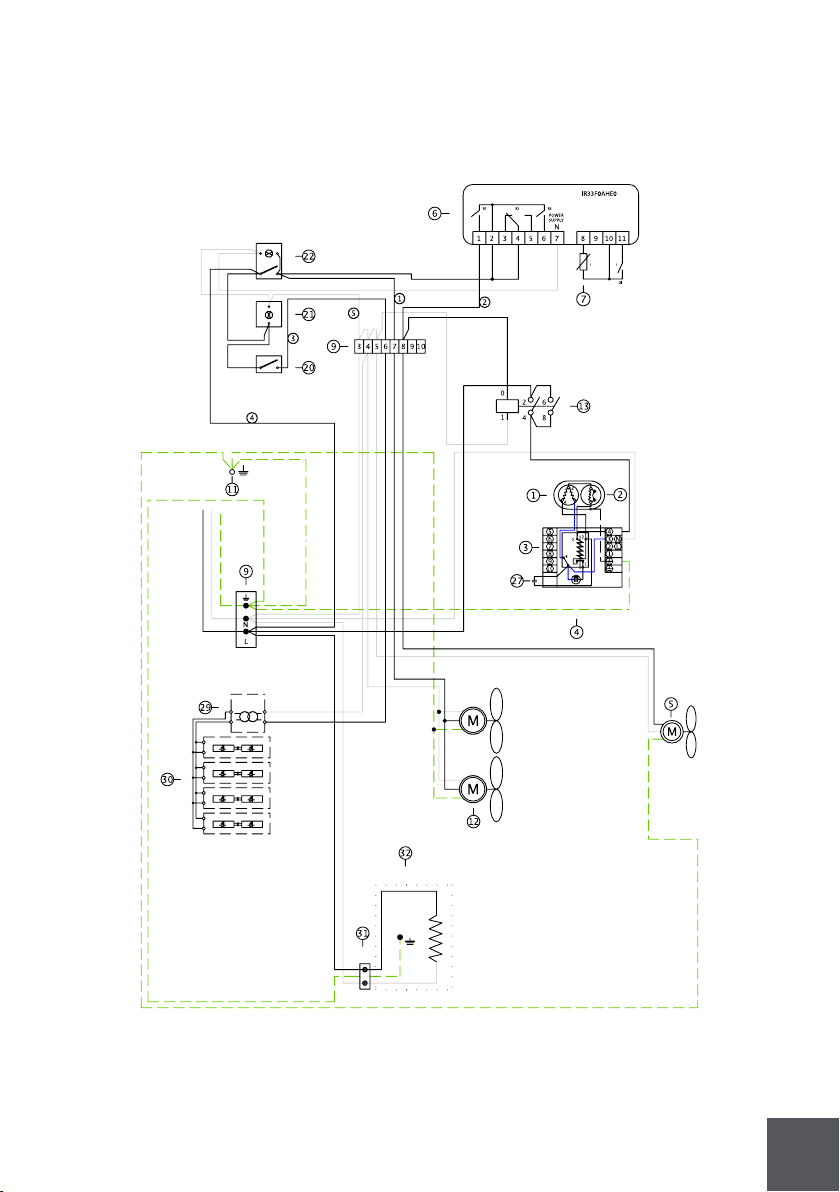
KGH-OF-30-S
4.3. Electrical diagrams

54
Nº
Discription
1
2
3
4
5
6
7
9
11
12
13
20
21
22
27
29
30
31
32
Compressor
Overload
Relay
Start capacitor
Condenser fan
Controller
Temperature probe
Terminal block
Ground connection
Evaporator fan
Compressor relay
Lamp switch
Pilot light
Switch
Run capacitor
Transformer
Led lighting
Socket
Evaporative condensate pan
|
|
|
|
|
|
|
|
|
|
|
|
|
|
|
|
|
|
|
55
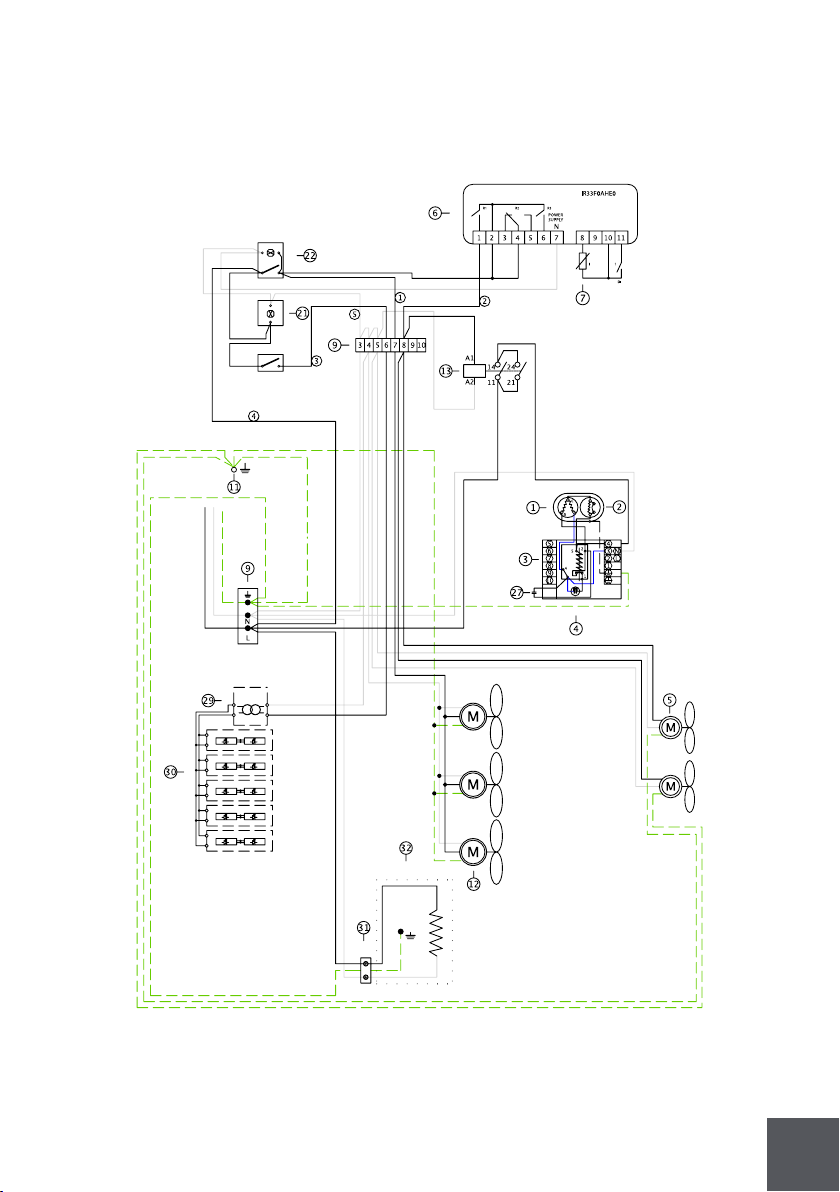
KGH-OF-40/50-S

56
Nº
Discription
1
2
3
4
5
6
7
9
11
12
13
20
21
22
27
29
30
31
32
Compressor
Overload
Relay
Start capacitor
Condenser fan
Controller
Temperature probe
Terminal block
Ground connection
Evaporator fan
Compressor relay
Lamp switch
Pilot light
Switch
Run capacitor
Transformer
Led lighting
Socket
Evaporative condensate pan
|
|
|
|
|
|
|
|
|
|
|
|
|
|
|
|
|
|
|
57
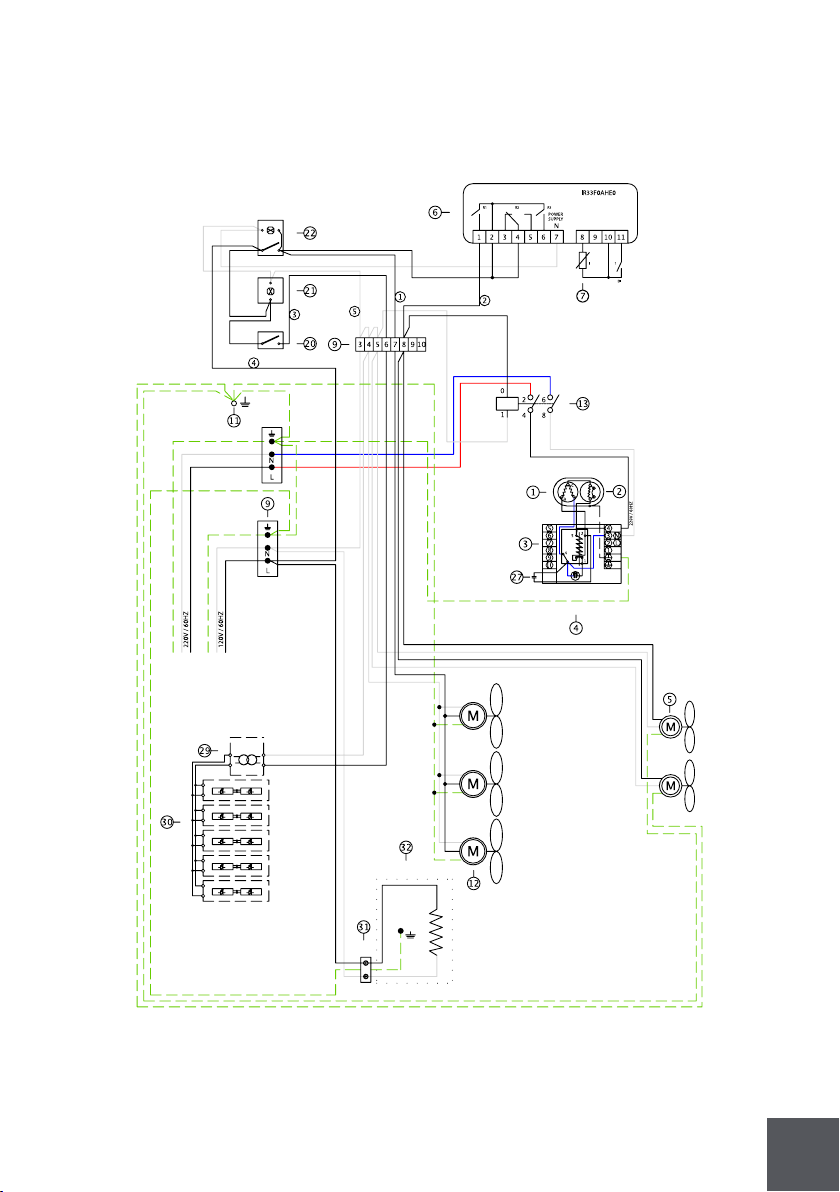
KGH-OF-100(50+50)-S

58
Nº
Discription
1
2
3
4
5
6
7
9
11
12
13
20
21
22
27
29
30
31
32
Compressor
Overload
Relay
Start capacitor
Condenser fan
Controller
Temperature probe
Terminal block
Ground connection
Evaporator fan
Compressor relay
Lamp switch
Pilot light
Switch
Run capacitor
Transformer
Led lighting
Socket
Evaporative condensate pan
|
|
|
|
|
|
|
|
|
|
|
|
|
|
|
|
|
|
|
59
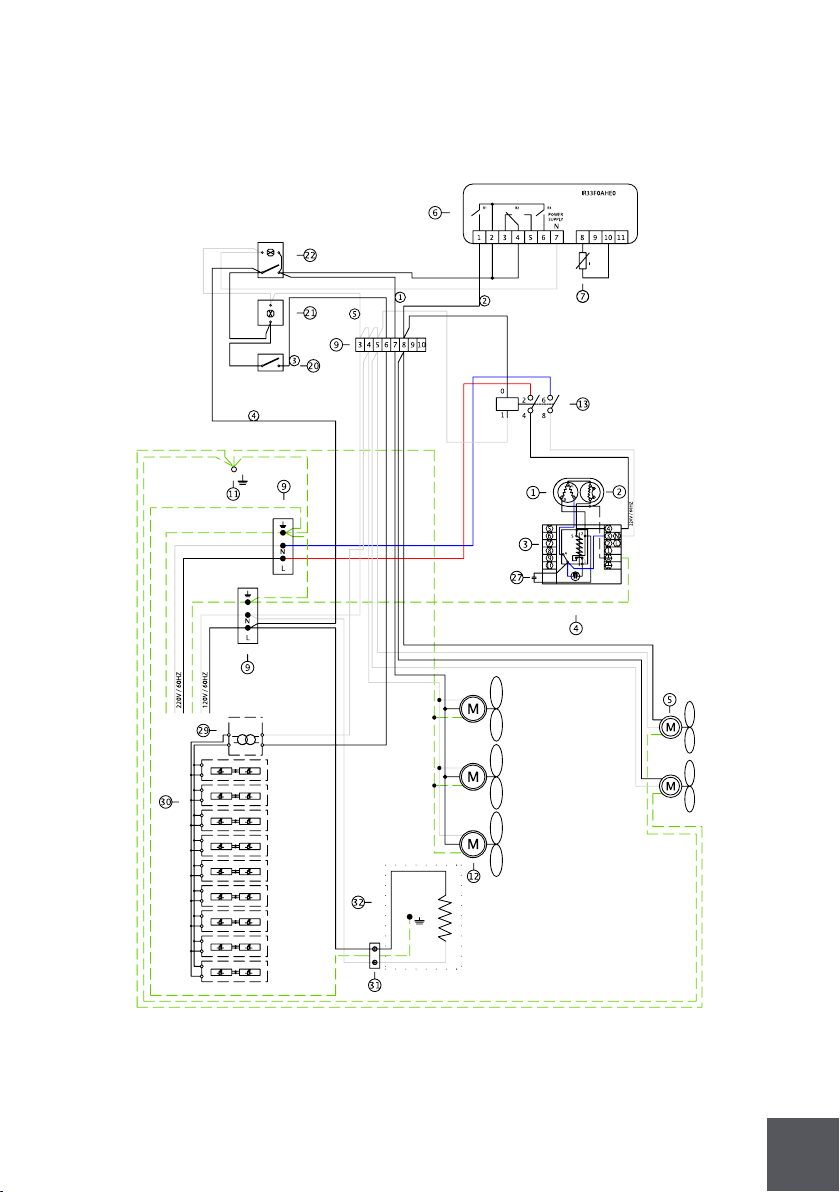
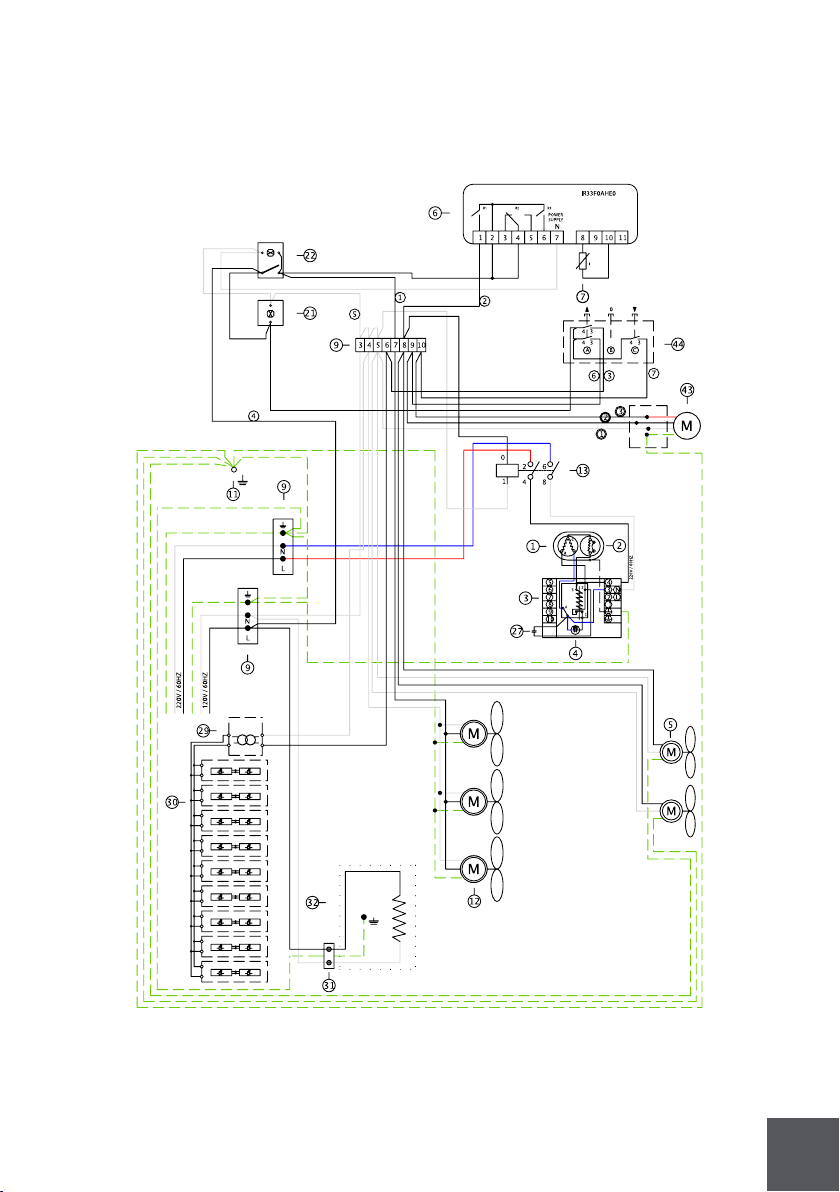
KGH-OF-60-S

60
Nº
Discription
1
2
3
4
5
6
7
9
11
12
13
20
21
22
27
29
30
31
32
Compressor
Overload
Relay
Start capacitor
Condenser fan
Controller
Temperature probe
Terminal block
Ground connection
Evaporator fan
Compressor relay
Lamp switch
Pilot light
Switch
Run capacitor
Transformer
Led lighting
Socket
Evaporative condensate pan
|
|
|
|
|
|
|
|
|
|
|
|
|
|
|
|
|
|
|
61
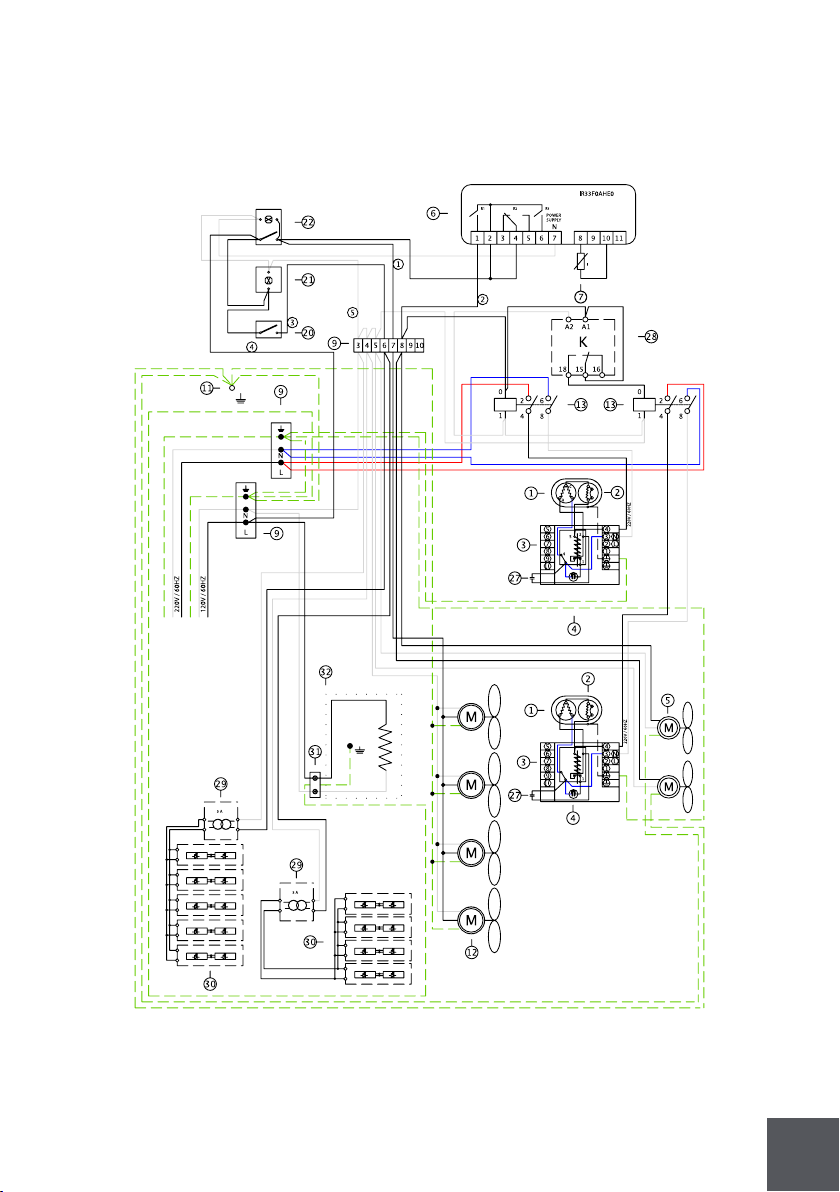
KGH-OF-80-S

62
Nº
Discription
1
2
3
4
5
6
7
9
11
12
13
20
21
22
27
29
30
31
32
Compressor
Overload
Relay
Start capacitor
Condenser fan
Controller
Temperature probe
Terminal block
Ground connection
Evaporator fan
Compressor relay
Lamp switch
Pilot light
Switch
Run capacitor
Transformer
Led lighting
Socket
Evaporative condensate pan
|
|
|
|
|
|
|
|
|
|
|
|
|
|
|
|
|
|
|
63
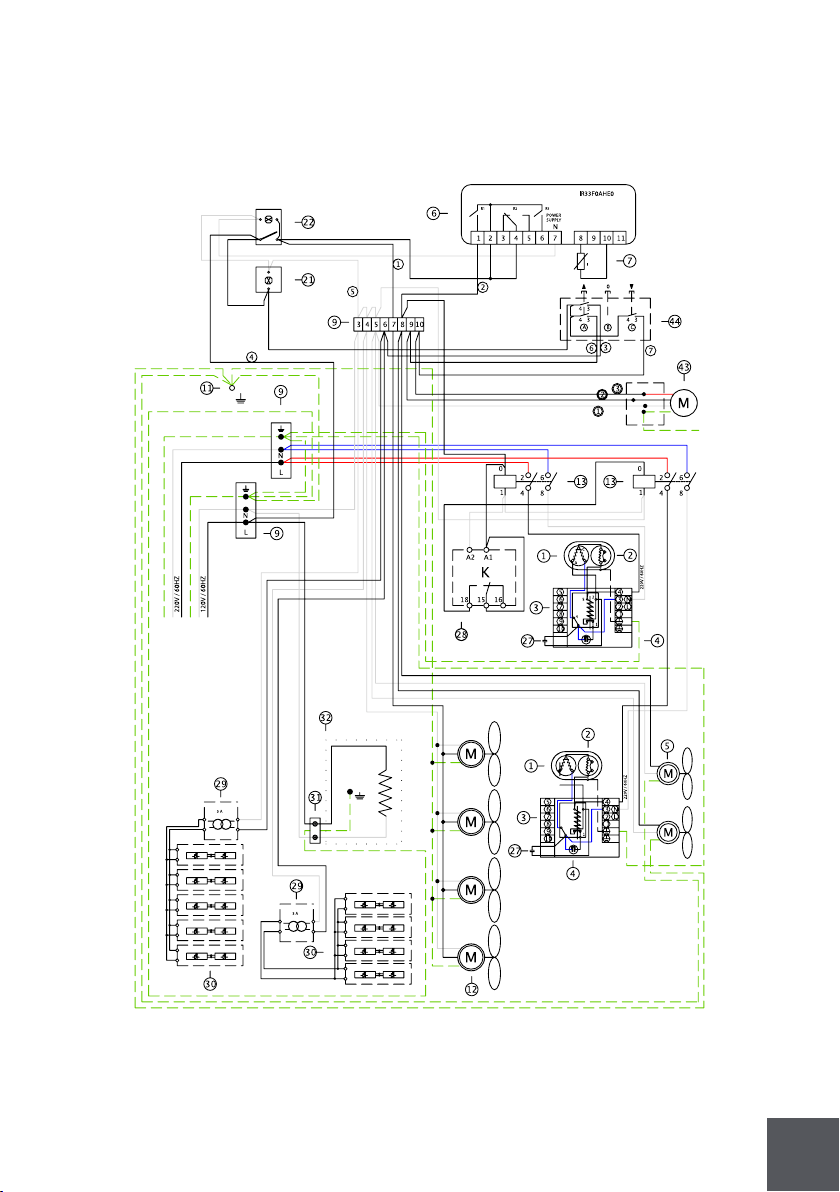
KGH-ES-60-S

64
Nº
Discription
1
2
3
4
5
6
7
9
11
12
13
21
22
27
29
30
31
32
43
44
Compressor
Overload
Relay
Start capacitor
Condenser fan
Controller
Temperature probe
Terminal block
Ground connection
Evaporator fan
Compressor relay
Pilot light
Switch
Run capacitor
Transformer
Led lighting
Socket
Evaporative condensate pan
Electrical shutter
A key switch shutter
|
|
|
|
|
|
|
|
|
|
|
|
|
|
|
|
|
|
|
|
65
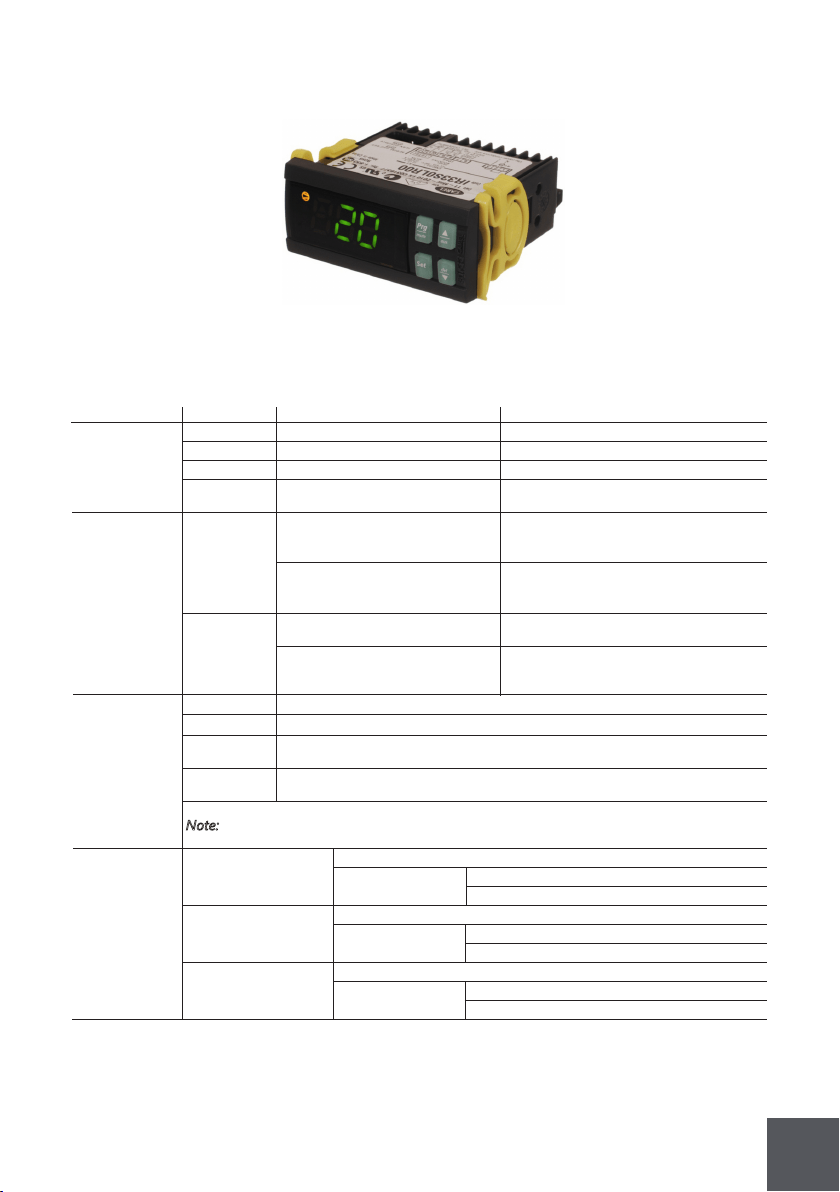
KGH-ES-80-S

66
Nº
Discription
1
2
3
4
5
6
7
9
11
12
13
21
22
27
28
29
30
31
32
43
44
Compressor
Overload
Relay
Start capacitor
Condenser fan
Controller
Temperature probe
Terminal block
Ground connection
Evaporator fan
Compressor relay
Pilot light
Switch
Run capacitor
Time delay relay
Transformer
Led lighting
Socket
Evaporative condensate pan
Electrical shutter
A key switch shutter
|
|
|
|
|
|
|
|
|
|
|
|
|
|
|
|
|
|
|
|
|
67
4.4. Electronic controller
Carel - IR33F0AHE0
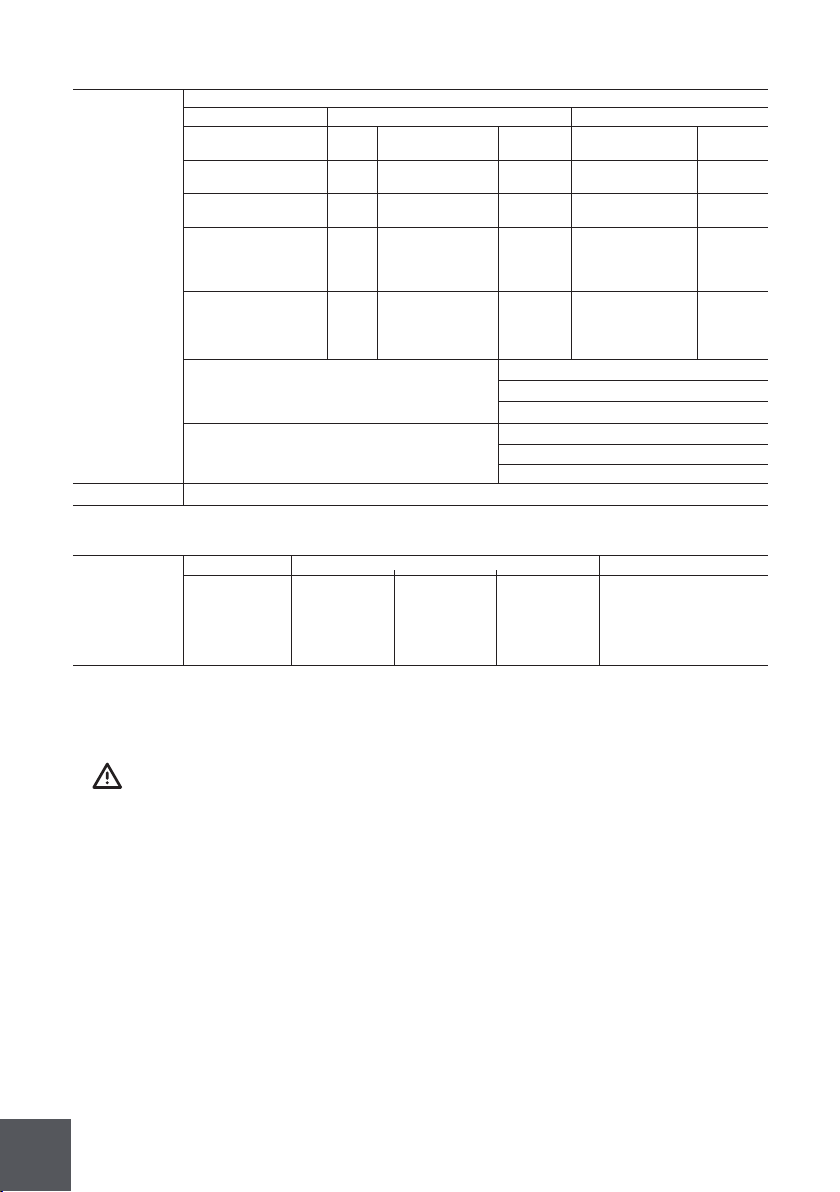
Power supply
Model Voltage Power
Insulation
guaranteed
by the power
supply
Inputs
Probe type
IRxxxxExxxx
Maximum ditance of probes and digital inputs less than 10 m.
IRxxxxExxxx
S1 (probe 1)
230 V~, 50/60 Hz 3 VA, 25 mA~max.
reinforced
reinforced
basic
IRxxxxAxxxx
Note: during installation keep the power and loads connection separate from probe cables,
IRxxxxAxxxx
S2 (probe 2)
115V~, 50/60 Hz 3 VA, 50 mA~max.
6mm clearance, 8 mm creepage
6mm clearance, 8 mm creepage
externally guaranteed by safety
1 ºC in the - 50T50 ºC range
10 kΩ at 25 ºC, - 50T90 ºC range
50 kΩ at 25 ºC, - 40T150 ºC range
985 Ω a 25 ºC, range da - 50T150 ºC
1,5 ºC in the - 20T115 ºC range
2 ºC in the - 50T50 ºC range
3mm clearance, 4 mm creepage
IRxxxxHxxxx
digital inputs, repeater display and supervisory system.
IRxxxxHxxxx
measurement error:
measurement error:
measurement error:
DI 1
DI 2
S3 (probe 3)
S4 (probe 4)
115 to 230 V~, 50/60 Hz 6 VA, 50 mA~max.
3750 V insulation
3750 V insulation
transformer (SELV power supply)
3 ºC in the - 50T90 ºC range
4 ºC in the - 20T115 ºC range
4 ºC in the - 50T150 ºC range
1250V insulation
IRxxxxLxxxx
IRxxxxLxxxx
Std. CAREL NTC
NTC high
PTC std. CAREL
12 to 24V~, 50/60 Hz, 12 to 30 Vdc
insulation in reference
insulation in reference
NTC (IRxxx0xxxxx) o NTC e PTC (IRxxx7xxxxx)
free contact, contact resistance < 10 Ω, closing current 6 mA
free contact, contact resistance < 10 Ω, closing current 6 mA
insulation from relay outputs
insulation from relay outputs
3 VA, 300 mA~/mAdc max.
IRxxxx0xxxx
IRxxxx0xxxx
temperature
(specic model)
12V~, 50/60 Hz, 12 to 18 Vdc
to very low voltage parts
to very low voltage parts
NTC (IRxxx0xxxxx) o NTC e PTC (IRxxx7xxxxx)
NTC (IRxxx0xxxxx) o NTC e PTC (IRxxx7xxxxx)
NTC (IRxxx0xxxxx) o NTC e PTC (IRxxx7xxxxx)
Use only SELV power supply
TECHNICAL SPECIFICATIONS
68
Controller must be handled by a qualified technician.
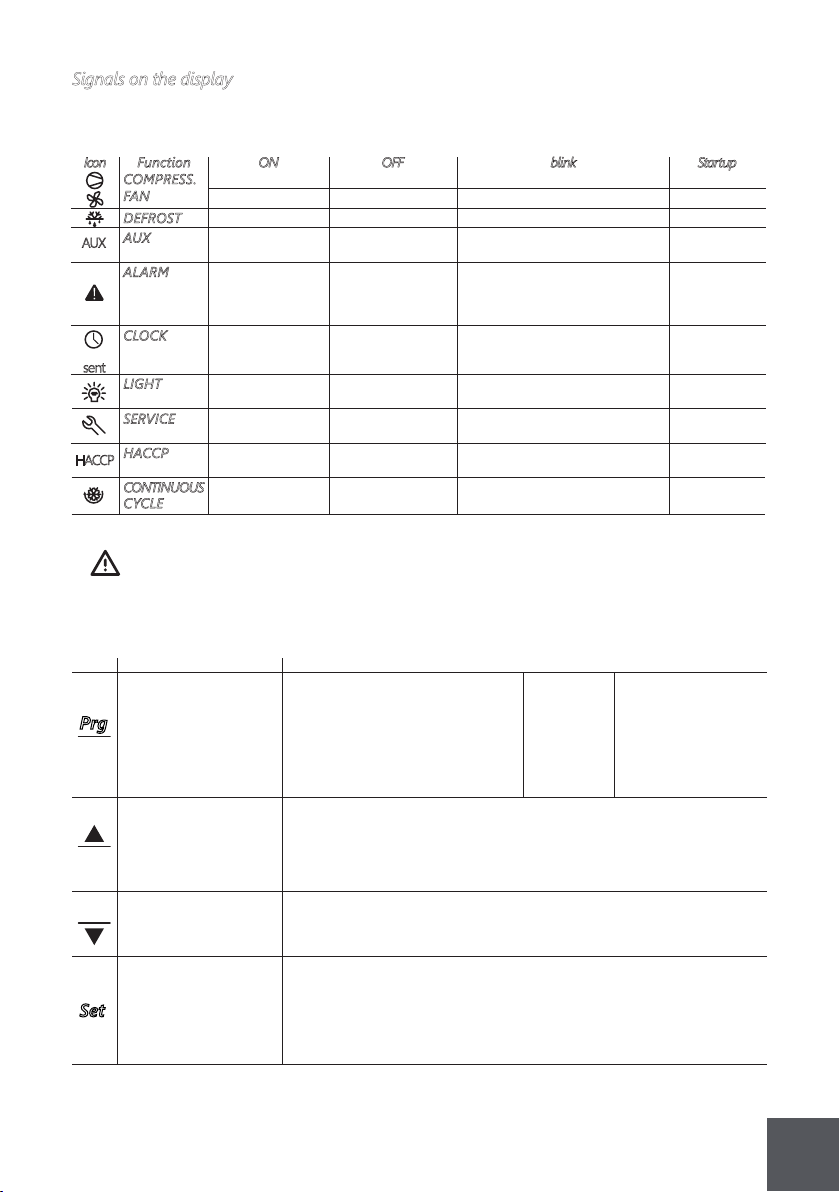
Relay outputs
SSR outputs
Connessioni
depending on the model
Model Relay P. Supply Probes for wires from 12 A
EN 60730-1 UL 873
model
IRxxxxxx0xx screw screw screw 0.5 a 2.5 mm²
IRxxxxxx2xx removable removable removable
IRxxxx(E,A)x5xx vertical screw vertical screw vertical screw
IRxxxx(E,A)x1xx faston faston removable
IRxxxx(E,A)x3xx faston faston screw
relay
R2 (*)
R3 (*)
R1,R2
R1
R2,R3
R1 (*)
R4 (*)
250 V~ 250 V~
5(1)A 5 A resistive 1FLA
5 A resistive 1FLA
8 A resistive 2FLA
12 A resistive 5FLA
6 LRA C 300
6 LRA C 300
5(1)A
8 (4)A N.O.
6 (4)A N.C. 12 LRA
2 (2)A N.O./N.C. C300
30 LRA C300
12 (2)A N.O./N.C.
operating operating
100000 300000
100000 300000
100000 300000
100000 300000
(*): Relay not suitable for uorescent loads (neon lights, ...) that use starters (ballasts) with phase-shift
the installer has to provide the correct dimensioning of the power supply and cable connection between the
cycles cycles
capacitors. Fluorescent lamps with electronic control devices or without phase-shift capacitors can be used,
instruments and the loads. Depending on the model, the maximum current in the common terminals 1, 3 or 5 is
Type of connection
Cross-section Max. current
IRxxxx(E,A)
IRxxxx(E,A)
IRxxxx(E,A)
IRxxxx(E,A)
IRxxxx(O,L,H)
IRxxxx(O,L,H)
(N,R,C,B,A,M,L,T)xxx
(N,R,C,B,A,M,L,T)xxx
(P,Q,S,U,V,X,Y,Z)xxx
(N,R,C,B,A,M,L,T)xxx
(N,R,C,B,A,M,L,T)xxx
(P,Q,S,U,V,X,Y,Z)xxx
within the operating limits specied for each type of relay.
12 A. When using the controller at maximum operating temperature and full load, use cables featuring a
maximum operating temperature of 105 ºC at least.
reinforced
basic
3 mm clearance, 4 mm creepage
1250 V insulation
6 mm clearance, 8 mm creepageinsulation from very low voltage parts
insulation between the relay outputs indipendent
Max output voltage : 12 Vdc, Output resistance: 600 Ω, Max output current: 20 mA
3750 V insulation
69
Controller must be handled by a qualified technician.
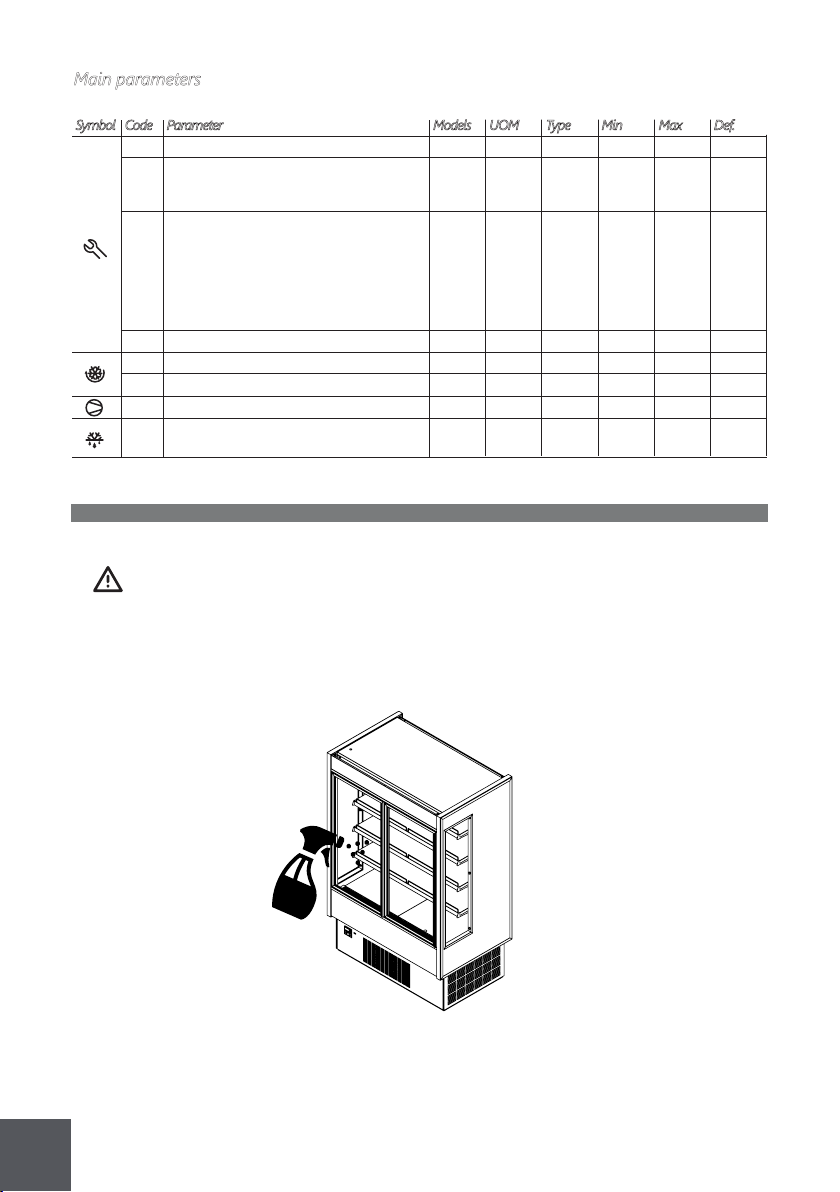
Normal operation
Buttons on the keypad
· if pressed for more than
if pressed for more than
if pressed for more than
if pressed for more than
· if pressed for more than 5 s together
· if pressed for more than 5 s together with DOWN/DEF button, enables/disables
· if pressed for more than 5 s together with PRG/MUTE button, accesses the
· if pressed for more than 5 s together with UP/AUX button, enables/disables
· if pressed for more than 5 s with SET button, starts the procedure for printing
· if pressed for more than 1 s together with DOWN/DEF button, displays a
· if pressed for more than 1 s together with SET button, displays a submenu
Start-up : if Automatic address
pressed for assignment:
more than if pressed for 1 s enters
5 s at start-up, the automatic serial
starts the address assigning
default procedure
parameter
setting
· in the event of alarm:
parameters
active alarm with manual reset
printing the report (function available, with management to be implemented)
silences the audible · if pressed for more than 5 s together
· if pressed for more than 5 s together with PRG/MUTE button, resets any
· if pressed for more than 5 s together with UP/AUX, starts the procedure for
alarm (buzzer) and with the UP/AUX button resets any
disables the alarm relay alarm with manual reset
5 s accessed the menu
1 s, enables/disables
Button Press. the button alone Pressing together with other buttons
5 s, enables/disables a
1 s, displays and/or set
with the SET button, accesses the
the continuous cycle operation
menu for setting the type “C“ parameters “C“ (configuration) or downloading
the parameters
the continuous cycle operation
for setting type “F”
the auxiliary output
manual defrost
the set point
menu for setting the type “C“
(frequent) parameters
(configuration) or downloading the
the reports (function available, with management to be implemented)
submenu with the HACCP alarm parameters (HA, HAn, HF, HFn)
with the HACCP alarm parameters (HA, HAn, HF, HFn)
Set
Prg
mute
aux
def
Signals on the display
The blinking status indicates a request for activatuin that cannot be implemented until the end of
the corresponding delay times.
compressor ON comp. OFF compressor request
fan ON fan OFF fan request
defrost in progress
auxiliary output
delayed externalALARM
CLOCK
LIGHT
SERVICE
HACCP
CONTINUOUS
CYCLE
DEFROST
Function
COMPRESS.
FAN
ONIcon OFF blink Startup
AUX
AUX
sent
HACCP
at least one timed
auxiliary output auxiliary output
no malfunction
HACCP function HACCP alarm (HA and/or HF)HACCP function
enabled
not enabled request
not enabled
no timed defrost is ON if Real-Timeclock alarm
anti-sweat heater function active
malfunction (eg. EEPROM error
or probe fault)
present Clock present
no alarm present
alarm (before the
defrost has been
LIGHT ACTIVE LIGHT NOT ACTIVE
set
expiry of the time
“A7“)
auxiliary output anti-sweat heater function active
alarms in normal operation (eg.
high/low temp.) or alarm from
ext. digital input immediate or
delayed
AUX active AUX not active
defrost not required defrost request
enabled
70
5 Maintenance
5.1 Exterior cleaning
All operations must be done with the unit disconnected.
Clean surfaces (glass/metal/plastic) with soft detergents or warm water. Do not use
abrasive cleanser.
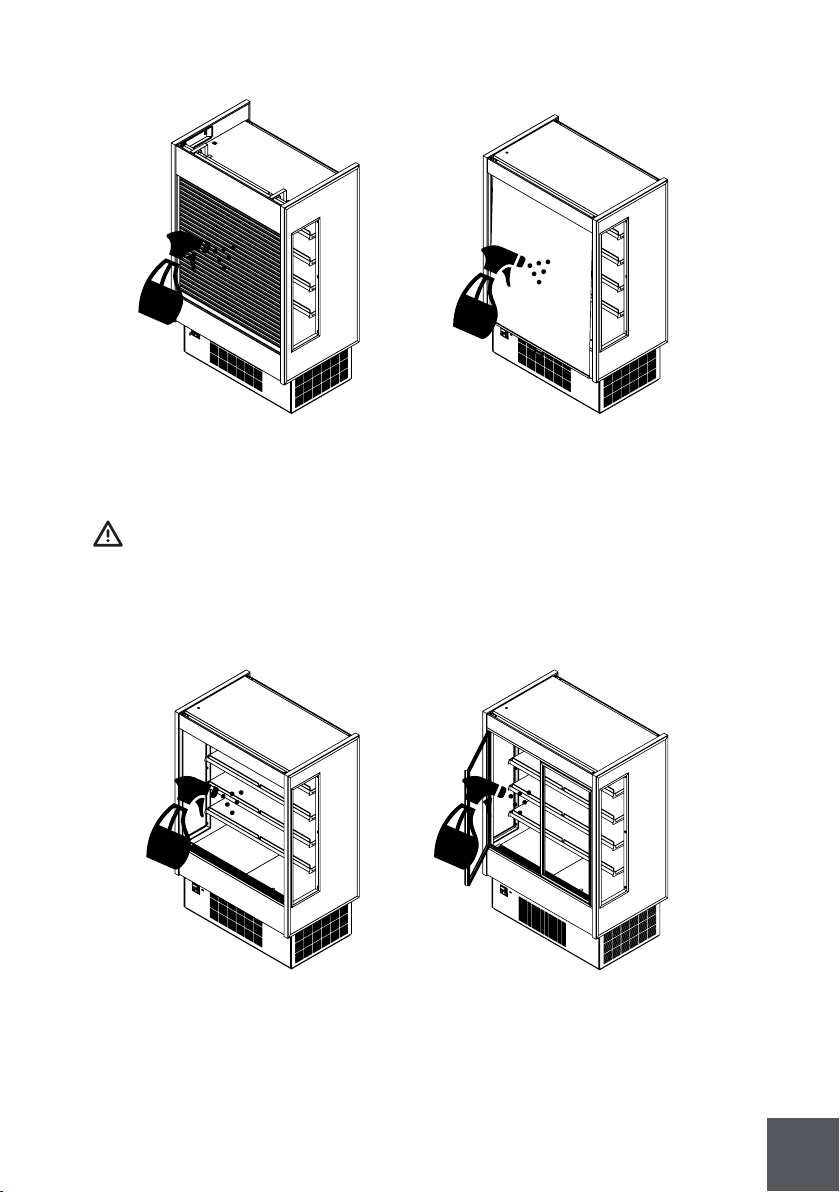
/3 Probe display response MSYF
MSYF
MSYF
SYF
SYF
SYF
SYF
MSYF
YF
MS
-
ºC/ºF
ºC/ºF
ºC/ºF
min
hours
min
ag
-
-
C
C
F
F
C
F
F
C
C
C
0
-20
rl
0,1
0
0
1
0
0
0
0
0,0
0,0
2,0
0
8
30
0
2
2
15
20
r2
20
15
250
250
1
4
4
/5
/A2
/c1
Select ºC or ºF
0: ºC
1: ºF
Conguration of probe 2 (S2)
0: Probe absent
1: Product probe (display only)
2: Defrost probe
3: Condenser probe
4: Antifreeze probe
Calibration of probe 1
Temperature set point
Control delta
Minimum compressor OFF time
Interval between defrosts
Maximum defrost duration, evaporator
St
rd
c2
dl
dP1
Symbol Code Parameter Models UOM Type Min Max Def.
Main parameters
71
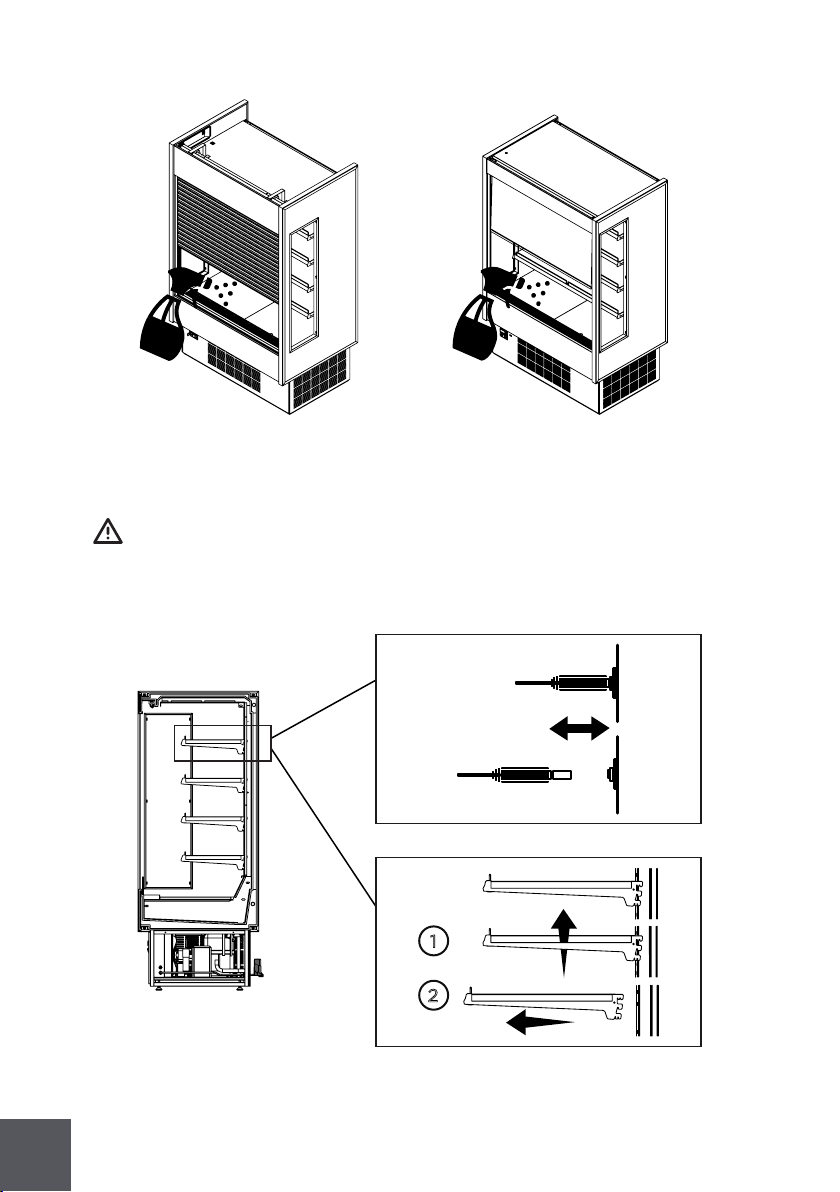
5.2 Interior cleaning
All operations must be done with the unit disconnected.
Clean surfaces (glass/metal/plastic) with soft detergent or warm water. Do not use
abrasive cleanser.
72
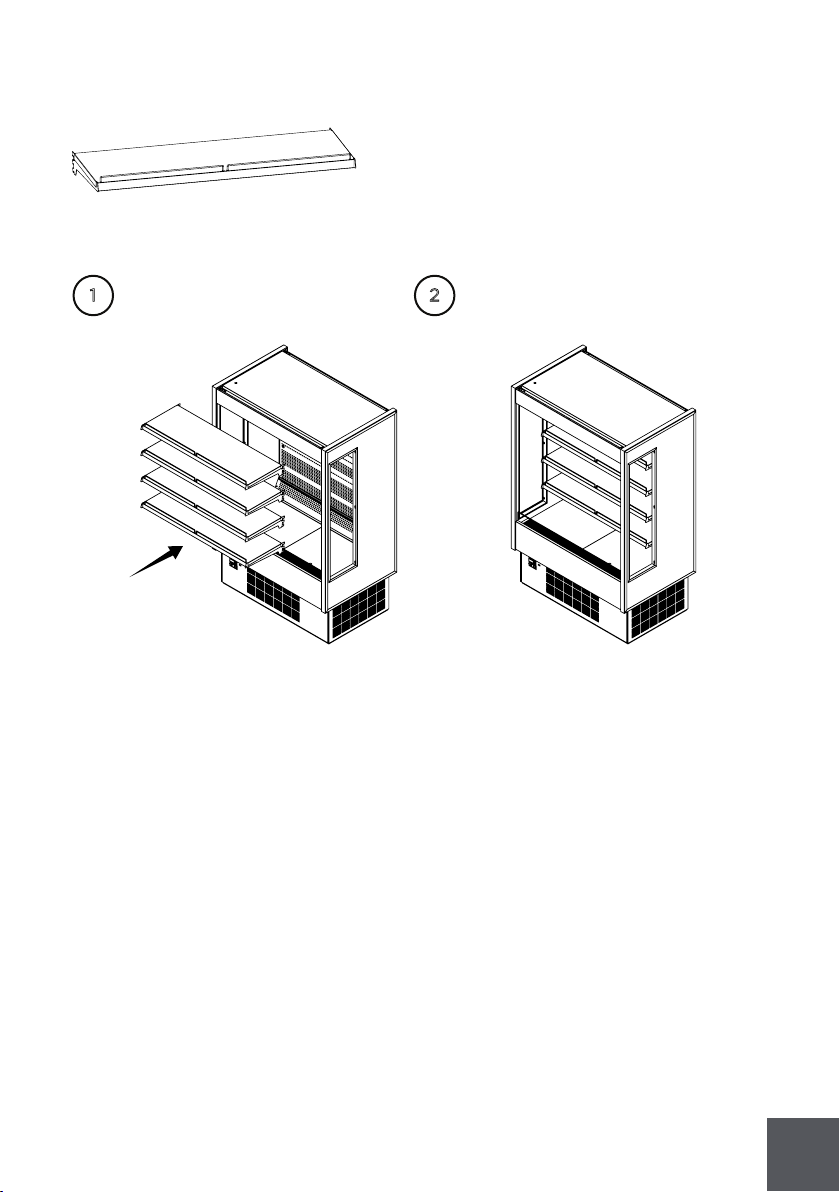
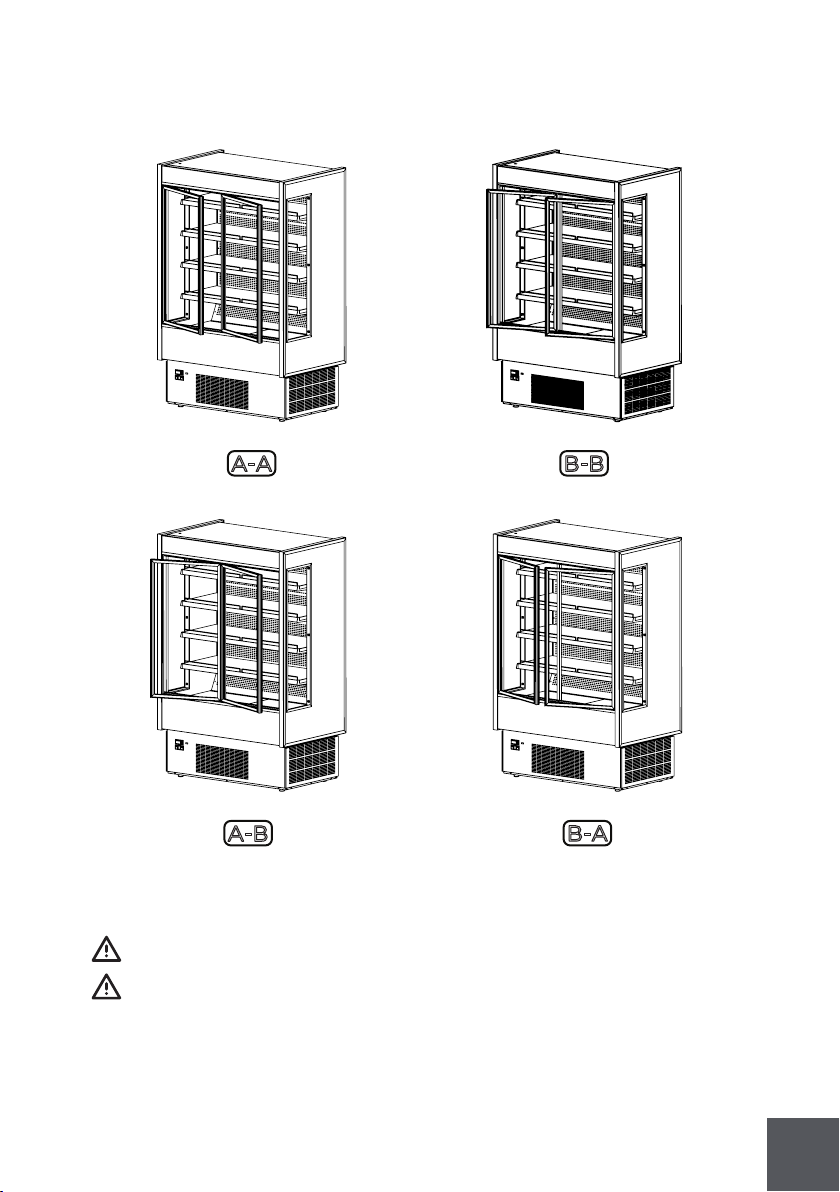
5.3 Shelf removing/adjustment
All operations must be done with the unit disconnected.
To remove or adjust shelves take care with light connections.
2
1
73
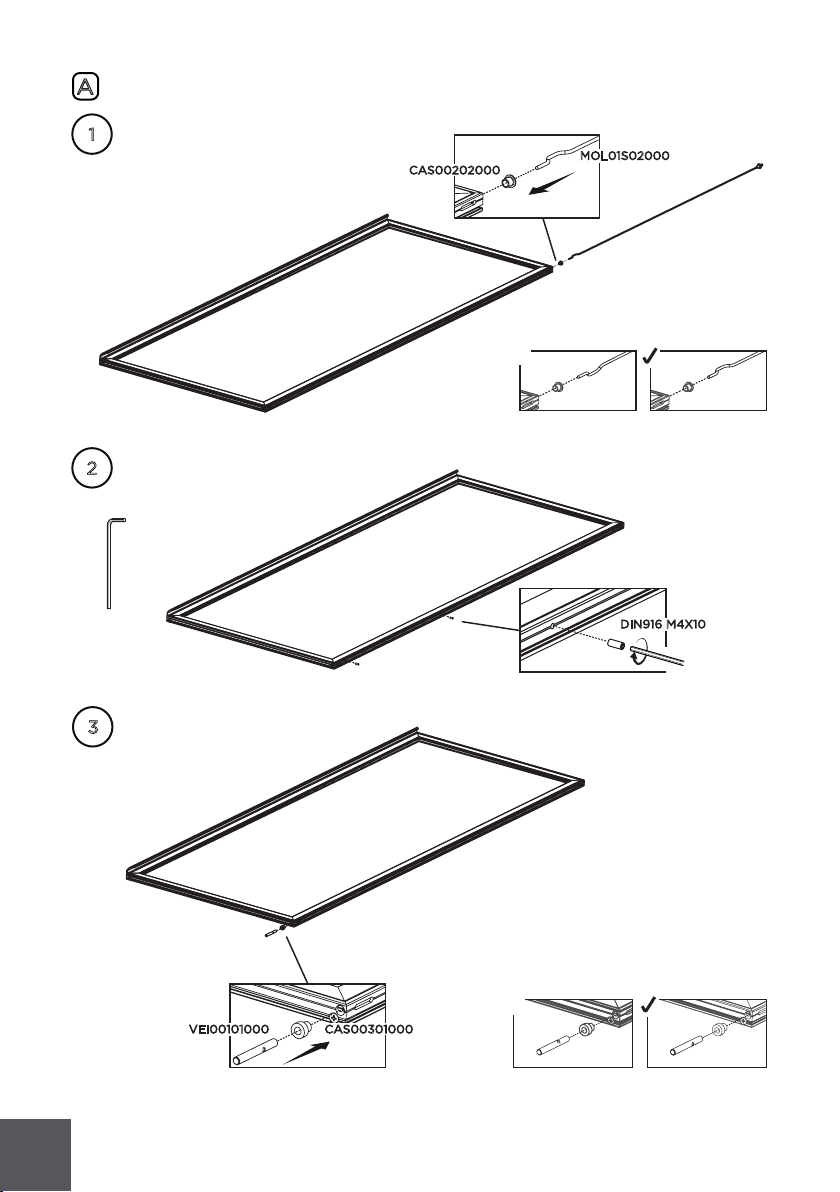
5.4 Front doors handling
5.4.1 Doors positions
5.5 Door installation
All operations must be performed by a qualified technician.
All operations must be done with the unit disconnected.
A-A
A-B
B-B
B-A
74
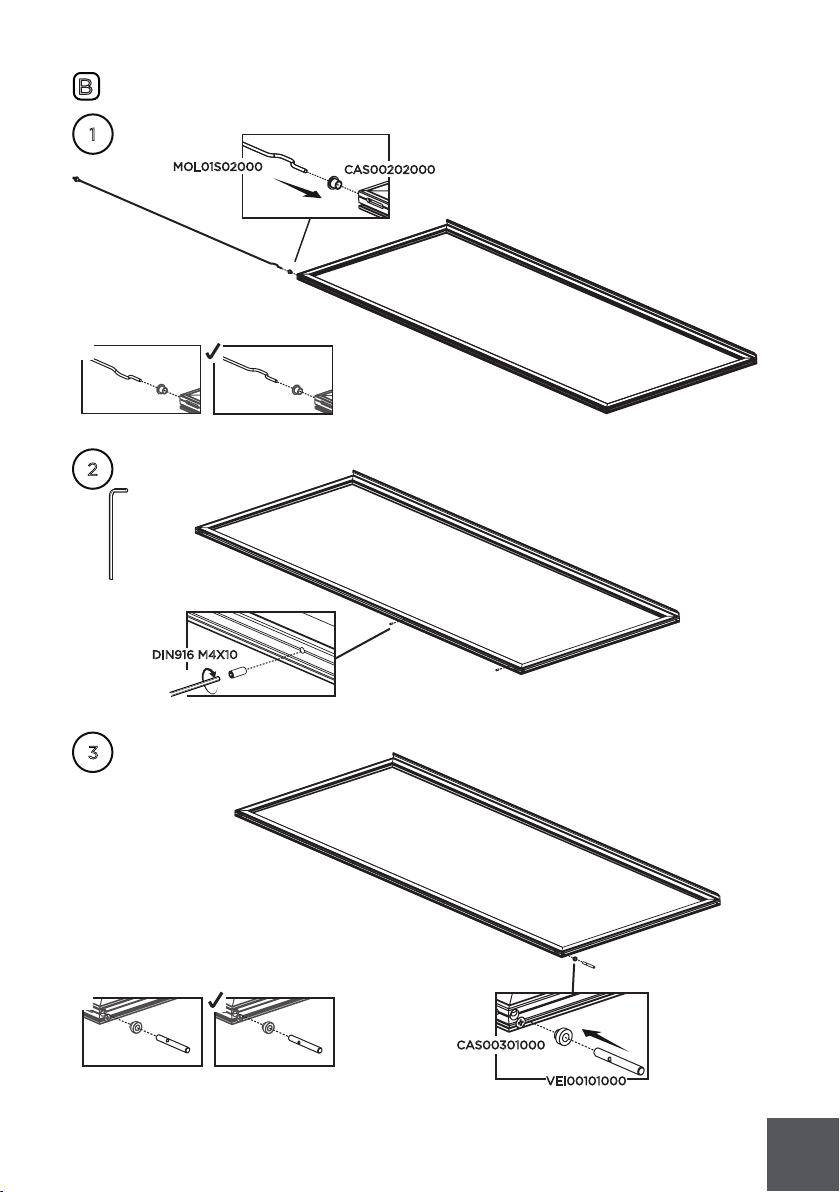
A
1
2
3
VEI00101000
x
2x
CAS00202000
MOL01S02000
DIN916 M4X10
x
CAS00301000
75
B
1
x
CAS00202000
MOL01S02000
2
2x
DIN916 M4X10
3
x
VEI00101000
CAS00301000
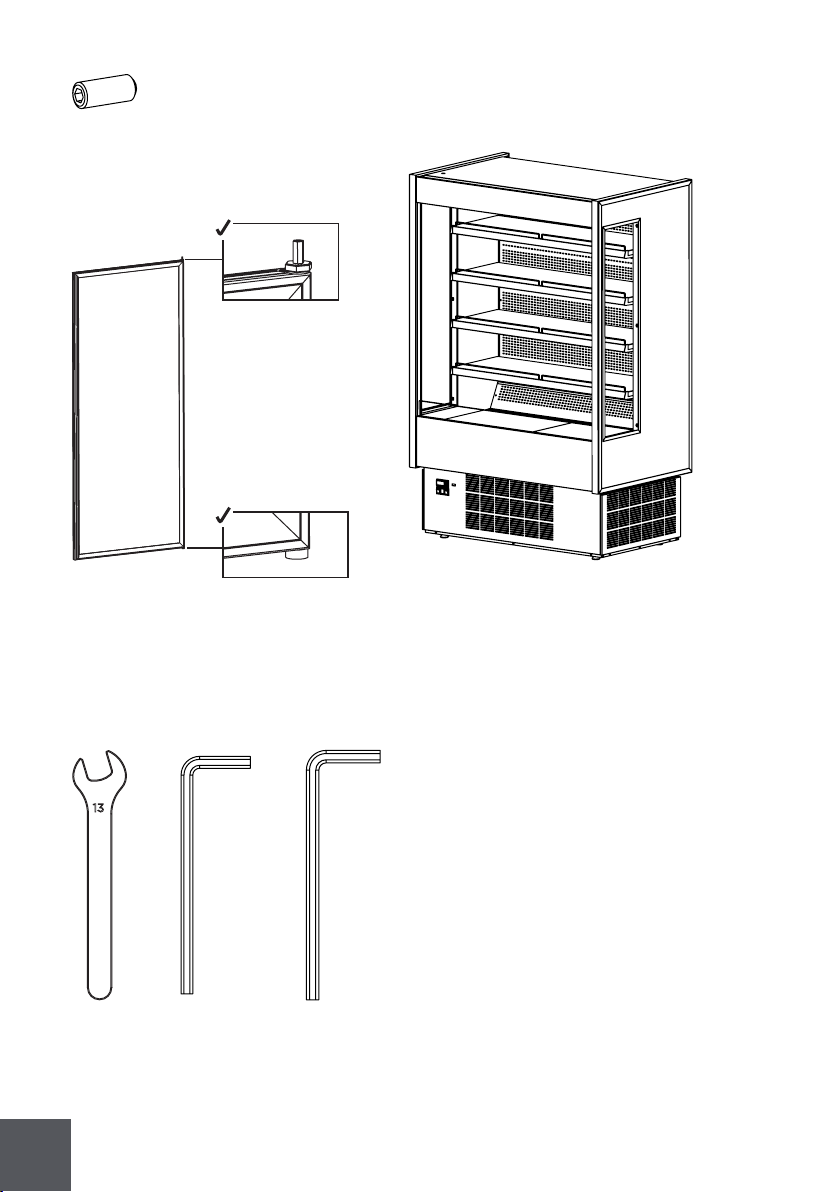
76
1x
UMB 2.5
1x
UMB 2
1x
2x - POR07M03060
1x - KGH-FD/DS-S(R)(D)
2x - DIN916 M5X16
13

77
2
3
2.1
2.2
1
CHV00601020
CHV00601020
CHV00601025
DIN916 M5X16
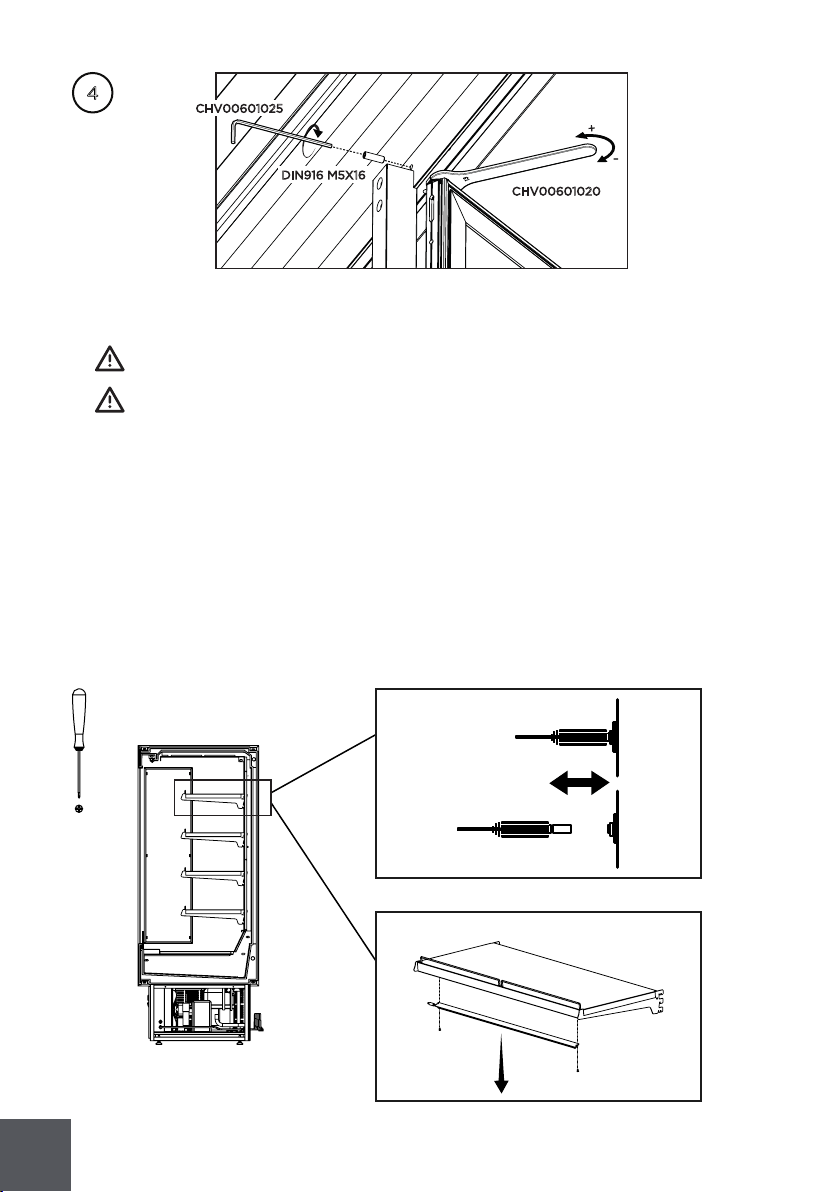
78
4
CHV00601025
DIN916 M5X16
CHV00601020
5.6 Light substitution
All operations must be performed by a qualified technician.
All operations must be done with the unit disconnected.
To replace lights follow the steps:
- Turn off power and unplug the equipment.
- Disconnect the light
- Unscrew the light holder and remove the light
- Insert a new light in the same place of the old one, screw the holder connect it
- Screw the light and connect it
- Plug and turn on the light
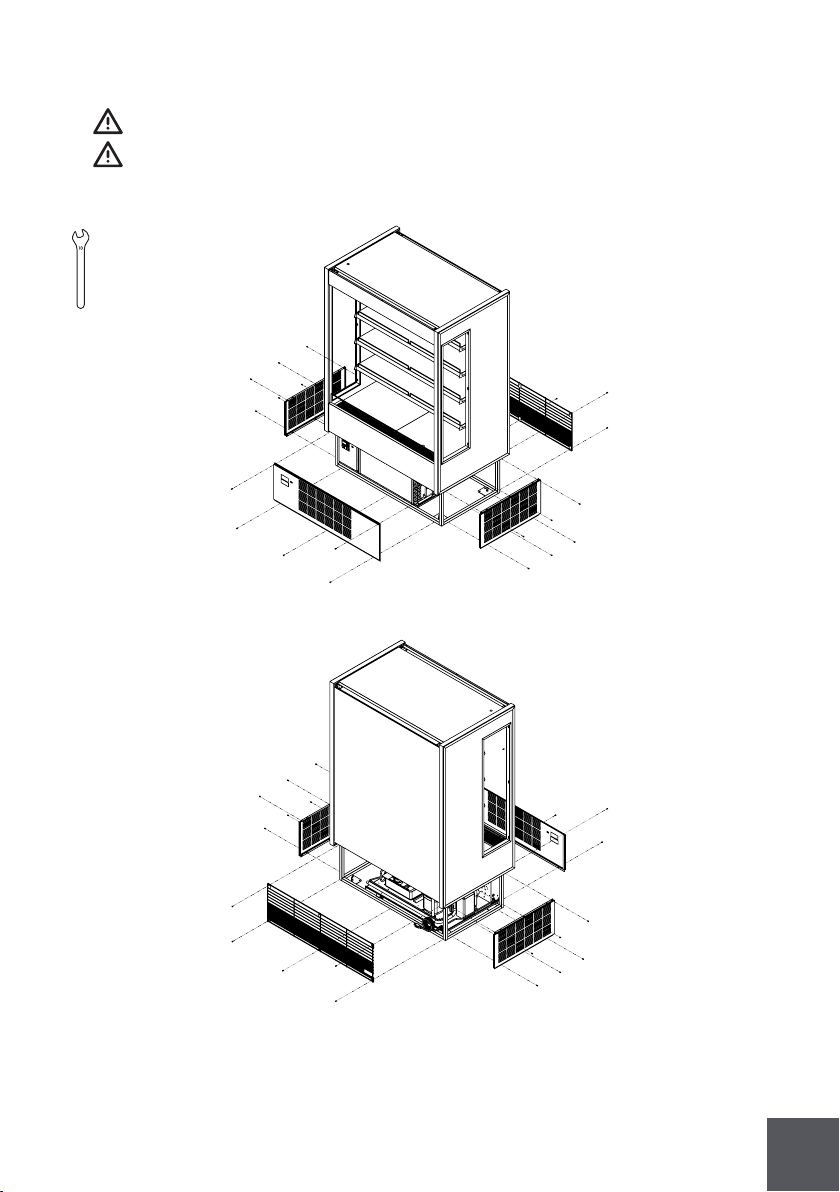
79
5.7 Panels and protection grille removal
Th is operation must be performed by a qualified technician.
All operations must be done with the unit disconnected.
10
10
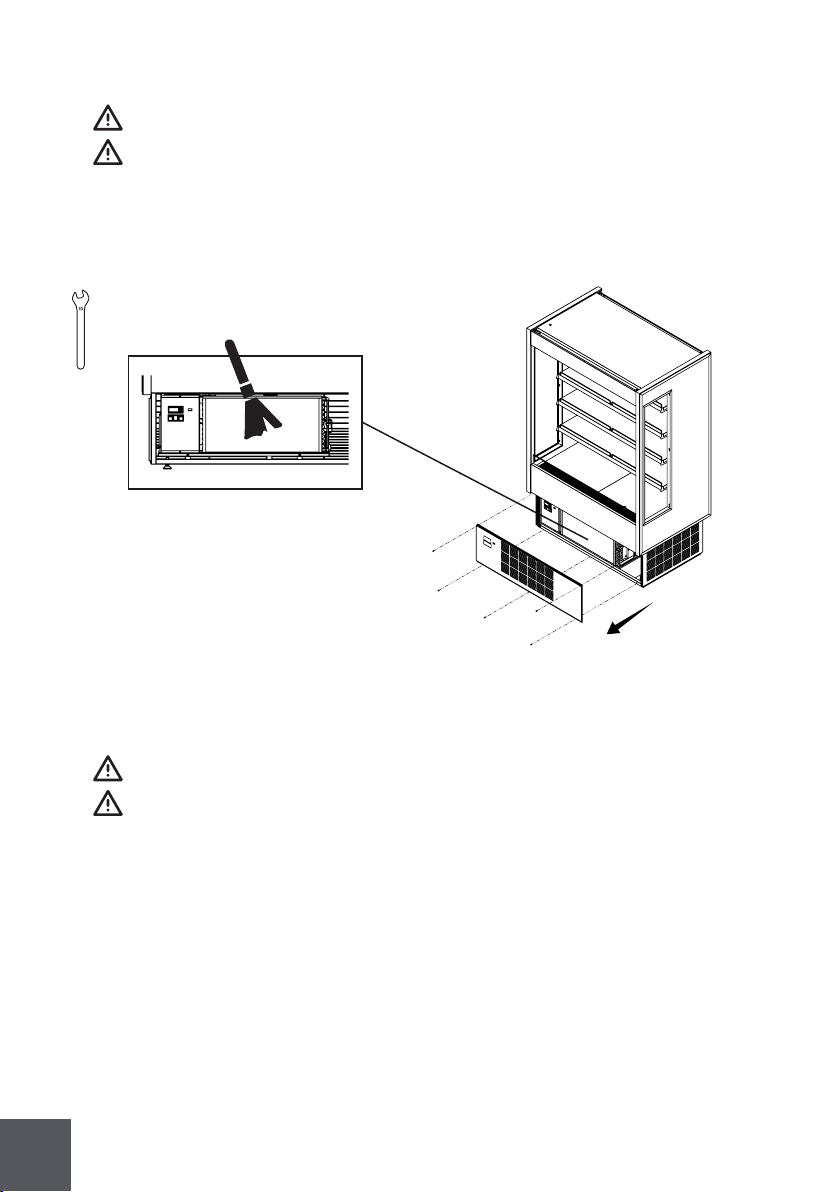
80
5.8 Condenser cleaning
All operations must be performed by a qualified technician.
All operations must be done with the unit disconnected.
Condenser must be regularly cleaned (every month). Use a brush or vacuum it.
To get to the condenser must remove frontal protection
10
10
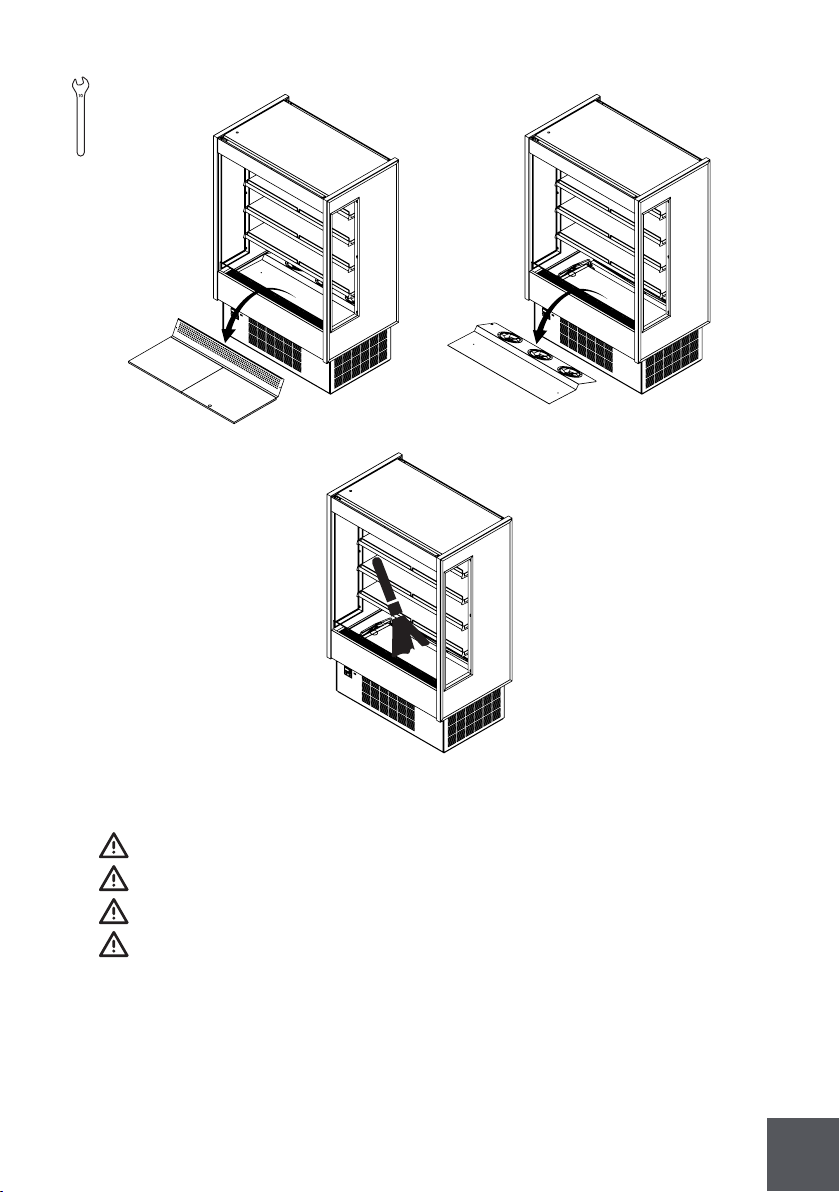
5.9 Evaporator cleaning
All operations must be performed by a qualified technician.
All operations must be done with the unit disconnected.
To access the evaporator:
- Open your unit
- Lift and remove exposition panels
- Use tool for the screws and clean
81
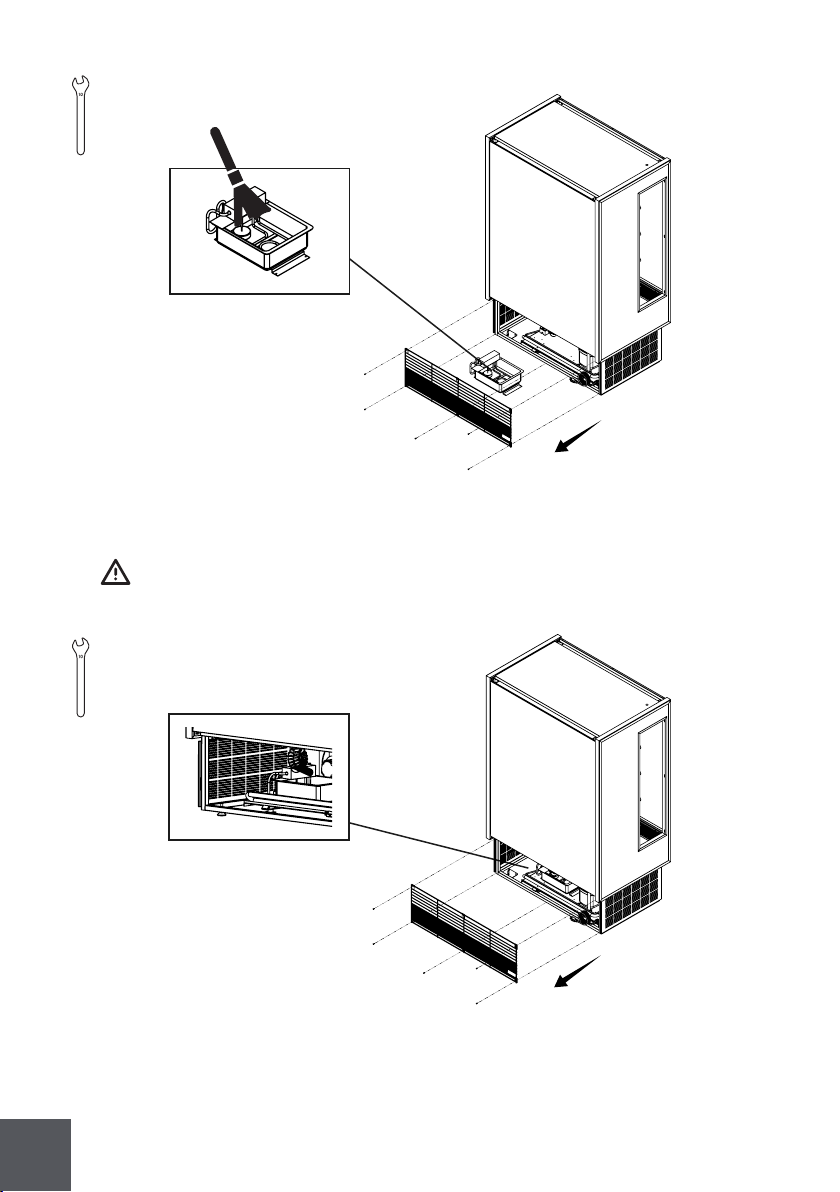
5.10 Evap Pan cleaning
This operation must be performed by a qualified technician.
All operations must be done with the unit disconnected.
Pan can be hot!
This operation must be done weekly.
To access the evap pan:
- Remove protection grille.
- Unplug the evap pan.
- Relieve the screws and take the evap pan off.
- Clean with soft detergent or warm water.
10
10
82
10
10
5.11 Drain inspection
Check for drain obstruction and correct position every month (Remotes only).
10
10
83
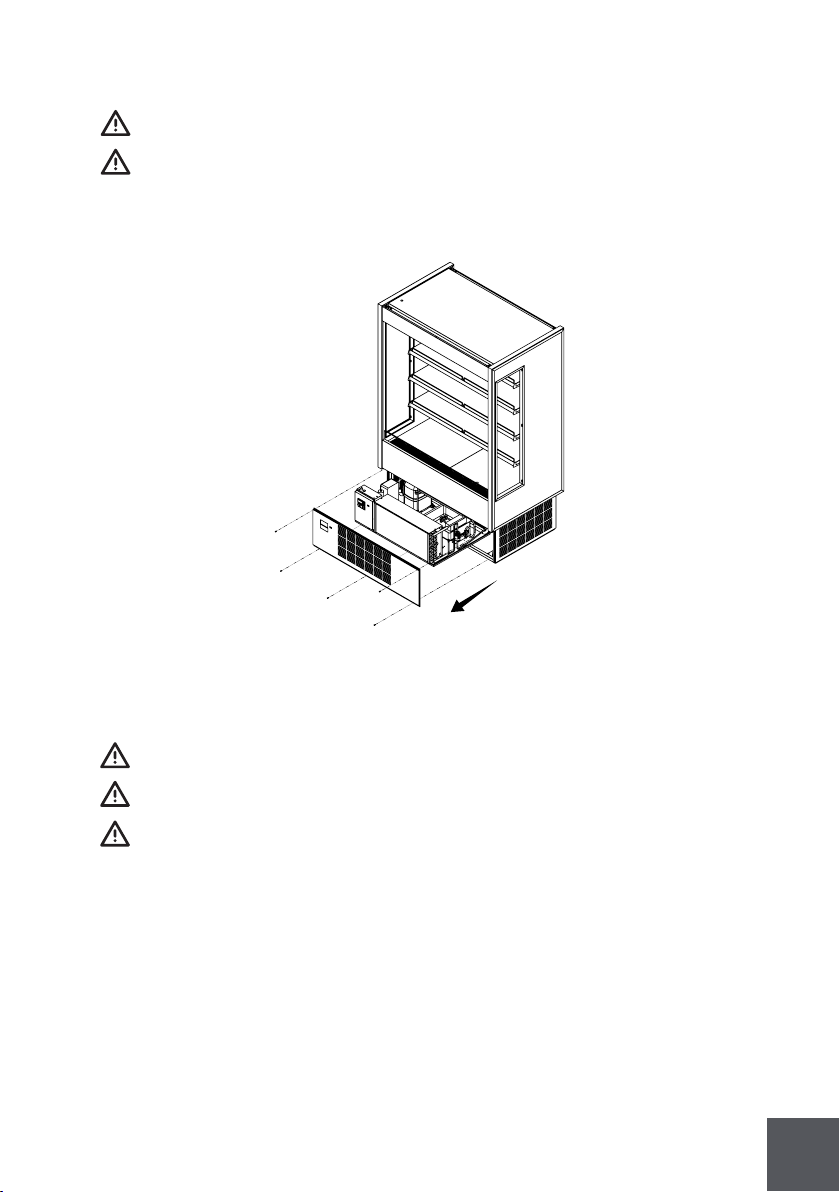
5.12 Sliding condensing unit
All operations must be done with the unit disconnected.
All operations must be performed by a qualified technician.
To replace components in the condensing unit you can slide it to have access.
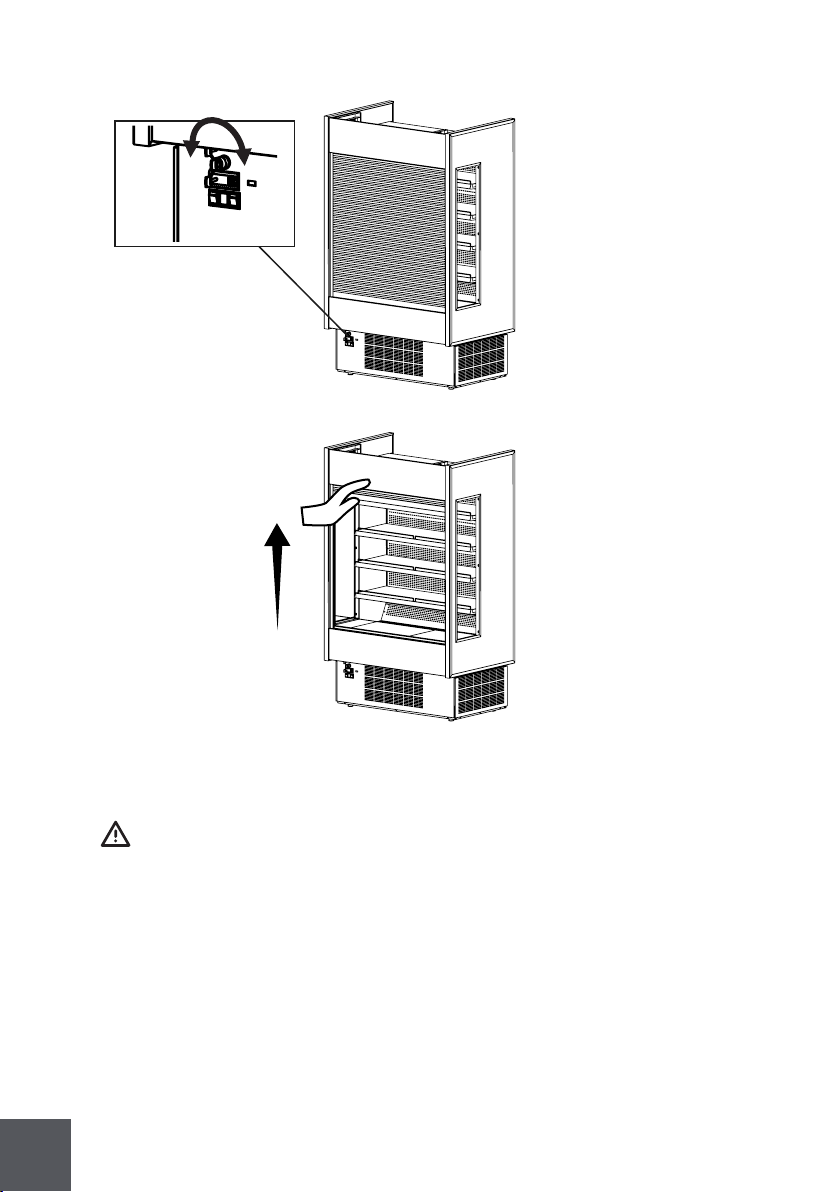
5.13 Electrical shutter breakdown
5.13.1. Manual operation
All operations must be performed by a qualified technician.
Manual opening of the shutter only when no power situation.
Make sure to insert key in the Wright place.
For more information go to www.somfy.com.
84
5.13.2. Setting position
All operations must be performed by a qualified technician.
For more information go to www.somfy.com.

85
6 Troubleshooting/Service
6.1 Troubleshooting
Service must be performed by a qualified technician.
Doors not closing:
Check for leveled floor.
Check for obstruction.
Remove doors and check the bearings.
Lights not working:
Check light switch position.
Check light connections.
Warm case temperature:
Check for air return grille obstruction.
Check for air drafts.
Check store temperature.
Check for condenser obstruction and cleaning.
Check for frozen evaporator.
Check set point.
Display area is over filled.
Fans not working:
Check electrical connections.
Check for any debris.
Case not aligning:
Check for leveled floor.
Check instructions for joining.
Display not working:
Check main power switch position..
Check electrical connections.
Compressor not starting:
Disconnect switch open.
Blown fuse.
Overload protective tripped.
Low charge of refrigerant.
Relay defective.
86
Equipment runs constantly:
Condenser dirty.
Condenser fan malfunction.
Temperature and relative humidity too high.
Starting relay burns out:
Low voltage.
High voltage.
Compressor short cycles.
Incorrect running capacitor.
Incorrect relay.
Head pressure too high:
Unit overcharged.
Air or other non condensable gases in the system.
Clogged condenser.
Defective condenser fan motor.
Unit location too hot.
Restriction in charge line.
Head pressure too low:
Insufficient refrigerant charge.
Leak in the system.
Cold location.
Noisy unit:
Compressor oil charge low.
Fan blade causing vibrations.
Tube rattle.
Loose parts.
Case not leveled.
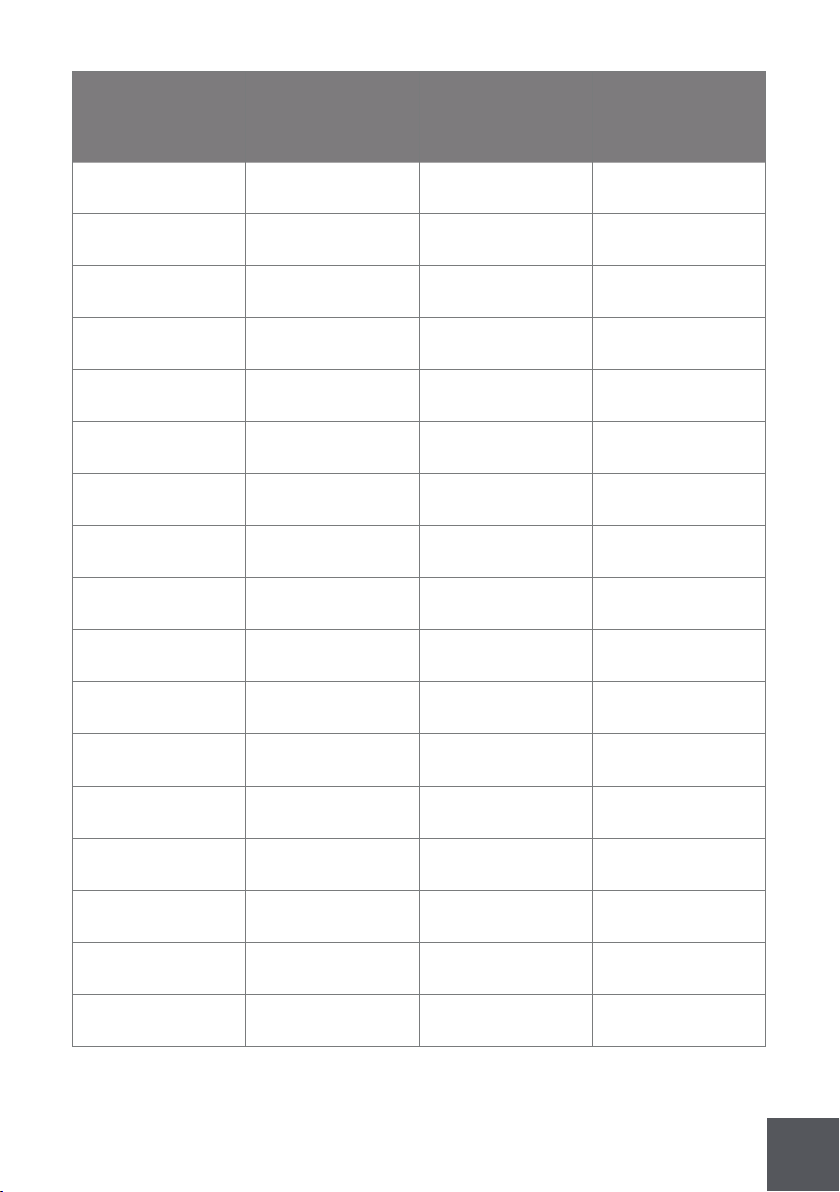
6.2 Service
This operation must be performed by a qualified technician.
For spare parts, contact your distributor.
87
Service by
Type of
action
Date
Serial
number and
model
Service by

88
7 Warranty
Xxx month warranty for all parts from the invoice date. A new part will be provided free
of charge. Defective part must be returned to the manufacturer.
Warranty claims: All claims must include model number, serial number, date of
purchase, date of installation and additional information about the supposed defect.
All service work must be authorized by MVP group.
MVP group reserves the right to select the service company.
Loss of food or other damages caused by faulty equipment aren’t covered by this
warranty.
Warranty does not cover damage when uncrating.
Work made necessary, by lack of maintenance or cleaning are not covered by this
warranty.
Warranty does not cover damage or malfunction result of improper use or installation.
Warranty does not cover negligence, misuse and operation on wrong voltage.
Warranty does not apply if the serial number is altered or defaced.
Warranty does not cover any glass break.
Warranty doesn’t cover any act of negligence.
Warranty doesn’t cover defects on units with unoriginal parts.
Warranty doesn’t cover acts of repair or maintenance by non fully authorized personel.
89
8 Notes

90
This page has been left blank intentionally.

MVP GROUP CORPORATION
www.mvpgroupcorp.com