
1
Index
English
User Manual
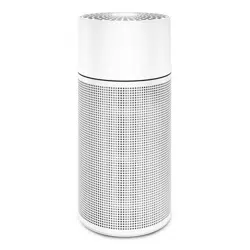
Pure 121
120VAC, 60 Hz
Air Purifier
Breathe freely

2
Index
Hello!

Index
Index
Meet Blue®
What’s in the box
Usage
Setup
On/off & operating speeds
Care and maintenance
Functionality
Safety
Specifications
03
04–05
06–07
08–09
10
11–13
16–19
20–23
24–25
26

04
MEET BLUE
You just made a wise
decision to improve your
health and your life.
Thank you for choosing
Blue® to clean the room air
in your home.
Before you start, please
take a few minutes to
become familiar with
the basics.

05
MEET BLUE
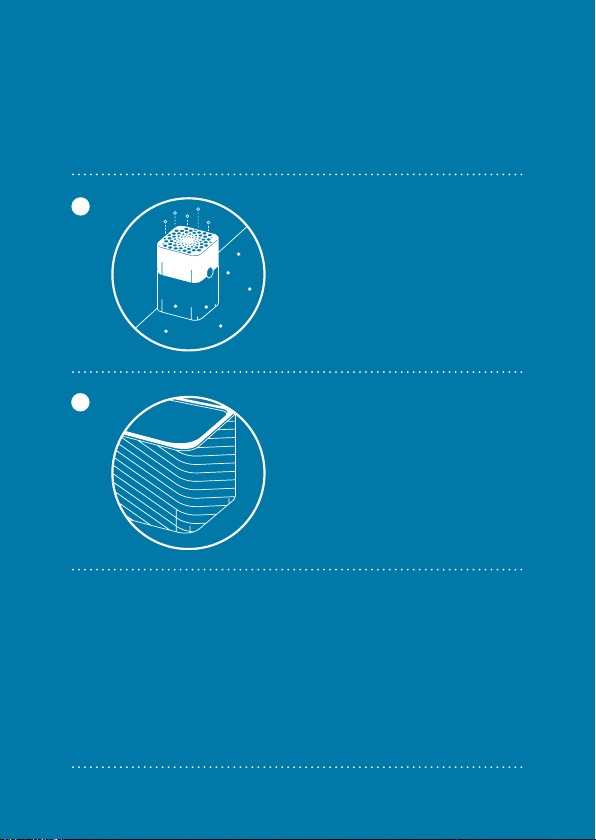
Clean Air
Blue® is designed to clean air in a room up to 57
m2 (613 sq. ft) in size. Five times per hour, Blue®
replaces room air containing contaminants with
fresh air.
Filter Replacement
To ensure your Blue air purifier is running in
top condition and constantly provides you with
clean air, occasionally vacuum or use a dry cloth
to wipe the exterior pre-filter casing and change
the main filter every six months.
Extend Your Warranty
Visit the website to extend your warranty and
join the Blue® filter club so a new Blue® filter
is automatically sent to you when it’s time to
change your filter.
Blue® And The Environment
Blue® cleans your room air without using more
energy than a light bulb. Both the environment
and your wallet will be pleased. Plus all Blue®
components are recyclable.
06
WHAT´S IN THE BOX
The air
purifier Blue®
Blue package
Particle filter.
1
2

07
WHAT´S IN THE BOX
Options and add-ons
A combination of
active carbon filter
and particle filter.
1

08
USAGE
Getting the most from Blue®
Close all windows and doors. Run your Blue®
24 hours a day. With Blue®, you get clean air
that’s free of these potentially harmful air-
borne contaminants:
Because your indoor air will constantly be
cleaned, it is less likely that you’ll suffer from
health effects due to poor room air quality.
Think of Blue® as your room air’s best friend,
and a smart investment in a healthier future.
*Particle matter smaller than 2.5 microns
1
2
»
Dust
»
Sand
»
Mold
»
Pollen
»
Smoke
»
Pet dander
»
Smog (PM2.5)*
»
Bacteria and viruses
»
Soot and ashes

09
USAGE
Placement
Place Blue® in an upright position on the
floor in your room. Choose a location where
air can circulate freely into, out of and
around the unit. The minimum recommend-
ed distance to any adjacent object is 10
cm or 4”. Be sure to place the unit where it
won’t be knocked over by anyone or any pet
in the household.
Do not place the unit:
1
2
Directly on or against soft furnishings
such as beddings or curtains.
Near sources of heat, such as radia-
tors, fireplaces, stoves or ovens.
Near wet areas, such as bathrooms,
laundry rooms or where it may other-
wise come in contact with water.
Outdoors.
10
SETUP
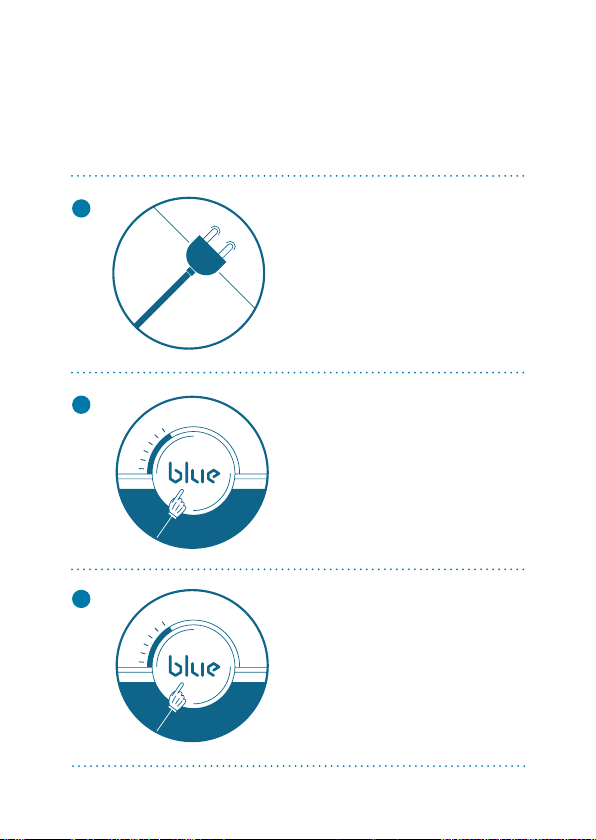
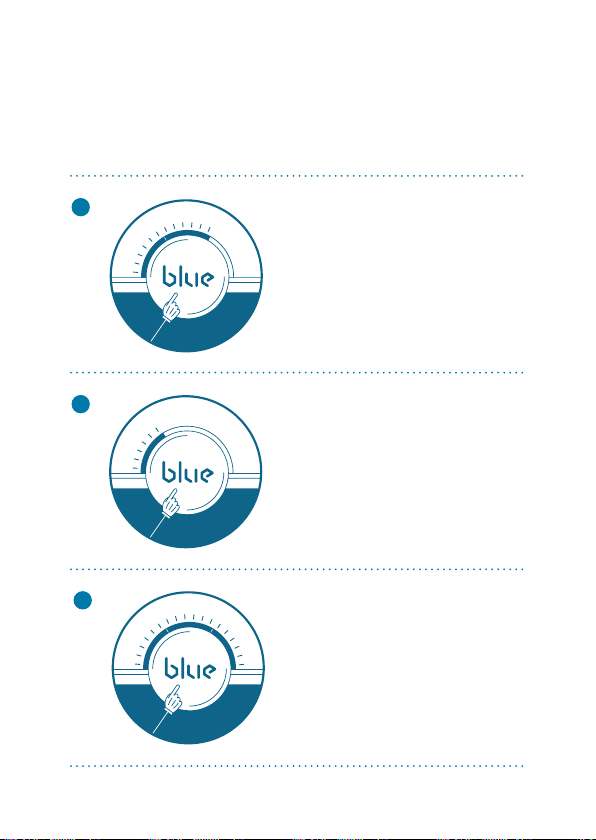
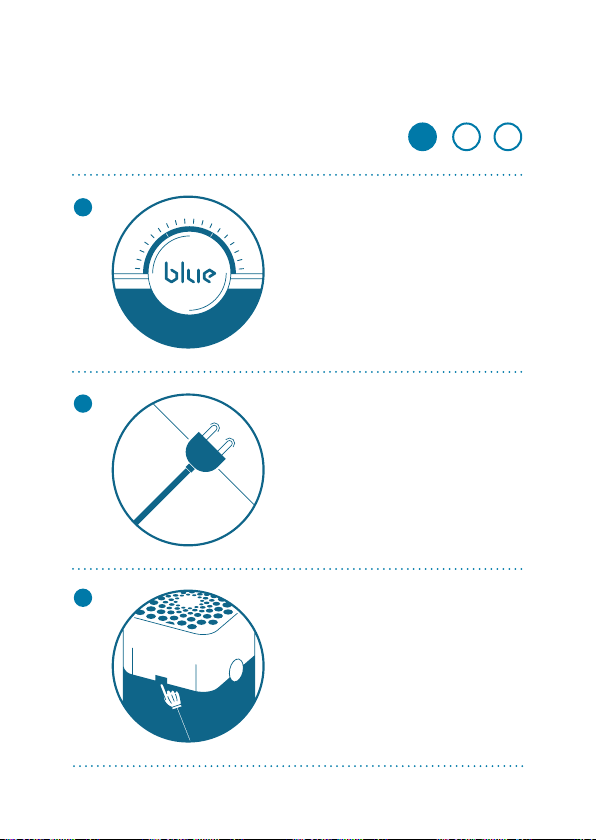
When the indicator light
glows light blue, your unit
is working properly. Then
go ahead and take a
deep breath of fresh air.
Plug in your Blue air
purifier.
Touch the button to turn
it on. It automatically
sets itself to the rec
-
ommended energy-effi-
cient operating speed.
Getting started!
1
2
3
11
To acknoledge you got
the information of the
yellow filter replace-
ment message, simply
touch the indicator
button for 5 seconds.
Change filter.
When the indicator light
turns red, it’s time to
change the main filter.
1
2
3
Change filter indicator
When the indicator
turns yellow, it’s time
to order a new replace-
ment filter.
Button control/functions
ON/OFF & OPERATING SPEEDS
12
ON/OFF & OPERATING SPEEDS
1
2
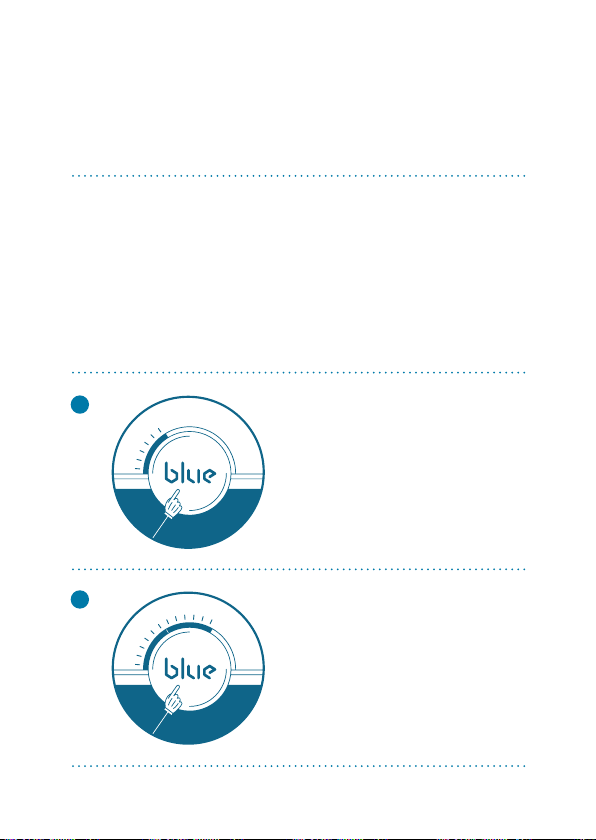
To choose the operating speed,
touch the Blue® button.
The white light indicates the
speed
selected
.
On/Low.
Touch once to turn the
unit on and set it to the
recommended ener-
gy-efficient speed.
Medium.
Touch twice for
medium speed.
On/off button control
13
ON/OFF & OPERATING SPEEDS
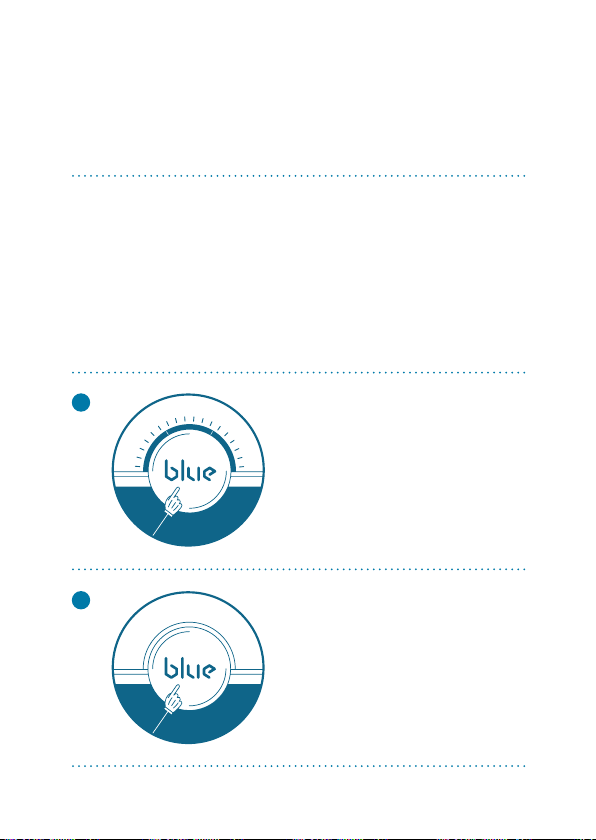
High.
Touch three times
for high speed.
4
3
Using Blue in your bedroom?
Don’t worry. The light automatically
switches itself off after 15 seconds
so it won’t disturb your sleep.
Off.
Touch once more to
turn the unit off.

16
CARE AND MAINTENANCE
Take good care of your Blue®
air purifier to ensure that it
delivers optimal performance.
General care
1
2
3
4
5
Occasionally wipe the exterior of the unit
with a dry dust cloth.
Be sure to unplug the unit before changing
the main filter.
Occasionally vacuum the inside and outside
of the main filter to remove any dust.
Change the main filter every six months, de-
pending on the operating conditions.
When opening the unit to change the main
filter, be sure to vacuum any dust that may
have accumulated inside the unit.
17
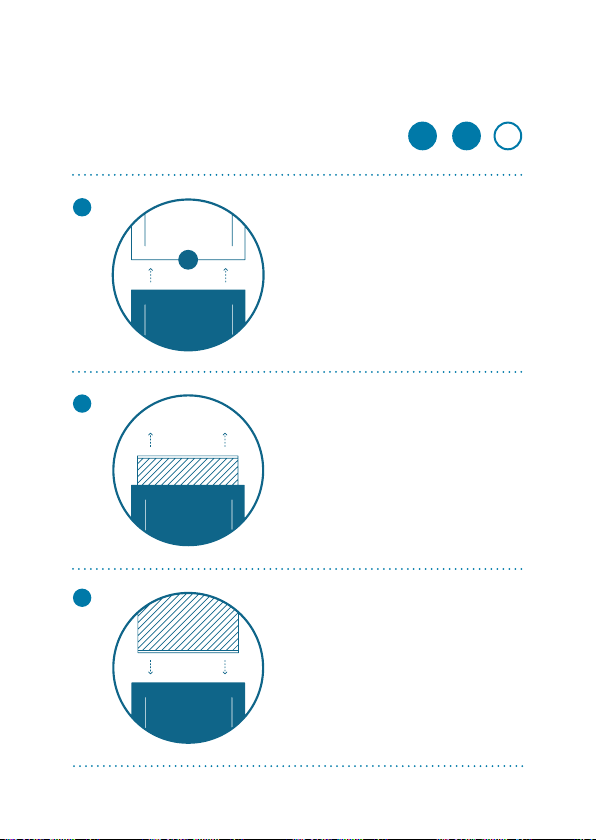
When the indicator light
glows red, it’s time to
change the main filter.
Change the main filter
1
2
3
2
- -
3
1
Turn off the unit
and unplug it.
Gently press the re
-
lease buttons on both
sides of the unit until
you hear a click.
CARE AND MAINTENANCE
18
CARE AND MAINTENANCE
Lift off the top
of the unit.
4
5
6
2
- -
3
1
Remove the main filter
from the unit.
Insert the replacement
filter into the unit.
Change the main filter
19
CARE AND MAINTENANCE
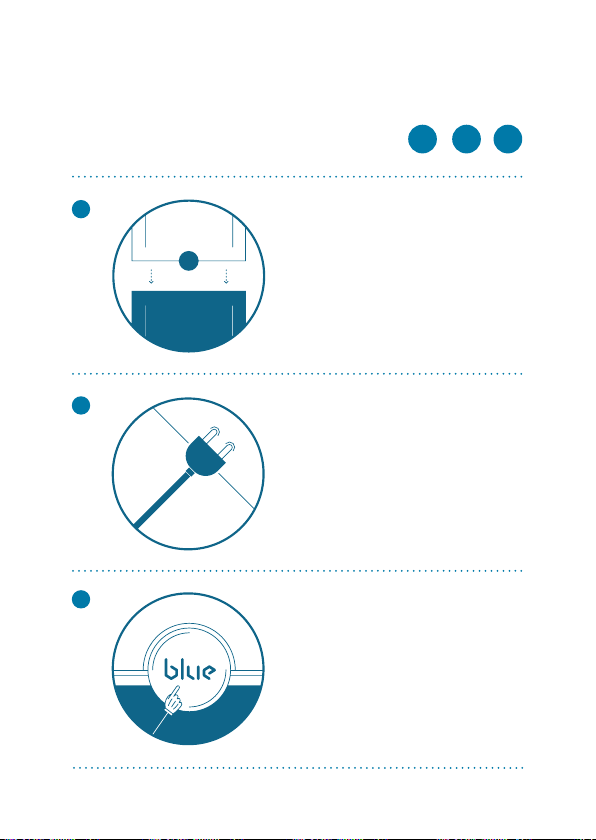
Replace the top of the
unit, pressing firmly
until you hear a click.
7
8
9
2
- -
1
3
Plug in the unit.
To reset the unit, press
the Blue on/off button
for five seconds. The
indicator will flash for
five seconds, then
change from red to
light blue. Done
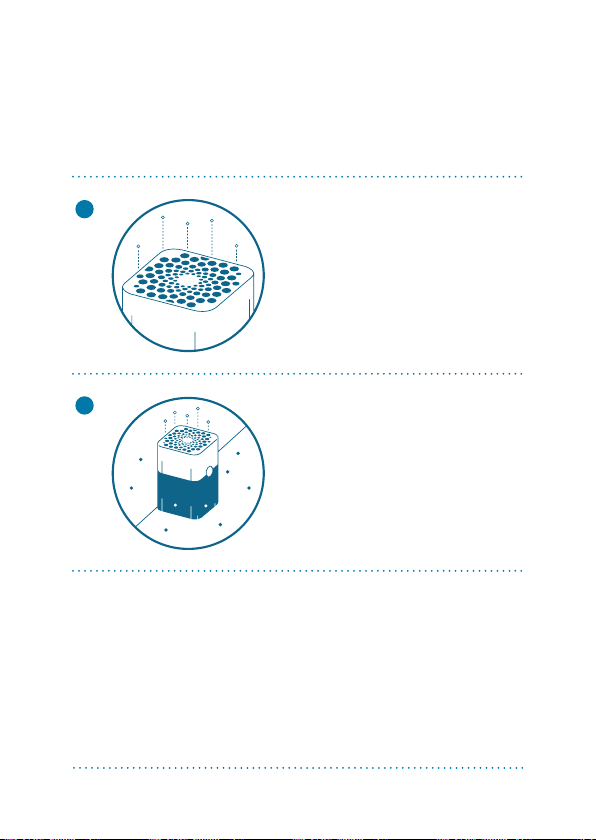
The ion chamber
continuously releases
a flow of negatively
charged ions into the air
in the room.
1
2
How it works
20
FUNCTIONALITY
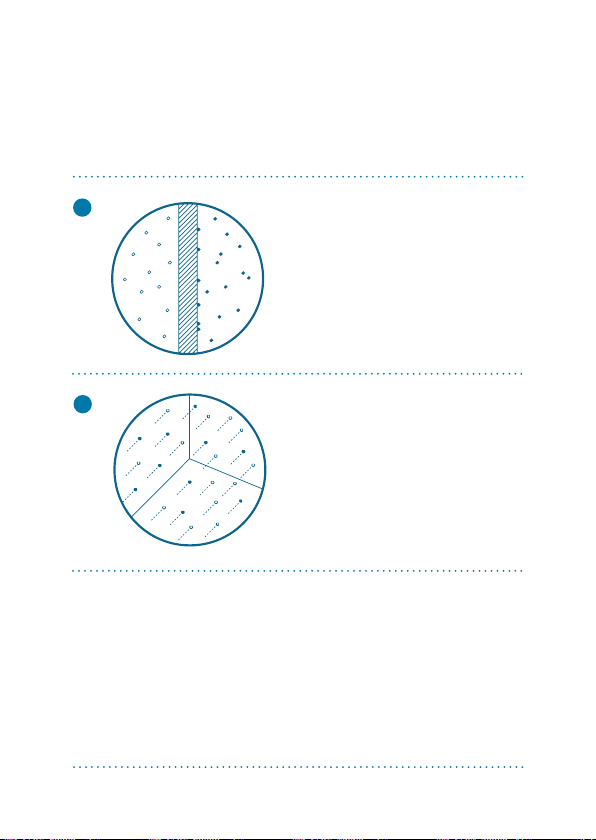
Airborne particles in
the room pick up this
negative charge and are
drawn into the system
through the 360o air
inlet at bottom of unit.
21
3
FUNCTIONALITY
Blue manages to deliver
clean air at a rate of 680
cubic meters per hour
or 400 cubic feet per
minute.
4
The main filter captures
all particles down to 0.1
microns in size.
22
FUNCTIONALITY
8
7
6
5
4
3
2
1
9
10
11

23
FUNCTIONALITY
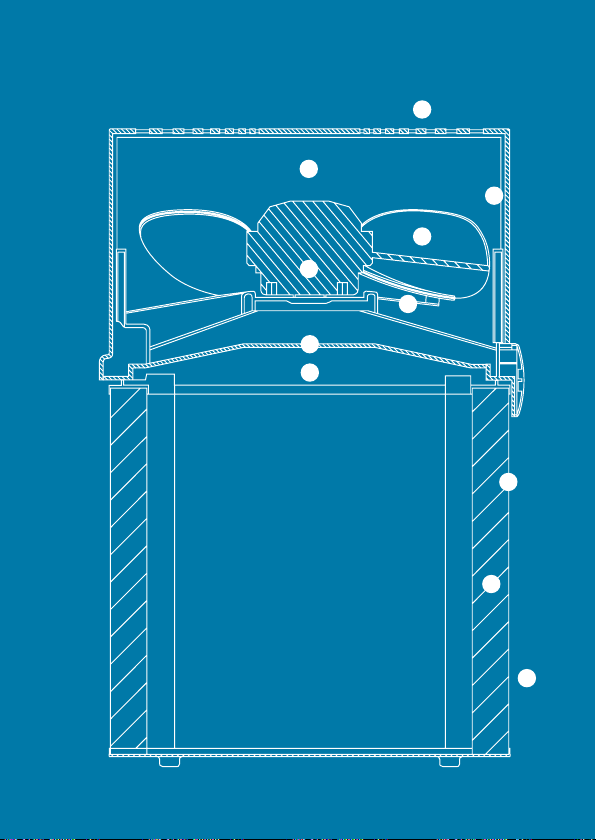
»
Air outlet
»
Ion chamber
»
Inner wall
»
Fan
»
Motor
»
Fan holder
»
Finger protection
»
Release button for filter
»
Exterior casing
»
Particle filter
»
Air inlet 360°
1
2
3
4
5
6
7
8
9
10
11
– Air stream optimizer
Blueprint

24
Remember, Blue® is an electrical
appliance. Please read these safety
instructions carefully before use
and take the necessary precautions
to reduce the risk of fire, electric
shock or injury. The Blue
® warranty
applies only if the unit is used
accordingly to these instructions.
Do not sit on, stand on, climb on the unit or
use the unit as a table or for storage. Do not
place any objects on the top of the unit.
This unit is not intended for use by persons
(including children) with reduced physical,
sensory or mental capabilities, or lack of
experience and knowledge, unless they
have been given supervision or instruction
concerning use of the appliance by a per-
son responsible for their safety. Be sure to
General safety instructions
1
2
SAFETY

25
SAFETY
supervise children to make sure that they
do not play with or climb on the appliance.
If the power cord is damaged, you must
have it replaced by Blue®, a service center
authorized by Blue® or similarly qualified
persons in order to avoid a hazard.
Do not use the product with a damaged
cord or plug or if product malfunctions, is
dropped or damaged in any manner. Keep
the cord away from heated surfaces.
Do not allow foreign objects to enter venti-
lation or exhaust opening as this may cause
electric shock or damage to the air purifier.
Do not block air outlets or intakes.
Disconnect power supply before servicing.
3
4
5
6

26
SPECIFICATIONS
Dimensions
Room size
Clean Air Delivery Rate (CADR)
Airflow rate
Air exchange
Power usage
Noise level
Avarage filter service life
Warranty
Certified ratings as stated are based on U.S. version
models (120VAC, 60Hz) with Particle filter model 121.
Ratings may be affected by use of other filter models.
* Depending on air quality in the area of use, the
recommended lifetime of 6 months might be longer.
Height: 715 mm (28.2 inches)
Width: 330 mm (13 inches)
Depth: 330 mm (13 inches)
Weight: 8.25 kg (18.2 lbs)
57m² (620 sq. ft.)
Smoke: 680 m³/h (400 cfm)
Dust: 680 m³/h (400 cfm)
Pollen: 680 m³/h (400 cfm)
290-700 m3/h (170-420 cfm)
5 per hour (57m²or 620 sq.ft.room)
30–61 watts
31–56 dB (A)
Six months to a year*
One year with the possibility to extend
warranty upon product registration

27
Index
Headquarters
Blue®
Danderydsgatan 11
SE-11426 Stockholm
SWEDEN
Sales in the U.S. and Canada
Blue®
100 North LaSalle Street, Suite 1900
Chicago, IL 60602
USA
Sales in the Middle East and Europe
Blue®
Danderydsgatan 11
SE-11426 Stockholm
SWEDEN
Offices

28
Index
Blue® is a global brand.
Visit the website for more information
www.pure.blue