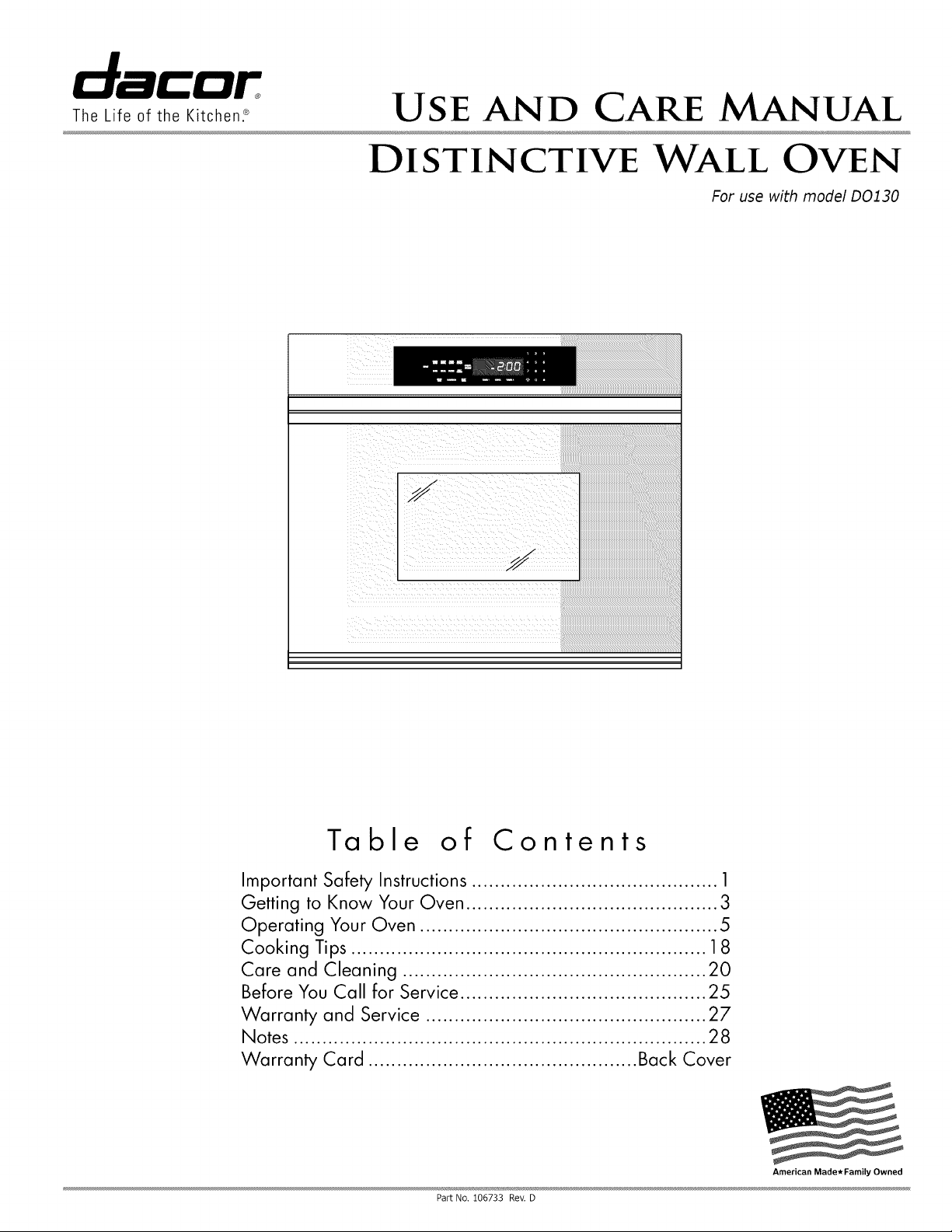
U s E AND CARE MANUAL
DISTINCTIVE WALL OVEN
For use with model D0130
The Life of the Kitchen2
Table of Contents
Important Safety Instructions ........................................... 1
Getting to Know Your Oven ............................................ 3
Operating Your Oven .................................................... 5
Cooking Tips .............................................................. 18
Care and Cleaning ..................................................... 20
Before You Call for Service ........................................... 25
Warranty and Service ................................................. 27
Notes ........................................................................ 28
Warranty Card ............................................... Back Cover
Part No. 106733 Rev. D
American Made*Family Owned
To Our Valued Customer:
Congratulations on your purchase of the very latest in Dacor _products! Our unique combination of features, style and
performance make us The Life of the Kitchen _, and a great addition to your home.
In order to familiarize yourself with the controls, functions, and full potential of your new Distinctive Appliance, we
suggest that you thoroughly read this use and care manual, beginning with the Important Safety Instructions
section.
All Dacor appliances are designed and manufactured with quality and pride, while working within the framework of our
company value. Should you ever experience a problem with your product, please first check the Before You Call for
Service section of this manual for guidance. It provides useful suggestions and remedies prior to calling for service.
Valuable customer input helps us to continuously improve our products and services, so please feel free to contact
our Customer Service Team for assistance with any of your product support needs.
Dacor Customer Service Team
1440 Bridge Gate Drive
Diamond Bar, CA 91765
Telephone:
Fax:
Hours of Operation:
Web Site:
(800) 793-0093
(626) 403-3130
Monday through Friday
6:00 A,M. to 5:00 P,M. Pacific Time
www.Dacor.com
Thank you for choosing Dacor for your home. We are a company built by families for families and we are dedicated
to serving yours. We are confident that your new Dacor product will deliver a high level of performance and
enjoyment for many years to come.
Sincerely,
The Dacor Customer Service Team
© 2009 Dacor, all rights resenl_,_
! i ¸:¸¸:: //m ¸¸¸¸¸
INSTALLER: LEAVE THESE INSTRUCTIONS WITH THE
APPLIANCE.
CUSTOMER: READ THIS USE AND CARE MANUAL COMPLETELY
BEFORE USING THIS APPLIANCE. SAVE IT FOR FUTURE REFER-
ENCE. IT CONTAINS IMPORTANT USE AND CARE INFORMATION.
RETAIN YOUR SALES RECEIPT OR CANCELED CHECK. PROOF
OF ORIGINAL PURCHASE DATE IS REQUIRED FOR WARRANTY
SERVICE.
For warranty and service information, see page 27.
If you have any questions, other than warranty questions,
call:
Dacor Customer Service
(800) 793-0093 (U.S.A. and Canada)
Monday -- Friday 6:00 A.M.to 5:00 P.M.Pacific Time
Web site: www.Dacor.com
Have the complete model and serial number for your
appliance available. The numbers are found on the prod-
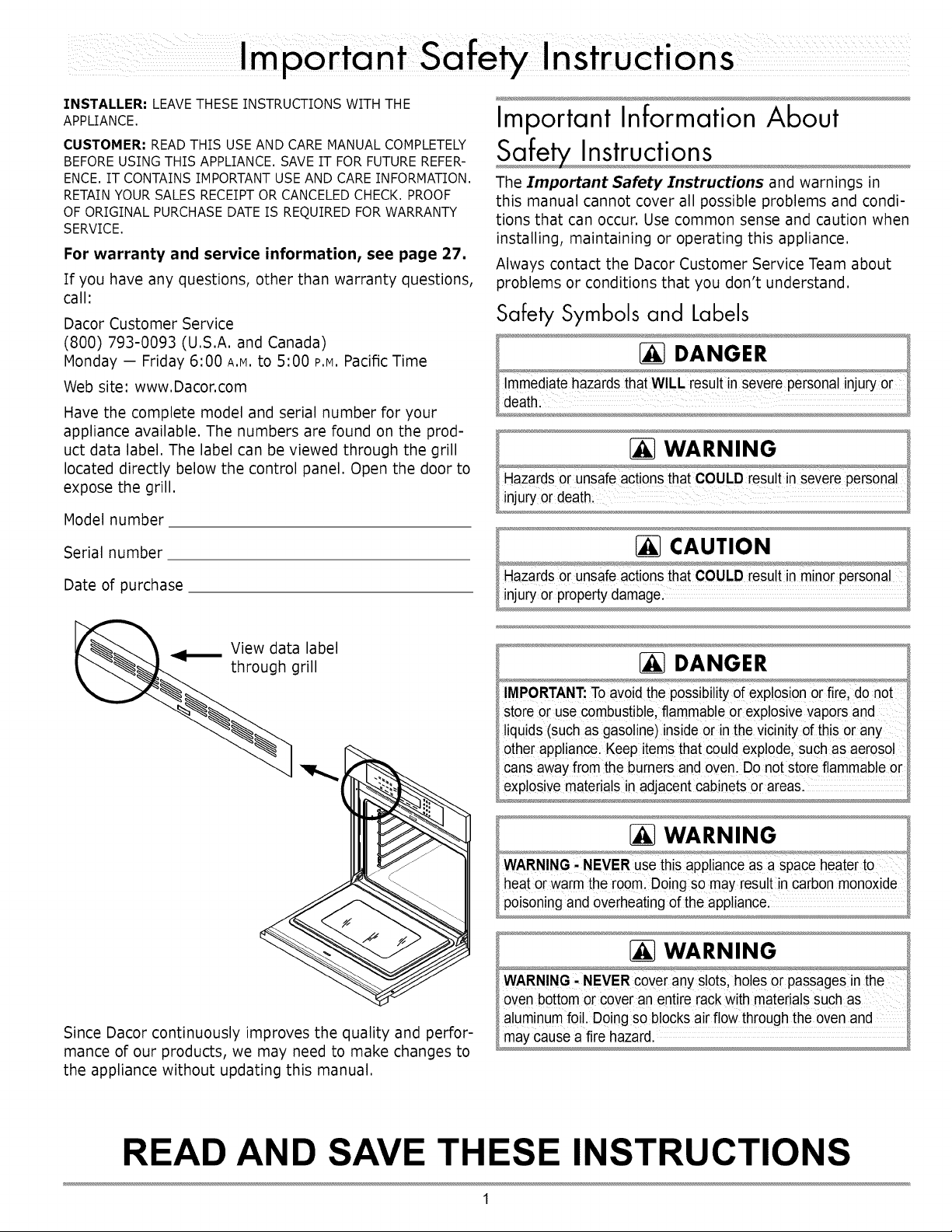
uct data label. The label can be viewed through the grill
located directly below the control panel. Open the door to
expose the grill.
Model number
Serial number
Date of purchase
View data label
grill
Since Dacor continuously improves the quality and perfor-
mance of our products, we may need to make changes to
the appliance without updating this manual.
Important Information About
Instructions
The Important Safety Instructions and warnings in
this manual cannot cover all possible problems and condi-
tions that can occur. Use common sense and caution when
installing, maintaining or operating this appliance.
Always contact the Dacor Customer Service Team about
problems or conditions that you don't understand.
Safety Symbols and Labels
[_ DANGER
IMPORTANT: To avoidthepossibility of explosion or fire, do not
Storecruse cOmbUstible,flammable 0r exp!osiveVapOrsand
liquids (suchasgasoline)inside 0[ in the VicinitYofthis Orany
otherappliance.Keep itemsthatcould explode,such as aerosol
cansawayfrom the burnersand oven. Do notstore flammable or
exp!0sivematerials inadjacent cabinets0r areas.
[_ WARNING
aluminum foil. D0ingsoblocks air flow through the oven and
may cause a fire hazard.
READ AND SAVE THESE INSTRUCTIONS
1
Precautions
To reduce the risk of fire, electric shock, serious injury or death when using your oven, follow basic safety precautions,
including the following:
WARNING
• If you receive a damaged product, immediatelycontact your
dealeror builder.Do not install or use a damagedappliance.
• Makesure that the oven hasbeen properlyinstalled
and grounded bya qualified installeraccoiding to the
accompanyinginstallationinstructions. Have the installer
show youthe location of the circuit breaker panelor fuse
boxso that you knowwhere and howto turn off powerto the
oven.
• Donot install, repair or replaceany part of the oven unless
specificallyrecommendedinthe literature accompanyingit. A
qualifiedservicetechnician should performall other service.
• Beforeperforming anytype of service, make surethat
the electrical powerto the oven isturned off at the circuit
breakeror fuse box.
• Only usethe ovenfor cookingtasks expectedof a home
applianceas outlinedin this manual. This oven is not
intendedfor commercialuse.
• DONOT TOUCH THE SURFACESOF THE OVEN DURING
OR IMMEDIATELYAFTER USE
• Make sure individualswho usethe ovenare able to operate
itproperly.
• Neverallow anyone, including childrento sit, stand or climb
on any part ofthe oven includingthe door. Doingso may
causetipping,damage, serious injuryor death.
• Donot leave childrenalone or unattended in the area
aroundthe oven. Do notallow childrento playwith the
controls,pull on the handle or touch other parts of the oven.
• Donot store itemsof interestto childrenabove the oven.
Childrencould be burned or injuredwhile climbing on the
appliance.
• Donot tamper with the controls.
• To preventthe unitfrom tipping forward and to provide
a stable installation, make sure the oven issecured to
the cabinet according to the accompanying installation
instructions.
• Donot heat unopenedfood containerssuch as baby food
jars and cans. Pressurebuild up may cause the container to
burst and cause injury.
• Donot use water on greasefires.A violent steamexplosion
may result.Smother any flameswith a lid, cookie sheet
or flat tray. Use bakingsoda or a foam extinguisherto
extinguishflaming grease. Be careful to avoid getting
burned.
WARNING
• Keepflammable items, such as paper,cardboard, plastic
and cloth away from and out of the oven. Do not allow pot
holdersto touch hot surfaces.
• Do notwear loose or hangingapparel while using the oven.
Do notallow clothing to come intocontact with the interior
ofthe oven and surroundingareasduring and immediately
after use.
• Do not usetowels or bulky cloth as pot holders.
• Do not usethe oven for storage.
• Clean and maintainthe ovenregularlyas instructed in this
manual. Keep the entireoven free of greasethat could catch
fire.
• Do nottouch the outside surfaces ofthe ovenduring the self
clean cycle. They will be hot.
• Use cookwareonlyfor its intendedpurpose. Checkthe
manufacturer'srecommendationsbefore use to determine
if a utensil issuitable for usein an oven. Certain types of
glass, ceramic and earthenware are not suitable. Personal
injuryor damage mayresult from the improper useof
cookware.
• Exercisecautionwhen opening the ovendoor. Let hot air or
steam escape before lookingor reaching inside.
• Use extremecaution ifadding water to food in the oven. The
steam can cause serious burns or scalds.
• Use only dry pot holderswhen removingfood andcookware
from the oven. Wet pot holders cancause steam burns.
• For yoursafety,do not usethe oven to cookwithout the
convection filter installed.Whenthe filter is not installed,the
spinning fan blades atthe back of the ovenare exposed.
• Do notallow food to sit inthe ovenfor morethan one hour
beforeor after cooking. Eatingspoiledfood can result in
food poisoning.
• Do not leaveobjectsthat could melt. such as aluminumfoil.
the meat probe or cookie sheets on the bottomof the oven.
• Do not allowthe broil element on the ceilingof the oven
chamber to be covered up with cookie sheet, pots pans etc.
Do not line the ovenwith aluminumfoil or other materials.
Doingso may causea fire hazardor damagethe oven.
• Non-stickcoatings,when heated, can be harmfulto birds.
Removebirdsto a separate,well-ventilated room during
cooking.
2
Parts of the Oven
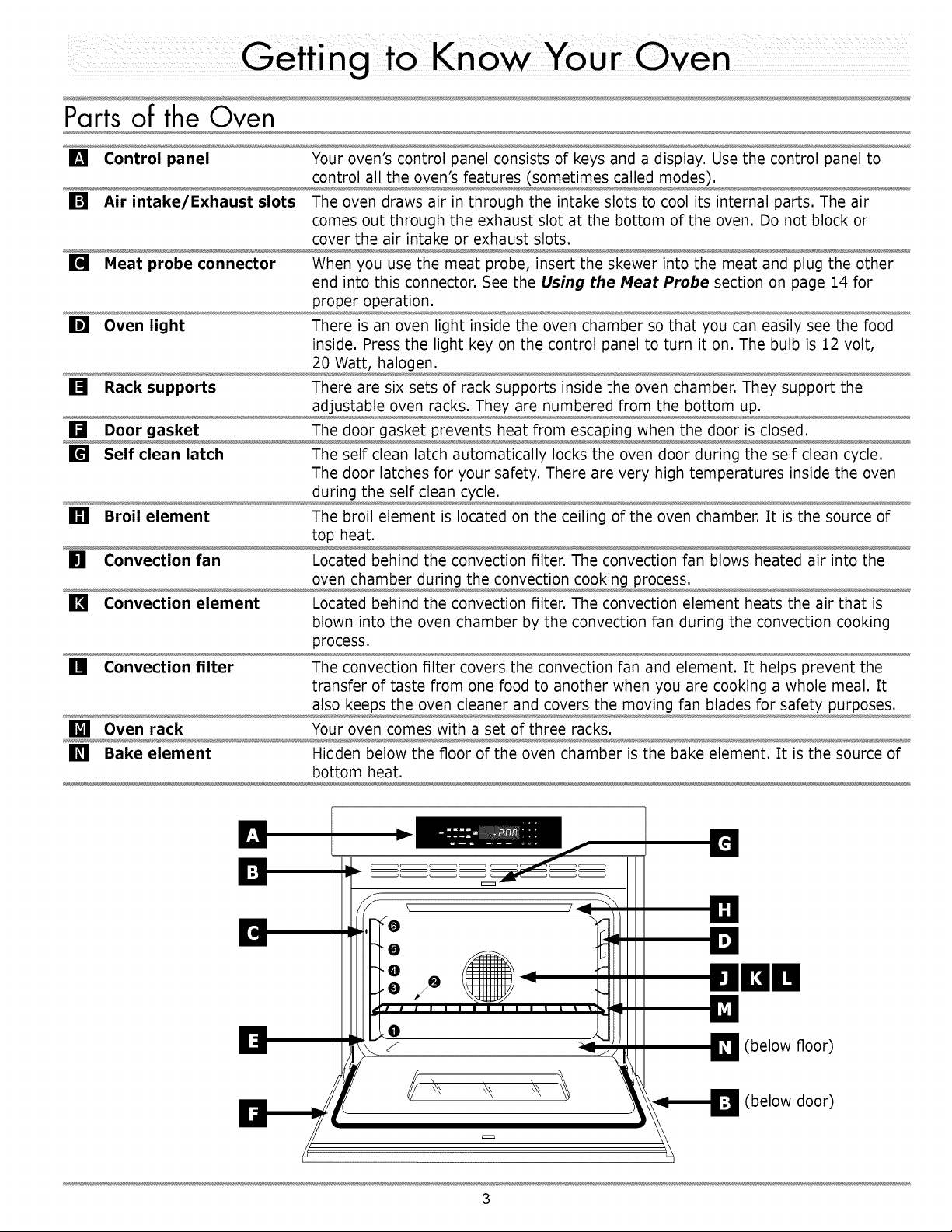
[] Control panel Your oven's control panel consists of keys and a display. Use the control panel to
control all the oven's features (sometimes called modes).
[] Air intake/Exhaust slots The oven draws air in through the intake slots to cool its internal parts. The air
comes out through the exhaust slot at the bottom of the oven. Do not block or
cover the air intake or exhaust slots.
[] Meat probe connector When you use the meat probe, insert the skewer into the meat and plug the other
end into this connector. See the Using the Meat Probe section on page 14 for
proper operation.
[] Oven light There is an oven light inside the oven chamber so that you can easily see the food
inside. Press the light key on the control panel to turn it on. The bulb is 12 volt,
20 Watt, halogen.
[] Rack supports There are six sets of rack supports inside the oven chamber. They support the
adjustable oven racks. They are numbered from the bottom up.
[] Door gasket The door gasket prevents heat from escaping when the door is closed.
[] Self clean latch The self clean latch automatically locks the oven door during the self clean cycle.
The door latches for your safety. There are very high temperatures inside the oven
during the self clean cycle.
[] Broil element The broil element is located on the ceiling of the oven chamber. It is the source of
top heat.
[] Convection fan Located behind the convection filter. The convection fan blows heated air into the
oven chamber during the convection cooking process.
[] Convection element Located behind the convection filter. The convection element heats the air that is
blown into the oven chamber by the convection fan during the convection cooking
process.
[] Convection filter The convection filter covers the convection fan and element. It helps prevent the
transfer of taste from one food to another when you are cooking a whole meal. It
also keeps the oven cleaner and covers the moving fan blades for safety purposes.
[] Oven rack Your oven comes with a set of three racks.
[] Bake element Hidden below the floor of the oven chamber is the bake element. It is the source of
bottom heat.
l,a
0
ROm
0
D (below floor)
(below door)
3
Control Panel Layout
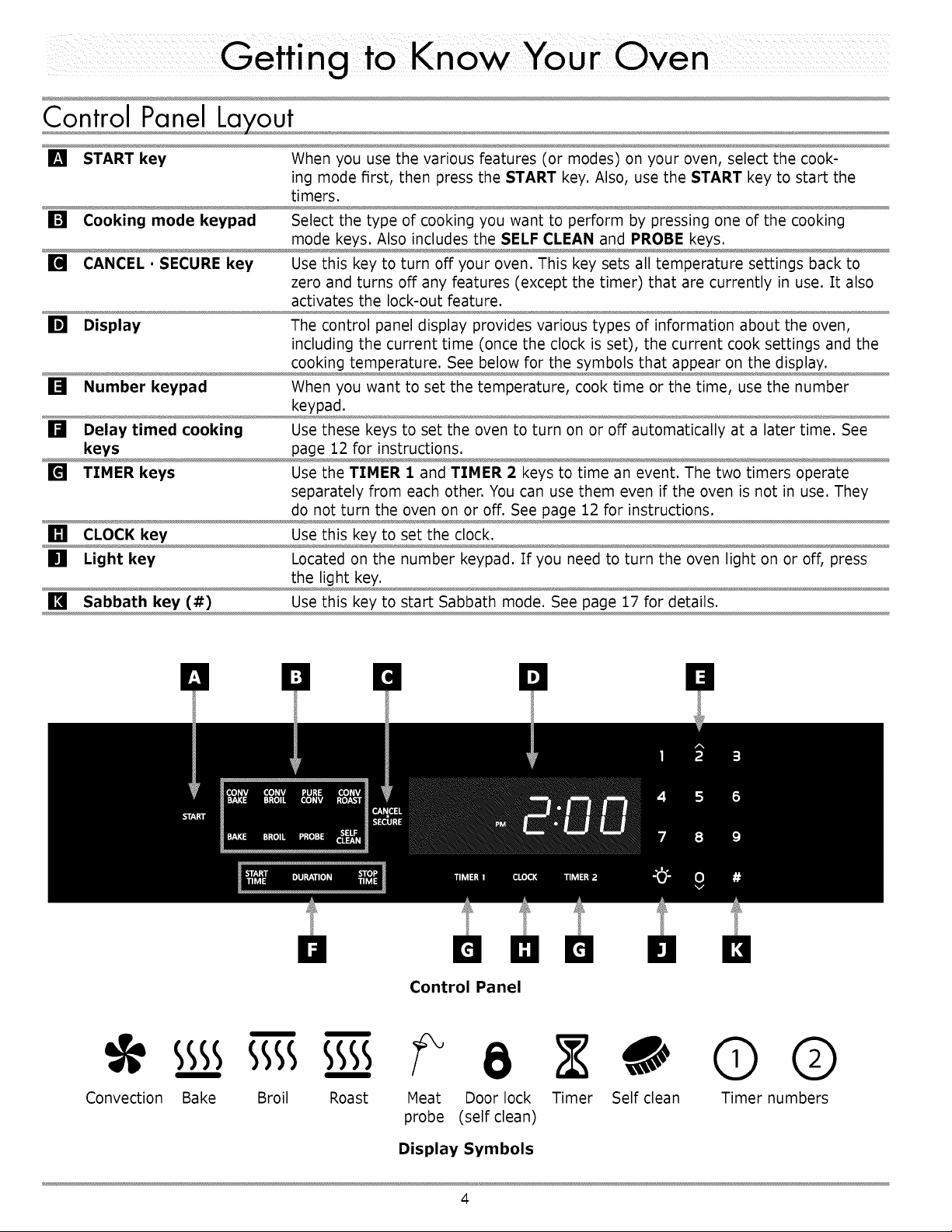
[] START key When you use the various features (or modes) on your oven, select the cook-
ing mode first, then press the START key. Also, use the START key to start the
timers.
[] Cooking mode keypad Select the type of cooking you want to perform by pressing one of the cooking
mode keys. Also includes the SELF CLEAN and PROBE keys.
[] CANCEL • SECURE key Use this key to turn off your oven. This key sets all temperature settings back to
zero and turns off any features (except the timer) that are currently in use. It also
activates the lock-out feature.
[] Display The control panel display provides various types of information about the oven,
including the current time (once the clock is set), the current cook settings and the
cooking temperature. See below for the symbols that appear on the display.
[] Number keypad When you want to set the temperature, cook time or the time, use the number
keypad.
[] Delay timed cooking Use these keys to set the oven to turn on or off automatically at a later time. See
keys page 12 for instructions.
[] TIMER keys Use the TIMER I and TIMER 2 keys to time an event. The two timers operate
separately from each other. You can use them even if the oven is not in use. They
do not turn the oven on or off. See page 12 for instructions.
[] CLOCK key Use this key to set the clock.
[] Light key Located on the number keypad. If you need to turn the oven light on or off, press
the light key.
[] Sabbath key (#) Use this key to start Sabbath mode. See page 17 for details.
Control Panel
sss sss sss- 8 0 © ®
Convection Bake Broil Roast Meat Door lock Timer Self clean Timer numbers
probe (self clean)
Display Symbols
4
Control Panel Settin s
Setting the Time
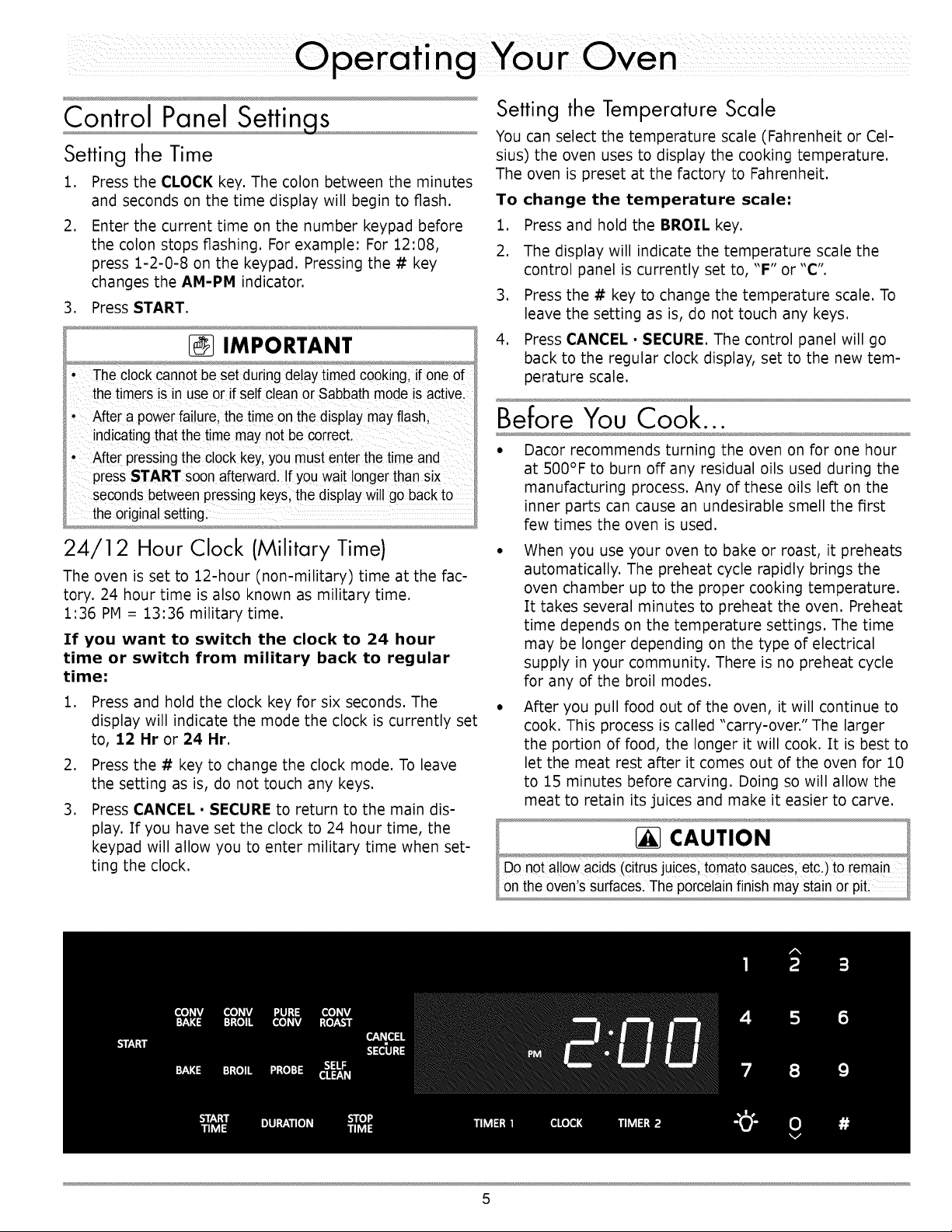
1. Press the CLOCK key. The colon between the minutes
and seconds on the time display will begin to flash.
2. Enter the current time on the number keypad before
the colon stops flashing. For example: For 12:08,
press 1-2-0-8 on the keypad. Pressing the # key
changes the AM-PM indicator.
3. Press START.
IMPORTANT
• The clockcannot be set during delaytimed cooking, if oneof
the timers isin useor if self clean or Sabbath modeis active.
' After apower failure,thetime on the display maYflash,
indicating that the time maYn0tbe correct
' After pressing the clockkey,Youmust enter thetime and
press START s0onafte_ard !fY0Uwait longerthansix
seconds betweenpressing keys, the display wi!!goback to
the origina!setting:
24/12 Hour Clock (Military Time)
The oven is set to 12-hour (non-military) time at the fac-
tory. 24 hour time is also known as military time.
1:36 PM = 13:36 military time.
If you want to switch the clock to 24 hour
time or switch from military back to regular
time:
1. Press and hold the clock key for six seconds. The
display will indicate the mode the clock is currently set
to, 12 Hr or 24 Hr
2. Press the # key to change the clock mode. To leave
the setting as is, do not touch any keys.
3. Press CANCEL. SECURE to return to the main dis-
play. If you have set the clock to 24 hour time, the
keypad will allow you to enter military time when set-
ting the clock.
Setting the Temperature Scale
You can select the temperature scale (Fahrenheit or Cel-
sius) the oven uses to display the cooking temperature.
The oven is preset at the factory to Fahrenheit.
To change the temperature scale=
1. Press and hold the BROIL key.
2. The display will indicate the temperature scale the
control panel is currently set to, "F" or "C".
3. Press the # key to change the temperature scale. To
leave the setting as is, do not touch any keys.
4. Press CANCEL • SECURE. The control panel will go
back to the regular clock display, set to the new tem-
perature scale.
Before You Cook...
• Dacor recommends turning the oven on for one hour
at 500°F to burn off any residual oils used during the
manufacturing process. Any of these oils left on the
inner parts can cause an undesirable smell the first
few times the oven is used.
• When you use your oven to bake or roast, it preheats
automatically, The preheat cycle rapidly brings the
oven chamber up to the proper cooking temperature,
It takes several minutes to preheat the oven, Preheat
time depends on the temperature settings, The time
may be longer depending on the type of electrical
supply in your community, There is no preheat cycle
for any of the broil modes,
• After you pull food out of the oven, it will continue to
cook, This process is called "carry-over," The larger
the portion of food, the longer it will cook, It is best to
let the meat rest after it comes out of the oven for 10
to 15 minutes before carving, Doing so will allow the
meat to retain its juices and make it easier to carve,
5
Racks
You may use either rack type on any level inside the oven.
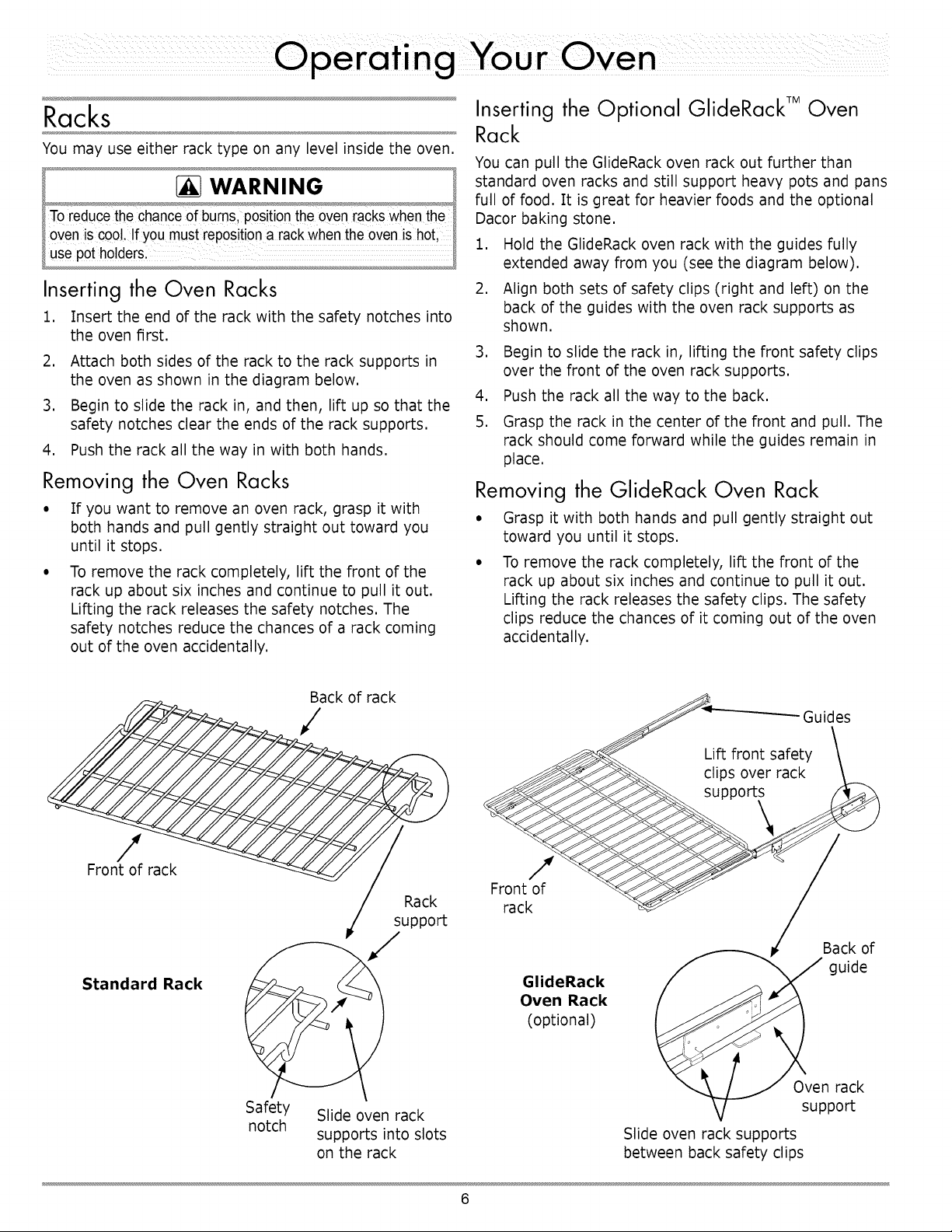
Inserting the Oven Racks
1. Insert the end of the rackwith the safety notches into
the oven first.
2. Attach both sides of the rack to the rack supports in
the oven as shown in the diagram below.
3. Begin to slide the rack in, and then, lift up so that the
safety notches clear the ends of the rack supports.
4. Push the rack all the way in with both hands.
Removing the Oven Racks
• If you want to remove an oven rack, grasp it with
both hands and pull gently straight out toward you
until it stops.
• To remove the rack completely, lift the front of the
rack up about six inches and continue to pull it out.
Lifting the rack releases the safety notches. The
safety notches reduce the chances of a rack coming
out of the oven accidentally.
Inserting the Optional GlideRack TM Oven
Rack
You can pull the GlJdeRack oven rack out further than
standard oven racks and still support heavy pots and pans
full of food. It is great for heavier foods and the optional
Dacor baking stone.
1. Hold the GlideRack oven rack with the guides fully
extended away from you (see the diagram below).
2. Align both sets of safety clips (right and left) on the
back of the guides with the oven rack supports as
shown.
3. Begin to slide the rack in, lifting the front safety clips
over the front of the oven rack supports.
4. Push the rack all the way to the back.
5. Grasp the rack in the center of the front and pull. The
rack should come forward while the guides remain in
place.
Removing the GlideRack Oven Rack
, Grasp it with both hands and pull gently straight out
toward you until it stops.
, To remove the rack completely, lift the front of the
rack up about six inches and continue to pull it out.
Lifting the rack releases the safety clips. The safety
clips reduce the chances of it coming out of the oven
accidentally.
Back of rack
/
Guides
/
Front of rack
Standard Rack
Rack
support
Safety Slide oven rack
notch
supports into slots
on the rack
Front of
rack
GlideRack
Oven Rack
(optional)
Back of
_ guide
Slide oven rack supports
between back safety clips
6
Your Oven
1. Adjust the racks to the appropriate level.
2. Determine the best cooking mode for the type of food
to be cooked.
Turning Off Your Oven
To turn the oven off, press the CANCEL • SECURE key.
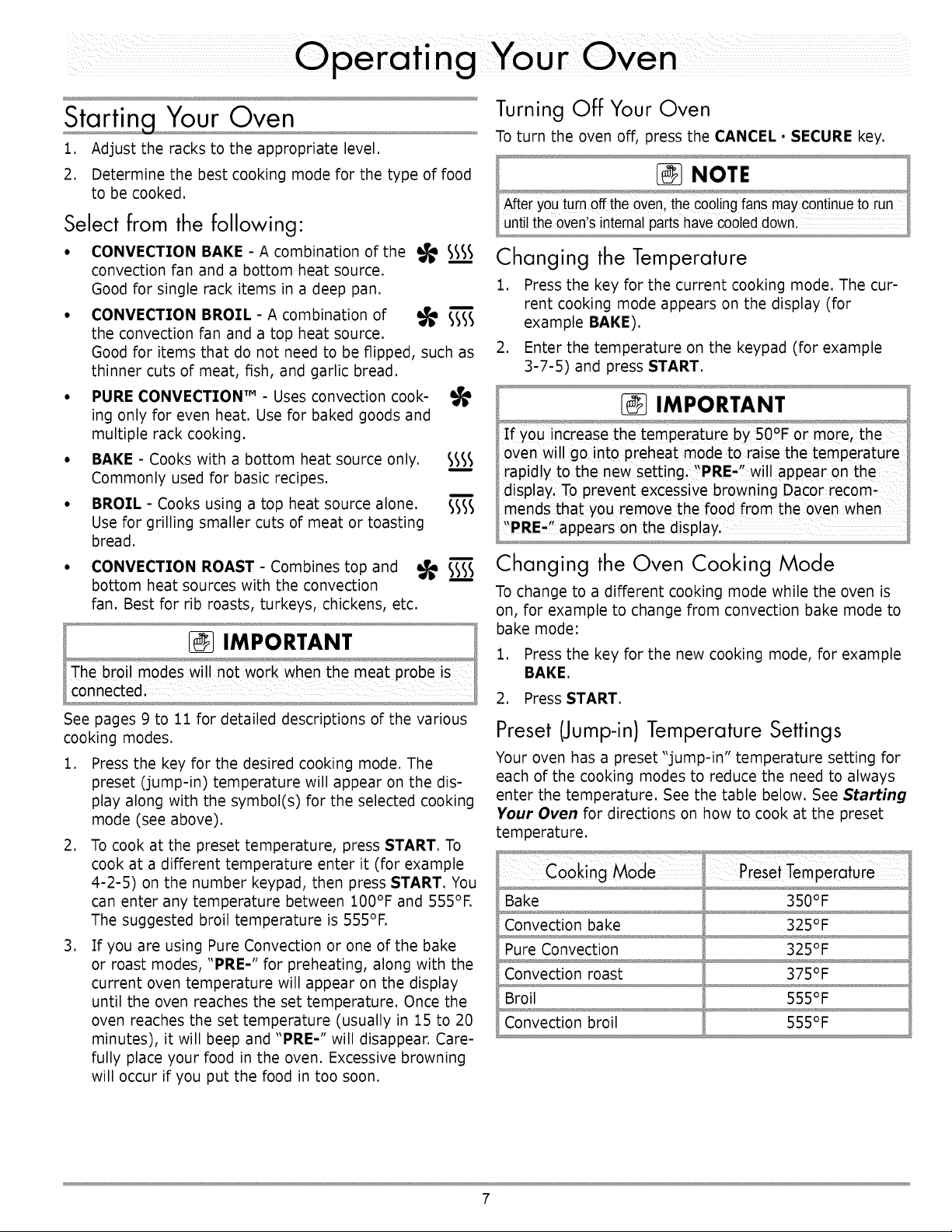
Select from the following"
• CONVECTION BAKE - A combination of the
convection fan and a bottom heat source.
Good for single rack items in a deep pan.
• CONVECTION BROIL - A combination of _
the convection fan and a top heat source.
Good for items that do not need to be flipped, such as
thinner cuts of meat, fish, and garlic bread.
° PURE CONVECTION TM - Uses convection cook-
ing only for even heat. Use for baked goods and
multiple rack cooking.
• BAKE - Cooks with a bottom heat source only. _l _
Commonly used for basic recipes.
1
• BROIL - Cooks using a top heat source alone. S_
Use for grilling smaller cuts of meat or toasting
bread.
Changing the Temperature
1. Press the key for the current cooking mode. The cur-
rent cooking mode appears on the display (for
example BAKE).
2. Enter the temperature on the keypad (for example
3-7-5) and press START.
IMPORTANT
If you increase the temperature by 50°F or more, the
oven wi!l go into preheat mode to, raise the temperature
rapidly to the new setting! PRE' will appear on the
display. To prevent excessive browning Dac0r recom-
CONVECTION ROAST - Combines top and
bottom heat sources with the convection
fan. Best for rib roasts, turkeys, chickens, etc.
Changing the Oven Cooking Mode
IMPORTANT
See pages 9 to 11 for detailed descriptions of the various
cooking modes.
1. Press the key for the desired cooking mode. The
preset (jump-in) temperature will appear on the dis-
play along with the symbol(s) for the selected cooking
mode (see above).
2. To cook at the preset temperature, press START. To
cook at a different temperature enter it (for example
4-2-5) on the number keypad, then press START. You
can enter any temperature between 100°F and 555°F.
The suggested broil temperature is 555°F.
3. If you are using Pure Convection or one of the bake
or roast modes, "PRE-" for preheating, along with the
current oven temperature will appear on the display
until the oven reaches the set temperature. Once the
oven reaches the set temperature (usually in 15 to 20
minutes), it will beep and "PRE-" will disappear. Care-
fully place your food in the oven. Excessive browning
will occur if you put the food in too soon.
To change to a different cooking mode while the oven is
on, for example to change from convection bake mode to
bake mode:
1. Press the key for the new cooking mode, for example
BAKE.
2. Press START.
Preset (Jump-in) Temperature Settings
Your oven has a preset "jump-in" temperature setting for
each of the cooking modes to reduce the need to always
enter the temperature. See the table below. See Starting
Your Oven for directions on how to cook at the preset
temperature.
Bake
Convection bake
Pure Convection
Convection roast
Broil
Convection broil
PresetTemperature
350°F
325°F
325°F
375°F
555°F
555°F
7
Lock-Out Feature
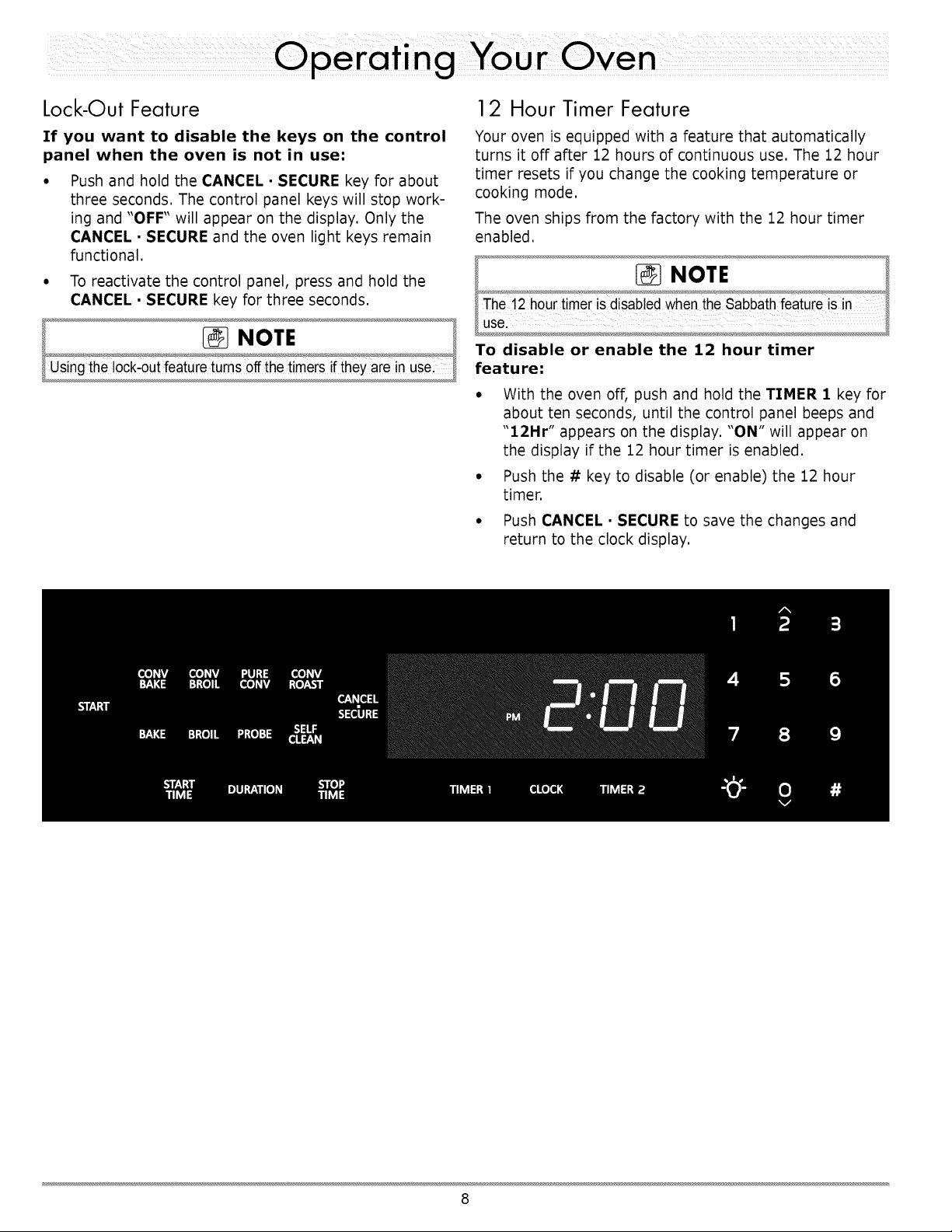
If you want to disable the keys on the control
panel when the oven is not in use:
• Push and hold the CANCEL • SECURE key for about
three seconds. The control panel keys will stop work-
ing and "OFF" will appear on the display. Only the
CANCEL • SECURE and the oven light keys remain
functional.
° To reactivate the control panel, press and hold the
CANCEL • SECURE key for three seconds.
12 Hour Timer Feature
Your oven is equipped with a feature that automatically
turns it off after 12 hours of continuous use. The 12 hour
timer resets if you change the cooking temperature or
cooking mode.
The oven ships from the factory with the 12 hour timer
enabled.
To disable or enable the 12 hour timer
feature:
° With the oven off, push and hold the TIMER 1 key for
about ten seconds, until the control panel beeps and
"12Hr" appears on the display. "ON" will appear on
the display if the 12 hour timer is enabled.
° Push the # key to disable (or enable) the 12 hour
timer.
° Push CANCEL • SECURE to save the changes and
return to the clock display.
8
the Various Oven Modes
The three basic styles of cooking in an oven are:
0 Baking: The gentle cooking of dry goods such as cookies, cakes, souffl6s, etc.
0 Roasting: The cooking of meats or vegetables over a period of time.
o Broiling: Cooking with an intense heat for a short amount of time.
Bake sss_
Uses only a heat source from below the food. This mode
is the stand-by, non-convection mode. All baked items will
turn out nicely in this mode.
Baking Tips
• For best results, use a single rack in the lowest
position when using bake mode. For cooking on
multiple racks, Dacor recommends using one of the
convection modes. See the following pages.
° Follow your recipe's original cooking time and
temperature when using bake mode.
° Do not open the oven door frequently during baking.
Look through the oven door window to check the
progress of baking whenever possible.
° Use the timers to determine baking time.
° Wait until the shortest recommended baking time
before checking the food. For most baked goods, a
wooden toothpick placed in the center should come
clean when the food is done.
..................................Maybe caused by What todo
Cookies burn on the Oven door opened too often. Set timer to shortest recommended cooking
bottom, time and check food when timer beeps. Use
door window to check food.
Incorrect rack position used. Change rack position.
Dark, heat absorbing cookie sheets used. Use shiny, reflective cookie sheets.
Cookies are too brown Rack position being used is too high. Change rack position.
on top. Food placed in oven during preheat. Wait until oven is preheated.
Incorrect baking mode being used. See Starting Your Oven on page 7 for guide-
lines.
Cakes burn on the sides
or are not done in the
center.
Cakes crack on top.
Cakes are not level.
Oven temperature too high.
Dark, heat absorbing cake pans used.
Reduce oven temperature.
Use shiny, reflective cake pans.
Oven temperature too high.
Oven and/or oven rack not level.
Pies burn around the Oven temperature too high. Reduce oven temperature.
edges or are not done Dark, heat absorbing pans used. Use shiny, reflective pans.
in the center.
Oven and/or rack over-crowded. Reduce number of pans.
Reduce oven temperature.
Level oven and rack as needed.
Continued...
9
the Various Oven Modes (Continued)
Your oven offers three convection cooking
modes:
• Pure Convection
• Convection bake
• Convection roast
As a general rule, in the convection modes time is about
25% shorter. Set the timer 15 minutes before the shortest
stated time and add more time if necessary.
When cooking in Pure Convection and
convection bake modes...
Some recipes, especially those that are homemade, may
require adjustment and testing when converting from
standard to convection baking. If you are unsure how to
convert a recipe, begin by preparing the recipe using the
standard bake settings.
If the food is not cooked to your satisfaction during this
first convection trial, adjust one recipe variable at a time
(such as cooking time, rack position, or temperature) and
repeat the convection test. If necessary, continue adjust-
ing one recipe variable at a time until you get satisfactory
results.
Pure Convection _l'
The uniform air circulation provided by Pure Convection
allows you to use more oven capacity at once. Use this
mode for single rack baking, multiple rack baking, roast-
ing, and preparation of complete meals. Many foods,
such as pizzas, cakes, cookies, biscuits, muffins, rolls and
frozen convenience foods can be successfully prepared on
two or three racks at a time. Pure Convection is also good
for whole roasted duck, lamb shoulder and short leg of
lamb.
AIR FLOW
Multiple Rack Baking in PureConvection
Mode
• Typically, when baking on two racks, use rack posi-
tions #1 and #3 or #2 and #4 (counting from the
bottom up) for best results. When cooking a full meal,
use rack positions #1, #3 and #5 for best results.
• When adapting a single rack recipe to multiple rack
baking, it may be necessary to add to the baking time
due to the extra bulk of the food in the oven.
Convection Bake ssss
Use this mode for single rack baking. The combination of
the convection fan and bottom heat source is best for fruit
crisps, custard pies, double-crusted fruit pies, quiches,
yeast breads in a loaf pan and popovers. Also, items
baked in a deep ceramic dish or earthenware clay pots are
best in this mode. Most of these items cook in a deep pan
and require browning on the top and bottom.
10
Convection Roast
Your oven's Convection Roast mode uses a combination of
the convection fan and heat sources above and below the
food. It is best for rib roasts, turkeys, chickens, etc.
Roasting Tips
• All baking modes can be used to successfully roast in
your oven.
• However, the convection roast mode is recommended
to produce meats that are deliciously seared on the
outside and succulently juicy on the inside in record
time. Foods that are exceptional, when prepared in
the Convection Roast mode, include: beef, pork, ham,
lamb, turkey, chicken and cornish hens.
• Always roast meats fat side up in a shallow pan, using
a roasting rack. Always use a pan that fits the size of
the food being prepared. No basting is required when
the fat side is up. Do not add water to the pan. It will
cause a steamed effect. Roasting is a dry heat pro-
cess.
• Poultry should be placed breast side up on a rack in a
shallow pan that fits the size of the food. Brush poul-
try with melted butter, margarine or oil before and
during roasting.
• When using the roast mode, do not use pans with tall
sides. They interfere with the circulation of heated air
over the food.
If using a meat thermometer, insert the probe halfway
into the center of the thickest portion of the meat.
For poultry, insert the thermometer probe between
the body and leg into the thickest part of the inner
thigh. To ensure an accurate reading, the tip of the
probe should not touch bone, fat or gristle. Check
the meat temperature 2/3 of the way through the
recommended roasting time. After reading the meat
thermometer once, insert it 1/2 inch further into the
meat, then take a second reading. If the second tem-
perature registers below the first, continue cooking
the meat.
• Remove meats from the oven when the thermometer
registers 5 to 10°F below the desired temperature.
The meat will continue to carry-over.
• Allow roasts to stand 15 to 20 minutes after roasting
in order to make carving easier.
• Roasting times always vary according to the size,
shape and quality of meats and poultry. Less tender
cuts of meat are best prepared in bake mode and may
require moist cooking techniques. Use your favorite
cookbook recipes.
• Reduce spatter by lining the bottom of the roasting
pan with lightly crushed aluminum foil.
Your oven offers two
• Broil
• Convection broil
broil modes:
WARNING
To avoid damage to the meat probe, removeitfrom the oven
when Usingeither of thebroil mode& If themeat Probe is
connected the broi modesWi!!not startlThe meat probe
symbol wi flashwhen you attempt tostart the ovenin oneof
the broil modes with the meat probeconnected.
Broiling is a quick and flavorful way to prepare many
foods, including steaks, chicken, chops, hamburgers and
fish.
Broil sss-
Uses a top heat source. It Jsbest for broiling smaller
amounts of food.
Convection Broil
This mode uses a combination of the convection fan and a
top heat source. It is best for items that do not need to be
flipped such as thinner cuts of meat, fish and garlic bread.
Broiling Tips
• It is normal and necessary for some smoke to be
present to give the food a broiled flavor.
° Setting the timer is recommended to time the broiling
process.
° Always use a broiler pan and grill to provide drainage
for excess fat and grease. Doing so will reduce spat-
ter, smoke and flare-ups.
° Start with a room temperature broiler pan for even
cooking.
° Use tongs or a spatula to turn and remove meats.
Never pierce meat with a fork because the natural
juices will escape.
° Broil food on the first side for a little more than half of
the recommended time, then season and turn. Season
the second side just before removing the food from
the oven.
To prevent sticking, lightly grease the broiler grill.
Excess grease will result in heavy smoke. For easier
cleaning, remove the broiler pan and grill when
removing the food.
11
Timers
WARNING
The timers on youroven do notturn the ovenon or off. They
are only for timing purposes.When you want to turn the oven off
automatically,usethe Delay TimedCooking Features.
IMPORTANT
Pressing the CANCEL • SECURE keydoes NOT reset or stop
the timers.
• Your oven _sequipped with two built-in timers,
• You can use both of them at the same time.
• You can time from 1 minute up to 99 hours and 59 min-
utes.
• The timer symbol appears on the display when one or
both of the timers is in use.
To use the timers on your oven:
1. Press the TIMER 1 or TIMER 2 key.
2. Enter the hours and minutes to be timed on the
keypad and press START. To enter 11 hours,
&g
30 minutes, press 1-1-3-0. To time 25 minutes,
press 2-5. When you press START, the time will appear
on the display and begin to count down.
When the timer is done counting down, 0-'00 will appear
on the display. The timer number will flash on the display
and the alarm (a beeping sound) will sound. The alarms
for Timer 1 and Timer 2 have different patterns.
When the alarm sounds, press the CANCEL • SECURE
key twice to stop the alarm and return to the clock.
While a timer is running you can:
• Press CLOCK to view the current time.
• Press TIMER 1 to view the time left on (or set) TIMER 1.
• Press TIMER 2 to view the time left on (or set) TIMER 2.
To change the amount of time on a timer-'
1. Press the TIMER I or TIMER 2 key.
2. Enter the new time on the number keypad and press
START.
To stop a timer before time runs out:
• Press the TIMER 1 or TIMER 2 key twice.
• The timer will stop and the display will clear.
• Press the CLOCK key to return to the main display.
Dela Features
Tfyou want to set the oven to automatically turn itself on
or off at a later time, you can use the delay timed fea-
tures.
WARNING
Foodsafety is an importantconsiderationwhen usingthe delay
timed features. Toavoid potentialsickness and the spoiling of
food, take the following steps:
• Avoid usingfoods that will spoilwhile waiting for the oven to
start cooking.Typicalfoods to avoid include:thosecontaining
eggs and dairy products, cream soups and cooked or
uncooked meats, poultry,and fish.
• Do not allow foodsto remain in the oven after it turns
completely off.When the temperaturedrops below
140°F,bacteriacan develop(after hold mode).
• If cooking will not begin immediately,place onlyvery cold or
frozen food intothe oven. Most unfrozen foods should never
stand in the ovenfor morethan two hoursbefore cooking
begJns.
Things to Know About Delay Timed
Cooking
• The delay timed options work for all of the various cook
modes, except broil and convection broil.
• You may use the timers while using the delay timed
features. The timers do not have an effect on any of the
delay timed cooking options.
• The delay timed cycle can be canceled at any time by
pushing CANCEL • SECURE.
The three delay timed cooking keys are:
• START TIHE: The time the oven starts cooking
• DURATION: The amount of time the oven cooks
before it goes into hold mode.
• STOP TIME: The clock time the oven turns off and
goes into hold mode.
When you set 2 of the 3 above, the oven automatically
calculates the third.
The Three Ways to Use Delay Timed
Cooking
• Set the time the oven turns on (START TIME) and set
it to turn off at a later time using either the DURATION
key or the STOP TIME key.
• Set the START TIME only, then turn the oven off manu-
ally when you are done cooking.
• Turn the oven on manually and set it to turn off at a later
time using either the DURATION key or the STOP TIME
key.
12
About Hold Mode...
When you set the oven to stop cooking using the
DURATION or STOP TIME keys, it will go into
"hold" mode (Hkd appears on the display) when it
reaches the end of the cook time you have set. The
oven will keep the temperature at 150°F for two
hours.
° Press CANCEL • SECURE to turn the oven all the way
off.
° To prevent sickness, do not allow foods to remain in
the oven after it is off (after hold mode turns off).
Using Delay Timed Cooking
Other Things to Know About Delayed
Timed Cooking
When the oven is in delay timed mode...
• Push the CLOCK key to view the clock (current time).
• Push the START TIME key to view the current start
time setting.
• Push the STOP TIME key to view the current cook
time setting.
• Push the DURATION key to view the current cook
time setting.
1. Adjust the racks to the appropriate level.
2. Put the food in the oven.
3. Press the key for the desired cooking mode (except
broil or convection broil).
4. Enter the desired cooking temperature on the number
keypad.
5. If you want to turn the oven on immediately and turn
off automatically at a later time, skip to step 8.
6. Press the START TIME key.
7. Enter the time you want the oven to start on the
keypad. For 12:35, press 1-2-3-5. You may enter
a time up to 22 hours and 59 minutes ahead of the
present time. Press the # key to change "AM" or
"PM ."
8. If you want to set the stop time or cooking duration,
presseitherthe STOP TIME or DURATION key
(otherwiseskiptostep9).Usingthe DURATION key
allowsyou todeterminewhen the oven willstopcook-
ingby enteringthe amount oftime the oven ison.
Usingthe STOP TIME key allowsyou todetermine
when the oven willstopcookingby enteringthe clock
time.Usingeitherkey achievesthe same result.
9. PressSTART.
10. If you entered a START TIME, the oven will start at
the start time entered.
11. If you entered a DURATION or STOP TIME the oven
will cook until the time entered and then, go into hold
mode.
IMPORTANT
Thetime requiredtopreheat theoven must be included in the
amount of cook time, Forcookingtemperatures of 350QFand
below add 20 minutesto the cook time.Increase thecook time
asthe temperature increasesabove350°F.
13
Usin the Meat Probe
When you cook foods like roasts and poultry, the internal
temperature is the best way to tell when the food is prop-
erly cooked. Your oven's meat probe is an easy way to
take the guesswork out of roasting. You can use it to cook
food to the exact temperature you desire. The probe can
be set from IO0°F to 200°F.
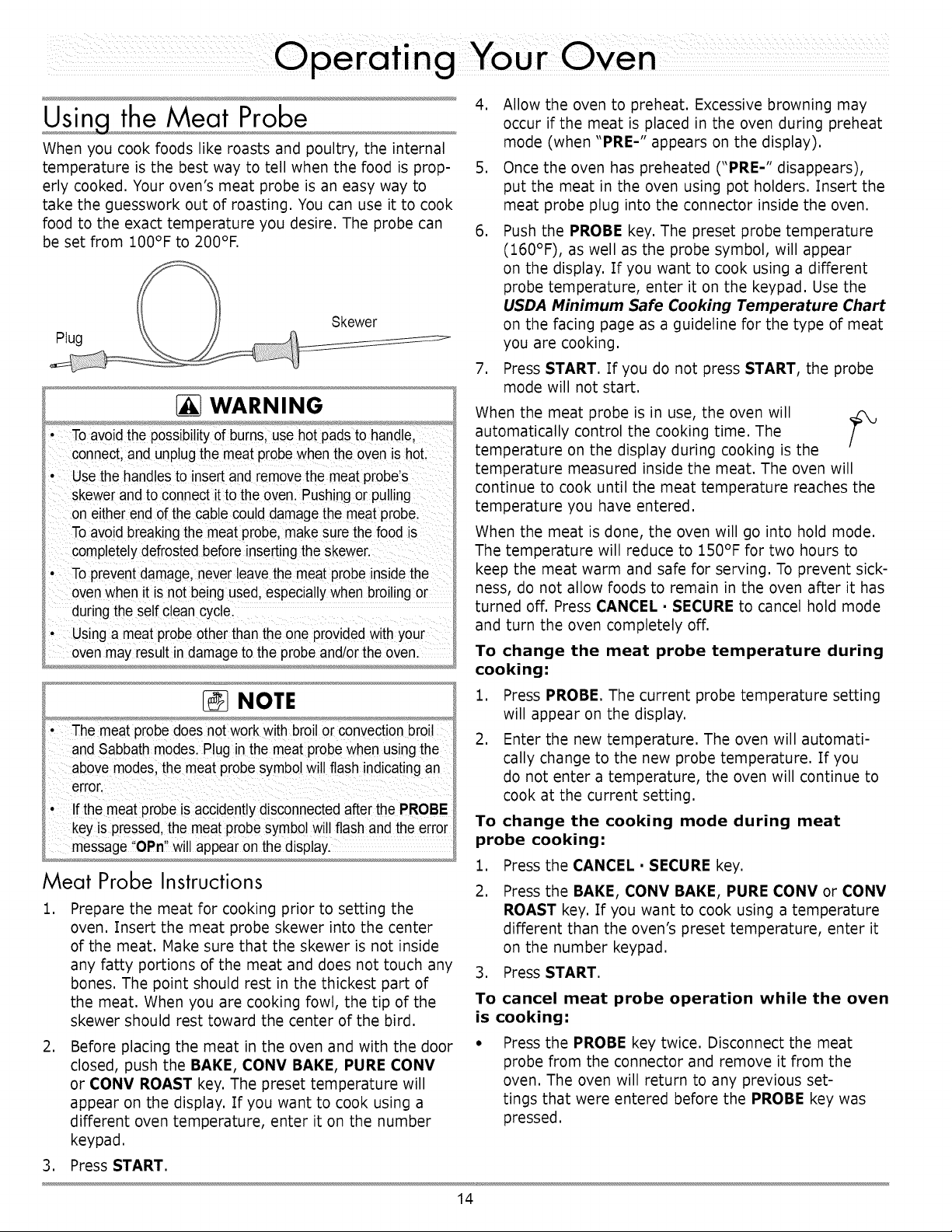
Plug
Skewer
4. Allow the oven to preheat. Excessive browning may
occur if the meat is placed in the oven during preheat
mode (when "PRE-" appears on the display).
5. Once the oven has preheated ("PRE-" disappears),
put the meat in the oven using pot holders. Insert the
meat probe plug into the connector inside the oven.
6. Push the PROBE key. The preset probe temperature
(160°F), as well as the probe symbol, will appear
on the display. If you want to cook using a different
probe temperature, enter it on the keypad. Use the
USDA Minimum Safe Cooking Temperature Chart
on the facing page as a guideline for the type of meat
you are cooking.
WARNING
• the possibi!ityof bums, use hot
connect;and unplugthe meat probewhen the oven ishoL
Usethe hand astOinsert and remove the meat probe S
skewer and to connect itto the oven. Pushingor pu!ling
eitherend of the cablecould damagethe meat probe.
Toavoid breakingthe meat probe, makesure thefood is
completelydefrosted before insertingthe Skewer.
' Toprevent damagel never leavethemeat probe insidethe
oven when itis not being used, especia!!Ywhen broi!ingor
duringthe serf c!ean cyc!e.
using a ment probe otherthan the one providedwith your
7. Press START. If you do not press START, the probe
mode will not start.
When the meat probe is in use, the oven will
automatically control the cooking time. The
f
temperature on the display during cooking is the
temperature measured inside the meat. The oven will
continue to cook until the meat temperature reaches the
temperature you have entered.
When the meat is done, the oven will go into hold mode.
The temperature will reduce to 150°F for two hours to
keep the meat warm and safe for serving. To prevent sick-
ness, do not allow foods to remain in the oven after it has
turned off. Press CANCEL • SECURE to cancel hold mode
and turn the oven completely off.
To change the meat probe temperature during
cooking:
NOTE
• meat probedoes n0t work with broilor convectionbroi!
andSabbath mode&P!ug in the meat probewhen using the
above modesl the meat probe symbol willflash indicating an
error.
' If the meatpr0beiSaccidentiydisC0nnected afterthe PROBE
key is pressed,the meat probe symbolwill flash and theerror
message OPn willappear on the display.
Meat Probe Instructions
,
Prepare the meat for cooking prior to setting the
oven. Insert the meat probe skewer into the center
of the meat. Hake sure that the skewer is not inside
any fatty portions of the meat and does not touch any
bones. The point should rest in the thickest part of
the meat. When you are cooking fowl, the tip of the
skewer should rest toward the center of the bird.
1. Press PROBE. The current probe temperature setting
will appear on the display.
2. Enter the new temperature. The oven will automati-
cally change to the new probe temperature. If you
do not enter a temperature, the oven will continue to
cook at the current setting.
To change the cooking mode during meat
probe cooking:
1. Press the CANCEL • SECURE key.
2. Press the BAKE, CONV BAKE, PURE CONV or CONV
ROAST key. If you want to cook using a temperature
different than the oven's preset temperature, enter it
on the number keypad.
3. Press START.
To cancel meat probe operation while the oven
is cooking:
,
Before placing the meat in the oven and with the door
closed, push the BAKE, CONV BAKE, PURE CONV
or CONV ROAST key. The preset temperature will
appear on the display. If you want to cook using a
different oven temperature, enter it on the number
keypad.
Press the PROBE key twice. Disconnect the meat
probe from the connector and remove it from the
oven. The oven will return to any previous set-
tings that were entered before the PROBE key was
pressed.
3. Press START.
14
Important Details About Meat Probe Use
• You must select the specific cooking mode (BAKE,
CONV BAKE, PURE CONV or CONV ROAST) before
you press the PROBE key.
• When using the meat probe feature the preheat cycle
is disabled. For best results, select the mode and
allow the oven to preheat prior to starting the meat
probe feature.
• The meat probe function will automatically cancel
after 30 seconds if the meat probe is not connected.
The meat probe symbol will flash on the display.
• The meat probe feature takes precedence over the
delay timed cooking feature. The oven will continue
to cook the meat until it reaches the selected meat
probe temperature regardless of the STOP TIME or
DURATION setting, then go into hold mode,
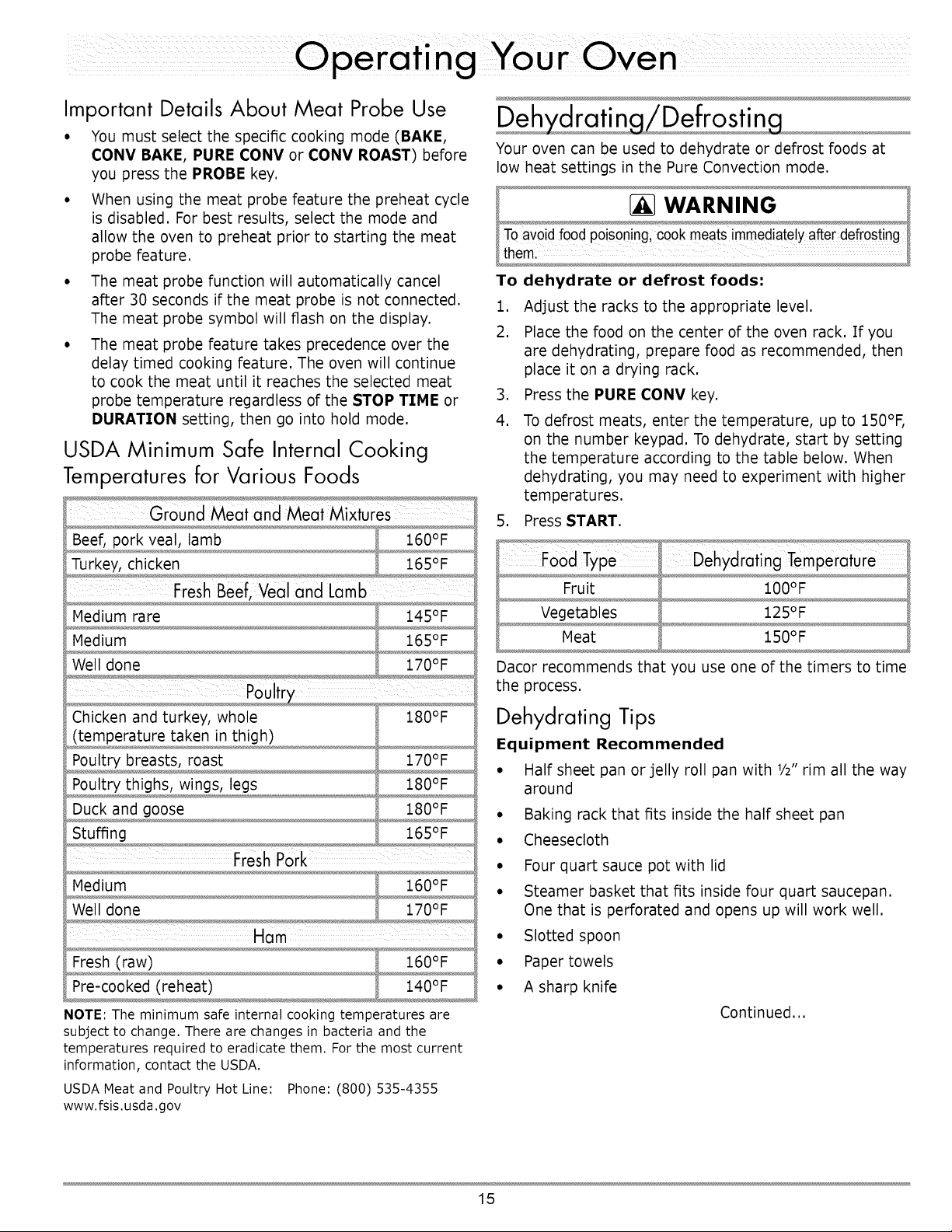
USDA Minimum Safe Internal Cooking
Temperatures for Various Foods
Fresh Beef, Veal and Lamb
Chicken and turkey, whole
(temperature taken in thigh)
Poultry breasts, roast
Poultry thighs, wings, legs
Duck and goose
Stuffing
180°F
170°F
180°F
180°F
165°F
Ham
NOTE: The minimum safe internal cooking temperatures are
subject to change. There are changes in bacteria and the
temperatures required to eradicate them. For the most current
information, contact the USDA.
USDA Meat and Poultry Hot Line: Phone: (800) 535-4355
www.fsis.usda.gov
Your oven can be used to dehydrate or defrost foods at
low heat settings in the Pure Convection mode,
To dehydrate or defrost foods:
1. Adjust the racks to the appropriate level.
2. Place the food on the center of the oven rack. If you
are dehydrating, prepare food as recommended, then
place it on a drying rack.
3. Press the PURE CONV key.
4. To defrost meats, enter the temperature, up to I50°F,
on the number keypad. To dehydrate, start by setting
the temperature according to the table below. When
dehydrating, you may need to experiment with higher
temperatures.
5. Press START.
Fruit
Vegetables
Meat
i00°F
125°F
$50°F
Dacor recommends that you use one of the timers to time
the process.
Dehydrating Tips
Equipment Recommended
• Half sheet pan or jelly roll pan with 1/2"rim all the way
around
° Baking rack that fits inside the half sheet pan
° Cheesecloth
° Four quart sauce pot with lid
° Steamer basket that fits inside four quart saucepan,
One that is perforated and opens up will work well,
° Slotted spoon
° Paper towels
° A sharp knife
Continued,,,
15
When you dehydrate:
1. Wash and remove excess moisture from all fruits and
vegetables before dehydrating.
2. Cut fruits and vegetables into uniform pieces.
3. You can add honey, spices, lime juice, or orange juice
to give the fruit a different flavor.
4. It is best to dehydrate on a baking rack with a pan
underneath to catch any juices. If the fruit is small,
use cheesecloth over the rack. If you use a rack, it
will allow for maximum air circulation around the fruit.
The cheesecloth will prevent the fruit from sticking to
the rack.
5. Place the food onto the center of the oven rack.
Solving Discoloration Problems
To prevent darkenJngduring dehydration and storage, you
should steam blanch apples, apricots, peaches, nectar-
ines, pears or foods that will oxidize.
To steam blanch"
1. Add one inch of water to a four quart sauce pot.
Insert the steam basket and place the fruit in it.
2. Cover the pot and steam for one to two minutes.
3. Remove with a slotted spoon and dab with a paper
towel to remove excess moisture before dehydrating.
Apples, pears, pineapples and some other fruits will brown
or darken during dehydration. To prevent discoloration,
dip fruits in pineapple juice or lemon juice after steam
blanching.
Creating a Candied Effect
To give the fruit a candied effect and to help retain color,
blanch them in a simple syrup. You can candy the fruits
mentioned above as well as figs and plums. The basic
ratio for a simple syrup is one cup of sugar to one cup of
water. Add these ingredients to a four quart stock pot and
bring to a boil. Stir until all the sugar dissolves. Remove
the saucepan from the cooktop and allow it to cool. Dip
fruit into the simple syrup after it has cooled.
Preventing Tough Skins When Dehydrating
You should water blanch items with tough skins such as
grapes, prunes, dark plums, cherries, figs and some types
of berries. Water blanching these types of fruit will crack
the skins so that moisture can escape and dehydration
can be done more effectively.
To water blanch"
1. Bring two quarts of water to boil in a four quart sauce
pot.
2. Drop the fruit in the water for one to two minutes or
until the skin begins to crack.
3. Remove the fruit with a slotted spoon and dab dry
with a paper towel before dehydrating. The pit can be
left inside or removed half way through the dehydrat-
ing process.
Defrosting Tips
• Food that takes an exceptional amount of time to
defrost will not defrost well in a convection oven.
• You should not defrost anything that would normally
take over two hours to thaw. The food will begin to
spoil because the defrost temperature is not high
enough to cook the food.
• If you have a partially defrosted turkey, rib roast or
other large cut of meat, you may continue to defrost it
in your convection oven. If wing tips and legs begin to
dry out when you defrost poultry, you may wrap the
tips with aluminum foil.
• If you are defrosting a small cut of meat, lay it on a
flat cookie sheet with a one inch rim to catch juices as
the meat thaws.
• Thick, frozen casseroles such as lasagna will not
defrost well in your oven. Instead, defrost accord-
ing to the food manufacturer's suggestions. You can
defrost casseroles in the refrigerator overnight. You
should leave the food in its original container and
keep it covered.
• You can bake some foods from frozen. Some exam-
ples are: pizza, frozen pastries, croissants, cookies,
etc. Before baking frozen food, allow the oven to
preheat.
16
You can use your oven to proof yeasted doughs at a low
and draft-free temperature using the bake mode.
1. Press the BAKE key.
2. Enter the temperature of 100°F on the keypad.
3. Press START.
4. Place the dough in a greased bowl inside of the oven.
Cover it with either a damp cloth or plastic wrap
coated with a nonstick spray.
5. Turn on the oven light.
6. Set the timer for the amount of rise time in the recipe.
Sabbath Mode
The Sabbath mode on your oven complies with Jewish
laws for use on the Sabbath and Holy Days. This feature
allows the oven to perform two types of cooking, bake
and Pure Convection.
When the oven is set to Sabbath mode, it disables the fol-
lowing features:
• The oven light
• All keys, except CANCEL • SECURE, START and the
0 and 2 keys on the number keypad.
NOTE
• "SAb" appears on the display when Sabbath mode isin
operation.
• Aswith all other cooking modes,when settingthe control
panelfor Sabbath operationall keys must be pressed within
six secondsof each other. Otherwisethe control panelwill
automaticallyclear.
• Sabbath modewill notwork with the meat probe connected
(themeat probesymbol willflash).
• Delay-timedcooking cannot be usedin Sabbath mode.
• Inthe event of a poweroutage, the ovenwill returnto
Sabbath mode atthe temperature itwas last set to when
poweris restored.
• If one or both timersare running,the oven cancelstimer
operationwhen Sabbath mode is selected.
• You maywant to usea rack thermometerto keeptrack of the
oven temperature.
Setting
1.
2.
3.
,
Up the Sabbath Feature
Press the # key.
Press the BAKE or PURE CONV key.
Press the 0 or 2 keys repeatedly if you want to
change the pre-selected cooking temperature shown
on the display.
Press (only) the START key. The oven will go into
Sabbath mode and cook using the mode selected in
step 2.
Things to Know About Sabbath Mode
• The CANCEL • SECURE key on your oven remains
active so that you can turn off the Sabbath feature or
turn off the oven.
When the oven is cooking, pressing the 2 key on the
number keypad, then START, tells the oven to raise
the temperature by 2S°F (1S°C). Pressing the 0 key
on the number keypad, then START, tells the oven
to lower the temperature by 2S°F (1S°C). In compli-
ance with Jewish law, the heating element will be
adjusted randomly when these keys are pressed and
no changes will be seen on the display.
17
the Oven Temperature
Your oven is equipped with a feature that allows you to
calibrate the temperature inside the oven to match the
display value without the help of a service technician. Due
to various conditions, the actual temperature inside may
vary somewhat from the displayed temperature. The set-
ting may also vary from mode to mode,
To change the offset temperature:
1. Place an oven thermometer inside the oven.
,
Check the temperature variance by running the oven
for one hour in each mode at 350°F (except broil
modes). In broil the normal operating temperature is
555°F. Take note of the temperature variance in each
mode.
3. With the oven off, press and hold the 0 and # keys
on the number keypad at the same time. After about
three seconds "PASS" will appear on the display.
4. Immediately enter 6428 on the number keypad, then
START. "SLCt" (select) will appear on the display.
5. Press the key for the cooking mode you want to
change the offset for (CONV BAKE, CONV BROIL,
PURE CONV, CONV ROAST, BAKE or BROIL).
6. Enter an offset temperature value from 1 to 35°F (1
to 18 for ovens set to Celsius). Press the # key after
entering the numeric value if you want the offset to be
a negative (-) value. Press # again to toggle the (-)
setting off. NOTE: "Edit" appears on the display when
you start to enter the offset value.
7. Press START to save the setting.
8. Repeat steps 5 and 6 above for any other cooking
modes you need to offset.
9. Press CANCEL to exit offset mode.
Food Placement
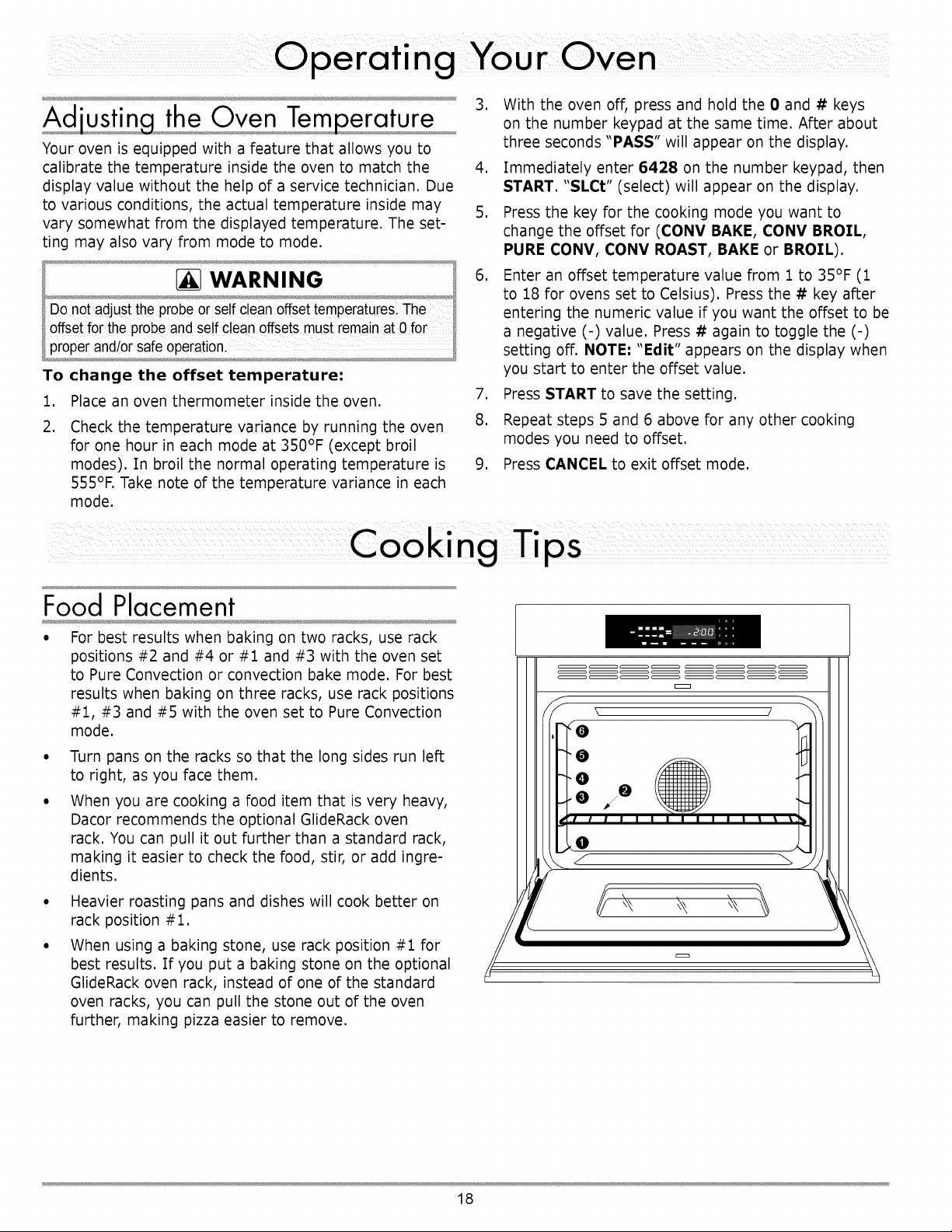
• For best results when baking on two racks, use rack
positions #2 and #4 or #1 and #3 with the oven set
to Pure Convection or convection bake mode. For best
results when baking on three racks, use rack positions
#1, #3 and #5 with the oven set to Pure Convection
mode.
Turn pans on the racks so that the long sides run left
to right, as you face them.
When you are cooking a food item that is very heavy,
Dacor recommends the optional GlideRack oven
rack. You can pull it out further than a standard rack,
making it easier to check the food, stir, or add ingre-
dients.
Heavier roasting pans and dishes will cook better on
rack position #1.
When using a baking stone, use rack position #1 for
best results. If you put a baking stone on the optional
GlideRack oven rack, instead of one of the standard
oven racks, you can pull the stone out of the oven
further, making pizza easier to remove.
\ /
18
The BestUse of Bake Ware
• You should bake cakes, quick breads, muffins, and
cookies in shiny, reflective pans for light, golden
crusts. Avoid old, darkened, warped, dented, stainless
steel and tin-coated pans. They heat unevenly and will
not give good baking results.
• Use medium gauge aluminum sheets with low sides
when preparing cookies, biscuits and cream puffs.
Dacor cookie sheets, with their low profiles, will give
you the best results.
• Bake most frozen foods in their original foil contain-
ers, placed flat on a cookie sheet. Follow the package
recommendations.
• When using glass bake ware, reduce the recipe tem-
perature by 25°F, except when baking pies or yeast
breads. Follow the standard recipe baking time for
pies and yeast breads.
• Use the pan size and type recommended by the recipe
for best results.
For roasting, Dacor's optional "V" shaped rack and
broil/roast pan works best to allow air circulation
around the food.
Dacor's roasting pan works particularly well and two
of them will fit side by side in a 30 inch oven.
%gh Altitude Cooking
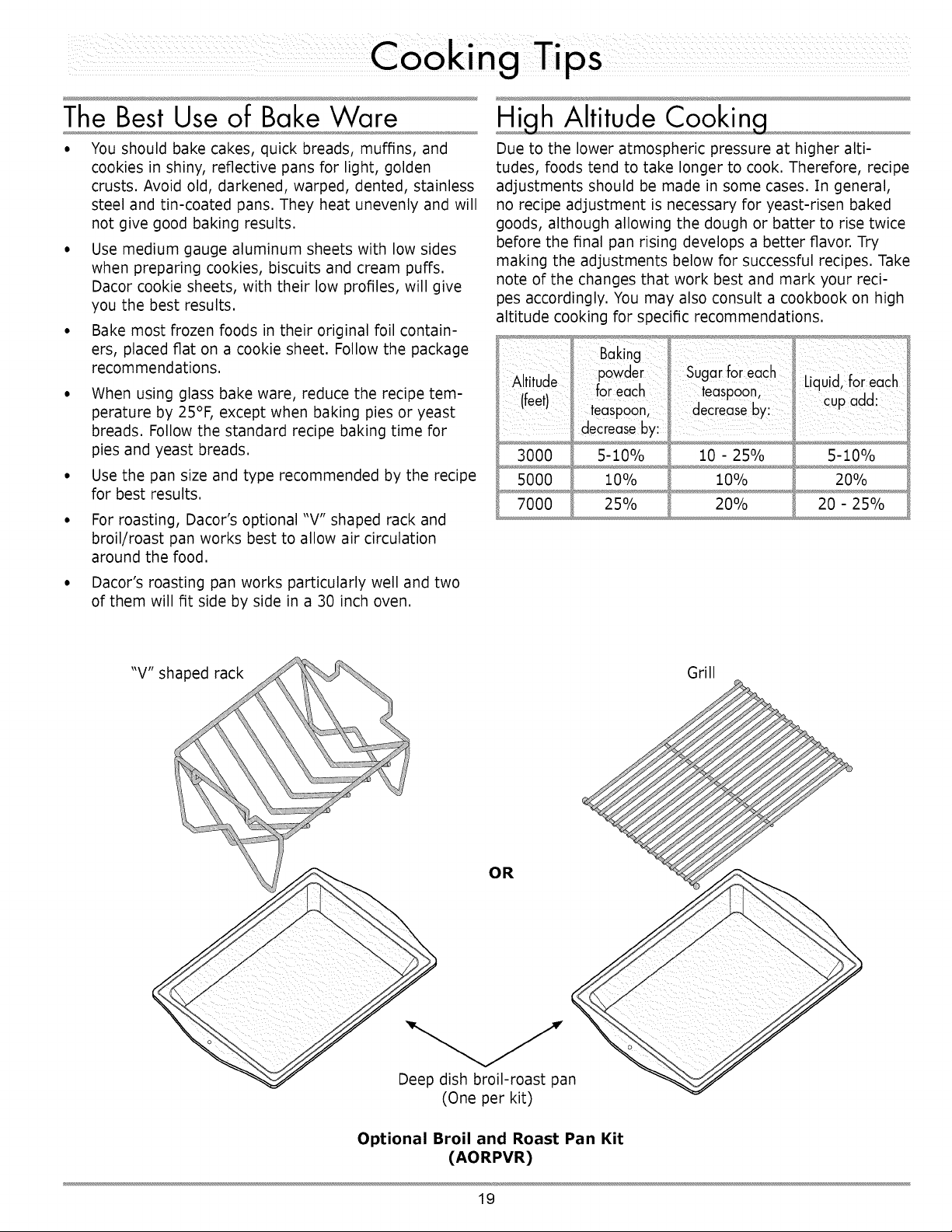
Due to the lower atmospheric pressure at higher alti-
tudes, foods tend to take longer to cook. Therefore, recipe
adjustments should be made in some cases. In general,
no recipe adjustment is necessary for yeast-risen baked
goods, although allowing the dough or batter to rise twice
before the final pan rising develops a better flavor. Try
making the adjustments below for successful recipes. Take
note of the changes that work best and mark your reci-
pes accordingly. You may also consult a cookbook on high
altitude cooking for specific recommendations.
3000 5-10% 10 - 25%
5000 10% 10%
7000 25% 20%
L quid, foreach
cup add:
5-10%
20%
20 - 25%
Grill
(One per kit)
Optional Broil and Roast Pan Kit
(AORPVR)
19
WARNING
• Clean onlythe parts of the oven listed ir this manual.Clean
them only in the mannerspecified.
• Toavoiddangerousfumes or damageto your oven's
surfaces and accessories, use onlythe types of cleaning
solutionsspecified in this manua.
• Toavoid burns,turn off the ovenand make sure that all parts
are cool before cleaning.
• Toprevent damage, do not use abrasive or corrosive
cleaners or applicatorssuch as steel wool or scouring pads,
on any partof the oven unlessinstructedto do so. Use only
a sponge, soft cloth,fibrous or plasticbrush or nyloncleaning
pad for cleaningthe surfaces of youroven.
• Do not use a steam cleanerto clean the oven. Steam could
penetratethe electricalcomponents and cause a short circuit.
• Do nottry to remove heavy spills with a sharpobject such
as a knife or metal spatula. Sharp objects may scratch your
oven's surfaces.
Your Oven's Self Clean Feature
About the Self Clean Cycle
• The oven will run better and produce better baked
goods when it is clean. During self cleaning, the oven
is heated to very high temperatures which burn off
any deposits on the surfaces of the oven. Self cleaning
eliminates the need for manual scrubbing of interior
surfaces. The self clean process takes about three
hours.
It is normal for the oven to emit smoke during the
first few self clean cycles. It is also normal for the
oven to emit popping sounds during self cleaning.
These sounds are caused by the expansion and con-
traction of metal surfaces when the oven heats up and
cools down.
• Self clean mode will not function if the meat probe is
connected.
WARNING
•Always wipe up excessgrease and otherfood spills with a
damp Coth pr or to usingthe self clean cycle. Do ng so will
minimizesmoke and incieaseefficiencYlSee propercleaning
instructions on thispagel
• Do nottouch theoutside surfacesof the 0Yenduring the self
cleancycle. They wi!!be h0L
' !ternsleft inthe o_en during se!f c!eaningwill become
damaged or damagetheoven, Seepage 22 for directionson
polishinga rackthat is eft in the Ovenduring se!f cleaning:
How to
1.
Use the Self Clean Feature
Before self cleaning the oven, remove the racks, the
convection filter, all cookware (pots, pans, forks, etc.),
the meat probe, foil and any other loose objects from
the oven chamber. See page 22 for filter cleaning
instructions.
2. Clean soil from the porcelain surfaces of the door
outside of the door gasket. Rinse surfaces well with
a solution of vinegar and water, then wipe dry. Heav-
ily soiled areas may be cleaned with a non-scratching
scouring pad.
3. Clean the door gasket by dabbing it with a solution of
water and mild soap.
CAUTION
Rubbingor displacing it may damagethe tight doorseal
required for proper co0king and self cleaningl
• Do not tryto force the d00r open after it is locked.Damage to
the door or latchmaYresulL
4. Turn on kitchen fans or vents to help remove odors
during the self clean cycle.
5. Hake sure the oven door is shut.
6. Press the SELF CLEAN key.
7. Press the START key (located on the far left of the
control panel).
The control panel automatically locks the oven door
during self cleaning. The latch prevents the door from
being opened since the high interior oven temperatures
can easily cause injury. If the door is not shut, an error
message will appear on the display. To correct the prob-
lem, press CANCEL • SECURE and wait approximately
one minute, then close the door. When the door is prop-
erly closed, start the self clean process again.
The display shows the self clean cycle status:
• The clean symbol indicates that self clean is ,dP,_
in process.
• The lock symbol indicates that the door is j_,
latched.
O
• "ON" indicates that the heating elements are
on.
If you want to stop the self clean cycle, press the CANCEL
• SECURE key. Keep in mind that the oven door will
remain locked until it is safe enough to open. The lock
symbol will disappear from the display when the door lock
is released. You will still need to exercise caution when
the door lock is released because the inside of the oven
may still be hot.
2O
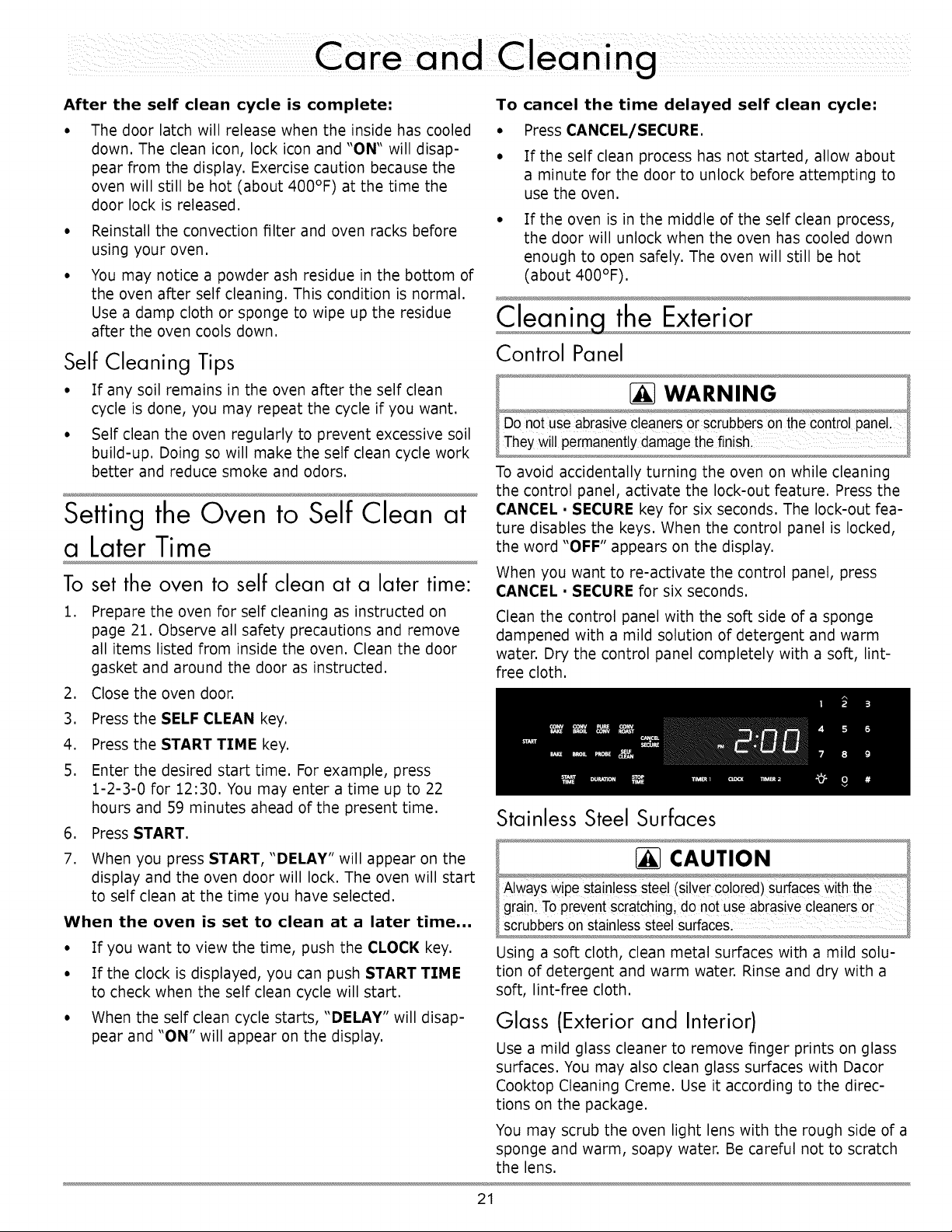
After the self clean cycle is complete:
• The door latch will release when the inside has cooled
down. The clean icon, lock icon and "ON" will disap-
pear from the display. Exercise caution because the
oven will still be hot (about 400°F) at the time the
door lock is released.
Reinstall the convection filter and oven racks before
using your oven.
You may notice a powder ash residue in the bottom of
the oven after self cleaning. This condition is normal.
Use a damp cloth or sponge to wipe up the residue
after the oven cools down.
Self Cleaning Tips
• If any soil remains in the oven after the self clean
cycle is done, you may repeat the cycle if you want.
• Self clean the oven regularly to prevent excessive soil
build-up. Doing so will make the self clean cycle work
better and reduce smoke and odors.
Setting the Oven to Self Clean at
a LaterTime
To set the oven to self clean at a later time:
,
Prepare the oven for self cleaning as instructed on
page 21. Observe all safety precautions and remove
all items listed from inside the oven. Clean the door
gasket and around the door as instructed.
2. Close the oven door.
To cancel the time delayed self clean cycle:
• Press CANCEL/SECURE.
• If the self clean process has not started, allow about
a minute for the door to unlock before attempting to
use the oven.
If the oven is in the middle of the self clean process,
the door will unlock when the oven has cooled down
enough to open safely. The oven will still be hot
(about 400°F).
the Exterior
Control Panel
To avoid accidentally turning the oven on while cleaning
the control panel, activate the lock-out feature. Press the
CANCEL • SECURE key for six seconds. The lock-out fea-
ture disables the keys. When the control panel is locked,
the word "OFF" appears on the display.
When you want to re-activate the control panel, press
CANCEL • SECURE for six seconds.
Clean the control panel with the soft side of a sponge
dampened with a mild solution of detergent and warm
water. Dry the control panel completely with a soft, lint-
free cloth.
3. Press the SELF CLEAN key.
4. Press the START TIME key.
5. Enter the desired start time. For example, press
1-2-3-0 for 12:30. You may enter a time up to 22
hours and 59 minutes ahead of the present time.
6. Press START.
7. When you press START, "DELAY" will appear on the
display and the oven door will lock. The oven will start
to self clean at the time you have selected.
When the oven is set to clean at a later time,,,
Stainless Steel Surfaces
If you want to view the time, push the CLOCK key.
If the clock is displayed, you can push START TIME
to check when the self clean cycle will start.
When the self clean cycle starts, "DELAY" will disap-
pear and "ON" will appear on the display.
Using a soft cloth, clean metal surfaces with a mild solu-
tion of detergent and warm water. Rinse and dry with a
soft, lint-free cloth.
• Glass (Exterior and Interior)
Use a mild glass cleaner to remove finger prints on glass
surfaces. You may also clean glass surfaces with Dacor
Cooktop Cleaning Creme. Use it according to the direc-
tions on the package.
You may scrub the oven light lens with the rough side of a
sponge and warm, soapy water. Be careful not to scratch
the lens.
21
9 the Interior
Convection Filter
1For yoursafety and proper oven performance, re-instal!thefilter
_beforeusingthe oven to cook. If youdon,t, the
bladesat the back ofthe ovenwill be exposed
The convection filter is located in the back of each oven
chamber. Clean the filter regularly. If you allow it to
become clogged, the oven's convection cooking modes
will not work properly. You also need to remove the filter
during the self clean cycle.
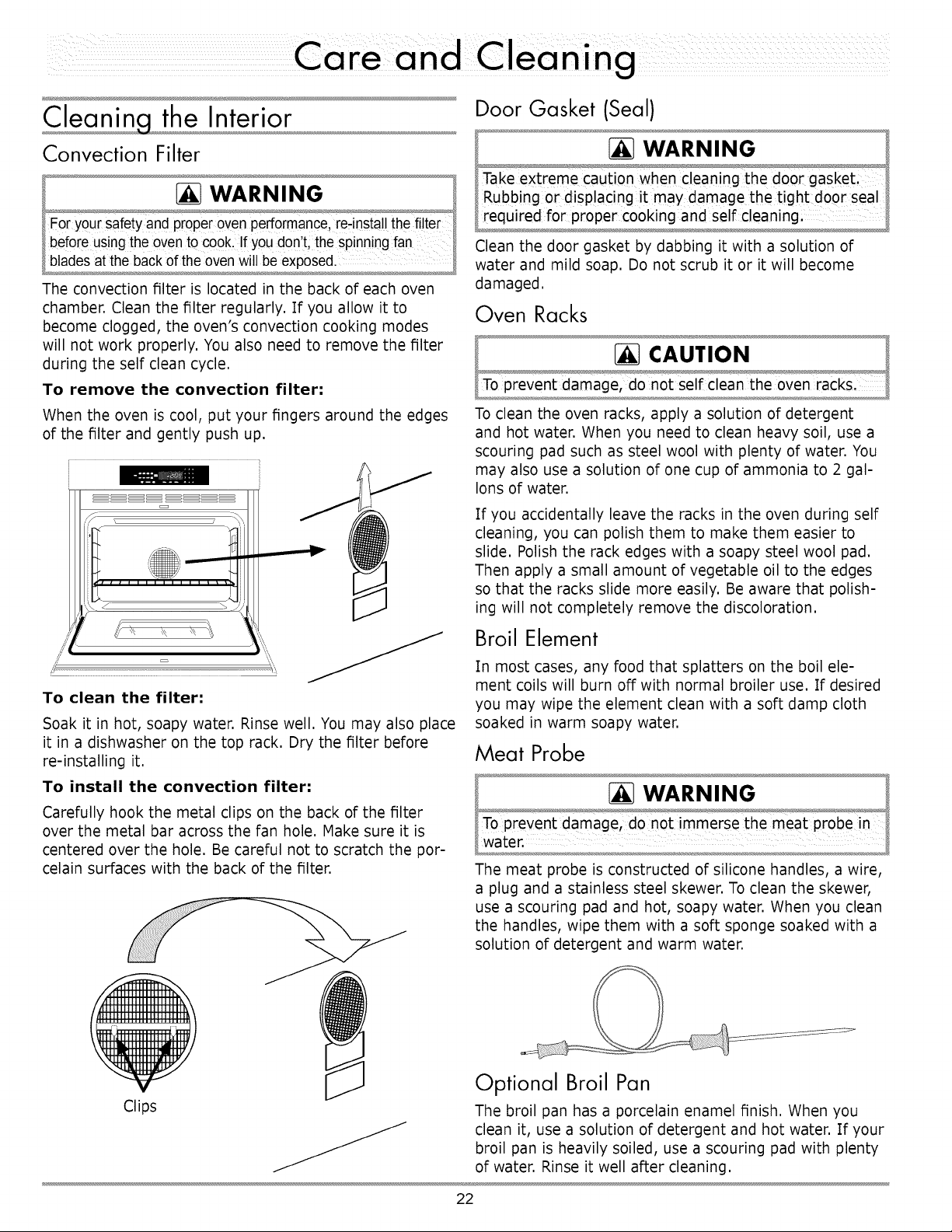
To remove the convection filter:
When the oven is cool, put your fingers around the edges
of the filter and gently push up.
To clean the filter:
Soak it in hot, soapy water. Rinse well. You may also place
it in a dishwasher on the top rack. Dry the filter before
re-installing it.
To install the convection filter:
Carefully hook the metal clips on the back of the filter
over the metal bar across the fan hole. Hake sure it is
centered over the hole. Be careful not to scratch the por-
celain surfaces with the back of the filter.
Door Gasket (Seal)
WARNING°,
lake extreme caution wnen cleaning tne aoor gasket,
1Rubbing or displacing it may damage the !ight doo r sea
required for proper cookng and self cleamng
Clean the door gasket by dabbing it with a solution of
water and mild soap. Do not scrub it or it will become
damaged.
Oven Racks
To clean the oven racks, apply a solution of detergent
and hot water. When you need to clean heavy soil, use a
scouring pad such as steel wool with plenty of water. You
may also use a solution of one cup of ammonia to 2 gal-
lons of water.
If you accidentally leave the racks in the oven during self
cleaning, you can polish them to make them easier to
slide. Polish the rack edges with a soapy steel wool pad.
Then apply a small amount of vegetable oil to the edges
so that the racks slide more easily. Be aware that polish-
ing will not completely remove the discoloration.
Broil Element
In most cases, any food that splatters on the boil ele-
ment coils will burn off with normal broiler use. If desired
you may wipe the element clean with a soft damp cloth
soaked in warm soapy water.
Meat Probe
The meat probe is constructed of silicone handles, a wire,
a plug and a stainless steel skewer. To clean the skewer,
use a scouring pad and hot, soapy water. When you clean
the handles, wipe them with a soft sponge soaked with a
solution of detergent and warm water.
Clips
Optional Broil Pan
The broil pan has a porcelain enamel finish. When you
clean it, use a solution of detergent and hot water. If your
broil pan is heavily soiled, use a scouring pad with plenty
of water. Rinse it well after cleaning.
22
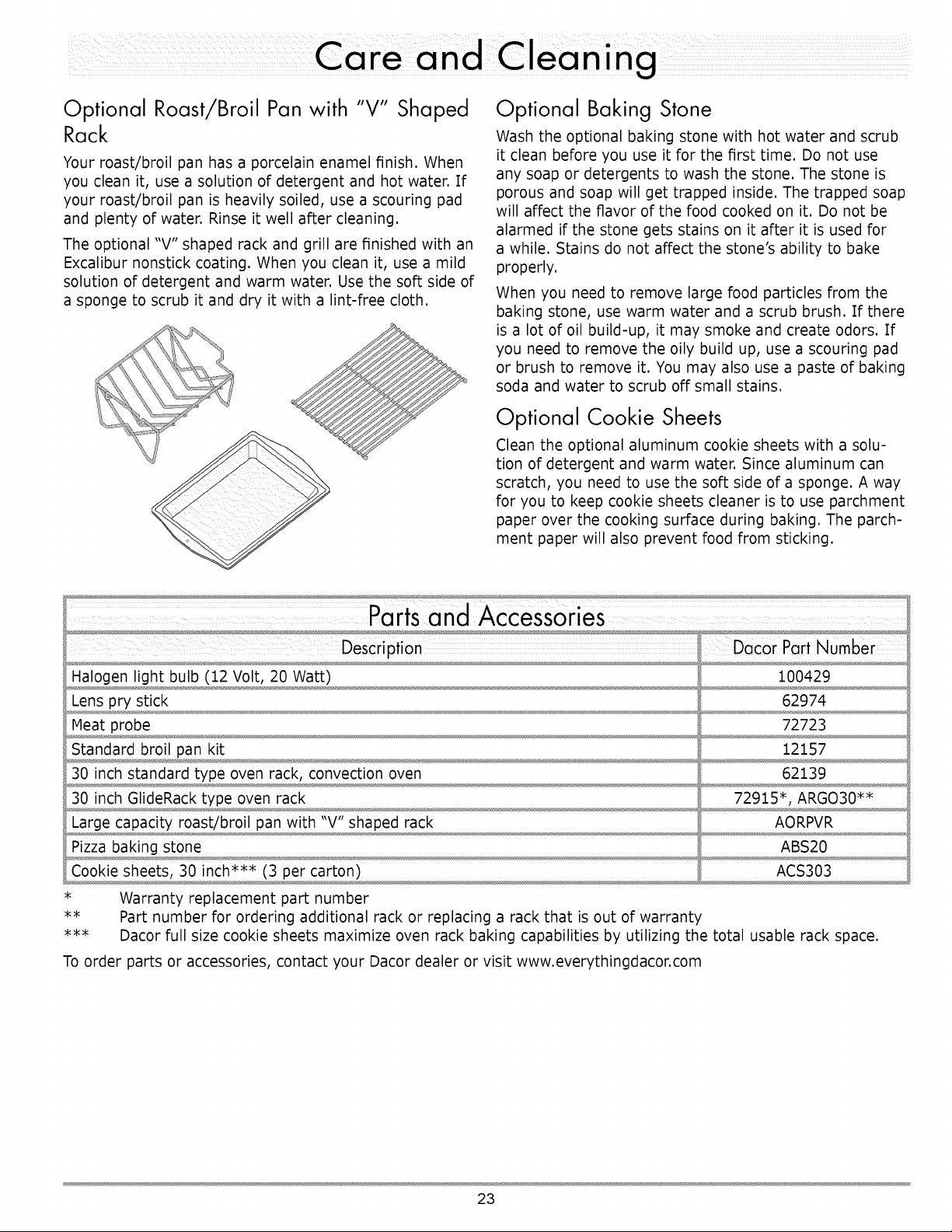
Optional Roast/Broil Pan with "V" Shaped
Rack
Your roast/broil pan has a porcelain enamel finish. When
you clean it, use a solution of detergent and hot water. If
your roast/broil pan is heavily soiled, use a scouring pad
and plenty of water. Rinse it well after cleaning.
The optional "V" shaped rack and grill are finished with an
Excalibur nonstick coating. When you clean it, use a mild
solution of detergent and warm water. Use the soft side of
a sponge to scrub it and dry it with a lint-free cloth.
Optional Baking Stone
Wash the optional baking stone with hot water and scrub
it clean before you use it for the first time. Do not use
any soap or detergents to wash the stone. The stone is
porous and soap will get trapped inside. The trapped soap
will affect the flavor of the food cooked on it. Do not be
alarmed if the stone gets stains on it after it is used for
a while. Stains do not affect the stone's ability to bake
properly.
When you need to remove large food particles from the
baking stone, use warm water and a scrub brush. If there
is a lot of oil build-up, it may smoke and create odors. If
you need to remove the oily build up, use a scouring pad
or brush to remove it. You may also use a paste of baking
soda and water to scrub off small stains.
Optional Cookie Sheets
Clean the optional aluminum cookie sheets with a solu-
tion of detergent and warm water. Since aluminum can
scratch, you need to use the soft side of a sponge. A way
for you to keep cookie sheets cleaner is to use parchment
paper over the cooking surface during baking. The parch-
ment paper will also prevent food from sticking.
Description DacOr Part Number
Halogen light bulb (12 Volt, 20 Watt) 100429
Lens pry stick 62974
Meat probe 72723
Standard broil pan kit 12157
30 inch standard type oven rack, convection oven 62139
30 inch GlideRack type oven rack 72915", ARGO30**
Large capacity roast/broil pan with "V" shaped rack AORPVR
Pizza baking stone ABS20
Cookie sheets, 30 inch*** (3 per carton) ACS303
* Warranty replacement part number
** Part number for ordering additional rack or replacing a rack that is out of warranty
*** Dacor full size cookie sheets maximize oven rack baking capabilities by utilizing the total usable rack space.
To order parts or accessories, contact your Dacor dealer or visit www.everythingdacor.com
23
ht Bulb
WARNING
• Toprevent electricalshock and/or personalinjury, make
certainthat the oven and the lightbulb are cool and that
powerto the oven has been turned off at the main power
supply before replacingthe light bulb.
• Always make surethe lenscover is inplacewhen usingthe
oven.The lens cover protectsthe lightbulb from breakage
caused by high oventemperatures or mechanicalshock.
• Replacingthe lenscover without lining up the cut-outwith the
light socketwill damagethe light fixture.
• Use the pry stick with caution. Do not cause uneven stress
on the lens cover.
Light bulb replacement is considered to be a homeowner
maintenance operation. If the light does not work, before
replacing it, please consult the Problem Solution Guide
on page 25.
To replace the light bulb:
1. Turn off power to the oven at the circuit breaker or
fuse box,
2. Hold your hand under the lens for support and pry it
loose. Pull the lens cover straight out. You may also
use the optional lens pry stick to help remove the lens
(see page 23 for ordering information). Gently insert
the pointed end of the pry stick under the center edge
of the lens cover and pry loose.
3. Using a glove, insert the new bulb into the socket.
Replace the light bulb only with Dacor Part No.
100429, available from any authorized Dacor parts
dealer,
IMPORTANT
Do not touch the replacement halogen light bulb with
your fingers. Halogen bulbs are sensitive to the oils
from your hand. The oils from your hand will stick to the
bulb and may cause it to burn out faster than normal.
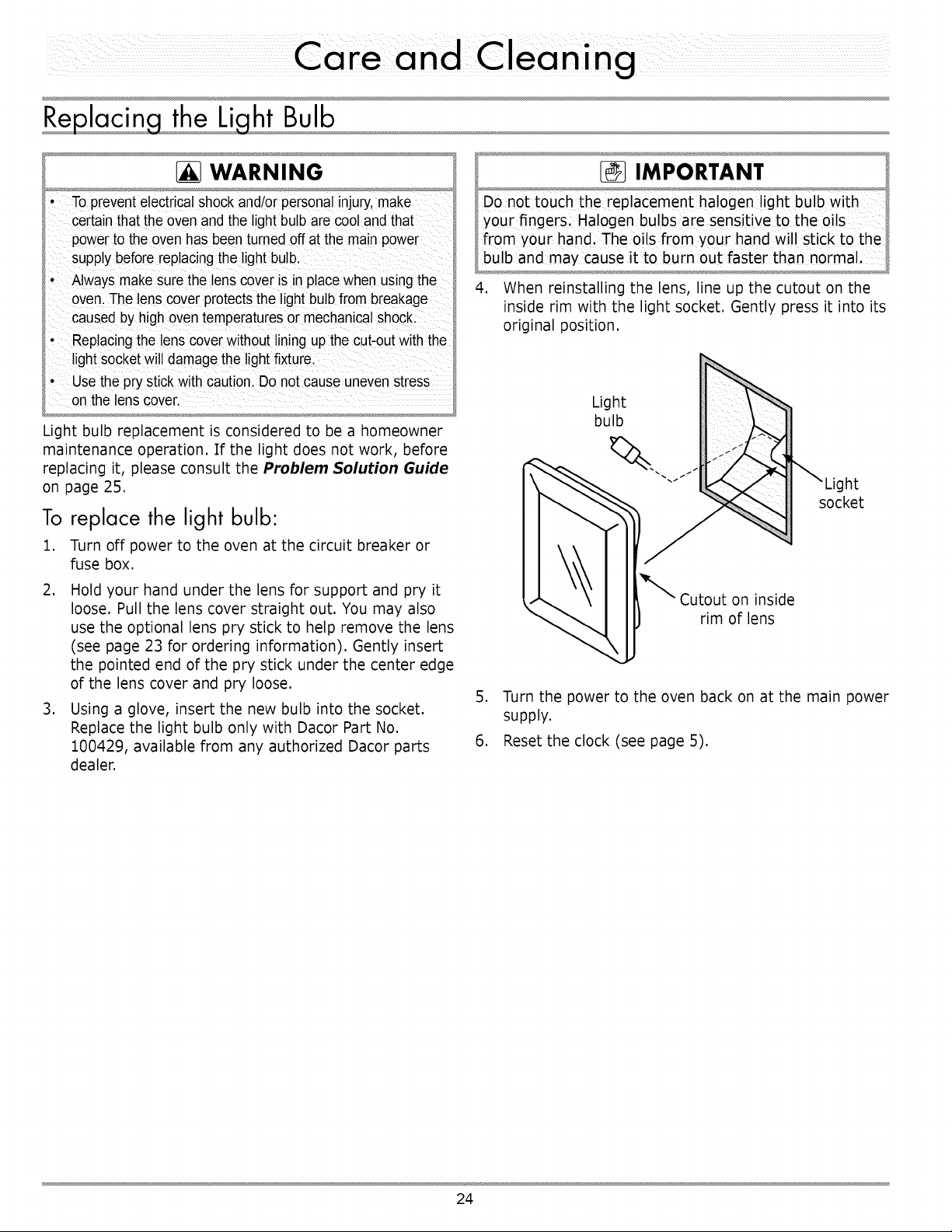
4. When reinstalling the lens, line up the cutout on the
inside rim with the light socket. Gently press it into its
original position.
Light
bulb
Iht
socket
on inside
rim of lens
5. Turn the power to the oven back on at the main power
supply.
6. Reset the clock (see page 5).
24
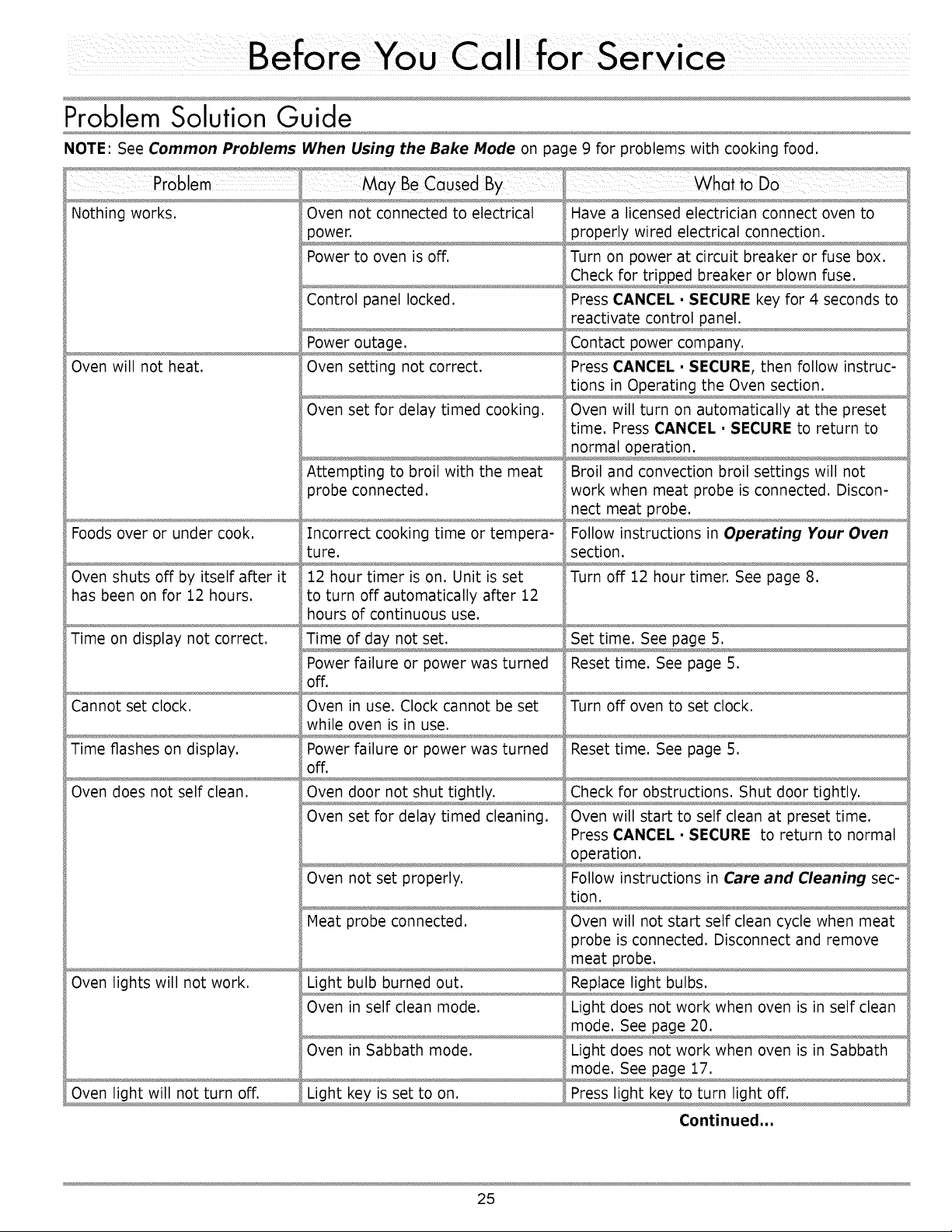
Problem Solution Guide
NOTE: See Common Problems
_ May BeCausedlii By
Nothing works. Oven not connected to electrical
Oven will not heat.
Foods over or under cook.
Oven shuts off by itself after it
has been on for 12 hours.
Time on display not correct.
Cannot set clock.
Time flashes on display.
Oven does not self clean.
Oven lights will not work.
Oven light will not turn off.
When Using the Bake Mode on page 9 for problems with cooking food.
power,
Power to oven is off,
Control panel locked,
Power outage,
Oven setting not correct.
Oven set for delay timed cooking,
Attempting to broil with the meat
probe connected,
Incorrect cooking time or tempera-
ture.
12 hour timer is on. Unit is set
to turn off automatically after 12
hours of continuous use.
Time of day not set.
Power failure or power was turned
off.
Oven in use. Clock cannot be set
while oven is in use.
Power failure or power was turned
off.
Oven set for delay timed cleaning.
Oven not set properly.
Meat probe connected.
Light bulb burned out.
Oven in self clean mode.
Oven in Sabbath mode.
i . . . •
What toDO
Have a licensed electrician connect oven to
properly wired electrical connection.
Turn on power at circuit breaker or fuse box.
Check for tripped breaker or blown fuse.
Press CANCEL • SECURE key for 4 seconds to
reactivate control panel.
Contact power company.
Press CANCEL • SECURE, then follow instruc-
tions in Operating the Oven section.
Oven will turn on automatically at the preset
time. Press CANCEL • SECURE to return to
normal operation.
Broil and convection broil settings will not
work when meat probe is connected. Discon-
nect meat probe.
Follow instructions in Operating Your Oven
section.
Turn off 12 hour timer. See page 8.
Set time. See page 5.
Reset time. See page 5.
Turn off oven to set clock.
Reset time. See page 5.
Check for obstructions. Shut door tightly.
Oven will start to self clean at preset time.
Press CANCEL • SECURE to return to normal
operation.
Follow instructions in Care and Cleaning sec-
tion.
Oven will not start self clean cycle when meat
_robe is connected. Disconnect and remove
meat probe.
Replace light bulbs.
Light does not work when oven is in self clean
mode. See page 20.
Light does not work when oven is in Sabbath
mode. See page 17.
Press light key to turn light off.
Continued...
25
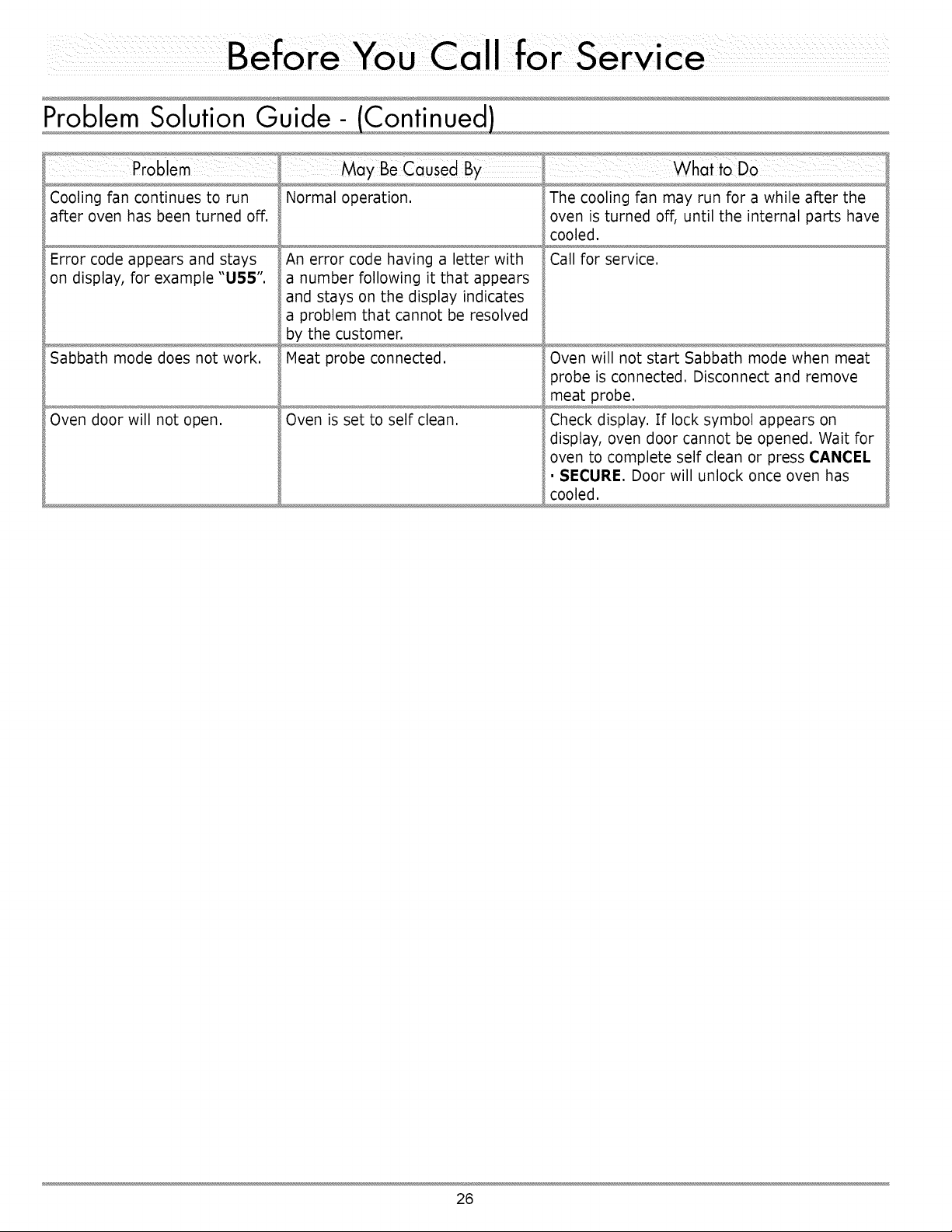
Cooling fan continues to run
after oven has been turned off.
Error code appears and stays
on display, for example "U55".
Sabbath mode does not work.
Oven door will not open.
Normal operation.
An error code having a letter with
a number following it that appears
and stays on the display indicates
a problem that cannot be resolved
by the customer.
Meat probe connected.
Oven is set to self clean.
The cooling fan may run for a while after the
oven is turned off, until the internal parts have
cooled.
Call for service.
Oven will not start Sabbath mode when meat
probe is connected. Disconnect and remove
meat probe.
Check display. If lock symbol appears on
display, oven door cannot be opened. Wait for
oven to complete self clean or press CANCEL
• SECURE. Door will unlock once oven has
cooled.
26
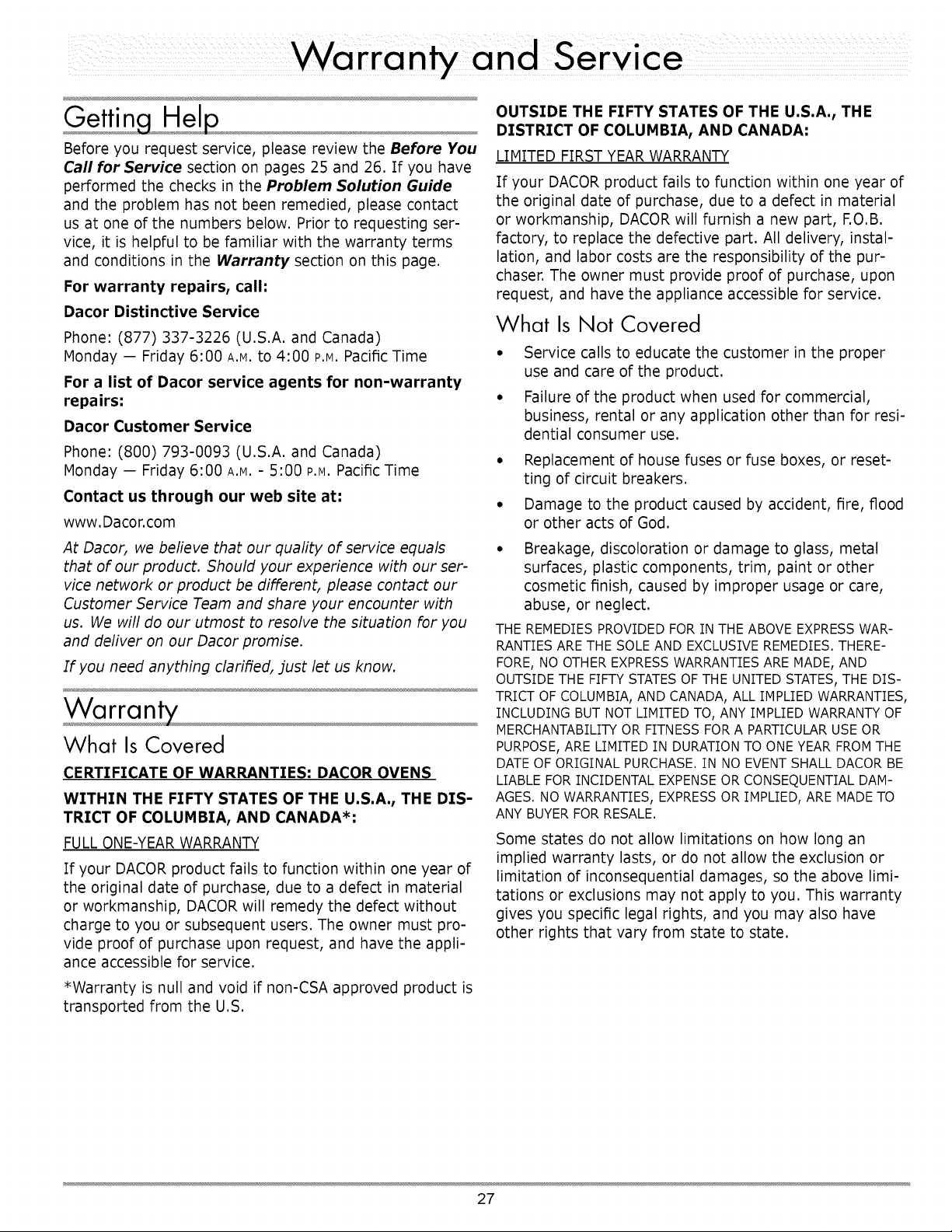
Gettin Hel
Before you request service, please review the Before You
Call for Service section on pages 25 and 26. If you have
performed the checks in the Problem Solution Guide
and the problem has not been remedied, please contact
us at one of the numbers below. Prior to requesting ser-
vice, it is helpful to be familiar with the warranty terms
and conditions in the Warranty section on this page.
For warranty repairs, call:
Dacor Distinctive Service
Phone: (877) 337-3226 (U.S.A. and Canada)
Monday -- Friday 6:00 A.M.to 4:00 P.M.Pacific Time
For a list of Dacor service agents for non-warranty
repairs:
Dacor Customer Service
Phone: (800) 793-0093 (U.S.A. and Canada)
Monday -- Friday 6:00 A.M.- 5:00 P.M.Pacific Time
Contact us through our web site at:
www. Dacor.com
At Dacor, we believe that our quality of service equals
that of our product. Should your experience with our ser-
vice network or product be different, please contact our
Customer Service Team and share your encounter with
us. We will do our utmost to resolve the situation for you
and deliver on our Dacor promise.
If you need anything clarified, just let us know.
Warran ,
What Is Covered
CERTIFICATE OF WARRANTIES: DACOR OVENS
WITHIN THE FIFTY STATES OF THE U.S.A., THE DIS-
TRICT OF COLUMBIA, AND CANADA*:
FULL ONE-YEAR WARRANTY
If your DACOR product fails to function within one year of
the original date of purchase, due to a defect in material
or workmanship, DACOR will remedy the defect without
charge to you or subsequent users. The owner must pro-
vide proof of purchase upon request, and have the appli-
ance accessible for service.
*Warranty is null and void if non-CSA approved product is
transported from the U.S.
OUTSIDE THE FIFTY STATES OF THE U.S.A., THE
DISTRICT OF COLUMBIA, AND CANADA:
LIMITED FIRST YEAR WARRANTY
If your DACOR product fails to function within one year of
the original date of purchase, due to a defect in material
or workmanship, DACOR will furnish a new part, F.O.B.
factory, to replace the defective part. All delivery, instal-
lation, and labor costs are the responsibility of the pur-
chaser. The owner must provide proof of purchase, upon
request, and have the appliance accessible for service.
What Is Not Covered
• Service calls to educate the customer in the proper
use and care of the product.
• Failure of the product when used for commercial,
business, rental or any application other than for resi-
dential consumer use.
° Replacement of house fuses or fuse boxes, or reset-
ting of circuit breakers.
° Damage to the product caused by accident, fire, flood
or other acts of God.
• Breakage, discoloration or damage to glass, metal
surfaces, plastic components, trim, paint or other
cosmetic finish, caused by improper usage or care,
abuse, or neglect.
THE REMEDIES PROVIDED FOR IN THE ABOVE EXPRESS WAR-
RANTIES ARE THE SOLE AND EXCLUSIVE REMEDIES. THERE-
FORE, NO OTHER EXPRESS WARRANTIES ARE MADE, AND
OUTSIDE THE FIFTY STATES OF THE UNITED STATES, THE DIS-
TRICT OF COLUMBIA, AND CANADA, ALL IMPLIED WARRANTIES,
INCLUDING BUT NOT LIMITED TO, ANY IMPLIED WARRANTY OF
MERCHANTABILITY OR FITNESS FOR A PARTICULAR USE OR
PURPOSE, ARE LIMITED IN DURATION TO ONE YEAR FROM THE
DATE OF ORIGINAL PURCHASE. IN NO EVENT SHALL DACOR BE
LIABLE FOR INCIDENTAL EXPENSE OR CONSEQUENTIAL DAM-
AGES. NO WARRANTIES, EXPRESS OR IMPLIED, ARE MADE TO
ANY BUYER FOR RESALE.
Some states do not allow limitations on how long an
implied warranty lasts, or do not allow the exclusion or
limitation of inconsequential damages, so the above limi-
tations or exclusions may not apply to you. This warranty
gives you specific legal rights, and you may also have
other rights that vary from state to state.
27

28
fold here
NO POSTAGE
NECESSARY
IF MAILED
IN THE
UNITED STATES
BUSINESS REPLY MAIL
FIRST-CLASSMAIL PERMITNO.4507 DIAMONDBARCA
POSTAGEWILL BE PAIDBYADDRESSEE
DACOR
ATTN: WARRANTY PROCESSING DEPT
PO BOX 6532
DIAMOND BAR CA 91765-9861
I1,1,,,,,111,,,I,I1,,,I,1,1,1,,I,,I,,11,,,,,111,,I,I
Pleasevisit www.Dacor.com to activate your warranty online.
WARRANTYINFORMATION
IMPORTANT:
Yourwarrantywillnotbeactivateduntilyou activateitonlineor returnthisform toDacor.Ifyou havepurchasedmore
thanoneDacorproduct,pleasereturnallforms inoneenvelopeoractivatethewarrantyfor eachproductonline.
PleaserestassuredthatundernoconditionswillDacorsellyournameor anyoftheinformationon thisformformailinglistpurposes.We
are verygratefulthatyouhavechosenDacorproductsforyourhomeanddo notconsiderthesaleofsuchinformationtobea properway
of expressingourgratitude!
Owner'sName:
Street:
City:
PurchaseDate:
Dealer:
City:
Last (PleasePrintor Type)
Email:
First Middle
State: Zip:
Telephone:
State: Zip:
Yourwillingnesstotakea fewsecondstofillin thesectionbelowwillbesincerelyappreciated.Thankyou.
1.Howwereyoufirst exposedtoDacorproducts?(Pleasecheckoneonly.)
[] A. T.V.CookingShow [] F Builder
[] B. Magazine [] G. Architect/Designer
[] C. ApplianceDealerShowroom [] H. AnotherDacorOwner
[] D. KitchenDealerShowroom [] I. ModelHome
[] E. HomeShow [] J. Other
2. WheredidyoubuyyourDacorappliances?
[] A. ApplianceDealer [] D. Builder
[] B. KitchenDealer [] E. Other
[] C. BuilderSupplier
3.Forwhatpurposewastheproductpurchased?
[] A. Replacementon/y [] C. NewHome
[] B. Partofa Remodel [] D. Other
4. Whatisyourhouseholdincome?
[] A. Under$75,000 [] D. $150,000-$200,000
[] B. $75,000-$100,000 [] E. $200,000-$250,000
[] C. $100,000-$150,000 [] F. OverS250,000
5.Whatotherbrandsof appliancesdoyouhaveinyourkitchen?
A. Cooktop C.Dishwasher
B.Oven D.Refrigerator
6. Wouldyoubuyor recommendanotherDacorproduct?
[] Yes
Comments:
[] No
=_I
°I
Thankyouverymuchfor yourassistance.Theinformationyouhave
providedwillbeextremelyvaluableinhelpingusplanforthefuture
andgivingyouthesupportyoudeserve.
Web site: www.Dacor.com
Corporate phone: (800) 793-0093