Model: GLASSBREAK/WIFI
READ BEFORE INSTALLATION.
SAVE THESE INSTRUCTIONS.
We appreciate the trust and confidence you have placed in Feit Electric through the purchase of this product. We strive to
continually create quality products designed to enhance your home. Visit us online to see our full line of products available for your
home improvement needs. Thank you for choosing Feit Electric.
REV004
Feit Electric app
Works with
Only supports
2.4GHz Wi-Fi
Networks
Thank you for your purchase. Questions, comments
or feedback? We’d love to hear from you.
Visit feit.com/help for support.
Questions, problems, missing parts?
Before returning to store, visit feit.com/help for further assistance.
IMPORTANT SAFETY INSTRUCTIONS
AND INSTALLATION GUIDE
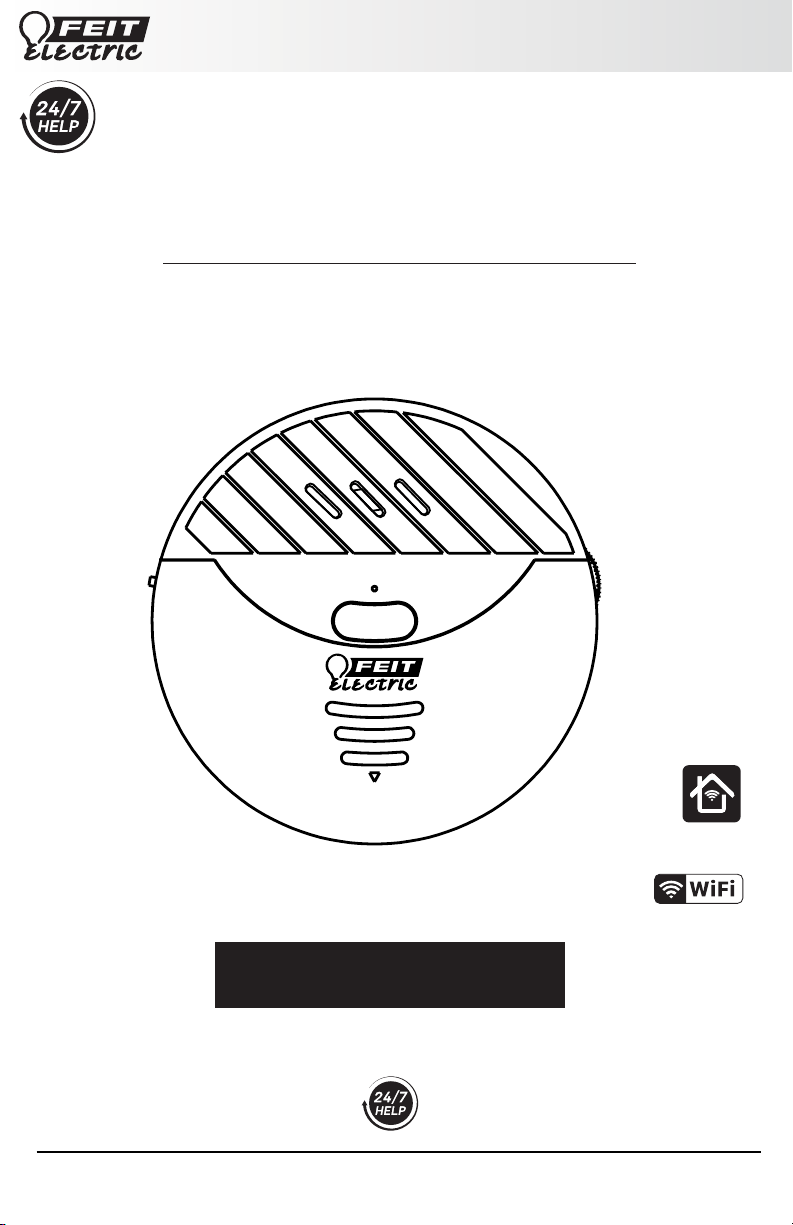
SMART GLASS BREAK SENSOR
2
Table of Contents
Safety Information
IMPORTANT SAFEGUARDS:
ALWAYS FOLLOW BASIC SAFETY PRECAUTIONS
WHEN USING ELECTRICAL PRODUCTS,
ESPECIALLY WHEN CHILDREN ARE PRESENT.
CAUTION: Please read all information carefully
before installation.
CAUTION: Intended for indoor use.
CAUTION: This product is NOT a toy.
Supplier’s Declaration of Conformity:
47 CFR § 2.1077 Compliance Information
Responsible Party:
Feit Electric Company
4901 Gregg Road,
Pico Rivera, CA 90660, USA
562-463-2852
Unique Identifier:
GLASSBREAK/WIFI
Table of Contents . . . . . . . . . . . . . . . . . . . . . . . . . . . . . . . . . . . . . . . . . . . . . . . . . . . . . . . . . . . . . . . . . . . . . . . . . . . . . . . 2
Safety Information . . . . . . . . . . . . . . . . . . . . . . . . . . . . . . . . . . . . . . . . . . . . . . . . . . . . . . . . . . . . . . . . . . . . . . . . . . . . . . 2
FCC Statement . . . . . . . . . . . . . . . . . . . . . . . . . . . . . . . . . . . . . . . . . . . . . . . . . . . . . . . . . . . . . . . . . . . . . . . . . . . . . . . . . . 2
Limited Warranty . . . . . . . . . . . . . . . . . . . . . . . . . . . . . . . . . . . . . . . . . . . . . . . . . . . . . . . . . . . . . . . . . . . . . . . . . . . . . . . . 2
Pre-Installation. . . . . . . . . . . . . . . . . . . . . . . . . . . . . . . . . . . . . . . . . . . . . . . . . . . . . . . . . . . . . . . . . . . . . . . . . . . . . . . . . 3
Description . . . . . . . . . . . . . . . . . . . . . . . . . . . . . . . . . . . . . . . . . . . . . . . . . . . . . . . . . . . . . . . . . . . . . . . . . . . . . . . . . . . . 3
Setup and Installation . . . . . . . . . . . . . . . . . . . . . . . . . . . . . . . . . . . . . . . . . . . . . . . . . . . . . . . . . . . . . . . . . . . . . . . . . . . 4
App Setup . . . . . . . . . . . . . . . . . . . . . . . . . . . . . . . . . . . . . . . . . . . . . . . . . . . . . . . . . . . . . . . . . . . . . . . . . . . . . . . . . . . . . 4
Connect Your Device . . . . . . . . . . . . . . . . . . . . . . . . . . . . . . . . . . . . . . . . . . . . . . . . . . . . . . . . . . . . . . . . . . . . . . . . . . . . 5
Troubleshooting Tips . . . . . . . . . . . . . . . . . . . . . . . . . . . . . . . . . . . . . . . . . . . . . . . . . . . . . . . . . . . . . . . . . . . . . . . . . . . . 5
FEIT ELECTRIC COMPANY | PICO RIVERA, CA | www.feit.com
Limited Warranty
This product is warrantied to be free from defects in workmanship and materials for up to 1 year from date of purchase. If
the product fails within the warranty period, please visit feit.com/help for instructions on replacement/refund or call
866.326.BULB. REPLACEMENT OR REFUND IS YOUR SOLE REMEDY. EXCEPT TO THE EXTENT PROHIBITED BY
APPLICABLE LAW, ANY IMPLIED WARRANTIES ARE LIMITED IN DURATION TO THE DURATION OF THIS WARRANTY.
LIABILITY FOR INCIDENTAL OR CONSEQUENTIAL DAMAGES IS HEREBY EXPRESSLY EXCLUDED. Some states and provinces
do not allow the exclusion of incidental or consequential damages, so the above limitation or exclusion may not apply to
you. This warranty gives you specific legal rights, and you may also have other rights which vary from state to state or
province to province.
The device has been evaluated to meet general RF exposure requirement.
The device can be used in portable exposure condition without restriction.
The device can be used in mobile (min 7.87 in.) exposure condition without restriction.
This device complies with part 15 of the FCC Rules. Operation is subject to the following two conditions: (1) This device
may not cause harmful interference, and (2) this device must accept any interference received, including interference that
may cause undesired operation. Note: This equipment has been tested and found to comply with the limits for a Class B
digital device, pursuant to part 15 of the FCC Rules. These limits are designed to provide reasonable protection against
harmful interference in a residential installation. This equipment generates, uses and can radiate radio frequency energy
and, if not installed and used in accordance with the instructions, may cause harmful interference to radio
communications. However, there is no guarantee that interference will not occur in a particular installation. If this
equipment does cause harmful interference to radio or television reception, which can be determined by turning the
equipment off and on, the user is encouraged to try to correct the interference by one or more of the following measures:
Reorient or relocate the receiving antenna. Increase the separation between the equipment and receiver. Connect the
equipment into an outlet on a circuit different from that to which the receiver is connected. Consult the dealer or an
experienced radio/TV technician for help. Any changes or modifications not expressly approved by the manufacturer could
void the user's authority to operate the equipment. CAN ICES-005 (B).
3
Pre-Installation
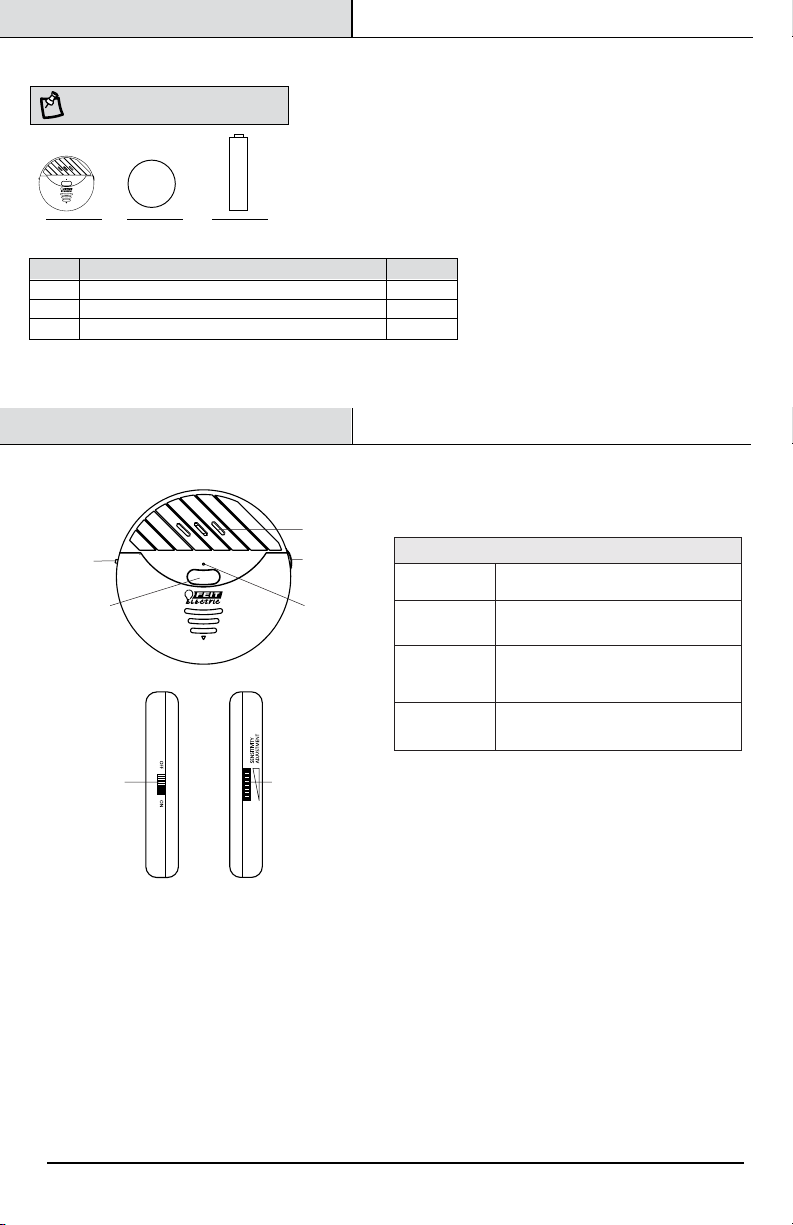
ITEM DESCRIPTION
Status Light
On/Off Switch
• Blinking BLUE: Pairing Mode
• Blinking BLUE Slowly: Low Battery
Turn the device ON or OFF.
Sensitivity
Adjustment
Reset Button
Press and hold the Reset Button for
ve seconds to enter pairing mode.
Set the sensitivity to prevent unintentional
activations in the environment in which it
is installed.
Description
Speaker
Status Light
Sensitivity
Adjustment
Sensitivity
Adjustment
On/Off Switch
On/Off Switch
Reset Button
/Snooze
FEIT ELECTRIC COMPANY | PICO RIVERA, CA | www.feit.com
NOTE: Hardware not shown to actual size.
HARDWARE INCLUDED
AA BB
Part Description Quantity
AA 1
1
2
Glass Break Sensor
BB
CC
CC
Double-Sided Tape
1.5V AAA Alkaline Batteries
4
Setup and Installation
11
2
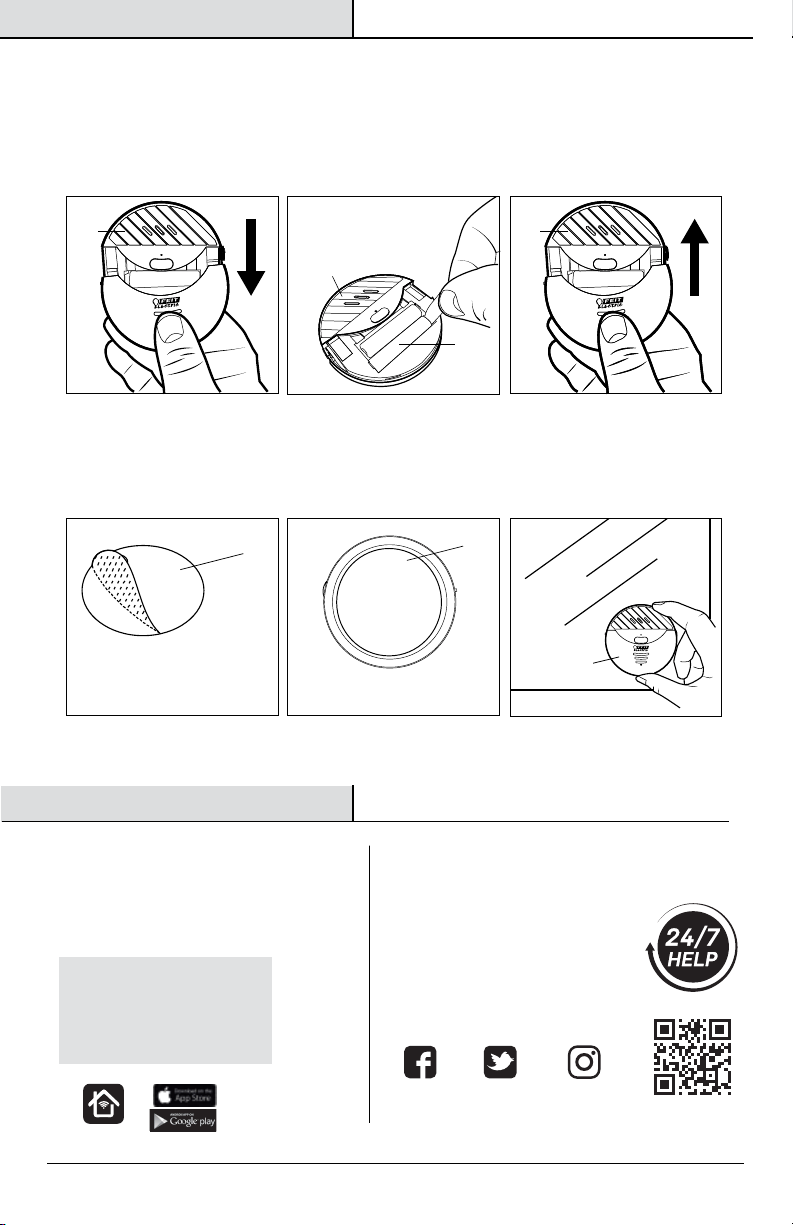
Installation Instruction
Apply to the back side
Peel off the
Double-Sided Tape
BB
AA
Clean the mounting area thoroughly (surface must be free of dust, dirt or grease).
Peel off one side of the Double-Sided Tape (BB) and stick it on the back of the Glass Break Sensor (AA).
Peel Off the other side of the Double-Sided Tape (BB) and stick it to a glass surface.
•
•
•
Setting Up Your Device
Remove the Glass Break Sensor (AA) front cover.
Insert two 1.5V AAA Alkaline Batteries (CC) or remove the tag if batteries are inside the device.
Close the front cover on the Glass Break Sensor (AA).
Follow instructions in the App Setup section to set up the device in the Feit Electric app.
•
•
•
•
AA AA
AA
CC
• Search for the Feit Electric app in the
App Store or Google Play Store.
• Download and install the Feit Electric
app on your smart device.
Download and install the Feit Electric app
Feit Electric App
APP Setup
Be sure to connect to a
2.4GHz Wi-Fi network
that covers your
installation location.
Thank you for your purchase.
Questions, comments or feedback?
We’d love to hear from you.
Visit
feit.com/help for support
or connect with us:
Need Help?
@FeitElectricInc@FeitElectric feitelectriclighting
FEIT ELECTRIC COMPANY | PICO RIVERA, CA | www.feit.com
AA
5
If you are having difficulty connecting:
Make sure the Wi-Fi network is a 2.4GHz network. Feit Electric smart device will not connect to a 5GHz network.
Test your Wi-Fi network with other devices such as your phone to make sure it is operating properly.
The Wi-Fi connection may not have good coverage during set up. Try moving the device closer to your Wi-Fi router.
Your Wi-Fi network password is case sensitive, make sure you are entering it correctly.
•
•
•
•
Troubleshooting Tips
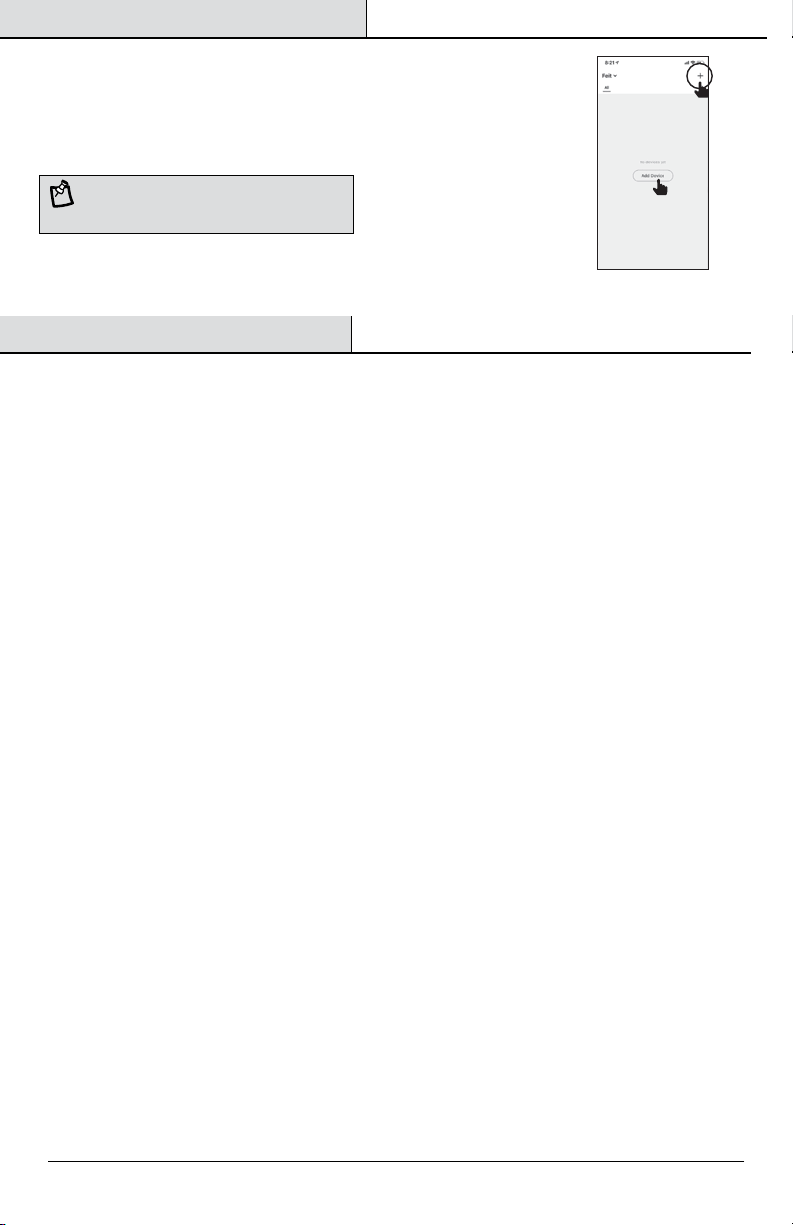
Open the Feit Electric app to complete the set up
Tap Add Device or the + sign. Tap Controls & Sensors and then select Glass Break
Sensor. You will be prompted to enter your Wi-Fi network and password.
Alternative set up options and help instructions are available in the Feit Electric app.
•
•
FEIT ELECTRIC COMPANY | PICO RIVERA, CA | www.feit.com
Connect Your Device
NOTE: The device must be rapidly blinking to connect.
If not already blinking, press and hold the Reset Button for
five seconds to enter pairing mode.