
Contents
Introduction, 2
Installation, 3
Safety Information, 4
Features, 6
Control Panel, 7
Clock/Minute Minder Operation, 8
Ceramic Hob, 10
Grill, 16
Top Oven Cookery Notes , 17
Main Oven Cookery Notes, 18
Oven Temperature charts, 19
Care and Cleaning, 21
Cooking Results Not Satisfactory?, 24
Something Wrong With Your Cooker?, 25
If it Still Won’t Work..., 26
Disposal of the appliance, 26
Guarantee Information, 27
Service Information, 28
You must read these instructions prior to using
your appliance and retain them for future use.
Operating Instructions
Free Standing Electric Cooker
English, 1
GB
HUI 612 P
Please phone us on
08448 24 24 24
to activate your
guarantee
2
GB
PLEASE PHONE US TO REGISTER YOUR APPLIANCE AND ACTIVATE YOUR PARTS GUARANTEE ON 08448 24 24 24
Your new appliance is guaranteed* and will give lasting
service.This guarantee is only applicable if the appliance
has been installed in accordance with the installation
instructions detailed in this booklet.
To help make best use of your cooking equipment, please
read this booklet carefully.
The cooker is designed specifically for domestic use and
responsibility will not be accepted for use in any other
installation.
When the cooker is first used an odour may be
emitted, this will cease after a period of use.
When first using the cooker ensure that the room is well
ventilated (e.g. open a window or use an extractor fan)
and that persons who may be sensitive to the odour
avoid any fumes.
It is suggested that any pets be removed from the room
until the smell has ceased. This odour is due to temporary
finish on oven liners and elements and also any moisture
absorbed by the insulation.
* The guarantee is subject to the provisions that the
appliance:
(a) Has been used solely in accordance with the Users
Instruction Book.
(b) Has been properly connected to a suitable supply
voltage as stated on the rating plate attached to
this equipment.
(c) Has not been subjected to misuse or accident or
been modified or repaired by any person other
than the authorised employee or agent.
(d) Has been correctly installed.
This appliance conforms with the following European
Economic Community directives:
- 2006/95/EC of 12/12/06 (Low Voltage) and subse-
quent modifications;
- 2004/108/EC of 15/12/04 (Electromagnetic Compati-
bility) and subsequent modifications;
- 2002/96/EC
- 1275/2008 (Stand-by/ Off mode)
Introduction
Technical Characteristics
Top Oven
Usable Volume: 39 Litres
ENERGY LABEL and ECODESIGN- Top Oven
Regulation (EU) No 65/2014 supplementing Directive
2010/30/EU.
Regulation (EU) No 66/2014 implementing Directive
2009/125/EC.
Standard EN 60350-1
Standard EN 50564.
Declared energy consumption for
Natural convection Class
heating mode: Conventional
Main Oven
Usable Volume: 71 Litres
ENERGY LABEL and ECODESIGN - Main Oven
Regulation (EU) No 65/2014 supplementing Directive
2010/30/EU.
Regulation (EU) No 66/2014 implementing Directive
2009/125/EC.
Standard EN 60350-1
Standard EN 50564.
Declared energy consumption for
Forced convection Class
heating mode: Fan Oven
Voltage and Frequency
230-240V~ 50Hz
Hob
ECODESIGN
Regulation (EU) No 66/2014 implementing Directive
2009/125/EC.
Standard EN 60350-2.
Standard EN 50564.
3
GB
PLEASE PHONE US TO REGISTER YOUR APPLIANCE AND ACTIVATE YOUR PARTS GUARANTEE ON 08448 24 24 24
WARNING - THIS APPLIANCE MUST BE EARTHED.
Mains Connection
Your cooker should have been checked to ensure that
the voltage corresponds with your supply voltage, this is
stated on the rating plate, which is situated on the outer
rear panel.The model number and the serial number
are located on the front of the cooker, as shown on the
Features page.
The cooker must be connected by a competent person
such as one who is a, NICEIC registered contractor
to a suitable double-pole control unit with a minimum
rating of 32A and a minimum contact clearance of 3mm
(applicable to newer properties, older properties where
a 30A double pole control unit and a minimum contact
clearance of 3mm is acceptable).
The double pole control unit should be fitted adjacent
to the cooker, in accordance with IEE regulations.The
control unit must be within 2 metres of but not directly
above the appliance and should be easily accessible in
the event of an emergency.
The power supply cable should conform to B.S.6004 with
a conductor size of 6mm
2
, minimum.
Access to the mains terminals is gained by removing the
rear access cover. The mains cable must pass through
the cable clamp adjacent to the terminal block. Sufficient
cable should be used to allow the cooker to be pulled
out for servicing.
Ensure that the mains cable is routed away from any
brackets affixed to the rear panel and is not trapped
to the rear wall when pushing the cooker into position
between cabinets.
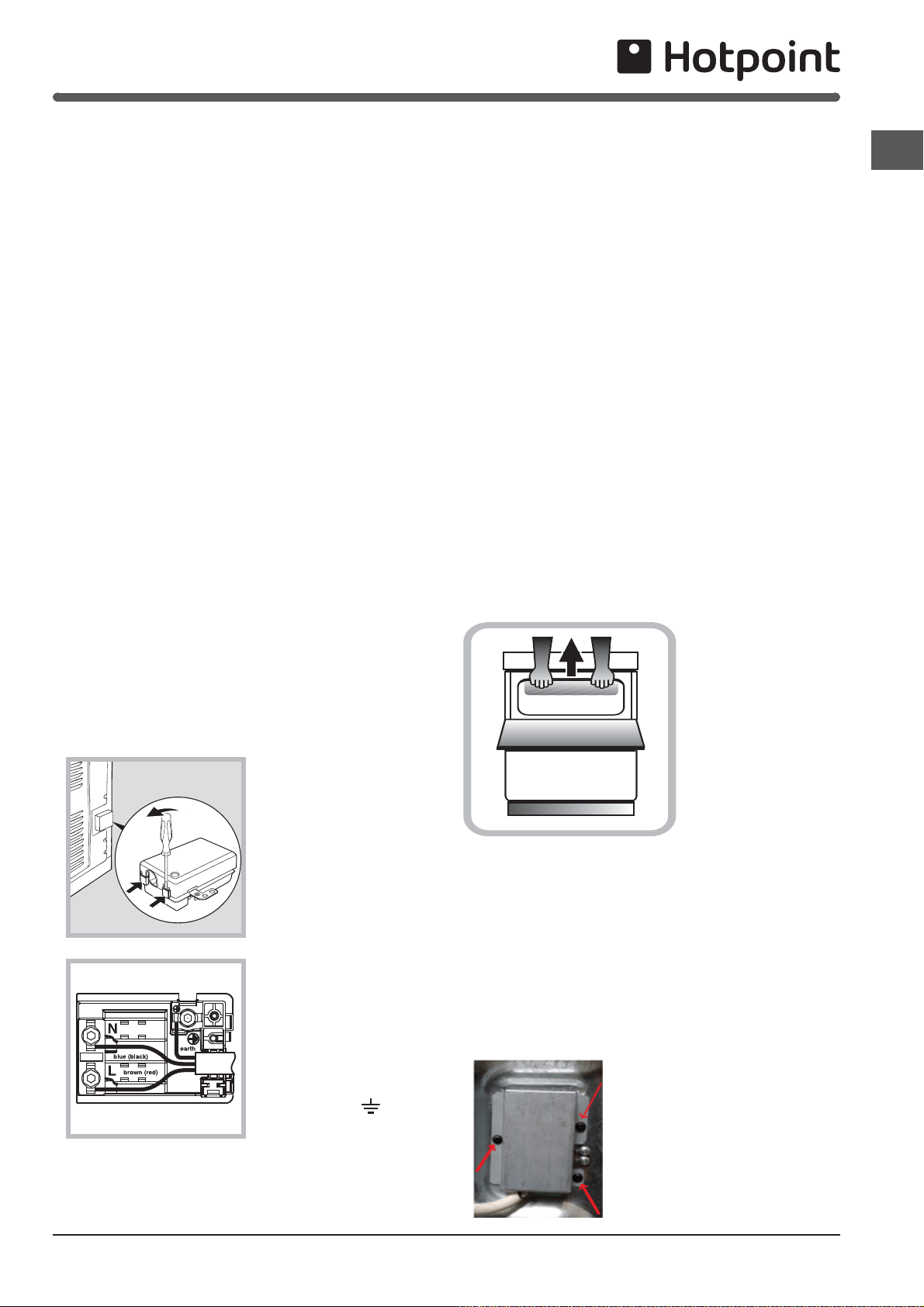
For the installation of the feeding cable carry out the
following operations:
1 Open the terminal
board by inserting
a screwdriver into the
bottom tabs of the cover.
Use the screwdriver as a
lever by pushing it down
to open the cover (see
diagram).
2 Loosen the cable
clamp screw and remove
it, using a screwdriver as
a lever (see figure).
3. Fasten the wires
under the screw heads,
respecting
the colour code:
Black/Blue (N), Red/
Brown (L) and Bare Wire/
Yellow-Green (
).
Installation
Once the connections have been made, tighten all the
terminal screws fully.
Fasten the supply cable in place with the clamp and
close the cover of the terminal board.
Levelling
Four feet are fitted which can be adjusted up or down to
set the height (900mm - 930mm) and level the cooker.
The feet can be simply screwed in or out to lower or raise
the cooker.
After the correct height is achieved, lock the feet into
position by tightening the locking nut using an open
ended spanner.
CAUTION: Some soft floor coverings may get damaged
if the cooker is not moved carefully.
NOTE: Ensure oven shelves are level by using a spirit
level on the rod shelves.
Siting the Cooker
The cooker is designed to fit between kitchen cabinets
spaced 600mm apart.
The space either side need only be sufficient to allow
withdrawal of the cooker for servicing and cleaning. It
can be used with cabinets one side or both as well as in
an angled corner setting.
It can also be used freestanding.
Adjacent side walls which project above hob level, must
not be nearer to the cooker than 150mm and should be
protected by heat resistant material. Any overhanging
surface or cooker hood should not be nearer than 650mm.
Note: This appliance must NOT be fitted on a platform.
Moving the Cooker
Before moving your
cooker, switch off at
the cooker control unit,
ensure that it is cool.
Open the grill door
sufficiently to allow a
comfortable grip on the
underside front edge of
the oven roof, avoiding
any grill elements.
Note: Take care in moving the cooker as it is heavy.
Take care to ensure that any floor covering is not
damaged.
Radio Interference
This appliance conforms to EN 55014 regarding
suppression of radio and television interference.
The appliance must not be installed behind
a decorative door in order to avoid overheating
The appliance must not be installed behind
a decorative door in order to avoid overheating
After installing the power cable, screw the metal cover
with three screws.
4
GB
PLEASE PHONE US TO REGISTER YOUR APPLIANCE AND ACTIVATE YOUR PARTS GUARANTEE ON 08448 24 24 24
Safety Information
WARNING: The appliance and its
accessible parts become hot during
use.
Care should be taken to avoid touching
heating elements.
Children less than 8 years of age shall
be kept away unless continuously
supervised.
This appliance can be used by
children aged from 8 years and above
and persons with reduced physical,
sensory or mental capabilities or lack of
experience and knowledge if they have
been given supervision or instruction
concerning use of the appliance in a
safe way and understand the hazards
involved. Children shall not play with
the appliance. Cleaning and user
maintenance shall not be made by
children without supervision.
WARNING: Unattended cooking on a
hob with fat or oil can be dangerous
and may result in fire.
NEVER try to extinguish a fire with
water, but switch off the appliance
and then cover flame e.g. with a lid or
a fire blanket.
WARNING: Danger of fire: do not store
items on the cooking surfaces.
WARNING: If the surface in glass-
ceramic is cracked, switch off the
appliance to avoid the possibility of
electric shock.
Do not use harsh abrasive cleaners or
sharp metal scrapers to clean the oven
door glass since they can scratch the
surface, which may result in shattering
of the glass.
The internal surfaces of the compartment
(where present) may become hot.
Never use steam cleaners or pressure
cleaners on the appliance.
Remove any liquid from the lid before
opening it.
Do not close the glass cover (if present)
when the gas burners or electric
hotplates are still hot.
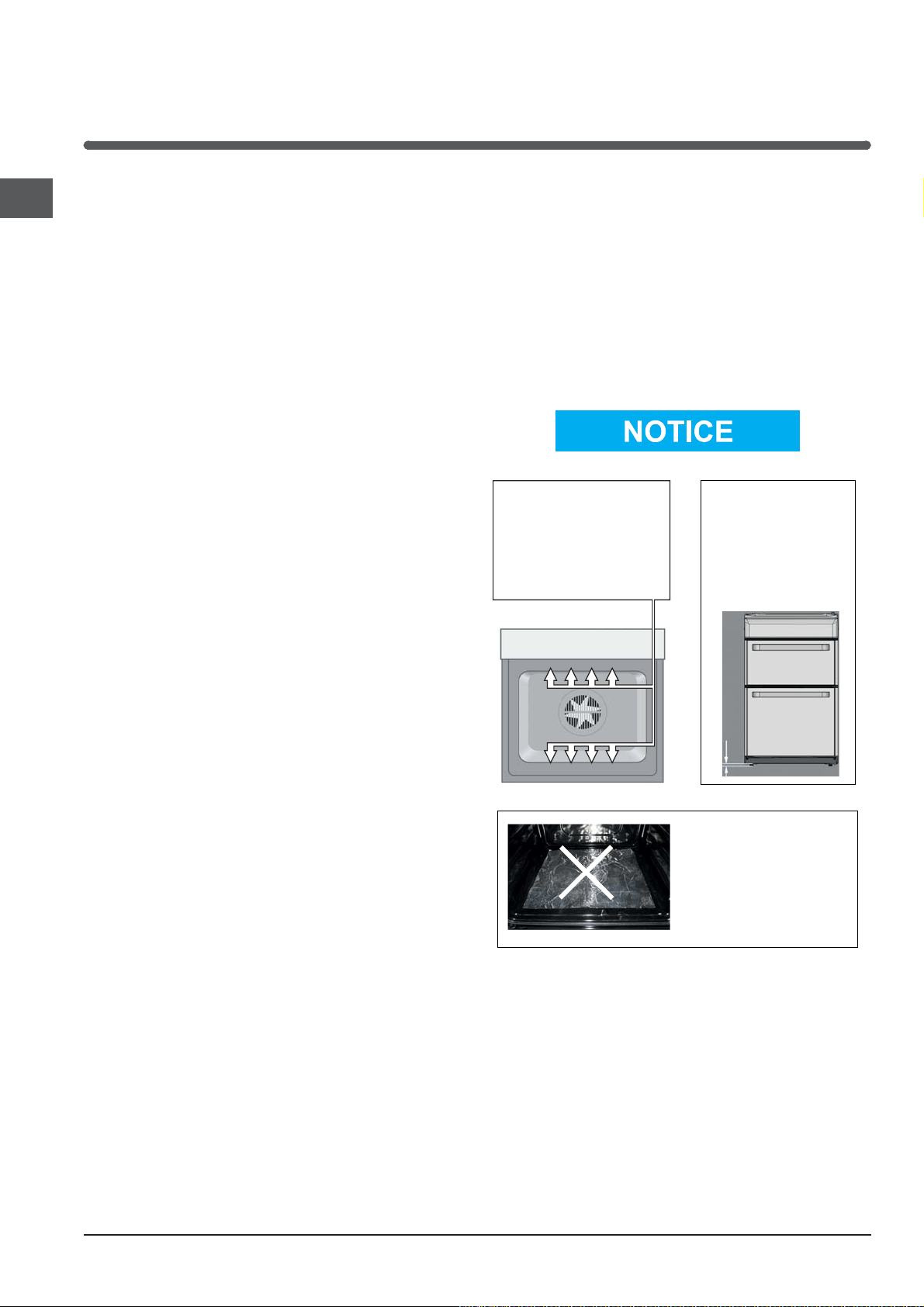
! When you place the rack inside, make
sure that the stop is directed upwards
and in the back of the cavity
.
! ATTENTION
DURING INSTALLATION
THE FEET OF THE APPLIANCE
MUST BE LOWERED SO THAT
AN AIR GAP OF AT LEAST
10MM (1CM) IS LEFT BETWEEN
THE BASE OF THE APPLIANCE
AND THE FLOOR.
! VERY HOT SURFACES
YOU MUST KEEP THE OVEN
AND GRILL CAVITIES CLEAN
FOOD OR GREASE ON THESE
SURFACES COULD CAUSE
SMOKE AND POSSIBLY EVEN BURN
! ATTENTION
WHEN USING THE MAIN OVEN
YOU MUST ENSURE THAT THE
BASE OF THE CAVITY IS NOT
COVERED WITH ALUMINUM
FOIL, UTENSIL OR ANY OTHER
FORM OF COVERING. FAILURE
TO DO THIS MAY RESULT IN
THE CAVITY BEING DAMAGED.
10 mm
! ATTENTION! ATTENTION
! ATTENTION ! ATTENTION
! VERY HOT SURFACES! VERY HOT SURFACES

5
GB
PLEASE PHONE US TO REGISTER YOUR APPLIANCE AND ACTIVATE YOUR PARTS GUARANTEE ON 08448 24 24 24
When used properly your appliance is completely safe
but as with any electrical product there are certain
precautions that must be observed.
PLEASE READ THE PRECAUTIONS BELOW BEFORE
USING YOUR APPLIANCE.
Always
Remove all packing from the appliance before
switching on for the first time.
Understand the controls prior to using the appliance.
Keep children away from the appliance when cooking
as the surfaces will get extremely hot during and after
use.
If the cooker is placed on a pedestal, take the necessary
precautions to prevent the cooker from sliding off the
pedestal itself.
Turn controls off when not in use.
Stand back when opening an oven door to allow any
build up of steam or heat to disperse.
Always use dry good quality oven gloves when remo-
ving items from the oven/grill.
Always place pans centrally over the hotplate making
sure handles are kept away from the edge of the hob
and cannot become heated by other hotplates or
pans.
Always take care to avoid heat or steam burns when
operating the controls.
Always turn off the electricity supply at the wall switch
and allow the appliance to cool before cleaning (or
changing an oven lamp if fitted).
Always make sure the shelves are in the correct po-
sition before switching on the oven or grill.
Always keep the oven/grill door closed when the
appliance is not in use.
Always keep the appliance clean as a build up of
grease or fat from cooking can cause a fire.
Always follow the basic principles of food handling
and hygiene to prevent the possibility of bacterial
growth.
Always keep ventilation slots clear of obstructions.
Always refer servicing to a qualified appliance service
engineer.
Always take care when removing items from the grill
compartment when the lower oven is in use as the
contents will be hot
Always turn off the electricity supply to the appliance
at the wall switch should any glass panel (if fitted)
crack or shatter and then DO NOT USE THE APPLIAN-
CE until repaired.
During use, the oven becomes hot. Care should be
taken to avoid touching heating elements inside the
oven.
The appliance must be used by adults only for the prep-
aration of food, in accordance with the instructions
outlined in this booklet. Any other use of the appli-
ance (e.g. for heating the room) constitutes improper
use and is dangerous. The manufacturer may not be
held liable for any damage resulting from improper,
incorrect and unreasonable use of the appliance.
Safety Information
Never
Never stare at Halogen heating units
Never leave children unsupervised where a cooking
appliance is installed as all surfaces will be hot during
and after its use.
Never allow anyone to sit or stand on any part of the
appliance.
Never store items above the appliance that children
may attempt to reach.
Never leave anything on the hob surface when unat-
tended and not in use.
Never remove the oven shelves whilst the oven is hot.
Never heat up unopened food containers as pressure
can build up causing the container to burst.
Never store chemicals/food stuffs or pressurised
containers in or on the appliance, or in cabinets im-
mediately above or next to the appliance.
Never place flammable or plastic items on or near the
hob.
Never fill a deep fat frying pan more than 1/3 full of oil.
Never use a lid. DO NOT LEAVE DEEP FAT FRYING
PANS UNATTENDED WHILE COOKING.
Never use the appliance as a room heater.
Never use the grill to warm plates.
Never dry any items on either the hob or oven doors.
Never install the appliance next to curtains or other
soft furnishings.
Never operate the grill with the grill door closed as
this will cause the appliance to over heat.
Never use 'steam cleaners'.
SAFETY ADVICE IN CASE OF A CHIP-PAN FIRE
In the event of a chip pan fire or any other pan fire.
1. TURN OFF THE COOKER APPLIANCE AT THE WALL
SWITCH.
2. COVER THE PAN WITH A FIRE BLANKET OR DAMP
CLOTH, this will smother the flames and extinguish
the fire.
3. LEAVE THE PAN TO COOL FOR AT LEAST 60 MINU-
TES BEFORE MOVING IT. Injuries are often caused
by picking up a hot pan and rushing outside with it.
NEVER USE A FIRE EXTINGUISHER TO PUT OUT A
PAN FIRE as the force of the extinguisher is likely
to tip the pan over.
Never use water to extinguish oil or fat fires.
! The appliance should not be operated by people
(including children) with reduced physical, sensory
or mental capacities, by inexperienced individuals or
by anyone who is not familiar with the product. These
individuals should, at the very least, be supervised by
someone who assumes responsibility for their safety or
receive preliminary instructions relating to the operation
of the appliance.
6
GB
PLEASE PHONE US TO REGISTER YOUR APPLIANCE AND ACTIVATE YOUR PARTS GUARANTEE ON 08448 24 24 24
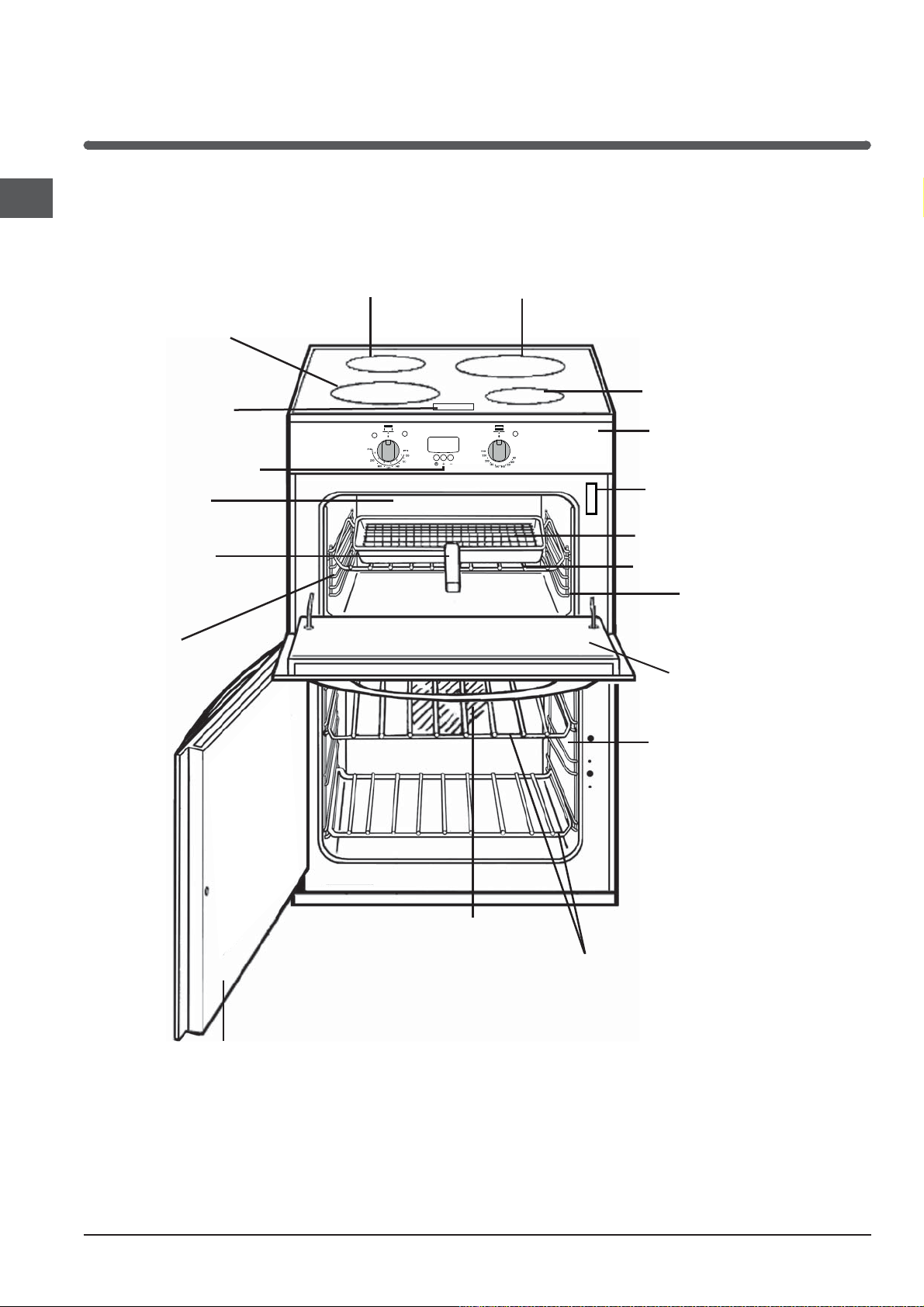
Features
1200W (B1600)
Ceramic
1500W (B2000)
Ceramic
Clock /Minute Minder
Conventional
Grill
Grill pan with
fixed/detachable
handle
Top oven
wirework
shelf supports
Model number
and Serial number label
Fan blade
Main oven
rod shelves
Control panel
Grill pan food support
Top oven/grill rod
1200W (B1600)
Ceramic
1500W (B2000)
Ceramic
Hob control panel
‘Stay clean’ liners
shelf
‘Stay clean’ liners
Removable Inner
Door Glass
Removable Inner
Door Glass
7
GB
PLEASE PHONE US TO REGISTER YOUR APPLIANCE AND ACTIVATE YOUR PARTS GUARANTEE ON 08448 24 24 24
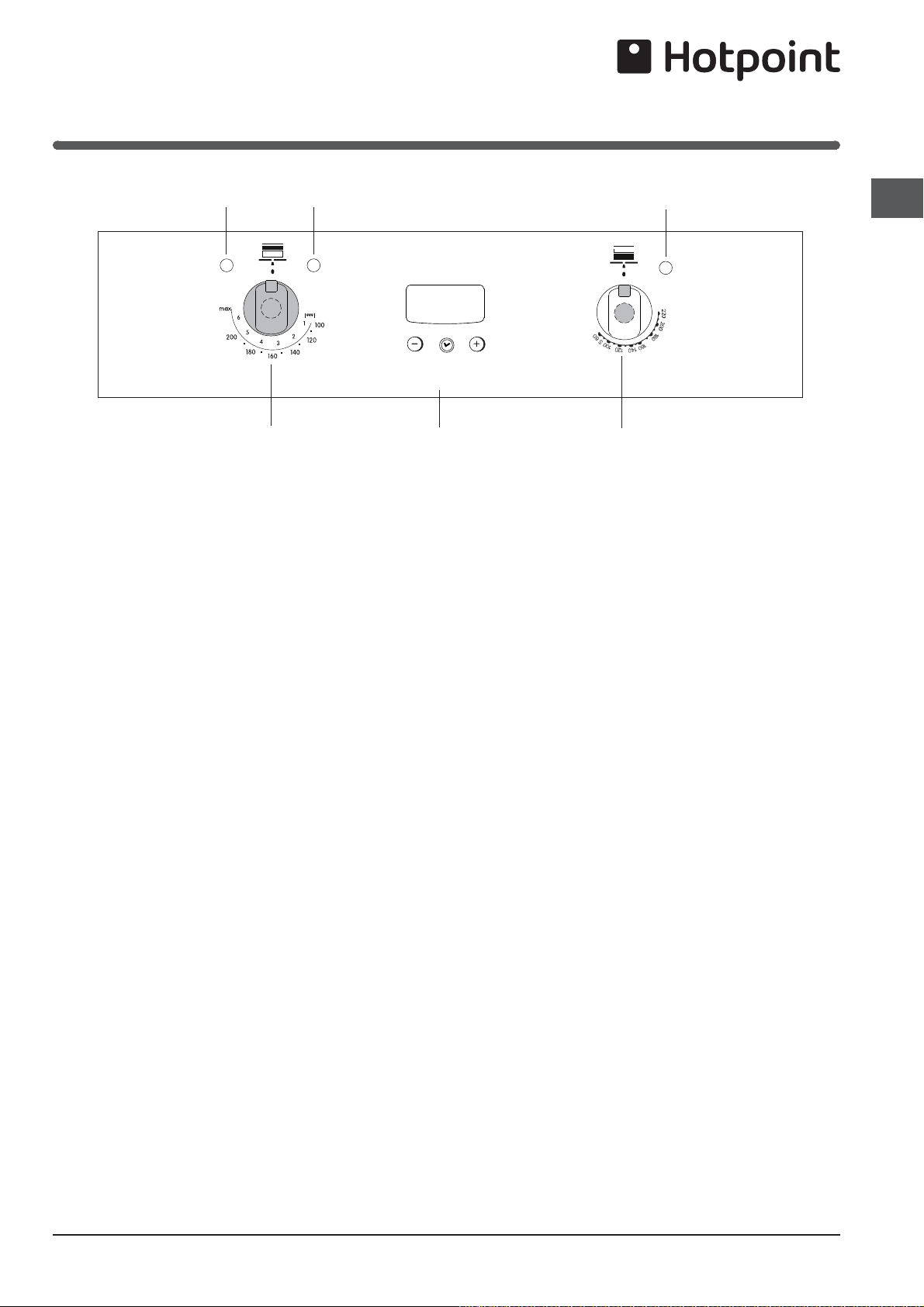
Control Panel
Operating controls when the grill is in use
In common with all cookers having controls sited above
the grill compartment, care must be taken when setting
the controls, due to the hot air expelled from the grill
compartment.
Note: After use, it is advisable to check that all cooker
controls have been switched Off.
Cooling fan
A gentle flow of air will be blown below the control panel
when the grill is in use.When the oven/s are in use the
cooling fan will operate after a short period of time and
may run on, after all controls are switched off.
Oven light
The oven light will illuminate when the main oven
thermostat is operated.
The light will remain on during the cook period.
Hob Hot Neon
A short time (approx. 30 seconds) after the hob heating
areas have been turned on, the Hob Hot neon will
illuminate.
This light will remain illuminated until all the hob controls
have been turned off and all hob heating areas have
cooled.
Main Oven Indicator Light
Main Oven Control KnobTop oven/
Grill
Control Knob
Top Oven Indicator Light Grill Indicator Light
Programmer
8
GB
PLEASE PHONE US TO REGISTER YOUR APPLIANCE AND ACTIVATE YOUR PARTS GUARANTEE ON 08448 24 24 24
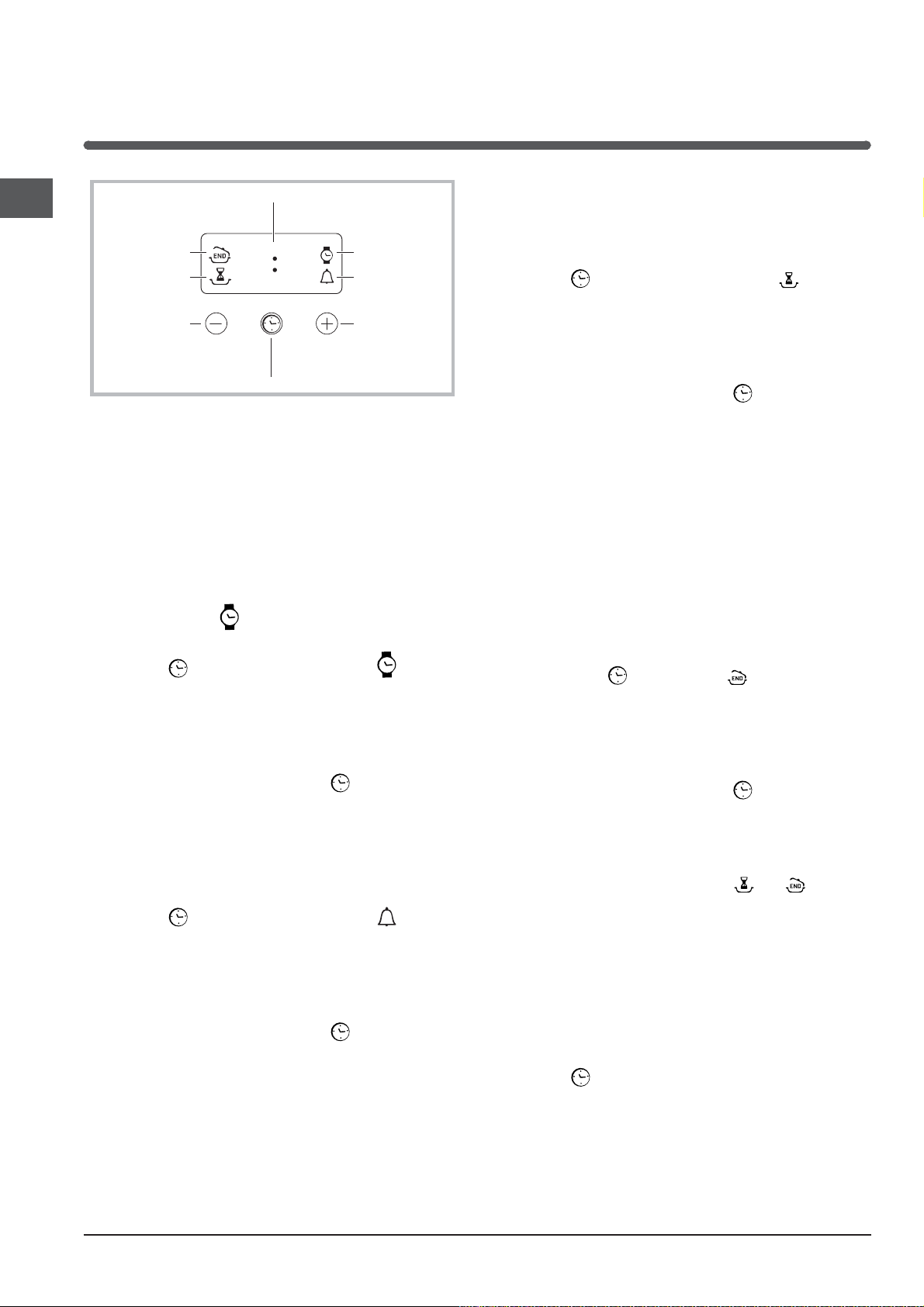
Clock and Minute Minder
DISPLAY
SET TIME
button
END OF
COOKING icon
CLOCK icon
DURATION
icon
TIMER icon
DECREASE TIME
button
INCREASE TIME
button
•• ••
! Only the Main Oven can be controlled by the automatic
timer.
! NEVER operate the grill when the oven is set to cook
automatically because the oven cavity can become
warm and this may cause bacterial growth in food.
Setting the clock
! The clock may be set when the oven is switched off
or when it is switched on, provided that the end time of
a cooking cycle has not been programmed previously.
After the appliance has been connected to the mains, or
after a blackout, the
icon and the four numerical digits
on the DISPLAY will begin to flash.
1. Press the
button several times until the icon and
the four digits on the display begin to flash.
2. Use the “+” and “-” buttons to adjust the time; if you
press and hold either button, the display will scroll through
the values more quickly, making it quicker and easier to
set the desired value.
3. Wait for 10 seconds or press the
button again to
finalise the setting.
Setting the minute minder
! This function does not interrupt cooking and does not
affect the oven; it is simply used to activate the buzzer
when the set amount of time has elapsed.
1. Press the
button several times until the icon and
the three digits on the display begin to flash.
2. Use the “+” and “-” buttons to set the desired time; if
you press and hold either button, the display will scroll
through the values more quickly, making it quicker and
easier to set the value.
3. Wait for 10 seconds or press the
button again to
finalise the setting.
The display will then show the time as it counts down.
When this period of time has elapsed the buzzer will be
activated.
Programming cooking
! A cooking mode must be selected before programming
can take place.
Programming the cooking duration
1. Press the
button several times until the icon and
the three digits on the DISPLAY begin to flash.
2. Use the “+” and “-” buttons to set the desired duration;
if you press and hold either button, the display will scroll
through the values more quickly, making it quicker and
easier to set the value.
3. Wait for 10 seconds or press the
button again to
finalise the setting.
4. When the set time has elapsed, the text END appears
on the DISPLAY, the oven will stop cooking and a buzzer
sounds. Press any button to stop the buzzer and turn all
control knobs to the 0 position.
• For example: it is 9:00 a.m. and a time of 1 hour and
15 minutes is programmed. The programme will stop
automatically at 10:15 a.m.
Setting the end time for a cooking mode
! A cooking duration must be set before the cooking end
time can be scheduled.
1. Follow steps 1 to 3 to set the duration as detailed above.
2. Next, press the
button until the icon and the four
digits on the DISPLAY begin to flash.
3. use the “+” and “-” buttons to adjust the cooking end
time; if you press and hold either button, the display will
scroll through the values more quickly, making it quicker
and easier to set the desired value.
4. Wait for 10 seconds or press the
button again to
finalise the setting.
5. When the set time has elapsed, the text END appears
on the DISPLAY, the oven will stop cooking and a buzzer
sounds.
Press any button to stop it.
Programming has been set when the and buttons
are illuminated. The DISPLAY shows the cooking end time
and the cooking duration alternately.
• For example: It is 9:00 a.m. and a duration of 1 hour
has been programmed. 12:30 is scheduled as the end
time. The programme will start automatically at 11:30
a.m.
Cancelling a programme
To cancel a programme:
• press the
button until the icon corresponding to the
setting you wish to cancel and the digits on the display
are flashing. Press the “-” button until the digits 00:00
appear on the display.
• Press and hold the “+” and “-” buttons; this will cancel
all the settings selected previously, including timer
settings.
9
GB
PLEASE PHONE US TO REGISTER YOUR APPLIANCE AND ACTIVATE YOUR PARTS GUARANTEE ON 08448 24 24 24
Using the Ceramic Hob
The control panel described in this manual is only a representative
example: it may not exactly match the panelon your appliance.
When using the touch control pannel panel:
• Do not use gloves
• Use a clean finger
• Touch the glass smoothly
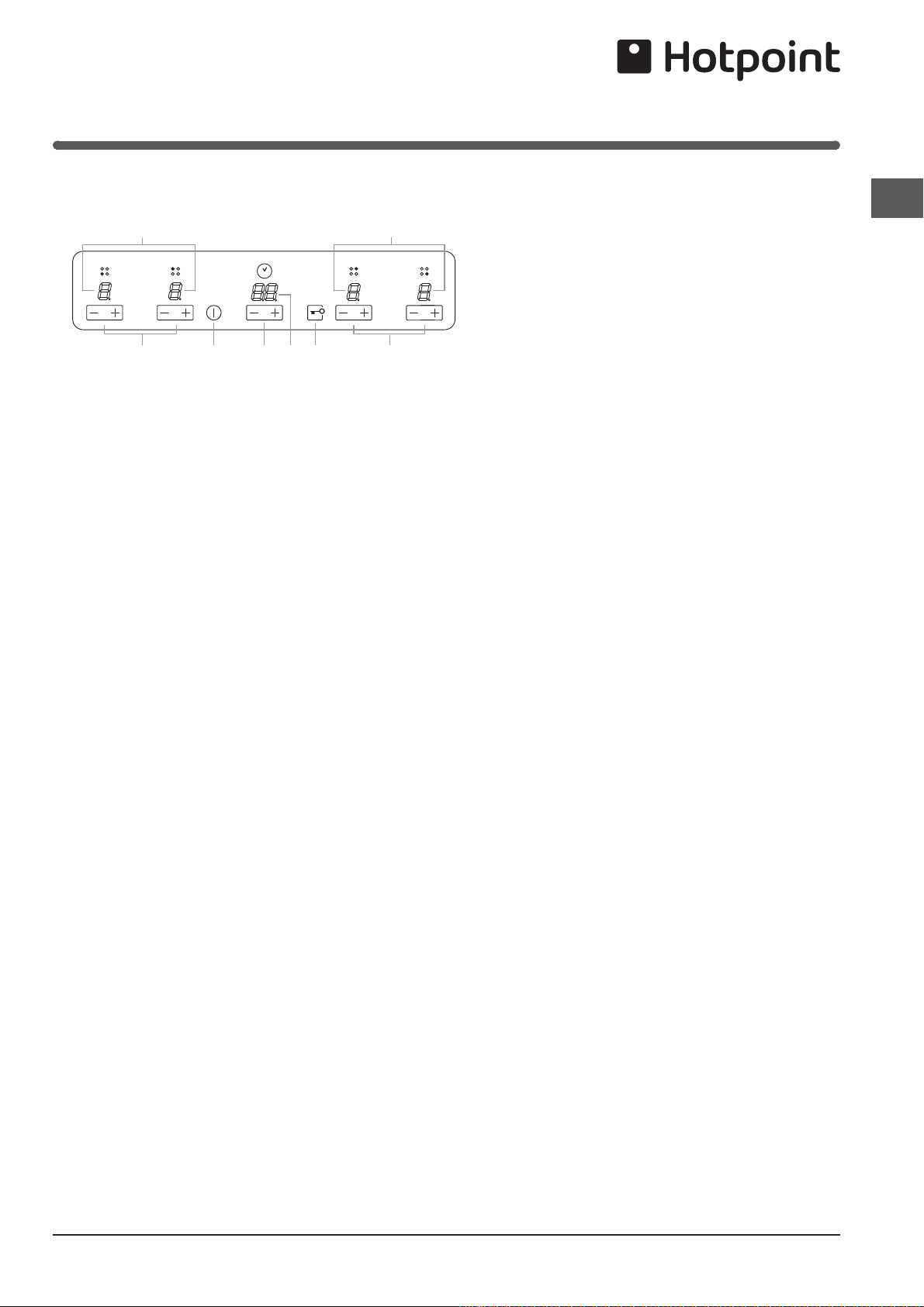
1 INCREASE(+)/REDUCE(-) POWER button - controls
the power level on every individual cooking zone
2 INCREASE (+)/ REDUCE(-) TIME button -controls the
time of cooking on the cooking zones.
3 COOKING ZONE POWER displays -show the power
level selected for every individual cooking zone
4 ON/OFF button switches the appliance on and off.
5 CONTROL PANEL LOCK button prevents accidental
changes to the hob settings and shows the control
panel has been locked
6. .TIMER display -shows the cookig time selected .
! For detailed information on the control panel functions
refer to “Start-up and use” section.
! This product complies with the requirements of the
latest European Directive on the limitation of power
consumption of the standby mode.
If no operations are carried out for a period of 2
minutes, after the residual heat indicator lights turn
off and the fan stops (if present), the appliance
automatically switches to the .off mode..
The appliance resumes the operating mode once the
ON/OFF button is pressed.
Hob Control Panel
! The glue applied on the gaskets leaves traces of grease
on the glass. Before using the appliance, we recommend
you remove these with a special non-abrasive cleaning
product. During the first few hours of use there may be a
smell of rubber which will disappear very quickly.
! A few seconds after the hob is connected to the electricity
supply, a buzzer will sound. The hob may now be switched
on.
Types of noise during normal hob operation:
• Buzz: due to the vibration of the metallic parts that
make up the induction element and the pot; it is
generated by the electromagnetic field required for
heating and increases as the power of the induction
element increases.
• Soft whistle: heard when the pot placed on the heating
zone is empty; the noise disappears once food or water
is placed into the pot.
• Crackle: produced by the vibration of materials on the
bottom of the pot due to the flow of parasitic currents
caused by electromagnetic fields (induction); can be
more or less intense depending on the material making
up the bottom of the pot, and decreases as the pot
dimensions increase.
Before connecting the appliance to the power supply, make
sure that:
• The appliance is earthed and the plug is compliant with
the law.
• The socket can withstand the maximum power of the
appliance, which is indicated on the data plate located
on the appliance itself.
• The voltage falls within the range of values indicated on
the data plate.
• The socket is compatible with the plug of the appliance. If
the socket is incompatible with the plug, ask an authorised
technician to replace it. Do not use extension cords or
multiple sockets.
! Once the appliance has been installed, the power supply
cable and the electrical socket must be easily accessible.
! The cable must not be bent or compressed.
! The cable must be checked regularly and replaced by
authorised technicians only.
! The manufacturer declines any liability should these
safety measures not be observed.
! Do not remove or replace the power supply cable for any
reason. Its removal or replacement will void the warranty
and the CE marking. INDESIT does not assume liability for
accidents or damage arising from replacement/removal
of the original power supply cable. Replacement can only
be accepted when carried out by personnel authorised
by INDESIT and using an original spare part.
2 54
3
3
11
6

10
GB
PLEASE PHONE US TO REGISTER YOUR APPLIANCE AND ACTIVATE YOUR PARTS GUARANTEE ON 08448 24 24 24
To switch the hob on, press and hold the button for
approximately one second.
The cooktop is switched On when a beep sound is
emmited and all the cooking zones displays show
the digit point.
When the cooktop is OFF, after 5 sec the control
.
switches off the KEYLOCK LED to reduce the power
consumption.
As soon as we touch a key, the KEYLOCK LED goes
ON and we can continue to use the cooktop, unlocking
the keyboard.
Switching off the cooktop is signalled by 3 beep sound
.
Switching on the cooking zones
Each cooking zone is switched on and controlled using the
(-) and (+) POWER buttons, which at the same time
are used for power adjustment.
• To begin operating a cooking zone, set the desired
power level (between 0 and 9) using the (-) and (+)
POWER buttons
Press and hold the (-) POWER button to set the power
level immediately at “9”
Press and hold (+) and (-) POWER buttons simulta
neously to return to power level “0”
• Loud whistle: heard when two induction elements of
the same group function simultaneously at maximum
power and/or when the booster function is set on
the larger element while the other is auto-adjusted.
Noise is reduced by decreasing the power level of the
auto-adjusted induction element; pot bottom layers
made of different kinds of materials are among the
main causes of this noise.
• Fan noise: a fan is necessary to ensure the hob functions
correctly and to safeguard the electronic unit from
possible overheating. The fan functions at maximum
power when the large induction element is at maximum
power or when the booster function is on; in all other
cases, it works at average power depending on the
temperature detected. Furthermore, the fan may continue
to work even after switching the hob off, if the temperature
detected is high.
The types of noise listed above are due to induction
technology and are not necessarily operational faults.
!
If the (-) or (+)button is pressed for an extended period
of time, the display scrolls quickly though the power
levels and timer minutes.
Initial Light Conditions
When power is initially applied to the Cooktop, the to-
uch control conducts a calibration process for the to-
uch keys, which requires a low level of ambient light in
the area of the touch keys.
If during this calibration process excessive ambient
lighting is detected the User Interface displays „FL”
(Infrared Ambient Light Error) and the control cali-
bration process is suspended. In order to rectify the
process any lighting that could effect the calibration
process should be switched off (e.g. halogen cooker
hood lighting). The error will disappear when satisfac-
tory ambient lighting is detected and the touch control
calibration procedure will now complete satisfactorily.
-The „FL” error can only be generated within approx 3s
of initial power being applied to the cooktop.
-We recommend that the user switches off all cooker
hood lighting and lighting directed towards the cook-
top when power is initially applied to the cooktop.
-After the touch control has conducted its initial cali-
bration process, (approx 3s) any cooker hood or other
lighting can be switched on as normal and will not af-
fect the operation of the touch control.
Switching on the hob
After connecting the hob to the electricity mains, the
touch pannel might be automatically locked. To un-
clock the pannel press and hold the Control Panel
Loock button .
Using the Ceramic Hob
Setting the Power Management
The Cooktop maximum power limit (7200W) can be re-
duced by the user to 2800W, 3500W or 6000W (ECO
Power Limits).
The sequence to set a new Cooktop Power Limit is:
·During the first 30 seconds after plugging the applian-
ce
·The Touch has to be unlocked and all Heaters Off
·Press at the same time the left and right end heaters [+]
and [-] keys.
·Once this is done, a beep sounds and “Po” charac-
ters will be in the timer displays and the “actual Cook-
top Power Limit” will be in the left and right end heater
displays.
For selecting a new Power Limit:
·With the (+) and (-) keys, the Power Limit is increased.
The selectable powers are: 2800W, 3500W, 6000W or
7200W. When the power is 7200W, if the [+] or [-] key is
touched the power changes to 2800W.
The sequence to finish recording the new Cooktop Po-
wer Limit is:
·Press at the same time the left and right end heaters [+]
and [-] keys.
·Once this is done, new Cooktop Power Limit is recor-
ded and there is a system reset.
To finish without recording changes:
·If during 60 seconds there is no action, changes are not
recorded and there is a system reset.

11
GB
PLEASE PHONE US TO REGISTER YOUR APPLIANCE AND ACTIVATE YOUR PARTS GUARANTEE ON 08448 24 24 24
Using the Ceramic Hob
If the power level is “0” press and hold the (+) button to
increase the power level quickly.
Fast Boil- “Booster” function
The booster function for some of the cooking zones may be
used to shorten heating-up times.
It may be activated by pressing the (+) POWER button over
level 9. This function boosts the power to 1600 W or 2000
W, depending on the size of the relevant cooking zone.
The activation of of the booster is signalled by a beep
sound, and the letter ‘P’ appearing on the display
corresponding to the selected cooking zone
The booster works for max 10 minutes. After these 10
minutes a beep sounds and the cooking zone will
return to level “9”
With the heater at Booster level, if the [+] key is
Touched an error beep sounds and the cookset
doesn’t change. With the heater at Booster level, if the
[-] key is Touched a beep sounds and the cookset is
reduced to 9.
Switching off the cooking zones
To switch off a cooking zone touch(-)and (+)
POWER selection buttons simultaneously.
A beep sounds and the corresponding display shows
“0”.
Using the Timer
! All the cooking zones can be programmed for a cooking
time duration between 1 and 99 min.
1.Activate the timer by pressing the INCREASE / REDUCE
TIME buttons. A beep sounds, the timer display shows a
“00” and the cooking zone displays show a “t” blinking
indicating that a cooking zone has to be selected.
2 Select the desired cooking zone by pressing any of
the cooking zones (+) or (-)keys. A beep sounds, the
LED next to the cooking zone display starts blinking if
no power is selected, or is on if any power is selected.
The timer display starts blinking indicating that the time
has to be selected
3. Set the desired cooking time by pressing again the
INCREASE / REDUCE TIME buttons.
! The user can select only one heater at a time.
!Pressing and holding the (+) and (-) keys increases the
speed of time selection.
! If the time is not selected before 10 seconds, the timer
is switched off.
! If the selected time is “00” after 10 seconds the timer
is switched off.
Starting Timer countdown.
The countdown starts 10 seconds after the last ope-
ration over the INCREASE (+)/ REDUCE(-) TIME but-
tons
. If any power is selected, a beep sounds and
the timer display stops blinking. The same happens
to the led heater.
The last minute will be displayed in seconds.
! When the timer is in countdown the user can chan-
ge the time at any time by touching the INCREASE
/ REDUCE TIME buttons
. Then the countdown stops
and the timer changes to time selection status wa-
iting a time selection.
End of Timer countdown.
When the time set on the timer has elapsed the timed
heater is switched off, the timer display and the timed
heater led starts blinking and a timer alarm beep sounds
for one minute. The timer alarm can be cancelled by the
user at any time, even during the first minute of the alarm
. When the timer is in alarm status, by pressing any key
of the touch control the timer is switched off.
! To cancel the operation of the timer, select the time
value of “00”pressing the(+) and(-) TIME buttons at the
same time.
! When all the cooking zones are not powered, and one
of them is temporized at zero power level, the key-lock
function is activated after 1 minute.
Control panel lock
When the hob is switched on, it is possible to lock the oven
controls in order to avoid accidental changes being made to
the settings (by children, during cleaning, etc.).
Press the
button to lock the control panel: -the icon
will illuminate and an audible beep sound will be emmited.
To use any of the controls (e.g. to stop cooking), you
must switch off this function. Press the
button for a
few moments, the icon will stop illuminating and the lock
function will be removed.
All the keys on the cooking zone selection wil be locked
if :the cooktop is off,,
if the Control Panel Lock is activated or
if an error on a cooktop occurs..
12
GB
PLEASE PHONE US TO REGISTER YOUR APPLIANCE AND ACTIVATE YOUR PARTS GUARANTEE ON 08448 24 24 24
Using the Ceramic Hob
Practical advice on using the appliance
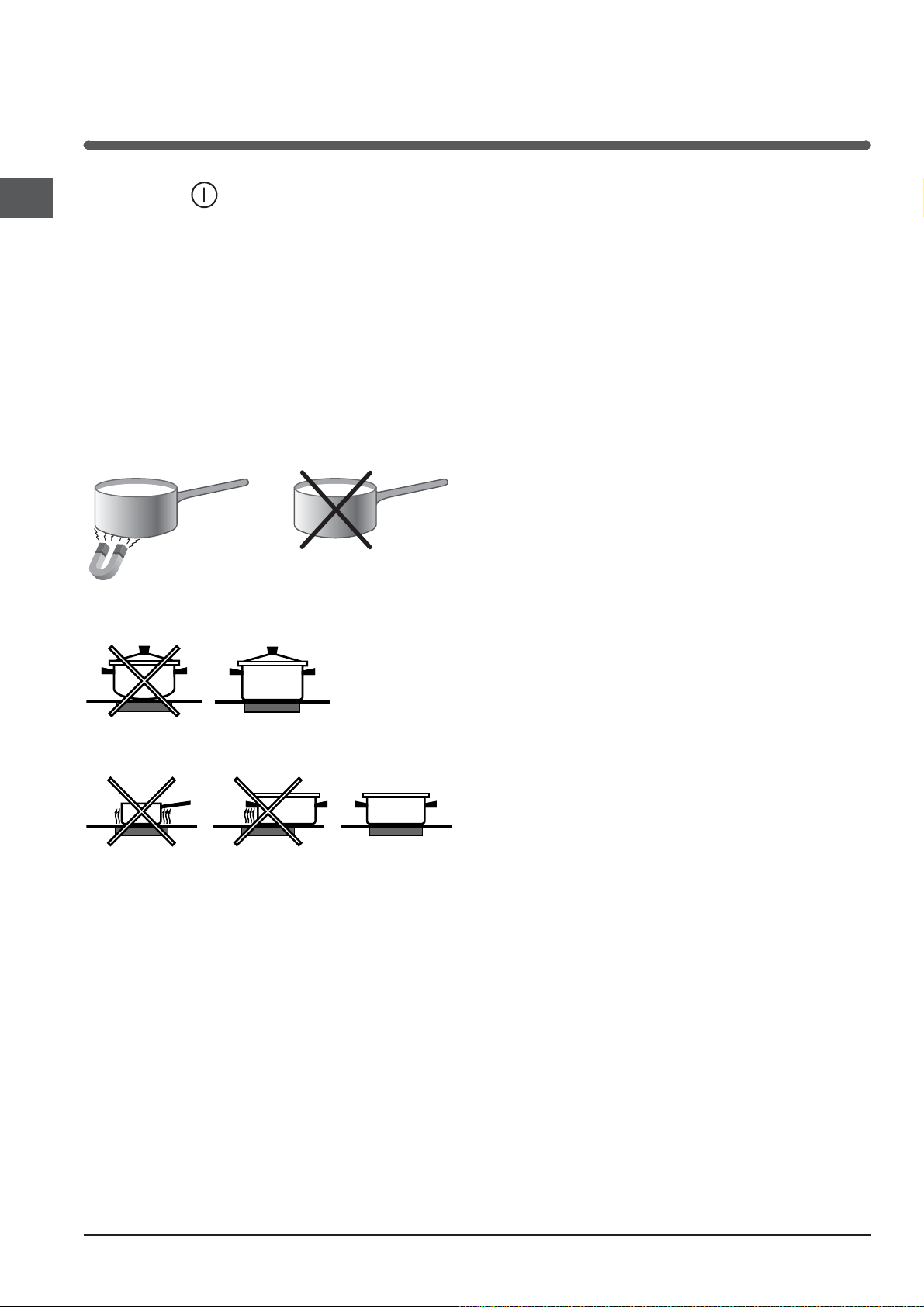
! Use cookware made from materials which are
compatible with the induction principle (ferromagnetic
material). We especially recommend pans made from:
cast iron, coated steel or special stainless steel adapted
for induction. Use a magnet to test the compatibility of
the cookware.
*
SUITABLE
UNSUITABLE
Cast iron
Enamelled steel
Special stainless steel
Copper,
Aluminium, Glass, Earthenware,
Ceramic, non magnetic Stainless steel
In addition, to obtain the best results from your hob:
• Use pans with a thick, flat base in order to fully utilise the
cooking zone.
• Always use pans with a diameter which is large enough
to cover the hotplate fully, in order to use all the available
heat.
• Make sure that the base of the cookware is always clean
and dry, in order to fully utilise and extend the life of both
the cooking zones and the cookware.
• Avoid using the same cookware which has been used
on gas burners: the heat concentration on gas burners
may distort the base of the pan, causing it not to adhere
correctly.
Safety devices
Pan sensor
Each cooking zone is equipped with a pan sensor device.
The hotplate only emits heat when a pan with suitable
measurements for the cooking zone is placed on it.
The “u” sign on the display appears if after
selecting the cooking zone the pan is not placed on a
heater , or in case of:
• An incompatible pan
• A pan whose diameter is too small
• The pan has been removed from the hotplate.
After 10 sec. with no pan on the heating zone, a warning
beep signal is emmited.
After 60 sec. with no pan on the heating zone,, the heater
switches off.
Overheating protection
If the electronic elements overheat, the number signalizing
the power level starts flashing, and the letter “c” appears
on the display. When the temperature has reached a
suitable level, this message disappears and the hob may
be used again.
Safety switch
The appliance has a safety switch which automatically
switches the cooking zones off after they have been in
operation for a certain amount of time at a particular power
level. When the safety switch has been triggered, the display
shows “0”.
For example: the right rear hotplate is set to 5 and will
switch off after 5 hours of continuous operation, while the
front left hotplate is set to 2 and will switch off after 8 hours.
When one or more keys are activated for more than
10 sec. the touch control. switches off
A warning beep sounds is emmited every 10
sec., while the key/s is/are activated.
With all heaters at zero power during 10 sec. the
Cooktop is switched off.
If the switching off is due to an accidental activa-
tion of keys, the touch control actuates as above.
Buzzer
This can also indicate several irregularities:
• An object (a pan, cutlery, etc.) has been placed on the
control panel for more than 10 seconds.
• Something has been spilt on the control panel.
• A button has been pressed for too long. All of the above
situations may cause the buzzer to sound. Remove the
cause of the malfunction to stop the buzzer. If the cause of
the problem is not removed, the buzzer will keep sounding
and the hob will switch off.
Errors and Alarms
When an error is detected, the whole appliance or the
heater/s are switched off, a beep sounds (only if one or
more heaters are active) and all displays show a ‘F’
letter and the error code (an index number or a letter)
alternately.
If the problem does not disappear by itself, please
contact the Technical Service.
Switching off the hob
Press the button to switch off the appliance - do not
rely solely on the pan sensor.
If the control panel lock has been activated, the controls
will continue to be locked even after the hob is switched
on again. In order to switch the hob on again, you must
first remove the lock function.
13
GB
PLEASE PHONE US TO REGISTER YOUR APPLIANCE AND ACTIVATE YOUR PARTS GUARANTEE ON 08448 24 24 24
Using the Ceramic Hob
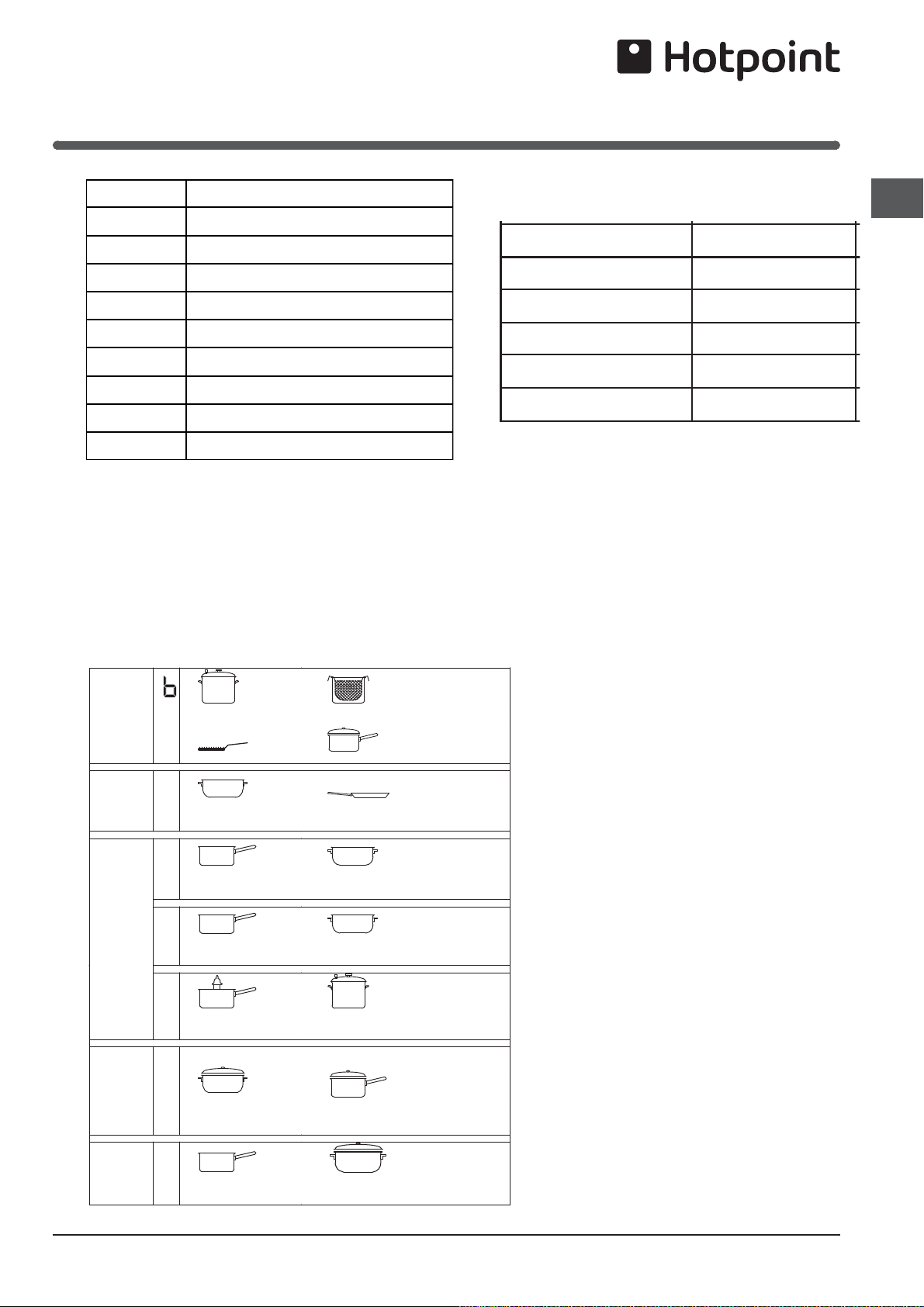
Power level
1
2
3
4
5
6
7
8
9
Maximum operating time in hours
9
8
7
6
5
4
3
2
1
Technical description of the hob:
The induction system is the quickest existing way of
cooking. Unlike traditional hotplates where the cooking
zone heats up, with the induction system heat is generated
directly inside pans which have ferromagnetic bases.
Key:
I = single induction cooking zone
B = booster: the power level of the cooking zone may be
boosted
Cooking zone
Back Left
Back Right
Front Left
Front Right
Total power
Power (W)
I 1200 - B1600
I 1500 - B 2000
I 1500 - B 2000
I 1200 - B1600
7200
Practical cooking advice
ª
Pressure cooking
Pressure cooker
Frying
Grilling Boiling
Very high-flame
cooking
High-flame
cooking
Medium-flame cookingLow-flame
cooking
Very
low-flame
cooking
•
•
¶
Crêpes Cooking on a high flame and browning
(roasts, steaks, escalopes, fish fillets,
fried eggs)
¶
§
Fast thickening (liquid juices)
Boiling water (pasta, rice, vegetables)
Milk
§
S
Slow thickening (dense juices)
S
¢
Bain-marie cooking
Pressure cooking after whistle
¢
£
™
Low-flame cooking (stews)
Reheating dishes
™
¡
Chocolate sauce Keeping food hot

14
GB
PLEASE PHONE US TO REGISTER YOUR APPLIANCE AND ACTIVATE YOUR PARTS GUARANTEE ON 08448 24 24 24
The Working of the Heating Zones
Heating only occurs within the marked circular cooking
zones. The zones heat up and cool down quicker,
providing greater controllability for sensitive foods. Each
heating zone is equipped with a thermal limiter which is
a safety cut-out which prevents the ceramic glass from
overheating. After several minutes at full power without
a pan on the heating zone the thermal limiter will switch
the heating elements off and on automatically to avoid
any damage to the ceramic glass.
Choice of saucepan’s
It is essential that the saucepan’s you use on the ceramic
hob are suitable.
ALWAYS USE:
Good quality pans with smooth, flat, heavy bases.
saucepan's manufactured from aluminium (enamelled
or machined) or stainless steel.
Correct size saucepan's. The base of the pan must
cover the heating zone completely.
saucepan's with lids which are well fitting to reduce
cooking time and energy use.
NEVER USE:
Pans with thin, distorted or uneven bases as these
will extend cooking times, waste electricity and cause
damaging, local hotspots on the glass surface.
Pans with ridged or recessed bases.
Pans with damaged or rough bases which could
scratch the glass surface.
Glass or glass ceramic utensils.
Do Not
In order to keep your ceramic hob in good condition,
follow these simple guidelines:
Do not stare at halogen heating units.
Do not cook directly on the hob surface without a
cooking utensil, as this will result in damage
to the surface of the hob.
Do not use the hob as a worktop surface as damage
may occur to the smooth surface of the hob.
Do not drag or slide utensils on the hob surface, as
this will cause scratches in the surface of the
hob.
Do not allow a cooking utensil to come into contact
with the hob surround.
Do not place anything between the base of the utensil
and the ceramic hob, e.g. do not use asbestos
mats, aluminium or wok stand.
Do not leave any utensils, food or combustible items
on the hob when it is not in use.
Do not place aluminium or plastic foil, or plastic
containers on the hob.
Do not leave the hotplates or cooking areas switched
On unless they are being used.
Do not leave heating zones uncovered when they
are switched On. We recommend not to place
large preserving pans or fish kettles across two
heating areas.
Do not leave utensils partly covering the heated areas.
Always ensure that they are placed centrally
over the heated areas and have the same
diameter as the heating area used.
Do
Always ensure that the bottom of the pan is both clean
and dry. Dirt or moisture between the pan and
the hob can cause pitting of the surface of the
glass.
We do not recommend the use of utensils with a base
diameter greater than 25cm (l0ins).
Pressure cookers or other large pans should be used on
the front cooking areas.
Always ensure that saucepan handles are positioned
safely.
Always take extra care when cooking foods with a high
sugar content eg. jam, as spillage will cause
damage to the surface of the glass.
Always clean spills immediately (see Care and
Cleaning).
IMPORTANT As with any cooking appliance there could
be some fire risk attached to the heating of oil, particularly
for deep fat frying, cooking utensils containing oil must
not be left unattended (e.g. to answer the telephone)
on or in close proximity to the patterned cooking areas.
1. Use a deep pan, large enough to completely cover the
appropriate heating area.
2. Never fill the pan more than one-third full with fat or oil.
3. Never leave oil or fat unattended during the heating or
cooking period.
4. Do not try to fry too much food at a time, especially
frozen food. This only lowers the temperature of the
oil or fat too much, resulting in greasy food.
5. Always dry food thoroughly before frying, and lower it
slowly into the hot oil or fat. Frozen foods, in particular,
will cause frothing and spitting, if added too quickly.
6. Never heat fat, or fry, with a lid on the pan.
7. Keep the outside of the pan clean and free from
streaks of oil or fat.
8. Never allow excessive splashing of oil onto the hob.
Care of the Ceramic Hob

15
GB
PLEASE PHONE US TO REGISTER YOUR APPLIANCE AND ACTIVATE YOUR PARTS GUARANTEE ON 08448 24 24 24
Safety requirements for deep fat frying
In the unfortunate event of a chip pan fire:
1. Switch Off the electricity supply.
NEVER attempt to move the pan - burns and injuries
are caused almost invariably by picking up the burning
pan and rushing outside with it.
2. Smother flames with a fire blanket or damp cloth.
NEVER use a fire extinguisher to put out a pan fire, as
the force of the extinguisher is likely to tip the pan over.
NEVER use water to extinguish oil or fat fires.
When smothering the flames DO ENSURE that you
FACE and ARMS are WELL PROTECTED from the
flames to save you from becoming hurt.
3. After the fire has been extinguished LEAVE THE PAN
TO COOL FOR AT LEAST 60 MINUTES BEFORE
MOVING IT.
4. If you fail to put the fire out, call the fire brigade
immediately.
16
GB
PLEASE PHONE US TO REGISTER YOUR APPLIANCE AND ACTIVATE YOUR PARTS GUARANTEE ON 08448 24 24 24
Grill
Using the grill pan kit
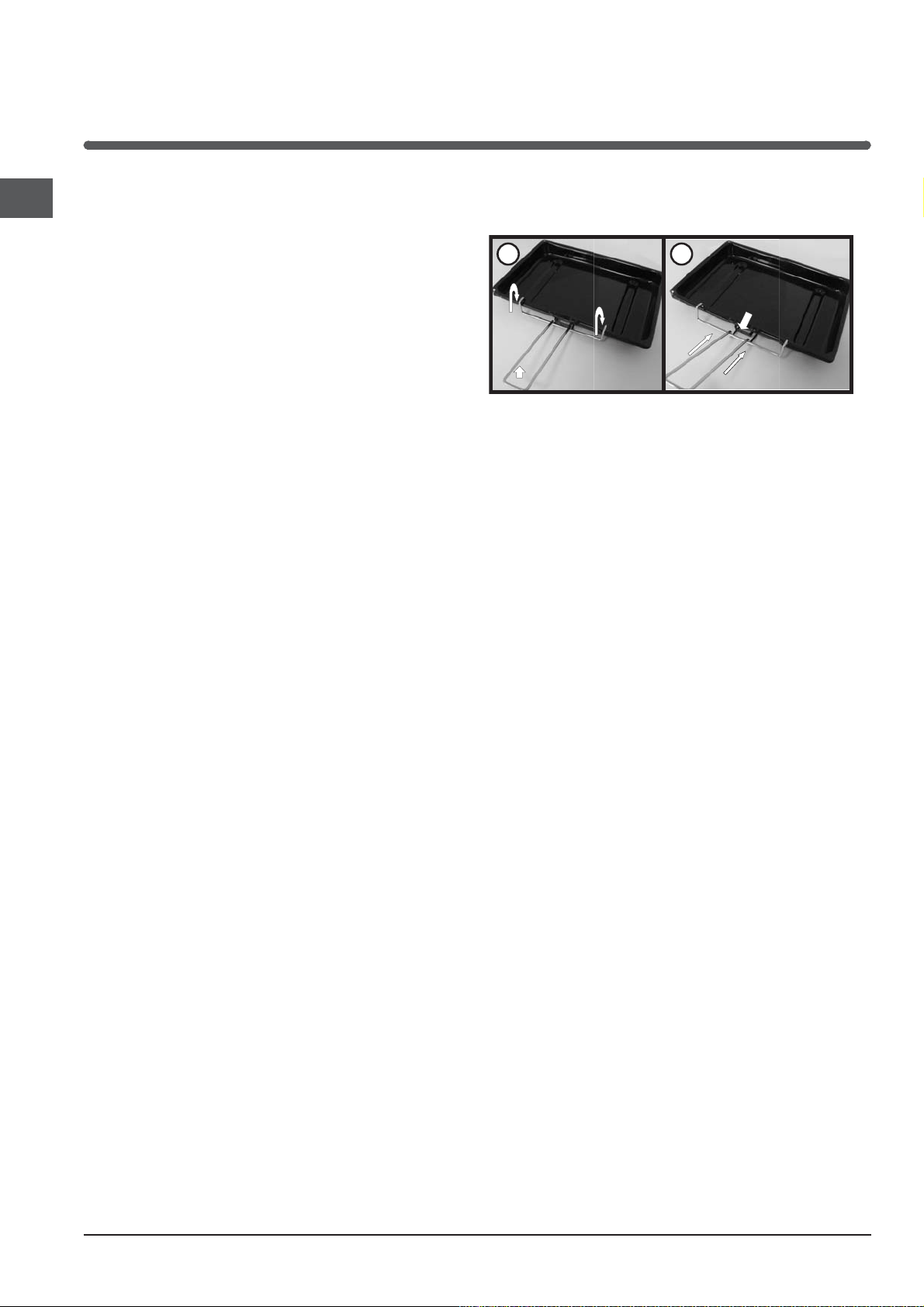
The grill pan handle is detachable from the pan to
facilitate cleaning and storage. Fix the pan handle
securely before use:
1. Fit the handle to the grill pan so that the external ‘hooks’
embrace the edge of the pan (fig. 1)
2. Make sure that the middle part of the handle fits exactly
the protruding support of the pan (fig .2) and holds the
pan from the bottom.
The food must be placed on the rack in the grill pan.
Position the grill pan on top of the oven rack. The best
results are achieved by placing the oven rack on the
uppermost shelves. Pouring a little water into the grill pan
will make the collection of grease particles more efficient
and prevent the formation of smoke.
1
2
Grill
The top heating element will come on. On this setting,
food is cooked by the thermal radiation given off in the
downward direction by the electric heating element. The
very high temperature and direct heat of the grill make
it possible to brown meats on the surface while locking
in the juices to keep them tender.
The power of grill can be increased or reduced by means of
When grill is in function the GRILL PILOT LIGHT REMAINS
ON.
! Always place cookware on the rack(s) provided.
!Grill is switched on only with the oven door open.
Top oven/
Grill
Control KnobTop oven/
Grill
Control KnobTop oven/
Grill
Control Knob

17
GB
PLEASE PHONE US TO REGISTER YOUR APPLIANCE AND ACTIVATE YOUR PARTS GUARANTEE ON 08448 24 24 24
The top oven should be used to cook small quantities
of food.The oven is designed so that the grill element
operates at a reduced heat output, this is combined with a
heating element situated underneath the floor of the oven.
To ensure even cooking of the food it is important that
cooking utensils are positioned correctly on the oven shelf
so that the element is directly above.
There are two cooking positions, the shelf placed on
runner 1 or 2 (from the base), do not use shelves upside
down.
Food/utensils must not be placed directly on the
oven floor.
There should always be at least 25mm (1in) between the
top of the food and the grill element.
Warning: Items stored in top oven will get hot when main
oven is in use.
Operation
To heat the oven, turn the control knob clockwise.The
top oven pilot light will come on and remain on until the
oven reaches the required temperature.The pilot light
will automatically go on and off during cooking as the
thermostat maintains the correct temperature.
Cooking meat/poultry
Small joints of meat up to 1.5kg (3 lbs), or poultry, up to
3.6kg (8 lbs) (60cm cookers) in weight can be roasted in
a small meat pan in the top oven. Larger joints of meat/
poultry weighing more than 3.6kg (8 lbs) (60cm cookers)
should be roasted in the main oven.
Do not use the grill pan as a meat pan in the top oven
as air circulation will be seriously restricted.
Top oven as a warming compartment for plates
Place the plates/dishes on the shelf, positioned on runner
1, turn top oven control to 100°C for 10-15 minutes.Never
use grill control.
Top Oven
Cookery Notes
18
GB
PLEASE PHONE US TO REGISTER YOUR APPLIANCE AND ACTIVATE YOUR PARTS GUARANTEE ON 08448 24 24 24
Main Oven Cookery Notes
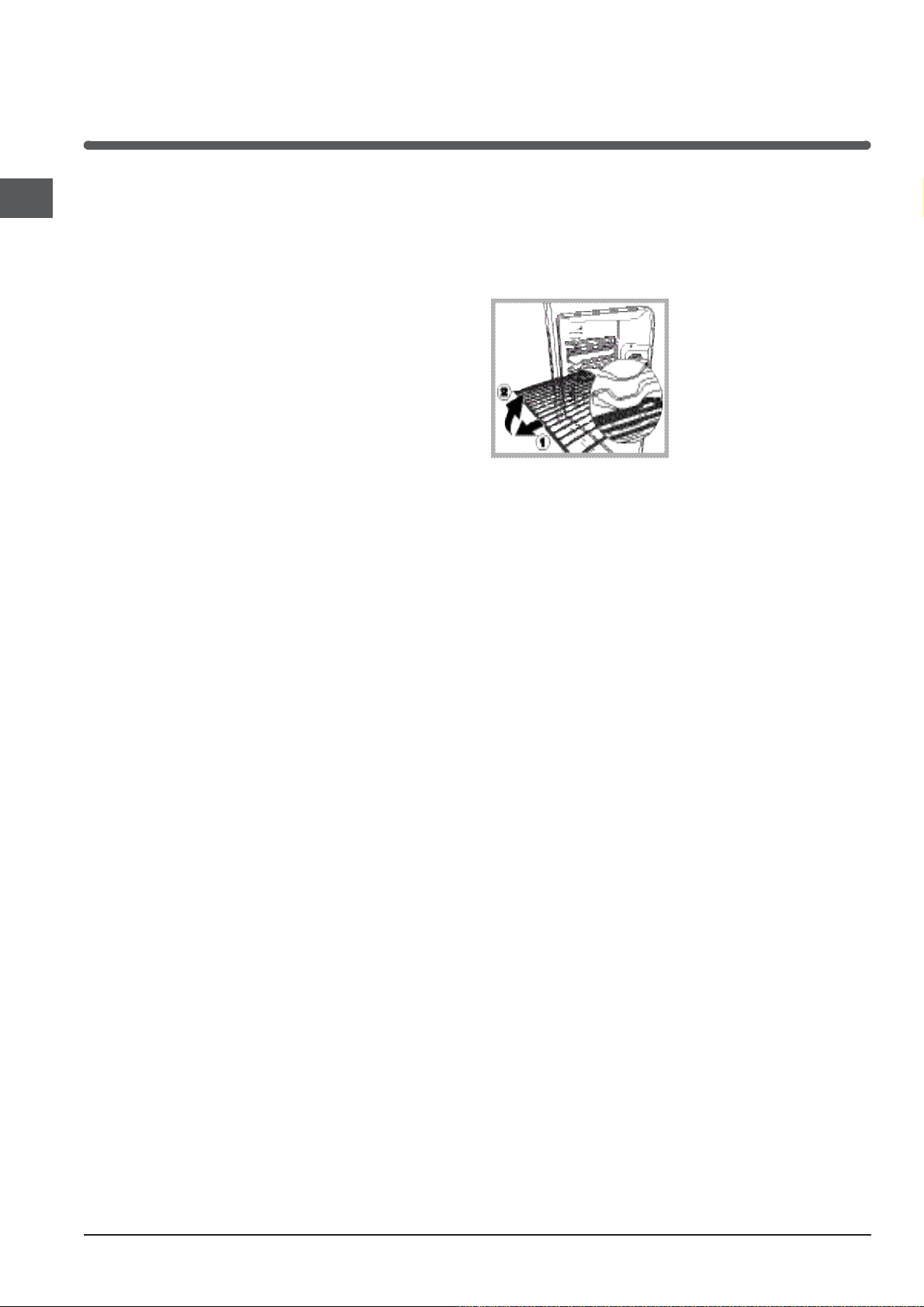
WARNING! The oven is provided with a stop system to
extract the racks and prevent them from coming out of the
oven.(1)
As shown in the drawing, to extract them completely, simply
lift the racks, holding them on the front part, and pull (2).
The first time you use your appliance, heat the empty
oven with its door closed at its maximum temperature
for at least half an hour. Ensure that the room is well
ventilated before switching the oven off and opening the
oven door. The appliance may emit a slightly unpleasant
odour caused by protective substances used during the
manufacturing process burning away.
! Before operating the product, remove all plastic film
from the sides of the appliance.
Starting the oven
When the SELECTOR knob is turned in a clockwise
direction to the symbol the fan and oven light will come
on to assist in the defrosting of frozen food. Rotating
further to the complete range of temperatures shown on
the dial you can choose which is most suitable for the
food you are going to cook (fan assisted mode). The
temperature is reached automatically and controlled by
the oven thermostat (from 80°C to 220°C).
THERMOSTAT indicator light
When this is illuminated, the oven is generating heat.
It switches off when the inside of the oven reaches the
selected temperature. At this point the light illuminates
and switches off alternately, indicating that the thermostat
is working and is maintaining the temperature at a
constant level.
The main oven fan will switch off at regular intervals
perfect cooking results whilst giving a benefit to you
during the cooking cycle. This feature helps achieve
and the environment of reduced energy consumption.
19
GB
PLEASE PHONE US TO REGISTER YOUR APPLIANCE AND ACTIVATE YOUR PARTS GUARANTEE ON 08448 24 24 24
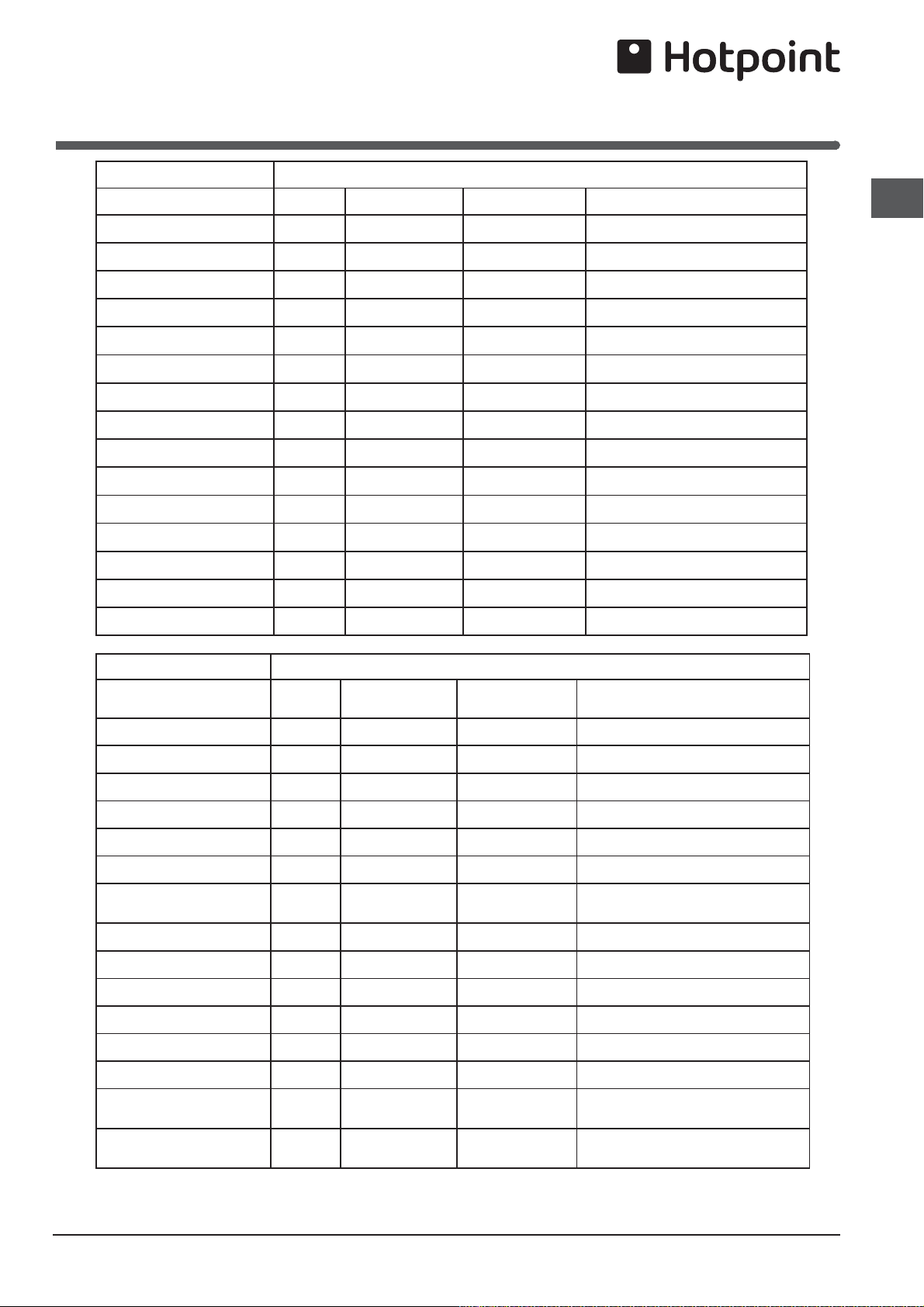
Oven Cooking Charts
- Baking
Note: If soft margarine is used for cake making, temperatures recommended by the manufacturers should be
followed.Temperatures recommended in this chart refer to cakes made with block margarines or butter only.
Top Oven Cooking
Baking Pre-heat Temperature °C Time in mins. Position in Oven
Scones Yes 210/220 10-15 Runner 2 from bottom of oven
Small Cakes Yes 180/190 20-25 Runner 2 from bottom of oven
Victoria Sandwich Yes 170/180 20-30 Runner 2 from bottom of oven
Sponge Sandwich Yes 180/190 20-25 Runner 2 from bottom of oven
Swiss Roll Yes 200/210 10-15 Runner 2 from bottom of oven
Semi-rich Fruit cakes Yes 150/160 60-75 7 inch Runner 2 from bottom of oven
Rich Fruit Cakes Yes 140/150 Depending on size Runner 1 or 2 from bottom of oven
Shortcrust Pastry Yes 190/200 Depending on size Runner 2 from bottom of oven
Puff Pastry Yes 200/210 Depending on size Runner 2 from bottom of oven
Yorkshire Pudding Yes 190/200 30-40 Runner 2 from bottom of oven
Individual Yorkshire Pudding Yes 200/210 20-30 Runner 2 from bottom of oven
Milk Pudding Yes 140/150 90-120 Runner 2 from bottom of oven
Baked Custard Yes 150/160 40-50 Runner 2 from bottom of oven
Bread Yes 200/210 30-45 Runner 1 from bottom of oven
Meringues Yes 100 150-180 Runner 2 from bottom of oven
Fan Oven Cooking
Baking
Pre-heat Temperature °C Time in mins. Position in Oven
Scones Yes 210/220 8-10 Runner 2 from bottom of oven
Small Cakes 170/180 15-20 Runner 2 from bottom of oven
Victoria Sandwich 160/170 20-25 Runner 2 from bottom of oven
Sponge Sandwich Yes 170/190 15-20 Runner 2 from bottom of oven
Swiss Roll Yes 180/190 10-15 Runner 2 from bottom of oven
Semi-rich Fruit cakes 140/150 60-75 Runner 2 from bottom of oven
Rich Fruit Cakes 130/140 Depending on size Runner 1 or 2 from bottom of oven
Shortcrust Pastry 190/200 45-50 Runner 2 from bottom of oven
Puff Pastry 190/200 Depending on use Runner 2 from bottom of oven
Yorkshire Pudding Yes 180/190 40-45 Runner 2 from bottom of oven
Individual Yorkshire Pudding Yes 190/200 20-25 Runner 2 from bottom of oven
Milk Pudding 130/140 105-135 Runner 2 from bottom of oven
Baked Custard 140/150 40-50 Runner 2 from bottom of oven
Bread
Yes 200/210 40-50 Runner 1 from bottom of oven
Meringues
80-90 180-240 Runner 2 from bottom of oven
20
GB
PLEASE PHONE US TO REGISTER YOUR APPLIANCE AND ACTIVATE YOUR PARTS GUARANTEE ON 08448 24 24 24
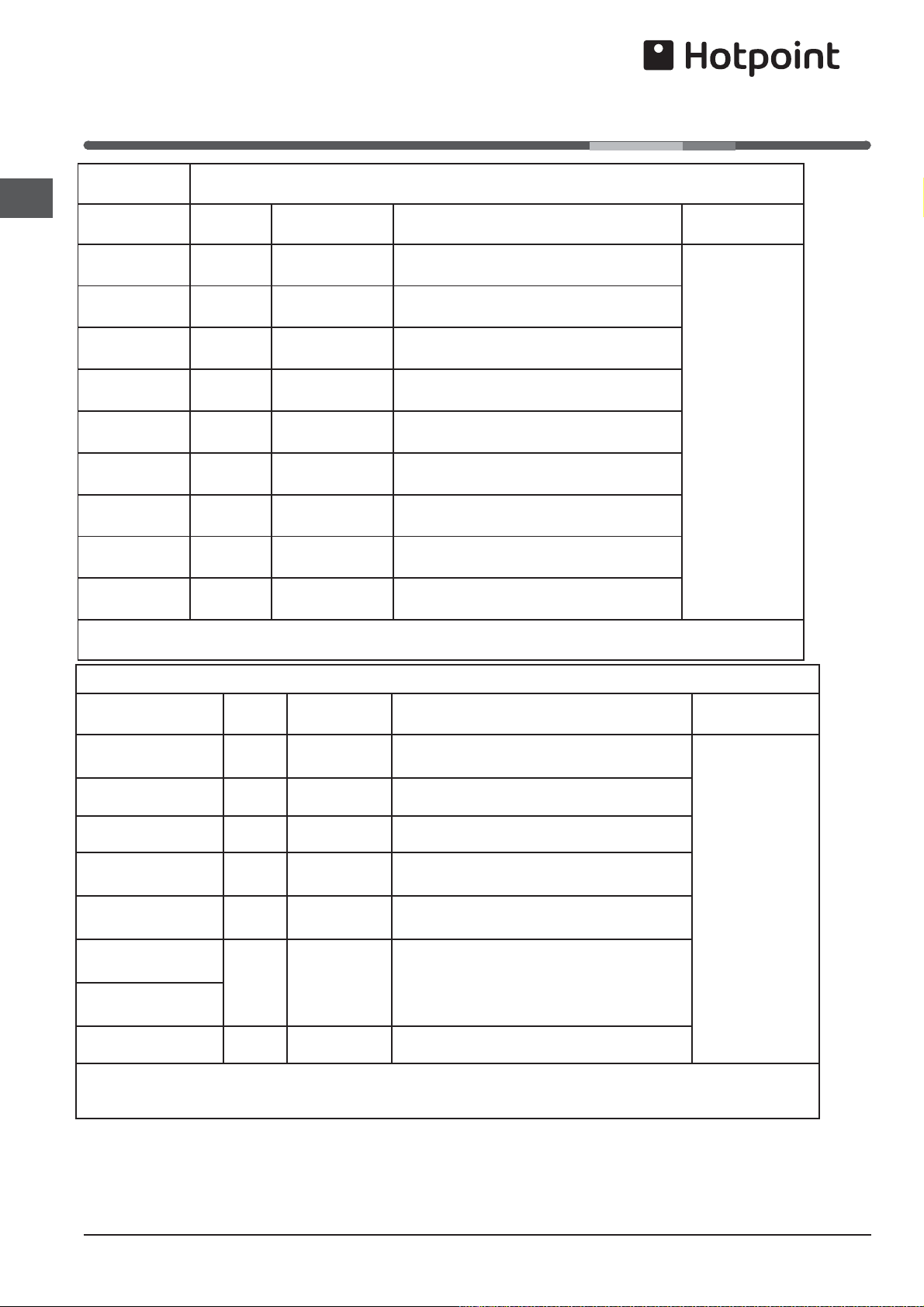
Oven Cooking Charts
- Meat
The most accurate method of testing the readiness of joints of meat or whole poultry is to insert a meat thermometer
into the thickest part of a joint, or the thickest part of poultry thighs, during the cooking period.The meat thermometer
will indicate when the required internal temp has been reached.
Beef - Rare: 60°C Lamb: 80°C Poultry: 90°C
Medium: 70°C Pork: 90°C
Well Done: 75°C Veal: 75°C
Top Oven Cooking
Meat
Pre-heat Temperature °C Time (approx.) Position in Oven
Beef/ Lamb
(slow roasting)
Yes 170/180 35 mins per 450g (1lb) + 35 mins over.
Runner 1 from
bottom of oven.
Beef/ Lamb
(foil covered)
Yes 190/200 35-40 mins per 450g (1lb)
Pork
(slow roasting)
Yes 170/180 40 mins per 450g (1lb) + 40 mins over
Pork
(foil covered)
Yes 190/200 40 mins per 450g (1lb)
Veal
(slow roasting)
Yes 170/180 40-45 mins per 450g (1lb) + 40 mins over
Veal
(foil covered)
Yes 190/200 40-45 mins per 450g (1lb)
Poultry/Game
(slow roasting)
Yes 170/180 25-30 mins per 450g (1lb) + 25 mins over
Poultry/Game
(foil covered)
Yes 190/200 25-30 mins per 450g (1lb)
Casserole
Cooking
Yes 150 2-2½ hrs
If using aluminium foil, never:
1.Allow foil to touch sides of oven. 2.Cover oven interior with foil. 3.Cover shelves with foil.
Fan Oven
Meat
Pre-
-heat
Temperature
°C
Time (approx.) Position in Oven
Beef No 160/180 20-25 mins per 450g (1lb) + 20 mins extra.
Runner 1 from
bottom of oven.
Lamb No 160/180 20-30 mins per 450g (1lb) +25 mins extra.
Pork No 160/180 25-30 mins per 450g (1lb) +25 mins extra.
Veal No 160/170 25-30 mins per 450g (1lb) +25 mins extra.
Chicken/Turkey
up to 4kg (8lb)
No 160/180 18-20 mins per 450g (1lb) + 20 mins extra.
Turkey 4 to 5.5kg
(8 to 12lb)
No
13-15 mins per 450g (1lb) at 150/160°C
Turkey 4 to 5.5kg
(8 to 12lb)
allow 12 mins per 450g (1lb) at 150°C
Casserole Cooking No 140-150 1½ - 2 hrs
If using aluminium foil, never:
1.Allow foil to touch sides of oven. 2.Cover oven interior with foil. 3.Cover shelves with foil.

21
GB
PLEASE PHONE US TO REGISTER YOUR APPLIANCE AND ACTIVATE YOUR PARTS GUARANTEE ON 08448 24 24 24
TURN OFF THE MAIN SWITCH AND ENSURE THE
COOKER IS COLD BEFORE CLEANING.
BEFORE SWITCHING ON AGAIN, ENSURE THAT ALL
CONTROLS ARE IN THE OFF POSITION.
NEVER USE BIOLOGICAL WASHING POWDER,
HARSH ABRASIVES, SCOURING PADS, AEROSOL
CLEANERS OR OVEN CHEMICAL CLEANERS OF ANY
KIND, UNLESS SPECIFIED BELOW.
! Never use steam cleaners or pressure cleaners on
the appliance.
!
Clean the glass part of the oven door using a sponge
and a non-abrasive cleaning product, then dry thoroughly
with a soft cloth. Do not use rough abrasive material or
sharp metal scrapers as these could scratch the surface
and cause the glass to crack.
! The accessories can be washed like averyday crockery
(even in your dishwasher).
Cleaning materials to avoid:
1. Plastic or nylon pads
2. Household abrasive powders and scourers.These
may scratch the surface.
3. Oven chemical cleaners, aerosols and oven pads.
Caustic cleaners such as these will etch the surface
and attack the metal frame.
4. Bath and sink cleaners may mark the surface.
ALWAYS SWITCH OFF AT THE MAINS SWITCH
BEFORE CLEANING.
Ceramic hotplates:
Clean your Ceramic hob top regularly and avoid repeated
burning of encrusted contamination.
Your choice of cleaner will depend on the degree of
soiling involved (see below).
minor soiling, where the contamination has not burnt
hard, can be wiped off with a clean wet cloth
major soiling and strongly-adhering burnt encrustation
can be quickly and easily removed with a razor-blade
scraper
hard water stains, grease spots and discolouration
having a metallic sheen can be removed with 'Easy
Do Cleaner Powder'
always condition hob after cleaning by using 'Easy Do
Conditioner' or 'Hob Brite'. Apply a small amount of
conditioner with a clean damp cloth or paper towel.
Rub vigorously. Remove excess with a clean damp
cloth or paper towel. Polish with a clean cloth or paper
towel before the conditioner dries.
Care and Cleaning
Detergent residues must always be completely removed
with a clean wet cloth, (even if the instructions for use
suggest otherwise), as they can have an etching effect
when reheated. Then wipe dry.
To maintain hob in good condition, we would recommend
regular use of the ‚Easy Do Powder Cleanser’.
Sprinkle Powder Cleanser on a clean damp cloth or paper
towel and rub vigorously for 3 to 4 minutes. Remove all
residue with a clean damp cloth or paper towel.Then use
conditioner to protect the hob.
For more stubborn marks, mix a small amount of the
powder cleanser with ‚Jif Lemon Juice’ (from a bottle)
and carefully spread over the affected area. Cover with
a damp paper towel and leave for a minimum of 15
minutes.Rub vigorously. Remove excess with a clean
damp cloth or paper towel before the conditioner dries.
Polish with a clean cloth or paper towel. Easy Do products
are available from many electrical retailers, our Parts
Department (see Key Contacts, back page) and our
Spares Distributors. Homecare ‚Hob Brite’ is available
from leading Supermarkets.
Oven shelf supports
The shelf supports are removable and dishwasher safe.
To remove hold the support at the front and pull away
from the oven side, this can then be cleaned in a sink or
a dishwasher.
When removed it allows access to the oven side, which
can be cleaned with warm soapy water.
To refit the support, insert the longer leg into the rear
fixing hole and push in the front leg.
Decorative trims
It is advisable to clean the decorative trims regularly to
prevent any build up of soiling which may detract from the
appearance of the cooker.The recommended method of
cleaning is to wipe over the trims with a soft cloth wrung
out in warm water or mild non-abrasive cleaner. (If in
doubt try the cleaner on a small area of trim which is not
noticeable in normal use).Then, after wiping with a cloth
wrung out in clear water, dry with a soft clean cloth.
Never use scouring pads or abrasive cleaners/powders
which may scratch the surface.
Take care during cleaning not to damage or distort the
door seals.Do not lift the door seal from the oven chassis,
if necessary remove the seal by carefully unhooking the
corner clips.
Take care that the rating label edges are not lifted during
cleaning, and furthermore that the lettering is not blurred
or removed.

22
GB
PLEASE PHONE US TO REGISTER YOUR APPLIANCE AND ACTIVATE YOUR PARTS GUARANTEE ON 08448 24 24 24
Control Panel:
Wipe with a damp cloth and polish with a dry cloth.
Stainless trims
Regularly wipe with a clean, damp cloth and polish with
a clean dry cloth.
Grill Door:
Wipe over the grill door decorative outer panel; with a
cloth wrung out in warm soapy water, then after wiping
with a cloth wrung out in clear water, dry with a soft clean
cloth.
Do not use scouring pads or abrasive powder which
may scratch the surface.
Ensure that the glass panel (where fitted) is not
subjected to any sharp mechanical blows.
Grill:
Remove the grill pan and the wire grid food support, it
is best to wash these items immediately after each use
to prevent stains from being burnt on when used again.
Wipe out the Grill compartment, use a fine steel wool soap
pad to remove stubborn stains from the compartment.
Main oven:
1. Glass Door - open the oven door fully.The glass
panel may now be cleaned. Stubborn stains can be
removed by using a fine steel wool soap pad.Do not
use scouring pads, or abrasive powder, which will
scratch the glass. Ensure that the glass panel is not
subjected to any sharp mechanical blows. For slight
soiling the inner glass panel may be cleaned, while
still warm. For removing stubborn stains see “Care
and Cleaning” chapter.
2. Remove the rod shelves and meat pan. Use a fine
steel wool soap pad to remove stubborn stains from
the rod shelves,meat pan and the floor of the oven.
Refer to the instructions in “Care and Cleaning” chap-
ter, for cleaning the shelf supports. Do not use aerosol
cleaners on this oven as they could adversely affect
the fan motor unit, and cannot be wiped off the fan
blade.
Replacement oven lamp:
WARNING: To avoid electric shocks - please ensure
that the electricity supply to the appliance is switched
off and the appliance is fully cold, before removing
the lamp lens.
Open the oven door and remove the rod shelves. Using
a suitable cloth to protect the fingers grip the light glass
dome, unscrew anti-clockwise and lift. Reach into the
aperture and unscrew the lamp anti-clockwise. Fit
replacement lamp (25W 300°C rated SES), refit dome.
Wall-mounted splash panel:
A wall-mounted splash panel is available as an optional
extra from our Parts Department (see Key Contacts,
back page).
Care must be taken that rating label edges are not lifted
during cleaning and furthermore that the lettering is not
blurred or removed. For details of your nearest Service
Centre please see the separate service leaflet. If you have
any queries regarding service or spares, our Parts and
Service Division will be pleased to advise.
See Key Contacts, back page, for details.
Take particular care not to damage the inner surface
of the door inner glass that is coated with a heat
reflective layer.Do not use scouring pads, or abrasive
powder, which will scratch the glass. Ensure that the
glass panel is not subjected to any sharp mechanical
blows.
Stubborn stains can be removed by using a fine steel
wool pad. For slight soiling the inner glass panel may
be cleaned, while still warm, without removing it from
the door. After cleaning, rinse and dry with a soft cloth.
Care and Cleaning
STAY CLEAN’Oven interior pannels
Refer to the instructions below for cleaning the ‚Stay
clean’ panels.
How „STAY CLEAN” works:
The surfaces of the ‚Stay clean’ oven liners are treated
on the mottled face with a special vitreous enamel which
absorbs cooking soils. At temperatures of 220°C (425°F)
or above, the special surface enables these soils to be
slowly destroyed. The higher the temperature the more
effective it is. In most cases normal cooking operations
at this temperature will permit this cleaning operation
to proceed during cooking. However if higher cooking
temperatures are not used regularly it may be necessary
in order to prevent heavy soiling, to run the oven without
a meat pan at maximum setting for a couple of hours.
Main Oven Liners - side and rear panels.
Top Oven Liners - sides
It should not normally be necessary to clean the ‚Stay
clean’ panels in water. If the user feels it is desirable
to do so, wash them in warm soapy water, followed by
rinsing in clean water. Do not use enzyme/biological
washing powder, harsh abrasives or oven chemical
cleaners of any kind.
23
GB
PLEASE PHONE US TO REGISTER YOUR APPLIANCE AND ACTIVATE YOUR PARTS GUARANTEE ON 08448 24 24 24
Care and Cleaning
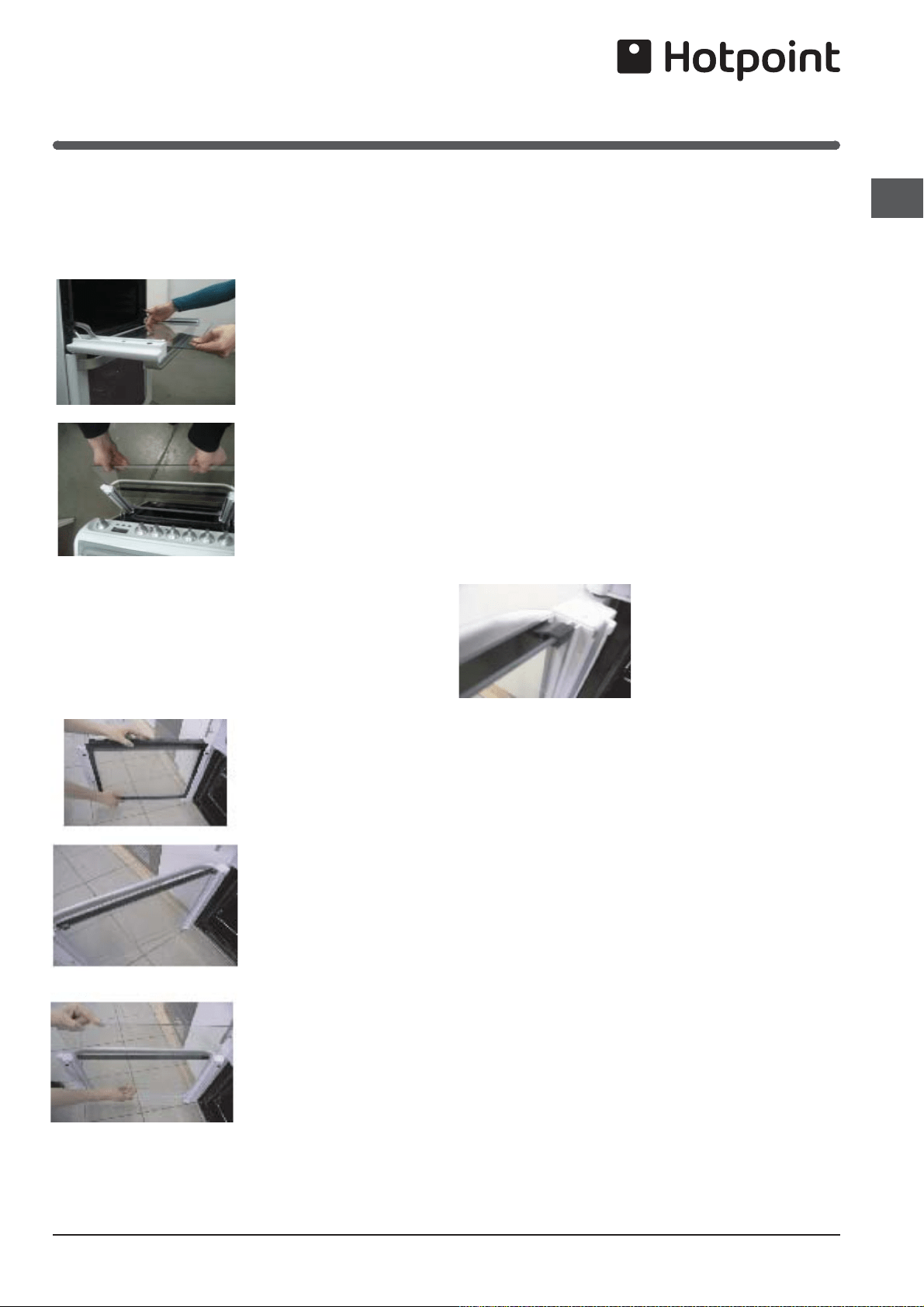
Cleaning the glass doors
DROP DOWN DOORS
Open the door fully and
carefully slide the first
inner glass towards you,
taking care not to allow the
glass to fall.
If necessary, the glass can
be pushed delicately from
the back side.
Repeat the same
procedure with the next
glass.
Now the external glass
panel can be washed.
WARNING! As soon as the inner and middle glass
panels are removed , the door slams shut.
SIDE OPENING DOORS
Cleaning the door glass is the same as the drop
down doors.
Open the lower door
and lift out the inner
door glass
Remove the two
rubber anti-rattle
bungs
Remove the centre
glass taking care to
support the weight
of the glass when
removing and fitting
The glass panels may now be washed at the sink.
Stubborn stains can be removed by using a fine steel
wool soap pad.
Replace in the reverse order.
Ensure anti-rattle bungs are fitted before fitting inner
door glass.
BE CAREFUL NOT TO DAMAGE THE GLASS PANELS
BY PUSHING THEM TOO HARD.
When fitting the glass make sure it is fitted correctly ie
reflective face is fitted the right way round.
Ensure the glass panel is not subjected to any sharp
mechanical blows. Take particular care not to damage
the inner surface which is coated with a heat reflective
layer. After cleaning, rinse and dry with a soft cloth. For
slight soiling the inner glass panel may be cleaned,
while still warm, without removing it from the door
Warning: Oven must not be operated with inner door
glass removed.
Anti- rattle bung
The door glass is equipped with anti-rattle bungs
which prevents rattling of
the glass when opening
and shutting the oven
main door. These can be
removed for washing.
WARNING : Be careful not
to lose the bungs when
cleaning
Door and Control Panel (Glass)
Regularly wipe with a clean, damp cloth and polish with
a clean, dry cloth.
Door and Control Panel Trims (Stainless Steel)
Regularly wipe with a clean, damp cloth and polish with
a clean, dry cloth.
Replacement of the Oven Light
WARNING: Ensure that the appliance is switched off
before replacing the lamp to avoid the possibility of
electric shock.
Unscrew the glass cover, using a suitable cloth to
protect the fingers and remove carefully. Unscrew the
existing light bulb, and remove. Screw the new bulb
into position and replace the glass cover, with metal
washer, until positioned securely.
24
GB
PLEASE PHONE US TO REGISTER YOUR APPLIANCE AND ACTIVATE YOUR PARTS GUARANTEE ON 08448 24 24 24
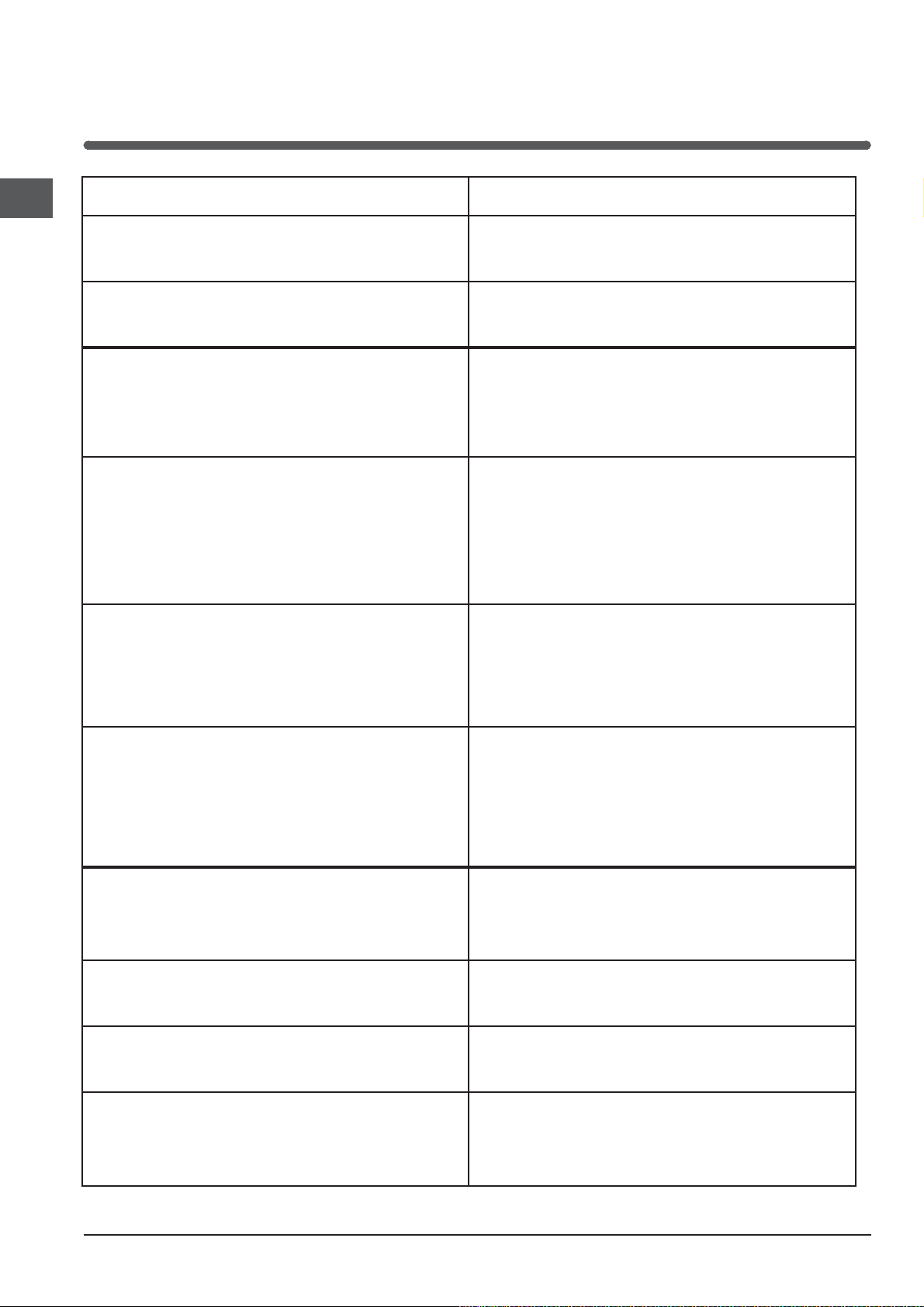
Cooking Results
Not Satisfactory?
Problem Check
Grilling
Uneven cooking front to back
Ensure that the grill pan is positioned centrally below
the grill element.
Fat splattering Ensure that the grill is not set to too high a setting.
Baking (General)
Uneven rising of cakes
Ensure that the oven shelves are level by using a spirit
level on the rod shelf and adjusting the wheels/feet.
The oven should be checked both left to right and
front to back.
Sinking of cakes
Sinking of cakes
The following may cause cakes to sink:
1. Preheating of fan ovens.
2. Cooking at too high a temperature.
3.Using normal creaming method with soft margarine.
(use the all-in-one method). 4. If using soft margarine
use the all-in-one method
Over/Under cooking Fast/Slow cooking
Refer to the cooking times and temperatures given
in the oven temperature charts, however, it may be
necessary to increase or decrease temperatures by
10°C to suit personal taste. Do not use utensils greater
than 56mm (2¼ins) in height.
Uneven cooking of cakes
1. Too large baking sheet used. (See ‚Cookery Notes’,
for correct sizes).
2. Over loading of oven and always ensure even air
gaps around baking tins.
3. Placed into pre-heated oven. (See oven temperatu-
re charts)
Top Oven Baking:
Uneven cooking front to back
Ensure the cooking utensil is positioned centrally
under the grill element.
Uneven rising of cakes
Ensure that the shelf is level (see above) and that the
food is positioned centrally in the oven.
Overcooking
Remember to reduce cooking temperatures by 10°C
from standard recipes when using the top oven.
Food is taking too long to cook
Ensure that the cooking utensil used in the top oven is
not larger than 300x225mm (12ins x 9ins).
Only cook one item at a time to avoid overloading the
oven.
25
GB
PLEASE PHONE US TO REGISTER YOUR APPLIANCE AND ACTIVATE YOUR PARTS GUARANTEE ON 08448 24 24 24
Something Wrong with
your Cooker?
Before contacting your nearest Service Centre/Installer, check the problem guide below; there may be nothing
wrong with your cooker.
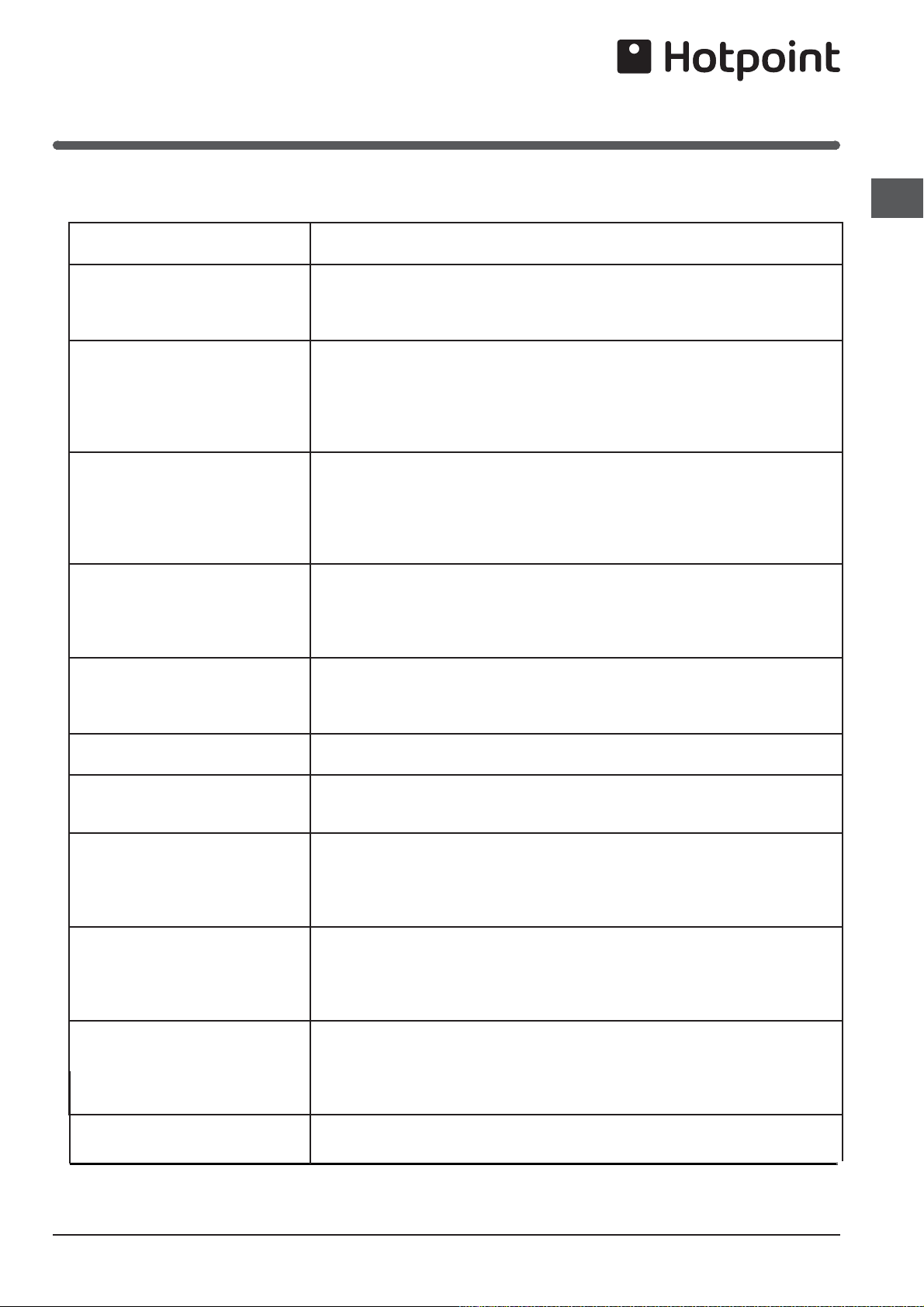
Problem
Slight odour or small amount of
smoke when grill / oven used for
first time
This is normal and should cease after a short period.
Nothing works
If you find that the timer display is blank, then it is likely that there is no elec-
tricity supply to your oven. Check:
(i) That the main cooker wall is switched on
(ii) Other appliances, to see if you have had a power cut
(iii) The main circuit breaker for the property
Grill / Top Oven do not work.
Main oven works
(a) Grilling with the door closed - Always grill with the door fully open
(b) Grilling for an excessively long period at maximum setting - see Grilling
guide. Switch off appliance and allow to cool for approx 30 mins.
Switch the cooker back on and check that the Grill / Top oven (as applica-
ble) is now operating.
Oven temperatures too high or
low
Check temperature and shelf positions are as recommended in the Oven
Temperature Charts.
It may be necessary to increase or decrease the recommended temperature
slightly to suit your taste.
Oven lamp does not work
The oven lamp is not covered by the guarantee. The part is easily changed
(see the section on oven lamp replacement). A new lamp may be obtained
from our Parts department, see Key Contacts, back page.
Grill does not work Ensure that the top oven control is turned fully off.
Grill keeps turning on and off
When the Grill control is operating at less than its maximum setting, the Grill
will cycle on and off, this is normal and not a fault.
Draught from beneath control
panel
A gentle flow of air will be blown from beneath the control panel when the
appliance is used. If the appliance is still warm, this cooling fan may run on,
or restart itself when all controls have been turned off. The fan will stop once
the appliance has been cooled.This is normal and not a fault.
Condensation on the wall at the
rear of the cooker
Steam and / or condensation may appear from the vent at the rear of the ap-
pliance when using an oven particularly for foods with a high water content
e.g. frozen chips, roast chicken etc.This is normal, and any excess should
be wiped off.
Steam / Condensation in the
oven after use
Steam is a by - product of cooking any food with a high water contact.
To help minimise always:
a) Try to avoid leaving food in the oven to cool after being cooked.
b) Use a covered container, wherever possible.
Main Oven Fan
keeps turning on
and off
This is normal operation.The main oven fan switches on
and off at regular intervals during
the cooking cycle.

26
GB
PLEASE PHONE US TO REGISTER YOUR APPLIANCE AND ACTIVATE YOUR PARTS GUARANTEE ON 08448 24 24 24
Contact the Service Office
If something is still wrong with your appliance after you
have been through the ‚Something Wrong’ list:
1. Switch off and unplug the appliance from the mains.
2. Call your nearest Service Office or local importer.
When you contact us we will want to know the following:
1. Your name, address and postcode.
2. Your telephone number.
3. Clear and concise details of the fault.
4. The Model number and the Serial number of your
appliance.
5. The date of purchase (please keep the receipt as
evidence will be required when an engineer calls)
enter the date here:
.............................................................................
Please make sure you have all these details ready when
you call.
Spare Parts
Please remember your new appliance is a complex piece
of equipment.
‚DIY’ repairs or unqualified and untrained service people
may put you in danger, could damage the appliance and
might mean you lose cover under the Parts Guarantee.
If you do experience a problem with the appliance don’t
take risks, call in our Service Engineer. Our Parts are
designed exclusively to fit your appliance. Do not use
them for any other purpose as you may create a safety
hazard.
If it Still Won’t Work
Disposal of your product
To minimise the risk of injury to children please dispose of
your product carefully and safely. Remove all doors and
lids. Remove the mains cable (where fitted) by cutting
off flush with the appliance and always ensure that no
plug is left in a condition where it could be connected to
the electricity supply.
To help the environment, Local Authority instructions
should be followed for the disposal of your product.
Disposal of old electrical appliances
The European Directive 2002/96/EC on Waste Electrical
and Electronic Equipment (WEEE), requires that old
household electrical appliances must not be disposed
of in the normal unsorted municipal waste stream. Old
appliances must be collected separately in order to
optimise the recovery and recycling of the materials they
contain and reduce the impact on human health and the
environment.
The crossed out „wheeled bin” symbol on the product
reminds you of your obligation, that when you dispose of
the appliance it must be separately collected.
Consumers should contact their local authority or retailer
for information concerning the correct disposal of their
old appliance.
Respecting and conserving the
environment
Whenever possible, avoid pre-heating the oven and
always try to fill it. Open the oven door as little as possible
because heat is lost every time it is opened. To save
a substantial amount of energy, simply switch off the oven
5 to 10 minutes before the end of your planned cooking
time and use the heat the oven continues to generate.
Keep gaskets clean and tidy to prevent any door energy
losses
If you have a timed tariff electricity contract, the “delay
cooking” option will make it easier to save money by
moving operation to cheaper time periods.
Make the most of your hot plate’s residual heat by
switching off cast iron hot plates 10 minutes before the
end of your cooking time and glass ceramic hot plates 5
minutes before the end of cooking time.
The base of your pot or pan should cover the hot plate.
If it is smaller, precious energy will be wasted and pots
that boil over leave encrusted remains that can be difficult
to remove.
Cook your food in closed pots or pans with well-fitting lids
and use as little water as possible. Cooking with the lid
off will greatly increase energy consumption
Use purely flat pots and pans
If you are cooking something that takes a long time, it’s
worth using a pressure cooker, which is twice as fast and
saves a third of the energy.
27
GB
PLEASE PHONE US TO REGISTER YOUR APPLIANCE AND ACTIVATE YOUR PARTS GUARANTEE ON 08448 24 24 24
Product Guarantee and Repair
Information
Please note, our advisors will require the following information:
Model number:
Serial number:
Guarantee
12 Months Parts and Labour Guarantee
Your appliance has benefit of our manufacturer’s guarantee, which covers
t
he cost of breakdown repairs for twelve months from the date of purchase.
This gives you the reassurance that if, within that time, your appliance is proven
to be defective because of either workmanship or materials, we will, at our
discretion, either repair or replace the appliance at no cost to you:
This guarantee is subject to the following conditions:
- The appliance has been installed and operated correctly and in accordance
with our operating and maintenance instructions.
- The appliance is used only on the electricity or gas supply printed on the
rating plate.
-
The appliance has been used for normal domestic purposes only.
- The appliance has not been altered, serviced, maintained, dismantled, or
otherwise interfered with by any person not authorised by us.
- Any repair work must be undertaken by us or our appointed agent.
- Any parts removed during repair work or any appliance that is replaced
become our property.
- The appliance is used in the United Kingdom or Republic of Ireland.
The guarantee does not cover:
- Damage resulting from transportation, improper use, neglect or interference
or as a result of improper installation.
- Replacement of any consumable item or accessory. These include but
are not limited to:plugs,cables,batteries,light bulbs,fluorescent tubes and
starters, covers and filters.
- Replacement of any removable parts made of glass or plastic.
THIS
GUARANTEE WILL NOT APPLY IF THE APPLIANCE HAS BEEN
USED IN COMMERCIAL OR NON-DOMESTIC PREMISES.
Recycling and Disposal Information
As part of Hotpoint’s continued commitment to helping the environment,
Hotpoint reserves the right to use quality, recycled components to keep down
customer costs and minimise material wastage.
Please dispose of packaging and old appliances carefully. To minimise the
risk of injury to children, remove the door, plug, and cut the mains cable off
flush with the appliance.Dispose of these parts separately to ensure that th
e
appliance can no longer be plugged into mains socket, and the door cannot
be locked shut.
Repairs and After Sales
For product help and advice, repairs, spare parts or accessories, we’re here
to help.
For local repair engineers -
03448 111 606
ROI - 0818 313 413
UK standard local rate applies
ROI local Irish rate applies
For Parts and Accessories visit:
parts.hotpoint.co.uk/shop
Please remember to register your appliance at www.hotpointservice.co.uk
to activate your 10 year parts guarantee.

28
GB
PLEASE PHONE US TO REGISTER YOUR APPLIANCE AND ACTIVATE YOUR PARTS GUARANTEE ON 08448 24 24 24
www.hotpoint.co.uk
Whirlpool EMEA S.p.A.
Via Carlo Pisacane n.1
20016 Pero (MI), Italy
VAT number: IT00693740425
XEROX FABRIANO
04/2018 - W11254727