
SEARS
Vacuum Cleaner
Owner's Manual
CAUTION:
Read and follow all
safety and operating
instructions before first
use of this product,
Sears, Roebuck and Co., Hoffman Estates, IL 60179 U.S.A.
www.sears.com
Part No. COIZAUS00UOO-8174820 Printed in U.SA,
Before Using Your NewVacuum 2
Kenmore Vacuum Cleaner Warranty .... 2
Important Safety Instructions ......... 3
Parts and Features ................. 45
Assembly ........................... 6-7
Use ........................................ 8
How to Start ........................... 8
Vacuuming Tips ......................... 9
Suggested Pile Height Settings .......... 9
Attachments .............................. 10
Attachment Use Chart ............... 10
Performance Features .................... 11
How Your Vacuum Works ................. 12
Canister Care ................... 12
Bag Changing ................... 12
Motor Safety Filter Cleaning .............. I3
CIeaning Exterior and Attachments ....... 13
Power-Mate TM Care .................. 14
Light Bulb Changing ............... 14
Belt Changing and Brush Cleaning _., !4-15
Brush Servicing ..................... 16
Brush Assembly .................... 16
Troubleshooting .................. 17
Requesting Assistance Or Service .. 18
Please read this guide. It will help you assemble and operate your new Kenmore vacuum in
the safest and most effective way_
For more information about the care and operation, call your nearest Sears store_ You will
need the complete model and serial numbers when requesting informationYour vacuum's
model and serial numbers are located on the Model and Serial Number Plate.
Use the space below to record the model number and serial number of your new Kenmore
vacuum.
Model No.
Serial No.
Date of Purchase
Keep this book and your sales check (receipt) in a safe place for future reference
FULL ONE-YEAR WARRANTY
When used for private household purposes, if within one year from the date of purchase, this
vacuum cleaner fails due to a defect in material or workmanship, RETURN ITTO THE NEAR-
EST SEARS SERVlCE CENTER/DEPARTMENT IN THE UNITED STATES, and Sears will
repair it free of charge.
This warranty gives you specific legal rights, and you may also have other rights which vary
from state to state.
Sears, Roebuck and Co. D/817 WA, Hoffman Estates, IL 60179
WARNING
Your safety is important to us. To reduce the risk of fire, electrical shock, injury to
persons or damage when using your vacuum cleaner, follow basic safety precau-
tions including the following:
Read this manual before assembling or
using your vacuum cleaner.
Use your cleaner only as described in this
manual. Use only with Sears recommended
attachments.
To reduce the risk of electrical shock - Do
not use outdoors or on wet surfaces.
Disconnect electrical supply before servic-
ing or cleaning oul brush area. Failure to do
so could result in electrical shock or brush
suddenly starting.
Always turn cleaner off before connectingTor
disconnecting the hose or POWER-MATE
Always turn cleaner off before unplugging.
Do not unplug by pulling on cord. To unplug,
grasp the plug, not the cord.
Hold plug when rewinding onto cord reel.
Do not allow plug to whip when rewinding
Do not use with damaged cord or plug If
cleaner isnot working as it should, has been
dropped, damaged, left mitdoors, or dropped
into water, return it to a Sears Service
Center/Department.
Do not pull or carry by cord, use cord as a
handle, close door on cord, or pull cord
around sharp edges bf cOrners_ Do not run
cleaner over cord. Keep cord away from
heated surfaces
Do not leave cleaner when plugged in.
Unplug from outlet when not in use and
before servicing
Do not allow to be used as a toy. Close
attention is necessary when used by or near
children°
Do not handle plug or cleaner with wet
hands
Do not operate the cleaner with a punctured
hose. The hose contains electrical wires.
Replace if cut or worn Avoid picking up
sharp objects.
Do not put any objects into openings
Do not use with any opening blocked; keep
free of dust, lint, hair and anything that may
reduce air flow_
Keep hair, loose clothing, fingers, and all
parts of body away from openings and mov-
ing parts.
Do not use cleaner without dust bag and/or
filters in place.
Always change the dust bag after vacuum-
ing carpet cleaners or freshener, powders
and fine dust_These products clog the bag,
reduce airflow and can cause the bag to
burst. Failure to change bag could cause
permanent damage to the cleaner.
Do not use the cleaner to pick up sharp hard
obiects , small toys, pins, paper clips, etc,
They may damage the cleaner or dust bag_
Do not pick up anything that is burning or
smoking, such as cigarettes, matches, or hot
ashes.
Do not use cleaner to pick up flammable or
combustible liquids (gasoline, cleaning fluids,
perfumes, etc.), or use in areas where they
may be present, The fumes from these sub-
stances can create a fire hazard or explo-
sion.
Use extra care when cleaning on stairs, Do
not pul on chairs, tables, etco Keep on floor.
You are responsible for making sure that
your vacuum cleaner is not used by anyone
unable to operate it properly,
SAVE THESE INSTRUCTIONS
Proper assembly and safe use of your vacuum cleaner are your responsibilities_ Your cleaner
is intended only for household user Read this Owner's Manual carefully for important use and
safety information. This guide contains safety statements under warning and caution symbols,
Please pay special attention to these boxes and follow any instructions given. WARNING
statements alert you to such dangers as fire, electrical shock, burns and personal injury.CAU-
TION statements alert you to such dangers as personal injury and/or property damage.
IIIIrl'llll'll'l I iiiiiiiii1'111 ii ii , I I iii ii ii iiiiiiiii _
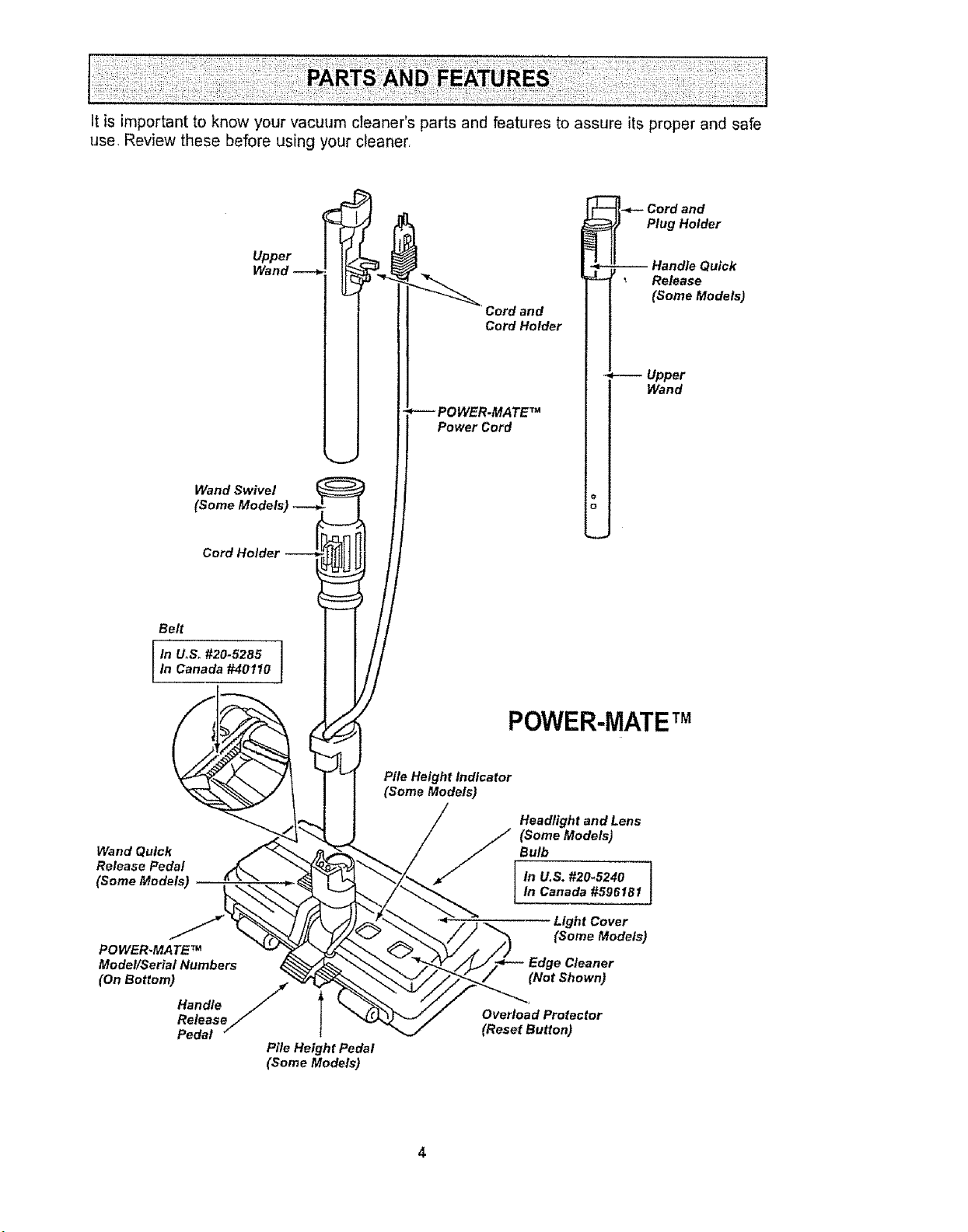
It is important to know your vacuum cleaner's parts and features to assure its proper and safe
use, Review these before using your cleaner,
Upper
Way
Wand Swivel
(Some Mo
Cord Holder
Belt
In UoSo#20-5285In Canada #40t10
Wand Quick
Release Pedal
(Some Models)
PO WER.MATE TM
Model/Serial Numbers
(On Bottom) /t(
Handle
/
Release/
Pedal
Pile Height Pedal
(Some Models)
and
Plug Holder
Cord and
Cord Holder
Power Cord
Release
(Some Models)
Upper
Wand
POWER-MATETM
Pile Height Indicator
(Some Models)
(Some Models)
/ Bulb
In U,S. #20.5240
_. In Canada #596181
Light Cover
%
"_ /'//_ (Some Models)
_'- " / _//_/_!__EdgeCleaner
J (NotShown)
_ / Overload Protector
/ (Reset Button)
HOSE
3-Way On/Off Switch
Off/Floor/Carpet
(Some Models)
Handle
i
Hose Swivel
ATTACHMENTS
Crevice
Tool
Dusting ,_
Brush -------_
Fabric __
Brush
Floor _.___.____
Brush
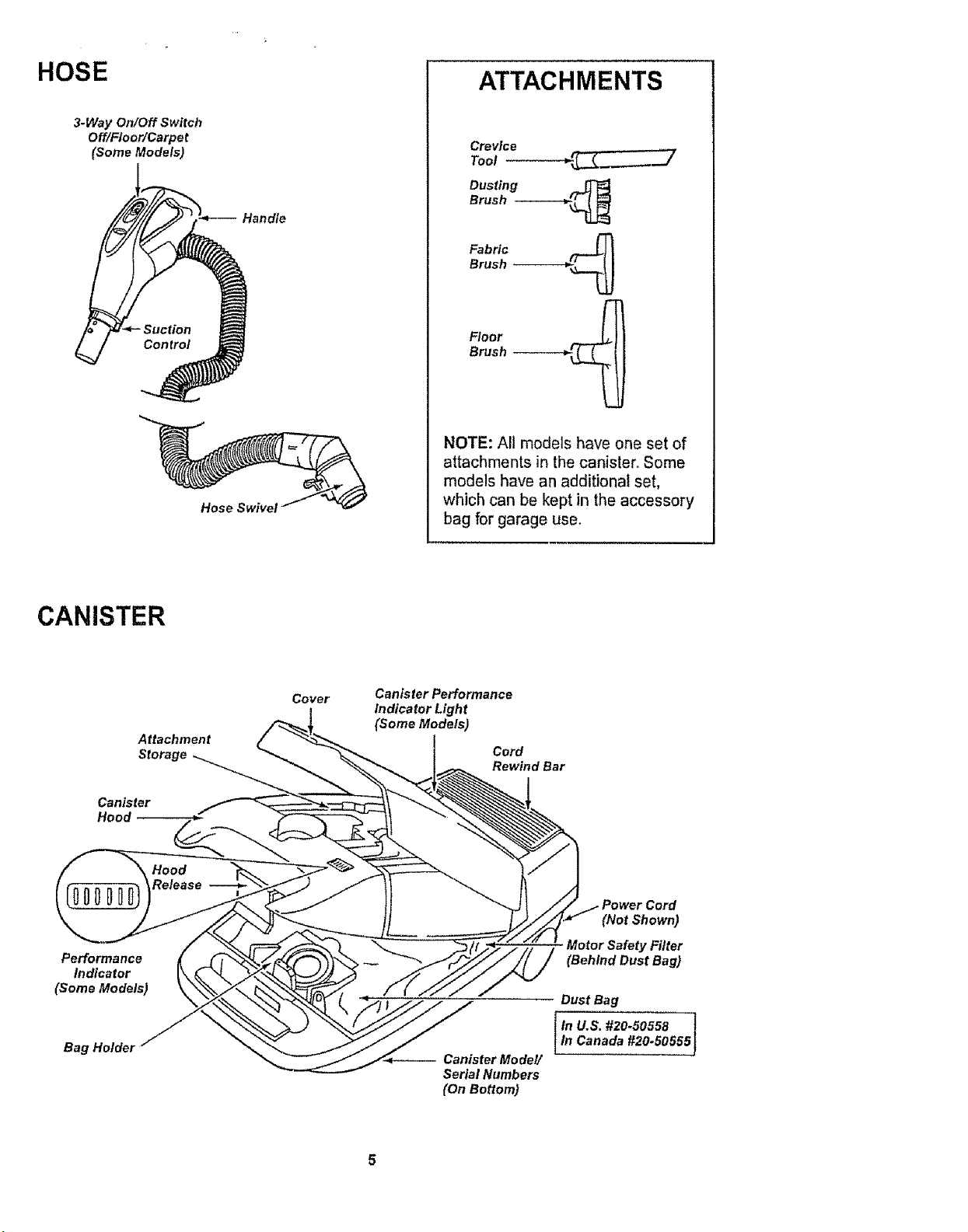
NOTE: All models have one set of
attachments in the canister. Some
models have an additional set,
which can be kept in the accessory
bag for garage use.
CANISTER
Attachment
Storage
Canister
Hood
Cover
Canister Performance
Indicator Light
(Some Models)
Cord
Rewind Bar
Performance
Indicator
(Some Models)
Bag Holdel
Canister Model/
Serial Numbers
(On Bottom)
(Not Shown)
Motor Safety Filter
(Behind Dust Bag)
Dust Bag
tn U.S. #20-50558 !
I In Canada #20.50555J
Before assembling your vacuum cleaner, be
sure you have all parts shown in PARTS
AND FEATURES.
WARNING
Electrical Shock Hazard
DO NOT plug into electrical supply
until assembly is complete. Failure
to do so could result in electrical
shock or injury.
i i , i i, iii1,1 i, i
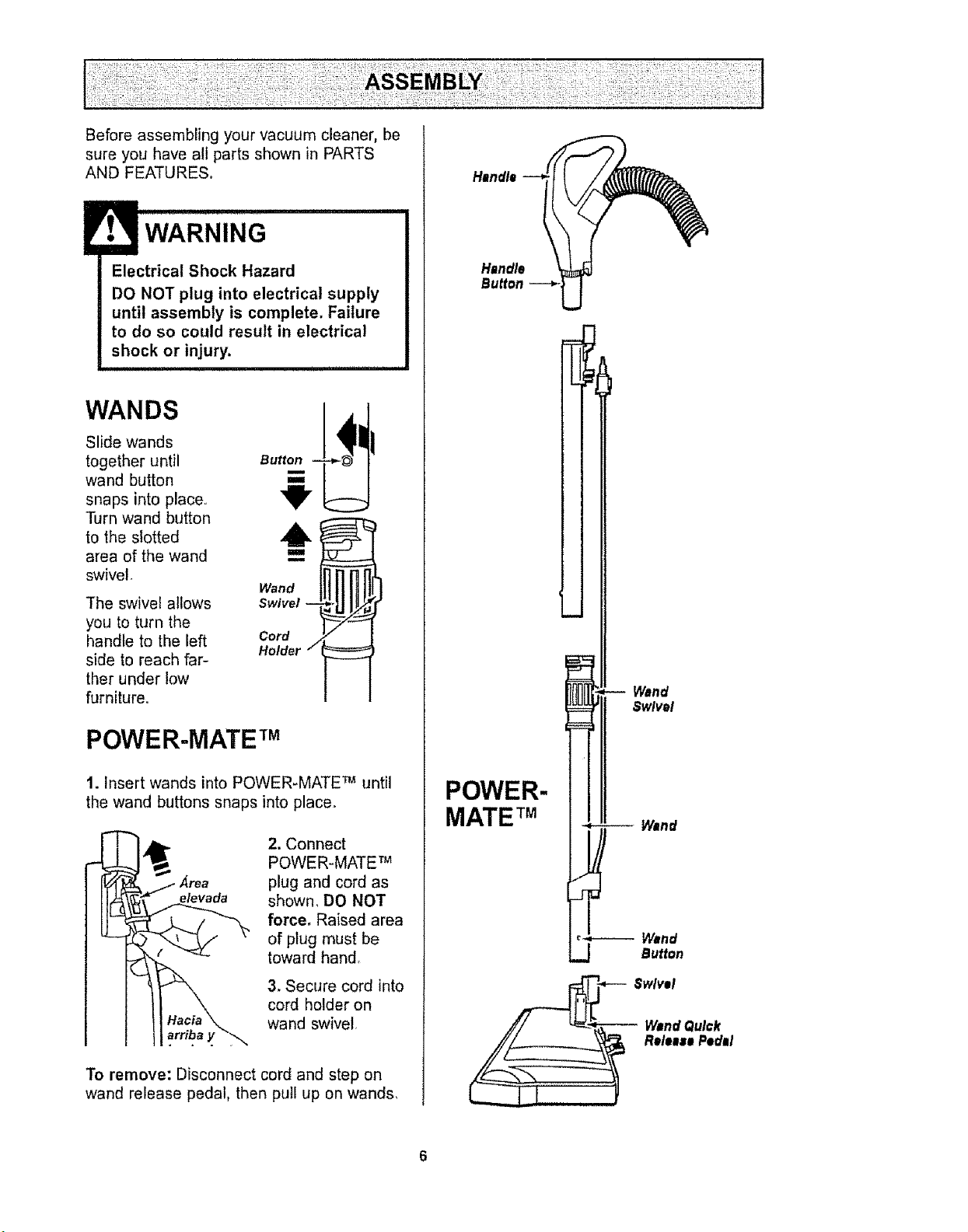
WANDS
Slide wands
together until
wand button
snaps into place.
Turn wand button
to the slotted
area of the wand
swivel
The swivel allows
you to turn the
handle to the left
side to reach far-
ther under low
furniture.
Button
iva
Cord
Holder /
POWER-MATE TM
1. Insert wands into POWER-MATE TM until
the wand buttons snaps into place.
Area
e/evada
2. Connect
POWER-MATE TM
plug and cord as
shown, DO NOT
force. Raised area
of plug must be
toward hand.
3, Secure cord into
cord holder on
wand swivel,
To remove: Disconnect cord and step on
wand release pedal, then pull up on wands,
CANISTER
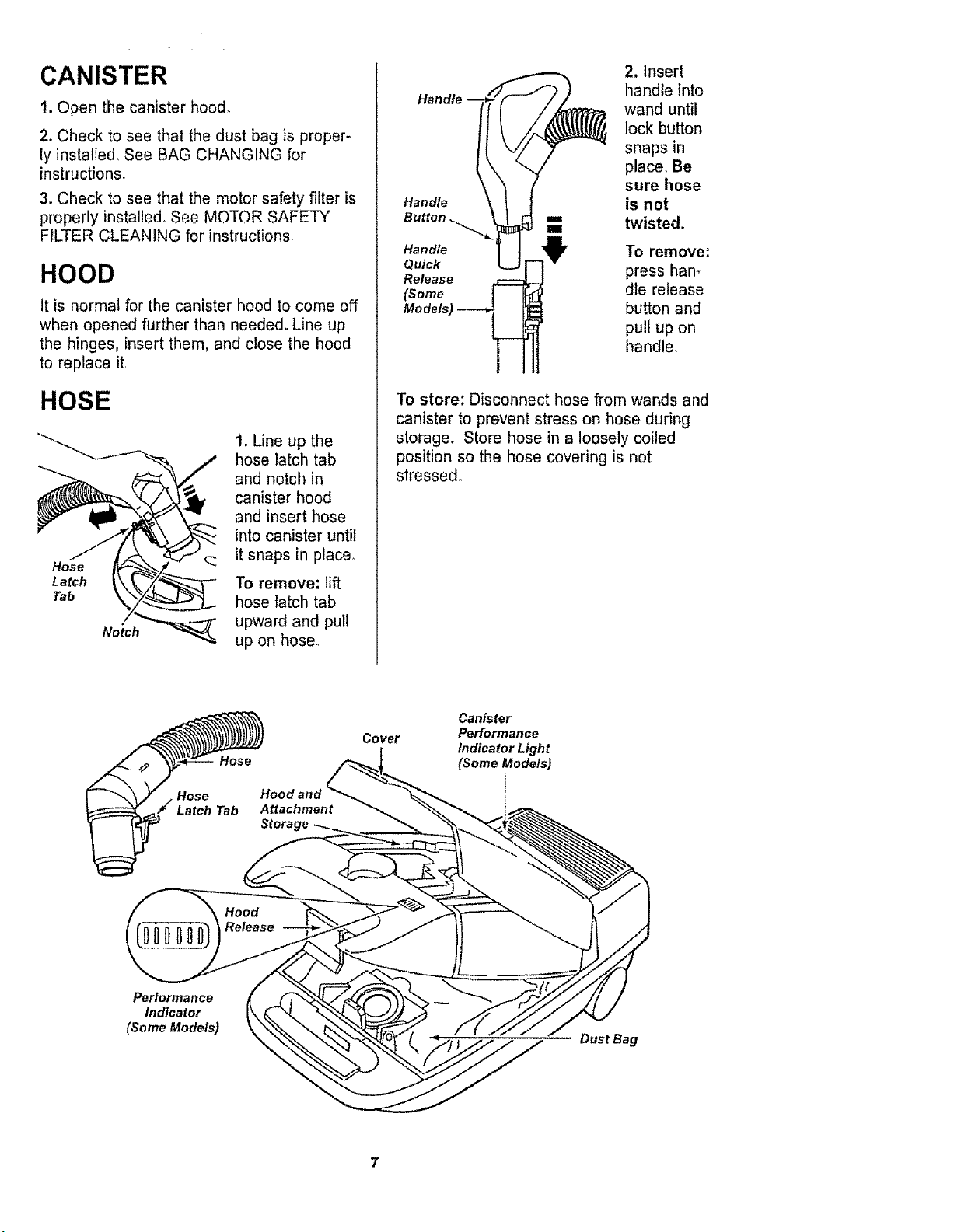
t. Open the canister hood,
2. Check to see that the dust bag is proper-
ly installed, See BAG CHANGING for
instructions.
3. Check to see that the motor safety filter is
properly installed° See MOTOR SAFETY
FILTER CLEANING for instructions
HOOD
it is normal for the canister hood to come off
when opened further than needed. Line up
the hinges, insert them, and close the hood
to replace it
HOSE
Notch "_"_
i. Line up the
hose latch tab
and notch in
canister hood
and insert hose
into canister until
it snaps in place.
To remove: lift
hose latch tab
upward and pull
up on hose
Handle
Handle
Button
Handle
Quick
Release
(Some
2. insert
handle into
wand until
lock button
snaps in
place, Be
sure hose
is not
twisted.
To remove;
press han_
die release
button and
pull up on
handle,
To store: Disconnect hose from wands and
canister to prevent stress on hose during
storage. Store hose in a loosely coiled
position so the hose covering is not
stresse&
Hood and
Attachment
Storage
Cover
Canister
Performance
Indicator Light
(Some Models)
Performance
Indicator
(Some Models)
Dust Bag
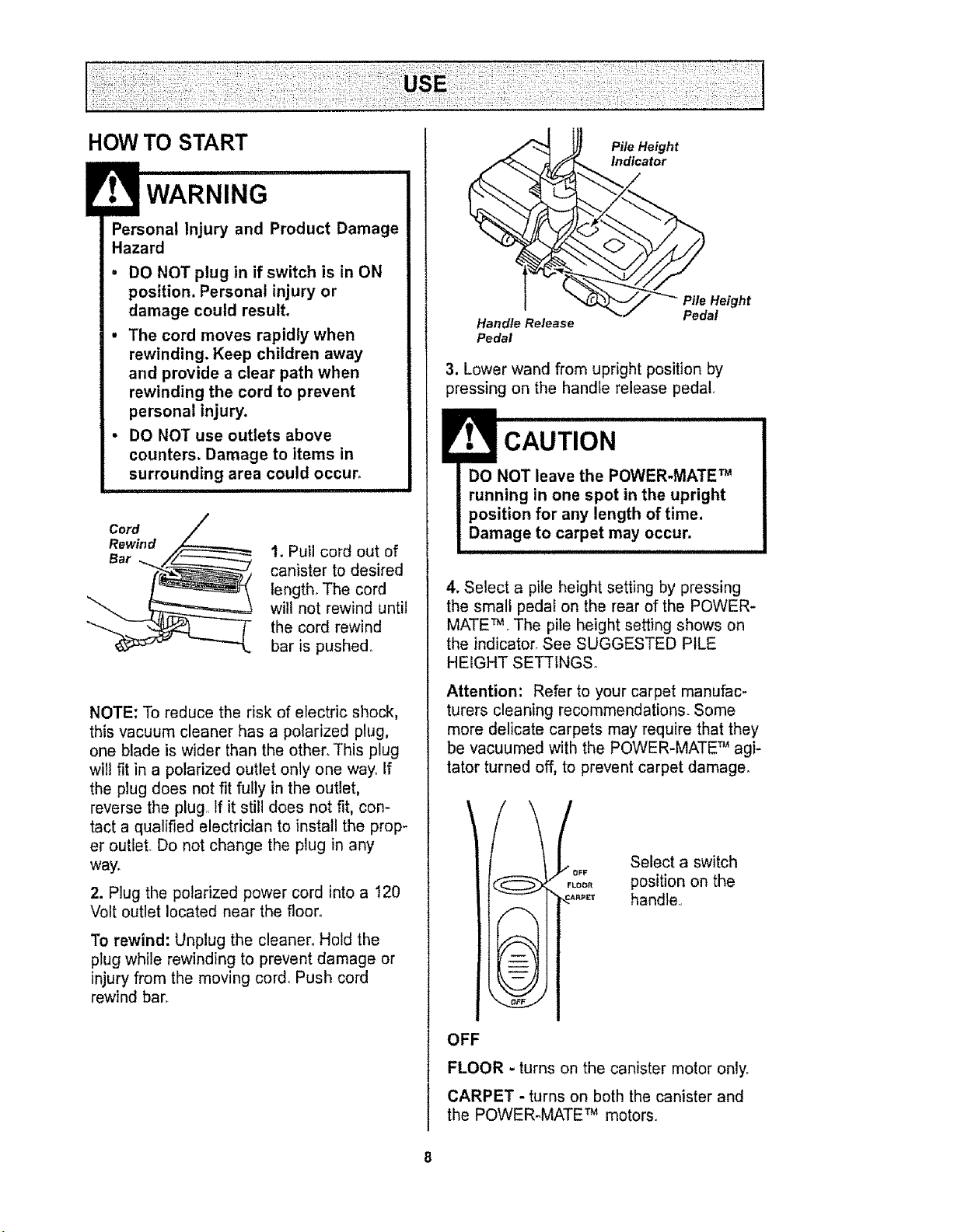
HOW TO START
Personal Injury and Product Damage
Hazard
• DO NOT plug in if switch is in ON
position. Personal injury or
damage could result.
• The cord moves rapidly when
rewinding, Keep children away
and provide a clear path when
rewinding the cord to prevent
personal injury.
- DO NOT use outiets above
counters. Damage to items in
surrounding area could occur,
Cord
Rewind
Bar
t. Pull cord out of
canister to desired
length. The cord
will not rewind until
the cord rewind
bar is pushed°
NOTE: To reduce the risk of electric shock,
this vacuum cleaner has a polarized plug,
one blade is wider than the other° This plug
wild fit in a polarized outlet only one way° If
the plug does not fit fully in the outlet,
reverse the plug,, If it still does not fit, con-
tact a qualified electrician to install the prop-
er outlet, Do not change the plug in any
way.
2. Plug the polarized power cord into a 120
Volt outlet located near the floor.
To rewind: Unplug the cleaner° Hold the
plug while rewinding to prevent damage or
injury from the moving cord. Push cord
rewind bar.
Handle Release
Pedal
Pile Height
indicator
2
eight
3, Lower wand from upright position by
pressing on the handle release pedal.
CAUTION
DO NOT leave the POWER-MATE TM
running in one spot in the upright
position for any length of time,
Damage to carpet may occur.
4. Select a pile height setting by pressing
the small pedal on the rear of the POWER-
MATETMoThe pile height setting shows on
the indicator. See SUGGESTED PILE
HEIGHT SETTINGS,,
Attention: Refer to your carpet manufac-
turers cleaning recommendations. Some
more delicate carpets may require that they
be vacuumed with the POWER-MATE _ agi-
tator turned off, to prevent carpet damage.
OFF
FLOOR
RP_%'
Select a switch
position on the
handle.,
OFF
FLOOR - turns on the canister motor only.
CARPET - turns on beth the canister and
the POWER-MATE TM motors.
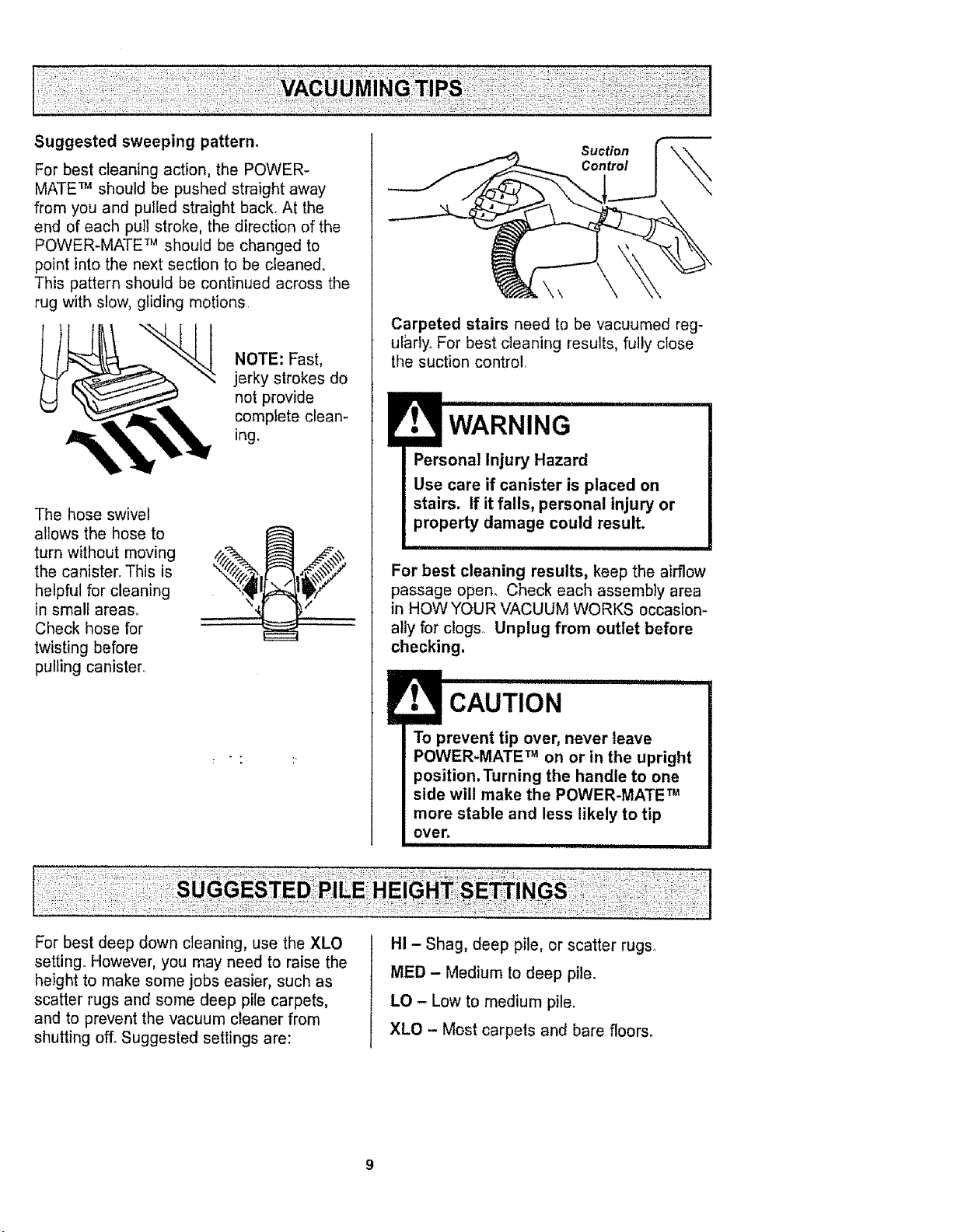
Suggested sweeping pattern,
For best cleaning action, the POWER-
MATE TM should be pushed straight away
from you and pulled straight back. At the
end of each pull stroke, the direction of the
POWER-MATE TM should be changed to
point into the next section to be cleaned.
This pattern should be continued across the
rug with slow, gliding motions
NOTE: Fast,
jerky strokes do
not provide
complete clean-
ing.
The hose swivel
allows the hose to
turn without moving
the canister° This is
helpful for cleaning
in small area&
Check hose for
twisting before
pulling canister,
Suction
Control
\\
Carpeted stairs need to be vacuumed reg-
ularly. For best cleaning results, fully close
the suction control
Personal Injury Hazard
Use care if canister is placed on
stairs. If it falls, personal injury or
property damage could result.
For best cleaning results, keep the airflow
passage open. Check each assembly area
in HOW YOUR VACUUM WORKS occasion-
ally for clogs. Unplug from outlet before
checking.
CAUTION
To prevent tip over, never leave
POWER-MATE TM on or in the upright
position.Turning the handle to one
side will make the POWER-MATE TM
more stable and less likely to tip
over.
iii i i I
For best deep down cleaning, use the XLO
setting. However, you may need to raise the
height to make some jobs easier, such as
scatter rugs and some deep pile carpets,
and to prevent the vacuum cleaner from
shutting off° Suggested settings are:
HI - Shag, deep pile, or scatter rugs.
MED - Medium to deep pile.
LO - Low to medium pile.
XLO - Most carpets and bare floors_
!_ ulll, llll i= i
CAUTION
DO NOT attach or remove handle or
wands while cleaner is ON, This
could cause sparking and damage
the electrical contacts.
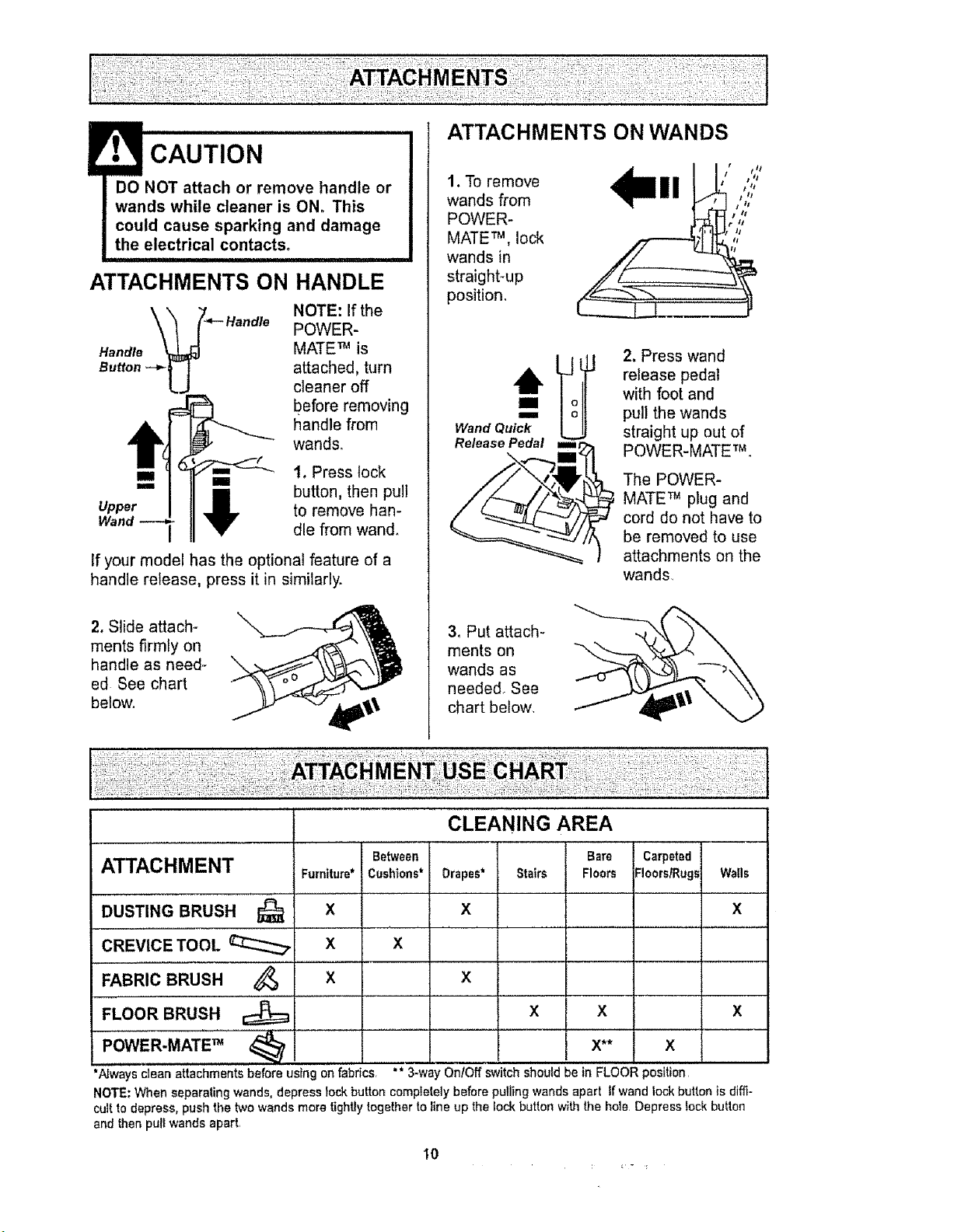
ATTACHMENTS ON HANDLE
,oo,,o
Handle
Button -_-_-J
NOTE: If the
POWER-
MATE _ is
attached, turn
cleaner off
before removing
handle from
wands.
Upper
I. Press lock
button, then pull
to remove han-
dle from wand°
If your model has the optional feature of a
handle release, press it in similarly.
2. Slide attach-
ments firmly on
handle as need-
ed See chart
below.
\
ATTACHMENTS ON WANDS
1. To remove
wands from
POWER-
MATE TM,lock
wands in
straight-up
position,
m
m
Wand Quick
Release Pedal m=
2. Press wand
release pedal
with foot and
pul! the wands
straight up out of
POWER-MATE m
The POWER-
MATE _ plug and
cord do not have to
be removed to use
attachments on the
wands
3_ Put attach-
ments on
wands as
needed. See
chart below,
ATTACHMENT
DUSTING BRUSH
CREVICE TOOL
FABRIC BRUSH 4_
FLOOR BRUSH
Between
Furniture*Cushions*
X
x X
X
' I ..........
*Nways clean attachments before using on fabrics, ** 3-we
NOTE; When separating wands, depress leek button completely before pulling wands apart If wand lock button is diffi-
cult to depress, push the two wands more tightly together to line up the lock button with the hole Depress lock button
and then pull wands apart
CLEANING AREA
Bare Carpeted
Drapes* Stairs Floors FloorsfRugs Walls
X x
X
X X X
x** x
On/Off switch should be in FLOORposition
1o
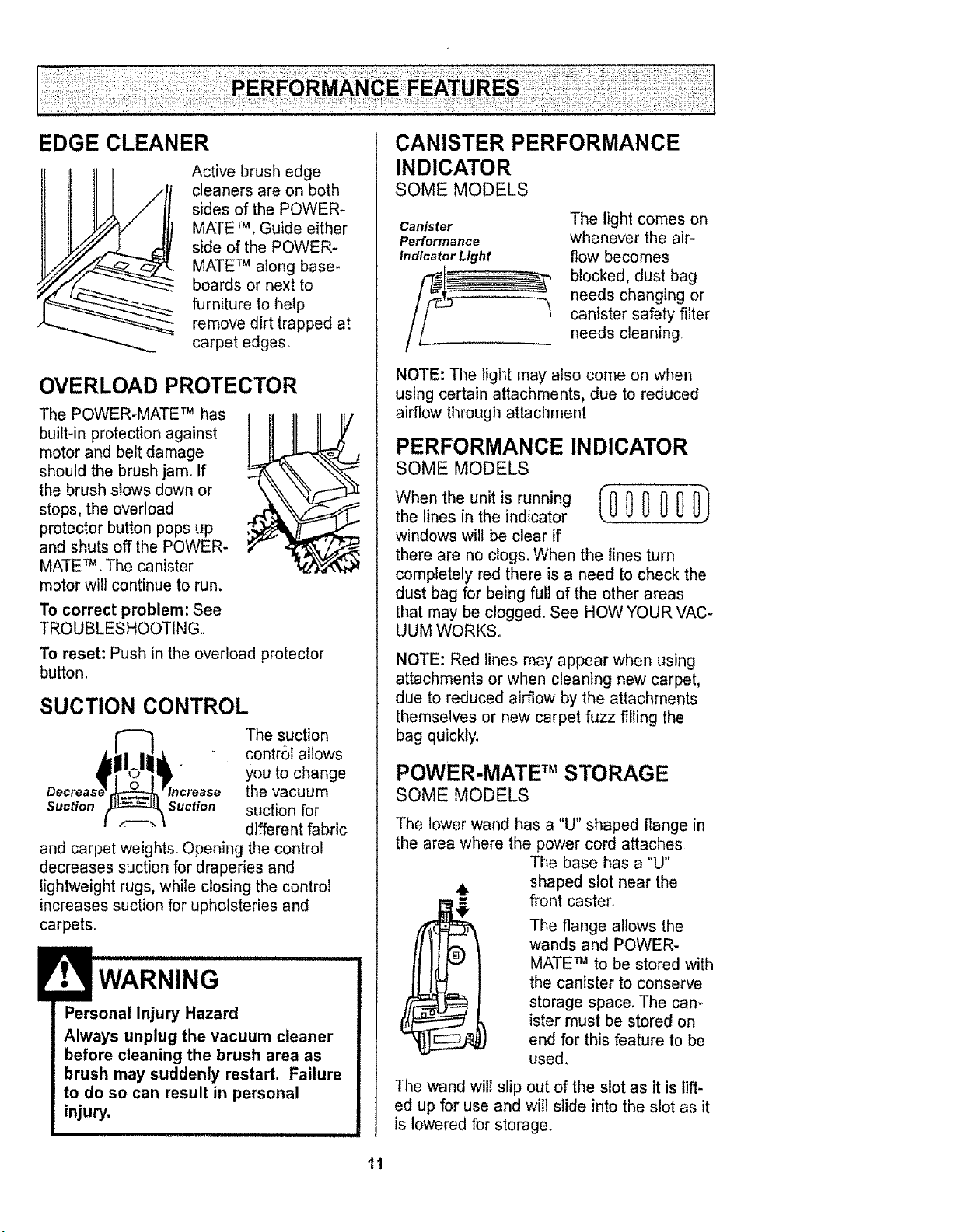
EDGE CLEANER
Active brush edge
cleaners are on both
sides of the POWER-
MATE TM. Guide either
side of the POWER-
MATE TM along base-
boards or next to
furniture to help
remove dirt trapped at
carpet edges_
OVERLOAD PROTECTOR
The POWER-MATE TM has
built-in protection against
motor and belt damage
should the brush jam. If
the brush slows down or
stops, the overload .4"
protector button pops up
and shuts off the POWER-
MATE TM. The canister
motor will continue to run.
To correct problem: See
TROUBLESHOOTING.
To reset: Push in the overload protector
button.
SUCTION CONTROL
The suction
control allows
you to change
the vacuum
Suction Suction suction for
different fabric
and carpet weights. Opening the control
decreases suction for draperies and
lightweight rugs, while closing the control
increases suction for upholsteries and
carpets.
WARNING
Personal Injury Hazard
Always unplug the vacuum cleaner
before cleaning the brush area as
brush may suddenly restart. Failure
to do so can result in personal
injury.
CANISTER PERFORMANCE
INDICATOR
SOME MODELS
Canister
Performance
Indicator Light
The light comes on
whenever the air-
flow becomes
blocked, dust bag
needs changing or
canister safety filter
needs cleaning°
NOTE: The light may also come on when
using certain attachments, due to reduced
airflow through attachment
PERFORMANCE INDICATOR
SOME MODELS
When the unit is running (000 000_
the lines in the indicator
windows will be clear if
there are no clogs. When the lines turn
completely red there is a need to check the
dust bag for being full of the other areas
that may be clogged. See HOW YOUR VAC-
UUM WORKS.
NOTE: Red lines may appear when using
attachments or when cleaning new carpet,
due to reduced airflow by the attachments
themselves or new carpet fuzz filling the
bag quickly_
POWER-MATE TM STORAGE
SOME MODELS
The lower wand has a "U" shaped flange in
the area where the power cord attaches
The base has a "U"
shaped slot near the
front caster.
The flange allows the
wands and POWER-
MATE TM to be stored with
the canister to conserve
storage space° The cam
ister must be stored on
end for this feature to be
used.
The wand will slip out of the slot as it is lift-
ed up for use and will slide into the slot as it
is lowered for storage.
11
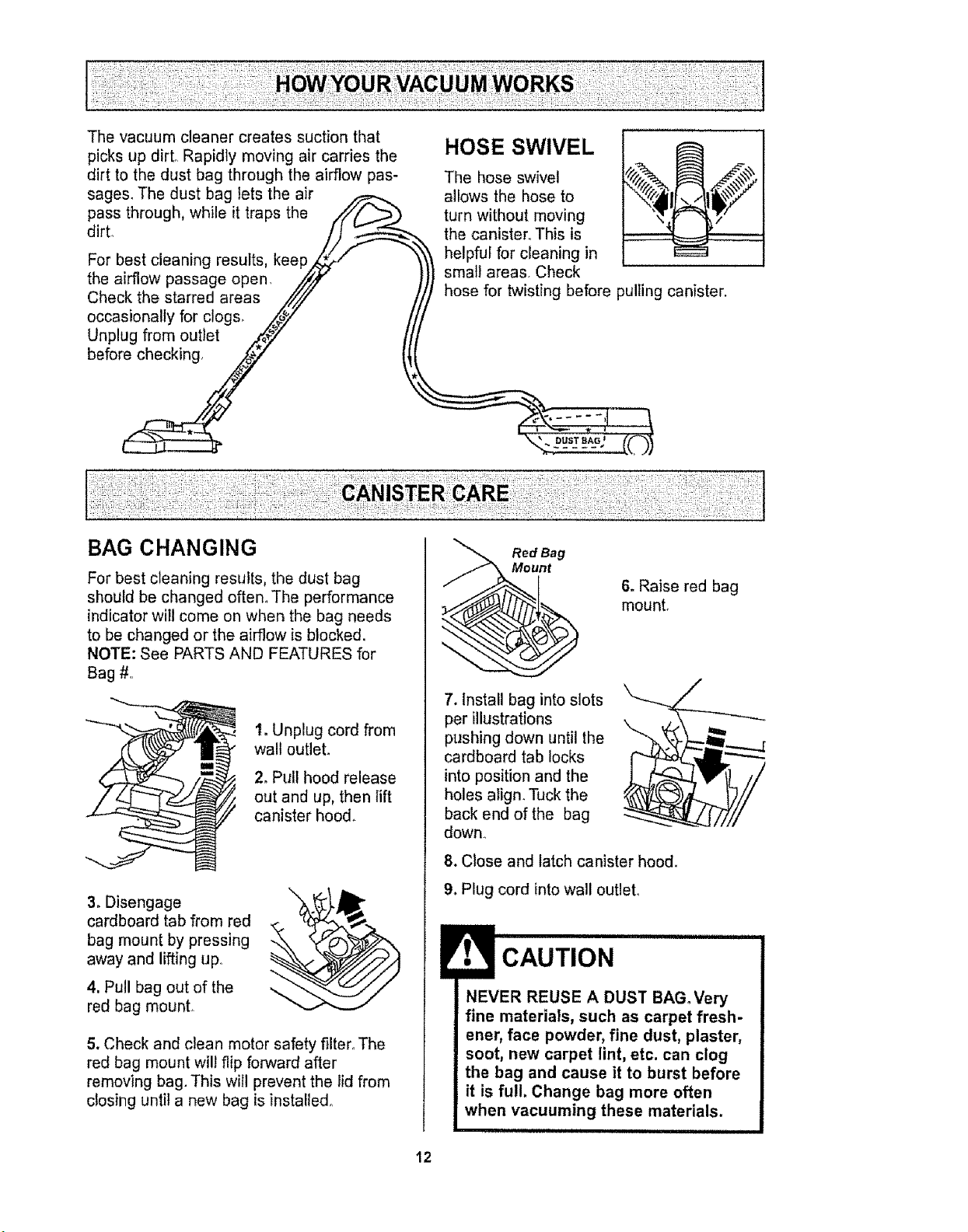
The vacuum cleaner creates suction that
picks up dirL Rapidly moving air carries the
dirt to the dust bag through the airflow pas-
sages. The dust bag lets the air
pass through, while it traps the //i/tf__._
For best cleaning results, keepS/
the airflow passage open, //¢/_
Check the starred areas ,/z//i"
occasionally for clogs, _y ./
Unplug from outlet Z{#7 It
HOSE SWIVEL
The hose swivel
allows the hose to
turn without moving
the canister.. This is
helpful for cleaning in
small areas. Check
i
hose for twisting before pulling canister.
BAG CHANGING
For best cleaning results, the dust bag
should be changed often. The performance
indicator will come on when the bag needs
to be changed or the airflow is blocked.
NOTE: See PARTS AND FEATURES for
Bag #.
1. Unplug cord from
walt outlet°
2. Pull hood release
out and up, then lift
canister hood.
3. Disengage
cardboard tab from red
bag mount by pressing
away and lifting upo
4, Pull bag out of the
red bag mount.
\
5. Check and clean motor safety filter. The
red bag mount wilt flip forward after
removing bag. This will prevent the lid from
closing until a new bag is installed°
Red Bag
t
6. Raise red bag
mount.
7. Install bag into slots
per illustrations
pushing down until the
cardboard tab locks
into position and the
holes align. Tuck the
back end of the bag
down.
8. Close and latch canister hood.
9. Plug cord into wall outlet.
CAUTION
NEVER REUSE A DUST BAGoVery
fine materials, such as carpet fresh-
ener, face powder, fine dust, plaster,
soot, new carpet lint, etc. can clog
the bag and cause it to burst before
it is full. Change bag more often
when vacuuming these materials.
12
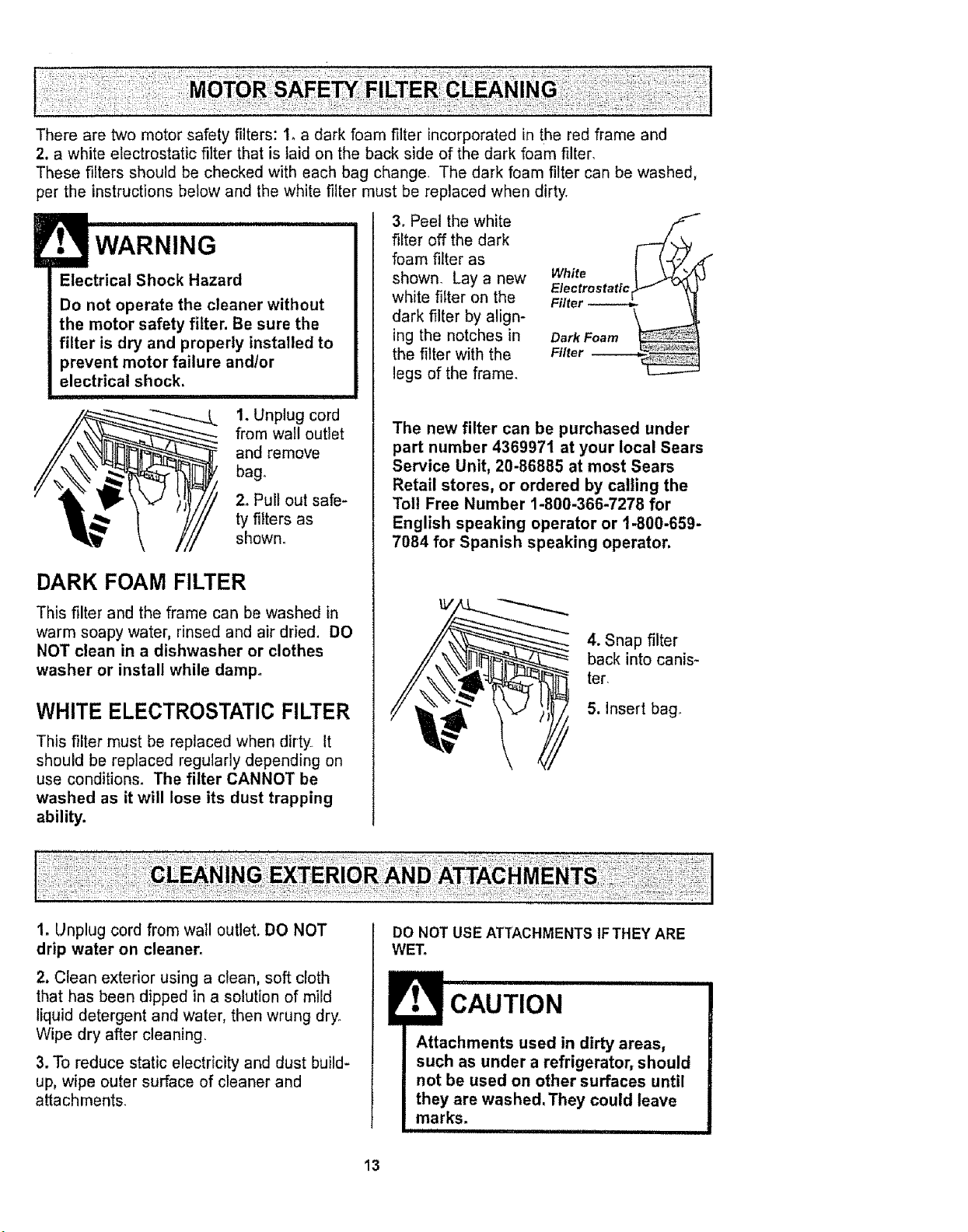
: : MOTO SA
There are two motor safety filters: 1oa dark foam filter incorporated in the red frame and
2, a white electrostatic filter that is laid on the back side of the dark foam filter.
These filters should be checked with each bag change. The dark foam filter can be washed,
per the instructions below and the white filter must be replaced when dirty.
Electrical Shock Hazard
Do not operate the cleaner without
the motor safety filter. Be sure the
filter is dry and properly installed to
prevent motor failure and/or
electrical shock.
1. Unplug cord
from wall outlet
and remove
bag.
ty filters as
shown.
DARK FOAM FILTER
This filter and the frame can be washed in
warm soapy water, rinsed and air dried, DO
NOT clean in a dishwasher or clothes
washer or install while damp°
WHITE ELECTROSTATIC FILTER
This filter must be replaced when dirty, It
should be replaced regularly depending on
use conditions° The filter CANNOT be
washed as it will lose its dust trapping
ability.
3. Peel the white
filter off the dark
foam filter as
shown. Lay a new
white filter on the
dark filter by align-
ing the notches in
the filter with the
legs of the frame.
White _" _
ElectrostatlcrJJ_ v_
Filter
Dark Foam
Filter
The new filter can be purchased under
part number 4369971 at your local Sears
Service Unit, 20-86885 at most Sears
Retail stores, or ordered by calling the
Toll Free Number 1-800-366-7278 for
English speaking operator or 1-800-659-
7084 for Spanish speaking operator.
4. Snap filter
back into canis-
ter.
5. Insert bag.
1. Unplug cord from wail outlet. DO NOT
drip water on cleaner.
2. Clean exterior using a clean, soft cloth
that has been dipped in a solution of mild
liquid detergent and water, then wrung dry.
Wipe dry after cleaning,
3. To reduce static electricity and dust build-
up, wipe outer surface of cleaner and
attachments.
:]
DO NOT USE ATTACHMENTS tFTHEY ARE
WET.
CAUTION
I Attachments used in dirty areas,
such as under a refrigerator, should
not be used on other surfaces until
they are washed. They could leave
marks. .........................
13
Always follow all safety precautions when
cleaning and servicing the POWER-MATE'_fl
Electrical Shock Or Personal Injury
Hazard
Disconnect electrical supply before
servicing or cleaning the unit,
Failure to do so could result in elec-
trical shock or personal injury from
cleaner suddenly starting.
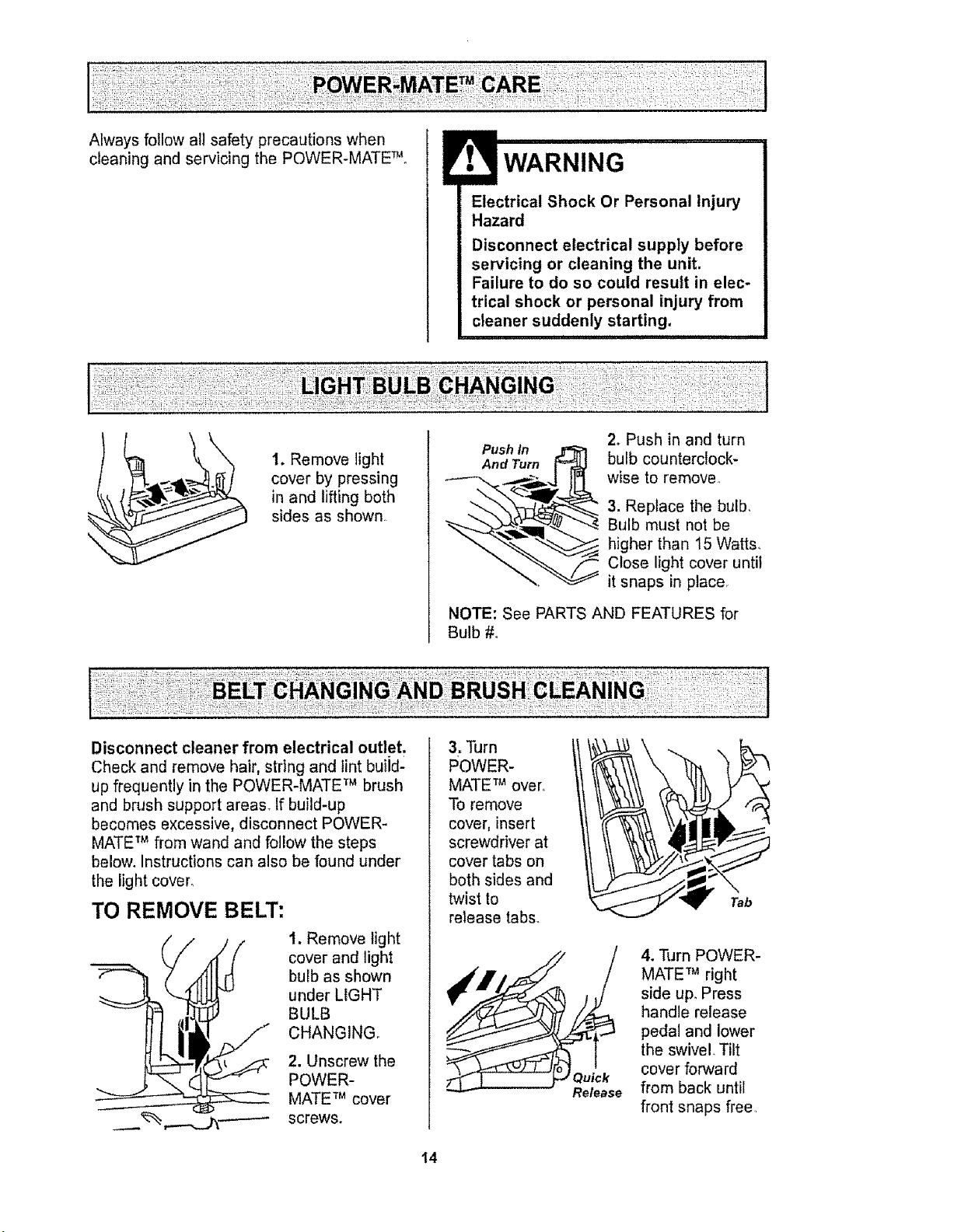
1. Remove light
cover by pressing
in and lifting both
sides as shown
Push in
And Turn _=_
2. Push in and turn
bulb counterclock-
wise to remove
3. Replace the bulb,
Bulb must not be
higher than 15 Watts,
Close light cover until
it snaps in place,
NOTE: See PARTS AND FEATURES for
Bulb #o
Disconnect cleaner from electrical outlet.
Check and remove hair, string and lint build-
up frequently in the POWER-MATE TM brush
and brush support areas. If build-up
becomes excessive, disconnect POWER-
MATE TM from wand and follow the steps
below. Instructions can also be found under
the light cover°
TO REMOVE BELT:
1. Remove light
cover and light
bulb as shown
under LIGHT
BULB
CHANGING.
2. Unscrew the
POWER-
MATE TM cover
screws.
3. Turn
POWER-
MATE TM over
To remove
cover, insert 1
screwdriver at
cover tabs on
both sides and
twist to
release tabs_
4. Turn POWER-
MATE TM right
side upo Press
handle release
pedal and lower
the swivel Tilt
cover forward
from back until
front snaps free
I4
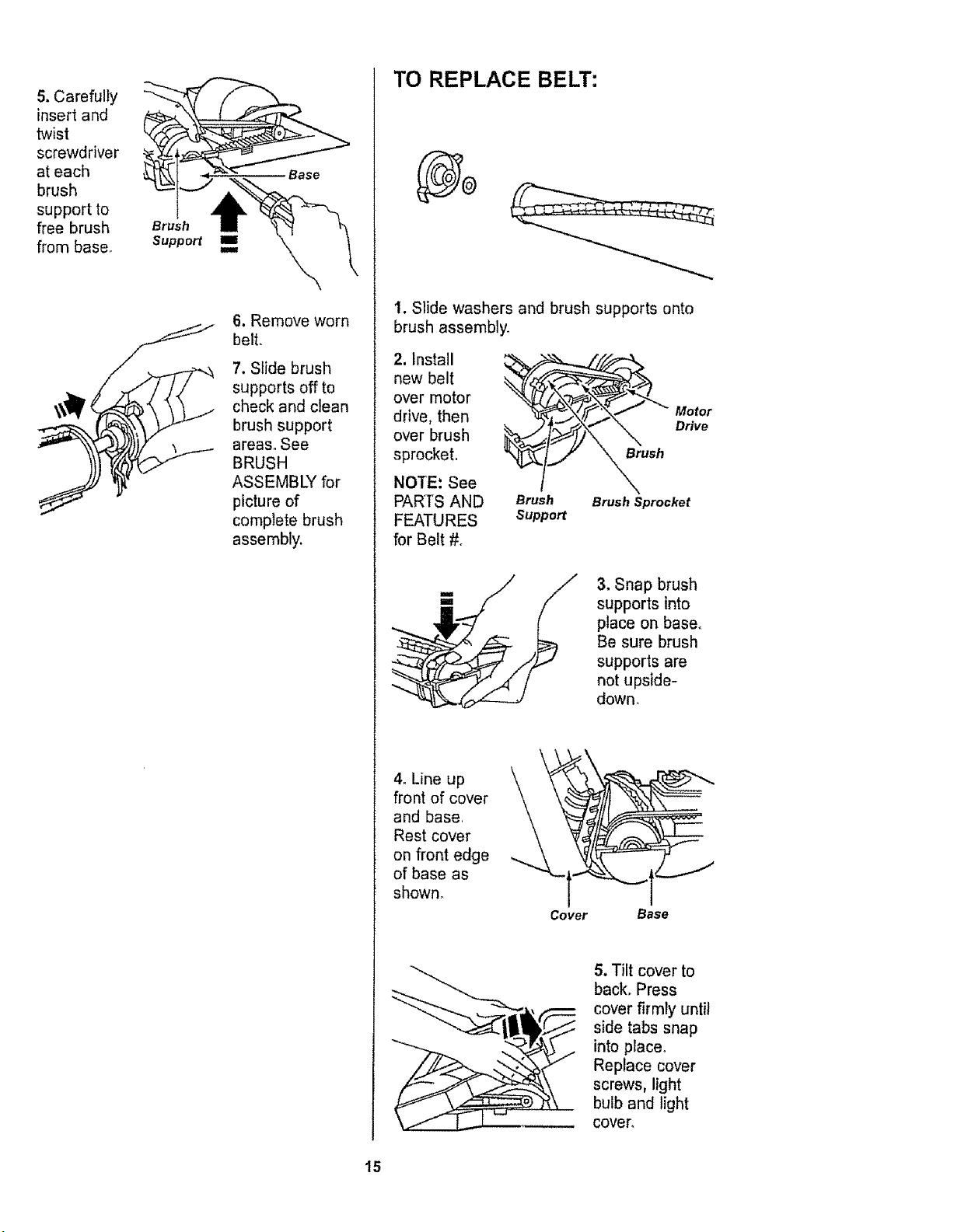
5. Carefully
insert and
twist
screwdriver
at each
brush
support to
free brush
from base.
Brush
Support II
k
t4
6. Remove worn
belt,
7. Slide brush
supports off to
check and clean
brush support
areas. See
BRUSH
ASSEMBD( for
picture of
complete brush
assembly.
TO REPLACE BELT:
1. Slide washers and brush supports onto
brush assembly_
2, Install
new belt
over motor
drive, then
over brush
sprocket,
NOTE: See
PARTS AND
for Belt #o
1
Brush
Support
__ Motor
_ush Drive
Brush Sprocket
3. Snap brush
supports into
place on base.
Be sure brush
supports are
not upside-
down,
4. Line up
front of cover
and base,
Rest cover
on front edge -....
of base as
shown.
Cover Base
5. Tilt cover to
back. Press
cover firmly until
side tabs snap
into place.
Replace cover
screws, light
bulb and light
cover.
15
Electrical Shock Or Personal Injury
Hazard
Disconnect electrical supply before
servicing or cleaning the unit,
Failure to do so could result in elec-
trical shock or personal injury from
cleaner suddenly starting,
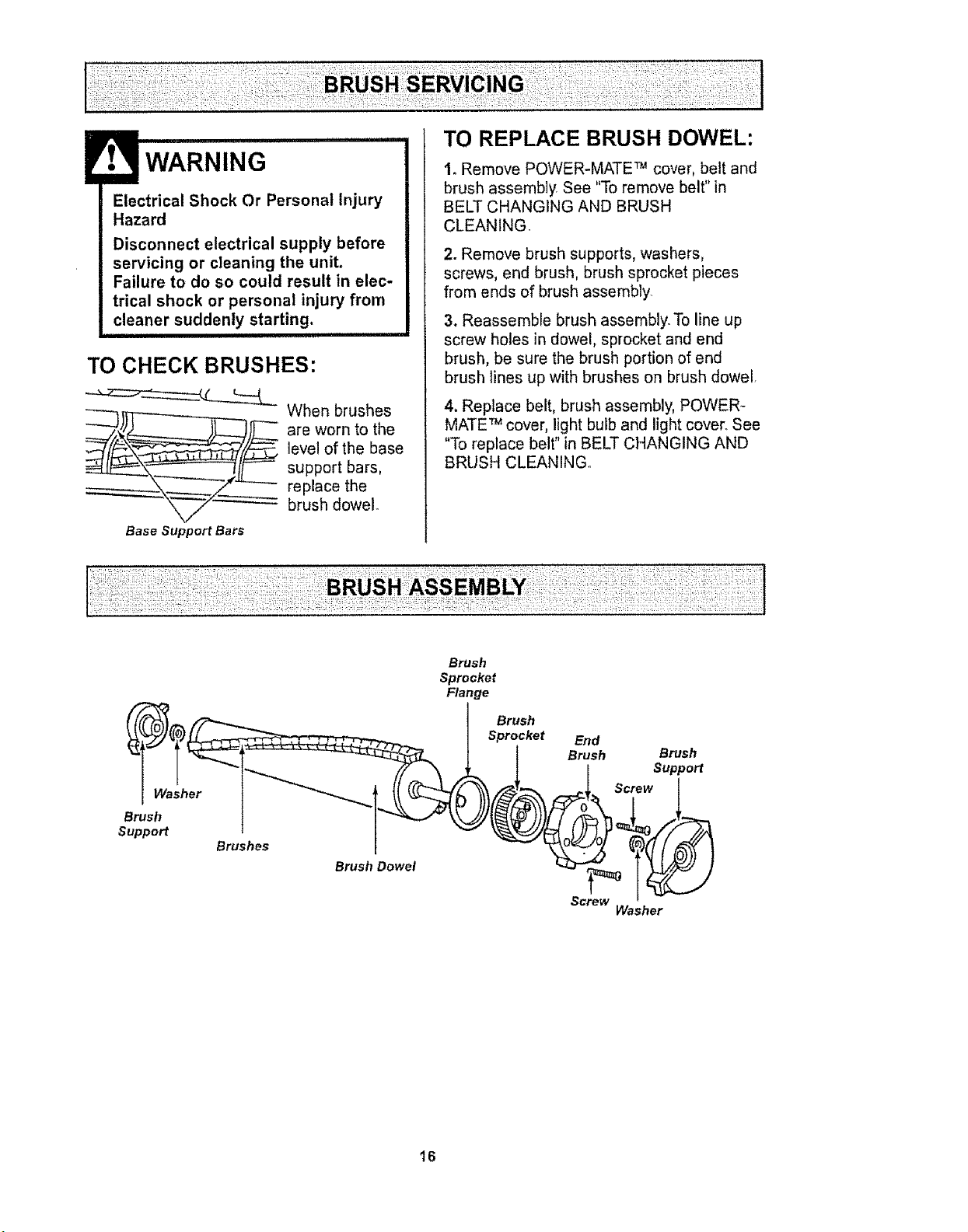
TO CHECK BRUSHES:
Base Support Bars
When brushes
are worn to the
level of the base
support bars,
replace the
brush dowel
TO REPLACE BRUSH DOWEL:
t. Remove POWER-MATE TM cover, belt and
brush assemb]y See "To remove belt" in
BELT CHANGING AND BRUSH
CLEANING.
2. Remove brush supports, washers,
screws, end brush, brush sprocket pieces
from ends of brush assembly
3. Reassemble brush assembly_ To line up
screw holes in dowel, sprocket and end
brush, be sure the brush portion of end
brush lines up with brushes on brush dowel.
4. Replace belt, brush assembly, POWER-
MATE TM cover, light bulb and light cover. See
"To replace belt" in BELT CHANGING AND
BRUSH CLEANINGr
Washer
Brush
Support
Brushes
Brush Dowel
Brush
Sprocket
Flange
I Brush
Sprocket
End
Brush
Brush
Support
Screw
Washer
16
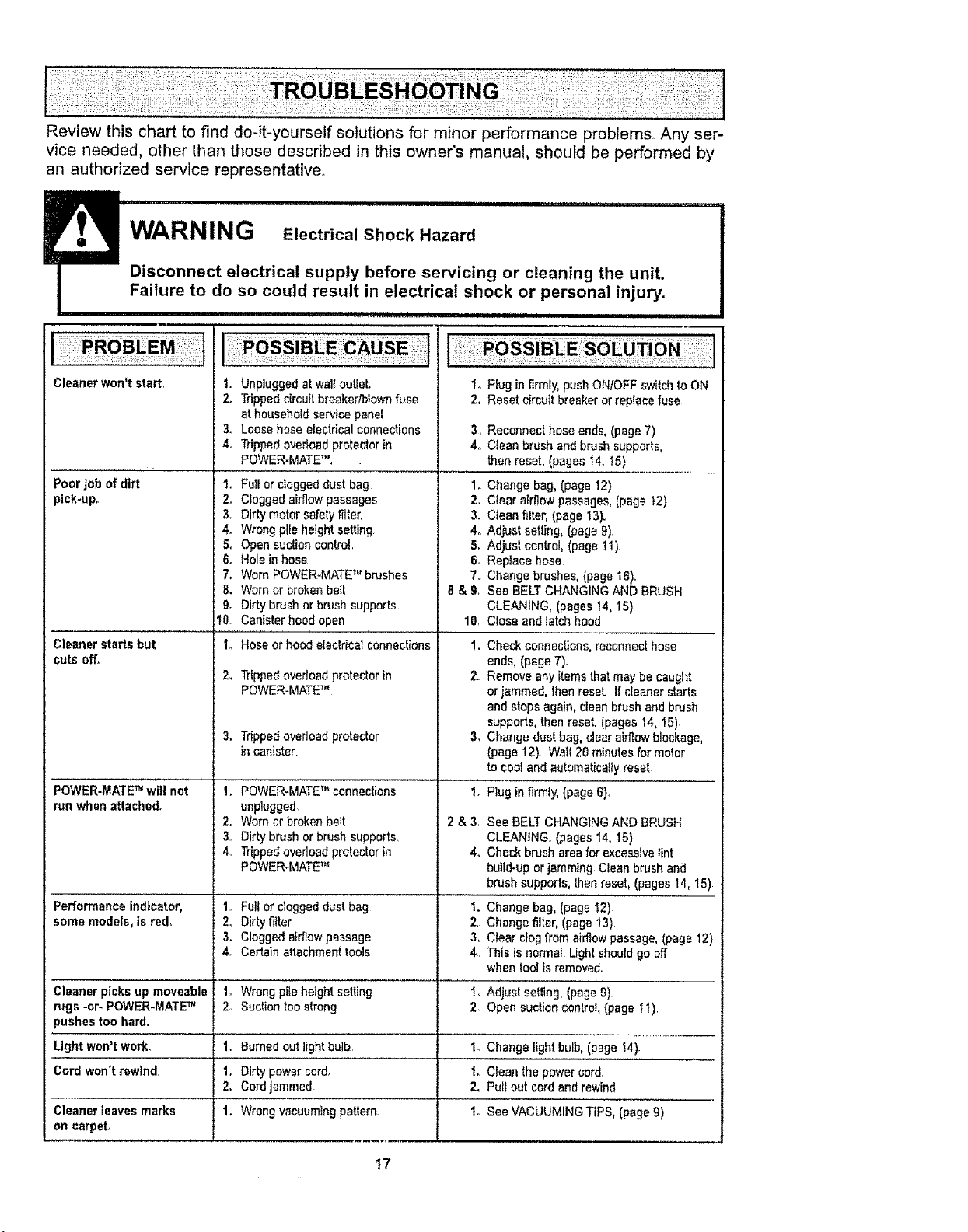
Review this chart to find do-it-yourself solutions for minor performance problems Any ser-
vice needed, other than those described in this owner's manual, should be performed by
an authorized service representative.
Disconnect electrical _ cleaning the unit.
Failure to do so could result in electrical shock or personal injury.
i,iii i ii ii i i ii iii1,11ql i[i,[i ii, i! I I
Unpluggedatwaltout,eL
Trippedcircuitbreakedblownfuse
at householdservicepanel
Loosehose electricalconnections
Trippedoverioadprotecior in
POWER.MATE_"
Cleaner won't start. 1.
2.
&
4o
Poor Job of dirt I.
pick-up. 2o
3,,
4_
5°
6.
7.
8.
9,
10.
Cleaner starts but 1,,
cuts off.
2.
POWER-MATE _ wilt not t.
run when attached°
2.
3,
4,
Performance indicator, 1,
some models, is red. 2,
3.
4o
Cleaner picks up moveable 1.
rugs -or- POWER-MATE _ 2,
Full or clogged dust bag
Clogged airflow passages
Dirty motor safety filter'
Wrong pl[e height setting
Open suction control
Hole in hose
Worn POWER-MATE _" brushes
Worn or broken belt
Dirty brush or brush supports
Canister hoed open
Hoseor hoodelectricalconnections
Trippedoverloadprotectorin
POWER-MATETM
3. Tripped overload protector
in canister
POWER-MATE _"connections
unplugged
Worn or broken belt
Dirty brush or brush supports
Tripped ovedoad protector in
POWER-MATE _'_
1_ Plug in firmly,pushONtOFF switchtoON
2. Resetcircuit breakeror replacefuse
3 Reconnect hose ends, (page 7)
4, Clean brush and brush supports,
then reset, (pages 14, t5)
1. Change bag, (page t2)
2. Clear airflow passages, (page I2)
3. Clean filter, (page 13).
4, Adjust setting, (page 9)
5, Adjust control, (page 11)
6. Replace hose
7. Change brushes, (page 16),
6 & 9, See BELT CHANGING AND BRUSH
CLEANING, (pages 14, I5)
10, Close and latch hood
1,
Check connections, reconnect hose
ends, (page 7).
2. Remove any items that may be caught
or jammed, then resel If cleaner starts
and stops again, clean brush and brush
supports, then reset, (pages 14, !5)
3, Change dust bag, clear airflow blockage,
(page 12) Wait 20 minutes for motor
to cool and automatically reset,
2&&
4.
Plugin firml_ (page 6),
See BELT CHANGING AND BRUSH
CLEANING, (pages 14, 15)
Check brush area for excessive lint
build-up or jammtng Clean brush and
brush supporls, then reset, (pages 14, 15)
Full or clogged dust bag t. Change bag, (page !2)
Dirty fitter 2 Change filter, (page 13)
Clogged airflow passage 3, Clear clog from airfiow passage, (page 12)
Certain attachment tools 4. This is normal Light should go off
when toolis removed.
Wrong pite height setting I, Adjust setting, (page 9)
Suction too strong 2. Open suction oonlro!, (page t t)
pushes too hard.
Light won't work_ 1. Burned out light bulb. 1. Change light bulb, (page 14)
Cord won't rewind, t, Dirty power cord, 1. Clean the power cord
2. Cord jammed. 2, Pui[ out cord and rewind,
Cleaner leaves marks 1. Wrong vacuuming pattern to See VACUUMING TIPS, (page 9)
on carpel
17
For the repair or replacement parts you need
Call 7:00 am _ 7:00 pro, 7 days a week
1-800-366-PART
(t -800-366-7278)
For in-home major brand repair service:
Call 24 hours a day, 7 days a week
1-800-4-MY-HOME s"
(1-800,-469-4663)
For the location of a
Sears Parts and Service Center in your area:
Call 24 hours a day, 7 days a week
1-800-488-1222
For information on purchasing a
Sears Maintenance Agreement
or to inquire about an existing Agreement:
Call 9:00 am - 5:00 pro, Monday - Saturday
1-800-827-6655
When requesting service or ordering parts, always provide the following information:
• Product Type • Part Number • Model Number o Part Description
/RtS
HomeCentrar
TheServiceSideof Sears,"
18
SEARS
Manuel Del Propietario
Aspiradora
CUIDADO:
Lea y sigue todas las
instrucciones de operaci6n
y seguridad antes del uso de
este producto.
Sears, Roebuck and Co., Hoffman Estates, IL 60179 U.S.A.
www.sears.com
Pieza NOCO1ZAUSOOUOO-8174820
Impreso en EUA
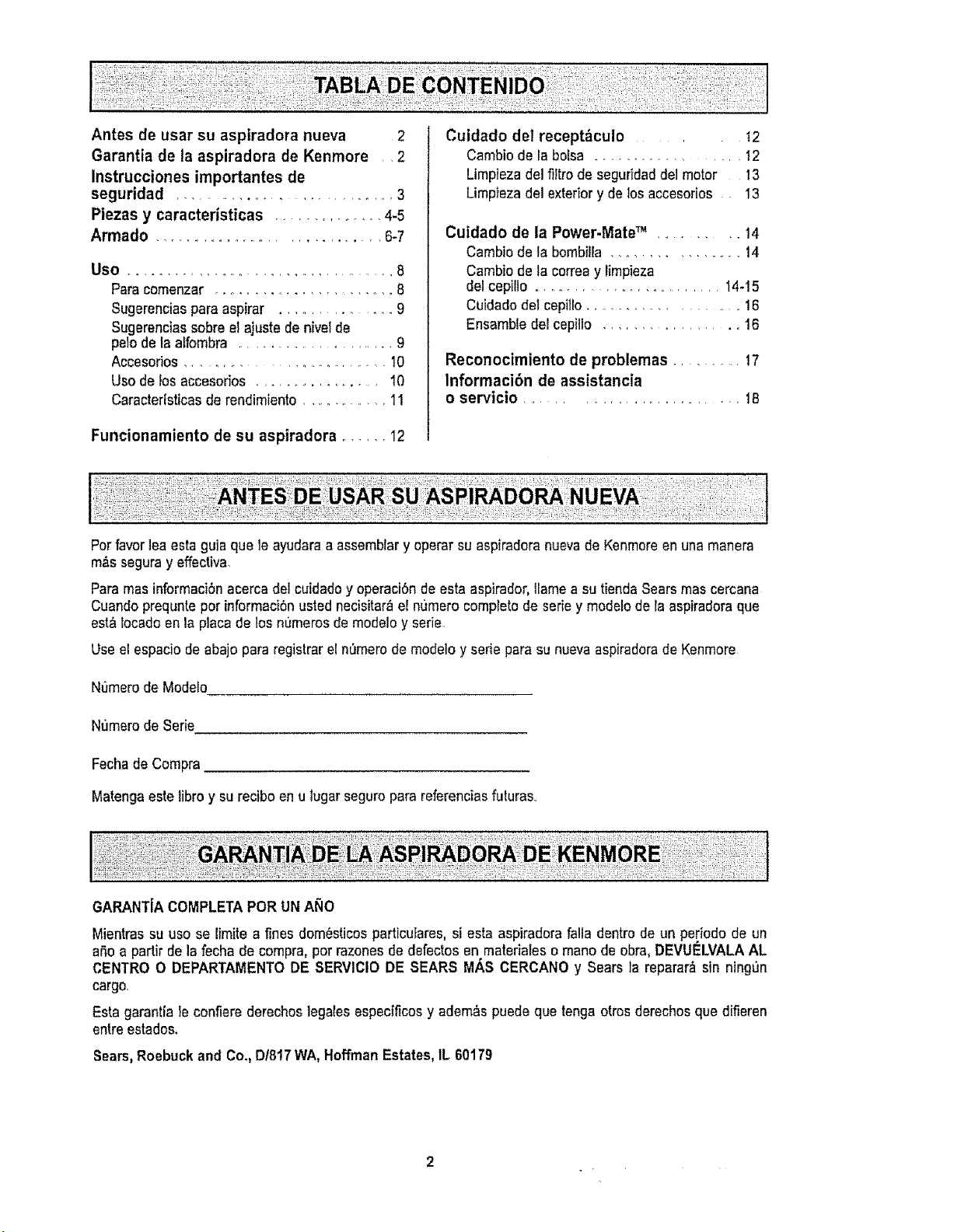
Antes de usar su aspiradora nueva 2
Garantia de la aspiradora de Kenmore •2
Instrucciones importantes de
seguridad .............................. 3
Piezas y caracteristicas ............... 4-5
Armado ................................. 6.7
Use ................. ...................... 8
Para comenzar ......................... 8
Sugerenciasparaaspirar ................. 9
Sugerenciassobre elajuste denivetde
pelo de la alfombra ........................... 9
Accesorios ............................... 10
Use de los accesorios ................. t0
Caracterfsticasderendimlento .............. 1t
Funcionamiento de su aspiradora ...... 12
Cuidado del receptf_culo ..... t2
Cambiode la bolsa ................ 12
Limplezadel filtro de seguddaddei motor 13
Limp}ezadel exteriory de losaccesories 13
Cuidado de la Power.Mate TM ........... 14
Cambio de la bombiira ................. 14
Cambio de tacorreay limpieza
delcepillo .......................... 14-15
Cuidadodel cepitlo..................... 16
Ensamble deecepiIlo ................ 16
Reconocimiento de problemas .......... 17
Informaci6n de assistancia
o servicio ................................. t8
Per favorleaesta guia que le ayudaraa assemblary operarsu aspiradoranuevade Kenmereen unamanera
m&sseguray effectiva,
Para mas informaciSnacerca del cuidadoy operaciSnde esta aspirador,Itamea su tiendaSearsmascercana
Cuandoprequnteper informaci6nustednecisitar_et n,3meroeomptetode serie y modeloderaaspfradoraque
est_ locado en la placade losnumeros de modeloy sede
Use et espacio de abajopara registrar elnOmerode modeloy aerie para su nuevaaspiradorade Kenmore
N_merode Modelo
Numerode $erie
FechadeCompra
Matengaestelibro y surecibo enu lugar seguropara referenciasfuturas,,
Mientras su use se limftea ffnes dom_sticosparticuEares,si esta aspiradorafalla dentro de un pe[iodo de un
a,5oa partir de la fecha de eompra,per razonesde defectos en materialeso mane de obra, DEVUELVALAAL
CENTRe O DEPARTAMENTODE SERVIClODE SEARS MAS CERGANO y Sears la reparar_ sin ningun
cargo,
Esta garantla le confiere derechoslegeles espectficosy adem_s puede que tenga otrosderechosque difieren
entreestados,
Sears,Roebuckand Co,, D18!7WA,Hoffman Estates,IL 60179
ADVERTENCIA
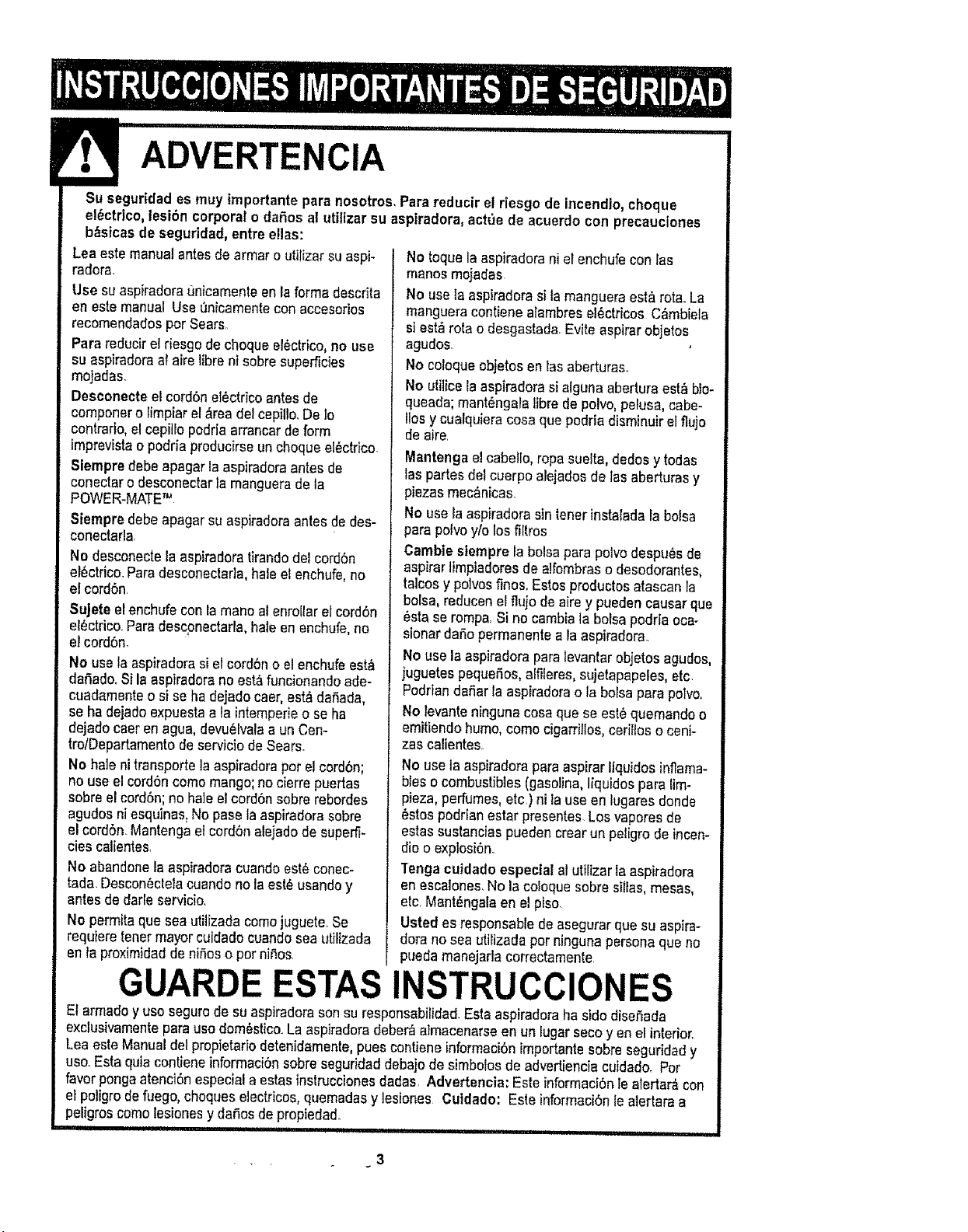
Su seguridades muy importantepara nosotros,Parareducir el desgo de incendio,cheque
el0ctrlco,lesi6n corporalo dafios al utilizersu aspiradora, act,3ede acuerdo con precauciones
b_sicasde seguridad,entre elias:
Lea este manualantesde armar o utilizersuaspi-
radora.
Use suaspiraderaLtnicamenteen la forma descrita
en este manual Use Onicamentecon accesorios
recomendadosper Sears..
Para reducirel riesgo dechequeelectrico,no use
su aspiradoraa{ aire Iibrenisobresuperficies
mojadas.
Desconecte el cord6net_ctricoantesde
componero limpiar el&readel cepillo.DeIo
contrario,el cepi]lo podriaarrancardeform
imprevistao podda producirseun chequeel_ctrico.
Siempredebe apagar laaspiraderaantesde
conectaro desconoctarla manguerade la
POWER-MATETM
Siempredebe apagar su aspiradoraantes de des-
conectarla
No desconecte la aspiradoratirandodel cord6n
el0ctrico.Paradesconeclar]a,haleel enchufe,no
et cord6n
Sujete el enchufe conla mane atenrollarelcordon
el_ctrico..Paredescpnectarla,hale enenchufe,no
el cordon.
No usela aspiradorasi el cord6no elenchufeest_
daSado,Si la aspiradorano est_funcionandoade-
cuadamenteo si se ha dejadocaer, esf_ dafiada,
seha dejadoexpuestaa Jainlempefie o seha
dejadocaeren ague,devuelvalaa un Cen-
trolDepartamentodeservicio de Sears.
No hale ni transportelaaspiradoraper el cordbn;
no useel cord6ncomemango;no cierre puertas
sobreel cordon;no hale elcordon sobrerebordes
agudosniesquinas.No pasola aspiradorasobre
el cord6n Mantengael cord6nalejado desuperfi-
cies calientes,
No abandonela aspiradoracuandoest_ conec-
tada. DesconOctelacuandono la est_ usandoy
antes de darle servicio.
No permita quesea utilizada comejuguele.Se
requlere tenermayorcuidadocuandoseautilizada
on la proximidadde niSoso per niC,os.
No toque la aspiradorani el enchufecon las
manesmojadas
No usela aspiradorasi tamangueraestArota°La
mangueracontiene alambres el_ctricos C&mbiefa
siest_ rota o desgastada,Evite aspirerobjetos
agudos.
No coloqueobjetos en lasaberturas..
No utilice la aspiradorasialguna abertura est_ blo-
queada;mant#ngala libre de polvo,pelusa, cabe-
liesy cualquieracosa quepodriadisminuirelflujo
de aire.
Mantengael cabetlo,ropasuelta, dedosy todas
laspartes delcuerpo alejadosde lasaberturas y
piezas moc&nicas.
No usela aspiradorasin tenorinstalada la bolsa
para polvoy/o losfiltros
GamblesIempre la bolsapare polvodespuOsde
aspirerlimpiadoresde alfombrasodesodorantes,
talcosy pelvesfines.Estosproductesatascan la
bolsa, reducenel flujo deaire y puedencauser que
Ostaserompa, Si nocambia la bolsapodrfa oca-
signerdafio permanente ala aspiradora.
No usela aspiradoraparetevantarobjetosagudos,
juguetes pequefios,alfileres,sujetapapeles,etc.
Podrtandafiar la aspiradorao le bolsapare polvo_
No levanteninguna cosa que se eat6quemandoo
emitiendohumo, come cigarriltos,cerillos o ceni-
zas calientes
No usela aspiradoraparaaspirer lfquidos inflama-
bleso combustibles(gasoline,!fquidospare lim-
pieza, perfumes,etc.)nila useen lugaresdonde
8stospodrian ester presentes.Los vaporesde
estassustanciaspuedencrearun peligrode incen-
die o explosi6n.
Tonga cuidadoeapectal al utilizer la aspiradora
en escalones.Nola coloquesobresillas, mesas,
etc,MantL,ngalaen el piso
Usted es rasponsablede asegurarque su aspire-
dora no sea utilizadaper ningunapersonaque no
pueda manejarlacorrectamente
GUARDE ESTAS INSTRUCCIONES
El armadoy use segurode su aspiradorasonsu responsabilidad.Estaaspiradoraha side diso.Sada
exclusivamentepara usedomOslico..La aspiradoradeber_ atmacenarseen un lugar seco yen el interior
Lea este Manualdelpropietafio detenidamente,puescontiene informaci6nimportanlosobre seguridady
use.Esta quia contieneinformaci6nsobreseguridaddebajode simbolosde advertienciacuidadooPer
favor pongaatenciOnespecial aestasinstruccionesdadas. Advertencia: Este informaci6nlealertar,_con
el poligrode fuego,cheques electricos,quemadasy lesiones Cutdado: Este informaciOnle atertaraa
peligroscome lesionesy defies depropiedad.
Ill I I IIIf....................... iiiii i ,11 , , , i II..........................
3
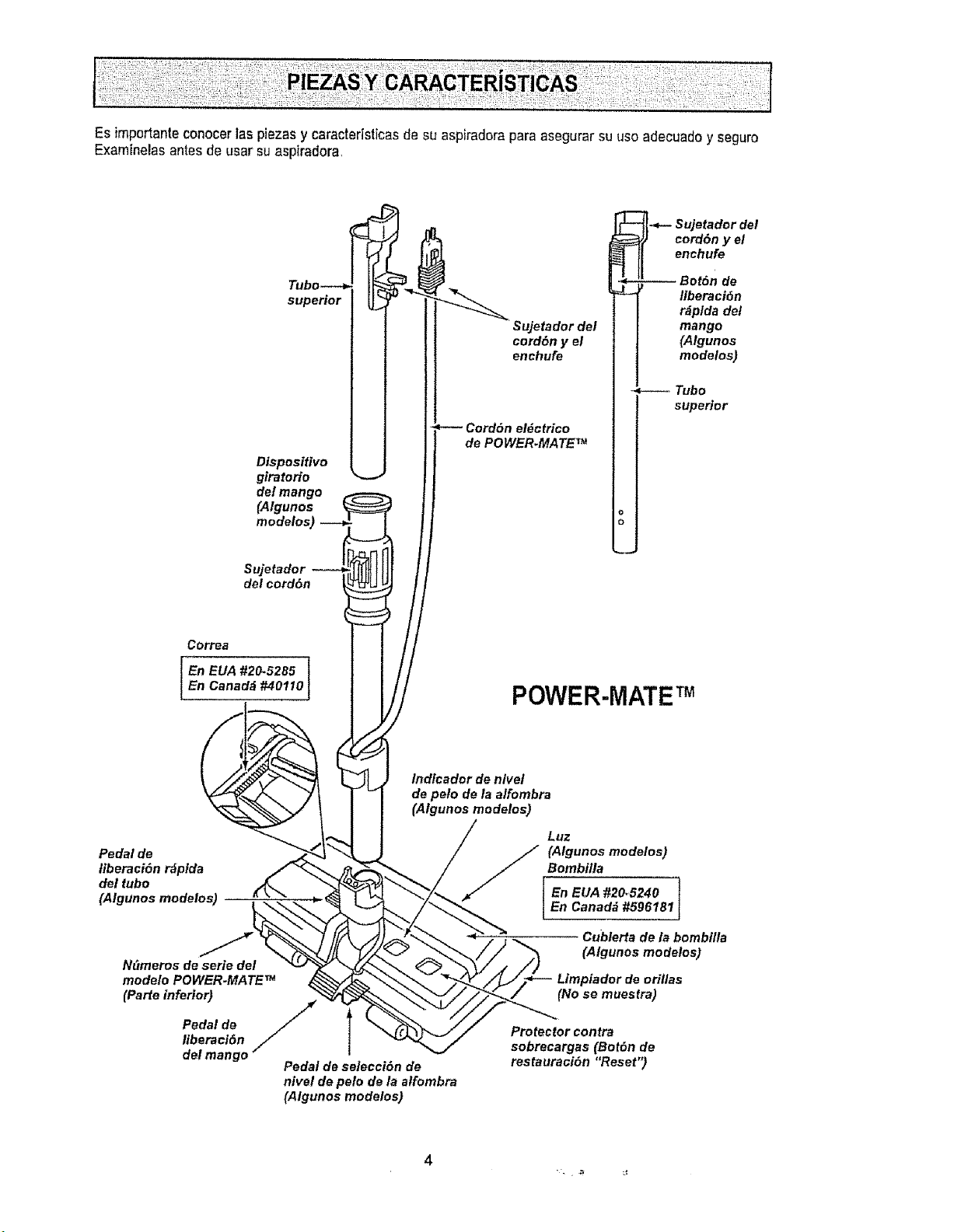
Esimportanteconocerlaspiezasycaracterlsticasdesuaspiradoraparaasegurarsuusoadecuadoyseguro
Examtnelasantesdeusarsuaspiradora,
superior
Dispositivo
giratorio
de! mango
(Algunos
modelos)
Sujetador
del cord6n
Sujetador del
cord6n y el
enchufe
Cord6n el_ctrico
de POWER.MATE _
-_- Sujetador del
cord6n y el
enchufe
-- Bot6n de
liberaci6n
r_plda del
mango
(Atgunos
modelos)
Tubo
superior
Correa
En EUA #20.5285
En Canadd #40110
POWER-MATE TM
lndicador de nlvet
de peto de la alfombra
(Algunos modelos)
Pedal de
liberaci6n r_pida
del tubo
(Algunos modelos)
N_meros de serie del
modelo POWER.MATE _
(Parte inferior)
Pedal de /
liberaci6n
del mango"
Pedal de seleeei6n de
nivel de pelo de la atfombra
(Algunos modolos)
Luz
En EUA #20_5240
En Canad_ #596181
Cubierta de la bombilla
(Algunos modelos)
Limpiador de orillas
(No se muestra)
Protector contra
sobrecargas (Bot6n de
restauract6n "Reset")
4
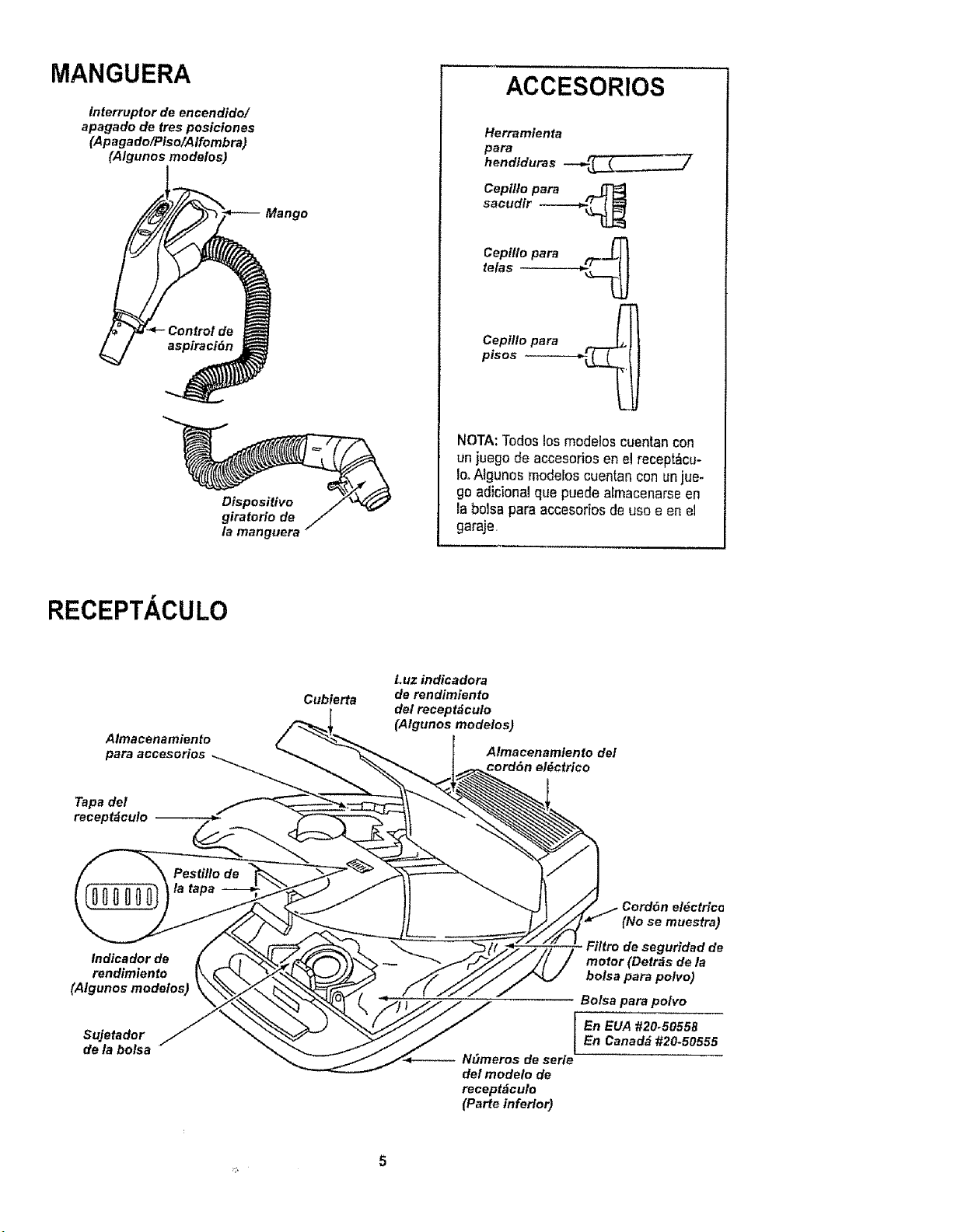
MANGUERA
Interruptor de encendido/
apagado de tree posiciones
(Apagado/Piso/Alfombra)
(Algunos modelos)
Mango
Dispositivo
giratorio de
la manguera
ACCESORIOS
Herramienta
para
hendiduras --_(..__._
Cepilto para
sacudir ------_
Cepltlo para _
tefas
Cepi//o para
pisos ._
NOTA:Todos losmodelos cuentan con
un juegode accesoriosen el recept_cu-
IooAlguno_ moderoscuentan con unjue-
go adicionalque puede aEmacenarseen
Fabolsa para accesodosde usoe en el
garaje,
RECEPTACULO
Almacenamiento
para accesorios
Tapa del
receptdculo
Cubierta
Luz indicadora
de rendimlento
del recept_culo
(Atgunos modelos)
Almacenamlento del
cord6n el_ctrico
Indicador de
rendimiento
(Algunos modelos)
Sujetador
de la bolsa
_. Cord6n el_ctricG
(No se muestra)
FiHro de segurldad de
motor (Detr&s de/a
bolsa para polvo)
Bolsa para po/vo
En EUA #20-5055B
En Canadd #20.50555
-- NC/meros de serle
del modeto de
receptdculo
(Parte inferior)
5
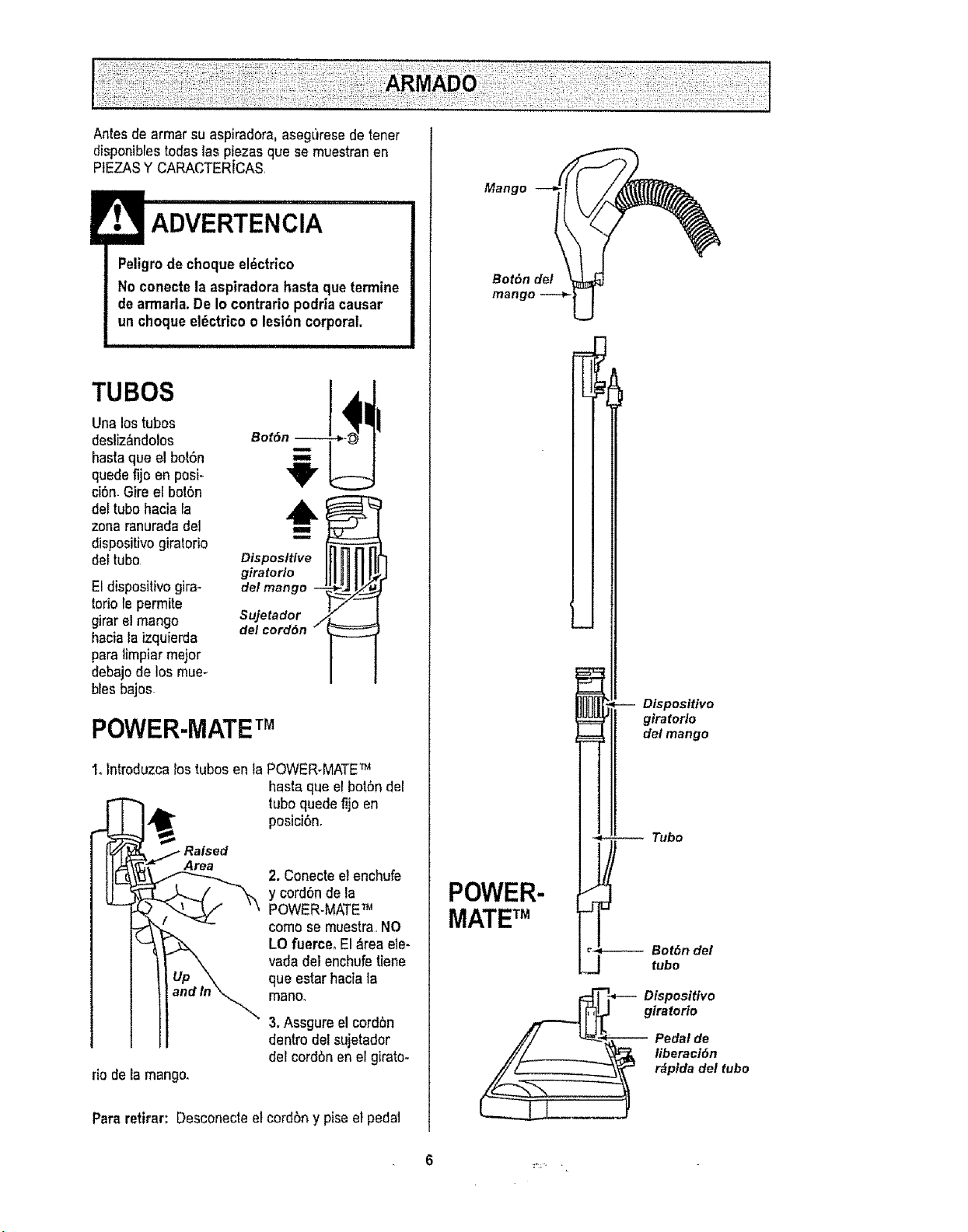
Antesde armarsu aspiradora, aseguresede tener
disponibrestodas las plazasque se muestranen
PIEZASY CARACTERiCAS,
Peligrode choqueel_ctr_co
Noconecte la aspiradorahastaqua termine
dearmada.De Io contrariopodriacausar
un choque el_ctricoo lesi6n corporal,
,, i i i
TUBOS
Unalos tubos
desliz&ndolos
basraque el bot6n
quedefijo en posi-
ci6n.Gire eFbo|6n
del tubohacia la
zonaranuradade1
dispositivogiratorio
del tubo
Etdispositivogira-
toriofepermite
girarel mango
haciala izquierda
paratimpiar major
debajode los mue-
biasbajos
BotSn
Sujetador /
del cord6n
POWER-MATETM
1olntroduzcalos tubosen taPOWER-MATE_
basraque el bot6n del
tuboquede fijo en
posicibn.
rio de la mango.
sed
Area
2. Conectee!enchufe
y cord6nde la
POWER.MATE'r',_
como se muestra,NO
LO fuerce. El _rea ele-
vada del enchufatiene
qua estar haciala
manoo
3.Assgure el cord6n
dentro del sujetador
del cord6nen el girato-
Para retirar: Desconecteel cordbn y piseet pedal
Mango
Bot6n del
man
-- Dispositivo
giratorlo
delmango
-_ -- Tubo
POWER-
MATETM
Bot6n del
tube
-_ Dispositivo
giratorio
Pedalde
Iiberact6n
r&pldadel tubo
:%. ,
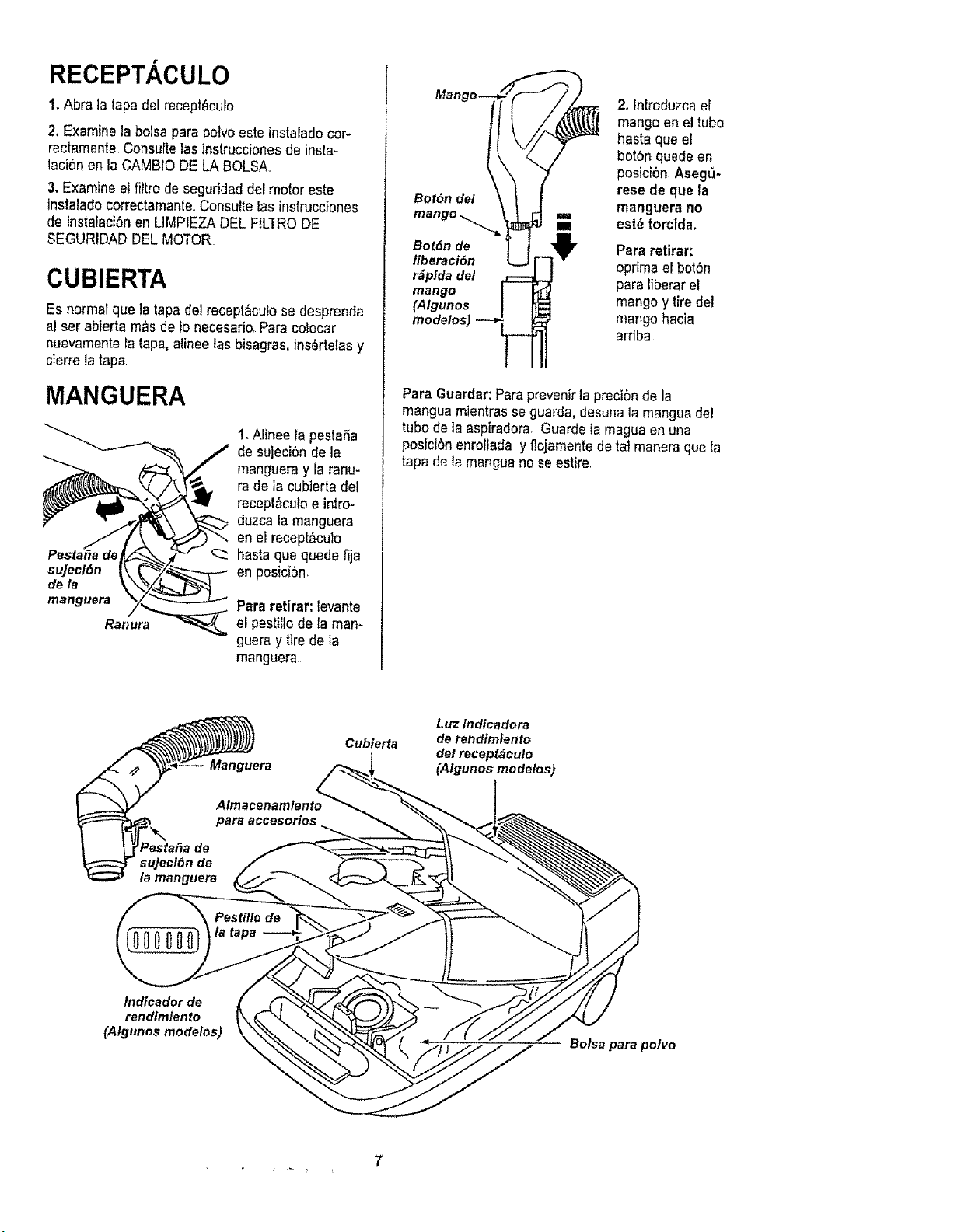
RECEPTACULO
1oAbra la tapa del recept&curo.
2, Examine labolsa para polvoeste instaradocor-
rectamante Consultelasinstruccionesde insta-
taci6n an la CAMBIODE LABOLSA.
3. Examine elfiltro de seguridaddel motor este
instaladocorrectamanteoConsuiteEasinstrucciones
de insta_aci6nen LIMPIEZADEL FILTRODE
SEGURIDADDEL MOTOR
CUBIERTA
Esnormal qua la tapadel recept_cutose desprenda
al ser abierta mas de Ionecesario Paracolocar
nuevamentela tapa,alinee las bisagras,ins_rtelas y
cierre la tapa
MANGUERA
Pesta_a de
sujeci6n
dela
manguera
Ranura
1. Alinee fa pestaSa
de sujeci6n de ta
mangueray la ranu-
ra de la cubierta del
recept_culoe intro-
duzca la manguera
en el recept_culo
_:_ hasta qua quede fija
enposici6n_
Para retirar: levante
el pestirlodela man-
guera y tire de la
manguera
Bot6n de/
Bot6n de
tiberaci6n
r_pfda del
mango
(Algunos
2. Fntroduzcael
mangoen el tubo
hasta qua eJ
bot6n quede en
posici6nAseg_-
resede que la
manguera no
est_ torcida.
Pararetirar:
oprima efbot6n
para liberarel
mango y tire del
mango hacia
arriba
Para Guardar:Paraprevenirla preci6nde la
manguam]entrasse guarda,desunala manguadel
tubo de la aspiradora. Guarde lamaguaenuna
posici6n enroFladayflojamentede tat maneraqua la
tapa de la manguanose estire.
Cubierta
Luz indicadora
de rendimiento
del recepf_eulo
(Algunos modelos)
Indicador de
rendimiento
(Algunos modelos)
Bolsa para polvo
7
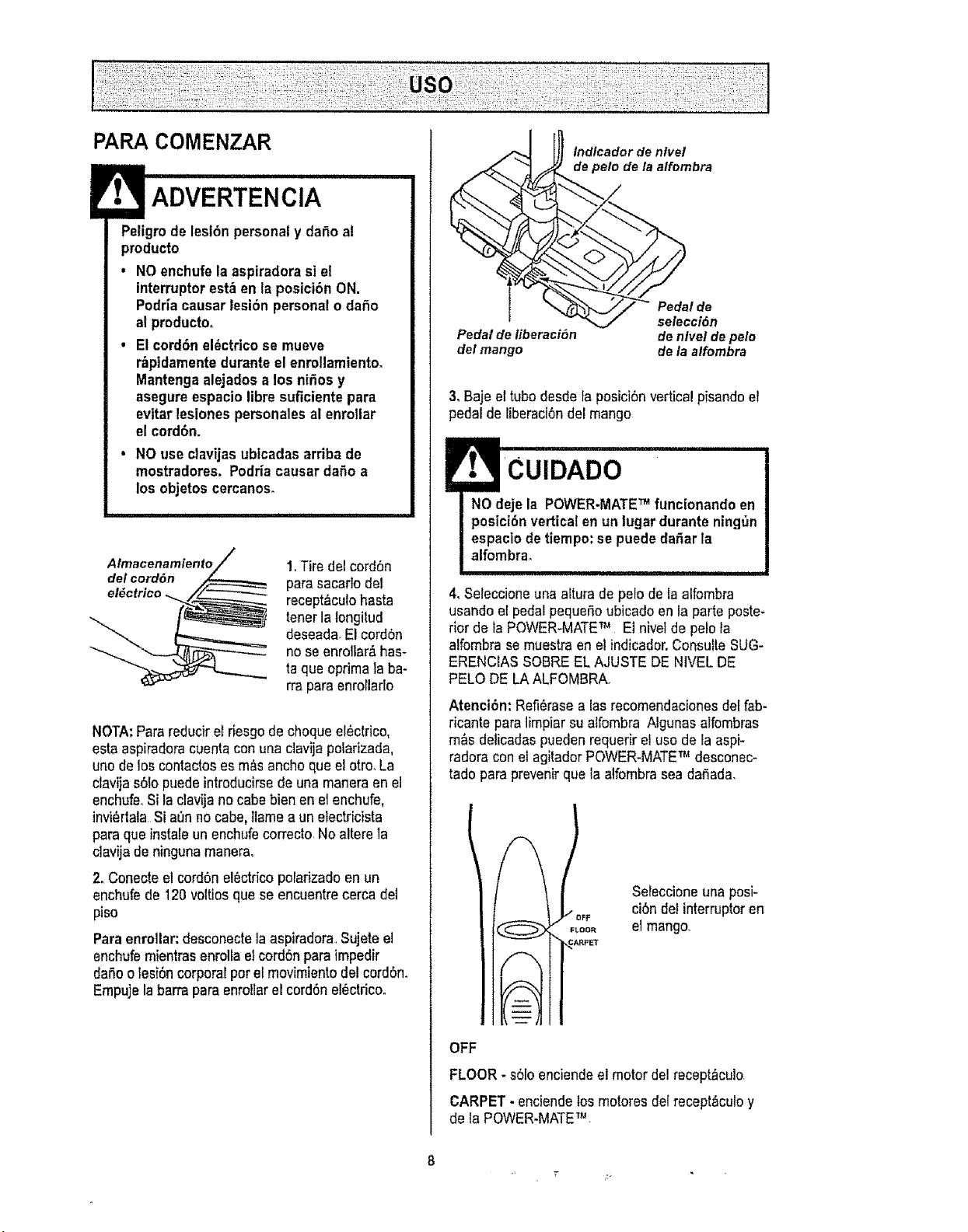
PARACOMENZAR
ADVERTENCIA
Peligrode lesl6n personaly da_o al
producto
. NO enchufelaaspiradora si el
interruptorestben la posici6n ON.
Podr[acausar lesi6n personalo dafio
al producto°
• El cord6n el_ctricose mueve
rbpldamentedurante el enrollamiento_
Mantengaalejados a los ni_os y
asegureespaciolibre suficiente para
evitar lesionespersonalesal enrollar
el cord6n.
• NO useclavijasubtcadasarriba de
mostradores, Podr[acausardaOoa
los objetos cercanos.
Almacenamiento
del eord6n
el_ctrico
1.Tire del cord6n
parasacar]odel
recept_-culohasta
tenet la Iongitud
deseada_El cord6n
noseenrolLar_has-
taqua oprimata ba-
rra paraenrotlarlo
NOTA:Para reducire_riesgode choqueel_ctrico,
esta aspiradoracuentaconuna clavija polarizada,
uric de los contactoses m_sanchoqueelotro.La
clavija s61opuede introducirsede unamaneraen el
enchufe Si la clavija no cabebien en el enchufe,
invi_rtalaSi aenno cabe,flamea unelectricista
para qua instale unenchufe correcto No alterela
clavija de ningunamanera.
2. Coneoteel cord6nel_ctricoporarizadoen un
enchufede 120voltiosque seencuentrecerca del
piso
Paraenrollar:desconectelaaspiradora,Sujeteel
enchufemientrasenmllael cord6npara impedir
dafioo lesion corporalpor el movimientodel cordon.
Empujela barrapara enrollarel cordonel_ctricoo
Indlcador de ntvet
de pelo de la alfombra
Pedal de
selecci6n
Pedal de liberaci6n de n/vel de pe/o
del mango de la alfombra
3. Baje ettubo desdeta posici6nverticalpisandoel
pedal de liberaci6ndel mango
4. Seleccioneuna aftura de pelode la alfombra
usandoel pedal pequeOoubicado en laparte poste-
rior de la POWER-MATE_4 E1nivel de pelo la
alfombra semuestraen el indicador.ConsulteSUG-
ERENCIAS SOBREELAJUSTE DE NIVEL DE
PELO DE LA ALFOMBRA.
Atenci6n: Refi6rasea lasrecomendacionesdel fab-
ricante para limpiar suaifombra Ngunas alfombras
m&s delicadaspueden requerir el usode laaspi-
radora con etagitadorPOWER-MATE"r_desconec-
tado para prevenirqua laalfombra seada_ada.
IFF
FLOOR
CARPE_
Seleccioneuna posi-
ci6nde! interruptoren
el mango
OFF
FLOOR* s6Io enciendeel motor del recept_culor
CARPET. enciendelos motores delrecept_culoy
de la POWER-MATETM.
8
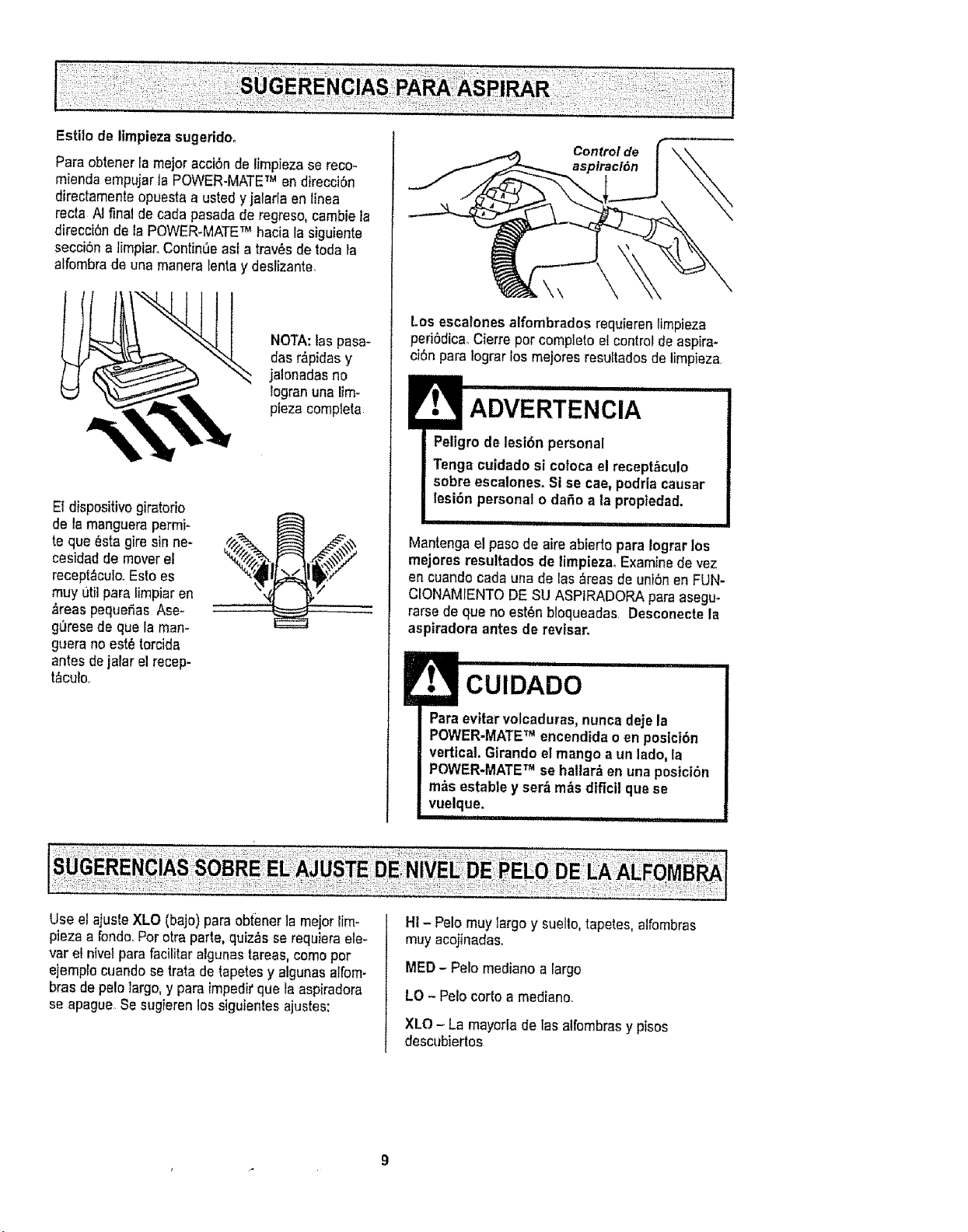
Estito de Iimpiezasugeridoo
Para obtenerla major acciOnde limpieza se reco-
miendaempujarla POWER-MATETM en direcci0n
directamenteopuesta a usted y jalarlaen linea
recta A! final de cada pasadade regreso, cambiela
direcciOnde la POWER-MATETM hacia la siguiente
secci6na limpiar.ContinUeasf a trav_ade toda la
alfombrade una maneralentay deslizante.
NOTA:las pasa-
das r_pidasy
jalonadasno
logran una lira-
plaza complete
EI dispositivogiratorio
de la manguerapermi-
te qua _sta gire sinne-
cesidad de moverel
recept_culo.Esto es
muy ,3tilpare limpiaren
_reas pequefias Ase-
g_resede que la man-
g_era noest6torcida
antes de jalar el recep-
t_culo.
Control de
\\
Los escelonesalfombrados requierenlimpieza
peri0dicaoCierre por complete elcontrol deaspira-
ci0n para Iograrlos meiores resultadosde limpiaza
ADVERTENClA
Peligro de lesion personal
Tenga culdadosi coloca el recept_cuto
sobre escalones. Si se cae, podriacausar
lesion personalo daOoa ta proptedad.
Mantenga e! pasode aire abierto para lograr los
mejores resultados de limpieza. Examine de vez
en cuandocada una de las _reasde unionen FUN-
CIONAMIENTODESU ASPIRADORApare asegu_
terse de qua no est_nbfoqueadas. Desconecte la
aspiradora antes de revtsar.
CUIDADO
Pare evitarvolcaduras, nuncadeje la
POWER-MATETM encendidaoen posici6n
vertical. Girandoel mangoa un lado,la
POWER-MATETM se hallar_ en unaposiciOn
m&sestable y ser_mAs difici| qua se
vuelque.
i I i, , ii iiii [ iiiii ii,
Use el ajuste XLO (bajo) pare obtenerla major_im-
piezaa rondo.Por otraparte, quiz_s se requiera ele-
var et nivelpare facilitaralgunastareas, comepor
ejemp{ocuando setrata de tapetesy atgunasalfom-
bras de pelo largo,y paraimpeditqua la aspiradora
so apague.Sesugieren lossiguientes ajustes:
Ht- Pelomuy largo y suelto,tapetes, alfombras
muy acojinadas..
MED- Pelo mediano a largo
LO - Pelo cor{oa mediano.
XLO - La mayoria de las aifombrasy pisos
descubiertos
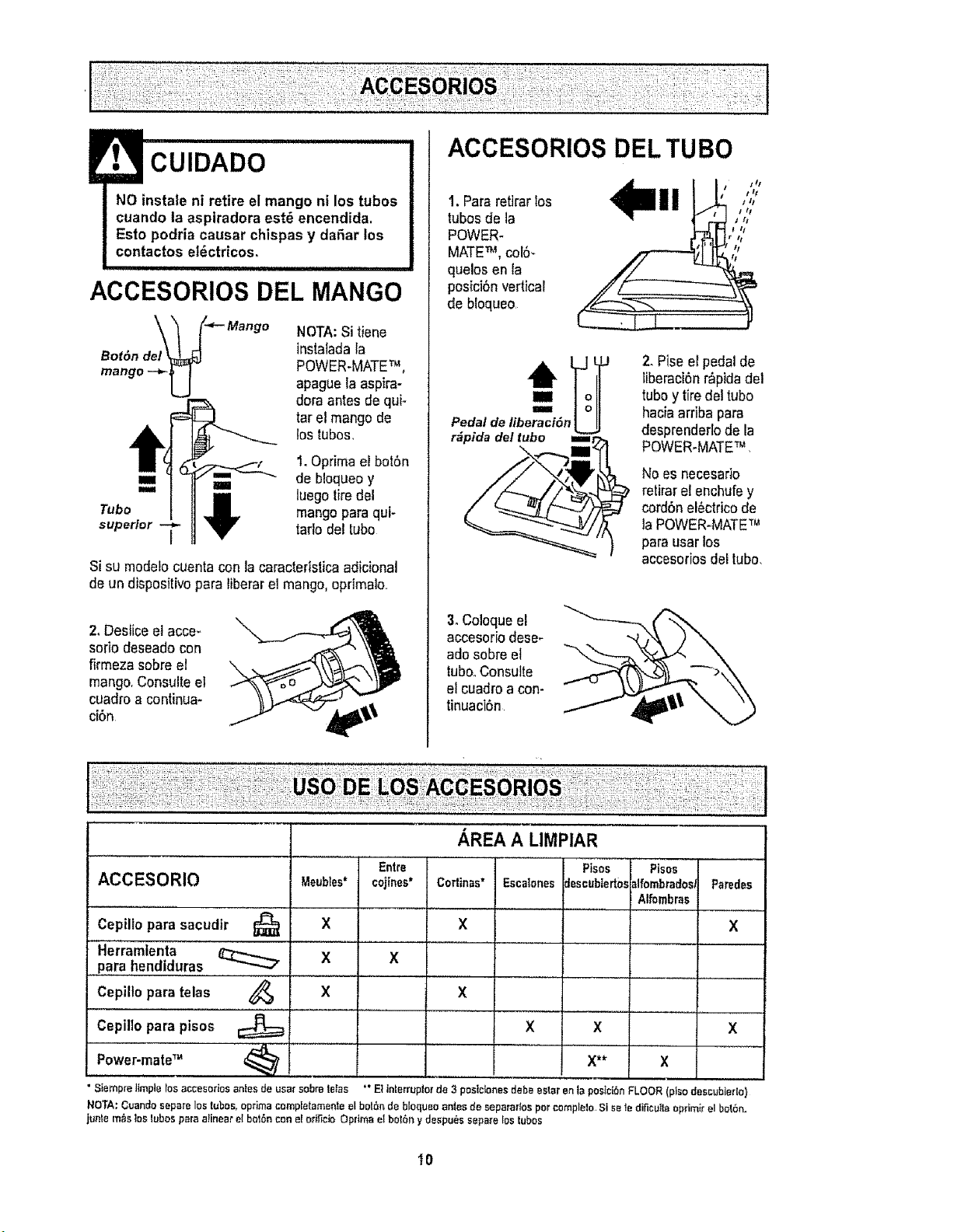
! CUIDADO
NO instaie ni retire el mango ni los tubos
cuando la aspiradora est6 encendida.
Esto podria causar chispas y da6ar los
contactos el6ctdcos_
ACCESORIOS DEL MANGO
_ _ _-_ Mango
Bot6n del
mango --'_ U
NOTA:Si tiene
instaladala
POWER-MATETM,
apague la aspire-
dora antes de qui-
tar el mango de
los tubas,
1. Oprimael bot6n
,,=,, de bloqueoy
,,i Z luego tiredel
Tuba _ mangopara qui-
superior I tarlodel tuba
Si su mode!ocuenta con la caractedsticaadicional
de un dispositivopare liberarel mango,oprlmalo..
2, Desficeetacce_
soda deseadocon
firmezasabre el
mango.Consulteel
cuadroa continua-
ci6n
ACCESORIOS DELTUBa
1. Pareretirarlos
tubasde la
POWER-
MATETM, col6-
quelosen la
posici6nvertical
de bloqueo
I tt
J_
I tl
J_
t z/
I I
#
[]_Joel 2. Pise etpedal de
Iiberaci6nr_pidadei
tubay tiredel tuba
Pedal de tiberacf6n LJ haciaarriba para
desprenderlode la
r_pida del tuba m POWER.MATE_
No esnecesado
retirarel enchufe y
cord6nel6ctricode
la POWER-MATETM
para usarlos
accesoriosdeitubo,
3. Coloqueel
accesododese*
ado sabreel
tubooConsults
el cuadroa con-
tinuacbn
L
AREA A LIMPIAR
ACCESORIO
Cepillo pare sacudtr
Herramlenta
para hendiduras
Cepillo para telas 4_
Entre
I MeubIes* cojtnes*
X
X
X
X
Codinas"
Escalones
Ptsos
Jescubiertos
X
X
Pl_os
alfombradosJ
Alfombras
X
X**
Paredes
X
Cepillo para pisos _ X
,,,P,0wer-mate" _ ...... X
• Siempre limpte tosaccesories antes de user sabre tetas " El interrupior de 3 postclones debe ester en la posMbn FLOOR (piso descublerlo)
NOTA: Cuando separe los tubas, opdma completameate el bol6r_ de blequeo antes de separarlos per complete, Si sele dificu!laopfimlr el bat6n,
junta m_s los tubes pare alineat el be16ncan el eri£cie Optima el bolbn y despu6s sapa;_elos tubes
X
I0
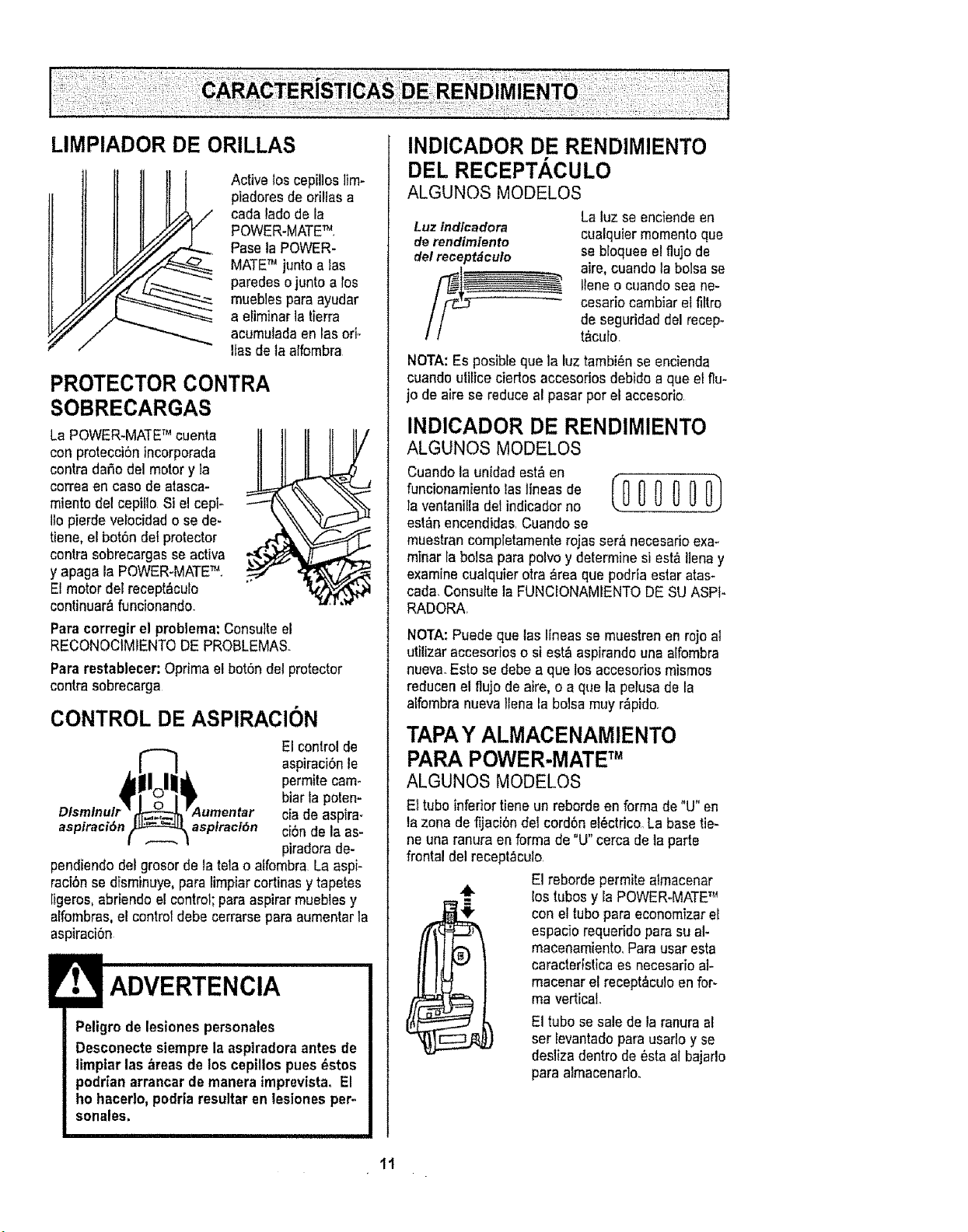
Activeloscepilloslim-
piadaresde orillasa
carla lado de la
POWER-MATETM.
Paseta POWER-
MATETM junto alas
paredeso junto a los
muebles paraayudar
a eliminarla tierra
acumuladaen lasori-
lfas de ta alfombra
PROTECTOR CONTRA
SOBRECARGAS
LaPOWER-MATETM cuenta
conprotecciSnincorporada
contra daSodel motory la
correaen caso de atasca-
miento del cepiila Si el cepF
llo pierde velocidad o sede-
tiene, el bot6n del protector
contra sobrecargasse activa
y apaga la POWER-MATETM.
El motor del recept&cufo
continuar&funcionando.
Paracorregir el problema: Consulteel
RECONOCIMIENTODE PROBLEMAS.
Para restablecer: Optima etbot6n detprotactor
contra sobrecarga
CONTROL DE ASPIRACION
El control de
aspiraci6nie
permite cam-
biar la polen-
ciade aspira-
aspiraci6n aspiraci6n ci6nde la as-
piradorade-
pendiendo del grosorde la tela o affombra La aspi-
raci6n sedfsminuye,parafimpiarcortinasy tapetes
[igeros,abriendo el control;para aspirarmueblesy
affombras,el control debecerrarse para aumentarla
aspiraci6n
ADVERTENCIA
Peligrode lesiones peraonales
Desconecteslemprela asplradoraantes de
limptar las areas de los cepillospues _stos
podrian arrancar demanera imprevistaoEl
ho hacedo, podr|aresultaren lesiones per-
sonales,
INDICADOR DE RENDIMIENTO
DEL RECEPTACULO
ALGUNOS MODELOS
Luz indfcadora
de rendimiento
del racept_cuto
La luz se enciendeen
cualquiermomentoque
se bloquee el flujode
aire,cuando la bolsa se
Ileneo cuandosea ne-
cesario cambiar el filtro
de saguridad del racep-
t_culo
NOTA:Es posibfeque la luztambi6n se encienda
cuando ulitice cierlos accesorias debidoa que el flu-
jo de aire se reduceal pasarpor el accasofio
INDICADOR DE RENDIMIENTO
ALGUNOS MODELOS
Cuandola unidad est&en
funcionamientolaslineasde (0 _ 0 0 0 0)
ta ventanilla detindicadorno
est&nencendidas,Cuandose
muestrancompletamenterojas ser&necesarioexa-
minar la bolsa para polvo y determinesi est_ liana y
examine cualquierotra _rea qua podfia estar atas-
cad& Consultela FUNCIONAMIENTODE SU ASPt-
RADORA,
NOTA:Puede que tas Ifneasse muestrenen rojo al
utilizar accesorios o si est&aspirandouna alfombra
nuevaoEsto se debe a que los accesoriosmismos
reducenel flujo de aire, o a qua la pelusade la
aLfombranuevaliana la bolsamuy r_pido.
TAPAY ALMACENAMIENTO
PARAPOWER.MATETM
ALGUNOS MODELOS
Ettuba infadortiene un reborde en forma de"U" en
la zona defijaci6n del cord6n al_ctrico.Labasetie*
ne una ranura en forma de "U" cerca de la parte
frontal del racept_culo.
El reborde permite almacenar
los tubosy la POWER.MATETM
con el tubopara economizarel
espacio requerido para su al-
macenamiento,Para usar esta
caracterlstica es necesado al-
macenar el recept_culoen for-
ma vertical
El tubo sesale de la ranura al
set levantadopara usarloy se
desliza dentro de Ostaal bajarlo
para almacenarlo.
11
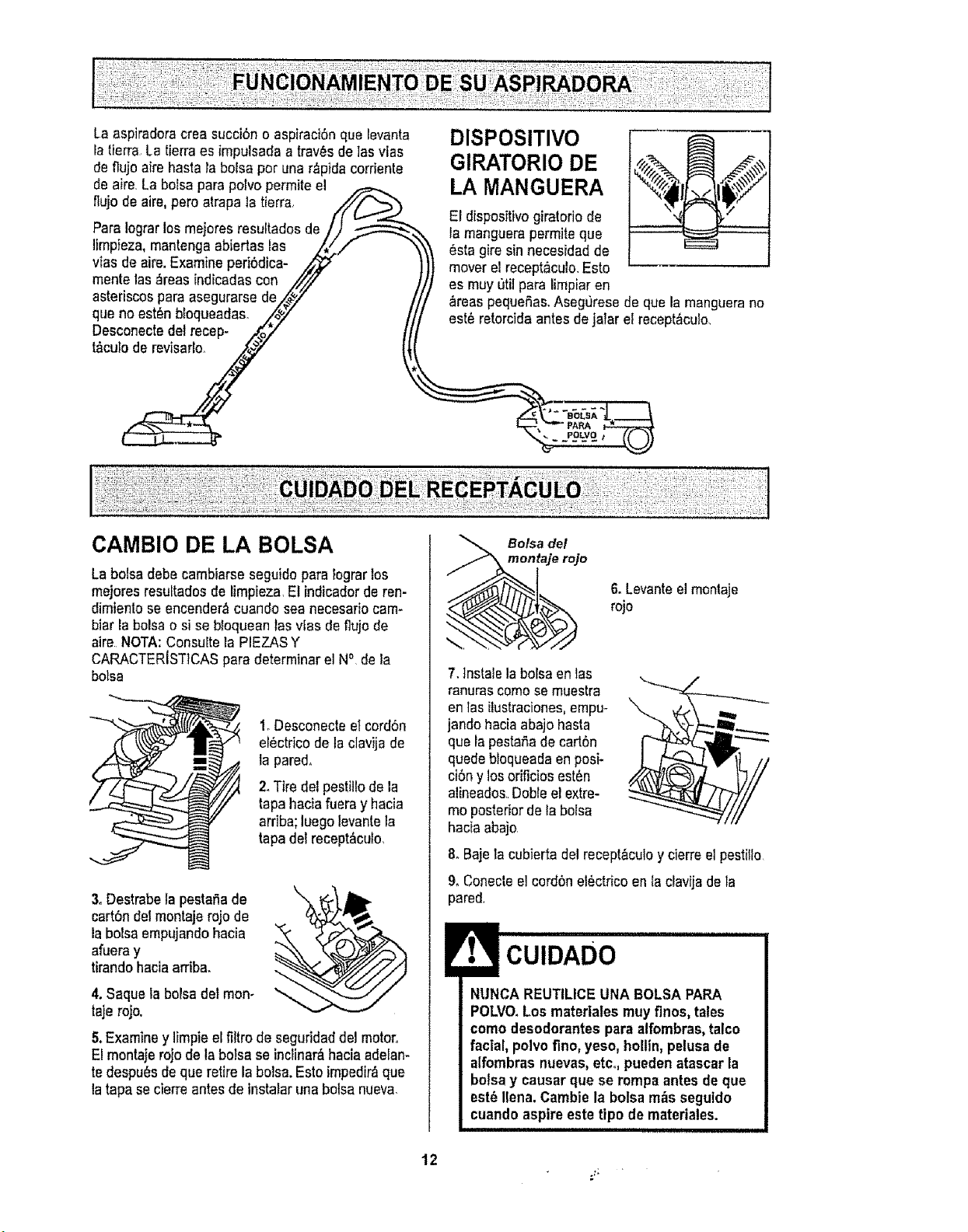
La aspiradoracreasucci6n o aspiraciSnque Ievanta
la tierra La tierraes impulsada atrav_s de las vias
de flujo aire haste la boise per una r_pida corriente
de aire.La bolsa parepolvopermite el
flujode aire,pete atrapala tierra, //_>_
Para !ograrlosmejores resultados de/)
limpieza,mantenga abiertas las z_// "
vies de air& Examine peri6dica-
mente las_reas indicadas con /,/7/
astedscospara asegurarse de_J
que no est_n b_oqueadas. /_" /
gesccnectedeirecep-_/.o2" It
DISPOSITIVO
GIRATORIO DE
LA MANGUERA
El disposffivogiratorio de
ta manguerapermite que
_sta gire sinnecesidad de
mover el recept,_culo.Esto
es muy util para limpiar en
areas pequefias.Asegurese de que la manguerano
est_ retorcidaantes de jaiarel recept&culo.
CAMBIO DE LA BOLSA
La boisedebe cambiarse seguidopare lograr los
mejoresresultadosde limpieza,El indicadorde ren-
dimientose encender_cuando sea necesariocam-
bier la boiseo si se b_oqueanlas vies de flujode
aire NOTA:Consulte la PIEZASY
CARACTERISTICASpara determinar el N°, de la
botsa
1oDesconecteelcord6n
el_ctr;co de taclavijade
la pared,
2.Tire del pestillode la
tape haciafueray hacia
arriba;luego levantela
tapadel recept&cufo,
3,Destrabelapestafiade
cart6ndelmontaje rojo de
labolsa empujandohacia
afueray
tirandohaciaarriba.
4. Saquela bolsa del mon-
taje rojo.
5.Examine y limpieelfiltrode seguridaddel motor.
E!montajerojo de la botsaseincliner&haciaadelan-
te despu_sde que retire la bolsa.Este impedir_que
latapa se cierreantesde instaiar una botsanueva,
Bolsa del
montaje rojo
6. Levanteelmontaje
rojo
7,lnstale la botsaen tas
ranurascome semuestra
enlasilustraciones,empu-
jando haciaabajo haste
que fapesta,Sade cad6n
quedebtequeadaenposi-
ci6ny losorificiosest6n
alineado&Dobleel extre-
meposteriorde la bolsa
haciaabajo
8. Bajetacubierta del recept&culoy cierreel pestiflo
& Conecteel cord6nel6ctfico en_aclavija dela
pared,
NUNCA REUTILICEUNA BOLSAPAPA
POLVO.Los matertalesmuyfines, tales
come desodorantes pare alfombras,talco
facial, polve fine, yeso, hollin,pelusa de
alfombras nuevas,etco,puedenatascarla
bolsay causer que se tempe antesde que
est8 lien& Cambiela botsa m_s seguldo
cuando aspireeste tipo de materiales.
12
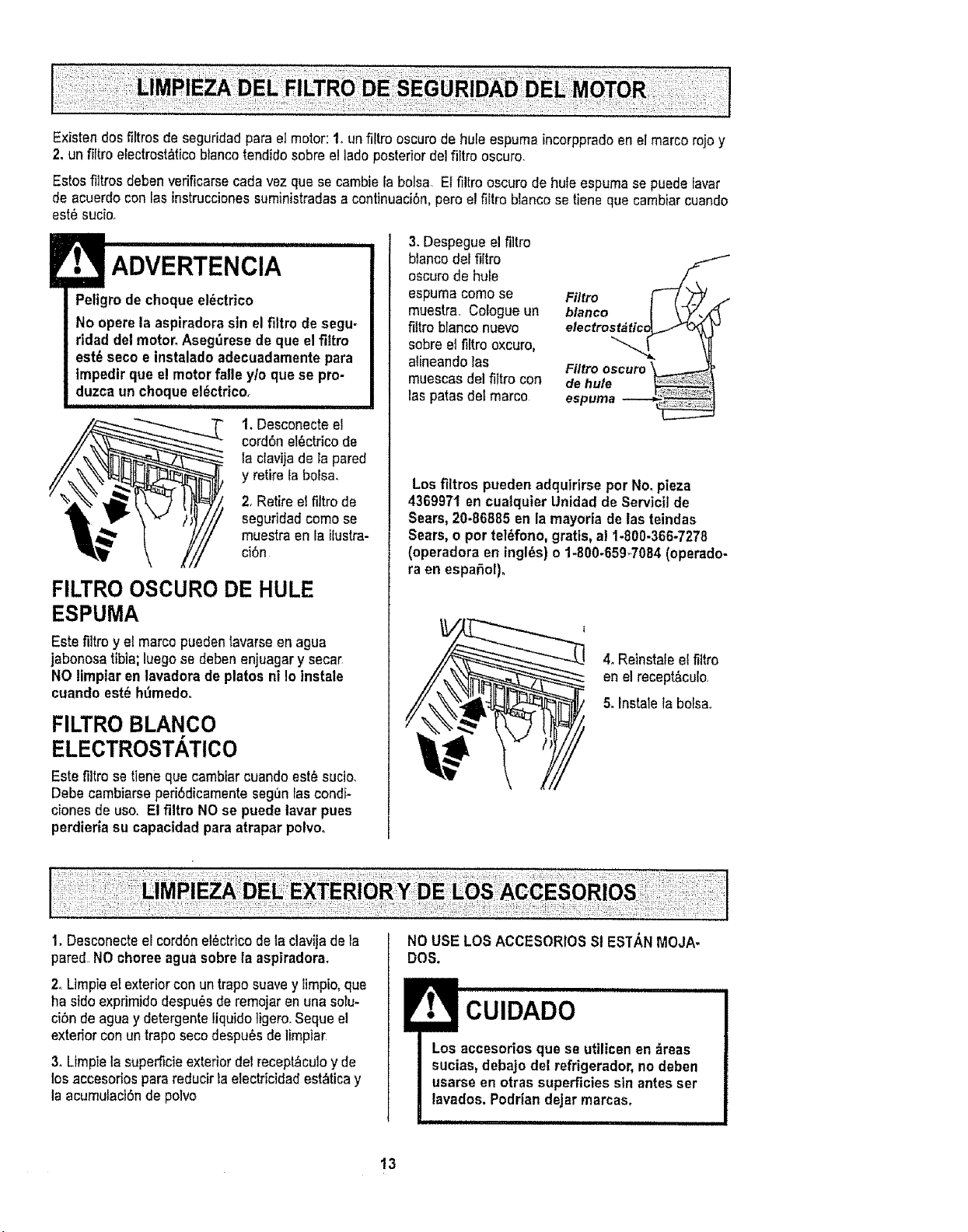
Existendosfiltros deseguridadparael motor:1. un filtro oscurode hule espuma incorppradoen elmarco rojoy
2. un filtro etectrost_ticoblancotendidosobreel ladeposterior de]filtre oscuro.
Estosfiltros debenverificarsecada vez que secambiela bolsa EIfiltro oscuro de hule espumase puedelavar
de acuerdoconlas instruccionessuministradasacontinuaci6n,pero et fiftroblancose tieneque cambiar cuando
est_ sucio.
Peligrode cheque el_ctrico
No operela aspiradorasin elfiltro de segu-
ridad del motor.Asegdrese de que elfiitro
est6 seco e instaladoadecuadamentepara
Impedir que e! motorfatle y/o que se pro-
duzca un cheque el_ctrico.
T 1. Desconecteel
cord6nel_ctrico de
i la clavijade tapared
y retire la bolsa.
2. Retireel filtro de
seguridadcome se
muestraen la ilustra-
ci6n
FILTRO OSCURO DE HULE
ESPUMA
Este filtro y el marco puedentavarseen agua
jabonosa tibia; luegose debenenjuagary secar
NO limpiar en lavadora de plates ni !o instale
cuando est_ h_medo.
FILTROBLANCO
ELECTROSTATICO
Este filtro se tiene que cambiarcuando est_sucio.
Debecambiarseperi6dicamenteseguniascondi-
ciones de use. El filtro NOse puede lavar pues
perdieria su capacidad para atrapar polvoo
3. Despegue elfiitro
blancodel filtro
oscuro de hule
espuma come se
muestra. Cologueun
fittroblanco nuevo
sobre el filtro oxcuro,
alineandolas
muescas delfiltro con
las patas deImarco
Filtro
FIItro oscuro
de hule
espurna
Losfiltros pueden adquirirseper No. pieza
4369971 encualquier Unidadde Servicil de
Sears,20-86885 en lamayoria de las teindas
Sears,o per teldfono,gratis, al 1-800-366-7278
(operadora en ingles) o 1-800-6594084 (operado-
ra enespafiol).
4. Reinstaleel fiitro
en elrecept_cufo,
5. Instalela bofsa.
1. Desconecteelcord6nel_ctricode la clavijade ia
pared NOchoreeagua sobrela aspiradora,
2_Limpieel exteriorcon untrapo suavey iimpio,que
ha sideexprimidodespu_s de remojaren una soIu-
ci6nde agua y detergenteliquido ligero,,Seque el
exteriorcon untrapo secodespu_sde limpiar
3. Limpiela superticieexterior detrecept_culoy de
losaccesorios parareducirla electricidadest_ticay
la acumufact6nde polvo
NOUSE LOS ACCESORIOSSi ESTANMeJA-
Des.
CUIDADO
Los accesorios qua se utilicenen _reas
sucias,debajo del refrigerador,no deben
usarse en otras superficiessin antesser
lavados. Podriandejarmarcas,
13
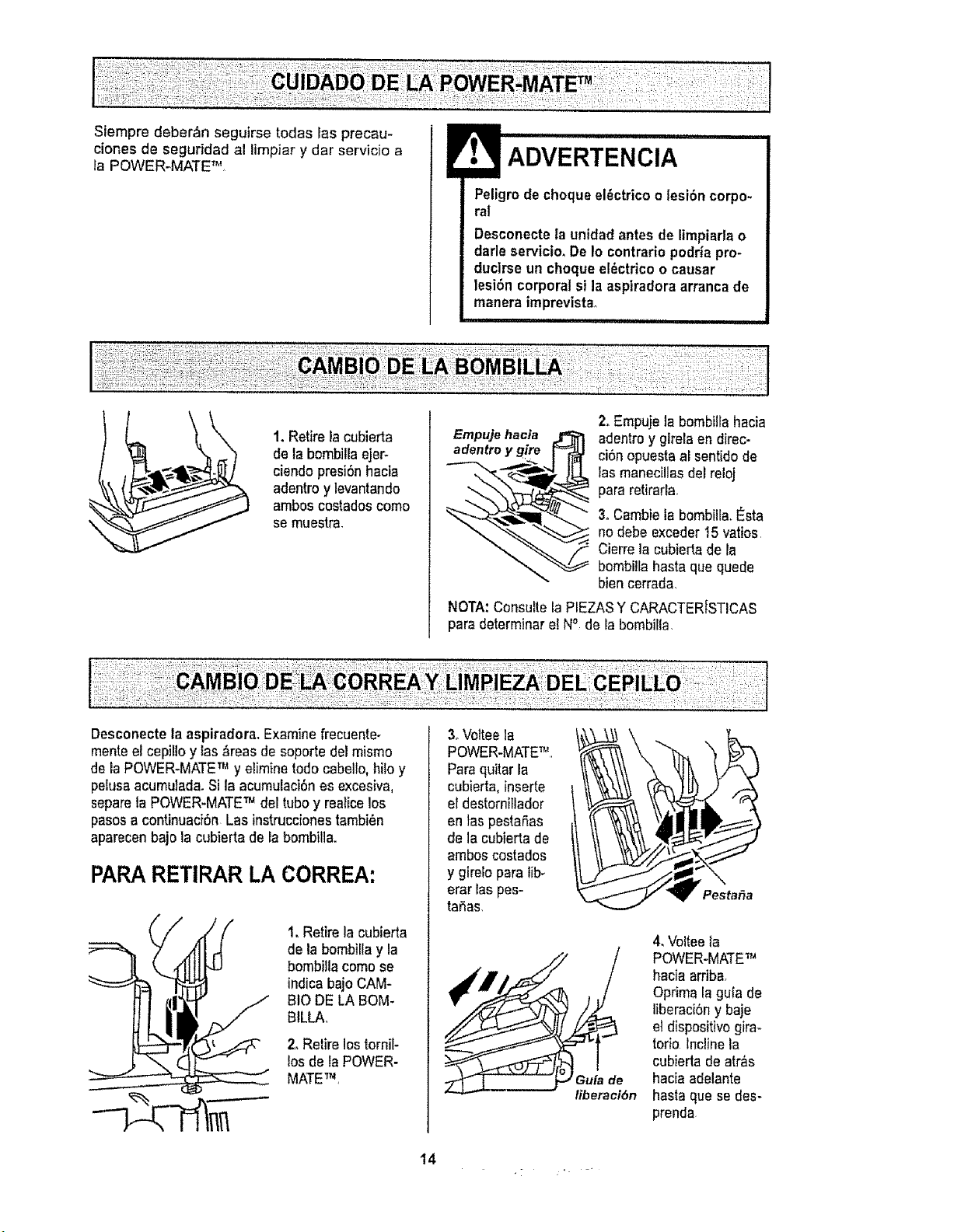
ciones de segurfdad al limpiar y dar servicio a
la POWER-MATE TM,
Peligro de chequeel_ctricoo lesi6n corpo-
ral
Desconecteta unidad antes de limpiarla o
darle servicio_De1ocontrarlopodda pro-
ducirse un cheque e!_ctdcoo causar
lesi6n corporal si laaspiradora arrancade
manera imprevistao
iiiii iiiii i i ,1111111,11i,i
\
1. Retire la cubierta
de la bombillaejer-
ciendo presi6nhacia
adentroy levantando
ambos cestadoscome
se muestra.
Empujehacta
adentroy gire
2, Empujela bombtllahacia
adentroy gtrela endirec-
ci6n opuestaal sentido de
ias manecillasdel reloj
para retirarla
3, Cambiela bombilfa,l_sta
no debe exceder15 vatios
Cierrela cubierta de la
bombi!lahasta que quede
bien cerrada,
NOTA:Consultela PIEZASY CARACTERfSTICAS
para determinarel N° de la bombilla
Desconectela aspiradora,Examine frecuente-
menteel cepillo y las_reas de soporte delmismo
de la POWER-MATETM y eliminerode cabello,bite y
pelusaacumulada.Sila acumulaci6nesexcesiva,
separeta POWER-MATETM deltube y realicelos
pasos a continuaci6n Las instruccionestambi_n
aparecenbajo la cubierta de la bombilla.
PARARETIRAR LA CORREA:
-------
t, Retire la cublerta
de la bombillay la
bombillacome se
indicabajo CAM-
BIO DE LA BOM.
BILLA,
2, Retire lostornil-
los de la POWER-
MATETM,
3oVotteela
POWER-MATETM
Paraquitarla
cubierta,inserte
el destornitlador
en laspestaSas
de la cubierta de
ambos costados
y girelo para lib_
erar las pes-
taSas,
14
Pesta&a
4, Volteela
POWER-MATETM
hacia arriba,
Oprima la gula de
l]beraciSny baje
et dispositivogira-
torio inclinela
cubiedade atr&s
haciaadelante
hasta que se des-
prenda
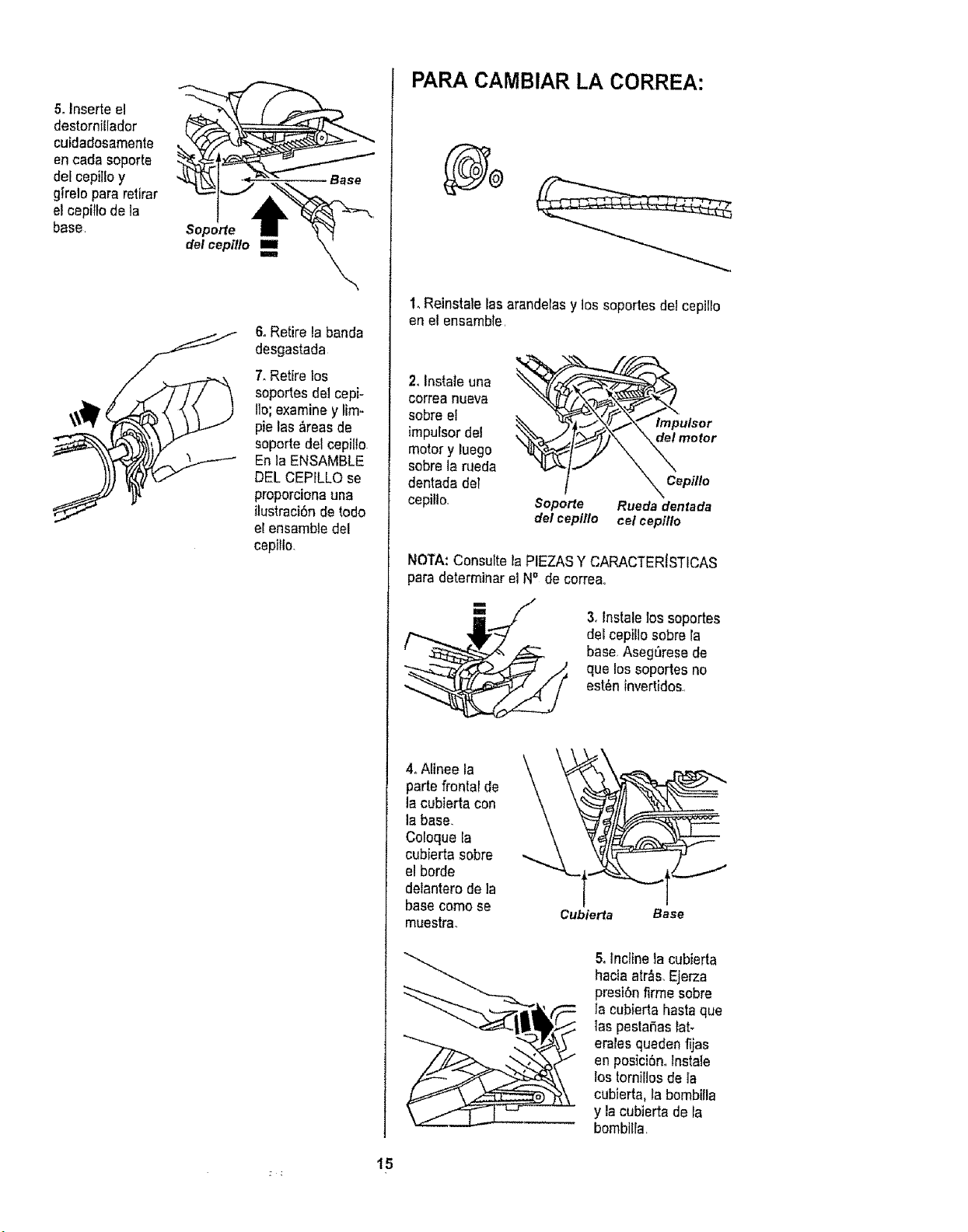
5.Inserteel
destornillador
cuidadosamente
encarlasoporte
delcepilloy
girelopararetirar
elcepiFfodela
base
Soporte
del cepflio ==
Iml
Base
6oRetire labanda
desgastada
7, Retire los
soportes de1cepi-
lie; examiney _im-
pie las _reasde
soporte del cepilio
En la ENSAMBLE
DELCEPELO se
proporcionauna
ilustrad6n do rode
el ensambtedel
cepiflo.
PARA CAMBIAR LA CORREA:
1.Reinstale lasarandelasy los soportes del cepillo
on el ensamble,
2. Instate una
correa nueva
sobre el
impulsor de!
motor y luego
sobreJarueda
dentada def
cepilto,
Soporte
de/¢epillo
Impulsor
_ motor
Cepillo
Ruedadentada
celcepillo
NOTA: Consultela PIEZASY CARACTERISTICAS
para determinarel No de corre&.
3, lnstale los soportes
del cep}llosobre la
base Asegt_resede
que los soportes no
est_n invertidos..
4,Alinee la
parte frontal de
la cubierta con
la base.
Coloque la
cubierta sobre
el berde
delanterode la
basecome se
muestra.
Cubierta Base
& inclineta cubierta
hacta atr_s,Ejerza
presi6nfirme sobre
ta cubierta hasta que
las pestafias tat-
erales quedenfljas
en posiciSn,,lnstaie
_ostorn}tiesde 1a
cubJerta,la bombifla
y la cubierta de Fa
bembilla,
15
/!: _:i; i:_! _::i! i;ii¸
PARACAMBIAR MAZO DEL
ADVERTENCIA
Peligrodecheque el_ctricoo lesi6ncorpo-
ral
Desconectela unidadantesde ltmpiarla o
darteservicio,.De Io contrario podr|apro-
ducirse un cheque el_ctricoo causer
lesibn corporalsi la aspiradora arrancade
manera imprevistao
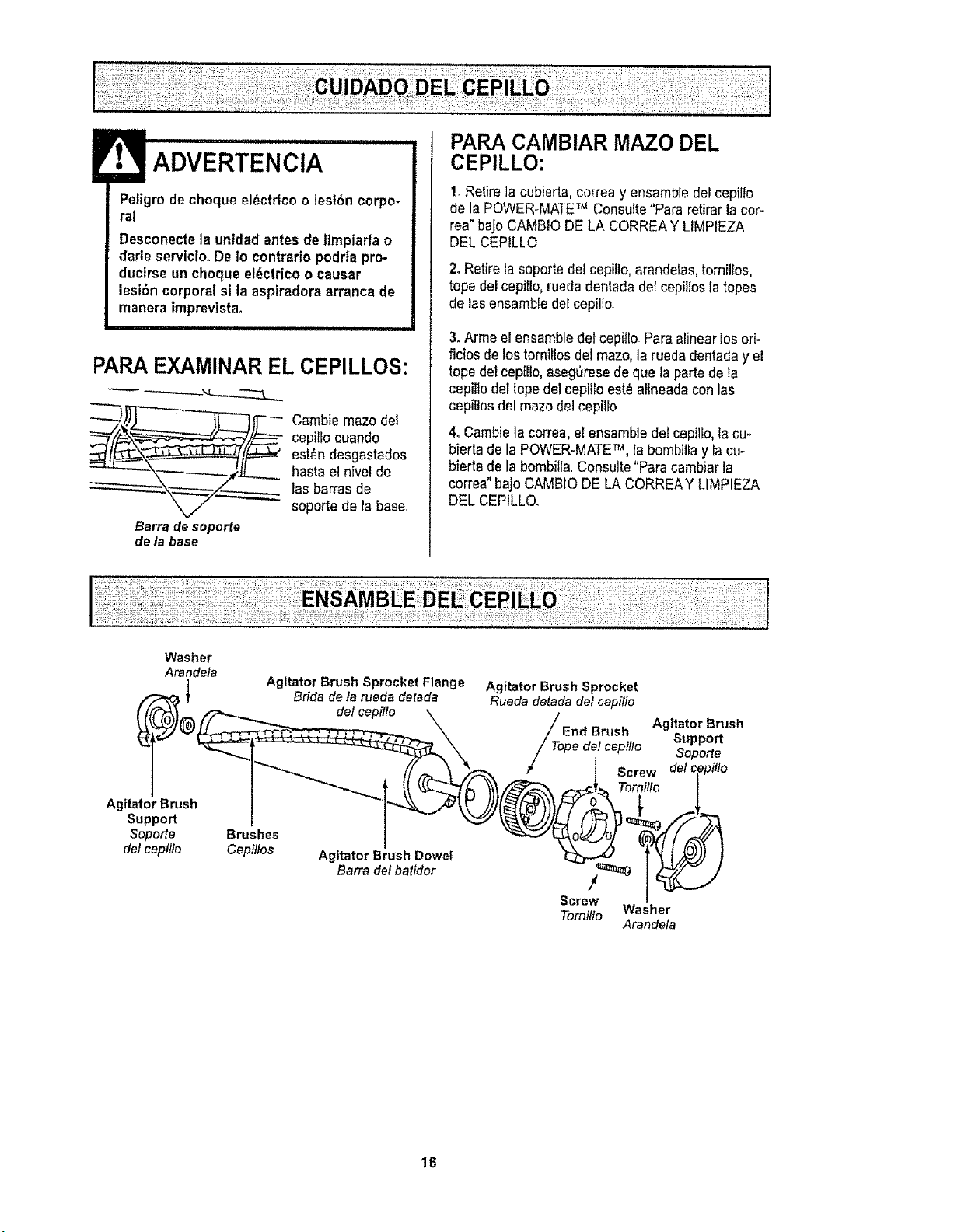
PAPA EXAMINAR EL CEPILLOS:
__. _ Cambiemaze del
cepi_locuando
est_ndesgastados
haste el nivelde
las barrasde
soporte de la base,
Barra desoporte
de la base
CEPILLO:
1.Retire la cubierta,correa y ensembledel cepillo
de la POWER-MATETM Consulte"Pare retirarla cor-
rea"bajo CAMBIODELA CORREAY LIMPIEZA
DELCEPILLO
2. Retire la soportedel cepilto,arandetas,tornillos,
tope del cepillo,rueda dentadadel cepillosla topes
de lasensambledel cepillo.
3. Armeel ensembledef cepitto Pareel]nearlosori-
ficios de lostornillos delmaze,la rueda dentaday el
topedetcepillo, aseg6resede qua ta partede la
cepillodertopede]cepilroest_ alineadacon las
cepillosdel mazedel cepilro
4oCambielacorrea, elensembledetcepiJro,facu-
bierta de IaPOWER-MATETM, fa bombiliay facu-
bierta de la bombilla.Consulte"Parecambiarla
correa"bajo CAMBIODE LA CORREAY LIMPIEZA
DEL CEPILLO.
Washer
Arandela
Agitator Brush
Support
Soporte
de/cepillo
Agitator Brush Sprocket Flange
Bficla de fa rueda detada
de/cepfllo
Brushes
Cepillos
Agitator Brush Dowel
Barra de/batidor
Agitator BrushSprocket
Ruedadetadade/capi//o
/_op__.,..... AgitatorBrush
_i,u DIU_H SU_t}_OFt
e de/cepiflo So"_orte
Screw del c
Temilto
!
Screw
Tomi!/o Washer
Arandela
16
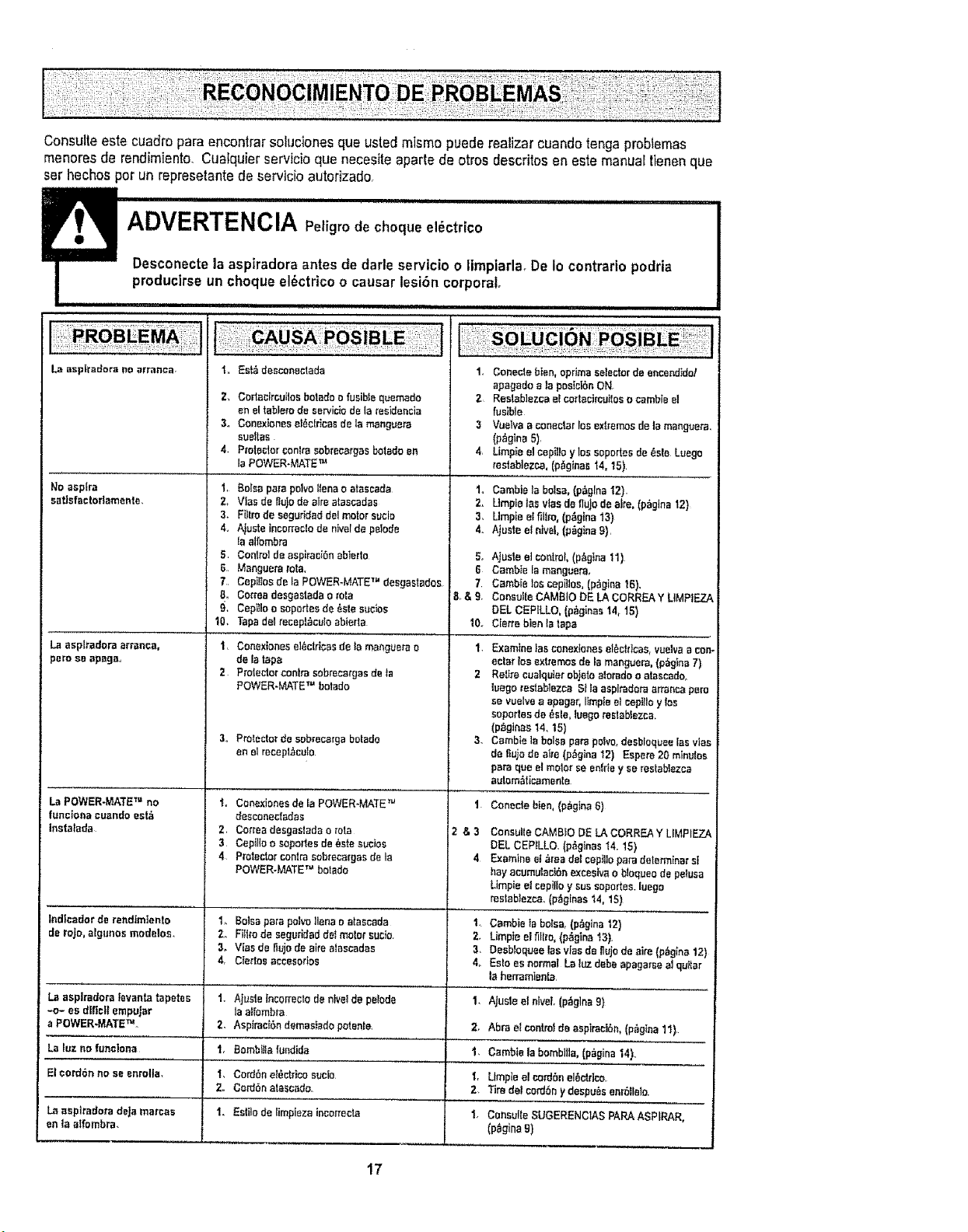
Consulteeste cuadropara encontrarso_ucionesqua usted mismo puederealizercuandotongaprob_emas
menoresde rendimiento_Cuatquierservicioqua necesiteaparte de otros descfitos en este manuartienenqua
SeThechos per un represetantede servicioautofizado,
La asptTadora no arranca _,, Es_ desconec'Lada
No asplra
satlofactorlamente.
La asp|radars arranca,
pore so apsga,
La POWER-MATE TM no
functona ouando est;_
Instatada
%ndlcedor de rat=dtmtento
de roJo,algunos modelos.
La asplradoreievanlareputes
-o- es d_liol!empujar
a POWER-MATETM
Z, Cortacircuilos botado o fusible quemado
en el table_'ode serv[ciodo la _esidencia
3., Conoxiones el_clricas de la manguem
aueltas
4. PJoto_torconIta sobrecargas botado en
ta POWER-MATE TM
1. Balsa pars polvo liens o etascada
2_ Vies do lIulo de sire atascadas
3. Filtm de seguridad del motor sucia
4., A_uateincorrecto de nivel de petode
la alfombra
5. Contmt de asp_reciSnabterto
G, Manguera rata.
7. Cepiltos de la pOWER-MATE TM desgastados
8. Co,Tea desgastada o rata
9, Cepitlo o soportes de _sta sue_es
10. Tapa del recep_culo abierta
1. Conex_ones et_ctrlcasde la mangue_a o
de la tape
2 PTotecter centre sobrecatgas de _a
POWER-MATE 'r=botado
3,, Protector de sebrecmga butado
en el recepl_,eulo
i. Cooexienes de la PoWER-MATE TM
desconectadas
2, Conea desgaslada o tola
3 Cepil{o o soporles de 6ate sucios
4 Protector centre sobrecargas de ]e
POWER-MATE TM botado
1. Bursa pate p_tw tlens o atascada
2. F_tro de seguridad deI motet sucio
3. Vies de tlujode aim atascadas
4 Ciedos accesorios
1, GenoeSebten.eprim_setectordeescendide!
apagadoala pesiei6nON,
2 Restablezcael cortacircuitoso cambieel
fusible
3 Voetvaa conectar_osexi[emosdela manguera,
(p_gina5),
4, Llmpiae]cepit!oyloseopertesde_ste Luego
_es_eblez_,(p_gines'_4,'15)
t,, Cambietabalsa,(p_glnaI2),
2. Umptelas viesde flujodeafro,(p_,glna12)
3. Umpieel filtm, (p_glna13)
4. Ajusteel etvef,(p_ginag),
t. Ajuste incorrecto de hive] de peloda
la allombra
Z. Aspirac_6n demesiado potente.
t. Bombitla fundida
t. CurriSh e!6ctdco suclo
2. Co_bn atescado.
1. Estgo de limpieza inco=recte
5. Ajus_ee_oo_ml. (p_gtna 11)
6 Cambie la manguera.
7 Cambie los cep_los, (p_gina 16),
8,&9. Cansuffe CAMB]O DE LA CoRREA Y UMPtEZA
DEL C_:PILLO, (p_ginas 14, 15)
I0. Ciarre bien ta tapa
1, Exemtne tas conextones et_ctflcae, vuelva a con-
eclat los extremes de _amanguera, (p,_glna 7)
2 Retire cualquter objeto alorado o atascado.
luego Testeblezea Sila aspiradara armnca peru
se vuelve a epagar, limpie et cepitto y toe
soportes de _sle, luego restab_ezca,
(p_ginas 14.15)
3. Cambie la boise pare polvo,dasb_oqueetea vtas
de fiujode aire (p_glna t2) Espere 20 minutes
pars qua el molar se enfrfe y ee restablezca
autom_ticemente
I Conecle blen,{p_gina6)
i2 & 3 Consu_teCAMBtO DE LA CO_,REA Y LtMP}EZA
DEL CEPILLO, (p_ginas I4. 15)
4 Examine et _ea del eepJilopars determiner st
hey acumulac_Sn exeesiva o b_oqueode peruse
Limpie el cepiilo y sus soportes, luega
restablezca. (p_ginas 14. 15)
1 Cambie ta boise, {p_gina '_2)
2. Umpie el fiHro, (p&glna 't3},
3, Desb]oquee las v[as de flujode sire {p_,g_na12)
4_ Es_oes normal La luz debe apaga_se a] quffar
la herramlenta,
I, AJusle el nlveL (pz%glna9)
;Z. Abra e_controtde aepiraelSn,(p_glea 11)
La luz no funelena 1. Cembie la bomblfla, (p_gina 14).,
El cord6n no se enrolls, t, Llmpte el cord6n el6_rico,
2. Tim dot cordbn y despots enr6llelo.
La asph'adera deJa marces 1. Consulle SUGERENCIAS PARA ASPIRAR.
en la atfombra. (p_gina 9)
17
Sears se complace en ofrecer a sus clientes ser¢icio de reparaci6n de aparatos
electrodom_sticos y electr6nicos de todas las marcas°
En Sears, usted puede contar con operadores en espa_ol, a los que puede Ilamr
sin cargo alguno.
Para pedirservicio de reparaci6na domocillio,Llame 24 horas al dia, 7 dias a la semana
1-800-676-58tl
Paraordenar piezascon entrega a domocillio, Llame24 horas al dia, 7 dias a la semana
1-800-659-7084
i i ±
HomeCentrar
III .........
TheServiceSideofSears,"
t8