
Visit warranty.waterdroplter.com
and enter the product serial number:
Any questions, please contact us.
Find the installation video
Register 1-year manufacturer warranty*
* Please refer to Limited Product Warranty on Page 16
Search “Waterdrop Under-Sink Ultra Filtration System Installation”
on
service@waterdroplter.com
1-888-352-3558 Mon-Fri 8:00 AM-5:00 PM (PST)
www.waterdroplter.com (live chat available)


Contents
Installation Instructions
Before Installation ··································································1
Parts List ··················································································2
Product Introduction ·······························································3
Installation Tips ·········································································4
Installation Steps ····································································5
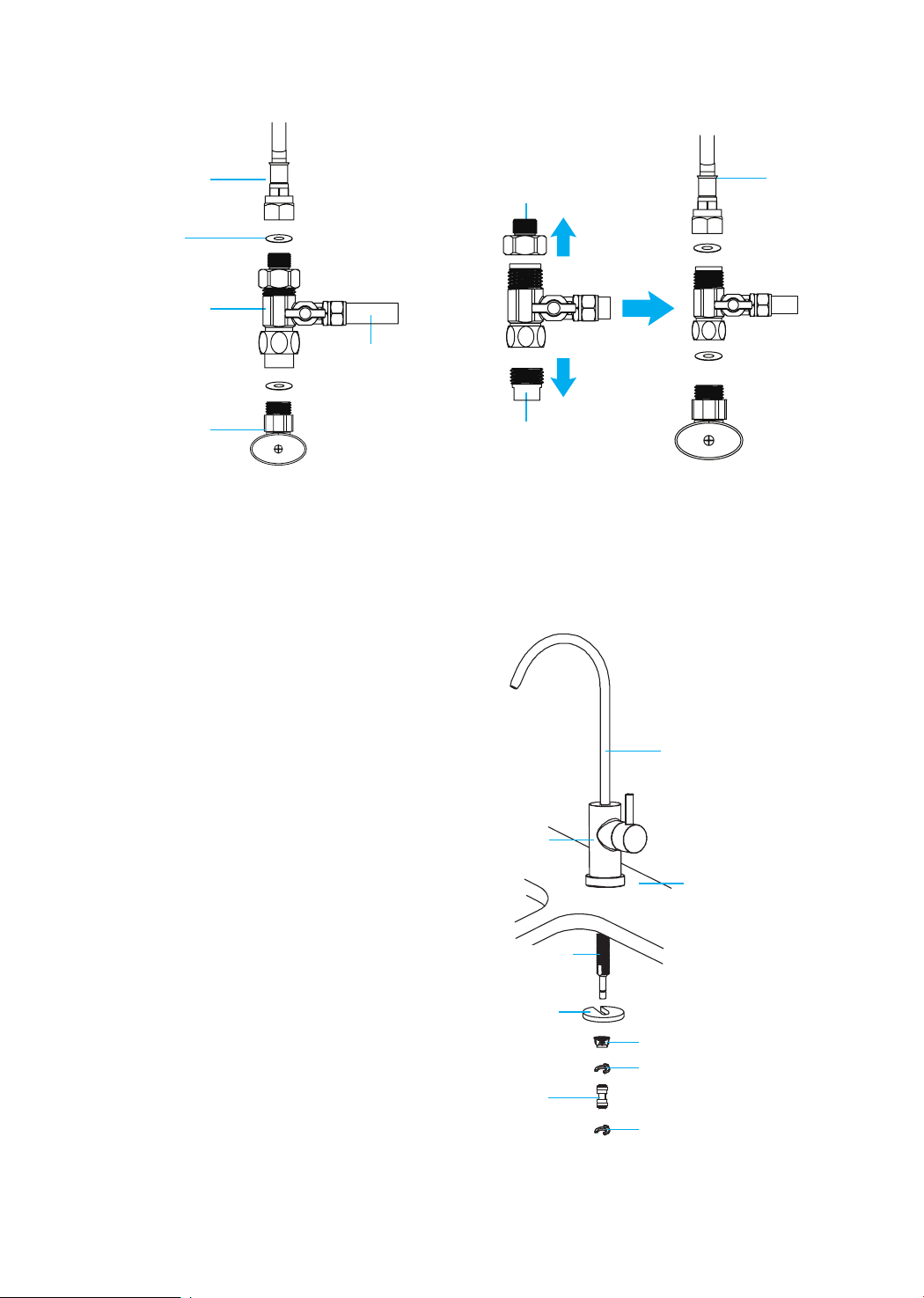
Step 1: Install the Feed Water Adapter
···············································5
Step 2: Install the Faucet
································································6
Step 3: Install the Batteries and Place the System
·································7
Step 4: Connect Tubing
·······························································8
Step 5: Start up the System
············································
······
·········8
Owner’s Manual
Display and Operation ·····························································9
Section 1: Working Mode Display
····················································9
Section 2: Filter Life Reminder
·······················································9
Section 3: Filter Replacement Guide
·················································10
Section 4: Battery Life Reminder and Replacement Guide
········ ·············12
System Maintenance ································· · · · ·························13
Troubleshooting ····································· ·······························13
Limited Product Warranty ·······················································15

1
Installation Instructions
Before Installation
Inspect the Package
Open the box and take out the system housing, all the components, and connect
ttings. Inspect them according to the parts list to ensure nothing is left out or
damaged during shipping. If there are any parts cracked or broken, please do not
proceed with the installation and contact Waterdrop by phone: 1-888-352-3558
Mon-Fri 8:00 AM-5:00 PM (PST) or by email: service@waterdroplter.com. Identify
and get familiar with all components for quick installation.
Specications
To achieve the optimal performance, it is highly recommended to use the system
within the operational parameters.
Model
System Size (L
*
W
*
H)
Feed Water Pressure
Feed Water Temperature
Power Specication
Feed Water Requirement
WD-TSU-W / WD-TSU-B
14.81
"
*
4.68
"
*
13.97
"
14.5-87 psi / 0.1-0.6 MPa
41-100 °F / 5-38 °C
4.5V
Municipal Tap Water
Required Tools:
• Variable speed drill
• Drill bit: 1⅜"
(for faucet hole)
• Adjustable wrench, pliers
• Utility knife or scissors
• Flashlight
• Towel
Note: If using well water as the source, please make sure the feed water has
been through a pre-ltration system, otherwise, large particles in well water will
clog the lter easily and shorten lter life.
2
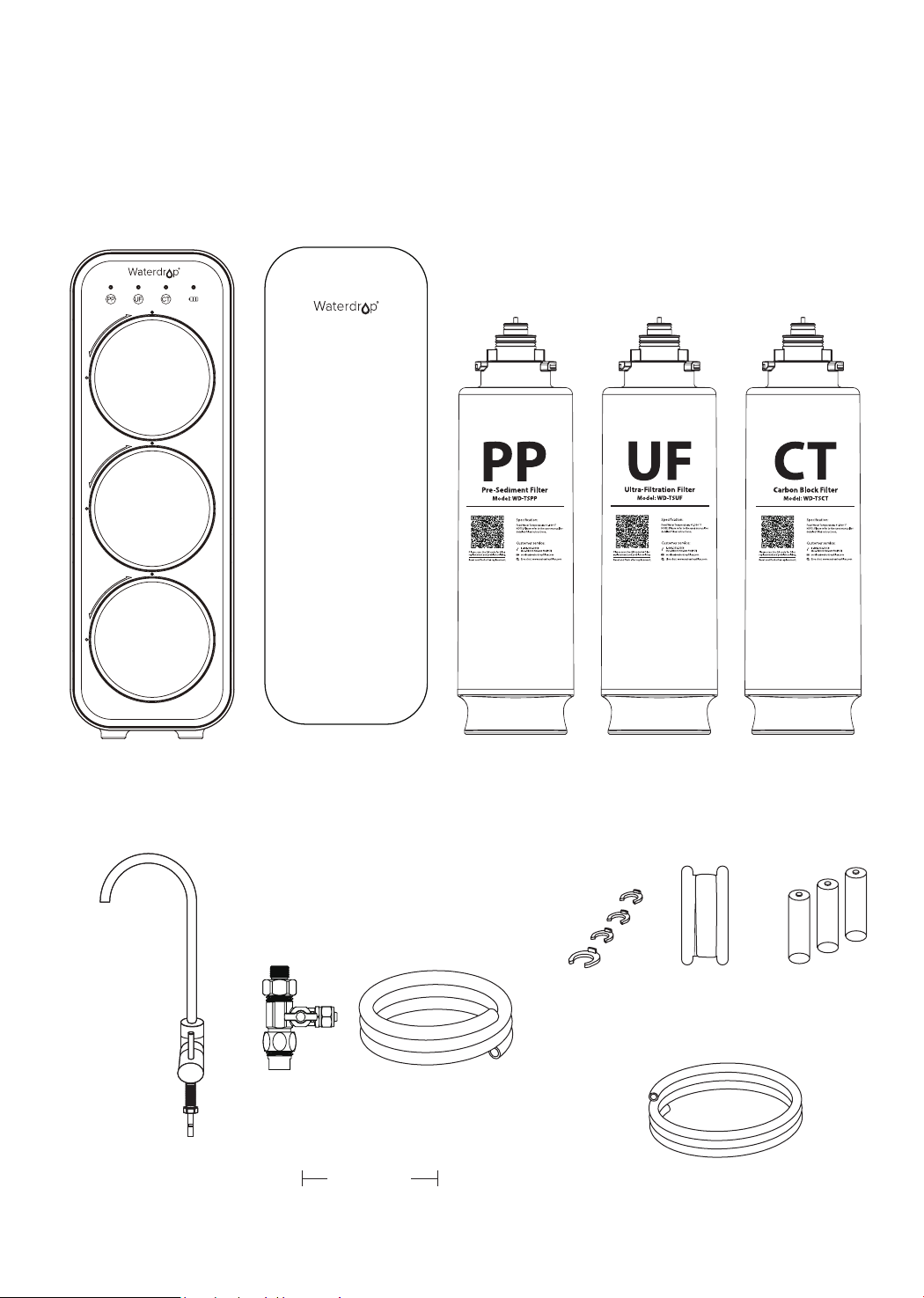
Parts List
Front Cover PP Filter UF Filter CT Filter
Feed Water Adapter
3/8
"
and 1/2
"
White 1/4
"
PE Tubing
Teon Tape AA Battery
White 3/8
"
PE Tubing
Lock Clip
System Housing
X 1 Set X 1 X 1 X 1 X 1
Faucet
X 1 Set
X 1 X 3
X 1 Set
X 59
"
X 59
"
X 4
Preinstalled
1
2
3
UF
2
CT
3
PP
1
2
3
1
3
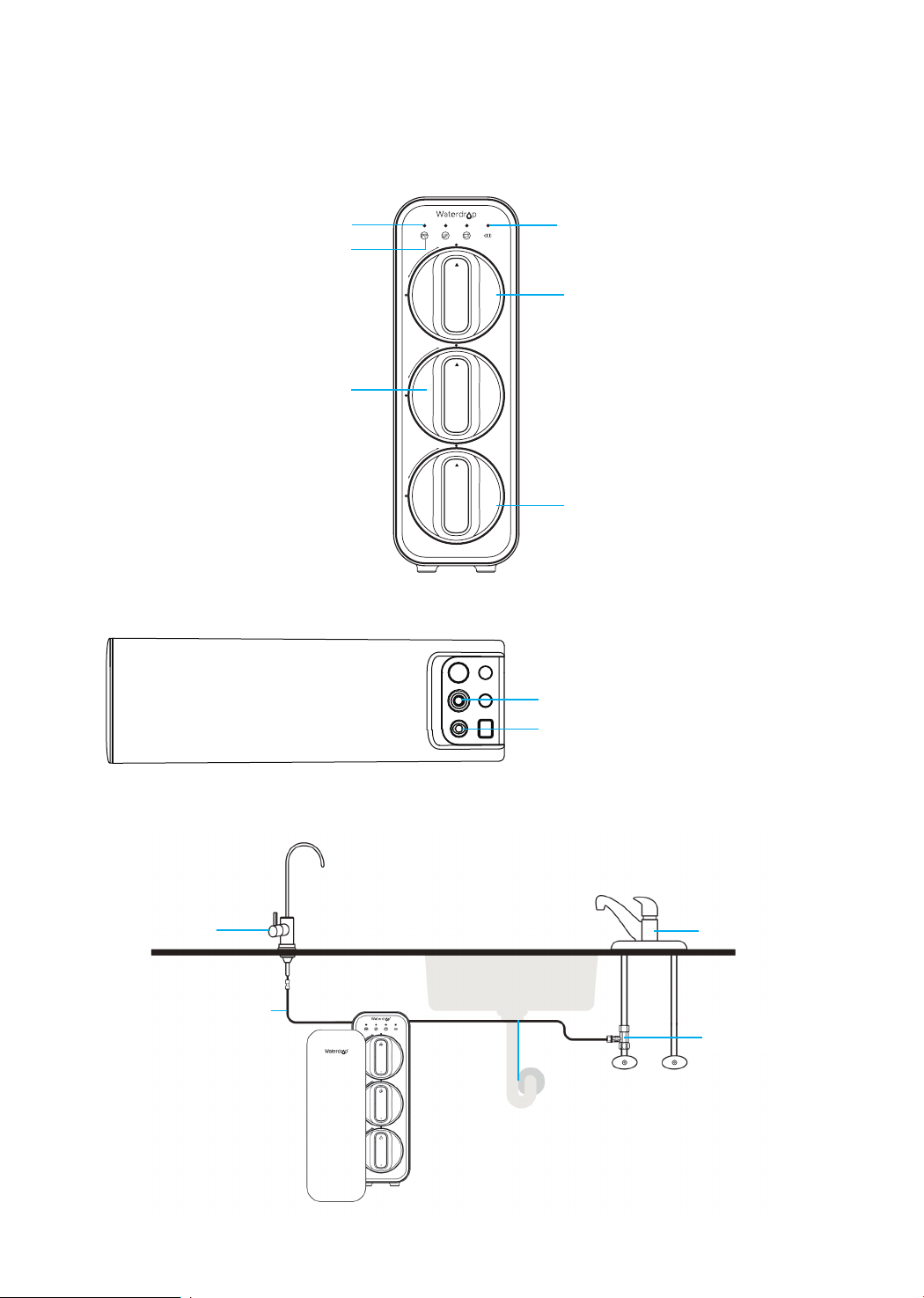
Product Introduction
The brief introduction of various parts and sample connections are presented as
follows. Please identify and get familiar with these parts and connection points for
a smooth installation.
PP/UF/CT Filter Life Indicator
PP Filter
Filter Reset Button
Front
Top
Faucet
Outlet Water Tubing
(1/4
"
White PE Tubing)
Kitchen Faucet
Feed Water
Adapter
Inlet Water Tubing
(3/8
"
White PE Tubing)
Cold
Hot
Inlet Water Port
Outlet Water Port
UF Filter
CT Filter
Power Indicator
Press
Press
Pull
4
Installation Tips
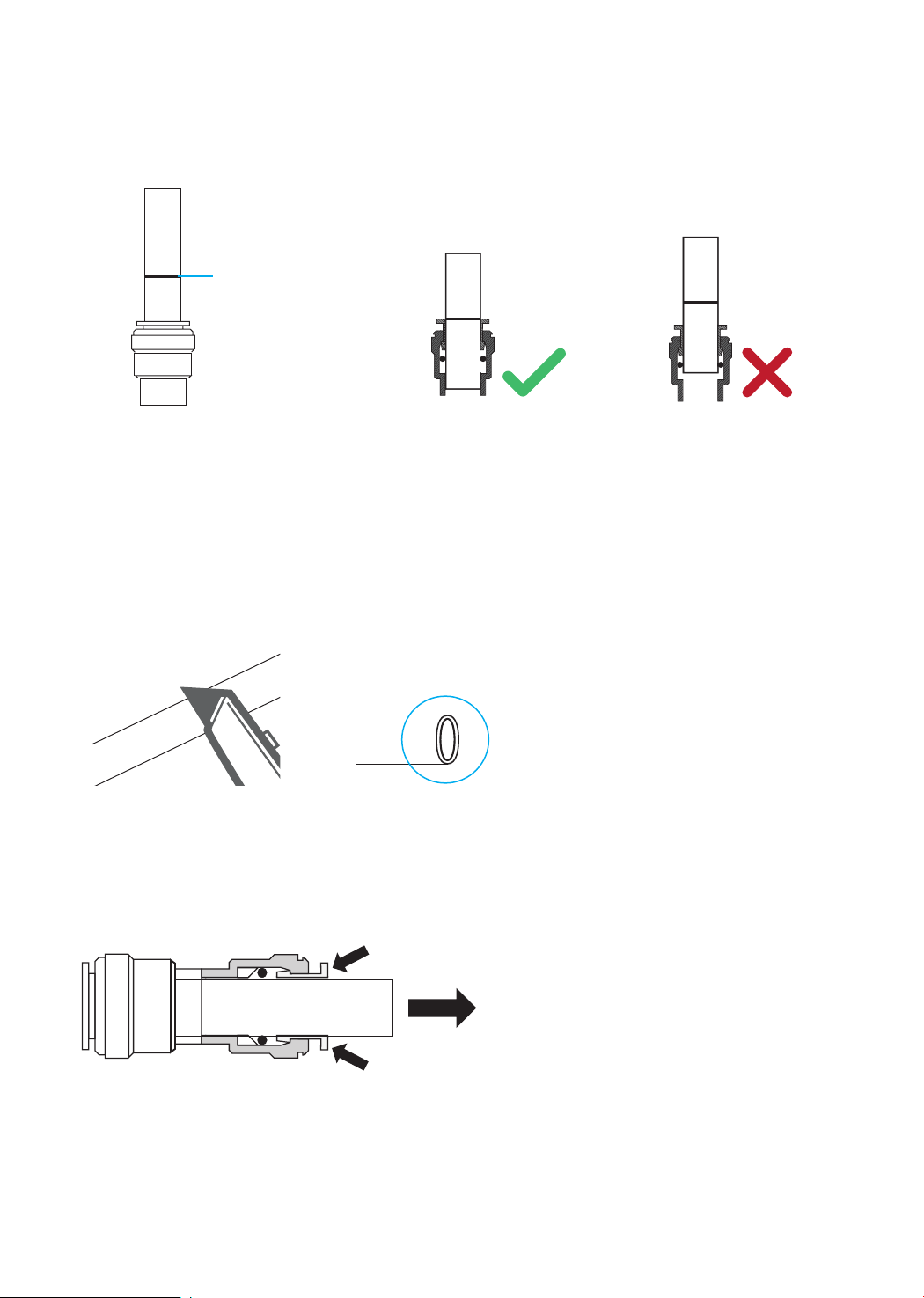
How to Use the Quick-Connect Fittings
To connect:
Note: There is an existing mark at the end of the tubing for you to conrm if the
tubing is fully inserted into the tting.
• Push the tubing into the tting until you reach the mark on the tubing.
Note: If the tubing is not fully inserted, no seal will be created, and leakage will
occur.
• When the tubing is fully inserted, put the blue lock clip on the tting. It will lock
the tubing in place and prevent it from falling off.
To disconnect:
• Remove the blue lock clip from the
tting;
• Use your thumb and index nger
to press down on the lock sleeve.
Use your other hand to pull out the
tubing from the tting (Figure 2).
Note: Please do not pull out the
tubing directly, or else it will damage
the tting and cause leakage.
Figure 1
Figure 2
Note: If the tubing is too long,
cut it to a suitable length with a
sharp utility knife or scissors. Cut
the tubing squarely and cleanly
(Figure 1). Make sure the tubing
is fully inserted.
Mark for
Full Insert
Cut Cleanly
and Squarely

5
Step 1:
Install the Feed Water Adapter
Note: The inlet water tubing has been attached to the feed water adapter for easy
installation.
1. Shut off the water supply. Turn on the kitchen faucet to release the water
pressure;
Note: Make sure the water has stopped running before proceeding to the next
step. Get a towel or bucket to catch water.
2. Disconnect the cold water pipe from the cold water supply valve;
3. Twist the feed water adapter onto the cold water supply valve (with its washer)
and tighten it with an adjustable wrench (Figure 3);
Note: If the cold water pipe is 1/2
"
, unscrew the two converters from the feed
water adapter rstly (Figure 4), then implement step 3.
4. Twist the cold water pipe (with its washer) onto the feed water adapter and
tighten with an adjustable wrench.
Installation Steps
Note:
• The ultra ltration system must be connected to the COLD water supply ONLY.
• Do not install the system in exposure to direct sunlight or harmful chemicals, nor
any place where it may be damaged.
• Do not install the system near any heat source.
• Do not install the system outdoors.
How to Drill a Hole into Your Sink or Countertop (Optional)
Note: Please conrm if there is an existing hole available to install the faucet. If
not, please drill a hole in accordance with the following steps.
It’s highly recommended to watch the YouTube video “How to Drill Faucet Holes”
for better understanding of the process. There is also a sticker for your reference to
drill the hole. Remember to wear safety glasses to protect your eyes while drilling
the faucet hole.
1. Choose a diamond core bit for granite, and a carbide drill bit for stainless steel.
Do not use a hammer drill on natural stone, glass or ceramic;
2. Glue the sticker to your sink or countertop, and drill a hole referring to the size
shown on the sticker (1⅜"
);
3. Make an indent with a center punch on a stainless steel sink before drilling to
help guide the bit;
4. Be careful when drilling on a porcelain sink, as it can be easily chipped. Apply
downward pressure rmly to the bit until breaking through the surface;
5. Starting at the lowest speed, hold the drill straight with rm pressure to prevent
the bit from walking on the counter;
6. Once breaking through the surface, swirl the drill a little to apply pressure in a
circle evenly.
Prior to installation, it is highly recommended to watch the video “Waterdrop
Under-
Sink Ultra Filtration System Installation
” on .
6
Step 2:
Install the Faucet
Note: If there is no hole in
your kitchen sink or countertop,
you have to drill one (1⅜"
) or
use the hole from the soap
dispenser. Refer to Page 5.
1. Insert the faucet spout
into the faucet body;
2. Insert the faucet stem
into the hole on the
countertop;
3. Under the sink, slip on
other parts in the order
shown in the picture
(Figure 5);
4. Insert the quick-connect
tting onto the faucet
stem fully and rmly.
Faucet Body
3/8"
Cold Water Pipe
1/2
"
Cold Water Pipe
Washer
Unscrew
Unscrew
3/8'' Inlet Water
Tubing
Feed Water
Adapter
Cold Water
Supply Valve
Mounting Washer
Nut
Countertop
Faucet Spout
Quick-Connect
Fitting
Figure 3 Figure 4
Figure 5
Faucet Stem
Lock clip
Lock clip
7
Figure 6
4.68"
14.81"
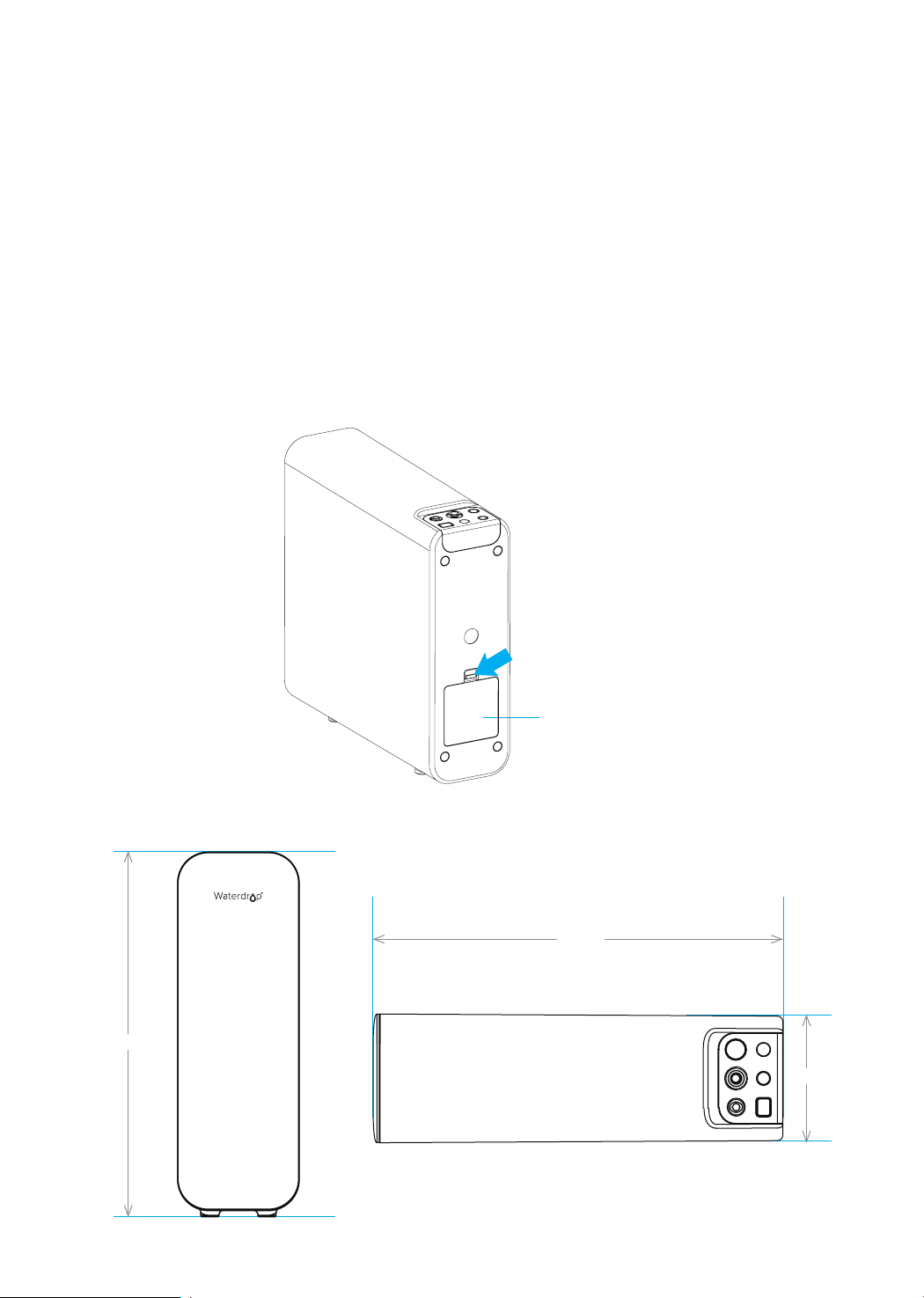
Step 3:
Install the Batteries and Place the System
1. Press to open the battery box (Figure 6).
2. Take out 3 AA batteries and remove the packaging.
3. Install the batteries starting from the negative side, and put the 3 batteries into
the battery box in turn.
Note: The batteries may not be installed and damage the spring wire if you
install the batteries starting from the positive side.
4. After the installation of batteries, the system will beep. The lter life indicators
will ash blue, purple, and red in turn, and then stay on blue for 10 seconds.
Finally, the indicator will be off and enter energy-saving mode.
5. Close the battery box.
6. Check and ensure there is enough space under the countertop to install the
system (14.81
"
* 4.68
"
* 13.97
"
).
13.97"
Battery Box
Press
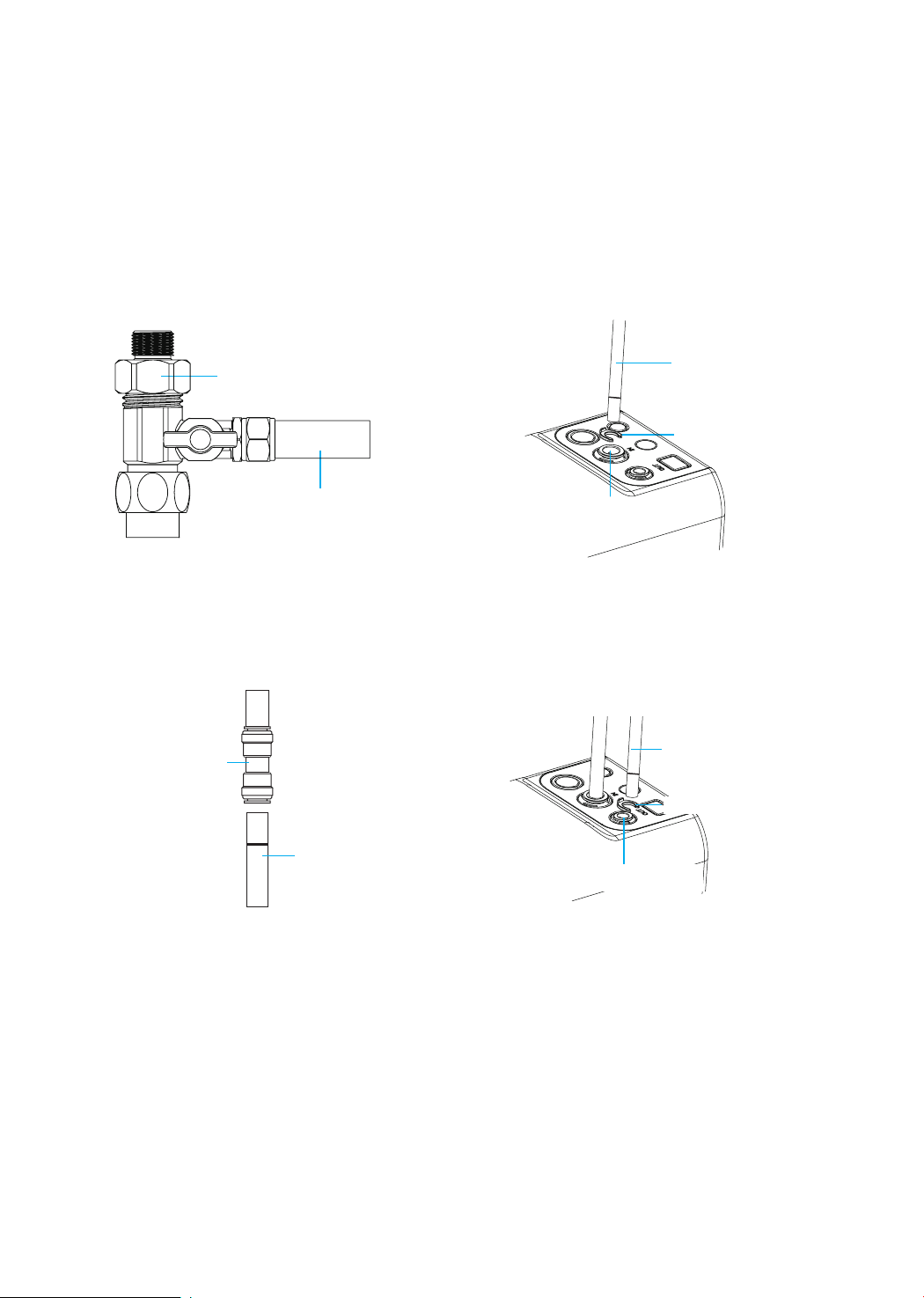
Step 4:
Connect Tubing
1. Install the Inlet Water Tubing
• Connect the inlet water tubing from the feed water adapter to the inlet water port
and pop the lock clip on the tting;
Note: Make sure it is fully inserted until you reach the mark on the tubing.
Note: Conrm the tubing length you need and cut the tubing if it’s too long,
referring to “How to Use the Quick-Connect Fittings” on page 4.
8
2. Install the Outlet Water Tubing
Quick-connect
Fitting on Faucet
Lock Clip
Outlet Water Tubing
Feed Water Adapter
3/8
"
Inlet Water Tubing
Inlet Water Port
Inlet Water
Tubing
• Connect the outlet water tubing from the faucet to the outlet water port and pop
the lock clip on the tting;
Note: Make sure it is fully inserted until you reach the mark on the tubing.
Outlet Water Port
Lock Clip
Outlet Water Tubing
Step 5:
Start up the System
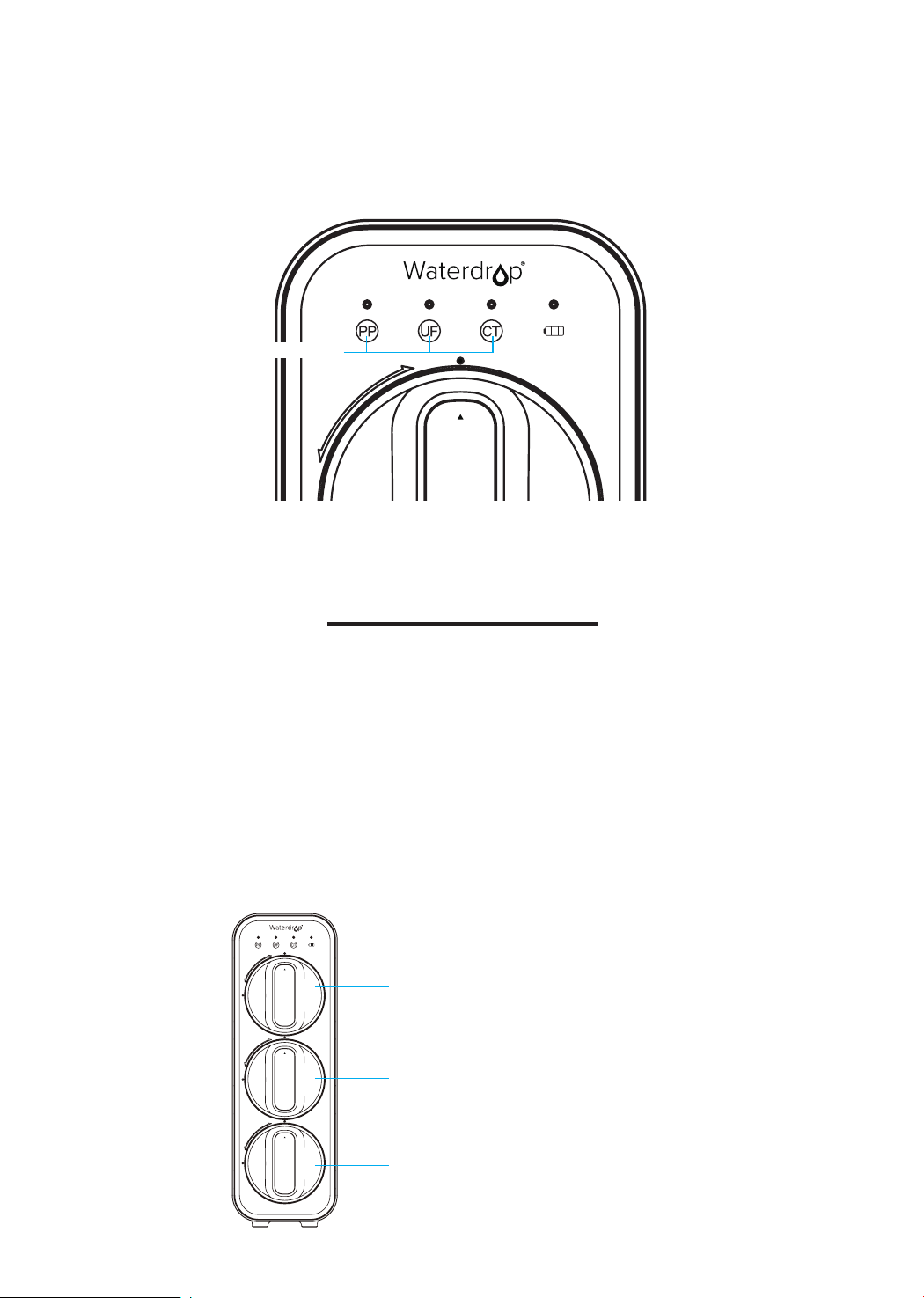
1. Turn on the cold water supply valve. Check for leaks.
2. Touch one of the lter reset buttons slightly to start up all indicators and check
the display status. The lter life indicator will be off after 10 seconds (Figure 7).
3. Turn on the faucet to ush for 10 minutes. The indicators will ash if you press
the lter reset button. The indicators will be on after the ushing.
Note: Be sure to carefully check the tightness of each part of the system while
ushing. Check and ensure all tubings are installed correctly and completely.
Make sure there is no leaking at joints, ttings, valves, and tubing connections.
Note: The water is undrinkable during ushing for consecutive 10 minutes. If
the ushing is interrupted, it will continue ushing when you turn on the faucet
9
Owner’s Manual
Display and Operation
Section 1: Working Mode Display
Filter life indicators and power indicator are off during normal water ltration.
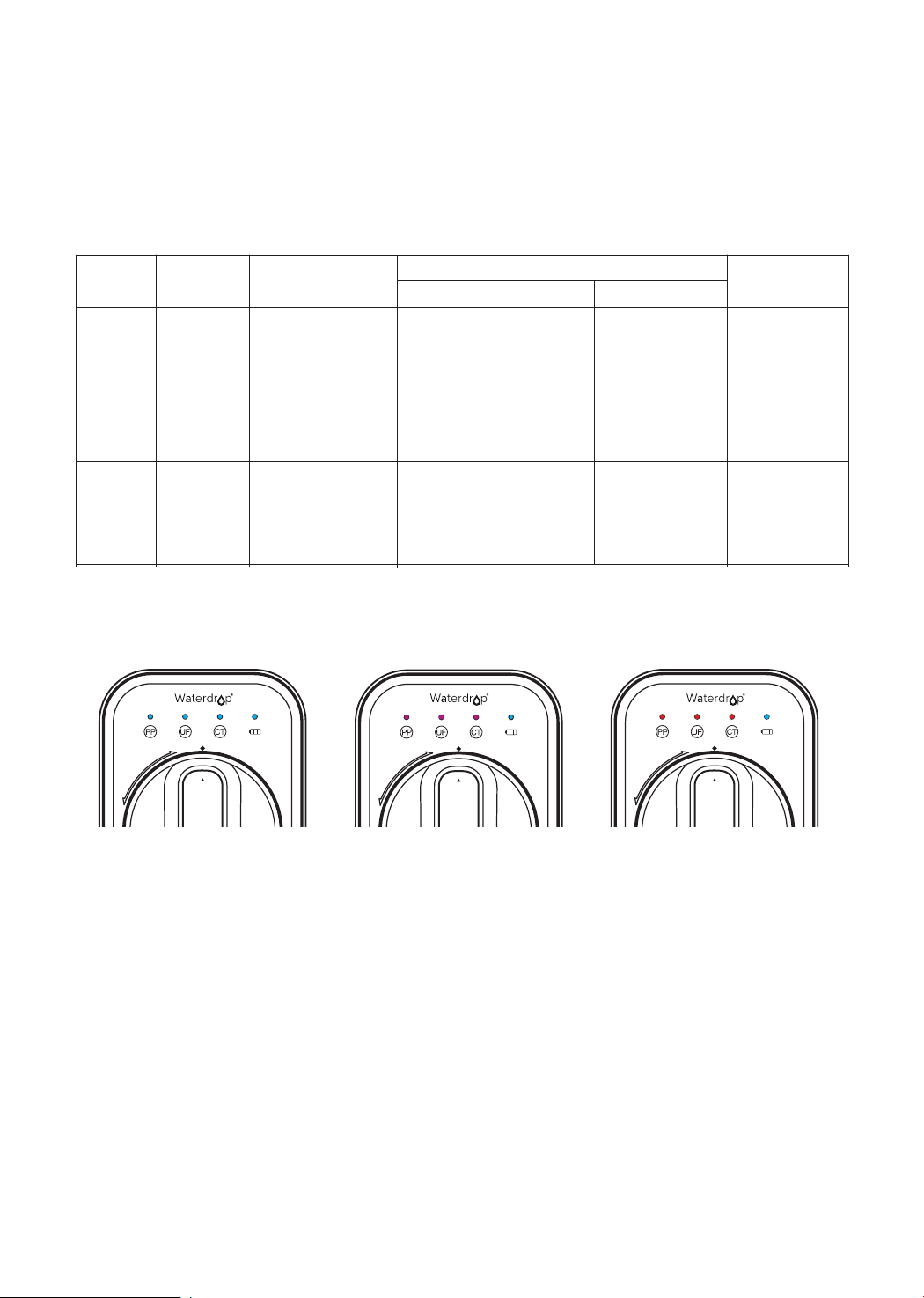
Touching one of the lter reset buttons slightly will start up all indicators. The light
color is displayed in real time according to the lter life status. Within 10s after
lighting up, if you do not press the button, the indicator will be off again.
Section 2: Filter Life Reminder
Figure 7
PP
Filter Reset Button
UF
2
CT
3
PP
1
1
2
3
CT Filter
Filter life: 12 months or 2,000 gallons
PP Filter
Filter life: 6 months or 1,000 gallons
UF Filter
Filter life: 24 months or 4,000 gallons
again, until reaching 10 minutes.
4. Conrm the 10-minute ushing is completed before turning off the faucet. Make
sure the faucet does not leak.
5. Install the front cover (magnetic force).
10
Note: Filter life may vary depending on source water quality and water usage.
Please replace the lter according to the lter life indicators.
There are helpful electronic lter indicators (PP/UF/CT) on the front panel that will
notify you the lter replacement by color change and beep. Be sure to reset the
lter life indicator every time you replace your lter.
Display Status:
Status
Status
Replace Soon
Replace Now
GoodNormal
Warning
Alarming
>
0 and ≤15
≤ 0
>
0 and ≤40
≤ 0
>
15
>
40
The blue light will be on after
touching any indicator slightly.
The purple light will be on
while the faucet is on, and it
will be on for 1 minute after
turning off the faucet.
The red light will be on while
the faucet is on, and it will be
on for 1 minute after turning
off the faucet.
No beep
Beep 3 times while
getting water
Beep 3 times while
getting water
Reminder
Indicator
Buzzer
Remaining
Life (Day)
Remaining ltration
amount (gallon)
Note: The indicators will notify you according to the usage time or puried water
amount, whichever comes rst.
Normal Warning Alarming
PP
PP
PP
Note: If the lter expires, please purchase and replace the lter immediately.
Otherwise, the ltration efciency will decrease signicantly and affect the
performance.
Section 3: Filter Replacement Guide
How to Replace Filters:
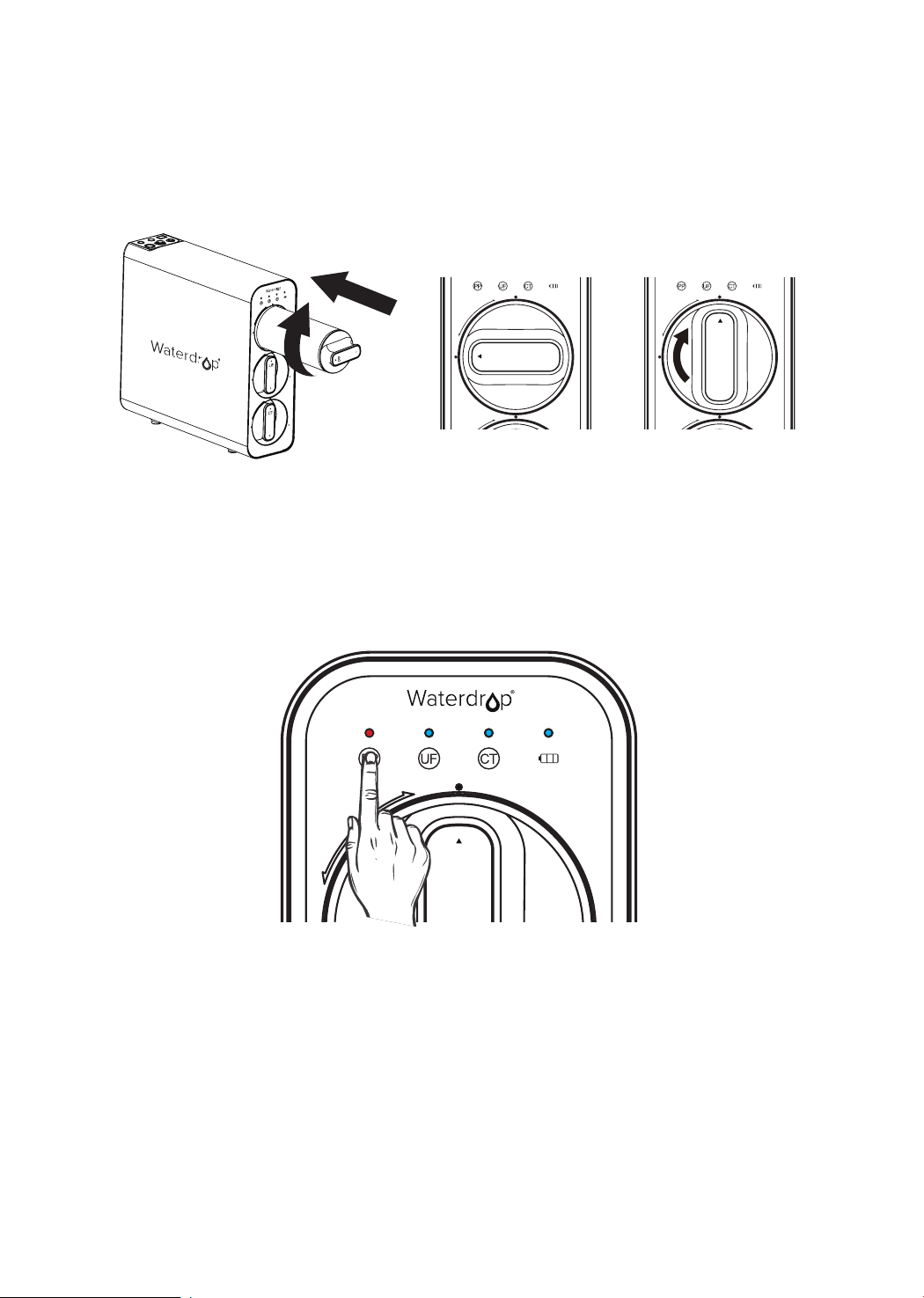
With the leak-free design, lters could be replaced directly without cutting off power
and water. No additional tool is required.
1. Twist the lter that needs to be replaced counterclockwise;
2. Remove wrapping and protective cap from the new lter;
3. Insert the lter into its corresponding hole. The number on the lter shall be the
same as the number on the system housing;
11
How to reset the lter life indicator:
Press and hold the PP lter life indicator for 5 seconds until the system beeps
(Figure 8).
Note: The lter life reset of UF and CT is the same as the reset of PP lter.
PP
Figure 8
How to Flush the Filter after Replacement:
Note: The corresponding lter life indicator will ash blue during ushing.
For PP and CT lters: Turn on the faucet to ush for 5 minutes;
For UF lter: Turn on the faucet to ush for 10 minutes.
4. Push the lter into the hole with a certain pressure and rotate it a 1/4 turn
clockwise, until the triangle mark is aligned with the solid circle on the front
panel. You may hear a click when the lter is tted properly;
Note: Repeat the above steps to install the other lters.
5. Reset the lter life indicator and ush the lter after replacement (please refer
to the following steps).
PP
1
1
PP
1
1
12
Section 4: Battery Life Reminder and Replacement Guide
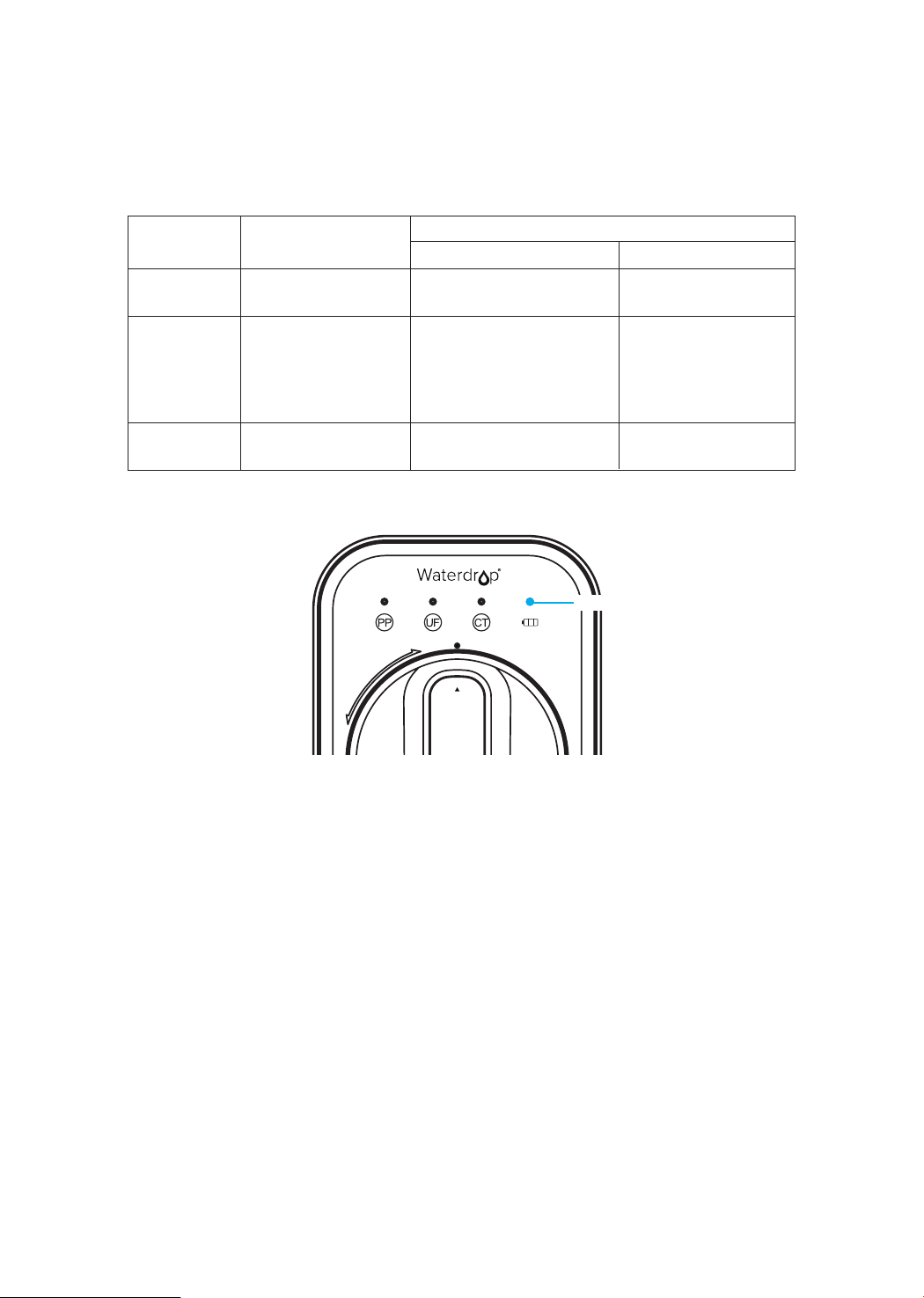
The power indicator displays different status according to the remaining battery
power. When the batteries need to be replaced, the power indicator will ash in
blue and the system will beep while getting water (Figure 9).
Warning
Alarming
0
and ≤5
<
0
Normal
>5
The blue light will be on after
touching any indicator slightly.
The blue light will ash (on
for 0.1s and off for 2s).
Off
No beep
Beep 3 times while
getting water
No beep
Reminding modes
Battery life indicator
Buzzer
Battery life
Remaining life (Day)
Figure 9
Replace the batteries:
1. Open the battery box and take out the old batteries.
Note: It is recommended to remove the batteries from the positive side to
prevent damaging the spring.
2. Take out the new batteries and remove the packaging.
3. Put them into the battery box starting from the negative side.
Note: The batteries may not be installed and damage the spring if you install
the batteries starting from the positive side.
After the installation of batteries, the system will beep. The lter life indicators
will ash blue, purple, and red in turn, and then stay on blue for 10 seconds.
Finally, the indicator will be off and enter energy-saving mode.
4. Close the battery box and nish the installation.
PP
Battery life indicator

13
• The installation sequence of lters shall not be reversed to avoid affecting the
normal function of the system.
• If you do not use the system for a long time (more than 1 week), it is
recommended to turn on the faucet to ush for a while before using it again.
• If the system is not used for a long time, please disconnect the water supply and
remove the batteries.
• Please replace the lter regularly according to the lter life indicator.
Note: While the testing was performed under standard laboratory conditions,
actual performance may vary depending on the source water quality and
water usage. In case of a premature blockage and failure of the lters, it is
recommended to replace the lter in accordance with actual usage.
• Clean the system with clear water. Do not spray the water directly onto the lter.
Do not use steel wool, an abrasive cleaner or a corrosive liquid such as gasoline
or acetone.
• When cleaning, do not pour other liquids into the lter or you risk damaging the
lter system.
• Check the system and water pipe ttings regularly for water leakage to avoid
any property damages.
• If using well water as the source, please make sure the feed water has been
through a pre-ltration system, otherwise, large particles in well water will clog
the lter easily and shorten lter life.
System Maintenance
• Less water ows out.
a. Please check the lter life indicator. If the lter has expired, replace it
immediately.
b. The water inlet pressure is abnormal. The normal water inlet pressure is 14.5-87psi.
Please check the water inlet pressure and use the lter after the pressure is normal.
If the water inlet pressure is too low for a long period of time, install a booster pump
before use. If the pressure is too high, the ultra ltration membrane will be damaged.
The pressure regulator should be installed before use.
c. The water inlet and outlet valves are not fully opened. Please check the
cold water valve, feed water adapter, and faucet to ensure that they are fully
opened.
d. The lter is blocked. If the water quality is poor, the lter may become blocked
after being used for a certain period of time. It will need to be replaced. If using
well water as the source, please make sure the feed water has been through
a pre-ltration system, otherwise, large particles in well water will clog the lter
easily and shorten lter life.
e. The inlet water tubing or outlet water tubing is bent. Please check and
straighten out the inlet and outlet water tubing.
Troubleshooting

14
• The indicators do not work when the system is in use.
• The water tastes weird.
• Water is not owing out of the faucet.
a. The indicators are in energy-saving mode in normal use. You must press any lter
reset button to start the indicators and check them.
b. The batteries are not installed and the electric circuit is not connected. Please refer
to the instructions to install the batteries again.
c. The battery voltage is insufcient. In this case, the batteries will need to be
replaced.
d. The display cable is not plugged in. Please contact Waterdrop customer service
by phone, 1-888-352-3558 Mon-Fri 8:00 AM-5:00 PM (PST), or by email,
service@waterdroplter.com.
a. The lters have expired. Please check the lter life indicators. Replace the lters
immediately if they have expired.
b. If you haven't used the system in a long time, turn on the faucet and ush it for a
while before drinking.
c. The lters are installed in the wrong order. The numbers of the lters should be
the same as those on the system housing. Please verify that the lters are in
the correct order.
a. The lters are blocked. If the water quality is poor, the lters may be blocked after a
period of use. They will need to be replaced.
b. If the lters are not situated in place, install the lters again according to the
installation instructions.
c. The water inlet valve is not open. Please check the cold water valve and the
feed water adapter to ensure that they are fully opened.
• Water is leaking in the system.
• When water is being extracted, the system beeps.
a. The inlet water tubing and outlet water tubing are not connected. Please make
sure they are fully inserted into the quick-connect tting. If water still leaks after full
insertion, turn off the water supply and pull off the tubing at the water leakage point.
Check the cut of the tubing and cut it again if the cut is not at. Then insert it into the
system.
b. Water leakage is occurring inside the system. Please contact Waterdrop customer
service by phone, 1-888-352-3558 Mon-Fri 8:00 AM-5:00 PM (PST), or by email,
service@waterdroplter.com.
a. The lters have expired. Please touch any reset button to start up all lter life
indicators and check whether the lters have expired. If they have expired, replace
the lters to reset the lter life.
b. The batteries have expired. Please touch any reset button to start up all indicators
and check the batteries’ status. If they have expired, replace them immediately.
Otherwise, the display function will be affected.

15
Limited Product Warranty
The warranty of our product covers defects in materials and workmanship from
the original date of purchase. During the warranty period, we will replace or repair
any part which is deemed to be defective, if the product has not been subjected to
tampering, alteration, lack of regular maintenance or improper use after delivery.
The cost of repair or replacement under those excluded circumstances shall be
borne by the consumer. This limited warranty does not cover the following items:
lters and all other parts or components that require regular replacement as a
result of ordinary usage. This limited warranty only applies if the system is installed,
used, and maintained in compliance with all instructions and requirements
enclosed with the system.
This limited warranty shall only be valid if:
1. The feed water pressure is no less than 14.5 PSI and no higher than 87 PSI;
2. The feed water temperature must be no less than 41
°F
and no more than 100
°F
;
3. The feed water must have a pH between 6.5 and 8.5;
4. Turbidity must be less than 1.0 NTU.
Any information or suggestion with respect to our product concerning applications,
specications or standards is provided solely for your convenience.
The quality of water supplies may vary seasonably or over a period of time. Your
water usage may vary as well. The manufacturer shall assume no liability for the
determination of the proper equipment necessary to meet your requirements, and
we do not authorize others to assume such obligation on our behalf. You must
verify and test the suitability of any information with respect to the product for your
specic application.
This limited warranty shall be void if:
1. The cartridge lters are not replaced on the recommended maintenance
schedule;
2. The product is purchased from someone other than our ofcial website or our
authorized dealers, as we cannot verify or guarantee the integrity or authenticity
of the product.
• The lter replacement reminder is inaccurate.
a. The service life of a lter is monitored through both usage time and ltered water
amount. There will be replacement reminder when either of the two indicators
reaches its upper limit. For example, if the ltered water amount reaches the upper
limit while the usage time does not, there will also be a replacement reminder. So
please follow the instructions and replace the lter on time.
b. When the batteries are powered out, the system can not record the usage time
and ltered water amount. If the batteries are not replaced in time, the lter life can
not be monitored during that period. After replacing the batteries, the system will
continue monitoring the lter life with the data before batteries replacement. Please
replace the batteries in time to get an accurate lter replacement reminder.

16
Our sole obligation under this warranty shall be repair or replacement of a non-
conforming product or parts of this product, or at our option, return of the product
and a refund of the purchase price. Our obligation does not include the cost of
transportation. We are not responsible for damage in transit, and claim that such
damage should be presented to the carrier by the customer.
The warranties set forth herein are the only warranties made by us with respect
to the product. We make no warranties, expressed or implied, including, but not
limited to, any warranties of tness or merchantability, except as expressly set forth
above.
Warranty Registration
Please visit our website www.waterdroplter.com and go to the “Warranty
Registration” tab to register your product for the warranty.
We offer a 30-day money back guarantee, a 1-year manufacturer warranty,
and lifetime tech support for all our products. Please be sure to ll in the order
information upon registration of your system. For any questions and concerns
about the product, please feel free to call or email us. Your satisfaction is our top
priority!
If you are happy with our products and service, please share with your friends or
share on Amazon. We would greatly appreciate your voice and support. Thank
you!
How to Contact Us
service@waterdroplter.com
1-888-352-3558 Mon-Fri 8:00 AM-5:00 PM (PST)
www.waterdroplter.com (live chat available)