Frigidaire.com USA 1-800-374-4432 Frigidaire.ca Canada 1-800-265-8352
use
&
care
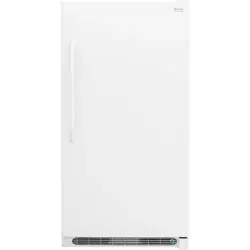
FREEZER
A24313001 (February 2022)
Introduction
.......................................................2
Important Safety Information ....................3
Features .............................................................5
Installation .........................................................7
Door Removal/Reversal ................................9
Controls and Settings .................................. 13
Storage Features ........................................... 16
Saving Energy ................................................ 17
Care and Cleaning ........................................ 18
Troubleshooting ........................................... 19
Limited Warranty ......................................... 22
2
INTRODUCTION
Welcome to our
family
Thank you for bringing Frigidaire into
your home! We see your purchase as the
beginning of a long relationship together.
This manual is your resource for the use
and care of your product. Please read
it before using your appliance. Keep it
handy for quick reference. If something
doesn’t seem right, the troubleshooting
section will help you with common issues.
FAQs, helpful tips and videos, cleaning
products, and kitchen and home accessories
are available at Frigidaire.com.
We are here for you! Visit our website,
chat with an agent, or call us if you need
help. We may be able to help you avoid
a service visit. If you do need service, we
can get that started for you.
Let’s make it ocial! Be sure to register
your product.
Keep your product info here so it’s easy
to find.
Model Number ____________________
Serial Number ____________________
Purchase Date ____________________
3
WARNING
WARNING indicates a potentially haz-
ardous situation which, if not avoided,
could result in death or serious injury.
IMPORTANT
IMPORTANT indicates installation, oper-
ation or maintenance information which
is important but not hazard-related.
DANGER
DANGER indicates an imminently haz-
ardous situation which, if not avoided,
will result in death or serious injury.
CAUTION
CAUTION indicates a potentially haz-
ardous situation which, if not avoided,
may result in minor or moderate injury.
Safety Definitions
This is the safety alert symbol. It is used
to alert of potential personal injury hazards.
Obey all safety messages that follow this
symbol to avoid possible injury or death.
Safety Instructions
• DO NOT store or use gasoline, or other
flammable liquids, or aerosols within
or in the vicinity of this or any other
appliance. Read product labels for
warnings regarding flammability and
other hazards.
• DO NOT store explosive substances
such as aerosol cans with a flammable
propellant in this appliance.
• DO NOT operate the refrigerator in the
presence of explosive fumes.
• Avoid contact with any moving parts
of automatic ice maker.
• Remove all staples from the carton.
Staples can cause severe cuts, and also
destroy finishes if they come in contact
with other appliances or furniture.
WARNING
Please read all instructions before using
this appliance.
Child Safety
This appliance is not intended for use by
persons (including children) with reduced
physical, sensory or mental capabilities, or
lack of experience and knowledge, unless
they have been given supervision or in-
struction concerning use of the appliance
by a person responsible for their safety.
Destroy or recycle the carton, plastic
bags, and any exterior wrapping mate-
rial immediately after the refrigerator is
unpacked. Children should NEVER use
these items to play. Cartons covered with
rugs, bedspreads, plastic sheets or stretch
wrap may become airtight chambers, and
can quickly cause suocation.
IMPORTANT SAFETY INFORMATION
DANGER
DANGER Risk of fire or explosion.
Flammable refrigerant used. Do not use
mechanical devices to defrost refrigera-
tor. Do not puncture refrigerant tubing.
DANGER Risk of fire or explosion. Flam-
mable refrigerant used. To be repaired
only by trained service personnel. Use
only manufacturer-authorized service
parts. Any repair equipment used must
be designed for flammable refrigerants.
Follow all manufacturer repair instruc-
tions. Do not puncture refrigerant tubing.
CAUTION
CAUTION Risk of fire or explosion.
Dispose of refrigerator properly
in accordance with the applicable
federal or local regulations. Flammable
refrigerant used.
CAUTION Risk of fire or explosion
due to puncture of refrigerant tubing.
Follow handling instructions carefully.
Flammable refrigerant used.
WARNING
CALIFORNIA RESIDENTS ONLY
Cancer and Reproductive Harm
www.P65Warnings.ca.gov
WARNING
Do not use electrical appliances inside
the food storage compartments of the
appliance unless they are of the type
recommended by the manufacturer.
4
IMPORTANT SAFETY INFORMATION
IMPORTANT
CFC/HCFC Disposal
Your old appliance may have a cooling
system that used CFCs or HCFCs (chlo-
rofluorocarbons or hydrochlorofluoro-
carbons). CFCs and HCFCs are believed
to harm stratospheric ozone if released
to the atmosphere. Other refrigerants
may also cause harm to the environ-
ment if released to the atmosphere.
If you are throwing away your old
appliance, make sure the refrigerant
is removed for proper disposal by a
qualified technician. If you intentionally
release refrigerant, you may be subject
to fines and imprisonment under provi-
sions of environmental legislation.
IMPORTANT
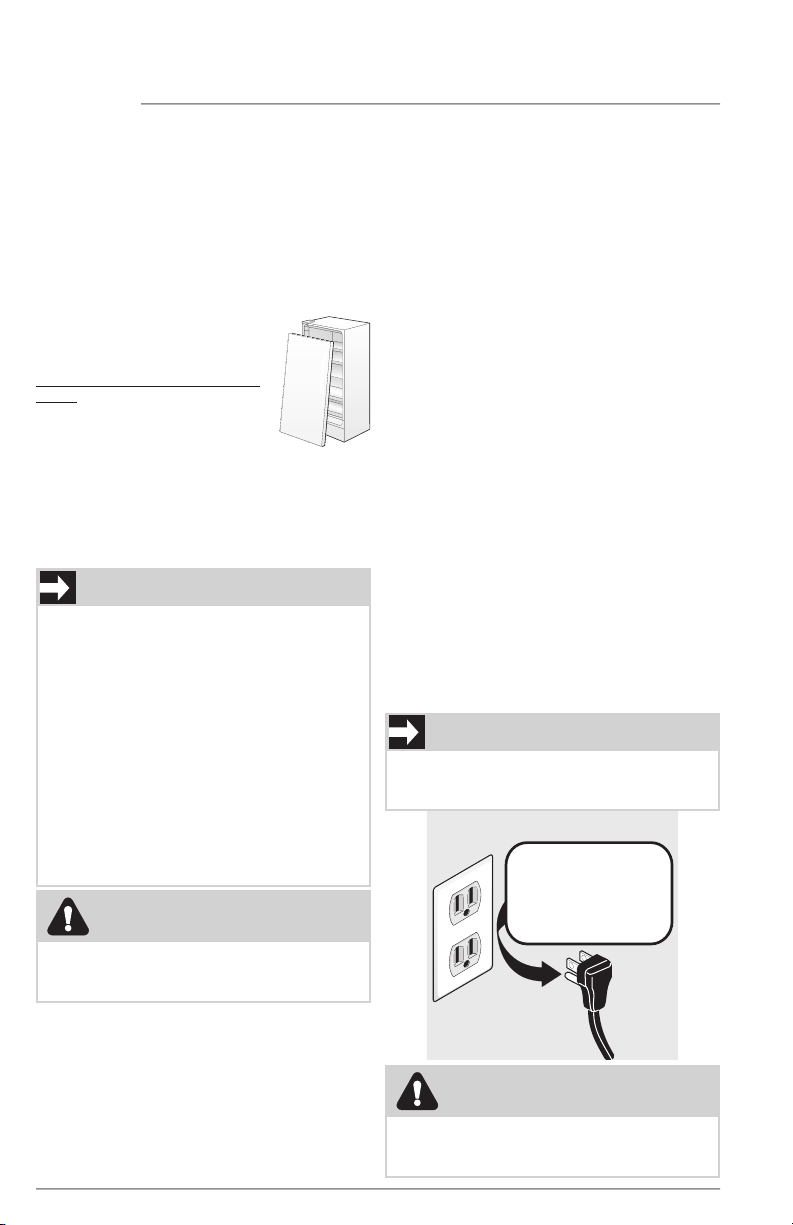
To turn o power to your appliance you
must unplug the power cord from the
electrical outlet.
Grounding type wall receptacle
Power cord with
3-prong grounded plug
Do not, under
any circumstances,
cut, remove,
or bypass the
grounding prong.
Electrical information
• Refer to the serial plate for correct
electrical rating. The power cord of
the appliance is equipped with a
three-prong grounding plug for your
protection against electrical shock
hazards. It must be plugged directly
into a properly grounded three-prong
receptacle, protected with a 15-amp
time delay fuse or circuit breaker. The
receptacle must be installed in accor-
dance with the local codes and ordi-
nances. Consult a qualified electrician.
Receptacles protected by Ground
Fault Circuit Interrupters (GFCI) are
NOT RECOMMENDED. Do NOT use an
extension cord or adapter plug.
• If the power cord is damaged, it
should be replaced by an authorized
service technician to prevent any risk.
• Never unplug the appliance by pull-
ing on the power cord. Always grip
the plug firmly, and pull straight out
from the receptacle to prevent dam-
aging the power cord.
• Unplug the appliance before cleaning
and before replacing a light bulb to
avoid electrical shock.
• If voltage varies by 10% or more, ap-
pliance performance may be aected.
Operating the unit with insucient
power can damage the motor. Such
damage is not covered under the war-
ranty. If you suspect your household
voltage is high or low, consult your
power company for testing.
• To prevent the appliance from being
turned o accidentally, do not plug
unit into an outlet controlled by a
wall switch or pull cord.
• Do not pinch, knot, or bend power
cord in any manner.
Proper Disposal of your Appliance
Risk of child entrapment
Child entrapment and suocation are not
problems of the past. Junked or aban-
doned appliances are still dangerous –
even if they will sit for “just a few days”. If
you are getting rid of your old appliance,
please follow the instructions below to
help prevent accidents.
We strongly encourage re-
sponsible appliance recycling/
disposal methods. Check with
your utility company or visit
energystar.gov/products/re-
cycle for more information on
recycling your old appliance.
Before you throw away your
old appliance:
• Remove door.
• Leave shelves in place so children
may not easily climb inside.
• Have refrigerant removed by a quali-
fied service technician.
WARNING
These guidelines must be followed to
ensure that safety mechanisms in this
appliance will operate properly.
WARNING
Turning the control to OFF turns o the
compressor, but does not disconnect
power to other electrical components.
5
FEATURES
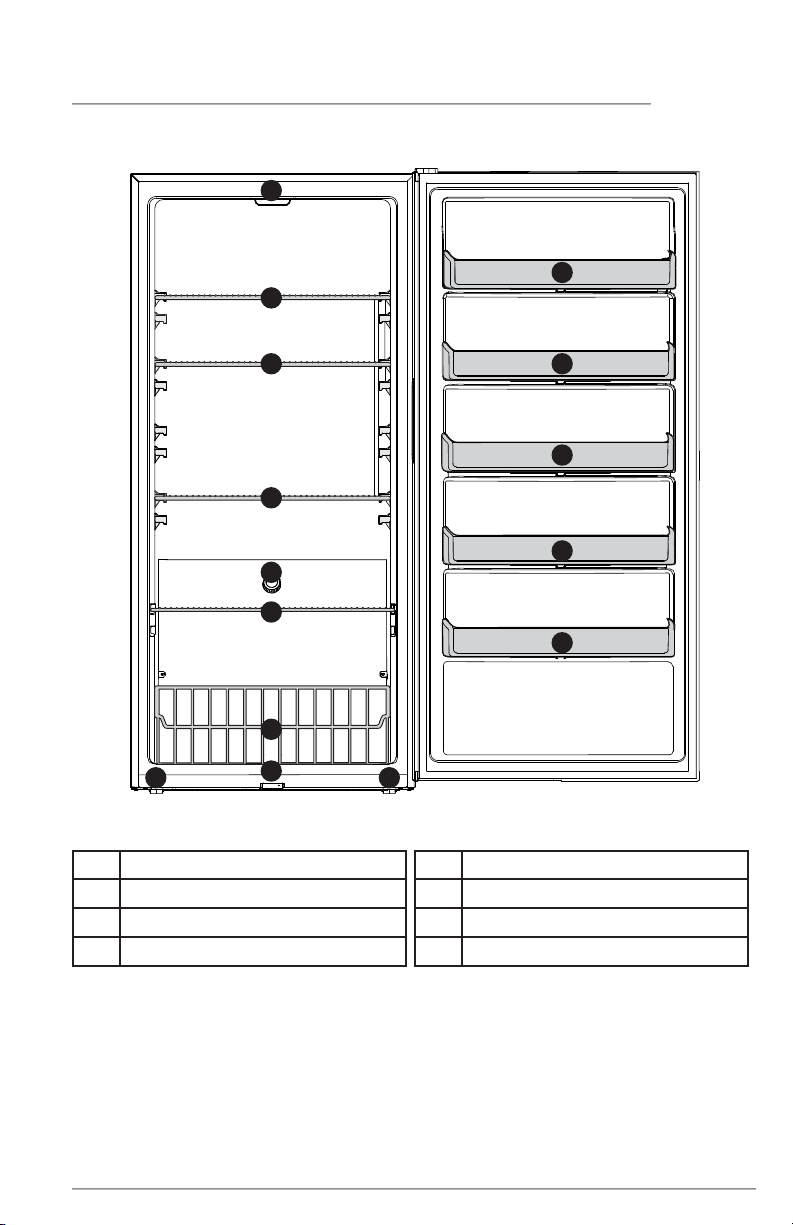
Features may vary according to model
A Power On LED
B Freezer Wire Basket
C Short-Depth Freezer Shelves
D Temperature Control Knob
E Full-Depth Freezer Shelves
F Interior LED
G Fixed Door Bins
H Front Leveling Feet
A
G
F
D
G
G
G
H
E
B
C
C
E
G
H
6
FEATURES
IMPORTANT
Cleaning your Appliance
Remove tape and glue residue from surfaces before turning on the appliance. Rub
a small amount of liquid dish soap over the adhesive with your fingers. Rinse with
warm water and dry with a soft cloth.
Do not use sharp instruments, rubbing alcohol, flammable fluids, or abrasive cleaners
to remove tape or glue. These products can damage the surface of your appliance.
After you remove all of the package materials, clean the inside of your appliance
before using it. See the CARE & CLEANING section in this manual.
See important information about cleaning glass shelves and covers in the STORAGE
FEATURES section of this manual.
IMPORTANT
Moving your Appliance
Your appliance is heavy. When moving the appliance for cleaning or service, be sure
to cover the floor with cardboard or hardboard to avoid floor damage. Always pull
the appliance straight out when moving it. Do not wiggle or “walk” the appliance
when trying to move it as floor damage could occur.
7
This Use & Care Manual provides general
operating instructions for your model. Use
the appliance only as instructed in this Use
& Care Manual. Before starting the appli-
ance, follow these important first steps.
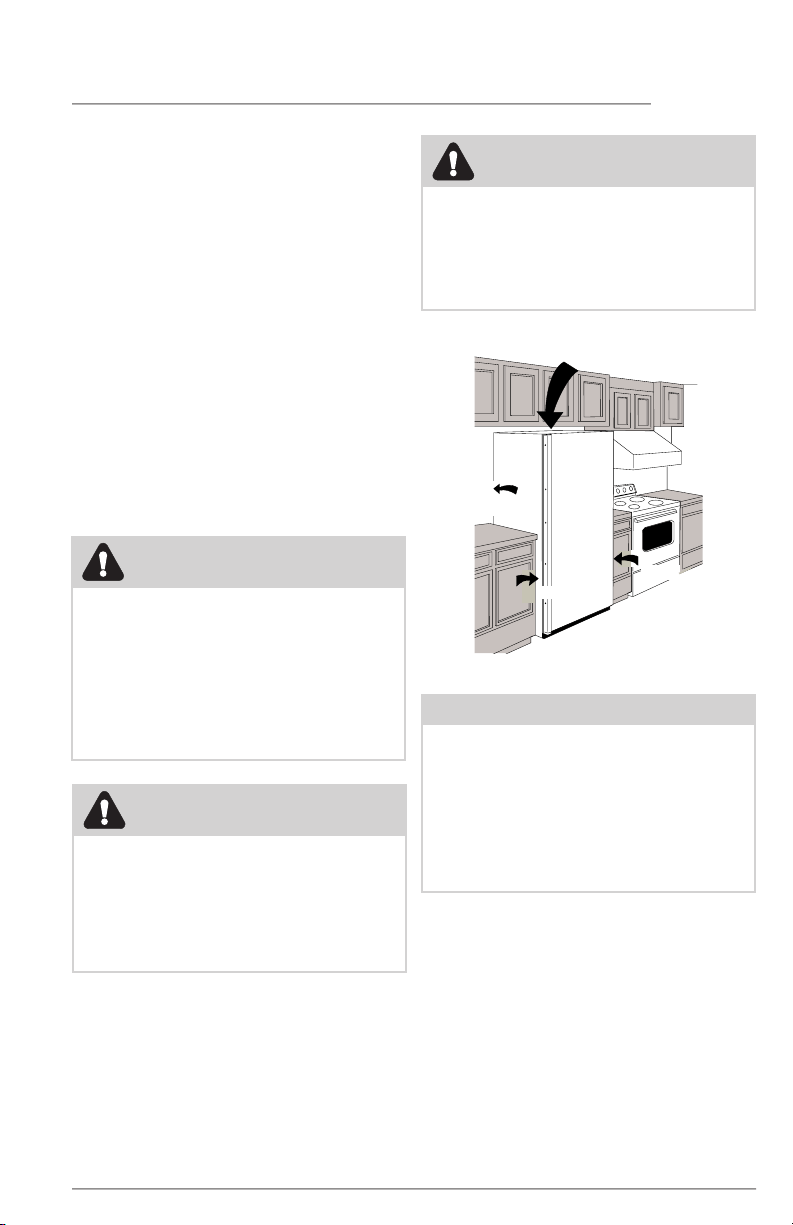
Location
• Choose a place that is near a
grounded electrical outlet. Do Not
use an extension cord or an adapter
plug.
• If possible, place the appliance out
of direct sunlight and away from
the range, dishwasher or other heat
sources.
• Allow space around the unit for good
air circulation. Leave a 4 inch (101
mm) space on all sides of the unit for
adequate circulation.
Installation
4" (101 mm)
Air Space
4"
(101 mm)
4"
(101 mm)
4"
(101 mm)
INSTALLATION
NOTE
The exterior walls of the unit may
become quite warm as the compressor
works to transfer heat from the inside.
Temperatures as much as 30° F (-1°C)
warmer than room temperature can be
expected. For this reason it is partic-
ularly important in hotter climates to
allow enough space for air circulation
around your appliance.
CAUTION
For the most ecient operation, the
appliance should be located where
surrounding temperatures will not
exceed 110°F (43°C). Temperatures of
0°F (-18°C) and below will NOT aect
operation. Additional compressor
heaters are not recommended.
WARNING
This appliance is intended for use
in residential household and similar
interior applications such as:
• a kitchen/kitchenette
• a pantry room
•
•
a basement
other interior
residential-type environments
WARNING
Installation clearances
Allow the following clearances
for ease of installation, proper air
circulations, and plumbing and
electrical connections:
Sides, Top & Back 4" (101 mm)
8
Leveling
Rest all bottom corners firmly on a solid
floor. The floor must be strong enough to
support a fully loaded appliance.
To Level the Appliance: Adjust the
bottom feet by turning counterclockwise
to lengthen and clockwise to shorten. Use
a carpenter’s level to level the appliance
from front to back. Adjust the leveling
feet in front ½ bubble higher, so the door
closes easily.
NOTE
It is VERY IMPORTANT for you to level
your unit for it to function properly.
If the appliance is not leveled during
installation, the door may be misaligned
and not close or seal properly, causing
cooling, frost or moisture problems.
Lengthen
Shorten
INSTALLATION
CAUTION
To allow the door to close and seal
properly, DO NOT let food packages
extend past the front of shelves.
9
IMPORTANT
Before you begin, turn the appliance tem-
perature control to OFF and remove the
electrical power cord from the wall outlet.
Remove any food from the door shelves.
DOOR REMOVAL/REVERSAL
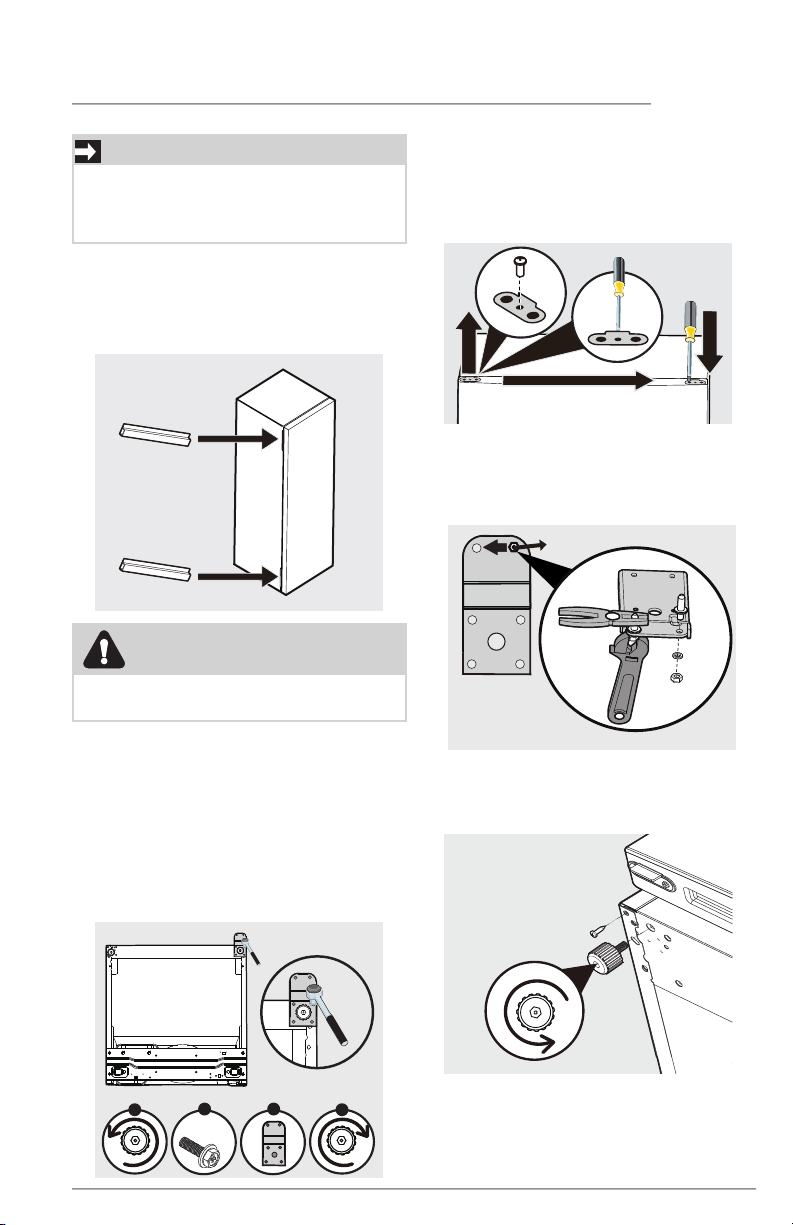
1. Keep the 2 plastic door spacers
between the door and the cabinet as
shown below. The spacers are used
to make sure the distance between
the door and cabinet is ½ inch.
2. Lay the freezer on its back on a
padded surface.
3. Unscrew the right adjustable leveling
foot (A). Remove the 4 screws (B)
holding the bottom hinge (C) to
the cabinet with an 8 mm socket
with ratchet. Screw the adjustable
leveling foot back into the cabinet
hole (D).
x4
B C
A
Bottom of Unit
Bottom of Unit
D
4. Unscrew the door stopper on the
right side with a Phillips screwdriver
and pry o the stopper with a flat-
head screwdriver. Then screw it on
the left side.
6. Unscrew the left adjustable leveling
foot and loosen the screw.
Bottom of Unit
5. Unscrew and insert the hinge pin on
the opposite side of the bottom hinge
using an adjustable wrench and pliers.
Φ10
CAUTION
This procedure will require 2 people to
safely perform.
10
DOOR REMOVAL/REVERSAL
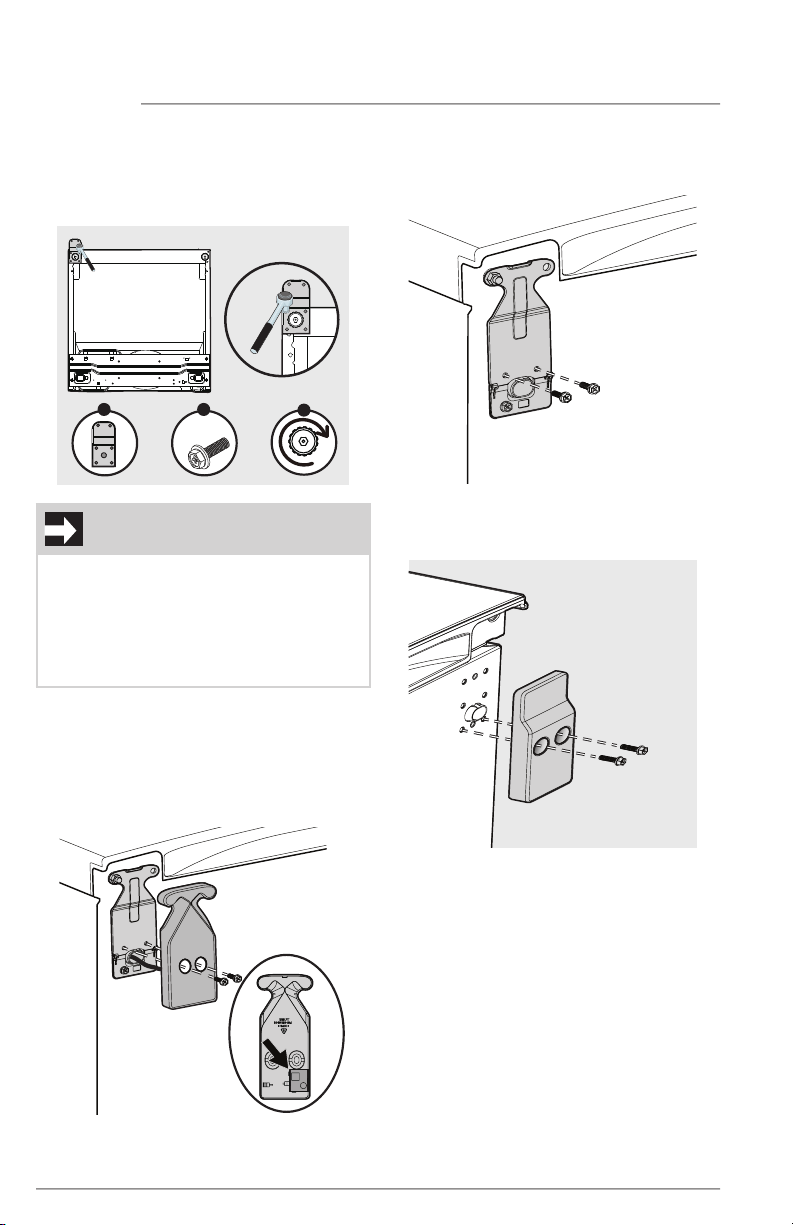
8. Using an 8 mm socket with a ratchet:
a. Remove the right top hinge cover
and unsnap the alarm board;
leave the alarm board and wiring
attached to the unit.
b. Remove the top hinge from the
right side.
Φ10
Φ8
c. Remove left top decorative cover.
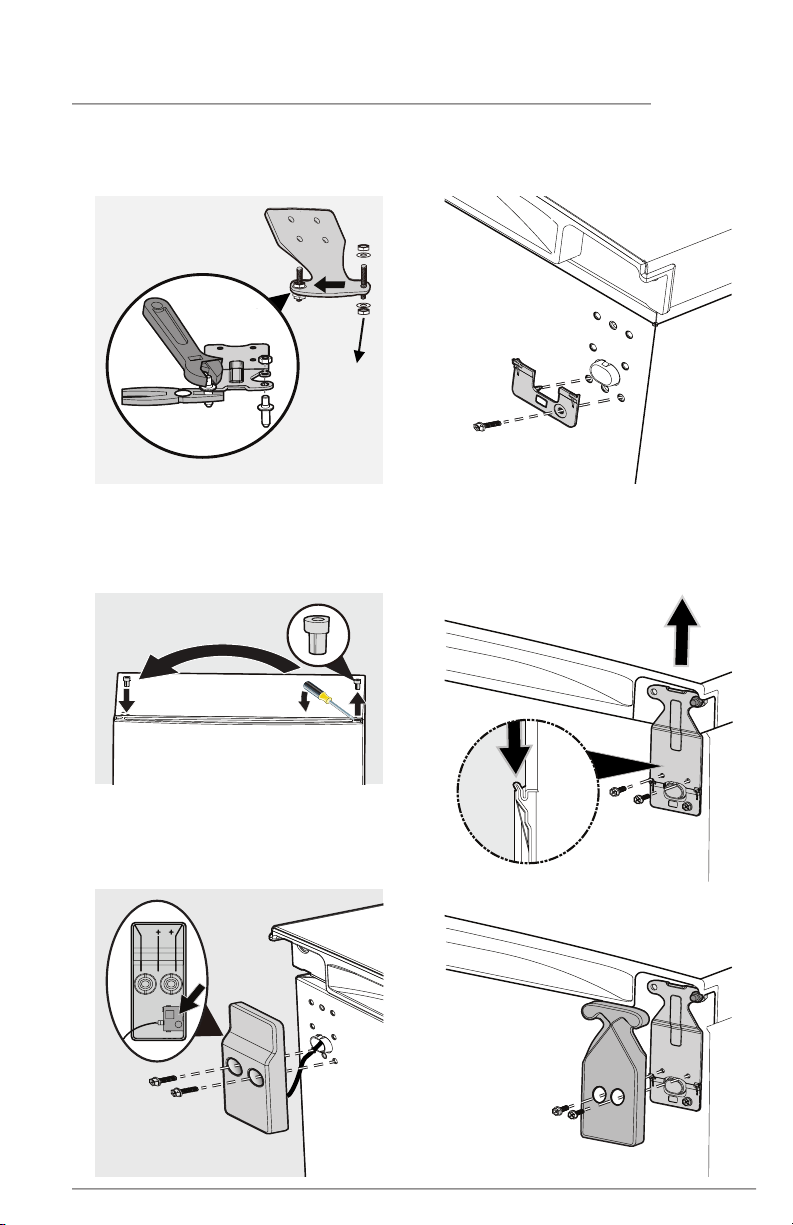
7. Attach the bottom hinge (A) with
4 screws (B) and the adjustable
leveling foot (C) on the left side of
the cabinet.
x4
B
A
C
Bottom of Unit
Bottom of Unit
IMPORTANT
When you screw on the bottom hinge:
• Move the door slightly to the left or
right to make sure the hinge hole is
aligned with the cabinet hole.
• Insert the 4 screws by half depth, and
then align the hinge and fully tighten.
11
9. Using an adjustable wrench and
pliers, move the hinge pin from the
right side to the left side.
Φ10
10. With a flat head screwdriver, gently
pry upward on hinge pin bearing to
remove from door. Reinstall on the
opposite side of the door.
11. Attach the hinge and covers.
a. Insert the alarm into the
decorative cover and attach
the cover to the cabinet.
b. Remove the positioning guide
from the accessory bag and at-
tach it to the top left of cabinet.
c. Insert the hinge into the posi-
tioning guide. Move the door
up and insert the hinge pin. At-
tach the hinge onto the cabinet
with screws
d. Attach the hinge cover.
DOOR REMOVAL/REVERSAL
12
90°
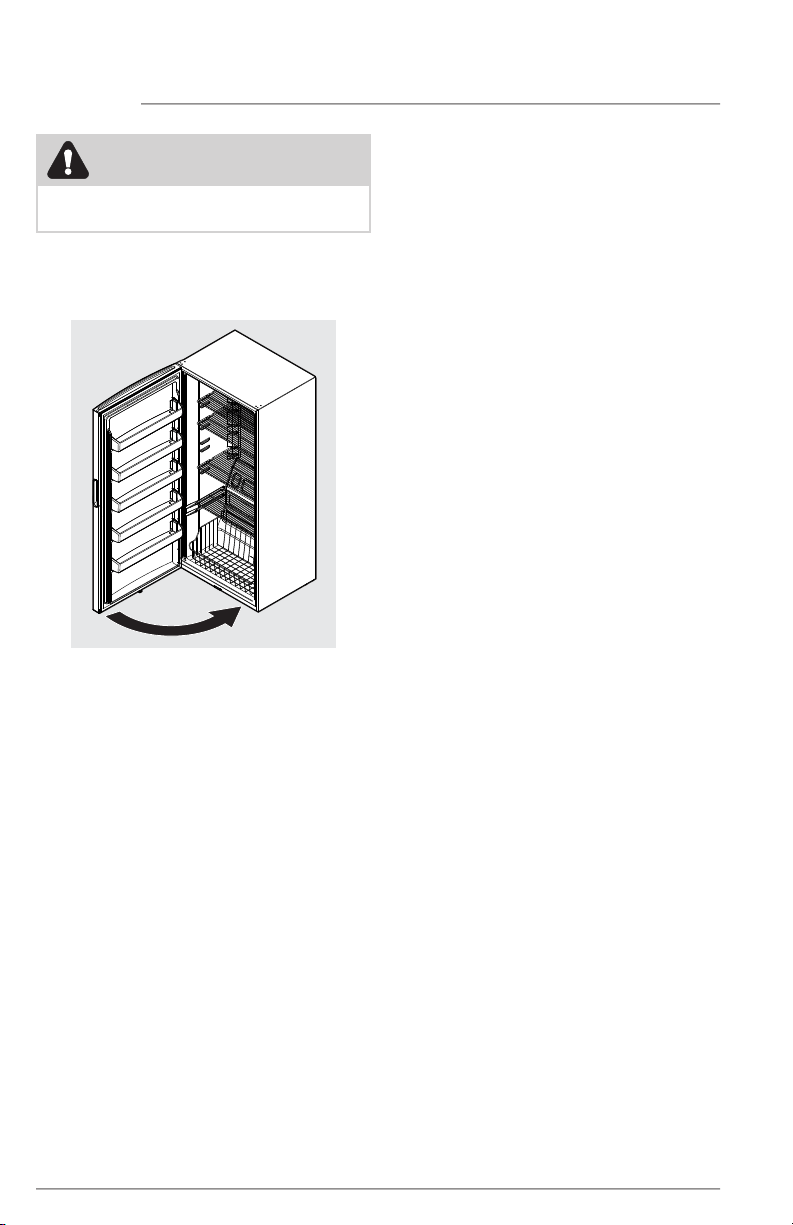
12. Raise the appliance to the upright
position. Open and close the door to
check if door moves smoothly.
13. Allow 1 hour before plugging the
unit back into electrical outlet.
DOOR REMOVAL/REVERSAL
CAUTION
This procedure will require 2 people to
safely perform.
13
CONTROLS AND SETTINGS
Cool Down Period
• For safe food storage, allow 4 hours
for the appliance to cool down com-
pletely. The unit will run continuously
for the first several hours. You may
place already frozen food in the unit
after the first few hours of operation.
Do NOT load unfrozen food into the
freezer until freezer has operated for
4 hours.
• When loading the freezer, freeze only
3 lbs of fresh food per cubic foot of
freezer space at one time. Distrib-
ute packages to be frozen evenly
throughout the freezer. It is not
necessary to turn control knob to a
colder setting while freezing food.
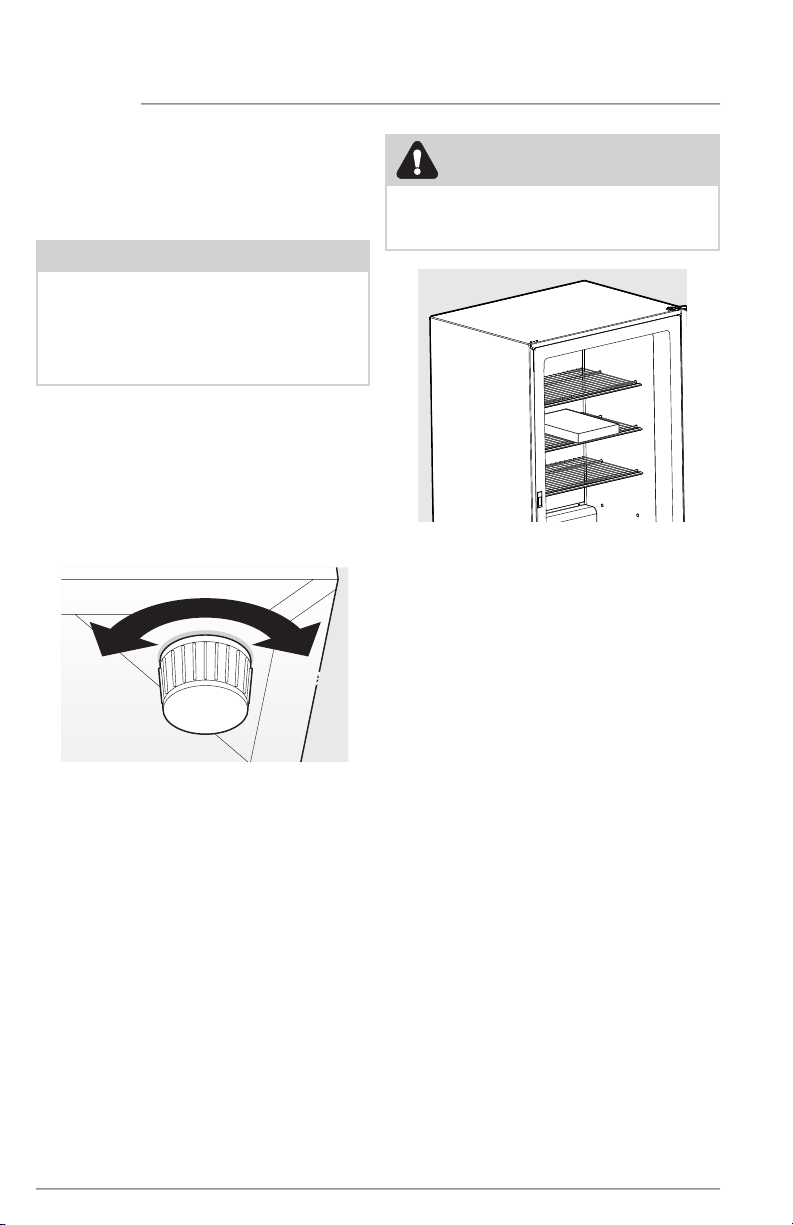
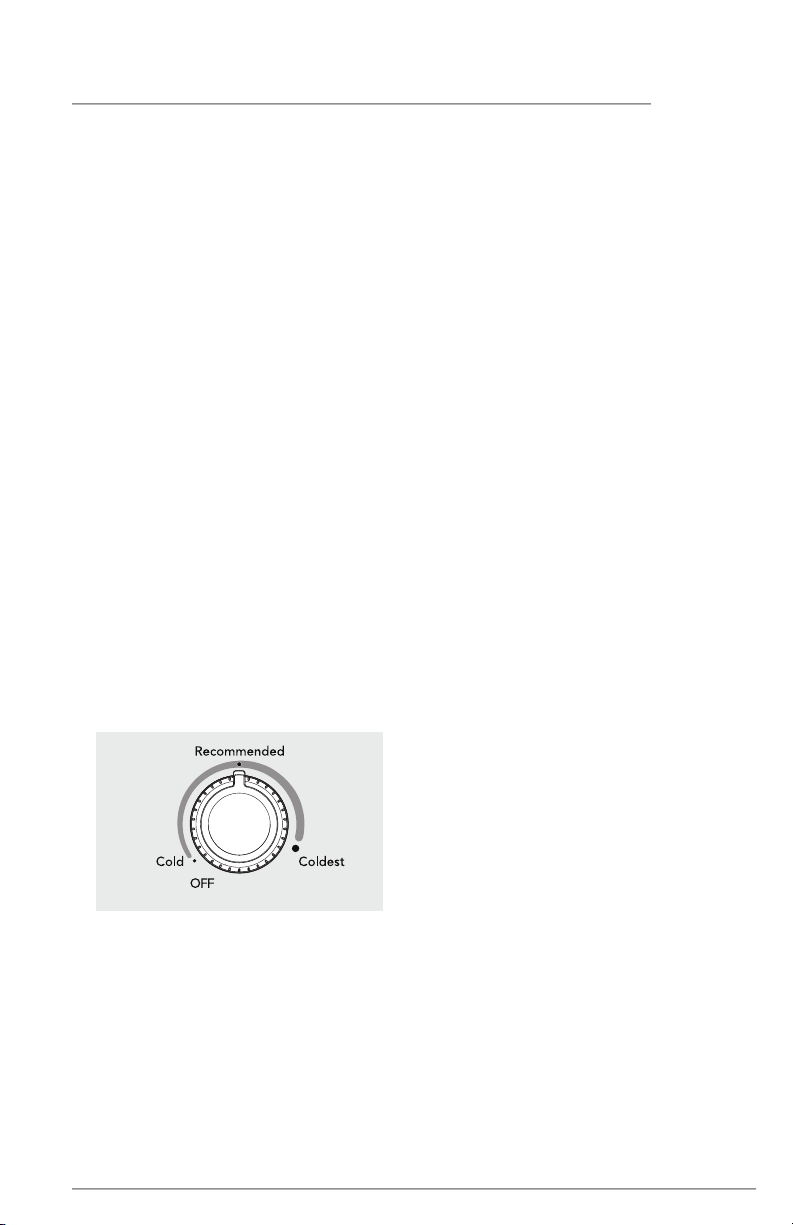
Temperature Control
The temperature control is located inside
the freezer on the back wall. The tempera-
ture is factory preset to “Recommend-
ed” to provide satisfactory food storage
temperatures. However, the temperature
control is adjustable to provide a range of
temperatures for your personal satisfac-
tion. If a colder temperature is desired,
turn the temperature control knob toward
COLDEST and allow several hours for
temperatures to stabilize between adjust-
ments. Temperature Range: -10 to +10°F
Temperature Control
Door Ajar Alert
If your door has been left open for 5
minutes or more the audible alert will
sound until the door is closed.
Power On Light
The Power On Light indicates the appli-
ance is properly connected to electrical
power. The light glows even when the
temperature control is turned to OFF. If
the light goes out, refer to “Appliance
does not run” in the TROUBLESHOOTING
section. A flashing light with an audible
alert indicates a high temp condition
(see “Temperature Too warm” in the
TROUBLESHOOTING section.
High Temp Alert
If the temperature inside the cabinet
exceeds 21°F (-6°C), the LED light at the
bottom of the cabinet will flash and the
alarm will sound. The alarm can be reset
by opening and then closing the door.
The LED will continue to flash until the
cabinet temperature is below 21°F (-6°C).
14
A
CONTROLS AND SETTINGS
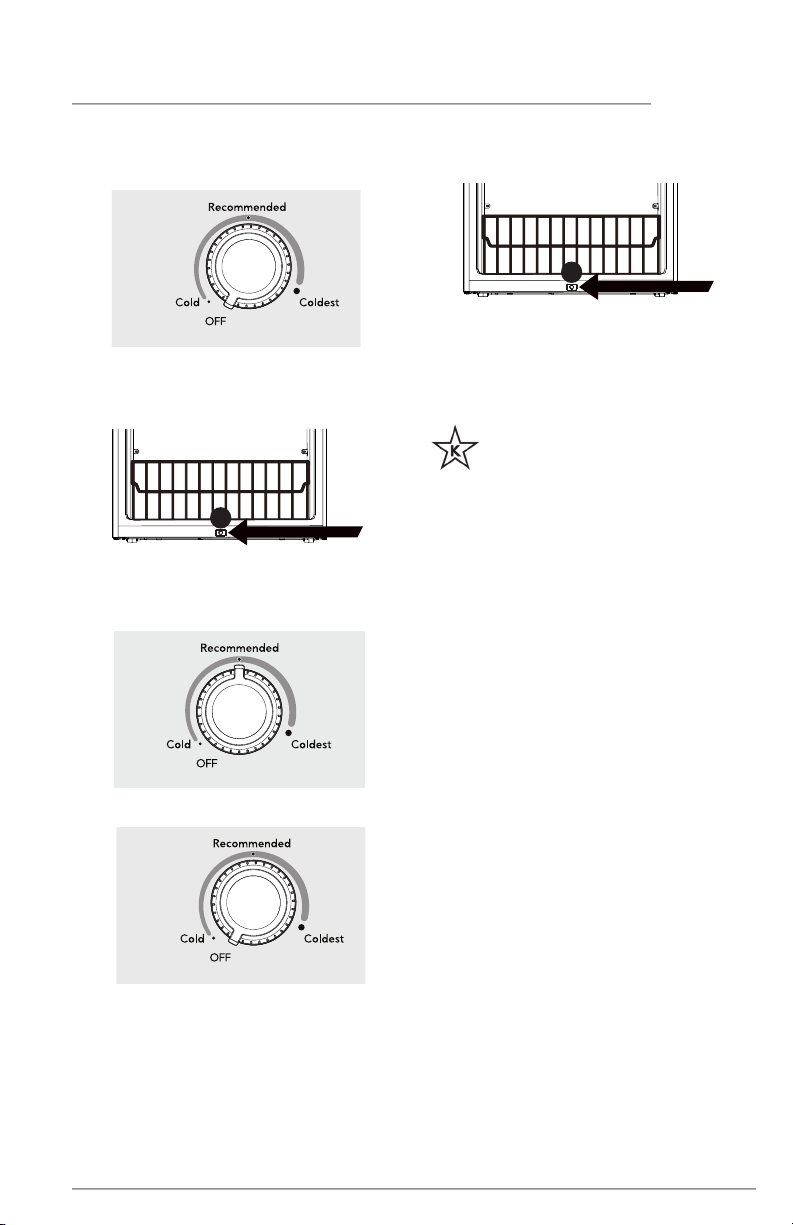
Sabbath Mode
The Sabbath Mode is a feature that
disables portions of the appliance and its
controls in accordance with observance of
the weekly Sabbath and religious holidays
within the Orthodox Jewish community.
The Sabbath Mode disables the
temperature control knob and mutes all
sounds (except the High Temp alert and
to exit Sabbath Mode). The LED light at
the botton of the cabinet will flash and
the High Temp alert will sound until you
deactivate the Sabbath Mode. Sabbath
mode will exit automatically after 80 to
84 hours from the time the unit entered
Sabbath Mode, or you can manually exit
Sabbath Mode.
NOTE
The temperature setting is not aected
by the Sabbath Mode. For food safety, the
High Temp alert will sound for 10 minutes
if the internal temperature increases.
After 10 minutes, the alarm will stop, but
the LED light at the bottom of the cabinet
will continue to flash until you deactivate
the Sabbath Mode.
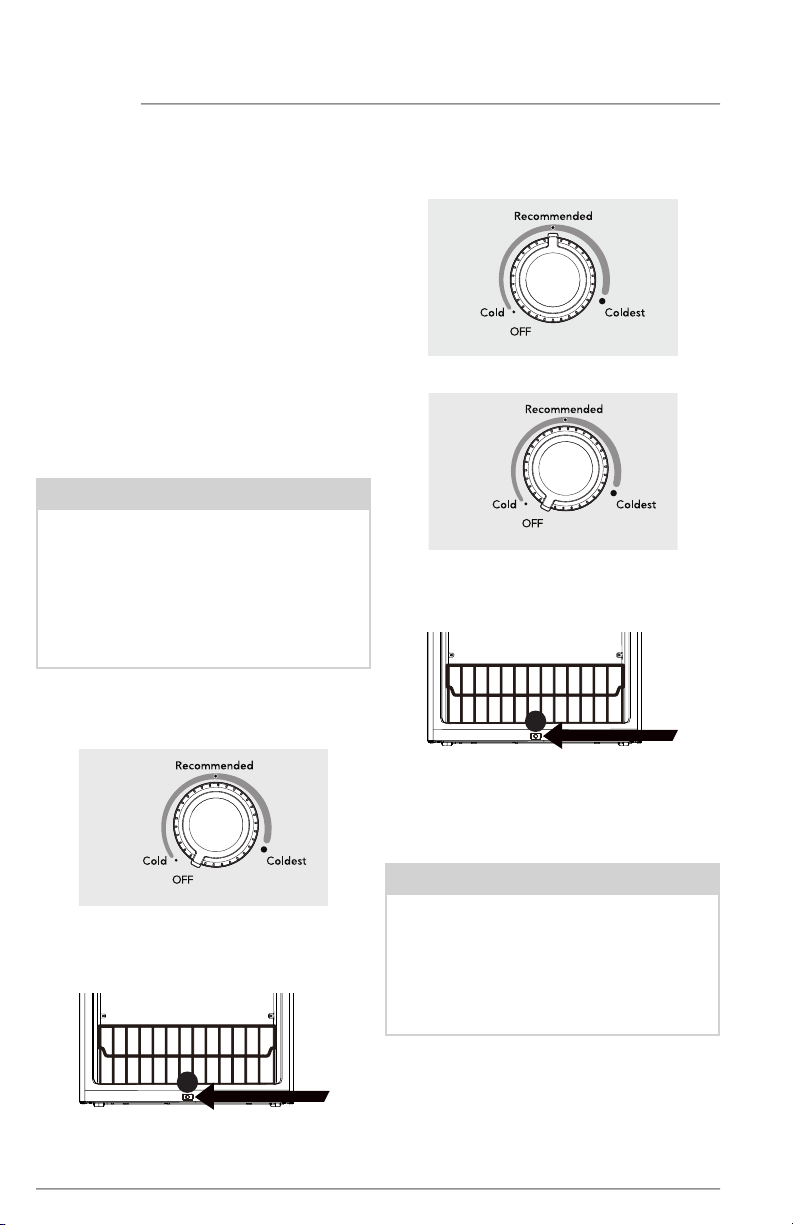
To enter Sabbath Mode:
1. Turn the temperature control to OFF.
NOTE
While in the Sabbath Mode, the
lights will not work until you
deactivate Sabbath .
The appliance stays in Sabbath Mode
after power failure recovery. You must
deactivate it with the temperature
control knob.
2. Wait for the green LED (A) to
turn o.
3. Turn the temperature control slowly
to Recommended and then back
to OFF.
4. Wait for the green LED (A) to
turn o.
5. Repeat previous steps 3 times within
20 seconds until you hear a beep
after the green LED turns o, which
indicates the unit is in Sabbath Mode.
OFF
OFF
A
Recommended
15
For further assistance, guidelines
for proper use and complete
list of models with the Sabbath
feature, please visit star-k.org.
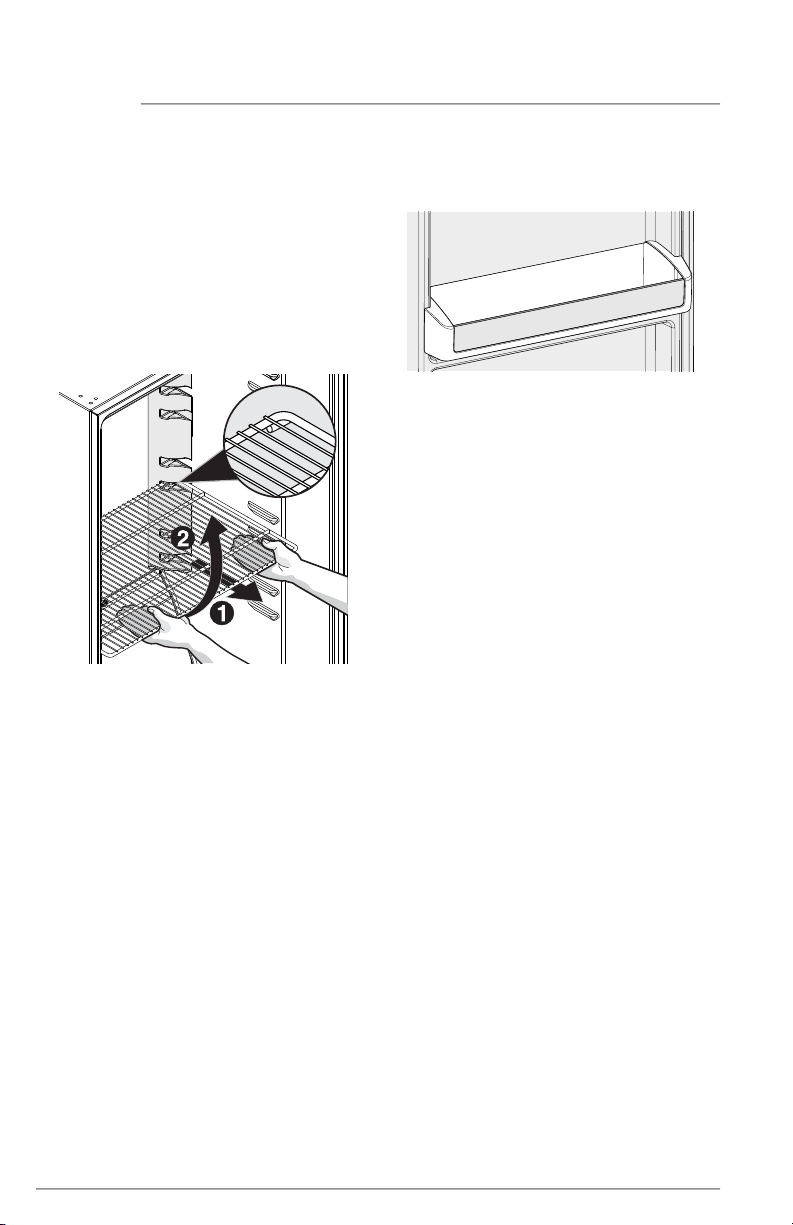
To manually exit Sabbath Mode:
1. Turn the temperature control to OFF.
2. Wait for the green LED (A) to
turn o.
3. Turn the temperature control slowly
to Recommended and then back
to OFF.
4. Wait for the green LED (A) to
turn o.
5. Repeat previous steps 3 times within
20 seconds until you hear a beep
after the green LED turns o, which
indicates the unit is no longer in
Sabbath Mode.
CONTROLS AND SETTINGS
OFF
A
OFF
A
Recommended
16
STORAGE FEATURES
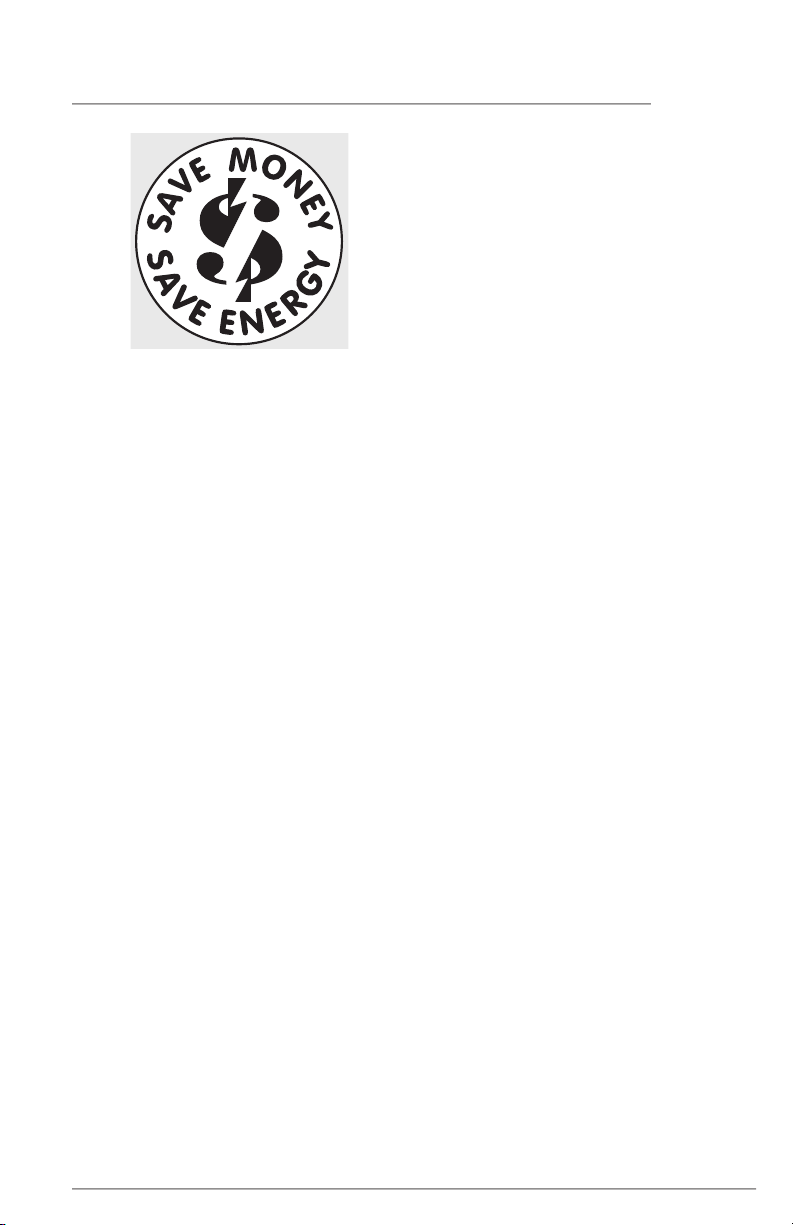
Shelf Adjustment
You can easily adjust the appliance
shelves to suit individual needs. Before
adjusting the shelves, remove all food.
To adjust the sliding shelves, remove the
shelves by pulling them forward.
To replace a shelf, rest the side edges on any
pair of shelf rails and carefully push the shelf
back into position. Make sure the 2 stops at
the rear corners of the shelf securely fit into
the notches at rear of the liner.
Fixed Door Bin
The fixed door bin is especially designed
to hold large containers or freezer bags.
17
SAVING ENERGY
• Locate the appliance in the coolest
area of the room, away from heat-pro-
ducing appliances or heating ducts,
and out of direct sunlight.
• Let hot foods cool to room temperature
before placing them in the unit. Over-
loading the appliance forces the com-
pressor to run longer. Foods that freeze
too slowly may lose quality or spoil.
• Be sure to wrap foods properly and
wipe containers dry before placing
them in the unit. This cuts down on
frost build-up inside the unit.
• Do not line shelves and baskets with aluminum foil, wax paper, or paper toweling.
Liners interfere with cold air circulation, making the freezer less ecient.
• Organize and label food to reduce door openings and extended searches. Re-
move as many items as needed at one time, and close door as soon as possible.
18
CARE AND CLEANING
Vacation and Moving Tips
Short Vacations: Leave the unit operating
during vacations of less than 3 weeks.
Long Vacations: If the appliance will not
be used for several months, remove all
food and unplug the power cord. Clean
and dry the interior thoroughly. Leave the
door open slightly, blocking it open if nec-
essary, to prevent odor and mold growth.
Moving: Disconnect the power cord
plug from the wall outlet. Remove foods,
defrost, and clean the appliance. Secure
all loose items such as the base panel,
baskets, and shelves by taping them
securely in place to prevent damage. In
the moving vehicle, secure the unit in an
upright position to prevent movement.
Also protect the outside of the appliance
with a blanket, or a similar item.
Some upright freezers are frost-free
and defrost automatically but should be
cleaned occasionally.
Cleaning the Inside
Wash inside surfaces of the unit with a
solution of 2 tbsp. (25 g) of baking soda
in 1 qt. (1 l) warm water. Rinse and dry.
Wring excess water out of the sponge
or cloth when cleaning in the area of the
controls, or any electrical parts.
Wash the removable parts with the
baking soda solution mentioned above,
or mild detergent and warm water. Rinse
and dry. Never use metallic scouring
pads, brushes, abrasive cleaners, or
alkaline solutions on any surface. Do not
wash removable parts in a dishwasher.
Cleaning the Outside
Wash the cabinet with warm water and
mild liquid detergent. Rinse well and wipe
dry with a clean soft cloth. Replace parts
and food.
Do not use razor blades or other sharp
instruments, which can scratch the
appliance surface when removing
adhesive labels. You can remove any glue
left from the tape with a mixture of warm
water and mild detergent, or touch the
residue with the sticky side of the tape
already removed. DO NOT REMOVE THE
SERIAL PLATE.
WARNING
If you leave the door open while on
vacation, make certain children cannot get
into the appliance and become entrapped.
WARNING
Do not open the door unnecessarily if
the unit is o for several hours.
CAUTION
Damp objects stick to cold metal
surfaces. Do not touch interior metal
surfaces with wet or damp hands.
19
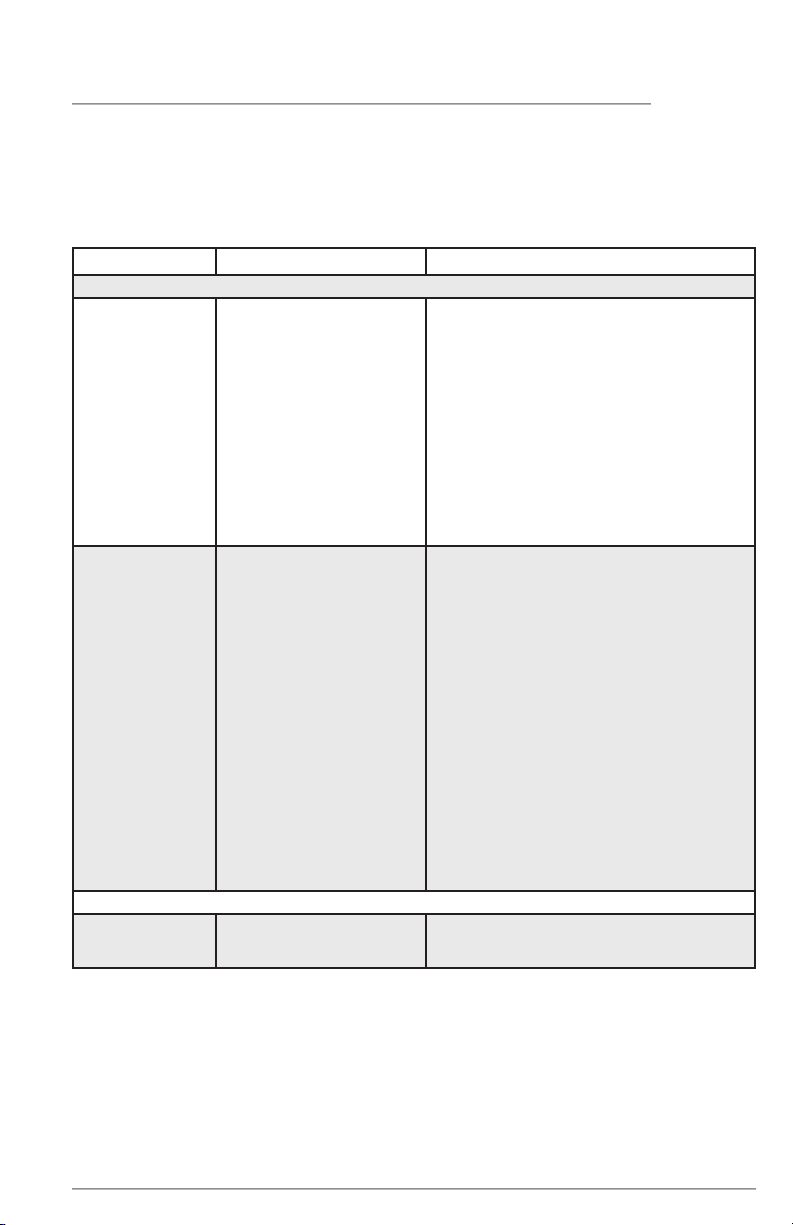
1-800-265-8352 (Canada)
Frigidaire.ca
1-800-374-4432 (United States)
Frigidaire.com
TROUBLESHOOTING
Let us help you troubleshoot your concern! This section will help you with common
issues. If you need us, visit our website, chat with an agent, or call us. We may be able
to help you avoid a service visit. If you do need service, we can get that started for you!
CONCERN CAUSE SOLUTION
APPLIANCE OPERATION
Appliance does
not run.
• Appliance is plugged
into a circuit that has a
ground fault interrupt.
• Temperature Control is
in the OFF position or
POWER OFF position.
• Appliance may not
be plugged in or plug
is loose.
• Hose fuse blown or
tripped circuit breaker.
• Power outage
• Use another circuit. If you are unsure
about the outlet, have it checked by a
certified technician.
• See the CONTROLS AND
SETTINGS section.
• Ensure plug is tightly pushed
into outlet.
• Check/replace fuse with a 15-amp
timedelay fuse. Reset circuit breaker.
• Check house lights. Call local
electric company.
Appliance runs
too much or
too long.
• Room or outside
weather is hot.
• Appliance has recent-
ly been disconnected
for a period of time.
• Large amounts of
warm or hot food have
been stored recently.
• Door is opened too
frequently or too long.
• Door may be
slightly open.
• Temperature control
is set too low.
• Gaskets are dirty,
worn, cracked, or
poorly fitted.
• It’s normal for the appliance to work
longer under these conditions.
• It may take 4 hours for the appliance
to cool down completely.
• Warm food will cause appliance
to run more until the desired
temperature is reached.
• Warm air entering the appliance causes
it to run more. Open door less often.
• Ensure door is tightly closed.
• Turn control knob to a warmer
setting. Allow several hours for the
temperature to stabilize.
• Clean or change gasket. Leaks in door
seal will cause appliance to run longer in
order to maintain desired temperatures.
APPLIANCE TEMPERATURES
Interior appli-
ance tempera-
ture is too cold.
• Control is set too low. • Set control to a warmer setting.
Allow several hours for temperature
to stabilize.
20
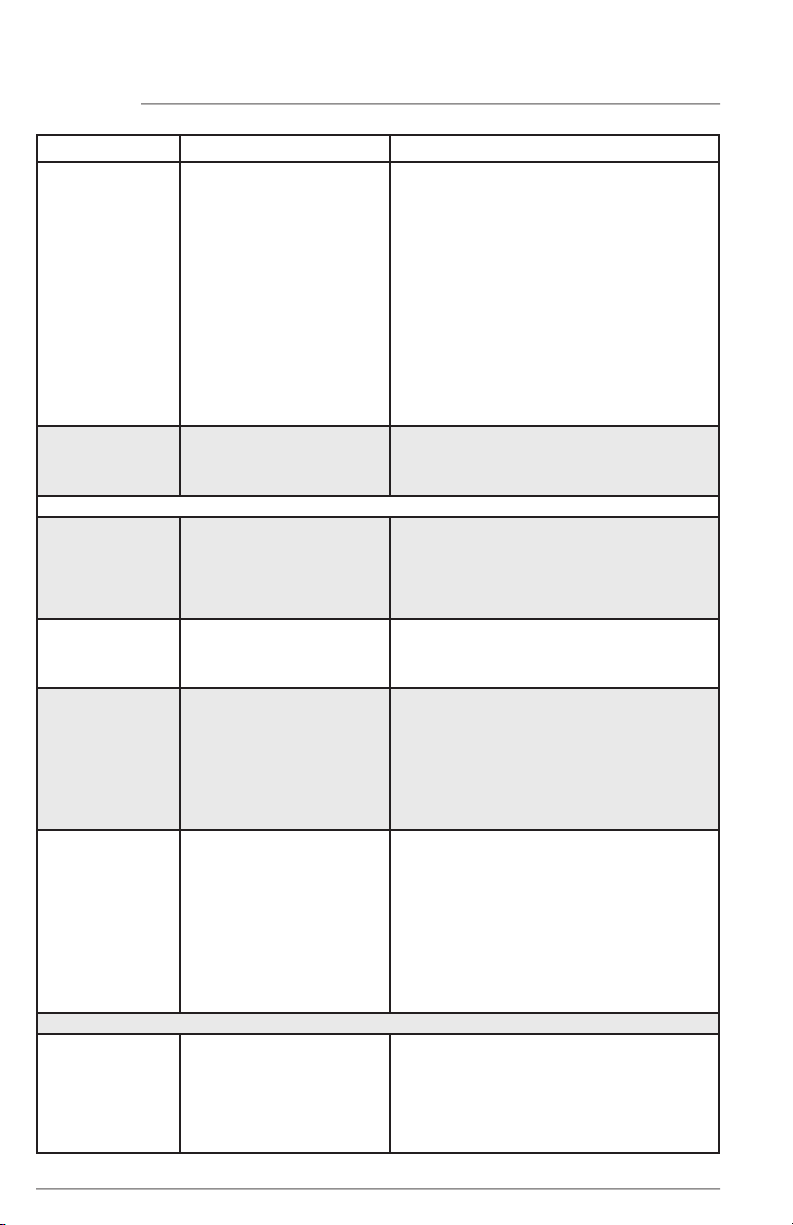
CONCERN CAUSE SOLUTION
Temperature in-
side appliance
is too warm.
• Control is set too warm.
• Door is opened too
frequently or too long.
• Door may not be
seating properly.
• Large amounts of
warm or hot food has
been stored recently.
• Unit has recently
been disconnected
for a period of time.
• Turn control to a colder setting.
Allow several hours for temperature
to stabilize.
• Warm air enters the appliance every
time the door is opened. Open door
less often.
• See “DOOR PROBLEMS” in the
TROUBLESHOOTING section.
• Warm food will cause appliance to
run more until the desired tempera-
ture is reached.
• Appliance may take up to 4 hours to
cool down completely.
External tem-
perature
is too warm.
• The external walls
can be as much as
30°F warmer than
room temperature.
• This is normal while the compressor
works to transfer heat from inside
the cabinet.
SOUND AND NOISE
Louder sound
levels when-
ever appliance
is on.
• Modern appliances
have increased storage
capacity and more
stable temperatures.
They require heavy-
duty compressors.
• This is normal. When the surround-
ing noise level is low, you might hear
the compressor running while it
cools the interior.
Longer sound
levels when
compressor
comes on.
• Appliance operates
at higher pressures
during the start of the
ON cycle.
• This is normal. Sound will level o
or disappear as appliance continues
to run.
Popping or
cracking sound
when compres-
sor comes on.
Bubbling or
gurgling sound.
• Metal parts under-
go expansion and
contraction, as in hot
water pipes.
• Refrigerant (used to
cool the appliance) is
circulating through-
out the system.
• This is normal. Sound will level o
or disappear as appliance continues
to run.
• This is normal.
Vibrating or
rattling noise.
• Appliance is not level. It
rocks on the floor when
it is moved slightly.
• Floor is uneven or weak.
• Appliance is touching
the wall.
• Level the appliance. Refer to Level-
ing in the INSTALLATION section.
• Ensure floor can adequately support
the appliance. Level the appliance by
putting wood or metal shims under
part of the appliance.
• Re-level appliance or move appli-
ance slightly. Refer to Leveling in the
INSTALLATION section.
WATER / MOISTURE / FROST INSIDE APPLIANCE
Moisture forms
on inside walls.
• Weather is hot and
humid.
• Door may not be
seating properly.
• Door is opened too
often or too long.
• The rate of frost buildup and internal
sweating increases. This is normal.
• See “DOOR PROBLEMS” in the
TROUBLESHOOTING section.
• Open door less often.
TROUBLESHOOTING
21
TROUBLESHOOTING
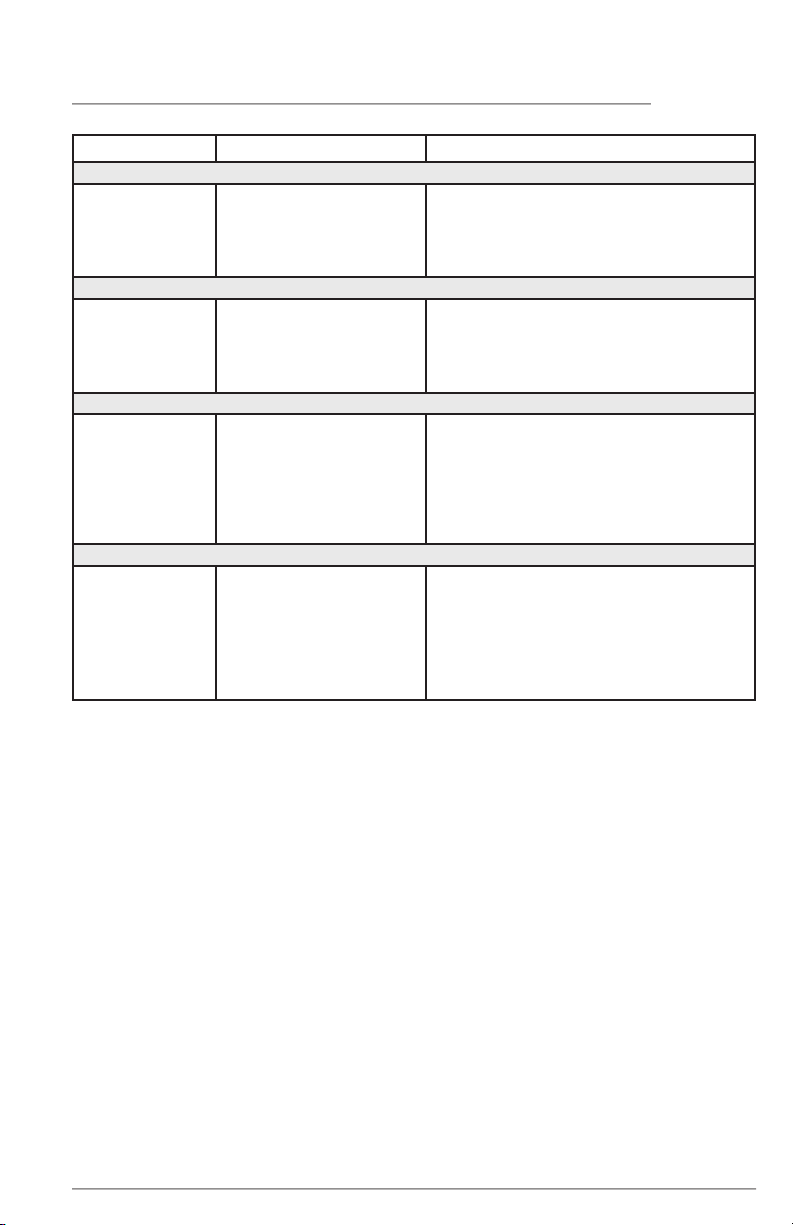
CONCERN CAUSE SOLUTION
WATER / MOISTURE / FROST OUTSIDE APPLIANCE
Moisture forms
on outside.
• Door may not be
seating properly,
causing cold air from
inside to meet warm
air from outside.
• See “DOOR PROBLEMS” in the
TROUBLESHOOTING section.
ODOR IN APPLIANCE
Odors in
appliance.
• Interior needs to
be cleaned.
• Foods with
strong odors are in
the appliance.
• Clean interior with sponge, warm
water, and baking soda.
• Cover the food tightly.
DOOR PROBLEMS
Door will
not close.
• Appliance is not
level. It rocks on
the floor when it is
moved slightly.
• Floor is uneven
or weak.
• This condition can force the cabinet
out of square and misalign the door.
Refer to Leveling in the INSTALLA-
TION section.
• Level the floor by using wood or
metal shims under the appliance or
brace floor supporting the appliance.
LIGHTING PROBLEMS
Power Avail-
able Light is
not on
• LED may be
burned out.
• No electric current is
reaching the appliance.
• The door has been
left open for more
than 5 minutes.
• Contact a qualified service dealer.
• See “Appliance does not run” in the
TROUBLESHOOTING section.
• Close the door.
22
LIMITED WARRANTY
Your appliance is covered by a one year limited warranty. For one year from your original
date of purchase, Electrolux will pay all costs for repairing or replacing any parts of this
appliance that prove to be defective in materials or workmanship when such appliance is
installed, used and maintained in accordance with the provided instructions.
Exclusions
If You Need Service
This warranty does not cover the following:
1. Products with original serial numbers that have been removed, altered or cannot be
readily determined.
2. Product that has been transferred from its original owner to another party or
removed outside the USA or Canada.
3. Rust on the interior or exterior of the unit.
4. Products purchased “as-is” are not covered by this warranty.
5. Food loss due to any Appliance or freezer failures.
6. Products used in a commercial setting.
7. Service calls which do not involve malfunction or defects in materials or
workmanship, or for appliances not in ordinary household use or used other than in
accordance with the provided instructions.
8. Service calls to correct the installation of your appliance or to instruct you how to use
your appliance.
9. Expenses for making the appliance accessible for servicing, such as removal of trim,
cupboards, shelves, etc., which are not a part of the appliance when it is shipped
from the factory.
10. Service calls to repair or replace appliance light bulbs, air filters, water filters, other
consumables, or knobs, handles, or other cosmetic parts.
11. Surcharges including, but not limited to, any after hour, weekend, or holiday service
calls, tolls, ferry trip charges, or mileage expense for service calls to remote areas,
including the state of Alaska.
12. Damages to the finish of appliance or home incurred during installation, including but
not limited to floors, cabinets, walls, etc.
13. Damages caused by: services performed by unauthorized service companies; use of parts
other than genuine Electrolux parts or parts obtained from persons other than authorized
service companies; or external causes such as abuse, misuse, inadequate power supply,
accidents, fires, or acts of God.
DISCLAIMER OF IMPLIED WARRANTIES; LIMITATION OF REMEDIES
CUSTOMER’S SOLE AND EXCLUSIVE REMEDY UNDER THIS LIMITED WARRANTY
SHALL BE PRODUCT REPAIR OR REPLACEMENT AS PROVIDED HEREIN. CLAIMS
BASED ON IMPLIED WARRANTIES, INCLUDING WARRANTIES OF MERCHANTABILITY
OR FITNESS FOR A PARTICULAR PURPOSE, ARE LIMITED TO ONE YEAR OR THE
SHORTEST PERIOD ALLOWED BY LAW, BUT NOT LESS THAN ONE YEAR. ELECTROLUX
SHALL NOT BE LIABLE FOR CONSEQUENTIAL OR INCIDENTAL DAMAGES SUCH AS
PROPERTY DAMAGE AND INCIDENTAL EXPENSES RESULTING FROM ANY BREACH
OF THIS WRITTEN LIMITED WARRANTY OR ANY IMPLIED WARRANTY. SOME STATES
AND PROVINCES DO NOT ALLOW THE EXCLUSION OR LIMITATION OF INCIDENTAL
OR CONSEQUENTIAL DAMAGES, OR LIMITATIONS ON THE DURATION OF IMPLIED
WARRANTIES, SO THESE LIMITATIONS OR EXCLUSIONS MAY NOT APPLY TO YOU. THIS
WRITTEN WARRANTY GIVES YOU SPECIFIC LEGAL RIGHTS. YOU MAY ALSO HAVE
OTHER RIGHTS THAT VARY FROM STATE TO STATE.
This warranty only applies in the USA and Canada. In the USA, your appliance is warranted
by Electrolux Major Appliances North America, a division of Electrolux Home Products,
Inc. In Canada, your appliance is warranted by Electrolux Canada Corp. Electrolux
authorizes no person to change or add to any obligations under this warranty. Obligations
for service and parts under this warranty must be performed by Electrolux or an
authorized service company. Product features or specifications as described or illustrated
are subject to change without notice.
Keep your receipt, delivery slip, or some other appropriate payment record to establish
the warranty period should service be required. If service is performed, it is in your best
interest to obtain and keep all receipts. Service under this warranty must be obtained by
contacting Electrolux at the addresses or phone numbers below.
USA
1-800-374-4432
Frigidaire
10200 David Taylor Drive
Charlotte, NC 28262
Canada
1.800.265.8352
Electrolux Canada Corp.
5855 Terry Fox Way
Mississauga, Ontario, Canada
L5V 3E4