
02
Important Safety Instructions
READ AND SAVE THESE IMPORTANT SAFETY INSTRUCTIONS BEFORE USING THIS HUMIDIFIER
When using electrical appliances, basic precau-
tions should always be followed to reduce the
risk of fire, electrical shock and injury to people,
including the following:
1. The humidifier should ALWAYS be placed on a
firm, flat, waterproof surface at least four feet
(1.2 m) away from bedside, 12 inches (30 cm)
from the wall and out of reach of children and
pets. Be sure the humidifier is in a stable position
and the power cord is away from heated surfaces
and out of the way to prevent the humidifier from
being overturned.
2. The humidifier should not be left unattended in
a closed room. Doing so may result in personal
injury or property damage. Leave room door
partly open.
3. DO NOT aim Mist Outlet directly at children, walls
or furniture.
4. Before using the humidifier, extend the cord and
inspect for any signs of damage. DO NOT use the
unit if the cord has been damaged. DO NOT
operate with power cord coiled or with twist tie
in place.
5. The humidifier has a polarized plug (one blade
is wider than the other) as a safety feature. This
plug will fit into a polarized outlet only one way. If
the plug does not fit fully into the outlet, reverse
the plug. If it still does not fit, contact a qualified
electrician. DO NOT attempt to defeat this safety
feature.
6. CAUTION: To avoid fire or risk of electrical shock
hazard, plug the humidifier directly into a 120V AC
electrical outlet. To avoid risk of fire, electric shock
or personal injury, DO NOT use an extension cord
or power strip.
7. The humidifier should ALWAYS be unplugged
and emptied when not in operation or while being
cleaned. Shut-off and unplug humidifier before
moving. DO NOT move or tilt humidifier while it is
in operation. Plug and unplug unit with dry hands.
NEVER pull by cord.
8. DO NOT operate the humidifier without water. Turn
off and unplug unit when Tank is empty.
9. The humidifier requires regular cleaning. Refer to
and follow cleaning instructions provided in the
Owner’s Manual.
10. DO NOT operate outdoors; this humidifier is
intended for indoor residential use only.
11. DO NOT cover or insert objects into any openings
on the unit.
12. DO NOT block intake or output vents.
13. DO NOT attempt to repair or adjust any electrical
or mechanical functions on this humidifier. Doing
so will void your warranty.
14. DO NOT place in direct sunlight, high temperature
areas or near computers or sensitive electronic
equipment.
15. DO NOT touch the nebulizer while the unit is
plugged in as burns could result.
16. DO NOT add any essential oils or medications
(e.g. Vicks VapoSteam®) into the Water Reservoir or
Water Tank. Doing so could damage the humidifier
and void the warranty.
17. For residential use only.
IMPORTANT READ AND SAVE THESE INSTRUCTIONS.
03
How Your Humidifier Works
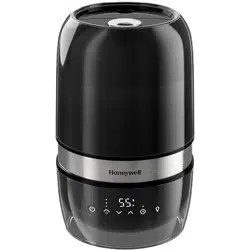
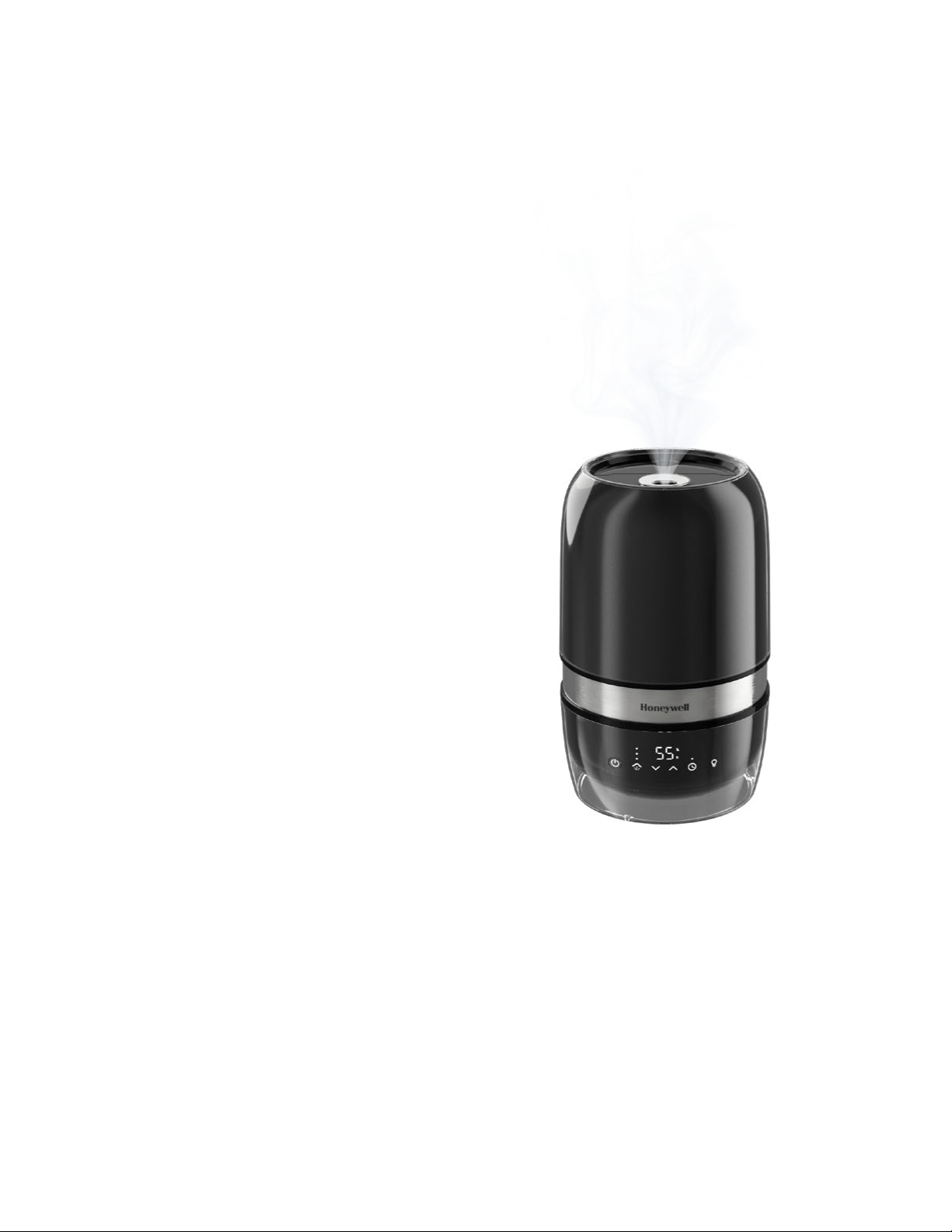
The Honeywell Reflection Cool
Mist Humidifier is designed to
quietly provide visible cool mist
for dry air relief. This filter free
humidifier features a nebulizer
that quietly vibrates the water at
an ultrasonic frequency, breaking
the water droplets into an ultra-fine,
cool mist that you can see and feel.
The mist helps reduce dry air
discomforts by increasing humidity
levels to help you breathe better
and sleep more comfortably.

Product Description
Components
Lid
Mist Outlet
Water Tank
Stainless Steel
Water Reservoir
Air Filter
Humidity Display
Timer
Nebulizer
NOTE: The lights on the control panel will illuminate when
you touch the panel. After you finish interacting with the
panel, the lights will automatically dim within a few seconds.
04
Tank Handle
Base
Power Recess
Humidity Control
Chimney
Oil Tray
Tank Light
Mist Control
Power
Setting Up Your Humidifier
1. Remove packaging materials.
2. Remove twist tie and extend power cord.
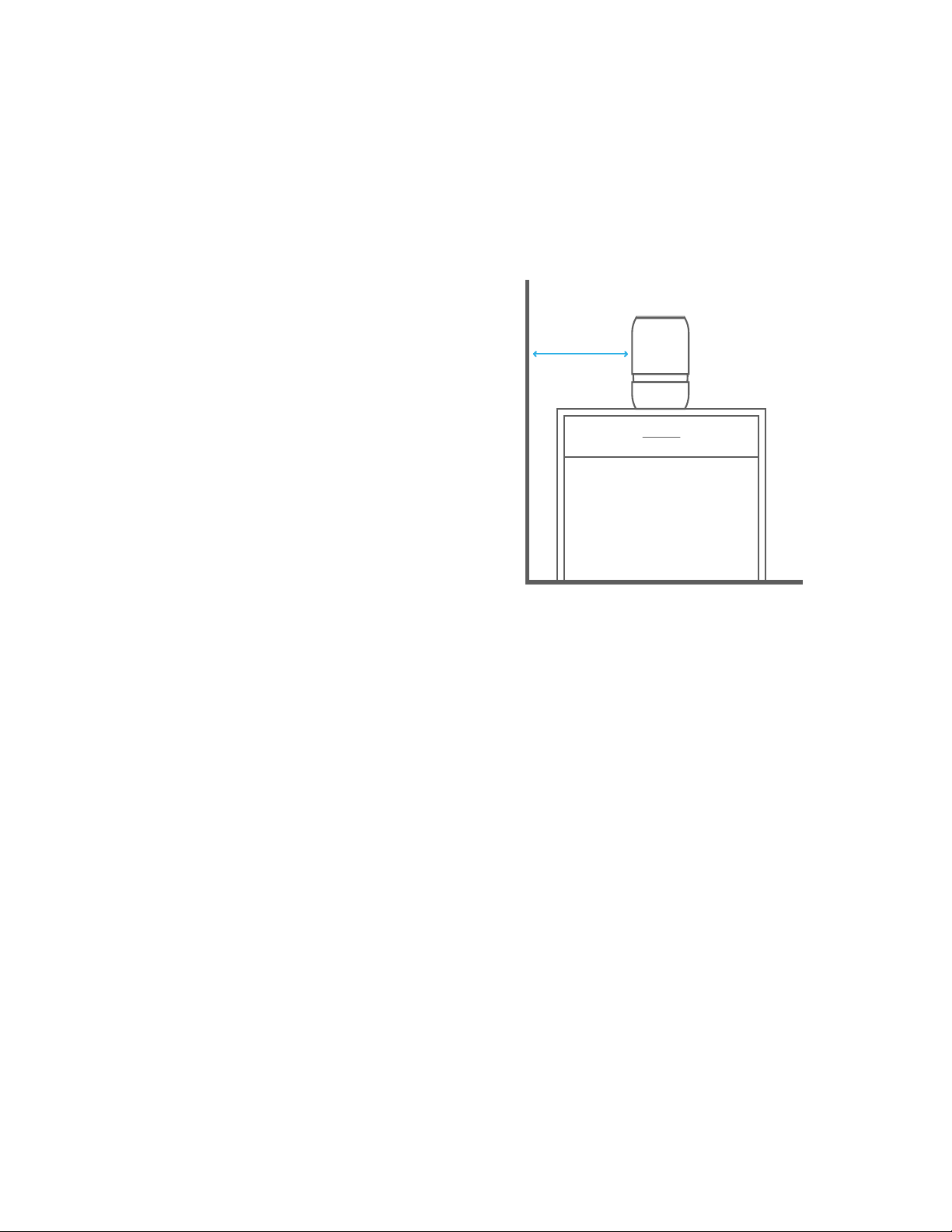
3. Place on a firm, level, and water-resistant surface,
a minimum of 12 inches (30cm) from any walls.
05
12 inches (30cm )
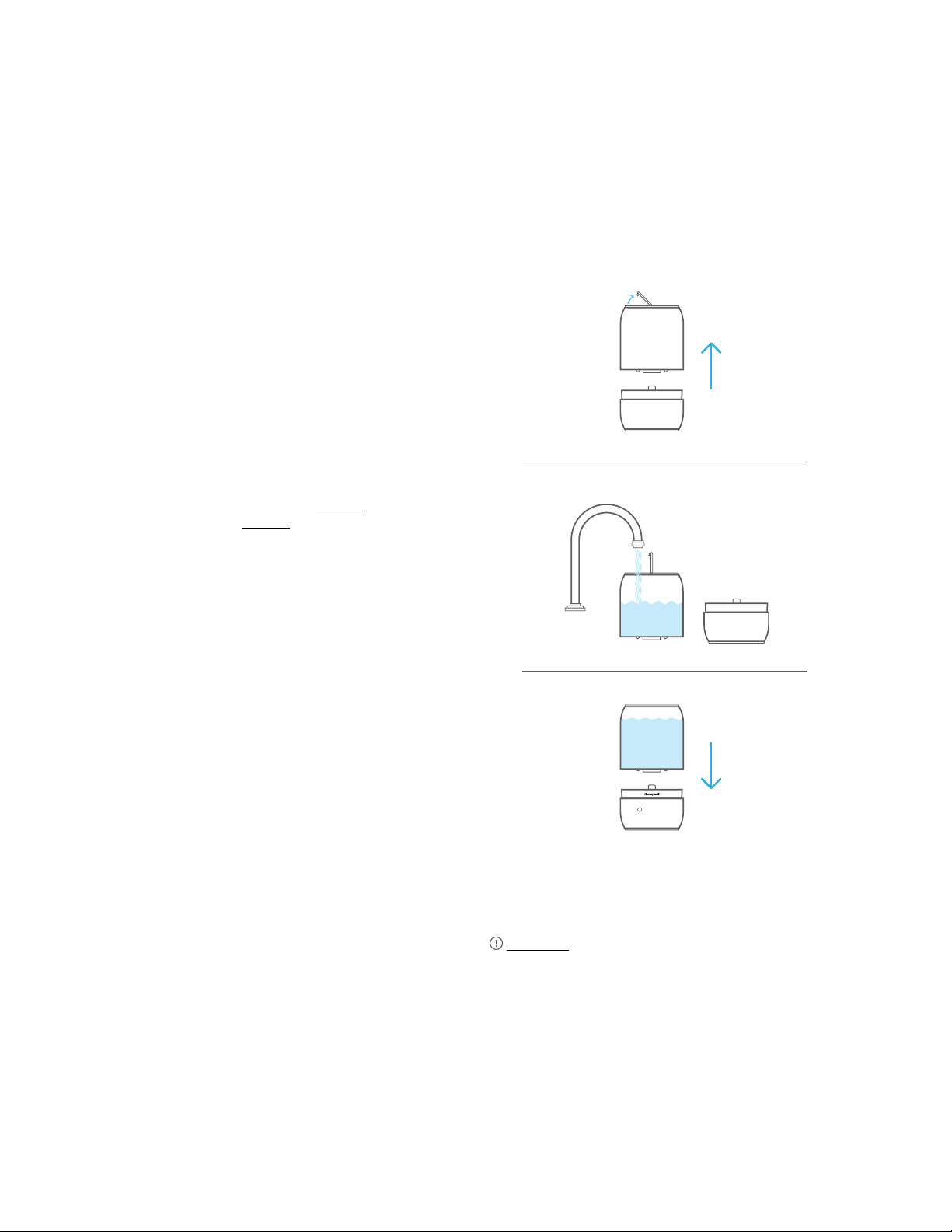
Filling/Refilling
You have two options for filling your humidifier’s
Water Tank: under the faucet at the sink, or
with a pitcher of water at the humidifier.
1. If filling at the sink, turn the humidifier off, then
open Tank lid to reveal the handle, remove Tank
from Base, carry to sink and fill.
OR
If filling at the humidifier, ensure Tank is securely
seated on Base. Open Tank lid and fill using a
water pitcher.
NOTE: Fill Tank with cool water. DO NOT fill with
warm or hot water. DO NOT ADD ESSENTIAL OILS,
MEDICATIONS, OR INHALANT LIQUIDS, such as
Vicks VapoSteam, to the Tank. Doing so could cause
damage to the humidifier and void the warranty.
2. Close the Tank lid.
3. If filled at the sink, carry the full Tank back using
two hands and place back in the Water Reservoir
on the Base. For proper placement, line up the
chimney and nozzle to the HONEYWELL logo.
NOTE: When taking your Tank to and from the sink, carry
the Tank using two hands. Manufacturer will not accept
responsibility for property damage caused by water spillage.
Water Quality and Your Humidifier
High mineral content in your water, also known as
“hard water,” may cause a white mineral residue
to accumulate on surfaces in the room near the
humidifier. This mineral residue is commonly
referred to as “White Dust.” The higher the mineral
content or hardness of your water, the greater the
potential that you may have white dust. “White Dust”
is not a result of a defect or flaw in the humidifier. It
is a result of the amount of minerals suspended in
the water you are using. If you live in a hard water
area, use distilled water to minimize the production
of white dust.
CAUTION: USE CARE WHEN HANDLING WATER
TANK TO AVOID UNNECESSARY IMPACT. BANGING
OR DROPPING THE WATER TANK COULD RESULT IN
DAMAGE TO THE TANK THAT WILL CAUSE LEAKING.
06

Operating the Humidifier
Power: Plug the humidifier into a polarized 120V
outlet. Press the Power Recess to turn the
humidifier on. The Power icon will illuminate white
when the device is on.
CAUTION: TO AVOID ELECTRIC SHOCK DO NOT
PLUG HUMIDIFIER INTO OUTLET WITH WET HANDS.
If the Power icon turns an amber color, this indicates
that the Reservoir water level is low or the Tank is not
set in place. Check the water level and fill if necessary,
and ensure the Tank is properly seated.
NOTE: If the Tank is refilled at the humidifier when the Power
icon is amber, it will need to be reset. Either power OFF then
ON or remove and replace the Tank. This will activate the
water flow to the Reservoir and turn the Power icon white to
indicate normal operation.
Humidity Display: While the humidifier is running,
the display will remain white until the set humidity
level is reached.
Humidity Reached Icon: Once the set humidity level
is reached, the display will turn blue, the Humidity
Reached icon will illuminate and the unit will stop
producing mist.
If there is no water in the reservoir, the display will be
white and the Power icon will be amber.
Auto Mode: Your humidifier is equipped with an
Auto Mode that allows for effortless humidification.
When first powered ON, the humidifier will start in the
Auto Mode. The humidifier will automatically set the
humidity output level based on the ambient relative
humidity in the room. When the humidity level is low,
the humidifier will add more moisture to the air at
a faster rate by automatically using the Turbo Mist
feature. The target humidity level in the Auto Mode is
60%. Once the humidity reaches 60%, the humidifier
will stop producing mist while continuing to monitor
the humidity level around the device.
Humidity Mist Level: You can control the amount of
mist that you would like the humidifier to produce. To
manually select a mist level, touch the Mist Control
icon . Continue to touch the icon to change the
mist level setting. The selection will cycle through
Auto -> Low -> Medium -> High -> Auto. The setting is
indicated by the illuminated indicators above the Mist
Control icon .
07
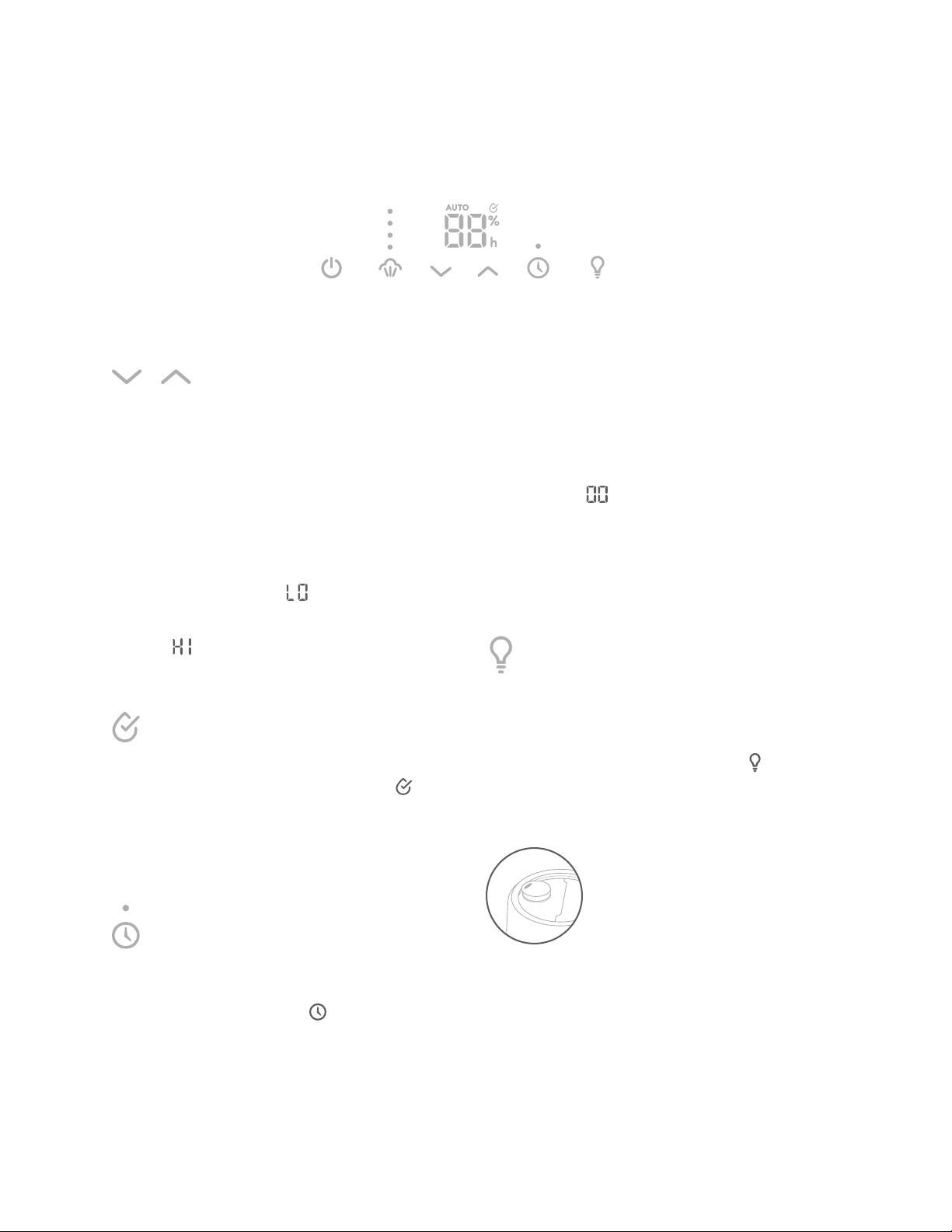
Humidity Level Setting: As an alternative to using
the Auto Mode, you can set your preferred humidity
level manually. Select the Low, Medium or High mist
level, then use the Humidity Control arrows to set
your desired humidity level. You can set the humidity
level from 30% to 69%. For personal comfort, the
recommended humidity level is between 4060%.
If the humidity level in your space drops below
30%, the Display will show .
If the humidity level rises above 69%, the Display
will show .
Adjust the humidity level up or down as desired.
Humidity Reached Icon: When the desired humidity
level is reached, the Humidity Reached icon and
numeric display are illuminated in blue.
NOTE: If you notice condensation on the walls, windows or
around the humidifier, your humidity level is too high. Lower
the setting or turn off the humidifier.
Timer: The timer allows you to program the humidifier
to automatically turn off after a specified time. To set
the timer, press the Timer icon . The LED above
the icon will blink white and the numeric display will
change to show the hours to set the timer. Use the
Humidity Control arrows to increase or decrease the
Timer setting by 1 hour intervals, up to 12 hours.
The timer is ON when the indicator above the Timer
icon is illuminated in white. To turn the timer OFF,
touch and hold the Timer icon for 2 seconds,
or use the Humidity Control arrows to decrease the
time setting to .
NOTE: While the timer is running, the humidifier will
continue to cycle ON and OFF to maintain the set humidity
level. At the end of the timed cycle, the humidifier will power
OFF, regardless of the humidity setting. If the humidifier
is manually turned off by pressing the power button or by
unplugging the humidifier, the timer will reset to OFF.
Tank Light: The tank light creates a soft, ambient
glow in your space and also helps illuminate the
level of water in the humidifier. To turn ON
the tank light, touch the Tank Light icon . Touch
again to dim the light, and touch a third time to turn
OFF the light.
Mist Outlet: The Mist Outlet is designed to let you
direct your humidification exactly where you want.
Turn the Outlet a full 180 degrees to direct the mist
according to your preference. It will not rotate to direct
mist behind the unit to avoid white dust ingestion in
the rear input vent.
Operating the Humidifier (Cont.)
08
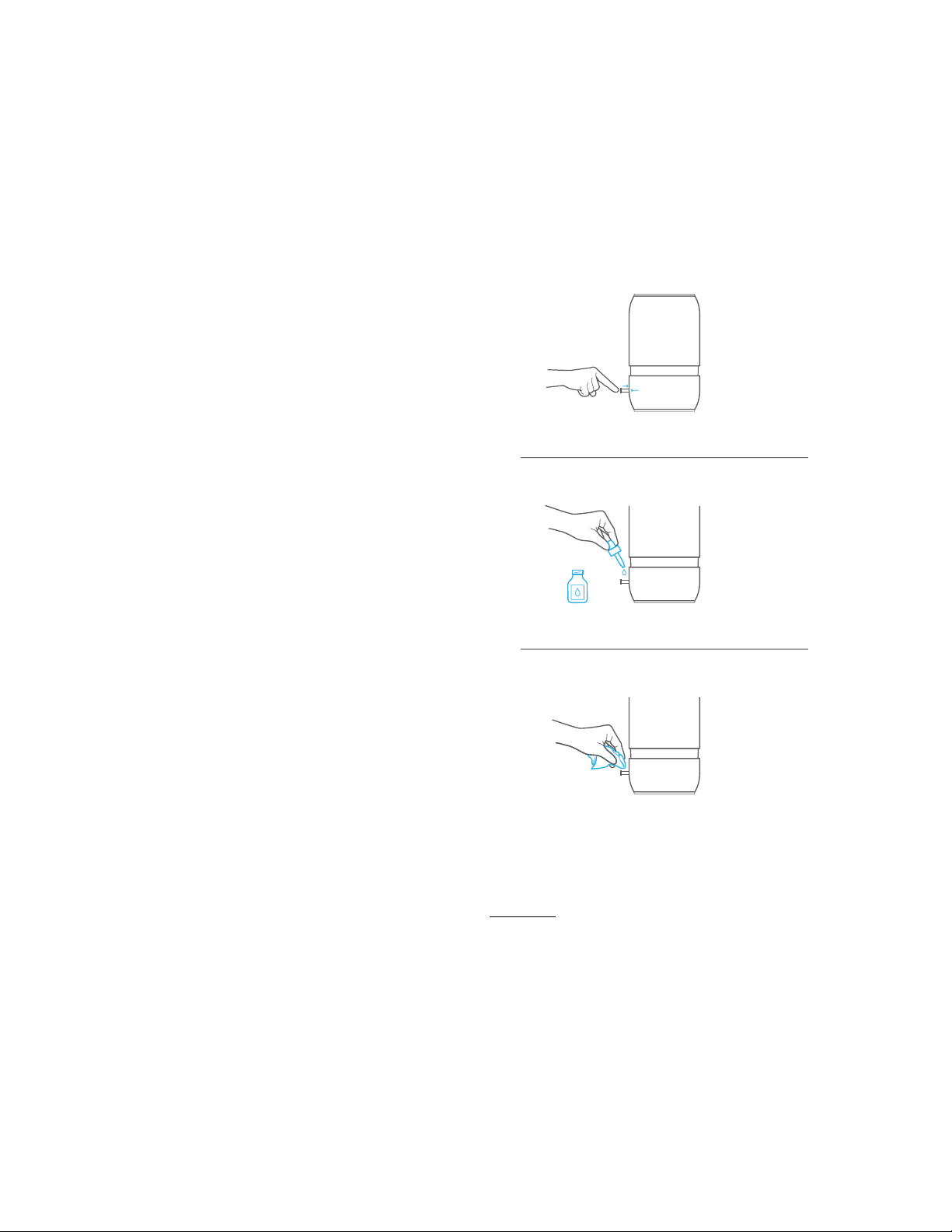
This humidifier features an Essential Oil Tray
that can be used with your favorite essential
oil for added enjoyment. This device is not a
diffuser – the oil does not come in contact
with water and is passively evaporated into the
air. Essential oils are not included.
1. Press and release Tray, located in the back of the
Base, to open.
2. Add a few drops of essential oil to the Pad and
close the tray.
3. To clean the Essential Oil Tray, gently wipe residue
from the Tray. Replacement essential oil Pads can
be ordered through Consumer Relations; see back
of this manual for contact information.
Essential Oil Tray
09
WARNING: DO NOT ADD LIQUID INHALANTS,
ESSENTIAL OILS OR ANY ADDITIVES TO THE WATER
TANK. DOING SO CAN HAVE ADVERSE EFFECTS ON
THE HUMIDIFIER AND VOID THE WARRANTY.

Care and Cleaning
For best results, use fresh clean water
every day.
When the humidifier is not in use, it is
recommended that you empty the Tank and
Water Reservoir and let them air dry. To clean
the Reservoir’s exterior stainless steel surface,
simply wipe with a soft cloth.
To keep your humidifier running efficiently,
clean it regularly. Weekly cleaning is
recommended.
To properly clean your humidifier, it is
recommended to follow the separate
processes of Scale Removal and Disinfecting
(next page). These two processes must be
performed separately.
CAUTION: BEFORE MOVING HUMIDIFIER, TURN OFF,
UNPLUG AND EMPTY THE TANK AND BASE.
All maintenance should be done in the kitchen or
bathroom on a water-resistant surface near a faucet.
DO NOT wash any components of this humidifier in
the dishwasher.
Before Cleaning
1. Turn OFF and unplug the humidifier. Remove any
accessories.
2. Remove the Tank from the Base. Empty water from
Tank and Water Reservoir.
Prefer a short video instruction?
Scan here or see HoneywellPluggedIn.com
for cleaning videos:
10
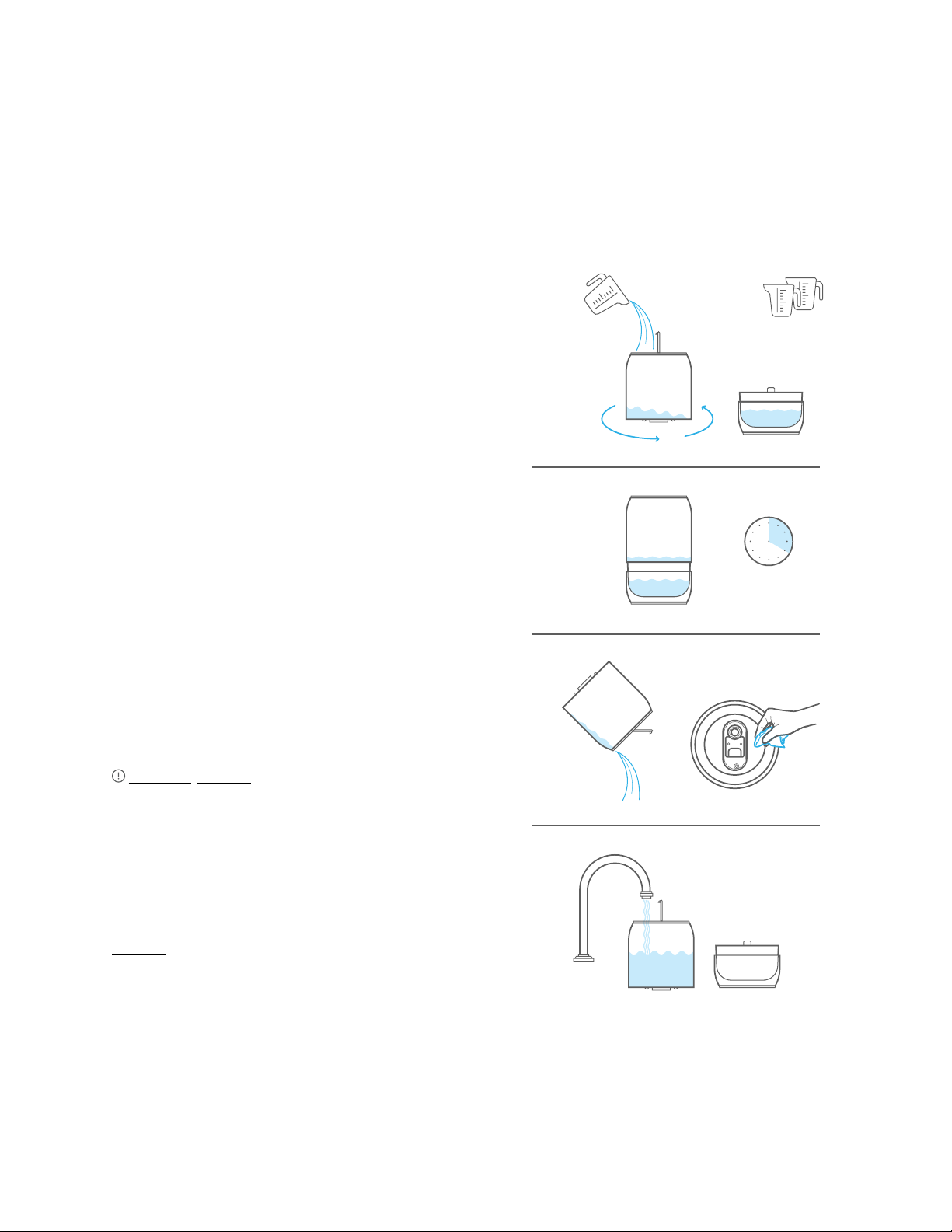
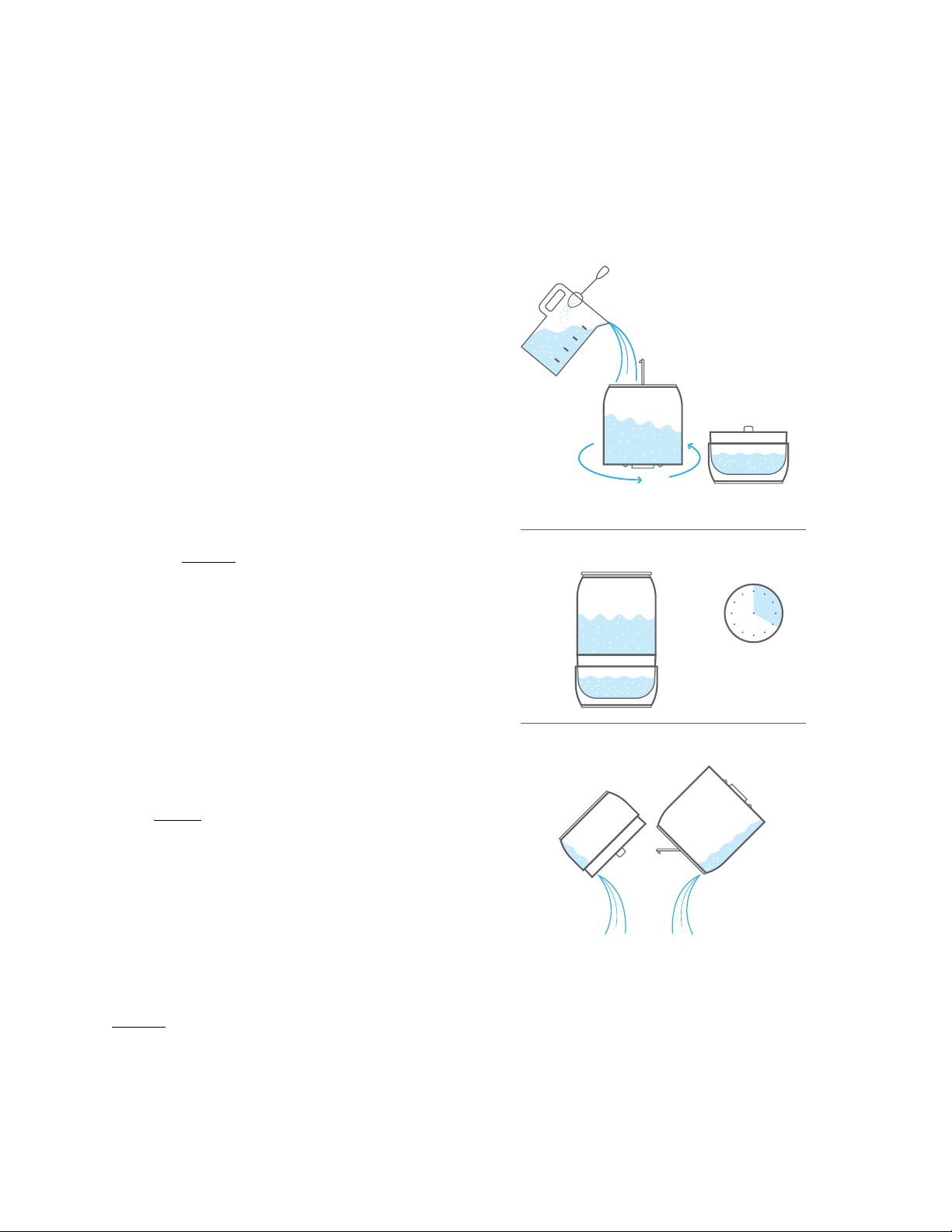
Instructions for Scale Removal
1. Pour 2 cups of undiluted, distilled white vinegar
into the Water Reservoir.
2. Pour 1 cup of undiluted, distilled white vinegar
into the Water Tank, to cover the bottom of the
Tank. Gently swish vinegar around in the Tank.
Place Tank on Base.
3. Allow the vinegar to remain in Water Reservoir
and Tank for 20 minutes. The vinegar will loosen
mineral buildup on the Nebulizer, Water Reservoir
and underside of the Tank.
4. After soaking, remove the Tank and empty vinegar
from the Water Reservoir and Tank into the
sink. With a soft cloth, wipe the Nebulizer, Water
Reservoir and the underside of the Tank to remove
mineral buildup.
5. Rinse Water Reservoir, Tank and underside of Tank
with water until the smell of vinegar is gone. When
rinsing Reservoir, avoid getting water into any
other openings on the Base.
CAUTION: DO NOT submerge Base in water. Doing
so will damage the humidifier and void the warranty.
NOTE: When the humidifier is unplugged, placing the Tank
on the Base will not drain the vinegar from the Tank into the
Water Reservoir. Power is required to activate the mechanism
that releases water from the Tank into the Water Reservoir.
The vinegar added to the Tank will need to be poured out of
the Tank.
DO NOT attempt to run the unit with vinegar.
Care and Cleaning
11
20 minutes
2 Cups
Undiluted, Distilled
White Vinegar
1 Cup
Undiluted, Distilled
White Vinegar
Care and Cleaning (Cont.)
Instructions for Disinfecting
Before beginning disinfection, follow Steps 12 in
“Before Cleaning” section (previous page).
NOTE: Bleach may stain clothes. It is recommended that you
wear rubber gloves during the disinfection process to protect
your hands.
1. Add 1 tsp. of bleach to 1 gallon (3.8L) of water.
Fill the Water Reservoir with part of the solution,
about 2 cups. Pour the rest of the solution into
Tank. Close Tank lid. Gently swish solution around
in Tank. Place Tank on Base.
NOTE: DO NOT use more than 1 tsp. of bleach per
gallon of water; using more bleach may result in
damage to your humidifier.
2. Allow the bleach solution to remain in Tank and
Water Reservoir for 20 minutes.
3. Carefully empty solution from the Water
Reservoir and the Tank into sink.
4. Rinse Tank and Water Reservoir with water until
the smell of bleach is gone. When rinsing Water
Reservoir, avoid getting water into any other
openings on the Base.
NOTE: DO NOT mix vinegar and bleach solution together.
Scale Removal and Disinfecting must be done separately.
End-ofSeason Care and Storage
Follow the CLEANING instructions when the
humidifier will not be used for at least one week or
at the end of the season. Remove any accessories
used with the humidifier and allow the humidifier and
accessories to dry completely before storing.
DO NOT store with water inside the Base, Water
Reservoir or Tank. Pack unit safely and store in a cool,
dry location.
12
20 minutes
1 Gallon
Water
1 tsp.
of Bleach
Air Filter Cleaning
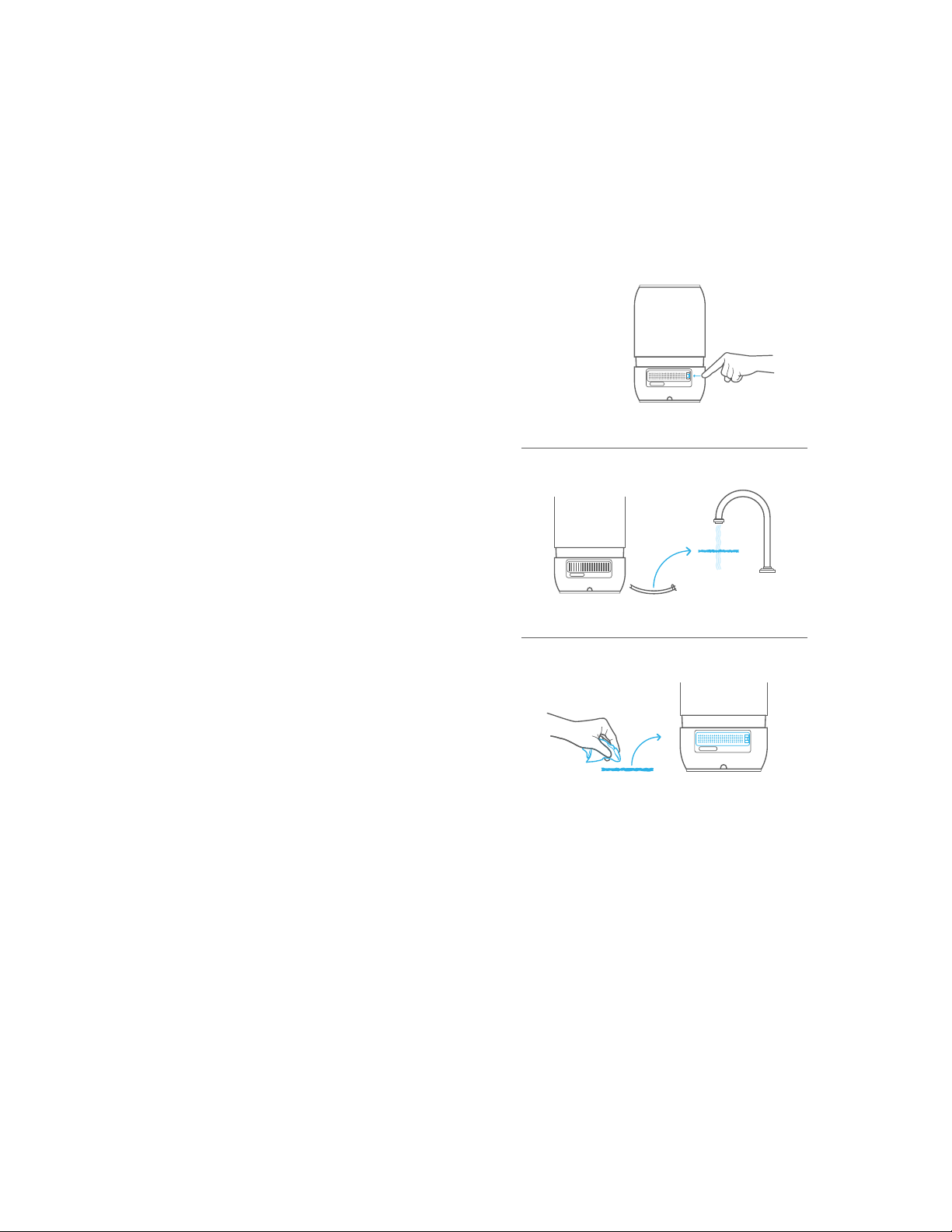
It is recommended that when you clean your
humidifier, you also inspect the Air Filter and clean
if needed following these instructions:
1. Turn OFF and unplug the humidifier.
2. Remove the Air Filter door by pushing the locking
tab on the right side of the door toward the center
of the unit and pull gently outward.
3. Remove black Air Filter by lifting it out from
the door.
4. Rinse Air Filter under cold water.
5. Blot Air Filter dry with a paper towel. Ensure Air
Filter is completely dry before reinstalling. If it
is damp, it will affect the humidity sensor.
6. When returning Air Filter to door, ensure filter
is full seated.
7. Reattach Air Filter door by placing the alignment
tab to the left of the opening, then snapping the
locking tab in place on the right as the door closes.
13

Troubleshooting
Problem Possible Cause Solution
Power Light remains
OFF after pressing the
Power Recess
• Humidifier not plugged in
• No power at outlet
• Plug humidifier in
• Check home circuits, fuses;
test outlet
Power is ON and light is
white but little or no mist
is produced
• Mineral deposits in Water
Reservoir
• Mist Level setting may be
too low
• Tank or Water Reservoir were
washed with detergent
• Clean Humidifier
• Turn up the humidity mist
level
• Rinse thoroughly with clean
water until there is no foam
or smell of cleaning solution
Water overflows from
Water Reservoir
• Tank may be damaged
• Tank is not sitting properly
on Base
• Check the Tank for any
cracks or damage, and
replace if necessary
• Ensure Tank is seated properly
and securely on Base
Condensation forms
around humidifier or
on windows and walls
• Mist Control is set too high
for room size or pre-existing
humidity level
• Humidifier may be too close
to wall or window
• Decrease Mist Control to a
lower setting, or open door
to room
• Move humidifier away from
wall or point Mist Outlet away
from wall or window
Humidity Level Setting
arrows are not visible
• Unit is in Auto Mode • Press Humidity Mist Level
icon to change to a manual
setting
Humidity displayed is
unusually high
• Air filter is wet or damp • Remove the filter and pat dry
with a towel or cloth
The unit shut off due to no
water in the tank. I refilled.
Unit did not turn back on.
• Refilling while the unit is ON. • Turn the unit OFF then ON.
This will trigger the system to
check for water in the Tank.
NOTE: Failure to keep this humidifier clean from mineral deposits normally contained in any water supply will affect the
efficiency of operation of this humidifier. Customer failure to follow these instructions may void the warranty.
14
If your humidifier is not working properly, try the following solutions:

2 Year Limited Warranty
Read all instructions before attempting to
use this product.
A. This 2 year limited warranty applies to repair or
replacement of product found to be defective in
material or workmanship. This warranty does not
apply to damage resulting from commercial, abu-
sive, unreasonable use or supplemental damage.
Defects that are the result of normal wear and
tear will not be considered manufacturing defects
under this warranty.
KAZ IS NOT LIABLE FOR INCIDENTAL OR
CONSEQUENTIAL DAMAGES OF ANY NATURE.
ANY IMPLIED WARRANTY OF MERCHANTABILITY
OR FITNESS FOR A PARTICULAR PURPOSE ON
THIS PRODUCT IS LIMITED IN DURATION TO
THE DURATION OF THIS WARRANTY.
Some Jurisdictions do not allow the exclusion or
limitation of incidental or consequential damag-
es or limitations on how long an implied warranty
lasts, so the above limitations or exclusions may
not apply to you. This warranty gives you specific
legal rights, and you may also have other rights
which vary from jurisdiction to jurisdiction.
This warranty applies only to the original purchaser
of this product from the original date of purchase.
B. At its option, KAZ will repair or replace this
product if it is found to be defective in material
or workmanship.
C. This warranty does not cover damage resulting
from any unauthorized attempts to repair or from
any use not in accordance with the instruction
manual.
D. This warranty does not cover the filters, pre-filters,
UV bulbs or other accessories (if included) except
for material or workmanship defects.
Call us toll-free at 18004770457 or send us a
message on our Contact Us page,
www.HoneywellPluggedIn.com/ContactUs
Please be sure to specify model number HUL900.
Note: If you experience a problem, please contact
consumer relations first or see your warranty. Do
not return the humidifier to the original place
of purchase. Do not attempt to open the base or
tamper with the power knob yourself; doing so may
void your warranty and cause personal injury or
damage to the product.
15

16
Compliance and Ratings
This device complies with Part 18
of the FCC rules.
Warning: Changes or modifications to this unit not
expressly approved by the party responsible for
compliance could void the user’s authority to
operate the equipment. This equipment has been
tested and found to comply within the limits for
Consumer ISM equipment, pursuant to Part 18 of
the FCC rules. These limits are designed to provide
reasonable protection against harmful interference
in a residential installation. This equipment generates,
uses and can radiate radio frequency energy, and
if not installed and used in accordance with the
instructions, may cause harmful interference with
radio communications. However, there is no guar-
antee that interference will not occur in a particular
installation.
If this equipment does cause harmful interference to
radio or television reception, which can be determined
by turning the equipment off and on, the user is
encouraged to try to correct the interference by one
or more of the following measures:
• Reorient or relocate the receiving antenna.
• Increase the separation between equipment
and receiver.
• Connect the equipment into an outlet on a
circuit different from that to which the
receiver is connected.
• Consult the dealer or an experienced radio TV
technician for help.
Electrical Ratings
Capacity: 1.2 gallons (4.5 L) Electrical Rating:
120V, 60 Hz. 0.4A.

Contact Information
Consumer Relations
For questions, technical support or to order
replacement parts, contact Consumer Relations.
Call us toll-free at: 18004770457
Hours: MonFri 8:00AM6:00PM EST
www.HoneywellPluggedIn.com/ContactUs
Please be sure to specify model number HUL900.
© 2021 All Rights Reserved.
Manufactured by: KAZ USA, Inc.,
a Helen of Troy Company
400 Donald Lynch Blvd., Suite 300
Marlborough, MA 01752
Honeywell is a trademark of Honeywell International
Inc., used under license by Helen of Troy Limited.
Honeywell International Inc. makes no representation
or warranties with respect to this product.
Made in China
For responsible recycling, please visit:
www.RecycleNation.com
17
PN: HUL900