1
Majestic • Owner’s Manual MARQ36IN, MARQ42IN • 2270-981 Rev. i • 8/17
Owner’s Manual
Care and Operation
NOTICE: DO NOT discard this manual!
This appliance may be installed as an OEM
installation in manufactured home (USA
only) or mobile home and must be installed
in accordance with the manufacturer’s
instructions and the Manufactured Home
Construction and Safety Standard, Title 24
CFR, Part 3280 in the United States, or the
Standard for Installation in Mobile Homes,
CAN/CSA Z240 MH Series, in Canada.
This appliance is only for use with the type(s)
of gas indicated on the rating plate. This
appliance is not convertible for use with other
gases, unless a certied kit is used.
In the Commonwealth of Massachusetts installation must be
performed by a licensed plumber or gas tter.
See appliance installation manual for additional
Commonwealth of Massachusetts requirements.
INSTALLER: Leave this manual with party responsible for use and operation.
OWNER: Retain this manual for future reference.
Contact your dealer with questions regarding installation, operation or service.
DANGER
HOT GLASS WILL
CAUSE BURNS.
DO NOT TOUCH GLASS
UNTIL COOLED.
NEVER ALLOW CHILDREN
TO TOUCH GLASS.
A barrier designed to reduce the risk of
burns from the hot viewing glass is provided
with this appliance and shall be installed for
the protection of children and other at-risk
individuals.
• DO NOT store or use gasoline or other am-
mable vapors and liquids in the vicinity of this
or any other appliance.
• What to do if you smell gas
- DO NOT try to light any appliance.
- DO NOT touch any electrical switch. DO
NOT use any phone in your building.
- Leave the building immediately.
- Immediately call your gas supplier from
a neighbor’s phone. Follow the gas sup-
plier’s instructions.
- If you cannot reach your gas supplier, call
the re department.
• Installation and service must be performed
by a qualied installer, service agency, or the
gas supplier.
WARNING:
FIRE OR EXPLOSION HAZARD
Failure to follow safety warnings exactly
could result in serious injury, death, or
property damage.
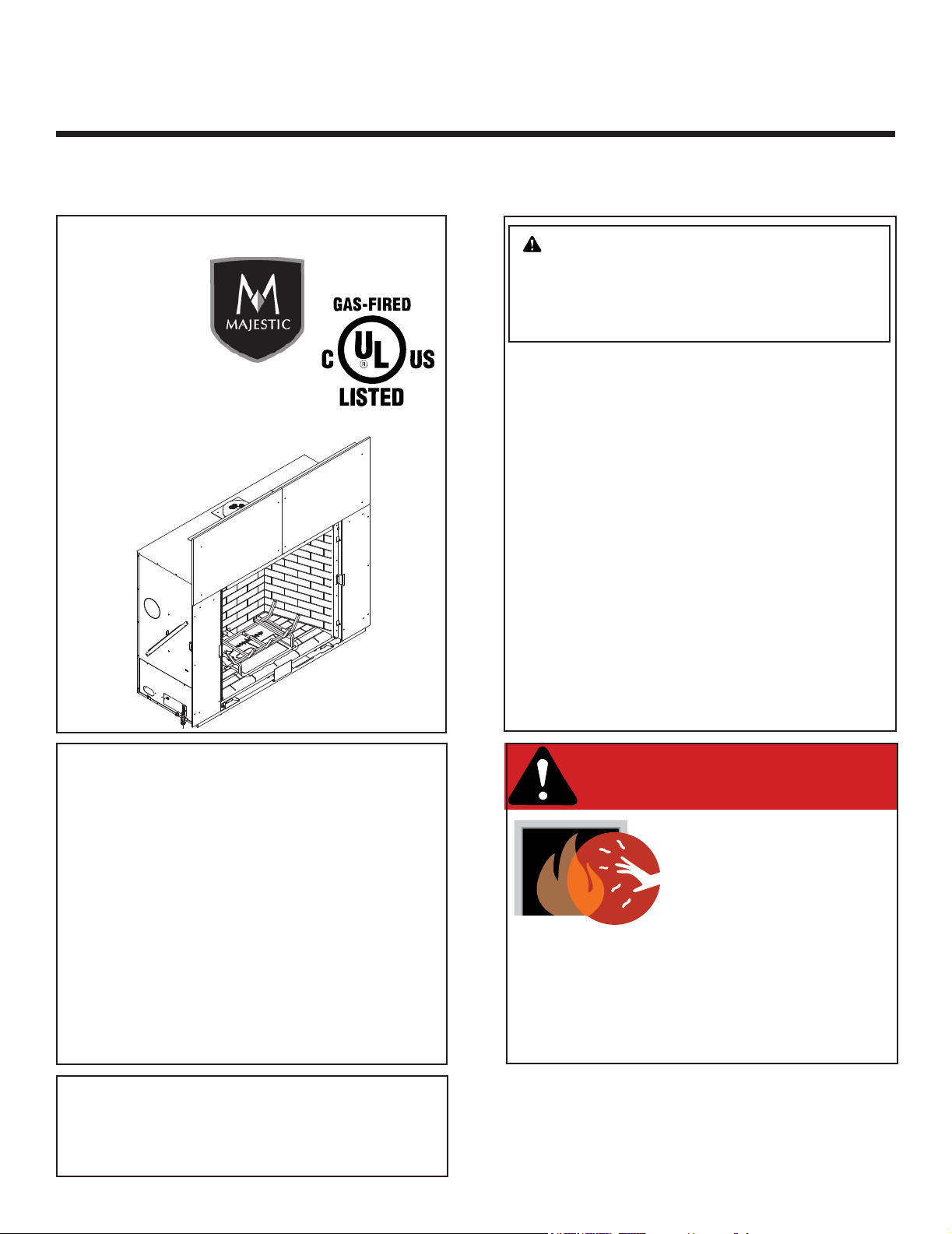
Models:
MARQ36IN, MARQ42IN
MARQUIS
SERIES
Pour demander un exemplaire en français de ce Manuel
du propriétaire, visitez www.majesticproducts.com/trans-
lations.
Majestic • Owner’s Manual MARQ36IN, MARQ42IN • 2270-981 Rev. i • 8/17 2
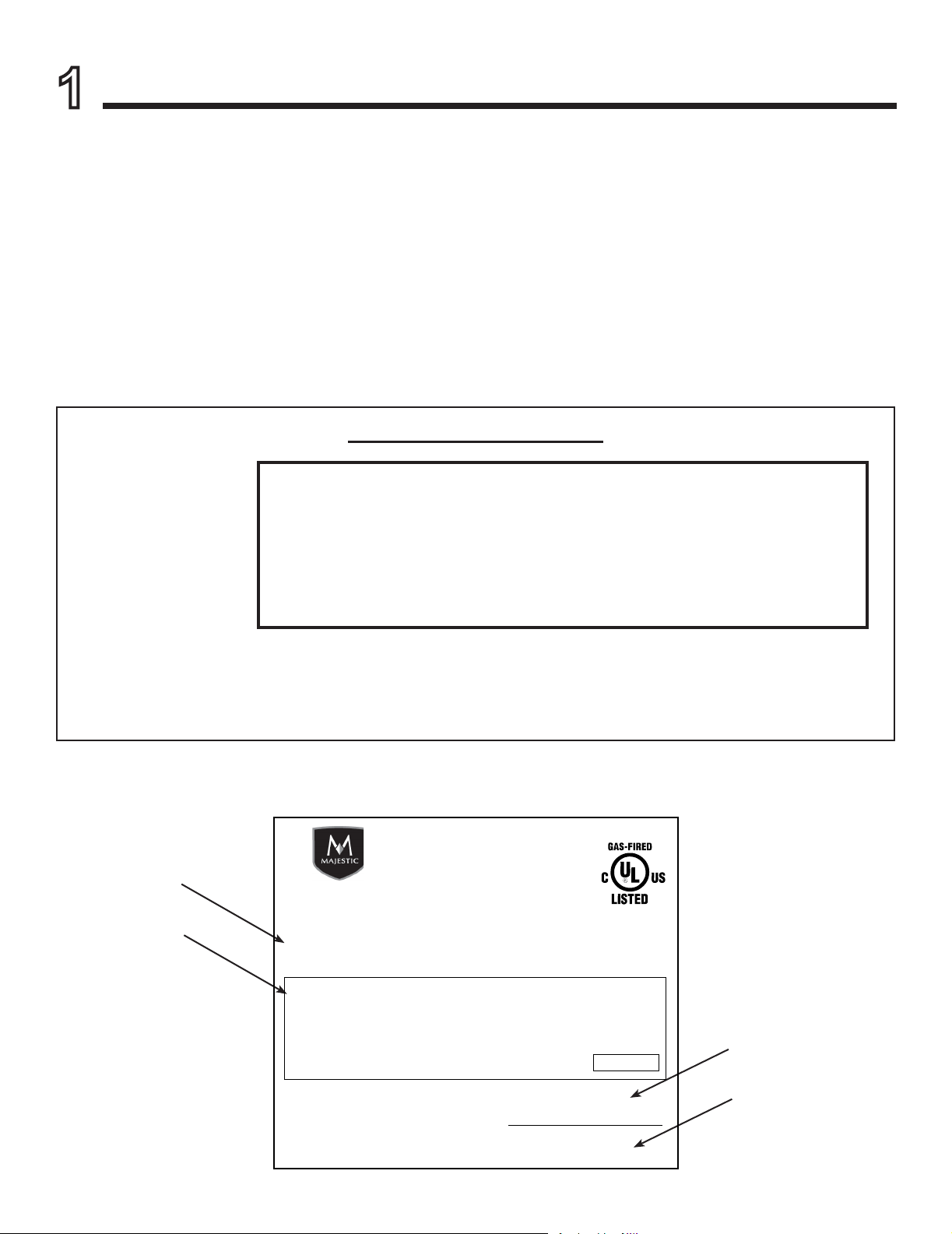
Listing Label Information/Location
A. Congratulations
Congratulations on selecting a Majestic gas replace, an
elegant and clean alternative to wood burning replaces.
The Majestic gas replace you have selected is designed
to provide the utmost in safety, reliability, and efciency.
As the owner of a new replace, you’ll want to read and
carefully follow all of the instructions contained in this
owner’s manual. Pay special attention to all cautions and
warnings.
This owner’s manual should be retained for future
reference. We suggest that you keep it with your other
important documents and product manuals.
The information contained in this owner’s manual, unless
noted otherwise, applies to all models and gas control
systems.
Your new Majestic gas replace will give you years of
durable use and trouble-free enjoyment. Welcome to the
Majestic family of replace products!
Gas and Electric
Information
Serial Number
Type of Gas
The model information regarding your specic replace can be found on
the rating plate usually located in the control area of the replace.
Model Number
Not Not for for use use with with solid solid fuel.fuel.
((Ne Ne doit doit pas pas entre entre utilise utilise avec avec un un combustible combustible solide).solide).
This This appliance appliance must must be be installed installed in in accordance accordance with with local local codes, codes, if if any; any; if if not, not, follow follow ANSI ANSI Z223.1Z223.1
in in the the USA USA or or CAN/CGA CAN/CGA B149 B149 installation installation codes. codes. (Installer (Installer l’appareil l’appareil selon selon les les codes codes ou ou reglementsreglements
locaux locaux ou, ou, en en l’absence l’absence de de tels tels reglements, reglements, selon selon les les codes codes d’installation d’installation CAN/CGA-B149.)CAN/CGA-B149.)
Type Type of of Gas Gas (Sorte (Sorte De De Gaz)Gaz)::
NNAATURALTURAL GASGAS
MADE MADE IN IN USAUSA
Minimum Minimum Permissible Permissible Gas Gas Supply Supply for for Purposes Purposes of of Input Input Adjustment.Adjustment.
Approved Approved Minimum Minimum (De (De Gaz) Gaz) AcceptableAcceptable 0.00.0 in in w.c.w.c. (Po. (Po. Col. Col. d’eau)d’eau)
Maximum Maximum Pressure Pressure (Pression)(Pression) 0.00.0 in in w.c.w.c. (Po. (Po. Col. Col. d’eau)d’eau)
Maximum Maximum Manifold Manifold Pressure Pressure (Pression)(Pression) 0.00.0 in in w.c.w.c. (Po. (Po. Col. Col. d’eau)d’eau)
Minimum Minimum Manifold Manifold Pressure Pressure (Pression)(Pression) 0.00.0 in in w.c.w.c. (Po. (Po. Col. Col. d’eau)d’eau)
Model:Model:
(Modele):(Modele):
SerialSerial
(Serie):(Serie):
ANSI ANSI Z21XX-XXXX Z21XX-XXXX · · CSA CSA 2.XX-MXX 2.XX-MXX · · UL307BUL307B
XXXXXXXXXXXXXXXX
IN IN CANADACANADA
ALTITUDE:ALTITUDE: 0-0000 0-0000 FT.FT. 0000-0000FT.0000-0000FT.
MAX. MAX. INPUT INPUT BTUH:BTUH: 00,00000,000 00,00000,000
MIN. MIN. INPUT INPUT BTUH:BTUH: 00,00000,000 00,00000,000
ORIFICE ORIFICE SIZE:SIZE: #XXXXX#XXXXX #XXXXX#XXXXX
XXXXXXXXXXXXXXXX
Total To tal Electrical Electrical Requirements: Requirements: 000Vac, 000Vac, 00Hz., 00Hz., less less than than 00 00 AmperesAmperes
Majestic, a brand of Hearth & Home Technologies
7571 215th Street West, Lakeville, MN 55044
Read this manual before operating this appliance.
Please retain this Owner’s Manual for future reference.
Read the Installation Manual before making any installation or nishing changes.
1
Welcome
Brand: ________________________________________________ Model Name: ___________________________
Serial Number: __________________________________________ Date Installed: __________________________
Appliance Information:
Local Dealer Information
DEALER: Fill in
your name, address,
phone and email
information here and
appliance information
below.
Dealer Name: ________________________________________________________
Address: ____________________________________________________________
____________________________________________________________
Phone: _____________________________________________________________
Email: _____________________________________________________________

3
Majestic • Owner’s Manual MARQ36IN, MARQ42IN • 2270-981 Rev. i • 8/17
Safety Alert Key:
• DANGER! Indicates a hazardous situation which, if not avoided will result in death or serious injury.
• WARNING! Indicates a hazardous situation which, if not avoided could result in death or serious injury.
• CAUTION! Indicates a hazardous situation which, if not avoided, could result in minor or moderate injury.
• NOTICE: Used to address practices not related to personal injury.
Table of Contents
1 Welcome
A. Congratulations .................................2
B. Limited Lifetime Warranty ..........................4
2 Product Specic Information
A. Appliance Certication ............................6
B. Glass Specications .............................. 6
C. BTU Specications ............................... 6
3 Important Safety and Operating Information
A. Appliance Safety ................................7
B. General Operating Parts ..........................8
C. Fuel Specications ...............................8
D. Good Faith Wall Surface/TV Guidelines ..............9
E. Before Lighting Appliance. . . . . . . . . . . . . . . . . . . . . . . . . . 9
F. Lighting Instructions (IPI) ......................... 11
G. Appliance Break-In .............................. 12
H. Heat Management ..............................12
I. Operation During A Power Outage - Intellire™ Touch ..13
4 Maintenance and Service
A. Maintenance: Frequency and Tasks ................16
B. Maintenance Tasks - Homeowner .................. 16
C. Maintenance Tasks - Qualied Service Technician ..... 17
5 Frequently Asked Questions and Troubleshooting
A. Frequently Asked Questions - Appliance .............19
B. Frequently Asked Questions - IntelliFire™ Touch Controls
(IFT-RC400) ................................... 20
C. Troubleshooting ................................21
6 Reference Materials
A. Accessories ...................................23
B. Service Parts ..................................24
C. IFT-RC400 User Guide. . . . . . . . . . . . . . . . . . . . . . . . . . . 30
D. Contact Information .............................33
= Contains updated information.
Majestic • Owner’s Manual MARQ36IN, MARQ42IN • 2270-981 Rev. i • 8/17 4
B. Limited Lifetime Warranty
X Molded refractory panels
4021-645H 10/15 Page 1 of 2
Hearth & Home Technologies
LIMITED LIFETIME WARRANTY
Hearth & Home Technologies, on behalf of its hearth brands (“HHT”), extends the following warranty for HHT
gas, wood, pellet, coal and electric hearth appliances that are purchased from an HHT authorized dealer.
WARRANTY COVERAGE:
HHT warrants to the original owner of the HHT appliance at the site of installation, and to any transferee taking ownership
of the appliance at the site of installation within two years following the date of original purchase, that the HHT appliance
will be free from defects in materials and workmanship at the time of manufacture. After installation, if covered compo-
nents manufactured by HHT are found to be defective in materials or workmanship during the applicable warranty period,
HHT will, at its option, repair or replace the covered components. HHT, at its own discretion, may fully discharge all of its
obligations under such warranties by replacing the product itself or refunding the verified purchase price of the product
itself. The maximum amount recoverable under this warranty is limited to the purchase price of the product. This warranty
is subject to conditions, exclusions and limitations as described below.
WARRANTY PERIOD:
Warranty coverage begins on the date of original purchase. In the case of new home construction, warranty coverage
begins on the date of first occupancy of the dwelling or six months after the sale of the product by an independent,
authorized HHT dealer/ distributor, whichever occurs earlier. The warranty shall commence no later than 24 months
following the date of product shipment from HHT, regardless of the installation or occupancy date. The warranty period for
parts and labor for covered components is produced in the following table.
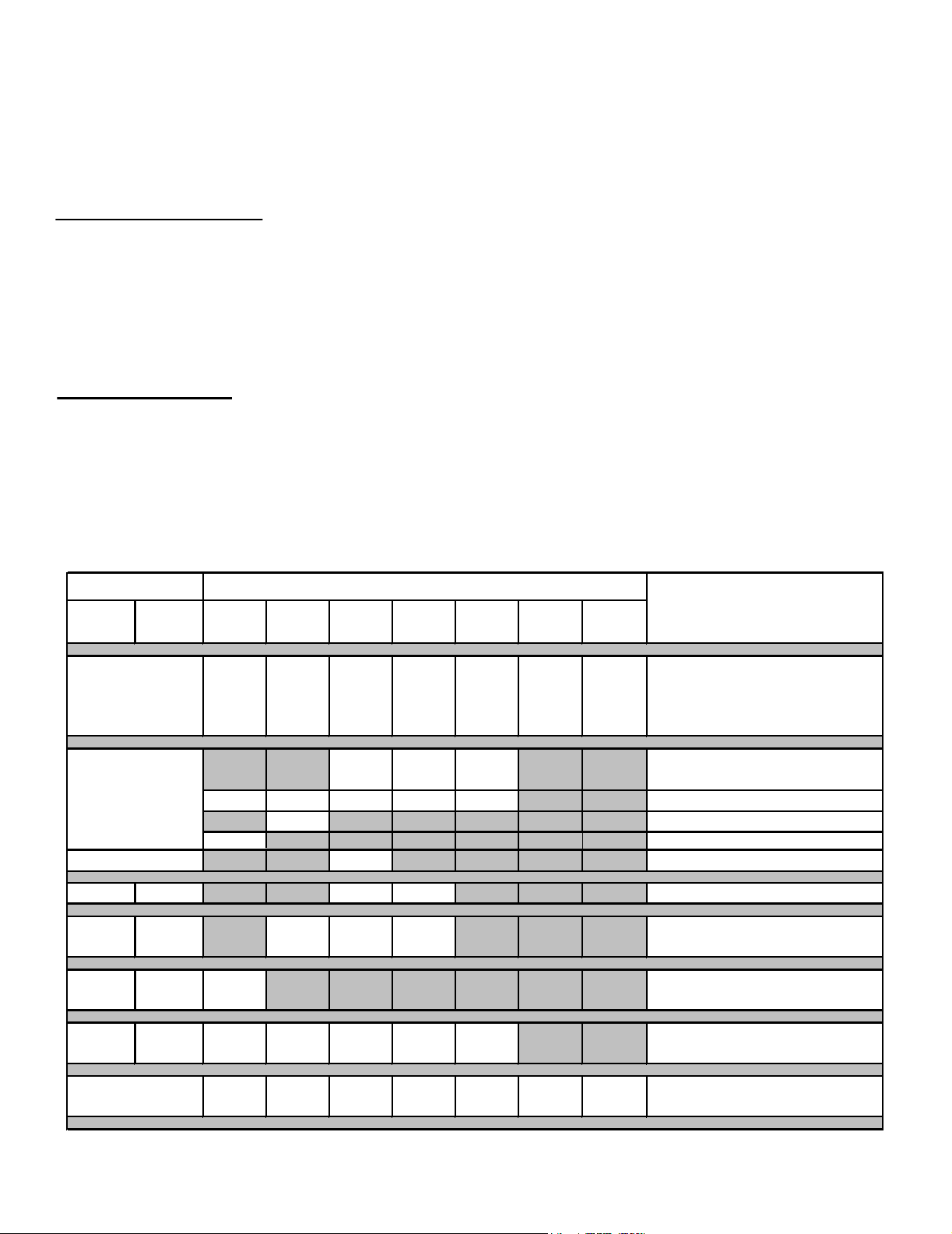
The term “Limited Lifetime” in the table below is defined as: 20 years from the beginning date of warranty coverage for
gas appliances, and 10 years from the beginning date of warranty coverage for wood, pellet, and coal appliances. These
time periods reflect the minimum expected useful lives of the designated components under normal operating conditions.
See conditions, exclusions, and limitations on next page.
Parts Labor Gas Wood Pellet
EPA
Wood
Coal Electric Venting
XXXXXXX
All parts and material except as
covered by Conditions,
Exclusions, and Limitations
listed
XXX
Igniters, electronic components,
and glass
X X X X X Factory-installed blowers
X Firepots and burnpots
5 years 1 year X X Castings and baffles
7 years 3 years X X X
Manifold tubes,
HHT chimney and termination
10
years
1 year X Burners, logs and refractory
Limited
Lifetime
3 years X X X X X Firebox and heat exchanger
XXXXXXX
All replacement parts
beyond warranty period
Warranty Period HHT Manufactured Appliances and Venting
1 Year
Components Covered
3 years
2 years
90 Days
X
Ignition Modules

5
Majestic • Owner’s Manual MARQ36IN, MARQ42IN • 2270-981 Rev. i • 8/17
B. Limited Lifetime Warranty (continued)
WARRANTY CONDITIONS:
• This warranty only covers HHT appliances that are purchased through an HHT authorized dealer or distributor. A list of
HHT authorized dealers is available on the HHT branded websites.
• This warranty is only valid while the HHT appliance remains at the site of original installation.
• This warranty is only valid in the country in which the HHT authorized dealer or distributor that sold the appliance
resides.
• Contact your installing dealer for warranty service. If the installing dealer is unable to provide necessary parts, contact
the nearest HHT authorized dealer or supplier. Additional service fees may apply if you are seeking warranty service
from a dealer other than the dealer from whom you originally purchased the product.
• Check with your dealer in advance for any costs to you when arranging a warranty call. Travel and shipping charges
for parts are not covered by this warranty.
This warranty is void if:
• The appliance has been over-fired or operated in atmospheres contaminated by chlorine, fluorine, or other damaging
chemicals. Over-firing can be identified by, but not limited to, warped plates or tubes, rust colored cast iron, bubbling,
cracking and discoloration of steel or enamel finishes.
• The appliance is subjected to prolonged periods of dampness or condensation.
• There is any damage to the appliance or other components due to water or weather damage which is the result of, but
not limited to, improper chimney or venting installation.
LIMITATIONS OF LIABILITY:
• The owner’s exclusive remedy and HHT’s sole obligation under this warranty, under any other warranty, express or
implied, or in contract, tort or otherwise, shall be limited to replacement, repair, or refund, as specified above. In no
event will HHT be liable for any incidental or consequential damages caused by defects in the appliance. Some states
do not allow exclusions or limitation of incidental or consequential damages, so these limitations may not apply to you.
This warranty gives you specific rights; you may also have other rights, which vary from state to state. EXCEPT TO
THE EXTENT PROVIDED BY LAW, HHT MAKES NO EXPRESS WARRANTIES OTHER THAN THE WARRANTY
SPECIFIED HEREIN. THE DURATION OF ANY IMPLIED WARRANTY IS LIMITED TO DURATION OF THE
EXPRESSED WARRANTY SPECIFIED ABOVE.
WARRANTY EXCLUSIONS:
This warranty does not cover the following:
• Changes in surface finishes as a result of normal use. As a heating appliance, some changes in color of interior and
exterior surface finishes may occur. This is not a flaw and is not covered under warranty.
• Damage to printed, plated, or enameled surfaces caused by fingerprints, accidents, misuse, scratches, melted items,
or other external sources and residues left on the plated surfaces from the use of abrasive cleaners or polishes.
• Repair or replacement of parts that are subject to normal wear and tear during the warranty period. These parts
include: paint, wood, pellet and coal gaskets, firebricks, grates, flame guides, batteries and the discoloration of glass.
• Expansion, contraction, or movement of certain parts causing noise. These conditions are normal and complaints
related to this noise are not covered by this warranty.
• Damages resulting from: (1) failure to install, operate, or maintain the appliance in accordance with the installation
instructions, operating instructions, and listing agent identification label furnished with the appliance; (2) failure to
install the appliance in accordance with local building codes; (3) shipping or improper handling; (4) improper opera-
tion, abuse, misuse, continued operation with damaged, corroded or failed components, accident, or improperly/
incorrectly performed repairs; (5) environmental conditions, inadequate ventilation, negative pressure, or drafting
caused by tightly sealed constructions, insufficient make-up air supply, or handling devices such as exhaust fans or
forced air furnaces or other such causes; (6) use of fuels other than those specified in the operating instructions; (7)
installation or use of components not supplied with the appliance or any other components not expressly authorized
and approved by HHT; (8) modification of the appliance not expressly authorized and approved by HHT in writing;
and/or (9) interruptions or fluctuations of electrical power supply to the appliance.
• Non-HHT venting components, hearth components or other accessories used in conjunction with the appliance.
• Any part of a pre-existing fireplace system in which an insert or a decorative gas appliance is installed.
• HHT’s obligation under this warranty does not extend to the appliance’s capability to heat the desired space. Informa-
tion is provided to assist the consumer and the dealer in selecting the proper appliance for the application. Consider-
ation must be given to appliance location and configuration, environmental conditions, insulation and air tightness of
the structure.
4021-645H 10/15 Page 2 of 2
Majestic • Owner’s Manual MARQ36IN, MARQ42IN • 2270-981 Rev. i • 8/17 6
C. BTU Specications
This product is listed to ANSI standards for “Vented Gas
Fireplace Heaters” and applicable sections of “Gas Burn-
ing Heating Appliances for Manufactured Homes and
Recreational Vehicles”, and “Gas Fired Appliances for
Use at High Altitudes”.
A. Appliance Certication
NOT INTENDED FOR USE AS A PRIMARY HEAT SOURCE.
This appliance is tested and approved as either supplemen-
tal room heat or as a decorative appliance. It should not be
factored as primary heat in residential heating calculations.
NOTICE: This installation must conform with local codes.
In the absence of local codes you must comply with the
National Fuel Gas Code, ANSI Z223.1-latest edition in
the U.S.A. and the CAN/CGA B149 Installation Codes in
Canada.
2
Product Specic Information
B. Glass Specications
This appliance is equipped with 5 mm ceramic glass with
an anti-reective coating. Replace glass only with glass
with identical specications. Please contact your dealer
for replacement glass.
MODELS: MARQ36IN, MARQ42IN
LABORATORY: Underwriters Laboratories, Inc. (UL)
TYPE: Direct Vent Heater
STANDARD: ANSI Z21.88-2014 • CSA 2.33-2014
Models
(U.S. or Canada)
Maximum
Input
BTU/h
Minimum
Input
BTU/h
Orice
Size
(DMS)
MARQ36IN (NG)
(0-2000 FT)
44,000 25,000 #30
MARQ36IN (LP)
(0-2000 FT)
43,500 24,000 #47
MARQ42IN (NG)
(0-2000 FT)
54,500 30,000 #26
MARQ42IN (LP)
(0-2000 FT)
47,500 23,500 #45
Installation and service of this
appliance should be performed
by qualied personnel. Hearth &
Home Technologies recommends
NFI certied professionals.
7
Majestic • Owner’s Manual MARQ36IN, MARQ42IN • 2270-981 Rev. i • 8/17
Young children should be carefully supervised when they
are in the same room as the appliance. Toddlers, young
children and others may be susceptible to accidental
contact burns.
• A physical barrier is recommended if there are at risk
individuals in the house.
• To restrict access to a replace or stove, install an
adjustable safety gate to keep toddlers, young children
and other at risk individuals out of the room and away
from hot surfaces.
• Install a switch lock or a wall/remote control with child
protection lockout feature.
• Keep remote controls out of reach of children.
• Never leave children alone near a hot replace, whether
operating or cooling down.
A. Appliance Safety
• Teach children to NEVER touch the replace.
• Consider not using the replace when children will be
present.
Contact your dealer for more information, or visit: www.
hpba.org/safety-information.
To prevent unintended operation when not using your re-
place for an extended period of time (summer months,
vacations, trips, etc):
• Remove batteries from remote controls.
• Turn off wall controls.
• Set the selector switch on the control module to the OFF
position and remove batteries.
3
Important Safety and Operating Information
Clear Space
WARNING! DO NOT place combustible objects in front
of the replace or block louvers. High temperatures may
start a re. See Figure 3.1.
Avoid placing candles and other heat-sensitive objects on
mantel or hearth. Heat may damage these objects.
Figure 3.1 Clear Space Requirement
CLEAR SPACE
3 FT. IN
FRONT OF
FIREPLACE
Over Firing
The appliance is considered to be over ring if the ames
are contacting the top of the rebox. Call a qualied service
technician to service the appliance
WARNING! DO NOT operate replace before reading
and understanding operating instructions. Failure
to operate replace according to operating instructions
could cause re or injury.
A barrier designed to reduce the risk of burns from the
hot viewing glass is provided with this appliance and
shall be installed for the protection of children and other
at-risk individuals. DO NOT operate the appliance with
the barrier removed. If the barrier becomes damaged,
the barrier shall be replaced with the manufacturer’s
barrier for this appliance.
Contact your dealer or Hearth & Home Technologies if the
barrier is not present or help is needed to properly install one.
DANGER
HOT GLASS WILL
CAUSE BURNS.
DO NOT TOUCH GLASS
UNTIL COOLED.
NEVER ALLOW CHILDREN
TO TOUCH GLASS.
• Keep children away.
• CAREFULLY SUPERVISE children in same room
as replace.
• Alert children and adults to hazards of high
temperatures.
High temperatures may ignite clothing or other
ammable materials.
• Clothing, furniture, draperies, and other ammable
materials must not be placed on or near the
appliance.
Majestic • Owner’s Manual MARQ36IN, MARQ42IN • 2270-981 Rev. i • 8/17 8
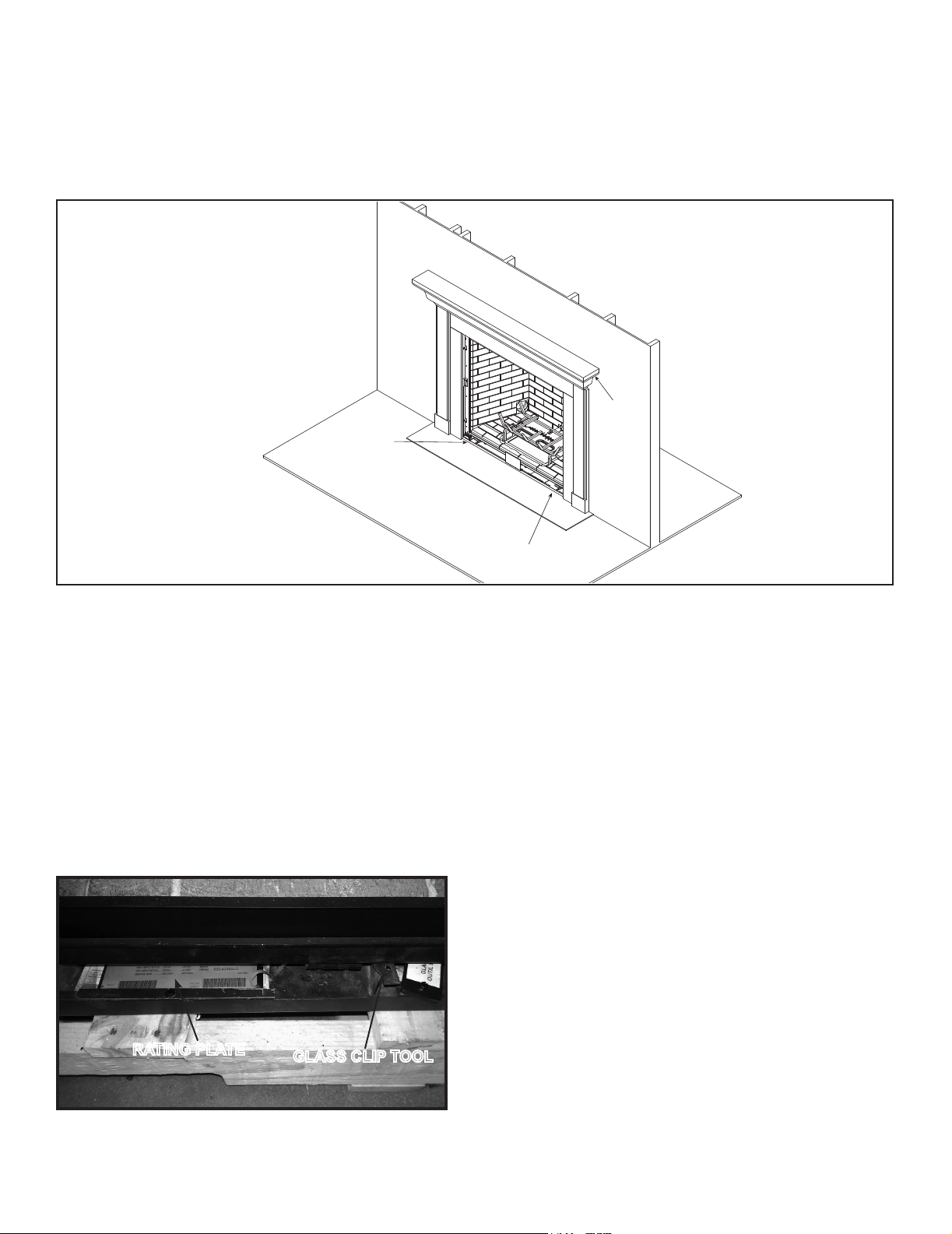
Figure 3.2 General Operating Parts
B. General Operating Parts
C. Fuel Specications
Figure 3.2 references the general operating parts of the
appliance and the section of this manual in which they are
discussed.
WARNING! Risk of Fire or Explosion! Appliance must
be set up for compatible gas type!
• This appliance is designed to operate on either natural
gas or propane. Make sure the appliance is compatible
with gas type selected for installation site.
• Conversions must be made by a qualified service
technician using Hearth & Home Technologies specied
and approved parts.
FIXED GLASS ASSEMBLY
(NOT SHOWN)
SECTION 4.B & 4.C.
LED
REPLACEMENT
SECTION 4.C.
MANTEL
CLEAR SPACE
SECTION 3.A.
RATING PLATE/GLASS CLIP TOOL LOCATION
SECTION 3.B.
OPERATION DURING
A POWER OUTAGE
SECTION 3.H.
DECORATIVE FRONTS
(NOT SHOWN)
SECTION 4.B.
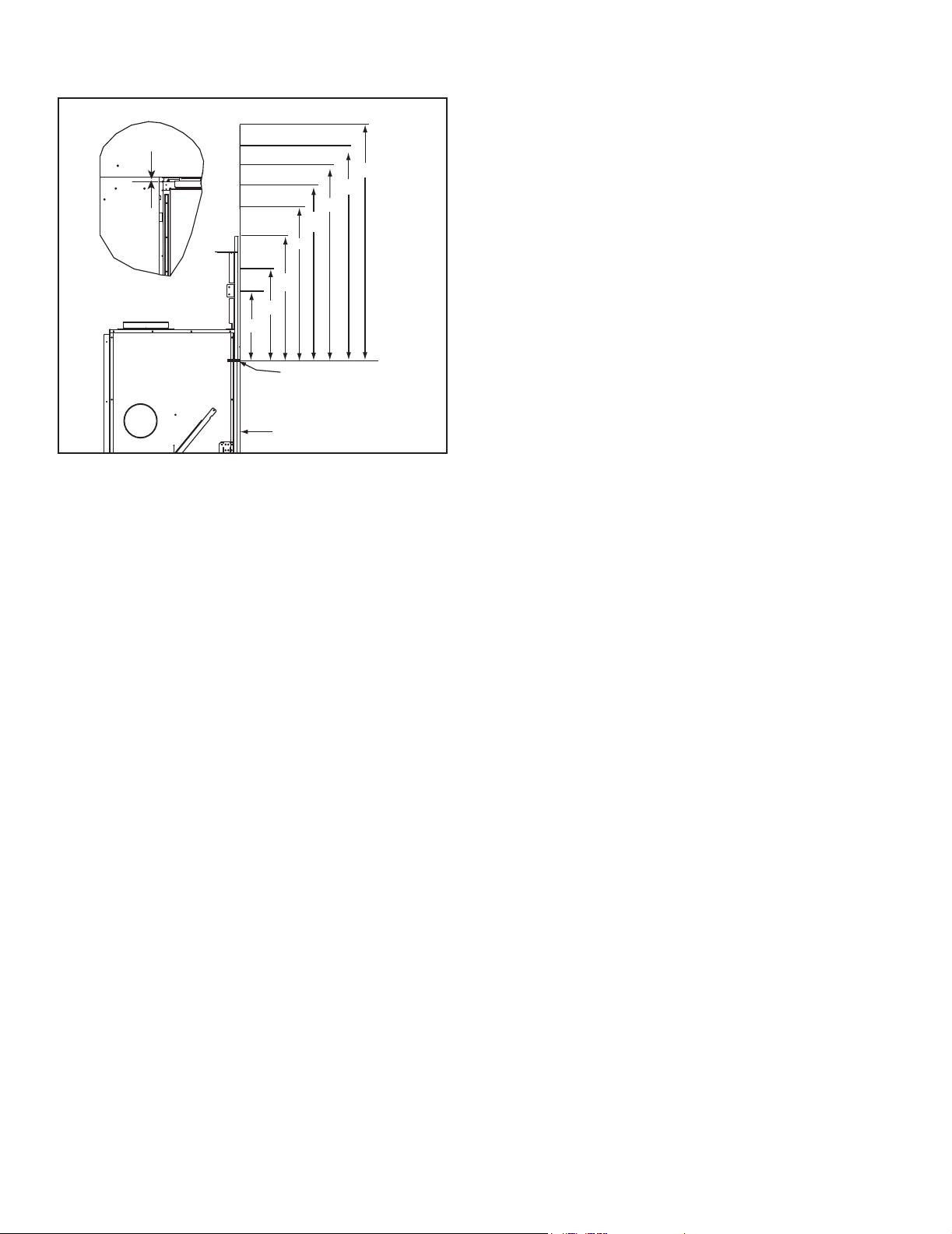
Rating Plate/Glass Clip Tool Location
The rating plate for this model is located underneath the
rebox afxed to a tray that must be accessed using a
1/4 inch nut driver. See Figure 3.3. To access the rating
plate, remove the screw that secures the tray to the appli-
ance bottom and pull the tray out.
The glass clip removal/installation tool is also located in
this area. To access the glass clip tool, remove the screw
that secures it to the appliance bottom.
Figure 3.3 Rating Plate/Glass Clip Tool Location
RATING PLATE
GLASS CLIP TOOL
9
Majestic • Owner’s Manual MARQ36IN, MARQ42IN • 2270-981 Rev. i • 8/17
E. Before Lighting Appliance
Before operating this replace for the rst time, have a
qualied service technician:
• Verify all shipping materials have been removed from
inside and/or underneath the rebox.
• Review proper placement of logs, ember material and/or
other decorative materials.
• Check the wiring.
• Check the air shutter adjustment.
• Ensure that there are no gas leaks.
• Ensure that the glass is sealed and in the proper position
and that the integral barrier is in place.
WARNING! Risk of Fire or Asphyxiation! DO NOT op-
erate replace with xed glass assembly removed.
MEASUREMENTS FROM
TOP EDGE OF THE OPENING
22 IN.
34 IN.
40 IN.
46 IN.
52 IN. MIN.
CEILING
28 IN.
APPLIANCE FRONT
FIREPLACE OPENING
165°F+
150°F
160°F
155°F
160°F
16 IN.
180°F+
10 IN.
230°F+
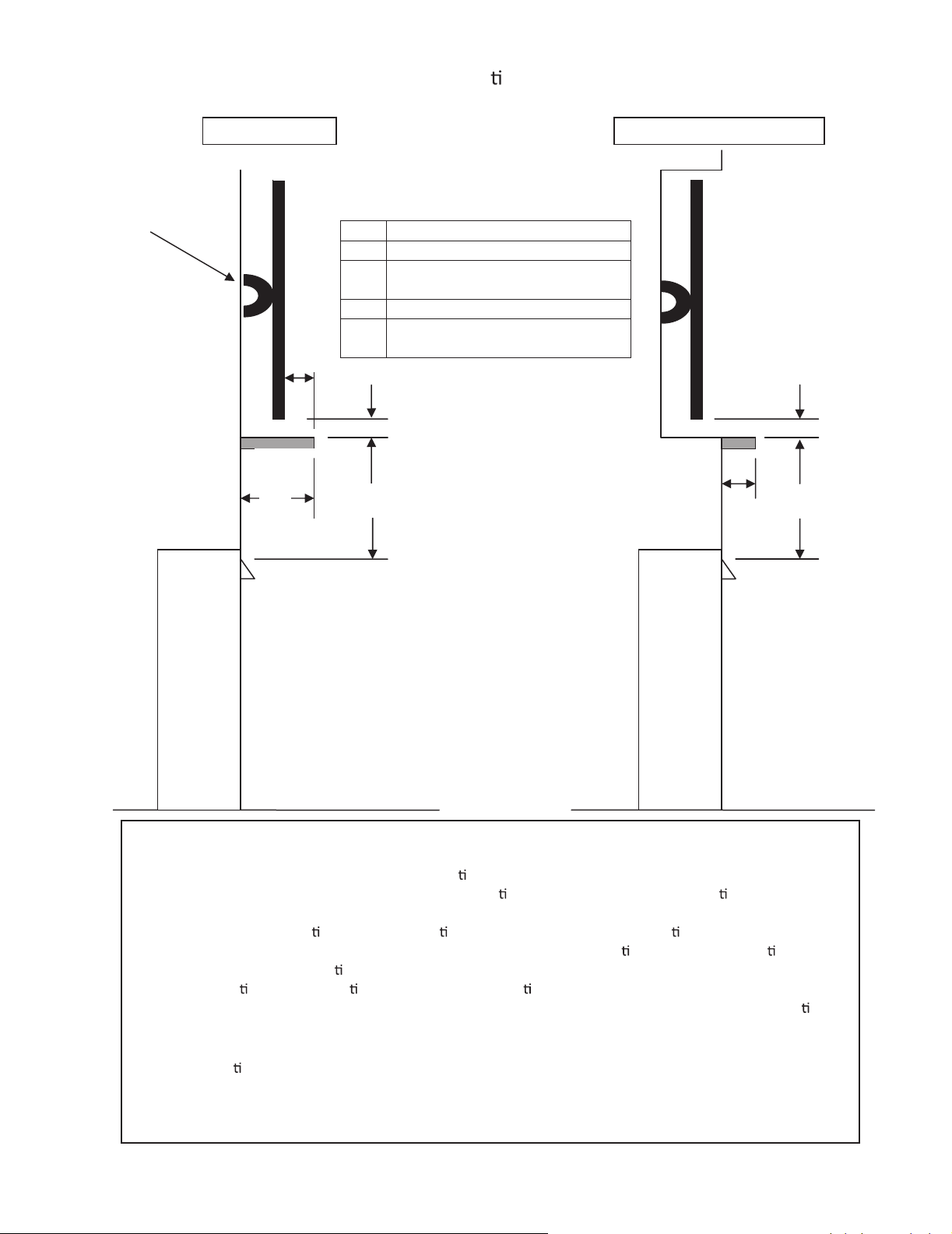
Figure 3.4. Good Faith Wall Surface Temperatures Above Appliance
D. Good Faith Wall Surface/TV Guidelines
NOTICE: Temperatures listed above are taken with a
temperature measuring probe as prescribed by the test
standard used for appliance certication. Temperatures
on walls or mantels taken with an infrared thermometer
may yield increased temperatures of up to 30 degrees or
more depending on the thermometer settings and material
characteristics being measured.
Majestic • Owner’s Manual MARQ36IN, MARQ42IN • 2270-981 Rev. i • 8/17 10
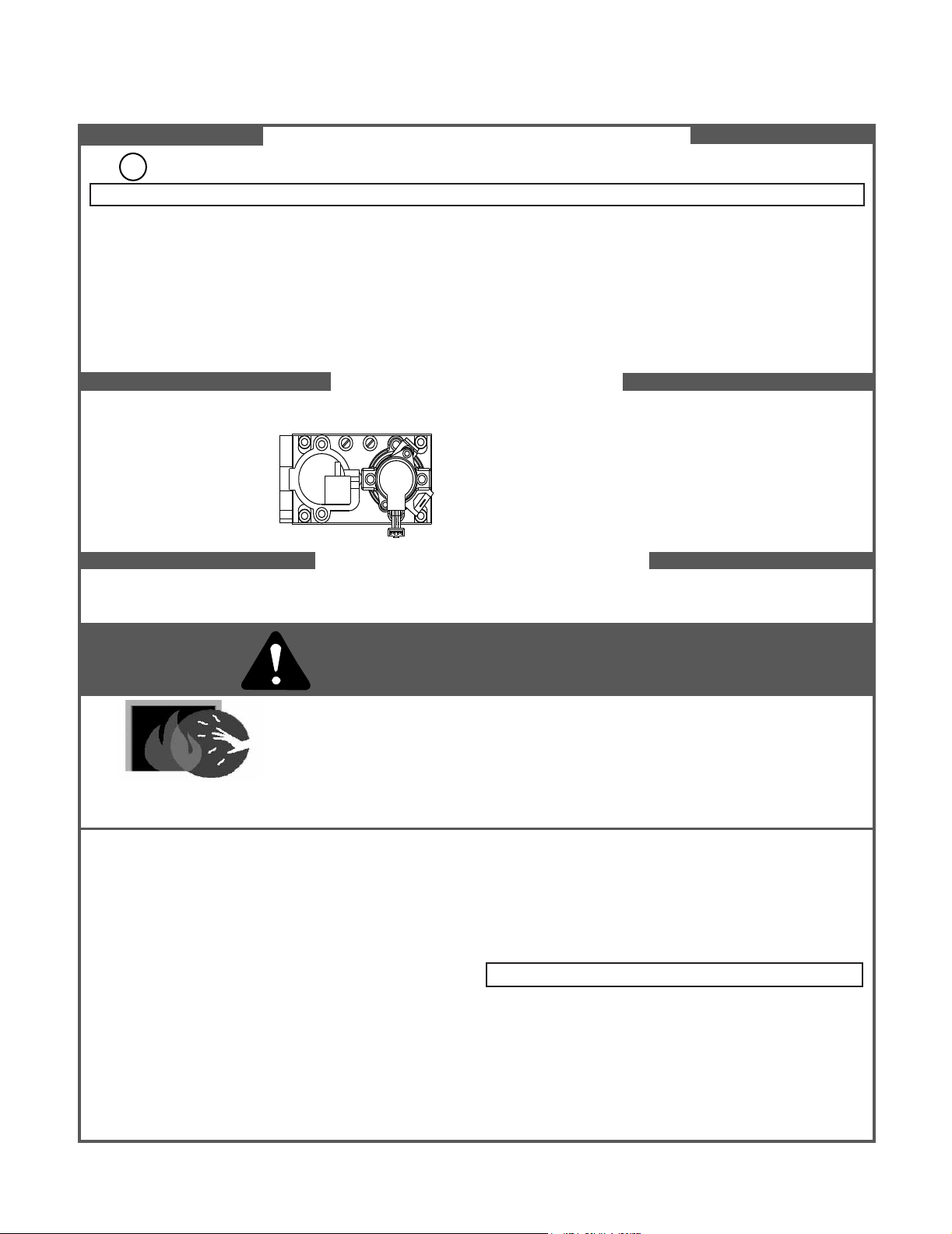
Figure 3.5. Good Faith TV Guidelines
Good Faith Guidelines for TV Installa on’s above a Typical Gas Fireplace
Item Minimum Dimensions
A 2.5 inches
B
2 inches minimum to 3 inches
maximum
C 18 inches
D
Wall Brkt + TV Thickness + 2.5
inches
BB
A
Fireplace
TV
Mantel
A
C
Notes:
1. These are good faith recommended clearances only and not a guarantee of compliance with all TV
manufacturers’ maximum allowable opera
ng temperatures.
2. Since every home has unique air ow characteris
cs and maximum allowable opera ng temperatures
can vary from manufacturer to manufacturer and from model to model, actual TV temperatures should
be validated at the
me of each installa on. TVs should not be used in situa ons where the actual TV
temperature exceeds the manufacturers’ maximum allowable opera
ng temperatures iden ed in the
TV’s technical specica
ons. Contact the TV’s manufacturer directly if you cannot locate this
informa
on or have ques ons regarding the informa
on.
3. Mantel height and depth must conform to mantle requirements specified in the replace installa
on
manual.
4. “C” dimension taken from the top of the hood or fireplace opening.
5.
Sugges ons on how to further reduce TV temperatures:
a. Increase “A” dimension.
b. Increase “C” dimension, however, increasing “B” dimension beyond maximum recommended
typically results in higher temperatures.
TV Wall
Bracket
D
Fireplace
C
TV on the wall
TV recessed into the wall
11
Majestic • Owner’s Manual MARQ36IN, MARQ42IN • 2270-981 Rev. i • 8/17
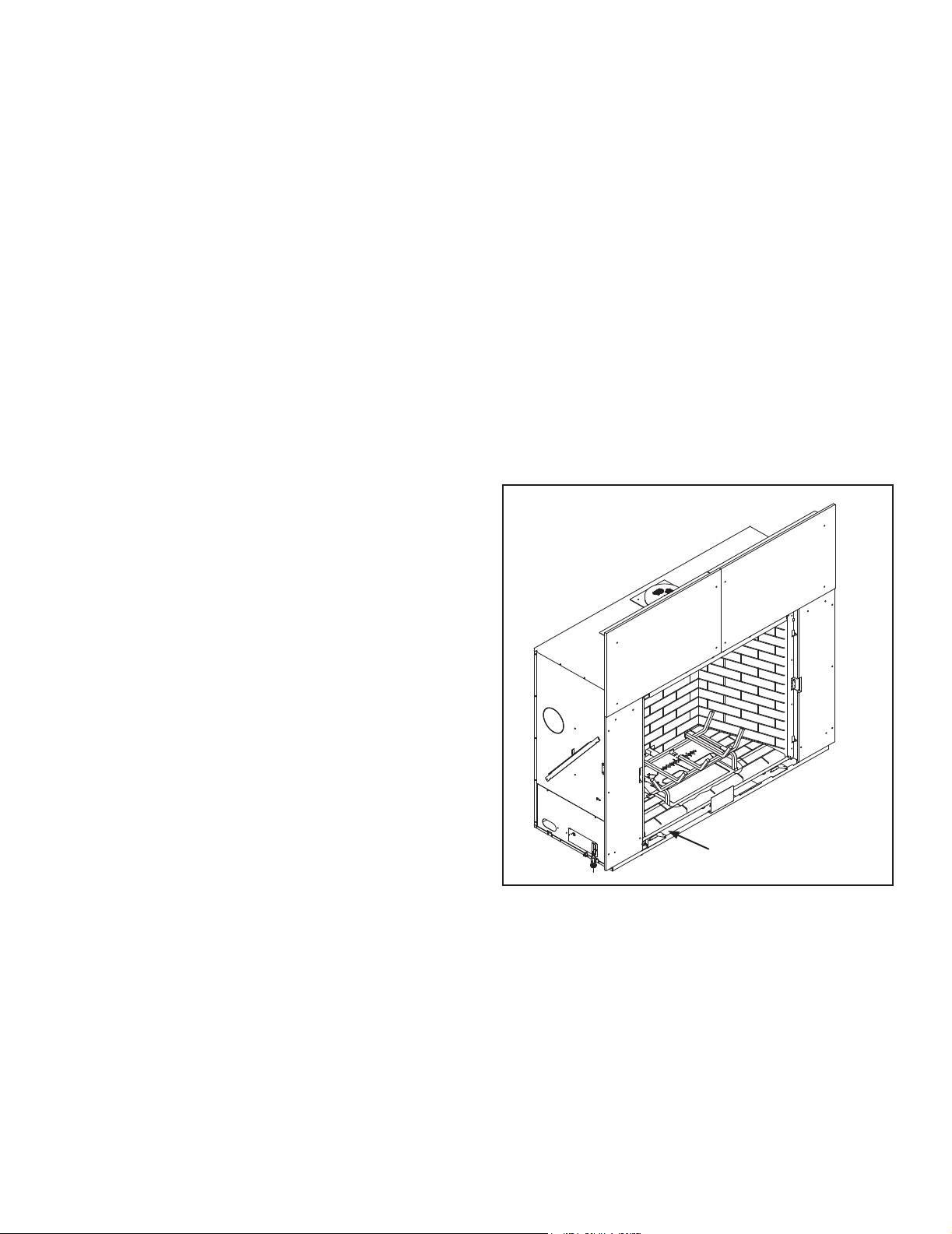
F. Lighting Instructions (IPI)
FOR YOUR SAFETY READ BEFORE LIGHTING
TO TURN OFF GAS TO APPLIANCE
1. This appliance is equipped with an ignition device which
automatically lights the burner. DO NOT try to light the burner by hand.
1. Equipped with wall switch: Turn ON/OFF switch to OFF.
Equipped with remote or wall control: Press OFF button.
Equipped with thermostat: Set temperature to lowest setting.
WARNING: If you do not follow these instructions exactly, a fi re or explosion may result causing property damage, personal injury or loss of life.
WARNING:
NOT FOR USE WITH SOLID FUEL
GAS
VALVE
For additional information on operating your
Hearth & Home Technologies fi replace, please refer to www.fi replaces.com.
A. This appliance is equipped with an intermittent pilot ignition (IPI) device which
automatically lights the burner. DO NOT try to light the burner by hand.
B. BEFORE LIGHTING, smell all around the appliance area for gas. Be sure to smell
next to the fl oor because some gas is heavier than air and will settle on the fl oor.
WHAT TO DO IF YOU SMELL GAS
• DO NOT try to light any appliance.
• DO NOT touch any electric switch; do not use any phone in your building.
DO NOT CONNECT LINE VOLTAGE (110/120 VAC OR 220/240 VAC) TO THE CON-
TROL VALVE.
Improper installation, adjustment, alteration, service or maintenance can cause
injury or property damage. Refer to the owner’s information manual provided with
this appliance. For assistance or additional information, consult a qualifi ed installer,
service agency or the gas supplier.
This appliance needs fresh air for safe operation and must be installed so there are
provisions for adequate combustion and ventilation air.
If not installed, operated, and maintained in accordance with the manufacturer’s in-
structions, this product could expose you to substances in fuel or fuel combustion which
are known to the State of California to cause cancer, birth defects, or other reproductive
harm.
Keep burner and control compartment clean. See installation and operating instruc-
tions accompanying appliance.
Hot while in operation. DO NOT touch. Keep children, clothing, furniture, gasoline
and other liquids having fl ammable vapors away.
DO NOT operate the appliance with fi xed glass assembly removed, cracked or
broken. Replacement of the fi xed glass assembly should be done by a licensed or
qualifi ed service person.
• Immediately call your gas supplier from a neighbor’s phone. Follow the gas sup-
plier’s instructions.
• If you cannot reach your gas supplier, call the fi re department.
C. Use only your hand to push in or turn the gas control knob. Never use tools. If
the knob will not push in or turn by hand, DO NOT try to repair it, call a qualifi ed
service technician. Force or attempted repair may result in a fi re or explosion.
D. DO NOT use this appliance if any part has been under water. Immediately call
a qualifi ed service technician to inspect the appliance and to replace any part of
the control system and any gas control which has been under water.
For use with natural gas and propane. A conversion kit, as supplied by the manufac-
turer, shall be used to convert this appliance to the alternate fuel.
Also Certifi ed for Installation in a Bedroom or a Bedsitting Room.
This appliance must be installed in accordance with local codes, if any; if none,
follow the National Fuel Gas Code, ANSIZ223.1/ NFPA 54, or the National Gas and
Propane Installation code, CSA B149.1.
LIGHTING INSTRUCTIONS (IPI)
2. Wait fi ve (5) minutes to clear out any gas. Then smell for gas, including near the
fl oor. If you smell gas, STOP! Follow “B” in the Safety Information located on the
top of this label. If you do not smell gas, go to next step.
3. To light the burner:
Equipped with wall switch: Turn ON/OFF switch to ON.
Equipped with remote or wall control: Press ON or FLAME button.
Equipped with thermostat: Set temperature to desired setting.
4. If the appliance does not light after three tries, call your service technician or gas
supplier.
2. Service technician should turn off electric power to the control when performing
service.
DANGER
HOT GLASS WILL CAUSE BURNS.
DO NOT TOUCH GLASS UNTIL COOLED.
NEVER ALLOW CHILDREN TO TOUCH GLASS.
CAUTION:
A barrier designed to reduce the risk of burns from the hot viewing glass is provided with this
appliance and shall be installed for the protection of children and other at-risk individuals.
593-913i

Majestic • Owner’s Manual MARQ36IN, MARQ42IN • 2270-981 Rev. i • 8/17 12
G. Appliance Break-In
Initial Break-in Procedure
• The fireplace should be run three to four hours
continuously on high.
• Turn the replace off and allow it to completely cool.
• Remove xed glass assembly. See Section 4.B.
• Clean xed glass assembly. See Section 4.
• Replace the xed glass assembly and run continuously
on high an additional 12 hours.
This cures the materials used to manufacture the re-
place.
NOTICE! Open windows for air circulation during re-
place break-in.
• Some people may be sensitive to smoke and odors.
• Smoke detectors may activate.
H. Heat Management
Heat Output
Heat output may be controlled on MARQUIS models by
adjusting the “FLAME” setting on the remote control.
13
Majestic • Owner’s Manual MARQ36IN, MARQ42IN • 2270-981 Rev. i • 8/17
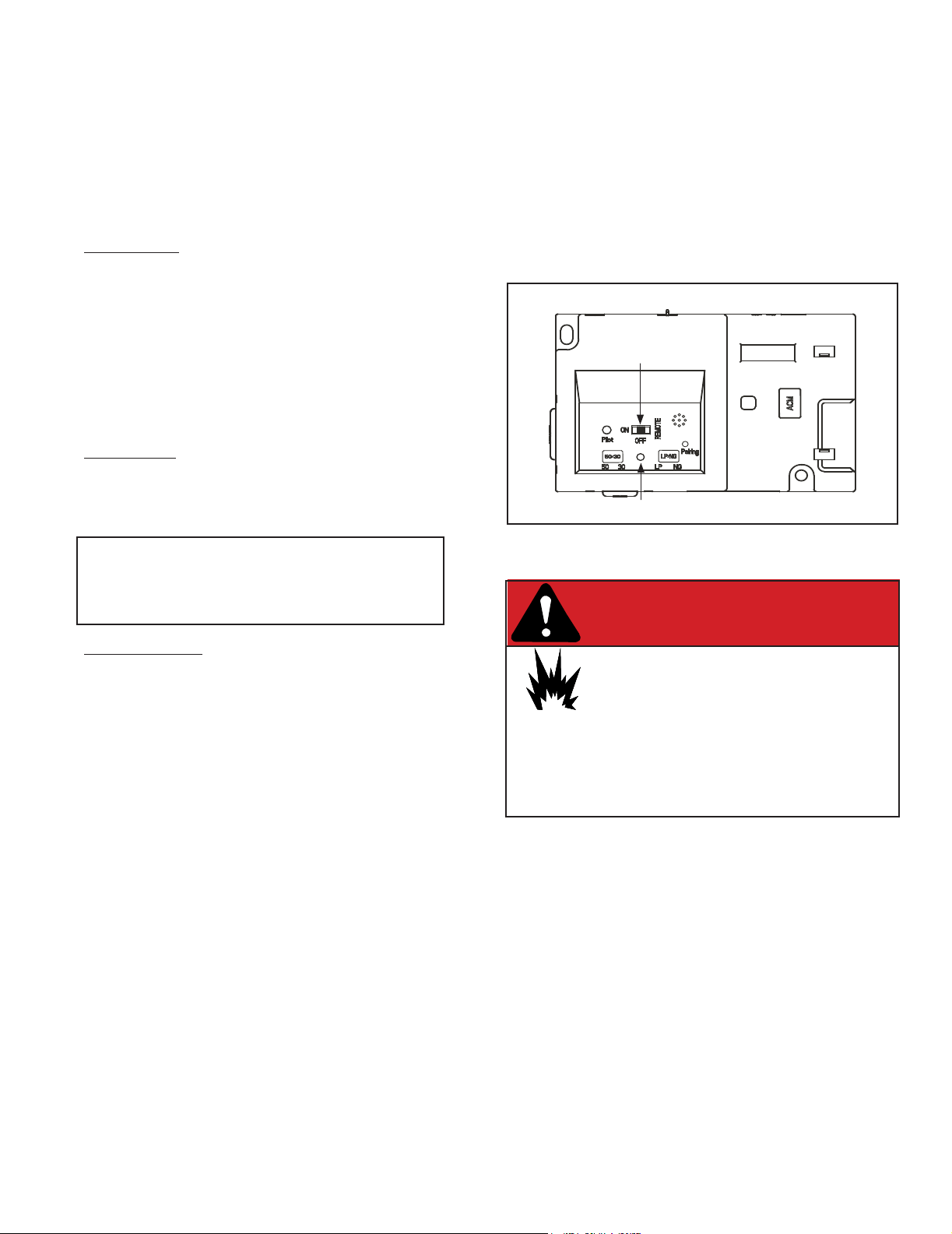
3.5 ON/OFF Switch/ Control Cavity Location
NOTICE: Some functionality will be lost when using battery
backup including fan, lights, or any other auxiliary functions
that require household 110-120 VAC power.
I. Operation During A Power Outage - Intellire™ Touch
The Intellire™ Touch intermittent pilot ignition system
comes with a battery backup system that enables the
system to operate in a power outage. The system offers
seamless transition from household AC power to battery
backup. A factory-installed battery pack is located in the
control cavity of the appliance. See Figure 3.5. Battery
longevity and performance will be affected by long term
exposure to the service temperatures of this appliance.
NOTICE: Batteries should only be used as a power source
in the event of an emergency power outage. Batteries
should not be used as a primary long-term power source.
To Operate Fireplace Using Battery Power (DC):
1. Access the control cavity of the appliance. See
Figure 3.5 for location. The decorative front and front
refractory may need to be removed.
2. Locate the battery tray and insert four AA cell batteries.
Battery polarity must be correct or module damage
will occur. See Figure 3.5. A complete wiring diagram
is included in the Electrical section of the appliance
Installation Manual.
3. Turn the appliance on according to the instructions
below for the appropriate type of control:
Standard Wall Switch or Factory-Installed ON/OFF
Switch:
• Toggle the switch as you would under normal
circumstances.
Wireless Remote:
• Remote receiver is integrated into the ignition module
• Use the remote to turn the appliance on.
• To preserve battery life, do not use the HI/LO ame or
THERMOSTAT options.
Ignition Module:
• Locate the ignition module in the control cavity.
• Slide the ON/REMOTE/OFF switch to the ON position.
To Return to Operation Using Electrical (AC) Power
Standard Wall Switch or Factory-Installed ON/OFF
Switch:
• Toggle the switch to OFF and remove the batteries
from the battery tray. Replace door or decorative front
on appliance.
Wireless Remote:
• Slide the ON/REMOTE/OFF switch to the REMOTE
position. Remove the batteries from the battery tray.
Replace door or decorative front on appliance.
Ignition Module:
• Slide the ON/REMOTE/OFF switch to the REMOTE
position.
Remove the batteries from the battery tray. Replace
door or decorative front on appliance.
BATTERY PACK ACCESS
Majestic • Owner’s Manual MARQ36IN, MARQ42IN • 2270-981 Rev. i • 8/17 14
J. Detailed Component Operating Instructions - IntelliFire™ Touch
1. The Electronic Control Module (IFT-ECM) has a
three-position ON/OFF/REMOTE selector switch
that must be set for proper operation. See Figure 12.
When changing switch positions,it is important to
pause in each position for 1-2 seconds.
OFF Position:
The appliance will not respond to any commands
from a wired wall switch, IFT-RC150 or IFT-RC400
remote controls. The unit should be in the OFF
position during installation, service, backup battery
installation, fuel conversion and to reset the IFT-
ECM in the event the system goes into a LOCK-
OUT mode as the result of a system error. When
switched to the OFF position while the appliance is
operating, the system will shut down.
ON Position:
The appliance will ignite and run continuously at
the HI ame setting. No adjustment in ame height
is possible.
The IFT-ECM has a safety feature that will
automatically shut down the replace after
9 hours of continuous operation in the ON
position.
Remote Position:
The remote position allows operation of the
appliance from a wired wall switch, IFT-RC400 or
IFT-RC150 remote controls. The IFT-ECM switch
must be in this position to pair the IFT-ECM with the
IFT-ACM (if installed), and/or IFT-RC400 and IFT-
RC150 remote controls. See the IFT-RC400 or IFT-
RC150 installation manual for detailed instructions
on pairing the IFT-ECM with the remote controls.
After successfully pairing a IFT-RC400, all installed
accessories can be controlled by the IFT-RC400
(see IFT-RC400 user manual). The RC150 allows
the user to turn ON/OFF the ame in the appliance
and activate the Cold Climate mode if desired. The
IFT-ECM has a safety feature that will automatically
shut down the replace after 9 hours of continuous
operation without receiving a command from the
IFT-RC400 or IFT-RC150.
2. If multiple control options are installed, the IFT-ECM
will respond to the last command from the wired wall
switch, IFT-RC400 or IFT-RC150. The wired wall
switch is NOT available if a Power Vent is used.
3. The Pilot button on the IFT-ECM activates the Cold
Climate function of the replace. This function lights
the pilot ame ONLY to provide enough heat in the
rebox to reduce condensation in cool, high humidity
ambient conditions. To activate the Cold Climate
IFT-ECM Detailed Operating Instruction
press and hold the Pilot button for one second and
release. The IFT-ECM will ash two green LED blinks,
beep twice and light and rectify the pilot ame when
pressed to activate. To turn off Cold Climate, press
and hold the Pilot button for one second and release.
The IFT-ECM will ash one green LED blink, beep once
and shut down the pilot ame. If remote controls are
paired with the IFT-ECM, this feature can also be
activated with the IFT-RC400 and/or IFT-RC150.
Figure 3.6. IFT-ECM
3 POSITION SWITCH
TOP VIEW
LED INDICATOR
DANGER
Risk of Explosion
DO NOT cycle the ON/OFF/REM selector
switch more than one time within a ve minute
period. Gas may accumulate in rebox. Call
a qualied service technician.
DANGER
Risk of Explosion
DO NOT cycle the ON/OFF/REM selector
switch more than one time within a ve minute
period. Gas may accumulate in rebox. Call
a qualied service technician.
4. An IFT-ECM reset is required if the module is in a
lock-out condition. When this occurs, the appliance
is shut down and the IFT-ECM status indicator LED
will be blinking a RED/GREEN error code along with a
one-time audible double- beep. If the IFT-ECM is in a
lock-out condition, refer to the troubleshooting chart to
interpret the error code and take corrective action as
required. To reset the IFT-ECM after a lock-out error:

15
Majestic • Owner’s Manual MARQ36IN, MARQ42IN • 2270-981 Rev. i • 8/17
DANGERDANGER
Accent Lights
• Accent lights are a standard feature on all Marquis
replaces.
• The intensity of the these lights may be controlled
through the remote control included with your re-
place.
Appliance ON/OFF:
Your MARQUIS replace is supplied with a fully functional
remote control. This remote controls:
• ON/OFF Functions
• Flame height adjustments
• Thermostat
• Accent Lights
• Cold Climate Feature
Please refer to the instructions included with the remote
control for more detailed operating instructions.
CAUTION! Risk of burns! Appliance surfaces are hot
when operating and during cool down. Use care and wear
gloves when opening the front and accessing compo-
nents inside the appliance.
- Be aware the appliance may be HOT, use
care in accessing the IFT-ECM.
- Set the IFT-ECM 3-position selector switch to
OFF position.
- Wait ve (5) minutes to allow possible
accumulated gas to clear.
- Set the IFT-ECM 3-position selector switch to ON
or IFT-REM position. Module will beep once and
ash a three GREEN LED code on successful
startup.
- If placed in ON position, the appliance will ignite
normally if the error condition was corrected.
- If placed in IFT-REM position, use the paired IFT-
RC400, IFT-RC150 or wired wall switch to start
the appliance; appliance will ignite normally if the
error condition was corrected.
- If the IFT-ECM re-enters the lock-out condition
after these steps, call your dealer for service.

Majestic • Owner’s Manual MARQ36IN, MARQ42IN • 2270-981 Rev. i • 8/17 16
B. Maintenance Tasks - Homeowner
The following tasks may be performed annually by the
homeowner. If you are uncomfortable performing any of
the listed tasks, please call your dealer for a service ap-
pointment.
More frequent cleaning may be required due to excessive
lint from carpeting, bedding material, et cetera. It is im-
perative that control compartments, burners and circulat-
ing air passageways of the appliance be kept clean. Any
safety screen, guard, or barrier removed for servicing the
appliance must be replaced prior to operating the appli-
ance.
CAUTION! Risk of Burns! The replace should be
turned off and cooled before servicing.
Any safety screen or guard removed for servicing must be
replaced prior to operating the replace.
Installation and repair should be done by a qualied service
technician only. The appliance should be inspected before
use and at least annually by a professional service person.
4
Maintenance and Service
Task Frequency To be completed
by
Glass Cleaning/
Exterior
Seasonally
Homeowner
Decorative Fronts/
Surrounds
Annually
Remote Control Seasonally
Venting Seasonally
Glass Cleaning/
Interior
Annually
Qualied Service
Technician
Gasket Seal and
Glass Inspection
Annually
Log Inspection Annually
Firebox Inspection Annually
Control Compartment
& Firebox Top
Annually
L.E.D Replacement As needed
Burner Ignition &
Operation
Annually
A. Maintenance: Frequency and Tasks
Decorative Fronts, Surrounds
Frequency: Annually
By: Homeowner
Tools needed: Protective gloves, stable work surface
• Assess condition of screen and replace as necessary.
• Inspect for scratches, dents or other damage and repair
as necessary.
• Check that louvers are not blocked.
• Vacuum and dust surfaces.
Remote Control
Frequency: Seasonally
By: Homeowner
Tools needed: Replacement batteries and remote con-
trol instructions.
• Locate remote control transmitter and receiver.
• Verify operation of remote. Refer to remote control
operation instructions for proper calibration and setup
procedure.
• Replace batteries as needed in remote transmitters.
• Place remote control out of reach of children.
Glass Cleaning
(Exterior of Installed Glass Only)
Frequency: Seasonally
By: Homeowner
Tools Needed: Protective gloves, ceramic glass cleaner,
drop cloth and a stable work surface.
WARNING! Risk of Injury! Glass installation and re-
moval must be performed only by a qualied service tech-
nician.
• Homeowner may only clean outsides of glass.
• Call your dealer for a service appointment to have inside
of glass cleaned.
CAUTION! Glass is breakable.
• Avoid striking, scratching or slamming glass
• Avoid abrasive cleaners
• DO NOT clean glass while it is hot
• Clean glass with a non-abrasive commercially available
ceramic glass cleaner.
NOTICE! Use only glass cleaner compatible with ce-
ramic glass. Other types of glass cleaner may damage
the glass surface when exposed to high temperatures.
- Light deposits: Use a soft cloth with soap and water
- Heavy deposits: Use commercial fireplace glass
cleaner (consult with your dealer)
When properly maintained, your replace will give you
many years of trouble-free service. Contact your dealer
to answer questions regarding proper operation, trouble-
shooting and service for your appliance. Visit www.ma-
jesticproducts.com to locate a dealer. We recommend
annual service by a qualied service technician.

17
Majestic • Owner’s Manual MARQ36IN, MARQ42IN • 2270-981 Rev. i • 8/17
If not using your replace for an extended period of time
(summer months, vacations/trips, etc), to prevent unin-
tended operation:
• Remove batteries from remote controls.
• Turn the ON/OFF/REMOTE switch on the control module
to OFF.
Venting
Frequency: Seasonally
By: Homeowner
Tools needed: Protective gloves and safety glasses.
• Inspect venting and termination cap for blockage or
obstruction such plants, bird nests, leaves, snow, debris,
etc.
• Verify termination cap clearance to subsequent construc-
tion (building additions, decks, fences, or sheds).
• Inspect for corrosion or separation.
• Verify weather stripping, sealing and ashing remains
intact.
C. Maintenance Tasks - Qualied Service
Technician
The following tasks must be performed by a qualied ser-
vice technician.
Glass Cleaning
(Exterior and Interior of Installed Glass)
Frequency: Seasonally
By: Qualied Service Technician
Tools Needed: Protective gloves, ceramic glass cleaner,
drop cloth and a stable work surface.
WARNING! Risk of Injury! Glass installation and re-
moval must be performed only by a qualied service tech-
nician.
CAUTION! Handle xed glass assembly with care.
Glass is breakable.
• Avoid striking, scratching or slamming glass
• Avoid abrasive cleaners
• DO NOT clean glass while it is hot
NOTICE! Use only glass cleaner compatible with ce-
ramic glass. Other types of glass cleaner may damage
the glass surface when exposed to high temperatures.
• Prepare a work area large enough to accommodate xed
glass assembly and door frame by placing a drop cloth
on a at, stable surface.
Note: Fixed glass assembly and gasketing may have res-
idue that can stain carpeting or oor surfaces.
• Remove decorative front from replace and set aside
on work surface.
• See appliance installation manual for instructions to
remove xed glass assembly.
• Clean glass with a non-abrasive commercially available
ceramic glass cleaner.
- Light deposits: Use a soft cloth with soap and water.
- Heavy deposits: Use commercial fireplace glass
cleaner (consult with your dealer).
• See appliance installation manual for instructions to
replace the xed glass assembly.
• Reinstall decorative front.
Gasket Seal and Glass Assembly Inspection
Frequency: Annually
By: Qualied Service Technician
Tools needed: Protective gloves, drop cloth and a stable
work surface.
• Inspect gasket seal and its condition.
• Inspect xed glass assembly for scratches and nicks that
can lead to breakage when exposed to heat.
• Conrm there is no damage to glass or glass frame.
Replace as necessary.
Majestic • Owner’s Manual MARQ36IN, MARQ42IN • 2270-981 Rev. i • 8/17 18
• Verify that xed glass assembly is properly retained and
attachment components are intact and not damaged.
Replace as necessary.
Logs
Frequency: Annually
By: Qualied Service Technician
Tools needed: Protective gloves.
• Inspect for damaged or missing logs. Replace as neces-
sary. Refer to Installation manual for log placement instruc-
tions.
• Verify correct log placement and no ame impingement
causing sooting. Correct as necessary.
Firebox
Frequency: Annually
By: Qualied Service Technician
Tools needed: Protective gloves, sandpaper, steel wool,
cloths, mineral spirits, primer and touch-up paint.
• Inspect for paint condition, warped surfaces, corrosion
or perforation. Sand and repaint as necessary.
• Replace replace if rebox has been perforated.
Control Compartment and Firebox Top
Frequency: Annually
By: Qualied Service Technician
Tools needed: Protective gloves, vacuum cleaner, dust
cloths
• Vacuum and wipe out dust, cobwebs, debris or pet hair.
Use caution when cleaning these areas. Screw tips that
have penetrated the sheet metal are sharp and should
be avoided.
• Remove all foreign objects.
• Verify unobstructed air circulation.
L.E.D Replacement
Frequency: As needed
By: Qualied Service Technician
Tools needed: Protective gloves, replacement LED as-
semblies, 1/4 inch nut driver.
The LEDs installed in this appliance do not require any
annual service. However, the LED assemblies can be
replaced. To replace:
• Remove Logs, Grate/Burner, Base refractory.
• Remove the ember glass assembly. The LED box can
be lifted out of the replace at this point.
• See replacement parts list for LED part numbers.
Burner Ignition and Operation
Frequency: Annually
By: Qualied Service Technician
Tools needed: Protective gloves, vacuum cleaner, whisk
broom, ashlight, voltmeter, indexed drill bit set, and a
manometer.
• Verify burner is properly secured and aligned with pilot
or igniter.
• Clean off burner top, inspect for plugged ports, corrosion
or deterioration. Replace burner if necessary.
• Replace Glowing embers with new dime-size pieces.
DO NOT block ports or obstruct lighting paths. Refer
to appliance installation manual for proper ember
placement.
• Verify batteries have been removed from battery back-
up IPI systems to prevent premature battery failure or
leaking.
• Check for smooth lighting and ignition carryover to all
ports. Verify that there is no ignition delay.
• Inspect for lifting or other ame problems.
• Verify air shutter setting is correct. See Installation
Manual for required air shutter setting. Verify air shutter
is clear of dust and debris.
• Inspect orice for soot, dirt and corrosion. Verify orice
size is correct. See Service Parts List for proper orice
sizing.
• Verify manifold and inlet pressures. Adjust regulator as
required.
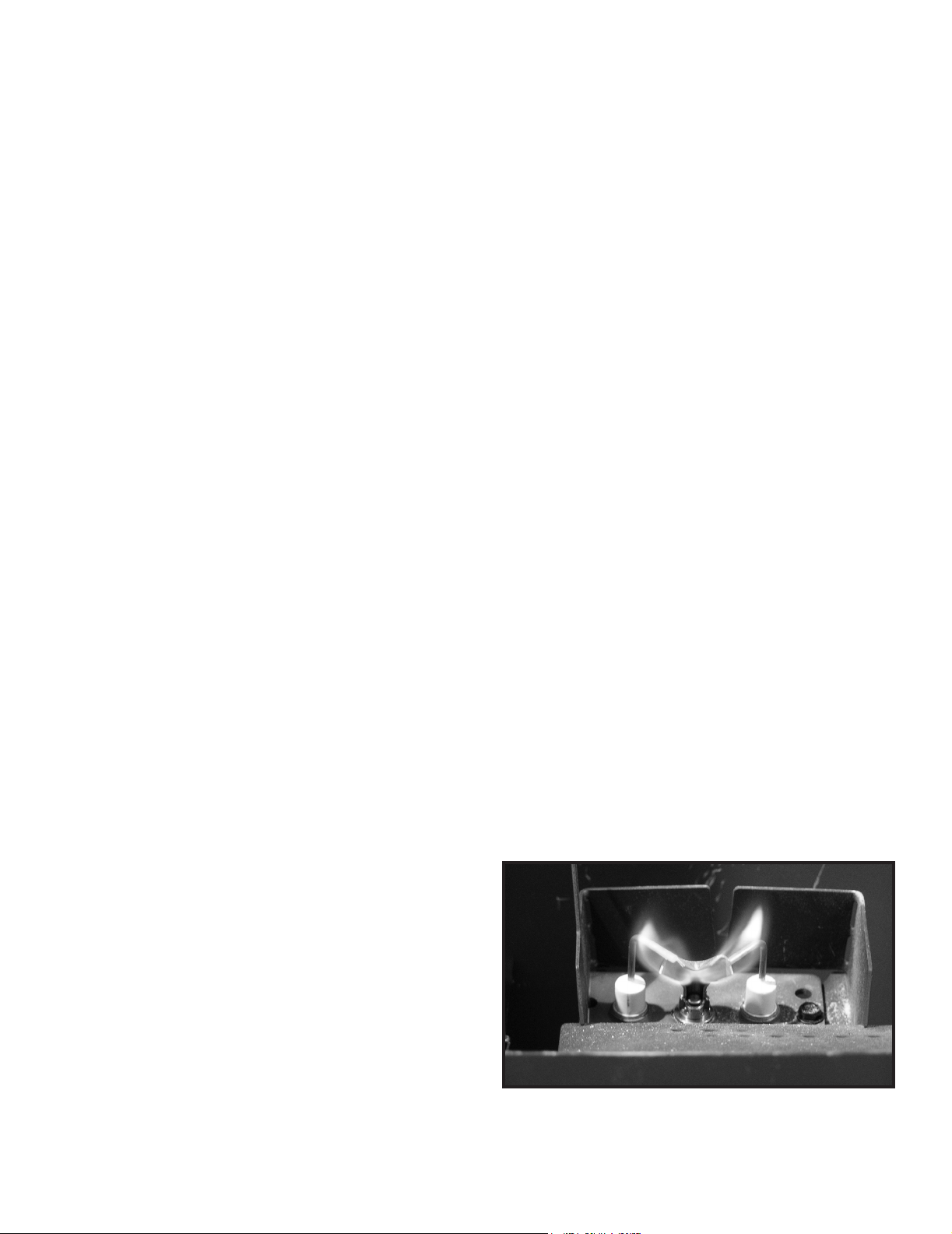
• Inspect pilot ame pattern and strength. See Figure 4.1
for proper pilot ame pattern. Clean or replace orice
spud as necessary.
• Inspect IPI ame sensing rod for soot, corrosion and
deterioration. Polish with ne steel wool or replace as
required.
• Verify that there is not a short in ame sense circuit
by checking continuity between pilot hood and ame
sensing rod. Replace pilot as necessary.
Figure 4.1 IPI Pilot Flame Patterns
19
Majestic • Owner’s Manual MARQ36IN, MARQ42IN • 2270-981 Rev. i • 8/17
5
Frequently Asked Questions and Troubleshooting
A. Frequently Asked Questions - Appliance
ISSUE SOLUTIONS
Condensation on the glass
This is a result of gas combustion and temperature variations. As the replace warms, this
condensation will disappear.
Blue ames
This is a result of normal operation and the ames will begin to yellow as the replace is al-
lowed to burn for 20 to 40 minutes.
Odor from replace
When rst operated, this replace may release an odor for the rst several hours. This is caused
by the curing of the paint and the burning off of any oils remaining from manufacturing. Odor may
also be released from nishing materials and adhesives used around the replace.
Film on the glass
This is a normal result of the curing process of the paint and logs. Glass should be cleaned
within 3 to 4 hours of initial burning to remove deposits left by oils from the manufacturing
process. A non-abrasive cleaner such as gas replace glass cleaner may be necessary. See
your dealer.
Metallic noise
Noise is caused by metal expanding and contracting as it heats up and cools down, similar to
the sound produced by a furnace or heating duct. This noise does not affect the operation or
longevity of the replace.
Is it normal to see the pilot ame burn
continually?
In an intermittent pilot ignition system (IPI), the pilot ame should turn off when appliance
is turned off. Some optional control systems available with IPI models may allow pilot ame
to remain lit. This is commonly referred to as a “Cold Climate” feature in the remote control
instructions.
Majestic • Owner’s Manual MARQ36IN, MARQ42IN • 2270-981 Rev. i • 8/17 20
Contact your dealer for additional information regarding operation and troubleshooting. Visit www.majesticproducts.com
to locate a dealer.
B. Frequently Asked Questions - IntelliFire™ Touch Controls (IFT-RC400)
Symptom Possible Cause Corrective Action
The appliance does not respond to
commands from the remote control
display does not light up when
screen is touched.
Batteries are depleted. Verify batteries are new.
Batteries are incorrectly
oriented.
Verify batteries are installed in correct orientation as shown on
batteries receptacle.
The display on remote lights up
when screen is touched but it does
not respond to commands.
Touchscreen has lost
calibration.
Touchscreen needs to be re-calibrated. Call dealer to have
screen re-calibrated.
Child Lock is ON.
Check child lock icon located at the top of the remote display. If
ON, it will show as a ‘locked’ symbol. To unlock, remove battery
compartment door, locate child lock switch and move to ‘un-
lock’ position. Verify child lock icon on screen is now displayed
in ‘unlock’ position.
The remote displays the following
message on-screen:
No dealer info available
Dealer information not
programmed into remote.
Remote will still provide all available functions, and appliance is
fully available for use. Call dealer to have them program.
The remote displays the following
message on-screen:
Call “Dealer Name & Number” to
schedule maintenance.
300 hours of use. Appliance is
still fully functional.
The appliance has been burning for 300 hours and is due for a
regular maintenance. Call dealer to have them perform main-
tenance.
The room temperature displayed
on the remote is either slow or
quick to respond while operating in
thermostat mode.
Remote is placed at a very
short distance or too far away
from the appliance.
Try to keep the remote close to the appliance but not directly
in front of it. The remote acts as the thermostat.
Remote is placed in the path
of an air draft or vent.
Move the remote away from the direct path of air ow. The
remote acts as the thermostat.
Flame Modulation
The control system is designed to automatically adjust the
ame intensity based on the difference between the desired
room temperature, and actual temperature. In thermostat
mode, the hearth appliance will start in HI ame, but as the
actual temperature approaches the desired set temperature
on the remote, the ame intensity will automatically decrease.
Automatic ame modulation will result in more control of the
temperature, but will cause the appliance to cycle OFF/ON
less.
The appliance turns OFF the ame
after extended periods of operation
9 hour safety shutdown timer
This is normal behavior. The appliance has a safety timer that
will automatically turn OFF the ame after nine hours of
uninterrupted operation.
The remote displays the following
message on-screen: Fan will turn
on within 3 minutes
Functioning as intended.
The appliance has a three minute delay timer before the fan is
turned ON. This allows the air surrounding the appliance to be
heated before being pushed into the room.
The remote displays the following
message on-screen:
“Replace remote batteries."
Low batteries in remote. Install new batteries in the remote.
The remote is displaying an
incorrect brand.
Remote was programmed
incorrectly.
Call dealer to have them program the remote with correct
branding. Remote is still fully functional and the appliance is
unaffected.
After turning ame ON using
remote, the ame does not turn
ON immediately and instead a two
minute timer is displayed.
Power vent is installed on the
appliance.
This is expected behavior and the two minute timer is called a
pre-purge timer. The ame will turn ON at the expiration of the
timer.
The remote displays the following
message on-screen:
“Remote Control Communication
Error.”
No power to appliance.
Verify home circuit breaker is on and master reset is on (if
equipped).
Power outage. Install new batteries in battery backup.

21
Majestic • Owner’s Manual MARQ36IN, MARQ42IN • 2270-981 Rev. i • 8/17
With proper installation, operation, and maintenance your gas appliance will provide years of trouble-free service. If you do
experience a problem, this troubleshooting guide will assist a qualied service technician in the diagnosis of a problem and
the corrective action to be taken. This troubleshooting guide can only be used by a qualied service technician. Contact
your dealer to arrange a service call by a qualied service technician.
C. Troubleshooting
IntelliFire™ Touch
Symptom Possible Cause Corrective Action
Pilot won’t light, module clicks but
no spark 60 sec, 3 Red/1 Green
Lock out.
Incorrect wiring.
Verify ‘S’ (White) sense wire and ‘I’ (orange) ignitor wire are
connected to correct terminals on IFT-ECM.
Loose connections or electrical
shorts in wiring.
Verify no loose connections or electrical shorts in wiring from
module to pilot assembly. Verify wire insulation is not dam-
aged. Verify wires are not grounding out to chassis, pilot burn-
er, or any other metal object. Replace any damaged wires.
Ignitor gap is too large.
Verify spark gap is approximately 0.095” (2.41 mm) to 0.135”
(3.43 mm).
Pilot won’t light, there is no noise
or spark.
No AC power, AC/DC adaptor
faulty, backup batteries (if
being used) depleted, IFT-
ECM slider switch in OFF
position.
Verify IFT-ECM slider switch is in ON or IFT-REM position.
Verify AC power available to junction box. Verify AC/DC adap-
tor is plugged into junction box and ECM. Verify AC/DC adaptor
output voltage is between 5.7-6.3 Vdc. If battery pack is used,
check battery pack voltage is >4.2 V (if not, replace batteries).
Shorted or loose connection
in system wiring or wiring
harness.
Verify system wiring conguration. Remove and reinstall wir-
ing harness that plugs into module. Check contnuity of wires
in valve wiring harness. Replace any damaged components.
Poor or no system ground.
Verify black gound wire in valve harness is connected to metal
chassis of replace.
Pilot won’t light, there is no noise
or spark, 2 Red/1 Green Lockout.
Pilot solenoid not detected.
Check if valve harness orange wire is connected to pilot so-
lenoid valve. Check pilot solenoid resistance, nominal is 40
ohms. If open or shorted, replace valve. Check valve harness
wire continuity, if open replace 6-pin harness.
Pilot won’t light, there is no noise
or spark, 2 Red/2 Green Lockout.
Spark coil failure. Replace ECM.
ECM LED Error
Codes
Description
3 Red: 1 Green IFT-RC400 error message: ‘Appliance Safely Disabled’, pilot sparks for 60 sec, no ame
rectication.
2 Red: 1 Green IFT-RC400 display: ‘Error Pilot Flame’, pilot valve solenoid not detected.
2 Red: 2 Green Sparking feedback signal error, spark coil failure.
5 Red: 1 Green IFT-RC400 display: ‘Error Power Vent’ (if installed).
Error Codes:
Troubleshooting:
See Troubleshooting matrix for more detail on Lock-out Error Codes, Possible Causes and Corrective Actions.

Majestic • Owner’s Manual MARQ36IN, MARQ42IN • 2270-981 Rev. i • 8/17 22
Intellire™ Touch - (continued)
Symptom Possible Cause Corrective Action
Pilot sparks for 60 sec, but will not
light, 3 Red/1 Green Lockout.
No gas supply.
Verify incoming gas line ball valve is ‘Open’. Verify inlet pres-
sure is within requirement for gas type used. Contact gas sup-
plier.
ECM has poor ground.
Verify wiring, check valve harness black wire is securely
grounded to metal chassis.
Gas valve defective.
Check pilot valve solenoid kick and hold voltages during igni-
tion cycle. Kick V should be >1 V, hold V minimum 0.26 V. If
voltages are OK, replace gas valve.
Pliot lights but main burner does
not light. Pilot continues to spark
for 60 sec then goes into 3 Red/1
Green Lockout.
No ame detected. Flame
rectication issue.
Check if white sense lead is securely connected to ‘S’ terminal
of IFT-ECM. Check resistance of sense lead between sense
rod tip and connector to IFT-ECM, should be less than 1 ohm
- if not, replace pilot assembly. Check system ground, ensure
black valve harness wire is securely attached to metal chassis.
Check wiring for damage. With system OFF, check resistance
between tip of sense rod and pilot hood, should be resistance
(>1 M-ohm).
No ame detected or sense
rod contamination.
With glass assembly installed, verify pilot ame is engulng
ame sense rod on pilot assembly. Verify inlet gas pressure
is correct for gas type. Polish ame sense rod with ne steel
wool to remove any contaminants that may have accumulated.
Pilot lights and recties, but main
burner does not light.
Main valve solenoid.
Check if green wire in valve harness is connected to green
main valve solenoid. Check main valve solenoid resistance,
nominal is 60 ohms. If open or shorted, replace valve. Verify
valve inlet pressure is correct for gas type.
Pilot and main do not light, ECM
goes into 5 Red/1 Green Lockout.
Power Vent (PV) Failure.
Power Vent blower defective - check wiring to IFT-ACM, check
if blower is working. Check if PV pressure switch is connected
to brown and black wire in 6-pin valve wire harness. Check if
pressure switch is closed (shorted) when PV blower is running.
Refer to PV troubleshooting instructions.
Appliance lights and runs for a few
minutes then shuts down and/or
appliance cycle ON and OFF with
less than 60 sec of ON time.
Shorted or loose connection in
ame detection circuit.
Check if white sense lead is securely connected to ‘S’ terminal
of IFT-ECM. Check resistance of sense lead between sense
rod tip and connector to IFT-ECM, should be less than 1 ohm
- if not, replace pilot assembly. Check system ground, ensure
black valve harness wire is securely attached to metal chassis.
Check wiring for damage. With system OFF, check resistance
between tip of sense rod and pilot hood, should be resistance
(>1 M-ohm).
Poor ame rectication or
contaminated sense rod.
With glass assembly installed, verify pilot ame is engulng
ame sense rod on pilot assembly. Verify inlet gas pressure
is correct for gas type. Polish ame sense rod with ne steel
wool to remove any contaminants that may have accumulated.
Verify no soot deposits are in sense rod to pilot hood gap.
Logs are set up wrong. Remove and re-install logs per the log placement instructions.
Damaged pilot assembly.
Verify the pilot assembly ceramic insulator around the ame
sensing rod is not cracked, damaged or loose. Check re-
sistance between tip of sense rod and IFT-ECM connector,
should be less than 1 ohm. Replace pilot assembly if damage
is detected.

23
Majestic • Owner’s Manual MARQ36IN, MARQ42IN • 2270-981 Rev. i • 8/17
6
Reference Materials
A. Accessories
Remote Controls, Wall Controls and Wall
Switches
After a qualied service technician has installed the re-
mote control, wall control or wall switch, follow the in-
structions supplied with the control installed to operate
your replace:
For safety:
• Install a switch lock or a wall/remote control with child
protection lockout feature.
• Keep remote controls out of reach of children.
See your dealer if you have questions.
Optional Heat-Zone
®
Gas Kit
An optional Heat-Zone
®
Kit is available for your appli-
ance. It must be installed by a qualied service techni-
cian during the appliance installation process. Follow the
instruction supplied with the kit for operation.
Install approved accessories per instructions included
with accessories. Contact your dealer for a list of ap-
proved accessories.
WARNING! Risk of Fire and Electric Shock! Use ONLY
Hearth & Home Technologies-approved optional acces-
sories with this appliance. Using non-listed accessories
could result in a safety hazard and will void the warranty.
Majestic • Owner’s Manual MARQ36IN, MARQ42IN • 2270-981 Rev. i • 8/17 24
Beginning Manufacturing Date: Oct 2016
Ending Manufacturing Date: Active
IMPORTANT: THIS IS DATED INFORMATION. Parts must be ordered from a dealer or distributor. Hearth and
Home Technologies does not sell directly to consumers. Provide model number and serial number when
requesting service parts from your dealer or distributor.
Stocked
at Depot
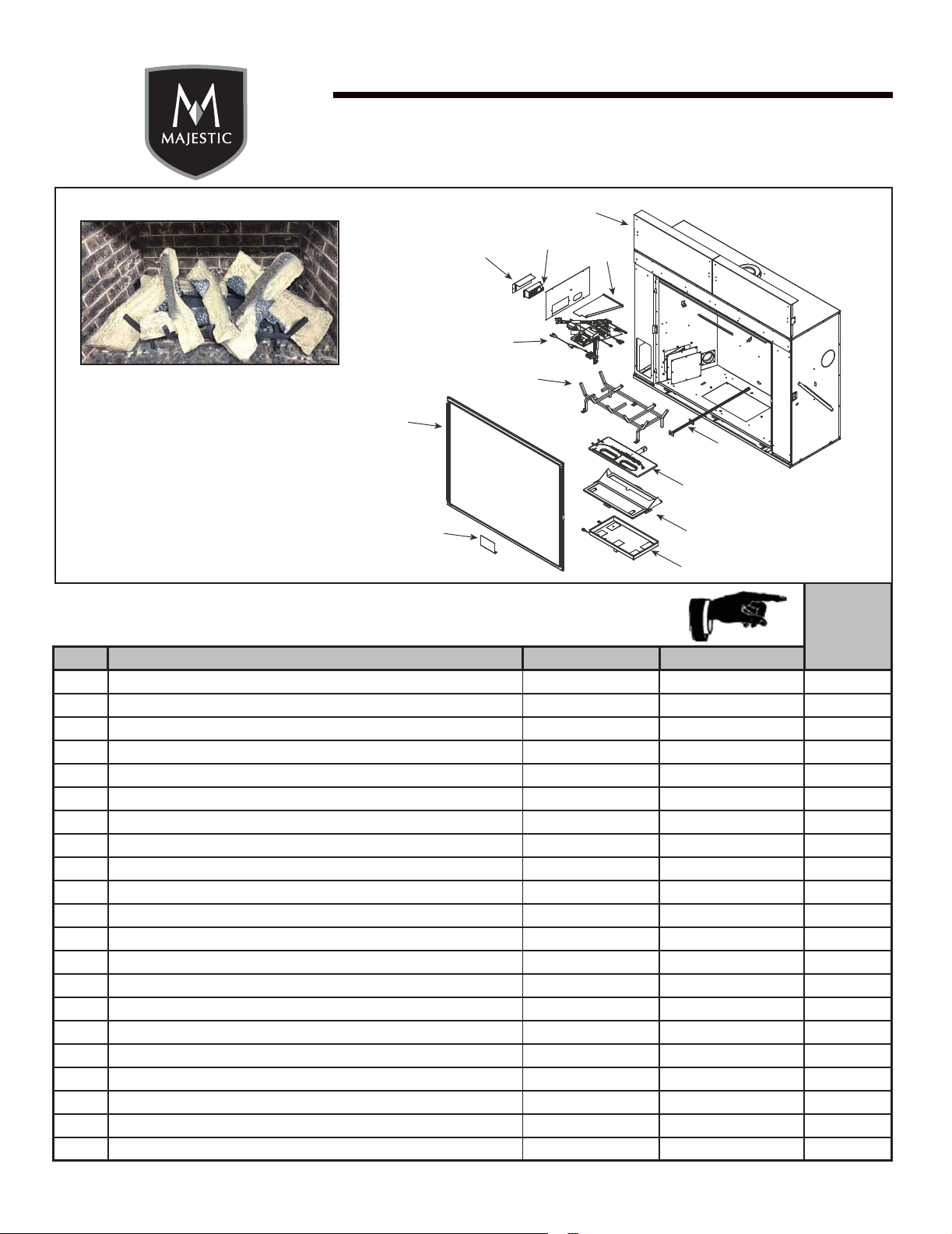
ITEM DESCRIPTION COMMENTS PART NUMBER
Log Assembly LOGSMQ36 Y
1 Log 1 SRV2270-701
2 Log 2 SRV2270-702
3 Log 3 SRV2270-703
4 Log 4 SRV2270-704
5 Log 5 SRV2270-706
6 Log 6 SRV2271-705
7 Log 7 SRV2271-707
8 Heat Shield, Header Qty 2 req 2280-105
9 Heat Shield, Valve 2281-153
10 Junction box 4021-013 Y
11 J-Box Bracket 2281-154
12 Grate Assembly 2270-015
13 Valve Assembly Refer to Valve Page
14 Glass Assembly GLA-2280
15 Finishing Spacer 2281-113
16 LED Tub Assembly 2270-027
17 Inner Glass Frame Assembly 2280-019
18 Burner Assembly 2270-007 Y
19 Ori ce Bracket Flex 2012-008 Y
20 Access Plate 2281-117
Additional service parts on following page. 7/17
1
2
3
4
5
6
7
Marquis 36” Gas Fireplace - DV
Log Set Assembly
MARQ36IN
Service Parts
8
9
10
11
12
13
14
15
16
17
18
19
20
B. Service Parts
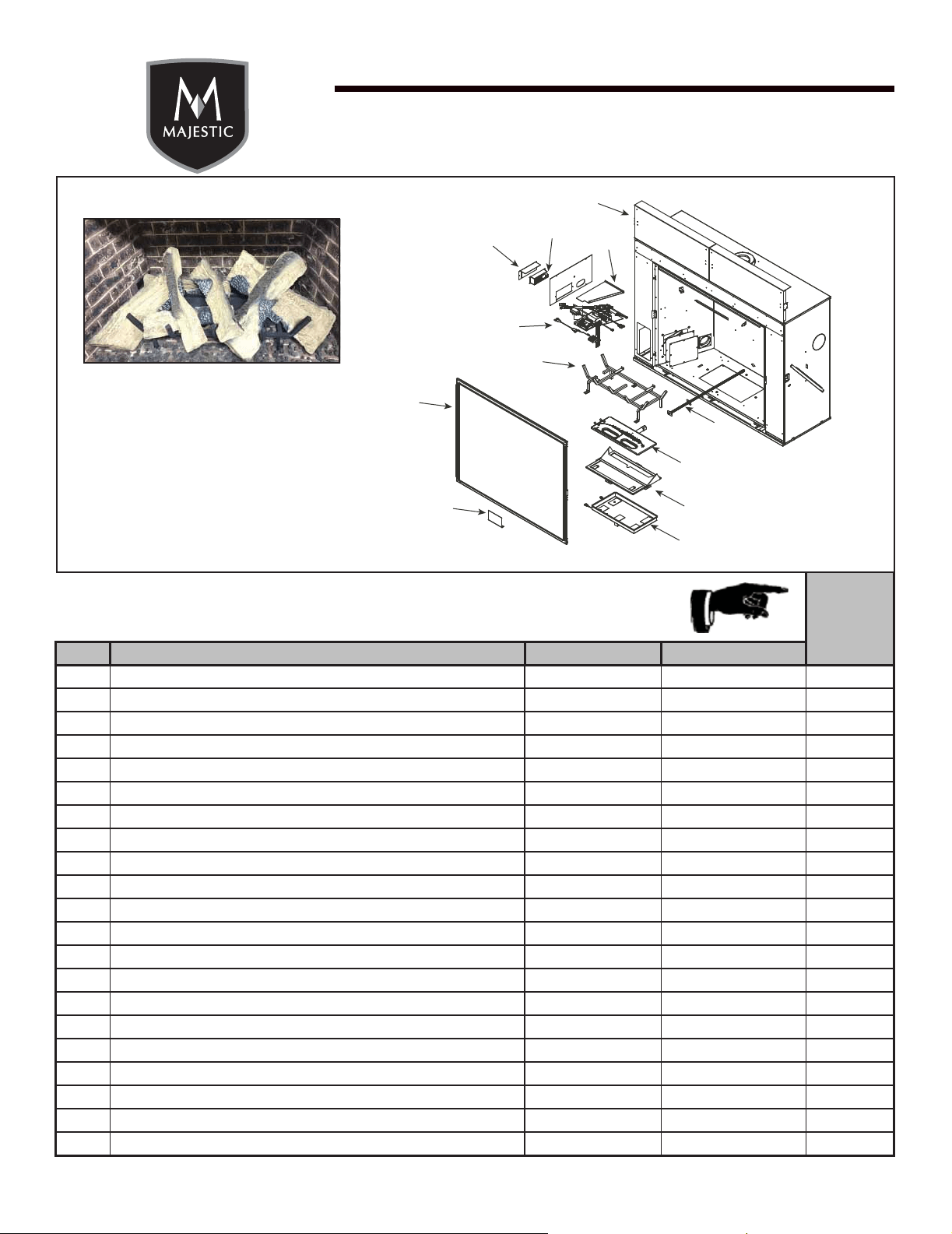
25
Majestic • Owner’s Manual MARQ36IN, MARQ42IN • 2270-981 Rev. i • 8/17
Beginning Manufacturing Date: Oct 2016
Ending Manufacturing Date: Active
IMPORTANT: THIS IS DATED INFORMATION. Parts must be ordered from a dealer or distributor.
Hearth and Home Technologies does not sell directly to consumers. Provide model number
and serial number when requesting service parts from your dealer or distributor.
Stocked
at Depot
ITEM DESCRIPTION COMMENTS PART NUMBER
Log Assembly LOGSMQ42 Y
1 Log 1 SRV2271-701
2 Log 2 SRV2271-702
3 Log 3 SRV2271-703
4 Log 4 SRV2271-704
5 Log 5 SRV2271-705
6 Log 6 SRV2271-706
7 Log 7 SRV2271-707
8 Heat Shield, Header Qty 2 req 2281-105
9 Heat Shield, Valve 2281-153
10 Junction box 4021-013 Y
11 J-Box Bracket 2281-154
12 Grate Assembly 2271-015
13 Valve Assembly Refer to Valve Page
14 Glass Assembly GLA-2281
15 Finishing Spacer 2281-113
16 LED Tub Assembly 2271-027
17 Inner Glass Frame Assembly 2281-019
18 Burner Assembly 2271-007 Y
19 Ori ce Bracket Flex 2012-008 Y
20 Access Plate 2281-117
Additional service parts on following page. 7/17
1
2
3
4
5
6
7
Marquis 42” Gas Fireplace - DV
Log Set Assembly
MARQ42IN
Service Parts
8
9
10
11
12
13
14
15
16
17
18
19
20
Majestic • Owner’s Manual MARQ36IN, MARQ42IN • 2270-981 Rev. i • 8/17 26
Beginning Manufacturing Date: Oct 2016
Ending Manufacturing Date: Active
IMPORTANT: THIS IS DATED INFORMATION. Parts must be ordered from a dealer or distributor. Hearth and
Home Technologies does not sell directly to consumers. Provide model number and serial number when
requesting service parts from your dealer or distributor.
Stocked
at Depot
ITEM DESCRIPTION COMMENTS PART NUMBER
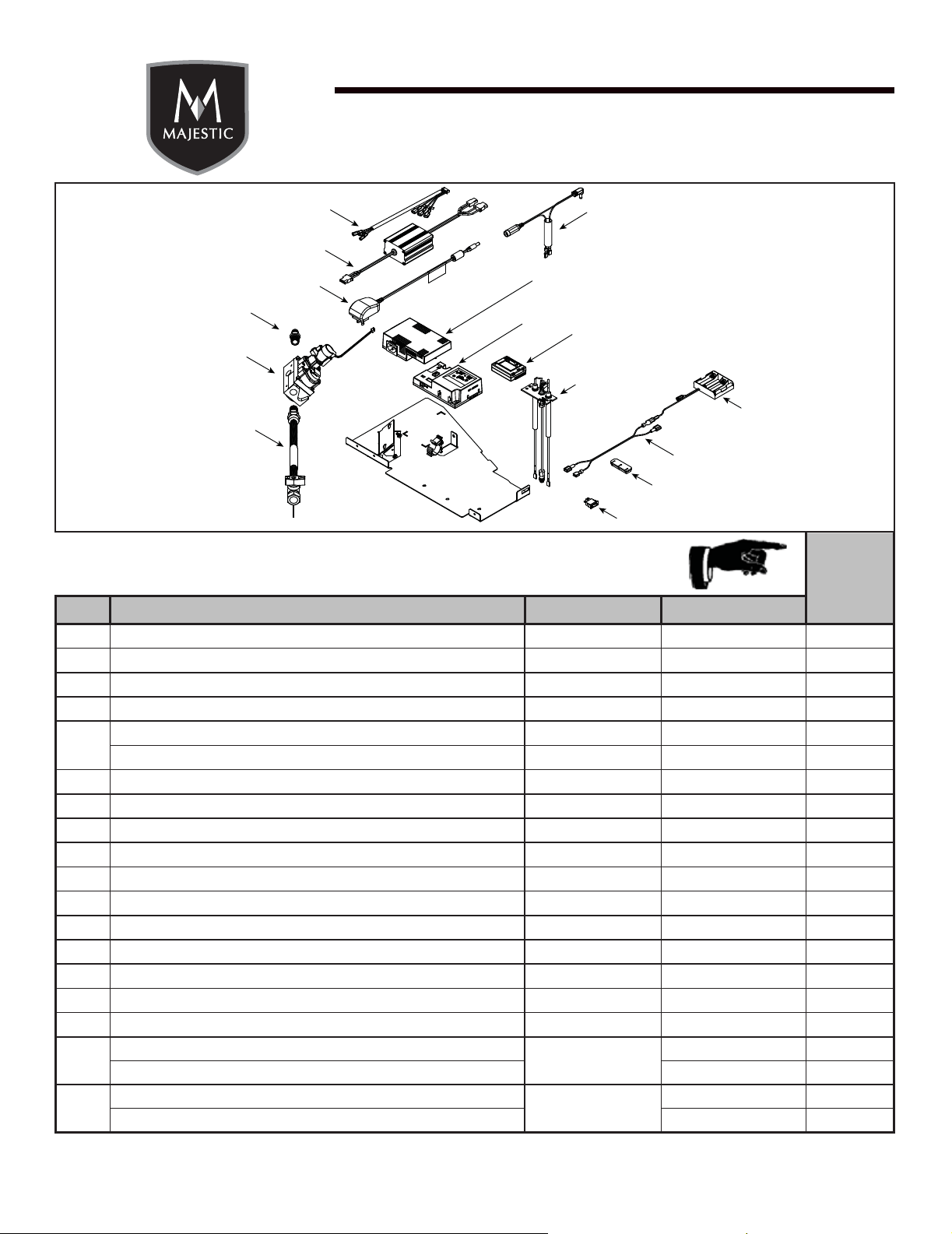
13.1
Wire Harness 2326-132
Y
13.2
Led Controller 2166-336
Y
13.3
Power Supply 2326-131
Y
13.4
Male connector Pkg of 5 303-315/5
Y
13.5
Valve NG 2166-302
Y
Valve LP 2166-303
Y
13.6
Flex Ball Valve Assembly. 12” 302-320A
Y
13.7
Rocker Switch 2206-299
Y
13.8
Grommet 2118-420
13.9
Wire, Battery jumps, 10 in 2281-196
Y
13.10
**Battery Pack 2326-134
Y
13.11
Pilot Assembly, NG 2270-012
Y
13.12
Module, RF FCC 2326-120
Y
13.13
Module, Control IFT 2326-130
Y
13.14
Aux Module, B Type 2326-150
Y
13.15
Wall Switch Jumper Wire 2326-135
Y
Cable, B Type AC Module 2326-152
Y
Ori ce NG (#30C)
MARQ36IN
582-830 Y
Ori ce LP (#47C) 582-847 Y
Ori ce NG (#26C)
MARQ42IN
582-826 Y
Ori ce LP (#45C) 582-845 Y
**Fuse for battery pack can be sourced locally, not a warranty item. Specs are 250v, 1A fuse, 3/4” long
MARQ36IN / MARQ42IN
13.1
13.2
13.3
13.4
13.5
13.6
13.7
13.8
13.9
13.10
13.11
13.12
13.13
13.14
13.15
#13 Valve Assembly
27
Majestic • Owner’s Manual MARQ36IN, MARQ42IN • 2270-981 Rev. i • 8/17
Beginning Manufacturing Date: Oct 2016
Ending Manufacturing Date: Active
IMPORTANT: THIS IS DATED INFORMATION. Parts must be ordered from a dealer or distributor. Hearth and
Home Technologies does not sell directly to consumers. Provide model number and serial number when
requesting service parts from your dealer or distributor.
Stocked
at Depot
ITEM DESCRIPTION COMMENTS PART NUMBER
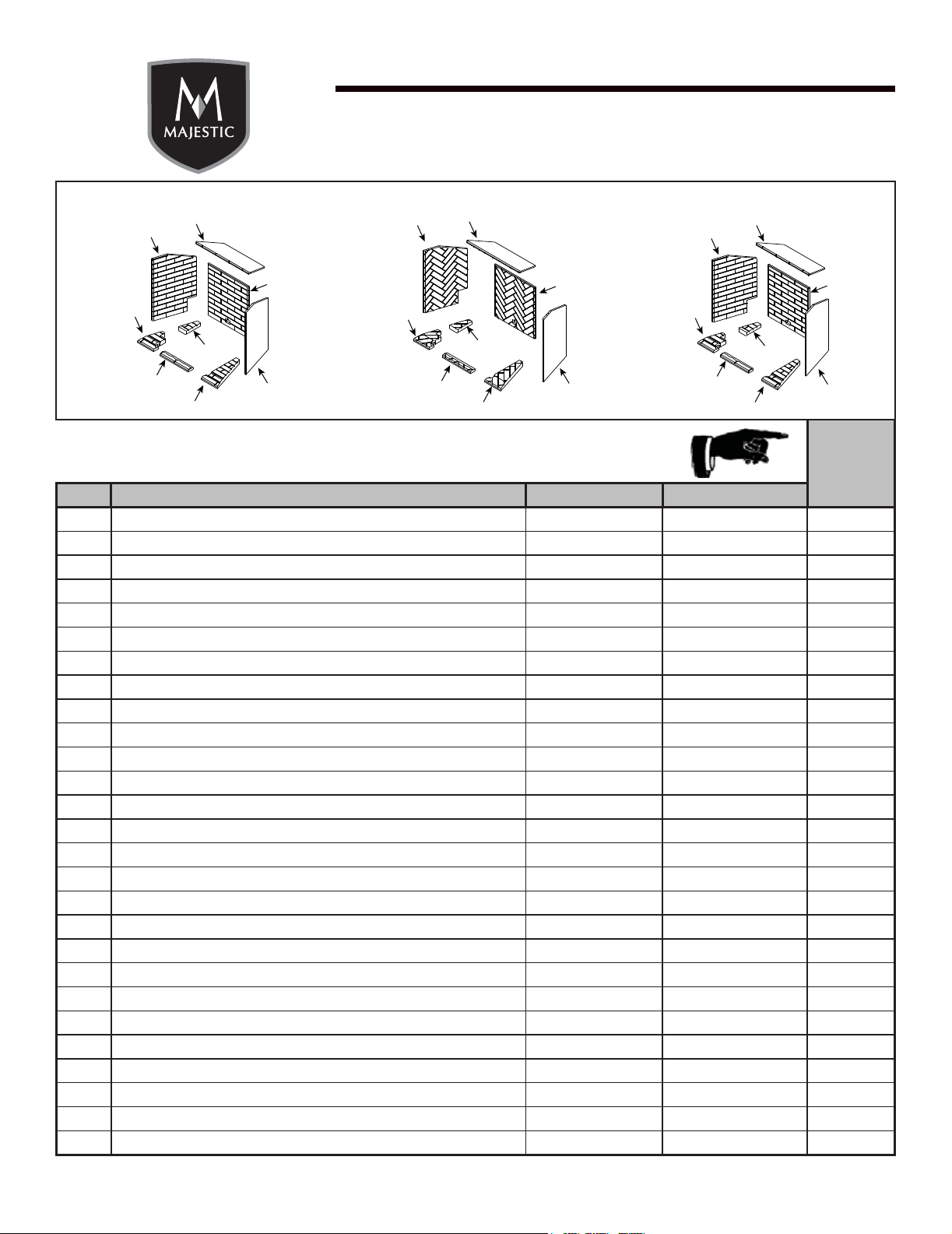
Refractory, Tavern Brown BRICKMQ36TB
21.1 Refractory, Top SRV2270-716
21.2 Refractory, Left SRV2270-713
21.3 Refractory, Left Base SRV2270-718
21.4 Refractory, Left Base SRV2270-711
21.5 Refractory, Front Base SRV2270-710
21.6 Refractory, Right Base SRV2270-712
21.7 Refractory, Right SRV2270-714
21.8 Refractory, Back SRV2270-715
Refractory, Herringbone BRICKMQ36HB
22.1 Refractory, Top SRV2270-726
22.2 Refractory, Left SRV2270-723
22.3 Refractory, Left Base SRV2270-728
22.4 Refractory, Left Base SRV2270-721
22.5 Refractory, Front Base SRV2270-720
22.6 Refractory, Right Base SRV2280-722
22.7 Refractory, Right SRV2280-724
22.8 Refractory, Back SRV2280-725
Refractory, Cottage Red BRICKMQ36CR
23.1 Refractory, Top SRV2270-736
23.2 Refractory, Left SRV2270-733
23.3 Refractory, Left Base SRV2270-738
23.4 Refractory, Left Base SRV2270-731
23.5 Refractory, Front Base SRV2270-730
23.6 Refractory, Right Base SRV2270-732
23.7 Refractory, Right SRV2270-734
23.8 Refractory, Back SRV2270-735
Additional service parts on following page.
MARQ36IN
21.1
22.1
21.2
22.2
21.3
22.3
21.4
22.4
21.5
22.5
21.6
22.6
21.7
22.7
21.8
22.8
23.1
23.2
23.3
23.4
23.5
23.6
23.7
23.8
#21 Tavern Brown Refractory #22 Herringbone Refractory #23 Cottage Red Refractory
Majestic • Owner’s Manual MARQ36IN, MARQ42IN • 2270-981 Rev. i • 8/17 28
Beginning Manufacturing Date: Oct 2016
Ending Manufacturing Date: Active
MARQ42IN
IMPORTANT: THIS IS DATED INFORMATION. Parts must be ordered from a dealer or distributor. Hearth and
Home Technologies does not sell directly to consumers. Provide model number and serial number when
requesting service parts from your dealer or distributor.
Stocked
at Depot
ITEM DESCRIPTION COMMENTS PART NUMBER
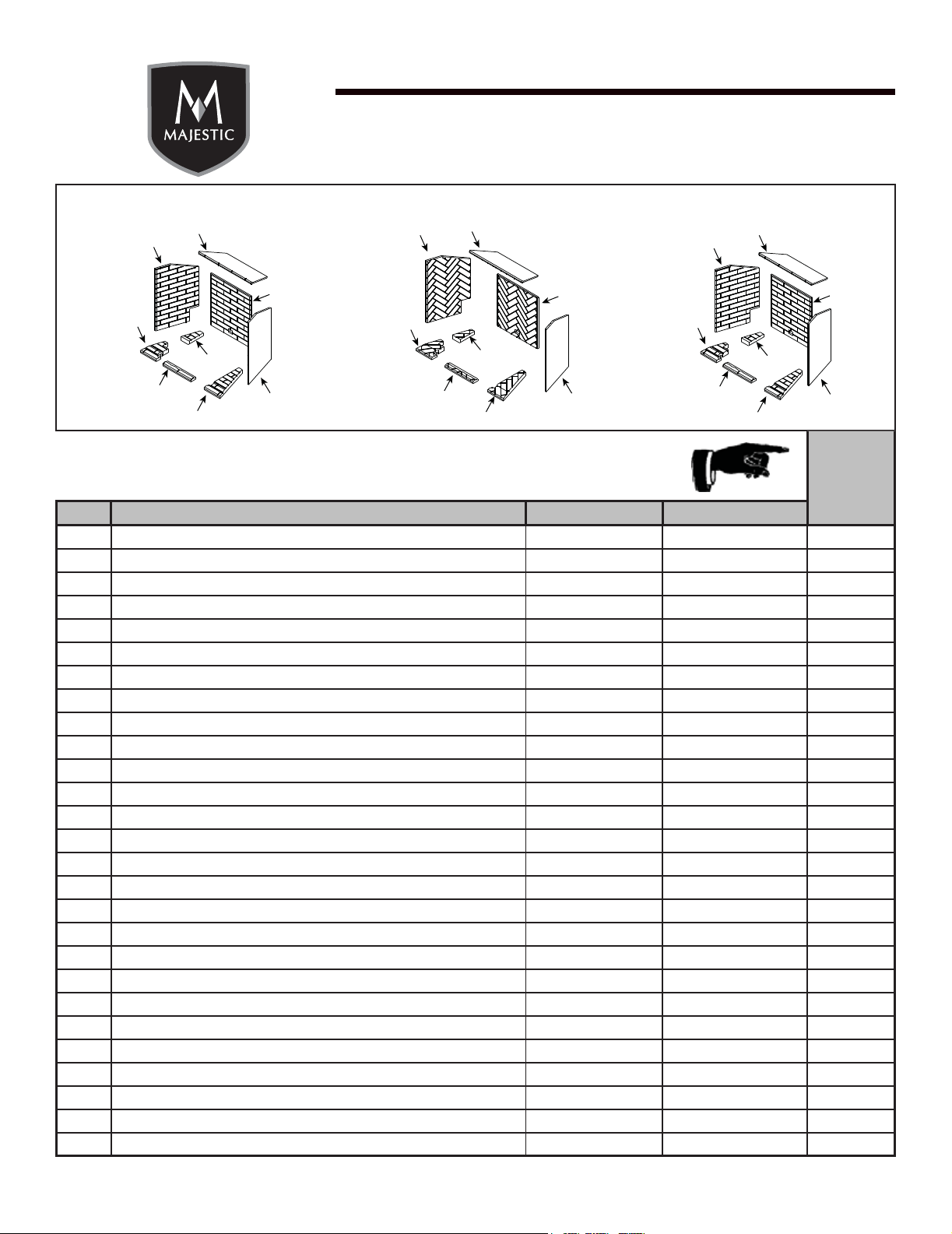
Refractory, Tavern Brown BRICKMQ42TB
21.1 Refractory, Top SRV2271-716
21.2 Refractory, Left SRV2271-713
21.3 Refractory, Left Base SRV2271-718
21.4 Refractory, Left Base SRV2271-711
21.5 Refractory, Front Base SRV2271-710
21.6 Refractory, Right Base SRV2271-712
21.7 Refractory, Right SRV2271-714
21.8 Refractory, Back SRV2271-715
Refractory, Herringbone BRICKMQ42HB
22.1 Refractory, Top SRV2271-726
22.2 Refractory, Left SRV2271-723
22.3 Refractory, Left Base SRV2271-728
22.4 Refractory, Left Base SRV2271-721
22.5 Refractory, Front Base SRV2271-720
22.6 Refractory, Right Base SRV2271-722
22.7 Refractory, Right SRV2271-724
22.8 Refractory, Back SRV2271-725
Refractory, Cottage Red BRICKMQ42CR
23.1 Refractory, Top SRV2271-736
23.2 Refractory, Left SRV2271-733
23.3 Refractory, Left Base SRV2271-738
23.4 Refractory, Left Base SRV2271-731
23.5 Refractory, Front Base SRV2271-730
23.6 Refractory, Right Base SRV2271-732
23.7 Refractory, Right SRV2271-734
23.8 Refractory, Back SRV2271-735
Additional service parts on following page.
21.1
22.1
21.2
22.2
21.3
22.3
21.4
22.4
21.5
22.5
21.6
22.6
21.7
22.7
21.8
22.8
23.1
23.2
23.3
23.4
23.5
23.6
23.7
23.8
#21 Tavern Brown Refractory #22 Herringbone Refractory #23 Cottage Red Refractory
29
Majestic • Owner’s Manual MARQ36IN, MARQ42IN • 2270-981 Rev. i • 8/17
Beginning Manufacturing Date: Oct 2016
Ending Manufacturing Date: Active
MARQ42IN
IMPORTANT: THIS IS DATED INFORMATION. Parts must be ordered from a dealer or distributor. Hearth and
Home Technologies does not sell directly to consumers. Provide model number and serial number when
requesting service parts from your dealer or distributor.
Stocked
at Depot
ITEM DESCRIPTION COMMENTS PART NUMBER
Refractory, Tavern Brown BRICKMQ42TB
21.1 Refractory, Top SRV2271-716
21.2 Refractory, Left SRV2271-713
21.3 Refractory, Left Base SRV2271-718
21.4 Refractory, Left Base SRV2271-711
21.5 Refractory, Front Base SRV2271-710
21.6 Refractory, Right Base SRV2271-712
21.7 Refractory, Right SRV2271-714
21.8 Refractory, Back SRV2271-715
Refractory, Herringbone BRICKMQ42HB
22.1 Refractory, Top SRV2271-726
22.2 Refractory, Left SRV2271-723
22.3 Refractory, Left Base SRV2271-728
22.4 Refractory, Left Base SRV2271-721
22.5 Refractory, Front Base SRV2271-720
22.6 Refractory, Right Base SRV2271-722
22.7 Refractory, Right SRV2271-724
22.8 Refractory, Back SRV2271-725
Refractory, Cottage Red BRICKMQ42CR
23.1 Refractory, Top SRV2271-736
23.2 Refractory, Left SRV2271-733
23.3 Refractory, Left Base SRV2271-738
23.4 Refractory, Left Base SRV2271-731
23.5 Refractory, Front Base SRV2271-730
23.6 Refractory, Right Base SRV2271-732
23.7 Refractory, Right SRV2271-734
23.8 Refractory, Back SRV2271-735
Additional service parts on following page.
21.1
22.1
21.2
22.2
21.3
22.3
21.4
22.4
21.5
22.5
21.6
22.6
21.7
22.7
21.8
22.8
23.1
23.2
23.3
23.4
23.5
23.6
23.7
23.8
#21 Tavern Brown Refractory #22 Herringbone Refractory #23 Cottage Red Refractory
Beginning Manufacturing Date: Oct 2016
Ending Manufacturing Date: Active
MARQ36IN / MARQ42IN
IMPORTANT: THIS IS DATED INFORMATION. Parts must be ordered from a dealer or distributor. Hearth and
Home Technologies does not sell directly to consumers. Provide model number and serial number when
requesting service parts from your dealer or distributor.
Stocked
at Depot
ITEM DESCRIPTION COMMENTS PART NUMBER
Air Shutter Burner Tube 2052-157
Exhaust Restrictor 385-128
Gasket Assembly SRV2281-080
Glass Clip Tool 2281-375
Glass Latch Assembly Qty 2 req 2146-413 Y
Glass Latch Assembly
MARQ36 (Qty 3 req)
2155-045 Y
MARQ42 (Qty 4 req)
Kapton Lens, Light Orange Qty 2 req 2166-171 Y
Lava Rock 4021-296
Mineral Wool 050-721
Nut 1/4-20 Hex Insert 7000-236
Non-Comb Assembly
MARQ36IN 2280-040
MARQ42IN 2281-040
Refractory Tab Qty 2 req 2281-114
Relief Door Assembly 7011-011
Remote, RC 400 2326-110 Y
Screws Pkg of 20 2300-275-20 Y
Top Refractory Support 2281-190
Trim Strip, Sides
MARQ36IN 2280-366
MARQ42IN 2281-366
Trim Strip, Top
MARQ36IN 2280-367
MARQ42IN 2281-367
Conversion Kits
Conversion Kit NG
MARQ36IN
NGKMARQ36 Y
Conversion Kit LP LPKMARQ36 Y
Conversion Kit NG
MARQ42IN
NGKMARQ42 Y
Conversion Kit LP LPKMARQ42 Y
Pilot Ori ce NG 593-528 Y
Pilot Ori ce LP 593-527 Y
Regulator NG w/stepper motor NGK-DXV-50 Y
Regulator LP w/stepper motor LPK-DXV-50 Y
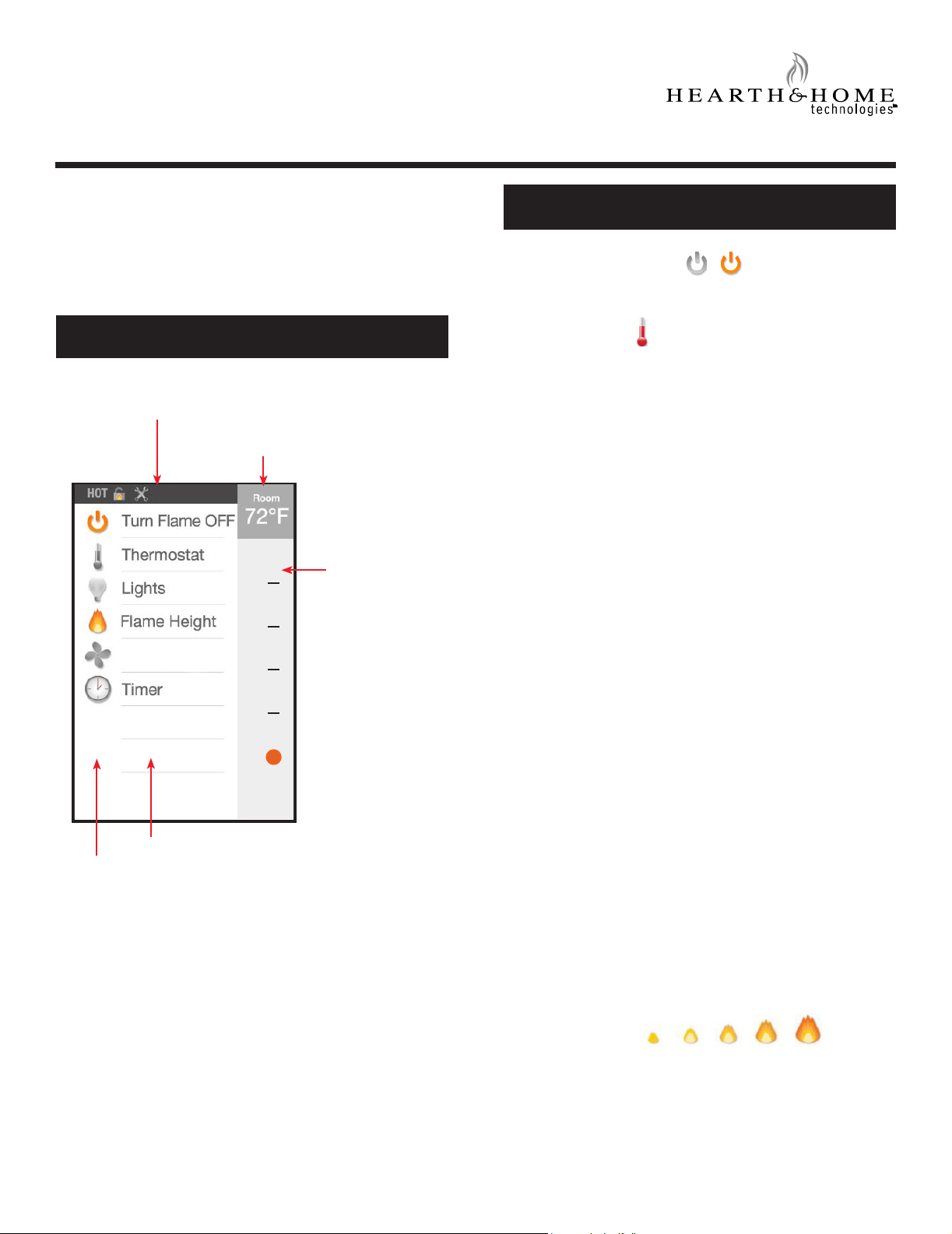
Majestic • Owner’s Manual MARQ36IN, MARQ42IN • 2270-981 Rev. i • 8/17 30
C. IFT-RC400 User Guide
User Guide
IFT-RC400
IntelliFire™ Touch Remote Control
SCREEN
Turn Flame On/Off
Toggle this function to turn ON or OFF your appliance.
Thermostat
Introduction
This user guide serves as a quick reference to the screen,
functions and indicators on your IntelliFire™ Touch
Remote control.
FUNCTIONS
Flame Height
You can set your desired ame height level to affect the
ambiance and control the heat output.
Your appliance will remember the previous ame height
setting and adjust the ame to that level 10 seconds after
start.
You can set and maintain your desired room temperature
with the thermostat function. This function automatically
adjusts your appliance to maintain the desired set
temperature (ST).
To achieve the most accurate thermostat function, place
your remote control in the same general space that
you want to have the temperature controlled by your
appliance. For best results, keep your remote
control away from direct radiant heat from the appliance,
adjacent windows and doors, HVAC vents, and direct
sunlight.
To use the thermostat function, access the main menu
screen on your remote, and select thermostat. Next,
simply select your desired set temperature by using the
arrow keys and press ON to conrm the setting. The
actual room temperature (RT), measured by your remote
control, will be displayed in the upper right corner of the
main menu screen. To turn the thermostat function off,
simply select thermostat on the main menu screen and
select OFF.
If the RT cools to more than 2 °F lower than the ST for
at least 2 minutes, then your appliance will automatically
turn ON. The thermostat function will automatically adjust
the ame height based on the difference between the RT
and the ST. As the RT rises closer to the ST, the ame
height will automatically adjust down. If the RT rises 2 °F
above the ST for at least 2 minutes, then your appliance
will automatically turn OFF.
During thermostat use, you will not be able to set your
desired ame height level. Your appliance will
automatically adjust ame height based on the difference
between the RT and ST.
FUNCTIONS
DYNAMIC ICONS
INDICATOR BAR
SELECTION
INDEX
ROOM TEMPERATURE
DISPLAY
1
OFF
2
3
4
Fan Speed

31
Majestic • Owner’s Manual MARQ36IN, MARQ42IN • 2270-981 Rev. i • 8/17
HOT
This indicates that the appliance is still hot, when the
appliance is off.
Remote Control
Battery
Remote control battery life indicator. If the batteries on
your remote are low, a notication will display on the
screen asking you to ‘replace remote batteries’.
Refer to Replace Remote Batteries Section.
Backup Battery
The battery life indicator is for a backup power source
located inside your appliance. It is intended to operate
the appliance in the event of a power failure. Consult
your owner’s manual for your appliance on how to utilize
this feature.
Batteries should only be used as an appliance power
source in the event of a power outage. Batteries should
not be used as a primary long-term power source.
Note: Battery backup is not available if a Power Vent is
installed.
INDICATORS
Cold Climate
This function turns on a small pilot ame and keeps the
air inside your appliance warm while not in use. It is a
useful feature in colder weather to minimize condensa-
tion on the appliance glass.
Note: This feature is disabled when a Power Vent is
installed on the appliance.
Temperature Display
You can toggle the temperature display between °F and
°C by tapping on the Room Temperature area.
Lights*
If your appliance is equipped with lighting features, use
this function to adjust them to your desired intensity. The
lights can be adjusted whether the ame is on or off.
* = Optional Feature
Power Vent*
Power Vent technology makes it possible to install a gas
appliance virtually anywhere. The Power Vent is a fan
powered accessory that pulls exhaust from the appliance
providing longer and more exible venting congurations.
A Power Vent is a standard accessory on some products
and an option on others. When a Power Vent is detected,
a pre-purge of 120 seconds is automatically required.
During this time, the power icon is temporarily replaced
with 2MIN, 90s, 60s, and 30s, denoting the countdown
until the appliance turns on. All other functions, except
for TURN FLAME OFF are disabled during this time.
The Power Vent is always ON when the ame is ON.
When the ame is turned off, a post-purge time of
approximately 20 minutes will occur.
Cold-climate function and battery backup are disabled if
a Power Vent is used.
FUNCTIONS
Fan Speed*
If your appliance is equipped with the fan feature, use
this function to increase or decrease the amount of heat
released into your room. A built-in delay timer will turn
the fan on three minutes after your appliance has been
running to prevent cool air from being pushed into the
room. If the ame is turned off with the fan ON, the fan
will continue to run for 12 minutes then shutdown as long
as the ame stays off.
Your appliance will remember the previous fan speed
setting and automatically adjust to that level 10 seconds
after start-up.
Diagnostics Menu
Tap anywhere in the gray indicator bar area to display all
functions below. When red, it indicates an error has been
detected.
Timer
For your convenience a timer can be set up to 180 min-
utes to turn off your appliance. The timer will turn the
ame off automatically at the selected preset time.
To use the timer function, press “Timer” on the main
screen, select time by using up and down arrows, then
press “on”. To turn the timer off , select timer from main
screen and select “off”.
Child Lock
A child lock is available underneath the battery cover. When
the lock is enabled, the screen will lock and no functions can
be selected. The lock icon will appear on the remote control.
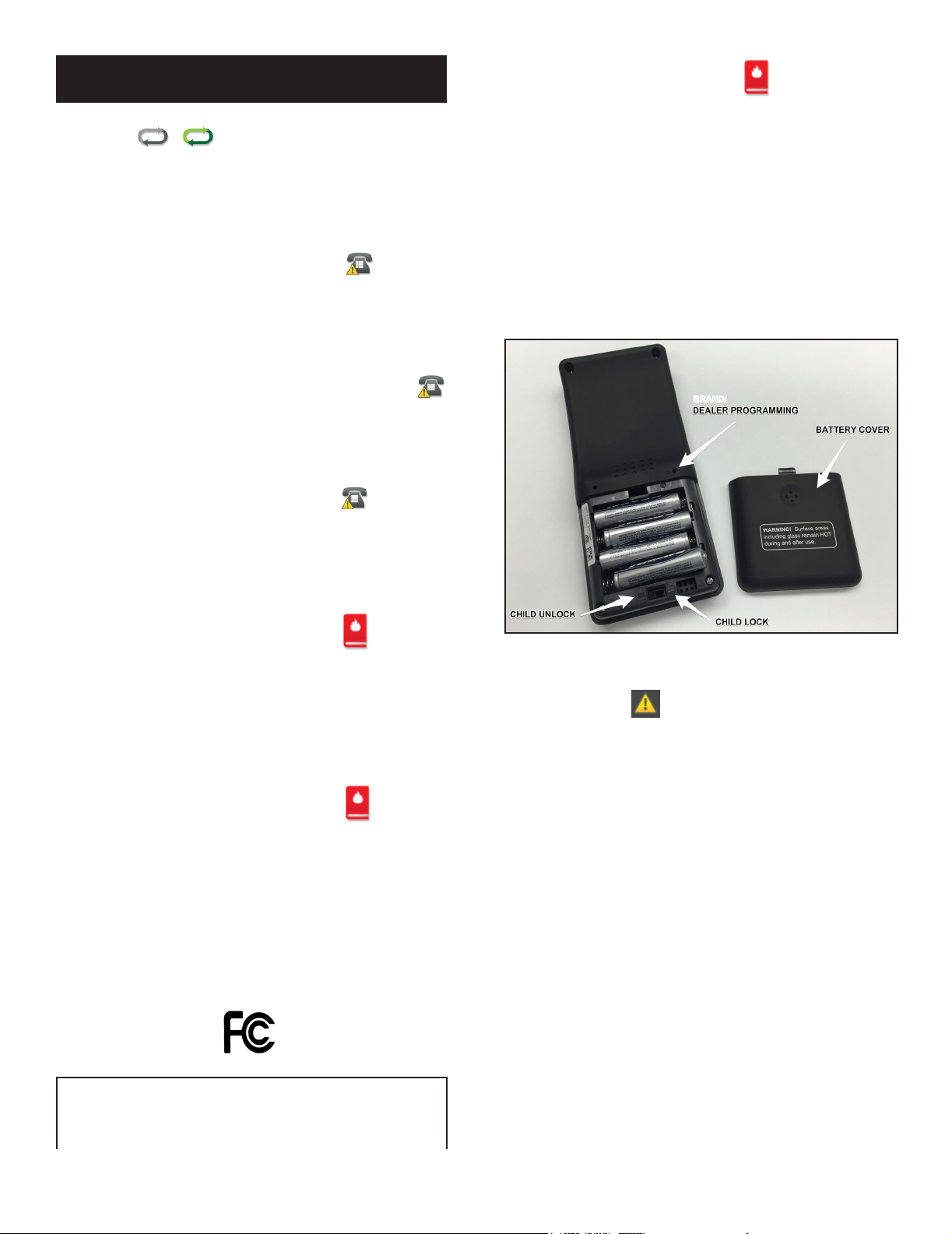
Majestic • Owner’s Manual MARQ36IN, MARQ42IN • 2270-981 Rev. i • 8/17 32
Call Dealer - Pilot Flame Error
Pairing
The green icon indicates that the remote is paired to your
appliance and can operate it. If the icon is gray, it is not
paired. Please contact your dealer and report this issue.
Call Dealer - Power Vent, Fan,
Lights
Your appliance has detected that an accessory is not
functional. Please contact your dealer to report this issue.
Fan will turn on within 3 minutes
Your appliance has a built-in delay that prevents the fan
from operating within the rst 3 minutes of operating the
appliance. This allows the air to be heated to a comfortable
temperature before the fan circulates it.
Maintenance
Your appliance will remind you to schedule routine service
after 300 hours of Flame ON time is accumulated. When
the message below appears on your remote display (with
your dealer contact info if originally programmed into the
remote at installation), please contact your dealer for a
300 hour inspection to ensure your appliance is operating
at peak performance.
To reset the 300-hour maintenance reminder:
1. Wake-up your remote control display by touching
anywhere on the touch screen.
2. Turn the remote over and insert, press and hold a
paperclip type object in the ‘P’ button hole for at least
10 seconds.
3. Double-beep from the remote will indicate that the
remote will reset the 300-hour maintenance reminder.
If the remote 300-hour maintenance message does not
clear on the rst try, repeat above steps.
INDICATORS
Your appliance has been disabled. Please contact your
dealer and report this issue.
Call Dealer - Appliance Safely disabled
Your appliance has been disabled. Please contact your
dealer and report this issue.
Remote Control Communication
Error
Your remote control is not able to communicate with your
appliance. Verify that you have power to your appliance.
If there is a power outage, verify that appliance battery
backup is tted with new batteries. After taking these
actions, communication can be re-established by pressing
the screen to activate the remote control. It may take
several minutes for remote control to re-establish pairing.
Replace Remote Batteries
Your remote batteries are low. Recommend immediate
replacement before using remote to control appliance.
1. Set the RC400 face down on at surface when install-
ing batteries. DO NOT touch the screen during bat-
tery installation or removal.
2. Remove the battery cover from the back of the IFT-
RC400 and install the four AAA batteries in the proper
orientation marked in the battery cavity. Ensure the
child lock switch adjacent to the battery cavity is in the
UNLOCKED position. See Figure 1.
Figure 1. Install Batteries & Child Safety
BRAND/
This equipment complies with part 15 of FCC RF Rules. Op-
eration is subject to the following two conditions:
1) This device may not cause interference and
2) This device may accept any interference, including interfer-
ence that may cause undesired operation of the device.
2326-983 Rev. E
33
Majestic • Owner’s Manual MARQ36IN, MARQ42IN • 2270-981 Rev. i • 8/17
Majestic, a brand of Hearth & Home Technologies
7571 215
th
Street West, Lakeville, MN 55044
www.majesticproducts.com
D. Contact Information
Please contact your Majestic dealer with any questions or concerns.
For the location of your nearest Majestic dealer,
please visit www.majesticproducts.com.
- NOTES -
________________________________________________________________________________
________________________________________________________________________________
________________________________________________________________________________
________________________________________________________________________________
________________________________________________________________________________
________________________________________________________________________________
________________________________________________________________________________
________________________________________________________________________________
________________________________________________________________________________
DO NOT DISCARD THIS MANUAL
NOTICE
• Leave this manual with
party responsible for use
and operation.
• Important operating
and maintenance
instructions included.
• Read, understand and follow
these instructions for safe
installation and operation.
Printed in U.S.A. - Copyright 2017
This product may be covered by one or more of the following patents: (United States) 5613487, 5647340, 5890485,
5941237, 6006743, 6019099, 6053165, 6145502, 6374822, 6484712, 6601579, 6769426, 6863064, 7077122, 7098269,
7258116, 7470729, 8147240 or other U.S. and foreign patents pending.
2000-945C

