

en
2
Table of contents
1 Safety ...........................................4
1.1 General information................... 4
1.2 Intended use.............................. 4
1.3 Restriction on user group.......... 4
1.4 Safe transport............................ 4
1.5 Safe installation ......................... 5
1.6 Safe use .................................... 6
1.7 Damaged appliance.................. 8
2 Preventing material damage ....10
3 Environmental protection and
saving energy............................10
3.1 Disposing of packaging .......... 10
3.2 Saving energy.......................... 10
4 Installation and connection......11
4.1 Scope of delivery..................... 11
4.2 Criteria for the installation
location .................................... 11
4.3 Installing the appliance ........... 12
4.4 Preparing the appliance for
the first time............................. 12
4.5 Connecting the appliance to
the electricity supply................ 12
5 Familiarising yourself with
your appliance...........................13
5.1 Appliance ................................ 13
5.2 Control panel........................... 14
6 Features.....................................15
6.1 Shelf......................................... 15
6.2 Variable shelf........................... 15
6.3 Bottle shelf............................... 15
6.4 Storage container.................... 15
6.5 Fruit and vegetable con-
tainer........................................ 15
6.6 Butter and cheese compart-
ment......................................... 16
6.7 Variable door tray.................... 16
6.8 Accessories............................. 16
7 Basic operation .........................16
7.1 Switching on the appliance ..... 16
7.2 Operating tips.......................... 17
7.3 Switching off the appliance ..... 17
7.4 Setting the temperature........... 17
8 Additional functions .................17
8.1 Super cooling ......................... 17
8.2 Automatic Super freezing........ 17
8.3 Manual Super freezing ............ 18
8.4 Holiday mode .......................... 18
8.5 Energy-saving mode................ 19
8.6 Freshness mode...................... 19
8.7 Sabbath mode......................... 19
9 Alarm..........................................19
9.1 Door alarm .............................. 19
9.2 Temperature alarm .................. 20
10 Refrigerator compartment ......20
10.1 Tips for storing food in the
refrigerator compartment ...... 20
10.2 Chill zones in the refriger-
ator compartment.................. 20
11 Freezer compartment..............21
11.1 Freezing capacity .................. 21
11.2 Fully utilising the freezer
compartment volume ............ 21
11.3 Tips for storing food in the
freezer compartment ............. 21
11.4 Tips for freezing fresh food ... 21
11.5 Shelf life of frozen food at
−18°C................................... 22
11.6 Defrosting methods for
frozen food ............................ 22
12 Defrosting................................22
12.1 Defrosting in the freezer
compartment ......................... 22
13 Cleaning and servicing...........22
13.1 Preparing the appliance for
cleaning ................................. 22

en
3
13.2 Cleaning the appliance ......... 23
13.3 Removing the fittings............. 23
13.4 Removing appliance com-
ponents.................................. 25
14 Troubleshooting......................26
14.1 Power failure.......................... 29
14.2 Conducting an appliance
self-test .................................. 29
15 Storage and disposal..............29
15.1 Taking the appliance out of
operation ............................... 29
15.2 Disposing of old appliance ... 30
16 Customer Service....................30
16.1 Product number (E-Nr.),
production number (FD)
and consecutive numbering
(Z-Nr.) .................................... 31
17 Technical data .........................31
17.1 Information regarding Free
and Open Source Software... 31
18 Declaration of Conformity ......32
18.1 Statement of Compliance
for Great Britain ..................... 32
en Safety
4
1 Safety
Observe the following safety instructions.
1.1 General information
¡ Read this instruction manual carefully.
¡ Keep the instruction manual and the product information safe
for future reference or for the next owner.
¡ Do not connect the appliance if it has been damaged in transit.
1.2 Intended use
Only use this appliance:
¡ for chilling and freezing food and for making ice cubes.
¡ in private households and in enclosed spaces in a domestic en-
vironment.
¡ Up to an altitude of 2000 m above sea level.
1.3 Restriction on user group
This appliance may be used by children aged 8 or over and by
people who have reduced physical, sensory or mental abilities or
inadequate experience and/or knowledge, provided that they are
supervised or have been instructed on how to use the appliance
safely and have understood the resulting dangers.
Do not let children play with the appliance.
Cleaning and user maintenance must not be performed by chil-
dren unless they are being supervised.
Children above the age of three years old and younger than eight
years old may load and unload the the fridge-freezer.
1.4 Safe transport
WARNING‒Risk of injury!
The heavy weight of the appliance may result in injury when lifted.
▶ Do not lift the appliance on your own.
Safety en
5
1.5 Safe installation
WARNING‒Risk of electric shock!
Incorrect installation is dangerous.
▶ Connect and operate the appliance only in accordance with the
specifications on the rating plate.
▶ Connect the appliance to a power supply with alternating cur-
rent only via a properly installed socket with earthing.
▶ The protective conductor system of the domestic electrical in-
stallation must be properly installed.
▶ Never equip the appliance with an external switching device,
e.g. a timer or remote control.
▶ When the appliance is installed, the mains plug of the power
cord must be freely accessible. If free access is not possible, an
isolating switch must be integrated into the permanent electrical
installation according to the installation regulations.
▶ When installing the appliance, check that the power cable is not
trapped or damaged.
If the insulation of the power cord is damaged, this is dangerous.
▶ Never let the power cord come into contact with heat sources.
WARNING‒Risk of explosion!
If the appliance's ventilation openings are closed off, a leak in the
refrigeration circuit may result in a flammable mixture of gas and
air.
▶ Keep ventilation openings in the appliance casing or in the in-
tegrated casing clear of obstruction.
WARNING‒Risk of fire!
It is dangerous to use an extended power cord and non-approved
adapters.
▶ Do not use extension cables or multiple socket strips.
▶ Only use adapters and power cords approved by the manufac-
turer.
▶ If the power cord is too short and a longer one is not available,
please contact an electrician to have the domestic installation
adapted.
en Safety
6
Portable multiple socket strips or portable power supply units may
overheat and cause a fire.
▶ Do not place portable multiple socket strips or power supply
units on the back of the appliance.
1.6 Safe use
WARNING‒Risk of electric shock!
An ingress of moisture can cause an electric shock.
▶ Only use the appliance in enclosed spaces.
▶ Never expose the appliance to intense heat or humidity.
▶ Do not use steam- or high-pressure cleaners to clean the appli-
ance.
WARNING‒Risk of suffocation!
Children may put packaging material over their heads or wrap
themselves up in it and suffocate.
▶ Keep packaging material away from children.
▶ Do not let children play with packaging material.
Children may breathe in or swallow small parts, causing them to
suffocate.
▶ Keep small parts away from children.
▶ Do not let children play with small parts.
WARNING‒Risk of explosion!
If the cooling circuit is damaged, flammable refrigerant may es-
cape and explode.
▶ To accelerate the defrosting process, do not use any other
mechanical devices or means other than those recommended
by the manufacturer.
▶ If food is stuck to the freezer compartment, loosen it with a blunt
object such as the handle of a wooden spoon.
Products which contain flammable propellants and explosive sub-
stances may explode, e.g. spray cans.
▶ Do not store products which contain flammable propellants (e.g.
spray cans) or explosive substances in the appliance.
Safety en
7
WARNING‒Risk of fire!
Electrical devices within the appliance may cause a fire, e.g. heat-
ers or electric ice makers.
▶ Do not operate electrical devices within the appliance.
WARNING‒Risk of injury!
Containers that contain carbonated drinks may burst.
▶ Do not store containers that contain carbonated drinks in the
freezer compartment.
Injury to the eyes caused by escaping flammable refrigerant and
hazardous gases.
▶ Do not damage the tubes of the refrigerant circuit or the insula-
tion.
The appliance may tip.
▶ Do not stand or support yourself on the base, runners or doors.
WARNING‒Risk of burns!
Individual parts on the back of the appliance become hot during
operation.
▶ Never touch these hot parts.
WARNING‒Risk of cold burns!
Contact with frozen food and cold surfaces may cause burns by
refrigeration.
▶ Never put frozen food straight from the freezer compartment
into your mouth.
▶ Avoid prolonged contact of the skin with frozen food, ice and
surfaces in the freezer compartment.
CAUTION‒Risk of harm to health!
To prevent food from being contaminated, you must observe the
following instructions.
▶ If the door is open for an extended period of time, this may lead
to a considerable temperature increase in the compartments of
the appliance.
▶ Regularly clean the surfaces that may come into contact with
food and accessible drain systems.
en Safety
8
▶ Store raw meat and fish in suitable containers in the refrigerator
so that they do not touch or drip on other food.
▶ If the fridge/freezer is empty for an extended period of time,
switch off the appliance, defrost it, clean it and leave the door
open to prevent the formation of mould.
Metal or metal-style parts in the appliance may contain aluminium.
If acidic food comes into contact with aluminium in the appliance,
aluminium foil ions may pass into the food.
▶ Do not consume soiled food.
1.7 Damaged appliance
WARNING‒Risk of electric shock!
If the appliance or the power cord is damaged, this is dangerous.
▶ Never operate a damaged appliance.
▶ Never pull on the power cord to unplug the appliance. Always
unplug the appliance at the mains.
▶ If the appliance or the power cord is damaged, immediately un-
plug the power cord or switch off the fuse in the fuse box.
▶ Call customer services. →Page30
Improper repairs are dangerous.
▶ Repairs to the appliance should only be carried out by trained
specialist staff.
▶ Only use genuine spare parts when repairing the appliance.
▶ If the power cord of this appliance is damaged, it must be re-
placed by the manufacturer, the manufacturer's Customer Ser-
vice or a similarly qualified person in order to prevent any risk.
WARNING‒Risk of fire!
If the tubes are damaged, flammable refrigerant and harmful
gases may escape and ignite.
▶ Keep naked flames and ignition sources away from the appli-
ance.
▶ Ventilate the room.
▶ Switch off the appliance. →Page17


en Preventing material damage
10
Preventing material damage
2 Preventing material
damage
Preventing material damage
ATTENTION!
If not rolling freely, the appliance's
castors may damage the floor when
the appliance is moved.
▶ Transport the appliance using a
sack truck.
▶ Use floor protection when moving
the appliance, and do not move it
in a zigzag fashion.
Using the appliance, base, runners or
doors as a seat or climbing surface
may damage the appliance.
▶ Do not stand or lean on the appli-
ance, base, runners or doors.
Contamination with oil or fat may
cause plastic parts and door seals to
become porous.
▶ Keep plastic parts and door seals
free of oil and grease.
Metal or metal-style parts in the appli-
ance may contain aluminium. When
aluminium comes into contact with
acidic foods, it corrodes and discol-
ours.
▶ Only store packaged food in the
appliance.
If you clean fittings and accessories
in the dishwasher, this may cause
them to become deformed or discol-
our.
▶ Never clean fittings and accessory
in the dishwasher.
Environmental protection and saving energy
3 Environmental protec-
tion and saving energy
Environmental protection and saving energy
3.1 Disposing of packaging
The packaging materials are environ-
mentally compatible and can be re-
cycled.
▶ Sort the individual components by
type and dispose of them separ-
ately.
3.2 Saving energy
If you follow these instructions, your
appliance will use less power.
Selecting the installation location
¡ Keep the appliance out of direct
sunlight.
¡ Install the appliance as far away as
possible from heating elements,
cookers and other heat sources:
– Maintain a 30mm clearance to
electric or gas cookers.
– Maintain a 300mm clearance to
oil or solid-fuel cookers.
¡ Make sure there is a small gap
between the side wall and the ap-
pliance.
¡ Never cover or block the external
ventilation openings.
Saving energy during use
Note:The arrangement of the fittings
does not affect the energy consump-
tion of the appliance.
¡ Open the appliance only briefly
and then close it carefully.
¡ Never cover or block the interior
ventilation openings or the exterior
ventilation openings.
¡ Transport purchased food in a
cool bag and place in the appli-
ance quickly.
Installation and connection en
11
¡ Allow warm food and drinks to
cool down before storing them.
¡ Thaw frozen food in the refrigerator
compartment to utilise the low tem-
perature of the food.
¡ Always leave some space between
the food and to the back panel.
Control panel energy-saving mode
If the appliance is not being used,
the control panel automatically
switches to control panel energy-sav-
ing mode.
In control panel energy-saving mode,
the display brightness is reduced and
the light bar lights up.
Control panel energy-saving mode is
deactivated as soon as you operate
the control panel or open the door.
You can switch off the light bar in
control panel energy-saving mode.
Switching on the light bar
▶ Press and hold 2°+8° for
3seconds until an audible signal
sounds.
Switching off the light bar
▶ Press and hold 2°+8° for
3seconds until an audible signal
sounds.
Installation and connection
4 Installation and con-
nection
Installation and connection
4.1 Scope of delivery
After unpacking all parts, check for
any transport damage and for com-
pleteness of delivery.
If you have any complaints, contact
your dealer or our after-sales service
→Page30.
The delivery consists of the following:
¡ Free-standing appliance
¡ Equipment and accessories
1
¡ Installation instructions
¡ User manual
¡ Customer service directory
¡ Warranty enclosure
2
¡ Energy label
¡ Information on energy consump-
tion and noises
4.2 Criteria for the installation
location
WARNING
Risk of explosion!
If the appliance is in a space that is
too small, a leak in the refrigeration
circuit may result in a flammable mix-
ture of gas and air.
▶ Only install the appliance in a
space with a volume of at least
1m
3
per 8g refrigerant. The
volume of refrigerant is indicated
on the rating plate. →"Appliance",
Fig. 1 /
6
, Page14
The weight of the appliance ex works
may be up to 120kg depending on
the model.
The subfloor must be sufficiently
stable to bear the weight of the appli-
ance.
The surface must be level.
This refrigerator is intended for use at
ambient temperatures of 10°C to
43°C.
The appliance is fully functional within
the permitted room temperature.
If the appliance is operated at colder
room temperatures, the appliance will
not be damaged up to a room tem-
perature of 5°C.
1
Depending on the appliance specifications
2
Not in all countries

en Installation and connection
12
Over-and-under and side-by-side
installation
If you want to install 2 refrigerating
appliances one over the other or side
by side, you must maintain a clear-
ance of at least 150mm between the
appliances. Selected appliances can
be installed without a minimum clear-
ance. Ask your dealer or kitchen
planner about this.
4.3 Installing the appliance
▶ Install the appliance in accordance
with the enclosed installation in-
structions.
4.4 Preparing the appliance
for the first time
1. Remove the informative material.
2. Remove the protective foil and
transit bolts, e.g. remove the ad-
hesive strips and carton.
3. Clean the appliance for the first
time. →Page23
4.5 Connecting the appliance
to the electricity supply
1. Insert the mains plug of the appli-
ance's power cable in a socket
nearby.
The connection data of the appli-
ance can be found on the rating
plate. →"Appliance", Fig. 1 /
6
,
Page14
2. Check the mains plug is inserted
properly.
a The appliance is now ready for
use.
Familiarising yourself with your appliance en
13
Familiarising yourself with your appliance
5 Familiarising yourself with your appliance
Familiarising yourself with your appliance
5.1 Appliance
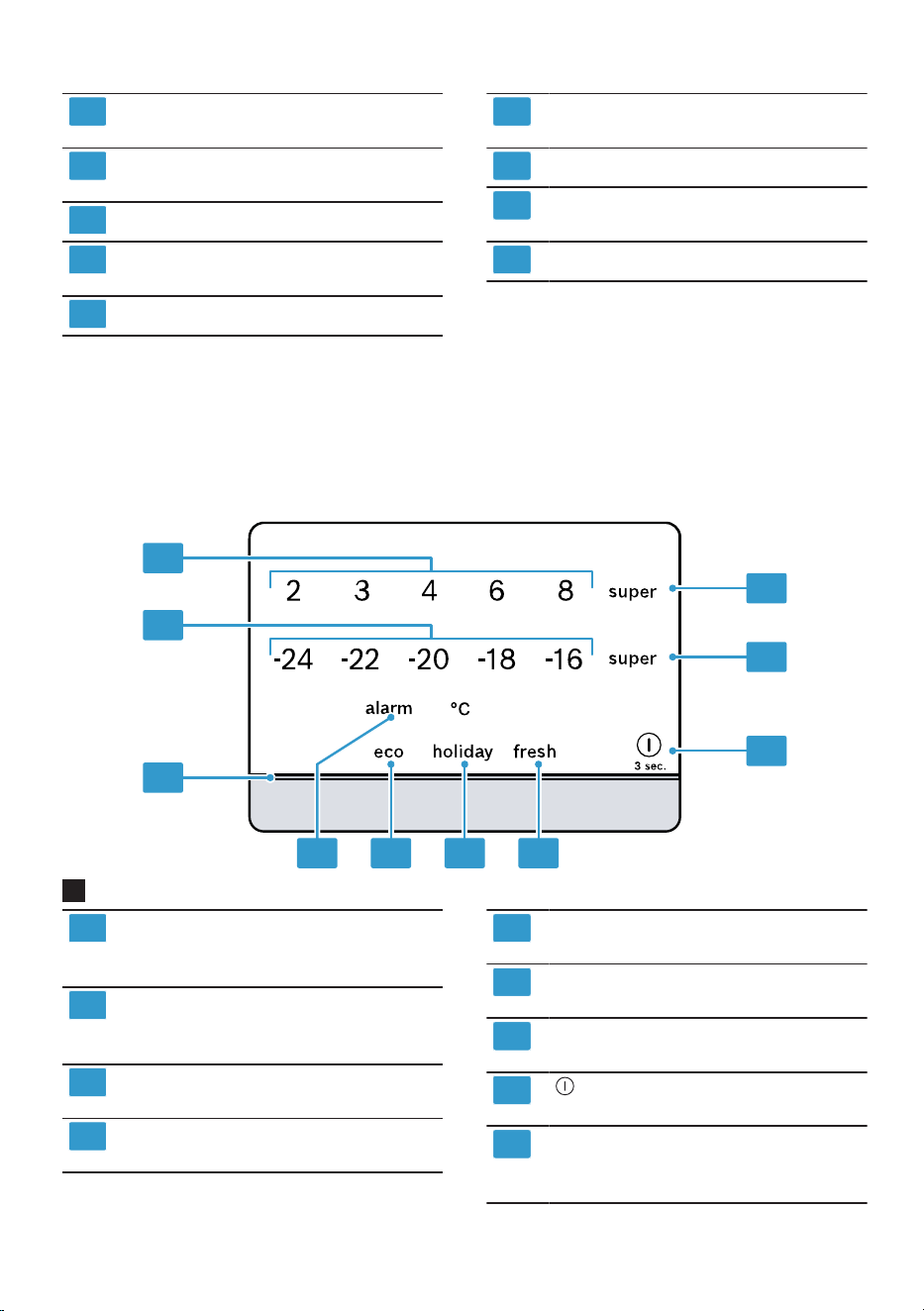
You can find an overview of the parts of your appliance here.
1
2
3
4
5
6
7
8
9
10
11
12
A
B
1
A
Refrigerator compartment
→Page20
B
Freezer compartment
→Page21
1
Lighting
2
Bottle shelf →Page15
3
Variable shelf →Page15
en Familiarising yourself with your appliance
14
4
Storage container
→Page15
5
Fruit and vegetable container
→Page15
6
Rating plate →Page31
7
Frozen food container
→Page24
8
Screw foot
9
Butter and cheese compart-
ment →Page16
10
Control panel →Page14
11
Variable door tray
→Page16
12
Door tray for large bottles
Note:Deviations between your appli-
ance and the diagrams may differ
with regard to their features and size.
5.2 Control panel
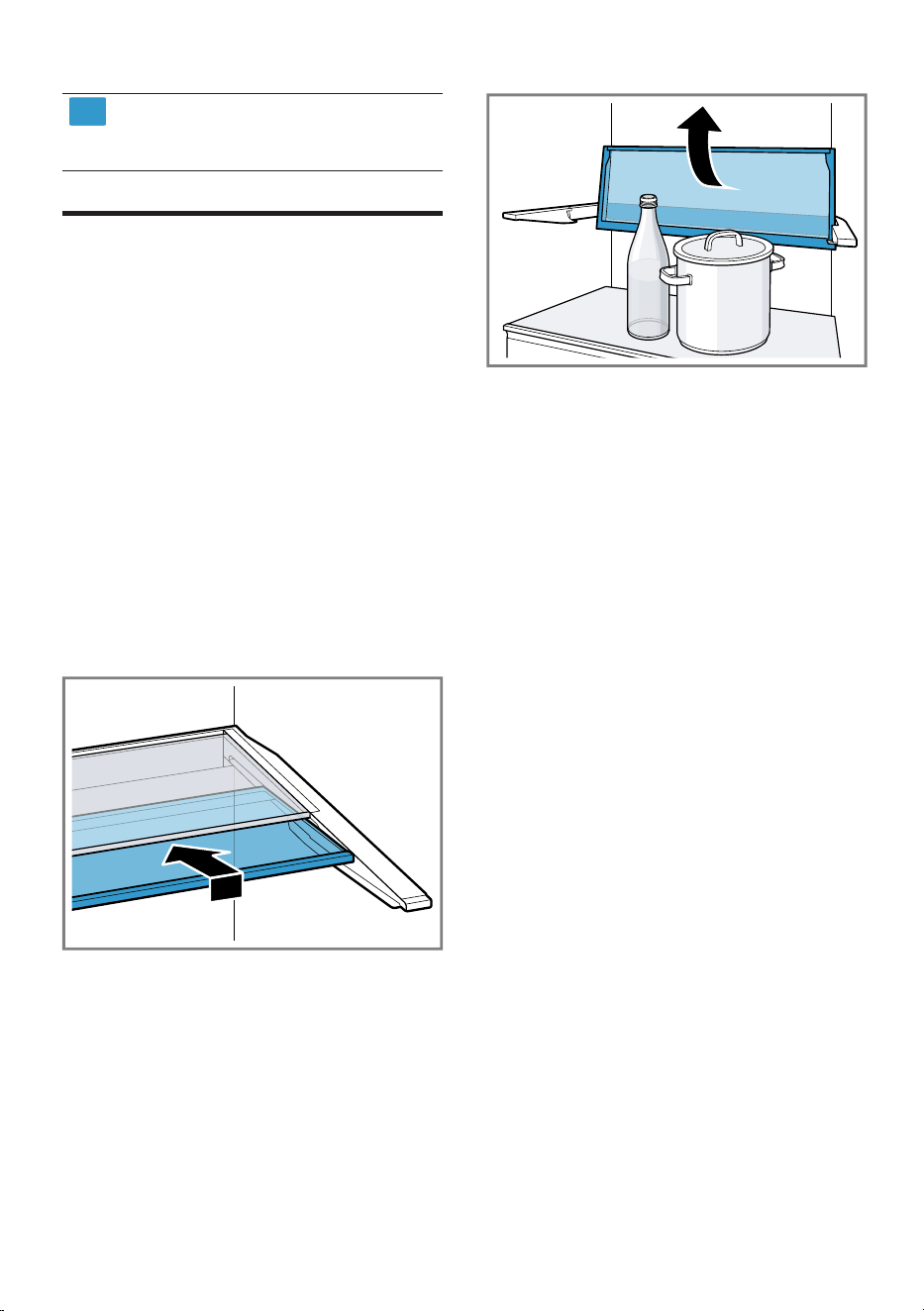
You can use the control panel to configure all functions of your appliance and
to obtain information about the operating status.
1
2
3
4 5 6 7
8
9
10
2
1
Displays the set temperature
for the refrigerator compart-
ment in°C.
2
Displays the set temperature
for the freezer compartment
in °C.
3
The light bar provides visual
feedback.
4
alarm switches the warning
signal off.
5
eco switches energy-saving
mode on or off.
6
holiday switches holiday
mode on or off.
7
fresh switches freshness
mode on or off.
8
3sec. switches the appli-
ance on or off.
9
super(Freezer compartment)
switches Super freezing on or
off.
Features en
15
10
super(Refrigerator compart-
ment) switches Super cooling
on or off.
Features
6 Features
Features
The features of your appliance de-
pend on the model.
6.1 Shelf
To vary the shelf as required, you
can remove the shelf and re-insert it
elsewhere.
→"Removing the shelf", Page23
6.2 Variable shelf
Use the variable shelf to store tall
items, e.g. cans or bottles, on the
shelf below.
You can remove the front section of
the variable shelf and slide it below
the rear part of the shelf.
If more space is required, you can
fold up the front and rear section of
the variable shelf together.
6.3 Bottle shelf
Store bottles securely on the bottle
shelf.
To vary the bottle shelf as required,
you can remove the bottle shelf and
re-insert it elsewhere.
→"Removing the shelf", Page23
6.4 Storage container
The temperatures in the storage con-
tainer are lower than in the refriger-
ator compartment. Temperatures be-
low 0°C may occur occasionally.
In order to reach temperatures close
to 0 °C in the storage container, set
the refrigerator compartment temper-
ature to 2 °C. →Page17
Use the lower temperatures in the
storage container to store highly per-
ishable food, e.g. fish, meat and
sausages.
6.5 Fruit and vegetable con-
tainer
Store fresh fruit and vegetables in
their packaging in the fruit and veget-
able container.
Cover any chopped fruit and veget-
ables, or store in air-tight packaging.
Condensation may form in the fruit
and vegetable container depending
on the food and quantity stored.
en Basic operation
16
Remove the condensation with a dry
cloth.
To ensure that the quality and aroma
are retained, store fruit and veget-
ables that are sensitive to cold out-
side of the appliance at temperatures
of approx. 8°C to 12°C, e.g. pine-
apple, bananas, citrus fruits, cucum-
bers, courgettes, peppers, tomatoes
and potatoes.
6.6 Butter and cheese com-
partment
Store butter and hard cheese in the
butter and cheese compartment.
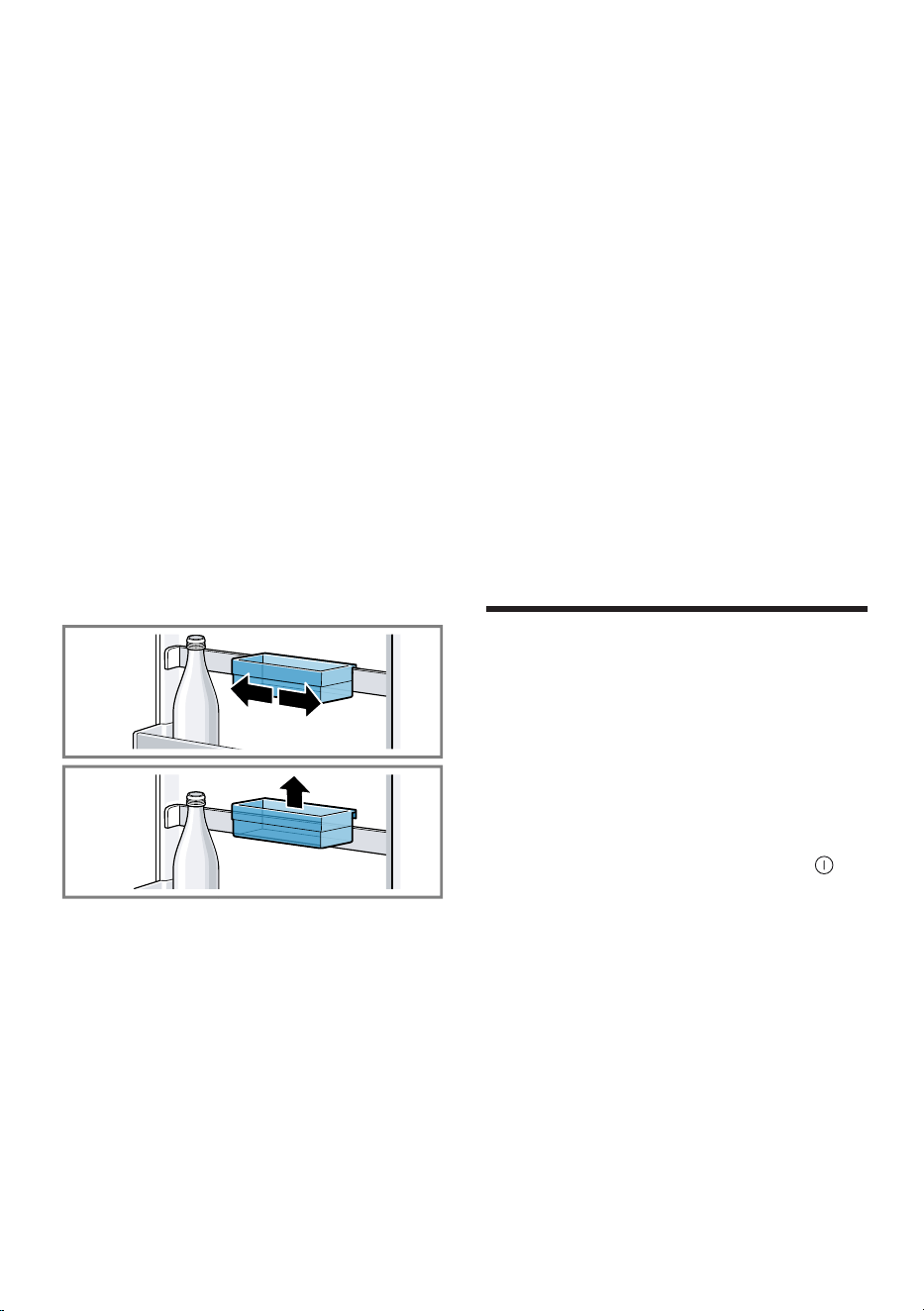
6.7 Variable door tray
To adjust the variable door tray as re-
quired, you can move or remove the
variable door tray, and re-insert it
elsewhere.
You can remove the door tray rail
and re-insert it elsewhere.
→"Removing the door tray rail",
Page25
6.8 Accessories
Use original accessories. These have
been made especially for your appli-
ance.
The accessories for your appliance
depend on the model.
Egg tray
Store eggs safely on the egg tray.
Ice cube tray
Use the ice cube tray to make ice
cubes.
Making ice cubes
Use only drinking water tomake ice
cubes.
1. Fill the ice cube tray with drinking
water up to ¾ and place in the
freezer compartment.
If the ice cube tray is stuck to the
freezer compartment, loosen it with
a blunt object such as the handle
of a wooden spoon.
2. To loosen the ice cubes, twist the
ice cube tray slightly or hold it
briefly under flowing water.
Basic operation
7 Basic operation
Basic operation
7.1 Switching on the appli-
ance
1. Electrically connect the appliance.
→Page12
Note:If the appliance has been
previously switched off using the
control panel, press and hold
3sec. for threeseconds.
a The appliance begins to cool.
a A warning signal sounds and the
temperature display flashes be-
cause the freezer compartment is
still too warm.
2. Switch off the warning tone using
alarm.
a "alarm" goes out as soon as the
set temperature has been reached.
3. Set the required temperature.
→Page17

Additional functions en
17
7.2 Operating tips
¡ Once you have switched on the
appliance, the set temperature is
only reached after several hours.
Do not put any food in the appli-
ance until the set temperature has
been reached.
¡ The front panels of the housing are
temporarily heated slightly. This
prevents condensation in the area
of the door seal.
¡ When you close the door, a va-
cuum may be created. The door is
then difficult to open again. Wait a
moment until the vacuum is offset.
¡ The temperature in the appliance
varies due to the following condi-
tions:
– How often the appliance is
opened
– Load capacity
– Temperature of newly stored
food
– Ambient temperature
– Direct sunlight
7.3 Switching off the appli-
ance
▶ Press and hold 3sec. for
3seconds.
7.4 Setting the temperature
Setting the refrigerator
compartment temperature
▶ Press the required temperature.
The recommended temperature in
the refrigerator compartment is
4°C.
Setting the freezer compartment
temperature
▶ Press the required temperature.
The recommended temperature in
the freezer compartment is
−18°C.
Additional functions
8 Additional functions
Additional functions
Find out which additional functions
can be used for your appliance.
8.1 Super cooling
With Super cooling, the refrigerator
compartment cools as cold as pos-
sible.
Switch on Super cooling before pla-
cing large quantities of food in the re-
frigerator compartment.
Note:When Super cooling is
switched on, increased noise may
occur.
Switching on Super cooling
▶ Press super(Refrigerator compart-
ment).
a "super"(Refrigerator compartment)
lights up.
Note:After approx. 6hours, the ap-
pliance switches to normal operation.
Switching off Super cooling
▶ Press super(Refrigerator compart-
ment).
8.2 Automatic Super freezing
With automatic Super freezing, the
freezer compartment cools down to a
much lower temperature than in nor-
mal mode. This freezes food more
quickly.
The automatic Super freezing
switches on if you place fresh food in
the bottom frozen food container,
starting from the right-hand side.
en Additional functions
18
The automatic Super freezing is activ-
ated at the factory. You can deactiv-
ate the automatic Super freezing.
If the automatic Super freezing is
switched on, "super"(Freezer com-
partment) lights up and increased
noises may occur.
After operation, the appliance
switches from automatic Super freez-
ing to normal operation.
Activating automatic Super
freezing
▶ Press and hold super(Freezer
compartment) for 5seconds.
a If 2audible signals sound, the
automatic Super freezing is activ-
ated.
Deactivating automatic Super
freezing
▶ Press and hold super(Freezer
compartment) for 5seconds.
a If 3audible signals sound, the
automatic Super freezing is deac-
tivated.
Cancelling automatic Super
freezing
▶ Press super(Freezer compart-
ment).
8.3 Manual Super freezing
With Super freezing, the freezer com-
partment cools as cold as possible.
Switch on Super freezing four to
sixhours before placing food weigh-
ing 2kg or more into the freezer
compartment.
In order to utilise the freezer capacity,
use Super freezing.
→"Prerequisites for freezing capa-
city", Page21
Note:When Super freezing is
switched on, increased noise may
occur.
Switching on manual Super
freezing
▶ Press super(Freezer compart-
ment).
a "super"(Freezer compartment)
lights up.
Note:After approx. 54hours, the ap-
pliance switches to normal operation.
Switching off manual Super
freezing
▶ Press super(Freezer compart-
ment).
8.4 Holiday mode
If you are going to be away for a long
time, you can switch on energy-sav-
ing holiday mode on the appliance.
CAUTION
Risk of harm to health!
The refrigerator compartment heats
up while the holiday mode is
switched on. The increased temperat-
ure may cause bacteria to increase
and spoil the food.
▶ When the holiday mode is
switched on, do not store any food
in the refrigerator compartment.
The appliance automatically sets the
temperatures.
Refrigerator com-
partment
14°C
Freezer compart-
ment
Temperature re-
mains un-
changed
Switching on holiday mode
▶ Press holiday.
a "holiday" lights up.
Switching off holiday mode
▶ Press holiday.
Alarm en
19
8.5 Energy-saving mode
You can set the appliance to save
energy with the energy-saving mode.
The appliance automatically sets the
temperatures.
Refrigerator com-
partment
8°C
Freezer compart-
ment
−16°C
Switching on energy-saving mode
▶ Press eco.
a "eco" lights up.
Switching off energy-saving mode
▶ Press eco.
8.6 Freshness mode
In order to keep the food fresh for
longer, you can switch on the fresh-
ness mode on the appliance.
The appliance automatically sets the
temperatures.
Refrigerator com-
partment
2°C
Freezer compart-
ment
Temperature re-
mains un-
changed
Switching freshness mode on
▶ Press fresh.
a "fresh" lights up.
Switching off freshness mode
▶ Press fresh.
8.7 Sabbath mode
To ensure that you can also use the
appliance on the Sabbath, the Sab-
bath mode switches off all non-es-
sential functions.
During Sabbath mode, the following
functions are switched off:
¡ Super cooling
¡ Automatic Super freezing and
manual Super freezing
¡ Alarm
¡ Interior lighting
¡ Signal tones
¡ Messages on the control panel
Note:The control panel lighting is
switched off during the Sabbath
mode. holiday lights up at a reduced
brightness level.
Switching on Sabbath mode
▶ Press and hold holiday for
15seconds until an audible signal
sounds.
a "holiday" lights up.
Note:After approx.80hours, the ap-
pliance switches to normal mode.
Switching off Sabbath mode
▶ Press and hold holiday for
15seconds until an audible signal
sounds.
Alarm
9 Alarm
Alarm
9.1 Door alarm
If the appliance door is open for a
while, the door alarm switches on.
A warning tone sounds, "alarm"
flashes, the light bar flashes and the
temperature display for the affected
compartment flashes.
en Refrigerator compartment
20
Switching off the door alarm
▶ Close the appliance door or press
alarm.
a The warning tone is switched off.
9.2 Temperature alarm
If the freezer compartment becomes
too warm, the temperature alarm is
switched on.
A warning tone sounds and the set
temperature (freezer compartment),
"alarm" and the light bar flash.
CAUTION
Risk of harm to health!
During the thawing process, bacteria
may multiply and spoil the frozen
food.
▶ Do not refreeze food after it has
been defrosted or started to de-
frost.
▶ Refreeze food only after cooking.
▶ These items should no longer be
stored for the maximum storage
period.
The temperature alarm can be
switched on in the following cases:
¡ The appliance is switched on.
Do not store any food until the ap-
pliance has reached the set tem-
perature.
¡ Large quantities of fresh food are
being placed inside.
Switch on Super freezing before
placing large quantities of food in
the appliance.
¡ The freezer compartment door is
open for too long.
Check whether the frozen food has
defrosted or thawed.
Switching off the temperature
alarm
▶ Press alarm.
a The warning tone is switched off.
Refrigerator compartment
10 Refrigerator compart-
ment
Refrigerator compartment
You can keep meat, sausage, fish,
dairy products, eggs, prepared meals
and pastries in the refrigerator com-
partment.
The temperature can be set from
2°C to 8°C.
The refrigerator compartment can
also be used to store highly perish-
able foods in the short to medium
term. The lower the selected temper-
ature, the longer the food remains
fresh.
10.1 Tips for storing food in
the refrigerator compart-
ment
¡ Only store food when fresh and
undamaged.
¡ Store food covered or in air-tight
packaging.
¡ To avoid impeding the circulation
of air and to prevent food from
freezing, do not place food so that
it has direct contact with the back
wall.
¡ Allow hot food and drinks to cool
down first before placing in the ap-
pliance.
¡ Observe the best-before date or
use-by date specified by the manu-
facturer.
10.2 Chill zones in the refri-
gerator compartment
The air circulation in the refrigerator
compartment creates different chill
zones.
Coldest zone
The coldest zone is in the storage
container.

Freezer compartment en
21
Tip:Store highly perishable food
such as fish, sausages and meat in
the coldest zone.
Warmest zone
The warmest zone is at the very top
of the door.
Tip:Store food that does not spoil
easily in the warmest zone, e.g. hard
cheese and butter. Cheese can then
continue to release its aroma and the
butter will still be easy to spread.
Freezer compartment
11 Freezer compartment
Freezer compartment
You can store frozen food, freeze
food and make ice cubes in the
freezer compartment.
The temperature can be set from
−16°C to −24°C.
Long-term storage of food should be
at –18°C or lower.
The freezer compartment can be
used to store perishable food long-
term. The low temperatures slow
down or stop the spoilage.
11.1 Freezing capacity
The freezing capacity indicates the
quantity of food that can be frozen
right through to the centre within a
specific period of time.
Information on freezing capacity can
be found on the rating plate. →"Appli-
ance", Fig. 1 /
6
, Page14
Prerequisites for freezing capacity
1. Approx. 24 hours before placing
fresh food in the appliance, switch
on Super freezing.
→"Switching on manual Super
freezing", Page18
2. Place food in the bottom frozen
food container first, starting from
the right-hand side.
11.2 Fully utilising the freezer
compartment volume
Learn how to store the maximum
amount of frozen food in the freezer
compartment.
1. Remove all fittings from the freezer
compartment. →Page23
2. Store food directly on the shelves
and on the floor of the freezer
compartment.
11.3 Tips for storing food in
the freezer compartment
¡ Store food in air-tight packaging.
¡ Do not bring food which is to be
frozen into contact with frozen
food.
¡ Place thefood over thewhole area
ofthefrozen food containers.
¡ To ensure that the air can circulate
freely in the appliance, push the
frozen food containers in as far as
they will go.
11.4 Tips for freezing fresh
food
¡ Freeze fresh and undamaged food
only.
¡ Freeze food in portions.
¡ Cooked food is more suitable than
food that can be eaten raw.
¡ Vegetables: Wash, chop up and
blanch before freezing.
¡ Fruit: Wash, pit and perhaps peel,
possibly add sugar or ascorbic
acid solution.
¡ Food that is suitable for freezing in-
cludes baked items, fish and sea-
food, meat, game, poultry, eggs
without shells, cheese, butter and
quark, ready meals and leftovers.
en Defrosting
22
¡ Food that is unsuitable for freezing
includes lettuce, radishes, eggs in
shells, grapes, raw apples and
pears, yoghurt, sour cream, crème
fraîche and mayonnaise.
Packing frozen food
If you select suitable packaging ma-
terial and the correct type of pack-
aging, you can determine the product
quality and prevent freezer burn.
1. Place the food in the packaging.
2. Squeeze out the air.
3. Pack food airtight to prevent it
from losing flavour and drying out.
4. Label the packaging with the con-
tents and the date of freezing.
11.5 Shelf life of frozen food
at −18°C
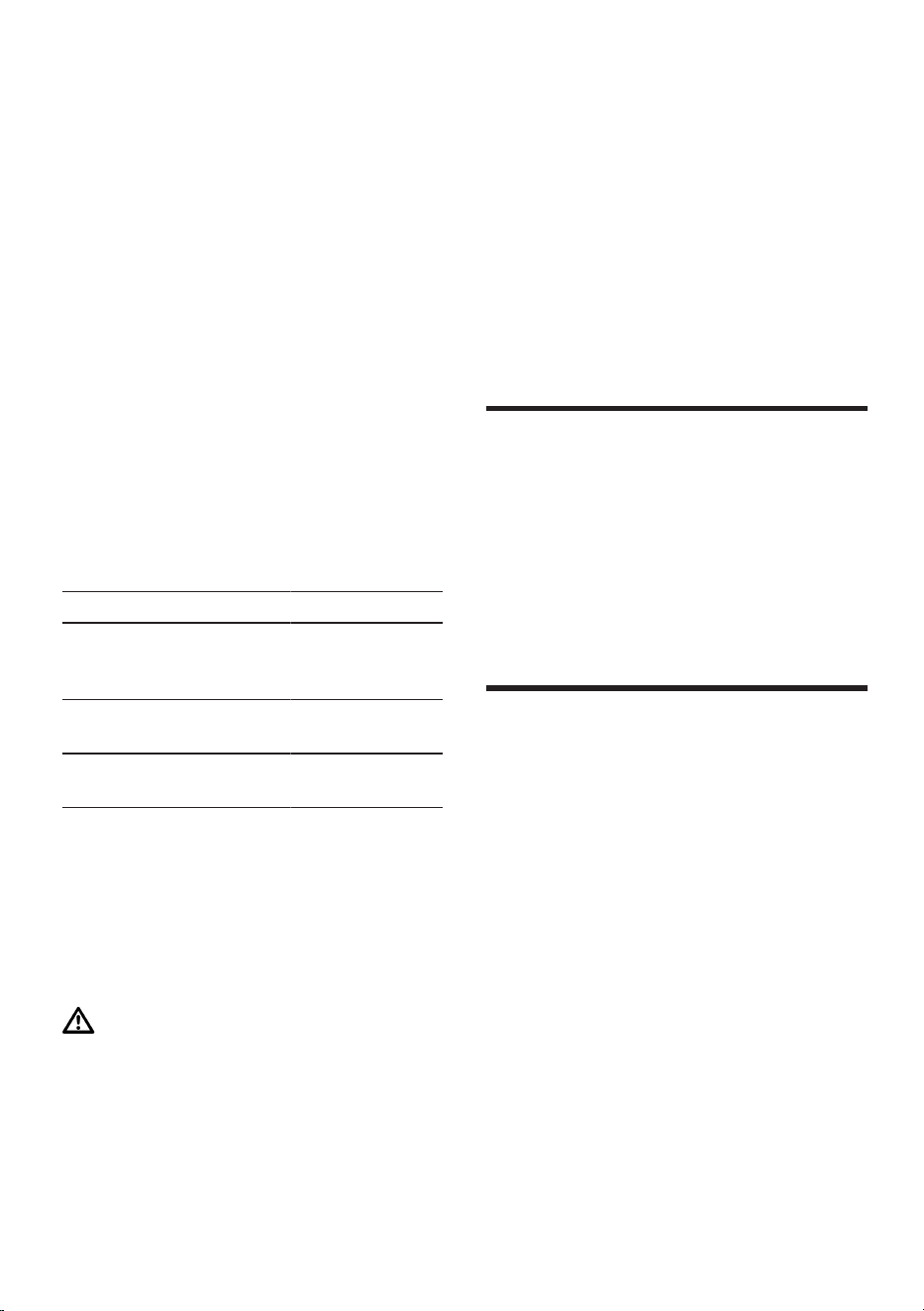
Food Storage time
Fish, sausages, pre-
pared meals and
baked goods
up to
6months
Poultry, meat up to
8months
Vegetables, fruit up to
12months
The imprinted freezer calendar indic-
ates the maximum storage duration
in months at a constant temperature
of –18°C.
11.6 Defrosting methods for
frozen food
CAUTION
Risk of harm to health!
During the thawing process, bacteria
may multiply and spoil the frozen
food.
▶ Do not refreeze food after it has
been defrosted or started to de-
frost.
▶ Refreeze food only after cooking.
▶ These items should no longer be
stored for the maximum storage
period.
¡ Defrost animal-based food, such
as fish, meat, cheese, quark, in the
refrigerator compartment.
¡ Defrost bread at room temperat-
ure.
¡ Prepare food for immediate con-
sumption in the microwave, in the
oven, or on the hob.
Defrosting
12 Defrosting
Defrosting
12.1 Defrosting in the freezer
compartment
The fully automatic NoFrost system
ensures that the freezer compartment
remains frost-free. Defrosting is not
required.
Cleaning and servicing
13 Cleaning and servi-
cing
Cleaning and servicing
To keep your appliance working effi-
ciently for a long time, it is important
to clean and maintain it carefully.
Customer Service must clean inac-
cessible points. Cleaning by cus-
tomer service can give rise to costs.
13.1 Preparing the appliance
for cleaning
1. Switch off the appliance.
→Page17
2. Disconnect the appliance from the
power supply.
Unplug the appliance from the
mains or switch off the circuit
breaker in the fuse box.
Cleaning and servicing en
23
3. Take out all of the food and store it
in a cool place.
Place ice packs (if available) onto
the food.
4. Remove all fittings and accessor-
ies from the appliance.
→Page23
5. Remove the door tray rail.
→Page25
13.2 Cleaning the appliance
WARNING
Risk of electric shock!
An ingress of moisture can cause an
electric shock.
▶ Do not use steam- or high-pres-
sure cleaners to clean the appli-
ance.
Liquid in the lighting, controls or in-
ner ventilation openings can be dan-
gerous.
▶ The rinsing water must not drip
into the lighting, controls or inner
ventilation openings.
ATTENTION!
Unsuitable cleaning products may
damage the surfaces of the appli-
ance.
▶ Do not use hard scouring pads or
cleaning sponges.
▶ Do not use harsh or abrasive de-
tergents.
▶ Do not use cleaning products with
a high alcohol content.
If you clean fittings and accessories
in the dishwasher, this may cause
them to become deformed or discol-
our.
▶ Never clean fittings and accessory
in the dishwasher.
1. Prepare the appliance for cleaning.
→Page22
2. Clean the appliance, the fittings,
the accessories and the door seals
with a dish cloth, lukewarm water
and a little pH-neutral washing-up
liquid.
3. Dry thoroughly with a soft, dry
cloth.
4. Insert the fittings and install the ap-
pliance components.
5. Electrically connect the appliance.
→Page12
6. Putting the food into the appliance.
13.3 Removing the fittings
If you want to clean the fittings thor-
oughly, remove these from your ap-
pliance.
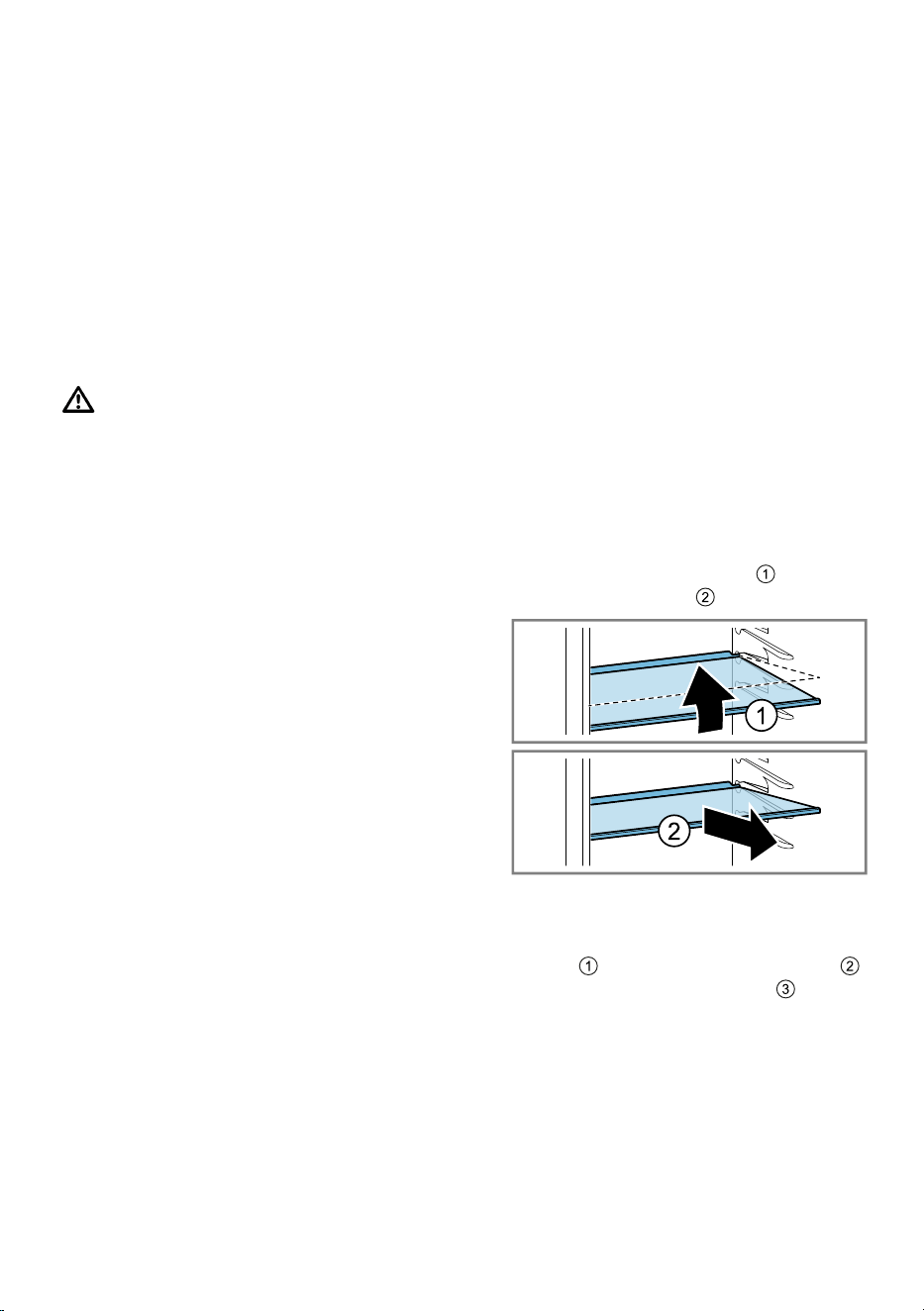
Removing the shelf
▶ Lift the shelf at the front , pull it
out and remove it .
Removing the variable shelf
▶ Tilt both parts of the shelf up-
wards , remove them together
and then remove the rails .
Removing the storage container
1. Pull out the storage container as
far as it will go.
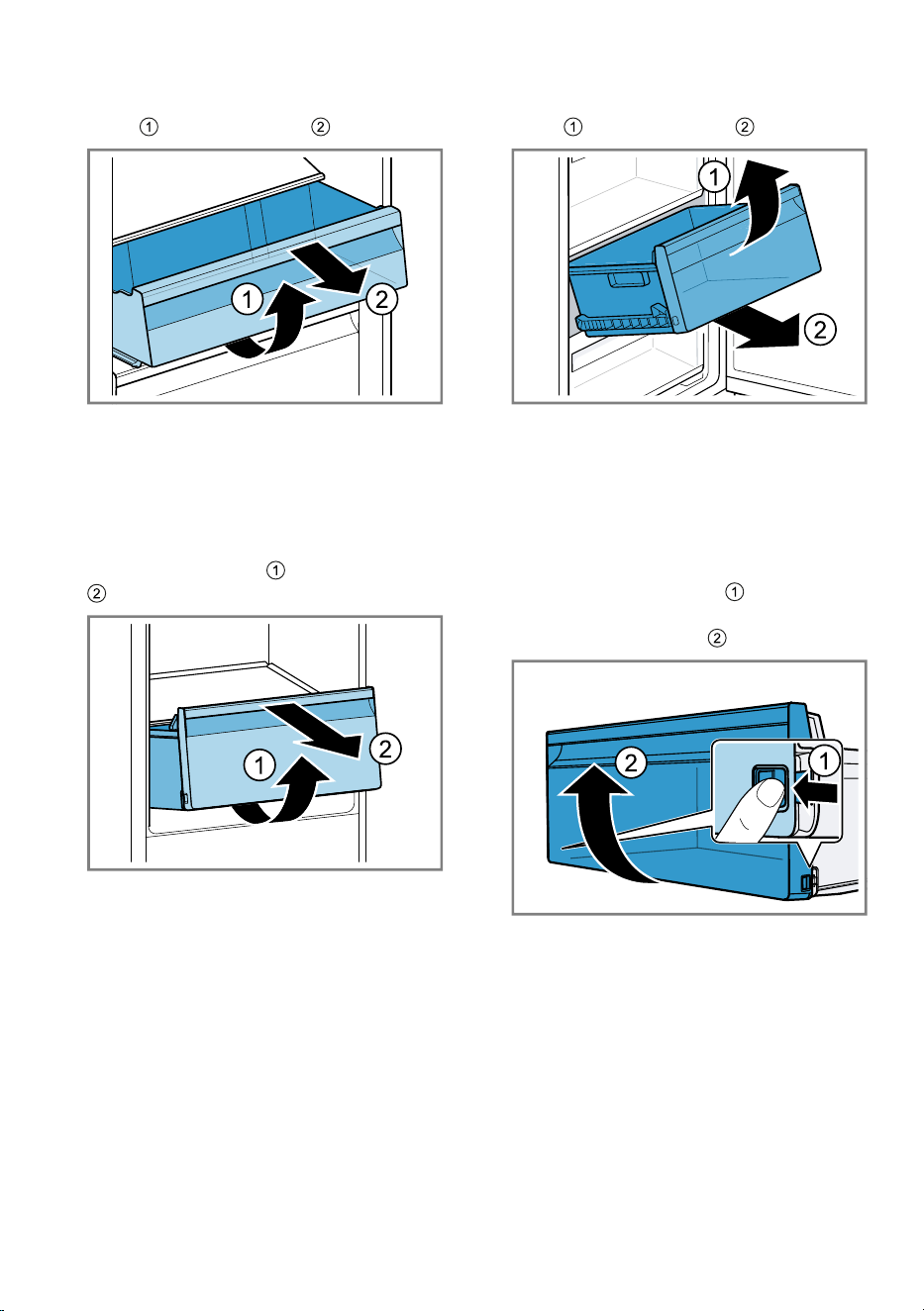
en Cleaning and servicing
24
2. Lift the storage container at the
front and remove it .
Removing the fruit and vegetable
container
1. Pull out the fruit and vegetable
container as far as it will go.
2. Lift the fruit and vegetable con-
tainer at the front and remove it
.
Removing the frozen food
container
1. Take out the frozen food container
as far as it will go.
2. Lift the frozen food container at the
front and remove it .
Removing the front of the
container
You can remove the front of the fruit
and vegetable container and frozen
food container to facilitate cleaning.
▶ Press in the snap-in hooks on the
side of the container and re-
move the front from the container
in a turning motion .
Cleaning and servicing en
25
13.4 Removing appliance
components
If you want to clean your appliance
thoroughly, you can remove certain
components from your appliance.
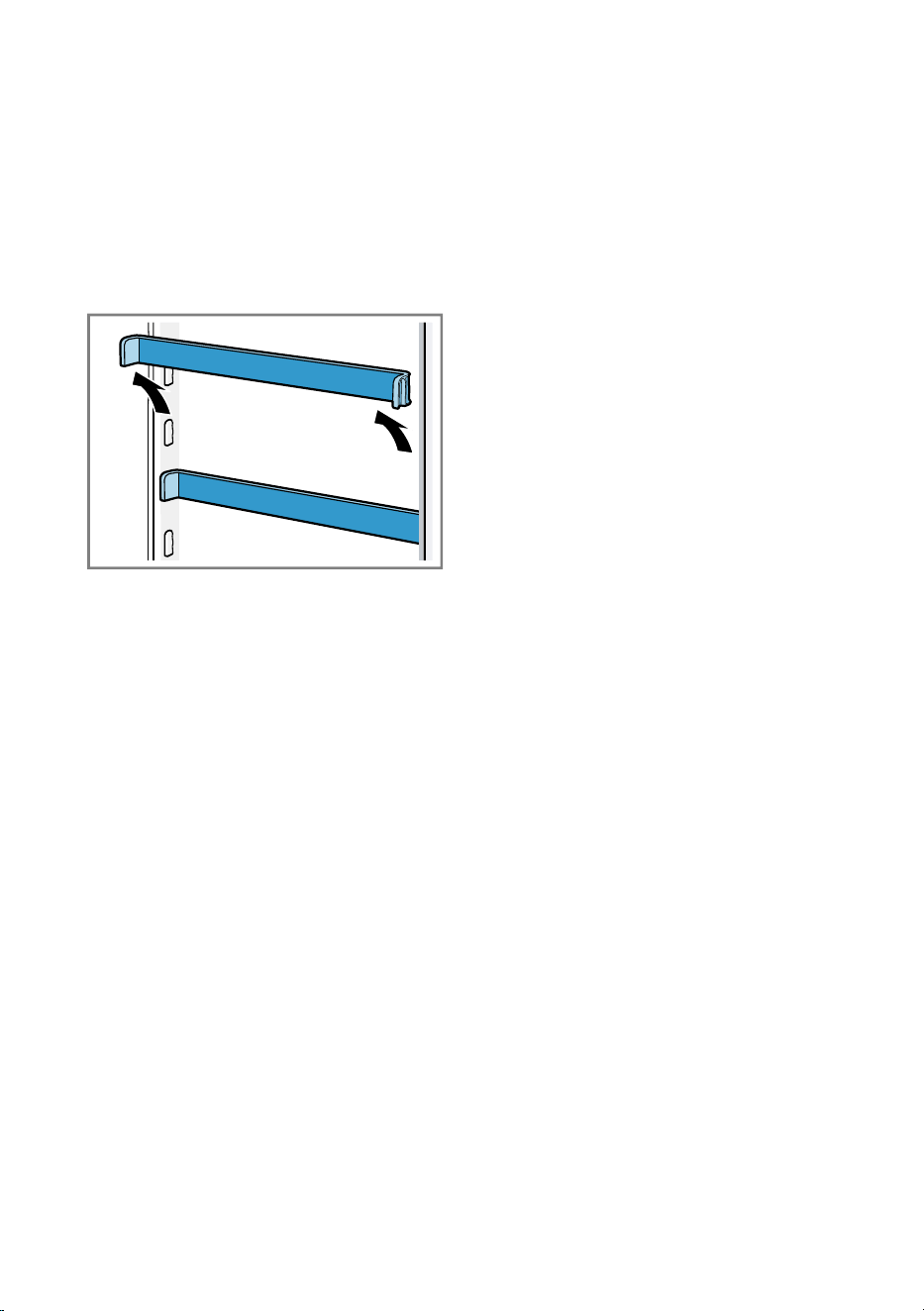
Removing the door tray rail
▶ Lift the door tray rail and remove it.
en Troubleshooting
26
Troubleshooting
14 Troubleshooting
Troubleshooting
You can rectify minor faults on your appliance yourself. Read the troubleshoot-
ing information before contacting after-sales service. This will avoid unneces-
sary costs.
WARNING
Risk of electric shock!
Improper repairs are dangerous.
▶ Repairs to the appliance should only be carried out by trained specialist
staff.
▶ Only use genuine spare parts when repairing the appliance.
▶ If the power cord of this appliance is damaged, it must be replaced by the
manufacturer, the manufacturer's Customer Service or a similarly qualified
person in order to prevent any risk.
Fault Cause and troubleshooting
The appliance is not
cooling, the displays
and lighting are lit.
Showroom mode is switched on.
1.
Switch off the appliance. →Page17
2. Wait 2minutes.
3.
Switch the appliance back on. →Page16
4. Wait 1 minute and then press and hold super(Re-
frigerator compartment) until 4 audible signals have
sounded.
5. After a short time, check whether your appliance is
cooling.
The LED lighting does
not work.
Different causes are possible.
▶ Call customer service.
The customer service number can be found in the
enclosed customer service directory.
Side panels of the ap-
pliance are warm.
Not a fault. The side panels contain pipes which heat
up during the cooling process. Units touching the ap-
pliance will not be damaged by the heat.
No action required.
A warning tone
sounds and the tem-
perature display (refri-
gerator compartment),
"alarm" and the light
bar flash.
The door alarm is
switched on.
The refrigerator compartment door is open.
▶ Close the refrigerator compartment door.
Troubleshooting en
27
Fault Cause and troubleshooting
A warning tone
sounds and the tem-
perature display
(freezer compart-
ment), "alarm" and the
light bar flash.
The door alarm is
switched on.
The freezer compartment door is open.
▶ Close the freezer compartment door.
The temperature dis-
plays and "alarm" light
up.
A sensor is defective.
▶ Call customer service.
The customer service number can be found in the
enclosed customer service directory.
A warning tone
sounds and the set
temperature (freezer
compartment), "alarm"
and the light bar flash.
The temperature
alarm is switched on.
Different causes are possible.
▶ Press alarm.
a The alarm is switched off.
External ventilation openings are covered up.
▶ Remove any obstructions from in front of the ex-
ternal ventilation openings.
Larger quantities of fresh food have been put in.
▶ Do not exceed the max. freezing capacity.
→"Freezing capacity", Page21
The set temperature is
not reached.
Fully automatic de-
frosting no longer
works.
The freezer compartment door was open for a long
time. The evaporator (refrigeration unit) in the noFrost
system is heavily iced up.
Requirement:Store the frozen food well insulated in a
cool place.
1.
Switch off the appliance. →Page17
2. Disconnect the appliance from the mains.
Unplug the appliance from the mains or switch off
the circuit breaker in the fuse box.
3. Call customer service.
The customer service number can be found in the
enclosed customer service directory.
The temperature dif-
fers greatly from the
setting.
Different causes are possible.
1.
Switch off the appliance. →Page17
2. Switch the appliance back on after fiveminutes.
→Page16
‒ If the temperature is too warm, check the temper-
ature again after a couple of hours.
‒ If the temperature is too cold, check the temper-
ature again on the following day.
en Troubleshooting
28
Fault Cause and troubleshooting
Condensation accu-
mulates on the sur-
face of the appliance
and on the shelves in-
side.
The water contained in warm and humid air con-
denses on the colder surfaces of the appliance.
1. Wipe away the condensation water with a soft, dry
cloth.
2. Open the appliance as briefly as possible.
3. Ensure that the appliance is always closed properly.
A large volume of
condensation collects
regularly in the fruit
and vegetable con-
tainer.
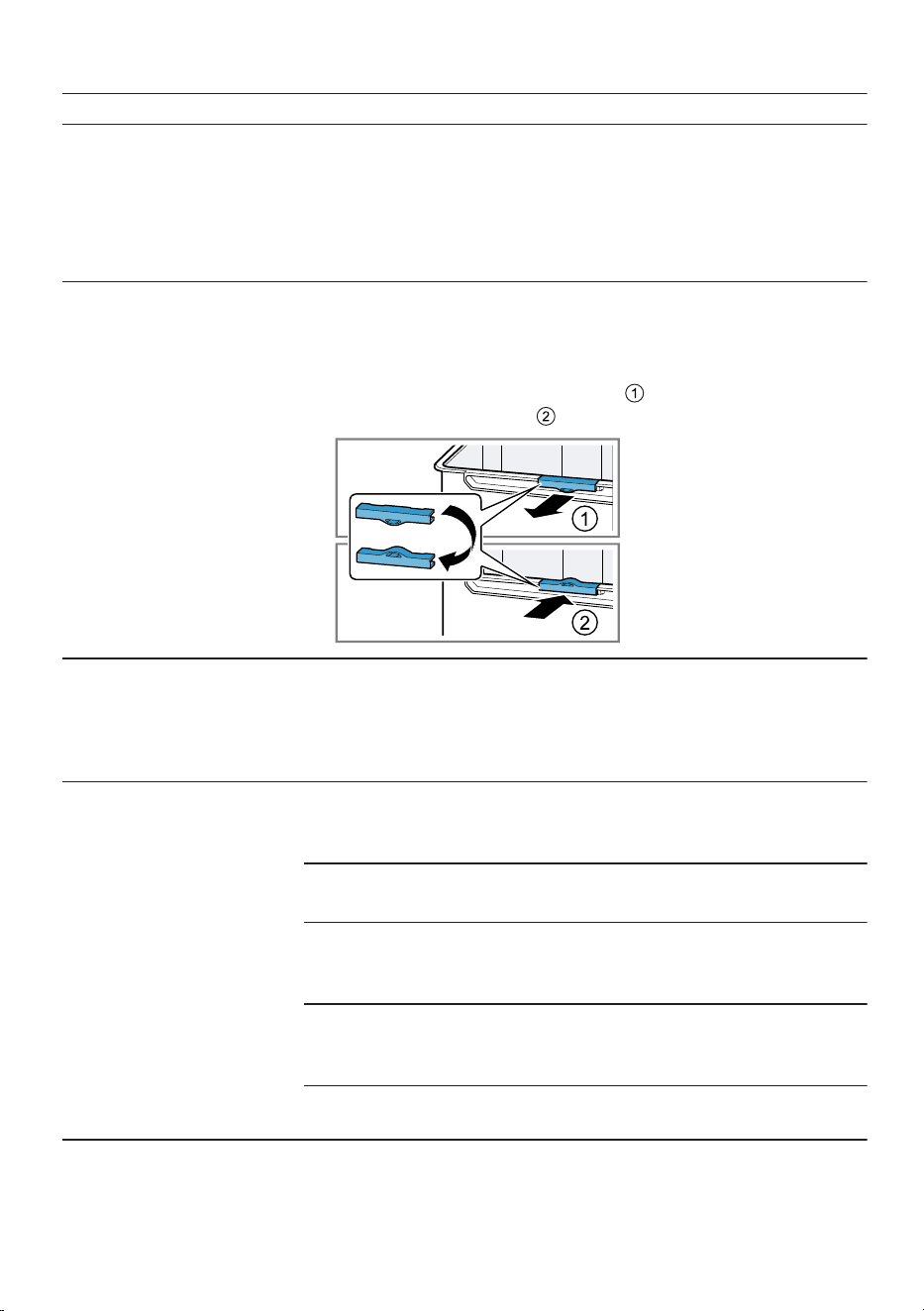
Depending on the food and quantity stored, condens-
ation may form in the fruit and vegetable container.
1. Remove the fruit and vegetable container.
→Page24
2. Remove the ventilation clips and rotate them be-
fore inserting again .
The appliance hums,
bubbles, buzzes,
gargles, clicks or
crackles.
Not a fault. A motor is running, e.g. refrigerating unit,
fan. Refrigerant flows through the pipes. The motor,
switches or solenoid valves are switching on or off.
Automatic defrosting is running.
No action required.
The appliance makes
noises.
The appliance is not level.
▶ Align the appliance using a spirit level and the
screw feet.
The appliance is not free-standing.
▶ Observe the minimum clearances for the appliance.
Fittings wobble or stick.
▶ Check the removable fittings and, if required, re-
place these.
Bottles or containers are touching.
▶ Move the bottles or containers away from each
other.
Super freezing is switched on.
No action required.

Storage and disposal en
29
14.1 Power failure
During a power failure, the temperat-
ure in the appliance rises; this re-
duces the storage time and the qual-
ity of the frozen food.
On the website for your appliance,
the technical data provides you with
the storage times for frozen food in
the event of a fault.
Notes
¡ Open the appliance as little as
possible during a power failure
and do not place any other food in
the appliance.
¡ Check the quality of the food
immediately after a power failure.
– Dispose of any frozen food that
has defrosted and is hotter than
5°C.
– Cook or fry slightly thawed
frozen food, and then either con-
sume it or freeze it again.
14.2 Conducting an appliance
self-test
Your appliance has an appliance self-
test which displays faults that can be
eliminated by your customer service.
1. Switch off the appliance.
→Page17
2. Disconnect the appliance from the
power supply.
Unplug the appliance from the
mains or switch off the circuit
breaker in the fuse box.
3. Electrically reconnect the appli-
ance after 5minutes. →Page12
4. One minute after connecting to the
power supply, press and hold su-
per(Refrigerator compartment) for
3 to 5seconds until a second aud-
ible signal sounds.
a If, at the end of the appliance self-
test, two audible signals sound
and the temperature display indic-
ates the set temperature, your ap-
pliance is OK. The appliance
switches to normal operation.
a If, at the end of the appliance self-
test, 5audible signals sound and
the temperature display LEDs light
up with a different brightness, in-
form customer service. The LEDs
provide customer service with in-
formation about this fault.
Storage and disposal
15 Storage and disposal
Storage and disposal
15.1 Taking the appliance out
of operation
1. Switch off the appliance.
→Page17
2. Disconnect the appliance from the
power supply.
Unplug the appliance from the
mains or switch off the circuit
breaker in the fuse box.
3. Remove all of the food.
4.
Clean the appliance. →Page23
5. ATTENTION! Objects jammed
between the door and the housing
may damage the door hinge.
▶ Open the door until it remains
open by itself.
▶ Do not insert any objects between
the door and the housing.
To guarantee the ventilation inside
the appliance, leave the appliance
open.
en Customer Service
30
15.2 Disposing of old appli-
ance
Valuable raw materials can be re-
used by recycling.
WARNING
Risk of harm to health!
Children can lock themselves in the
appliance, thereby putting their lives
at risk.
▶ Leave shelves and containers in-
side the appliance to prevent chil-
dren from climbing in.
▶ Keep children away from the re-
dundant appliance.
WARNING
Risk of fire!
If the tubes are damaged, flammable
refrigerant and harmful gases may
escape and ignite.
▶ Do not damage the tubes of the re-
frigerant circuit or the insulation.
1. Unplug the appliance from the
mains.
2. Cut through the power cord.
3. Dispose of the appliance in an en-
vironmentally friendly manner.
Information about current disposal
methods are available from your
specialist dealer or local authority.
This appliance is la-
belled in accordance
with European Directive
2012/19/EU concerning
used electrical and elec-
tronic appliances (waste
electrical and electronic
equipment - WEEE).
The guideline determ-
ines the framework for
the return and recycling
of used appliances as
applicable throughout
the EU.
Customer Service
16 Customer Service
Customer Service
Function-relevant genuine spare parts
according to the corresponding Eco-
design Order can be obtained from
Customer Service for a period of at
least 10 years from the date on
which your appliance was placed on
the market within the European Eco-
nomic Area.
Note:Under the terms of the manu-
facturer's warranty applicable to the
location, the use of Customer Service
is free of charge. The minimum dura-
tion of the warranty (manufacturer's
warranty for private consumers) in
the European Economic Area is 2
years according to the terms of war-
ranty applicable to the location. The
terms of warranty do not affect other
rights or claims held by yourself un-
der local legislation.
Detailed information on the warranty
period and terms of warranty in your
country is available from our after-
sales service, your retailer or on our
website.
If you contact Customer Service, you
will require the product number (E-
Nr.), the production number (FD) and
the consecutive numbering (Z-Nr.) of
your appliance.
The contact details for Customer Ser-
vice can be found in the enclosed
Customer Service directory or on our
website.
Technical data en
31
16.1 Product number (E-Nr.),
production number (FD)
and consecutive num-
bering (Z-Nr.)
You can find the product number (E-
Nr.), the production number (FD) and
the consecutive numbering (Z-Nr.) on
the appliance's rating plate.
→"Appliance", Fig. 1 /
6
, Page14
Make a note of your appliance's de-
tails and the Customer Service tele-
phone number to find them again
quickly.
Technical data
17 Technical data
Technical data
Refrigerant, cubic capacity and fur-
ther technical specifications can be
found on the rating plate.
→"Appliance", Fig. 1 /
6
, Page14
This product contains a light source
from energy efficiency class E. The
light source is available as a spare
part and should only be replaced by
trained specialist staff.
This product contains a second light
source from energy efficiency class
F. The light source is available as a
spare part and should only be re-
placed by trained specialist staff.
You can find more information about
your model online at https://
eprel.ec.europa.eu/
1
. This web ad-
dress is linked to the official EU
EPREL product database. Please
then follow the instructions on
searching for the model. The model
identifier is made up of the charac-
ters before the slash in the product
number (E-Nr.) on the rating plate. Al-
ternatively, you can also find the
model identifier in the first line of the
EU energy label.
17.1 Information regarding
Free and Open Source
Software
This product includes software com-
ponents that are licensed by the
copyright holders as free or open
source software.
The applicable licence information is
stored on your home appliance. You
can also access the applicable li-
cence information via your
HomeConnect app: "Profile -> Legal
information -> Licence Information".
2
You can download the licence in-
formation on the brand product web-
site. (Please search on the product
website for your appliance model
and additional documents). Alternat-
ively, you can request the relevant in-
formation from oss-
[email protected] or BSH Hausger-
äte GmbH, Carl-Wery-Str. 34, 81739
Munich, Germany.
The source code will be made avail-
able to you on request.
Please send your request to oss-
[email protected] or BSH Hausger-
äte GmbH, Carl-Wery-Str.34, 81739
Munich, Germany.
Subject: „OSSREQUEST“
The cost of performing your request
will be charged to you. This offer is
valid for three years from the date of
purchase or at least as long as we
offer support and spare parts for the
relevant appliance.
1
Only applies to countries in the European Economic Area
2
Depending on the appliance specifications
en Declaration of Conformity
32
Declaration of Conformity
18 Declaration of Con-
formity
Declaration of Conformity
BSH Hausgeräte GmbH hereby de-
clares that the appliance conforms to
the essential requirements and other
relevant provisions of Directive
2014/53/EU.
A detailed RED Declaration of Con-
formity can be found online at
www.bosch-home.com among the
additional documents on the product
page for your appliance.
Hereby, BSH Hausgeräte GmbH de-
clares that the appliance is in compli-
ance with relevant statutory
requirements.
1
A detailed Declaration of Conformity
can be found online at www.bosch-
home.co.uk among the additional
documents on the product page for
your appliance.
1
2.4 GHz band (2400–2483.5MHz):
Max. 100mW
5-GHz band (5150–5350MHz +
5470–5725MHz): max. 130mW
BE BG CZ DK DE EE IE EL ES
FR HR IT CY LI LV LT LU HU
MT NL AT PL PT RO SI SK FI
SE NO CH TR IS UK (NI)
5GHz WLAN (Wi-Fi): For indoor use only.
AL BA MD ME MK RS UK UA
5GHz WLAN (Wi-Fi): For indoor use only.
18.1 Statement of Compli-
ance for Great Britain
The full Statement of Compliance ac-
cording to the Product Security and
Telecommunications Infrastructure
(Security Requirements for Relevant
Connectable Products) Regulations
2023 can be found online at
www.bosch-home.co.uk among the
additional documents on the product
page for your appliance.
Product type
This statement of compliance covers
the products described in this inform-
ation for use whose model identifier
group is seen on the title page. The
full model identifier is made up of the
characters before the slash in the
product number (E no.) which can be
found on the rating plate. Alternat-
ively, you can also find the model
identifier in the first line of the UK En-
ergy Label.
Name and address of manufacturer
BSH Hausgeräte GmbH, Carl-Wery-
Strasse 34, 81739 München, Ger-
many
This statement of compliance is pre-
pared by the manufacturer.
1
Only applies to Great Britain

Declaration of Conformity en
33
The manufacturer, BSH Hausgeräte
GmbH deems that it has complied
with
¡ provision 5.1-1 of ETSI EN 303
645 v2.1.1 and, where relevant,
provision 5.1-2 of ETSI EN 303
645 v2.1.1;
¡ provision 5.2-1 of ETSI EN 303
645 v2.1.1;
¡ provision 5.3-13 of ETSI EN 303
645 v2.1.1.
Support period
BSH Hausgeräte GmbH will provide
security updates that are necessary
to maintain the main functions free of
charge until at least 28/02/2034.
Thank you for buying a
Bosch Home Appliance!
Register your new device on MyBosch now and profit directly from:
• Expert tips & tricks for your appliance
• Warranty extension options
• Discounts for accessories & spare-parts
• Digital manual and all appliance data at hand
• Easy access to Bosch Home Appliances Service
Free and easy registration – also on mobile phones:
www.bosch-home.com/welcome
Looking for help?
You'll find it here.
Expert advice for your Bosch home appliances, help with problems
or a repair from Bosch experts.
Find out everything about the many ways Bosch can support you:
www.bosch-home.com/service
Contact data of all countries are listed in the attached service direct-
ory.
*9001641239*
9001641239 (040703)
en
BSH Hausgeräte GmbH
Carl-Wery-Straße 34
81739 München, GERMANY
www.bosch-home.com
A Bosch Company
Valid within Great Britain:
Imported to Great Britain by
BSH Home Appliances Ltd.
Grand Union House
Old Wolverton Road
Wolverton, Milton Keynes
MK12 5PT
United Kingdom