Within the 48 contiguous United States, for one year from the date of purchase, when this
appliance is operated and maintained according to instructions attached to or furnished
with the product, warrantor will pay for factory-specified parts and repair labor to correct
defects in materials or workmanship. Service must be provided by a designated service
company. Outside the 48 states, all parts are warranted for one year from manufacturing
defects. Plastic parts, shelves and cabinets are warranted to be manufactured to
commercially acceptable standards, and are not covered from damage during handling or
breakage.
1. The compressor is covered for 5 years.
2. Replacement does not include labor.
1. Service calls to correct the installation of your appliance, to instruct you how
to use your appliance, to replace or repair fuses or to correct wiring or
plumbing.
2. Service calls to repair or replace appliance light bulbs or broken glass shelves.
Consumable parts (such as filters) are excluded from warranty coverage.
3. Damage resulting from accident, alteration, misuse, abuse, fire, flood, acts of
God, improper installation, installation not in accordance with electrical or
plumbing codes, or use of products not approved by warrantor.
4. Replacement parts or repair labor costs for units operated outside the United
States.
5. Repairs to parts or systems resulting from unauthorized modifications made
to the appliance.
6. Expenses for travel and transportation for product service in remote
locations.
7. The removal and reinstallation of your appliance if it is installed in an
inaccessible location or is not installed in accordance with published
installation instructions.
CUSTOMER’S SOLE AND EXCLUSIVE REMEDY UNDER THIS LIMITED WARRANTY SHALL BE
PRODUCT REPAIR AS PROVIDED HEREIN. IMPLIED WARRANTIES, INCLUDING WARRANTIES
OF MERCHANTABILITY OR FITNESS FOR A PARTICULAR PURPOSE, ARE LIMITED TO ONE
YEAR. WARRANTOR SHALL NOT BE LIABLE FOR INCIDENTAL OR CONSEQUENTIAL
DAMAGES. SOME STATES DO NOT ALLOW THE EXCLUSION OR LIMITATION OF INCIDENTAL
For parts and accessory ordering,
troubleshooting and helpful hints,
visit:
www.summitapplianceparts.com
●
●
●
●
●
●
●
●
●
●
●
USE
AND
CARE GUIDE
FOR
ACCUCOLD
™
MODELS
www.summitmedicalrefrigerators.com Felix Storch, Inc.
Felix Storch, Inc.
www.summitmedicalrefrigerators.com
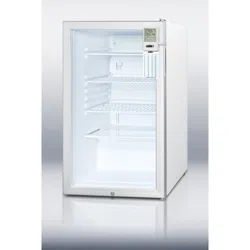
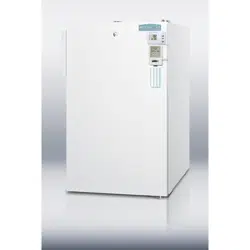
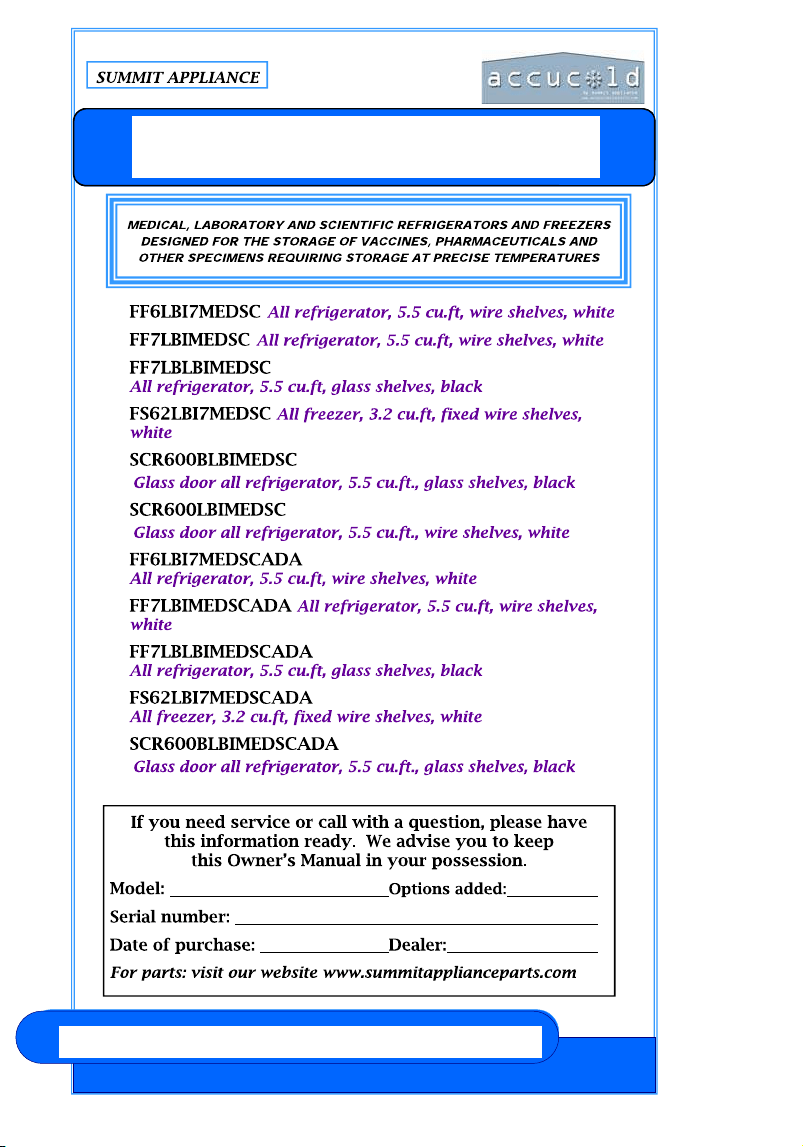
Introducing ACCUCOLD™, a new line of products from Summit Appliance
consisting of refrigeration ideally suited for the storage of vaccines, pharma-
ceuticals and other specimens requiring refrigeration at precise temperatures.
ACCUCOLD™ models all include the standard features most requested by
the medical and scientific communities, including locks, high temperature
alarms, external temperature displays (NIST-calibrated), self-closing doors,
hospital grade plugs, internal air circulation for even temperature performance
and heat sinks to help stabilize temperature under light loads. All ACCU-
COLD™ models are UL-approved and additionally have UL or ETL Sanitation
approval for foodservice use, as well as compliance with Calcode standards
and other state and local codes.
ACCUCOLD™ models combine all the features necessary for safe and reli-
able operation in medical, laboratory and scientific institutions. Factory-
installed locks offer content security, while a hospital-grade cord and green
dot plug protect the power source with solid construction. NIST-traceable
thermometers are calibrated for precise temperature readouts, displayed ex-
ternally so users do not need to open the door. All ACCUCOLD™ models
are specially equipped with a self-closing door that closes automatically when
opened at angles less than 90°, thus helping to preserve the cold interior tem-
perature of the unit.
SUMMIT ACCUCOLD™ models listed in this booklet include a fan-cooled
compressor to enable built-in installation under counters. This construction
allows users to maximize space by setting the refrigerator or freezer flush
against the wall and safely enclosed by other cabinets. Great for settings that
are limited on room, or offices and laboratories already incorporating a
counter design. All units have fully finished cabinets so they can also function
freestanding, providing users a choice in installation style.
SUMMIT ACCUCOLD™ models can also be customized to your exact needs.
Among the many options users choose are keypad locks, open door alarms,
probe holes for specific facility monitoring, anti-microbial stainless steel door
or cabinets, frames for custom door finishes and casters or a dolly for portabil-
ity. SUMMIT sales representatives are available to help you design and se-
lect your perfect ACCUCOLD™ model.
SUMMIT ACCUCOLD
™
REFRIGERATORS AND FREEZERS
www.summitmedicalrefrigerators.com
Felix Storch, Inc.
Before calling for assistance or service, please check
. It may save you the cost of a service call. If you still
need help, follow the instructions below.
When calling, please know the purchase date and the complete
model and serial numbers of your appliance. This information
will help us to respond more satisfactorily to your request.
If you need to order replacement parts, we recommend that
you only use factory-specified parts. Factory-specified parts
will fit right and work right, because they are made with the
same precision used to build every new SUMMIT® appliance.
–
Felix Storch, Inc.
www.summitmedicalrefrigerators.com
www.summitmedicalrefrigerators.com Felix Storch, Inc.
Your safety and the safety of others are very important to us.
We have provided many important safety messages in this manual and
on your appliance. Always read and obey all safety messages.
You can be killed or seriously injured if you don’t follow instructions.
All safety messages will tell you what the potential hazard is, tell you
how to reduce the chance of injury, and tell you what can happen if the
instructions are not followed.
Plug into a grounded 3 prong outlet.
Do not remove ground prong, nor use a 3/2 adapter.
Do not use an extension cord.
Use care not to plug into outlets controlled by wall switches.
Disconnect power before servicing.
After servicing, replace all parts and panels before operating.
Use nonflammable cleaners.
Keep flammable materials and vapors, such as gasoline, away
from appliances.
Use two or more people to move and install appliance.
Old appliances can represent a suffocation hazard to children.
Remove doors from your old appliance.
Leave shelves in place.
If an old appliance contains refrigerants, it must be recycled by a li-
censed service or disposal company.
1. Remove packaging materials.
2. Remove tape and glue residue from surfaces before turning on the
appliance. Rub a small amount of liquid dish soap over the adhesive
with your fingers. Rinse with warm water and dry.
3. Do not use sharp instruments, rubbing alcohol, flammable fluids, or
abrasive cleaners to remove tape or glue. These products can damage
the surface of your appliance.
4. When Moving Your Appliance: Your appliance is heavy. When moving
the appliance for cleaning or service, be sure to protect the floor. Al-
ways pull the appliance straight out when moving it. Do not wiggle or
“walk” the appliance when trying to move it, because floor damage
can occur.
5. Clean Before Using: After you remove all of the packaging materials,
clean the inside of your appliance before using it. See the cleaning
instructions in .
6. All ACCUCOLD™ models have leveling legs. Level as necessary for
best operation.
7. If your appliance has casters, after moving into place, lock the brakes
on those casters supplied with brakes. Always unlock before moving
Leveling your appliance e
1. Locate the four leveling legs taped among the packing materials. In many
models these legs are already mounted into the underside of the appliance.
2. Screw these legs into the holes on the bottom of the appliance. The fact that
the appliance has four leveling legs instead of just two at the front allows for
more precise leveling.
3. Adjust the legs just enough to lift the cabinet up off of the floor.
NOTE: If your model is equipped with front rollers, the front legs should be
lowered enough to lift the rollers off of the floor to ensure the appliance does
not roll forward when the door is opened.
4. Place a leveling tool on top of the appliance first side to side, then front to
back. Turn leg counterclockwise to raise a corner. Turn leg clockwise to
lower a corner.
Felix Storch, Inc.
www.summitmedicalrefrigerators.com
Temperature is too warm:
● Are the air vents blocked?
This prevents cold air movement. Move objects away from the air vents.
● Is the door opened often?
Be aware that the appliance will warm when this occurs. In order to keep
the appliance cool, try to get everything you need out of the appliance at
once, keep food organized so it is easy to find, and close the door as soon
as the food is removed.
● Has a large amount of food just been added to the appliance?
Adding a large amount of food warms the appliance. It can take several
hours for the appliance to return to the normal temperature.
The door will not close completely or is difficult to open:
● Are food packages blocking the door?
Rearrange containers so that they fit more tightly and take up less space.
● Are the shelves and basket out of position (on some models)?
Put the shelves and basket back into their correct positions.
www.summitmedicalrefrigerators.com Felix Storch, Inc.
Try the solutions suggested here first to avoid the cost of
an unnecessary service call ―
Your appliance will not operate:
● Has a household fuse blown or circuit breaker tripped?
Replace the fuse or reset the circuit breaker.
There is water in the defrost drain pan (on some models):
● Is the appliance defrosting?
The water will evaporate. It is normal for water to drip into the defrost pan.
● Is it more humid than normal?
When it is humid, expect that the water in the defrost pan will take longer
to evaporate.
The motor seems to run too much:
● Is there excessive frost or a package preventing the door from clos-
ing? Defrost and clean the freezer, or move the package so the door
closes properly.
● Is the room temperature hotter than normal?
The motor will run longer under warm conditions. At normal room tempera-
tures, your motor will run about 40% to 80% of the time. Under warmer
conditions, it will run even more.
● Has a large amount of food just been added to the appliance?
Adding a large amount of food warms the appliance. The motor normally
will run longer to cool the appliance back down.
● Is the door closed completely?
Push the door firmly shut. If it will not shut all the way, see “The door will
not close completely” later in this section.
● Are the condenser coils dirty (on some models)?
This prevents air transfer and makes the motor work harder. Clean the
condenser coils.
● Is the door gasket sealed all the way around?
If not, contact a qualified technician.
NOTE: If the problem is not due to any of the above, remember that the
compressor on your new appliance will operate longer than your
old one due to its high-efficiency motor.
Felix Storch, Inc.
www.summitmedicalrefrigerators.com
Do not install the appliance near an oven, radiator or
other heat source, nor in a location where the temperature will fall
below 40°F (5°C). Do not place in direct sunlight.
Check the strength of the floor before installing your appliance. It
should hold the weight of a fully loaded appliance. Allow at least 1” (2.5
cm) of airspace at the top and on both sides of the appliance and 1” (2.5
cm) between the back of the appliance and the wall. If the appliance is
going to be placed beside a wall, leave extra space on the hinge side so
the door can open wider than its width.
This appliance may be installed side by side with another
appliance or appliances.
A 115 Volt AC-only, 60 Hz grounded electrical supply with 15-
or 20- amp fuse or circuit breaker is required. It is recommended
that a separate circuit serving only your appliance be provided.
Use outlets that cannot be turned off by a switch or pull chain.
Leveling your appliance, cont’d
5. Repeat Step 4 until appliance is level.
6. After appliance is fully loaded, recheck with level as in Step 4.
7. If your appliance is equipped with casters, the two front casters have brakes
to prevent rolling. Keep brakes locked, and unlock for moving only.
www.summitmedicalrefrigerators.com Felix Storch, Inc.
In order to ensure proper temperature, you need to permit proper air-
flow in the appliance. Do not block any air vents. If the vents are
blocked, airflow will be prevented, and temperature and moisture prob-
lems may occur. Always position contents to allow some airflow be-
tween shelves or baskets.
Allow the appliance to cool at least 6 to 8 hours before adding contents.
Allow 24 hours for temperature to stabilize.
When the appliance is first started, the compressor will run con-
stantly until the appliance is cooled. It may take 6 to 8 hours (or
longer), depending on room temperature and the number of times
the appliance door is opened. After the appliance is cooled, the com-
pressor will turn on and off as needed to keep the appliance at the
proper temperature.
The outside of your appliance may feel warm. This is normal. The appli-
ance’s design and main function is to remove heat from packages and
air space inside the appliance. The heat is transferred to the room air,
making the outside of the appliance feel warm.
The more airflow you can provide around an appliance, the less en-
ergy it will use.
Your appliance needs defrosting if ice build-up reaches a thickness of
1/2 inch.
Keep the door open a minimum of time, and shut securely.
Felix Storch, Inc.
www.summitmedicalrefrigerators.com
installing the appliance. Many customers will be satisfied with
a warmer set-point, which is still colder than many household
freezers.
A standard feature of all ACCUCOLD™ models is the self-closing
door. The door closes automatically when opened at angles less than
90°. This feature increases a unit’s efficiency by preventing too much
ambient warmth from entering to influence interior temperatures.
This is especially true in high traffic facilities where users may not
always take the time to ensure that the door is closed after use.
.
Models with ADA in their suffix are 32” tall and are designed
to fit under counters built to a height specified by the
Americans with Disabilities Act.
www.summitmedicalrefrigerators.com Felix Storch, Inc.
These models are all-refrigerator (no freezer compartment) with
automatic defrost. All have cold plates on the rear wall, and the
coldest spots in the refrigerator will be in the rear and toward
the bottom. All units have interior fans to promote even cooling.
In the rear bottom, above the step there is a drain line to allow
defrost water to exit the refrigerator. Keep this drain line clear,
or icing inside the refrigerator will occur. FF6LBI, FF7LBI and
SCR600LBI models are designed for built-in operation and do
not need clearance on the sides or above the units. All models
operate best when 1 inch is provided between the rear wall and
the back of the unit. FF7LBI and SCR600LBI series models have
lights that are not door-activated, and are controlled by a rocker
switch on the top right. The light generates a small amount of
heat, so keep the light off for best operation and energy savings.
FF6LBI models have door-activated lights.
These models are manual defrost all-freezers, capable of
o p e r a t i n g a t
-13°F (-25°C). The cooling coils (part of the sealed refrigeration
system) run through each shelf; all shelves are fixed in position.
The drawers are fully removable, and you can operate the
freezer without them if desired. However, the drawers
contribute to energy efficiency and are best used whenever
possible. No internal fans are present and ice will build up along
the cooling coils. Periodically defrost the ice (recommended
when the ice thickness reaches 1/4 to 1/2 inch). NEVER USE A
METAL INSTRUMENT, as you can damage the cooling coils, which
will void your warranty and often cannot be repaired. To
defrost, disconnect from the power supply, empty the freezer of
its contents, provide for a tray in the bottom to collect water,
and use a hairdryer or other source of warm air to melt the ice
(or leave the door open and the power off for 24 to 48 hours).
Because the thermostat of model FS62LBI7MEDSCADA is located
at the back of the unit, it may be convenient to set it prior to
Felix Storch, Inc.
www.summitmedicalrefrigerators.com
Cleaning Your Auto Defrost Refrigerator
(models beginning with FF and SCR)
Use nonflammable cleaners.
Auto defrost models utilize a system in which ice builds up on the rear wall of
the unit and melts when the compressor is off.
Complete cleaning should be done at least once a year.
1. Unplug appliance or disconnect power.
2. Remove all contents from the appliance.
3. Wash the inside walls with a solution of mild detergent in warm water or 2
tbs (26 g) baking soda in 1 qt (0.95 L) warm water.
Do not use harsh or abrasive cleaners such as window sprays, scouring
cleansers, flammable fluids, cleaning waxes, concentrated detergents,
bleaches or cleansers containing petroleum products on plastic parts, inte-
rior and door liners or gaskets. Do not use paper towels, scouring pads, or
other harsh cleaning tools. These can scratch or damage materials.
4. Rinse well and wipe dry with a clean soft cloth.
5. Use the appropriate cleaning method for your exterior finish.
Painted metal: Wash exteriors with a clean sponge or soft cloth and a
mild detergent in warm water. Do not use abrasive or harsh cleaners, or
cleaners designed for stainless steel. Dry thoroughly with a soft cloth. For
additional protection against damage to painted metal exteriors, apply ap-
pliance wax (or auto paste wax) with a clean, soft cloth. Do not wax plastic
parts.
6. Plug in appliance or reconnect power.
7. Replace all containers.
Cleaning Your Manual Defrost Freezer
(models beginning with FS)
Manual defrost models continually build up ice on inner walls and between
shelves.
NEVER USE A METAL OBJECT TO REMOVE ICE FROM THE REAR WALL.
IF NEEDED, USE A PLASTIC ICE-SCRAPER OR A HAIR DRYER.
Clean surfaces, using the same instructions as for auto defrost models.
www.summitmedicalrefrigerators.com Felix Storch, Inc.
1. Open the appliance door and remove the base grill by pulling down
and out from the top.
2. Replace the base grill by putting the clips in the openings in the
appliance panel. Push in until the base grill snaps into place.
NOTE: Not all appliance bulbs will fit your appliance. Be sure to replace
the bulb with one of the same size, shape, base size and wattage.
You can purchase bulbs from
1. Unplug appliance or disconnect power.
2. Remove the light shield. Most models do not require tools.
3. Replace the light bulb with an appliance bulb of the same wattage.
4. Replace the light shield.
5. Plug in appliance or reconnect power.
After the power is restored, unplug the appliance for 30 minutes to
allow the refrigeration system to equalize. During this time keep the
door closed whenever possible.
REMEMBER: A full appliance stays cold longer than a partially filled
one.
1. Remove all containers from inside the appliance.
2. Unplug the appliance.
3. Clean it thoroughly.
4. Tape the appliance shut and tape the electrical cord to the cabinet.
When you get to the new location, refer to the “Installation Instructions”
and “Appliance Use” sections for information on installation and re-
setting the unit.
Felix Storch, Inc.
www.summitmedicalrefrigerators.com
The factory set default password is 0123. If the
default password is lost, press the key (located inside
the battery box) for 30 seconds then wait for the warning
sound which signifies the factory set default password has
been restored.
While door is open press the key
(located inside the battery box) until it jingles, enter the 0123
password then # within 10 seconds to confirm. Enter the
password (1-16 digits) then press # again to confirm. A total of 10 passwords
can be set. NOTE: Each password starts from the number 0 to 9 in order. The
first password starting with 0 is the default password. For example, use 1xxx,
then 2xxx, etc., for up to 10 users.
While the door is open, press the key (located inside
the battery box) until it jingles, enter the old password and press # within 10
seconds to confirm. Enter new password then press # to confirm. NOTE: The first
digit cannot be changed.
While the door is closed, press the key, enter the
password, then press again to confirm.
Press #.
To set the auto-lock time, press the
key (inside the battery box); enter a number (any number between 10 and 99,
inclusive) then press # to confirm. The auto-lock time can be set between 10 and
99 seconds after opening the door. If the time is set less than 10 seconds, the
door will not lock automatically, only manually.
Press the key, enter default
password followed by 0000, then press # and all the door-opening passwords
will be deleted except for the default password.
NOTE: To access the battery box you need to remove only the two small screws
on the top and bottom of that cover. Do not remove the 4 screws holding the
keypad and cover to the appliance door.
(Optional on most models)
www.summitmedicalrefrigerators.com Felix Storch, Inc.
below the LO set point, the alarm will sound for 1 minute and issue a
3-second repeater beep every minute thereafter, for up to 12 hours.
The alarm will continue to sound even if the current temperature
display returns to an “in range” condition.
To temporarily silence the alarm, press either the HI or LO button on
the back of the box. The box is still active and the alarm will sound
again if the temperature goes out of range. To permanently silence the
alarm, slide the ALARM ON/OFF switch to the OFF position.
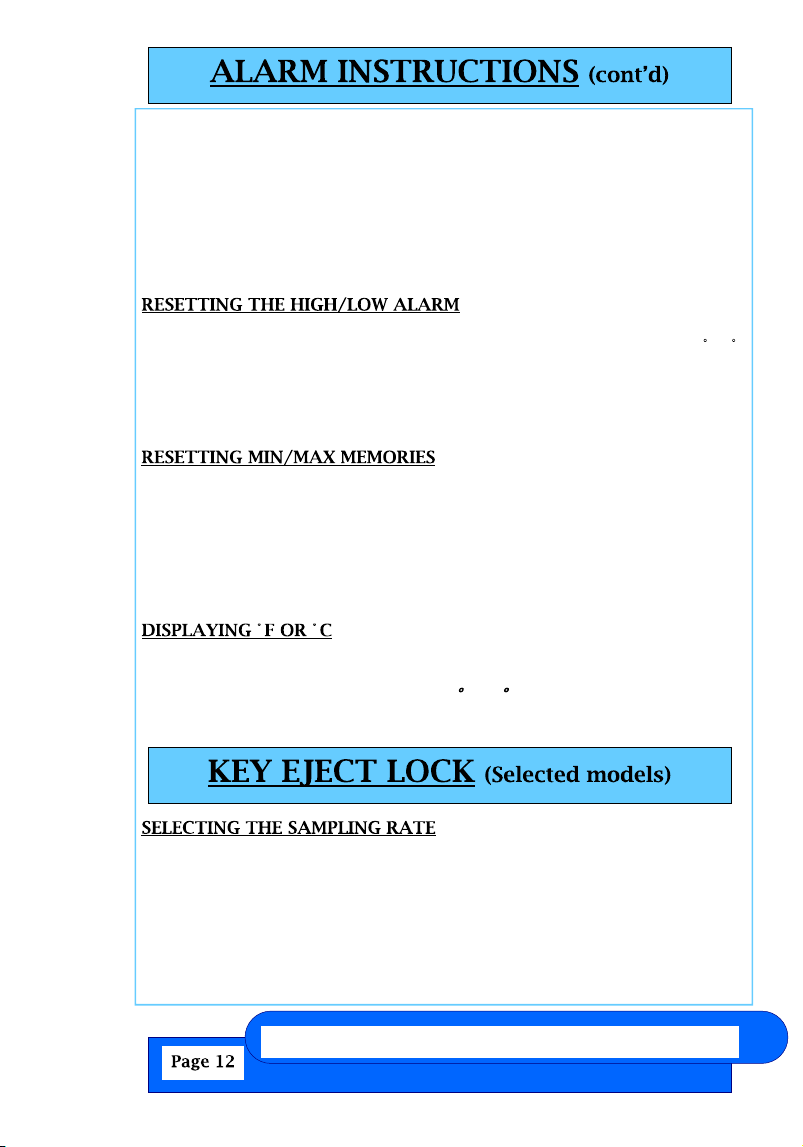
Use a pointed object to push the RESET button on the back of the unit.
It is necessary to reset the unit whenever a change is made to C/ F
temperature, FAST/NORMAL sampling rate, or if the probe sensor is
plugged in or removed.
NOTE: HI/LO temperature alarm settings and MIN/MAX memories will
be cleared after resetting the unit.
There are two ways to reset the memories:
1. To reset both Minimum and Maximum memories, press the
MEMORY CLEAR button.
2. To reset individual Minimum and Maximum memories, press either
the MIN or MAX button (on back of unit) once to reset the respective
memory. The other memory will remain unaffected.
NOTE: You must be in NORMAL DISPLAY MODE to reset the memories.
To display the temperature readings in Fahrenheit (°F) or Celsius (°C),
s l i d e
the switch on the back of the unit to F or C.
NOTE: The unit must be reset after changing the temperature scale.
To select normal sampling rate (every 60 seconds) or fast sampling
rate (every 10 seconds), slide the switch on back of unit to NORMAL or
FAST.
NOTE: The unit must be reset after changing the sampling rate. Using
the NORMAL sampling rate will extend battery life.
If your model has a front lock, the lock has a feature called Automatic
Felix Storch, Inc.
www.summitmedicalrefrigerators.com
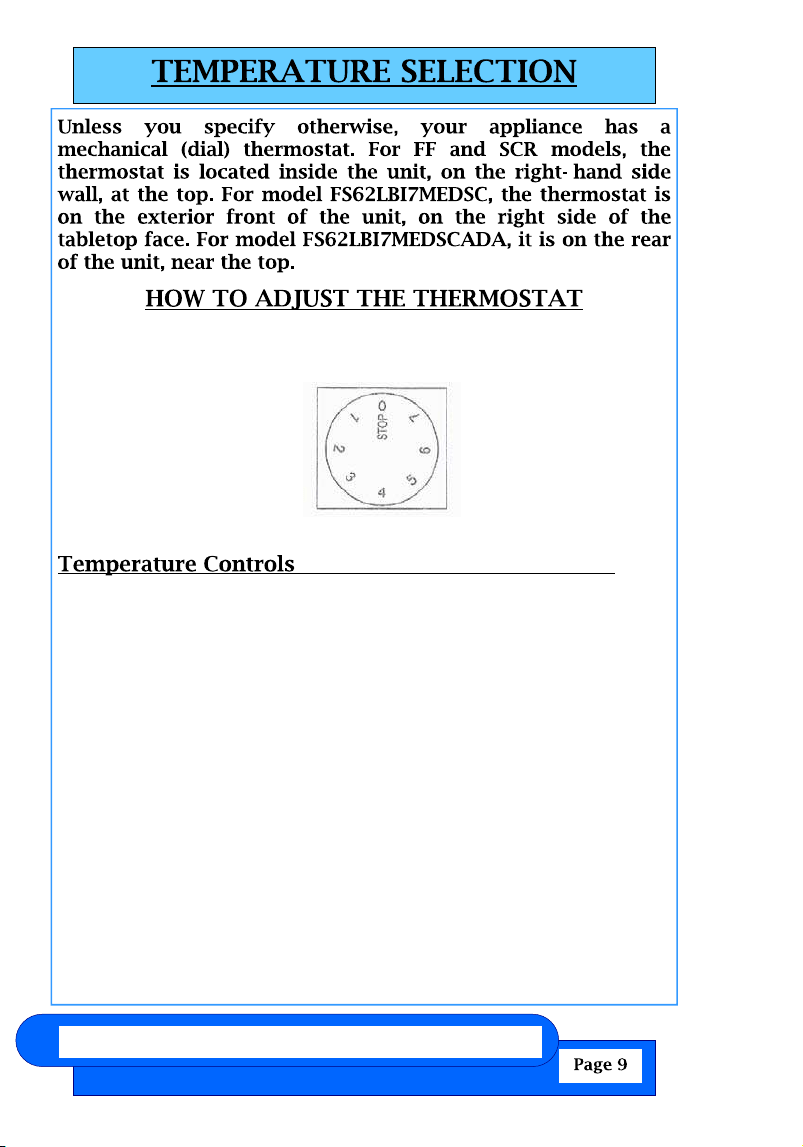
The thermostat controls the temperature inside the refrigerator. Turn
the thermostat knob clockwise from the STOP (0) position toward the
higher numbers for colder
temperatures.
Higher settings on the knob (higher numbers) mean colder
temperatures in all compartments of the appliance. The temperature
in the interior of the appliance may even drop below 32°F. Use higher
thermostat settings only when required or recommended. When the
ambient temperature is normal, we recommend a medium setting
.
Changes in the ambient temperature affect the temperature in the
interior of the appliance. (Choose the setting of the thermostat knob
with care.)
In STOP (0) position, the appliance does not operate (the cooling
system is switched off), yet the power supply is not interrupted (the
light is on when you open the refrigerator door).
The temperature in the refrigerator and in the freezer compartment
also depend on how often you open the door.
NOTE: In all small refrigerators and freezers without interior fans,
temperatures are coldest near the bottom, and occasionally near the
rear. Place contents accordingly. It is best not to operate these units
mostly empty. If temperatures are erratic, try putting some water
www.summitmedicalrefrigerators.com Felix Storch, Inc.
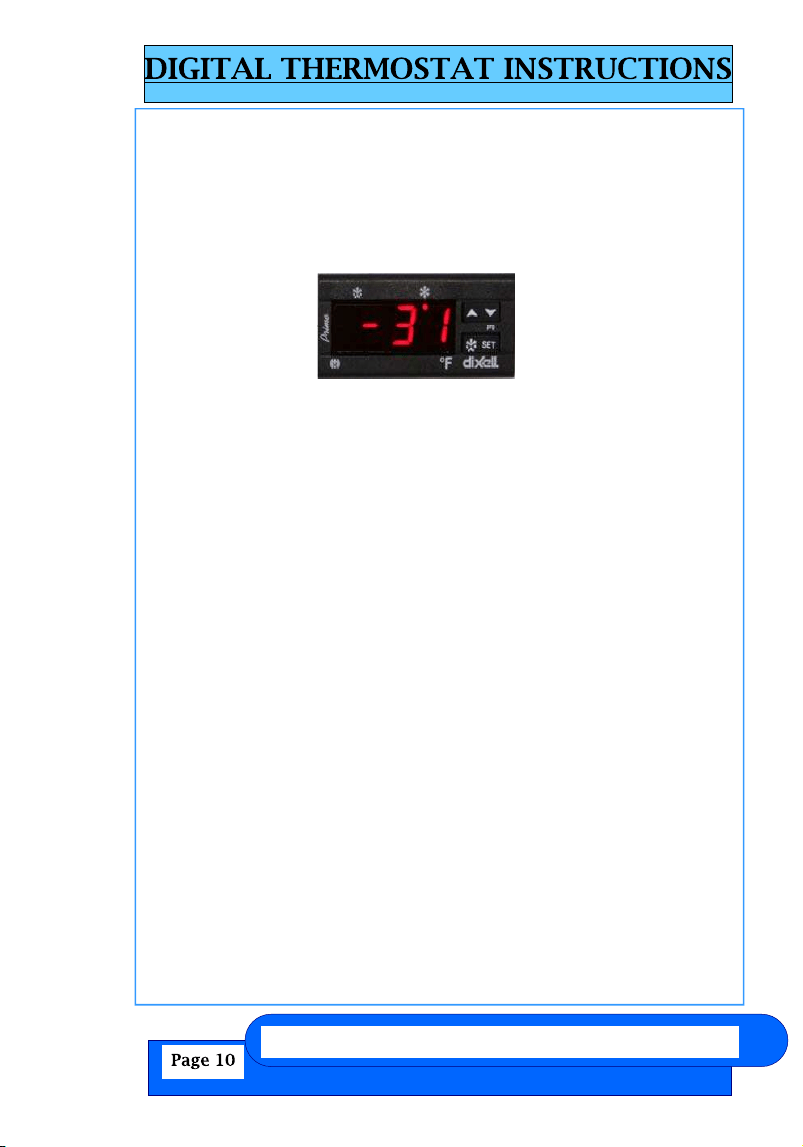
melting snowflake snowflake
Up & Down arrows
“SET” key
You may choose to have a digital thermostat installed at the factory
to replace the standard manual (dial) thermostat. If your appliance
has a digital thermostat and you find it necessary to change the tem-
perature setting, please refer to the following instructions. The front
panel of the thermostat is illustrated here:
To see the SETPOINT:
Push and immediately release the SET key. The display will show
the SET point value. Wait 5 seconds and the probe value will display
again.
To change the SETPOINT:
Push and hold the SET key for more then 3 seconds to change the
set point value. The value of the set point will be displayed, and the
“snowflake” LED will start blinking.
To change the SET value:
Push the Up or Down arrows to the desired setting. The new setting
will be memorized after 15 seconds, provided no other keys are
pushed.
NOTE: The minimum/maximum range of your thermostat is preset
and locked by us, so it cannot easily be accidentally moved be-
tween freezer and refrigerator temperatures. To reset this range
lock, either call us or find information on our website under Trou-
bleshooting.
NOTE: Due to supply considerations, different digital thermostats
may be used with slightly different procedures. Refer to the
Troubleshooting section of www.summitapplianceparts.com for
the exact procedure.
Felix Storch, Inc.
www.summitmedicalrefrigerators.com
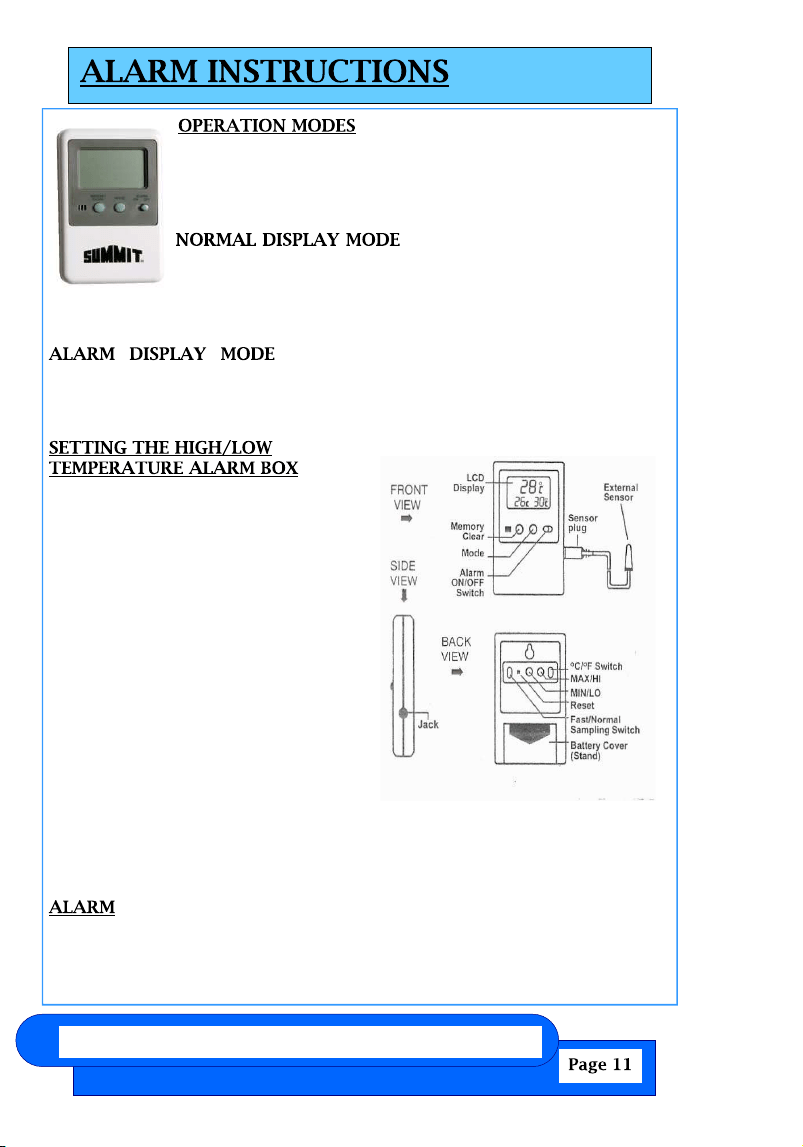
SUMMIT’s optional High/Low Temperature Alarm boxes
have two operating modes: NORMAL DISPLAY MODE and
ALARM DISPLAY MODE. To change from one mode to
another, press the MODE button once.
– is indicated by the display of
current temperature and the MIN (minimum) and MAX
(maximum) temperatures. These temperatures relate to
external (probe) temperature if the probe is plugged in,
and to ambient temperature if the sensor probe is removed.
– is indicated by the display of current
temperature and the HI and LO alarm settings. These temperatures relate
to external (probe) temperature if the probe is plugged in, and to
ambient temperature if the sensor probe is removed.
1. Press the MODE button until the
unit is in the ALARM DISPLAY
MODE indicated by the display of
current temperature and HI and LO
alarm settings.
2. To set the HIGH temperature alarm
limit, press the HI button (on back
of control box) to advance the
display in 1° increments, until the
desired high temperature is
displayed. Press and hold the HI
button to rapidly advance the
display in 5° increments.
3. To set the LOW temperature alarm
limit, press the LO button (on back
of control box) to advance the
display in 1° increments, until the desired low temperature is
displayed. Press and hold the LO button to rapidly advance the
display in 5° increments.
The unit can sound the alarm in both NORMAL DISPLAY MODE and
ALARM DISPLAY MODE. Slide the ALARM ON/OFF switch to ON. When
the current temperature display rises above the HI set point, or falls
(Selected Models)
www.summitmedicalrefrigerators.com Felix Storch, Inc.
melting snowflake snowflake
Up & Down arrows
“SET” key
You may choose to have a digital thermostat installed at the factory
to replace the standard manual (dial) thermostat. If your appliance
has a digital thermostat and you find it necessary to change the tem-
perature setting, please refer to the following instructions. The front
panel of the thermostat is illustrated here:
To see the SETPOINT:
Push and immediately release the SET key. The display will show
the SET point value. Wait 5 seconds and the probe value will display
again.
To change the SETPOINT:
Push and hold the SET key for more then 3 seconds to change the
set point value. The value of the set point will be displayed, and the
“snowflake” LED will start blinking.
To change the SET value:
Push the Up or Down arrows to the desired setting. The new setting
will be memorized after 15 seconds, provided no other keys are
pushed.
NOTE: The minimum/maximum range of your thermostat is preset
and locked by us, so it cannot easily be accidentally moved be-
tween freezer and refrigerator temperatures. To reset this range
lock, either call us or find information on our website under Trou-
bleshooting.
NOTE: Due to supply considerations, different digital thermostats
may be used with slightly different procedures. Refer to the
Troubleshooting section of www.summitapplianceparts.com for
the exact procedure.
Felix Storch, Inc.
www.summitmedicalrefrigerators.com
SUMMIT’s optional High/Low Temperature Alarm boxes
have two operating modes: NORMAL DISPLAY MODE and
ALARM DISPLAY MODE. To change from one mode to
another, press the MODE button once.
– is indicated by the display of
current temperature and the MIN (minimum) and MAX
(maximum) temperatures. These temperatures relate to
external (probe) temperature if the probe is plugged in,
and to ambient temperature if the sensor probe is removed.
– is indicated by the display of current
temperature and the HI and LO alarm settings. These temperatures relate
to external (probe) temperature if the probe is plugged in, and to
ambient temperature if the sensor probe is removed.
1. Press the MODE button until the
unit is in the ALARM DISPLAY
MODE indicated by the display of
current temperature and HI and LO
alarm settings.
2. To set the HIGH temperature alarm
limit, press the HI button (on back
of control box) to advance the
display in 1° increments, until the
desired high temperature is
displayed. Press and hold the HI
button to rapidly advance the
display in 5° increments.
3. To set the LOW temperature alarm
limit, press the LO button (on back
of control box) to advance the
display in 1° increments, until the desired low temperature is
displayed. Press and hold the LO button to rapidly advance the
display in 5° increments.
The unit can sound the alarm in both NORMAL DISPLAY MODE and
ALARM DISPLAY MODE. Slide the ALARM ON/OFF switch to ON. When
the current temperature display rises above the HI set point, or falls
(Selected Models)
www.summitmedicalrefrigerators.com Felix Storch, Inc.
below the LO set point, the alarm will sound for 1 minute and issue a
3-second repeater beep every minute thereafter, for up to 12 hours.
The alarm will continue to sound even if the current temperature
display returns to an “in range” condition.
To temporarily silence the alarm, press either the HI or LO button on
the back of the box. The box is still active and the alarm will sound
again if the temperature goes out of range. To permanently silence the
alarm, slide the ALARM ON/OFF switch to the OFF position.
Use a pointed object to push the RESET button on the back of the unit.
It is necessary to reset the unit whenever a change is made to C/ F
temperature, FAST/NORMAL sampling rate, or if the probe sensor is
plugged in or removed.
NOTE: HI/LO temperature alarm settings and MIN/MAX memories will
be cleared after resetting the unit.
There are two ways to reset the memories:
1. To reset both Minimum and Maximum memories, press the
MEMORY CLEAR button.
2. To reset individual Minimum and Maximum memories, press either
the MIN or MAX button (on back of unit) once to reset the respective
memory. The other memory will remain unaffected.
NOTE: You must be in NORMAL DISPLAY MODE to reset the memories.
To display the temperature readings in Fahrenheit (°F) or Celsius (°C),
s l i d e
the switch on the back of the unit to F or C.
NOTE: The unit must be reset after changing the temperature scale.
To select normal sampling rate (every 60 seconds) or fast sampling
rate (every 10 seconds), slide the switch on back of unit to NORMAL or
FAST.
NOTE: The unit must be reset after changing the sampling rate. Using
the NORMAL sampling rate will extend battery life.
If your model has a front lock, the lock has a feature called Automatic
Felix Storch, Inc.
www.summitmedicalrefrigerators.com
The thermostat controls the temperature inside the refrigerator. Turn
the thermostat knob clockwise from the STOP (0) position toward the
higher numbers for colder
temperatures.
Higher settings on the knob (higher numbers) mean colder
temperatures in all compartments of the appliance. The temperature
in the interior of the appliance may even drop below 32°F. Use higher
thermostat settings only when required or recommended. When the
ambient temperature is normal, we recommend a medium setting
.
Changes in the ambient temperature affect the temperature in the
interior of the appliance. (Choose the setting of the thermostat knob
with care.)
In STOP (0) position, the appliance does not operate (the cooling
system is switched off), yet the power supply is not interrupted (the
light is on when you open the refrigerator door).
The temperature in the refrigerator and in the freezer compartment
also depend on how often you open the door.
NOTE: In all small refrigerators and freezers without interior fans,
temperatures are coldest near the bottom, and occasionally near the
rear. Place contents accordingly. It is best not to operate these units
mostly empty. If temperatures are erratic, try putting some water
www.summitmedicalrefrigerators.com Felix Storch, Inc.
1. Open the appliance door and remove the base grill by pulling down
and out from the top.
2. Replace the base grill by putting the clips in the openings in the
appliance panel. Push in until the base grill snaps into place.
NOTE: Not all appliance bulbs will fit your appliance. Be sure to replace
the bulb with one of the same size, shape, base size and wattage.
You can purchase bulbs from
1. Unplug appliance or disconnect power.
2. Remove the light shield. Most models do not require tools.
3. Replace the light bulb with an appliance bulb of the same wattage.
4. Replace the light shield.
5. Plug in appliance or reconnect power.
After the power is restored, unplug the appliance for 30 minutes to
allow the refrigeration system to equalize. During this time keep the
door closed whenever possible.
REMEMBER: A full appliance stays cold longer than a partially filled
one.
1. Remove all containers from inside the appliance.
2. Unplug the appliance.
3. Clean it thoroughly.
4. Tape the appliance shut and tape the electrical cord to the cabinet.
When you get to the new location, refer to the “Installation Instructions”
and “Appliance Use” sections for information on installation and re-
setting the unit.
Felix Storch, Inc.
www.summitmedicalrefrigerators.com
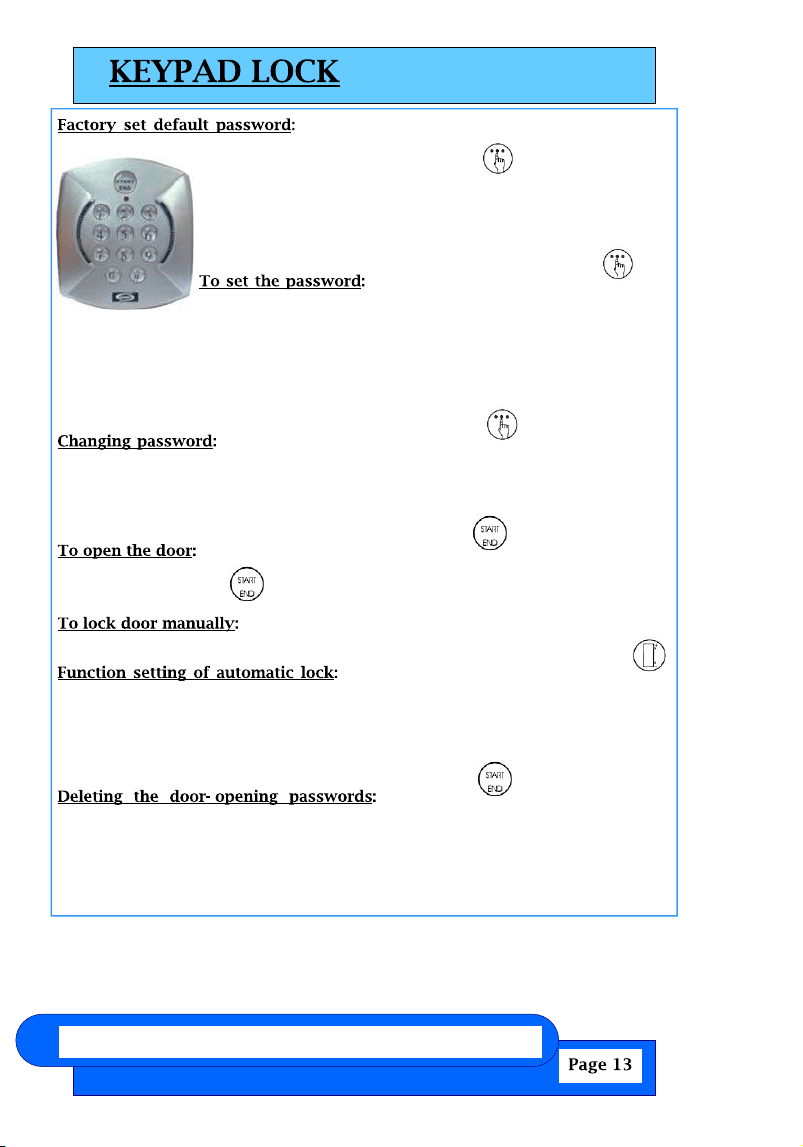
The factory set default password is 0123. If the
default password is lost, press the key (located inside
the battery box) for 30 seconds then wait for the warning
sound which signifies the factory set default password has
been restored.
While door is open press the key
(located inside the battery box) until it jingles, enter the 0123
password then # within 10 seconds to confirm. Enter the
password (1-16 digits) then press # again to confirm. A total of 10 passwords
can be set. NOTE: Each password starts from the number 0 to 9 in order. The
first password starting with 0 is the default password. For example, use 1xxx,
then 2xxx, etc., for up to 10 users.
While the door is open, press the key (located inside
the battery box) until it jingles, enter the old password and press # within 10
seconds to confirm. Enter new password then press # to confirm. NOTE: The first
digit cannot be changed.
While the door is closed, press the key, enter the
password, then press again to confirm.
Press #.
To set the auto-lock time, press the
key (inside the battery box); enter a number (any number between 10 and 99,
inclusive) then press # to confirm. The auto-lock time can be set between 10 and
99 seconds after opening the door. If the time is set less than 10 seconds, the
door will not lock automatically, only manually.
Press the key, enter default
password followed by 0000, then press # and all the door-opening passwords
will be deleted except for the default password.
NOTE: To access the battery box you need to remove only the two small screws
on the top and bottom of that cover. Do not remove the 4 screws holding the
keypad and cover to the appliance door.
(Optional on most models)
www.summitmedicalrefrigerators.com Felix Storch, Inc.
These models are all-refrigerator (no freezer compartment) with
automatic defrost. All have cold plates on the rear wall, and the
coldest spots in the refrigerator will be in the rear and toward
the bottom. All units have interior fans to promote even cooling.
In the rear bottom, above the step there is a drain line to allow
defrost water to exit the refrigerator. Keep this drain line clear,
or icing inside the refrigerator will occur. FF6LBI, FF7LBI and
SCR600LBI models are designed for built-in operation and do
not need clearance on the sides or above the units. All models
operate best when 1 inch is provided between the rear wall and
the back of the unit. FF7LBI and SCR600LBI series models have
lights that are not door-activated, and are controlled by a rocker
switch on the top right. The light generates a small amount of
heat, so keep the light off for best operation and energy savings.
FF6LBI models have door-activated lights.
These models are manual defrost all-freezers, capable of
o p e r a t i n g a t
-13°F (-25°C). The cooling coils (part of the sealed refrigeration
system) run through each shelf; all shelves are fixed in position.
The drawers are fully removable, and you can operate the
freezer without them if desired. However, the drawers
contribute to energy efficiency and are best used whenever
possible. No internal fans are present and ice will build up along
the cooling coils. Periodically defrost the ice (recommended
when the ice thickness reaches 1/4 to 1/2 inch). NEVER USE A
METAL INSTRUMENT, as you can damage the cooling coils, which
will void your warranty and often cannot be repaired. To
defrost, disconnect from the power supply, empty the freezer of
its contents, provide for a tray in the bottom to collect water,
and use a hairdryer or other source of warm air to melt the ice
(or leave the door open and the power off for 24 to 48 hours).
Because the thermostat of model FS62LBI7MEDSCADA is located
at the back of the unit, it may be convenient to set it prior to
Felix Storch, Inc.
www.summitmedicalrefrigerators.com
Cleaning Your Auto Defrost Refrigerator
(models beginning with FF and SCR)
Use nonflammable cleaners.
Auto defrost models utilize a system in which ice builds up on the rear wall of
the unit and melts when the compressor is off.
Complete cleaning should be done at least once a year.
1. Unplug appliance or disconnect power.
2. Remove all contents from the appliance.
3. Wash the inside walls with a solution of mild detergent in warm water or 2
tbs (26 g) baking soda in 1 qt (0.95 L) warm water.
Do not use harsh or abrasive cleaners such as window sprays, scouring
cleansers, flammable fluids, cleaning waxes, concentrated detergents,
bleaches or cleansers containing petroleum products on plastic parts, inte-
rior and door liners or gaskets. Do not use paper towels, scouring pads, or
other harsh cleaning tools. These can scratch or damage materials.
4. Rinse well and wipe dry with a clean soft cloth.
5. Use the appropriate cleaning method for your exterior finish.
Painted metal: Wash exteriors with a clean sponge or soft cloth and a
mild detergent in warm water. Do not use abrasive or harsh cleaners, or
cleaners designed for stainless steel. Dry thoroughly with a soft cloth. For
additional protection against damage to painted metal exteriors, apply ap-
pliance wax (or auto paste wax) with a clean, soft cloth. Do not wax plastic
parts.
6. Plug in appliance or reconnect power.
7. Replace all containers.
Cleaning Your Manual Defrost Freezer
(models beginning with FS)
Manual defrost models continually build up ice on inner walls and between
shelves.
NEVER USE A METAL OBJECT TO REMOVE ICE FROM THE REAR WALL.
IF NEEDED, USE A PLASTIC ICE-SCRAPER OR A HAIR DRYER.
Clean surfaces, using the same instructions as for auto defrost models.
www.summitmedicalrefrigerators.com Felix Storch, Inc.
In order to ensure proper temperature, you need to permit proper air-
flow in the appliance. Do not block any air vents. If the vents are
blocked, airflow will be prevented, and temperature and moisture prob-
lems may occur. Always position contents to allow some airflow be-
tween shelves or baskets.
Allow the appliance to cool at least 6 to 8 hours before adding contents.
Allow 24 hours for temperature to stabilize.
When the appliance is first started, the compressor will run con-
stantly until the appliance is cooled. It may take 6 to 8 hours (or
longer), depending on room temperature and the number of times
the appliance door is opened. After the appliance is cooled, the com-
pressor will turn on and off as needed to keep the appliance at the
proper temperature.
The outside of your appliance may feel warm. This is normal. The appli-
ance’s design and main function is to remove heat from packages and
air space inside the appliance. The heat is transferred to the room air,
making the outside of the appliance feel warm.
The more airflow you can provide around an appliance, the less en-
ergy it will use.
Your appliance needs defrosting if ice build-up reaches a thickness of
1/2 inch.
Keep the door open a minimum of time, and shut securely.
Felix Storch, Inc.
www.summitmedicalrefrigerators.com
installing the appliance. Many customers will be satisfied with
a warmer set-point, which is still colder than many household
freezers.
A standard feature of all ACCUCOLD™ models is the self-closing
door. The door closes automatically when opened at angles less than
90°. This feature increases a unit’s efficiency by preventing too much
ambient warmth from entering to influence interior temperatures.
This is especially true in high traffic facilities where users may not
always take the time to ensure that the door is closed after use.
.
Models with ADA in their suffix are 32” tall and are designed
to fit under counters built to a height specified by the
Americans with Disabilities Act.
www.summitmedicalrefrigerators.com Felix Storch, Inc.
Try the solutions suggested here first to avoid the cost of
an unnecessary service call ―
Your appliance will not operate:
● Has a household fuse blown or circuit breaker tripped?
Replace the fuse or reset the circuit breaker.
There is water in the defrost drain pan (on some models):
● Is the appliance defrosting?
The water will evaporate. It is normal for water to drip into the defrost pan.
● Is it more humid than normal?
When it is humid, expect that the water in the defrost pan will take longer
to evaporate.
The motor seems to run too much:
● Is there excessive frost or a package preventing the door from clos-
ing? Defrost and clean the freezer, or move the package so the door
closes properly.
● Is the room temperature hotter than normal?
The motor will run longer under warm conditions. At normal room tempera-
tures, your motor will run about 40% to 80% of the time. Under warmer
conditions, it will run even more.
● Has a large amount of food just been added to the appliance?
Adding a large amount of food warms the appliance. The motor normally
will run longer to cool the appliance back down.
● Is the door closed completely?
Push the door firmly shut. If it will not shut all the way, see “The door will
not close completely” later in this section.
● Are the condenser coils dirty (on some models)?
This prevents air transfer and makes the motor work harder. Clean the
condenser coils.
● Is the door gasket sealed all the way around?
If not, contact a qualified technician.
NOTE: If the problem is not due to any of the above, remember that the
compressor on your new appliance will operate longer than your
old one due to its high-efficiency motor.
Felix Storch, Inc.
www.summitmedicalrefrigerators.com
Do not install the appliance near an oven, radiator or
other heat source, nor in a location where the temperature will fall
below 40°F (5°C). Do not place in direct sunlight.
Check the strength of the floor before installing your appliance. It
should hold the weight of a fully loaded appliance. Allow at least 1” (2.5
cm) of airspace at the top and on both sides of the appliance and 1” (2.5
cm) between the back of the appliance and the wall. If the appliance is
going to be placed beside a wall, leave extra space on the hinge side so
the door can open wider than its width.
This appliance may be installed side by side with another
appliance or appliances.
A 115 Volt AC-only, 60 Hz grounded electrical supply with 15-
or 20- amp fuse or circuit breaker is required. It is recommended
that a separate circuit serving only your appliance be provided.
Use outlets that cannot be turned off by a switch or pull chain.
Leveling your appliance, cont’d
5. Repeat Step 4 until appliance is level.
6. After appliance is fully loaded, recheck with level as in Step 4.
7. If your appliance is equipped with casters, the two front casters have brakes
to prevent rolling. Keep brakes locked, and unlock for moving only.
www.summitmedicalrefrigerators.com Felix Storch, Inc.
1. Remove packaging materials.
2. Remove tape and glue residue from surfaces before turning on the
appliance. Rub a small amount of liquid dish soap over the adhesive
with your fingers. Rinse with warm water and dry.
3. Do not use sharp instruments, rubbing alcohol, flammable fluids, or
abrasive cleaners to remove tape or glue. These products can damage
the surface of your appliance.
4. When Moving Your Appliance: Your appliance is heavy. When moving
the appliance for cleaning or service, be sure to protect the floor. Al-
ways pull the appliance straight out when moving it. Do not wiggle or
“walk” the appliance when trying to move it, because floor damage
can occur.
5. Clean Before Using: After you remove all of the packaging materials,
clean the inside of your appliance before using it. See the cleaning
instructions in .
6. All ACCUCOLD™ models have leveling legs. Level as necessary for
best operation.
7. If your appliance has casters, after moving into place, lock the brakes
on those casters supplied with brakes. Always unlock before moving
Leveling your appliance e
1. Locate the four leveling legs taped among the packing materials. In many
models these legs are already mounted into the underside of the appliance.
2. Screw these legs into the holes on the bottom of the appliance. The fact that
the appliance has four leveling legs instead of just two at the front allows for
more precise leveling.
3. Adjust the legs just enough to lift the cabinet up off of the floor.
NOTE: If your model is equipped with front rollers, the front legs should be
lowered enough to lift the rollers off of the floor to ensure the appliance does
not roll forward when the door is opened.
4. Place a leveling tool on top of the appliance first side to side, then front to
back. Turn leg counterclockwise to raise a corner. Turn leg clockwise to
lower a corner.
Felix Storch, Inc.
www.summitmedicalrefrigerators.com
Temperature is too warm:
● Are the air vents blocked?
This prevents cold air movement. Move objects away from the air vents.
● Is the door opened often?
Be aware that the appliance will warm when this occurs. In order to keep
the appliance cool, try to get everything you need out of the appliance at
once, keep food organized so it is easy to find, and close the door as soon
as the food is removed.
● Has a large amount of food just been added to the appliance?
Adding a large amount of food warms the appliance. It can take several
hours for the appliance to return to the normal temperature.
The door will not close completely or is difficult to open:
● Are food packages blocking the door?
Rearrange containers so that they fit more tightly and take up less space.
● Are the shelves and basket out of position (on some models)?
Put the shelves and basket back into their correct positions.
www.summitmedicalrefrigerators.com Felix Storch, Inc.
Before calling for assistance or service, please check
. It may save you the cost of a service call. If you still
need help, follow the instructions below.
When calling, please know the purchase date and the complete
model and serial numbers of your appliance. This information
will help us to respond more satisfactorily to your request.
If you need to order replacement parts, we recommend that
you only use factory-specified parts. Factory-specified parts
will fit right and work right, because they are made with the
same precision used to build every new SUMMIT® appliance.
–
Felix Storch, Inc.
www.summitmedicalrefrigerators.com
www.summitmedicalrefrigerators.com Felix Storch, Inc.
Your safety and the safety of others are very important to us.
We have provided many important safety messages in this manual and
on your appliance. Always read and obey all safety messages.
You can be killed or seriously injured if you don’t follow instructions.
All safety messages will tell you what the potential hazard is, tell you
how to reduce the chance of injury, and tell you what can happen if the
instructions are not followed.
Plug into a grounded 3 prong outlet.
Do not remove ground prong, nor use a 3/2 adapter.
Do not use an extension cord.
Use care not to plug into outlets controlled by wall switches.
Disconnect power before servicing.
After servicing, replace all parts and panels before operating.
Use nonflammable cleaners.
Keep flammable materials and vapors, such as gasoline, away
from appliances.
Use two or more people to move and install appliance.
Old appliances can represent a suffocation hazard to children.
Remove doors from your old appliance.
Leave shelves in place.
If an old appliance contains refrigerants, it must be recycled by a li-
censed service or disposal company.

Felix Storch, Inc.
www.summitmedicalrefrigerators.com
Introducing ACCUCOLD™, a new line of products from Summit Appliance
consisting of refrigeration ideally suited for the storage of vaccines, pharma-
ceuticals and other specimens requiring refrigeration at precise temperatures.
ACCUCOLD™ models all include the standard features most requested by
the medical and scientific communities, including locks, high temperature
alarms, external temperature displays (NIST-calibrated), self-closing doors,
hospital grade plugs, internal air circulation for even temperature performance
and heat sinks to help stabilize temperature under light loads. All ACCU-
COLD™ models are UL-approved and additionally have UL or ETL Sanitation
approval for foodservice use, as well as compliance with Calcode standards
and other state and local codes.
ACCUCOLD™ models combine all the features necessary for safe and reli-
able operation in medical, laboratory and scientific institutions. Factory-
installed locks offer content security, while a hospital-grade cord and green
dot plug protect the power source with solid construction. NIST-traceable
thermometers are calibrated for precise temperature readouts, displayed ex-
ternally so users do not need to open the door. All ACCUCOLD™ models
are specially equipped with a self-closing door that closes automatically when
opened at angles less than 90°, thus helping to preserve the cold interior tem-
perature of the unit.
SUMMIT ACCUCOLD™ models listed in this booklet include a fan-cooled
compressor to enable built-in installation under counters. This construction
allows users to maximize space by setting the refrigerator or freezer flush
against the wall and safely enclosed by other cabinets. Great for settings that
are limited on room, or offices and laboratories already incorporating a
counter design. All units have fully finished cabinets so they can also function
freestanding, providing users a choice in installation style.
SUMMIT ACCUCOLD™ models can also be customized to your exact needs.
Among the many options users choose are keypad locks, open door alarms,
probe holes for specific facility monitoring, anti-microbial stainless steel door
or cabinets, frames for custom door finishes and casters or a dolly for portabil-
ity. SUMMIT sales representatives are available to help you design and se-
lect your perfect ACCUCOLD™ model.
SUMMIT ACCUCOLD
™
REFRIGERATORS AND FREEZERS
www.summitmedicalrefrigerators.com
Felix Storch, Inc.
Within the 48 contiguous United States, for one year from the date of purchase, when this
appliance is operated and maintained according to instructions attached to or furnished
with the product, warrantor will pay for factory-specified parts and repair labor to correct
defects in materials or workmanship. Service must be provided by a designated service
company. Outside the 48 states, all parts are warranted for one year from manufacturing
defects. Plastic parts, shelves and cabinets are warranted to be manufactured to
commercially acceptable standards, and are not covered from damage during handling or
breakage.
1. The compressor is covered for 5 years.
2. Replacement does not include labor.
1. Service calls to correct the installation of your appliance, to instruct you how
to use your appliance, to replace or repair fuses or to correct wiring or
plumbing.
2. Service calls to repair or replace appliance light bulbs or broken glass shelves.
Consumable parts (such as filters) are excluded from warranty coverage.
3. Damage resulting from accident, alteration, misuse, abuse, fire, flood, acts of
God, improper installation, installation not in accordance with electrical or
plumbing codes, or use of products not approved by warrantor.
4. Replacement parts or repair labor costs for units operated outside the United
States.
5. Repairs to parts or systems resulting from unauthorized modifications made
to the appliance.
6. Expenses for travel and transportation for product service in remote
locations.
7. The removal and reinstallation of your appliance if it is installed in an
inaccessible location or is not installed in accordance with published
installation instructions.
CUSTOMER’S SOLE AND EXCLUSIVE REMEDY UNDER THIS LIMITED WARRANTY SHALL BE
PRODUCT REPAIR AS PROVIDED HEREIN. IMPLIED WARRANTIES, INCLUDING WARRANTIES
OF MERCHANTABILITY OR FITNESS FOR A PARTICULAR PURPOSE, ARE LIMITED TO ONE
YEAR. WARRANTOR SHALL NOT BE LIABLE FOR INCIDENTAL OR CONSEQUENTIAL
DAMAGES. SOME STATES DO NOT ALLOW THE EXCLUSION OR LIMITATION OF INCIDENTAL
For parts and accessory ordering,
troubleshooting and helpful hints,
visit:
www.summitapplianceparts.com
●
●
●
●
●
●
●
●
●
●
●
USE
AND
CARE GUIDE
FOR
ACCUCOLD
™
MODELS
www.summitmedicalrefrigerators.com Felix Storch, Inc.