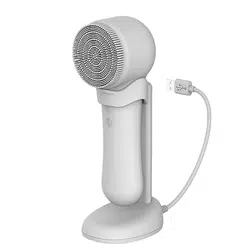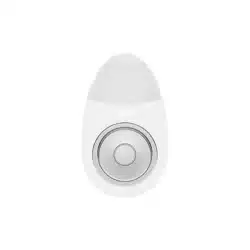

Silicone
Facial
Cleansing
Brush
abkoglobal.com
SV01
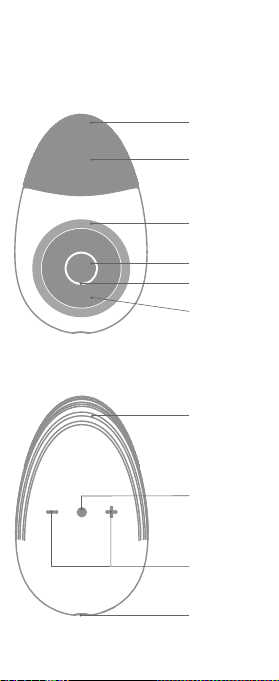
Thick Brush
Soft Thin Brush
Magnet Ring
Ultrasonic Area
Operation
Indicating Lamp
Heating Area
Lift Up Area
Power On/off
Switch Gear
DC Charging Port
Product Introduction

Divice, Introduction Manual, USB Cable
- Low battery : Red light flashes
(Power off after flashing for three times)
- Charging : The red light is on
- Fully charged : Blue light is on
Content
Light State
Specification
Model
Rated
Voltage
Battery
Ultrasonic Frequency
Heating Temperature
Charging Time
Working Time
Vibration Speed
Product Size
Weight
Waterproof Level
Noise
Main Material
SV01
DC 3.7 V, 2.5 W
DC 5 V, 0.5 A
DC 3.7 V, 500 mAh, Lithium ion
About 2.6 MHz – 3.4 MHz
About 42 – 55 ℃
About 2.5 hours
9 hours for Vibration cleansing mode
30 mins for ultrasonic mode
1 - 8 stages
110.9 x 67.1 x 31.5 mm
125 g
IPX7
< 65 dB
Silicone, PC, ABS, SUS304
Produced by Zhuhai Ciran Technology Co,.Ltd | Made in China
Manufacturer / Source of income ABKO

Start at the lowest level and gradually
step up when the skin becomes
familiar with the product.
01. Remove the magnetic suction ring.
02. Put a remove makeup cotton on the makeup remover area.
03. Use a magnetic ring to clamp the makeup cotton.
04. Long press and hold the power mode button to turn on
the machine. Sonic vibration assists the makeup removal.
05. The gear shift key can be used to adjust the vibration
frequency.
06. After the makeup removal is completed, long press the
power mode key to shut down.
01. Use a proper amount of facial cleanser to put it in the area
of the brush and wet the face with water.
02. Long press and hold the power mode button to start the
system. Sonic vibration assists deep cleaning.
03. The gear shift key can be used to adjust the vibration
frequency.
04. After the cleansing, long press the power mode key to
shut down.
How to use
Remove Makeup
Cleansing
01. Long press the power mode button to start, sonic wave
assisting in lifting and massage.
02. The gear shift key can be used to adjust the vibration
frequency.
03. Shape and lift the area to fit the skin upwards.
04. After the plastic lifting is completed, press and hold the
power mode button to shut down.
Shaping and Lifting
01. Spread the essence evenly on the face, press and hold
the power mode button to switch on, press the power
mode button shortly to switch to the Thermal Ultrasonic
Import mode.
02. Use thermal ultrasonic to import the essence, acoustic
vibration assist flapping import the essence.
Thermal Ultrasonic Import

In the case that the machine is not used for a long
time, the main engine should be cleaned and wiped
dry, and stored in a dry place.
01. Prohibit it from being soaked for a long time.
02. Do not touch corrosive liquids.
03. Please ensure that the charging port is dry when charging.
04. Do not disassemble or beat.
Cleansing and Maintenance
Precautions
01. The machine does not respond after pressing the power
mode button:
Check if the battery is insufficient, retry after charging;
If it still does not work, contact customer service and
send the machine to the designated point for repairing.
02. It cannot be charged :
Check whether the connection of the charging cable
is connected;
If it still does not work, contact customer service and send
he machine to the designated point for repairing.
03. No heating or no ultrasonic :
Please contact the customer service and send the device
to the designated place to repair.
04. Aging of the silica gel brush surface of beauty
skin instrument :
Stop using it immediately; silicone is durable but will age
under certain conditions.
Common problems

WARRANTY
All warranty service is provided by our factory service center, or an authorized
customer care technician. If you have any inquiry, please visit our website or
email us. Please check below information. To schedule your service, please have
your serial number and your model number available for service.
• Failure of the product if it is abused, misused, modified, or used for
other than the intended purpose or used commercially.
• Damage to the product caused by accident, fire, floods, any natural
disasters or acts of God.
• Damage to finish, such as surface rust, tarnish, or small blemishes not
reported within 48 hours of delivery.
• Incidental or consequential damage caused by improper use or not
following manual.
• Damage caused after delivery.
• Product not accessible to provide required service.
• Service to repair or replace lights bulbs, except for LED lamp.
※ This limited warranty is extended to the original purchaser and any
succeeding owner for products purchased for home use in the world.
If the product is located in an area where service by a ABKO is not available,
you may be responsible for a trip charge or you may be required to bring
the product to an authorized ABKO service location for service.
Some regions/countries do not allow the exclusion or limitation of incidental
or consequential damages. This limited warranty gives you specific
legal rights, and you may also have other rights which vary from country
to country. To know what your legal rights are, consult your local/region
or country consumer affairs office or your Attorney General.
Your sole and exclusive remedy is product repair as provided in this
Limited Warranty. Any implied warranties, including the implied
warranties of merchantability or fitness for a particular purpose, are limited
to one year or the shortest period allowed by law.
Website : https://abkoglobal.com/contact-us/
E-mail : [email protected]
What ABKO will not cover
EXCLUSION OF IMPLIED WARRANTIES
For the period of
1 year from the date of
the original purchase
(
*
6 months for motors )
ABKO will replace free of charge the part that proves defective in material
and manufacturing workmanship, under normal installation, use and service.
ABKO will replace
Head Office
M Signature 7th floor, 20, Magokjungang 1-ro, Gangseo-gu, Seoul, Republic of Korea
( TEL : +82-2-749-1311 )
China Branch
Rm202, Mei Dong Electronics Building, Tie Shan He Street, San Dong Road,
Hua Shan Town, Hua Du District, Guang Zhou, China ( TEL : +86-20-36969919 )