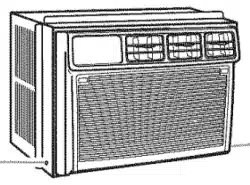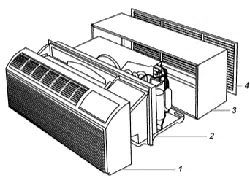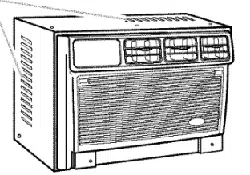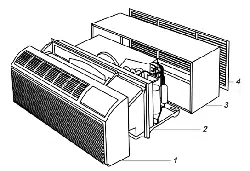
AIRCONDITIONER
For questions about features, operation/performance, parts accessories
or service call: 1-800-253-1301
In Canada, call for assistance 1-800-461-5681, for installation
and service, call: 1-800-807-6777
ACONDICIONADOR
Si tiene preguntas respecto alas caracter[sticas, funcionamiento,
rendimiento, pares, accesorios o servicio tecnico,
Ilame al: 1-800-253-1301
Table of Contents/Jndice ..................................... 2
1187360
TABLEOFCONTENTS INDICE
AIR CONDITIONER SAFETY ......................................................... 3
INSTALLATION REQUIREMENTS ................................................ 3
Tools and Parts ............................................................................ 3
Location Requirements ................................................................ 4
Electrical Requirements ............................................................... 4
INSTALLATION INSTRUCTIONS .................................................. 5
Unpack the Air Conditioner .......................................................... 5
Prepare Air Conditioner for Installation ........................................ 5
Position the Air Conditioner ......................................................... 6
Complete Installation ................................................................... 7
AIR CONDITIONER USE ................................................................ 8
Starting Your Air Conditioner - Digital Control ............................ 8
Starting Your Air Conditioner - Rotary Control .......................... 10
Changing Air Direction ............................................................... 11
Normal Sounds .......................................................................... 11
AIR CONDITION ER CARE ........................................................... 12
Cleaning the Air Filter ................................................................. 12
Cleaning the Front Panel............................................................ 12
Repairing Paint Damage ............................................................ 12
Annual Maintenance ................................................................... 12
TROUBLESHOOTING .................................................................. 13
ASSISTANCE OR SERVICE ......................................................... 14
In the U.S.A ................................................................................ 14
In Canada ................................................................................... 14
Accessories ................................................................................ 14
SEGURIDAD DEL ACONDICIONADOR DE AIRE ...................... 15
REQUISITOS DE INSTALACION ................................................. 15
Herramientas y piezas ................................................................ 15
Requisitos para la ubicaci6n ...................................................... 16
Requisitos electricos .................................................................. 16
INSTRUCCIONES DE INSTALACION ......................................... 17
Desempaque el acondicionador de aire .................................... 17
Prepare el acondicionador de aire para la instalaci6n .............. 17
Colocaci6n del acondicionador de aire ..................................... 18
Complete la instalaci6n .............................................................. 19
COMO USAR SU ACONDICIONADOR DE AIRE ....................... 20
C6mo poner en marcha
su acondicionador de aire - Control digital ............................... 20
C6mo poner en marcha
su acondicionador de aire - Control rotativo ............................. 23
C6mo cambiar la direcci6n del aire ........................................... 24
Sonidos normales ....................................................................... 24
COMO CUIDAR SU ACONDICIONADOR DE AIRE ................... 25
Limpieza del filtro de aire ........................................................... 25
Llmpieza del panel delantero ..................................................... 25
Reparacidn de la pintura da_ada ............................................... 25
Mantenimiento anual .................................................................. 25
SOLUCI(DN DE PROBLEMAS ...................................................... 25
AYUDA O SERVICIO TI_CNICO ................................................... 27
En los EE.UU.............................................................................. 27
Accesorios .................................................................................. 27
AIR CONDITIONER SAFETY
Your safety and the safety of others are very important.
We have provided many important safety messages in this manual and on your appliance. Always read and obey all
safety messages.
This is the safety alert symbol.
This symbol alerts you to potential hazards that can kill or hurt you and others.
All safety messages will follow the safety alert symbol and either the word "DANGER" or
"WARNING." These words mean:
You can be killed or seriously injured if you don't
immediately follow instructions.
You can be killed or seriously injured ifyou don't
follow instructions.
All safety messages will tell you what the potential hazard is, tell you how to reduce the chance of injury, and tell you
what can happen if the instructions are not followed.
IMPORTANT SAFETY INSTRUCTIONS
WARN ING: To reducethe risk offire, electrical shock or injury when usingyour air conditioner, follow these basic precautions:
[] Plug into a grounded 3 prong outlet. [] Do not use an extension cord.
• Do not remove ground prong. • Unplug air conditioner before servicing.
[] Do not use an adapter. [] Use two or more people to move and install air conditioner.
SAVE THESE iNSTRUCTiONS
INSTALLATIONREQUIREMENTS
s ond
Checkthat you haveeverything necessaryfor correct installation.
Proper installation is your responsibility.
Tools needed
• Safety glasses • Scissors
• Flat-blade and Phillips • Drilland %2in. or smaller
screwdrivers bit
• Tapemeasure
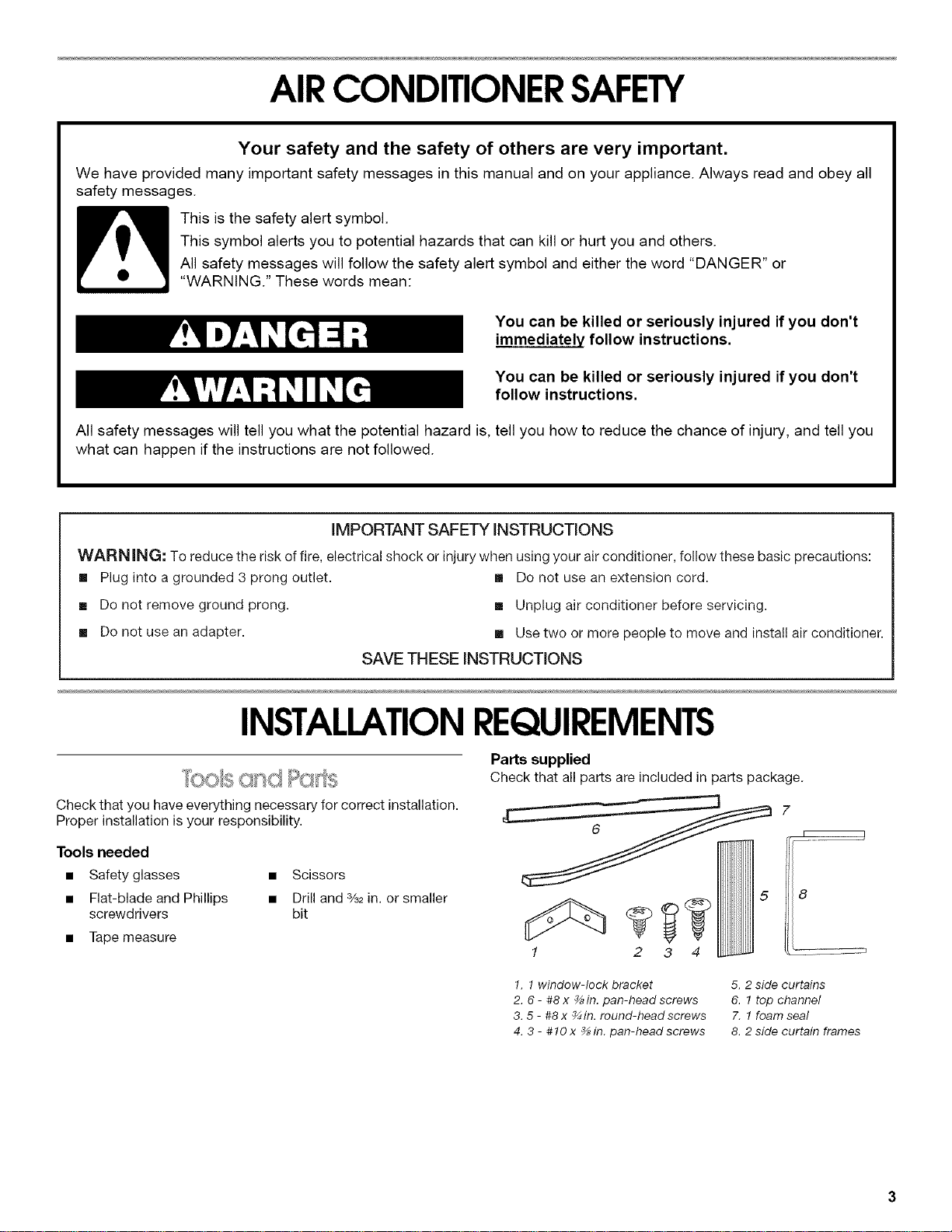
Parts supplied
Check that all parts are included in parts package.
7
8
1. 1window-lock bracket
2. 6- #8 x %in. pan-head screws
3. 5 - #8 x %in. round-headscrews
4. 3 - #10 x %in. pan-head screws
5. 2 side curtains
6. 1 top channel
X 1foam seal
8. 2 side curtain frames
IMPORTANT: Observe all governing codes and ordinances.
Check the location where the air conditioner will be installed.
Proper installation is your responsibility. Make sure you have
everything necessary for correct installation.
The location should provide:
• Grounded electrical outlet within 4 ft (122 cm) of where
the power cord exits the air conditioner.
NOTE: Do not use an extension cord.
• Free movement of air to rooms to be cooled.
• A large enough opening for the air conditioner. Installation
parts are supplied for double-hung windows.
• Adequate wall support for weight of air conditioner. Air
conditioner weighs 56 Ibs (25 kg) to 80 Ibs (36 kg).
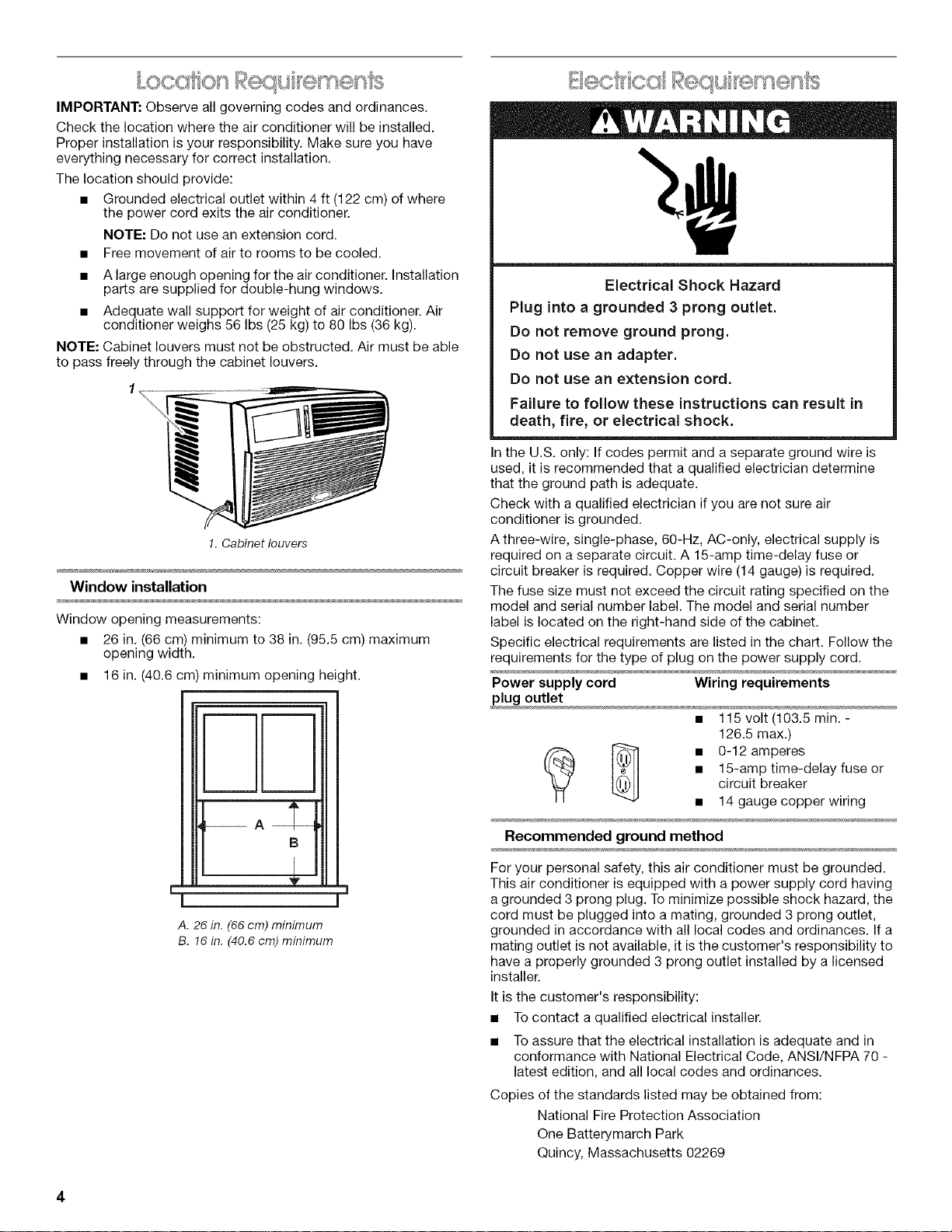
NOTE: Cabinet louvers must not be obstructed. Air must be able
to pass freely through the cabinet louvers.
/
N
!. Cabinet louvers
Window installation
Window opening measurements:
• 26 in. (66 cm) minimum to 38 in. (95.5 cm) maximum
opening width.
• 16 in. (40.6 cm) minimum opening height.
mm
B
V
A. 26 in. (66 cm) minimum
B. 16 in. (40.6 cm) minimum
Electrical Shock Hazard
Plug into a grounded 3 prong outlet.
Do not remove ground prong.
Do not use an adapter.
Do not use an extension cord.
Failure to follow these instructions can result in
death, fire, or electrical shock,
In the U.S. only: If codes permit and a separate ground wire is
used, it is recommended that a qualified electrician determine
that the ground path is adequate.
Check with a qualified electrician if you are not sure air
conditioner is grounded.
A three-wire, single-phase, 60-Hz, AC-only, electrical supply is
required on a separate circuit. A 15-amp time-delay fuse or
circuit breaker is required. Copper wire (14 gauge) is required.
The fuse size must not exceed the circuit rating specified on the
model and serial number label. The model and serial number
label is located on the right-hand side of the cabinet.
Specific electrical requirements are listed in the chart. Follow the
requirements for the type of plug on the power supply cord.
Power supply cord Wiring requirements
plug outlet
• 115 volt (103.5 rain. -
126.5 max.)
(_ _ • 0-12 amperes
• 15-amp time-delay fuse or
circuit breaker
• 14 gauge copper wiring
Recommended ground method
For your personal safety, this air conditioner must be grounded.
This air conditioner is equipped with a power supply cord having
a grounded 3 prong plug. To minimize possible shock hazard, the
cord must be plugged into a mating, grounded 3 prong outlet,
grounded in accordance with all local codes and ordinances. If a
mating outlet is not available, it is the customer's responsibility to
have a properly grounded 3 prong outlet installed by a licensed
installer.
It is the customer's responsibility:
• To contact a qualified electrical installer.
• To assure that the electrical installation is adequate and in
conformance with National Electrical Code, ANSI/NFPA 70 -
latest edition, and all local codes and ordinances.
Copies of the standards listed may be obtained from:
National Fire Protection Association
One Batterymarch Park
Quincy, Massachusetts 02269
INSTALLATIONINSTRUCTIONS
Install side curtains
NOTE: Attach curtains to unit before placing unit in window.
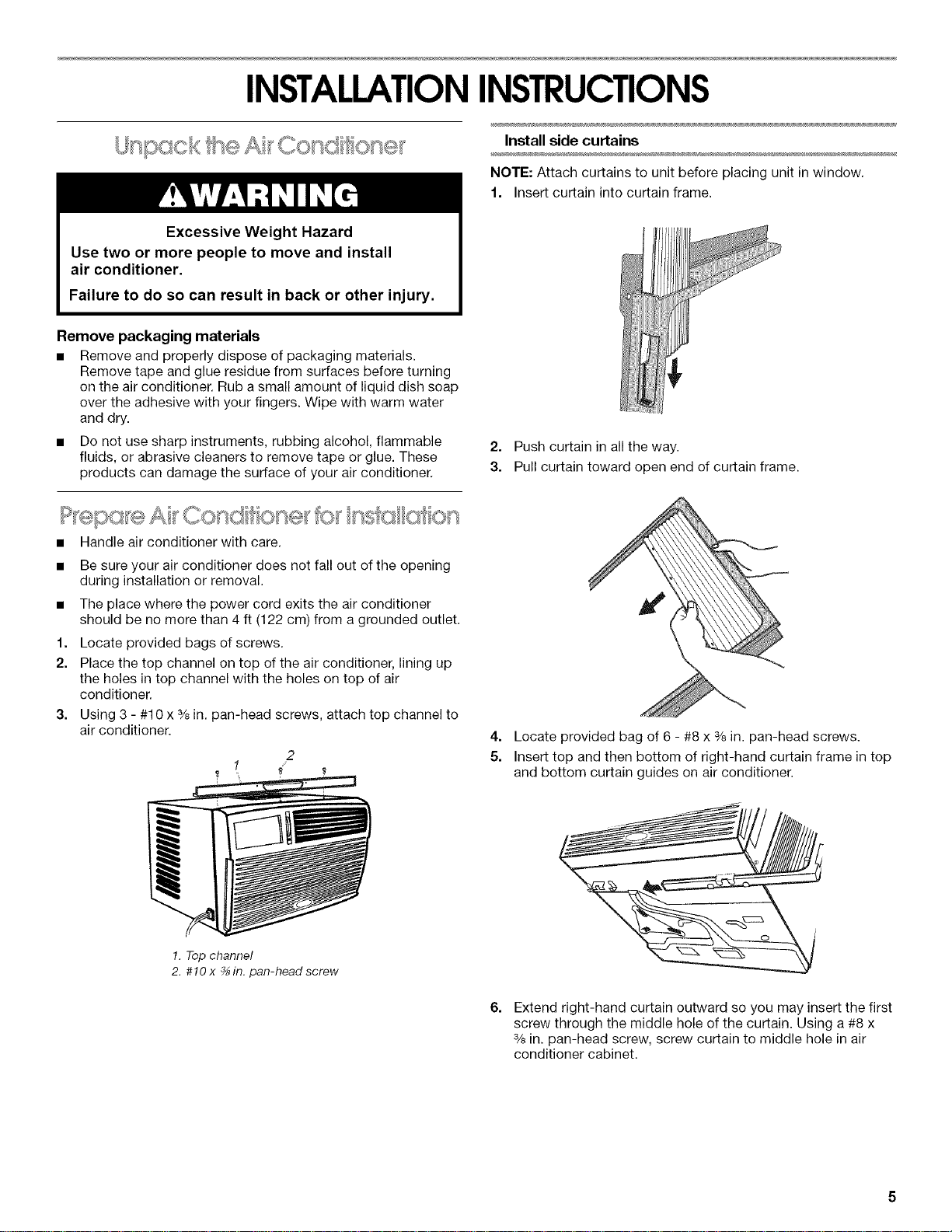
1. Insert curtain into curtain frame.
Excessive Weight Hazard
Use two or more people to move and install
air conditioner.
Failure to do so can result in back or other injury.
Remove packaging materials
• Remove and properly dispose of packaging materials.
Remove tape and glue residue from surfaces before turning
on the air conditioner. Rub a small amount of liquid dish soap
over the adhesive with your fingers. Wipe with warm water
and dry.
• Do not use sharp instruments, rubbing alcohol, flammable
fluids, or abrasive cleaners to remove tape or glue. These
products can damage the surface of your air conditioner.
• Handle air conditioner with care.
1.
2.
3,
Be sure your air conditioner does not fall out of the opening
during installation or removal.
The place where the power cord exits the air conditioner
should be no more than 4 ft (122 cm) from a grounded outlet.
Locate provided bags of screws.
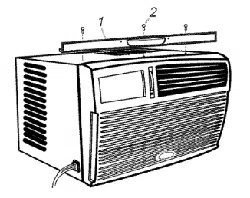
Place the top channel on top of the air conditioner, lining up
the holes in top channel with the holes on top of air
conditioner.
Using 3 - #10 x % in. pan-head screws, attach top channel to
air conditioner.
2
1
2. Push curtain in all the way.
3. Pull curtain toward open end of curtain frame.
4. Locate provided bag of 6 - #8 x 3/8in. pan-head screws.
5. Insert top and then bottom of right-hand curtain frame in top
and bottom curtain guides on air conditioner.
1.Topchannel
2. #10 x %in. pan-head screw
6.
Extend right-hand curtain outward so you may insert the first
screw through the middle hole of the curtain. Using a #8 x
% in. pan-head screw, screw curtain to middle hole in air
conditioner cabinet.
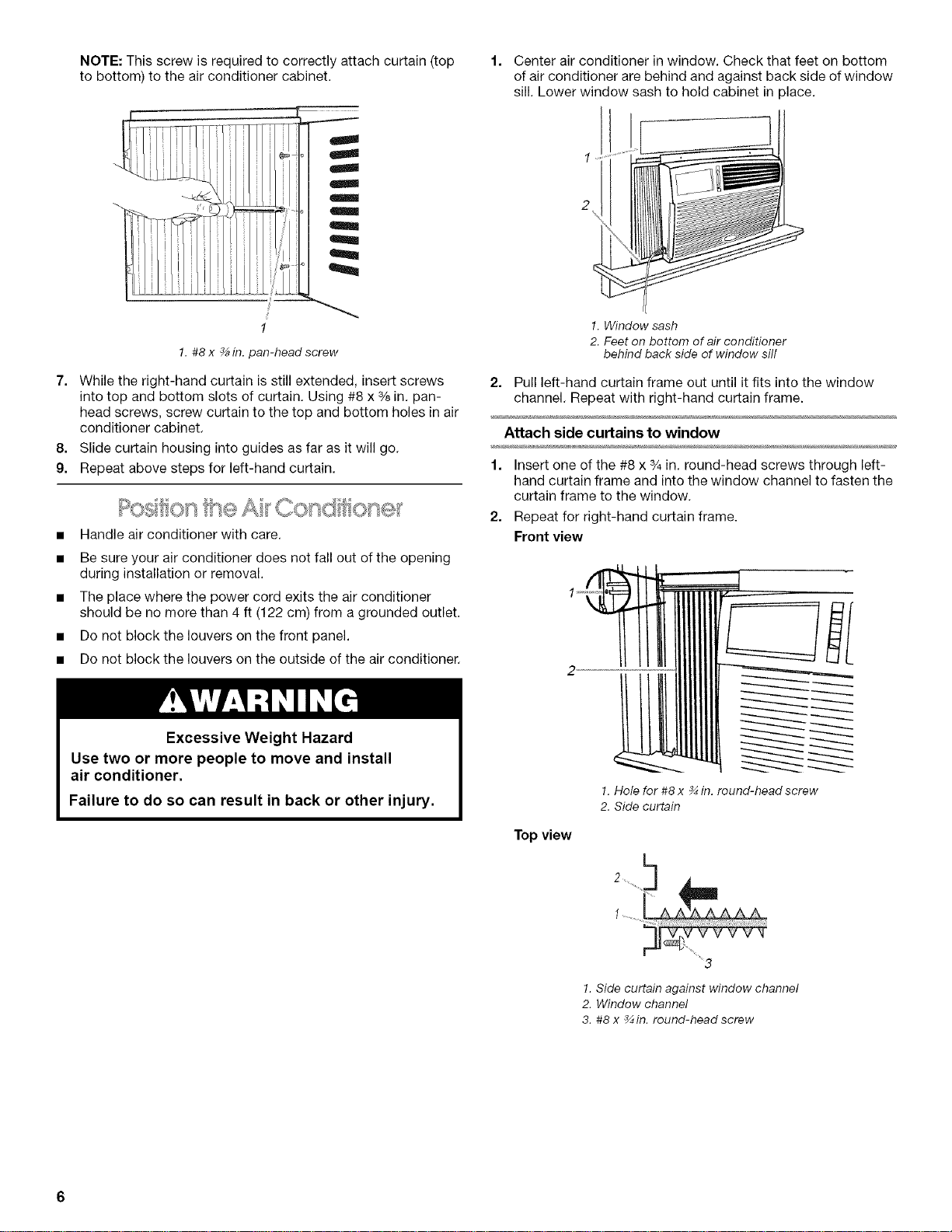
NOTE:Thisscrewisrequiredtocorrectlyattachcurtain(top
tobottom)totheairconditionercabinet.
1. Centerairconditionerinwindow.Checkthatfeetonbottom
ofairconditionerarebehindandagainstbacksideofwindow
sill.Lowerwindowsashtoholdcabinetinplace.
1. #8 x _ in. pan-head screw
7. While the right-hand curtain is still extended, insert screws
into top and bottom slots of curtain. Using #8 x % in. pan-
head screws, screw curtain to the top and bottom holes in air
conditioner cabinet.
8. Slide curtain housing into guides as far as it will go.
9. Repeat above steps for left-hand curtain.
• Handle air conditioner with care.
• Be sure your air conditioner does not fall out of the opening
during installation or removal.
• The place where the power cord exits the air conditioner
should be no more than 4 ft (122 cm) from a grounded outlet.
• Do not block the louvers on the front panel.
• Do not block the louvers on the outside of the air conditioner.
Excessive Weight Hazard
Use two or more people to move and install
air conditioner.
Failure to do so can result in back or other injury.
1. Window sash
2. Feet on bottom of air conditioner
behind back side of window sill
2. Pull left-hand curtain frame out until it fits into the window
channel. Repeat with right-hand curtain frame.
Attach side curtains to window
1. Insert one of the #8 x s/4in. round-head screws through left-
hand curtain frame and into the window channel to fasten the
curtain frame to the window.
2. Repeat for right-hand curtain frame.
Front view
Top view
1.Hole for #8 x _ in. round-head screw
2. Side curtain
2 ....................
!. Side curtain against window channel
2. Window channel
3. #8 x _in. round-head screw
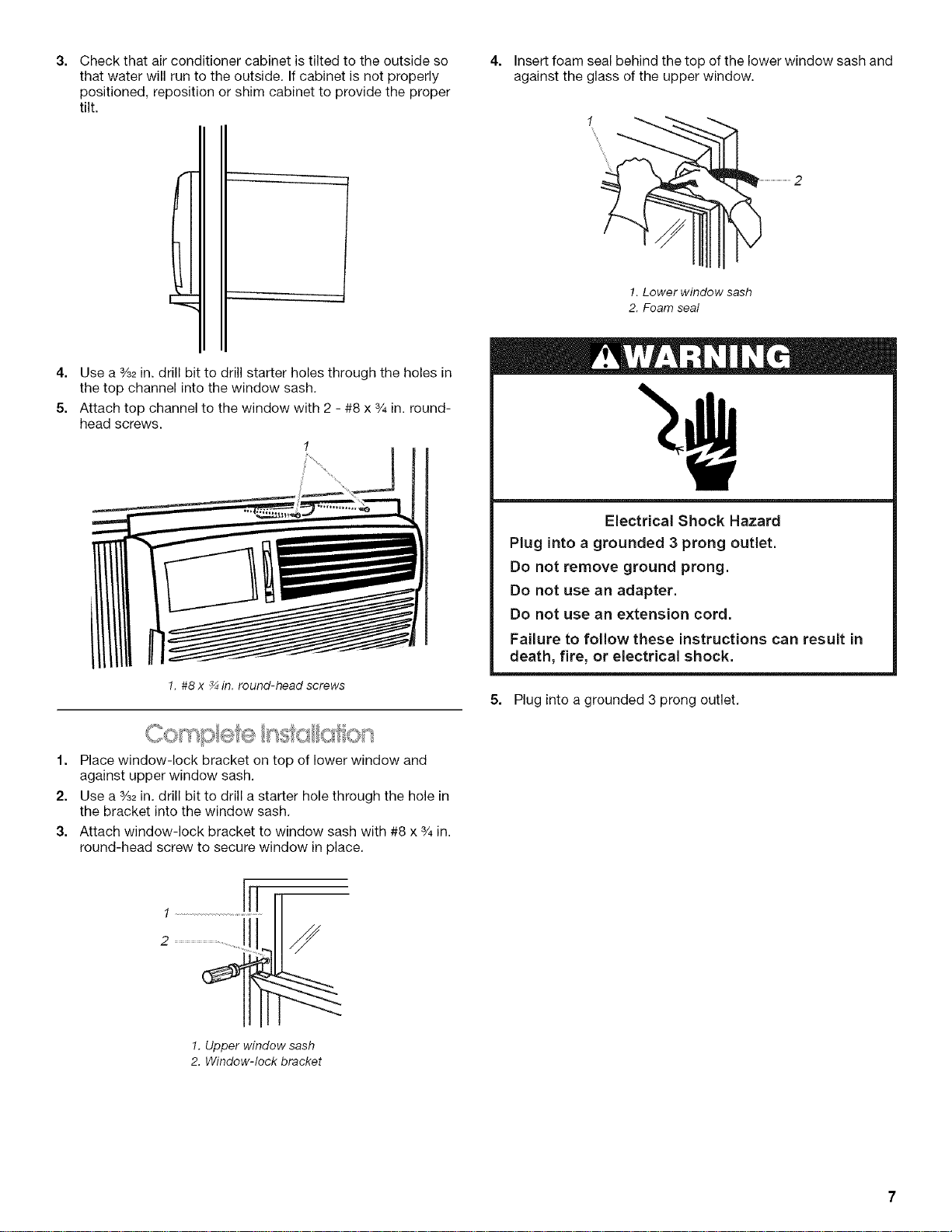
3. 4. Insert foam seal behind the top of the lower window sash and
against the glass of the upper window.
Check that air conditioner cabinet is tilted to the outside so
that water will run to the outside. If cabinet is not properly
positioned, reposition or shim cabinet to provide the proper
tilt.
4. Use a %2in. drill bit to drill starter holes through the holes in
the top channel into the window sash,
5. Attach top channel to the window with 2 - #8 x 3/4in. round-
head screws.
1. #8 x _ in. round-head screws
1. Lower window sash
2. Foam seal
Electrical Shock Hazard
Plug into a grounded 3 prong outlet.
Do not remove ground prong.
Do not use an adapter.
Do not use an extension cord.
Failure to follow these instructions can result in
death, fire, or electrical shock.
5. Plug into a grounded 3 prong outlet,
1. Place window-lock bracket on top of lower window and
against upper window sash.
2. Use a %2in. drill bit to drill a starter hole through the hole in
the bracket into the window sash,
3. Attach window-lock bracket to window sash with #8 x 3/4in.
round-head screw to secure window in place.
1. Upper window sash
2. Window-lock bracket
AIRCONDITIONERUSE
Operating your air conditioner properly helps you to obtain the
best possible results.
This section explains proper air conditioner operation.
IMPORTANT:
• If you turn off the air conditioner, wait at least 3 minutes
before turning it back on. This prevents the air conditioner
from blowing a fuse or tripping a circuit breaker.
Do not try to operate your air conditioner in the cooling mode
when outside temperature is below 65°F (18°C). The inside
evaporator coil will freeze up, and the air conditioner will not
operate properly.
NOTE: In the event of a power failure, your air conditioner will
operate at the previous settings when the power is restored.
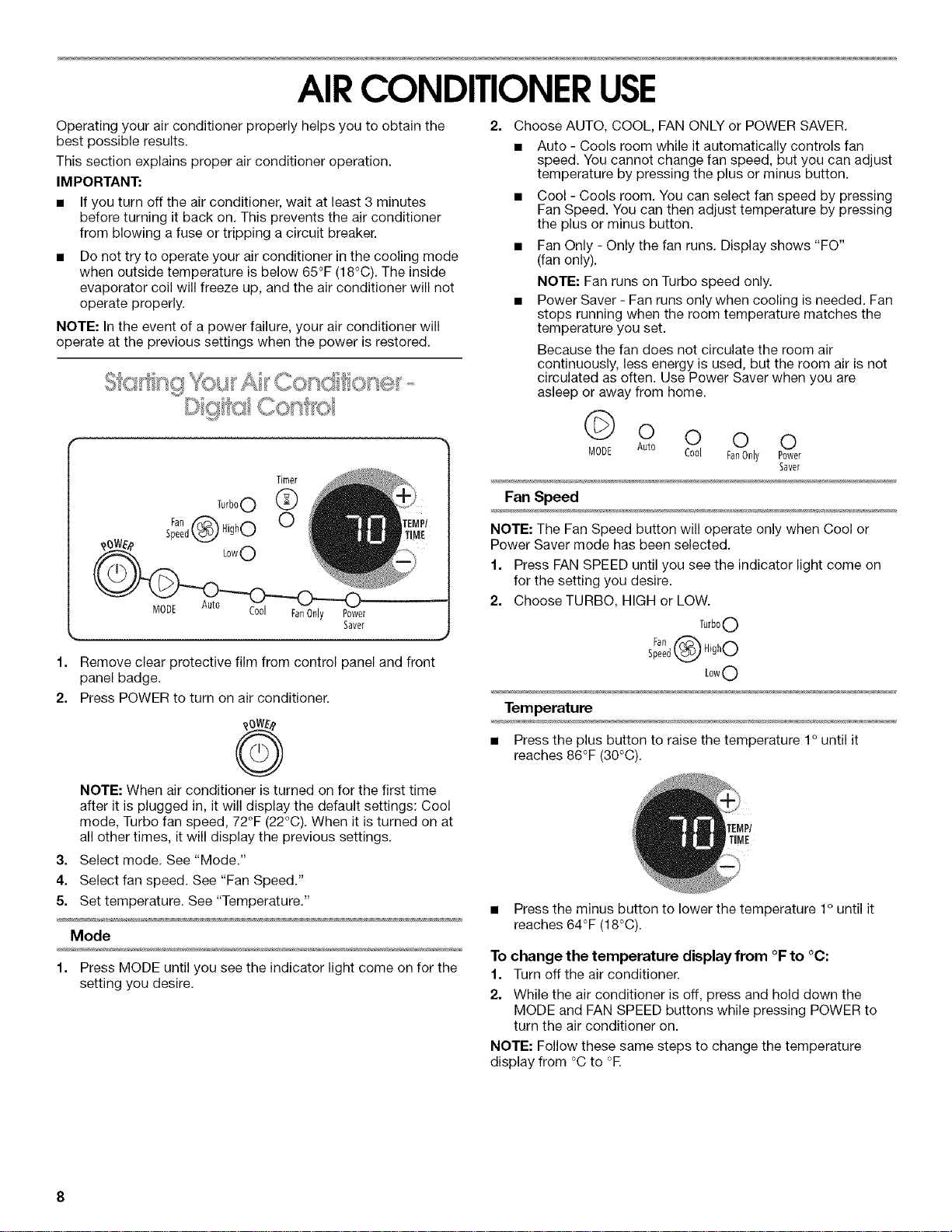
Timer
Turb°O 0(_)
Fan _ HighO
Speedk_
Lo01 FanOnly Power
Saver
1. Remove clear protective film from control panel and front
panel badge.
2. Press POWER to turn on air conditioner.
G
NOTE: When air conditioner is turned on for the first time
after it is plugged in, it will display the default settings: Cool
mode, Turbo fan speed, 72°F (22°C). When it is turned on at
all other times, it will display the previous settings.
3. Select mode. See "Mode."
4. Select fan speed. See "Fan Speed."
5. Set temperature. See "Temperature."
Mode
1. Press MODE until you see the indicator light come on for the
setting you desire.
2=
Choose AUTO, COOL, FAN ONLY or POWER SAVER.
• Auto - Cools room while it automatically controls fan
speed. You cannot change fan speed, but you can adjust
temperature by pressing the plus or minus button.
• Cool - Cools room. You can select fan speed by pressing
Fan Speed. You can then adjust temperature by pressing
the plus or minus button.
• Fan Only - Only the fan runs. Display shows "FO"
(fan only).
NOTE: Fan runs on Turbo speed only.
• Power Saver - Fan runs only when cooling is needed. Fan
stops running when the room temperature matches the
temperature you set.
Because the fan does not circulate the room air
continuously, less energy is used, but the room air is not
circulated as often. Use Power Saver when you are
asleep or away from home.
0 0 0 0
MODE Auto Cool FanOnly Power
Saver
Fan Speed
NOTE: The Fan Speed button will operate only when Cool or
Power Saver mode has been selected.
1. Press FAN SPEED until you see the indicator light come on
for the setting you desire.
2. Choose TURBO, HIGH or LOW.
TurboO
s;ae_d@ HighO
Low0
Temperature
• Press the plus button to raise the temperature 1° until it
reaches 86°F (30°C).
TIME
• Press the minus button to lower the temperature 1° until it
reaches 64°F (18°C).
To change the temperature display from °F to °C:
1. Turn off the air conditioner.
2. While the air conditioner is off, press and hold down the
MODE and FAN SPEED buttons while pressing POWER to
turn the air conditioner on,
NOTE: Follow these same steps to change the temperature
display from °C to °E
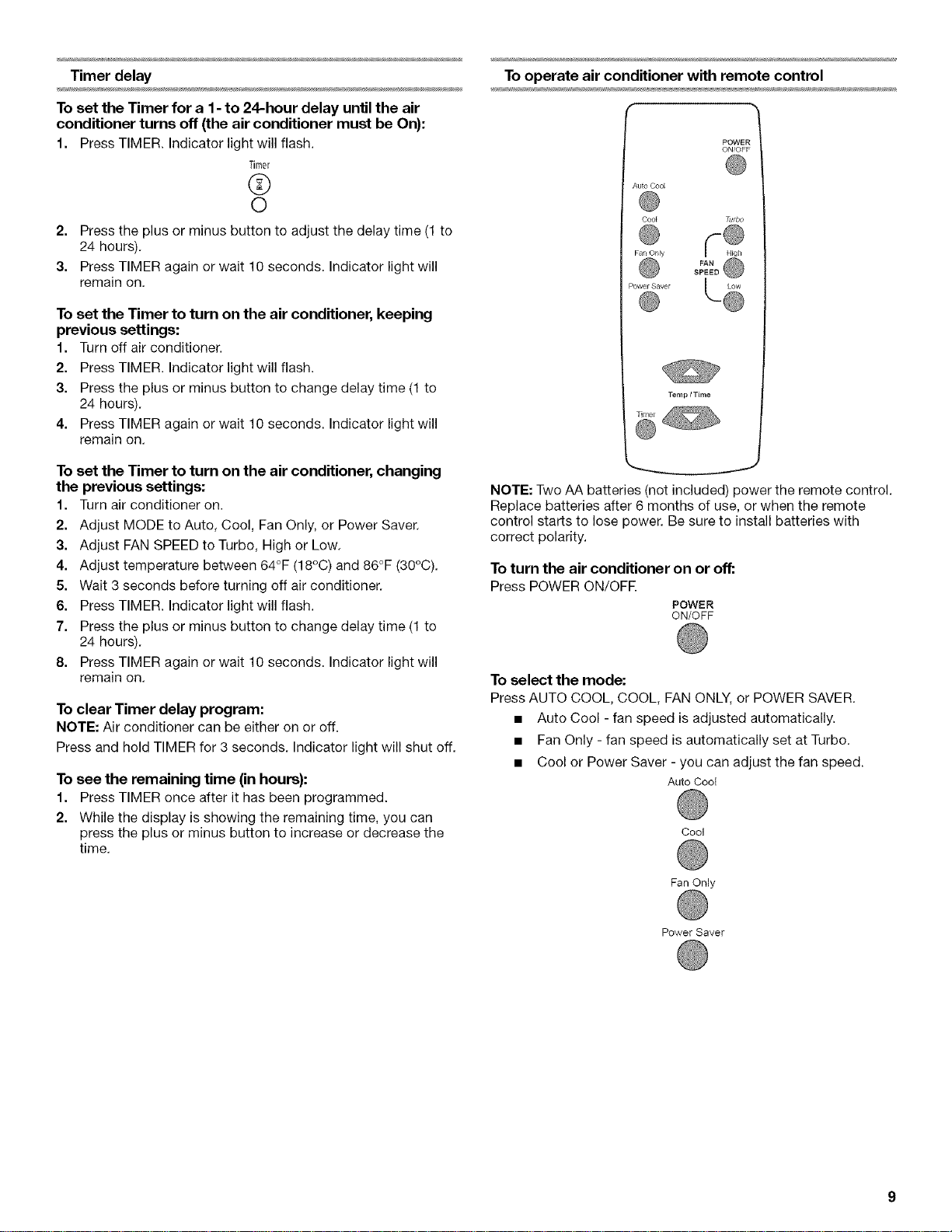
Timer delay
To set the Timer for a 1 - to 24-hour delay until the air
conditioner turns off (the air conditioner must be On}:
1. Press TIMER. Indicator light will flash.
Timer
®
©
2. Press the plus or minus button to adjust the delay time (1 to
24 hours).
3. Press TIMER again or wait 10 seconds. Indicator light will
remain on.
To set the Timer to turn on the air conditioner, keeping
previous settings:
1. Turn off air conditioner.
2. Press TIMER. Indicator light will flash.
3. Press the plus or minus button to change delay time (1 to
24 hours).
4. Press TIMER again or wait 10 seconds. Indicator light will
remain on.
To set the Timer to turn on the air conditioner, changing
the previous settings:
1. Turn air conditioner on.
2. Adjust MODE to Auto, Cool, Fan Only, or Power Saver.
3. Adjust FAN SPEED to Turbo, High or Low.
4. Adjust temperature between 64°F (18°C) and 86°F (30°C).
5. Wait 3 seconds before turning off air conditioner.
6. Press TIMER. Indicator light will flash.
7. Press the plus or minus button to change delay time (1 to
24 hours).
8. Press TIMER again or wait 10 seconds. Indicator light will
remain on.
To clear Timer delay program:
NOTE: Air conditioner can be either on or off.
Press and hold TIMER for 3 seconds. Indicator light will shut off.
To see the remaining time (in hours):
1. Press TIMER once after it has been programmed.
2. While the display is showing the remaining time, you can
press the plus or minus button to increase or decrease the
time.
To operate air conditioner with remote control
POWER
ON/OFF
Auto Coo_
Cool Turbo
Fan Or_ly
PewerS@ ..... L Q
NOTE: Two AA batteries (not included) power the remote control.
Replace batteries after 6 months of use, or when the remote
control starts to lose power. Be sure to install batteries with
correct polarity.
To turn the air conditioner on or off:
Press POWER ON/OFR
POWER
ON/OFF
To select the mode:
Press AUTO COOL, COOL, FAN ONLY, or POWER SAVER.
• Auto Cool - fan speed is adjusted automatically.
• Fan Only - fan speed is automatically set at Turbo.
• Cool or Power Saver - you can adjust the fan speed.
Auto Coot
Cool
Fan Only
Power Saver
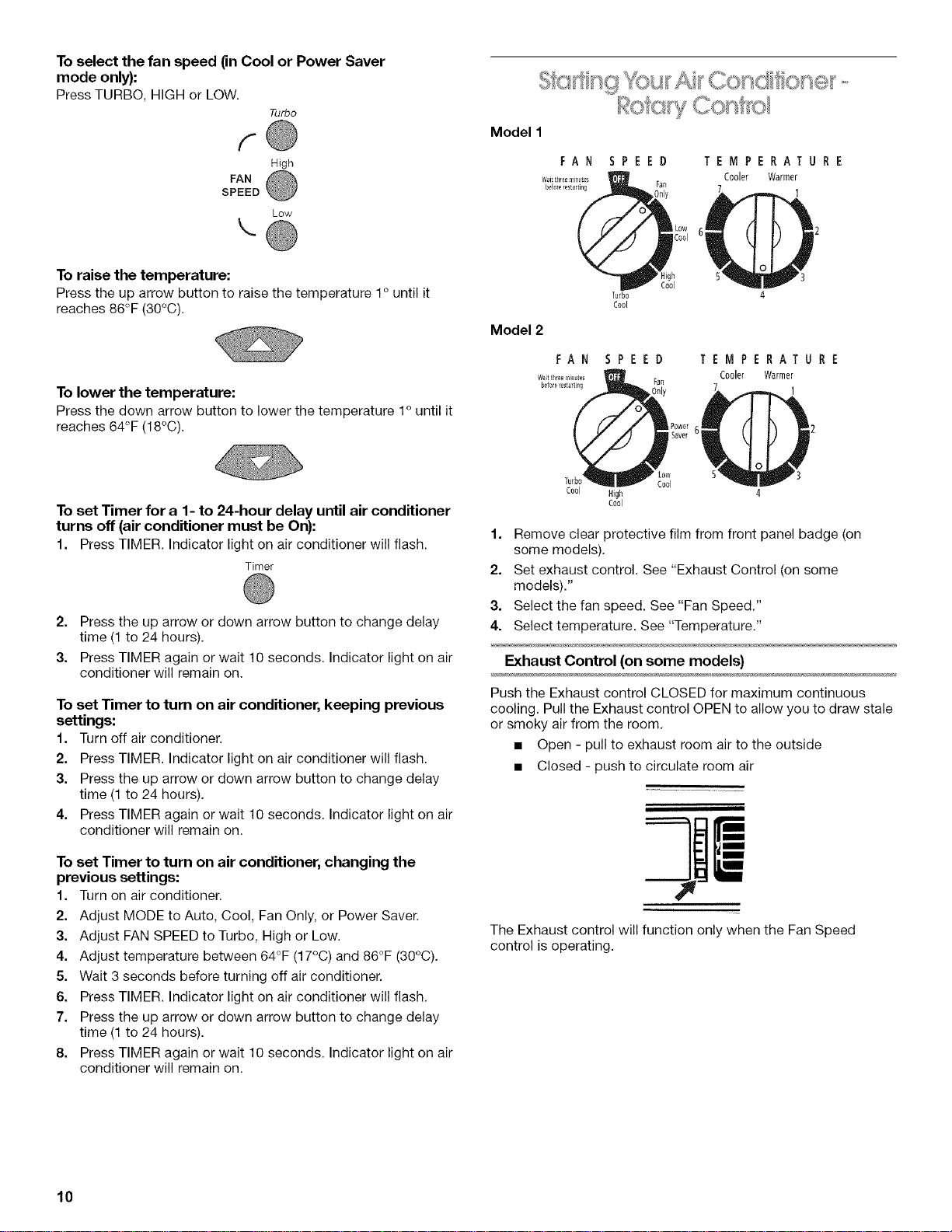
To select the fan speed (in Cool or Power Saver
mode only):
Press TURBO, HIGH or LOW.
Turbo
f-
High
FAN
SPEED
Low
\
To raise the temperature:
Press the up arrow button to raise the temperature 1° until it
reaches 86°F (30°C).
To lower the temperature:
Press the down arrow button to lower the temperature 1° until it
reaches 64°F (18°C).
Model 2
FAN
Wat til_eem_te_
_101e re_tarting
Turbo
Cool
TEMPERATURE
Cooler Warmer
1
SPEED
ran
TEMPERATURE
Cooler Warmer
1
To set Timer for a 1- to 24-hour delay until air conditioner
turns off (air conditioner must be On):
1. Press TIMER.Indicator light on air conditioner will flash.
Timer
2. Press the up arrow or down arrow button to change delay
time (1 to 24 hours).
3. Press TIMER again or wait 10 seconds. Indicator light on air
conditioner will remain on.
To set Timer to turn on air conditioner, keeping previous
settings:
1. Turn off air conditioner.
2. Press TIMER. Indicator light on air conditioner will flash.
3. Press the up arrow or down arrow button to change delay
time (1 to 24 hours).
4. Press TIMER again or wait 10 seconds. Indicator light on air
conditioner will remain on.
To set Timer to turn on air conditioner, changing the
previous settings:
1. Turn on air conditioner.
2. Adjust MODE to Auto, Cool, Fan Only, or Power Saver.
3. Adjust FAN SPEED to Turbo, High or Low.
4. Adjust temperature between 64°F (17°C) and 86°F (30°C).
5. Wait 3 seconds before turning off air conditioner.
6. Press TIMER. Indicator light on air conditioner will flash.
7. Press the up arrow or down arrow button to change delay
time (1 to 24 hours).
8. Press TIMER again or wait 10 seconds. Indicator light on air
conditioner will remain on.
Cool High
Cool
Low
Cool
1. Remove clear protective film from front panel badge (on
some models).
2. Set exhaust control. See "Exhaust Control (on some
models)."
3. Select the fan speed. See "Fan Speed."
4. Select temperature. See "Temperature."
Exhaust Control (on some models)
Push the Exhaust control CLOSED for maximum continuous
cooling. Pull the Exhaust control OPEN to allow you to draw stale
or smoky air from the room.
• Open - pull to exhaust room air to the outside
• Closed - push to circulate room air
The Exhaust control will function only when the Fan Speed
control is operating.
10
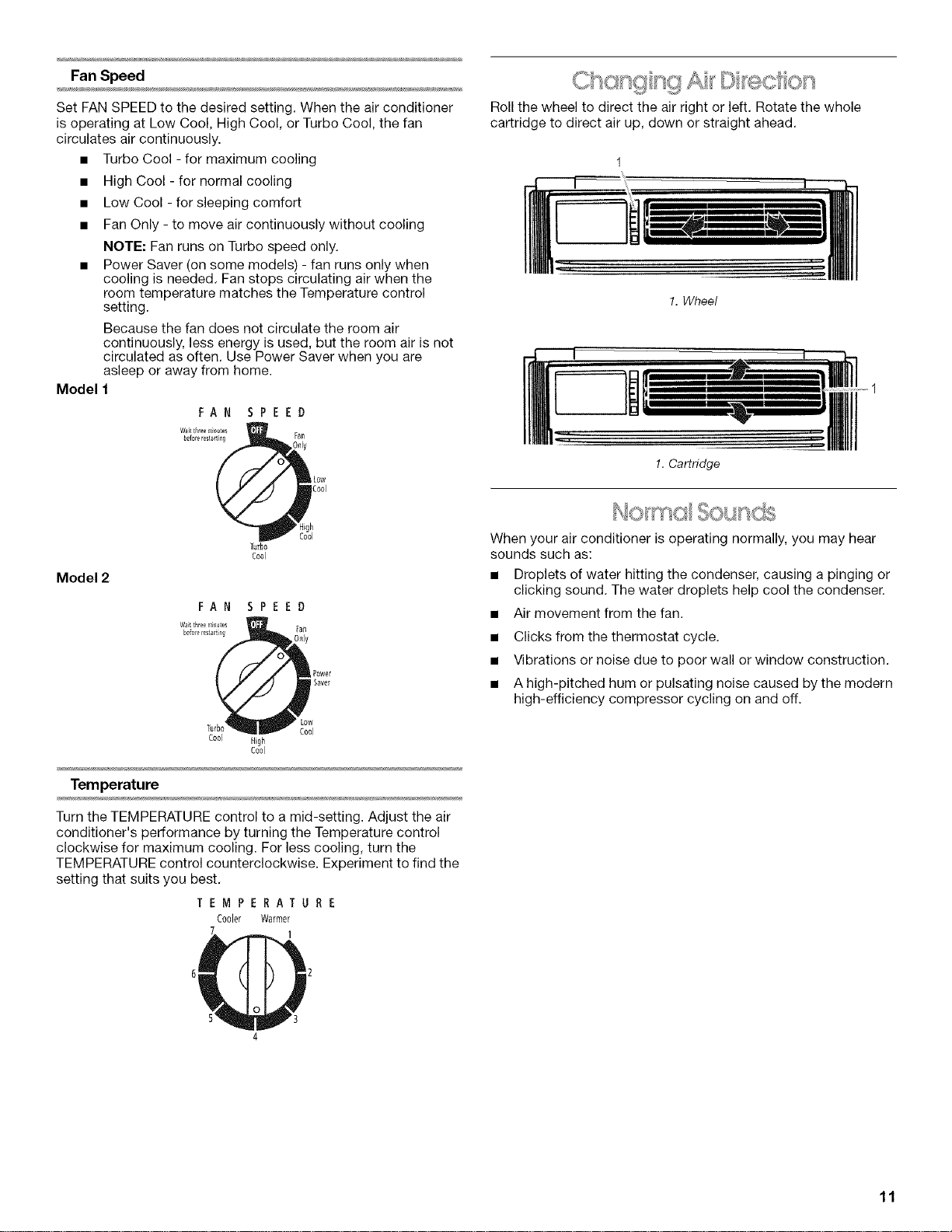
FanSpeed
Set FAN SPEED to the desired setting. When the air conditioner
is operating at Low Cool, High Cool, or Turbo Cool, the fan
circulates air continuously.
• Turbo Cool - for maximum cooling
• High Cool - for normal cooling
• Low Cool - for sleeping comfort
• Fan Only - to move air continuously without cooling
NOTE: Fan runs on Turbo speed only.
• Power Saver (on some models) - fan runs only when
cooling is needed. Fan stops circulating air when the
room temperature matches the Temperature control
setting.
Because the fan does not circulate the room air
continuously, less energy is used, but the room air is not
circulated as often. Use Power Saver when you are
asleep or away from home.
Model 1
FAN SPEED
Roll the wheel to direct the air right or left. Rotate the whole
cartridge to direct air up, down or straight ahead.
J_.
1. Wheel
[:Z
1. Cartridge
Model 2
Turbo
C001
FAN SPEED
Wait t[Ire_rli lu_s [all
r_ P0wer
Saver
Low
Tu I
C001 High
cool
Temperature
Turn the TEMPERATURE control to a mid-setting. Adjust the air
conditioner's performance by turning the Temperature control
clockwise for maximum cooling. For less cooling, turn the
TEMPERATURE control counterclockwise. Experiment to find the
setting that suits you best.
TEMPERATURE
Cooler Warmer
When your air conditioner is operating normally, you may hear
sounds such as:
• Droplets of water hitting the condenser, causing a pinging or
clicking sound. The water droplets help cool the condenser.
• Air movement from the fan.
• Clicks from the thermostat cycle.
• Vibrations or noise due to poor wall or window construction.
• A high-pitched hum or pulsating noise caused by the modern
high-efficiency compressor cycling on and off.
4
11
AIRCONDITIONERCARE
Your new air conditioner is designed to give you many years of
dependable service. This section tells you how to clean and care
for your air conditioner properly. Call your local authorized dealer
for an annual checkup. Remember... the cost of this service call
is your responsibility.
The air filter is removable for easy cleaning. A clean filter helps
remove dust, lint, and other particles from the air and is important
for best cooling and operating efficiency. Check the filter every
2 weeks to see whether it needs cleaning.
NOTE: Do not operate the air conditioner without the filter in
place.
1. Turn off air conditioner.
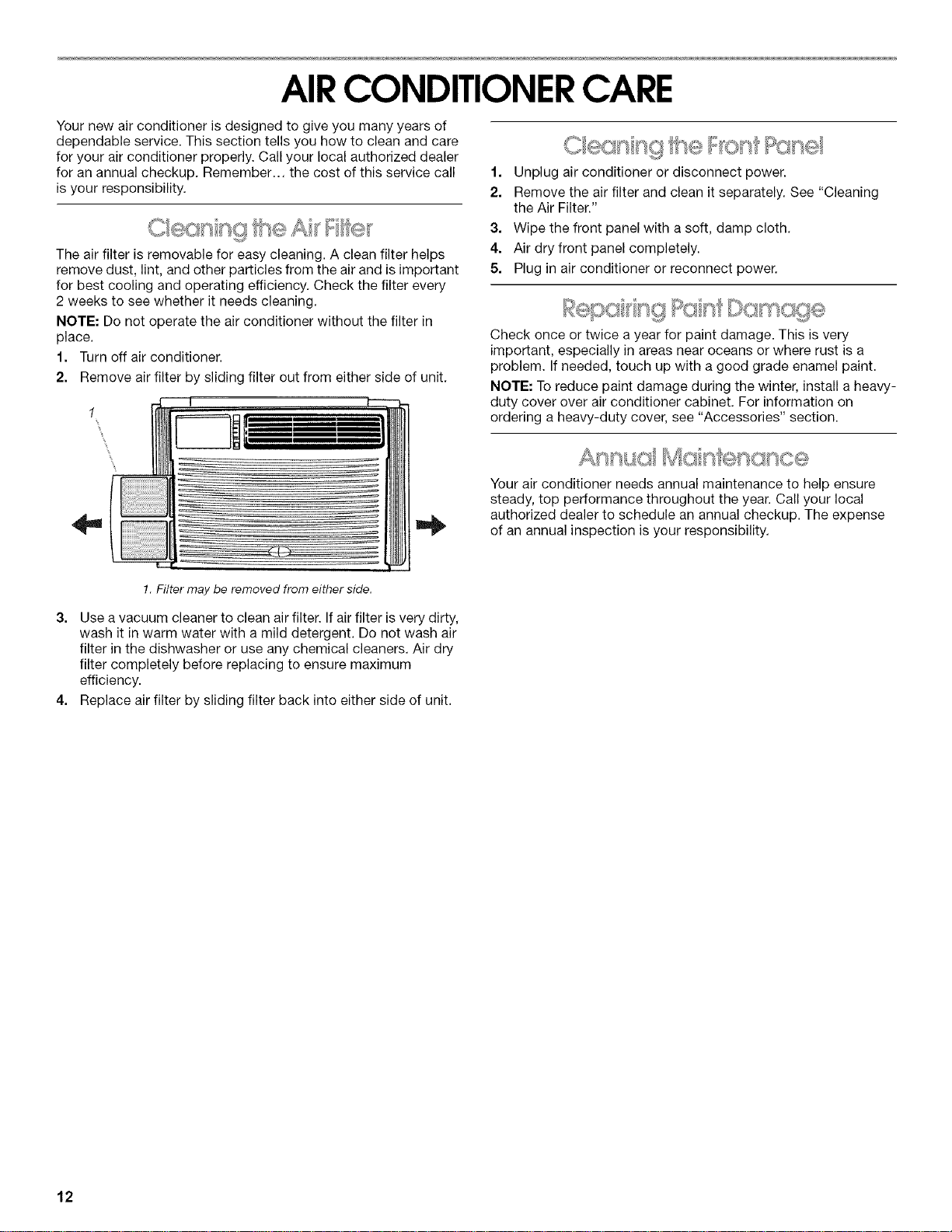
2. Remove air filter by sliding filter out from either side of unit.
CI qsQ ....
1. Unplug air conditioner or disconnect power.
2. Remove the air filter and clean it separately. See "Cleaning
the Air Filter."
3. Wipe the front panel with a soft, damp cloth.
4. Air dry front panel completely.
5. Plug in air conditioner or reconnect power.
Check once or twice a year for paint damage. This is very
important, especially in areas near oceans or where rust is a
problem. If needed, touch up with a good grade enamel paint.
NOTE: To reduce paint damage during the winter, install a heavy-
duty cover over air conditioner cabinet. For information on
ordering a heavy-duty cover, see "Accessories" section.
Your air conditioner needs annual maintenance to help ensure
steady, top performance throughout the year. Call your local
authorized dealer to schedule an annual checkup. The expense
of an annual inspection is your responsibility.
!. Filter may be removed from either side.
3. Use a vacuum cleaner to clean air filter. If air filter is very dirty,
wash it in warm water with a mild detergent. Do not wash air
filter in the dishwasher or use any chemical cleaners. Air dry
filter completely before replacing to ensure maximum
efficiency.
4. Replace air filter by sliding filter back into either side of unit.
12
TROUBLESHOOTING
You can solve many common air conditioner problems easily,
saving you the cost of a service call. Trythe suggestions below to
see whether you can solve your problem without outside help.
Air conditioner will not operate.
• The power supply cord is unplugged. Plug into a grounded
3 prong outlet. See "Electrical Requirements."
A household fuse has blown or circuit breaker has
tripped. Replace the fuse or reset the circuit breaker. Plug
into a grounded 3 prong outlet. See "Electrical
Requirements."
Depending on model, the Power button has not been
pressed or the Fan Speed control is turned to Off. Press
POWER button or turn the FAN SPEED control to an active
setting.
• The local power has failed. Wait for power to be restored.
Air conditioner blows fuses or trips circuit breakers.
• Too many appliances are being used on the same circuit.
Unplug or relocate appliances that share the same circuit.
Time-delay fuse or circuit breaker of the wrong capacity
is being used. Replace with a time-delay fuse or circuit
breaker of the correct capacity. See "Electrical
Requirements."
• An extension cord is being used. Do not use an extension
cord with this or any other appliance.
• You are trying to restart the air conditioner too soon after
turning the unit off. Wait at least 3 minutes after turning the
unit off before trying to restart the air conditioner.
Air conditioner seems to run too much.
The current air conditioner replaced an older model. The
use of more efficient components may cause the air
conditioner to run longer than an older model, but the total
energy consumption will be less. Newer air conditioners do
not emit the "blast" of cold air you may be accustomed to
from older units, but this is not an indication of lesser cooling
capacity or efficiency. Refer to the efficiency rating (EER) and
capacity rating (in BTUs/hr.) marked on the air conditioner.
The air conditioner is in a heavily occupied room, or heat-
producing appliances are in use in the room. Use exhaust
vent fans while cooking or bathing and try not to use heat-
producing appliances during the hottest part of the day. A
higher capacity air conditioner may be required, depending
on the size of the room being cooled.
Air conditioner cycles on and off too much or does not
cool.
The MODE is set to POWER SAVER (on some models).
Use Power Saver only when you are away from home or
asleep, since the fan does not circulate the room air
continuously. Use LOW, HIGH or TURBO for your best
comfort.
The air conditioner is not properly sized for your room.
Check the cooling capabilities of your room air conditioner.
Room air conditioners are not designed to cool multiple
rooms.
• The filter is dirty or obstructed by debris. Clean the filter.
• The inside evaporator and outside condenser coils are
dirty or obstructed by debris. Clean the inside evaporator
and outside condenser coils. See "Annual Maintenance."
There is excessive heat or moisture (open container
cooking, showers, etc.) in the room. Use a fan to exhaust
heat or moisture from the room. Try not to use heat-
producing appliances during the hottest part of the day.
• The louvers are blocked. Install the air conditioner in a
location where the louvers are free from curtains, blinds,
furniture, etc.
• The outside temperature is below 65°F (18°0). Do not try to
operate your air conditioner in the cooling mode when the
outside temperature is below 65°F (18°C).
• The temperature of the room you are trying to cool is
extremely hot. Allow extra time for the air conditioner to cool
off a very hot room.
• Windows or doors to the outside are open. Close all
windows and doors.
• The Exhaust control is set to OPEN (on some models).
Push the Exhaust control CLOSED for maximum cooling.
Depending on model, the Temp/Time or Temperature
control is not at a cool enough setting. Adjust the TEMP/
TIME control to a cooler setting by pressing the minus button
to reduce the temperature or adjust the TEMPERATURE
control to a cooler setting by turning the knob clockwise. Set
the FAN SPEED control to TURBO or TURBO COOL.
• The air conditioner is installed on the sunny side of your
house. Install your air conditioner in a more shaded window.
Water drips from cabinet into your house.
The air conditioner is not properly leveled. The air
conditioner should slope slightly downward toward the
outside. Level the air conditioner to provide a downward
slope toward the outside to ensure proper drainage. See the
Installation Instructions. Reposition or shim the cabinet as
necessary.
NOTE: Do not drill a hole in the bottom of the metal base and
condensate pan.
13
ASSISTANCEORSERVICE
Before calling for assistance or service, please check
"Troubleshooting." It may save you the cost of a service call. If
you still need help, follow the instructions below.
When calling, please know the purchase date and the complete
model and serial number of your appliance. This information will
help us to better respond to your request.
If you need replacement parts
If you need to order replacement parts, we recommend that you
only use factory-authorized replacement parts. These
replacement parts will fit right and work right because they are
made with the same precision used to build every new appliance.
To locate factory-authorized replacement parts in your area, call
our Customer Interaction Center telephone number or your
nearest designated service center.
Gall the Customer Interaction Center toll free: 1-800-£55-1301,
Our consultants provide assistance with:
• Features and specifications on our full line of appliances.
• Installation information.
• Use and maintenance procedures.
• Accessory and repair parts sales.
• Specialized customer assistance (Spanish speaking, hearing
impaired, limited vision, etc.).
• Referrals to local dealers, repair parts distributors, and
service companies. Our service technicians are trained to
fulfill the product warranty and provide after-warranty service,
anywhere in the United States.
To locate the authorized service company in your area, you
can also look in your telephone directory Yellow Pages.
For further assistance
If you need further assistance, you can write with any questions
or concerns at:
Customer Interaction Center
553 Benson Road
Benton Harbor, MI 49022-2692
Please include a daytime phone number in your correspondence.
03 sOd
For product related questions, please call our Customer
Interaction Center toll free: 1-800-461-5681
Monday to Friday 8:00 a.m. - 6:00 p.m. (EST).
Saturday 8:30 a.m. - 4:30 p.m. (EST).
Our consultants provide assistance with:
• Features and specifications on our full line of appliances.
• Referrals to local dealers.
For further assistance
If you need further assistance, you can write with any questions
or concerns at:
Customer Interaction Center
1901 Minnesota Court
Mississauga, Ontario L5N 3A7
Please include a daytime phone number in your correspondence.
Please record your model's information.
Whenever you call to request service on your appliance, you
need to know your complete model number and serial number.
You can find this information on the model and serial number
label. See "Electrical Requirements" for model and serial number
location.
Please record the model and serial number information below.
Also, record the purchase date of your appliance and the store's
name, address, and telephone number.
Model Number
Serial Number
Purchase Date
Store Name
StoreAddress
Store Phone
Keep this book and the sales slip together for future reference.
You can order the following accessories for your air conditioner
from your local authorized dealer or by calling 1-800-253-1301
from anywhere in the U.S.A.
Replacement air filters
A good, clean air filter is important for best cooling with least
energy consumption. Your air filter should be cleaned regularly.
See "Cleaning the Air Filter" for cleaning instructions. We suggest
you replace your air filter once a year.
Heavy-duty cover
If you decide to leave your air conditioner installed during the
winter, a heavy-duty cover will help protect your air conditioner
and reduce drafts. The outdoor cover protects against cold drafts
through the unit's air passages and protects the cabinet from
snow, rain, sleet, rust, and dust.
For a heavy-duty outdoor cover sized to fit your air conditioner,
order Part Number 484184.
For a heavy-duty indoor cover sized to fit your air conditioner,
order Part Number 4396497.
For parts, accessories and service in Canada
Call 1-800-807-6777. Our service technicians are trained to fulfill
the product warranty and provide after-warranty service,
anywhere in Canada.
14
SEGURIDADDELACONDICIONADOR DEAIRE
Su seguridad y la seguridad de los demas es muy importante.
Hemos incluido muchos mensajes importantes de seguridad en este manual yen su electrodomestico.
Lea y obedezca siempre todos los mensajes de seguridad.
Este es el simbolo de advertencia de seguridad.
Este simbolo le llama la atencion sobre peligros potenciales que pueden ocasionar la muerte o una
lesion a usted y a los demas.
Todos los mensajes de seguridad iran a continuacion del simbolo de advertencia de seguridad
y de la palabra "PELIGRO" o "ADVERTENClA". Estas palabras significan:
Si no sigue las instrucciones de inmediato, usted
puede morir o sufrir una lesion grave.
Si no sigue las instrucciones, usted puede morir
o sufrir una lesi6n grave.
Todos los mensajes de seguridad le diran el peligro potencial, le diran c6mo reducir las posibilidades de sufrir
una lesion y Io que puede suceder si no se siguen las instrucciones.
INSTRUCCIONES IMPORTANTES DE SEGURIDAD
ADVERTENCIA: Parareducir el riesgo de incendio, choque electrico o lesiones personales al usarsu acondicionador de aire,
sigaestas precauciones basicas:
[] Conecte a un contacto de pared de conexi6n a tierra de [] No use un cable electrico de extensi6n.
3 terminales.
[] Desconecte el acondicionador de aire antes de
[] No quite el terminal de conexi6n a tierra, darle servicio.
[] No use un adaptador.
[] Use dos o mas personas para mover e instalar el
acondicionador de aire.
CONSERVE ESTAS INSTRUCCIONES
REQUISITOSDEINSTALACION
Verifiquesi tienetodo Io neeesariopara una instalaei6n aorreeta,
La instalaei6n adeauada es responsabilidad suya.
Herramientas necesarias
• Anteojos protectores • Tijeras
• DestornilladoresPhillipsy • Taladro y una broca de
de hoja plana %2 pulg. o mas pequeSa
• Cinta para medir
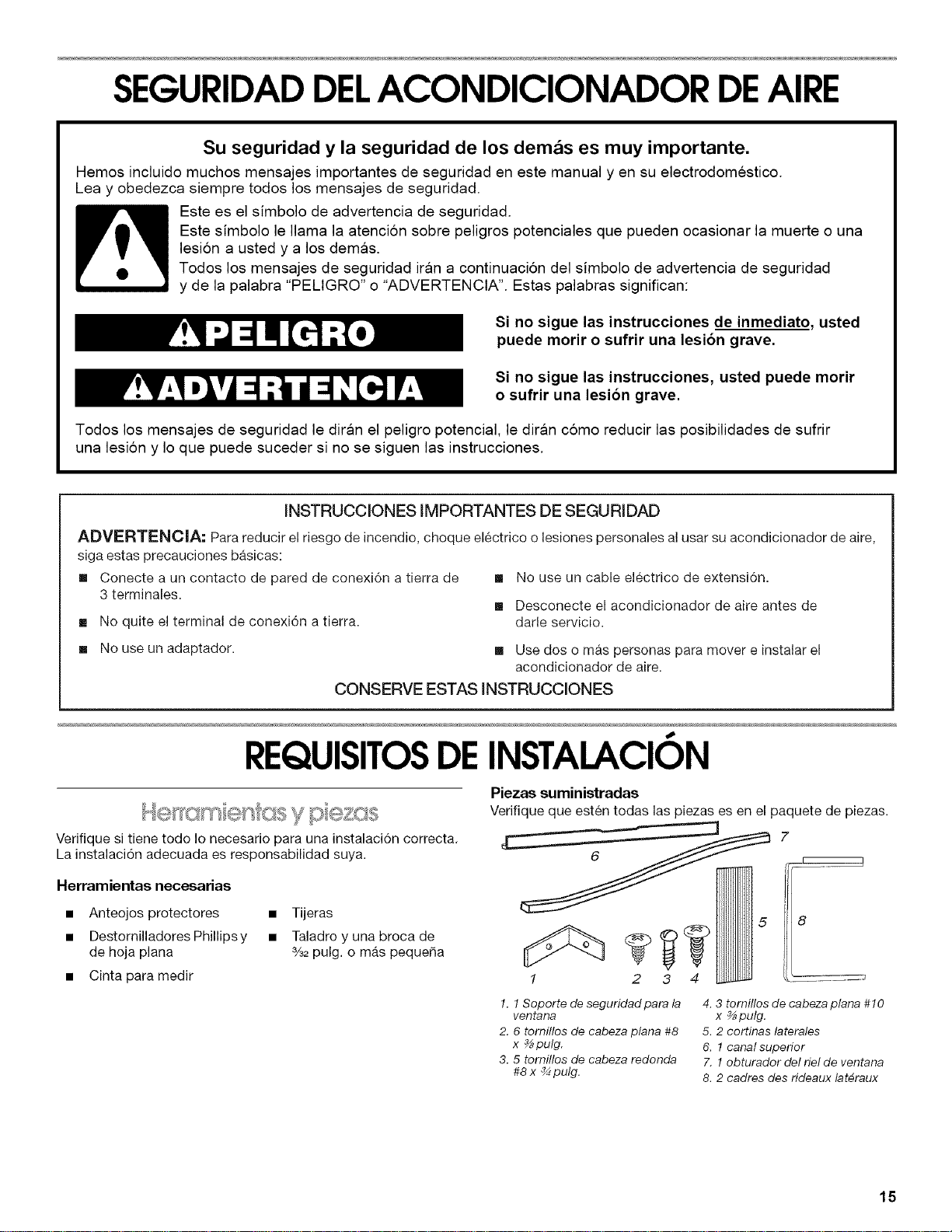
Piezas suministradas
Verifique que esten todas las piezas es en el paquete de piezas.
7
5
2 3 4
............ J
!. ! Soporte de seguridad para la
ventana
2. 6 tomillos de cabeza plana #8
x _pulg.
3. 5 tomillos de cabeza redonda
#8 x _ pulg.
4. 3 tornillos de cabeza plana #10
x _pulg.
5. 2 cortinas laterales
6. 1 canal superior
7. 1 obturador del riel de ventana
8. 2 cadres des rideaux lat_raux
15
IMPORTANTE: Observe todos los c6digos y reglamentos
aplicables.
Verifique el lugar donde se instalara el acondicionador de aire. La
instalaci6n correcta es su responsabildad. Asegirese de que
tiene todo Io necesario para una instalaci6n correcta.
El lugar debe tener:
• Tomacorriente puesto a tierra a 4 pies (122 cm} de la
parte donde el cable electrico sale del acondicionador de
aire. No use un cable de extensi6n.
NOTA: No use un cable electrico de extensi6n.
• Libertad de movimiento del aire alas habitaciones que
desea enfriar.
• Una abertura con la amplitud suficiente para el
acondicionador de aire. Se incluyen piezas de instalaci6n
para ventanas de guillotina.
• Soporte adecuado en la pared para el peso del
acondicionador de aire. El acondicionador de aire pesa
de 56 Ibs (25 kg) a 80 Ibs (36 kg).
NOTA: No deben obstruirse las rejillas del gabinete. El aire debe
circular libremente a traves de las rejillas del gabinete.
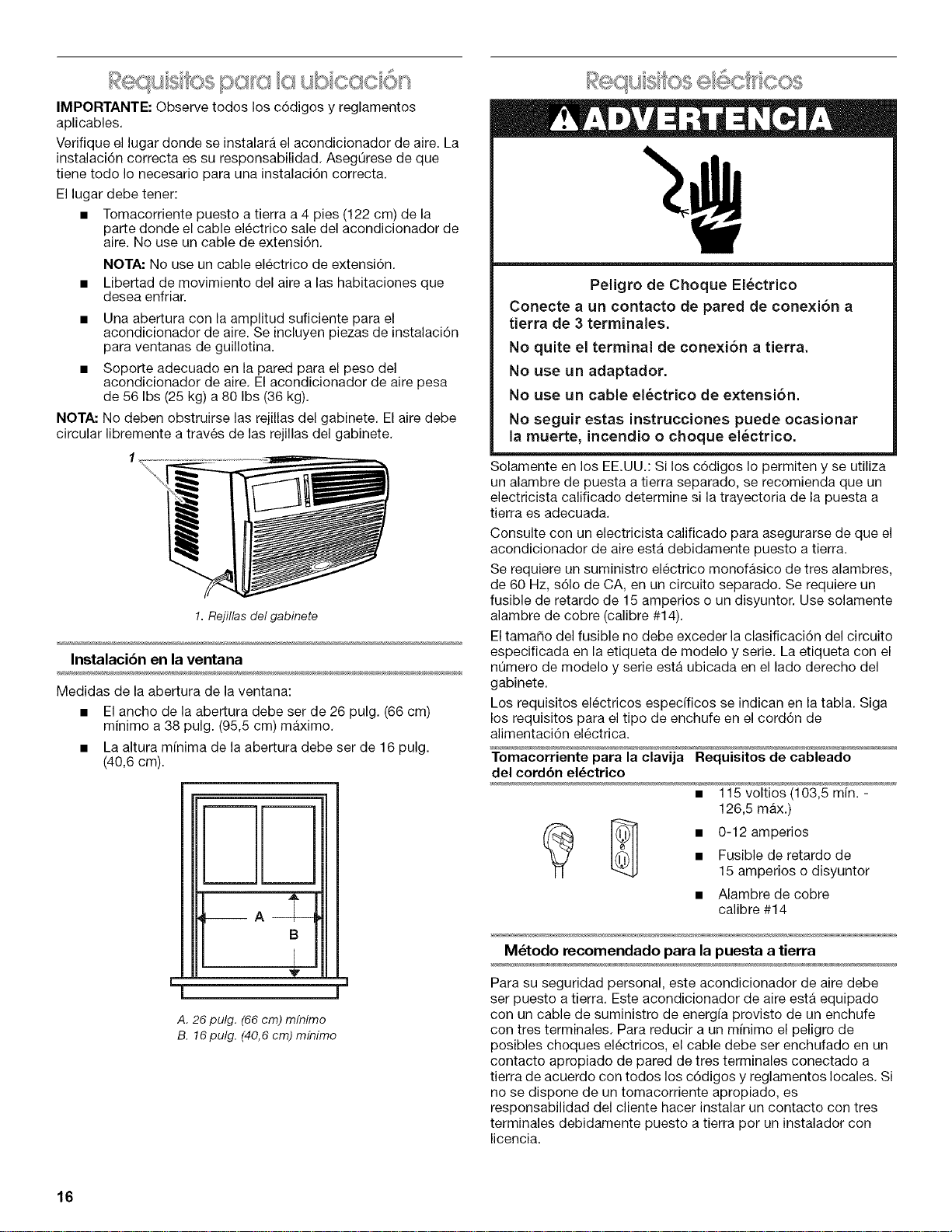
1. Rejillas del gabinete
Instalacibn en la ventana
Medidas de la abertura de la ventana:
• El ancho de la abertura debe ser de 26 pulg. (66 cm)
minimo a 38 pulg. (95,5 cm) maximo.
• La altura mfnima de la abertura debe ser de 16 pulg.
(40,6 cm).
m
HH
B
Vf
==- _=l
J
A. 26 pulg. (66 cm) mfnimo
B. 16 pulg. (40,6 cm) m/nimo
Peligro de Choque El_ctrico
Conecte a un contacto de pared de conexi6n a
tierra de 3 terminales.
No quite el terminal de conexi6n a tierra.
No use un adaptador.
No use un cable el_ctrico de extensi6n.
No seguir estas instrucciones puede ocasionar
la muerte, incendio o choque el_ctrico.
Solamente en los EE.UU.: Si los c6digos Io permiten y se utiliza
un alambre de puesta a tierra separado, se recomienda que un
electricista calificado determine si la trayectoria de la puesta a
tierra es adecuada.
Consulte con un electricista calificado para asegurarse de que el
acondicionador de aire esta debidamente puesto a tierra.
Se requiere un suministro electrico monofasico de tres alambres,
de 60 Hz, s61o de CA, en un circuito separado. Se requiere un
fusible de retardo de 15 amperios o un disyuntor. Use solamente
alambre de cobre (calibre #14).
El tamaSo del fusible no debe exceder la clasificaci6n del circuito
especificada en la etiqueta de modelo y serie. La etiqueta con el
nQmero de modelo y serie esta ubicada en el lado derecho del
gabinete.
Los requisitos electricos especfficos se indican en la tabla. Siga
los requisitos para el tipo de enchufe en el cord6n de
alimentaci6n electrica.
Tomacorriente para la clavija Requisitos de cableado
del cord6n el_ctrico
126,5 max.)
(_ _ • 0-12 amperios
• Fusible de retardo de
15 amperios o disyuntor
• Alambre de cobre
calibre #14
M_todo recomendado para la puesta a tierra
Para su seguridad personal, este acondicionador de aire debe
ser puesto a tierra. Este acondicionador de aire esta equipado
con un cable de suministro de energ[a provisto de un enchufe
con tres terminales. Para reducir a un m[nimo el peligro de
posibles cheques electricos, el cable debe ser enchufado en un
contacto apropiado de pared de tres terminales conectado a
tierra de acuerdo con todos los c6digos y reglamentos locales. Si
no se dispone de un tomacorriente apropiado, es
responsabilidad del cliente hacer instalar un contacto con tres
terminales debidamente puesto a tierra por un instalador con
licencia.
16
Es responsabilidad del cliente:
• Llamar a un instalador electrico calificado.
• Asegurarse de que la instalaci6n electrica sea adecuada y
este hecha de acuerdo con el Cddigo Nacional Electrico,
ANSI/NFPA 70, 01tima edicidn, y todos los c6digos y
reglamentos locales.
Pueden obtenerse copias de las normas sefialadas en:
National Fire Protection Association
One Batterymarch Park
Quincy, Massachusetts 02269
INSTRUCCION.ESDE
INSTALACION
de "3[(}
Peligro de Peso Excesivo
Use dos o mas personas para mover e instalar
el acondicionador de aire.
No seguir esta instrucci6n puede ocasionar una
lesi6n en la espalda u otto tipo de lesiones.
Quite los materiales de empaque
• Quite y deshagase debidamente de todos los materiales de
embalaje. Quite las cintas y los residuos de goma del
acondicionador de aire antes de encenderlo. Frote un poco
de detergente liquido para vajillas sobre el adhesivo con los
dedos. Limpie con agua tibia y seque.
No use instrumentos filosos, alcohol para fricciones, liquidos
inflamables o productos de limpieza abrasivos para eliminar
los restos de cinta o goma. Estos productos pueden dafiar la
superficie de su acondicionador de aire.
1=
2.
]-rate el acondicionador de aire con cuidado.
AsegL_resede que el acondicionador de aire no se caiga de la
abertura durante la instalaci6n o al quitarlo.
La parte de donde sale el cord6n electrico del
acondicionador de aire debe colocarse a no mas de 4 pies
(122 cm) de un tomacorriente puesto a tierra.
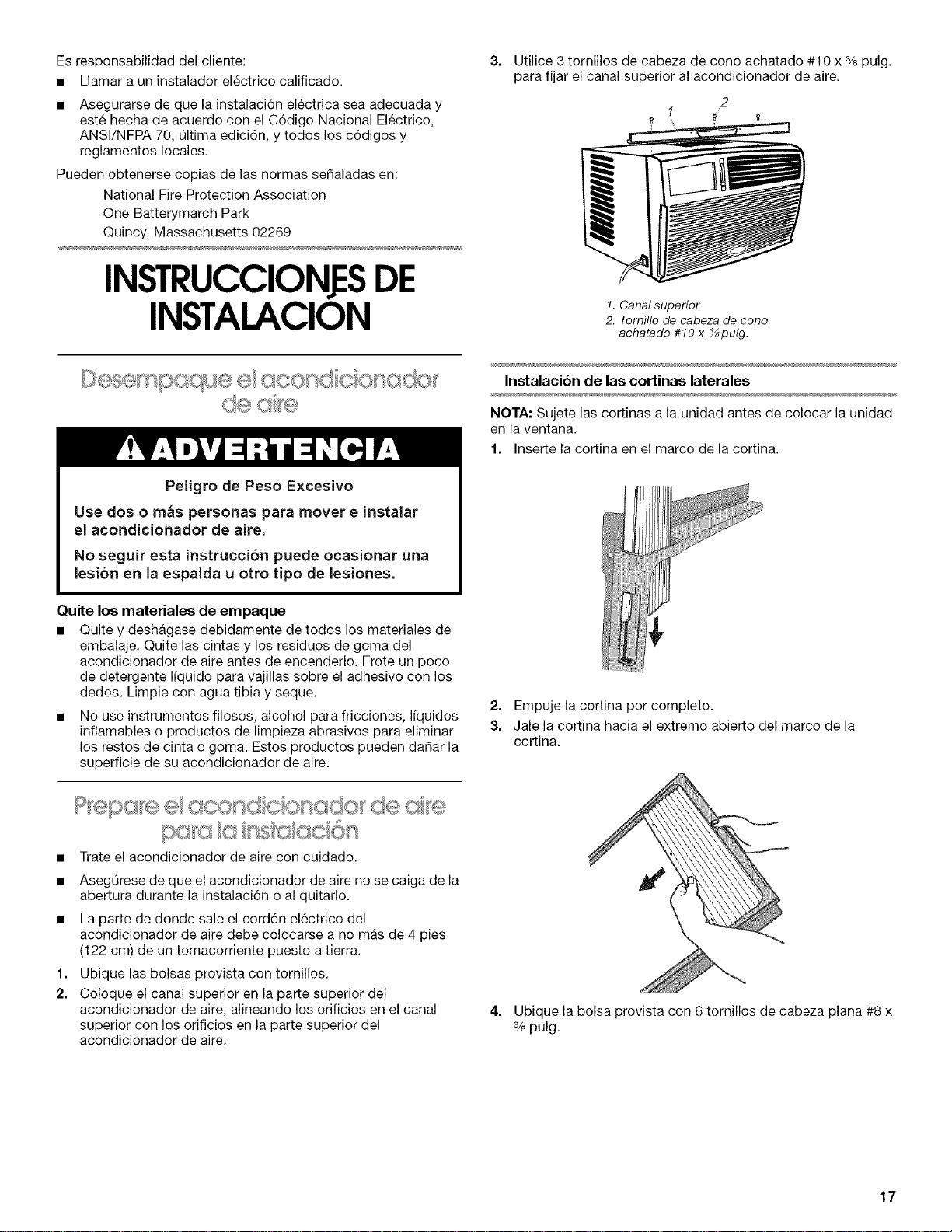
Ubique las bolsas provista con tornillos.
Coloque el canal superior en la parte superior del
acondicionador de aire, alineando los orificios en el canal
superior con los orificios en la parte superior del
acondicionador de aire.
3=
Utilice 3 tornillos de cabeza de cono achatado #10 x % pulg.
para fijar el canal superior al acondicionador de aire.
2
1 /
1. Canal superior
2. Tornillo de cabeza de cono
achatado #10 x %pulg.
Instalacibn de las cortinas laterales
NOTA: Sujete las cortinas a la unidad antes de colocar la unidad
en la ventana.
1. Inserte la cortina en el marco de la cortina.
2. Empuje la cortina pot completo.
3. Jale la cortina hacia el extremo abierto del marco de la
cortina.
4. Ubique la bolsa provista con 6 tornillos de cabeza plana #8 x
% pulg.
17
5. Inserte la parte superior y luego la parte inferior del
alojamiento de la cortina derecha en las gufas superior e
inferior para cortinas en del acondicionador de aire.
• No bloquee las rejillas que estan en el exterior del
acondicionador de aire.
6=
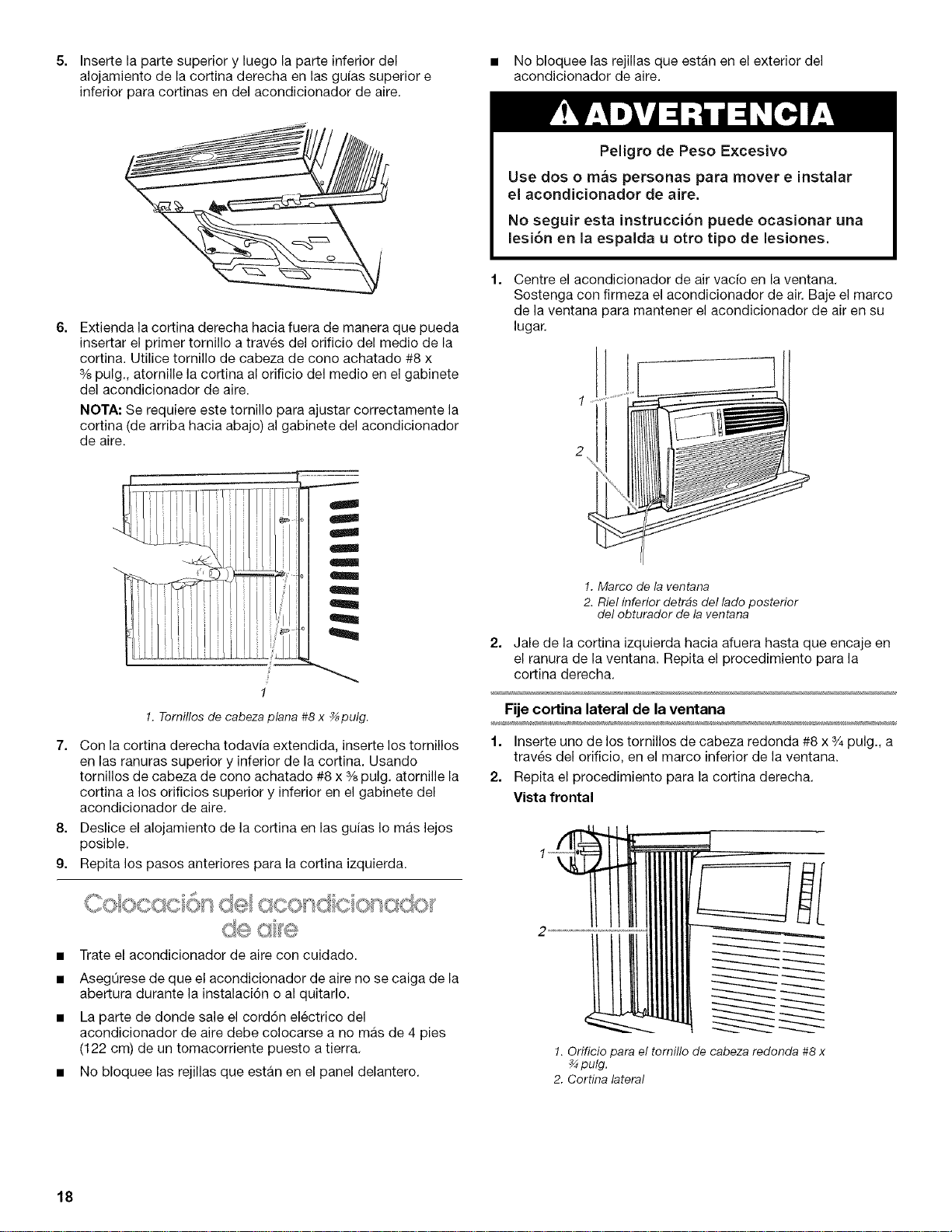
Extienda la cortina derecha hacia fuera de manera que pueda
insertar el primer tornillo a traves del orificio del medio de la
cortina. Utilice tornillo de cabeza de cono achatado #8 x
% pulg., atornille la cortina al orificio del medio en el gabinete
del acondicionador de aire.
NOTA: Se requiere este tornillo para ajustar correctamente la
cortina (de arriba hacia abajo) al gabinete del acondicionador
de aire.
I
g
!
1
1. Tornillos de cabeza plana #8 x _pulg.
7. Con la cortina derecha todavia extendida, inserte los tornillos
en las ranuras superior y inferior de la cortina. Usando
tornillos de cabeza de cono achatado #8 x % pulg. atornille la
cortina a los orificios superior y inferior en el gabinete del
acondicionador de aire.
8. Deslice el alojamiento de la cortina en las guias Io mas lejos
posible.
9. Repita los pasos anteriores para la cortina izquierda.
• Trate el acondicionador de aire con cuidado.
• AsegOrese de que el acondicionador de aire no se caiga de la
abertura durante la instalaci6n o al quitarlo.
• La parte de donde sale el cord6n electrico del
acondicionador de aire debe colocarse a no mas de 4 pies
(122 cm) de un tomacorriente puesto a tierra.
• No bloquee las rejillas que estan en el panel delantero.
Peligro de Peso Excesivo
Use dos o mas personas para mover e instalar
el acondicionador de aire.
No seguir esta instrucci6n puede ocasionar una
lesi6n en la espalda u otto tipo de lesiones.
Centre el acondicionador de air vacfo en la ventana.
Sostenga con firmeza el acondicionador de air. Baje el marco
de la ventana para mantener el acondicionador de air en su
lugar.
2
!. Marco de la ventana
2. Riel inferior detr#s del lado posterior
del obturador de la ventana
2. Jale de la cortina izquierda hacia afuera hasta que encaje en
el ranura de la ventana. Repita el procedimiento para la
cortina derecha.
Fije cortina lateral de la ventana
1. Inserte uno de los tornillos de cabeza redonda #8 x _/_pulg., a
traves del orificio, en el marco inferior de la ventana.
2. Repita el procedimiento para la cortina derecha.
Vista frontal
1. Orificio para el tornillo de cabeza redonda #8 x
pulg.
2. Cortina lateral
18
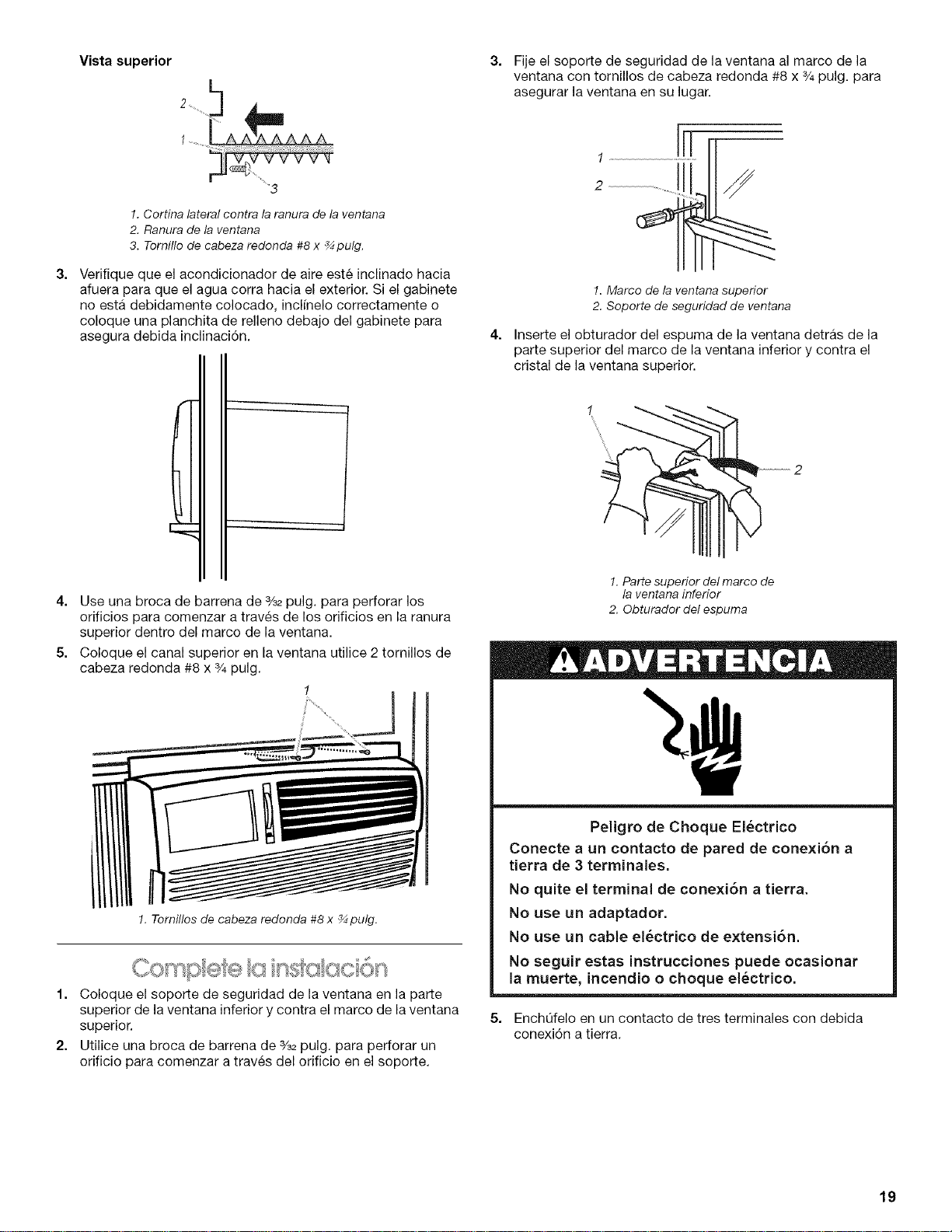
3=
Vista superior
2 ....... L_
5,...,"
....3
1. Cortina lateral contra la ranura de la ventana
2. Ranura de la ventana
3. Tornillo de cabeza redonda #8 x _ pulg.
Verifique que el acondicionador de aire este inclinado hacia
afuera para que el agua corra hacia el exterior. Si el gabinete
no esta debidamente colocado, inclfnelo correctamente o
coloque una planchita de relleno debajo del gabinete para
asegura debida inclinaci6n.
3=
4.
Fije el soporte de seguridad de la ventana al marco de la
ventana con tornillos de cabeza redonda #8 x 3/4pulg. para
asegurar la ventana en su lugar.
1. Marco de la ventana superior
2. Soporte de seguridad de ventana
Inserte el obturador del espuma de la ventana detras de la
parte superior del marco de la ventana inferior y contra el
cristal de la ventana superior.
1
4. Use una broca de barrena de %2 pulg. para perforar los
orificios para comenzar a trav_s de los orificios en la ranura
superior dentro del marco de la ventana.
5. Coloque el canal superior en la ventana utilice 2 tornillos de
cabeza redonda #8 x 3/4pulg.
1
!. Tornillos de cabeza redonda #8 x _ pulg.
I. Coloque elsoportede seguridadde laventanaen laparte
superiorde laventanainferiorycontraelmarco de laventana
superior.
2. UtiIiceuna lorocade barrenade s/s_pulg.para perforarun
orifieiopara comenzar a travesdelorifieioen elsoporte.
1. Parte superior del marco de
la ventana inferior
2. Obturador del espuma
Peligro de Choque El_ctrico
Conecte a un contacto de pared de conexi6n a
tierra de 3 terminales.
No quite el terminal de conexi6n a tierra.
No use un adaptador.
No use un cable el6ctrico de extensi6n.
No seguir estas instrucciones puede ocasionar
la muerte, incendio o choque el_ctrico.
5. EnchOfelo en un contacto de tres terminales con debida
conexi6n a tierra.
19
COMO USARSUACONDICIONADOR DEAIRE
Operar debidamente su acondicionador de aire le permite
obtener los mejores resultados posibles.
Esta secci6n le explica c6mo operar su acondicionador de aire
debidamente.
IMPORTANTE:
• Si usted apaga el acondicionador de aire, espere per Io
menos 3 minutes antes de volver a ponerlo en marcha. Esto
evitara que se queme un fusible del hogar o se dispare un
disyuntor de circuito a causa del acondicionador de aire.
No trate de operar su acondicionador de aire en el modo de
enfriamiento cuando la temperatura exterior sea menor de
65°F (18°C). El serpentfn interior del evaporador se congelara
y el acondicionador de aire no funcionara debidamente.
NOTA: En caso de un corte de corriente, cuando vuelva el
suministro de energia su acondicionador de aire funcionara en
los ajustes previos al corte de corriente.
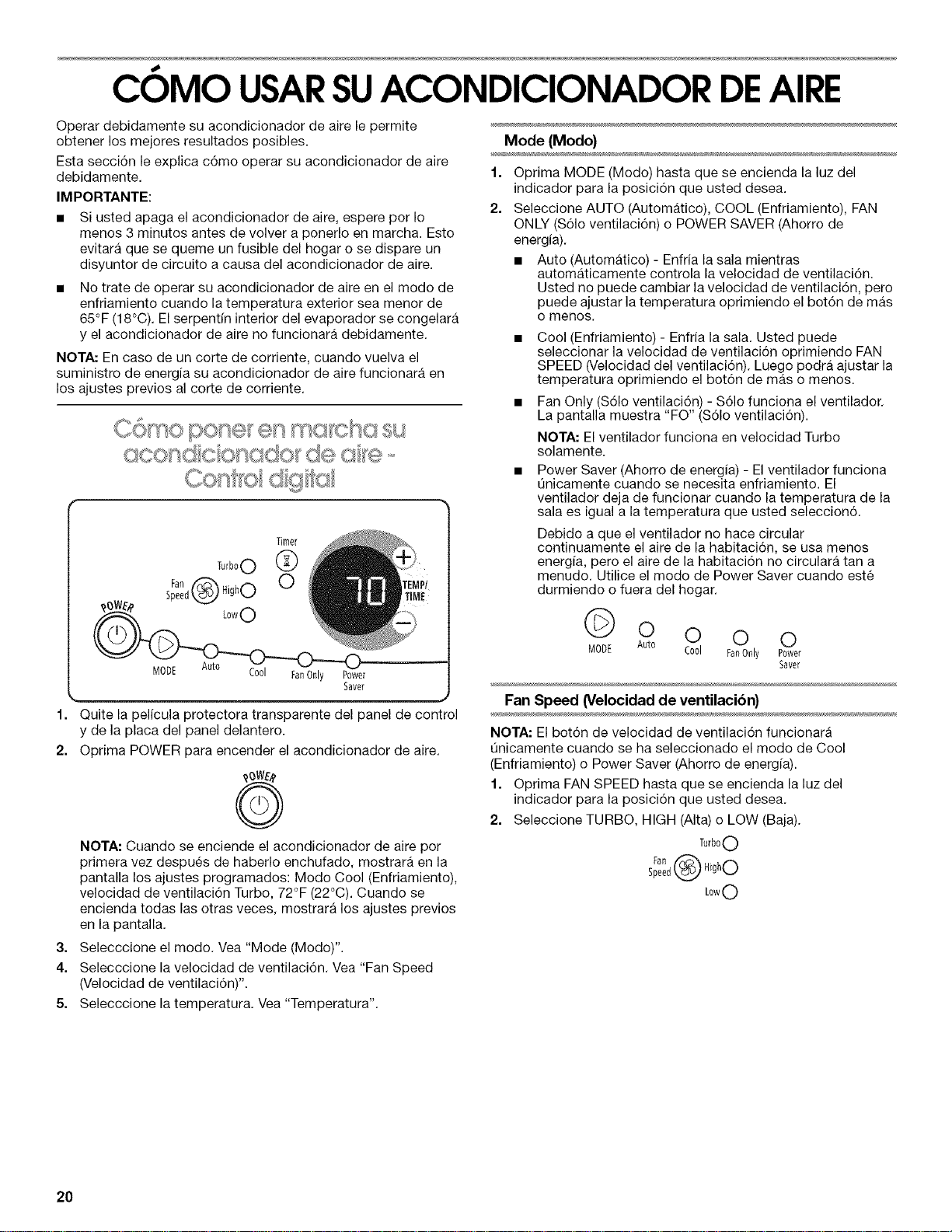
Timer
Turb°O 0_
Fan _-_ HighO
Speedk_._,,_
oo FanOnly Power
Saver
1. Quite la pelicula protectora transparente del panel de control
y de la placa del panel delantero.
2. Optima POWER para encender el acondicionador de aire.
NOTA: Cuando se enciende el acondicionador de aire por
primera vez despues de haberlo enchufado, mostrara en la
pantalla los ajustes programados: Mode Cool (Enfriamiento),
velocidad de ventilaci6n Turbo, 72°F (22°C). Cuando se
encienda todas las otras veces, mostrara los ajustes previos
en la pantalla.
3. Selecccione el modo. Vea "Mode (Modo)".
4. Selecccione la velocidad de ventilaci6n. Vea "Fan Speed
(Velocidad de ventilaci6n)".
5. Selecccione la temperatura. Vea "Temperatura".
Mode (Modo)
1=
2.
Oprima MODE (Modo) hasta que se encienda la luz del
indicador para la posici6n que usted desea.
Seleccione AUTO (Automatico), COOL (Enfriamiento), FAN
ONLY (S61o ventilaci6n) o POWER SAVER (Ahorro de
energia).
• Auto (Automatico) - Enfria la sala mientras
automaticamente controla la velocidad de ventilaci6n.
Usted no puede cambiar la velocidad de ventilaci6n, pero
puede ajustar la temperatura oprimiendo el bot6n de mas
o menos.
• Cool (Enfriamiento) - Enfria la sala. Usted puede
seleccionar la velocidad de ventilaci6n oprimiendo FAN
SPEED (Velocidad del ventilaci6n). Luego podra ajustar la
temperatura oprimiendo el bot6n de mas o menos.
• Fan Only ($61o ventilaci6n) - S61ofunciona el ventilador.
La pantalla muestra "FO" ($61o ventilaci6n).
NOTA: El ventilador funciona en velocidad Turbo
solamente.
• Power Saver (Ahorro de energia) - El ventilador funciona
Qnicamente cuando se necesita enfriamiento. El
ventilador deja de funcionar cuando la temperatura de la
sala es igual a la temperatura que usted seleccion6.
Debido a que el ventilador no hace circular
continuamente el aire de la habitaci6n, se usa menos
energ[a, pero el aire de la habitaci6n no circulara tan a
menudo. Utilice el modo de Power Saver cuando este
durmiendo o fuera del hogar.
0 0 0 0
MODE Auto Cool FanOnly Power
Saver
Fan Speed (Velocidad de ventilacibn)
NOTA: El bot6n de velocidad de ventilaci6n funcionara
Qnicamente cuando se ha seleccionado el modo de Cool
(Enfriamiento) o Power Saver (Ahorro de energ[a).
1. Oprima FAN SPEED hasta que se encienda la luz del
indicador para la posici6n que usted desea.
2. Seleccione TURBO, HIGH (AIta) o LOW (Baja).
TurboO
sl°en0 ® ,0hO
Low0
20
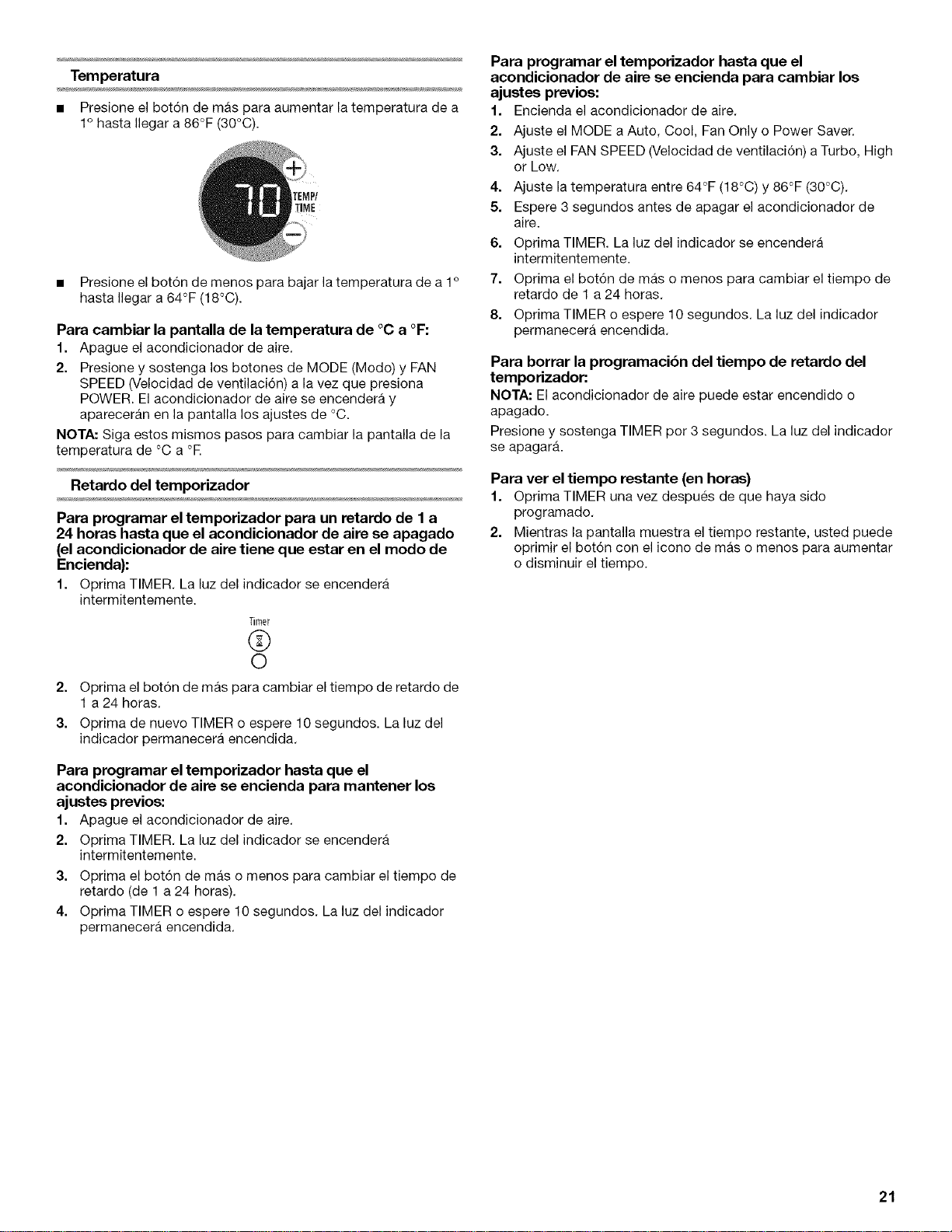
Temperatura
• Presione el bot6n de mas para aumentar la temperatura de a
1° hasta Ilegar a 86°F (30°C).
• Presione el bot6n de menos para bajar la temperatura de a 1o
hasta Ilegar a 64°F (18°C).
Para cambiar la pantalla de la temperatura de °C a °F:
1. Apague el acondicionador de aire.
2. Presione y sostenga los botones de MODE (Modo) y FAN
SPEED (Velocidad de ventilaci6n) a la vez que presiona
POWER. El acondicionador de aire se encendera y
apareceran en la pantalla los ajustes de °C.
NOTA: Siga estos mismos pasos para cambiar la pantalla de la
temperatura de °C a °E
Retardo del temporizador
Para programar el temporizador para un retardo de I a
24 horas hasta que el acondicionador de aire se apagado
(el acondicionador de aire tiene que estar en el modo de
Encienda):
1. Oprima TIMER.La luzdel indicador se encendera
intermitentemente.
Timer
©
©
2. Optima el bot6n de mas para cambiar el tiempo de retardo de
1 a 24 horas.
3. Oprima de nuevo TIMER o espere 10 segundos. La luz del
indicador permanecera encendida.
Para programar el temporizador hasta que el
acondicionador de aire se encienda para mantener los
ajustes previos:
1. Apague el acondicionador de aire.
2. Oprima TIMER. La luz del indicador se encendera
intermitentemente.
3. Oprima el bot6n de mas o menos para cambiar el tiempo de
retardo (de 1 a 24 horas).
4. Oprima TIMER o espere 10 segundos. La luz del indicador
permanecera encendida.
Para programar el temporizador hasta que el
acondicionador de aire se encienda para cambiar los
ajustes previos:
1. Encienda el acondicionador de aire.
2. Ajuste el MODE a Auto, Cool, Fan Only o Power Saver.
3. Ajuste el FAN SPEED (Velocidad de ventilaci6n) a Turbo, High
or Low.
4. Ajuste la temperatura entre 64°F (18°C) y 86°F (30°C).
5. Espere 3 segundos antes de apagar el acondicionador de
aire.
6. Oprima TIMER. La luz del indicador se encendera
intermitentemente.
7. Oprima el bot6n de mas o menos para cambiar el tiempo de
retardo de 1 a 24 horas.
8. Oprima TIMER o espere 10 segundos. La luz del indicador
permanecera encendida.
Para borrar la programacibn del tiempo de retardo del
temporizador:
NOTA: El acondicionador de aire puede estar encendido o
apagado.
Presione y sostenga TIMER pot 3 segundos. La luz del indicador
se apagar&
Para ver el tiempo restante (en horas)
1. Oprima TIMER una vez despues de que haya sido
programado.
2. Mientras la pantalla muestra el tiempo restante, usted puede
oprimir el botdn con el icono de mas o menos para aumentar
o disminuir el tiempo.
21
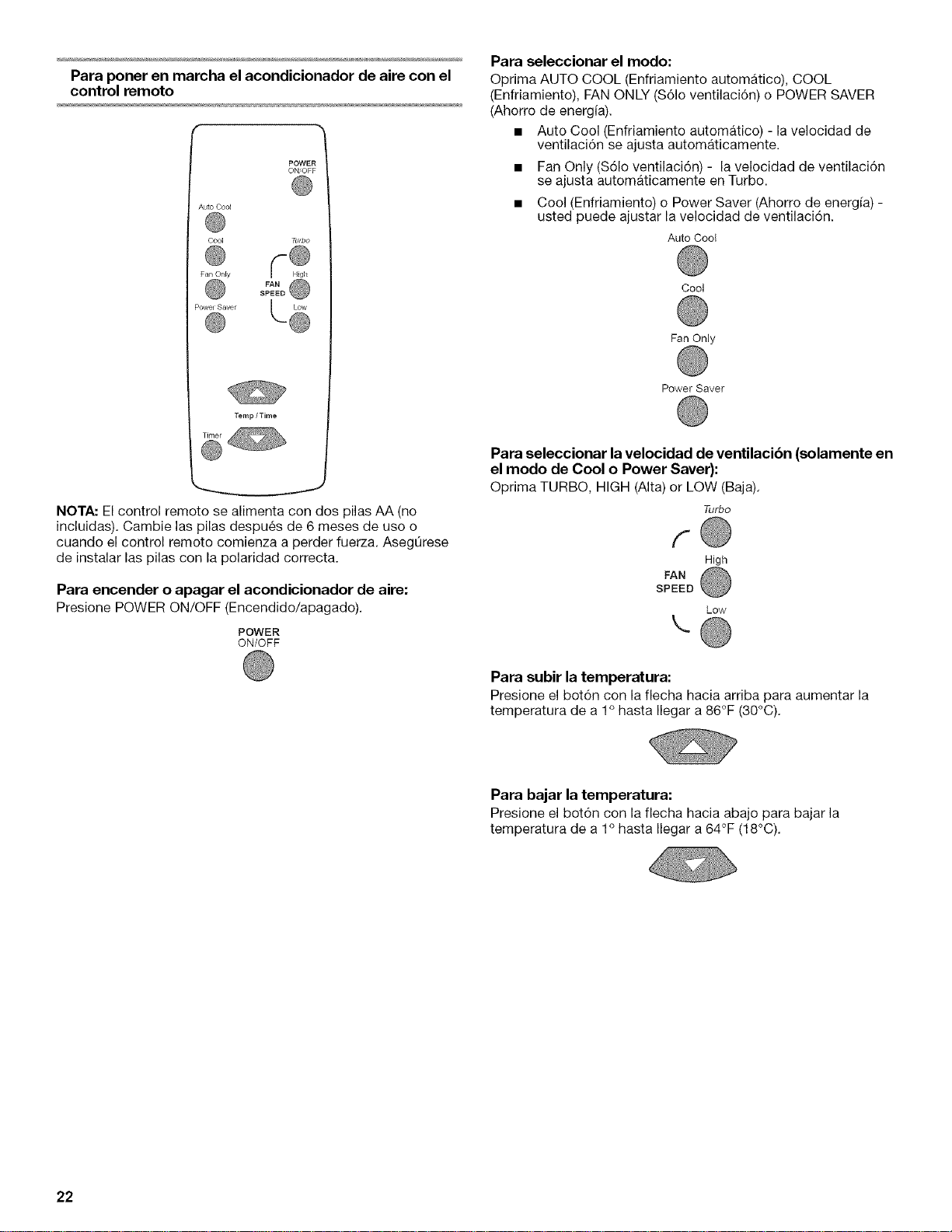
Para poner en marcha el acondicionador de aire con el
control remoto
POWER
ON'OFF
Auto Cool
Cool Turbo
Fan Only
@ ®
,°.,=®....
Temp / Time
NOTA: El control remoto se alimenta con dos pilas AA (no
incluidas). Cambie las pilas despues de 6 meses de uso o
cuando el control remoto comienza a perder fuerza. AsegOrese
de instalar las pilas con la polaridad correcta.
Para encender o apagar el acondicionador de aire:
Presione POWER ON/OFF (Encendido/apagado).
POWER
ON/OFF
Para seleccionar el modo:
Optima AUTO COOL (Enfriamiento automatico), COOL
(Enfriamiento), FAN ONLY ($61o ventilaci6n) o POWER SAVER
(Ahorro de energia).
• Auto Cool (Enfriamiento automatico) - la velocidad de
ventilacidn se ajusta automaticamente.
• Fan Only ($61o ventilacidn) - la velocidad de ventilacidn
se ajusta automaticamente en Turbo.
• Cool (Enfriamiento) o Power Saver (Ahorro de energfa) -
usted puede ajustar la velocidad de ventilacidn.
Auto Coo{
Cool
Fan Only
Power Saver
Para seleccionar la velocidad de ventilacibn (solamente en
el modo de Cool o Power Saver):
Oprima TURBO, HIGH (Alta) or LOW (Baja).
Turbo
f
High
FAN
SPEED
Low
\
Para subir la temperatura:
Presione el bot6n con la flecha hacia arriba para aumentar la
temperatura de a 1° hasta Ilegar a 86°F (30°C).
Para bajar la temperatura:
Presione el botdn con la flecha hacia abajo para bajar la
temperatura de a 1° hasta Ilegar a 64°F (18°C).
22
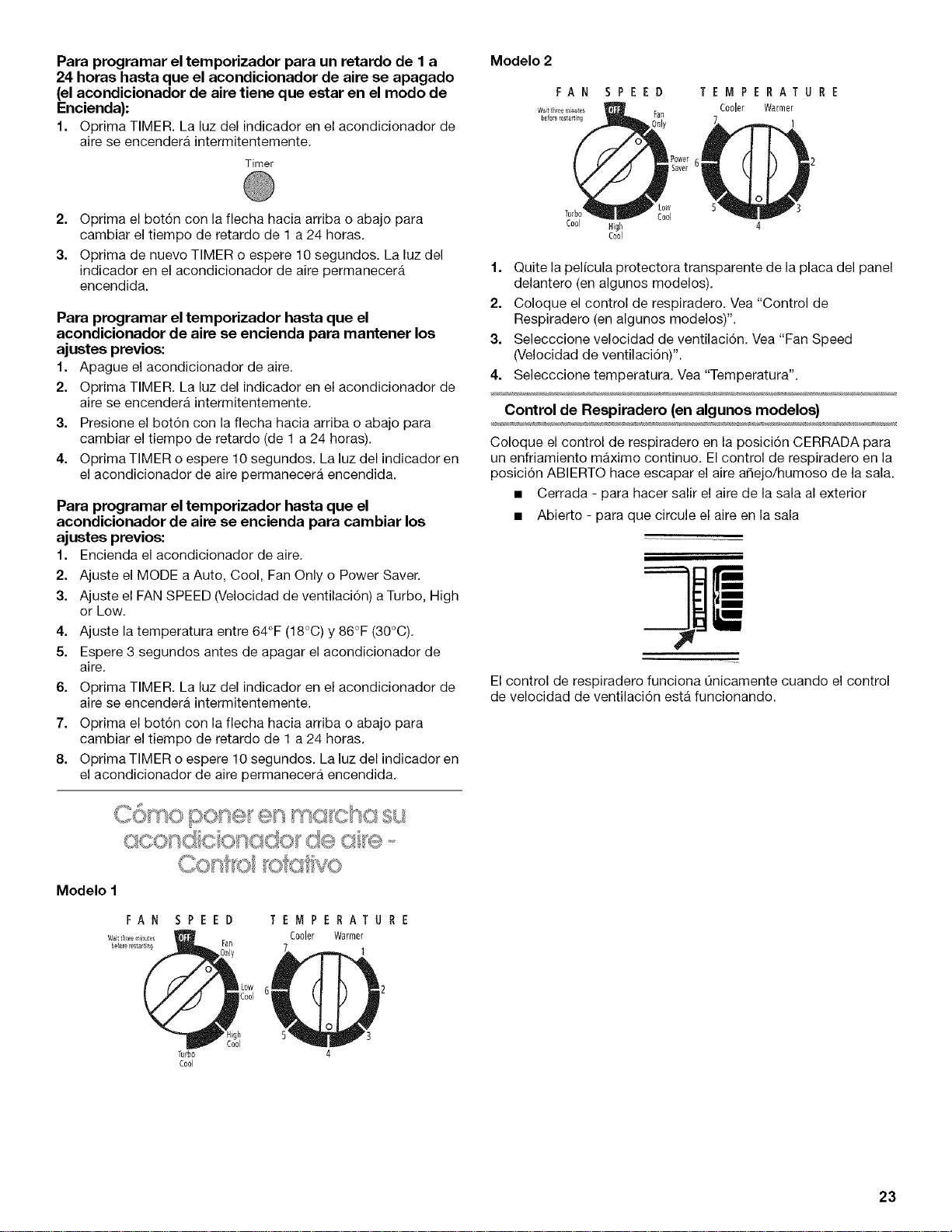
Para programar el temporizador para un retardo de I a
24 horas hasta que el acondicionador de aire se apagado
(el acondicionador de aire tiene que estar en el modo de
Encienda):
1. Oprima TIMER.La luzdel indicador en el acondicionador de
aire se encendera intermitentemente.
Timer
2. Oprima el bot6n con la flecha hacia arriba o abajo para
cambiar el tiempo de retardo de 1 a 24 horas.
3. Oprima de nuevo TIMER o espere 10 segundos. La luz del
indicador en el acondicionador de aire permanecera
encendida.
Para programar el temporizador hasta que el
acondicionador de aire se encienda para mantener los
ajustes previos:
1. Apague el acondicionador de aire.
2. Oprima TIMER. La luz del indicador en el acondicionador de
aire se encendera intermitentemente.
3. Presione el bot6n con la flecha hacia arriba o abajo para
cambiar el tiempo de retardo (de 1 a 24 horas).
4. OprimaTIMER o espere 10 segundos. La luz del indicador en
el acondicionador de aire permanecera encendida.
Para programar el temporizador hasta que el
acondicionador de aire se encienda para cambiar los
ajustes previos:
1. Encienda el acondicionador de aire.
2. Ajuste el MODE a Auto, Cool, Fan Only o Power Saver.
3. Ajuste el FAN SPEED (Velocidad de ventilaci6n) a Turbo, High
or Low.
4. Ajuste la temperatura entre 64°F (18°C) y 86°F (30°C).
5. Espere 3 segundos antes de apagar el acondicionador de
aire.
6. Oprima TIMER. La luz del indicador en el acondicionador de
aire se encendera intermitentemente.
7. Oprima el bot6n con la flecha hacia arriba o abajo para
cambiar el tiempo de retardo de 1 a 24 horas.
8. OprimaTIMER o espere 10 segundos. La luz del indicador en
el acondicionador de aire permanecera encendida.
O[}K} K; k;?tvO
Modelo 1
FAN
Waitt_Teeminu_s
before restarting
SPEED
Fall
Turbo
C0ol
TEMPERATURE
Cooler Warmer
1
SPEED
Fan
1Power
I Saver
low
60ol
TEMPERATURE
Cooler Warmer
1
1. Quite la pelicula protectora transparente de la placa del panel
delantero (en algunos modelos).
2. Coloque el control de respiradero. Vea "Control de
Respiradero (en algunos modelos)".
3. Selecccione velocidad de ventilaci6n. Vea "Fan Speed
(Velocidad de ventilaci6n)".
4. Selecccione temperatura. Vea "Temperatura".
Control de Respiradero (en algunos modelos)
Coloque el control de respiradero en la posici6n CERRADA para
un enfriamiento maximo continuo. El control de respiradero en la
posici6n ABIERTO hace escapar el aire affejo/humoso de la sala.
• Cerrada - para hacer salir el aire de la sala al exterior
• Abierto - para que circule el aire en la sala
!I
=
El control de respiradero funciona 0nicamente cuando el control
de velocidad de ventilaci6n esta funcionando.
23
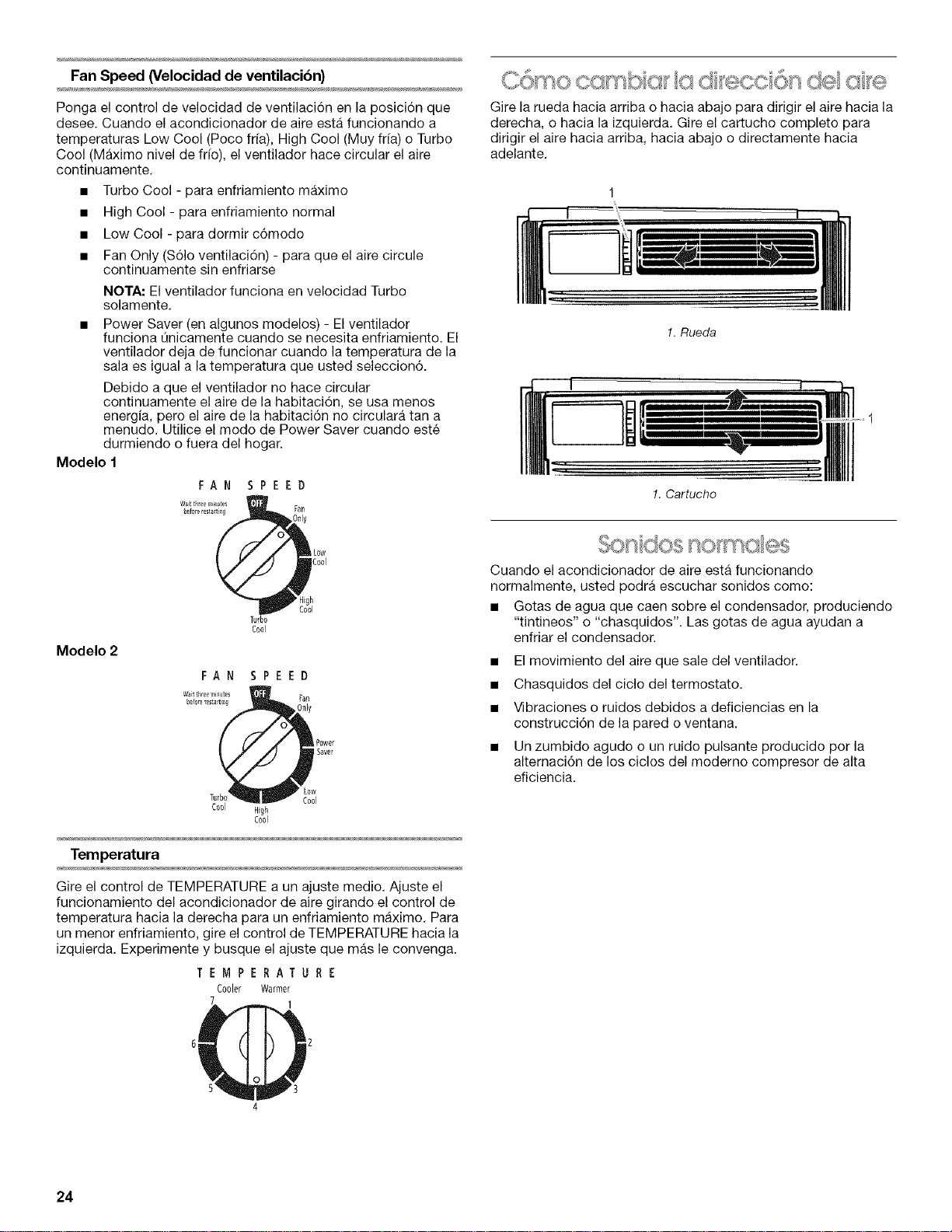
Fan Speed (Velocidad de ventilacibn)
Ponga el control de velocidad de ventilaci6n en la posici6n que
desee. Cuando el acondicionador de aire esta funcionando a
temperaturas Low Cool (Poco ffia), High Cool (Muy ffia) o Turbo
Cool (Maximo nivel de fifo), el ventilador hace circular el aire
continuamente.
• Turbo Cool - para enfriamiento maximo
• High Cool - para enfriamiento normal
• Low Cool - para dormir c6modo
• Fan Only ($61o ventilacidn) - para que el aire circule
continuamente sin enfriarse
NOTA: El ventilador funciona en velocidad Turbo
solamente.
• Power Saver (en algunos modelos) - El ventilador
funciona Qnicamente cuando se necesita enfriamiento. El
ventilador deja de funcionar cuando la temperatura de la
sala es igual a la temperatura que usted seleccion6.
Debido a que el ventilador no hace circular
continuamente el aire de la habitaci6n, se usa menos
energia, pero el aire de la habitacidn no circulara tan a
menudo. Utilice el modo de Power Saver cuando este
durmiendo o fuera del hogar.
Modelo 1
FAN SPEED
Modelo 2
Turbo
Cool
Power
Savel
ow
Cool
Cool High
Cool
Temperatura
Gire el control de TEMPERATURE a un ajuste medio. Ajuste el
funcionamiento del acondicionador de aire girando el control de
temperatura hacia la derecha para un enfriamiento maximo. Para
un menor enfriamiento, gire el control de TEMPERATURE hacia la
izquierda. Experimente y busque el ajuste que mas le convenga.
TEMPERATURE
Cooler Warmer
Gire la rueda hacia arriba o hacia abajo para dirigir el aire hacia la
derecha, o hacia la izquierda. Gire el cartucho completo para
dirigir el aire hacia arriba, hacia abajo o directamente hacia
adelante.
1. Rueda
!. Cartucho
..... i
nomc
Cuando el acondicionador de aire esta funcionando
normalmente, usted podra escuchar sonidos como:
• Gotas de agua que caen sobre el condensador, produciendo
"tintineos" o "chasquidos". Las gotas de agua ayudan a
enfriar el condensador.
• El movimiento del aire que sale del ventilador.
• Chasquidos del ciclo del termostato.
• Vibraciones o ruidos debidos a deficiencias en la
construcci6n de la pared o ventana.
• Un zumbido agudo o un ruido pulsante producido por la
alternaci6n de los ciclos del moderno compresor de alta
eficiencia.
4
24
COMO CUIDARSUACONDICIONADOR DEAIRE
Su nuevo acondicionador de aire esta diseRado para darle
muchos aRos de servicio confiable. Esta secci6n le da la
informaci6n acerca de la limpieza adecuada y el cuidado de su
acondicionador de aire. Llame al vendedor autorizado de su
Ilamada de servicio es su responsabilidad.
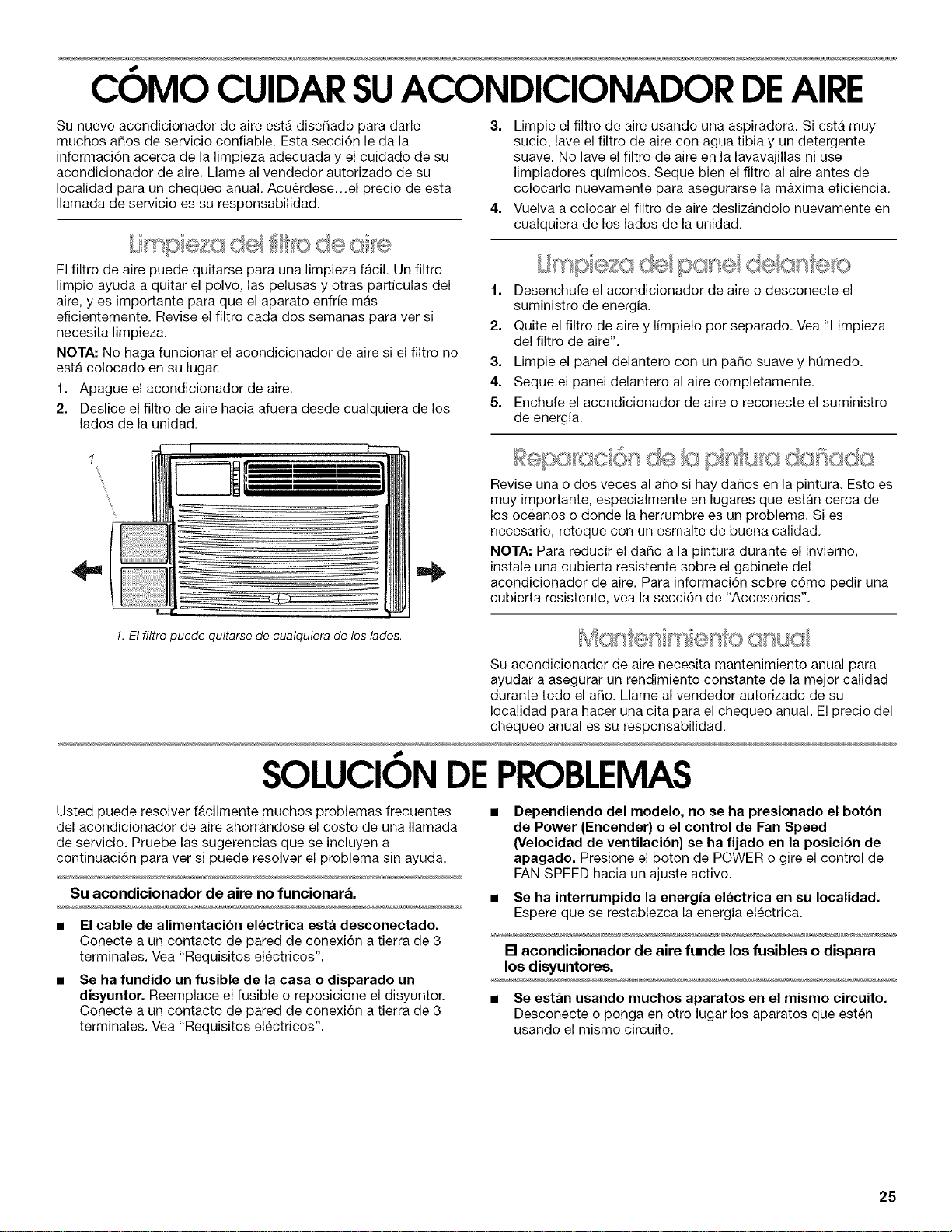
El filtro de aire puede quitarse para una limpieza facil. Un filtre
limpie ayuda a quitar el pelve, las pelusas y etras particulas del
aire, yes irnpertante para que el aparato enfrie mas
eficienternente. Revise el filtre cada dos sernanas para ver si
necesita limpieza.
NOTA: No haga funcienar el acendicienador de aire si el filtre no
esta colocado en su lugan
1. Apague el acendicienader de aire.
2. Deslice el filtre de aire hacia afuera desde cualquiera de los
lados de la unidad,
3. Limpie el filtre de aire usando una aspiradora. Si esta muy
sucio, lave el filtro de aire con agua tibia y un detergente
suave. No lave el filtro de aire en la lavavajillas ni use
limpiadores q@micos. Seque bien el filtro al aire antes de
colocarlo nuevamente para asegurarse la maxima eficiencia.
4. Vuelva a colocar el filtro de aire deslizandolo nuevamente en
cualquiera de los lades de la unidad.
eze de
1. Desenchufe el acondicionador de aire o desconecte el
suministro de energia.
2. Quite el filtro de aire y limpielo por separado. Vea "Limpieza
del filtro de aire".
3. Limpie el panel delantero con un pare suave y hQmedo.
4. Seque el panel delantero al aire completamente.
5. Enchufe el acondicionador de aire o reconecte el suministro
de energia.
1
4=
Revise una o dos veces al are si hay dares en la pintura. Esto es
muy importante, especialmente en lugares que estan cerca de
los oceanos o donde la herrumbre es un problema. Si es
necesario, retoque con un esmalte de buena calidad.
NOTA: Para reducir el daRo a la pintura durante el invierno,
instale una cubierta resistente sobre el gabinete del
acondicionador de aire. Para informaci6n sobre c6mo pedir una
cubierta resistente, vea la secci6n de "Accesorios".
1.El filtro puede quitarse de cualquiera de los lados.
Su acondicionador de aire necesita mantenimiento anual para
ayudar a asegurar un rendimiento constante de la mejor calidad
durante todo el aRo. Llame al vendedor autorizado de su
Iocalidad para hacer una cita para el chequeo anual. El precio del
chequeo anual es su responsabilidad.
SOLUCIONDEPROBLEMAS
Usted puede resolver facilmente muchos problemas frecuentes
del acondicionador de aire ahorrandose el costo de una Ilamada
de servicio. Pruebe las sugerencias que se incluyen a
continuaci6n para ver si puede resolver el problema sin ayuda.
Su acondicionador de aire no funcionar&
• El cable de alimentaci6n electrica esta desconectado.
Conecte a un contacto de pared de conexi6n a tierra de 3
terminales. Vea "Requisites electrices".
Se ha fundido un fusible de la casa o disparado un
disyuntor. Reemplace el fusible o reposicione el disyuntor.
Conecte a un contacto de pared de conexi6n a tierra de 3
terminales. Vea "Requisites electricos".
Dependiendo del modelo, no se ha presionado el botbn
de Power (Encender) o el control de Fan Speed
(Velocidad de ventilaci6n) se ha fijado en la posici6n de
apagado. Presione el boton de POWER o gire el control de
FAN SPEED hacia un ajuste active.
• Se ha interrumpido la energia el_ctrica en su Iocalidad.
Espere que se restablezca la energia electrica.
El acondicionador de aire funde los fusibles o dispara
los disyuntores.
• Se estan usando muchos aparatos en el mismo circuito.
Desconecte o ponga en otto lugar los aparatos que esten
usando el mismo circuito.
25
Se esta usando un fusible de retardo o un disyuntor con
la capacidad incorrecta. Reemplacelo con un fusible de
retarde o un disyunter con la capacidad correcta. Vea
"Requisitos electricos".
Se esta usando un cable el_ctrico de extensibn. No use un
cable electrice de extensi6n con este ni cualquier otro
aparato,
Usted esta tratando de volver a poner en marcha el
acondicionador de aire muy poco tiempo despu_s de
apagar el acondicionador de aire. Espere per Io menos 3
minutes antes de poner en marcha el acondicionador de aire
despues de apagar el acondicionador de aire.
Parece que el acondicionador de aire funciona
excesivamente.
Su actual acondicionador de aire reemplazb un modelo
viejo. El use de componentes mas eficientes puede hacer
que el acondicionador de aire funcione por mas tiempo que
su antiguo modelo, pete el consumo total de energia sera
menor. Los acondicionadores de aire mas nuevos no emiten
las "rafagas" de aire fifo a las que usted estaba
acostumbrado con sus unidades anteriores, pero esto no es
indicio de menor capacidad o eficiencia en el enfriamiento,
Verifique el regimen de eficiencia (EER) y el regimen de
capacidad (en BTU/hr.) que se indican en el acendicionader
de aire.
La unidad se encuentra en una habitaci6n muy conges-
tionada o se estan usando en la misma habitaci6n
aparatos que generan calor. Use ventiladores aspiradores
cuando este cocinando o baSandose y trate de no usar
aparatos que generan calor durante las horas mas calurosas
del dfa, Podrfa necesitar un acondicionador de aire con mas
capacidad, dependiendo del tamar_o de la habitaci6n que se
desea enfriar.
La unidad se enciende y se apaga demasiado o no enfria
la habitacibn en el modo de enfriamiento.
El control de MODE esta puesto en POWER SAVER
(Ahorro de energia) (en algunos modelos). Utilice el modo
de ahorro de energia t_nicamente cuando este fuera de su
hogar o durmiendo, debido a que el ventilador no hace
circular el aim de la sala continuamente. Para mayor
cemodidad use LOW, HIGH o TURBO.
El acondicionador de aire no tiene el tamaSo adecuado
para su habitacibn. Verifique la capacidad de enfriamiento
de su acondicionador de aim para habitaci6n. Los
acondicionadores de aire para habitaciones no estan
diseSados para enfriar varias habitaciones.
El filtro esta sucio u obstruido por desechos. Limpie el
filtro.
El evaporador interno y los serpentines del condensador
externo estan sucios u obstruidos por desechos. Limpie el
evaporador interne y los serpentines del condensador
externo. Vea "Mantenimiento Anual",
Hay demasiado calor o humedad (se estb cocinando en
recipientes abiertos, duchas, etc.) en la habitaci6n. Use
un ventilador para eliminar el calor o la humedad de la
habitaci6n. Trate de no usar aparatos que generan calor
durante las horas mas calurosas del dia.
Las rejillas estan boqueadas. Instale el acondicionador de
aire en un lugar dende las rejillas no esten blequeadas per
cortinas, persianas, muebles, etc,
La temperatura exterior es inferior a los 65°F (18°0). No
trate de poner en marcha el acondicionador de aire en el
modo de enfriamiento cuando la temperatura exterior sea
inferior a los 65°F (18°C).
La temperatura de la habitacibn que esta tratando de
enfriar esta demasiado caliente. Deje pasar mas tiempo
para que el acondicionador de aire enfrie una habitaci6n muy
caliente,
Estan abiertas ventanas o puertas que dan al exterior.
Cierre todas las puertas y ventanas,
El control de respiradero esta en ABIERTO (en algunos
modelos). Jale el control de respiradero en la posici6n
CERRADO para un enfriamiento maximo.
Dependiendo del modelo, el control de Temp/Time o
control de temperatura no esta en una posicibn Io
suficientemente fria. Ajuste el control de Temp/Time o el
control de temperature a una posici6n mas frfa oprimiendo el
bot6n de menos para reducir la temperatura o ajuste el
control de TEMPERATURE (Temperatura) a una posicion mas
frfa girando la perilla en la direcci6n de las manecillas del
reloj. Ponga el control de FAN SPEED en TURBO o TURBO
COOL,
El acondicionador de aire esta instalado en el lado
soleado de su casa. Instale su acondicionador de aire en
una ventana con mas sombra.
Se filtra agua del gabinete a su casa.
El acondicionador de aire no esta debidamente nivelado.
El acondicionador de aire debe inclinarse ligeramente hacia
abajo, hacia el exterior. Nivele el acondicionador de aire de
manera que tenga una inclinaci6n hacia abajo, hacia el
exterior para asegurar el debido desagQe, Vea "Colocaci6n
en la ventana". Mueva el gabinete o ponga un calce, segQn
sea necesario,
NOTA: No perfore orificios en la parte inferior de la base de
metal o del colector de condensado.
26
AYUDA O SERVlCIOTECNI¢O
Antes de solicitar ayuda o servicio tecnico, por favor consulte la
secci6n "Soluci6n de Problema." Esto le podrfa ahorrar el costo
de una visita de servicio tecnico. Si considera que ann necesita
ayuda, siga las instrucciones que aparecen a continuaci6n.
Cuando Ilame, tenga a mano la fecha de compra y el nQmero
completo del modelo y de la serie de su electrodomestico. Esta
informaci6n nos ayudara a atender mejor a su pedido.
Si necesita piezas de repuesto
Si necesita pedir piezas de repuesto, recomendamos que use
Qnicamente piezas especificadas de fabrica. Estas piezas
encajaran bien y funcionaran bien ya que estan confeccionadas
con la misma precisi6n empleada en la fabricaci6n de cada
electrodomestico nuevo.
Para encontrar piezas de repuesto en su Iocalidad, Ilame a
nuestro Centro de interacci6n del cliente o al centro de servicio
designado su Iocalidad.
Llame al Centro de interacci6n del cliente sin costo alguno al:
1-800-253-1301.
Nuestros consultores ofrecen asistencia con respecto a:
• Caracteristicas y especificaciones de nuestra linea completa
de electrodomesticos.
• Informaci6n sobre instalaci6n.
• Procedimiento para el uso y mantenimiento.
• Venta de accesorios y piezas para reparaci6n.
• Asistencia especializada para el consumidor (habla hispana,
problemas de audici6n, visi6n limitada, etc.).
Recomendaciones con distribuidores locales, compa_[as que
dan servicio y distribuidores de partes para reparaci6n. Los
tecnicos de servicio designados estan entrenados para
cumplir con la garantfa del producto y ofrecer servicio una
vez que la garantfa termine, en cualquier lugar de los Estados
Unidos.
Para Iocalizar la compa_ia de servicio autorizada en su Area,
tambien puede consultar la secci6n amarilla de su guia
telef6nica.
Para obtener mas asistencia
Si necesita asistencia adicional, puede escribir a con sus
preguntas o dudas a:
Customer Interaction Center
553 Benson Road
Benton Harbor, MI 49022-2692
Favor de incluir un nQmero telef6nico de dfa en su
correspondencia.
Por favor anote la informacibn sobre su modelo.
Siempre que Ilame para solicitar servicio del aparato, necesitara
saber el nt_mero del modelo y el nt_mero de serie completes. Esta
informaci6n la encuentra en la placa de nt]mero del modelo y
nt_mero de serie. Vea la ubicaci6n del nL_merodel modelo y del
nt_mero de serie en "Requisitos electricos".
Por favor anote la informaci6n sobre el nL_merodel modelo y el
nt]mero de serie que se incluye abajo. Anote tambien la fecha de
compra del aparato, asf come el nombre, la direcci6n y el
telefono de la tienda.
N0mero del modelo
N0mero de serie
Fecha de compra
Nombre de la tienda
Direcci6n de la tienda
Tel_fono de la tienda
Guarde este manual y la nota de compra juntos para referencia
futura.
Usted puede ordenar los siguientes accesorios para su
acondicionador de aire en el distribuidor autorizado de su
Iocalidad o Ilamando al 1-800-253-1301 desde cualquier lugar de
los EE.UU.
Filtros de aire de reemplazo
Un filtro de aire limpio y de buena calidad es importante para
obtener el mejor enfriamiento con el menor consumo de energia.
Limpie regularmente el filtro de aire. Vea las instrucciones de
limpieza en la secci6n "Cuidar su acondicionador de aire". Le
recomendamos cambiar su filtro de aire una vez al a_o.
Cubierta resistente
Si usted decide dejar instalado su acondicionador de aire
durante el invierno, una cubierta resistente ayudara a proteger su
aparato y reducir las corrientes de aire. La cubierta para
exteriores protege contra las corrientes de aire frio a traves de los
orificios de paso de aire de la unidad y protege el gabinete contra
la nieve, la Iluvia, el agua nieve, la oxidaci6n y el polvo.
Para obtener una cubierta para exteriores resistente del tamar_o
adecuado para su acondicionador de aire, ordene la pieza
#484184.
Para obtener una cubierta para interiores resistente del tama_o
adecuado para su acondicionador de aire, ordene la pieza
#4396497.
27

1187360
© 2003
AIFrightsreserved.
Todos Ios derechos reservados
9/03
Printed in U.SA
Impreso en EE. UU