Monogram.
Use and Care Guide
for ZMW2000 Series
Built-In
Microwave Oven
Monogram. TM
Microwave Oven
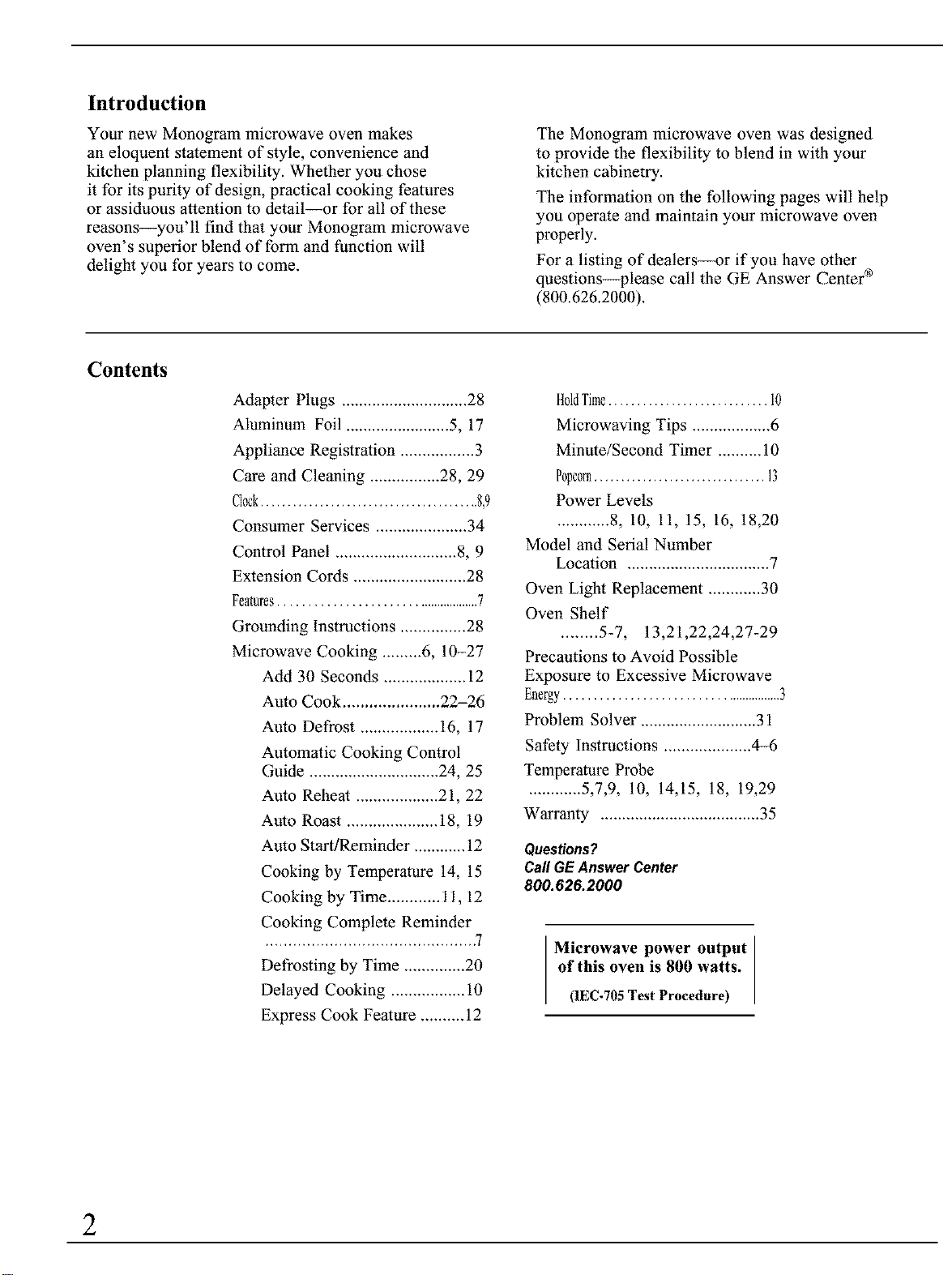
Introduction
Your new Monogram microwave oven makes
an eloquent stalement of style, convenience and
kitchen planning flexibility. Whether you chose
it for its purity of design, practical cooking fealures
or assiduous attention to detail--or for all of these
reasons--you'll find that your Monogram microwave
oven's superior blend of form and function will
delight you for years to come.
The Monogram microwave oven was designed
to provide the flexibility to blend in with your
kitchen cabinetry.
The information on the following pages will help
you operate and maintain your microwave oven
properly.
For a listing of dealers--or if you have other
questions--please call the GE Answer Center ®
(800.626.2000).
Contents
Adapter Plugs ............................. 28
Aluminum Foil ........................ 5, 17
Appliance Registration ................. 3
Care and Cleaning ................ 28, 29
Clock......................................... 8,9
Consumer Services ..................... 34
Control Panel ............................ 8, 9
Extension Cords .......................... 28
Features......................................... 7
Grounding Instructions ............... 28
Microwave Cooking ......... 6, 10-27
Add 30 Seconds ................... 12
Aulo Cook ...................... 22-26
Aulo Defrost .................. 16, 17
Automatic Cooking Control
Guide .............................. 24, 25
Aulo Rehea! ................... 21, 22
Auto Roast ..................... 18, 19
Auto Start/Reminder ............ 12
Cooking by Temperature 14, 15
Cooking by Time ............ 11, 12
Cooking Complete Reminder
............................................. 7
Defrosting by Time .............. 20
Delayed Cooking ................. 10
Express Cook Fealure .......... 12
H01dTime............................ I0
Microwaving Tips .................. 6
Minule/Second Timer .......... 10
Popcorn................................
Power Levels
............ 8, 10, 11, 15, 16, 18,20
Model and Serial Number
Location ................................. 7
Oven Light Replacement ............ 30
Oven Shelf
........ 5-7, 13,21,22,24,27-29
Precautions to Avoid Possible
Exposure to Excessive Microwave
Energy........................................... 3
Problem Solver ........................... 31
Safety Instructions .................... 4-6
Temperature Probe
............ 5,7,9, 10, 14,15, 18, 19,29
Warranty ..................................... 35
Questions?
CallGEAnswer Center
800.626.2000
Microwave power output
of this oven is 800 watts.
(1EC-705 Test Procedure)
2
Before using your oven,
read this book carefully.
It is intended to help you operate and maintain your new
microwave oven properly. Keep it handy for answers to
your questions.
If you don't understand something or need more help, write
(include your phone number):
Consumer Affairs
GE Appliances
Appliance Park
Louisville, KY 40225
Write down the model and serial numbers.
See the Features of Your Oven section for model and serial
number location. These numbers are also on the Consumer
Product Ownership Registration Card that came with your
microwave oven. Before sending in this card, please write
these numbers here:
Model Number
SerialNumber
Use these numbers in any correspondence or service calls
concerning your microwave oven.
If you received a damaged oven...
Immediately contact the dealer (or builder) that sold you
the oven.
Save time and money.
Before you request service...
Check the Problem Solver in this book. It lists causes of
minor operating problems that you can correct yourself.
Be sure your microwave oven is registered.
It is important that we know the location of your microwave oven should a need occur for adjustments.
Your supplier is responsible for registering you as the owner. Please check with your supplier to be sure he has done
so; also send in your Consumer Product Ownership Registration Card. If you move, or if you are not the original
purchaser, please write to us, stating model and serial numbers.
This appliance must be registered. Please be certain that it is.
Write to: GE Appliances, Range Product Service, Appliance Park, Louisville, KY 40225
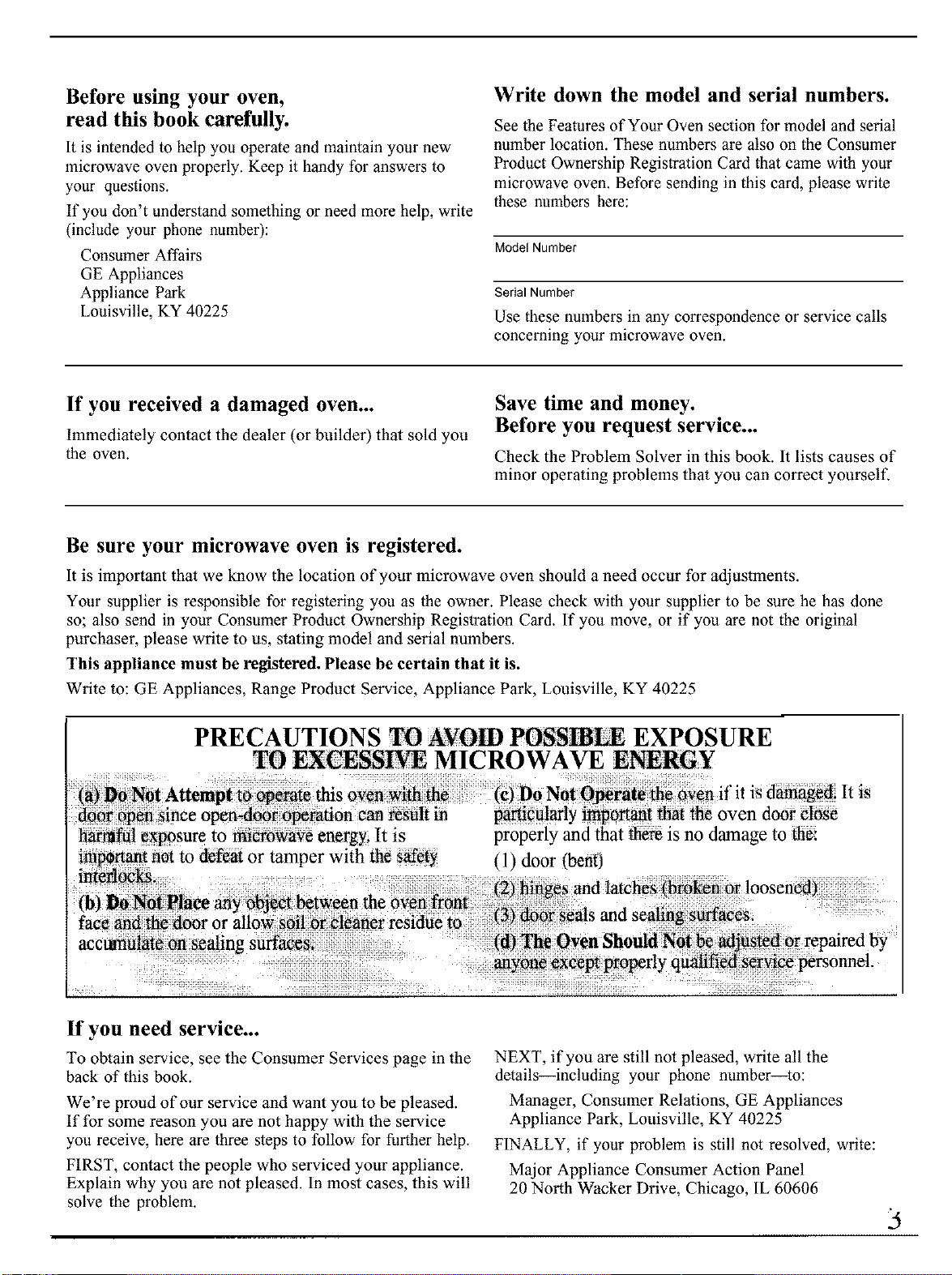
PRECAUTIONS TO AYOm POSSmLE EXPOSURE
TO CESSP, rE MICROWAVE ENERGY
is
hamlful exposure to r-merowave energy. It is
important not to defeat or tamper with the safety
interlOCks.
(b) _ Not Place any object _tween the oven fret
face and the/door or allow soil orcleaner residue to
acct_nulate on sealing suffaces_
properly and that _re is no damage to the:
l }door (bent)
If you need service...
To obtain service, see the Consumer Services page in the
back of this book.
We're proud of our service and want you to be pleased.
If for some reason you are not happy with the service
you receive, here are three steps to follow for further help.
FIRST, contact the people who serviced your appliance.
Explain why you are not pleased. In most cases, this will
solve the problem.
NEXT, if you are still not pleased, write all the
details--including your phone number--to:
Manager, Consumer Relations, GE Appliances
Appliance Park, Louisville, KY 40225
FINALLY, if your problem is still not resolved, write:
Major Appliance Consumer Action Panel
20 North Wacker Drive, Chicago, IL 60606
3
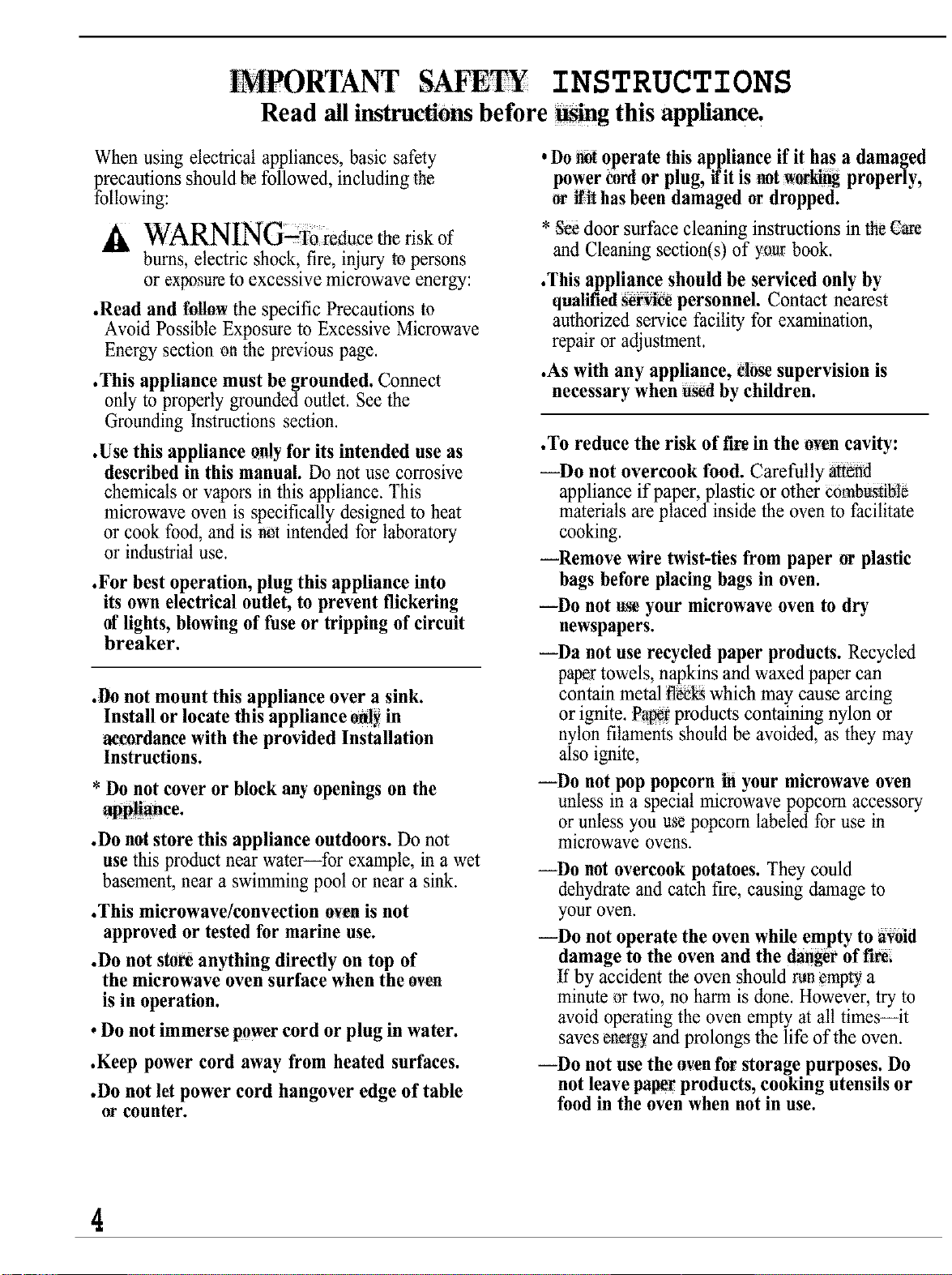
INSTRUCTIONS
Read all instructions before Wing this appliance.
When using electrical appliances, basic safety
precautions should N followed, including the
following:
A WARNING;To ieducemeriskof
bums, electric shock, fire, injury to persons
or exposure to excessive microwave energy:
.Read and follow the specific Precautions to
Avoid Possible Exposure to Excessive Microwave
Energy section on the previous page.
.This appliance must be grounded. Connect
only to properly grounded outlet. See the
Grounding instructions section.
.Use this appliance only for its intended use as
described in this manual. Do not use corrosive
chemicals or vapors in this appliance. This
microwave oven is specifically designed to heat
or cook food, and is not intended for laboratory
or industrial use.
.For best operation, plug this appliance into
its own electrical outlet, to prevent flickering
of lights, blowing of fuse or tripping of circuit
breaker.
.8o not mount this appliance over a sink.
Install or locate this appliance onl_in
accordancewith the provided Installation
Instructions.
* Do not cover or block any openings on the
.Do notstore this appliance outdoors. Do not
use thisproduct nearwater--for example, in a wet
basement, near a swimming pool or neara sink.
.This microwave/convection oven is not
approved or tested for marine use.
.Do not stoR anything directly on top of
the microwave oven surface when the oven
is in operation.
. Do not immerse powercord or plug in water.
.Keep power cord away from heated surfaces.
.Do not let power cord hangover edge of table
orcounter.
. Do_ operate thisappliance if it has a damaged
power cordor plug, flit is not_ properly,
or lilt has been damaged or dropped.
* gee door surface cleaning instructions in the _e
and Cleaning section(s) of your book.
.This appliance should be serviced only by
qualified_r_ personnel. Contact nearest
authorizedservice facility for examination,
repair or adjustment.
.As with any appliance, dose supervision is
necessary when h_ by children.
.To reduce the risk of fire in the oven cavity:
--Do not overcook food. Carefully :a_end
appliance if paper, plastic or other cornbu:s_Ne
materials are placed inside the oven to facilitate
cooking.
--Remove wire twist-ties from paper or plastic
bags before placing bags in oven.
---Do not tt_eyour microwave oven to dry
newspapers.
--Da not use recycled paper products. Recycled
papettowels, napkins andwaxed papercan
contain metal ff_ which may cause arcing
or ignite. Pa_r: productscontaining nylon or
nylon filaments should be avoided, as they may
also ignite,
--Do not pop popcorn in your microwave oven
unless in a special microwave popcorn accessory
or unless you use popcorn labeled for use in
microwave ovens.
--Do not overcook potatoes. They could
dehydrate and catch fire, causing damage to
your oven.
--Do not operate the oven while empty to aVOid
damage to the oven and the dangerof f'L_
If by accident the oven should runemptya
minute _r two, no harm is done. However, try to
avoid operating the oven empty at all times--it
saves en_gy and prolongs the life of the oven.
--Do not use the rivenfor storage purposes. Do
not leave paperproducts, cooking utensils or
food in the oven when not in use.
4
--If materials inside oven should ignite, keep
oven door closed, turn oven off, and disconnect
power cord, or shut off power at the fuse or
circuit breaker panel
• Don't defrost frozen beverages in narrow
necked bottles (especially carbonated beverages).
Even if the container is opened, pressure can build
up. This can cause the container to burst, possibly
resulting In injury.
• Use metal only as directed in this book. TV
dinners may be microwaved in toil trays less than
3/4" high: remove top foil cover and return tray
to box. Wben using metal in the microwave oven.
keep metal (other than metal shelf) at least
1 inch away from sides of oven.
• Cookware may become hot because
of heat trmlsferred from the heated
food. Pot holders may be needed to
handle the cookware.
• Sometimes, the oven floor and walls can
become too hot to touch. Be careful touching the
floor and wails during and after cooking
• Foods cooked in liquids (such as pasta) may tend
to boil over more rapidly than foods containing
less moisture, Should this occur, refer to the Care
and Cleaning sechon(s) for instructions on how to
cleaQ the inside of the oven
• Thermometer--Do not use regular cooking
or oven thermometers when cooking by
microwave or combination. The metal and
mercury in these thermometers could cause
"arcing" and possible damage to the oven. Do
not use a thermometer in food you are
microwavmg unless the tbemaometer is designed
or recommended for use in the microwave oven.
• Remove the temperature probe from the oven
when not using it to cook with. If you leave the
probe inside the oven without inserting it m food
or liquid, and turn on nficrowave energy, it can
create electrical arcing in the oven, damage oven
walls and damage the temperature probe.
Plastic cookware--Plastic cookware designed
for microwave cooking is _ery useful, but should
be used carefully. Even m_crowave-safe plastic
may not be as tolerant of overcooking conditions
as are glass or ceramic materials and may soften
or char if subjected to short periods of
overcooking. In longer exposures to overcooking.
the rood and cook_ are could ignite. For these
reasons' l) Use microwave-safe plastics only and
use them in strict compliance with the cookware
manufacturer's recommendations. 2) Do not
subject empty cookware to micro_aving. 3) Do
not permit children to use plasnc cookware
without complete supervision.
When cooking pork, follow the directions
exactly and always cook the meat to an intemal
temperature of at least 170°E This assures that, in
the remote possibility that mchma may be present
in the meat, it will be killed and meat will be safe
to eat.
Do not boil eggs in a microwave oven. Pressure
will build up reside egg yolk and will cause it to
bmst, possibly resulting m injuu.
• Foods wRh unbroken outer "skin"
such as potatoes, sausages, tomatoes,
apples, chicken livers and other
giblets, and egg yolks (see previous
caution) should be pierced to allow
steam to escape during cooking.
• Not all plastic wrap is suitable for use in
microwave ovens. Check the package for
proper use.
• Spontaneous boiling--Under
certain special circumstances,
hquids may start to boil during
or shortly after removal flora the
microwave oven. To pre_ent burns
from splashing liquid, stir the liquid
briefly before removing the container
from the microwave oven.
• Some products such as whole eggs and
sealed containers--for example, closed glass
jars--wilt explode and should not be heated in
this imcro_ ave oven. Such use of the microwave
oven could restdt m injury,
(t'onuntwd nert pag_,l
5
NT S ETY INSTRUCTIONS
: (continued?,
"Avoid" heating_ baby food in glass jars, even • Use of the shelf accessory.
without their lids especially meat and egg
mixtures.
° q_Uahle!! cooking pouches and tightly
dosed plastic bags should be _lit, pierced or
ve_[ed as directed by package. If they are not,
plastic could burst during or immediately after
rooking, possibly resulting in injury. Also, plastic
storage containers should be at least partially
uncovered _eauS¢ the?_forma tight seal. When
cooking with containers tightly covered with
plastic wrap, remove covering carefully and
_ct steam away from hands and face.
, H_ foods and steam can cause
htn,ifi_Be careful when opening
any containers of hot food, including
popcorn bags, cooking _ouches and
boxes. To prevent possible injury,
direct steam away from hands
and, face.
--Remove theshelf from oven when not in use
-ZDo not store or cook with shelf on fl00i of oven.
Product damage may result.
--Use pot holders whezhandling the shelf and
cookware. They may be hot.
--Do not usemicrowave browning dish on shelf.
Theshelf could overheat.
--Use the shelf_l_ when cooking on two levels.
_t_J_,at,t;_c, he!f is p_os!t!pnedproperly
inside th_oven to pN_eri_ p_®uct d_age +
Use of shall WithAuto _ A_to R_eheai_
Popcorn feature _ n_ _ecpmmen@d _seethe
Auto Cook, Auto Rehea or Popcrm gecti0ns)i
SAVE THESE
INSTRUCTIONS
MICROWAVING TIPS
.Make sure all cookware used in your microwave
oven is suitable tbr microwaving. Most glass
casseroles, cooking dishes, measuring cups, custard
cups, pottery or china dinnerware which does not
have metallic trim or glaze with a metallic sheen
can be used. Some cookware is labeled "suitable for
microwaving. "
.If you are not
sure if a dish is
microwave-safe,
use this test:
Place in the oven
both the dish you
are testing and a
glass measuring
cup filled with one
cup of water--set the measuring cup either in or
next to the dish. Microwave 1 minule al high. If the
dish heats, it should not be used for microwaving. If
the dish remains cool and only the water in the cup
heals, then the dish is microwave-safe.
.Paper towels, waxed paper and plastic wrap
can be used to cover dishes in order to retain
moisture and prevent spaltering. Be sure to vent
plastic wrap so steam can escape.
• Some microwaved foods require stirring, rotating
or rearranging.
.Steam builds up pressure in tbods which are
tightly covered by a skin or membrane. Pierce
potatoes, egg yolks and chicken livers to prevent
bursting.
If you use a meat thermometer while cooking, make
sure it is safe for use in microwave ovens.
6
FEATURES OF YOUR OVEN
Cooking Complete Reminder
(For all defrost and cook cycles except Temp
Cook/Hold)
To remind you that you have fbod in the oven, the oven
will display "End" 'and beep once a minute until you
either open the oven door or touch the CLEAR!OFF pad.
O
O
°
1.0 Cubic Foot I
Oven Interior
©
i I
O
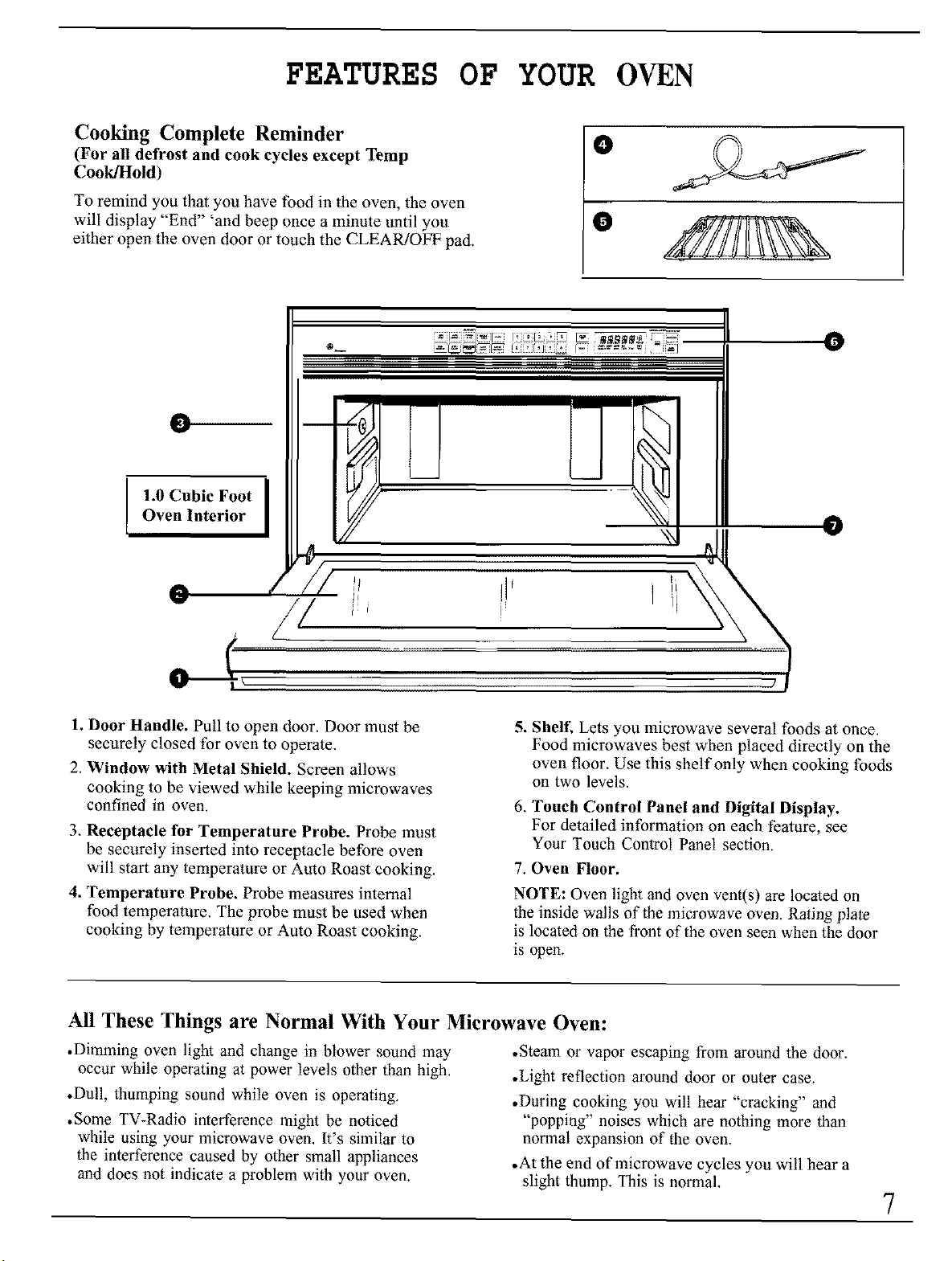
1. Door Handle. Pull to open door. Door must be
securely closed for oven to operate.
2. Window with Metal Shield. Screen allows
cooking to be viewed while keeping microwaves
confined in oven.
3, Receptacle tbr Temperature Probe. Probe must
be securely inserted into receptacle before oven
will start any temperature or Auto Roast cooking.
4. Temperature Probe. Probe measures internal
food temperature, The probe must be used when
cooking by temperalure or Auto Roast cooking.
5. Shelf. Lets you microwave several foods at once.
Food microwaves best when placed directly on the
oven floor. Use this shelf only when cooking foods
on two levels.
6, Touch Control Panel and Digital Display.
For detailed information on each feature, see
Your Touch Control Panel section.
7. Oven Floor.
NOTE: Oven light and oven vent(s) are located on
the inside walls of the microwave oven. Rating plate
is located on the front of the oven seen when the door
is open.
All These Things are Normal With Your Microwave Oven:
• Dimming oven light and change in blower sound may
occur while operating at power levels other than high.
• Dull, thumping sound while oven is operating.
• Some TV-Radio interference might be noticed
while using your microwave oven. It's similar to
the interference caused by other small appliances
and does not indicate a problem with your oven.
• Steam or vapor escaping from around the door.
•Light reflection around door or outer case.
•During cooking you will hear "cracking" and
"popping" noises which are nothing more than
normal expansion of the oven.
•At the end of microwave cycles you will hear a
slight thump. This is normal.
7
YOUR TOUCH CONTROL PANEL
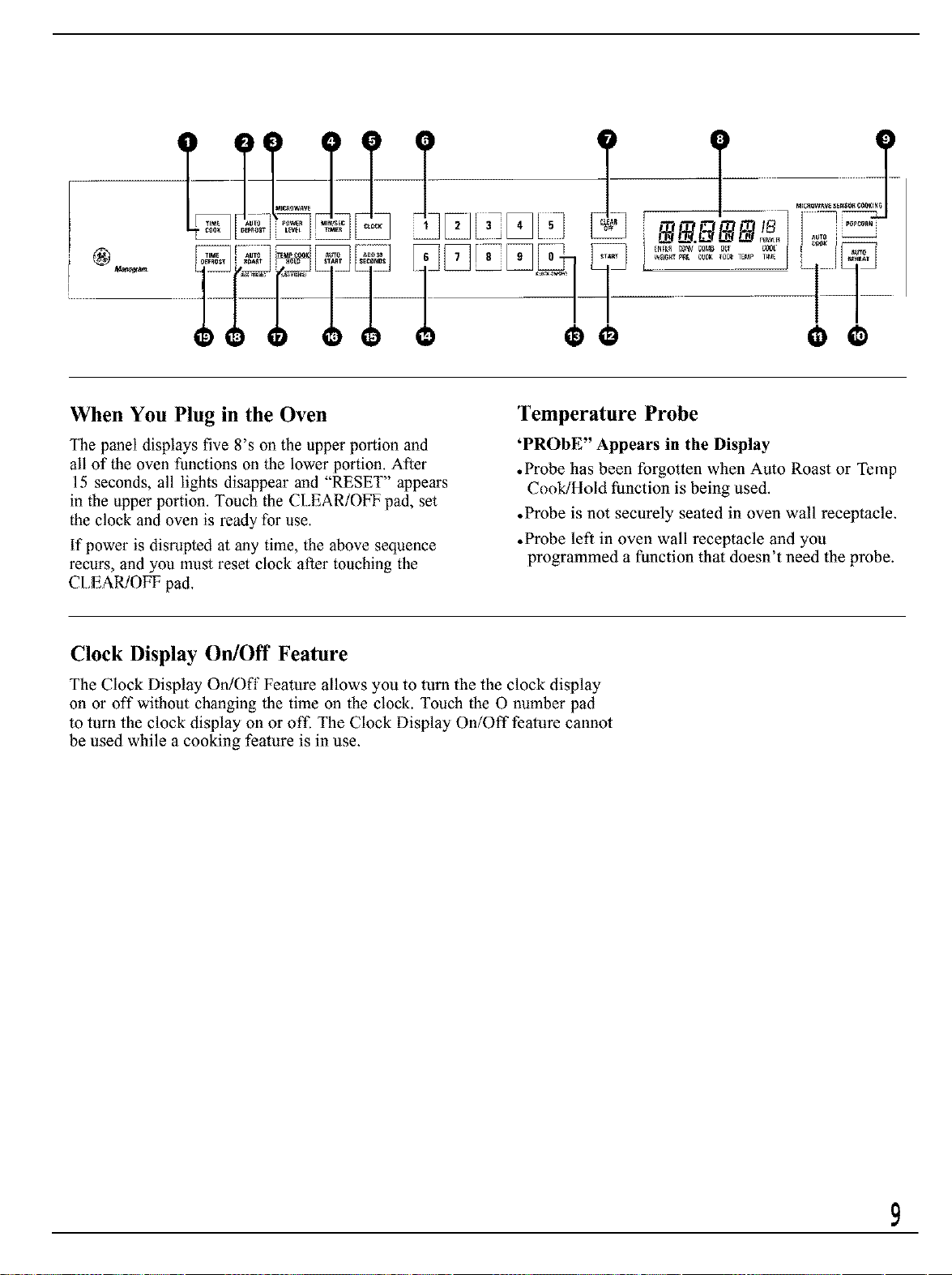
The Touch Control Panel allows you to set the oven controls with
the touch of a finger. It's designed to be easy to use and understand.
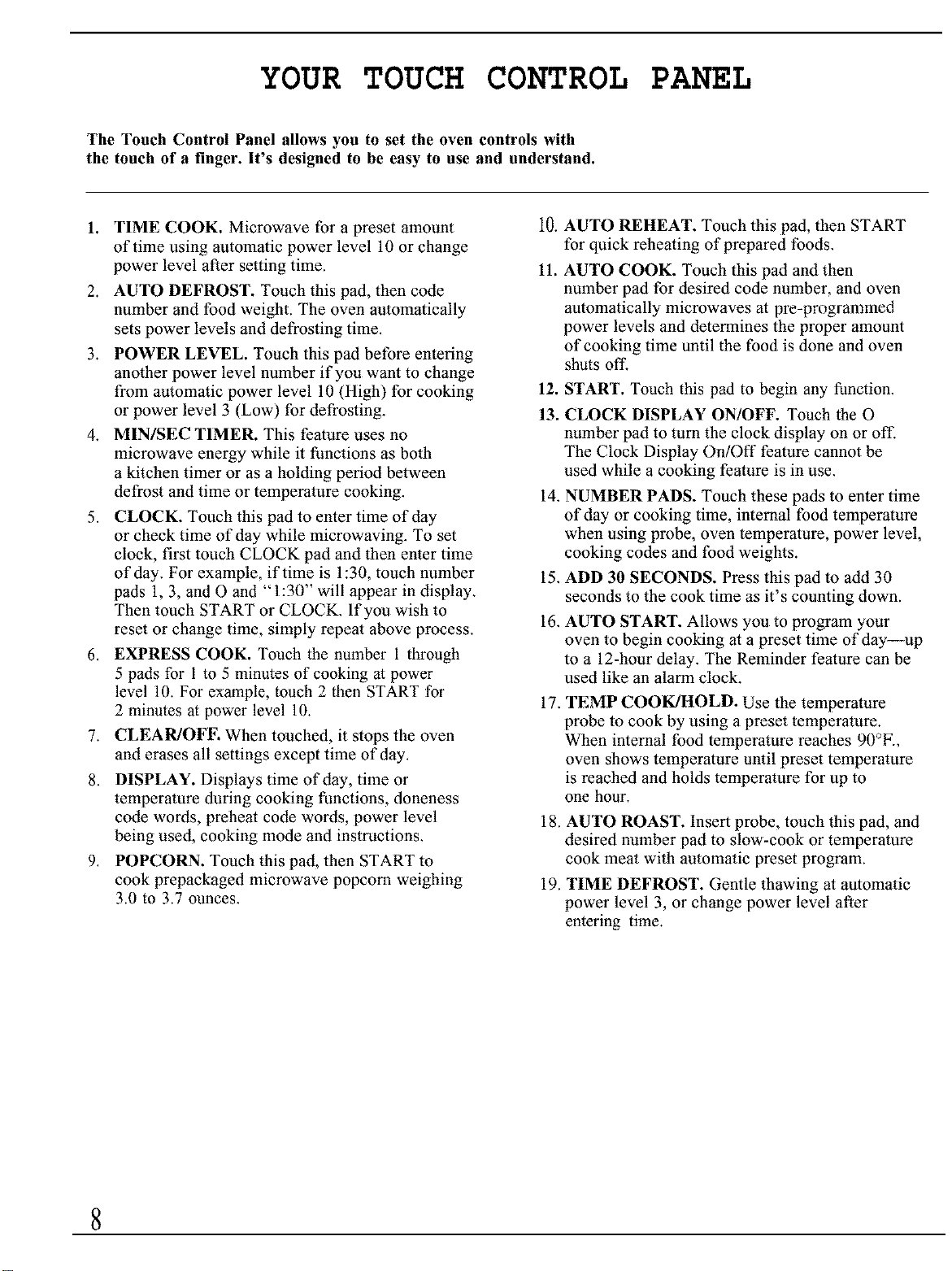
1. TIME COOK. Microwave for a preset amount
of time using automatic power level 10 or change
power level after setting time.
2. AUTO DEFROST. Touch this pad, then code
number and food weight. The oven automatically
sets power levels and defrosting time.
3. POWER LEVEL. Touch this pad before entering
another power level number if you want to change
from automatic power level 10 (High) for cooking
or power level 3 (Low) for defrosting.
4. MINISEC TIMER. This fealure uses no
microwave energy while it functions as both
a kitchen timer or as a holding period between
defrost and time or temperature cooking.
.
CLOCK. Touch this pad to enter time of day
or check time of day while microwaving. To set
clock, first touch CLOCK pad and then enter time
of day. For example, if time is 1:30, touch number
pads 1, 3, and O and "1:30" will appear in display.
Then touch START or CLOCK. If you wish to
reset or change time, simply repeat above process.
6. EXPRESS COOK. Touch the number 1 through
5 pads for 1 to 5 minutes of cooking at power
level 10. For example, touch 2 then START for
2 minutes at power level 10.
7. CLEAR/OFE When touched, it stops the oven
and erases all settings except time of day.
8. DISPLAY. Displays time of day, time or
temperature during cooking functions, doneness
code words, preheal code words, power level
being used, cooking mode and instructions.
9. POPCORN. Touch this pad, then START to
cook prepackaged microwave popcorn weighing
3.0 to 3.7 ounces.
10. AUTO REHEAT. Touch this pad, then START
for quick reheating of prepared foods.
11.
AUTO COOK. Touch this pad and then
number pad for desired code number, and oven
automatically microwaves at pre-programmed
power levels and determines the proper amount
of cooking time until the food is done and oven
shuts off.
12. START. Touch this pad to begin any function.
13. CLOCK DISPLAY ON/OFF. Touch the O
number pad to turn the clock display on or off.
The Clock Display On/Off feature cannot be
used while a cooking fealure is in use.
14. NUMBER PADS. Touch these pads to enter time
of day or cooking time, internal food temperature
when using probe, oven temperature, power level,
cooking codes and food weights.
15. ADD 30 SECONDS. Press this pad to add 30
seconds to the cook time as it's counting down.
16. AUTO START. Allows you to program your
oven to begin cooking al a preset time of day--up
to a 12-hour delay. The Reminder fealure can be
used like an alarm clock.
17. TEMP COOK/HOLD. Use the temperature
probe to cook by using a preset temperature.
When internal food temperature reaches 90_F.,
oven shows temperature until preset temperature
is reached and holds temperature for up to
one hour.
18. AUTO ROAST. Insert probe, touch this pad, and
desired number pad to slow-cook or temperature
cook meat with automatic preset program.
19. TIME DEFROST. Gentle thawing al automatic
power level 3, or change power level after
entering time.
8
When You Plug in the Oven
The panel displays five 8's on the upper portion and
all of the oven functions on the lower portion. After
15 seconds, all lights disappear and "RESET" appears
in the upper portion. Touch the CLEAR/OFF pad, set
the clock and oven is ready for use.
If power is disrupted at any time, the above sequence
recurs, and you must reset clock after touching the
CLEAR/OFF pad.
Temperature Probe
'PROBE" Appears in the Display
• Probe has been forgotten when Auto Roast or Temp
Cook/Hold function is being used.
• Probe is not securely seated in oven wall receptacle.
• Probe left in oven wall receptacle and you
programmed a function that doesn't need the probe.
Clock Display On/Off Feature
The Clock Display OrdOff Feature allows you to turn the the clock display
on or off without changing the time on the clock. Touch the 0 number pad
to turn the clock display on or off. The Clock Display On/Off feature cannot
be used while a cooking feature is in use,
HOW TO USE THE MINUTE/SECO TIMER
The Minute/Second Timer
The Minute/Second Timer has three timing
functions:
•It operates as a minute timer.
•It can be set to delay cooking.
• It can be used as a hold setting after defrosting.
The Minute/Second Timer operates without
microwave energy,
Using a Holding Time
The Minuto/Second Timer can also be used to
program a "holding time" between microwave
cooking functions, The time can range from one
second to 99 minutes and 99 seconds, A holding
or standing time may be found in some of your
own recipes.
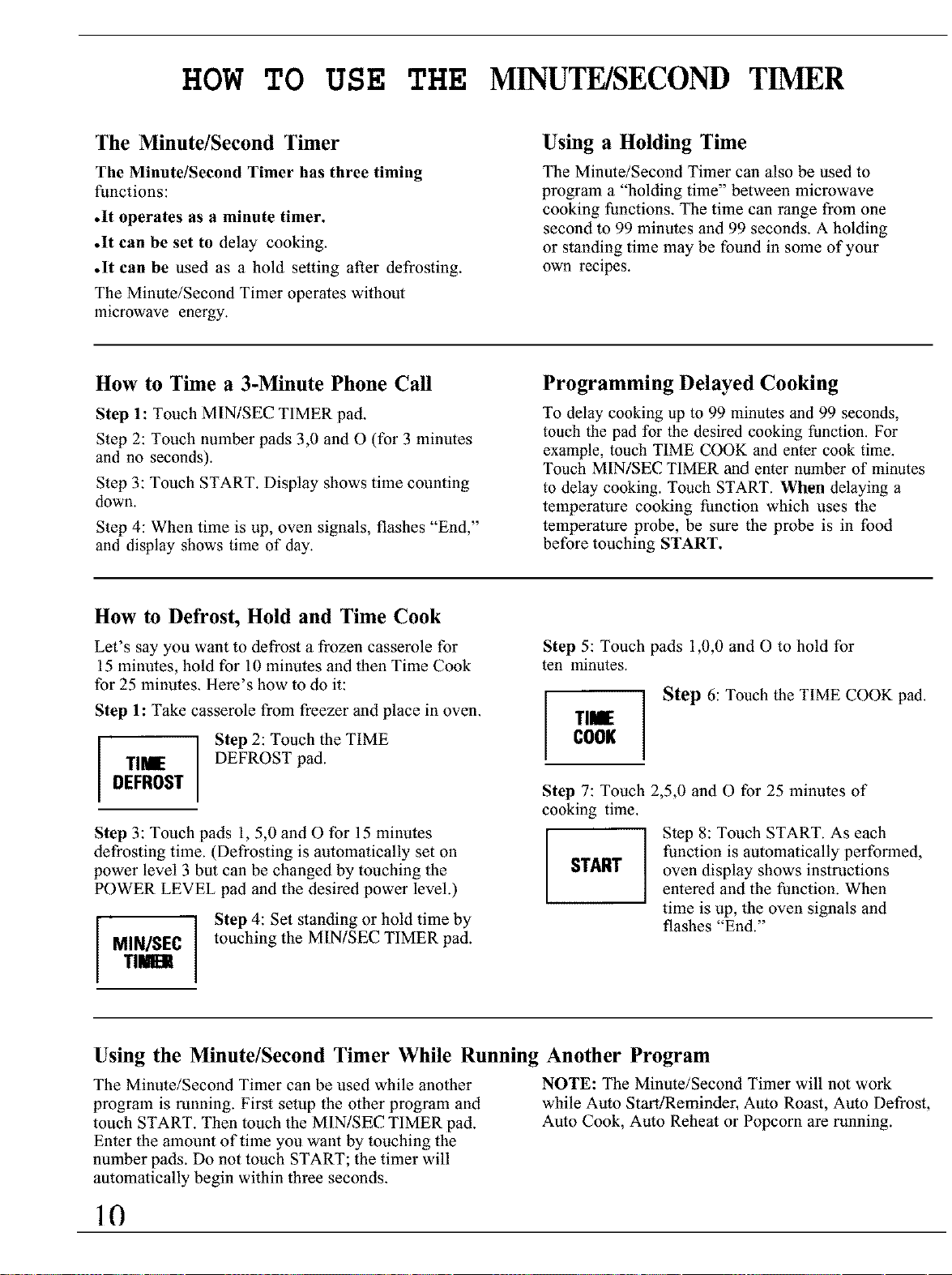
How to Time a 3-Minute Phone Call
Step 1: Touch MIN/SEC TIMER pad.
Step 2: Touch number pads 3,0 and O (for 3 minutes
and no seconds).
Step 3: Touch START. Display shows time counting
down.
Step 4: When time is up, oven signals, flashes "End,"
and display shows time of day.
Programming Delayed Cooking
To delay cooking up to 99 minutes and 99 seconds,
touch the pad for the desired cooking function. For
example, touch TIME COOK and enter cook time.
Touch MIN/SEC TIMER and enter number of minutes
to delay cooking. Touch START. When delaying a
temperature cooking function which uses the
temperature probe, be sure the probe is in food
before touching START.
How to Defrost, Hold and Time Cook
Let's say you want to defrost a frozen casserole for
15 minutes, hold for 10 minutes and then Time Cook
for 25 minutes. Here's how to do it:
Step 1: Take casserole from freezer and place in oven.
Step 2: Touch the TIME
TI_ DEFROST pad.
DEFROST
Step 3: Touch pads 1, 5,0 and O for 15 minutes
defrosting time. (Defrosting is automatically set on
power level 3 but can be changed by touching the
POWER LEVEL pad and the desired power level.)
I I Step 4: Set standing or hold time by
M,.,s[cItouching the MINiSEC TIMER pad.
TIEli
Step 5: Touch pads 1,0,0 and O to hold for
ten minutes.
Step 6: Touch the TIME COOK pad.
I ,-I
COOK
Step 7: Touch 2,5,0 and O for 25 minutes of
cooking time.
Step 8: Touch START. As each
function is automatically performed,
START oven display shows instructions
entered and the function. When
time is up, the oven signals and
flashes "End."
Using the Minute/Second Timer While Running Another Program
The Minute/Second Timer can be used while another
program is running. First setup the other program and
touch START. Then touch the MIN/SEC TIMER pad.
Enter the amount of time you want by touching the
number pads. Do not touch START; the timer will
automatically begin within three seconds.
NOTE: The Minute/Second Timer will not work
while Auto Start/Reminder, Auto Roast, Auto Defrost,
Auto Cook, Auto Reheat or Popcorn are running.
10
COOKING BY TIME
Time Cook
Time Cook allows you to microwave for a selected
amount of time.
Power level 10 (High) is recommended for most
cooking, but you may change this for more flexibility.
To become better acquainted with time cooking, make
a cup of coffee by following the steps below.
Step 1: Fill a cup
2/3 full of water, add
1 teaspoon of instant
coffee and stir to
dissolve. Use a cup
that has no metal
decoration and is
microwave-safe (refer
to Microwaving Tips
section). Place cup in
oven and close door.
TIME
COOK
Step 2: Touch TIME COOK pad.
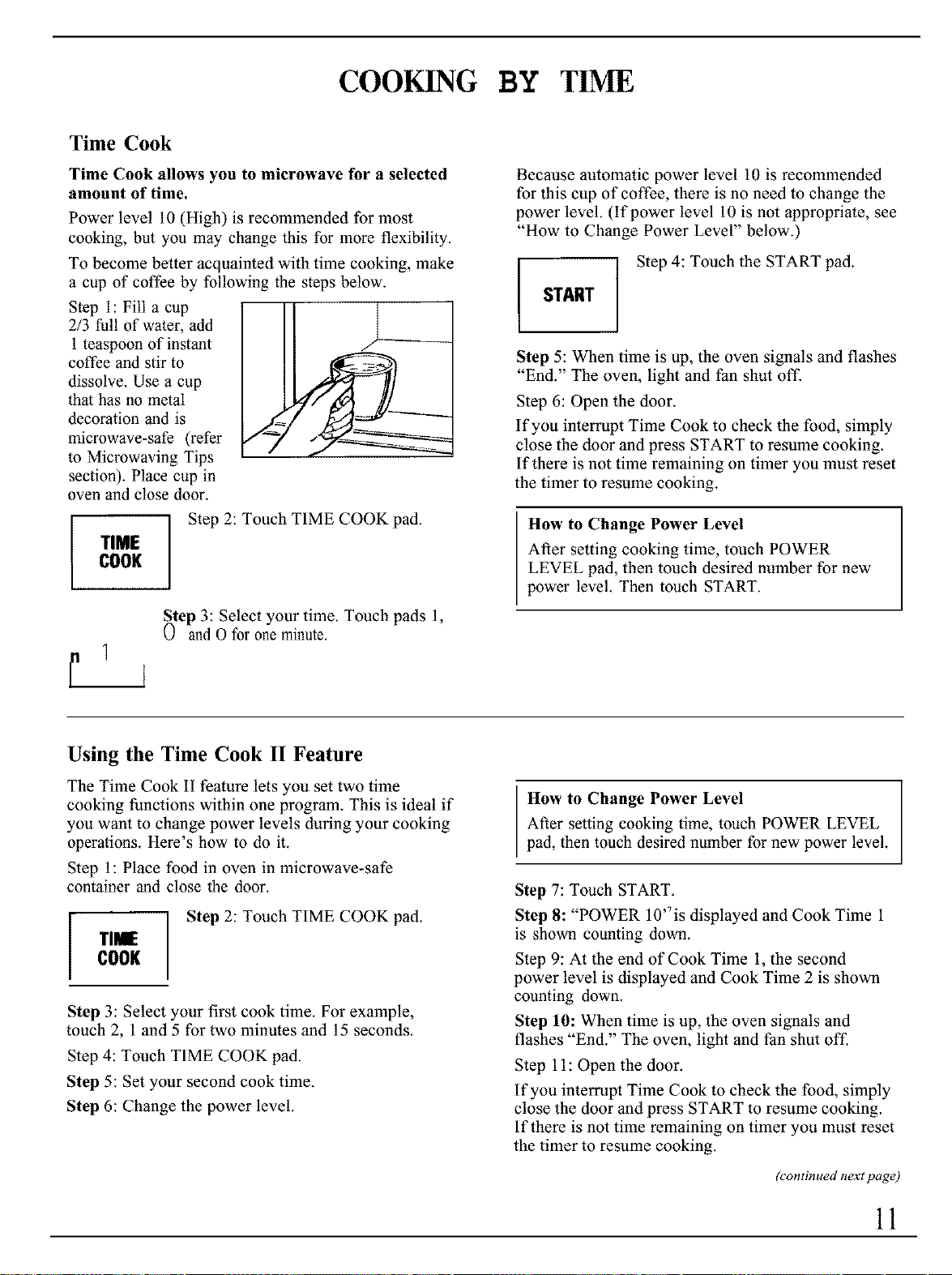
Step 3: Select your time. Touch pads 1,
0 and O for one minute.
j
Because automatic power level 10 is recommended
for this cup of coffee, there is no need to change the
power level. (If power level 10 is not appropriate, see
"How to Change Power Level" below.)
Step 4: Touch the START pad.
START
Step 5: When time is up, the oven signals and flashes
"End." The oven, light and fan shut off.
Step 6: Open the door.
If you interrupt Time Cook to check the food, simply
close the door and press START to resume cooking.
If there is not time remaining on timer you must reset
the timer to resume cooking.
How to Change Power Level
After setting cooking time, touch POWER
LEVEL pad, then touch desired number for new
power level. Then touch START.
Using the Time Cook II Feature
The Time Cook II fealure lets you set two time
cooking functions within one program. This is ideal if
you want to change power levels during your cooking
operations. Here's how to do it.
Step 1: Place food in oven in microwave-safe
container and close the door.
i Step 2: Touch TIME COOK pad.
Tl_
COOK
Step 3: Select your first cook time. For example,
touch 2, 1 and 5 for two minules and 15 seconds.
Step 4: Touch TIME COOK pad.
Step 5: Set your second cook time.
Step 6: Change the power level.
How to Change Power Level
After setting cooking time, touch POWER LEVEL
pad, then touch desired number for new power level.
Step 7: Touch START.
Step 8: "POWER 10'Tis displayed and Cook Time 1
is shown counting down.
Step 9: At the end of Cook Time 1, the second
power level is displayed and Cook Time 2 is shown
counting down.
Step 10: When time is up, the oven signals and
flashes "End." The oven, light and fan shut off.
Step 11: Open the door.
If you interrupt Time Cook to check the food, simply
close the door and press START to resume cooking.
If there is not time remaining on timer you must reset
the timer to resume cooking.
h'ontinued next page)
11
COOKING BY TIME
(continued)
The Express Cook Feature
The Express Cook feature is a short-cut method to set
time for 1-5 minutes.
To Express Cook your food or beverage:
Step 1: Touch a number pad (from 1 to 5) thal
corresponds with the amount of your desired
cooking time (in minules). For example, touch
the 2 pad for 2 minutes of cooking time.
Step 2: Touch the START pad.
The oven will automatically signal, flash "End" and
shut offal the end of the programmed time.
Add 30 Seconds
I ADD30 I
SECONDS
The Add 30 Seconds feature provides
a convenient way to extend cooking
time by 30 seconds while the oven
timer is counting down. It will add
30 seconds to the time shown each
time the pad is touched.
How to Use Auto Start
The Auto Start feature allows you to program
your oven to begin cooking al a preset time of
day--up to a 12-hour delay.
Step 1: Touch AUTO START pad.
AbffO
START
Step 2: Enter the time you want the oven to start.
(Be sure your microwave oven clock shows the
correct time of day.)
Step 3: Enter your desired cooking program.
Step 4: Touch START pad. The oven will
aulomatically start at the desired time.
How to Use Reminder
The Reminder feature can be used like an alarm
clock, without starting the oven.
Example: It is 7 a.m. and you must remember to
leave for a dentist appointment at 10 a.m.
Step 1: Touch AUTO START pad.
AUTO
START
Step 2: Enter the time you want the oven to remind
you. (Be sure your microwave oven clock shows the
correct time of day. The reminder time can be set up to
12 hours later).
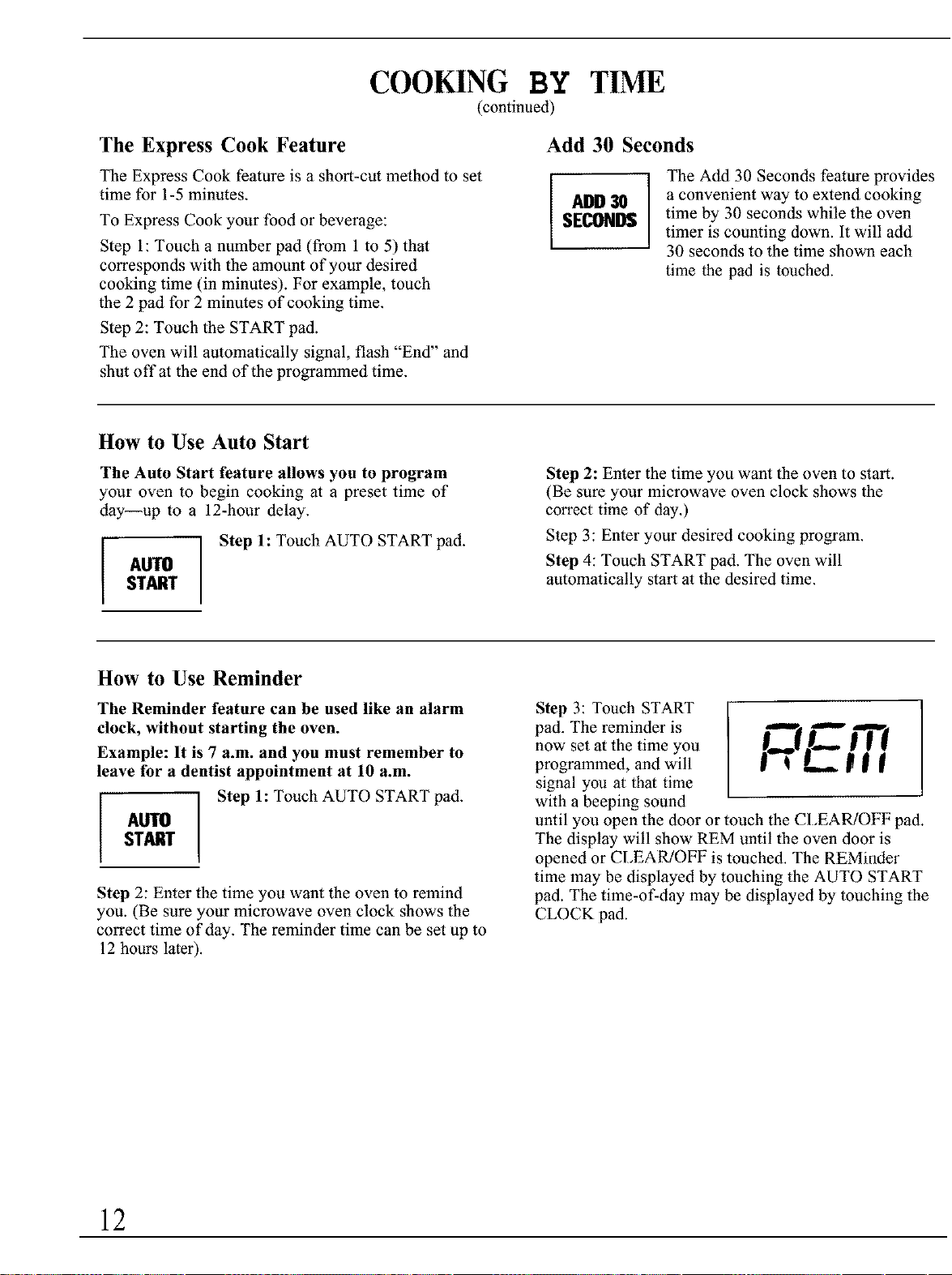
Step 3: Touch START
pad. The reminder is _ .1__" m
now set at the time you
programmed, and will j'_" I _ W _
signal you at that time
with a beeping sound
until you open the door or touch the CI,EARiOFF pad.
The display will show REM until the oven door is
opened or CLEAR/OFF is touched. The REMinder
time may be displayed by touching the AUTO START
pad. The time-of-day may be displayed by touching the
CLOCK pad.
12
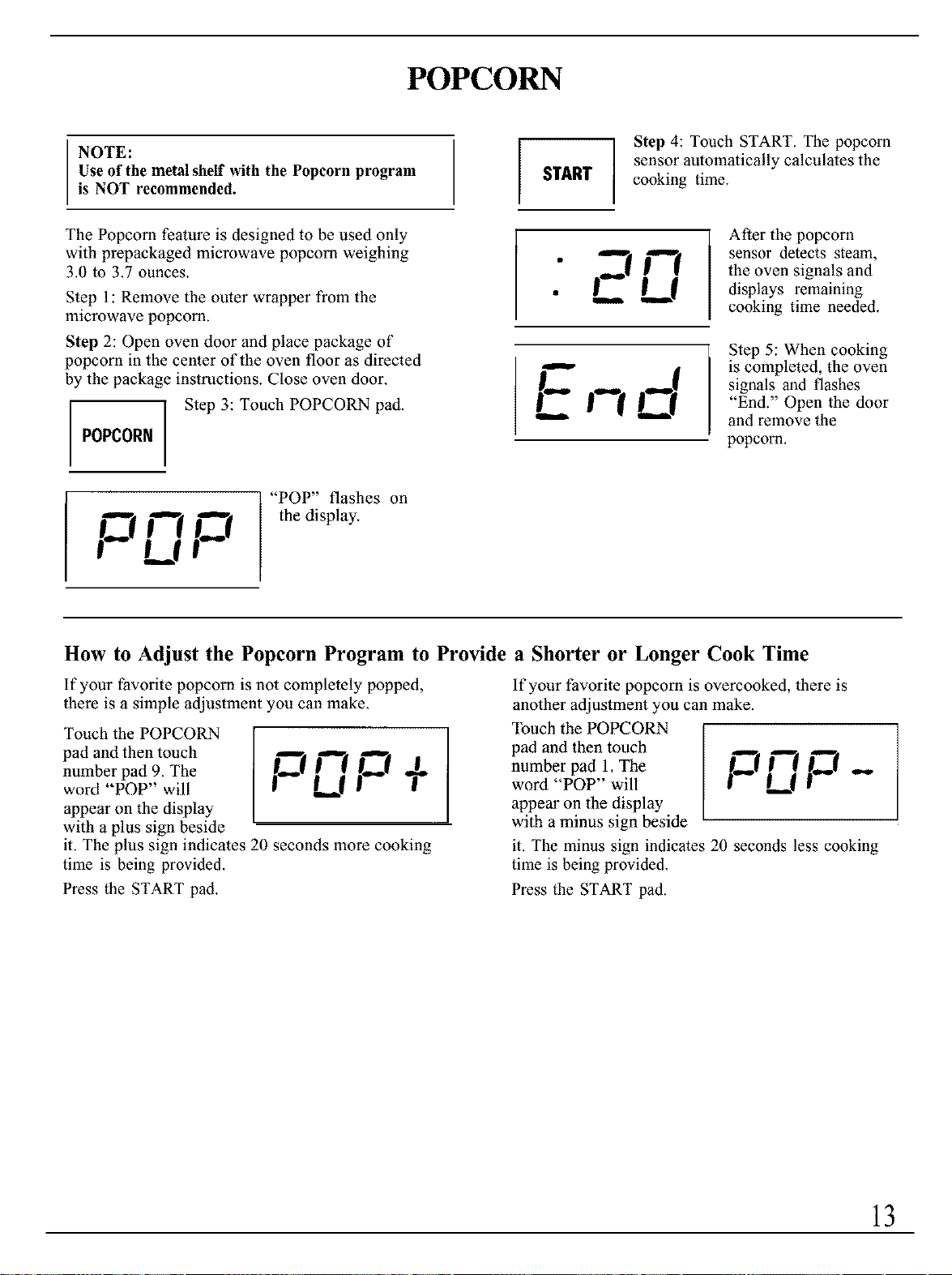
POPCORN
NOTE:
Use of the metal shelf with the Popcorn program
is NOT recommended.
START
Step 4: Touch START. The popcorn
sensor automatically calculates the
cooking time.
The Popcorn feature is designed to be used only
with prepackaged microwave popcorn weighing
3.0 to 3.7 ounces.
Step 1: Remove the outer wrapper from the
microwave popcorn.
Step 2: Open oven door and place package of
popcorn in the center of the oven floor as directed
by the package instructions. Close oven door.
POPCORN
Step 3: Touch POPCORN pad.
_ "POP" flashes on
_ n the display.
i U
EU
lID
After the popcorn
sensor detects steam,
the oven signals and
displays remaining
cooking time needed.
Step 5: When cooking
is completed, the oven
signals and flashes
"End." Open the door
and remove the
popcorn.
How to Adjust the Popcorn Program to Provide a Shorter or Longer Cook Time
If your favorite popcorn is not completely popped,
there is a simple adjustment you can make.
Touch the POPCORN
pad and then touch
number pad 9. The
word "POP" will
appear on the display
with a plus sign beside
it. The plus sign indicates 20 seconds more cooking
time is being provided.
Press the START pad.
If your favorite popcorn is overcooked, there is
another adjustment you can make.
Touch the POPCORN
I _ p pad and then touch ._ _
+ number pad 1. The
L,,J -- word "POP" will LJ
appear on the display
with a minus sign beside
it. The minus sign indicates 20 seconds less cooking
time is being provided.
Press the START pad.
13
COOKING BY TEMPERATURE
Internal temperature is the best test of doneness for
many tbods.
Use Temp Cook/Hold to cook a variety of foods to
the desired finished food temperature. The Time
Cook setting is recommended for batters, doughs,
frozen foods and foods which are difficult to cook
precisely with the probe.
Temp Cook/Hold takes the guesswork out of cooking,
because the oven automatically switches to "Hold"
setting after reaching the preset food temperature from
90°E to 199°E and maintains that temperature for up
to one hour or until you touch the CLEAR/OFF pad.
NOTE: Oven automatically switches to "Hold" when
preset food temperature is reached.
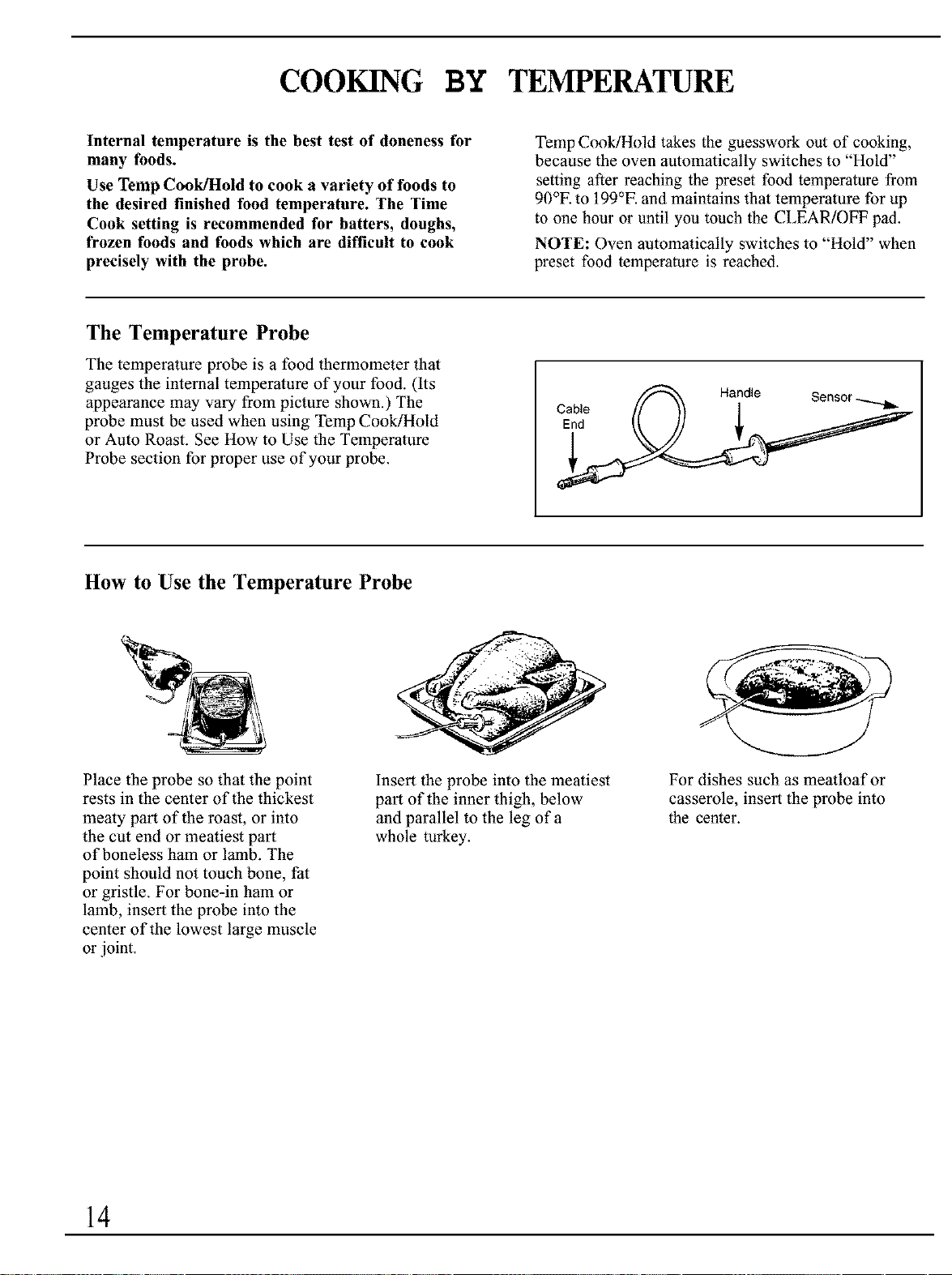
The Temperature Probe
The temperature probe is a food thermometer that
gauges the internal temperature of your food. (Its
appearance may vary from picture shown.) The
probe must be used when using Temp Cook/Hold
or Auto Roast. See How to Use the Temperature
Probe section for proper use of your probe.
Cable t/_ Handle Sensor .....,._,,_
How to Use the Temperature Probe
Place the probe so that the point
rests in the center of the thickest
meaty part of the roast, or into
the cut end or meatiest part
of boneless ham or lamb. The
point should not touch bone, fat
or gristle. For bone-in ham or
lamb, insert the probe into the
center of the lowest large muscle
or joint.
Insert the probe into the meatiest
part of the inner thigh, below
and parallel to the leg of a
whole turkey.
For dishes such as meatloaf or
casserole, insert the probe into
the center.
14
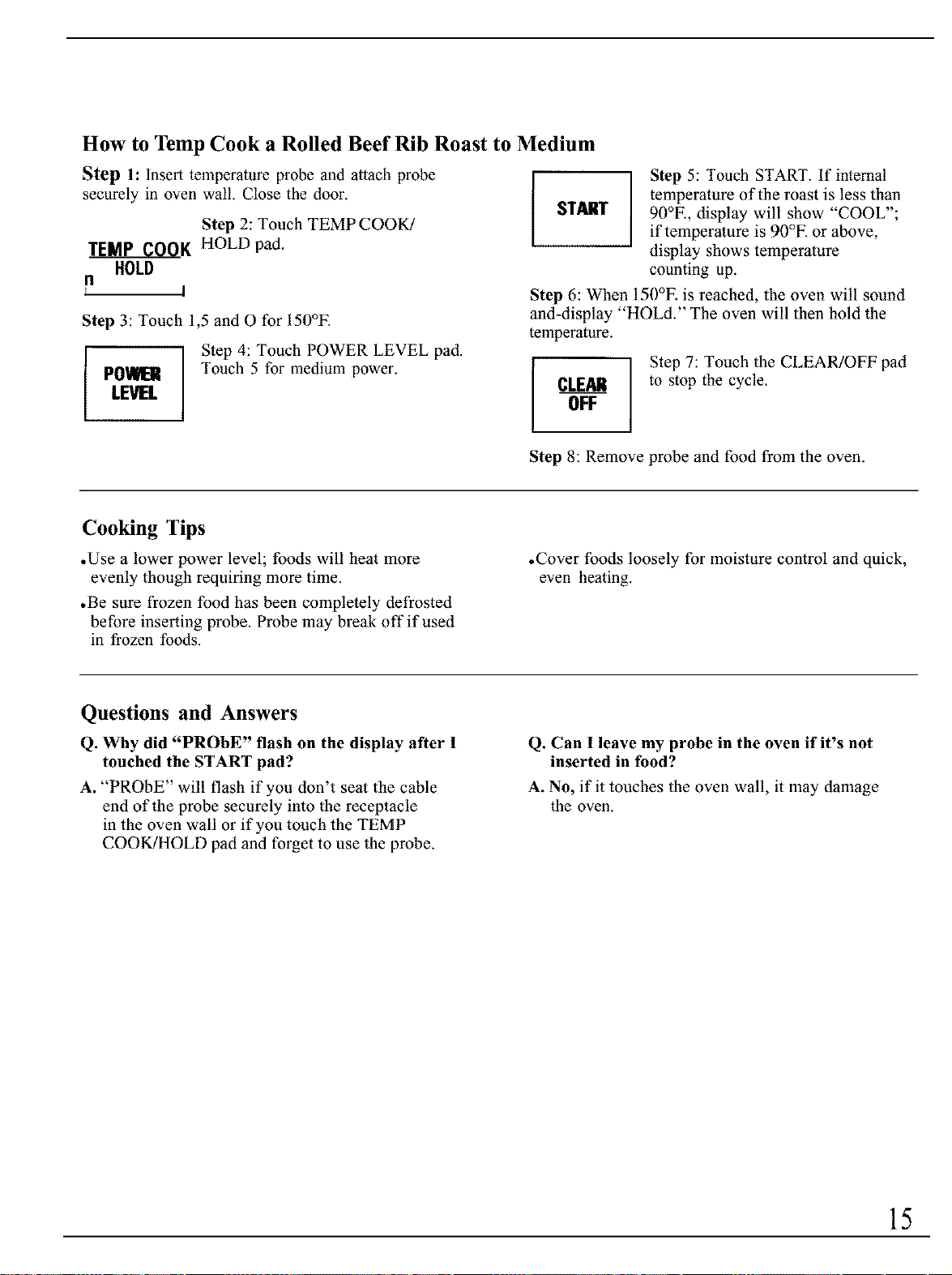
How to Temp Cook a Rolled Beef Rib Roast to Medium
Step 1. Insert temperature probe and attach probe
securely in oven wall. Close the door.
Step 2: Touch TEMP COOK/
TEMP COOK HOLD pad.
HOLD
n
t I
Step 3: Touch 1,5 and O for 150°E
PO'dHER
LEVEL
Step 4: Touch POWER LEVEL pad.
Touch 5 for medium power.
START
Step 5: Touch START. If internal
temperature of the roast is less than
90°E, display will show "COOL";
if temperature is 90°E or above,
display shows temperature
counting up.
Step 6: When 150°E is reached, the oven will sound
and-display "HOLd." The oven will then hold the
temperature.
_LEAli
OFF
Step 7: Touch the CLEAR/OFF pad
to stop the cycle.
Step 8: Remove probe and food from the oven.
Cooking Tips
• Use a lower power level; foods will heat more
evenly though requiring more time.
.Be sure frozen food has been completely defrosted
before inserting probe. Probe may break off if used
in frozen foods.
•Cover foods loosely for moisture control and quick,
even heating.
Questions and Answers
Q. Why did "PROBE" flash on the display after I
touched the START pad?
A. "PROBE" will flash if you don't seat the cable
end of the probe securely into the receptacle
in the oven wall or if you touch the TEMP
COOK!HOLD pad and forget to use the probe.
Q. Can I leave my probe in the oven if it's not
inserted in tbod?
A. No, if it touches the oven wall, it may damage
the oven.
15
AUTO DEFROST
Auto Defrost
With the Auto Defrost feature,
the oven automatically sets the
defrosting times and power
levels for you.
Use the Auto Defrost Guide.
Enter the food weight in
pounds and tenths of a pound
(see Conversion Guide). Then
touch the START pad.
The oven calculates defrosting
time and changes power levels
during defrosting to give even
defrosting results.
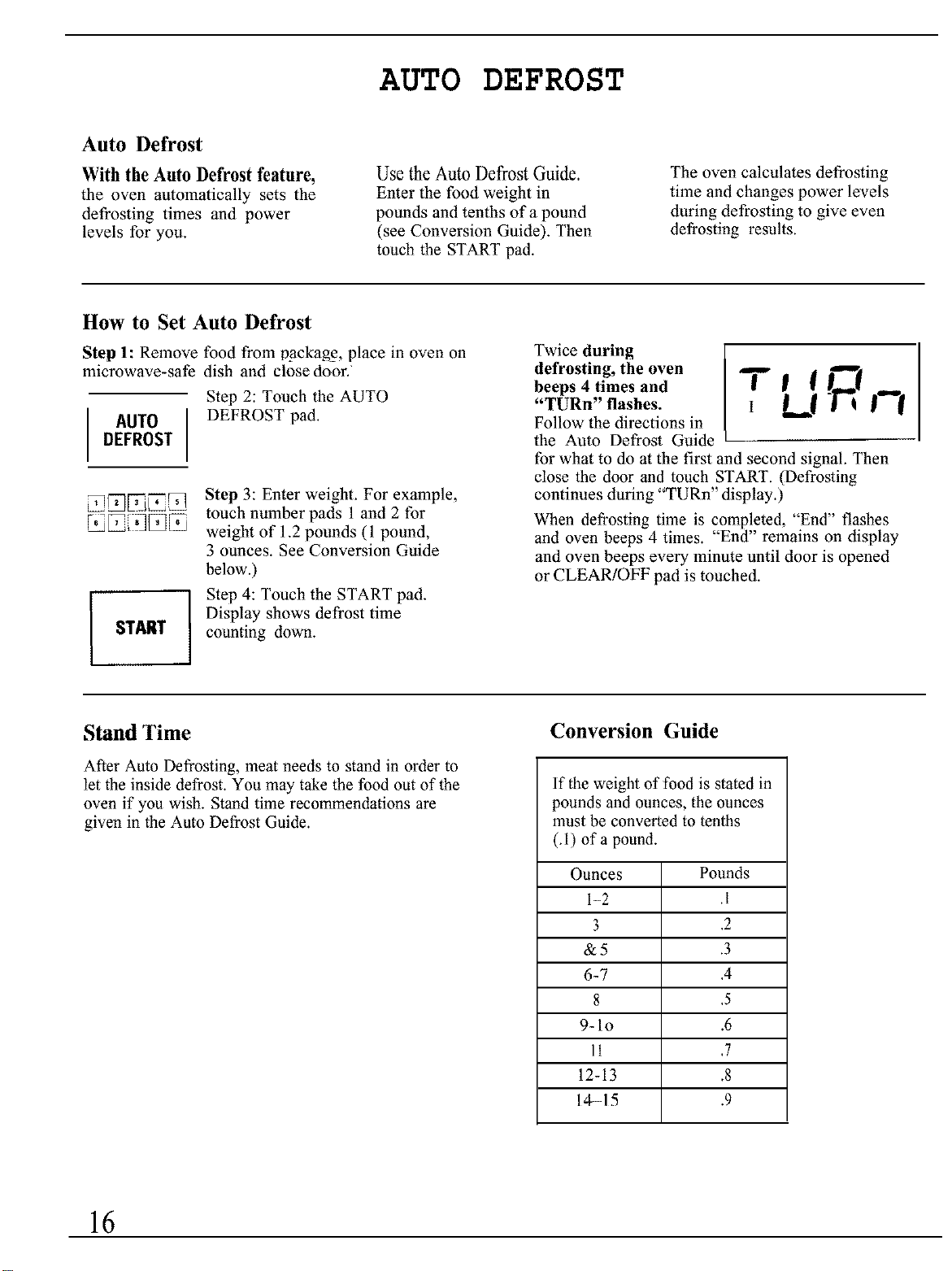
How to Set Auto Defrost
Step 1: Remove food from packagg, place in oven on
microwave-safe dish and close door.
AUTO
DEFROST
Step 2: Touch the AUTO
DEFROST pad.
START
Step 3: Enter weight. For example,
touch number pads 1 and 2 for
weight of 1.2 pounds (1 pound,
3 ounces. See Conversion Guide
below.)
Step 4: Touch the START pad.
Display shows defrost time
counting down.
Twice during
defrosting, the oven
beeps 4 times and
"TURn" flashes.
Follow the directions in
the Auto Defrost Guide
T'dR,-,
for what to do at the first and second signal. Then
close the door and touch START. (Defrosting
continues during "TURn" display.)
When defrosting time is completed, "End" flashes
and oven beeps 4 times. "End" remains on display
and oven beeps every minute until door is opened
or CLEAR!OFF pad is touched.
Stand Time
After Auto Defrosting, meat needs to stand in order to
let the inside defrost. You may take the food out of the
oven if you wish. Stand time recommendations are
given in the Auto Defrost Guide.
Conversion Guide
If the weight of food is stated in
pounds and ounces, the ounces
must be converted to tenths
(.1) of a pound.
Ounces Pounds
I-2 .1
3 ,2
&5 .3
6-7 ,4
8 ,5
9-1o .6
11 ,7
12-13 .8
14-15 .9
16
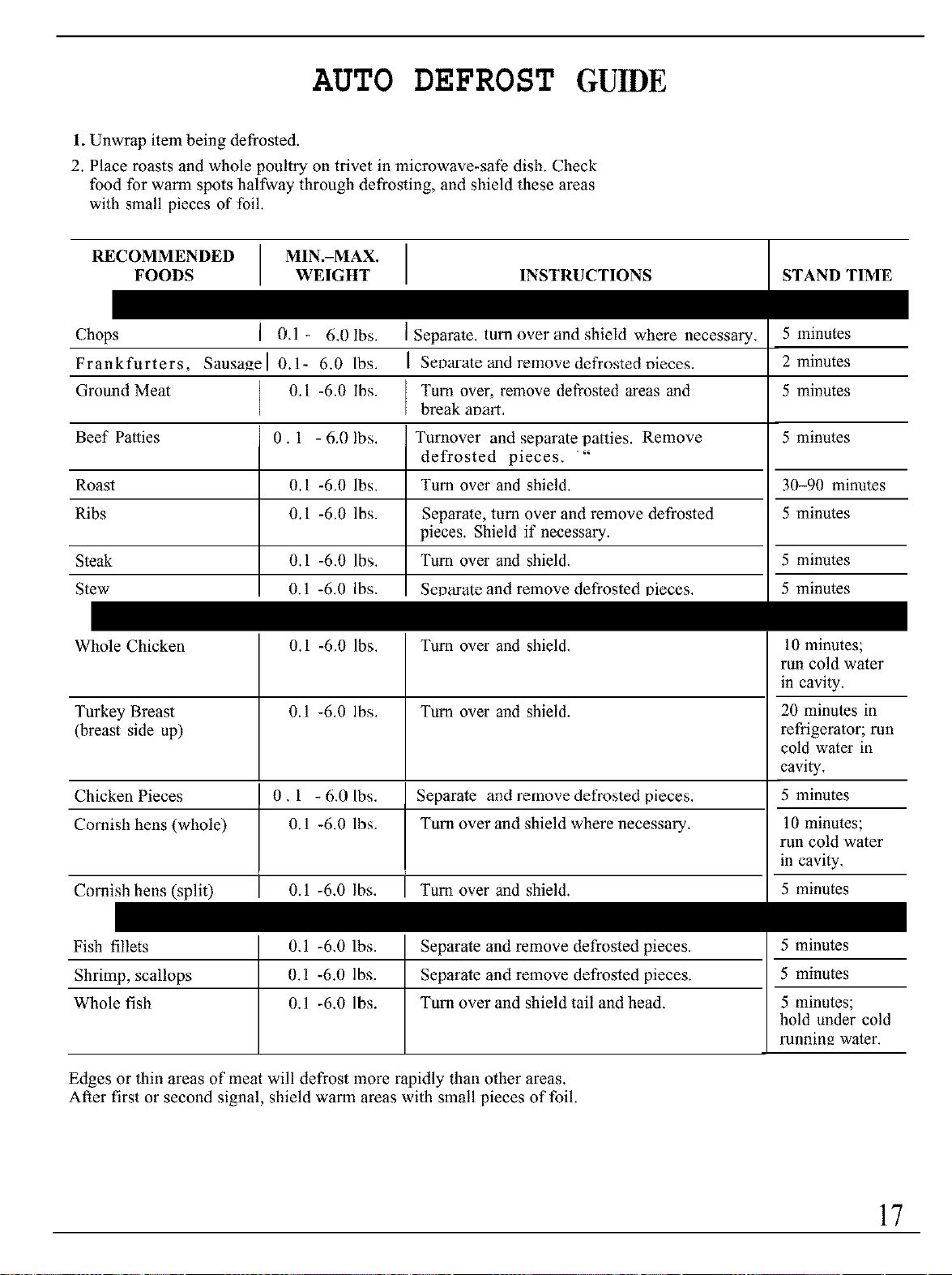
AUTO DEFROST GUmE
1. Unwrap item being defrosted.
2. Place roasts and whole poultry on trivet in microwave-safe dish, Check
food for warm spots halfway through defrosting, and shield these areas
with small pieces of foil,
RECOMMENDED MIN.-MAX.
FOODS WEIGHT INSTRUCTIONS
Chops I 0.1- 6.01bs.
Frankfurters, Sausage[ 0.1- 6.0 Ibs,
Ground Meat 0.1 -6.0 Ibs.
] Separate. turn over and shield where necessary,
Seoarate and remove defrosted nieces.
Tuna over, remove defrosted areas and
break at_art,
STAND TIME
5 minutes
2 minutes
5 minutes
Beef Patties 0. 1 - 6.0 lbs. Turnover and separate patties. Remove 5 minutes
defrosted pieces. "
Roast 0.1 -6.0 Ibs. Turn over and shield. 30-90 minutes
Ribs 0.1 -6.0 lbs. Separate, turn over and remove defrosted 5 minutes
pieces. Shield if necessary.
Steak 0.1 -6.0 Ibs. Turn over and shield, 5 minutes
Stew 0.1 -6.0 Ibs. Separate and remove defrosted oieces. 5 minutes
Whole Chicken 0.1 -6.0 Ibs. Turn over and shield, 10 minutes;
run cold water
in cavity.
Turkey Breast 0.1 -6.0 lbs. Turn over and shield, 20 minutes in
(breast side up) refrigerator; run
cold water in
cavity,
Chicken Pieces 0,1 - 6.0 Ibs. Separate and remove defrosted pieces. 5 minutes
Cornish hens (whole) 0.1 -6.0 lbs. Turn over and shield where necessary, 10 minutes;
run cold water
in cavity,
Cornish hens (split) I 0.1 -6,0 lbs. I Turn over and shield. 5 minutes
Fish fillets 0,1 -6,0 lbs. Separate and remove defrosted pieces. 5 minutes
Shrimp, scallops 0.1 -6.0 lbs. Separate and remove defrosted pieces, 5 minutes
Whole fish 0,1 -6,0 lbs. Turn over and shield tail and head, 5 minutes;
hold under cold
runnin_ water.
Edges or thin areas of meat will defrost more rapidly than other areas,
After first or second signal, shield warm areas with small pieces of foil
17
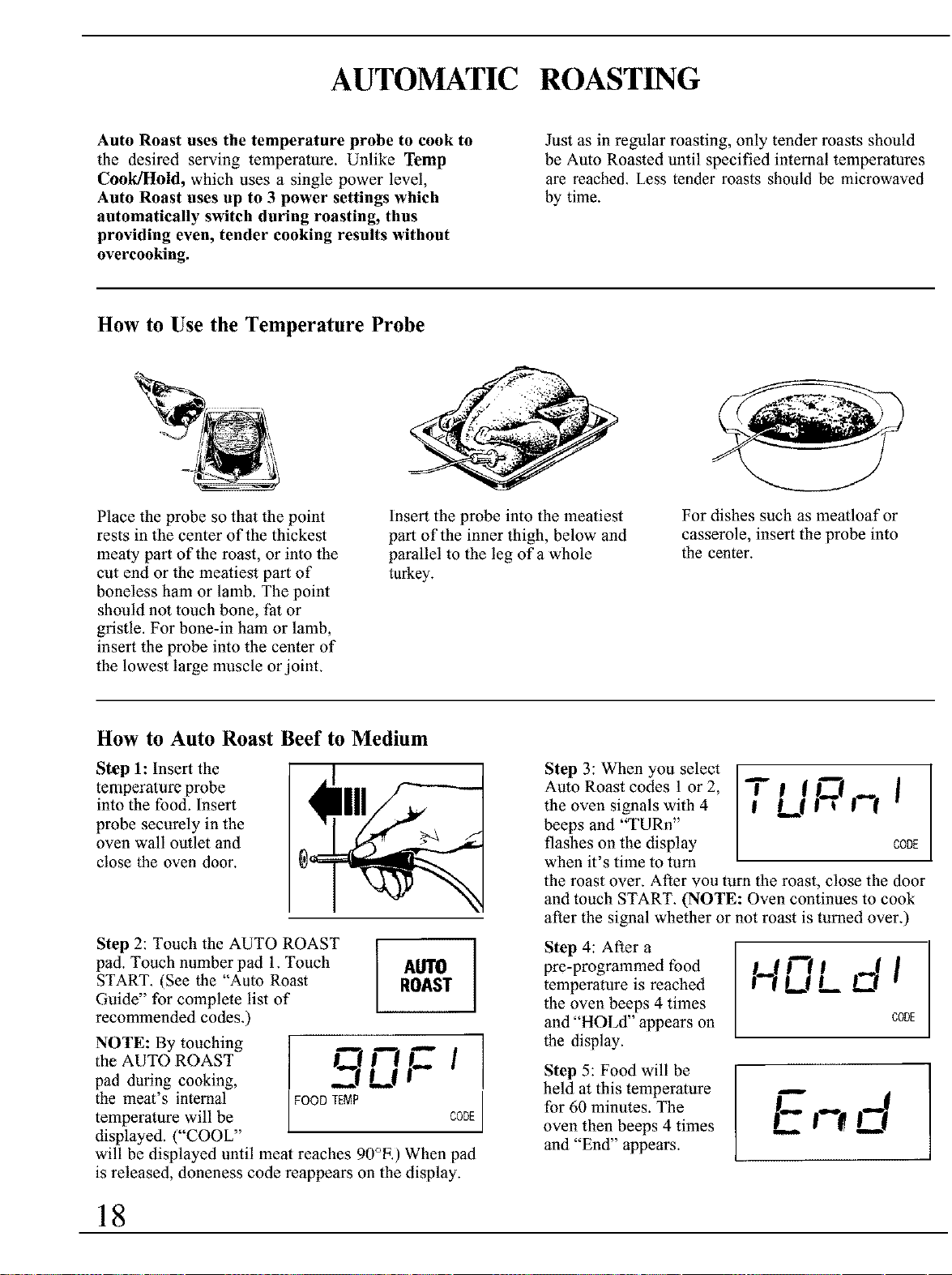
AUTOMATIC ROASTING
Auto Roast uses the temperature probe to cook to
the desired serving temperature. Unlike Temp
Cook/Hold, which uses a single power level,
Auto Roast uses up to 3 power settings which
automatically switch during roasting, thus
providing even, tender cooking results without
overcooking.
Just as in regular roasting, only tender roasts should
be Auto Roasted until specified internal temperatures
are reached. Less tender roasts should be microwaved
by time.
How to Use the Temperature Probe
Place the probe so that the point
rests in the center of the thickest
mealy part of the roast, or into the
cut end or the meatiest part of
boneless ham or lamb. The point
should not touch bone, fat or
gristle. For bone-in ham or lamb,
insert the probe into the center of
the lowest large muscle or joint.
Insert the probe into the meatiest
part of the inner thigh, below and
parallel to the leg of a whole
turkey.
For dishes such as meatloafor
casserole, insert the probe into
the center.
How to Auto Roast Beef to Medium
Step 1: Insert the
temperature probe
into the food. Insert
probe securely in the
oven wall outlet and
close the oven door.
Step 2: Touch the AUTO ROAST
pad. Touch number pad 1. Touch
START. (See the "Auto Roast
Guide" for complete list of
recommended codes.)
AUTO
ROAST
NOTE: By touching
tile AUTO ROAST _ _'[ t_ I
pad during cooking, ._[ L[
I
the meat's internal FOODTEMP
temperature will be CODE
displayed. ("COOL"
will be displayed until meal reaches 90°E) When pad
is released, doneness code reappears on the display.
Step 3: When you select T
Auto Roast codes 1 or 2, I [ I_
the oven signals with 4 Lq | _ |""[
beeps and "TURn"
flashes on the display CODE
when it's time to turn
the roast over. After you turn the roast, close the door
and touch START. (NOTE: Oven continues to cook
after the signal whether or not roast is turned over.)
Step 4: After a
pre-programmed food
temperature is reached
the oven beeps 4 times
and "HOLd" appears on
the display.
H |
,_|,_d l
CODE
E,-,d
Step 5: Food will be
held at this temperature
for 60 minutes. The
oven then beeps 4 times
and "End" appears.
18
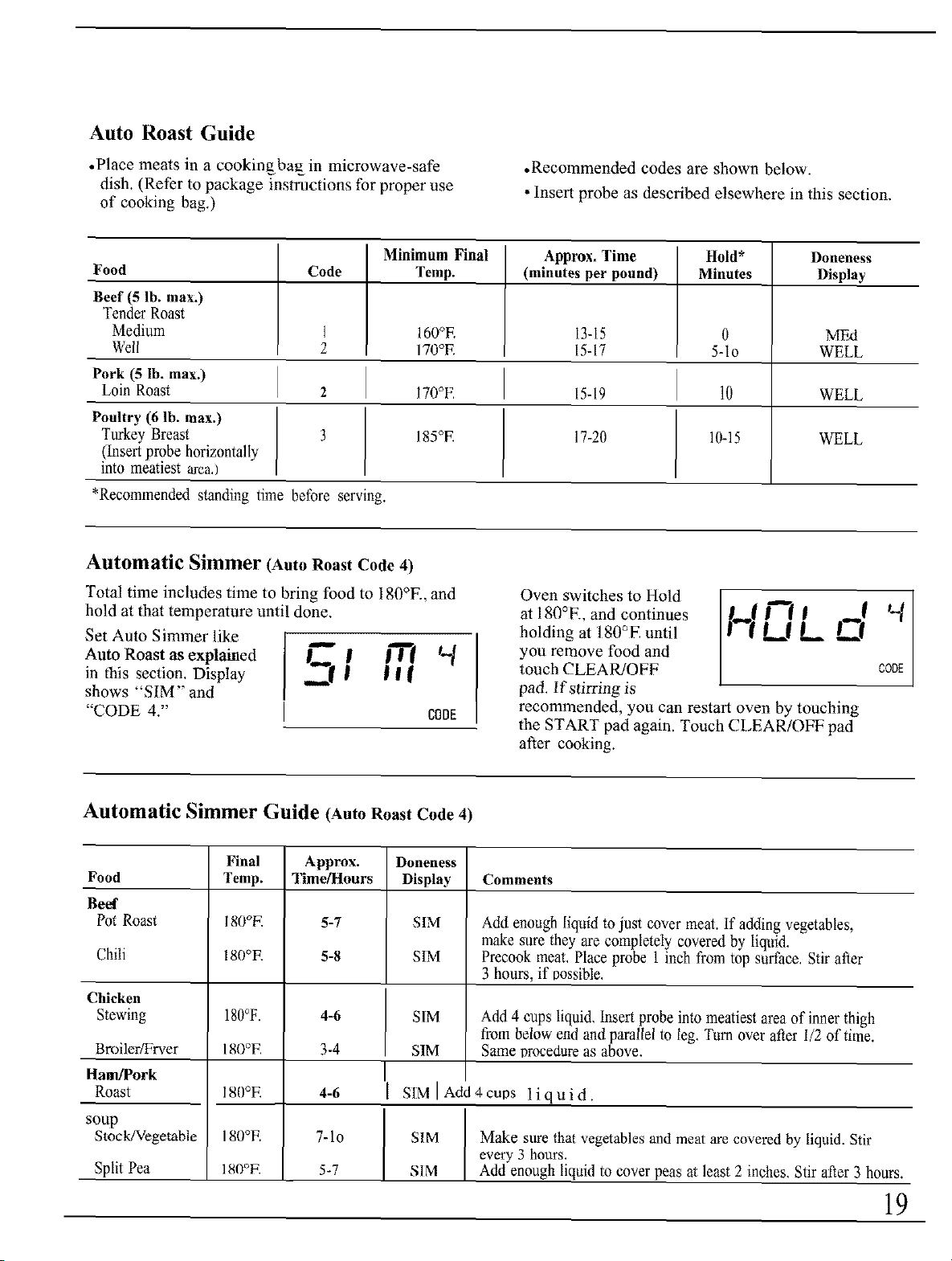
Auto Roast Guide
• Place meats in a cookingba_in microwave-safe
dish. (Refer to package instructions for proper use
of cooking bag.)
•Recommended codes are shown below.
• Insert probe as described elsewhere in this section.
Minimum Final Approx. Time Hold* Doneness
Food Code Temp. (minutes per pound) Minutes Display
Beef (5 lb. max.)
Tender Roast
Medium 1 160°F. 13-15 0 MF_I
Well 2 170°F. 15-17 5-Io WELL
Pork (5 lb. max.)
Loin Roast 2 170°E 15-19 10 WELL
Poultry (6 lb. max.)
Turkey Breast 3 185°F. 17-20 10-15 WELL
(Insert probe horizontally
into meatiest area,)
*Recommended standing time before serving.
Automatic Simmer (Auto Roast Code 4)
Total time includes time to bring food to 180°K, and
hold at that temperature until done.
Set Auto Simmer like
Auto Roast as explained B_'l B'_ 1"/
in this section. Display -_-f-- | | |
shows "SIM" and
"CODE 4." CODE
Oven switches to Hold
a 180°K, and continues
holding a 180°E until
you remove food and
touch CLEAR/OFF
pad. If stirring is
recommended, you can restart oven by touching
the START pad again. Touch CLEAR/OFF pad
after cooking.
rLIL C!
CODE
Automatic Simmer Guide (Auto Roast Code 4)
Food
Beef
Pot Roast
Chili
Chicken
Stewing
Broiler_rver
Ham/Pork
Roast
soup
Stock/Vegetable
Split Pea
Final
Temp.
18(l°K
180°E
180°F.
180*E
180°E
180°E
180°E
Approx.
Time/Hours
5-7
5-8
4-6
3-4
4-6
7-1o
5-7
Doneness
Display
SIM
SIM
SIM
SIM
Comments
Add enough liquid to just cover mea. If adding vegetables,
make sure they are completely covered by liquid.
Precook meat. Place probe 1 inch from top surface. Stir after
3 hours, if possible.
Add 4 cups liquid. Insert probe into meatiest area of inner thigh
from below end and parallel to leg. Turn over after I/2 of time.
Same procedure as above.
SIM IAdd4cups liquid.
S1M
S1M
Make sure that vegetables and meat are covered by liquid. Stir
every 3 hours.
Add enough liquid to cover peas at least 2 inches, Stir after 3 hours.
19
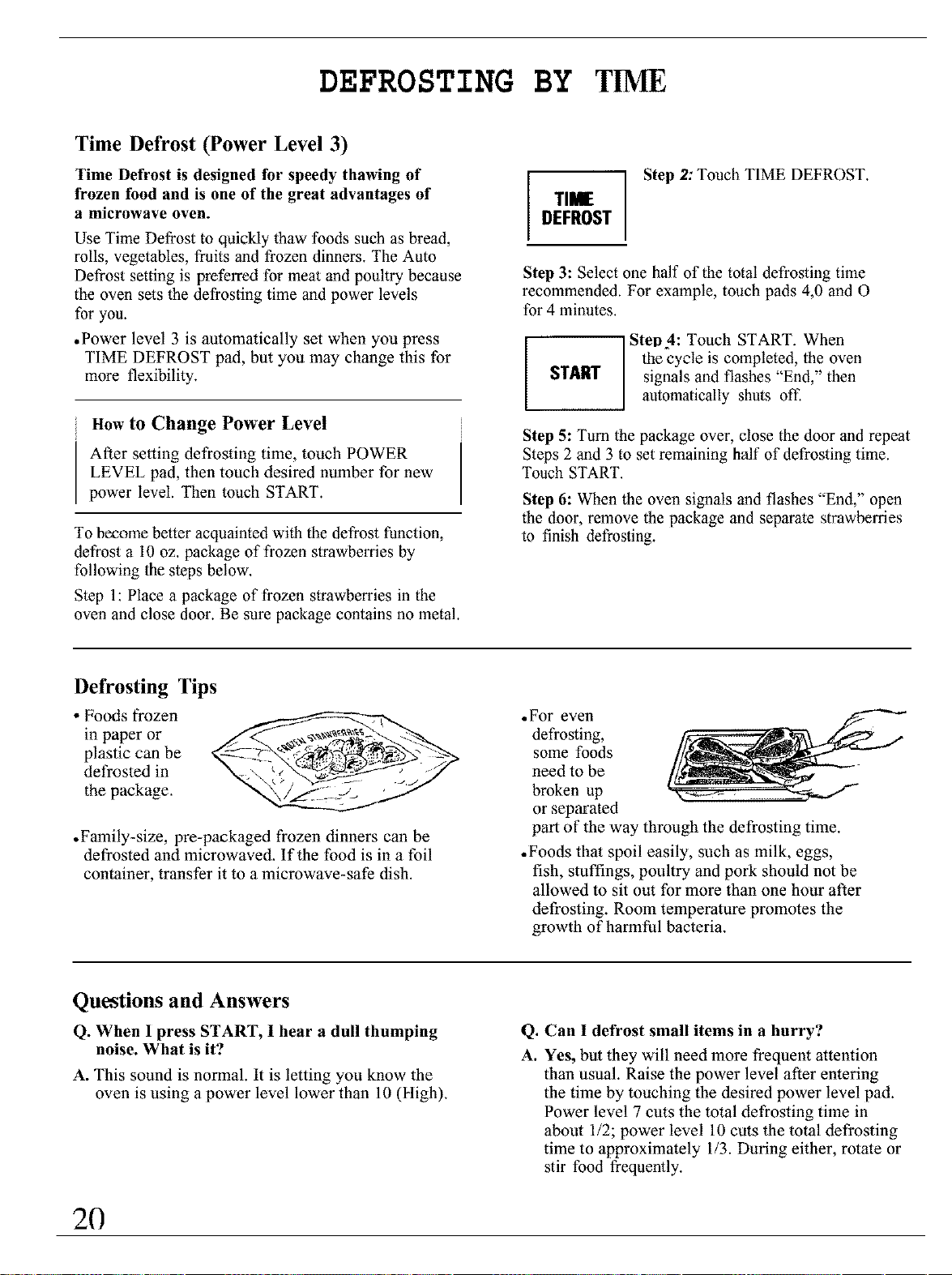
DEFROSTING BY TIME
Time Defrost (Power Level 3)
Time Defrost is designed fbr speedy thawing of
frozen food and is one of the great advantages of
a microwave oven.
Use Time Defrost to quickly thaw foods such as bread,
rolls, vegetables, fraits and frozen dinners. The Auto
Defrost setting is preferred for meat and poultry because
the oven sets the defrosting time and power levels
for you.
• Power level 3 is automatically set when you press
TIME DEFROST pad, but you may change this for
more flexibility.
How to Change Power Level
After setting defrosting time, touch POWER
LEVEL pad, then touch desired number for new
power level. Then touch START.
To become better acquainted with the defrost function,
defrost a 10 oz. package of frozen strawberries by
following the steps below.
Step 1: Place a package of frozen strawberries in the
oven and close door. Be sure package contains no metal.
Step 2: Touch TIME DEFROST.
TIME
DEFROST
Step 3: Select one half of the total defrosting time
recommended. For example, touch pads 4,0 and O
for 4 minutes.
START
Step 4: Touch START. When
the cycle is completed, the oven
signals and flashes "End," then
automatically shuts off.
Step 5: Turn the package over, close the door and repeat
Steps 2 and 3 to set remaining half of defrosting time.
Touch START.
Step 6: When the oven signals and flashes "End," open
the door, remove the package and separate strawberries
to finish defrosting.
Defrosting Tips
• Fo_ls frozen
in paper or
plastic can be
defrosted in
the package.
•Family-size, pre-packaged frozen dinners can be
defrosted and microwaved. If the food is in a foil
container, transfer it to a microwave-safe dish.
•For even
defrosting,
some foods
need to be
broken up
or separaled
part of the way through the defrosting time.
• Foods that spoil easily, such as milk, eggs,
fish, stuffings, poultry and pork should not be
allowed to sit out for more than one hour after
defrosting. Room temperature promotes the
growth of harmful bacteria.
Questions and Answers
Q. When I press START, I hear a dull thumping
noise. What is it?
A. This sound is normal. It is letting you know the
oven is using a power level lower than 10 (High).
Q, Can I defrost small items in a hurry?
A. Yes, but they will need more frequent altention
than usual. Raise the power level after entering
the time by touching the desired power level pad.
Power level 7 cuts the total defrosting time in
aboul 1/2; power level 10 cuts the total defrosting
time to approximately 1/3. During either, rotale or
stir food frequently.
2O
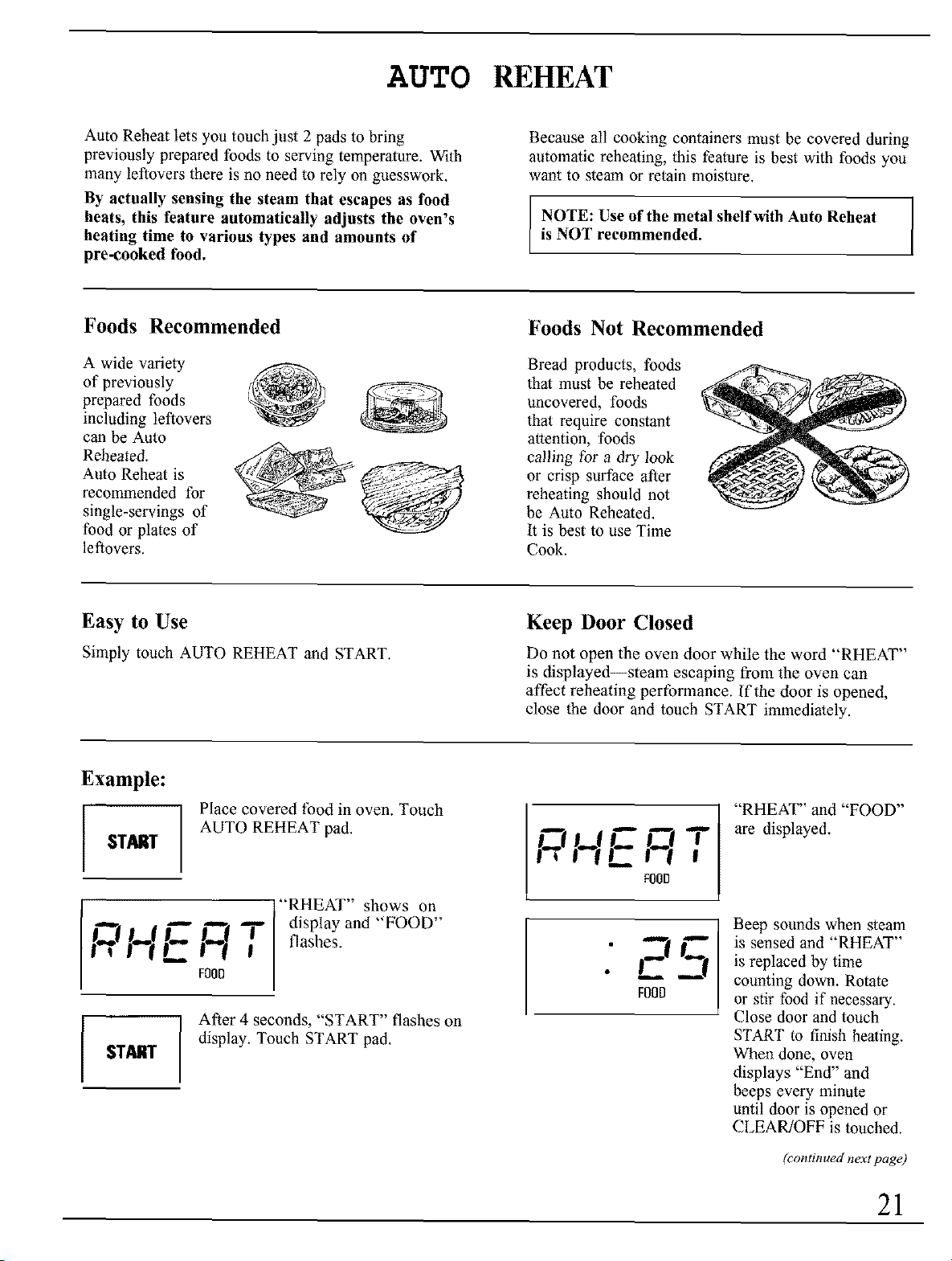
AUTO REHEAT
Auto Reheat lets you touch just 2 pads to bring
previously prepared foods to serving temperature. With
many leftovers there is no need to rely otl guesswork.
By actually sensing the steam that escapes as tbod
heats, this feature automatically adjusts the oven's
heating time to various types and amounts of
pre-cooked food.
Because all cooking containers must be covered during
automatic reheating, this feature is best with foods you
want to steam or retain moisture.
I
NOTE: Use of the metal shelf with Auto Reheat I
is NOT recommended.
[
Foods Recommended
A wide variety
of previously
prepared foods
including leftovers
can be Auto
Reheated.
Auto Reheat is
recommended for
single-servings of
food or plates of
leftovers.
Foods Not Recommended
Bread products, foods
that must be reheated
uncovered, foods
that require constant
attention, foods
calling for a dry look
or crisp surface after
reheating should not
be Auto Reheated.
It is best to use Time
Cook.
Easy to Use
Simply touch AUTO REHEAT and START,
Keep Door Closed
Do not open the oven door while the word "RHEAT"
is displayed--steam escaping from the oven can
affect reheating performance. If the door is opened,
close the door and touch START immediately.
Example:
$TO,I_I"
Place covered food in oven. Touch
AUTO REHEAT pad.
E "RHEAT" shows on
J"_ I,=.[ I'_[ "_ I display and FOOD
# _ t ( F00D#( ; flashes.
STglil"
After 4 seconds, "START" flashes on
display. Touch START pad.
T
I_1 II--I I
FOOD
._--r
FOOD
"RHEAT" and "FOOD"
are displayed.
Beep sounds when steam
is sensed and "RHEAT"
is replaced by time
counting down. Rotate
or stir food if necessary.
Close door and touch
START to finish heating.
When done, oven
displays "End" and
beeps every minute
until door is opened or
CLEAR/OFF is touched.
(continued next page)
21
AUTO REHEAT
(continued)
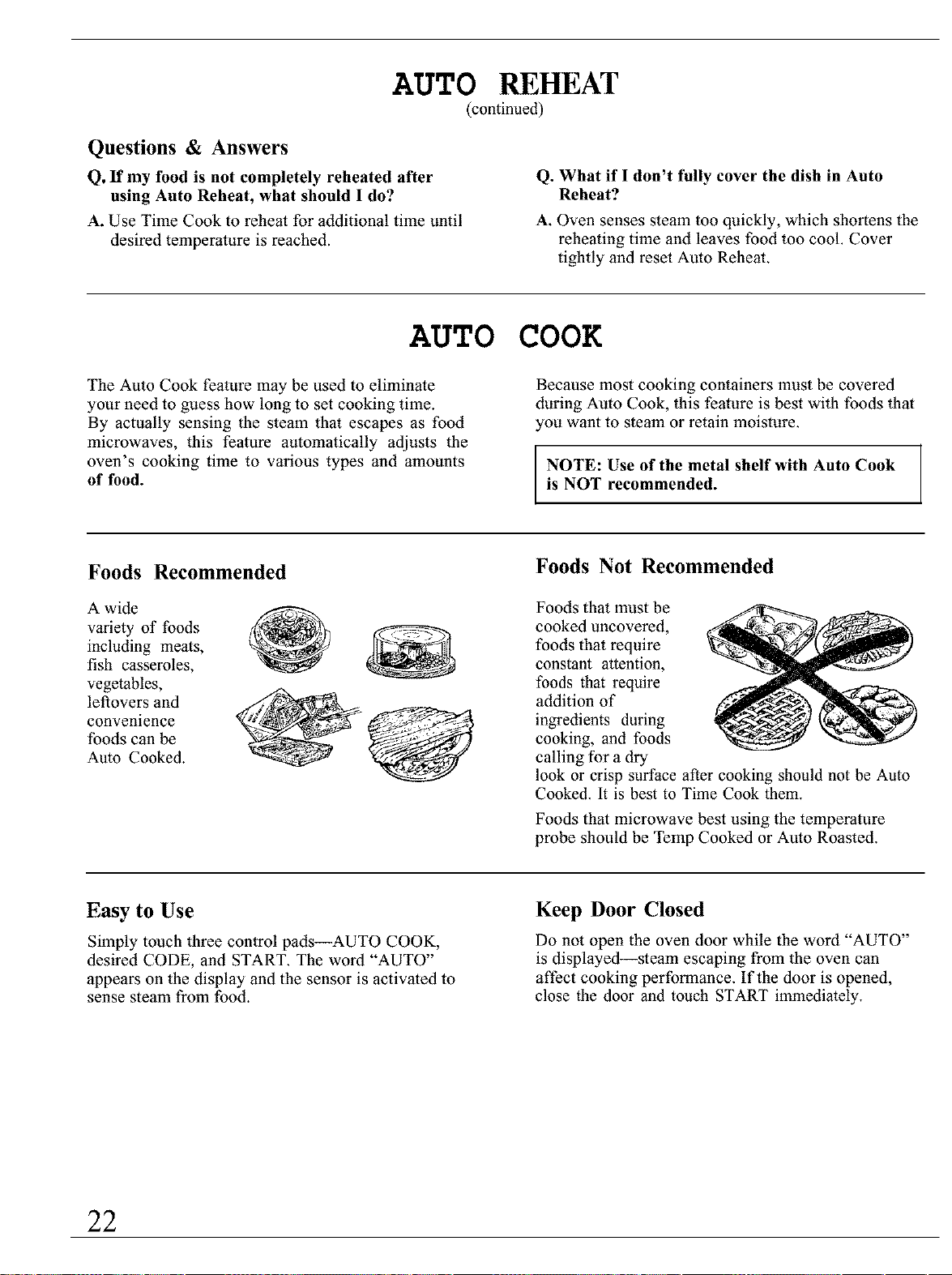
Questions & Answers
Q, If my tbod is not completely reheated after
using Auto Reheat, what should I do?
A. Use Time Cook to reheat for additional time until
desired temperature is reached.
Q. What if I don't fully cover the dish in Auto
Reheat?
A. Oven senses steam too quickly, which shortens the
reheating time and leaves food too cool. Cover
tightly and reset Aulo Reheat
AUTO COOK
The Auto Cook feature may be used to eliminate
your need to guess how long to set cooking time.
By actually sensing the steam that escapes as food
microwaves, this feature automatically adjusts the
oven's cooking time to various types and amounts
of food.
Because most cooking containers must be covered
during Auto Cook, this fealure is best with foods thal
you want to steam or retain moisture.
NOTE: Use of the metal shelf with Auto Cook
is NOT recommended.
Foods Recommended
A wide
variety of foods
including meats,
fish casseroles,
vegetables,
leftovers and
convenience
foods can be
Auto Cooked.
Foods Not Recommended
Foods that must be
cooked uncovered,
foods that require
constant attention,
foods that require
addition of
ingredients during
cooking, and foods
calling tbr a dry
look or crisp surface after cooking should not be Auto
Cooked. It is best to Time Cook them.
Foods thal microwave best using the temperature
probe should be TeInp Cooked or Aulo Roasted.
Easy to Use
Simply touch three control pads--AUTO COOK,
desired CODE, and START. The word "AUTO"
appears on the display and the sensor is activaled to
sense steam from food.
Keep Door Closed
Do not open the oven door while the word "AUTO"
is displayed--steam escaping from the oven can
affect cooking performance. If the door is opened,
close the door and touch START immediately,
22
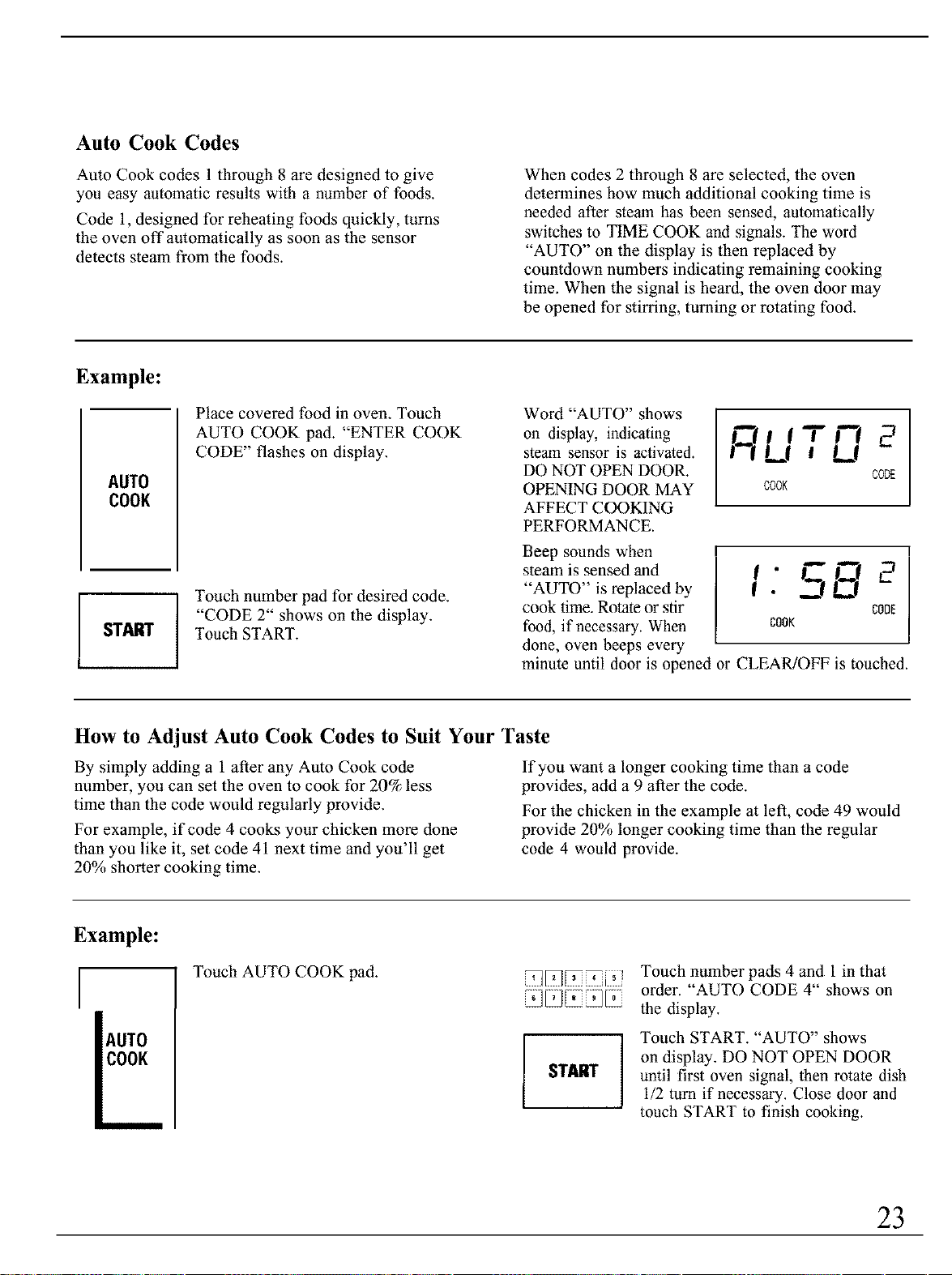
Auto Cook Codes
Auto Cook codes 1 through 8 are designed to give
you easy automatic results with a number of foods.
Code 1, designed for reheating foods quickly, turns
the oven off automatically as soon as the sensor
detects steam from the foods.
When codes 2 through 8 are selected, the oven
determines how much additional cooking time is
needed after steam has been sensed, automatically
switches to TIME COOK and signals. The word
"AUTO" on the display is then replaced by
countdown numbers indicating remaining cooking
time. When the signal is heard, the oven door may
be opened for stirring, turning or rotating food.
Example:
AUTO
COOK
J START
Place covered food in oven. Touch
AUTO COOK pad. "ENTER COOK
CODE" flashes on display.
i Touch number pad for desired code.
"CODE 2" shows on the display.
Touch START.
Word "AUTO" shows
on display, indicating
steam sensor is activated.
DO NOT OPEN DOOR.
OPENING DOOR MAY
AFFECT COOKING
PERFORMANCE.
01 i T i"-i
I-'l LI kt
CODE
COOK
I 5--'
•
Beep sounds when
steam is sensed and
"AUTO" is replaced by
cook time. Rotate or stir COOE
food, if necessary. When cook
done, oven beeps every
minute until door is opened or C1.EAR/OFF is touched.
How to Adjust Auto Cook Codes to Suit Your Taste
By simply adding a 1 after any Aulo Cook code
number, you can set the oven to cook for 20% less
time than the code would regularly provide.
For example, if code 4 cooks your chicken more done
than you like it, set code 41 next time and you'll get
20% shorter cooking time.
If you want a longer cooking time than a code
provides, add a 9 after the code.
For the chicken in the example at left, code 49 would
provide 20% longer cooking time than the regular
code 4 would provide.
Example:
AUTO
COOK
Touch AUTO COOK pad.
START
Touch number pads 4 and 1in that
order. "AUTO CODE 4" shows on
the display.
Touch START. "AUTO" shows
on display. DO NOT OPEN DOOR
until first oven signal, then rotate dish
1/2 turn if necessary. Close door and
touch START to finish cooking.
23
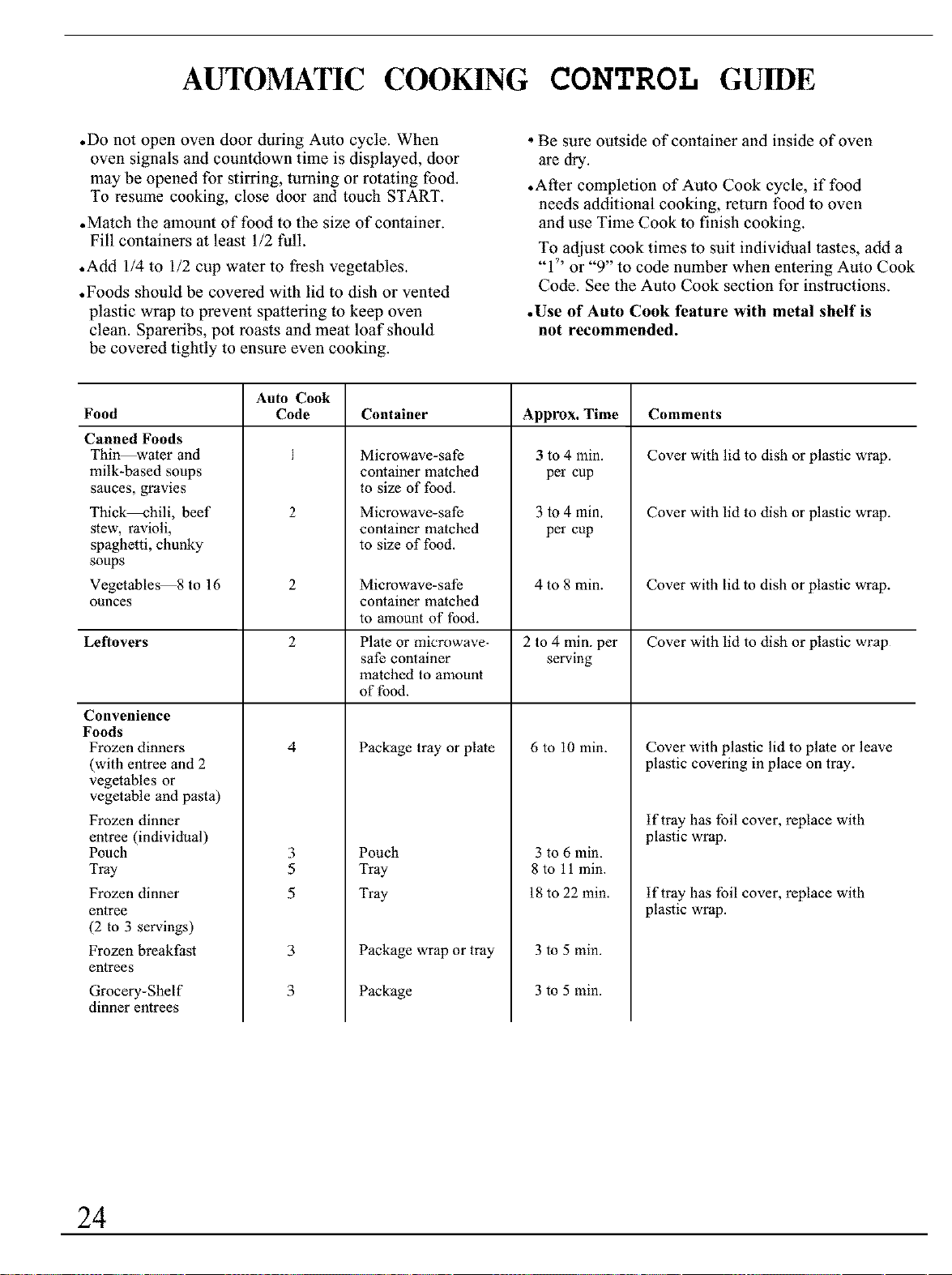
AUTOMATIC COOKING CONTROL GUIDE
• Do not open oven door during Auto cycle. When
oven signals and countdown time is displayed, door
may be opened for stirring, turning or rotating food.
To resume cooking, close door and touch START.
• Match the amount of food to the size of container.
Fill containers at least 1/2 full.
• Add 1/4 to 1/2 cup water to fresh vegetables.
• Foods should be covered with lid to dish or vented
plastic wrap to prevent spattering to keep oven
clean. Spareribs, pot roasts and meat loaf should
be covered tightly to ensure even cooking.
• Be sure outside of container and inside of oven
are dry.
•After completion of Auto Cook cycle, if food
needs additional cooking, return food to oven
and use Time Cook to finish cooking.
To adjust cook times to suit individual tastes, add a
"/' or "9" to code number when entering Auto Cook
Code. See the Auto Cook section for instructions.
• Use of Auto Cook feature with metal shelf is
not recommended.
Auto Cook
Food Code Container
Canned Foods
Thin water and
milk-based soups
sauces, gravies
Thick--hilt, beef
stew, ravioli,
spaghetti, chunky
soups
Vegetables 8to16
ounces
Microwave-safe
container matched
to size of food.
Microwave-safe
container matched
to size of food.
Convenience
Foods
Frozen dinners
(with entree and 2
vegetables or
vegetable and pasta)
Frozen dinner
entree (individual)
Pouch
Tray
Frozen dinner
entree
(2 to 3 servings)
Frozen breakfast
entrees
Grocery-Shelf
dinner entrees
Approx. Time
3 to 4 rain
per cup
3 to 4 min.
per cup
Comments
Cover with lid to dish or plastic wrap.
Cover with lid to dish or plastic wrap.
Package tray or plate
2 Microwave-safe 4 to 8 min. Cover with lid to dish or plastic wrap.
container matched
to amount of food.
Leftovers 2 Plate or microwave- 2 to 4 min. per Cover with lid to dish or plastic wrap
safe container serving
matched to amount
of food.
4 6 to 10 min.
Pouch
Tray
Tray
Package wrap or tray
3
5
5
3 to 6 min.
8 to 11 min.
18 to 22 min.
3 to 5 min.
3 to 5 min.
3
3
Package
Cover with plastic lid to plate or leave
plastic covering in place on tray.
tf tray has foil cover, replace with
plastic wrap.
tf tray has foil cover, replace with
plastic wrap.
24
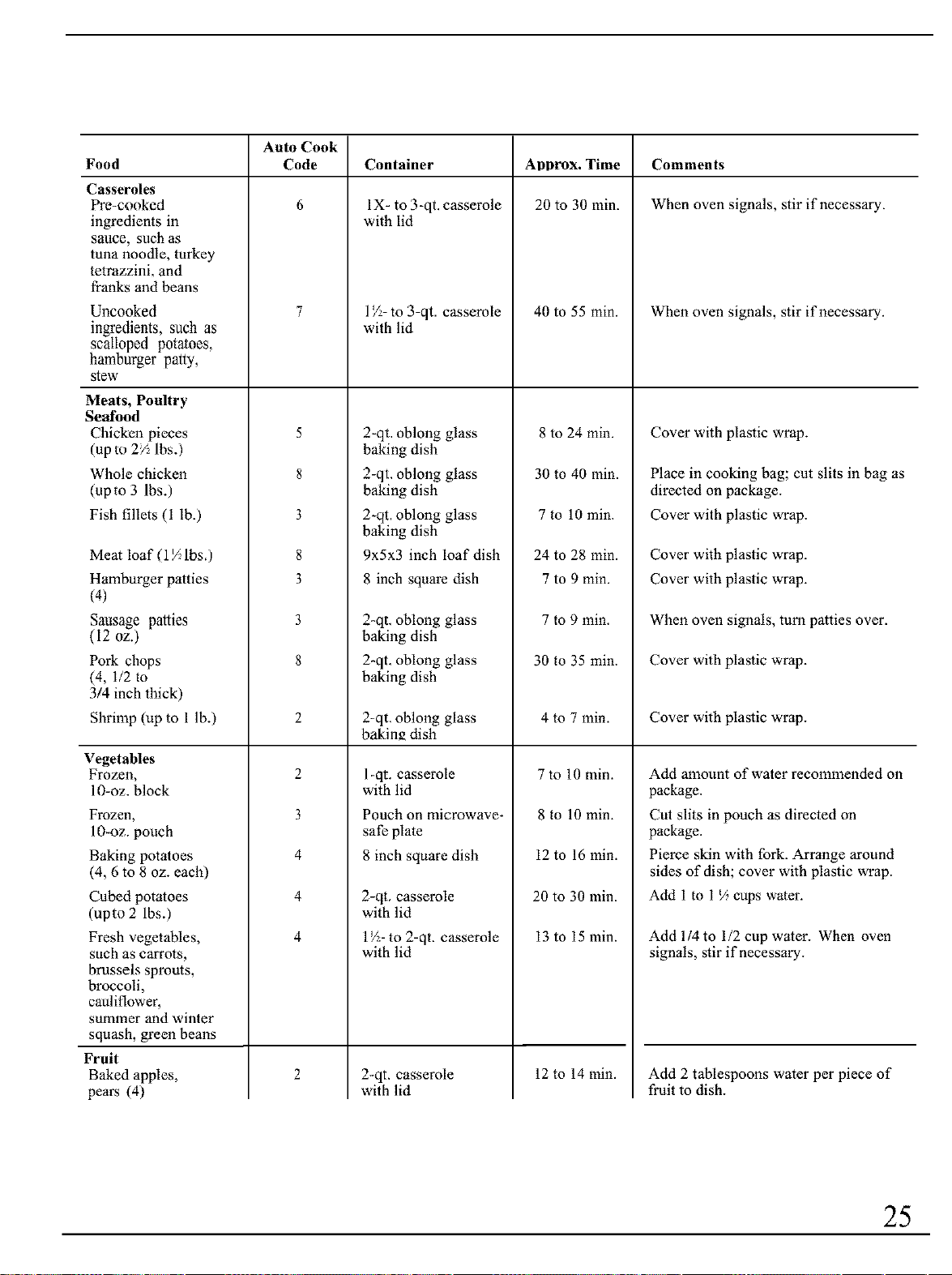
Auto Cook
Food Code Container ADDrOX. Time Comments
6 20 to 30 rain. When oven signals, stir if necessary.
Casseroles
Pre-cookcd
ingredients in
sauce, such as
tuna noodle, turkey
tetrazzini, and
franks and beans
Uncooked
ingredients, such as
scalloped potatoes,
hambfirger paW,
stew
Meats, Poultry
Seafood
Chicken pieces
(up to 2/:_lbs.)
Whole chicken
(upm 3 lbs.)
Fish fillets (1 lb.)
Meat loaf (1½1bs.)
Hamburger patties
(4)
Sausage panics
(12 oz.)
Pork chops
(4, 1/2 to
3/4inch thick)
Shrimp (up to 1 lb.)
Vegetables
Frozen,
10-oz. block
Frozen,
lO-oz, pouch
Baking potatoes
(4, 6 to 8 oz. each)
Cubed potatoes
(upto 2 lbs.)
Fresh vegetables,
such as carrots,
brussels sprouts,
broccoli,
cauliflower,
summer and winter
squash, green beans
Fruit
Baked apples,
pears (4)
5
8
3
8
3
3
8
2
3
4
4
4
1X- to 3-qt. casserole
with lid
1Z- to 3-qt. casserole
with lid
2-qt. oblong glass
baking dish
2-qt. oblong glass
baking dish
2-qt. oblong glass
baking dish
9x5x3 inch loaf dish
8 inch square dish
2-qt, oblong glass
baking dish
2-qt. oblong glass
baking dish
2-qt, oblong glass
bakin_ dish
I-qt. casserole
with lid
Pouch on microwave-
safe plate
8 inch square dish
2-qt. casserole
with lid
l_:-to 2-qt. casserole
with lid
2-qt, casserole
with lid
40 to 55 min.
8 to 24min.
30 to 40min.
7 to 10min.
24 to 28 min.
7 to 9 min.
7 to 9 rain.
30 to 35 rain.
4 to 7 min.
7 to 10 min.
8 to 10 min.
12 to 16 min.
20 to 30 min.
13 to 15 min.
When oven signals, stir if necessary.
Cover with plastic wrap.
Place in cooking bag; cut slits in bag as
directed on package.
Cover with plastic wrap.
Cover with plastic wrap.
Cover with plastic wrap.
When oven signals, turn patties over.
Cover with plastic wrap.
Cover with plastic wrap.
Add anaount of water recommended on
package.
Cut slits in pouch as directed on
package.
Pierce skin with fork. Arrange around
sides of dish; cover with plastic wrap.
Add 1 to 1% cups water.
Add 1/4 to 1/2 cup water. When oven
signals, stir if necessary.
12 to 14 min.
Add 2 tablespoons water per piece of
fruit to dish.
25
AUTOMA C COOKINGCONTAINERS & COVERS
Containers and Covers
Appropriale containers and coverings help assure
good cooking results.
.Always use microwave-safe containers and cover
them with lids or vented plastic wrap. Wonder if
it's microwave-safe? Put it to the test described in
the Microwaving Tips section.
•Never use tight-sealing plastic covers--they can
prevent steam from escaping and cause food to
overcook.
.Match the amount of tbod to the size of the
container. Fill containers at least half full for
best results.
.Be sure the outside of the cooking container and
the inside of the microwave oven are dry before
placing food in the oven. Beads of moisture turning
into steam can mislead the sensor.
• Stir or rotate some foods after a beeping signal,
if required. See the Automatic Cooking Control
Guide.
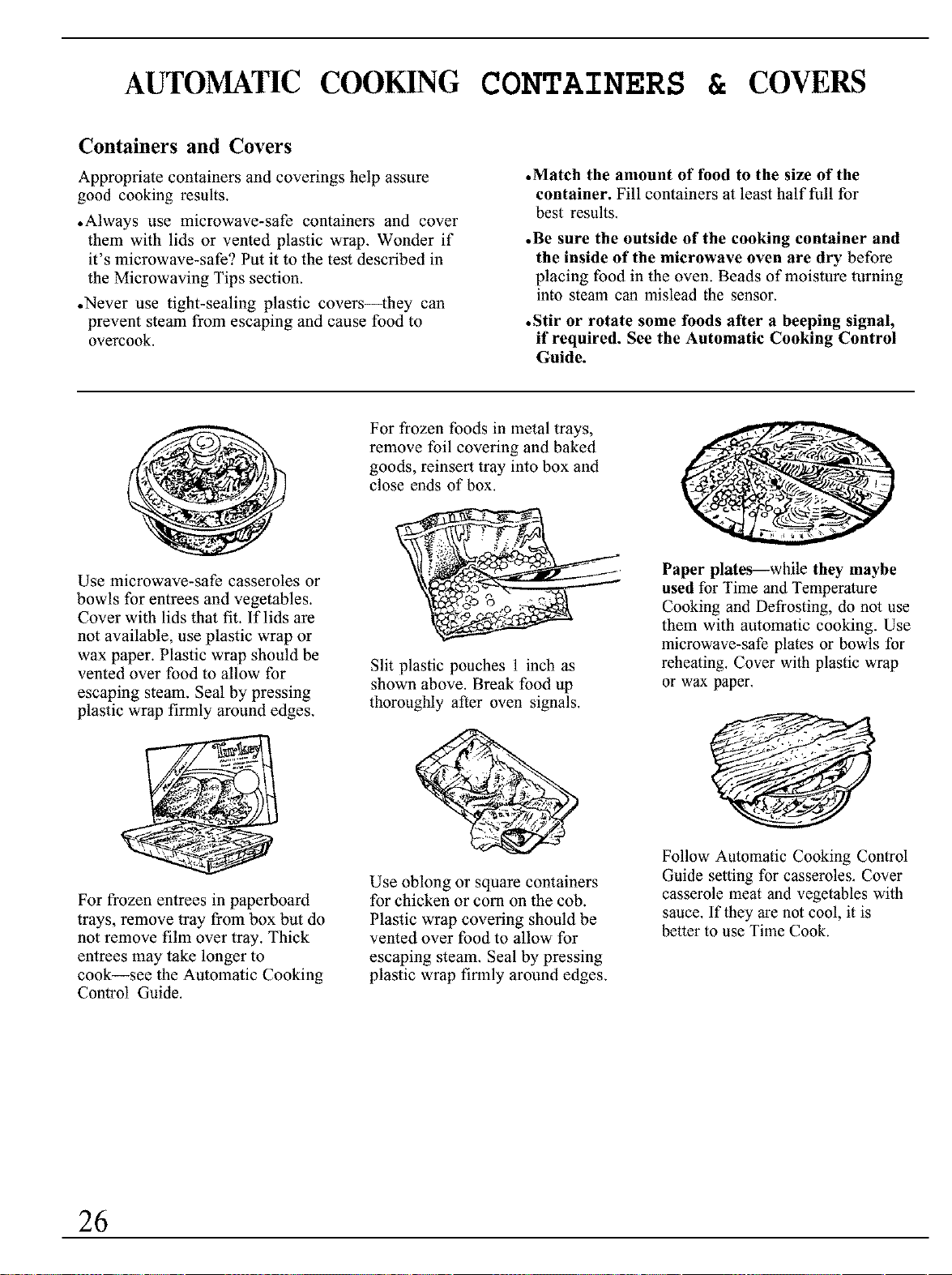
Use microwave-safe casseroles or
bowls for entrees and vegetables.
Cover with lids that fit. If lids are
not available, use plastic wrap or
wax paper. Plastic wrap should be
vented over food to allow for
escaping steam. Seal by pressing
plastic wrap firmly around edges.
For frozen entrees in paperboard
trays, remove tray from box but do
not remove film over tray. Thick
entrees may take longer to
cook_see the Automatic Cooking
Control Guide.
For frozen foods in metal trays,
remove foil covering and baked
goods, reinsert tray into box and
close ends of box.
Slit plastic pouches 1 inch as
shown above. Break food up
thoroughly after oven signals.
Use oblong or square containers
for chicken or corn on the cob.
Plastic wrap covering should be
vented over food to allow for
escaping steam. Seal by pressing
plastic wrap firmly around edges.
Paper plates--while they maybe
used for Time and Temperature
Cooking and Defrosting, do not use
them with automatic cooking. Use
microwave-safe plates or bowls for
reheating. Cover with plastic wrap
or wax paper.
/t
Follow Automatic Cooking Control
Guide setting for casseroles. Cover
casserole meat and vegetables with
sauce. If they are not cool, it is
better to use Time Cook.
26
GUIDETO USE OF THEOVEN SHELF
•Use the shelf only when cooking food on 2
levels. Food microwaves best when placed
directly on the oven floor.
.Do not store or cook with metal shelf on
floor of oven. Product damage may result.
•Use pot holders when handling metal shelf
and cookware. They may be hot.
.Do not store microwave browning dish on
metal shell:
•Use of shelf with the Auto Cook, Auto Reheat
or Popcorn program is not recommended.
The wire shelf is specifically designed for added
capacity heating and reheating in your microwave
oven. Now more than 1 food may be heated or
reheated and ready to serve al the same time.
Batters and dough foods and also uncooked foods
which need to be prepared from scratch should be
cooked without the oven shelf.
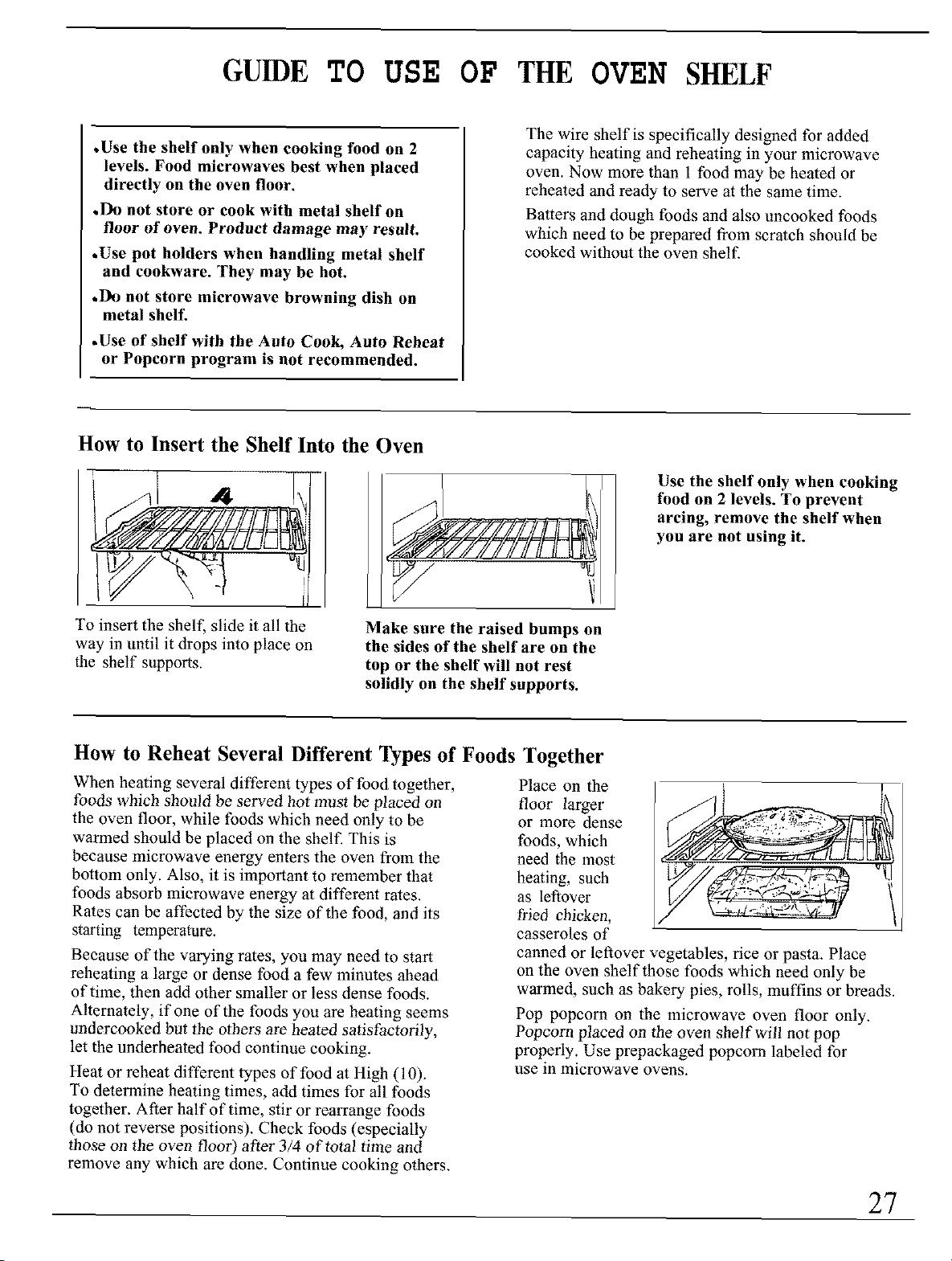
How to Insert the Shelf Into the Oven
To insert the shelf, slide it all the
way in until it drops into place on
the shelf supports.
Make sure the raised bumps on
the sides of the shelf are on the
top or the shelf will not rest
solidly on the shelf supports.
Use the shelf only when cooking
food on 2 levels. To prevent
arcing, remove the shelf when
you are not using it.
How to Reheat Several Different Types of Foods
When heating several different types of food together,
foods which should be served hot must be placed on
the oven floor, while foods which need only to be
warmed should be placed on the shelf. This is
because microwave energy enters the oven from the
bottom only. Also, it is important to remember that
foods absorb microwave energy at different rates.
Rates can be affected by the size of the food, and its
starting temperature.
Because of the varying rates, you may need to start
reheating a large or dense food a few minutes ahead
of time, then add other smaller or less dense foods.
Alternately, if one of the foods you are heating seems
undercooked but the others are heated satisfactorily,
let the underheated food continue cooking.
Heat or reheat different types of food at High (10).
To determine heating times, add times for all foods
together. After half of time, stir or rearrange foods
(do not reverse positions). Check foods (especially
those on the oven floor) after 3/4 of total time and
remove any which are done, Continue cooking others,
Together
Place on the
floor larger
or more dense
foods, which
need the most
heating, such
as leftover
fried chicken,
casseroles of
canned or leftover vegetables, rice or pasta. Place
on the oven shelf those foods which need only be
warmed, such as bakery pies, rolls, muffins or breads.
Pop popcorn on the microwave oven floor only.
Popcorn placed on the oven shelf will not pop
properly. Use prepackaged popcorn labeled for
use In microwave ovens.
27
GROUNDING INSTRUCTIONS
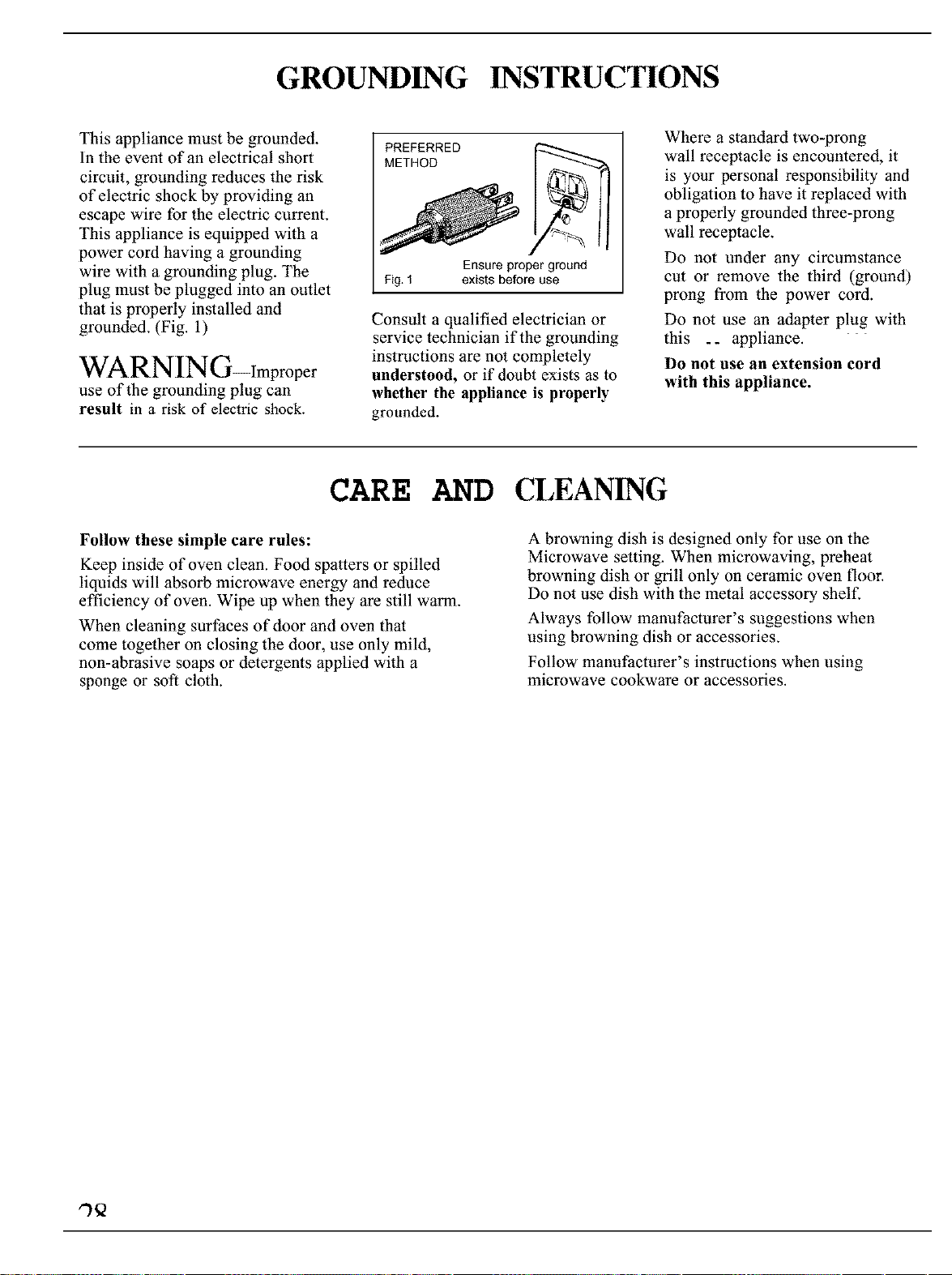
This appliance must be grounded.
In the event of an electrical short
circuit, grounding reduces the risk
of electric shock by providing an
escape wire for the electric current.
This appliance is equipped with a
power cord having a grounding
wire with a grounding plug. The
plug must be plugged into an outlet
that is properly installed and
grounded. (Fig. 1)
WARNING-Improper
use of the grounding plug can
result in a risk of electric shock.
PREFERRED
METHOD
Ensure proper ground
Fig, I exists before use
Consult a qualified electrician or
service technician if the grounding
instructions are not completely
understood, or if doubt exists as to
whether the appliance is properly
grounded.
Where a standard two-prong
wall receptacle is encountered, it
is your personal responsibility and
obligation to have it replaced with
a properly grounded three-prong
wall receptacle.
Do not under any circumstance
cut or remove the third (ground)
prong from the power cord.
Do not use an adapter plug with
this ._ appliance. '
Do not use an extension cord
with this appliance.
CARE AND CLEANING
Follow these simple care rules:
Keep inside of oven clean. Food spatters or spilled
liquids will absorb microwave energy and reduce
efficiency of oven. Wipe up when they are still warm.
When cleaning surfaces of door and oven thal
come together on closing the door, use only mild,
non-abrasive soaps or detergents applied with a
sponge or soft cloth.
A browning dish is designed only for use on the
Microwave setting. When microwaving, preheat
browning dish or grill only on ceramic oven floor.
Do not use dish with the metal accessory shelf.
Always follow manufacturer's suggestions when
using browning dish or accessories.
Follow manufacturer's instructions when using
microwave cookware or accessories.
,-)Q
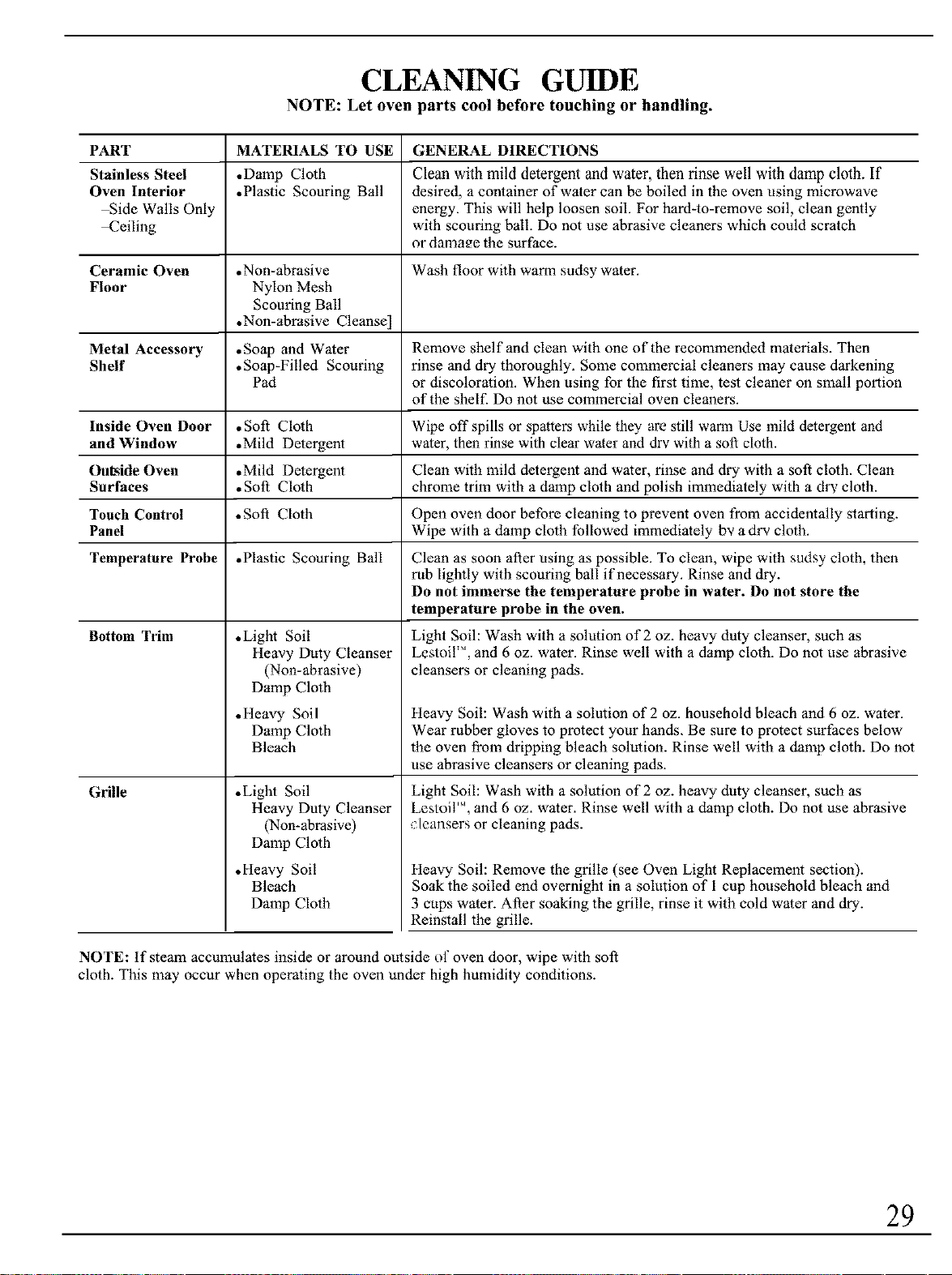
CLEANING GUIDE
NOTE: Let oven parts cool before touching or handling.
PART
Stainless Steel
Oven Interior
Side Walls Only
_eiling
MATERIALS TO USE
•Damp Cloth
•Plastic Scouring Ball
GENERAL DIRECTIONS
Clean with mild detergent and water, then rinse well with damp cloth. If
desired, a container of water can be boiled in the oven using microwave
energy. This will help loosen soil. For hard-to-remove soil, clean gently
with scouring ball. Do not use abrasive cleaners which could scratch
or damage the surface.
Ceramic Oven .Non-abrasive Wash floor with warm sudsy water.
Floor Nylon Mesh
Scouring Ball
•Non-abrasive Cleanse]
Metal Accessory ,Soap and Water
Shelf • Soap-Filled Scouring
Pad
Inside Oven Door
and Window
Out_ide Oven
Surfaces
Touch Control
Panel
Temperature Probe
• Soft Cloth
• Mild Detergent
• Mild Detergent
• Soft Cloth
Remove shelf and clean with one of the recommended materials. Then
rinse and dry thoroughly. Some commercial cleaners may cause darkening
or discoloration. When using for the first time, test cleaner on small portion
of the shelf. Do not use commercial oven cleaners.
Wipe off spills or spatters while they are still warm Use mild detergent and
water, then rinse with clear water and dry with a soft cloth.
Clean with mild detergent and water, rinse and dry with a soft cloth. Clean
chrome trim with a damp cloth and polish immediately with a dr',, cloth.
• Soft Cloth Open oven door before cleaning to prevent oven from accidentally starting.
Wipe with a damp cloth followed immediately by a dry cloth.
• Plastic Scouring Ball
• Light Soil
Heavy Duty Cleanser
(Non-abrasive)
Damp Cloth
Bottom Trim
Grille
• Heavy Soil
Damp Cloth
Bleach
•Light Soil
Heavy Duty Cleanser
(Non-abrasive)
Damp Cloth
•Heavy Soil
Bleach
Damp Cloth
Clean as soon after using as possible. To clean, wipe with sudsy cloth, then
rub lightly with scouring ball if necessary. Rinse and dry.
Do not immerse the temperature probe in water. Do not store the
temperature probe in the oven.
Light Soil: Wash with a solution of 2 oz. heavy duty cleanser, such as
Lestoil'", and 6 oz. water. Rinse well with a damp cloth. Do not use abrasive
cleansers or cleaning pads.
Heavy Soil: Wash with a solution of 2 oz. household bleach and 6 oz. water.
Wear rubber gloves to protect your hands. Be sure to protect surfaces below
the oven from dripping bleach solution. Rinse well with a damp cloth. Do not
use abrasive cleansers or cleaning pads.
Light Soil: Wash with a solution of 2 oz. heavy duty cleanser, such as
LestoiI 'M,and 6 oz. water. Rinse well with a damp cloth. Do not use abrasive
cleansers or cleaning pads.
Heavy Soil: Remove the grille (see Oven Light Replacement section).
Soak the soiled end overnight in a solution of 1 cup household bleach and
3 cups water. After soaking the grille, rinse it with cold water and dry.
Reinstall the grille.
NOTE: tf steana accunmlates inside or around outside of oven door, wipe with soft
cloth. This may occur when operating the oven under high humidity conditions.
29
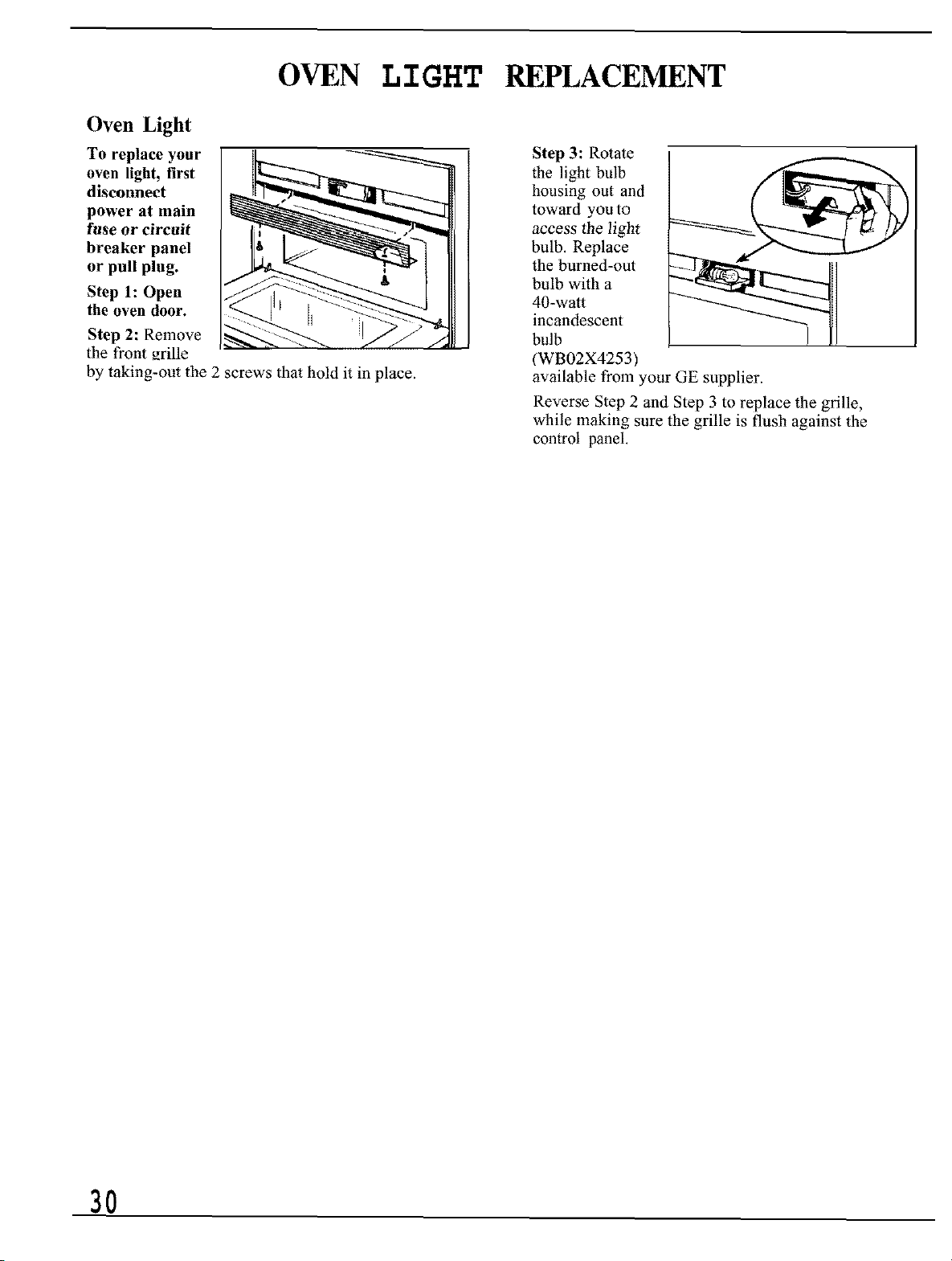
OVEN LIGHT REPLACEMENT
Oven Light
To replace your
oven light, first
disconnect
power at main
fuse or circuit
breaker panel
or pull plug.
Step l:Open
the oven door.
Step 2: Remove
the front _rille
by taking-out the 2 screws that hold it in place.
Step 3: Rotate
the light bulb
housing out and
toward you to
access the light
bulb. Replace
the burned-out
bulb with a
40-watt
incandescent
bulb
(WB02X4253)
available from your GE supplier.
Reverse Step 2 and Step 3 to replace the grille,
while making sure the grille is flush against the
control panel.
3O
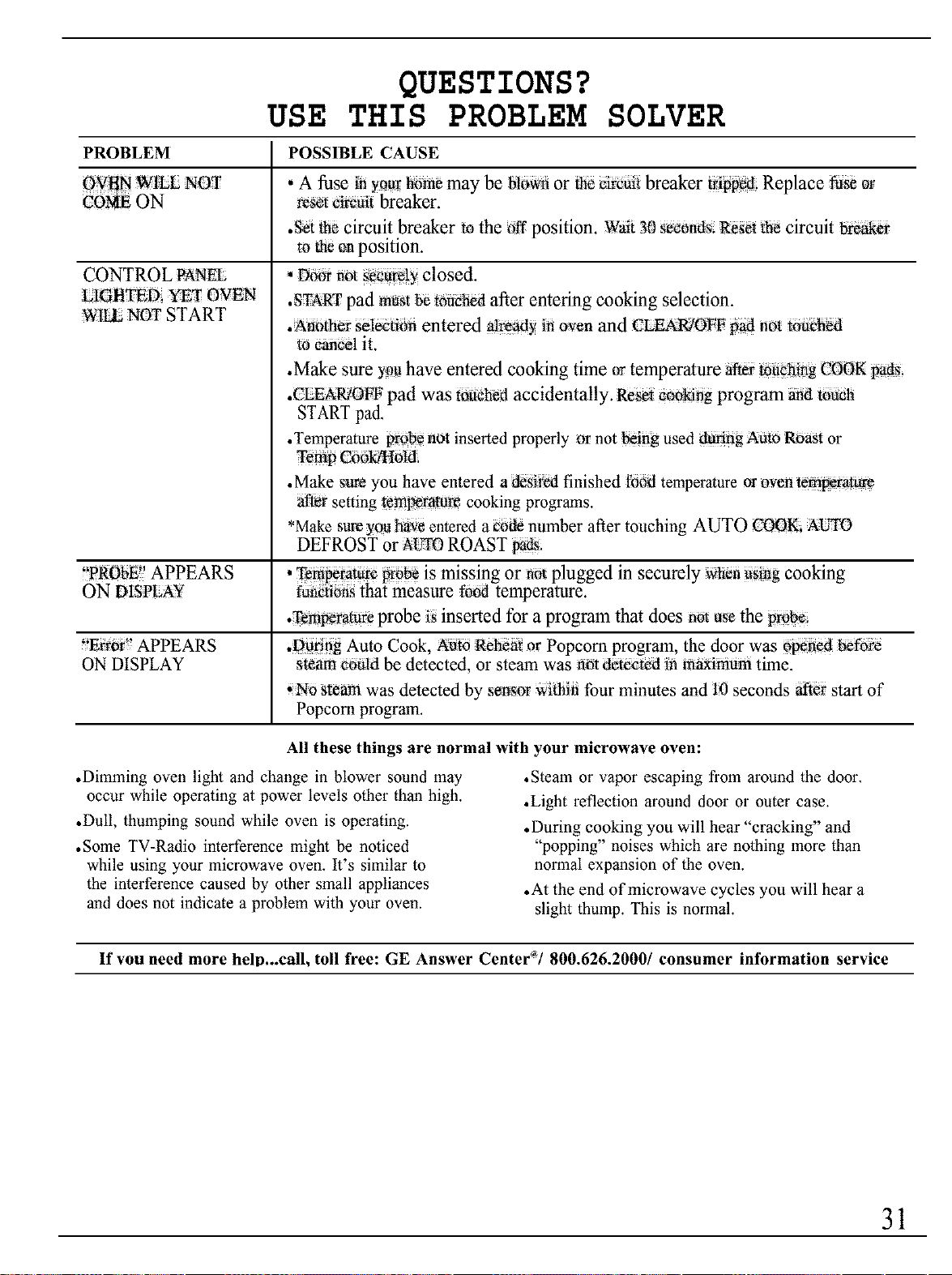
QUESTIONS?
USE THIS PROBLEM SOLVER
PROBLEM POSSIBLE CAUSE
OVgI',lW_E NOT • A fuse inyourbom_may be Nowfior _ ei_fiii breaker ti_ipN6Replace NSeor
_OME ON resot _ircait breaker.
•Set th_ circuit breaker m the off position. Wait 30 _0n_s: Reset _e circuit bwake_
to theon position.
CONTROL PANEL
_IGttTED YET OVEN
WILL NOT START
, Door not securely closed.
.STARTpad must_ touched after entering cooking selection.
.Another selecfion entered already in oven and CLEAR]OFF _ not touch_
to cancel it.
•Make sure youhave entered cooking time ortemperature aftertouching COOK _ads;
•CLEAR/OFF pad was touch_ accidentally. Res_ cookifig program and touch
START pad.
•Temperature probe not inserted properly or not being used _fig Auto Roast or
Temp Cookitlold,
•Make sure you have entered a desired finished food temperature oroven temperature
after setting temperature cooking programs.
*Make sureyou have entered a _ number after touching AUTO COOK, AI_TI)
DEFROST or AL'_0 ROAST pads
"PR bE'
0 APPEARS •Temp_tttre p_be is missing or not plugged in securely when n_Bg cooking
ON D!SPLAY funeti_n_that measure fo_ temperature.
.Temperature probe is inserted for a program that does not usethe proN
"Error _APPEARS .During Auto Cook, Auto Reheat or Popcorn program, the door was opened _fore
ON DISPLAY ste_ could be detected, or steam was not _tected in _imum time.
_No steam was detected by sensor withifi four minutes and 10 seconds after start of
Popcorn program.
All these things are normal with your microwave oven:
• Dimming oven light and change in blower sound may
occur while operating at power levels other than high.
•Dull, thumping sound while oven is operating.
• Some TV-Radio interference might be noticed
while using your microwave oven. It's similar to
the interference caused by other small appliances
and does not indicate a problem with your oven.
•Steam or vapor escaping from around the door.
•Light reflection around door or outer case,
• During cooking you will hear "cracking" and
"popping" noises which are nothing more than
normal expansion of the oven.
•At the end of microwave cycles you will hear a
slight thump. This is normal.
If vou need more helo...call, toll free: GE Answer Center'/800.626.2000/consumer information service
31
NOTES
32
NOTES
33
With the purchase ofyour new Monogram appliance, receive the assurance that ifyou ever
need information or assistance from GE, we'll be there. Allyou have to do is call--toll-free!
/n-HomeRepairService
800-GE-CARES(800432-2737)
AGE consumer service professional will provide expert repair service,
scheduled at a time that's convenient for you. Many GE Constmaer Service
company_operated locations offer you service today or tomorrow, or at your
convenience (7:00 a.m. to 7: 00p.m, weekdays, 9:00 a.m. to 2:00 p.m. Saturdays).
Our factory-trained technicians know your appliance inside and out-so most
repairs can be handled in just one visit.
GEAnswerCenter
80_626.2000
Whateveryour question about any Monogram major appliance, GE Answer
Cemer ®information service is available to help. Your call-and your question-
will be answered promptly and courteously. And you can call any time, GE
Answer Center" service is open 24 hours a day, 7 days a week,
ForCustomersWithSpecialNeeds...
800.626.2000
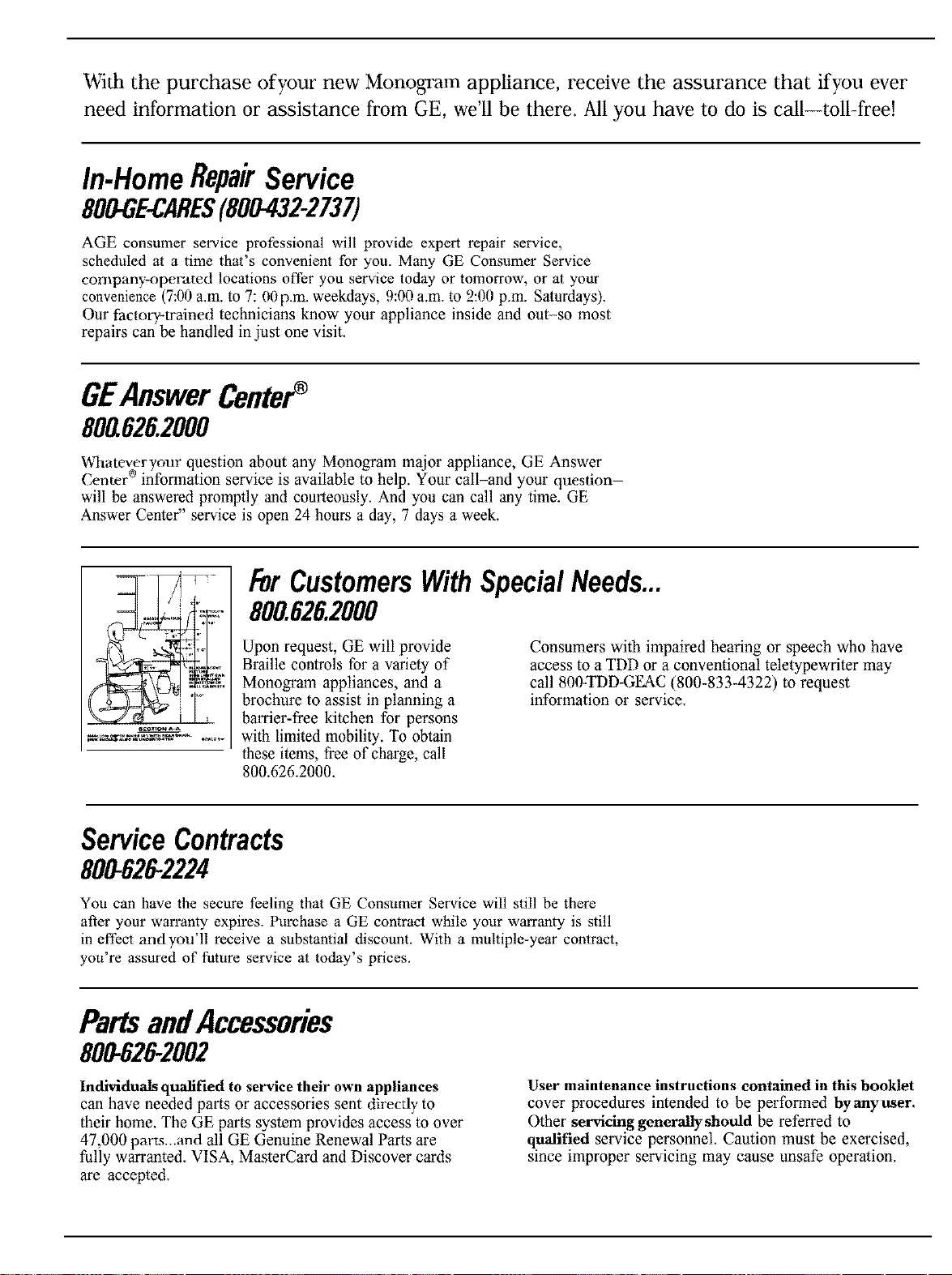
Upon request, GE will provide
Braille controls for a variety of
Monogram appliances, and a
brochure to assist in planning a
barrier-free kitchen for persons
with limited mobility. To obtain
these items, free of charge, call
800.626.2000.
Consumers with impaired hearing or speech who have
access to a TDD or a conventional teletypewriter may
call 800-TDD-GEAC (800-833-4322) to request
information or service.
ServiceContracts
800-6292224
You can have the secure feeling that GE Consumer Service will still be there
after your warranty expires. Purchase a GE contract while your warranty is still
in effect andyou'll receive a substantial discount. With a multiple-year contract,
you're assured of future service at today's prices.
PartsandAccessories
800-626-2002
Individuals qualified to service their own appliances
can have needed parts or accessories sent directly to
their home. The GE parts system provides access to over
47,000 parts...and all GE Genuine Renewal Parts are
fully warranted. VISA, MasterCard and Discover cards
are accepted.
User maintenance instructions contained in this booklet
cover procedures intended to be performed byanyttser.
Other servicing generally should be referred to
qualified service personnel. Caution must be exercised,
since improper servicing may cause unsafe operation.
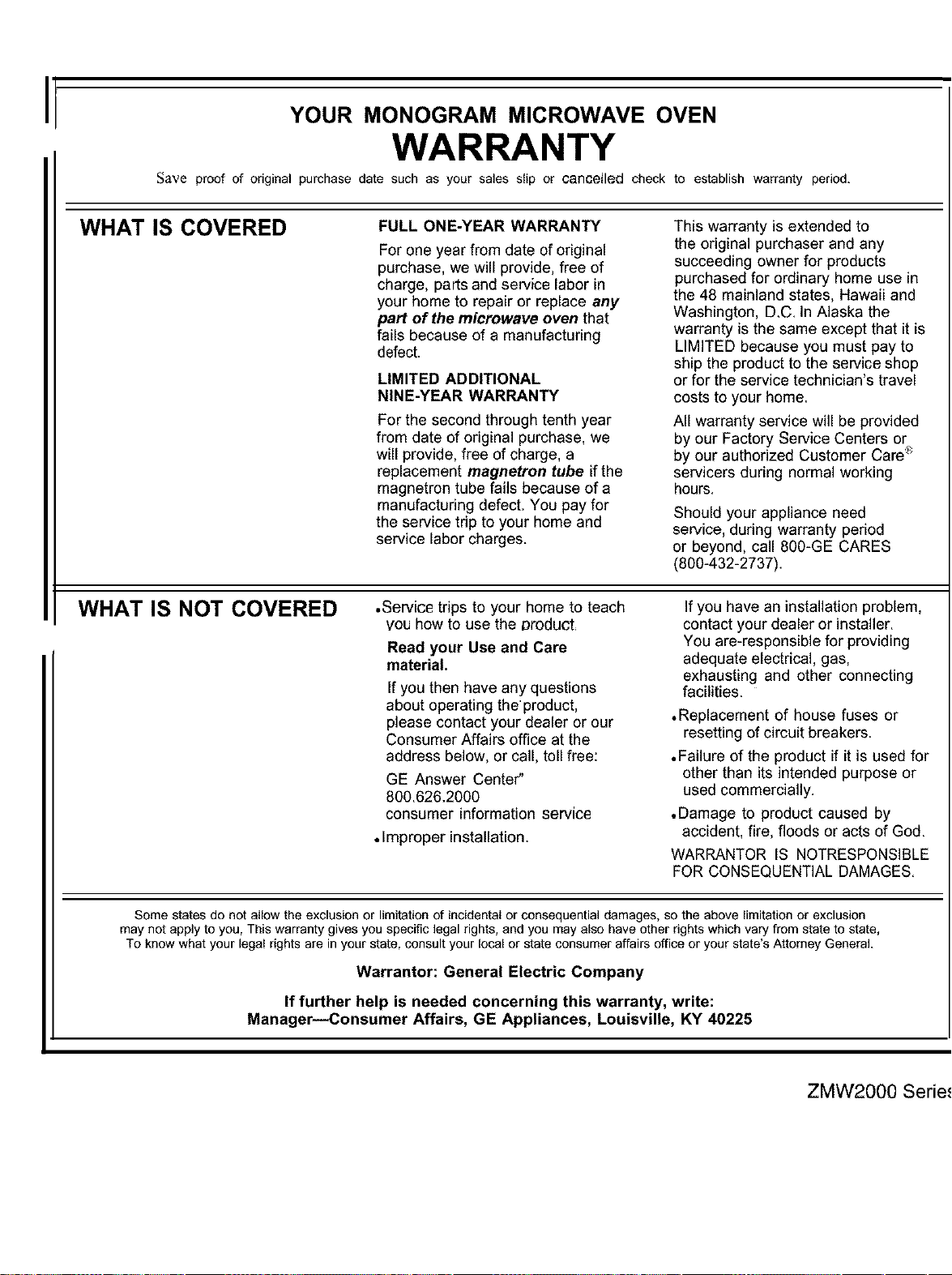
I
YOUR MONOGRAM MICROWAVE OVEN
WARRANTY
Save proof of odginal purchase date such as your sales slip or cancelled check to establish warranty period.
WHAT IS COVERED
FULL ONE-YEAR WARRANTY
For one year from date oforiginal
purchase, we will provide, free of
charge, parts and service labor in
your home to repair or replace any
part of the microwave oven that
fails because of a manufacturing
defect.
LIMITED ADDITIONAL
NINE-YEAR WARRANTY
For the second through tenth year
from date of original purchase, we
will provide, free of charge, a
replacement magnetron tube if the
magnetron tube fails because of a
manufacturing defect. You pay for
the service trip to your home and
service labor charges.
This warranty is extended to
the original purchaser and any
succeeding owner for products
purchased for ordinary home use in
the 48 mainland states, Hawaii and
Washington, D.C. In Alaska the
warranty is the same except that itis
LIMITED because you must pay to
ship the product to the service shop
or for the service technician's travel
costs to your home.
All warranty service will be provided
by our Factory Service Centers or
by our authorized Customer Care"_
servicers during normal working
hours.
Should your appliance need
service, during warranty period
or beyond, call 800-GE CARES
(800-432-2737).
WHAT IS NOT COVERED •Service trips to your home to teach
you how to use the product,
Read your Use and Care
material.
If you then have any questions
about operating the product,
please contact your dealer or our
Consumer Affairs office at the
address below, or call, toll free:
GE Answer Center"
800.626.2000
consumer information service
•Improper installation.
If you have an installation problem,
contact your dealer or installer.
You are-responsible for providing
adequate electrical, gas,
exhausting and other connecting
facilities.
•Replacement of house fuses or
resetting of circuit breakers.
.Failure of the product if itis used for
other than its intended purpose or
used commercially.
.Damage to productcaused by
accident, fire, floods or acts of God.
WARRANTOR IS NOTRESPONSIBLE
FOR CONSEQUENTIAL DAMAGES.
Some states do not allow the exclusion or limitation of incidental or consequential damages, so the above limitation or exclusion
may not apply to you, This warranty gives you specific legal rights, and you may also have other rights which vary from state to state,
To know what your legal rights are in your state, consult your local or state consumer affairs office or your state's Attorney General.
Warrantor: General Electric Company
If further help is needed concerning this warranty, write:
Manager--Consumer Affairs, GE Appliances, Louisville, KY 40225
ZMW2000 Series

General E/_ Company
Louisville, K¥40225
lhlb No 49_8328
Pari No 164 D_588PI_8
12-92 C_C,,

