GEAppliances.com
Safety Information ......... 2-6
Operating Instructions
Com'enience Features ..... 14-16
Microwave Terms ............ 18
()ther Features ........... ] 6, 17
Oven Features ............. 7, 8
Power Levels ................ 9
Time Features ............ 9-1,9,
Care and Cleaning ......... 19
Troubleshooting Tips ....... 20
Things That Are Normal ...... 20
Consumer Support
Consumer Support . . .Back Coxer
Product Registration ...... 91-99
Warranty .................. 93
y:szss4sr
©
Writethemodelandserial
numbershere:
Model #
Serial #
You can find them on a label
inside the oven.
164D3370P329 49-40400 06-03JR
IMPORTANTSAFETYINSTRUCTIONS.
READALLINSTRUCTIONSBEFOREUSING.
A WARNING!
For your safe_ the information in this manual must be followed to minimize the risk of fire or explosion, electric shock, or
to prevent property damage, personal injury, or loss of life.
PRECAUTIONSTOAVOIDPOSSIBLEEXPOSURE
TOEXCESSIVEMICROWAVEENERGY
(a) Do NotAttempt to operate this oven with tile door
open since open<loot operation can result in ham/fill
eN)osure m microwave energy': It is impommt not to
deteat or tamper with tile satiety interlocks.
(b) DoNotPlace any object between tile oven fl'ont fi_ce
and the door or allow soil or cleaner residue to
accumulate on sealing stmfi_ces.
(c) Do Not Operate tile oven if it is damaged. It is
particularly important that tile oven door close
properly and that there is no damage to the:
(1) door (bent),
(2) hinoes and latches (broken or loosened),
(3) door seals and sealing stmfi_ces.
(d) The Oven Should Not be a(!j usted or repaired by
anyone except properly qualified service pex_onnel.
IMPORTANTSAFETYINSTRUCTIONS.
Use this appliance only for its intended purpose as described in this Owner's Manual.
When using electrical appliances basic safety precautions should be followed, including the following:
• Read and fi_llow the specific precautions in tile • Do not store this appliance outdoors. Do not use this
PrecautionstoAvoidPossibleExposureto Excessive
Microwave Energy section aboxe.
• This appliance must be grounded. Connect only
to a propedy grounded outlet. See tile Grounding
Instructions section on page 4.
• Install or locate this appliance only in accordance with
the provided installation instructions.
• Be certain to place tile fl'ont surfhce of tile door three
inches or more back from tile countertoi ) edge, to axoid
accidental filI) )in(,_ of tile appliance in n(mnal tlSaO-e._ .
• This microwave oven is not approved or tested fi)r
Ill}lIJne rise.
• Do not mount this appliance over a sink.
• Do not i/lo[lnt tile IllicI'Owave oxen oxer or near _lilV
portion of a heating or cooking appliance.
• Do not store anything direcflx on top of tile microwaxe
o'_en S/lil';ice when tile Illicl'owax e o_,en is in opei'ation.
• Do not operate this appliance if it has a damaged power
cord or plug, if it is not working proped); or if it has
been damaged or dropped. If tile power cord is
damaged, it must be replaced by General Electric
Service or an authorized se_Mce agent using a power
cord available from General Electric.
• D(:, not co_,er or block }111_,(:,i)enings, on tile Ila ) )liance.
• Use this appliance only fin" its intended use as described
in this i/lantlal. Do not tlse corrosive chemicals or wq)oi_
in this appliance. This microwave oven is specifically
designed to heat, (h T or cook tood, and is not intended
fin" laboratory or industrial use.
product near watet_lor example, in a wet basement,
near a swimming, I)°°1, near a sink or in similar
locations.
• Keep power cord away from heated surti_ces.
• Do not imlnei_e power cord or I)lug, in water
• Do not let power cord hang oxer edge of table or
COtlntei:
• To reduce tile risk of fire in tile oven cax_la':
--Do not overcook fi_od. Careflflly attend appliance when
paper; plastic, or other combustible materials are placed
inside tile oxen while cooking.
--Remove wire twist-ties and metal handles from paper or
plastic ('ontainets before I)lacim"_ them in tile oxen.
--Do not t/se tile o_,en t_)I" ,stoI'a_rea ptlI])oses. Do not leaxe
paper products, cooking utensils, or tood in tile oxen
when not in rise.
--If materials inside tile oven ignite, keep tile oven door
closed, turn tile oven ofl_ and disconnect tile power
cord, or shut off power at tile fllse or drcuit breaker
panel. If tile door is opened, tile fire may spread.
• See door surfi_ce cleaning instructions in tile Care and
cleaning of the microwave oven section ot this manual.
• This appliance must only be serviced by qualified service
personnel. Contact nearest authorized service facility fin.
examination, repai_; or a(!jusUnent.
• _s with any appliance, close supervision is necessmw
when used by children.
SAVETHESEINSTRUCTIONS
a,WARNING!
GEAppliances.com
ARCING
If you see arcing, press PAUSE/CLEARand correct the problem.
Ardng is tile microwave tem_ fin" sparks in tile oven.
Arcing is caused by:
• Metal or foil touching tile side of tile oven.
• Foil not molded to food (upturned edges act
like antennas).
• Metal, such as twist-ties, poult_ y pins, or gold-
rimmed dishes, in the microwave.
• Recycled paper tcmvls containing small metal
pieces being used in the microwave.
FOODS
• Do not pop l)Ol)('oi'n in yo/li" Illi(Towaxe oven
tmless in a special microwave popcorn accesso_ T
or mfless you use popcorn labeled fin" use in
microwave ovens.
• Some products such as whole eggs and sealed
containe_--fln" example, closed jade--are able
to explode and should not be heated in this
ii/ici'owave oven. _tlcll rise of tile illiCi'Owave
oven could result in injury.
• Do not boil eggs in a microwave oven. Pressure
will build up inside egg }_lk and will cause it
to bm_t, possibly _esulfing in iqjm y.
• Operating tile mic_xm'ave with no fi)od inside fi)r
I/lore than a minute or [\_x_may Catlse (lanlage
to tile oven and could start a fire. It increases tile
heat aro/md tile magnetmn and can shorten
tile life of tile oven.
• SUPERHEATEDWATER
Liquids,such aswater,coffee or teaare ableto be
overheatedbeyondtheboiling pointwithout
appearingtobe boiling.Visiblebubblingor boiling
when thecontainer isremovedfromthe microwave
ovenisnot alwayspresent.THISCOULDRESULT
IN VERYHOTLIQUIDSSUDDENLYBOILING0 VER
WHENTHECONTAINERISDISTURBEDORA
SPOONOROTHERUTENSILISINSERTEDINTO
THELIQUID.
To reduce tile risk of iqjm T to pe_ons:
--Do not overheat the liquid.
IStir tile liquid both befin'e and halfway through
heating it.
--Do not use straight-sided containet_ with narrow
necks.
• Foods Mth tmbroken outer "skin" such as
potatoes, hot dogs, sausages, tomatoes, apples,
chicken live_, and other giblets, and egg yolks
should be pierced to allow steam to escape
(hllJng cooking.
I_Mter heating, allow tile container to stand in tile
illici'owave oven ]'()I" a short til//e betoi'e i'ei//oving
tile containe_:
IUse exti'ellle cai'e when insei'ting a Sl)OOn 0I"
other utensil into tile containex:
• Avoid heating baby fi>od in glass jm_, even •
with tile lid olt_ Make sure all infhnt food is
thoroughly cooked. Stir food to distribum tile
heat evenly. Be careful to prevent scalding
when wamfing titan ula. Tile container may feel
cooler than tile tommla really is. Mwavs rest tile
tommla before fi_edin,* tile baby •
• Don't defl'ost fl'ozen beverages in narrow-necked
bottles (especially carbonated bexerages). Exert •
if' tile container is opened, pressure C_lllbuild up.
This can cause the container to built, possibly
resulting in >
Hot fi_ods and steam can cause bm'ns. Be careflfl
when opening any containe_ of hot fix)d,
including popcorn bags, cooking pouches, and
boxes. To prevent possible iqjury, direct steam
away fl'om hands and ti_ce.
Do not overcook potatoes. They could dehydrate
and catch fire, causing damage to Your oven.
Cook meat and poult_ T thoroughlylmeat to at
least an INTERNAl, temperatm'e _ff 160°F and
poultry to at least an INTERNAl, temperature
of 180°E Cooking to these temperatures usually
protects against toodborne illness.
3
IMPORTANTSAFETYINFORMATION.
READALLINSTRUCTIONSBEFOREUSING.
a, WARNING!
MICROWAVE-SAFECOOKWARE
Make sure to use suitable cookware during
microwave cooking. Most glass casseroles, cooking
dishes, measuring cups, custard cups, potte_ T or
china dinnerware which does not have metallic trim
or glaze with a metallic sheen can be used. Sollle
cookware is labeled "suitable fin" microwaving."
• If w)u are not sm'e if a dish is microwave-sate,
use this test: Place in the oven both the dish wm
are testing and a glass measm_ing cup filled with
1 cup of water set tile meastwing cup either in
or next to the dish. Microwave 30-45 seconds
at high. If the dish heats, it should not be used
fin" microwaving.
If the dish remains cool and only the water in
tile cup heats, then tile dish is microwave-sale.
• If you use a meat them_ometer while cooking,
IIl_lke stlre it is sate fin" rise in illicrowave ()veils.
• Do not use recycled paper products. Recycled
paper towels, napkins and waxed paper can
contain metal flecks which may cause arcing
or ignite. Paper products cent;fining nyhm or
nylon filainents should be avoided, as they Inav
also ignite.
• Some sWroloam trays (like those that meat is
packaged on) have a thin strip ot metal
embedded in tile bottom. \,_l/en microwaved,
tile metal can burn tile floor of tile oven or
ignite a paper towel.
• Do not use tile microwave to chy newspape_.
• Not all plastic wrap is suitable fin" use in
microwave ovens. Check the package fin" proper
rise.
• Paper towels, waxed paper and plastic wrap can
be used to cover dishes in order to retain
moisture and prevent spattering. Be sm'e to vent
plastic wrap so steam can escape.
• Cookware may become hot because of heat
transferred fl'om the heated lend. Pot holders
max be needed to handle the cookware,
• "Boilable" cooking pouches and fighdy closed
plastic bags should be slit, pierced or vented as
directed by package. If they are not, plastic could
bm_t dining or immediately after cooking,
possibly resulting in injtu T. A]so, plastic storage
containet_ should be at least partially tmcovered
because they titan a tight seal. When cooking
with containe_ tightly covered with plastic wrap,
remove coveting careflfllv and direct steam away
fi'om hands and ti_ce.
• Use toil only as directed in this guide. TV dinne_
may be microwaved in foil trays less than 3/4"
high; renlove tile top foil cover and rettlrn tile
tray to tile box. \_]/en using foil in tile microwave
oven, kee I) the loft at least 1 inch away fl'om the
sides of the oven.
• Plastic cookware----Plastic cookware designed fin.
microwave cooking is ve_y useflfl, but should be
used carefull> Even micro_we-satb plastic may
not be as tolerant of overcooking conditions as
are glass or ceramic materials, and may soften or
char if subjected to short periods of overcooking.
In hmger exposm'es to overcooking, tile ti)od and
cookware could ignim.
Follow those guidelines."
B Use microwave-sate plastics onl) and use
them in strict compliance with the cookware
IIla n [Ilil ct/li'e i"s i'ecoli/iilen(lations.
] Do not i//icrowa',e elllpty containei3.
Do not pemfit children to use plastic
cookware without complete superxision.
4
GEAppliances.com
BROWNERSAFETY
• Any re)n-metal, oven-safe dish can be used when
browning ill the oven. Place the dish directly on
the shelf.
• The oven and door will get hot when browning.
• Cookware will become hot when browning.
Pot holdei_ or oven mitts will be needed to
handle the cookware.
• Do not use paper to_vls or c()verings, containei_
or cooking/roasting bags made (ff fi)il or other
reflective material, plastic, _x or paper when
browning.
• Do not place food directly against the browner
element.
• Use of the browner shelf:
- I_emove the shelf fl'on/the oven when not
ill rise.
- Use pot holdei_ or oven mitts when handling
the shell It may be hot.
Be sure that the shelf is posifi(med properly
inside the oven to prevent product dalnage.
Do not cover the shelf or any part (ff the oven
with metal fi)il. This will cause overheating of
the oven.
• During and after use, do not touch, or let
clothing, pot holdei_ or other flamnmble
inateiials contnct the browner elelnent or guard.
These sui_i_ces may be hot enough to burn even
though they are dark ill coloI; Mlow sufficient
tilne for cooling fiIst.
• I_.elnove cookware colnpletely fi'oln the oven
heft)re turning food.
• Make sure fl)od is cooked all the way through
heft)re browning.
GROUNDINGINSTRUCTIONS
This ai)pliance must be grounded. In the event of
an electrical short drcuit, grounding reduces the
risk of electric shock by providing an escape wire
for the electric current.
This appliance is equipped Mth a power cord
having a grounding wire with a grounding plug.
Tile plug nmst be plugged into an outlet that is
properly installed and grounded.
Consult a qualified electridan or service technician
if the grounding instructions are not colnpletely
undei_tood, or if doubt exists as to whether the
ai)pliance is i)roperly grounded.
If the outlet is a st;mdard 2-prong wall outlet, it is
vour pei_onal responsibiliQ' and obligation to have
it replaced with a i)roi)erly grounded 3-l)rong wall
outlet.
Do not tinder [llly ciI'C[ll//St;Inces C/lt or I'elllOVe
the third (ground) i)rong fl'oln the power cord.
X4'e do not recolnlnend using an extension cord
with this appliance. If the power coM is too short,
have a qualified electrician or service technician
install an outlet near the ai)pliance. (See
EXTENSION CORDSsection.)
For best oi)erafion, plug this ai)pliance into its
own electrical outlet to i)revent flickering of lights,
blowing of fllse or trii)i)ing of circuit breakeI:
IMPORTANTSAFETYINFORMATION.
READALLINSTRUCtiONSBEFOREUSING.
ADAPTERPLUGS
Usage situations where appliance's power cord will be disconnected infrequently.
Because ot potential safe b' hazards under certain conditions, {Adapterplugsnot
we stronglyrecommend against the use of an adapter plug.However; if permittedinCanada}
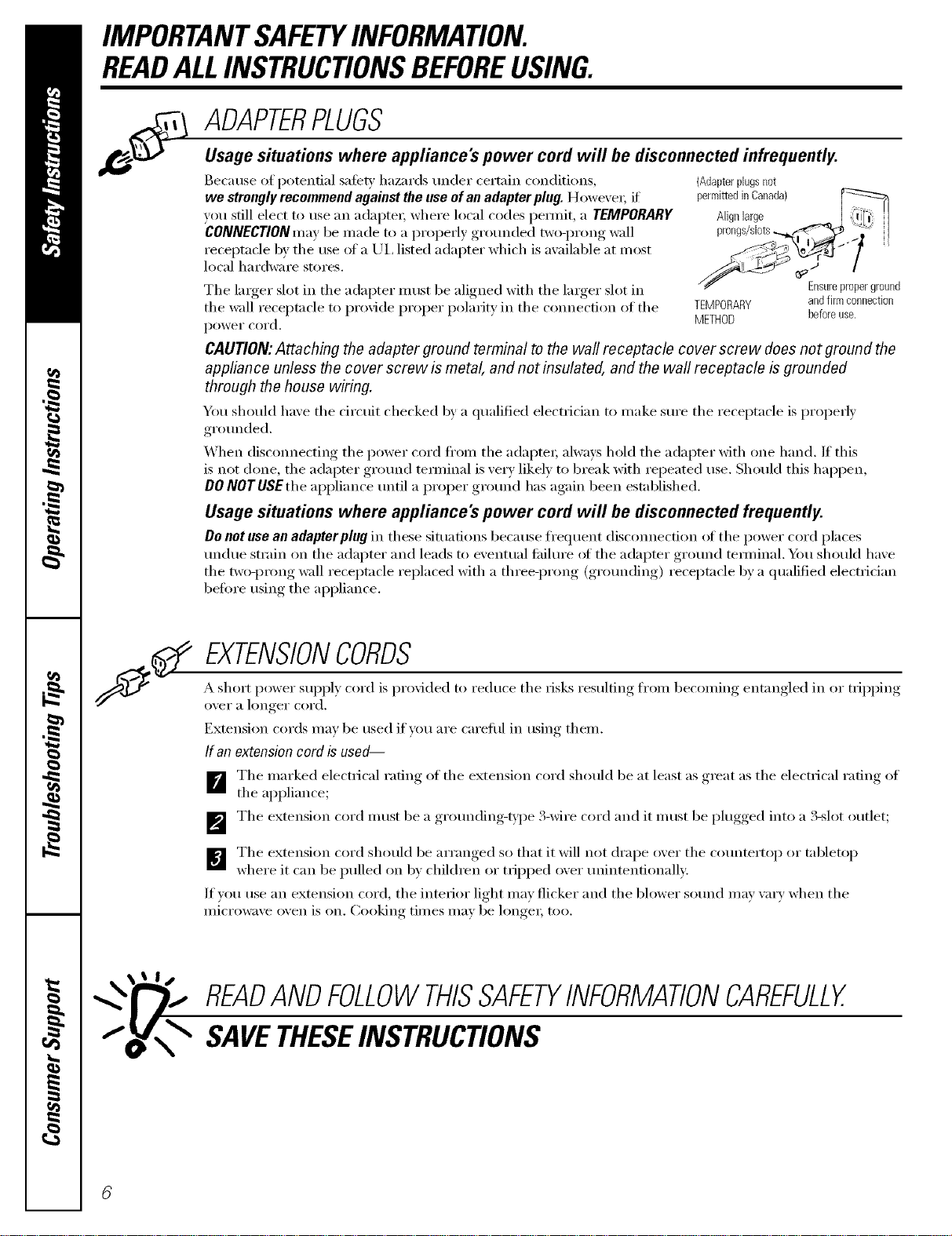
you still elect to use an adaptex; where local codes pemfit, a TEMPORARY Alignlarge
CONNECTIONnrav be made to a properly grounded tw_)-prong wall
receptacle by tile use of a UI, listed adapter which is available at most
local hardware stores,
Tile larger slot in tile adapter must be aligned with tile larger slot in
the wall receptacle to provide proper polarity in the connection of the TEMPORARY
power cord. METHOD
CAUTION:AttachflTg the adapter ground terminal to the wall receptacle cover screw does not ground the
appliance unless the cover screw is metal, and not insulated, and the wall receptacle b grounded
through the house wiring.
You should have tile circuit checked by a qualified electrician to make sm'e tile receptacle is properly
grounded.
When disconnecting the power cord fl'om the adapte_, always hold the adapter with one hand. If this
is not done, the adapter gr()lmd temfinal is very likely to break with repeated use. Should this hai)pen,
DONOTUSEthe appliance until a proper ground has again been established.
Usage situations where appliance's power cord will be disconnected frequently.
Do not use an adapter plug in these situations because fl'equent disconnection ot the power cord places
undue strain on the adapter and leads to eventual fifilure ot the adapter ground temfinal. You shouM have
tile two-prong wall receptacle replaced with a three-prong (grotmding) receptacle by a qualified electrician
heft)re using tile appliance.
Ensureproperground
andfirmconnection
beforeuse.
EXTENSIONCORDS
A short power suI)ply cord is pro\_ded to reduce tile risks resulting fl'om becoming entangled in or tripping
oveI" a longer cord,
Extension cords may be used if you are careflfl in using them.
If an extension cord is used--
(YI e
] Tile marked electrical rating of tile extension cord should be at least as _ "at as tile electrical rafino of
tile appliance;
,gr()lmding-ia, )e S-wire cord and it must be l)lugged,, into a S-slot outlet
] The extension cord must be a ,'l
] Tile extension cord should be arranged so that it will not drape oxer tile c()tmterto I) or tabletop
where it can be pulled on b) children or tlipped oxer unintentionally:
If you use an extension cord, tile interior light may flicker and tile blower solmd may vary when tile
microwave oven is on. Cooking times may be hmge_; too.
READANDFOLLOWTHISSAFETYINFORMATIONCAREFULLY.
SAVETHESEINSTRUCtiONS
Aboutthe featuresofyourmicrowave oven.
Throughout this manual, features and appearance may vary from your model.
GEAppliances.com
1000Watts
I
I
I
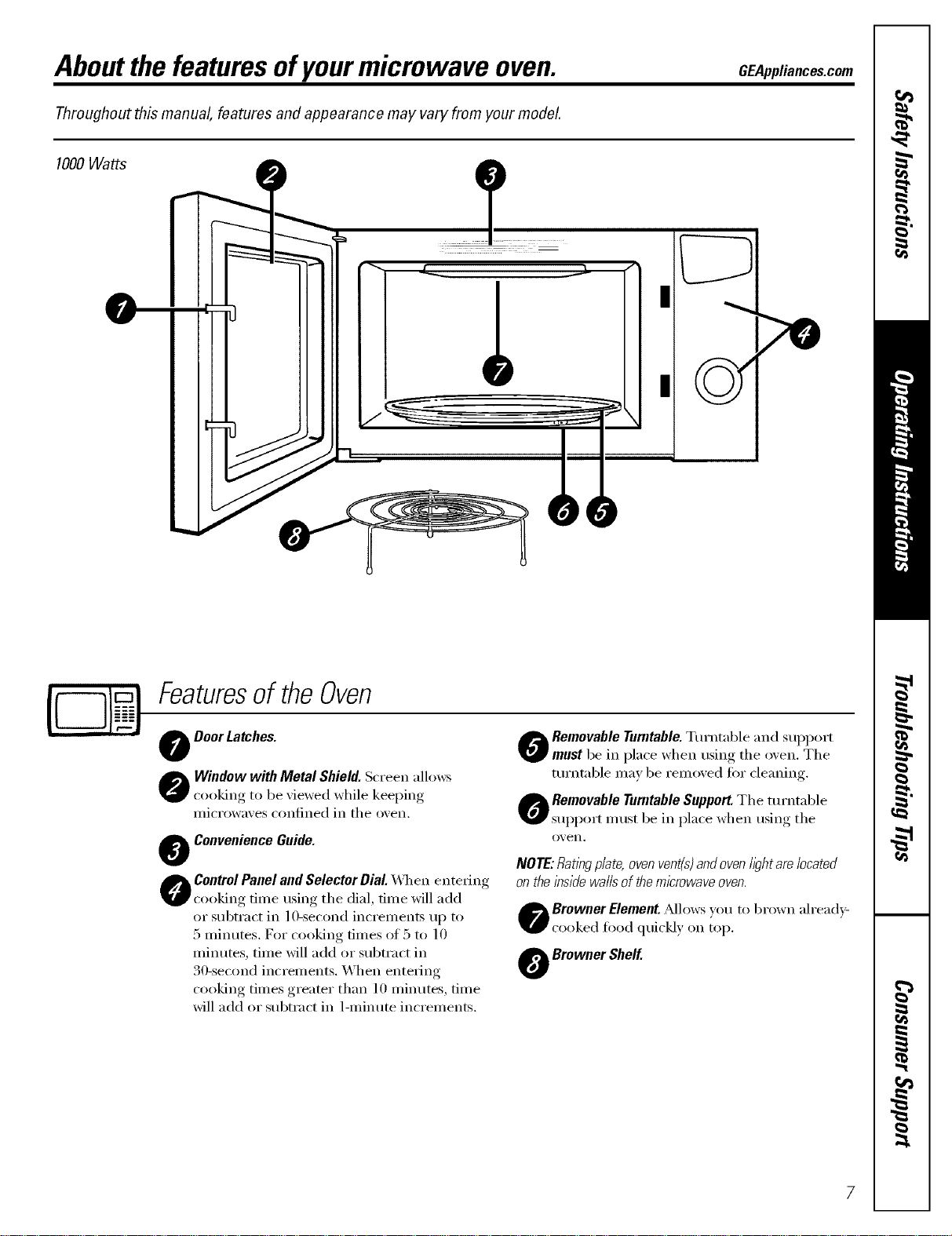
Featuresof theOven
O Door Latches.
O indow with Metal Shield. Screen allows
cooking to be xiewed while keeping
iilici'owaxes conlined ii1 tile ox, en.
O Convenience Guide.
ControlPanel and Selector Dial. _q/en entering
cooking time using tile dial, time will add
or sulXract in l O-second increments up to
5 minutes. D)_"cooking times of 5 to lO
minutes, time will add or subtract in
30-second increments. When entering
cooking times greater than 10 minutes, time
will add or subtract in 1-minute increments.
_h Removable Turntable.Turntable and support
r must be in place when using tile o_en. Tile
tm'ntable may be remoxed for cleaning.
O emovable Turntable Support.Tile turntable
support must be in place when using tile
0_, eI1.
NOTE:Rat/W plate, ovenvent(s)and oven lightare located
on the inside walls of themicrowave oven.
O rowner Element. _Mlows you to brown ah'ea(l):
cooked food quickly on top.
O Browner Shelf.
Aboutthe featuresofyourmicrowave oven.
Youcan microwave by time or with the convenience features.
DEFROST
f"l'_**
',+,,_bb
AUTOCOOK _
@LESSGMoRE _"
POWER LEVEL
TOP BROWN
TIME COOK
START
EXPRESSCOOK
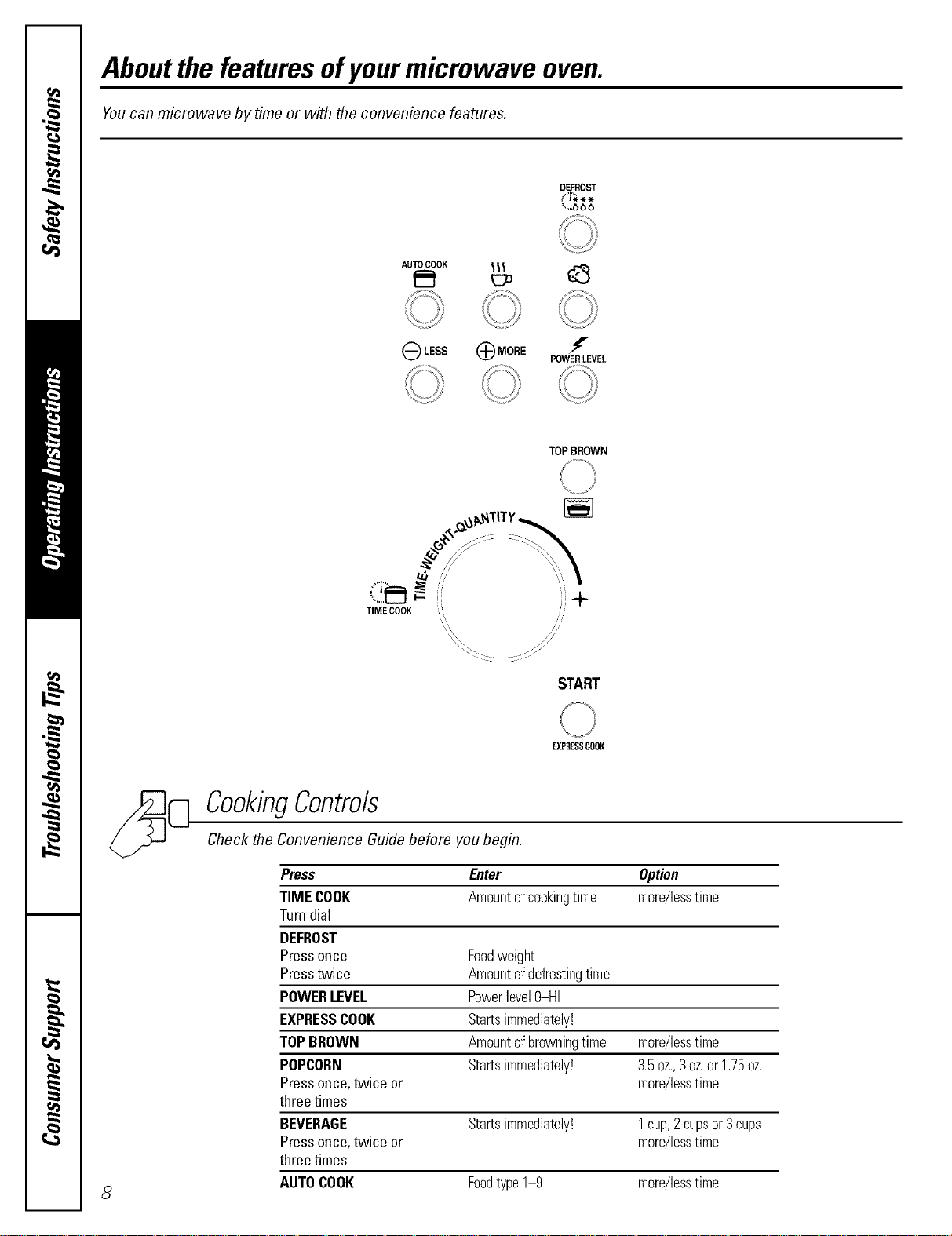
CookingContro/s
Check the Convenience Guide before you begin.
Press Enter Option
TIME COOK Amountofcookingtime more/lesstime
Turndial
DEFROST
Pressonce Foodweight
Presstwice Amountofdefrostingtime
POWERLEVEL Powerlevel0-HI
EXPRESSCOOK Startsimmediately!
TOPBROWN Amountofbrowningtime more/lesstime
POPCORN Startsimmediately! 3.5oz.,3oz.or1.75oz.
Pressonce,twice or more/lesstime
three times
BEVERAGE Startsimmediately! 1cup,2cupsor3cups
Pressonce,twice or more/lesstime
three times
AUTOCOOK Foodtype1-9 more/lesstime
Aboutchangingthepower level GEAppliances.com
f
POWER LEVEL
U }/
JIME COOK
START
EXPRESSCOOK
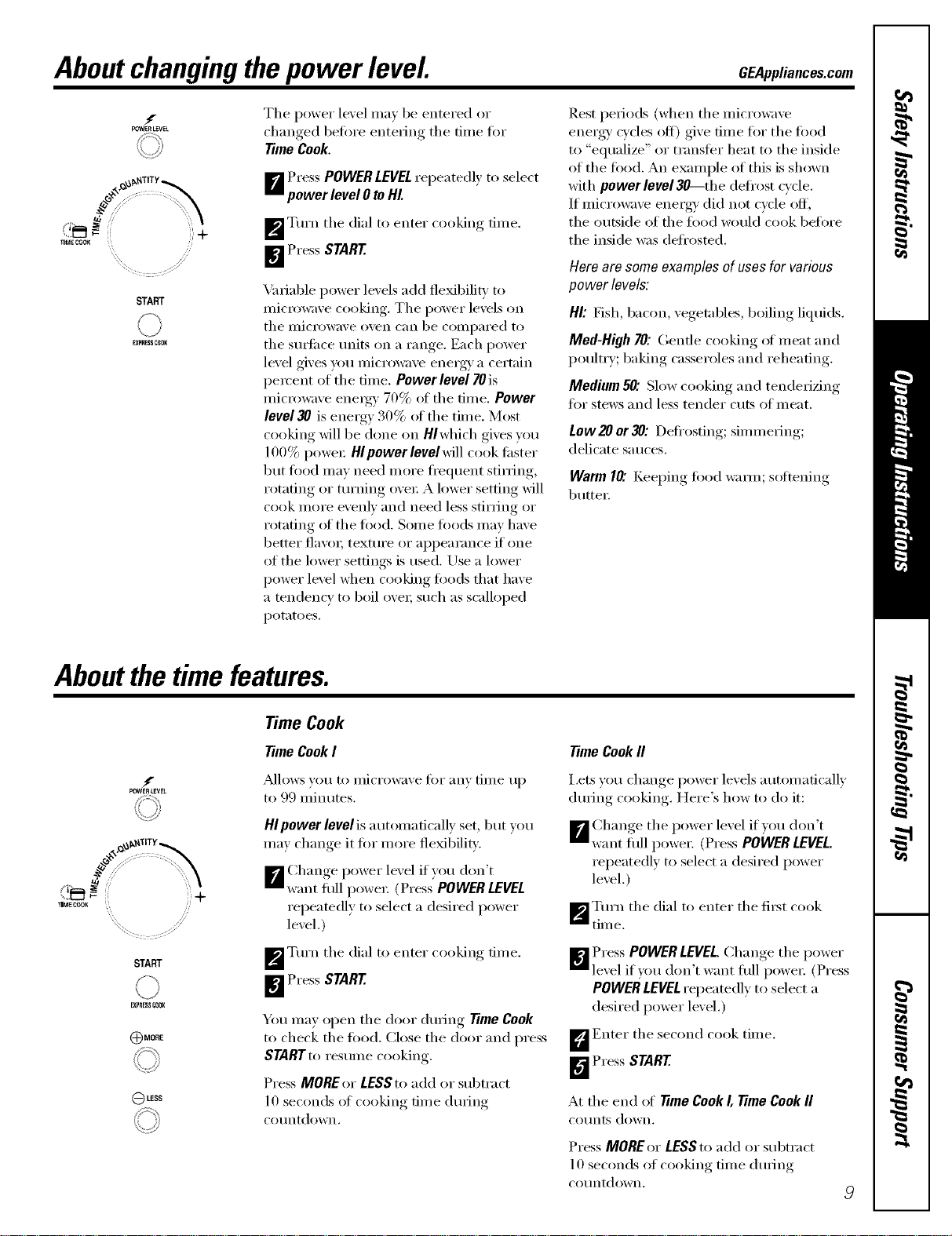
Tile power level ma_ be entered or
changed heft)re entering tile time tot
time Cook,
B Press POWERLEVEL repeatedl_ to select
power level 0 to HI.
[]Turn tile dial to enter cooking time.
_ Press START
Variable power levels add fle_bilitv to
lilici'owave cooking, Tile l)oweI" levels on
tile IIlicI'o_;Ive oven c[lIl be coIIll)aI'ed to
tile surfilce units on a range. Each power
level gives you microwave energy a certain
l)ercent of tile time. Power level 70 is
micrm_;ive energy 70% of tile time. Power
level 30 is energy 30% ot tile time. Most
cooking will be done on Hlwhich gives you
100% power Hlpowerlevelwill cook filster
but fl)od may need more fl'equent stirring,
rotating or turning ovei: A lower setting will
cook more e\'enly and need less stirring or
rotating _fftile toed. Some toods may have
better flavoi; texture or ai)pearance if one
of tile lower settings is used. Use a lower
power level when cooking fi)ods that have
a tendency to boil o\'ei; such as scalloped
potatoes.
Rest periods (when tile microwave
energy' cycles off) give time tot tile toed
to "equalize" or transter heat to tile inside
of tile toed. An example of this is shown
with power level 3_-the defl'ost cycle,
If microwave energy' did not cycle off,
tile outside of tile toed would cook betore
the inside was deti'osted.
Hero am some examples of uses for various
power levels:
Ill: Fish, bacon, vegetables, boiling liquids.
Med-High 70: Gentle cooking of meat and
poultry; baking casseroles and reheating.
Medium 50".Slow cooking and tenderizing
tot stews and less tender cuts of meat.
Low20 or30: Defl'ostin ," simmering;
delicate sauces.
Warm10"KeeI)im*_fi>odwaIm; softening
butter.
Aboutthe time features.
f
POWER LEVEL
_°
j]Sc::
TIME CCOR
START
EX_I_E_CIOI(
_MORE
LESS
Time Cook
TimeCook I
_Mlows you to microwax e fi)r any time up
to 99 minutes.
HIpower levelis automafically set, but you
may change it fl)r more flexibility.
Change power lexel if _ou don't
[] want i{lll powei: (Press' POWER LEVEL
repeatedly to select a desired power
level.)
_p'_ Turn tile dial to enter cooking time.
_ Press START
You may open tile door during Time Cook
to check the toed. Close the door and press
STARTto resume cooking.
Press MOREor LESSto add or subtract
10 seconds of cooking time during
('o/intdown.
TimeCook fl
i,ets vou change power levels automatically
during cooking. Here's how to do it:
Change tile power level if _ou don't
B want i{lll power. (Press POWER LEVEL.
repeatedly to select a desired power
level.)
_'_ Turn tile dial to enter tile fiist cook
tim e.
_ Press POWER LEVEL.Change tile power
level if you don't want fllll power. (Press
POWER LEVELrepeatedly to select a
desired power level.)
D Enter tile second cook time.
D Press START
At tile end of Time Cook I, Time Cook fl
CO/Ints down.
Press MORE or LESS to add or subtract
10 seconds of cooking time during
co/intdown.
About the time features.
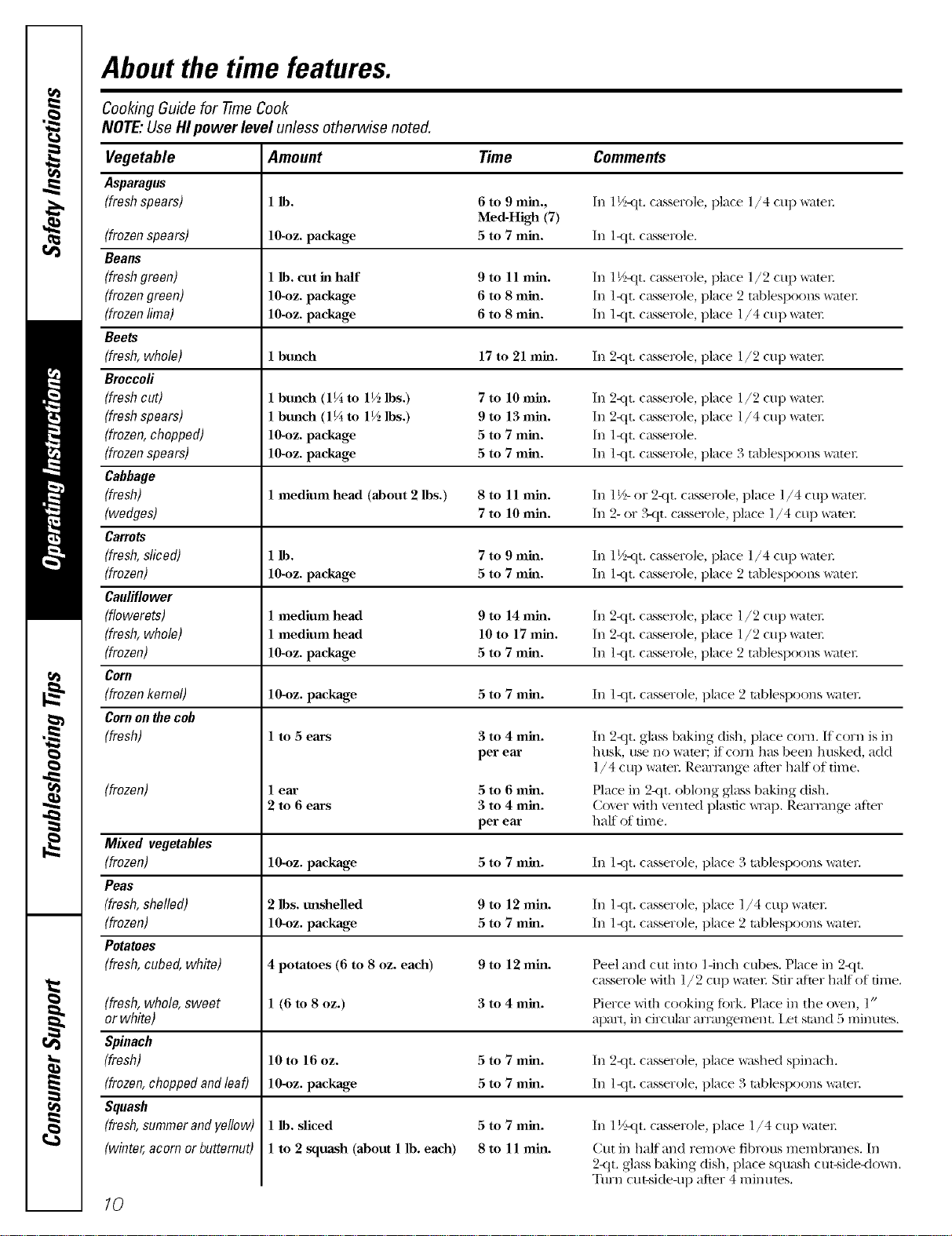
Cooking Guide for -time Cook
NOTE." Use Hl pewer level unless otherwise noted.
Vegetable Amount Time Comments
Asparagus
(fresh spears) 1 lb. 6 to 9 min., In 1½-qt. casserole, place 1/4 cup _ltel:
Med-H_h (7)
(frozen spears) lO-oz, package 5 to 7 mhl. In l-qt. casserole.
Beaus
(fresh green) 1 lb. cut in half 9 to 11 mhl. In 1½-qt. casserole, place l/2 cup _ltel:
(frozengreen) 10-oz. package 6 to 8 mhl. In l<tt. c_sserole, place 2 tablespoons x_ater.
(frozen lima) 10-oz. package 6 to 8 mhl. In l-qt. c_sserole, place l/4 cup _ltel:
Beets
(fresh, whole) 1 bunch 17 to 21 mhl. In 2-qt. casserole, place l/9 cup _ltel:
Broccoli
(fresh cut) 1 bunch (1¼ to 1½ lbs.) 7 to 10 mhl. In 2-qt. casserole, place l/9 cup _ltel:
(fresh spears) 1 bunch (1¼ to 1½ lbs.) 9 to 13 mhl. In 2<tt. casserole, place l/4 cup _ltel:
(frozen, chopped) 10-oz. package 5 to 7 mhl. In l-qt. casserole.
(frozen spears) 10-oz. package 5 to 7 mhl. In l-qt. casserole, place 3 tablespoons _ltel:
Cabbage
(fresh) 1 medium head (about 2 lbs.) 8 to 11 mhl. In 1½-or 2<it. c_sserole, place l/4 cup _ltel:
(wedges) 7 to 10 mhl. In 2- or ?_t t. casserole, place l/4 cup _ltel:
Carrots
(fresh, sliced) 1 lb. 7 to 9 mhl. In 1½-qt. casserole, place l/4 cup _ltel:
(frozen) 10-oz. package 5 to 7 mhl. In l-qt. c_sserole, place 2 tablespoons _tel:
Cauliflower
(flowerets) 1 medium head 9 to 14 mh_. In 2<it. (a_ser_)le, place l/2 cup _tel:
(fresh, whole) 1 medium head 10 to 17 mh_. In 2-qt. casserole, place l/2 cup _te_:
(frozen) 10-oz. package 5 to 7 mh_. In l-qt. casserole, place 2 tablespoons _tel:
Coru
(frozen kernel) 10_z. package 5 to 7 rain. In l-qt. casserole, place 2 tablespoons watel:
Cornon the cob
(fresh) l to 5 ears
(frozen)
3 to 4 min.
per ear
(fresh, whole, sweet
or white)
Spinach
(fresh)
(frozen, choppedand leaf)
Squash
(fresh,summer andyellow)
(winter, acorn or butternut)
lear 5 to 6 rain.
2 to 6 ears 3 to 4 rain.
per ear
In 2-qt. glass baking dish, place com. II corn is in
husk, use no water; if corn has been husked, add
l/4 c up water: Rearrange after half of time.
Place in 2-qt. oblong glass baking dish.
Co\er with vented plastic _p. Rearrange after
half of time.
Mixed vegetables
(frozen) 10_)z. package 5 to 7 rain. In l-qt. casserole, place 3 tablespoons watel:
Peas
(fresh,shelled) 2 lbs. unshelled 9 to 12 rain. In l-qt. casserole, place 1/4 cup water:
(frozen) 10_)z. package 5 to 7 rain. In l-qt. casserole, place 2 tablespoons watel:
Potatoes
(fresh, cubed, white) 4 potatoes (6 to 8 oz. each) 9 to 12 rain. Peel and cut into ] -inch cubes. Place in 2-qt.
casserole with l / 2 cup _tel: Stir after half of time.
1 (6 to 8 oz.) 3 to 4 rain. Pierce with cooking fiirk. Place in the oven, l"
apmt, in circular ar_mgement, l_t stand 5 minutes.
10 to 16 oz. 5 to 7 rain. In 2-qt. casserole, place washed spinach.
10_z. package 5 to 7 min. In l-qt. casserole, place 3 tablespoons water:
10
5 to 7 min.
8 to 11 min.
1 lb. sliced
1 to 2 squash (about 1 lb. each)
In l _/__tt. casserole, place l/4 cup watel:
Cut in half and remoxe fibrous membrmaes. In
2-qt. glass baking dish, place squash cut-side<lo_m.
Turn cut-side-up after 4 minutes.
GEAppliances.com
tI_FF_ST
START
EXPRESSCOOK
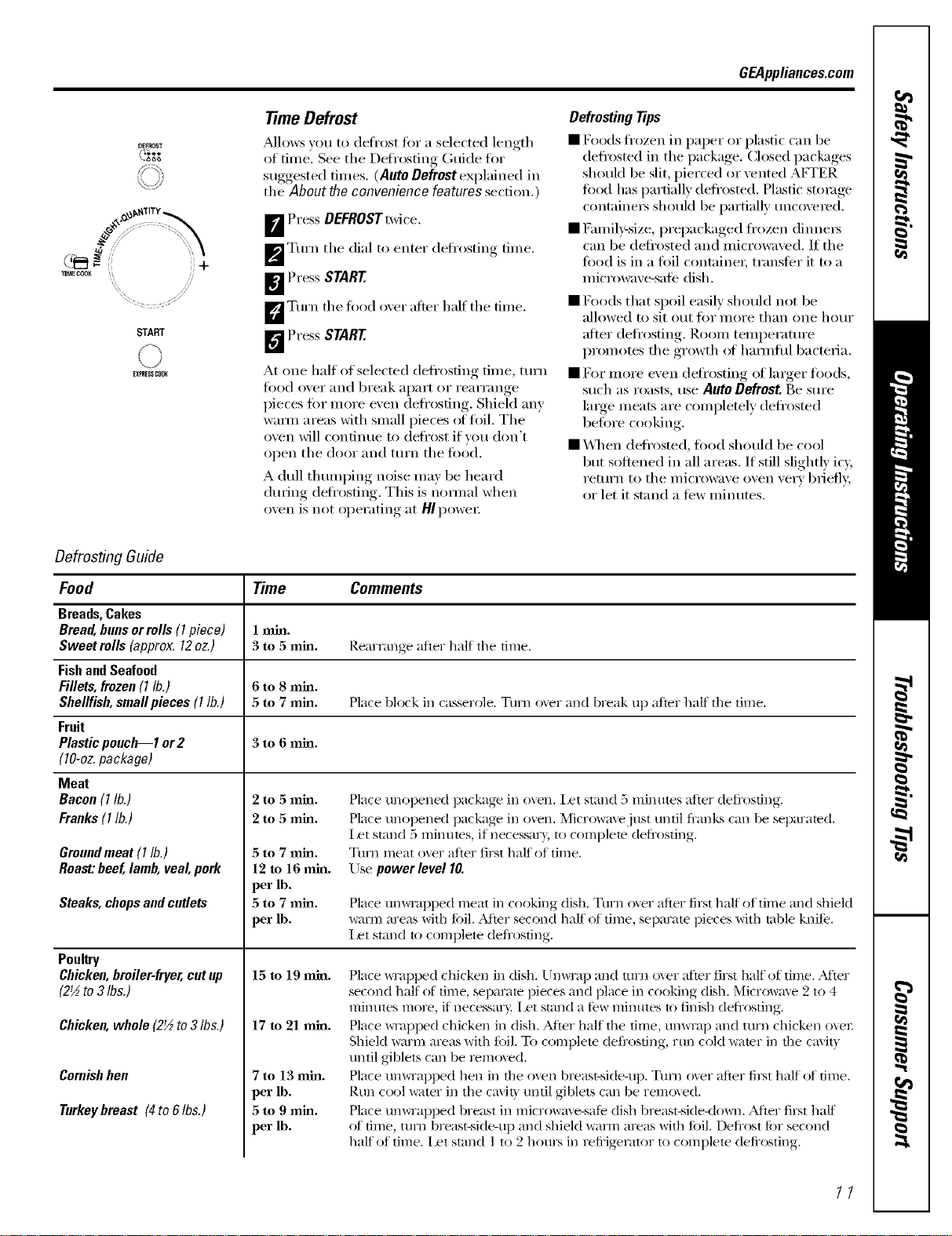
TimeDefrost
_dlows you to defi'ost fin" a selected length
of time. See the Defrosting Guide fl)r
suggested times. (Auto Defrost explained in
the About the convenience features section.)
I_ Press DEFROSTtwice.
_'_ Turn the dial to enter defi'osting time.
I_ Press START
D Turn the toed over alter half the time.
_I'_ Press START
At one half of selected defl'osfing time, turn
fi)od over and break apart or rearrange
pieces t0r more even defl'osting. Shield any
wam_ areas with small pieces of toil. The
oven will continue to deli'ost if you don't
open the door and turn the toed.
A dull tlmmping noise may be heard
during (leti'osting. This is i_omml when
oven is not operating at HI power
Defrosting Tips
• Foods ti'ozen in paper or plastic can be
defl'osted in the package. Closed packages
should be slit, pierced or vented AF1-ER
fi)od has partially defi'osted. Plastic storage
containers should be i)artially uncovered.
• [_Smfily-size, prepackaged fl'ozen dinners
can be deli'osted and microwave& If the
food is in a t0il containe_; transfer it to a
microwave-sate dish.
• Foods that spoil easily should not be
allowed to sit out fin" more than one hour
alter defl'osfing. Room temperature
promoms the growth _ff hmmflfl bacmda.
• For more even deli'osting of larger foods,
such as roasts, use Auto Defrost. Be sure
large meats are completely deflosmd
befi n'e cooking.
• \._lten deti'osted, toed should be cool
but softened in all areas. If still slightly icy,
return to the microwave oven ve_T briefl>
or let it stand a few minutes.
Defrosting Guide
Food Time Comments
Breads,Cakes
Bread,bunsor rolls (I piece) 1 min.
Sweet roils (approx. 12oz.) 3 to 5 rain. Rearrange after half tile time.
FishandSeafood
Fillets,frozen(I lb.) 6 to 8 rain.
Shellfish,smallpieces (I lb.) 5 to 7 rain. Place block in casserole. Turn over and break up after half the time.
Fruit
Plasticpouch--1 or2 3 to 6 rain.
(lO-oz. package)
Meat
Bacon(I lb.)
Franks(1lb.)
Groundmeat (I lb.)
Roast:beef,lamb,veal, pork
Steaks, chopsandcutlets
Poultry
Chicken,broiler-fryer,cut up
(2½to 3 Ibs.)
Chicken,whole (2½to 3Ibs.)
Coroishhen
Turkeybreast (4to 6Ibs.)
2 to 5 ram.
2 to 5 ram.
5 to 7 rain.
12 to 16 mhl.
per lb.
5 to 7 rain.
per lb.
15 to 19 mhl.
17 to 21 mhl.
7to 13 min.
per lb.
5 to 9 rain.
per lb.
Place unopened package in oven. Ilet stand 5 minutes after defl'osting.
Place unopened package in o_en. Microwave just until fl'anks can be separated.
Iet stand 5 rain utes, if necessm3, to complete defl'osting.
Turn meat over after first half of time.
Use power level I0.
Place tmwmpped meat in cooking dish. Turn oxer after first half of time and shield
_r_]_ areas with fi)il..Mter second half of time, separate pieces with table knife.
l_t stand to complete defl_osting.
Place *_l_pped chicken in dish. Um_iap and turn oxer after first half of time. ,Mter
second half of time, separate pieces and place in cooking dish. Micro*_me 2 to 4
minutes more, if necessar\. I/et stand a few minutes to finish defl'osting.
Place _wapped chicken in dish. Alier half the time, unwrap and turn chicken eve1:
Shiekl warm areas with fi)il. To complete defl'osting, run cold water in the cmit\
until giblets can be remoxed.
Place um_Tapped hen in the oven breast-side-up. Turn over after filet half of time.
Rtm cool water in the ca\it) tmtil giblets can be removed.
Place umviapped breast in microwm'e-safe dish breast-side<lo_vll. _Mier first half
of time, tnm breast-side-up and shield wa*ln areas with fi)il. Defl'ost fi)r second
half of time. l_t stand l to 2 hours in refi'ig-emtor to complete defi'osting.
11
About the time features.
START
\S
EXPRESSCOOK
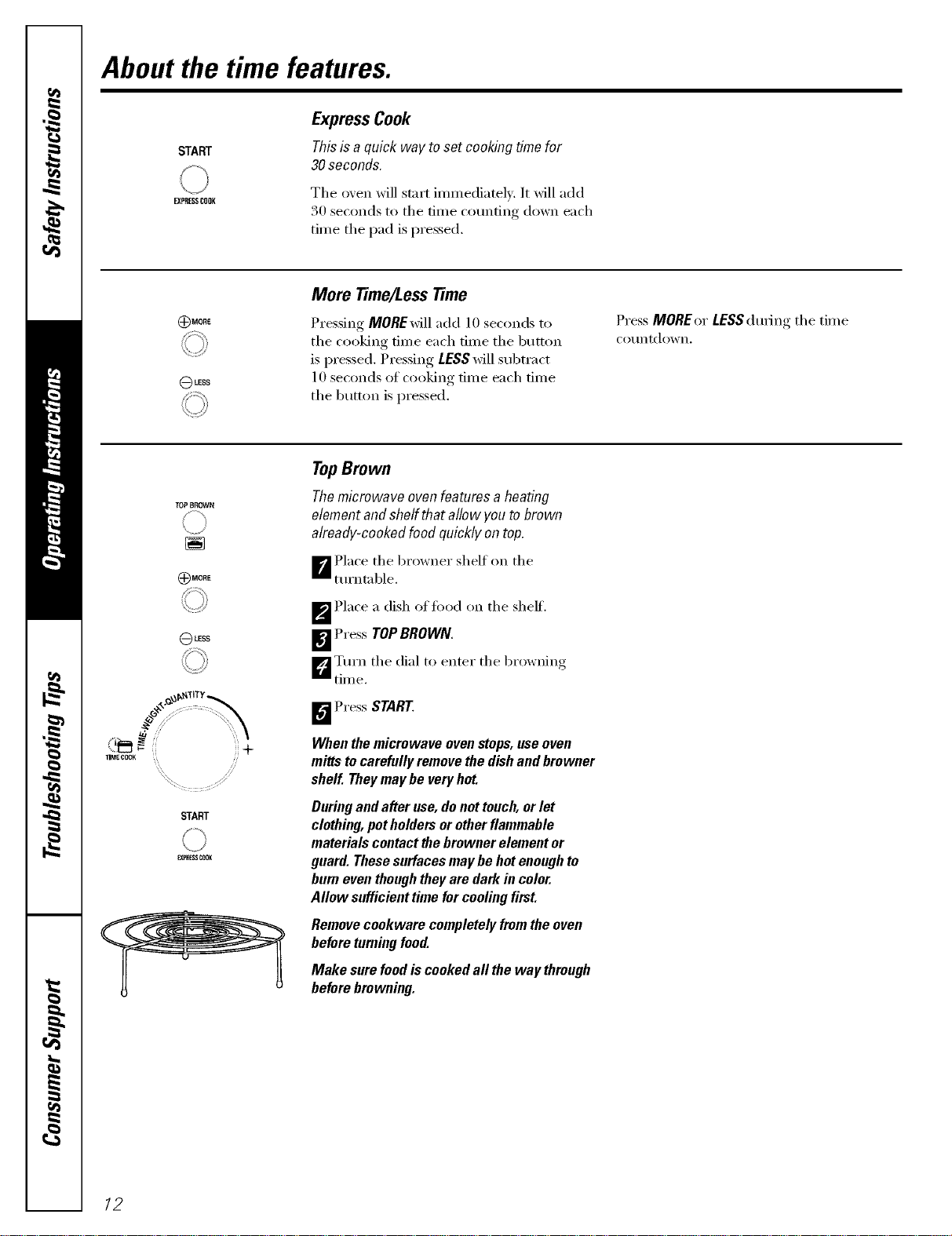
ExpressCook
This is a quick way to set cooking time for
30 seconds.
The oxen will start immediately. It will add
30 seconds to the time counting down each
time the pad is pressed.
I$)MORE
(_LESS
More Time/LessTime
Pressing MOREMll add 10 seconds to
the cooking time each time the button
is pressed. Pressing LESSwill subtract
10 seconds of cooking time each time
the button is pressed.
Press MORE or LESS during the tim e
COtlntdown.
TOPBROWN
)MORE
(_LESS
TIME COOK
START
EX_BESSCOOK
TopBrown
The microwave oven features a heating
element and shelf that allow you to brown
already-cooked food quickly on top.
_ Place the browner shelf on the
turntable.
_p'_ Place a dish offi)od on the sheff.
_ Press TOPBROWN.
D Turn the dial to enter the browning
time.
_"_ Press START
When the microwave oven stops, use oven
mitts to carefully remove the dishand browner
shelf. Theymay be veryhot.
During and after use, donot touch, or let
clothing, pot holders or otherflammable
materials contact lhe browner element or
guard. These surfaces may be hot enough to
burn even thoughthey are dark in color.
Allow sufficient time for cooling first.
Remove cookware completely fromthe oven
before turningfood.
Make sure food is cooked all the way through
before browning.
12
GEAppliances.com
DEFROST
(T-_**
\..,.bbb
f
POWER LEVEL
TOPBROWN
START
FJORESSCOOK
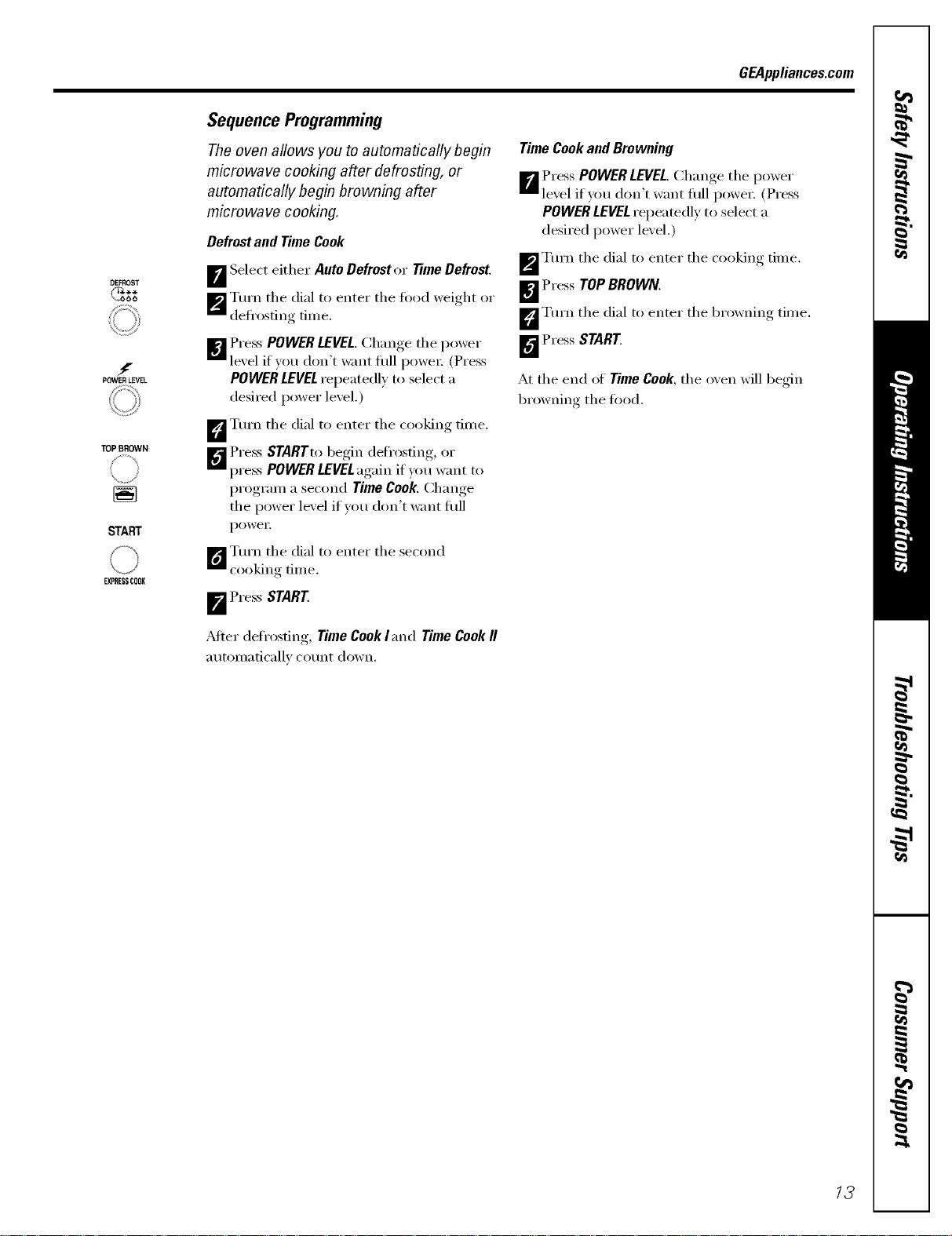
Sequence Programming
The oven allows you to automatically begin
microwave cooking after defrosting, or
automatically begin browning after
microwave cooking.
Defrostand TimeCook
B Select either Ante Defroster TimeDefrost.
_'_ Turn the dial to enter the fi)od weight or
defl'osfing time.
]_1 Press POWER LEVEL,Change the power
lexel if you don't want flfll l)owe_: (Press
POWERLEVELrepeatedly to select a
desired power level.)
_'_ Turn the dial to enter the cooking time.
_'_ Press STARTtobegin defl'osting, or
press POWER LEVELagain if you want to
program a second Time Cook. Change
the power level if you don't want flfll
poweI:
[]Turn the dial to enter the second
cooking time.
i Press START
_dter defrosting, Time Cook land Time Cookfl
automatically count down.
Time Cookand Browning
B Press POWER LEVEL.Change the power
lexel if you don't want flfll l)owe_: (Press
POWER LEVELrepeamdly to select a
desired power level.)
_'_ Tm'n the dial to enter the cooking trine,
B Press TOP BROWN.
D Turn the dial to enter the browning time.
_'_ Press START.
At the end of Time Cook, the oxen will begin
browning the fi)od.
/3
About the convenience features.
MORE
LESS
Use only with prepackaged
microwave popcorn weighing
1.75to 3.5ounces.
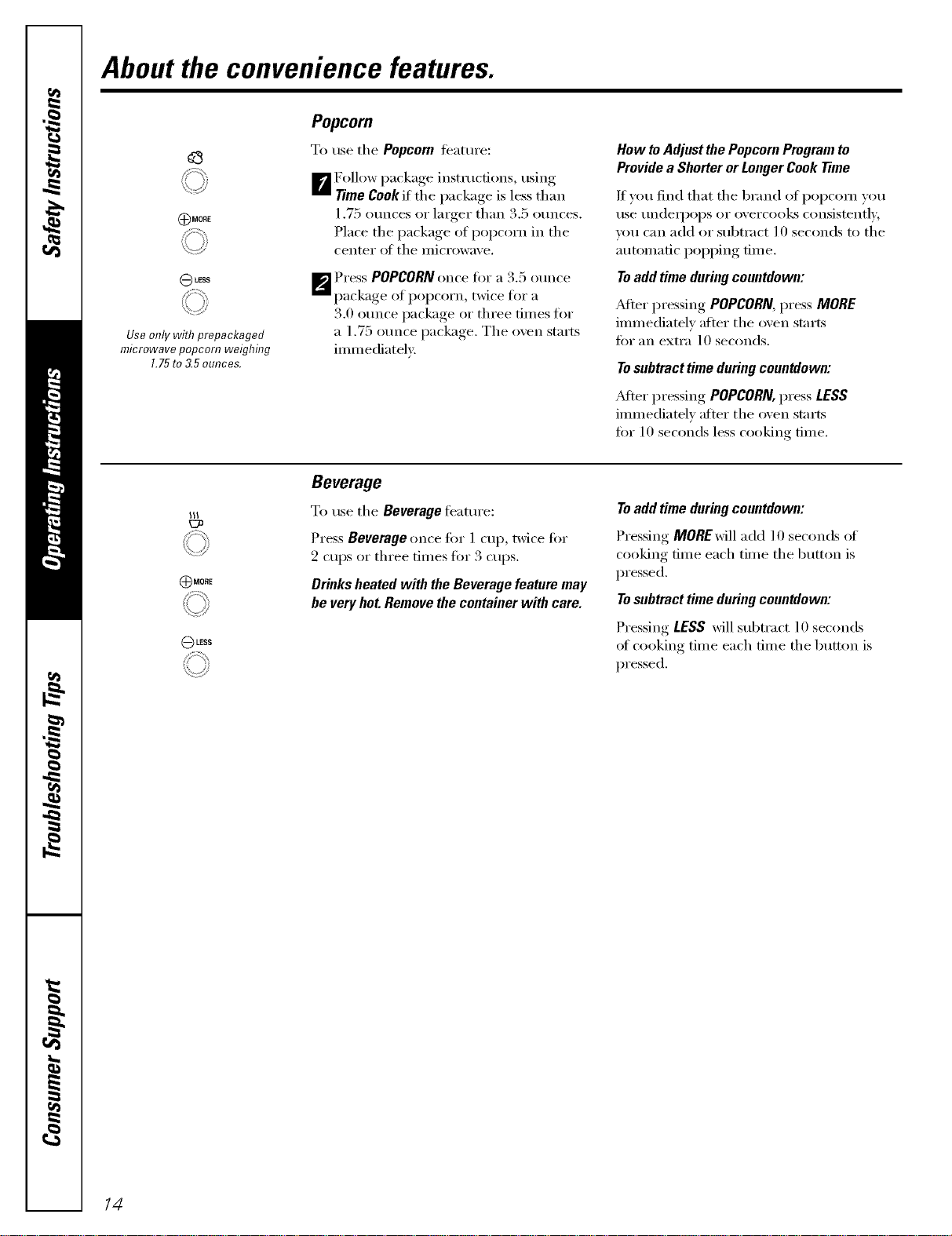
Popcorn
To use tile Popcorn teature:
Follow I)acka°e_ instructions, using
[]Time Cook if the package is less than
1.75 ounces or larger than 3.5 ounces.
Place the package of popcorn in the
center ()I tile illici'()wave.
_'_ PI'ess POPCORNonce fin" a 3,5 ounce
package of popcorn, twice for a
3.0 ounce package or three dines for
a 1.75 ounce package. The o',en starts
immediateh'.
How toAdjust the Popcorn Program to
Provide a Shorter or Longer Cook Time
If you lind that tile 1)rand oI popcorn you
use undell)ops or overcooks consistently,
um can add or subtract 10 seconds to the
atmnnatic poi)i)ing time.
Toadd time during countdown:
_dter I)ressing, POPCORN,press MORE
immediately after tile oven starts
tot an extra 10 seconds.
Tosubtract time during countdown:
_dter pressing POPCORN,press LESS
immediatel)' after the oven starts
fin" 10 seconds less cooking time,
(37_
MORE
LESS
Beverage
To use the Beverage teature:
Press Beverage once tin" 1 cup, twice tot
2 cups or three times tor 3 cups.
Drinks heated with the Beverage feature may
be very hot.Remove the container with care.
Toadd time during countdown:
Pressing MOREwiII add 10 seconds of
cooking time each time tile button is
pressed.
Tosubtract time during countdown:
Pressing LESS will subtract 10 seconds
ot cooking time each time tile button is
pressed.
14
GEAppliances.com
AU_OCOOK
L,I_ ; +
_ME COOK
START
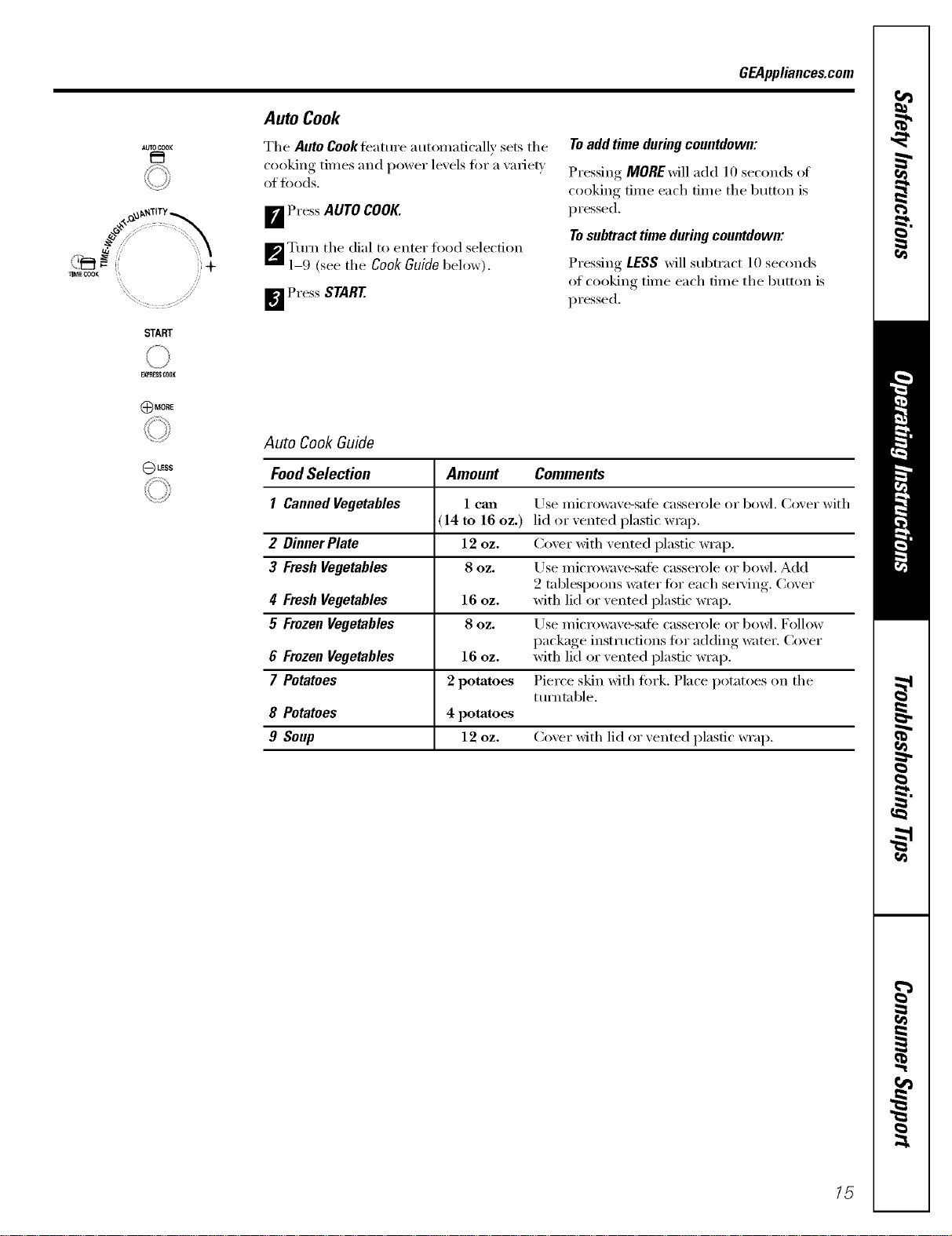
Auto Cook
The AutoCookteature automatically sets the
cooking times and power lexels fi)r a xafie_
of fi)ods.
FJ Press AUTOCOOK.
_'J Turn the dial to enter food selection
1-9 (see the CookGuidebelow).
_ Press START
Toadd time during countdown:
Pressing MOREwiII add 10 seconds of
cooking time each time the button is
pressed.
Tosubtract time during countdown:
Pressing LESS will subtract 10 seconds
of cooking time each time the button is
pressed.
LESS
Auto Cook Guide
FoodSelection
I CannedVegetables
2 DinnerPlate
3 FreshVegetables
4 FreshVegetables
5 FrozenVegetables
6 FrozenVegetables
7 Potatoes
8 Potatoes
9 Soup
Amount
1 call
14 to 16 oz.)
12 oz.
80Zo
16 oz.
8 OZ.
16 OZ.
2 potatoes
4 potatoes
12 oz.
Comments
Use microwave-sate casserole or bowl. Cover with
lid or vented plastic wrap.
Cover with vented plastic wrap.
Use microwave-sate casserole or bowl. Add
2 tablespoons water fi)r each se_Mng. Cover
with lid or vented plastic wrap.
Use microwave-sale casserole or bowl. Follow
package instructions lot adding water. Cover
with lkl or vented plastic wrap,
Pierce skin with fi)rk. Place potatoes on the
ttu'ntable.
Coxer with lid or xented plastic wrap.
15
About the convenience features.
DEFROST
i:+
START
PIPIIESS CI?rOK
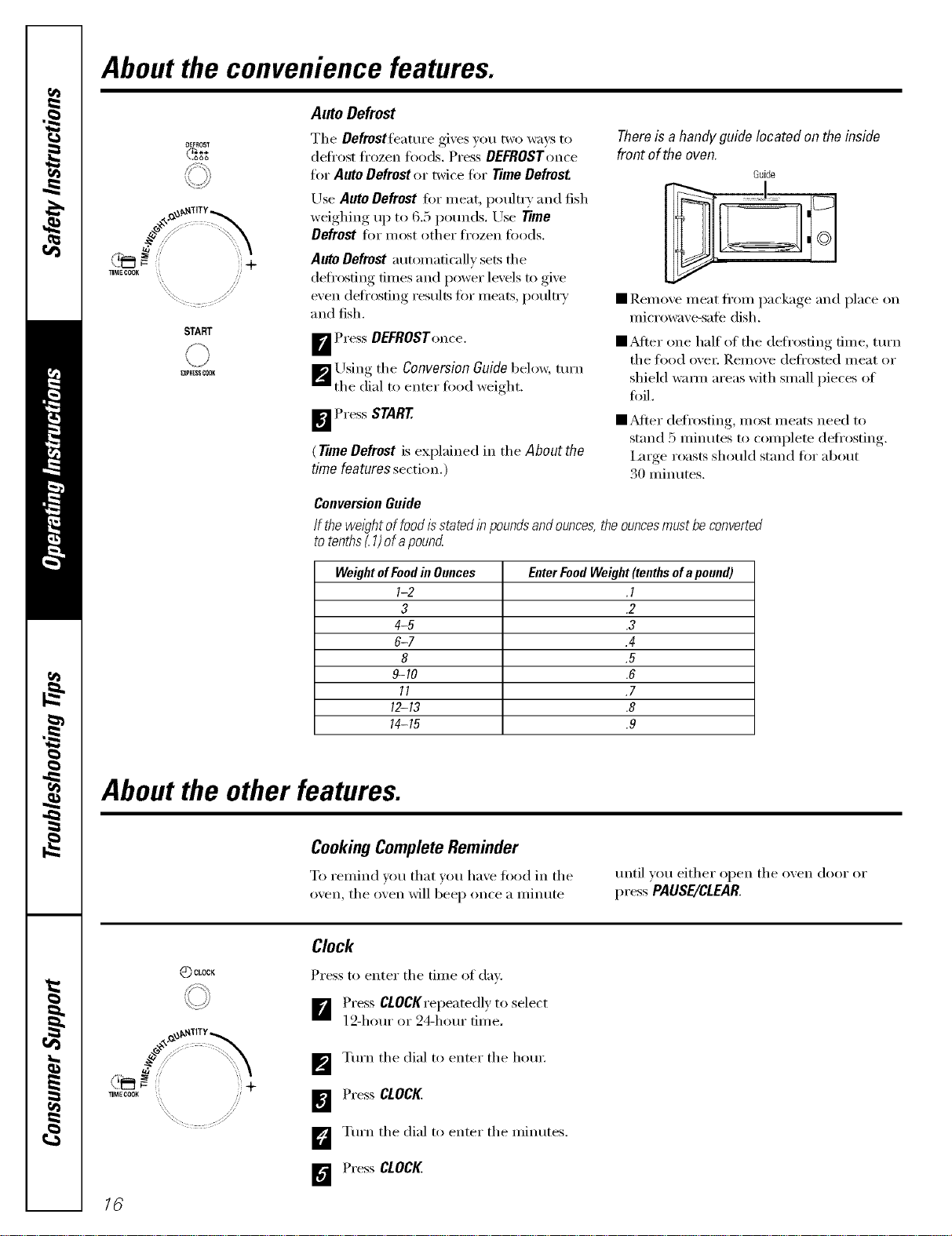
Auto Defrost
The Defrostfeamre gives you two ways to
defix)st frozen foods. Press DEFROSTome
for Auto Defrost or twice for Time Defrost.
Use Auto Defrost for meat, poultry and fish
weighing up to 6.5 po/mds. Use Time
Defrost for most other fl'ozen leeds.
Auto Defrost automatically sets tile
deli'osting times and power levels to give
even defl'osting results ti)r meats, pouln'y
and fish.
B Press DEFROSTonce.
_ ILrsing tile Conversion Guide below, turn
tile (iial to enter food weight.
_ Press START.
(TimeDefrost is explained in the About the
time features section.)
There is a handy guide located on the inside
front of the oven.
Guide
• Remove meat fl'om package and place on
microwa\'e-safe dish.
• Mter one half of the defi'osting time, turn
tile ti)o(l over. Relnove deli'osted meat or
shieM warn/areas with small pieces of
foil.
• _Mter defrosting, most meats need to
stand 5 minutes to complete deti'osting.
Imge roasts should stand fin" about
30 minutes.
ConversionGuide
If the wel_Thtof food isstated in poundsand ounces,the ouncesmust be converted
to tenths_1)of apound
WeightofFoodin Ounces EnterFoodWeight(tenthsofapound)
I-2 .I
3 .2
4-5 .3
6-7 .4
8 .5
9-10 .6
11 .7
12-13 .8
14-15 .9
About the other features.
CookingCompleteReminder
To remind you that xou ha_e food in tile
oxen, tile oxen will beep once a minute
tlnti] VOtl either ol)en tile o_en doc, I" oi"
press PAUSE/CLEAR
_) CLOCK
16
Clock
Press to enter tile tim e of day.
B Press CtOCKrepeatedly to select
12-hom" or 24-hem" time.
] Tm'n tile dial to enter tile horn:
Press CLOCK
D Tm'n tile dial to enter tile minutes.
Press CLOCK
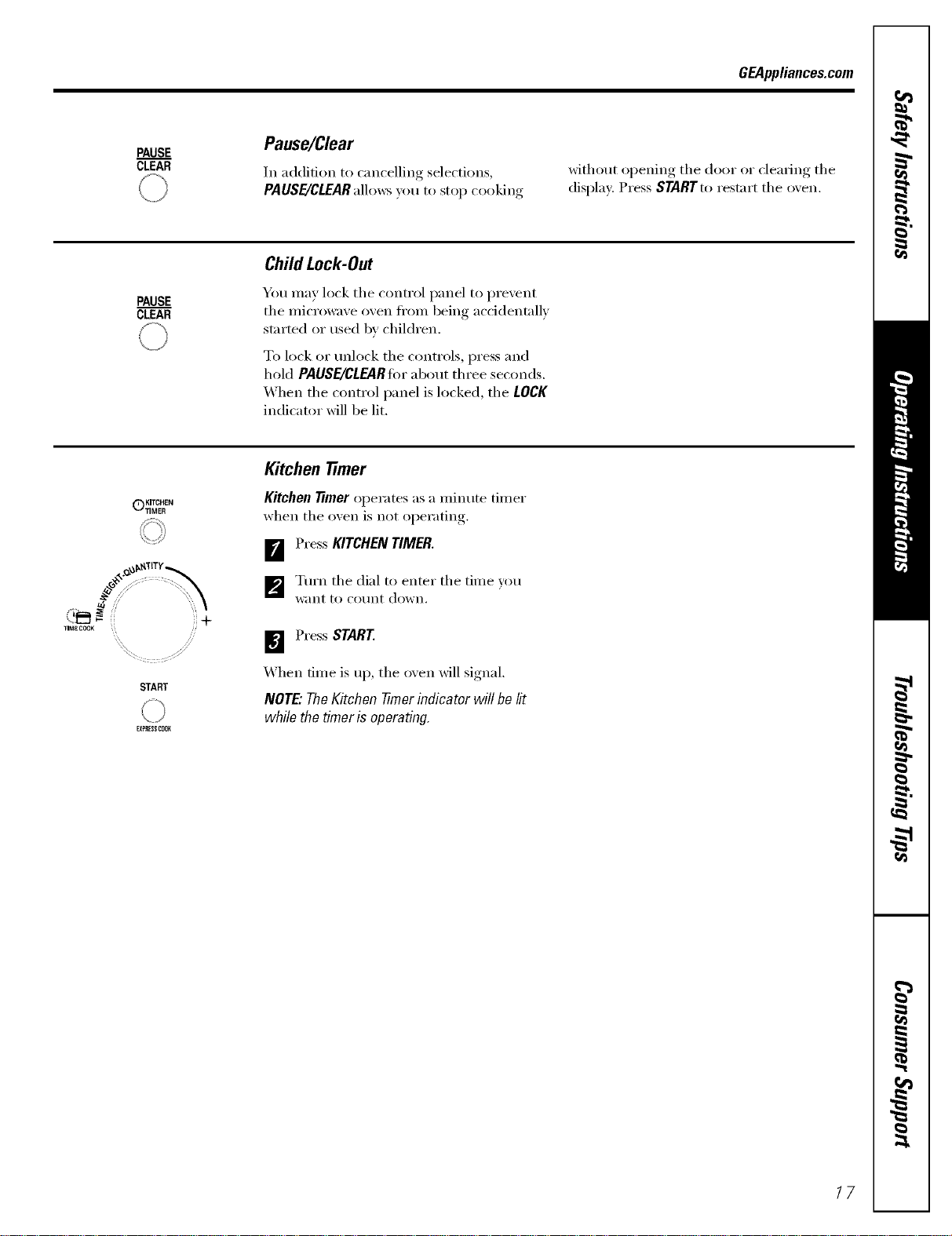
GEAppliances.com
PAUSE
CLEAR
Pause/Clear
In addition to cancelling selections,
PAUSE/CLEAR allows you to stop cooking
without oi)ening, the door or clearing the
display. Press STARTto restart the oxen.
PAUSE
CLEAR
Child Lock-Out
You may lock the control panel to prment
the microwa',e o',en fl'om being accidentall)
started or used b_ children.
To lock or mflock the controls, press and
hold PAUSE/CLEARfin"about three seconds.
When the control panel is locked, the LOCK
indicator will be lit.
KITCHEN
C)TIMER
,I"M_J-.... +
START
FXF_ESSCO_
Kitchen 77mer
Kitchen 77mer operates as a minute timer
when the oxen is not oi)erating,.
_r_ Press KITCHENTIMER.
] Turn the dial to enter the time you
want to COtlnt down.
Press START
X4hen time is up, the oxen will signal.
NOTE."TheKitchenTimerindicator will be lit
while thetimer isoperating.
17
Microwave terms.
Term
Arcing
Covering
Shielding
StandingTime
Venting
Definition
Arcing is the microwave tem_ fin" sparks in the oven. Arcing is caused by:
• metal or fifil touching the side of the oven,
• fifil that is not molded to fi)od (Ul)turned edges act like antennas),
• metal such as twist-ties, poultxT i)ins , gold-rimmed dishes,
• recycled paper rowels containing small metal pieces,
Covex_ hold in moisture, allow fin" more even heating and reduce cooking time, Venting plastic wrap or
cove_ing with wax paper allo_vs excess steam to escape,
In a regular oven, you shield chicken breasts or baked fi)ods to prevent ovelq)rowning. _4]/ell inicrowaving,
w)u use small st_ips of fifil to shield thin parts, such as the tips of wings and legs on poultry, which would
cook befiwe larger parts.
When you cook with regular ovens, fi)ods such as roasts or cakes are allowed to stand to finish cooking or
to set. Standing time is especially important in microwave cooking. Note that a microwaved cake is not
placed on a cooling rack.
_Mfer covering a dish with plastic wrap, you vent the plastic wrap b)' turning back one corner so excess
stealll can escape.
/8
Careand cleaningofthemicrowave oven. GEAppliances.com
Helpful Hints
An occasional thorough wiping with a solution ot baking soda and water keeps
tile inside fl'esh.
Unplug the cord before cleaning any part of this oven.
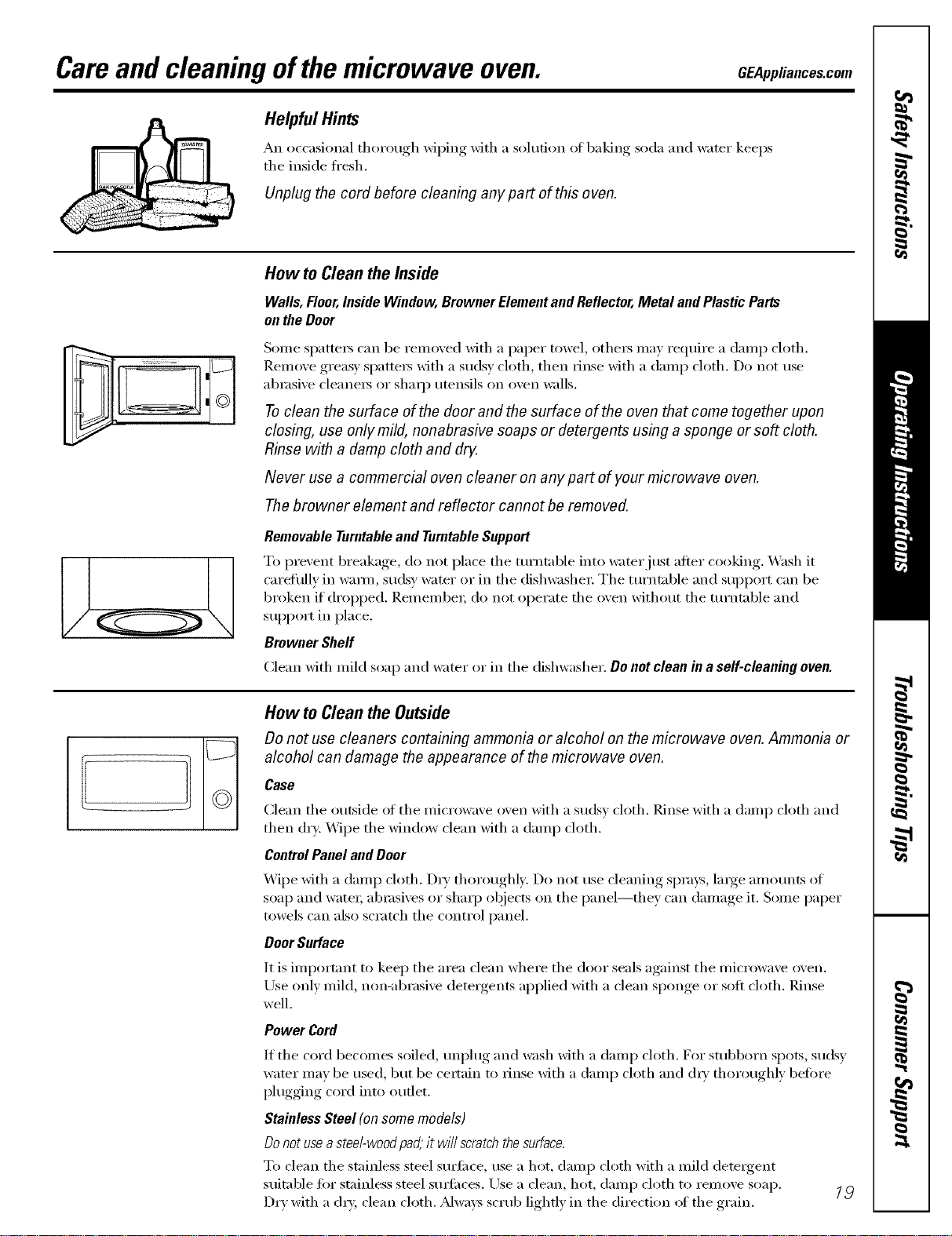
How to Cleanthe Inside
Walls,Floor,InsideWindow,BrownerElementandReflector,Metal andPlasticParts
ontheDoor
J
_©
Some spattex_ can be removed with a paper towel, othex_ may require a damp cloth.
Renlove greas)' spattex_ with a sudsy cloth, then rinse with a damp cloth. Do not use
abrasive cleanex_ or shaq) umnsils on oven walls.
Toclean the surface of the door and the surface of the oven that come together upon
closing, use only mild, nonabrasive soaps or detergents using a sponge or soft cloth.
Rinse with a damp cloth and dry.
Never use a commercial oven cleaner on any part of your microwave oven.
Thebrowner element and reflector cannot be removed.
Removable Turntableand Turntable Support
To prevent breakage, do not place tile turntable into water just after cooking. X._ash it
carefully in waHn, sudsy water or in tile dishwashex: Tile turntable and support can be
broken if dropped. Remembex; do not operate tile oven without tile turntable and
support in place.
Browner Shelf
Clean with mild soap and water or in tile dishwasher. Do not clean in a self-cleaning oven.
How to Cleanthe Outside
Do not use cleaners containing ammonia or alcohol on the microwave oven. Ammonia or
alcohol can damage the appearance of the microwave oven.
Case
Clean tile outside of tile microwave oven with a sudsy cloth. Rinse with a damp cloth and
then dry. Wipe tile window clean with a damp cloth.
ControlPanel and Door
Wipe with a damp cloth. D D' thoroughly. Do not use cleaning sprays, large amounts of
soap and watex; abrasives or shaq) objects on the panel--they can damage it. Some paper
towels can also scratch the control panel.
Door Surface
It is important to kee I) tile area clean where tile door seals against tile microwave oven.
Use only mild, non-abrasive detergents applied with a clean sponge or soft cloth. Rinse
well.
Power Cord
If tile cord becomes soiled, unplug and wash with a damp cloth. For stubborn spots, sudsy
wamr may be used, but be cextain to rinse with a damp cloth and (hT thoroughly befi)re
plugging cord into outlet.
Stainless Steel (on some models)
Do notuseastee/-wood pad;it wi// scratch thesurface.
To cleaxl tile stainless steel s/xx'filce, rise a hot, dan/p cloth with a xllild detergent
suitable fin" st;finless steel surfi_ces. Use a clean, hot, damp cloth to remoxe soap. 1_
Dry with a d U, clean cloth. Mways scrub lightly in the direction _ff the grain.
Beforeyoucall forservice...
Troubleshooting -tips
Save time and money/. Review the chart below and
you may not need to carl for service.
Problem Possible Causes What To Do
Oven will not start A fuse in your home may be * Replace tuse or reset circuit breaker.
blown or the circuit breaker
tripped.
Power surge. • Unplug tile microwave oven, then plug it back in.
Plug not fully haserted into * Make sure tile g-prong l)lug on tile oven is hilly inserted
wall outlet, into wall outlet.
Door not securely dosed. * Open tile door and close securely:
Controlpanel lighted, yet Door not securely closed. • Open tile door and close securelx:
oven will not start
STARTpad not pressed after • Press START
entering cooking selection.
/mother selection entered • Press PAUSE/CLEAR
already ha oven mad PAUSE/CLEAR
pad not pressed to cmacel it.
PAUSE/CLEARwas pressed * Press START
acddentally.
Food weight not entered after • Make sure wm have entered todd weight alter selecting
selecting AUTO DEFROST AUTO DEFROST
Food type not entered after • Make sure you have entered a todd t'5'pe.
pressing AUTO COOK
Microwaveovencontrols
will notwork
The control has been locked.
(When the control pmad is
locked, the !OCKhadicator
will be fit.)
" Press and hold PAUSE/CLEARtor about three
seconds to unlock tile control.
Things That Are Normal With YourMicrowave Oven
• Steam or \:q)or escaping fl'om around
tile door.
• I,ight reflection around door or
oilier case.
• Dimming oven light and change in
the blower sound at power levels other
than high.
• Dull thumping sound while oven is
operating.
• TV/radio interlerence might be noticed
while using the microwave. Similar to the
interference caused by other small
appliances, it does not indicate a problem
with tile microwave. Plug tile microwave
into a different electrical drcuit, move tile
radio or TV as tin" away fl'om tile microwave
as possible, or check the position and
signal of the TV/radio antenna.
2O
GE Service Protection Plus 'M
GE, a name recognized worldwide %r quality' and dependability, oflers y'ou
Service Protection Plus'_'--comprehensive protection on all y'our appliances--
No Matter What Brand!
Benefits Include:
• Backed by GE
• All brmads covered
• Unlimited service calls
• All parts mad labor costs included
• No out-of-pocket expenses
• No hidden deductibles
• One 800 number to call
We71CoverAnyAppliance.
Anywhere. Anytime.*
You will be completely satisfied with our service protection or you ma} request ,your inone,_ back
on the remaining value of 3our contract. No questions asked. It's that simple.
Protect yore" reffigerat(m dishwasher; washer and dryer; range, TV, VCR and much more--rely brand!
Plus there's no extra charge tot eulergency ser;'ice and low inonthly financing is available. Even icelnaker
coverage and tood spoilage protection is ottered. You can rest eas> knowing that all your valuable
household products are protected against expensive repairs.
Place your confidence in (;E and call us in the IU.S. toll-free at _tllt._Z_.ZZZ_
foY UlOI'e inloi'u/ation.
"*Allbrands cmered, up to 2(}years old. in the contin< nlal I_.S.
_.. (2."._22.............
Please place in envelope and mail to:
General Electric Company
Warranty Registration Department
EO. Box 32150
Louisville, KY 40232-2150
21
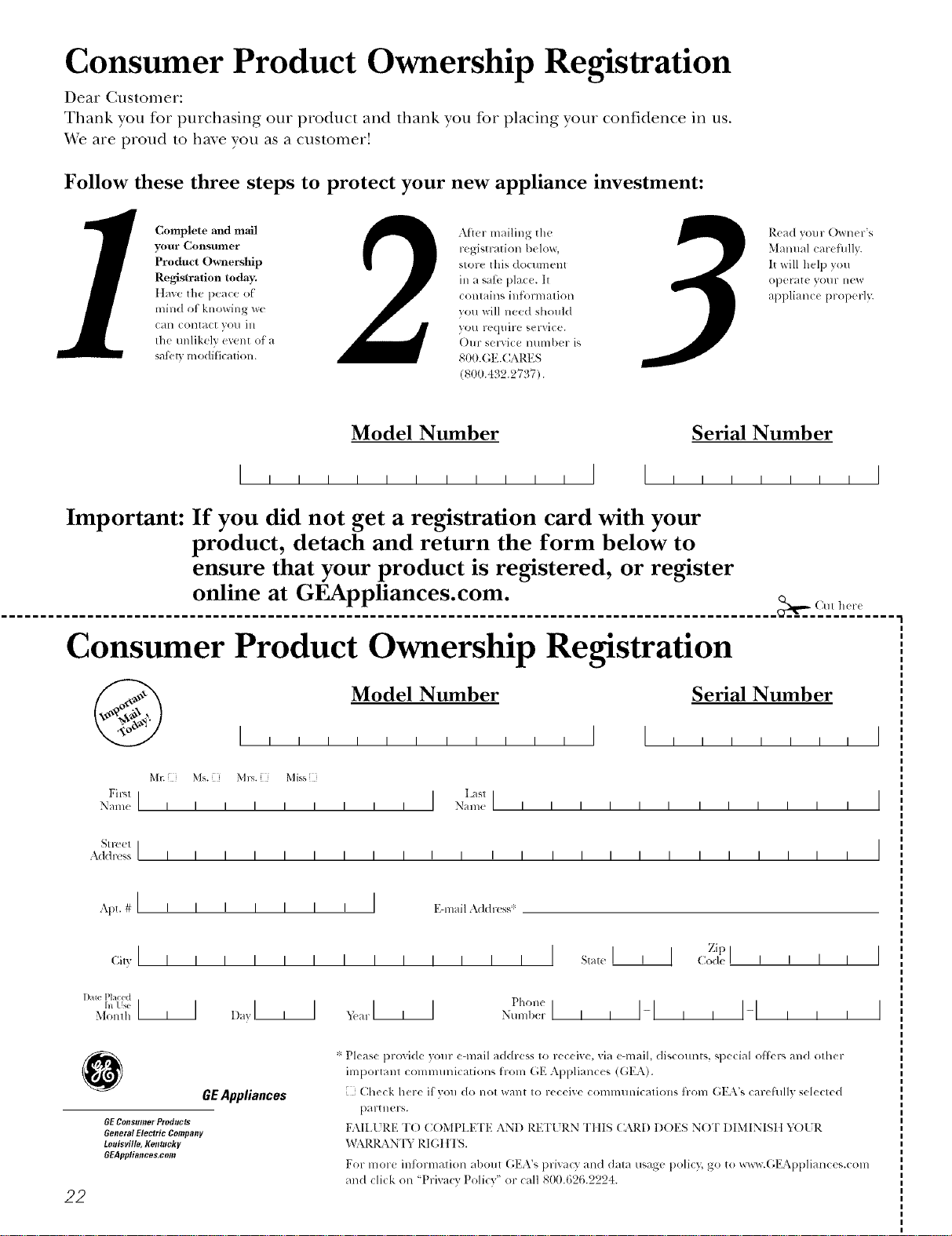
Consumer Product Ownership Registration
Dear Customer:
Thank you for purchasing our product and thank you for placing your confidence in us.
_A/eare proud to ha_e you as a customer!
Follow these three steps to protect your new appliance investment:
Complete mid mail
your Consumer
Product Ownership
Registration today.
tlav,v the p,vac,v of
mind of knowing w(
call colltact VOl/ ill
tile tmlikely exent of a
satbly modification.
Atter mailing tile
registration below,
store this document
in a saib place. It
contains inlormation
you will need should
you require service.
Our selwice ntnnber is
800.GE.CARES
(800.432.2737).
Read your Owner's
Manual carethllv.
It will help you
operate yol/r lle',_
appliance properly.
Model Number Serial Number
, , , , , I I , , , , , , , I
Important: If you did not get a registration card with your
product, detach and return the form below to
ensure that your product is registered, or register
online at GEAppliances.com.
................................................................................................... _,,._ (M111_1-_
Consumer Product Ownership Registration
Model Number Serial Number
I,,,,,, , , , , , I I , , , , , , I
MI: Ms. M*>,. Mix_,
Fir',l I I Lasll
Name I I I I I I I I I Nain(! I I I I I I I I I I I I
_1 r( (!1 I
Addr(ss I I I I I I I I I I I I I I I I I I I I I I I I
Apt. # I i i
(;i,,I I I
l )ale Placed
hi Use ]1]
Monlh
I I I I I I EqnailAddress*
I I I I
D_,yl , I
_,i!a r I I I Phon(
Nulnb(!r I i I
Zip I
I ] Code I I I I
I-I,, I-I , , ,
I
I
22
GEAppliances
GEConsumerProducts
General Electric Company
Louisville, Kentucky
GEAppliances,com
* Please provide your e-mail address to receive, via eqnail, discounts, special ottk,r _,and other
important communications from GE Appliances (GEA).
Check here if vou do not want to receixe commmlications ti-om GEA's careflflly selected
partllers.
FAIL[ RE TO COMPIA{TE AND RE'F[ RN TttIS CARD DOES NOT DIMINISII 5_)1 R
WARRAN'[T RI(;IITS.
For more inli_rmation about GEA's privacy and data usage polic 5 go to x_a_w.Gl_2Al)l)liances.com
and click on "Privacy Policy" or call 800.626.2224.
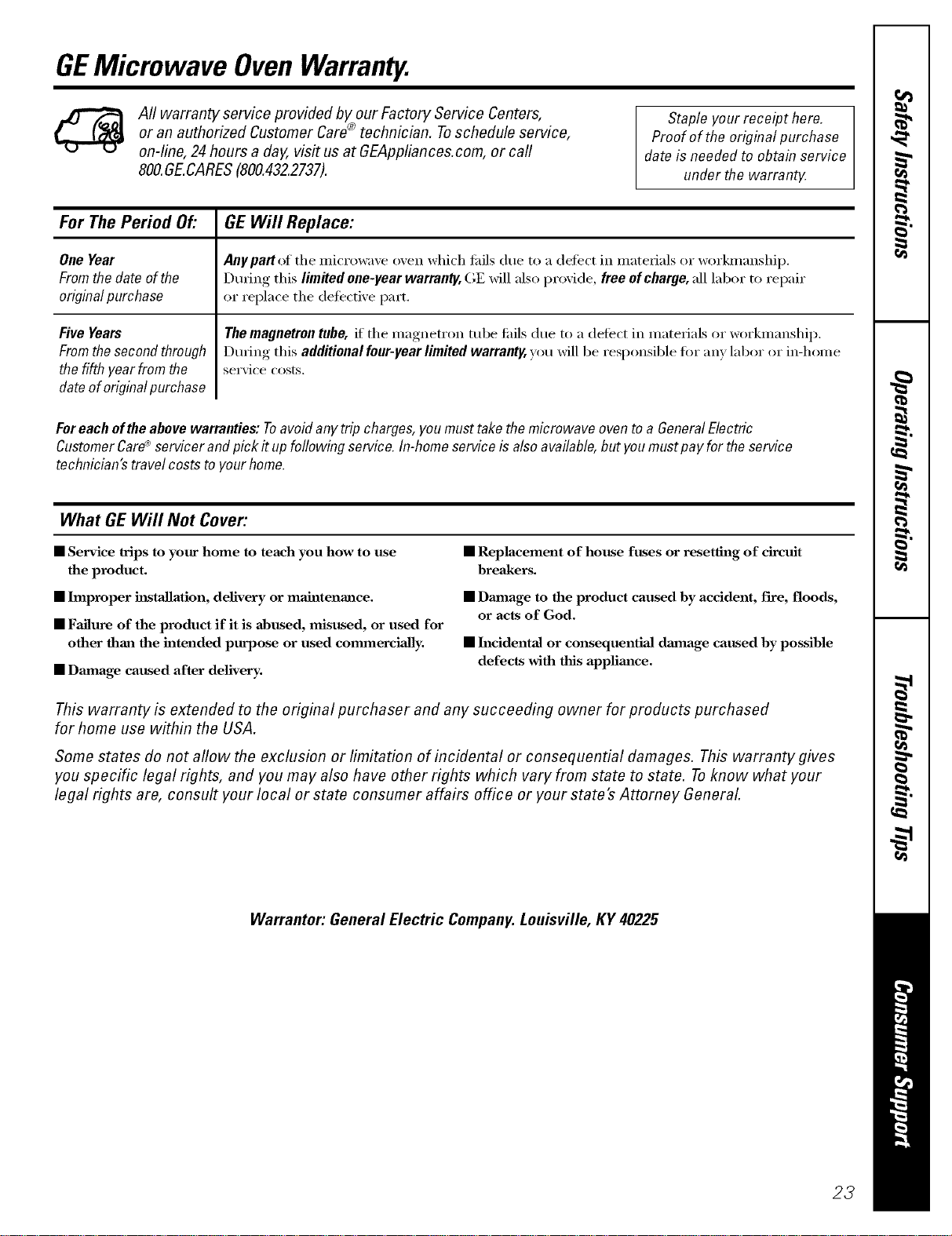
GEMicrowave OvenWarranty.
Aft warranty service provided by our Factory Service Centers,
or an authorized Customer Care® technician. Toschedule service,
on-line, 24 hours a day, vis# us at GEAppliances.com, or carl
800.GE.CARES(800.432.2737).
Staple your receipt here.
Proofof the orig&al purchase
date is needed to obtain service
under the warrantF
For The Period Of."
OneYear
Fromthedate ofthe
originalpurchase
Five Years
From the second through
the fifth yearfrom the
date of original purchase
GEWill Replace:
Any part ,,:,fthe microwave oven which flfils due to a defect in materials or workmanship,
During this limited one-year warranty, GE will also provide, free of charge, all labor to repair
or replace the defecti\'e part,
The magnetron tube, if the magnetron tube tifils due to a (lefect in materials or workmanship,
During this additional four-year limited warranty, you will be responsible fin" any labor or in-home
service costs.
Foreachofthe abovewarranties: Toavoidanytrip charges,you musttake themicrowave oventoa GeneralElectric
CustomerCared'servicerand pick it upfollowing service. In-homeserviceis alsoavailable,but youmustpayfor theservice
technician'stravelcoststoyourhome.
What GEWill Not Cover:
• Service trips to your home to teach you how to use
the product.
• hnproper h_staJlation, delivery or maintenance.
• Failure of the product if it is abused, misttsed, or used for
other than the intended purpose or used commerciaJly.
• Dmnage caused after delivery.
• Replacement of house fuses or resetting of circuit
breakers.
• Damage to the product caused by accident, fire, floods,
or acts of God.
• Incidental or consequentiaJ damaage caused by possible
defects with this applimlce.
This warranty is extended to the original purchaser and any succeeding owner for products purchased
for home use within the USA.
Some states do not aflow the exclusion or limitation of incidental or consequential damages. This warranty gives
you specific legal rights, and you may also have other rights which vary from state to state. Toknow what your
legal rights are, consult your local or state consumer affairs office or your state's Attorney General
Warrantor: General Electric Company. Louisville, KY 40225
23
ConsumerSupport.
gEApplbnces Website GEAppliances.com
Have a question or need assistance with your appliance? Try the GE Appliances X4'ebsite 24 hom_ a day,
any day of the year'. For greater convenience and faster service, you can now download Owner's Manuals,
order parts, catalogs, or even schedule service ondine. Y_u can also "_sk Our Team of EN)erts .....
your questions, and so much more...
ScheduleService
GEAppliances.com
Expert GE repair se_Mce is onh one step away from xour doo_: Get on-line and schedule your service at
_our comenience 24 hom_ any (la_ of the year! Or call 800.GE.(:ARES (800.432.2737) during nomml
business hou_.
RealLifeDesignStudio GEAppliances.com
GE SUl_ports the Uni\'e_al Design concel)t--products, services and environments that can be used by
people of all ages, sizes and capabilities. We recognize the need to design fin" a wide range of phDical and
mental abilities and impaimmnts. For details of GE's Universal Design applications, including kitchen
design ideas for people with disabilities, check out our Website today. For the hearing impaired, please call
800.TDD.GEAC (800.833.4322).
ExtendedWarranties GEAppliances.com
Purchase a (;E extended warrant_ and learn about special discounts that are axailable while your warranty
is still in effect. You can purchase it on-line an) time, or call 800.626.2224 during nomml business hou_.
GE Consumer Home Serxices will still be there after your warran_ expires.
PartsandAccessories GEAppliances.com
]ndi\iduals qualified to service their own appliances can have parts or accessories sent directh' to their
homes (VISA, MasterCard, and Discover cards are accepted). Order on-line today; 24 hout_ every day or by
phone at 800.626.2002 during nomml business hou_.
Instructions contained in this manual coverprocedures tobe performed by any user. Otherservicing generally
should be referred to qualified service personnel Cautionmust be exercised, since improper servicing may cause
unsafe operation.
ContactUs GEAppliances.com
If you are not satisfied with the service you receive tl"om GE, contact us on our _4'ebsite with all the details
including your phone numbe_; or write to: General Manage_; Customer Relations
GE Appliances, Appliance Park
I,ouisville, KY 40225
RegisterYourAppliance GEAppliances.com
Register your new appfim_ce on-lhle--at your convenience! Timel_ product registration will allow fin _
enhanced communication and prompt service under the terms of_our warranty should the need arise.
You may also mail in the pre-p_inted registration card included in the I)ackin°_ material.
Printed in Korea

