WQ9 B1LUK,
6WM24NIHAS and
WQ70900SXX
W11211074E

2
English REFRIGERATOR USER INSTRUCTIONS ........................................... 3

3
FRENCH DOOR BOTTOM MOUNT REFRIGERATOR
USE AND CARE GUIDE
Table of Contents
REFRIGERATOR SAFETY ..............................................................4
Proper Disposal of Your Old Refrigerator .......................................7
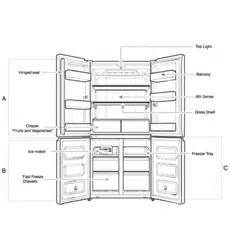
PARTS AND FEATURES ................................................................8
INSTALLATION INSTRUCTIONS ...................................................9
Getting Started ................................................................................. 9
Unpack the Refrigerator ..................................................................9
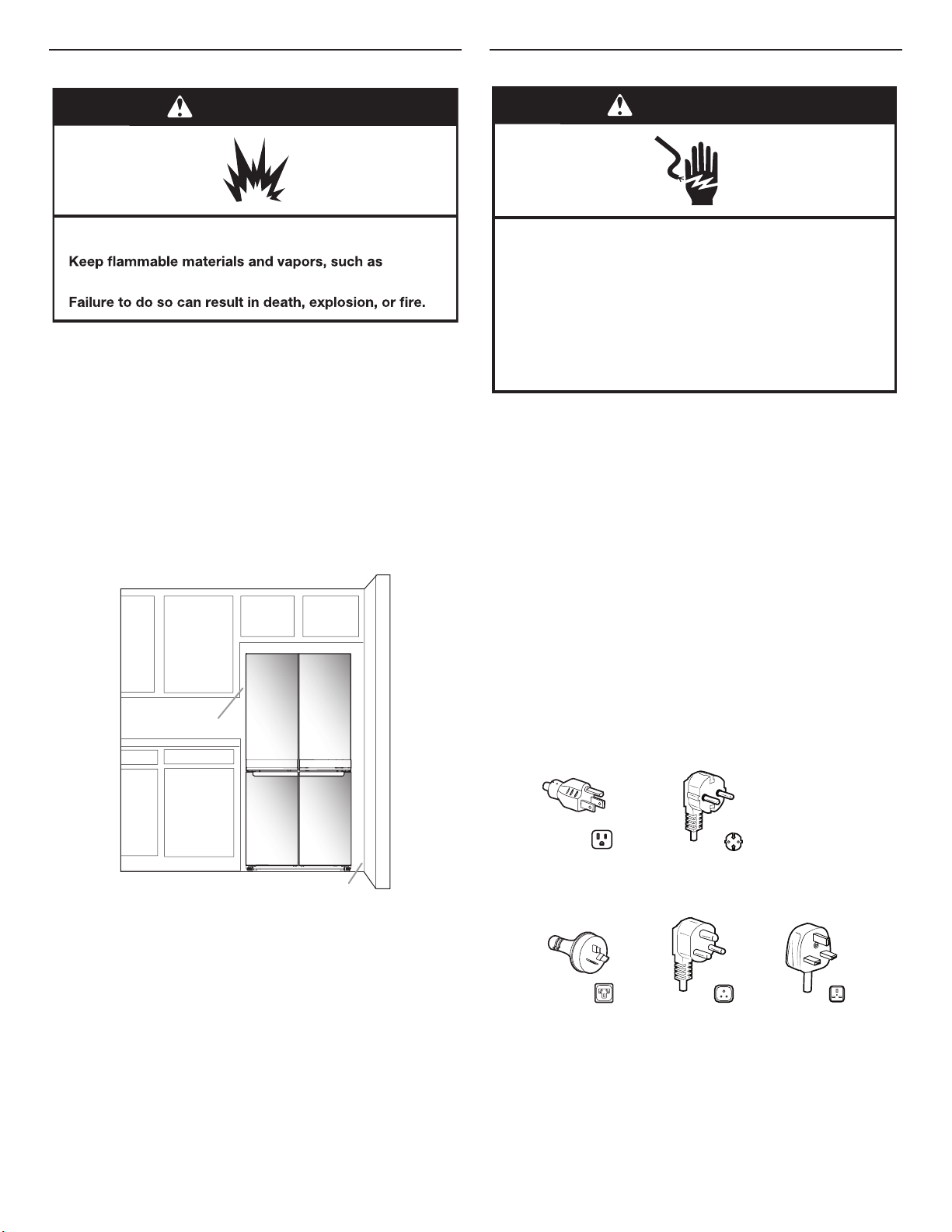
Location Requirements ..................................................................10
Electrical Requirements .................................................................10
Remove and Replace Refrigerator Doors .....................................12
Remove and Replace Freezer/Flexi Freeze Door ..........................14
Refrigerator Levelling .....................................................................15
Using the Controls .........................................................................16
Lighting the Refrigerator ................................................................17
REFRIGERATOR USE ..................................................................18
Opening and Closing Doors ..........................................................18
Food Storage .................................................................................18
SHELVES, BINS AND DRAWERS ................................................19
Freezer Storage Compartments ....................................................20
Audio Reference ............................................................................20
Accessories ....................................................................................20
Assistance or Service ....................................................................20
REFRIGERATOR CARE ...............................................................21
Cleaning .........................................................................................21
Lights ..............................................................................................22
Holiday and Moving Care ..............................................................22
TROUBLESHOOTING ..................................................................23
4
REFRIGERATOR SAFETY
Your safety and the safety of others are very important.
All safety messages will tell you what the potential hazard is, tell you how to reduce the chance of injury, and tell you what can
happen if the instructions are not followed.
We have provided many important safety messages in this manual and on your appliance. Always read and obey all safety
messages.
This is the safety alert symbol.
This symbol alerts you to potential hazards that can kill or hurt you and others.
All safety messages will follow the safety alert symbol and either the word “DANGER” or “WARNING.”
These words mean:
You can be killed or seriously injured if you don't immediately
follow instructions.
You
can be killed or seriously injured if you don't
follow
instructions.
DANGER
WARNING
5
SAFETY INSTRUCTIONS
Before using the appliance, read these safety
instructions. Keep them nearby for future reference.
These instructions and the appliance itself provide
important safety warnings, to be observed at all
times. The manufacturer declines any liability for
failure to observe these safety instructions, for
inappropriate use of the appliance or incorrect
setting of controls.
Very young children (0-3 years) should be kept
away from the appliance. Young children (3-8
years) should be kept away from the appliance
unless continuously supervised. Children from 8
years old and above and persons with reduced
physical, sensory or mental capabilities or lack of
experience and knowledge can use this appliance
only if they are supervised or have been given
instructions on safe use and understand the
hazards involved. Children must not play with the
appliance. Cleaning and user maintenance must
not be carried out by children without supervision.
PERMITTED USE
CAUTION: The appliance is not intended to
be operated by means of an external switching
device, such as a timer, or separate remote
controlled system.
This appliance is intended to be used in
household and similar applications such as: sta
kitchen areas in shops, oces and other working
environments; farm houses; by clients in hotels,
motels, bed & breakfast and other residential
environments.
This appliance is not for professional use. Do
not use the appliance outdoors.
The appliance is designed for operation in places
where the ambient temperature comes within
the following ranges, according to the climatic
class given on the rating plate. The appliance may
not work properly if it is left for a long time at a
temperature outside the specied range.
Climatic Class Amb. T. (°C)
SN: From 10 to 32 °C; N: From 16 to 32 °C
ST: From 16 to 38 °C; T: From 16 to 43 °C
This appliance does not contain CFCs. The
refrigerant circuit contains R600a (HC). Appliances
with Isobutane (R600a): isobutane is a natural gas
without environmental impact, but is ammable.
Therefore, make sure the refrigerant circuit pipes
are not damaged, especially when emptying the
refrigerant circuit.
WARNING: Do not damage the appliance
refrigerant circuit pipes.
WARNING: Keep ventilation openings, in the
appliance enclosure or in the built-in structure,
clear of obstruction.
IMPORTANT TO BE READ AND
OBSERVED
WARNING: Do not use mechanical, electric or
chemical means other than those recommended
by the Manufacturer to speed up the defrost
process.
WARNING: Do not use or place electrical
devices inside the appliance compartments if
they are not of the type expressly authorised by
the Manufacturer.
WARNING: Ice makers and/or water dispensers
not directly connected to the water supply must
be lled with potable water only.
WARNING: Automatic ice-makers and/or water
dispensers must be connected to a water supply
that delivers potable water only, with mains water
pressure between 0.17 and 0.81 MPa (1.7 and
8.1bar).
Do not store explosive substances such as
aerosol cans with a ammable propellant in this
appliance.
Do not swallow the contents (non-toxic) of the
ice packs (provided with some models). Do not
eat ice cubes or ice lollies immediately after taking
them out of the freezer since they may cause cold
burns.
For products designed to use an air lter inside
an accessible fan cover, the lter must always be in
position when the refrigerator is in function.
Do not store glass containers with liquids in the
freezer compartment since they may break. Do
not obstruct the fan (if included) with food items.
After placing the food check that the door of the
compartments closes properly, especially the
freezer door.
Damaged gaskets must be replaced as soon as
possible.
Use the fresh food compartment only for
storing fresh food and the freezer compartment
only for storing frozen food, freezing fresh food
and making ice cubes.
Avoid storing unwrapped food in
direct contact with internal surfaces of
the fresh food or freezer compartments.
Appliances could have special compartments
(Fresh Food Compartment, Zero Degree Box, etc.).
Unless specied in the specic booklet of product,
they can be removed, maintaining equivalent
performances.
INSTALLATION
The appliance must be handled and installed by
two or more persons- risk of injury. Use protective
gloves to unpack and install- risk of cuts.
Installation, including water supply (if any) and
electrical connections, and repairs must be carried
out by a qualied technician. Do not repair or
replace any part of the appliance unless specically
stated in the user manual. Keep children away
from the installation site.
6
After unpacking the appliance, make sure that it has
not been damaged during transport. In the event
of problems, contact the dealer or your nearest
After-sales Service. Once installed, packaging
waste (plastic, styrofoam parts etc.) must be stored
out of reach of children - risk of suocation. The
appliance must be disconnected from the power
supply before any installation operation - risk of
electric shock. During installation, make sure the
appliance does not damage the power cable - risk
of re or electric shock. Only activate the appliance
when the installation has been completed.
Be careful not to damage the oors (e.g. parquet)
when moving the appliance. Install the appliance
on a oor or support strong enough to take its
weight and in a place suitable for its size and use.
Make sure the appliance is not near a heat source
and that the four feet are stable and resting on
the oor, adjusting them as required, and check
that the appliance is perfectly level using a spirit
level. Wait at least two hours before switching the
appliance on, to ensure that the refrigerant circuit
is fully ecient.
To guarantee adequate ventilation, leave a
space on both sides and above the appliance. The
distance between the rear of the appliance and
the wall behind the appliance should be 50mm,
to avoid access to hot surfaces. A reduction of this
space will increase the Energy consumption of
product.
WARNING: To avoid a hazard due to instability,
positioning or xing of the appliance must be done
in accordance with the manufacturer instructions.
It is forbidden to place the refrigerator in such
way that the metal hose of gas stove, metal gas or
water pipes, or electrical wires are in contact with
the refrigerator back wall (condenser coil).
If it is necessary to replace the doors, please
contact the Technical Assistance Center.
ELECTRICAL WARNINGS
It must be possible to disconnect the appliance
from the power supply by unplugging it if plug
is accessible, or by a multi-pole switch installed
upstream of the socket in accordance with the
wiring rules and the appliance must be earthed
in conformity with national electrical safety
standards.
Do not use extension leads, multiple sockets
or adapters. The electrical components must not
be accessible to the user after installation. Do not
use the appliance when you are wet or barefoot.
Do not operate this appliance if it has a damaged
power cable or plug, if it is not working properly,
or if it has been damaged or dropped.
If the supply cord is damaged, it must be replaced
with an identical one by the manufacturer, its
service agent or similarly qualied persons in
order to avoid a hazard- risk of electric shock.
WARNING: When positioning the appliance,
ensure the supply cord is not trapped or damaged.
WARNING: Do not locate multiple portable
socket-outlets or portable power supplies at the
rear of the appliance.
CLEANING AND MAINTENANCE
WARNING: Ensure that the appliance is switched
o and disconnected from the power supply
before performing any maintenance operation;
never use steam cleaning equipment - risk of
electric shock.
Do not use abrasive or harsh cleaners such as
window sprays, scouring cleansers, ammable
uids, cleaning waxes, concentrated detergents,
bleaches or cleansers containing petroleum
products on plastic parts, interior and door liners
or gaskets. Do not use paper towels, scouring
pads, or other harsh cleaning tools.
DISPOSAL OF PACKAGING MATERIALS
The packaging material is 100% recyclable and is marked with the
recycle symbol .
The various parts of the packaging must therefore be disposed of
responsibly and in full compliance with local authority regulations
governing waste disposal.
DISPOSAL OF HOUSEHOLD APPLIANCES
This appliance is manufactured with recyclable or reusable materials.
Dispose of it in accordance with local waste disposal regulations.
For further information on the treatment, recovery and recycling of
household electrical appliances, contact your local authority, the
collection service for household waste or the store where you purchased
the appliance. This appliance is marked in compliance with European
Directive 2012/19/EU, Waste Electrical and Electronic Equipment (WEEE).
By ensuring this product is disposed of correctly, you will help prevent
negative consequences for the environment and human health.
The symbol on the product or on the accompanying documentation
indicates that it should not be treated as domestic waste but must be
taken to an appropriate collection center for the recycling of electrical
and electronic equipment.
ENERGY SAVING TIPS
Install the appliance in a dry, well ventilated room far away from any heat
source (eg. radiator, cooker, etc.) and in a place not exposed directly to
the sun. If required, use an insulating plate.
To guarantee adequate ventilation follow installation instructions.
Insucient ventilation at the back of the product increases energy
consumption and decreases cooling eciency.
Frequent door opening might cause an increase in Energy Consumption.
The internal temperature of the appliance and the Energy Consumption
may be aected also by the ambient temperature, as well as location of
the appliance. Temperature setting should take into consideration these
factors.
Reduce door opening to a minimum.
When thawing frozen food, place in the refrigerator. The low temperature
of the frozen products cools the food in the refrigerator. Allow warm food
and drinks to cool down before placing in the appliance.
Positioning of the shelves in the refrigerator has no impact on the
ecient usage of energy. Food should be placed on the shelves in such
way to ensure proper air circulation (food should not touch each other
and distance between food and rear wall should be kept).
You can increase storage capacity of frozen food by removing baskets
and, if present, Stop Frost shelf.
Do not worry about noises coming from the compressor which are
described as normal noises in this product's Quick Guide.

7
Proper Disposal of Your Old
Refrigerator
IMPORTANT: Child entrapment and suffocation are not problems
of the past. Scrapped or abandoned refrigerators are still
dangerous—even if they will sit for “just a few days.” If you are
getting rid of your old refrigerator, please follow these instructions
to help avoid accidents.
Before You Throw Away Your Old Refrigerator or Freezer:
■ Take off the doors.
■ Leave the shelves in place so that children cannot easily climb
inside.
WARNING
Suffocation Hazard
Remove doors from your old refrigerator.
Failure to do so can result in death or brain damage.
Important information to know about disposal of
refrigerants:
Dispose of refrigerator in accordance with Federal and Local
regulations. Refrigerants must be evacuated by a licensed,
refrigerant technician in accordance with established
procedures.
8
PARTS AND FEATURES
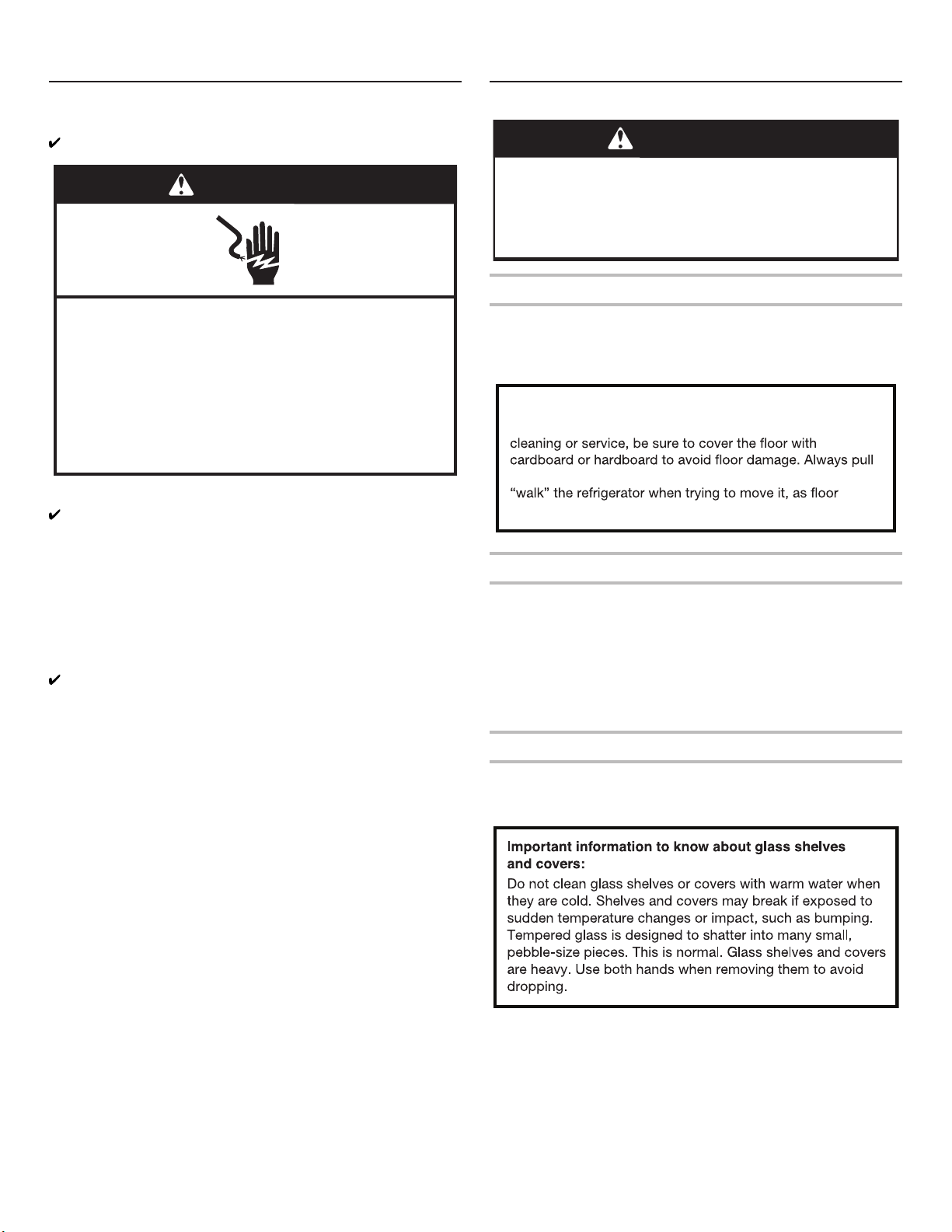
NOTE FOR SERVICE:
Center divider can be removed by taking out the 3 screws on the
right side (see picture below); With the center divider removed the
evaporator area can be reached for service.
STORAGE CAPACITY:
Fresh Food Compartment 387 L
Freezer Compartment 208 L
Total 595 L
Hinged seal
A
B
C
Balcony
Top Light
6th Sense
Glass Shelf
A . Fresh Food Compartment
B . Freezer Compartment
C . Flexi Freeze (only with WQ9 B1LUK, 6WM24NIHAS and
WQ70900SXX)
Crisper
“Fruits and Vegetables”
Ice maker
Freezer Tray
Fast Freeze
Drawers
Screw Location
9
INSTALLATION INSTRUCTIONS
Getting Started
INSTALLATION CHECKLIST
Electrical Power
■ Plug refrigerator into a earthed socket.
Doors
■ If doors need to be removed during installation, see the
“Remove and Replace Refrigerator Doors” and “Remove and
Replace Freezer Door Fronts” sections.
■ Doors seal completely.
■ Refrigerator is level. Adjust leveling feet so they are snug
against the oor.
■ Doors are even across the top. (Use door alignment feature if
necessary).
Final Checks
■ Remove all shipping material.
■ Set temperature controls to the recommended setting.
■ Save instructions and other literature.
■ In order to receive a more complete assistance, please
register your product on www.whirlpool.eu/register.
Unpack the Refrigerator
Refrigerator Delivery
A minimum door opening of 838 mm (33") is required. If door
opening is 914 mm (36") or less, then removal of doors, drawer
and hinges is required.
Cart the refrigerator from the side for all door openings.
Remove the Packaging
■ Remove tape and glue residues from surfaces before
turning on the refrigerator. Rub a small amount of liquid dish
detergent over the adhesive with your ngers. Wipe with warm
water and dry.
■ Do not use sharp instruments, rubbing alcohol, ammable
uids, or abrasive cleaners to remove tape or glue. These
products can damage the surface of your refrigerator.
■ Dispose of/recycle all packaging materials.
Clean Before Using
After you remove all of the packaging materials, clean inside of
your refrigerator before using it. See cleaning instructions in the
“Refrigerator Care” section.
WARNING
Electrical Shock Hazard
Plug into a grounded (earthed) outlet.
Do not remove ground prong.
Do not use an adapter.
Do not use an extension cord.
Failure to follow these instructions can result in death,
fire, or electrical shock.
WARNING
Excessive Weight Hazard
Use two or more people to move and install
refrigerator.
Failure to do so can result in back or other injury.
When Moving Your Refrigerator:
Your refrigerator is heavy. When moving the refrigerator for
the refrigerator straight out when moving it. Do not wiggle or
damage could occur.
10
Location Requirements
To ensure proper ventilation for your refrigerator, allow for a
1.25 cm space on each side and at the top. Allow for a 5 cm
space behind the refrigerator. If your refrigerator has an ice maker,
allow extra space at the back for the water line connections.
When installing your refrigerator next to a xed wall, leave a 9.5
cm minimum space between the refrigerator and wall to allow the
door to swing open.
NOTE: This refrigerator is intended for use in a location where
the temperature ranges from a minimum of 10°C to a maximum
of 43°C. The preferred room temperature range for optimum
performance, which reduces electricity usage and provides
superior cooling, is between 15°C and 32°C. It is recommended
that you do not install the refrigerator near a heat source, such as
an oven or radiator.
Electrical Requirements
IMPORTANT: Installation and electrical connection must
be carried out by a qualied technician according to the
manufacturer’s instructions and in compliance with the local
safety regulations.
■ The refrigerator is designed to operate on a separate
220-240 V, 10 A, 50-60 Hz circuit.
■ Make sure the voltage specied on the rating plate
corresponds to that of your home.
■ It must be possible to disconnect the appliance from the
power supply by unplugging it or by means of a main two pole
switch installed upstream of the socket.
■ If the supply cord is damaged, it must be replaced by the
manufacturer, its service agent or similarly qualied persons in
order to avoid a hazard.
Before you move your refrigerator into its nal location, it is
important to make sure you have the proper electrical connection:
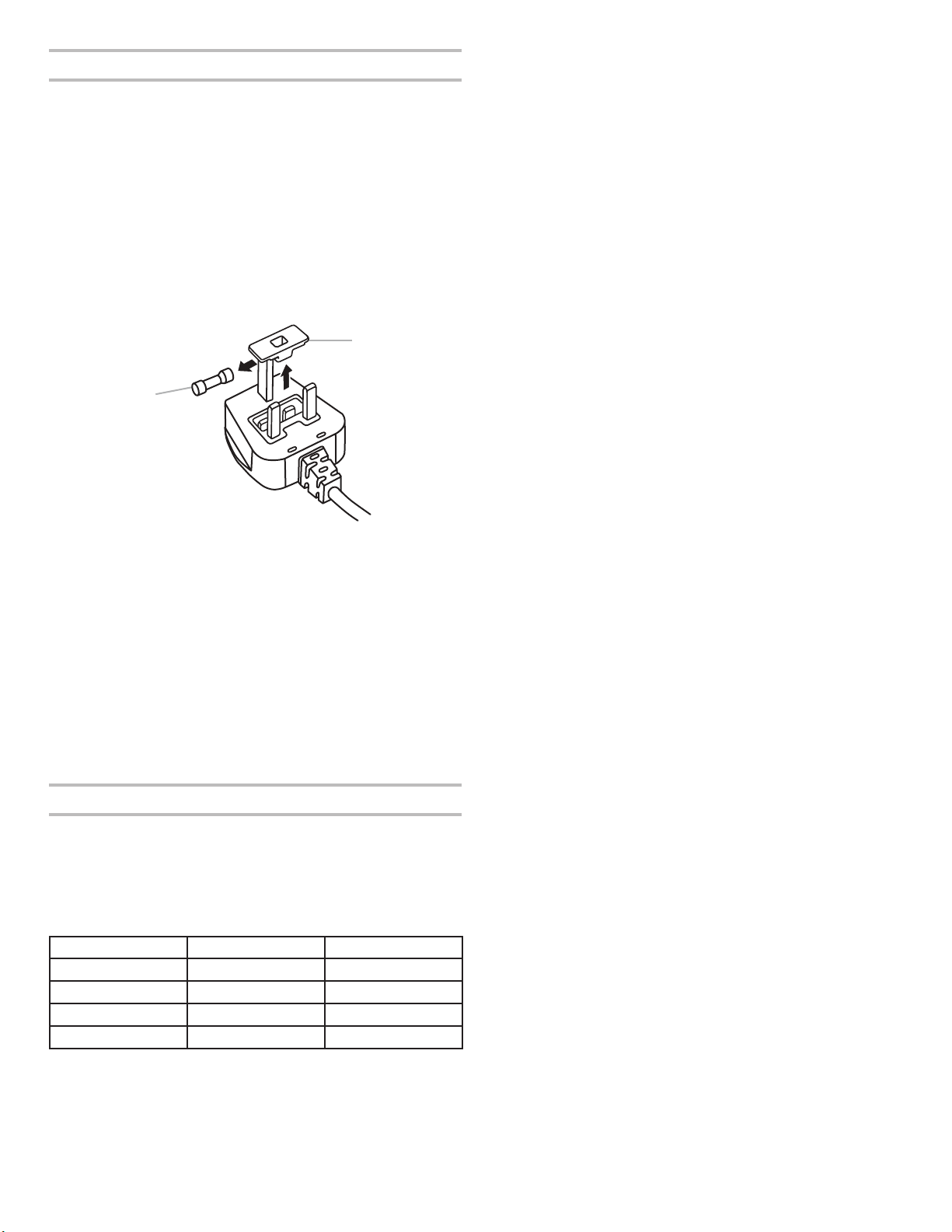
Recommended Earthing Method
220-240 V 50 Hz, 220 V 60 Hz, or 230/240 V 50 Hz AC only 10 A
fused and earthed electrical supply is required.
For Australia and New Zealand:
Your new appliance has been especially manufactured to meet all
Australian Standards and Conditions.
Some notations in the installation instructions may refer to
electrical requirements in other countries, so we draw your
particular attention to these specic notes.
Your appliance needs to be plugged into a 230/240 V 50 Hz AC
only 10 A earthed socket.
WARNING
Explosion Hazard
gasoline, away from refrigerator.
1.25 cm
9.5 cm
WARNING
Electrical Shock Hazard
Plug into a grounded (earthed) outlet.
Do not remove ground prong.
Do not use an adapter.
Do not use an extension cord.
Failure to follow these instructions can result in death,
fire, or electrical shock.
Type B
Type E and F
Type I
Type M
Type G
11
Electrical Requirements (Great Britain and Ireland only)
IMPORTANT: This refrigerator must be earthed.
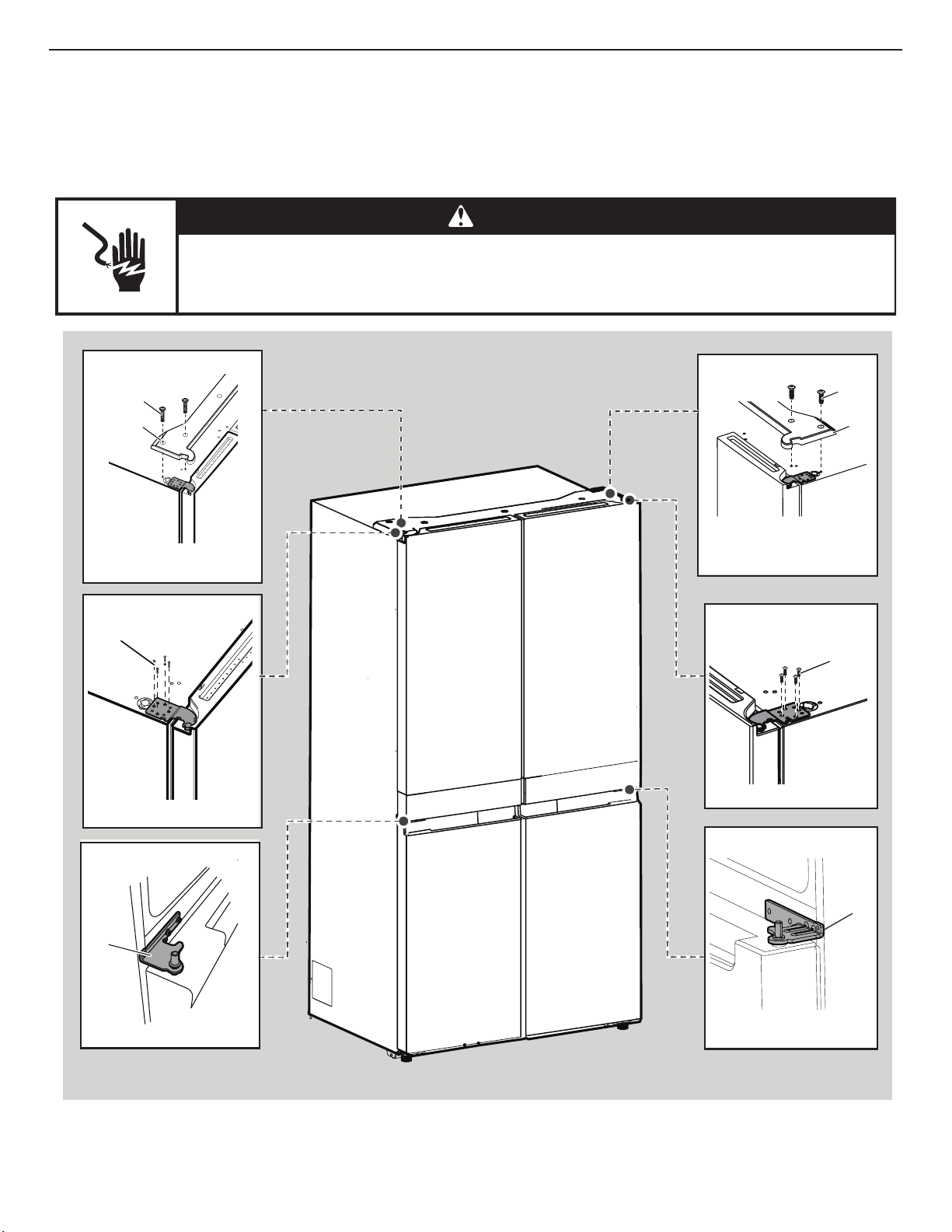
Fuse Replacement
If the main lead of this refrigerator is tted with a BS1363A,
13 A fused plug, to replace a fuse in this type plug use an A.S.T.A.
approved fuse to BS 1362 type and proceed as follows:
1. Remove the fuse cover (A) and fuse (B).
2. Fit replacement 13 A fuse into the fuse cover.
3. Reinsert both the fuse and its cover into the plug.
IMPORTANT: The fuse cover must be retted when changing a
fuse. If fuse cover is lost, the plug must not be used until a correct
replacement cover is tted. A correct replacement is identied by
the colour insert or colour “word” embossed on the base of the
plug. Replacement fuse covers are available at your local
electrical shop.
For the Republic of Ireland (only):
The information given in respect of Great Britain will frequently
apply, but a third type of plug and socket is also used, the 2-pin,
side earth type.
Socket/Plug (valid for both countries):
If the tted plug is not suitable for your socket, please contact
After-sales Service for further instruction. Please do not
attempt to change the plug yourself. This procedure needs
to be carried out by a qualied technician in compliance with
the manufacturer’s instructions and current standard safety
regulations.
Temperature
This refrigerator is designed for operation in places where the
temperature comes within the following ranges, according to
climatic class shown on the rating plate. The refrigerator may not
work properly if it is left for a long time at a temperature outside
the specied range.
NOTE: It is recommended that you do not install the refrigerator
near a heat source, such as an oven or radiator.
Climatic Class Amb. T. (°C) Amb. T. (°F)
SN From 10 to 32 From 50 to 90
N From 16 to 32 From 61 to 90
ST From 16 to 38 From 61 to 100
T From 16 to 43 From 61 to 110
A
A. Fuse cover
B. Fuse
B
12
Remove and Replace Refrigerator Doors
NOTE: Measure the width of your door opening to see whether or not you need to remove refrigerator doors to move refrigerator into
your home. If door removal is necessary, see the following instructions.
IMPORTANT: If refrigerator was previously installed and you are moving it out of the home, turn refrigerator control off before you begin
removing the doors. Unplug refrigerator or disconnect power. Remove food and adjustable door or utility bins from doors.
Gather required tools and read all instructions before removing doors.
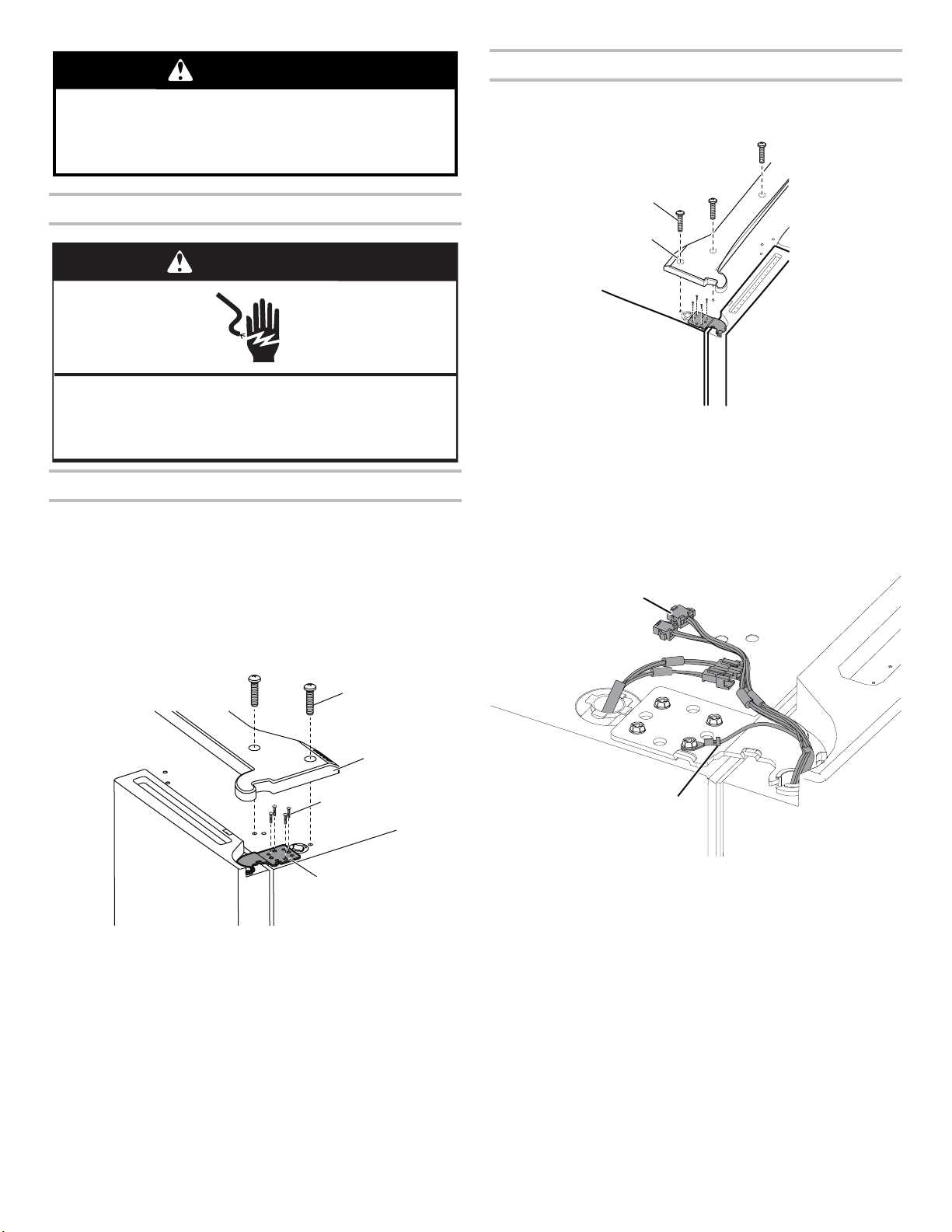
TOOLS NEEDED: 6 mm socket wrench, 5 mm socket wrench and #2 Phillips screwdriver.
WARNING
Electrical Shock Hazard
Disconnect power before removing doors.
Failure to do so can result in death or electrical shock.
A
Top Left Hinge
Middle Left Hinge
Top Left Hinge Cover
Top Right Hinge Cover
A. 5 mm socket screws
A. Hinge
A. Hinge
A. Top Hinge Cover screws
B. Top Hinge Cover
A. Top Hinge Cover screws
B. Top Hinge Cover
Top Right Hinge
Middle Right Hinge
A. 5 mm socket screws
A
A
A
B
A
B
A
13
Remove Refrigerator Doors
Remove Right-Hand Door
1. Unplug refrigerator or disconnect power.
2. Keep refrigerator doors closed until you are ready to lift them
free from the cabinet.
NOTE: Provide additional support for refrigerator door while the
hinges are being removed. Do not depend on the door gasket
magnets to hold the door in place while you are working.
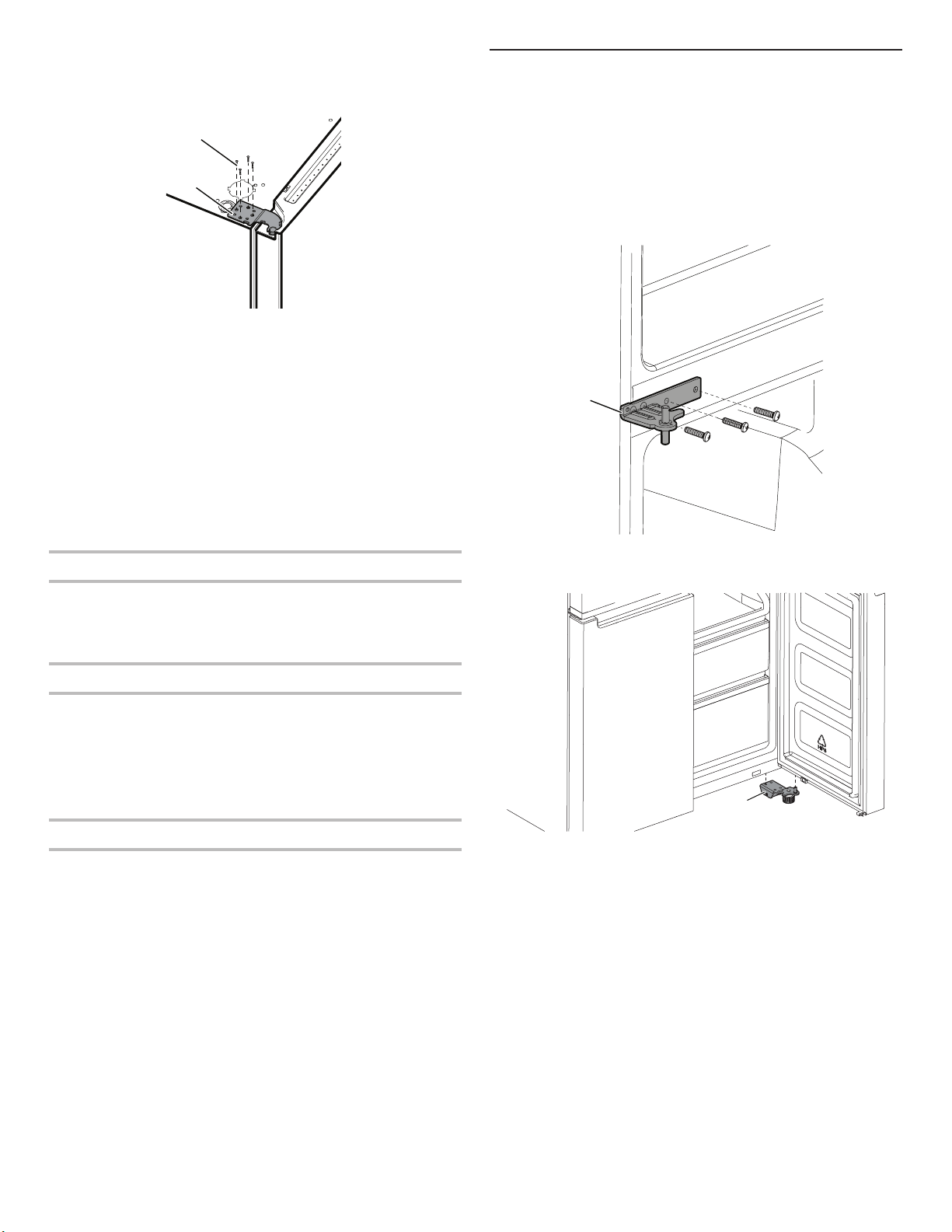
3. Using a Phillips screwdriver, remove cover from top hinge.
4. Using 5 mm socket wrench, remove four screws from top
hinge and set aside.
5. Lift refrigerator door from the middle hinge pin. The top hinge
will come away with the door.
Remove Left-Hand Door
IMPORTANT: The wiring for UI run through left-hand door hinge,
so they must be disconnected before removing the door.
1. Using a Phillips screwdriver, remove cover from top hinge.
2. Disconnect two wiring plugs located on top of the door hinge.
■ Grasp each side of wiring plugs. With your left thumb,
press down to release the catch and pull the sections of
the plugs apart.
WARNING
Excessive Weight Hazard
Use two or more people to lift the refrigerator door.
Failure to do so can result in back or other injury.
WARNING
Electrical Shock Hazard
Disconnect power before removing doors.
Failure to do so can result in death or electrical shock.
C
A. Top hinge cover screw
B. Top hinge cover
C. 5 mm socket screws
D. Top hinge
A
B
D
A. Top hinge cover screw
B. Top hinge cover
A
B
A. Wiring Plug
B. Ground (earth) connector
A
B
14
3. Using 5 mm socket wrench, remove four internal screws from
top hinge and set aside.
NOTE: Provide additional support for refrigerator door while
hinges are being removed. Do not depend on the door gasket
magnets to hold the door in place while you are working.
4. Lift refrigerator door from bottom hinge pin. The top hinge will
come away with door.
NOTE: It may not be necessary to remove bottom hinges and
brake feet assemblies to move the refrigerator through a doorway.
■ Only if necessary, use 6 mm socket wrench and #2 Phillips
screwdriver to remove middle hinge.
Replace Right-Hand Refrigerator Door
1. Set right-hand door onto middle hinge pin.
2. Insert top hinge pin into open hole in top of refrigerator door.
3. Using four 5 mm socket screws, fasten hinge to cabinet. Do
not tighten screws completely.
Replace Left-Hand Refrigerator Door
1. Set left-hand door onto middle hinge pin.
2. Using four 5 mm socket screws, fasten hinge to cabinet. Do
not tighten screws completely.
3. Reconnect electrical wiring.
■ Push together two sections of wiring plug.
■ Reconnect earth wire to hinge screw.
Final Steps
1. Completely tighten eight 5 mm socket screws.
2. Replace top hinge covers.
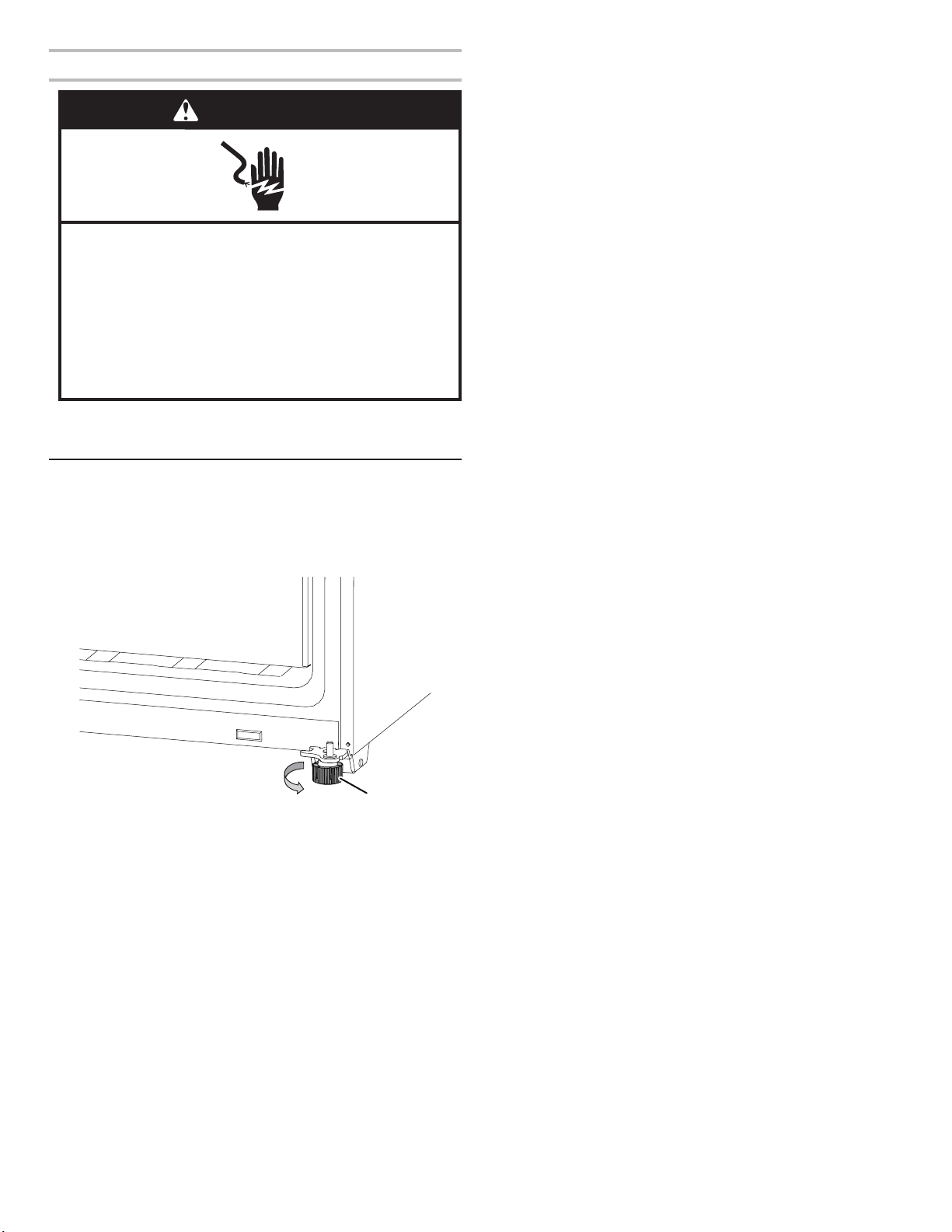
Remove and Replace Freezer/Flexi
Freeze Door
1. Keep freezer doors closed until you are ready to lift them free
from cabinet.
NOTE: Provide additional support for freezer door while hinges
are being removed. Do not depend on door gasket magnets to
hold door in place while you are working.
■ Using a #2 Phillips screwdriver and 6 mm socket wrench to
remove middle hinge from cabinet.
■ Lift freezer door from the bottom hinge pin.
A. 5 mm socket screws
B. Top Hinge
A
B
A. Middle hinge
A
A. Bottom hinge
A
15
Final Steps
1. Plug into an grounded (earthed) socket.
2. Return all removable parts and food to the drawers.
Refrigerator Levelling
1. Move refrigerator to its nal location.
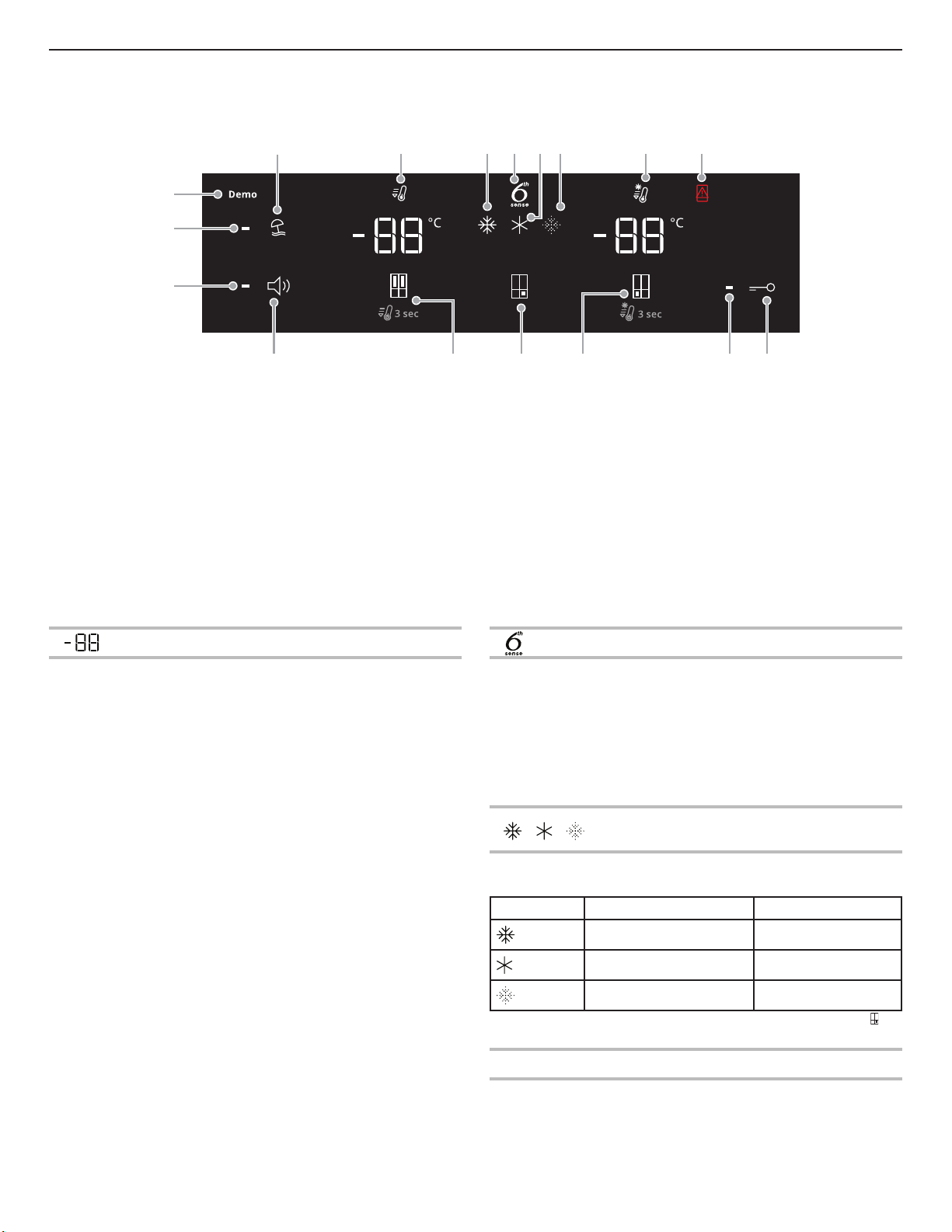
2. Using hand, rotate the brake feet. Turn them counterclockwise
until the rollers are off the oor and both brake feet are snug
against the oor. This keeps refrigerator from rolling forward
when opening the doors.
IMPORTANT: If you need to make further adjustments
involving brake feet, you must turn both brake feet same
amount to keep the refrigerator level.
3. Use a level to make sure refrigerator is level from side to side
and front to back.
WARNING
Electrical Shock Hazard
Plug into a grounded (earthed) outlet.
Do not remove ground prong.
Do not use an adapter.
Do not use an extension cord.
Failure to follow these instructions can result in death,
fire, or electrical shock.
A
A. Brake feet
16
Using the Controls
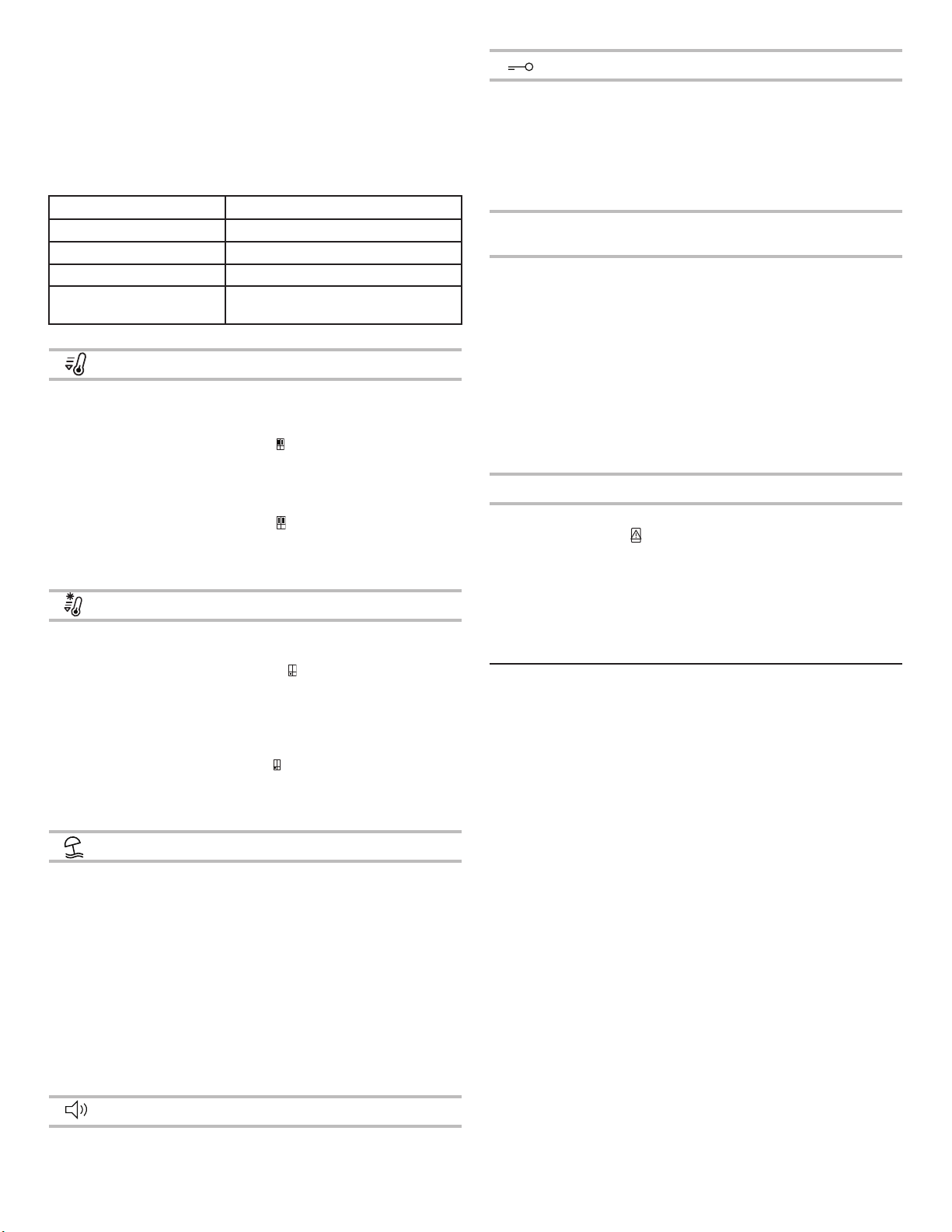
The touch-activated controls are located on the left hand refrigerator door. The control panel includes information about various buttons
and indicators. Refrigerator and freezer temperature indicator shows last temperature set point.
1. Sound ON/OFF Button
2. Refrigerator Temperature Button (hold 3 sec for Fast Cool)
3. Flexi Freeze Preset Temperature Button (only with
WQ9 B1LUK, 6WM24NIHAS and WQ70900SXX)
4. Freezer Temp Button (hold 3 sec for Fast Freeze)
5. Key Lock Indicator
6. Key Lock Button
7. Door Open Indicator
8. Fast Freeze Indicator
9. Soft Freeze Indicator (only with WQ9 B1LUK, 6WM24NIHAS
and WQ70900SXX)
10. Mild Freeze Indicator (only with WQ9 B1LUK, 6WM24NIHAS
and WQ70900SXX)
11. 6th Sense Indicator
12. Traditional Freeze Indicator (only with WQ9 B1LUK,
6WM24NIHAS and WQ70900SXX)
13. Fast Cool Indicator
14. Holiday Mode Button
15. Demo Mode Indicator (only with WQ9 B1LUK, 6WM24NIHAS
and WQ70900SXX)
16. Holiday Mode Indicator
17. Sound Indicator
The Control Panel will automatically turn off after one minute of inactivity. To turn on the control panel, press any key.
Viewing and Adjusting Temperature Set Points
Adjusting Fresh Food and Freezer Compartment Temperature:
For your convenience, your refrigerator and freezer controls are
preset at the factory.
When you rst install your refrigerator, make sure that the
controls are still set to the recommended set points. The factory
recommended set points are 3°C for the refrigerator and -18°C for
the freezer.
Pressing Refrigerator or Freezer Temperature button will toggle
through temperature set points in Celsius (°C).
IMPORTANT:
■ Wait 24 hours before you put food into refrigerator. If you add
food before refrigerator has cooled completely, your food may
spoil.
NOTE: Adjusting the set points to a colder-than
recommended setting will not cool compartments any faster.
■ If the temperature is too warm or too cold in the refrigerator
or freezer, rst check the air vents to be sure they are not
blocked before adjusting the controls.
■ The recommended settings should be correct for normal
household use. The controls are set correctly when milk or
juice is as cold as you like and when ice cream is rm.
NOTE: Areas such as a garage, basement or porch may have
higher humidity or extreme temperatures. You may need to
adjust the temperature away from the recommended settings
to accommodate for these conditions.
■ Wait at least 24 hours between adjustments. Recheck the
temperatures before other adjustments are made.
6
th
Sense Fresh Lock and Freeze Control
The 6
th
SENSE Fresh Lock sensor ensures precise and consistent
temperature control to preserve fresh food for longer, in the
most natural way. Once a temperature variation is detected, the
sensor activates a compressor that quickly restores the original
temperature.
The 6
th
SENSE Freeze sensor minimizes temperature uctuations
in freezer thanks to an innovative temperature management
system. Freezer burns are reduced to preserving quality and color
of food.
Flexi Freeze Setting (only with WQ9 B1LUK,
6WM24NIHAS and WQ70900SXX)
Flexi Freeze function allows you to toggle preset temperature for
Flexi freeze compartment.
Symbol Function Temperature
Traditional freezer -18°C
Mild freezer -12°C
Soft freezer -7°C
* To activate/deactivate Coolest setting (-20°C), press Flexi Freeze Preset Temperature Button for 3
seconds. When the Coolest setting is activated, all three icons will be lit.
Adjusting Multi Temperature Setting
■ Traditional freezer (-18°C): Food already frozen and fresh food
(max 12 months)
■ Mild freezer (-12°C): Food already frozen (max 1 month)
■ Soft freezer (-7°C): Food already frozen (max 1 week)
15
5
1
2
3
4
6
7
8
13
9
10
11
16
17
12
14
17
■ When Flexible Freezer set to -18°C or -20°C, both Flexible
Freezer temperature and Freezer temperature would be
cooled down to the colder setting whichever Freezer or
Flexible Freezer has.
■ Flexible Freezer compartment temperature might not be able
to reach -7°C when the ambient temperature is around 10°C
or colder.
When adjusting temperature set points, use the following
chart as a guide:
CONDITION TEMPERATURE ADJUSTMENT
Refrigerator too cold Refrigerator setting 1° higher
Refrigerator too warm Refrigerator setting 1° lower
Freezer too cold Freezer setting 1° higher
Freezer too warm/
too little ice
Freezer setting 1° lower
Fast Cool
The Fast Cool feature assists with periods of high refrigerator use,
full grocery loads, or temporarily warm room temperatures.
■ To turn on the Fast Cool feature, press and hold the
Refrigerator Temperature button for 3 seconds. When
feature is activated, the Fast Cool icon will be illuminated. The
Fast Cool feature will remain on for 2 hours unless manually
turned off.
■ To manually turn off the Fast Cool feature, press and hold the
Refrigerator Temperature button for 3 seconds. The Fast
Cool icon will turn off when feature is not activated.
■ Adjusting refrigerator temperature will automatically turn off
the Fast Cool feature.
Fast Freeze
The amount of fresh food (in kg) that can be frozen in 24 hours is
indicated on the appliance rating plate.
■ Press Freezer Temperature button for 3 seconds (until the
Fast Freeze Indicator lights up), 24 hours before placing fresh
food in the freezer. After placing fresh food in the freezer, 24
hours on Fast Freeze function is generally sufcient; After 50
hrs the fast freeze function automatically deactivates.
■ To manually turn off the Fast Freeze feature, press and hold
the Freezer Temperature button for 3 seconds. The Fast
Freeze icon will turn off.
■ Adjusting the freezer temperature will automatically turn off
the Fast Freeze feature.
Holiday Mode
This mode is designed to avoid your appliance from wasting
energy during times when it's not in regular use (when you are in
holiday for example).
By selecting this function the temperature of fresh food
compartment will automatically be set to 12°C.
■ To use the Holiday mode, press mode button until Holiday
mode indicator is lit on the display.
■ To exit the Holiday mode, press the mode button until no
mode icon is lit on the display.
■ Adjusting the refrigerator temperature will automatically turn
off the Holiday Mode feature.
IMPORTANT: If this mode is selected then all food and drinks
must be removed from fresh food compartment.
Sound ON-OFF
Press button to activate/deactivate Sound Feedback.
Key Lock
■ Press and hold the Lock button for 3 seconds to activate lock
feature.
■ To deactivate lock, press and hold the Lock button for 3
seconds.
The lock feature will ignore all interaction with control panel until
the user unlocks the control panel. This feature is meant to avoid
unintentional changing of settings.
Demo Mode (only with WQ9 B1LUK, 6WM24NIHAS and
WQ70900SXX)
This mode is used when refrigerator is on display in a retail shop
or if you want to turn the cooling off and deactivate all other
functions (except interior lighting).
Demo mode can be used when going on extended holiday.
See the “Holiday and Moving Care” section for proper steps on
leaving your refrigerator in this mode for long periods of time.
■ If you turn on Demo mode, the “Demo” icon will light up on
the display.
■ Enter or exit Demo mode by pressing and holding the Sound
On or Off button and the Lock button simultaneously for 3
seconds.
Additional features
Door Open Alarm
■ The Door Open Alarm feature sounds an alarm and blinks the
“Door Open” icon when any of the four doors is open for 2
minutes or more.
■ The alarm will repeat every 5 minutes. Close all doors to turn
it off.
NOTE: To mute audible alarm while keeping the doors open,
such as while cleaning inside of refrigerator, touch any button on
control panel. The alarm sound will be temporarily turned off, but
the Door Open icon will still be displayed on the control panel.
Lighting the Refrigerator
The refrigerator has an interior light that comes on any time door
is opened.
NOTE: The light is LED which does not need to be replaced. If the
LED does not illuminate when the door is opened, call service to
replace light.
18
REFRIGERATOR USE
Opening and Closing Doors
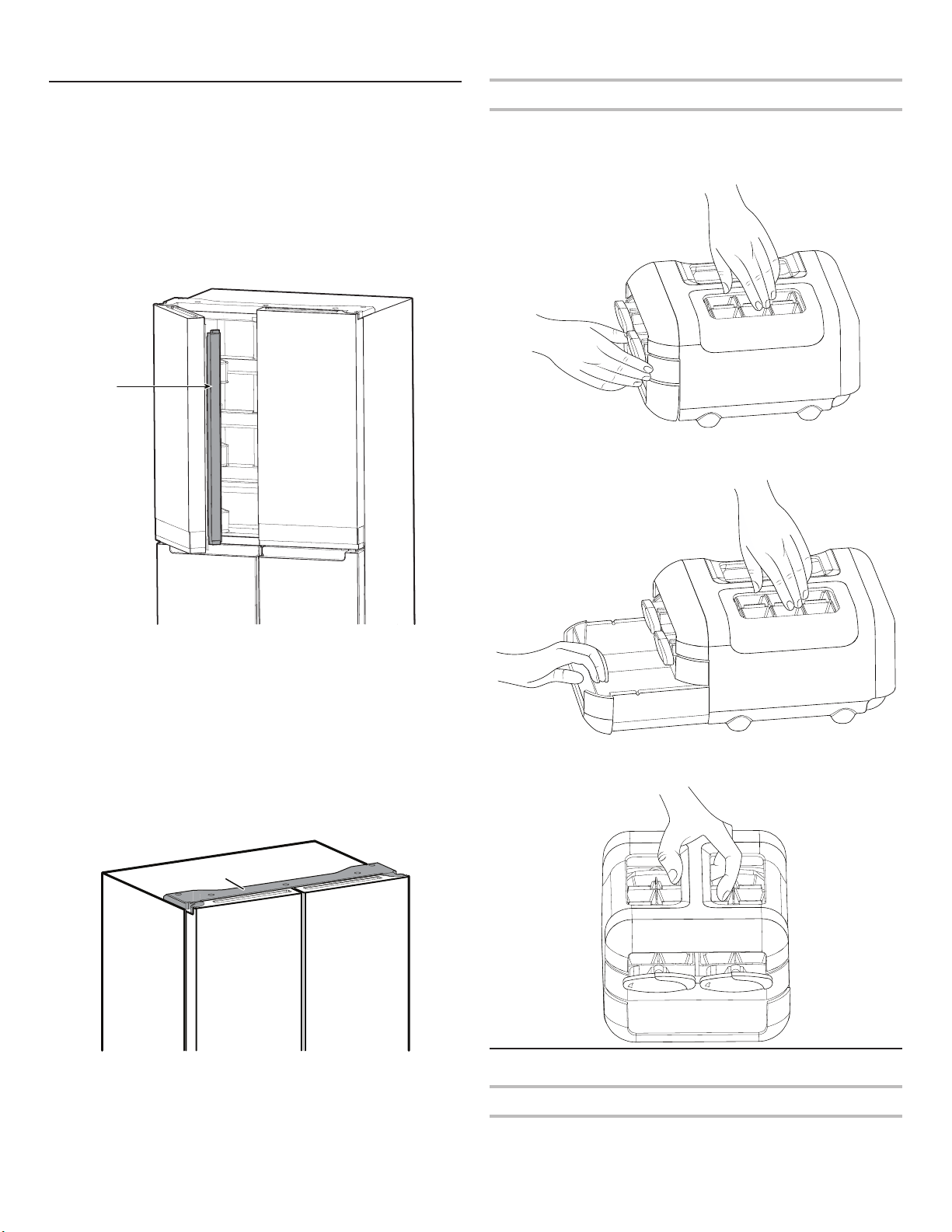
There are two fresh food compartment doors. The doors can
be opened and closed either separately or together. There is a
vertically hinged seal on left refrigerator door.
■ When left-side door is opened, hinged seal automatically folds
inward so that it is out of the way.
■ When both doors are closed, the hinged seal automatically
forms a seal between two doors.
NOTE: When closing the door, the hinged seal should be in
correct position (be bent inside). Otherwise it will hit the right door
or the xing shaft.
The fresh food compartment door switch is located in top left and
right hinge cover.
■ For Freezer and Multi Temperature Zone, door switch is
located in the bottom mullion.
■ The door switch uses magnet to sense door opening/closing.
■ Ensure there are no magnet or electronic devices (Speaker,
Coolvox
®
etc.) within 7.62 cm of the hinge cap.
NOTE: The light will not turn on if door opening is not detected.
Ice Maker
■ To make ice, ll ice tray with puried water and place Manual
Ice maker into Freezer top shelf. Allow time till ice gets formed
and once ice is ready, turn the knobs in clockwise direction to
eject ice cubes into the ice container.
■ Lift ice container slightly and pullout ice container to get
access to ice cubes.
Manual ice maker assembly can be taken out of the freezer when
ice is not required to make more compartment in freezer.
Food Storage
Egg Storage
It is recommended to store eggs at a consistent temperature to
keep its freshness, so best is to keep them in the fridge on the
middle shelf.
A. Hinged seal
A
A
A. Hinge cover
19
SHELVES, BINS AND DRAWERS
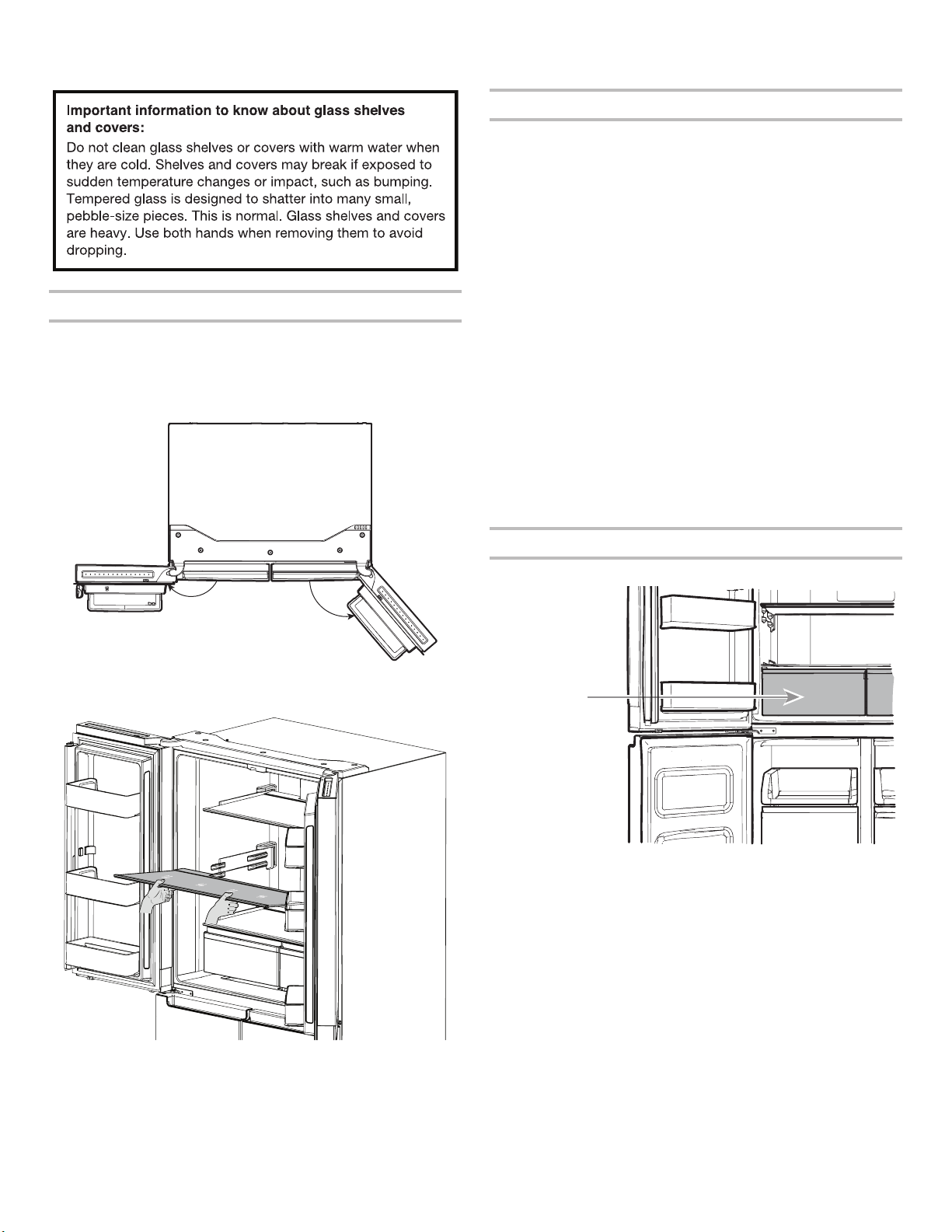
Shelf Height Adjustment
Shelf height can be adjusted by changing its location from bottom
support to upper support and vice versa.
■ Open right side door to its full opening.
■ Open left side door to its full opening and then lift the door to
open 180°.
■ Take shelf out of refrigerator and place it to desired mounting
position.
■ Ensure shelf is properly seated on the shelf mounts.
Shelves and Shelf Frames
The shelves in your refrigerator are adjustable to meet your
individual storage needs.
Storing similar food items together in your refrigerator and
adjusting the shelves to t different heights of items will make
nding the exact item you want easier. It will also reduce the
amount of time the refrigerator door is open and save energy.
To remove and replace shelves:
1. Open right side door to its full opening and left side door to its
full opening and lift left door to open 180°.
2. Remove middle shelf or top shelf by lifting it up and out of
shelf supports. Then pull the shelf forward and tilt down to
a vertical position. Turn shelf at an angle and pull out of the
refrigerator.
3. Remove the bottom shelf by lifting it up and out of the shelf
supports. Then pull the shelf forward and tilt up to a vertical
position. Turn the shelf at an angle and pull out of refrigerator.
4. Replace middle and top shelves by putting shelf in the
refrigerator at an angle with shelf front down. Lift front of the
shelf up and slide in until the rear of shelf drops into shelf
supports. Lower the front of shelf and make sure that the shelf
is in position.
5. Replace bottom shelf by putting shelf in refrigerator at an
angle with shelf up. Lift front of shelf down and slide in until
rear shelf drops into the shelf supports. Lower front of the
shelf and make sure that shelf is in position.
Crispers
To remove and replace the Crispers:
1. Grasp handle of the Crisper and slide Crisper straight out to
the stop. Lift the Crisper off the bottom guide.
2. Replace/putting back the Crisper by placing it on bottom
Crisper guide and pushing it past the Crisper stop into
position.
180°
130°
Crisper
20
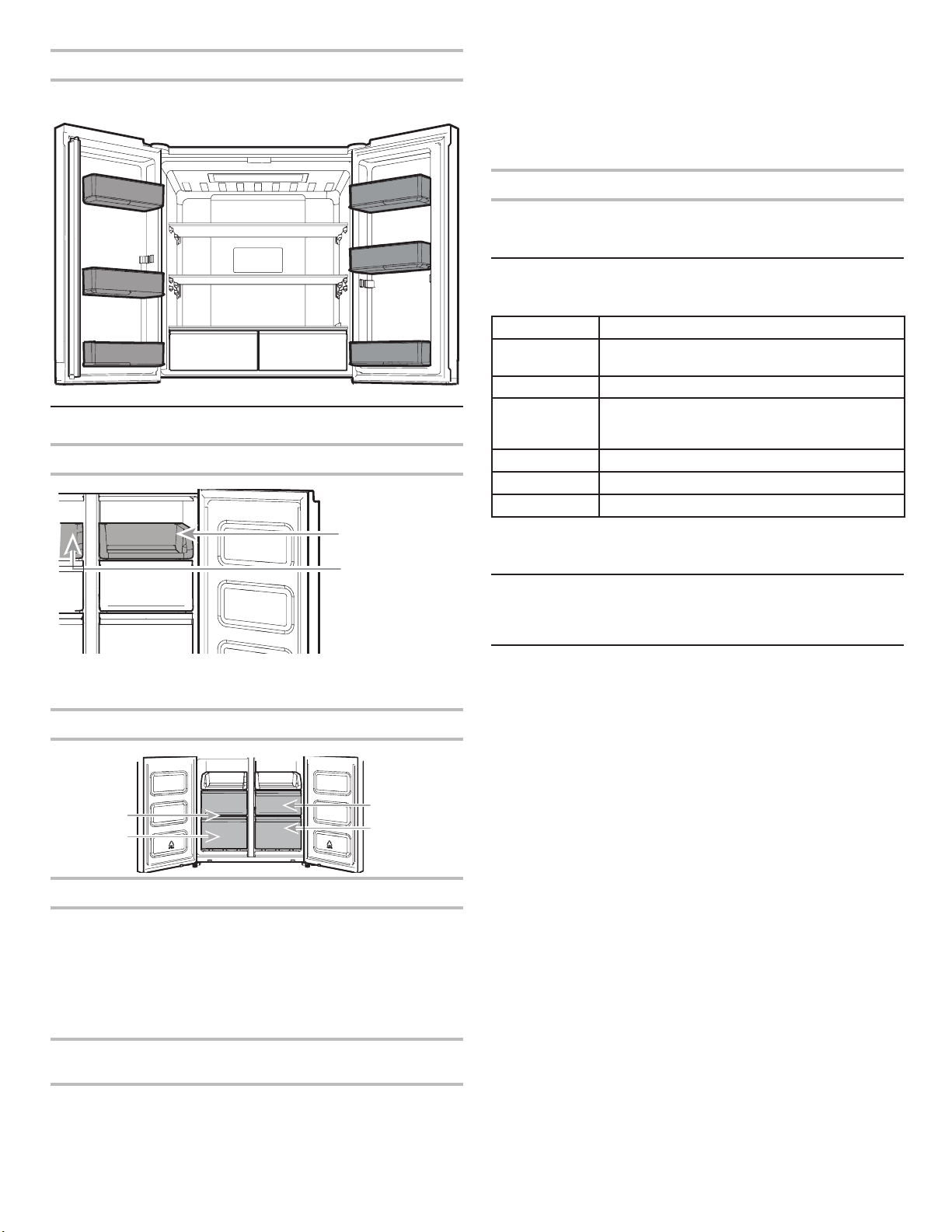
Refrigerator Balconies
The balcony on your refrigerator door are adjustable to meet your
individual storage needs.
Freezer Storage Compartments
Freezer Tray
Freezer tray is useful to easily access frequently used products,
freeze or simply store leftovers or small items.
Freezer Drawers
Fast Freeze compartment
■ Fast Freezer drawers allows you to conveniently store big
volume items.
■ Fast Freeze option allows you to store all your frozen food
safely and transparently.
NOTE: Freezer temperature might be cooled down to be same as
Flexible Freezer Compartment temperature, when Freezer set to
warmer than Flexible Freezer compartment.
Flexi Freeze Compartment (only with WQ9 B1LUK,
6WM24NIHAS and WQ70900SXX)
Flexi Freeze Compartment allows you to select one of three
freezer temperature levels: -7°C, -12°C, -18°C and -20°C to
provide the best storing conditions for different types of food.
For maximum freezer capacity, you may remove the freezer
drawer to expose the freezer shelf.
To remove the upper drawer:
1. Grasp handle of the drawer and slide drawer straight out to
the stop. Lift drawer off the bottom guide.
2. Replace/putting back drawer by placing it on bottom drawer
guide and pushing it past drawer stop into position.
Freezer Shelf (only with WQ9 B1LUK)
To maximize freezer capacity, you may remove mid drawer to
expose freezer shelf beneath. You can then store upper drawer
and load food directly on top of the shelf.
Audio Reference
Tone Assignment
Tone Name Usage Examples
Power On Cooling system is turned on every time the
product is powered on.
Key Press User presses a valid button.
Invalid (Error) User presses two or more valid buttons at the
same time. Count-down interruption for press-
and-hold buttons.
Engage Acknowledgement of entry into any mode.
Disengage Acknowledgement of exit from any mode.
Alert Door Ajar alert.
This table is for quick reference only. See corresponding sections
for details. In case of inconsistency, section details will prevail.
Accessories
To order accessories, contact the dealer from whom you
purchased your refrigerator.
Assistance or Service
Before calling for assistance or service, please check the
“Troubleshooting” section. It may save you the cost of a service
call. If you still need help, follow the instructions below.
If you need replacement parts
To locate factory-specied replacement parts in your area,
contact the dealer from whom you purchased your refrigerator.
Warranty
Contact the dealer from whom you purchased refrigerator for
warranty information.
Keep this book and your sales slip together for future
reference. You must provide proof of purchase or installation
date for in-warranty service.
Write down the following information about your appliance to help
you obtain assistance or service if you ever need it. You will need
to know your complete model number and serial number. You
can nd this information on the model and serial number label,
located on the inside wall of the fresh food compartment.
Dealer name______________________________________________
Serial number_____________________________________________
Address__________________________________________________
Phone number____________________________________________
Model number____________________________________________
Purchase date_____________________________________________
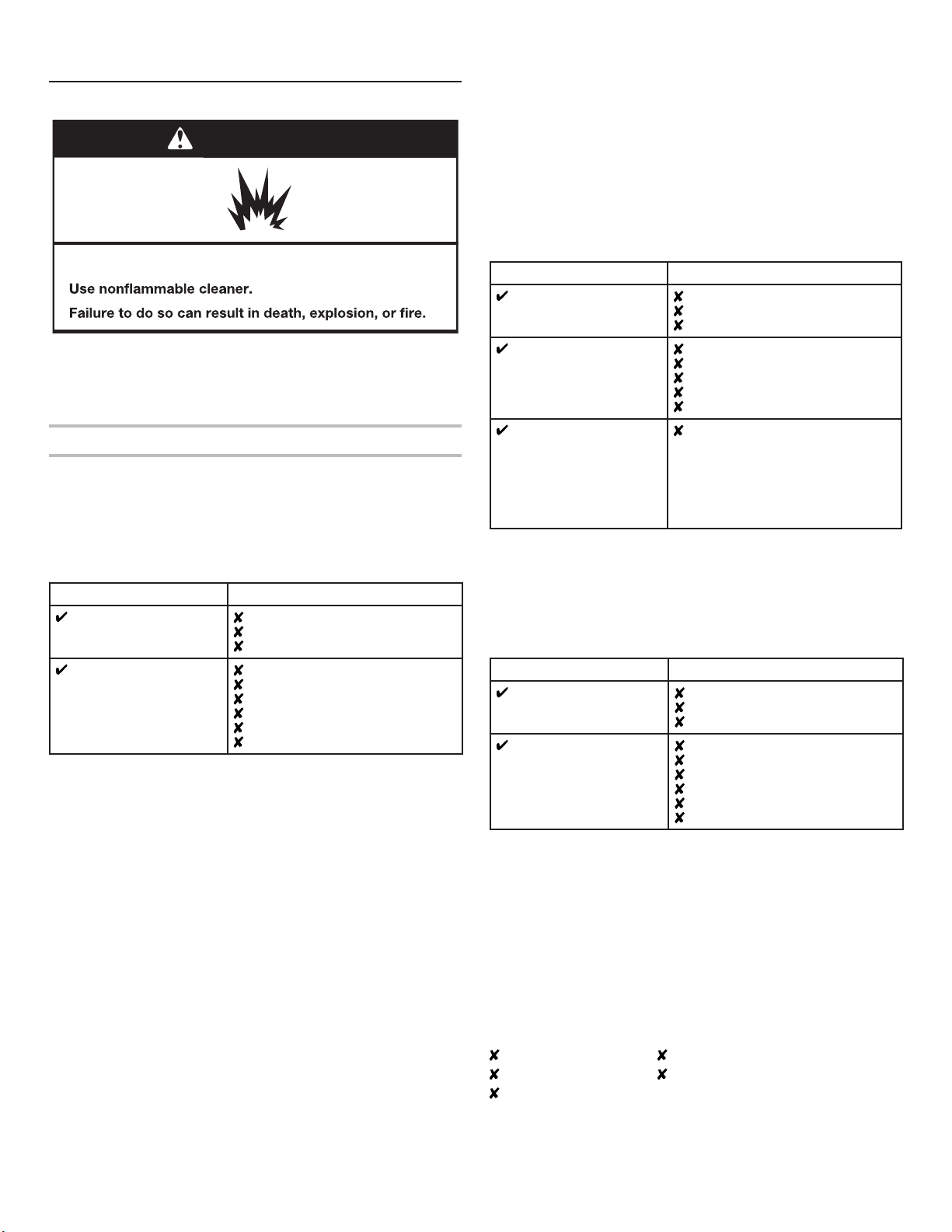
Freezer Tray
Fast Freeze
Drawers
Flexi Freeze
Drawers
21
REFRIGERATOR CARE
Cleaning
All of the Refrigerator, Freezer and Flexi freeze sections (only
with WQ9 B1LUK, 6WM24NIHAS and WQ70900SXX ) defrost
automatically. However, clean all the sections about once a month
to avoid build-up of odours. Wipe up spills immediately.
Exterior Cleaning
Please see the exterior cleaning information specic to your
model.
Style 1 — Smooth Door
IMPORTANT: Damage to smooth nish due to improper use of
cleaning products or using non-recommended cleaning products
is not covered under the warranty. Sharp or blunt instruments will
mar the nish.
DO USE DO NOT USE
Soft, clean cloth
Abrasive cloths
Paper towels or newsprint
Steel-wool pads
Warm, soapy water with
a mild detergent
Abrasive powders or liquids
Window sprays
Ammonia
Acidic or vinegar-based Cleaners
Oven cleaners
Flammable uids
NOTE: Paper towels scratch and may dull clear coat of painted
door. To avoid possible damage, use only soft, clean clothes to
polish and wipe the doors.
Style 2 — Stainless Steel
IMPORTANT:
■ Use recommended stainless steel cleaners and cloths
only. Damage to stainless steel nish due to improper use
of cleaning products or using non-recommended cleaning
products is not covered under the warranty.
■ Avoid exposing stainless steel appliances to caustic or
corrosive elements such as high-salt, high-moisture, or high-
humidity environments. Damage due to exposure to these
elements is not covered under the warranty.
DO USE DO NOT USE
Soft, clean cloth
Abrasive cloths
Paper towels or newsprint
Steel-wool pads
Warm, soapy water
with a mild detergent
Abrasive powders or liquids
Ammonia
Citrus-based cleaners
Acidic or vinegar-based cleaners
Oven cleaners
For heavy soil, use only
a stainless steel cleaner
designed for appliances.
To order the cleaner,
contact the dealer from
whom you purchased
your refrigerator.
Stainless steel cleaner is for
stainless steel parts only. Do not
allow the stainless steel cleaner
and polish to come into contact
with any plastic parts such as the
trim pieces, dispenser covers, or
door gaskets.
Style 3 — Fingerprint-Resistant Stainless
IMPORTANT:
■ Avoid exposing stainless steel appliances to caustic or
corrosive elements such as high-salt, high-moisture, or high-
humidity environments. Damage due to exposure to these
elements is not covered under the warranty.
DO USE DO NOT USE
Soft, clean cloth
Abrasive cloths
Paper towels or newsprint
Steel-wool pads
Warm, soapy water with
a mild detergent
Abrasive powders or liquids
Window sprays
Ammonia
Acidic or vinegar-based cleaners
Oven cleaners
Flammable uids
NOTES:
■ If unintentional contact does occur, clean plastic part with a
sponge and mild detergent in warm water. Dry thoroughly with
a soft cloth.
■ Just because a cleaner is a liquid does not mean it is non-
abrasive. Many liquid cleansers formulated to be gentle on tile
and smooth surfaces still damage stainless steel.
■ Citric acid permanently discolours stainless steel.
■ To avoid damaging the nish of your stainless steel
refrigerator:
Do not allow these substances to remain on the nish:
Mustard Citrus-based sauces
Tomato juice Citrus-based products
Marinara sauce
WARNING
Explosion Hazard
22
Interior Cleaning
1. Unplug refrigerator or disconnect power.
2. Hand wash, rinse, and dry removable parts and interior
surfaces thoroughly. Use a clean sponge or soft cloth and a
mild detergent in warm water.
NOTE: Do not use abrasive or harsh cleaners such as window
sprays, scouring cleansers, ammable uids, cleaning waxes,
concentrated detergents, bleaches, or cleansers containing
petroleum products on plastic parts, interior and door liners,
or gaskets.
3. Plug in refrigerator or reconnect power.
Condenser
This refrigerator has skin condenser on both sides of refrigerator.
It is normal to feel warm on the sides.
Lights
The lights in both the fresh food and freezer compartments are
LEDs which do not need to be replaced. If the lights do not
illuminate when the door is opened, contact the dealer from
whom you purchased your refrigerator.
Holiday and Moving Care
Holidays
If You Choose to Leave the Refrigerator On While You’re
Away:
1. Use up any perishables and freeze other items.
2. If your refrigerator has an automatic ice maker and is
connected to the household water supply, turn off the water
supply to the refrigerator. Property damage can occur if the
water supply is not turned off.
3. If you have an automatic ice maker, turn off the ice maker.
■ Press the switch to Off (O) for the door ice maker.
4. Empty the ice bin.
If You Choose to Turn Off the Refrigerator Before You Leave:
NOTE: Put refrigerator in Demo Mode while on Holiday. See the
“Using the Controls” section.
1. Remove all food from the refrigerator.
2. If your refrigerator has an automatic ice maker:
■ Turn off water supply to the ice maker at least 1 day ahead
of time.
■ When last load of ice drops, press the switch to Off
(O) for display to be unlit on the top inside of the
refrigerator, depending on your model.
3. Empty ice bin.
4. Turn off temperature controls. See the “Using the Controls”
section.
5. Clean refrigerator, wipe it and dry well.
6. Tape rubber or wood blocks to the tops of both doors to prop
them open far enough for air to get in. This stops odours and
mould from building up.
Moving
When you are moving your refrigerator to a new home, follow
these steps to prepare it for the move.
1. If your refrigerator has an automatic ice maker:
■ Turn off water supply to the ice maker at least 1 day ahead
of time.
■ Disconnect water line from the back of the refrigerator.
■ When last load of ice drops, press the switch to Off (O)
either on the ice maker or the control, depending on your
model.
2. Remove all food from refrigerator and pack all frozen food in
dry ice.
3. Empty ice bin.
4. Unplug refrigerator.
5. Clean, wipe and dry thoroughly.
6. Take out all removable parts, wrap them well and tape them
together so they don’t shift and rattle during the move.
7. Depending on the model, raise the front of the refrigerator so
it rolls more easily or raise the levelling screws so they do not
scrape the oor. See the “Adjust the Doors” or “Refrigerator
Levelling and Door Closing” sections.
8. Tape doors closed and tape the power cable to the back of
the refrigerator.
When you get to your new home, put everything back and refer to
the “Installation Instructions” section for preparation instructions.
Also, if your refrigerator has an automatic ice maker, remember to
reconnect the water supply to the refrigerator.
23
TROUBLESHOOTING
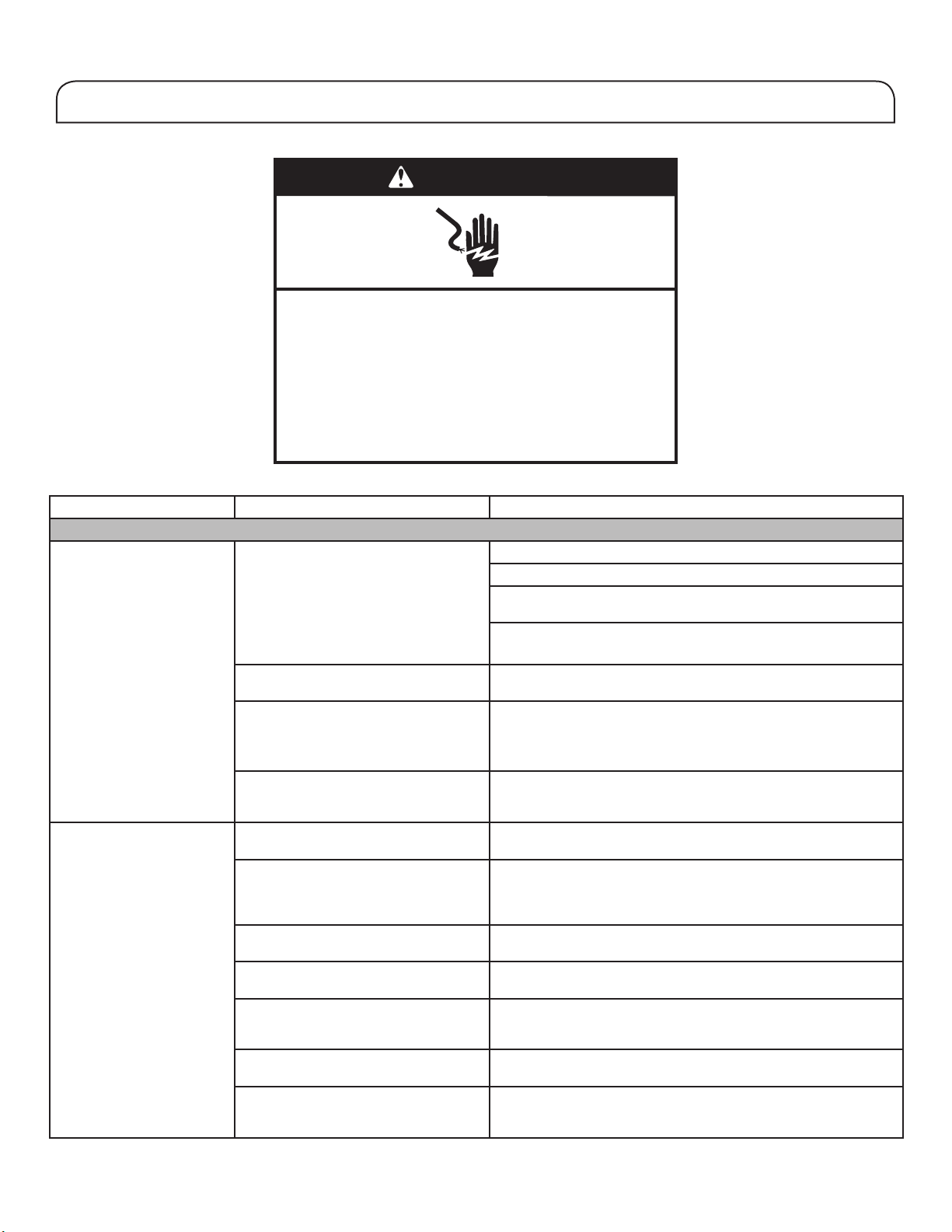
If you experience Possible Causes Solution
Refrigerator Operation
The refrigerator will not
operate.
Check electrical supply. Plug the power cable into an earthed socket.
Do not use an extension cable.
Make sure there is power to the socket. Plug in a lamp to see if
the socket is working.
Reset a tripped circuit breaker. Replace any blown fuses.
NOTE: If problems continue, contact an electrician.
Check controls. Make sure the controls are turned on. See the “Using the
Controls” section.
New installation. Allow 24 hours following installation for refrigerator to cool
completely.
NOTE: Adjusting the temperature controls to the coldest setting
will not cool either compartment more quickly.
Refrigerator control is in Demo mode
(on some models).
If refrigerator is in Demo mode, cooling is turned off and
“Demo” will be illuminated on the control panel. See the “Using
the Controls” section for more information.
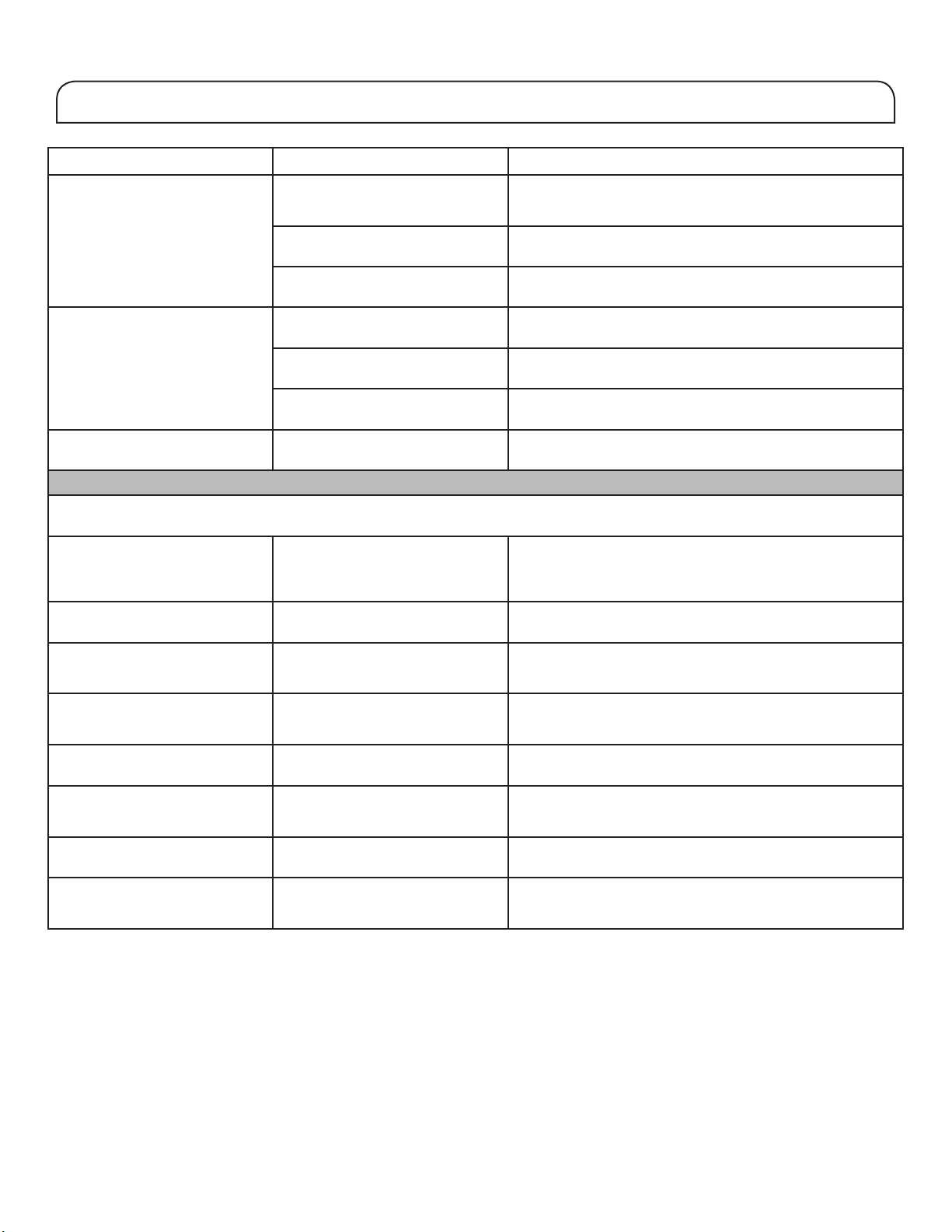
The motor seems to run
too much.
High-efciency compressor and fans. Larger, more efcient refrigerators run longer at lower, more
energy efcient speeds.
The room or outdoor temperature is
hot.
It is normal for refrigerator to work longer under these
conditions. For optimum performance, place refrigerator in an
indoor, temperature-controlled environment. See the “Location
Requirements” section.
A large amount of warm food has
been recently added.
Warm food will cause refrigerator to run longer until the air cools
to the desired temperature.
The door(s) are opened too frequently
or for too long.
Warm air entering refrigerator causes it to run more. Open the
door less often.
The refrigerator door or freezer drawer
is open.
Make sure refrigerator is level. See the “Refrigerator Levelling
and Door Closing” section. Keep food and containers from
blocking the door.
The refrigerator control is set too cold. Adjust refrigerator control to a less-cold setting until the
refrigerator temperature is as desired.
The door or drawer gasket is dirty,
worn, or cracked.
Clean or change the gasket. Leaks in the door seal will
cause refrigerator to run longer in order to maintain desired
temperatures.
First try the solutions suggested here to possibly avoid a service call.
WARNING
Electrical Shock Hazard
Plug into a grounded (earthed) outlet.
Do not remove ground prong.
Do not use an adapter.
Do not use an extension cord.
Failure to follow these instructions can result in death,
fire, or electrical shock.
24
TROUBLESHOOTING
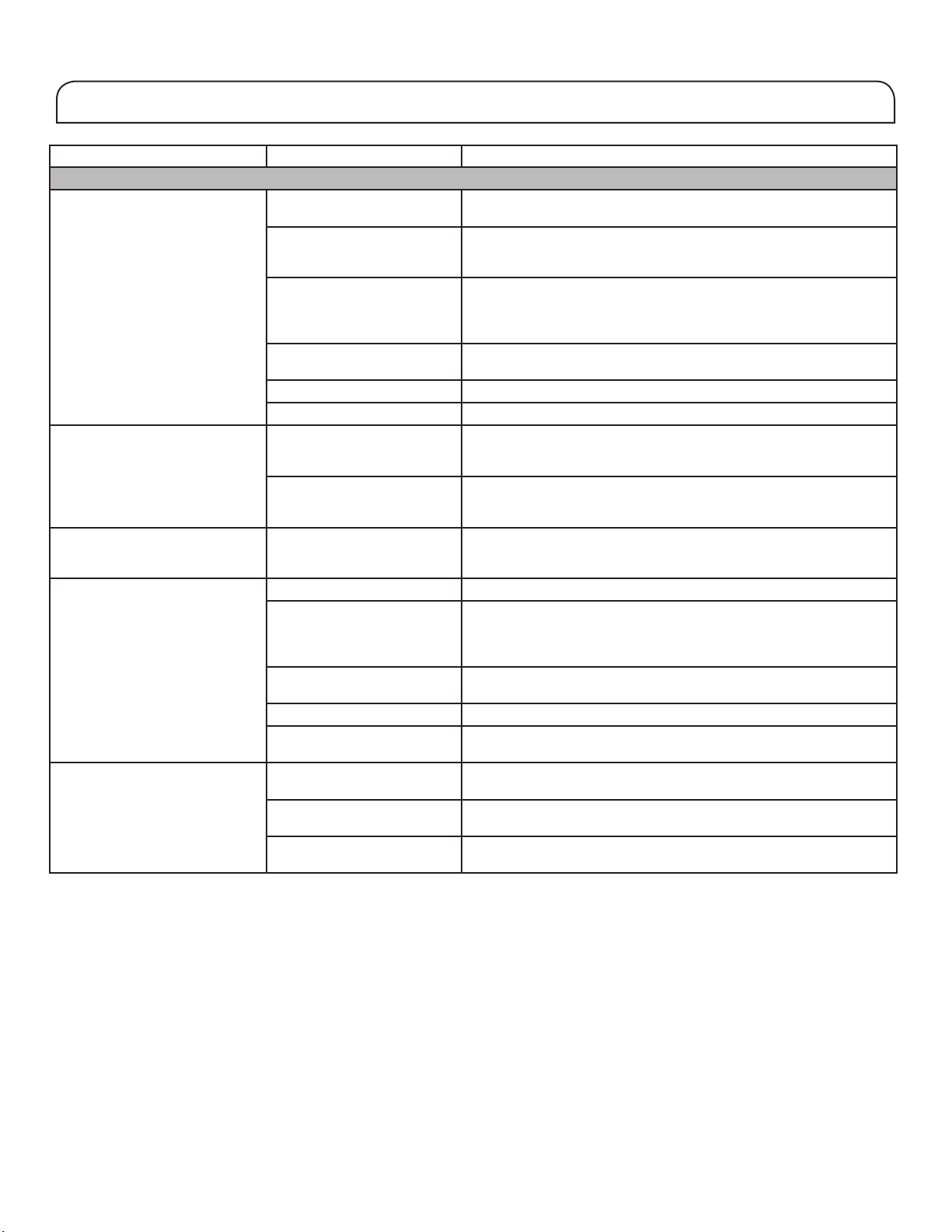
If you experience Possible Causes Solution
The lights do not work. Your refrigerator is equipped with
LED lighting which does not need
to be replaced.
If there is power to the refrigerator and the lights do not
illuminate when a door or drawer is opened, call for service
or assistance.
Doors have been open longer than
10 minutes.
Close the doors and drawer to reset and open to resume
lighted task.
The door switch is not sensing the
door opening.
Ensure there are no magnets or electronic devices within 7.6
cm (3") of the hinge cover.
The Temperature Control UI does
not turn on.
The Temperature Control UI went
to sleep.
Press any button on the UI to wake up the The Temperature
Control UI.
The Temperature Control UI
buttons are not working well.
Try cycling power on the refrigerator to make the buttons
reset. If problem continuous, call for service or assistance.
The Temperature Control UI is not
receiving power.
Check the wiring harness at the door hinge.
Unable to adjust setting on The
Temperature Control UI.
Door is open and Door ajar alarm is
activated.
Close the door.
Unusual Noise
To listen to normal refrigerator sounds, go to the Product Help/FAQ section of the brand website and search for “normal sounds.”
Below are listed some normal sounds with explanations.
The refrigerator seems noisy. The compressor in your new
refrigerator regulates temperature
more efciently while using less
energy and operates quietly.
Due to this reduction in operating noise, you may notice
unfamiliar noises that are normal.
Sound of the compressor running
longer than expected.
High-efciency compressor and
fans.
Larger, more-efcient refrigerators run longer at lower, more
energy efcient speeds.
Pulsating/Whirring Fans/compressor adjusting to
optimize performance during
normal compressor operation.
This is normal.
Popping Contraction/expansion of inside
walls, especially during initial cool
down.
This is normal.
Hissing/Dripping Flow of refrigerant or ow of oil in
the compressor.
This is normal.
Vibration The refrigerator may not be steady. Adjust the levelling screws and lower the levelling foot rmly
against the oor. See the “Refrigerator Levelling and Door
Closing” section.
Sizzling Water dripping on the heater during
Defrost cycle.
This is normal.
Water running/Gurgling May be heard when ice melts
during the Defrost cycle and water
runs into the drain pan.
This is normal.
First try the solutions suggested here to possibly avoid a service call.
25
TROUBLESHOOTING
If you experience Possible Causes Solution
Temperature and Moisture
Temperature is too warm. The refrigerator has just been
installed.
Allow 24 hours following installation for refrigerator to cool
completely.
The controls are not set
correctly for the surrounding
conditions.
Adjust the controls a setting colder. Check the temperature in 24
hours. See the “Using the Controls” section.
The door(s) are opened often
or not closed completely.
Allows warm air to enter
refrigerator.
Minimize door openings and keep doors fully closed.
A large load of food was
recently added.
Allow several hours for refrigerator to return to normal temperature.
Demo mode is on. Turn off the Demo mode. See the "Using the Control" section.
Holiday mode is on. Turn off the Holiday mode. See the "Using the Control" section.
Temperature is too cold in the
refrigerator/crisper.
The refrigerator air vent(s)
are blocked.
If the air vent located in the middle rear of the fresh food
compartment is blocked by items placed directly in front of it, the
refrigerator will get too cold. Move items away from the air vent.
The controls are not set
correctly for the surrounding
conditions.
Adjust the controls a setting warmer. Check the temperature in 24
hours. See the “Using the Controls” section.
Temperature is too cold in the
temperature controlled drawer.
The control is not set
correctly for the items stored
in drawer.
Adjust the temperature setting. See the “Using the Controls” in the
“Refrigerator Use” section.
There is interior moisture build-
up.
NOTE: Some moisture build-up
is normal.
The room is humid. A humid environment contributes to moisture build-up.
The door(s) are opened often
or not closed completely.
Allows humid air to enter the
refrigerator.
Minimize door openings and close doors completely.
The door(s) are blocked
open.
Move food packages away from door.
A bin or shelf is in the way. Push bin or shelf back into the correct position.
Storing liquid in open
containers.
This adds humidity to refrigerator interior. Keep all containers tightly
covered.
There is frost/ice build-up in the
freezer compartment.
The door is opened often or
left open.
Minimize door openings and close drawer completely after use.
The door has poor door seal. Ensure door seals are making full contact with the refrigerator
cabinet to allow for an adequate seal.
Temperature controls are not
set correctly.
See the “Using the Controls” section for recommended
temperature settings.
First try the solutions suggested here to possibly avoid a service call.
TROUBLESHOOTING
To view an animation showing how to adjust and align the doors, refer to the Product Help/FAQ section of the brand website and search
for “Door Closing and Door Alignment.”
If you experience Possible Causes Solution
Doors
The doors will not close
completely.
The door is blocked open. Move food packages away from door.
A bin or shelf is in the way. Push bin or shelf back into the correct position.
Recently installed Remove all packaging materials.
The doors are difcult to
open.
The door gaskets are dirty or sticky. Clean gaskets and contact surfaces with mild soap and warm
water. Rinse and dry with soft cloth.
The doors appear to be
uneven.
The doors need to be aligned or the
refrigerator needs to be levelled.
If you need to align door please call for service.
The refrigerator is unsteady
or it rolls forward when
opening and closing doors.
The refrigerator brake feet are not
snug against the oor.
Turn both brake feet (one on each side) counterclockwise, the
same amount, until they are snug against the oor. See the
“Refrigerator Levelling and Door Closing” section.
First try the solutions suggested here to possibly avoid a service call.
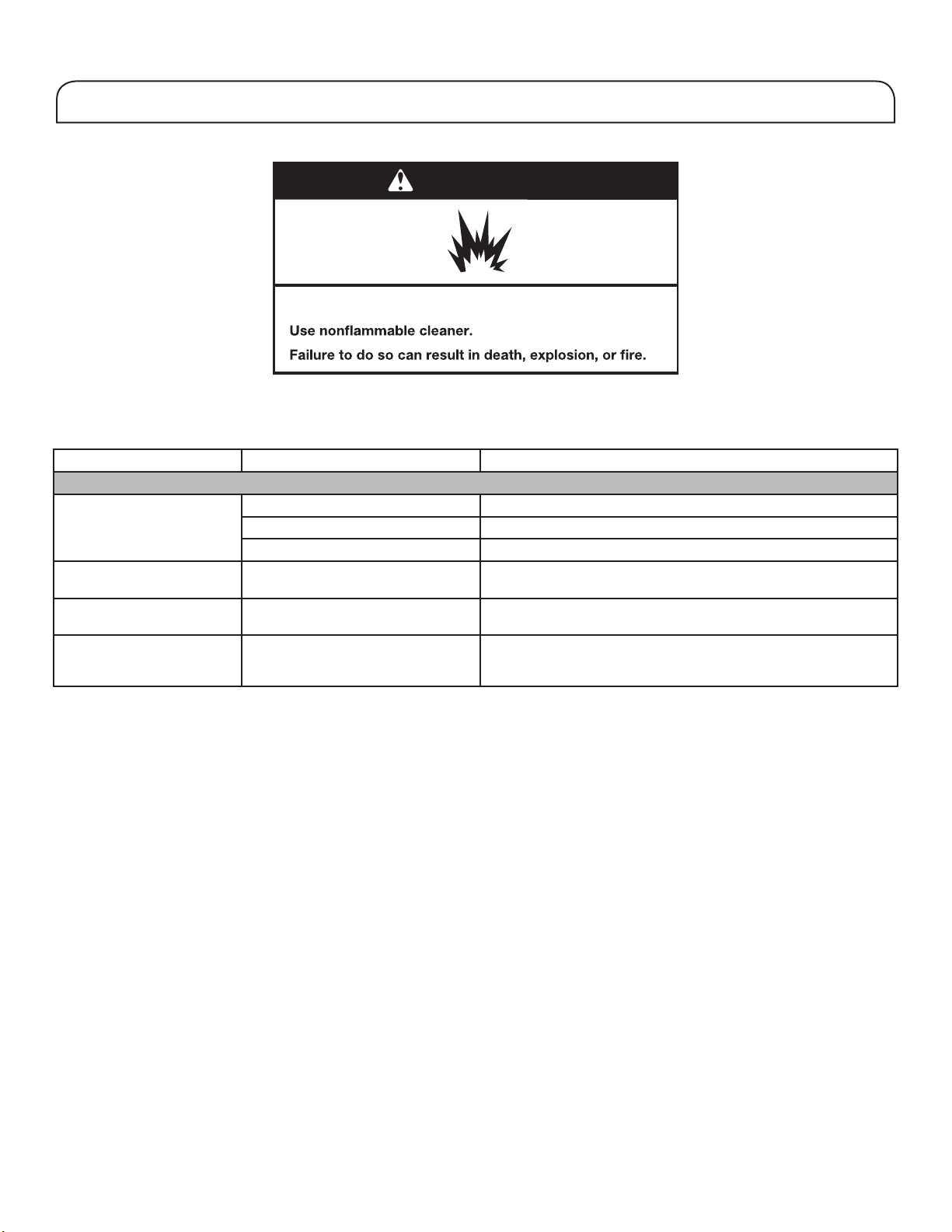
WARNING
Explosion Hazard
W11211074E
©2018 All rights reserved. 05/18