®
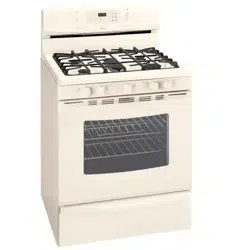
SENS-A-CLEAN TMSelf-Cleaning Gas Range
C_cina de gasde auto limpiezaSENS-A-CLEANTM
Models, Modelos 665.75842
665.75844
665.75849
f
Super Capacity with ULTPu_BAKE TM System
Capacidad extra con el Sistema ULTPJ_BAKE TM
8272753A Sears, Roebuck and Co., Hoffman Estates, IL 60179 U.S.A. www.sears.com
TableofContents
A Note to You ............................................................ 2
Warranty ..................................................................... 3
Range Safety ............................................................. 4
Parts and Features ................................................... 6
Using Your Range .................................................... 7
Using the Surface Burners .................................... 7
Professional Burner Grate System ....................... 8
Characteristics of Cookware Materials ................ 9
Using the Oven .................................................... 10
Bakeware Choices .............................................. 11
Using Aluminum Foil ........................................... 11
The Electronic Oven Control ............................... 12
Setting the Clock ............................................. 13
Using the Oven Lockout ................................. 13
Using the Cooktop Lockout ........................... 14
Tones ................................................................ 14
Using the 12-Hour Shut-Off ........................... 14
Using the Electronic Kitchen Timer ............... 15
Starting/Canceling a Function ........................ 16
ULTRABAKE TM Baking/Roasting ................... 16
Readjusting the Oven Temperature Control...18
Broiling ............................................................. 19
Using RECIPE RECALL TM .............................. 22
Using Serve Warm .......................................... 24
Using the Timed Oven Control ...................... 28
Using the Warm & Ready Warming Drawer ...........33
The Oven Vent ..................................................... 34
Using the SENS-A-CLEAN TM
Self-Cleaning Cycle ............................................... 35
Before You Start .................................................. 35
How the Cycle Works ......................................... 36
Setting the Controls ............................................ 36
Caring for Your Range ........................................... 39
Cleaning Chart ..................................................... 39
Sealed Surface Burners and Cooktop ............... 41
Removing the Oven Door ................................... 42
The Oven Light .................................................... 44
The Console Night Light ..................................... 45
Troubleshooting ...................................................... 46
Range Does Not Work ........................................ 46
Oven/Broiler Burner ............................................. 46
Surface Burners ................................................... 47
When Self-Cleaning Your Oven .......................... 47
Cooking Results .................................................. 48
Display Messages ............................................... 48
Index ......................................................................... 51
Service .................................................... Back Cover
2
A NotetoYou
Your KENMORE gas range takes on a new value
when you discover that Sears has service centers
around the country. Trained Sears Service
Professionals use fully-equipped trucks and Sears-
approved methods for expert repairs backing up all
Sears guarantees.
!?; i;i; iTM ;:ii i?iL:?! iii,i.i!( ¸¸i
Whenever you call to request service for your
appliance, you need to know your complete model
number and serial number. You can find this
information on the model and serial number plate
(see diagram in the "Parts and Features," p. 6).
Please also record the purchase date of your
appliance and your store's name and telephone
number.
Model Number 665.
Serial Number R
Purchase Date
Keep this book and the sales slip together
in a safe place for future reference.
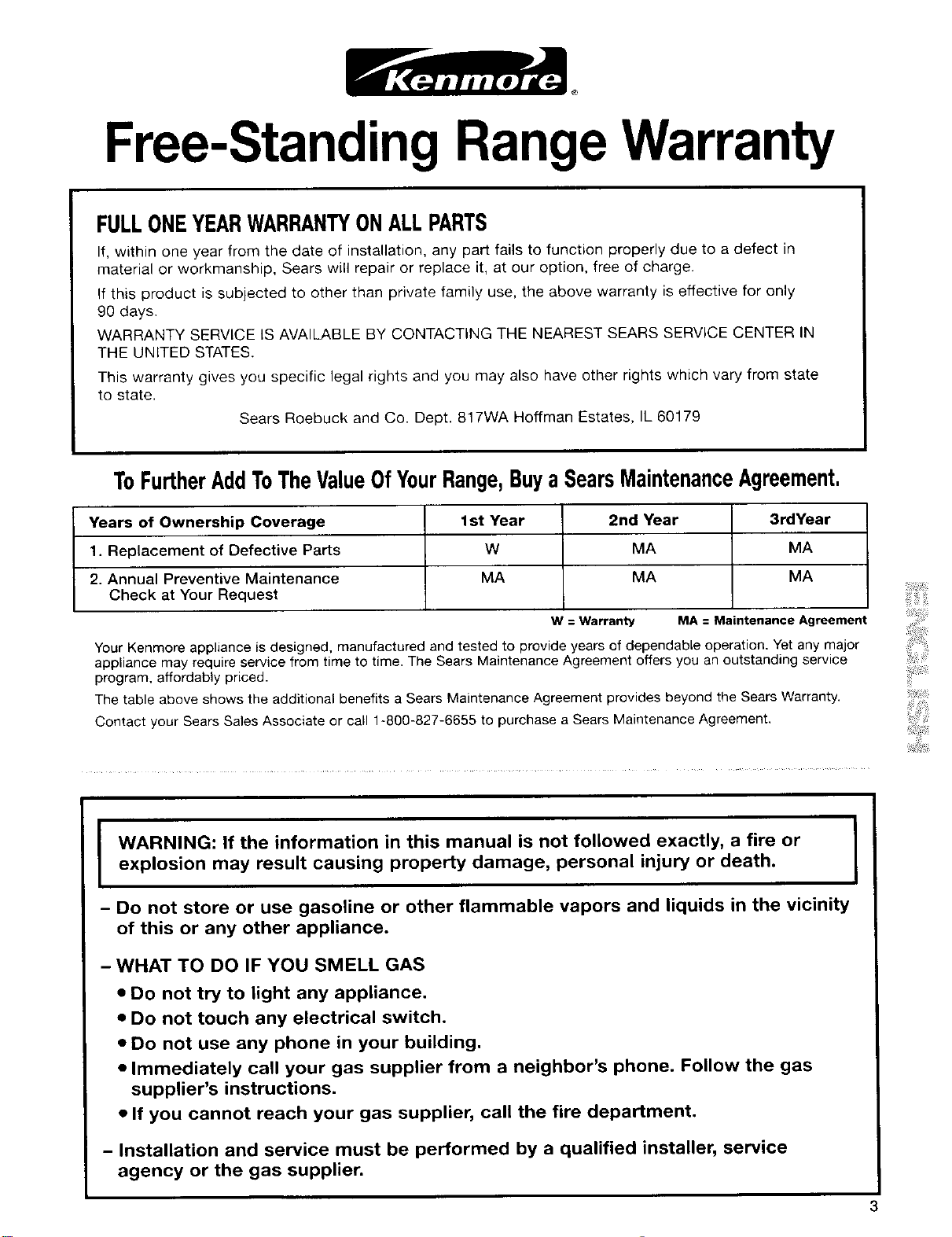
Free-StandingRangeWarranty
FULLONEYEARWARRANTYONALLPARTS
If, within one year from the date of installation, any part fails to function properly due to a defect in
material or workmanship, Sears will repair or replace it, at our option, free of charge.
If this product is subjected to other than private family use, the above warranty is effective for only
90 days.
WARRANTY SERVICE iS AVAILABLE BY CONTACTING THE NEAREST SEARS SERVICE CENTER IN
THE UNITED STATES.
This warranty gives you specific legal rights and you may also have other rights which vary from state
to state.
Sears Roebuck and Co. Dept. 817WA Hoffman Estates, IL 60179
ToFurtherAddToTheValueOfYourRange,BuyaSearsMaintenanceAgreement.
Years of Ownership Coverage 1st Year 2nd Year 3rdYear
1. Replacement of Defective Parts W MA MA
2. Annual Preventive Maintenance MA MA MA
Check at Your Request
W = Warranty MA=MaintenanceAgreement
Your Kenmore appliance is designed, manufactured and tested to provide years of dependable operation, Yet any major
appliance may require service from time to time. The Sears Maintenance Agreement offers you an outstanding service
program, affordably priced.
The table above shows the additional benefits a Sears Maintenance Agreement provides beyond the Sears Warranty.
Contact your Sears Sales Associate or call 1-800-827-6655 to purchase a Sears Maintenance Agreement,
I WARNING: If the information in this manual is not followed exactly, a fire or
I
explosion may result causing property damage, personal injury or death.
I
- Do not store or use gasoline or other flammable vapors and liquids in the vicinity
of this or any other appliance.
- WHAT TO DO IF YOU SMELL GAS
• Do not try to light any appliance.
• Do not touch any electrical switch.
• Do not use any phone in your building.
• Immediately call your gas supplier from a neighbor's phone. Follow the gas
supplier's instructions.
• If you cannot reach your gas supplier, call the fire department.
- Installation and service must be performed by a qualified installer, service
agency or the gas supplier.
Range Safety
Your safety and the safety of others are very important.
We have provided many important safety messages in this manual and on your appliance. Always read and
obey all safety messages.
This is the safety alert symbol.
This symbol alerts you to potential hazards that can kill or hurt you and others.
All safety messages will fellow the safety alert symbol and either the word "DANGER" or
"WARNING." These words mean:
You can be killed or seriously injured if you don't
immediately follow instructions.
You can be killed or seriously injured if you don't
follow instructions.
All safety messages will tell you what the potential hazard is, tell you how to reduce the chance of injury,
and tell you what can happen if the instructions are not followed.
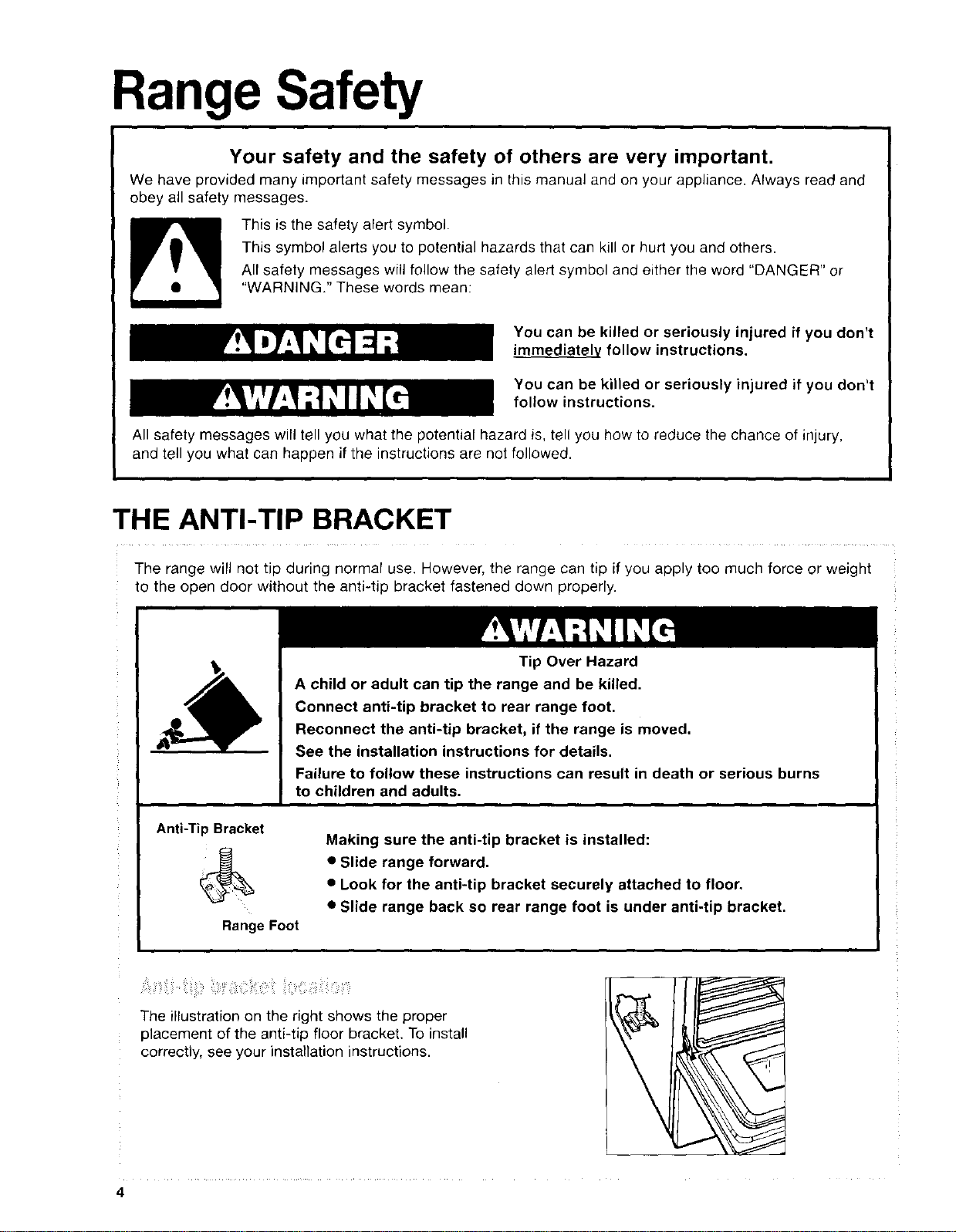
THE ANTI-TIP BRACKET
The range will not tip during normal use. However, the range can tip if you apply too much force or weight
to the open door without the anti-tip bracket fastened down properly.
Tip Over Hazard
A child or adult can tip the range and be killed.
Connect anti-tip bracket to rear range foot.
Reconnect the anti-tip bracket, if the range is moved.
See the installation instructions for details.
Failure to follow these instructions can result in death or serious burns
to children and adults.
Anti-Tip Bracket
Range Foot
Making sure the anti-tip bracket is installed:
• Slide range forward.
• Look for the anti-tip bracket securely attached to floor,
• Slide range back so rear range foot is under anti-tip bracket.
The illustration on the right shows the proper
placement of the anti-tip floor bracket. To install
correctly, see your installation instructions.
4
IMPORTANT SAFETY INSTRUCTIONS
WARNING: To reduce the risk of fire, electrical
shock, injury to persons, or damage when using the
range, follow basic precautions, including the
following:
• WARNING: To reduce the risk of tipping
of the range, the range must be secured by
properly installed anti-tip devices. To check if
the devices are installed properly, slide range
forward, look for anti-tip bracket securely
attached to floor, and slide range back so rear
range foot is under anti-tip bracket.
•CAUTION: Do not store items of interest to
children in cabinets above a range or on the
backguard of a range - children climbing on the
range to reach items could be seriously injured.
• Proper Installation - The range, when installed,
must be electrically grounded in accordance with
local codes or, in the absence of local codes, with
the National Electrical Code, ANSI/NFPA 70. In
Canada, the range must be electrically grounded
in accordance with Canadian Electrical Code. Be
sure the range is properly installed and grounded
by a qualified technician.
• This range is equipped with a three-prong ground-
ing plug for your protection against shock hazard
and should be plugged directly into a properly
grounded receptacle. Do not cut or remove the
grounding prong from this plug.
• Disconnect the electrical supply before servic-
ing the appliance.
• Never Use the Range for Warming or Heating
the Room.
• Injuries may result from the misuse of appliance
doors or drawers such as stepping, leaning, or
sitting on the doors or drawers.
• Maintenance - Keep range area clear and free
from combustible materials, gasoline, and other
flammable vapors and liquids.
• Storage in or on the Range - Flammable
materials should not be stored in an oven or
near surface units.
• Top burner flame size should be adjusted so it
does not extend beyond the edge of the cook-
ing utensil.
For self-cleaning ranges -
• Before Self-Cleaning the Oven - Remove broiler
pan and other utensils. Wipe off all excessive
spillage before initiating the cleaning cycle.
SAVE THESE INSTRUCTIONS
The California Safe Drinking Water and Toxic Enforcement Act requires the Governor of California to
publish a list of substances known to the State of California to cause cancer, birth defects, or other
reproductive harm, and requires businesses to warn of potential exposure to such substances.
WARNING: This product contains a chemical known to the State of California to cause cancer, birth
defects, or other reproductive harm.
This appliance can cause low-level exposure to some of the substances listed, including benzene,
formaldehyde, carbon monoxide, toluene, and soot.
5
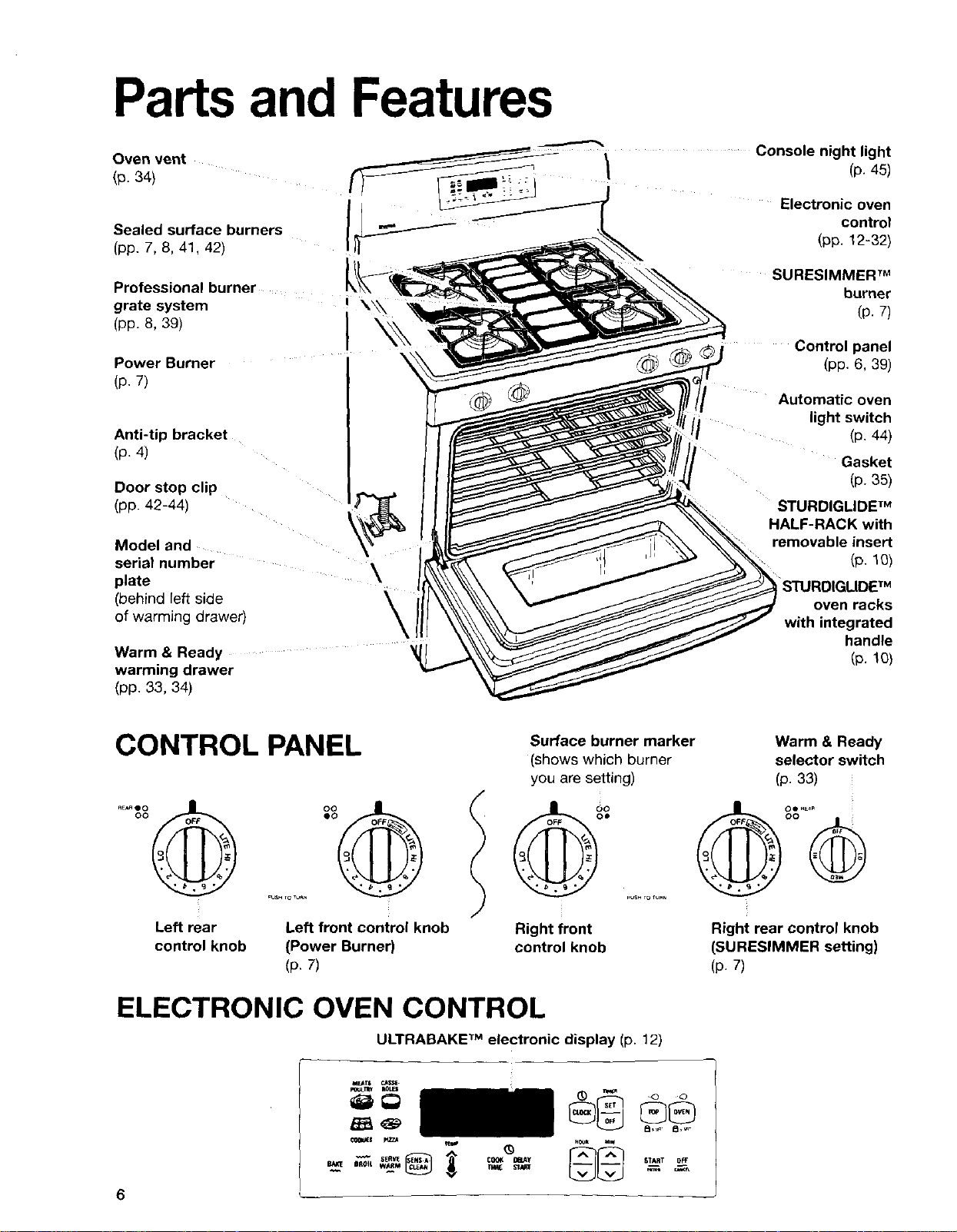
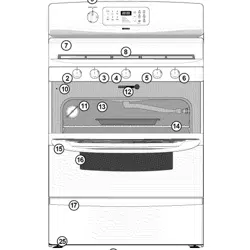
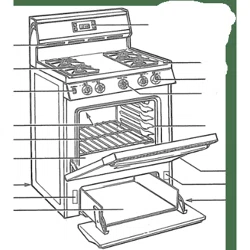
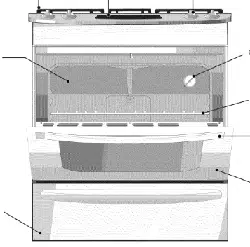
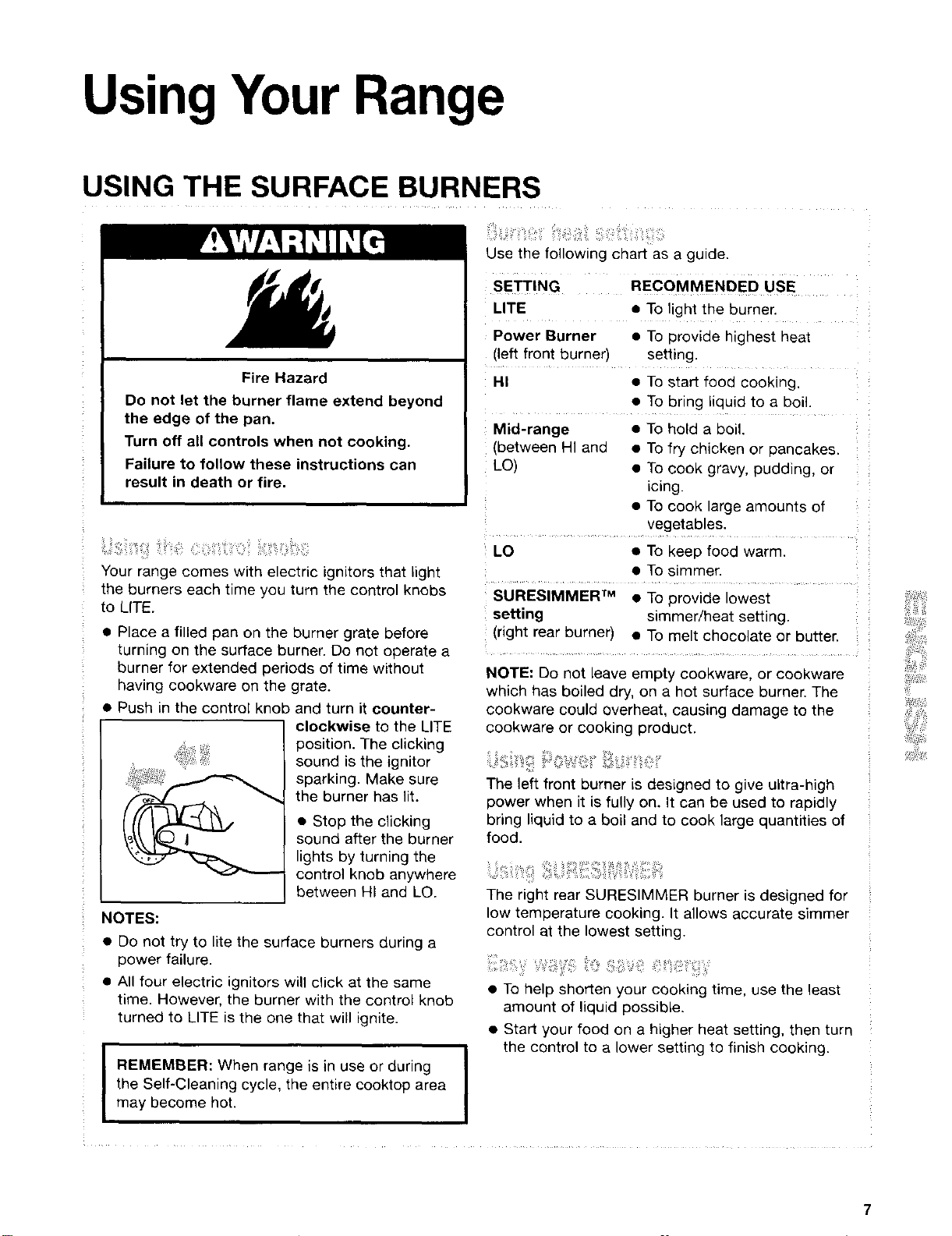
Parts and Features
Oven vent
(p. 34)
Sealed surface burners
(pp. 7, 8, 41, 42)
/ Conso,enight,ght
(p. 45)
i_ Electronic oven
control
(pp. 12-32)
Professional burner
grate system ! \_\
(pp. 8, 39) J k_,,
Power Burner
(p. 7)
Anti-tip bracket
(p. 4)
Door stop clip
(pp. 42-44)
Model and
serial number
plate
(behind left side
of warming drawer)
\
Warm & Ready
warming drawer
SURESIMMER T_
burner
(p. 7)
Control panel
(pp. 6, 39)
Automatic oven
light switch
(p. 44)
Gasket
(p. 35)
STURDIGLIDE TM
HALF-RACK with
removable insert
(p. 1O)
STURDIGLIDETM
oven racks
with integrated
handle
(p. 10)
(pp. 33, 34)
CONTROL PANEL
Surface burner marker
(shows which burner
you are setting)
Push TOTUrN
Left rear Left front control knob Right front
control knob (Power Burner) control knob
(p. 7)
Warm & Ready
selector switch
(p. 33)
OO
Right rear control knob
(SURESIMMER setting)
(p. 7)
ELECTRONIC OVEN CONTROL
ULTRABAKE TMelectronic display (p. 12)
UsingYour Range
USING THE SURFACEBURNERS
Fire Hazard
Do not let the burner flame extend beyond
the edge of the pan.
Turn off all controls when not cooking.
Failure to follow these instructions can
result in death or fire.
........
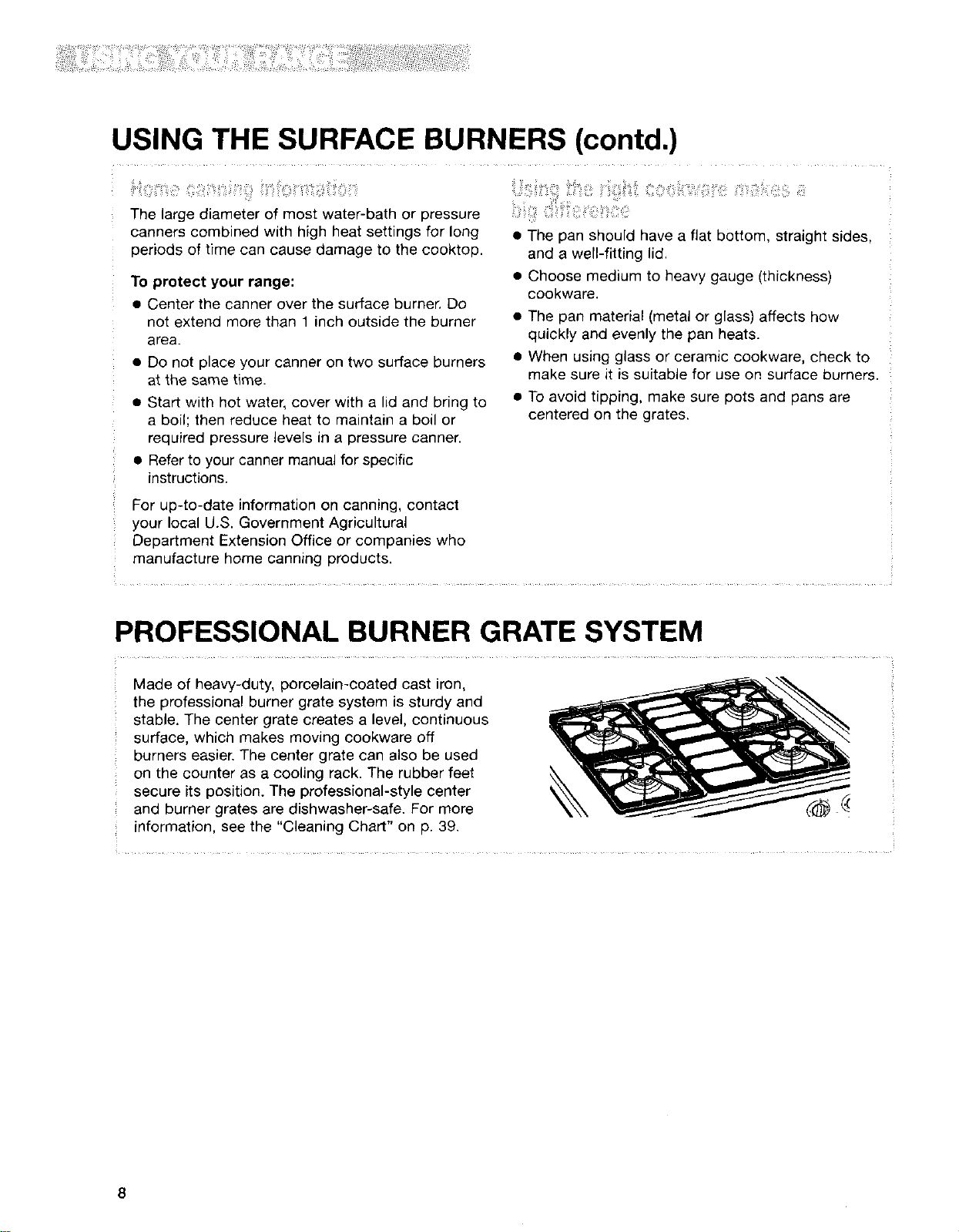
Your range comes with electric ignitors that light
the burners each time you turn the control knobs
to LITE.
• Place a filled pan on the burner grate before
turning on the surface burner. Do not operate a
burner for extended periods of time without
having cookware on the grate.
• Push in the control knob and turn it counter-
clockwise to the LITE
position. The clicking
sound is the ignitor
sparking. Make sure
the burner has lit.
• Stop the clicking
sound after the burner
lights by turning the
control knob anywhere
between HI and LO.
NOTES:
• Do not try to lite the surface burners during a
power failure.
• All four electric ignitors will click at the same
time. However, the burner with the control knob
turned to LITE is the one that will ignite.
I REMEMBER: When range is in use or during
I
the Self-Cleaning cycle, the entire cooktop area
I
may become hot.
Use the following chart as a guide.
SETTING RECOMMENDED USE
LITE • To light the burner.
Power Burner • To provide highest heat
(left front burner) setting.
HI • To start food cooking.
• To bring liquid to a boil.
Mid-range • To hold a boil.
(between HI and • To fry chicken or pancakes.
LO) • To cook gravy, pudding, or
icing.
• To cook large amounts of
vegetables.
LO • To keep food warm.
......... • TOsimmer: .....
SURESIMMER TM • To provide lowest
setting simmer/heat setting.
(right rear burner) • To melt chocolate or butter.
NOTE: Do not leave empty cookware, or cookware
which has boiled dry, on a hot surface burner. The
cookware could overheat, causing damage to the
cookware or cooking product.
The left front burner is designed to give ultra-high
power when it is fully on. It can be used to rapidly
bring liquid to a boil and to cook large quantities of
food.
The right rear SURESIMMER burner is designed for
low temperature cooking. It allows accurate simmer
control at the lowest setting.
.......................
• To help shorten your cooking time, use the least
amount of liquid possible.
• Start your food on a higher heat setting, then turn
the control to a lower setting to finish cooking.
USING THE SURFACE BURNERS (contd.)
The large diameter of most water-bath or pressure
canners combined with high heat settings for long
periods of time can cause damage to the cooktop.
To protect your range:
• Center the canner over the surface burner. Do
not extend more than 1 inch outside the burner
area.
• Do not place your canner on two surface burners
at the same time.
• Start with hot water, cover with a lid and bring to
a boil; then reduce heat to maintain a boil or
required pressure levels in a pressure canner.
• Refer to your canner manual for specific
instructions.
• The pan should have a flat bottom, straight sides,
and a well-fitting lid,
• Choose medium to heavy gauge (thickness)
cookware.
• The pan material (metal or glass) affects how
quickly and evenly the pan heats.
• When using glass or ceramic cookware, check to
make sure it is suitable for use on surface burners.
• To avoid tipping, make sure pots and pans are
centered on the grates.
For up-to-date information on canning, contact
your local U.S. Government Agricultural
Department Extension Office or companies who
manufacture home canning products.
PROFESSIONAL BURNER GRATE SYSTEM
Made of heavy-duty, porcelain-coated cast iron,
the professional burner grate system is sturdy and
stable. The center grate creates a level, continuous
surface, which makes moving cookware off
burners easier. The center grate can also be used
on the counter as a cooling rack. The rubber feet
secure its position. The professional-style center
and burner grates are dishwasher-safe. For more
information, see the "Cleaning Chart" on p. 39.
8
CHARACTERISTICS OF COOKWARE MATERIALS
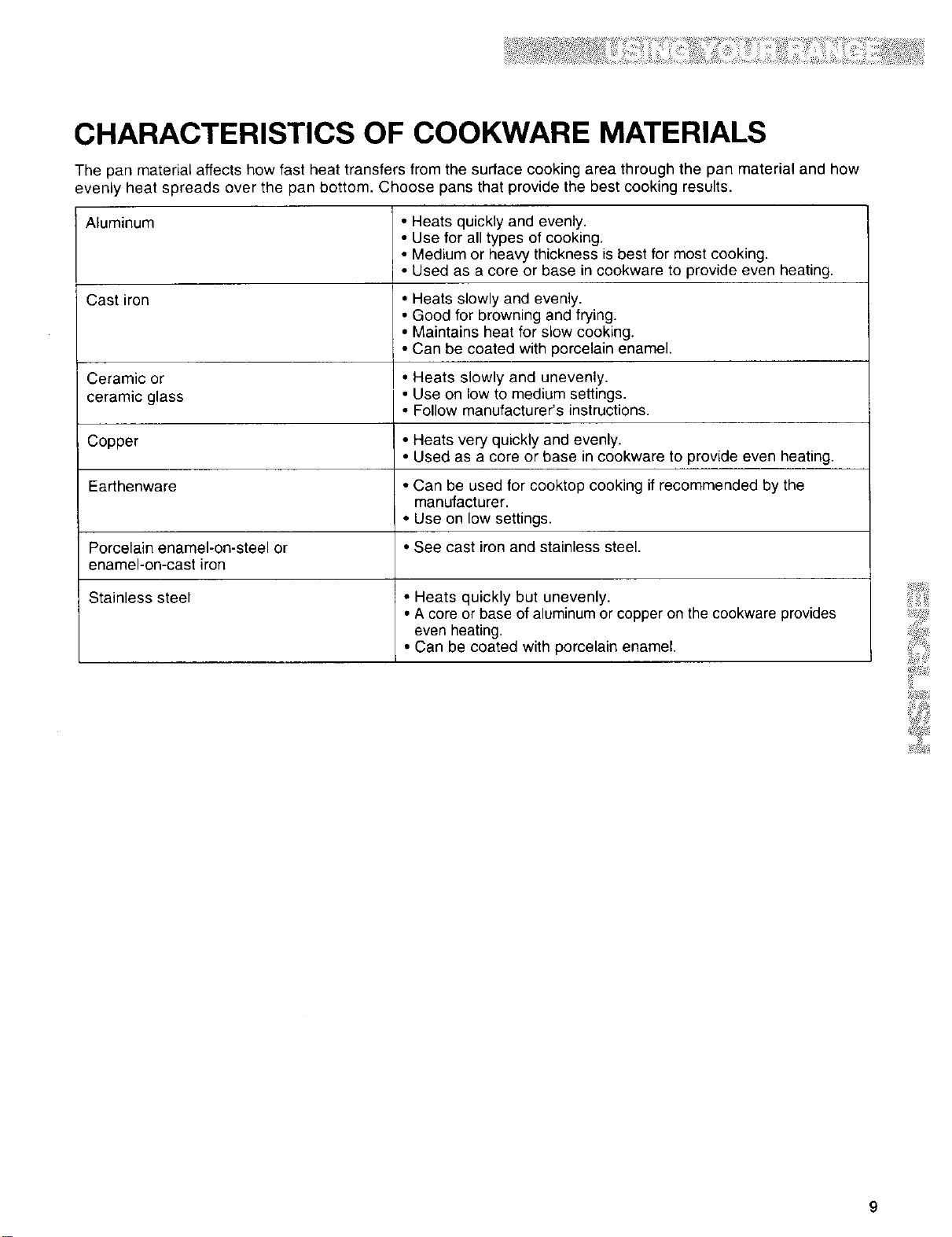
The pan material affects how fast heat transfers from the surface cooking area through the pan material and how
evenly heat spreads over the pan bottom. Choose pans that provide the best cooking results.
Aluminum
Cast iron
Ceramic or
ceramic glass
Copper
Earthenware
Porcelain enamel-on-steel or
enamel-on-cast iron
Stainless steel
• Heats quickly and evenly.
• Use for all types of cooking.
• Medium or heaW thickness is best for most cooking.
• Used as a core or base in cookware to provide even heating.
• Heats slowly and evenly.
• Good for browning and frying.
• Maintains heat for slow cooking.
• Can be coated with porcelain enamel.
• Heats slowly and unevenly.
• Use on low to medium settings.
• Follow manufacturer's instructions.
• Heats very quickly and evenly.
• Used as a core or base in cookware to provide even heating.
• Can be used for cooktop cooking if recommended by the
manufacturer.
• Use on low settings.
• See cast iron and stainless steel.
• Heats quickly but unevenly.
• A core or base of aluminum or copper on the cookware provides
even heating.
• Can be coated with porcelain enamel,
9
USING THE OVEN
%iti
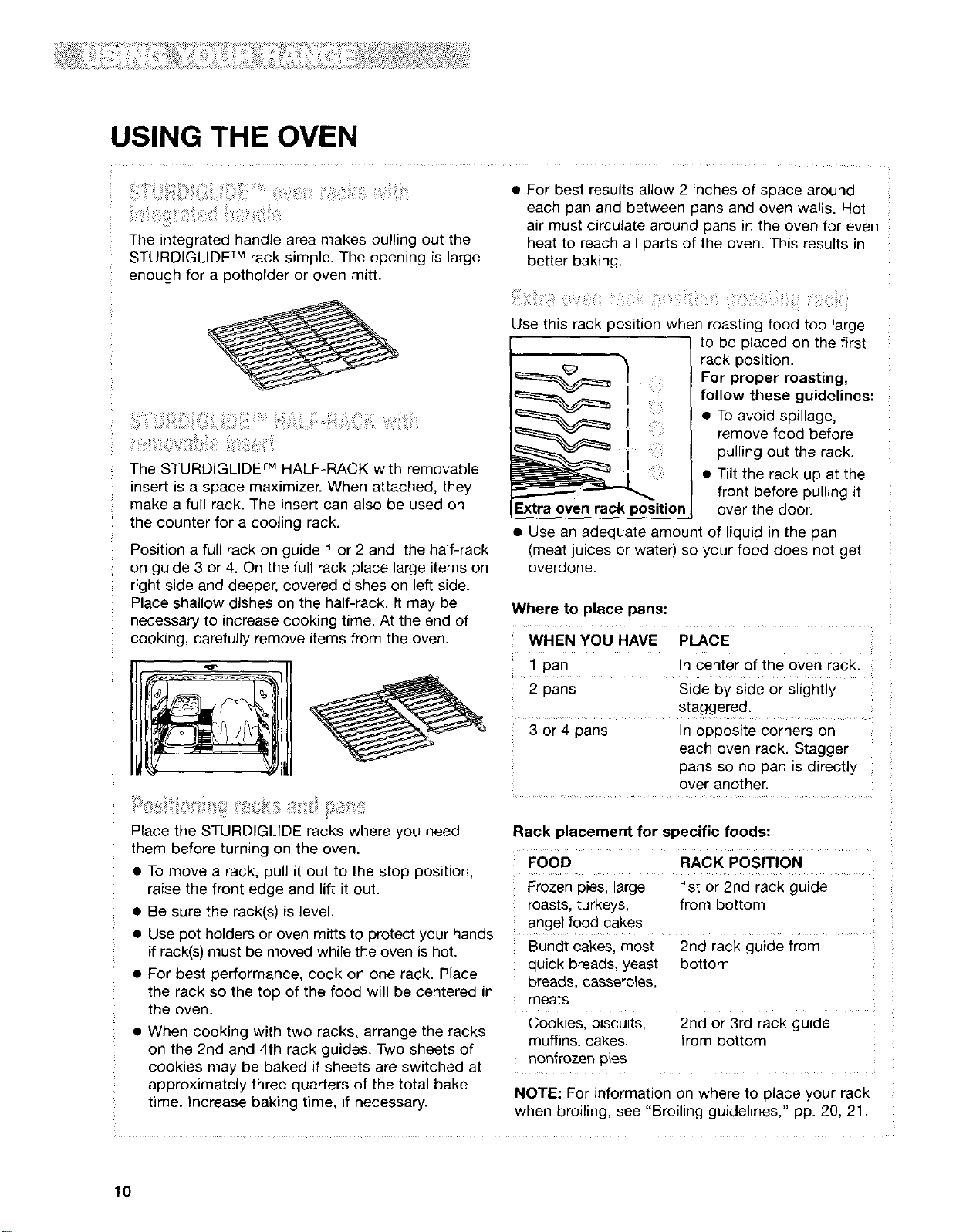
The integrated handle area makes pulling out the
STURDIGLIDE TM rack simple. The opening is large
enough for a pothorder or oven mitt.
The STURDIGLIDE TM HALF-RACK with removable
inser_ is a space maximizer. When attached, they
make a full rack. The insert can also be used on
the counter for a cooling rack.
Position a full rack on guide 1 or 2 and the half-rack
on guide 3 or 4. On the full rack place large items on
right side and deeper, covered dishes on left side.
Place shallow dishes on the half-rack. It may be
necessary to increase cooking time. At the end of
cooking, carefully remove items from the oven.
Place the STURDIGLIDE racks where you need
them before turning on the oven.
• To move a rack, pull it out to the stop position,
raise the front edge and lift it out.
• Be sure the rack(s) is level.
• For best results allow 2 inches of space around
each pan and between pans and oven walls. Hot
air must circulate around pans in the oven for even
heat to reach all parts of the oven. This results in
better baking.
Use this rack position when roasting food too large
to be placed on the first
rack position.
.... For proper roasting,
follow these guidelines:
• To avoid spillage,
remove food before
pulling out the rack.
• Tilt the rack up at the
front before pulling it
Extra oven rack position over the door.
• Use an adequate amount of liquid in the pan
(meat juices or water) so your food does not get
overdone.
Where to place pans:
WHEN YOU HAVE PLACE
1 pan In center of the oven rack.
2 pans Side by side or slightly
stauuer,.,_.-,,- .-_
3 or 4 pans In opposite corners on
each oven rack. Stagger
pans so no pan is directly
over another.
Rack placement for specific foods:
FOOD RACK POSITION
Frozen pies, large 1st or 2nd rack guide
roasts, turkeys, from bottom
angel food cakes
• Use pot holders or oven mitts to protect your hands .......
if rack(s) must be moved while the oven is hot. Bundt cakes, most 2nd rack guide from
• For best performance, cook on one rack. Place
the rack so the top of the food will be centered in
the oven.
• When cooking with two racks, arrange the racks
on the 2nd and 4th rack guides. Two sheets of
quick breads, yeast bottom
breads, casseroles,
meats
Cookies, biscuits,
muffins, cakes,
nonfrozen pies
cookies may be baked if sheets are switched at
approximately three quarters of the total bake
time. Increase baking time, if necessary.
2nd or 3rd rack guide
from bottom
NOTE: For information on where to place your rack
when broiling, see "Broiling guidelines," pp. 20, 21.
10
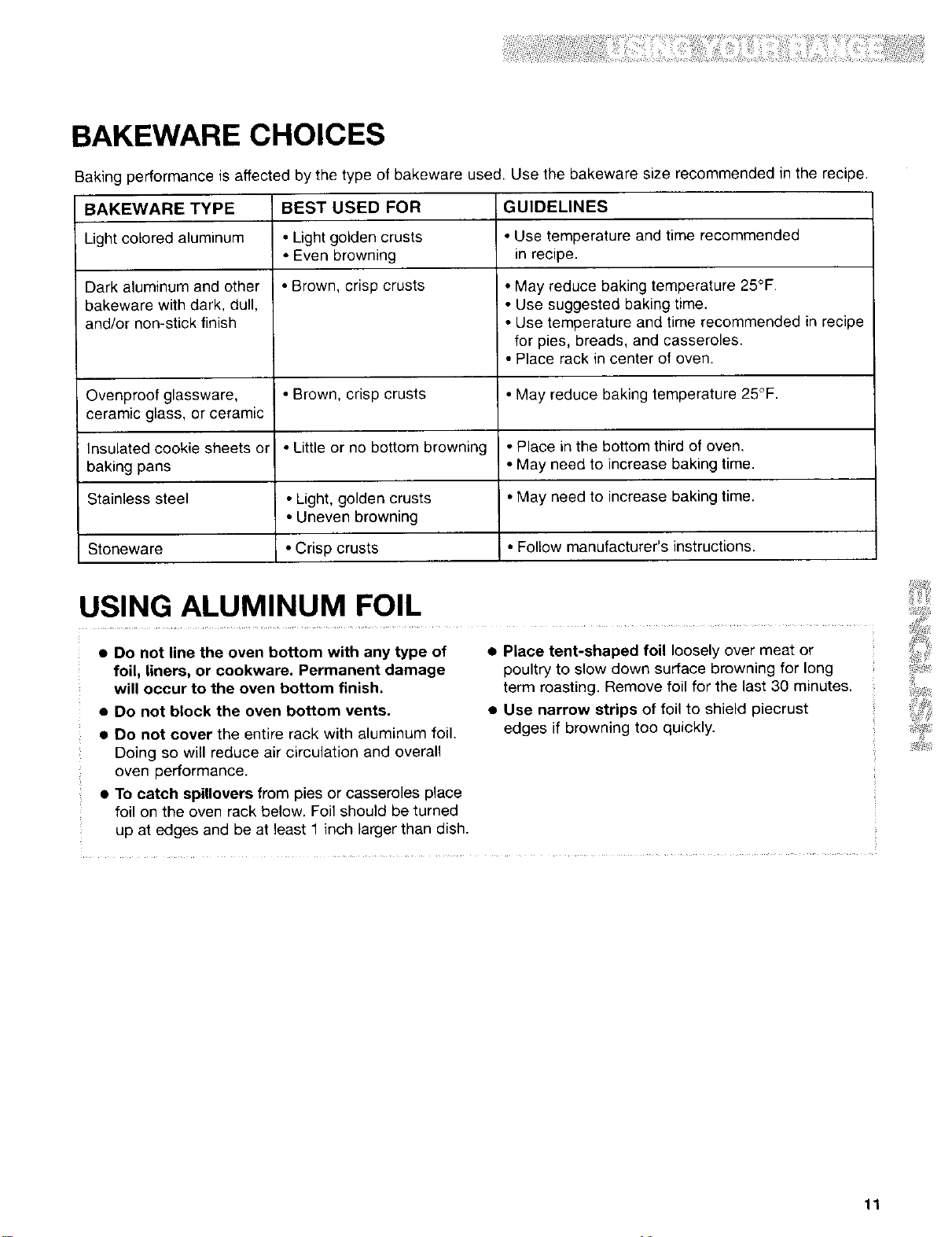
BAKEWARE CHOICES
Baking performance is affected by the type of bakeware used. Use the bakeware size recommended in the recipe.
BAKEWARE TYPE
Light colored aluminum
Dark aluminum and other
bakeware with dark, dull,
and/or non-stick finish
Ovenproof glassware,
ceramic glass, or ceramic
Insulated cookie sheets or
baking pans
BEST USED FOR
• Light golden crusts
• Even browning
• Brown, crisp crusts
GUIDELINES
• Brown, crisp crusts
• Little or no bottom browning
• Light, golden crusts
• Uneven browning
• Crisp crusts
• Use temperature and time recommended
in recipe.
• May reduce baking temperature 25°F.
• Use suggested baking time.
• Use temperature and time recommended in recipe
for pies, breads, and casseroles.
• Place rack in center of oven.
• May reduce baking temperature 25°F.
• Place in the bottom third of oven.
• May need to increase baking time.
Stainless steel • May need to increase baking time.
Stoneware • Follow manufacturer's instructions.
USING ALUMINUM FOIL
• Do not line the oven bottom with any type of
foil, liners, or cookware. Permanent damage
will occur to the oven bottom finish.
• Do not block the oven bottom vents.
• Do not cover the entire rack with aluminum foil.
Doing so will reduce air circulation and overall
oven performance.
• To catch spillovers from pies or casseroles place
foil on the oven rack below. Foil should be turned
up at edges and be at least 1 inch larger than dish.
• PLacetent-shaped foil loosely over meat or
poultry to slow down surface browning for long
term roasting. Remove foil for the last 30 minutes.
• Use narrow strips of foil to shield piecrust
edges if browning too quickly.
11
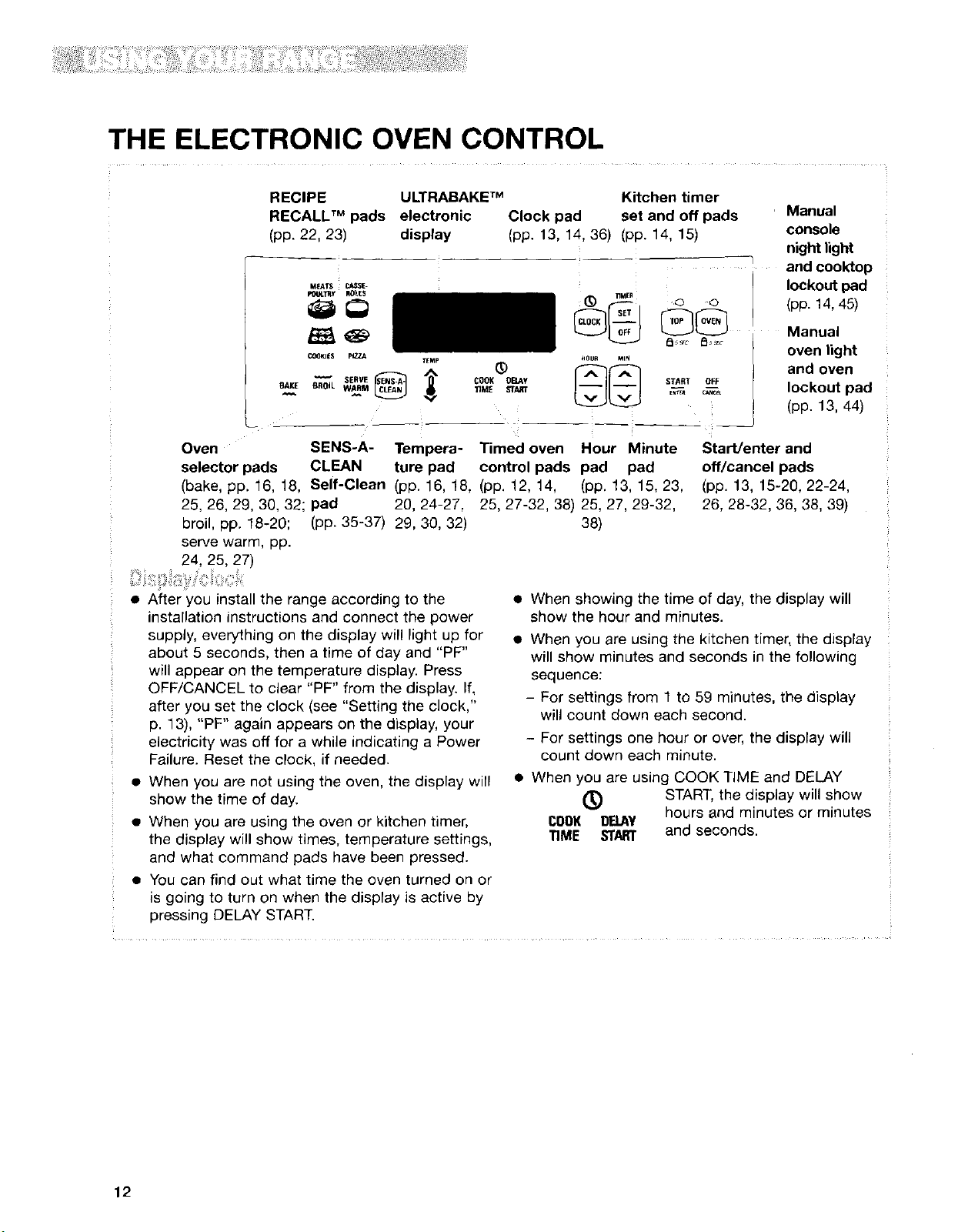
THE ELECTRONIC OVEN CONTROL
RECIPE ULTRABAKE TM Kitchen timer
RECALL TM pads electronic Clock pad set and off pads r Manual
(pp. 22, 23) display (pp. 13, 14, 36) (pp. 14, 15) console
night light
and cooktop
MEATS_S_ lockout pad
p_ULTI_y ROI.E$
(pp. 14, 45)
COOKII=5 PIZZA TfMp _)
w SERVE _ _ COOK OIIA¥
_.K£_ BROIL WARRM 'rIME ST_T
riMER
START OFF
Manual
oven light
and oven
lockout pad
(pp. 13, 44)
Oven
selector pads
(bake, pp. 16, 18,
25, 26, 29, 30, 32;
broil, pp. 18-20;
serve warm, pp.
24, 25, 27)
SENS-A- Tempera- Timed oven Hour Minute
CLEAN ture pad control pads pad pad
Self-Clean (pp. 16, 18, (pp. 12, 14, (pp. 13, 15, 23,
pad 20, 24-27, 25, 27-32, 38) 25, 27, 29-32,
(pp. 35-37) 29, 30, 32) 38)
Start/enter and
off/cancel pads
(pp. 13, 15-20, 22-24,
26, 28-32, 36, 38, 39)
• After you install the range according to the
installation instructions and connect the power
supply, everything on the display will light up for
about 5 seconds, then a time of day and "PF"
will appear on the temperature display. Press
OFF/CANCEL to clear "PF" from the display. If,
after you set the clock (see "Setting the clock,"
p. 13), "PF" again appears on the display, your
electricity was off for a while indicating a Power
Failure. Reset the clock, if needed.
• When you are not using the oven, the display will
show the time of day.
• When you are using the oven or kitchen timer,
the display will show times, temperature settings,
and what command pads have been pressed.
• You can find out what time the oven turned on or
is going to turn on when the display is active by
pressing DELAY START.
• When showing the time of day, the display will
show the hour and minutes.
• When you are using the kitchen timer, the display
will show minutes and seconds in the following
sequence:
- For settings from 1 to 59 minutes, the display
will count down each second.
- For settings one hour or over, the display will
count down each minute.
• When you are using COOK TIME and DELAY
(_) START, the display will show
COOK BB.AY hours and minutes or minutes
TIME START and seconds.
12
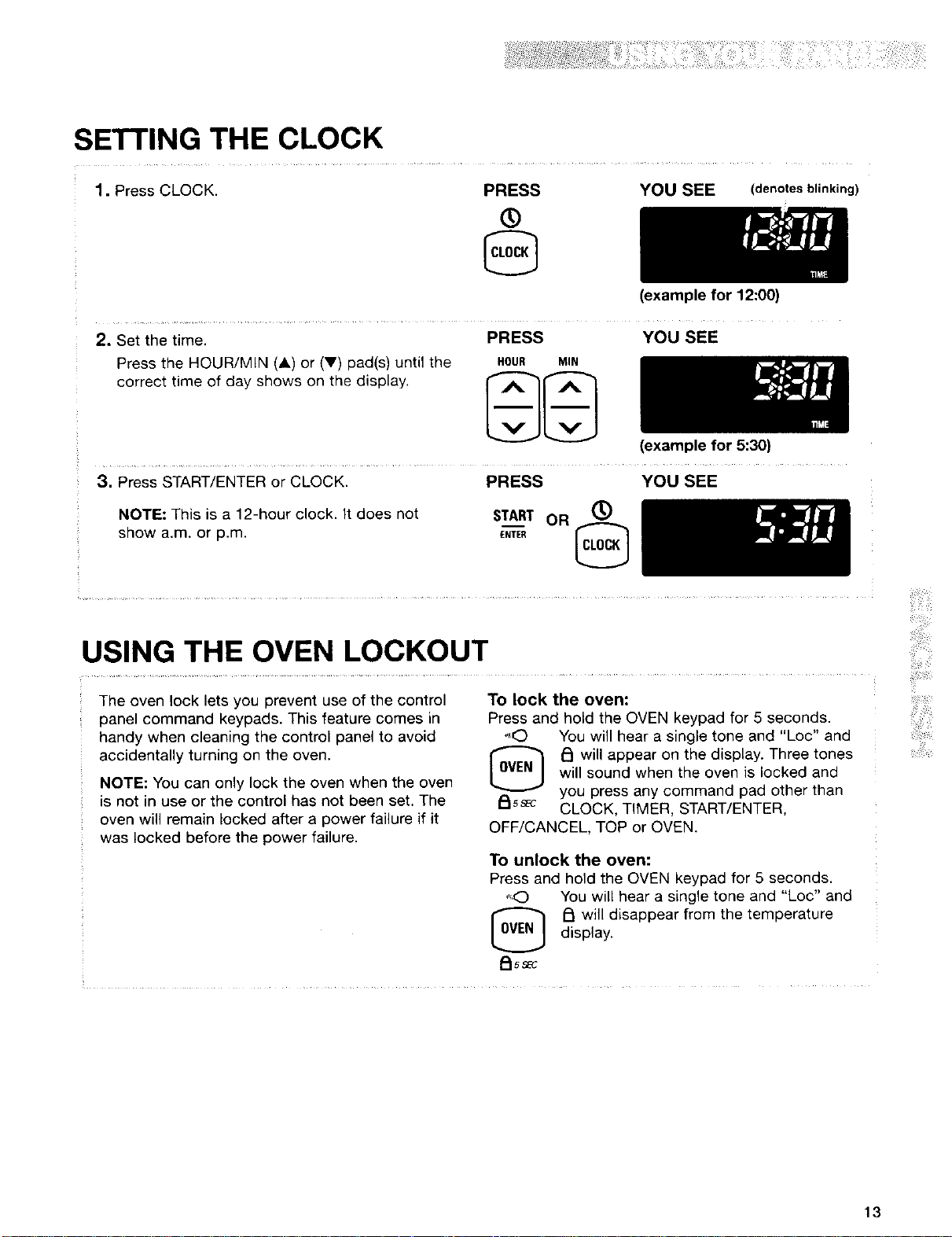
SETTING THE CLOCK
1. Press CLOCK. PRESS
®
YOU SEE (denotesblinking)
(example for 12:00)
PRESS YOU SEE
2, Set the time.
Press the HOUR/MIN (A) or (V) pad(s) until the
correct time of day shows on the display.
HOUR MIN
(example for 5:30)
3. Press START/ENTER or CLOCK. PRESS YOU SEE
NOTE: This is a 12-hour clock. It does not START OR (_)
show a.m. or p.m. E,TE_
USING THE OVEN LOCKOUT
The oven lock lets you prevent use of the control
panel command keypads. This feature comes in
handy when cleaning the control panel to avoid
accidentally turning on the oven.
NOTE: You can only lock the oven when the oven
is not in use or the control has not been set. The
oven will remain locked after a power failure if it
was locked before the power failure.
To lock the oven:
Press and hold the OVEN keypad for 5 seconds.
....O You will hear a single tone and "Loc" and
f::lwill appear on the display. Three tones
will sound when the oven is locked and
_ss_c you press any command pad other than
CLOCK, TIMER, START/ENTER,
OFF/CANCEL, TOP or OVEN.
To unlock the oven:
Press and hold the OVEN keypad for 5 seconds.
,',,O You will hear a single tone and "Loc" and
[_ _ will disappear from the temperature
display.
PJss_c
13
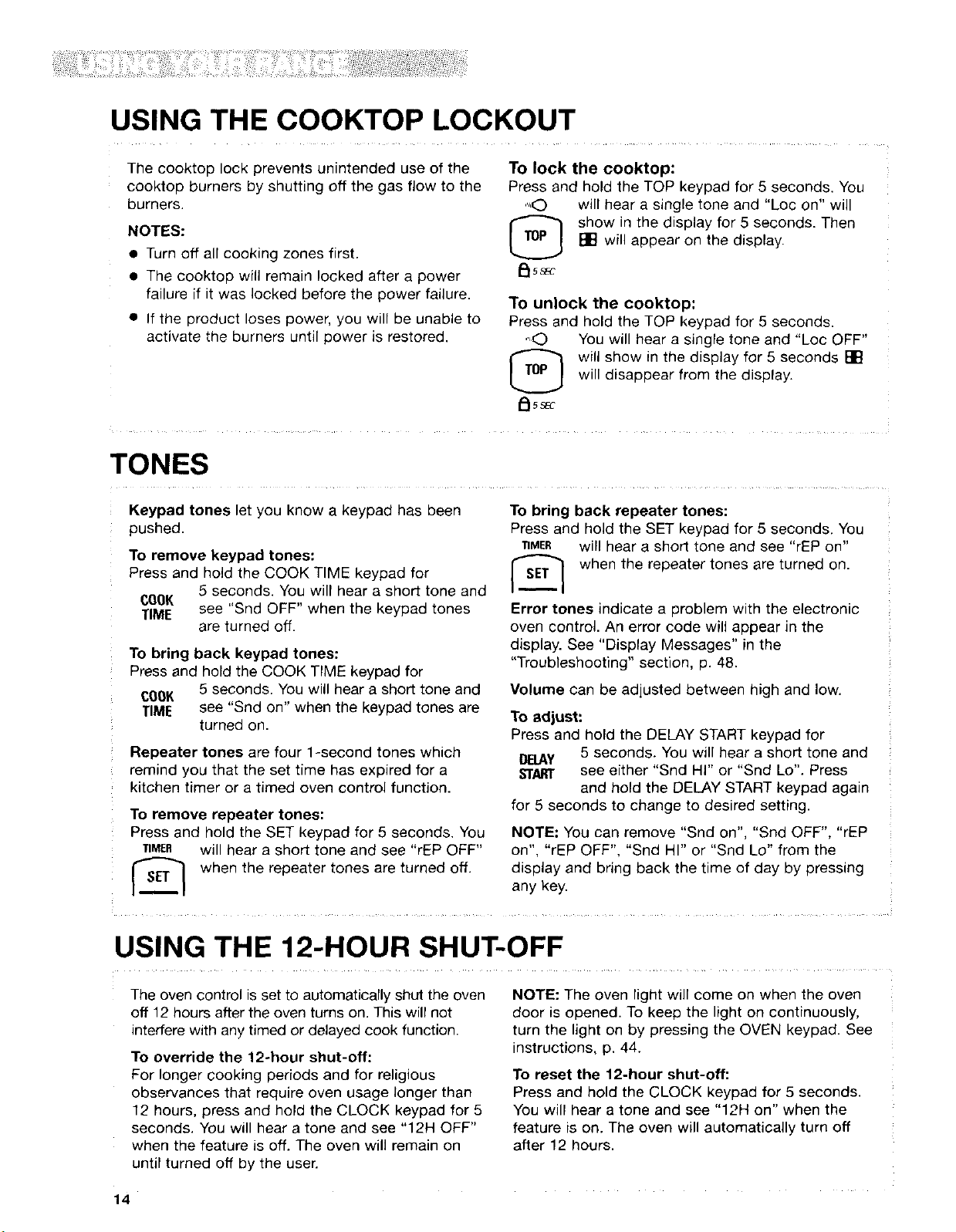
USING THE COOKTOP LOCKOUT
The cooktop lock prevents unintended use of the
cooktop burners by shutting off the gas flow to the
burners.
NOTES:
• Turn off all cooking zones first.
• The cooktop will remain locked after a power
failure if it was locked before the power failure.
• If the product loses power, you will be unable to
activate the burners until power is restored.
To lock the cooktop:
Press and hold the TOP keypad for 5 seconds. You
",,O will hear a single tone and "Loc on" will
[_ show in the display for 5 seconds. Then
[] will appear on the display.
Pt5sEc
To unlock the cooktop:
Press and hold the TOP keypad for 5 seconds.
"O You will hear a single tone and "Loc OFF"
will show in the display for 5 seconds []
will disappear from the display.
TONES
Keypad tones let you know a keypad has been
pushed.
To remove keypad tones:
Press and hold the COOK TIME keypad for
5 seconds. You will hear a short tone and
CQOK
TIME see "Snd OFF" when the keypad tones
are turned off.
To bring back keypad tones:
Press and hold the COOK TIME keypad for
COOK 5 seconds. You will hear a short tone and
TIME see "Snd on" when the keypad tones are
turned on.
Repeater tones are four 1-second tones which
remind you that the set time has expired for a
kitchen timer or a timed oven control function.
To remove repeater tones:
Press and hold the SET keypad for 5 seconds. You
TIMER will hear a short tone and see "rEP OFF"
when the repeater tones are turned off.
To bring back repeater tones:
Press and hold the SET keypad for 5 seconds. You
"riMER will hear a short tone and see "rEP on"
'_ when the repeater tones are turned on.
Error tones indicate a problem with the electronic
oven control. An error code will appear in the
display. See "Display Messages" in the
"Troubleshooting" section, p. 48.
Volume can be adjusted between high and low.
To adjust:
Press and hold the DELAY START keypad for
DELAY 5 seconds. You will hear a short tone and
ST,_Tr see either "Snd HI" or "Snd Lo". Press
and hold the DELAY START keypad again
for 5 seconds to change to desired setting.
NOTE: You can remove "Snd on", "Snd OFF", "rEP
on", "rEP OFF", "Snd HI" or "Snd Lo" from the
display and bring back the time of day by pressing
any key.
USING THE 12-HOUR SHUT-OFF
The oven control is set to automatically shut the oven
off 12 hours after the oven turns on. This will not
interfere with any timed or delayed cook function.
To override the 12÷hour shut-off:
For longer cooking periods and for religious
observances that require oven usage longer than
12 hours, press and hold the CLOCK keypad for 5
seconds. You will hear a tone and see "12H OFF"
when the feature is off. The oven will remain on
until turned oft by the user.
NOTE: The oven light will come on when the oven
door is opened. To keep the light on continuously,
turn the light on by pressing the OVEN keypad. See
instructions, p. 44.
To reset the 12-hour shut-off:
Press and hold the CLOCK keypad for 5 seconds.
You will hear a tone and see "12H on" when the
feature is on. The oven will automatically turn off
after 12 hours.
14
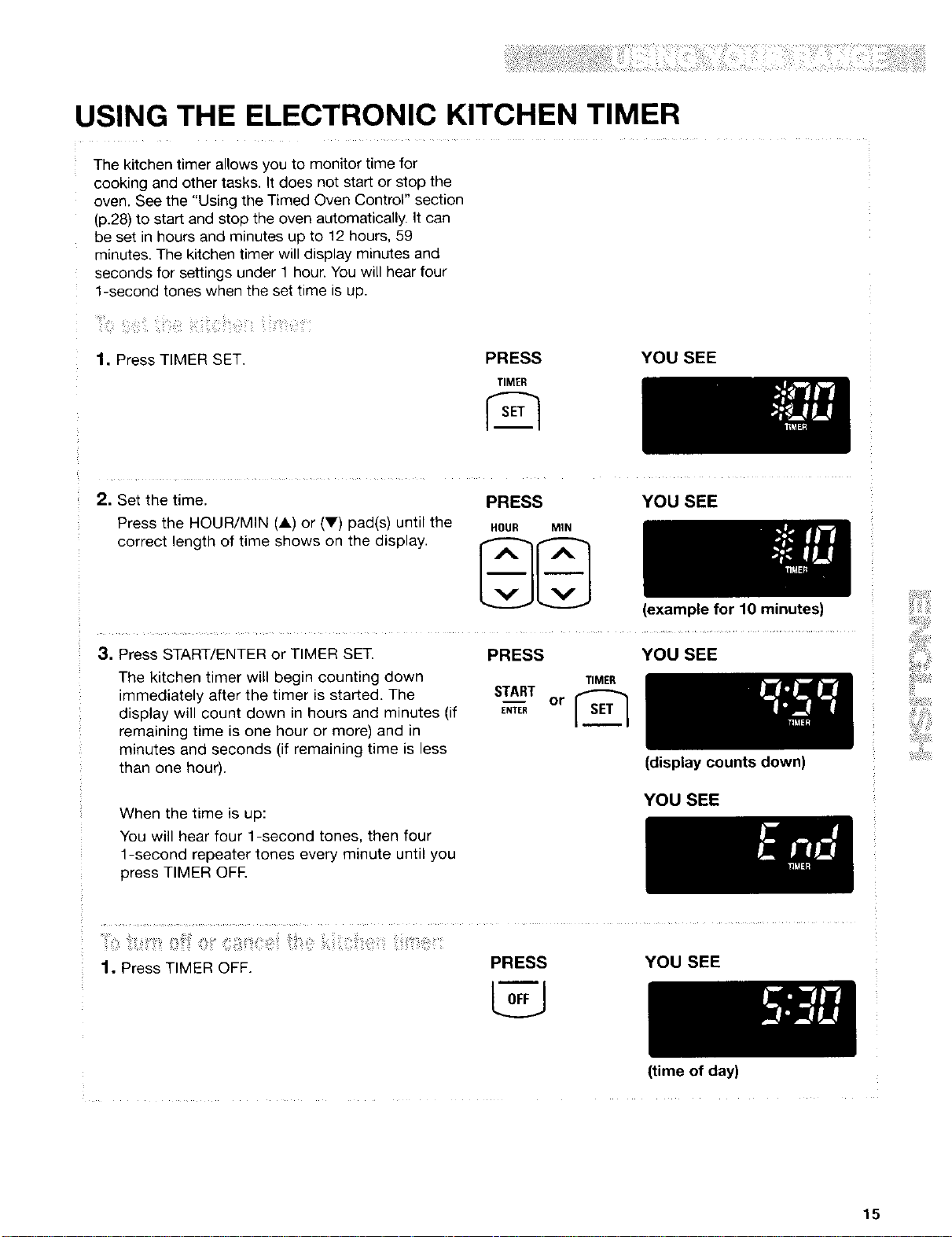
USING THE ELECTRONIC KITCHEN TIMER
The kitchen timer allows you to monitor time for
cooking and other tasks. It does not start or stop the
oven. See the "Using the Timed Oven Control" section
(p.28) to start and stop the oven automatically. It can
be set in hours and minutes up to 12 hours, 59
minutes. The kitchen timer will display minutes and
seconds for settings under 1 hour. You will hear four
1-second tones when the set time is up.
1. Press TIMER SET. PRESS
TIMER
YOU SEE
2. Set the time.
Press the HOUR/MIN (A) or (V) pad(s) until the
correct length of time shows on the display.
PRESS
HOUR MIN
YOU SEE
(example for 10 minutes)
3. Press START/ENTER or TIMER SET.
The kitchen timer will begin counting down
immediately after the timer is started. The
display will count down in hours and minutes (if
remaining time is one hour or more) and in
minutes and seconds (if remaining time is less
than one hour).
PRESS YOU SEE
TIMER
START__or [_
ENTER
(display counts down)
YOU SEE
When the time is up:
You will hear four 1-second tones, then four
1-second repeater tones every minute until you
press TIMER OFE
1. Press TIMER OFF. PRESS YOU SEE
(time of day)
15
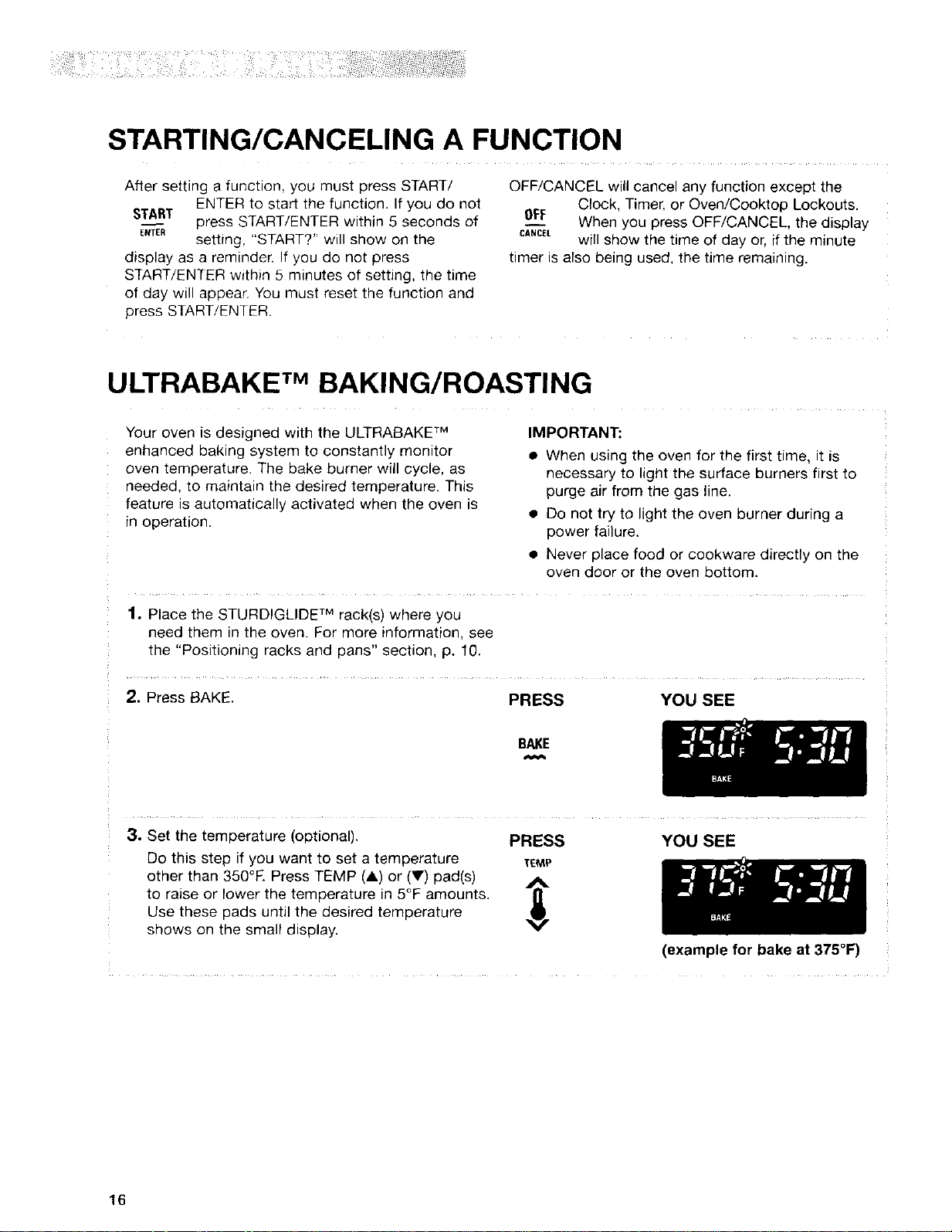
STARTING/CANCELING A FUNCTION
After setting a function, you must press START/
ENTER to start the function. If you do not
START_ press START/ENTER within 5 seconds of
ENTER setting, "START?" will show on the
display as a reminder. If you do not press
START/ENTER within 5 minutes of setting, the time
of day will appear. You must reset the function and
press START/ENTER.
OFF/CANCEL will cancel any function except the
Clock, Timer, or Oven/Cooktop Lockouts.
OFF When you press OFF/CANCEL, the display
CANCELwill show the time of day or, if the minute
timer is also being used, the time remaining.
ULTRABAKE TMBAKING/ROASTING
Your oven is designed with the ULTRABAKF M
enhanced baking system to constantly monitor
oven temperature. The bake burner will cycle, as
needed, to maintain the desired temperature. This
feature is automatically activated when the oven is
in operation.
IMPORTANT:
• When using the oven for the first time, it is
necessary to light the surface burners first to
purge air from the gas line.
• Do not try to light the oven burner during a
power failure.
• Never place food or cookware directly on the
oven door or the oven bottom.
1. Place the STURDIGLIDE TM rack(s) where you
need them in the oven. For more information, see
the "Positioning racks and pans" section, p. 10,
2. Press BAKE. PRESS YOU SEE
BAKE
3. Set the temperature (optional). PRESS
Do this step if you want to set a temperature "fEMP
other than 350°K Press TEMP (&) or (V) pad(s) _.
to raise or lower the temperature in 5°F amounts.
Use these pads until the desired temperature
shows on the small display.
YOU SEE
(example for bake at 375°F)
16

ULTRABAKE TMBAKING/ROASTING (contd.)
4. When roasting, preheating the oven is not nec-
essary unless your recipe
recommends it.
NOTE: The oven will heat
normally even though
"PrE HEAt" is displayed
and then maintain the
selected cooking
temperature.
iii:iii_i!;!ii!i;! ¸ !i _ii_ii!¸¸ ii_ i !!jill!
• For even cooking, place the meat on a rack in a
shallow pan. This keeps the meat out of the
drippings and allows the heat to circulate better.
• Use a meat thermometer for the most accurate
doneness. Insert it so the tip is in the center of
the largest muscle or thickest Iqortion of the meat
or poultry. Make sure the therr_ometer is not
touching bone, fat, or the bottom of the pan.
5. Press START/ENTER.
A preheat mode is entered after the oven
temperature has been set and START has been
pressed. Once the preheat conditioning ends,
the selected oven temperature replaces "PrE
HEAt" on the display. You will hear a 1-second
tone, indicating the oven is ready to use.
The ULTRABAKE TM system electronically
regulates the preheat and temperature to maintain
a precise temperature range for the best cooking
results.
PRESS YOU SEE
START
ENTER
YOU SEE
NOTES:
• You can change the temperature setting any
time after pressing START/ENTER. You do not
have to press START/ENTER again.
• While the oven is in the preheat mode, you can
see the set temperature for 5 seconds by
pressing BAKE.
(example for set temperature
of 350°1=)
6. When baking, put your food in the oven after "- ,
the preheat conditioning • To avoid loss of heat, open the oven door as little
ends. During baking/
roasting, the oven burner
will turn on and off to keep
the oven temperature at
the setting.
as possible.
• Use the timer to keep track of cooking time.
• Plan your meals for the most efficient use of the
oven by cooking more than one food at a time, or
baking while the oven is still hot after cooking a
meal.
7. After cooking, turn off the oven. PRESS
OFF
CANCEL
YOU SEE
(time of day)
17
iiiiiili!i¸_
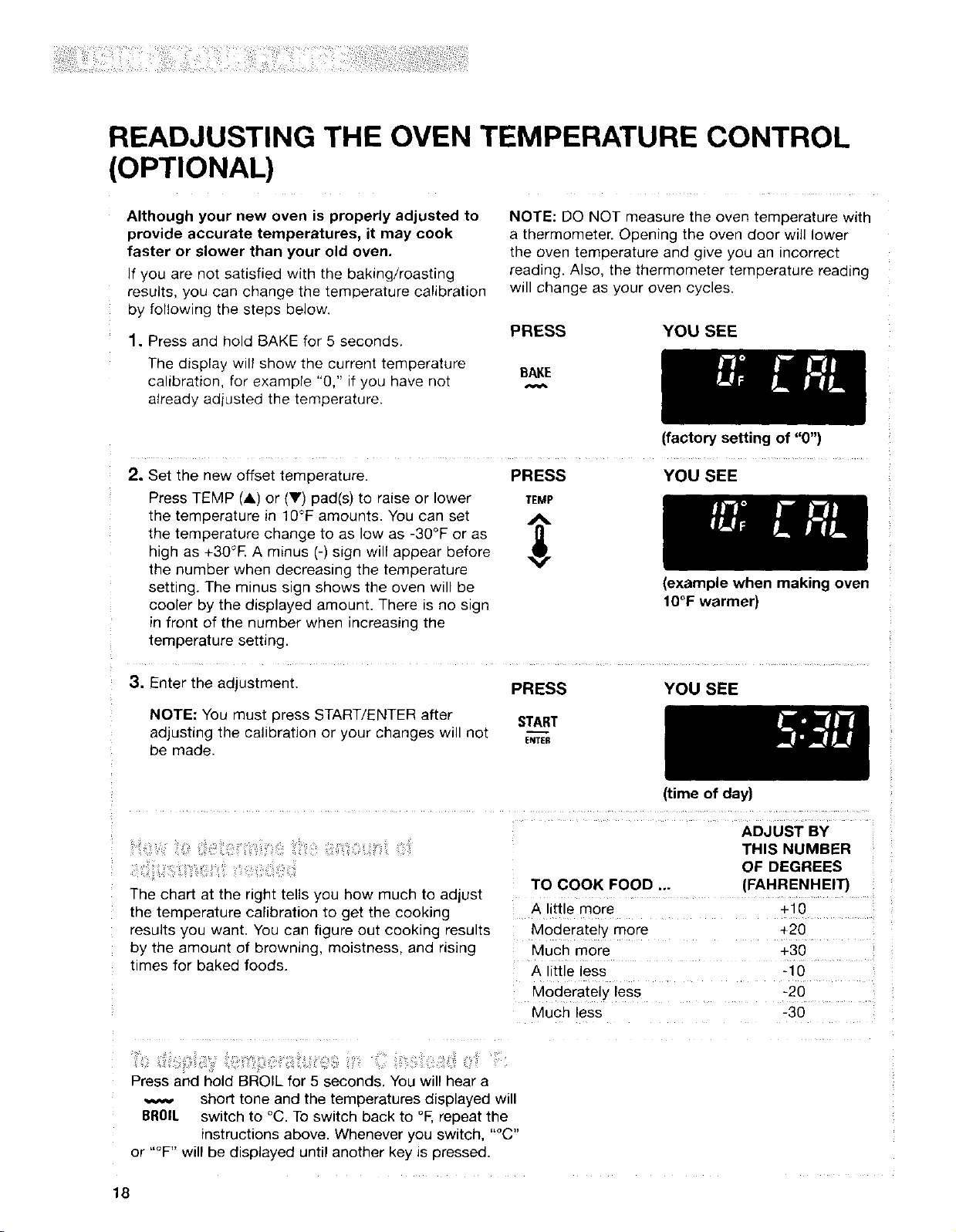
READJUSTING THE OVEN TEMPERATURE CONTROL
(OPTIONAL)
Although your new oven is properly adjusted to
provide accurate temperatures, it may cook
faster or slower than your old oven.
If you are not satisfied with the baking/roasting
results, you can change the temperature calibration
by following the steps below.
1, Press and hold BAKE for 5 seconds.
The display will show the current temperature
calibration, for example "0," if you have not
already adiusted the temperature.
NOTE: DO NOT measure the oven temperature with
a thermometer. Opening the oven door will lower
the oven temperature and give you an incorrect
reading. Also, the thermometer temperature reading
will change as your oven cycles.
PRESS YOU SEE
BAKE
(factory setting of "0")
2. Set the new offset temperature. PRESS YOU SEE
Press TEMP (_,) or (Y) pad(s) to raise or lower TEMP
the temperature in 1O°Famounts. You can set j_.
the temperature change to as low as -30°F or as
high as +30°R A minus (-) sign will appear before
the number when decreasing the temperature
setting. The minus sign shows the oven will be
cooler by the displayed amount. There is no sign
in front of the number when increasing the
temperature setting.
(example when making oven
1O°F warmer)
3. Enter the adjustment. PRESS YOU SEE
NOTE: You must press START/ENTER after START
adjusting the calibration or your changes will not E.TE_
be made.
(time of day)
ADJUST BY
, : ;,
The chart at the right tells you how much to adjust
the temperature calibration to get the cooking
results you want. You can figure out cooking results
by the amount of browning, moistness, and rising
times for baked foods.
THIS NUMBER
OF DEGREES
TO COOK FOOD ... (FAHRENHEIT)
A little more +t0
Moderately more +20
Much more +30
A little less -10
Moderately less -20
Much less -30
..... ........... , ...........
Press and hold BROIL for 5 seconds. You will hear a
short tone and the temperatures displayed will
BROIl. switch to °C. To switch back to °F,repeat the
instructions above. Whenever you switch, "°C"
or "°F" will be displayed until another key is pressed.
18
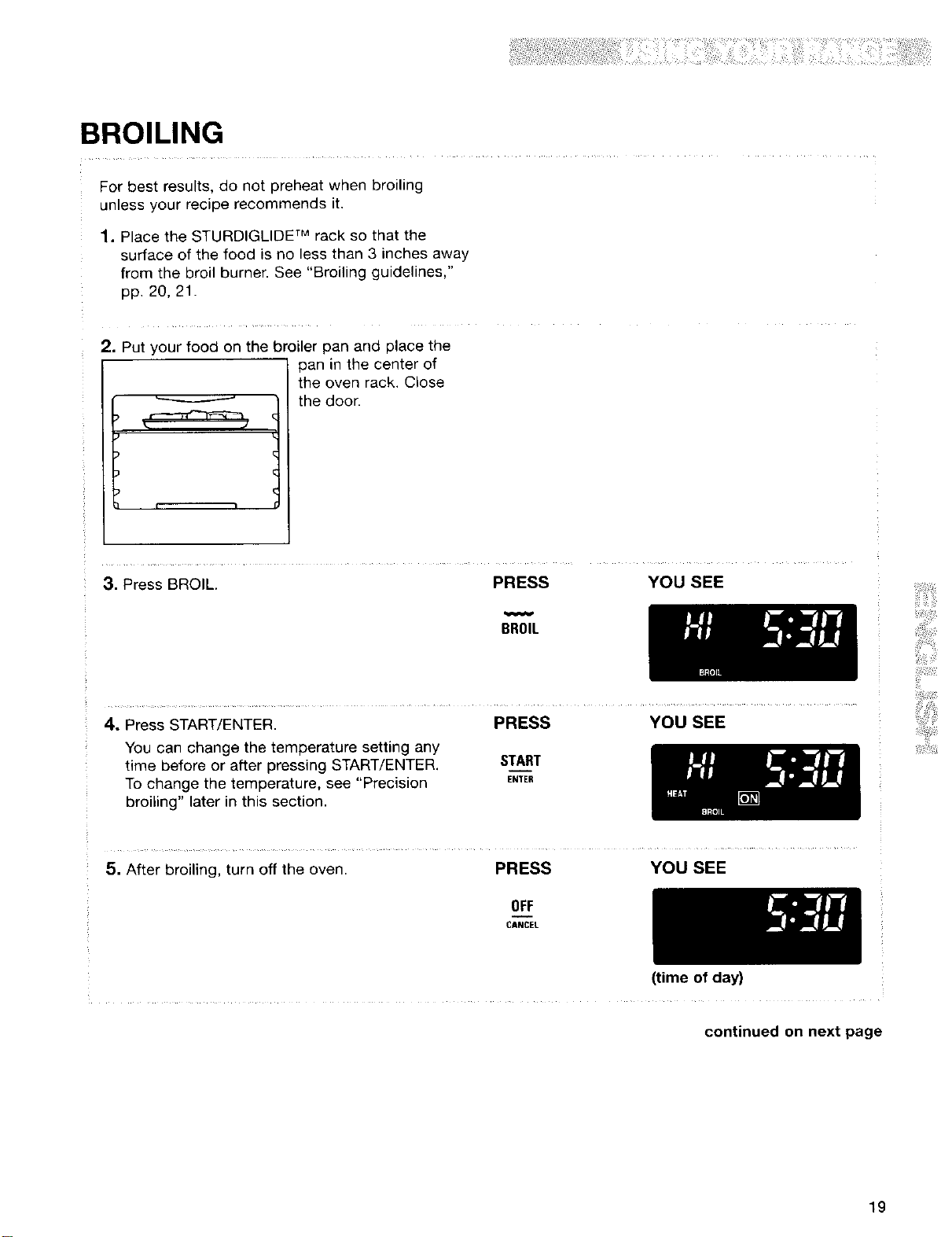
BROILING
For best results, do not preheat when broiling
unless your recipe recommends it.
1. Place the STURDIGLIDE TM rack so that the
surface of the food is no less than 3 inches away
from the broil burner. See "Broiling guidelines,"
pp. 20, 21.
2. Put your food on the broiler pan and place the
Lv
pan in the center of
the oven rack. Close
the door.
3. Press BROIL. PRESS YOU SEE
BROIL
4, Press START/ENTER. PRESS YOU SEE
You can change the temperature setting any
time before or after pressing START/ENTER.
To change the temperature, see "Precision
broiling" later in this section.
START
ENTER
5. After broiling, turn off the oven. PRESS YOU SEE
OFF
CANCEL
(time of day)
continued on next page
19
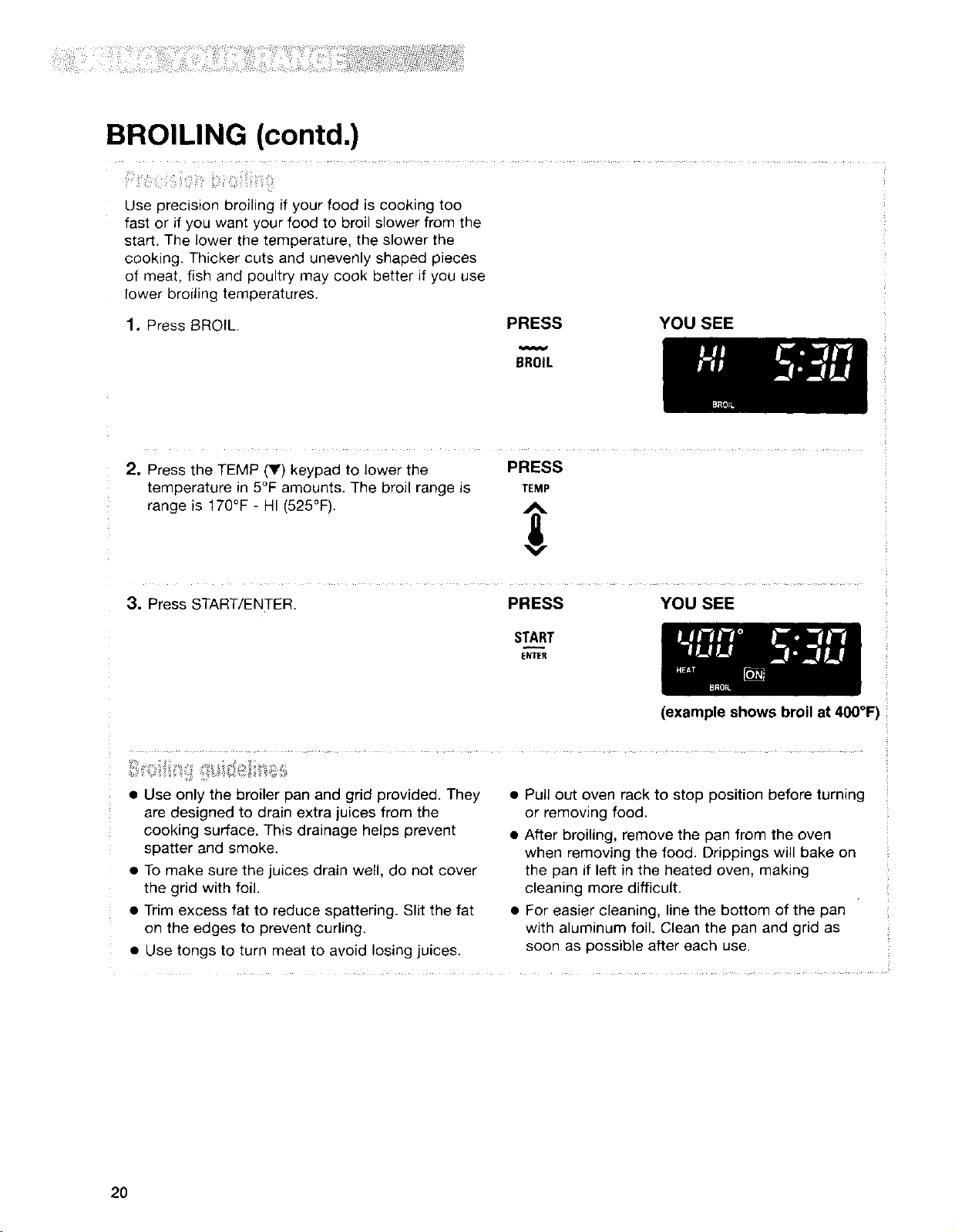
BROILING (contd.)
Use precision broiling if your food is cooking too
fast or if you want your food to broil slower from the
start. The lower the temperature, the slower the
cooking. Thicker cuts and unevenly shaped pieces
of meat, fish and poultry may cook better if you use
lower broiling temperatures.
1. Press t3ROfL. PRESS YOU SEE
BROIL
2. Press the TEMP (V) keypad to lower the PRESS
temperature in 5°F amounts. The broil range is TEMP
range is 170°F - HI (525°F).
3. Press START/ENTER. PRESS YOU SEE
START
ENTER
(example shows broil at 400°F
• Use only the broiler pan and grid provided. They
are designed to drain extra juices from the
cooking surface. This drainage helps prevent
spatter and smoke.
• To make sure the juices drain well, do not cover
the grid with foil.
• Trim excess fat to reduce spattering. Slit the fat
on the edges to prevent curling.
• Use tongs to turn meat to avoid losing juices.
• Pull out oven rack to stop position before turning
or removing food.
• After broiling, remove the pan from the oven
when removing the food. Drippings will bake on
the pan if left in the heated oven, making
cleaning more difficult.
• For easier cleaning, line the bottom of the pan
with aluminum foil. Clean the pan and grid as
soon as possible after each use.
2O
BROILING (contd.)
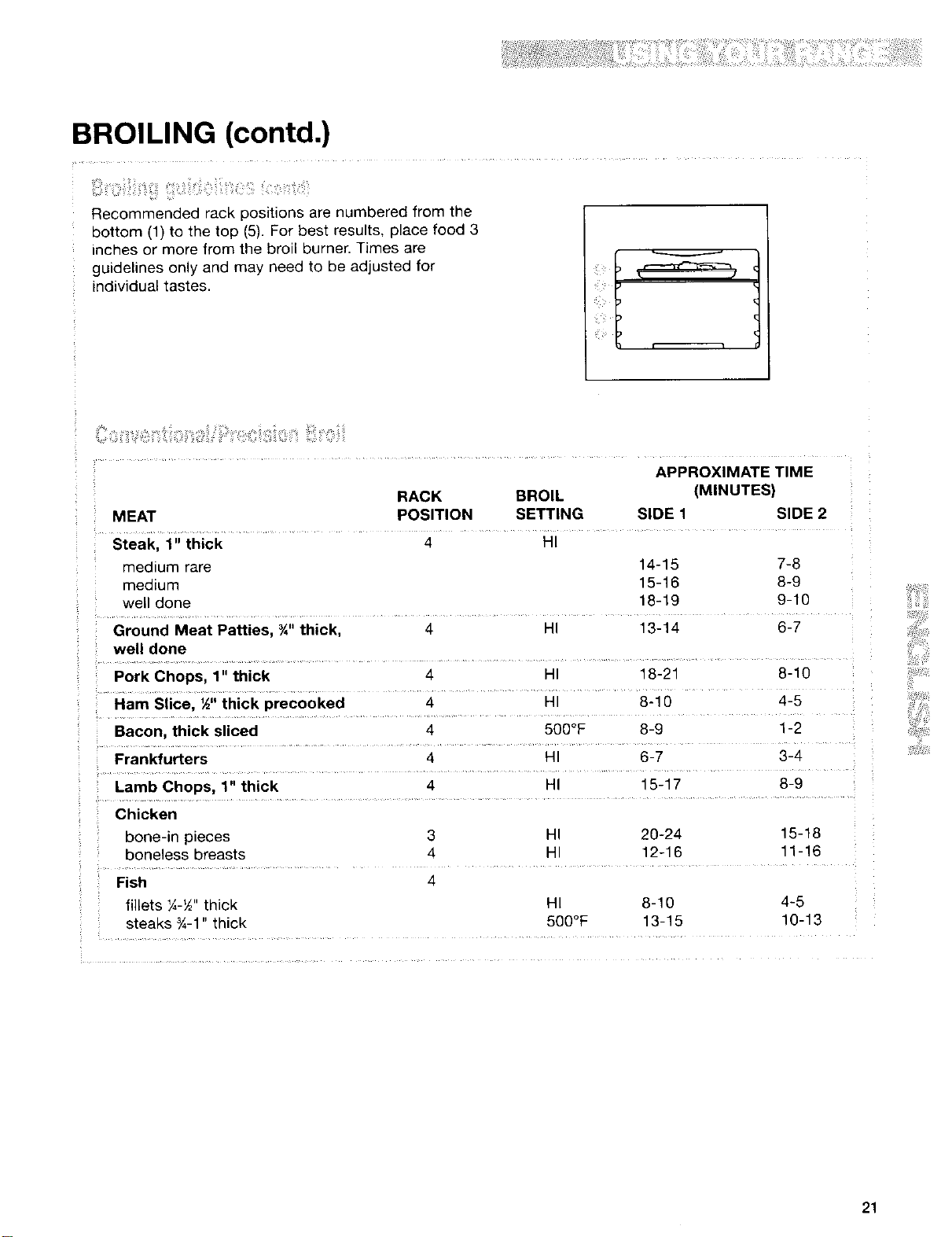
Recommended rack positions are numbered from the
bottom (1) to the top (5). For best results, place food 3
inches or more from the broil burner. Times are
guidelines only and may need to be adjusted for
individual tastes.
APPROXIMATE TIME
RACK BROIL (MINUTES)
MEAT POSITION SETTING SIDE 1 SIDE 2
Steak, 1" thick 4 HI
medium rare 14-15 7-8
medium 15-16 8-9
well done 18-19 9-10
Ground Meat Patties, ¾" thick, 4 HI 13-14 6-7
well done
Pork Chops, 1" thick 4 HI 18-21 8-10
Ham Slice, ½" thick precooked 4 HI 8-10 4-5
Bacon, thick sliced 4 500°F 8-9 1-2
Frankfurters 4 HI 6-7 3-4
Lamb Chops, 1" thick 4 HI 15-17 8-9
Chicken
bone-in pieces 3 HI 20-24 15-18
boneless breasts 4 HI 12-16 11-16
Fish 4
fillets ¼-½"thick HI 8-10 4-5
steaks ¾-1" thick 500°F 13-15 10-13
21
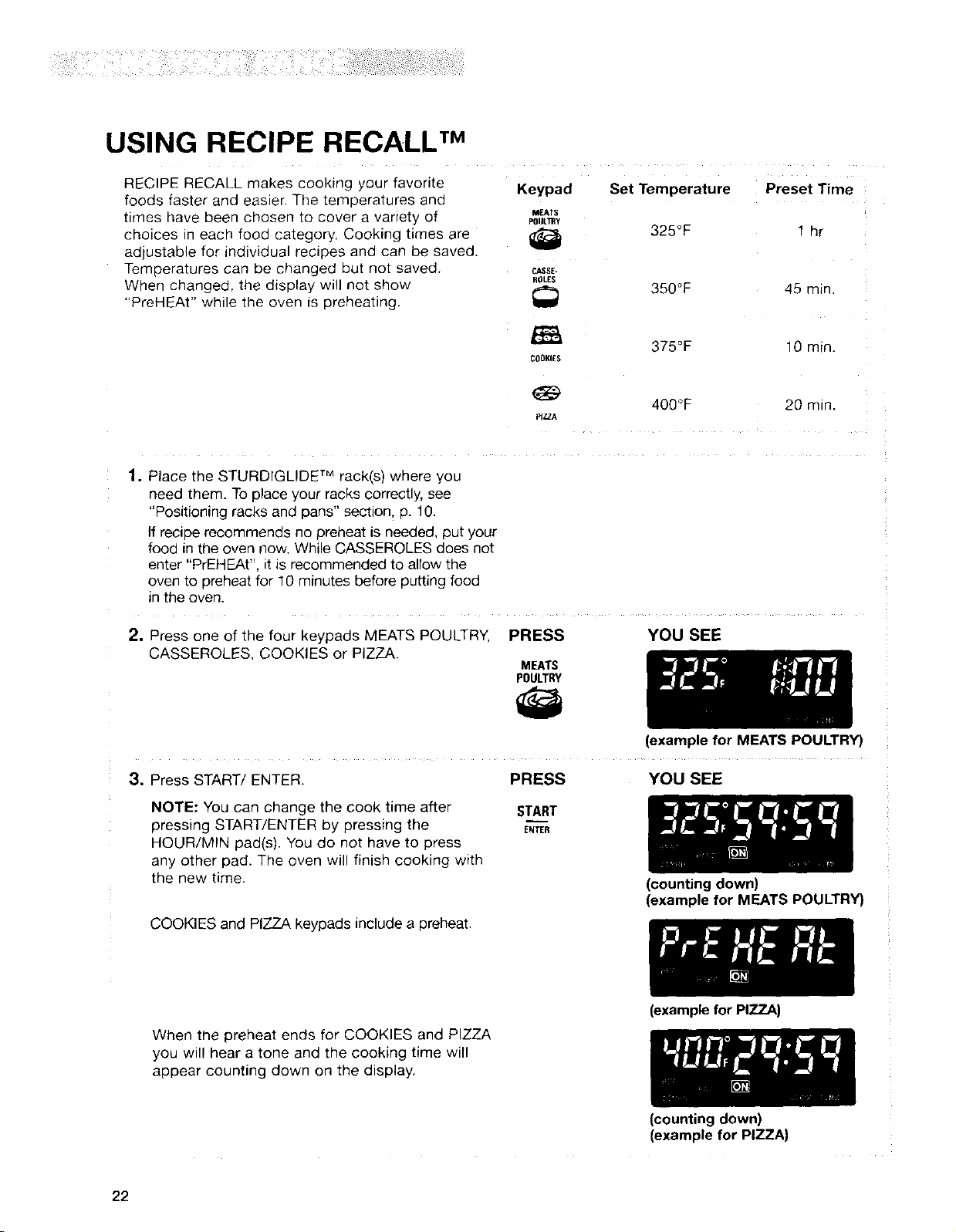
USING RECIPE RECALL TM
RECIPE RECALL makes cooking your favorite
foods faster and easier. The temperatures and
times have been chosen to cover a variety of
choices in each food category. Cooking times are
adjustable for individual recipes and can be saved.
Temperatures can be changed but not saved.
When changed, the display will not show
"PreHEAt" while the oven is preheating.
Keypad Set Temperature Preset Time
MEATS
POULTRy
!_ 325°F _ hr
ROLEg
350°F 45 min
_i 375OF 10 mfn.
COOKIES
400°F 20 min.
pIZZ,_
,
Place the STURDIGLIDE TM rack(s) where you
need them. To place your racks correctly, see
"Positioning racks and pans" section, p. 10.
If recipe recommends no preheat is needed, put your
food in the oven now. While CASSEROLES does not
enter "PrEHEAt", it is recommended to allow the
oven to preheat for 10 minutes before putting food
in the oven.
2. Press one of the four keypads MEATS POULTRY, PRESS
CASSEROLES, COOKIES or PIZZA.
MEATS
POULTRY
3. Press START/ENTER.
NOTE: You can change the cook time after
pressing START/ENTER by pressing the
HOUR/MIN pad(s). You do not have to press
any other pad. The oven will finish cooking with
the new time.
COOKIES and PIZZA keypads include a preheat.
PRESS
START
ENTER
YOU SEE
(exampleforMEATS POU_RY)
YOU SEE
(counting down)
(example for MEATS POULTRY)
When the preheat ends for COOKIES and PIZZA
you will hear a tone and the cooking time will
appear counting down on the display.
22
(example for PIZZA)
(counting down)
(example for PIZZA)
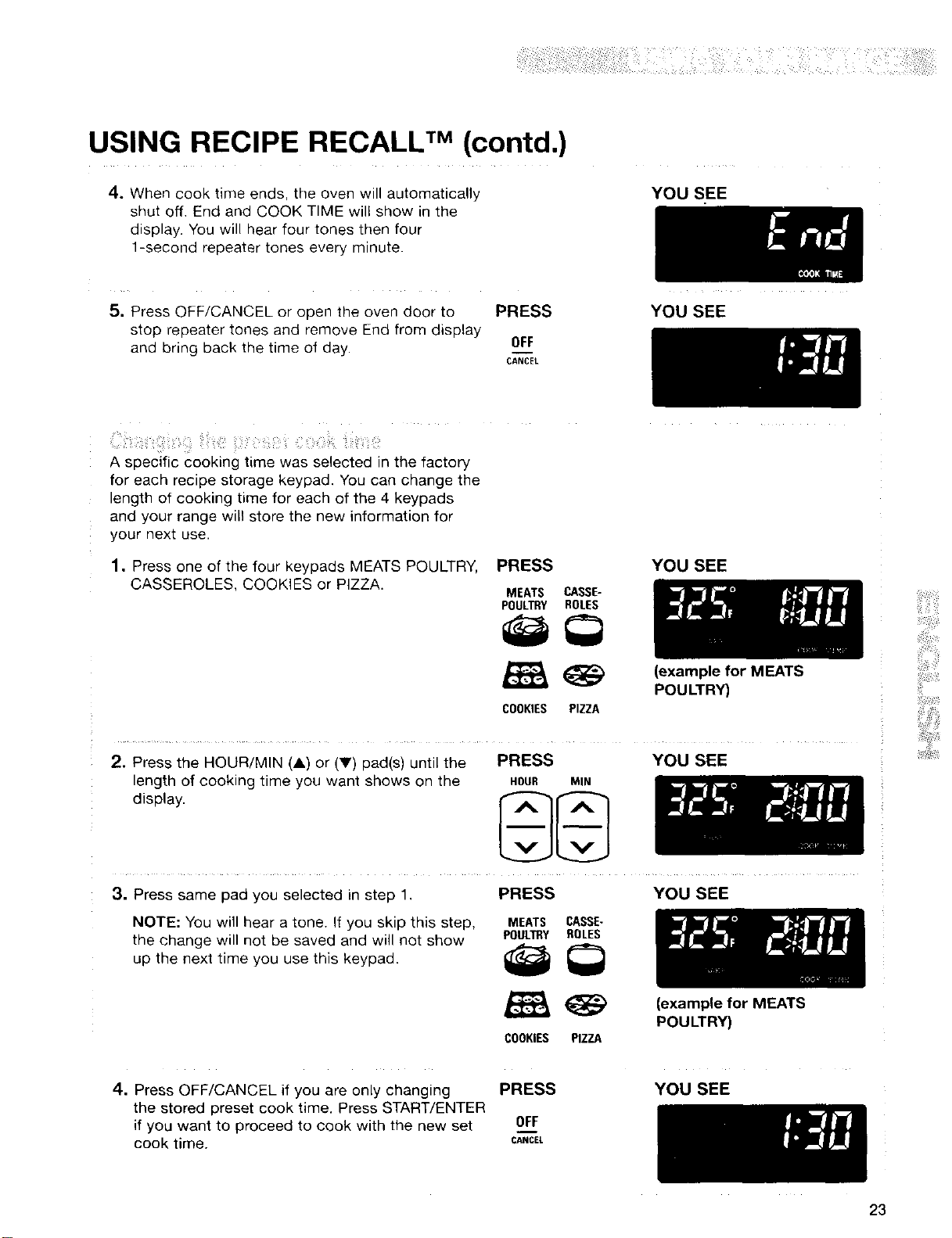
USING RECIPE RECALL TM(contd.)
4. When cook time ends, the oven will automatically
shut off. End and COOK TIME will show in the
display. You will hear four tones then four
1-second repeater tones every minute.
YOU SEE
5, Press OFF/CANCEL or open the oven door to PRESS
stop repeater tones and remove End from display
and bring back the time of day. OFF
CANCEl
YOU SEE
A specific cooking time was selected in the factory
for each recipe storage keypad. You can change the
length of cooking time for each of the 4 keypads
and your range will store the new information for
your next use.
1. Press one of the four keypads MEATS POULTRY, PRESS
CASSEROLES, COOKIES or PIZZA.
MEATS CASSE-
POULTRY ROLES
COOKIES PIZZA
YOU SEE
(example for MEATS
POULTRY}
2. Press the HOUR/MIN (A) or (V) pad(s) until the
length of cooking time you want shows on the
display.
PRESS YOU SEE
HOUR MIN
3. Press same pad you selected in step 1. PRESS YOU SEE
NOTE: You will hear a tone. If you skip this step, MEATS CASSE-
the change will not be saved and will not show POULTRY_ROLES
up the next time you use this keypad. I_
COOKIES PIZZA
4. Press OFF/CANCEL if you are only changing PRESS
the stored preset cook time. Press START/ENTER
if you want to proceed to cook with the new set __0FF
CANCEL
cook time.
(example for MEATS
POULTRY}
YOU SEE
23

USING SERVE WARM
Serve Warm allows you to schedule your cooking
time and makes home-cooked dinners possible even
if you are always on the go, This feature, activated
by the SERVE WARM key on the console, controls
warming in the oven. You can use this feature to hold
hot cooked foods near serving temperature. Use the
feature by itself or add it to the end of a timed cook.
IMPORTANT;
• Food must be at serving temperature before
placing it in the warmed oven.
• Food may be held for up to one hour. To
maintain food quality, hold no longer than
30-45 minutes.
Food Poisoning Hazard
Do not let food sit in oven more than one hour
before or after cooking,
Doing so can result in food poisoning or
sickness.
1. Place the STURDIGLIDE TM rack(s) where you
need them in the oven. For more information see
"Positioning racks and pans" on p. 10.
If the oven is still warm from use, put your hot
cooked food in the oven now. If oven has not
been used to cook the food, allow the oven to
preheat for 5 minutes, then place hot cooked
food in the oven.
2. Press SERVE WARM. PRESS YOU SEE
SERVE
WARM
3. Set the temperature (optional).
PRESS YOU SEE
Press the TEMP (A) or (Y) pad(s) to raise or
lower the temperature in 5°F amounts. Do this I1"1_"
step if you want to set a temperature other than
150°E The warm range is 100°F - 20O°E
TEMP
4. Press START/ENTER. PRESS YOU SEE
START
ENTER
5, After warming, turn off the oven,
PRESS
OFF
CANCEl.
YOU SEE
24
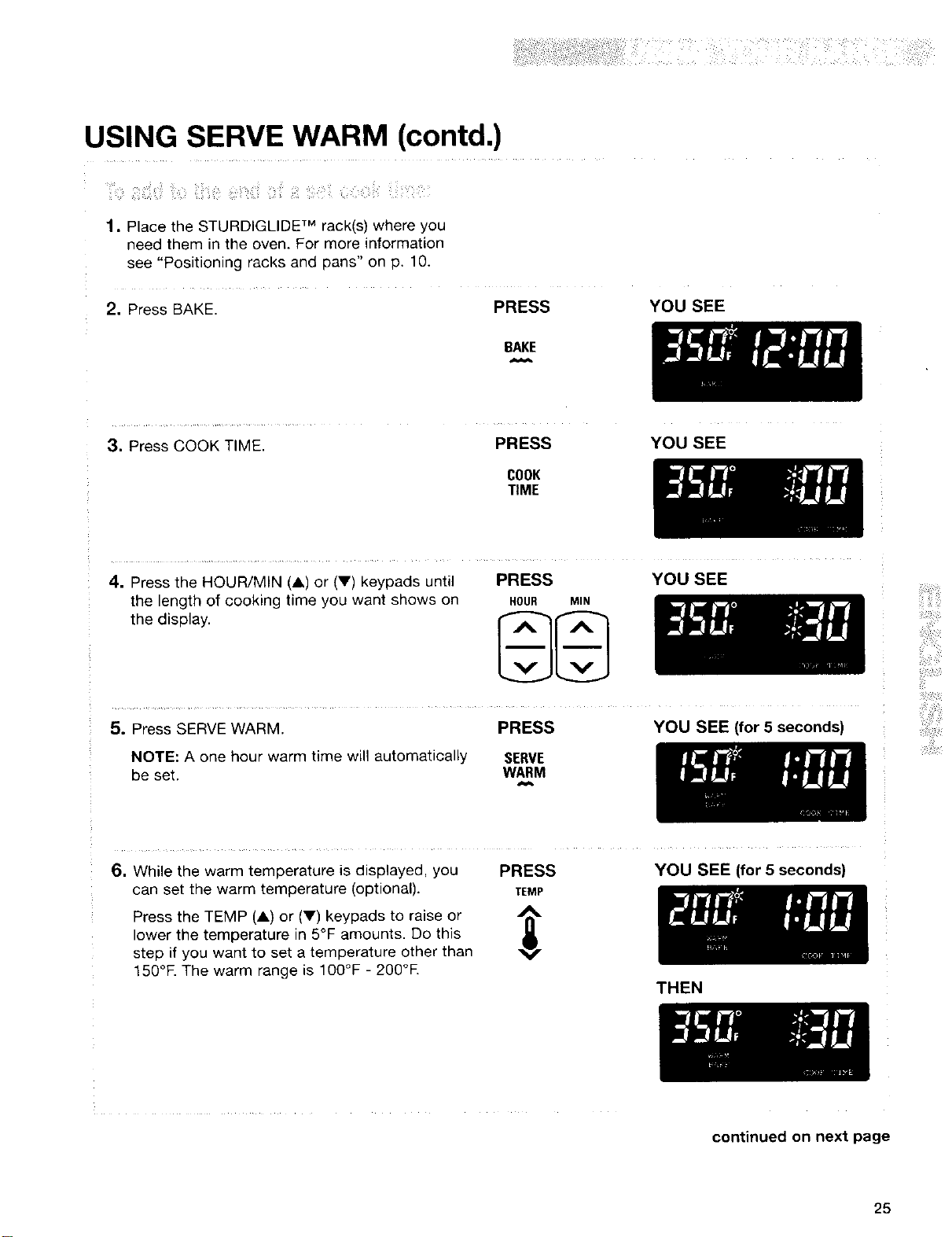
USING SERVE WARM (contd.)
1. Place the STURDIGLIDE TM rack(s) where you
need them in the oven. For more information
see "Positioning racks and pans" on p. 10.
2. Press BAKE. PRESS
YOU SEE
BAKE
3. Press COOK TIME.
PRESS YOU SEE
COOK
TIME
4. Press the HOUR/MiN (A) or (V) keypads until
the length of cooking time you want shows on
the display.
PRESS
HOUR MIN
YOU SEE
5. Press SERVE WARM. PRESS YOU SEE (for 5 seconds)
NOTE: A one hour warm time will automatically SERVE
be set, WARM
6. While the warm temperature is displayed, you PRESS
can set the warm temperature (optional). TEMP
Press the TEMP (A) or (V) keypads to raise or ,_
lower the temperature in 5°F amounts. Do this
step if you want to set a temperature other than
150°E The warm range is 100°F - 200°E
YOU SEE (for 5 seconds)
THEN
continued on next page
25
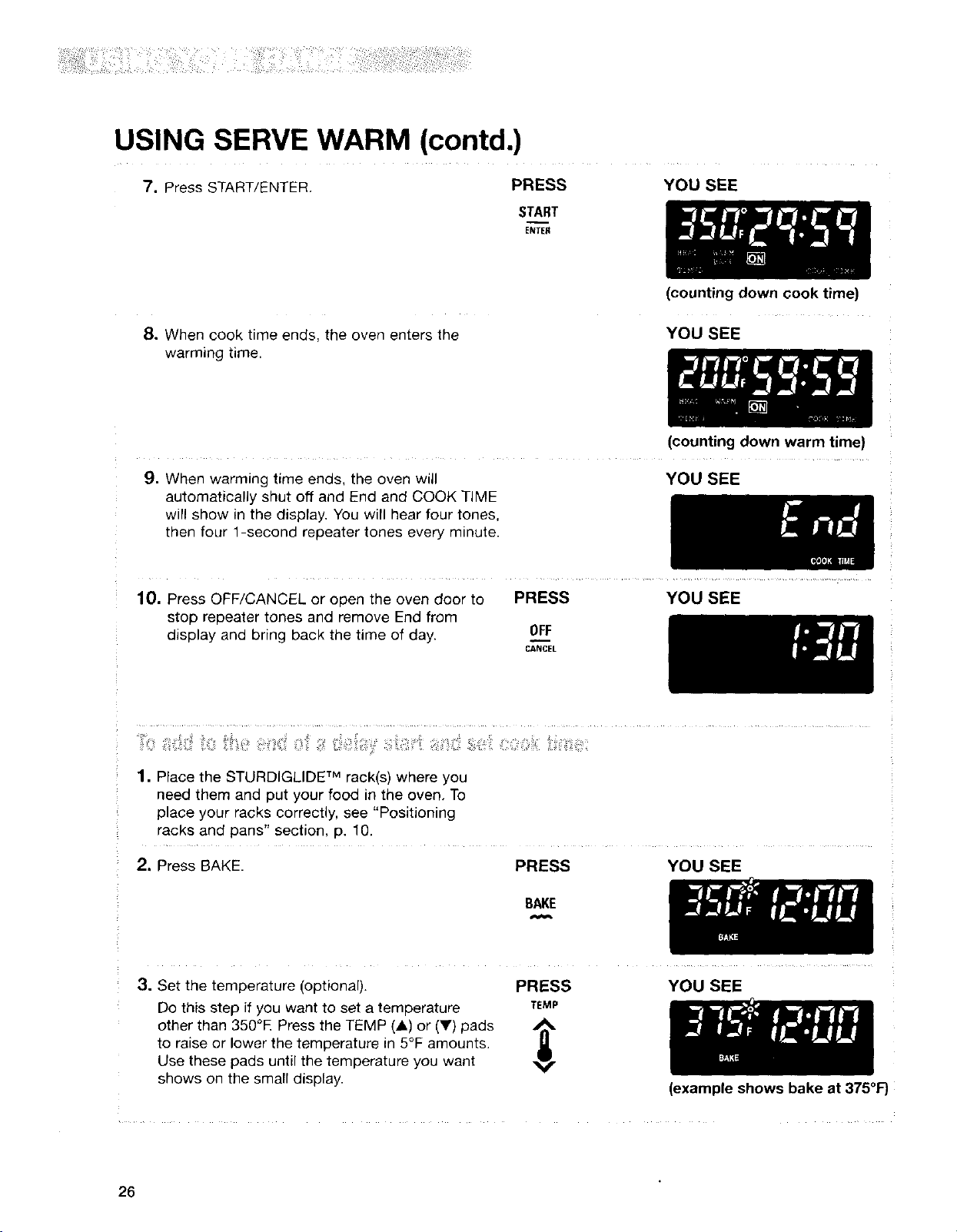
USING SERVE WARM (contd.)
7. Press START/ENTER. PRESS YOU SEE
START
ENTER
8. When cook time ends, the oven enters the
warming time.
(counting down cook time)
YOU SEE
(counting down warm time)
9. When warming time ends, the oven will
automatically shut off and End and COOK TIME
will show in the display. You will hear four tones,
then four 1-second repeater tones every minute.
YOU SEE
10. Press OFF/CANCEL or open the oven door to PRESS YOU SEE
stop repeater tones and remove End from
display and bring back the time of day. __0FF
CANCEL
1. Place the STURDIGLIDE TM rack(s) where you
need them and put your food in the oven, To
place your racks correctly, see "Positioning
racks and pans" section, p. 10.
2. Press BAKE. PRESS YOU SEE
BAKE
3. Set the temperature (optional).
Do this step if you want to set a temperature
other than 350°E Press the TEMP (_,) or (V) pads ,_
to raise or lower the temperature in 5°F amounts.
Use these pads until the temperature you want
shows on the small display.
PRESS
TEMP
YOU SEE
(example shows bake at 375°1=)
26
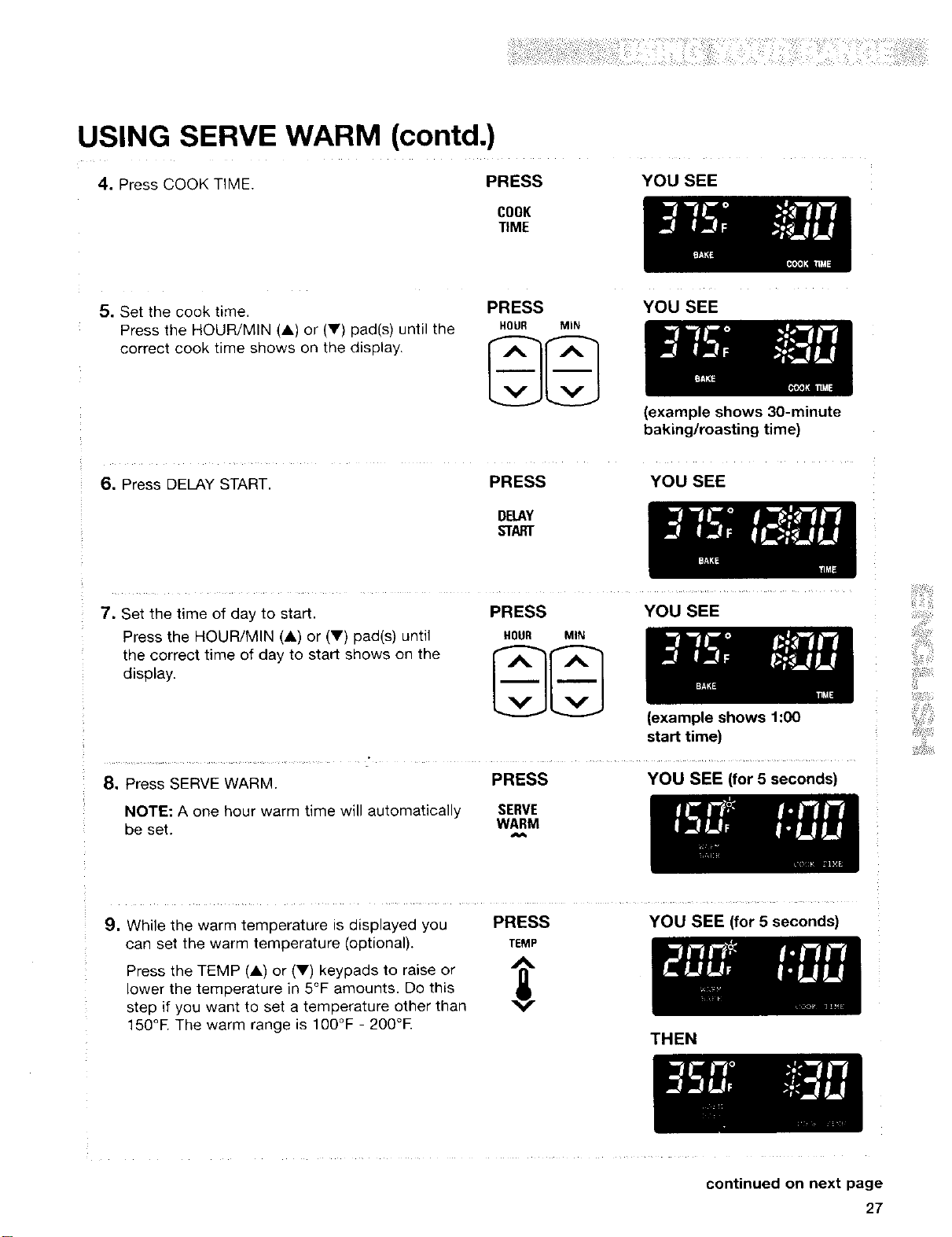
USING SERVE WARM (contd.)
4. Press COOK TIME. PRESS
COOK
TIME
YOU SEE
5. Set the cook time.
Press the HOUR/MIN (A) or (Y) pad(s) until the
correct cook time shows on the display.
PRESS
HOUR MIN
YOU SEE
6. Press DELAY START. PRESS
DELAY
START
(example shows 30-minute
baking/roasting time)
YOU SEE
7. Set the time of day to start.
Press the HOUR/MIN (A) or (V) pad(s) until
the correct time of day to start shows on the
display.
PRESS
HOUR MIN
YOU SEE
(example shows 1:00
start time)
8. Press SERVE WARM. PRESS YOU SEE (for 5 seconds)
NOTE: A one hour warm time will automatically SERVE
be set. WARM
9, While the warm temperature is displayed you PRESS
can set the warm temperature (optional). TEMP
A
Press the TEMP (A) or (V) keypads to raise or irl"
lower the temperature in 5°F amounts. Do this
step if you want to set a temperature other than
150°E The warm range is 100°F - 200°E
YOU SEE (for 5 seconds)
THEN
continued on next page
27
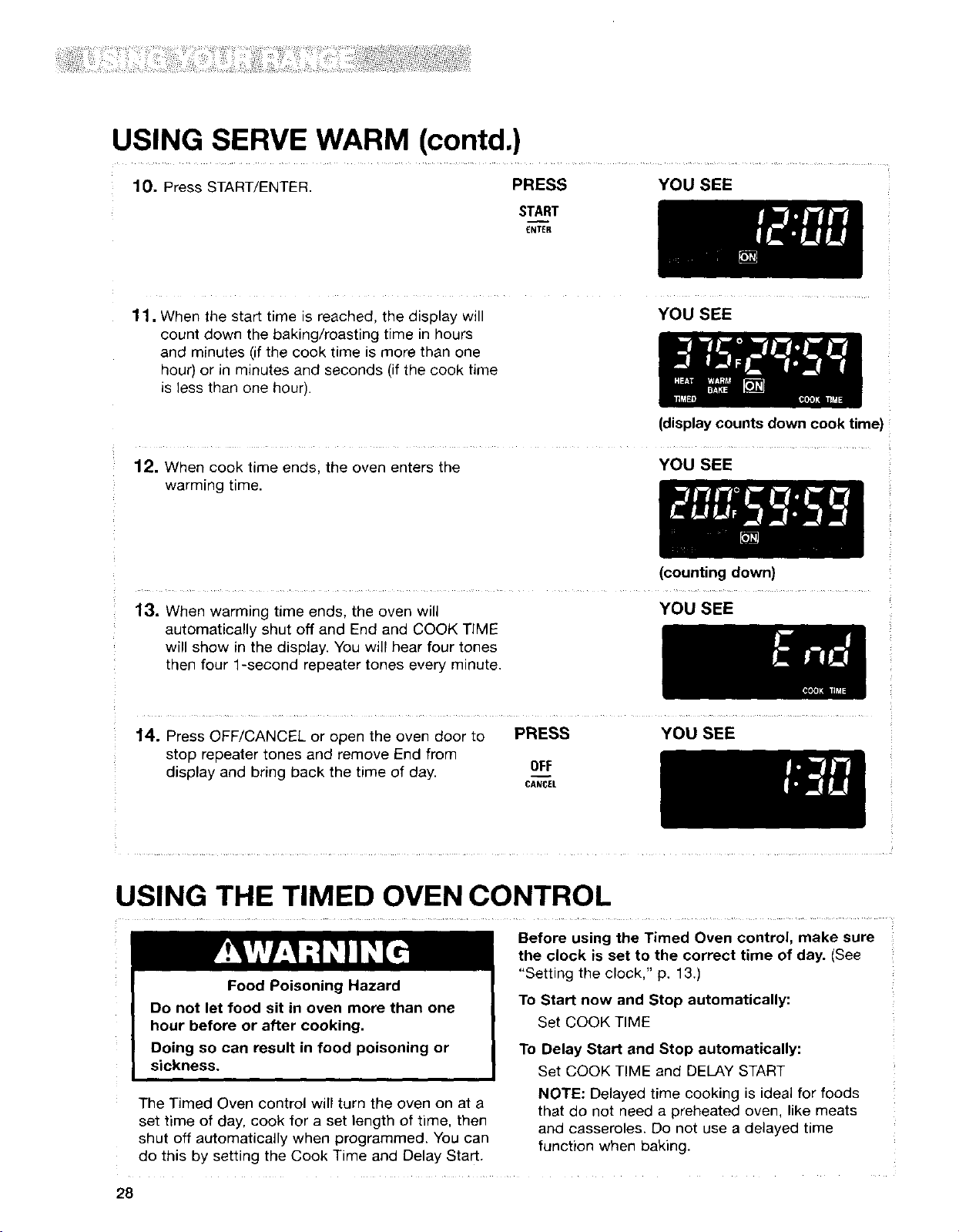
USING SERVE WARM (contd.)
10. Press START/ENTER. PRESS YOU SEE
START
ENTER
11, When the start time is reached, the display will
count down the baking/roasting time in hours
and minutes (if the cook time is more than one
hour) or in minutes and seconds (if the cook time
is less than one hour).
YOU SEE
(display counts down cook time)
12. When cook time ends, the oven enters the YOU SEE
warming time.
(counting down)
13. When warming time ends, the oven will
automatically shut off and End and COOK TIME
will show in the display. You will hear four tones
then four 1-second repeater tones every minute.
YOU SEE
14. Press OFF/CANCEL or open the oven door to PRESS
stop repeater tones and remove End from
display and bring back the time of day. OFF
CANCEL
YOU SEE
USING THE TIMED OVEN CONTROL
Food Poisoning Hazard
Do not let food sit in oven more than one
hour before or after cooking,
Doing so can result in food poisoning or
sickness.
Before using the Timed Oven control, make sure
the clock is set to the correct time of day. (See
"Setting the clock," p. 13.)
To Start now and Stop automatically:
Set COOK TIME
To Delay Start and Stop automatically:
Set COOK TIME and DELAY START
The Timed Oven control will turn the oven on at a
set time of day, cook for a set length of time, then
shut off automatically when programmed. You can
do this by setting the Cook Time and Delay Start.
NOTE: Delayed time cooking is ideal for foods
that do not need a preheated oven, like meats
and casseroles. Do not use a delayed time
function when baking.
28
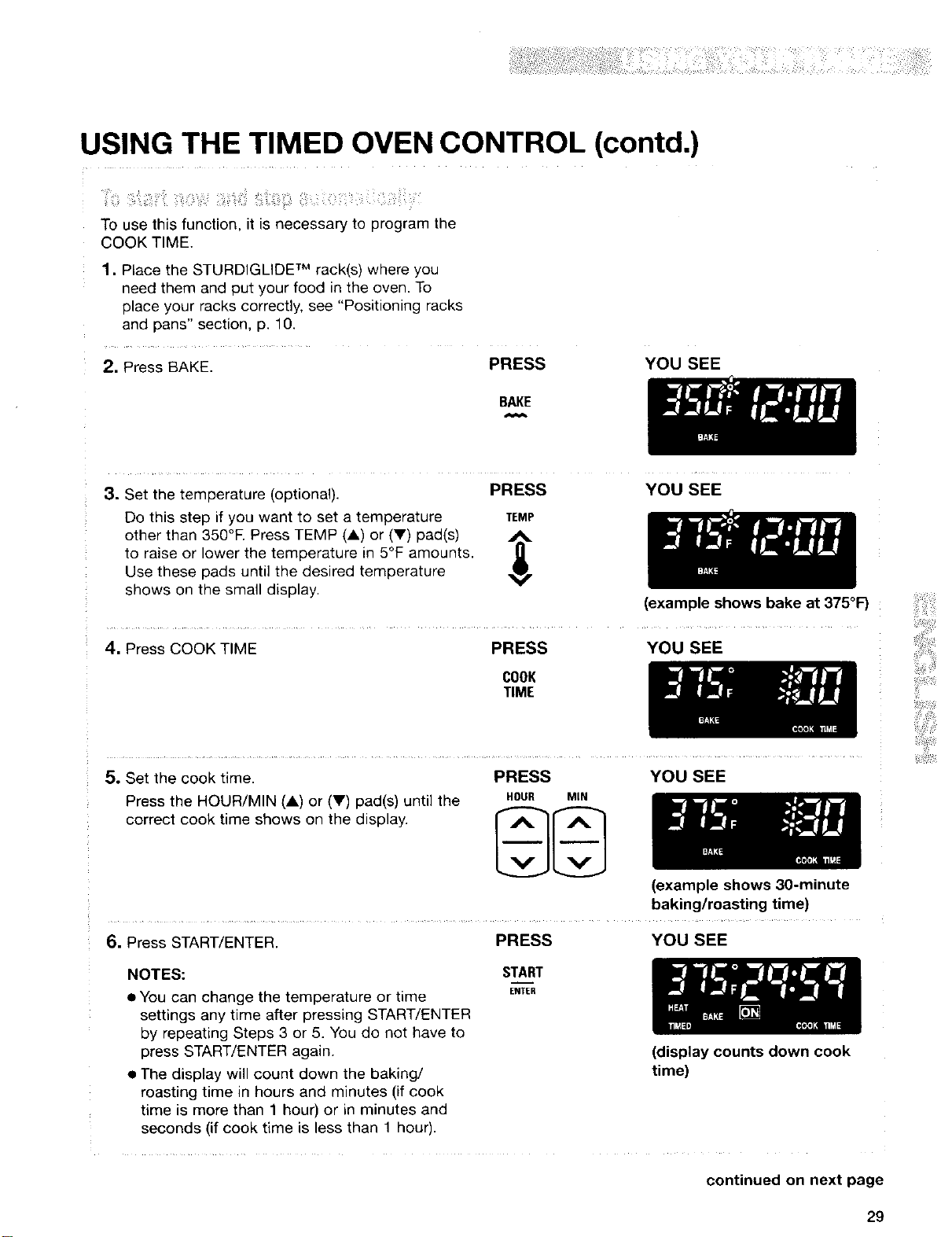
USING THE TIMED OVEN CONTROL (contd.)
i_i:i_i!ii!ii_!!iillili¸i!iii_i;_!i_i!il;_i_iiiil!_ii_iii_iiiii_
To use this function, it is necessary to program the
COOK TIME.
1. Place the STURDIGLIDE TM rack(s) where you
need them and put your food in the oven. To
place your racks correctly, see "Positioning racks
and pans" section, p. 10.
2. Press BAKE. PRESS
YOU SEE
BAKE
3. Set the temperature (optional).
PRESS
Do this step if you want to set a temperature TEMP
other than 350°F. Press TEMP (A) or (V) pad(s) _%
to raise or lower the temperature in 5°F amounts.
Use these pads until the desired temperature
shows on the small display.
4. Press COOK TIME PRESS
COOK
TIME
YOU SEE
(example shows bake at 375°F)
YOU SEE
5. Set the cook time. PRESS YOU SEE
Press the HOUR/MIN (A) or (V) pad(s) until the HOUR MIN
correct cook time shows on the display, r A _lf- A ]
(example shows 3g-minute
baking/roasting time)
6. Press START/ENTER. PRESS YOU SEE
NOTES: START
• You can change the temperature or time ENTER
settings any time after pressing START/ENTER
by repeating Steps 3 or 5. You do not have to
press START/ENTER again.
• The display will count down the baking/
roasting time in hours and minutes (if cook
time is more than 1 hour) or in minutes and
seconds (if cook time is less than 1 hour).
(display counts down cook
time)
continued on next page
29
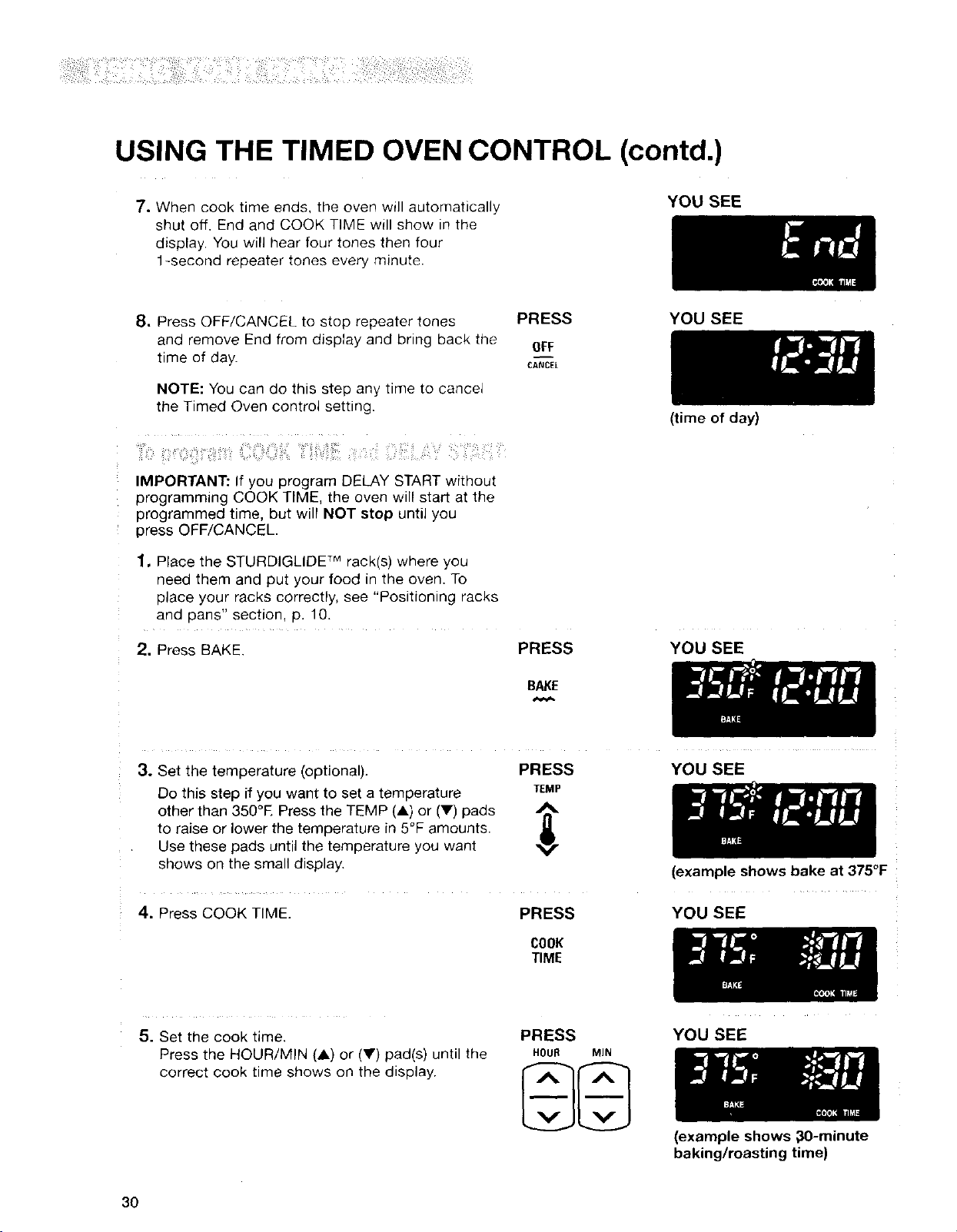
USING THE TIMED OVEN CONTROL (contd.)
7. When cook time ends, the oven will automatically
shut off. End and COOK TIME will show in the
display, You will hear four tones then four
1-second repeater tones every minute.
YOU SEE
8, Press OFF/CANCEL to stop repeater tones PRESS
and remove End from display and bring back the OFF
time of day. CANCEL
NOTE: You can do this step any time to cancel
the Timed Oven control setting.
_ili'ii:i!i!!,_:;i_!;iiiii?!:iii:i!iiiiii:i!i:i01i_;:ii!;i:!iiiii:iii!!ii!iiiii: :iiii:i:iii:iii !:iii'iiii?ii:¸
IMPORTANT: If you program DELAY START without
programming COOK TIME, the oven will start at the
programmed time, but will NOT stop until you
press OFF/CANCEL
1, Place the STURDIGLIDE Mrack(s) where you
need them and put your food in the oven. To
place your racks correctly, see "Positioning racks
and pans" section, p. 10.
2. Press BAKE. PRESS
BAKE
YOU SEE
(time of day)
YOU SEE
3. Set the temperature (optional).
Do this step if you want to set a temperature
other than 350°R Press the TEMP (A) or (V) pads
to raise or lower the temperature in 5°F amounts.
Use these pads until the temperature you want
shows on the small display.
4. Press COOK TIME.
PRESS
TEMP
PRESS
COOK
TIME
YOU SEE
(example shows bake at 375°F
YOU SEE
5. Set the cook time.
Press the HOUR/MIN (,L) or (V) pad(s) until the
correct cook time shows on the display.
PRESS
HOUR MIN
YOU SEE
3O
(example shows ;_0-minute
baking/roasting time)
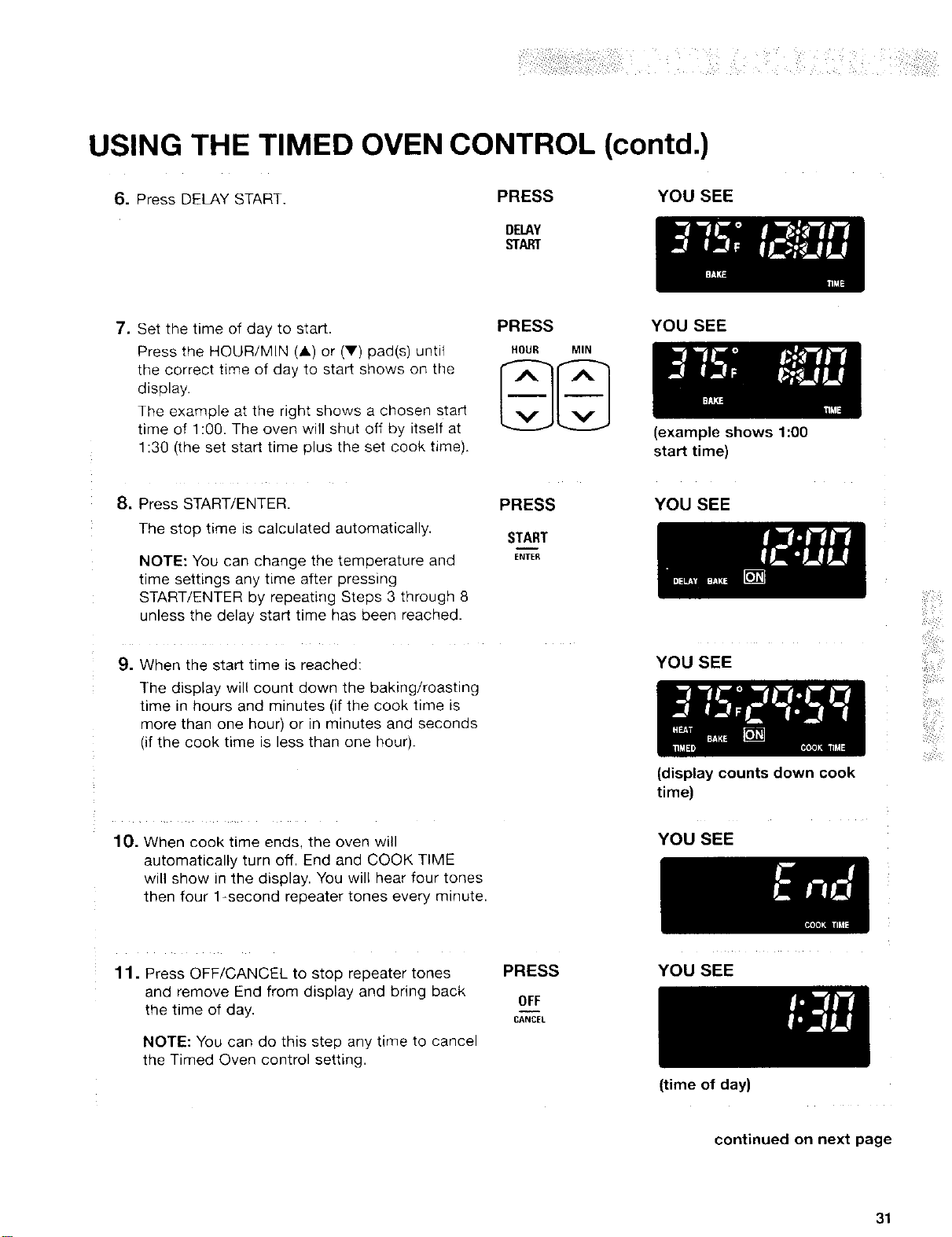
USING THE TIMED OVEN CONTROL (contd.)
6. Press DELAY START.
PRESS
DELAY
START
YOU SEE
7. Set the time of day to start.
Press the HOUR/MIN (A) or (V) pad(s) untit
the correct time of day to start shows on the
display.
The example at the right shows a chosen start
time of 1:00. The oven will shut off by itself at
1:30 (the set start time plus the set cook time).
8. Press START/ENTER.
The stop time is calculated automatically.
NOTE: You can change the temperature and
time settings any time after pressing
START/ENTER by repeating Steps 3 through 8
unless the delay start time has been reached.
9. When the start time is reached:
The display will count down the baking/roasting
time in hours and minutes (if the cook time is
more than one hour) or in minutes and seconds
(if the cook time is less than one hour).
PRESS
HOUR MIN
PRESS
START
ENTE_
YOU SEE
(example shows 1:00
start time)
YOU SEE
YOU SEE
(display counts down cook
time)
ii:il¸
10. When cook time ends, the oven will
automatically turn off. End and COOK TIME
will show in the display. You will hear four tones
then four 1-second repeater tones every minute.
YOU SEE
11. Press OFF/CANCEL to stop repeater tones
and remove End from display and bring back
the time of day.
NOTE: You can do this step any time to cancel
the Timed Oven control setting.
PRESS
OFF
CANCEL
YOU SEE
(time of day)
continued on next page
31
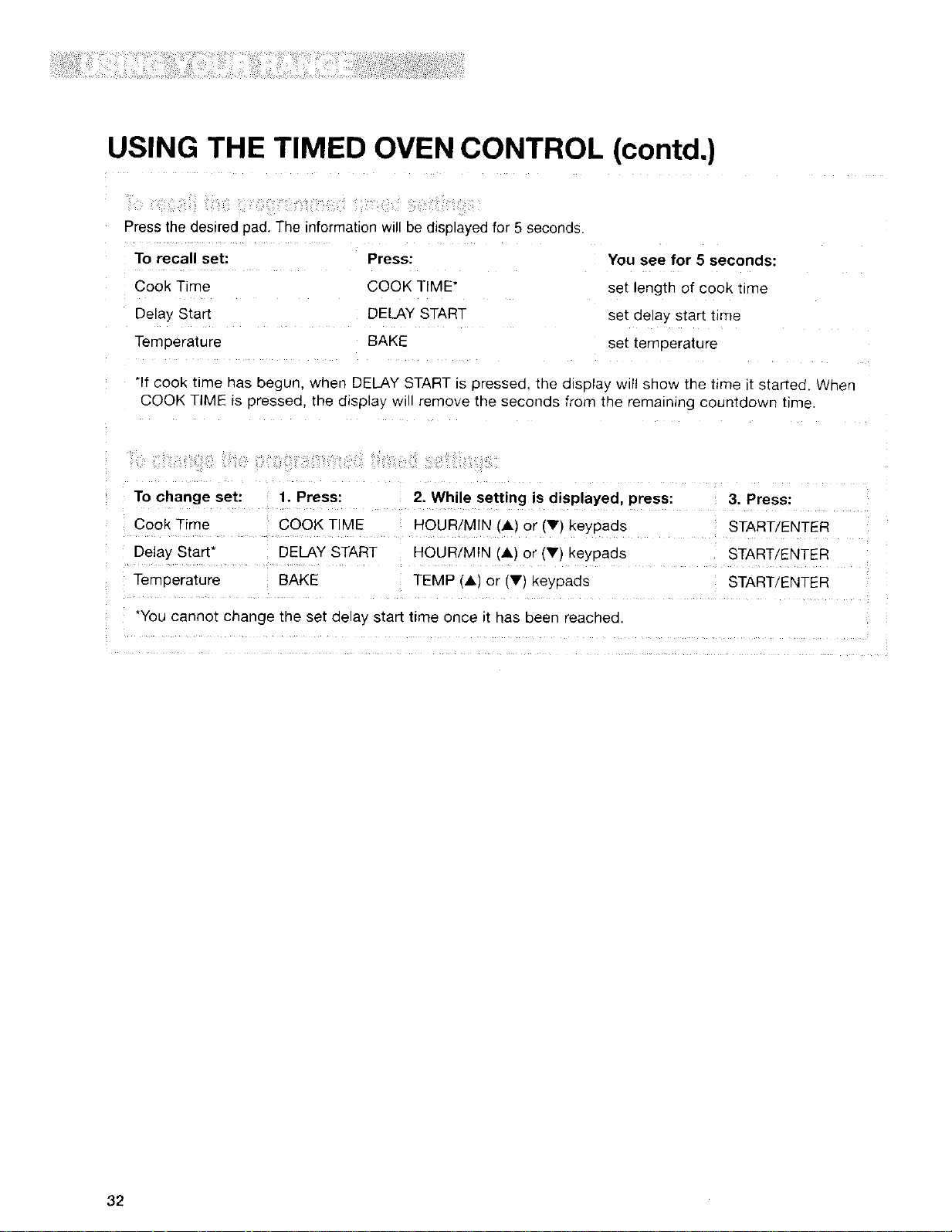
USING THE TIMED OVEN CONTROL (contd.)
Press the desired pad. The information will be d_sDlayedfor 5 seconds
To recall set: Press:
Cook Time COOK TIME*
Delay Start DELAY START
Tempera[ure BAKE
You see for 5 seconds:
set length of cook ume
set aelay start tJme
set temoerature
*If cook ume has begur when DELAY START is pressea, the display wtl! sho_ the t_me tt startec When
COOK TIME is 9ressea. tne display w remove the seconas from [ne rematnlng countaown time.
To change set: 1. Press:
Cook Time COOK TIME
Delay Start* DELAY START
Terr 3erature BAKE
2. While setting is displayed, press:
HOUR/MIN IA) or tv_ Keypads
HOUR/MIN 'A) or (Vl Keypaos
TEMP IA) or fV) keypads
*You cannot change tne set clelay start time once it has oeen reacnecl.
3. Press:
START/ENTER
START/ENTER
START/ENTER
32
USING THE WARM & READY WARMING DRAWER
Food Poisoning Hazard
4. Place container with food in warming drawer.
5. When finished, turn knob to OFF.
Do not let food sit for more than one hour
before or after cooking.
Doing so can result in food poisoning or
sickness.
The Warm & Ready warming drawer is ideal for
keeping hot cooked foods at serving temperature.
It may also be used for warming breads and
pastries. This feature, activated by the WARM &
READY knob on the control panel, controls warm-
ing in the warming drawer, which is located below
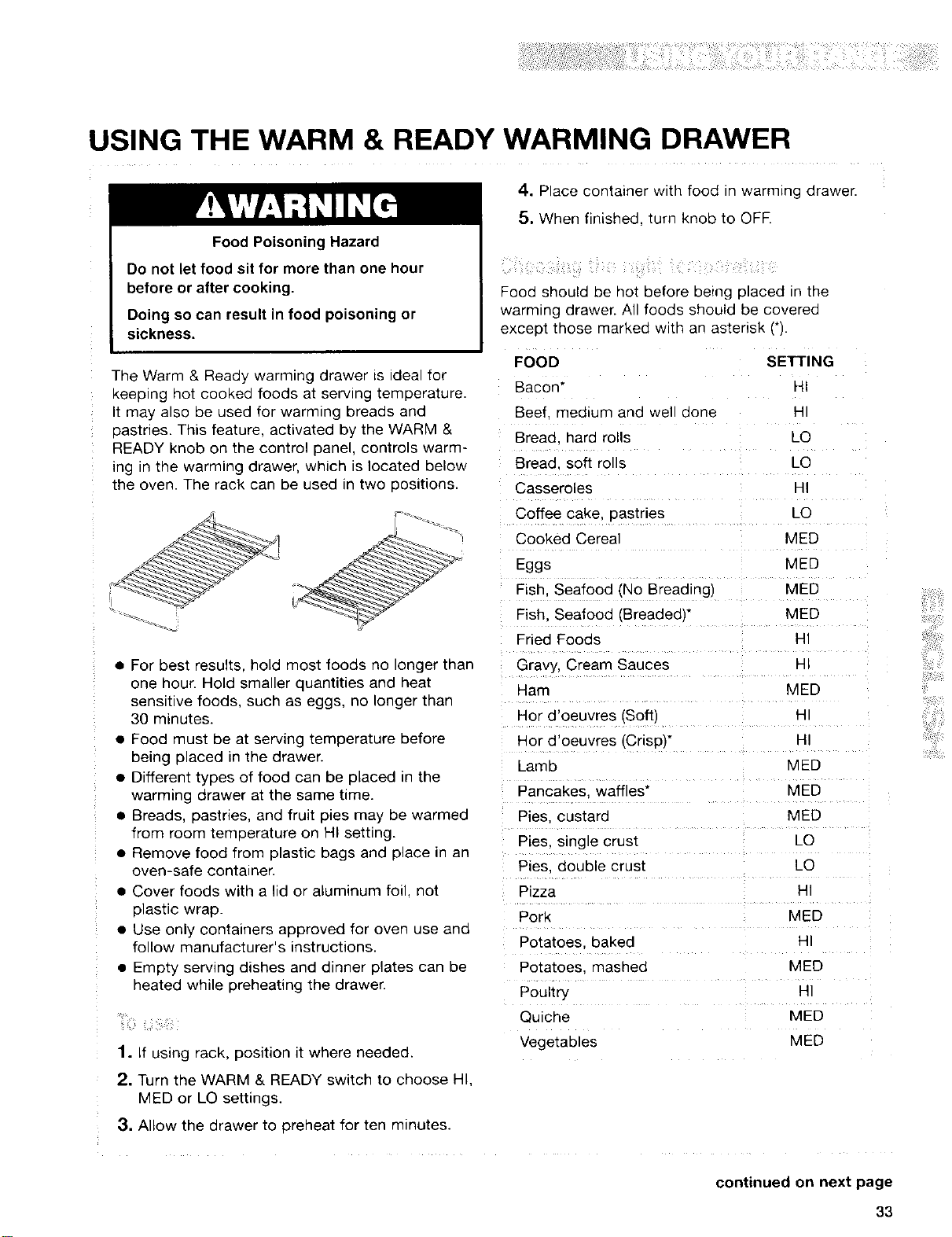
the oven. The rack can be used in two positions.
_z
L
• For best results, hold most foods no longer than
one hour. Hold smaller quantities and heat
sensitive foods, such as eggs, no longer tnan
30 minutes.
• Food must be at serving temperature before
being placed in the drawer.
• Different types of food can be placed in the
warming drawer at the same time.
• Breads, pastries, and fruit pies may De warmeo
from room temperature on HI setting.
• Remove food from plastic bags and place in an
oven-safe container.
• Cover foods with a lid or aluminum foil, not
plastic wrap.
• Use only containers approved for oven use ano
follow manufacturer's instructions.
• Empty serving dishes and dinner plates can De
heated while preheating the drawer.
1. if using rack, position it where needed.
2. Turn the WARM & READY switch to choose HI.
MED or LO settings.
3. Allow the drawer to preheat for ten minutes.
Food should be hot before being placed in the
warming drawer. All foods should be covered
excep_ mose marked w_th an asterisk (q.
FOOD SETTING
Bacon" HI
Beef medium ana well aone H
Bread, hard rolls _O
Bread, soft rolls LO
Casseroles HI
Coffee cake. aastries LO
Cooked Cereal MED
Eggs MED
Fish. Seafood (No Breading) MED
Fish. Seafood IBreaded)* MED
Fried Foods 141
Gravy, Cream Sauces _
Ham MED
Hor d'oeuvres tSoft)
Hor d'oeuvres (Crispy HI
Lamb MED
Pancakes waffles* MED
Pies. custaro MED
Pies. single crust LO
Pies. double crust LO
Pizza _41
Pork MED
Potatoes baked t-
Potatoes. mashed MED
Poultry H
Qulcne MED
Vegetables MED
continued on next page
33
USING THE WARM & READY WARMING DRAWER
(contd.)
Remove a!l items from inside the warming drawer
and aJlow the unit to cool completely before
attempting to remove the drawer.
1. Pull drawer to its full open position.
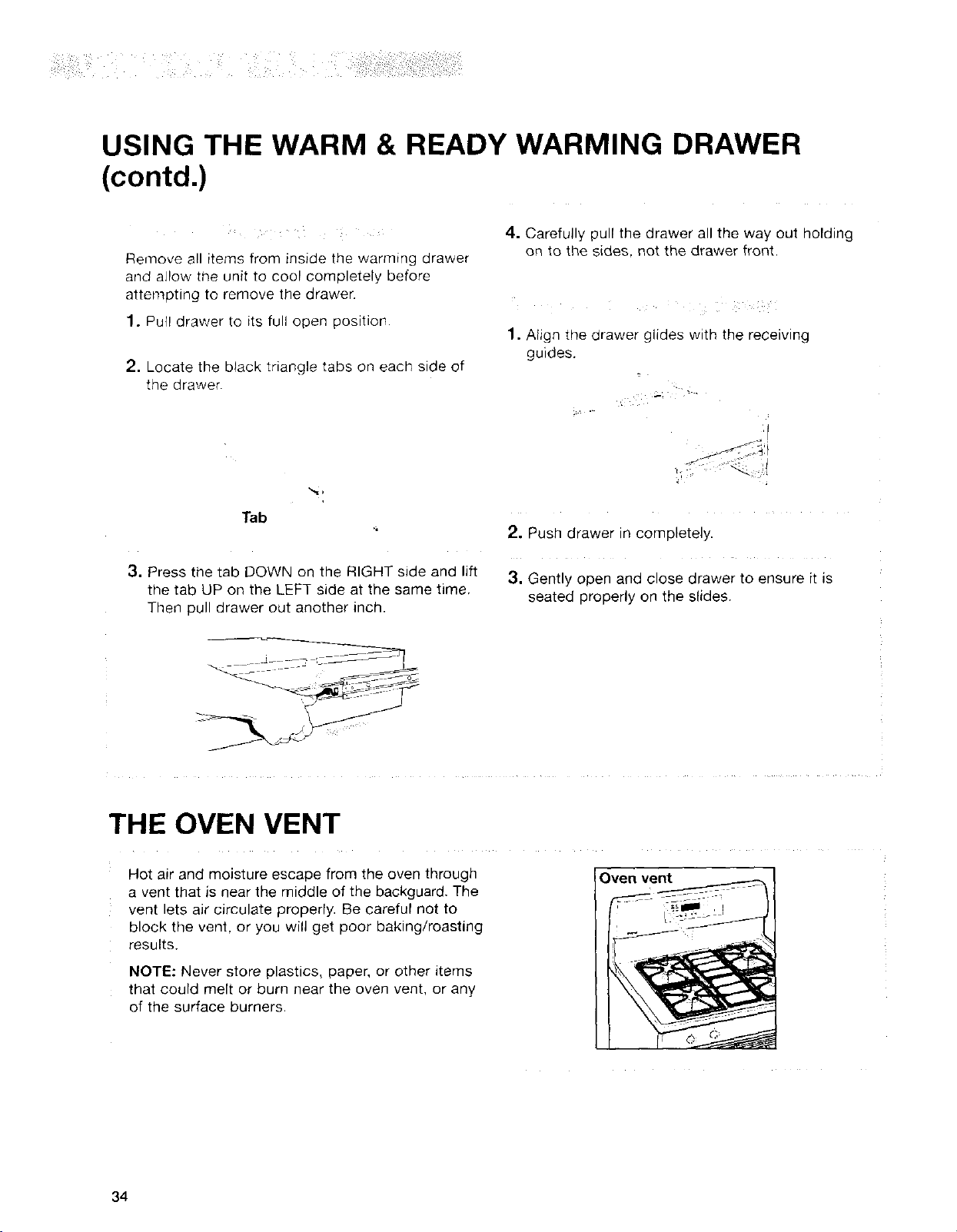
2, Locate the black triangle tabs on each side of
the drawer.
4. Carefully pull the drawer all the way out holding
on to the sides, not the drawer front.
1. Align the drawer glides with the receiving
guides.
Tab
3. Press the tab DOWN on the RIGHT side and lift
the tab UP on the LEFT side at the same time.
Then pull drawer out another inch.
2. Push drawer in completely.
3. Gently open and close drawer to ensure it is
seated properly on the slides.
THE OVEN VENT
Hot air and moisture escape from the oven through
a vent that is near the middle of the backguard. The
vent lets air circulate properly. Be careful not to
block the vent, or you will get poor baking/roasting
results.
NOTE: Never store plastics, paper, or other items
that could melt or burn near the oven vent, or any
of the surface burners.
Oven vent
34
Using the SENS-A-CLEAN TM
Self-Cleaning Cycle
Burn Hazard
Do not touch the oven during the Self-Cleaning cycle.
Keep children away from oven during Self-Cleaning cycle.
Do not use commercial oven cleaners in your oven.
Failure to follow these instructions can result in burns, or illness from inhaling
dangerous fumes.
BEFORE YOU START
NOTES:
• Heat and odors are normal during the Self-
Cleaning cycle. Keep the kitchen well ventilated
by opening a window or by turning on a vent
hood or other kitchen vent during the cycle.
• DO NOT clean, move, or bend the gasket. You
may get poor cleaning, baking, and roasting.
• The oven light will not work during the Self
Cleaning cycle.
• The console night light will not work during the
Self-Cleaning cycle.
Before you start the Self-Cleaning cycle, make
sure you:
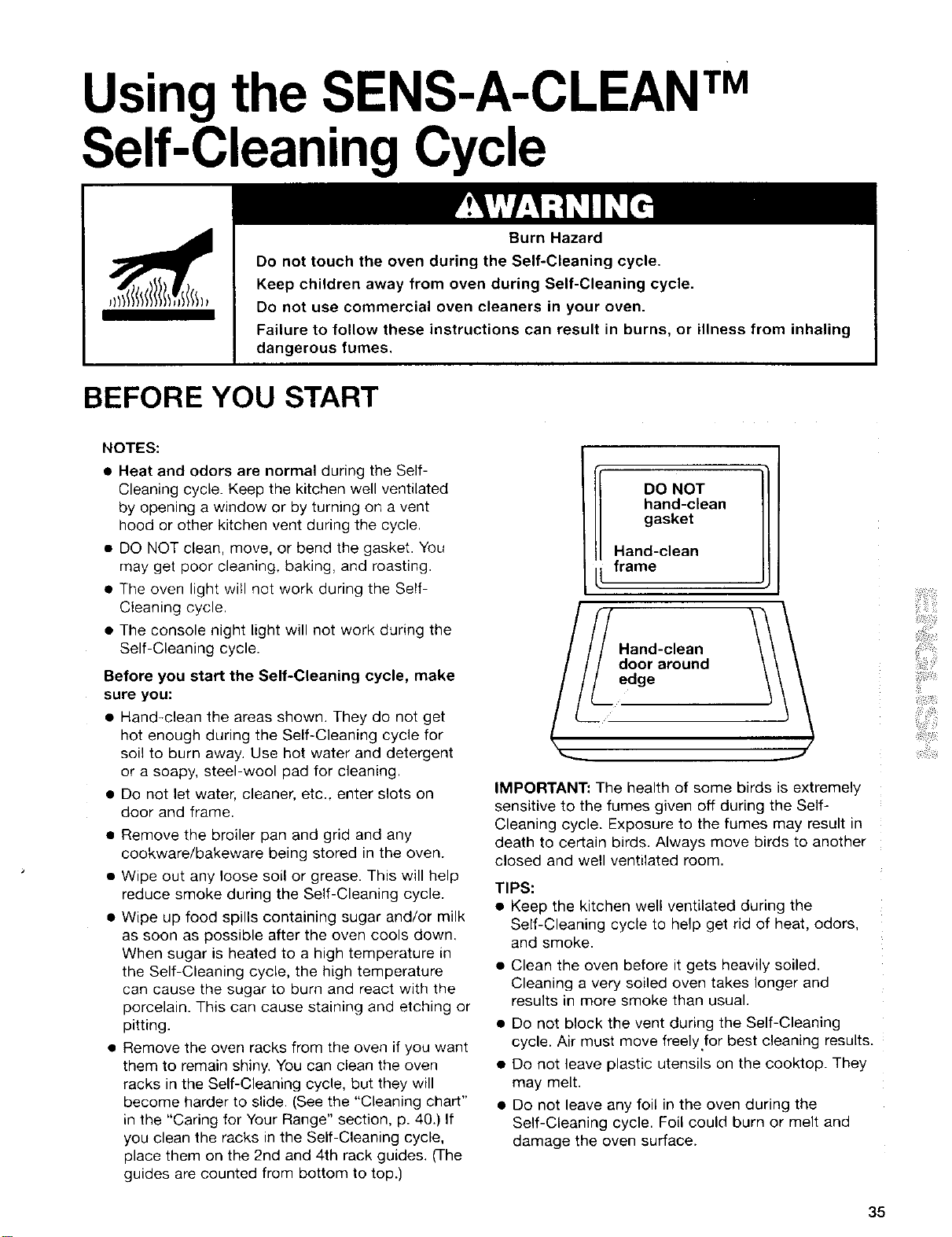
• Hand-clean the areas shown. They do not get
hot enough during the Self-Cleaning cycle for
soil to burn away. Use hot water and detergent
or a soapy, steel-wool pad for cleaning.
• Do not let water, cleaner, etc., enter slots on
door and frame.
• Remove the broiler pan and grid and any
cookware/bakeware being stored in the oven.
• Wipe out any loose soil or grease. This will help
reduce smoke during the Self-Cleaning cycle.
• Wipe up food spills containing sugar and/or milk
as soon as possible after the oven cools down.
When sugar is heated to a high temperature in
the Self-Cleaning cycle, the high temperature
can cause the sugar to burn and react with the
porcelain. This can cause staining and etching or
pitting.
• Remove the oven racks from the oven if you want
them to remain shiny. You can clean the oven
racks in the Self-Cleaning cycle, but they will
become harder to slide. (See the "Cleaning chart"
in the "Caring for Your Range" section, p. 40.) If
you clean the racks in the Self-Cleaning cycle,
place them on the 2nd and 4th rack guides. (The
guides are counted from bottom to top.)
DO NOT
hand-clean
gasket
Hand-clean
frame
Hand-clean
IMPORTANT: The health of some birds is extremely
sensitive to the fumes given off during the Self-
Cleaning cycle. Exposure to the fumes may result in
death to certain birds. Always move birds to another
closed and well ventilated room.
TIPS:
• Keep the kitchen well ventilated during the
Self-Cleaning cycle to help get rid of heat, odors,
and smoke.
• Clean the oven before it gets heavily soiled.
Cleaning a very soiled oven takes longer and
results in more smoke than usual.
• Do not block the vent during the Self-Cleaning
cycle. Air must move freely.for best cleaning results.
• Do not leave plastic utensils on the cooktop. They
may melt.
• Do not leave any foil in the oven during the
Self-Cleaning cycle. Foil could burn or melt and
damage the oven surface.
35
HOW THE CYCLE WORKS
The SENS-A-CLEAN TM Self-Cleaning cycle uses
temperatures much hotter than normal oven use to
break up and burn away soil and grease, The oven is
equipped with a sensor that evaluates by-products
released from burning off baked-on food and cleans
accordingly. There is no guessing on how long to set
the time because all steps are taken care of by the
"one-touch" button. The oven will automatically shut
off once it senses it is clean. As another option, the
soil level can be manually set to light, average or
heavy soil levels.
The door must be closed completely for it to lock and
the cycle to begin. If properly closed, the door will
lock approximately 6 seconds after START/ENTER is
pressed. The cycle time includes an approximate 30
minute cool down time. To see the time of day during
the cycle, press CLOCK for 5 seconds.
NOTE: The first Self-Cleaning cycle will be approxi-
mately 4 hours in duration. This is to allow the high
temperature calibration of the sensor and to burn off
manufacturing residues.
SETTING THE CONTROLS
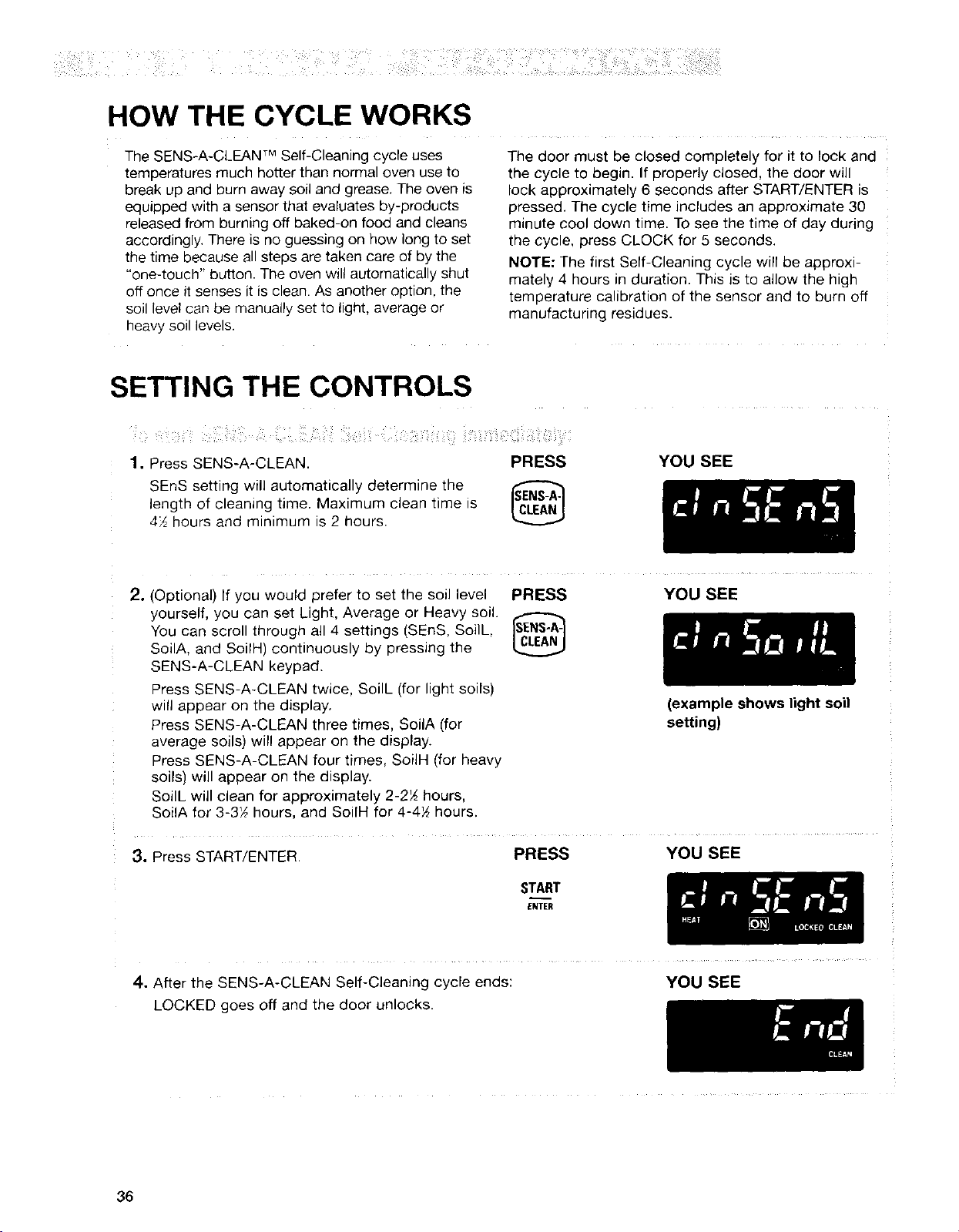
1. Press SENS-A-CLEAN
SEnS setting will automatical y determine me
engm of cleaning t_me. Maximum clean t_me s
472hours aria qqln_mum s 2 hours.
PRESS YOU SEE
2. (Ootional) If you would prefer to set the soil level
yourself, you can set Light, Average or Heavy sol:
You can scroll througn all 4 settings [SEnS, Soilh
SoilA. and SoilH continuously oy pressing the
SENS-A-CLEAN keypad.
Press SENS-A-CLEAN twice. SoilL "or light soils)
will appear on tne display,
Press SENS-A-CLEAN three times. SoilA (for
average soils) will appear on the display.
Press SENS-A-CLEAN four times. SoiIH Ifor neavy
soils} wiJ appear on the alsplay.
SodL w. clean for approximately 2-2_ hours.
SoilA for 3-3_ hours, and SoilH for 4-4_ hours.
PRESS
YOU SEE
3. Press START/ENTER
PRESS
START
ENTER
(example shows light soil
setting)
YOU SEE
4. After me SENS-A-CLEAN Self-Cleaning cycle ends:
LOCKED goes off and the door unlocks.
YOU SEE
36
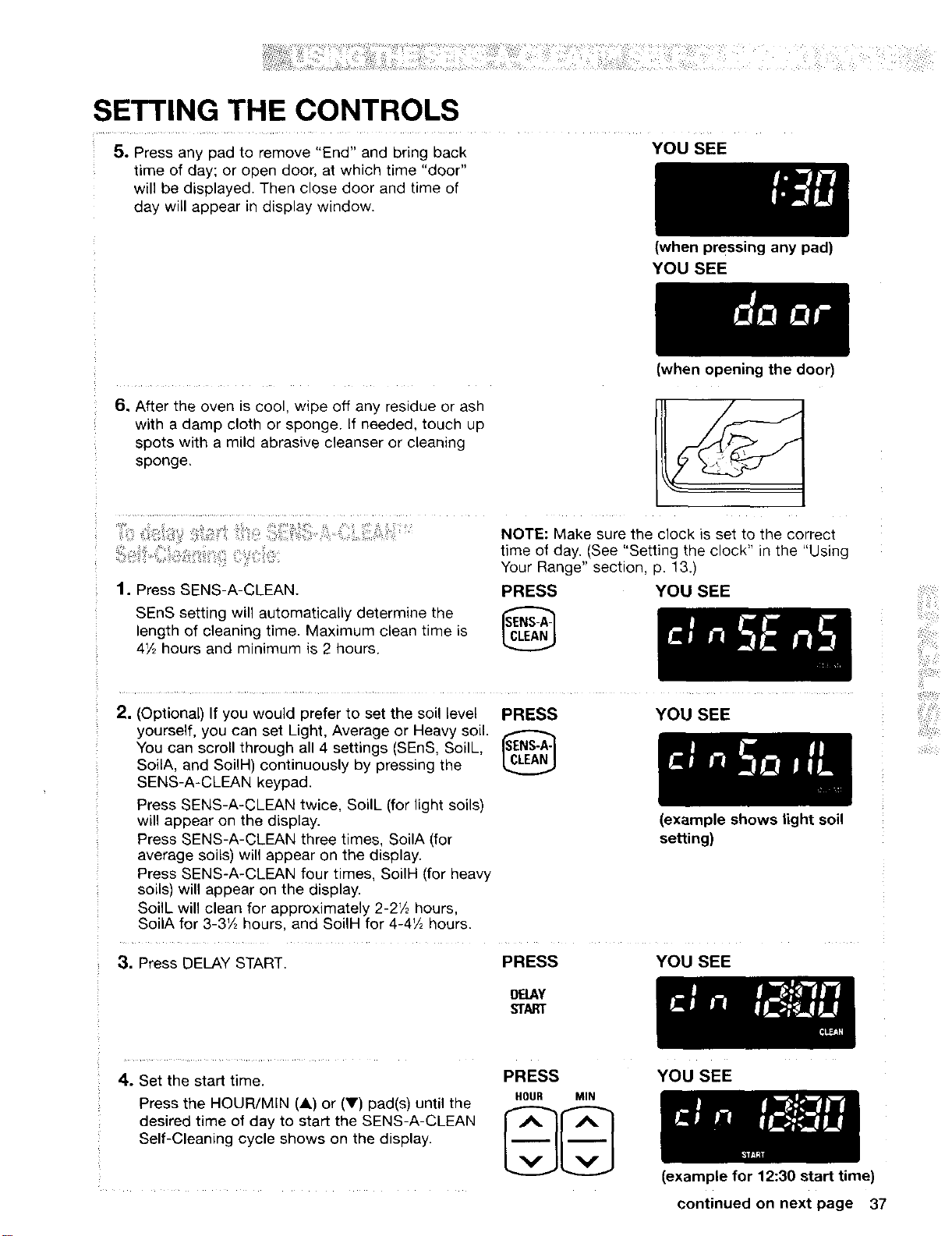
SETTING THE CONTROLS
5. Press any pad to remove "End" and bring back YOU SEE
time of day; or open door, at which time "door"
will be displayed. Then close door and time of
day will appear in display window.
6, After the oven is cool, wipe off any residue or ash
with a damp cloth or sponge. If needed, touch up
spots with a mild abrasive cleanser or cleaning
sponge,
1. Press SENS-A-CLEAN.
SEnS setting will automatically determine the
length of cleaning time. Maximum clean time is
472 hours and minimum is 2 hours.
(when Pressing any pad)
YOU SEE
(when opening the door)
NOTE: Make sure the clock is set to the correct
time of day. (See "Setting the clock" in the "Using
Your Range" section, p. 13.)
PRESS YOU SEE
2. (Optional) If you would prefer to set the soil level
yourself, you can set Light, Average or Heavy soil.
You can scroll through all 4 settings (SEnS, SoilL,
SoilA, and SoilH) continuously by pressing the
SENS-A-CLEAN keypad.
Press SENS-A-CLEAN twice, SoilL (for light soils)
will appear on the display.
Press SENS-A-CLEAN three times, SoilA (for
average soils) will appear on the display.
Press SENS-A-CLEAN four times, SoilH (for heavy
soils) will appear on the display.
SoilL will clean for approximately 2-2V2 hours,
SoilA for 3-3V2 hours, and SoilH for 4-472 hours.
PRESS YOU SEE
(example shows light soil
setting)
3. Press DELAY START.
PRESS YOU SEE
DELAY
START
4. Set the start time.
Press the HOUR/MIN (_k)or (V) pad(s) until the
desired time of day to start the SENS-A-CLEAN
Self-Cleaning cycle shows on the display.
PRESS
HOUR MIN
YOU SEE
(example for 12:30 start time)
continued on next page 37
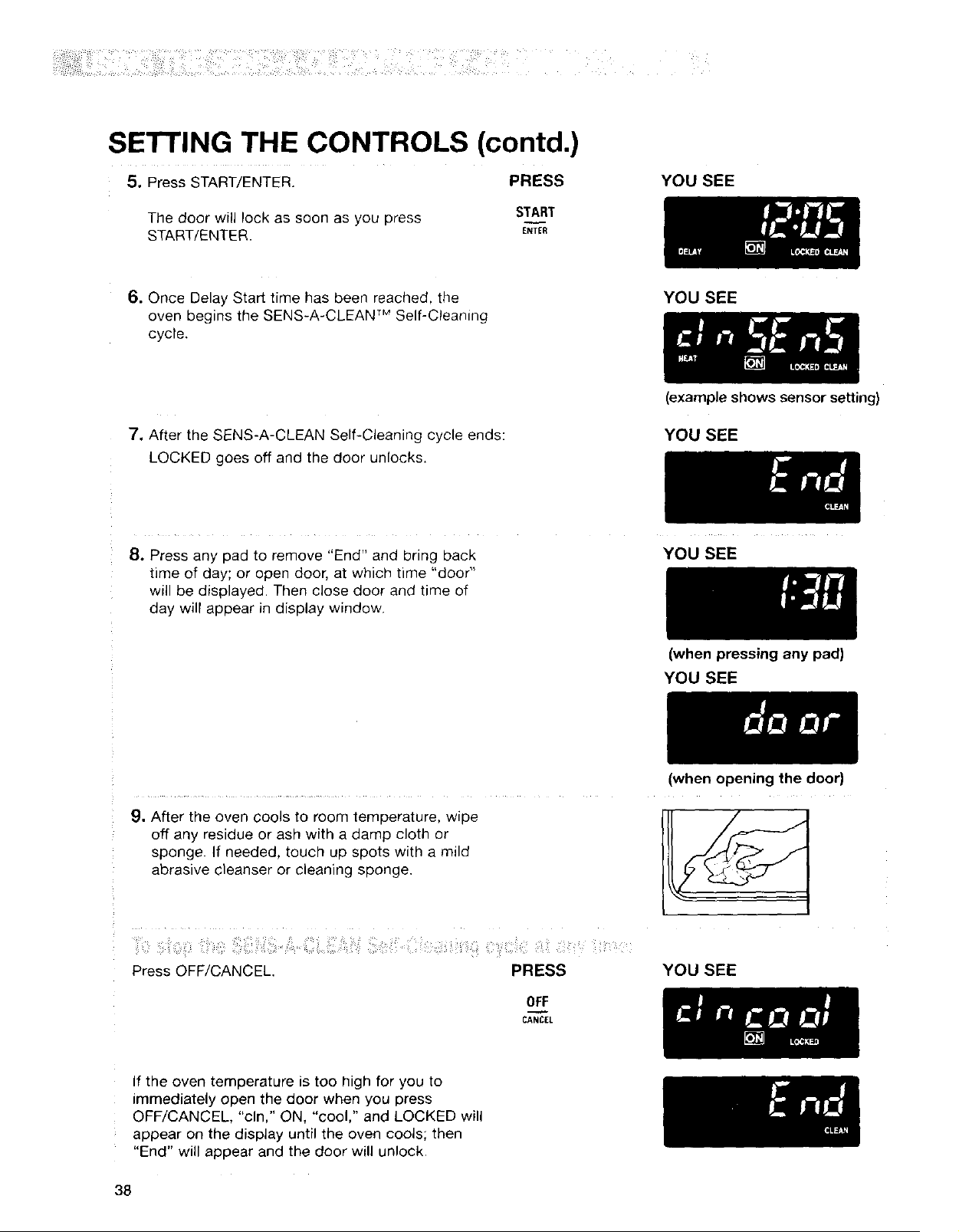
SETTING THE CONTROLS (contd.)
5. Press START/ENTER. PRESS
The door will lock as soon as you press
START/ENTER.
START
ENTER
YOU SEE
6. Once Delay Start time has been reached, the
oven begins the SENS-A-CLEAN TM Self-Cleaning
cycle.
YOU SEE
7. After the SENS-A-CLEAN Self-Cleaning cycle ends:
LOCKED goes off and the door unlocks.
(example shows sensor setting)
YOU SEE
8. Press any pad to remove "End" and bring back
time of day; or open door, at which time "door '_
will be displayed. Then close door and time of
day will appear in display window.
YOU SEE
9. After the oven cools to room temperature, wipe
off any residue or ash with a damp cloth or
sponge. If needed, touch up spots with a mild
abrasive cleanser or cleaning sponge.
Press OFF/CANCEL PRESS
OFF
CANCEL
(when pressing any pad)
YOU SEE
(when opening the door)
YOU SEE
If the oven temperature is too high for you to
immediately open the door when you press
OFF/CANCEL, "cln," ON, "cool," and LOCKED will
appear on the display until the oven cools; then
"End" will appear and the door will unlock,
38
Caringfor YourRange
Explosion Hazard
Do not store flammable materials such as gasoline near this appliance.
Doing so can result in death, explosion, or fire.
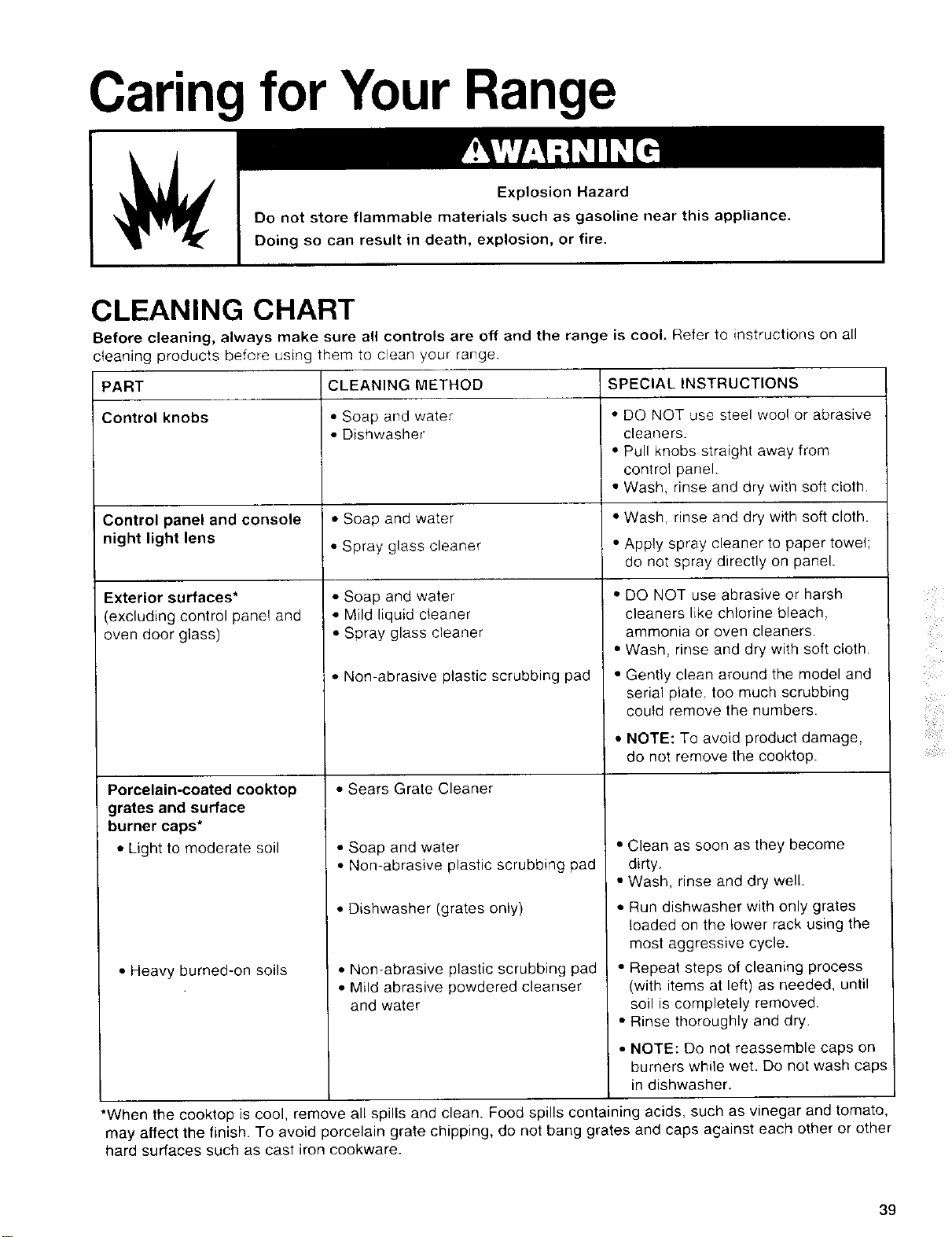
CLEANING CHART
Before cleaning, always make sure all controls are off and the range is cool. Refer to instructions on all
cleaning products before using them to clean your range.
PART CLEANING METHOD SPECIAL INSTRUCTIONS
Control knobs • Soap and water • DO NOT use steel wool or abrasive
• Dishwasher cleaners.
• Pull knobs straight away from
control panel.
• Wash, rinse and dry with soft cloth.
Control panel and console • Soap and water • Wash, rinse and dry with soft cloth.
night light lens • Spray glass cleaner ° Apply spray cleaner to paper towel;
do not spray directly on panel.
Exterior surfaces*
excluding control panel and
_vendoor glass)
Porcelain-coated cooktop
grates and surface
burner caps*
• Light to moderate soil
• Heavy burned-on soils
• Soap and water
• Mild liquid cleaner
• Spray glass cleaner
• Non-abrasive plastic scrubbing pad
• Sears Grate Cleaner
• Soap and water
• Nomabrasive plastic scrubbing pad
• Dishwasher (grates only)
• Non-abrasive plastic scrubbing pad
• Mild abrasive powdered cleanser
and water
• DO NOT use abrasive or harsh
cleaners like chlorine bleach,
ammonia or oven cleaners.
• Wash, rinse and dry with soft cloth.
• Gently clean around the model and
serial plate, too much scrubbing
could remove the numbers,
• NOTE: To avoid product damage,
do not remove the cooktop.
• Clean as soon as they become
dirty.
• Wash, rinse and dry well.
• Run dishwasher with only grates
loaded on the lower rack using the
most aggressive cycle.
• Repeat steps of cleaning process
(with items at left) as needed, until
soil is completely removed.
• Rinse thoroughly and dry.
• NOTE: Do not reassemble caps on
burners while wet. Do not wash caps
in dishwasher.
*When the cooktop is cool, remove all spills and clean. Food spills contaming acids, such as vinegar and tomato,
may affect the finish. To avoid porcelain grate chipping, do not bang grates and caps against each other or other
hard surfaces such as cast iron cookware.
i i ¸
39
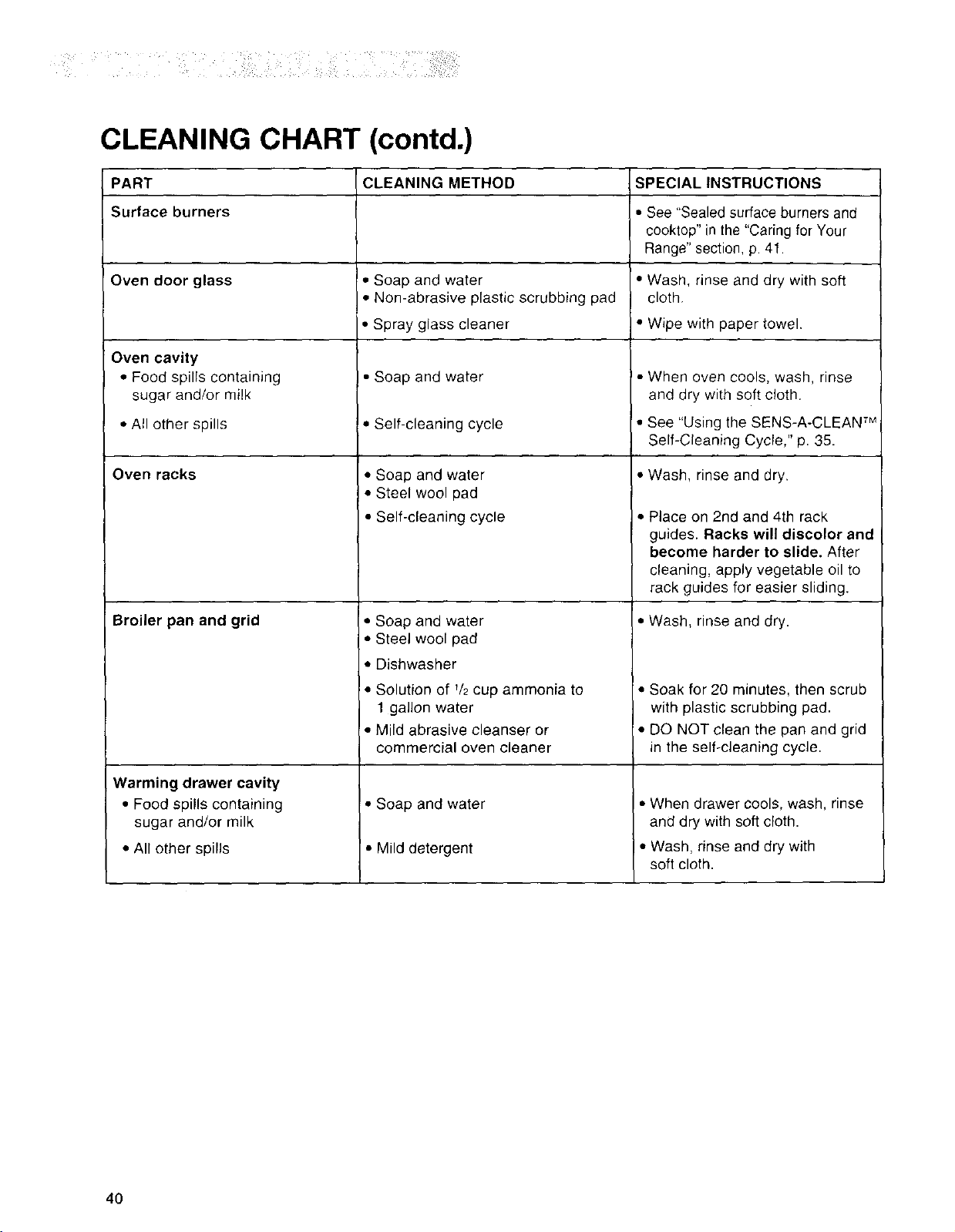
CLEANING CHART (contd.)
PART
Surface burners
Oven door glass
Oven cavity
• Food spills containing
sugar and/or milk
• All other spills
Oven racks
Broiler pan and grid
Warming drawer cavity
• Food spills containing
sugar and/or milk
• All other spills
CLEANING METHOD
• Soap and water
• Non-abrasive plastic scrubbing pad
• Spray glass cleaner
• Soap and water
• Self-cleaning cycle
• Soap and water
• Steel wool pad
• Self-cleaning cycle
• Soap and water
• Steel wool pad
• Dishwasher
• Solution of V2cup ammonia to
1 gallon water
• Mild abrasive cleanser or
commercial oven cleaner
!,,,Soap and water
• Mild detergent
SPECIAL INSTRUCTIONS
• See "Sealed surface burners and
cooktop" in the "Caring for Your
Range" section, p. 41.
• Wash, rinse and dry with soft
cloth.
I• Wipe with paper towel.
• When oven coo!s, wash, rinse
and dry with soft cloth.
See Us=ngthe SENS-A-CLEAN TM
Self-Cleaning Cycle," p. 35.
• Wash, rinse and dry.
• Place on 2nd and 4th rack
guides. Racks will discolor and
become harder to slide. After
cleaning, apply vegetable oil to
rack guides for easier sliding.
• Wash, rinse and dry.
• Soak for 20 minutes, then scrub
with plastic scrubbing pad.
• DO NOT clean the pan and grid
in the self-cleaning cycle.
• When drawer cools, wash, rinse
and dry with soft cloth.
• Wash, rinse and dry with
soft cloth.
4O
SEALED SURFACE BURNERS AND COOKTOP
iii__i_ _i__ _!_i _ i_i_i!_
• You should routinely remove and clean the burner
cap. Always clean the burner cap after a spill-over.
Keeping the burner cap clean prevents poor
ignition and an uneven flame.
• For the proper flow of gas and ignition of the
burner, do not allow spills, food, cleaning
agents, or any other material to enter the
gas tube opening or burner ports.
• Gas must flow freely through the gas tube
opening for the burner to light properly. Keep this
area free of any soil and protect it from boilovers
or spillovers. Always keep the burner cap in place
whenever a surface burner is in use.
• Let the cooktop cool before cleaning.
• Do not use oven cleaners, bleach, or rust
removers.
• Do not obstruct the flow of combustion and
ventilation air around the burner grate edges.
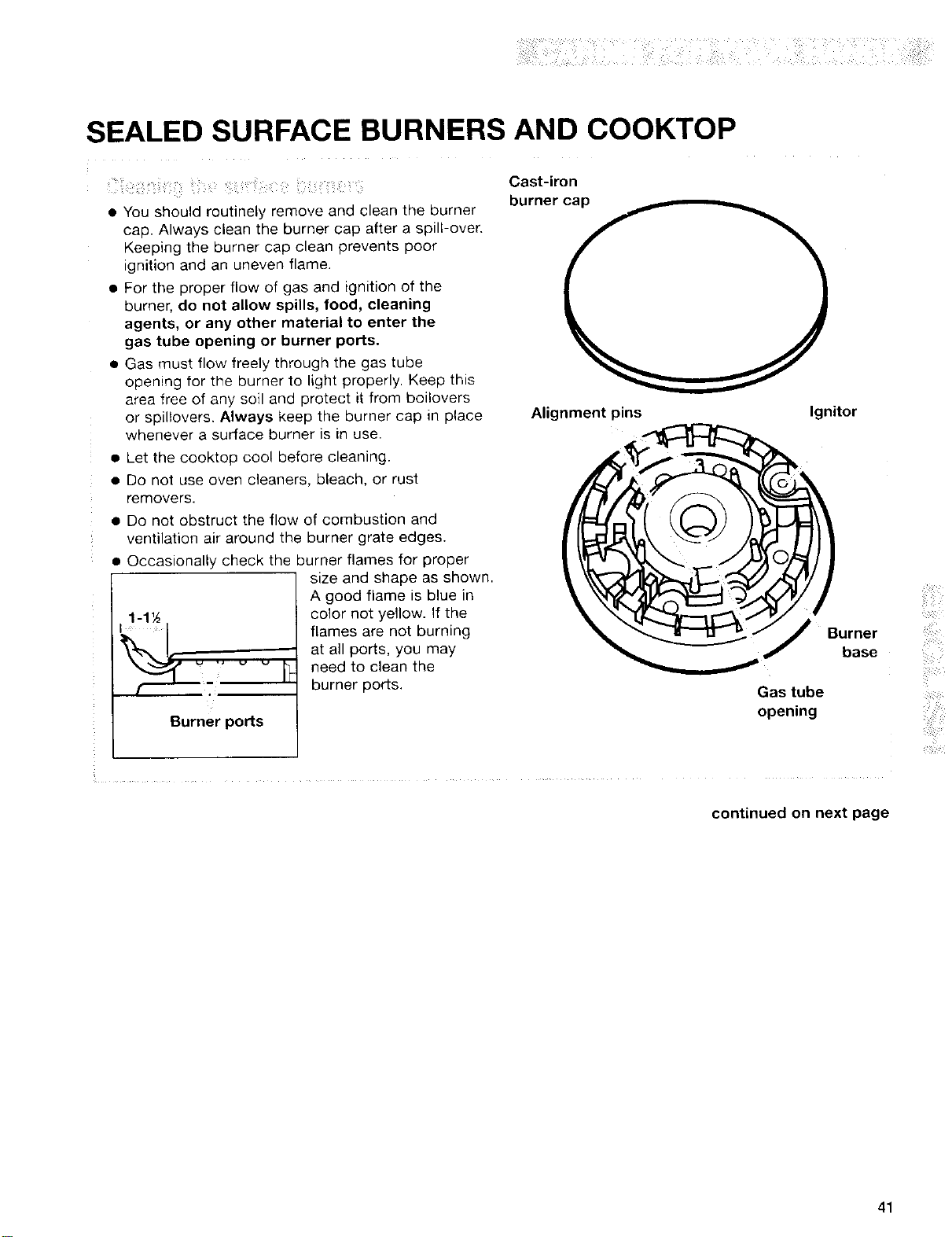
• Occasionally check the burner flames for proper
Burner ports
size and shape as shown.
A good flame is blue in
color not yellow. If the
flames are not burning
at all ports, you may
need to clean the
burner ports.
Cast-iron
burner cap
Alignment pins Ignitor
Gas tube
opening
continued on next page
41
SEALED SURFACE BURNERS AND COOKTOP (contd.)
1, Remove the burner cap from the
burner base.
2, Clean the burner cap with warm. soapy water
and a sponge. You can also clean it with a
mildly abrasive scrubbing pad or cleanser.
Do not clean the burner cap in a dishwasher or
self cleaning oven.
3. If the gas tube opening has become soiled or
clogged, use a damp cloth to clean the area.
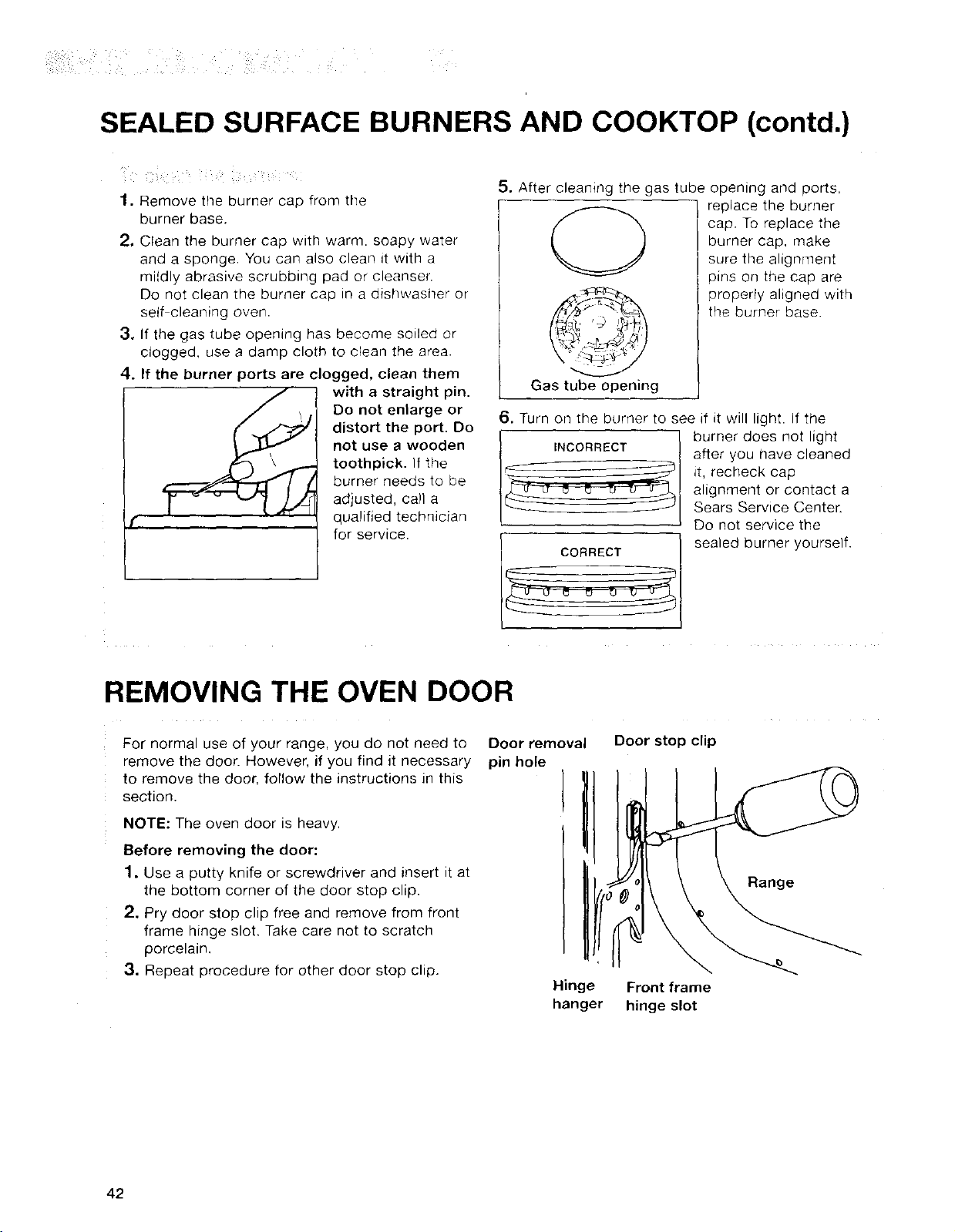
4. If the burner ports are clogged, clean them
with a straight pin.
Do not enlarge or
distort the port. Do
not use a wooden
toothpick. If the
burner needs to be
adjusted, call a
qualified technician
for service.
5. After cleaning the gas tube opening and ports,
replace the burner
cap. To replace the
Gas tube opening
burner cap, make
sure the alignment
pins on the cap are
properly aligned with
the burner base.
6. Turn on the burner to see if it will light. If the
CORRECT
burner does not light
after you have cleaned
it, recheck cap
alignment or contact a
Sears Service Center.
Do not service the
sealed burner yourself.
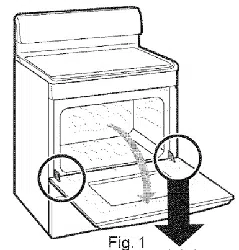
REMOVING THE OVEN DOOR
For normal use of your range, you do not need to Door removal
remove the door. However, if you find it necessary pin hole
to remove the door, follow the instructions in this I
section.
I
NOTE: The oven door is heavy.
Before removing the door:
1, Use a putty knife or screwdriver and insert it at
the bottom corner of the door stop clip.
2. Pry door stop clip free and remove from front
frame hinge slot. Take care not to scratch
porcelain.
3. Repeat procedure for other door stop clip.
Hinge
hanger
Door stop clip
Front frame
hinge slot
Range
42
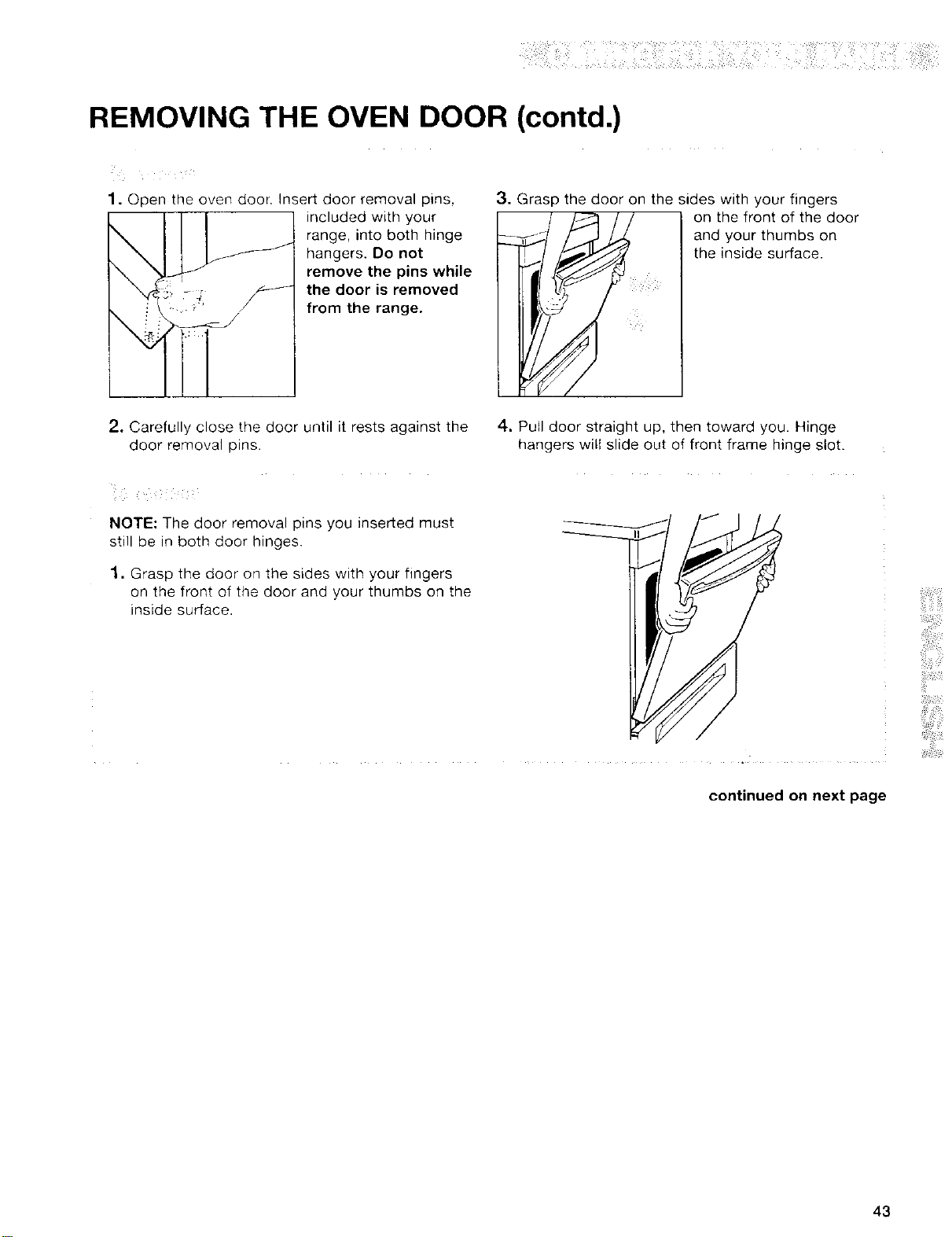
REMOVING THE OVEN DOOR (contd.)
1. Open the oven door. Insert door removal pins,
included with your
range, into both hinge
hangers. Do not
remove the pins while
the door is removed
from the range.
3. Grasp the door on the sides with your fingers
on the front of the door
and your thumbs on
the inside surface.
2. Carefully close the door until it rests against the 4-. Pull door straight up, then toward you. Hinge
door removal pins. hangers will slide out of front frame hinge slot
NOTE: The door removal pins you inserted must
still be in both door hinges.
1, Grasp the door on the sides with your fingers
on the front of the door and your thumbs on the
inside surface.
continued on next page
43
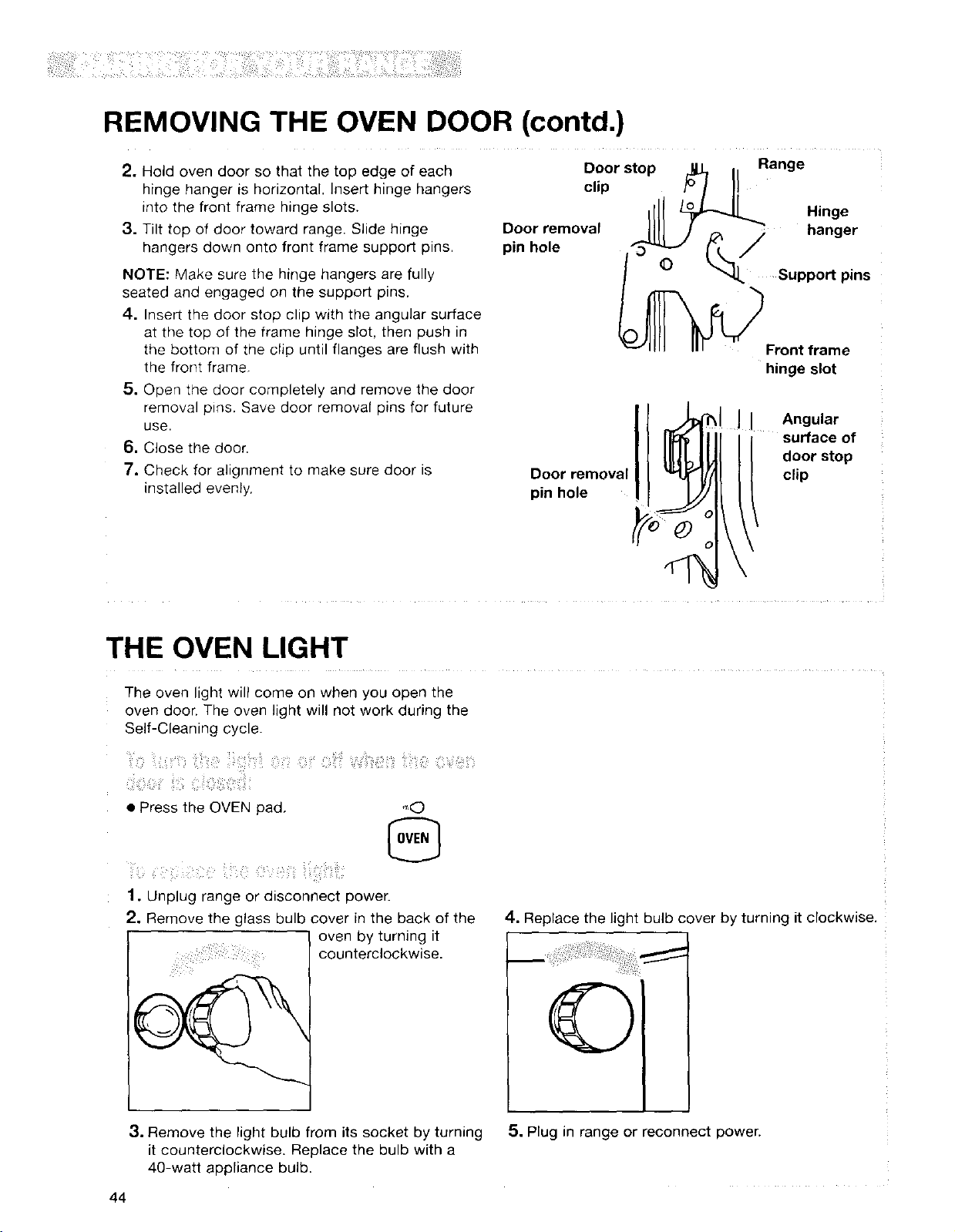
REMOVING THE OVEN DOOR (contd.)
2. Hold oven door so that the top edge of each
hinge hanger is horizontal. Insert hinge hangers
into the front frame hinge slots.
3. Tilt top of door toward range. Slide hinge
hangers down onto front frame support pins.
NOTE: Make sure the hinge hangers are fully
seated and engaged on the support pins.
4. Insert the door stop clip with the angular surface
at the top of the frame hinge slot, then push in
the bottom of the clip until flanges are flush with
the front frame,
5. Open the door completely and remove the door
removal pins. Save door removal pins for future
use.
6. Close the door.
7. Check for alignment to make sure door is
installed evenly,
Door stop _L I Range
clip t_ I II
Hinge
Ooorremoval Nil J _:_ _ hanger
pinhole _ _ /
O _ Support pins
Front frame
hinge slot
Door removal
pin hole
o
II Angular
surface of
door stop
clip
THE OVEN LIGHT
The oven light will come on when you open the
oven door. The oven light will not work during the
Self-Cleaning cycle.
!iii¸!ii_ii;il ::ii:iil ii!;_:_i_i!ii:_iiii_!iliii::i
• Press the OVEN pad, ,',,(_
1, Unplug range or disconnect power.
2. Remove the glass bulb cover in the back of the
l oven by turning it
counterclockwise.
4. Replace the light bulb cover by turning it clockwise.
3. Remove the light bulb from its socket by turning
it counterclockwise. Replace the bulb with a
40-watt appliance bulb.
44
5, Plug in range or reconnect power.
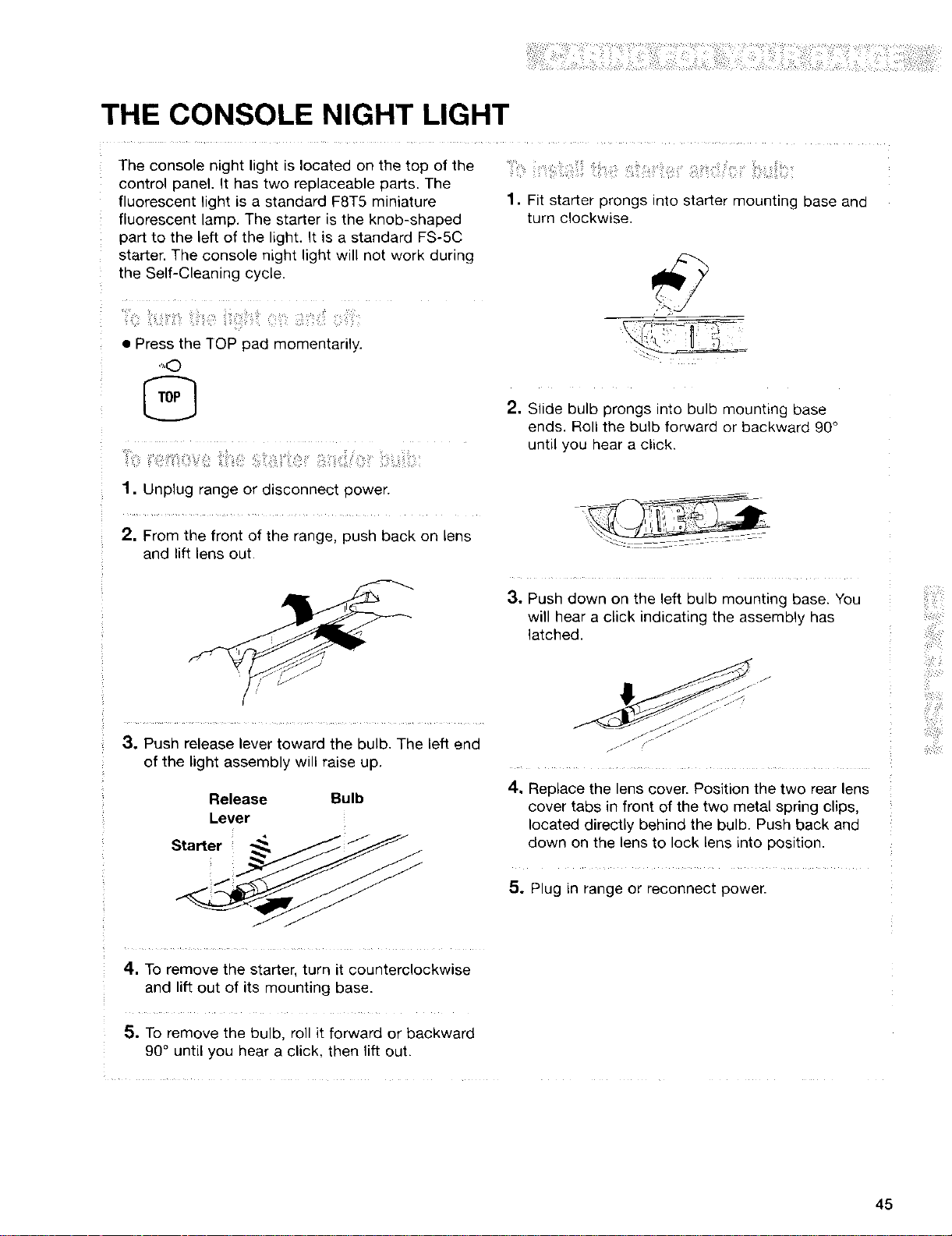
THE CONSOLE NIGHT LIGHT
The console night light is located on the top of the
control panel. It has two replaceable parts. The
fluorescent light is a standard F8T5 miniature
fluorescent lamp. The starter is the knob-shaped
part to the left of the light. It is a standard F$-5C
starter. The console night light will not work during
the Self-Cleaning cycle.
1. Fit starter prongs into starter mounting base and
turn clockwise.
• Press the TOP pad momentarily.
q'l,0
@
1. Unplug range or disconnect power.
2. From the front of the range, push back on lens
and lift lens out.
2. Slide bulb prongs into bulb mounting base
ends. Roll the bulb forward or backward 90°
until you hear a click.
3. Push down on the left bulb mounting base. You
will hear a click indicating the assembly has
latched.
3. Push release lever toward the bulb. The left end
of the light assembly will raise up.
Release Bulb
Lever
Starter _ __
jJ /_
4. Replace the lens cover. Position the two rear lens
cover tabs in front of the two metal spring clips,
located directly behind the bulb. Push back and
down on the lens to lock lens into position.
5o Plug in range or reconnect power.
4. To remove the starter, turn it counterclockwise
and lift out of its mounting base.
5. To remove the bulb, roll it forward or backward
90° until you hear a click, then lift out.
45
Troubleshooting
Most cooking problems are caused by little things you can find and fix without tools of any
kind. Check the lists below and on the next page before calling for assistance or service.
RANGE DOES NOT WORK
PROBLEM
Nothing works
CAUSE/SOLUTION
• The range is not plugged into a properly grounded outlet (120v polarized).
• The range is not properly connected to the gas supply. Contact a Sears
Service Center to reconnect the range to the gas supply. (See the Installation
Instructions.)
• A household fuse has blown or a circuit breaker has been tripped.
• The Oven and Cooktop Lockouts have been set.
OVEN/BROILER BURNER
PROBLEM CAUSE/SOLUTION
The oven does not work • When using the oven for the first time, it is necessary to light the surface
burners first to purge air from the gas lines.
• The electronic control is not set correctly. Refer to setting the electronic
oven control section. (See pp. 12-32.)
• A delay start has been set. Wait for the start time to be reached or cancel
and reset the control.
• The main or regulator gas shutoff valve is in the off position. (See the
Installation Instructions.)
• The Oven Lockout has been set.
Burner makes muffled • This is normal. This sound occurs when the oven burner cycles on and off
ticking noise when in use to hold the set oven temperature.
The burner fails to light • The ignition system is broken. Contact a Sears Service Center to replace it.
• A household fuse has blown or a circuit breaker has been tripped.
The burner flames lift
away from the porLs, are
yellow, or are noisy
• The air/gas mixture is incorrect. Contact a Sears Service Center to check the
air/gas mixture or see the Installation Instructions.
46
SURFACE BURNERS
PROBLEM
The burner fails to light
The burner flames are
uneven
The burner flames lift off
the ports, are yellow, or
are noisy when turned off
The burner makes a • The burner is wet from washing. Let it dry.
popping noise when on
CAUSE/SOLUTION
• The control knob is not set correctly. Push in the control knobs before turning
them. Make sure the control knob is turned to the LITE position. (See p. 7.)
• A household fuse has blown or a circuit breaker has been tripped.
• The burner ports may be clogged. Clean them with a straight pin. (See p. 42.)
• Make sure Cooktop Lockout has been cancelled. (See p. 14.)
• There is a power outage.
• The burner ports may be clogged. Clean them with a straight pin. (See p. 42.)
• The burner caps may not be positioned properly. (See p. 42.)
• The burner needs cleaning. (See pp. 41, 42.)
• The burner may be damaged. Contact a Sears Service Center to check
the burner.
• If propane gas is being used, the range may have been converted
improperly. Contact a Sears Service Center.
WHEN SELF-CLEANING YOUR OVEN
PROBLEM CAUSE/SOLUTION
The Self-Cleaning cycle • START/ENTER has not been pressed.
will not work • A delay start has been set. Wait for the start time to be reached or cancel
and reset the control.
• The door is not closed all the way.
continued on next page
iii!!iii_!i!
47
COOKING RESULTS
PROBLEM CAUSE/SOLUTION
Cookware not level • Level the range. (See the installation Instructions.)
on cooktep • Use cookware with a flat bottom.
(Check to see if liquids
are level in cookware)
Excessive heat on coektop
in areas around cookware
The oven temperature
seems too low or too h_gn
Slow baking or roaenng
Baked _tems toc brown
on oottom
• Choose cookware the same size or slightly larger than the burner flame.
• Adjust the oven temoeralure control. (See "Readjusting the oven
temperature control." D. 18.1
• Increase baking or roasting time
• Increase temperature 25°F.
• Preheat to selected temperature before placing food in oven when
oreheating is recommended.
• Choose bakeware that will allow 2 inches of air space around all sides.
• Ooen oven door to check food when timer signals shortest time suggested
tn recipe.
• Oven peeking can make cooking times longer.
• Preheat oven to selected temperature before placing food in oven.
• Choose bakeware tnat will auow 2 inches of air space around all sides,
• Position rack h gner in oven.
• Decrease oven temoerature 15° to 25°F.
Unevenly baked [ems
Crust edge browns
before pie is done
• Level the range.
• Bake in center of oven with 2 inches of space around each pan,
• Check to make sure batter is level in pan.
• Shield edge with fo
DISPLAY MESSAGES
PROBLEM CAUSE/SOLUTION
The display is showing • There has been a power failure. Press OFF/CANCEL to clear the display,
"PF" then reset the clock. (See p. 13.)
"F" followed by a e Press oFF/CANCEL to clear the display. If an "F" code appears again, call
number shows on for service.
the display
"EO FE" appears on
the display (The oven
door will not close
because the self-clean
latch mechanism
interferes.)
• Press OFF/CANCEL to clear display.
• Depress and hold the door switch plunger (located on the oven front
frame), Latch mechanism will unlock in about 6 seconds.
48

49

50
Index
TOPIC PAGE TOPIC PAGE
ANTI-TIP BRACKET ...................................................... 4
BROILING
Grid .......................................................................... 20
Guidelines ........................................................ 20, 21
Pan .................................................................... 19-21
Setting cycle ............................................................ 19
Oven rack positions ................................................ 21
CLEANING
Broiler pan and grid ................................................ 40
Control knobs .......................................................... 39
Control panel and console night light lens ............ 39
Exterior surfaces .................................................... 39
Oven cavity ............................................................ 40
Oven door glass ...................................................... 40
Oven racks ................................................................ 40
SENS-A-CLEAN TM Self-Cleaning ...................... 35-38
Surface burners ................................................ 41, 42
Cooktop grates and surface burner caps ................ 39
Warming drawer cavity ............................................ 40
CONSOLE NIGHT LIGHT .......................................... 45
CONTROL PANEL
Burner heat settings .................................................. 7
Control knobs ........................................................ 6, 7
Surface burner markers ............................................ 6
COOKWARE
Canning .................................................................... 8
Materials .................................................................... 9
ELECTRONIC OVEN CONTROL
12-hour shut-off ...................................................... 14
Canceling ................................................................ 16
Celsius/Fahrenheit .................................................. 18
Clock ...................................................................... 13
Cooktop Lockout .................................................... 14
Display/clock .......................................................... 12
Kitchen timer .......................................................... 15
Oven Lockout .......................................................... 13
Starting .................................................................... 16
Tones ...................................................................... 14
FEATURES .................................................................... 6
MODEL AND SERIAL NUMBER .................................. 2
OVEN DOOR ........................................................ 42-44
OVEN LIGHT .............................................................. 44
OVEN TEMPERATURE
Readjusting ............................................................ 18
Setting .............................................................. 16, 26
OVEN VENT ................................................................ 34
PANS .................................................................... 10, 11
PARTS .......................................................................... 6
RECIPE RECALL TM .............................................. 22, 23
ROASTING
Pans ........................................................................ !0
Setting cycle ............................................................ 16
Oven rack positions ................................................ 10
Tips .......................................................................... 17
SAFETY .................................................................... 4, 5
SENS-A-CLEAN SELF-CLEANING CYCLE
Before you start ...................................................... 35
Delay start .............................................................. 37
How the cycle works .............................................. 36
Setting the controls ................................................ 36
Starting immediately .............................................. 36
Stopping the cycle .................................................. 38
SERVE WARM ...................................................... 24-28
SERVICE ...................................................... Back Cover
STURDiGUDETM HALF-RACKWiTH REMOVABLEINSERT..10
SqqJRDIGLIDETM RACKS WITHINTEGRAq]EDHANDLE ....10
SURFACE BURNERS
Control knobs ................................................ 6, 7, 39
Control setting guide ................................................ 7
Power Burner ............................................................ 7
Professional Burner Grate System ............................ 8
SURESIMMER TM setting .......................................... 7
Surface burner markers ............................................ 6
Tips ............................................................................ 7
TIMED OVEN CONTROL ...................................... 28-32
TROUBLESHOOTING .......................................... 46-48
ULTRABAKE TM BAKING
Aluminum foil .......................................................... 11
Bakeware ................................................................ 11
Pans .................................................................. 10, 11
Preheat conditioning .............................................. 17
Setting cycle ............................................................ 16
Oven rack positions ................................................ 10
Tips .......................................................................... 17
ULTRABAKE system ........................................ 16, 17
WARM & READY WARMING DRAWER ................ 33, 34
WARRANTY .................................................................. 3
51
For repair of major brand appliances in your own home...
no matter who made it, no matter who sold it!
1-8004-MY-HOME sMAnytime, day or night
(i -8004694663)
www.sears.com iili¸
To bring in products such asvacuums, lawn equipment and electronics
for repair, call for the location of your nearest Sears Parts & Repair Center
! -800488-1222 An_, dayor night
www.sears.€om
For the replacement parts, accessories and owner's manuals
that you need to do-it-yourself, call Sears PartsDi_!
1-800-366-PART 6_n_.-11p.m.CST,
(1-800-366-72 78) 7 daysa week
www.sears.com/partsdirect
To purchase or inquire about a Sears Service Agreement:
1-800-827-6655
7a.m. - 5 p.m. CST, Mon.-Sat.
Para pedir servicio de reparad6n a domicilio, Au Canada pour service en fran_.ais:
y para ordenar piezas con entrega a domicilio: 1-877-LIE-IFOYIER_
1-888-SU-HOGAR _ (1-877-533-6937)
(1-888-784-6427)
[HomeCentrar J
8272753A 1/00
© Sears, Roebuck and Co. ® Registered Tradematk/TM Trademark of Sears, Roebuck and Co. Printed in the U.S.A.