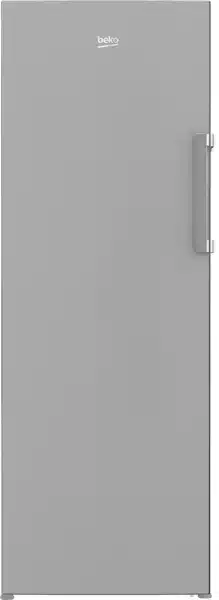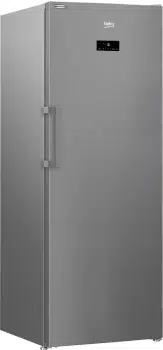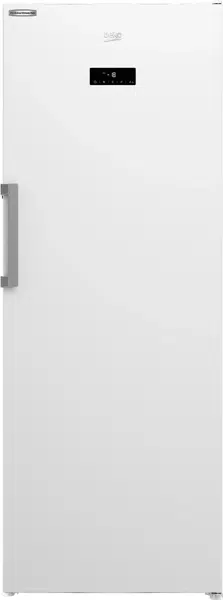

Freezer
User manual
BVF404W
58 5791 0000/AD
EN /
Dear Customer,
Please read this user manual before using the product.
Thank you for preferring this product. We hope that you get the best results
from your product which has been manufactured with high quality and state-of-
the-art technology.. Therefore, please read this entire user manual and all other
accompanying documents before using the product.
Follow all warnings and information in the user manual. Thus, you can protect
yourself and your product against potential dangers.
Keep the user manual. If you handover the product to someone else, give the user
manual as well.
The following symbols are used throughout this user manual:
Danger that may result in death or injury.
NOTICE Danger that may result in damage to the product or its surroundings.
Important information or useful hints about usage.
Read the user manual.
3 / 26 EN
Refrigerator/User Manual
1 Safety Instructions 4
1.1 Intended Use ................................. 4
1.2 Safety for children, vulnerable
persons and pets . . . . . . . . . . . . . . . . . . 4
1.3 Electrical safety. . . . . . . . . . . . . . . . 5
1.4 Transportation safety . . . . . . . . . 5
1.5 Installation safety. . . . . . . . . . . . . . 5
1.6 Operational safety . . . . . . . . . . . . . 6
1.7 Maintenance and cleaning
safety . . . . . . . . . . . . . . . . . . . . . . . . . . . . . . 8
1.8 HomeWhiz . . . . . . . . . . . . . . . . . . . . . 8
1.9- Lighting . . . . . . . . . . . . . . . . . . . . . . . 8
2 Environment instructions 9
2.1.Compliance with the WEEE Directive
and Disposing of the Waste Product: .. 9
2.2.Compliance with RoHS Directive .... 9
2.3.Package information ........................... 9
3 Your Freezer 10
4 Installation 11
4.1 Appropriate Installation Location .11
4.2 Installing the Plastic Wedges ........ 12
4.3 Adjusting the Feet.............................. 12
4.4 Electrical Connection ........................ 12
4.5 Door Open Warning ........................... 13
4.6 Changing the illumination lamp ... 13
4.7 Changing the door opening
direction ......................................................... 13
5 Preliminary preparation 14
5.1.What to do for energy saving ......... 14
5.2.First Use .................................................. 14
6 Operating the product 16
6.1 Indicator panel ...................................... 16
6.2 Freezing fresh food ............................18
6.3 Recommendations for preservation
of frozen food ..............................................19
6.4 Deep-freeze information ................19
7 Maintenance and cleaning 20
7.1 Avoiding bad odours ..........................20
7.2 Protecting the plastic surfaces ....20
8 Troubleshooting 21
9 Beko Customer Care 24
4 / 26 EN
Refrigerator/User Manual
• Ths secton contans safety
nstructons that wll help you to be
protected aganst rsks of personal
njury or property damage.
• The Manufacturer shall not be
responsble for damages that may
arse when these nstructons are not
followed.
Installation and repair procedures
must always be performed by the
manufacturer, authorised service agent
or a qualified person specified by the
importer.
Only use original parts and
accessories.
Do not repair or replace any part of
the product unless specified expressly in
the user manual.
Do not make any technical
modifications to the product.
1.1 Intended Use
• Ths product s not sutable for
commercal use and t must not be
used out of ts ntended use.
Ths product s desgned to be used n
houses and ndoor places.
For example:
- Personnel ktchens n stores, offces
and other workng envronments,
- Farm houses,
- Areas used by customers at hotels,
motels and other types of accommoda-
ton,
- Bed&breakfast type hotels, boardng-
houses,
- Caterng and smlar non-retal applca-
tons.
Ths product should not be used outdo-
ors wth or wthout a tent above t such
as boats, balcones or terraces. Do not
expose the product to ran, snow, sun or
wnd.
There s the rsk of fre!
1.2 Safety for chld-
ren, vulnerable per-
sons and pets
• Ths product can be used by chldren
at and above 8 years old and by
persons wth lmted physcal, sensory
or mental capabltes or who lack
experence and knowledge provded
that they are supervsed or traned on
the safe use of the product and the
rsks t brngs out.
• Chldren aged from 3 to 8 years
are allowed to load and unload
refrgeratng products.
• Electrcal products are dangerous for
chldren and pets. Chldren and pets
must not play wth, clmb or enter the
product.
• Cleanng and user mantenance
should not be performed by chldren
unless they are supervsed by
someone.
• Keep packagng materals away from
chldren. There s the rsk of njury
and suffocaton!
• Before dsposng of the old or
obsolete product:
1. Unplug the product by gripping from
the plug.
2. Cut the power cable and remove it from
the appliance together with its plug
3. Do not remove the shelves or drawers
so that it is harder for children to enter
the product.
4. Remove the doors.
1- Safety Instructions
5 / 26 EN
Refrigerator/User Manual
Safety instructions
5. Keep the product in a way that it will
not tip over.
6. Do not allow children play with the old
product.
• Never throw the product nto fre
for dsposal. There s the rsk of
exploson!
• If there s a lock on the door of the
product, the key should be kept out
of the reach of chldren.
1.3 Electrcal safety
• The product must be unplugged
durng nstallaton, mantenance,
cleanng, reparng and movng
procedures.
• If the power cable s damaged, t must
be replaced by a qualfed person
specfed by the manufacturer,
authorsed servce agent or mporter
n order to avod potental dangers.
• Do not squeeze the power cable
under or behnd the product. Do not
place heavy objects on the power
cable. Power cable must not be bent
excessvely, pnched or get n contact
wth any heat source.
• Do not use extenson cords, mult-
sockets or adapters to operate the
product.
• Portable mult-sockets or portable
power sources can overheat and
cause fre. Therefore, do not keep
any mult-sockets behnd or near the
product.
• Plug must be easly accessble. If
ths s not possble, the electrcal
nstallaton to whch the product s
connected must contan a devce
(such as a fuse, swtch, crcut
breaker, etc.) whch conforms to the
electrcal regulatons and dsconnects
all poles from the grd.
• Do not touch the power plug wth
wet hands.
• Remove the plug from the socket by
grppng the plug and not the cable.
• Do not use electrcal applances nsde
the food storage compartments
of the applance, unless they are
of the type recommended by the
manufacturer.
• Do not locate multple portable
socket-outlets or portable power
supples at the rear of the applance
1.4 Transportaton safety
• Product s heavy; do not move t
alone.
• Do not hold ts door when movng the
product.
• Pay attenton not to damage the
coolng system or the ppng durng
transportaton. If the ppng s
damaged, do not operate the product
and call the authorsed servce agent.
1.5 Installaton safety
• Call the authorsed servce agent
for nstallaton of the product. To
make the product ready for use,
check the nformaton n the user
manual to make sure that the
electrcty and water nstallatons
are sutable. If they are not, call a
qualfed electrcan and plumber to
have the necessary arrangements
made. Otherwse, there s the rsk of
electrc shock, fre, problems wth the
product, or njury!
• Pror to nstallaton, check f the
product has any defects on t. If the
product s damaged, do not have t
nstalled.
• Place the product on a clean, flat
and sold surface and balance t
wth adjustable feet. Otherwse, the

6 / 26 EN
Refrigerator/User Manual
Safety instructions
product may tp over and cause
njures.
• The nstallaton locaton must be
dry and well ventlated. Do not place
carpets, rugs or smlar covers under
the product. Insuffcent ventlaton
causes the rsk of fre!
• Do not cover or block the ventlaton
openngs. Otherwse, power
consumpton ncreases and your
product may get damaged.
• Product must not be connected to
supply systems such as solar power
supples. Otherwse, your product
may get damaged due to sudden
voltage changes!
• The more refrgerant a refrgerator
contans, the larger the nstallaton
locaton must be. If the nstallaton
locaton s too small, flammable
refrgerant and ar mxture wll
accumulate n cases of refrgerant
leakage n coolng system. The
requred space for each 8 gr of
refrgerant s 1 m mnmum. The
amount of refrgerant n your
product s ndcated on the Type
Label.
• Product must not be nstalled n
places exposed to drect sunlght
and t must be kept away from heat
sources such as hobs, radators, etc.
If t s nevtable to nstall the product
close to a heat source, a sutable nsu-
laton plate must be used n between
and the followng mnmum dstances
must be kept to the heat source:
- Mnmum 30 cm away from heat
sources such as hobs, ovens, heater
unts or stoves,
- Mnmum 5 cm away from electrc
ovens.
• Protecton class of your product
s Type I. Plug the product n a
grounded socket that conforms
the voltage, current and frequency
values stated on the type label of
the product. The socket must be
equpped wth a 10 A – 16 A crcut
breaker. Our company shall not be
lable for any damages that wll arse
when the product s used wthout
groundng and electrcal connecton
n accordance wth the local and
natonal regulatons.
• Product must not be plugged n
durng nstallaton. Otherwse, there
s the rsk of electrc shock and njury!
• Do not plug the product n sockets
that are loose, dslocated, broken,
drty, greasy or bear the rsk of
gettng n contact wth water.
• Route the power cable and hoses (f
any) of the product n a way that they
do not cause rsk of trppng over.
• Exposng the lve parts or power cable
to humdty may cause short crcut.
Therefore, do not nstall the product
n places such as garages or laundry
rooms where humdty s hgh or
water may splash. If the refrgerator
gets wet wth water, unplug t and
call the authorsed servce agent.
• Never connect your refrgerator to
energy savng devces. Such systems
are harmful to your product.
1.6 Operatonal safety
• Never use chemcal solvents on
the product. There s the rsk of
exploson!
• If the product malfunctons, unplug t
and do not operate untl t s repared
by the authorsed servce agent.
There s the rsk of electrc shock!
• Do not place flame sources (lt
candles, cgarettes, etc.) on or close
to the product.
7 / 26 EN
Refrigerator/User Manual
Safety instructions
• Do not clmb on the product. There s
the rsk of fallng and gettng njured!
• Do not damage the ppes of the
coolng system wth sharp or
penetratng objects. The refrgerant
that mght come out when the
refrgerant ppes, ppe extensons
or surface coatngs are punctured
causes skn rrtatons and eye
njures.
• Unless recommended by the
manufacturer, do not place or
use electrcal devces nsde the
refrgerator/deep freezer.
• Be careful not to trap your hands or
any other part of your body n the
movng parts nsde the refrgerator.
Pay attenton not to squeeze your
fngers between the door and the
refrgerator. Be careful when openng
and closng the door partcularly f
there are chldren around.
• Never eat ce cream, ce cubes or
frozen food rght after removng
them from the refrgerator. There s
the rsk of frostbte!
• When your hands are wet, do not
touch the nner walls or metal parts
of the freezer or the food stored
theren. There s the rsk of frostbte!
• Do not place tns or bottles that
contan carbonated drnks or
freezable lquds n the freezer
compartment. Tns and bottles may
burst. There s the rsk of njury and
materal damage!
• Do not place or use flammable sprays,
flammable materals, dry ce, chemcal
substances or smlar heat-senstve
materals near the refrgerator. There
s the rsk of fre and exploson!
• Do not store explosve materals that
contan flammable materals, such as
aerosol cans, n your product.
• Do not use mechancal devces
or other means to accelerate the
defrostng process, other than those
recommended by the manufacturer
• Do not place contaners flled wth
lqud onto the product. Splashng
water on an electrcal part may cause
electrc shock or the rsk of fre.
• Ths product s not ntended for
storng medcnes, blood plasma,
laboratory preparatons or smlar
medcal substances and products
subject to Medcal Products Drectve.
• Usng the product aganst ts
ntended purpose may cause
the products stored nsde t to
deterorate or spol.
• If your refrgerator s equpped wth
blue lght, do not look at ths lght
wth optcal tools. Do not stare at
UV LED lamp drectly for a long tme.
Ultravolet lght may cause eye stran.
• Do not overload the product. Objects
n the refrgerator may fall down
when the door s opened, causng
njury or damage. Smlar problems
may arse f any object s placed onto
the product.
• To avod njures, make sure that you
have cleaned all the ce and water
that may have fallen or splashed on
the floor.
• Change the poston of the shelves/
bottle holders on the door of your
refrgerator only when they are
empty. There s the rsk of njury!
• Do not place objects that can fall
down/tp over onto the product. Such
objects may fall down when the door
s opened and cause njures and/or
materal damage.
• Do not ht or exert excessve force
on glass surfaces. Broken glass
may cause njures and/or materal
damage.
8 / 26 EN
Refrigerator/User Manual
Safety instructions
• Coolng system of your product
contans R600a refrgerant: Type of
the refrgerant used n the product
s ndcated on the type label. Ths
refrgerant s flammable. Therefore,
pay attenton not to damage the
coolng system or the ppng whle
the product s n use. If the ppng s
damaged:
- Do not touch the product or the
power cable,
- Keep away potental sources of fre
that may cause the product to catch fre.
- Ventlate the area where the pro-
duct s located. Do not use fans.
- Call the authorsed servce agent.
• If the product s damaged and
you see refrgerant leak, please
stay away from the refrgerant.
Refrgerant may cause frostbte n
case of skn contact.
For products with a Water
Dispenser/Ice Machine
• Use only potable water. Do
not fll the water tank wth
any lquds -such as frut juce,
mlk, carbonated beverages or
alcoholc drnks- that are not
sutable for use n the water
dspenser.
• There s the rsk for health
and safety!
• Do not allow chldren play wth
the water dspenser or ce
machne (Icematc) n order to
prevent accdents or njures.
• Do not nsert your fngers or
other objects nto the water
dspenser hole, water channel
or ce machne contaner.
There s the rsk of njury or
materal damage!
1.7 Mantenance and
cleanng safety
• Do not pull from the door handle
f you need to move the product
for cleanng purposes. Handle may
break and cause njures f you exert
excessve force on t.
• Do not spray or pour water on or
nsde the product for cleanng
purposes. There s the rsk of fre and
electrc shock!
• Do not use sharp or abrasve tools
when cleanng the product. Do not
use household cleanng products,
detergent, gas, gasolne, thnner,
alcohol, varnsh etc.
• Only use cleanng and mantenance
products nsde the product that are
not harmful for food.
• Never use steam or steam asssted
cleaners to clean or defrost the
product. Steam gets nto contact wth
the lve parts n your refrgerator,
causng short crcut or electrc shock!
• Make sure that no water enters
the electronc crcuts or lghtng
elements of the product.
• Use a clean and dry cloth to wpe the
foregn materals or dust on the pns
of the plug. Do not use a wet or damp
cloth to clean the plug. There s the
rsk of fre and electrc shock!
1.8 HomeWhz
• When you operate your product
through HomeWhz applcaton, you
must observe the safety warnngs
even when you are away from the
product. You must also follow the
warnngs n the applcaton.
1.9- Lghtng
• Call the authorsed servce when t
s requred to replace the LED/bulb
used for lghtng.
9 / 26 EN
Refrigerator/User Manual
2.1.Compliance with the
WEEE Directive and Disposing
of the Waste Product:
This product complies with EU WEEE
Directive (2012/19/EU). This product
bears a classification symbol for waste
electrical and electronic equipment
(WEEE).
This symbol indicates that this
product shall not be disposed
with other household wastes
at the end of its service life.
Used device must be returned
to offical collection point for recycling of
electrical and electronic devices. To find
these collection systems please contact
to your local authorities or retailer where
the product was puchased. Each
household performs important role in
recovering and recycling of old appliance.
Appropriate disposal of used appliance
helps prevent potential negative
consequences for the environment and
human health.
2.2.Compliance with
RoHS Directive
The product you have purchased
complies with EU RoHS Directive
(2011/65/EU). It does not contain harmful
and prohibited materials specified in the
Directive.
2.3.Package information
Packaging materials of the
product are manufactured from
recyclable materials in
accordance with our National
Environment Regulations. Do not dispose
of the packaging materials together with
the domestic or other wastes. Take them
to the packaging material collection
points designated by the local authorities.
2 Environment instructions
10 / 26 EN
Refrigerator/User Manual
3 Your Freezer
C
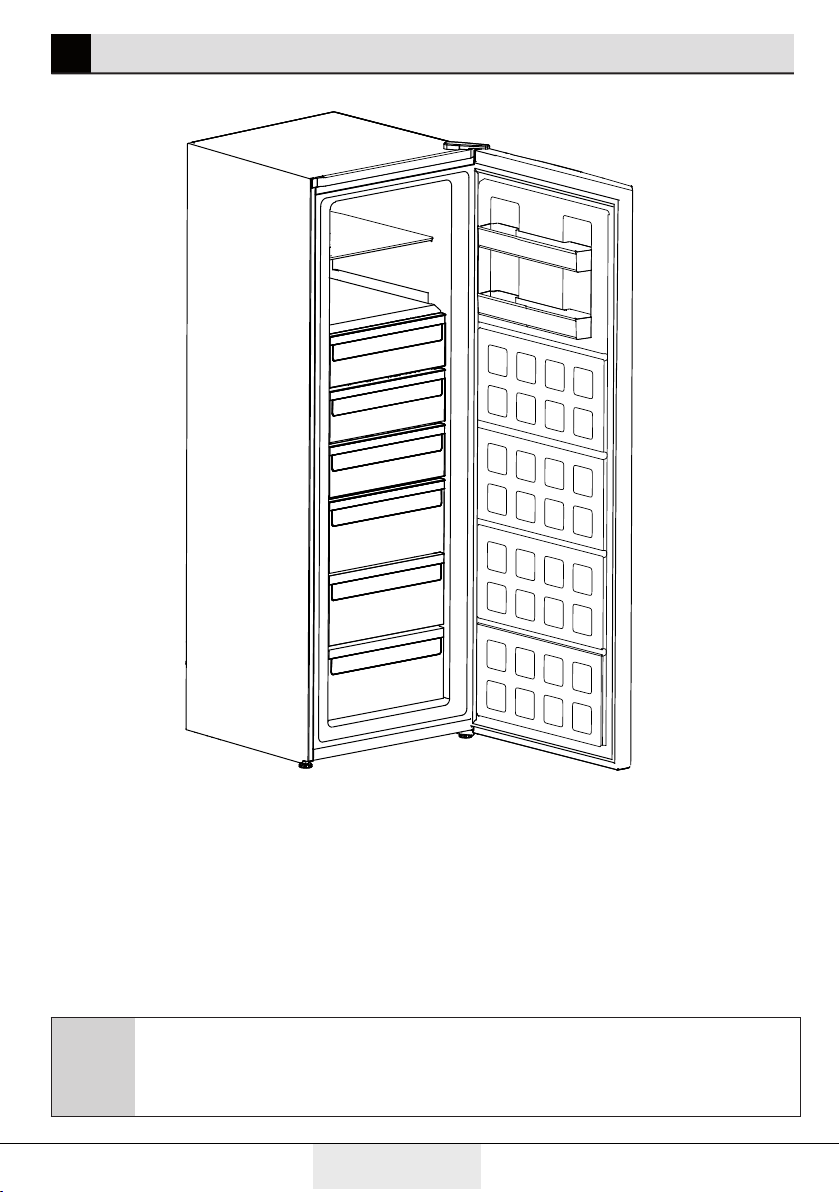
Figures that take place in this instruction manual are schematic and
may not correspond exactly with your product. If the subject parts are
not included in the product you have purchased, then it is valid for other
models.
1. Control Panel
2. Door shelf
3. Glass shelves
4. Drawers
5. Adjustable front feet
1
2
3
4
5
11 / 26 EN
Refrigerator/User Manual
4 Installation
4.1 Appropriate
Installation Location
Contact an Authorized Service for the
installation of the product. In order to
prepare the product for use, refer the
information in the user manual and
ensure that electrical installation and
water installation are appropriate. If not,
call a qualified electrician and technician
to have any necessary arrangements
carried out.
B
WARNING: Manufacturer shall
not be held lable for damages
that may arse from procedures
carred out by unauthorzed
persons.
B
WARNING: Product must
not be plugged n durng
nstallaton. Otherwse, there
s the rsk of death or serous
njury!
A
WARNING:
If the door clearance of the
room where the product shall
be place s so tght to prevent
passng of the product, remove
the door of the room and pass
the product through the door
by turnng t to ts sde; f ths
does not work, contact the
authorzed servce.
• Place the product on an even floor
surface to prevent jolts.
• Install the product at least 30 cm
away from heat sources such as hobs,
heater cores and stoves and at least 5
cm away from electrical ovens.
• Product must not be subjected to
direct sun light or kept in humid places.
• Appropriate air ventilation must be
provided around your product in order
to achieve an efficient operation. If the
product is to be placed in a recess in
the wall, pay attention to leave at least
5 cm distance with the ceiling and side
walls.
• Your product requres adequate ar
crculaton to functon effcently.
If the product wll be placed n an
alcove, remember to leave at least 5
cm clearance between the product
and the celng, rear wall and the sde
walls.
• Check f the rear wall clearance
protecton component s present
at ts locaton (f provded wth the
product). If the component s not
avalable, or f t s lost or fallen,
poston the product so that at least
5 cm clearance shall be left between
the rear surface of the product and
the wall of the room. The clearance
at the rear s mportant for effcent
operaton of the product.
12 / 26 EN
Refrigerator/User Manual
Installation
4.2 Installing the
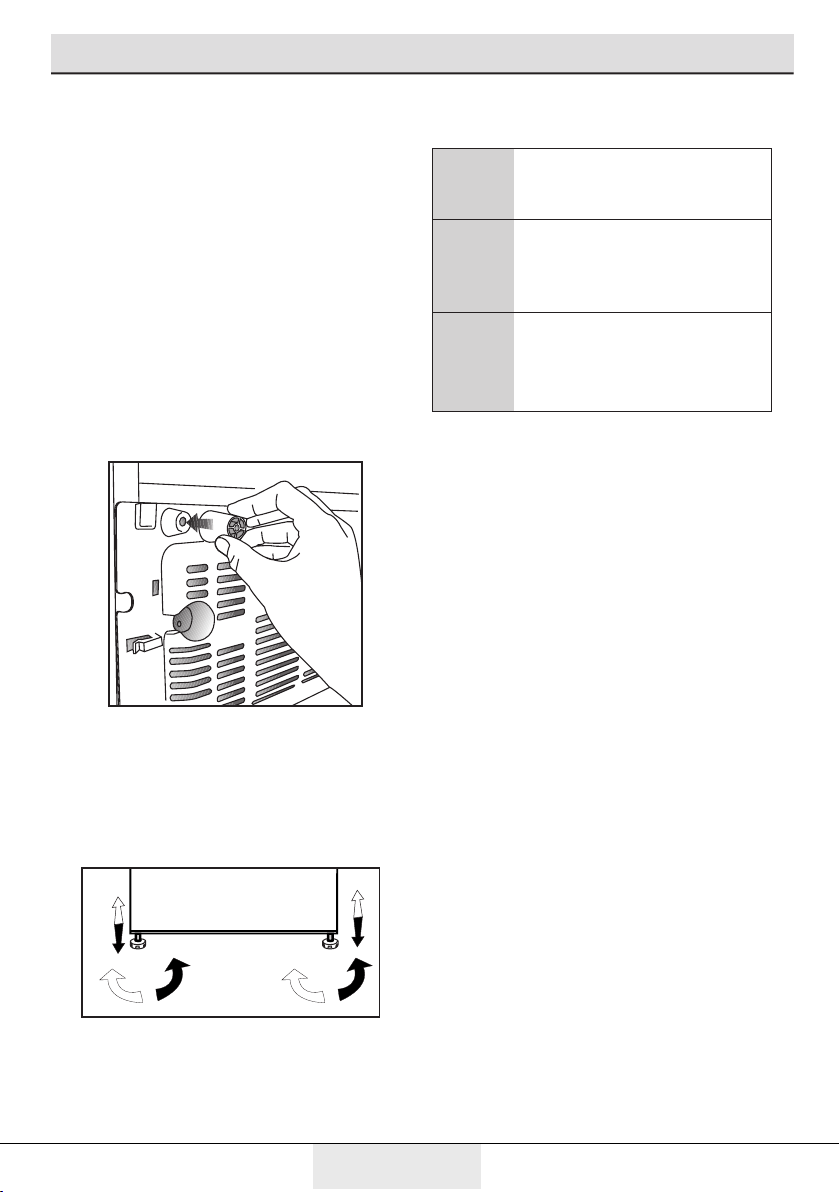
Plastic Wedges
Plastc wedges suppled wth the
product are used to create the dstance
for the ar crculaton between the
product and the rear wall.
1. To install the wedges, remove the
screws on the product and use the
screws supplied together with the
wedges.
2. Insert the 2 plastic wedges onto the
rear ventilation cover as illustrated in
the figure.
4.3 Adjusting the Feet
If the product stands unbalanced after
nstallaton, adjust the feet on the front
by rotatng them to the rght or left.
4.4 Electrical Connection
A
WARNING: Do not make
connectons va extenson
cables or mult-plugs.
B
WARNING: Damaged
power cable must be
replaced by the Authorzed
Servce Agent.
C
If two coolers are to be
nstalled sde by sde, there
should be at least 4 cm
dstance between them.
• The Manufacturer shall not be lable
for any damages that wll arse
when the product s used wthout
groundng and electrcal connecton
n accordance wth the natonal
regulatons.
• Power cable plug must be wthn easy
reach after nstallaton.
• Connect your refrgerator to a
grounded outlet rated for a voltage
value of 220-240V /50 Hz. Outlet
shall have 10 to 16A fuse.
• Do not extenson cords or cordless
multple outlets between your
product and the wall outlet.
13 / 26 EN
Refrigerator/User Manual
Installation
4.5 Door Open Warning
*May not be available in all models
An audio warning signal will be given
when the door of your product is left
open for at least 1 minute. This warning
will be muted when the door is closed
or any of the display buttons (if any) are
pressed.
4.6 Changing the
illumination lamp
To change the Bulb/LED used for
illumination of your refrigerator, call your
AuthorisedService.
The lamp(s) used in this appliance is not
suitable for household room illumination.
The intended purpose of this lamp is to
assist the user to place foodstuffs in
the refrigerator/freezer in a safe and
comfortable way.The lamps used in this
appliance have to withstand extreme
physical conditions such as temperatures
below -20 °C.
(only chest and upright freezer)
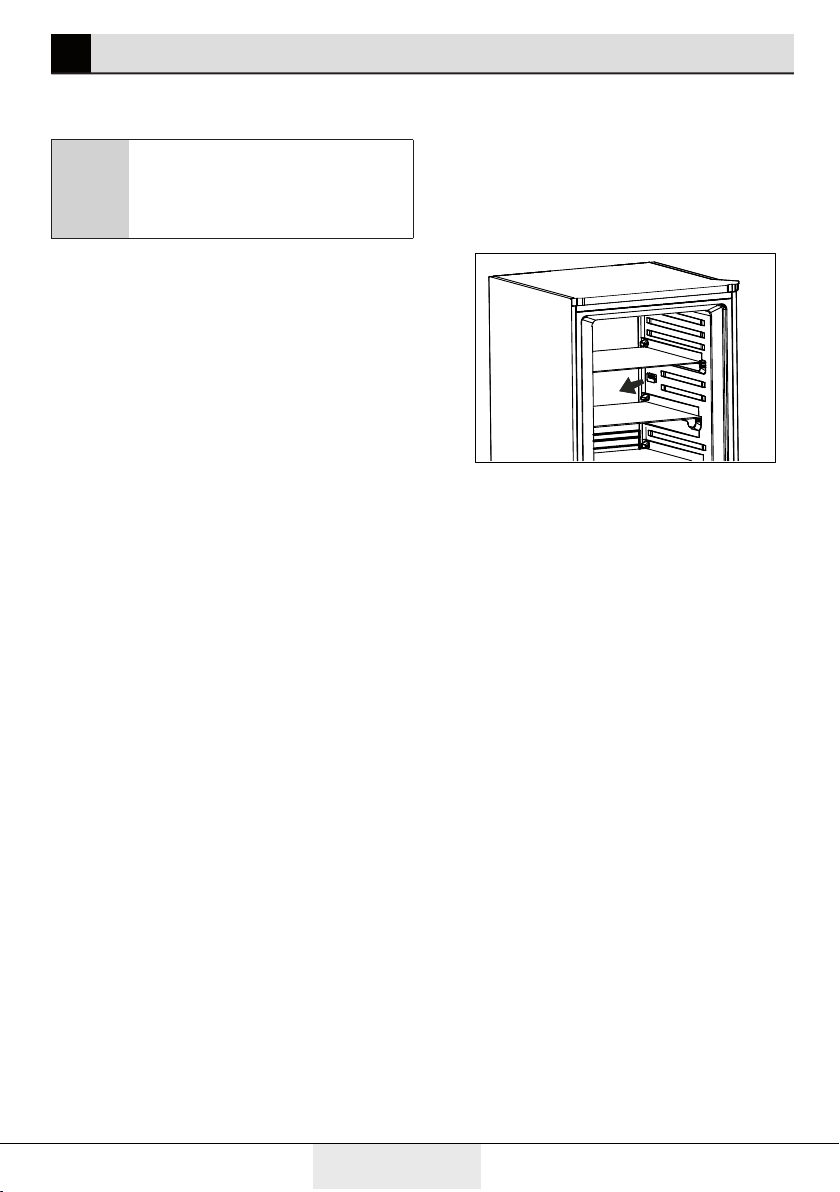
4.7 Changing the door
opening direction
Door openng drecton of your
refrgerator can be changed accordng
to the place you are usng t. If ths s
necessary, please call your nearest
Authorzed Servce.
14 / 26 EN
Refrigerator/User Manual
5 Preliminary preparation
5.1.What to do for
energy saving
A
Connecting the product
to electronic energy-saving
systems is harmful, as it may
damage the product.
• For a freestanding appliance; ‘this
refrigerating appliance is not intended
to be used as a built-in appliance.
• Do not keep the refrigerator doors open
for long periods.
• Do not place hot food or beverages into
the refrigerator.
• Do not overfill the refrigerator; blocking
the internal air flow will reduce cooling
capacity.
• In order to load the maximum quantity
of food into the cooler compartment
of your refrigerator, the upper drawers
should be taken out and the food
should be placed onto the wire/glass
shelves. Net volume and energy
consumption information declared in
the energy label of your refrigerator
was tested by taking out the upper
drawers in the cooler department
and the ice bucket, which is easily
removable by hand.
• Food packages should not be in direct
contact with the heat sensor located
in the cooler compartment. The food
should be 10 cm away from the sensor.
In case of contact with the sensor,
energy consumption of the device may
increase.
10 cm
5.2.First Use
Before using your refrigerator, make
sure the necessary preparations are
made in line with the instructions in
"Safety and environment instructions"
and "Installation" sections.
• Keep the product running without
placing any food inside for 6 hours and
do not open the door, unless absolutely
necessary.
• The temperature change caused by
opening and closing of the door while
using the product may normally lead to
frost deposit, icing and condensation
on food placed on door/body shelves
and glass containers placed in the
product.

15 / 26 EN
Refrigerator/User Manual
C
A sound will be heard when
the compressor is engaged.
It is normal to hear sound
even when the compressor is
inactive, due to the compressed
liquids and gasses in the cooling
system.
C
It is normal for the front edges
of the refrigerator to be warm.
These areas are designed to
warm up in order to prevent
condensation.
C
For some models, indicator
panel turns off automatically 1
minutes after the door closes.
It will be reactivated when the
door is open or any button is
pressed.
• Snce hot and humd ar wll not
drectly penetrate nto your product
when the doors are not opened,
your product wll optmze tself n
condtons suffcent to protect your
food. Functons and components
such as compressor, fan, heater,
defrost, lghtng, dsplay and so on
wll operate accordng to the needs
to consume mnmum energy under
these crcumstances.
16 / 26 EN
Refrigerator/User Manual
C
Fgures n ths user manual are schematc and may not match the product
exactly. If the subject parts are not ncluded n the product you have
purchased, then those parts are vald for other models.
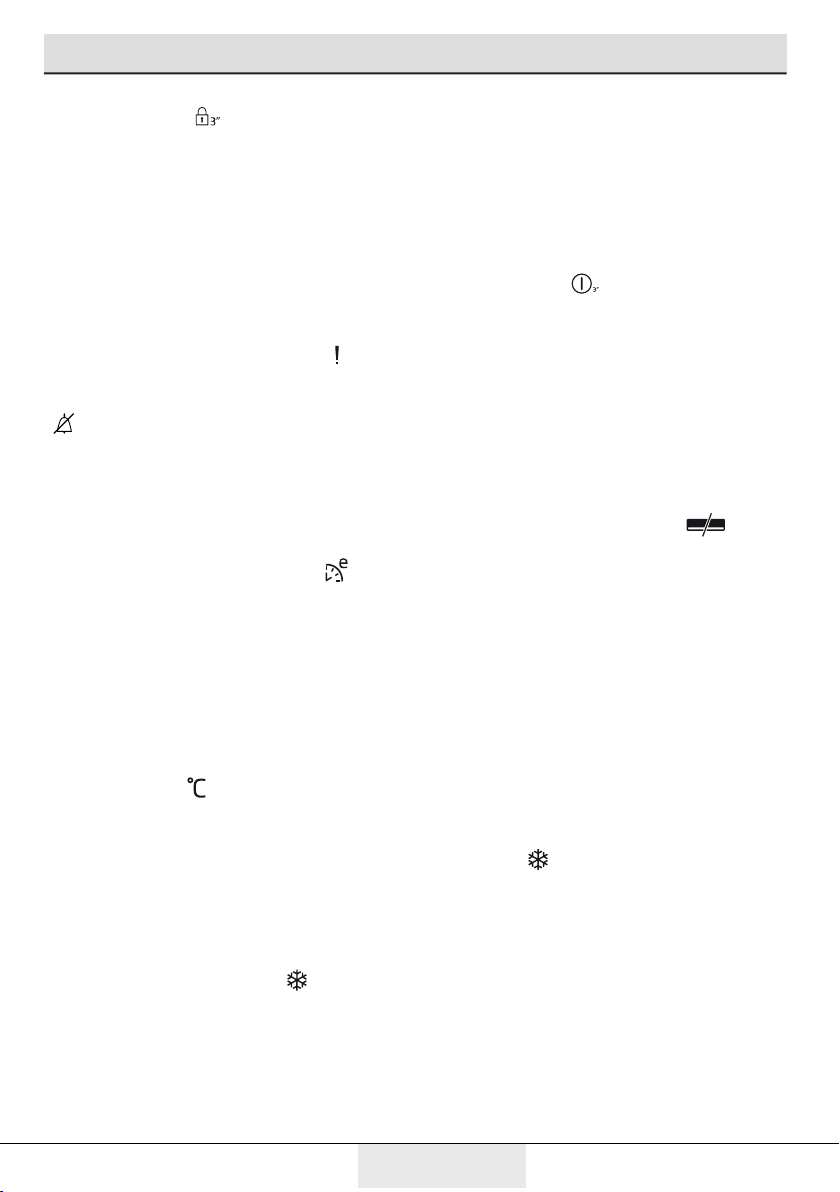
1.On/Off Indicator:
Ths con ( ) come on when the freezer
s turned off. All the other cons turn off.
2.Economic Usage Indicator:
This icon ( ) (comes on when the
Freezer Compartment is set to -18°C
which is the most economical set value.
Economic Usage Indicator turns off when
the Quick Fridge or Quick Freeze function
is selected.
3.Freezer Compartment Temperature
Setting Indicator:
Indcates the temperature set for the
Freezer Compartment.
4.Power failure/High temperature /
error warning indicator :
This light ( ) illuminates during power
failure, high temperature failures and
error warnings. During sustained power
failures, the highest temperature that
the freezer compartment reaches will
flash on the digital display.
5.Eco Extra Indicator:
This icon ( ) lights up when this
Function is active.
6.Key Lock Indicator:
This icon ( ) lights up when the Key
Lock mode is activated.
6 Operating the product
6.1 Indicator panel
1
7812 1011 9
14
2
3
5
4 6
13
17 / 26 EN
Refrigerator/User Manual
Operating the product
7.Key Lock Mode:
Press Key Lock ( ) button continuously
for 3 seconds. Key lock icon will light
up and key lock mode will be activated.
Buttons will not function if the Key Lock
mode is active. Press Key Lock button
continuously for 3 seconds again. Key
lock icon will turn off and the key lock
mode will be exite.
8- Alarm off warning:
In case of power failure/high ( ) , after
checking the food located in the freezer
compartment press the alarm off button
( ) to clear the warning.
High Temperature Alarm may also be
cleared by other keys than the On/Off
key.
9.Eco Extra Function:
Press the Eco Extra button ( ) for 3
seconds to activate Eco Extra Function
when going on holday for instance.
Freezer will start operating in the most
economic mode at around 6 hours later
and the economic usage indicator will
turn on when the function is active.
10.Freezer Set Function:
This function ( ) allows you to change
the Freezer compartment temperature
setting. Press this button to set the
temperature of the freezer compartment
to -18, -19, -20, -21, -22, -23 and -24,
respectively.
11.Quick Freeze Function:
Quick Freeze indicator ( ) turns on
when the Quick Freeze function is on.
Press Quick Freeze button again to cancel
this function. Quick Freeze indicator will
turn off and normal settings will be
resumed.
Quick Freeze function will be cancelled
automatically 52 hours later if you do not
cancel it manually. If you want to freeze
plenty amount food, press Quick Freeze
button before you place the food into the
freezer compartment.
12.On/Off Function:
This function ( ) allows you to make
the Fridge turn off when pressed for 3
seconds.The fridge could be turned on
by pressing On/Off button for 3 seconds
again .
13.Energy Saving Indicator :
If the product doors are kept closed
for a long time energy saving function
is automatically activated and energy
saving symbol is illuminated. ( )
When energy saving function is
activated, all symbols on the display
other than energy saving symbol will turn
off. When the Energy Saving function is
activated, if any button is pressed or the
door is opened, energy saving function
will be canceled and the symbols on
display will return to normal.
Energy saving function is activated
during delivery from factory and cannot
be canceled.
14.Quick Freeze Indicator :
This icon ( ) comes on when the Quick
Freeze function is on.
18 / 26 EN
Refrigerator/User Manual
Operating the product
6.2 Freezing fresh food
• Wrap or cover the food before placing
them in .
• Hot food must cool down to the room
temperature before putting them in the
refrigerator.
• The foodstuff that you want to freeze
must be fresh and in good quality.
• Foodstuff must be divided into
portions according to the family’s daily
or meal based consumption needs.
• Foodstuff must be packaged in an
airtight manner to prevent them from
drying even if they are going to be kept
for a short time.
• Materials to be used for packagings
must be resistant to cold and humidity
and they must be airtight. The
packaging material of the food must be
at a sufficient thickness and durability.
Otherwise the food hardened due to
freezing may puncture the packaging.
It is important for the packaging to be
closed securely for safe storage of the
food.
• Frozen food must be used
immediately after they are thawed and
they should never be re-frozen.
• Please observe the following
instructions to obtain the best results.
1. Activate the fast freezing function by
pressing the «Fast Freeze» button 24
hours before loading the food to be
frozen.
2. 24 hours after pressing the button,
place your hot food in the first and
second shelves of the product.
3. The fast freezing function will be
automatically inactivated after 52
hours.
4. Do not try to freeze a large quantity
of food at a time. Within 24 hours,
this product can freeze the maximum
food quantity specified as «Freezing
Capacity … kg/24 hours» on its type
label. It is not convenient to put more
unfrozen/fresh foods than the quantity
specified on the label.
5. When you put unfrozen food in the
product, place them in a way that they
do not contact with frozen food. A cool-
pack may be placed on foods on the 3rd
shelf from top to bottom to prevent
heating.
6. Ensure that raw food do not contact
with cooked food in the refrigerator.
19 / 26 EN
Refrigerator/User Manual
Operating the product
Cooler
Compartment
Settings
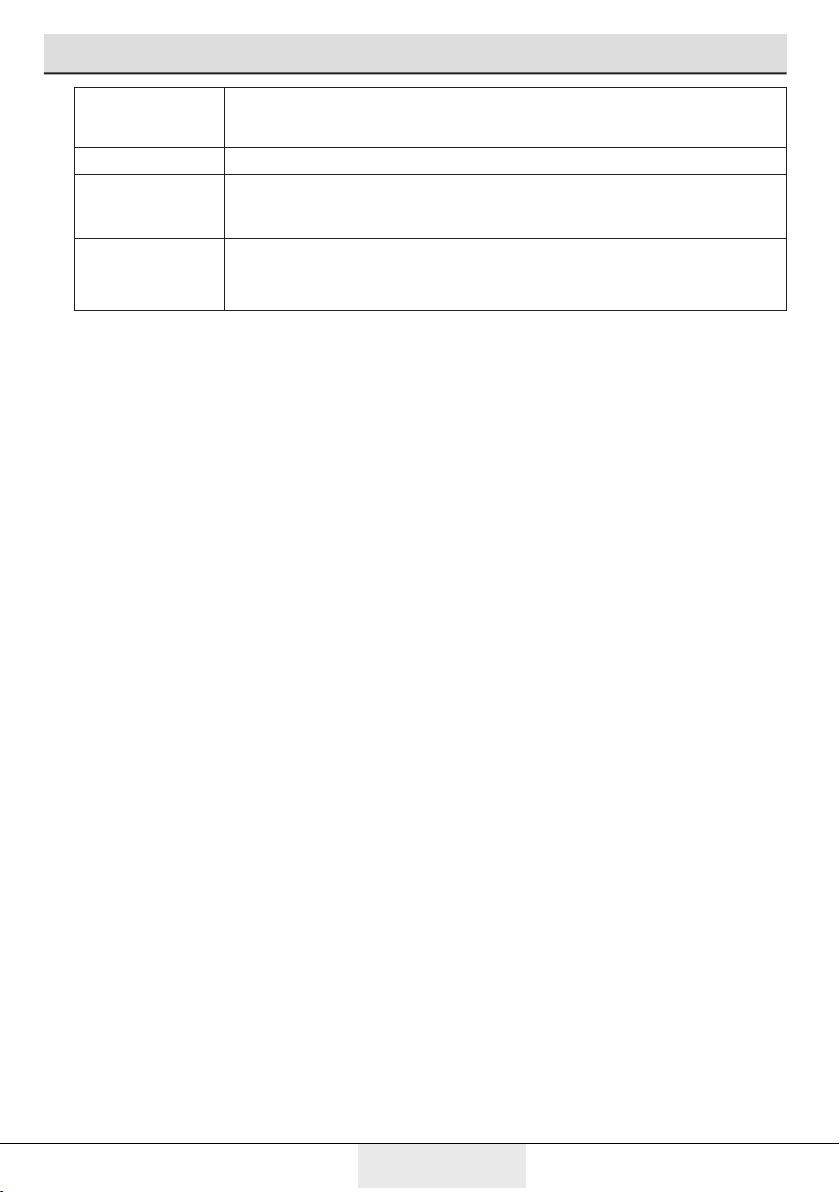
Remarks
-20°C This is the default, recommended setting.
-21, -22, -23
or -24°C
These settings are recommended when the ambient temperature
is higher than 30°C or when you think the refrigerator is not cool
enough due to frequent opening and closing of the door.
Fast Freezing
Use when you want to freeze your food in a short time.
Recommended for maintaining the quality of meat and fish
products.
6.3 Recommendations for
preservation of frozen food
• Pre-packed commercially frozen food
should be stored in accordance with the
frozen food manufacturer's instructions
in a frozen food storage compartment.
• To ensure that the high quality
supplied by the frozen food
manufacturer and the food retailer is
maintained, following points should be
noted:
1. Put packages in the freezer as
quickly as possible after purchase.
2. Ensure that contents of the
package are labeled and dated.
3. Do not exceed "Use By", "Best
Before" dates on the packaging.
Defrosting
The freezer compartment defrosts
automatically.
6.4 Deep-freeze information
Food must be frozen as rapidly as
possible when they are put in the freezer
in order to keep them in good quality.
It is possible to preserve the food
for a long time only at -18°C or lower
temperatures.
You can keep the freshness of food
for many months (at -18°C or lower
temperatures in the deep freeze).
WARNING! A
• Foodstuff must be divided into
portions according to the family’s daily or
meal based consumption needs.
• Foodstuff must be packaged in an
airtight manner to prevent them from
drying even if they are going to be kept
for a short time.
Materials necessary for packaging:
• Cold resistant adhesive tape
• Self-adhesive label
• Rubber rings
• Pen
Materials to be used for packaging
the foodstuff must be tear-proof and
resistant to cold, humidity, dour, oils and
acids.
Foodstuff to be frozen should not be
allowed to come in contact with the
previously frozen items to prevent their
partial thawing. Thawed out
food must be consumed and must not be
frozen again.
20 / 26 EN
Refrigerator/User Manual
7 Maintenance and cleaning
Cleanng your frdge at regular nter-
vals wll extend the servce lfe of the
product.
B WARNING:
Unplug the product before cleanng t.
• Never use gasolne, benzene or
smlar substances for cleanng
purposes.
• Never use any sharp and abrasve
tools, soap, household cleaners,
detergent and wax polsh for
cleanng.
• For non-No Frost products,
water drops and frostng up to a
fngerbreadth occur on the rear wall
of the Frdge compartment. Do not
clean t; never apply ol or smlar
agents on t.
• Only use slghtly damp mcrofber
cloths to clean the outer surface of
the product. Sponges and other types
of cleanng cloths may scratch the
surface
• Dssolve one teaspoon of b-
carbonate n half ltre of water. Soak
a cloth wth the soluton and wrung t
thoroughly. Wpe the nteror of the
refrgerator wth ths cloth and the
dry thoroughly.
• Make sure that no water enters the
lamp housng and other electrcal
tems.
• If you wll not use the refrgerator
for a long perod of tme, unplug t,
remove all food nsde, clean t and
leave the door ajar.
• Check regularly that the door gaskets
are clean. If not, clean them.
• To remove door and body shelves,
remove all of ts contents.
• Remove the door shelves by pullng
them up. After cleanng, slde them
from top to bottom to nstall.
• Never use cleanng agents or water
that contan chlorne to clean the
outer surfaces and chromum coated
parts of the product. Chlorne causes
corroson on such metal surfaces.
7.1 Avoiding bad odours
• Materals that may cause odour
are not used n the producton of
our refrgerators. However, due
to napproprate food preservng
condtons and not cleanng the
nner surface of the refrgerator as
requred can brng forth the problem
of odour. Pay attenton to followng
to avod ths problem:
• Keepng the refrgerator clean s
mportant. Food resduals, stans, etc.
can cause odour. Therefore, clean
the refrgerator wth b-carbonate
dssolved n water every few months.
Never use detergents or soap.
• Keep the food n closed contaners.
Mcroorgansms spreadng out from
uncovered contaners can cause
unpleasant odours.
• Never keep the food that have
passed best before dates and spoled
n the refrgerator.
7.2 Protecting the
plastic surfaces
Do not put lqud ols or ol-cooked meals
n your refrgerator n unsealed conta-
ners as they damage the plastc surfaces
of the refrgerator. If ol s splled or sme-
ared onto the plastc surfaces, clean and
rnse the relevant part of the surface at
once wth warm water.
21 / 26 EN
Refrigerator/User Manual
8. Troubleshooting
Check ths lst before contactng the
servce. Dong so wll save you tme
and money. Ths lst ncludes frequent
complants that are not related to faulty
workmanshp or materals. Certan
features mentoned heren may not
apply to your product.
The refrigerator is not working.
• The power plug s not fully settled.
>>> Plug t n to settle completely
nto the socket.
• The fuse connected to the socket
powerng the product or the man
fuse s blown. >>> Check the fuses.
Condensation on the side wall of the
cooler compartment (MULTI ZONE,
COOL, CONTROL and FLEXI ZONE).
• The door s opened too frequently
>>> Take care not to open the
product’s door too frequently.
• The envronment s too humd. >>>
Do not nstall the product n humd
envronments.
• Foods contanng lquds are kept
n unsealed holders. >>> Keep the
foods contanng lquds n sealed
holders.
• The product’s door s left open. >>>
Do not keep the product’s door open
for long perods.
• The thermostat s set to too low
temperature. >>> Set the thermostat
to approprate temperature.
Compressor is not working.
• In case of sudden power falure
or pullng the power plug off and
puttng back on, the gas pressure
n the product’s coolng system s
not balanced, whch trggers the
compressor thermc safeguard.
The product wll restart after
approxmately 6 mnutes. If the
product does not restart after ths
perod, contact the servce.
• Defrostng s actve. >>> Ths
s normal for a fully-automatc
defrostng product. The defrostng s
carred out perodcally.
• The product s not plugged n. >>>
Make sure the power cord s plugged
n.
• The temperature settng s ncorrect.
>>> Select the approprate
temperature settng.
• The power s out. >>> The product
wll contnue to operate normally
once the power s restored.
The refrigerator’s operating noise is
increasing while in use.
• The product’s operatng performance
may vary dependng on the ambent
temperature varatons. Ths s normal
and not a malfuncton.
The refrigerator runs too often or for
too long.
• The new product may be larger than
the prevous one. Larger products wll
run for longer perods.
• The room temperature may be hgh.
>>> The product wll normally run
for long perods n hgher room
temperature.
• The product may have been recently
plugged n or a new food tem s
placed nsde. >>> The product
wll take longer to reach the set
temperature when recently plugged
n or a new food tem s placed nsde.
Ths s normal.
• Large quanttes of hot food may have
been recently placed nto the product.
>>> Do not place hot food nto the
product.
• The doors were opened frequently or
kept open for long perods. >>> The
warm ar movng nsde wll cause the
product to run longer. Do not open
the doors too frequently.
22 / 26 EN
Refrigerator/User Manual
Troubleshooting
• The freezer or cooler door may be
ajar. >>> Check that the doors are
fully closed.
• The product may be set to
temperature too low. >>> Set the
temperature to a hgher degree and
wat for the product to reach the
adjusted temperature.
• The cooler or freezer door gasket
may be drty, worn out, broken or
not properly settled. >>> Clean or
replace the gasket. Damaged / torn
door gasket wll cause the product to
run for longer perods to preserve the
current temperature.
The freezer temperature is very
low, but the cooler temperature is
adequate.
• The freezer compartment
temperature s set to a very low
degree. >>> Set the freezer
compartment temperature to a hgher
degree and check agan.
The cooler temperature is very
low, but the freezer temperature is
adequate.
• The cooler compartment temperature
s set to a very low degree. >>>
Set the freezer compartment
temperature to a hgher degree and
check agan.
The food items kept in cooler
compartment drawers are frozen.
• The cooler compartment temperature
s set to a very low degree. >>>
Set the freezer compartment
temperature to a hgher degree and
check agan.
The temperature in the cooler or the
freezer is too high.
• The cooler compartment temperature
s set to a very hgh degree. >>>
Temperature settng of the cooler
compartment has an effect on
the temperature n the freezer
compartment. Wat untl the
temperature of relevant parts reach
the suffcent level by changng the
temperature of cooler or freezer
compartments.
• The doors were opened frequently or
kept open for long perods. >>> Do
not open the doors too frequently.
• The door may be ajar. >>> Fully close
the door.
• The product may have been recently
plugged n or a new food tem s
placed nsde. >>> Ths s normal.
The product wll take longer to reach
the set temperature when recently
plugged n or a new food tem s
placed nsde.
• Large quanttes of hot food may have
been recently placed nto the product.
>>> Do not place hot food nto the
product.
Shaking or noise.
• The ground s not level or durable.
>>> If the product s shakng when
moved slowly, adjust the stands to
balance the product. Also make sure
the ground s suffcently durable to
bear the product.
• Any tems placed on the product may
cause nose. >>> Remove any tems
placed on the product.
The product is making noise of liquid
flowing, spraying etc.
• The product’s operatng prncples
nvolve lqud and gas flows. >>> Ths
s normal and not a malfuncton.
23 / 26 EN
Refrigerator/User Manual
Troubleshooting
There is sound of wind blowing
coming from the product.
• The product uses a fan for the coolng
process. Ths s normal and not a
malfuncton.
There is condensation on the
product’s internal walls.
• Hot or humd weather wll ncrease
cng and condensaton. Ths s normal
and not a malfuncton.
• The doors were opened frequently or
kept open for long perods. >>> Do
not open the doors too frequently; f
open, close the door.
• The door may be ajar. >>> Fully close
the door.
There is condensation on the
product’s exterior or between the
doors.
• The ambent weather may be humd,
ths s qute normal n humd weather.
>>> The condensaton wll dsspate
when the humdty s reduced.
The interior smells bad.
• The product s not cleaned regularly.
>>> Clean the nteror regularly usng
sponge, warm water and carbonated
water.
• Certan holders and packagng
materals may cause odour. >>>
Use holders and packagng materals
wthout free of odour.
• The foods were placed n unsealed
holders. >>> Keep the foods n
sealed holders. Mcro-organsms
may spread out of unsealed food
tems and cause malodour. Remove
any expred or spolt foods from the
product.
The door is not closing.
• Food packages may be blockng
the door. >>> Relocate any tems
blockng the doors.
• The product s not standng n full
uprght poston on the ground. >>>
Adjust the stands to balance the
product.
• The ground s not level or durable.
>>> Make sure the ground s level
and suffcently durable to bear the
product.
The vegetable bin is jammed.
• The food tems may be n contact
wth the upper secton of the drawer.
>>> Reorganze the food tems n the
drawer.
If The Surface Of The Product Is Hot.
• Hgh temperatures may be observed
between the two doors, on the sde
panels and at the rear grll whle
the product s operatng. Ths s
normal and does not requre servce
mantenance!Be careful when
touchng these areas.
The screen is flashing and a red
exclamation mark (!) is shown.
• The product has lost power
temporarly >>> Check the contents
and press the alarm off button to
clear message.
• The contents are warm >>> restart
the applance at the power socket
and press the alarm off button to
clear message.
A WARNING:
If the problem perssts after followng
the nstructons n ths secton, contact
your vendor or an Authorsed Servce. Do
not try to repar the product.
24 / 26 EN
Refrigerator/User Manual
9 Beko Customer Care
Before you call Beko for service or assistance...
Refer to your User Guide and check the following:
1. Your Appl iance is correctly installed.
2. Your Appliance is connected to power.
3. You are familiar with its normal mode of operation
4. You have read the ‘Recommended solutions for the problems’
If after checking the points above, the problem still exists, please call our
Beko Customer Care hotline as listed below:-
If calling from Australia....
Beko Customer Care and talk to one of our consultants.
Toll Free Toll Free 1300AUBEKO 1300 282 356
Email:[email protected] * Fax: (07) 55493546
If calling from New Zealand....
Beko Customer Care and talk to one of our consultants.
Toll Free 0800NZBEKO 0800 69 2356
Email: [email protected] * Fax: (+617) 55493546
* If you contact us by Email please provide the following details:
Your name and Address
Date of Purchase
Model Number
Serial Number
Complete description of the problem or request