Quick Start Guide
XIG02
For disclaimers, refer to "Notes on Usage".
Descriptions in this manual are based on
Android™ 11.
For the latest edition, refer to "取扱説明書
(Instruction manual)" (Japanese) available on
your carrier's homepage.
1
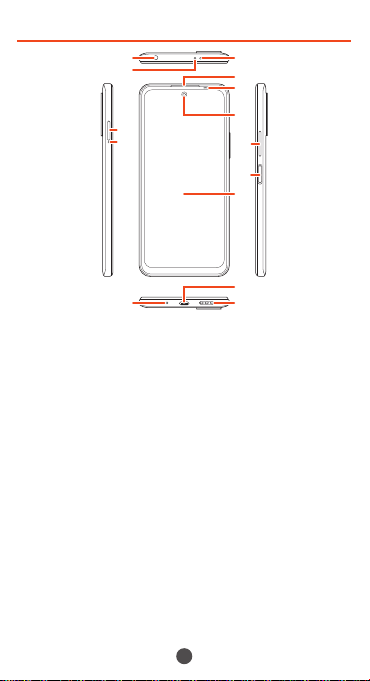
Names and functions of parts
⑧
⑨
①
④
⑤
⑥
⑦
⑩
⑪
②
③
⑫
⑬
⑭
① Headset connection terminal
② Infrared sensor
③ Second microphone
*1
Reduces noise for calling.
④ microSD memory card/SIM card tray
⑤ Tray removal hole
⑥ Earpiece/Speaker
⑦ Proximity sensor/Light sensor
*2
⑧ Front camera
⑨ Volume key
⑩ Power key/Fingerprint recognition sensor
*2
⑪ Display (Touch panel)
*3
⑫ Mouthpiece/Microphone
*1
⑬ USB Type-C™ connection terminal
⑭ Speaker
2
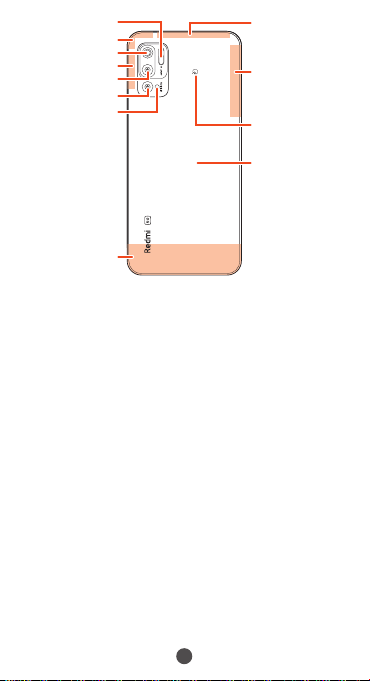
⑰
⑯
⑱
⑱
⑲
⑳
⑦
⑮
⑱
㉒
㉑
㉓
⑮ Flash/Light
⑯ Wi-Fi
®
/GPS/
Bluetooth
®
antenna
*4
⑰ Primary camera
⑱ 4G/5G antenna
*4
⑲ Depth camera
⑳ Macro camera
4G antenna
*4
NFC antenna
location
Back panel
*5
*1 Do not jab with a sharp object such as a
needle.
Doing so may cause a malfunction.
*2 Note that covering these parts with stickers
or fingers, etc. may hinder product
performance.
*3 The display has a protective sheet
(complimentary sample) already adhered.
*4 The antenna is built into the main unit.
Covering around the antenna by your hand
may affect the quality of call/communication.
*5 The back panel is not removable. Trying to
remove case may cause breakage or
malfunction. Battery is built in and is not
removable.
3
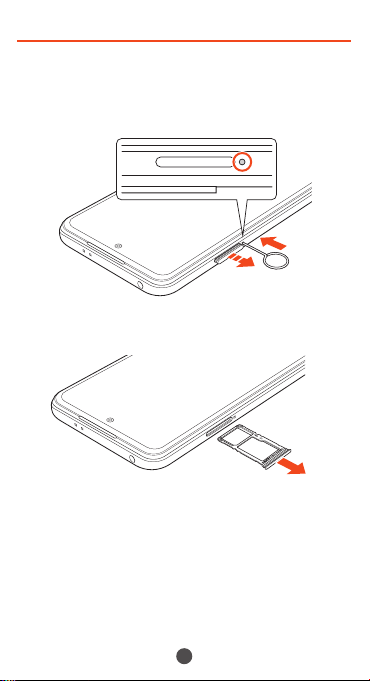
Attaching SIM card
Before attaching SIM card, make sure to turn
off the product.
1
Insert SIM removal pin (complimentary
sample) into tray removal hole straight
2
Pull out microSD memory card/SIM card
tray straight
4
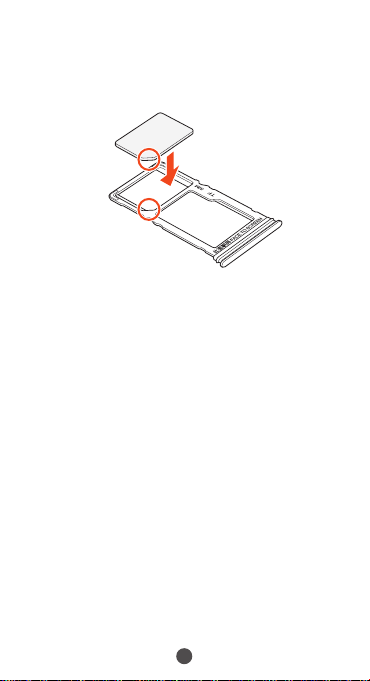
3
Hold the SIM card with its IC (metal) chip
downward and insert in microSD memory
card/SIM card tray
Note location of notch.
Make sure SIM card is in tray securely.
Notch
4
Press microSD memory card/SIM card
tray straight into the product
Make sure there is no gap between the
main unit and the microSD memory card/
SD card slot cover.

5
Turning the power on/off
■ Turning the power on
1
Long-press the power key for at least 4
seconds
The lock screen appears.
Swipe (flick) the screen to unlock. An initial
settings wizard appears the first time the
product is powered on after purchase.
Follow the onscreen instructions to set
functions.
■ Turning the power off
1
With screen on, long-press the power key
for at least 2 seconds
2
[Power off]→[Tap to Power off]
■ Forcing the product to turn off and
restart
1
Long-press the power key for at least 10
seconds

6
Switching to English Display
Switch the language displayed on the screen
to English.
1
Home screen→[設定(Settings)]→[追加設定
(Additional settings)]→[言語と入力
(Languages & input)]→[言語(Languages)]
2
[English]
The message "起動中のアプリ、メール送受信、ダ
ウンロードなどが終了される場合があります。"
(Applications, mail transmission/reception,
and downloads may be terminated.)
appears, confirm the content and then tap
[OK].
7
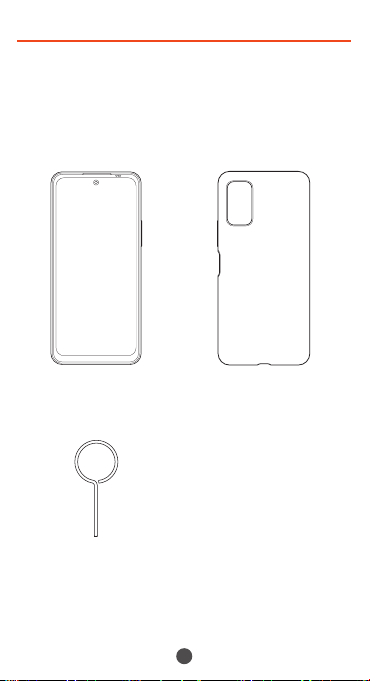
Packaged items
Before you start using the product, make sure
that you have all these packaged items with
the product.
•
Main unit (protective
sheet (complimentary
sample) pre-adhered)
•
Soft case
(complimentary
sample)
•
SIM removal pin
(complimentary
sample)
•
クイックスタートガイド
(Quick Start Guide)
(Japanese)
•
ご利用にあたっての注意
事項(Notes on Usage)
(Japanese)
These items are not included in the package.
•
microSD memory card
•
AC adapter
•
Earphones
•
USB Type-C cable
8
◎ Purchase a specified charger (sold separately).
◎ The battery is built into the product.
◎ Illustrations used in this manual are just images
for explanations. They may be different from
actualones.
Importer:Xiaomi Technology Japan Co., Ltd.
Manufacturer:Xiaomi Communications Co., Ltd.
Mobile phone and PHS operators collect and
recycle unused telephones, batteries and battery
chargers at stores bearing the logo regardless
of brand and manufacturer to protect the
environment and reuse valuable resources.
August 2021, 1st Edition