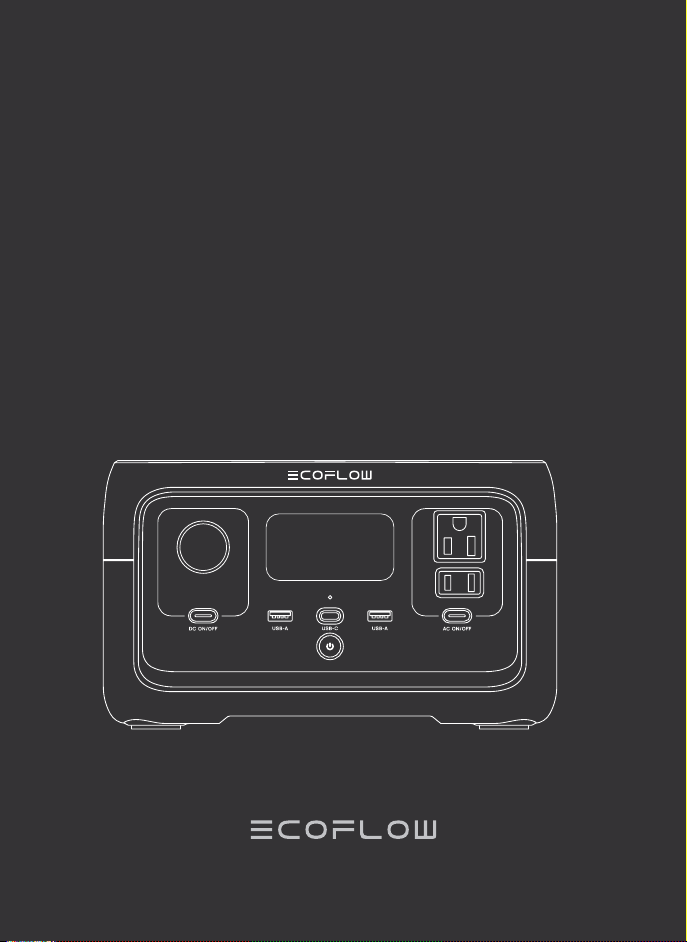
EcoFlow RIVER 2
Quick Start Guide
Portable Power Station

DISCLAIMER
Read all safety tips, warning messages, terms of use, and disclaimers carefully.
Refer to the terms of use and disclaimer at https://ecoflow.com/pages/terms-
of-use and stickers on the product before use. Users take full responsibility for
all usage and operations. Familiarize yourself with the related regulations in your
area. You are solely responsible for being aware of all relevant regulations and
using EcoFlow products in a way that is compliant.
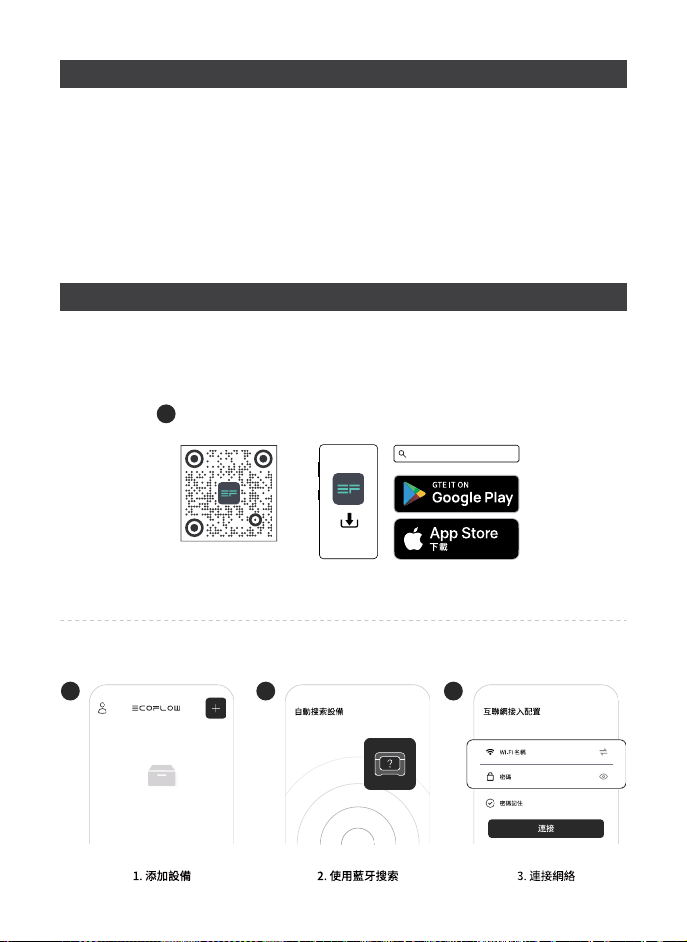
ECOFLOW APP
Control, monitor and customize your portable power station from afar with the
EcoFlow App. Download at: https://www.ecoflow.com/us/support/download/
index
1
EcoFlow App
EcoFlow App
2
1.Add device
4
3.Connect to the Internet
Internet setup
Remember password
Password
Wi-Fi name
Connect
3
2.Search with Bluetooth
Searching for units

GETTING STARTED
1. Product On
When switched o, press the main power switch briefly to turn on the power.
2. Product O
Press and hold the main power switch to turn o the product. When there is a
charging input source, the product will not be the turn o.
3. USB Output Port
The USB outlet (USB-A output/USB-C output) can be used after making sure
that the main power is on.
4. 12V Car Output Port
After ensuring that the main power is turned on, press the DC output switch
briefly to use the 12V DC output port. Press the DC output switch briefly again
to turn it o.
5. AC Output Sockets
After ensuring that the main power is turned on, press the AC output switch
briefly to use the AC output port. Press the AC output switch briefly again
to turn it o(Switching frequency: With AC power on, press and hold the AC
power button for 10 seconds to switch the frequency, or use the APP to switch
the frequency).
6. APP Control
When the main power is switched on, the Wi-Fi module and Bluetooth module
are turned on by default. The user can connect the product to the app through
Bluetooth. If you want to use the app from a long distance and you have a
router, you may choose Wi-Fi for network distribution.
Privacy Policy
By using EcoFlow Products, Applications and Services, you consent to the
EcoFlow Term of Use and Privacy Policy, which you can access via the “About”
section of the “User” page on the EcoFlow App or on the ocial EcoFlow
website at https://www.ecoflow.com/policy/terms-of-use and https://www.
ecoflow.com/policy/privacy-policy.
For more information, Please go to EcoFlow Ocial Website to get the
Complete Version of the User Manual.
www.ecoflow.com/pages/download
In compliance with laws and regulations, the company has the final right to
interpret this document and all related documents of this product. If there is
any update, revision or termination without notice, please visit EcoFlow ocial
website for the latest product information.

PRODUCT INTRODUCTIONS
1. Main power switch
2. USB-A output port
3. DC output switch
4. Power Indicator
5. Car charger outlet
6. LCD
7. AC output socket
8. AC output switch
9. USB-C input/output port
10. X-Stream AC Charging Input Port
11. Solar/Car Charging Input Port
Remaining Battery
Percentage
State of Charge
High Temperature
Warning
Input Power
Output Power
Low Temperature
Warning
Overload Warning
Remaining Charge/
Discharge Time
Bluetooth
connection status
Wi-Fi Status
AC Output
Fan Indicator
1
3
2
4
5
6
10
11
7
8
9

HOW TO CHARGE
USB-C Charging
Full Charge Time: in 5hrs
60W Max
AC Charging
Charge Time: 100% in 1hr
360W Max
Solar Charging
Car Charging
Full Charge Time: 3~6hrs
110W Max
Full Charge Time: in 3hrs
100W Max

Details of Error Icons Error Type Recovery Methods
Battery discharge low
temperature protection
Normal operation will resume auto-
matically when the battery warms up.
Battery discharge high
temperature protection
Normal operation will resume auto-
matically after the battery coolsdown.
Battery charging low
temperature protection
Normal operation will resume auto-
matically after the battery temperature
is restored to above 3°C (37.4°F).
Battery charging high
temperature protection
Normal operation will resume auto-
matically after the battery coolsdown.
AC output low-tem-
perature protection
Normal operation will resume auto-
matically after the ambient tempera-
ture is restored.
AC output over-tem-
perature protection
outlet of the product are unobstructed.
Normal operation will resume auto-
matically once the cause is eliminated
and the temperature decreases.
USB-C or car charging
overload protection
Normal operation will resume after
removing the over-powered device and
restarting the machine.
AC output overload
protection
Normal operation will resume after
removing the over-powered device and
restarting the machine. Electrical ap-
pliances must be used within the rated
power (for the power limit of electri-
cal appliances in the X-Boost mode,
please refer to the X-Boost function
introduction)
Charging overload
protection
Remove the charger and normal oper-
ation will resume automatically after
being restarted.
Fan blocking
Please check whether the fan is
blocked by foreign objects and remove
the cause of the error.
Failure of communi-
cation between main
control board and AC
Normal operation will resume auto-
matically after being restarted.
Troubleshooting
If any alert occurs during the use of this product and the alert icon does not
disappear after the product is restarted, please stop using the product immediately
(do not attempt to charge or discharge).
If the above information fails to resolve your problem, please contact customer service
for further support.
TROUBLESHOOTING

IMPORTANT SAFETY INSTRUCTIONS
1. Read all the instructions before using the product.
2. Do not use the product near a heat source, such as a fire source or a heating
furnace. Exposure to fire or temperature above 130°C (265°F) may cause
explosion.
3. Avoid contact with any liquid. Do not immerse the product in water or get it
wet. Do not use the product in rain or humid environments.
4. Do not use the product in an environment with strong static electricity/
magnetic fields.
5. Do not disassemble the product in any way for repair or modification, and do
not pierce the product with sharp objects. Take it to a qualified service person
when service or repair is required, Incorrect reassembly may result in a risk of
fire or electric shock.
6. Avoid using wires or other metal objects to inset any connector that may
result in a short circuit.
7. Do not use unocial components or accessories that may result in a risk
of fire, electric shock, or injury to persons. If you need to replace any
components or accessories, please visit ocial EcoFlow channels to check
relevant information.
8. When using the product, please strictly follow the operating environment
temperature specified in this user manual. If the temperature is too high,
it may result in a fire or explosion; if the temperature is too low, the product
performance may be severely reduced, or the product may cease to work.
9. Do not stack any heavy objects on the product.
10. Do not lock the fan forcibly during use, product shall work in a well ventilated
area and do not restrict ventilation in any way.
11. Please avoid impact, falls, or severe vibrations when using the product. In case
of a severe external impact, turn o the power supply immediately and stop
using the product. Ensure the product is well fastened during transportation
to avoid vibrations and impacts.
WARNING – When using this product, basic precautions should always be
followed, including the following:

12. If you accidentally drop the product into water during use, please place
it in a safe open area, and stay away from it until it is completely dry. The
dried product should not be used again, and should be properly disposed of
according to the disposal guide in the user manual. If the product catches
fire, we recommend that you use the fire extinguishers in the following order:
water or water mist, sand, fire blanket, dry powder, and finally a carbon
dioxide fire extinguisher.
13. Use a dry cloth to clean o dirt on the product ports.
14. Do Not put into the Microwave.
15. To reduce the risk of injury, close supervision is necessary when the product is
used near children.
16. Do not put fingers or hands into the product.
17. To reduce risk of damage to the electric plug and cord, pull the plug rather
than the cord when disconnecting the power pack.
18. Do not operate the power pack with a damaged cord or plug, or a damaged
output cable.
19. To reduce the risk of electric shock, unplug the power pack form the outlet
before attempting any instructed servicing.
20. Have servicing performed by a qualified repair person using only identical
replacement parts. This will ensure that the safety of the product is
maintained.
21. Do not use a battery pack or appliance that is damaged or modified.
Damaged or modified batteries may exhibit unpredictable behavior resulting
in fire, explosion or risk of injury.
22.Users not to place the product on the floor, or at a height less than 457 mm
(18 inches) above the floor, during use in a repair facility.
23. This product is not recommended for powering medical emergency
equipment related to personal safety, including but not limited to medical
grade ventilators (hospital version CPAP: Continuous Positive Airway
Pressure), artificial lungs (ECMO, Extracorporeal Membrane Please follow your
doctor’s instructions and consult with the manufacturer for restrictions on the
use of the equipment. If used for general medical equipment, please be sure
to monitor the power status to ensure that the power does not run out.
SAVE THESE INSTRUCTIONS

GROUNDING INSTRUCTIONS
FAQ
1. What battery does the product use?
It uses high-quality lithium-ion battery.
2. What devices can the product’s AC output port power?
With 300W rated power and 600W peak power, most consumer electronics.
Before you use it, we recommend that you confirm the power of the
appliances first and ensure the power sum of all loaded appliances is lower
than the rated power.
3. How long can the product charge my devices?
The charging time is shown on the product’s LCD Screen, which can be used
to estimate the charging time of most appliances with stable power usage.
4. How can I know if the product is charging?
When it’s charging, the remaining charging time will be shown on the LCD
Screen. Meanwhile, the charging indicator icon begins to rotate with the
remaining battery percentage and the input power shown on the right of the
circle.
5. Can I bring the product on a plane?
No.
1. This product must be grounded. When charging it should malfunction or break
down, grounding provides a path of least resistance for electric current to
reduce the risk of electric shock. This product is equipped with a power cord
that has an equipment grounding conductor and a grounding plug. The plug
must be plugged into an outlet that is properly installed and grounded in
accordance with all local codes ordinances.
2. Improper connection of the equipment grounding conductor is able to result
in a risk of electric shock. Check with a qualified electrician if you are in doubt
as to whether the product is properly grounded. Do not modify the plug
provided with the product – if it will not fit the outlet, have a proper outlet
installed by a qualified electrician.

SPECIFICATIONS
Capacity
256Wh (20Ah 12.8V )
Net Weight
Approximately 7.8lbs
Dimensions
9.6 x 8.5 x 5.7inches
Model EFR600
General Info
AC Input
100-120V 50Hz/60Hz, 8A Max
DC Input
11-30V 110W, 8A Max
USB-C Input/Output
5/9/12/15/20V 3A, 60W Max
USB-A Output
5V 2.4A 12W Max per port
DC Output
12.6V 8A, 100W Max
AC Output
Pure Sine Wave, 300W total (surge 600W),
120V 50Hz/60Hz
Output/Input Ports
Cell Chemistry
LFP
Cycle Life
80%+ capacity after 3000 cycles
Battery Info
Discharge Temperature
-10°C to 45°C (14°F to 113°F)
Charge Temperature
0°C to 45°C (32°F to 113°F)
Optimal Operating Temperature
20°C to 30°C (68°F to 86°F)
Storage Temperature
-10°C to 45°C (20°C to 30°C is
best)/14°F to 113°F (68°F to 86°F is best)
Environmental Operating Temperature

WHAT’S IN THE BOX
RIVER 2
AC Charging Cable Car Charging Cable
Quick Start Guide
STORAGE & MAINTENANCE
1. Please use or store the product in an environment temperature between 20°C
to 30°C, away from water, heat, and other metal objects.
2. For long-term storage, please recharge it to 60% every three months; If
the product is left idle for a long time with severely low battery, irreversible
damages may be caused to the battery cell and the product service life will be
shortened. The product will not be covered by the warranty if it is not charged
or discharged for more than 6 months.
3. For safety, please do not store the product in an environment temperature
higher than 45°C or lower than -10°C for a long time.
4. If the product has been idle for too long and the battery is severely low, it will
enter a deep sleep protection mode. In such case, please charge the product
before using it again.

FCC STATEMENT
This device complies with Part 15 of the FCC Rules. Operation is subject to the
following two conditions:
(1) This device may not cause harmful interference, and
(2) This device must accept any interference received, including interference that
may cause undesired operation.
Warning: Changes or modifications not expressly approved by the party
responsible for compliance could void the user’s authority to operate the
equipment.
NOTE: This equipment has been tested and found to comply with the limits for
a Class A digital device, pursuant to part 15 of the FCC Rules. These limits are
designed to provide reasonable protection against harmful interference when the
equipment is operated in a commercial environment. This equipment generates,
uses, and can radiate radio frequency energy and, if not installed and used in
accordance with the instruction manual, may cause harmful interference to radio
communications. Operation of this equipment in a residential area is likely to
cause harmful interference in which case the user will be required to correct the
interference at his own expense.
FCC Radiation Exposure Statement: This equipment complies with FCC radiation
exposure limits set forth for an uncontrolled environment. This equipment should
be installed and operated with minimum distance 20cm between the radiator &
your body.

DIY INSTRUCTIONS FOR NON-MC4 CONNECTOR SOLAR PANELS
Users who use their universal solar panels with non-MC4 connector to power
the equipment, please note: the solar panel should be in the voltage and current
range (please find more information about the requirement in the User Guide).
Connecting the wrong MC4 interface may damage the device. EcoFlow does
not guarantee equipment failure caused by improper personal operation(For
example, the open circuit voltage exceeds 60V).
We recommend that you use the EcoFlow solar panels.
Please confirm the positive and negative direction of your solar panel(as
shown in the figure below).
Please connect the positive pole of your solar panel to the MC4 Male
head and the negative pole to the MC4 Female head(as shown in the
figure below).
MC4 Port
2
1
3
Connect your solar panel to the MC4 to XT60 solar panel charging cable
Before connecting the solar panel, please make sure the positive pole of the
solar panel connects to the MC4 Male head and negative pole to the MC4
Female head (as demonstrate in the figure below).
Please connect the positive pole to the MC4 Male head and the negative
pole to the MC4 Female head.
MC4 Male connector
Solar Panel postive pole + Solar Panel negative pole -
solar panels
MC4 to XT60 solar panel
charging cable
MC4 Female connector
+
+
+
+

EcoFlow RIVER 2
Stations Électriques Portables
Guide de Prise en Main

AVERTISSEMENT
Lisez attentivement tous les conseils de sécurité, messages d’avertissement,
conditions d’utilisation et clauses de non-responsabilité. Veuillez vous référer
aux conditions et clauses de non-responsabilité sur https://ecoflow.com/pages/
terms-of-use et les étiquettes sur le produit avant l’utilisation. Les utilisateurs
assument l’entière responsabilité de l’utilisation et des opérations eectuées.
Veuillez prendre connaissance des règles en vigueur dans votre région. Vous
êtes seul responsable de connaître les règles en vigueur et d’utiliser les produits
EcoFlow d’une manière conforme à ces règles.
APPLICATION ECOFLOW
Contrôlez, surveillez et personnalisez votre centrale portable à distance avec
l’application EcoFlow.
Téléchargez-la à l’adresse suivante : https://www.ecoflow.com/us/support/down-
load/index
1
EcoFlow App
EcoFlow App
2
1.Ajouter un dispositif
4
3.Se connecter Ố l'Internet
MỒmoriser le mot de passe
Mot de passe
Nom du Wi-Fi
Se connecter
3
2.Recherche avec Bluetooth
Recherche d'unitỒs

GUIDE DÉMARRAGE
1. Produit sur
Lorsqu’il est éteint, appuyez brièvement sur l’interrupteur principal
d’alimentation pour mettre l’appareil sous tension.
2. Product O
Appuyez sur l’interrupteur principal d’alimentation et maintenez-le enfoncé
pour éteindre l’appareil. Lorsqu’il y a une source d’entrée de charge, le produit
ne s’éteint pas.
3. Port de sortie USB
La prise USB (sortie USB-A/USB-C) peut être utilisée après vérification que
l’appareil est sous tension.
4. Prise 12V allume-cigare
Après vérification que l’appareil est sous tension, appuyez brièvement sur
l’interrupteur de sortie CC pour utiliser le port de sortie CC 12V. Appuyez à
nouveau brièvement sur l’interrupteur de sortie CC pour l’éteindre.
5. Prises de sortie CA
Après vous être assuré que l’appareil est sous tension, appuyez
brièvement sur l’interrupteur de sortie CA pour utiliser le port de sortie
CA. Appuyez à nouveau brièvement sur l’interrupteur de sortie CA pour
l’éteindre(Changement de fréquence : Avec l’alimentation CA sous tension,
appuyez et maintenez le bouton d’alimentation CA pendant 10 secondes pour
changer de fréquence, ou utilisez l’APP pour changer de fréquence).
6. Contrôle depuis l’application
Lorsque l’alimentation principale est mise sous tension, le module Wi-Fi et
le module Bluetooth sont activés par défaut. L’utilisateur peut connecter le
produit à l’application via Bluetooth. Si vous souhaitez utiliser l’application à
grande distance et que vous disposez d’un routeur, vous pouvez choisir le Wi-
Fi pour la distribution du réseau.
Politique de confidentialité
En utilisant les produits, applications et services EcoFlow, vous acceptez les
conditions d’utilisation et la politique de confidentialité EcoFlow, auxquelles vous
pouvez accéder via la section « A propos » de la page « Utilisateur » sur l’applica-
tion EcoFlow ou sur le site Web ociel EcoFlow à l’adresse https ://www.ecoflow.
com/policy/terms-of-use et https//www.ecoflow.com/policy/privacy-policy.
Pour plus d’informations ou pour obtenir la version complète du manuel
d’utilisation, veuillez consulter le site d’EcoFlow.
www.ecoflow.com/pages/download
Conformément aux lois et règlements en vigueur, l’entreprise a le droit final
d’interpréter ce document et tous les documents associés à ce produit. En cas
de mise à jour, de révision ou de résiliation sans préavis, veuillez consulter le site
Web EcoFlow pour obtenir les dernières informations relatives aux produits.

PRÉSENTATION DU PRODUIT
1. Interrupteur principal d’alimentation
2. Port de sortie USB-A
3. Interrupteur de sortie CC
4. Voyant d’alimentation
5. Prise pour chargeur de voiture
6. LCD
7. Prise de sortie CA
8. Interrupteur de sortie CA
9. Port d’entrée/sortie USB-C
10. Port d’entrée de charge CA X-Stream
11. Port d’entrée de charge solaire/de voiture
Pourcentage de
batterie restante
État de charge
Avertissement de
température élevée
Puissance d’entrée
Puissance de sortie
Avertissement de basse température
Avertissement de surcharge
Temps de charge/
décharge restant
Statut de la
connexion Bluetooth
État de la connexion Wi-Fi
Sortie CA
Indicateur de ventilateur
1
3
2
4
5
6
10
11
7
8
9

COMMENT CHARGER
Chargement par USB-C
Temps de charge complète: 5h
60W Max
Charge AC
Temps de charge:
100% en 1h
360W Max
Charge solaire
Charge voiture
Temps de charge complète: 3~6h
110W Max
Temps de charge complète: 3h
100W Max

Icônes d'erreur Type d'erreur Méthodes de récupération
L'icône clignote
Protection contre les
températures de décharge
faibles de la batterie
Le fonctionnement normal reprend auto-
matiquement une fois que la batterie s’est
réchauffée.
L'icône clignote
Protection contre les
températures élevées de
décharge de la batterie
Le fonctionnement normal reprend automa-
tiquement une fois que la bat
.
L'icône clignote
Protection contre les
basses températures de
charge de la batterie
Le fonctionnement normal reprend automa-
tiquement une fois que la température de la
batterie est rétablie au-de
L'icône clignote
Protection contre les
températures élevées de
charge de la batterie
Le fonctionnement normal reprend automa-
tiquement une fois que la bat
.
L'icône clignote
Protection contre les tem-
CA
Le fonctionnement normal reprend automa-
tiquement une fois la température ambiante
rétablie.
L'icône clignote
Protection contre les tem-
pératures exc
A
produit sont dégagées. Le fonctionnement
normal reprend automatiquement une fois
que la cause a été éliminée et que la tempé-
rature baisse.
L'icône clignote
Protection contre la sur-
charge en USB-C ou en
voiture
Le fonctionnement normal reprend une fois
que l’appareil en surcharge a été retiré et
que la machine a été redémarrée.
L'icône clignote
Protection contre les sur-
charges de sort
A
Le fonctionnement normal reprend une
fois que l’appareil en surcharge a été retiré
et que la machine a été redémarrée. Les
appareils électriques doivent être utilisés
dans la plage de puissance nominale
(pour connaître la limite de puissance des
appareils électriques en mode X-Boost, re-
portez-vous à
a présentation de la fonction
X-Boost)
L'icône clignote
Protection contre les sur
-
charges de charge
Retirez le chargeur et le fonctionnement
normal reprendra automatiquement après
avoir été redémarré.
L'icône clignote Blocage du ventilateur
par des corps étrangers et supprimez la
cause de l’erreur.
L'icône clignote
Échec de communication
entre la carte de com
-
mande principale e le é-
s
A
Le fonctionnement normal reprend automa-
tiquement après le redémarrage.
Dépannage
Si une alerte se produit pendant l'utilisation de ce produit et que l'icône d'alerte ne
disparaît pas après le redémarrage du produit, cessez immédiatement d'utiliser le
produit (n'essayez pas de le charger ou de le décharger).
Si les informations ci-dessus ne permettent toujours pas de résoudre votre problème,
veuillez contacter notre service client pour obtenir de l’aide.
DÉPANNAGE

INSTRUCTIONS DE SÉCURITÉ
AVERTISSEMENT - Lors de l’utilisation de ce produit, les précautions de
base doivent toujours être respectées, notamment les suivantes :
1. Lisez toutes les instructions avant d’utiliser le produit.
2. N’utilisez pas le produit à proximité d’une source de chaleur, telle qu’une
source de fire ou un four de chauage. L’exposition au feu ou à une
température supérieure à 130°C (265°F) peut provoquer une explosion.
3. Évitez tout contact avec un liquide quelconque. Ne plongez pas le produit
dans l’eau et ne le mouillez pas. N’utilisez pas le produit sous la pluie ou
dans un environnement humide.
4. N’utilisez pas le produit dans un environnement présentant une forte
électricité statique/des fields magnétiques.
5. Ne démontez pas le produit de quelque façon que ce soit pour le réparer ou
le modifier, et ne percez pas le produit avec des objets pointus. Confiez-le
à un technicien qualifié lorsqu’un entretien ou une réparation est nécessaire,
Un remontage incorrect peut entraîner un risque d’incendie ou de choc
électrique.
6. Évitez d’utiliser des fils ou d’autres objets métalliques pour insérer un
connecteur, ce qui pourrait entraîner un court-circuit.
7. N’utilisez pas de composants ou d’accessoires non ociels qui pourraient
entraîner un risque d’incendie, de choc électrique ou de blessure. Si vous
devez remplacer des composants ou des accessoires, veuillez consulter les
canaux ociels d’EcoFlow pour vérifier les informations pertinentes.
8. Lorsque vous utilisez le produit, veuillez respecter strictement la
température de l’environnement de fonctionnement spécifiée dans
ce manuel d’utilisation. Si la température est trop élevée,elle peut
entraîner une fire ou une explosion ; si la température est trop basse, les
performances du produit peuvent être sévèrement réduites, ou le produit
peut cesser de fonctionner.
9. N’empilez pas d’objets lourds sur le produit.
10. Ne pas bloquer le ventilateur de force pendant l’utilisation, le produit doit
fonctionner dans une zone bien ventilée et ne pas restreindre la ventilation
de quelque manière que ce soit.
11. Veuillez éviter les chocs, les chutes ou les vibrations importantes
lorsque vous utilisez le produit. En cas de choc externe violent, coupez
immédiatement l’alimentation électrique et cessez d’utiliser le produit.
Assurez-vous que le produit est bien fixé pendant le transport afin d’éviter
les vibrations et les impacts.

12. Si vous faites tomber accidentellement le produit dans l’eau pendant son
utilisation, placez-le dans un endroit sûr et ouvert, et ne vous en approchez
pas jusqu’à ce qu’il soit complètement sec. Le produit séché ne doit pas être
réutilisé et doit être éliminé de manière appropriée conformément au guide
d’élimination figurant dans le manuel d’utilisation. Si le produit prend fire, nous
vous recommandons d’utiliser les extincteurs de fire dans l’ordre suivant : eau
ou brouillard d’eau, sable, couverture de fire, poudre sèche, et finalement un
extincteur de fire au dioxyde de carbone.
13. Utilisez un chion sec pour nettoyer la saleté sur les ports du produit.
14. Ne pas mettre dans le micro-ondes.
15. Pour réduire le risque de blessure, une surveillance étroite est nécessaire
lorsque le produit est utilisé à proximité d’enfants.
16. Ne pas mettre les doigts ou les mains dans le produit.
17. Pour réduire le risque d’endommager la fiche et le cordon électriques,
tirez sur la fiche plutôt que sur le cordon lorsque vous débranchez le bloc
d’alimentation.
18. Ne faites pas fonctionner le bloc d’alimentation avec un cordon ou une fiche
endommagés, ou un câble de sortie endommagé.
19. Pour réduire le risque d’électrocution, débranchez le bloc d’alimentation de la
prise de courant avant d’entreprendre toute opération d’entretien.
20. Faites eectuer l’entretien par un réparateur qualifié en utilisant uniquement
des pièces de rechange identiques. Cela permettra de garantir le maintien de
la sécurité du produit.
21. N’utilisez pas un bloc-piles ou un appareil endommagé ou modifié. Les
batteries endommagées ou modifiées peuvent avoir un comportement
imprévisible et provoquer un incendie, une explosion ou un risque de blessure.
22. Les utilisateurs ne doivent pas placer le produit sur le sol, ou à une hauteur
inférieure à 457 mm (18 pouces) au-dessus du sol, pendant son utilisation dans
un atelier de réparation.
23. Il n’est pas recommandé d’utiliser ce produit pour alimenter les équipements
médicaux d’urgence liés à la sécurité des personnes, y compris, mais sans
s’y limiter, la version hospitalière de la CPAP (pression positive continue des
voies respiratoires), l’ECMO (oxygénation par membrane extracorporelle), etc.
Veuillez suivre les instructions de votre médecin et consulter le fabricant pour
connaître les restrictions d’utilisation de l’équipement.
CONSERVEZ CES INSTRUCTIONS

FAQ
1. Quel type de produit utilise cet appareil ?
Ce produit utilise une batterie au lithium de phosphate de fer.
2. Quels appareils le port de sortie CA est-il capable d’alimenter ?
Avec une puissance nominale de 300 W et une puissance de crête de 600 W, le
port de sortie CA du produit peut alimenter la plupart des appareils ménagers.
Avant de l’utiliser, nous vous recommandons de vérifier la puissance des appareils
en premier lieu et de vous assurer que la puissance totale requise pour tous les
appareils est inférieure à la puissance nominale.
3. Pendant combien de temps le produit peut-il charger mes appareils?
Le temps de charge est indiqué sur l’écran LCD du produit, qui put être
utilisé pour estimer le temps de charge de la plupart des appareils avec une
utilisation électrique stable.
4. Comment puis-je savoir si l’appareil est en train de charger ?
Quand il est en charge, le temps de charge restant s’ache sur l’écran LCD.
Pendant ce temps, l’icône de l’indicateur de charge commence à tourner en
achant le pourcentage de batterie restant et la puissance d’entrée sera
indiquée à droite du cercle.
5. Puis-je prendre ce produit avec moi dans l’avion?
Non.
1. Ce produit doit être mis à la terre. Lorsque le produit est en cours de
chargement, en cas de dysfonctionnement ou de panne, la mise à la terre
fournit un chemin de moindre résistance pour le courant électrique afin
INSTRUCTIONS DE MISE À LA TERRE
de réduire le risque de choc électrique. Ce produit est équipé d’un cordon
comportant un conducteur de mise à la terre de l’équipement et une fiche
de mise à la terre. La fiche doit être branchée dans une prise de courant
correctement installée et mise à la terre, conformément à tous les codes et
ordonnances locaux.
2. Une mauvaise connexion du conducteur de mise à la terre de l’équipement
peut entraîner un risque de choc électrique. Vérifiez auprès d’un électricien
qualifié si vous avez un doute sur la mise à la terre correcte du produit. Ne
modifiez pas la fiche fournie avec le produit - si elle ne convient pas à la prise,
faites installer une prise appropriée par un électricien qualifié.

SPÉCIFICATIONS
Capacité
256Wh (20Ah 12.8V )
Poids net
Environ 3,5 kg
Dimensions
24,5 x 21,5 x 14,5 cm
Modèle
EFR600
Chimie cellulaire
LFP
Cycle de vie
3000cycles à 80% ou plus de capacité
Température de décharge
-10°C à 45°C (14°F à 113°F)
Température de charge
0°C à 45°C (32°F à 113°F)
Température optimale
de fonctionnement
20°C à 30°C (68°F à 86°F)
Température de stockage
-10°C à 45°C (20°C à 30°C est le mieux)/
14°F à 113°F (68°F à 86°F est le mieux)
Tension d’entrée CA
100-120V 50Hz/60Hz, 8A Max
Chargeur solaire
11-30V 110W, 8A Max
Sortie USB-C
5/9/12/15/20V 3A, 60W Max
Sortie USB-A
5V 2.4A 12W Max par port
Sortie DC
12.6V 8A, 100W Max
CA
Onde sinusoïdale pure , 300W le total
(monter 600W), 120V 50Hz/60Hz
Informations générales
Informations relatives à la batterie
Température ambiante de fonctionnement
Ports de sortie/Ports d’entrée

STOCKAGE ET ENTRETIEN
CONTENU DE LA BOÎTE
RIVER 2 Câble de charge CA Câble de charge
de voiture
Guide de Prise en Main
1. Utilisez ou stockez le produit à une température comprise entre 68 °F et 86 °F
(20 °C à 30 °C), à l’écart de toute source d’eau, de toute source de chaleur et
de tout objet métallique.
2. Pour un stockage à long terme, veuillez la recharger à 60 % tous les trois mois.
Si le produit reste inutilisé pendant une longue période avec une batterie
très faible, des dommages irréversibles peuvent être causés à la cellule de
la batterie et la durée de vie du produit sera réduite. Le produit ne sera pas
couvert par la garantie s’il n’est pas chargé ou déchargé pendant plus de 6
mois.
3. Pour des raisons de sécurité, ne stockez pas le produit à une température
supérieure à 113 °F (45 °C) ou inférieure à 14 °F (-10 °C) pendant une longue
période.
4. Si le produit n’a pas été utilisé pendant trop longtemps et si le niveau de
batterie est très faible, il passe en mode veille profonde. Dans ce cas, chargez
le produit avant de l’utiliser à nouveau.

EcoFlow RIVER 2
移動儲能站
快速入門指南
免責聲明
在使用前, 請閱讀本產品的使用用戶手冊, 以保證在完全理解後正確使用。 閱讀後, 請將用戶
手冊妥善保管以備日後参考。 如果沒有正確操作本產品, 您可能會對自身或他人造成嚴重傷
害, 或者導致產品損壞和財產損失。 一旦使用本產品, 即視為您已理解、認可和接受本手冊全
部條款和内容。 使用者承諾對自己的行為及因此而產生的所有後果負責。 本公司不承擔因用戶
未按快速使用指南、或《用戶手冊》使用產品所引發的一切損失。
ECOFLOW APP
你可以通過正浩EcoFlow中文版App連接本產品, 查看信息, 控制設備, 並進行個性化設置:
https://www.ecoflow.com/us/support/download/index
1
EcoFlow App
EcoFlow App
2
4
3

隱私政策
使用 EcoFlow 產品、應用程序和服務, 即表示您同意 EcoFlow 使用條款和隱私政策, 您可以
通過 EcoFlow 應用程序“用戶”頁面的“關於”部分或 EcoFlow 官方網站https://www.ecoow.
com/policy/terms-of-use 和 https://www.ecoow.com/policy/privacy-policy 。
獲取更多訊息, 請前往官網或微信公眾號獲取完整用戶手冊:
https://cn.ecoflow.com/downloads
在遵守法律法規的前提下, 本公司享有對本文檔及本產品所有相關文檔的最終解釋權。 如
有更新、改版或終止, 恕不另行通知, 請至EcoFlow官方網站以獲取最新的產品訊息。
如何使用
1. 開機
當產品被關掉, 按一按主電源開關以開啟電源。
2. 關機
長按主電源開關以關掉產品。 當產品已連接充電電源, 便將不會被關掉。
3. 使用USB及無線充輸出
在肯定已經開啟主電源後, 便可以使用 USB 插座(USB-A 插座/USB-C 插座)。
4. 使用12V直流輸出
在確保已經開啟主電源開關後, 按一按 DC 輸出開關以使用 12V DC 輸出埠。 再按一下 DC
輸出開關以關掉它。
5. 使用交流輸出
在確保已經開啟主電源開關後, 按一按 AC 輸出開關以使用 AC 輸出埠, 再按一下 AC 輸出
開關以關掉它(切換頻率切換設備通電後:應用程序開關頻率切換頻率,或者使用APP可以
切換頻率)。
6. APP控制
當開啟了開啟主電源開關, 產品會自動開啟 Wi-Fi 和藍牙模組。 使用者可以用藍牙連接該
產品和應用程式。 假如您想遠距離使用該應用程式, 又有一個路由器的話, 您可以選擇透
過 Wi-Fi 分配網絡。

產品介绍
1. 主電源開關
2. USB-A 輸出端口
3. DC 輸出開關
4. 功率指示器
電池電量百分比
充電電量設定
高溫警報
當前輸入功率
當前輸出功率
低溫警報
超載警報
剩餘充電/
放電時間
藍牙連接狀態
Wi-Fi連接狀態
交流輸出狀態
風扇運行狀態
1
3
2
4
5
6
10
11
7
8
9
5. 汽車充電插座
6. LCD
7. AC 輸出插座
8. AC 輸出開關
9. USB-C輸入/輸出端口
10. 交流充電輸入孔
11. 太陽能/車充輸入孔

如何充電
USB-C充電
充满时间:5小时内
60W最大
交流充電
充滿時間:1小時100%
360W 最大
太陽能充電
車充充電
充滿時間:3~6小時
110W 最大
充滿時間:3.5小時内
100W最大

故障顯示及處理

1. 使用產品前請閱讀所有說明。
2. 請勿在火源或加熱爐等熱源附近使用本產品。暴露於火中或溫度高於 130°C (265°F) 可能會
導致爆炸。
3. 避免接觸任何液體。請勿將產品浸入水中或弄濕。請勿在雨中或潮濕的環境中使用本產品。
4. 請勿在有強靜電/磁場的環境中使用本產品。
5. 請勿以任何方式拆卸產品進行維修或改裝,請勿用利器刺穿產品。需要維修或維修時,請將
其交給合格的維修人員,不正確的重新組裝可能會導致火災或觸電危險。
6. 避免使用電線或其他金屬物體插入任何可能導致短路的連接器。
7. 請勿使用可能導致火災、觸電或人身傷害風險的非官方組件或附件。如需更換任何組件或配
件,請訪問 EcoFlow 官方渠道查看相關信息。
8. 使用產品時,請嚴格遵守本用戶手冊規定的使用環境溫度。如果溫度太高,可能導致火災或
爆炸;如果溫度過低,產品性能可能會嚴重降低,或者產品可能會停止工作。
9. 請勿在產品上堆放任何重物。
10.使用過程中不要強行鎖緊風扇,產品應在通風良好的地方工作,不要以任何方式限制通風。
11. 使用產品時請避免撞擊、跌落或劇烈震動。如果受到嚴重的外部衝擊,請立即關閉電源並停
止使用產品。確保產品在運輸過程中牢固固定,以避免振動和衝擊。
12.如果在使用過程中不慎將產品掉入水中,請將其放置在安全的空曠處,並遠離其直至完全乾
燥。乾燥後的產品不得再次使用,應按照用戶手冊中的處置指南妥善處置。如果產品著火,我
們建議您按以下順序使用滅火器:水或細水霧、沙子、滅火毯、乾粉,最後是二氧化碳滅火器。
13. 使用乾布清潔產品端口上的污垢。
14. 不要放入微波爐。
15. 為減少受傷風險,當產品在兒童附近使用時,必須密切監督。
16. 請勿將手指或手伸入產品中。
17. 為降低損壞電源插頭和電源線的風險,在斷開電源組時應拉動插頭而不是電源線。
18. 請勿使用損壞的電源線或插頭或損壞的輸出電纜操作電源組。
19. 為降低觸電風險,在嘗試任何指示維修之前,請從插座上拔下電源組。
20. 由合格的維修人員僅使用相同的更換零件進行維修。這將確保維護產品的安全性。
21. 請勿使用損壞或改裝的電池組或電器。損壞或改裝的電池可能會出現不可預測的行為,從
而導致火災、爆炸或受傷風險。
22.在維修設施中使用時,用戶不得將產品放在地板上,或高於地板的高度小於 457 毫米(18 英
寸 )。
警告和注意事項
警告 – 使用本產品時,應始終遵循基本預防措施,包括:

常見問題
1. 產品使用什麼類型的電池?
本產品採用磷酸鐵鋰電池。
2. 產品交流輸出孔能適用於什麼設備?
本產品的交流輸出孔額定功率為300W, 峰值功率600W, 本產品具有X-Boost功能, 可以給
一些不超過600W的設備供電, 在使用前建議您確認電器的功率大小, 並確保所有負載設備
功率之和小於額定功率。
3. 怎樣知道產品可以供電多久?
本產品的液晶顯示螢幕會顯示續航時間, 對一般用電穩定的設備可按該時間估計。
4. 怎樣判斷產品在充電?
充電時, 液晶顯示螢幕會顯示剩餘充電時間, 電池電量百分比外的電量指示圈開始循環轉
動, 並顯示輸入功率。
5. 本產品可以帶上飛機嗎?
不可以。
接地指南
1. 本產品必須接地。在充電過程中,產品有可能發生故障,地線可以大幅降低觸電風險。本產
品配有一根電源線,電源線有接地導體以及接地插頭。在遵從當地法律的請況下,接地插頭
必須接入已裝有地線的插座。
2. 連接不恰當可能會導致觸電風險。如果您不確定產品是否正確接地,請向有資質的電工尋
求幫助。請勿擅自改裝產品隨附插頭,如果插頭無法正常使用,請咨詢有資質的電工。
23.本产品不建议用于人身安全相关的医疗急救设备供电,包括但不限于医用级呼
吸机(hospital version CPAP: Continuous Positive Airway Pressure),人工肺
(ECMO,Extracorporeal Membrane Oxygenation)等,另外家用呼吸机(home version
CPAP)用于家庭环境,可正常使用,一般无需持续的专业监控,请遵循医嘱,并向其制造商
咨询使用相关设备的限制条件,若用于一般医疗设备,请务必留意电量状况确保电量不要
耗尽。
24.該設備屬於C2類UPS。它旨在不受任何限製地用於商業、輕工業和工業環境。
警告:這是C2類UPS産品。在住宅環境中,該設備可能會造成無線電幹擾,在這種情況下,用
戶可能需要採取其他措施。
請保存這些說明

技術參數
容量
256Wh (20Ah 12.8V )
重量
約3.5kg
尺寸
245*215*145mm
型號
EFR600
電芯材料
磷酸鐵鋰電池
循環壽命
3000次循環後剩餘容量仍有80%以上
放電環境溫度
-10℃至45℃
充電環境溫度
0℃至45℃
最佳使用環境溫度
20℃至30℃
收納溫度
-10℃至45℃(20℃至30℃最佳)
AC 輸入
100-120V~ 50Hz/60Hz, 最大輸入電流8A
DC 輸入
11-30V 110W, 最大8W
USB-C 輸入/輸出
5/9/12/15/20V 3A, 最大60W
USB-A 輸出
5V 2.4A 每個端口最大12W
DC 輸出
12.6V 8A, 最大100W
AC 輸出
純正弦波, 總共300W (峰值600W), 110V ~ 60Hz(臺灣)
基本參數
电池规格
运行温度
输入输出规格

如何保養
1. 推薦在20℃至30℃的環境下使用或收納本產品, 遠離水源、熱源, 或金屬物件。
2. 如需長期存放,請每三個月充電至60%;如果產品在電池電量嚴重不足的情況下長時間閒
置,可能會對電芯造成不可逆轉的損壞,並縮短產品的使用壽命。超過 6 個月不充電或放電
的產品將不在保修範圍內。
3. 安全起見, 請勿將本產品長期收納在高於45℃或者低於-10℃的環境中。
4. 若本產品電量嚴重不足且閒置時間過長, 產品將進入深度睡眠模式, 再次使用之前需對本
產品先充電才能恢復使用。
包裝内容
RIVER 2 交流充電線 車充充電線
快速入門指南

WARRANTY INFORMATION
Register Now to Get
5-YEAR WARRANTY!
https://warranty.ecoflow.com/
Social media:
Why register?
Contact us
- Serve as proof for an insurance loss claim
- Get instant EcoFlow product support
- Get instant access to product release news
+1 (800)-368-8604 Mon-Fri 9 am-9 pm (EST)
https://ecoflow.com/pages/contact-us
NA/LA/APAC/MEA: support@ecoflow.com,
EU: support.eu@ecoflow.com, AU: support.au@ecoflow.com
@ecoflowtech