
1
-IC
CONDENSER
MICROPHONE
HANDHELD
FOR IOS
®
/ANDROID DEVICES
PRODUCT
MANUAL

2
HANDHELD CONDENSER
MICROPHONE FOR IOS
®
/
ANDROID DEVICES
HH-IC
THANK YOU FOR CHOOSING POLSEN.
The Polsen HH-IC microphone is a handheld, condenser
microphone designed for recording high-quality audio on a
mobile device. It is an ideal tool for the singer, instrumentalist,
or songwriter on the go, but it is also perfect for journalists and
podcasters conducting interviews or gathering audio in the eld.
The HH-IC plugs directly into a 3.5 mm input jack of iOS
®
devices, most Mac
®
computers, and many Android devices
(see compatibility requirements) to create professional-quality
recordings anywhere. It works seamlessly with GarageBand
®
and
many other recording apps. The 3.5 mm output allows for direct,
real-time monitoring when used with software like GarageBand
®
that offer monitoring capability. With the appropriate cable, the
headphone output of the HH-IC can also connect to a PA system,
mixing console, or speakers.
At the heart of the HH-IC is the 16 mm back electret capsule that
provides distinctly clear and accurate sound that is far superior to
the built-in microphones of mobile devices like smartphones and
tablets. Its cardioid polar pattern is ideal for recording vocals and
acoustic instruments. The two-level switch with high-gain and
low-gain settings makes the HH-IC capable of recording in a wide
range of sound pressure conditions.

3
The HH-IC’s plug-and-play capability means that setup is as simple as connecting the
microphone to a device and plugging headphones into the output jack. Singers will love the
weight and shape of this premium handheld microphone. For hands-free operation, a desktop
mic stand and a mic clip are included leaving the operator free to control the recording
software. Its durable metal body will withstand the rigors of use on the road, making it an
ideal tool for the mobile musician.
Among the benets you’ll enjoy:
• Condenser microphone that provides high-quality recording.
• Plugs directly into a 3.5 mm input jack of iOS
®
devices, Mac
®
computers, and many Android
devices (see compatibility requirements).
• 3.5mm output jack for real-time monitoring through select apps with monitoring capability
• High-gain and low-gain settings for varying sound pressure conditions.
• Cardioid polar pattern ideal for recording vocals and acoustic instruments.
• Works with GarageBand
®
and can be used with a wide variety of apps.
• Integrated Windscreen
4
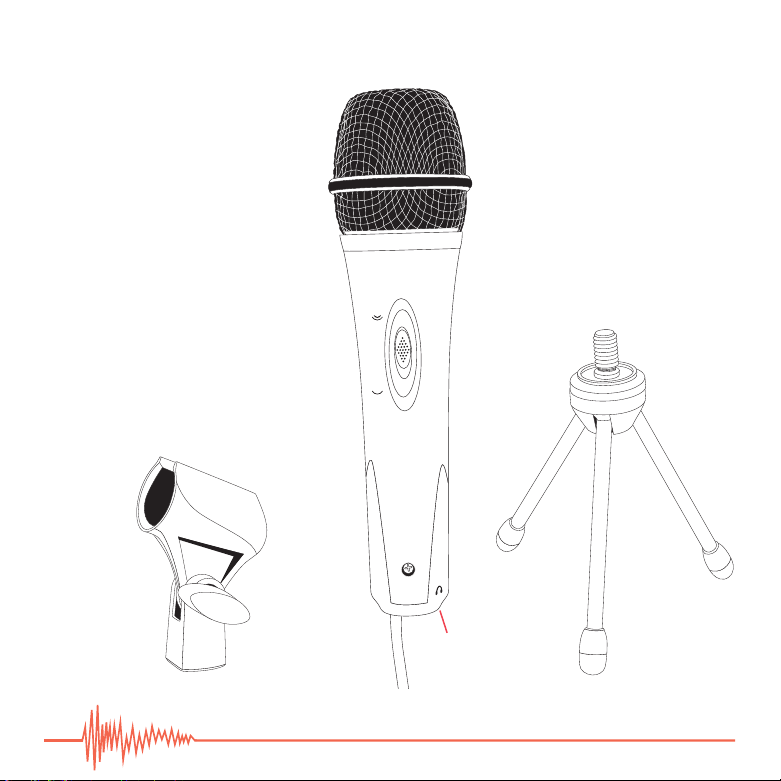
OVERVIEW
1. Microphone grille and
integrated windscreen
2. Gain-control switch
3. High gain
4. Low gain
5. Mic cable
6. Headphone output jack
7. Adjustable mic clip
8. Desktop mic stand
2.
1.
8.
5.
7.
6.
3.
4.

5
PRECAUTIONS
• Please read and follow these instructions, and keep this manual in a safe place.
• Keep this product away from water and all ammable gasses or liquids.
• Do not attempt to disassemble or repair this product.
• Make sure that this product is intact and that there are no missing parts.
• All photos are for illustrative purposes only.
.

6
COMPATIBILITY REQUIREMENTS
iOS
®
Devices
All of the following devices must run OS 4.3 or later
• iPhone
®
: 3Gs, 4, 4S, 5, 5C, 5S
• iPod touch
®
3rd generation, 4
th
generation, 5
th
generation
• iPad
®
: 2, 3
rd
generation, 4
th
generation, Air, Mini , Mini 2
nd
generation
Android Devices
The HH-IC microphone is only compatible with CTIA/AHJ compliant Android devices and with apps
that accept audio from the external mic input.
Partial list of compatible Android devices:
• Google
®
: Nexus S, Nexus7
• HTC Desire
®
HD, HTC One
®
X
• Samsung Galaxy S
®
: II, III, 4
• Samsung Galaxy W
®
• Samsung Galaxy Note
®
: Note, Note 2, Note 3
• Samsung Galaxy Tab
®
: Tab, Tab 2, Tab 3, Tab 7 plus, Tab 10.1
• Samsung Galaxy Nexus
®
Macintosh
™
Computers
• Mac
®
computers 2008 and later (excluding Mac Pro)
7
RECORDING WITH THE HH-IC
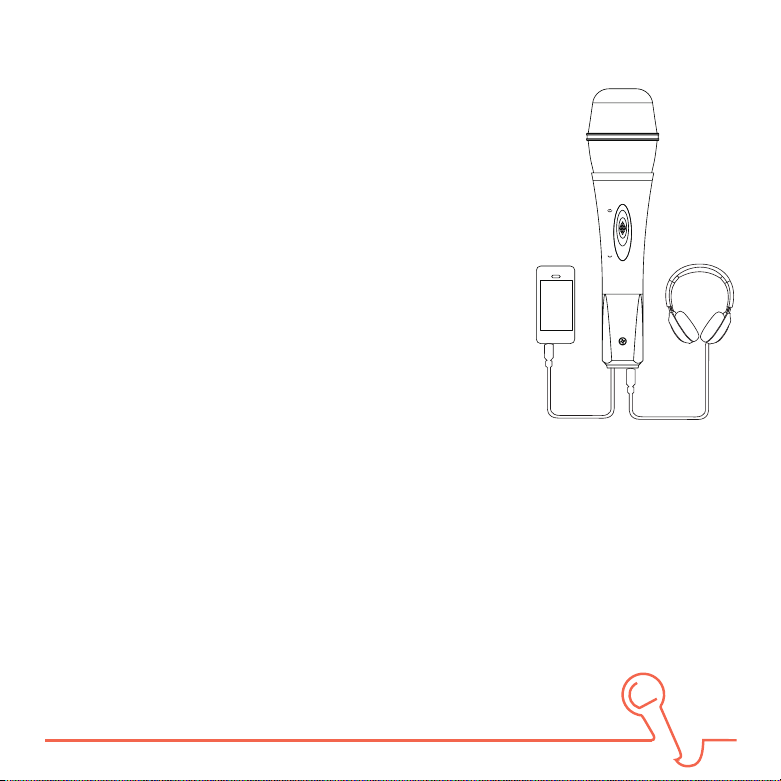
1. Connect the mic cable to the 3.5 mm headphone jack of an
iOS
®
or Android device, or Mac
®
computer. (See compatibility
requirements.)
2. Connect headphones to the 3.5 mm headphone output jack at
the base of the microphone.
3. The headphone jack of the HH-IC can also be connected to a
PA system, speakers or a mixing console with the proper cable.
4. Launch the recording app on your device.
5. Make sure the target track is in record mode and that the
monitoring feature is enabled.
Note: If the software does not offer real time monitoring, you will
only be able to hear audio on playback.
6. Select the high- or low-gain setting on the gain control switch.
If the recording app includes a level meter, select the gain setting that doesn’t overload the
meter.
If the app doesn’t have a level meter, you should make a test recording to determine the best
recording level and position for the microphone.
Note: For the best results, it’s recommended to always do a test recording.
PLAYBACK
1. Playback can be monitored through the headphone output jack.
8
Problem Solution
No sound is being
recorded
Make sure the mic cable from the HH-IC is completely inserted into the
headphone jack of the recording device.
Make sure the recording app or software is properly congured to
receive input.
Recorded sound is
too soft
Select the high-gain setting on the gain control switch.
Move the microphone closer to the sound source.
Raise the input level on the audio recording app.
Recorded sound is
too loud and distorts.
Select the low-gain setting on the gain control switch.
Move the microphone further away from the sound source.
Lower the input level on the audio recording app.
No sound in the
headphones.
Make sure the 3.5 mm headphone plug is completely inserted into the
headphone output jack at the base of the HH-IC.
Make sure your audio recording app or software provides real-time
monitoring, and that it is enabled.
If using an Android device, make sure it is CTIA/AHJ compliant.
TROUBLESHOOTING

9
Problem Solution
No sound when
monitoring a
recording.
Make sure the monitoring feature of the recording app or software is
enabled.
If Android device is CTIA/AHJ compatible, try using a different
application to record.
No sound during
playback.
Make sure the headphones are completely connected to the
headphone output jack of the HH-IC.
Make sure the settings in the audio recording app are correct.
If using an Android device, make sure it is CTIA/AHJ compliant.

10
SPECIFICATIONS
ELEMENT 16 mm back electret diaphragm capsule condenser mic
POLAR PATTERN Cardioid
FREQUENCY RESPONSE 20 Hz - 20 KHz
SENSITIVITY -40db+/-2db, 0db=1v/Pa (1 KHz @ 1Pa)
MAXIMUM SOUND PRESSURE 120 dB
WINDSCREEN Built-in
CABLE CONNECTOR 1/8” (3.5 mm) plug
CABLE LENGTH 6’ (1.8 m)
SYSTEM REQUIREMENTS
iOS
®
4.3 or later
ANDROID Must be compliant with CTIA/AHJ wiring standard
MAC
®
COMPUTERS 2008 or later (excluding Mac Pro)
LENGTH (EXCLUDING CABLE) 7” (17.8 cm)
WEIGHT 0.8 lb. (0.36 kg)

11
iOS
®
is a registered trademark of Cisco. Mac
®
is a registered trademark of Apple. GarageBand
®
is a registered trademark of Apple.
iPhone
®
is a registered trademark of Apple. iPod touch
®
is a registered trademark of Apple. iPad
®
is a registered trademark of
Apple. Mac Pro is used by Apple. iPhone 3Gs, iPhone 4, iPhone 4S, iPhone 5, iPhone 5C, iPhone 5S are used by Apple. iPod touch 3
rd
generation, iPod touch 4
th
generation, iPod touch 5
th
generation are used by Apple. iPad 2, iPad 3
rd
generation, iPad 4
th
generation,
iPad Air, iPad Mini , iPad Mini 2
nd
generation are used by Apple.
Google
®
is a registered trademark of Google. Google Nexus S, Google Nexus 7 are used by Google.
HTC Desire
®
is a registered trademark of HTC. HTC One
®
is a registered trademark of HTC. HTC Desire HD, HTC One X are used by HTC.
Samsung Galaxy S
®
is a registered trademark of Samsung. Samsung Galaxy Note
®
is a registered trademark of Samsung. Samsung
Galaxy W
®
is a registered trademark of Samsung. Samsung Galaxy Tab
®
is a registered trademark of Samsung. Samsung Galaxy
Nexus
®
is a registered trademark of Samsung. Samsung Galaxy S II, Samsung Galaxy S III, Samsung Galaxy S 4 are used by Samsung.
Samsung Galaxy Note 2, Samsung Galaxy Note 3 are used by Samsung. Samsung Galaxy Tab 2, Samsung Galaxy Tab 3, Samsung
Galaxy Tab 7 plus, Samsung Galaxy Tab 10.1 are used by Samsung.

12
ONE-YEAR LIMITED WARRANTY
This POLSEN product is warranted to the original purchaser to be free from defects in materials
and workmanship under normal consumer use for a period of one (1) year from the original
purchase date or thirty (30) days after replacement, whichever occurs later. The warranty provider’s
responsibility with respect to this limited warranty shall be limited solely to repair or replacement, at
the provider’s discretion, of any product that fails during normal use of this product in its intended
manner and in its intended environment. Inoperability of the product or part(s) shall be determined
by the warranty provider. If the product has been discontinued, the warranty provider reserves the
right to replace it with a model of equivalent quality and function..
This warranty does not cover damage or defect caused by misuse, neglect, accident, alteration,
abuse, improper installation or maintenance. EXCEPT AS PROVIDED HEREIN, THE WARRANTY
PROVIDER MAKES NEITHER ANY EXPRESS WARRANTIES NOR ANY IMPLIED WARRANTIES,
INCLUDING BUT NOT LIMITED TO ANY IMPLIED WARRANTY OF MERCHANTABILITY OR FITNESS
FOR A PARTICULAR PURPOSE. This warranty provides you with specic legal rights, and you may
also have additional rights that vary from state to state.
To obtain warranty coverage, contact the Polsen Customer Service Department to obtain
a return merchandise authorization (“RMA”) number, and return the defective product
to Polsen, along with the RMA number and proof of purchase. Shipment of the
defective product is at the purchaser’s own risk and expense.
For more information or to arrange service, visit
www.polsenaudio.com or call Customer Service at 212-594-2353.
Product warranty provided by the Gradus Group.
www.gradusgroup.com
Polsen is a registered trademark of the Gradus Group
© 2014 Gradus Group LLC. All Rights Reserved.