- 1 -
MISCELLANEOUS
Water Resistance
See caseback for water resistance rating for traditional watches and Hybrid Smartwatches. For Display Smartwatches visit
fossilgroup.com/water for water resistance information.
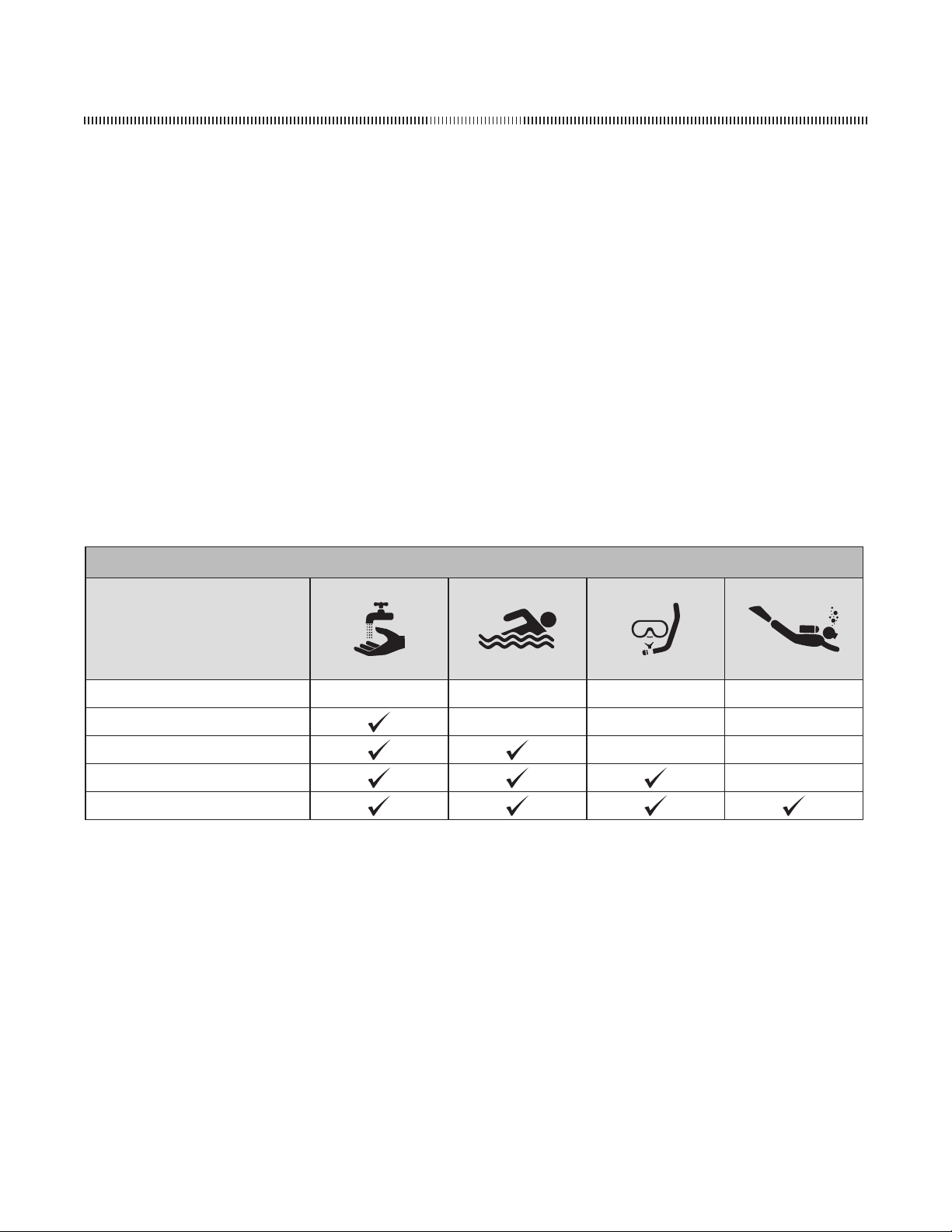
The water resistance rating provides guidelines for appropriate water-related exposure to avoid damage to internal watch
components. Please see chart for recommended usage guidelines.
In order to ensure water does not enter the watch and cause damage to it, please follow the instructions listed below:
• Do not adjust the crown while the timepiece is in contact with water.
• Ensure the crown is in the closed position before contact with water. For timepieces with screw-down crowns, ensure the
crown is completely tightened before contact with water.
• For timepieces with pusher-enabled functionality, do not engage the function underwater.
• Exposure to extreme atmopheres is not recommended (i.e. hot water, saunas or steam rooms).
• Avoid exposure to water moving with force (i.e. water running from a faucet, ocean waves or waterfalls).
• Avoid long exposure to salt water. After contact with salt water, rinse watch under tap water if rated 5ATM or higher and wipe
dry with a soft cloth.
RECOMMENDATIONS FOR WATER-RELATED USE
INDICATION
SPLASH RESISTANT SUBMERSIBLE SHALLOW DIVING SCUBA DIVING
(Hand Washing) (Swimming) (Snorkeling) (Not Deep Sea)
(NONE)
3 ATM • 3 BAR • 30 Meters
5 ATM • 5 BAR • 50 Meters
10 ATM • 10 BAR • 100 Meters
20 ATM • 20 BAR • 200 Meters
- 2 -
1 2
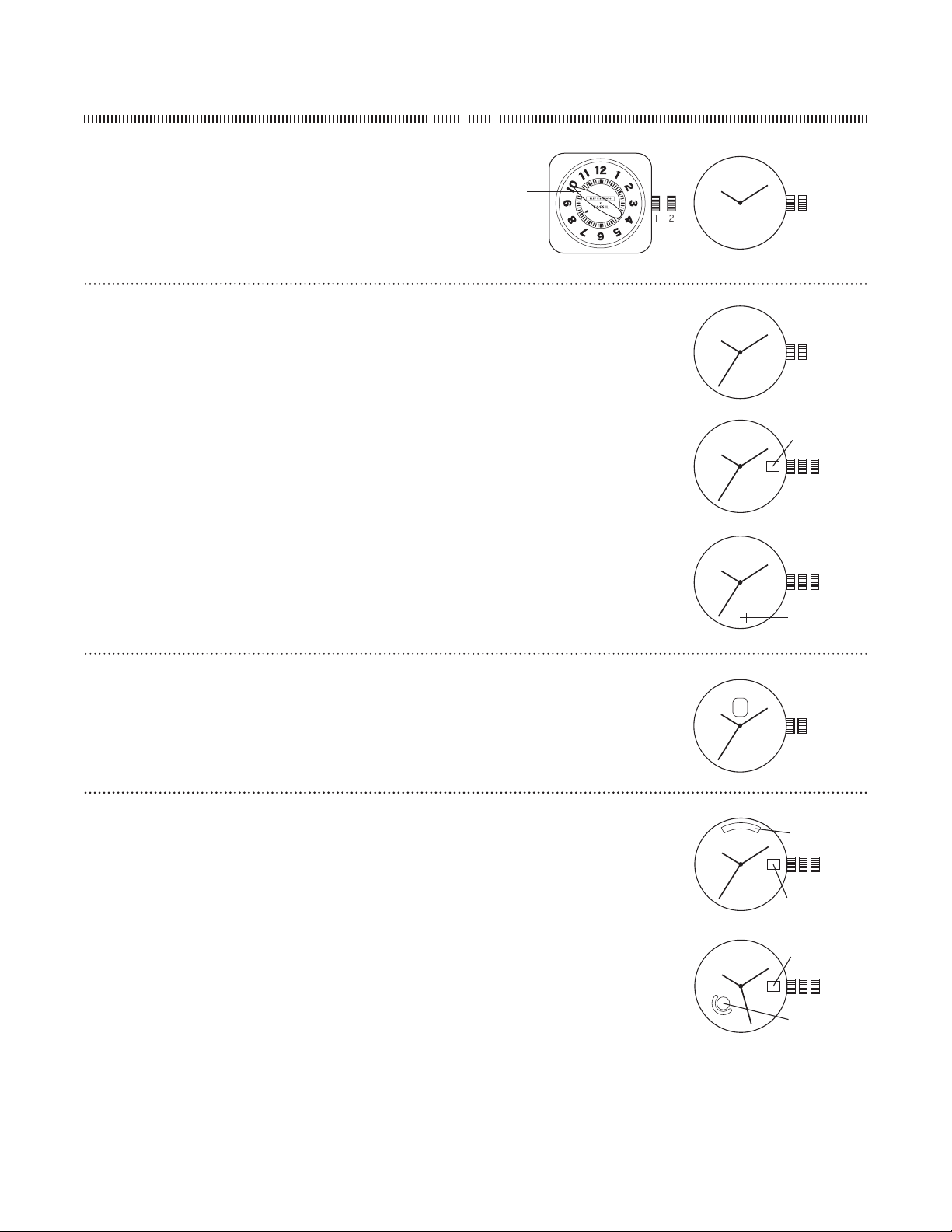
ANALOG ENGLISH
Hand/HandDate
DateSetting
Pullthecrownouttoposition
Turnthecrowneitherclockwiseorcounter-clockwiseandsetthedateforthepreviousday
Thedirectionthatmovesthedatevariesondifferentwatchmodels
TimeSetting
Pullcrownouttoposition
Turncounter-clockwisetoadvancethetimeandcontinueuntilthedaychangestothepresentday
Settothecorrecttime
Pushcrownbacktoposition
NOTEIfwatchhasnodatefunctionpullcrownouttopositionfortimesetting
1 2
1 2
1 2 3
DATE
1 2 3
DATE
ForoldermovementspleasecontactCustomerCareinyourmarket
ContactinformationislocatedontheCustomerCarepageofthewebsite
HandwithSun-MoonDialPCA/P
Pullcrownouttoposition
Turncrowntosethourandminutehands
NOTESun/MoondiscmovesinconjunctionwithhourandminutehandsandwillindicateAM/PMtime
Returncrowntoposition
1 2
HOURHAND
MINUTEHAND
HandMovement
/
TimeandDateSetting
Pullcrownouttopositionandturntosethourandminutehands
Returncrowntoposition
NOTELargeindicatorshowshoursminutesareindicatedbyblack
arrowondisc
revised/
1 2 3
1 2 3
HandDay-DateVJA/VX
DaySetting
Pullcrownouttoposition
Turncrownclockwiseuntilcorrectdayisshownindaywindow
Returncrowntoposition
NOTEFORVX
SundayRoundwindowwillbesolidcolor(showingfullmoon)Monday-FridayAswatchadjustsMondaythrough
Fridaytheroundwindowwillshowacrescentmoonwherethebottomofmooncoordinateswiththespecificday
inthewindowunderneathCrescentmoonwilldecreaseinsizewhenadjustingfrombeginningtoendofweek
SaturdayWindowwillbesolidcolor(withnomoon)
TimeandDateSetting
Pullcrownouttoposition
Turncrowncounter-clockwiseuntilcorrecttimeisshown
Turncrownclockwisehoursuntilcorrectdateisshown
Returncrowntoposition
VJA
VX
DATE
DATE
DAY
DAY
- 3 -
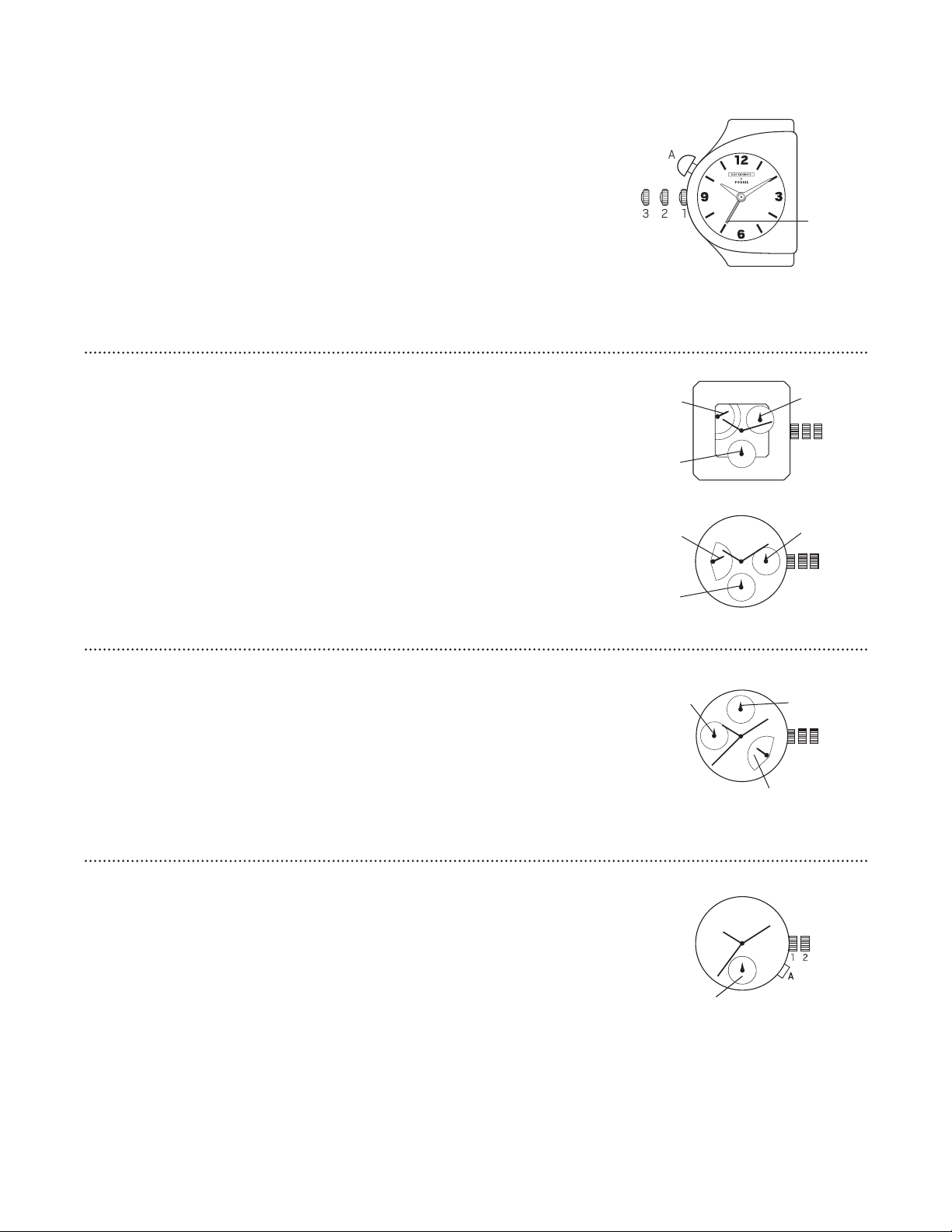
HandDualTime/
TimeSetting
Pullcrownouttoposition
Turncrowntoadvancehourandminutehands
Returncrowntoposition
DualTimeSetting
PressAtoadvancetodesiredtime
RetrogradewithDateSweepVDA/VDJ
TimeandDateSetting
PullcrownouttopositionandrotateclockwisetosetdayofweekHandinupperleftindicatesweekdayand
willautomaticallyresetto“M”attheendoftheweek
Keepingcrowninpositionrotatehandstosetthetime(makesuream/pmissetcorrectly)
Pushcrownbacktoposition
Pullcrownouttopositionandrotatecounter-clockwisetosetdate
Pushcrownbacktoposition
123
1 2 3
VDA
VDJ
WEEKDAY
WEEKDAY
DATE
DATE
SECONDHAND
SECONDHAND
RetrogradeThreeHandDatewithDayIndicatorJR
TimeDateandWeekdaySetting
Pullcrownouttopositionandturncounter-clockwisetosetdatetothepreviousday
Turncrownclockwisetosetweekdaytothepreviousday
NOTEWeekdayindicatorwillautomaticallyresetto“M”attheendoftheweekdaycycle
PullcrownouttopositionandturnclockwiseuntilthepresentdateandweekdayaredisplayedContinueturning
crowntosetthecorrectAM/PMtime
Returncrowntoposition
NOTEToensureaccuracydonotsetthedateandweekdaybetweenPMandAM
1 2 3
WEEKDAY
DATE
-HOUR
HandwithAlarmFunctionISA-
TimeSetting
Pullcrownouttoposition
Turncrownclockwisetoadvancehourandminutehands
Returncrowntoposition
AlarmSetting
Pullcrownouttoposition
Turncrowncounter-clockwisetosetalarmhandposition
Returncrowntoposition
AlarmFunction
PressAtotogglealarmon/offAlarmwillbeeptwicetoindicatealarm“on”andwillbeeponcetoindicatealarm“off”
AlarmwillsoundforsecondsPushAtosilencealarm
NOTEIfAisnotpressedalarmwillsoundagaininoneminute
123
A
ALARMHAND
DUALTIME

- 4 -
DualTimeVX
SettingTimeA
PullcrownAouttopositionwhenthesecondhandisattheo’clockposition
Turncrowntosetdesiredtime
Returncrowntoposition
SettingTimeB
PullcrownBouttopositionwhenthesecondhandisattheo’clockposition
Turncrowntosetdesiredtime
Returncrowntoposition
NOTEWhensettingtheminutehandadvanceittominutesaheadofthedesiredtimeandthenturnitback
totheexacttime
DualTimeVXA
Tosethourorminutes
Crown“A”setshour
Crown“B”setsminute
Pullcrownouttofirstposition
Turnclock-wisetosethourorminute
Pushcrownbacktonormalposition
11
22
AB
TIMEA TIMEB
DualTimeVD
AdjustingDualTimeHandsPosition
Aftersettingorchangingthebatteryandbeforesettingthetimemakesurethedualtimehourhandisatthe
o’clockpositionIfthedualtimehourhandisnotattheo’clockpositionresetitbyfollowingthebelow
instructions
Pullcrownouttoposition
PressandholdAandBforsecondstoresetthedualtimehourhand
PressAtoadvancethedualtimehourhandinacounter-clockwisedirection
PressBtoadvancethedualtimehourhandinaclockwisedirection
Pushcrownintoposition
LocalTimeSetting
Beforesettingthetimemakesurethesecondhandisattheposition
Pullcrownouttoposition
Turncrownclockwisetoadvancehourandminutehands
Pushcrownbacktoposition
NOTEhourhandmovescorrespondinglywithhourhandWhensettingthetimebesuretocheckthatthehourhandissetproperlyhourhandwillindicateAMor
PMtime
DualTimeSetting
TimeZoneSetting
Withcrownatposition
PressAtosetthetimehourbackPressBtosetthetimehourforwardEachtimeAispresseditindicateshoureachtimeBispresseditindicateshour
PreciseadjustmentoftheDualTime
Pullcrownouttopositionwhenthesecondhandisintheo’clockposition
PressAto setthetime minutesback PressBtoset thetime minutesforwardEachtimeA ispressedit indicates minuteseachtimeB ispressedit indicates
minutes
Pushcrownintoposition
DateSetting
Beforesettingthedatemakesurethetimeissetfirst
Pullcrownouttoposition
Turncrownclockwisetoadvancetothedesireddate
Pushcrownintoposition
NOTEIfthedateissetbetweenthehoursofPMandAMthedatemaynotchangeonthefollowingdayDonotsetthedatebetweenPMandAMto
ensureaccuracy
IfthedateissetbetweenPMandAMfirstchangethetimetoanyothertimeoutsidethosehoursSet
thedatethenresetthetimetotheappropriatetime
1 2 3
A
B
DATE
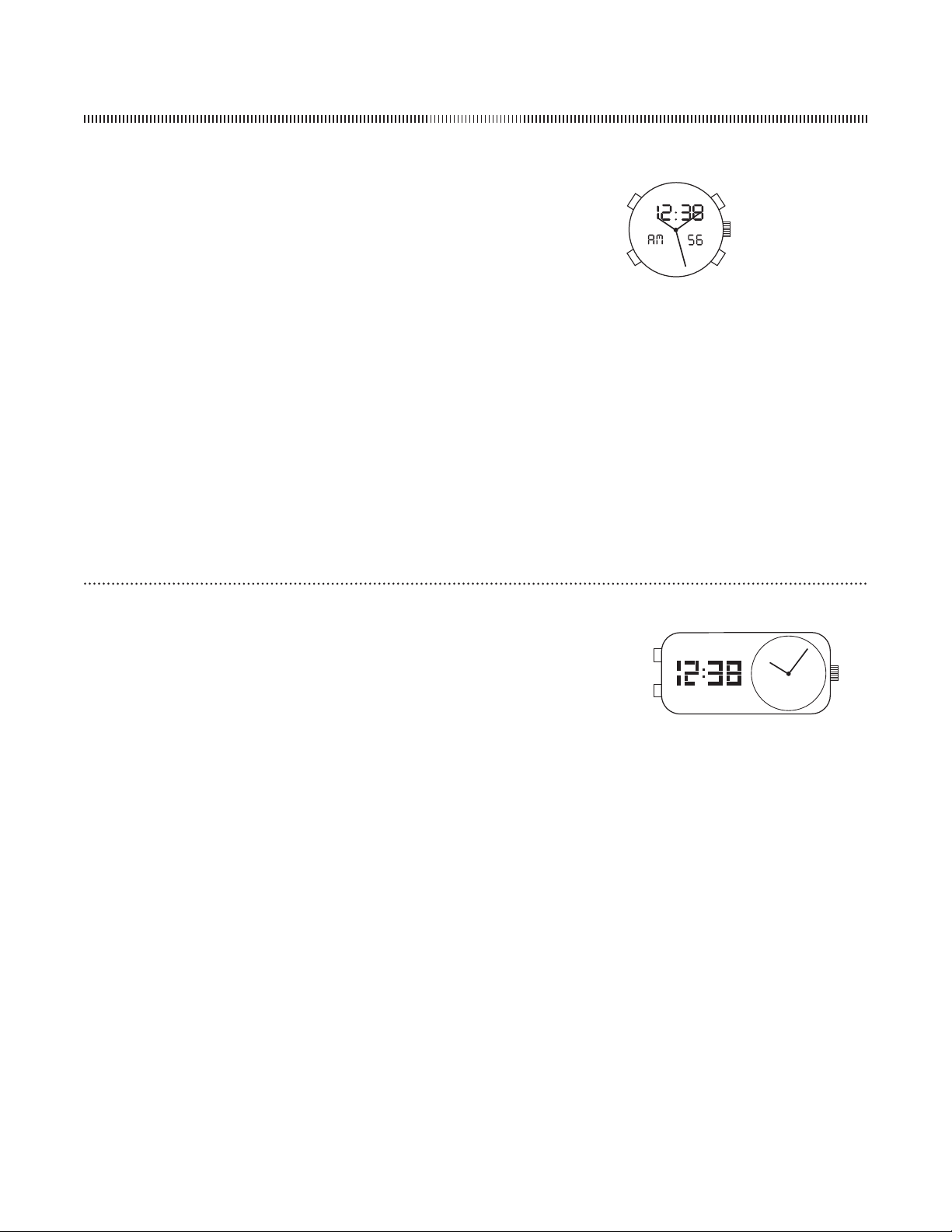
HOURHAND
DUALTIMEHOUR
HAND(hr)
- 5 -
ANALOG-DIGITAL
Ana-DigiFLA
NormalTimeDisplay
PressAorBforEL
PressandholdAorBforsecondstoturndigitaldisplayoffPressanypusher
toturnonthedisplaywhenitisoff
PressCtotoggle/-hourformatDisplaywillshow“AM”or“PM”for-
hourformat
PressDtochangemodeModesequenceistimedatechronographalarm
NOTEInanysettingmodeifnopusherisoperatedforsecondsallchanges
willbesavedandthesettingwillautomaticallyreturntodisplaymode
TimeandCalendarSetting
InnormaltimedisplayorcalendardisplaypressandholdCforsecondsyear
willbeginflashing
PressDtoadvancedigitspressandholdDforfastadvance
PressCtoadvancetonextsettingvalue
Settingsequenceisyearmonthdatehourminuteseconds
PressCtoexitsettingmode
NOTEWeekdaywillautomaticallyupdateuponexitingsettingmode
ChronographMode
PressDtochangetochronographmode
PressDandholdsecondstoresetchronographtozero
PressCtostart/stopthechronograph
PressDtoresettozero
C
D
B
A
AlarmMode
PressDtochangetoalarmmode
PressCtotogglealarm/chimeon/off
Alarmwillsoundatpresettimeforsecondspressanypusherto
silencealarm
AlarmSetting
InalarmmodepressandholdCforsecondshourwillbeginflashing
PressDtoadvancedigitpressandholdDforfastadvance
PressCtosetandadvancetominute
PressDtoadvancedigitpressandholdDforfastadvance
PressCtoexitsettingmode
Ana-DigiFL
NormalTimeDisplay
PressAtotoggle/Hformat
PressBtochangedisplaymodeDisplaymodesequenceistimecalendarseconds
Time/CalendarSetting
FromanydisplaymodepressandholdAtoentersettingmodeyearwillbeginflashing
PressBtoadvancesettingvaluePressandholdBforfastadvance
PressAtosetandadvancetonextsettingvalue
Settingsequenceisyearmonthdatehourminute
Settingwillautomaticallyreturntodisplaymodeafterminuteissetorifnopusherisoperatedforseconds
NOTEWhensettinghourdigitsarein-hourdisplay
A
B

- 6 -
Ana-DigiQFL
NormalTimeDisplay
PressAtochangemodeModesequenceisnormaltimedisplayalarm
chronographandtime/calendarsetting
PressBforEL
PressCtotoggle/-hourtime
NOTEInanysettingmodeifnopusherisoperatedforminutesallchanges
willbesavedandthesettingwillautomaticallyreturntonormaltimedisplay
TimeandCalendarSetting
PressAtochangetotime/calendarsettingmodesecondswillbeginflashing
PressCtosetsecondstozero
PressDtoadvancetonextsettingvalue
PressCtoincreasedigitpressandholdCforfastadvance
Settingsequenceissecondshourminutemonthdateandweekday
PressAtoexitsettingmode
AlarmMode
PressAtochangetoalarmmode
PressCtotogglealarm/chimeon/off
AlarmwillsoundatpresettimeforsecondspressCorDtosilencealarm
AlarmSetting
InalarmmodepressDtoentersettingmodehourwillbeginflashing
PressCtoincreasehourpressandholdCforfastadvance
PressDtosetandadvancetominutes
PressCtoincreaseminutespressandholdCforfastadvance
PressDtosavedataandexitsettingmodepressAtosavedataexitsetting
modeandreturntonormaltimedisplay
C
D
B
A
Ana-DigiQFO-/YEQFO-/YE
TimeandCalendarSetting
PressAforEL
PressandholdCforsecondsforthetimesettingstateandyouwillseethe
secondsflashing
PressDtoresettimetozero
PressBtotogglethroughthefollowingsettingsequence
SecondMinuteHour/-hourformatMonthDayYear
PressDtoadjusttheflashingitem
Thedayoftheweekisautomaticallydisplayedinaccordancewiththedate
(monthdayyear)
PressCtoreturntoRealTimeMode
AlarmMode
PressBtochangetoalarmmode
PressDtoturnon/offtheAlarmorChime
Alarmwillsoundatpresettimeforseconds
AlarmSetting
InalarmmodepressandholdCforsecondstoselectthe“Hour”setting
PressBtoselectthe“Minute”setting
PressDtoadjusttheflashingitem
ChronographMode
PressBtochangetochronographmode
PressDtostart/stopthechronograph
PressCandholdtoresetchronographtozero
PressCwhilechronographisrunningtodisplaysplitcount
PressDtoexitthesplitcountandstopcounting
PressCandholdtoresetchronographtozero
D
C
A
B
D
C
A
B
CountdownTimer
PressBtochangetotimermode
PressandholdCforsecondstodisplaythetimersetting
PressBtoselect“Hour”or“Minute”andpressDtoadjusttheflashingitem
PressCtocompletethesetting
PressDtostart/stopthetimer
PressCandholdtoresetthetimer
DualTime
PressDtochangetodualtimemode
PressandholdCforsecondstoselectthe“Minute”setting
PressBtoselectthe“Hour”setting
PressDtoadjusttheflashingitem
PressCagaintocompletethesetting
ChronographMode
PressAtochangetochronographmode
PressCtostart/stopthechronograph
PressDtoresettozero
SplitTime
PressDwhilethechronographisrunningforsplittime
PressDagaintoreturntochronograph
Repeatstepsandtomeasuremultiplesplittimes
PressCtofinalizetiming
PressDtoresettozero
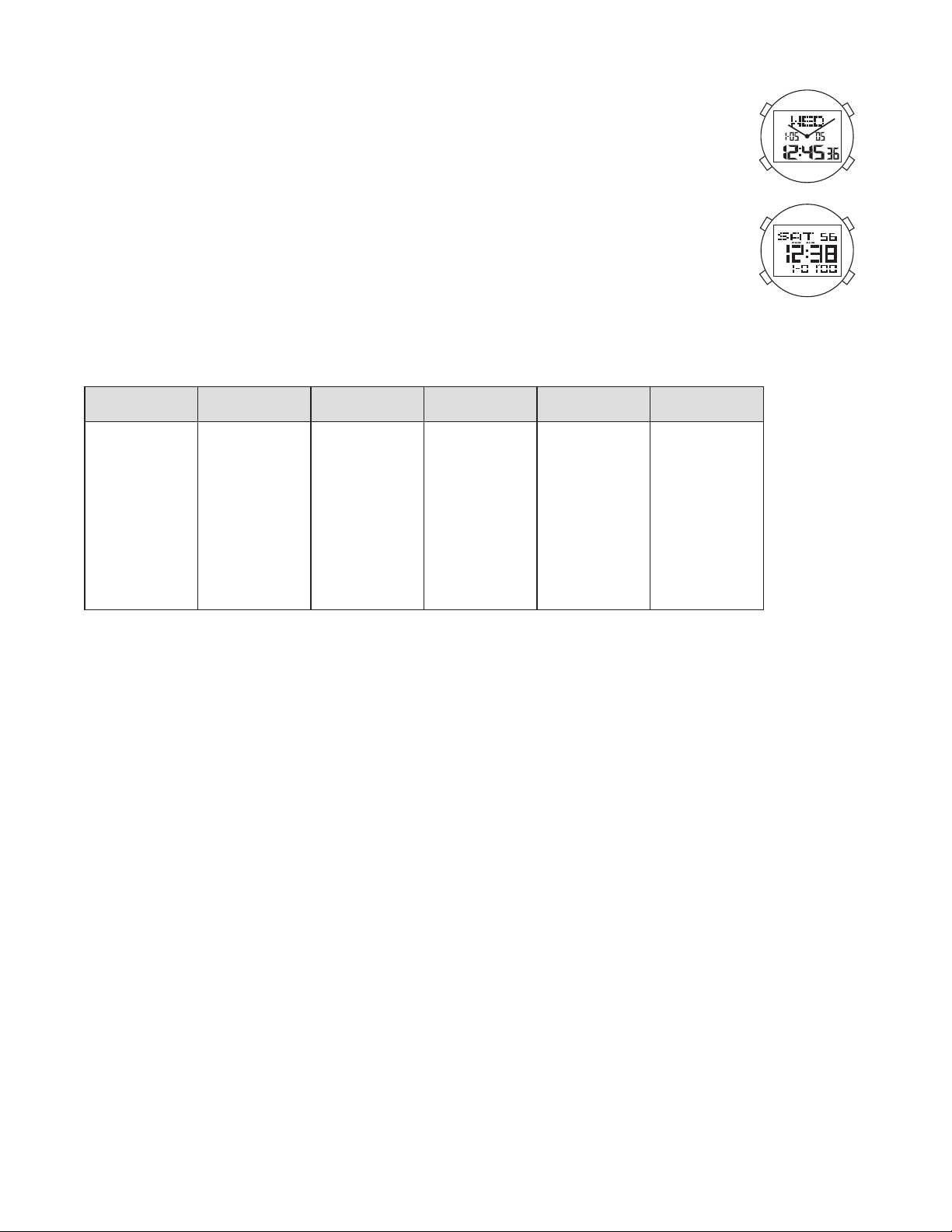
QFO-/YE QFO-/YE
- 7 -
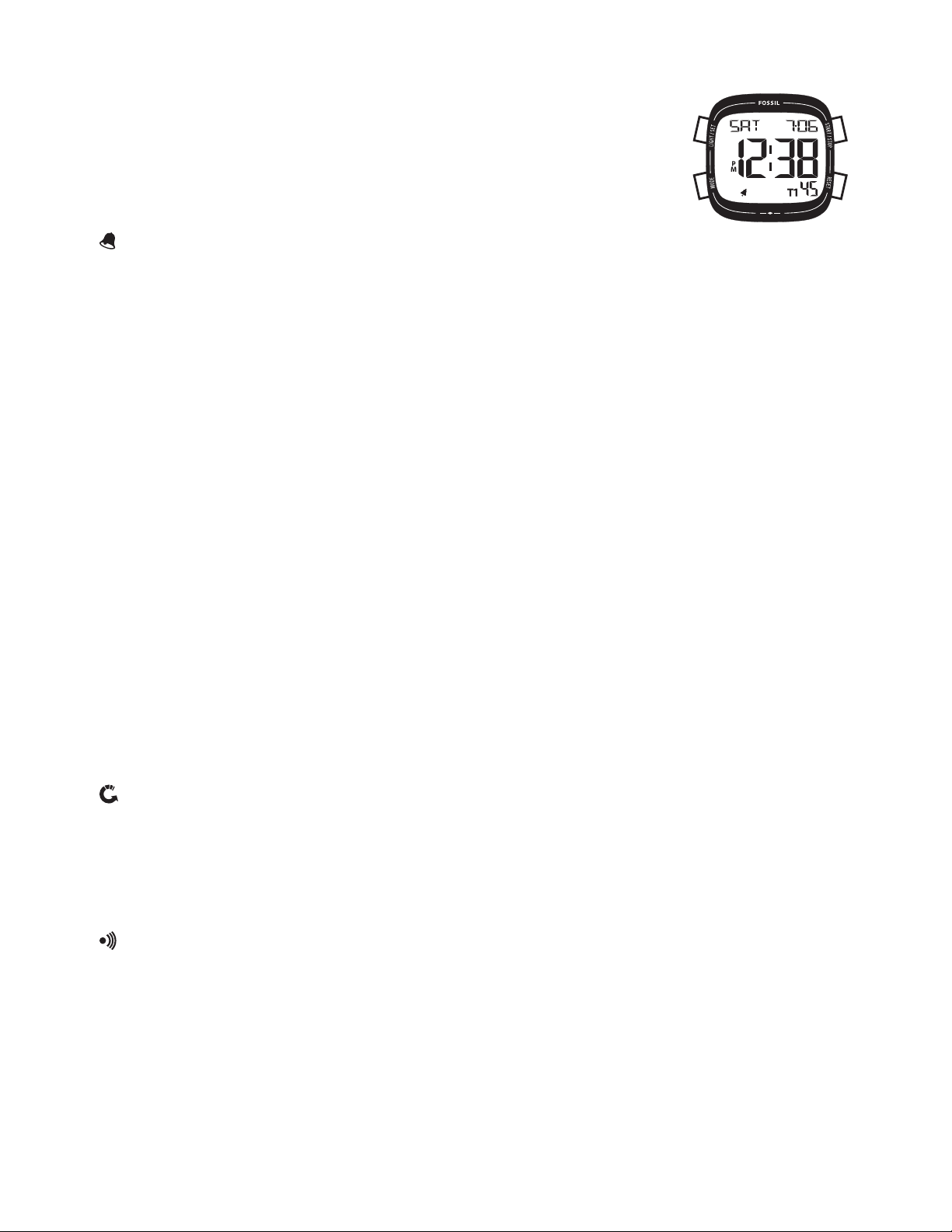
World Time Module (Analog-Digital and Digital)
Normal Time Display
PresspusherBforEL
PresspusherCforhourlychimeon/off
PresspusherDforDSTon/offfortheselectedcity
Inanymodeorsettingifnopusherisoperatedforsecondssettingwillbereturnedtonormaltimedisplay
Time and Calendar Mode
PressandholdpusherBforsecondstoentersettingmode/hourtimewillbeginflashing
PresspusherCtoselect/hourtime
PresspusherAtoselectandchangesecondsminutehouryearmonthdayandcity
PresspusherCtoincreasethedigitpresspusherDtodecreasethedigit
PresspusherBtoexitsettingmode
World Time Mode
PresspusherAtoselectworldtimemode
PresspusherCtoselectcity
PresspusherDforDSTon/offfortheselectedcity
Words City HourDifference Words City HourDifference
MDY
HNL
ANC
LAX
DEN
CHI
NYC
CCS
RIO
-H
-H
LON
Midway
Honolulu
Anchorage
LosAngeles
Denver
Chicago
NewYork
Caracas
RiodeJaneiro
-H
-H
London
-hours
-hours
-hours
-hours
-hours
-hours
-hours
-hours
-hours
-hours
-hour
hours
PA R
CAI
MOW
DXB
KHI
DAC
BKK
HKG
TYO
SYD
NOU
AKL
Paris
Cairo
Moscow
Dubai
Karachi
Dacca
Bangkok
HongKong
Tokyo
Sydney
Noumea
Auchland
hour
hours
hours
hours
hours
hours
hours
hours
hours
hours
hours
hours
AlarmSetting(alarms)
PresspusherAtoselectalarmmode
PresspusherCtoscrollthroughalarms
PresspusherDforalarmon/off
PressandholdpusherBforsecondstoentersettingmodeMinuteswillbeginflashing
PresspusherAtoselectminutesandhour
PresspusherCtoincreasethedigitpresspusherDtodecreasethedigitAlarmisautomaticallyturnedonwhensettingischanged
PresspusherBtoexitsettingmode
Chronograph Mode
PresspusherAtoselectchronographmode(STW)
PresspusherCtostartchronographpresspusherDtostopchronograph
PresspusherDtoresetchronographwhenitisnotrunning
Lap Counting
PresspusherCwhilechronographisrunning(willrecorduptolaps)
PresspusherDtofinalizetiming
PresspusherAtorecalllaps(TOT)wheninformationisrecordedinthechronograph(willrecalluptolaps)
PresspusherCtoviewnextlappresspusherDtoviewpreviouslap
EnterregularchronographmodepresspusherDtoresettozero
Countdown Timer
PresspusherAtoselecttimermode
PresspusherCtostart/stopthetimer
PresspusherDtoresettimerwhenitisnotrunningTimerwillshowallzero’sbeforetimerisstartedagain
PressandholdpusherBforsecondstoentersettingmodeSecondswillbeginflashing
PresspusherAtoselectsecondsminutesandhour
PresspusherCtoincreasedigitpresspusherDtodecreasedigit
PresspusherBtoexitsettingmode
A
B
D
C
A
B
D
C
- 8 -
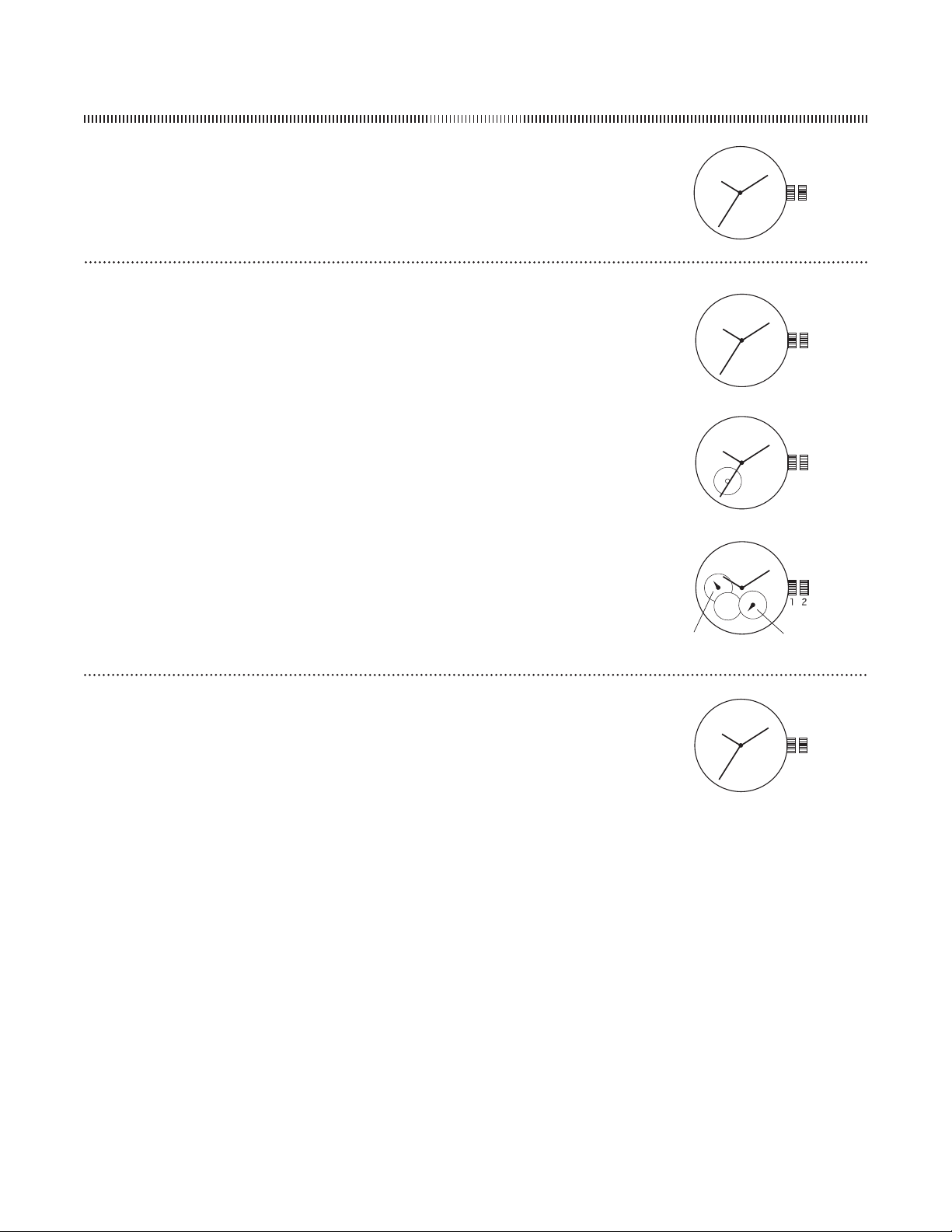
DigitalQFO-
TimeandCalendarSetting
PressandholdAforsecondstoenterthesettingmode
PressBtotogglethroughthefollowingsequenceLightChime/-hourHourMinuteSecondYearMo-Day
MonthDay
PressCorDtoadjusttheitemdisplayed
PressandholdCorDforfastadvance
PressAtoexitfromsettingmode
AELdisplayedonthehomescreensignalsthelightisturnedonPressanypushertoactivatelight
displayedonthehomescreenindicatesthechimeisturnedonChimesoundseveryhouronthehour
InnormaltimedisplaymodepressCtodisplayKEYonthehomescreenWhenKEYisdisplayedabeepoccurswitheachpressofapusher
9. NOTE:Inanysettingmode,ifnopusherisoperatedfor30seconds,allchangeswillbesavedandthesettingwillautomaticallyreturntonormaltimedisplaymode.
DualTime
PressandholdDforsecondstoenterDualTimemode
PressandholdAforsecondstoentertimezone
PressCtodecreasevalueandDtoincreasevalueofthetimedifferencePressandholdCorDforfastadvance
PressAtoexittimezonesettingscreen
PressandholdDtoexitDualTimeMode
Chronograph
PressBtoenterChronographmode
PressDtostop/startthechronograph
PressandholdCwhenchronographisstoppedtoresetchronographtozero
PressCwhilechronographiscountingtoenterLAPmodeLAPtimewilldisplayonthescreenforsecondsthendisplaythenextLAPtimecountingUptoLAPrecords
can
besaved
PressAtoentermemorymodePressAinmemorymodetovieweachgroupofLAPtimes
WhenchronographisstoppedpressandholdCforsecondstoclearallpreviousrecords
PressCtoexitmemorymode
Countdowntimes
TherearethreecountdownmodesCD-STPCD-REPandCD-UP
InCD-STPmodethecountdowntimeralarmsoundswhentimeexpiresandautomaticallyreturnstothetimedisplaymode
InCD-REPmodethecountdowntimeralarmsoundswhentimehasexpiredandautomaticallybeginsanothercountdowntimeUptocountdownsetscanbecompleted
IntheCD-UPmodethecountdowntimeralarmsoundswhentimeexpiresandautomaticallybeginscountingup
CountdownTimerSettings
PressBtoenterTimermode
PressandholdAforseconds
PressDtotogglethroughthefollowingsequenceCD-STPCD-REPandCD-UP
PressandholdAforsecondsinanymodetochoosemodeandsetcountdowntime
PressBtotogglethroughthefollowingsequenceHourMinuteSecond
PressCtodecreasevalueandDtoincreasevaluePressandholdCorDforfastadvance
PressAtoexitTimersettingmode
PressDtostart/stoptimer
displayedonthescreenindicatesthewatchhasenteredcountdownmodeWheniconflashesthewatchiscountingdownWhenflashingstopsthecountdowntimeis
expired
PressBtotoggletoTimemode
AlarmMode
PressBuntilalarmisdisplayedonscreentoenteralarmmodeUptofouralarmsmaybeset
PressDtochoosealarm
PressCtoturnon/offalarmindicator
PressAtoexitalarmsettingscreen
displayedonthehomescreenindicatesanalarmisturnedon
AlarmSetting
PressBtoenterAlarmmodeUptofouralarmsmaybeset
PressCtodecreasevalueandDtoincreasevaluePressandholdCorDforfastadvance
PressAtoexitAlarmmode
A
B
D
C
- 9 -
AUTOMATIC/MECHANICAL
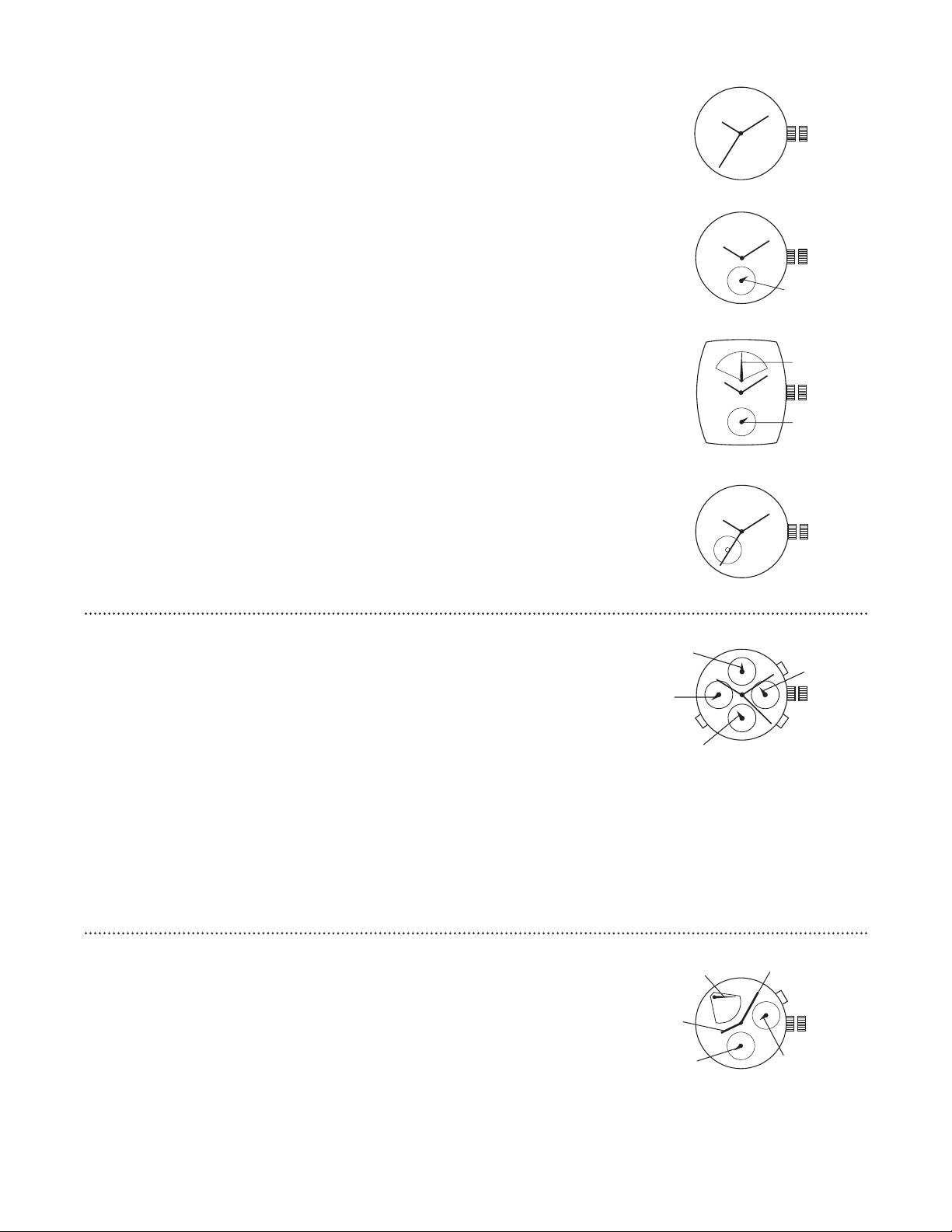
HandWoundMechanicalT
Tostarttime-keepingifwatchhascompletelystoppedrotatecrownclockwiseapproximatelytimes(oruntilyou
feelresistance)inpositionWhenfullywoundthetimepiecehasapowerreserveofapproximatelyhours
Pullcrownouttopositionandrotateclockwiseorcounter-clockwisetosettimeaerwatchhasbeenwound
Returncrowntoposition
1 2
AutomaticN/S/S
Tostarttime-keepingifwatchhascompletelystoppedrotatecrownclockwiseapproximatelytimes(oruntilyou
feelresistance)inpositionWhenfullywoundthetimepiecehasapowerreserveofapproximatelyhours
Pullcrownouttopositionandrotateclockwiseorcounter-clockwisetosettimeaerwatchhasbeenwound
Returncrowntoposition
NOTEAtimepiecewithanautomaticwindingmovementobtainsthepowertowinditselfbythemovementofyourwrist
thereisnobatteryThereforenotwearingthetimepieceforseveralconsecutivedayscouldexhaustthepowerreserve
ItisimportantyourtimepieceisadjustedtomatchthesizeofyourwristAloosefitmayresultinalossincapacityofthe
timepiecetowinditself
Automatic
Tostarttime-keepingifwatchhascompletelystoppedrotatecrownclockwiseapproximatelytimes(oruntilyou
feelresistance)inpositionWhenfullywoundthetimepiecehasapowerreserveofapproximatelyhours
Pullcrownouttopositionandrotateclockwiseorcounter-clockwisetosettimeaerwatchhasbeenwound
Returncrowntoposition
NOTEAtimepiecewithanautomaticwindingmovementobtainsthepowertowinditselfbythemovementofyourwrist
thereisnobatteryThereforenotwearingthetimepieceforseveralconsecutivedayscouldexhaustthepowerreserve
ItisimportantyourtimepieceisadjustedtomatchthesizeofyourwristAloosefitmayresultinalossincapacityofthe
timepiecetowinditself
1 2
SO
1 2
N
1 2
S
-HOUR
SECONDS
- 1 0 -
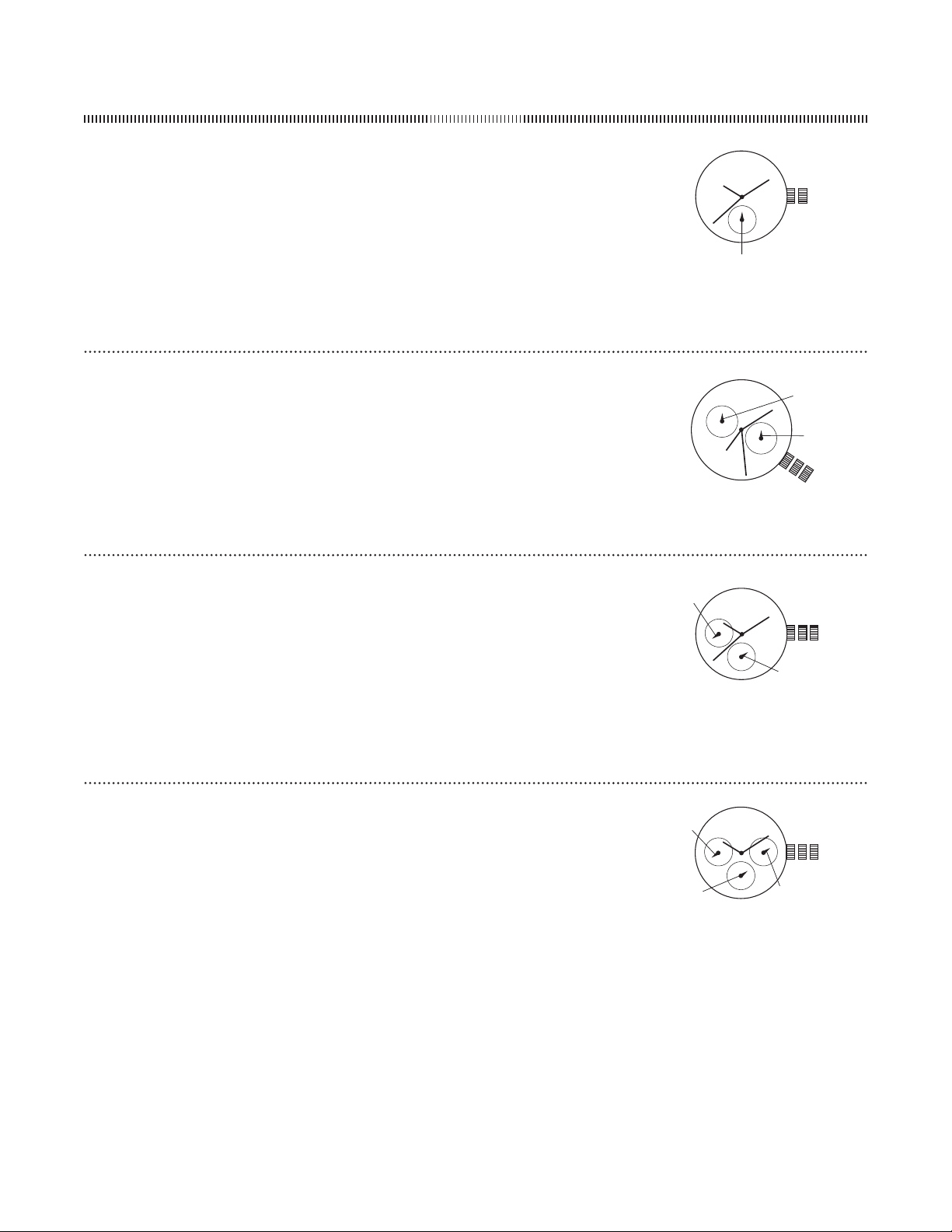
AutomaticTY
Tostarttime-keepingrotatethecrownclockwiseinpositionuntilpowerreservehandmovesfrom“-”
(lowreserve)to“”(fullreserve)
PullcrownouttopositionandrotatetosettimeReturncrowntoposition
PressAtosetdateEachpressofpusherAwilladvancethedatebyoneincrement
NOTEDonotsetdateandweekbetweenPMandAM(o’clockando’clock)Doingsocould
damagethemovement’saccuracy
1 2
A
DATE
MINUTEHAND
SECONDHAND
HOURHAND
POWERRESERVE
1 2
B
CA
DATE
MONTH
-HOURHAND
WEEKDAY
AutomaticTY
Tostarttime-keepingifwatchhascompletelystoppedrotatecrownclockwiseapproximatelytimes(oruntilyou
feelresistance)inpositionWhenfullywoundthetimepiecehasapowerreserveofapproximatelyhours
Pullcrownouttopositionandrotateclockwiseorcounter-clockwisetosettimeafterwatchhasbeenwound-
hourhandmoveswithhourandminutehandsUse-hourhandtosetcorrectAM/PMtime
Returncrowntoposition
PressAtoadjustweekdayEachpressofpusherAwilladvancetheweekdaybyoneincrement
PressBtoadjustmonthEachpressofpusherBwilladvancethemonthbyoneincrement
PressCtoadjustdateEachpressofpusherCwilladvancethedatebyoneincrement
NOTEAtimepiecewithanautomaticwindingmovementobtainsthepowertowinditselfbythemovementofyourwrist
thereisnobatteryThereforenotwearingthetimepieceforseveralconsecutivedayscouldexhaustthepowerreserve
ItisimportantyourtimepieceisadjustedtothesizeofyourwristAloosefitanyresultinalossincapacityofthetimepiece
towinditself
DonotsetdatebetweenPMandAM(o’clockando’clock)Doingsocoulddamagethemovement’saccuracy
AutomaticTY/TY/TY/NH
Tostarttime-keepingifwatchhascompletelystoppedrotatecrownclockwiseapproximatelytimes(oruntilyou
feelresistance)inpositionWhenfullywoundthetimepiecehasapowerreserveofapproximatelyhours
Pullcrownouttopositionandrotateclockwiseorcounter-clockwisetosettimeaerwatchhasbeenwound
Returncrowntoposition
NOTEAtimepiecewithanautomaticwindingmovementobtainsthepowertowinditselfbythemovementofyourwrist
thereisnobatteryThereforenotwearingthetimepieceforseveralconsecutivedayscouldexhaustthepowerreserve
ItisimportantyourtimepieceisadjustedtomatchthesizeofyourwristAloosefitmayresultinalossincapacityofthe
timepiecetowinditself
1 2
SECONDS
TY
1 2
POWER
RESERVE
SECONDS
TY
1 2
TY
1 2
NH
- 1 1 -
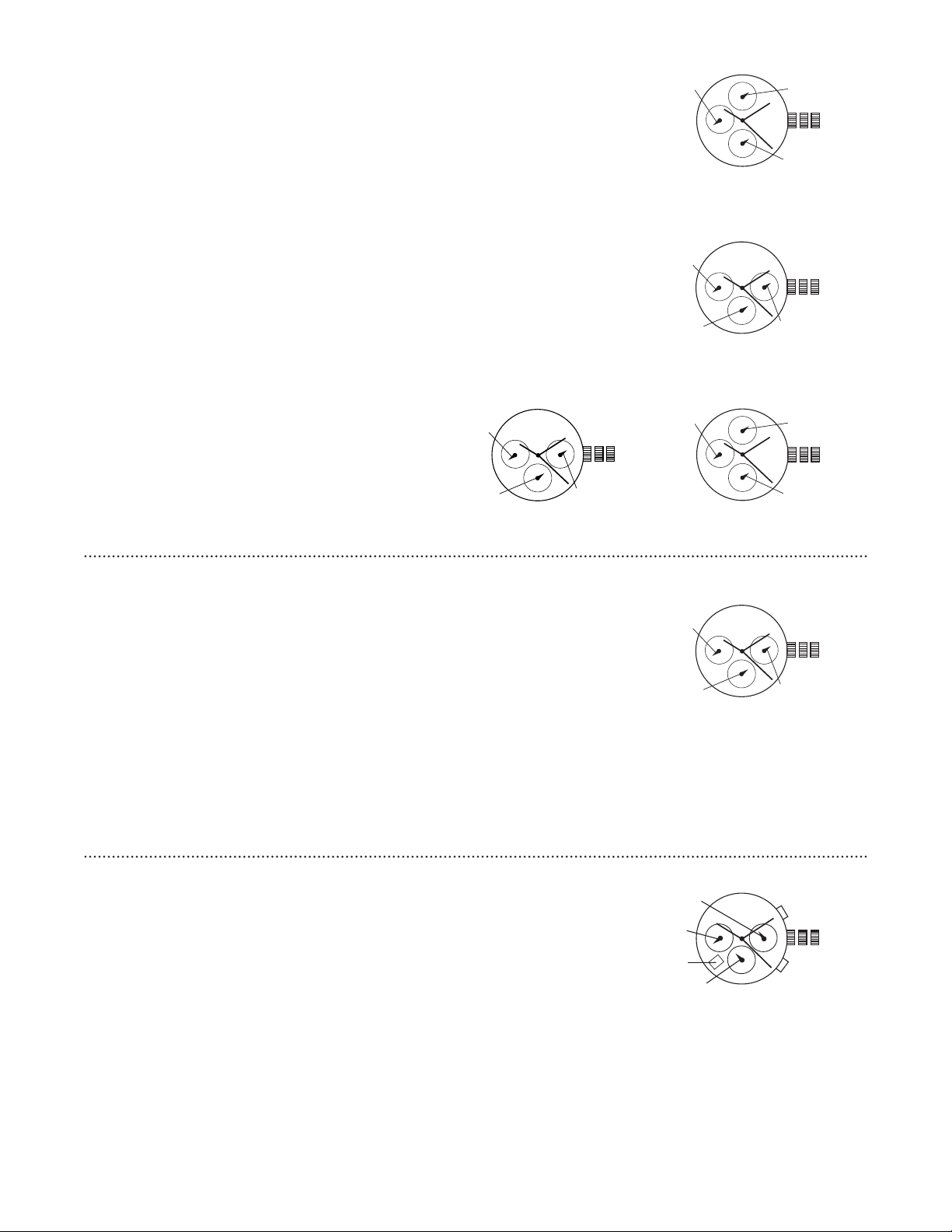
Multifunction 6P25
DateSetting
Pullcrownouttoposition
Turncounter-clockwisetoselectdate
DayandTimeSetting
Tosettimepullcrownouttoposition
Turnclockwisetosethourandminutehands
Thehandshowingdaysoftheweekwillalsomovewiththehourand
minutehands
Keepturninguntilyouhavereachedthedesiredday
Pushcrownbacktoposition
1
2
3
DAY
DATE
1 2
-HOURHAND
MULTIFUNCTION
Multifunction VX3R / VX3RE
TimeSetting
Pullcrownouttoposition
Turncrownclockwisetosettime
Returncrowntoposition
NOTE-hourhandmovescorrespondinglywiththehourandminutehandsWhensettingthetimebesureto
checkthatthe-hourhandissetproperly
DateSetting
PullcrownouttopositionTurncrowncounterclockwisetosetdate
Returncrowntoposition
1 2 3
-HOUR
DATE
MultifunctionVDA
DateSetting
Pullcrownouttoposition
Turncounter-clockwisetoadvancethedatehand
Pushcrownbacktoposition
DayandTimeSetting
Pullcrownouttoposition
TurnclockwisetoadvancehourandminutehandsThehandshowingdaysoftheweekwillalsomovewiththehour
andminutehandsKeepturninguntilyouhavereachedthedesiredday
1 2 3
DAY
SUB-SECOND
DATE
MultifunctionP
TimeSetting
Pullcrownouttoposition
Turncrownclockwisetosetdesiredtime
Returncrowntoposition
-HourSetting
Pullcrownouttoposition
TurncrownclockwisetomakeafullhourrotationtoseteitherAMorPMAMissetbetweenand
PMissetbetweenand
Returncrowntoposition
- 1 2 -
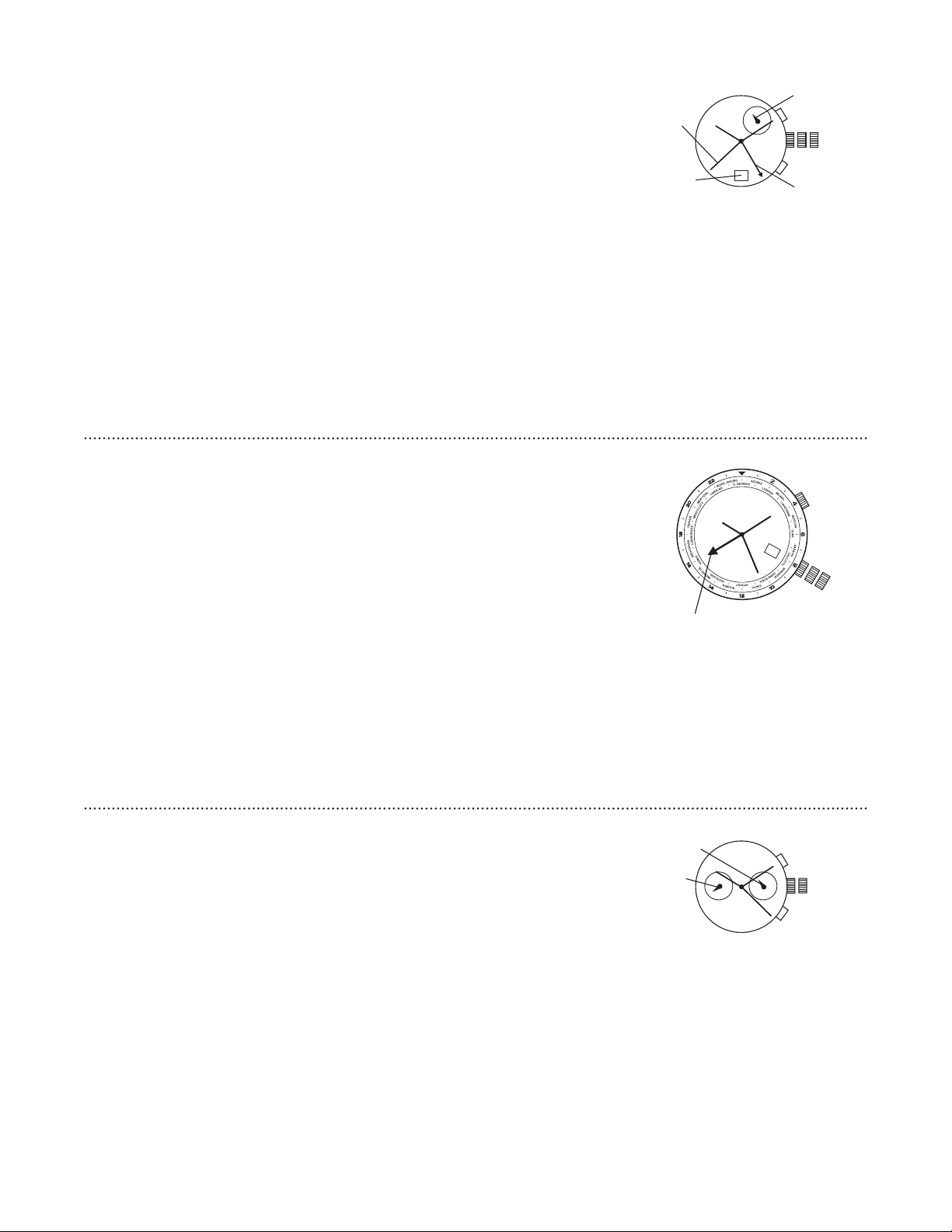
MultifunctionVXJE/VXJA/VXLE
DateSetting
Pullcrownouttoposition
Turncounter-clockwisetoadvancethedatehand
Pushcrownbacktoposition
DayandTimeSetting
Pullcrownouttoposition
Turnclockwisetoadvancehourandminutehands
ThehandshowingdaysoftheweekwillalsomovewiththehourandminutehandsKeepturninguntilyouhave
reachedthedesiredday
-HourSub-DialSetting
Themovementofthe-hourhandcorrespondstothehourandminutehandsWhensettingthetimebesureto
checkthatthe-hourhandissetproperly
1 2 3
-HOUR
DAY
DATE
MultifunctionJP
Date/TimeSetting
Pullcrownouttoposition
Turncrownclockwisetosetdateandtime
Returncrowntoposition
NOTEIfthedateissetbetweenthehoursofaroundPMandAMthedatemaynotchange
onthefollowingday
DaySetting
Pullcrownouttoposition
Turncrownclockwisetosetday
Returncrowntoposition
DualTimeSetting
PressAtosetdualtimehandforwardinminuteincrements
PressBtosetdualtimehandbackwardinminuteincrements
NOTEDualtimehandcanbeadvancedrapidlybycontinuouslypressingAorB
1 2 3
A
B
DUALTIME
DAY
DATE
-HOUR
MultifunctionP/P/P/P/VXNE/
VXJ
DateSetting
Pullcrownouttoposition
Turnclockwisetoadvancethedatehand
Pushcrownbacktoposition
DayandTimeSetting
Pullcrownouttoposition
Turnclockwisetoadvancehourandminutehands
ThehandshowingdaysoftheweekwillalsomovewiththehourandminutehandsKeepturninguntilyouhave
reachedthedesiredday
-HourSub-DialSetting
The-hourhandmovescorrespondinglywiththehourandminutehandsWhensettingthetimebesuretocheck
thatthe-hourhandissetproperly
1 2 3
DATE
-HOUR
DAY
VXNE
1 2 3
-HOUR
DAY
DATE
P/P
1 2 3
P/P
DATE
-HOUR
DAY
VXJ
1 2 3
DATE DAY
HEURES
JOUR
- 1 3 -
Multi-TimeZoneH
Time/CalendarSetting
PullREDcrownB(atposition)outtoposition
Turncrownclockwisetosettopreviousday’sdate
Pullcrownouttoposition
Turncrowncounter-clockwiseuntildatechangestotoday’sdatesetcorrectAMorPMtime
Returncrowntoposition
NOTESecondtimezonehandwillmoveinconjunctionwithhourandminutehandsSethourandminutehands
beforesettingsecondtimezone
SecondTimeZoneSetting
PullREDcrownB(atposition)outtoposition
Turncrowncounter-clockwisetosetsecondtimezone
Returncrowntoposition
NOTESecondtimezonehandisreadinmilitarytimeindicatedonthebezel
ThirdTimeZoneReading
TurncrownAclockwiseorcounter-clockwisetomatchcurrenthourwithcurrentcitytimezone
ForthirdtimezonereadinglocatethecityindicatingthenewtimezoneEachincrement(totheright)indicates
houreachdecrement(totheleft)indicates-hour
B
1
2
3
A
SECONDTIMEZONEHAND
MultifunctionwithAlarm-
TimeandDateSetting
Pullcrownouttopositionandturnclockwisetosetdatetothepreviousday
PullcrownouttopositionandturnclockwiseuntilthepresentdateisdisplayedContinueturningcrowntosetthe
correctAM/PMtime
Returncrowntoposition
NOTEToensureaccuracydonotsetthedatebetweenPMandAM
SecondTimeZoneSetting
Pullcrownouttoposition
PressAtosetsecondtimezone
NOTESecondtimezoneisreadinmilitarytimeindicatedontheouterportionofthedial
AlarmFunction
PressBtotogglealarmon/offAlarmbeepstwicetoindicatealarm“on”andbeepsoncetoindicatealarm“off”
AlarmwillsoundforsecondsPushBtosilencealarm
NOTEIfBisnotpressedalarmwillsoundagaininoneminuteandwillautomaticallychangetoalarm“off”setting
AlarmSetting
Pullcrownouttopositionandturncounter-clockwisetosetalarmindicator
Returncrowntoposition
A
B
1 2 3
ALARMHAND
SECONDHAND
SECONDTIME
ZONEHAND
DATE
NOTEAlarmhandisadifferentcolor
fromtheotherwatchhands
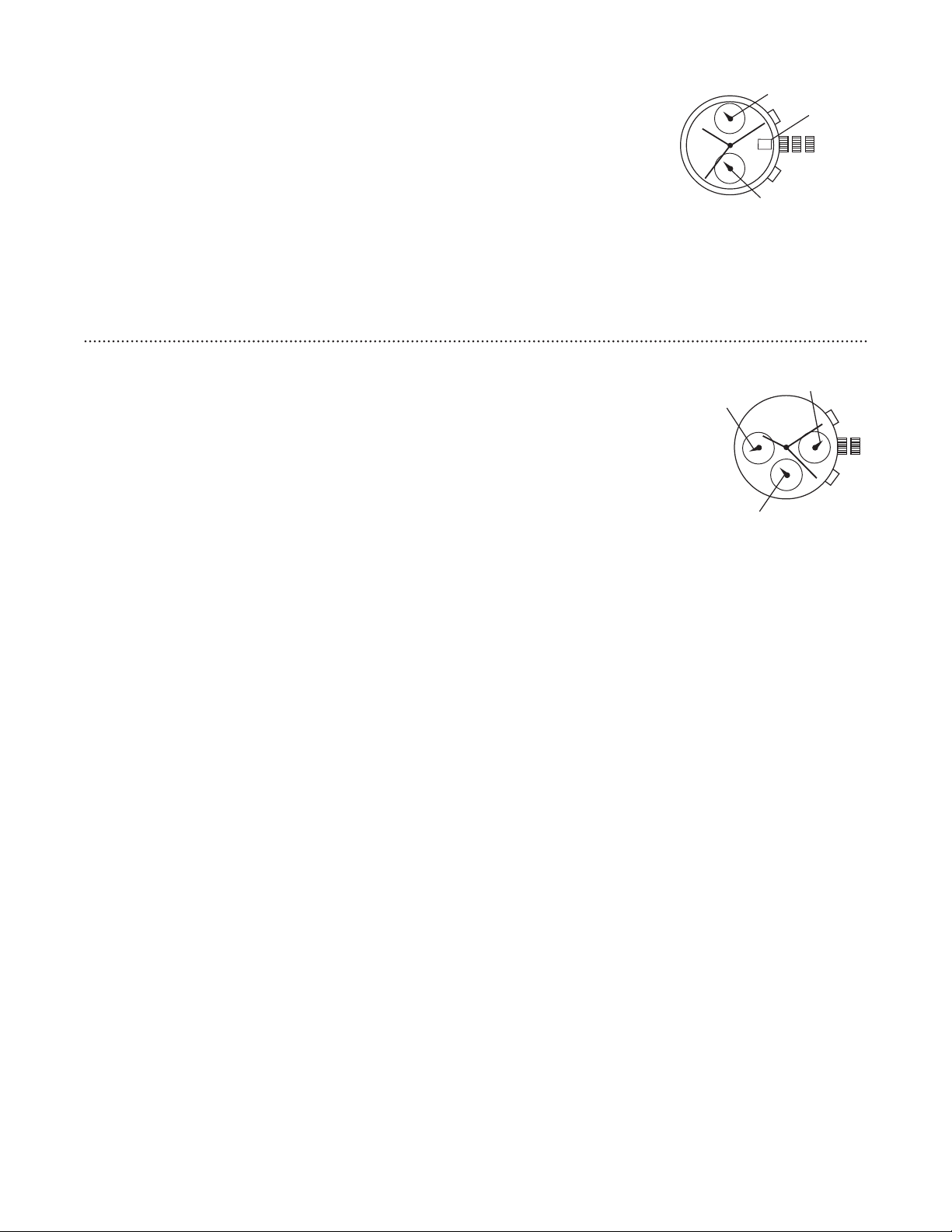
TwoEyeMultifunctionVDA
Timeand-HourSetting
Pullcrownouttoposition
Turncrowntosethourandminutehands
NoteThe-hourhandmoveswiththehourandminutehands
ContinueturningcrownclockwisetoseteitherAMorPM
NoteAMissetbetweenandPMissetbetweenand
Pushcrownintoposition
DualTime-HourSetting
Pullcrownouttoposition
PressAtomovehandcounterclockwisePressBtomovehandclockwiseEachpressofAorBwillmovethedualtime-hourhandinten-minuteincrements
Pushcrownintoposition
NoteWhencrownisinpositionpushAorBtomovethedualtime-hourhandin-hourincrements
12
A
B
HOURHAND
DUALTIME
HOURHAND
- 1 4 -
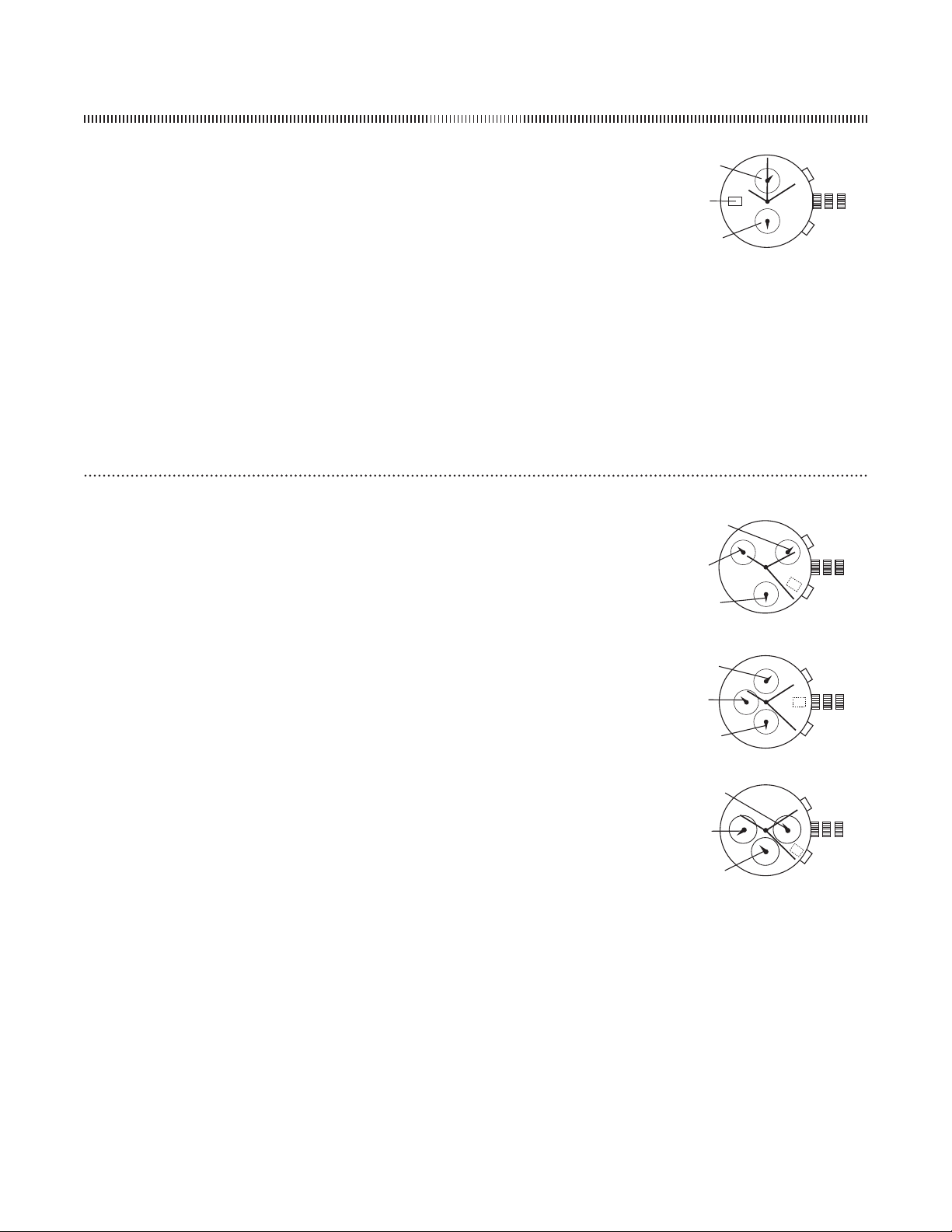
MultifunctionJP
DateandTimeSetting
Pullcrownouttoposition
Turncrowntosetdateindatewindow
Pullcrownouttoposition
Turncrowntosetthehourandminutehands
Pushcrownintoposition
NOTEToensureaccuracydonotsetthedatebetweenPMandAM
DualTimeSetting
PressAtosetthedualtimehandforwardinunitsofminutes
PressBtosetthedualtimehandbackinunitsofminutes
NOTEThedualtimehandcanbesetrapidlybycontinuouslypressingAorB
1 2 3
A
B
HOURHAND
HOURHAND(DUALTIME)
DATE
MultifunctionVXJE
DaySetting
PressAuntilyouhavereachedthedesiredday
DateSetting
PressBuntilyouhavereachedthedesireddate
TimeSetting
Pullcrownouttoposition
Turnclockwisetoadvancehourandminutehands
Pushcrownbacktoposition
NoteThe-hourhandwillalsomovewiththehourandminutehands
1 2
A
B
DATE
-HOUR
DAY
- 1 5 -
CHRONOGRAPH
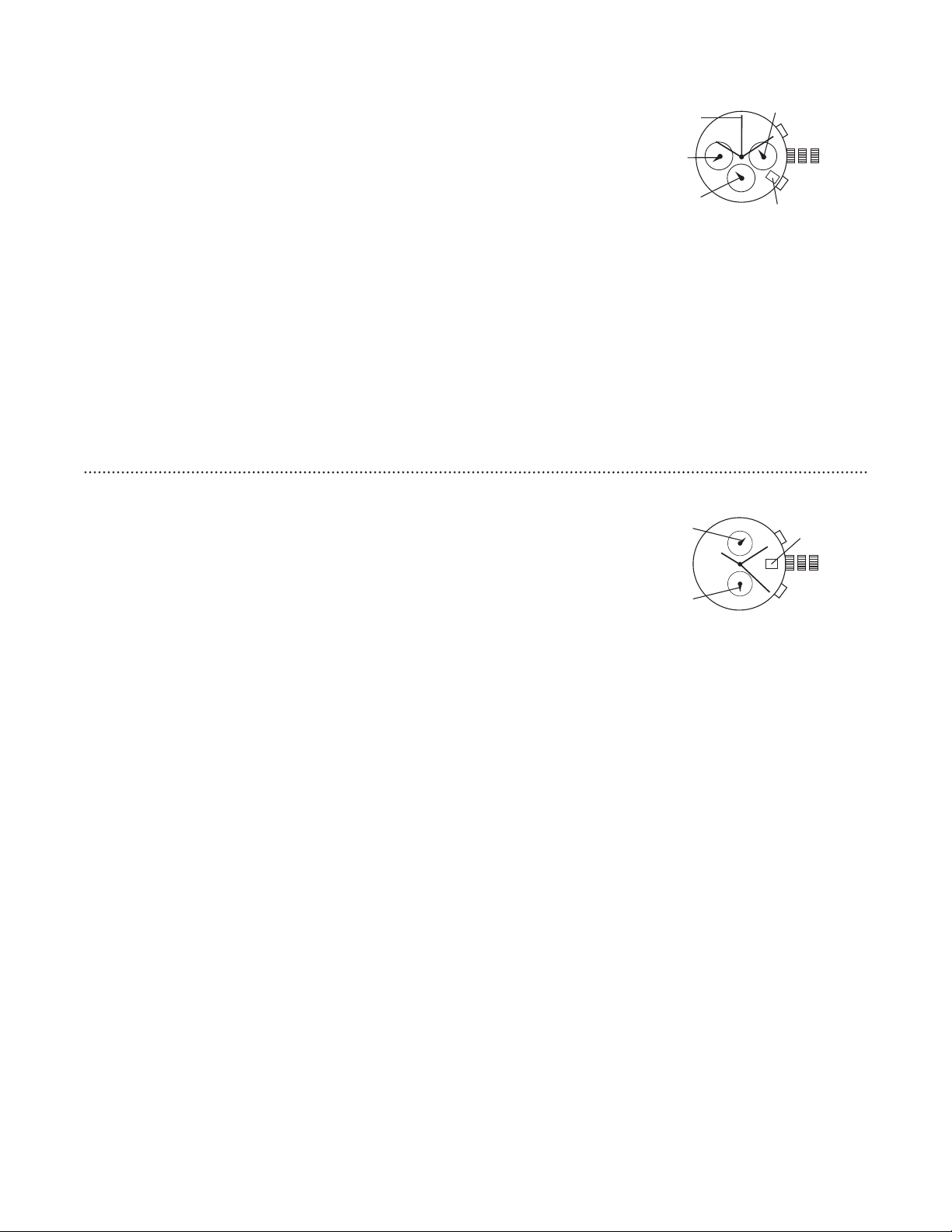
ChronographOS
DateSetting
Pullcrownouttoposition
Turncrowncounter-clockwiseuntilthecorrectdateisshowninthedatewindow
Returncrowntoposition
TimeSetting
Pullcrownouttoposition
Turncrownclockwisetoadvancehourandminutehands
Returncrowntoposition
ChronographOperation
PressAtostart/stopthechronograph
PressBforreset
AdjustingtheChronograph
Pullcrowntoposition
PressAtoresetthesecondhandto“”
Resetthewatchtothecurrenttimeandreturncrowntoposition
1 2 3
A
B
DATE
CHRONOGRAPHMINUTEHAND
SECONDHAND
ChronographJS/JS/JS/JS/JS/JS/VR/VR
TimeandDateSetting
Pullcrownouttoposition
Rotatecrownclockwiseuntilthepreviousday’sdateisshowninthedatewindow
Pullcrownouttoposition
Rotatecrownclockwiseuntilthecorrectdateisshowninthedatewindow
Continuetorotatecrowntosetcorrectam/pmtime
NOTE-hourhandmovescorrespondinglywiththehourandminutehandsWhensettingthetimebesureto
checkthatthe-hourhandissetproperly
Returncrowntoposition
NOTEWhenthecrownisinpositiondonotpressthepushersOtherwisethechronographhandswillmove
NOTEDonotsetthedatebetweenPMandAMtoensureaccuracy
Chronograph
PressAtostart/stopthechronograph
PressBtoresettozero
ChronographZeroReset
Ifeitherofthechronographhandsisnotatthezero()positionpullcrownouttoposition
PressAtomovehandsclockwisepressBtomovehandscounter-clockwiseEachpressofAorBwillmovethe
chronographhandsbyoneincrement/decrementOrpressandholdAorBforfastincrement/decrement
Whenbothhandsareinthezeropositionresettimeandreturncrowntoposition
NOTEChronographminutehandwillsynchronizewithchronographsecondhandduringchronographzeroreset
CHRONOGRAPH
SECONDHAND
CHRONOGRAPH
MINUTEHAND
-HOURHAND
B
A
1 2 3
JS/JS/VR
CHRONOGRAPH
SECONDHAND
CHRONOGRAPH
MINUTEHAND
-HOURHAND
B
A
1 2 3
JS/JS
CHRONOGRAPH
SECONDHAND
CHRONOGRAPH
MINUTEHAND
-HOURHAND
B
A
1 2 3
JS/JS/VR
- 1 6 -
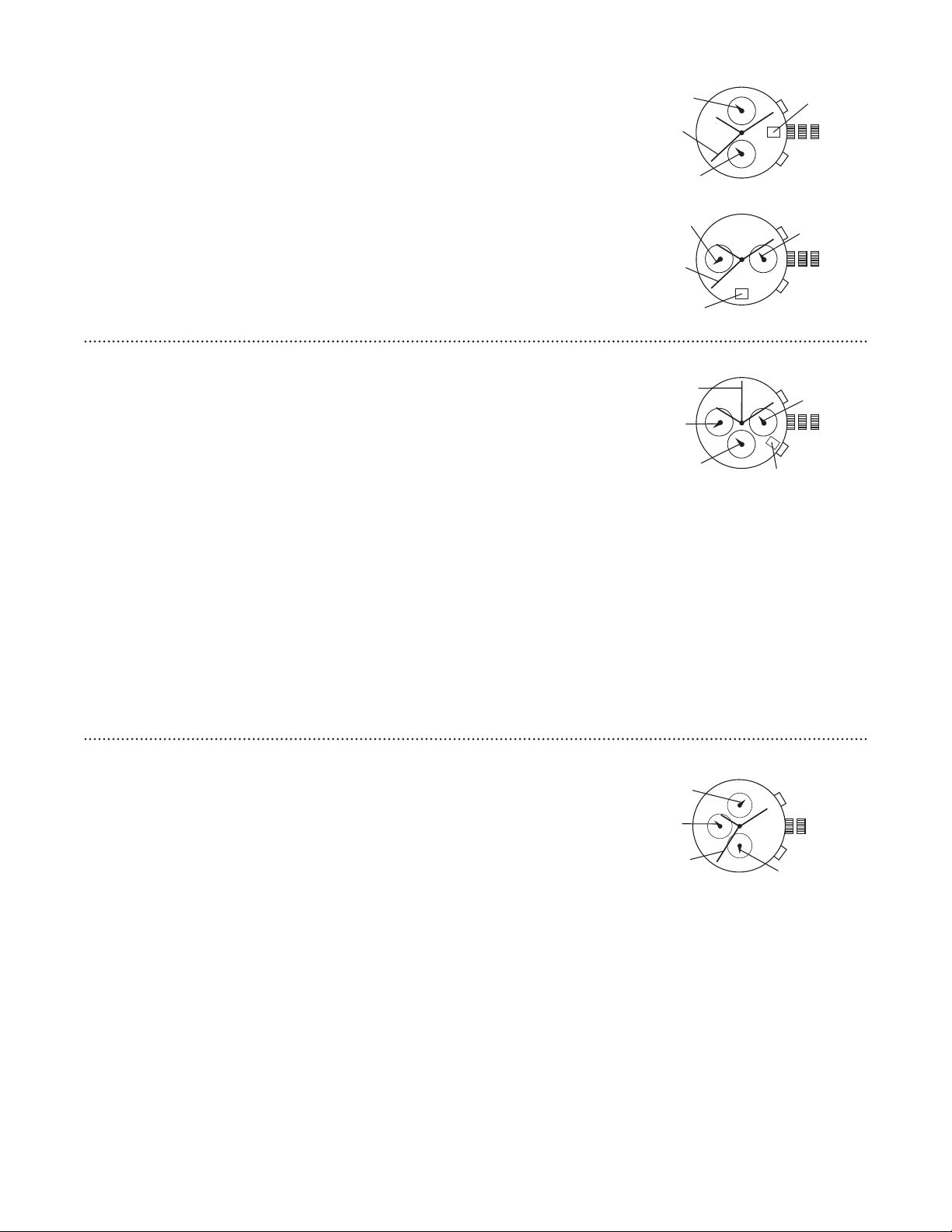
ChronographVDB
TimeandDateSetting
Beforesettingthetimemakesurethechronographsecondandminutehandsareatthepositionandthe
chronographisnotrunningSeeChronographOperationinstructionsbelow
Pullcrownouttoposition
Rotatecrownclockwiseuntilthepreviousday’sdateisdisplayedindatewindow
PullcrownouttopositionwhenthesecondhandisinthepositionSecondhandwillstop
Rotatecrownclockwiseuntilthecorrectdateisshowninthedatewindow
Continuetorotatecrowntosetcorrectam/pmtime
Returncrowntoposition
NOTEWhenthecrownininpositiondonotpressthepushersOtherwisethechronographhandswillmove
NOTEDonotsetdatebetweenPMandAMtoensureaccuracy
ChronographOperation
PressAtostart/stopthechronograph
PressBtoreset
SplitTime
PressBwhilethechronographisrunning
PressBagaintoreturntothechronograph
PressAtofinalizetiming
PressBtoreset
ChronographZeroReset
Ifforanyreasonthechronographhandsdonotreturnexactlytothezero()position
Pullcrownouttoposition
PressAtoresetthechronographsecondhandorpressBtoresetthechronographminutehandEachpressof
thepusherwilladvancethecorrespondinghandonemarkIfeitherpusherishelddownforoversecondsthe
correspondinghandwilladvancecontinuously
NOTEChronographminutehandmovessimultaneouslywithchronographsecondhand
Returncrowntopositionwhenchronographhandsareresettozero()
1 2 3
A
B
CHRONOGRAPH
SECONDHAND
CHRONOGRAPH
MINUTEHAND
DATE
ChronographS
SettingtheDate
Pullcrownouttoposition
Turncrownclockwisetoadvancethedatehand
Pushcrownbacktoposition
NOTEIfthedateissetbetweenthehoursofaroundPMandAMthedatemaynotchange
onthefollowingday
SettingtheTime
Pullcrownouttoposition
Turnthecrownclockwisetoadvancehourandminutehands
Pushcrownbacktoposition
Chronograph
PressAtostart/stopthechronograph
PressBtoresettozero
ChronographReset
Ifeithertheofthechronographhandsisnotatthezero()positionpullcrownouttoposition
PressAoncetosetthechronographsecondhandtothezeroposition
PressBoncetosetthechronograph/secondhandtothezeroposition
NOTEThechronographhandscanbeadvancedrapidlybycontinuouslypressingAorB
Whenbothhandsareinthezeropositionresettimeandreturncrowntoposition
1 2 3
A
B
CHRONOGRAPH
SECONDHAND
CHRONOGRAPH/
SECONDHAND
SECONDHAND
CHRONOGRAPH
MINUTEHAND
DATE
- 1 7 -
ChronographVK/VK
TimeandDateSetting
Pullcrownouttopositionandturnclockwisetosetdatetothepreviousday
PullcrownouttopositionandturnclockwiseuntilthepresentdateisdisplayedContinueturningcrown
tosetthecorrectAM/PMtime
NOTE-hourhand(VKmodelonly)movesinconjunctionwithminute/hourhandsandindicates
AM/PMtime
Returncrowntoposition
NOTEToensureaccuracydonotsetthedateandweekdaybetweenPMandAM
ChronographFunction
PressAtostart/stopthechronograph
PressBtoresettozero
NOTEAerhourofcontinuousrunningthechronographwillautomaticallystop
A
B
1 2 3
DATE
CHRONOGRAPH
MINUTEHAND
CHRONOGRAPH/
SECONDHAND
SECONDHAND
VK
A
B
1 2 3
-HOURHAND
DATE
CHRONOGRAPH
MINUTEHAND
CHRONOGRAPH/
SECONDHAND
VK
ChronographVK
TimeSetting
Pullcrownouttoposition
Turncrowntosetdesiredtime(makesureAM/PMissetcorrectly)
Returncrowntoposition
DateSetting
Pullcrownouttoposition
Turncrownclockwisetosetdate
Returncrowntoposition
NOTEDonotsetdatebetweenPMandAMotherwisedaymaynotchangeproperlyIfnecessary
firstchangethetimesetdateandthenresettocorrecttime
ChronographOperation
PressAtostart/stopchronograph
PressBtoreset
ResettingAfterBatteryChange
Pullcrownouttoposition
PressBforsecondsandthenrelease
Thesmallsecondhandshouldmoveatsecondintervalsforsecondsasademonstration
Returncrowntoposition
1 2 3
A
B
-HOURHAND
DATE
CHRONOGRAPHMINUTEHAND
CHRONOGRAPHSECONDHAND
SECONDHAND
ChronographStopwatchJS
TimeSetting
Pullcrownouttoposition
Turncrowntosetdesiredtime
Returncrowntoposition
UsingStopwatch
PressAtostart/stopstopwatchandcontrolsplittime
PressBtoresetstopwatch
NOTEThisstopwatchisabletomeasureanddisplaytimein/seconduptoamaximumofminutes
Stopwatchwillstopautomaticallyaerrunningcontinuouslyforminutes
ResettingStopwatch
Pullcrownouttoposition
PressAoncetosetchronographsecondhandtozeroposition
Oncehandshavereturnedtozeroresettodesiredtime
Returncrowntoposition
NOTEThisprocedureshouldonlybeperformedwhenchronographsecondhanddoesnottoreturntozeroposition
1 2
A
B
CHRONOGRAPHMINUTEHAND
SECONDHAND
CHRONOGRAPHSECONDHAND
-HOURHAND

- 1 8 -
Chronograph Stopwatch OS20 / FS00
Time Setting
1. Pull crown out to position 3. Chronograph second hand will return to “0.”
Do not return the crown to position 1 while the hands are returning to “0,” or else the position the hands
are at when this is done will be recognized as the new “0” position.
2. Turn crown to set the desired time.
3. Return the crown to position 1.
Date Setting
1. Pull crown out to position 2.
2. Turn crown counter-clockwise until the correct date is shown in the date window.
3. Return crown to position 1.
Chronograph Zero Reset
This procedure should be performed when the chronograph second hand does not return to the “0” position
after the chronograph has been reset.
1. Pull crown out to position 3.
2. Press A to set the chronograph second hand to the “0” position.
NOTE: The hands move quickly if the pushers are kept pressed.
3. Once the hand has been zeroed, reset the time and return the crown to position 1.
Do not return the crown to position 1 while the hands are returning to “0.” Doing so will cause the position of
the hands to be recognized as the new “0” position.
Chronograph Operation
This chronograph is able to measure and display time in 1/1 second up to maximum of 1 hour.
1. Press A to start/stop the chronograph.
2. Press B to reset the chronograph.
CHRONOGRAPH
MINUTEHAND
CHRONOGRAPH
SECONDHAND
SECONDHAND
-HOUR
HAND
B
A
123
CHRONOGRAPH
MINUTEHAND
CHRONOGRAPH
SECONDHAND
SECONDHAND
B
A
1 2 3
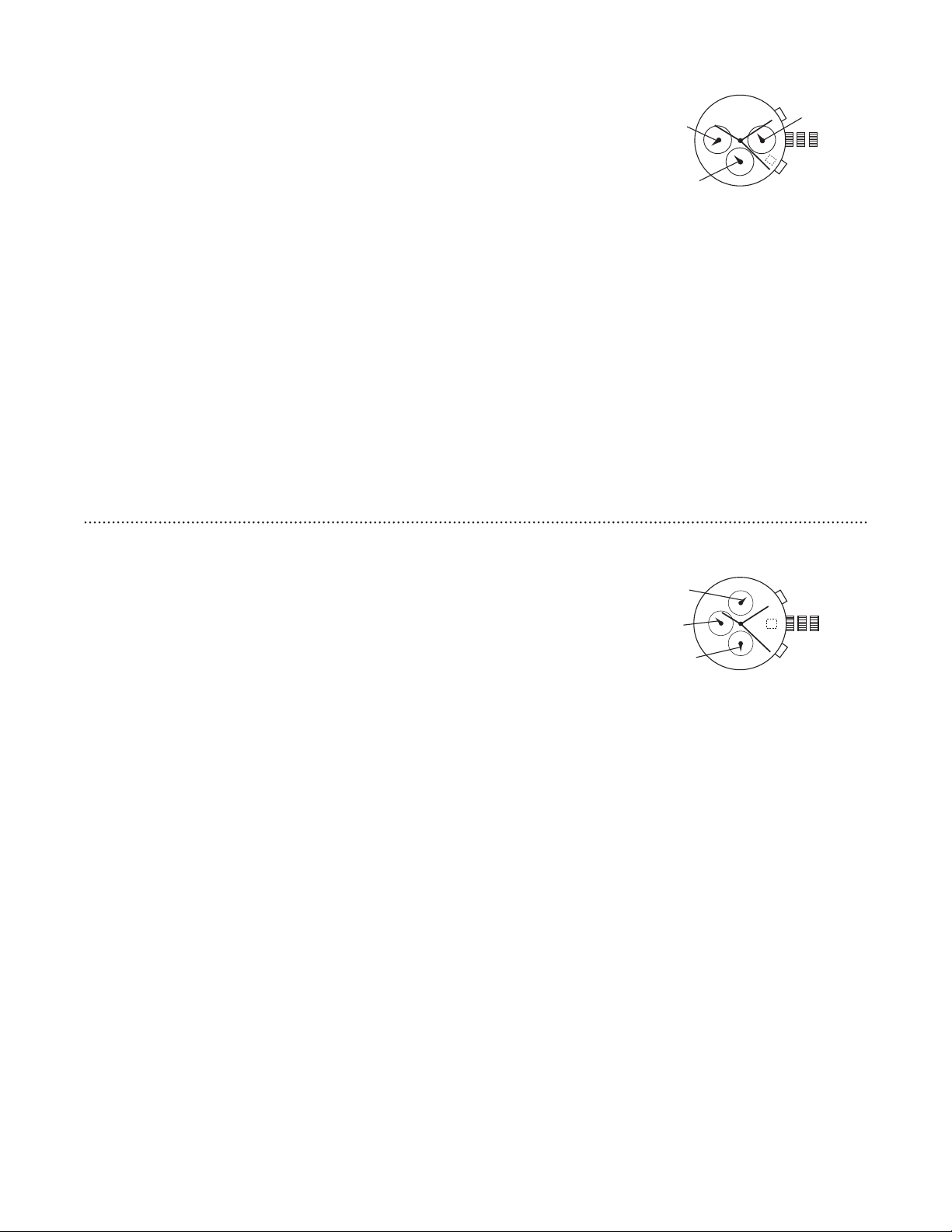
Chronograph Stopwatch OS10 (no date - OS30)
Time Setting
1. Pull crown out to position 3.
2. Turn crown to set the desired time.
3. Return crown to position 1.
Date Setting
1. Pull crown out to position 2.
2. Turn crown counter-clockwise until the correct date is shown in the date window.
3. Return crown to position 1.
Chronograph Operation
1. Press A to start/stop the chronograph.
2. Press B for reset.
Adjusting The Chronograph
1. Pull crown to position 3.
2. Press A to reset the second hand to “0.”
3. Press B to reset the chronograph minute and hour hands.
4. Reset the watch to the current time and return crown to position 1.
CHRONOGRAPH
HOURHAND
- 1 9 -
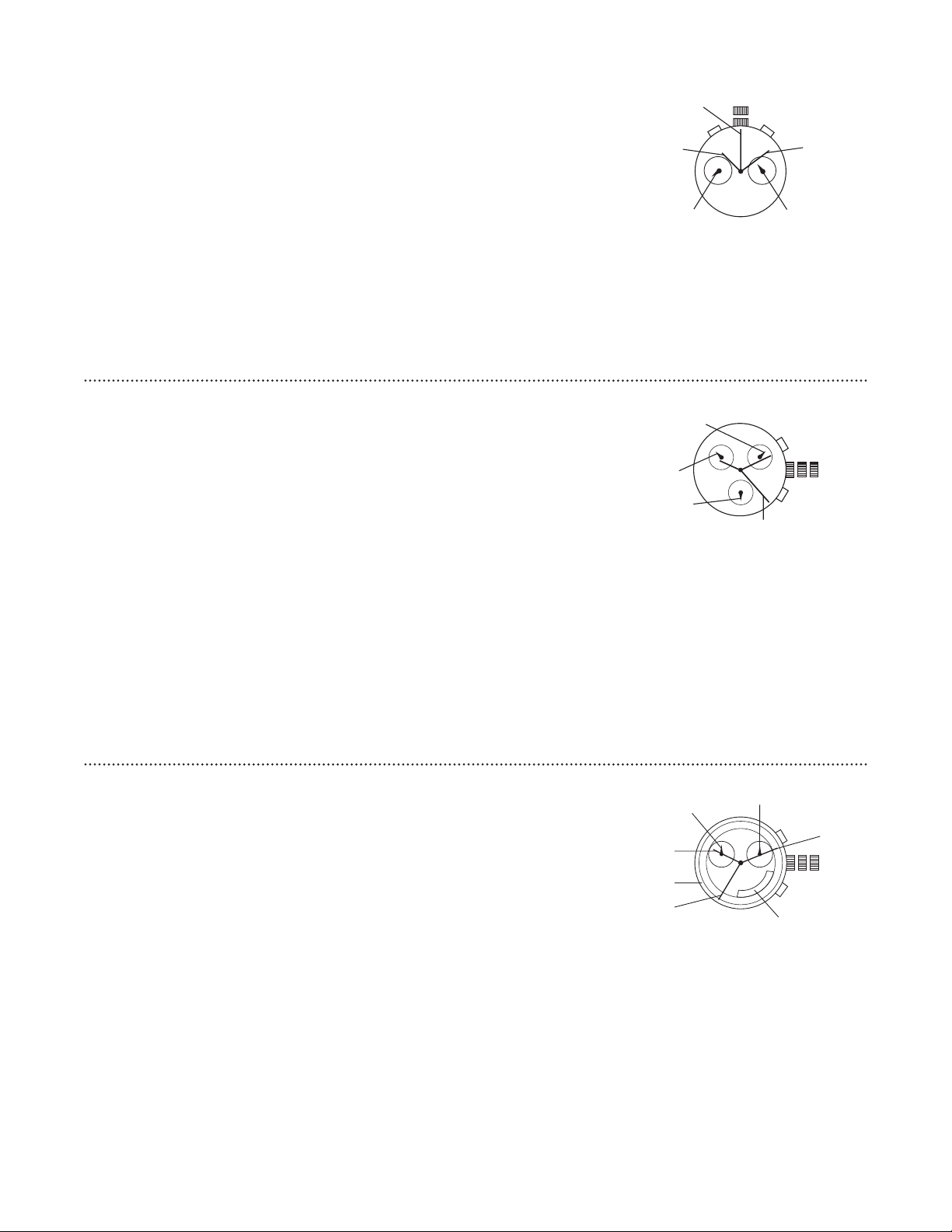
Chronograph Stopwatch VD55 (with date - VD57)
Time Setting
1. Pull crown out to position 3.
2. Set time by turning the crown clockwise.
3. Push back to position 1 to start the watch.
Using the Stopwatch
1. Press A to start/stop the stopwatch.
2. Press B to control the split time and reset.
Stopwatch Hand Adjustment
1. Pull crown out to position 3.
2. Press A to reset the stopwatch 1/10 second hand to the “0” position.
3. Press B to reset the second and minute hands. The hands only move clockwise.
4. With each press of A or B, the hands move one position. They move quickly if the buttons are kept pressed.
NOTE: If the stopwatch hands function improperly, pull out crown and press A and B at the same time for
over 2 seconds. When the buttons are released, the stopwatch second and 1/10 second hands will spin
around and return to “0.” This will indicate that the internal circuit has been reset.
Date Setting (On some models only)
1. Pull crown out to position 2.
2. Turn clockwise until desired date appears in window.
3. Push crown back to position 1.
B
A
1 2 3
CHRONOGRAPHMINUTE
HAND
CHRONOGRAPH
SECONDHAND
CHRONOGRAPH/
SECONDHAND
ChronographStopwatchVD(withdate-VD)
TimeandDateSetting
Beforesettingthetimemakesurethechronographisstoppedandsettozero()position
Pullcrownouttoposition
Turncrownclockwiseuntilthepreviousday’sdateisdisplayed
Pullcrownouttopositionwhenthesecondhandisattheposition
Turncrowntosettime
NOTE: 24-hour hand moves correspondingly with the hour and minute hands. When setting the time be sure to
check that the 24-hour hand is set properly.
Returncrowntoposition
NOTE: When the crown is in position 2, do not press the pushers. Otherwise the chronograph hands will move.
Chronograph
PressAtostart/stopthechronograph
PressBtoresettozero
SplitTime
PressBwhilethechronographisrunning
PressBagaintoreturntothechronograph
PressAtofinalizetiming
PressBtoreset
ChronographZeroReset
Ifeitherofthechronographhandsisnotatthezero()positionpullcrownouttoposition
PressAtomovehandsclockwisepressBtomovehandscounter-clockwise
Returncrowntoposition
A
B
1 2 3
-HOUR
HAND
CHRONOGRAPH
MINUTEHAND
CHRONOGRAPH
SECONDHAND
- 2 0 -
Chronograph Stopwatch YM91
Time and Date Setting
1. Pull crown out to position 2.
2. Turn the crown to set desired time.
3. Return crown to position 1.
Using the Stopwatch
PressAtostart/stopthechronograph
PressBtoreset
Stopwatch Hand Adjustment
1. Pull crown out to position 2.
2. Press left pusher for 2 seconds to turn stopwatch minute hand fully around and be able to set in correct
position. Press right pusher repeatedly to set it to “0” position.
3. Press left pusher for 2 seconds to fully turn stopwatch 1/5-second hand and be able to set in correct position.
Press right pusher repeatedly to set it to “0” position.
4. Return crown to position 1.
HOURHAND
CHRONOGRAPH
MINUTEHAND
MINUTECOUNTER
MINUTEHAND
DATE
CHRONOGRAPH
SECONDHAND
CHRONOGRAPH
/SECONDHAND
SECONDHAND
SECONDHAND
MINUTEHAND
DATE
COUNTDOWNAND
CHRONOGRAPH
MINUTEHAND
1
2
B
A
B
A
1 2 3
Chronograph Cal 8171/202
Time Setting
1. Pull crown out to position 3.
2. Turn crown to set the desired time.
3. Return crown to position 1.
Date Setting
1. Pull crown out to position 2.
2. Turn crown counter-clockwise until the correct date is shown in the date window.
3. Return crown to position 1.
Chronograph Operation
1. Press A to start/stop the chronograph.
2. Press B to use split time/reset the chronograph.
Calibration
1. To calibrate movement after battery exchange, pull crown out to position 2.
2. To reset minutes, press B.
3. To reset seconds, press A.
4. Return crown to position 1.
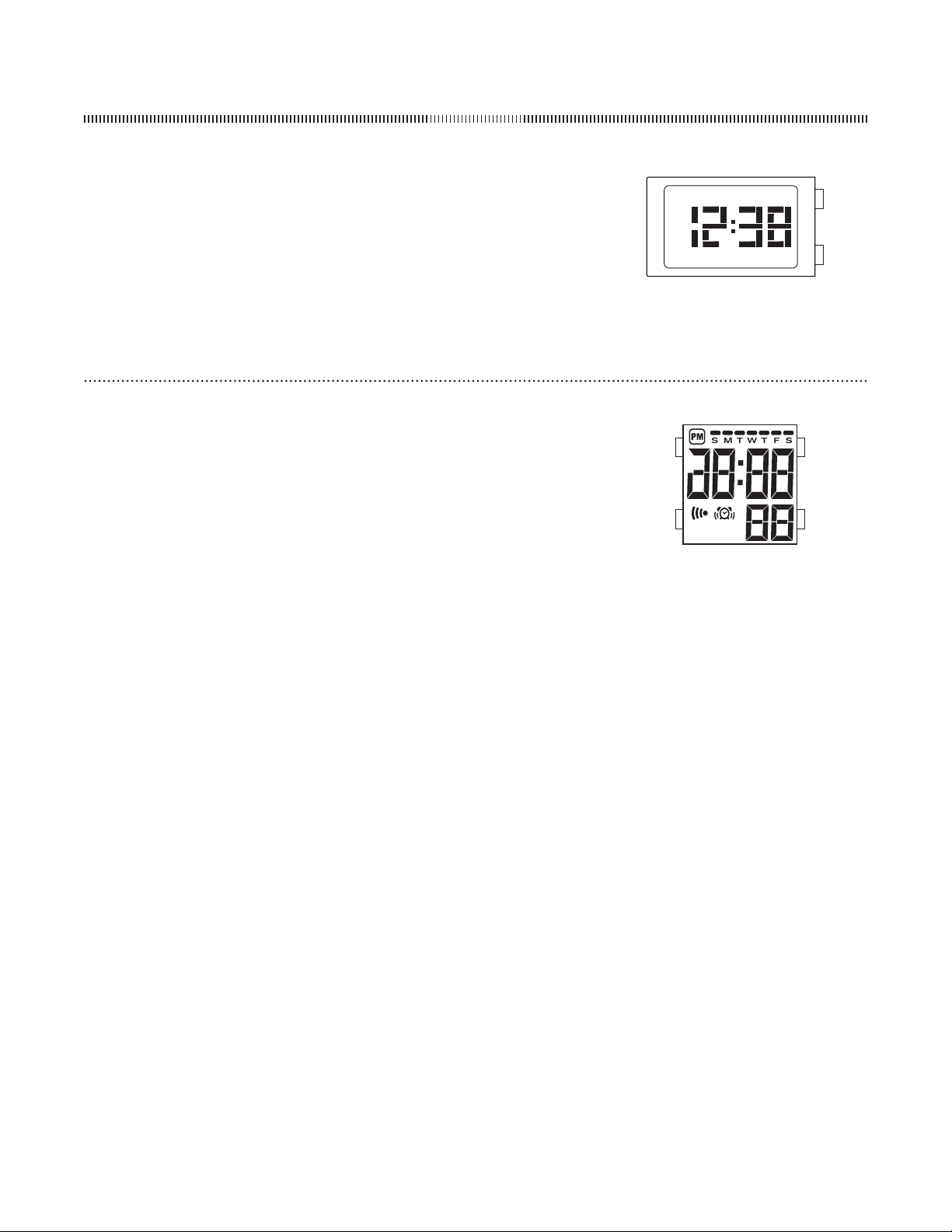
Chronograph 8270B
TimeSetting
Pullcrownouttoposition
Turnthecrowncounter-clockwiseandsetthedateforthepreviousday
Pullcrownouttoposition
Turnthecrowncounter-clockwisetoadvancethetimeandcontinueuntilthedaychangesto
thepresentday
Settocorrecttime
Returncrowntoposition
CountdownTimerandChronographSetting
PressandholdBforsecondBeepindicatessettingmode
PressBtoadjustthecountdownlengthminutemaximum
PressAtostartthecountdowntimerTheCentralHandcountsdowntheminutesandthe
hoursub-eyecountsdownthesecondsWhenthecountdowntimerreacheszerothe
chronographisactivated
PressAtostoporpausechronograph
PressBtoresetthecountdowntimerandchronograph
123
COUNTDOWNSECONDAND
CHRONOGRAPHHOURS
COUNTDOWN
INDICATORRING
HOURHAND
- 2 1 -
DigitalMLL-
NormalTimeDisplay
PressAtodisplaymonth/dateforseconds
PressAtwice(oronceifdateisdisplayed)todisplaysecondsPressAagaintoreturntoNormalTimeDisplay
TimeandDateSetting
FromNormalTimeDisplaypressBtwicetoentersettingmodemonthwillbedisplayed
PressAtoincreasevalue
PressBtosetandadvancetonextsetting
Settingsequenceismonthdatehourminute
PressBtoexitsettingmodepressAtoactivatewatch
NOTEColonwillflashbetweenhourandminutesinNormalTimeDisplaytoindicatewatchisactive
A
B
DigitalMLL-
NormalTimeDisplay
PressAtochangetochronographmode
PressBforEL
PressandholdCtodisplaydate
PressandholdCandthenpushDtotogglemonth/dateformat
PressandholdDtodisplayalarmtime
PressandholdDandthenpushAtotoggle/-hourformat
NOTEAtanypointinanysettingmodepressAtoexitsettingmode
TimeandCalendarSetting
InnormaltimedisplaypressandholdAforsecondsthenpressAagainTuesdayflagandsecondsdigits
willbeginflashing
PressDtosetsecondstozero
PressCtoadvancetominute
PressDtoadvancedigitpressandholdDforfastadvance
PressCtoadvancetonextsettingvalue
Settingsequenceissecondsminutehourmonthdateweekday
PressAtoexitsettingmode
AlarmMode
InnormaltimedisplaypressandholdDandthenpushCtotogglealarm/chimeon/off
AlarmwillsoundatpresettimeforsecondspressDtosilencealarm
TotestalarmpressandholdCandDsimultaneouslyAlarmwillbeep
AlarmSetting
InnormaltimedisplaypressandholdAforsecondsMondayflagandhourwillbeginflashing
PressDtoadvancedigitpressandholdDforfastadvance
PressCtosetandadvancetominute
PressDtoadvancedigitpressandholdDforfastadvance
PressAtoexitsettingmode
ChronographMode
PressAtochangetochronographmode
PressCtostart/stopthechronograph
PressDtoresettozero
SplitTime
PressDwhilethechronographisrunningforsplittime
PressDagaintoreturntochronograph
Repeatsteps&tomeasuremultiplesplittimes
PressCtofinalizetiming
PressDtoresettozero
D
A
C
B
DIGITAL

- 2 2 -
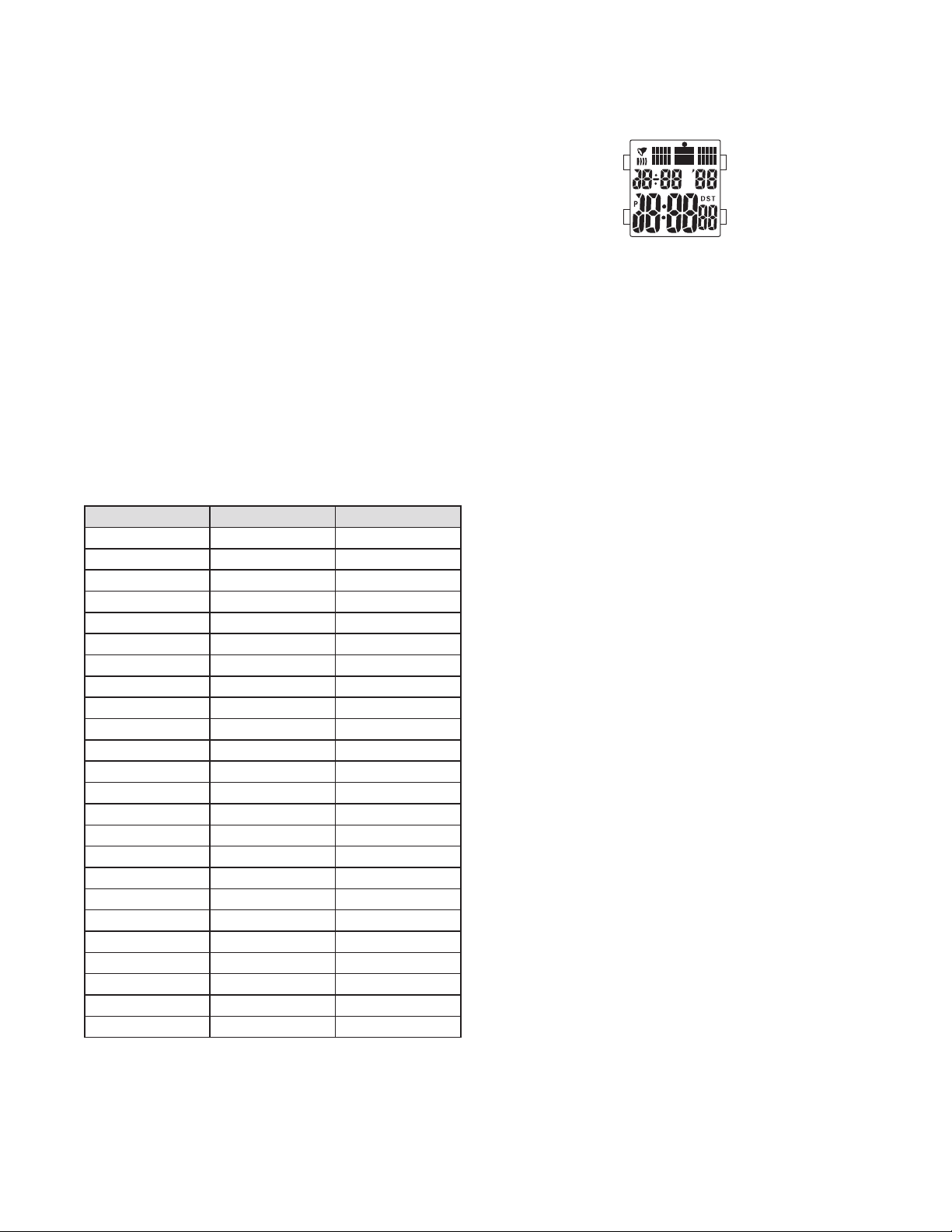
DigitalMLG-
NormalTimeDisplay
PressAtochangemodeModesequenceisnormaltimealarmtimezonetimerandchronograph
PressBforEL
NOTEAtanypointinanysettingmodepressDtoexitsettingmode
NOTEInanysettingmodeifnopusherisoperatedforminutesallchangeswillbesavedandthe
settingwillautomaticallyreturntodisplaymode
TimeandCalendarSetting
InnormaltimedisplaypressDsecondswillbeginflashing
PressCtosetsecondstozero
PressAtoadvancetohour
PressCtoadvancedigitpressandholdCforfastadvance
PressAtosetandadvancetonextsettingvalue
Settingsequenceissecondshourminuteyearmonthanddate
PressDtoexitsettingmode
NOTEWeekdayisautomaticallyupdateduponexitingsettingmode
NOTEAtanypointintime/calendarsettingmodepressBtotoggle/hourformat
AlarmMode
PressAtochangetoalarmmode
PressBtotogglealarm/chimeon/off
AlarmSetting
PressAtochangetoalarmmode
PressDtoentersettingmodehourwillbeginflashing
PressCtoadvancedigitpressandholdCforfastadvance
PressAtosetandadvancetonextsettingvalue
SettingsequenceishourminutesmonthdateFordailyalarmleavemonthanddatesetat“----”
PressDtoexitsettingmode
TimeZone
PressAtochangetotimezone
NOTEIntimezonedisplaynormaltimeisshowninthelowerportionofthedisplay
PressDtoentersettingmodehourwillbeginflashing
PressCtoadvancedigitpressandholdCforfastadvance
PressAtosetandadvancetominutes
PressCtoadvancedigitpressandholdCforfastadvance
PressDtoexitsettingmode
NOTEAtanypointintimezonesettingmodepressBtotoggle/hourformat
CountdownTimer
PressAtochangetotimermode
PressCtostart/stopthetimer
PressBtoclearthecountdownandresetthetimer
TimerSetting
PressDtoentersettingmodehourwillbeginflashing
PressCtoadvancedigitpressandholdCforfastadvance
PressAtosetandadvancetonextsettingvalue
Settingsequenceishourminutesseconds
PressDtoexitsettingmode
NOTEAtanypointinsettingmodepressBtotoggleautoreseton/offWhenautoresetisontimerwill
automaticallyre-startuponreachingzero
ChronographMode
PressAtochangetochronographmode
PressCtostart/stopthechronograph
PressBtoresettozero
SplitTime
PressBwhilethechronographisrunningforsplittime
PressBagaintoreturntochronograph
PressCtofinalizetiming
PressBtoresettozero
D
C
A
B
- 2 3 -
DigitalBJ
NormalTimeDisplay
PressAtochangemodeModesequenceisnormaltimeworldtimealarm
chronographrecallmodeandtimer
PressBforEL
PressCtotogglechimeon/off
PressDtotoggleDSTon/off
NOTEInanymodeifnopusher/buttonisoperatedforsecondsthesetting
willautomaticallyreturntonormaltimedisplay
NOTEAtanypointinanysettingmodepressBtoexitsettingmodeandreturnto
normaltimedisplay
TimeandCalendarSetting
InnormaltimedisplaypressandholdB/-hourformatwillbeginflashing
PressCorDtoincrease/decreasedigitspressandholdCorDforfast
increment/decrement
PressAtoadvancetonextsettingvalue
Settingsequenceis/-hourformatsecondsminuteshouryearmonth
datetimezone
PressBtoexitsettingmode
NOTEWeekdayisautomaticallyupdateduponexitingsettingmode
WorldTimeMode
PressAtochangetoworldtimemode
PressCtoscrolltonextcitypressandholdCforfastadvance
PressDtotoggleDSTon/offforthecurrentcitytimezone
CityCode City TimeDifference
MDY Midway -
HNL Honolulu -
ANC Anchorage -
LAX LosAngeles -
DEN Denver -
CHI Chicago -
NYC NewYork -
CCS Caracas -
RIO RioDeJaneiro -
-H -H -
-H -H -
LON London
PA R Paris
CAI Cairo
MOW Moscow
DXB Dubai
KHI Karachi
DAC Dacca
BKK Bangkok
HKG HongKong
TYO Tokyo
SYD Sydney
NOU Noumea
AKL Auckland
B
A
C
D
AlarmMode
PressAtochangetoalarmmode
PressCtoselectalarms-
PressDtotogglealarmon/off
NOTEAlarmwillsoundatpresenttimeforsecondsPressanypusherto
silencealarm
AlarmSetting
InalarmmodepressCtoselectalarmor
PressandholdBminuteswillbeginflashing
PressCorDtoincrease/decreasedigitspressandholdCorDforfast
increment/decrement
PressAtoadvancetonextsettingvalue
Settingsequenceisminuteshour
PressBtoexitsettingmode
ChronographMode
PressAtochangetochronographmode
PressCtostartthechronographpressDtostopthechronograph
PressDtoresettozero
LapTime
PressCwhilethechronographisrunningforlaptimeDisplaywillshowlaptime
forsecondsthenwillresumechronographtime
PressCagaintomeasuremultiplelaptimes(uptolaps)
PressDtofinalizetimingDisplaywillshowcurrentlaptimeforsecondsthen
totaltime
PressDagaintoresettozero
RecallMode
PressAtochangetorecallmodeTotaltimewillbedisplayed
NOTEIfnodatahasbeenstoredpressingAwilladvancechronographmodeto
timermode
PressCtoviewnextrecordpressDtoviewpreviousrecord(memorystoresupto
lapslap-lapandfinallap)
CountdownTimer
PressAtochangetotimermode
PressCtostart/stopthetimer
PressDtoresetthetimertopresetvalue
NOTEWhentimerreacheszeroorpresetvaluealarmwillsoundforseconds
Pressanykeytosilencealarm
TimerSetting
IntimermodepressandholdBsecondswillbeginflashing
PressCorDtoincrease/decreasedigitpressandholdCorDforfast
increment/decrement
PressAtoadvancetonextsettingvalue
Settingsequenceissecondsminuteshour
PressBtoexitsettingmode
- 2 4 -
TenHalfDigitDigitalFL/FL
NormalTimeDisplay
PressAtochangemode
PressBforEL
PressCtotoggle/hourformat
PressDtostopalarmsound
Time/CalendarSetting
FromnormaltimedisplaypressAthreetimestoentersettingmodeSecondswillbeginflashing
PressCtoresetsecondstozero
PressDtosetandadvancetonextsettingvalue
PressCtoincreasedigitpressandholdCforfastadvancePressDtoseteachsettingvalue
Settingsequenceissecondshourminutesmonthdatedayofweek
PressAtoexitsettingmode
AlarmSetting
PressAtochangetoalarmmode(AL)
PressandholdCforalarmsoundtesting
PressCtotogglealarm/chimeon/off
PressDtoentersettingmodehourwillbeginflashing
PressCtoadvancedigitpressandholdCforfastadvance
PressDtosethourandminutes
Settingwillautomaticallyexitsettingmodemodeaerminutesareset
ChronographMode
PressAtochangetochronographmode(ST)
PressCtostart/stopchronograph
PressDtoresetchronographwhenitisnotrunning
SplitTime
PressDwhilethechronographisrunning
PressDagaintoreturntothechronograph
PressCtofinalizetiming
PressDtoresettozero
A
B
D
C
DigitalFO-
NormalTimeDisplay
PressAtochangedisplayDisplaysequenceisnormaltimedateseconds
TimeandCalendarSetting
InnormaltimedisplaypressBtwicemonthwillbeginflashing
PressAtoincreasedigits
PressBtoadvancetonextsettingvalue
Settingsequenceismonthdatehourandminute
PressBtoexitsettingmode
NOTEAtanypointinsettingmodepressAtoexitsettingmodeandreturntonormaltimedisplay
B
A
ScrollingTic
TimeSetting
Pullcrownouttoposition
Turncrowntosetthedesiredtime
Returncrowntoposition
DisplayOptions
PressAtoalternatebetweendifferentdisplaychoices
Displayshowsthesecondsfrom“”to“”invariousdisplayoptions
1 2
A

- 2 5 -
LEDQFLFA
Hour/MinuteDisplay
PressAtotoggledisplayon/off
NOTEHour/MinuteDisplayisthedefaultdisplaywhenturningthedisplayon
PressBtotogglehour/minutedisplayandsecondsdisplay
SecondsDisplay
PressAorBtoreturntohour/minutedisplay
TimeSetting
InHour/MinuteDisplaypressandholdBtoentersettingmodehourwillflashonce
PressAtoincreasedigits
PressBtoadvancetominutes
PressAtoincreasedigits
PressandholdBtoexitsettingmodeHourandminuteswillflashonce
NOTEInsettingmodeifnopusher/buttonisoperatedforsecondsallchangeswillbesavedandthesetting
willautomaticallyreturntoHour/MinuteDisplaymode
B
A