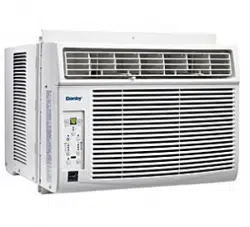
OWNER’S USE AND CARE GUIDE
GUIDE D’UTILISATION ET D'ENTRETIEN
DANBY PRODUCTS LIMITED, ONTARIO, CANADA N1H 6Z9
DANBY PRODUCTS INC., FINDLAY, OHIO, USA 45840
AIR CONDITIONER
CLIMATISEUR
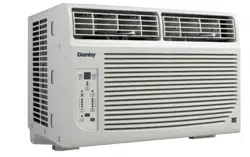
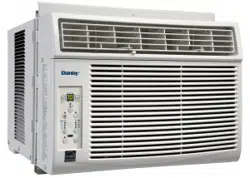
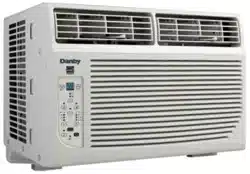
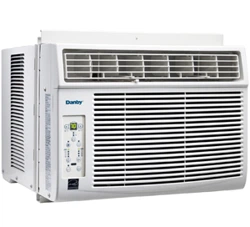
DAC080EUB6GDB
DAC100EUB4GDB
DAC120EUB6GDB
2015.12.03
DO NOT RETURN THIS UNIT TO THE RETAILER
WITHOUT FURTHER INSTRUCTIONS
Dear valued customer, we hope your Danby product purchase fulfills all
your requirements. Your satisfaction is our priority!
Please contact us at our toll free consumer service number for any inquiries
you may have about your new unit.
NE PAS RETOURNER CET APPAREIL CHEZ LE
DÉTAILLANT SANS CONSIGNES SUPPLÉMENTAIRES
Cher(ère) client(e) important(e), nous espérons que votre produit Danby
répond à tous vos besoins. Votre satisfaction est notre priorité!
Veuillez nous contacter au numéro gratuit de service après-vente, si
vous avez des questions quelconques à propos de votre nouvel appareil.
NO DEVUELVA ESTA UNIDAD A LA TIENDA SIN
INSTRUCCIONES ADICIONALES
Estimado cliente, esperamos que el producto Danby que ha comprado
satisfaga completamente sus necesidades. Su satisfacción
es nuestra prioridad!
Por favor, contáctenos gratuitamente a nuestro número de Servicio al
Cliente para cualquier pregunta que tenga sobre su nuevo electrodoméstico.
1-800-263-2629
(1-800-26-DANBY)
Danby 28.08.2014
TO OBTAIN WARRANTY SERVICE YOU MUST PROVIDE A VALID PROOF OF
PURCHASE. PLEASE STAPLE YOUR RECEIPT TO THIS PAGE FOR FUTURE
REFERENCE.
_____________________________________________________________________
POUR OBTENIR LE SERVICE SUR GARANTIE, VOUS DEVEZ FOURNIR UNE
PREUVE D’ACHAT VALIDE. VEUILLEZ AGRAFER VOTRE REÇU À CETTE PAGE
POUR RÉFÉRENCE FUTURE.
_____________________________________________________________________
This product is factory equipped with a power supply cord that has a three-pronged grounded plug. It must
be plugged into a mating grounding type receptacle in accordance with the National Electrical Code and
applicable local codes and ordinances. If the circuit does not have a grounding type receptacle, it is the
responsibility and obligation of the customer to exchange the existing receptacle in accordance with the
National Electrical Code and applicable local codes and ordinances. The third ground prong should not,
under any circumstances, be cut or removed. Never use the cord, the plug or the appliance when they show
any sign of damage. Do not use your appliance with an extension cord unless it has been checked and test-
ed by a qualifi ed electrician or electrical supplier.
IMPORTANT - GROUNDING METHOD
Ce produit arrive d’origine avec un cordon d’alimentation équipé d’une prise à trois fi ches. Il doit être
branché dans une prise avec une fi che de mise à la terre en conformité avec le Code national de l’électricité
et les codes et règles locaux applicables. Si la prise murale n’a pas de mise à la terre, il est de la
responsabilité et l’obligation du client de changer la prise existante pour la rendre conforme au Code
national de l’électricité et aux codes et règles locaux applicables. La fi che de mise à la terre ne doit pas, en
aucune circonstance, être coupée ou retirée. Si vous apercevez des signes de dommage, n’utilisez jamais le
cordon d’alimentation, la prise ou l’appareil. N’utilisez jamais l’appareil avec une rallonge sauf si elle a été
vérifi ée et testée par un électricien qualifi é ou un fournisseur de matériel électrique.
IMPORTANT - MÉTHODE POUR LA MISE À LA TERRE
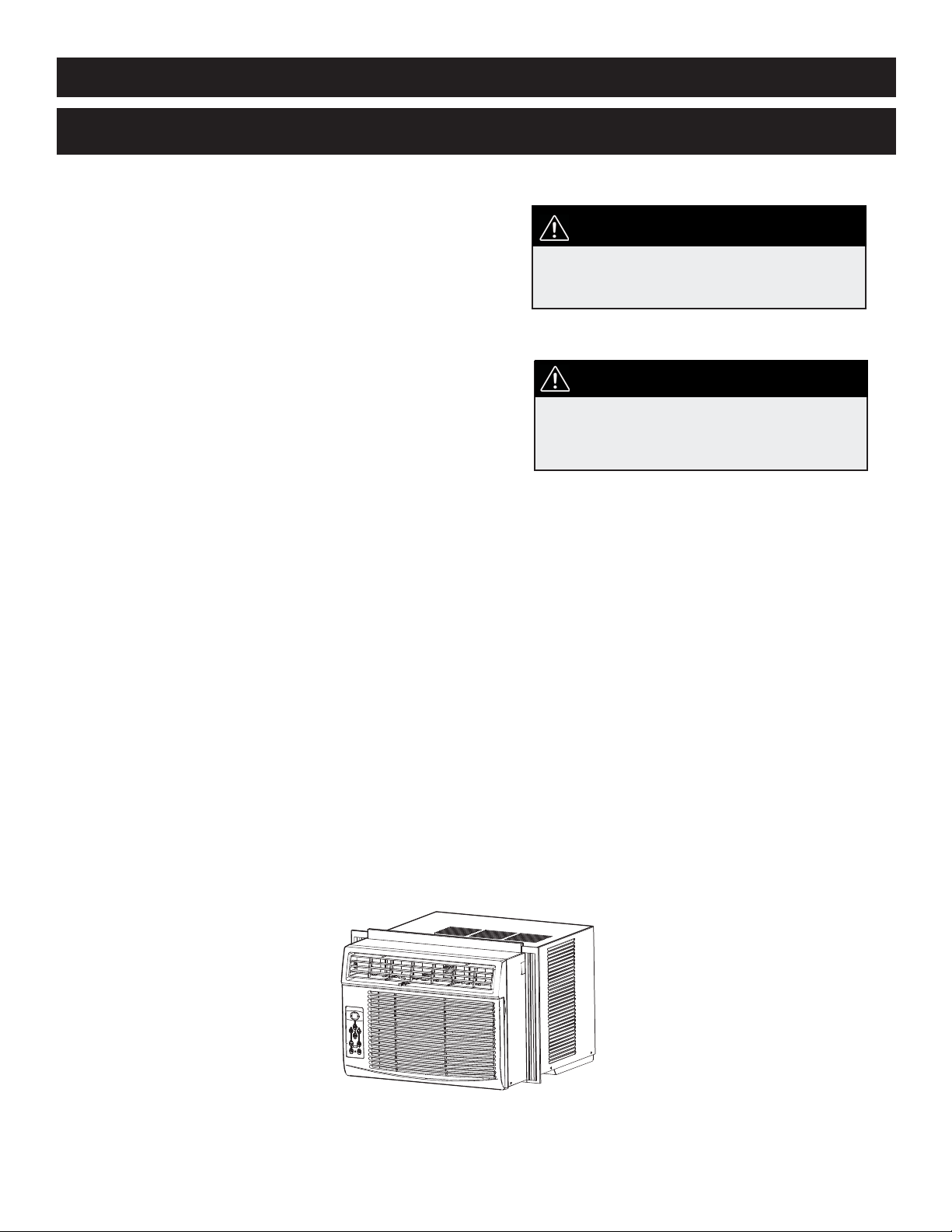
AIR CONDITIONER
Owner’s Use and Care Guide ................................1-18
• Welcome
• Important Safety Information
• Features
• Installation Instructions
• Operation Instructions
• Care and Maintenance
• Troubleshooting
• Warranty
CLIMATISEUR
Guide d’utilisation et d’entretien............................19-36
• Bienvenue
• Consignes de sécurité importantes
• Caractéristiques
• Consignes d’installation
• Consignes d’utilisation
• Soins et entretien
• Dépannage
• Garantie
CONTENTS
Model • Modèle
CAUTION:
Read and follow all safety rules and operating
instructions before fi rst use of this product.
AVERTISSEMENT :
Veuillez lire attentivement les consignes de
sécurité et les instructions d’utilisation avant
l’utilisation initiale de ce produit.
TABLE DES MATIÈRES
DAC080EUB6GDB / DAC100EUB4GDB / DAC120EUB6GDB
WELCOME
1
Welcome to the Danby family. We are proud of our quality products, and we believe in dependable service, like you will
fi nd in this Owner’s Use and Care Guide, and like you will receive from our friendly customer service department. Best of
all, you will experience these values each and every time you use your Danby appliance. That is important, because your
new appliance will be a part of your family for a long time.
For easy reference, we suggest you attach a copy of your sales slip/receipt to this page, along with the following
information, located on the manufacturer’s nameplate on the right side of the unit above the powercord.
Note the information below; you will need this information to obtain service under warranty.
To receive service, you must provide the original receipt.
NOTE: THIS UNIT IS NOT DESIGNED FOR “THROUGH-THE-WALL” INSTALLATION.
Model No:
Serial No:
Date Purchased:
NEED HELP?
Before you call for service, here are a few things you can do to
help us serve you better:
Read this Owner’s Use and Care Guide:
It contains instructions to help you use and maintain your
appliance properly.
If you received a damaged appliance:
Immediately contact the retailer (or builder) that sold you the
appliance.
Save time and money:
Check the Troubleshooting section at the end of the guide
before calling. This section helps you solve common problems
that may occur.
If you do need service, you can relax, knowing help is only a
phone call away.
WARNING
Improper connection of the grounding plug can result in risk of
fi re, electric shock and/or injury to persons associated with the
appliance. Check with a qualifi ed service representative if in doubt
that the appliance is properly grounded.
1-800-26-
(1-800-263-2629)
2
Important Safety Information
READ AND FOLLOW ALL SAFETY INSTRUCTIONS
FOR YOUR SAFETY: Read these instructions carefully before operating the unit.
1. All wiring must comply with local and national electrical codes and must be installed by a qualifi ed electrician. If you
have any questions regarding the following instructions, contact a qualifi ed electrician.
2. Check available power supply and resolve any wiring problems BEFORE installing and operating this unit.
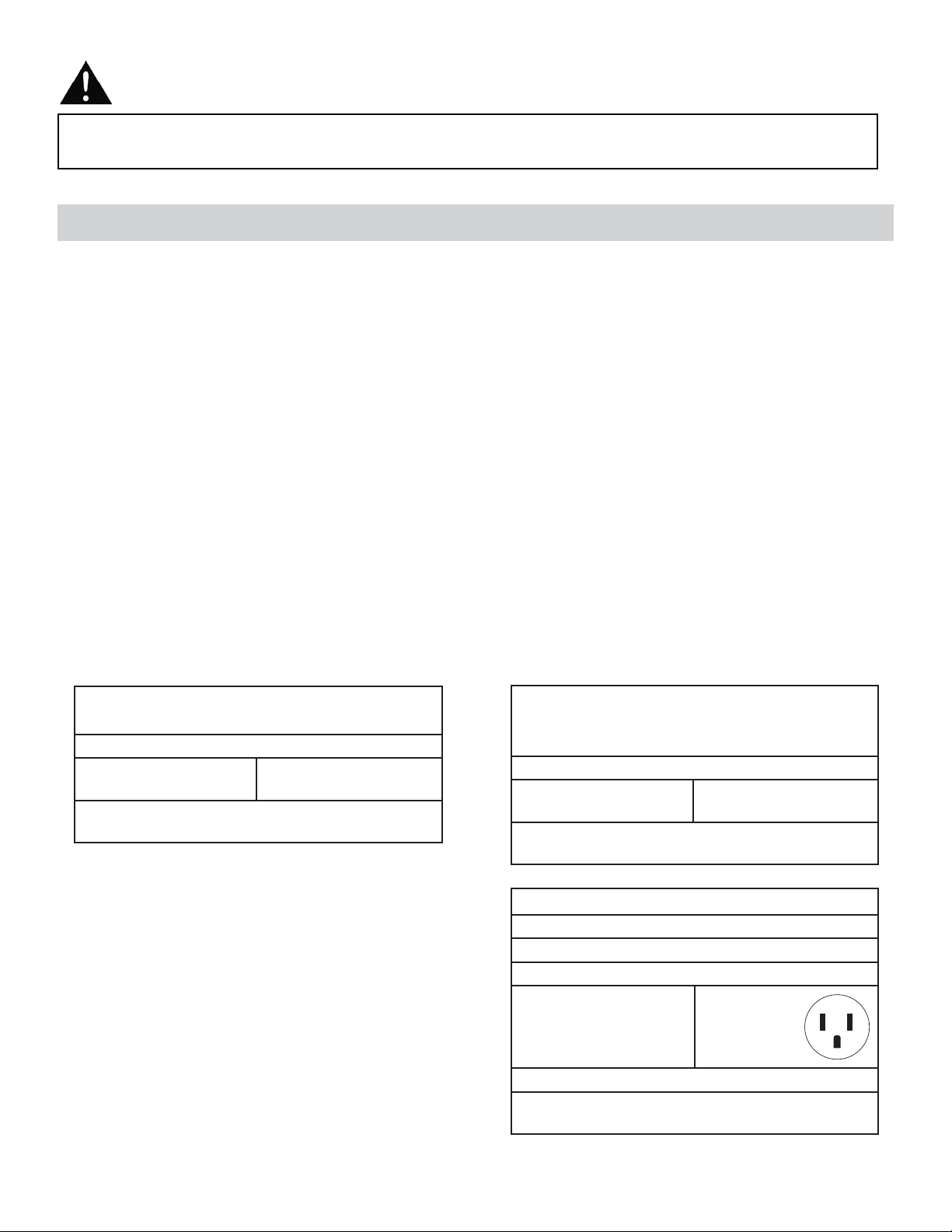
3. This 115V air conditioner uses 8.7 or less nameplate amps and may be used in any properly wired, general-purpose
household receptacle. See Table 1 for the specifi cations for the individual branch circuit.
4. For your safety and protection, this unit is grounded through the powercord plug when plugged into a matching wall
outlet. If you are not sure whether your wall outlet is properly grounded, please consult a qualifi ed electrician.
5. The wall outlet must match the 3-prong plug on the service cord supplied with the unit. DO NOT use plug adapters.
See Table 2 for receptacle and fuse information.
6. The rating plate on the unit contains electrical and other technical data. The rating plate is located on the right side of
the unit, above the powercord.
ELECTRICAL SPECIFICATIONS
TABLE 1
DAC100EUB4GDB
DAC120EUB6GDB
Suggested Individual Branch Circuit
Nameplate Amps
8.7 or less
*AWG Wire Size
14
AWG- American Wire Gauge
*Based on copper wire at 60°C temperature rating
TABLE 2
Receptacle and Fuse Types
Rated Volts 125
Amps 15
Wall Outlet
Fuse Size 15
Time Delay Fuse Plug Type
(or Circuit Breaker)
TABLE 1
DAC080EUB6GDB
Suggested Individual Branch Circuit
Nameplate Amps
5.9
*AWG Wire Size
16
AWG- American Wire Gauge
*Based on copper wire at 60°C temperature rating
FEATURES
Your appliance is designed to be highly effi cient in energy savings. Follow these recommendations for greater effi -
ciency.
1. Select a thermostat setting that suits your comfort needs and leave at that chosen setting.
2. The air fi lter is very effi cient in removing airborne particles. Keep the air fi lter clean at all times (usually cleaned every
2 weeks depending on indoor air quality).
3. Use drapes, curtains or shades to keep direct sunlight from penetrating and heating the room, but do not allow drapes
or curtains to obstruct the air fl ow around the unit.
4. Start your air conditioner before the outdoor air becomes hot, to avoid an initial period of discomfort while the unit is
cooling the room.
Important Safety Information
READ AND FOLLOW ALL SAFETY INSTRUCTIONS
FOR YOUR SAFETY: Read these instructions carefully before operating the unit.
ENERGY SAVING TIPS
3
5. When outdoor temperatures are cool enough, use the FAN MODE only, on HIGH, MED., or LOW setting. This
circulates indoor air, providing some cooling comfort, and utilizes less electricity than operating on a cooling setting.
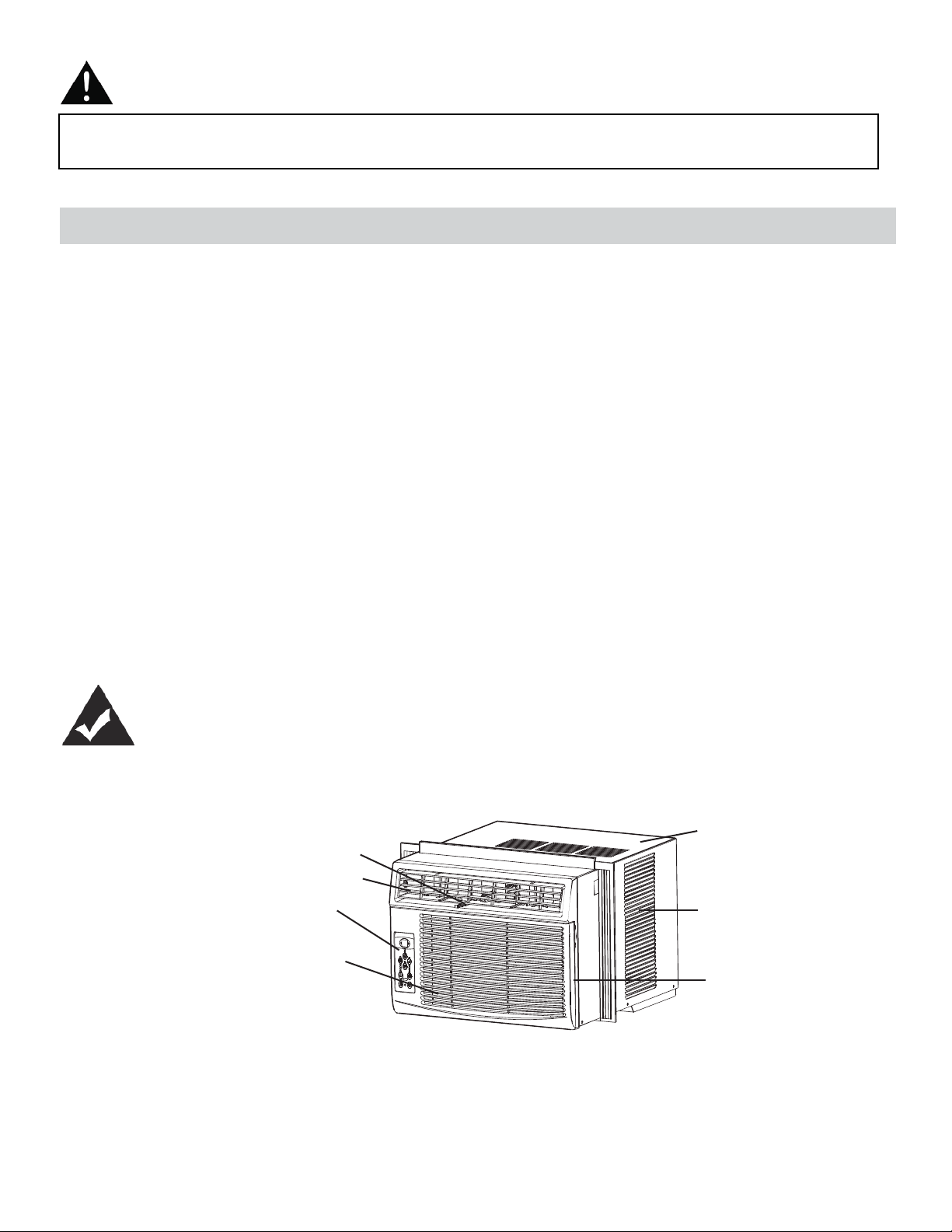
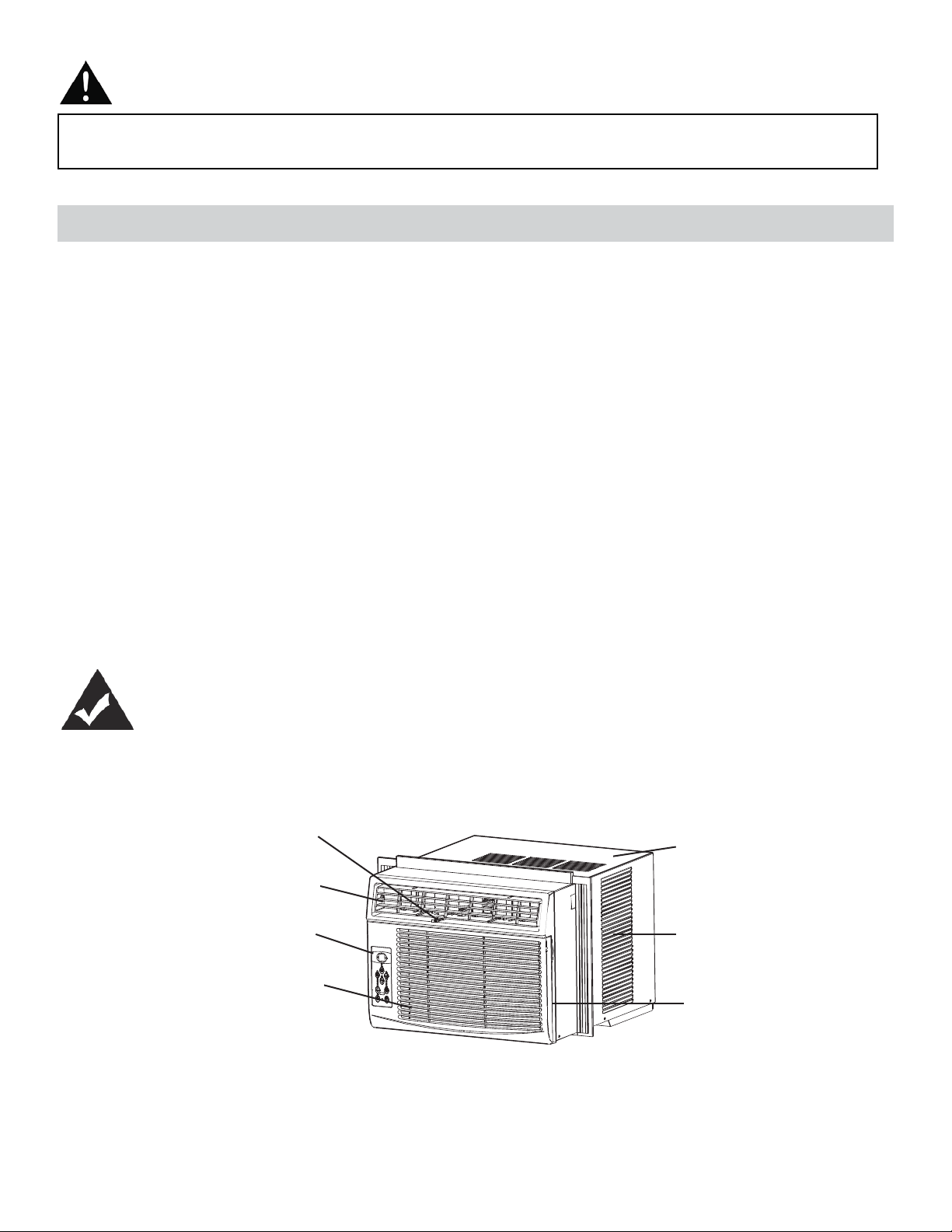
Air Filte
r
Exterior
Air Inlet
Cabinet
Interior Air Inlet
Control Panel
available in some models
only)
*Fresh Air Ventilation Switch
Interior Air Outlet
(open for Fan only operation,
*Pushed in, means the vent is closed.
Pulled out, means the vent is open.
INSTALLATION INSTRUCTIONS
TOOLS NEEDED FOR INSTALLATION:
• Screwdrivers: Phillips and fl at head.
• Power Drill: 1/8in. (3.2mm) diameter drill bit
• Pencil
• Measuring Tape
• Scissors
• Carpenter’s Level
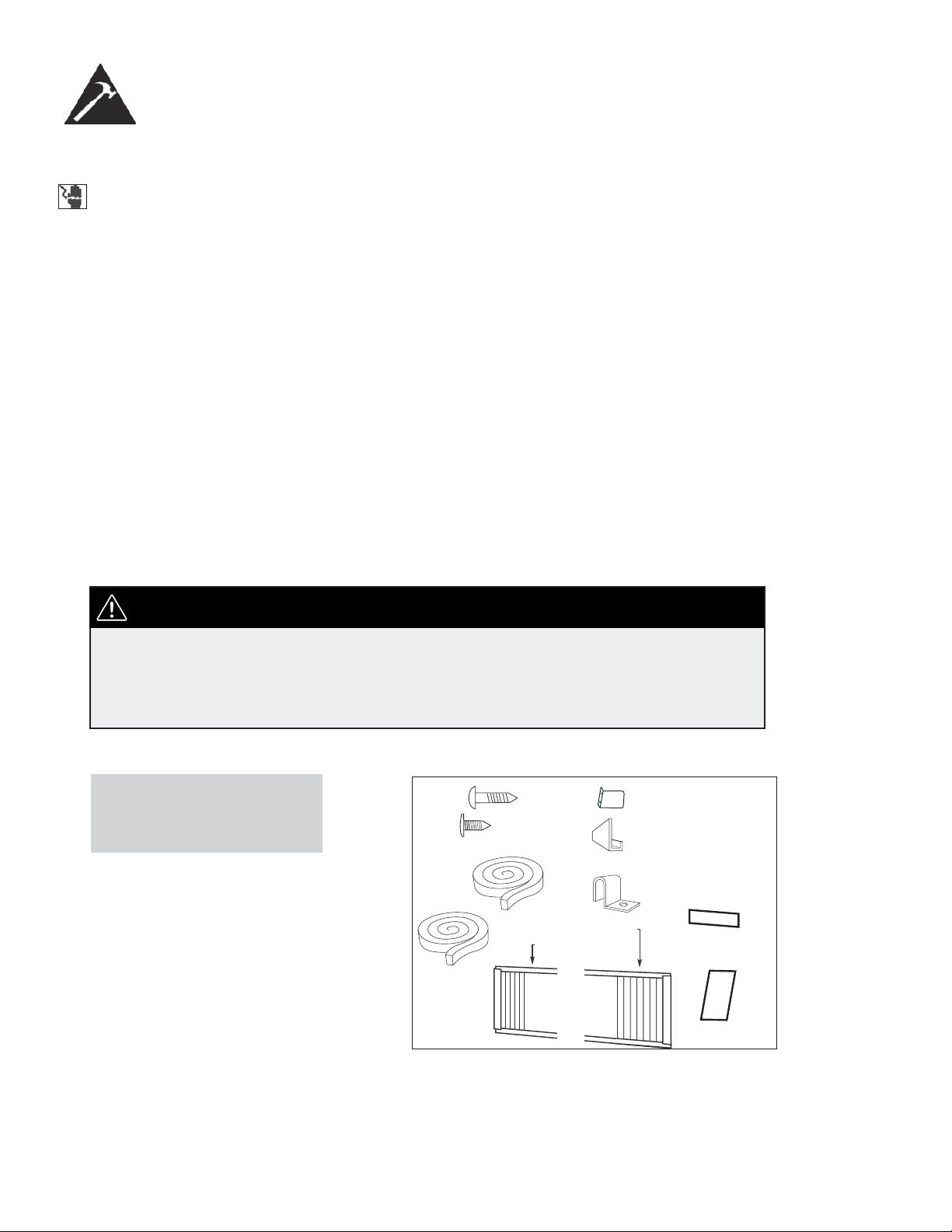
NOTE: Save the shipping carton and packing materials for future storage or transportation. From
the carton, remove the plastic bag containing the installation hardware kit necessary for the in-
stallation of your air conditioner. Please check the contents of the hardware kit against the corre-
sponding model check list, prior to installation of the unit. See Fig. 1.
ELECTRIC SHOCK HAZARD
To avoid the possibility of personal
injury, disconnect power to the unit
before installing or servicing.
NOTE: Your Room Air Conditioner is designed for easy
installation in a single or double-hung window. This unit
is NOTdesigned for vertical (slider type) windows and/or
through-the-wall applications.
Because the compressor is located on the controls side of the unit (left side), this side
will be heavier and more awkward to manipulate. Inadequate support on the control side
of the unit can result in personal injury and damage to your unit and property. Therefore,
it is recommended that you have someone assist you during the installation of this unit.
CAUTION
INSTALLATION
HARDWARE
1/2in. (13 mm)
screws (7)
Safety Lock (1)
3/8in. (9.5mm) screws
(4) *Factory installed
on some models
“L” Shaped
mounting
bracket (1)
* Factory installed
on some models
Sash bracket (2)
Adhesive
Foam Seal(1)
Side Curtain LH (1)
Side Curtain RH (1)
Regular
Foam Seal(1)
Foam insert
2 pieces
Weather-stripping
(5)
Fig. 1
4
1. This room air conditioner is designed to fi t easily into a single or double hung window. However, since window designs
vary, it may be necessary to make some modifi cations for safe, proper installation.
2. Make sure window and frame are structurally sound and free from dry and rotted wood.
3. For maximum effi ciency, install the air conditioner on a side of the house or building which favours more shade than
sunlight. If the unit is in direct sunlight, it is advisable to provide an awning over the unit.
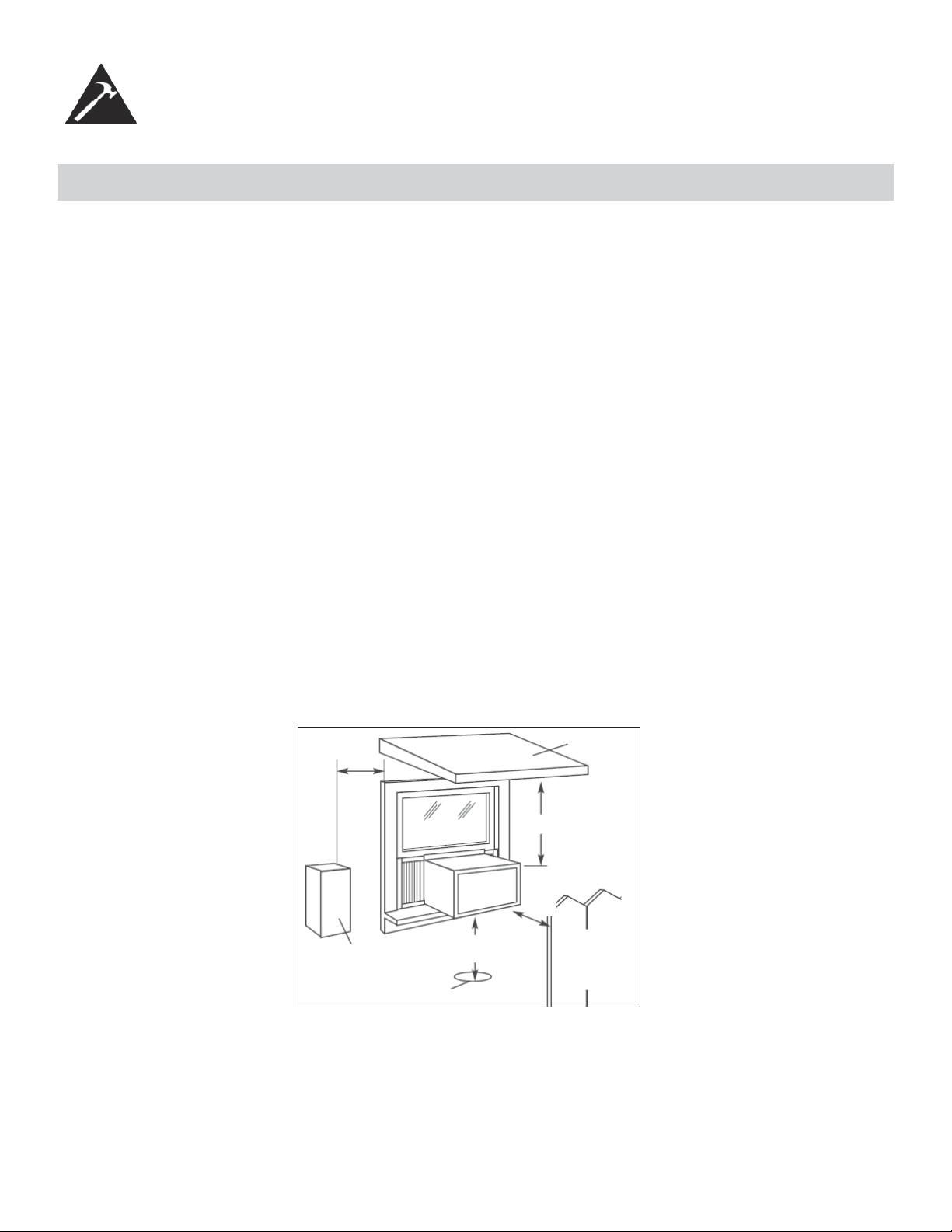
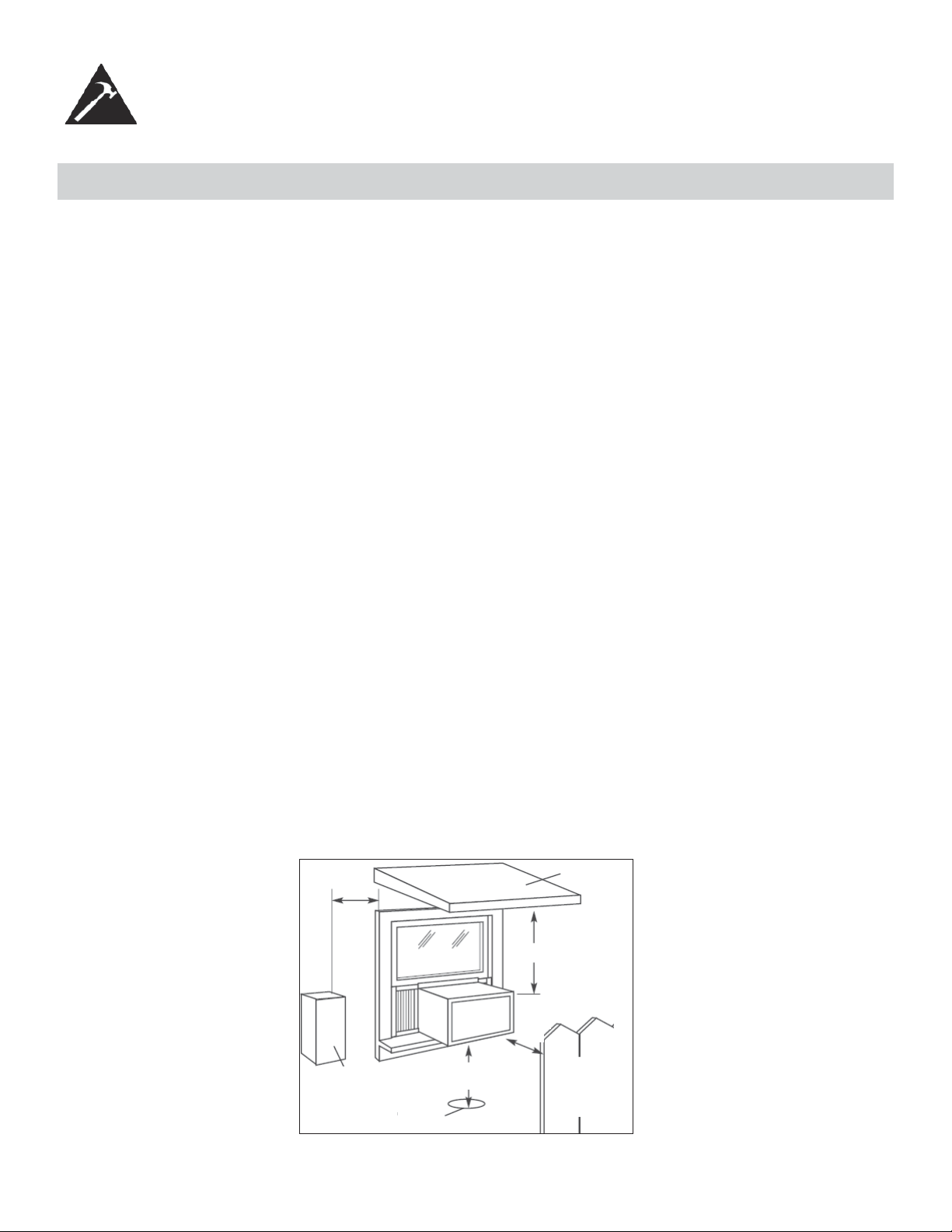
4. Provide suffi cient clearance around the cabinet to allow for ample air circulation through the unit (See Fig. 2). The
rear of the unit should be outdoors. It should not be in a garage, or inside a building. Keep unit as far away as possi-
ble from obstacles/obstructions and at least 30 in. (76 cm) above the fl oor or ground. Curtains and other objects within
the room should be prevented from blocking the air fl ow.
5. Be certain that the proper electrical outlet is within reach of the installation. Use only a single outlet circuit rated at 15
amps. All wiring should be in accordance with local and national electrical codes.
6. DO NOT install unit where leakage of combustible gas is suspected. Your air conditioner may fail to operate in air
containing oils (including machine oils), sulfi de gas, near hot springs, etc.
NOTE: Your unit is designed to evaporate condensation under normal conditions. However, under extreme humidity con-
ditions, excess condensation may cause basepan to overfl ow to the outside. The unit should be installed where conden-
sation run-off cannot drip on pedestrians or neighbouring properties.
NOTE: It is normal for your unit to drip a small amount of water, especially on excessively humid days.
5
INSTALLATION INSTRUCTIONS
LOCATION
Awning
Fence,
wall, or
other
obstacle
Ground
Side
Obstruction
20 in.
(50.8 cm)
Min
30 in. (76.2 cm)
Min
Min
12 in. (30.5 cm) Min
20 in.
(50.8 cm)
Fig. 2
6
INSTALLATION INSTRUCTIONS
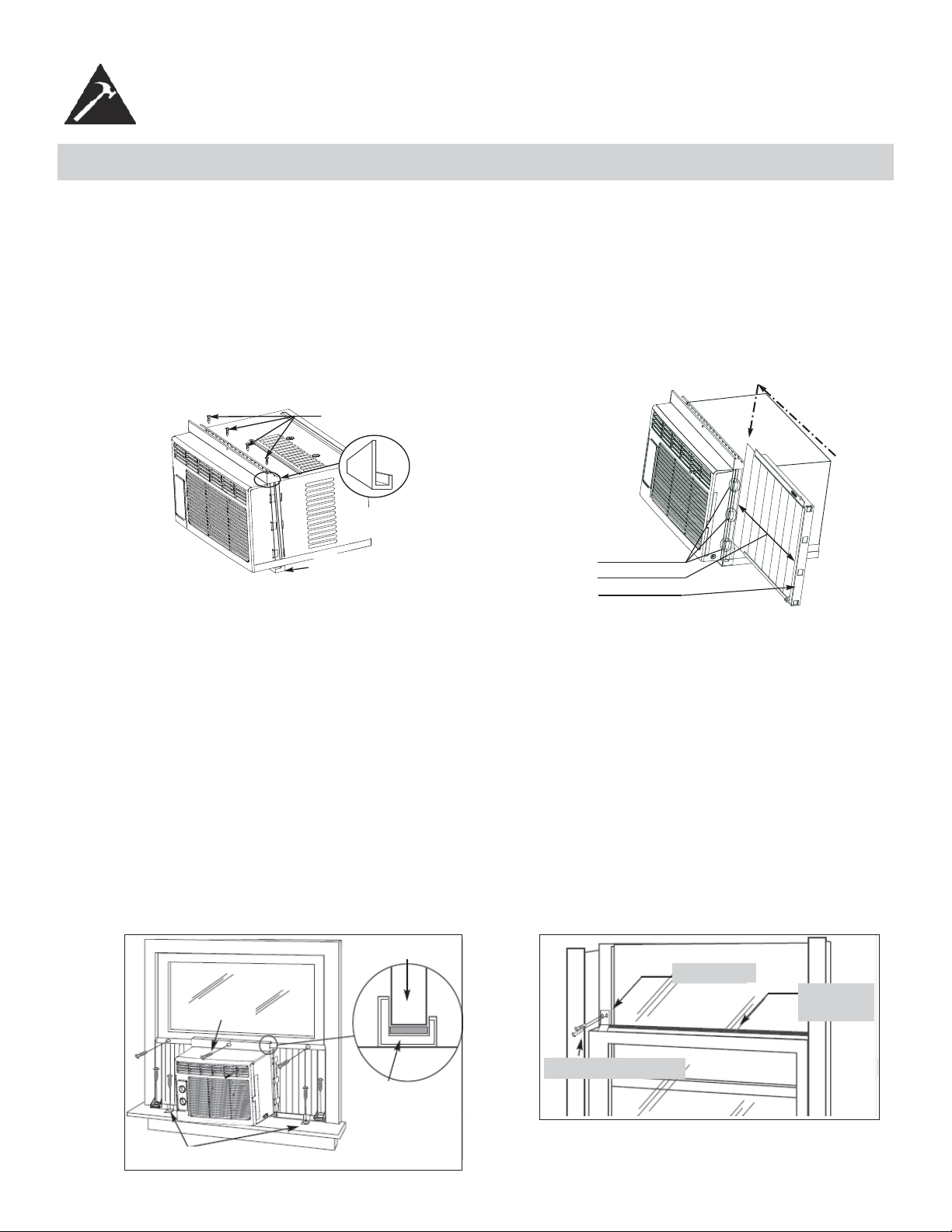
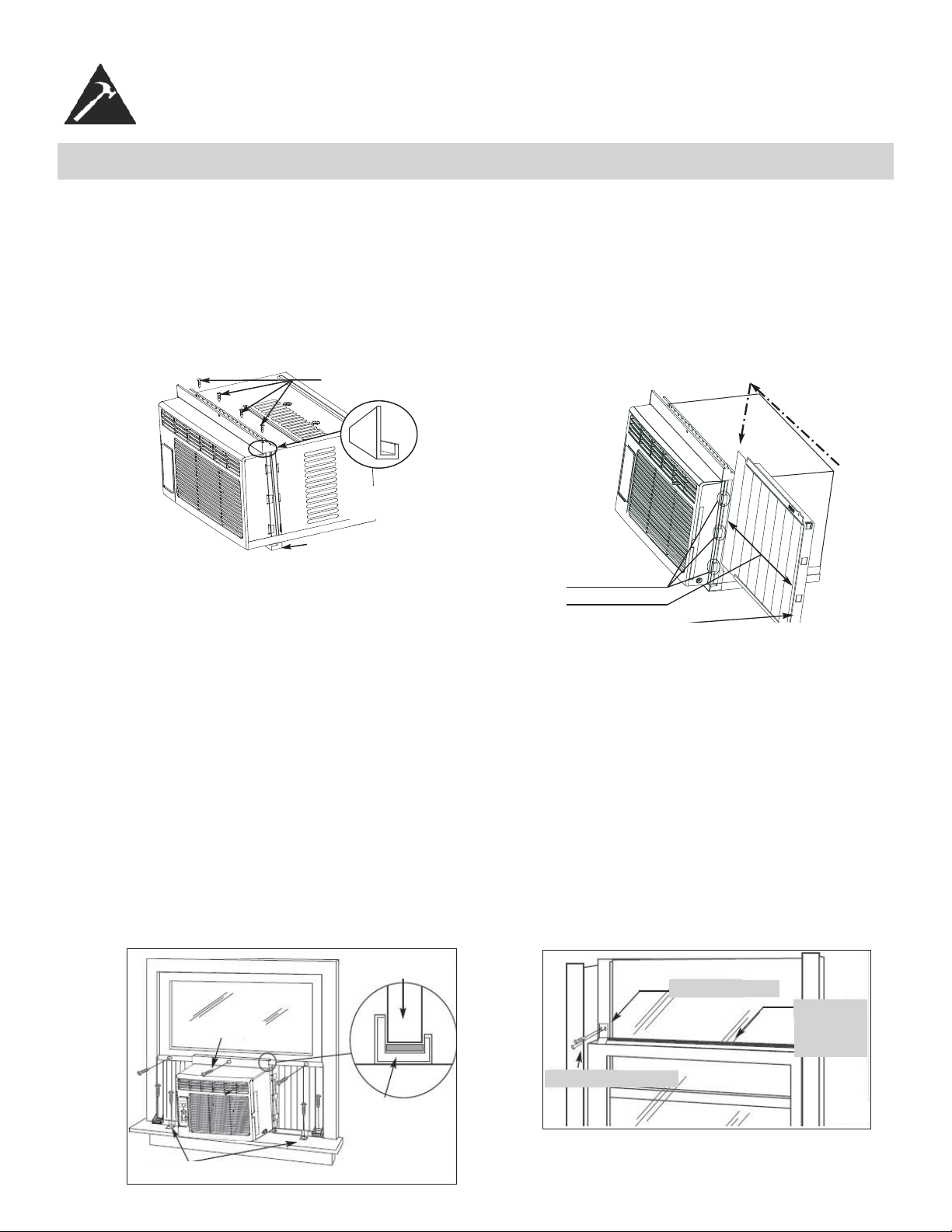
1. Assembly of the upper channel to the cabinet (factory installed on some units).
• “L” Shaped Top Channel: install the “L” shaped channel to the top of the cabinet as shown in Fig. 3, using four (4)
3/8 in. (9.5 mm) screws.
2. Assembly of the side curtains to the cabinet.
• Extend the shutter from the shutter frame and slide it into the shutter tabs on the side channel of the air conditioner,
as shown in Fig. 4.
• Slide the shutters into the top (“L” shaped) and bottom (“U” shaped) channels. The shutters are identifi ed (on frame)
as left and right.
3/8 in. (9.5 mm)
“L” shaped mounting
bracket
“U” shaped Channel
(Factory Installed)
Fig. 3
Slide down into tabs
Shutter tabs
Shutter
Shutter frame
Fig. 4
3. Completing the installation.
• Cut the foam (non adhesive) sealing strip to fi t the area of the window sill that the air conditioner will rest on.
• Carefully place the air conditioner into the window with the “L” shaped mounting bracket (on top) positioned in front
of the upper window sash. The bottom of the cabinet should be positioned on the “recessed” portion of the window
frame. Pull the window down until it rests just behind the front fl ange of the (top) “L” shaped mounting bracket (See
Fig. 5).
• Expand the shutter frames (fully) on each side and secure the top of the frames to the window sash using one 1/2 in.
(13 mm) screw on each side and one in the “L” shaped mounting bracket (Fig. 5).
• Secure the shutter clamp on each side of the lower part of the shutter, and secure to window sill using one 1/2 in.
(13 mm) screw on each side (Fig. 5).
• Place the second foam sealing strip to fi t the opening between the inside and outside windows, then attach the safety
lock to the outside window frame using one 1/2 in. (13 mm) screw (See Fig. 6).
PLEASE NOTE: Window applications come in a variety of different styles. Therefore, it may be necessary to modify your
particular installation.
Window sash
“L” Shaped
Mounting
Bracket
Shutter clamps
1/2 in. (13mm) screws
Safety Lock
1/2 in. (13 mm) screw
Foam Seal
(adhesive)
Fig. 6Fig. 5
ASSEMBLY AND INSTALLATION
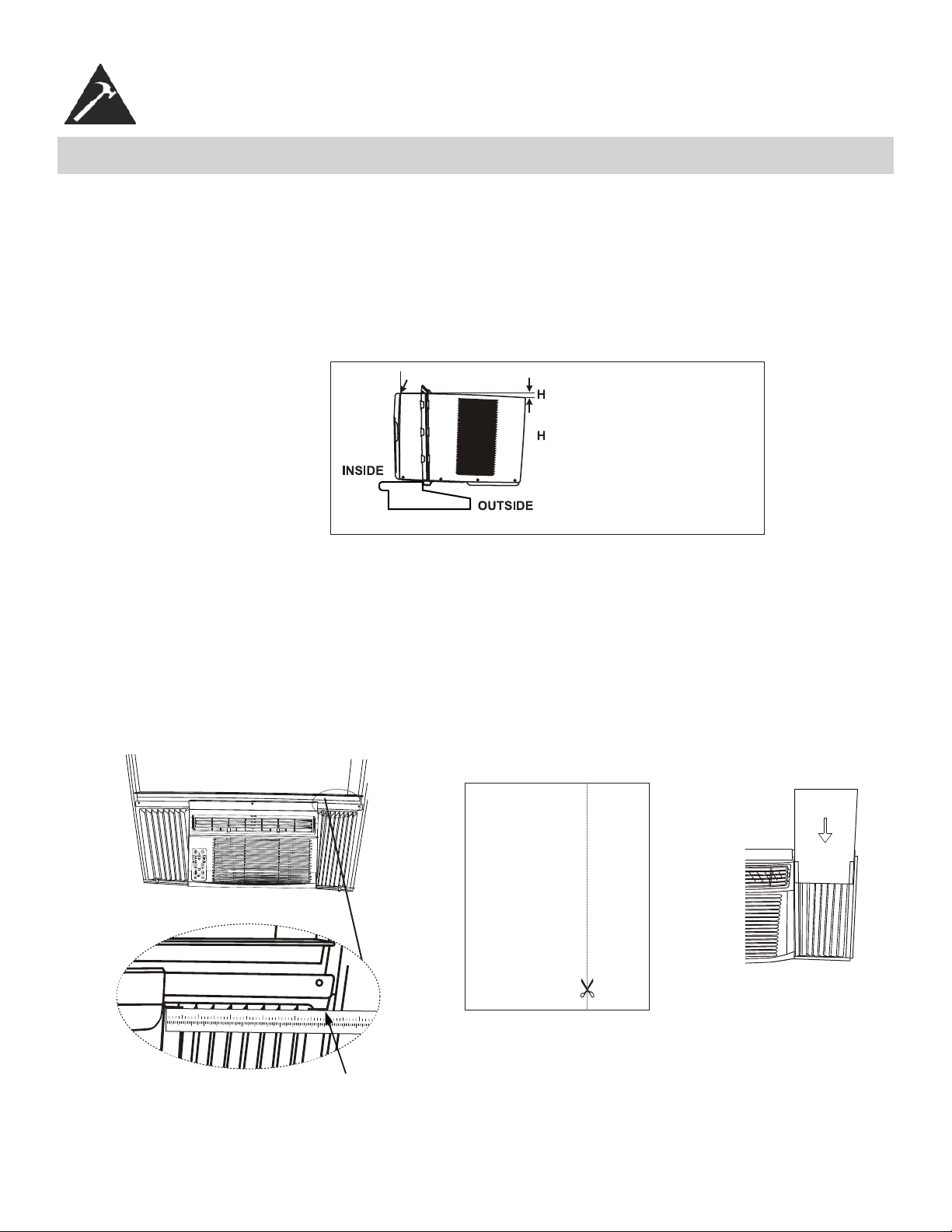
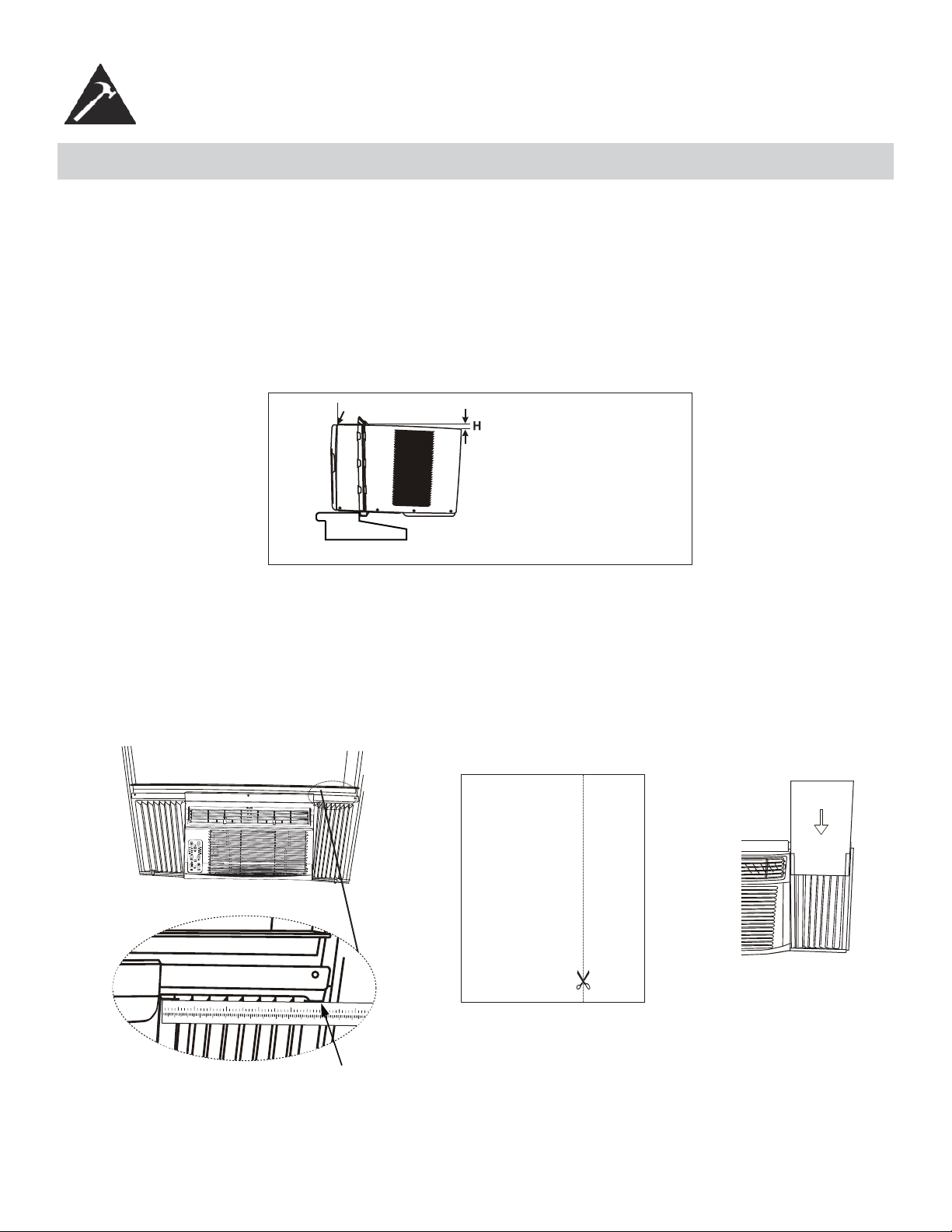
Check that the air conditioner is tilted downwards to the outside, about 3° to 4°, as shown in Fig. 7. After proper installa-
tion, condensed water should not drain from the overfl ow drain hole during normal use. If you notice water leaking out,
check the angle of tilt, and make any necessary adjustments. However, on a very humid day, water leakage can occur –
this is normal.
Note: To achieve 3° to 4°, you must measure the H, see fi gure 7.
Measure the tilt angle frThe distance H should be approximately 3/4 in. to 1 in. (19 mm - 2.5 cm) for DAC080EUB6GDB.
The distance H should be approximately 1 in. to 1 3/8 in. (2.5 cm - 3.5 cm) for DAC100EUB4GDB and DAC120EUB-
6GDB.
ASSEMBLY AND INSTALLATION (cont’d)
Fig. 7
Measure the tilt angle from the cabinet’s edge
WINDOW
: approximately 3/4 in. (19 mm) to
1 in. (2.5 cm) for
: approximately 1 in. (2.5 cm) to
1 3/8 in. (3.5 cm) for
INSTALLATION INSTRUCTIONS
DAC080EUB6GDB
DAC100EUB4GDB
DAC120EUB6GDB
4. Installing the Energy Effi cient Foam Insert
• After the unit is installed in the window, measure the width of the side curtain.
• If necessary, cut the foam insert down to the width of the side curtain.
• Slide the foam insert into the side curtain.
• Repeat for the other side. (See below)
NOTE: Apply the supplied weather-stripping where needed (cracks and spaces between the foam insert, window
kit and window frame).
123
456789
10
11 12 13 14 15 16 17
12
3
4
56
Step 1 Step 3Step 2
7
OPERATING INSTRUCTIONS
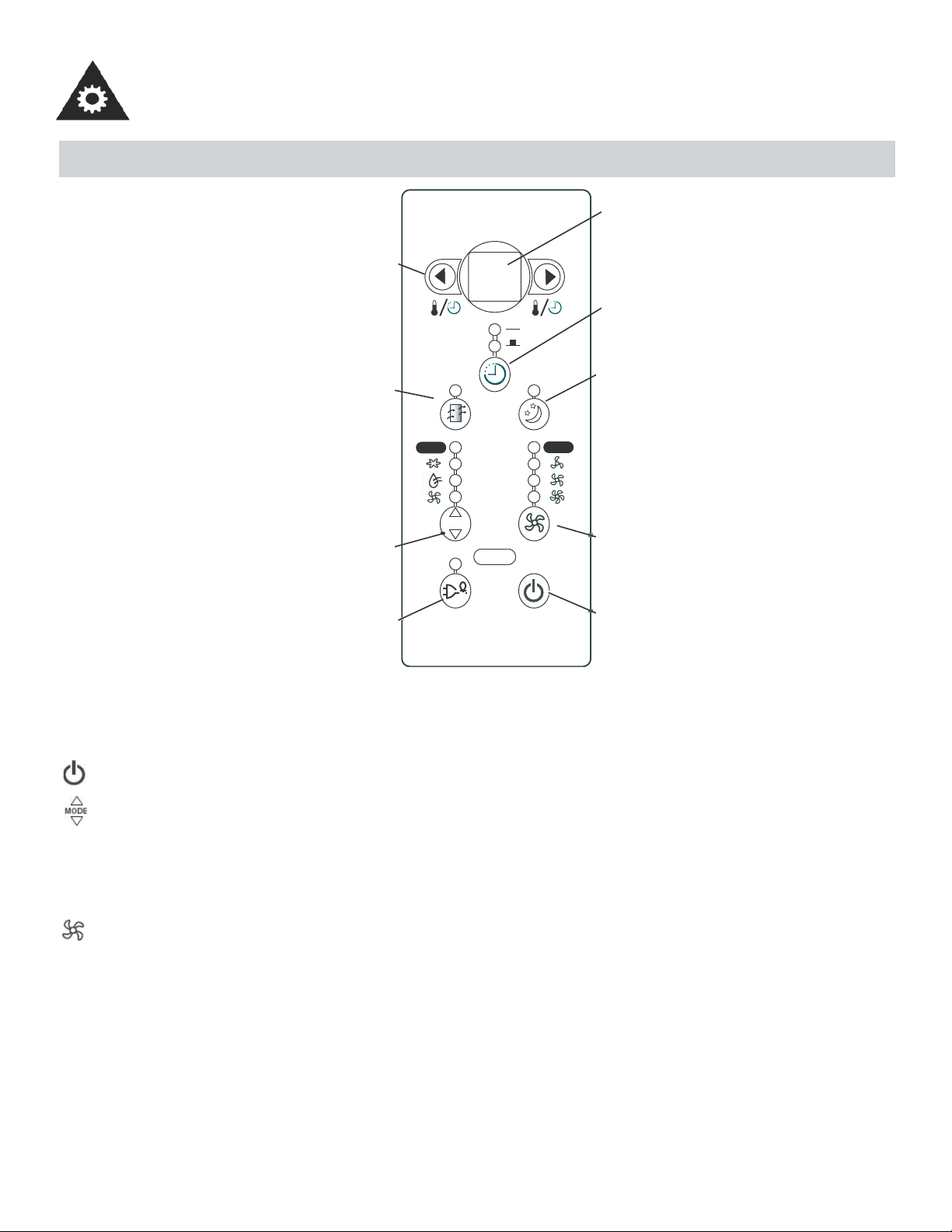
KEY PAD FEATURES
MODE
Auto
Auto
68
Temp / Timer
Control
Check
Filter
Mode
Selector
Energy
Saver
LED
Display
Auto
Timer
Sleep
Mode
Fan
Speed
Power
Button
LED DISPLAY: Displays the following information independently - Set Temperature, Ambient RoomTemperature and
Auto Timer On/Off settings.
POWER: Turns unit On/Off.
MODE: Allows you to scroll through and select the desired operating mode: Cool, Dry, Fan Only and *Auto. The
selected mode will be denoted by the adjacent indicator light.
*Auto mode is a pre-set factory program that automatically defi nes the mode (Cool or Dry) and fan speed, based
on the set temperature. The unit will automatically launch the Energy Saver function when it is in Cool, Dry, or Auto
modes.
FAN SPEED: Select from four different fan settings: Low, Medium, High and Auto during Cool and Fan Only mode.
Please note, during Dry mode the fan speed is automatically defi ned.
8
OPERATING INSTRUCTIONS
KEY PAD FEATURES (cont’d)
ENERGY SAVER: Automatically cycles the fan on and off while the compressor is not in use. This function
is available in Cool, Dry, and Auto modes (only Auto-Cool and Auto-Fan modes). The fan will continue to run
for 3 minutes after the compressor shuts off. The fan then cycles on for 2 minutes at 10 minute intervals,until
the room temperature is above the set temperature. At this point, the compressor turns back on and cooling
restarts.
TEMP / TIMER CONTROL: Used to increase or decrease the Temperature setting in 1°C / 1°F increments,
and Auto-Timer On/Off settings in 30min./1hr. increments. Note: This appliance allows you to select the
temperature scale to be displayed in either “Celsius” or “Fahrenheit” according to your preference.To change
the temperature scale displayed on the electronic display, press both the “Temp/Timer” adjust arrows simulta-
neously to alternate between Celsius and Fahrenheit.
CHECK FILTER: The adjacent indicator light will illuminate as a reminder to clean the air conditioner fi lter
(see page 11). Once the fi lter has been cleaned and replaced, depress the Check Filter button in order to
resume operation.
SLEEP MODE: In this mode, the selected temperature will increase (when in cooling mode) by 1°C/2°F
one half-hour after Sleep mode has been selected. The temperature will then increase by another 1°C/2°F
after an additional half hour. This new temperature will be maintained for 6 hours before returning to the
originally selected temperature. This ends the Sleep mode and the unit will continue to operate as originally
programmed. The Sleep mode program can be cancelled at any time during operation by pressing the Sleep
button again.
AUTO-TIMER: Used to initiate the Auto On/ Auto Off timer.
When the air conditioner is off (Auto-On feature):
1) Press the Auto-Timer button once and the adjacent Auto-On indicator light will illuminate.
2) Use the Temp/Timer control cursors to select a delayed ON time of up to 24 hours.
3) Select the appropriate mode under which you want the unit to operate (Auto-Cool-Dry-Fan Only).
4) Select the fan speed setting.
5) The time you selected will appear in the LED display.
When the air conditioner is on (Auto-Off feature):
1) Press the Auto-Timer button twice and the adjacent Auto-Off indicator light will illuminate.
2) Use the Temp/Timer control cursors to select a delayed OFF time of up to 24 hours.
3) The time you selected will appear in the LED display. The Auto-On and Auto-Off timer features can operate
during the same program by defi ning the Auto-Off parameters immediately after the Auto-On parameters.The
Auto-Timer may be cancelled at any time by turning the unit On/Off.
For example, if you want to turn the unit on one hour later, to operate for one hour and then stop, set Auto-On
“1” and Auto-Off “2”.
Note: This is a “one-shot” timer. It does not continue to cycle on and off. It will turn the unit on (if set by the
user) ONE time. It will turn the unit off (if set by the user) ONE time. If you require the unit to turn on/off again
automatically, then you must set the timer again.
9
OPERATING INSTRUCTIONS
USING THE REMOTE CONTROL
Location of the remote controller
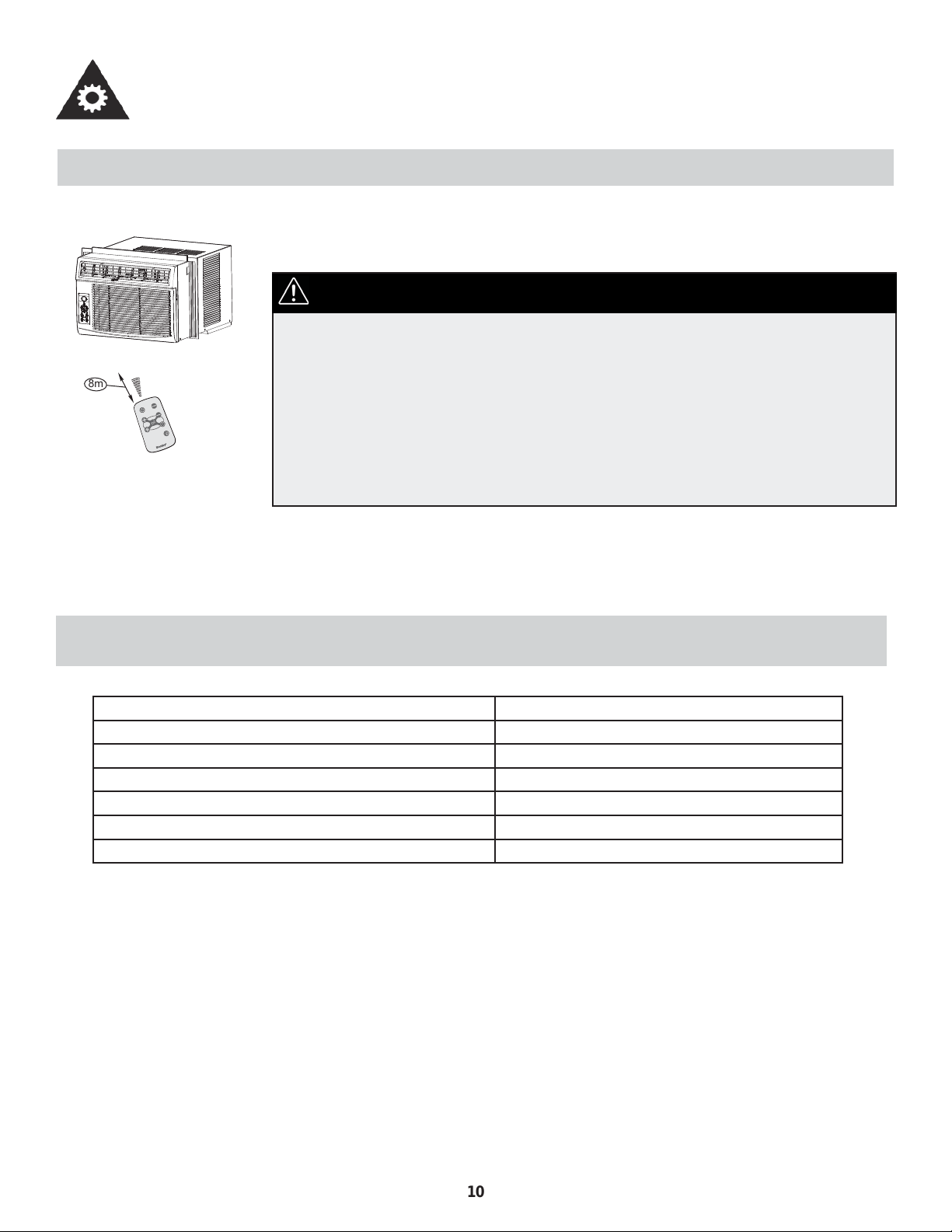
• Use the remote controller within a distance of 8 meters from the appliance, pointing it
towards the receiver. Reception is confi rmed by a beep.
• The air conditioner will not operate if curtains, doors or other materials block
the signals from the remote controller to the indoor unit.
• Prevent any liquid from falling into the remote controller. Do not expose the
remote controller to direct sunlight or heat.
• If the infrared signal receiver on the indoor unit is exposed to direct sunlight,
the air conditioner may not function properly. Use curtains to prevent the
sunlight from falling on the receiver.
• If other electrical appliances react to the remote controller, either move these
appliances or call the service depot.
CAUTION
REMOTE CONTROLLER SPECIFICATIONS
Model R15B
Rated Voltage 3.0V
Battery Type Button cell: CR2025
Battery Quantity 1pcs
Lowest Voltage of CPU Emitting Signal 2.0V
Signal Recieving Range 8m
Environment -5°C to 60°C (23°F to 140°F)
ä
â
i
ä
Å
Å
à
ä
~
Ä
è
Ä
à
ã
ê
ã
è
Ä
à
ã
~
ä
í
â
é
í
Ñ
â
Ç
Å
{
â
è
Ñ
à
Ä
ç
é
á
Ä
Ä
ã
8m
10
OPERATING INSTRUCTIONS
REMOTE CONTROLLER BUTTONS
Model / Modèle :
R15B
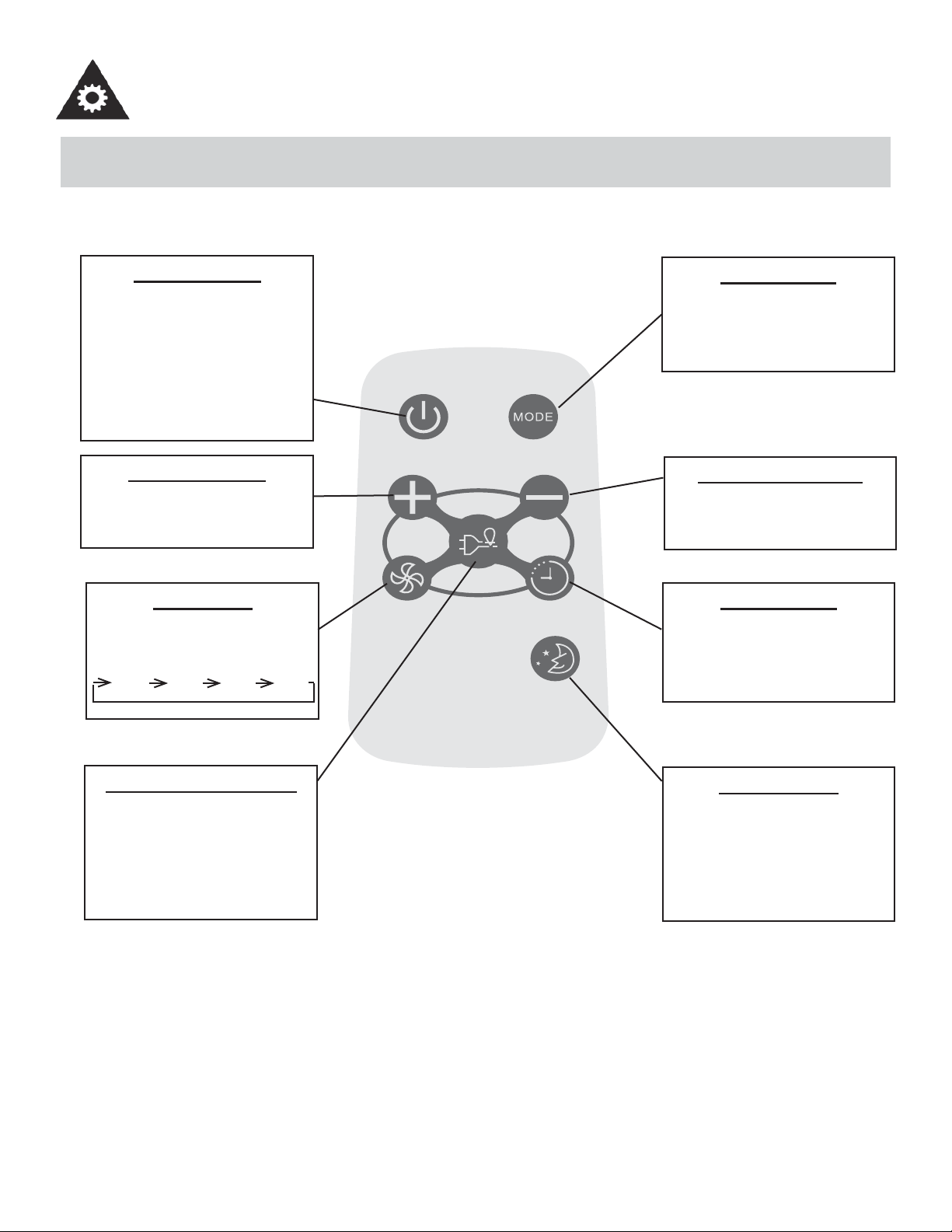
ON/OFF BUTTON
Operation starts when this button
is pressed and stops when the
button is pressed again. NOTE:
The unit will automatically launch
the Energy Saver function when
it is in Cool, Dry, and Auto modes
(Only Auto-Cool and Auto-Fan
modes.)
TEMP UP BUTTON
Push this button to increase the
temperature setting in 1°C (1°F)
increments to 30°C (86°F) .
FAN BUTTON
Used to select the fan speed in
four steps:
LOW MED HIGH AUTO
ENERGY SAVER BUTTON
Press this button to activate the
energy saving mode. Press it
again to stop the function. This
function is available in COOL,
DRY, and AUTO modes (only
Auto-cool and Auto-fan modes).
MODE BUTTON
Each time you press this button,
a mode is selected in a sequence
that consists of AUTO, COOL,
DRY, FAN, and back to AUTO.
TEMP DOWN BUTTON
Push this button to decrease the
indoor temperature setting in 1°C
(1°F) increments to 17°C (62°F).
TIMER BUTTON
Push this button to activate the
“Auto Start” or “Auto Stop” pro-
gram from 0-24 hours (0.5/1 hour
increments).
SLEEP BUTTON
Press this button to activate the
SLEEP mode. This function is
available in COOL, and AUTO
modes only, and maintains the
most comfortable temperature for
you.
11
OPERATING INSTRUCTIONS
USING THE REMOTE CONTROLLER BUTTONS
Model / Modèle :
R15B
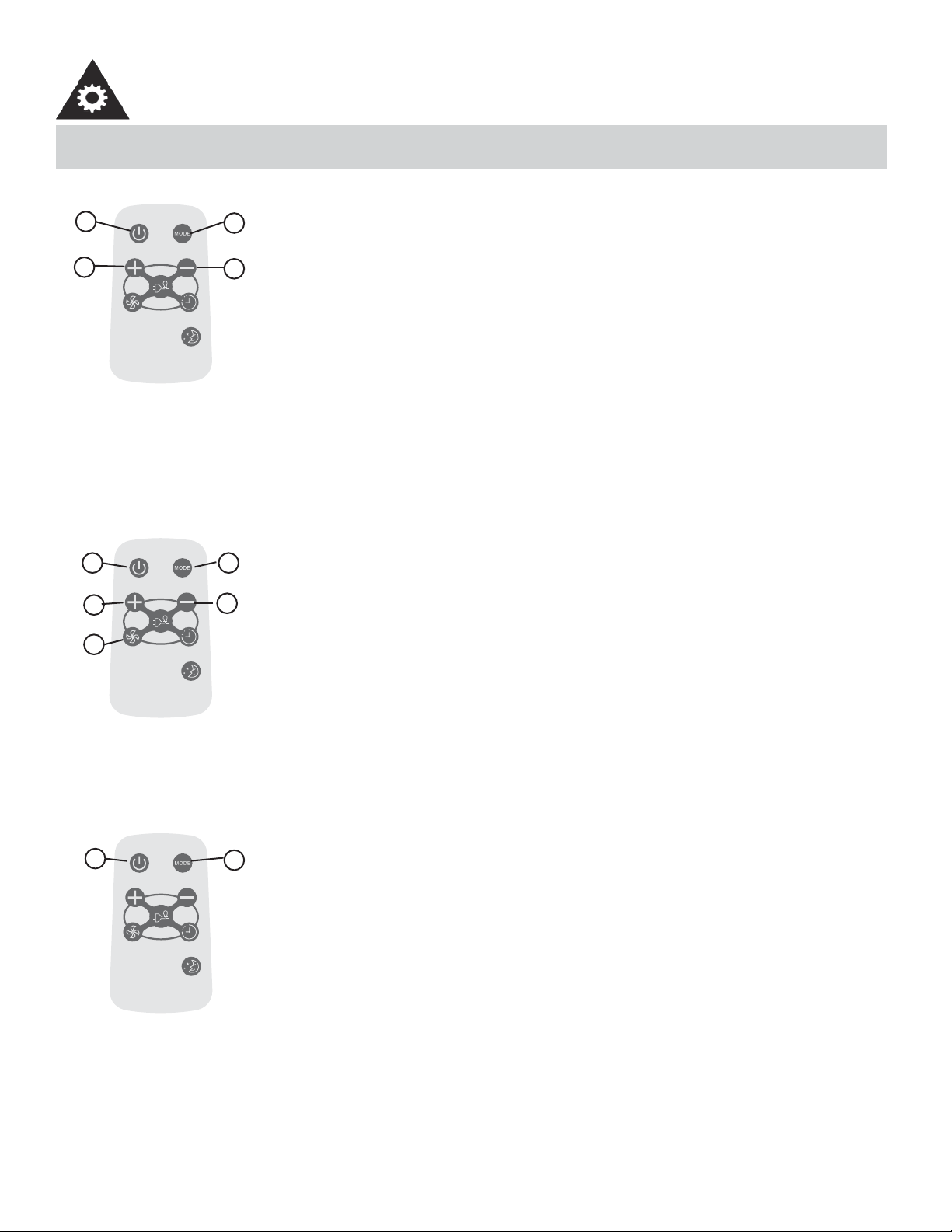
AUTO OPERATION
Ensure the unit is plugged in and power is available.
1. Press the ON/OFF button to start the air conditioner.
2. Press the mode button and select AUTO.
3. Press the TEMP + / - button to set the desired temperature. The temperature can be
set within a range of 17°C (62°F) to 30°C (86°F) in 1°C (1°F) increments.
NOTE:
1. In the auto mode, the air conditioner can logically choose the mode of Cool, Fan, De-
humidifying by sensing the difference between the actual ambient room temperature
and the set temperature on the remote controller.
2. In Auto mode, you cannot change the fan speed. It has already been automatically
controlled.
3. If the Auto mode is not comfortable for you, the desired mode can be selected manu-
ally.
-----------------------------------------------------------------------------------------------------------------------
Model / Modèle :
R15B
COOLING / FAN OPERATION
Ensure the unit is plugged in and power is available.
1. Press the ON/OFF button to start the air conditioner.
2. Press the MODE button to select Cool mode.
3. Press the TEMP +/- button to set the desired temperature. The temperature can be
set within a range of 17°C (62°F) to 30°C (86°F) in 1°C (1°F) increments.
4. Press the FAN button to select the fan speed in four-steps, LOW, MED, HIGH or
AUTO.
NOTE:
In the FAN mode, the setting temperature is not displayed in the LED display and you are
not able to control the room temperature either. In this case, only step 1, 2 and 4 may be
performed.
-----------------------------------------------------------------------------------------------------------------------
Model / Modèle :
R15B
DEHUMIDIFYING OPERATION
Ensure the unit is plugged in and power is available.
1. Press the ON/OFF button to start the air conditioner.
2. Press the MODE button to select Dehumidifying mode.
NOTE:
In the Dehumidifying mode, you cannot change the fan speed. It has already been auto-
matically controlled.
-----------------------------------------------------------------------------------------------------------------------
1
3
2
3
4
3
3
21
2
1
12
OPERATING INSTRUCTIONS
USING THE REMOTE CONTROLLER BUTTONS
Model / Modèle :
R15B
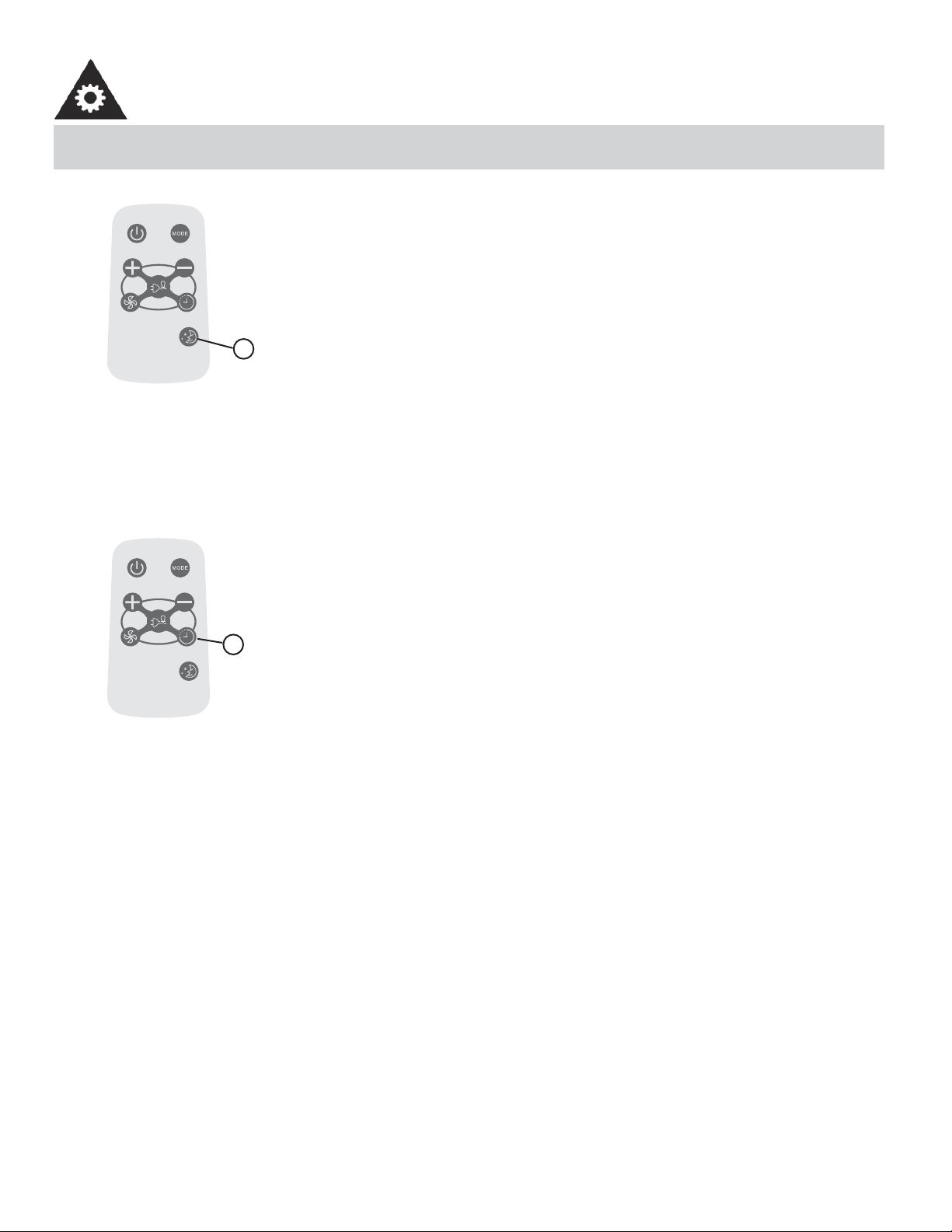
SLEEP OPERATION
• In this mode, the selected temperature will increase (when in cooling mode) by 1°C
(2°F) one half-hour after sleep mode has been selected.
• The temperature will increase by another 1°C (2°F) after an additional half-hour.
• This new temperature will be maintained for 6 hours before returning to the originally
selected temperature. This ends the Sleep mode and the unit will continue to operate
as originally programmed.
• The Sleep mode program can be cancelled at any time during operation by pressing
the Sleep button again.
-----------------------------------------------------------------------------------------------------------------------
Model / Modèle :
R15B
TIMER OPERATION
Pressing the TIMER button can set the Auto-start and Auto-stop time of the unit.
NOTE:
• To set Auto-start time, the unit must be in the OFF position.
• To set Auto-stop time, the unit must be in the ON position.
To set the Auto-start time
1. Push the TIMER button when the unit is off; only the Auto-start feature can be set.
2. Keep pressing the + and - button. Each time pressed, will increase the selected time
by 0.5 hour increments. When the selected time has added up to 10 hours, each time
pressed will increase the selected time by 1 hour increments, up to 24 hours.
3. The time can be set in the range of 0-24 hours.
4. After the desired time has been selected, wait for about 3 seconds, until the setting
temperature reappears in the display window of the air conditioner. This indicates that
the program has been set.
-----------------------------------------------------------------------------------------------------------------------
1
1
13
OPERATING INSTRUCTIONS
USING THE REMOTE CONTROLLER BUTTONS
Model / Modèle :
R15B
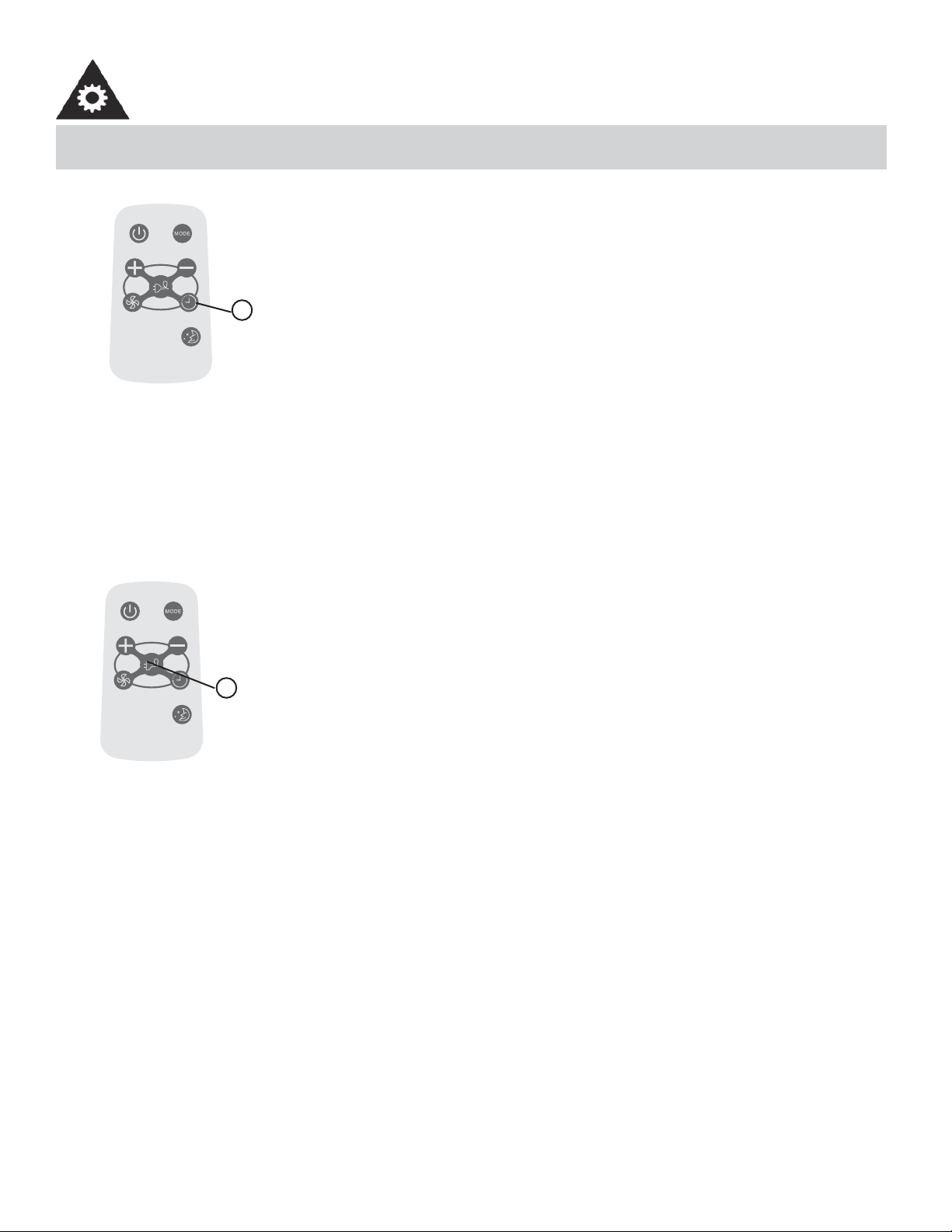
TIMER OPERATION
To set the Auto-stop time
1. Push the TIMER button when the unit is operational; only the Auto-stop feature can
be set.
2. Keep pressing the + and - button. Each time pressed will increase the selected time
by 0.5 hour increments for the fi rst 10 hours and then by 1 hour increments up to 24
hours.
3. The time can be set in a range of 0-24 hours.
4. After the desired time has been selected, wait for about 10 seconds, until the setting
temperature reappears in the display window of the air conditioner. This indicates that
the program has been set.
NOTE:
To cancel the TIMER setting, push the + or - button until “0 hours” is displayed on the
LCD window of the air conditioner.
-----------------------------------------------------------------------------------------------------------------------
Model / Modèle :
R15B
ENERGY SAVER OPERATION
This function is available in Cool, Dry, and Auto modes (only Auto-Cool and Auto-Fan
modes). The fan will continue to run for 3 minutes after the compressor has shut off. The
fan then cycles on for 2 minutes at 10 minute intervals, until the room temperature is
above the set temperature. At this point, the compressor turns back on and cooling starts.
-----------------------------------------------------------------------------------------------------------------------
1
1
14
OPERATING INSTRUCTIONS
CHANGING THE BATTERY ON THE REMOTE
õ
Ðä
à
ä
ç
õÐ äà
ä
ç
1
2
1
2
+
B
A
1
2
1
2
+
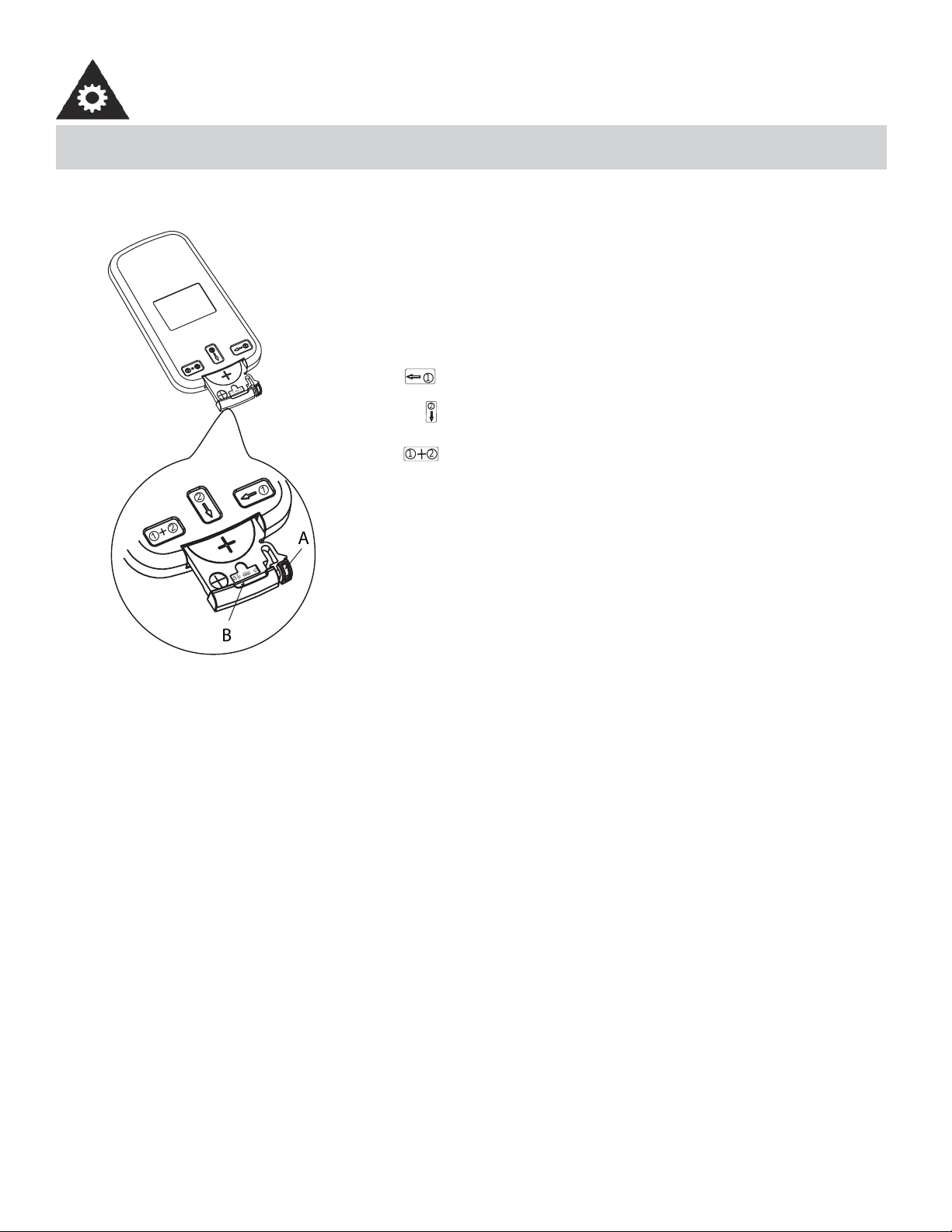
The remote controller is powered by one button cell housed in
the rear part and protected by a cover. Remove the button cell
according to the arrow marked at the back of the remote control-
ler.
1. Slightly press “A” position according to the number 1 arrow
direction by your forefi nger.
2. Press “B” position and pull it according to the number 2 arrow
direction by your thumb.
3. The above step 1 and 2 should be done simultaneously to
slide the button cell out.
• Protect the remote control from high temperatures, and keep it away from radiation exposure.
• Keep the control panel receiver out of direct sunlight.
• Do not mix old and new batteries.
• Do not mix alkaline, standard (carbon-zinc), or rechargeable (ni-cad, ni-mh,etc) batteries.
• The remote operates within a range of 8 meters (26 ft.) from the receiver located inside the main unit. Any obstruction
between the receiver and remote may cause signal interference, limiting the ability to program the main unit.
This device complies with Canadian CAN ICES-3(B) / NMB-3(B).
NOTE: This equipment has been tested and found to comply with the limits for a Class B digital device, pursuant to Part
15 of the FCC Rules. These limits are designed to provide reasonable protection against harmful interference in a residen-
tial installation. This equipment generates, uses and can radiate radio frequency energy and, if not installed and used in
accordance with the instructions, may cause harmful interference to radio communications. However, there is no
guarantee that interference will not occur in a particular installation. If this equipment does cause harmful interference to
radio or television reception, which can be determined by turning the equipment off and on, the user is encouraged to try
to correct the interference by one or more of the following measures:
1) Reorient or relocate the receiving antenna.
2) Increase the separation between the equipment and receiver.
3) Connect the equipment into an outlet on a circuit different from that to which the receiver is connected.
4) Consult the dealer or an experienced radio/TV technician for help.
Changes or modifi cations not approved by the party responsible for FCC compliance could void the user’s authority to
operate the equipment.
This appliance complies with Part 15 of the FCC Rules. Operation is subject to the following two conditions:
1) This device may not cause harmful interference.
2) This device must accept any interference received, including interference that may cause undesired operation.
15
When cleaning the air conditioner be sure to disconnect the power cord from the electrical outlet.
1. DO NOT use gasoline, benzene, thinner, or any other chemicals to clean this unit, as these substances may cause
damage to the fi nish and deformation of plastic parts.
2. Never attempt to clean the unit by pouring water directly over any of the surface areas, as this will cause deterioration
of electrical components and wiring insulation.
If the air fi lter becomes clogged with dust, air fl ow is obstructed and reduces effi ciency. The air fi lter should be cleaned
every 2 weeks.
AIR FILTER REMOVAL:
The air fi lter is located behind the air intake front grill. To remove the air fi lter, grasp the fi lter tab on the right side of the
grill and slide it out to the right. If your air intake front grill has 2 indents, pull the grill forward and remove the air fi lter.
To reinstall the air fi lter, reverse the above procedures. The air fi lter must be vacuumed or washed by hand in warm water.
Dry thoroughly before re-installing.
CLEANING AIR FILTER:
1. Use a vacuum cleaner with a soft brush attachment.
2. Wash the fi lter in lukewarm water below 40°C (104°F). To get best results, wash with soapy water or a neutral clean-
ing agent.
3. Rinse the fi lter with clean water and dry thoroughly before re-installing.
1. Operate the fan alone for half a day to dry out the inside of the unit.
2. Turn off power and remove plug from wall socket.
3. Clean fi lter.
4. Store (covered) air conditioner in a dry location.
CLEANING
END OF SEASON CARE
CARE AND MAINTENANCE
IMPORTANT
DO NOT forget to install the air fi lter. If the air conditioner is left to operate without the air
fi lter, dust is not removed from the room air and may result in machine failure. When the
air inlet grill and cabinet are dirty, wipe with lukewarm water (below 40 °C). Use of a mild
detergent is recommended.
CAUTION
When installing and/or removing the air conditioner from the window, ensure that caution
is taken to prevent it from falling backward. It is recommended that installation or removal
of the air conditioner is done with assistance, to prevent injury to persons or damage to the
unit or property.
DISPOSAL
Check for local regulatory compliance regarding the approved and safe disposal of this appliance.
NOTE: In order to avoid electric shock, please turn
off the A/C and unplug the plug before mainte-
nance or repair.
AIR FILTER
16
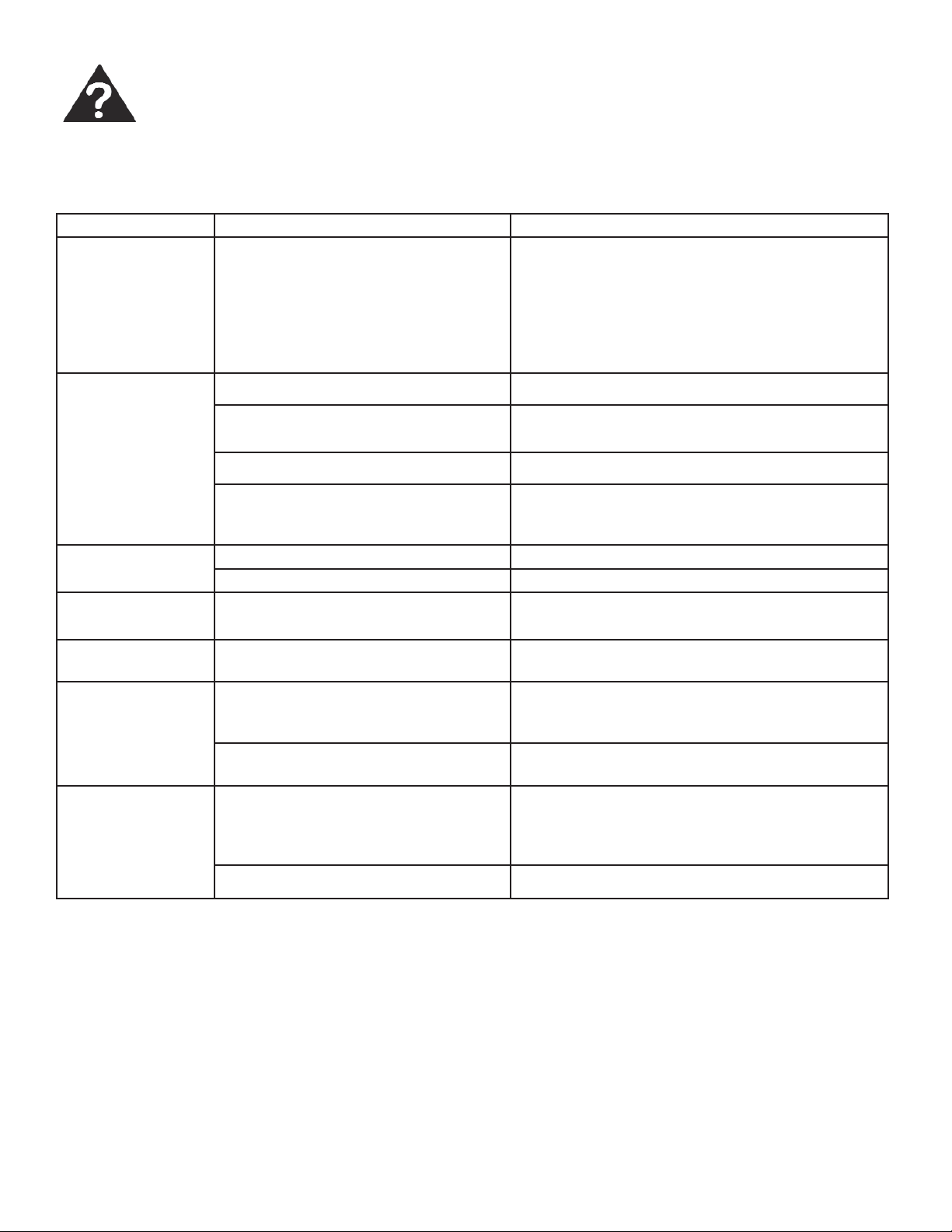
Occasionally a problem may arise that is minor in nature, and a service call may not be neccessary. Use this troubleshoot-
ing guide for a possible solution. If the unit continues to operate improperly, call an authorized service depot or
Danby’s Toll Free Number 1-800-263-2629 for assistance.
TROUBLESHOOTING
PROBLEM POSSIBLE CAUSE SOLUTION
Air conditioner will
not operate
• No power to the unit • Check connection of power cord to power
source.
• Check fuse or circuit breaker.
• Set SELECTOR SWITCH to position other than
“OFF”. The power cord “RESET” button must
always be pushed in (engaged) for correct oper-
ation.
Ineffi cient or no
cooling
• Dirty air fi lter • Clean/replace air fi lter
• Unit size inappropriate for application • Check with dealer to determine proper unit ca-
pacity for application
• Blocked air fl ow • Remove obstruction from grill or outdoor louvres
• Power interruption, settings changed
too quickly, or compressor overload
tripped
• Turn the unit off and wait 5 minutes before at-
tempting to restart
Noisy unit • Loose parts • Tighten loose parts
• Inadequate support • Provide additional support to unit
Odors • Formation of mold, mildew, or algae
on wet surfaces
• Clean unit thoroughly
• Place algaecide tablet in base pan
Water dripping
outside
• Hot and humid weather • Condensation run-off is normal under these
conditions.
Water dripping inside • Unit is not properly angled to allow
water to drain outside
• Unit must be installed on an angle for proper
condensation run-off. Check the unit and make
any adjustments.
• It is an extremely humid day • On an extremely humid day, this effect is expect-
ed. No action required.
Ice or frost build-up • Low outside temperature • When outdoor temperature is approximately
18.3°C (65°F) or below, frost may form when
unit is in cooling mode. Switch unit to FAN (only)
operation until frost melts.
• Unit air fi lter is dirty • Remove and clean fi lter
NOTES:
1. If circuit breaker is tripped repeatedly, or fuse is blown more than once, contact a qualifi ed technician.
2. When the unit is installed using proper installation steps, the unit is properly tipped toward the outdoors to allow for
condensation run-off.
17
LIMITED IN-HOME APPLIANCE WARRANTY
This quality product is warranted to be free from manufacturer’s defects in material and workmanship, provided that the unit is used under the normal operating
conditions intended by the manufacturer.
This warranty is available only to the person to whom the unit was originally sold by Danby Products Limited (Canada) or Danby Products Inc. (U.S.A.) (hereafter
“Danby”) or by an authorized distributor of Danby, and is non-transferable.
TERMS OF WARRANTY
Plastic parts, are warranted for thirty (30) days only from purchase date, with no extensions provided.
First Year
During the rst twelve (12) months, any functional parts of this product found to be defective, will be repaired or replaced, at warrantor’s
option, at no charge to the ORIGINAL purchaser.
To obtain
Danby reserves the right to limit the boundaries of “In Home Service” to the proximity of an Authorized Service Depot. Any app liance
Service
requiring service outside the limited boundaries of “In Home Service” , it will be the consumer’s responsibility to transport the appliance (at
their own expense) to the original retailer (point of purchase) or a service depot for repair. See “Boundaries of In Home Serv ice” below.
Contact your dealer from whom your unit was purchased, or contact your nearest authorized Danby service depot, where service
must be performed by a qualied service technician.
If service is performed on the units by anyone other than an authorized service depot, or the unit is used for commercial appli cation, all
obligations of Danby under this warranty shall be void.
Boundaries of
If the appliance is installed in a location that is 100 kilometers (62 miles) or more from the nearest service center your unit must be
In Home Service
delivered to the nearest authorized Danby Service Depot, as service must only be performed by a technician qualied and certif ied for
warranty service by Danby. Transportation charges to and from the service location are not protected by this warranty and are t he
responsibility of the purchaser.
Nothing within this warranty shall imply that Danby will be responsible or liable for any spoilage or damage to food or other c ontents of this appliance, whether due
to any defect of the appliance, or its use, whether proper or improper.
EXCLUSIONS
Save as herein provided, Danby, there are no other warranties, conditions, representations or guarantees, express or implied, m ade or intended by Danby or its
authorized distributors and all other warranties, conditions, representations or guarantees, including any warranties, conditio ns, representations or guarantees
under any Sale of Goods Act or like legislation or statue is hereby expressly excluded. Save as herein provided, Danby shall no t be responsible for any damages
to persons or property, including the unit itself, howsoever caused or any consequential damages arising from the malfunction o f the unit and by the purchase of
the unit, the purchaser does hereby agree to indemnify and hold harmless Danby from any claim for damages to persons or propert y caused by the unit.
GENERAL PROVISIONS
No warranty or insurance herein contained or set out shall apply when damage or repair is caused by any of the following:
1) Power failure.
2) Damage in transit or when moving the appliance.
3) Improper power supply such as low voltage, defective house wiring or inadequate fuses.
4) Accident, alteration, abuse or misuse of the appliance such as inadequate air circulation in the room or abnormal operating con ditions
(extremely high or low room temperature).
5) Use for commercial or industrial purposes (ie. If the appliance is not installed in a domestic residence).
6) Fire, water damage, theft, war, riot, hostility, acts of God such as hurricanes, oods etc.
7) Service calls resulting in customer education.
8) Improper Installation (ie. Building-in of a free standing appliance or using an appliance outdoors that is not approved for out door application).
Proof of purchase date will be required for warranty claims; so, please retain bills of sale. In the event warranty service is required, present this document to our
AUTHORIZED SERVICE DEPOT.
Danby Products Limited
PO Box 1778, Guelph, Ontario, Canada N1H 6Z9
Telephone: (519) 837-0920 FAX: (519) 837-0449
Danby Products Inc.
PO Box 669, Findlay, Ohio, U.S.A. 45840
Telephone: (419) 425-8627 FAX: (419) 425-8629
04/09
1-800-263-2629
Warranty Service
In-home
If the appliance is installed in a location that is 100 kilometres (62 miles) or more from the nearest
service centre your unit must be delivered to the nearest authorized Danby Service Depot, as service
must only be performed by a technician qualified and certified for warranty service by Danby. Transpor-
tation charges to and from the service location are not protected by this warranty and are the responsi-
bility of the purchaser.
During the first twelve (12) months, any functional parts of this product found to be defective, will be
repaired or replaced, at warrantor’s option, at no charge to the ORIGINAL purchaser.
Danby reserves the right to limit the boundaries of “In Home Service” to the proximity of an Authorized
Service Depot. Any appliance requiring service outside the limited boundaries of “In Home Service” ,it
will be the consumer’s responsibility to transport the appliance (at their own expense) to the original
retailer (point of purchase) or a service depot for repair. See “Boundaries of In Home Service” below.
Contact your dealer from whom your unit was purchased, or contact your nearest authorized Danby
service depot, where service must be performed by a qualified service technician. If service is performed
on the units by anyone other than an authorized service depot, or the unit is used for commercial
application, all obligations of Danby under this warranty shall be void.
First year
To obtain
service
Boundaries of
in-home service
LIMITED IN-HOME APPLIANCE WARRANTY
This quality product is warranted to be free from manufacturer’s defects in material and workmanship, provided that the unit is
used under the normal operating conditions intended by the manufacturer.
This warranty is available only to the person to whom the unit was originally sold by Danby Products Limited (Canada) or
Danby Products Inc. (U.S.A.) (hereafter “Danby”) or by an authorized distributor of Danby, and is non-transferable.
TERMS OF WARRANTY
Plastic parts, are warranted for thirty (30) days only from purchase date, with no extensions provided.
Nothing within this warranty shall imply that Danby will be responsible or liable for any spoilage or damage to food or other
contents of this appliance, whether due to any defect of the appliance, or its use, whether proper or improper.
EXCLUSIONS
Save as herein provided, by Danby, there are no other warranties, conditions, representations or guarantees, express or
implied, made or intended by Danby or its authorized distributors and all other warranties, conditions, representations or
guarantees, including any warranties, conditions, representations or guarantees under any Sale of Goods Act or like legislation
or statute is hereby expressly excluded. Save as herein provided, Danby shall not be responsible for any damages to persons
or property, including the unit itself, howsoever caused or any consequential damages arising from the malfunction of the unit
and by the purchase of the unit, the purchaser does hereby agree to indemnify and hold harmless Danby from any claim for
damages to persons or property caused by the unit.
GENERAL PROVISIONS
No warranty or insurance herein contained or set out shall apply when damage or repair is caused by any of the following:
1) Power failure.
2) Damage in transit or when moving the appliance.
3) Improper power supply such as low voltage, defective house wiring or inadequate fuses.
4) Accident, alteration, abuse or misuse of the appliance such as inadequate air circulation in the room or abnormal operating
conditions (extremely high or low room temperature).
5) Use for commercial or industrial purposes (i.e., If the appliance is not installed in a domestic residence).
6) Fire, water damage, theft, war, riot, hostility, acts of God such as hurricanes, floods etc.
7) Service calls resulting in customer education.
8) Improper Installation (i.e., building-in of a free standing appliance or using an appliance outdoors that is not approved for
outdoor application). Proof of purchase date will be required for warranty claims; so, please retain bills of sale. In the event
warranty service is required, present this document to our AUTHORIZED SERVICE DEPOT.
Warranty Service
In-home
Danby Products Limited
PO Box 1778, Guelph, Ontario, Canada N1H 6Z9
Telephone: (519) 837-0920 FAX: (519) 837-0449
Danby Products Inc.
PO Box 669, Findlay, Ohio, U.S.A. 45840
Telephone: (419) 425-8627 FAX: (419) 425-8629
1-800-263-2629
07/14
BIENVENUE
Bienvenue dans la famille Danby. Nous sommes fi ers de la qualité de nos produits et nous croyons fermement au service
par une assistance fi able. Vous le découvrirez à la lecture de ce guide facile d’utilisation et vous en aurez la confi rmation
par notre service d’assistance à la clientèle. Mais ce qui est encore mieux, vous pourrez bénéfi cier de ces avantages à
chaque utilisation de votre appareil. Ceci est important parce que votre nouvel appareil fera partie de votre famille pour
longtemps.
À titre de référence, vous pouvez agrafer à cette page une copie de votre fi che d’achat de l’appareil. Inscrivez les rensei-
gnements suivants fournis (sur la plaque signalétique du fabricant sur le côté droit de l’appareil au-dessus du cordon
d’alimentation).
Veuillez noter les informations ci-dessous; ces renseignements seront nécessaires si votre appareil a besoin
d’entretien ou pour les demandes de renseignements généraux. Pour bénéfi cier d’une opération de maintenance
ou de dépannage, le reçu original sera exigé.
REMARQUE : CET APPAREIL N’A PAS ÉTÉ CONÇU POUR UNE INSTALLATION À TRAVERS UNE PAROI MURALE.
Numéro de modèle :
Numéro de série :
Date d’achat :
BESOIN D’ASSISTANCE ?
Veuillez trouver quelques conseils avant de faire appel à nos
services, cela nous aidera à mieux vous servir :
Lisez ce guide :
Il comprend des instructions pour l’utilisation et l’entretien
adapté de votre appareil.
Si votre nouvel appareil est endommagé :
Contactez immédiatement le revendeur (ou le fabricant).
Gagnez du temps et de l’argent :
Avant de faire appel à nos services, consultez à nouveau
la section « Dépannage ». Cette section vous aidera à
résoudre des problèmes courants.
Si une réparation est nécessaire, ne vous inquiétez pas, la
solution est au bout du fi l.
AVERTISSEMENT :
Une fi che de mise à la terre mal branchée peut entraîner un risque d’incendie, de
choc électrique ou de blessures aux personnes qui utilisent l’appareil. Si vous
n’êtes pas certain que l’appareil est correctement mis à la terre, consultez un
préposé du service qualifi é.
19
1-800-26-
(1-800-263-2629)
Consignes de sécurité importantes
LISEZ TOUTE L’INFORMATION DE SÉCURITÉ AVANT UTILISATION
POUR VOTRE SÉCURITÉ : Lire attentivement ces instructions avant d’utiliser l’appareil.
1. Tous les câblages doivent être conformes aux codes électriques locaux et nationaux et doivent être installés par un
électricien qualifi é. Si vous avez la moindre question au suject des instructions ci-dessous, contactez un électricien
qualifi é.
2. Vérifi ez la fourniture d’alimentation électrique disponible et résolvez tout problème de câblage AVANT d’installer et de
faire fonctionner cet appareil.
3. Ce climatiseur de 115V utilise 8,7 ampères ou moins de puissance nominale et peut être utilisé dans toute prise de
courant domestique d’usage général adéquatement câblée. Reportez-vous au Tableau 1 pour les spécifi cations con-
cernant le circuit de dérivation individuel.
4. Pour votre sécurité et votre protection, cet appareil est mis à la terre par la fi che du cordon d’alimentation lorsqu’elle
est branchée dans une prise murale qui lui correspond. Si vous n’êtes pas certain que votre prise de courant murale
est mise à la terre adéquatement, veuillez consulter un électricien qualifi é.
5. La prise murale doit correspondre à la fi che à 3 broches sur le cordon de service fourni avec l’appareil. N’utilisez PAS
de fi ches d’adaptation. Voir le Tableau 2 pour les renseignements sur les prises de courant et les fusibles.
6. La plaque signalétique sur l’appareil contient des données électriques et techniques; elle se trouve sur le côté droit de
l’appareil, au-dessus du cordon d’alimentation.
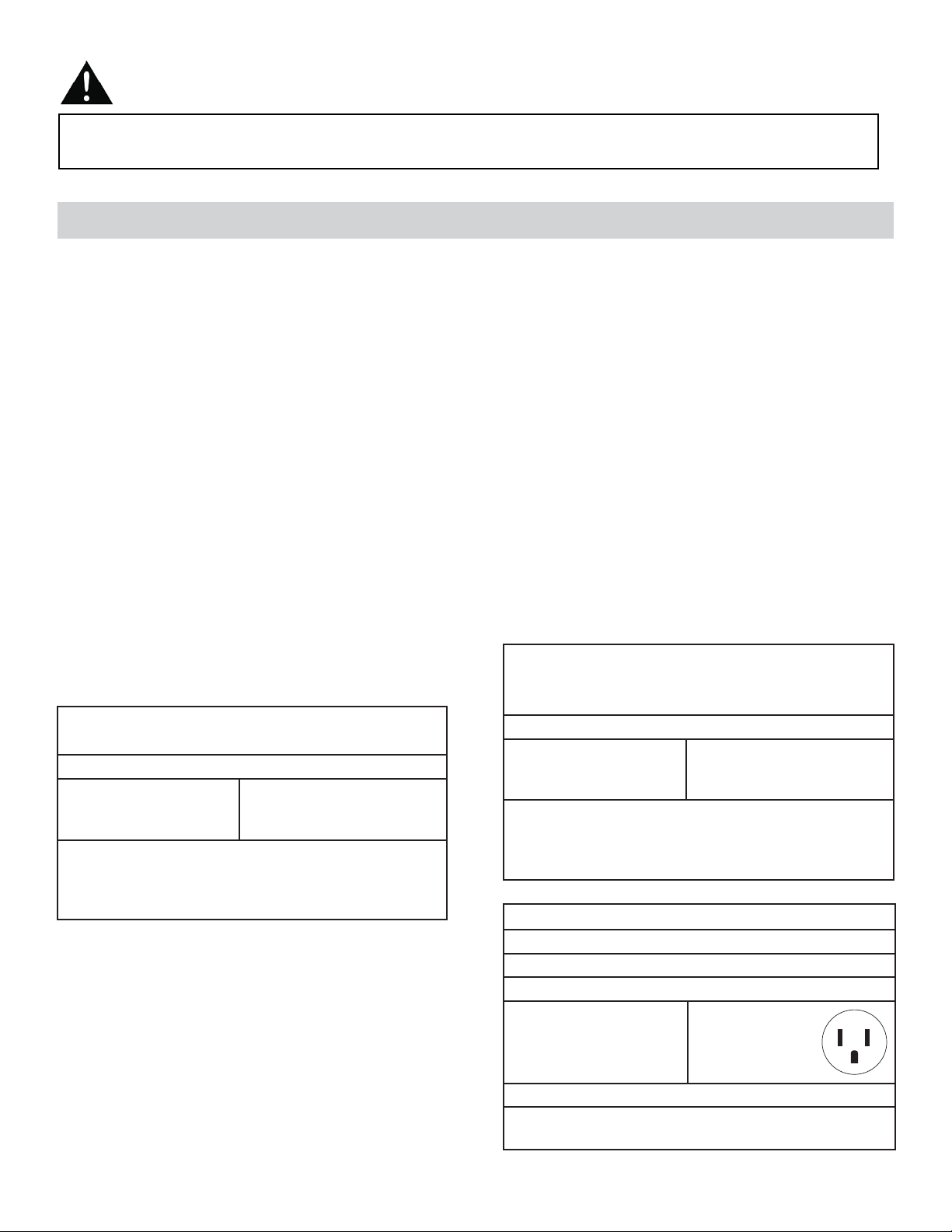
SPÉCIFICATIONS ÉLECTRIQUES
TABLEAU 1
DAC100EUB4GDB
DAC120EUB6GDB
Circuit de distribution individuel suggéré
Ampères de puissance
nominale
8,7 ou moins
Calibre de fi l AWG*
14
AWG – American Wire Gauge
(Calibre de fi l américain)
*Basé sur le fi l en cuivre à une température nominale
de 60 °C
TABLEAU 2
Types de fusibles et de réceptacles
Tension nominale 125
Ampères 15
Prise de courant
Intensité de fusible 15
Fusible temporisé Type fi che
(ou disjoncteur de circuit)
TABLEAU 1
DAC080EUB6GDB
Circuit de distribution individuel suggéré
Ampères de puissance
nominale
5,9
Calibre de fi l AWG*
16
AWG – American Wire Gauge
(Calibre de fi l américain)
*Basé sur le fi l en cuivre à une température nominale
de 60 °C
20
CARACTÉRISTIQUES
Consignes de sécurité importantes
LISEZ TOUTE L’INFORMATION DE SÉCURITÉ AVANT UTILISATION
POUR VOTRE SÉCURITÉ : Lire attentivement ces instructions avant d’utiliser l’appareil.
ÉCONOMIE D’ÉNERGIE
Votre appareil ménager est conçu pour être effi cace en économie de l’énergie. Pour un rendement maximal, observ-
er les recommandations qui suivent.
1. Choisir un réglage du thermostat qui répond à vos besoins de confort et le laisser au réglage choisi.
2. Le fi ltre à air est très effi cace pour éliminer les particules qui fl ottent dans l’air. Conserver le fi ltre à air propre en tout
temps. (Habituellement, il faut nettoyer le fi ltre toutes les 2 semaines. Cela peut varier selon la qualité de l’air.)
3. Utiliser des draperies, des rideaux ou des stores pour prévenir la pénétration et le réchauffement de la pièce par les
rayons directs du soleil, mais ne pas permettre la restriction de la circulation d’air autour de l’unité par les draperies
ou les rideaux.
4. Activer le climatiseur avant que la température de l’air extérieur ne soit très chaude. Ceci évitera une période initiale
d’inconfort avant que l’unité ne puisse refroidir la pièce.
5. Quand les températures externes sont suffi samment froides, placer le climatiseur hors de service et utiliser le MODE
DE VENTILATEUR à la position HAUTE, MOYENNE, ou BASSE. Ceci fait circuler l’air à l’intérieur de la pièce pour
fournir un certain confort de climatisation en utilisant moins d’électricité.
Sortie d’air
intérieure
Entrée d’air
intérieure
Tableau de
commande
Filtre à air
Entrée d’air
extérieure
Caisson
*Commutateur pour ventilation d’air frais
(seulement disponible sur
certains modèles)
*Le terme « inséré » signifie que l’évent est fermé.
« Retiré » signifie que l’évent est ouvert.
21

CONSIGNES D’INSTALLATION
OUTILS NÉCESSAIRES POUR L’INSTALLATION:
• Tournevis à tête Phillips et plate
• Perceuse électrique : mèche de 1/8 po (3.2mm) de diam.
• Crayon
• Ruban à mesurer
• Ciseaux
• Niveau
REMARQUE : Conservez le carton d’expédition et le matériel d’emballage pour l’entreposage ou le transport de l’appar-
eil. Ôtez du carton le sac en plastique qui contient la trousse de quincaillerie nécessaire pour l’installation de votre clima-
tiseur. Veuillez vérifi er le contenu de la trousse de quincaillerie d’installation en le comparant à la liste de vérifi cation du
modèle correspondant, et ce, avant l’installation de l’appareil. Voir Fig. 1.
RISQUE DE CHOC ÉLECTRIQUE
Pour éviter la possibilité de
blessures corporelles, débrancher
l’alimentation de courant à l’unité
avant d’entreprendre l’installation
ou le service.
Comme le compresseur se trouve du côté des commandes de l’unité (côté gauche),
ce côté est plus lourd et plus diffi cile à manipuler. Un soutien inapproprié du côté des
commandes de l’appareil peut causer des blessures et endommager l’appareil et d’autres
biens mobiliers. C’est pourquoi il est recommandé que quelqu’un vous aide au cours de
l’installation de cet appareil.
MISE EN GARDE
OUTILS NÉCESSAIRES
POUR L’INSTALLATION
Vis de 1/2 po
(13 mm) (7)
Serrure de
sûreté (1)
Vis de 3/8 po (9.5 mm)
(4) *préinstallées sur
certains modèles
Canal supérieur
(1) *préinstallé
sur certains
modèles
Support de
fermeture (2)
Mousse
adhésive pour
scellement (1)
Rideau latéral
gauche (1)
Rideau latéral droit (1)
Mousse pour
scellement (1)
Insert de mousse
2 pièces
Calfeutrage (5)
Fig. 1
REMARQUE : Votre climatiseur de chambre a été conçu
pour une installation facile dans une fenêtre à châssis à
guillotine simple ou double. Cet appareil n’a pas été conçu
pour des fenêtres verticales (de type coulissant) ou pour
être installé à travers une paroi murale.
22
1. Ce climatiseur pour chambre a été conçu pour être installé facilement dans une fenêtre à châssis à guillotine simple
ou double. Cependant, comme le modèle de la fenêtre peut varier, il peut être nécessaire d’y faire quelques modifi ca-
tions pour une installation sécuritaire et appropriée.
2. Assurez-vous que la fenêtre et son châssis sont structurellement solides et exempts de bois sec et pourri.
3. Pour un maximum d’effi cacité, installez le climatiseur sur le côté de la maison ou de l’immeuble qui se trouve plus
souvent à l’ombre qu’au soleil. Si l’appareil est directement sous les rayons du soleil, installer un auvent pour protéger
l’unité.
4. Laissez suffi samment d’espace libre autour du caisson pour permettre une ample circulation d’air à travers l’appareil.
Voir Fig. 2. L’arrière de l’appareil doit donner sur l’extérieur de la maison et non pas dans un garage ou à l’intérieur
d’un immeuble. Tenez l’appareil aussi loin que possible de tout obstacle ou obstruction et à au moins 30 po (76 cm)
au-dessus du plancher ou du sol. Il ne faut pas que les rideaux ou d’autres objets à l’intérieur de la pièce puissent
bloquer le fl ux d’air.
5. Assurez-vous que la prise électrique appropriée se trouve à la portée de l’installation. N’utilisez qu’un circuit à prise
unique calculé à 15 ampères. Tout le câblage doit être conforme aux codes électriques locaux et nationaux.
6. N’insallez PAS l’appareil à un endroit où on soupçonne une fuite de gaz combustibles. Votre climatiseur peut tomber
en panne dans une atmosphère qui contient des huiles (y compris des huiles pour machines), des gaz sulfurés, ou s’il
est près de sources d’eau chaude, etc.
REMARQUE : Votre appareil a été conçu pour que la condensation s’évapore dans des conditions normales. Cependant,
en présence d’une humidité extrême, un surplus de condensation peut provoquer un débordement de la cuvette de base
vers l’exterieur. L’appareil doit être installé de telle sorte que l’écoulement de la condensation ne se déverse pas sur des
passants ou sur des propriètés avoisinantes.
REMARQUE : Il est normal que l’appareil coule légèrement, surtout lors des journées excessivement humides.
CONSIGNES D’INSTALLATION
EMPLACEMENT
Auvent
Clôture,
mur ou
autre
obstacle
Sol
Obstacle
latéral
20 po
(50,8
cm)
min.
30 po (76 cm)
min.
20 po (50,8 cm)
12 po (30,5 cm) min.
min.
Fig. 2
23
CONSIGNES D’INSTALLATION
ASSEMBLAGE ET INSTALLATION
1. Montage de la pièce à rainure supérieure sur le caisson (préinstallé sur certains modèles).
• Pièce à rainure en forme de « L » : installez-la au-dessus du caisson tel que montré à la Fig. 3, en utilisant quatre (4)
vis de 3/8 po (9,5 mm).
2. Montage des rideaux latéraux au caisson.
• Étendez les volets et glissez-les dans les support de volets sur la pièce à rainure latérale du climatiseur comme mon-
tré dans Fig. 4.
• Faites glisser les cadres des volets dans les pièces à rainure supérieure (en forme de « L ») et inférieure (en forme de
« U »). Ces volets sont identifi és (sur le cadre) en tant que volets gauches et droits.
Vis de 3/8 po (9,5 mm)
Pièce à rainure
en forme de « L »
Pièce à rainure
en forme de « U »
Fig. 3
Glissez vers le bas
Support
Volets
Cadre des volets
de volets
Fig. 4
3. Pour compléter l’installation
• Coupez la lisière à calfeutrer en mousse (non adhésive) pour qu’elle se fi xe adéquatement au dessous du bas du
cadre de la fenêtre.
• Placez le climatiseur dans la fenêtre avec la pièce à rainure en forme de « L » (en haut) positionnée à l’avant du
cadre supérieur de la fenêtre. Le bas du caisson doit être positionné dans le bas du cadre de la fenêtre. Tirez la
fenêtre vers le bas jusqu’à ce qu’elle repose juste derrière le rebord frontal de la pièce à rainure en forme de « L »
(supérieure). Voir Fig. 5.
• Étendez les cadres des volets (complètement) de chaque côté, et fi xez le haut des structures au cadre de la fenêtre
en utilisant une vis de 1/2 po (13 mm), et une autre vis de 1/2 po (13 mm) sur la pièce à rainure supérieure en forme
de « L » (Fig. 5).
• Fixez les supports de fermeture de chaque côté du bas des volets, et fi xez-les au rebord de la fenêtre en utilisant une
vis de 1/2 po (13 mm), sur chaque côté (Fig. 6).
• Coupez la bande adhésive afi n qu’elle s’ajuste adéquatement à l’ouverture entre les fenêtres intérieure et extérieure.
Puis, fi xez la serrure de sûreté au cadre de fenêtre extérieur, en utilisant une vis de 1/2 po (13 mm) (Fig. 6).
REMARQUE : Les installations sur une fenêtre peuvent différer. C’est pourquoi il peut être nécessaire de modifi er ou
d’improviser votre façon d’installer.
Cadre de la
fenêtre
Pièce à rainure
supérieure en
forme de « L »
Support de fermeture
Vis de 1/2 po (13 mm)
Serrure de sûreté
Vis de 1/2 po (13 mm)
Mousse
adhésive
pour
scellement
Fig. 6
Fig. 5
24
CONSIGNES D’INSTALLATION
ASSEMBLAGE ET INSTALLATION (suite)
Assurez-vous que le climatiseur est incliné vers l’extérieur de 3 ou 4 degrés, tel que montré sur la Fig. 7. Lors de l’usage
normal, in ne devrait jamais y avoir d’eau condensée qui s’échappe par le trou de drainage, si l’installation est bien faite.
Si vous remarquez un égouttement d’eau, vérifi ez l’angle d’inclinaison du climatiseur et faites les ajustements néces-
saires. Par contre, il est normal d’avoir un égouttement d’eau pendant les journées très humides.
REMARQUE : Pour achever 3° à 4°, il vous faut mesurer le H, voir fi gure 7.
Mesurez l’angle d’inclinaison du bord du caisson. L’intervalle H devrait être environ 3/4 à 1 po (19 mm à 2,5 cm) pour le
modèle DAC080EUB6GDB. H devrait être d’environ 1 à 1 3/8 po (2,5 à 3,5 cm) pour le modèle DAC100EUB4GDB and
DAC120EUB6GDB.
Fig. 7
pour
Mesurez l’angle d’inclinaison du bord du caisson.
FENÊTRE
EXTÉRIEUR
INTÉRIEUR
: environ 3/4 à 1 po (19 mm à 2,5 cm)
H: environ 1 à 1 3/8 po (2,5 cm à 3,5 cm)
pour
DAC080EUB6GDB
DAC100EUB4GDB
DAC120EUB6GDB
25
1234
56789
10 1
1121314151617
1
23
4
5
6
Étape 1 Étape 3Étape 2
4. Installer le Mousse éconergétique
• Après que l’appareil est installée dans la fenêtre, mesurer la largeur du rideau sur le côté
• Si nécessaire, coupez le mousse pour le réduire au même largeur que le rideau
• Insérez le mousse dans le rideau
• Répétez pour l’autre côté (Voyez en bas)
REMARQUE : Appliquer le calfeutrage en cas de besoin (les fi ssures et les espaces entre l’insert de mousse, kit
de fenêtre et cadre de fenêtre) qui est fourni.
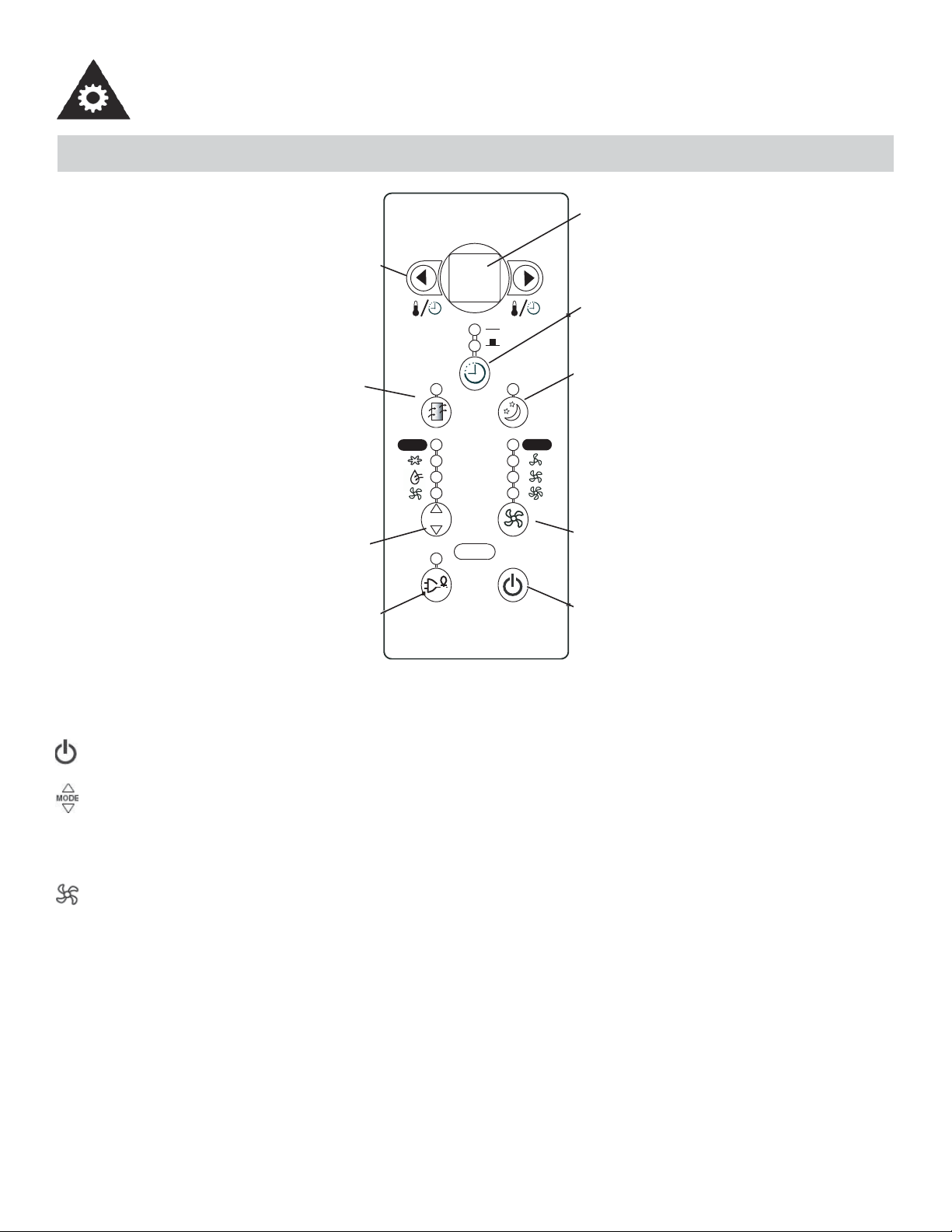
CONSIGNES D’UTILISATION
FONCTIONNEMENT
MODE
A uto
A uto
68
Réglage de
la température
et minuterie
Vérifiez le
filtre
Sélecteur
de modes
Économiseur
d’énergie
Affichage
DEL
Minuterie
Mode
Sommeil
Vitesse du
ventilateur
Commutateur
de courant
Affi chage DEL : Affi che l’information suivante indépendamment - température réglée, température ambiante et pro-
gramme de minuterie.
Commutateur de courant : Met l’appareil en marche/en arrêt.
Mode : Vous permet de choisir le mode d’opération désiré : Frais, Sec, Ventilateur Seulement et Auto*. Le mode
choisi sera indiqué par l’affi cheur au-dessus du bouton. *Auto est un programme préréglé qui choisit automatique-
ment le mode (Frais ou Sec) et la vitesse du ventilateur selon le réglage de la température. L’appareil initiera la
fonction Économiseur d’énergie automatiquement, lorsque l’appareil est en modes Frais, Sec et Auto.
Ventilateur : Choisissez entre quatre réglages de ventilateur différents : Bas, Moyen, Haut et Auto, lorsque l’appareil
est en modes Frais et Ventilateur. Remarque : lorsque l’appareil est en mode Sec, la vitesse du ventilateur est réglée
automatiquement.
26
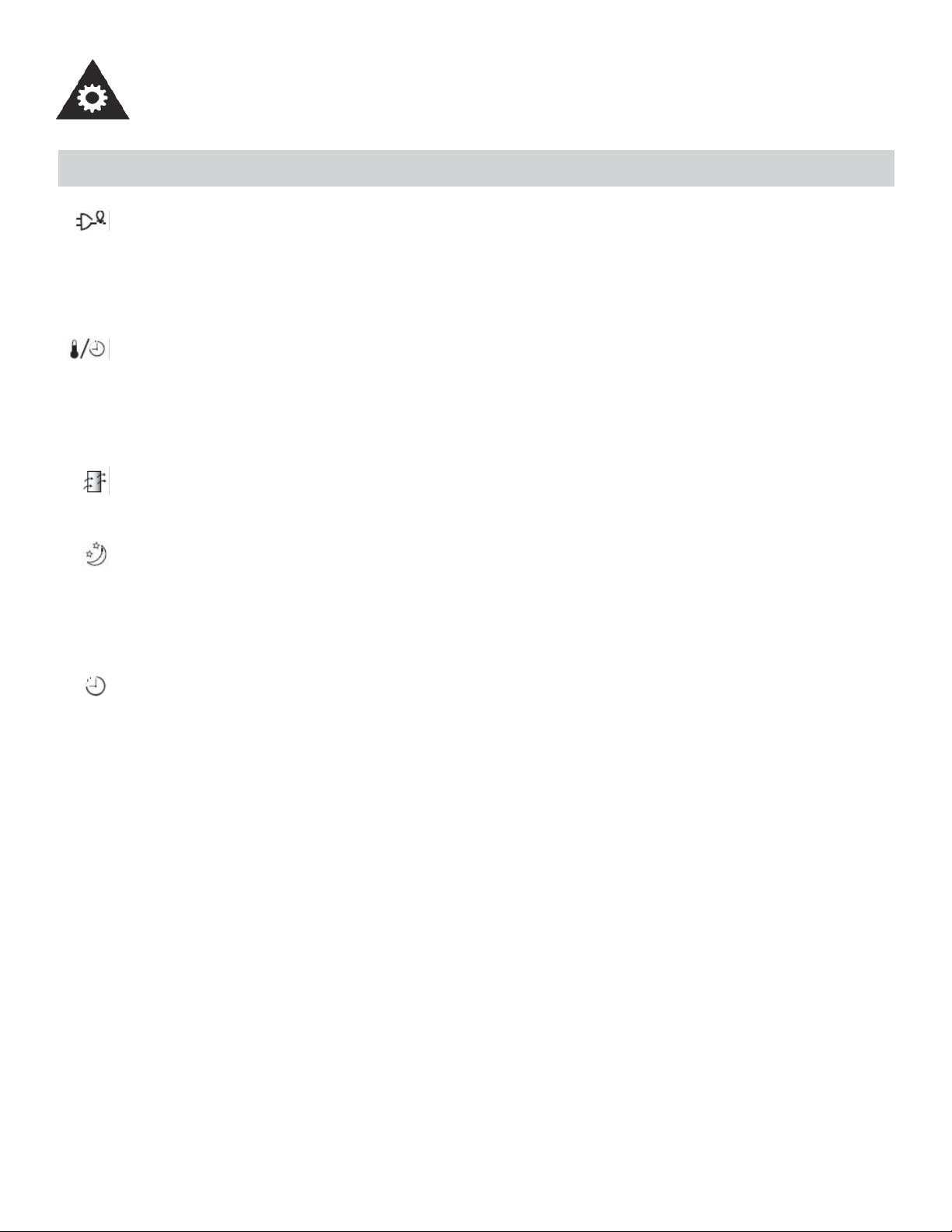
CONSIGNES D’UTILISATION
FONCTIONNEMENT (suite)
Économiseur d’énergie : Ajuste le ventilateur automatiquement (en marche et en arrêt) quand le com-
presseur n’est pas en service. Cette fonction est disponible lorsque l’appareil est en modes Frais, Sec et
Auto. Le ventilateur continuera à fonctionner pendant 3 minutes après que le compresseur se soit éteint.
Après cela, le ventilateur se met en marche pendant 2 minutes, avec des intervalles de 10 minutes jusqu’à ce
que la température ambiante de la chambre soit plus élevée qu la température choisie / réglée. À ce moment,
le compresseur se remet en marche et le refroidissement recommence.
Réglage de la température/minuterie : Utilisé pour augmenter ou réduire la température par incréments de
1°C/ 1°F, et la minuterie par intervalle d’une demi-heure jusqu’à 10 heures et intervalle d’une heure jusqu’à
24 heures. Remarque : cet appareil ménager offre une caractéristique qui vous donnera l’option de régler
les températures soit en degrés Celsius ou Fahrenheit. Pour changer l’affi chage de la température sur l’unité
principale, appuyez sur les deux touches « fl èches » (réglage de température/de minuterie) simultanément
pour alterner entre l’échelle Celcius et Fahrenheit.
Vérifi ez le fi ltre : L’affi cheur au-dessus du bouton s’allume pour indiquer que le fi ltre à air doit être nettoyé
(voir la page 24). Une fois que le fi ltre été nettoyé et remplacé, appuyez sur le bouton sous l’affi cheur pour
recommencer une opération normale.
Sommeil : Dans ce mode, la température sélectionnée augmente (en mode refroidissement) de 1°C/2 °F une
demi-heure après la sélection du mode. La température augmentera ensuite de 1°C/2 °F supplémentaires au
bout d’une autre demi-heure. Cette nouvelle température sera maintenue pendant 6 heures avant le retour à
la température initialement sélectionnée. Cela met fi n au mode Sommeil et l’appareil continuera de fonction-
ner conformément à sa programmation initiale. Le programme du mode Sommeil peut être annulé à tout
moment pendant son fonctionnement en appuyant à nouveau sur le bouton Sommeil.
Minuterie : Utilisée pour activer le programme En Marche Auto et/ou Arrêt Auto.
Quand le climatiseur est hors de service (En Marche Auto) :
1) Appuyer sur la touche Minuterie une fois et l’affi cheur de la fonction En Marche Auto s’illuminera.
2) Appuyer sur les touches « fl échées » pour choisir l’heure de mise en marche, jusqu’à 24h.
3) Choisir le mode approprié de fonctionnement désiré de l’unité (Auto– Frais–Sec–Ventilateur).
4) Choisir le réglage de la vitesse du ventilateur.
5) L’heure réglée apparaîtra sur l’affi cheur DEL.
Quand le climatiseur est en service (Arrêt Auto) :
1) Appuyer sur la touche Minuterie deux fois et l’affi cheur de la fonction Arrêt Auto s’illuminera.
2) Appuyer sur les touches « fl échées » pour choisir l’heure de mise hors de service, jusqu’à 24 h.
3) L’heure réglée apparaîtra sur l’affi cheur DEL. EN MARCHE AUTO et ARRÊT AUTO peuvent fonctionner
lors du même programme si vous choisissez les paramètres ARRÊT AUTO juste après les paramètres EN
MARCHE AUTO. Pour annuler le programme EN MARCHE AUTO ou ARRÊT AUTO, appuyer sur le com-
mutateur de courant. (Exemple : si vous voulez que l’appareil se mette en marche dans une heure, et qu’il
s’éteigne après une heure, faites le réglage En Marche Auto “1” et Arrêt Auto “2”.)
Remarque : Il s’agit d’une minuterie « un-coup ». Elle ne continue pas d’effectuer le cycle de marche et
d’arrêt. Elle allumera l’appareil (si c’est réglé par l’utilisateur) UNE fois. Elle éteindra l’appareil (si c’est réglé
par l’utilisateur) UNE fois. Si c’est nécessaire d’allumer et d’éteindre encore l’appareil automatiquement; vous
devez régler la minuterie encore une fois.
27
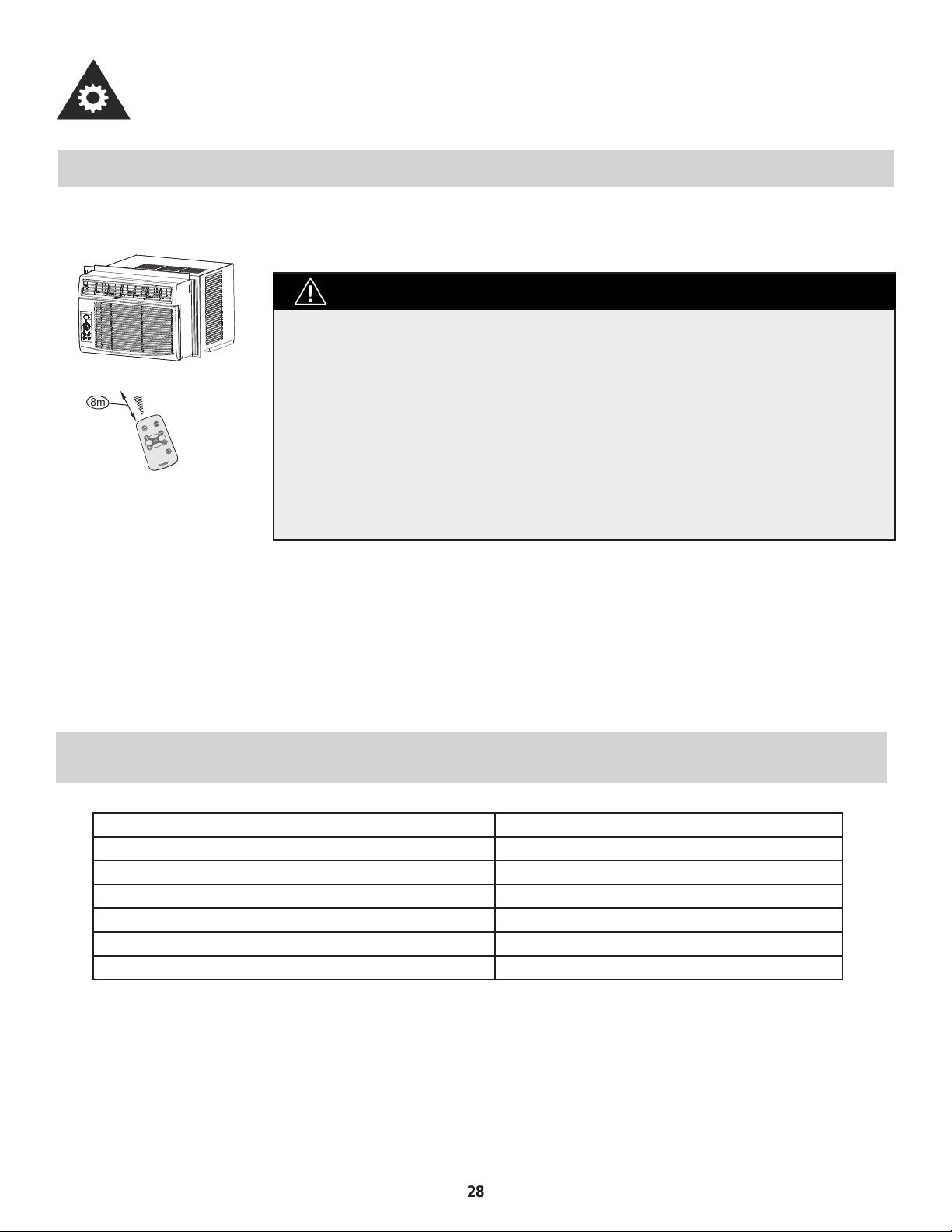
CONSIGNES D’UTILISATION
UTILISATION DE LA TÉLÉCOMMANDE
Emplacement de la télécommande
• Utilisez la télécommande à une distance maximale de 8 mètres de l’appareil, en l’orien-
tant dans la direction du récepteur. La réception est confi rmée par un bip sonore.
• Le climatiseur ne fonctionne pas si le signal envoyé par la télécommande
à l’unité intérieure est bloqué par des rideaux, des portes ou d’autres
matériaux.
• Ne laissez pas de liquides tomber sur la télécommande. N’exposez pas la
télécommande à la chaleur ou à la lumière directe du soleil.
• Si le récepteur du signal infrarouge qui se trouve sur l’unité intérieure est
exposé à la lumière directe du soleil, il est possible que le climatiseur ne
fonctionne pas correctement. Tirez les rideaux pour éviter d’exposer le
récepteur à la lumière.
• Si d’autres appareils électriques réagissent à la télécommande, déplacez-les
ou communiquez avec l’atelier de réparation.
MISE EN GARDE
CARACTÉRISTIQUES DE LA TÉLÉCOMMANDE
Modèle R15B
Tension nominale 3V
Batterie type pile bouton : CR2025
Batterie quantité 1 pcs
Tension la moins élevée du CPU émetteur de signal 2V
Portée de réception du signal 8m
Environnement De -5°C à 60°C (23°F à 140°F)
ä
â
i
ä
Å
Å
à
ä
~
Ä
è
Ä
à
ã
ê
ã
è
Ä
à
ã
~
ä
í
â
é
í
Ñ
â
Ç
Å
{
â
è
Ñ
à
Ä
ç
é
á
Ä
Ä
ã
8m
28
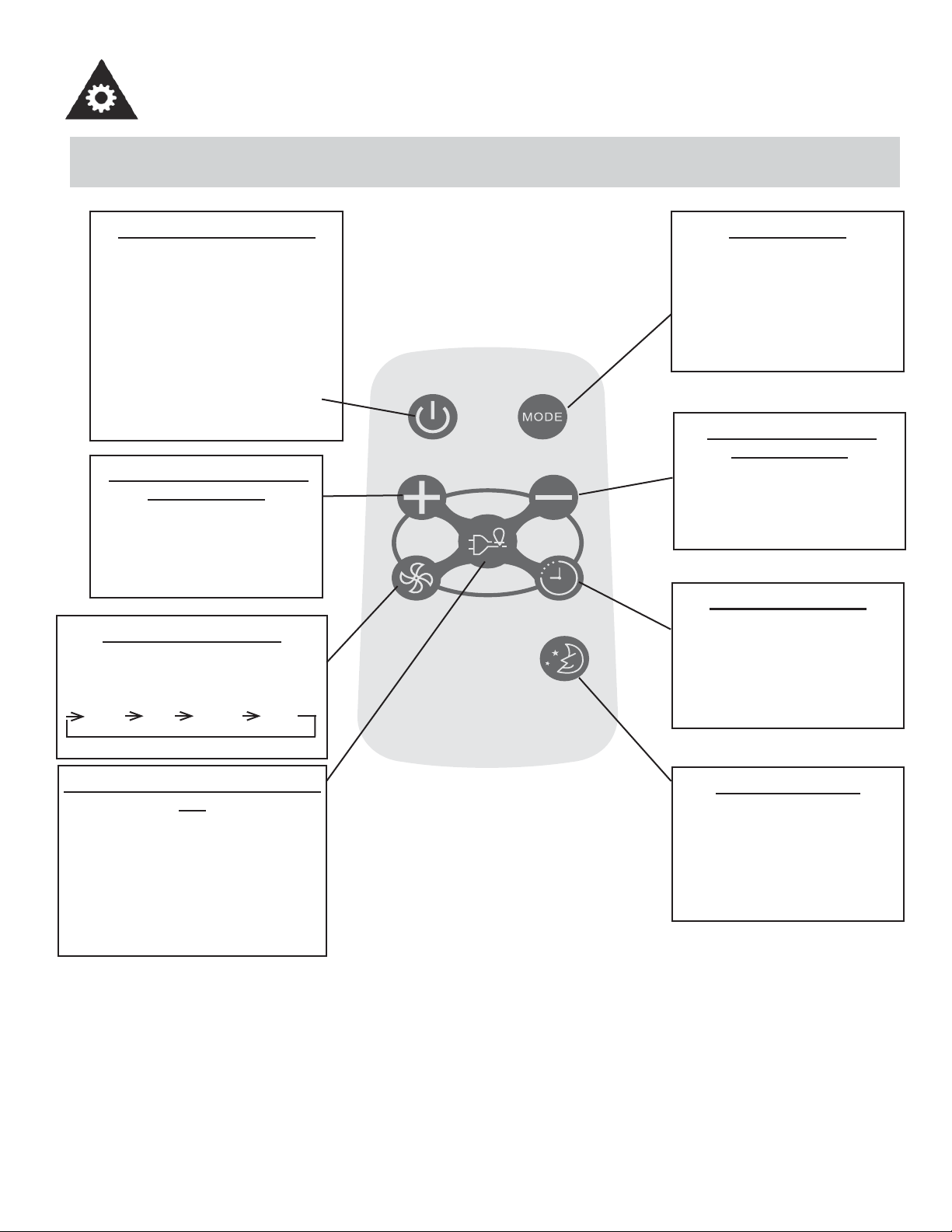
UTILISATION DE LA TÉLÉCOMMANDE
Model / Modèle :
R15B
BOUTON MARCHE/ARRÊT
Appuyez sur ce bouton pour mettre
en marche le climatiseur. Appuyer
encore une fois pour arrêter l’appar-
eil. REMARQUE : L’appareil initiera
la fonction d’Économiseur d’Énergie
automatiquement, lorsque l’appareil
est en modes Frais, Sec, Auto (Au-
to-Frais et Auto Ventilateur modes
seulement).
BOUTON AUGMENTER LA
TEMPÉRATURE
Appuyez sur ce bouton pour aug-
menter le réglage de la tempéra-
ture par intervalles de 1°C (1°F)
jusqu’à 30°C (86°F).
BOUTON VENTILATEUR
Utilisé pour sélectionner la vitesse du
ventilateur en quatre étapes :
BASSE MOY ÉLEVÉE AUTO
BOUTON ÉCONOMISEUR D’ÉNER-
GIE
Appuyez sur ce bouton pour activer
le mode Économiseur d’énergie.
Appuyez-le encore une fois pour
désactiver la fonction. Cette fonction
est disponible lorsque l’appareil est en
modes Frais, Sec, et Auto (Auto-Frais
et Auto-Ventilateur modes seulement).
BOUTON MODE
Chaque fois que vous appuy-
ez sur ce bouton, un mode est
sélectionné dans la séquence
Automatique. Refroidissement,
Déhumidifi cation et Ventilateur,
pour ensuite revenir à AUTO.
BOUTON BAISSER LA
TEMPÉRATURE
Appuyez sur ce bouton pour
baisser la température intérieure
par intervalles de 1°C (1°F),
jusqu’à 17°C (62°F).
BOUTON MINUTERIE
Appuyez sur ce bouton pour
activer les programmes « mise
en marche automatique » ou «
arrêt automatique » dans 0 à 24
heures (intervalles 0/5-1 heure).
BOUTON SOMMEIL
Appuyez sur ce bouton pour
activer le mode SOMMEIL. Cette
fonction est disponible en modes
FRAIS et AUTO seulement et
maintient la température la plus
agréable pour vous.
CONSIGNES D’UTILISATION
29
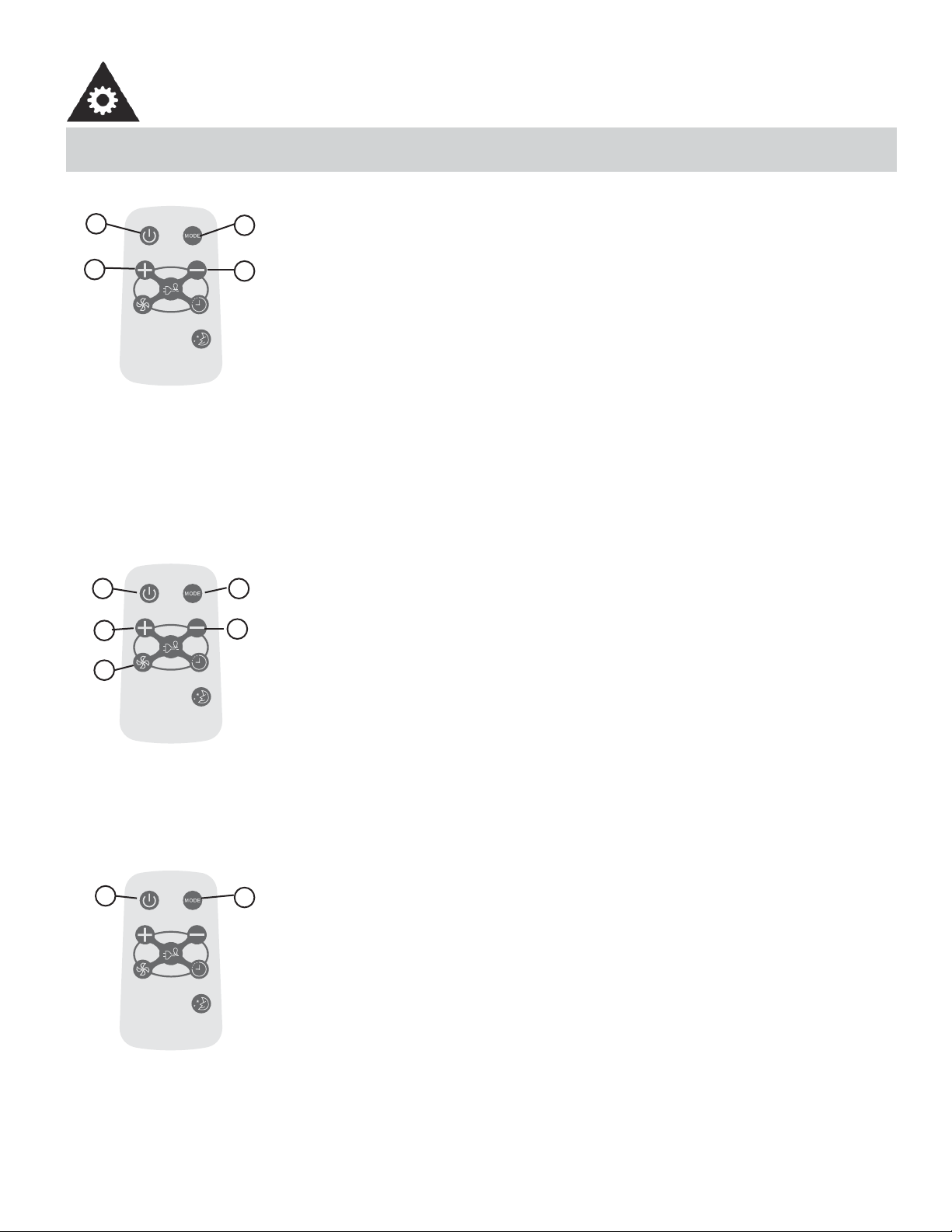
UTILISATION DES BOUTONS DE LA TÉLÉCOMMANDE
Model / Modèle :
R15B
FONCTIONNEMENT AUTOMATIQUE
Assurez-vous que l’appareil est branché et sous tension.
1. Appuyez sur le bouton MARCHE/ARRÊT pour mettre le climatiseur en marche.
2. Appuyez sur le bouton Mode et sélectionnez AUTO.
3. Appuyez sur les boutons TEMP +/- pour régler la température peur être réglée entre
17°C (62°F) et 30°C (86°F), par intervalles de 1°C (1°F).
REMARQUE :
1. En mode Auto, le climatiseur peut choisir de façon logique le mode Refroidisse-
ment, Ventilateur, Chauffage et Déshumidifi cation en détectant la différance entre
la température réelle de la pièce et la température réglée au moyen de la télécom-
mande.
2. En mode Auto, vous ne pouvez pas changer la vitesse du ventilateur. Elle est déjà
contrôlée automatiquement.
3. Si le mode Auto ne vous convient pas, vous pouvez choisit manuellement le mode
souhaité.
-----------------------------------------------------------------------------------------------------------------------
Model / Modèle :
R15B
FONCTIONNEMENT DU REFROIDISSEMENT/VENTILATEUR
Assurez-vous que l’appareil est branché et sous tension.
1. Appuyez sur le bouton MARCHE/ARRÊT pour mettre le climatiseur en marche.
2. Appuyez sur le bouton MODE pour choisir le mode Refroidissement.
3. Appuyez sur les boutons TEMP +/- pour régler la température au niveau souhaité.
La température peut être réglée entre 17°C (62°F) et 30°C (86°F), par intervalles de
1°C.
4. Appuyez sur le bouton VENTILATEUR pour choisir la vitesse du ventilateur en trois
étapes : BASSE, MOYENNE et ÉLEVÉE.
REMARQUE :
En mode Ventilateur, la température réglée ne s’affi che pas sur l’affi chage DEL et il n’est
pas non plus possible de contrôler la température de la pièce. Dans ce cas, seules les
étapes 1, 2 et 4 peuvent être effectuées.
-----------------------------------------------------------------------------------------------------------------------
Model / Modèle :
R15B
DÉSHUMIDIFICATION
Assurez-vous que l’appareil est branché et sous tension.
1. Appuyez sur le bouton MARCHE/ARRÊT pour mettre le climatiseur en marche.
2. Appuyez sur le bouton Mode et sélectionnez Déshumidifi cation.
REMARQUE :
En mode Déshumidifi cation, vous ne pouvez pas changer la vitesse du ventilateur. Elle
est déjà contrôlée automatiquement.
-----------------------------------------------------------------------------------------------------------------------
1
3
2
3
4
3
3
21
2
1
CONSIGNES D’UTILISATION
30
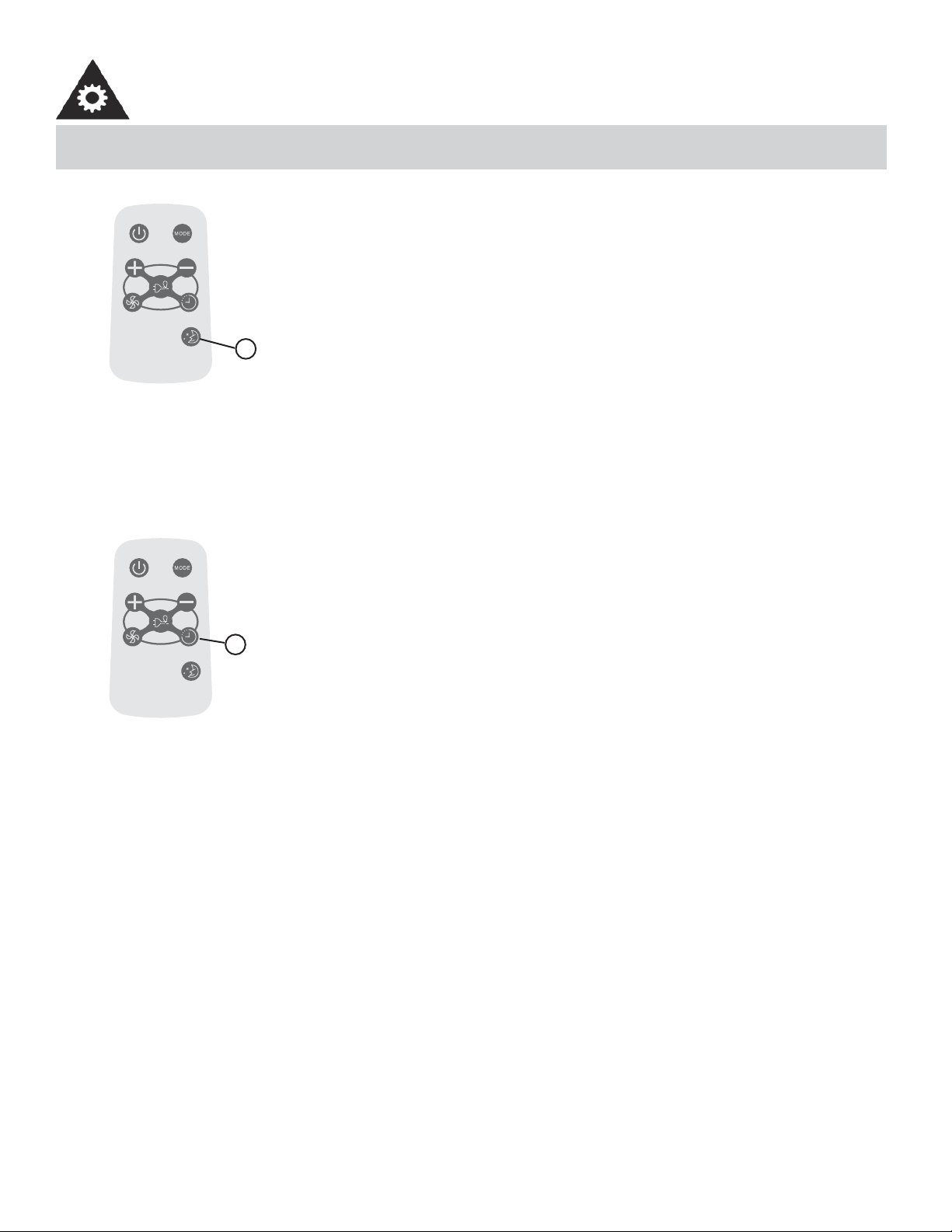
UTLIISATION DES BOUTONS DE LA TÉLÉCOMMANDE
Model / Modèle :
R15B
MODE SOMMEIL
• Dans ce mode, la température sélectionnée augmente (en mode refroidissement) de
1°C (2°F) une demi-heure après la sélection du mode.
• La température augmentera ensuite de 1°C (2°F) supplémentaires au bout d’une
autre demi-heure.
• Cette nouvelle température sera maintenue pendant 6 heures avant le retour à la
température initialement sélectionnée. Cela met fi n au mode Sommeil et l’appareil
continuera de fonctionner conformément à sa programmation initiale.
• Le programme du mode Sommeil peut être annulé à tout moment pendant son
fonctionnement en appuyant à nouveau sur le bouton Sommeil.
-----------------------------------------------------------------------------------------------------------------------
Model / Modèle :
R15B
MINUTERIE
Appuyez sur le bouton MINUTERIE pour régler l’heure de mise en marche automatique
et d’arrêt automatique de l’appareil.
REMARQUE :
• Pour régler l’heure de mise en marche automatique, l’appareil doit être sur la position
OFF (ARRÊT).
• Pour régler l’heure d’arrêt automatique, l’appareil doit être sur la position ON (MISE
EN MARCHE).
Pour régler l’heure de mise en marche automatique
1. Appuyez sur le bouton MINUTERIE lorsque l’appareil est éteint; seule la fonction de
mise en marche automatique peut être réglée.
2. Continuez à appuyer sur les boutons + et -; chaque pression fait augmenter l’heure
sélectionnée d’une heure à la fois, jusqu’à un maximum de 24 heures.
3. L’heure sélectionnée peut aller de 0 à 24.
4. Après la sélection de l’heure souhaitée, attendez environ 3 secondes, jusqu’à ce que
la température réglée réapparaisse sur l’affi cheur du climatiseur. Cela indique que le
programme est réglé.
-----------------------------------------------------------------------------------------------------------------------
1
1
CONSIGNES D’UTILISATION
31
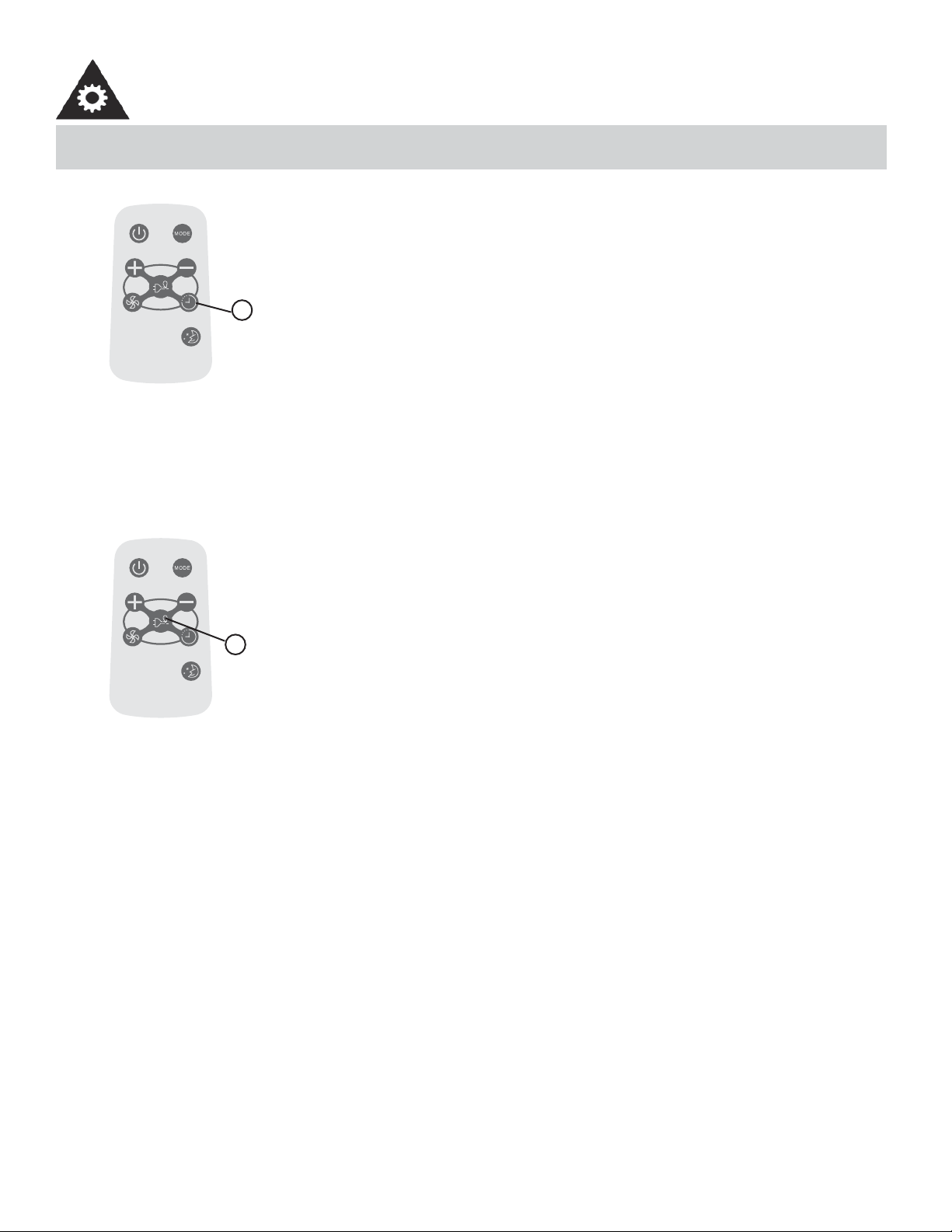
UTILISATION DES BOUTONS DE LA TÉLÉCOMMANDE
Model / Modèle :
R15B
MINUTERIE
Pour régler l’heure d’arrêt automatique
1. Appuyez sur le bouton MINUTERIE lorsque l’appareil est en marche; seule la
fonction d’arrêt automatique peut être réglée.
2. Continuez à appuyer sur le bouton MINUTERIE; chaque pression fait augmenter
l’heure sélectionnée de 0.5 heure à la fois pour les 10 premières heures et par incré-
ments de 1 heure jusqu’à 24 heures.
3. L’heure sélectionnée peut aller de 0 à 24.
4. Après la sélection de l’heure souhaitée, attendez environ 10 secondes, jusqu’à ce
que la température réglée réapparaisse sur l’affi cheur du climatiseur. Cela indique
que le programme est réglé.
REMARQUE :
Pour annuler le réglage du minuteur, appuyez sur le bouton + ou - jusqu’à ce que
« 0 heure » apparaisse sur l’affi cheur ACL du climatiseur.
-----------------------------------------------------------------------------------------------------------------------
Model / Modèle :
R15B
ÉCONOMISEUR D’ÉNERGIE
Cette fonction est disponible lorsque l’appareil est en modes Frais, Sec, et Auto (Au-
to-Frais et Auto-Ventilateur modes seulement). Le ventilateur continuera à fonctionner
pendant 3 minutes après que le compresseur s’est étendu. Après cela, le ventilateur se
met en marche pendant 2 minutes, avec des intervalles de 10 minutes jusqu’à ce que la
température ambiante de la chambre est plus élevée que la température choisie/réglée.
À ce point-là le compresseur se remet en marche et le refroidissement recommence.
-----------------------------------------------------------------------------------------------------------------------
1
1
CONSIGNES D’UTILISATION
32
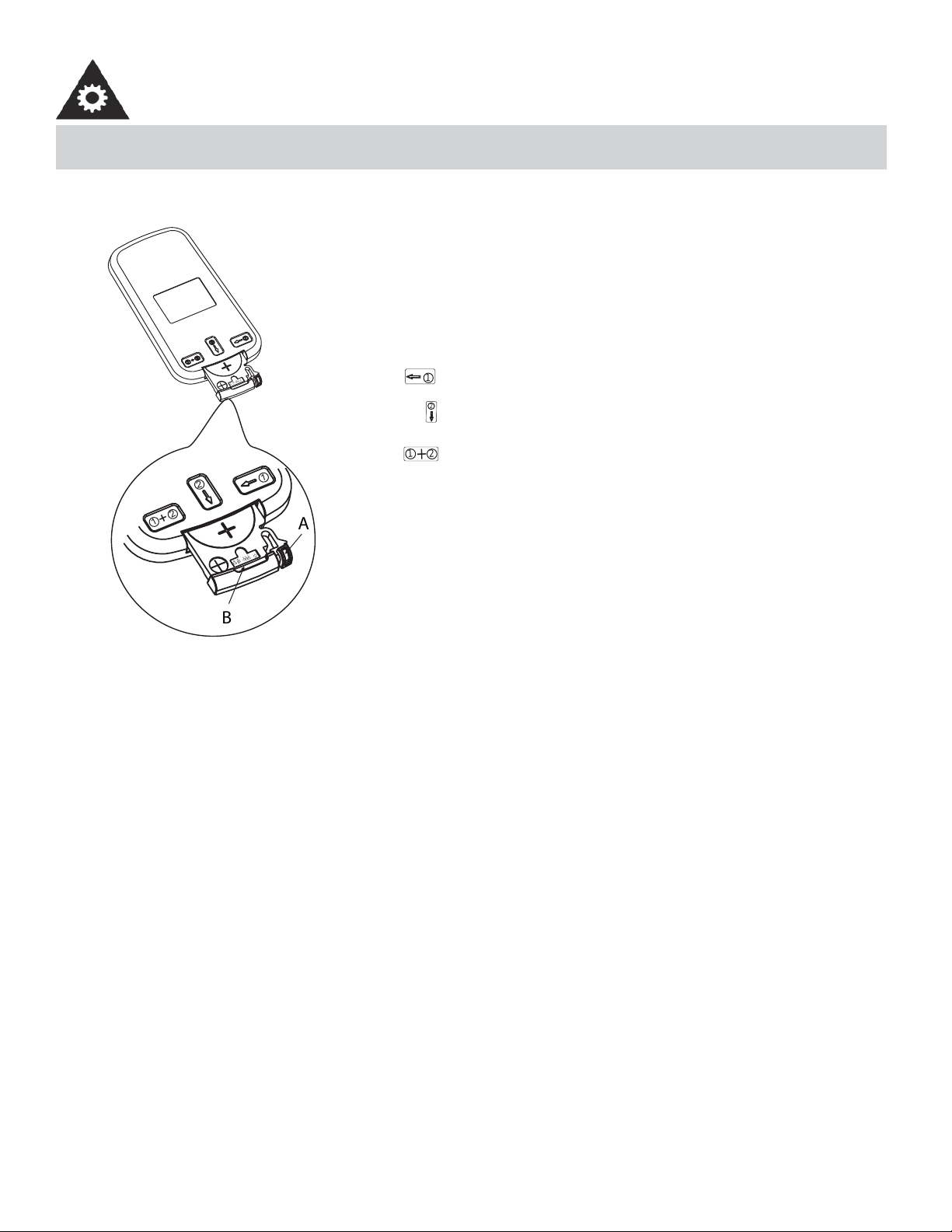
CHANGEMENT DE PILE DE LA TÉLÉCOMMANDE
õ
Ðä
à
ä
ç
õÐ äà
ä
ç
1
2
1
2
+
B
A
1
2
1
2
+
La télécommande est alimentée par une pile bouton installée
dans la partie arrière et protégée par un couvercle. Enlevez la
pile bouton dans la direction indiquée par les fl èches sur l’arrière
de la télécommande.
1. Appuyez légèrement la position « A » avec l’index, dans la
direction indiquée par la fl èche 1.
2. Appuyez sur la position « B » avec le pouce et tirez dessus
dans la direction indiquée par la fl èche 2.
3. Les étapes 1 et 2 doivent être effectuée simultanément afi n
de pouvoir glisser la pile bouton hors du compartiment.
• Protégez la télécommande contre les températures élevées et évitez l’exposition à la radiation.
• Protégez le récepteur du panneau de contrôle contre les rayons directs du soleil.
• Ne mélangez pas les vieilles et nouvelles batteries.
• Ne mélangez pas les batteries alkalines, standard (carbone-zinc), ou rechargeables (Ni-DAO, Ni-MH, etc.)
• La télécommande doit se trouver dans un rayon de 8 m (26 pi) autour du récepteur installé dans le climatiseur. Tout
obstacle entre le récepteur et la télécommande risque de provoquer l’interférence des signaux, ce qui nuit à la pro-
grammation du climatiseur.
Cet appareil est conforme à la norme CAN ICES-3 (B) / NMB-3 (B) du Canada.
Remarque : cet appareil a été testé et déclaré conforme aux limites imposées aux appareils numériques de classe B,
en vertu de l’alinéa 15 du règlement de la FCC. Ces limites sont destinées à assurer une protection raisonnable contre
les interférences nuisibles dans un environnement résidentiel. Cet appareil génère, utilise et peut émettre de l’énergie
radiofréquence et, s’il n’est pas installé et utilisé conformément aux instructions, risque de provoquer des interférences
nuisibles lors de la réception d’émissions de radio ou de télévision (il suffi t, pour le vérifi er, d’allumer et d’éteindre suc-
cessivement l’appareil); s’il constate de telles interférences, l’utilisateur devra prendre les mesures nécessaires pour les
éliminer. À cette fi n, il devra :
1) Réorienter ou déplacer l’antenne réceptrice.
2) Accroître la distance entre l’appareil et le récepteur.
3) Brancher l’appareil sur une prise de courant appartenant à un autre circuit que celui du récepteur.
4) Chercher de l’aide auprès du détaillant ou d’un technicien en radio ou en télévision expérimenté.
Des changements ou modifi cations non approuvés par l’autorité ayant confi rmé la conformité de l’appareil aux règlements
de la FCC pourraient faire retirer l’autorisation d’utilisation de l’appareil. Cet appareil est conforme à la Section 15 de la
réglementation de la FCC. Son utilisation est soumise aux deux conditions suivantes :
1) Cet appareil ne doit pas causer d’interférences nuisibles, et
2) Cet appareil doit accepter toute interférence reçue, y compris les interférences qui pourraient causer un fonctionne-
ment non souhaité.
CONSIGNES D’UTILISATION
33
Avant de procéder à l’entretien du climatiseur, débranchez le cordon d’alimentation de la prise électrique.
1. N’utilisez PAS de l’essence, de produit chimique, de diluant ou autre sur un climatiseur, car ces substances peuvent
endommager la fi nition de la peinture et déformer des pièces en plastique.
2. N’essayez jamais de verser de l’eau directement sur le climatiseur, car cela pourrait provoquer une détérioration des
composants électriques et de l’isolation électrique.
Si le fi ltre à air est bouché par de la poussière, la circulation d’air est obstruée et perd de son effi cacité. Le fi ltre à air doit
être nettoyé toutes les 2 semaines.
ENLEVER LE FILTRE À AIR :
Le fi ltre à air se trouve derrière la grille frontale de la prise d’air. Pour enlever le fi ltre à air, saisissez la poignée du fi ltre
sur l’avant de la grille et glissez-le (vers l’extérieur) à droite. Si votre grille à air de devant dote deux (2) dentelures, tirez la
grille vers l’avant et retirez le fi ltre à air.
Pour réinstaller le fi ltre à air, faites l’inverse des procédures ci-dessus. Le fi ltre à air peut être nettoyé à l’aide d’un aspira-
teur ou lavé à la main dans de l’eau chaude. Séchez-le bien avant de l’installer.
NETTOYAGE DU FILTRE À AIR :
1. Utilisez un aspirateur muni d’une brosse douce.
2. Lavez le fi ltre dans de l’eau tiède de moins de 40°C (104°F). Pour obtenir de meilleurs résultants, lavez avec une eau
savonneuse ou un agent neutre de nettoyage.
3. Rincez le fi ltre avec de l’eau propre et séchez-le à fond avant de le réinstaller.
1. Faites fonctionner uniquement le ventilateur pendant une demi-journée pour sécher l’intérieur du climatiseur.
2. Coupez le courant et enlevez la fi che de la prise murale.
3. Nettoyez le fi ltre.
4. Rangez le climatiseur (couvert) dans un endroit sec.
NETTOYAGE
ENTRETIEN HORS SAISON
SOINS ET ENTRETIEN
MISE EN GARDE
N’oubliez PAS d’installer le fi ltre à air. Si on fait fonctionner le climatiseur sans fi ltre à air,
la poussière n’est pas éliminée de l’air de la pièce et peut entraîner une défaillance de la
machine. Quand la grille de l’entrée d’air et le caisson sont sales, essuyez-les avec de l’eau
tiède (en dessous de 40 °C). On recommande l’utilisation d’un détersif doux.
ATTENTION
Durant l’installation et/ou en enlevant le climatiseur de la fenêtre, assurez-vous qu’il ne
tombe pas hors de la fenêtre. On recommande que l’installation ou le déplacement du
climatiseur soit fait à deux pour empêcher de blesser des personnes ou d’endommager
l’appareil ou la propriété.
MISE AU REBUT
Vérifi ez la réglementation locale concernant la mise au rebut approuvée et sécurisée de cet appareil.
NOTE : Afi n d’éviter tout choc électrique, éteindre
et débrancher le climatiseur avant entretien ou
réparation.
FILTRE À AIR
34
De temps en temps, un problème mineur peut se poser et un appel de service peut ne pas être nécessaire. Employez ce
guide de dépannage pour une solution possible. Si l’unité continue à fonctionner incorrectement, communiquez avec un
dépôt autorisé de service ou appelez au numéro sans frais de Danby : 1-800-263-2629.
DÉPANNAGE
PROBLÉME CAUSE PROBABLE SOLUTION
Le climatiseur ne
fonctionne pas
• Aucun courant branché à l’appareil • Vérifi ez le branchement du cordon d’alimentation
à la source de courant
• Vérifi ez le fusible ou le disjoncteur
• Placer le commutateur de sélection à une posi-
tion autre que ARRÊT.
• Le bouton RESET (du cordon d’alimenta-
tion) doit toujours être enfoncé pour un bon
fonctionnement.
Ineffi cace ou aucun
refroidissement
• Filtre à air sale • Nettoyez ou remplacez le fi lre à air
• Les dimensions de l’appareil ne con-
viennent pas à son application
• Vérifi ez avec le concessionnaire si la capacité
de l’appareil est appropriée à son application
• Circulation d’air bloquée • Enlevez l’objet qui obstrue la grille ou les volets
extérieurs.
• Interruption du courant, réglages
changés trop rapidement, ou com-
presseur déclenché par surcharge.
• Arrêtez le climatiseur et attendez 5 minutes
avant de le remettre en marche.
Appareil bruyant • Pièces desserrées • Serrez les pièces qui sont desserrées
• Support inadéquat • Fournissez un support supplémentaire à l’appa-
reil
Odeurs • Formation de moisissure ou d’algues
sur les surfaces mouillées.
• Nettoyez à fond l’appareil.
• Mettez une tablette anti-algues dans la cuvette
de base.
De l’eau s’égoutte à
l’extérieur
• L’écoulement de la condensation est
normal, quand le temps est chaud et
humide.
• Le ruissellement causé par la condensation est
normal sous ces conditions.
De l’eau s’égoutte à
l’intérieur
• L’appareil n’est pas incliné adéqua-
tement pour permettre à l’eau de
s’écouler à l’extérieur.
• L’appareil doit être installé à un certain angle
pour permettre un écoulement adéquat de la
condensation. Vérifi ez l’appareil et exécutez tout
ajustement.
• C’est une journée très humide • Lorsqu’il fait très humide, ce phénomène est
attendu. Aucune action requise.
Formation de glace
ou de givre
• Température très froide à l’extérieur. • Lorsque la température extérieure est d’envi-
ron 18,3 °C (65 °F) ou moins, du givre peut se
former quand l’appareil est en mode refroidisse-
ment. Réglez l’appareil en mode VENTILATEUR
(seulement) jusqu’à ce que le givre fonde.
• Le fi ltre à air de l’appareil est sale. • Enlevez et nettoyez le fi ltre à air.
REMARQUES:
1. Si le disjoncteur se déclenche à maintes reprises, ou si le fusible a grillé plus d’une fois, contactez un technicien qua-
lifi é.
2. Quand l’appareil est installé en suivant les étapes d’installation adéquates, l’appareil est incliné de façon appropriée
vers l’extérieur pour permettre l’écoulement de la condensation.
35
LIMITED IN-HOME APPLIANCE WARRANTY
This quality product is warranted to be free from manufacturer’s defects in material and workmanship, provided that the unit is used under the normal operating
conditions intended by the manufacturer.
This warranty is available only to the person to whom the unit was originally sold by Danby Products Limited (Canada) or Danby Products Inc. (U.S.A.) (hereafter
“Danby”) or by an authorized distributor of Danby, and is non-transferable.
TERMS OF WARRANTY
Plastic parts, are warranted for thirty (30) days only from purchase date, with no extensions provided.
First Year
During the rst twelve (12) months, any functional parts of this product found to be defective, will be repaired or replaced, at warrantor’s
option, at no charge to the ORIGINAL purchaser.
To obtain
Danby reserves the right to limit the boundaries of “In Home Service” to the proximity of an Authorized Service Depot. Any app liance
Service
requiring service outside the limited boundaries of “In Home Service” , it will be the consumer’s responsibility to transport the appliance (at
their own expense) to the original retailer (point of purchase) or a service depot for repair. See “Boundaries of In Home Serv ice” below.
Contact your dealer from whom your unit was purchased, or contact your nearest authorized Danby service depot, where service
must be performed by a qualied service technician.
If service is performed on the units by anyone other than an authorized service depot, or the unit is used for commercial appli cation, all
obligations of Danby under this warranty shall be void.
Boundaries of
If the appliance is installed in a location that is 100 kilometers (62 miles) or more from the nearest service center your unit must be
In Home Service
delivered to the nearest authorized Danby Service Depot, as service must only be performed by a technician qualied and certif ied for
warranty service by Danby. Transportation charges to and from the service location are not protected by this warranty and are t he
responsibility of the purchaser.
Nothing within this warranty shall imply that Danby will be responsible or liable for any spoilage or damage to food or other c ontents of this appliance, whether due
to any defect of the appliance, or its use, whether proper or improper.
EXCLUSIONS
Save as herein provided, Danby, there are no other warranties, conditions, representations or guarantees, express or implied, m ade or intended by Danby or its
authorized distributors and all other warranties, conditions, representations or guarantees, including any warranties, conditio ns, representations or guarantees
under any Sale of Goods Act or like legislation or statue is hereby expressly excluded. Save as herein provided, Danby shall no t be responsible for any damages
to persons or property, including the unit itself, howsoever caused or any consequential damages arising from the malfunction o f the unit and by the purchase of
the unit, the purchaser does hereby agree to indemnify and hold harmless Danby from any claim for damages to persons or propert y caused by the unit.
GENERAL PROVISIONS
No warranty or insurance herein contained or set out shall apply when damage or repair is caused by any of the following:
1) Power failure.
2) Damage in transit or when moving the appliance.
3) Improper power supply such as low voltage, defective house wiring or inadequate fuses.
4) Accident, alteration, abuse or misuse of the appliance such as inadequate air circulation in the room or abnormal operating con ditions
(extremely high or low room temperature).
5) Use for commercial or industrial purposes (ie. If the appliance is not installed in a domestic residence).
6) Fire, water damage, theft, war, riot, hostility, acts of God such as hurricanes, oods etc.
7) Service calls resulting in customer education.
8) Improper Installation (ie. Building-in of a free standing appliance or using an appliance outdoors that is not approved for out door application).
Proof of purchase date will be required for warranty claims; so, please retain bills of sale. In the event warranty service is required, present this document to our
AUTHORIZED SERVICE DEPOT.
Danby Products Limited
PO Box 1778, Guelph, Ontario, Canada N1H 6Z9
Telephone: (519) 837-0920 FAX: (519) 837-0449
Danby Products Inc.
PO Box 669, Findlay, Ohio, U.S.A. 45840
Telephone: (419) 425-8627 FAX: (419) 425-8629
04/09
1-800-263-2629
Warranty Service
In-home
Si l'appareil est installé à plus de 100 kilomètres (62 milles) du centre de service le plus proche, il doit
être livré à l'atelier de réparation autorisé par Danby le plus proche, car l'entretien doit uniquement être
réalisé par un technicien qualifié et certifié pour effectuer un entretien couvert par la garantie de Danby.
Les frais de transport entre votre domicile et le lieu de l'entretien ne sont pas couverts par la présente
garantie et doivent être acquittés par l'acheteur.
Pendant les premiers douze (12) mois, toutes les pièces fonctionnelles de ce produit qui s’avèrent
défectueuses seront réparées ou remplacées, selon le choix du garant, sans frais à l’acheteur INITIAL.
Le client sera responsable pour le transport et tous les frais d’expédition de tout appareil exigeant le
service au dépot de service autorisé le plus proche. S’adresser au détaillant qui a vendu l’appareil, ou à
la station technique agréée de service la plus proche, où les réparations doivent être effectuées par un
technicien qualifié. Si les réparations sont effectuées par quiconque autre que la station de service
agréée où à des fins commerciales, toutes les obligations de Danby en vertu de cette garantie seront
annulées.
Premiers 12 mois
Pour bénéficier
du service
Limites de
l’entretien à
domicile
GARANTIE LIMITÉE SUR
APPAREIL ÉLECTROMÉNAGER À DOMICILE
Cet appareil de qualité est garanti exempt de tout vice de matière première et de fabrication, s’il est utilisé dans les conditions
normales recommandées par le fabricant.
Cette garantie n’est offerte qu’à l’acheteur initial de l’appareil vendu par Danby Products Limited (Canada) ou Danby Products
Inc. (E.- U.A.) (ci-après « Danby ») ou par l’un des ses distributeurs agréés et elle ne peut être transférée.
CONDITIONS
Les pièces en plastique sont garanties pendant trente (30) jours seulement à partir de la date de l’achat, sans aucune prolon-
gation prévue.
Aucune partie de la garantie ne prévoit implicitement que le fabricant sera tenu responsable des dommages subis par les
aliments ou d’autres types de contenu, qu’ils soient causés par la défectuosité de l’appareil ou par son usage adéquat ou
inadéquat.
EXCLUSIONS
En vertu de la présente, il n’existe aucune autre garantie, condition ou représentation, qu’elle soit exprimée ou tacite, de façon
manifeste ou intentionnelle, par Danby ou ses distributeurs agréés. De même, sont exclues toutes les autres garanties,
conditions ou représentations, y compris les garanties, conditions ou représentations en vertu de toute loi régissant la vente
de produits ou de toute autre législation ou règlement semblables. En vertu de la présente, Danby ne peut être tenue respon-
sable en cas de blessures corporelles ou des dégâts matériels, y compris à l’appareil, quelle qu’en soit les causes. Danby ne
peut pas être tenue responsable des dommages indirects dus au fonctionnement défectueux de l’appareil. En achetant
l’appareil, l’acheteur accepte de mettre à couvert et de dégager Danby de toute responsabilité en cas de réclamation pour
toute blessure corporelle ou tout dégât matériel causé par cet appareil.
CONDITIONS GÉNÉRALES
La garantie ou assurance ci-dessus ne s’applique pas si les dégâts ou réparations sont dus aux cas suivants :
1) Panne de courant.
2) Dommage subis pendant le transport ou le déplacement de l’appareil.
3) Alimentation électrique incorrecte (tension faible, câblage défectueux, fusibles incorrects).
4) Accident, modification, emploi abusif ou incorrect de l’appareil tel qu'une circulation d'air inadéquate dans la pièce ou des
conditions de fonctionnement anormales (température extrêmement élevée ou basse).
5) Utilisation dans un but commercial ou industriel (à savoir, si l'appareil n'est pas installé dans un domicile résidentiel).
6) Incendie, dommages causés par l’eau, vol, guerre, émeute, hostilités, cas de force majeure (ouragan, inondation, etc.).
7) Visites d’un technicien pour expliquer le fonctionnement de l’appareil au propriétaire.
8) Installation inappropriée (par exemple, encastrement d'un appareil autoportant, ou utilisation extérieure d'un appareil non
conçu à cet effet). Une preuve d’achat doit être présentée pour toute demande de réparation sous garantie. Prière de garder
le reçu. Pour faire honorer la garantie, présenter ce document à la station technique agréée ou s’adresser à :
Service sous garantie
Service au domicile
Danby Products Limited
PO Box 1778, Guelph, Ontario, Canada N1H 6Z9
Téléphone : (519) 837-0920 Télécopieur: (519) 837-0449
Danby Products Inc.
PO Box 669, Findlay, Ohio, U.S.A. 45840
Téléphone: (419) 425-8627 Télécopieur: (419) 425-8629
1-800-263-2629
03/14

NOTES / REMARQUES :
__________________________________________________________________________________________
__________________________________________________________________________________________
__________________________________________________________________________________________
__________________________________________________________________________________________
__________________________________________________________________________________________
__________________________________________________________________________________________
__________________________________________________________________________________________
__________________________________________________________________________________________
__________________________________________________________________________________________
__________________________________________________________________________________________
__________________________________________________________________________________________
__________________________________________________________________________________________
__________________________________________________________________________________________
__________________________________________________________________________________________
__________________________________________________________________________________________
__________________________________________________________________________________________
__________________________________________________________________________________________
__________________________________________________________________________________________
__________________________________________________________________________________________
__________________________________________________________________________________________
__________________________________________________________________________________________
__________________________________________________________________________________________

NOTES / REMARQUES :
__________________________________________________________________________________________
__________________________________________________________________________________________
__________________________________________________________________________________________
__________________________________________________________________________________________
__________________________________________________________________________________________
__________________________________________________________________________________________
__________________________________________________________________________________________
__________________________________________________________________________________________
__________________________________________________________________________________________
__________________________________________________________________________________________
__________________________________________________________________________________________
__________________________________________________________________________________________
__________________________________________________________________________________________
__________________________________________________________________________________________
__________________________________________________________________________________________
__________________________________________________________________________________________
__________________________________________________________________________________________
__________________________________________________________________________________________
__________________________________________________________________________________________
__________________________________________________________________________________________
__________________________________________________________________________________________
__________________________________________________________________________________________

NOTES / REMARQUES :
__________________________________________________________________________________________
__________________________________________________________________________________________
__________________________________________________________________________________________
__________________________________________________________________________________________
__________________________________________________________________________________________
__________________________________________________________________________________________
__________________________________________________________________________________________
__________________________________________________________________________________________
__________________________________________________________________________________________
__________________________________________________________________________________________
__________________________________________________________________________________________
__________________________________________________________________________________________
__________________________________________________________________________________________
__________________________________________________________________________________________
__________________________________________________________________________________________
__________________________________________________________________________________________
__________________________________________________________________________________________
__________________________________________________________________________________________
__________________________________________________________________________________________
__________________________________________________________________________________________
__________________________________________________________________________________________
__________________________________________________________________________________________
All repair parts are available for purchase or special
order when you visit your nearest service depot. To
request service and/or the location of the service depot
nearest you, call the TOLL FREE number.
When requesting service or ordering parts, always pro-
vide the following information:
• Product Type
• Model Number
• Part Number
• Part Description
Toutes les pièces de rechange ou commandes spécia-
les sont disponibles à votre centre de service régional
autorisé. Pour obtenir le service et/ou la localité de
votre centre de service régional, signalez le NUMÉRO
D’APPEL SANS FRAIS.
Ayez les renseignements suivants à la portée de la main
lors de la commande de pièce ou service:
• Type de produit
• Numéro de modèle
• Numéro de pièce
• Description de la pièce
MODEL • MODÈLE
1-800-26-
(1-800-263-2629)
Printed in China
Imprimé en Chine
Danby Products Limited, Guelph, ON, Canada N1H 6Z9
Danby Products Inc., Findlay, Ohio, USA 45840
AIR CONDITIONER CLIMATISEUR
DAC080EUB6GDB / DAC100EUB4GDB / DAC120EUB6GDB