Gala
®
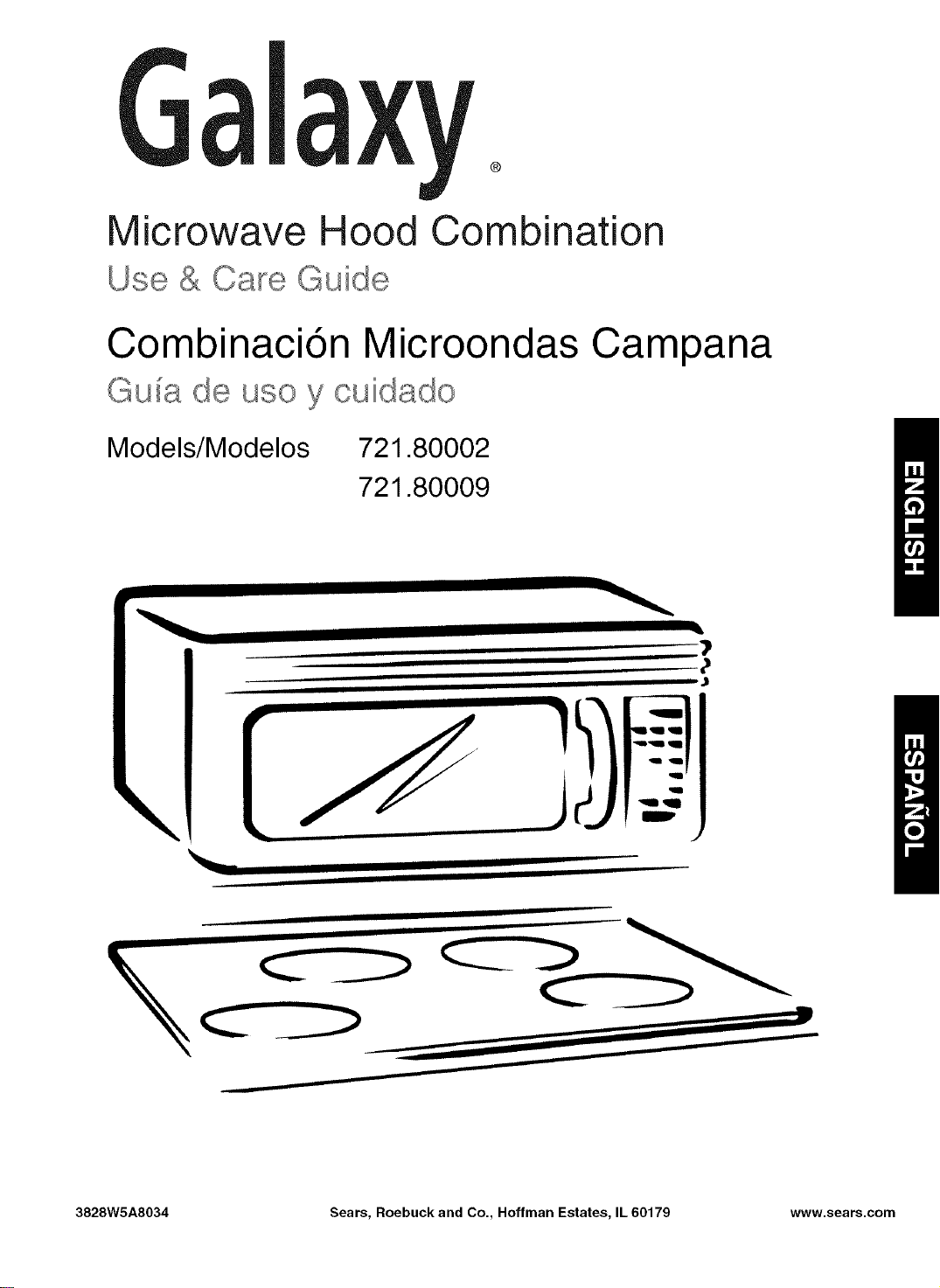
Microwave Hood Combination
Use & Care Guide
Combinaci6n Microondas Campana
Guia de uso y cuidado
Models/Modelos 721.80002
721.80009
\
3828W5A8034 Sears, Roebuck and Co., Hoffman Estates, IL 60179 www.sears.com
Table of
Contents
Warranty ........................................................... 2
Sears Service .................................................. 3
Microwave Oven Safety .................................. 4
Getting to Know Your
Microwave Oven .............................................. 7
How your microwave oven works ................... 7
Radio interference .......................................... 7
For the best cooking results ........................... 7
Testing your microwave oven ......................... 7
Testing your dinnerware or cookware ............ 8
Operating safety precautions .......................... 8
Electrical connection ...................................... 8
Microwave oven features ............................... 9
Control panel features ................................... 10
Using Your Microwave Oven ....................... 12
Audible Signals ............................................. 12
Interrupting Cooking ...................................... 12
Clock ............................................................. 12
Child Lock ..................................................... 12
Timer ............................................................. 13
Cooktop Light ................................................ 13
Time Defrost ................................................. 13
Exhaust Fan .................................................. 13
Timed Cooking .............................................. 14
Multi-stage Cooking ...................................... 14
Microwave Power Levels .............................. 15
Auto Defrost .................................................. 16
Operating Tips .............................................. 16
Auto defrost table .......................................... 17
Auto defrost table (Cont.) .............................. 18
Defrosting tips .............................................. 19
Using Quick Touch ........................................ 20
Auto Cook ..................................................... 21
Cooking guide for Auto Cook ........................ 21
Auto Reheat .................................................. 22
Cooking guide for Auto Reheat ..................... 22
Caring for Your Microwave Oven ................. 23
Caring for the filters ....................................... 24
Replacing the cooktop and oven lights ......... 25
Microwave Cooking Tips ......................... 26~27
Questions and Answers ................................ 28
Troubleshooting ....................................... 29~30
Service ............................................. Back cover
MicrowaveHood
Combination
Warranty
FULL ONE-YEAR WARRANTY ON
MICROWAVE HOOD COMBINATION
For one year from the date of purchase, if this
Galaxy Microwave Hood Combination fails due to
a defect in material or workmanship, Sears will
repair it free of charge.
FOUR YEAR LIMITED WARRANTY
ON MAGNETRON
For the second through the fifth year from the date
of purchase,if the magnetron in this oven fails due
to da defect in material or workmanship,Sears will
supply a new magnetron,free of charge.Safety
regulations,however,require the magnetron to be
installed by Sears,and you must pay the labor cost
of installation.
The above warranty coverage applies only to
Microwave Hood Combinations which are used for
private household purposes.
WARRANTY SERVICE IS AVAILABLE BY
SIMPLY CONTACTING SEARS SERVICE AT
1-800-4-MY-HOME _
This warranty applies only while this product is in
use in the United States.
This warranty gives you specific legal rights, and
you may also have other rights which vary from
state to state.
Sears, Roebuck and Co.,
Dept. 817WA,
Hoffman Estates, IL 60179
For service call:
1-800-4-MY-HOME _
(1-800-469-4663)
Please record your model's information.
Whenever you call to request service for your
appliance, you need to know your complete model
number and serial number. You can find this
information on the model and serial number
label/plate at the upper side of cavity front in your
Microwave oven. Also, record the other information
shown below.
Model Number
Serial Number
2 Purchase Date
Sears Service
Master Protection Agreements
Congratulations on making a smart purchase.
Your new Galaxy _ product isdesigned and manufactured for years of dependable operation.
But like all products, it may require preventive maintenance or repair from time to time.
That's when having a Master Protection Agreement can save you money and aggravation.
Purchase a Master Protection Agreement now and protect yourself from unexpected hassle
and expense.
The Master Protection Agreement also helps extend the life of your new product. Here's
what's included in the Agreement:
Expert service by our 12,000 professional repair specialists
Unlimited service and no charge for parts and labor on all covered repairs
"No=lemon" guarantee - replacement of your covered product iffour or more product failures
occur within twelve months
Product replacement ifyour covered product can't be fixed
Annual Preventive Maintenance Check at your request - no extra charge
Fast help by phone - phone support from a Sears technician on products requiring in-home
repair, plus convenient repair scheduling
I_ Power surge protection against electrical damage due to power fluctuations
I_ Rental reimbursement if repair of your covered product takes longer than promised
Once you purchase the Agreement, a simple phone call is all that it takes for you to schedule service.
You can call anytime day or night, or schedule a service appointment online.
Sears has over 12,000 professional repair specialists, who have access to over 4.5 million quality
parts and accessories. That's the kind of professionalism you can count on to help prolong the life of
your new purchase for years to come. Purchase your Master Protection Agreement today!
Some limitations and exclusions apply. For prices and additional information call 1=800=827=
6655.
Sears Installation Service
For Sears professional installation of home appliances, garage door openers, water heaters, and
other major home items, in the U.S.A. call
1=800=4-MY=HOME®
Microwave Oven Safety
Your safety and the safety of others are very important.
We have provided many important safety messages in this manual and on your appliance.
Always read and obey all safety messages.
This is the safety alert symbol.
This symbol alerts you to hazards that can kill or hurt you and others.
All safety messages will be preceded by the safety alert symbol and the word
"DANGER" or "WARNING." These words mean:
You will be killed or seriously injured
if you don't follow immediately instructions.
You can be killed or seriously injured
if you don't follow instructions.
All safety messages will identify the hazard, tell you how to reduce the chance of injury, and tell
you what can happen if the instructions are not followed.
IMPORTANT SAFETY INSTRUCTIONS
When using electrical appliances basic safety precautions should be followed, including the
following:
WARNING: To reduce the risk of burns,
electric shock, fire, injury to persons, or
exposure to excessive microwave energy:
• Read all instructions before using the
microwave oven.
• Read and follow the specific
"PRECAUTIONS TO AVOID POSSIBLE
EXPOSURE TO EXCESSIVE MICROWAVE
ENERGY" found in this section.
• The microwave oven must be grounded.
Connect only to properly grounded outlet.
See "GROUNDING INSTRUCTIONS" found
at the end of this section.
• Install or locate the microwave oven only in
accordance with the provided installation
instructions.
Some products such as whole eggs in the
shell and sealed containers - for example,
closed glass jars - are able to explode and
should not be heated in the microwave oven.
• Use the microwave oven only for its intended
use as described in this manual. Do not use
corrosive chemicals or vapors in the
microwave oven. This type of oven is
specifically designed to heat, cook, or dry
food. It is not designed for industrial or
laboratory use.
• As with any appliance, close supervision is
necessary when used by children.
• Do not operate the microwave oven if it has
a damaged cord or plug, if it is not working
properly, or if it has been damaged or
dropped.
SAVE THESE INSTRUCTIONS
IMPORTANT SAFETY INSTRUCTIONS
•Themicrowaveovenshouldbe servicedonlyby
qualifiedservicepersonnel.Callan authorized
servicecompanyforexamination,repair,or
adjustment.
•See doorsurfacecleaninginstructionsinthe"Caring
forYour MicrowaveOven"section.
•To reducetheriskoffirein theovencavity:
- Donotovercookfood.Carefullyattendthe
microwaveovenwhenpaper,plastic,orother
combustiblematerialsareplacedinsidethe ovento
facilitatecooking.
- Removewiretwist-tiesfrom paperor plasticbags
beforeplacingbagsinoven.
- If materialsinsidetheovenignite,keepovendoor
closed,turnovenoff,anddisconnectthepower
cord, orshut offpoweratthefuseor circuitbreaker
panel.
- Donotusethecavityforstoragepurposes.Donot
leavepaperproducts,cookingutensils,orfoodin
the cavitywhennotin use.
•Suitableforuseabovebothgasand electriccooking
equipment.
• Intendedto be usedaboverangeswithmaximum
widthof36 inches(91cm).
•CleanVentilatingHoodsFrequently-Greaseshould
notbe allowedtoaccumulateon hoodor filter.
•Whenflamingfoods underthe hood,turnthe fanon.
• Usecarewhencleaningthevent-hoodfilter.
Corrosivecleaningagents,such aslye-basedoven
cleaners,maydamagethefilter.
•Oversizedfoodsoroversizedmetalutensilsshould
notbe insertedin themicrowaveovenastheymay
createa fireor riskofelectricshock.
• Donotcleanwithmetalscouringpads.Piecescan
burn offthepad andtouchelectricalpartsinvolvinga
riskofelectricshock.
• Donotstoreanythingdirectlyon topofthe
microwaveovenwhenthe microwaveovenis in
operation.
• Donotcoveror blockanyopeningsonthe
microwaveoven.
• Donotstorethis microwaveovenoutdoors.Donot
usethemicrowaveovennearwater- forexample,
neara kitchensink,in awet basement,neara
swimmingpool,or similarlocation.
• Donotimmersecordor plugin water.
•Keepcordawayfrom heatedsurfaces.
• Donotletcordhangoveredgeof tableor counter.
• Donotmountovera sink.
• Donotcover racksoranyotherpartoftheovenwith
metalfoil.Thiswillcauseoverheatingoftheoven.
•Liquids such as water, coffee, or tea are able to
be overheated beyond the boiling point without
appearing to be boiling dueto surface tension of
the liquid. Visible bubbling or boiling when the
container is removed from the microwave oven is
not always present. This could result in very hot
liquids suddenly boiling over when a spoon or
other utensil is inserted into the liquid. To reduce
the risk of injuryto persons;
1) Do notoverheat the liquid.
2) Stir the liquid both before and halfwaythrough
heating it.
3) Do notuse straight-sided containers with
narrow necks.
4) After heating, allow the container to stand in the
microwave oven for a short time before
removing the container.
5) Use extreme care when inserting a spoon or
other utensil into the container.
SAVE THESE INSTRUCTIONS
PRECAUTIONS TO AVOID POSSIBLE
EXPOSURE TO EXCESSIVE MICROWAVE
ENERGY
(a) Do not attempt to operate this oven withthe
door open since open-door operation can
result in harmful exposure to microwave
energy. It is important not to defeat or tamper
with the safety interlocks.
(b) Do not place any object between the oven
front face and the door or allow soil or cleaner
residue to accumulate on sealing surfaces.
(c)
(d)
Do not operate the oven if it is damaged. It is
particularly important that the oven door close
properly and that there is no damage to the:
(1) Door (bent),
(2) Hinges and latches (broken or loosened),
(3) Door seals and sealing surfaces.
The oven should not be adjusted or repaired
by anyone except properly qualified service
personnel.
Electrical
requirements
Observe all governing codes and
ordinances. A 120 Volt, 60 Hz, AC only,
15 or 20 amp fused electrical supply is
required. (A time-delay fuse is recommended.)
It is recommended that a separate circuit
serving only this appliance be provided.
Electrical Shock Hazard
Plug into a grounded 3 prong
outlet. Do not remove ground
prong. Do not use an adapter.
Do not use an extension cord.
Failure to follow these
instructions can result in death,
fire, or electrical shock.
GROUNDING INSTRUCTIONS
• For all cord connected appliances:
The microwave oven must be grounded.
In the event of an electrical short circuit,
grounding reduces the risk of electric
shock by providing an escape wire for the
electric current. The microwave oven is
equipped with a cord having a grounding
wire with a grounding plug. The plug must
be plugged into an outlet that is properly
installed and grounded.
WARNING: Improper use of the
grounding can result in a risk of electric
shock.
Do not use an extension cord. If the power
supply cord is too short, have a qualified
electrician or serviceman install an outlet
near the microwave oven.
• For a permanently connected appliance:
The microwave oven must be connected
to a grounded, metallic, permanent wiring
system, or an equipment grounding
conductor should be run with the circuit
conductors and connected to the
equipment grounding terminal or lead on
the microwave oven.
Consult a qualified electrician or
serviceman if the grounding instructions
are not completely understood, or if doubt
exists as to whether the microwave oven
is properly grounded.
SAVE THESE INSTRUCTIONS
Gettin to Know Your
Microwave Oven
This section discusses the concepts behind microwave cooking. It also shows you the
basics you need to know to operate your microwave oven. Please read this information before you
use your oven.
How your microwave oven works
Microwave ovens are safe. Microwave energy is not hot. It Magnetron
causes food to make its own heat, and it's this heat that cooks
the food.
Microwaves are likeTV waves, radio waves, or lightwaves. You
cannot see them, butyou can see what they do.
A magnetron in the microwave oven produces microwaves. The
microwaves move intothe oven wherethey contact food as it
turns on the turntable.
The glass turntable of your microwave oven lets microwaves
pass through. Then they bounce off a metalfloor, back through ovencavity
the glass turntable, and are absorbed bythe food. Metalfloor Glassturntable
Microwaves pass through most glass, paper, and plastics
without heating them so food absorbs the energy. Microwaves bounce off metal containers so food does not
absorb the energy.
Radio interference
Using your microwave oven may cause interference to _ourradio,TV, or similar equipment. Whenthere is
interference, you can reduce it or remove it by:
• Cleaning the door and sealing surfaces of the oven.
• Adjusting the receiving antenna of the radio or television.
• Moving the receiver away from the microwave oven.
• Plugging the microwave oven into a different outletso that the microwave oven and receiver are on
different branchcircuits.
For the best cooking results
• Always cook food for the shortest cooking time recommended. Checkto see how the food is cooking. If
needed, touch Add Minute while the oven is operating or after the cooking cycle is over (see the "Using
add minute"section).
• Stir, turn over, or rearrange the food being cooked about halfwaythrough the cooking time for all recipes.
This will help makesure the food is evenly cooked.
• If you do not have a cover for a dish, usewax paper, or microwave-approved paper towels or plastic
wrap. Rememberto turn back a corner of the plastic wrap to vent steam during cooking.
Testing your microwave oven
To test the oven put about 1 cup of cold water in a glass container in the oven. Close the door. Make sure it
latches. Cook at 100% powerfor 1 minute. When the time is up, thewater should be heated.
Testing your dinnerware or cookware
Test dinnerware or coolevare before using. To testa dish forsafe use, put itinto the oven with a cupof
water beside it. Cook at 100%cook power forone minute. If the dish gets hot, do not use it.
Some dishes (melamine, some ceramic dinnerware, etc.) absorb microwave energy, becoming too hotto
handle and slowing cooking times. Cooking in metal containers notdesigned for microwave use could damage
the oven, ascould containers with hidden metal (twist-ties,foillining,staples, metallicglaze or trim).
Operating safety precautions
• Never lean on the door or allow a childto swing on itwhen thedoor isopen.
• Use hot pads. Microwave energydoes notheat containers, but the heatfrom thefood can make the
container hot.
• Do not use newspaper or other printedpaper inthe oven.
• Do not dryflowers, fruit,herbs, wood, paper,gourds, or clothes in theoven.
• Do not starta microwave oven when it isempty. Product life may be shortened. Ifyou practiceprogramming
the oven, put a container ofwater in the oven. Itis normal forthe oven door to lookwavy after the oven has
been runningfor a while.
• Do not try to melt paraffin wax in theoven. Paraffin wax will not melt in a microwave oven because itallows
microwaves to pass through it.
• Do not operatethe microwave oven unless the glass turntable is securelyin placeand can rotate freely.The
turntable can rotate in either direction.Make sure the turntable is correct-side up in the oven. Handle your
turntable with care when removing it from the oven to avoidpossibly breaking it. If your turntablecracks or
breaks, contact your dealer fora replacement.
• When you use a browning dish, the browning dish bottom mustbe at least 3/16 inchabove the turntable.
Followthe directionssupplied with the browning dish.
• Never cook or reheat a whole egg inside the shell. Steam buildup in whole eggs may cause them to burst,
and possiblydamage the oven. Slice hard-boiled eggs beforeheating. In rare cases, poachedeggs have
been known to explode. Cover poached eggs and allow a standing time ofone minute beforecutting into
them.
• For best results, stir any liquid several times during heating or reheating. Liquids heated in certain
containers (especiallycontainersshaped likecylinders) may become overheated.The liquidmay splashout
with a loudnoiseduring or after heating or when adding ingredients (coffeegranules, tea bags, etc.). This can
harm the oven.
• Microwaves may not reach thecenter ofa roast.The heatspreads to the center from theouter, cooked
areasjust as in regular oven cooking. This is one of the reasons for letting some foods (forexample, roastsor
baked potatoes)stand fora while aftercooking, or forstirringsome foods during the cooking time.
• Do not deep fry in the oven. Microwavable utensils are not suitable and itis difficultto maintain appropriate
deep-frying temperatures.
• Do not overcook potatoes. At the end of the recommended cooking time, potatoesshould be slightlyfirm
because they will continue cooking during standing time.After microwaving, let potatoes stand for 5
minutes. They will finish cooking while standing.
Electrical connection
I If yourelectric power line or outlet voltage is less than 110 volts, cooking times may be longer. Have a
qualified electrician check your electrical system.
8
I
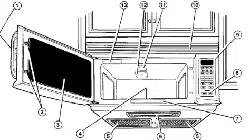
Microwave oven features
® ®
J
J
i
® ® ® @
Your microwave oven isdesigned to make your
cooking experience as enjoyable and productive
as possible. To get you up and running quickly, the
following is a list of the oven's basic features:
1.Metal Shielded Window The shield prevents
microwaves from escaping. It is designed as a
screen to allow you to view food as it cooks.
2. Model and Serial Number Plate & Cooking
Guide Label
3. Vent Grille
4. Turntable. The turntable turns food as itcooks
for more even cooking. It must be in the oven
during operation for best cooking results.
5. Cooktop Light
6. Grease Filters. See "Caring for the filters"
section,
7. Control Panel. Touch the pads on this panel to
perform all functions.
1. Turntable
2. Hub
3. Support
4. Shaft
The turntable rotates in both directions to help cook food more evenly. Do not operate the microwave oven
without the turntable in place,
To Install:
1, Place the support on the oven cavity bottom,
2. Place the turntable on the support.
Fit the raised, curved lines in the center of the turntable bottom between the three spokes of the hub.
The rollers on the support should fit inside the turntable bottom ridge,
Control panel features
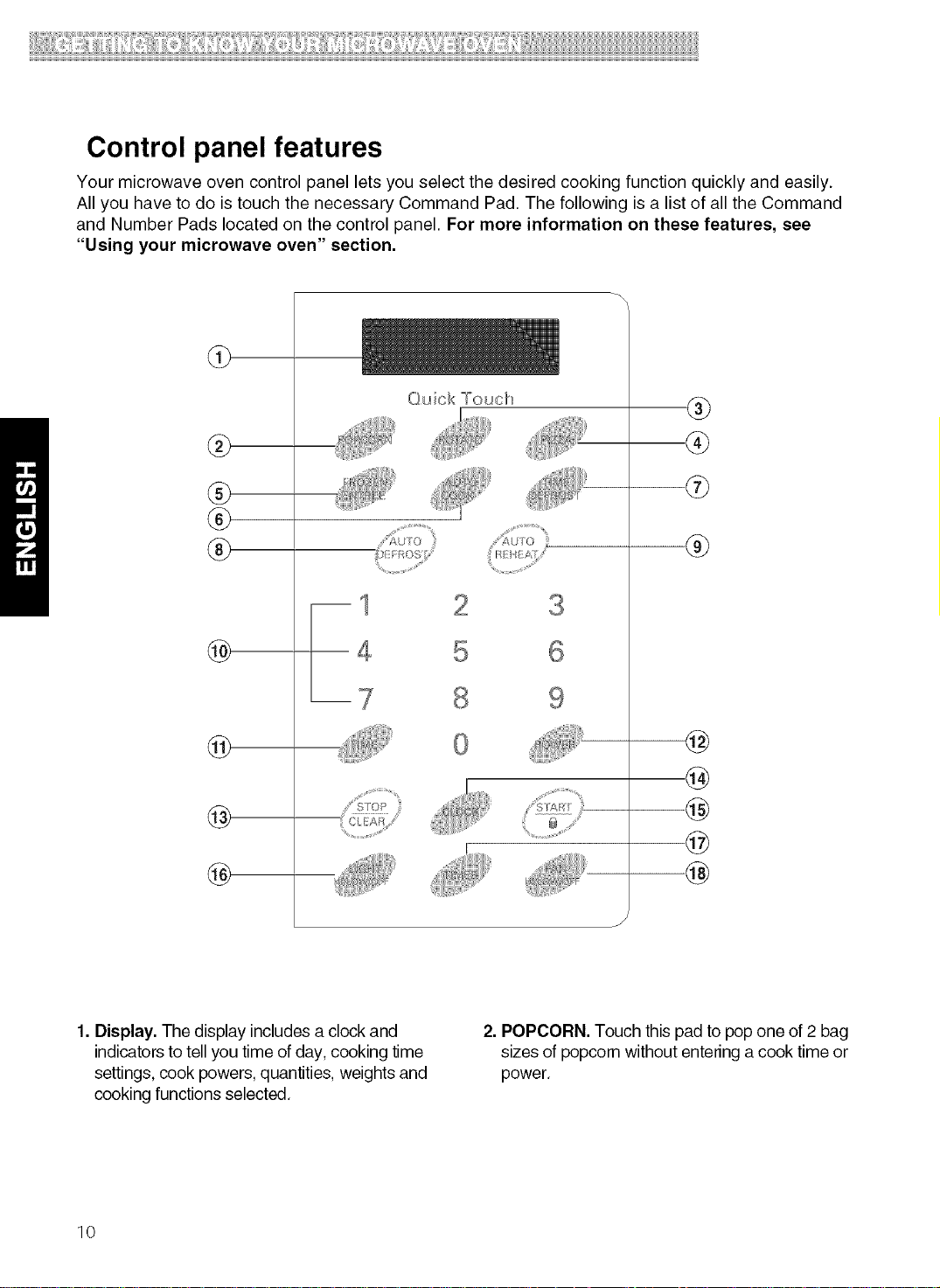
Your microwave oven control panel lets you select the desired cooking function quickly and easily.
All you have to do is touch the necessary Command Pad. The following is a list of all the Command
and Number Pads located on the control panel. For more information on these features, see
"Using your microwave oven" section.
@
@
®
®
®
@
@
@
@
Quick °"ouch
®
®
®
@
@
@
@
@
1. Display. The display includes a clock and
indicators to tell you time of day, cooking time
settings, cook powers, quantities, weights and
cooking functions selected.
2. POPCORN. Touch this pad to pop one of 2 bag
sizes of popcorn without entering a cook time or
power.
10
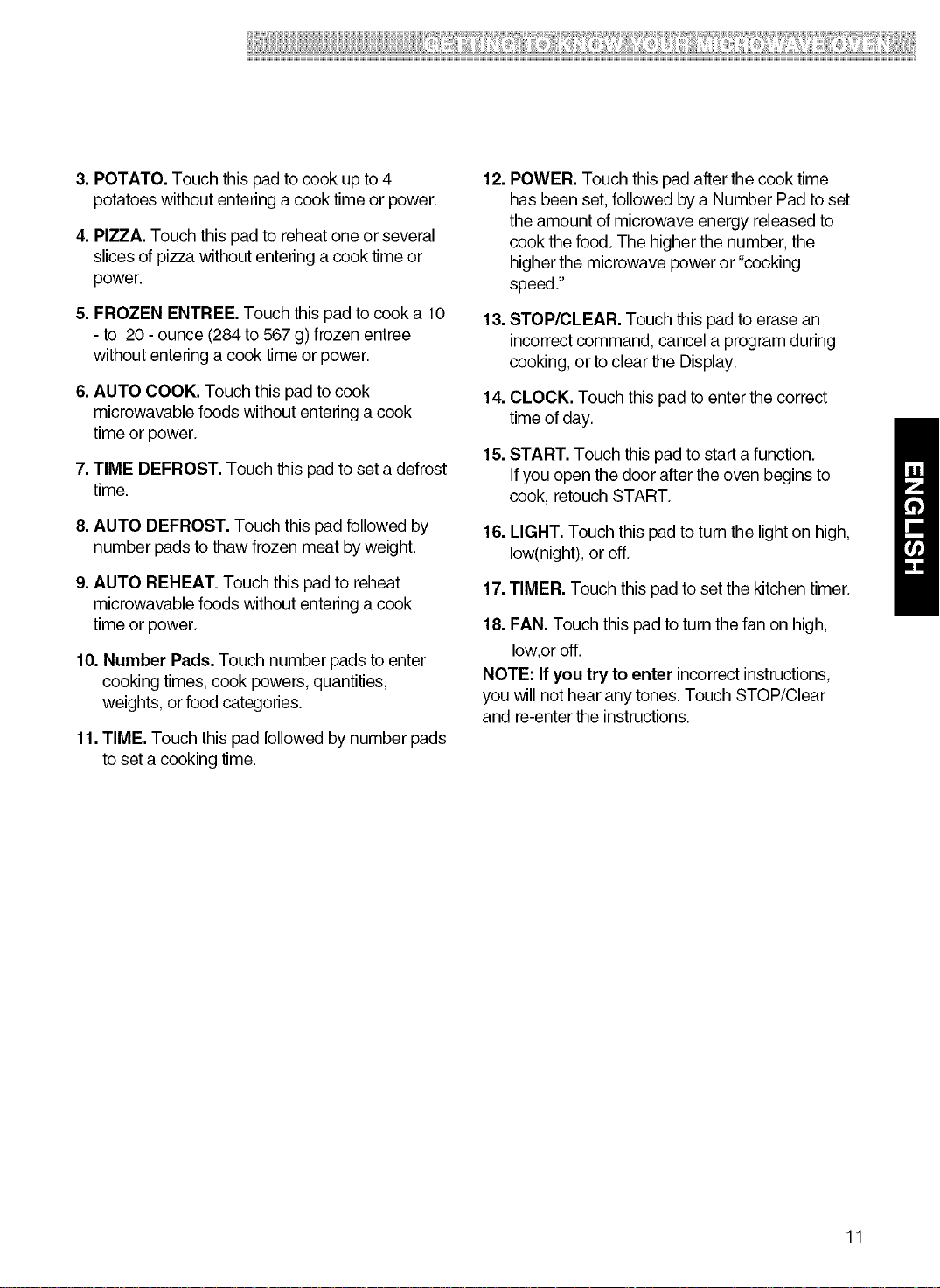
3.POTATO.Touchthispadtocookupto4
potatoeswithoutenteringacooktimeorpower.
4.PIZZA.Touchthispadtoreheatoneorseveral
slicesofpizzawithoutenteringacooktimeor
power.
5.FROZENENTREE.Touchthispadtocooka10
-to 20-ounce(284to567g)frozenentree
withoutenteringacooktimeorpower.
6.AUTOCOOK.Touchthispadtocook
microwavablefoodswithoutenteringacook
timeorpower.
7.TIMEDEFROST.Touchthispadtosetadefrost
time.
8.AUTODEFROST.Touchthispadfollowedby
numberpadstothawfrozenmeatbyweight.
9.AUTOREHEAT.Touchthispadtoreheat
microwavablefoodswithoutenteringacook
timeorpower.
10.NumberPads.Touchnumberpadstoenter
cookingtimes,cookpowers,quantities,
weights,orfoodcategories.
11.TIME.Touchthispadfollowedbynumberpads
tosetacookingtime.
12.POWER.Touchthispadafterthecooktime
hasbeenset,followedbyaNumberPadtoset
theamountofmicrowaveenergyreleasedto
cookthefood.Thehigherthenumber,the
higherthemicrowavepoweror"cooking
speed."
13.STOP/CLEAR.Touchthispadtoerasean
incorrectcommand,cancelaprogramduring
cooking,ortocleartheDisplay.
14.CLOCK.Touchthispadtoenterthecorrect
timeofday.
15.START.Touchthispadtostartafunction.
Ifyouopenthedooraftertheovenbeginsto
cook,retouchSTART.
16.LIGHT.Touchthispadtoturnthelightonhigh,
low(night),oroff.
17.TIMER.Touchthispadtosetthekitchentimer.
18.FAN.Touchthispadtoturnthefanonhigh,
low,oroff.
NOTE:Ifyoutrytoenterincorrectinstructions,
youwillnothearanytones.TouchSTOP/Clear
andre-entertheinstructions.
11
Using Your Microwave
Oven
This section gives you instructions for operating
each function. Please read these instructions
carefully.
AUDIBLE SIGNALS
Audible signals are available to guide you when
setting and using your oven:
• A programming tone will sound each time
you touch a pad.
• Seven tones signal the end of a Kitchen Timer
countdown.
• Four tones signal the end of a cooking cycle.
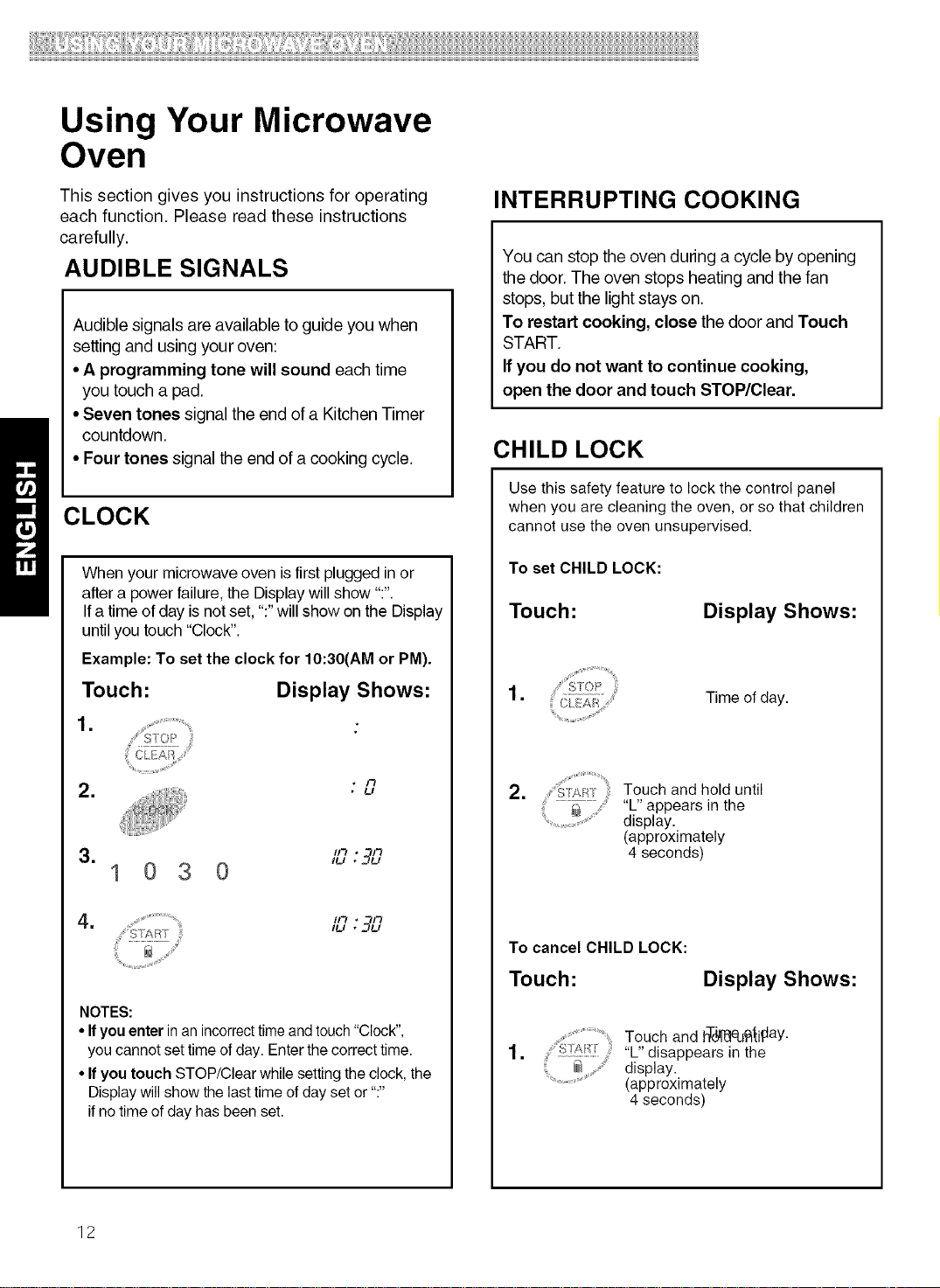
CLOCK
When your microwave oven is first plugged in or
after a power failure, the Display will show ":".
Ifa time of day is not set, ":" will show on the Display
until you touch "Clock".
Example: To set the clock for 10:30(AM or PM).
Touch: Display Shows:
1.
= * I'_• U
3. "_"_'_
/u . ="_u
1030
= ii_ • -ii,.i
NOTES:
• If you enter in an incorrecttime andtouch "Clock",
you cannot set time of day. Enter the correct time.
• If you touch STOP/Clear while setting the clock, the
Display willshow the last time of day set or ":"
if no time of day has been set.
INTERRUPTING COOKING
You can stop the oven during a cycle by opening
the door. The oven stops heating and the fan
stops, but the light stays on.
To restart cooking, close the door and Touch
START.
If you do not want to continue cooking,
open the door and touch STOP/Clear.
CHILD LOCK
Use this safety feature to lock the control panel
when you are cleaning the oven, or so that children
cannot use the oven unsupervised.
To set CHILD LOCK:
Touch:
Display Shows:
=
Time of day.
=
:YART Touch and hold until
.........._ "L" appears in the
display.
(approximately
4 seconds)
To cancel CHILD LOCK:
Touch: Display Shows:
=
Touch and hT(_,_ed_iftaY•
....... "L" disappears in the
display.
(approximately
4 seconds)
12
TIMER COOKTOP LIGHT
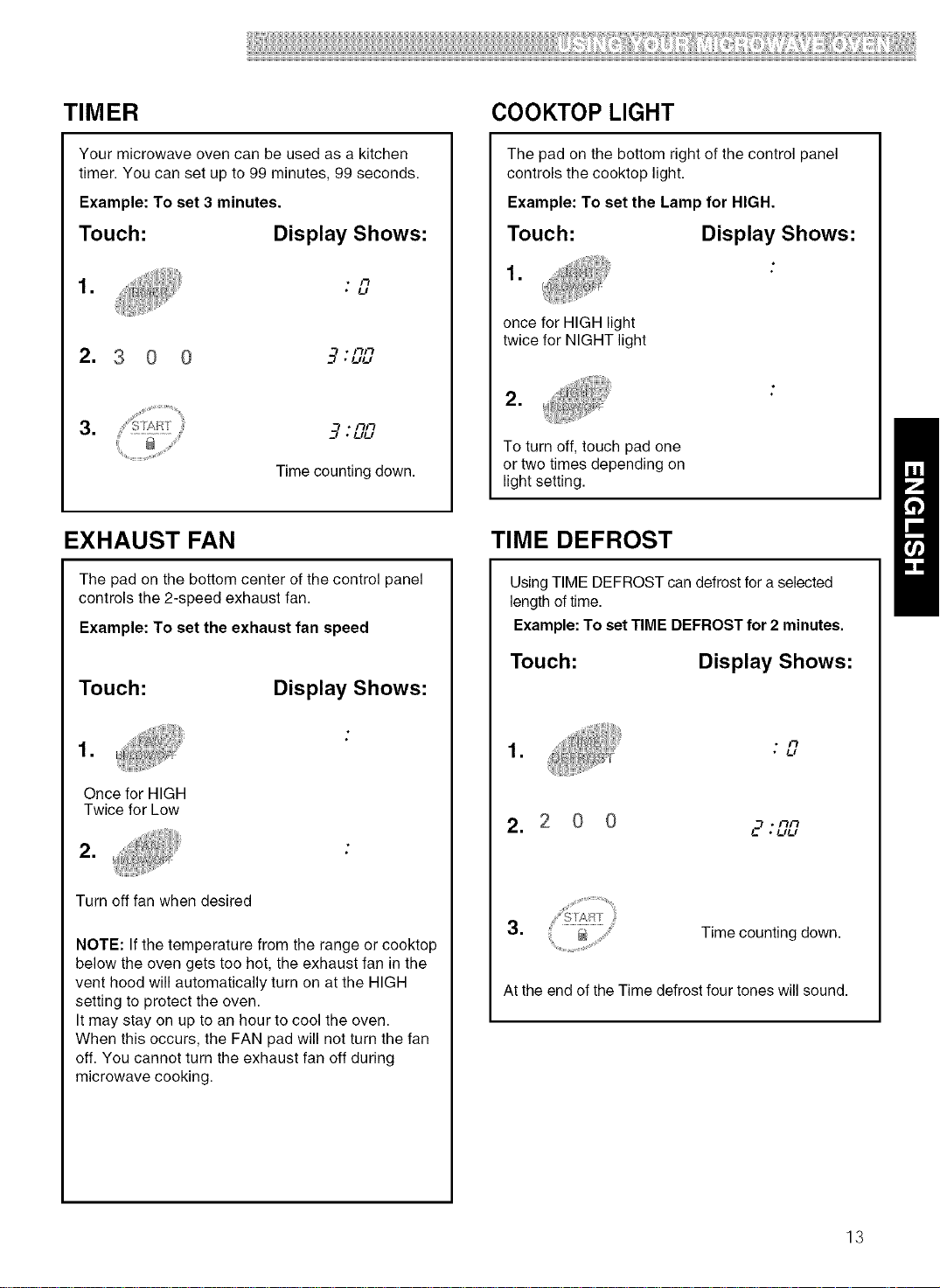
Your microwave oven can be used as a kitchen
timer. You can set up to 99 minutes, 99 seconds.
Example: To set 3 minutes.
Touch: Display Shows:
= * I"_
• t_l
2. 3 0 0 --7"'"
=
3* UU
Time counting down.
The pad on the bottom right of the control panel
controls the cooktop light.
Example: To set the Lamp for HIGH.
Touch: Display Shows:
1.
once for HIGH light
twice for NIGHT light
=
To turn off, touch pad one
or two times depending on
light setting.
EXHAUST FAN
The pad on the bottom center of the control panel
controls the 2-speed exhaust fan.
Example: To set the exhaust fan speed
Touch:
=
Once for HIGH
Twice for Low
=
Display Shows:
Turn off fan when desired
NOTE: If the temperature from the range or cooktop
below the oven gets too hot, the exhaust fan in the
vent hood will automatically turn on at the HIGH
setting to protect the oven.
It may stay on up to an hour to cool the oven.
When this occurs, the FAN pad will not turn the fan
off. You cannot turn the exhaust fan off during
microwave cooking.
TIME DEFROST
Using TIME DEFROST can defrost for a selected
length of time.
Example: To set TIME DEFROST for 2 minutes.
Touch: Display Shows:
* I"_
• * t_l
2. 2 0 0 .__.nn
• UU
3. Time counting down.
At the end of the Time defrost four tones will sound.
13
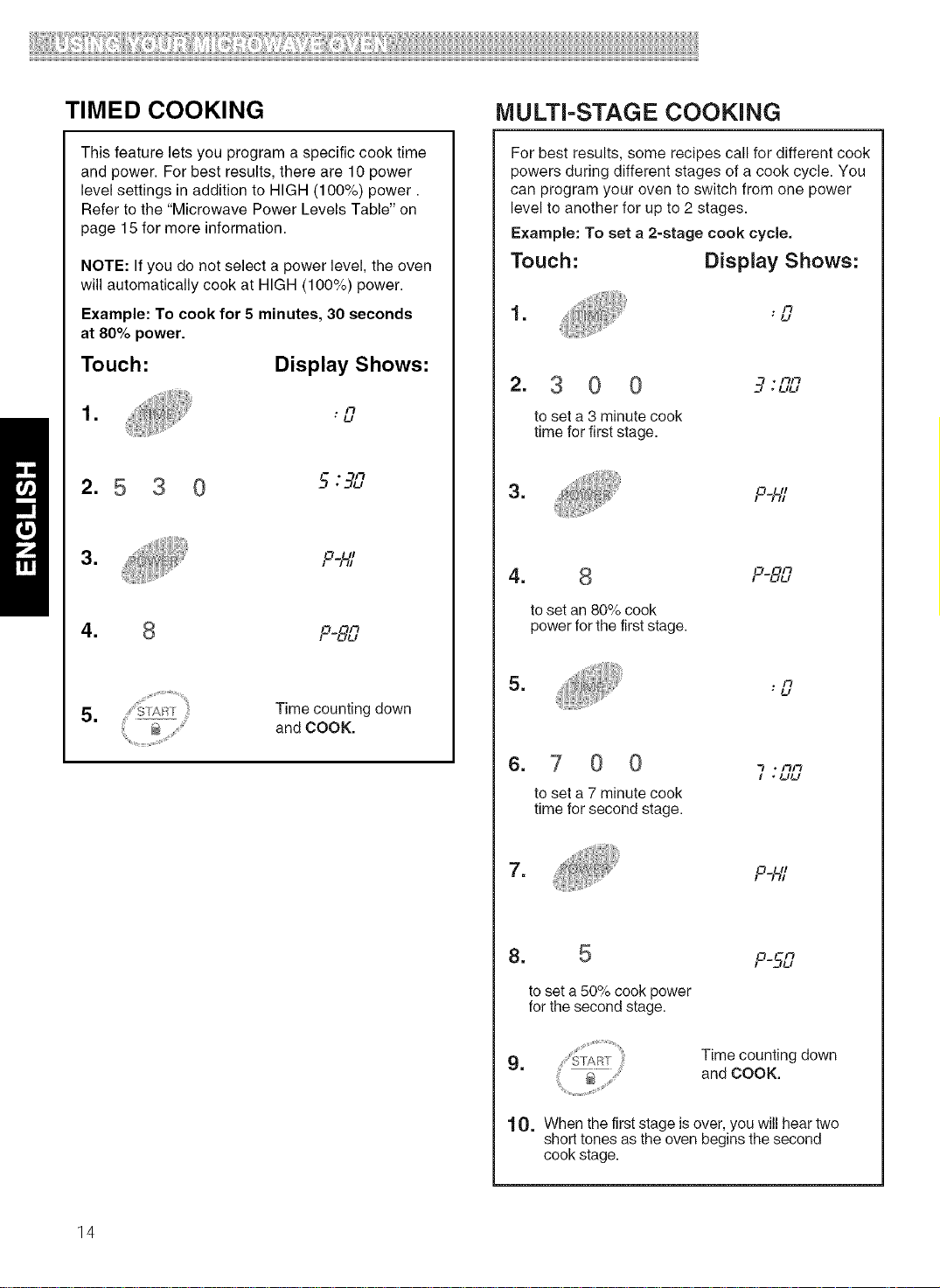
TIMED COOKING
This feature lets you program a specific cook time
and power. For best results, there are 10 power
level settings in addition to HIGH (100%) power.
Refer to the "Microwave Power Levels Table" on
page 15 for more information.
NOTE: If you do not select a power level, the oven
will automatically cook at HIGH (100%) power.
Example: To cook for 5 minutes, 30 seconds
at 80% power.
Touch: Display Shows:
= . I"_
• U
* /"t
2. 5 3 '-;'-q[-'
= P_
4. 8 o ''
! -L_U
5. Time counting down
and COOK.
14
MULTI-STAGE COOKING
For best results, some recipes call for different cook
powers during different stages of a cook cycle. You
can program your oven to switch from one power
level to another for up to 2 stages.
Example: To set a 2-stage cook cycle,
Touch: Display Shows:
1= , 1"7
"U
2. 3 0 0
to set a 3 minute cook
time for first stage.
*UU
=
P_
4. 8
to set an 80% cook
power for the first stage.
F -IZ_U
=
"U
=
0 0
to set a 7 minute cook
time for second stage.
I * uu
=
8. 5
o
to set a 50 _/ocook power
for the second stage.
P-5-L?
9. Time counting down
and COOK.
10. When the first stage is over, you will hear two
short tones as the oven begins the second
cook stage.
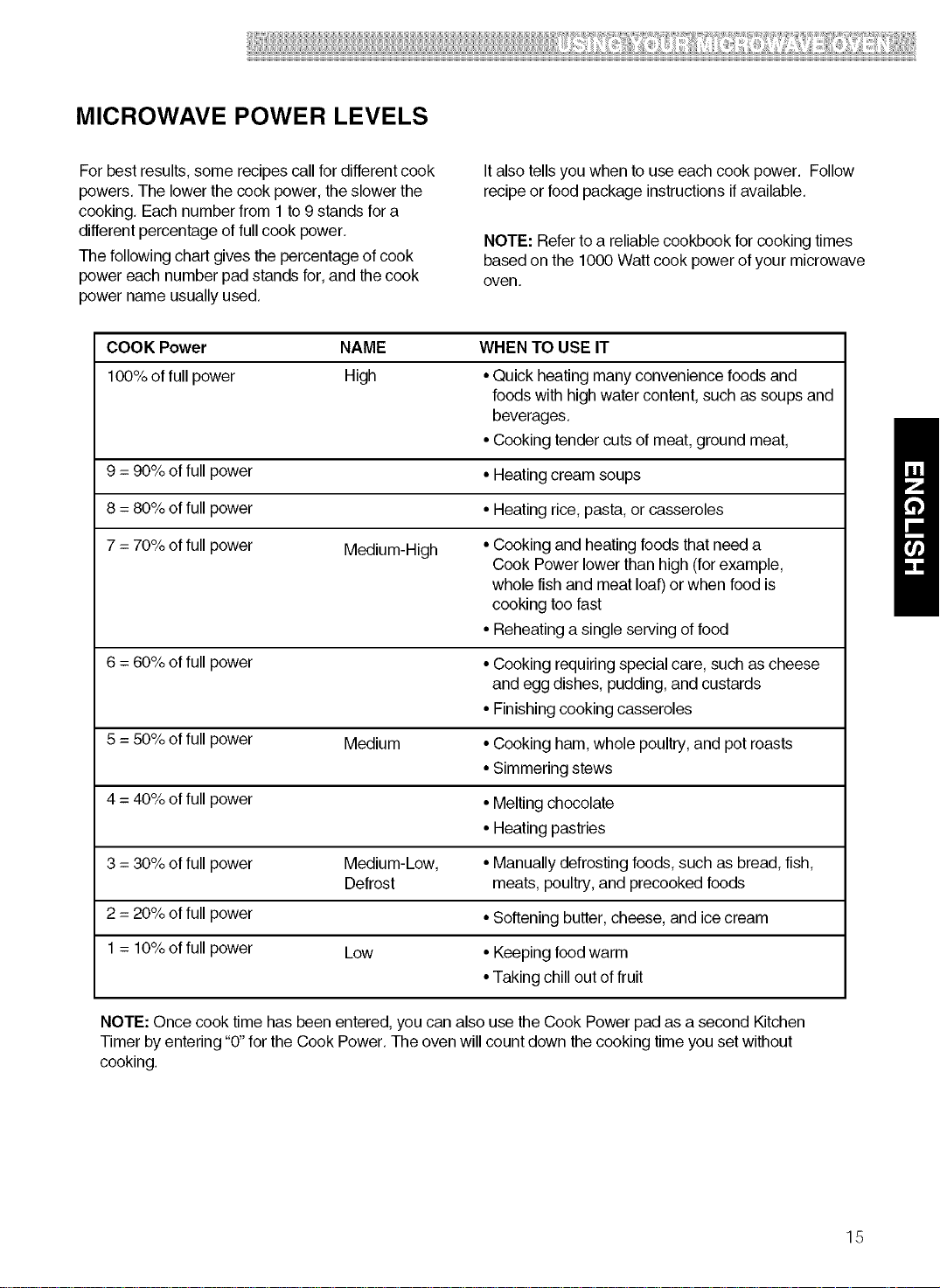
MICROWAVE POWER LEVELS
For best results, some recipes callfor differentcook
powers,The lowerthe cook power, the slower the
cooking, Each numberfrom 1to 9 stands for a
differentpercentage offull cook power.
The following chart gives the percentage of cook
power each number pad stands for, and the cook
power name usually used,
Italso tells you when to use each cook power. Follow
recipeor food package instructionsifavailable,
NOTE: Refer to a reliablecookbook for cooking times
basedon the 1000 Watt cook power of your microwave
oven.
COOK Power NAME
100% of full power High
9 = 90% of full power
8 = 80% of full power
7 = 70% of full power Medium-High
6 = 60% of full power
5 = 50% of full power Medium
4 = 40% of full power
3 = 30% of full power Medium-Low,
Defrost
2 = 20% of full power
1 = 10% of full power Low
WHEN TO USE IT
• Quick heating many convenience foods and
foods with high water content, such as soups and
beverages,
• Cooking tender cuts of meat,ground meat,
• Heating cream soups
• Heating rice, pasta, or casseroles
• Cooking and heatingfoods thatneed a
Cook Powerlower than high (forexample,
whole fish and meat loaf)or when food is
cooking too fast
• Reheating a single serving of food
• Cooking requiring special care, such as cheese
and egg dishes, pudding, and custards
• Finishing cooking casseroles
• Cooking ham, whole poultry,and potroasts
• Simmering stews
• Melting chocolate
• Heating pastries
• Manually defrosting foods,such as bread,fish,
meats, poultry,and precooked foods
• Softening butter,cheese, and icecream
• Keeping foodwarm
• Taking chillout of fruit
NOTE: Once cook time has been entered, youcan also use the Cook Power pad as a second Kitchen
Timer by entering "0"forthe Cook Power, The oven will count down the cooking time you set without
cooking.
15
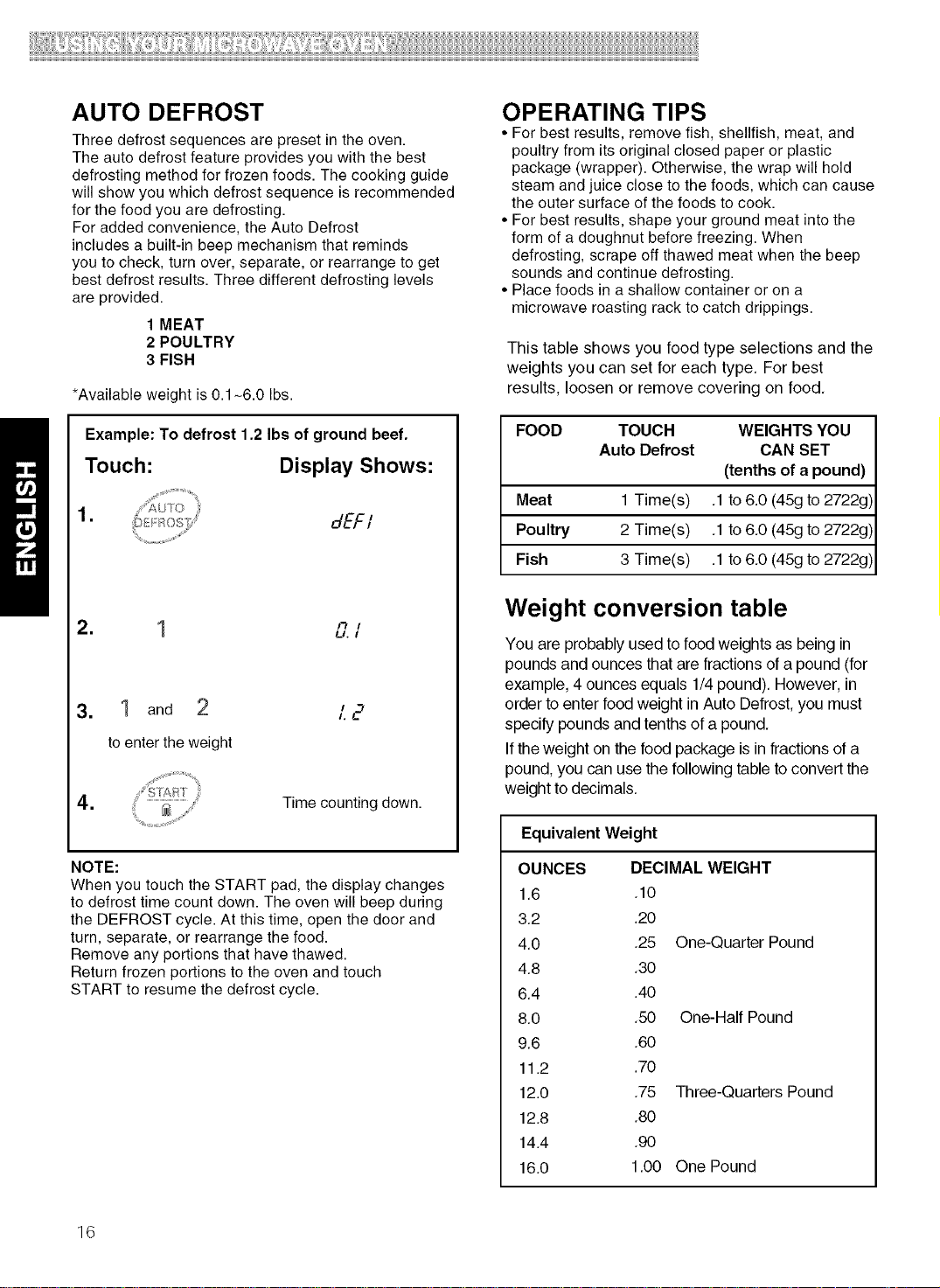
AUTO DEFROST
Three defrost sequences are preset in the oven.
The auto defrost feature provides you with the best
defrosting method for frozen foods. The cooking guide
will show you which defrost sequence is recommended
for the food you are defrosting.
For added convenience, the Auto Defrost
includes a built-in beep mechanism that reminds
you to check, turn over, separate, or rearrange to get
best defrost results. Three different defrosting levels
are provided.
1 MEAT
2 POULTRY
3 FISH
*Available weight is 0.1-6.0 Ibs.
Example: To defrost 1.2 Ibs of ground beef.
Touch: Display Shows:
.
dEFI
" 1 I"_ I
LJ. I
3. 1 and
to enter the weight
"2
4. Time counting down.
NOTE:
When you touch the START pad, the display changes
to defrost time count down. The oven will beep during
the DEFROST cycle. At this time, open the door and
turn, separate, or rearrange the food.
Remove any portions that have thawed.
Return frozen portions to the oven and touch
START to resume the defrost cycle.
OPERATING TIPS
• For best results, remove fish, shellfish, meat, and
poultry from its original closed paper or plastic
package (wrapper). Otherwise, the wrap will hold
steam and juice close to the foods, which can cause
the outer surface of the foods to cook.
• For best results, shape your ground meat into the
form of a doughnut before freezing. When
defrosting, scrape off thawed meat when the beep
sounds and continue defrosting.
• Place foods in a shallow container or on a
microwave roasting rack to catch drippings.
This table shows you food type selections and the
weights you can set for each type, For best
results, loosen or remove covering on food,
FOOD TOUCH WEIGHTS YOU
Auto Defrost CAN SET
(tenths of a pound)
Meat 1 Time(s) .1 to 6.0 (45g to 2722g)
Poultry 2 Time(s) .1 to 6.0 (45g to 2722g)
Fish 3 Time(s) .1 to 6.0 (45g to 2722g)
Weight conversion table
You are probably usedto foodweights as being in
pounds and ounces that are fractions of a pound (for
example, 4 ounces equals 1/4pound). However, in
order to enter foodweight in Auto Defrost,you must
specify pounds and tenths of a pound.
If theweight on the food package isin fractions of a
pound,you can usethe following table to convertthe
weight to decimals.
Equivalent Weight
OUNCES DECIMAL WEIGHT
1.6 .10
3.2 .20
4.0 .25 One-Quarter Pound
4.8 .30
6.4 .40
8.0 .50 One-Half Pound
9.6 .60
11.2 .70
12.0 .75 Three-Quarters Pound
12.8 .80
14.4 .90
16.0 1.00 One Pound
16
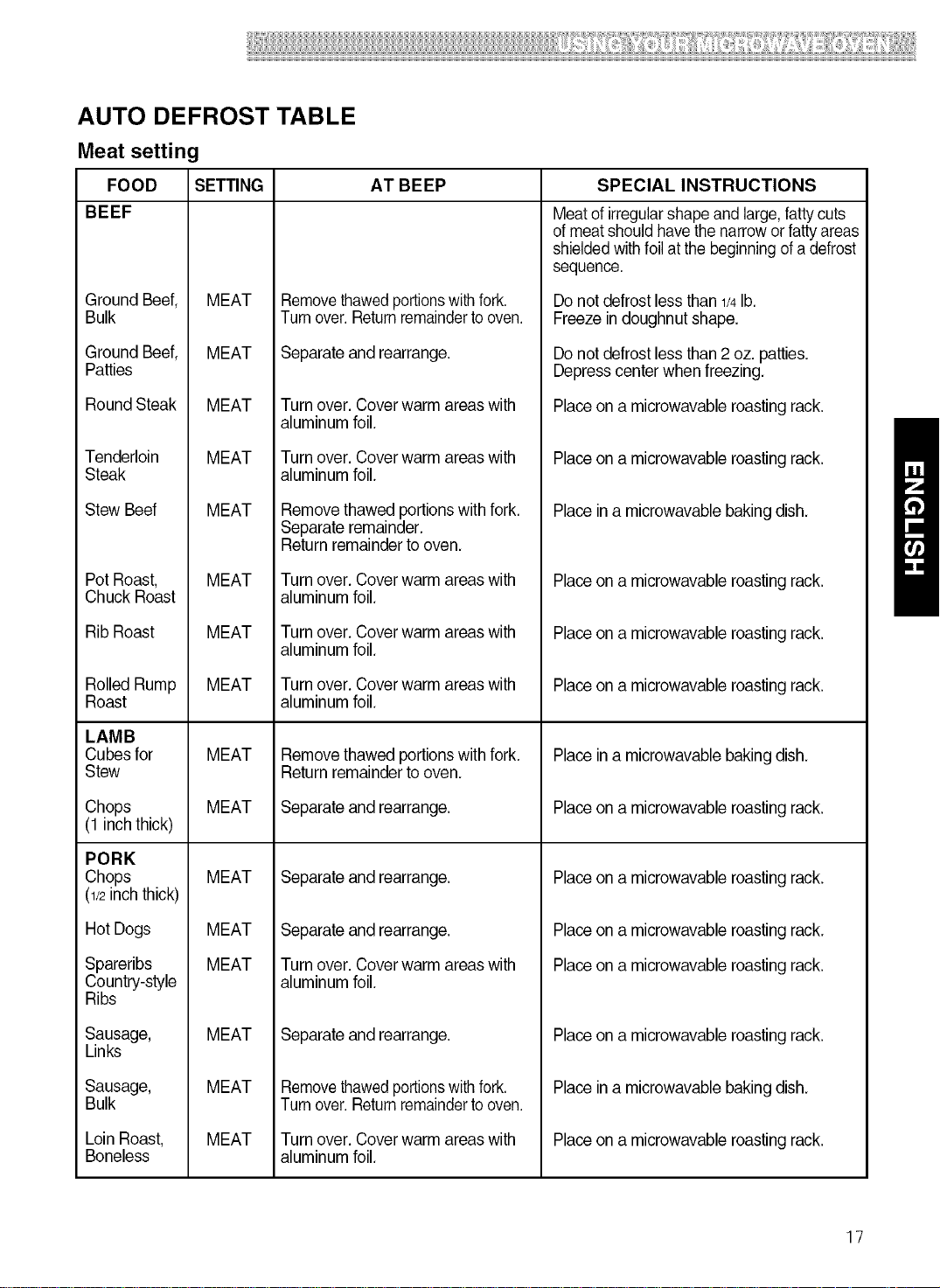
AUTO DEFROST TABLE
Meat setting
FOOD SETTING AT BEEP SPECIAL INSTRUCTIONS
BEEF
Ground Beef,
Bulk
Ground Beef,
Patties
Round Steak
Tenderloin
Steak
Stew Beef
Pot Roast,
Chuck Roast
Rib Roast
Rolled Rump
Roast
LAMB
Cubes for
Stew
Chops
(1 inchthick)
PORK
Chops
(1/2inchthick)
Hot Dogs
Spareribs
Country-style
Ribs
Sausage,
Links
Sausage,
Bulk
Loin Roast,
Boneless
MEAT
MEAT
MEAT
MEAT
MEAT
MEAT
MEAT
MEAT
MEAT
MEAT
MEAT
MEAT
MEAT
MEAT
MEAT
MEAT
Removethawedportionswith fork.
Turnover.Returnremainderto oven.
Separate and rearrange.
Turn over. Cover warm areas with
aluminum foil.
Turn over. Cover warm areas with
aluminum foil.
Removethawed portions with fork.
Separate remainder.
Return remainderto oven.
Turn over. Cover warm areas with
aluminum foil.
Turn over. Cover warm areas with
aluminum foil.
Turn over. Cover warm areas with
aluminum foil.
Removethawed portions with fork.
Return remainderto oven.
Separate and rearrange.
Separate and rearrange.
Separate and rearrange.
Turn over. Cover warm areas with
aluminum foil.
Separate and rearrange.
Removethawedportionswith fork.
Turnover.Returnremainderto oven.
Turn over. Cover warm areas with
aluminum foil.
Meat of irregularshape and large,fattycuts
of meatshould havethe narroworfattyareas
shieldedwithfoil atthe beginningof a defrost
sequence.
Donot defrostless than1/4lb.
Freeze indoughnut shape.
Donot defrostless than2 oz. patties.
Depresscenter when freezing.
Placeon a microwavable roasting rack.
Placeon a microwavable roasting rack.
Placein a microwavable baking dish.
Placeon a microwavable roasting rack.
Placeon a microwavable roasting rack.
Placeon a microwavable roasting rack.
Placein a microwavable baking dish.
Placeon a microwavable roasting rack.
Placeon a microwavable roasting rack.
Placeon a microwavable roasting rack.
Placeon a microwavable roasting rack.
Placeon a microwavable roasting rack.
Placein a microwavable baking dish.
Placeon a microwavable roasting rack.
17
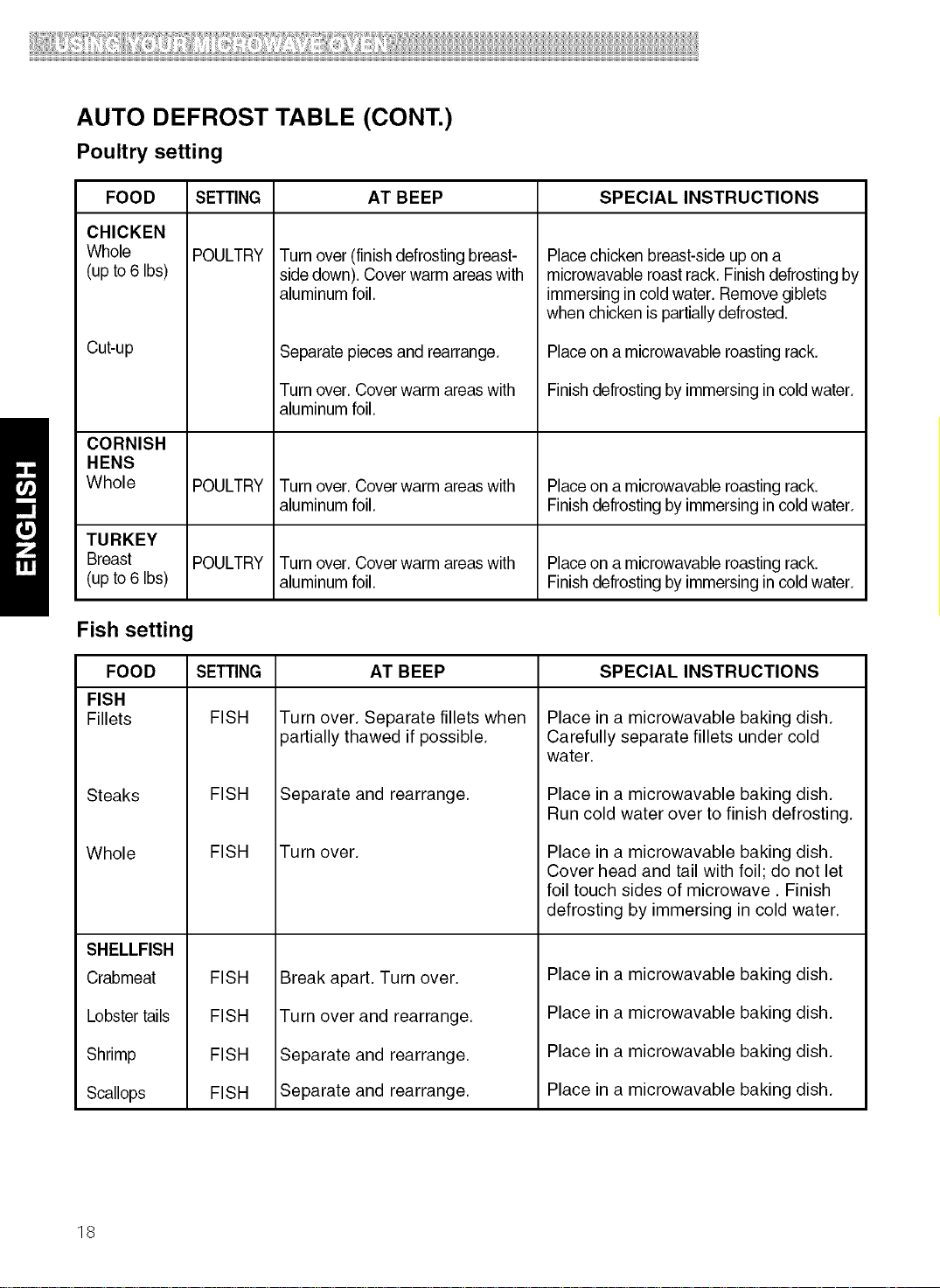
AUTO DEFROST TABLE (CONT.)
Poultry setting
FOOD SETTING AT BEEP SPECIAL INSTRUCTIONS
CHICKEN
Whole
(up to 6 Ibs)
Cu#up
POULTRY
Turn over (finishdefrosting breast-
sidedown). Cover warm areaswith
aluminum foil.
Separate pieces and rearrange.
Turn over. Cover warm areaswith
aluminum foil.
Placechicken breast-side up on a
microwavable roast rack. Finish defrosting by
immersing in coldwater. Removegiblets
when chicken is partiallydefrosted.
Placeon a microwavable roasting rack.
Finish defrosting byimmersing in cold water.
CORNISH
HENS
Whole POULTRY Turn over. Cover warm areaswith Placeon a microwavable roasting rack.
aluminum foil. Finish defrosting byimmersing in cold water.
TURKEY
Breast POULTRY Turn over. Cover warm areaswith Placeon a microwavable roasting rack.
(up to 6 Ibs) aluminum foil. Finish defrosting byimmersing in cold water.
Fish setting
FOOD SETTING SPECIAL INSTRUCTIONS
FISH
Fillets FISH
Steaks
Whole
SHELLFISH
Crabmeat
Lobstertails
Shrimp
Scallops
FISH
AT BEEP
Turn over. Separate fillets when
partially thawed if possible.
Separate and rearrange.
FISH Turn over.
FISH
FISH
FISH
FISH
Break apart. Turn over.
Turn over and rearrange.
Separate and rearrange.
Separate and rearrange.
Place in a microwavable baking dish.
Carefully separate fillets under cold
water.
Place in a microwavable baking dish.
Run cold water over to finish defrosting.
Place in a microwavable baking dish.
Cover head and tail with foil; do not let
foil touch sides of microwave. Finish
defrosting by immersing in cold water.
Place in a microwavable baking dish.
Place in a microwavable baking dish.
Place in a microwavable baking dish.
Place in a microwavable baking dish.
18
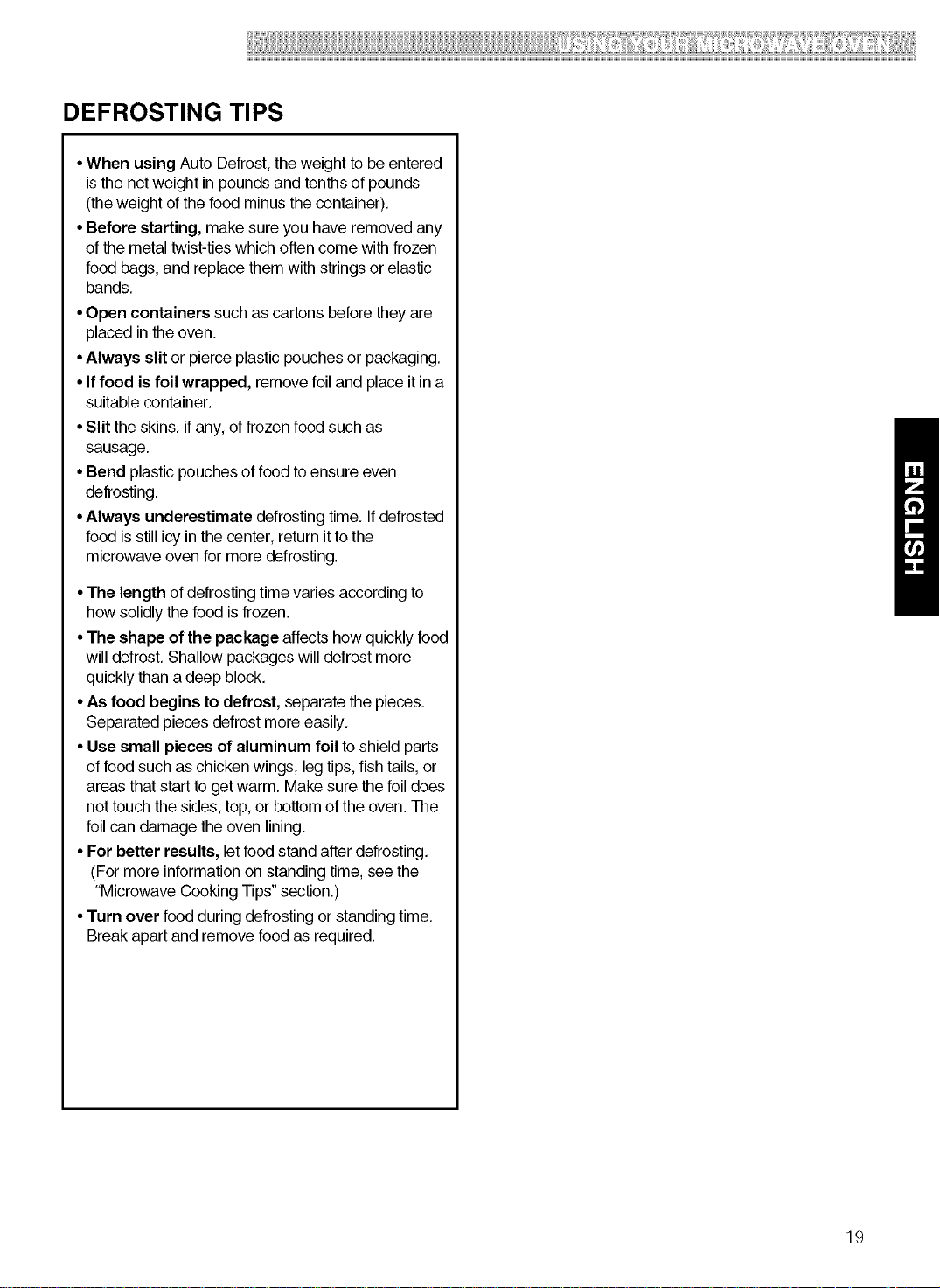
DEFROSTING TIPS
•When using Auto Defrost,theweight to be entered
isthe netweight in poundsand tenths of pounds
(theweight ofthe food minus the container).
•Before starting, make sure you have removed any
of the metal twist-tieswhich often come with frozen
food bags, and replacethem with stringsor elastic
bands,
•Open containers such as cartons beforethey are
placed in theoven.
•Always slit or pierce plasticpouches or packaging.
•If food is foil wrapped, remove foil and place it in a
suitable container.
•Slit the skins, if any, of frozen food such as
sausage.
•Bend plastic pouches of foodto ensure even
defrosting.
•Always underestimate defrosting time, If defrosted
food isstill icy in the center, return itto the
microwave oven for more defrosting.
•The length of defrostingtime varies according to
how solidly the food isfrozen,
•The shape of the package affects how quickly food
will defrost, Shallow packageswill defrost more
quickly than a deep block.
•As food begins to defrost, separate the pieces,
Separated pieces defrost more easily,
• Use small pieces of aluminum foil to shield parts
of food such as chickenwings, leg tips,fish tails, or
areas that start toget warm. Make sure thefoil does
not touch the sides, top, or bottom of the oven. The
foil can damage theoven lining.
• For better results, letfood stand after defrosting.
(Formore information on standing time, see the
"Microwave Cooking Tips"section,)
•Turn over food during defrosting or standing time,
Breakapart and remove foodas required.
19
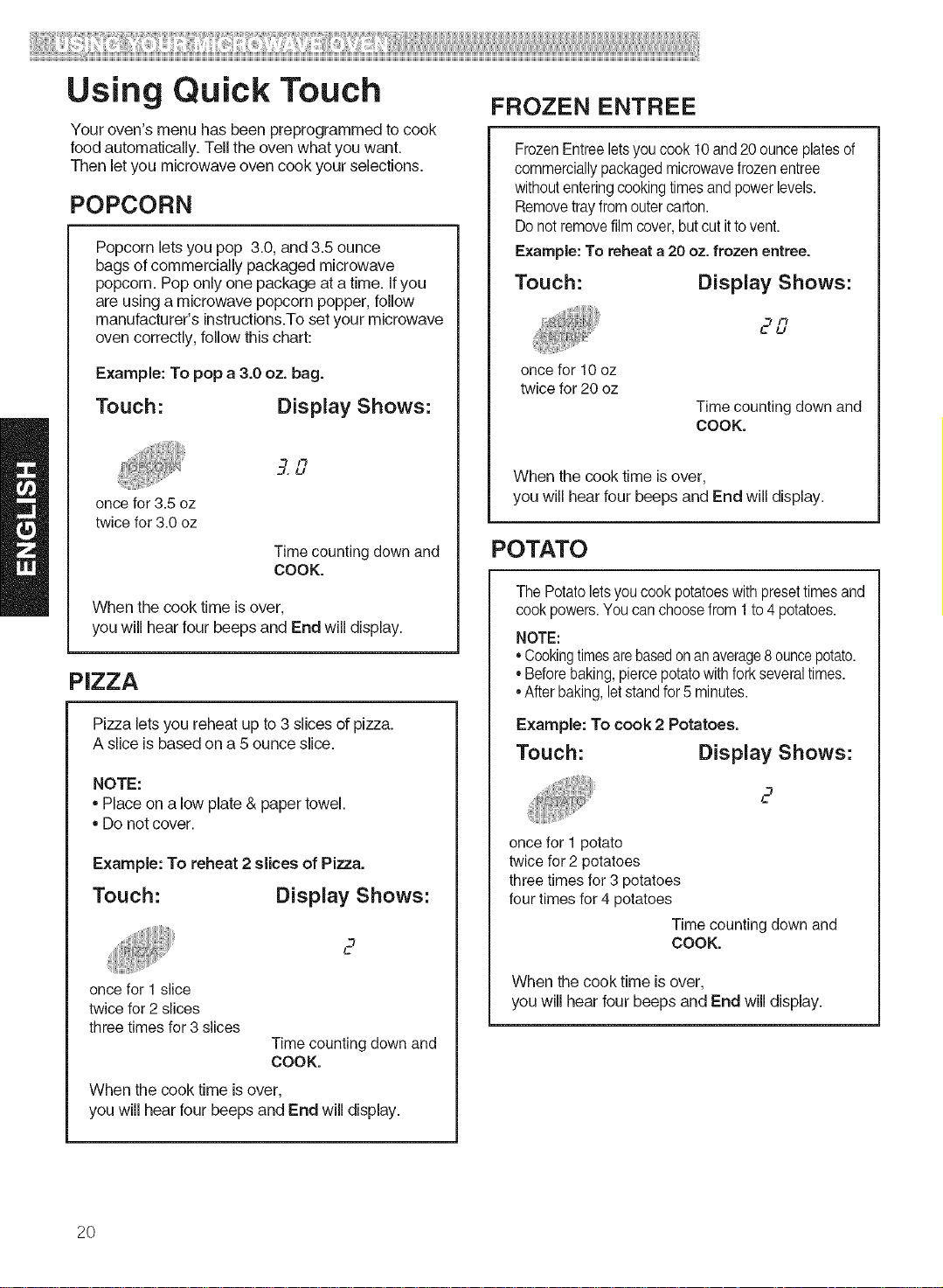
Using Quick Touch
Your oven's menu has been preprogrammed to cook
food automatically. Tell the oven what you want.
Then let you microwave oven cook your selections.
POPCORN
Popcorn letsyou pop 3.0,and 3.5 ounce
bagsof commercially packaged microwave
popcorn. Pop only one package ata time. Ifyou
are usinga microwave popcorn popper, follow
manufacturer'sinstructions.Toset your microwave
oven correctly,follow this chart:
Example: To pop a 3.0 oz. bag.
Touch: Display Shows:
3,/3
L/
once for 3.5 oz
twice for 3.0 oz
Time counting down and
COOK.
When the cook time isover,
you will hear four beepsand End will display.
PIZZA
Pizza lets you reheat up to 3 slices of pizza.
A slice is based on a 5 ounce slice.
NOTE:
= Place on a low plate & paper towel.
= Do not cover.
Example: To reheat 2 slices of Pica.
Touch: Display Shows:
2
once for 1slice
twice for 2 slices
three times for 3 slices
Time counting down and
COOK.
When the cook time isover,
you will hear four beeps and End will display.
FROZEN ENTREE
Frozen Entree letsyou cook 10and 20 ounce platesof
commercially packaged microwave frozen entree
withoutentering cooking times and power levels.
Remove tray from outer carton.
Do not remove film cover, but cut itto vent.
Example: To reheat a 20 oz. frozen entree.
Touch: Display Shows:
2L7
once for 10 oz
twice for 20 oz
Time counting down and
COOK.
When the cook time isover,
you will hear four beepsand End will display.
POTATO
The Potato lets you cook potatoes with preset times and
cook powers. You can choose from 1 to 4 potatoes.
NOTE:
• Cookingtimesarebasedonan average8ouncepotato.
• Before baking, pierce potato with fork severaltimes.
After baking, letstand for 5 minutes.
Example: To cook 2 Potatoes.
Touch: Display Shows:
2
once for 1 potato
twice for 2 potatoes
three times for 3 potatoes
four times for 4 potatoes
Time counting down and
COOK.
When the cook time is over,
you will hear four beeps and End will display.
2O
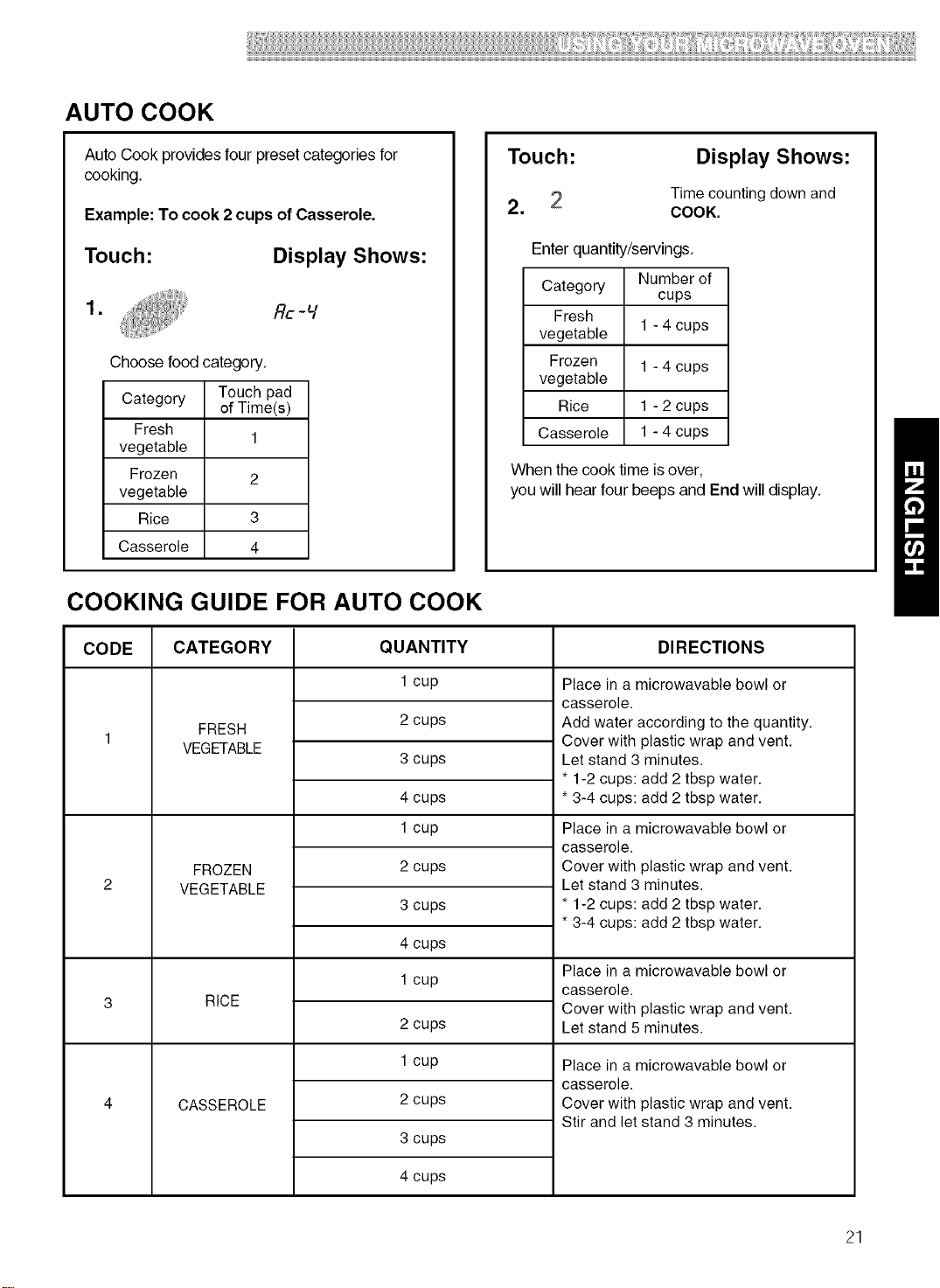
AUTO COOK
Auto Cook providesfour preset categories for
cooking.
Example: To cook 2 cups of Casserole.
Touch:
Display Shows:
1. , i!i,iii, flc-v
Choose food category.
Category Touch pad
of Time(s)
Fresh
1
vegetable
Frozen 2
vegetable
Rice 3
Casserole 4
Touch:
2.
Display Shows:
Time counting down and
COOK.
Enter quantity/servings.
Category Number of
cups
Fresh
vegetable 1 - 4 cups
Frozen 1 - 4 cups
vegetable
Rice 1 - 2 cups
Casserole 1 - 4 cups
When the cook time isover,
youwill hearfour beepsand End will display.
COOKING GUIDE FOR AUTO COOK
CODE CATEGORY DIRECTIONS
FRESH
VEGETABLE
FROZEN
VEGETABLE
RICE
CASSEROLE
QUANTITY
1 cup
2 cups
3 cups
4 cups
1 cup
2 cups
3 cups
4 cups
1 cup
2 cups
1 cup
2 cups
3 cups
4 cups
Place in a microwavable bowl or
casserole.
Add water according to the quantity.
Cover with plastic wrap and vent.
Let stand 3 minutes.
* 1-2 cups: add 2 tbsp water.
* 3-4 cups: add 2 tbsp water.
Place in a microwavable bowl or
casserole.
Cover with plastic wrap and vent.
Let stand 3 minutes.
* 1-2 cups: add 2 tbsp water.
* 3-4 cups: add 2 tbsp water.
Place in a microwavable bowl or
casserole.
Cover with plastic wrap and vent.
Let stand 5 minutes.
Place in a microwavable bowl or
casserole.
Cover with plastic wrap and vent.
Stir and let stand 3 minutes.
21
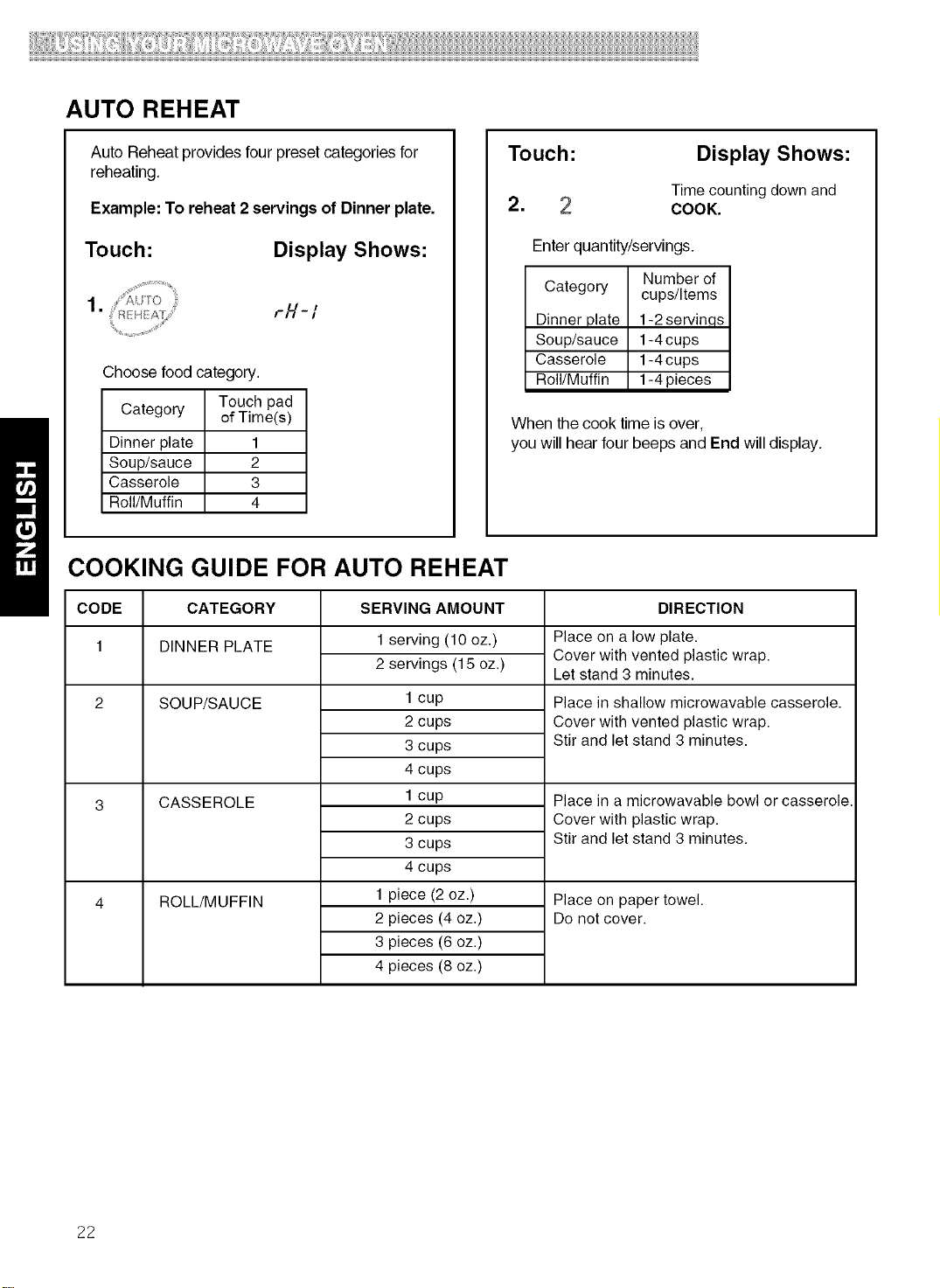
AUTO REHEAT
Auto Reheat provides four preset categories for
reheating,
Example: To reheat 2 servings of Dinner plate.
Touch: Display Shows:
1.
r/'/- /
Choose food category.
Touch pad
Category of Time(s)
Dinner plate 1
Soup/sauce 2
Casserole 3
Roll/Muffin 4
Touch:
2.
Display Shows:
Time counting down and
COOK.
Enter quantity/servings.
Category Number of
cups/Items
Dinner plate 1-2servinqs
Soup/sauce 1-4 cups
Casserole 1-4 cups
Roll/Muffin 1-4 pieces
When the cook time is over,
you will hear four beeps and End will display,
COOKING GUIDE FOR AUTO REHEAT
CODE CATEGORY SERVING AMOUNT DIRECTION
1 DINNER PLATE
SOUP/SAUCE
CASSEROLE
ROLL/MUFFIN
1 serving (10 oz.)
2 servings (15 oz.)
1 cup
2 cups
3 cups
4 cups
1 cup
2 cups
3 cups
4 cups
1 piece (2 oz.)
2 pieces (4 oz.)
3 pieces (6 oz.)
4 pieces (8 oz.)
Place on a low plate.
Cover with vented plastic wrap.
Let stand 3 minutes.
Place in shallow microwavable casserole.
Cover with vented plastic wrap.
Stir and let stand 3 minutes.
Place in a microwavable bowl or casserole.
Cover with plastic wrap.
Stir and let stand 3 minutes.
Place on paper towel.
Do not cover.
22
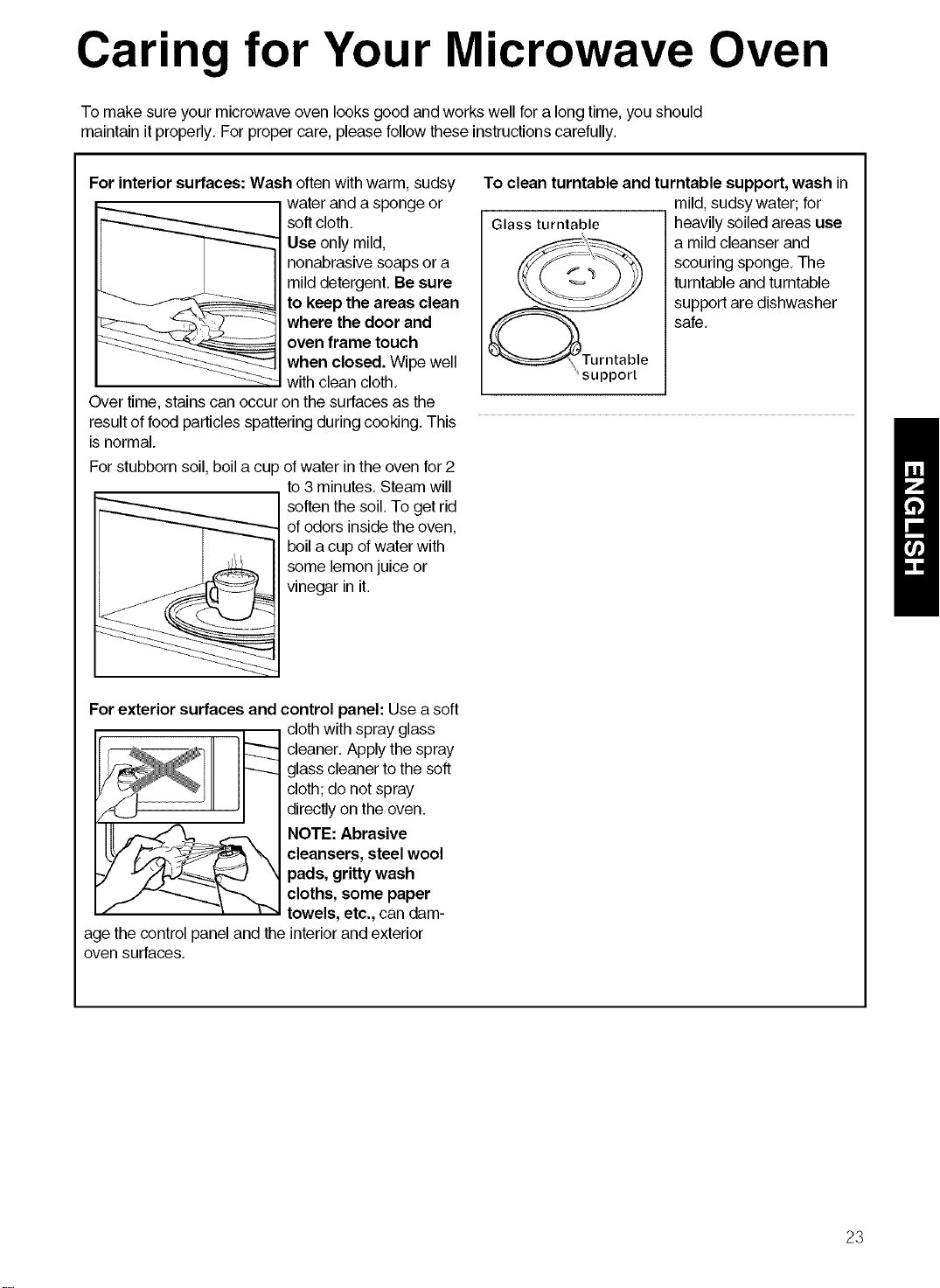
Carin for Your Microwave Oven
To make sure your microwave oven looks good and works well for a long time, you should
maintain it properly. For proper care, please follow these instructionscarefully.
For interior surfaces: Wash often with warm, sudsy
water and a sponge or
softcloth,
Use only mild,
nonabrasive soaps or a
mild detergent.Be sure
to keep the areas clean
where the door and
oven frame touch
when closed. Wipewell
with clean cloth,
Over time, stains can occur on the surfaces as the
resultof food particlesspattering during cooking, This
isnormal.
Forstubborn soil, boila cup ofwater in the oven for 2
to 3 minutes. Steamwill
softenthe soil, To get rid
of odors insidethe oven,
boil a cup of water with
some lemonjuice or
vinegar in it,
To clean turntable and turntable support, wash in
mild,sudsy water; for
Glass turntable heavily soiledareas use
a mild cleanser and
scouring sponge, The
turntable and turntable
support are dishwasher
safe,
support
Forexterior surfaces and control panel: Use a soft
age the control panel and the
ovensurfaces,
cloth with spray glass
cleaner, Apply the spray
glass cleaner tothe soft
cloth;do not spray
directlyon the oven,
NOTE:Abrasive
cleansers, steel wool
pads, gritty wash
cloths, some paper
towels, etc., can dam-
interiorand exterior
23
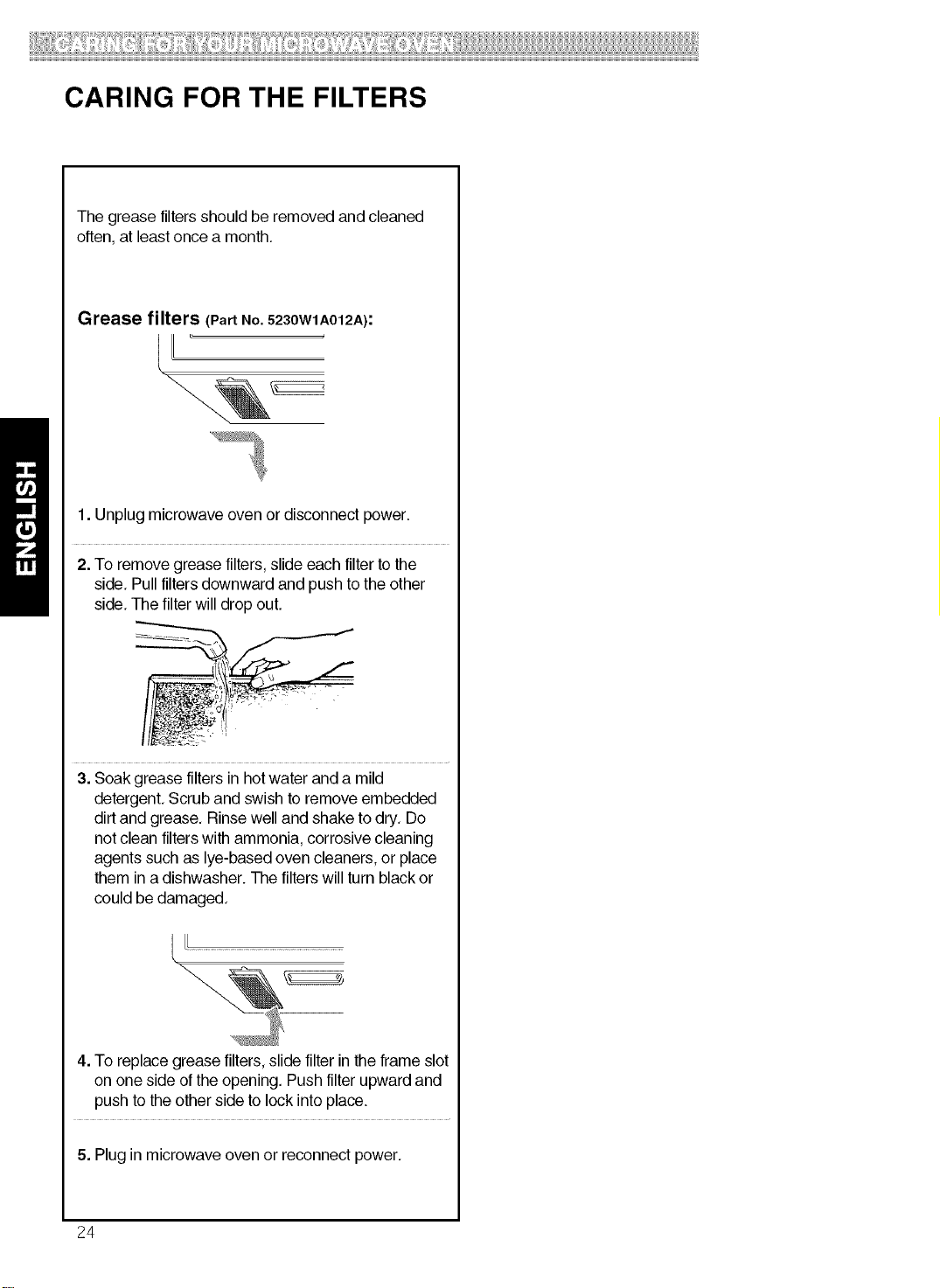
CARING FOR THE FILTERS
Thegrease filtersshould be removed and cleaned
often,at least once a month,
Grease filters (Part No. 5230W1A012A):
1. Unplug microwave oven or disconnect power.
2. To remove grease filters,slide each filter to the
side, Pull filtersdownward and push to the other
side, The filterwill drop out,
3. Soakgrease filters in hotwater and a mild
detergent,Scrub and swish to remove embedded
dirtand grease, Rinse well and shake todry, Do
notclean filterswith ammonia,corrosive cleaning
agents such as lye-based oven cleaners, or place
them in a dishwasher. The filterswill turn blackor
could be damaged,
4. To replacegrease filters, slidefilter in the frame slot
on one side of the opening, Pushfilter upward and
push tothe other sideto lock intoplace.
5. Plug in microwave ovenor reconnect power,
24
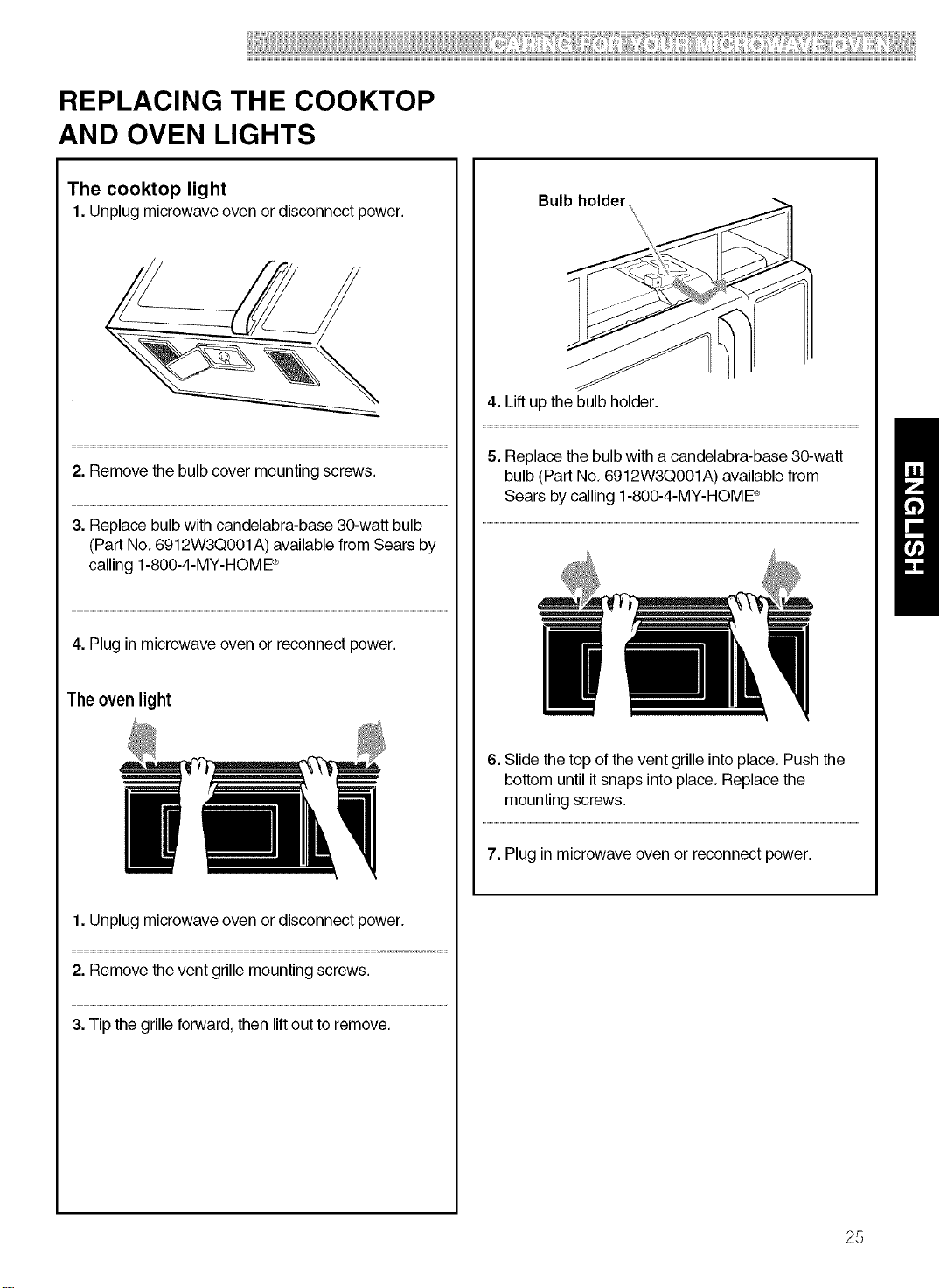
REPLACING THE COOKTOP
AND OVEN LIGHTS
The cooktop light
1.Unplug microwave oven or disconnect power.
2. Remove the bulb cover mounting screws.
3. Replace bulb with candelabra-base 30-watt bulb
(Part No, 6912W3Q001 A) available from Sears by
calling 1-800-4-MY-HOME ®
4. Plug in microwave oven or reconnect power.
The oven light
1. Unplug microwave oven or disconnect power.
2. Remove the vent grille mounting screws.
3. Tip the grille forward, then lift out to remove.
Bulb holder
4. Lift up the bulb holder.
5. Replace the bulb with a candelabra-base 30-watt
bulb (Part No, 6912W3Q001A) available from
Sears by calling 1-800-4-MY-HOME ®
6. Slide the top of the vent grille into place. Push the
bottom until it snaps into place, Replace the
mounting screws,
7. Plug in microwave ovenor reconnect power.
25
MICROWAVE COOKING TIPS
Amount of food
• Ifyou increaseor decrease theamountof food
you prepare, thetime ittakes to cook that food will
also change. Forexample, ifyou double a recipe,
add a little more than halfthe original cooking time.
Check for doneness and, if necessary,add more
time insmall increments,
Starting temperature of food
•The lower thetemperature ofthefood being put
into the microwave oven, the longer it takes tocook.
Foodat room temperaturewill be re-heatedmore
quickly thanfood at refrigerator temperature,
Composition of food
• Foodwith a lot offat and sugar will be heated
fasterthan food containing a lotof water, Fat and
sugarwill also reach a highertemperature than
water in thecooking process,
•The more dense the food, the longer ittakes to
heat. "Very dense" food likemeat takes longer to
heat than lighter, more porousfood like sponge
cakes,
Sizeandshape
• Smallerpieces of food willcook faster thanlarger
pieces, Also, same shaped pieces cook more
evenly than different-shaped pieces.
•With foods that have different thicknesses, the
thinner partswill cook fasterthan the thicker parts,
Place the thinner partsof chicken wings and legs in
the center of thedish.
Stirring,turning foods
• Stirringand turning foods spreads heat quicklyto
the center of thedish and avoids overcooking atthe
outer edges of thefood,
Coveringfood
Cover food to:
• Reducesplattering
• Shorten cooking times
• Keep food moist
You can use any covering that lets microwaves pass
through, See "Gettingto KnowYour Microwave
Oven" for materialsthat microwaves will pass
through.
Releasingpressureinfoods
•Several foods (forexample: baked potatoes,
sausages, egg yolks, and some fruits)are tightly
covered bya skin or membrane. Steam can build up
under the membrane during cooking, causing the
food to burst.To relieve the pressureand to prevent
bursting, pierce these foods beforecooking with a
fork,cocktail pick,or toothpick,
Usingstandingtime
•Always allow food to stand aftercooking.
Standing time after defrostingand cooking allows
the temperatureto evenly spread throughout the
food, improving the cooking results,
•The length of the standingtime depends on how
much foodyou are cooking and howdense it is,
Sometimes itcan be as short asthe time ittakes
you to remove the food from the oven and take itto
the serving table, However,with larger,denser food,
the standing time may be as long as 10 minutes.
Arrangingfood
For best results, placefood evenly on the plate. You
can do this in several ways:
•If you are cooking several items of the same
food, such as baked potatoes, place them in a ring
pattern for uniform cooking,
•When cooking foods of uneven shapes or
thickness, such as chicken breasts, place the
smaller or thinnerarea of the food towardsthe
center of the dishwhere itwill be heated last.
•Layer thin slices of meat ontop of each other,
•When you cook or reheat whole fish, score the
skin - this preventscracking.
•Do not let foodor a container touch the top or sides
of the oven, This will prevent possible arcing,
Usingaluminumfoil
Metal containers should notbe used in a microwave
oven. There are, however,some exceptions, If you
have purchased foodwhich is prepackaged in an
aluminum foil container,refer tothe instructionson
the package,When usingaluminum foilcontainers,
cooking times may be longer because microwaves
will only penetrate the top ofthe food. If you use
aluminum containers without package instructions,
follow these guidelines:
26
MICROWAVE COOKING TIPS (CONT.)
Using aluminum foil (cont.)
• Place thecontainer in a glass bowland add some water so that it covers the bottomof the container,not
more than 1/4in, (,64cm) high. This ensures even heating of thecontainer bottom,
• Always remove the lid to avoiddamage to the oven.
• Use only undamaged containers.
• Do not use containerstallerthan 3/4in. (1.9cm),
• Container must be at least half filled,
• To avoid arcing, there must be a minimum 1/4in. (,64cm) between the aluminum container and the walls of
theoven and also between two aluminum containers,
• Always place thecontainer on the turntable.
• Shield with small pieces of aluminum foil, parts of food that may cook quickly, such as wing tips and leg
ends of poultry.
• Heating food in aluminum foilcontainers usually takes up to double the time compared to reheating in
plastic,glass, china, or paper containers,
The time when food is readywillvary depending upon the type of container you use.
• Let food stand for 2 to 3 minutes after heating so that heat isspread evenlythroughout container,
Cooking you should not do in your microwaveoven
• Do not do canning of foods in the oven. Closed glassjars may explode, resultingin damage tothe oven,
• Do not usethe microwave oven tosterilize objects (babybottles, etc,), It is difficultto keep the oven at the
high temperature needed for sterilization.
27
Questions and Answers
QUESTIONS ANSWERS
Can I operate my microwave ovenwithout the No. Ifyou remove or turn over theturntable, you
turntable or turn the turntable over to hold a large willget poor cooking results, Dishes used in
dish? youroven mustfit on theturntable,
Can I use either metalor aluminum pansin my
microwave oven?
You can use aluminum foil for shielding(use
small,flat pieces),small skewers, and shallow
foiltrays (iftray is nottallerthan 3/4in, [1.9 cm]
deep and isfilledwith food toabsorb microwave
energy), Neverallow metal to touch walls or
door,
Is it normal fortheturntable to turn in either direction? Yes. The turntable rotates clockwiseor counter-
clockwise, depending on the rotationof the
motor when the cooking cycle begins.
Sometimes the door of my microwave ovenappears Thisappearance is normal and does not affect
wavy, Isthis normal? the operationof your oven,
What are the humming noisesthat I hearwhen my You may hear the sound of thetransformer
microwave oven isoperating? when the magnetron tube cycles on,
Why does thedish become hotwhen I microwave As thefood becomes hot itwillconduct the heat
food in it? Ithought that this should not happen, tothe dish, Be prepared to use hot pads to
remove food after cooking,
What does"standing time" mean? "Standingtime" means that food should be
removed from the oven and coveredfor
additionaltime to allow it tofinish cooking, This
frees the oven forother cooking,
Why does steamcome out of the air exhaustvent? Steam isnormally produced during cooking, The
microwave oven has been designed to vent this
steam outthe vents.
Can I pop popcorn in my microwave oven? Yes. Pop packaged microwave popcorn
How do Iget the best results? following manufacturer'sguidelines, Donot use
regular paper bags,
Do not repop unpopped kernels. Donot pop
popcorn in glass cookware.
28
Troubleshooting
Most cooking problems often are caused by little things you can find and fix without tools of any kind, Check the
lists below and on the next page before calling for assistance or service, If you still need help, call Sears Service
at 1-800-4-MY-HOME ®
MICROWAVE OVEN DOES NOT WORK
PROBLEM CAUSE
Nothingworks. • The power supply cord is not plugged into a grounded 3 prong outlet. (See the
Electrical Requirements" section on page 6 and the "Electrical connection"
section on Page 8,)
• A household fuse has blown or a circuit breaker has tripped,
• The electric company has had a power failure.
The microwave ovenwill
not run.
• You are usingthe oven as a timer. Touch STOP/Clearto cancel the Kitchen
Timer.
• The door is not firmlyclosedand latched.
• You did nottouch START.
• You did notfollow directions exactly.
• An operation that you set earlier isstill running.Touch STOP/Clear to cancel that
operation.
COOKING TIMES
PROBLEM CAUSE
Food isnot cooked
enough.
• The electric supply to your home or wall outlets is low or lower than normal. Your
electric company can tell you if the line voltage is low, Your electrician or service
technician can tell you if the outlet voltage is low,
• The cook power is not at the recommended setting,
Check the chart on Page 15,
The display shows a time • The oven door is not closed completely,
counting down butthe oven • You haveset thecontrols as a kitchentimer.Touch STOP/Clear to cancelthe
is not cooking. Kitchen Timer.
29
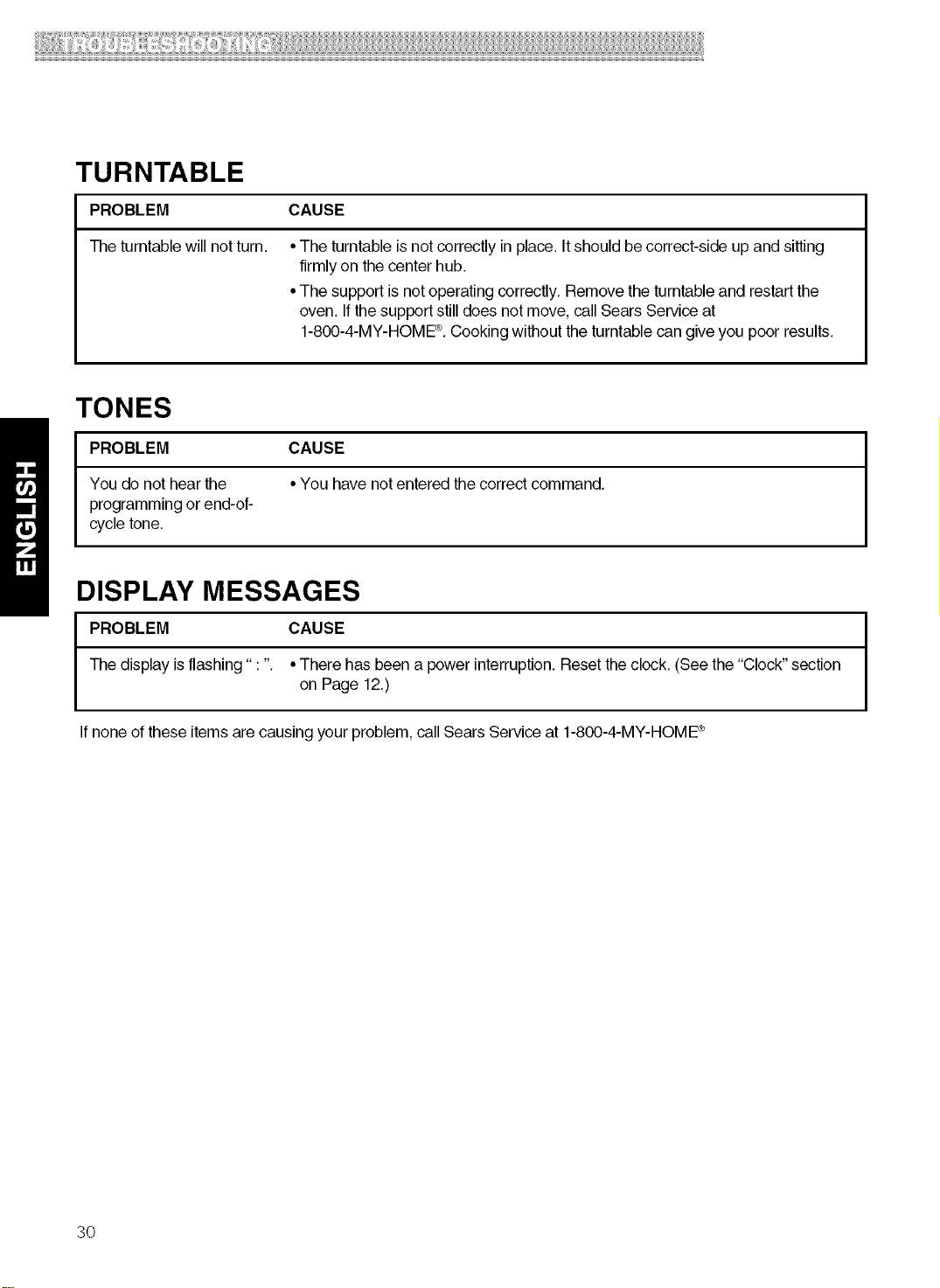
TURNTABLE
PROBLEM CAUSE
The turntablewill not turn.
•The turntable is not correctly in place. It should be correct-side up and sitting
firmlyon the center hub.
•The support isnot operating correctly, Removethe turntableand restartthe
oven. If thesupport still does notmove, call Sears Serviceat
1-800-4-MY-HOME®,Cookingwithout theturntable can give you poor results.
TONES
PROBLEM CAUSE
You do not hear the •You have notentered the correct command,
programming or end-oF
cycle tone,
DISPLAY MESSAGES
PROBLEM CAUSE
The display isflashing" : ". •There has been a power interruption, Resetthe clock, (See the "Clock" section
on Page 12.)
Ifnone ofthese items are causing your problem, call Sears Service at 1-800-4-MY-HOME®
30