Life's Good
OWNER'S _NUAL
FRENCH DOOR
REFRIGERATOR
Please read this manual carefully before operating
your set and retain it for future reference.
LFX25976_% LFX21976_
P/NO : MFL63728501 www.lge.com
INIRODUCIION
IMPORTANT SAFETY INFORMATION
Basic Safety Precautions ........................................ 3
CFC Disposal .......................................................... 4
How to Connect Electricity ...................................... 5
PARTS AND FEATURES
Special Features ..................................................... 6
Key Parts and Components .................................... 7
INSTALLATION
Choose the Proper Location ................................... 8
Clearances .............................................................. 8
Flooring ................................................................... 9
Handle Removal ...................................................... 9
Refrigerator Door and Freezer Drawer Removal ..10
Light Replacement ................................................ 16
Connecting the Water Supply ............................... 17
Connecting the Water Lines .................................. 18
Leveling the Refrigerator Doors ............................ 19
Starting .................................................................. 20
HOW TO USE
Control Panel Features ......................................... 21
The LED Display ................................................... 22
Adjusting the Temperatures and Display ............. 23
Operating the Dispenser ...................................... 24
Setting the Functions ........................................... 25
Spaceplus Ice System .......................................... 26
Automatic Icemaker ............................................. 27
Storing Foods ....................................................... 28
Location of Foods ................................................. 29
Shelf Height Adjustment ....................................... 30
f
THANK YOU!
Congratulations on your purchase
and welcome to the LG family.
Your new LG French Door
Refrigerator combines
advanced cooling technology
with simple operation and high
efficiency. Follow the operating
and care instructions in this
manual and your refrigerator
will provide you with many years
of reliable service.
CARE AND CLEANING
Removing and Replacing Components ................ 31
Cleaning the Refrigerator ..................................... 35
General Information ............................................. 35
Replacing the Water Filter..................................... 36
TROUBLESHOOTING
Before Calling for Service .............................. 41
SPECIFICATIONS
Key Dimensions and Specifications ..................... 47
WARRANTY
Product Registration Information .......................... 48
J
2

IMPORIAN!SAFELYINFORMAIlON
BASIC SAFETY PRECAUTIONS
This guide contains many important safety messages. Always read and obey all
safety messages.
,_ This isthe safety alert symbol. It alerts you to safety messages that inform you of hazards that can kill
or hurt you or others or cause damage to the product. All safety messages will be preceded by the safety
alert symbol and the hazard signal word DANGER, WARNING, or CAUTION. These words mean:
DANGER
WARNING
&CAUTION
You might be killed or seriously injured ifyou don't follow instructions.
You can be killed or seriously injured ifyou don't follow instructions.
Indicates an imminently hazardous situation which, if not avoided, may
result in minor or moderate injury, or product damage.
All safety messages will identify the hazard, tell you how to reduce the chance of injury, and tell you
what can happen ifthe instructions are not followed.
WARNING
To reduce the risk of fire, electric shock, or
injury to persons when using your product,
basic safety precautions should be followed,
including the following.
Read all instructions before using this appliance.
• NEVER unplug your refrigerator by pulling on the
power cord. Always grip the plug firmly and pull it
straight out from the outlet.
• Repair or replace immediately all electric service
cords that have become frayed or otherwise
damaged. Do not use a cord that shows cracks or
abrasion damage along its length or at either the
plug or connector end.
• When moving your refrigerator away from the wall,
be careful not to roll over or damage the power cord.
• DO NOT store or use gasoline or other flammable
vapors and liquids in the vicinity of this or any other
appliance.
• DO NOT allow children to climb, stand, or hang on
the refrigerator doors or shelves in the refrigerator.
They could damage the refrigerator and seriously
injure themselves.
• Keep fingers out of pinch point areas; clearances
between the doors and cabinet are necessarily
small. Be careful closing doors when children are
in the area.
• Unplug your refrigerator before cleaning or making
any repairs.
NOTE: Service should be performed by a qualified
technician.
• Before replacing a burned-out light bulb, unplug the
refrigerator or turn off power at the circuit breaker
or fuse box in order to avoid contact with a live wire
filament. (A burned-out light bulb may break when
being replaced.)
NOTE: Some models have LED interior lighting and
service should be performed by a qualified
technician.
NOTE: Setting either or both controls to the OFF
position does not remove power to the light circuit.
• When you are finished, reconnect the refrigerator to
the electrical source and reset the control
(Thermostat Refrigerator Control, or Freezer
Control, or Freezer Control, depending on the
model) to the desired setting.
• This refrigerator must be properly installed in
accordance with the Installer Instructions that
were taped to the front of the refrigerator.
• After your refrigerator is in operation, do not touch
the cold surfaces in the freezer compartment when
hands are damp or wet. Skin may adhere to the
extremely cold surfaces.
• Inrefrigerators with automatic icemakers, avoid
contact with the moving parts of the ejector
mechanism or with the heating element that
releases the cubes. DO NOT place fingers or hands
on the automatic icemaking mechanism while the
refrigerator is plugged in.
• Do not modify or extend the power cord length.
It will cause electric shock or fire.
3
IMPORIAN!SAFELYINFORMATION
BASIC SAFETY PRECAUTIONS (CONT.)
• DOnot use drier to dry the inside, nor light a candle
to remove odor.
• Install in places away from the fire such as the place
where flammable gas is leaked.
• This appliance is not intended for use by persons
(including children) with reduced physical, sensory
or mental capabilities, or lack of experience and
knowledge, unless they have been given
supervision or instruction concerning use of the
appliance by a person responsible for their safety.
Children should be supervised to ensure that they
do not play with the appliance.
• DO NOT refreeze frozen foods which have
thawed completely. The United States
Department of Agriculture in Home and Garden
Bulletin No. 69 says:
...You may safely refreeze frozen foods that have
thawed ifthey still contain ice crystals or ifthey are
still cold--below 40°F (4°C).
...Thawed ground meats, poultry, or fish that have
any off-odor or off-color should not be refrozen
and should not be eaten. Thawed ice cream
should be discarded. If the odor or color of any
food is poor or questionable, dispose of it. The
food may be dangerous to eat.
Even partial thawing and refreezing reduces the
quality of foods, particularly fruits, vegetables,
and prepared foods. The eating quality of red
meats is affected less than that of many other
foods. Use refrozen foods as soon as possible to
save as much of their quality as you can.
Risk of Child Entrapment
Discarded or abandoned refrigerators are
dangerous, even ifthey will sit for just a few
days. If you are disposing of your old refrigerator,
please follow the instructions below to help prevent
accidents.
Before you throw away your old refrigerator or
freezer:
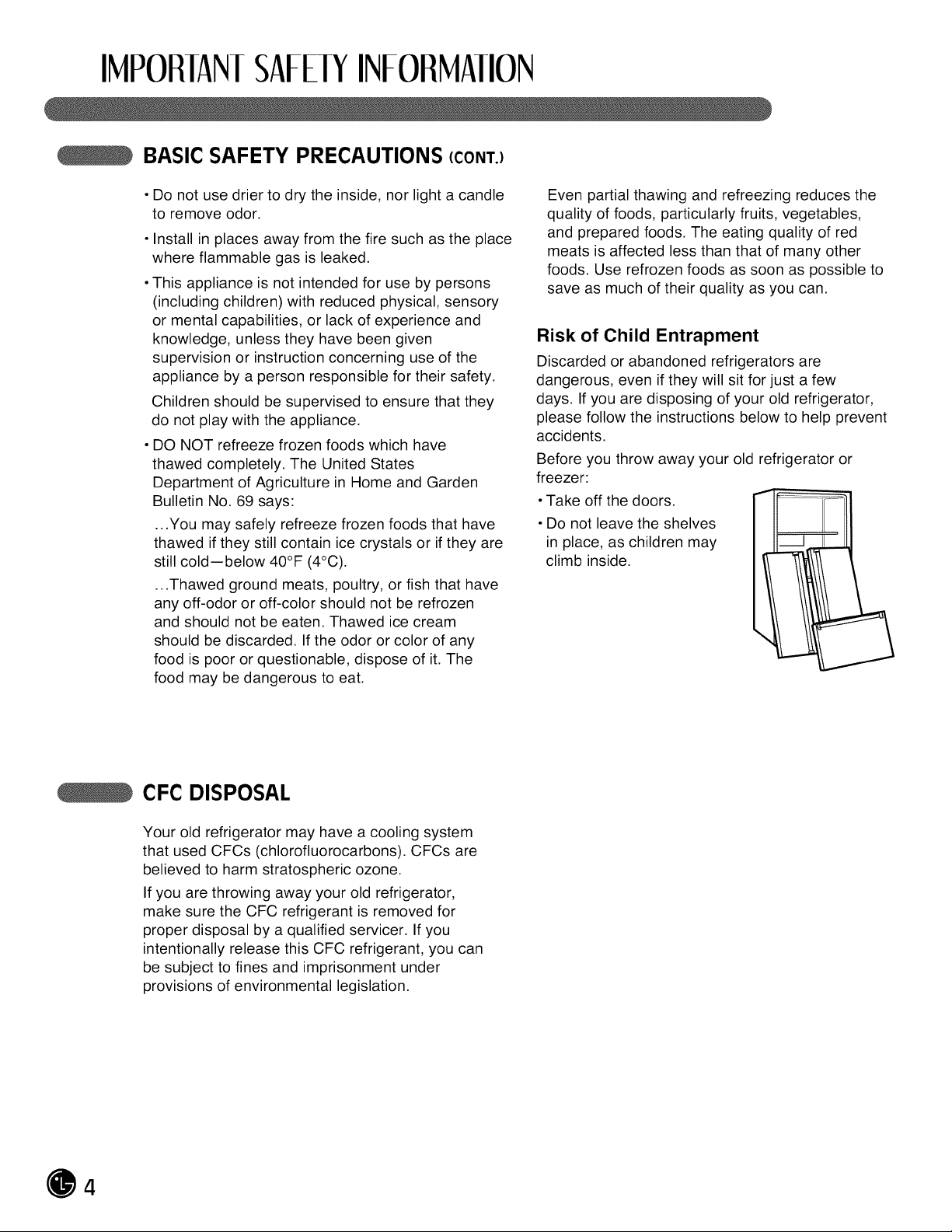
• Take off the doors.
• Do not leave the shelves
in place, as children may
climb inside.
CFC DISPOSAL
Your old refrigerator may have a cooling system
that used CFCs (chlorofluorocarbons). CFCs are
believed to harm stratospheric ozone.
If you are throwing away your old refrigerator,
make sure the CFC refrigerant is removed for
proper disposal by a qualified servicer. If you
intentionally release this CFC refrigerant, you can
be subject to fines and imprisonment under
provisions of environmental legislation.
4
IMPORIAN!SAFELYINFORMAIlON
HOW TO CONNECT ELECTRICITY
IMPORTANT: Please read carefully.
&WARNING
Electrical Shock Hazard
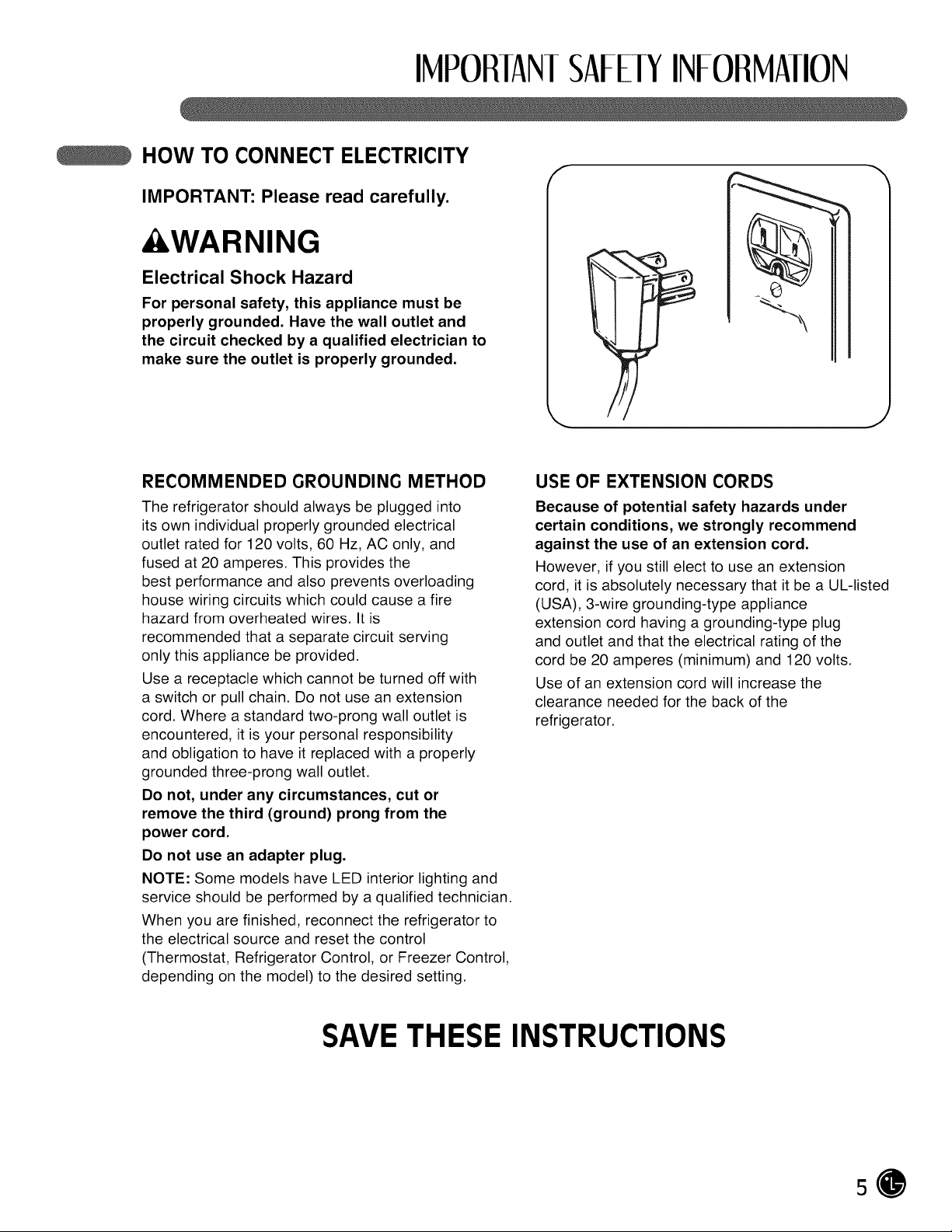
For personal safety, this appliance must be
properly grounded. Have the wall outlet and
the circuit checked bya qualified electrician to
make sure the outlet is properly grounded.
f
b
J
RECOMMENDED GROUNDING METHOD
The refrigerator should always be plugged into
its own individual properly grounded electrical
outlet rated for 120 volts, 60 Hz, AC only, and
fused at 20 amperes. This provides the
best performance and also prevents overloading
house wiring circuits which could cause a fire
hazard from overheated wires. It is
recommended that a separate circuit serving
only this appliance be provided.
Use a receptacle which cannot be turned off with
a switch or pull chain. Do not use an extension
cord. Where a standard two-prong wall outlet is
encountered, it is your personal responsibility
and obligation to have it replaced with a properly
grounded three-prong wall outlet.
Do not, under any circumstances, cut or
remove the third (ground) prong from the
power cord.
Do not use an adapter plug.
NOTE: Some models have LED interior lighting and
service should be performed by a qualified technician.
When you are finished, reconnect the refrigerator to
the electrical source and reset the control
(Thermostat, Refrigerator Control, or Freezer Control,
depending on the model) to the desired setting.
USE OF EXTENSION CORDS
Because of potential safety hazards under
certain conditions, we strongly recommend
against the use of an extension cord.
However, ifyou still elect to use an extension
cord, it is absolutely necessary that itbe a UL-listed
(USA), 3-wire grounding-type appliance
extension cord having a grounding-type plug
and outlet and that the electrical rating of the
cord be 20 amperes (minimum) and 120 volts.
Use of an extension cord will increase the
clearance needed for the back of the
refrigerator.
SAVETHESE INSTRUCTIONS
5
PARISANDFEATURES
SPECIAL FEATURES
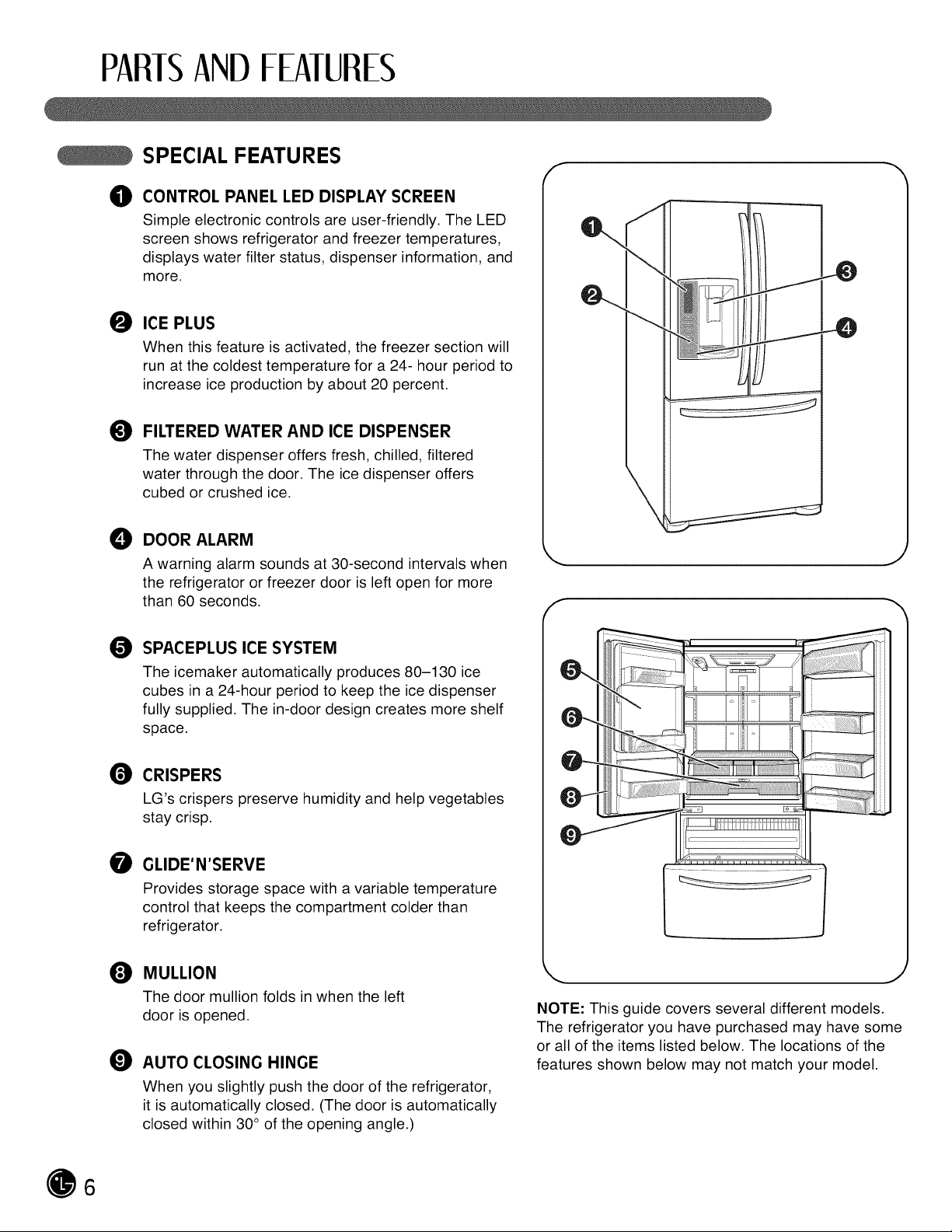
_J) CONTROL PANEL LED DISPLAY SCREEN
Simple electronic controls are user-friendly. The LED
screen shows refrigerator and freezer temperatures,
displays water filter status, dispenser information, and
more.
O ICE PLUS
When this feature is activated, the freezer section will
run at the coldest temperature for a 24- hour period to
increase ice production by about 20 percent.
FILTERED WATER AND ICE DISPENSER
The water dispenser offers fresh, chilled, filtered
water through the door. The ice dispenser offers
cubed or crushed ice.
DOOR ALARM
A warning alarm sounds at 30-second intervals when
the refrigerator or freezer door is left open for more
than 60 seconds.
f
.48
J
f
SPACEPLUS ICE SYSTEM
The icemaker automatically produces 80-130 ice
cubes in a 24-hour period to keep the ice dispenser
fully supplied. The in-door design creates more shelf
space.
CRISPERS
LG's crispers preserve humidity and help vegetables
stay crisp.
GLIDE'N'SERVE
Provides storage space with a variable temperature
control that keeps the compartment colder than
refrigerator.
MULLION
The door mullionfoldsin whentheleft
dooris opened.
_) AUTO CLOSING HINGE
When you slightly push the door of the refrigerator,
it isautomatically closed. (The door is automatically
closed within 30 °of the opening angle.)
J
NOTE: This guide covers several different models.
The refrigerator you have purchased may have some
or all of the items listed below. The locations of the
features shown below may not match your model.
6
PARTSANDFEATURES
KEY PARTS AND COMPONENTS
In addition to the special features and components
outlined in the Special Features section, there are
several other important components that are
referenced in this manual.
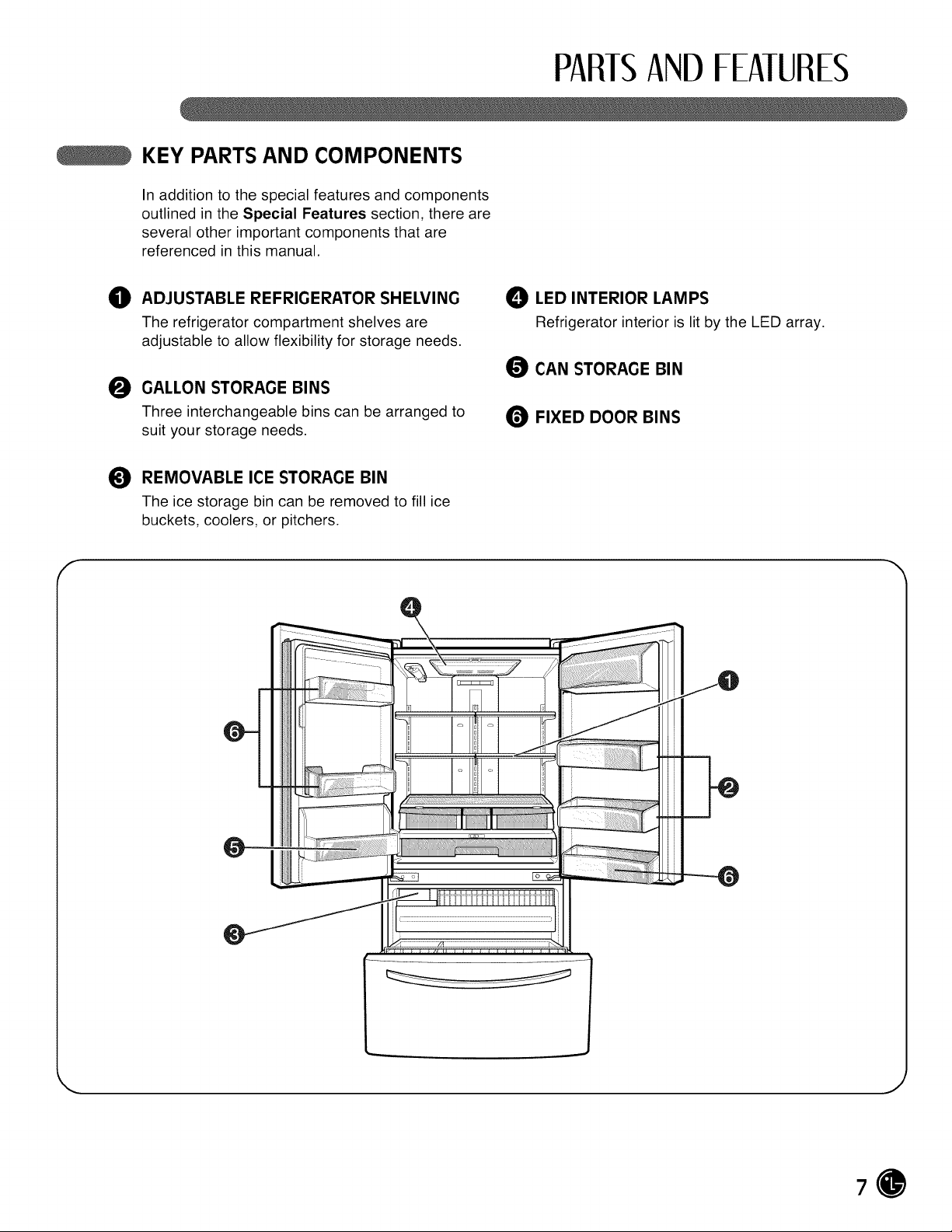
O ADJUSTABLE REFRIGERATOR SHELVING
The refrigerator compartment shelves are
adjustable to allow flexibility for storage needs.
O GALLON STORAGE BINS
Three interchangeable bins can be arranged to
suit your storage needs.
REMOVABLE ICE STORAGE BIN
The ice storage bin can be removed to fill ice
buckets, coolers, or pitchers.
LED INTERIOR LAMPS
Refrigerator interior is lit by the LED array.
O CAN STORAGE BIN
FIXED DOOR BINS
f
i
J
7
INSIAllAIION
CHOOSE THE PROPER LOCATION
&WARNING
Excessive Weight Hazard
Two or more people are required when
moving and unpacking the appliance.
• Store and install the refrigerator where itwill not
be exposed to temperatures below freezing or
exposed to outdoor weather conditions.
• Install this appliance in an area where the
temperature is between 55°F (13°C) and 110°F
(43°C). If the temperature around the appliance
is too low or too high, cooling ability may be
adversely affected.
• If this refrigerator isinstalled where the
temperature is above 110°F (43°C), the
freezing capacity is compromised and the cost
of electricity used increases.
• To reduce the risk of electric shock, do not
install the refrigerator in a wet or damp area.
• Select a place where a water supply can be
easily connected for the automatic icemaker
and dispenser.
• Unstable installation may cause vibration and
noise. If the floor is not even, make the
refrigerator level by rotating the height adjusting
screws.
• Properly ground the refrigerator to conform with
all governing codes and ordinances.
&CAUTION
Avoid placing the unit near heat sources,
direct sunlight, or moisture.
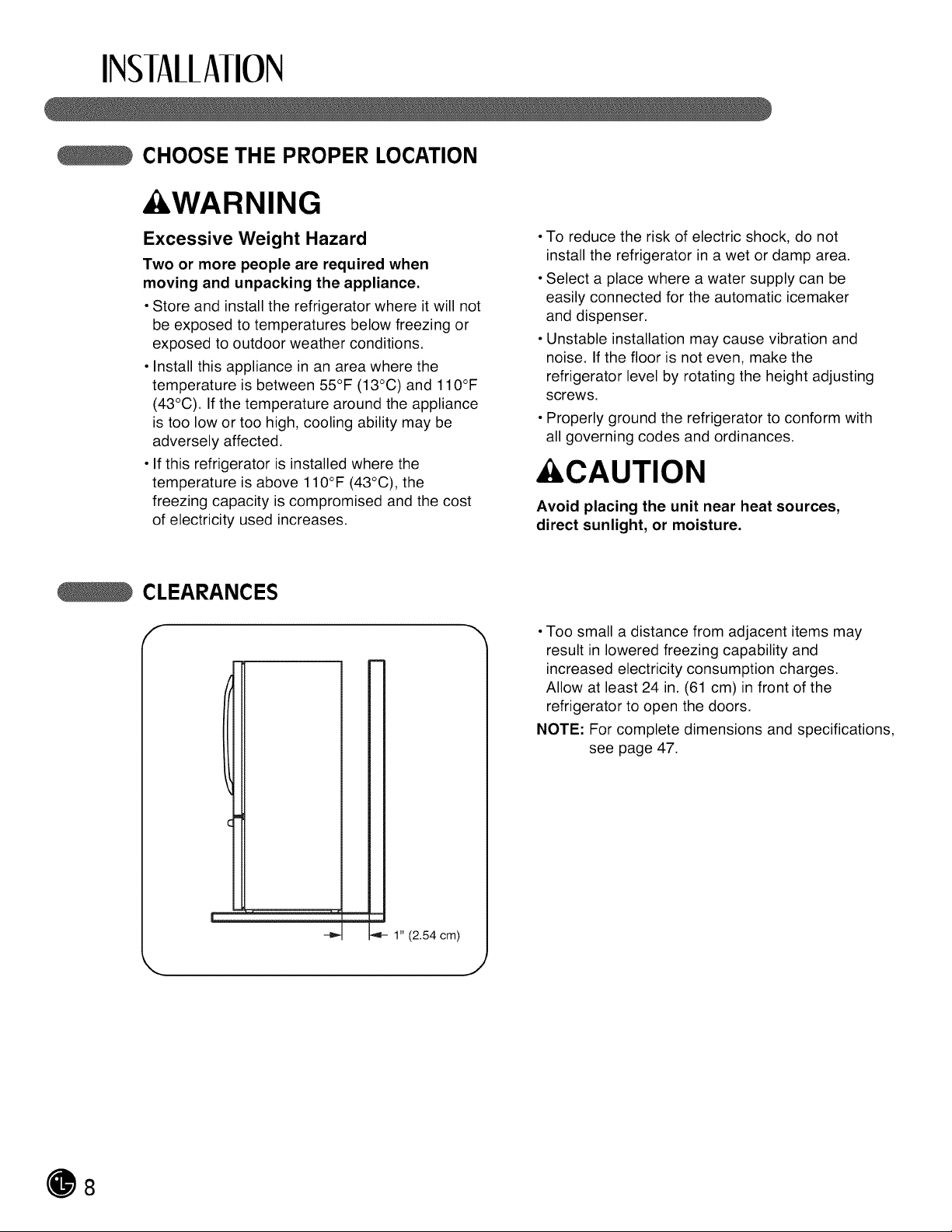
CLEARANCES
f
L __J
_4- 1" (2.54 cm)
• Too small a distance from adjacent items may
result in lowered freezing capability and
increased electricity consumption charges.
Allow at least 24 in. (61 cm) in front of the
refrigerator to open the doors.
NOTE: For complete dimensions and specifications,
see page 47.
J
8
INSIAllAIION
FLOORING
• To minimize noise and vibration, the refrigerator
MUST be installed on a solidly constructed floor.
• To avoid vibration, the unit must be level.
If required, adjust the leveling legs to compensate
for unevenness of the floor. The front should be
slightly higher than the rear to aid in door
closing. The leveling legs can be turned easily
by pushing against the top of the refrigerator to
take the weight off the feet. Turn the leveling
legs clockwise to raise the unit or
counterclockwise to lower it.
• Carpeting and soft tile surfaces are not
recommended.
• Never install the refrigerator on a platform or
weakly supported structure.
NOTE: When moving the refrigerator for cleaning
or service, be sure to protect the floor. Always
pull the refrigerator straight out when moving it.
Do not wiggle or walk the refrigerator when trying
to move it; floor damage could occur.
NOTE: It is recommend that the doors be removed when it is necessary to move the refrigerator through a
narrow opening.
HANDLE REMOVAL
To move the refrigerator through a house door, it
may be necessary to remove the refrigerator
door handles.
NOTE: Handle appearance may vary from
illustrations on this page.
&CAUTION
• Use special care when removing handles to
prevent scratching the doors.
• The handle could be damaged ifyou hit itwith
a hammer while removing or attaching.
• When you assemble or disassemble a handle,
you must push or pull with reasonable force.
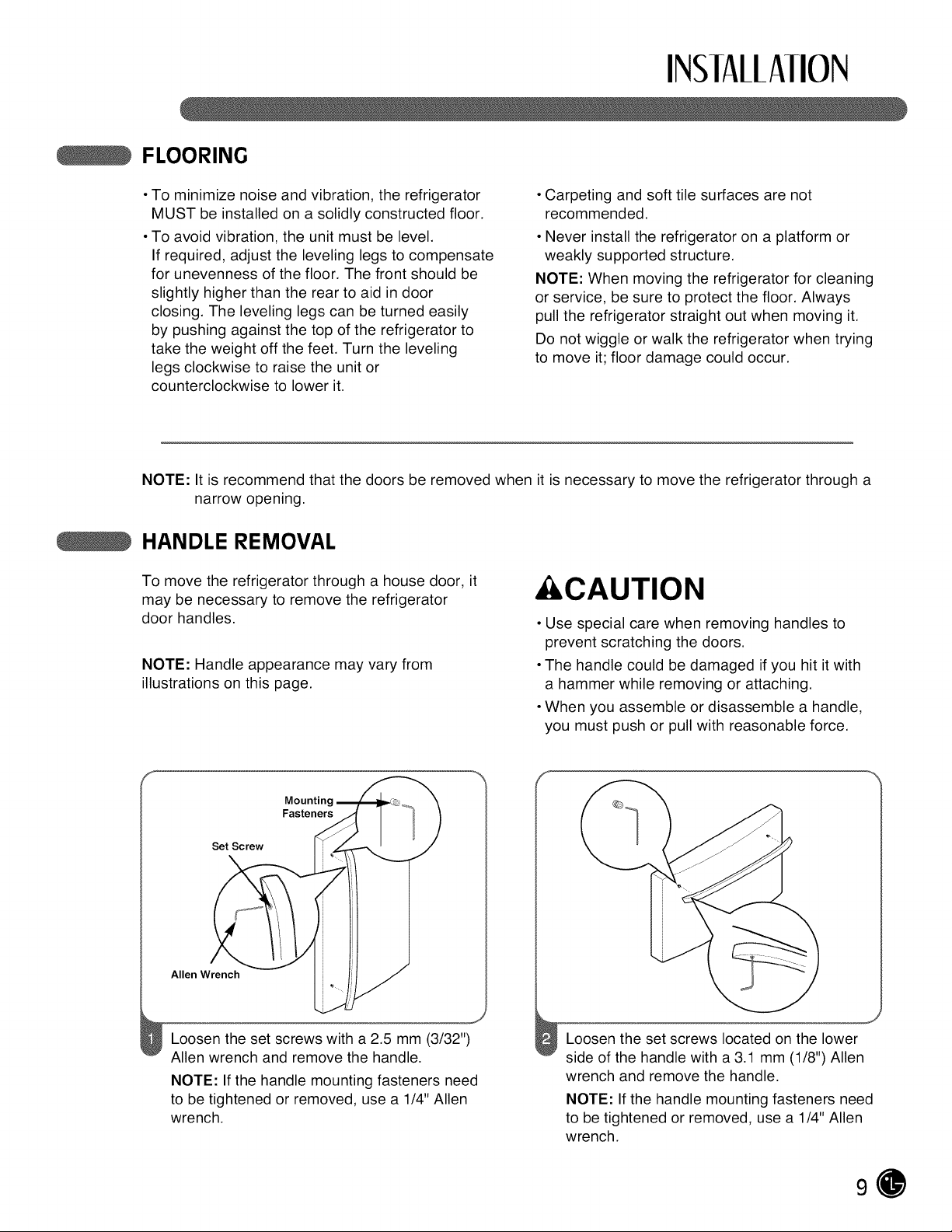
Mountinq
Fasteners
Set Screw
Allen Wrench
Loosen the set screws with a 2.5 mm (3/32")
Allen wrench and remove the handle.
NOTE: If the handle mounting fasteners need
to be tightened or removed, use a 1/4" Allen
wrench.
f
Loosen the set screws located on the lower
side of the handle with a 3.1 mm (1/8") Allen
wrench and remove the handle.
NOTE: If the handle mounting fasteners need
to be tightened or removed, use a 1/4" Allen
wrench.
9
INSIAllAIION
HANDLE REMOVAL (CONT.)
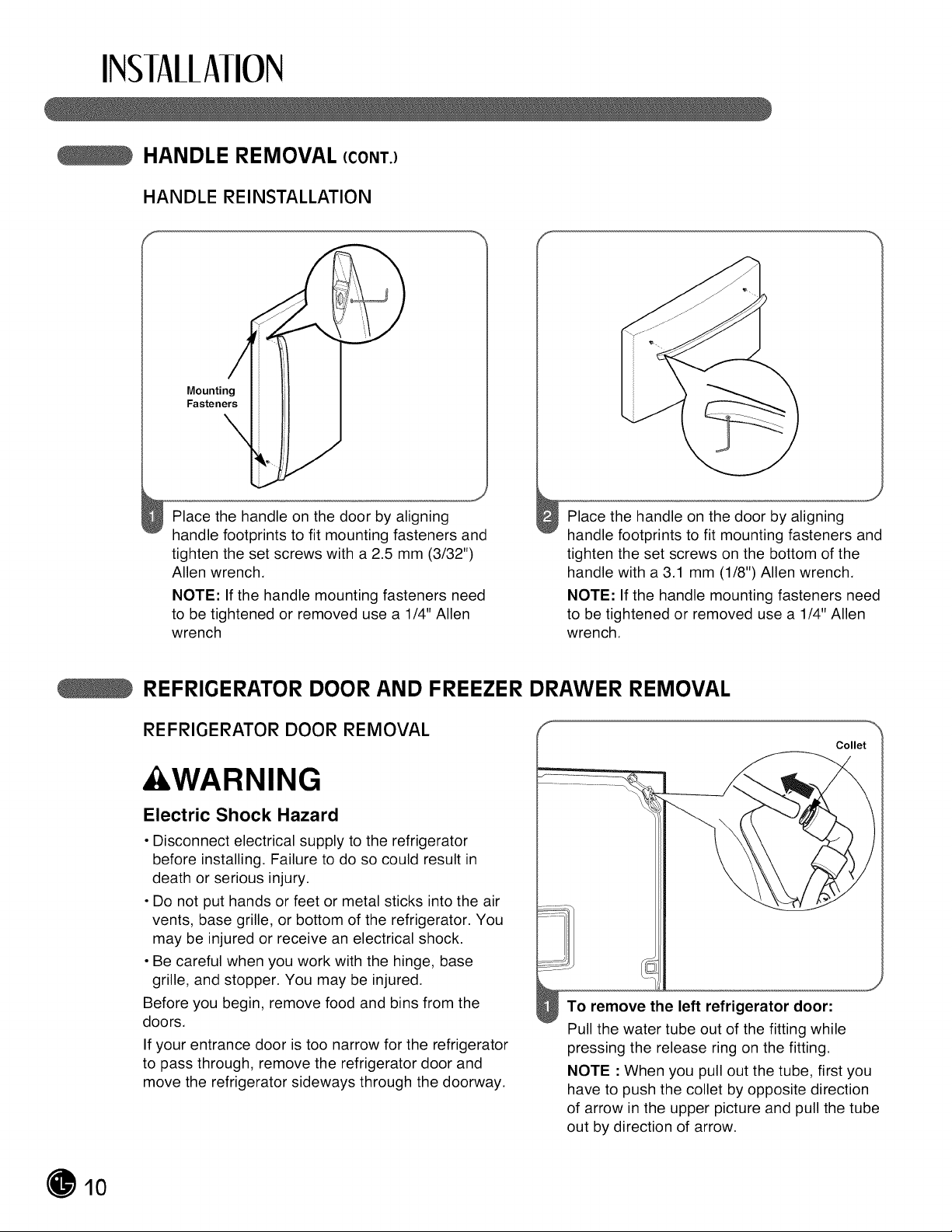
HANDLE REINSTALLATION
Mounting
Fasteners
\
J
Place the handle on the door by aligning
handle footprints to fit mounting fasteners and
tighten the set screws with a 2.5 mm (3/32")
Allen wrench.
NOTE: If the handle mounting fasteners need
to be tightened or removed use a 1/4" Allen
wrench
Place the handle on the door by aligning
handle footprints to fit mounting fasteners and
tighten the set screws on the bottom of the
handle with a 3.1 mm (1/8") Allen wrench.
NOTE: If the handle mounting fasteners need
to be tightened or removed use a 1/4" Allen
wrench.
REFRIGERATOR DOOR AND FREEZER DRAWER REMOVAL
REFRIGERATOR DOOR REMOVAL
&WARNING
Electric Shock Hazard
• Disconnect electrical supply to the refrigerator
before installing. Failure to do so could result in
death or serious injury.
• Do not put hands or feet or metal sticks into the air
vents, base grille, or bottom of the refrigerator. You
may be injured or receive an electrical shock.
• Be careful when you work with the hinge, base
grille, and stopper. You may be injured.
Before you begin, remove food and bins from the
doors.
If your entrance door is too narrow for the refrigerator
to pass through, remove the refrigerator door and
move the refrigerator sideways through the doorway.
To remove the left refrigerator door:
Pull the water tube out of the fitting while
pressing the release ring on the fitting.
NOTE : When you pull out the tube, first you
have to push the collet byopposite direction
of arrow in the upper picture and pull the tube
out by direction of arrow.
10
INSIAllAIION
REFRIGERATOR DOOR AND FREEZER DRAWER REMOVAL (CONT.)
REFRIGERATOR DOOR REMOVAL (CONT.)
(2) 11)
\
(3).
(4)
_J
(7)
(8)
/
/
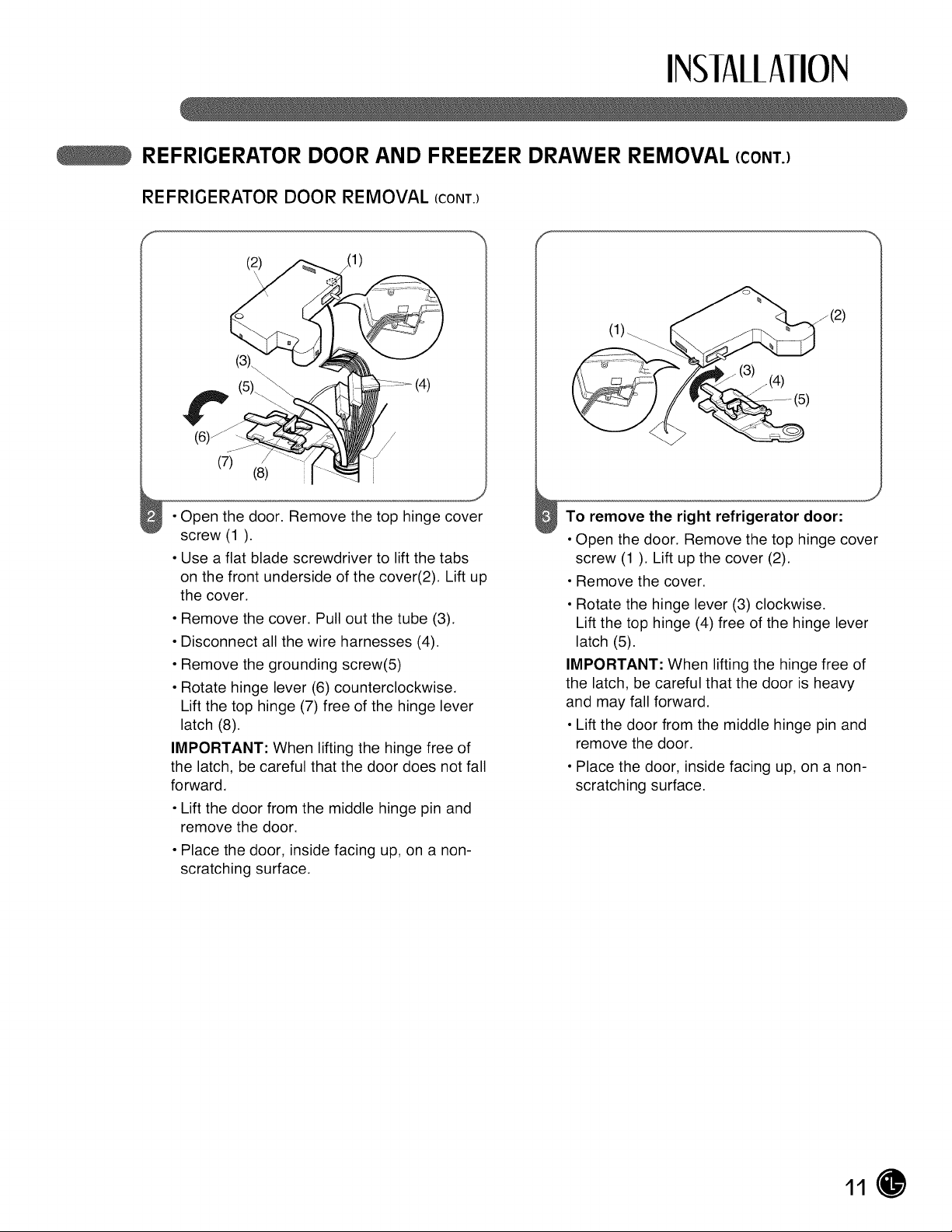
• Open the door. Remove the top hinge cover
screw (1).
• Use a flat blade screwdriver to lift the tabs
on the front underside of the cover(2). Lift up
the cover.
• Remove the cover. Pull out the tube (3).
• Disconnect all the wire harnesses (4).
• Remove the grounding screw(5)
• Rotate hinge lever (6) counterclockwise.
Lift the top hinge (7) free of the hinge lever
latch (8).
IMPORTANT: When lifting the hinge free of
the latch, be careful that the door does not fall
forward.
• Lift the door from the middle hinge pin and
remove the door.
• Place the door, inside facing up, on a non-
scratching surface.
_(4)
j(2)
(5)
To remove the right refrigerator door:
• Open the door. Remove the top hinge cover
screw (1). Lift up the cover (2).
• Remove the cover.
• Rotate the hinge lever (3) clockwise.
Lift the top hinge (4) free of the hinge lever
latch (5).
IMPORTANT: When lifting the hinge free of
the latch, be careful that the door is heavy
and may fall forward.
• Lift the door from the middle hinge pin and
remove the door.
• Place the door, inside facing up, on a non-
scratching surface.
11

INSIAllAIION
REFRIGERATOR DOOR AND FREEZER DRAWER REMOVAL (CONT.)
REFRIGERATOR DOOR REINSTALLATION
f
Install the right-side door first.
• Lower the door onto the middle hinge pin as
shown.
• Make sure the plastic sleeve is inserted in
the bottom of the door.
• Fit the top hinge (1) over the hinge lever
latch (2) and into place. Rotate the lever
(3) counterclockwise to secure the hinge.
• Hook the tab on the door-switch side of the
cover (4) under the edge of the wire opening
in the cabinet top. Position the cover into
place. Insert and tighten the cover screw (5).
Install the left-side door.
• Lower the door onto middle hinge pin.
J
(2)_ (4)
/
/
• Fit the top hinge (1) over the hinge lever
latch (2) and into place. Rotate the lever (3)
clockwise to secure the hinge.
• Install the grounding screw (4) and connect
all the wire harnesses (5).
12
INSIAllAIION
REFRIGERATOR DOOR AND FREEZER DRAWER REMOVAL (CONT.)
REFRIGERATOR DOOR REINSTALLATION (cont.)
Cover Cover Screw
(6)_
/
/
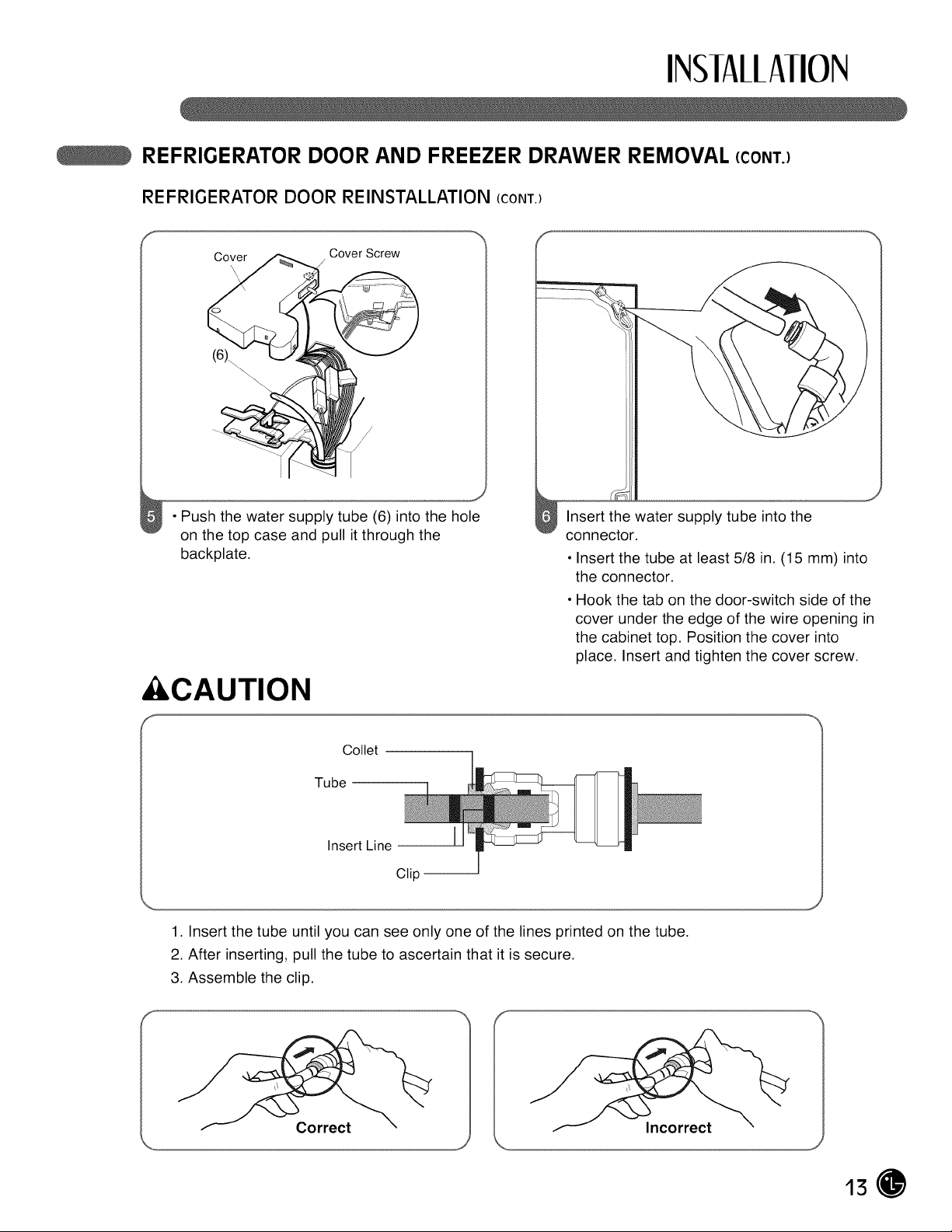
• Push the water supply tube (6) into the hole
on the top case and pull itthrough the
backplate.
&CAUTION
Insert the water supply tube into the
connector.
• Insert the tube at least 5/8 in. (15 mm) into
the connector.
• Hook the tab on the door-switch side of the
cover under the edge of the wire opening in
the cabinet top. Position the cover into
place. Insert and tighten the cover screw.
Collet
Tube
Insert Line
Clip --
1. Insert the tube until you can see only one of the lines printed on the tube.
2.After inserting, pull the tube to ascertain that it is secure.
3. Assemble the clip.
Correct Incorrect
13
INSIAllAIION
REFRIGERATOR DOOR AND FREEZER DRAWER REMOVAL (CONT.)
FREEZER DRAWER REMOVAL
&CAUTION
• Care should be taken to avoid product or property
damage when removing the freezer door. It maybe
necessary to have assistance with the following
insturctions.
• To avoid damage do not hold the handle when
removing the door. It could come off and cause and
injury.
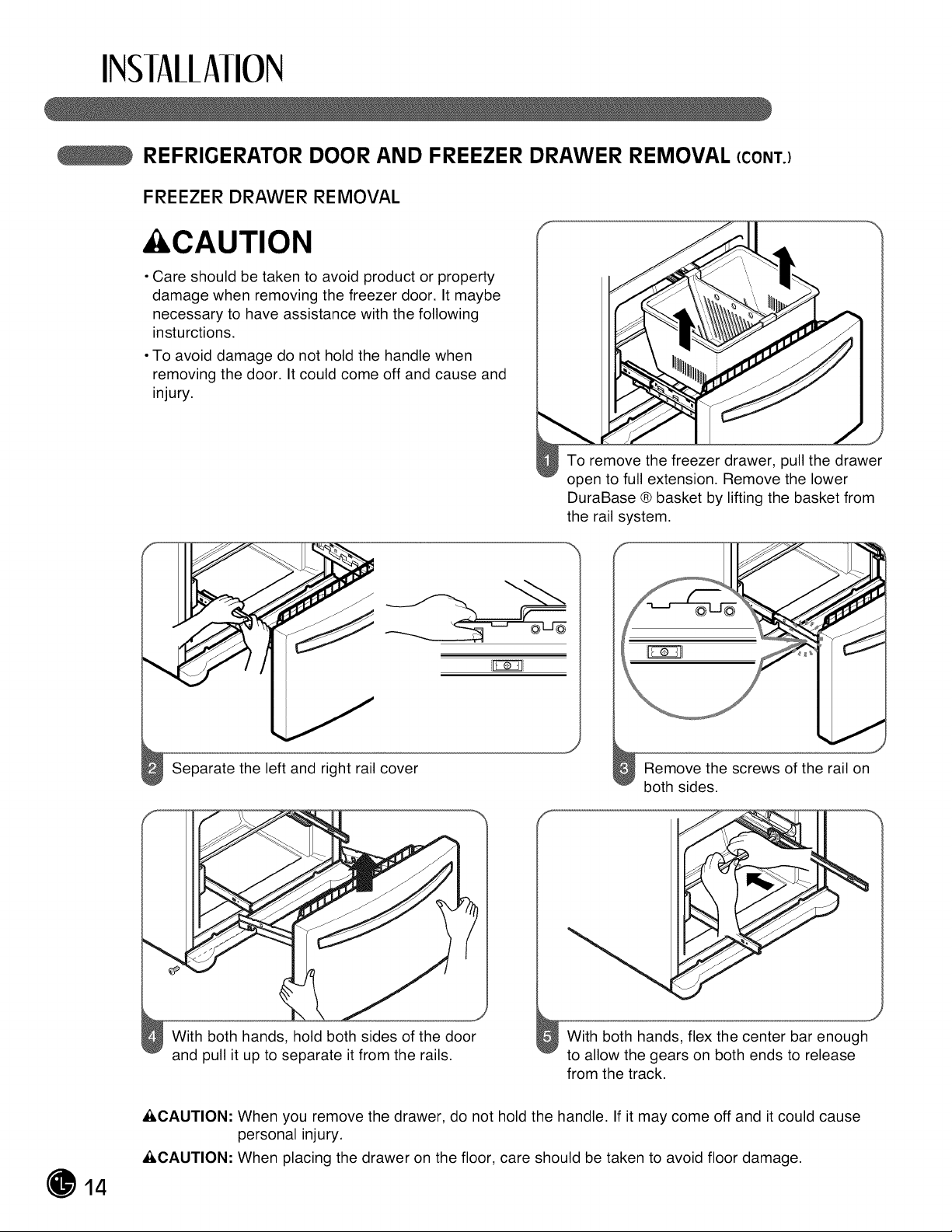
Separate the left and right rail cover
To remove the freezer drawer, pull the drawer
open to full extension. Remove the lower
DuraBase ® basket by liftingthe basket from
the rail system.
Remove the screws of the rail on
both sides.
With both hands, hold both sides of the door
and pull it up to separate itfrom the rails.
J
With both hands, flex the center bar enough
to allow the gears on both ends to release
from the track.
14
_,CAUTION: When you remove the drawer, do not hold the handle. If it may come off and it could cause
personal injury.
&CAUTION: When placing the drawer on the floor, care should be taken to avoid floor damage.
INSIAllAIION
REFRIGERATOR DOOR AND FREEZER DRAWER REMOVAL (CONT.)
FREEZER DRAWER REINSTALLATION
&CAUTION
• To avoid possible injury or product or property
damage, you will need two people to perform the
following instructions. It maybe necessary to have
assistance with the following instructions.
&WARNING
Risk of Child Entrapment
• To prevent accidental child and pet entrapment
or suffocation risk, DO NOT allow them to play
inside of the freezer drawer.
• DO NOT step or sit on the freezer drawer.
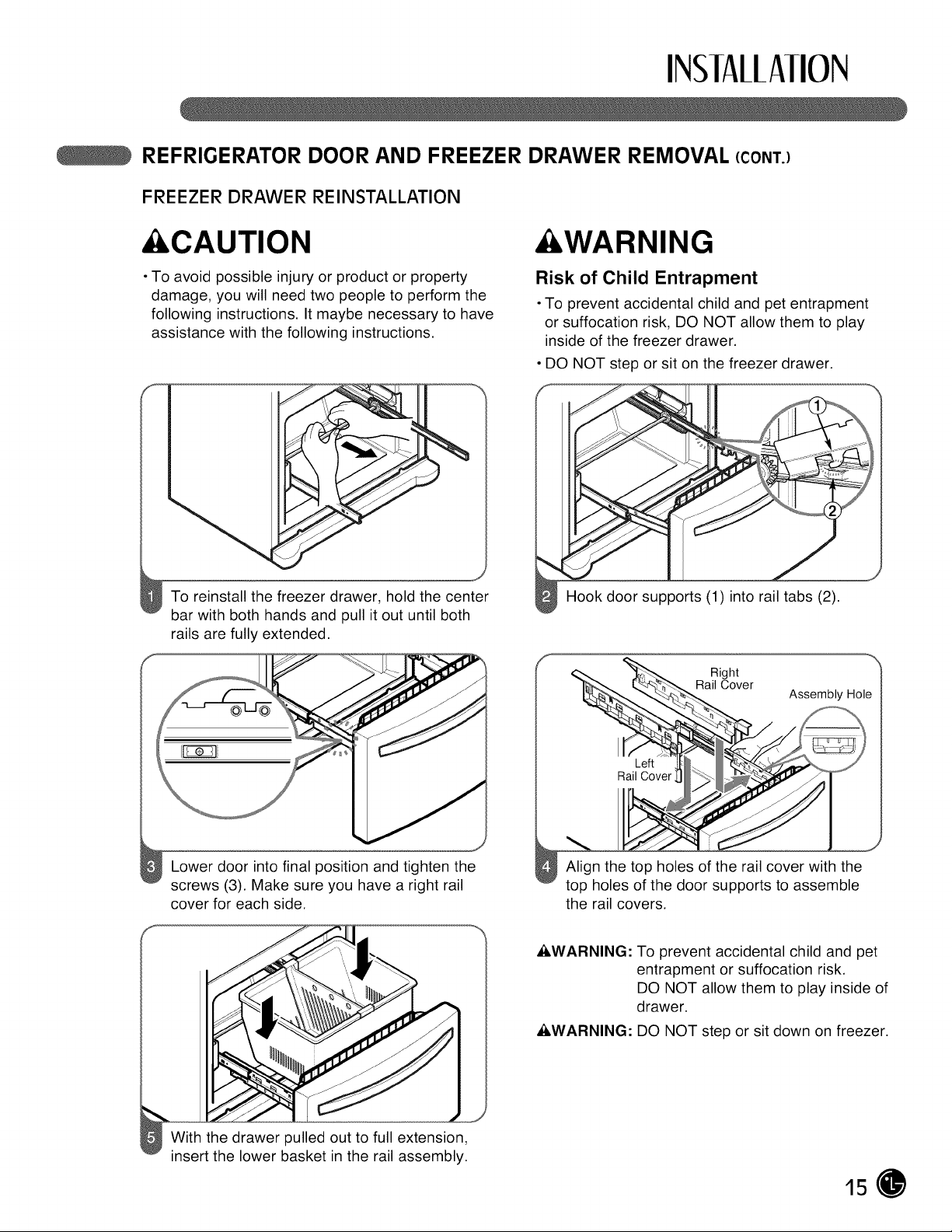
To reinstall the freezer drawer, hold the center
bar with both hands and pull itout until both
rails are fully extended.
Hook door supports (1) into rail tabs (2).
Right
Rail Cover
Left
Rail Cover
Lower door into final position and tighten the
screws (3). Make sure you have a right rail
cover for each side.
Align the top holes of the rail cover with the
top holes of the door supports to assemble
the rail covers.
_,WARNING: To prevent accidental child and pet
entrapment or suffocation risk.
DO NOT allow them to play inside of
drawer.
_,WARNING: DO NOT step or sit down on freezer.
With the drawer pulled out to full extension,
insert the lower basket in the rail assembly.
15
INSIAllAIION
LIGHT REPLACEMENT
TO change RefrigeratOr Light
This model has special LED interior lighting
and service shouldbe performed by a qualified
technician.
&WARNING
Electrical Shock Hazard
Before replacing a burned-out light bulb, either unplug
the refrigerator or turn off power atthe circuit breaker
or fuse box.
NOTE: Moving the control to the OFF position does
not remove power to the light circuit.
NOTE:
• Not all appliance bulbs will fit your refrigerator.
Be sure to replace the bulb with one of the same
size, shape and wattage.
• The light bulbs will turn off if door is left open for
seven continuous minutes. Shutting door for one
second will light bulbs to come back on.
TO Change Freezer Light
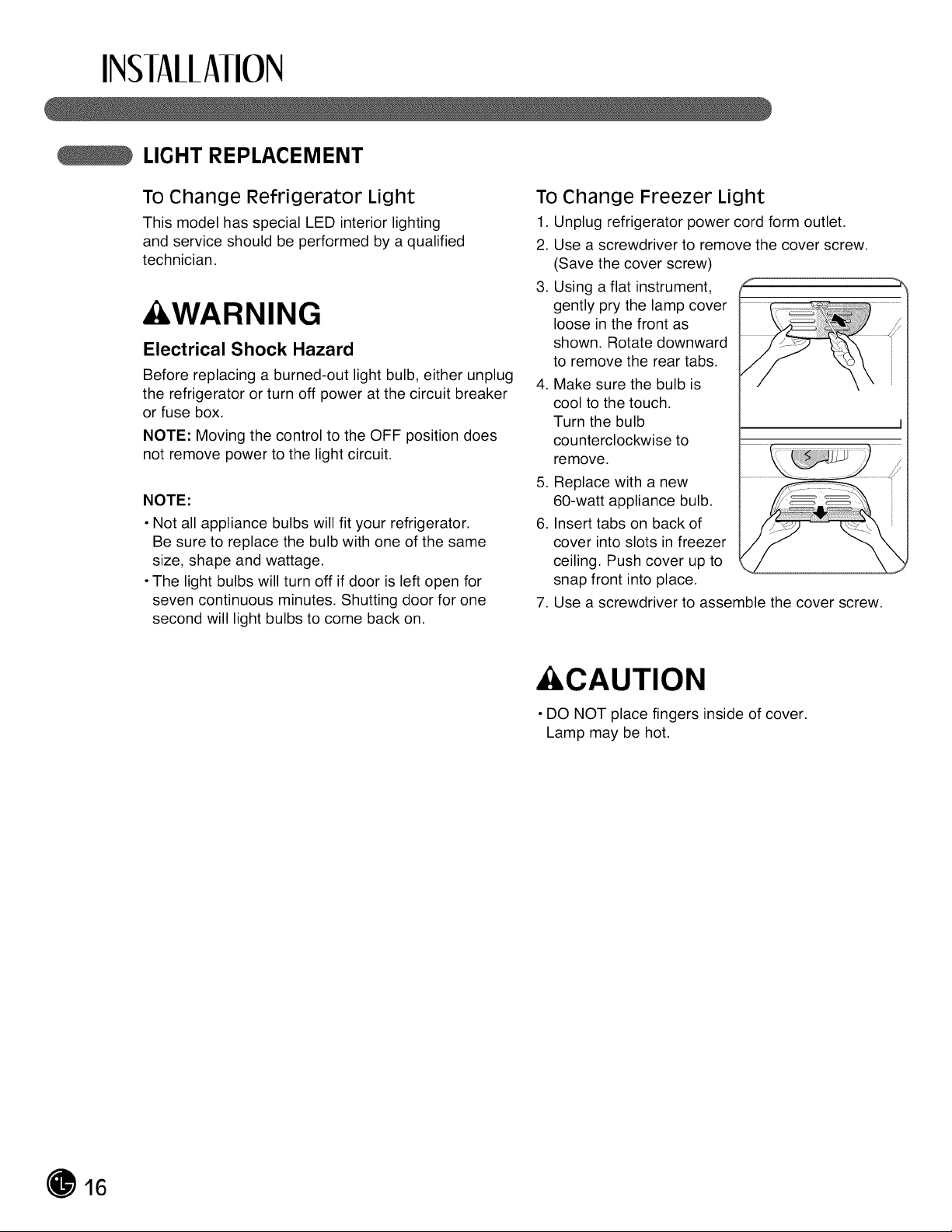
1. Unplug refrigerator power cord form outlet.
2. Use a screwdriver to remove the cover screw.
(Save the cover screw)
3. Using a flat instrument,
gently pry the lamp cover
loose in the front as
shown. Rotate downward
to remove the rear tabs.
4. Make sure the bulb is
cool to the touch.
Turn the bulb
counterclockwise to
remove.
5. Replace with a new
60-watt appliance bulb.
6. Insert tabs on back of
cover into slots in freezer
ceiling. Push cover up to
snap front into place.
7. Use a screwdriver to assemble the cover screw.
&CAUTION
• DO NOT place fingers inside of cover.
Lamp may be hot.
16
INSIAllAIION
CONNECTING THE WATER SUPPLY
&WARNING
Connect to safe drinking water supply
only.
• The water pressure must be between 20 and
120 p.s.i. (1.4~8.4 kgf/cm 2) on models without
a water filter and between 43 and 121 p.s.i.
(3~8.5 kgf/cm2)on models with a water filter.
• If water pressure does not reach 20 psi
(1.4 kgf/cm_)or falls below, it is necessary to
purchase a separate pressure pump for normal
automatic icemaker and water dispensing operation.
• It is recommended that the total length of the water
feed tube does not exceed 26 ft. (8 m).
• Install the water supply line where it will not be
affected by heat.
• If a reverse osmosis water filtration system is
connected to your cold water supply, This water line
installation is not warranted by the refrigerator or
icemaker manufacturer. Follow next instructions
carefully to minimize the risk of expensive water
damage.
• If a reverse osmosis water filtration system is
connected to your cold water supply, the water
pressure to the reverse osmosis system needs
to be a minimum of 40 to 60 psi (2.8 kgf/cm _~
4.2 kgf/cm2, less than 2.0~3.0sec to fill a cup of
7oz capacity).
If the water pressure from the reverse osmosis
system is less than 20 psi (1.4 kgf/cm_, more than
4.0sec to fill a cup of 7oz capacity):
• Check to see whether the sediment filter in the
reverse osmosis system is blocked. Replace the
filter if necessary.
• Allow the storage tank on the reverse osmosis
system to refill after heavy usage.
• If the issue about water pressure from reverse
osmosis remains, call a licensed, qualified plumber.
IMPORTANT: Read all directions thoroughly before
you begin.
• If operating the refrigerator before installing the
water connection, turn the icemaker to the OFF
position to prevent operation without water.
• All installations must be in accordance with local
plumbing code requirements.
• Use copper tubing and check for leaks.
• Install tubing only in areas where temperatures will
remain above freezing.
• It may take up to 24 hours for the icemaker to begin
producing ice.
Tools Required
• Standard screwdriver
• 7/16-in. and 1/2-in. open-end wrenches or two
adjustable wrenches
• 1/4-in. nut driver
• 1/4-in. drill bit
• Hand drill or electric drill (properly grounded)
NOTE: Refrigerator dealers offer a kit with a 1/4-in.
saddle-type shutoff valve, a union, and copper tubing.
Before purchasing, make sure a saddle-type valve
complies with local plumbing codes.
Do not use a piercing-type or 3/16-in. saddle valve
which reduces water flow and clogs more easily.
NOTE: The Commonwealth of Massachusetts
Plumbing Code 248CMR shall be adhered to.
Saddle valves are illegal and use is not permitted in
Massachusetts. Consult with your licensed plumber.
Cold Water Supply
• The icemaker water valve contains a flow washer
which isused as a water pressure regulator.
• The icemaker needs to be connected to a coldwater
linewith water pressure between 20~120 psi
(1.4~8.4 kgf/cm2)on models without a water filter
and between 43 and 121 p.s.i. (3~8.5 kgf/cm2)on
models with a water filter.
17
INSIAllAIION
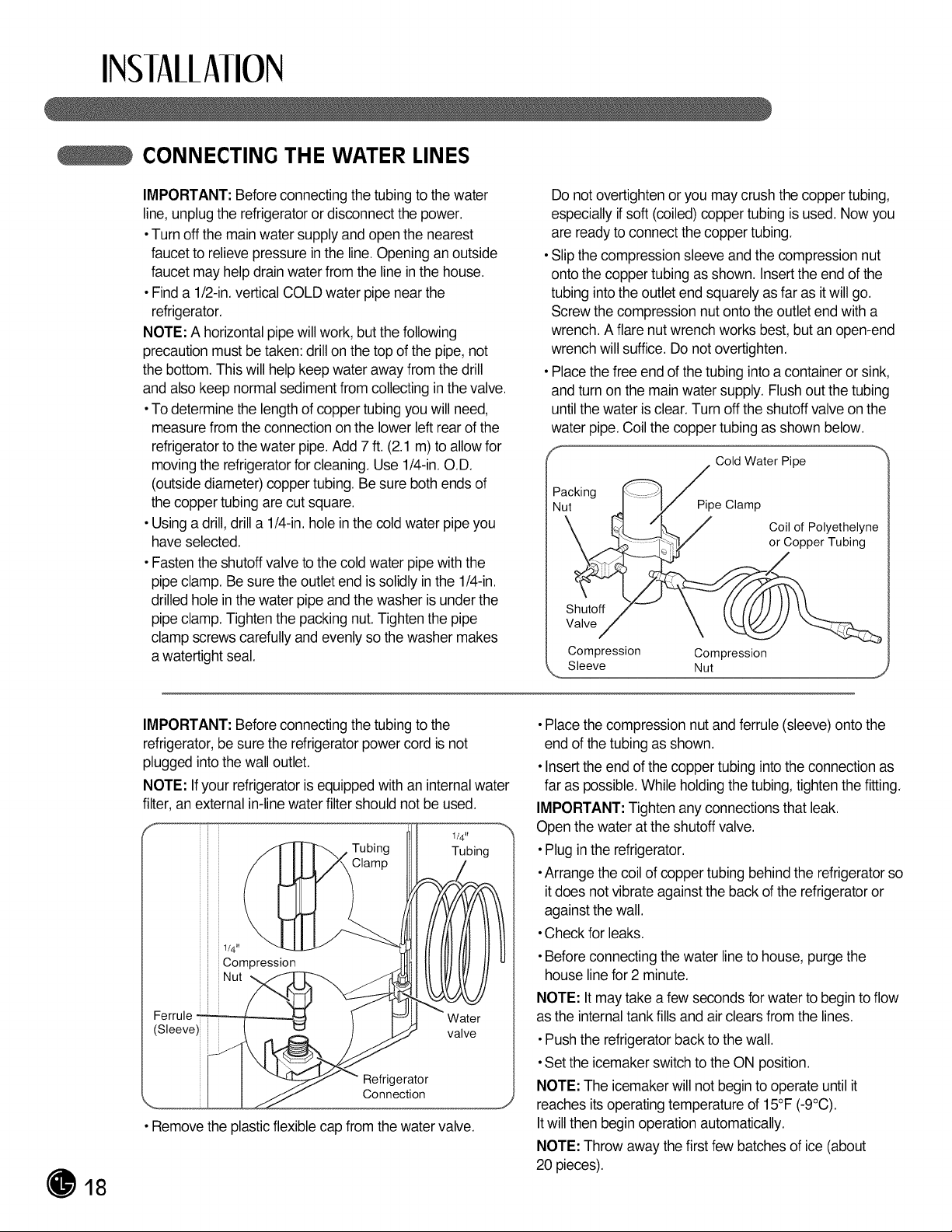
CONNECTING THE WATER LINES
IMPORTANT: Beforeconnecting thetubingtothe water
line, unplug the refrigeratoror disconnect thepower.
•Turnoff themainwater supply and open thenearest
faucettorelieve pressure in the line. Opening an outside
faucetmay helpdrain water from the linein thehouse.
• Find a 1/2-in.verticalCOLD water pipe near the
refrigerator.
NOTE:A horizontal pipe will work,butthefollowing
precaution mustbe taken:drillon thetop ofthepipe,not
the bottom.This willhelp keepwater away from the drill
and alsokeepnormalsediment from collecting in thevalve.
•Todetermine thelength ofcoppertubingyouwillneed,
measure from the connectionon the lowerleft rearofthe
refrigerator to thewater pipe. Add 7 ft.(2.1m) toallowfor
moving the refrigeratorfor cleaning. Use 1/4-in.O.D.
(outside diameter) coppertubing. Be sure both endsof
thecoppertubing are cut square.
•Using a drill, drill a 1/4-in.hole in thecoldwater pipe you
haveselected.
• Fastenthe shutoff valve tothe coldwater pipe with the
pipe clamp.Be suretheoutlet end is solidly inthe 1/4-in.
drilled hole in thewater pipe and thewasher is under the
pipe clamp.Tighten thepacking nut.Tighten thepipe
clamp screws carefully and evenly sothe washer makes
a watertight seal.
Donotovertighten or youmay crush thecoppertubing,
especiallyif soft(coiled) coppertubingisused. Now you
are ready toconnectthe coppertubing.
•Slip thecompression sleeve and thecompression nut
ontothecopper tubingasshown. Insertthe end ofthe
tubinginto theoutlet end squarely asfarasit will go.
Screw thecompression nut ontotheoutlet end with a
wrench.A flarenutwrench worksbest,butan open-end
wrench willsuffice.Do notovertighten.
• Place the free end of thetubingintoa container or sink,
and turnon the main water supply. Flushoutthetubing
until thewater is clear. Turnoff theshutoff valve on the
water pipe.Coil thecoppertubingasshown below.
f
Cold Water Pipe
Packing _"....
Nut "_l_P i/pe Clamp
_,_. /L/ Coil of Polyethelyne
,_"--_*_Z/ or Copper Tubing
Shutoff .
Valve/
Compression Compression
18
IMPORTANT: Beforeconnecting thetubingtothe
refrigerator, be suretherefrigerator power cordisnot
plugged intothe walloutlet.
NOTE: Ifyour refrigeratorisequipped with an internal water
filter,an external in-line water filter shouldnotbe used.
1/4"
Tubing Tubing
• Remove theplastic flexible capfrom thewater valve.
•Placethe compression nutand ferrule(sleeve)ontothe
end ofthetubingas shown.
•Insert theend of thecoppertubinginto theconnectionas
faraspossible. Whileholding thetubing, tightenthe fitting.
IMPORTANT: Tighten anyconnections that leak.
Open thewater atthe shutoff valve.
•Plug in the refrigerator.
•Arrange thecoil ofcoppertubingbehind therefrigeratorso
it doesnotvibrate against theback of the refrigeratoror
against thewall.
•Checkforleaks.
•Before connectingthewater line to house, purge the
houseline for 2 minute.
NOTE: It may take a few secondsfor water tobegin to flow
as theinternal tank fills and air clears from the lines.
•Push the refrigeratorback to thewall.
•Settheicemaker switch totheONposition.
NOTE:Theicemakerwill notbegin tooperateuntilit
reaches its operating temperatureof 15°F (-9°C).
Itwillthenbegin operationautomatically.
NOTE:Throw away thefirst few batches ofice(about
20 pieces).
INSIAllAIION
LEVELING THE REFRIGERATOR DOORS
&WARNING
Electrical Shock Hazard
• Be careful when you work with the hinges,
base grille, and stopper. You may be injured.
• Do not put hands, feet, or metal items into
the air vents, base grille, or the bottom of the
refrigerator. You may be injured or receive
an electrical shock.
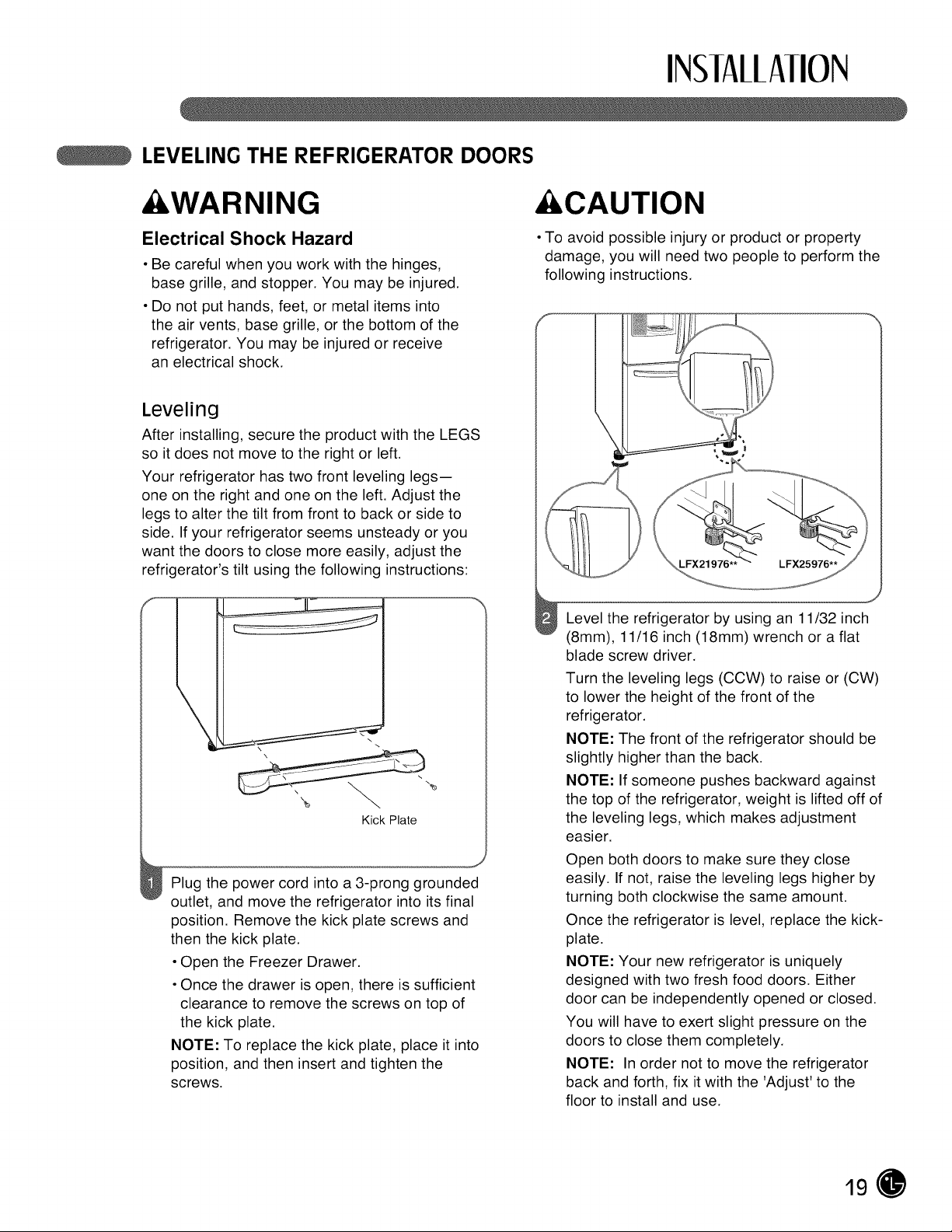
Leveling
After installing, secure the product with the LEGS
so itdoes not move to the right or left.
Your refrigerator has two front leveling legs--
one on the right and one on the left. Adjust the
legs to alter the tilt from front to back or side to
side. If your refrigerator seems unsteady or you
want the doors to close more easily, adjust the
refrigerator's tilt using the following instructions:
%
Kick Plate
Plug the power cord into a 3-prong grounded
outlet, and move the refrigerator into its final
position. Remove the kick plate screws and
then the kick plate.
• Open the Freezer Drawer.
• Once the drawer isopen, there is sufficient
clearance to remove the screws on top of
the kick plate.
NOTE: To replace the kick plate, place it into
position, and then insert and tighten the
screws.
&CAUTION
• To avoid possible injury or product or property
damage, you will need two people to perform the
following instructions.
Level the refrigerator by using an 11/32 inch
(8mm), 11/16 inch (18mm) wrench or a flat
blade screw driver.
Turn the leveling legs (CCW) to raise or (CW)
to lower the height of the front of the
refrigerator.
NOTE: The front of the refrigerator should be
slightly higher than the back.
NOTE: If someone pushes backward against
the top of the refrigerator, weight is lifted off of
the leveling legs, which makes adjustment
easier.
Open both doors to make sure they close
easily. If not, raise the leveling legs higher by
turning both clockwise the same amount.
Once the refrigerator is level, replace the kick-
plate.
NOTE: Your new refrigerator is uniquely
designed with two fresh food doors. Either
door can be independently opened or closed.
You will have to exert slight pressure on the
doors to close them completely.
NOTE: Inorder not to move the refrigerator
back and forth, fix itwith the 'Adjust' to the
floor to install and use.
19
INSIAllAIION
LEVELING THE REFRIGERATOR DOORS (CONT.)
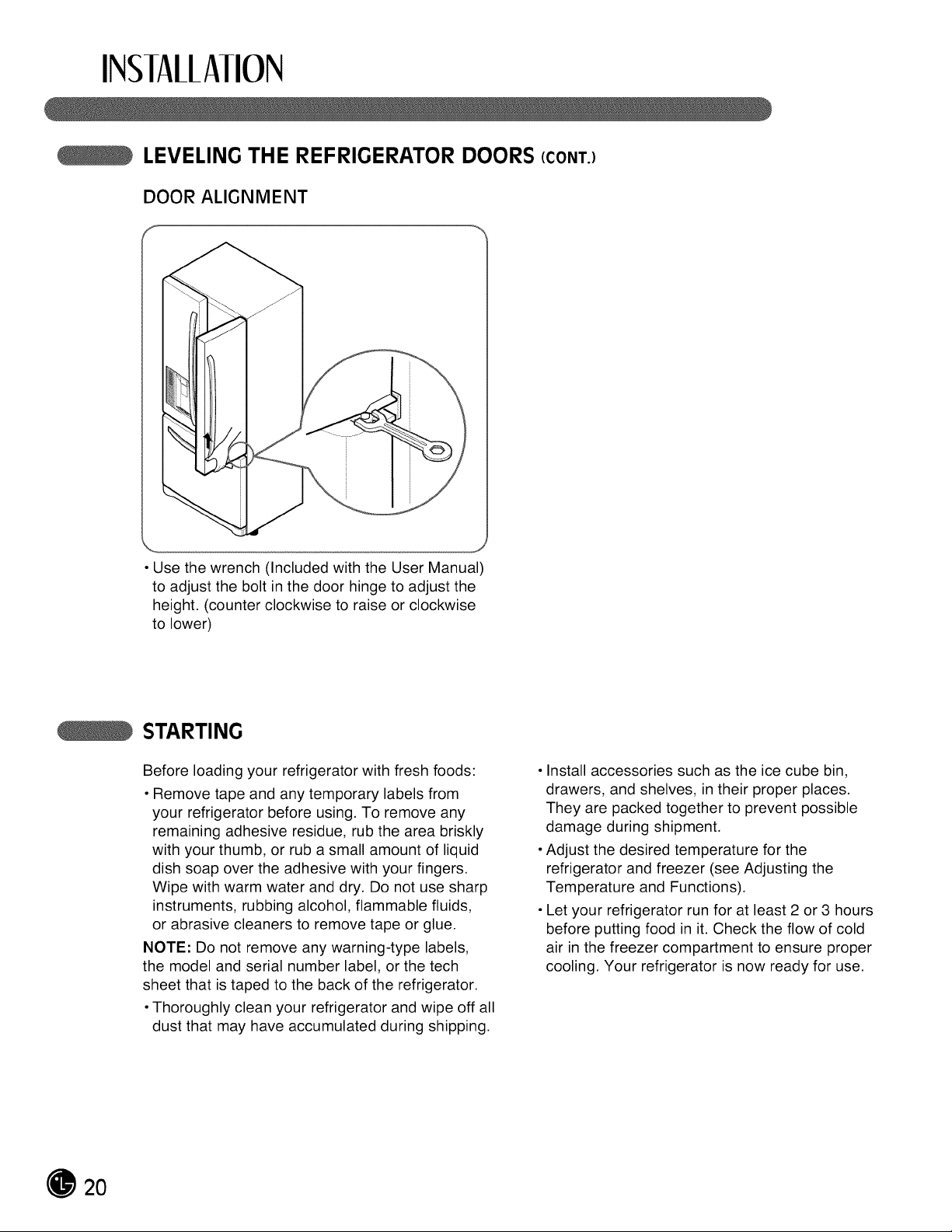
DOOR ALIGNMENT
• Use the wrench (Included with the User Manual)
to adjust the bolt in the door hinge to adjust the
height. (counter clockwise to raise or clockwise
to lower)
STARTING
Before loading your refrigerator with fresh foods:
• Remove tape and any temporary labels from
your refrigerator before using. To remove any
remaining adhesive residue, rub the area briskly
with your thumb, or rub a small amount of liquid
dish soap over the adhesive with your fingers.
Wipe with warm water and dry. Do not use sharp
instruments, rubbing alcohol, flammable fluids,
or abrasive cleaners to remove tape or glue.
NOTE: Do not remove any warning-type labels,
the model and serial number label, or the tech
sheet that istaped to the back of the refrigerator.
• Thoroughly clean your refrigerator and wipe off all
dust that may have accumulated during shipping.
• Install accessories such as the ice cube bin,
drawers, and shelves, in their proper places.
They are packed together to prevent possible
damage during shipment.
• Adjust the desired temperature for the
refrigerator and freezer (see Adjusting the
Temperature and Functions).
• Let your refrigerator run for at least 2 or 3 hours
before putting food in it. Check the flow of cold
air in the freezer compartment to ensure proper
cooling. Your refrigerator is now ready for use.
20
HOW10 USE
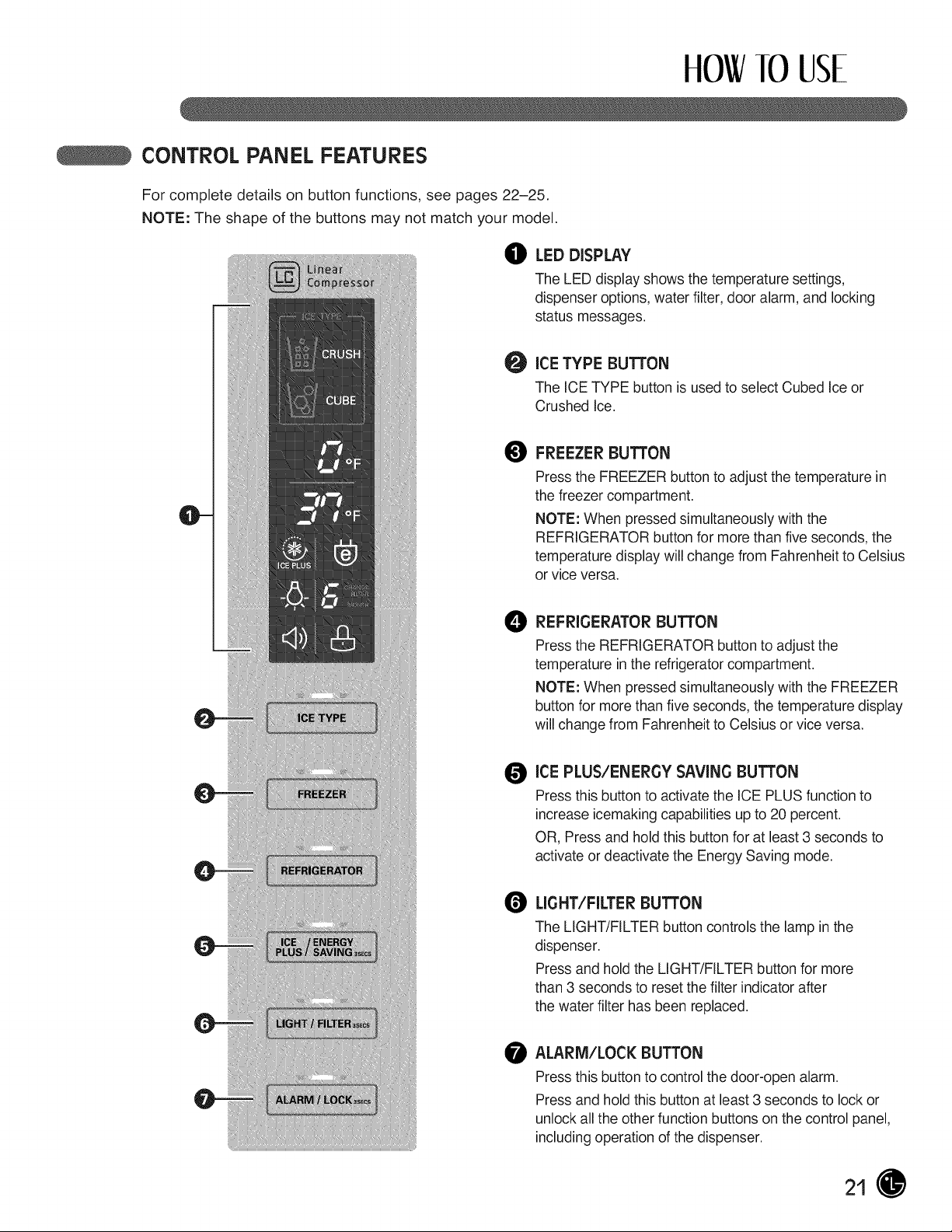
CONTROLPANELFEATURES
FOr complete details on button functions, see pages 22-25.
NOTE: The shape of the buttons may not match your model.
O LEDDISPLAY
TheLED display shows thetemperature settings,
dispenser options,water filter,door alarm, and locking
status messages.
O
ICE TYPE BUTTON
The ICE TYPE button isusedtoselect Cubed Ice or
Crushed Ice.
O
FREEZERBUTTON
Press theFREEZER button to adjust thetemperature in
thefreezer compartment.
NOTE: When pressed simultaneously with the
REFRIGERATOR button formorethanfive seconds, the
temperature display willchange from Fahrenheit to Celsius
or vice versa.
e
REFRIGERATORBUTTON
Press theREFRIGERATOR button toadjust the
temperature in the refrigerator compartment.
NOTE: When pressed simultaneously with the FREEZER
button formorethanfive seconds, thetemperature display
willchangefrom Fahrenheit to Celsiusor vice versa.
O
ICE PLUS/ENERGY SAVINGBUTTON
Press this button to activate the ICE PLUSfunctionto
increase icemaking capabilities up to20 percent.
OR, Press and hold this button foratleast 3 seconds to
activate or deactivate the EnergySaving mode.
O
LIGHT/FILTERBUTTON
TheLIGHT/FILTER button controlsthe lampin the
dispenser.
Press and hold the LIGHT/FILTER button for more
than3 secondsto reset thefilter indicator after
thewater filter hasbeen replaced.
ALARM/LOCK BUTTON
Press this button tocontrol thedoor-open alarm.
Press and hold this button atleast 3 seconds to lock or
unlock all theother functionbuttons on thecontrol panel,
includingoperation ofthedispenser.
21
HOW10 USE
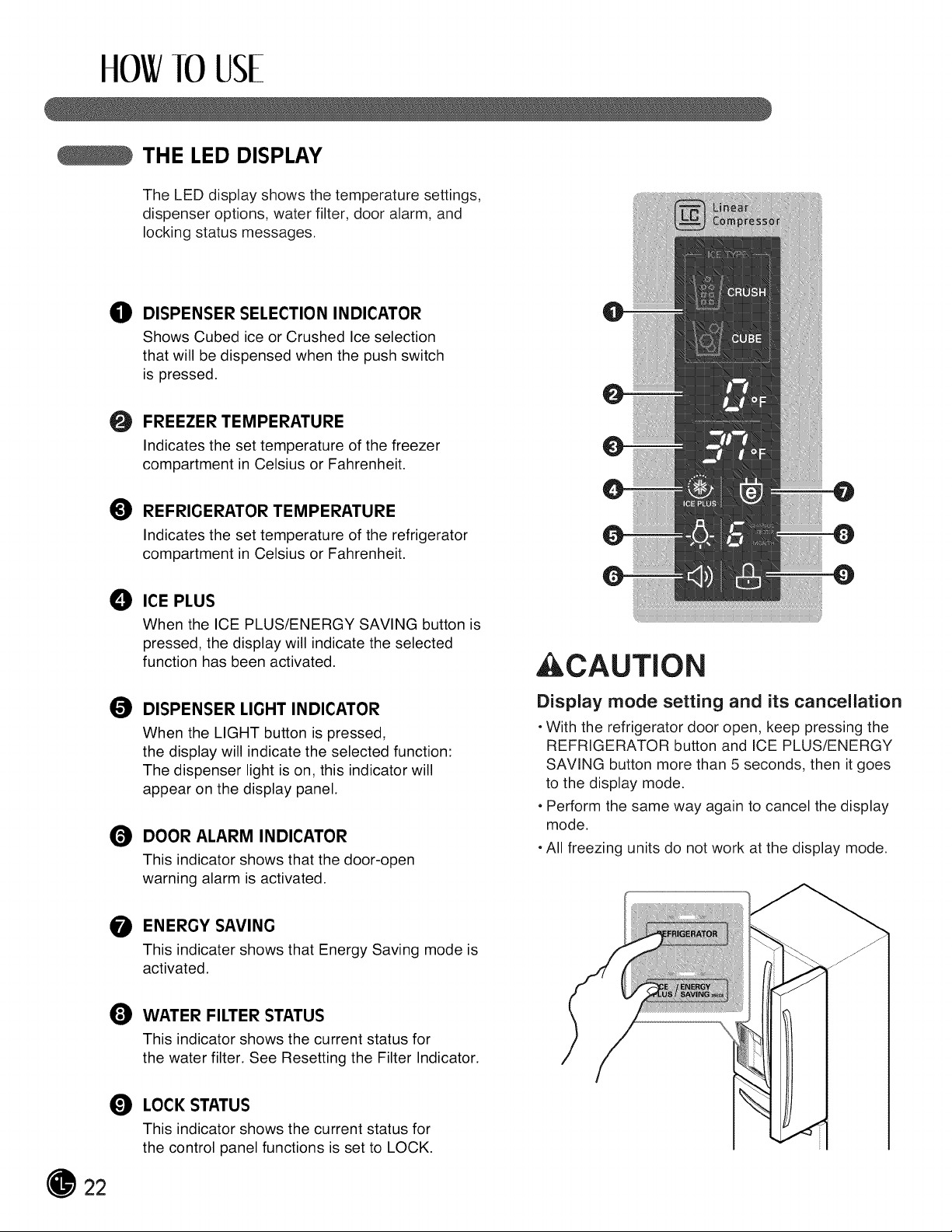
THE LED DISPLAY
The LED display shows the temperature settings,
dispenser options, water filter, door alarm, and
locking status messages.
O DISPENSER SELECTION INDICATOR
Shows Cubed ice or Crushed Ice selection
that will be dispensed when the push switch
is pressed.
O
FREEZER TEMPERATURE
Indicates the set temperature of the freezer
compartment in Celsius or Fahrenheit.
REFRIGERATOR TEMPERATURE
Indicates the set temperature of the refrigerator
compartment in Celsius or Fahrenheit.
O ICE PLUS
When the ICE PLUS/ENERGY SAVING button is
pressed, the display will indicate the selected
function has been activated.
DISPENSER LIGHT INDICATOR
When the LIGHT button is pressed,
the display will indicate the selected function:
The dispenser light is on, this indicator will
appear on the display panel.
DOOR ALARM INDICATOR
This indicator shows that the door-open
warning alarm is activated.
O
O
,CAUTION
Display mode setting and its cancellation
• With the refrigerator door open, keep pressing the
REFRIGERATOR button and ICE PLUS/ENERGY
SAVING button more than 5 seconds, then it goes
to the display mode.
• Perform the same way again to cancel the display
mode.
• All freezing units do not work at the display mode.
ENERGY SAVING
This indicater shows that Energy Saving mode is
activated.
lt_ WATER FILTER STATUS
This indicator shows the current status for
the water filter. See Resetting the Filter Indicator.
O LOCK STATUS
This indicator shows the current status for
the control panel functions is set to LOCK.
22
HOW10 USE
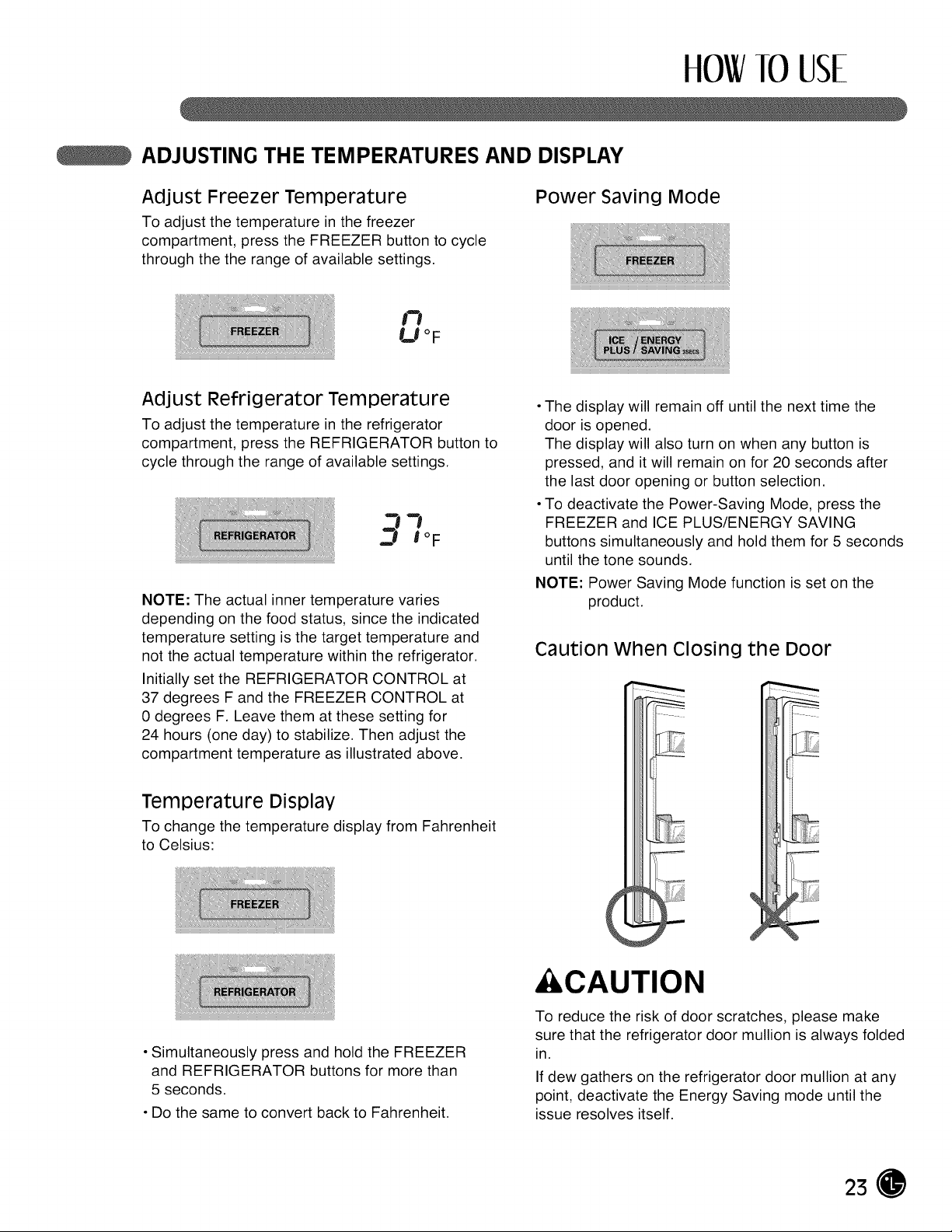
ADJUSTING THE TEMPERATURES AND DISPLAY
Adjust Freezer Temperature Power saving Mode
TO adjust the temperature in the freezer
compartment, press the FREEZER button to cycle
through the the range of available settings.
n
U°F
Adjust Refrigerator Temperature
To adjust the temperature in the refrigerator
compartment, press the REFRIGERATOR button to
cycle through the range of available settings.
NOTE: The actual inner temperature varies
depending on the food status, since the indicated
temperature setting is the target temperature and
not the actual temperature within the refrigerator.
Initially set the REFRIGERATOR CONTROL at
37 degrees F and the FREEZER CONTROL at
0 degrees F. Leave them at these setting for
24 hours (one day) to stabilize. Then adjust the
compartment temperature as illustrated above.
• The display will remain off until the next time the
door is opened.
The display will also turn on when any button is
pressed, and itwill remain on for 20 seconds after
the last door opening or button selection.
• To deactivate the Power-Saving Mode, press the
FREEZER and ICE PLUS/ENERGY SAVING
buttons simultaneously and hold them for 5 seconds
until the tone sounds.
NOTE: Power Saving Mode function is set on the
product.
Caution When Closing the Door
Temperature Display
To change the temperature display from Fahrenheit
to Celsius:
• Simultaneously press and hold the FREEZER
and REFRIGERATOR buttons for more than
5 seconds.
• Do the same to convert back to Fahrenheit.
&CAUTION
To reduce the risk of door scratches, please make
sure that the refrigerator door mullion is always folded
in.
If dew gathers on the refrigerator door mullion at any
point, deactivate the Energy Saving mode until the
issue resolves itself.
23
HOW10 USE
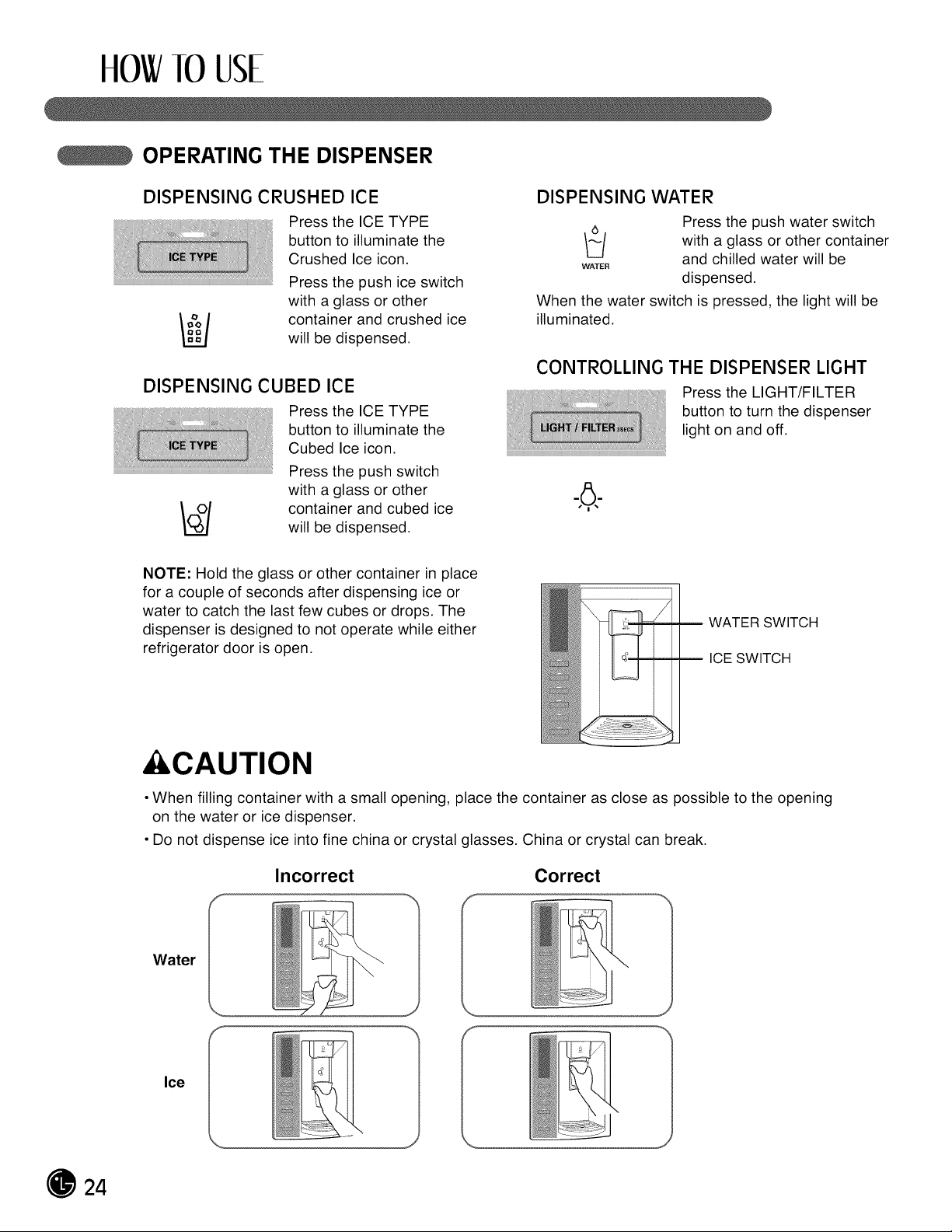
OPERATING THE DISPENSER
DISPENSING CRUSHED ICE
Pressthe ICE TYPE
button to illuminate the
Crushed Ice icon.
Press the push ice switch
with a glass or other
/_/ container and crushed ice
willbe dispensed.
DISPENSING CUBED ICE
Pressthe ICE TYPE
button to illuminate the
Cubed Ice icon.
Pressthe push switch
with a glass or other
container and cubed ice
will be dispensed.
DISPENSING WATER
WATER
Press the push water switch
with a glass or other container
and chilled water will be
dispensed.
When the water switch is pressed, the light will be
illuminated.
CONTROLLING THE DISPENSER LIGHT
Pressthe LIGHT/FILTER
button to turn the dispenser
light on and off.
NOTE: Hold the glass or other container in place
for a couple of seconds after dispensing ice or
water to catch the last few cubes or drops. The
dispenser is designed to not operate while either
refrigerator door is open.
WATER SWITCH
ICE SWITCH
&CAUTION
• When filling container with a small opening, place the container as close as possible to the opening
on the water or ice dispenser.
• Do not dispense ice into fine china or crystal glasses. China or crystal can break.
Incorrect Correct
Water
Ice
24
HOW]0 USE
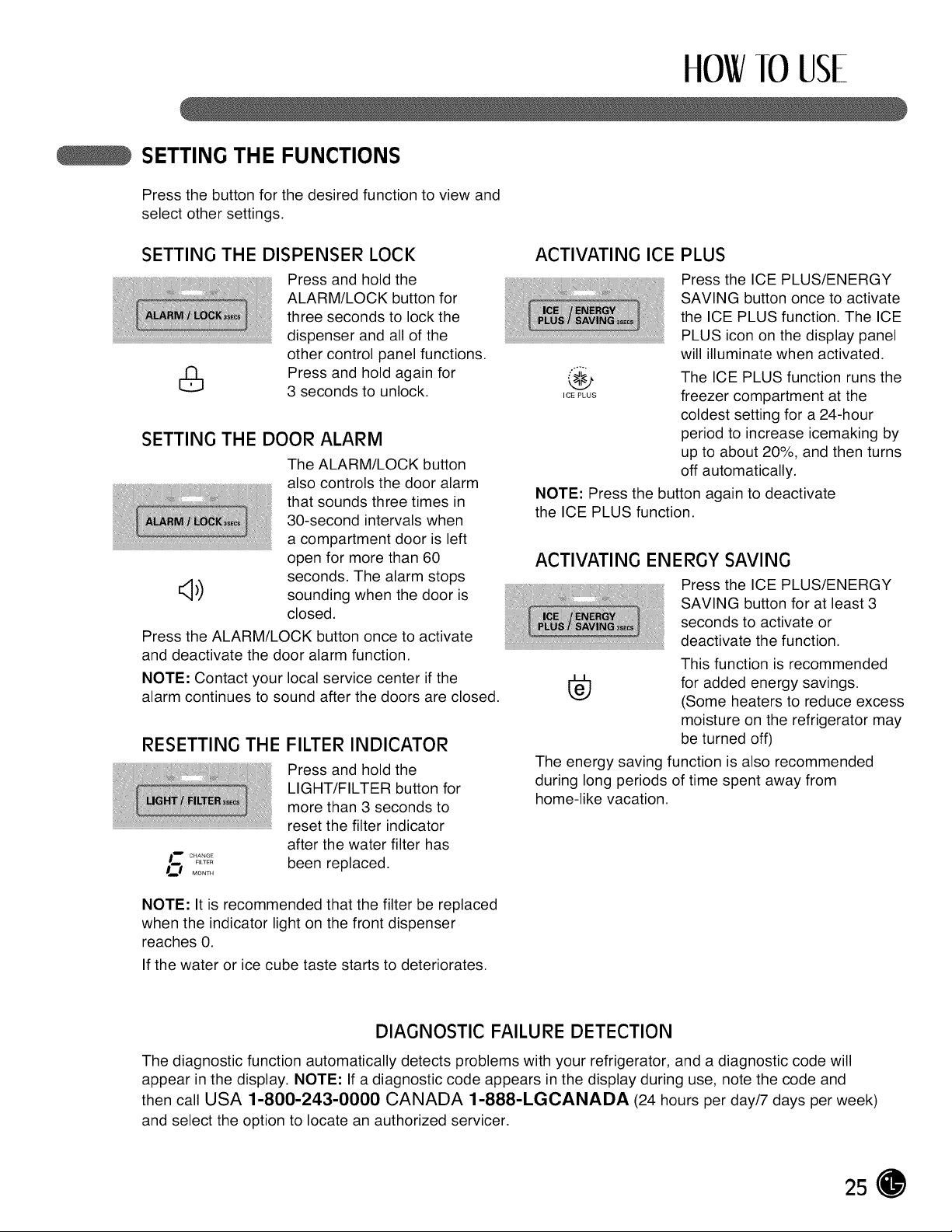
SETTING THE FUNCTIONS
Press the button for the desired function to view and
select other settings.
SETTING THE DISPENSER LOCK
PreSS and hold the
ALARM/LOCK button for
three seconds to lock the
dispenser and all of the
other control panel functions.
i_ Press and hold again for
3 seconds to unlock.
SETTING THE DOOR ALARM
The ALARM/LOCK button
also controlsthe door alarm
that sounds three times in
30-second intervals when
a compartment door isleft
open for more than 60
seconds. The alarm stops
_.4.\
_J} sounding when the door is
closed.
Press the ALARM/LOCK button once to activate
and deactivate the door alarm function.
NOTE: Contact your local service center ifthe
alarm continues to sound after the doors are closed.
RESETTING THE FILTER INDICATOR
Press and hold the
LIGHT/FILTER button for
more than 3 seconds to
reset the filter indicator
after the water filter has
been replaced.
_ CHANGE
FILTER
D_ MONTH
ACTIVATING ICE PLUS
Press the ICE PLUS/ENERGY
SAVING button once to activate
the ICE PLUS function. The ICE
PLUS icon on the display panel
will illuminate when activated.
The ICE PLUS function runs the
,c_Pws freezer compartment at the
coldest setting for a 24-hour
period to increase icemaking by
up to about 20%, and then turns
off automatically.
NOTE: Press the button again to deactivate
the ICE PLUS function.
ACTIVATI NG EN E RGY SAVl NG
Press the ICE PLUS/ENERGY
SAVING button for at least 3
seconds to activate or
deactivate the function.
This function is recommended
[_ for added energy savings.
(Some heaters to reduce excess
moisture on the refrigerator may
be turned off)
The energy saving function is also recommended
during long periods of time spent away from
home-like vacation.
NOTE: It is recommended that the filter be replaced
when the indicator light on the front dispenser
reaches 0.
If the water or ice cube taste starts to deteriorates.
DIAGNOSTIC FAILURE DETECTION
The diagnostic function automatically detects problems with your refrigerator, and a diagnostic code will
appear in the display. NOTE: If a diagnostic code appears in the display during use, note the code and
then call USA 1-800-243-0000 CANADA 1-888-LGCANADA (24 hours per day/7 days per week)
and select the option to locate an authorized servicer.
25
HOW113USE
SPACEPLUS ICE SYSTEM
&CAUTION
• Keep hands and tools out of the ice compartment
door and dispenser chute. You could break
something or injure yourself.
The icemaker will stop producing ice when the ice bin
is full. If you need more ice, empty the ice bin into the
extra ice bin in the freezer compartment so the
icemaker can keep producing ice.
Shake the ice bin occasionally to level the ice in it.
Sometimes the ice piles up near the icemaker,
causing the icemaker to misread the amount of ice
cubes and stop producing ice.
NOTE: Storing cans or other items in the ice bin may
damage the icemaker.
Keep the ice compartment door closed tightly. If the
ice compartment door isnot closed tightly, the cold air
in the ice bin will freeze food in the refrigerator
compartment. This could also cause the icemaker to
not produce ice.
NOTE: If the On/Off switch on the icemaker is set to
Off for an extended time, the ice compartment will
gradually warm up to the temperature of the
refrigerator compartment. To prevent ice cubes from
melting and leaking from the dispenser, ALWAYS
empty the ice bin when the icemaker is set to Off for
more than a few hours.
&CAUTION
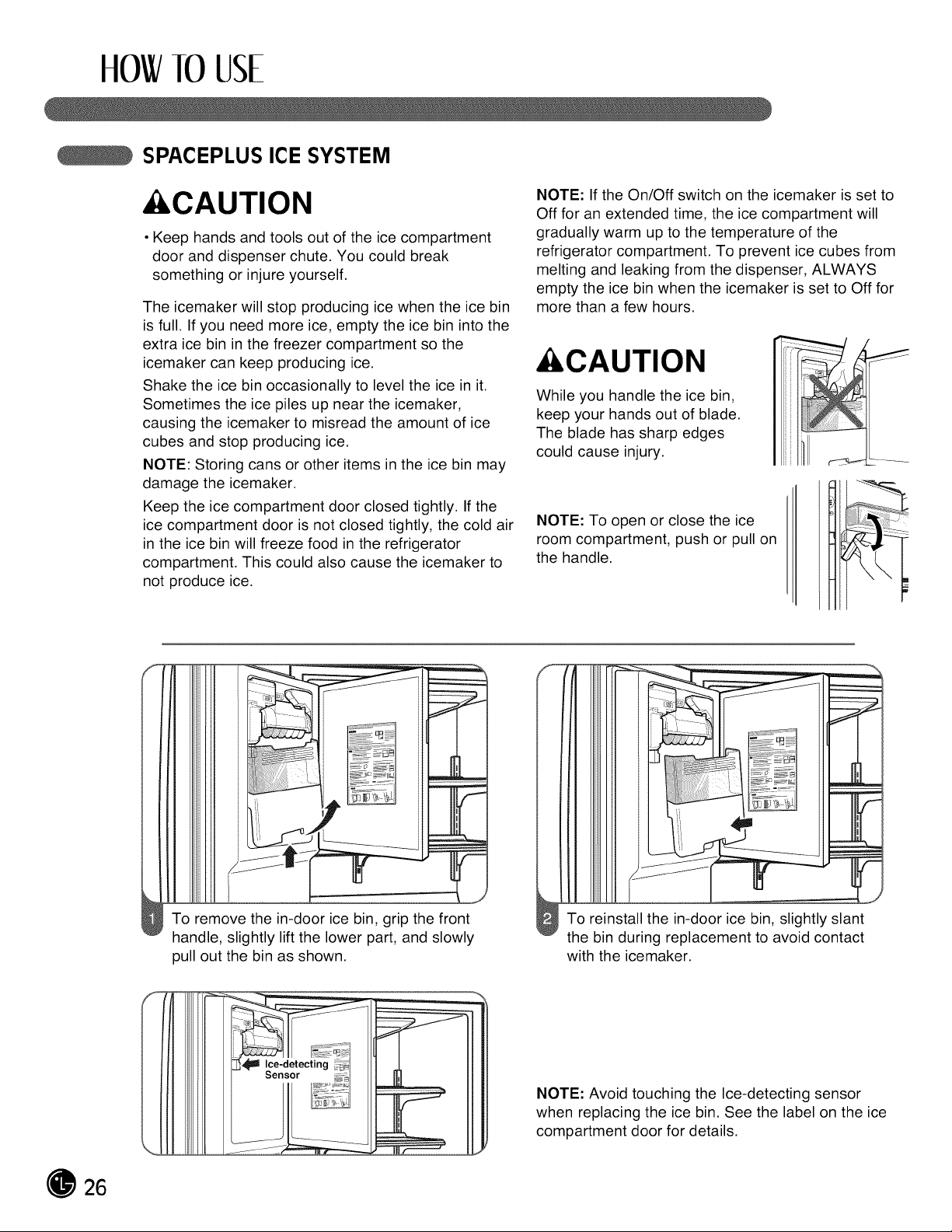
While you handle the ice bin,
keep your hands out of blade.
The blade has sharp edges
could cause injury.
NOTE: To open or close the ice
room compartment, push or pull on
the handle.
To remove the in-door ice bin, grip the front
handle, slightly lift the lower part, and slowly
pull out the bin as shown.
To reinstall the in-door ice bin, slightly slant
the bin during replacement to avoid contact
with the icemaker.
NOTE: Avoid touching the Ice-detecting sensor
when replacing the ice bin. See the label on the ice
compartment door for details.
26
ttOW113USE
AUTOMATIC ICEMAKER
Ice is made in the automatic icemaker and sent to
the dispenser. The automatic icemaker can make
12 ice cubes at a time, above 100 cubes per 24-hour
period. This quantity may vary by circumstance,
including freezer compartment temperature, room
temperature, number of door openings, freezer load,
and other operating conditions.
• It takes about 12 to 24 hours for a newly installed
refrigerator to make ice.
• Icemaking stops when the ice storage bin isfull.
• To turn off the automatic icemaker, set the
icemaker switch to OFF (O). To turn on the
automatic icemaker, set the switch to ON (I).
• The water pressure must be 20 and 120psi on
models without a water filter and between 40 and
120 psi on models with a water filter to make normal
amount and size of ices.
NOTE: It is normal that a noise is produced when
ice drops into the ice storage bin.
• Even when the water pipe is not connected and
the Ice Maker isturned on, the water valve
operates. The noise isgenerated because the
water pipe is not connected, which does not
mean the icemaker is defective.
&WARNING
Personal Injury Hazard
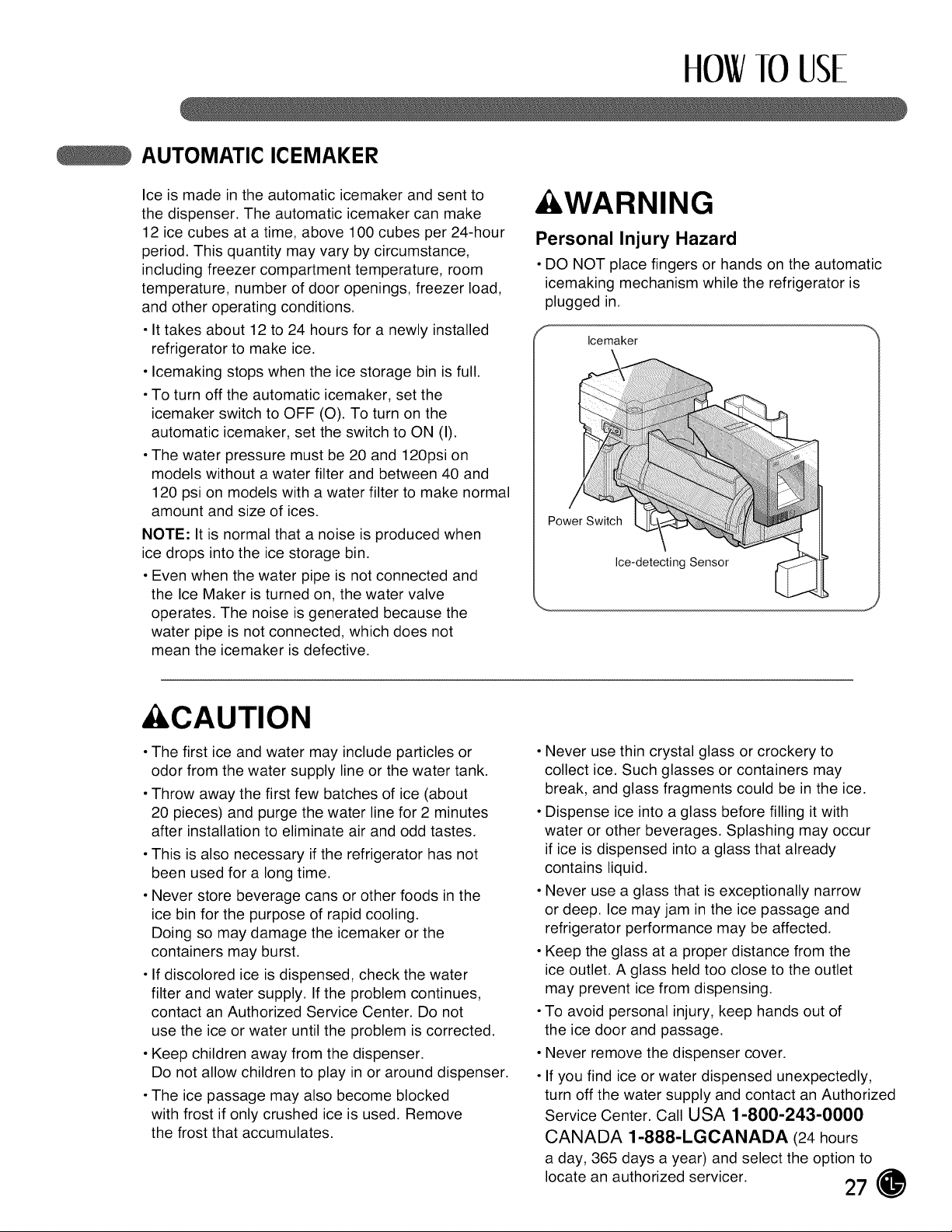
• DO NOT place fingers or hands on the automatic
icemaking mechanism while the refrigerator is
plugged in.
Icemaker
Power Switch
Ice-detecting Sensor
&CAUTION
• The first ice and water may include particles or
odor from the water supply line or the water tank.
• Throw away the first few batches of ice (about
20 pieces) and purge the water line for 2 minutes
after installation to eliminate air and odd tastes.
• This is also necessary ifthe refrigerator has not
been used for a long time.
• Never store beverage cans or other foods in the
ice bin for the purpose of rapid cooling.
Doing so may damage the icemaker or the
containers may burst.
• If discolored ice isdispensed, check the water
filter and water supply. If the problem continues,
contact an Authorized Service Center. Do not
use the ice or water until the problem is corrected.
• Keep children away from the dispenser.
Do not allow children to play in or around dispenser.
• The ice passage may also become blocked
with frost if only crushed ice is used. Remove
the frost that accumulates.
Never use thin crystal glass or crockery to
collect ice. Such glasses or containers may
break, and glass fragments could be in the ice.
Dispense ice into a glass before filling it with
water or other beverages. Splashing may occur
if ice isdispensed into a glass that already
contains liquid.
Never use a glass that isexceptionally narrow
or deep. Ice may jam in the ice passage and
refrigerator performance may be affected.
Keep the glass at a proper distance from the
ice outlet. A glass held too close to the outlet
may prevent ice from dispensing.
To avoid personal injury, keep hands out of
the ice door and passage.
Never remove the dispenser cover.
If you find ice or water dispensed unexpectedly,
turn off the water supply and contact an Authorized
Service Center. Call USA 1-800-243-0000
CANADA 1-888-LGCANADA (24hours
a day, 365 days a year) and select the option to
locate an authorized servicer.
27
HOW10 USE
STORING FOODS
• Store fresh food in the refrigerator compartment.
• How food is frozen and thawed is an important
factor in maintaining freshness and flavor.
• Do not store food that spoils easily, such as
bananas and melons, at low temperatures.
• Allow hot food to cool prior to storing; placing hot
food in the refrigerator could spoil other food and
lead to higher energy consumption.
• When storing food, cover itwith vinyl wrap or store
in a container with a lid. This prevents moisture from
evaporating and helps food to keep its flavor and
nutrition.
Do not block air vents with food or containers.
Smooth circulation of chilled air keeps the
refrigerator temperatures even.
Do not open the doors frequently. Opening the
doors allows warm air to enter the refrigerator and
freezer compartments, which causes temperatures
to rise.
Never overload the door racks; overloading may
push against the inner racks and prevent the doors
from closing correctly.
Freezer compartment
• Do not store glass bottles inthe freezer
compartment; glass may break when the contents
are frozen.
• Do not refreeze food that has been thawed.
This causes loss of flavor and nutrition.
• Do not touch cold foods or containers, especially
those made of metal, with wet hands or place glass
products in the freezer compartment.
• Do not use the egg box as an ice bin in the freezer.
The egg box will break easily if itfreezes.
Refrigerator compartment
• Avoid placing moist food on the top refrigerator
shelves; itcould freeze from direct contact with
chilledair.
• Always clean food prior to refrigeration.
Vegetables and fruits should be washed and wiped
and packed food should be wiped to prevent
adjacent food from spoiling.
NOTE: If you keep the refrigerator in a hot and humid
place, frequent opening of the door or storing a lot of
vegetables in the refrigerator may cause
condensation to form. Wipe the condensation with a
clean cloth or a paper towel.
28
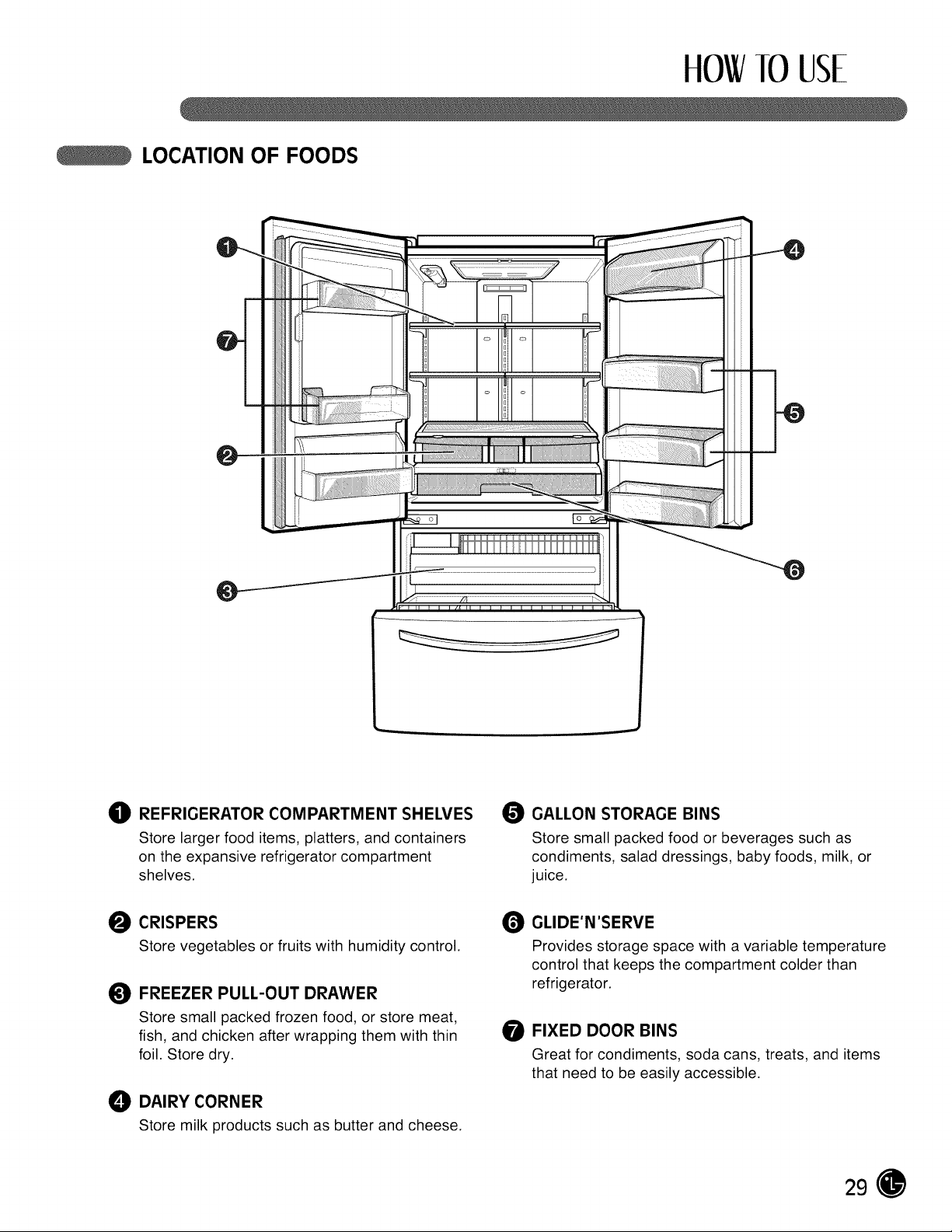
ttOWlO USE
LOCATION OF FOODS
O REFRIGERATOR COMPARTMENT SHEWES
Store larger food items, platters, and containers
on the expansive refrigerator compartment
shelves.
O CRISPERS
Store vegetables or fruits with humidity control.
FREEZER PULL-OUT DRAWER
Store small packed frozen food, or store meat,
fish, and chicken after wrapping them with thin
foil. Store dry.
O DAIRYCORNER
Store milk products such as butter and cheese.
O GALLON STORAGE BINS
Store small packed food or beverages such as
condiments, salad dressings, baby foods, milk, or
juice.
O GLIDE'N'SERVE
Provides storage space with a variable temperature
control that keeps the compartment colder than
refrigerator.
O FIXED DOOR BINS
Great for condiments, soda cans, treats, and items
that need to be easily accessible.
29
HOW10 USE
SHELF HEIGHT ADJUSTMENT
The shelves in your refrigerator are adjustable to
meet your individual storage needs.
storing similar food items together in your
refrigerator and adjusting the shelves to fit
different heights of items will make finding the
exact item you want easier; itwill also reduce
the amount of time the refrigerator door isopen,
saving energy.
IMPORTANT: Do not clean glass shelves with warm
water when they are cold. Shelves may break if
exposed to sudden temperature changes or impact,
such as bumping. For your protection, glass shelves
are made with tempered glass, which will shatter into
small, pebble-sized pieces.
NOTE: Glass shelves are heavy. Use special care
when removing them to avoid dropping them.
Adjusting Shelves
Remove shelves from the shippingposition and place
shelves in the position you want.
&CAUTION
Make sure that shelves are level from one side to the
other. Failure to do so may result in the shelf's falling
or spilling food.
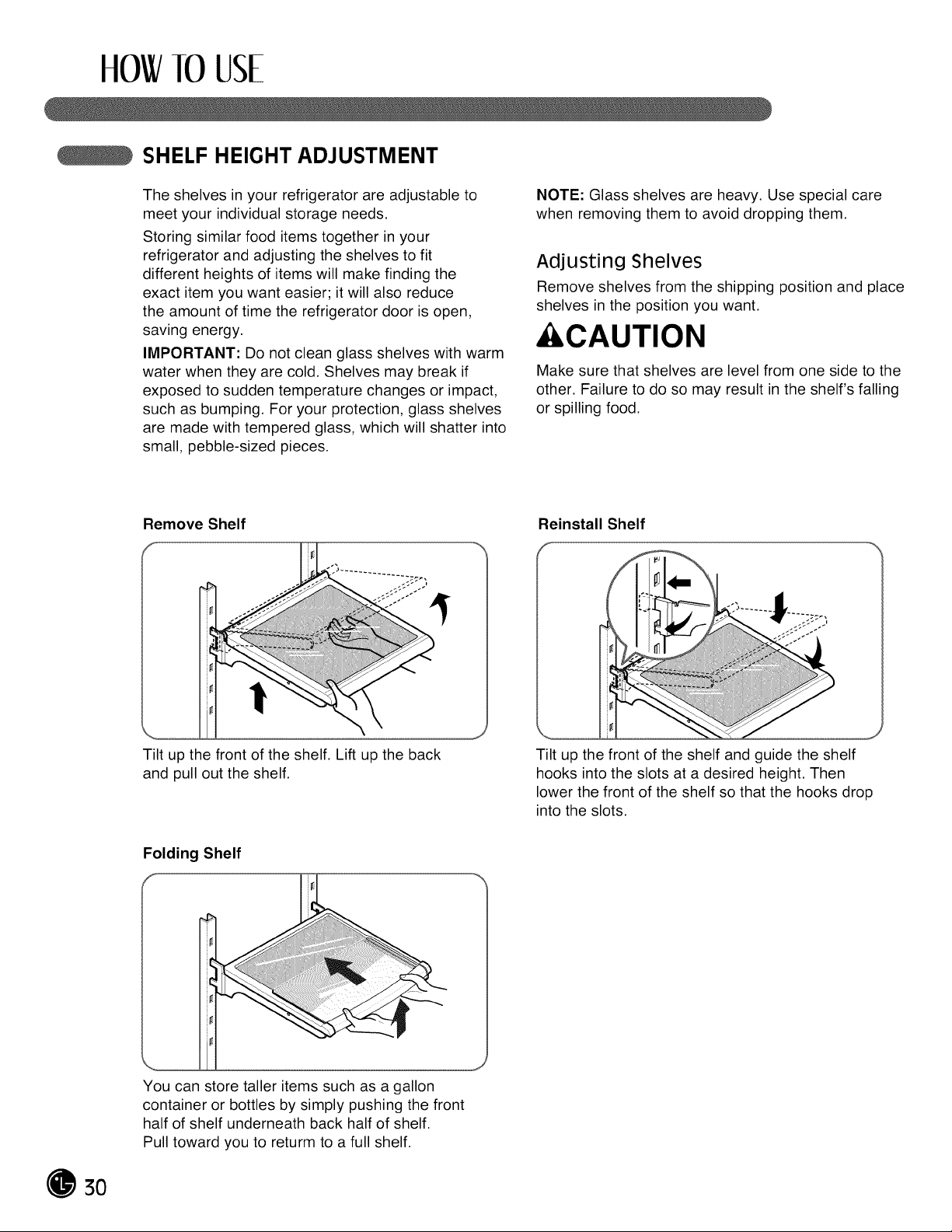
Remove Shelf
Tilt up the front of the shelf. Lift up the back
and pull out the shelf.
Reinstall Shelf
i 11
Tilt up the front of the shelf and guide the shelf
hooks into the slots at a desired height. Then
lower the front of the shelf so that the hooks drop
into the slots.
Folding Shelf
You can store taller items such as a gallon
container or bottles by simply pushing the front
half of shelf underneath back half of shelf.
Pull toward you to returm to a full shelf.
3O
CAREANDCLEANING
REMOVING AND REPLACING COMPONENTS
NOTE: When reinstalling components, reverse
the order of steps for removal. To prevent damage,
never use excessive force when removing or
reinstalling components.
&CAUTION
• Personal injury can occur if the door bins are not
firmly assembled.
NOTE: DO NOT adjust a loaded bin.
• DO NOT allow children to play with baskets.
The sharp corners on the baskets could cause
injury.
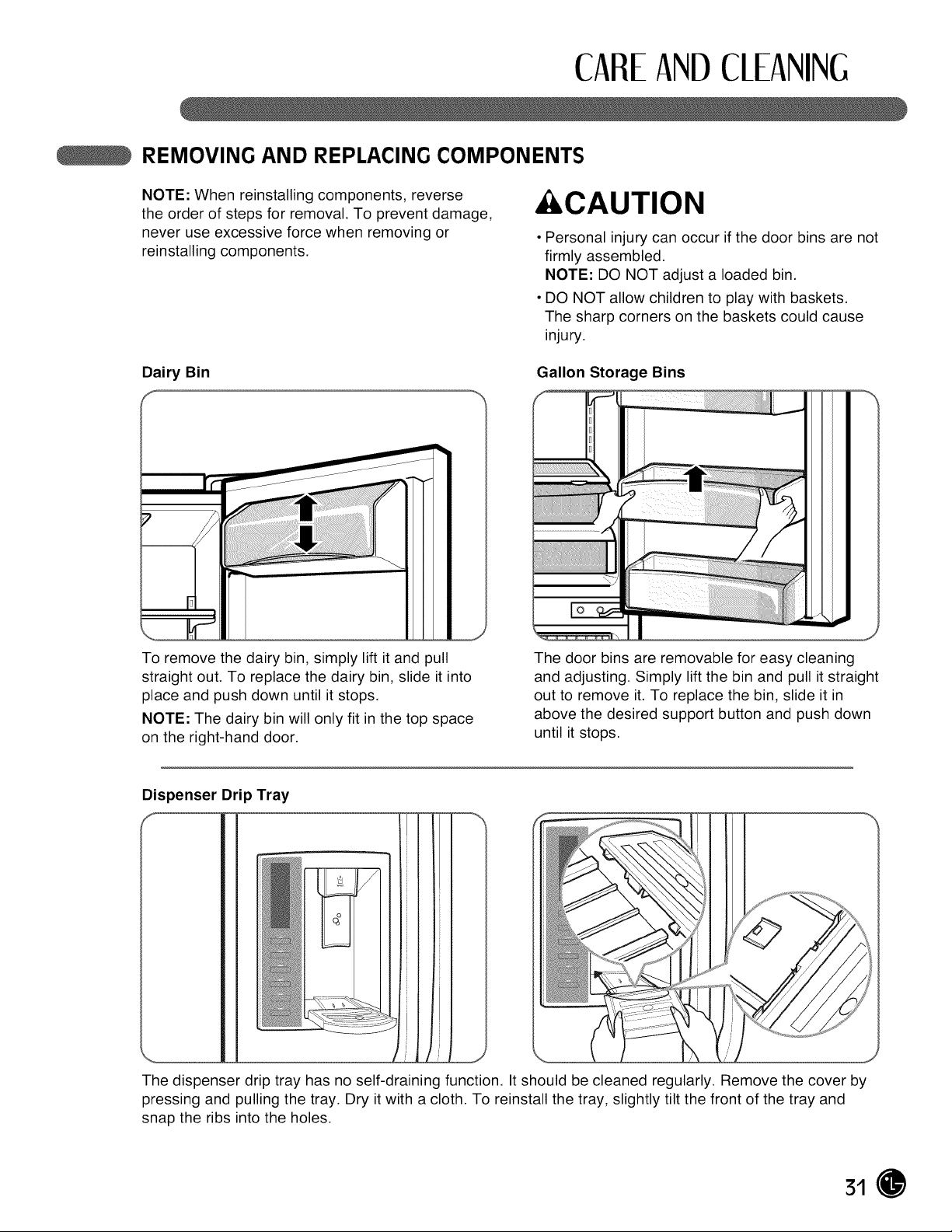
Dairy Bin
To remove the dairy bin, simply lift itand pull
straight out. To replace the dairy bin, slide itinto
place and push down until itstops.
NOTE: The dairy bin will only fit in the top space
on the right-hand door.
Gallon Storage Bins
J
The door bins are removable for easy cleaning
and adjusting. Simply lift the bin and pull itstraight
out to remove it. To replace the bin, slide it in
above the desired support button and push down
until itstops.
Dispenser Drip Tray
f
The dispenser drip tray has no self-draining function. It should be cleaned regularly. Remove the cover by
pressing and pulling the tray. Dry itwith a cloth. To reinstall the tray, slightly tilt the front of the tray and
snap the ribs into the holes.
31
CAREANDCLEANING
REMOVING AND REPLACING COMPONENTS ((:ONT.)
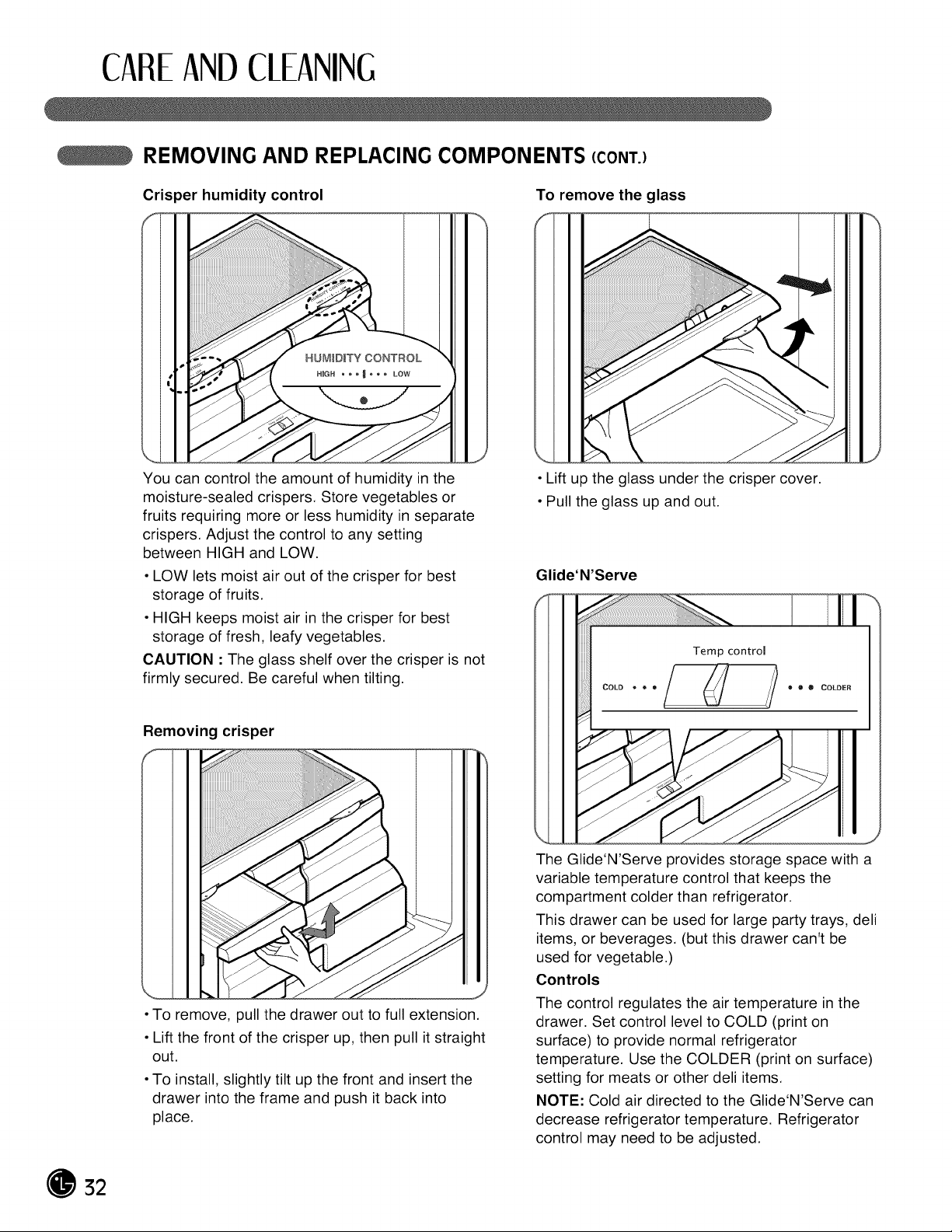
Cris _er humidity control
HUMIDITY CONTROL
,o HmGH • • _ _ _ _ • LOW
You can control the amount of humidity in the
moisture-sealed crispers. Store vegetables or
fruits requiring more or less humidity in separate
crispers. Adjust the control to any setting
between HIGH and LOW.
• LOW lets moist air out of the crisper for best
storage of fruits.
• HIGH keeps moist air in the crisper for best
storage of fresh, leafy vegetables.
CAUTION :The glass shelf over the crisper is not
firmly secured. Be careful when tilting.
Removing crisper
• To remove, pull the drawer out to full extension.
• Lift the front of the crisper up, then pull itstraight
out.
• To install, slightly tilt up the front and insert the
drawer into the frame and push it back into
place.
To remove the glass
• Lift up the glass under the crisper cover.
• Pull the glass up and out.
J
Glide'N'Serve
f
\
The Glide'N'Serve provides storage space with a
variable temperature control that keeps the
compartment colder than refrigerator.
This drawer can be used for large party trays, deli
items, or beverages. (but this drawer can't be
used for vegetable.)
Controls
The control regulates the air temperature in the
drawer. Set control level to COLD (print on
surface) to provide normal refrigerator
temperature. Use the COLDER (print on surface)
setting for meats or other deli items.
NOTE: Cold air directed to the Glide'N'Serve can
decrease refrigerator temperature. Refrigerator
control may need to be adjusted.
32
CAREANDCLEANING
REMOVING AND REPLACING COMPONENTS (CONT.)
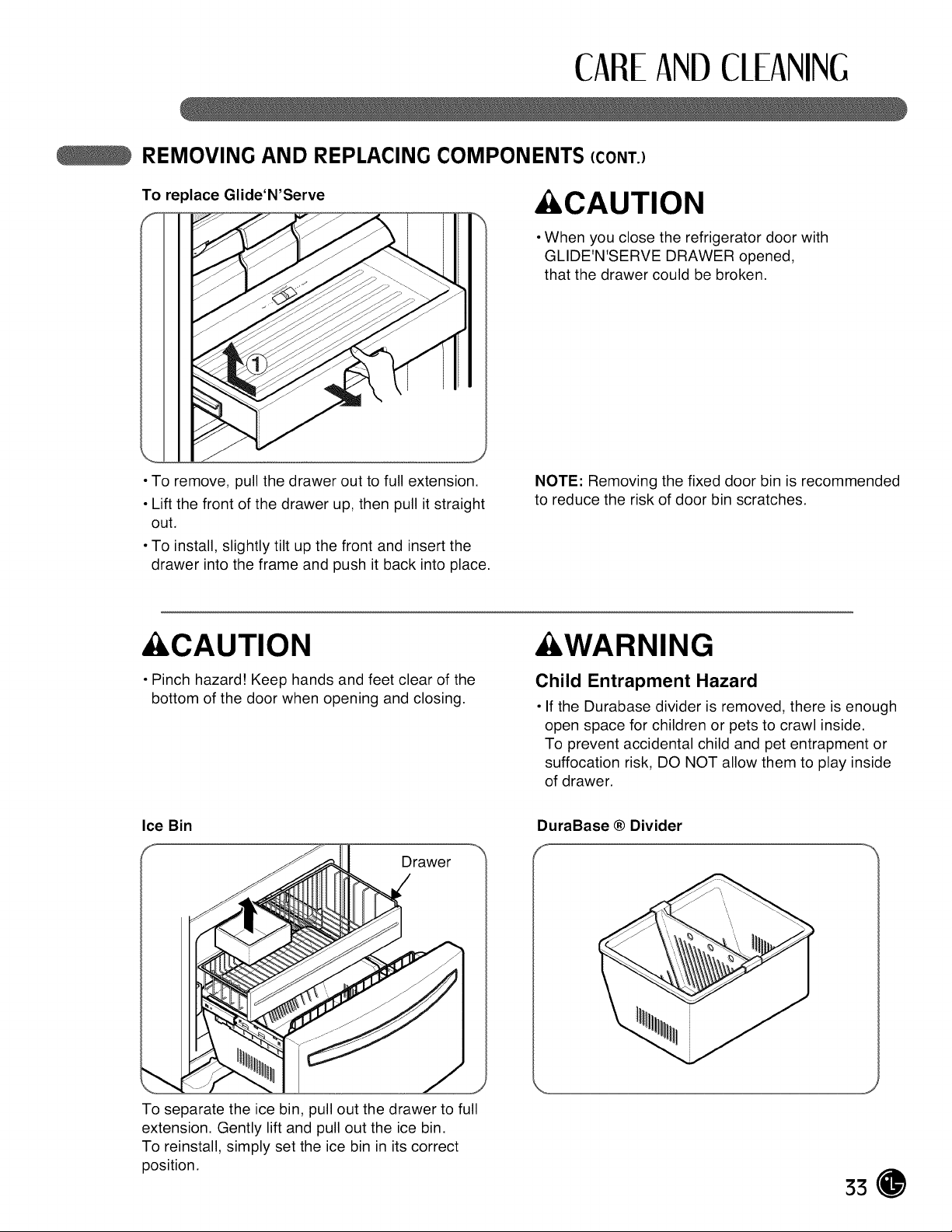
To replace Glide'N'Serve
p_
• To remove, pull the drawer out to full extension.
• Lift the front of the drawer up, then pull it straight
out.
• To install, slightly tilt up the front and insert the
drawer into the frame and push itback into place.
&CAUTION
• When you close the refrigerator door with
GLIDE'N'SERVE DRAWER opened,
that the drawer could be broken.
NOTE: Removing the fixed door bin is recommended
to reduce the risk of door bin scratches.
&CAUTION
• Pinch hazard! Keep hands and feet clear of the
bottom of the door when opening and closing.
&WARNING
Child Entrapment Hazard
• If the Durabase divider is removed, there isenough
open space for children or pets to crawl inside.
To prevent accidental child and pet entrapment or
suffocation risk, DO NOT allow them to play inside
of drawer.
Ice Bin
Drawer
To separate the ice bin, pull out the drawer to full
extension. Gently lift and pull out the ice bin.
To reinstall, simply set the ice bin in its correct
position.
DuraBase ® Divider
J
33
CAREANDCLEANING
REMOVING AND REPLACING COMPONENTS (CONT.)
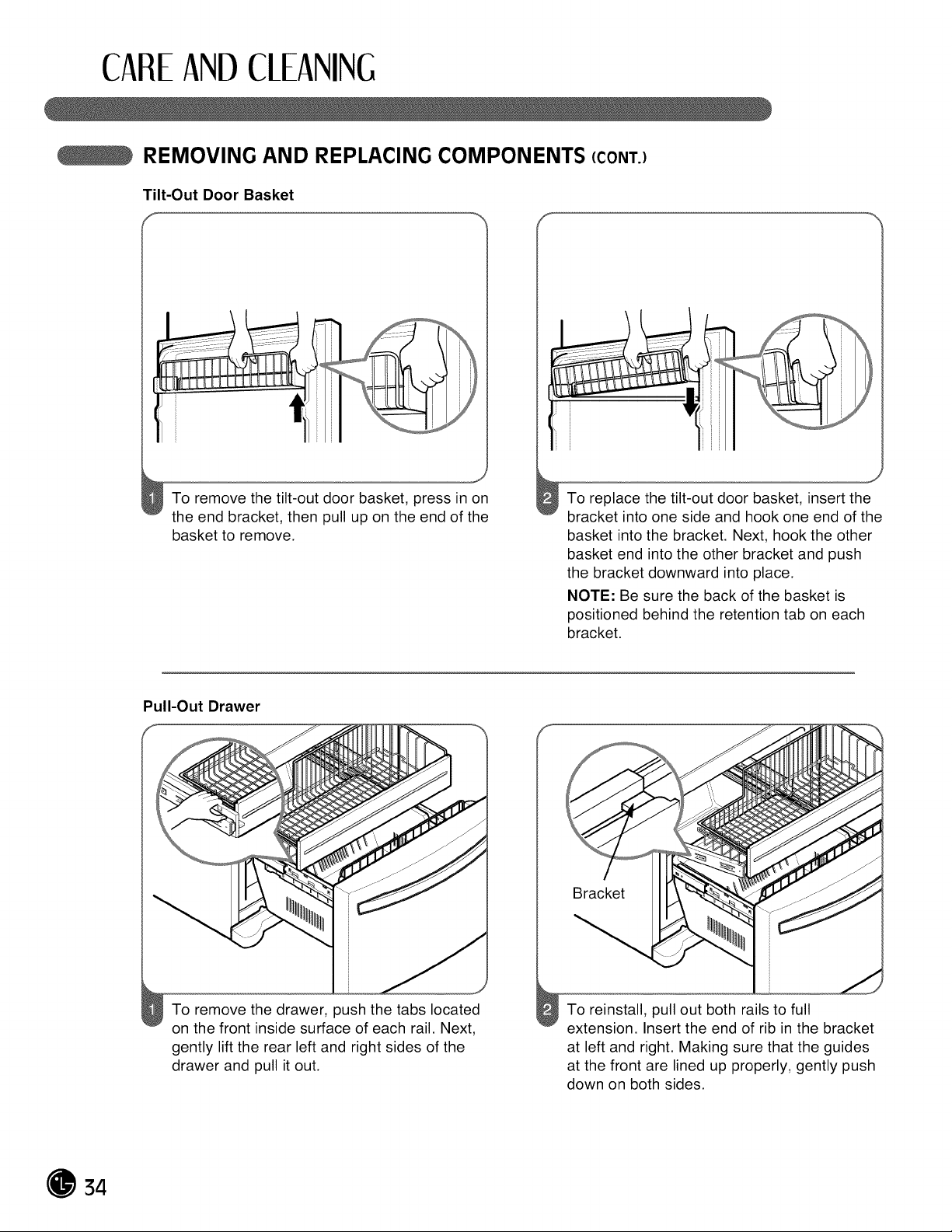
Tilt-Out Door Basket
f _ f
To remove the tilt-out door basket, press in on
the end bracket, then pull up on the end of the
basket to remove.
J
To replace the tilt-out door basket, insert the
bracket into one side and hook one end of the
basket into the bracket. Next, hook the other
basket end into the other bracket and push
the bracket downward into place.
NOTE: Be sure the back of the basket is
positioned behind the retention tab on each
bracket.
Pull-Out Drawer
To remove the drawer, push the tabs located
on the front inside surface of each rail. Next,
gently lift the rear left and right sides of the
drawer and pull itout.
Bracket
To reinstall, pull out both rails to full
extension. Insert the end of rib in the bracket
at left and right. Making sure that the guides
at the front are lined up properly, gently push
down on both sides.
34
CAREANDCLEANING
CLEANING THE REFRIGERATOR
&WARNING
Explosion Hazard
• Use nonflammable cleaner.
• Failure to do so can result in death,
explosion, or fire.
Both the refrigerator and freezer sections defrost
automatically. However, clean both sections about
once a month to prevent odors. Wipe up spills
immediately.
• Unplug the refrigerator.
• Remove all removable parts, such as shelves and
crispers.
• Use a clean sponge or soft cloth and a mild
detergent in warm water. Do not use abrasive or
harsh cleaners.
• Hand wash, rinse, and thoroughly dry all surfaces.
• Plug in the refrigerator.
NOTE: Window sprays, abrasive cleaners, or
flammable fluids can scratch or damage plastic
covers or panels.
Cleaning the Exterior
For models with a stainless steel exterior, use a
commercially available stainless steel cleaner in
accordance with the manufacturer's instructions.
You may also use a clean sponge or soft cloth and
a mild detergent in warm water. Do not use abrasive
or harsh cleaners. Dry thoroughly with a soft cloth.
IMPORTANT: Do not use cleaning waxes,
concentrated detergents, or cleaners containing
petroleum on plastic refrigerator parts such as door
liners or gaskets.
Care and Cleaning of the Interior
NOTE: Allow the freezer to warm so the cleaning
cloth will not stick.
To help remove odors, you can wash the inside of
the refrigerator with a mixture of baking soda and
warm water. Mix 2 tbsp. baking soda to 1 qt. of water
(26 g soda to 1 L of water). Be sure the baking soda
dissolves completely so itdoes not scratch the
surfaces of the refrigerator.
IMPORTANT: Do not use a spray nozzle to clean
the interior.
GENERAL INFORMATION
Storage
During average-length vacations, you will
probably find it best to leave the refrigerator in
operation. Place freezable items in the freezer for
longer life.
When you plan to store the refrigerator, remove
all food, disconnect the power cord, clean the
interior thoroughly, and block the doors open to
prevent mold and mildew. Be certain the stored
refrigerator does not present a child entrapment
danger.
Power Failure
Most power failures that are corrected within an
hour or two will not affect your refrigerator
temperatures. However, you should minimize the
number of door openings while the power is off.
Water may drip from the ice bin during a power
outage. To prevent this, remove the ice bin, discard
all of the ice, towel dry, and replace.
Moving
Unload the refrigerator to move it. (This isprobably
not necessary when pulling itout to clean behind it.)
Be sure to let the refrigerator warm up to room
temperature, and dry the inside before closingthe
doors to pack it for moving. To avoid damaging the
height-adjusting screws, turn them all the way intothe
base.
35
CAREANDCLEANING
REPLACING THE WATER FILTER
It is recommended that you replace the filter
approximately every 6 months, when the water filter
indicator reaches 0 months, or when the ice and
water dispenser noticeably decreases out-put.
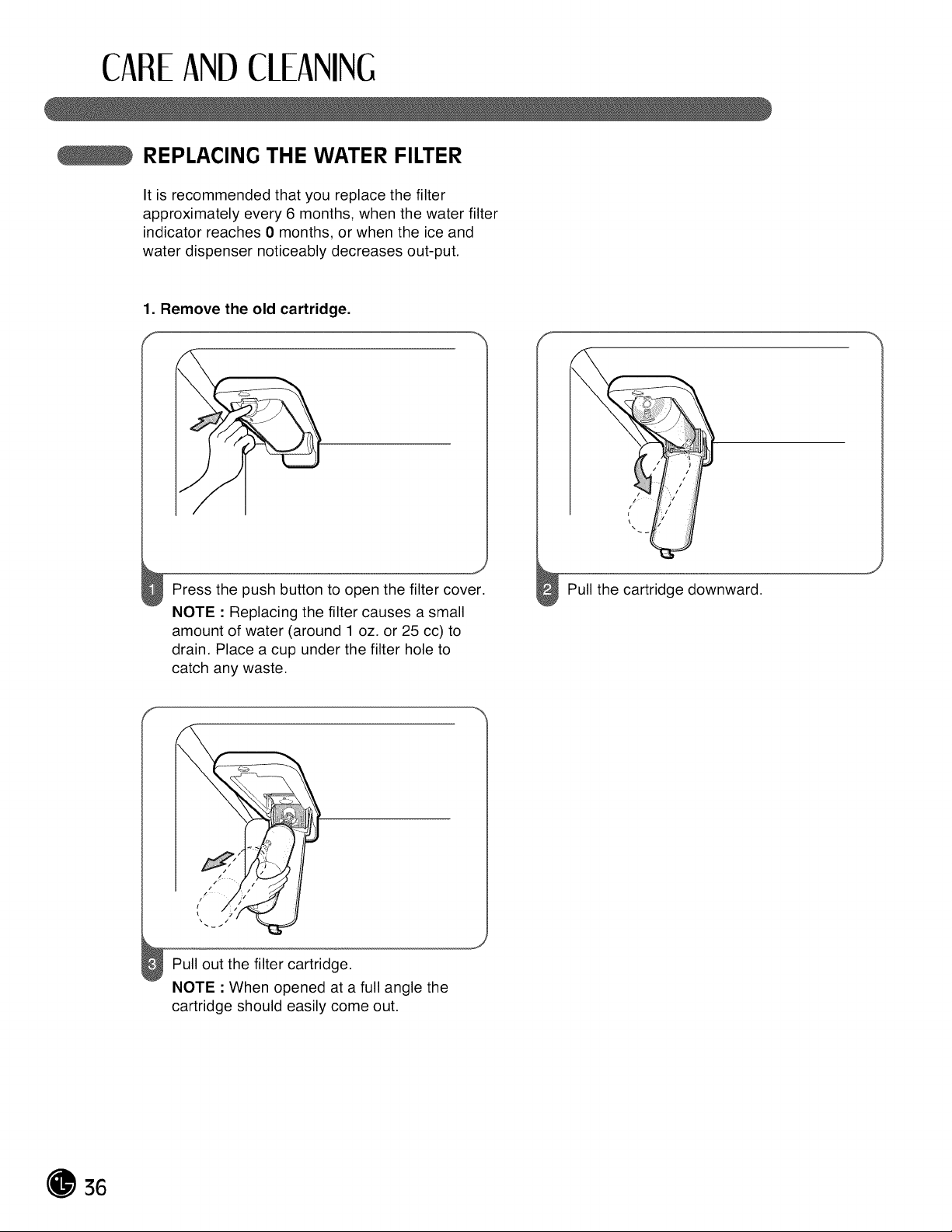
1. Remove the old cartridge.
Press the push button to open the filter cover.
NOTE : Replacing the filter causes a small
amount of water (around 1 oz. or 25 cc) to
drain. Place a cup under the filter hole to
catch any waste.
Pull out the filter cartridge.
NOTE : When opened at a full angle the
cartridge should easily come out.
36
CAREANDCLEANING
REPLACING THE WATER FILTER (CONT.)
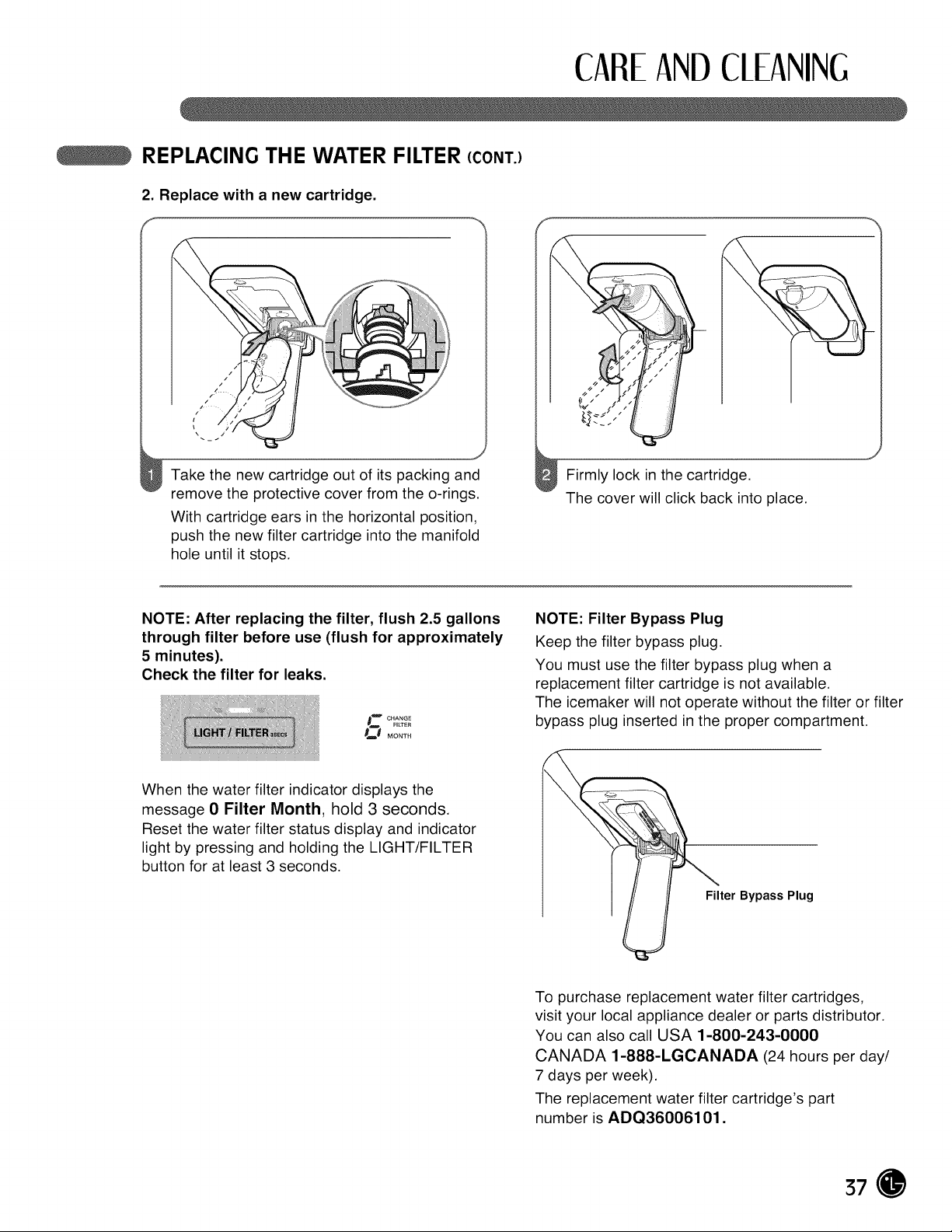
2. Replace with a new cartridge.
f
d
Take the new cartridge out of its packing and
remove the protective cover from the o-rings.
With cartridge ears in the horizontal position,
push the new filter cartridge into the manifold
hole until itstops.
Firmly lock in the cartridge.
The cover will click back into place.
NOTE: After replacing the filter, flush 2.5 gallons
through filter before use (flush for approximately
5 minutes).
Check the filter for leaks.
0ZC HANGE
FILTFR
s_t Mo._.
NOTE: Filter Bypass Plug
Keep the filter bypass plug.
You must use the filter bypass plug when a
replacement filter cartridge is not available.
The icemaker will not operate without the filter or filter
bypass plug inserted in the proper compartment.
When the water filter indicator displays the
message 0 Filter Month, hold 3 seconds.
Reset the water filter status display and indicator
light by pressing and holding the LIGHT/FILTER
button for at least 3 seconds.
Filter Bypass Plug
To purchase replacement water filter cartridges,
visit your local appliance dealer or parts distributor.
You can also call USA 1-800-243-0000
CANADA 1-888-LGCANADA (24 hours per day/
7 days per week).
The replacement water filter cartridge's part
number isADQ36006101.
37
CAREANDCLEANING
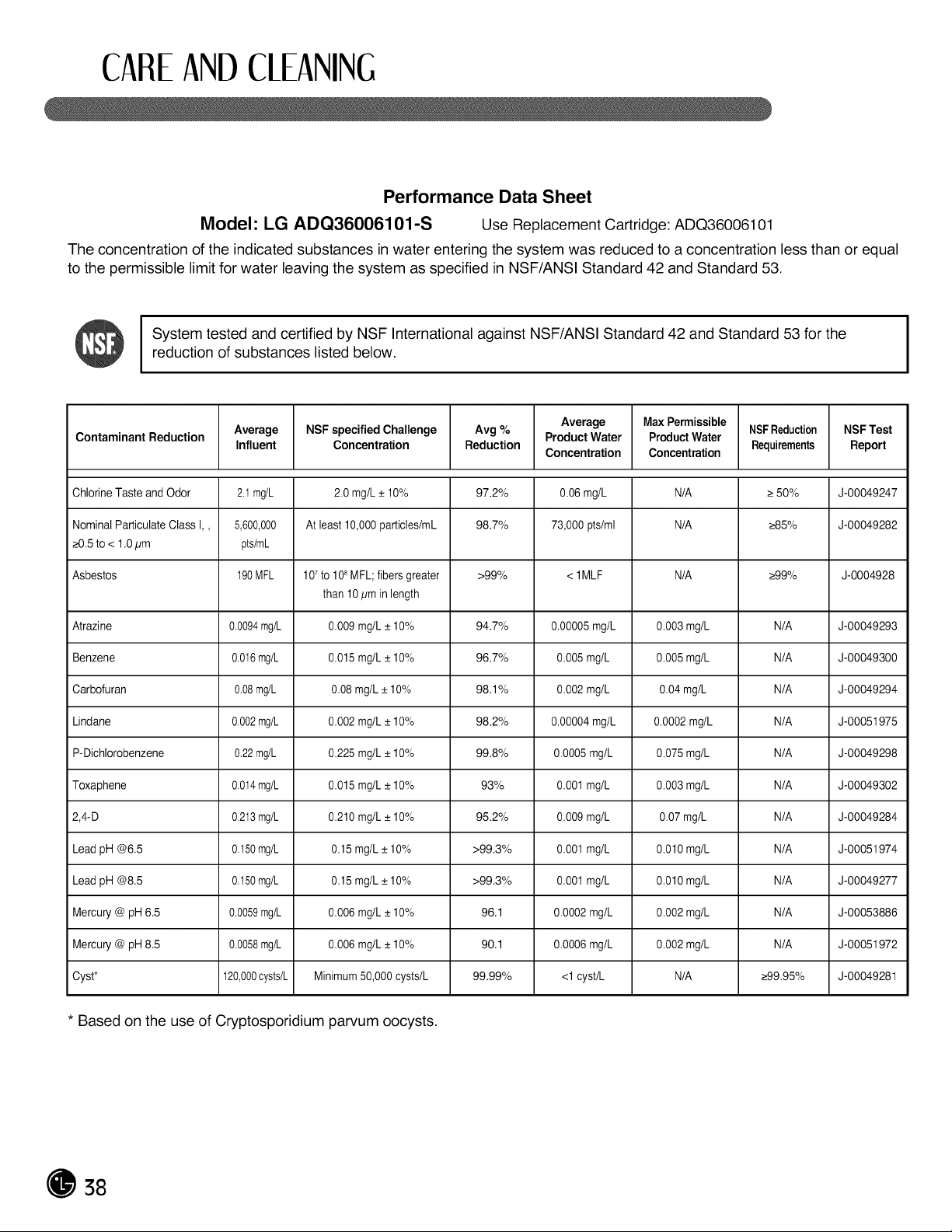
Performance Data Sheet
Model: LG ADQ36006101-S Use Replacement Cartridge: ADQ36006101
The concentration of the indicated substances in water entering the system was reduced to a concentration less than or equal
to the permissible limit forwater leaving the system as specified in NSF/ANSI Standard 42 and Standard 53.
I System tested and certified by NSF International against NSF/ANSI Standard 42 and Standard 53 for the I
I
reduction ofsubstances listed below.
I
Average Max Permissible NSFReduction NSF Test
Contaminant Reduction Average NSFspecified Challenge Avg % Product Water ProductWater
Influent Concentration Reduction Concentration Concentration Requirements Report
ChlorineTaste and Odor 2.t mg/L 2.0 mg/L _+10% 97.2% 0.06mg/L N/A _>50% J-00049247
Nominal ParticulateClass I,, 5,600,000 At least 10,000particles/mL 98.7% 73,000 pts/ml N/A _>85% J-00049282
_>0,5to< 1,0pm pts/mL
Asbestos 190MFL 107to10"MFL;fibersgreater >99% <1MLF N/A _>99% J-0004928
than 10/_min length
Atrazine 0.0094mg/L 0.009 mg/L _+10% 94.7% 0.00005mg/L 0.003 mg/L N/A J-00049293
Benzene 0.0t6 mg/L 0.015mg/L_+10% 96.7% 0.005 mg/L 0.005 mg/L N/A J-00049300
Carbofuran 0.08mg/L 0.08 mg/L _+10% 98.1% 0.002mg/L 0.04 mg/L N/A J-00049294
Lindane 0.002mg/L 0.002 mg/L _+10% 98.2% 0.00004mg/L 0.0002 mg/L N/A J-00051975
P-Dichlorobenzene 0.22mg/L 0.225 mg/L _+10% 99.8% 0.0005 mg/L 0.075 mg/L N/A J-00049298
Toxaphene 0.0t4 mg/L 0.015 mg/L _+10% 93% 0.001 mg/L 0.003 mg/L N/A J-00049302
2,4-D 0.213mg/L 0.210 mg/L _+10% 95.2% 0.009 mg/L 0.07 mg/L N/A J-00049284
Lead pH @6,5 0.t50 mg/L 0.15mg/L _+10% >99.3% 0.001 mg/L 0.010 mg/L N/A J-00051974
Lead pH @8,5 0.t50 mg/L 0.15mg/L _+10% >99.3% 0.001 mg/L 0.010 mg/L N/A J-00049277
Mercury@ pH6,5 0.0059mg/L 0.006 mg/L _+10% 96.1 0.0002 mg/L 0.002 mg/L N/A J-00053886
Mercury@ pH8,5 0.0058mg/L 0.006 mg/L _+10% 90.1 0.0006 mg/L 0.002 mg/L N/A J-00051972
Cyst* 120,000cysts/L Minimum50,000 cysts/L 99.99% <1cyst/L N/A _>99,95% J-00049281
* Based on the useof Cryptosporidium parvum oocysts.
38
CAREANDCLEANING
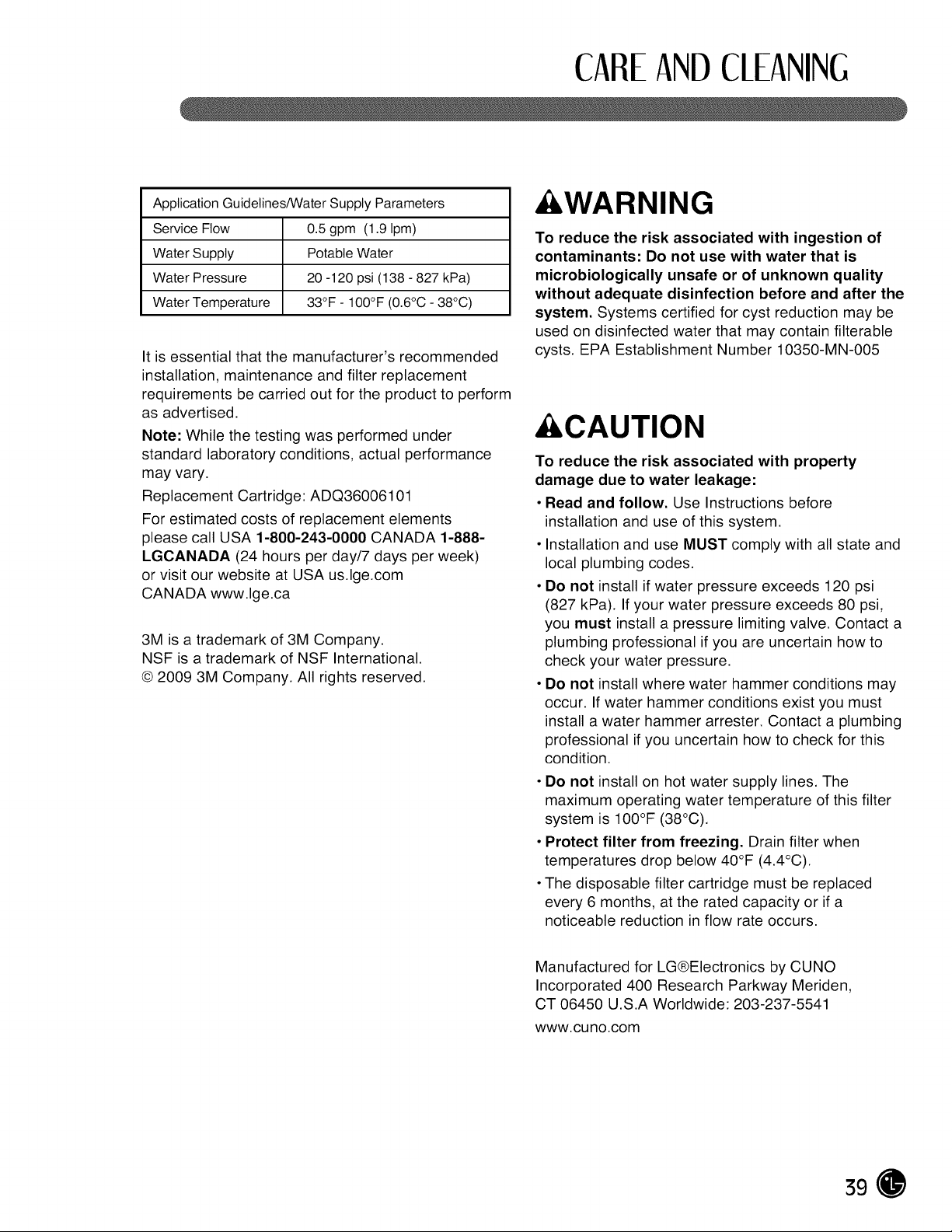
Application Guidelines/Water Supply Parameters
Service Flow 0.5 gpm (1.9 Ipm)
Water Supply Potable Water
Water Pressure 20 -120 psi (138 - 827 kPa)
Water Temperature 33°F - 100°F (0.6°C -38°C)
It isessential that the manufacturer's recommended
installation, maintenance and filter replacement
requirements be carried out for the product to perform
as advertised.
Note: While the testing was performed under
standard laboratory conditions, actual performance
may vary.
Replacement Cartridge: ADQ36006101
For estimated costs of replacement elements
please call USA 1-800-243-0000 CANADA 1-888-
LGCANADA (24 hours per day/7 days per week)
or visit our website at USA us.lge.com
CANADA www.lge.ca
3M is a trademark of 3M Company.
NSF is a trademark of NSF International.
© 2009 3M Company. All rights reserved.
&WARNING
To reduce the risk associated with ingestion of
contaminants: Do not use with water that is
microbiologically unsafe or of unknown quality
without adequate disinfection before and after the
system. Systems certified for cyst reduction may be
used on disinfected water that may contain filterable
cysts. EPA Establishment Number 10350-MN-005
&CAUTION
To reduce the risk associated with property
damage due to water leakage:
• Read and follow. Use Instructions before
installation and use of this system.
• Installation and use MUST comply with all state and
local plumbing codes.
• Do not install ifwater pressure exceeds 120 psi
(827 kPa). If your water pressure exceeds 80 psi,
you must install a pressure limiting valve. Contact a
plumbing professional if you are uncertain how to
check your water pressure.
• Do not install where water hammer conditions may
occur. If water hammer conditions exist you must
install a water hammer arrester. Contact a plumbing
professional ifyou uncertain how to check for this
condition.
• Do not install on hot water supply lines. The
maximum operating water temperature of this filter
system is 100°F (38°C).
• Protect filter from freezing. Drain filter when
temperatures drop below 40°F (4.4°C).
• The disposable filter cartridge must be replaced
every 6 months, at the rated capacity or ifa
noticeable reduction in flow rate occurs.
Manufactured for LG®Electronics by CUNO
Incorporated 400 Research Parkway Meriden,
CT 06450 U.S.A Worldwide: 203-237-5541
www.cuno.com
39
CAREANDCLEANING
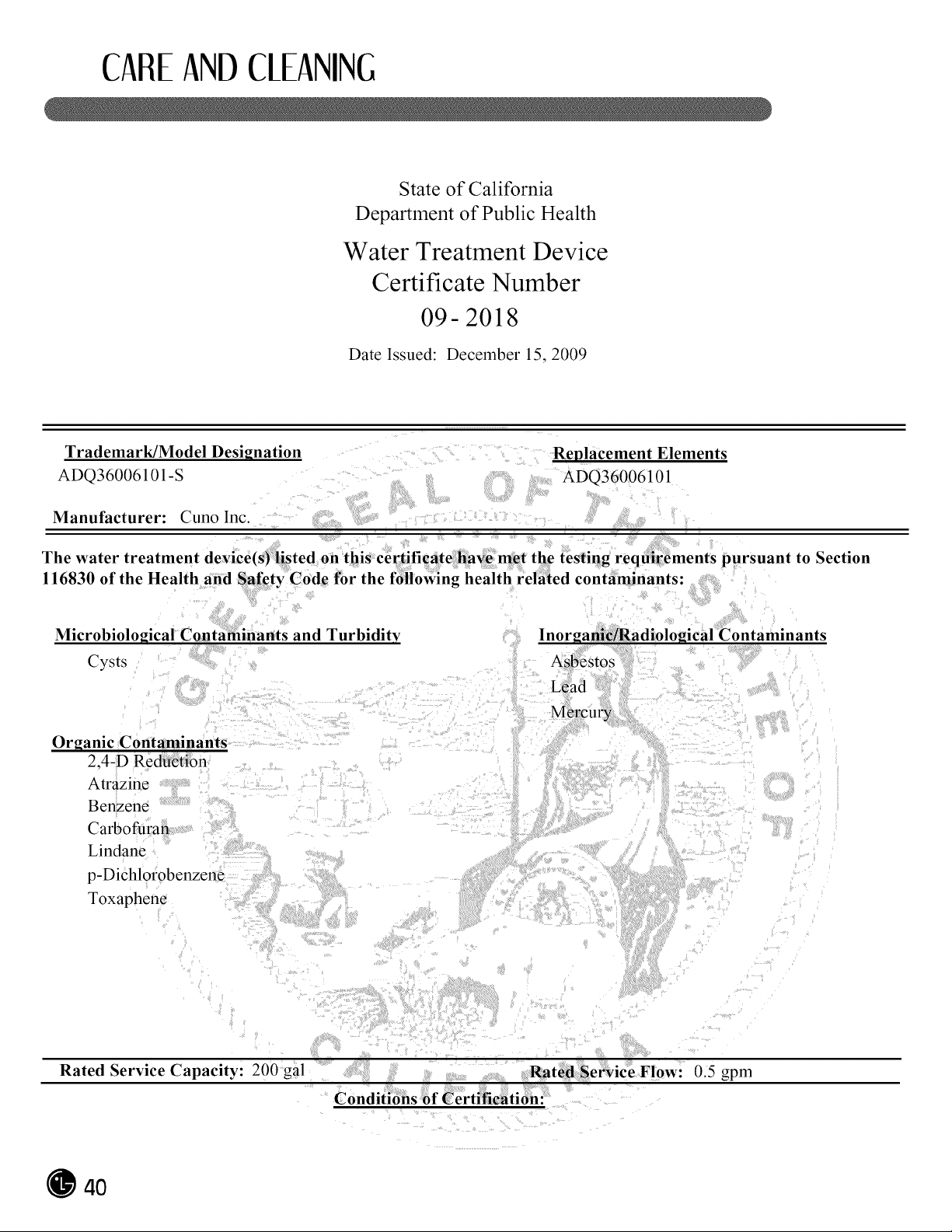
State of California
Department of Public Health
Water Treatment Device
Certificate Number
09- 2018
Date Issued: December 15, 2009
Trademark/Model Designation
ADQ36006101-S
Replacement Elements
ADQ36006101
Manufacturer: Cuno Inc.
The water treatment device(s) listed on this certificate have met the testing requirements pursuant to Section
116830 of the Health and Safety Code for the following health related contaminants:-
Microbiological Contaminants and Turbidity
Cysts
lnorgan adiological Contaminants
Organic Contaminants
2,4-D Re n
Atrazine
Benzene
Carbofuran
Lindane
p-Dichlorobenzene
Toxaphene
Rated Service Capacity: 200 gal : Rated Service Flow: 0.5 gpm
Conditions of Certification:
4O
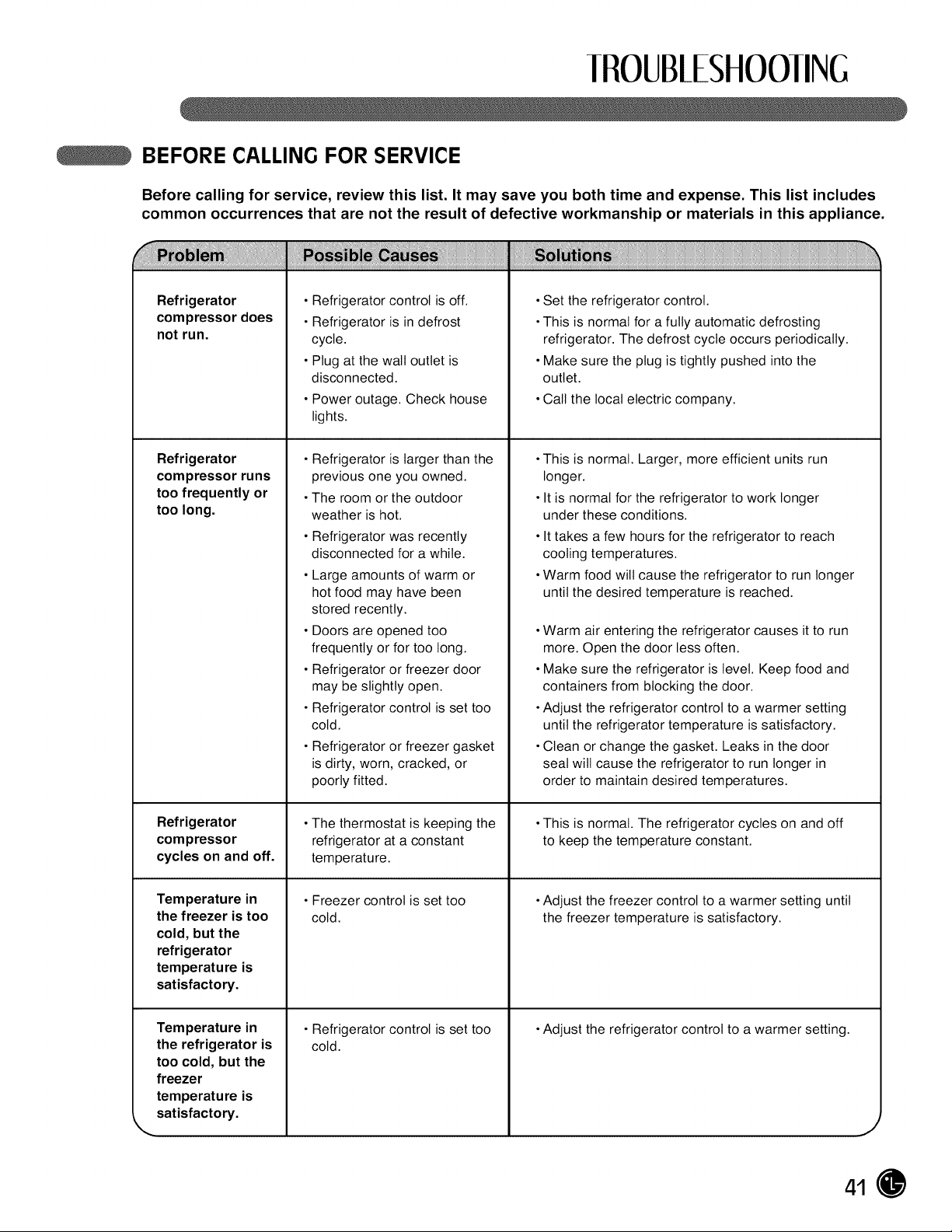
II OUB/ESHOOIING
BEFORE CALLING FOR SERVICE
Before calling for service, review this list. It may save you both time and expense. This list includes
common occurrences that are not the result of defective workmanship or materials in this appliance.
Refrigerator
compressor does
not run.
Refrigerator
compressor runs
too frequently or
too long.
Refrigerator
compressor
cycles on and off.
Temperature in
the freezer is too
cold, but the
refrigerator
temperature is
satisfactory.
Temperature in
the refrigerator is
too cold, but the
freezer
temperature is
satisfactory.
\
•Refrigerator control isoff.
•Refrigerator is in defrost
cycle.
•Plug atthe wall outlet is
disconnected.
•Power outage. Check house
lights.
•Refrigerator is larger than the
previous one you owned.
•The room or the outdoor
weather is hot.
•Refrigerator was recently
disconnected for a while.
•Large amounts of warm or
hot food may have been
stored recently.
•Doors are opened too
frequently or for too long.
•Refrigerator or freezer door
may be slightly open.
•Refrigerator control isset too
cold.
•Refrigerator or freezer gasket
is dirty, worn, cracked, or
poorly fitted.
•The thermostat is keeping the
refrigerator at a constant
temperature.
•Freezer control is set too
cold.
•Refrigerator control isset too
cold.
•Set the refrigerator control.
•This is normal for a fully automatic defrosting
refrigerator. The defrost cycle occurs periodically.
•Make sure the plug is tightly pushed into the
outlet.
•Call the local electric company.
•This is normal. Larger, more efficient units run
longer.
•It is normal for the refrigerator to work longer
under these conditions.
•It takes a few hours for the refrigerator to reach
cooling temperatures.
•Warm food will cause the refrigerator to run longer
until the desired temperature is reached.
•Warm air entering the refrigerator causes itto run
more. Open the door less often.
•Make sure the refrigerator is level. Keep food and
containers from blocking the door.
•Adjust the refrigerator control to a warmer setting
until the refrigerator temperature issatisfactory.
•Clean or change the gasket. Leaks in the door
seal will cause the refrigerator to run longer in
order to maintain desired temperatures.
•This is normal. The refrigerator cycles on and off
to keep the temperature constant.
•Adjust the freezer control to a warmer setting until
the freezer temperature issatisfactory.
•Adjust the refrigerator control to a warmer setting.
J
41
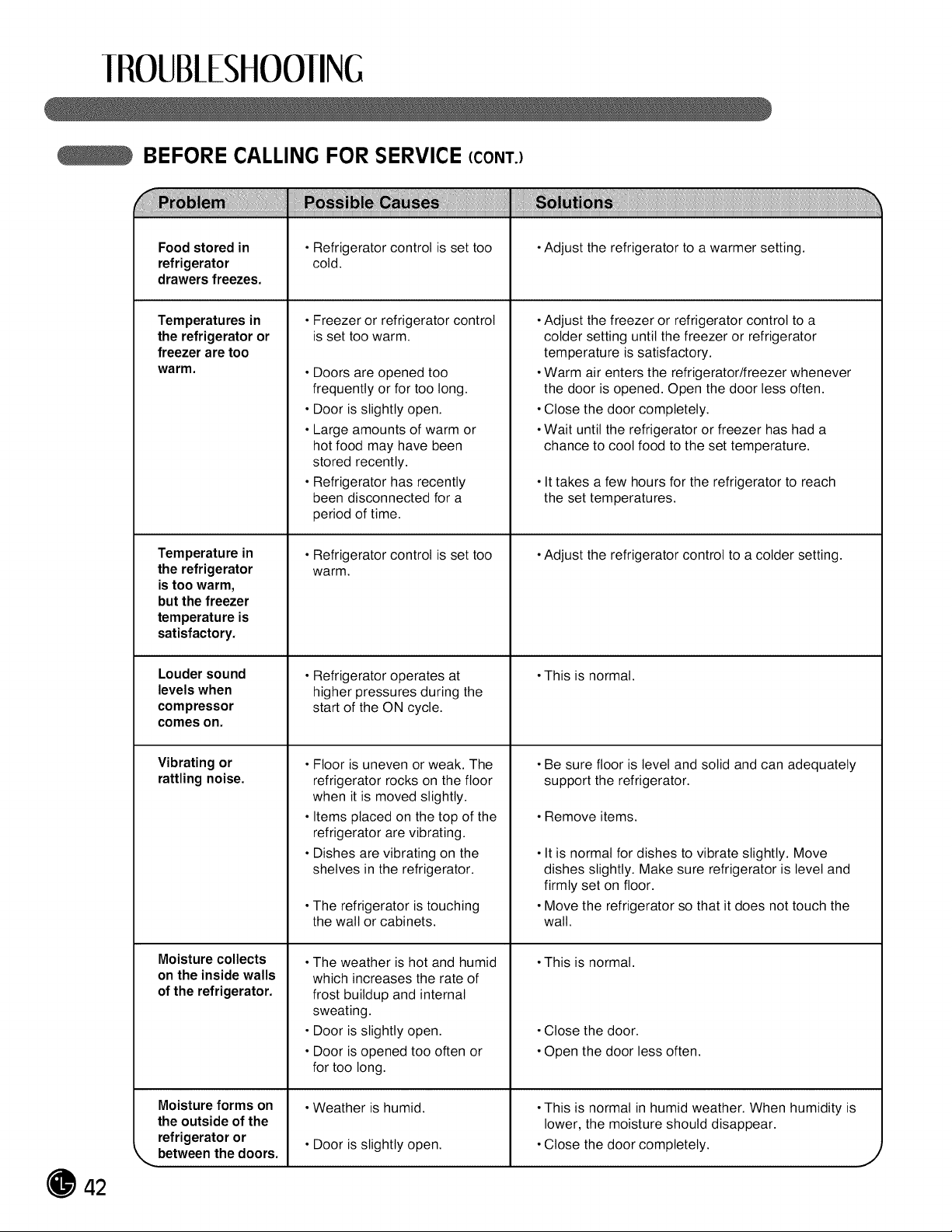
IROUB/ESHOOIING
BEFORE CALLING FOR SERVICE (CONT.)
Foodstored in
refrigerator
drawers freezes.
Temperatures in
the refrigerator or
freezer are too
warm.
Temperature in
the refrigerator
is too warm,
but the freezer
temperature is
satisfactory.
Louder sound
levels when
compressor
comes on.
Vibratingor
rattlingnoise.
Moisture collects
on the inside walls
ofthe refrigerator.
Moisture forms on
the outside ofthe
refrigerator or
_,,. between the doors.
•Refrigerator control isset too
cold.
•Freezer or refrigerator control
is set too warm.
•Doors are opened too
frequently or for too long.
•Door is slightly open.
•Large amounts of warm or
hot food may have been
stored recently.
•Refrigerator has recently
been disconnected for a
period of time.
•Refrigerator control isset too
warm.
•Refrigerator operates at
higher pressures during the
start of the ON cycle.
•Floor is uneven or weak. The
refrigerator rocks on the floor
when it is moved slightly.
•Items placed on the top of the
refrigerator are vibrating.
•Dishes are vibrating on the
shelves in the refrigerator.
•The refrigerator istouching
the watt or cabinets.
•The weather ishot and humid
which increases the rate of
frost buildup and internal
sweating.
•Door is slightly open.
•Door is opened too often or
for too long.
•Weather ishumid.
•Door is slightly open.
•Adjust the refrigerator to a warmer setting.
•Adjust the freezer or refrigerator control to a
colder setting until the freezer or refrigerator
temperature issatisfactory.
•Warm air enters the refrigerator/freezer whenever
the door is opened. Open the door less often.
•Close the door completely.
•Wait until the refrigerator or freezer has had a
chance to cool food to the set temperature.
•It takes a few hours for the refrigerator to reach
the set temperatures.
•Adjust the refrigerator control to a colder setting.
•This is normal.
•Be sure floor is level and solid and can adequately
support the refrigerator.
•Remove items.
•It is normal for dishes to vibrate slightly. Move
dishes slightly. Make sure refrigerator is level and
firmly set on floor.
•Move the refrigerator so that it does not touch the
wall.
•This is normal.
•Close the door.
•Open the door less often.
•This is normal in humid weather. When humidity is
lower, the moisture should disappear.
•Close the door completely.
J
42
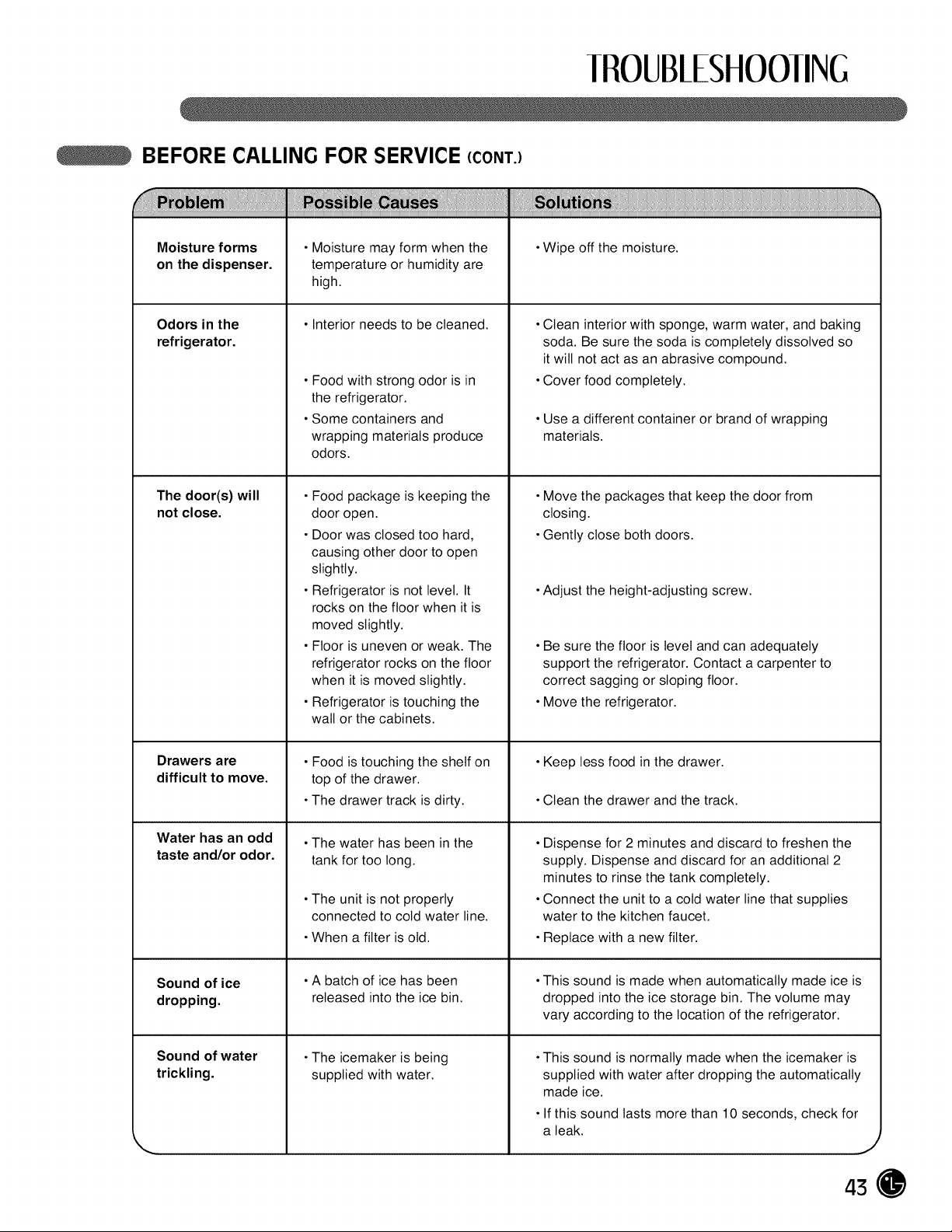
IROUB/ESHOOIING
BEFORE CALLING FOR SERVICE (CONT.)
Moisture forms
on the dispenser.
Odors in the
refrigerator.
The door(s) will
not close.
Drawers are
difficult to move.
Water has an odd
taste and/or odor.
Sound of ice
dropping.
Sound of water
trickling.
•Moisture may form when the
temperature or humidity are
high.
• Interior needs to be cleaned.
•Food with strong odor is in
the refrigerator.
•Some containers and
wrapping materials produce
odors.
•Food package is keeping the
door open.
•Door was closed too hard,
causing other door to open
slightly.
•Refrigerator is not level. It
rocks on the floor when it is
moved slightly.
•Floor is uneven or weak. The
refrigerator rocks on the floor
when it is moved slightly.
•Refrigerator is touching the
wall or the cabinets.
•Food is touching the shelf on
top of the drawer.
•The drawer track is dirty.
•The water has been in the
tank for too long.
•The unit is not properly
connected to cold water line.
•When a filter is old.
•A batch of ice has been
released into the ice bin.
•The icemaker is being
supplied with water.
•Wipe off the moisture.
•Clean interior with sponge, warm water, and baking
soda. Be sure the soda is completely dissolved so
it wilt not act as an abrasive compound.
•Cover food completely.
•Use a different container or brand of wrapping
materials.
•Move the packages that keep the door from
closing.
•Gently close both doors.
•Adjust the height-adjusting screw.
•Be sure the floor islevel and can adequately
support the refrigerator. Contact acarpenter to
correct sagging or sloping floor.
•Move the refrigerator.
•Keep less food in the drawer.
•Clean the drawer and the track.
•Dispense for 2 minutes and discard to freshen the
supply. Dispense and discard for an additional 2
minutes to rinse the tank completely.
•Connect the unit to a cold water line that supplies
water to the kitchen faucet.
•Replace with a new filter.
•This sound ismade when automatically made ice is
dropped into the ice storage bin. The volume may
vary according to the location of the refrigerator.
•This sound isnormally made when the icemaker is
supplied with water after dropping the automatically
made ice.
•If this sound lasts more than 10 seconds, check for
a leak.
.t'
43
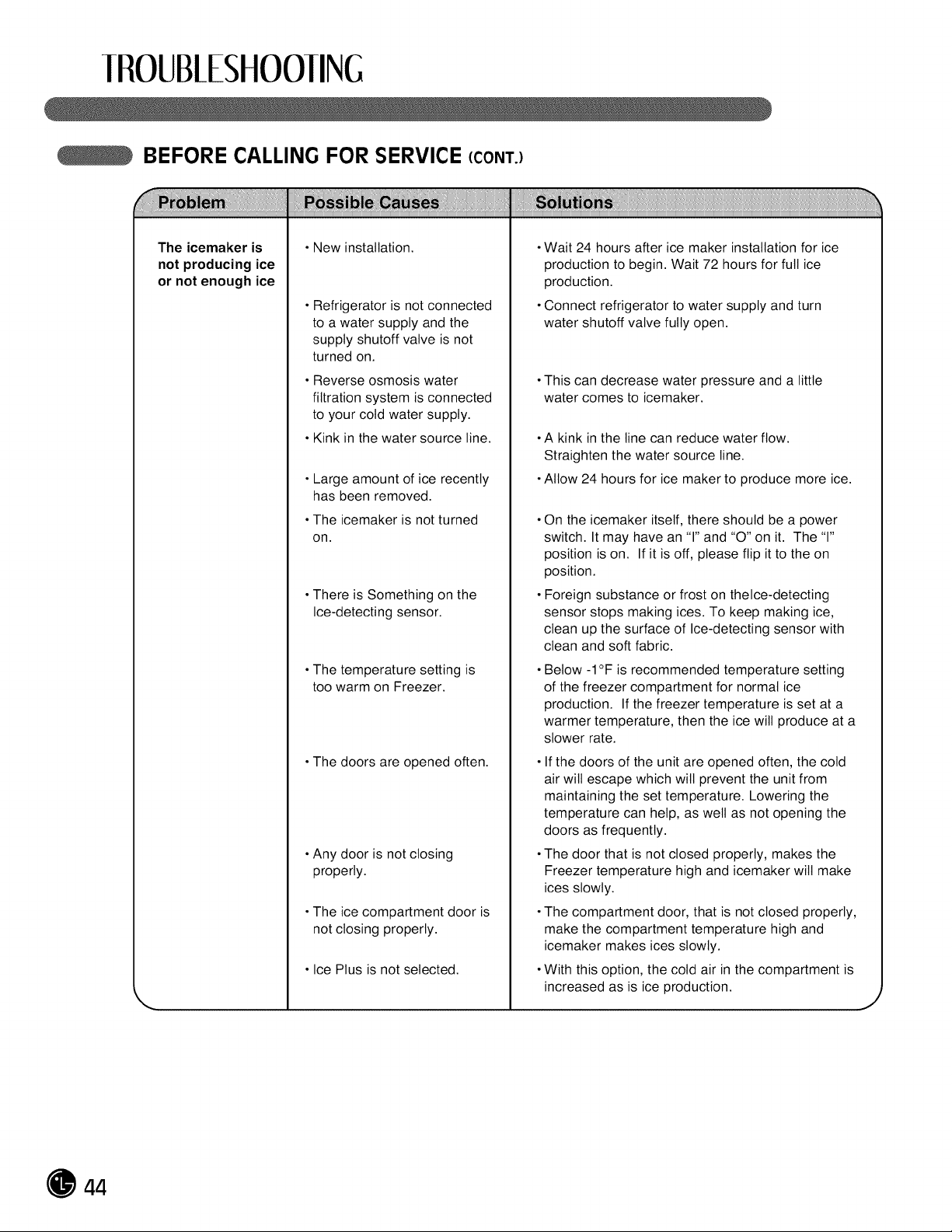
IROUB/ESHOOIING
BEFORE CALLING FOR SERVICE (CONT.)
......................................................................)))))) )!
The icemaker is
not producing ice
or not enough ice
•New installation.
•Refrigerator is not connected
to a water supply and the
supply shutoff valve isnot
turned on.
•Reverse osmosis water
filtration system is connected
to your cold water supply.
•Kink in the water source line.
•Large amount of ice recently
has been removed.
•The icemaker is not turned
on.
•There is Something on the
Ice-detecting sensor.
•The temperature setting is
too warm on Freezer.
•The doors are opened often.
•Any door isnot closing
properly.
•The ice compartment door is
not closing properly.
•Ice Plus isnot selected.
•Wait 24 hours after ice maker installation for ice
production to begin. Wait 72 hours for full ice
production.
•Connect refrigerator to water supply and turn
water shutoff valve fully open.
•This can decrease water pressure and a little
water comes to icemaker.
•A kink in the line can reduce water flow.
Straighten the water source line.
•Allow 24 hours for ice maker to produce more ice.
•On the icemaker itself, there should be a power
switch. Itmay have an 'T' and "0" on it. The 'T'
position is on. If it is off, please flip itto the on
position.
•Foreign substance or frost on thelce-detecting
sensor stops making ices. To keep making ice,
clean up the surface of Ice-detecting sensor with
clean and soft fabric.
•Below -1°F is recommended temperature setting
of the freezer compartment for normal ice
production. If the freezer temperature isset at a
warmer temperature, then the ice will produce at a
slower rate.
•If the doors of the unit are opened often, the cold
air wilt escape which will prevent the unit from
maintaining the set temperature. Lowering the
temperature can help, as well as not opening the
doors as frequently.
•The door that is not closed properly, makes the
Freezer temperature high and icemaker wilt make
ices slowly.
•The compartment door, that is not closed properly,
make the compartment temperature high and
icemaker makes ices slowly.
•With this option, the cold air in the compartment is
increased as is ice production.
J
44
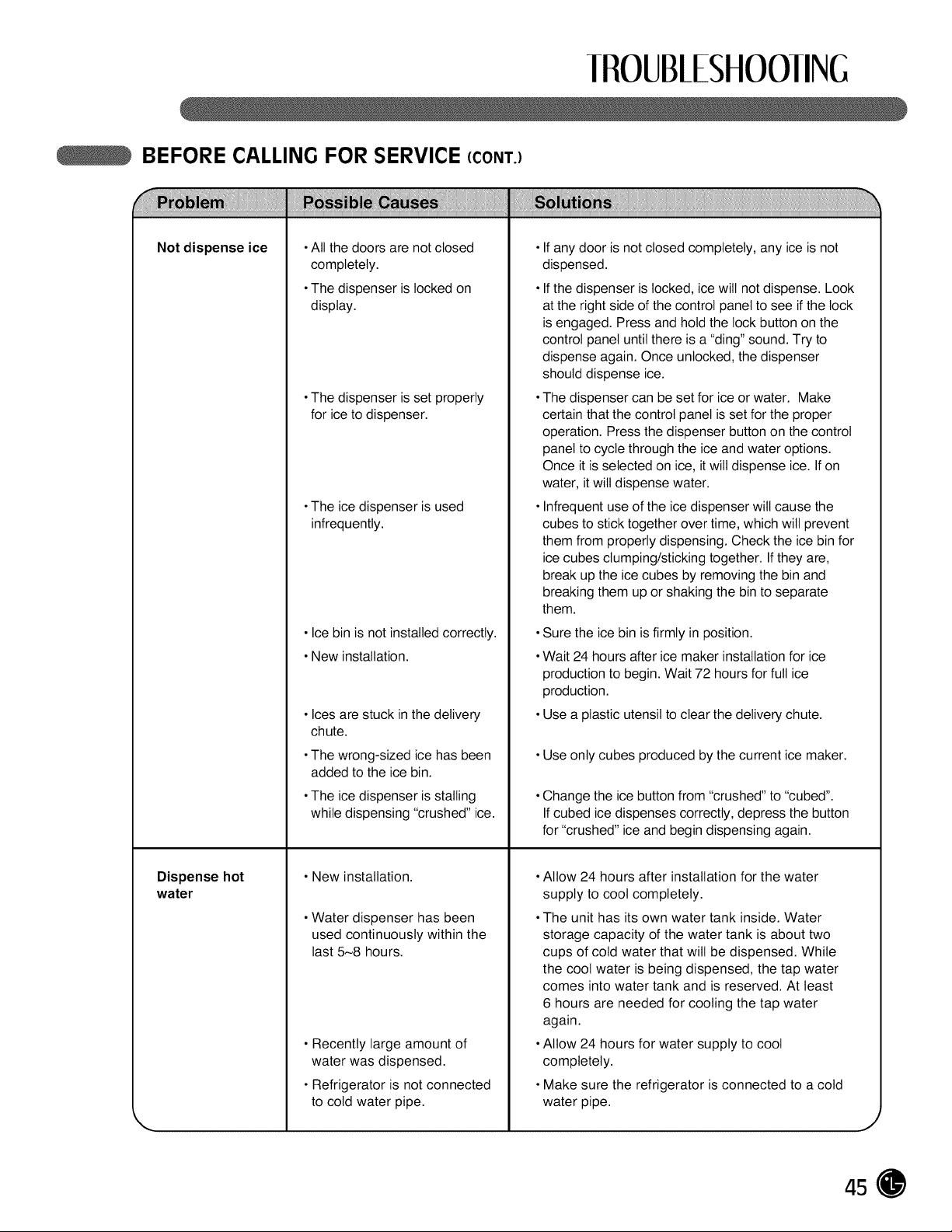
IROUB/ESHOOIING
BEFORE CALLING FOR SERVICE (CONT.)
Not dispense ice
•All the doors are not closed
completely.
•The dispenser islocked on
display.
•The dispenser isset properly
for ice to dispenser.
•The ice dispenser isused
infrequently.
•Ice bin isnot installed correctly.
•New installation.
•Ices are stuck in the delivery
chute.
•The wrong-sized ice has been
added to the ice bin.
•The ice dispenser is stalling
while dispensing "crushed" ice.
•New installation.
•Water dispenser has been
used continuously within the
last 5_8 hours.
•Recently large amount of
water was dispensed.
•Refrigerator is not connected
to cold water pipe.
Dispense hot
water
•If any door isnot closed completely, any ice is not
dispensed.
•If the dispenser is locked, ice will not dispense. Look
atthe right side ofthe control panel to see ifthe lock
isengaged. Press and hold the lock button on the
control panel untilthere isa "ding" sound. Try to
dispense again. Once unlocked, the dispenser
should dispense ice.
•The dispenser can be set for ice or water. Make
certain that the control panel isset for the proper
operation. Press the dispenser button on the control
panel to cycle through the ice and water options.
Once itis selected on ice, itwill dispense ice. If on
water, itwiltdispense water.
•Infrequent use of the ice dispenser will cause the
cubes to stick together over time, which will prevent
them from properly dispensing. Check the ice bin for
ice cubes clumping/sticking together. If they are,
break upthe ice cubes by removing the bin and
breaking them up or shaking the bin to separate
them.
•Sure the ice bin isfirmly in position.
•Wait 24 hours after ice maker installation for ice
production to begin. Wait 72 hours for full ice
production.
•Use a plastic utensil toclear the delivery chute.
•Use only cubes produced by the current ice maker.
•Change the ice button from "crushed" to "cubed".
If cubed ice dispenses correctly, depress the button
for "crushed" ice and begin dispensing again.
•Allow 24 hours after installation for the water
supply to cool completely.
•The unit has its own water tank inside. Water
storage capacity of the water tank is about two
cups of cold water that will be dispensed. While
the cool water isbeing dispensed, the tap water
comes into water tank and is reserved. At least
6 hours are needed for cooling the tap water
again.
•Allow 24 hours for water supply to cool
completely.
•Make sure the refrigerator is connected to a cold
water pipe.
J
45
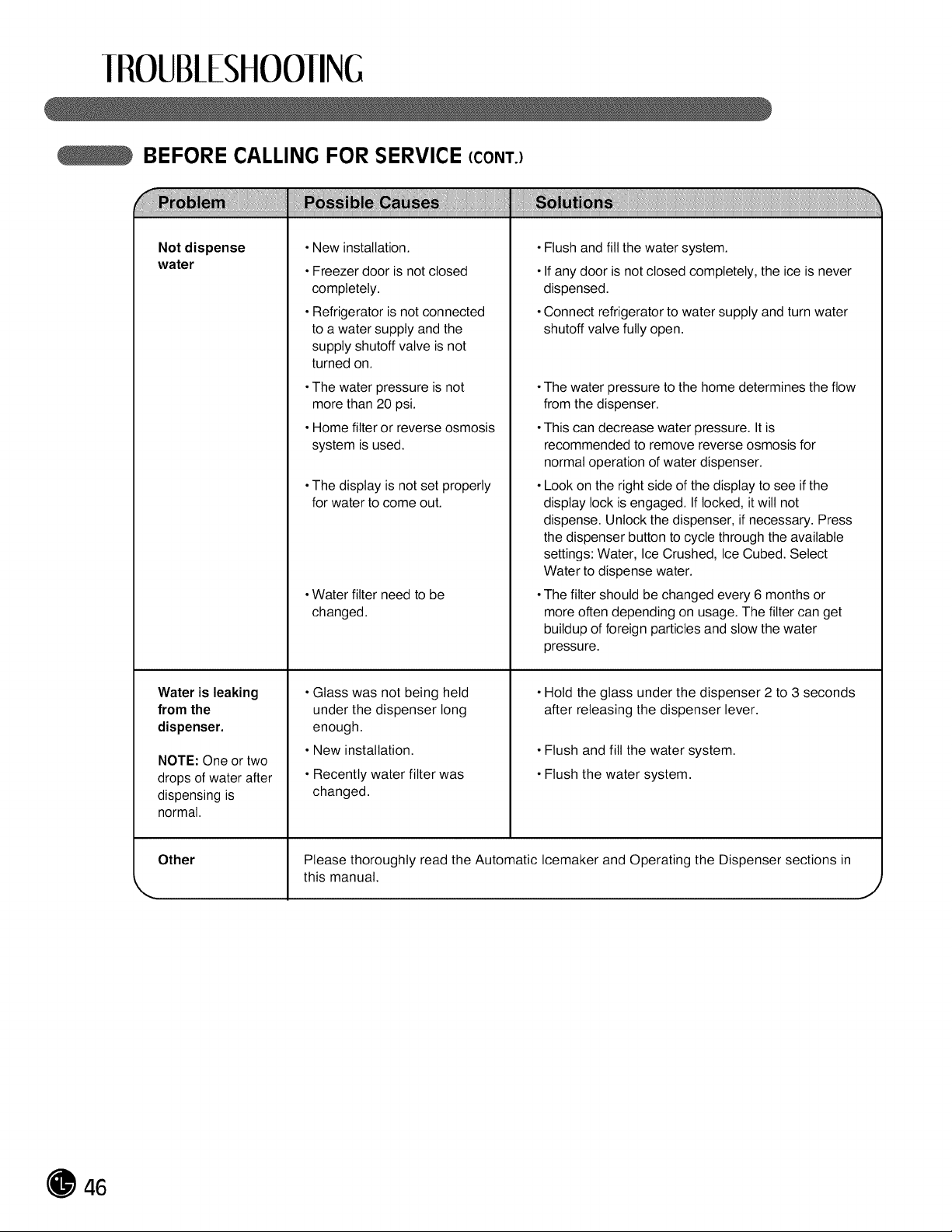
IROUB/ESHOOIING
BEFORE CALLING FOR SERVICE (CONT.)
...................................................................)))))) )!
Not dispense
water
Water is leaking
from the
dispenser.
NOTE: One or two
drops ofwater after
dispensing is
normal.
Other
•New installation.
•Freezer door isnot closed
completely.
•Refrigerator isnot connected
to a water supply and the
supply shutoff valve isnot
turned on.
•The water pressure isnot
more than 20 psi.
•Home filter or reverse osmosis
system isused.
•The display is not set properly
for water to come out.
•Water filter need to be
changed.
•Glass was not being held
under the dispenser long
enough.
•New installation.
•Recently water filter was
changed.
•Flush and fill the water system.
•If any door isnot closed completely, the ice is never
dispensed.
•Connect refrigerator to water supply and turn water
shutoff valve fully open.
•The water pressure to the home determines the flow
from the dispenser.
•This can decrease water pressure. It is
recommended to remove reverse osmosis for
normal operation ofwater dispenser.
•Look on the right side of the display to see ifthe
display lock is engaged. If locked, it will not
dispense. Unlock the dispenser, ifnecessary. Press
the dispenser button tocycle through the available
settings: Water, Ice Crushed, IceCubed. Select
Water to dispense water.
•The filter should be changed every 6 months or
more often depending on usage. The filter can get
buildup of foreign particles and stow the water
pressure.
Hold the glass under the dispenser 2 to 3 seconds
after releasing the dispenser lever.
•Flush and fill the water system.
•Flush the water system.
Please thoroughly read the Automatic Icemaker and Operating the Dispenser sections in
this manual.
J
46
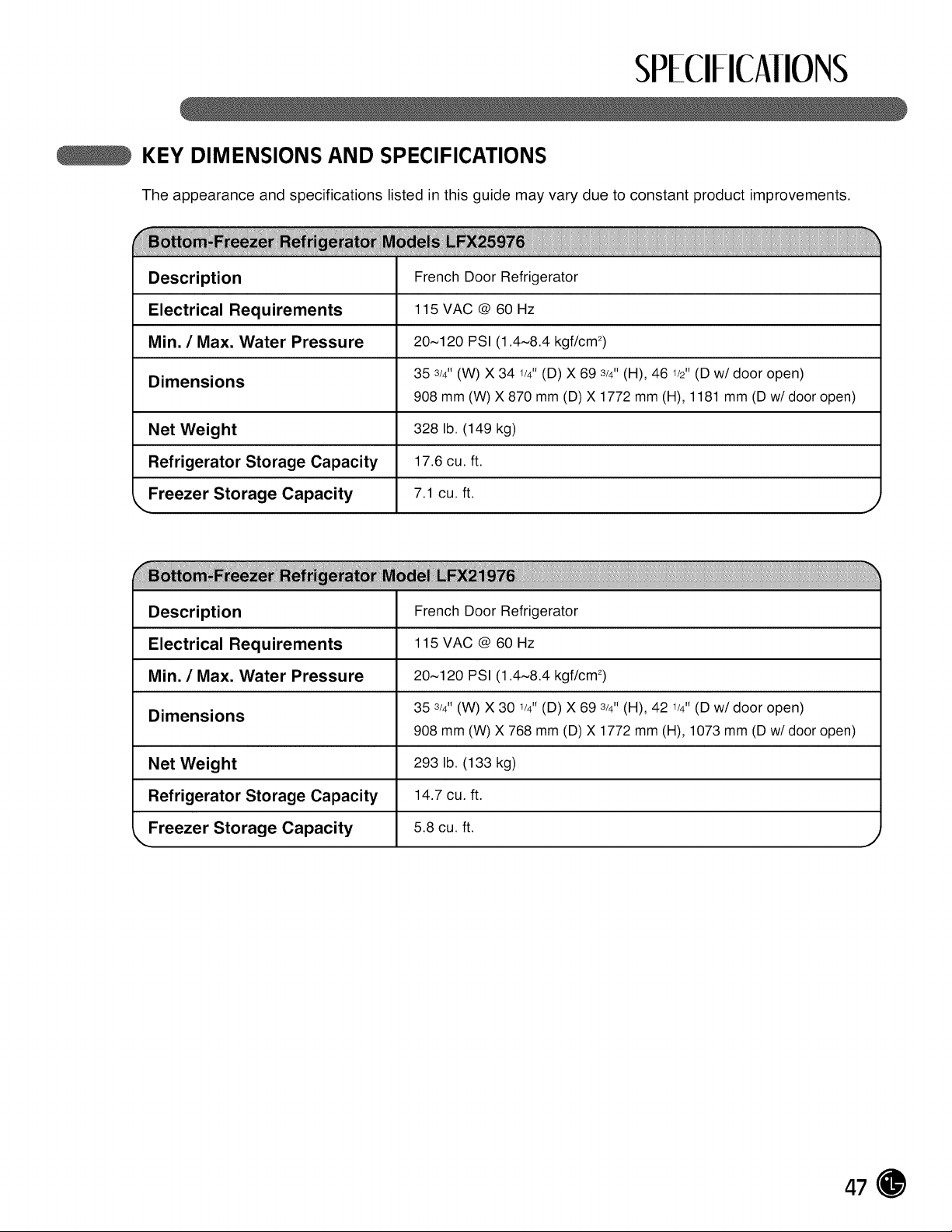
SPECIFICAIIONS
KEY DIMENSIONS AND SPECIFICATIONS
The appearance and specifications listed in this guide may vary due to constant product improvements.
Description French Door Refrigerator
Electrical Requirements 115 VAC @ 60 Hz
Min. / Max. Water Pressure 20~120 PSI (1.4~8.4 kgf/cm 2)
35 3/4H(W) X 34 1/4"(D) X 69 3/4'T(H), 46 1/2"(D w/door open)
Dimensions
908 mm (W) X 870 mm (D) X 1772 mm (H), 1181 mm (D w/door open)
Net Weight 328 lb. (149 kg)
Refrigerator Storage Capacity 17.6 cu. ft.
k,.Freezer Storage Capacity 7.1 cu. ft.
, J
Description French Door Refrigerator
Electrical Requirements 115 VAC @ 60 Hz
Min. / Max. Water Pressure 20~120 PSI (1.4~8.4 kgf/cm 2)
35 3/4H(W) X 30 1/4H(D) X 69 3/4'T(H), 42 1/4"(D w/door open)
Dimensions
908 mm (W) X 768 mm (D) X 1772 mm (H), 1073 mm (D w/door open)
Net Weight 293 lb. (133 kg)
Refrigerator Storage Capacity 14.7 cu. ft.
Freezer Storage Capacity 5.8 cu. ft.
47
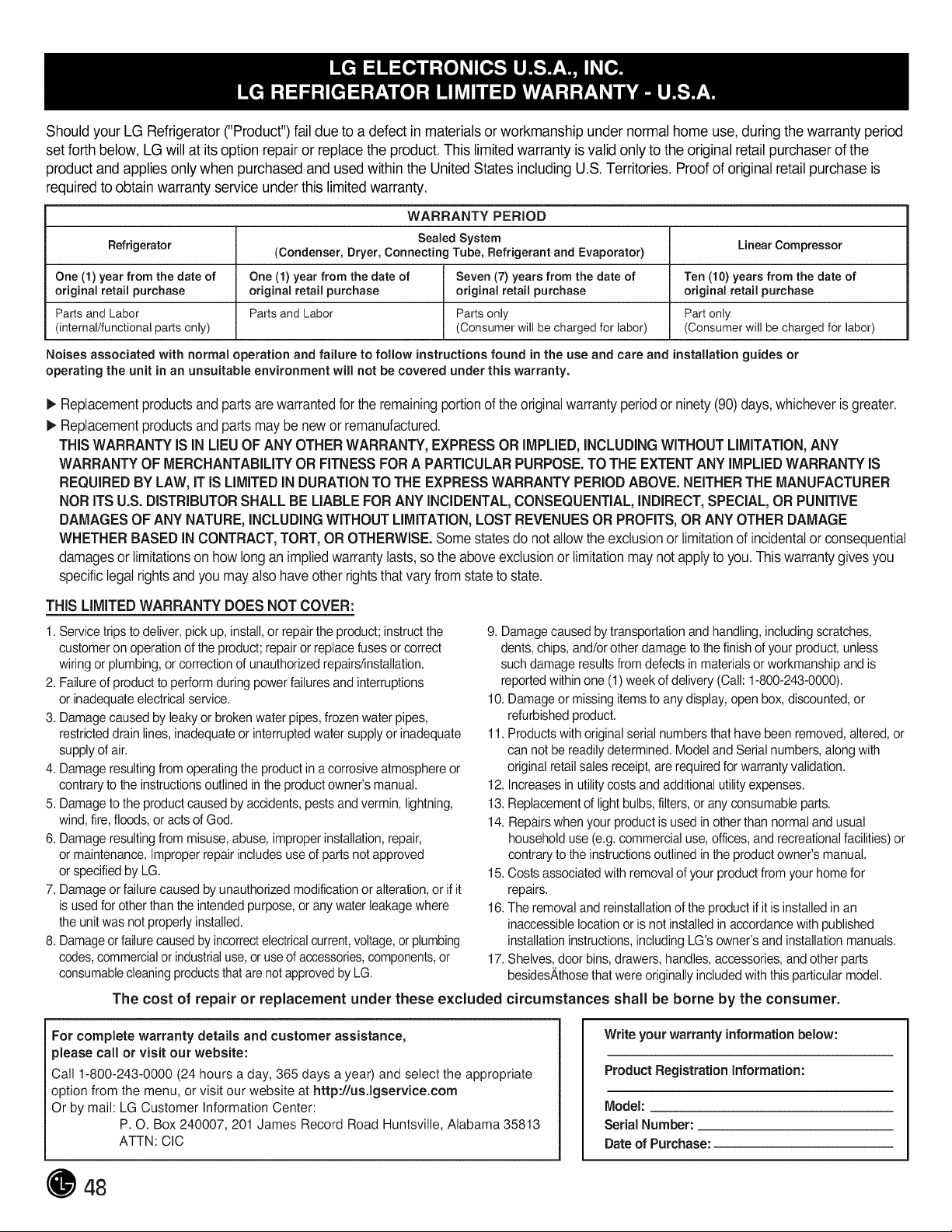
Should yourLG Refrigerator ("Product") fail due toa defectin materials or workmanship under normalhomeuse, during the warrantyperiod
set forth below, LG willatits optionrepairor replace the product. This limitedwarrantyisvalid onlytotheoriginal retail purchaser ofthe
product and applies onlywhenpurchased and usedwithin theUnited StatesincludingU.S. Territories. Proofoforiginal retail purchase is
requiredtoobtainwarrantyservice under this limited warranty.
WARRANTY PERIOD
Sealed System Linear Compressor
Refrigerator (Condenser, Dryer, Connecting Tube, Refrigerant and Evaporator)
One (1) year from the date of One (1) year from the date of Seven (7) years from the date of Ten (10) years from the date of
original retail purchase original retail purchase original retail purchase original retail purchase
Parts and Labor Parts and Labor Parts only Part only
(internal/functional parts only) (Consumer will be charged for labor) (Consumer will be charged for labor)
Noises associated with normal operation and failure to follow instructions found in the use and care and installation guides or
operating the unit in an unsuitable environment will not be covered under this warranty.
Replacementproductsandpartsare warrantedfor the remainingportionof the originalwarrantyperiodor ninety(90)days,whichever isgreater.
Replacementproductsandpartsmay be newor remanufactured.
THISWARRANTY IS IN LIEUOF ANYOTHERWARRANTY,EXPRESSORIMPLIED,INCLUDINGWITHOUTLIMITATION,ANY
WARRANTYOFMERCHANTABILITYOR FITNESSFORAPARTICULARPURPOSE.TO THE EXTENTANY IMPLIEDWARRANTYIS
REQUIREDBY LAW,IT IS LIMITEDiN DURATIONTO THE EXPRESSWARRANTYPERIODABOVE.NEITHERTHE MANUFACTURER
NORITS U.S. DISTRIBUTORSHALLBE LIABLEFORANY INCIDENTAL,CONSEQUENTIAL,INDIRECT,SPECIAL,OR PUNITIVE
DAMAGESOF ANY NATURE, INCLUDINGWITHOUTLIMITATION,LOSTREVENUESOR PROFITS,OR ANYOTHER DAMAGE
WHETHERBASED IN CONTRACT,TORT,OR OTHERWISE,Some statesdo not allow theexclusionor limitationofincidentalor consequential
damagesor limitationson howlonganimpliedwarrantylasts,so the aboveexclusionor limitationmay not applyto you. Thiswarrantygivesyou
specificlegalrightsandyoumayalso haveother rightsthat varyfromstate to state.
THISLIMITEDWARRANTY DOESNOT COVER:
1. Service trips to deliver,pick up,install,orrepair theproduct;instructthe
customeronoperation oftheproduct;repair or replacefuses or correct
wiringor plumbing, orcorrectionofunauthorized repairs/installation.
2.Failure of productto perform during power failuresand interruptions
or inadequate electrical service.
3.Damage causedby leaky or broken water pipes,frozen waterpipes,
restricteddrainlines, inadequate orinterruptedwatersupplyor inadequate
supplyof air.
4.Damage resulting fromoperatingthe product ina corrosive atmosphereor
contrarytotheinstructionsoutlinedin the product owner's manual.
5.Damage to the product causedby accidents,pests and vermin, lightning,
wind, fire, floods, or acts of God.
6.Damage resulting frommisuse, abuse,improper installation,repair,
or maintenance.Improperrepair includes useofparts not approved
or specified by LG.
7.Damage or failure causedby unauthorizedmodification or alteration,or ifit
isused for other than theintendedpurpose, orany water leakagewhere
the unitwas not properlyinstalled.
8.Damageorfailurecaused by incorrectelectricalcurrent,voltage,orplumbing
codes,commercialorindustrialuse, oruseof accessories,components,or
consumablecleaningproductsthatare notapprovedby LG.
The cost of repair or replacement under these excluded
9.Damage causedby transportation and handling, includingscratches,
dents,chips,and/or other damagetothe finish of yourproduct,unless
suchdamage resultsfromdefectsin materials orworkmanship and is
reportedwithin one (1) week ofdelivery (Call: 1-800-243-0000).
10. Damage or missingitemstoanydisplay,openbox, discounted, or
refurbishedproduct.
11. Products with original serial numbersthat have beenremoved, altered, or
cannot bereadily determined. Modeland Serial numbers, along with
originalretailsalesreceipt,are required for warranty validation.
12. Increasesin utilitycostsand additional utilityexpenses.
13. Replacement oflight bulbs, filters,or any consumable parts.
14. Repairs whenyourproduct isused in other than normal and usual
householduse(e.g. commercialuse,offices, and recreationalfacilities)or
contrarytothe instructionsoutlinedin theproductowner's manual.
15. Costs associated with removal ofyour product fromyourhomefor
repairs.
16. Theremoval and reinstallationof the product ifitisinstalled in an
inaccessible location orisnot installed inaccordance with published
installationinstructions, including LG's owner's and installation manuals.
17. Shelves, door bins, drawers, handles, accessories, and other parts
besides_,thosethat were originally includedwith this particularmodel.
circumstances shall be borne by the consumer.
For complete warranty details and customer assistance,
please call or visit our website:
Call 1-800-243-0000 (24hours a day, 365 days a year) and select the appropriate
option from the menu, or visit our website athttp://us.lgservice.com
Or by mail: LG Customer Information Center:
P.O. Box240007, 201 James Record Road Huntsville, Alabama 35813
ATTN: CIC
Write your warranty information below:
Product Registration Information:
Model:
Serial Number:
Dateof Purchase:
48
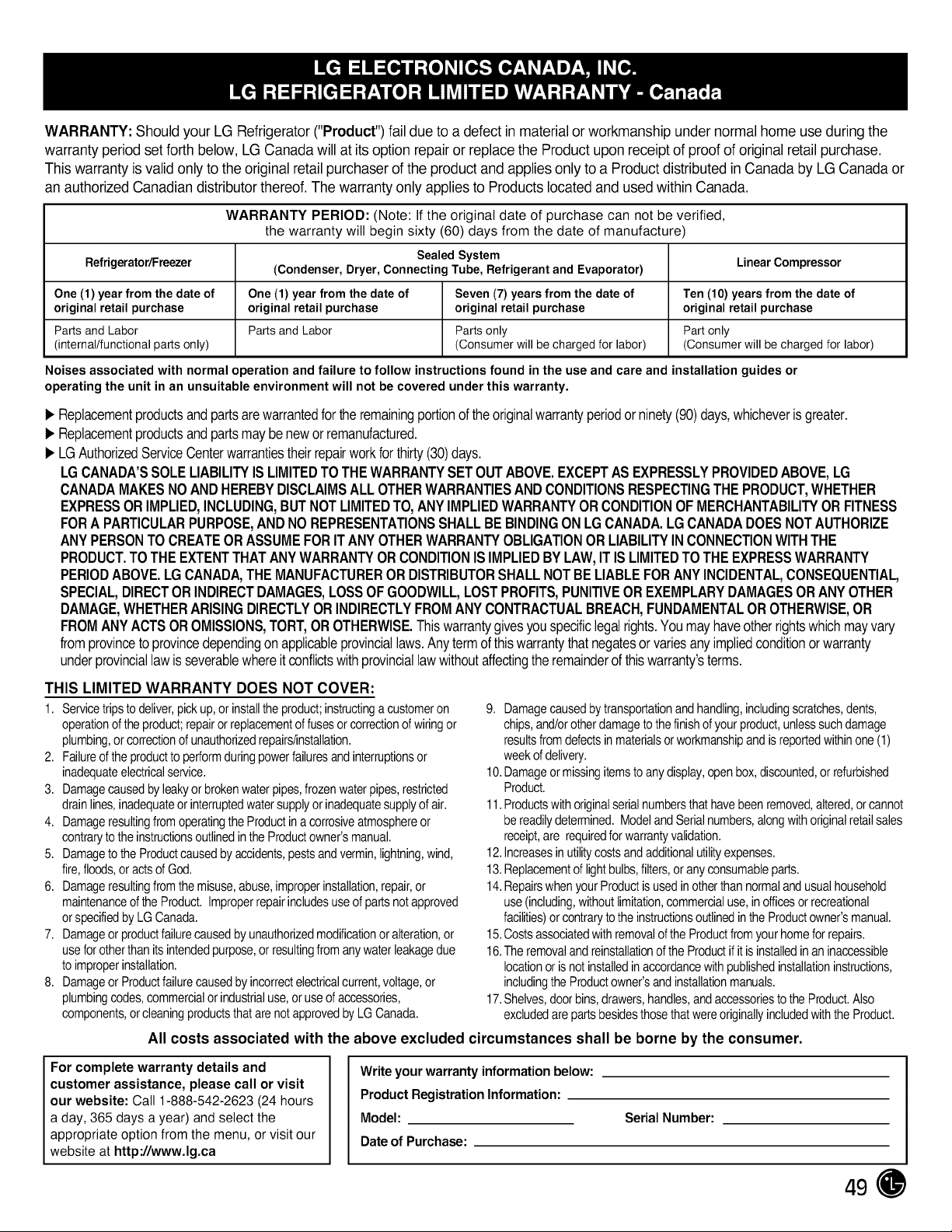
WARRANTY: Should your LG Refrigerator("Product") faildue toa defectin materialor workmanship under normalhomeuse during the
warrantyperiod set forth below, LG Canadawill atits optionrepair or replacetheProduct upon receiptofproofoforiginal retail purchase.
This warrantyis validonly totheoriginal retailpurchaser of theproduct and applies onlytoa Product distributed in CanadabyLG Canadaor
an authorized Canadiandistributor thereof.Thewarranty onlyappliestoProductslocated and used within Canada.
WARRANTY PERIOD: (Note: If the original date of purchase can not be verified,
the warranty will begin sixty (60) days from the date of manufacture)
Sealed System Linear Compressor
Refrigerator/Freezer (Condenser, Dryer, Connecting Tube, Refrigerant and Evaporator)
One (1) year from the date of One (1) year from the date of Seven (7) years from the date of Ten (10) years from the date of
original retail purchase original retail purchase original retail purchase original retail purchase
Parts and Labor Parts and Labor Parts only Part only
(internal/functional parts only) (Consumer will be charged for labor) (Consumer will be charged for labor)
Noises associated with normaloperation andfailure to follow instructionsfound inthe useand care and installation guidesor
operating the unitinan unsuitableenvironment will not be covered under this warranty.
I_ Replacementproductsandpartsarewarrantedforthe remainingportionof theoriginalwarrantyperiodorninety(90)days,whicheverisgreater.
I_ Replacementproductsandpartsmaybenewor remanufactured.
I_ LGAuthorizedServiceCenterwarrantiestheirrepairworkbr thirty(30)days.
LGCANADA'SSOLELIABILITYIS LIMITEDTOTHEWARRANTYSETOUTABOVE.EXCEPTAS EXPRESSLYPROVIDEDABOVE,LG
CANADAMAKESNOANDHEREBYDISCLAIMSALL OTHERWARRANTIESANDCONDITIONSRESPECTINGTHEPRODUCT,WHETHER
EXPRESSOR IMPLIED,INCLUDING,BUTNOTLIMITEDTO,ANYIMPLIEDWARRANTYORCONDITIONOF MERCHANTABILITYORFITNESS
FORA PARTICULARPURPOSE,ANDNOREPRESENTATIONSSHALLBEBINDINGONLG CANADA.LGCANADADOESNOTAUTHORIZE
ANY PERSONTO CREATEORASSUMEFORITANY OTHERWARRANTYOBLIGATIONOR LIABILITYINCONNECTIONWITHTHE
PRODUCT.TOTHEEXTENTTHATANYWARRANTYOR CONDITIONIS IMPLIEDBYLAW,ITIS LIMITEDTOTHEEXPRESSWARRANTY
PERIODABOVE.LG CANADA,THEMANUFACTUREROR DISTRIBUTORSHALLNOTBELIABLEFORANY INCIDENTAL,CONSEQUENTIAL,
SPECIAL,DIRECTOR INDIRECTDAMAGES,LOSSOF GOODWILL,LOSTPROFITS,PUNITIVEOR EXEMPLARYDAMAGESOR ANYOTHER
DAMAGE,WHETHERARISINGDIRECTLYOR INDIRECTLYFROMANY CONTRACTUALBREACH,FUNDAMENTALOROTHERWISE,OR
FROMANYACTSOR OMISSIONS,TORT,OR OTHERWISE.Thiswarrantygivesyouspecificlegalrights.Youmayhaveotherrightswhichmayvary
fromprovinceto provincedependingon applicableprovinciallaws.Anytermofthiswarrantythatnegatesor variesanyimpliedconditionorwarranty
underprovinciallawis severablewhereitconflictswithprovinciallawwithoutaffectingthe remainderofthiswarranty'sterms.
THIS LIMITED WARRANTY DOES NOT COVER:
1. Servicetripsto deliver,pickup,orinstallthe product;instructinga customeron
operationoftheproduct;repairor replacementof fusesor correctionof wiringor
plumbing,orcorrectionof unauthorizedrepairs/installation.
2. Failureof the productto performduringpowerfailuresand interruptionsor
inadequateelectricalservice.
3. Damagecausedbyleakyorbrokenwaterpipes,frozenwaterpipes,restricted
drainlines,inadequateorinterruptedwatersupplyor inadequatesupplyof air.
4. Damageresultingfromoperatingthe Productina corrosiveatmosphereor
contraryto theinstructionsoutlinedintheProductowner'smanual.
5. Damageto theProductcausedby accidents,pestsandvermin,lightning,wind,
fire,floods,oracts of God.
6. Damageresultingfromthemisuse,abuse,improperinstallation,repair,or
maintenanceof theProduct. Improperrepairincludesuseof partsnotapproved
orspecifiedby LGCanada.
7. Damageorproductfailurecausedby unauthorizedmodificationor alteration,or
useforotherthan itsintendedpurpose,or resultingfromanywaterleakagedue
toimproperinstallation.
8. DamageorProductfailurecausedby incorrectelectricalcurrent,voltage,or
plumbingcodes,commercialorindustrialuse,or useof accessories,
components,orcleaningproductsthatare notapprovedbyLG Canada.
9. Damagecausedby transportationandhandling,includingscratches,dents,
chips,and/orotherdamageto thefinishof yourproduct,unlesssuchdamage
resultsfromdefectsin materialsorworkmanshipand is reportedwithinone (1)
weekof delivery.
10.Damageormissingitemsto anydisplay,openbox,discounted,orrefurbished
Product.
11.Productswithoriginalserialnumbersthat havebeenremoved,altered,orcannot
bereadilydetermined.ModelandSerialnumbers,alongwithoriginalretailsales
receipt,are requiredfor warrantyvalidation.
12.increasesinutilitycostsandadditionalutilityexpenses.
13.Replacementof lightbulbs,filters,oranyconsumableparts.
14.RepairswhenyourProductisusedinotherthan normalandusualhousehold
use(including,withoutlimitation,commercialuse,inofficesorrecreational
facilities)orcontrarytothe instructionsoutlinedintheProductowner'smanual.
15.CostsassociatedwithremovaloftheProductfromyour homeforrepairs.
16.Theremovalandreinstallationof the Productifitisinstalledinaninaccessible
locationor is notinstalledinaccordancewithpublishedinstallationinstructions,
includingtheProductowner'sandinstallationmanuals.
17.Shelves,doorbins,drawers,handles,andaccessoriesto theProduct.Also
excludedare partsbesidesthosethatwereoriginallyincludedwiththe Product.
Allcosts associated with the above excluded circumstances shall be borne bythe consumer.
For complete warranty details and
customer assistance, please call or visit
our website: Call 1-888-542-2623 (24hours
a day, 365 days a year) and select the
appropriate option from the menu, or visit our
website athttp://www.lg,ca
Writeyourwarranty informationbelow:
Product Registration Information:
Model:
Date of Purchase:
SerialNumber:
49
Life's Good
For nqures orco'r_ments, vstwwwlgecom or ca ;
1-800-243-0000
1-888-865-3026
1_888_542-2623
USA, Consu _r_er User
USA, Commercial User
CANADA
www.lge.com