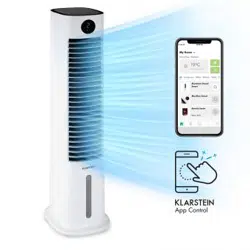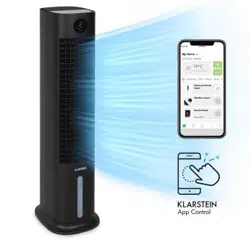
SKYTOWER
GRAND SMART
Luftkühler
Air Cooler
Enfriador de aire
Rafraîchisseur d’air
Rareddatore d’aria
www.klarstein.com
10035816 10035817

3
DE
Sehr geehrter Kunde,
wir gratulieren Ihnen zum Erwerb Ihres Gerätes. Lesen Sie
die folgenden Hinweise sorgfältig durch und befolgen Sie
diese, um möglichen Schäden vorzubeugen. Für Schäden,
die durch Missachtung der Hinweise und unsachgemäßen
Gebrauch entstehen, übernehmen wir keine Haftung. Scannen
Sie den folgenden QR-Code, um Zugriff auf die aktuellste
Bedienungsanleitung und weitere Informationen rund um das
Produkt zu erhalten.
INHALTSVERZEICHNIS
Sicherheitshinweise4
Geräteübersicht6
Zubehör7
Bedienfeld und Fernbedienung8
Displayanzeigen9
Inbetriebnahme und Bedienung10
Gerätesteuerung per Smartphone14
Schutzfunktionen15
Wassertank befüllen16
Reinigung und Pege17
Hinweise zur Entsorgung18
Konformitätserklärung18
TECHNISCHE DATEN
Artikelnummer 10035816, 10035817
Stromversorgung 220-240 V ~ 50 Hz
Leistung 80 W
Fassungsvermögen des Wassertanks 8 Liter
Luftvolumen 480 m
3
/h
Verdampfungsvolumen 1050 ml/h
Geräuschpegel ≤ 60 db
WiFi-Standard
802.11 b/g/n
WiFi-Frequenz
2,4 GHz
WiFi-Sendeleistung (max.)
20 dBm
English 17
Español 33
Français
Italiano

4
DE
SICHERHEITSHINWEISE
• Prüfen Sie vor der Benutzung die Spannungsangabe auf dem Typenschild.
Schließen Sie das Gerät nur an Steckdosen an, die der Spannung des Geräts
entsprechen.
• Halten Sie das Kabel fern von heißen Oberächen und scharfkantigen
Gegenständen.
• Verlegen Sie das Kabel nicht unter einem Teppich und decken Sie es auch nicht mit
anderen Gegenständen oder Stoffen ab. Verlegen Sie das Kabel so, dass keiner
darüber fällt oder daran hängen bleibt.
• Benutzen Sie das Gerät nicht, wenn das Netzkabel oder der Stecker beschädigt
sind.
• Falls das Netzkabel oder der Stecker beschädigt sind, müssen sie vom Hersteller,
einem autorisierten Fachbetrieb oder einer ähnlich qualizierten Person ersetzt
werden.
• Benutzen Sie das Gerät nur in Innenräumen.
• Decken Sie das Gerät nicht ab.
• Stellen Sie das Gerät auf einen ebenen, stabilen Untergrund. Achten Sie darauf,
dass das Gerät gerade steht.
• Versichern Sie sich, dass das Gerät ausgeschaltet ist, bevor Sie den Stecker in die
Steckdose stecken.
• Bedienen Sie das Gerät nicht mit nassen Händen und fassen Sie auch den Stecker
und das Kabel nicht mit nassen Händen an.
• Lassen Sie das Gerät während des Betriebs nicht unbeaufsichtigt. Schalten Sie es
aus und ziehen Sie den Stecker, wenn Sie es nicht benutzen.
• Ziehen Sie den Stecker aus der Steckdose, bevor Sie das Gerät reinigen oder
warten.
• Ziehen Sie den Stecker nicht am Kabel aus der Steckdose, sondern halten Sie ihn
beim Abziehen mit der Hand fest.
• Kinder ab 8 Jahren, psychisch, sensorisch und körperlich eingeschränkte Menschen
dürfen das Gerät nur benutzen, wenn sie vorher von einer für sie verantwortlichen
Aufsichtsperson ausführlich mit den Funktionen und den Sicherheitsvorkehrungen
vertraut gemacht wurden und die damit verbundenen Risiken verstehen.
• Benutzen Sie das Gerät nur so, wie in dieser Anleitung beschrieben.
• Stecken Sie nicht Ihre Finger oder Gegenstände in die Lüftungsöffnungen.
• Stellen Sie das Gerät nicht in die Nähe von Vorhängen, Gardinen, Tischdecken
oder ähnlichen Textilien. Sie könnten in den Lüfter gezogen werden und diesen
beschädigen.
• Benutzen Sie das Gerät nicht in Feuchträumen wie Badezimmern.
• Benutzen Sie das Gerät nicht, bevor die Räder montiert sind oder wenn es auf der
Seite liegt.
• Wickeln Sie das Kabel vor dem Gebrauch komplett ab.

5
DE
• Während des Betriebs befeuchtet das Gerät die Umgebungsluft. Vermeiden Sie
jedoch zu hohe Luftfeuchtigkeit. Wir empfehlen Ihnen eine Luftfeuchtigkeit zwischen
40-50%. Zu hohe Luftfeuchtigkeit kann zu Schimmel oder gesundheitlichen
Problemen führen.
• Stellen Sie das Gerät nur auf Untergründe, die unempndlich gegenüber Nässe
und hoher Luftfeuchtigkeit sind. Es kann immer mal vorkommen, dass beim Ein- und
Ausbau des Wassertanks ein paar Tropfen danebengehen. Sollte das der Fall sein,
wischen Sie die Wassertropfen umgehend weg.
• Wechseln Sie das Wasser im Tank spätestens nach 3 Tagen.
PRODUKTEIGENSCHAFTEN
• Luftbefeuchtung/Kühlung
• Timerfunktion: 1–9 Stunden (Timertoleranz im 3 %-Bereich).
• Fernbedienungsfunktion
• Wasserknappheitsschutz: mit Rohrleitung
• Ventilatorgeschwindigkeit: 3 Geschwindigkeitsstufen: Niedrig, Mittel und Hoch
• Windmodi: Normal, Natürlicher Wind und Schlaf-Wind
• WLAN-Funktion; App-Steuerung
• Negative Ionen-Funktion
• Horizontaler automatischer Wind
• Universelles Rollendesign (ohne Bremse), einfach zu bewegen
• Elektronische Tasten
• Einfach zu reinigender Wassertank mit Wasserpumpe
• Trockene Windfunktion und automatisches Dimmen der LED-Beleuchtung, wenn
innerhalb von einer Minute keine Taste gedrückt wird (33 % der ursprünglichen
Helligkeit)
• Sprühwasserzirkulationskältetechnik, mit großer Wasserzirkulation und schnellerer
Kühlung
6
DE
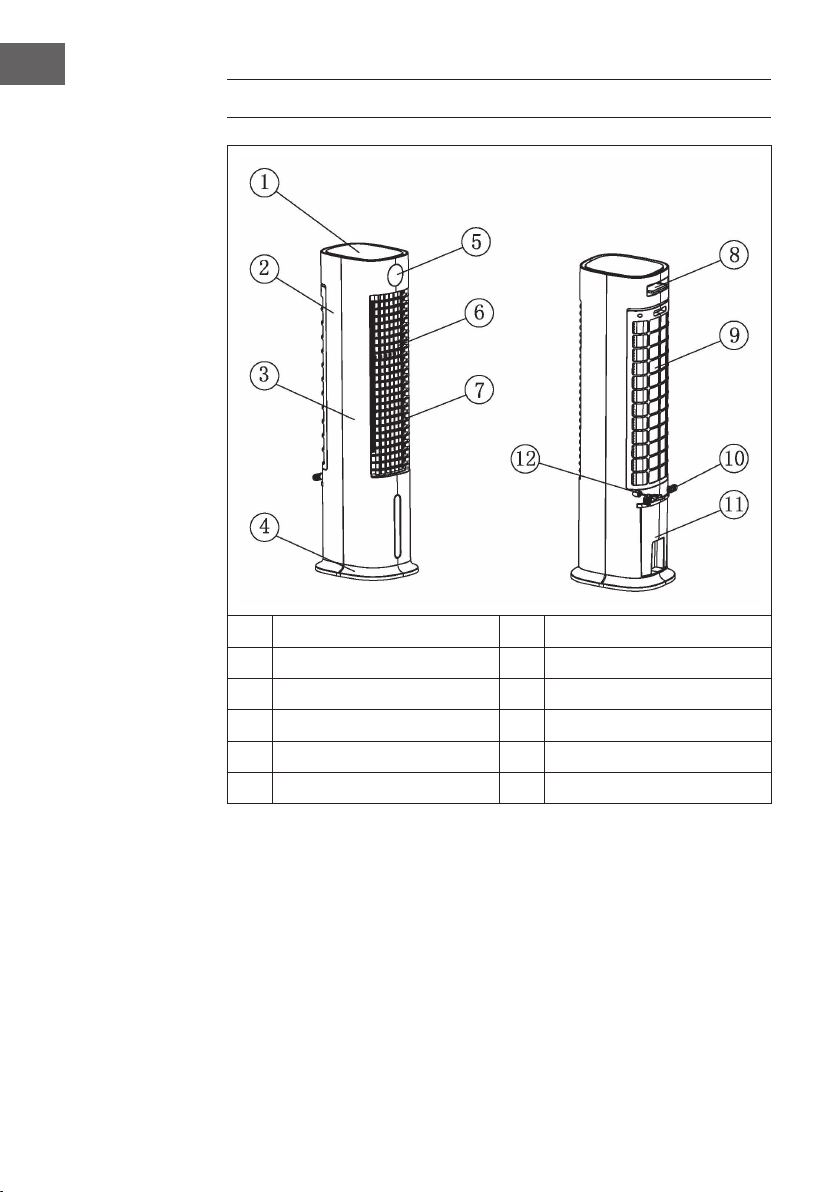
GERÄTEÜBERSICHT
1
Obere Abdeckung
7
Horizontale Lüftungsschlitze
2
Hinteres Gehäuse
8
Fernbedienung
3
Vorderes Gehäuse
9
Hintere Abdeckung
4
Gerätebasis
10
Kabelaufwicklung
5
Anzeigefenster
11
Wassertank
6
Vertikale Lüftungsschlitze
12
Netzkabel
Hinweis zur Benutzung des Wassertanks
Prinzipiell können Sie Ihren Luftkühler jederzeit ohne Wasser im Tank nutzen. Er
funktioniert dann wie ein ganz normaler Ventilator. Wasser im Tank wird nur für die
Kühl-Funktion benötigt. Der Luftkühler verdunstet dieses über das Vernebleries, dabei
wird der Luft Wärme entzogen und die Lufttemperatur des Ventilators, je nach Kälte des
verwendeten Wassers, um bis zu 3 °C verringert. Wir raten davon ab, die Kühlfunktion
an Tagen mit besonders hoher Luftfeuchtigkeit zu nutzen, da sie diese zusätzlich erhöht
und so zu Kreislaufbeschwerden beitragen kann.
7
DE
ZUBEHÖR
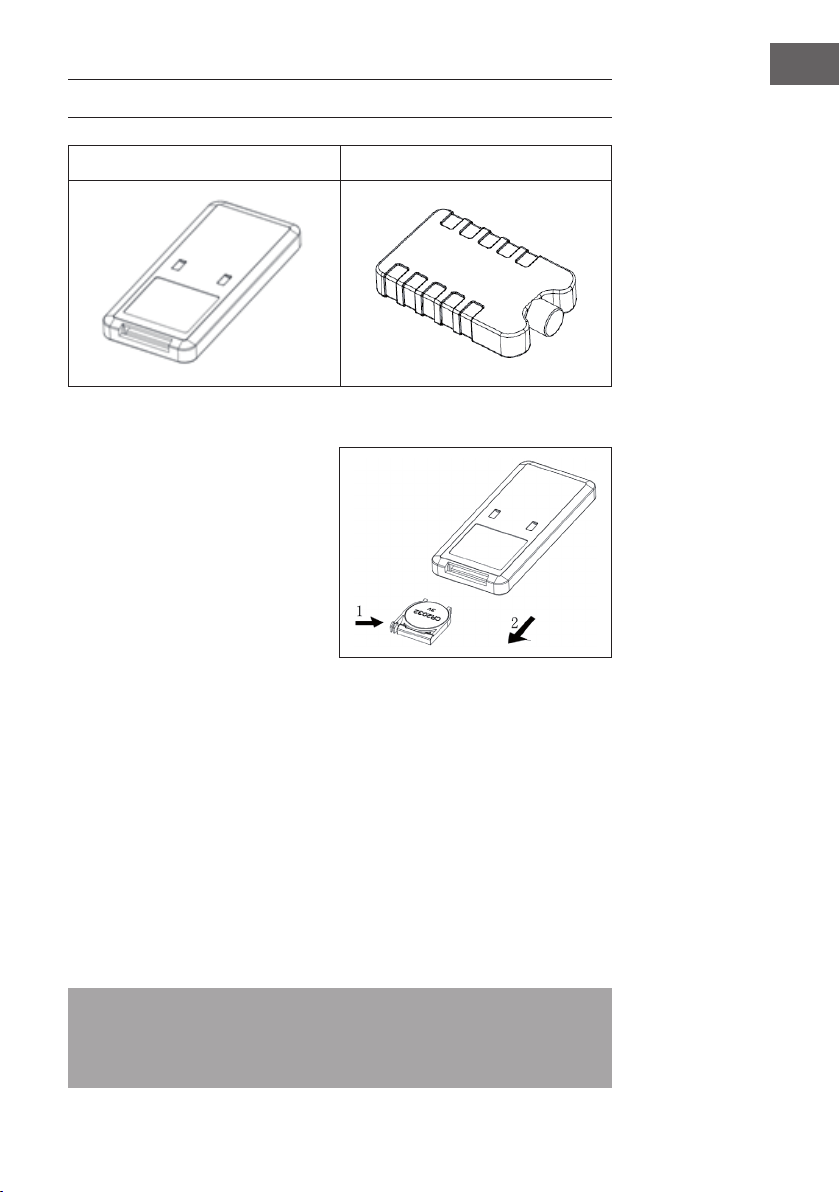
Fernbedienung Eisbehälter
Verwendung der Fernbedienung
1. Öffnen Sie das Batteriefach der
Fernbedienung und legen Sie eine
3 V CR2032 Batterie ein. Drücken
Sie zum Öffnen des Batteriefachs
die Abdeckung in Pfeilrichtung
(1) herunter und ziehen Sie das
Batteriefach in Pfeilrichtung (2)
heraus.
2. Richten Sie die Fernbedienung
während der Verwendung auf den
Receiver.
3. Ersetzen Sie leere Batterien. Achten Sie beim Einlegen der neuen Batterie auf die
richtige Polarität (+/-). Setzen Sie das Batteriefach anschließend wieder in die
Fernbedienung ein.
Verwendung des Eisbehälters
1. Legen Sie den Eisbehälter so lange in das Gefrierfach, bis dieser vollständig
gefroren ist.
2. Legen Sie den Eisbehälter in den Wassertank des Geräts. Innerhalb von 10min
nach dem Einlegen des Eisbehälters wird die Temperatur im Wassertank unter
Umgebungstemperatur gesenkt.
3. Im Lieferumfang sind zwei Eisbehälter enthalten. Verwenden Sie diese
abwechselnd.
4. Es ist verboten, die Abdeckung der Eisbehälter zu öffnen. Schlucken Sie niemals
den Inhalt der Eisbehälter.
Hinweis: Mit speziellen Kühlspeicher- und Isolierungseigenschaften kann der
Eisbehälter die Wärme im Wasser langsam absorbieren, um die Temperatur im
Wassertank stundenlang unter der Umgebungstemperatur zu halten. Dadurch wird
ein angenehmerer und kühlerer Wind durch den Ventilator der Klimaanlage erzeugt.
8
DE
BEDIENFELD UND FERNBEDIENUNG
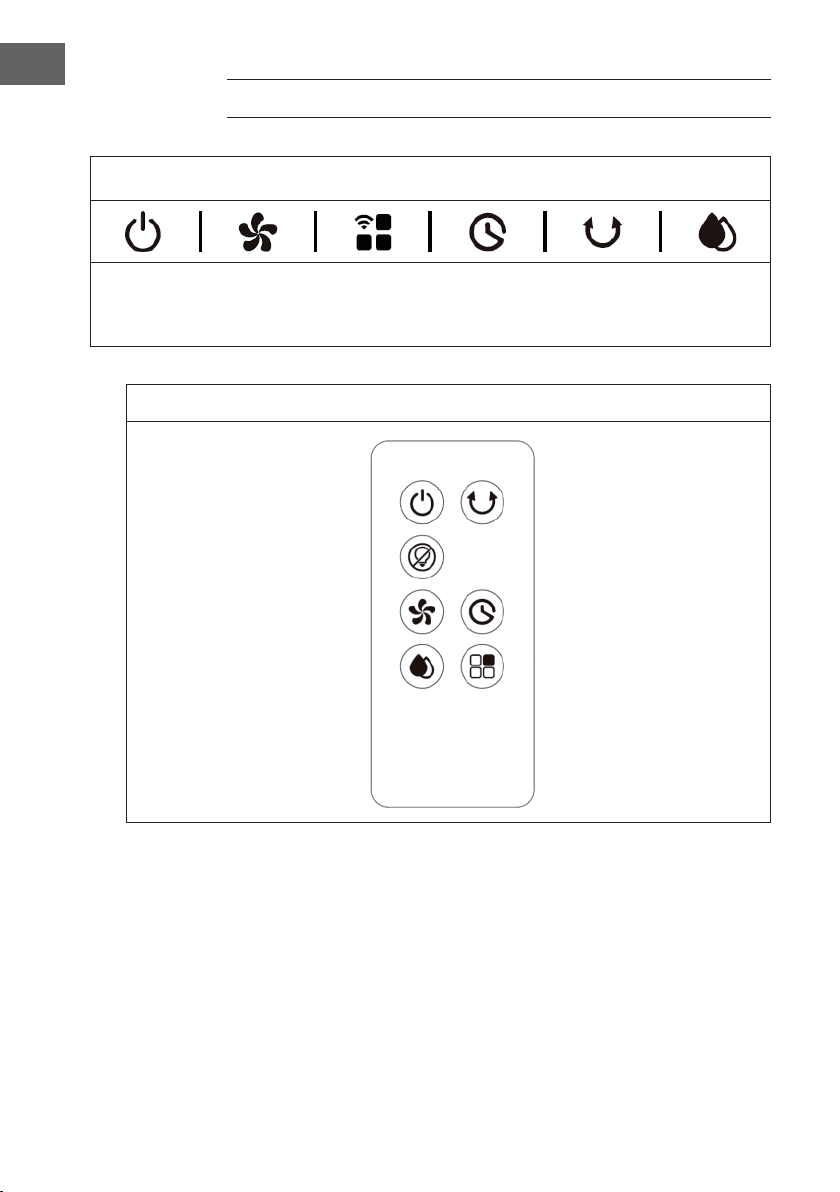
Bedienfeld (Tasten)
EIN/AUS
Wind-
geschwin -
digkeit
Windmodus/
WLAN
Timer
Schwing-
funktion
Kühl-/Luft-
befeuchtungs-
modus
Fernbedienung (Tasten)
EIN/AUS Schwingfunktion
Bildschirm Aus
Windgeschwindigkeit Timer
Kühl-/Luftbefeuchtungsmodus Windmodus
9
DE
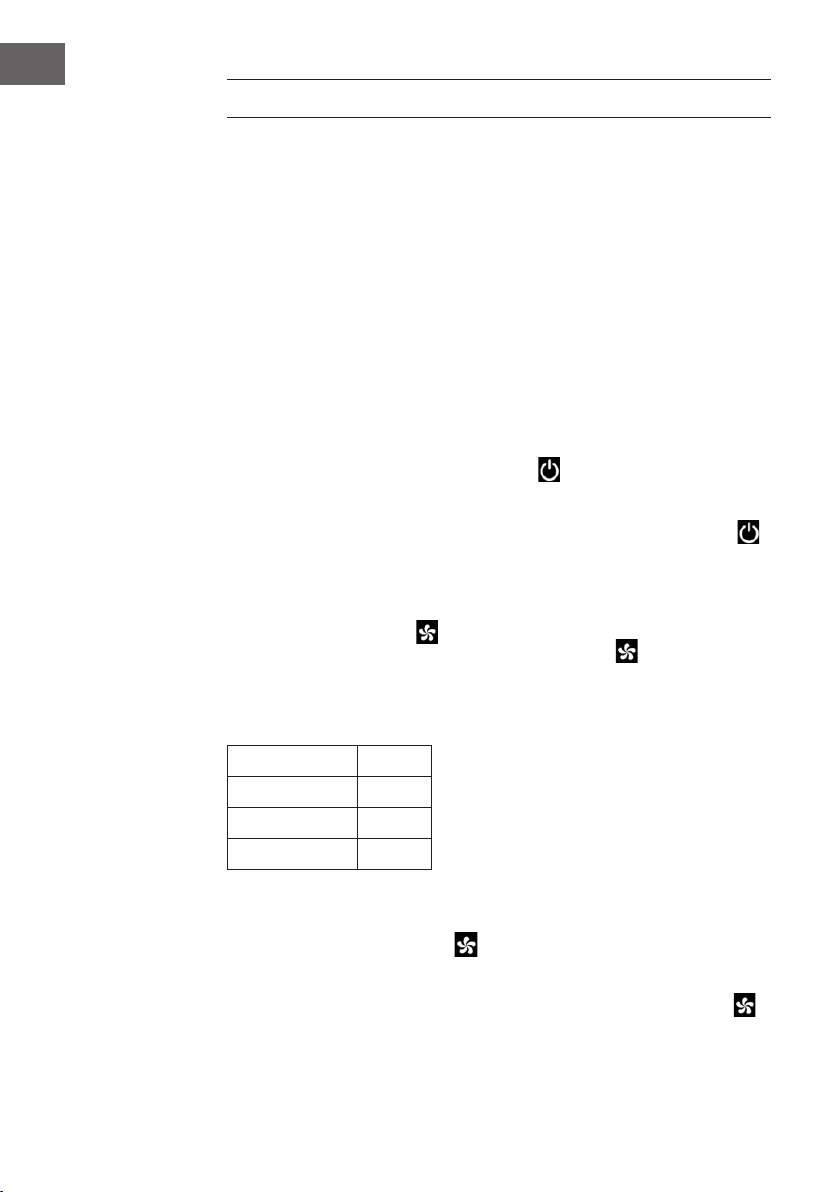
DISPLAYANZEIGEN
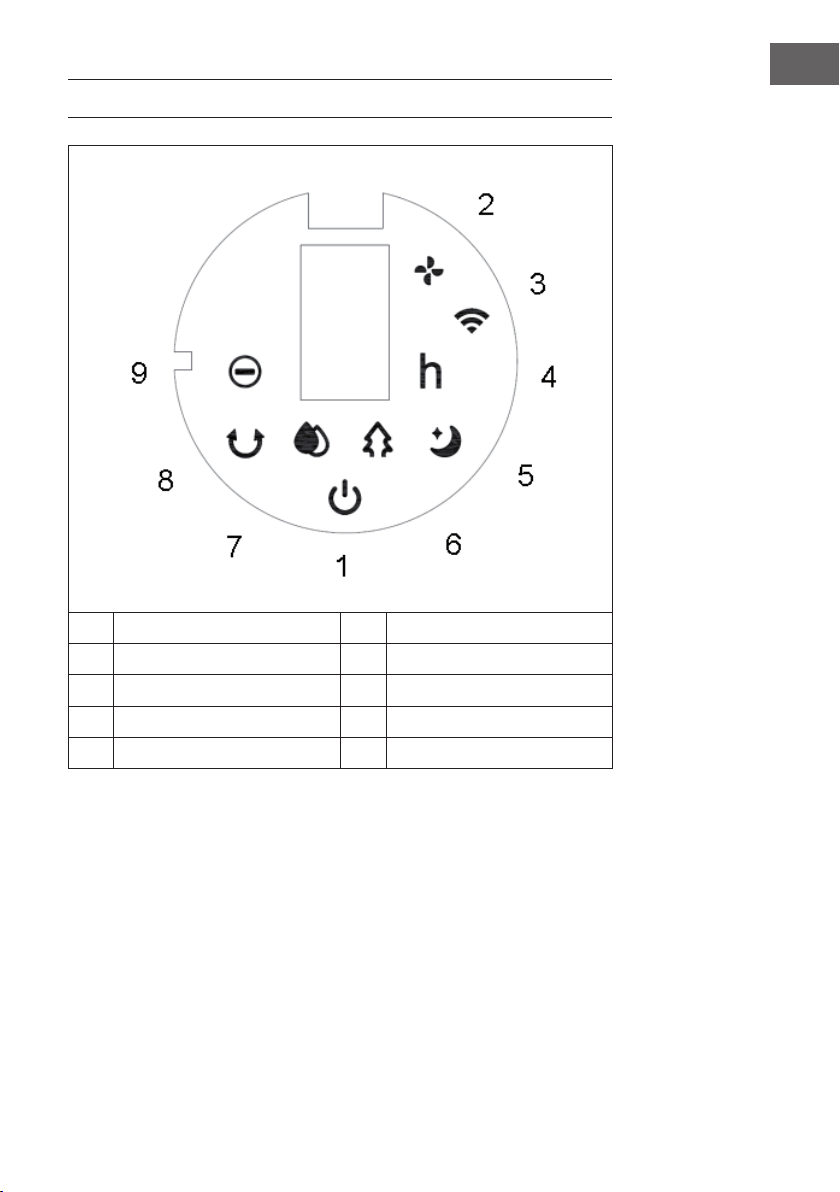
1 EIN/AUS 6 Natürlicher Windmodus
2 Windgeschwindigkeit 7 Kühl-/Luftbefeuchtungsmodus
3 WLAN-Funktion 8 Schwingfunktion
4 Timer 9 Negativ-Ionen-Funktion
5 Schlaf-Windmodus
10
DE
INBETRIEBNAHME UND BEDIENUNG
Vor der Verwendung
• Entnehmen Sie das Gerät aus der Verpackung und entfernen Sie alle
Verpackungsmaterialien.
• Stellen Sie das Gerät auf eine stabile und ebene Oberäche.
• Stecken Sie den Netzstecker in die Steckdose. Das Gerät kann dann direkt
verwendet werden und es ist keine Installation erforderlich.
Inbetriebnahme
Wenn der Netzstecker des Geräts zum ersten Mal in die Steckdose gesteckt wird, piept
das Gerät zweimal und wird in den Standby-Modus versetzt. Alle Leuchtanzeigen sind
aus.
Gerät ein-/ausschalten
Wenn Sie im Standby-Modus die EIN/AUS-Taste drücken, wird das Gerät
eingeschaltet. Wenn das Gerät zum ersten Mal eingeschaltet wird, leuchtet die
Geschwindigkeitsanzeige (2) auf. Die Anzeige für niedrige Geschwindigkeit leuchtet
auf und die Schwingfunktion ist deaktiviert. Drücken Sie erneut die EIN/AUS-Taste ,
um das Gerät in den Standby-Modus zu versetzen.
Geschwindigkeit einstellen
Mit der Geschwindigkeitstaste kann die Windgeschwindigkeit angepasst
werden. Durch mehrfaches Drücken der Geschwindigkeitstaste werden die
Geschwindigkeitsstufen in der nachfolgenden Reihenfolge durchlaufen:
Niedrig> Mittel > Hoch > Niedrig.
Auf dem Bildschirm werden die Geschwindigkeitsstufen in Zahlen angezeigt:
Geschwindigkeit Anzeige
Niedrig 1
Mittel 2
Hoch 3
Funktion „Trockener Wind“
Wenn Sie die Geschwindigkeitstaste
3 Sekunden lang gedrückt halten, wird
die Funktion „Trockener Wind“ gestartet. Die LED-Anzeige (2) leuchtet auf und
blinkt 20Minuten lang. Während der Verwendung dieser Funktion sind alle Tasten,
abgesehen von der EIN/AUS-Taste, inaktiv. Halten Sie die Geschwindigkeitstaste
drei Sekunden lang gedrückt, um die Funktion abzubrechen.
11
DE
Wenn die Funktion 20 Minuten lang aktiviert war, schaltet sich das Gerät automatisch
aus und geht in den Standby-Modus über.
Windmodus auswählen
Drücken Sie nach dem Einschalten des Geräts zur Einstellung des gewünschten Modus
mehrfach die Windmodus-Taste . Durch mehrfaches Drücken der Windmodus-Taste
werden die Modi in der nachfolgenden Reihenfolge durchlaufen:
Normaler Wind > Natürlicher Wind > Schlaf-Wind > Normaler Wind.
Es leuchtet jeweils die entsprechende Leuchtanzeige auf.
Normaler Wind:
Im normalen Windmodus läuft das Gerät ohne Veränderungen mit der eingestellten
Geschwindigkeitsstufe (Niedrig, Mittel oder Hoch).
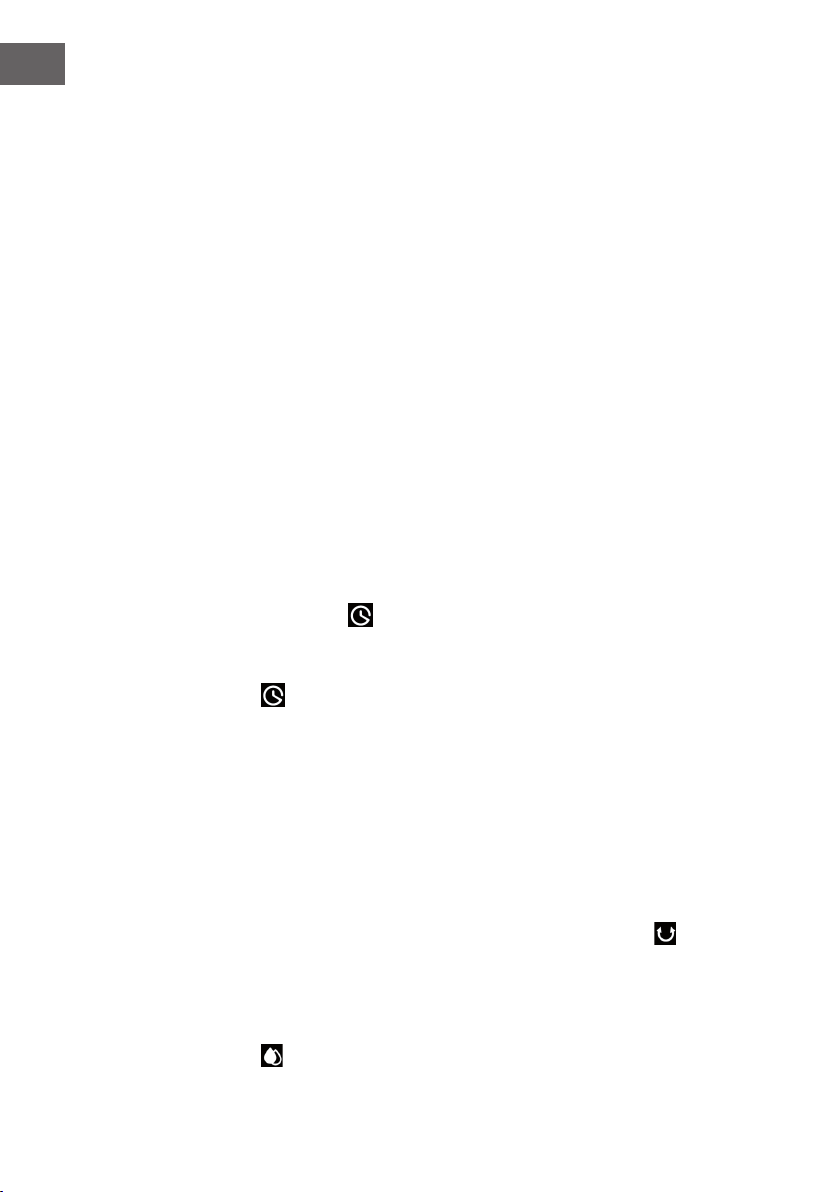
Natürlicher Wind:
Im natürlichen Windmodus leuchtet die entsprechende Anzeigeleuchte (6) auf. In
diesem Modus wird die sanfte Brise des natürlichen Windes imitiert, wodurch das
Luftvolumen als weicher und angenehmer empfunden wird. Der Bildschirm zeigt nur die
ursprüngliche Windgeschwindigkeit an, Änderungen werden nicht angezeigt.
Das Windschema dieses Modus ist in der nachfolgenden Abbildung dargestellt:
6S 6S 6S 3S 12S 12S 3S 6S 3S15S
6S
T=90S
6S 6S 6S 6S 6S 3S 12S
6S 6S 12S 6S6S 6S6S 6S 6S
3S 6S 6S12S 6S
3S 6S 3S
T=90S
T=90S
6S
6S 6S 6S
6S 6S 6S
Low
Medium
High
STRONG
MIDDLE
WEAK
Low
Medium
High
Low
Medium
High
Mittel
Hoch
Niedrig
Mittel
Hoch
MITTEL
STARK
Niedrig
Mittel
Hoch
Niedrig
SCHWACH
12
DE
Schlaf-Wind:
Wenn der Schlaf-Windmodus aktiviert wird, läuft das Gerät zunächst mit der zuvor
eingestellten Windgeschwindigkeit weiter. Nach 30 Minuten wird in Intervallen von
30Minuten reduziert. Dieser Modus soll verhindern, dass Personen, die einschlafen,
sich durch eine zu hohe Geschwindigkeitseinstellung des Geräts unwohl fühlen.
a) Wenn der Schlaf-Windmodus bei hoher Geschwindigkeit aktiviert wurde,
wechselt das Gerät nach 30 Minuten zur mittleren Geschwindigkeit. Die
entsprechende Anzeige leuchtet auf. Nach weiteren 30 Minuten Laufzeit bei
mittlerer Geschwindigkeit wechselt das Gerät zu niedriger Geschwindigkeit.
Die entsprechende Anzeige leuchtet auf. Das Gerät läuft dann mit niedriger
Geschwindigkeit weiter, bis der Timer abgelaufen ist oder das Gerät ausgeschaltet
wird.
b) Wenn der Schlaf-Windmodus bei mittlerer Geschwindigkeit aktiviert wurde,
wechselt das Gerät nach 30 Minuten zu niedriger Geschwindigkeit. Die
entsprechende Anzeige leuchtet auf. Das Gerät läuft dann mit niedriger
Geschwindigkeit weiter, bis der Timer abgelaufen ist oder das Gerät ausgeschaltet
wird.
c) Wenn der Schlaf-Windmodus bei niedriger Geschwindigkeit aktiviert wurde,
leuchtet die entsprechende Anzeige auf. Das Gerät läuft mit niedriger
Geschwindigkeit weiter, bis der Timer abgelaufen ist oder das Gerät ausgeschaltet
wird.
Timer einstellen
Mit der Timer-Taste kann die Zeit bis zum automatischen Ausschalten des Geräts
eingestellt werden. Sie können eine Zeit zwischen 0-9Stunden einstellen. Die
Timereinstellung lässt sich in Stundenschritten anpassen und wird auf dem Bildschirm
angezeigt (0= kein Timer). Drücken Sie, wenn das Gerät eingeschaltet ist, die Timer-
Taste . Die Timeranzeige (4) und die Zeitanzeige blinken auf dem Bildschirm auf.
Sie können nun die gewünschte Zeit bis zum automatischen Ausschalten einstellen.
Drücken Sie anschließend eine beliebige Taste (außer die EIN/AUS-Taste) oder
warten Sie 5Sekunden, um die Einstellung zu verlassen. Nachdem der Timer aktiviert
wurde, werden auf dem Bildschirm abwechselnd, in Intervallen von 10 Sekunden, die
verbleibende Zeit bis zum Ausschalten und die aktuell eingestellte Geschwindigkeit
angezeigt. Es leuchtet jeweils die entsprechende Anzeigeleuchte (2/4) auf. Sobald die
Zeit abgelaufen ist, schaltet sich das Gerät automatisch aus und geht in den Standby-
Modus über.
Schwingfunktion
Drücken Sie, während das Gerät eingeschaltet ist, die Schwing-Taste , um das
Schwingen von links nach rechts zu aktivieren.
Kühl-/Luftbefeuchtungsmodus
Drücken Sie, während das Gerät eingeschaltet ist, die Kühl-/Luftbefeuchtungsmodus-
Taste , um die Kühlfunktion zu aktivieren/deaktivieren. Die entsprechende Anzeige
leuchtet auf.
13
DE
Bildschirm und Anzeigen aus-/einschalten (Fernbedienung)
Wenn das Gerät eingeschaltet ist, können Sie die Bildschirm-Aus-Taste auf der
Fernbedienung drücken, um den Bildschirm und alle Anzeigeleuchten auszuschalten.
Wenn der Bildschirm aus ist und Sie die Bildschirm-Aus-Taste oder eine beliebige
andere Taste drücken, leuchten die Anzeigeleuchten wieder auf, aber die jeweilige
andere Tastenfunktion wird nicht ausgeführt. Drücken Sie erneut die gewünschte Taste,
um die entspechende Tastenfunktion auszuführen.
Negativ-Ionen-Funktion
Wenn Sie das Gerät einschalten, wird die Negative-Ionen-Funktion aktiviert und die
entsprechende LED-Anzeige (9) leuchtet auf. Beim Ausschalten des Geräts wird die
Negative-Ionen-Funktion deaktiviert.
WLAN-Funktion
Drücken Sie, wenn das Gerät eingeschaltet ist, fünf Sekunden lang die Windmodus/
WLAN-Taste . Ein Piepton ist zu hören und die WLAN-Anzeige (3) blinkt fünf
Sekunden lang schnell auf. Apps im Netzwerk können im Standardmodus konguriert
werden. Wenn innerhalb von 3 Minuten keine Verbindung hergestellt wird, erlischt
die WLAN-Anzeige (3). Drücken Sie zur erneuten Verbindungsherstellung erneut
die Windmodus/WLAN-Taste . Ein Piepton ist zu hören, das WLAN-Modul wird
zurückgesetzt, die WLAN-Anzeige (3) blinkt fünf Sekunden lang schnell auf. Apps im
Netzwerk können im Standardmodus konguriert werden. Halten Sie die Windmodus/
WLAN-Taste , sobald die WLAN-Anzeige (3) blinkt, erneut 5 Sekunden lang
gedrückt. Ein Piepton ist zu hören und die WLAN-Anzeige (3) blinkt 5 Sekunden lang
langsam auf. Apps im Netzwerk können nun im Kompatibilitätsmodus konguriert
werden.
Hinweise zur Verwendung der WLAN-Funktion
• Wenn das Gerät innerhalb von 10 Sekunden nach dem Einschalten wieder
ausgeschaltet wird, kehrt die WLAN-Anzeige (3) zu dem Status vor dem
Ausschalten zurück. Wenn das Gerät nach 10 Sekunden ausgeschaltet wird,
erlischt die WLAN-Anzeige (3) und wechselt in den Energiesparmodus. Halten Sie
die Einstelltaste zum Neustarten 5 Sekunden lang gedrückt.
• Wenn das Netzwerk nicht innerhalb von drei Minuten konguriert wird, geht die
WLAN-Anzeige (3) aus. Halten Sie die Einstelltaste zum Neustarten 5 Sekunden
lang gedrückt.
• Wenn der Router ausgeschaltet wird, nachdem die WLAN-Verbindung erfolgreich
hergestellt wurde, erlischt ebenfalls die WLAN-Anzeige (3). Sobald der
Router wieder eingeschaltet wird, wird die Verbindung zum Gerät automatisch
wiederhergestellt.
• Bei der Verwendung der WLAN-Funktion, muss die WLAN-Anzeige (3) schnell
blinken. Ein Router (muss mit externen Netzwerken verbunden werden können) und
ein mobiles Endgerät (z.B. Smartphone) sind zur Verwendung der Klarstein-App
erforderlich. Die Klarstein-App muss auf dem mobilen Endgerät, das ebenfalls mit
dem WLAN-Netzwerk verbunden ist, installiert werden.
14
DE
GERÄTESTEUERUNG PER SMARTPHONE
Wenn Sie Ihr Klarstein-Gerät in Ihr heimisches WLAN einbinden, können Sie es ganz
bequem über die dazugehörige Klarstein-App bedienen. Die App ermöglicht es Ihnen,
nicht nur das Gerät über Ihr Smartphone fernzusteuern, sondern bietet Ihnen zudem
Zugang zu Rezepten und weiterführenden Informationen.
Gehen Sie folgendermaßen vor, um Ihr Smartphone mit Ihrem Klarstein-Gerät zu
verbinden:
1. Laden Sie zuerst die Klarstein-App herunter, indem Sie mit Ihrem Smartphone den
QR-Code scannen (siehe unten) oder laden Sie diese direkt aus dem App Store
oder bei Google Play herunter.
2. Versichern Sie sich, dass Ihr Smartphone mit demselben WLAN-Netzwerk
verbunden ist, mit dem Ihr Klarstein-Gerät verbunden werden soll.
3. Öffnen Sie die Klarstein-App.
4. Melden Sie sich mit Ihrem Konto an. Wenn Sie noch keinen Account haben,
registrieren Sie sich in der Klarstein-App.
5. Folgen Sie den Anweisungen der App.
App-Download
Verwenden Sie die Scan-Funktion Ihres Handys, um den QR-Code zu scannen, und
speichern Sie die App auf Ihrem Smartphone.
Hinweis: Weitere Hinweise zur Bedienung der App und Hilfestellungen zur
Herstellung der Verbindung mit Ihrem Gerät liefert Ihnen die App, sobald Sie sie das
erste Mal öffnen.
iOS Android
15
DE
Fehlerbehebung bei Verbindungsproblemen
Wenn Ihr Klarstein-Gerät im WLAN nicht gefunden werden kann, überprüfen Sie
Folgendes:
• Ist das Gerät eingesteckt?
• Ist die WLAN-Funktion des Smartphones aktiviert?
• Ist die WLAN-Funktion des Klarstein-Gerätes aktiviert? (Befolgen Sie die
Anweisungen in der App.)
• Ist das WLAN-Passwort korrekt eingegeben worden?
• Benden sich Router, Klarstein-Gerät und Smartphone während des
Kopplungsversuches in unmittelbarer Nähe? (Idealerweise nicht mehr als 5 m
voneinander entfernt.)
• Falls Sie in den Einstellungen ihres WLAN-Routers das 2,4-GHz-Band deaktiviert
haben, aktivieren Sie dieses in Ihren Routereinstellungen.
Hinweis: Für weitere Hilfestellungen folgen Sie den Anweisungen der App beim
Verbindungsaufbau.
SCHUTZFUNKTIONEN
Wassermangel-Schutzschalter
Wenn die Wasserpumpe 45 Sekunden läuft und die Software erkennt, dass der
Wasserniveauschalter 5 aufeinanderfolgende Sekunden (insgesamt 50) keine
Verbindung hat (zu wenig Wasser), stellt die Wasserpumpe automatisch den Betrieb ein
und das Gerät piept 10 Mal auf.
Wasserstandserkennung
Halten Sie innerhalb von 10 Sekunden nach dem Einschalten die Kühl-/Luft befeuch-
tungs modus-Taste gedrückt, nachdem der Piepton zu hören war. Der Wasserstand
wird dann innerhalb von 3 Sekunden ermittelt. Wenn sich kein Wasser im Wassertank
bendet, wird die Kühlfunktion deaktiviert und das Gerät piept 10 Mal auf. Die
Wasserstandserkennung wird nach dem Drücken der EIN/AUS-Taste oder bei
einem Stromausfall deaktiviert.
Speicherfunktion
1. Wenn das Gerät nicht vom Strom getrennt wird, läuft das Gerät beim erneuten
Einschalten in dem Modus weiter, der vor dem Ausschalten eingestellt war. Die
Modi „Schlaf-Wind“, „Trockener Wind“ und Timer werden nicht gespeichert.
2. Wenn das Gerät nicht vom Strom getrennt wird, läuft es bei erneutem Einschalten
zunächst 3 Sekunden lang bei mittlerer Geschwindigkeit und wechselt dann zur vor
dem Ausschalten eingestellten Geschwindigkeit.
16
DE
WASSERTANK BEFÜLLEN
Füllen Sie bei Verwendung der Kühl- und Luftbefeuchtungsfunktion Wasser in den
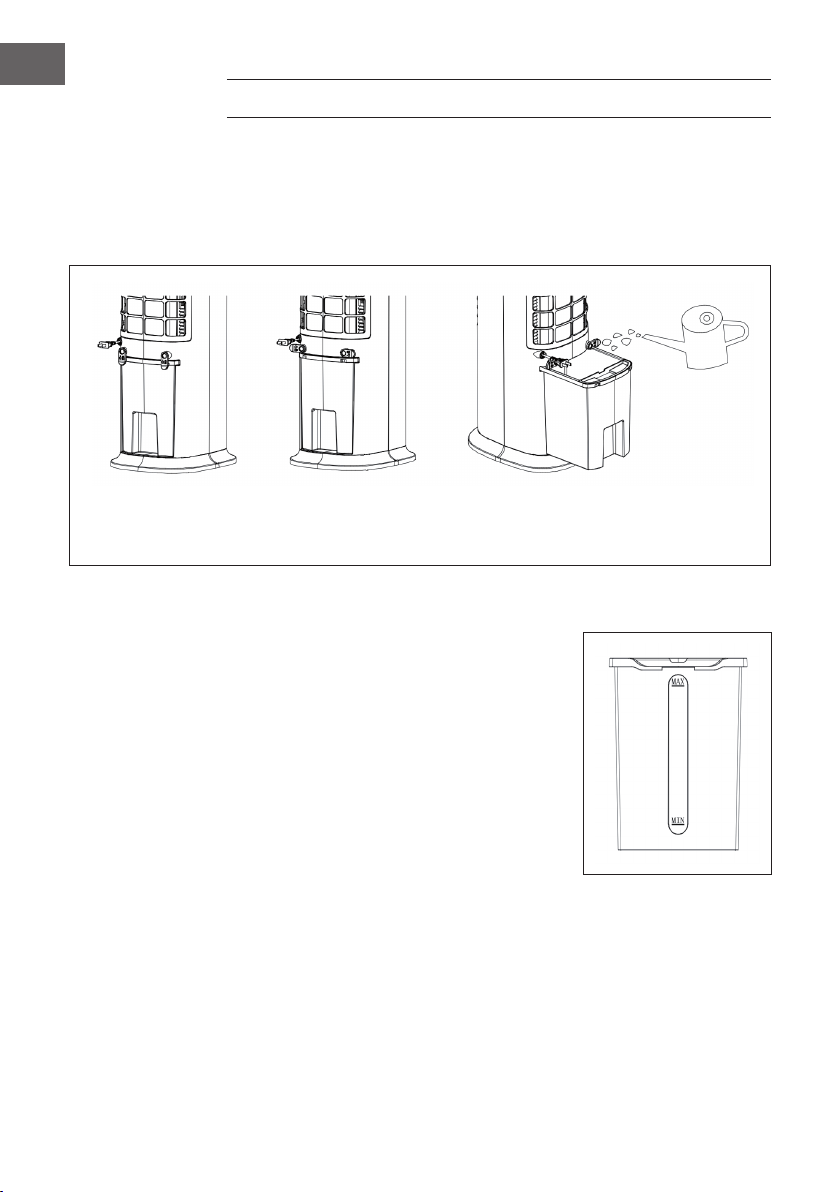
Wassertank. Drehen Sie vor dem Befüllen die Kabelaufwicklung um 90 Grad. Ziehen
Sie den Wassertank zur Hälfte heraus. Schütten Sie das Wasser langsam in den
Wassertank. Schieben Sie den Wassertank nach dem Befüllen wieder in das Gerät
hinein. Bringen Sie die Kabelaufwicklung wieder in die ursprüngliche Position.
Wassertank sicherung
ist geschlossen
Wassertank sicherung
ist geöffnet
Wassertank herausziehen,
um Wasser einzufüllen.
Achten Sie beim Einfüllen von Wasser in den Wassertank auf die Wasserstandsanzeige:
1. Achten Sie beim manuellen Befüllen darauf,
dass sich der Wasserstand oberhalb
der Minimalanzeige und unterhalb der
Maximalanzeige bendet.
2. Verwenden Sie ausschließlich sauberes
Trinkwasser.
3. Wenn das Gerät zum ersten Mal verwendet
wird kann ein leichter Geruch auftreten und das
Wasser im Wassertank kann leicht verfärbt sein.
Dies ist normal und ungefährlich und hat keinen
Einuss auf Ihre Gesundheit.
17
DE
REINIGUNG UND PFLEGE
Reinigung
• Schalten Sie das Gerät vor der Reinigung aus und ziehen Sie den Netzstecker aus
der Steckdose.
• Verwenden Sie zur Reinigung des Geräts keine Chemikalien, Benzin,
Verdünnungsmittel oder andere Substanzen, durch welche die Geräteoberäche
beschädigt werden könnte.
• Entfernen Sie Staub mit einem weichen Tuch. Verwenden Sie bei hartnäckigen
Flecken etwas Wasser (unter 50 °C) und ein neutrales Reinigungsmittel. Reiben Sie
die Geräteoberäche anschließend mit einem weichen Tuch trocken.
Reinigung des Wassertanks
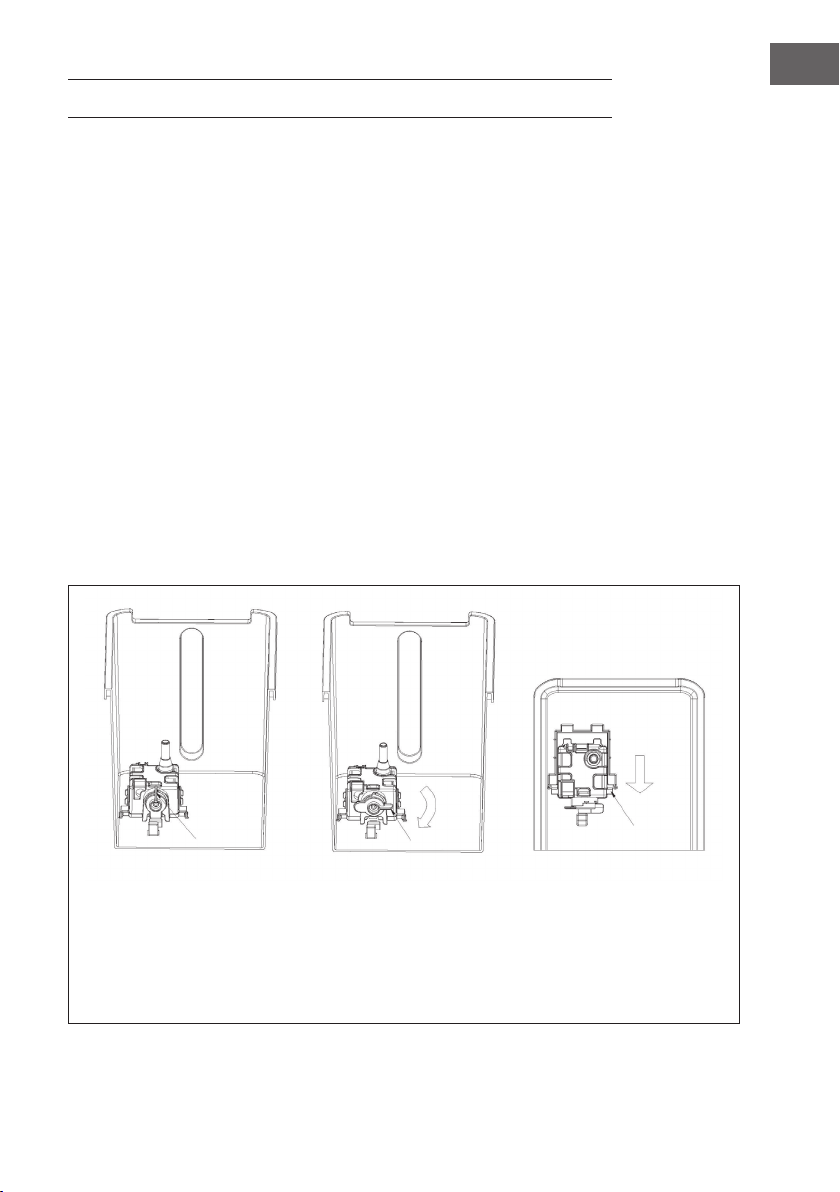
• Ziehen Sie den Netzstecker aus der Steckdose. Drehen Sie die Kabelaufwicklung in
horizontale Position und ziehen Sie den Wassertank bis zur Hälfte heraus.
• Gehen Sie mit Ihrer Hand in den Wassertank hinein und drehen Sie die Fixierung
um 90°. Drücken Sie anschließend das Wasserpumpengehäuse nach unten und
nehmen Sie den Wassertank heraus.
• Entfernen Sie Kalkrückstände im Wassertank mit einem in neutrales Reinigungsmittel
getauchten, feuchten Tuch. Spülen Sie den Wassertank anschließend mit klarem
Wasser aus.
Fixierung geschlossen Fixierung geöffnet Herunterdrücken und das
Wasserpumpen gehäuse
herausausnehmen, wenn
zwei Spitzen zu sehen sind.
Entnehmen Sie anschließend
den Wassertank.

18
DE
HINWEISE ZUR ENTSORGUNG
Wenn es in Ihrem Land eine gesetzliche Regelung zur
Entsorgung von elektrischen und elektronischen Geräten
gibt, weist dieses Symbol auf dem Produkt oder auf der
Verpackung darauf hin, dass dieses Produkt nicht im
Hausmüll entsorgt werden darf. Stattdessen muss es zu
einer Sammelstelle für das Recycling von elektrischen
und elektronischen Geräten gebracht werden. Durch
regelkonforme Entsorgung schützen Sie die Umwelt und die
Gesundheit Ihrer Mitmenschen vor negativen Konsequenzen.
Informationen zum Recycling und zur Entsorgung dieses
Produkts, erhalten Sie von Ihrer örtlichen Verwaltung oder
Ihrem Hausmüllentsorgungsdienst.
Dieses Produkt enthält Batterien. Wenn es in Ihrem Land
eine gesetzliche Regelung zur Entsorgung von Batterien
gibt, dürfen die Batterien nicht im Hausmüll entsorgt werden.
Informieren Sie sich über die örtlichen Bestimmungen zur
Entsorgung von Batterien. Durch regelkonforme Entsorgung
schützen Sie die Umwelt und die Gesundheit Ihrer
Mitmenschen vor negativen Konsequenzen.
KONFORMITÄTSERKLÄRUNG
Hersteller:
Chal-Tec GmbH, Wallstraße 16, 10179 Berlin, Deutschland.
Importeur für Großbritannien:
Chal-Tec UK limited
Unit 6 Riverside Business Centre
Brighton Road
Shoreham-by-Sea
BN43 6RE
United Kingdom
Die vollständige Konformitätserklärung des Herstellers nden
Sie unter folgendem Link: use.berlin/10035816
19
EN
Dear Customer,
Congratulations on purchasing this device. Please read the
following instructions carefully and follow them to prevent
possible damages. We assume no liability for damage caused
by disregard of the instructions and improper use. Scan the QR
code to get access to the latest user manual and more product
information.
CONTENT
Safety Instructions20
Description22
Accessories23
Control Panel and Remote Control24
Display Indicators25
Commissioning and Operation26
Device Control by Smartphone30
Protective Functions31
Filling the Water Tank32
Cleaning and Care33
Hints on Disposal34
Declaration of Conformity34
TECHNICAL DATA
Item number 10035816, 10035817
Power supply 220-240 V ~ 50 Hz
Power 80 W
Water tank capacity 8 litres
Air volume 480 m
3
/h
Evaporation volume 1050 ml/h
Noise level ≤ 60 db
WiFi standard
802.11 b/g/n
WiFi frequency
2,4 GHz
WiFi radio-frequency power (max.)
20 dBm

20
EN
SAFETY INSTRUCTIONS
• Check the voltage on the rating plate before use. Only connect the appliance to
sockets which correspond to the voltage of the appliance.
• Keep the appliance and cable away from sources of heat, sharp objects or
anything that may cause damage.
• Do not place the cord under carpets. Do not cover the cord with small clothes,
shirts or other similar elements. Place the cord away from trafc areas in order to
avoid any risk of tripping over.
• Do not operate the appliance if the cable or plug is damaged.
• If the supply cord or plug is damaged, it must be replaced by the manufacturer,
its service agent or similarly qualied persons in order to avoid a hazard.
• Indoor use only.
• Do not cover the machine during using.
• Place the appliance on a stable at horizontal surface. Make sure the appliance
is in an upright position during use.
• Ensure the appliance is switched OFF before connecting to the mains power
supply.
• Always ensure that hands are dry before operating or adjusting any switch on
the product or touching the plug and mains supply connections.
• Do not leave this appliance unattended when it’s in use. Turn off and disconnect
the appliance when you leave the room for an extended period.
• Switch off the appliance and unplug from the mains socket when not in use,
before lling, cleaning or other maintain.
• To disconnect the appliance, switch it “OFF”, and then remove the plug from
outlet. Do not pull the cord to disconnect the plug.
• This device may be only used by children 8 years old or older and persons with
limited physical, sensory and mental capabilities and / or lack of experience
and knowledge, provided that they have been instructed in use of the device by
a responsible person who understands the associated risks.
• Use the appliance only as described in this manual.
• Do not insert your ngers in the openings of the guard.
• Do not leave hair, tissue, tablecloths, clothes or curtains near all openings of the
fan, they could be sucked into the fan and be taken within the internal moving
parts that could cause injury or damage.
• Do not use the appliance in wet or damp locations such as bathrooms.
• Do not operate the appliance when it’s not mounted on its wheels or if it’s lying
on the side.
• Make sure the cord is completely extended before use.

21
EN
• When in operation, evaporative coolers moisturize the ambient air. Over-
humidication of residential rooms should be avoided. Recommendation: 40-50%
relative humidity. Excessive humidity of the air can damage the home and cause
health problems.
• The appliance may only be set up on water- and moisture-proof ooring materials
(spilling some drops of water is unavoidable when the content of the tank is
changed).
• With each and every change of tank content, completely remove residual water
from the equipment. To prevent nucleation, remove residual water from the
equipment and water tank every time after three days of use.
FEATURES
• Humidication/Cooling
• Timer function: 1-9 hours (tolerance within 3%)
• Remote control function
• Water shortage protection function: with reed pipe
• Fan speeds: low, medium and high
• Wind modes: normal, natural and sleep
• WIFI function; App control
• Negative ion function
• Horizontal automatic wind
• Universal wheel design (without brake), easy to move around
• Electronic button control
• Easy to clean water tank with water pump
• Dry wind function and automatic dimming of LED lighting if no button is pressed
within one minute (33% of original brightness)
• Spray water circulation refrigeration technology, with large water circulation and
faster cooling
22
EN
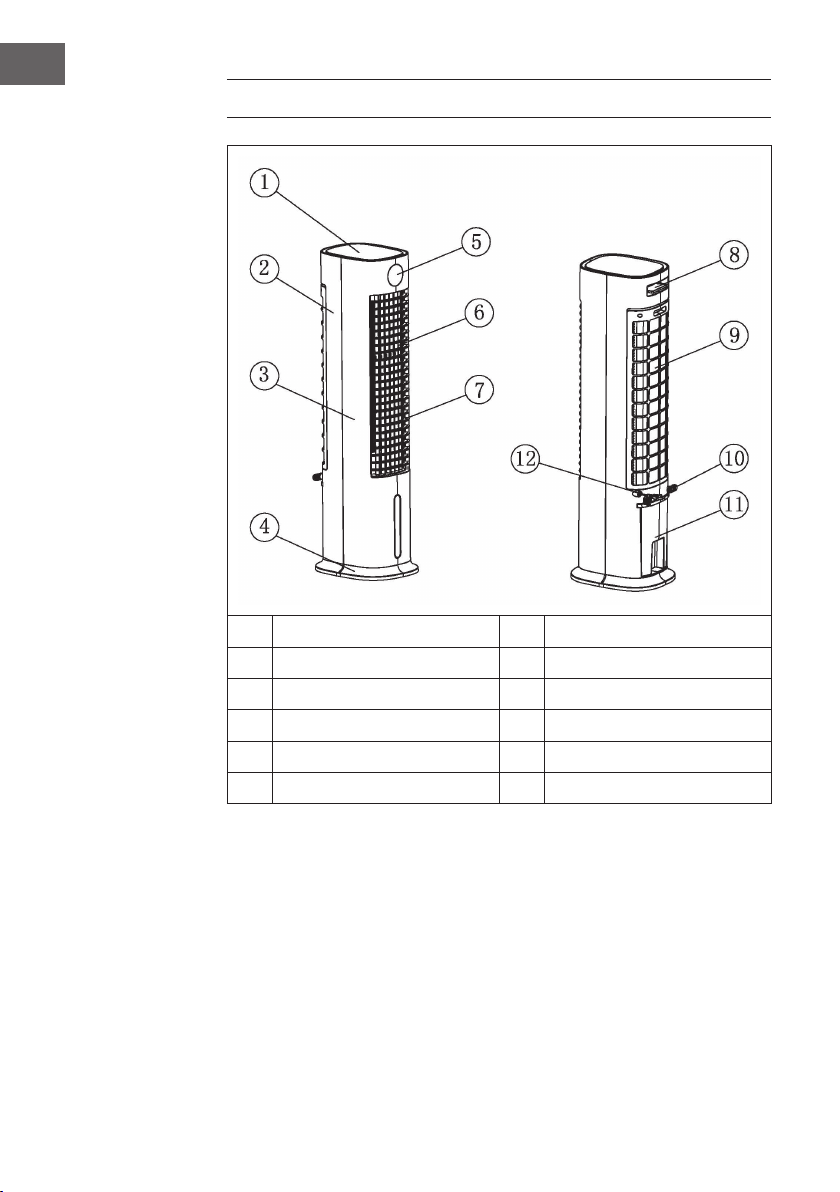
DESCRIPTION
1
Top cover
7
Horizontal blade
2
Rear case
8
Remote control
3
Front case
9
Rear cover
4
Base
10
Winding frame
5
Display window
11
Water tank
6
Vertical blade
12
Power cord
Note on using the water tank
In principle, you can use your air cooler at any time without water in the tank. It will then
work like a normal fan. Water in the tank is only needed for the cooling function. The
air cooler evaporates this through the nebulizer ow, removing heat from the air and
reducing the air temperature of the fan by up to 3 °C, depending on the coldness of the
water used. We advise against using the cooling function on days with particularly high
humidity, as it increases this further and can thus contribute to circulatory problems.
23
EN
ACCESSORIES
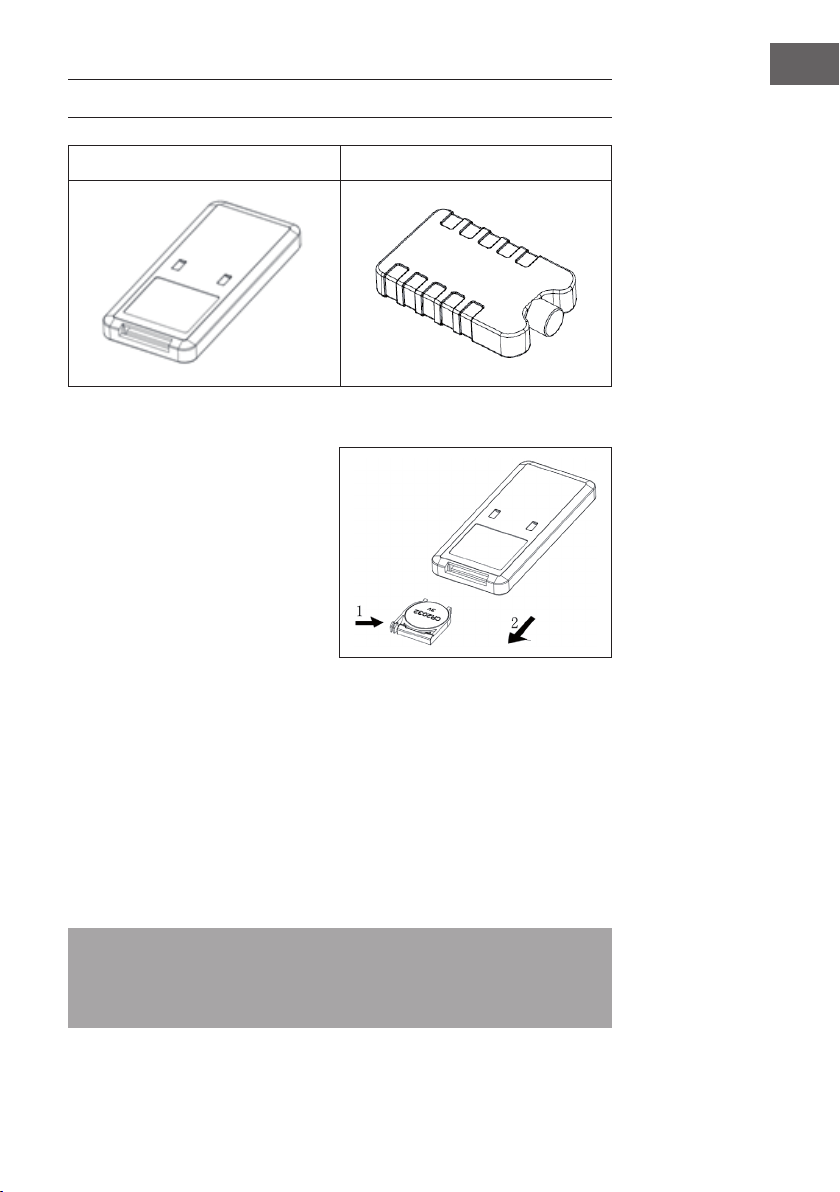
Remote control Ice box
Use of the remote control
1. Open battery cover in the rear of
remote control and install a
3VCR2032 battery for use.
To open the battery compartment,
press down the cover in the direction
of the arrow (1) and pull out the
battery compartment in the direction
of the arrow (2).
2. Point the remote control at the
receiver during use.
3. Replace at batteries. When
inserting the new battery, make sure that the polarity (+/-) is correct. Then put the
battery compartment back into the remote control.
Use of the ice box
1. Place the ice box in the freezer compartment until it is completely frozen.
2. Place the ice box in the water tank of the appliance. Within 10 min after placing
the ice container, the temperature in the water tank is reduced below ambient
temperature.
3. Two ice boxes are included in the delivery. Use them alternately.
4. It is forbidden to open the cover of the ice boxes. Never swallow the contents of the
ice boxes.
Note: With specic cold storage and insulation features, the ice box can slowly
absorb the heat in the water to keep temperature in the water tank lower than
ambient temperature for hours all the time, thus producing more nice and cool wind
by the air conditioner fan.
24
EN
CONTROL PANEL AND REMOTE CONTROL
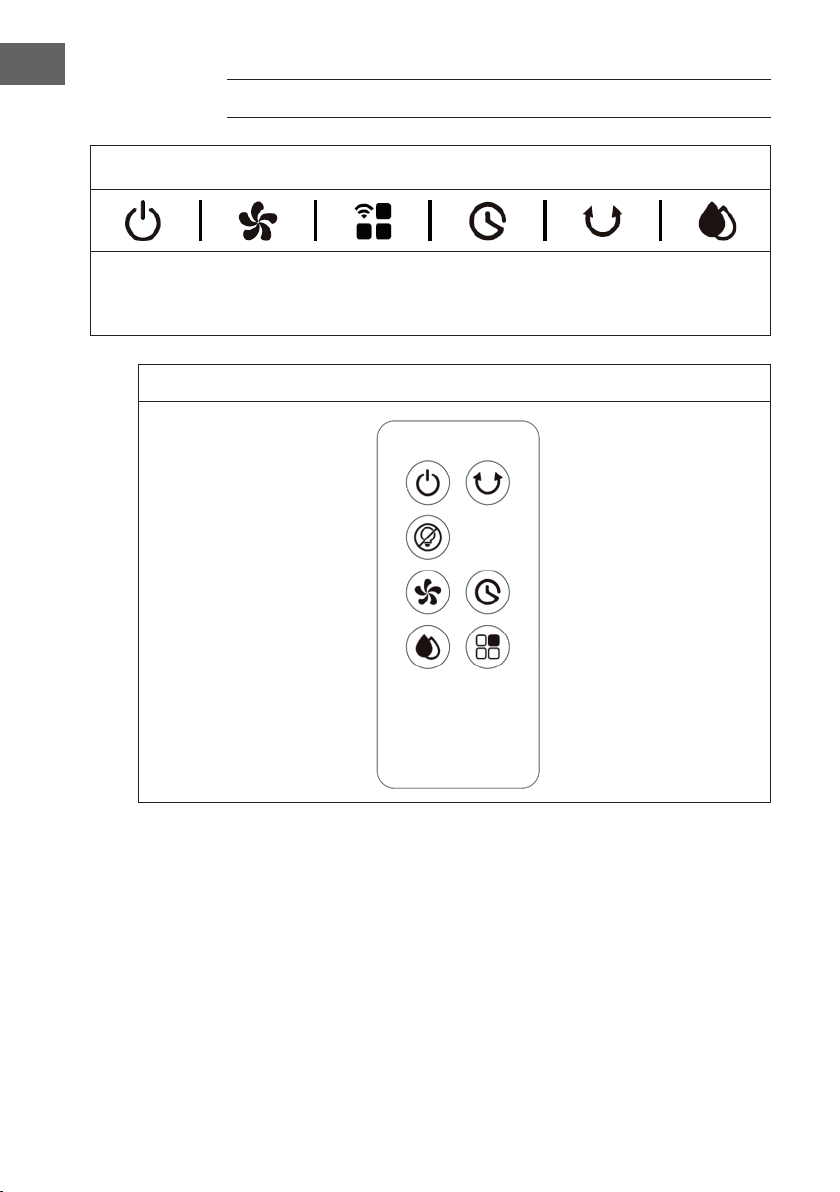
Control panel (buttons)
POWER
(ON/OFF)
Wind speed
Wind mode/
WIFI
Timer
Swing
function
Cooling/
humidication
mode
Remote control (buttons)
POWER (ON/OFF) Swing function
Screen off
Wind speed Timer
Cooling/humidication mode Wind mode
25
EN
DISPLAY INDICATORS
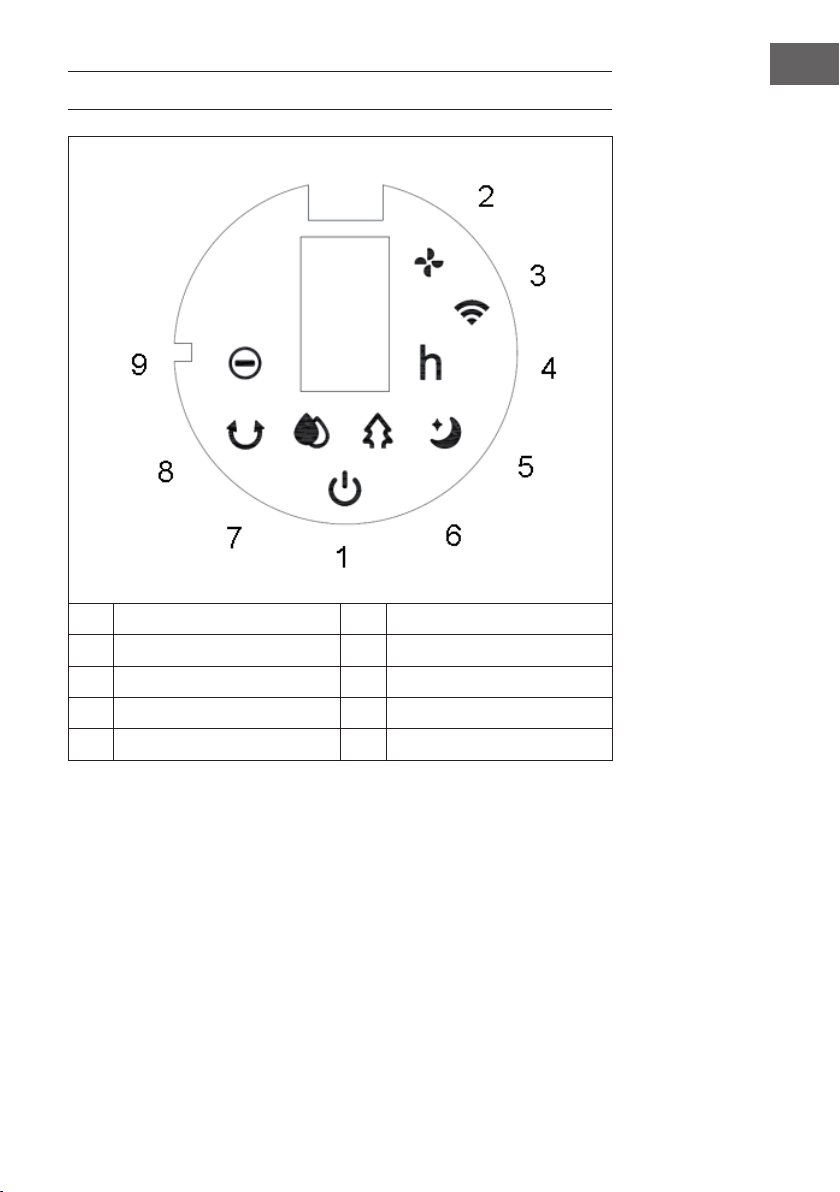
1 POWER 6 Natural wind mode
2 Wind speed 7 Cooling/humidication mode
3 WIFI function 8 Swing function
4 Timer 9 Negative ion function
5 Sleep wind mode
26
EN
COMMISSIONING AND OPERATION
Before use
• Remove the appliance from its packaging and remove all packaging materials.
• Place the appliance on a stable and level surface.
• Insert the mains plug into the socket. The appliance can then be used directly and
no installation is required.
Commissioning
When the appliance‘s mains plug is plugged into the socket for the rst time, the
appliance beeps twice and goes into standby mode. All indicator lights are off.
Switching appliance on/off
When you press the POWER button in standby mode, the appliance is switched on.
When the appliance is switched on for the rst time, the speed indicator (2) lights up.
The low speed indicator lights up and the swing function is disabled. Press the POWER
button again to put the appliance in standby mode.
Setting the speed
The speed button can be used to adjust the wind speed. Pressing the speed button
several times cycles through the speed levels in the following order:
Low > Medium > High > Low.
The speed levels are displayed in numbers on the screen:
Speed Display
Low 1
Medium 2
High 3
“Dry wind“ function
If you press and hold the speed button
for 3 seconds, the “dry wind” function is
started. The LED indicator (2) lights up and ashes for 20 minutes. While using this
function, all buttons except the POWER button are inactive. Press and hold the speed
button for three seconds to cancel the function.
When the function has been activated for 20 minutes, the appliance automatically
switches off and goes into standby mode.
27
EN
Selecting wind mode
After switching on the appliance, press the wind mode button several times to set
the desired mode. Pressing the wind mode button several times cycles through the
modes in the following order:
Normal wind > Natural wind > Sleep wind > Normal wind.
The corresponding indicator lights up.
Normal wind:
In normal wind mode, the appliance runs at the set speed level (Low, Medium or High)
without any changes.
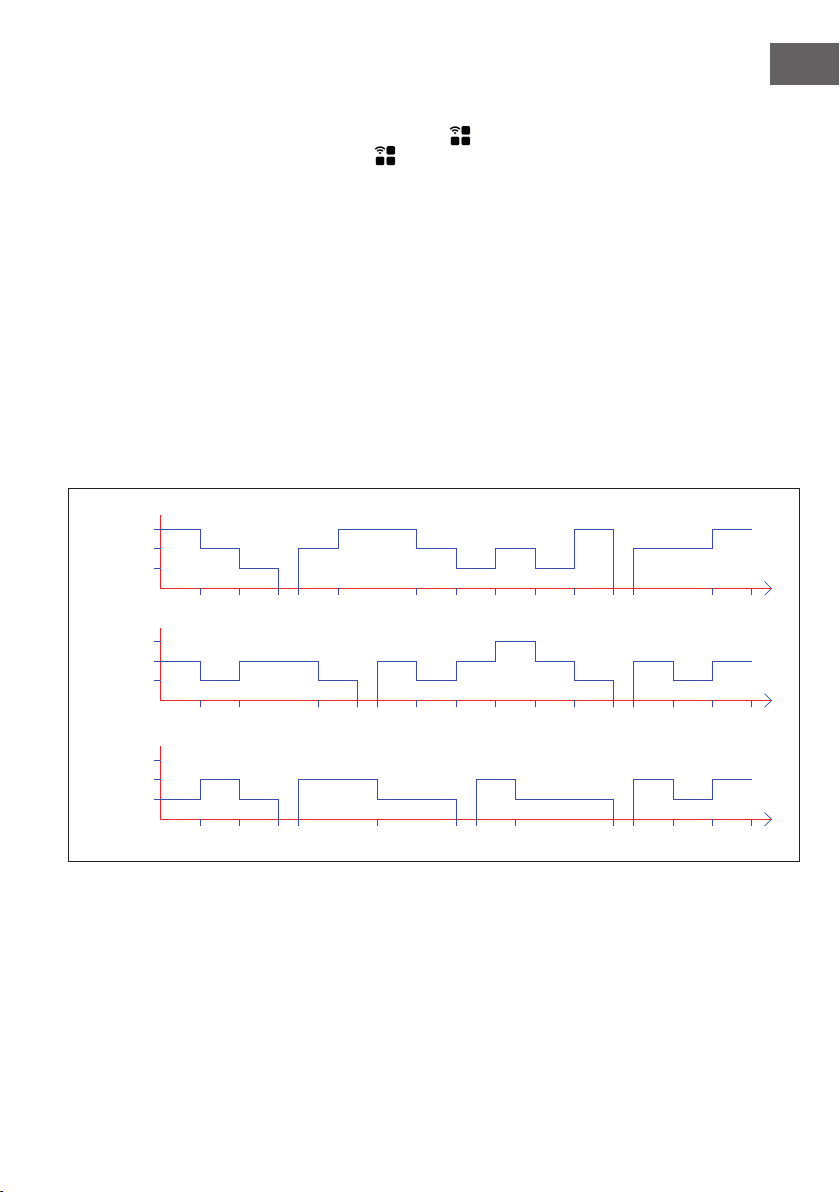
Natural wind:
In natural wind mode, the corresponding indicator (6) lights up. In this mode, the gentle
breeze of the natural wind is imitated, making the air volume feel softer and more
pleasant. The screen only shows the original wind speed, changes are not displayed.
The wind diagram of this mode is shown in the gure below:
6S 6S 6S 3S 12S 12S 3S 6S 3S15S
6S
T=90S
6S 6S 6S 6S 6S 3S 12S
6S 6S 12S 6S6S 6S6S 6S 6S
3S 6S 6S12S 6S
3S 6S 3S
T=90S
T=90S
6S
6S 6S 6S
6S 6S 6S
Low
Medium
High
STRONG
MIDDLE
WEAK
Low
Medium
High
Low
Medium
High
28
EN
Sleep wind:
When the sleep wind mode is activated, the appliance initially continues to run at the
previously set wind speed. After 30 minutes, it is reduced at 30-minute intervals. This
mode is intended to prevent people who fall asleep from feeling uncomfortable due to
the appliance‘s speed setting being too high.
a) If the sleep wind mode has been activated at high speed, the appliance switches
to medium speed after 30 minutes. The corresponding indicator lights up. After
another 30 minutes of running at medium speed, the appliance switches to low
speed. The corresponding indicator lights up. The appliance then continues to run at
low speed until the timer expires or the appliance is switched off.
b) If the sleep wind mode has been activated at medium speed, the appliance
switches to low speed after 30 minutes. The corresponding indicator lights up. The
appliance then continues to run at low speed until the timer expires or the appliance
is switched off.
c) If the low speed sleep wind mode has been activated, the corresponding indicator
lights up. The appliance continues to run at low speed until the timer expires or the
appliance is switched off.
Setting the timer
The timer button can be used to set the time until the appliance switches off
automatically. You can set a time between 0-9 hours. The timer setting can be adjusted
in hourly increments and is displayed on the screen (0 = no timer). When the appliance
is switched on, press the timer button . The timer indicator (4) and the time indicator
ash on the screen. You can now set the desired time until automatic switch-off. Then
press any button (except the POWER button) or wait 5 seconds to exit the setting.
After the timer has been activated, the remaining time until switch-off and the currently
set speed are displayed alternately on the screen at intervals of 10 seconds. The
corresponding indicator light (2/4) lights up in each case. As soon as the time has
elapsed, the appliance switches off automatically and goes into standby mode.
Swing function
While the appliance is switched on, press the swing button to activate swinging from
left to right.
Cooling/humidication mode
While the appliance is switched on, press the cooling/humidication mode button
to activate/deactivate the cooling function. The corresponding indicator lights up.

29
EN
Turning the screen and indicators off/on (remote control)
When the appliance is on, you can press the screen off button on the remote control
to turn off the screen and all indicator lights. When the screen is off and you press the
screen off button or any other button, the indicator lights come back on but the
other button function is not performed. Press the desired button again to perform the
corresponding button function.
Negative ion function
When you switch on the appliance, the negative ion function is activated and the
corresponding LED indicator (9) lights up. When you switch off the appliance, the
negative ion function is deactivated.
WIFI function
With the appliance switched on, press and hold the wind mode/WIFI button
for ve seconds. A beep is heard and the WIFI indicator (3) ashes rapidly for ve
seconds. Apps on the network can be congured in standard mode. If no connection
is established within 3 minutes, the WIFI indicator (3) goes out. To reconnect, press
the wind mode/WIFI button again. A beep is heard, the WIFI module is reset,
the WIFI indicator (3) ashes rapidly for ve seconds. Apps on the network can be
congured in standard mode. Press and hold the wind mode/WIFI button again
for 5 seconds as soon as the WIFI indicator (3) ashes. A beep is heard and the WIFI
indicator (3) ashes slowly for 5 seconds. Apps on the network can now be congured
in compatibility mode.
Notes on using the WIFI function
• If the appliance is turned off within 10 seconds after it is turned on, the WIFI
indicator (3) returns to the status before it was turned off. If the appliance is turned
off after 10 seconds, the WIFI indicator (3) turns off and enters power-saving
mode. Press and hold the setting button for 5 seconds to restart.
• If the network is not congured within three minutes, the WIFI indicator (3) goes off.
Press and hold the setting button for 5 seconds to restart.
• If the router is switched off after the WIFI connection has been successfully
established, the WIFI indicator (3) also goes out. As soon as the router is switched
on again, the connection to the appliance is automatically re-established.
• When using the WIFI function, the WIFI indicator (3) must ash quickly. A
router (must be able to connect to external networks) and a mobile device (e.g.
smartphone) are required to use the Klarstein app. The Klarstein app must be
installed on the mobile end device that is also connected to the WIFI network.
30
EN
DEVICE CONTROL BY SMARTPHONE
If you integrate the device into your home WiFi, you can conveniently operate it via the
associated Klarstein app. The app not only allows you to remotely control the device via
your smartphone, but also gives you access to recipes and additional information.
Follow these steps to connect your smartphone to your Klarstein device:
1. Download the Klarstein app rst by scanning the QR code with your smartphone
(see below), or download it directly from App Store or Google Play.
2. Make sure your smartphone is connected to the same WiFi network that your
Klarstein device is to be connected to.
3. Open the Klarstein app.
4. Sign in to your account. If you do not have an account, sign up in the Klarstein app.
5. Follow the instructions from the app.
App Download
Use the scan function of your smartphone to scan the QR code and save the app on
your smartphone.
Note: The app provides further information on how to use the app and help on how
to connect to your device as soon as you open it for the rst time.
iOS Android
31
EN
Troubleshooting connection problems
If your Klarstein device cannot be found in the WLAN, check the following:
• Is the device plugged in?
• Is the WiFi feature of my phone enabled?
• Is the WiFi function of the Klarstein device activated? (Follow the instructions in the
app)
• Has the WLAN password been entered correctly?
• Are the router, Klarstein device and smartphone in the immediate vicinity during the
connection attempt? (Ideally no more than 5 m apart)
• If you have deactivated the 2.4 GHz band in the settings of your wireless router,
activate it in your router settings.
Note: For further help, follow the instructions in the app when setting up the
connection.
PROTECTIVE FUNCTIONS
Water shortage protection switch
If the water pump runs for 45 seconds and the software detects that the water level
switch is disconnected (water shortage) for 5 consecutive seconds (50 seconds in total),
the water pump automatically stops running and the appliance beeps 10 times.
Water level detection
Within 10 seconds of switching on, press and hold the cooling/humidication mode
button after hearing the beep. The water level is then detected within 3 seconds. If
there is no water in the water tank, the cooling function is deactivated and the appliance
beeps 10 times. The water level detection is deactivated after pressing the POWER
button or in the event of a power failure.
Memory function
1. If the appliance is not disconnected from the power supply, when it is switched on
again, the appliance will continue to run in the mode that was set before it was
switched off. Sleep wind, dry wind and timer modes are not saved.
2. If the appliance is not disconnected from the power, when it is switched on again, it
rst runs at medium speed for 3 seconds and then changes to the speed set before
it was switched off.
32
EN
FILLING THE WATER TANK
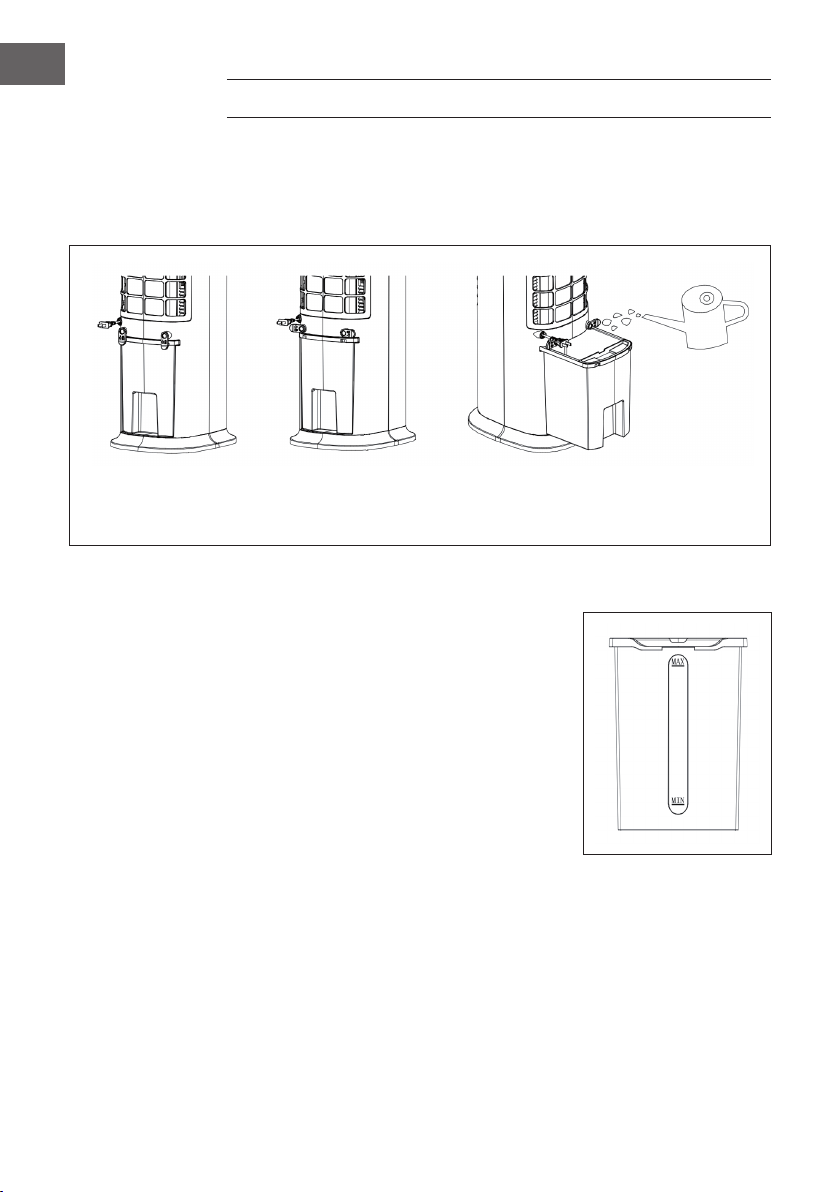
Fill water into the water tank when using the cooling and humidifying function. Before
lling, rotate the winding frame 90° respectively. Pull out the water tank halfway. Pour
the water slowly into the water tank. After lling, push the water tank back into the
appliance. Rotate the winding frame to the original position.
Water tank lock knob
is locked
Water tank lock knob
is unlocked
Water tank is drawn out
for water lling
When lling water into the water tank, pay attention to the water level indicator:
1. When lling manually, make sure that the water
level is above the minimum indicator and below
the maximum indicator.
2. Only use clean drinking water.
3. When the appliance is used for the rst time,
there may be a slight smell and the water in the
water tank may be slightly discoloured. This is
normal and harmless and has no effect on your
health.
33
EN
CLEANING AND CARE
Cleaning
• Before cleaning the appliance, switch it off and disconnect the mains plug from the
socket.
• Do not use chemicals, petrol, thinners or other substances that could damage the
surface of the appliance to clean it.
• Remove dust with a soft cloth. For stubborn stains, use a little water (below 50 °C)
and a neutral detergent. Then rub the surface of the unit dry with a soft cloth.
Cleaning the water tank
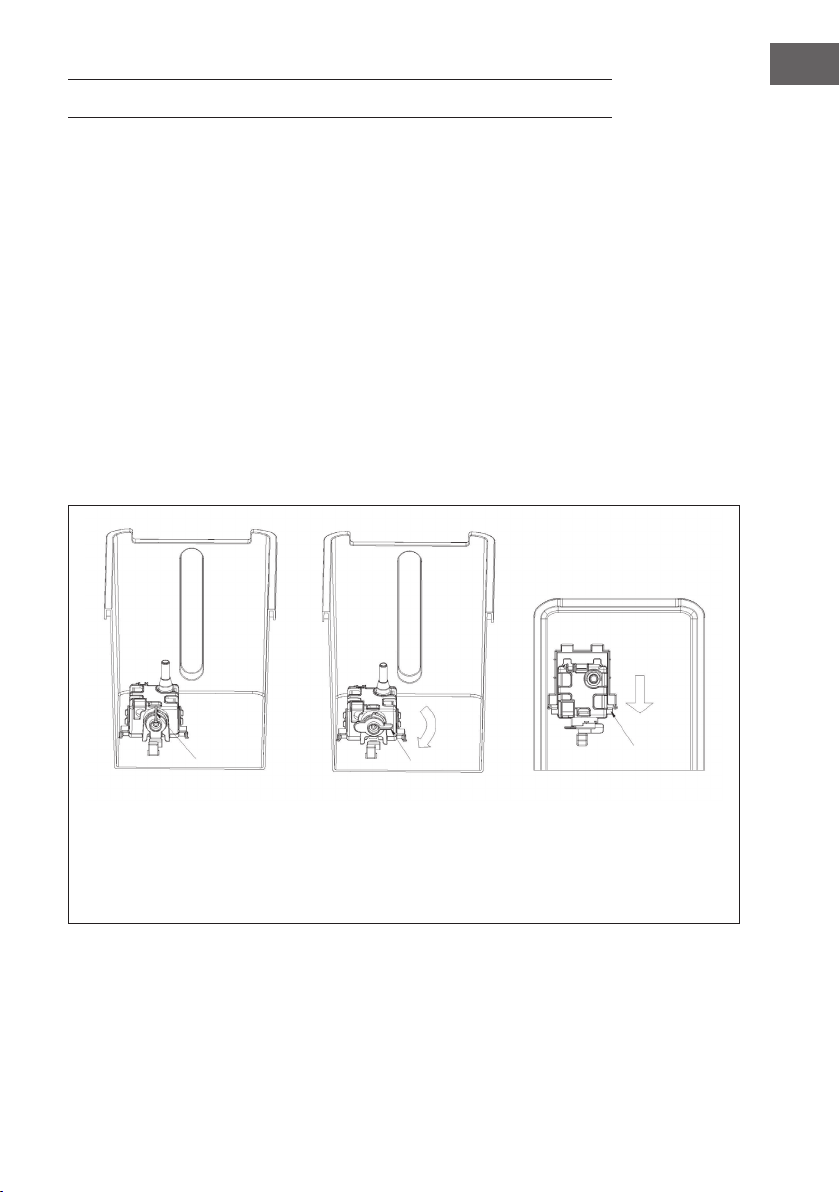
• Pull the mains plug out of the socket. Turn the winding frame knob to the horizontal
position and pull the water tank halfway out.
• Put your hand into the water tank, rotate the xing buckle 90°, and then push the
water pump box assembly down to take it out, and nally take out the water tank
• Remove limescale residues in the water tank with a damp cloth soaked in neutral
detergent. Then rinse the water tank with clear water.
Knob closed state Knob opened after
rotating 90°
Push down, take out the
water pump assembly
when two feet appear
and take out the water
tank.

34
EN
DISPOSAL CONSIDERATIONS
If there is a legal regulation for the disposal of electrical
and electronic devices in your country, this symbol on the
product or on the packaging indicates that this product must
not be disposed of with household waste. Instead, it must be
taken to a collection point for the recycling of electrical and
electronic equipment. By disposing of it in accordance with
the rules, you are protecting the environment and the health of
your fellow human beings from negative consequences. For
information about the recycling and disposal of this product,
please contact your local authority or your household waste
disposal service.
This product contains batteries. If there is a legal regulation
for the disposal of batteries in your country, the batteries must
not be disposed of with household waste. Find out about local
regulations for disposing of batteries. By disposing of them in
accordance with the rules, you are protecting the environment
and the health of your fellow human beings from negative
consequences.
DECLARATION OF CONFORMITY
Manufacturer:
Chal-Tec GmbH, Wallstrasse 16, 10179 Berlin, Germany.
Importer for Great Britain:
Chal-Tec UK limited
Unit 6 Riverside Business Centre
Brighton Road
Shoreham-by-Sea
BN43 6RE
United Kingdom
The complete declaration of conformity of the manufacturer
can be found at the following link: use.berlin/10035816
35
ES
Estimado cliente:
Le felicitamos por la adquisición de este producto. Lea
atentamente las siguientes instrucciones y sígalas para evitar
posibles daños. No asumimos ninguna responsabilidad
por los daños causados por el incumplimiento de las
instrucciones y el uso inadecuado. Escanee el siguiente
código QR para obtener acceso a la última guía del usuario
y más información sobre el producto.
ÍNDICE
Sicherheitshinweise4
Geräteübersicht6
Zubehör7
Bedienfeld und Fernbedienung8
Displayanzeigen9
Inbetriebnahme und Bedienung10
Gerätesteuerung per Smartphone14
Schutzfunktionen15
Wassertank befüllen16
Reinigung und Pege17
Hinweise zur Entsorgung18
Konformitätserklärung18
DATOS TÉCNICOS
Número de artículo 10035816, 10035817
Alimentación 220-240 V ~ 50 Hz
Potencia 80 W
Volumen del depósito de agua 8 litros
Volumen de aire 480 m3/h
Volumen de evaporación 1050 ml/h
Nivel de ruido ≤ 60 db
WiFi estándar
802.11 b/g/n
WiFi frecuencia
2,4 GHz
WiFi potencia de radiofrecuencia (max.)
20 dBm

36
ES
INDICACIONES DE SEGURIDAD
• Antes de utilizar el aparato, compruebe la tensión en la placa técnica del mismo.
Conecte el aparato a tomas de corriente que se adecuen a su tensión.
• Mantenga el cable lejos de las supercies calientes y de los objetos alados.
• No coloque el cable de alimentación debajo alfombras ni lo cubra con otros
objetos o materiales. Coloque el cable de tal manera que nadie pueda pisarlo ni
tropezar con él.
• No utilice el aparato si el cable de alimentación o el enchufe está dañado.
• Si el cable de alimentación o el enchufe está dañado, deberá ser sustituido por el
fabricante, una empresa autorizada o una persona cualicada.
• Utilice el aparato únicamente en el interior.
• No cubra el aparato.
• Coloque el aparato en una supercie nivelada y estable. Asegúrese de que el
aparato está en posición vertical.
• Asegúrese de que el aparato está apagado antes de conectar el enchufe a la toma
de corriente.
• No opere el aparato ni toque el enchufe o el cable con las manos mojadas.
• No deje el aparato sin supervisión cuando está en marcha. Apague el aparato y
desconecte el enchufe de la toma de corriente si no lo utiliza.
• Antes de limpiar o inspeccionar el aparato, desconéctelo de la toma de corriente.
• Para desconectar el aparato no tire del cable, sino del cuerpo del enchufe.
• Los niños mayores de 8 años y las personas con discapacidad física, sensorial
o psíquica pueden utilizar el aparato si han sido previamente instruidos por su
tutor o supervisor sobre el funcionamiento del mismo y conocen las funciones, las
indicaciones de seguridad y los riesgos asociados.
• Utilice el aparato de acuerdo con lo descrito en estas instrucciones de uso.
• No introduzca los dedos ni ningún objeto en las rejillas de ventilación
• No coloque el aparato cerca de cortinas, manteles o textiles similares. El ventilador
podría tirar de ellos y romperlos.
• No utilice el aparato en estancias húmedas, como cuartos de baño.
• No utilice el aparato si aún no tiene las ruedas montadas o se encuentra de lado.
• Desenrolle el cable completamente antes de utilizar el aparato.

37
ES
• Cuando el aparato está en marcha, humedece el aire ambiente. Evite que la
humedad del aire sea demasiado elevada. Recomendamos mantener una
humedad del aire entre 40-50 %. Una humedad del aire demasiado elevada
puede provocar la aparición de moho y problemas de salud.
• Coloque el aparato en una supercie resistente a la humedad y a una humedad
del aire elevada. Es posible que, al montar o desmontar el depósito de agua, se
derramen algunas gotas. Si es así, limpie las gotas de inmediato.
• Cambie el agua en el depósito cada 3 días como máximo.
CARACTERÍSTICAS DEL APARATO
• Refrigeración/Humidicación de aire
• Temporizador: 1-9 horas (tolerancia de temporizador en rango de 3 %)
• Mando a distancia
• Protección contra el nivel bajo de agua: con conductos
• Velocidad del ventilador: 3 velocidades: (baja, media, alta
• Modos de aire: Normal, Viento natural y modo «Nocturno»
• Wi; control mediante aplicación
• Función «Iones negativos»
• Aire automático horizontal
• Diseño de ruedas universal (sin freno), fácil de mover
• Botones electrónicos
• Depósito de agua con bomba de agua fácil de limpiar
• Función «Aire seco» y atenuación automática de la iluminación led si no se pulsa
ningún botón en el intervalo de 1 minuto (33 % de la luminosidad original)
• Tecnología de refrigeración por circulación de agua en spray, con alta circulación
de agua y refrigeración más rápida.
38
ES
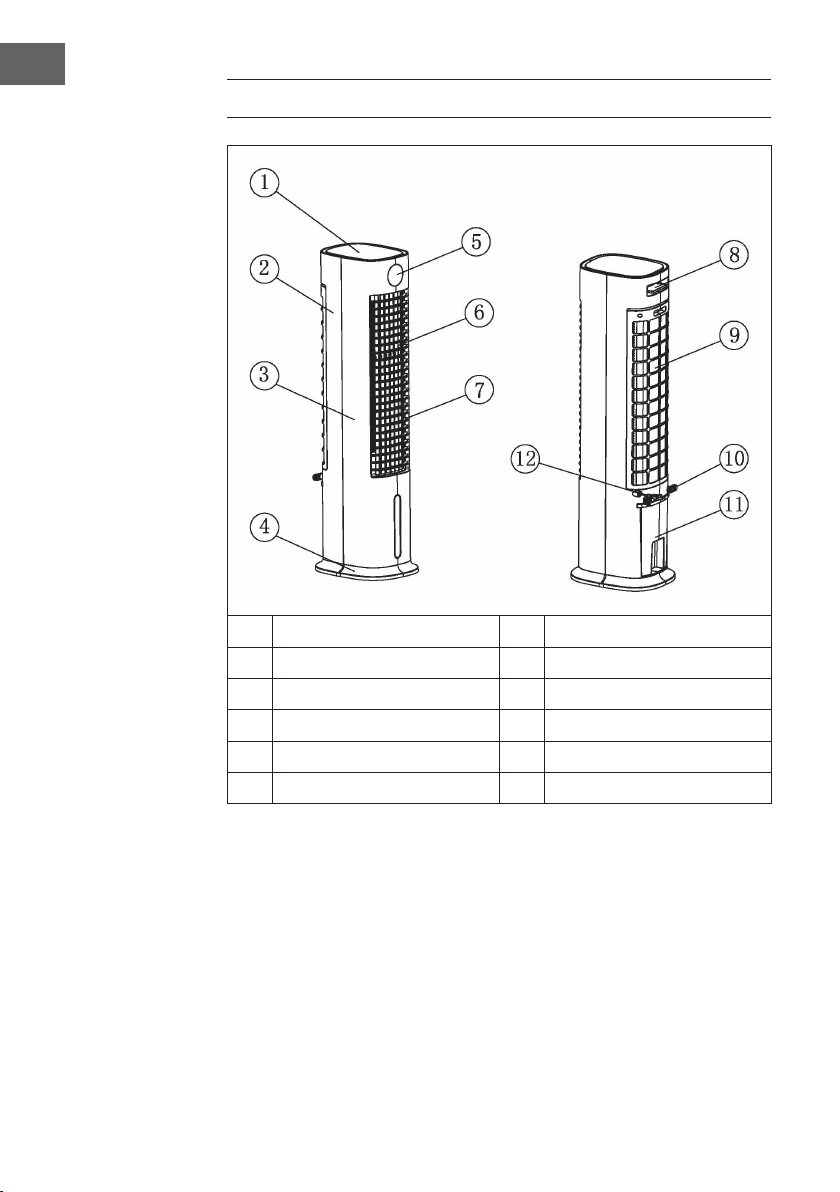
VISTA GENERAL DEL APARATO
1
Tapa superior
7
Lámina de ventilación horizontal
2
Carcasa posterior
8
Mando a distancia
3
Carcasa frontal
9
Tapa posterior
4
Base
10
Recogedor de cable
5
Ventana de visualización
11
Depósito de agua
6
Lámina de ventilación vertical
12
Cable de alimentación
Indicaciones sobre el uso del depósito de agua:
Normalmente, puede utilizar el enfriador de aire incluso si el depósito de agua está
vacío. En este caso funciona como un ventilador corriente. El agua en el depósito
solo es necesaria si utiliza la función de enfriamiento. El enfriador de aire la evapora
a través del nebulizador, eliminando de este modo el calor del aire y reduciendo la
temperatura del aire del ventilador hasta 3 °C (en función de lo fría que está el agua).
No recomendamos utilizar la función de enfriamiento en los días con una humedad del
aire especialmente alta, ya que ésta aumenta aún más y puede causar problemas de
circulación.
39
ES
ACCESORIOS
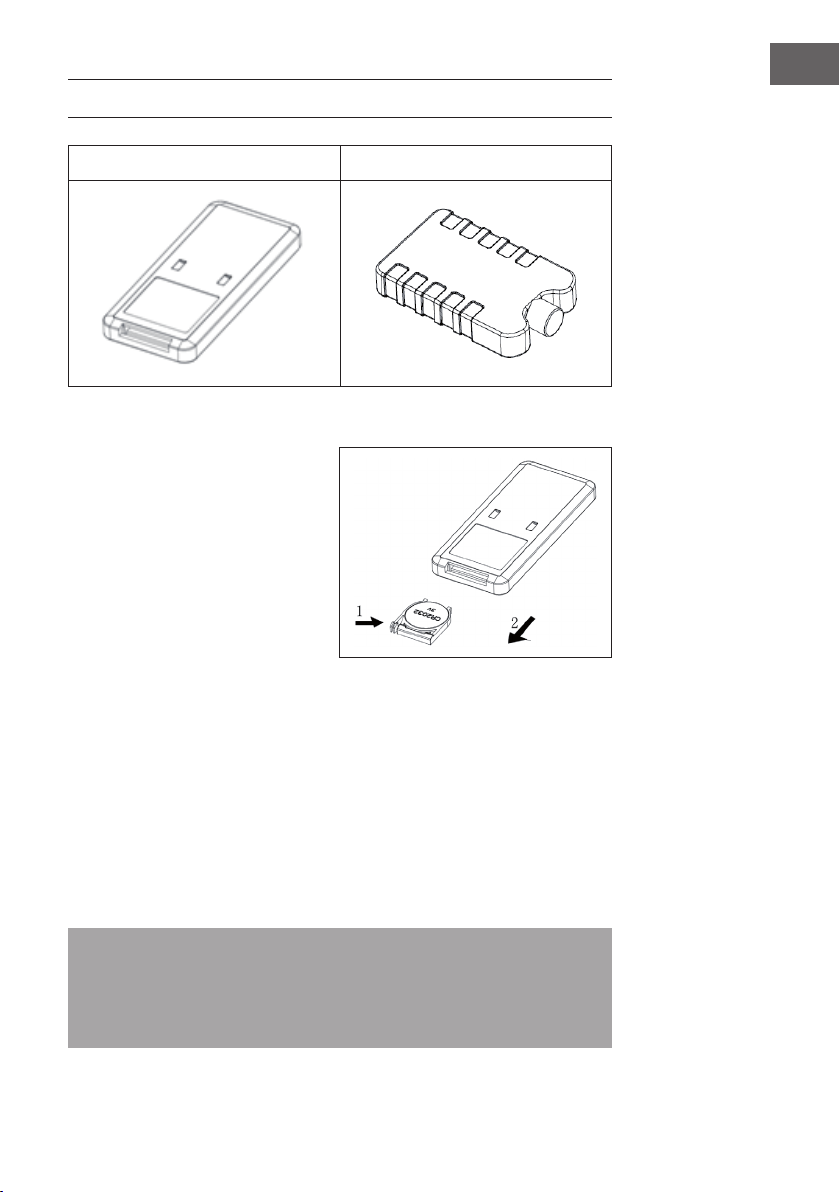
Mando a distancia Recipiente para hielo
Uso del mando a distancia
1. Abra el compartimento de pilas e
introduzca una pila CR2032. Para
abrir el compartimento de pilas,
presione la tapa (1) y extráigala en
dirección de la fecha (2).
2. Dirija el mando a distancia hacia
el receptor cada vez que quiera
realizar un comando.
3. Cambie las pilas vacías. Al colocar
las pilas nuevas, preste atención a
la polaridad indicada (+/-). Vuelva
a colocar la tapa del compartimento de pilas en el mando a distancia.
Uso del recipiente para hielo
1. Introduzca el recipiente para hielo en el congelador hasta que se congele por
completo.
2. Introduzca el recipiente para hielo en el depósito de agua del aparato. 10 minutos
después de introducir el recipiente para hielo, la temperatura del depósito de agua
se reduce por debajo de la temperatura ambiente.
3. En el envío se incluyen 2 recipientes para hielo. Utilícelos de forma alterna.
4. Está prohibido abrir la tapa del recipiente para hielo. Nunca ingiera el contenido
del recipiente para hielo.
Nota: Gracias a las características especícas de aislamiento y almacenamiento
en frío, el recipiente para hielo puede absorber lentamente el calor del agua para
mantener la temperatura en el depósito de agua más baja que la temperatura
ambiente durante horas, produciendo así un aire agradable y fresco que emite luego
el ventilador del aparato.
40
ES
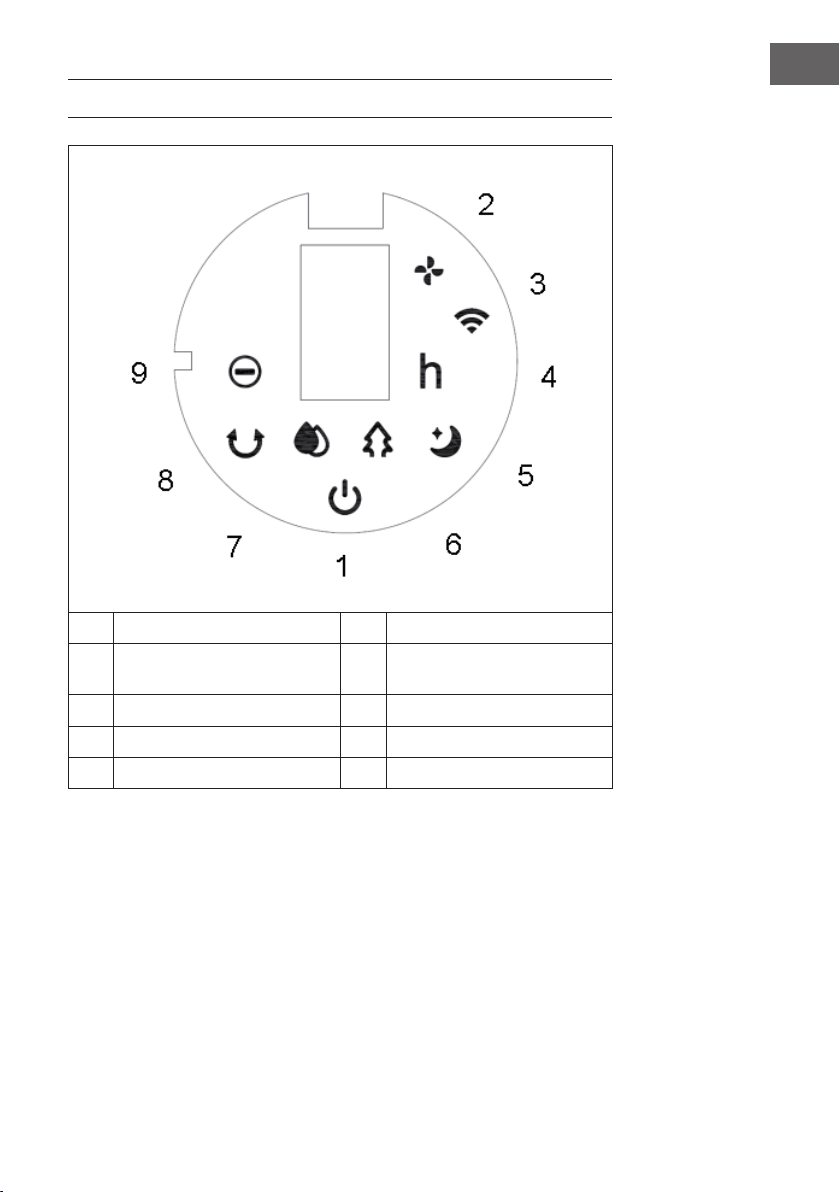
PANEL DE CONTROL Y MANDO A DISTANCIA
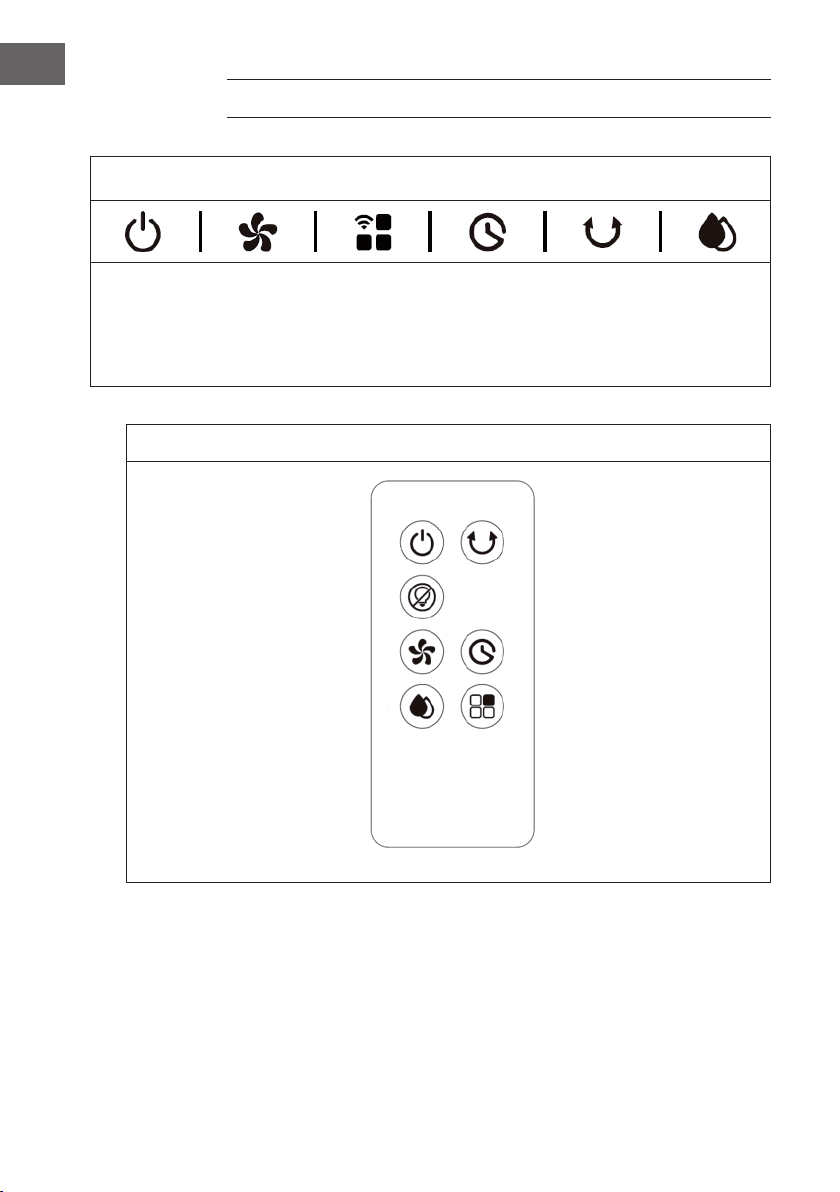
Panel de control (botones)
ENCENDER/
APAGAR
Velocidad del
ventilador
Modo de
aire/wi
Temporizador
Función
«Oscilación»
Refrige-
ración/
Humidi-
cación
Mando a distancia (botones)
Encender/Apagar Función «Oscilación»
Apagar pantalla
Velocidad del ventilador Temporizador
Modo Refrigeración/
Humidicación
Modo de aire
41
ES
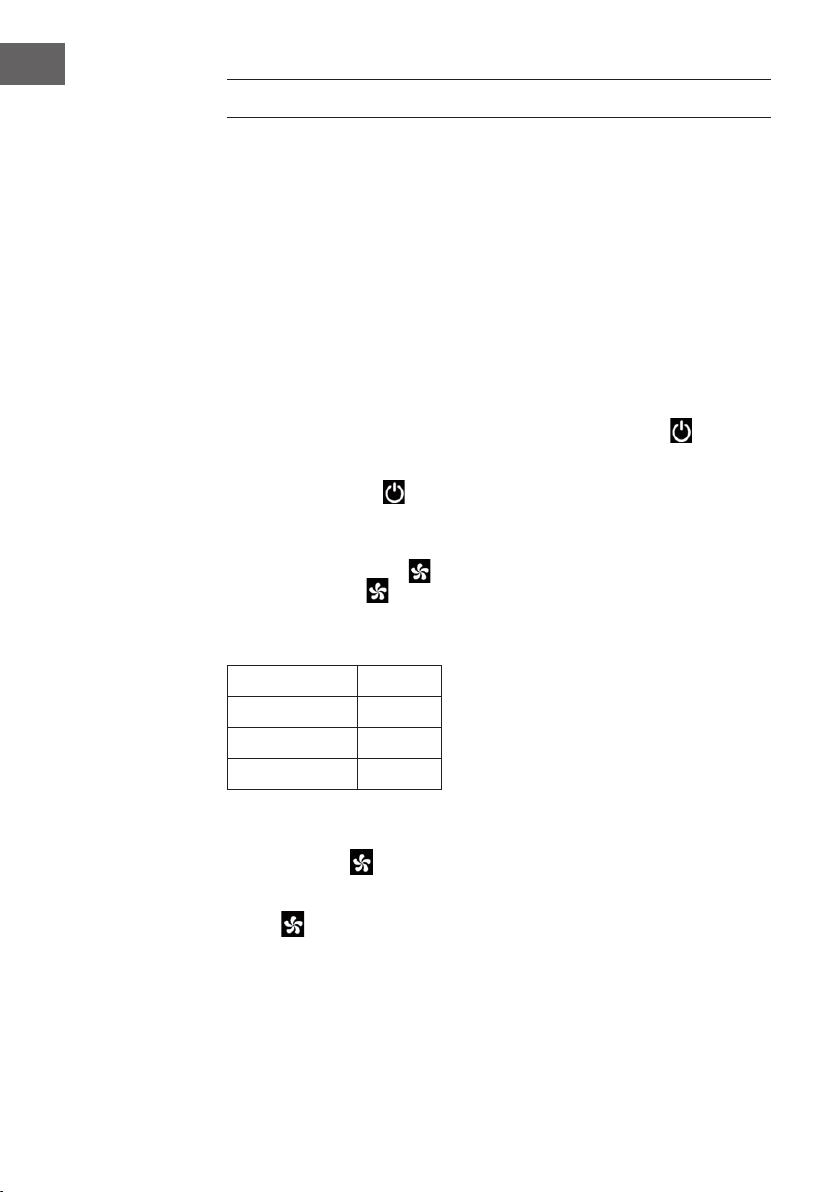
INDICADORES EN LA PANTALLA
1 Encender/Apagar 6 Modo «Viento natural»
2 Velocidad del ventilador 7 Modo «Refrigeración/
Humidicación del aire»
3 Wi 8 Función «Oscilación»
4 Temporizador 9 Función «Iones negativos»
5 Modo «Nocturno»
42
ES
PUESTA EN FUNCIONAMIENTO
Antes del primer uso
• Retire el aparato del embalaje y extraiga cualquier envoltorio.
• Coloque el aparato en una supercie estable y plana.
• Introduzca el cable de alimentación en la toma de corriente. Puede empezar a
utilizar el aparato directamente, ya que no requiere ninguna instalación.
Puesta en funcionamiento
Al conectar el aparato a la toma de corriente por primera vez, este emite dos pitidos y
pasa al modo de espera. Todas las luces indicadoras están apagadas.
Encender/apagar el aparato
Cuando el aparato está en modo de espera, pulse el botón ON / OFF para
encenderlo. Si enciende el aparato por primera vez, se ilumina el indicador de
velocidad (2). El indicador de velocidad baja se ilumina y la función «Oscilación» se
desactiva. Pulse el botón para cambiar el aparato al modo Standby.
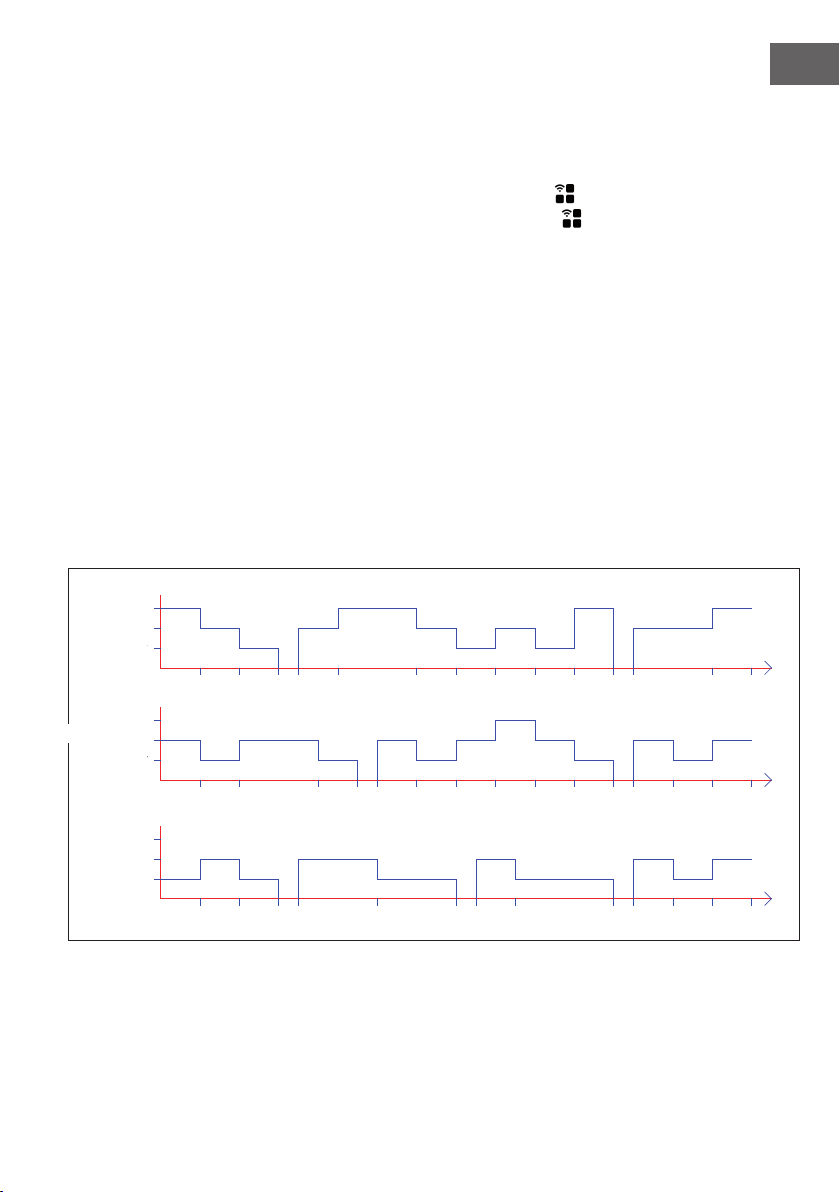
Congurar la velocidad
Utilice el botón de velocidad para ajustar la velocidad del aire. Pulse varias veces
el botón de velocidad para cambiar el nivel de velocidad en el siguiente orden:
Baja > Media > Alta > Baja.
El nivel de velocidad con su número respectivo aparecerá en la pantalla:
Velocidad Pantalla
Bajo 1
Media 2
Alta 3
Función «Aire seco»
Mantenga el botón
pulsado durante 3 segundos para activar la función «Aire
seco». El indicador led (2) se ilumina y parpadea durante 20 minutos. Durante esta
función, todos los botones, excepto el botón ON/OFF, están desactivados. Mantenga
el botón pulsado durante 3 segundos para desactivar la función.
43
ES
Si la función estuvo activa durante 20 minutos, el aparato se apaga automáticamente y
pasa al modo de reposo.
Seleccionar un modo de aire
Después de encender el aparato, pulse varias veces el botón «Modo de aire»
para congurar el modo deseado. Pulse varias veces el botón «Modo de Aire»
para cambiar el modo en el siguiente orden: Viento normal > Viento natural > Modo
nocturno > Confort > Viento normal.
Viento normal:
En el modo «Viento normal», el aparato funciona en el nivel de velocidad establecido
(bajo, medio o alto).
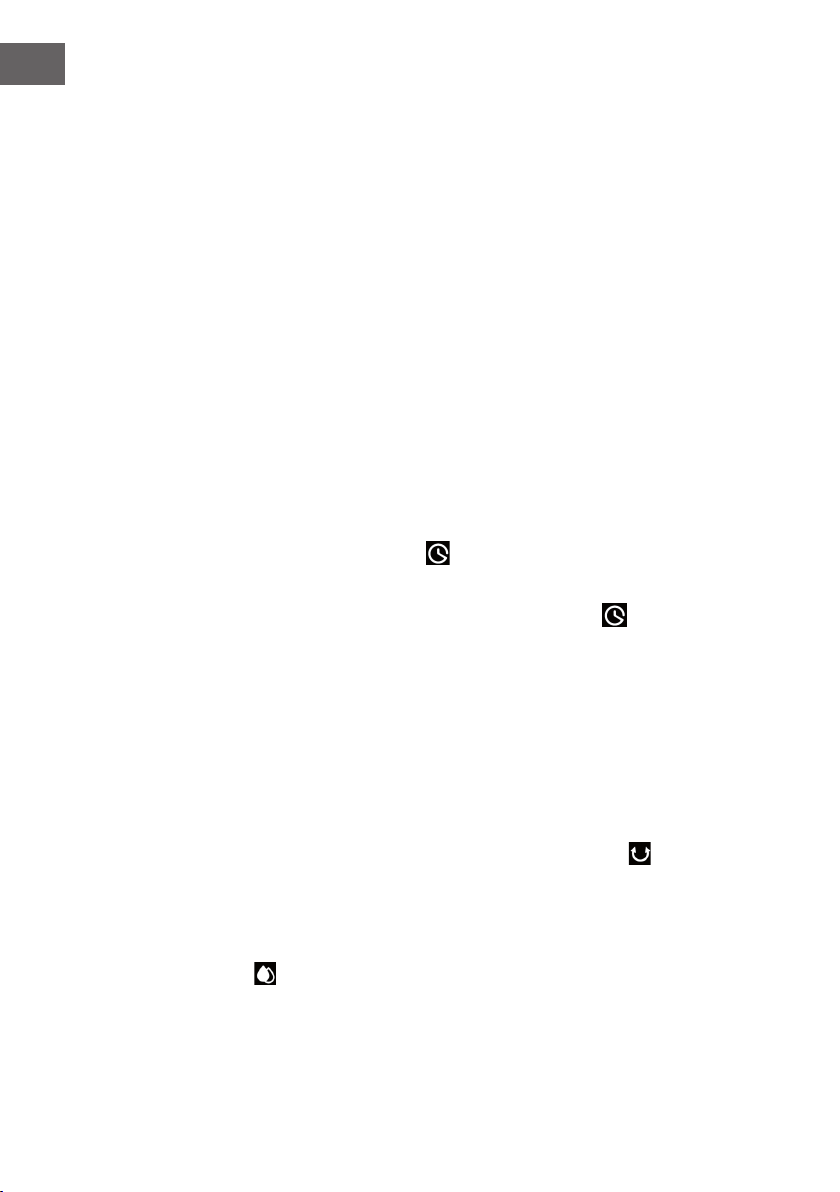
Viento natural:
En el modo «Viento natural», se enciende el indicador correspondiente (6). En este
modo, se imita la suave brisa del viento natural, haciendo que el volumen de aire sea
más suave y agradable. La pantalla sólo muestra la velocidad del viento original; los
cambios no se muestran.
El diagrama de viento de este modo se muestra en la siguiente imagen:
6S 6S 6S 3S 12S 12S 3S 6S 3S15S
6S
T=90S
6S 6S 6S 6S 6S 3S 12S
6S 6S 12S 6S6S 6S6S 6S 6S
3S 6S 6S12S 6S
3S 6S 3S
T=90S
T=90S
6S
6S 6S 6S
6S 6S 6S
Low
Medium
High
STRONG
MIDDLE
WEAK
Low
Medium
High
Low
Medium
High
Media
Alto
Bajo
Media
Alto
MEDIO
FUERTE
Bajo
Media
Alto
Bajo
BAJO
44
ES
Modo «Nocturno»
Cuando se activa el modo «Nocturno», el aparato funciona primero a la velocidad
de viento previamente ajustada. Luego, reduce la velocidad cada 30 minutos. Este
modo está diseñado para evitar que las personas que se quedan dormidas se sientan
incómodas debido a la velocidad demasiado alta del aparato.
a) Si ha activado el modo «Nocturno» a velocidad alta, el aparato pasará a
velocidad media después de 30 minutos. Se ilumina el indicador correspondiente.
Tras otros 30 minutos de funcionamiento a velocidad media, el aparato pasa a
velocidad baja. Se ilumina el indicador correspondiente. El aparato continuará
funcionando a baja velocidad hasta que transcurra el tiempo del temporizador o
apague el aparato.
b) Si ha activado el modo «Nocturno» a velocidad media, el aparato pasará
a velocidad más baja después de 30 minutos. Se ilumina el indicador
correspondiente. El aparato continuará funcionando a baja velocidad hasta que
transcurra el tiempo del temporizador o apague el aparato.
c) Si ha activado el modo «Nocturno» a velocidad baja, se enciende el indicador
correspondiente. El aparato continuará funcionando a baja velocidad hasta que
transcurra el tiempo del temporizador o apague el aparato.
Congurar el temporizador
Con el botón del temporizador puede ajustar el tiempo de apagado automático
del aparato. Puede seleccionar un tiempo entre 0-9 horas. El temporizador se congura
por horas y el valor se muestra en la pantalla (0 = temporizador apagado). Cuando
el aparato esté encendido, pulse el botón del temporizador . El indicador del
temporizador (4) y el indicador de tiempo parpadean en la pantalla. Ahora puede
ajustar el tiempo deseado hasta el apagado automático. A continuación, pulse
cualquier botón (excepto el botón ON/OFF) o espere 5 segundos para salir de la
conguración. Una vez activado el temporizador, el tiempo restante hasta el apagado
y la velocidad actual se muestran alternativamente en la pantalla en intervalos de 10
segundos. El indicador luminoso correspondiente (2/4) se ilumina en cada caso. Una
vez transcurrido el tiempo, el aparato se apaga automáticamente y pasa al modo de
espera.
Función «Oscilación»
Cuando el aparato está encendido, pulse el botón de oscilación , para activar la
oscilación de izquierda a derecha.
Modo «Refrigeración/Humidicación del aire»
Cuando el aparato está encendido, pulse el botón de Refrigeración/Humidicación de
aire para encender o apagar la función de enfriamiento. Se ilumina el indicador
correspondiente.

45
ES
Encender/Apagar la pantalla e indicadores (mando a distancia)
Cuando el aparato está encendido, puede pulsar el botón de apagado de la pantalla
en el mando a distancia para apagar la pantalla y todos los indicadores luminosos.
Si la pantalla está apagada y pulsa el botón de apagado de la pantalla o
cualquier otro botón, las luces indicadoras se vuelven a encender, pero la función del
botón pulsado no se realiza. Pulse de nuevo el botón deseado para realizar la función
correspondiente.
Función «Iones negativos»
Al encender el aparato, se activa la función «Iones negativos» y se enciende el
indicador led correspondiente (9). Al apagar el aparato, la función «Iones negativos»
se desactiva.
Wi
Cuando el aparato esté encendido, mantenga pulsado durante 5 segundos el botón de
Modo de aire/wi . Se oye un pitido y el indicador wi (3) parpadea rápidamente
durante 5 segundos. Las aplicaciones en la red se pueden congurar en modo
estándar. Si no se establece ninguna conexión en 3 minutos, el indicador wi (3) se
apaga. Para restablecer la conguración de la conexión, pulse de nuevo el botón de
Modo de aire/wi . Se oye un pitido, el modo wi se restablece y el indicador wi
(3) parpadea rápidamente durante 5 segundos. Las aplicaciones en la red se pueden
congurar en modo estándar. Mantenga pulsado durante 5 segundos el botón Modo
de aire/wi hasta que el indicador wi (3) empiece a parpadear. Se oye un pitido
y el indicador wi (3) parpadea lentamente durante 5 segundos. Las aplicaciones en la
red se pueden congurar en modo compatible.
Indicaciones sobre el uso de la función wi
• Si apaga el aparato antes de que transcurran 10 segundos desde que se
encendió, el indicador de wi (3) volverá al estado anterior al apagado. Si apaga
el aparato después de 10 segundos, el indicador de wi (3) se apaga y entra en el
modo de ahorro de energía. Mantenga pulsado el botón de conguración durante
5 segundos para reiniciar.
• Si la red no se congura en 3 minutos, el indicador wi (3) se apagará. Mantenga
pulsado el botón de conguración durante 5 segundos para reiniciar.
• Si el rúter se apaga después de haber establecido con éxito la conexión wi, el
indicador wi (3) también se apaga. En cuanto el rúter se enciende de nuevo, la
conexión con el aparato se restablece automáticamente.
• Al utilizar la función wi, el indicador wi (3) debe parpadear rápidamente. Para
utilizar la aplicación de Klarstein, se necesita un rúter (debe poder conectarse a
redes externas) y un dispositivo móvil (por ejemplo, un teléfono inteligente). La
aplicación de Klarstein debe instalarse en un dispositivo móvil conectado a la
misma red wi.
46
ES
CONTROLAR EL APARATO A TRAVÉS DE UN
SMARTPHONE
Si conecta su aparato Klarstein a la red wi de su hogar, podrá controlarlo
cómodamente a través de la aplicación «Klarstein». La aplicación no solo le permite
manejar el aparato desde la distancia, sino acceder a las recetas y otra información.
Realice los siguientes pasos para conectar su smartphone al aparato de Klarstein:
1. Descargue la aplicación «Klarstein» escaneando con su smartphone el código QR
(véase abajo) o directamente desde App Store o Google Play.
2. Asegúrese de que su smartphone está conectado a la misma red wi a la que
conectará el aparato de Klarstein.
3. Abra la aplicación «Klarstein».
4. Inicie sesión con su cuenta. Si no dispone de una cuenta, regístrese en la
aplicación «Klarstein».
5. Siga las instrucciones de la aplicación.
Descargar aplicación
Utilice la función de escaneado de su móvil para escanear el código QR y almacenar
la aplicación en su smartphone.
Nota: Cuando abra la aplicación por primera vez, esta le proporcionará las
indicaciones sobre el manejo de la aplicación y la asistencia a la hora de establecer
la conexión con su aparato.
iOS Android
47
ES
Resolución de problemas de conexión
Si en la lista de la red wi no encuentra su aparato Klarstein, compruebe lo siguiente:
• ¿Está el aparato enchufado?
• ¿Está activada la función wi en su smartphone?
• ¿Está activada la función wi en su aparato Klarstein? (Siga las indicaciones de la
aplicación).
• ¿Ha introducido correctamente la contraseña de la red wi?
• A la hora de establecer la conexión, ¿se encuentran cerca el rúter, el aparato
Klarstein y el smartphone? (no deben estar a más de 5 m de distancia)
• Si ha desactivado la banda 2,4 GHz en los ajustes de su rúter wi, vuelva a
activarlo.
Nota: Siga las indicaciones de la aplicación que aparecen al establecer la
conexión.
FUNCIONES DE SEGURIDAD
Interruptor de protección contra el bajo nivel de agua
Cuando la bomba de agua funciona durante 45 segundos y el software detecta que el
interruptor de nivel de agua no tiene conexión (muy poca agua) durante 5 segundos
consecutivos (50 en total), la bomba de agua dejará de funcionar automáticamente y
el aparato emitirá 10 pitidos.
Reconocimiento del nivel de agua
Antes de que transcurran 10 segundos desde el encendido del aparato, mantenga
pulsado el botón de modo de Refrigeración/humidicación de aire después de
que se oiga el pitido. El nivel de agua se detectará en 3 segundos. Si no hay agua en
el depósito de agua, la función de refrigeración se desactivará y el aparato emitirá 10
pitidos. La detección del nivel de agua se desactiva después de pulsar el botón ON/
OFF o en caso de corte de corriente.
Función de ahorro
1. Si no desconecta el aparato de la red eléctrica, al volver a encenderlo continuará
funcionando en el modo que estaba congurado antes de ser apagado. Los
modos «Nocturno», «Aire seco» y «Temporizador» no se guardan.
2. Si no desconecta el aparato de la red eléctrica, cuando vuelva a encenderlo,
funcionará primero a velocidad media durante 3 segundos y luego pasará a la
velocidad ajustada antes de ser apagado.
48
ES
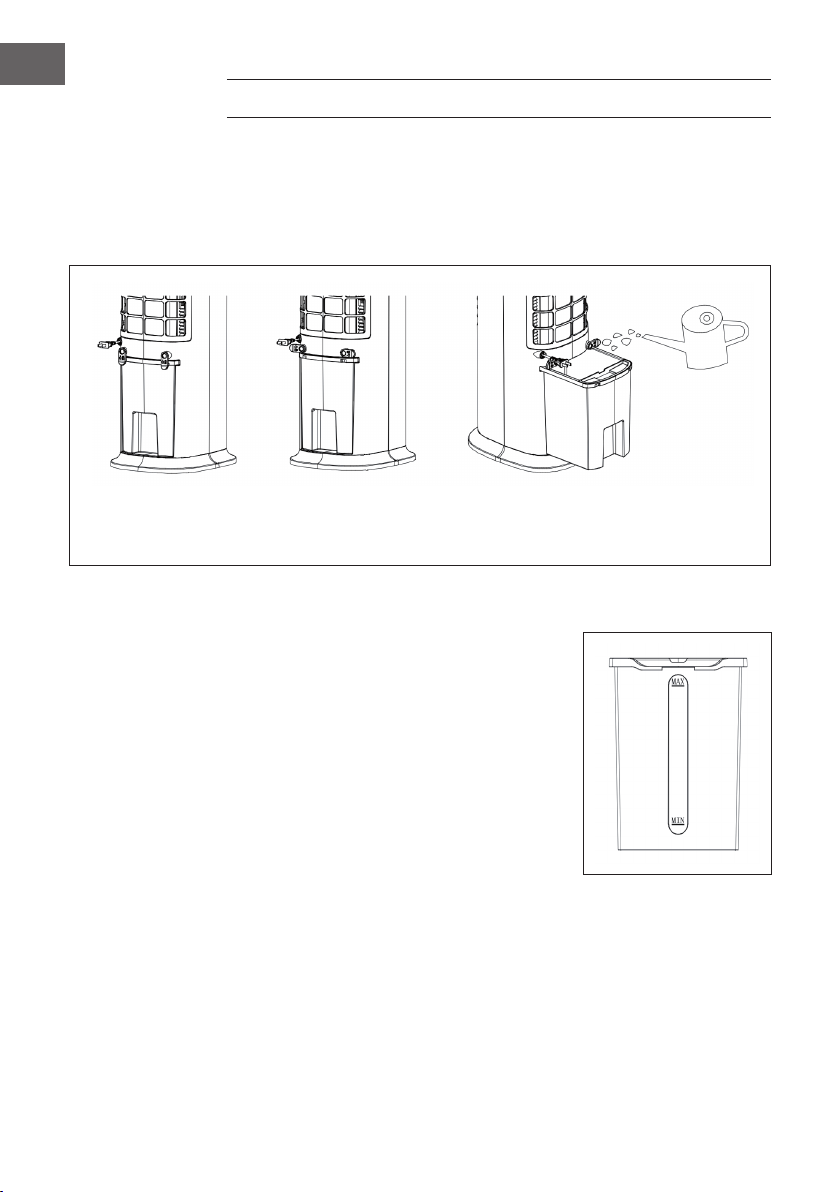
LLENAR EL DEPÓSITO DE AGUA
Llene el depósito de agua cuando utilice la función de refrigeración y humidicación
de aire. Antes de rellenar el depósito, gire el recogedor de cable en 90°. Saque el
depósito de agua hasta la mitad. Vierta el agua lentamente en el depósito de agua.
Tras el llenado, vuelva a introducir el depósito de agua en el aparato. Vuelva a colocar
el recogedor de cable en su posición original.
El cierre del depósito de
agua está cerrado
El cierre del depósito de
agua está abierto
Saque el depósito de agua para
llenar de agua.
Cuando llene el depósito de agua, preste atención al indicador de nivel de agua:
1. Al llenar manualmente, asegúrese de que el
nivel de agua está por encima del indicador
«Mínimo» y por debajo del indicador
«Máximo».
2. Utilice sólo agua potable.
3. Cuando utiliza el aparato por primera vez,
puede haber un ligero olor y el agua del
depósito puede estar ligeramente descolorida.
Esto es normal e inofensivo y no afectará a su
salud.
49
ES
LIMPIEZA Y CUIDADO
Limpieza
• Apague el aparato y desconecte el enchufe de la toma de corriente antes de
limpiarlo.
• Para limpiar el aparato, no utilice productos químicos, gasolina, diluyente u otras
sustancias que puedan dañar la supercie del mismo.
• Limpie el polvo con un paño suave. Para las manchas difíciles, utilice un poco de
agua (por debajo de 50 °C) y un producto de limpieza neutro. A continuación,
frote la supercie del aparato en seco con un paño suave.
Limpiar el depósito de agua
• Desconecte el enchufe de la toma de corriente. Gire el recogedor de cable en
posición horizontal y saque el depósito de agua hasta la mitad.
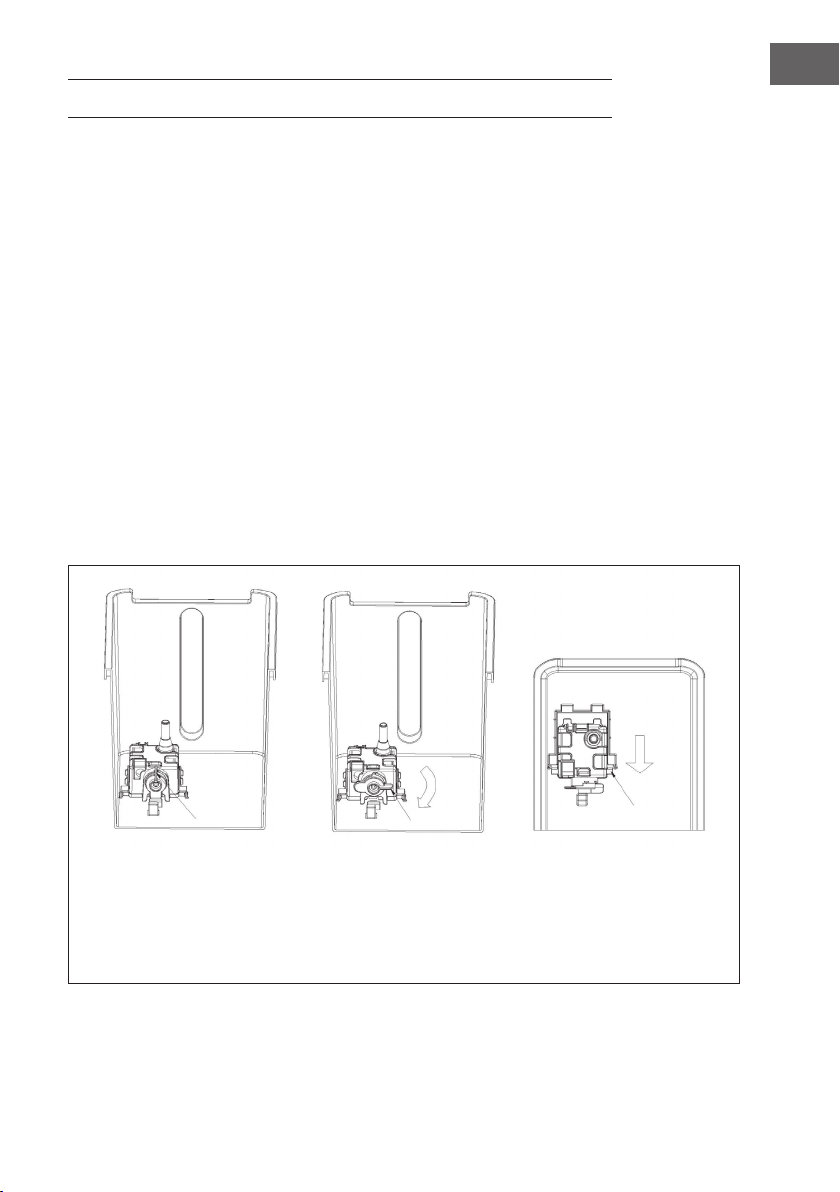
• Introduzca el depósito de agua con la mano y gire la jación a 90°. A
continuación, empuje hacia abajo la carcasa de la bomba de agua y retire el
depósito de agua.
• Elimine los restos de cal en el depósito de agua con un paño húmedo mojado en
un producto de limpieza neutro. A continuación, aclare el depósito de agua con
agua limpia.
El cierre está cerrado El cierre está abierto Presione hacia abajo y retire
la carcasa de la bomba de
agua cuando se vean dos
puntas. A continuación,
retire el depósito de agua.

50
ES
RETIRADA DEL APARATO
Si en su país existe una disposición legal relativa a la
eliminación de aparatos eléctricos y electrónicos, este
símbolo estampado en el producto o en el embalaje
advierte que no debe eliminarse como residuo doméstico.
En lugar de ello, debe depositarse en un punto de recogida
de reciclaje de aparatos eléctricos y electrónicos. Una
gestión adecuada de estos residuos previene consecuencias
potencialmente negativas para el medio ambiente y la salud
de las personas. Puede consultar más información sobre el
reciclaje y la eliminación de este producto contactando con
su administración local o con su servicio de recogida de
residuos.
Este producto contiene baterías. Si en su país existe una
disposición legal relativa a la eliminación de baterías, estas
no deben eliminarse como residuo doméstico. Infórmese
sobre la normativa vigente relacionada con la eliminación de
baterías. Una gestión adecuada de estos residuos previene
consecuencias potencialmente negativas para el medio
ambiente y la salud de las personas.
DECLARACIÓN DE CONFORMIDAD
Fabricante:
Chal-Tec GmbH, Wallstraße 16, 10179 Berlín, Alemania.
Importador para Gran Bretaña:
Chal-Tec UK limited
Unit 6 Riverside Business Centre
Brighton Road
Shoreham-by-Sea
BN43 6RE
United Kingdom
Puede descargar la declaración de conformidad completa del
fabricante en el siguiente enlace: use.berlin/10035816
51
FR
Chère cliente, cher client,
Toutes nos félicitations pour l’acquisition de ce nouvel appareil.
Veuillez lire attentivement et respecter les instructions de ce mode
d’emploi an d’éviter d’éventuels dommages. Nous ne saurions
être tenus pour responsables des dommages dus au non-respect
des consignes et à la mauvaise utilisation de l’appareil. Scannez
le QR-Code pour obtenir la dernière version du mode d‘emploi
et des informations supplémentaires concernant le produit.
SOMMAIRE
Sicherheitshinweise4
Geräteübersicht6
Zubehör7
Bedienfeld und Fernbedienung8
Displayanzeigen9
Inbetriebnahme und Bedienung10
Gerätesteuerung per Smartphone14
Schutzfunktionen15
Wassertank befüllen16
Reinigung und Pege17
Hinweise zur Entsorgung18
Konformitätserklärung18
FICHE TECHNIQUE
Numéro d'article 10035816, 10035817
Alimentation 220-240 V ~ 50 Hz
Puissance 80 W
Capacité du réservoir d'eau 8 Liter
Débit d'air 480 m
3
/h
Volume d'évaporation 1050 ml/h
Niveau sonore ≤ 60 db
WiFi standard
802.11 b/g/n
WiFi fréquence
2,4 GHz
WiFi puissance de radiofréquence (max.)
20 dBm

52
FR
CONSIGNES DE SÉCURITÉ
• Vériez les informations de tension sur la plaque signalétique avant utilisation. Ne
connectez l‘appareil qu‘à des prises qui correspondent à la tension de l‘appareil.
• Éloignez le câble des surfaces chaudes et des objets tranchants.
• Ne faites pas passer le cordon sous un tapis et ne le couvrez pas avec d‘autres
objets ou tissus. Installez le câble de manière à ce qu‘il ne fasse trébucher ni
n‘accroche personne.
• N‘utilisez pas l‘appareil si le cordon d‘alimentation ou la che est endommagé.
• Si le cordon d‘alimentation ou la che sont endommagés, faites-les remplacer par
le fabricant, une entreprise spécialisée agréée ou une personne de qualication
similaire.
• N‘utilisez l‘appareil qu‘à l‘intérieur.
• Ne couvrez pas l‘appareil.
• Placez l‘appareil sur une surface plane et stable. Assurez-vous que l‘appareil est
bien vertical.
• Vériez que l‘appareil est éteint avant d‘insérer la che dans la prise.
• N‘utilisez pas l‘appareil avec les mains mouillées et ne touchez pas la che et le
câble avec les mains mouillées.
• Ne laissez pas l‘appareil sans surveillance pendant son fonctionnement. Éteignez-
le et débranchez-le lorsque vous ne l‘utilisez pas.
• Retirez la che de la prise avant de nettoyer ou de réparer l‘appareil.
• Ne tirez pas sur le câble pour débrancher la che, tirez sur la che elle-même.
• Les enfants à partir de 8 ans, les personnes ayant un handicap mental, sensoriel
et physique ne peuvent utiliser l‘appareil que s‘ils ont été parfaitement familiarisés
avec les fonctions et les précautions de sécurité par un responsable et s‘ils
comprennent les risques associés.
• Utilisez l‘appareil uniquement comme décrit dans ces instructions.
• N‘insérez pas vos doigts ou objets dans les ouvertures de ventilation.
• Ne placez pas l‘appareil à proximité de rideaux, voilages, nappes ou textiles
similaires. Ils pourraient être entraînés dans le ventilateur et l‘endommager.
• N‘utilisez pas l‘appareil dans des pièces humides telles que les salles de bain.
• N‘utilisez pas l‘appareil avant que les roues ne soient montées ou lorsqu‘il est sur
le côté.
• Déroulez complètement le cordon avant utilisation.

53
FR
• L‘appareil humidie l‘air ambiant. Cependant, évitez une humidité excessive. Nous
recommandons une humidité comprise entre 40 et 50 %. Une humidité excessive
peut entraîner des moisissures ou des problèmes de santé.
• Placez l‘appareil uniquement sur des surfaces insensibles à l‘eau et à une
humidité élevée. Il peut toujours arriver que quelques gouttes se renversent lors de
l‘installation et du retrait du réservoir d‘eau. Dans ce cas, essuyez immédiatement
les gouttelettes d‘eau.
• Changez l‘eau du réservoir au plus tard au bout de 3 jours.
CARACTÉRISTIQUES DU PRODUIT
• Humidication / Rafraîchissement
• Minuterie : 1–9 heures (Tolérance de la minuterie dans la plage de 3 %).
• Fonction télécommande
• Protection contre le manque d‘eau : avec conduite
• Vitesse de ventilation : 3 vitesses : faible, moyenne et élevée
• Modes de ventilation : Normal, Naturel Nuit
• Fonction Wi ; contrôle par application
• Fonction ions négatifs
• Vent automatique horizontal
• Design des roulettes universel (sans frein), facile à déplacer
• Touches électroniques
• Réservoir d‘eau facile à nettoyer avec pompe à eau
• Fonction vent sec et réduction automatique de l‘éclairage LED si vous n‘appuyez sur
aucun bouton dans la minute (33 % de la luminosité d‘origine)
• Technologie de réfrigération à circulation d‘eau par pulvérisation, avec une
excellente circulation de l‘eau et un refroidissement plus rapide
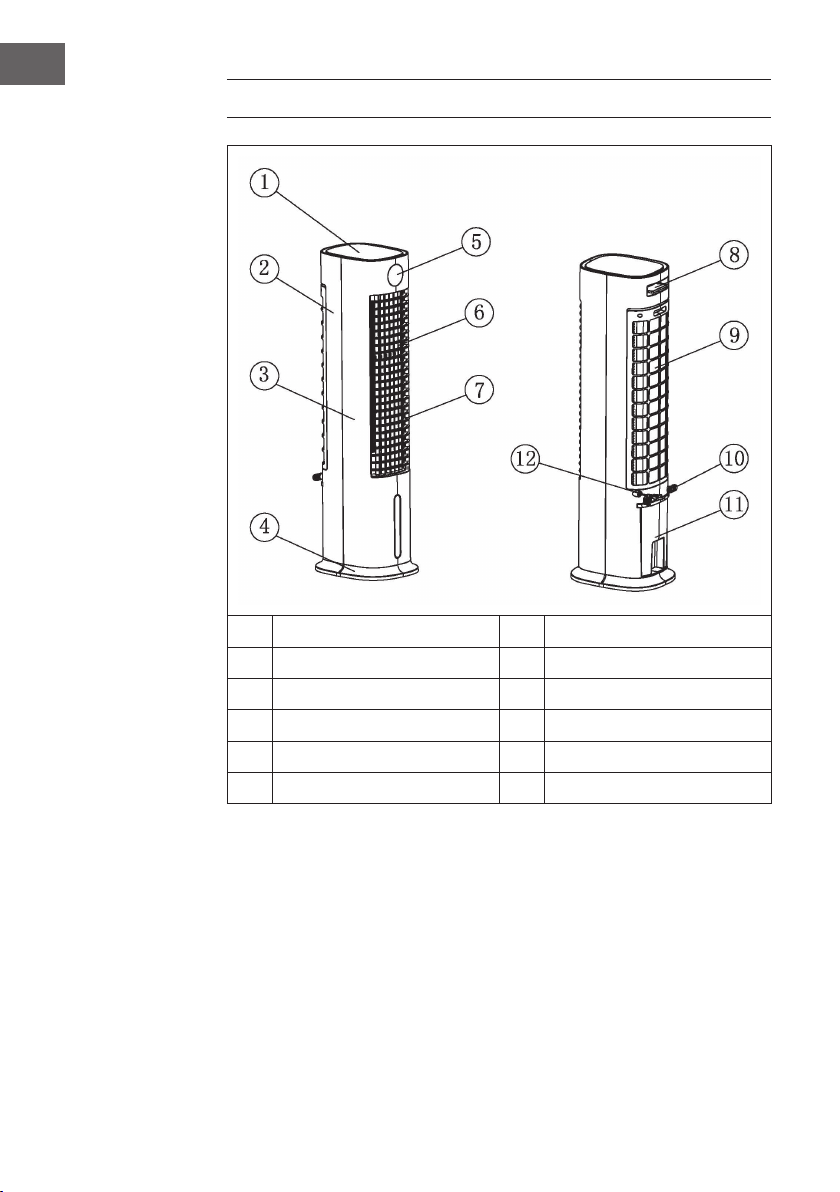
54
FR
APERÇU DE L‘APPAREIL
1
Cache supérieur
7
Fentes de ventilation horizontales
2
Boîtier arrière
8
Télécommande
3
Boîtier avant
9
Cache arrière
4
Base de l'appareil
10
Enroulement du câble
5
Fenêtre d'afchage
11
Réservoir d'eau
6
Fentes de ventilation verticales
12
Câble d'alimentation
Remarques sur l‘utilisation du réservoir d‘eau
En principe, vous pouvez utiliser votre rafraîchisseur d‘air à tout moment sans eau dans
le réservoir. Il fonctionne alors comme un ventilateur normal. L‘eau du réservoir n‘est
nécessaire que pour la fonction de rafraîchissement. Le rafraîchisseur d‘air l‘évapore
par l‘échangeur en cellulose du nébuliseur, extrayant la chaleur de l‘air et réduisant
la température de l‘air du ventilateur de jusqu‘à 3 °C, en fonction de la fraîcheur de
l‘eau utilisée. Nous déconseillons d‘utiliser la fonction de rafraîchissement les jours où
l‘humidité est particulièrement élevée, car l‘appareil l‘augmente et peut ainsi contribuer
à des problèmes circulatoires.
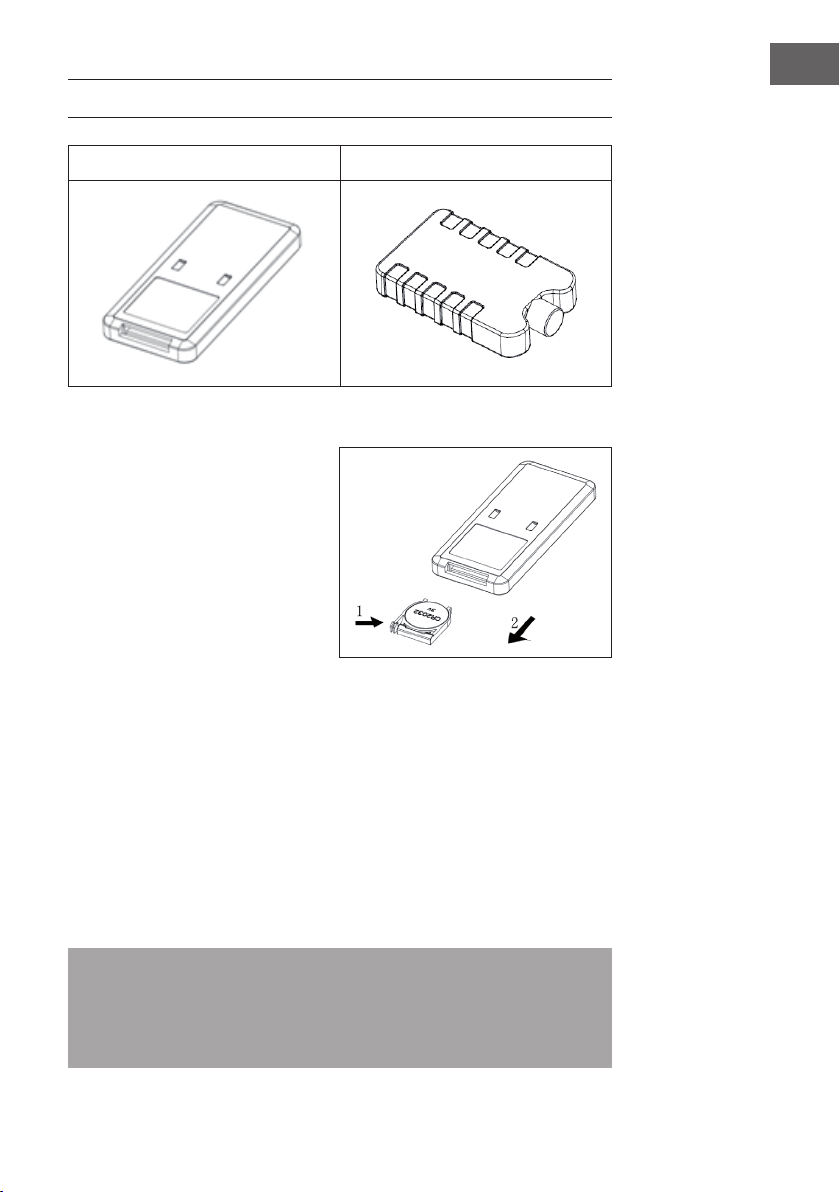
55
FR
ACCESSOIRES
Télécommande Récipient à glace
Utilisation de la télécommande
1. Ouvrez le compartiment à piles de
la télécommande et insérez une
pile 3 V CR2032. Pour ouvrir le
compartiment à pile, appuyez sur le
couvercle dans le sens de la èche
(1) et tirez le compartiment à pile
dans le sens de la èche (2).
2. Pointez la télécommande vers le
récepteur pendant l‘utilisation.
3. Remplacez les piles usées. Faites
attention à respecter la polarité
(+/-) lors de l‘insertion de la nouvelle pile. Insérez ensuite le compartiment à piles
dans la télécommande..
Utilisation du récipient à glace
1. Placez le récipient à glace dans le compartiment congélateur jusqu‘à ce qu‘il soit
complètement congelé.
2. Placez le récipient à glace dans le réservoir d‘eau de la machine. Dans les 10
minutes suivant l‘insertion du récipient à glace, la température du réservoir d‘eau
descend en dessous de la température ambiante.
3. Deux récipients à glace sont inclus dans la livraison. Utilisez-les en alternance.
4. Il est interdit d‘ouvrir le couvercle du récipient à glace. N‘avalez jamais le contenu
du récipient à glace.
Remarque : Avec ses propriétés spéciales de stockage frigorique et d‘isolation,
le récipient à glace absorbe lentement la chaleur de l‘eau an de maintenir la
température du réservoir d‘eau en dessous de la température ambiante pendant
des heures. Cela produit un vent plus agréable et plus frais grâce au ventilateur du
climatiseur.
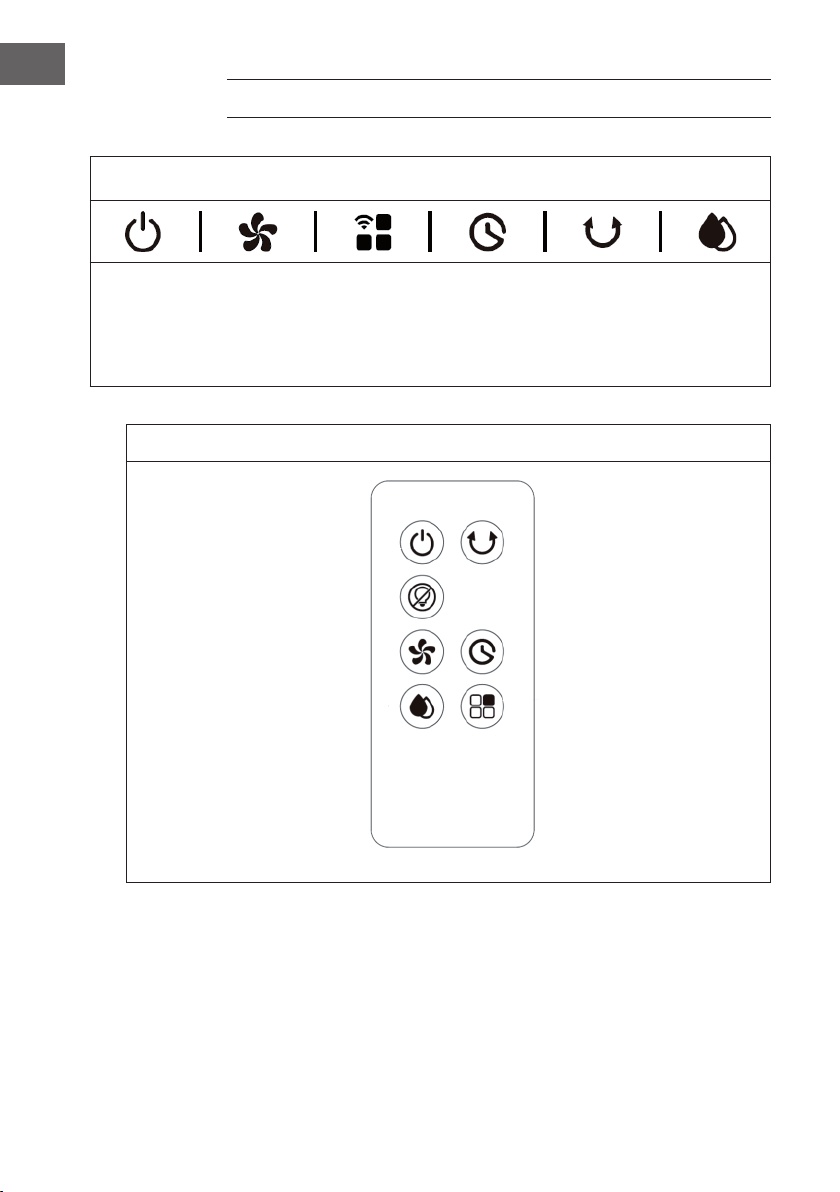
56
FR
PANNEAU DE COMMANDE ET TÉLÉCOMMANDE
Panneau de commande (touches)
MARCHE/
ARRÊT
Vitesse de
ventilation
Mode de
ventilation /
Wi
Minuterie
Fonction
oscillation
Rafraîchis-
sement /
Humidi-
cation
Télécommande (touches)
Marche/arrêt Fonction oscillation
Ecran éteint
Vitesse de ventilation Minuterie
Mode rafraîchissement /
humidication
Mode ventilation
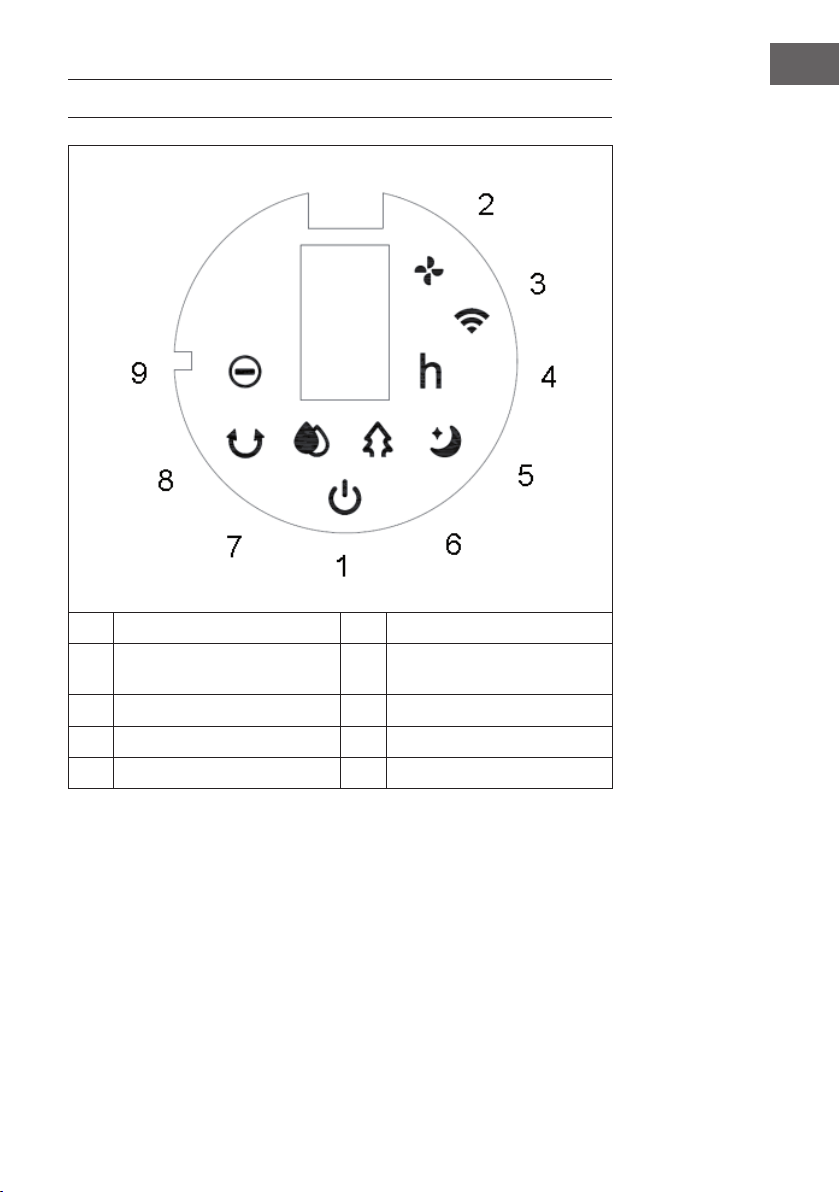
57
FR
VOYANTS DE L‘AFFICHAGE
1 Marche/arrêt 6 Mode vent naturel
2 Vitesse de ventilation 7 Mode rafraîchissement /
humidication
3 Fonction Wi 8 Fonction oscillation
4 Minuterie 9 Fonction ions négatifs
5 Mode de ventilation nuit
58
FR
MISE EN MARCHE ET UTILISATION
Avant l‘utilisation
• Sortez l‘appareil de son emballage et retirez tous les matériaux d‘emballage.
• Placez l‘appareil sur une surface stable et plane.
• Insérez la che d‘alimentation dans la prise. L‘appareil peut alors être utilisé
directement et aucune installation n‘est requise.
Mise en marche
La première fois que vous branchez l‘appareil sur la prise, il émet deux bips et passe en
mode veille. Tous les voyants sont éteints. Hormis le bouton ON / OFF, tous les boutons
sont inactifs.
Pour allumer et éteindre l‘appareill
En mode veille, appuyez sur la touche ON / OFF pour allumer l‘appareil. Lorsque
vous allumez l‘appareil pour la première fois, le voyant de vitesse (2) s‘allume. Le
voyant de basse vitesse s‘allume et la fonction oscillation est désactivée. Appuyez à
nouveau sur la touche de marche/arrêt pour mettre l‘appareil en veille.
Réglage de la vitesse
La vitesse de ventilation se règle avec la touche de vitesse . Appuyez plusieurs fois
sur la touche de vitesse pour régler la vitesse dans l‘ordre de séquence suivant :
Faible > moyenne > élevée > faible.
L‘écran afche les niveaux de vitesse en chiffres :
Vitesse Afchage
Faible 1
Moyenne 2
Élevée 3
Fonction „vent sec“
Appuyez sur la touche de vitesse
et maintenez-la pendant 3 secondes pour
démarrer la fonction Vent sec. Le voyant LED (2) s‘allume et clignote pendant 20
minutes. Lors de l‘utilisation de cette fonction, tous les boutons à l‘exception du bouton
ON / OFF sont inactifs. Appuyez sur la touche de vitesse et maintenez-la pendant
trois secondes pour annuler la fonction.
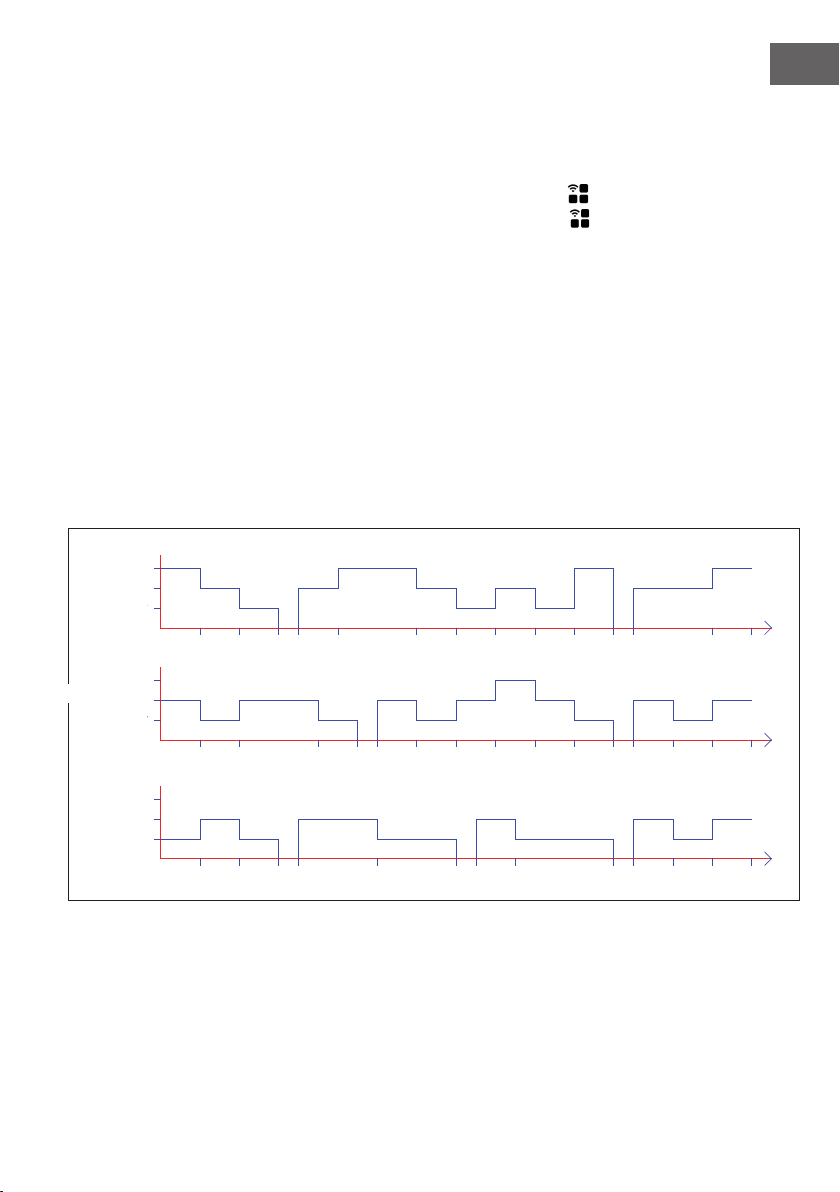
59
FR
Si la fonction a été activée pendant 20 minutes, l‘appareil s‘éteint automatiquement et
passe en mode veille.
Choix du mode de ventilation
Après avoir allumé l‘appareil, appuyez plusieurs fois sur la touche de mode vent
pour régler le mode souhaité. Appuyez plusieurs fois sur le bouton de mode vent
pour choisir l‘un des modes dans l‘ordre suivant :
Vent normal :
En mode vent normal, l‘appareil fonctionne sans aucun changement au niveau de
vitesse réglé (faible, moyen ou élevé).
Vent naturel :
En mode vent naturel, le voyant correspondant (6) s‘allume. Ce mode imite une douce
brise naturelle, ce qui rend le volume d‘air plus doux et plus agréable. L‘écran n‘afche
que la vitesse du vent d‘origine, les variations ne sont pas afchées.
La conguration du vent pour ce mode est illustrée dans la gure ci-dessous :
6S 6S 6S 3S 12S 12S 3S 6S 3S15S
6S
T=90S
6S 6S 6S 6S 6S 3S 12S
6S 6S 12S 6S6S 6S6S 6S 6S
3S 6S 6S12S 6S
3S 6S 3S
T=90S
T=90S
6S
6S 6S 6S
6S 6S 6S
Low
Medium
High
STRONG
MIDDLE
WEAK
Low
Medium
High
Low
Medium
High
Moyenne
Élevée
Basse
Moyenne
Élevée
MOYENNE
FORT
Basse
Moyenne
Élevée
Basse
FAIBLE
60
FR
Vent de nuit :
Lorsque le mode vent de nuit est activé, l‘appareil continue initialement à fonctionner à
la vitesse du vent dénie précédemment. Après 30 minutes, il est réduit par intervalles
de 30 minutes. Dès que la minuterie a expiré, l‘appareil passe automatiquement en
mode veille. Si aucune minuterie n‘a été réglée, l‘appareil continue de fonctionner à
faible vitesse.
a) Si le mode vent de nuit est activé à haute vitesse, l‘appareil passera en vitesse
moyenne après 30 minutes. Le voyant correspondant s‘allume. Après 30 minutes
supplémentaires de fonctionnement à vitesse moyenne, l‘appareil passe à basse
vitesse. Le voyant correspondant s‘allume. L‘appareil continue alors à fonctionner à
basse vitesse jusqu‘à ce que la minuterie expire ou que vous éteigniez l‘appareil.
b) Si le mode vent de nuit est activé à vitesse moyenne, l‘appareil passera en vitesse
lente après 30 minutes. Le voyant correspondant s‘allume. L‘appareil continue
alors à fonctionner à basse vitesse jusqu‘à ce que la minuterie expire ou que vous
éteigniez l‘appareil.
c) Lorsque le mode vent de nuit est activé à basse vitesse, l‘indicateur correspondant
s‘allume. L‘appareil continue de fonctionner à basse vitesse jusqu‘à ce que la
minuterie expire ou que vous éteigniez l‘appareil.
Réglage de la minuterie
Le délai avant que l‘appareil s‘éteigne automatiquement se règle à l‘aide de la
minuterie . Vous pouvez dénir une durée comprise entre 0 et 9 heures. Le réglage
de la minuterie s‘ajuste par intervalles d‘une heure et s‘afche à l‘écran (0 = pas de
minuterie). Lorsque l‘appareil est allumé, appuyez sur la minuterie . L‘afchage
de la minuterie (4) et l‘afchage de l‘heure clignotent à l‘écran. Vous pouvez
maintenant régler la durée souhaitée jusqu‘à l‘arrêt automatique. Appuyez ensuite
sur n‘importe quel bouton (sauf MARCHE / ARRÊT) ou attendez 5 secondes pour
quitter le réglage. Une fois la minuterie activée, le temps restant jusqu‘à l‘arrêt et la
vitesse en cours s‘afchent en alternance sur l‘écran à intervalles de 10 secondes. Le
voyant correspondant (2/4) s‘allume. Dès que le temps est écoulé, l‘appareil s‘éteint
automatiquement et passe en mode veille.
Fonction oscillation
L‘appareil étant allumé, appuyez sur le bouton d‘oscillation pour activer l‘oscillation
de gauche à droite.
Mode rafraichissement / humidications
Lorsque l‘appareil est allumé, appuyez sur la touche de mode de rafraîchissement /
humidication pour activer / désactiver la fonction de rafraîchissement. L‘indicateur
correspondant s‘allume.
61
FR
Allumer et éteindre l‘écran / les voyants (télécommande)
Lorsque l‘appareil est allumé, appuyez sur Éteindre l‘écran sur la télécommande
pour éteindre l‘écran et tous les voyants lumineux. Si l‘écran est éteint et que vous
appuyez sur Éteindre l‘écran ou sur n‘importe quelle autre touche, les voyants
s‘allument à nouveau, mais l‘autre fonction des touches ne sera pas exécutée. Appuyez
à nouveau sur la touche souhaitée pour exécuter la fonction de touche correspondante.
Fonction ions négatifs
Lorsque vous allumez l‘appareil, la fonction ion négatif s‘active et le voyant LED
correspondant (9) s‘allume. La fonction ions négatifs est désactivée lorsque vous
éteignez l‘appareil.
Fonction Wi
L‘appareil allumé, appuyez sur mode vent / WiFi pendant cinq secondes. Vous
entendrez un bip, le voyant WiFi (3) clignote rapidement pendant cinq secondes.
Les applications sur le réseau peuvent être congurées en mode standard. Si aucune
connexion n‘est établie dans les 3 minutes, le voyant Wi (3) s‘éteint. Pour vous
reconnecter, appuyez à nouveau sur mode vent / WiFi . Un bip retentit, le module
Wi est réinitialisé, le voyant Wi (3) clignote rapidement pendant cinq secondes.
Les applications sur le réseau peuvent être congurées en mode standard. Dès que
le voyant Wi (3) clignote, appuyez de nouveau sur mode de ventilation / Wi
pendant 5 secondes. Un bip retentit et le voyant WiFi (3) clignote lentement pendant 5
secondes. Les applications du réseau peuvent désormais être congurées en mode de
compatibilité.
Remarques sur l‘utilisation de la fonction Wi
• Si l‘appareil est à nouveau éteint dans les 10 secondes après la mise sous tension,
le voyant Wi (3) revient à son état avant l‘arrêt. Si l‘appareil est éteint après 10
secondes, le voyant Wi (3) s‘éteint et passe en mode d‘économie d‘énergie.
Appuyez sur Paramètres et maintenez-le pendant 5 secondes pour redémarrer.
• Si le réseau n‘est pas conguré dans les trois minutes, le voyant Wi (3) s‘éteint.
Appuyez sur Paramètres et maintenez-le pendant 5 secondes pour redémarrer.
• Si le routeur est éteint après que la connexion Wi a été établie avec succès, le
voyant Wi (3) s‘éteint également. Dès que le routeur est remis sous tension, la
connexion à l‘appareil est automatiquement rétablie.
• Lors de l‘utilisation de la fonction Wi, le voyant Wi (3) doit clignoter rapidement.
Un routeur (il doit être possible de se connecter à des réseaux externes) et un
appareil mobile (par exemple un smartphone) sont nécessaires pour utiliser
l‘application Klarstein. L‘application Klarstein doit être installée sur l‘appareil mobile
également connecté au réseau WiFi.
62
FR
CONTRÔLE DE L‘APPAREIL PAR SMARTPHONE
Si vous intégrez votre appareil Klarstein dans votre WiFi domestique, vous pouvez le
contrôler très facilement à l‘aide de l‘application Klarstein associée. L‘application vous
permet non seulement de contrôler l‘appareil à distance depuis votre smartphone, mais
vous donne également accès à des recettes et à d‘autres informations.
Procédez comme suit pour connecter votre smartphone à votre appareil Klarstein :
1. Téléchargez d‘abord l‘application Klarstein en scannant le code QR avec votre
smartphone (voir ci-dessous) ou téléchargez-la directement depuis l‘App Store ou
Google Play.
2. Assurez-vous que votre smartphone est connecté au même réseau WiFi que votre
appareil Klarstein.
3. Ouvrez l‘application Klarstein.
4. Connectez-vous à votre compte. Si vous n‘avez pas encore de compte, inscrivez-
vous dans l‘application Klarstein.
5. Suivez les instructions de l‘application.
Téléchargement de l’application
Utilisez la fonction scanner de votre téléphone portable pour scanner le code QR et
enregistrer l’application sur votre smartphone.
Remarque : A son premier lancement, l‘application vous fournit de plus amples
informations d‘utilisation et une assistance pour établir une connexion avec votre
appareil.
iOS Android
63
FR
Résolution des problèmes de connexion
Si votre appareil Klarstein est introuvable sur le Wi, vériez les points suivants :
• L‘appareil est-il branché ?
• Le Wi est-il activé sur votre smartphone ?
• Le Wi de l‘appareil Klarstein est-il activé ? (Suivez les instructions de l‘application.)
• Le mot de passe WiFi a-t-il été saisi correctement ?
• Le routeur, l‘appareil Klarstein et le smartphone se trouvent-ils à proximité
immédiate lors de la tentative de couplage ? (Idéalement pas plus de 5 m l‘un de
l‘autre.)
• Si vous avez désactivé la bande 2,4 GHz dans les paramètres de votre routeur
sans l, activez-la.
Remarque : Pour obtenir de l‘aide, suivez les instructions de l‘application lors de
l‘établissement de la connexion.
FONCTIONS DE PROTECTION
Protection en cas de niveau d‘eau insufsant
Si la pompe à eau fonctionne pendant 45 secondes et que le logiciel détecte que
l‘interrupteur de niveau d‘eau n‘a pas de connexion pendant 5 secondes consécutives
(50 au total) pour manque d‘eau, la pompe à eau s‘arrête automatiquement et
l‘appareil émet 10 bips.
Détection du niveau d‘eau
Dans les 10 secondes suivant la mise en marche, appuyez sur Mode Refroidissement /
Humidication et maintenez-le après avoir entendu le bip. Le niveau d‘eau est alors
déterminé en 3 secondes. S‘il n‘y a pas d‘eau dans le réservoir d‘eau, la fonction de
rafraîchissement est désactivée et l‘appareil émet 10 bips.
La détection du niveau d‘eau est désactivée après avoir appui sur marche / arrêt ou
en cas de panne de courant.
Fonction mémorisation
1. Si vous ne débranchez l‘appareil pas de l‘alimentation électrique, il reprend au
démarrage le mode déni avant sa mise hors tension. Les modes vent de nuit, vent
sec et minuterie ne sont pas enregistrés.
2. Si l‘appareil n‘est pas déconnecté de l‘alimentation électrique, il fonctionne à
vitesse moyenne pendant 3 secondes lors de sa remise sous tension, puis passera à
la vitesse réglée avant l‘arrêt.
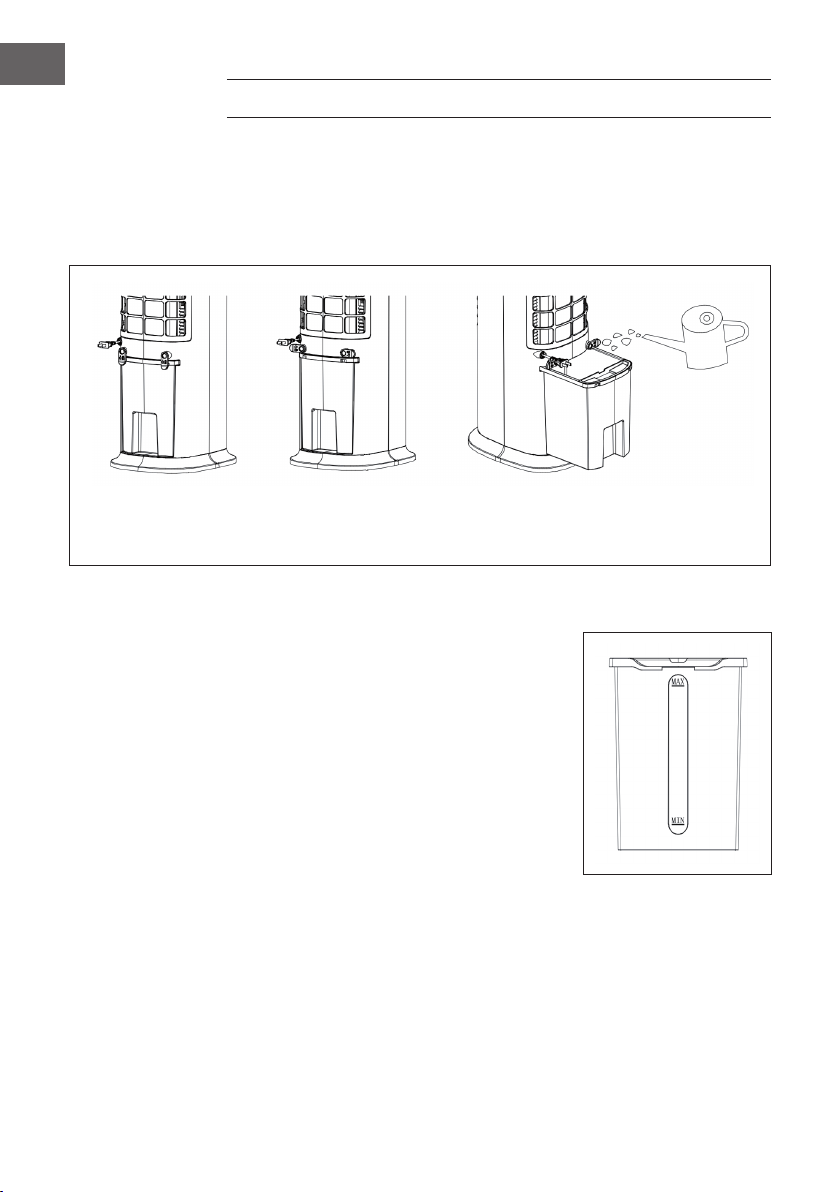
64
FR
REMPLISSAGE DE RÉSERVOIR D‘EAU
Pour utiliser les fonctions de rafraîchissement et d‘humidication, remplissez le réservoir
d‘eau. Avant le remplissage, tournez le rembobinage du câble de 90°. Sortez le
réservoir d‘eau à moitié. Versez lentement l‘eau dans le réservoir. Après le remplissage,
repoussez le réservoir dans l‘appareil. Remettez l‘enrouleur de cordon dans sa position
d‘origine.
La sécurité du réservoir
d'eau est fermée
La sécurité du réservoir
d'eau est ouverte
Retirez le réservoir pour le
remplir d'eau
Faites attention à l‘indicateur de niveau d‘eau lors du remplissage du réservoir :
1. Lors du remplissage manuel, assurez-vous
que le niveau d‘eau est au-dessus du repère
minimum et en dessous du repère maximum.
2. Utilisez uniquement de l‘eau potable propre.
3. Lorsque vous utilisez l‘appareil pour la première
fois, il peut y avoir une légère odeur et l‘eau
dans le réservoir d‘eau peut être légèrement
décolorée. Ceci est normal et sans danger et
n‘affectera pas votre santé.
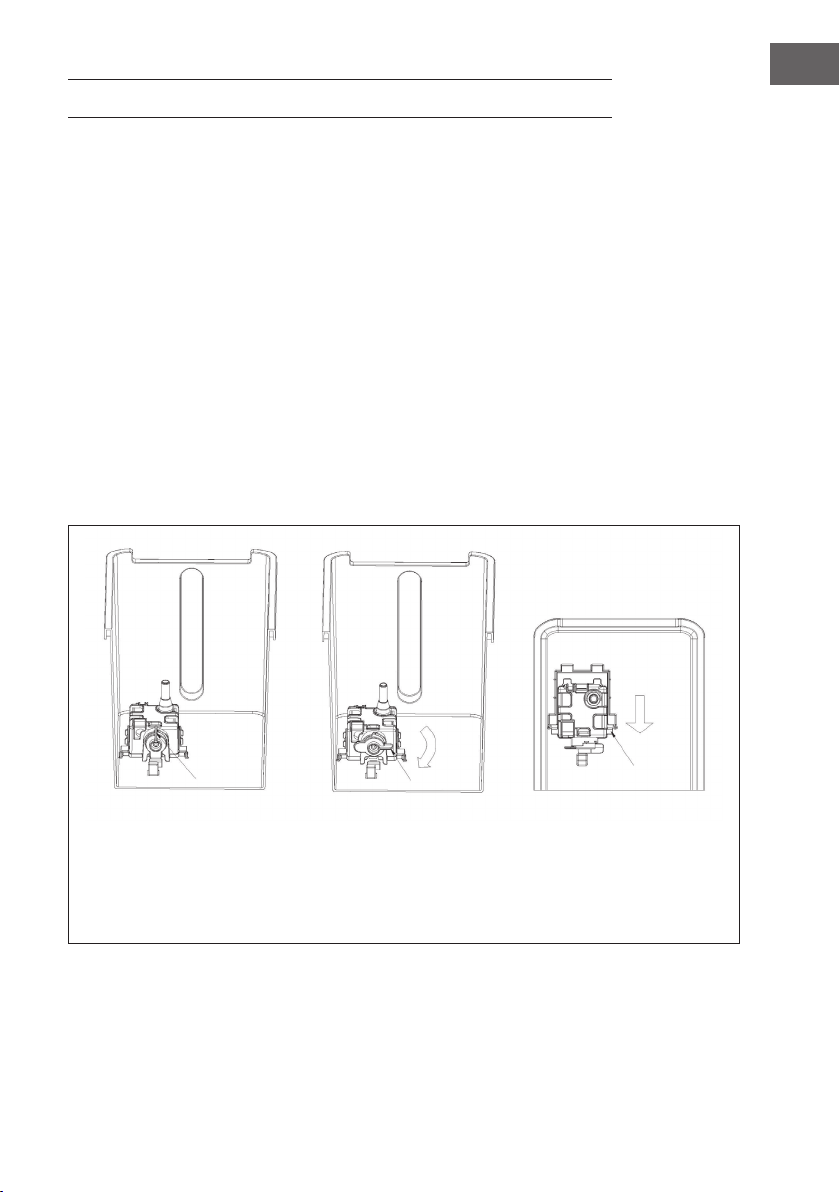
65
FR
NETTOYAGE ET ENTRETIEN
Nettoyage
• Avant de nettoyer l‘appareil, éteignez-le et débranchez la che de la prise.
• N‘utilisez pas de produits chimiques, de benzène, de diluants ou d‘autres
substances pour nettoyer l‘appareil qui pourraient endommager la surface de
l‘appareil.
• Retirez la poussière avec un chiffon doux. Utilisez de l‘eau (en dessous de 50
°C) et un détergent neutre pour les taches tenaces. Essuyez ensuite la surface de
l‘appareil avec un chiffon doux.
Nettoyage du réservoir d‘eau
• Retirez la che d‘alimentation de la prise. Tournez le rembobinage du cordon en
position horizontale et retirez le réservoir d‘eau à moitié.
• Mettez votre main dans le réservoir d‘eau et tournez la xation de 90°. Appuyez
ensuite sur le boîtier de la pompe à eau et retirez le réservoir d‘eau.
• Éliminez les résidus de calcaire du réservoir d‘eau avec un chiffon humide imbibé
d‘un produit de nettoyage neutre. Rincez ensuite le réservoir d‘eau à l‘eau claire.
Fixation fermée Fixation ouverte Appuyez et retirez le boîtier
de la pompe à eau lorsque
deux pointes sont visibles.
Retirez ensuite le réservoir
d'eau.

66
FR
CONSEILS POUR LE RECYCLAGE
S‘il existe une réglementation pour l‘élimination ou le
recyclage des appareils électriques et électroniques dans
votre pays, ce symbole sur le produit ou sur l‘emballage
indique que cet appareil ne doit pas être jeté avec les
ordures ménagères. Vous devez le déposer dans un point
de collecte pour le recyclage des équipements électriques
et électroniques. La mise au rebut conforme aux règles
protège l‘environnement et la santé de vos semblables des
conséquences négatives. Pour plus d‘informations sur le
recyclage et l‘élimination de ce produit, veuillez contacter
votre autorité locale ou votre service de recyclage des
déchets ménagers.
Ce produit contient des piles. S‘il existe une réglementation
pour l‘élimination ou le recyclage des piles dans votre pays,
vous ne devez pas les jeter avec les ordures ménagères.
Renseignez-vous sur les dispositions locales relatives à la
collecte des piles usagées. La mise au rebut conforme aux
règles protège l‘environnement et la santé de vos semblables
des conséquences négatives.
DÉCLARATION DE CONFORMITÉ
Fabricant :
Chal-Tec GmbH, Wallstraße 16, 10179 Berlin, Allemagne.
Importateur pour la Grande Bretagne :
Chal-Tec UK limited
Unit 6 Riverside Business Centre
Brighton Road
Shoreham-by-Sea
BN43 6RE
United Kingdom
La déclaration complète de conformité du fabricant est
accessible par le lien suivant : use.berlin/10035816
67
IT
Gentile cliente,
La ringraziamo per aver acquistato il dispositivo. La
preghiamo di leggere attentamente le seguenti istruzioni
per l’uso e di seguirle per evitare possibili danni. Non ci
assumiamo alcuna responsabilità per danni scaturiti da una
mancata osservazione delle avvertenze di sicurezza e da
un uso improprio del dispositivo. Scansionare il codice QR
seguente, per accedere al manuale d’uso più attuale e per
ricevere informazioni sul prodotto.
INDICE
Sicherheitshinweise4
Geräteübersicht6
Zubehör7
Bedienfeld und Fernbedienung8
Displayanzeigen9
Inbetriebnahme und Bedienung10
Gerätesteuerung per Smartphone14
Schutzfunktionen15
Wassertank befüllen16
Reinigung und Pege17
Hinweise zur Entsorgung18
Konformitätserklärung18
DATI TECNICI
Codice articolo 10035816, 10035817
Alimentazione 220-240 V ~ 50 Hz
Potenza 80 W
Capacità del serbatoio 8 litros
Volume d’aria 480 m3/h
Volume d’evaporazione 1050 ml/h
Livello di emissione sonora ≤ 60 db
WiFi standard
802.11 b/g/n
WiFi frequenza
2,4 GHz
WiFi potenza a radiofrequenza (max.)
20 dBm

68
IT
AVVERTENZE DI SICUREZZA
• Prima dell’uso controllare la tensione sulla targhetta del dispositivo. Collegare il
dispositivo solo a una presa che corrisponda alla tensione indicata.
• Tenere lontano il cavo d’alimentazione da superci calde e da oggetti appuntiti.
• Non sistemare il cavo d’alimentazione sotto un tappeto e non coprirlo con altri
oggetti o tessuti. Posare il cavo d’alimentazione in modo tale che nessuno vi possa
inciampare e restarci impigliato.
• Non utilizzare il dispositivo se il cavo d’alimentazione o la spina sono danneggiati.
• Se il cavo d’alimentazione o la spina sono danneggiati vanno sostituiti dal
produttore, da un’azienda autorizzata o da una persona qualicata.
• Utilizzare il dispositivo solo in ambienti chiusi.
• Non coprire il dispositivo.
• Collocare il dispositivo su una supercie piana e stabile. Assicurarsi che il
dispositivo sia in posizione verticale.
• Assicurarsi che il dispositivo sia spento prima di inserire la spina nella presa.
• Non utilizzare il dispositivo con le mani bagnate. Non toccare la spina e il cavo
d’alimentazione con le mani bagnate.
• Non lasciare il dispositivo incustodito mentre è in funzione. Spegnerlo e staccare la
spina quando non è in uso.
• Staccare la spina prima di eseguire la pulizia o la manutenzione del dispositivo.
• Non tirare il cavo per staccare la spina, ma afferrare la spina alla base.
• Questo dispositivo può essere utilizzato dai bambini maggiori di 8 anni e dalle
persone con limitate capacità siche, sensoriali o mentali o da persone con
esperienza e conoscenze insufcienti, solo se sono stati informati sulle funzioni del
dispositivo e sono consapevoli dei rischi e dei pericoli connessi.
• Utilizzare il dispositivo solo come descritto in questo manuale.
• Non inlare le dita oppure oggetti nelle prese d’aria.
• Non posizionare il dispositivo vicino a tende, tovaglie o simili, poiché potrebbero
essere aspirati nella ventola e danneggiarla.
• Non utilizzare il dispositivo in ambienti umidi come ad esempio bagni.
• Non utilizzare il dispositivo prima di aver montato le rotelle o quando è posizionato
su un lato.
• Srotolare completamente il cavo prima dell’uso.

69
IT
• Durante l’uso il dispositivo umidica l’ambiente. Tuttavia bisogna evitare un’umidità
troppo elevata. Si consiglia un’umidità compresa tra il 40-50%. Un’eccessiva
umidità può causare muffa o problemi di salute.
• Collocare il dispositivo solo su superci resistenti all’umidità. Durante l’installazione
e la rimozione del serbatoio potrebbero cadere alcune gocce. In questo caso
asciugare immediatamente le gocce d’acqua.
• Cambiare l’acqua nel serbatoio al massimo dopo 3 giorni.
CARATTERISTICHE DEL PRODOTTO
• Umidicazione/Raffreddamento
• Funzione timer: 1-9 ore (tolleranza timer entro il 3%)
• Funzione telecomando
• Protezione da mancanza d’acqua: con tubazione
• Velocità ventilatore: 3 livelli di velocità: basso, medio ed elevato
• Modalità ventilazione: normale, ventilazione naturale e sleep
• Funzione WiFi; gestione da app
• Funzione ioni negativi
• Ventilazione orizzontale automatica
• Ruote universali (senza freno), facili da spostare
• Tasti elettronici
• Serbatoio con pompa dell’acqua facile da pulire
• Ventilazione asciutta e smorzamento automatico dell’illuminazione a LED se non si
preme alcun tasto nel giro di un minuto (33 % della luminosità originaria)
• Tecnologia di refrigerazione dell’acqua spruzzata, con ampia circolazione
d’acqua e raffreddamento più rapido.
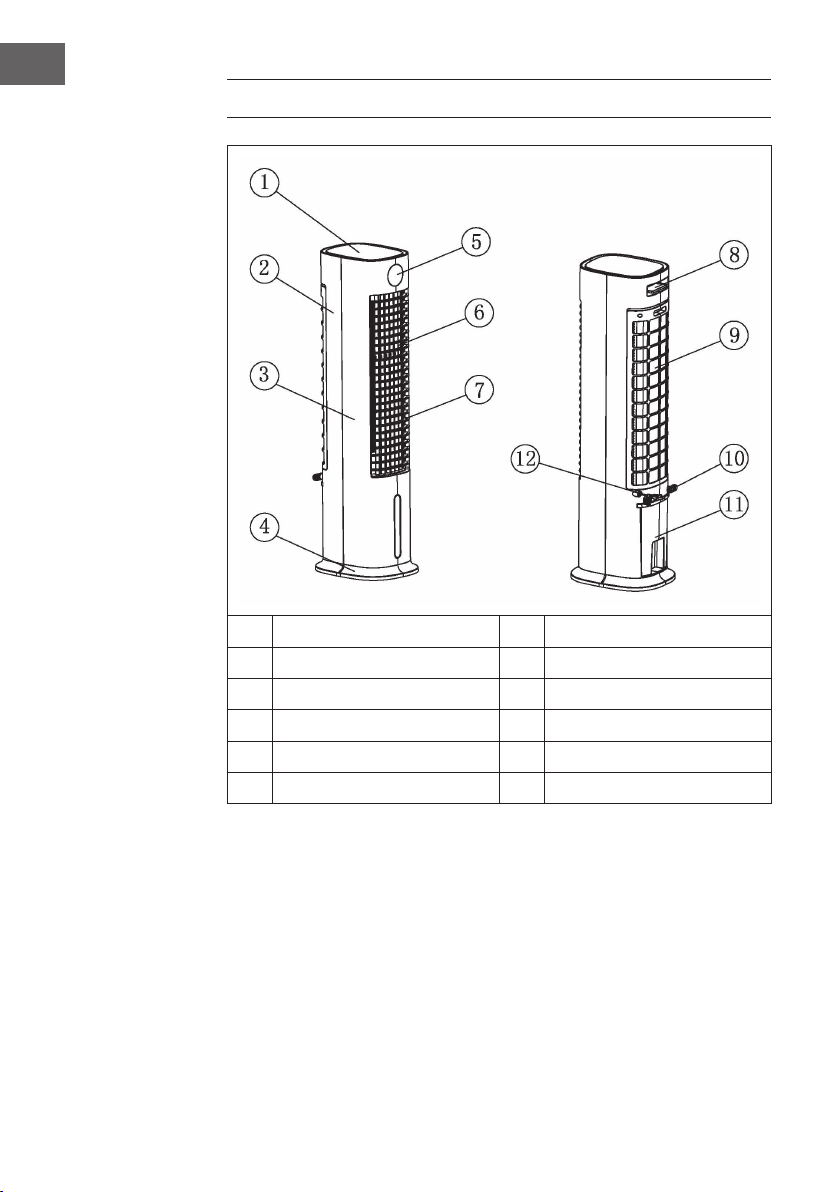
70
IT
DESCRIZIONE DEL PRODOTTO
1
Coperchio superiore
7
Feritoie di ventilazione orizzontali
2
Scocca posteriore
8
Telecomando
3
Scocca anteriore
9
Copertura posteriore
4
Base del dispositivo
10
Avvolgicavo
5
Display
11
Serbatoio
6
Feritoie di ventilazione verticali
12
Cavo d’alimentazione
Avvertenza sull’utilizzo del serbatoio
Come linea di principio è possibile usare il raffrescatore evaporativo senz’acqua nel
serbatoio in qualsiasi momento. In questo caso funziona come un normale ventilatore.
L’acqua nel serbatoio è richiesta solo per la funzione di raffreddamento. Il raffrescatore
evaporativo fa evaporare l’acqua tramite il nebulizzatore. Il calore viene tolto dall’aria e
la temperatura del ventilatore si abbassa di 3 °C a seconda di quanto è fredda l’acqua
utilizzata. Sconsigliamo di usare la funzione di raffreddamento nelle giornate di umidità
elevata, perché il tasso d’umidità viene aumentato e può contribuire a provocare
problemi di pressione sanguigna.
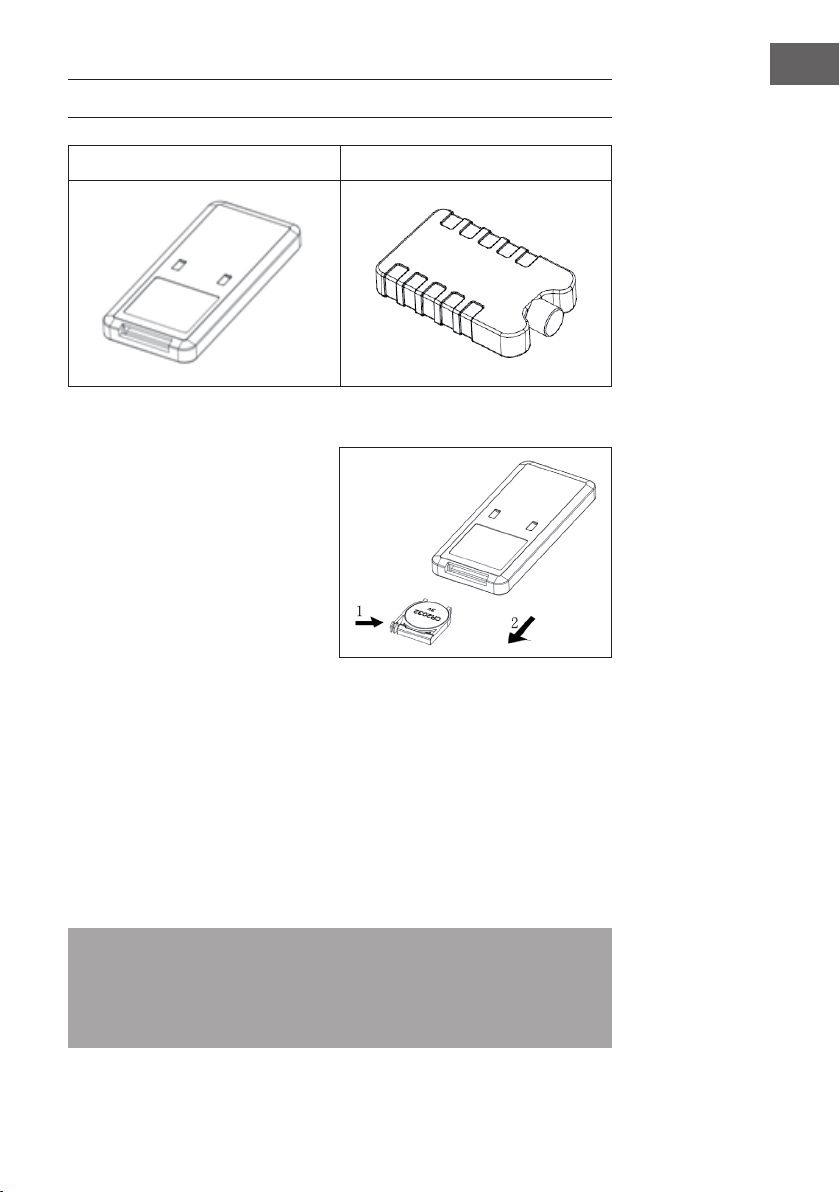
71
IT
ACCESSORI
Telecomando Portaghiaccio
Come utilizzare il telecomando
1. Aprire il vano pile del telecomando
e inserirvi una pila CR2032 da 3
V. Per aprire il vano premere sul
coperchio in direzione della freccia
(1) ed estrarre il vano in direzione
della freccia (2).
2. Durante l’uso indirizzare il
telecomando verso il ricevitore.
3. Sostituire le pile esaurite. Prestare
attenzione alla polarità corretta
(+/-) quando si inserisce una nuova
pila. Inne reinserire il vano pile nel telecomando.
Come utilizzare il portaghiaccio
1. Posizionare il portaghiaccio nel freezer del frigorifero nché non si è
completamente congelato.
2. Sistemarlo nel serbatoio del dispositivo. Nel giro di 10 minuti la temperatura
dell’acqua nel serbatoio sarà più fredda rispetto a quella ambiente.
3. Nel volume di consegna sono inclusi due portaghiaccio, che vanno utilizzati a
rotazione.
4. È vietato aprire la copertura dei portaghiaccio. Non ingerire il contenuto dei
portaghiaccio.
Nota: con particolari caratteristiche di immagazzinamento del freddo e di
isolamento, il portaghiaccio può assorbire lentamente il calore dell’acqua per
mantenere per ore la temperatura dell’acqua nel serbatoio al di sotto di quella
ambiente. Grazie a ciò viene prodotta una ventilazione più gradevole e fresca dal
ventilatore.
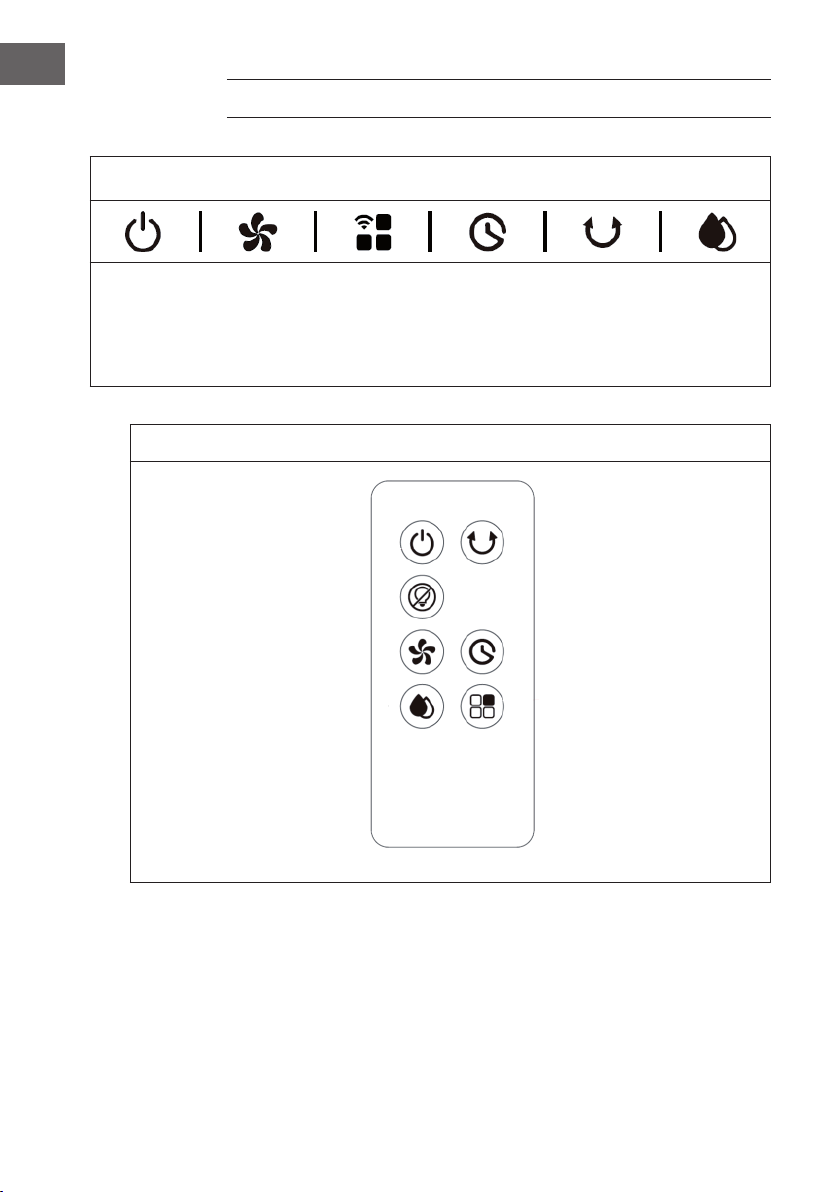
72
IT
PANNELLO DI CONTROLLO E TELECOMANDO
Pannello di controllo (tasti)
ON/OFF
Velocità
ventilazione
Modalità
ventilazione/
WIFI
Timer Oscillazione
Raffredda-
mento/
Umidi-
cazione
Telecomando (tasti)
ON/OFF Oscillazione
Display off
Velocità di ventilazione Timer
Modalità di raffreddamento/
umidicazione
Modalità di ventilazione
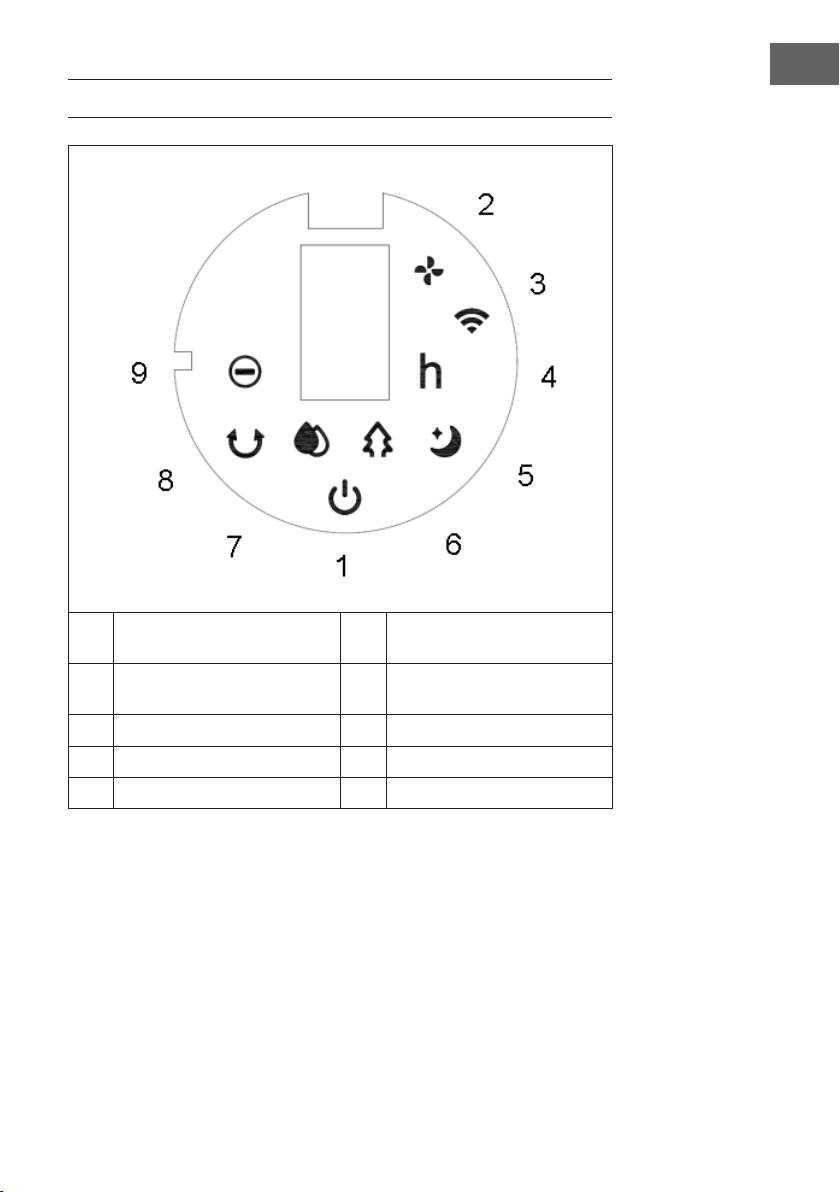
73
IT
VISUALIZZAZIONI A DISPLAY
1 ON/OFF 6 Modalità di ventilazione
naturale
2 Velocità di ventilazione 7 Modalità di raffreddamento/
umidicazione
3 Funzione WiFi 8 Oscillazione
4 Timer 9 Funzione ioni negativi
5 Modalità di ventilazione sleep
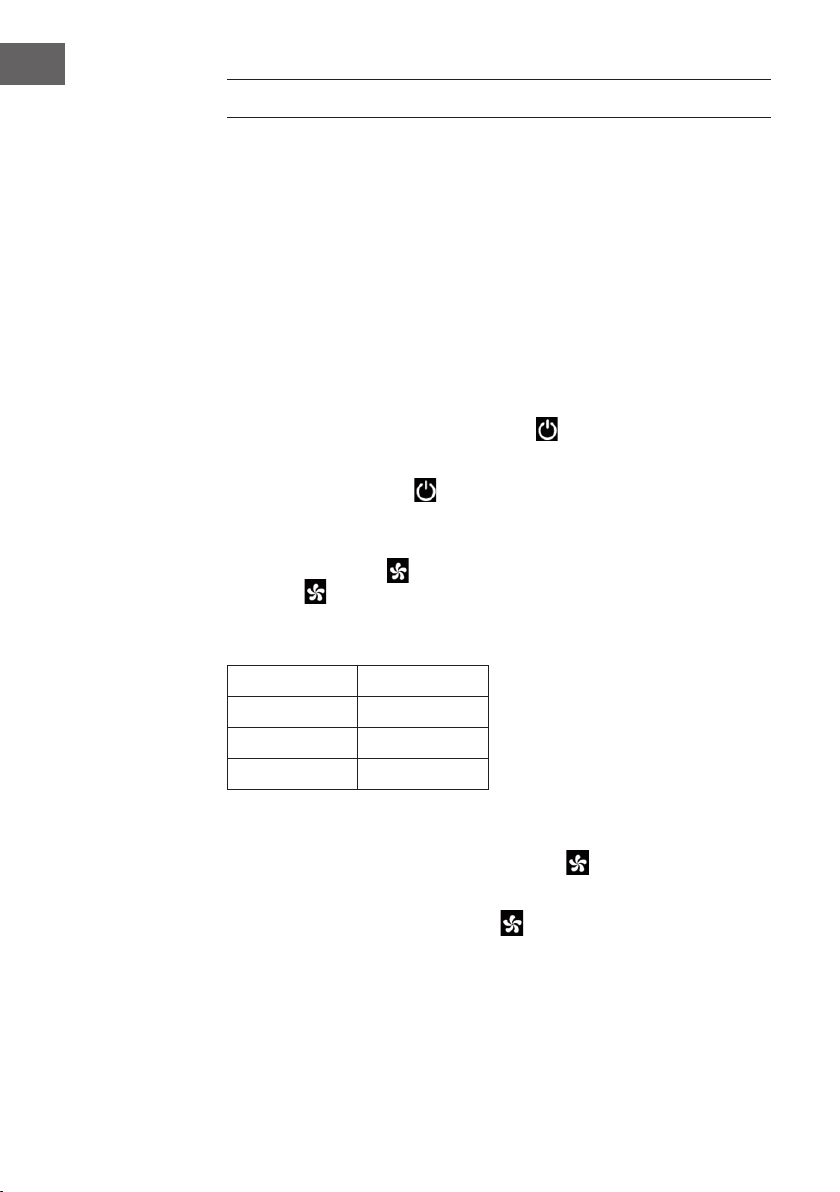
74
IT
MESSA IN FUNZIONE E UTILIZZO
Prima dell’utilizzo
• Estrarre il dispositivo dalla confezione e rimuovere tutti i materiali d’imballaggio.
• Posizionare il dispositivo su una supercie piana e stabile.
• Inserire la spina nella presa elettrica. Il dispositivo può essere utilizzato direttamente
e non è necessaria alcuna installazione.
Messa in funzione
Quando la spina viene inserita per la prima volta nella presa elettrica, il dispositivo
emette un suono per due volte ed entra in modalità standby. Tutte le spie sono spente.
Accendere e spegnere il dispositivo
Se in modalità standby si preme il tasto ON/OFF , il dispositivo si accende.
Quando lo si aziona per la prima volta, la spia della velocità (2) si accende. La spia
della velocità bassa si accende e la funzione di oscillazione è disattivata. Premere
nuovamente il tasto ON/OFF per entrare in modalità standby.
Come impostare la velocità
Con il tasto della velocità è possibile regolare la ventilazione. Premendo più volte
questo tasto vengono visualizzati i livelli di velocità nella sequenza seguente: Basso
> Medio > Alto > Basso.
Sul display i livelli di velocità vengono visualizzati con i numeri:
Velocità Visualizzazione
Bassa 1
Media 2
Alta 3
Funzione “Ventilazione asciutta”
Se si tiene premuto per 3 secondi il tasto della velocità
, si accende la funzione
“Ventilazione asciutta”. La spia LED ((2) si accende e lampeggia per 20 minuti. Durante
l’utilizzo di questa funzione tutti i tasti sono disattivati tranne quello ON/OFF. Tenere
premuto per 3 secondi il tasto della velocità per interrompere la funzione.
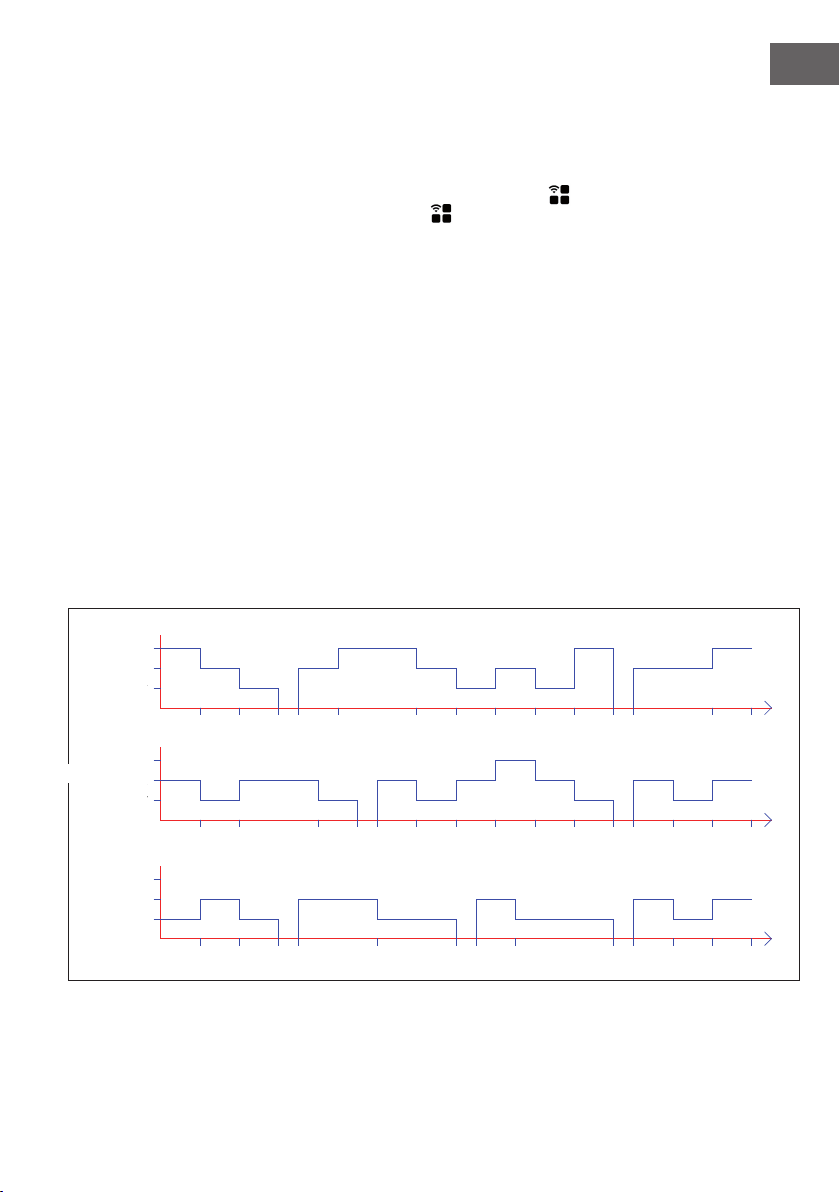
75
IT
Se la funzione è stata attiva per 20 minuti, il dispositivo si spegne automaticamente ed
entra in modalità standby.
Selezionare la modalità di ventilazione
Per impostare la modalità desiderata premere più volte il tasto di ventilazione dopo
aver acceso il dispositivo. Premendo più volte questo tasto vengono visualizzate le
modalità nella sequenza seguente:
Ventilazione normale > Ventilazione naturale > Ventilazione sleep > Ventilazione
normale.
Ogni volta si accende la spia corrispondente.
Ventilazione normale:
Durante la ventilazione normale il dispositivo funziona senza modiche con il livello di
velocità impostato (Basso, Medio o Alto).
Ventilazione naturale:
Durante la ventilazione naturale la spia corrispondente (6) si accende. In questa
modalità viene imitata la delicata brezza del vento naturale, per mezzo della quale
il volume d’aria viene percepito più gradevole e dolce. Lo schermo visualizza solo la
velocità di ventilazione originaria e non le modiche.
Lo schema di ventilazione di questa modalità è rappresentato nella gura seguente:
6S 6S 6S 3S 12S 12S 3S 6S 3S15S
6S
T=90S
6S 6S 6S 6S 6S 3S 12S
6S 6S 12S 6S6S 6S6S 6S 6S
3S 6S 6S12S 6S
3S 6S 3S
T=90S
T=90S
6S
6S 6S 6S
6S 6S 6S
Low
Medium
High
STRONG
MIDDLE
WEAK
Low
Medium
High
Low
Medium
High
Media
Alta
Bassa
Media
Alta
MEDIA
FORTE
Bassa
Media
Alta
Bassa
DEBOLE
76
IT
Ventilazione sleep:
Quando si attiva la modalità di ventilazione sleep, il dispositivo funziona inizialmente
alla velocità precedentemente impostata. Dopo 30 minuti si riduce in intervalli di 30
minuti. Questa modalità impedisce alle persone che si addormentano di non sentirsi
male se la ventilazione è troppo elevata.
a) Se la modalità di ventilazione sleep è stata attivata con una velocità elevata,
il dispositivo passa in velocità media dopo 30 minuti. La spia corrispondente
si accende. Dopo aver funzionato per 30 minuti a media velocità il dispositivo
passa a quella bassa e la spia corrispondente si accende. Il dispositivo continua
a funzionare a bassa velocità no allo scadere del timer o nché non si spegne il
dispositivo.
b) Se la modalità di ventilazione sleep è stata attivata con una velocità media, il
dispositivo passa in velocità bassa dopo 30 minuti. La spia corrispondente si
accende. Il dispositivo continua a funzionare a bassa velocità no allo scadere del
timer o nché non si spegne il dispositivo.
c) Se la modalità di ventilazione sleep è stata attivata con una velocità bassa, si
accende la spia corrispondente. Il dispositivo continua a funzionare a bassa
velocità no allo scadere del timer o nché non si spegne il dispositivo
Come impostare il timer
Con il tasto timer si può impostare l’ora no allo spegnimento automatico del
dispositivo. È possibile impostare una durata da 0-9 ore in passaggi di un’ora. Sullo
schermo viene visualizzato l’orario (0 = nessun timer). Quando il dispositivo è acceso,
premere il tasto timer . La spia del timer (4) e dell’ora lampeggiano sullo schermo.
Ora è possibile impostare l’ora desiderata no allo spegnimento automatico. Premere
inne un tasto qualsiasi (tranne il tasto ON/OFF) oppure attendere 5 secondi per uscire
dall’impostazione. Dopo aver attivato il timer sullo schermo vengono visualizzati in
intervalli di 10 secondi il tempo rimanente no allo spegnimento e la velocità attuale
impostata. Le spie corrispondenti si accendono (2/4). Allo scadere del tempo il
dispositivo si spegne automaticamente ed entra in modalità standby.
Oscillazione
Quando il dispositivo è acceso, premere il tasto di oscillazione per attivare
l’oscillazione da sinistra a destra.
Modalità di raffreddamento/umidicazione
Quando il dispositivo è acceso, premere il tasto di raffreddamento/umidicazione
per attivare/disattivare la funzione di raffreddamento. La spia corrispondente si
accende.

77
IT
Accendere/Spegnere lo schermo e le spie (telecomando)
Quando il dispositivo è acceso, premere sul telecomando il tasto di spegnimento
dello schermo per spegnere lo schermo e tutte le spie. Quando lo schermo è
spento e si preme il tasto di spegnimento dello schermo o qualsiasi altro tasto, le
spie si accendono di nuovo, ma l’altra funzione del tasto non viene eseguita. Premere
nuovamente il tasto desiderato per eseguire la funzione corrispondente.
Funzione degli ioni negativi
Quando si accende il dispositivo, si aziona la funzione degli ioni negativi e la spia
corrispondente (9) si accende. Quando si spegne il dispositivo la funzione si disattiva.
Funzione WiFi
Quando il dispositivo è acceso, premere per cinque secondi il tasto di ventilazione/
WiFi . Viene emesso un suono e la spia WiFi (3) lampeggia per cinque secondi.
In modalità standard è possibile congurare le app in rete. Se nel giro di 3 minuti non
viene instaurato nessun collegamento, la spia WiFi (3) sparisce. Premere di nuovo il
tasto di ventilazione/WiFi per instaurare nuovamente un collegamento. Viene
emesso un suono, il modulo WiFi viene resettato e la spia WiFi (3) lampeggia per
cinque secondi. In modalità standard è possibile congurare le app in rete. Tenere
premuto per 5 secondi il tasto di ventilazione/ WiFi non appena la spia WiFi (3)
lampeggia. Viene emesso un suono e la spia WiFi (3) lampeggia piano per 5 secondi.
Ora è possibile congurare le app in rete nella modalità di compatibilità.
Avvertenze inerenti l’utilizzo della funzione WiFi
• Quando il dispositivo viene spento nel giro di 10 secondi dopo l’accensione, la
spia WiFi (3) ritorna nello stato in cui era prima dello spegnimento. Se il dispositivo
viene spento dopo 10 secondi, la spia WiFi (3) sparisce ed entra in modalità di
risparmio energetico. Tenere premuto per 5 secondi il tasto d’impostazione per
riavviare il dispositivo.
• Se la rete non viene congurata nel giro di 3 minuti, la spia WiFi (3) si spegne.
Tenere premuto per cinque secondi il tasto d’impostazione per riavviare il
dispositivo.
• Quando si spegne il router dopo che è stato stabilito un collegamento WiFi, la
spia WiFi (3) si spegne. Non appena si riaccende il router, il collegamento con il
dispositivo si instaura automaticamente.
• Quando si utilizza la funzione WiFi, la spia WiFi (3) lampeggia velocemente. Per
poter usare l’app Klarstein sono necessari un router (da collegare a reti esterne)
e un dispositivo mobile esterno (p. es. smartphone). L’app Klarstein deve essere
installata sul dispositivo mobile esterno, che deve essere collegato alla rete WiFi.
78
IT
GESTIONE DEL DISPOSITIVO TRAMITE
SMARTPHONE
Se si collega il dispositivo Klarstein al proprio WiFi domestico, lo si può comodamente
gestire tramite l’app Klarstein, che consente di telecomandare il dispositivo tramite il
proprio cellulare e offre l’accesso a ricettari e altre informazioni.
Per collegare il proprio smartphone al dispositivo Klarstein eseguire i seguenti passaggi:
1. Scaricare l’app Klarstein scannerizzando il codice QR (vedi sotto) con il proprio
smartphone oppure scaricarla dall’App Store o da Google Play.
2. Assicurarsi che il proprio smartphone sia collegato alla stessa rete WiFi alla quale
deve essere connesso il dispositivo Klarstein.
3. Aprire l’app Klarstein.
4. Registrarsi con il proprio account. Se non se ne ha ancora uno, registrarsi nell’app
Klarstein.
5. Seguire le istruzioni dell’app.
Come scaricare l’app
Utilizzare la funzione di scannerizzazione del proprio cellulare per scansionare il
codice QR. Salvare l’app sul cellulare.
Nota: non appena si apre l’app per la prima volta, questa fornisce ulteriori istruzioni
inerenti la sua gestione e assistenza per instaurare un collegamento con il proprio
dispositivo.
iOS Android
79
IT
Correzione degli errori se ci sono problemi con il collegamento
Se non si riesce a trovare il proprio dispositivo Klarstein sul WiFi vericare quanto
segue:
• Il dispositivo è inserito?
• È attivata la funzione WiFi del cellulare?
• È attivata la funzione WiFi del dispositivo Klarstein? (Seguire le istruzioni nell’app.)
• La password del WiFi è stata digitata correttamente?
• Il router, il dispositivo Klarstein e il cellulare sono vicini durante il tentativo di
accoppiamento? (L’ideale sarebbe a non più di 5 m di distanza l’uno dall’altro.)
• Se nelle impostazioni del proprio router WiFi è stata disattivata la banda 2,4 GHz
bisogna riattivarla.
Nota: se si necessita di ulteriore assistenza seguire le istruzioni dell’app mentre si
instaura il collegamento.
FUNZIONI PROTETTIVE
Interruttore di protezione da mancanza d’acqua
Se la pompa dell’acqua funziona per 45 secondi e il software si accorge che
l’interruttore di livello dell’acqua non si collega (troppo poca acqua) per 5 secondi
consecutivi (50 totali), la pompa smette automaticamente di funzionare e il dispositivo
emette un suono per 10 volte.
Rilevamento del livello d’acqua
Dopo aver acceso il dispositivo tenere premuto entro 10 secondi il tasto di
raffreddamento/umidicazione dopo aver sentito un suono. Nel giro di 3 secondi
viene stabilito il livello d’acqua. Se non c’è acqua nel serbatoio, la funzione di
raffreddamento si disattiva e il dispositivo suona per 10 volte. Premendo il tasto ON/
OFF o durante un’interruzione di corrente, si disattiva il rilevamento del livello
d’acqua.
Funzione di memorizzazione
1. Se non si stacca il dispositivo dalla corrente, quando lo si accende continua
a funzionare nella modalità impostata prima dello spegnimento. Le modalità
“Ventilazione sleep”, “Ventilazione asciutta” e timer non vengono memorizzate.
2. Se non si stacca il dispositivo dalla corrente, quando lo si accende funziona
per 3 secondi a velocità media per poi passare a quella impostata prima dello
spegnimento.
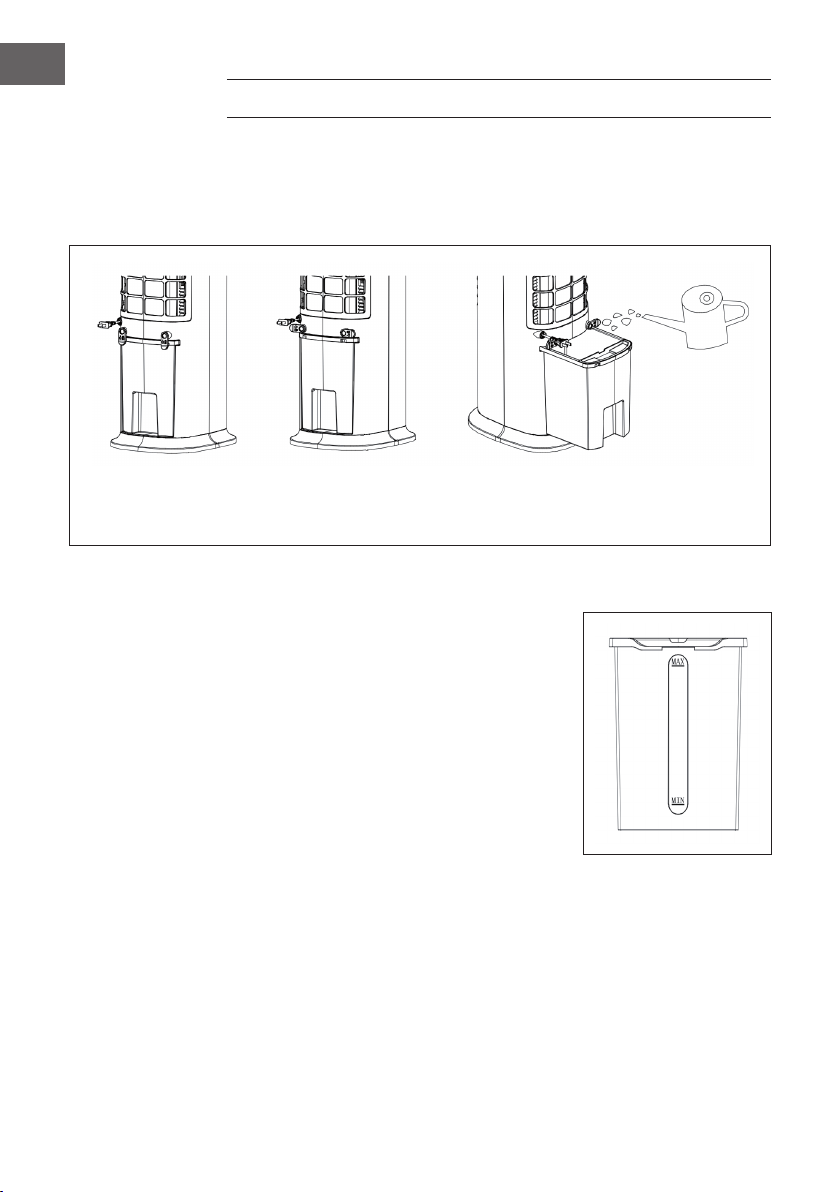
80
IT
RIEMPIMENTO DEL SERBATOIO
Durante la funzione di raffreddamento/umidicazione riempire il serbatoio d’acqua.
Girare l’avvolgicavo di 90 gradi prima di riempire il serbatoio. Estrarlo no a metà e
versarvi dentro l’acqua lentamente. Dopodiché spingerlo nuovamente nel dispositivo.
Rimettere l’avvolgicavo nella posizione originaria.
Il dispositivo di sicurezza
è chiuso
Il dispositivo di sicurezza
è aperto
Estrarre il serbatoio per versarvi
l’acqua.
Fare attenzione all’indicatore di livello dell’acqua durante il riempimento del serbatoio:
1. Durante il riempimento manuale assicurarsi
che il livello d’acqua si trovi sopra la tacca del
minimo e sotto quella del massimo.
2. Usare solo acqua potabile.
3. Se il dispositivo viene usato per la prima volta,
è possibile che si senta uno strano odore e che
l’acqua nel serbatoio si colori. Ciò è del tutto
normale, non costituisce nessun pericolo e non
ha alcun effetto sulla salute.
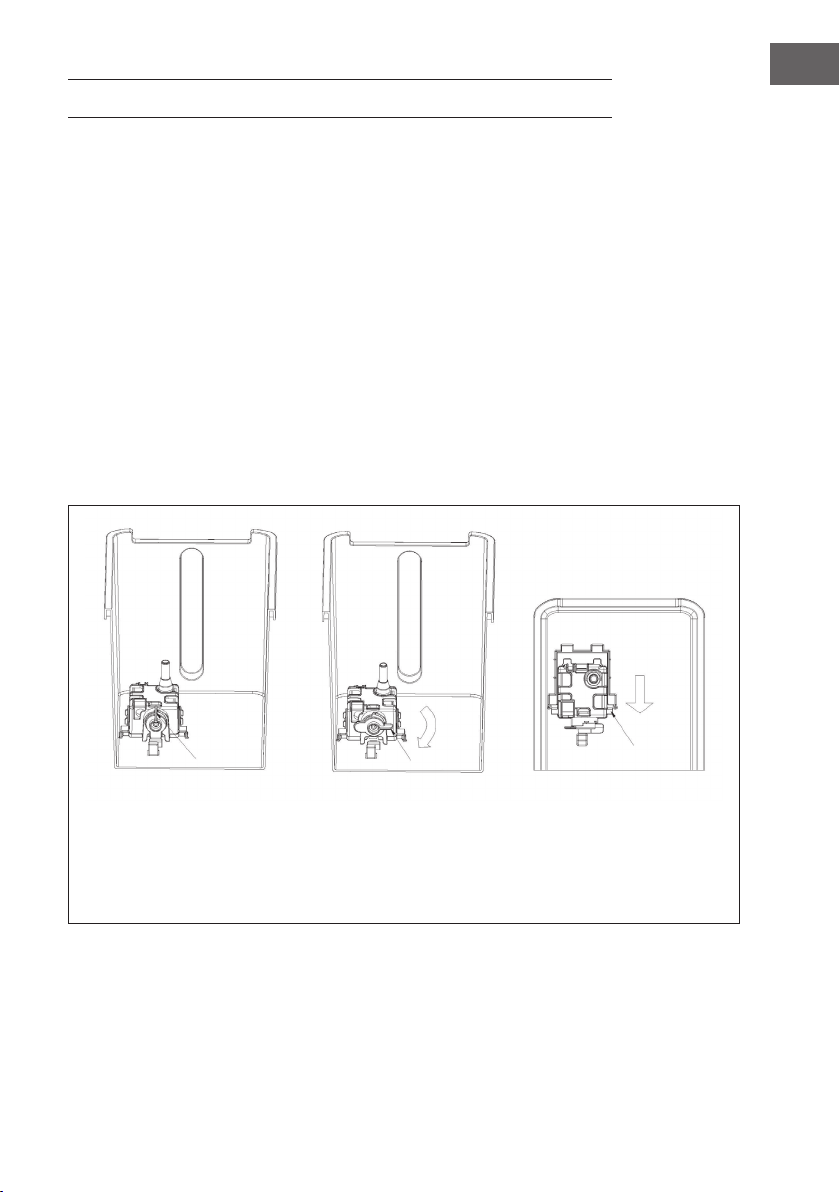
81
IT
PULIZIA E MANUTENZIONE
Pulizia
• Spegnere il dispositivo prima della pulizia e togliere la spina dalla presa elettrica.
• Non usare sostanze chimiche, benzina, diluenti o altre sostanze che potrebbero
danneggiare la supercie del dispositivo.
• Rimuovere la polvere con un panno morbido. Utilizzare l’acqua (sotto i 50 °C) e un
detergente neutro per togliere le macchie ostinate. Inne asciugare con un panno
la supercie.
Come pulire il serbatoio
• Togliere la spina dalla presa elettrica. Girare l’avvolgicavo in posizione orizzontale
ed estrarre il serbatoio no a metà.
• Inserire la mano nel serbatoio e girare il ssaggio di 90 °. Premere inne
l’alloggiamento della pompa dell’acqua verso il basso e prelevare il serbatoio.
• Eliminare i resti di calcare nel serbatoio con un panno messo a mollo con del
detersivo neutro. Inne sciacquare il serbatoio con dell’acqua pulita.
Fissaggio chiuso Fissaggio aperto Spingere verso il basso ed
estrarre l’alloggiamento
della pompa quando si
vedono due punte. Prelevare
il serbatoio.

82
IT
SMALTIMENTO
Se nel proprio paese si applicano le regolamentazioni
inerenti lo smaltimento di dispositivi elettrici ed elettronici,
questo simbolo sul prodotto o sulla confezione segnala che
questi prodotti non possono essere smaltiti con i riuti normali
e devono essere portati a un punto di raccolta di dispositivi
elettrici ed elettronici. Grazie al corretto smaltimento dei
vecchi dispositivi si tutela il pianeta e la salute delle persone
da possibili conseguenze negative. Informazioni riguardanti il
riciclo e lo smaltimento di questi prodotti si ottengono presso
l’amministrazione locale oppure il servizio di gestione dei
riuti domestici.
Il prodotto contiene batterie. Se nel proprio paese si
applicano le regolamentazioni inerenti lo smaltimento di
batterie, non possono essere smaltite con i normali riuti
domestici. Preghiamo di informarvi sulle regolamentazioni
vigenti sullo smaltimento delle batterie. Grazie al corretto
smaltimento dei vecchi dispositivi si tutela l’ambiente e la
salute delle persone da conseguenze negative.
DICHIARAZIONE DI CONFORMITÀ
Produttore:
Chal-Tec GmbH, Wallstraße 16, 10179 Berlino, Germania.
Importatore per la Gran Bretagna:
Chal-Tec UK limited
Unit 6 Riverside Business Centre
Brighton Road
Shoreham-by-Sea
BN43 6RE
United Kingdom
La dichiarazione di conformità completa del produttore è
disponibile al seguente link: use.berlin/10035816