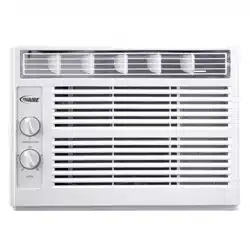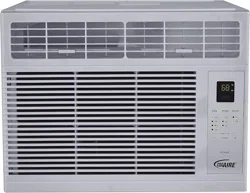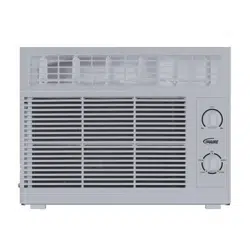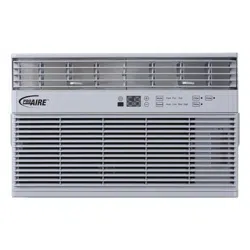
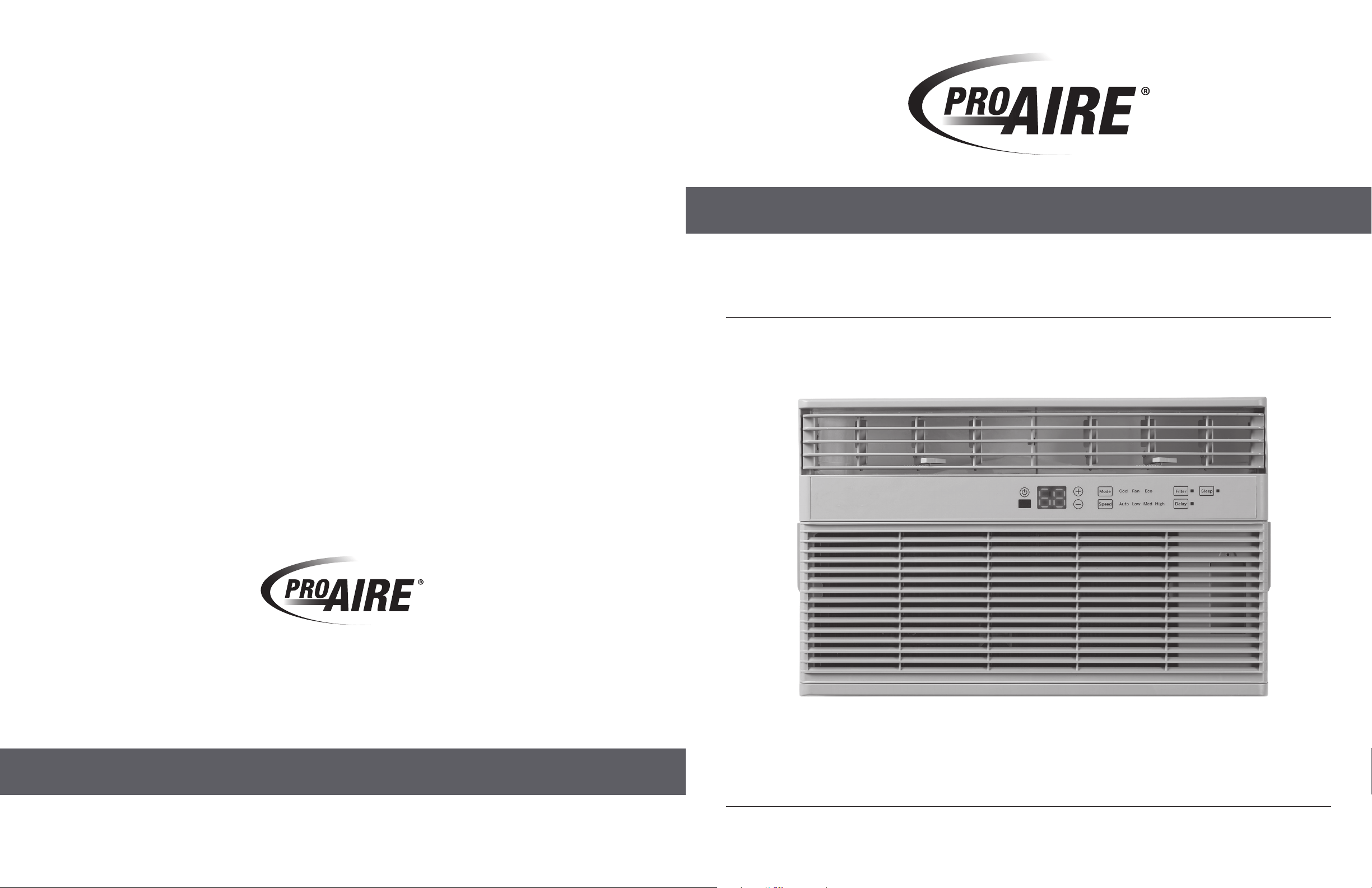
ROOM AIR CONDITIONER
MODELS 1PRNC8000 / 1PRNC12000
OWNER’S MANUAL
844-4PA-AIRE | 844-472-2473 | www.perfectaire.us
Distributed by
Perfect Aire, LLC
5401 Dansher Road
Countryside, IL 60525
Printed in China | 0121_M596

CONTENTS
Safety Information.....................................................................................................................
Using The Air Conditioner ..........................................................................................................
Care and Cleaning .....................................................................................................................
Installation Instructions ..............................................................................................................
Troubleshooting Tips ..................................................................................................................
4
7
11
12
20

22
NOTES
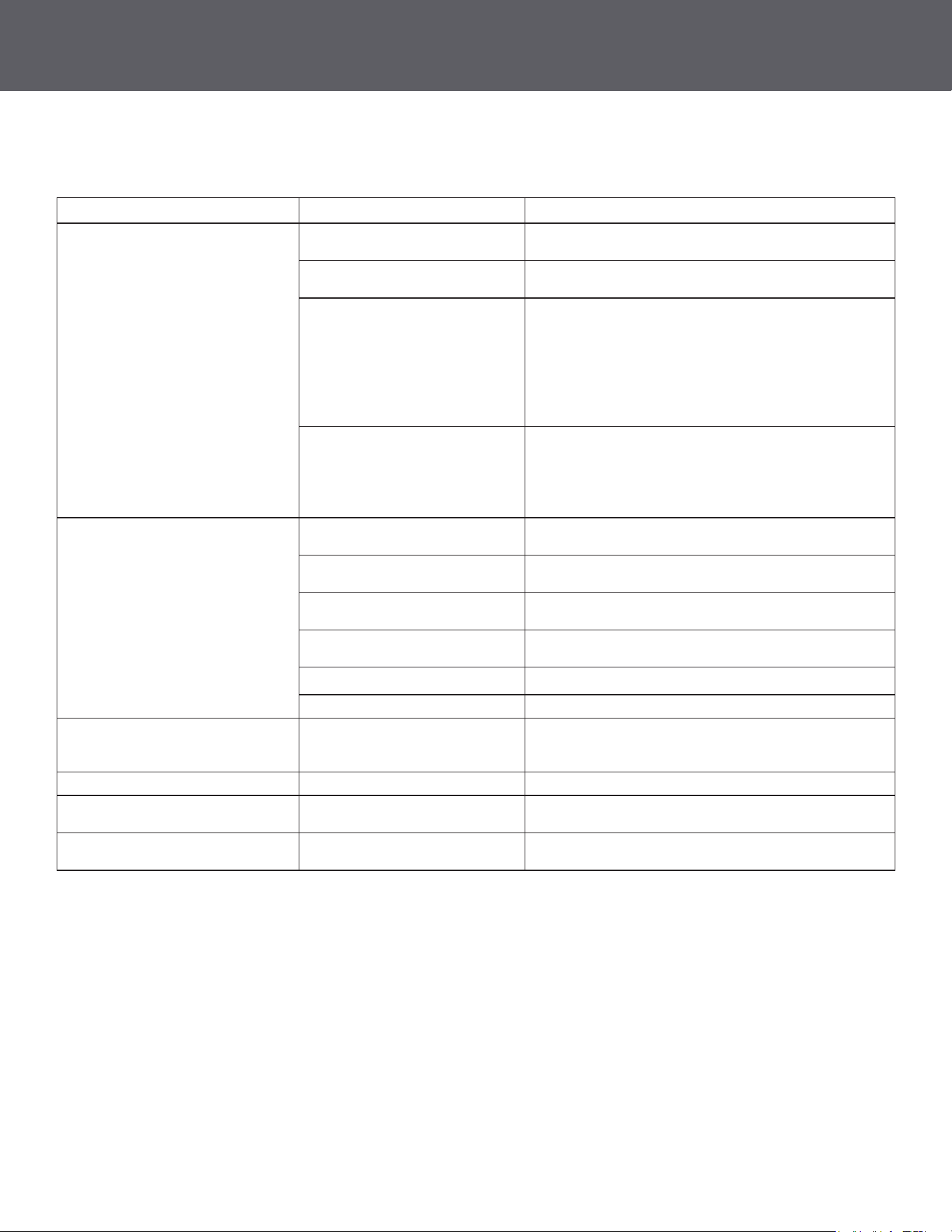
SAFETY PRECAUTIONS TROUBLESHOOTING TIPS
OPERATING INSTRUCTIONS
CONTINUED
SAFETY INFORMATION
• Use this appliance only for its intended purpose as described in this Owner’s Manual.
• This air conditioner must be properly installed in accordance with the Installation Instructions before
it is used
• Never unplug your air conditioner by pulling on the power cord. Always grip plug rmly and pull straight out
from the receptacle.
• Replace immediately all electric service cords that have become frayed or otherwise damaged. A damaged
power supply cord must be replaced with a new power supply cord obtained from the manufacturer and not
repaired. Do not use a cord that shows cracks or abrasion damage along its length or at either the plug or
connector end.
• Turn the unit OFF and unplug your air conditioner before cleaning.
• For your safety, do not store or use combustible materials, gasoline or other ammable vapors or liquids
in the vicinity of this or any other appliance.
• If the receptacle does not match the plug, the receptacle must be changed out by a qualied electrician.
• Do not use means to accelerate the defrosting process or to clean, other than those recommended
by the manufacturer.
• The appliance shall be stored in a room without continuously operating ignition sources (for example: open
ames, an operating gas appliance or an operating electric heater).
• Do not pierce or burn refrigerant tubing. Be aware that refrigerants may not contain an odor.
• Keep ventilation openings clear of obstruction.
• When handling, installing, and operating the appliance, care should be taken to avoid damage
to the refrigerant tubing.
• Do not drill holes in the unit.
• Maintenance, cleaning, and service should only be performed by technicians properly trained and qualied
in the use of ammable refrigerants.
• We do not support any servicing of the air conditioner.
• Dispose of the air conditioner in accordance with Federal and Local Regulations. Flammable refrigerants
require special disposal procedures. Contact your local authorities for the environmentally safe disposal of
your air conditioner.
For your safety, the information in this manual must be followed to minimize the risk of re, electric shock or
personal injury.
IMPORTANT SAFETY INFORMATION
READ ALL INSTRUCTIONS BEFORE USING THE APPLIANCE
Risk of Fire or Explosion. This unit contains ammable refrigerant. Additional safety precautions must
be followed.
WARNING
WARNING
READ AND SAVE THESE INSTRUCTIONS
CONTINUED
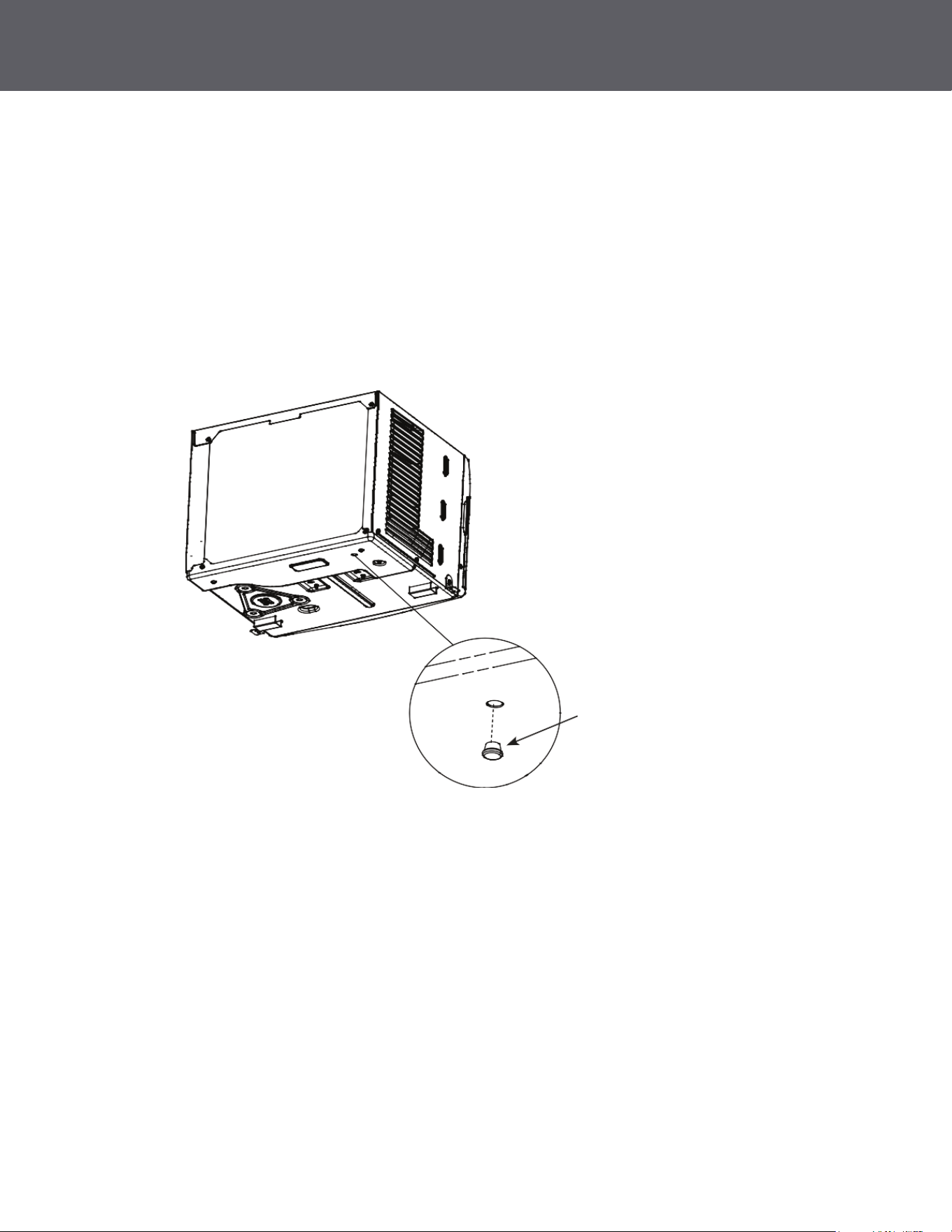
Normal Operating Sounds
• You may hear a pinging noise caused by water being picked up and thrown against the condenser on rainy
days or when the humidity is high. This is normal, unit is equipped with a slinger blade which scoops up the
water from the drain pan and throws it onto the coils for better eciency.
• You may hear the thermostat click when the compressor cycles on and o.
• Water will collect in the base pan during high humidity or on rainy days. The water may overow and drip
from the outdoor side of the unit. The drain plug may be removed for quicker drainage.
• The fan may run even when the compressor does not.
• Drain plug may be removed for gravity drain but may reduce eciency.
• DO NOT drill any holes.
Sub-base Water Plug
4
21
20
5
SAFETY PRECAUTIONS
CONTINUED
SAFETY INFORMATION
• DO NOT use an extension cord with this Window Air Conditioner.
• DO NOT use surge protectors or multi-outlet adaptors with this Window Air Conditioner.
USE OF EXTENSION CORDS
RISK OF FIRE. Could cause serious injury or death.
WARNING
IMPORTANT SAFETY INFORMATION
READ ALL INSTRUCTIONS BEFORE USING THE APPLIANCE
• Do not, under any circumstances, cut or remove the third (ground) prong from the power cord.
For personal safety, this appliance must be properly grounded.
• DO NOT use an adapter plug with this appliance.
• The power cord of this appliance is equipped with a 3-prong (grounding) plug which mates with a
standard 3-prong (grounding) wall outlet to minimize the possibility of electric shock hazard from this
appliance.
• The power cord includes a current interrupter device. A test and reset button is provided on the plug
case. The device should be tested on a periodic basis by rst pressing the TEST button and then the
RESET button while plugged into the outlet. If the TEST button does not trip or if the RESET button will
not stay engaged, discontinue use of the air conditioner and contact a qualied service technician.
• Have the wall outlet and circuit checked by a qualied electrician to make sure the outlet is
properly grounded.
• Where a 2-prong wall outlet is encountered, it is your personal responsibility and obligation to have
it replaced with a properly grounded 3-prong wall outlet.
• The air conditioner should always be plugged into its own individual electrical outlet which has
a voltage rating that matches the rating plate.
• This provides the best performance and prevents overloading house wiring circuits which could cause
a re hazard from overheated wires.
• See the INSTALLATION INSTRUCTIONS, Electrical Requirements section for specic electrical
connection requirements.
CONNECTING TO AN OUTLET
TROUBLESHOOTING TIPS
Issue Possible Cause What To Do
Air conditioner does not start The unit is unplugged Make sure the air conditioner plug is pushed completely
into the outlet.
The fuse is blown/circuit breaker
is tripped
Check the house fuse/circuit breaker box and replace the
fuse or reset the breaker.
Power failure The unit will automatically restart in the setting last used
after the power is restored.
There is a protective time delay (approximately 3 minutes)
to prevent tripping of the compressor overload. For
this reason, the unit may not start normal cooling for 3
minutes after it is turned back on.
The current interrupter device is
tripped
Press RESET button located on the power cord plug.
If the RESET button will not stay engaged, discontinue
use of the air conditioner and contact a qualied service
technician.
Air conditioner does not cool as it
should
Indoor airow is restricted Make sure there are not curtains, blinds or furniture
blocking the front of the air conditioner.
The temp control may not be
set properly
Turn the temperature control to a higher number.
The air lter is dirty Clean the lter at least every 30 days.
See Care and Cleaning section.
The room may have been hot When the air conditioner is rst turned on, you need to
allow time for the room to cool down.
Cold air is escaping Check for open furnace registers and cold air returns.
Cooling coils have iced up See “Air conditioner freezing up” below.
Air conditioner freezing up Ice blocks the air ow and stops
the air conditioner from cooling
the room
On models with control knobs, set the mode control at
High Fan or High Cool with the Temp at 1 or 2. May have
lost refrigerant.
Water drips outside Hot, humid weather This is normal.
Water drips inside The air conditioner is not tilted to
the outside
For proper disposal, make sure the air conditioner slants
slightly from the case front to the rear.
Water collects in base pan Moisture removed from air and
drain into base pan
This is normal for a short period in areas with little
humidity; normal for a longer period in very humid areas.
Review the chart on the following page for Troubleshooting Tips.
If issue persists, please call for further assistance.
CONTINUED
SAFETY INFORMATION
CONTINUED
Chemical Burn Hazard. Keep Batteries Away from Children.
WARNING
• This product contains a lithium button/coin cell battery. If a new or used lithium button/coin cell battery
is swallowed or enters the body, it can cause severe internal burns and can lead to death in as little as
2 hours. Always completely secure the battery compartment. If the battery compartment does not close
securely, stop using the product, remove the batteries, and keep away from children.
• If you think batteries might have been swallowed or placed inside any part of the body, seek immediate
medical attention.
• The cells shall be disposed of properly, including keeping them away from children.
• Even used cells may cause injury.
READ AND SAVE THESE INSTRUCTIONS
6. INSTALL WINDOW LOCKING BRACKET AND FOAM TOP WINDOW GASKET
Use Type B Screw to install the window lock bracket on top of the bottom window.
A. To prevent broken glass or damage to windows, on vinyl or other similarly constructed windows, attach
the window locking bracket to the window side jamb with one Type B screw.
C. Stu the foam between the glass and the window to prevent air and insects from getting into the room.
B. Cut the foam top window gasket to the window width.
CAUTION
Wood
Vinyl
Note
If the gasket supplied does not t your window, obtain the appropriate material locally to provide
a proper installation seal.
6
19
INSTALLATION INSTRUCTIONS
CONTINUED
18
INSTALLATION INSTRUCTIONS
7
USING THE AIR CONDITIONER
Air Conditioner Controls
Remote Control
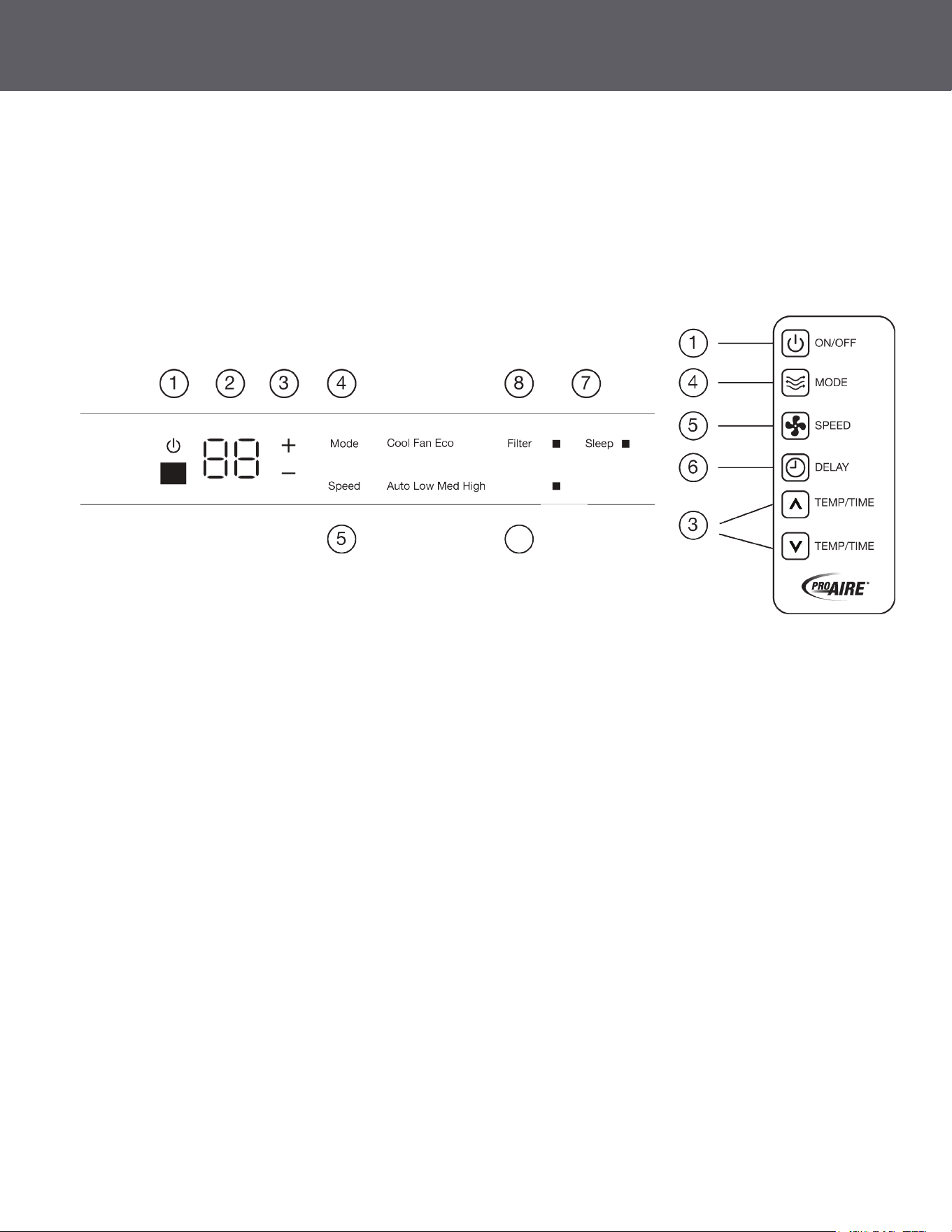
1. Power
Turns air conditioner on and o. When turned on, the display will show the room temperature.
2. Display
Shows the room temperature or time remaining on the Delay timer. Shows Set temperature while setting
the temperature in Cool or Eco modes.
3. Temp and Delay Increase/Decrease
Used to set temperature or delay time. Temperature can be set in Cool and Eco mode all
in 1 °F increments.
4. Mode
Used to set the air conditioner to Fan Only, Cool, or Eco mode.
5. Fan Speed
In Cool or Eco mode: Fan speed may be set to Auto, High, Med or Low.
In Fan Only mode, the fan can only be set to High, Med, or Low.
(Features and appearance may vary)
• Lights beside the touch pads on the control panel indicate selected setting.
See Appliance Communication Section in this manual.
Controls
A. Loosen the screw on the right-hand side of the air conditioner near the bottom.
5. SECURE THE AIR CONDITIONER
B. Slide a side bracket over the screw so that the bracket is resting on the windowsill. Tighten the screw.
C. Use a 1/8” drill bit to drill a starter hole into the windowsill through the holes in the side bracket.
Use 4 type B screws to attach the side bracket to the windowsill.
D. Repeat the side bracket installation on the left side.
E. Measure and cut adhesive foam backed sheet. Apply over side curtain and frame.
Weather Seals
Side Curtain Foam
CONTINUED
Delay
6

USING THE AIR CONDITIONER
CONTINUED
Air Conditioner Controls
Remote Control
6. Delay (set by remote control only)
Delay ON—When the air conditioner is o, it can be set to automatically come on between 1 - 24 hours
at its previous mode and fan setting.
Delay OFF—When the air conditioner is on, it can be set to automatically turn o between 1 - 24 hours.
How to Set:
Press Delay on the remote control. Each press will Increase + / Decrease - by 1-hour increments.
To review the remaining time on the Delay timer, press the Delay pad on the remote control. Use the
Increase + / Decrease - pads on the remote control to set a new time if desired. To Cancel the Timer,
press Decrease - pad on the remote control until the set time is zero.
7. Sleep (set from air conditioner panel only)
SLEEP mode will gradually change settings over an 8-hour period to allow energy eciency during
sleeping hours. The SLEEP mode is available only in COOL and FAN ONLY settings.
Press the SLEEP mode and the light will illuminate. The fan indicator will stay at the same setting, but
the air conditioner will automatically change FAN speed to low in either COOL or FAN ONLY mode.
In FAN ONLY mode, the fan will stay in the LOW speed setting for 8 hours. After 8 hours, the air
conditioner will resume the settings that was in place before the SLEEP mode was pressed.
In COOL mode, the fan will stay in the LOW speed setting for 8 hours from the time the SLEEP mode
pad was pressed. The air conditioner will also raise the set point 2°F in 30 minutes and 2°F more in
another 30 minutes where it will remain for the next 7 hours. After 8 hours, the air conditioner will
resume the settings that were in place before the SLEEP mode pad was pressed.
While the unit is in SLEEP mode, pressing any pad will return it to the settings that were in place before
the SLEEP mode pad was pressed.
8. Filter Reset
The lter indicator light will come on after 250 hours of run time (refer to page 6) for lter maintenance.
Press the Filter Reset button for 3 seconds, the light will turn OFF.
INSTALLATION INSTRUCTIONS
A. Mark the center of the window. Set the air conditioner in the window so that is it centered. Place the air
conditioner so that front edge of the bottom mounting rail is against the back edge of the sill.
4. INSTALL THE AIR CONDITIONER IN THE WINDOW
B. Bring the window down so that the front edge of the top mounting is in front of the window.
Make sure that the air conditioner is level or tilting slightly to the outside.
C. Extend the curtain panels until they ll the window. Mark the location of the holes in each corner.
Use the drill and 1/8" drill bit to drill pilot holes. Use 4 type B screws to secure the side panels in place.
Top Rail
Window Sash
Bottom Rail
About 5"
Sill
Type B screws
CONTINUED
8
17

CONTINUED
INSTALLATION INSTRUCTIONS USING THE AIR CONDITIONER
Note
If the air conditioner is o and is then turned on while set to a Cool setting or if turned from a fan
setting to a Cool setting, it may take approximately 3 minutes for the compressor to start and cooling
to begin.
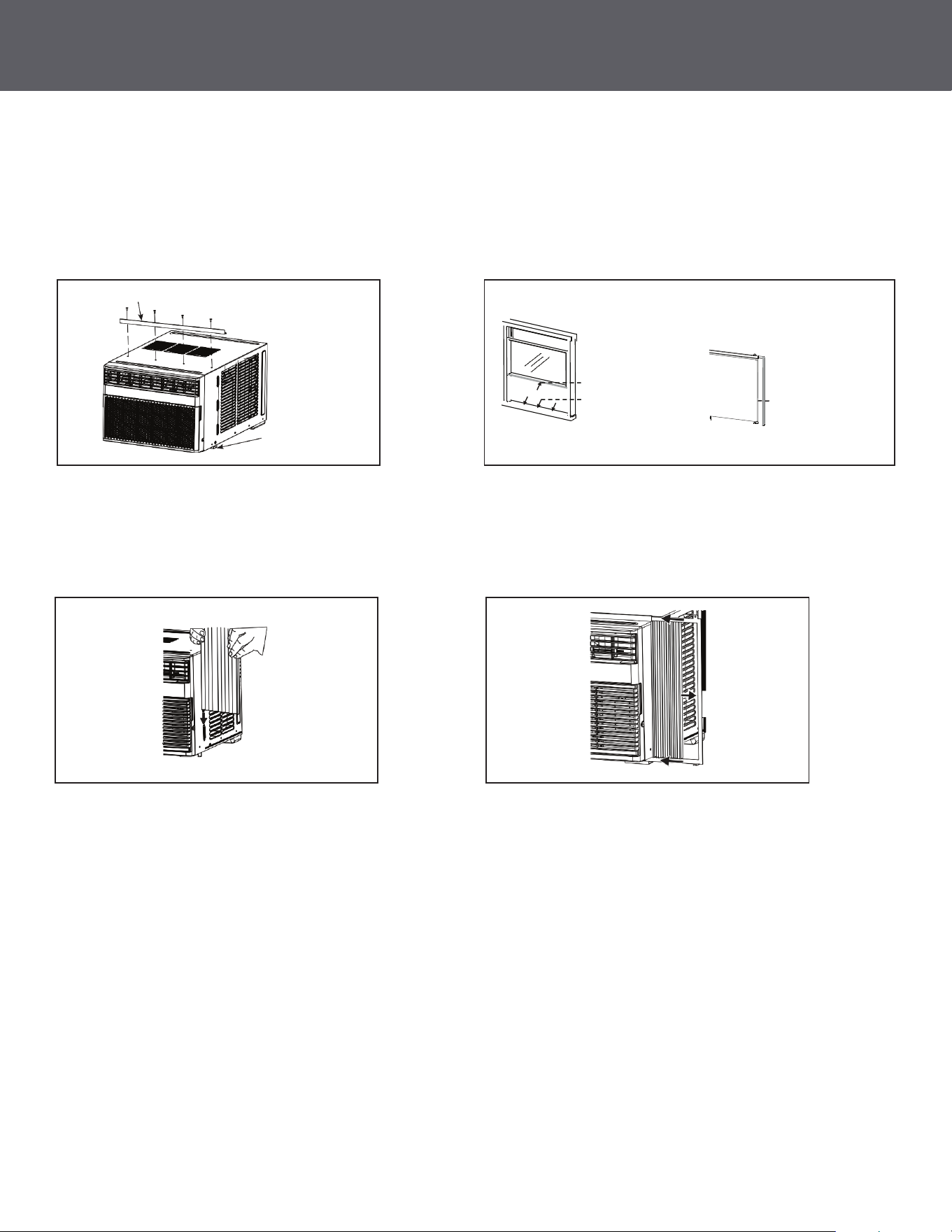
3. PREPARE THE AIR CONDITIONER
A. Screw the top mounting rail with 4 Type A screws
(1PRNC12000) or 3 Type A screws
(1PRNC8000) from the outside of the case.
B. Apply the weather seals provided at the bottom,
top, and sides of the window to seal the perimeter
of the air conditioner.
C. Slide the side curtains snap into side panel rails. D. Slide left and right-side curtain frames into top
and bottom rails. Make sure that side curtains
snap into side of the frames.
.
Top Mounting Rail
.
.
Cut and apply weather
strip to front and bottom
edge of window frame.
Cut and apply weather
strip to back edge of the
windowsill.
Cut and apply a weather
strip to side of the curtain
frame (one on each side).
Bottom Mounting Rail
.
Snap curtain
into frame
16
9
CONTINUED
• Use the Cool mode in Low, Med, High or Speed for cooling. Use the Temperature
Increase + / Decrease - pads to set the desired temperature between 64°F and 86°F in 1°F increments.
• An electronic thermostat is used to maintain the room temperature. The compressor will cycle on and o
to keep the room at the set level of comfort. Set the thermostat at a lower number and the indoor air will
become cooler. Set the thermostat at a higher number and the indoor air will become warmer.
• This air conditioner has a control panel lights on o feature where its lights will turn o when there is no
activity with the controls for over one minute. To wake up the controls, press any pad on the controls and
the lights will come on to show the previous settings.
• To turn this feature o, press and hold the SLEEP pad, on the unit, for 5 seconds. The unit will beep
to signal the successful toggle of the feature on and o.
• To ensure proper operation, aim the remote control at the signal receiver on the air conditioner.
• The remote-control signal has a range of up to 20 feet.
• Make sure nothing is between the air conditioner and the remote control that could block the signal.
• Make sure the batteries are fresh and installed correctly as indicated on the remote control.
• For Normal Cooling—Select the Cool mode and High or Med fan with a middle set temperature.
• For Maximum Cooling—Select the Cool mode and High fan with a lower set temperature.
• For Quieter and Nighttime Cooling—Select the Cool mode and Low fan with a middle set temperature.
Cooling Descriptions
Remote Control
Cool Mode
• Controls the fan.
• ON—The fan will cycle on and o with the compressor. This may result in wider variations
of room temperature and humidity.
• OFF—The fan runs all the time, while the compressor cycles on and o.
Eco Mode
Note
The fan may continue to run for a short time or may pulse intermittently after the compressor cycles o
to cycle the air in the room.
USING THE AIR CONDITIONER
10
15
INSTALLATION INSTRUCTIONS
CONTINUED
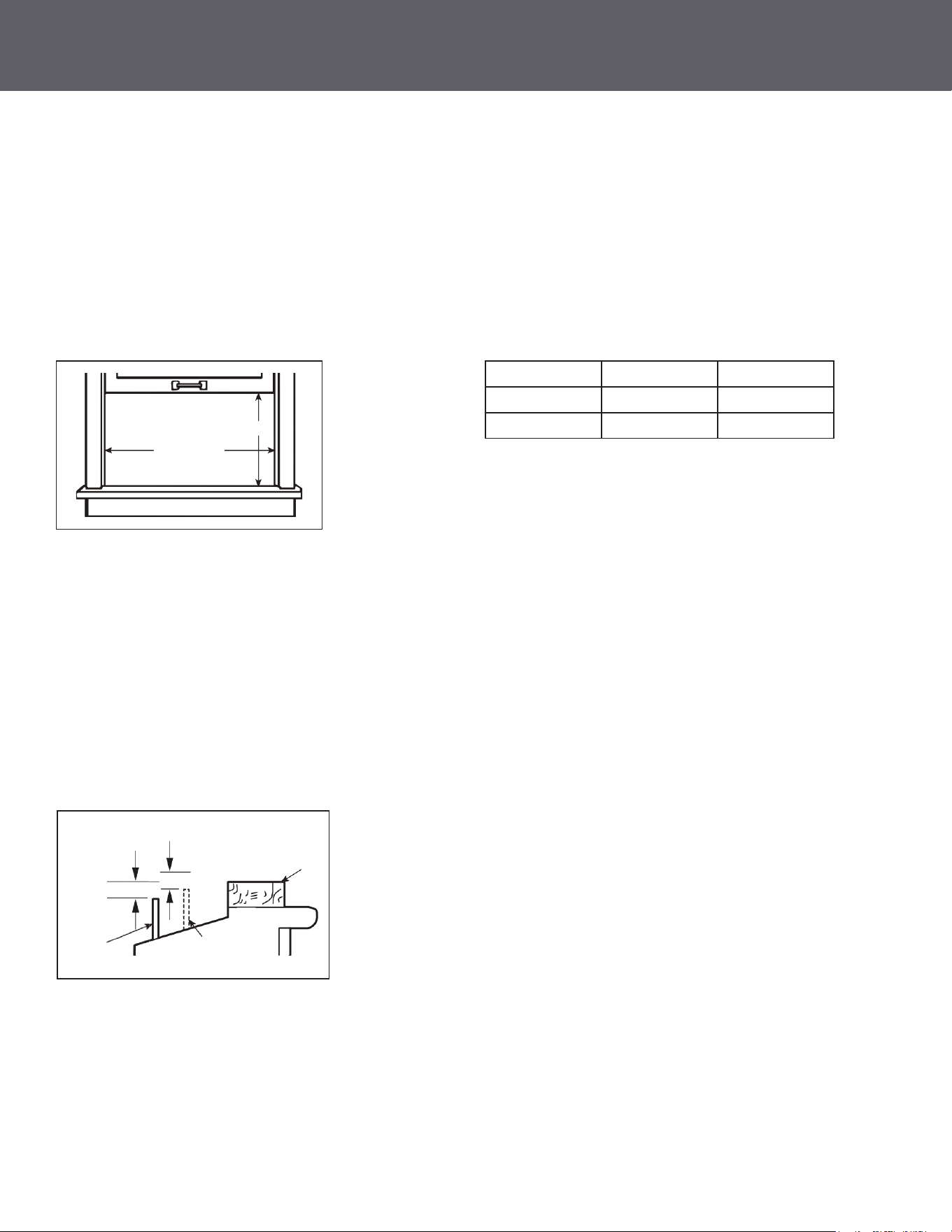
• These instructions are for a standard double-hung window. You will need to modify them for other types
of windows.
• The air conditioner can be installed without the side curtain panels if needed to t in a narrow window.
See the window opening dimensions.
• All supporting parts must be secured to rm wood, masonry or metal.
• The electrical outlet must be within reach of the power cord.
• Follow the dimensions in the table and illustration for your model.
1. WINDOW REQUIREMENTS
(With side curtain panels)
B
A
Models A B
8000 13 3/8" min 24 ½" – 36"
12000 14 9/16" min 25" – 36 5/8"
• A storm window frame will not allow the air conditioner to tilt toward the outside and will keep it from
draining properly. To adjust for this, attach a piece of wood to the sill.
• WOOD PIECES WIDTH: 2″
• LENGTH: Long enough to t inside the window frame.
• THICKNESS: To determine the thickness, place a piece of wood on the sill to make it 1/2″ higher than
the top of the storm window frame or the vinyl frame.
• Attach securely with nails or screws provided by the installer.
2. STORM WINDOW REQUIREMENTS
1/2″ higher
than storm
window frame
1/2″ higher than
vinyl frame
(on some windows)
Wood
Vinyl frame
Storm
window frame
Sill
CONTINUED
• Set to Auto for the fan speed to automatically set to the speed needed to provide optimum comfort
settings with the set temperature.
• If the room needs more cooling, the fan speed will automatically increase. If the room needs less cooling,
the fan speed will automatically decrease.
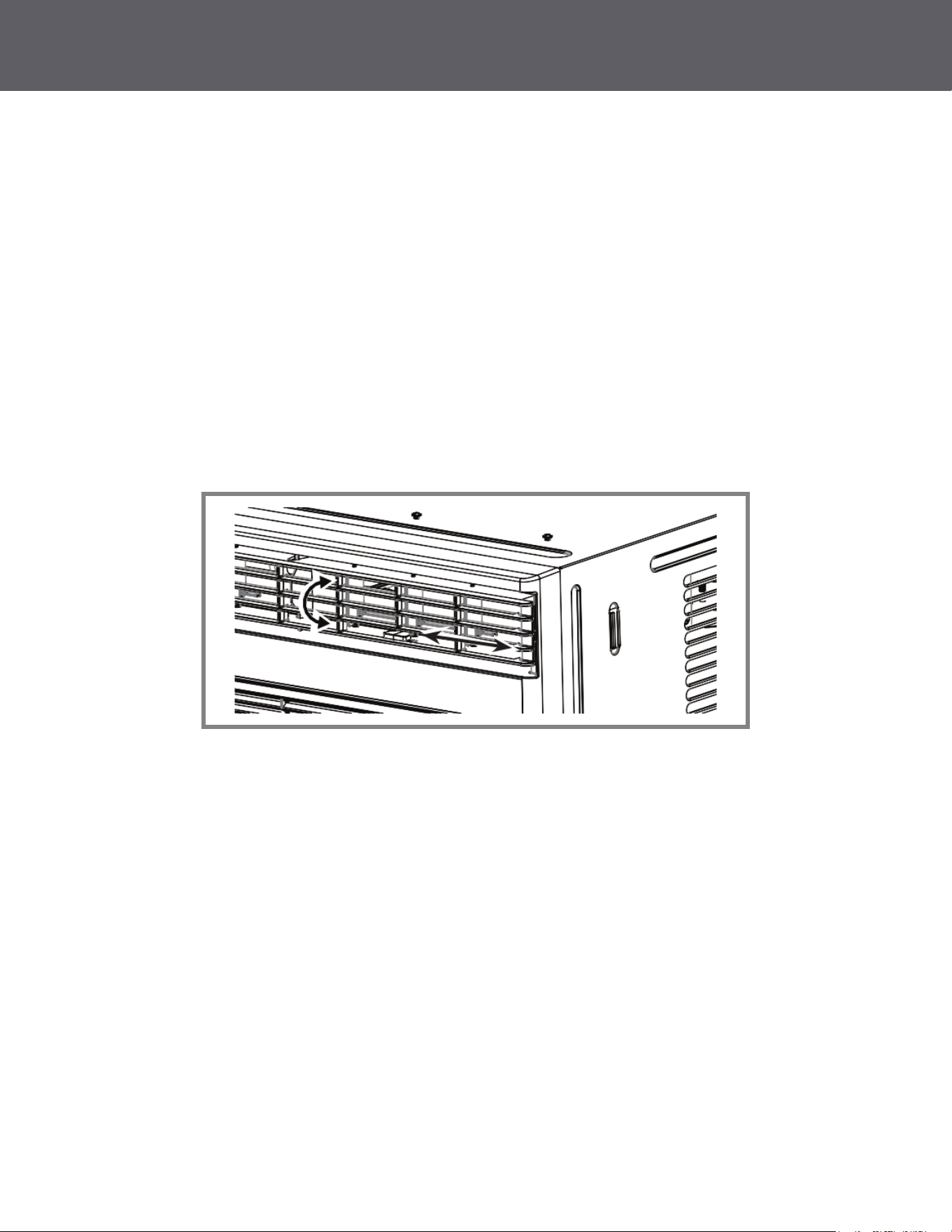
Use the levels to adjust the air direction left or right. Tilt the louver to adjust up or down.
Auto Fan Mode
Air Direction
• Use the Fan Only Mode at Low, Med or High fan speed to provide air circulation and ltering without
cooling. Since fan-only settings do not provide cooling, a Set temperature cannot be entered. The room
temperature will appear in the display.
Fan Only Mode
INSTALLATION INSTRUCTIONS
CONTINUED
14
CARE AND CLEANING
11
Do Not Operate in Freezing Outdoor Conditions
This cool-only air conditioner was not designed for freezing outdoor conditions. It must not be used when
the outdoor temperature is below freezing (32°F).
Turn the air conditioner o and remove the plug from the wall outlet before cleaning.
Clean lter by using warm water and a mild detergent. Do not use bleach or abrasives.
The coils on the outdoor side of the air conditioner should be checked regularly. If they are clogged with
dirt or soot, they should be cleaned. Coils may be cleaned with water or special dissolvent for copper coils.
1. Remove the screw on the back of the battery cover.
2. Pinch the slide lock and pull the battery tray out at the same time.
3. Insert battery, assure that the (+) and (–) of battery are installed correctly.
4. Reinsert the battery tray and screw.
The air lter should be checked and cleaned at least every 30 days.
To Access:
• Open the grille by pulling downward on the tabs at the top corners. Remove the lter.
• Clean lter with warm, soapy water.
• Rinse and let the lter air dry before placing back into unit.
• DO NOT wash lter in a dishwasher.
Grille and Case
Outdoor Coils
How to Replace Battery
Air Filter
Maintenance
DO NOT operate the air conditioner without a lter as this will cause dirt and lint to build up and will reduce
the performance of the unit.
CAUTION
Note
• This remote model uses a CR 2025 (3V) Lithium battery.
• Remove the battery from the remote control, if unit will not be used for a long period of time.
(Appearance may vary)
Top Mounting Rail
Air Conditioner
Side
Curtain (2)
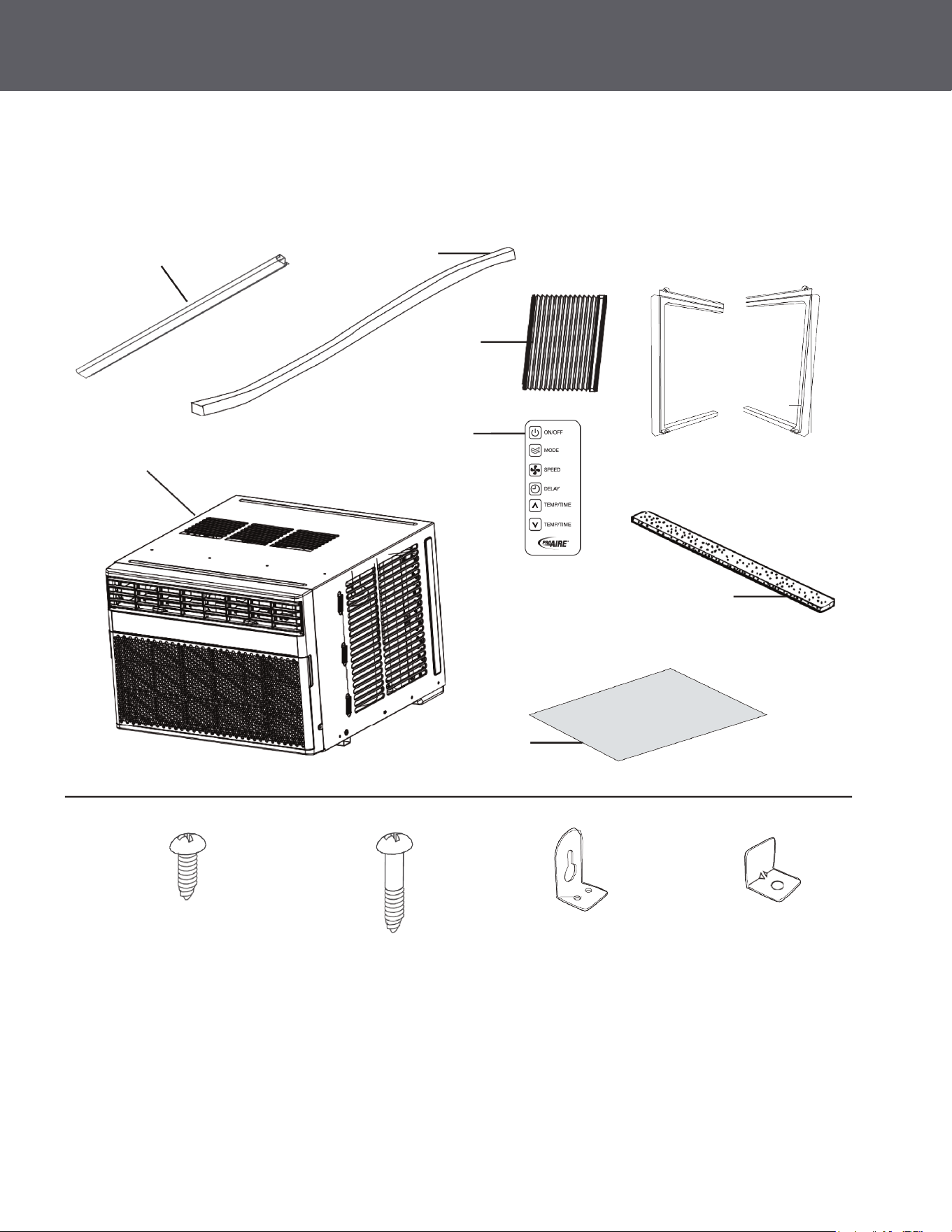
PARTS INCLUDED
Foam Top
Window Gasket
Side Curtain Frame
Bottom Seal and
Side Seals (3)
Side Curtain
Foam (2)
Remote Control
Left Right
1PRNC12000: Type A (4)
1PRNC8000: Type A (3)
Type B (9) Side Brackets (2) Window Locking
Bracket (1)
INSTALLATION INSTRUCTIONS
12
INSTALLATION INSTRUCTIONS
CONTINUED
13
This model requires:
• 115/120-volt AC, 60-Hz grounded outlet protected with a 15-amp time-delay fuse
or circuit breaker.
• The 3-prong grounding plug minimizes the possibility of electric shock hazard. If the wall
outlet you plan to use is only a 2-prong outlet, it is your responsibility to have it replaced
with a properly grounded 3-prong wall outlet.
The power cord includes a current interrupter device. A test and reset button are provided on the plug case.
The device should be tested on a periodic basis by rst pressing the TEST button and then the RESET
button while plugged into the outlet. If the TEST button does not trip or if the RESET button will not stay
engaged, discontinue use of the air conditioner and contact a qualied service technician.
ELECTRICAL REQUIREMENTS
• Do not, under any circumstances, cut or remove the third (ground) prong from the power cord.
• Do not change the plug on the power cord of this air conditioner.
• Aluminum house wiring may create issues -consult a qualied electrician.
CAUTION
Read these instructions completely and carefully.
• IMPORTANT – Save these instructions for local inspector’s use.
• IMPORTANT – Observe all governing codes and ordinances.
• Note to Installer – Be sure to leave these instructions with the Consumer.
• Note to Consumer – Keep these instructions for future reference.
• Skill Level – Installation of this appliance requires basic mechanical skills.
• Completion Time – Approximately 1 hour.
• We recommend that two people install this product.
• Proper installation is the responsibility of the installer.
• Product failure due to improper installation is not covered under the Warranty.
• You MUST use all supplied parts and use proper installation procedures as described in these
instructions when installing this air conditioner.
BEFORE YOU BEGIN
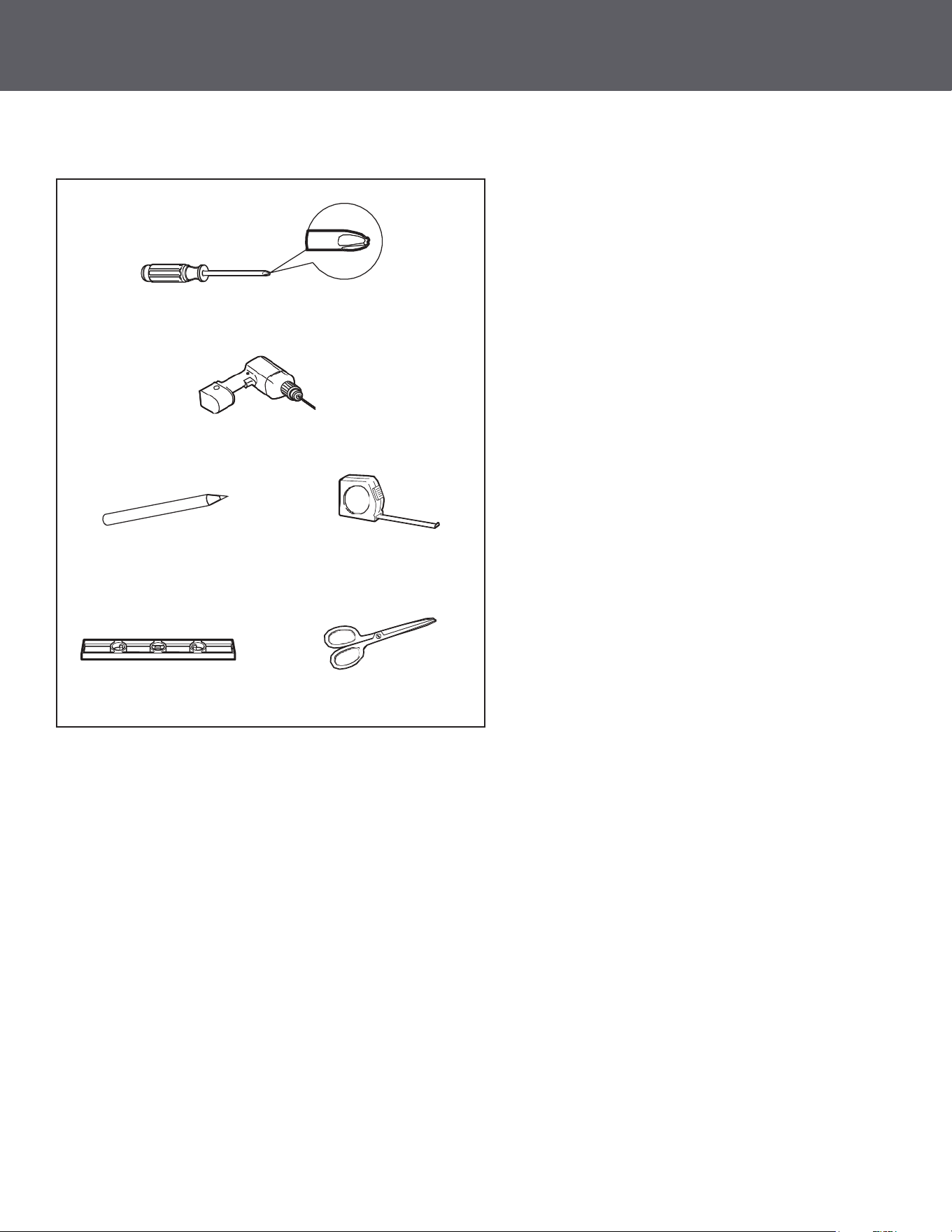
TOOLS REQUIRED
Phillips Head Screwdriver
Drill and 1/8" Drill Bit
Pencil
Level
Ruler or Tape Measure
Scissors or Knife
INSTALLATION INSTRUCTIONS
12
INSTALLATION INSTRUCTIONS
CONTINUED
13
This model requires:
• 115/120-volt AC, 60-Hz grounded outlet protected with a 15-amp time-delay fuse
or circuit breaker.
• The 3-prong grounding plug minimizes the possibility of electric shock hazard. If the wall
outlet you plan to use is only a 2-prong outlet, it is your responsibility to have it replaced
with a properly grounded 3-prong wall outlet.
The power cord includes a current interrupter device. A test and reset button are provided on the plug case.
The device should be tested on a periodic basis by rst pressing the TEST button and then the RESET
button while plugged into the outlet. If the TEST button does not trip or if the RESET button will not stay
engaged, discontinue use of the air conditioner and contact a qualied service technician.
ELECTRICAL REQUIREMENTS
• Do not, under any circumstances, cut or remove the third (ground) prong from the power cord.
• Do not change the plug on the power cord of this air conditioner.
• Aluminum house wiring may create issues -consult a qualied electrician.
CAUTION
Read these instructions completely and carefully.
• IMPORTANT – Save these instructions for local inspector’s use.
• IMPORTANT – Observe all governing codes and ordinances.
• Note to Installer – Be sure to leave these instructions with the Consumer.
• Note to Consumer – Keep these instructions for future reference.
• Skill Level – Installation of this appliance requires basic mechanical skills.
• Completion Time – Approximately 1 hour.
• We recommend that two people install this product.
• Proper installation is the responsibility of the installer.
• Product failure due to improper installation is not covered under the Warranty.
• You MUST use all supplied parts and use proper installation procedures as described in these
instructions when installing this air conditioner.
BEFORE YOU BEGIN
TOOLS REQUIRED
Phillips Head Screwdriver
Drill and 1/8" Drill Bit
Pencil
Level
Ruler or Tape Measure
Scissors or Knife
INSTALLATION INSTRUCTIONS
CONTINUED
14
CARE AND CLEANING
11
Do Not Operate in Freezing Outdoor Conditions
This cool-only air conditioner was not designed for freezing outdoor conditions. It must not be used when
the outdoor temperature is below freezing (32°F).
Turn the air conditioner o and remove the plug from the wall outlet before cleaning.
Clean lter by using warm water and a mild detergent. Do not use bleach or abrasives.
The coils on the outdoor side of the air conditioner should be checked regularly. If they are clogged with
dirt or soot, they should be cleaned. Coils may be cleaned with water or special dissolvent for copper coils.
1. Remove the screw on the back of the battery cover.
2. Pinch the slide lock and pull the battery tray out at the same time.
3. Insert battery, assure that the (+) and (–) of battery are installed correctly.
4. Reinsert the battery tray and screw.
The air lter should be checked and cleaned at least every 30 days.
To Access:
• Open the grille by pulling downward on the tabs at the top corners. Remove the lter.
• Clean lter with warm, soapy water.
• Rinse and let the lter air dry before placing back into unit.
• DO NOT wash lter in a dishwasher.
Grille and Case
Outdoor Coils
How to Replace Battery
Air Filter
Maintenance
DO NOT operate the air conditioner without a lter as this will cause dirt and lint to build up and will reduce
the performance of the unit.
CAUTION
Note
• This remote model uses a CR 2025 (3V) Lithium battery.
• Remove the battery from the remote control, if unit will not be used for a long period of time.
(Appearance may vary)
Top Mounting Rail
Air Conditioner
Side
Curtain (2)
PARTS INCLUDED
Foam Top
Window Gasket
Side Curtain Frame
Bottom Seal and
Side Seals (3)
Side Curtain
Foam (2)
Remote Control
Left Right
1PRNC12000: Type A (4)
1PRNC8000: Type A (3)
Type B (9) Side Brackets (2) Window Locking
Bracket (1)
USING THE AIR CONDITIONER
10
15
INSTALLATION INSTRUCTIONS
CONTINUED
• These instructions are for a standard double-hung window. You will need to modify them for other types
of windows.
• The air conditioner can be installed without the side curtain panels if needed to t in a narrow window.
See the window opening dimensions.
• All supporting parts must be secured to rm wood, masonry or metal.
• The electrical outlet must be within reach of the power cord.
• Follow the dimensions in the table and illustration for your model.
1. WINDOW REQUIREMENTS
(With side curtain panels)
B
A
Models A B
8000 13 3/8" min 24 ½" – 36"
12000 14 9/16" min 25" – 36 5/8"
• A storm window frame will not allow the air conditioner to tilt toward the outside and will keep it from
draining properly. To adjust for this, attach a piece of wood to the sill.
• WOOD PIECES WIDTH: 2″
• LENGTH: Long enough to t inside the window frame.
• THICKNESS: To determine the thickness, place a piece of wood on the sill to make it 1/2″ higher than
the top of the storm window frame or the vinyl frame.
• Attach securely with nails or screws provided by the installer.
2. STORM WINDOW REQUIREMENTS
1/2″ higher
than storm
window frame
1/2″ higher than
vinyl frame
(on some windows)
Wood
Vinyl frame
Storm
window frame
Sill
CONTINUED
• Set to Auto for the fan speed to automatically set to the speed needed to provide optimum comfort
settings with the set temperature.
• If the room needs more cooling, the fan speed will automatically increase. If the room needs less cooling,
the fan speed will automatically decrease.
Use the levels to adjust the air direction left or right. Tilt the louver to adjust up or down.
Auto Fan Mode
Air Direction
• Use the Fan Only Mode at Low, Med or High fan speed to provide air circulation and ltering without
cooling. Since fan-only settings do not provide cooling, a Set temperature cannot be entered. The room
temperature will appear in the display.
Fan Only Mode
CONTINUED
INSTALLATION INSTRUCTIONS USING THE AIR CONDITIONER
Note
If the air conditioner is o and is then turned on while set to a Cool setting or if turned from a fan
setting to a Cool setting, it may take approximately 3 minutes for the compressor to start and cooling
to begin.
3. PREPARE THE AIR CONDITIONER
A. Screw the top mounting rail with 4 Type A screws
(1PRNC12000) or 3 Type A screws
(1PRNC8000) from the outside of the case.
B. Apply the weather seals provided at the bottom,
top, and sides of the window to seal the perimeter
of the air conditioner.
C. Slide the side curtains snap into side panel rails. D. Slide left and right-side curtain frames into top
and bottom rails. Make sure that side curtains
snap into side of the frames.
.
Top Mounting Rail
.
.
Cut and apply weather
strip to front and bottom
edge of window frame.
Cut and apply weather
strip to back edge of the
windowsill.
Cut and apply a weather
strip to side of the curtain
frame (one on each side).
Bottom Mounting Rail
.
Snap curtain
into frame
16
9
CONTINUED
• Use the Cool mode in Low, Med, High or Speed for cooling. Use the Temperature
Increase + / Decrease - pads to set the desired temperature between 64°F and 86°F in 1°F increments.
• An electronic thermostat is used to maintain the room temperature. The compressor will cycle on and o
to keep the room at the set level of comfort. Set the thermostat at a lower number and the indoor air will
become cooler. Set the thermostat at a higher number and the indoor air will become warmer.
• This air conditioner has a control panel lights on o feature where its lights will turn o when there is no
activity with the controls for over one minute. To wake up the controls, press any pad on the controls and
the lights will come on to show the previous settings.
• To turn this feature o, press and hold the SLEEP pad, on the unit, for 5 seconds. The unit will beep
to signal the successful toggle of the feature on and o.
• To ensure proper operation, aim the remote control at the signal receiver on the air conditioner.
• The remote-control signal has a range of up to 20 feet.
• Make sure nothing is between the air conditioner and the remote control that could block the signal.
• Make sure the batteries are fresh and installed correctly as indicated on the remote control.
• For Normal Cooling—Select the Cool mode and High or Med fan with a middle set temperature.
• For Maximum Cooling—Select the Cool mode and High fan with a lower set temperature.
• For Quieter and Nighttime Cooling—Select the Cool mode and Low fan with a middle set temperature.
Cooling Descriptions
Remote Control
Cool Mode
• Controls the fan.
• ON—The fan will cycle on and o with the compressor. This may result in wider variations
of room temperature and humidity.
• OFF—The fan runs all the time, while the compressor cycles on and o.
Eco Mode
Note
The fan may continue to run for a short time or may pulse intermittently after the compressor cycles o
to cycle the air in the room.
USING THE AIR CONDITIONER
CONTINUED
Air Conditioner Controls
Remote Control
6. Delay (set by remote control only)
Delay ON—When the air conditioner is o, it can be set to automatically come on between 1 - 24 hours
at its previous mode and fan setting.
Delay OFF—When the air conditioner is on, it can be set to automatically turn o between 1 - 24 hours.
How to Set:
Press Delay on the remote control. Each press will Increase + / Decrease - by 1-hour increments.
To review the remaining time on the Delay timer, press the Delay pad on the remote control. Use the
Increase + / Decrease - pads on the remote control to set a new time if desired. To Cancel the Timer,
press Decrease - pad on the remote control until the set time is zero.
7. Sleep (set from air conditioner panel only)
SLEEP mode will gradually change settings over an 8-hour period to allow energy eciency during
sleeping hours. The SLEEP mode is available only in COOL and FAN ONLY settings.
Press the SLEEP mode and the light will illuminate. The fan indicator will stay at the same setting, but
the air conditioner will automatically change FAN speed to low in either COOL or FAN ONLY mode.
In FAN ONLY mode, the fan will stay in the LOW speed setting for 8 hours. After 8 hours, the air
conditioner will resume the settings that was in place before the SLEEP mode was pressed.
In COOL mode, the fan will stay in the LOW speed setting for 8 hours from the time the SLEEP mode
pad was pressed. The air conditioner will also raise the set point 2°F in 30 minutes and 2°F more in
another 30 minutes where it will remain for the next 7 hours. After 8 hours, the air conditioner will
resume the settings that were in place before the SLEEP mode pad was pressed.
While the unit is in SLEEP mode, pressing any pad will return it to the settings that were in place before
the SLEEP mode pad was pressed.
8. Filter Reset
The lter indicator light will come on after 250 hours of run time (refer to page 6) for lter maintenance.
Press the Filter Reset button for 3 seconds, the light will turn OFF.
INSTALLATION INSTRUCTIONS
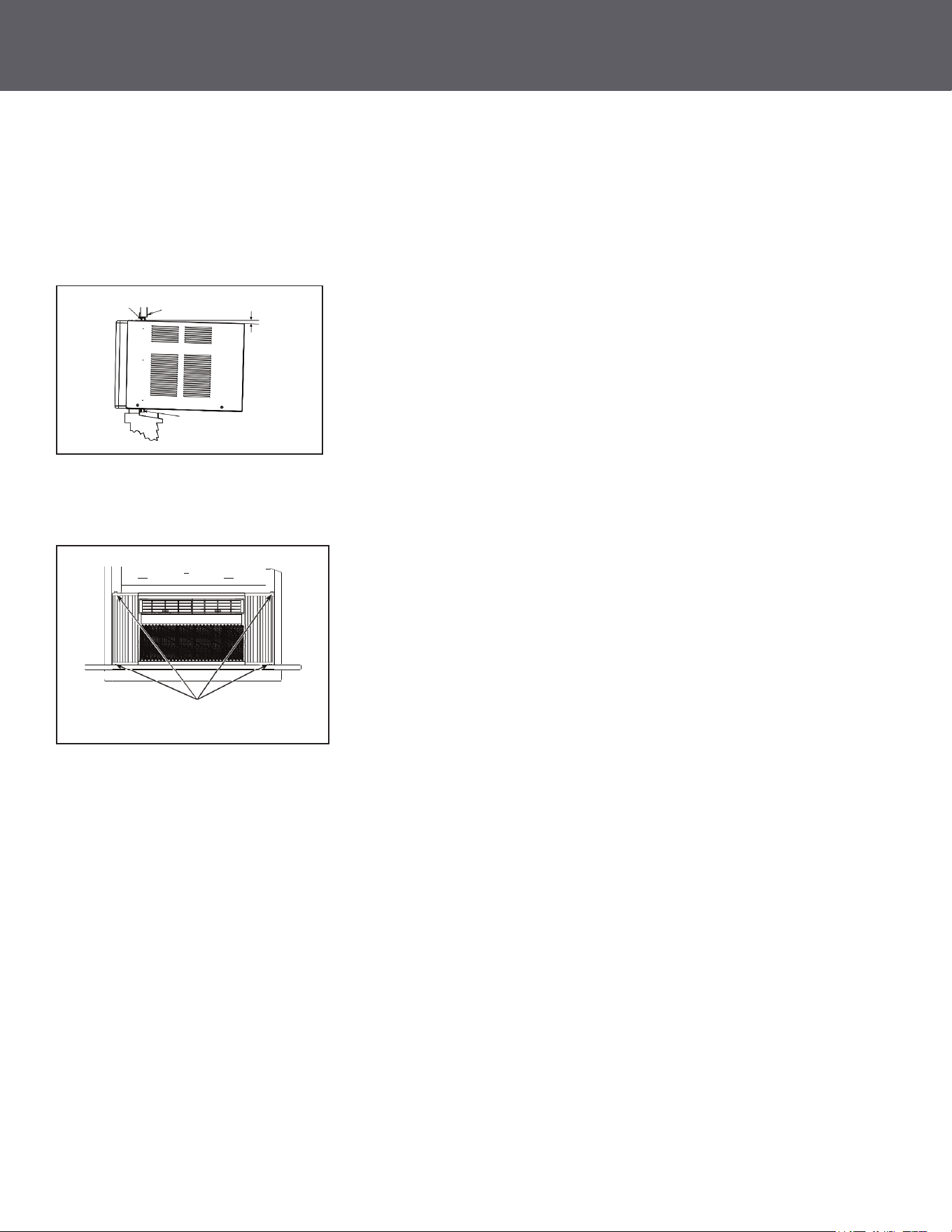
A. Mark the center of the window. Set the air conditioner in the window so that is it centered. Place the air
conditioner so that front edge of the bottom mounting rail is against the back edge of the sill.
4. INSTALL THE AIR CONDITIONER IN THE WINDOW
B. Bring the window down so that the front edge of the top mounting is in front of the window.
Make sure that the air conditioner is level or tilting slightly to the outside.
C. Extend the curtain panels until they ll the window. Mark the location of the holes in each corner.
Use the drill and 1/8" drill bit to drill pilot holes. Use 4 type B screws to secure the side panels in place.
Top Rail
Window Sash
Bottom Rail
About 5"
Sill
Type B screws
CONTINUED
8
17
18
INSTALLATION INSTRUCTIONS
7
USING THE AIR CONDITIONER
Air Conditioner Controls
Remote Control
1. Power
Turns air conditioner on and o. When turned on, the display will show the room temperature.
2. Display
Shows the room temperature or time remaining on the Delay timer. Shows Set temperature while setting
the temperature in Cool or Eco modes.
3. Temp and Delay Increase/Decrease
Used to set temperature or delay time. Temperature can be set in Cool and Eco mode all
in 1 °F increments.
4. Mode
Used to set the air conditioner to Fan Only, Cool, or Eco mode.
5. Fan Speed
In Cool or Eco mode: Fan speed may be set to Auto, High, Med or Low.
In Fan Only mode, the fan can only be set to High, Med, or Low.
(Features and appearance may vary)
• Lights beside the touch pads on the control panel indicate selected setting.
See Appliance Communication Section in this manual.
Controls
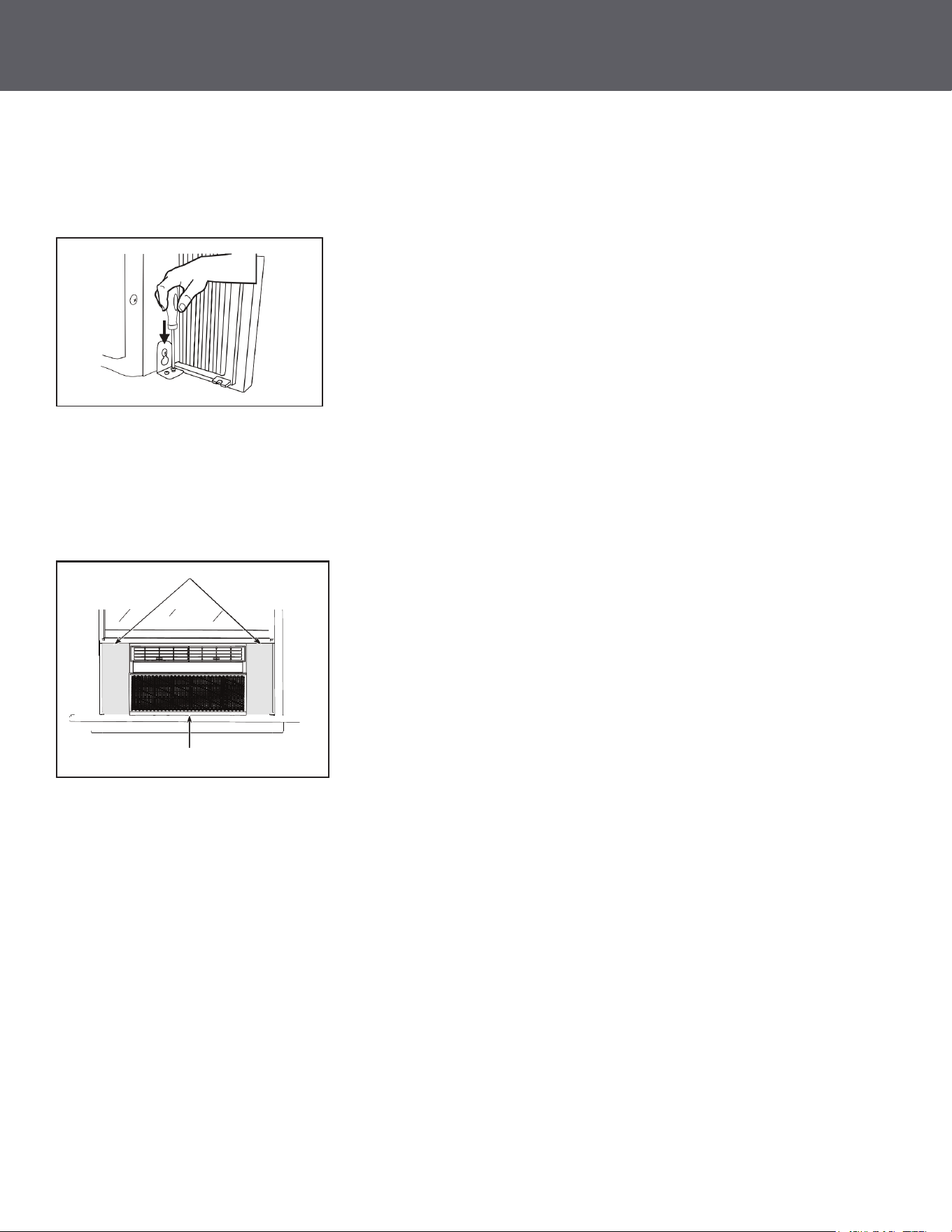
A. Loosen the screw on the right-hand side of the air conditioner near the bottom.
5. SECURE THE AIR CONDITIONER
B. Slide a side bracket over the screw so that the bracket is resting on the windowsill. Tighten the screw.
C. Use a 1/8” drill bit to drill a starter hole into the windowsill through the holes in the side bracket.
Use 4 type B screws to attach the side bracket to the windowsill.
D. Repeat the side bracket installation on the left side.
E. Measure and cut adhesive foam backed sheet. Apply over side curtain and frame.
Weather Seals
Side Curtain Foam
CONTINUED
Delay
6
SAFETY INFORMATION
CONTINUED
Chemical Burn Hazard. Keep Batteries Away from Children.
WARNING
• This product contains a lithium button/coin cell battery. If a new or used lithium button/coin cell battery
is swallowed or enters the body, it can cause severe internal burns and can lead to death in as little as
2 hours. Always completely secure the battery compartment. If the battery compartment does not close
securely, stop using the product, remove the batteries, and keep away from children.
• If you think batteries might have been swallowed or placed inside any part of the body, seek immediate
medical attention.
• The cells shall be disposed of properly, including keeping them away from children.
• Even used cells may cause injury.
READ AND SAVE THESE INSTRUCTIONS
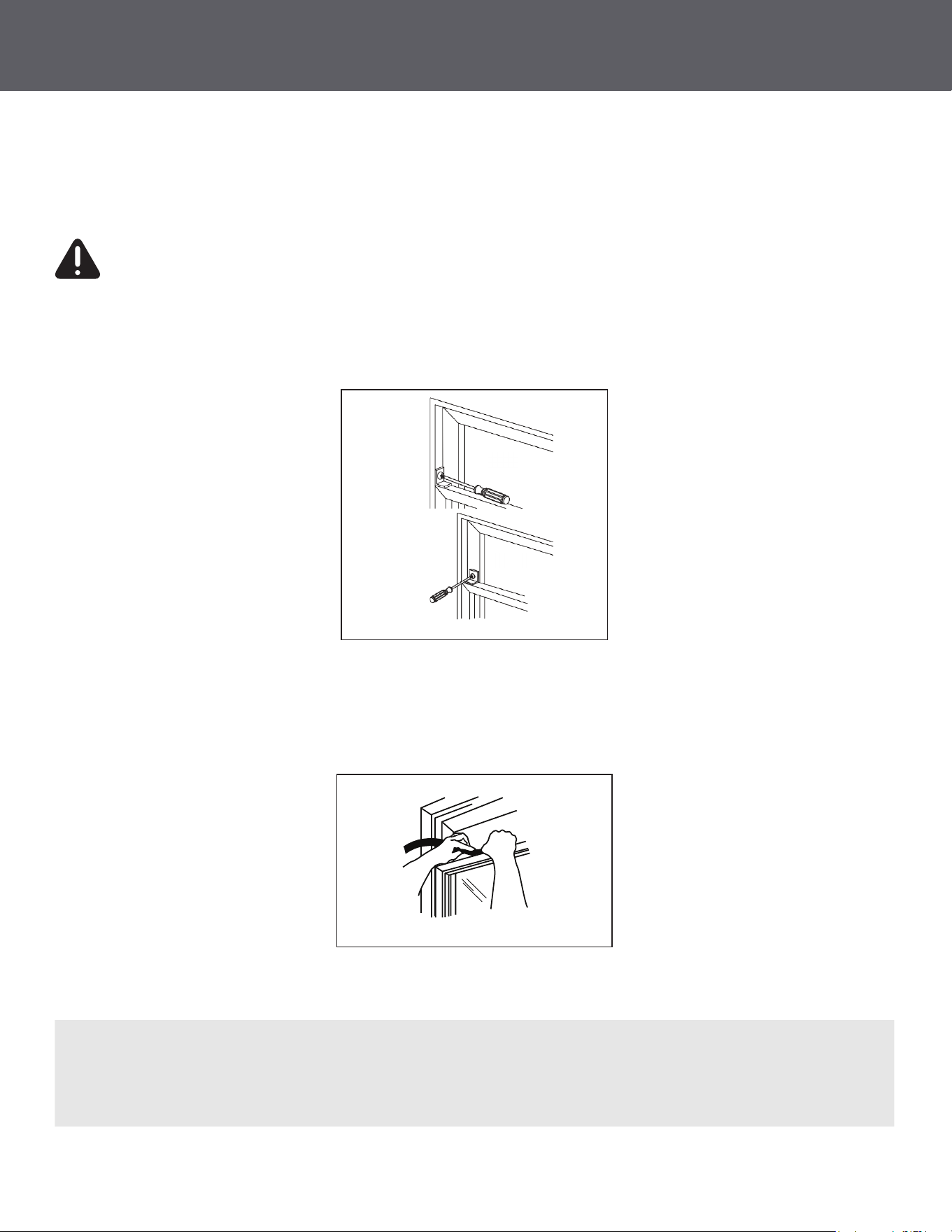
6. INSTALL WINDOW LOCKING BRACKET AND FOAM TOP WINDOW GASKET
Use Type B Screw to install the window lock bracket on top of the bottom window.
A. To prevent broken glass or damage to windows, on vinyl or other similarly constructed windows, attach
the window locking bracket to the window side jamb with one Type B screw.
C. Stu the foam between the glass and the window to prevent air and insects from getting into the room.
B. Cut the foam top window gasket to the window width.
CAUTION
Wood
Vinyl
Note
If the gasket supplied does not t your window, obtain the appropriate material locally to provide
a proper installation seal.
6
19
INSTALLATION INSTRUCTIONS
CONTINUED
20
5
SAFETY PRECAUTIONS
CONTINUED
SAFETY INFORMATION
• DO NOT use an extension cord with this Window Air Conditioner.
• DO NOT use surge protectors or multi-outlet adaptors with this Window Air Conditioner.
USE OF EXTENSION CORDS
RISK OF FIRE. Could cause serious injury or death.
WARNING
IMPORTANT SAFETY INFORMATION
READ ALL INSTRUCTIONS BEFORE USING THE APPLIANCE
• Do not, under any circumstances, cut or remove the third (ground) prong from the power cord.
For personal safety, this appliance must be properly grounded.
• DO NOT use an adapter plug with this appliance.
• The power cord of this appliance is equipped with a 3-prong (grounding) plug which mates with a
standard 3-prong (grounding) wall outlet to minimize the possibility of electric shock hazard from this
appliance.
• The power cord includes a current interrupter device. A test and reset button is provided on the plug
case. The device should be tested on a periodic basis by rst pressing the TEST button and then the
RESET button while plugged into the outlet. If the TEST button does not trip or if the RESET button will
not stay engaged, discontinue use of the air conditioner and contact a qualied service technician.
• Have the wall outlet and circuit checked by a qualied electrician to make sure the outlet is
properly grounded.
• Where a 2-prong wall outlet is encountered, it is your personal responsibility and obligation to have
it replaced with a properly grounded 3-prong wall outlet.
• The air conditioner should always be plugged into its own individual electrical outlet which has
a voltage rating that matches the rating plate.
• This provides the best performance and prevents overloading house wiring circuits which could cause
a re hazard from overheated wires.
• See the INSTALLATION INSTRUCTIONS, Electrical Requirements section for specic electrical
connection requirements.
CONNECTING TO AN OUTLET
TROUBLESHOOTING TIPS
Issue Possible Cause What To Do
Air conditioner does not start The unit is unplugged Make sure the air conditioner plug is pushed completely
into the outlet.
The fuse is blown/circuit breaker
is tripped
Check the house fuse/circuit breaker box and replace the
fuse or reset the breaker.
Power failure The unit will automatically restart in the setting last used
after the power is restored.
There is a protective time delay (approximately 3 minutes)
to prevent tripping of the compressor overload. For
this reason, the unit may not start normal cooling for 3
minutes after it is turned back on.
The current interrupter device is
tripped
Press RESET button located on the power cord plug.
If the RESET button will not stay engaged, discontinue
use of the air conditioner and contact a qualied service
technician.
Air conditioner does not cool as it
should
Indoor airow is restricted Make sure there are not curtains, blinds or furniture
blocking the front of the air conditioner.
The temp control may not be
set properly
Turn the temperature control to a higher number.
The air lter is dirty Clean the lter at least every 30 days.
See Care and Cleaning section.
The room may have been hot When the air conditioner is rst turned on, you need to
allow time for the room to cool down.
Cold air is escaping Check for open furnace registers and cold air returns.
Cooling coils have iced up See “Air conditioner freezing up” below.
Air conditioner freezing up Ice blocks the air ow and stops
the air conditioner from cooling
the room
On models with control knobs, set the mode control at
High Fan or High Cool with the Temp at 1 or 2. May have
lost refrigerant.
Water drips outside Hot, humid weather This is normal.
Water drips inside The air conditioner is not tilted to
the outside
For proper disposal, make sure the air conditioner slants
slightly from the case front to the rear.
Water collects in base pan Moisture removed from air and
drain into base pan
This is normal for a short period in areas with little
humidity; normal for a longer period in very humid areas.
Review the chart on the following page for Troubleshooting Tips.
If issue persists, please call for further assistance.
CONTINUED
SAFETY PRECAUTIONS TROUBLESHOOTING TIPS
OPERATING INSTRUCTIONS
CONTINUED
SAFETY INFORMATION
• Use this appliance only for its intended purpose as described in this Owner’s Manual.
• This air conditioner must be properly installed in accordance with the Installation Instructions before
it is used
• Never unplug your air conditioner by pulling on the power cord. Always grip plug rmly and pull straight out
from the receptacle.
• Replace immediately all electric service cords that have become frayed or otherwise damaged. A damaged
power supply cord must be replaced with a new power supply cord obtained from the manufacturer and not
repaired. Do not use a cord that shows cracks or abrasion damage along its length or at either the plug or
connector end.
• Turn the unit OFF and unplug your air conditioner before cleaning.
• For your safety, do not store or use combustible materials, gasoline or other ammable vapors or liquids
in the vicinity of this or any other appliance.
• If the receptacle does not match the plug, the receptacle must be changed out by a qualied electrician.
• Do not use means to accelerate the defrosting process or to clean, other than those recommended
by the manufacturer.
• The appliance shall be stored in a room without continuously operating ignition sources (for example: open
ames, an operating gas appliance or an operating electric heater).
• Do not pierce or burn refrigerant tubing. Be aware that refrigerants may not contain an odor.
• Keep ventilation openings clear of obstruction.
• When handling, installing, and operating the appliance, care should be taken to avoid damage
to the refrigerant tubing.
• Do not drill holes in the unit.
• Maintenance, cleaning, and service should only be performed by technicians properly trained and qualied
in the use of ammable refrigerants.
• We do not support any servicing of the air conditioner.
• Dispose of the air conditioner in accordance with Federal and Local Regulations. Flammable refrigerants
require special disposal procedures. Contact your local authorities for the environmentally safe disposal of
your air conditioner.
For your safety, the information in this manual must be followed to minimize the risk of re, electric shock or
personal injury.
IMPORTANT SAFETY INFORMATION
READ ALL INSTRUCTIONS BEFORE USING THE APPLIANCE
Risk of Fire or Explosion. This unit contains ammable refrigerant. Additional safety precautions must
be followed.
WARNING
WARNING
READ AND SAVE THESE INSTRUCTIONS
CONTINUED
Normal Operating Sounds
• You may hear a pinging noise caused by water being picked up and thrown against the condenser on rainy
days or when the humidity is high. This is normal, unit is equipped with a slinger blade which scoops up the
water from the drain pan and throws it onto the coils for better eciency.
• You may hear the thermostat click when the compressor cycles on and o.
• Water will collect in the base pan during high humidity or on rainy days. The water may overow and drip
from the outdoor side of the unit. The drain plug may be removed for quicker drainage.
• The fan may run even when the compressor does not.
• Drain plug may be removed for gravity drain but may reduce eciency.
• DO NOT drill any holes.
Sub-base Water Plug
4
21

22
NOTES
ROOM AIR CONDITIONER
MODELS 1PRNC8000 / 1PRNC12000
OWNER’S MANUAL
844-4PA-AIRE | 844-472-2473 | www.perfectaire.us
Distributed by
Perfect Aire, LLC
5401 Dansher Road
Countryside, IL 60525
Printed in China | 0121_M596