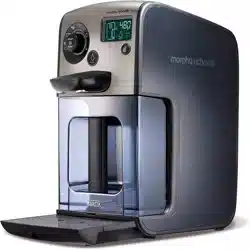
Starts and pauses the heating process. Can also be used to pause dispense while in progress and put the Hot Water Dispenser into standby mode.
2 Water Volume Dial
Controls the volume of water to be heated and dispensed. Volume is displayed on the LCD screen (15).
3 LCD Screen
Displays volumes, temperatures, functions, and warnings.
4 Temperature Button
Adjusts the temperature of dispensed water, turns sounds on and off.
5 Dispense Button
Switches the Auto Dispense feature on and off.
6 Dispense Nozzles
7 Water tank
Contains the BRITA MAXTRA Cartridge 19, BRITA Memo 20 and BRITA Hopper 21.
8 Drip Tray
9 Drip Tray Cover
10 Drip Tray Indicator
‘Full’ icon indicates when the Drip Tray needs to be emptied.
11 Heat Icon
Displays when the heat cycle is in process.
12 Water Tank Icon
Displays when the tank needs to be refilled.
13 Dispense Icon
Displays when water is ready for dispense.
14 Auto Dispense Icon
Displays when the auto dispense feature is enabled.
15 Dispense Volume Display
Displays the volume of water to be heated and dispensed.
16 Descale Icon
Displays when the Hot Water Dispenser requires descaling.
17 Temperature Icon
Displays the temperature the water will be heated to prior to dispense.
18 Standby Light
19 BRITA MAXTRA Cartridge
20 BRITA MEMO
Monitors the life of the MAXTRA Cartridge.
21 BRITA Hopper
22 Water Level Sensor
23 Main Unit
Quick Start Guide
This quick start guide shows you the basic steps for dispensing 240ml of hot water for a single cup of tea or coffee. This quick start guide does not detail the steps to use the BRITA Filtration System.
For more detailed information on using your new Hot Water Dispenser or BRITA Filtration System, please read this instruction manual.
1 Remove the Water Tank (7) from the Main Unit (23). Remove the BRITA MAXTRA Cartridge (19) and BRITA Hopper (21) from the Water Tank.
2 Fill the Water Tank with cold water and return to your Hot Water Dispenser. Plug your Hot Water Dispenser into the electrical socket.
3 Place a vessel underneath the Dispense Nozzles (6) and press the Dispense Button (5) to reset the system. This takes approx. 35 seconds. Any water dispensed during resetting should be discarded.
4 Using the Water Volume Dial (2), adjust the Dispense Volume (15) to 240ml. Place a cup on the Drip Tray (8) under the Dispense Nozzles (6).
5 Press the Start/Stop Button (1), the Hot Water Dispenser will pump 240ml of water into the heating chamber and start to heat.
6 When heated the water will automatically dispense from the Dispense Nozzels (6) into your cup.
Resetting The System
Before using your Hot Water Dispenser for the first time, or after it has been unplugged from the mains. You must perform the following steps to reset your Hot Water Dispensers’ heating chamber.
Your Hot Water Dispenser will not function if the system has not been reset.
1 Plug your Hot Water Dispenser into the mains outlet and switch on at the socket
2 The Dispense Button (5) will flash and the ‘Dispense Icon’ (13) will appear on the screen.
3 Place an empty vessel, such as a measuring jug or saucepan underneath the Dispense Nozzles (6).
4 Press the Dispense Button to reset the system. Any remaining water will be dispensed from the system into the vessel below. This takes approximately 35 seconds. It is now ready for use.
BRITA filtration
Filtering your water improves the taste and appearance of beverages by reducing limescale, lead, chlorine and other impurities.
The BRITA MAXTRA Filter Cartridge offers improved filtration due to MAXTRA Technology. The natural MicroporeFilter in combination with the powerful Protect Filter reduces chlorine and limescale for a great natural taste and further reduces metals such as lead and copper. Unique flow control ensures the perfect filtration time for best results.
For maximum filter performance and for optimum taste, it is important to change your BRITA MAXTRA Filter Cartridge regularly. BRITA recommends that you replace the cartridge every 4 weeks.
Using the BRITA filtration system is optional. If you do not wish to use the filtration system, simply remove the BRITA Hopper (21) and MAXTRA Filter Cartridge (19) from the Water Tank (7).
Filtering water through the BRITA Filtration System takes roughly 4 minutes to filter 1.5L of water. You can use the system while filtering, providing enough water has filtered into the Water Tank.
Installing a BRITA MAXTRA Cartridge
1 Unwrap the BRITA MAXTRA Cartridge (19) and immerse in water, gently shake to loosen any bubbles
2 Push the BRITA MAXTRA Cartridge into place in the BRITA Hopper.
3 Place the BRITA Hopper into the Water Tank. Before returning the Water Tank to the Main Unit, fill the BRITA Hopper with Cold Water and allow the water to filter through the BRITA MAXTRA Cartridge. Discard the filtered water. Repeat this step twice.
4 Fill the BRITA Hopper with fresh water and return the Water Tank to the main unit. Your BRITA Cartridge is ready for use with your Hot Water Dispenser.
BRITA Memo
The BRITA Memo (20) measures the recommended time of use of your MAXTRA Filter Cartridge (19). The BRITA Memo is located in the top of the BRITA Hopper (21).
To reset the BRITA Memo, please press and hold down the Start Button on the Memo until all four bars appear in the display and flash twice. The Cartridge Active Indicator Light in the bottom right corner of the BRITA Memo indicates that it is working. After four weeks, all four bars will disappear and a flashing arrow will indicate that the cartridge should now be changed. After changing the cartridge, reset the Memo.
Replacing the BRITA Memo
The BRITA Memo (20) has a life of approximately 5 years. To remove the exhausted BRITA Memo, place a screwdriver in the notch next to the BRITA Memo and push it out. Please note that BRITA Memo should not be removed for any other reason than to dispose of it.
More information on the use of BRITA filter cartridges and the BRITA Memo can be found in the BRITA information guide supplied with your hot water dispenser.
Telephone our replacement parts helpline (0344 871 0945) for your new BRITA Memo. If you require assistance on using your BRITA MAXTRA filter cartridge or BRITA Memo, please call BRITA Customer Care team on 0844 742 4800.
Using the Hot Water Dispenser
Before using your Hot Water Dispenser, or if it has not been used for over a week, follow these instructions to boil the maximum amount of water, then discard to ensure the system is flushed through.
The following instructions detail the steps to follow to use your Hot Water Dispenser. For Installation of the BRITA Filtration system see the previous page.
Filtering water through the BRITA Maxtra Cartridge takes around 4 minutes for 1.5L. Ensure enough water has been filtered and is ready for use in the water tank before heating.
1 If required, follow steps of 1-6 of ‘Resetting the system’ (see page 4) to reset the system and then discard the water. If the Hot Water Dispenser is in standby mode, press any button to wake.
2 Pull out the Drip Tray (8) from the Main Unit (23) (if needed).
3 Place the required vessel (cup, pan, pot etc.) under the Dispense Nozzles (6). One or two vessels can be filled at the same time during each dispense cycle, provided they are the same size.
4 Adjust the temperature of the water by pressing the Temperature Button (4) to cycle through the options (85,95 & 100o C). The water temperature will be displayed on the screen (17).
5 Turn the Water Volume Dial (2) to adjust the Dispense Volume (15). Your Hot Water Dispenser can heat between 150ml to 1.5L of water per cycle.
6 You can automatically dispense volumes of water at 600ml and below. To turn this feature on or off, press the Dispense Button (5). This function cannot be selected for volumes over 600ml. These must be dispensed manually.
7 Press the Start / Stop Button (1) to begin heating. Your Hot Water Dispenser will sound and the heat cycle will begin. Once started, the volume and temperature can only be changed during the first few seconds of the heating cycle.
8 Once ready your Hot Water Dispenser will sound. The hot water will be dispensed automatically. If the manual dispense function has been selected, press the Dispense Button (5) to begin dispensing.
9 To pause the water flow whilst dispensing, press either the Start/Stop or the Dispense Button.
10 To resume the water flow, press the Dispense Button again. It is recommended to dispense any remaining water to enable your Hot Water Dispenser to enter standby mode. NOTE: You must dispense all water heated before you can start the heating cycle again.
Drinks Temperature
Getting the correct water temperature is essential if you are to enjoy your favourite hot drinks with maximum flavour and taste. E.g. If you’re a green tea drinker then water that is brewed too hot will scorch the leaves creating a bitter taste.
Press the Temperature Button (4) to cycle through the options (85,95 & 100o C). The water temperature will be displayed on the screen (17).
The guide (below) includes some of the most popular drinks, to help you get the most from your Hot Water Dispenser.
Your Hot Water Dispenser has been pre-programed with 3 of the most popular temperatures for drinks; 85, 95 and 100 degrees.
By choosing the correct temperature for your drink, not only will you create better tasting drinks, you will also save time and energy too.
85°C
Green, white and herbal teas, powder based cold and flu remedies, black instant coffee.
95°C
French press/cafetiere coffee, instant coffee with milk, hot toddies, malted milk, hot chocolate.
100°C
Black teas e.g. darjeeling, assam, ceylon, english breakfast and earl grey, noodle / pasta snacks, instant soup type drinks.
Auto / Manual Dispense
The auto dispense feature allows you to automatically dispense volumes of water below 600ml. For safety reasons it is not possible to automatically dispense volumes above 600ml.
Before heating, press the Dispense Button (5) to switch the auto dispense feature on or off. The Icon (14) will appear on the LCD Screen (3) when the feature is enabled. After heating, if the volume is above 600ml, or if the auto dispense is turned off, your Hot Water Dispenser will sound and the Dispense Button will Illuminate. Press the Dispense Button to begin dispensing water from the Dispense Nozzles (6).
NOTE: All water must be dispensed before you can start the heating cycle again.
Multiple Cups
Multiple cups can be filled quickly and easily by starting and stopping the dispense cycle and exchanging vessels.
Set your Hot Water Dispenser unit to heat a desired amount of water with the Auto Dispense feature switched off. Place two cups under the Dispense Nozzles (6) and dispense the water by pressing the Dispense Button (5).
When the cups are filled press the Dispense Button again to stop the flow.
Place another two empty cups under the Dispense Nozzles and repeat the process until all remaining water has been dispensed.
Dispense Nozzles
There are two Dispense Nozzles (6) on your Hot Water Dispenser. These can be used to fill one or two cups at one time.
If dispensing into two vessels try to ensure they are of equal size and heat double the amount of water required for one. Place your cups on the Drip Tray (underneath the Dispense Nozzles). Your Hot Water Dispenser will dispense an equal amount from each Nozzle.
Cancel the heating cycle
To cancel the heating cycle at any time, press the Start / Stop Button (1). Press either the Start / Stop Button again to continue the current cycle or press the Dispense Button (5) to empty the water.
Once a heating cycle has begun, the volume and temperature of the water can only be changed during the first few seconds of the heating cycle.
The Water in the heating chamber must be dispensed before a new volume can be selected.
Reheating Water
Any water remaining in the heating chamber that has cooled down by 5 degrees can be reheated. The Start / Stop Button (1) will illuminate and the Heat Icon (11) will extinguish indicating the reheat function can be activated. Press the Start / Stop Button to reheat.
Sound
The audible signals from your Hot Water Dispenser can be turned on or off. Press and hold the Temperature Button (4) for 2 seconds to switch the sounds on or off.
Standby
Your Hot Water Dispenser will enter Standby Mode to save power 60 seconds after the end of the heating and dispense cycle. The unit enters standby mode after 30 minutes of inactivity if a heat and dispense cycle hasn’t been completed. To wake the unit, press any button or rotate the Water Volume Dial (2).
Dispenser can be placed in standby mode by pressing the Start/Stop Button (1) for 2 seconds.
Any water remaining in the Heating Chamber when your Hot Water Dispenser enters standby will need to be dispensed upon exiting standby, or reheated and dispensed before a new volume or temperature can be selected.
Drip Tray
The Drip Tray Indicator (10) indicates that the Drip Tray (8) is full and must be emptied. To empty, pull the drip tray outwards until it is free from the runners and discard the contents. CAUTION! The contents of the drip tray may be hot. Replace the Drip Tray once emptied ensuring the Drip Tray Cover (9) is replaced correctly
Descale
This product is fitted with a concealed element that must be descaled when the Descale Icon (16) illuminates. Excessive scale can cause the product to switch off before the end of the heating cycle and may damage the element invalidating the warranty. Remove hard scale using a proprietary descaling product. We recommend Oust Descaler (please follow the instructions carefully) which may be purchased from our Helpline or from your local retailer.
To descale the unit:
Remove the BRITA Hopper (21) and MAXTRA cartridge (19) from the Water Tank (7).
Fill the Water Tank to the MAX line with cold water add the Oust Descaler as per manufacturer's instructions.
When the crystals have dissolved, set the unit to heat 1.5 litres of water to 85 degrees.
Leave the Hot Water Dispenser for 10 minutes.
After 10 minutes, dispense the water from the Heating Chamber into a vessel and discard.
Empty the water tank and rinse thoroughly with cold water.
Fill the water tank to the MAX line with cold water, set the unit to boil 1.5 litres to 100 degrees and dispense the water. Discard the water and repeat the cycle 3 times
Replace the BRITA Hopper and MAXTRA cartridge into the Water Tank. Fill with fresh water.
Press and hold the Start / Stop Button (1) and Dispense Button (5) for 5 seconds to reset the descale timer. The descale icon will extinguish. The Hot Water Dispenser will reset and the unit will return to ready mode.
After 60 seconds of inactivity the Hot Water Dispenser will enter standby.
Cleaning
Wipe the outside with a damp cloth.
WARNING: Always disconnect the plug from the mains and allow the appliance to cool before cleaning.
IMPORTANT: Do not use abrasive cleaners on the outside of the appliance, as they may scratch the surface.
Volume Guide
Mugs and cups vary by size. The measurement table (below) is a guide to volumes for different vessels. These will vary dependant upon your vessel size and requirements.
We recommend measuring the volume of your vessels and noting it down for future use.
LCD Display Glossary
Reset
After the Hot Water Dispenser has been switched on, The Dispense Icon (13) and the Dispense Button (5) are flashing. The system needs to be reset before use. Follow the instructions under ‘Resetting the System’ (page 4).
Auto Dispense
The Auto Dispense (14) Icon is lit after heating. Volumes between 150-600ml will be automatically dispensed unless deselected by pressing the Dispense Button (5). Volumes above 600ml cannot automatically be dispensed.
Water Still to Dispense
After heating or being woken from standby, the Dispense Icon (13) is flashing. There is still water remaining in the heating chamber. Either reheat or dispense water before next use.
Below are some of the icons that may highlight during use, and their meaning. Refer to the instruction book for more information on the settings.
Water Tank
The Water Tank Icon (12) is flashing. The Water Tank (7) is either empty or not properly fitted. Fill the Water Tank and ensure the Water Tank is securely fitted to the Main Unit (23).
Heat Icon
In manual dispense mode, after heating the water the Heat Icon (11) remains lit. The Boil Icon remains lit while the water is within 5oC of the desired temperature. If the water drops more than 5oC then the icon will extinguish, the Start Stop Button will illuminate and the water can be reheated by pressing the Start/Stop Button (1).
Descale
The Descale Icon (16) is lit. Your Hot water Dispenser needs descaling. Follow the instructions under ‘Descaling’ to descale the heating chamber (page 10).
Troubleshooting
If Water Tank Icon (12) flashes
The tank may be empty OR have insufficient water to heat the selected amount.
Solution
• Fill the Water Tank with water.
• Check the Water Tank is fitted correctly.
• If this does not work check the Water Level Sensor (22) on the rear of the Water Tank is not stuck in the down position. Lightly tap to loosen.
The sound effects have turned themselves on.
If sound is switched off, and your hot water dispense is unplugged, (or there is a power cut), the next time it is switched on the sound effects will be reactivated.
Solution
• Turn the sound effects off. To do so, press and hold the Temperature Button (4) for 2 seconds.
Hot Water Dispenser will not heat when woken from standby
. If the Water Tank Icon (12) is not flashing and the Dispense Icon (13) is lit. The Hot Water Dispenser has remaining water in the heating chamber that must be dispensed before a new heating process can be started
Solution
• Press the Dispense Button (5) to empty the chamber into a suitable vessel. OR
• Reheat any water remaining in the chamber by pressing the Start/Stop Button (1).
The Hot Water Dispenser will not switch on, there is no response.
If the product is plugged in and switched on at the socket but there is no power.
Solution
• Check your main fuse box has not tripped. Reset the fuse if it has.
• Check the electrical socket with a product you know is working, such as a lamp.
• Replace the fuse in the Hot Water Dispenser plug (13amp fuse).
The Hot Water Dispenser is not dispensing the correct amounts.
The pipes or Dispense Nozzles (6) may be blocked.
Solution
• Descale your Hot Water Dispenser (see page 10).
• Check there are no blockages in the Dispense Nozzles (6). (WARNING - Water remaining in the Nozzles may be HOT)
The Auto Dispense Icon is not lit after heating, no water has been dispensed..
The Auto Dispense feature is not enabled OR you are trying to heat more than 600ml
Solution
• Press the Dispense Button to dispense the water that has just been heated
-339118.png)
-39301.png)
-895592.png)
-892094.png)
-107203.png)
-534033.png)
-261281.png)
-184416.png)
-951432.png)
-320435.png)
-874284.png)
-88255.png)
-476094.png)
-665444.png)
-83124.png)
-225782.png)
-682169.png)
-855864.png)
-773659.png)
-440606.png)
-146602.png)
-47243.png)
-314434.png)
-776557.png)
-324611.png)