Item No. 01444
OPERATING
INSTRUCTIONS
page 1
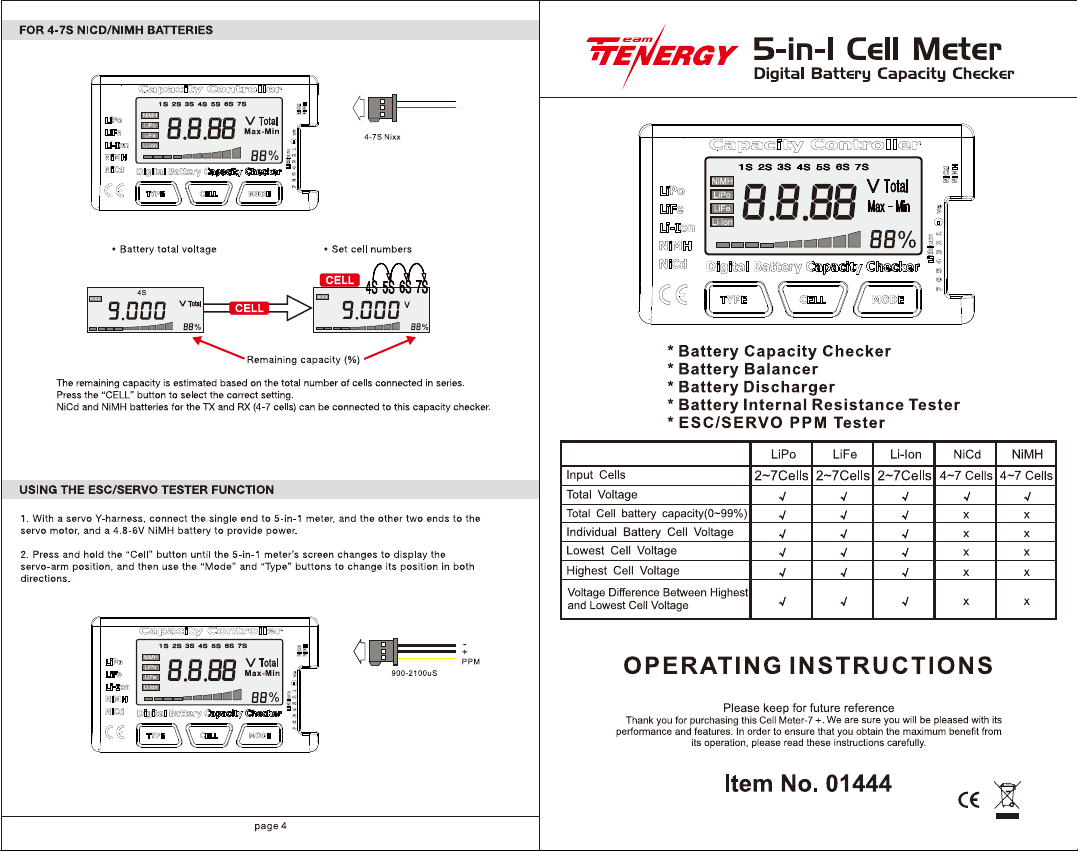
5-in-1 Cell Meter
Digital Battery Capacity Checker
LiPo
2~7Cells
LiFe
2~7Cells
Li-Ion
2~7Cells
NiCd
4~7Cells
NiMH
4~7Cells
Input Cells
Total Voltage
Total Cell Battery Capacity(0~99%)
Individual Battery Cell Voltage
Lowest Cell Voltage
Highest Cell Voltage
Voltage Differene Between Highest
and Lowest Cell Voltage
Features/compatibility
BALANCE CONNECTOR
FUTABA CONNECTOR
page 2
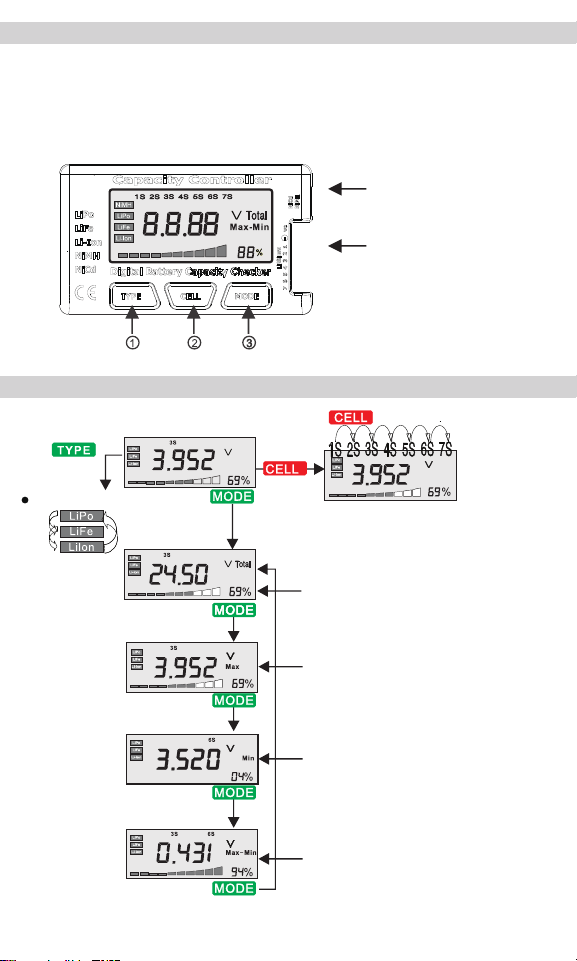
NiCdiNiMH Type Battery Input
(ESC/SERVO PPM signal output)
lithium Battery Input
(Using balancing connector)
Test Interface
Select batt type
Display voltage and
remaining capacity
for each cell
Total Capacity(%)
Highest cell voltage
Showing the highest ce ll number, voltage
and remaining capacity
Lowest ce ll voltage
Showing the lowest cell number, vol tage
and remaining capacity
Highest/lowest cel l voltage display
Showing highest ce ll number/lowest cel l number
and the voltage gap
1. Battery Type: NiCd/NiMH, Li-Po, LiFe, Li-Ion
2. Cell Number: LiPo/LiFe/Li-Ion: 2~7 cells NiMH: 4~7 cells
3. Display Mode: Battery cell voltage, Total voltage, Lowest cell voltage, Highest cell voltage,
Voltage gap between highest cell voltage and lowest cell voltage, Remaining battery capacity (%)
BATTERY CHECKER LAYOUT
Buttons
FOR 2-7S LIPO/LIFE/LI-ION BATTERIES
page 3
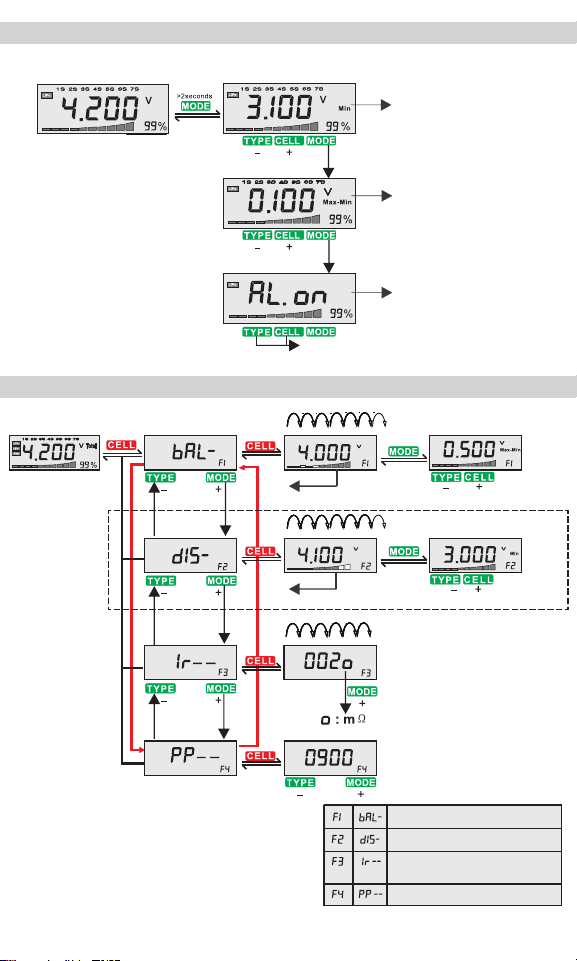
Test Interface Set Interface
Set alarmmlnlmumvoltage
Set the value between "Max·Min voltege”
Default Alarming Voltage "OFF"
On/Off Alarm Function
>2seconds
>2seconds
>2seconds
>2seconds
Test Interface
Function Interface
1S 2S 3S 4S 5S 6S 7S total
1S 2S 3S 4S 5S 6S 7S total
1S 2S 3S 4S 5S 6S 7S
set Max-Min Voltage Gap
set Minimum Discharge Voltage
Return to test interface after balance completed
Return to test interface after discharge completed
0.5-0.01V
3.0-4.0V
1s-7s
900-2100uS
*WARNING
*WARNING: To avoid overheating, the discharge function
can only be used for less than 6 min each time.
After that, please let the unit cool down to room
temperature before discharge again.
DO NOT leave your battery discharging with this device
unattended.
Battery Balancer
Battery Discharger
ESC/SERVO.PPM. Tester
Battery Internal Resistance
Tester
CONFIGURE VOLTAGE ALARM
PRESS AND HOLD THE “CELL” BUTTON TO ACCESS OTHER FUNCTIONS
4-7SNixx
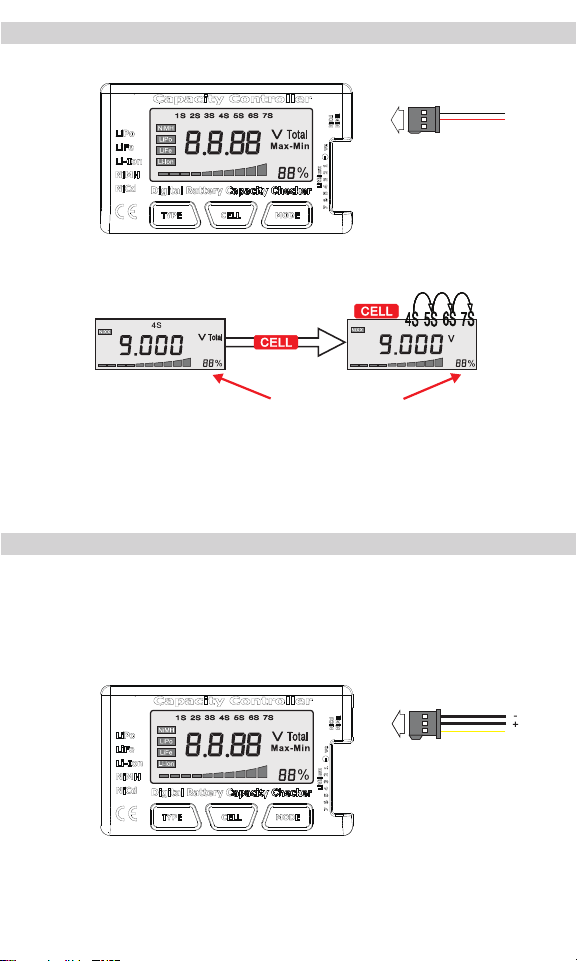
FOR 4-7S NIC D/NIMH B ATTE R IE S
• Battery total voltage • Set cell numbers
The remaining capacity is estimated based on the total number of cells connected in series.
Press the “CELL” button to select the correct setting.
NiCd and NiMH batteries for the TX and RX (4-7 cells) can be connected to this capacity checker.
R emaining c apac ity (% )
900-2100uS
PPM
page 4
USING THE ESC/SERVO TESTER FUNCTION
1. With a servo Y-harness, connect the single end to 5-in-1 meter, and the other two ends to the servo
motor, and a 4.8-6V NiMH battery to provide power.
2. Press and hold the “Cell” button until the 5-in-1 meter’s screen changes to display the servo-arm
position, and then use the “Mode” and “Type” buttons to change its position in both directions.