www.morphyrichards.co.uk/blog
For competitions, product hints and tips
and more join us at
www.facebook.com/morphyrichardsuk
@loveyourmorphy
CHARGE THE PRODUCT FULLY BEFORE FIRST USE
VC732102 MUK Rev1
* Register online for your 2 year guarantee. See back of this instruction book for details. (UK and Ireland customers only)
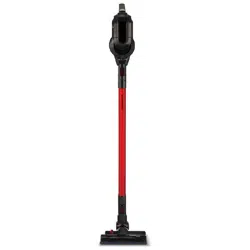
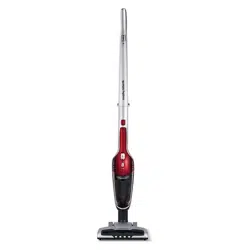
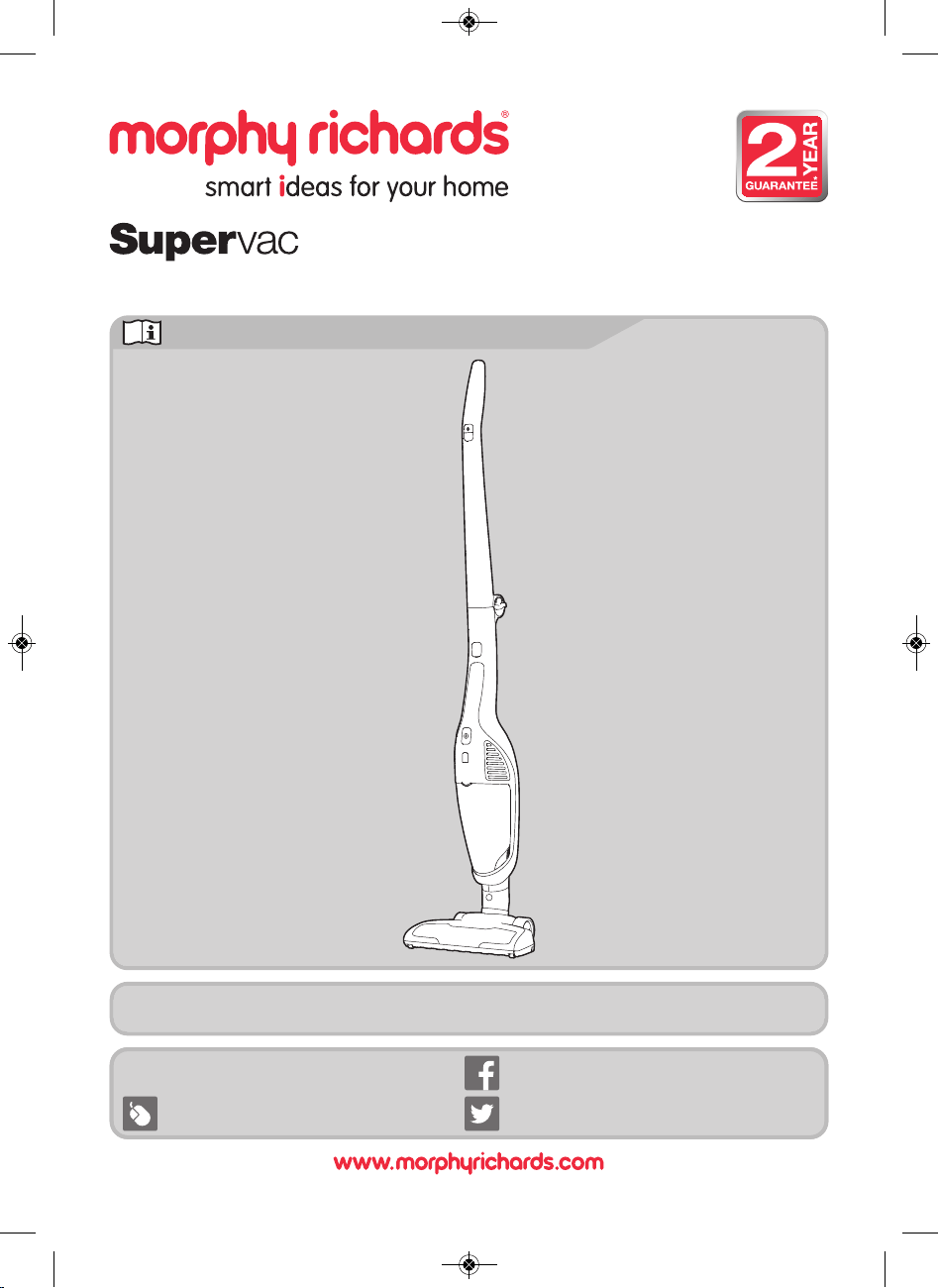
2-in-1 Cordless Bagless Upright Vacuum Cleaner
www.morphyrichards.co.uk/blog
For competitions, product hints and tips
and more join us at
Please read and keep these instructions for future use
www.facebook.com/morphyrichardsuk
@loveyourmorphy
VC732102 MUK Rev1.qxp_Instruction Book 14/11/2016 09:28 Page 1
2
Health and Safety
•
WARNING: Whenever the cleaner is in use, due to
the risk of entrapment in rotating parts, keep
loose clothing, hair, fingers etc. away from the
brush bar, nozzle and any handheld accessories.
•
WARNING: Disconnect from the mains supply
and remove the handheld vacuum cleaner (10)
before carrying out any routine maintenance,
such as cleaning any blockages, changing any
filters or accessing the motorised floor brush.
•
This appliance can be used by children aged from 8
years and above and persons with reduced physical,
sensory or mental capabilities, or lack of experience
and knowledge, if they have been given supervision
or instruction concerning the use of the appliance in
a safe way and understand the hazards involved.
•
Only use the mains adaptor supplied with the unit.
•
Children shall not play with the appliance.
•
Cleaning and user maintenance shall not be
undertaken by children without supervision.
Personal safety
• WARNING: Only lift the product by the handle (1) and
never pick the cleaner up by the motorised floor
brush.
• WARNING: Misuse of the appliance could cause
personal injury.
•
To prevent accidental contact with the rotating brush,
always remove the handheld unit before fitting, removing
or cleaning the motorised floor brush
(21).
• Never use in the presence of explosive liquid or vapours.
• Never pick up inflammable or poisonous liquids such as
petrol, copier toner or other volatile substances. Never
pick up acids, asbestos or asbestos dust.
• Never touch the adaptor, product or cable with wet
hands.
• Unprofessional repairs can be dangerous for users.
• To protect against fire, electric shock and personal injury,
do not immerse cord, mains adaptor or cleaner in water
or other liquid.
• The appliance must never be left running unsupervised.
Location
• Do not use or keep this product outside.
• Do not store the appliance near hot surfaces eg. ovens or
heating appliances.
Product safety
• This appliance is not intended for liquid/wet pick up.
• Never use the appliance without the filter being installed.
• Never use the appliance to vacuum hot ashes, broken
glass, sharp objects or liquids.
• Never modify the cleaner in any way.
• Use only Morphy Richards spare parts and accessories.
Electrical requirements
• Check that the voltage on the rating plate of the mains
adaptor corresponds with your house electricity supply
which must be A.C. (Alternating Current).
• The battery is not a serviceable item. Remove at the end
of the product’s life for recycling.
The use of any electrical appliance requires the following common sense safety rules.
Please read these instructions carefully before using the product.
VC732102 MUK Rev1.qxp_Instruction Book 14/11/2016 09:28 Page 2
3
Health and safety ........................................................................
Electrical requirements ..............................................................
Product overview / Features ......................................................
Charging / storage mount fixing ...............................................
Dual functionality ........................................................................
Upright vacuuming: assembly ...................................................
Upright vacuum cleaning ...........................................................
Handheld vacuum cleaning .......................................................
Using the attachments on the handheld vacuum cleaner ......
Tool storage .................................................................................
Maintenance ................................................................................
Maintenance - emptying the dust canister ..............................
Maintenance - filters ..................................................................
Maintenance - motorised floor brush .......................................
Maintenance - trouble shooting ................................................
Storage ........................................................................................
Disposal .......................................................................................
Contact us ...................................................................................
Notes ............................................................................................
Guarantee ....................................................................................
Contents
2
2
4
5
5
6
6
7
7
8
8
8
9
9
10
10
11
11
11
12
VC732102 MUK Rev1.qxp_Instruction Book 14/11/2016 09:28 Page 3
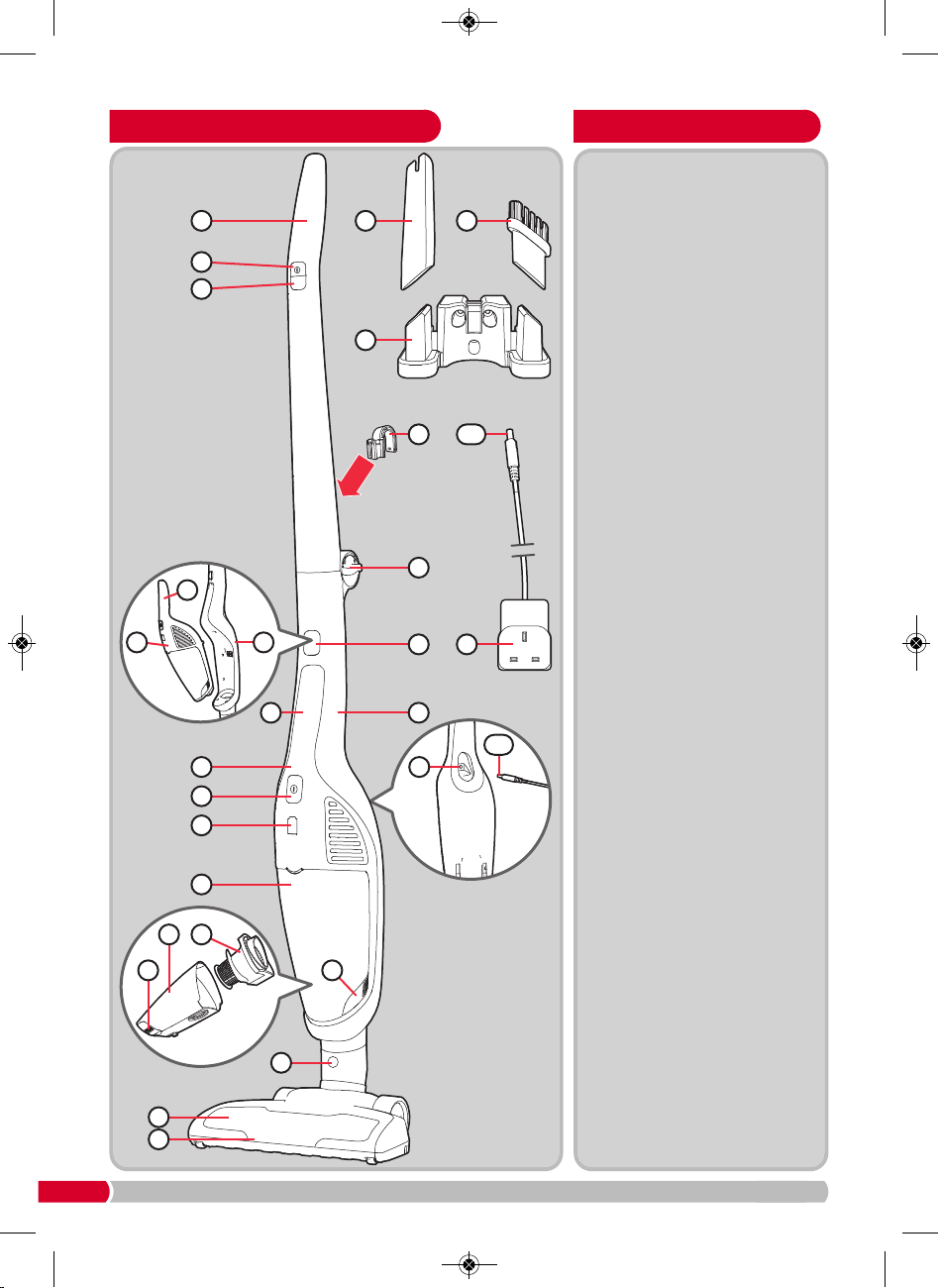
4
Features
(1) Upright handle
(2) Upright on/off button
(3) Power selector button
(4) Crevice tool
(5) Dusting brush
(6) Charging / storage mount
(7) Storage hook
(8) Upright handle release dial
(9) Handheld vacuum cleaner
handle
(10) Handheld vacuum cleaner
(11) Main vacuum cleaner body
(12) Handheld vacuum cleaner
release button
(13) Mains adaptor
(
13a
) Mains adaptor connector
(14) Charging inlet
(15) Handheld vacuum cleaner
on/off button
(16) Charging / power indicator
light
(17) Dust canister
(18) Dust canister filter holder
assembly
(19) Dust canister release
buttons (on either side of
the dust canister)
(20) Floor brush release button
(21) Motorised floor brush
(22) Floorhead lights
Product overview
1
2
3
8
1312
11
14
15
16
17
18
17
19
20
21
10
10
11
5
6
4
9
9
22
19
7
13 a
13 a
VC732102 MUK Rev1.qxp_Instruction Book 14/11/2016 09:28 Page 4
Floor
vacuum
cleaning
Handheld
vacuum
cleaning
5
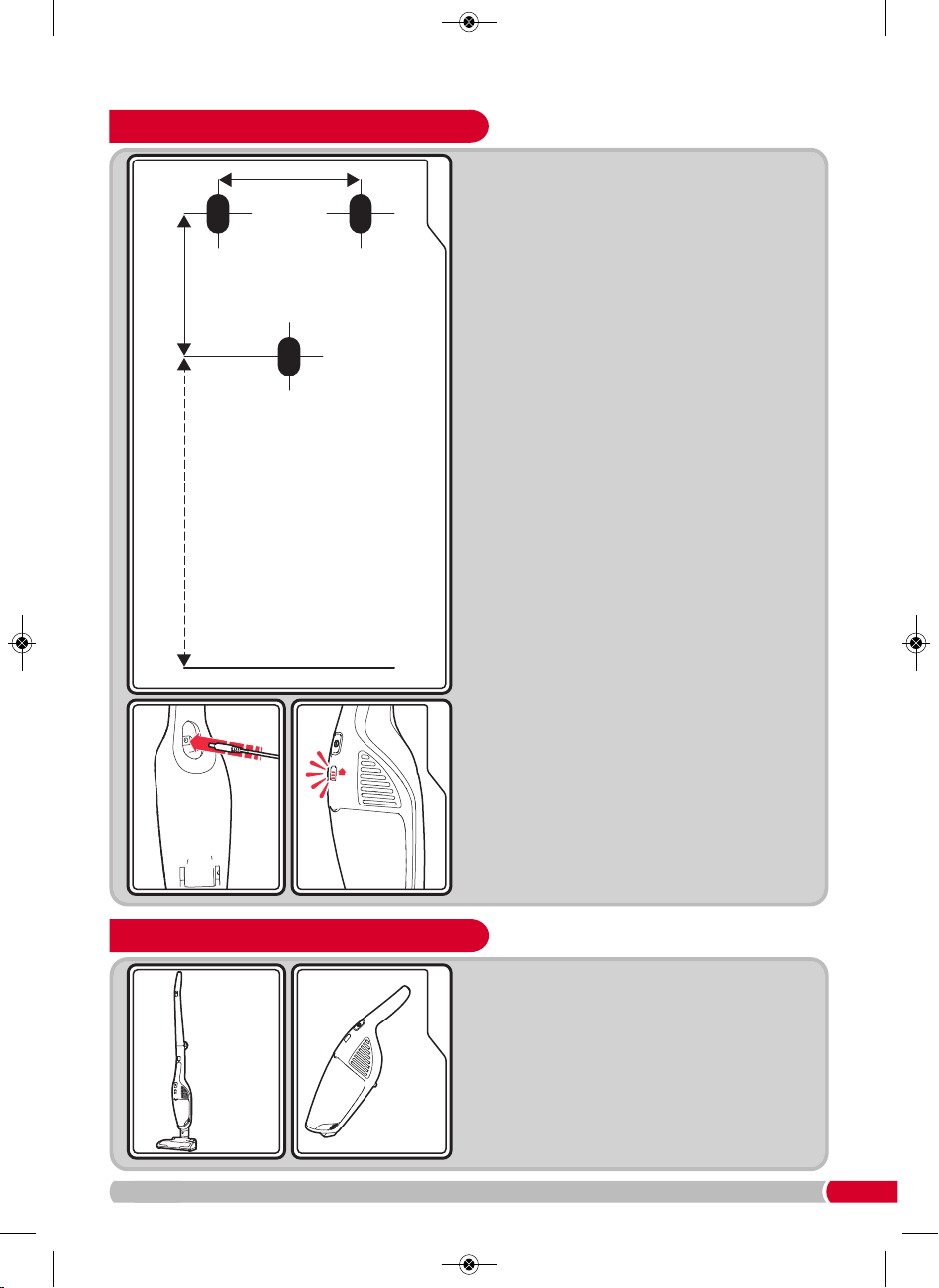
Dual functionality
Your vacuum cleaner can easily be configured
into two different cleaning modes:
• Upright vacuum cleaner for floors and carpets.
• Handheld vacuum cleaner (10) which can be
carried with you whilst cleaning hard to reach
places.
Charging / storage mount fixing
25.4mm
25.4mm
the ground
1
23
762mm - This is the minimum height
above the ground for wall
mounting, it may be
mounted higher if required.
NOTE: The mounting
must be within 1.5 metres
of a mains outlet socket
to enable the mains
adaptor to reach.
D
uring unpacking of the product, make sure that
t
he packing insulation piece between the handheld
vacuum cleaner
(10) and the main vacuum cleaner
body
(11) is removed.
C
harge the product fully before first use.
1 T
he charging / storage mount
(
6)
m
ust be fixed to
a suitable wall with three 4mm (No. 8) pan-head
screws (NOT PROVIDED). The screws and plug
m
ust be suitable for the relevant wall type and be
capable of supporting a minimum of 5kg.
The position of the three holes for the fixing plugs
should be as shown in the diagram (see left).
After the charging / storage mount has been fixed
to the wall, fit the storage hook (7) to the rear of the
upright handle (1) by locating in the slot provided
and then lifting up until it clicks into position.
To fit the vacuum cleaner onto the charging /
storage mount, simply hook the product onto the
mount using the storage hook.
2 To charge, plug the mains adaptor (13) into the
mains supply and switch on, then plug the mains
adaptor connector
(13a) into the charging inlet (14)
on the underside of the handheld vacuum cleaner
(10), this is accessible through a hole in the back
of the main vacuum cleaner body (11).
Then hook the vacuum cleaner onto the wall
mounted charging / storage mount whilst charging.
3 The four charging/power indicator lights (16) will
illuminate one by one from the lowest light to the
uppermost light in a continuous loop to indicate
the product is charging.
As charging continues, each light from the lowest
to the uppermost will remain constantly illuminated
one-by-one to indicate how much the unit has
charged. All lights will extinguish when the product
is fully charged. A full charge may take 5 hours.
When fully charged, unplug the mains adaptor
connector and switch off / unplug the mains
adaptor from the mains supply.
VC732102 MUK Rev1.qxp_Instruction Book 14/11/2016 09:28 Page 5
6
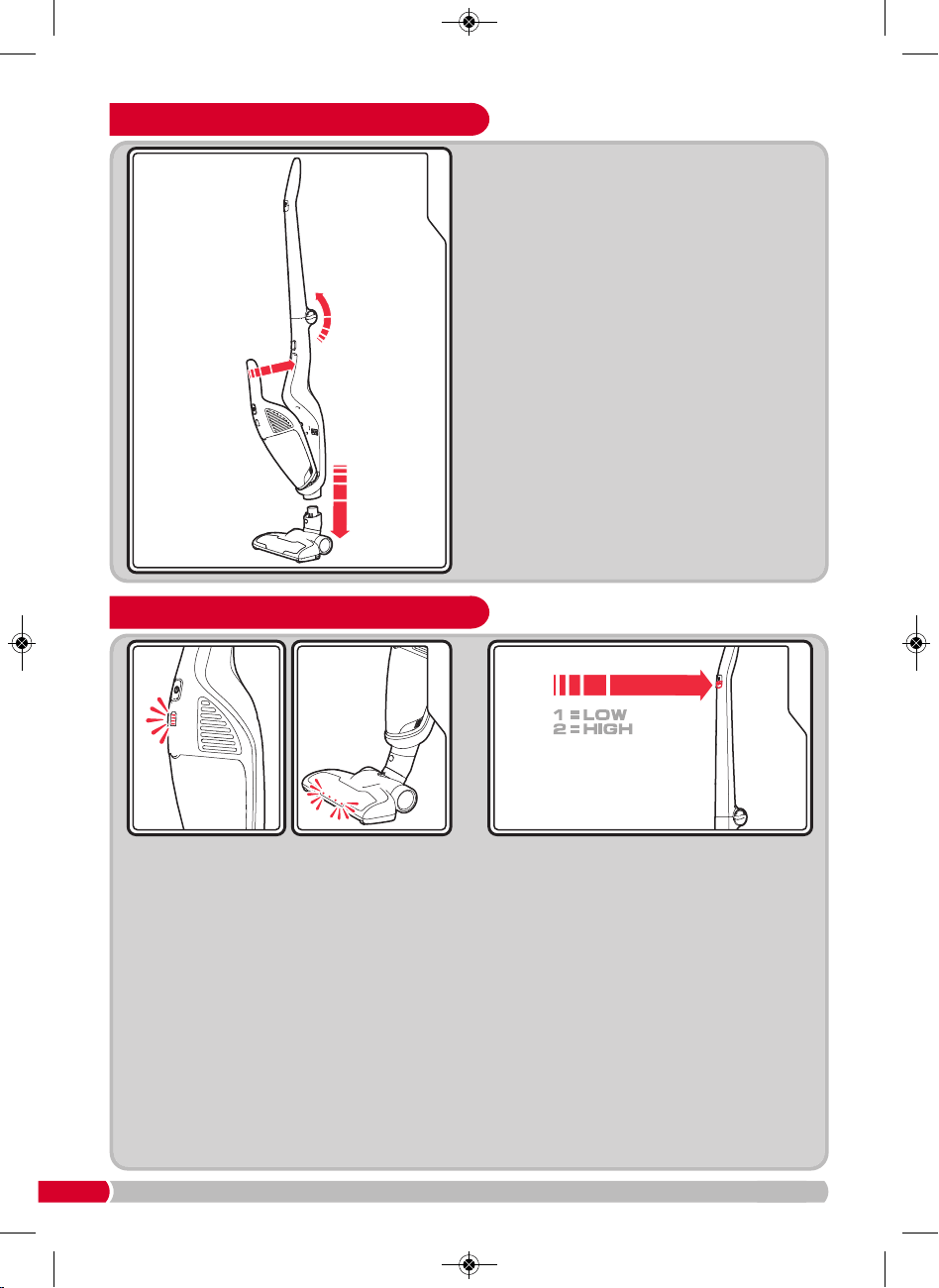
Upright vacuum cleaning
1
Turn the product on by pressing the upright
on/off button (2).
When the product is turned on, the handheld
vacuum cleaner power indicator light
(16) will
illuminate blue and the floorhead lights (22) will
illuminate.
NOTE: When the battery reduces to a pre-set
level the product will stop, the light will
extinguish and the product must be recharged.
Two power settings are provided. When
switched on, the unit will automatically start at
high power. By pressing the power selector
button
(3) once, the power will drop to low.
Press the button a second time to switch the
power back to high (see diagram 2, above right).
Further presses of the power selector button will
toggle the power between low and high.
2
Using the product on low power will be sufficient
for light cleaning and will extend the running time
until the product needs to be recharged.
You can also turn the product on with the
handheld vacuum cleaner on/off button
(15).
Switching the power on using this button will not
run the rotating brush bar in the motorised floor
brush (21).
NOTE: There are no variable power settings on
the handheld vacuum cleaner
(10).
Upright vacuuming: assembly
1
2
3
1 S
wing the upright handle
(
1)
o
n the main vacuum
c
leaner upwards until it clicks into place in an
upright position.
2 Place the motorised floor brush (21) on a level
s
urface and align the connector on the neck of
t
he motorised floor brush with the connector hole
on the base of the main vacuum cleaner body
(
11)
.
Holding the neck of the motorised floor brush in
place, lower the main vacuum cleaner body onto
the motorised floor brush until you hear the two
pieces click into place.
When attaching the motorised floor brush, ensure
that the latching mechanism is fully locked in
place to ensure electrical connection is made.
3 Fit the handheld vacuum cleaner (10) into the
cavity on the main vacuum cleaner body by firstly
sliding the suction end into place over the
suction hole in the main vacuum cleaner body
cavity, then push the handle end in to place until
a click is heard.
VC732102 MUK Rev1.qxp_Instruction Book 14/11/2016 09:28 Page 6
7
7
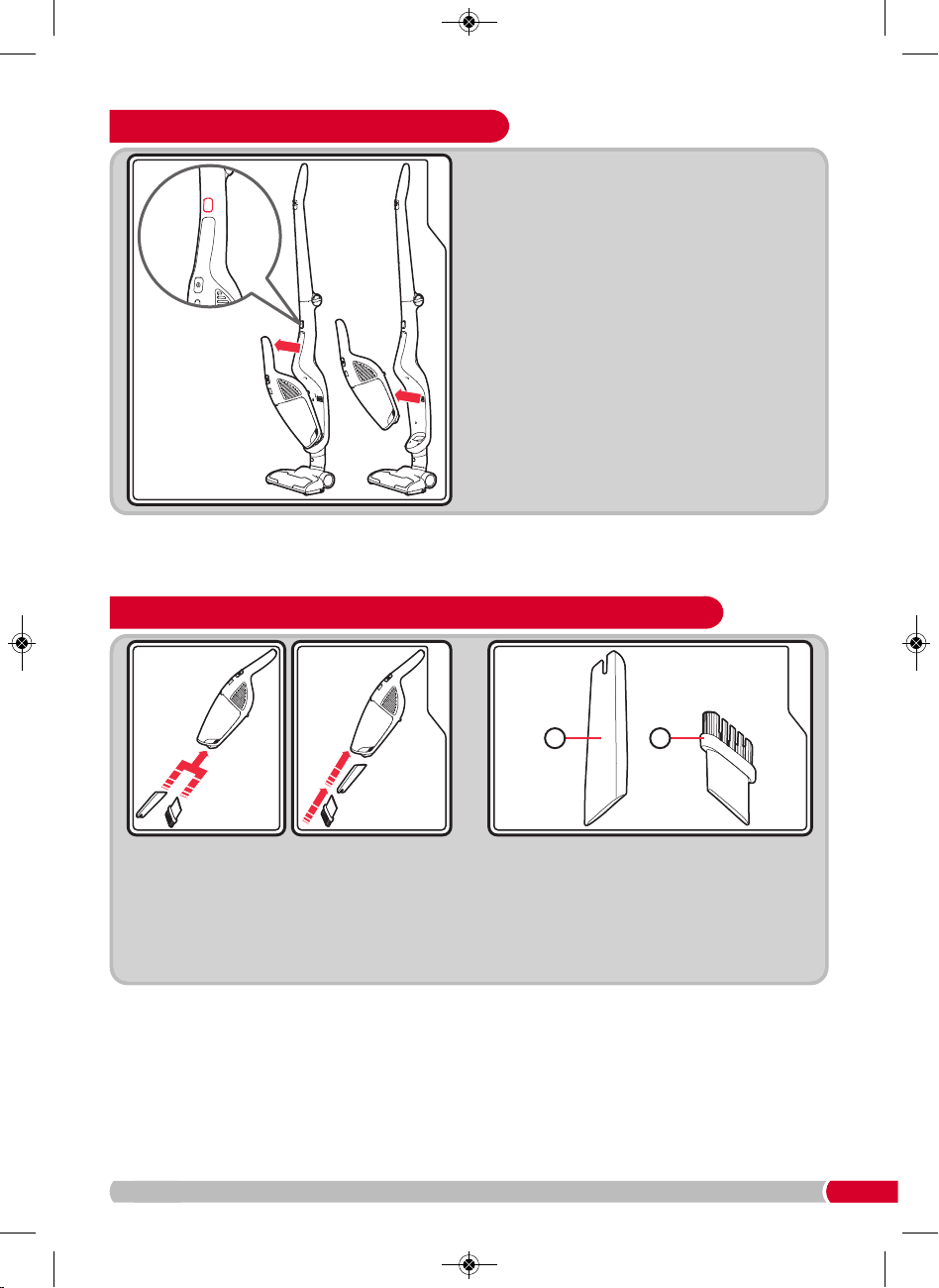
Using the attachments on the handheld vacuum cleaner
12
1 P
ush the accessories (4) or (5) into the suction
inlet on the end of the handheld vacuum
cleaner.
2 A
lternatively, for extra reach, attach the
accessories together and push the assembly
into the suction inlet on the end of the
handheld vacuum cleaner.
54
List of attachments
Crevice tool (4) for awkward places, corners
and behind radiators etc. This tool is also
useful on stairs.
Dusting brush (5) for carpet, upholstery and
stairs etc.
Handheld vacuum cleaning
2
1
T
his function is ideal for cleaning stairs,
curtains, upholstery and hard to reach places.
1 To separate the handheld vacuum cleaner (10)
from the main vacuum cleaner body (11), press
t
he handheld vacuum cleaner release button
(12).
2 Pull the handheld vacuum cleaner away from
the main vacuum cleaner body
(11).
• After use, return the handheld vacuum cleaner
(10) to the cavity on the main vacuum cleaner
body (11) by firstly sliding the suction end into
place over the suction hole in the main vacuum
cleaner body cavity, then push the handle end
in to place until a click is heard.
• The handheld vacuum cleaner only has a high
power mode, not variable power.
VC732102 MUK Rev1.qxp_Instruction Book 14/11/2016 09:28 Page 7
8
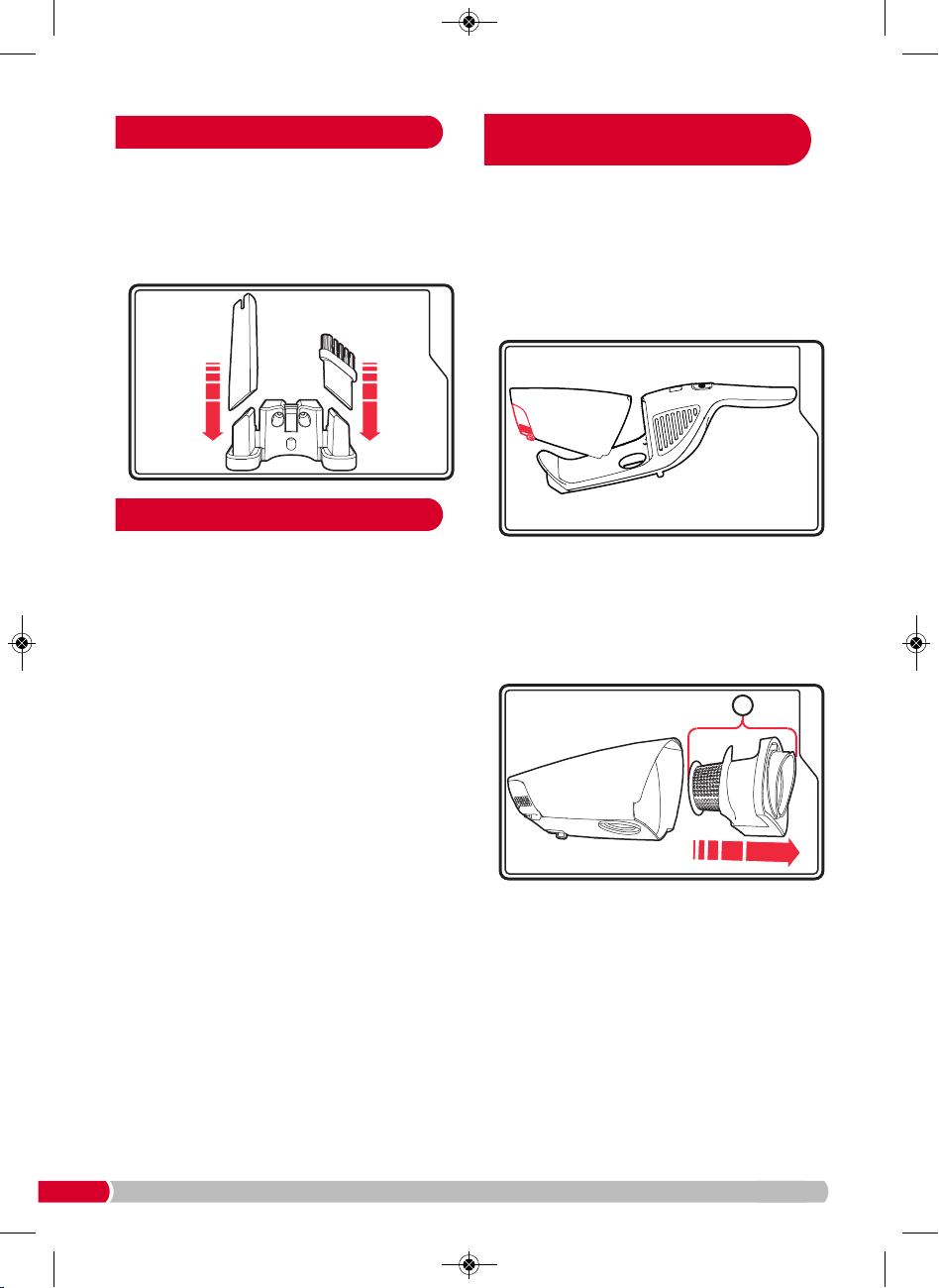
When not in use, the attachments may be stored
o
n the storage / charging mount
(
6)
a
s shown
below.
T
he storage / charging mount should already be
fitted to the wall (see ‘Charging / storage mount
fitting’ page 5).
WARNING: Always remove the handheld
vacuum cleaner from the main vacuum cleaner
body and the mains adaptor from the mains
supply before undertaking any maintenance or
cleaning procedures.
Your cleaner is manufactured to withstand normal
day-to-day use, but an occasional wipe over with
a damp cloth will help maintain its good looks.
Take care not to get the electrical connections wet.
Abrasive cleaners should not be used.
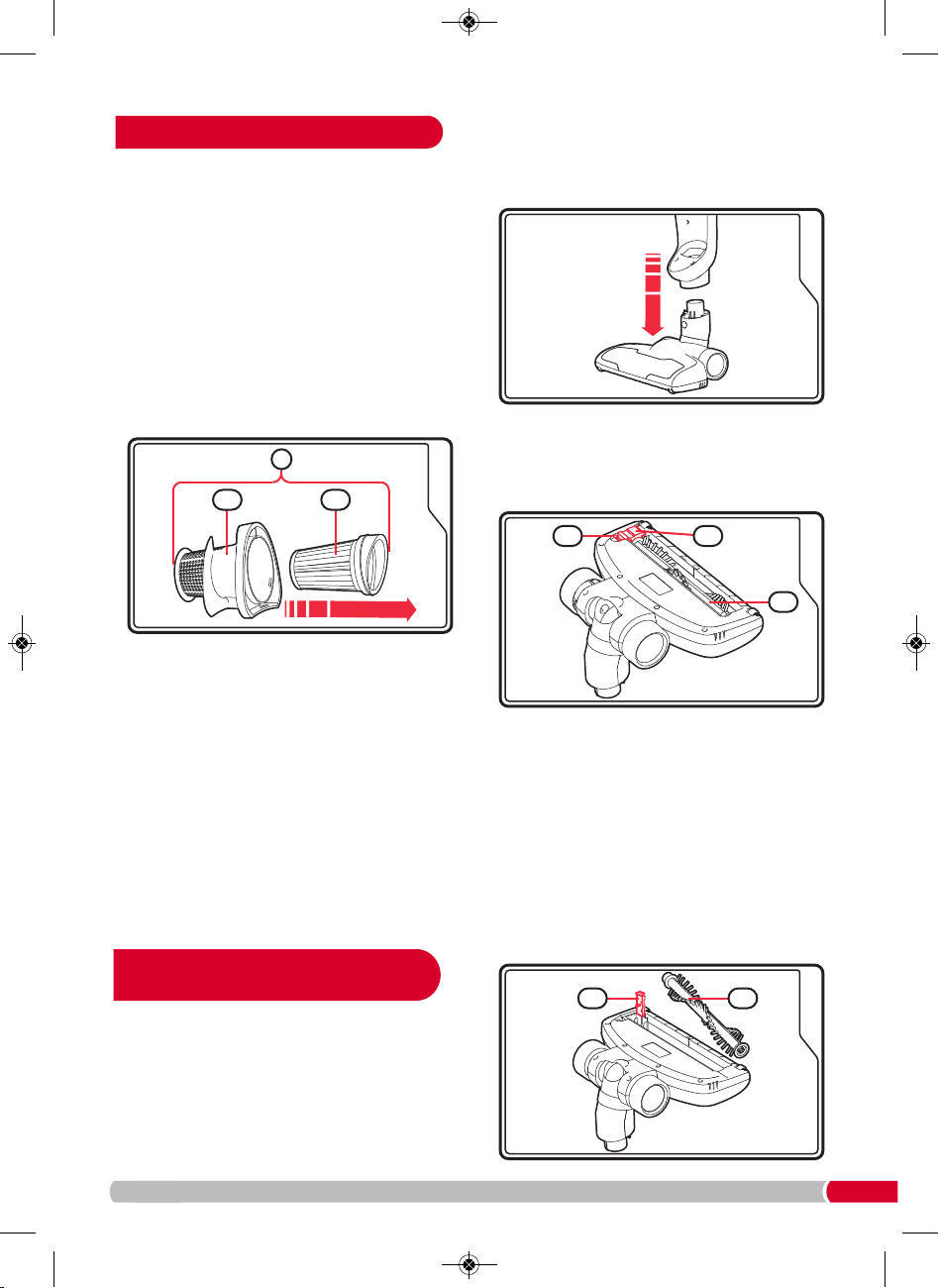
Empty the dust canister (17) regularly even if it does
n
ot look full, this will maintain the performance.
1
.
R
emove the handheld vacuum cleaner
(
10)
f
rom
t
he main vacuum cleaner body
(
11)
(
see
‘Handheld vacuum cleaning’, page 7).
2
.
P
ress the dust canister release buttons
(
19)
a
nd
pull the dust canister away from the handheld
v
acuum cleaner.
3. Remove the dust canister filter holder assembly
(18) and empty the dirt from inside the dust
canister. Care should be taken not to release the
dust until over a bin.
At the same time, ensure the top and bottom areas
of the cyclone cone (18a) (see image 3 on page 9 )
are cleaned and free from dust or other debris.
4. It is recommended that the individual parts of the
dust canister filter holder assembly
(18 - including
the pleated filter 18b) (see image 3 on page 9)
are brushed or tapped clean before refitting on
each empty of the dust canister (to access, see
‘Maintenance - filter’ section). In addition, they
must be washed monthly as instructed in the
‘Maintenance - filter’ section.
5. Fit all parts of the dust canister filter holder
assembly
(18) back together, then refit back into
the dust canister
(17), then replace the dust
canister back onto the handheld vacuum cleaner.
6. Replace the handheld vacuum cleaner (10) back
into the main vacuum cleaner body
(11) if upright
cleaning.
Tool storage
Maintenance
Maintenance - emptying
the dust canister
1
18
2
VC732102 MUK Rev1.qxp_Instruction Book 14/11/2016 09:28 Page 8
9
T
he guarantee may be invalidated if the motor
is damaged due to: using the appliance
w
ithout the filters installed; not cleaning the
f
ilters; or not replacing a damaged filter.
Cleaning the dust canister filters
To maintain suction, the individual parts of the
dust canister filter holder assembly
(18) must
b
e cleaned each time the dust canister
(
17)
i
s
emptied.
1
.
Follow steps 1-4 of ‘Emptying the dust canister’.
2
.
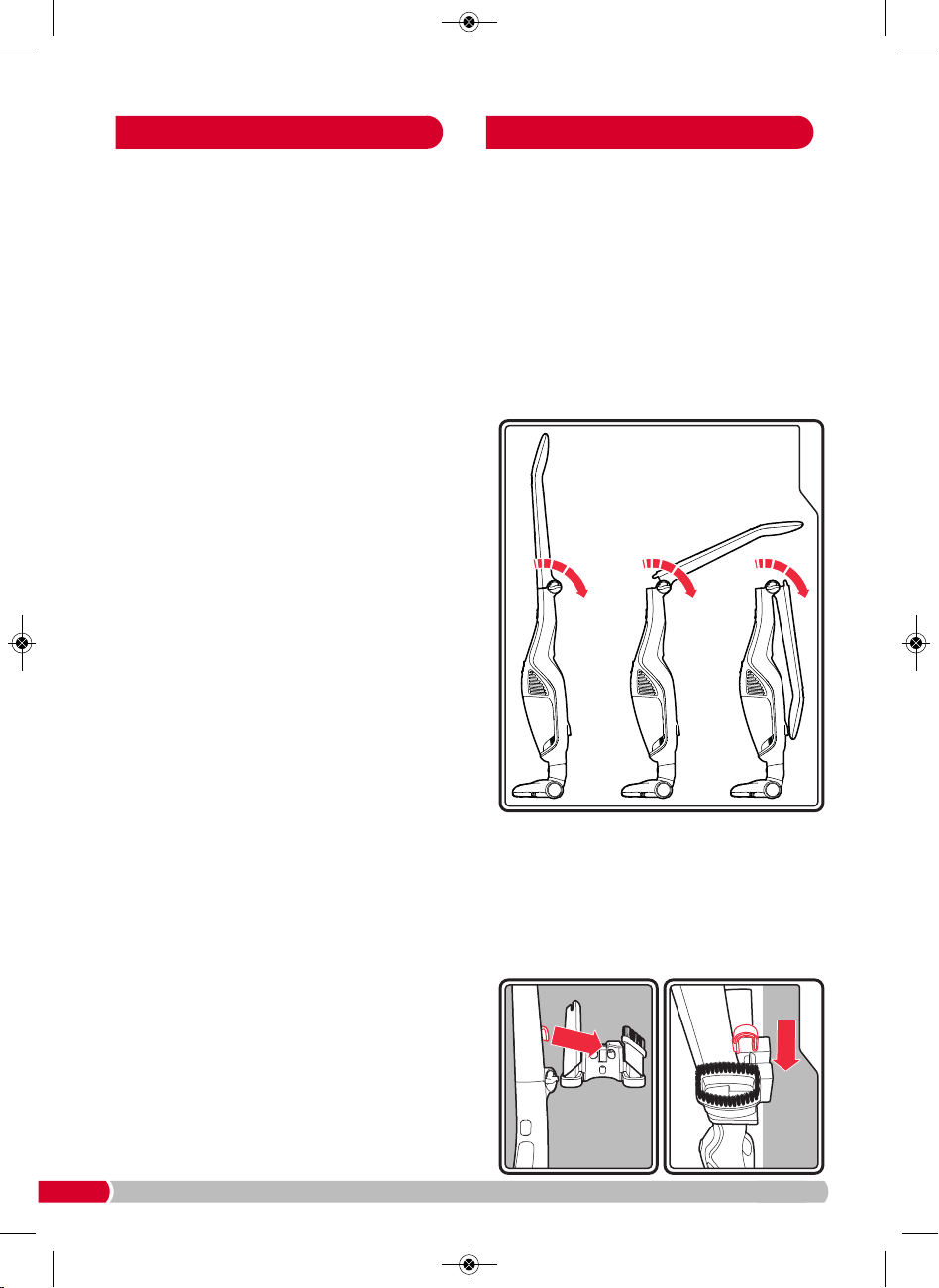
Pull the pleated filter (18b) out from the filter
holder assembly
(18) by slightly twisting it
anti-clockwise, then pulling it away from the
cyclone cone
(18a).
3. Every month, wash the pleated filter (18b) in
luke-warm water and thoroughly air dry before
re-fitting, as well as cleaning the cyclone cone
(18a).
IMPORTANT: Do not wash the filters with hot
water or detergents.
IMPORTANT: Do not use heated appliances to
dry the filters.
4. Fit all parts of the dust canister filter holder
assembly
(18) back together, then refit back into
the dust canister
(17), then replace the dust
canister back onto the handheld vacuum cleaner.
5. Replace the handheld vacuum cleaner back into
the main vacuum cleaner body
(11) if upright
cleaning.
If the motorised floor brush
(21) is stalled,
eg. by a foreign object or if used on very deep
pile carpet, switch off, remove the cause of the
stall, and leave for a few minutes to allow the
floor nozzle protection to self reset.
T
o clean the motorised floor brush, you must
remove the handheld vacuum cleaner as shown
i
n ‘Handheld vacuum cleaning’, page 7. Then,
press the floor brush release button
(20) and pull
t
he motorised floor brush away.
Turn the motorised floor brush
(21) over to
inspect the
rotating
brush bar (21c).
Push the locking button
(21a) on the brush bar
cover (21b) forward to unlock the cover.
Open the brush bar cover
(21b)
and lift the
rotating
brush bar
(21c)
out. Pull away any hairs or fibres
from the
rotating
brush bar, checking especially
around the ends of the brush bar. If they are tightly
wound around the brush, carefully snip the fibres
with scissors, being careful not to damage the
rotating brush bar, pull away from the rotating
brush bar and dispose of. Also, check for any
blockages to the floorhead suction inlet - if any are
noted, clear before replacing the
rotating
brush
bar. Replace the rotating brush bar and brush bar
cover in their original position
and re-lock the
locking button
(21a)
.
Maintenance - filters
Maintenance - motorised
floor brush
3
1
8
18 a
18 b
3
4
21b
21c
21a
5
21c21b
VC732102 MUK Rev1.qxp_Instruction Book 14/11/2016 09:28 Page 9
10
•
“Does not pick-up”/ “Motorised floor-brush
running slow or soon stops”
C
heck for hairs/fibres that may be wrapped
around the rotating brush-bar.
I
MPORTANT: Remove the brush bar as described
on page 9. Fine hairs or fibres may be caught
u
nseen in the ends of the brush bar. Carefully
r
emove the hairs and re-fit the brush bar.
• “Does not pick-up” / “Suction of handheld
cleaner has reduced”
In addition to emptying the dust canister, it is very
important that the individual parts of the dust
canister filter holder assembly (18) (see image 3
on page 9) are regularly and thoroughly cleaned.
See ‘Maintenance - filters’ section on page 9 for
details of how to access and clean them.
• “Does not pick-up from the floor but the floor
brush is rotating and the handheld has good
suction”
Switch off the product, remove the motorised
floor brush and check for blockages in the
floorhead suction inlet connector area between
the motorised floor brush and the main vacuum
cleaner body.
• “Product not charging”
Check the indicator light (16) on the front of the
handheld cleaner is glowing to indicate that
charging is in process. If the indicator is not
showing, check the mains adaptor is fully fitted into
the mains socket and the socket is switched on.
1.
F
it the handheld vacuum cleaner
(
10)
b
ack into
the cavity on the main vacuum cleaner body
(11)
b
y firstly sliding the suction end into place over
the suction hole in the main vacuum cleaner body
cavity, then push the handle end in to place until a
c
lick is heard.
2.
T
he upright handle
(
1)
i
s collapsible for compact
storage by turning the upright handle release dial
(8)
towards the front of the main vacuum cleaner
body.
WARNING: When locking the handle, keep this
area clear. Be careful not to trap your fingers
or any loose items of clothing etc
.
3.
Place the tools onto the charging / storage mount
(6)
(see ‘Tool storage’, page 8).
4.
Rather than compact storage (as described in point
2), you may wish to hang the product from the
charging / storage mount (which must be attached
to a wall using suitable screws and wall plugs). Use
the storage hook (7) to hang the product from the
lip in the centre of the charging / storage mount.
Maintenance - troubleshooting
Storage
Wall
Wall
VC732102 MUK Rev1.qxp_Instruction Book 14/11/2016 09:28 Page 10
11
Notes
W
hen the product reaches the end of
its useful life, it must not be disposed
o
f in normal household waste. The
product must be disposed of at an
authorised recycling plant.
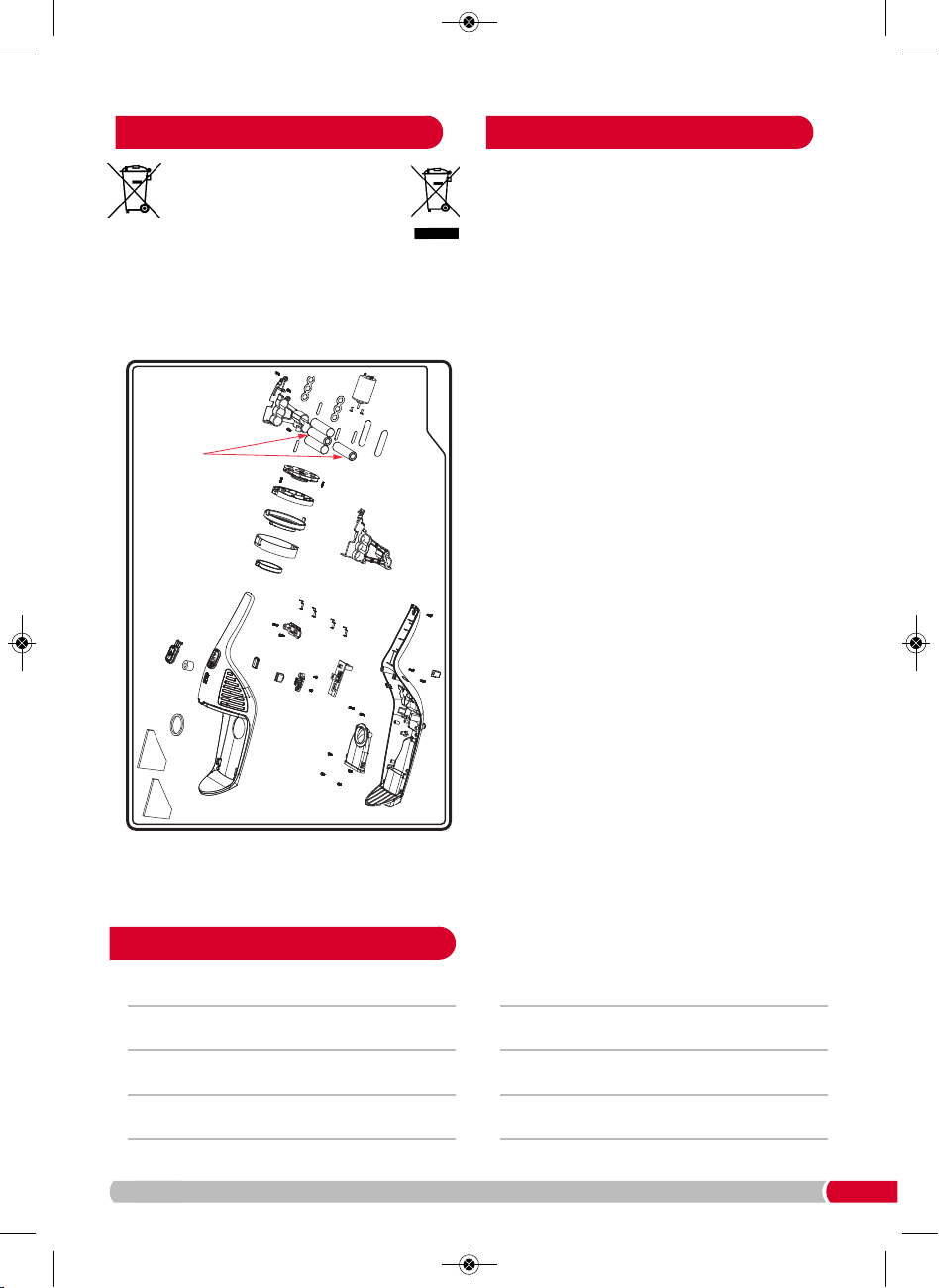
The handheld vacuum cleaner (10) should only be
d
isassembled by a competent engineer and the
battery removed and disposed of at an authorised
recycling plant. Your local authority will have a
centre which accepts such waste for recycling.
WARNING: Batteries and products containing
batteries must never be disposed of in fires.
Helpline
If you are having a problem with your appliance,
p
lease call our Helpline, as we are more likely to
be able to help than the store you purchased the
item from.
P
lease have the product name, model number
and serial number to hand when you call to help
u
s deal with your enquiry quicker.
U
K Helpline: 0344 871 0944
IRE Helpline: 1800 409 119
S
pares: 0344 873 0710
Talk To Us
If you have any questions or comments, or want
some great tips to help you get the most out of
your products, join us online:
Blog: www.morphyrichards.co.uk/blog
Facebook: www.facebook.com/morphyrichardsuk
Twitter: @loveyourmorphy
Website: www.morphyrichards.com
Disposal Contact us
Li-ion
Batteries
VC732102 MUK Rev1.qxp_Instruction Book 14/11/2016 09:28 Page 11
VC732102 MUK Rev1 11/16
Y
our standard 1 year guarantee is extended for an
a
dditional 12 months when you register the product within
28 days of purchase with Morphy Richards. If you do not
register the product with Morphy Richards within 28 days,
your product is guaranteed for 1 year. To validate your 2
y
ear guarantee, register with us online at
www.morphyrichards.co.uk
Or call our customer registration line
UK 0344 871 0242
I
RE 1800 409 119
N.B. Each qualifying product needs to be registered with
Morphy Richards individually.
P
lease note that the 2 year guarantee is only available
in the UK and Ireland. Please refer to the 1 year guarantee
for more information.
To qualify for the 1 year guarantee, the appliance must
have been used according to the instructions supplied.
It is important to retain the retailer’s receipt as proof of
purchase. Staple your receipt to this back cover for future
reference.
Please quote the following information if the product
develops a fault. These numbers can be found on the base
of the product.
Model no. Serial no.
All Morphy Richards products are individually tested before
leaving the factory. In the unlikely event of any appliance
proving to be faulty within 28 days of purchase, it should
be returned to the place of purchase for it to be replaced.
If the fault develops after 28 days and within 1 year (2
years if registered) of original purchase, you should contact
the Helpline number quoting Model number and Serial
number on the product, or write to Morphy Richards at the
address shown.
You may be asked to return a copy of proof of purchase.
Subject to the exclusions set out below (see Exclusions),
the faulty appliance will then be repaired or replaced and
dispatched usually within 7 working days of receipt.
If you suspect a fault, follow the simple checks detailed
below before retrying the appliance or calling the helpline.
• Check the filters for blockages and clean.
• Check the tools / tubes for blockages.
• Check the appliance is charged.
• Check the socket used for charging is working and the
charging adaptor is firmly in the socket during charging.
I
f, for any reason, this item is replaced during the 1 year
guarantee period, the guarantee on the new item will be
calculated from original purchase date. Therefore it is vital
t
o retain your original till receipt or invoice to indicate the
date of initial purchase. To qualify for the 1 year guarantee,
the appliance must have been used according to the
instructions supplied.
T
his appliance is intended for domestic use only. Misuse
or use for commercial or any other purpose will render the
guarantee invalid.
Morphy Richards shall not be liable to replace or repair the
goods under the terms of the guarantee where:
1 The fault has been caused or is attributable to accidental
use, misuse, negligent use or used contrary to the
manufacturer’s recommendations or where the fault has
b
een caused by power surges or damage caused in transit.
2 The appliance has been used on a voltage supply other
than that stamped on the products.
3 Repairs have been attempted by persons other than our
service staff (or authorised dealer).
4 The appliance has been used for hire purposes or non
domestic use.
5 The appliance is second hand.
6 Morphy Richards reserves the right not to carry out any
type of servicing under the guarantee at its discretion.
7 The guarantee excludes consumables such as the filter.
• This guarantee does not confer any rights other than those
expressly set out above and does not cover any claims for
consequential loss or damage. This guarantee is offered
as an additional benefit and does not affect your statutory
rights as a consumer. Morphy Richards products are
intended for household use only. See usage limitations
within the location safety instructions.
Morphy Richards has a policy of continuous improvement
in product quality and design. The company, therefore
reserves the right to change the specification of
its models at any time.
For electrical products sold within the
European Community. At the end of the
electrical products useful life, it should not be
disposed of with household waste. Please recycle
where facilities exist. Check with your Local Authority
or retailer for recycling advice in your country.
Battery should be removed at the end of the
product’s life for recycling.
Exclusions
Registering your 2 year
guarantee
Your 1 year guarantee
Disclaimer
The After Sales Division
Morphy Richards Ltd
Mexborough,
South Yorkshire,
England, S64 8AJ
IF YOU ARE HAVING A PROBLEM
WITH ONE OF OUR PRODUCTS,
CALL OUR HELPLINE:
UK: 0344 871 0944
EIRE: 1800 409 119
SPARES: 0344 873 0710
Li-ion
VC732102 MUK Rev1.qxp_Instruction Book 14/11/2016 09:28 Page 12