FREEDOM
USER GUIDE
ENGLISH

SET-UP
Quick Start ................................................................................................................. 3
In-the-box ................................................................................................................... 10
Fit ............................................................................................................................... 11
Comply ........................................................................................................................ 12
Ear Fins ...................................................................................................................... 14
Cord Management Clips.............................................................................................. 17
Cord Clip ..................................................................................................................... 19
Power On: Music & Calls ............................................................................................. 20
MySound App .............................................................................................................. 21
DETAILED INSTRUCTIONS
Charging / Battery Status .......................................................................................... 23
Charging Clip .............................................................................................................. 25
Controls for Music and Calls ...................................................................................... 30
Pairing ........................................................................................................................ 31
Multipoint ................................................................................................................... 33
ShareMe ..................................................................................................................... 35
Smartwatches ............................................................................................................ 37
Troubleshooting ......................................................................................................... 38
Specifications ............................................................................................................ 39
Warranty, Warnings & Safety .................................................................................... 40
3
REMOVE
AT TACH
QUICK START
DO NOT
PULL CORD
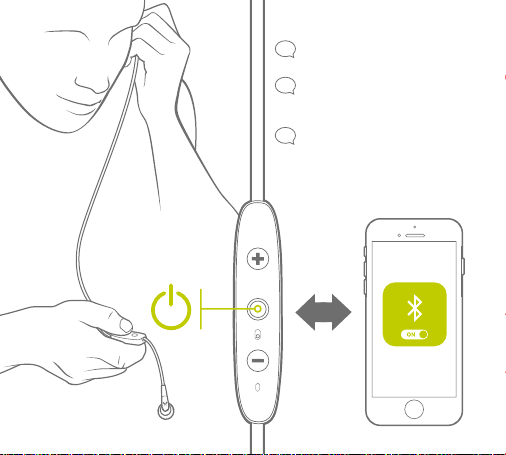
4
LISTEN FOR
VOICE PROMPT
“HEADPHONES
CONNECTED”
“SEARCHING FOR
YOUR MUSIC DEVICE”
“POWER ON”
PAIRING
4 SEC PUSH
5
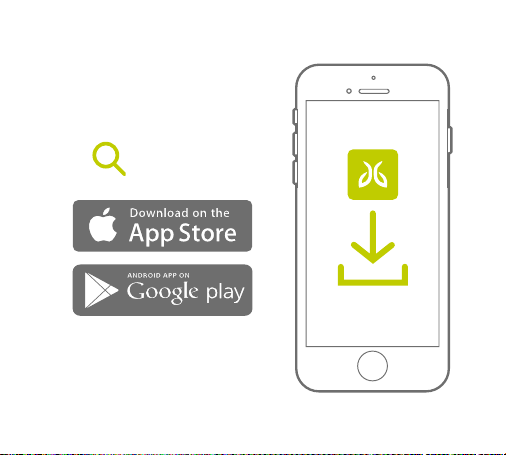
MYSOUND
CUSTOMIZE YOUR SOUND SETTINGS
AND SAVE THEM TO YOUR BUDS
6
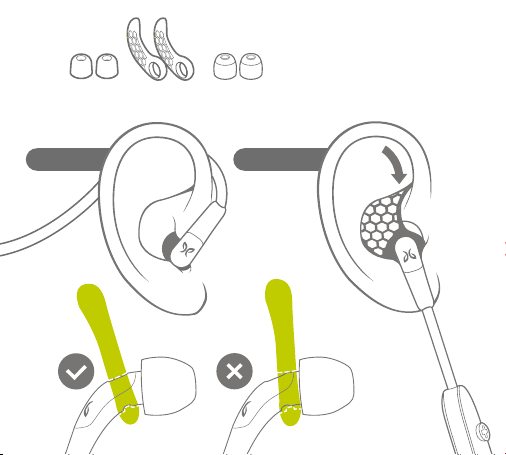
UNDER-EAROVER-EAR
CHOOSE THE RIGHT FIT
OPTION/COMBINATION THAT
WORKS BEST FOR YOU.
SILICONE
EAR TIPS
SILICONE
EAR FINS
COMPLY
TM
EAR TIPS
7
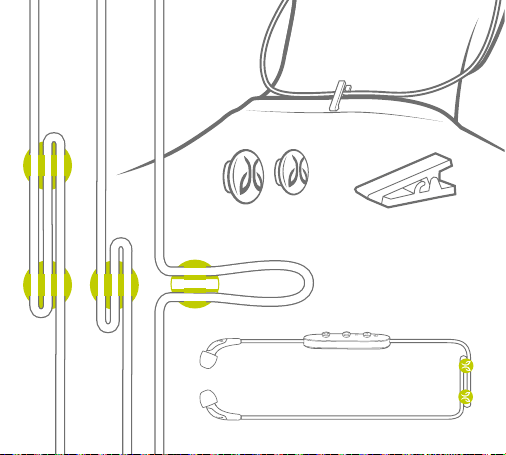
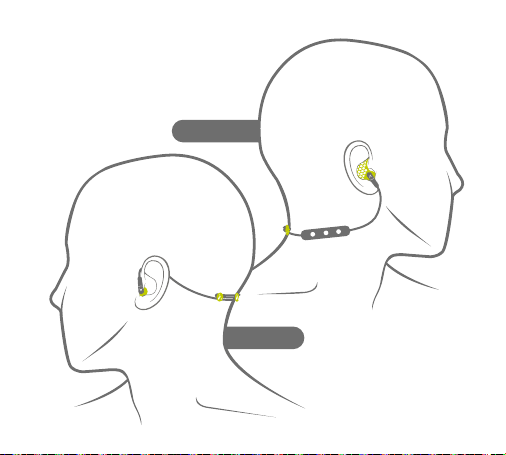
CORD MANAGEMENT
CLIPS
CORD CLIP
8
OVER-EAR
UNDER-EAR
USE CORD MANAGEMENT CLIPS
TO SHORTEN CORD AND KEEP
THE CONTROLLER SNUG.
FOR RUNNERS
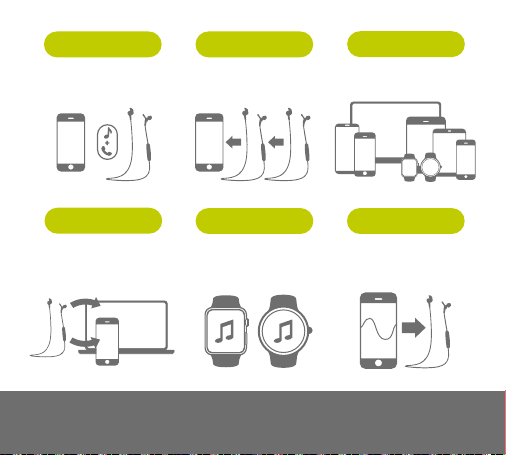
CONNECT YOUR
BUDS TO 2 DEVICES
SIMULTANEOUSLY
PAGE 34
REMEMBER UP
TO 8 DEVICES
PAGE 31
SHARE 1 DEVICE
WITH 2 BUDS
PAGE 35
WITH COMPLETE
REMOTE CONTROLS
PAGE 20
LEAVE YOUR PHONE
BEHIND & PAIR WITH
YOUR SMARTWATCH
PAGE 37
CUSTOMIZE YOUR SOUND
SETTINGS AND SAVE THEM
TO YOUR BUDS
PAGE 21
MYSOUND APPSMARTWATCH
SHARE MEMUSIC + CALLS
MULTIPOINT
PAIRING
Video instructions at jaybirdsport.com
9
10
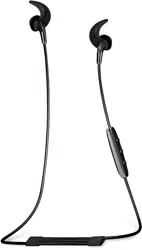
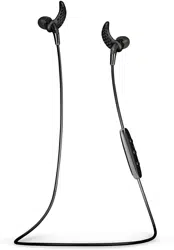
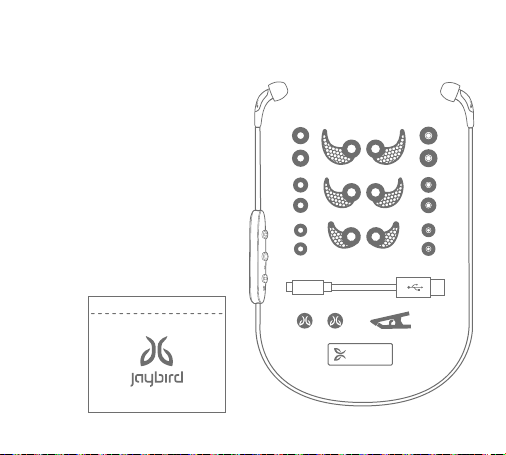
1. Freedom Bluetooth Buds
2. 3 pairs Silicone Eartips (S,M,L)
3. 3 pairs Comply
TM
Premium Foam
Eartips (S,M,L)
4. 3 Pairs Ear Fins (S,M,L)
5. USB Charging Cable
6. 2 Cord Management Clips
7. Cord Clip
8. Charging Clip
9. Carry Pouch
9.
IN-THE-BOX
1.
2.3.
4.
5.
8.
6.
7.

11
GREAT SOUND PERFORMANCE IS IN
SELECTING THE RIGHT SIZE EARTIP
We love great sound. Make
sure you hear it. Because
everyone’s ears are
different, be sure to try
all sizes of eartips. Only
with the right size eartips
will you enjoy a snug fit &
premium sound quality.
SILICON EAR TIPS
COMPLY
TM
PREMIUM
SPORT FOAM EAR TIPS
FIT
12
COMPLY
TM
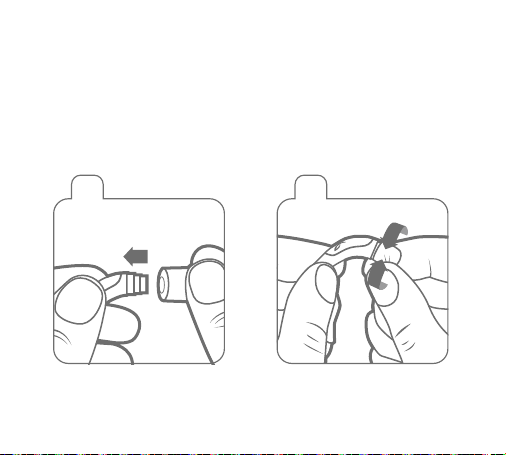
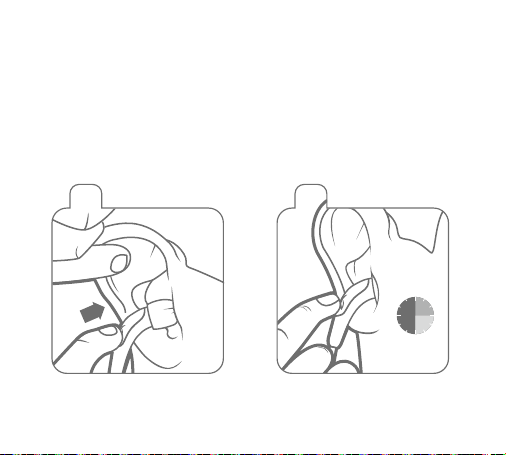
Premium Comply™ Foam ear tips exclusively designed for
Jaybird Freedom deliver maximum noise isolation and comfort.
Slide Comply Foam tip onto
Freedom speaker housing.
1 2
3 4
Compress Comply Foam tip by
rolling with fingers.
Pull ear back to open ear canal for
a deeper more secure fit. Insert
entire foam tip into ear.
Hold in place 15-30 sec for foam
to expand and create a seal.
15-30
seconds
13
Slide Comply Foam tip onto
Freedom speaker housing.
1 2
3 4
Compress Comply Foam tip by
rolling with fingers.
Pull ear back to open ear canal for
a deeper more secure fit. Insert
entire foam tip into ear.
Hold in place 15-30 sec for foam
to expand and create a seal.
15-30
seconds
Secure-Fit: Expands to give you a custom
fit and remarkable in-ear retention. Your
earbuds remain secure whether you’re in
the gym, on the slopes, or on the go.
Soft Comfort: Unique memory foam
provides all-day comfort, while
eliminating in-ear irritation and fatigue.
Noise Blocking: Allows you to enjoy your
music in noisy environments without
raising the volume.
Audio Experience: Creates an optimal
seal and channels sound directly into the
ear canal, transforming your listening
experience.
14
EAR FINS
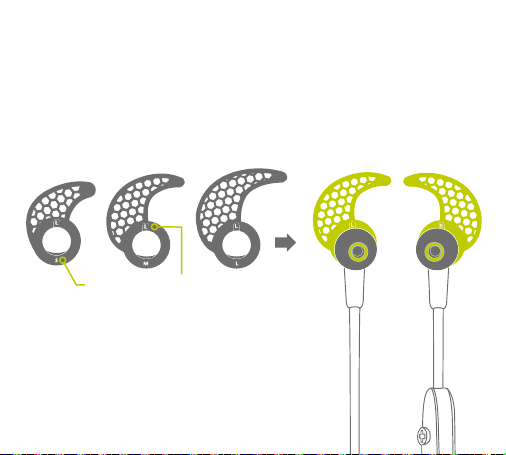
INSTALL YOUR PREFERRED SIZED
SECURE-FIT EAR FINS AS SHOWN.
LEFT
SIZE LEFT / RIGHT
RIGHT
15
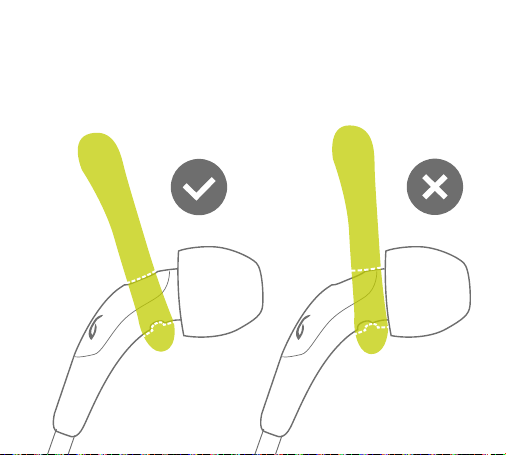
Slide the secure-fit ear fins back until the ridges in the fins
line up with the grooves on the buds.

16
LOCK THE TIP OF THE
EAR FIN INTO THE
TOP OF THE BOWL OF
THE EAR AS SHOWN.
You should have a
snug fit with contact
on the lower, back
and top portions of
the bowl of the ear.
17
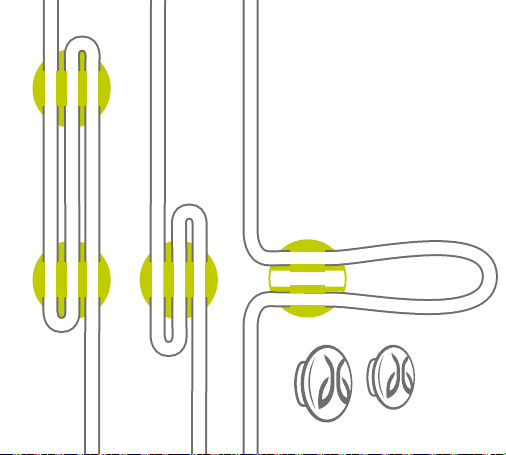
CORD MANAGEMENT CLIPS
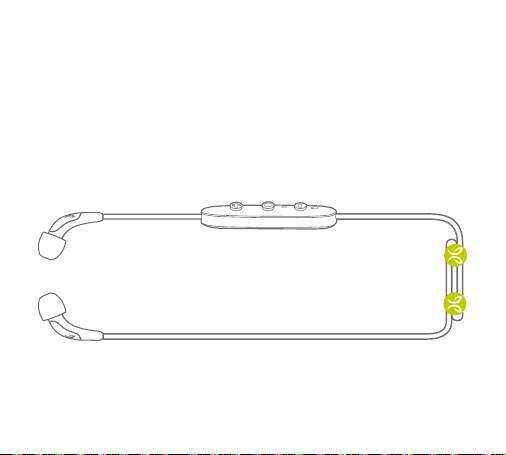
BEFORE FITTING, INSTALL THE CORD MANAGEMENT CLIPS
TO REDUCE THE SLACK FOR A CUSTOMIZED FIT.
18
THE CORD MANAGEMENT
CLIPS CAN BE USED IN
THREE WAYS TO MANAGE
THE LENGTH OF YOUR
CORD AND FIND THE
RIGHT FIT FOR YOU.
19
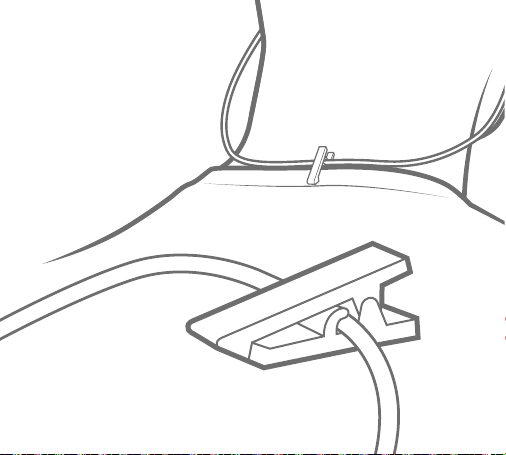
USE THE INCLUDED CORD
CLIP TO SECURE YOUR
FREEDOM BUDS TO THE
BACK OF YOUR SHIRT.
LONG SIDE OF THE CLIP ON
THE OUTSIDE OF THE SHIRT.
CORD CLIP
20
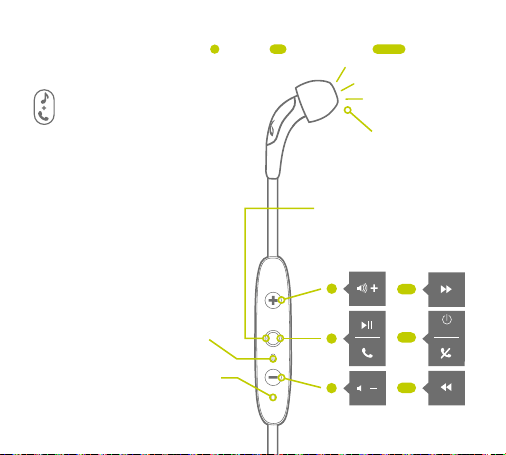
POWER ON
PAIR BUDS TO YOUR DEVICE,
PLAY MUSIC, AND TRY EACH
SIZE OF EARTIP TO FIND
THE BEST FIT AND SOUND
PERFORMANCE.
A proper seal is essential for
you to fully appreciate the
high quality audio of Freedom.
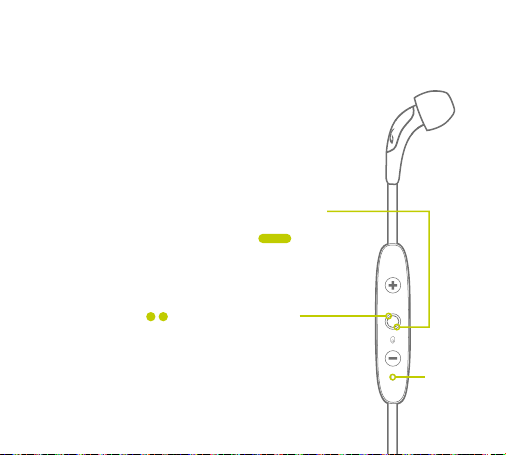
FROM OFF STATE PUSH
FOR 4 SEC TO PAIR.
FROM ON STATE PUSH 4
SEC TO POWER OFF.
RED/GREEN LED
VOICE PROMPT:
“Searching...”
ON
MICROPHONE
PUSH 1 SEC PUSH 4 SEC PUSH
MUSIC & CALLS
21
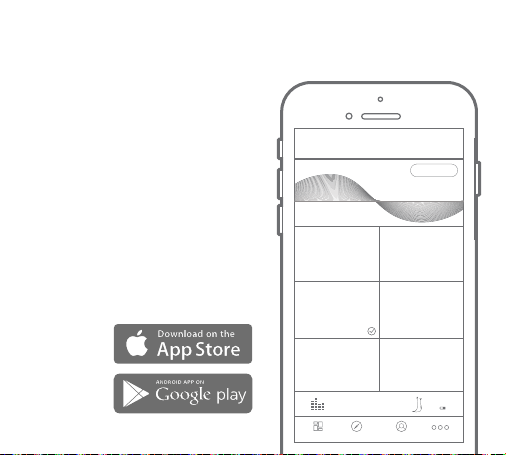
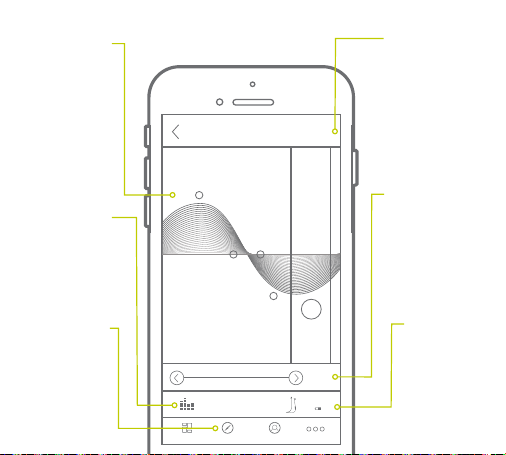
MYSOUND APP
TO CUSTOMIZE THE SOUND PROFILE
ON YOUR FREEDOM BUDS. DOWNLOAD
THE JAYBIRD MYSOUND APP IN THE
APPLE APP OR GOOGLE PLAY STORE.
Your new sound settings are saved right
on your buds, so you can take your custom
sound with you no matter where you go
with any device you use.
NOTE: The MySound app works with Jaybird
Freedom. Other manufacturers and older Jaybird
buds are not supported.
Adding additional bass to your sound profile
through the MySound app will reduce play time.
DASHBOARD DISCOVER PROFILE
+
CUSTOMIZE
JAYBIRD SIGNATURE
WARMTH
WARMTH
REMOVE SHARPNESS
JAYBIRD ENHANCED
EXTENDED LISTENING
R & B FREAK
Jaybird Freedom
60%
MORE
22
DASHBOARD DISCOVER PROFILE
HISTORY
SAVE
Jaybird Freedom
60%
MORE
SAVE
HISTORY
DEVICE
MUSIC
DISCOVER
SOUND
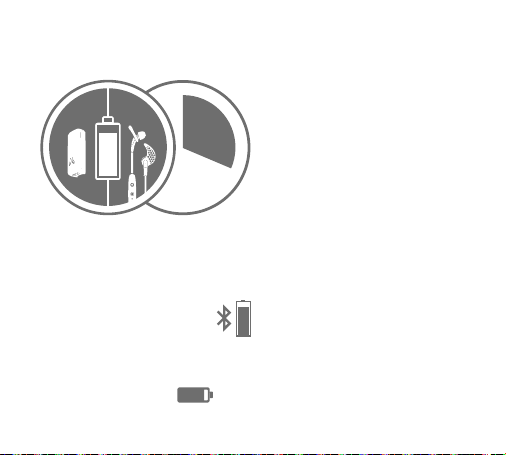
Save your new
preset to your
dashboard for easy
access to all your
favorite sound
settings.
Track through a
history of your
changes.
See your
connected
device and
battery status.
Indicates if
music is playing
on your device.
Discover presets
from athletes and
other users.
Customize your
sound settings.
Changes are
saved to your
Freedom buds.
23
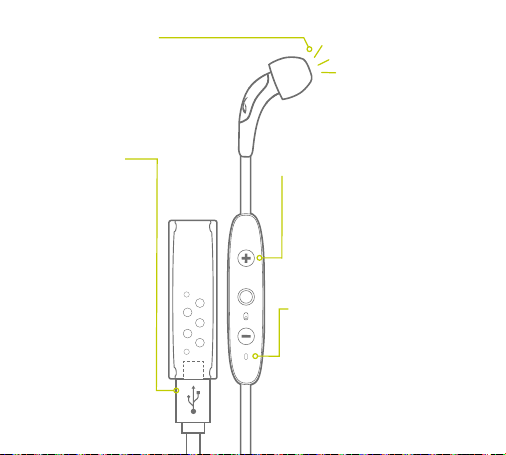
Charging the battery before use is
recommended but not required. Freedom
ships partially pre-charged, however initial
charge will vary.
Look for this Bluetooth headset
battery status icon in the top right
corner of your iPhone screen.
Or this icon in the bottom right in
the MySound app to see the status
of Freedom’s battery.
BATTERY LEVEL
The MySound App is able to report
the battery level of your Freedom
buds to a 1% accuracy.
When not connected to the MySound
App, your Freedom buds will announce
an average battery level when you
turn them on. Alternatively, an average
battery level announcement can be
triggered by pressing the Volume + or
Volume – button when connected and
not playing music.
On your Freedom buds the values
are rounded to the nearest 20%.
26% reported in the App for example
would result in the following prompt:
“Battery 20 Percent”.
90%
CHARGING / BATTERY STATUS
8
HRS
4
HRS
4
HRS
Q
U
I
C
K
C
H
A
R
G
E
20
MIN
=
1 HR
PLAYTIME
ON BUDSON CLIP
PLAY
TIME
24
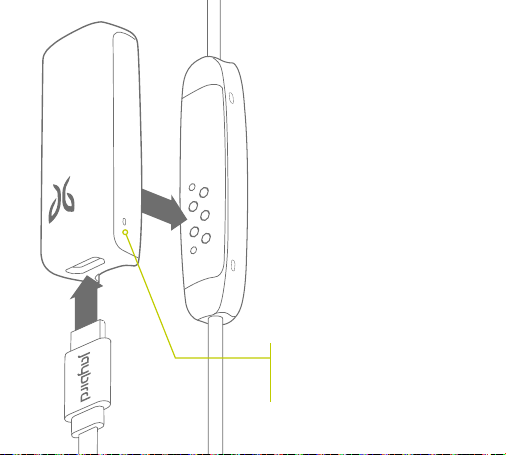
VOICE PROMPT
LED STATUS
MICRO USB
CHARGING
ARE THE BUDS ON?
IS THE BATTERY LOW?
When not playing music,
pressing ‘Volume + or
Volume –’ will announce
battery status.
Red: Charging
Green: Charged
(while charger clip is attached)
Red+Green Alternating: Pair Mode
No Light: Standby / Play Mode /
Phone Call / Powered Off
The charging clip
that came with your
buds also acts as a
charging dock. 2.5
hrs for full charge
gives 4 + 4 hours of
playtime. 20 mins
charging gives 1 hour
of play time. The clip
can also be charged
separately and used
at a later time.
In Standby* mode, push +, watch LED:
Single Green Flash =
10% or more battery remaining
Single Red Flash =
Below 10% battery remaining
No Light = Powered off
* Standby Mode: Powered and not connected to a
device but not playing music or on a phone call.
25
RED LED = CURRENTLY CHARGING
GREEN LED = FULLY CHARGED
(with USB cable connected to a
power source)
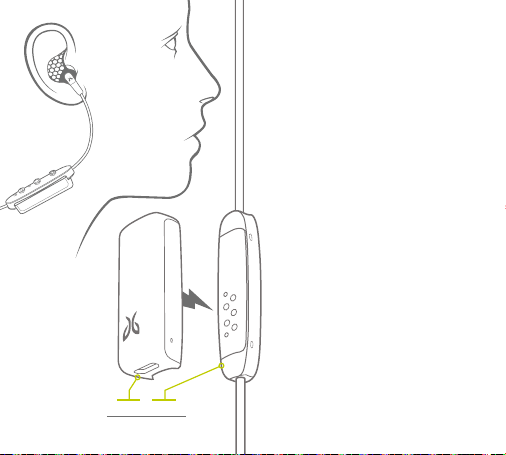
To charge your freedom buds,
securely attach the charging clip to
the back of the controller and insert
the micro USB end of your included
cable into the bottom end of the
charging clip. Plug the other end into
any 5V USB power source.
This charges both your buds and
the charging clip simultaneously for
extended listening.
CHARGING CLIP
26
In addition to using the USB charging
cable, your charging clip can charge your
buds without having to be connected to
a power source. Your charging clip has
an internal battery and circuitry that
extends your play time by 4 hours. Simply
attach it to the back of the controller and
it automatically starts charging.
Every time you attach the charging clip
it will reset your buds by turning them
off. You may turn your buds back ON
and continue to listen to your music
while the charging clip is attached and
transferring power.
NOTE: Although the freedom buds are sweat-
proof, the charging clip is not. Exposing to
moisture or sweat will void your warranty.
Do not use your buds while the USB cable is
plugged into a power source. Doing so could
cause an electric shock if your power source
develops an electrical fault.
4 HRS + 4 HRS
= 8 HRS PLAY TIME
USING THE CHARGING CLIP
TO CHARGE YOUR BUDS
27
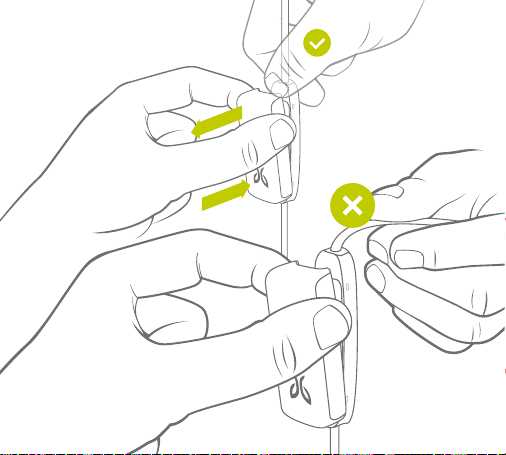
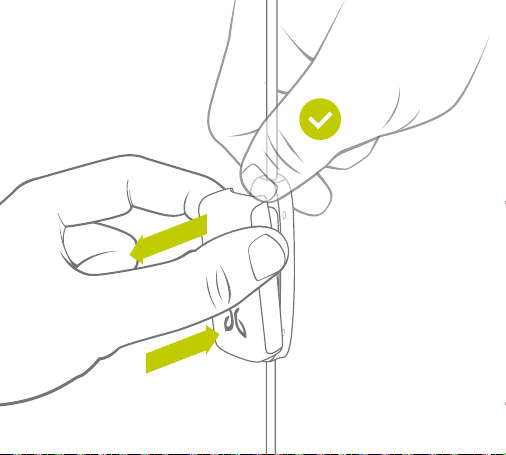
Attach the charging clip by
pushing it directly onto the
back of the controller until you
feel it click securely in place.
When removing the charging
clip apply pressure to the top
of the controller and separate
it from the charging clip.
REMOVE
AT TACH
ATTACHING & REMOVING
THE CHARGING CLIP
28
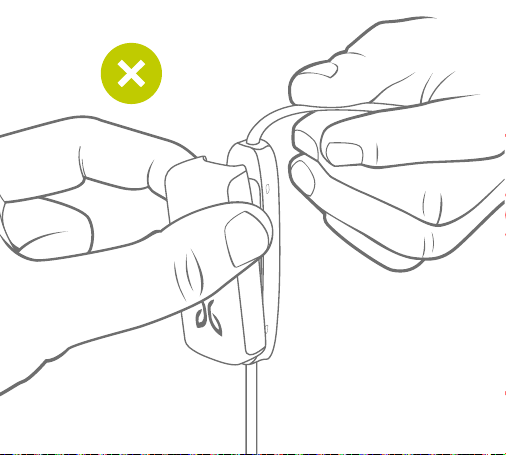
When removing the clip DO NOT
pull on the cord. Doing this may
cause damage to your buds and
will void your warranty.
DO NOT
PULL CORD
29
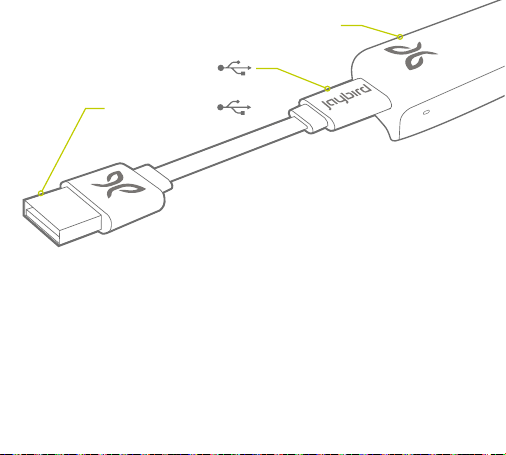
We recommend you charge your buds/charging clip through any native
5V USB power source. Wall/car adapters/chargers that supply more
than 5.5 Volt will damage your Jaybird buds and should not be used. We
recommend using Jaybird approved USB wall/car adapters (available at
jaybirdsport.com).
MICRO USB
CHARGING CLIP
STANDARD USB
30
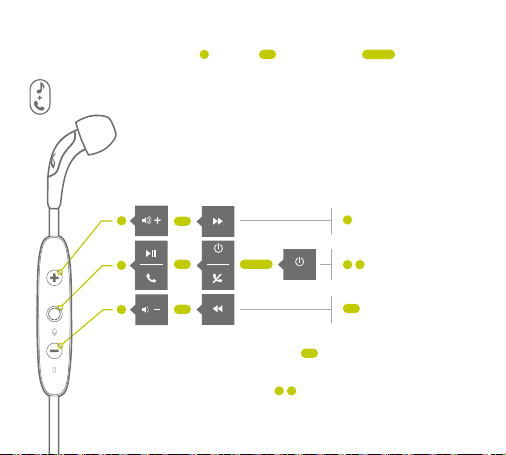
ON
CONTROLS
Switch call to Freedom
Redial
Mute & un-mute call
ADDITIONAL CALL COMMANDS
If you have a 2nd incoming call: On center button will answer
2nd call, hold active and switch between active and hold
When not on a call or playing music: On center button activates
Siri or Voice Commands
OFF
PUSH 1 SEC PUSH 4 SEC PUSH
MUSIC & CALLS
31
PAIRING
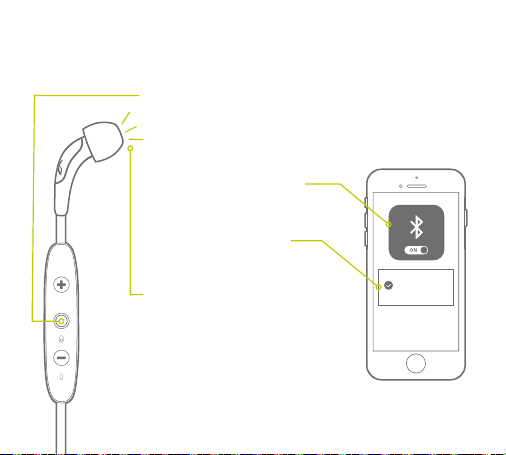
1. With buds turned off, & within 1 meter (3 ft) of music
device, push and hold center key for more than 4 sec until
you see alternating red/green LED and a voice prompt
saying “Searching For Your Music Device”.
2. On your phone/music device,
turn Bluetooth on & have it
search for Bluetooth devices.
3. Select “Jaybird Freedom”
(enter passcode 0000 if
prompted).
4. Freedom voice prompt will say
“Headphones Connected”.
5. If the pairing is not successful,
switch off buds by pushing the
center key for more than 4 seconds
and repeat the steps outlined above.
Jaybird
Freedom
32
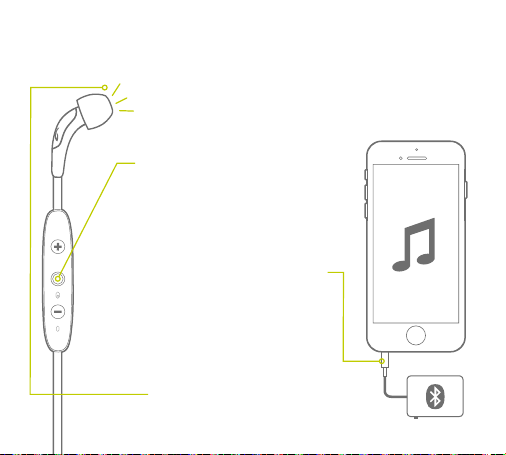
PAIRING WITH A BLUETOOTH ADAPTER
1. Place buds and device within 1 meter
(3 feet) of each other.
2. Put the buds into pair mode as
outlined on prior page.
3. If using BAU Universal Bluetooth
Adapter put into pair mode also
(see BAU manual).
4. Plug the Bluetooth adapter into
the music device and play a song.
5. The buds and adapter will pair
automatically (passcode of
adapter must be 0000).
6. After successful pairing and
connecting, the buds will say
“Headphones Connected”.
33
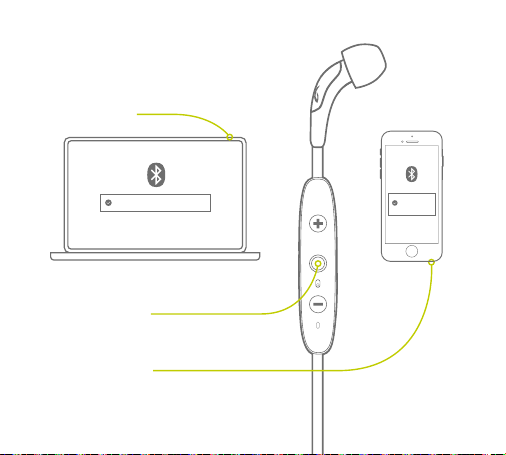
MULTIPOINT
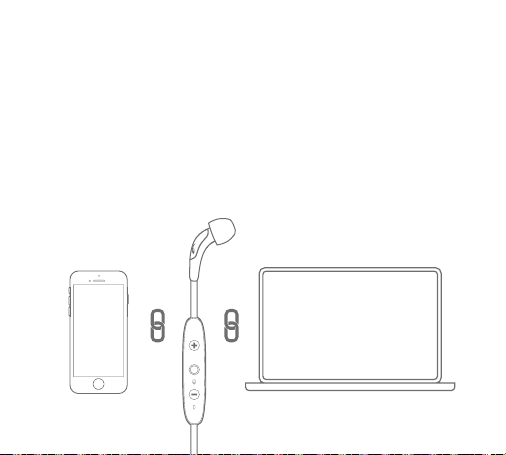
PAIRING WITH SEVERAL BLUETOOTH DEVICES
Multipoint enables you to simultaneously pair and connect your buds
with two different Bluetooth devices. For example you can have your
Freedom buds connected to your laptop and your phone at the same
time. You can listen to music from your laptop and are still able to
answer an incoming call on your phone using your Freedom buds
controller. Pretty wicked, eh?!
34
MULTIPOINT
2. Put your buds back in pairing
mode and then hold down the
center button.
1. Pair your buds to the
first device.
3. Search and select your
Freedom buds on the
second device.
Jaybird Freedom
Jaybird
Freedom

35
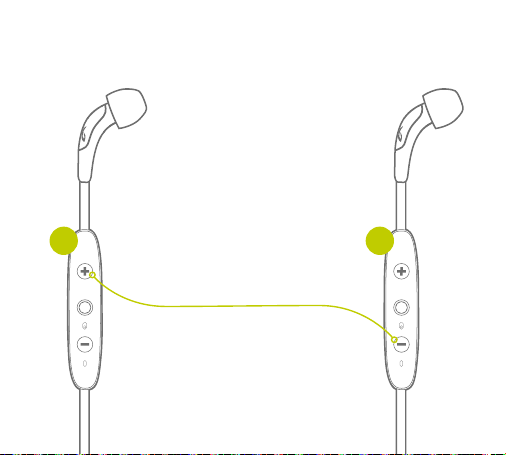
SHARE ME
Share the music you are listening to with another pair of Freedom buds. Follow
these steps to connect a second pair of buds. Love is in the air!
36
2. Push and hold Vol + on the
connected buds, while you push and
hold the Vol - on the second buds
until the LEDs on both buds are
flashing red/green.
Both buds will be connected
when the LEDs stop flashing and
“Headphones Connected” will play on
both buds.
3. Play Music.
1. Power on both buds, with just one
of the buds paired and connected
to only one device.
SHARE ME
1 2
37
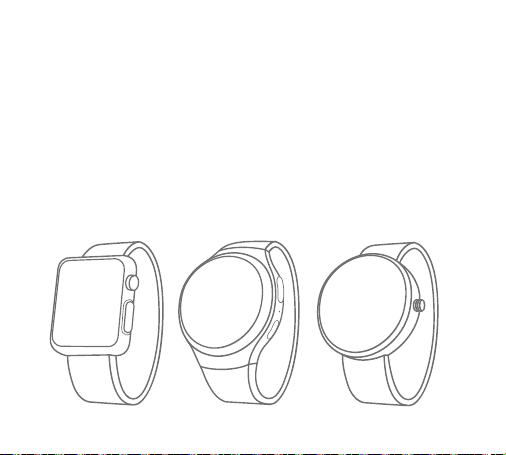
SMARTWATCHES
With the right smartwatch you can leave your phone at home.
Just sync music to your smartwatch and pair with your buds.
Now that’s freedom!
Works with smartwatches like:
NOTE: Some smartwatches have a weaker Bluetooth signal which may cause possible
intermittent signal drop.
APPLE MOTOROLASAMSUNG
38
TROUBLESHOOTING
1. To reset your buds to their original factory
settings put your buds in pairing mode by turning
the buds off then push and hold the
center button for more than 4 sec until you see
alternating red/green LED.
If your buds are not responding, connect the charging
clip and USB cable to a power source. This will turn
your buds off and perform a soft reset.
2. While the LED is flashing red / green
double tap
the center button. Upon
successful factory reset, the LED turns
orange and your buds turns off.
LED
NOTE: Once your buds have been reset and you
power on they will automatically go into pairing mode.
Select “Forget” or “Remove” Jaybird Freedom from
your device’s Bluetooth menu and pair again.
FACTORY RESET
RESET
39
SPECIFICATIONS
Bluetooth Version 4.1, Multipoint
Codec AAC, SBC, Modified SBC
Profile Handsfree, Headset, A2DP, AVCRP, SPP
Effective Range 10 meters (30 feet)
Play Time 8 Hrs* (4 hrs on buds plus an additional 4 hrs with
included charging clip)
Standby Time 110 Hrs*
Power Bluetooth headset: 4.5V
, 0.2A (Supplied by Charge Clip)
Charge Clip: 5.0V ,0.5A (Supplied by USB Port)
Charging Time 2.5 Hrs
Quick Charge 20 Min = 1 Hr play time on buds + an extra hour through
charging clip
Dimensions 23 x 13 mm earbud size, 490 mm cord length
Weight Approx 13 g
* Play time and standby time may vary due to usage conditions. Adding additional bass to your
sound profile through the MySound app will reduce play time.

40
WARRANTY, WARNINGS & SAFETY
Full warranty, care & maintenance details at:
jaybirdsport.com/warranty +1.866.244.3399
WARNING: Due to the isolating characteristics of these headphones do not use while driving, riding a bike or
where vehicular traffic is present, or in any other activity where failure to hear surrounding sounds could be
dangerous. Use of these headphones at excessive volumes may cause permanent hearing damage. Always
turn the volume down before use. Take caution in regards to inserting objects into ear canal, use at own risk.
Do not wear the device while it is connected to a power source driven from main 110V or 220V lines.
Copyright 2016 Jaybird, LLC. All rights reserved. Jaybird, and the Jaybird logo are trademarks of Jaybird,
LLC. Bluetooth is a trademark owned by Bluetooth SIG, Inc. USA, and licensed to Jaybird, LLC. iPhone, iPad and
iPod are trademarks of Apple, Inc., registered in the US and other countries and App Store is a service mark
of Apple Inc. All other trademarks are the property of their respective owners. Android is a trademark of
Google Inc. in the United States and other countries. Manufactured under Freebit patent numbers EP2177045,
US8630436, US8976995 and corresponding international patents. Assembled in Malaysia.
41
FCC ID: XX8-F5 / IC ID: 20358-F5 MSIP-CRM-JL3-F5 204-620128 CCAK16LP1110T0
FCC Notice:
This device complies with Part 15 of the FCC Rules. Operation is subject to the following two conditions: (1) this device may not
cause harmful interference, and (2) this device must accept any interference received, including interference that may cause
undesired operation. Any changes or modifications to device will void the user’s authority to operate the device. The battery is
recycled. Do not dispose of the battery in fire, as it may cause explosion.
NCC Notice:
Administrative Regulations on Low Power Radio Waves Radiated Devices warning:
Article 12 - Without permission granted by the NCC, any company, enterprise, or user is not allowed to change frequency, enhance
transmitting power or alter original characteristic as well as performance to approved low power radio-frequency devices.
Article 14 - The low power radio-frequency devices shall not influence aircraft security and interfere legal communications; If
found, the user shall cease operating immediately until no interference is achieved. The said legal communications means radio
communications is operated in compliance with the Telecommunications Act. The low power radio-frequency devices must be
susceptible with the interference from legal communications or ISM radio wave radiated devices.
Europe-EU Declaration of Conformity
The equipment complies according to the Radio Equipment and Telecommunications Terminal Equipment Directive 1999/5/EC.
This equipment meets the following conformance standards.
REQUIREMENT APPLIED STANDARDS
Art.3.1(a) Health EN 62479:2010
Art.3.1(a) Safety EN 60950-1:2006+A11:2009+A1:2010+A12:2011+A2:2013
Art.3.1(b) EMC
EN301489-1 V1.9.2
EN301489-17 V2.2.1
Art.3.2 Radio EN 300328 V1.9.1

Avoid excessive volume levels and prolonged
periods of listening. Prolonged listening
at excessive volume levels may cause
permanent hearing disability.
Do not use around road traffic.
Video instructions at jaybirdsport.com
LISTEN RESPONSIBLY