User Manual
FEATURES AND BENEFITS
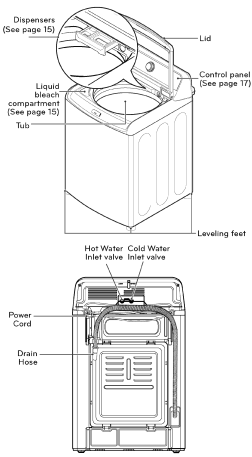
KEY PARTS AND COMPONENTS
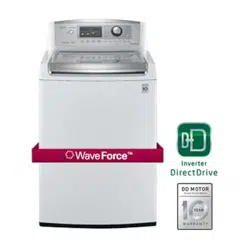
A INVERTER DIRECT DRIVE MOTOR
The inverter motor, which is directly con- nected to the tub, produces little noise and vibration and offers great durability and long lifespan.
B ULTRA CAPACITY & NEVERUST™ STAINLESS STEEL TUB
The efficient design provides you with ultra large capacity but without making the cabi- net larger or the drum any deeper for easy. installation and use.
C TURBO WASHT
Turbo WashTM reduces wash time without compromising performance. The precise drum movements and powerful water jets allow for faster soaking, while the Smart Rinse Jet Spray allows for quicker rinsing, saving you up to 20 minutes per load without sacrificing washing performance.
D ALLERGIENE™
This powerful, high-temperature steam cycle is designed to reduce up to 95 percent of common household allergens such as dust mites and pet dander, and is certified by the Asthma and Allergy Foundation of America (AAFA).
E REAR TOUCH PANEL
The easy to read LED display shows cycle options, setting, cycle status and estimat- ed time remaining. The touch buttons offer more convenience and a premium design aesthetic.
F SLAM PROOFTH LID
The Slam ProofTM lid is a safety device that closes the lid slowly. The Slam ProofTM hinges allow the lid to close gently and qui- etly, helping prevent injuries.
G SMART DIAGNOSIST
If you ever experience an issue with your LG washer, you don't have to worry. The SmartDiagnosisTM feature helps the service center diagnose problems over the phone, or with a simple app on your smart phone, helping you minimize costly, incon- venient service calls.
INSTALLATION INSTRUCTIONS
CHOOSE THE PROPER LOCATION
WARNING
The washer is heavy. Two or more people are required when moving and unpacking the washer. Failure to do so may result in damage to property or serious bodily harm.
Store and install the washer where it will not be exposed to temperatures below freezing or exposed to outdoor weather conditions. Failure to follow this warning can cause serious injury, fire, electric shock, or death.
Property ground washer to conform with all electric governing codes and ordinances. Failure to follow this warning can cause serious injury, fire, electric shock, or death.
To reduce the risk of electric shock, do not install the washer in humid spaces. Failure to follow this warning can cause serious injury, fire, electric shock, or death.
To ensure proper air flow, do not block the large opening on the bottom of the washer with carpeting or other materials.
Do not remove ground prong. Do not use an adapter or extension cord. Plug into a grounded 3-prong outlet. Failure to follow this warning can cause serious injury, fire, electric shock, or death.
POWER OUTLET
- The power outlet must be within 60 in. (1.5 m) of either side of the washer.
- The appliance and outlet must be positioned so that the plug is easily accessible.
- Do not overload the outlet with more than one appliance.
- The outlet must be grounded in accordance with current wiring electric codes and regulations.
- Time-delay fuse or circuit breaker is recommended.
NOTE: It is the personal responsibility and obligation of the product owner to have a proper outlet installed by a qualified service technician.
FLOORING
- To minimize noise and vibration, the washer MUST be installed on a solidly constructed floor.
- Allowable slope under the entire washer is a maxi- mum 1 in. difference from side to side or from front to back.
- Installing on carpeting and soft tile surfaces is not recommended.
- Never install the washer on a platform or weakly sup- ported structure.
NOTE: The washer must be installed on firm flooring to minimize vibration during the spin cycle. Concrete flooring is best, but a wood floor is sufficient, pro- vided it is built to FHA standards. The washer should not be installed on rugs or exposed to weather.
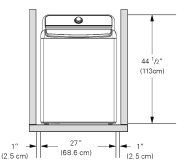
To ensure sufficient clearance for water lines and airflow, allow minimum clearances of at least 1 in. (2.5 cm) at the sides and 4 in (10 cm) behind the unit. Be sure to allow for wall, door, or floor moldings that may increase the required clearances.
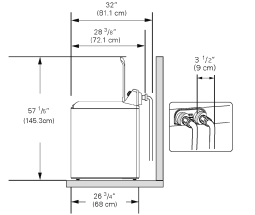
Minimum vertical space from floor to overhead shelves, cabinets, ceilings, etc., is 56 in.
UNPACKING AND REMOVING SHIPPING MATERIAL
1. After removing the carton and shipping material, lift the washer off the foam base. Make sure the plastic tub support comes off with the base and is not stuck to the bottom of the washer.
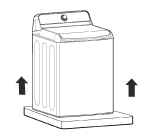
If you must lay the washer down to remove the base packaging materials, always protect the side of the washer and lay it carefully on its side. DO NOT lay the washer on its front or back.
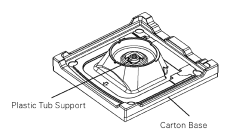
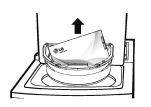
2. Save the foam block (that contains the Owner's Manual, parts and laundry product samples) for future use. If the washer must be moved in the future, the foam block will help prevent damage to the washer during transportation.
NOTE: To prevent damage, do not remove the foam block until the washer is at the final location.
3. Unfasten the power cord from the back of the washer.
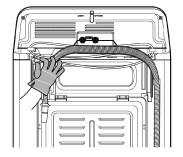
CONNECTING THE WATER LINES
- For your safety, and for extended product life, we recommend using high-quality LG components.LG is not responsible for product malfunction or damage caused by the use of separately purchased non-LG parts.
- Use new hoses when installing the washing ma- chine. Do not reuse old hoses.
- Contact LG Customer Service for assistance in buying hoses: 1-800-243-0000.
- Water supply pressure must be between 20 psi and 120 psi (138-827 kPa). If the water supply pressure is more than 120 psi, a pressure reducing valve must be installed.
- Periodically check the hose for cracks, leaks, and wear, and replace the hoses every 5 years.
- Make sure that the water lines are not stretched, pinched, crushed, or kinked.
- The washer should never be installed or stored in a location subject to freezing temperatures. Damage to the water lines and internal mechanisms of the washer can result. If the washer was exposed to freezing temperatures prior to installation, allow it to stand at room temperature for several hours before use and check for leaks prior to operation.
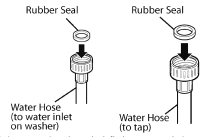
1. Inspect the threaded fitting on each hose and make sure there is a rubber seal in place in both ends.
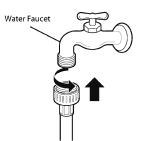
WARNING Do not reuse old hoses. Only use new hoses when you install the washing machine. Old hoses could leak or burst causing flooding and property damage.
2. Connect water supply hoses to the HOT and COLD water faucets tightly by hand and then tighten another 2/3 turn with pliers.
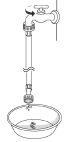
3. Always run a gallon or two of water through each inlet hose to flush dirt, scale and other debris out of the water lines. Doing so will help prevent future problems with clogged filter screens, and will also allow you to verify which hose is hot and which is cold.
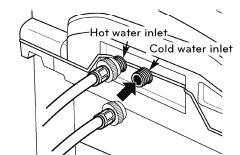
4. Attach the hot water line to the hot water inlet on the back of the washer. Attach the cold water line to the cold water inlet on the back of the washer.Tighten the fittings securely. Turn ON both fau- cets all the way and check for leaks at both ends of the hoses.
NOTE: Be careful not to cross-thread the hose fit- tings. This will damage the valve and could result in property damage from leaks.
CONNECTING THE DRAIN HOSE
- The drain hose should always be properly secured.
- Failure to properly secure the drain hose can result in flooding and property damage
- The drain must be installed in accordance with any applicable local codes and regulations.
- Make sure that the drain hose is not stretched. pinched, crushed, or kinked.
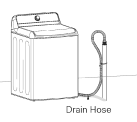
OPTION 1: STANDPIPE
- Bend the outlet end of the drain hose to form a U shape. Insert the end of the drain hose into the drain.
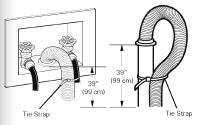
- If the drain is large enough for the flange on the hose to fit inside, then do not insert the flange more than 1-2 inches into the drain. Use the tie strap included with the installation materials in the foam block in the tub to secure the drain hose to the drain.
- If the water valves and drain are built into the wall, fasten the drain hose to one of the water hoses with the tie strap (ribbed side on inside).
- If your drain is a standpipe, fasten the drain hose to the standpipe with the tie strap provided.
NOTE:
- Normal height of the end of the hose should be ap- proximately 35"-47" (0.9-1.2 m) from the floor.
- Do not install the end of the drain hose lower than 29 (73.7 cm) or higher than 96 in. (243.8 cm) above the bottom of the washer or more tann 60 in. (152.4 cm) away from the washer.
- Never create an air-tight seal between the drain hose and the drain, using tape or other methods. If no air gap is present, water can be siphoned out of the tub resulting in poor wash/rinse performance or clothing damage.
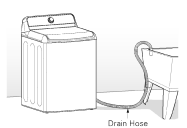
OPTION 2: LAUNDRY TUB
Bend the end of the drain hose to the desired shape and support it on the edge of the laundry tub. Use the tie strap to secure the drain hose in place.
LEVELING THE WASHER
The tub of your new washer spins at very high speeds. To minimize vibration, noise, and unwanted movement, the floor must be a level, solid surface.
NOTE:
- Adjust the leveling feet only as far as necessary to level the washer. Extending the leveling feet more than necessary can cause the washer to vibrate.
- Before installing the washer, make sure that the floor is clean, dry and free of dust, dirt, water and oils so the washer feet cannot slide easily. Leveling feet that move or slide on the floor can contribute to excessive vibration and noise due to poor contact with the floor.
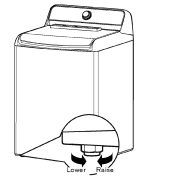
All four leveling feet must rest solidly on the floor. Attempt to rock the washer from corner to corner to make sure that all four leveling feet are in firm contact with the floor.
1. Position the washer in its final location, taking special care not to pinch, strain, or crush the water and drain lines. Place a level across the top of the washer.
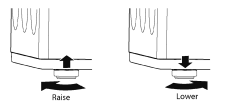
2. Adjust the leveling feet. Turn clockwise to raise the washer or counterclockwise to lower it.
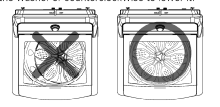
3. To make sure that the washer is properly level, open the lid and look from above to see if the tub is centered. If the tub is NOT centered (as shown in the drawing with the X through it), readjust the front feet. If you have a level, check your washer with the level.
- To check if the washer is level from side to side, place a level on the back edge of the lid.
- To check if the washer is level front to back, place a level at the side of the washer on the edge where the cabinet side meets the top cover. Do not place the level on the top of the lid. Using these sur- faces will result in the washer being unlevel.
HOW TO USE
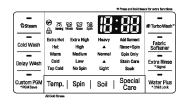
CONTROL PANEL FEATURES
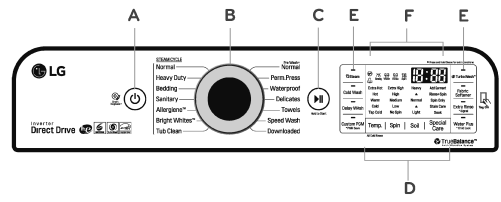
A POWER (ON/OFF) BUTTON
Press to turn ON the washer. Press again to turn the washer OFF. Pressing the POWER button during a cycle will cancel that cycle and any load settings will be lost. The lid will unlock after a brief pause.
NOTE: If there is any water remaining in the tub after the washer shuts off, it will drain following a five minute delay. The washer can be restarted any time before the drain begins. However, once the water begins to drain, all functions will be suspended until the water has been completely drained and the washer shuts off.
B CYCLE SELECTOR KNOB
Turn this knob to select the desired cycle. Once the desired cycle has been select- ed, the standard presets will appear in the display. These settings can be adjusted using the cycle setting buttons anytime before starting the cycle.
NOTE: To protect your clothing, not all settings are available on all cycle selections.
C START/PAUSE BUTTON
Press this button to start the selected cycle. If the washer is running, use this button to pause the cycle without losing the current settings.
NOTE: If you do not press the START/PAUSE button within one hour of selecting a cycle, the washer automatically turns OFF and all cycle settings are lost.Any water remaining in the tub will drain after a one hour delay.
D CYCLE MODIFIER BUTTONS
Use these buttons to adjust the settings for the selected cycle. The setting lights above the buttons illuminate to show the current selection.
E SPECIAL CYCLE AND OPTION BUTTONS
These buttons allow you to select special cycles or options.
F TIME AND STATUS DISPLAY
The display shows the cycle status and estimated time remaining.
TIME AND STATUS DISPLAY
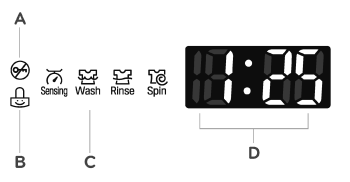
A LID LOCK INDICATOR
The Lid Lock indicator illuminates once a cycle has started. The indicator light stays on until the cycle is paused, stopped or has finished.
B CHILD LOCK
When the Child Lock function is activated, the LED lights up. When the Child Lock function is set, except for the POWER button, the other functions are disabled. Once the Child Lock function is disabled, the LED turns off.
C CYCLE STATUS INDICATOR
These LEDs illumiate when a cycle is selected to indicate which stages will run. When a cycle is running, the LED for the active stage blinks, and the LEDs for the remaining stages remain steady. Once a stage is complete, the LED turns off. If a cycle is paused, the active stage LED stops blinking
D ESTIMATED TIME REMAINING
When a cycle is selected, the default time for that cycle is displayed. This time will change as modifiers or options are selected. Once the START/PAUSE but- ton is pressed, the washer measures the size of the load. The estimated time may change once the load size has been measured. If Delay Wash is set, the remaining delay time counts down until the cycle begins.
NOTE: The time shown is only an estimate. This time is based on normal operating conditions. Several external factors (load size, room temperature, incoming water temperature, water pressure, etc.) can affect the actual time.
OPERATING THE WASHER
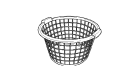
1 SORT LAUNDRY AND LOAD THE WASHER
Sort laundry by fabric type, soil level, color and load size, as needed Open the lid and load items into the washer.
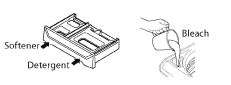
2 CLEANING PRODUCTS
Add High-Efficiency (HE) detergent to the deter- gent dispenser. If bleach or fabric softener is to be used, add these to the appropriate dispensers
3 TURN ON THE WASHER
Press the POWER button to turn ON the washer.The lights around the cycle selector knob il- luminate and a chime sounds.

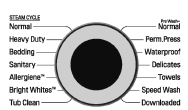
4 SELECT A CYCLE
Turn the cycle selector knob in either direction to select the desired cycle. The preset Wash Temp.,Spin Speed, Soil Level, Special Care and option set- tings for that cycle are shown. Pressing the Start Pause button without selecting a cycle will cause the Normal cycle to begin immediately.
5 ADJUST SETTINGS
Default settings for the selected cycle can now be changed, if desired, using the cycle modifier and option buttons.
NOTE: Not all modifiers and options are available on all cycles. A different chime sounds and the LED does not come on if the selection is not allowed.
6 BEGIN CYCLE
Press the START/PAUSE button to begin the cycle. The lid locks, and the washer agitates briefly without water to measure the weight of the load. If the START/PAUSE button is not pressed within 5 minutes, the washer shuts off and all settings are lost.

7 ADD GARMENT LIGHT
The ADD GARMENT light illuminates near the beginning of the wash cycle to indicate when it is safe to add items to the load. Press the START/PAUSE button to pause the cycle and add garments to the load. Press the START/PAUSE button to resume the cycle.
NOTE: It is not recommended to add items un- less the ADD GARMENT light is illuminated, as this could result in poor performance.

8 END OF CYCLE
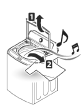
When the cycle is finished, a melody sounds. Immediately remove the clothing from the washer to reduce wrinkling
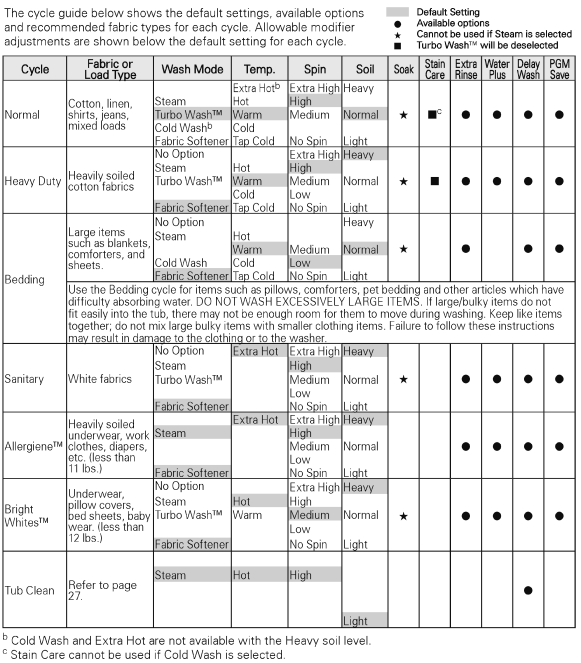
CYCLE GUIDE
WASH CYCLES
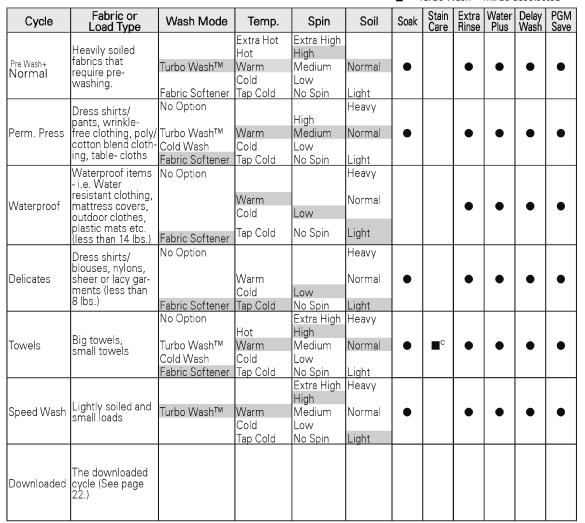
Wash cycles are designed for the best wash performance for each type of load. Select the cycle that best matches the load contents for maximum wash performance and fabric care. Turn the knob to the desired cycle. When you select a wash cycle, the light for the corresponding wash cycle will turn on. See OPERATING THE WASHER, for more details on operating methods.
Normal
Use this cycle to wash all normal items, except delicate fabrics such as wool or silk.
NOTE: Pressing the START/PAUSE button without selecting a cycle will cause the NORMAL cycle to begin immediately using the default settings.
Heavy Duty
This cycle is for washing heavily soiled laundry using more powerful wash motions.
NOTE: When washing large loads, in order to deliver the best performance, there will be brief periods of 2 minutes or more without agitation. These soak periods are part of the cycle's design, and are normal.
Bedding
This cycle is for washing blankets or bulky items.
NOTE: Do not use this cycle to wash a mixed load of bedding and non-bedding items.
Sanitary
This wash cycle reduces 99.9% bacteria on laundry through high temperature.
Allergiene
This cycle is a powerful, high temperature cycle designed specifically to reduce certain allergens.
NOTE.
- Solocting the ALLERGIENETM oyolo automatically incorporates steam into the wash cycle.
- The ALLERGIENETM cycle can significantly reduce allergens in bedding and clothing
- The ALLERGIENETM cycle helps reduce dust mite populations and helps reduce allergens Due to the higher energy and temperatures used, the ALLERGIENE™ cycle is not recommended for wool, silk, leather, or any other delicate or temperature-sensitive items
Bright WhitesTM
This cycle is for washing white items only.
Tub Clean
Use this cycle to clean the tub of your washing machine.
Normal Pre Wash+
Use this cycle to prewash stains without needing to hand-wash.
Prompt treatment helps to prevent stains from setting or odors from developing
To use:
- Put items to be prewashed in washer Add prewash detergent amount and desired additives to dispenser and start cycle.
- When chime sounds, press Pause to unlock lid, add main detergent to dispenser, and insert remainder of laundry. If Pause is not pressed within about 3 minutes, the cycle continues (If Signal is turned off, the chime won't sound)
- Press Start to restart the cycle
Perm.Press
This cycle is for washing items such as wrinkle-free clothes or tablecloths to minimize wrinkles.
Waterproof
This cycle is used for washing waterproof material.
NOTE:
- Do not use any other wash cycle to wash waterproof fabrics (ie. Water resistant clothing, mattress covers, outdoor clothes, plastic mats etc.)
- Do not use this cycle to wash a mixed load of waterproof and non- waterproof items
- Use only the waterproof cycle, after checking the washing instruction label on the fabric
- Do not wash other fabrics using the waterproof cycle.
WARNING
- If waterproof material laundry is washed in a course other than Waterproof, it may result in injury or damage to the washer, clothes, walls, floor, and surrounding objects due to abnormal vibration.
Delicates
This cycle is for washing lingerie or sheer and lacy clothes which can easily be damaged.
Towels
Use this cycle for washing towels, shirts, jeans and mixed loads
Speed Wash
Use the Speed Wash cycle to quickly wash lightly soiled clothing and small loads. For high wash and rinse efficiency, washing small loads of 2-3 lightly soiled garments is recommended.
NOTE: Use very little detergent in this cycle. If you want additional rinsing, you can add extra rinses by using the Extra Rinse button
Downloaded
If you downloaded using the Tag On feature, it will be placent in the Download cycle position Choose the Downinaned cycle to run the Downloaded cycle
NOTE: The default cycle for this position is Small Load, used for normally soiled loads with just a few items. The Small Load cycle is also available to download
CYCLE MODIFIER BUTTONS
Each cycle has default settings that are selected automatically. You may also customize these set- tings using the cycle modifier buttons. Press the button for the desired modifier until the indicator light for the desired setting is lit. The washer auto- matically adjusts the water level for the type and size of wash load for best results and maximum efficiency. Due to the high-efficiency nature of this product, water levels may be much lower than ex- pected. This is normal and cleaning/rinsing perfor- mance will not be compromised.
NOTE: To protect your garments, not every wash/ rinse temperature, spin speed, soil level, or option is available with every cycle. A chime will sound and the LED will not light if a selection is not allowed.
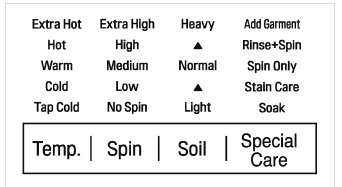
WASH TEMP.
WASH TEMP. selects the wash and rinse temperature combination for the selected cycle. Press the WASH TEMP. button until the indicator light for the desired setting is lit. All rinses use tap cold water.
- Select the water temperature suitable for the type of load you are washing. Follow the garment fabric care labels for best results.
SPIN SPEED
Higher spin speeds extract more water from clothes, reducing drying time and saving energy.
Press the SPIN SPEED button until the desired speed is selected. Some fabrics, such as delicates, require a slower spin speed. To protect your clothing, not all spin speeds are available for all cycles.
SOIL LEVEL
Adjusting the soil level setting will modify the cycle times and/or wash actions. Press the SOIL LEVEL button until the desired soil level is selected.
NOTE: This feature needs more time for heavily soiled loads or less time for lightly soiled loads.
SPECIAL CARE
Pressing the SPECIAL CARE button will allow you to select additional features, such as Soak, Stain Care, Spin Only, and Rinse+Spin. Pressing the SPECIAL CARE button before selecting a cycle will automatically default to the Normal cycle with the Soak feature selected.
SPECIAL CARE FEATURES
After selecting a cycle, press the SPECIAL CARE button to select additional features for your load.
NOTE:
- To protect your garments, not every feature is available with every cycle.
- lf the START/PAUSE button is not pressed within five minutes to start the cycle, the control will shut off and all settings will be lost.
SOAK
This option provides a 30 minute presoak prior to the start of the selected cycle. Use the SOAK option to presoak garments to help remove difficult spots or stains on fabrics. At the end of the presoak time, the selected cycle will begin with the same water used for the soak.
NOTE: You cannot select the SOAK option in the TUB CLEAN, ALLERGIENE™ and STEAM WASH cycle.
STAIN CARE
Use this option for heavily soiled loads that need improved stain treatment. When Stain Care is selected, the wash cycle will begin with warm water to help prevent the setting of certain types of stains Then, as the cycle progresses, hot water will be added to gradually increase the water temperature to help remove stains that require treatment at higher temperatures.
NOTE:
- Best results are obtained with smaller loads (less than 6 lbs.) lf you select STAIN CARE, the COLDWASH option is not available
SPIN ONLY
Use this option to drain the water from the tub and spin out the clothes. This can be used, for example, if the wash cycle is interrupted by a power failure. The spin speed can be adjusted by using the SPIN ONLY button.
- Press the POWER button to turn on the washer.
- Press the SPECIAL CARE button repeatedly until Spin Only is selected
- Press the SPIN SPEED button to select the de- sired spin speed. Selecting NO SPIN is not al- lowed.
- Press the START/PAUSE button
RINSE + SPIN
Select this option to rinse and spin a load separately from a regular cycle. This can be helpful in preventing fresh stains from setting in fabrics. You can change the spin speed by pressing the SPIN SPEED button.
- Press the POWER button to turn on the washer.
- Press the SPECIAL CARE button until the RINSE+SPIN indicator light is lit. (The cycle light will turn off.)
- Press the START/PAUSE button to start the cycle.
SPECIAL DRAIN FEATURE
This washer is equipped with a special feature that is designed to make your washer as safe as possible. If the washer is paused or shut off while there is still water in the tub, the water will drain automatically after several minutes of inactivity. This helps keep children safe by reducing the possibility of water remaining in the tub.
Any water remaining in the tub will automatically drain five minutes after the washer has shut off. If the washer is paused and the START/PAUSE but- ton is not pressed within 5 minutes, the washer will shut off and all cycle settings will be lost. Any water remaining will drain five ninutes later.
The washer can be turned on or restarted any time before the drain begins. However, once the water begins to drain, all functions will be suspended un- til the water has been completely drained and the washer shuts off.
OPTION BUTTONS
Your washing machine features several additional cycle options that customize cycles to meet your individual needs. To use these options, select the desired option AFTER selecting the desired cycle.
After selecting the desired cycle and settings, press the cycle option button(s) for the option(s) you would like to add. The button will light when that option is selected. If the selected option is not allowed for the selected cycle, the chime will sound twice to alert you and the LED will not illuminate
NOTE:
- To protect your garments, not every option is avail-able with every cycle
- lf the START/PAUSF button is not pressed within five minutes to start the cycle, the control will shut off and all settings will be lost
STEAM
Adding the Steam option to a wash cycle helps provide superior cleaning performance. By using hat steam, the fabrics will get the cleaning benetits of a very hot wash.
WARNING
- Do not touch the lid during steam cycles. The lid surface can become very hot. Allow the lid lock to release before opening the door.
- Do not attempt to override the lid lock mecha- nism or reach into the washer during a steam cycle. Steam can cause severe burns.
NOTE:
- The steam option cannot be used with all cycles.
- The STEAM option is automatically deselected if Turbo VWvash'™ is selected far the NORMAL, HEAVY DUTY, BRIGHT WHITES™ and SANITARY cycles.
- Steam may not be clearly visible during the steam cycles. This is normal. Too much stearn could dam- age clothing
- Do not use steam with delicate fabrics such as wool, silk, or easily discolored fabrics,
COLD WASH
This option saves energy by using cooler water while increasing the wash and rinse times to maintain wash performance
NOTE:
- The Stain Care feature cannot be selected with the Cold Wash option
- Wash time will increase up to 50 minutes with the Cold Wash option
- For best wash results, only wash small loads (less than 8 pounds} with the Cold Wash option.
DELAY WASH
Once you have selected the cycle and other settings, press this button to delay the start ot the wash cycle Each press of the button increases the delay time by one hour, for up to 19 hours. Once the desired delay time is set, press the START/PAUSE button to start the delay time
NOTE: If the START/PAUSE button is not pressed to begin the delay time, the washer will automatically shul off afler five minules and all cycle settings will be lost.
CUSTOM PROGRAM (PGM)
Custom Program allows you to store a customized wash cycle for future use. It allows you to save your favorile lemperalure, spin speed, soil level, and ather options for a cycle, and then recall them at the touch of a button. To create a Custom Program:
- Press the POWER button to turn on the washer.
- Turn the cycle selector knob to select the desired cycle
- Press the cycle modifier button to change the de- sired setting.
- Press the cycle option button to add the desired options.
- Press and hold the CUSTOM PGM button for 3 seconds.
TO RECALL A CUSTOM PROGRAM:
- Press the POWER button to turn on the washer.
- Briefly press the CUSTOM PGM button. The stored settings will display.
- Press the START/PAUSE button lo slarl the cycle (Pressing any other button at this time will cancel the Custom Program.)
NOTE: You may only save one custom program at a time. Pressing and holding the CUSTOM PGM button will overwrite any previously saved custom program
TURBO WASH™
Adding the lurbo Wash option reduces the cycle time while still providing similar wash performance to the same cycle without Turbo Wash
NOTE:
- The Turbo Wash™ option cannot be used with all cycles.
- Turbo Wash™ defaults ON for NORMAL, Pre Wash +NORMAL and SPEED WASH cycles
- Turbo Wash is automatically deselected for NORMAL, HEAVY DUTY, BRIGHT WHITES™ and SANITARY cycles if the STEAM option is selected
FABRIC SOFTENER
The fabric softener is dispensed in the final rinse. Select the FABRIC SOFTENER button if you are using fabric softener to optimize the final rinse for softener use
EXTRA RINSE
This option will add an extra rinse to the selected cycle. Use this option to help ensure the removal of detergent or bleach residue from fabrics. Liquid fabric softener, if used, is always dispensed in the final rinse.
NOTE: You cannot select the Extra Rinse option with the Spin Only option and Tub Clean cycle
WATER PLUS
Use this option if you wish to add more water to your wash load. This option is especially useful for large or bulky loads.
NOTE:
- If the washing machine reaches its maximum water level, the WATER PLUS button will have no effect
- You cannot select the WATER PLUS option in the Tub Clean and Bedding cycles.
SIGNAL
The washing machine plays a melody when the wash cycle has finished. The volume of the melody is adjust- ed using the EXTRA RINSE button
Press and hold the EXTRA RINSE button for three seconds to adjust the valume of the signal. Press the button repeatedly to adjust the volume of the melody. When no signal is heard, the signal is off. The volume settings are LOW — HIGH - OFF. The signal volume can be adjusted at any time as long as the washer is turned ON
CHILD LOCK
Use this option to disable the controls. The washer can only be locked during a cycle. This feature can prevent children from changing cycles or operating the machine. Once the Child Lock is set, it must be deactivated before any controls, except the power button, can be used. Once the washer has shut off, the power button will allow the machine to be turned ON, but the controls will still be locked. When the controls are locked, Cl will display alternately with the estimated time remaining.
Press and hold the WATER PLUS button for three seconds to activate or deactivate Child Lock.
NOTE: Once the controls are locked, they must be manually unlocked to restore operation
ADD GARMENT
Laundry may ONLY be added to the load at the proper time in the wash cycle. When the ADD GARMENT light is illuminated, itis safe to pause the cycle and add more items to the load. If garments are added when the ADD GARMENT light is off, the washer will not adjust for these items which could result in poor performance and/or fabric damage
- Press the START/PAUSE button to pause the washer.
- Open the lid after it unlocks.
- Add your additional items.
- Close the lid.
- Press the START/PAUSE button. The cycle will resume after the lid locks
NOTE:
- The ADD GARMENT light is an indicator only and is not selected by pressing the SPECIAL CARE button
- If the washer remains idle for 5 minutes after pausing the cycle, the water in the tub will drain.
CARE AND CLEANING
REGULAR CLEANING
CLEANING THE EXTERIOR
Proper care of your washer can extend its life. The outside of the nachine can be cleaned with warm water and a mild, nonabrasive household detergent.
Immediately wipe off any spills with a soft, damp cloth
IMPORTANT: Do not use solvents, cleaning alco- hols, or similar products. Never use steel wool or abrasive cleaners because they can damage the surface.
CARE AND CLEANING OF THE INTERIOR
Use a towel or soft cloth to wipe around the washer lid opening and lid glass.
Always remove items from the washer as soon as the cycle is complete. Leaving damp items in the washer can cause wrinkling, color transfer, and odor. Run the Tub Clean cycle once a month, or more of- ten if needed, to remove detergent buildup and other residue.
TUB CLEAN CYCLE
Some environmental and usage conditions can cause a residue to build up in the tub over time and can lead to a mildewy or musty smell. The Tub Clean cycle is specially designed to remove this buildup using bleach or another cleaners designed specifically for cleaning washing machines. Run the Tub Clean cycle once a month, or more often under heavy use conditions or if odor is present
- Remove any clothing from the tub.
- Fill the bleach dispenser to the MAX line with liquid chlorine bleach. Do not overfill the bleach dispenser. Overfilling will cause the bleach to dispense immediately. NOTE: For other tub cleaning products, follow the cleaner manufacturer's instructions and recommendations. For powdered cleaning products, add the cleaner to the rain wash compartment of the dispenser drawer after removing the liquid detergent dispenser insert.
- Close the lid and press the POWER button to turn the washer ON. Turn the knob to select the TUB CLEAN cycle then press the START/PAUSE but- ton to begin the cycle. Selecting any other cycle after Tub Clean has been selected will cause the Tub Clean cycle to be cancelled.
- After the cycle ends, open the lid and allow the tub interior to dry completely.
NOTE:
- Never load laundry while using TUB CLEAN. The laundry may be damaged or contaminated with cleaning products. Make sure to run the Tub
- Clean cycle ONLY when it is empty.
- It is recommended to leave the lid open after finishing the laundry to keep the tub clean,
- It is recommended that TUB CLEAN should be repeated monthly.
- If mildew or musty smell already exists, run TUB CLEAN for 3 consecutive weeks.
REMOVING MINERAL BUILDUP
If you live in an area with hard water, mineral scale can form on internal components of the washer. Use of a water softener is recommended in areas with hard water.
Use adescaler, such as Washer Magic®, to remove visible mineral buildup. After descaling, always run the Tub Clean cycle before washing clothing
Mineral scale and other spots may be removed from the stainless steel tub using a stainless steel cleaner. Do NOT use steel wool or abrasive cleaners
LEAVE THE LID OPEN
If the washer will not be used for several days, leave the lid open overnight to allow the tub to dry.
MAINTENANCE
CLEANING THE WATER INLET FILTERS
If the washer does not fill properly, an error mes- sage will show on the display. The inlet valve filter screens could be plugged by hard water scale, sediment in the water supply, or other debris.
NOTE: The inlet screens protect the delicate parts of the inlet valve from being damaged by particles that could enter the valves with the water supply. Operating the washer with these filters removed could cause a valve to stick open resulting in flooding and/or property damage.
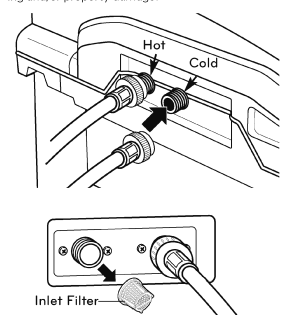
1. Turn OFF both water faucets completely. Un- screw the hot and cold water lines from the back of the washer.
IMPORTANT: Aftermarket hoses are not guaran- teed to fit or function correctly. Other hoses may not tighten correctly and could cause leaks. Sub- sequent damage to product or property will not be covered under the terms of the product warranty.
2. Carefully remove the filters from the water valves and soak them in white vinegar or a lime scale remover, following the manufacturer’s instructions, Be careful not to damage the filters while cleaning.
3. Rinse thoroughly before reinstalling. Press the fil- ters back into place.
4. Before reattaching the hoses, flush the hoses and water lines by running several gallons of water into a bucket or drain, preferably with the faucets wide open for maximum flow.
NOTE: /E message may blink on the display when the water pressure is weak or an inlet filter is clogged with dirt. Clean the inlet filter.
WARNING
- Unplug the power cord and turn off the faucets before cleaning. Failure to do so may cause electric shock
- Do not use the washing machine without the inlet filters. If you use the washing machine without the inlet filters it will cause leaks and malfunction.
- If you use the washing machine in an area with hard water, the inlet filter may clog due to lime buildup
STORING THE WASHER
If the washer will not be used for an extended period of time and is in an area that could be exposed to freezing temperatures, perform the following steps to protect the washer from damage.
- Turn OFF the water supply.
- Disconnect hoses from water supply and drain water from hoses
- Plug the power cord into a properly grounded electrical outlet
- Add 1 gallon of nontoxic recreational vehicle (RV) antifreeze to the empty tub and close the lid. Never use automotive antifreeze.
- Press the POWER button, then select SPIN ONLY. Press the START/PAUSE button to activate the drain pump. Allow the drain pump to run for one minute, then press the POWER button to shut off the washer. This will expel some of the antifreeze, leaving enough to protect the washer from damage
- Unplug the power cord, dry the tub interior with a soft cloth, and close the lid.
- Remove the inserts from the dispenser. Drain any water in the compartments and let them dry
- Store the washer in an upright position.
- To remove the antifreeze from the washer after storage, run a complete Speed Wash cycle using detergent. Do not add laundry to this cycle.
CLEANING THE WASHER PROPER USE OF DETERGENT
Using too much detergent is a common cause of laundry problems. Today's detergents are formulated to be effective without visible sudsing. Be sure to carefully read and follow manufacturer's recommendations for how much detergent to use in your wash. You can use less detergent if you have soft water, a smaller load, or a lightly soiled load.
NOTE: Use only low-sudsing, high-efficiency detergent. These detergents can be identified by the HE logo.
CARE AND CLEANING OF THE WASHER
Lid: Wash with a damp cloth on the outside and in- side and then dry with a soft cloth.
Exterior: Immediately wipe off any spills. Wipe with damp cloth. Do not touch the surface or the display with sharp objects
Moving and Storage: Contact a service technician to remove water from the drain pump and hoses
Reinstall the foam tub block to protect the washer from damage while moving. Do not store the washer where it will be exposed to outdoor weather conditions.
Long Vacations: Be sure water supply is shut off at the faucets. Follow the instructions in the Storing the Washer section If the washer will be exposed to freezing temperatures.
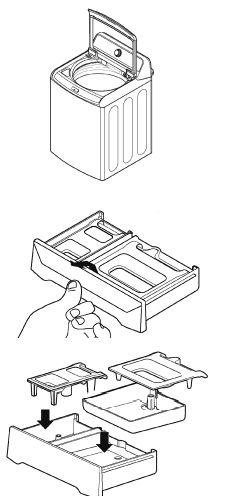
Dispenser Drawer: Detergent and fabric softener may build up in the dispenser drawer. Remove the drawer and inserts and check for buildup once or twice a month
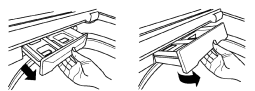
- Remove the drawer by pulling it straight out until it stops. Lift up on the front of the drawer and pull it completely out.
- Remove the inserts fram the two compartments. Rinse the inserts and the drawer with warm water to remove buildup from laundry products.
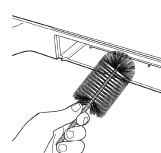
- To clean the drawer opening, use a small, non metal brush to clean the recess. Remove all residue from the upper and lower parts of the recess.
- Return the inserts to the proper compartments and replace the drawer. Set the drawer into the opening at an angle as shown above, then lower it and slide it into place.
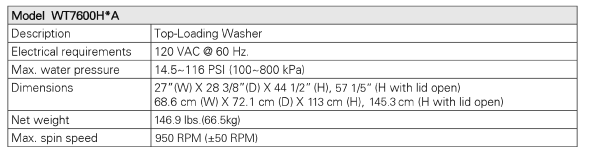
SECIFICATIONS
TAG ON FUNCTION
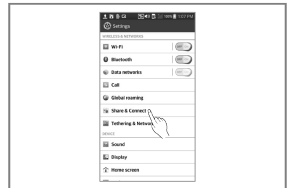
TURNING ON THE NFC FUNCTION OF THE SMART PHONE
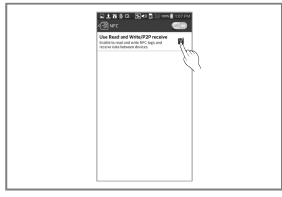
1. Enter the "Settings" menu of the smart phone and select "Share & Connect" under "WIRELESS & NETWORKS"
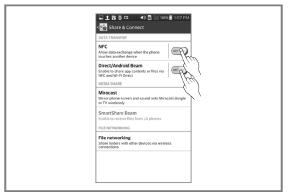
2. Set "NFC' and "Direct/Android Beam" to ON and select "NFC"
3. Check "Use Read and Write/P2P receive".
NOTE:
- Depending on the smart phone manufacturer and Android OS version, the NFC activation process may differ.
- Refer to the manual of your smart phone for details
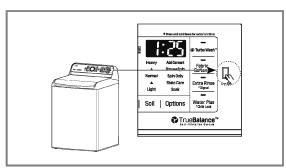
THE TAG ON ICON
Tag On position
 Tag On:
Look for the Tag On icon next to the LED screen on the control panel.
This is where you position your smart phone when using the Tag On function with the LG SmartDiagnosis™, Cycle Download, Laundry Stats, Tag On Cycle Set features of the LG Smart Laundry & DW App.
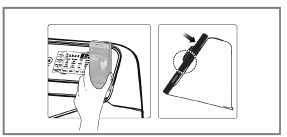
- When you use the Tag On function, position your smart phone so that the NFC antenna on the back of your smart phone matches the position of the Tag On icon on the appliance
If you do not know the position of your NFC antenna, move your smart phone very slightly in a circular motion until the application verifies the connection.
- To operate NFC function in this machine requires a smart phones which have at least a certain level of NFC recognition function.
- Because of the characteristics of NEC, if the transmission distance is too tar, or if there is a metal sticker or a thick case on the phone, transmission will not be good. In some cases, NFC-equipped phones may be unable to transmit successfully.
- Press
 in the LG Smart Laundry & DW app for a more detailed guide on how to use the Tag On function.
TROUBLESHOOTING
NORMAL SOUNDS YOU MAY HEAR
The following sounds may be heard while the washer is operating. They are normal.
CLICKING:
Lid lock relay when the lid locks and unlocks.
SPRAYING OR HISSING:
Water spraying or circulating during the cycle.
HUMMING OR GURGLING:
Drain pump is pumping water from the washer at times during a cycle.
WATER SLOSHING SOUND:
A liguid in the balance ring around the wash basket helps the basket spin smoothly.
SOUND OF WATER BEING ADDED AFTER THE WASHER HAS ALREADY BEEN IN OPERATION
- The washer adapts to the load size and type to add more water to the cycle as needed.
- The wash load may be unbalanced. If the washer senses that the load is unbalanced, it will stop and refill to redistribute the load.
- The washer may be diluting laundry additives to add to the wash load.
BEFORE CALLING FOR SERVICE
Your washing machine is equipped with an automatic error-monitoring system to detect and diagnose problems at an early stage. If your washer does not function properly or does not function at all, check the following before you call for service:
Rattling and clanking noise
- Foreign objects, such as keys, coins, or safety pins may be in tub
- Stop washer, check tub and drain filter for foreign objects. If noise continues after washer is restarted, call or pump. for service.
Thumping sound
- Heavy wash loads may produce a thumping sound.
- This is normal. If sound continues, washer is probably out of balance. Stop and redistribute wash load.
- Wash load may be out of balance.
- Pause the cycle and redistribute the load after the lid unlocks
Vibrating noise
- Packaging materials were not removed.
- See the Unpacking and Removing Shipping Material section in the installation requirements section.
- Wash load may be unevenly distributed in the tub.
- Pause the cycle and redistribute the load after the lid unlocks.
- Not all leveling feet are resting firmly and evenly on the floor.
- See Leveling the Washer in the Installation Instructions section.
- Floor not rigid enough.
- Make sure that the floor is solid and does not flex. See Flooring in the Installation Requirements section.
Water leaking
- Inlet hose connection is loose at faucet or washer.
- Check hoses for leaks, cracks and splits.
- Check and tighten hose connections.
- House drain pipes are clogged.
- The washer pumps out water very rapidly. Check for water backing up out of the drain pipe during drain. If water is seen coming out of the drain, check for proper drain hose installation and check for restrictions in the drain. Contact a plumber to repair drain pipe.
- Drain hose has come out of drain or is not inserted far enough.
- Tie drain hose to inlet hose or standpipe to prevent it from coming out during drain. For smaller drain pipes, insert the drain hose into the pipe as far as the drain hose flange. For larger drain pipes, insert the drain hose into the pipe 1-2 inches past the flange.
- A large item such as a pillow or blanket is above the top of the tub.
- Use the BEDDING cycle for large or bulky items. Use extra care and never wash more than half a load of items that float, such as pillows.
- Stop the washer and check the load. Make sure the load does not crest above the top edge of the tub.
Wrinkling.
- Washer not unloaded promptly.
- Always remove items from the washer as soon as the cycle is complete.
- Washer overloaded.
- The washer can be fully loaded, but the tub should not be tightly packed with items. The lid of the washer should close easily.
- Hot and cold water inlet hoses are reversed.
- Hot water rinse can set wrinkles in garments. Check the inlet hose connections.
Excessive sudsing
- Too much detergent or incorrect detergent.
- HE detergents are formulated specifically for High-Efficiency washers and contain suds-reducing agents. Only use detergent with the High-Efficiency (HE) logo. For detergent quantities refer to the How to Use section.
Staining
- Bleach or softener dispensed too soon
- Dispenser compartment is overfilled causing bleach or softener to dispense immediately. ALWAYS measure bleach to prevent overfilling - one cup maximum.
- Dispenser drawer closed too quickly causing softener to dispense immediately.
- Bleach or softener was added directly to the wash load in the tub.
- Always use the dispensers to ensure that laundry products are properly dispensed at the right time in the cycle.
- Washer was not unloaded promptly
- Always remove items from the washer as soon as possible after the cycle is complete.
- Clothes were not properly sorted.
- Always wash dark colors separately from light colors and whites to prevent discoloration.
- Never wash heavily soiled items washed with lightly soiled items.
Washer will not turn ON
- Power cord is not properly plugged in
- Make sure that the plug is plugged securely into a grounded, 3-prong, 120-VAC, 60-Hz outlet.
- House fuse is blown, circuit breaker has tripped, or power outage has occurred.
- Reset circuit breaker or replace fuse. Do not increase fuse capacity. If the problem is a circuit overload, have it corrected by a qualified electrician.
Wash cycle time is longer than usual
- The washer automatically adjusts the wash time for the amount of laundry, water pressure and other operating conditions.
- This is normal. The washer adjusts cycle time automatically to provide optimal results for the selected cycle. The time remaining shown in the display is only an estimate. Actual time may vary.
Musty or mildewy odor in washer
- Incorrect or too much detergent has been used.
- Use only High-Efficiency (HE) detergent in accordance with the manufacturer's instructions.
- Inside of tub was not cleaned properly.
- Run the Tub clean cycle regularly.
Water leaks
- Oversudsing of detergent.
- Oversudsing may create leaks, and may be caused by the type and amount of detergent used. High-Efficiency de- tergent is the only detergent recommended. Make sure that detergent and any additives are put into the correct dispenser compartments. The normal amount of deter- gent to use is 1/4 to 1/2 of the maximum amount recom- mended by the detergent manufacturer. Always reduce the amount of detergent if the load is small or lightly soiled, or if your water is very soft. Never use more than the maximum amount recommended by the detergent manufacturer.
Washer will not operate
- Control panel has powered off due
- This is normal. Press the POWER button to turn the to inactivity. washer on.
- Washer is unplugged.
- Make sure cord is plugged securely into a working outlet
- Water supply is turned off.
- Turn both hot and cold faucets fully on.
- Controls are not set properly.
- Make sure the cycle was set correctly, close the lid and press the START/PAUSE button.
- Lid is open
- The washer will not operate if the lid is open. Close the lid and make sure that nothing is caught under the lid preventing it from closing completely.
- Circuit breaker/fuse is tripped/ blown.
- Check house circuit breakers/fuses. Replace fuses or reset breaker. The washer should be on a dedicat- ed branch circuit. The washer will resume the cycle where it stopped once power is restored.
- Control needs to be reset.
- Press the POWER button, then re-select the desired cycle and press the START/PAUSE button.
- START/PAUSE was not pressed after a cycle was set.
- Press the POWER button then re-select the desired cycle and press the START/PAUSE button. The washer will shut off if the START/PAUSE button is not pressed within five minutes.
- Extremely low water pressure.
- Check another faucet in the house to make sure that household water pressure is adequate.
- Washer is too cold.
- If the washer has been exposed to temperatures be- low freezing for an extended period of time, allow it to warm up before pressing the POWER button. Otherwise, the display will not come on.
Washer not filling properly
- Filter clogged.
- Make sure the inlet filters on the fill valves are not clogged. Refer to the filter cleaning instructions.
- Inlet hoses may be kinked.
- Check that inlet hoses are not kinked or clogged.
- Energy efficiency.
- This is a High Efficiency (HE) washer. As a result, the water level settings for this washer may be different than for conventional washers
- Insufficient water supply.
- Make sure that both hot and cold water faucets are turned on all the way.
- The washer lid is en
- The washer will not operate if the lid is open Close the lid and make sure that nothing is caught under the lid preventing it from closing completely.
- Hot and cold inlet hoses are reversed.
- Check inlet hose connections. Make sure the hot water supply is connected to the hot inlet valve, and the cold water supply is connected to the cold inlet valve.
- Water level is too low.
- This is a high efficiency washer. The water will not normally cover the clothes. The fill level is optimized for the wash motion to achieve the best wash performance.
Washer will not drain water
- Kinked drain hose.
- Ensure that the drain hose is not kinked
- Drain located higher than 96 in.
- Make sure that the drain hose is no higher than 8 ft. above the floor. above the bottom of the washer and is no more than 5 ft away from the washer
Poor stain removal
- Proper options not selected
- Heavier soils and tougher stains may require extra cleaning power. Select the Soak or Stain Care feature to boost the cleaning power of the selected cycle.
- Previously set stains.
- Articles that have previously been washed may have stains that have been set. These stains may be difficult to remove and may require hand washing or pre- treating to aid in stain removal
Bleach does not dispense
- Bleach dispenser cover is not properly installed.
- Make sure that the bleach cover is properly installed and snapped into place before the beginning of the cycle.
- Bleach dispenser is dirty or clogged.
- Lift out the bleach dispenser cover and clean out the reservoir. Lint and other foreign debris that collects in the inside the dispenser may prevent proper dispensing of the bleach
Premature dispensing of bleach
- Bleach dispenser filled for future load.
- You cannot store bleach in the dispenser for future use. The bleach will be dispensed every load.
- Overfilling the bleach dispenser.
- Overfilling the bleach dispenser will cause the bleach to dispense immediately, which will damage items in the tub. ALWAYS measure bleach, but never fill above the MAX line on the disponsor. One cup of bloach is normal, but never add more than one cup
Incomplete or no dispensing
- Detergent compartments of detergent clogged from incorrect filling.
- Make sure that detergent and additives are put into the correct dispenser compartments. If liquid detergent is used, make sure that the liquid detergent cup and insert are in the detergent compartment. If pow dered detergent is used, make sure that the liquid detergent cup and insert are not used. For all detergent types, always make sure that the dispenser drawer is fully closed before the start of the cycle.
- Too much detergent used.
- Make sure that the suggested amount of detergent is used per the manufacturer's recommendations. You may also dilute the detergent with water to the maximum fill line on the compartment to avoid cloggingNormal residue.Use only HE (High-Efficiency) detergent.
NOTE: Always use as little detergent as possible High-Efficiency washers need very little detergent to achieve optimum results. Using too much detergent will cause poor wash and rinse performance and may contribute to odors in washer.
- Insufficient water supply
- Make sure that both hot and cold water faucets are turned on all the way.
- Normal residue
- It is normal for a small amount of detergent to remain in the dispenser. If this residue builds up it can interfere with normal dispensing of products. Refer to the cleaning instructions.
Water leaks every load
- Hoses not installed correctly.
- Check all fill and drain hose connections to ensure that they are tight and secure.
ERROR CODES
The display shows: dE
- The lid is not closed properly.
- Make sure that the lid is closed properly and press the START/PAUSE button. After starting a cycle, it may take a few moments before the tub begins to turn or spin. The washer will not spin unless the lid is locked.If the lid is closed and the lid lock error mes-sage is displayed, call for service
The display shows: dL
- Lid lock switch error.
- Make sure that the lid is closed properly and press the START/PAUSE button. The washer will not operate unless the lid is locked.
- Make sure that nothing is caught under the lid, including shipping material or clothing
- Make sure that the latch mechanism is fully retracted.
- If the lid is closed and the lid lock error message is displayed, call for service.
The display shows: 
- Special Drain Feature.
- If the washer is paused during a cycle for more than five minutes, the cycle will be cancelled and any water remaining in the tub will be drained.
Washer fills with water slowly or not at all, or the display shows: IE
- Water supply faucets are not fully
- Make sure that the water faucets are fully open.
- Water line hoses are kinked, pinched, or crushed.
- Make sure that the hoses are not kinked or pinched. Be careful when moving the washer during cleaning and maintenance.
- Water inlet filters are clogged.
- Clean the inlet filters. See Maintenance in the Care and Cleaning section.
- Water supply pressure to faucet ỏ house is too low.
- Check another faucet in the house to make sure that household water pressure is ad- equate and flow is not restricted. Disconnect the inlet hose from the washer and run a few gallons of water through the hose to flush the water supply lines. If flow is too low, contact a plumber to have the water lines repaired open.
- Water supply connected with leak limiting hoses.
- Hoses designed to limit leaks can trip falselyand prevent the washer from filling. The use of leak limiting hoses is not recommended.
Washer will not turn on
- Power cord is not properly plugged in
- Make sure that the plug is plugged seruely into a grounderd, 3-prong. 120-VAC, 60-Hz.
- House fuse is blown, circuit break-outlet. er has tripped, or power outage has occurred.
- Reset circuit breaker or replace fuse. Do not increase fuse capacity. If the problem is a circuit overload, have it corrected by a qualified electrician.
The display shows:LE1
- Foreign objects, such as coins, pins, clips, etc., caught between the wash plate and the inner basket
- Turn off the washer and then press the Power button. Press the spin speed button without selecting a cycle to drain and spin the load.
- When the spin is complete, remove the clothes and then find and remove any objects caught in the wash plate
- Always check pockets, etc., before washing to prevent error codes or damage to the washer or clothing
Water in the washer drains slowly or not at all, or the display shows: 0E
- Drain hose is kinked, pinched, or clogged
- Make sure the drain hose is free of clogs. kinks, etc., and is not pinched behind or under the washer
- Drain discharge is more than 96 inches above bottom of washer.
- Adjust or repair drain. Maximum drain height is 96 inches (8 ft)
The display shows ub
- The washer has detected an out of balance load.
- If the washer detects a load that is too far out of balance to spin, it will display this code while it is attempting to rebalance the load The washer will add water and try to redistribute the load automatically. This display is for your information only, and no action is required
The display shows: UE
- If the ub rebalance (see above) is not successful, this error will be displayed.
- The automatic attempt to rebalance the load was not successful. The cycle has been paused to allow the load to be manually adjusted
- The load is too small.
- Small loads may need additional items to be added to allow the washer to balance the loads
- Heavy articles are mixed with lighter items
- The load may have heavy items loaded with lighter items. Always try to wash articles of somewhat similar weight to allow the washer to evenly distribute the weight of the load for spinning
- The load is out of balance.
- Manually redistribute the load if articles have become tangled preventing the automatic distribution from working properly.
The display shows: 
- Control error.
- Unplug the washer and wait 60 seconds. Reconnect power and try again. If the error reappears, call for service.
The display shows FE
- Water level is too high due to a faulty water valve.
- Close the water faucets, unplug the washer, and call for service.
The display shows: PE
- The water level sensor is not working correctly.
- Close the water faucets, unplug the washer, and call for service.
The display shows: LE
- A motor error has occurred.
- Allow the washer to stand for 30 minutes and then restart the cycle. If the LE error code persists, call for service.
The display shows: E6
- Clutch error
- Mechanical failure.
- Unplug the washer and call for service.