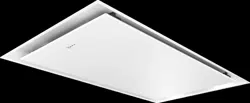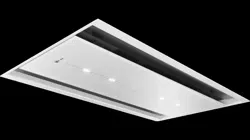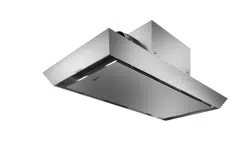

en Table of contents
You can find additional information and explanations online.
Scan the QR code on the title page.
Table of contentsTable of contents
INFORMATION FOR USE
1 Safety ........................................................................ 2
2 Preventing material damage .................................. 4
3 Environmental protection and saving energy ...... 4
4 Operating modes ..................................................... 5
5 Familiarising yourself with your appliance .......... 5
6 Before using for the first time ................................ 6
7 Basic operation ....................................................... 6
8 HomeConnect ........................................................ 8
9 Hob-based hood control ........................................ 9
10 Cleaning and servicing ........................................ 9
11 Troubleshooting ................................................. 12
12 Disposal ............................................................... 13
13 Customer Service ............................................... 13
14 Accessories ......................................................... 14
15 Declaration of Conformity .................................. 14
16 INSTALLATION INSTRUCTIONS ....................... 15
16.4 Secure installation ........................................... 15
Safety 1 Safety
Observe the following safety instructions.
1.1 General information
¡ Read this instruction manual carefully.
¡ Keep the instruction manual and the product
information safe for future reference or for
the next owner.
¡ Do not connect the appliance if it has been
damaged in transit.
1.2 Intended use
This appliance is designed only to be built into
kitchen units. Read the special installation in-
structions.
The appliance can only be used safely if it is
correctly installed according to the safety in-
structions. The installer is responsible for en-
suring that the appliance works perfectly at its
installation location.
Only use this appliance:
¡ For extracting cooking vapour.
¡ in private households and in enclosed
spaces in a domestic environment.
¡ up to an altitude of max. 2000m above sea
level.
Do not use the appliance:
¡ With an external timer.
1.3 Restriction on user group
This appliance may be used by children aged
8 or over and by people who have reduced
physical, sensory or mental abilities or inad-
equate experience and/or knowledge,
provided that they are supervised or have
been instructed on how to use the appliance
safely and have understood the resulting
dangers.
Do not let children play with the appliance.
Children must not perform cleaning or user
maintenance unless they are at least 15 years
old and are being supervised.
Keep children under the age of 8 years away
from the appliance and power cable.
1.4 Safe use
WARNING‒Risk of suffocation!
Children may put packaging material over their
heads or wrap themselves up in it and suffoc-
ate.
Keep packaging material away from chil-
dren.
Do not let children play with packaging ma-
terial.
Children may breathe in or swallow small
parts, causing them to suffocate.
Keep small parts away from children.
Do not let children play with small parts.
WARNING‒Risk of fire!
Fatty deposits in the grease filters may catch
fire.
Never operate the appliance without a
grease filter.
2
Safety en
Clean the grease filters regularly.
Never work with naked flames close to the
appliance (e.g. flambéing).
Do not install the appliance near a solid fuel
heating appliance (e.g. wood- or coal-burn-
ing) unless the heating appliance has a
sealed, non-removable cover. There must be
no flying sparks.
Hot oil or grease ignites very quickly.
Always supervise hot oil and fat.
Never extinguish burning oil or fat with water.
Switch off the cooking zone. Extinguish
flames carefully using a lid, fire blanket or
something similar.
When gas burners are in operation without any
cookware placed on them, they can build up a
lot of heat. A ventilation appliance installed
above the cooker may become damaged or
catch fire.
Only operate the gas burners with cookware
on them.
Operating multiple gas hobs at the same time
generates a great deal of heat. A ventilation
appliance installed above the cooker may be-
come damaged or catch fire.
Only operate the gas hobs with cookware on
them.
Select the highest fan setting.
Never operate two gas hobs simultaneously
on the highest flame for longer than 15
minutes. Two gas hobs correspond to one
large burner.
Never operate large burners of more than
5kW with the highest flame for longer than
15minutes, e.g. a wok.
WARNING‒Risk of burns!
The accessible parts of the appliance become
hot during operation.
Never touch these hot parts.
Keep children at a safe distance.
The appliance becomes hot during operation.
Allow the appliance to cool down before
cleaning.
WARNING‒Risk of injury!
Components inside the appliance may have
sharp edges.
Carefully clean the appliance interior.
Items placed on the appliance may fall off.
Do not place any objects on the appliance.
Changes to the electrical or mechanical as-
sembly are dangerous and may lead to mal-
functions.
Do not make any changes to the electrical
or mechanical assembly.
The filter cover may swing out.
Open the filter cover slowly.
Take hold of the filter cover after opening un-
til it no longer swings out.
Close the filter cover slowly.
Risk of injury when opening and closing the
hinges.
Keep your hands away from the hinges.
The light emitted by LED lights is very dazzling,
and can damage the eyes (risk group 1).
Do not look directly into the switched-on LED
lights for longer than 100seconds.
WARNING‒Risk of serious harm to
health!
Children may swallow batteries.
Keep batteries out of the reach of children.
Swallowing can lead to chemical burns, per-
foration of soft tissue, and death. Severe
burns can occur within 2hours of ingestion.
Seek medical attention immediately.
WARNING‒Risk of injury!
Children may swallow batteries.
Keep batteries out of the reach of children.
Keep an eye on any children when you are
replacing batteries.
Batteries may explode.
Do not charge the batteries.
Do not short-circuit the batteries.
Do not throw batteries into a fire.
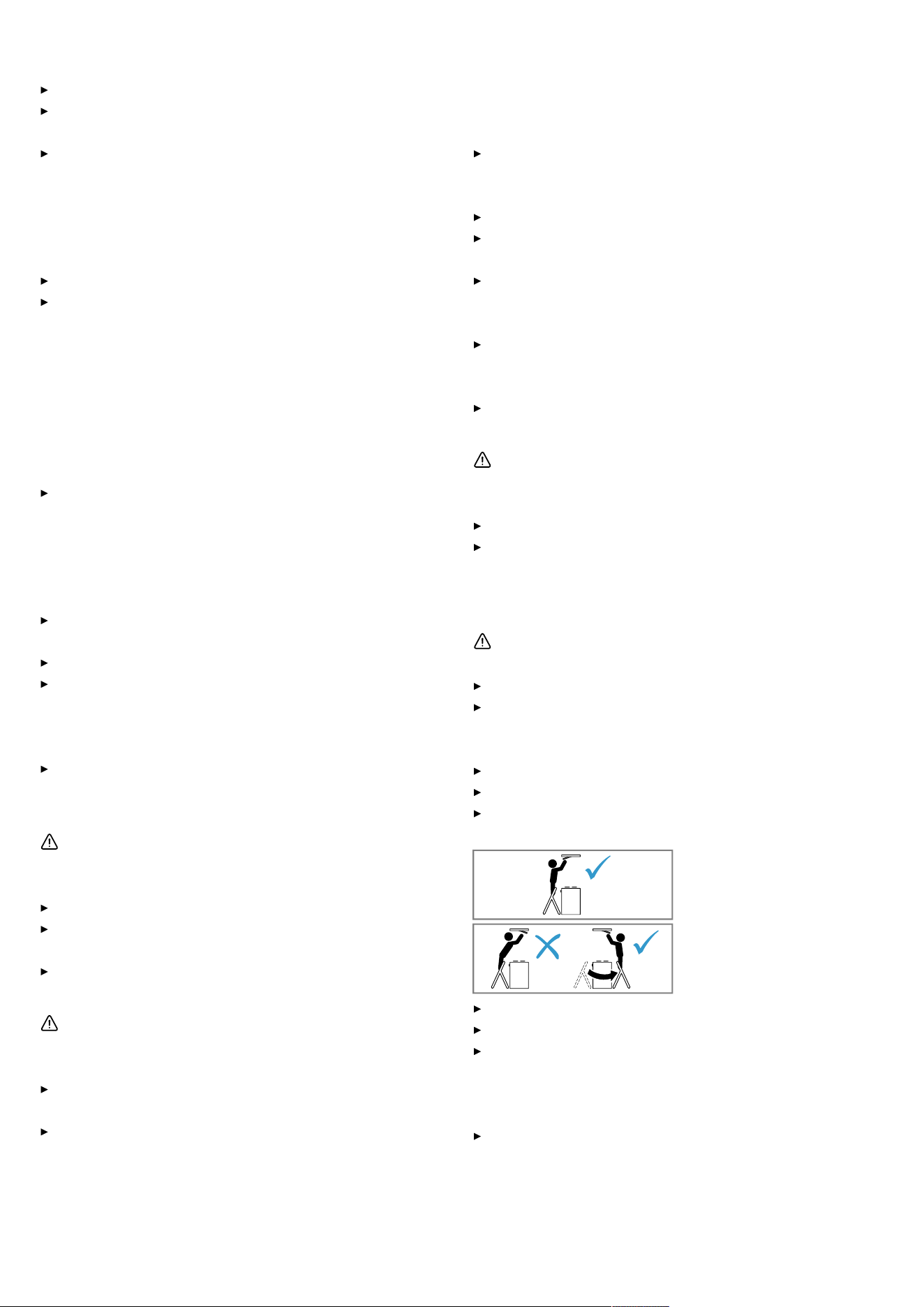
Risk of falling when working on the appliance
Use a stable stepladder.
Do not lean over the hob.
Do not step on the hob or the work surface.
If the appliance is operated by another person
via the HomeConnect app during cleaning,
this increases the risk of injury.
Before cleaning, disconnect the appliance
from the HomeConnect app.
3
en Preventing material damage
WARNING‒Risk of electric shock!
If the appliance or the power cord is damaged,
this is dangerous.
Never operate a damaged appliance.
Never pull on the power cord to unplug the
appliance. Always unplug the appliance at
the mains.
If the appliance or the power cord is dam-
aged, immediately unplug the power cord or
switch off the fuse in the fuse box.
Call customer services.
Page13
Improper repairs are dangerous.
Repairs to the appliance should only be car-
ried out by trained specialist staff.
Only use genuine spare parts when repairing
the appliance.
If the power cord of this appliance is dam-
aged, it must be replaced by trained special-
ist staff.
An ingress of moisture can cause an electric
shock.
Before cleaning, pull out the mains plug or
switch off the fuse in the fuse box.
Do not use steam- or high-pressure cleaners
to clean the appliance.
WARNING‒Risk of explosion!
Highly caustic alkaline or highly acidic clean-
ing agents in conjunction with aluminium parts
in the interior of the appliance may cause ex-
plosions.
Never use highly caustic alkaline or highly
acidic cleaning agents. In particular, do not
use commercial or industrial cleaning agents
in conjunction with aluminium parts, e.g.
grease filter on extractor hoods.
WARNING‒Risk of fire!
Fatty deposits in the grease filters may catch
fire.
Clean the grease filters regularly.
WARNING‒Risk of injury!
Improper repairs are dangerous.
Repairs to the appliance should only be car-
ried out by trained specialist staff.
If the appliance is defective, call Customer
Service.
"Customer Service", Page13
WARNING‒Risk of electric shock!
Penetrating moisture may cause an electric
shock.
Do not use wet sponge cloths.
Preventing material damage2 Preventing material damage
2.1 Avoiding material damage
ATTENTION
Condensate may cause corrosion damage.
To prevent condensation from building up, switch on
the appliance during cooking.
If moisture gets into the controls, this may result in dam-
age.
Never clean controls with a wet cloth.
Incorrect cleaning damages the surfaces.
Follow the cleaning instructions.
Do not use harsh or abrasive detergents.
Clean stainless steel surfaces in the direction of the
finish only.
Never clean controls with stainless steel cleaners.
Condensation that flows back in may damage the appli-
ance.
The air extraction duct must be installed with a gradi-
ent of at least 1° from the appliance.
If you put incorrect stress on the design elements, they
may break off.
Do not pull design elements.
Do not place objects on the design elements or hang
objects from them.
Leaking batteries may damage the remote control.
Remove the batteries if you are not using the remote
control.
Safely dispose of empty or defective batteries in an
environmentally friendly manner.
There is a risk of surface damage if you do not peel off
the protective film.
Remove the protective film from all parts of the appli-
ance before using for the first time.
Painted surfaces are easily damaged.
Follow the cleaning instructions.
"Cleaning the appliance", Page10
Ensure that the painted surfaces are not scratched.
Environmental protection and saving energy3 Environmental protection and saving energy
3.1 Disposing of packaging
The packaging materials are environmentally compatible
and can be recycled.
Sort the individual components by type and dispose
of them separately.
4
Operating modes en
3.2 Saving energy
If you follow these instructions, your appliance will use
less power.
Adjust the fan speed to the amount of steam produced
during cooking.
The lower the fan speed, the less energy is con-
sumed.
Only use the intensive mode as required.
If cooking produces large amounts of steam, select a
higher fan speed in good time.
The odours are distributed around the room less.
Switch off the lighting if it is no longer required.
When the lighting is switched off, it does not con-
sume any energy.
Clean or replace the filters at regular intervals.
The effectiveness of the filter is retained.
Put the cooking lid on.
The cooking vapours and condensation are reduced.
Only use the additional functions if required.
Switching off additional functions reduces power con-
sumption.
You can find product information in accordance with
(EU) 65/2014 and (EU) 66/2014 below the energy la-
bel and online on the product page for your appliance.
Operating modes4 Operating modes
4.1 Air recirculation
The air which is drawn in is cleaned by the grease filters
and an odour filter, and conveyed back into the room.
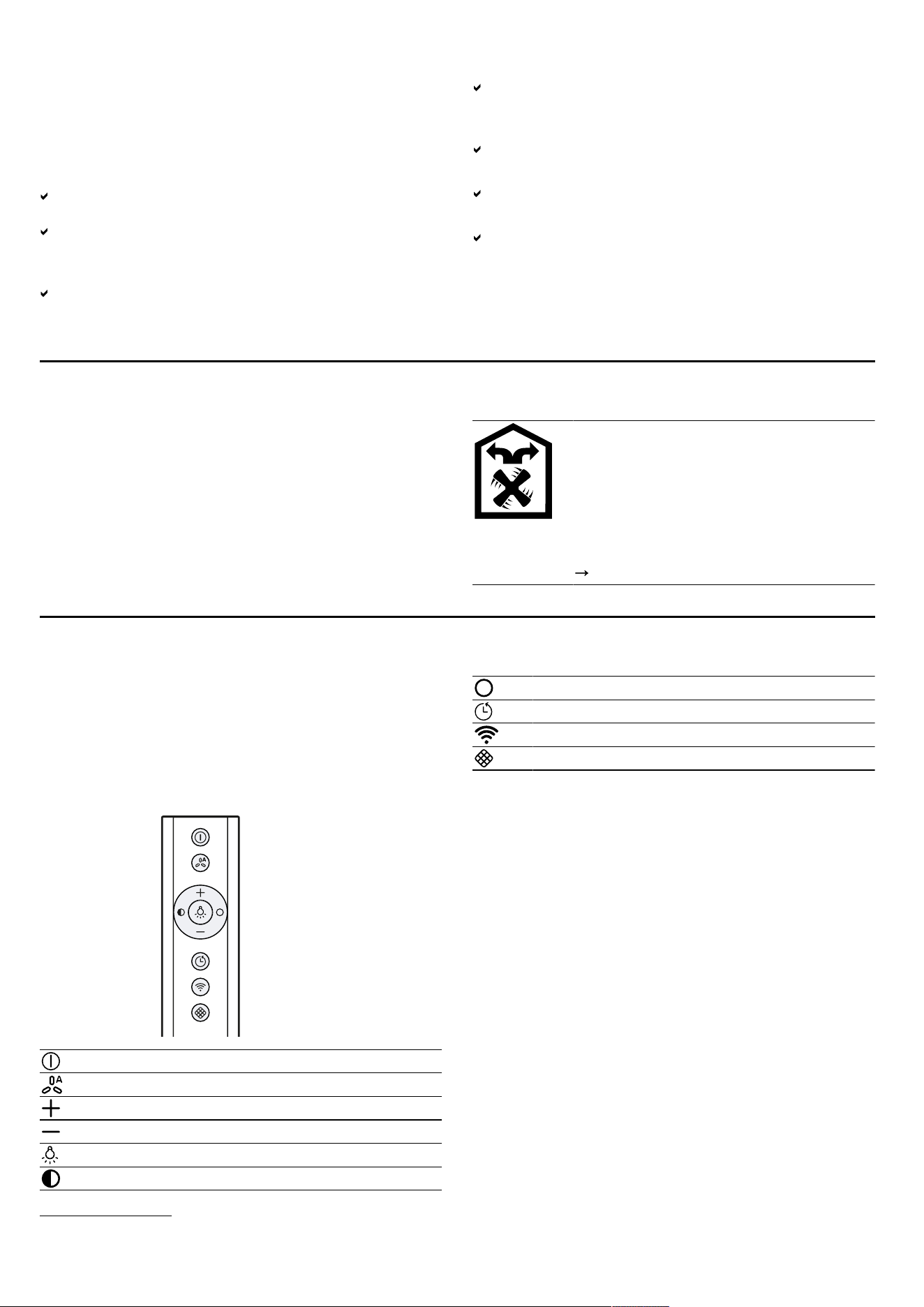
To bind odours in air recirculation mode,
you must install an odour filter. The differ-
ent options for operating the appliance in
air circulation mode can be found in our
catalogue. Alternatively, ask your dealer.
The required accessories are available
from specialist retailers, from our after-
sales service or from the online shop.
"Accessories", Page14
Familiarising yourself with your appliance5 Familiarising yourself with your appliance
5.1 Controls
You can use the controls to configure all functions of
your appliance and to obtain information about the oper-
ating status.
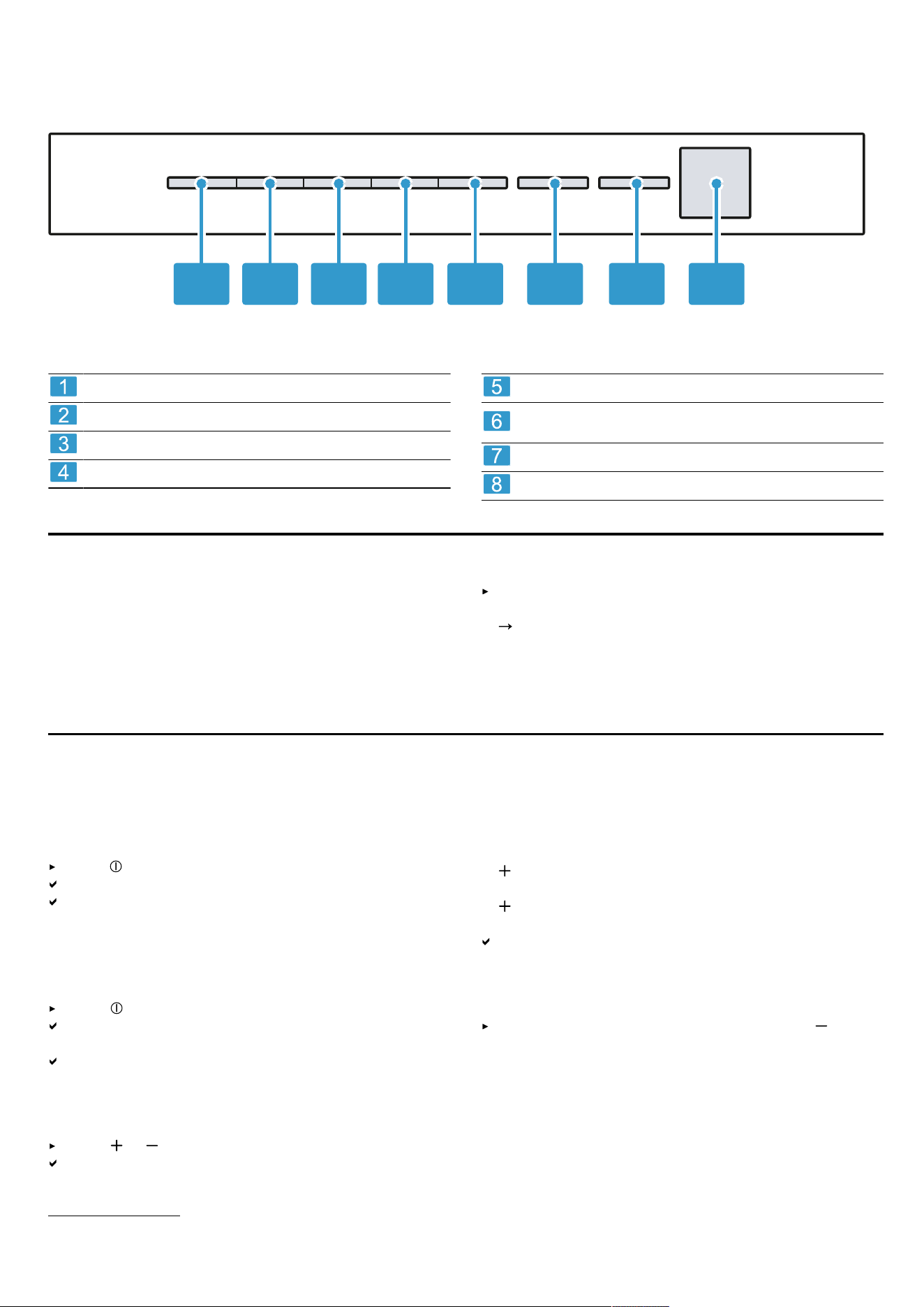
Tip: Align the remote control as precisely as possible to
the infrared receiver for the LED display.
Switch the appliance on or off
Switching automatic mode
1
on or off
Increase the fan setting
Decrease the fan setting
Switch the lighting on or off
Reduce the brightness
Increase the brightness
Switch the fan run-on on or off
HomeConnect Establishing a connection
Reset the filter saturation indicator
1
Depending on the appliance specifications
5
en Before using for the first time
5.2 LED display
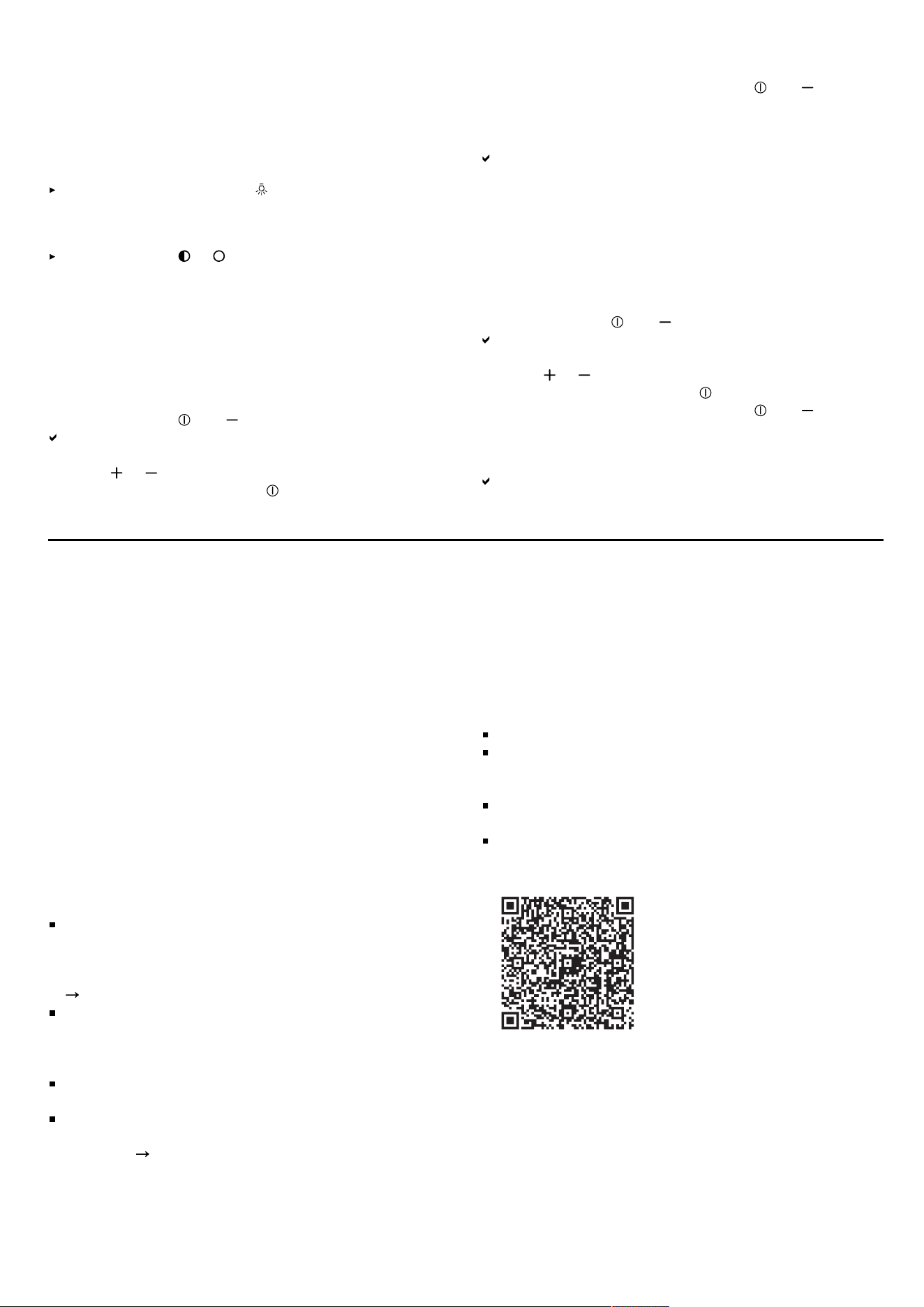
Die LED-Anzeige zeigt eingestellte Werte und Funktionen.
81 2 3 4 5 6 7
Fan setting 1/grease filter saturation display
Fan setting 2/odour filter saturation indicator
Fan setting 3
Intensive mode 1
Intensive mode 2
Automatic mode
1
/fan run-on time/interval ventila-
tion
HomeConnect
Infrared receiver
Before using for the first time6 Before using for the first time
Configure the settings for initial start-up. Clean the appli-
ance and accessories.
6.1 Setting an operating mode
Your appliance is set to air recirculation mode by de-
fault.
When using it in circulating-air mode, set the operat-
ing mode.
"Setting the saturation indicator", Page7
Basic operation7 Basic operation
7.1 Switching on the appliance
Requirement: Align the remote control as precisely as
possible to the infrared receiver for the LED display.
Press to switch on the appliance.
The appliance starts at fan setting2.
The LED for the set fan setting lights up in the LED
display.
7.2 Switching off the appliance
Switch the appliance off when you are not using it.
Press .
The fan run-on is switched on, LED 6 flashes in the
LED display for the fan run-on.
The fan automatically switches off after approx. 10
minutes.
7.3 Selecting a fan setting
Press or .
The LED for the set fan setting lights up in the LED
display.
7.4 Switching on intensive mode
If particularly strong odours or vapours develop, you
can use intensive mode.
1.
so oft drücken, bis in der LED-Anzeige die LED4
für die Intensivstufe1leuchtet.
2.
so oft drücken, bis in der LED-Anzeige die LED5
für die Intensivstufe2leuchtet.
After approx. 6 minutes, the appliance automatically
switches to fan setting 3.
7.5 Switching off intensive mode
To select a fan setting of your choice, press .
7.6 Switching on the fan run-on
During the fan run-on, the appliance continues to run for
a short time and then switches off automatically. The fan
run-on removes remaining odours and is used to dry the
odour filter after the cooking process.
1
Depending on the appliance specifications
6

Basic operation en
Press .
LED1 for the fan setting lights up in the LED display.
LED6 flashes for the fan run-on.
The appliance switches off automatically after approx.
10 minutes.
7.7 Switching off the fan run-on
Press .
This immediately stops the fan run-on.
The appliance switches to the fan setting that was
previously selected.
7.8 Switching on automatic mode
1
The optimum fan setting is set automatically using a
sensor.
Press .
In the LED display, LED6 lights up for automatic
mode.
7.9 Switch off automatic mode
1
Press .
The appliance switches to the fan setting that was
previously set.
The ventilation is automatically ended when the
sensor detects no further change in the room air
quality.
Automatic mode runs for a maximum of four hours.
7.10 Sensor sensitivity
1
In automatic mode, a sensor in the appliance detects
the intensity of the cooking odours and roasting odours.
Depending on the setting of the sensor sensitivity, the
optimum fan setting is automatically switched on.
If the sensor control reacts too weakly or too strongly,
you can change the setting for the sensor sensitivity.
Factory setting:3
Lowest setting:1
Highest setting:5
The corresponding LED lights up in the LED display.
7.11 Setting the sensor sensitivity
1
Requirement: The appliance is switched off.
1.
Press and hold and for approx.3seconds.
2.
Press or to change the setting.
To cancel the setting, press .
3.
To save the setting, press and hold and for ap-
prox.threeseconds.
Or wait approx. 10seconds until the setting is saved
automatically.
A signal tone sounds as soon as the selected setting
is saved.
7.12 Intermittent ventilation
In order to regularly ventilate your kitchen, you can use
the interval ventilation. With interval ventilation, the ventil-
ation system switches on and off in the selected setting
for the selected time.
Note: This function is only available in the HomeCon-
nectapp.
If the interval ventilation is switched on, LED6 continu-
ously flashes in the LED display for the interval ventila-
tion and the LED for the selected fan setting lights up.
As soon as the ventilation time ends, the LED for the fan
setting you have selected goes out. LED6 continues to
flash.
7.13 Saturation indicator
If the grease filters or odour filters are saturated, corres-
ponding symbols flash after the appliance is switched
off.
Note: You can set the saturation indicator in the
HomeConnect app depending on the filter used.
Clean the saturated grease filters and, in doing so, ob-
serve the cleaning instructions in these instructions.
Change the saturated odour filters and observe the in-
structions in the accompanying instructions.
If odour filters can be regenerated, follow the instruc-
tions in the accompanying instructions.
7.14 Resetting the saturation indicator
After cleaning the grease filter or after changing the
odour filter, the saturation indicator can be reset.
Requirements
After the appliance has been switched off, LED1
flashes in the LED display for the grease filter satura-
tion display and/or LED2 flashes for the saturation in-
dicator for the odour filter.
A signal sounds repeatedly.
Press .
The saturation indicator is reset.
7.15 Setting the saturation indicator
The saturation indicator must be adjusted depending on
the filter used.
Requirement: The appliance is switched off.
1.
Press and hold and for approx.three seconds.
To set circulating-air mode (non-regenerable filter),
press / until LED2 lights up in the LED display.
To set circulating-air mode (regenerable filter),
press / until LED3 lights up in the LED display.
To convert the electronic control back to operation
without the air recirculation filter, press / until
LED1 lights up on the LED display.
2.
To save the setting, press and hold and for ap-
prox. three seconds.
Or wait approx. 10seconds until the setting is saved
automatically.
To cancel the setting, press .
A signal tone sounds as soon as the selected setting
is saved.
7.16 Switching on the lighting
Press to switch on the lighting.
1
Depending on the appliance specifications
7
en HomeConnect
Note: Colour temperature settings are available in the
HomeConnect app provided the appliance has this
function.
7.17 Switching off the lighting
Switch off the lighting with .
7.18 Setting the brightness
Press and hold or .
Note: Colour temperature settings are available in the
HomeConnect app provided the appliance has this
function.
7.19 Switching on the button tone
The button tones can be switched on.
Requirement: The appliance is switched off.
1.
Press and hold and for approx.three seconds.
In the LED display, the LED for the setting that is cur-
rently selected lights up.
2.
Press or until LED1 lights up in the LED display.
To cancel the setting, press .
3.
To save the setting, press and hold and for ap-
prox. threeseconds.
Or wait approx. 10seconds until the setting is saved
automatically.
A signal tone sounds as soon as the selected setting
is saved.
7.20 Switching the button tone off
The button tones can be switched off.
Note: Signal tones for the appliance are always
switched on and cannot be switched off.
Requirement: The appliance is switched off.
1.
Press and hold and for approx.three seconds.
In the LED display, the LED for the setting that is cur-
rently selected lights up.
2.
Press or until LED2 lights up in the LED display.
To cancel the setting, press .
3.
To save the setting, press and hold and for ap-
prox. threeseconds.
Or wait approx. 10seconds until the setting is saved
automatically.
A signal tone sounds as soon as the selected setting
is saved.
HomeConnect 8 HomeConnect
This appliance is network-capable. Connecting your ap-
pliance to a mobile device lets you control its functions
via the HomeConnect app, adjust its basic settings and
monitor its operating status.
The HomeConnect services are not available in every
country. The availability of the HomeConnect function
depends on the availability of HomeConnect services in
your country. You can find information about this at:
www.home-connect.com
.
The HomeConnect app guides you through the entire
login process. Follow the instructions in the HomeCon-
nect app to configure the settings.
If the appliance is not connected to your home network,
it functions as an appliance with no network connection
and can still be operated via the display.
Tip: Please also follow the instructions in the
HomeConnect app.
Notes
Please note the safety precautions in this instruction
manual and make sure that they are also observed
when operating the appliance via the HomeConnect
app.
"Safety", Page2
Operating the appliance on the appliance itself al-
ways takes priority. During this time it is not possible
to operate the appliance using the HomeConnect
app.
In networked standby mode, the appliance requires a
maximum of2W.
If you need your device's MAC address to connect to
your home network, you can find this next to the rat-
ing plate.
Page13
8.1 Setting up the HomeConnect app
1.
Install the HomeConnect app on your mobile device.
2.
Start the HomeConnect app and set up access for
HomeConnect.
The HomeConnect app guides you through the entire
login process.
8.2 Setting up HomeConnect
Requirements
The appliance is switched off.
You have a mobile device with a current version of
the iOS or Android operating system, e.g. a smart-
phone.
The appliance is receiving signals from the WLAN
home network (Wi-Fi) at its installation location.
The mobile device and the appliance are within range
of your home network's Wi-Fi signal.
1.
Scan the following QR code.
You can install the HomeConnect app and connect
your appliance via the QR code.
2.
Follow the instructions in the HomeConnect app.
8.3 Resetting the connection
Saved connections to the home network and to
HomeConnect can be reset.
8
Hob-based hood control en
Press and hold and until LED7 goes out in the
LED display.
An audible signal sounds.
8.4 Software update
Your appliance's software can be updated using the
software update function, e.g. for the purposes of optim-
isation, troubleshooting or security updates.
To do this, you must be a registered HomeCon-
nectuser, have installed the app on your mobile device
and be connected to the HomeConnectserver.
As soon as a software update is available, you will be
informed via the HomeConnectapp and will be able to
start the software update via the app. Once the update
has been successfully downloaded, you can start in-
stalling it via the HomeConnectapp if you are in your
home network (Wi-Fi). The HomeConnectapp informs
you once installation is successful.
Notes
The software update consists of two steps.
– The first step is the download.
– The second step is the installation on your appli-
ance.
You can continue to use your appliance as normal
while updates are downloading. Depending on your
personal settings in the app, software updates can
also be set to download automatically.
Installation takes a few minutes. You cannot use your
appliance during installation.
We recommend that you install security updates as
soon as possible.
8.5 Remote diagnostics
Customer Service can use Remote Diagnostics to ac-
cess your appliance if you contact them, have your ap-
pliance connected to the HomeConnect server and if
Remote Diagnostics is available in the country in which
you are using the appliance.
Tip: For further information and details about the avail-
ability of Remote Diagnostics in your country, please
visit the service/support section of your local website:
www.home-connect.com
.
8.6 Data protection
Please see the information on data protection.
The first time your appliance is registered on a home
network connected to the Internet, your appliance will
transmit the following types of data to the HomeCon-
nect server (initial registration):
Unique appliance identification (consisting of appli-
ance codes as well as the MAC address of the Wi-Fi
communication module installed).
Security certificate of the Wi-Fi communication mod-
ule (to ensure a secure data connection).
The current software and hardware version of your
appliance.
Status of any previous reset to factory settings.
This initial registration prepares the HomeConnect func-
tions for use and is only required when you want to use
the HomeConnect functions for the first time.
Note: Please note that the HomeConnect functions can
only be utilised with the HomeConnect app. Information
on data protection can be retrieved in the HomeCon-
nect app.
Hob-based hood control9 Hob-based hood control
You can connect your appliance to a suitable hob and,
in this way, control the functions of your appliance via
the hob.
If the hob and the extractor hood are HomeConnect-
compatible, connect the appliances in the HomeCon-
nectapp. To do this, connect the two appliances to
HomeConnect and follow the instructions in the app.
Notes
Please note the safety precautions in the instruction
manual for your appliance and ensure that they are
also observed when operating the appliance via the
hob-based hood control.
Operating your appliance always takes priority. It is
not possible to use the hob-based hood control dur-
ing this time.
You can only connect to the extractor hood via the
HomeConnect app. Other connection routes are no
longer supported.
Cleaning and servicing10 Cleaning and servicing
To keep your appliance working efficiently for a long
time, it is important to clean and maintain it carefully.
10.1 Cleaning products
You can obtain suitable cleaning products from after-
sales service or the online shop.
WARNING‒Risk of electric shock!
An ingress of moisture can cause an electric shock.
Before cleaning, pull out the mains plug or switch off
the fuse in the fuse box.
Do not use steam- or high-pressure cleaners to clean
the appliance.
WARNING‒Risk of burns!
The appliance becomes hot during operation.
Allow the appliance to cool down before cleaning.
ATTENTION
Unsuitable cleaning products may damage the surfaces
of the appliance.
Do not use harsh or abrasive detergents.
9
en Cleaning and servicing
Do not use cleaning products with a high alcohol con-
tent.
Do not use hard scouring pads or cleaning sponges.
Only use glass cleaners, glass scrapers or stainless
steel care products if recommended in the cleaning
instructions for the relevant part.
Wash sponge cloths thoroughly before use.
10.2 Cleaning the appliance
Clean the appliance as specified. This will ensure that
the different parts and surfaces of the appliance are not
damaged by incorrect cleaning or unsuitable cleaning
products.
WARNING‒Risk of explosion!
Highly caustic alkaline or highly acidic cleaning agents
in conjunction with aluminium parts in the interior of the
appliance may cause explosions.
Never use highly caustic alkaline or highly acidic
cleaning agents. In particular, do not use commercial
or industrial cleaning agents in conjunction with alu-
minium parts, e.g. grease filter on extractor hoods.
WARNING‒Risk of electric shock!
An ingress of moisture can cause an electric shock.
Before cleaning, pull out the mains plug or switch off
the fuse in the fuse box.
Do not use steam- or high-pressure cleaners to clean
the appliance.
WARNING‒Risk of burns!
The appliance becomes hot during operation.
Allow the appliance to cool down before cleaning.
WARNING‒Risk of injury!
Components inside the appliance may have sharp
edges.
Carefully clean the appliance interior.
If the appliance is operated by another person via the
HomeConnect app during cleaning, this increases the
risk of injury.
Before cleaning, disconnect the appliance from the
HomeConnect app.
1.
Observe the information regarding the cleaning
agents.
"Cleaning products", Page9
2.
Clean as follows, depending on the surface:
Clean stainless steel surfaces in the direction of the
finish using a sponge cloth and hot soapy water.
Clean painted surfaces using a damp sponge cloth
and hot soapy water.
Clean aluminium using a soft cloth and glass
cleaner.
Clean plastic using a soft cloth and glass cleaner.
Clean glass using a soft cloth and glass cleaner.
3.
Dry with a soft cloth.
4.
Apply a thin layer of the stainless steel cleaning
product to stainless steel surfaces using a soft cloth.
You can obtain stainless steel cleaning products from
the after-sales service or the online shop.
10.3 Cleaning controls and lights
WARNING‒Risk of electric shock!
Penetrating moisture may cause an electric shock.
Do not use wet sponge cloths.
1.
Observe the information regarding the cleaning
agents.
"Cleaning products", Page9
2.
Clean using a damp sponge cloth and hot soapy wa-
ter.
3.
Dry with a soft cloth.
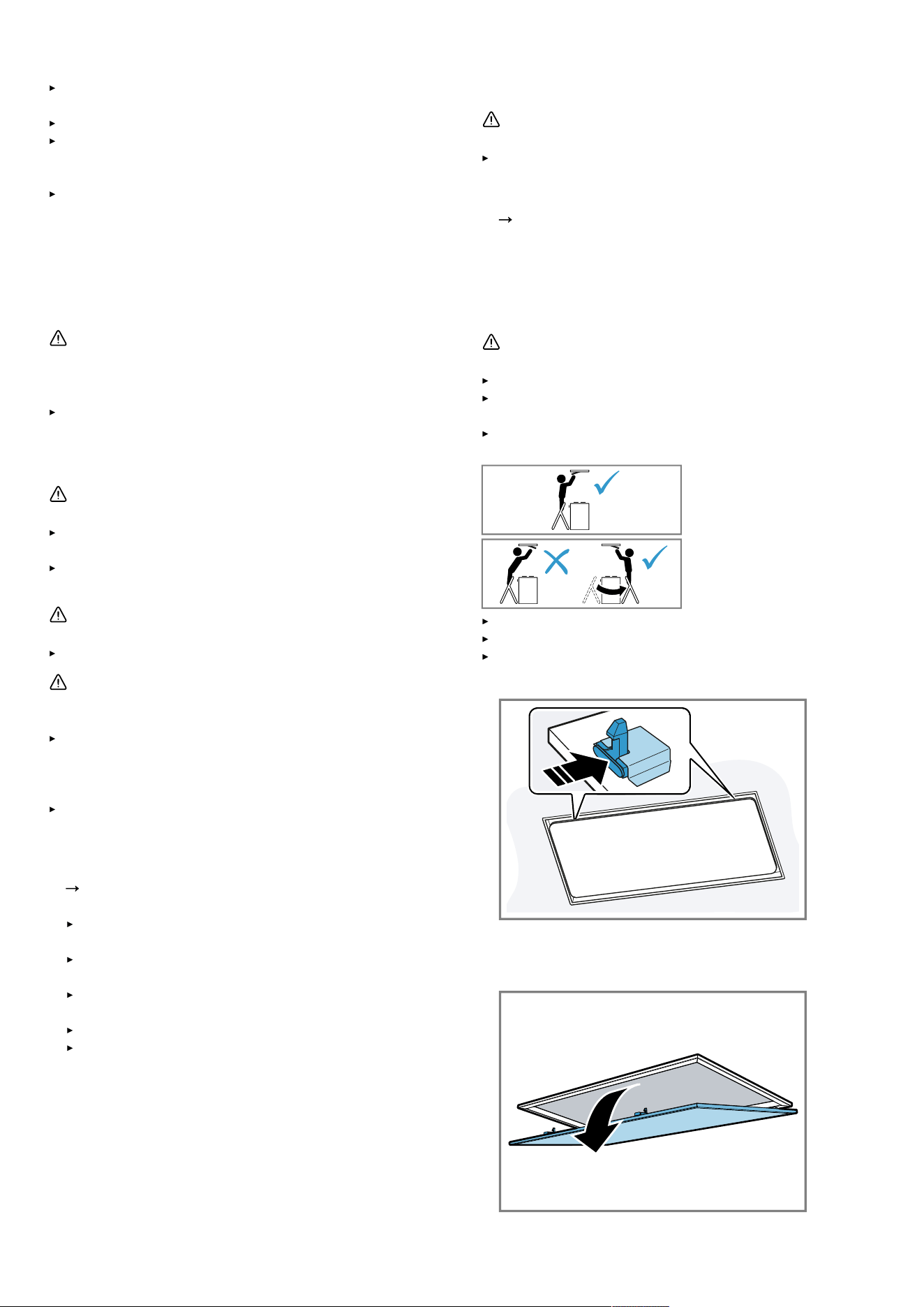
10.4 Removing the grease filter
WARNING‒Risk of injury!
The filter cover may swing out.
Open the filter cover slowly.
Take hold of the filter cover after opening until it no
longer swings out.
Close the filter cover slowly.
Risk of falling when working on the appliance
Use a stable stepladder.
Do not lean over the hob.
Do not step on the hob or the work surface.
1.
Open the locking mechanisms on the filter cover.
To prevent the filter cover from swinging down sud-
denly, hold onto the filter cover firmly with two hands.
2.
Open the filter cover by pulling it downwards.
10
Cleaning and servicing en
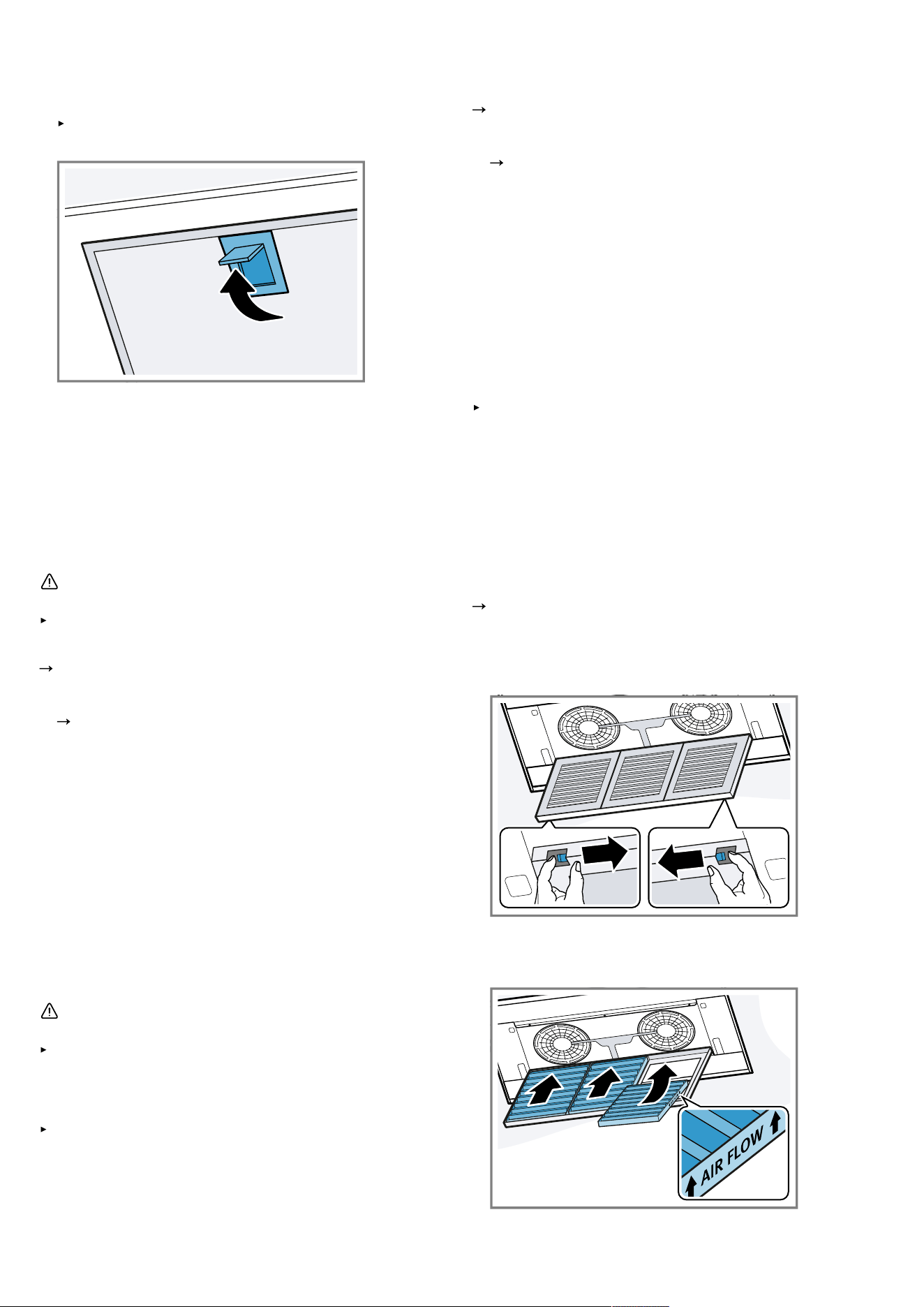
3.
ATTENTION‒Falling grease filters may damage the
hob below.
Grip below the grease filter with one hand.
Open the locks on the grease filters.
4.
Remove the grease filters from the holders.
To prevent grease from dripping, hold the grease fil-
ter horizontally.
10.5 Cleaning grease filters manually
The grease filters filter the grease from the cooking va-
pour. Regularly cleaned grease filters guarantee a high
level of grease removal. We recommend cleaning the
grease filters every two months.
WARNING‒Risk of fire!
Fatty deposits in the grease filters may catch fire.
Clean the grease filters regularly.
Requirement: The grease filters have been removed.
"Removing the grease filter", Page10
1.
Observe the information regarding the cleaning
agents.
"Cleaning products", Page9
2.
Soak the grease filter in hot soapy water.
Use special grease solvent for stubborn dirt. You can
obtain grease solvents from customer service or the
online shop.
3.
Use a brush to clean the grease filters.
4.
Rinse the grease filters thoroughly.
5.
Allow the grease filters to drain.
10.6 Cleaning grease filters in the
dishwasher
The grease filters filter the grease from the cooking va-
pour. Regularly cleaned grease filters guarantee a high
level of grease removal. We recommend cleaning the
grease filters every two months.
WARNING‒Risk of fire!
Fatty deposits in the grease filters may catch fire.
Clean the grease filters regularly.
ATTENTION
The grease filters may become damaged if they are
squeezed in the dishwasher.
Do not squeeze the grease filters.
Note: When cleaning the grease filter in the dishwasher,
light discolouration may occur. This discolouration has
no effect on the performance of the metal grease filters.
Requirement: The grease filters have been removed.
"Removing the grease filter", Page10
1.
Observe the information regarding the cleaning
agents.
"Cleaning products", Page9
2.
Place the grease filters loosely into the dishwasher.
Do not clean heavily soiled grease filters with utensils.
Use special grease solvent for stubborn dirt. You can
obtain grease solvents from customer service or the
online shop.
3.
Start the dishwasher.
Select a temperature of no more than 70°C.
4.
Allow the grease filters to drain.
10.7 Fitting grease filters
ATTENTION
Falling grease filters may damage the hob below.
Grip below the grease filter with one hand.
1.
Fit the grease filters.
2.
Fold the grease filters upwards and engage the locks.
3.
Make sure that the locks engage.
4.
Close the filter cover.
5.
Make sure that the filter cover locks engage correctly.
10.8 Odour filter for recirculating air mode
You can obtain odour filters from the after-sales service
or the online shop. Only use original odour filters.
"Accessories", Page14
Replacing the odour filter
Requirement: The grease filters have been removed.
1.
Open the odour filter cartridge.
2.
Remove the odour filter.
3.
Remove the new odour filter from the packaging.
4.
Insert the odour filter.
Insert the odour filter in the correct direction.
11
en Troubleshooting
5.
Close the odour filter cartridge.
6.
.
"Fitting grease filters", Page11
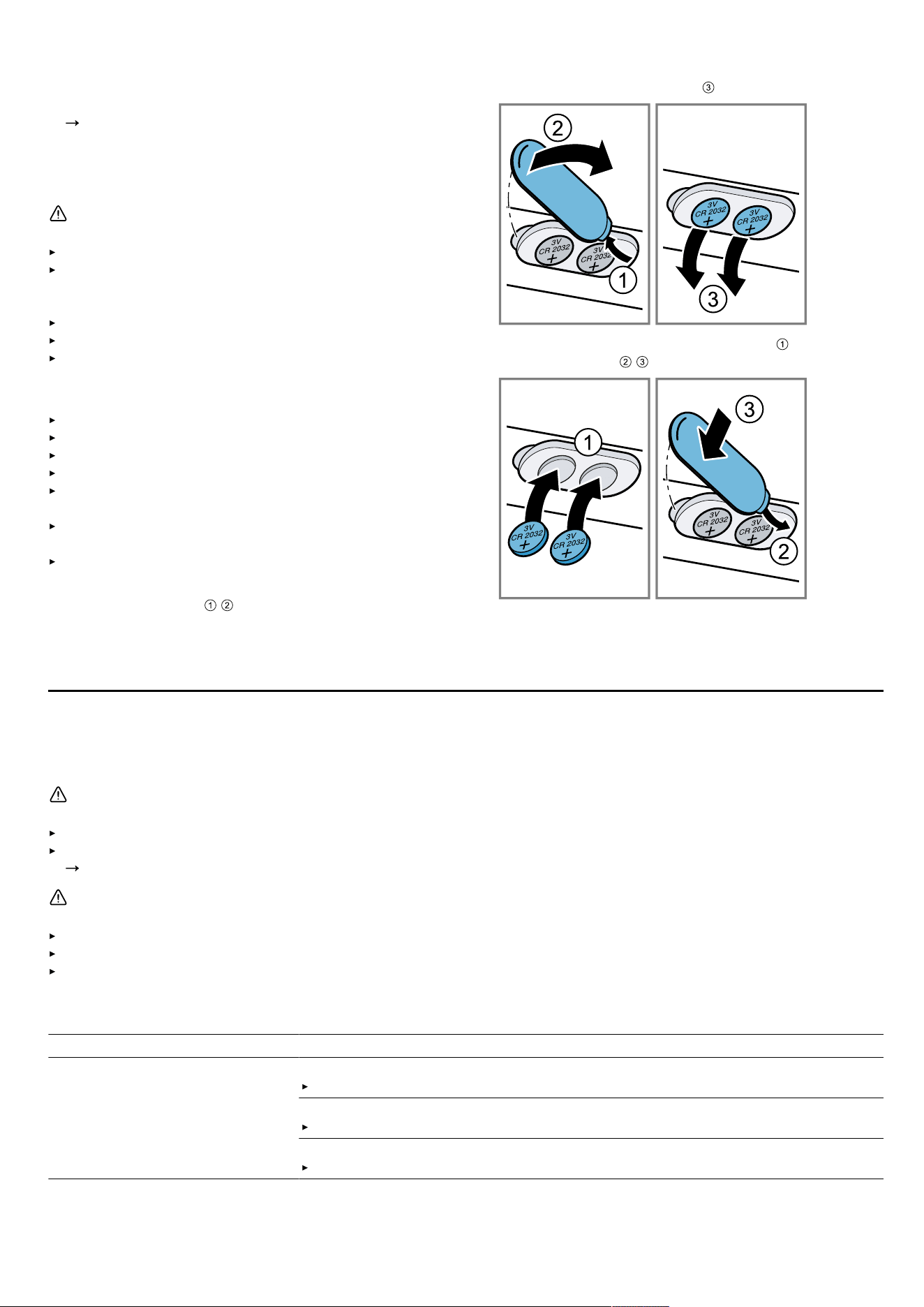
10.9 Replacing the batteries in the remote
control
WARNING‒Risk of injury!
Children may swallow batteries.
Keep batteries out of the reach of children.
Keep an eye on any children when you are replacing
batteries.
Batteries may explode.
Do not charge the batteries.
Do not short-circuit the batteries.
Do not throw batteries into a fire.
ATTENTION
Improper handling of batteries.
Do not short-circuit the terminals.
Only use the specified type of batteries.
Do not use different battery types together.
Do not use new and used batteries together.
Do not use rechargeable batteries.
Leaking batteries may damage the remote control.
Remove the batteries if you are not using the remote
control.
Safely dispose of empty or defective batteries in an
environmentally friendly manner.
1.
Remove the cover.
2.
Remove the empty batteries.
3.
Insert the new batteries (3VCR2032).
4.
Close the cover.
5.
Dispose of the empty batteries in an environmentally
friendly manner.
Troubleshooting11 Troubleshooting
You can rectify minor faults on your appliance yourself. Read the troubleshooting information before contacting after-
sales service. This will avoid unnecessary costs.
WARNING‒Risk of injury!
Improper repairs are dangerous.
Repairs to the appliance should only be carried out by trained specialist staff.
If the appliance is defective, call Customer Service.
"Customer Service", Page13
WARNING‒Risk of electric shock!
Incorrect repairs are dangerous.
Repairs to the appliance should only be carried out by trained specialist staff.
Only use genuine spare parts when repairing the appliance.
If the power cord of this appliance is damaged, it must be replaced by trained specialist staff.
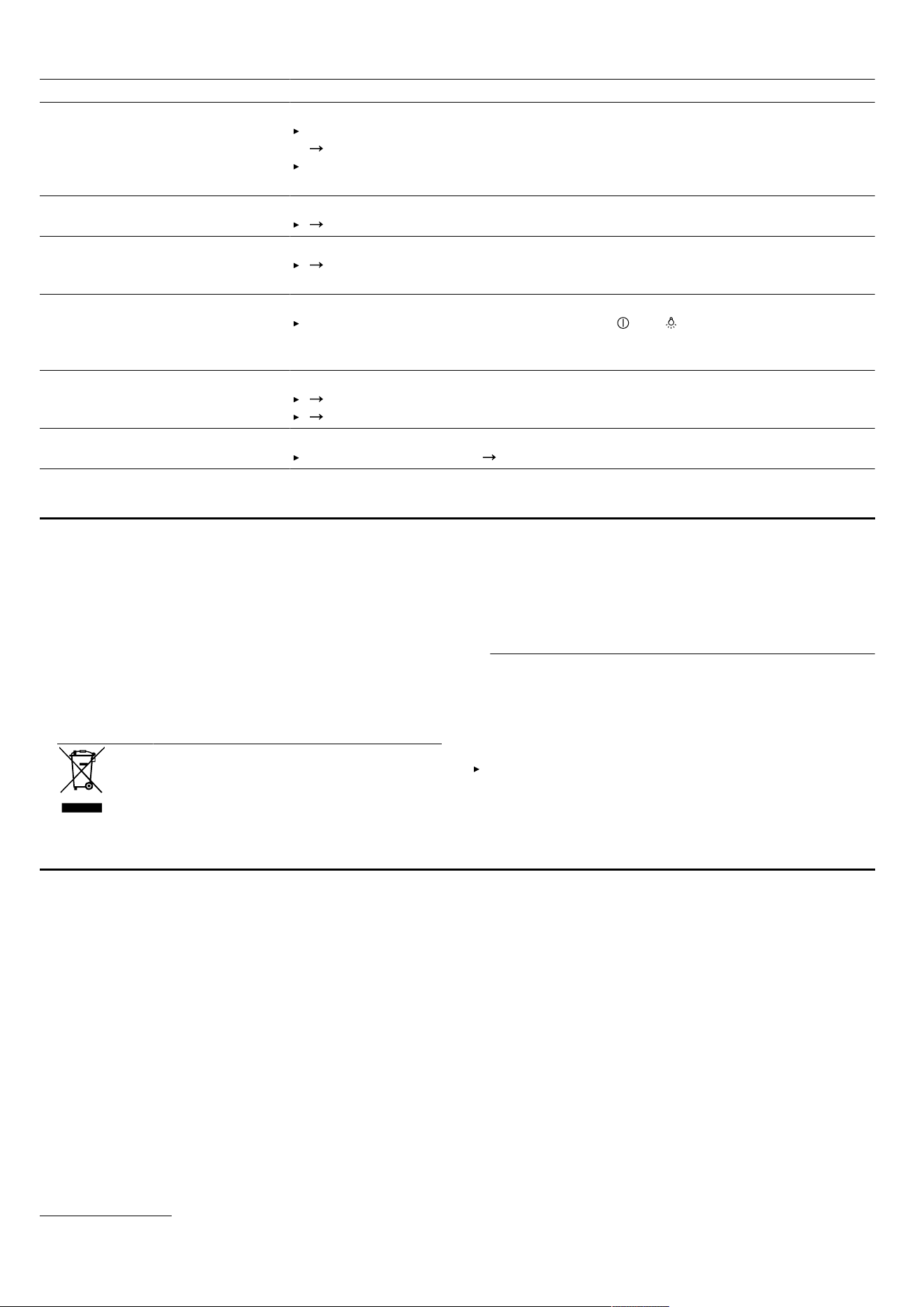
11.1 Malfunctions
Fault Cause and troubleshooting
The appliance is not working. The mains plug of the power cord is not plugged in.
Connect the appliance to the power supply.
The circuit breaker in the fuse box has tripped.
Check the circuit breaker in the fuse box.
There has been a power cut.
Check whether the lighting in your room or other appliances are working.
12
Disposal en
Fault Cause and troubleshooting
The lighting does not work
1
. Different causes are possible.
Call .
"Customer Service", Page13
Defective LED lights may be replaced by the manufacturer, their customer ser-
vice or a qualified technician (electrician) only.
Remote control not working. The batteries are flat.
"Replacing the batteries in the remote control", Page12
In the LED display, the LEDs flash
one to five times after the appli-
ance is switched off.
The batteries are almost empty.
"Replacing the batteries in the remote control", Page12
The lighting automatically
switches on as soon as the appli-
ance is connected to the power
supply.
Demo mode is switched on.
To deactivate demo mode, press and hold and for approx.3seconds.
LED1 flashes in the LED display. The grease filters are saturated.
"Cleaning grease filters in the dishwasher", Page11
"Cleaning grease filters manually", Page11
LED2 flashes in the LED display. The odour filters are saturated.
Change the odour filter.
Page11
Disposal12 Disposal
12.1 Disposing of old appliance
Valuable raw materials can be reused by recycling.
1.
Unplug the appliance from the mains.
2.
Cut through the power cord.
3.
Dispose of the appliance in an environmentally
friendly manner.
Information about current disposal methods are avail-
able from your specialist dealer or local authority.
This appliance is labelled in accordance
with European Directive 2012/19/EU
concerning used electrical and elec-
tronic appliances (waste electrical and
electronic equipment - WEEE).
The guideline determines the framework
for the return and recycling of used ap-
pliances as applicable throughout the
EU.
12.2 Disposing of batteries
Batteries should be recycled in an environmentally
friendly manner. Do not dispose of the batteries in the
household rubbish.
Dispose of batteries in an environmentally friendly
manner.
Customer Service13 Customer Service
Function-relevant genuine spare parts according to the
corresponding Ecodesign Order can be obtained from
Customer Service for a period of at least 10 years from
the date on which your appliance was placed on the
market within the European Economic Area.
Note: Under the terms of the manufacturer's warranty
the use of Customer Service is free of charge.
Detailed information about the warranty period and the
warranty conditions in your country is available via the
QR code on the enclosed document on service con-
tacts and warranty conditions, from our customer ser-
vice or on our website.
If you contact Customer Service, you will require the
product number (E-Nr.) and the production number (FD)
of your appliance.
You can find the contact details for our customer ser-
vice via the QR code on the enclosed document on ser-
vice contacts and warranty conditions or on our website.
This product contains light sources from energy effi-
ciency class F. These light sources are available as a
spare part and should only be replaced by trained spe-
cialist staff.
13.1 Product number (E-Nr.) and production
number (FD)
You can find the product number (E-Nr.) and the pro-
duction number (FD) on the appliance's rating plate.
1
Depending on the appliance specifications
13
en Accessories
Depending on the model, the rating plate can be found:
Inside the appliance (remove grease filters for ac-
cess).
On top of the appliance.
Make a note of your appliance's details and the Cus-
tomer Service telephone number to find them again
quickly.
Accessories14 Accessories
You can buy accessories from the after-sales service,
from specialist retailers or online. Only use original ac-
cessories, as these have been specifically designed for
your appliance.
Accessories vary from one appliance to another. When
purchasing accessories, always quote the exact product
number (E no.) of your appliance.
Page13
You can find out which accessories are available for
your appliance in our catalogue, in the online shop or
from our after-sales service.
www.neff-home.com
Accessories Order number
Clean Air Plus odor filter
(replacement)
Z52JXB1X6
Declaration of Conformity15 Declaration of Conformity
BSH Hausgeräte GmbH hereby declares that the appliance with Home Connect functionality conforms to the basic
requirements and other relevant provisions of Directive 2014/53/EU.
A detailed RED Declaration of Conformity can be found online at
www.neff-home.com
among the additional docu-
ments on the product page for your appliance.
Hereby, BSH Hausgeräte GmbH declares that the appliance with HomeConnect functionality is in compliance with
relevant statutory requirements.
1
A detailed Declaration of Conformity can be found online at
www.neff-home.com/uk
among the additional documents
on the product page for your appliance.
1
2.4 GHz band (2400–2483.5MHz): Max. 100mW
5-GHz band (5150–5350MHz + 5470–5725MHz): max. 50mW
BE BG CZ DK DE EE IE EL ES
FR HR IT CY LI LV LT LU HU
MT NL AT PL PT RO SI SK FI
SE NO CH TR IS UK (NI)
5GHz WLAN (Wi-Fi): For indoor use only.
AL BA MD ME MK RS UK UA
5GHz WLAN (Wi-Fi): For indoor use only.
15.1 Statement of Compliance for Great
Britain
Product type
This statement of compliance covers the products de-
scribed in this information for use whose model identi-
fier group is seen on the title page. The full model identi-
fier is made up of the characters before the slash in the
product number (E no.) which can be found on the rat-
ing plate. Alternatively, you can also find the model iden-
tifier in the first line of the UK Energy Label.
Name and address of manufacturer
BSH Hausgeräte GmbH, Carl-Wery-Strasse 34, 81739
München, Germany
This statement of compliance is prepared by the manu-
facturer.
The manufacturer, BSH Hausgeräte GmbH deems that it
has complied with
provision 5.1-1 of ETSI EN 303 645 v2.1.1 and,
where relevant, provision 5.1-2 of ETSI EN 303 645
v2.1.1;
provision 5.2-1 of ETSI EN 303 645 v2.1.1;
provision 5.3-13 of ETSI EN 303 645 v2.1.1.
1
Only applies to Great Britain
14
Installation instructions en
Support period BSH Hausgeräte GmbH will provide security updates
that are necessary to maintain the main functions free of
charge until at least 28/02/2034.
Installation instructions16 Installation instructions
Observe this information when installing the appliance.
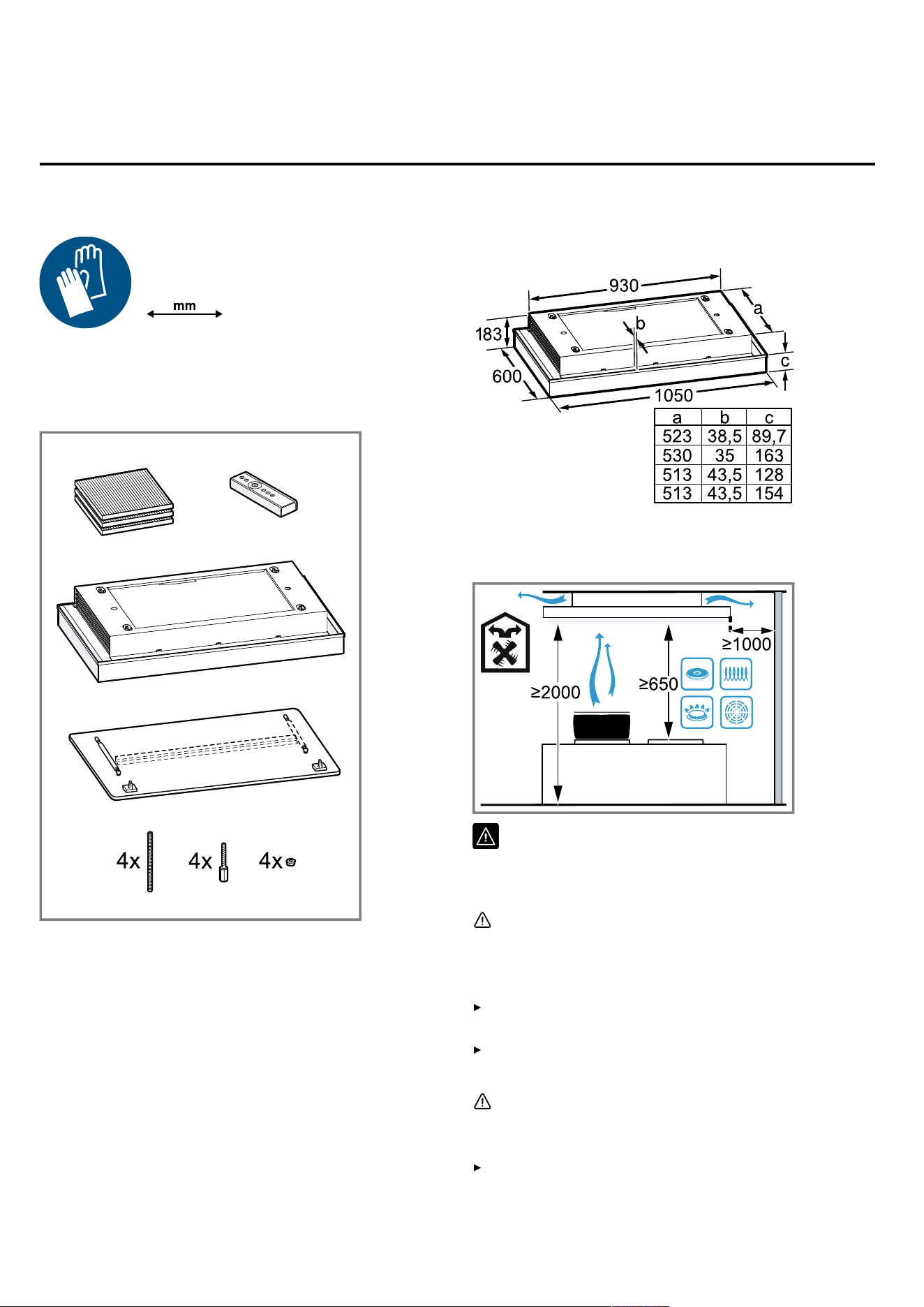
16.1 Included with the appliance
After unpacking all parts, check for any damage in
transit and completeness of the delivery.
16.2 Dimensions
You will find the dimensions of the appliance here
16.3 Safety clearances
Comply with the safety clearances for the appliance.
16.4 Secure installation
Follow these safety instructions when installing
the appliance.
WARNING‒Risk of suffocation!
Children may put packaging material over their
heads or wrap themselves up in it and suffoc-
ate.
Keep packaging material away from chil-
dren.
Do not let children play with packaging ma-
terial.
WARNING‒Risk of fire!
The grease deposits in the grease filter may
catch fire.
Never work with naked flames close to the
appliance (e.g. flambéing).
15
en Installation instructions
Do not install the appliance near a heat-pro-
ducing appliance for solid fuel (e.g. wood or
coal) unless a closed, non-removable cover
is present. There must be no flying sparks.
The specified safety clearances must be
complied with in order to prevent a build-up
of heat.
Observe the specifications for your cooking
appliances. If the installation instructions for
the cooking appliances specify a different
clearance, the larger of the two must always
be provided for. If gas hobs and electric
hobs are operated together, the largest spe-
cified clearance applies.
WARNING‒Risk of injury!
Components inside the appliance may have
sharp edges.
Wear protective gloves.
The appliance may fall down if it has not been
properly fastened in place.
All fastening components must be fixed
firmly and securely in place.
The appliance is heavy.
To move the appliance, twopeople are re-
quired.
Use only suitable tools and equipment.
The appliance is heavy.
The appliance must not be fitted directly
onto plasterboard or similar lightweight ma-
terials.
To ensure correct installation, you must use
a material which is sufficiently stable and
suitable for both the structural conditions
and the weight of the appliance.
Changes to the electrical or mechanical as-
sembly are dangerous and may lead to mal-
functions.
Do not make any changes to the electrical
or mechanical assembly.
Risk of falling when working on the appliance
Use a stable stepladder.
Do not lean over the hob.
Do not step on the hob or the work surface.
The filter cover may swing out.
Open the filter cover slowly.
Take hold of the filter cover after opening un-
til it no longer swings out.
Close the filter cover slowly.
Risk of injury when opening and closing the
hinges.
Keep your hands away from the hinges.
WARNING‒Risk of electric shock!
Sharp-edged components inside the appliance
may damage the connecting cable.
Do not kink or trap the connecting cable.
If the appliance or the power cord is damaged,
this is dangerous.
Never operate a damaged appliance.
Never pull on the power cord to unplug the
appliance. Always unplug the appliance at
the mains.
If the appliance or the power cord is dam-
aged, immediately unplug the power cord or
switch off the fuse in the fuse box.
Call customer services.
Page13
Improper repairs are dangerous.
Repairs to the appliance should only be car-
ried out by trained specialist staff.
Only use genuine spare parts when repairing
the appliance.
If the power cord of this appliance is dam-
aged, it must be replaced by trained special-
ist staff.
Incorrect installation is dangerous.
Connect and operate the appliance only in
accordance with the specifications on the
rating plate.
Connect the appliance to a power supply
with alternating current only via a properly in-
stalled socket with earthing.
The protective conductor system of the do-
mestic electrical installation must be properly
installed.
Never equip the appliance with an external
switching device, e.g. a timer or remote con-
trol.
When the appliance is installed, the mains
plug of the power cord must be freely ac-
cessible. If free access is not possible, an
all-pole isolating switch must be installed in
the permanent electrical installation accord-
ing to the conditions of Overvoltage Cat-
egory III and according to the installation
regulations.
When installing the appliance, check that the
power cable is not trapped or damaged.
16.5 General information
Follow these general instructions during the installation.
16
Installation instructions en
For the installation, observe the currently valid build-
ing regulations and the regulations of the local electri-
city and gas suppliers.
When discharging the exhaust air, the official and
legal regulations, such as the regional building code.,
must be observed.
In order to freely access the appliance for servicing,
select an easy-to-reach installation site.
The surfaces of the appliance are sensitive. Avoid
damaging them during installation.
16.6 Instructions for the electrical
connection
In order to safely connect the appliance to the electrical
system, follow these instructions.
WARNING‒Risk of electric shock!
It must always be possible to disconnect the appliance
from the electricity supply. The appliance must only be
connected to a protective contact socket that has been
correctly installed.
The mains plug for the mains power cable must be
easily accessible after the appliance is installed.
If this is not possible, an all-pole isolating switch must
be integrated into the permanent electrical installation
according to the conditions of overvoltage category III
and according to the installation regulations.
The permanent electrical installation must only be
wired by a professional electrician. We recommend
installing a residual-current circuit breaker (RCCB) in
the appliance's power supply circuit.
Sharp-edged components inside the appliance may
damage the connecting cable.
Do not kink or trap the connecting cable.
The connection data can be found on the rating plate.
Page13
The connecting cable is approx.1.30m long.
This appliance complies with the EC interference sup-
pression regulations.
The appliance corresponds to protection class 1. You
should therefore only use the appliance with a pro-
tective earth connection.
Do not connect the appliance to the power supply
during installation.
Ensure that the protection against contact is guaran-
teed during installation.
Only a licensed professional may connect appliances
without plugs. They are subject to the requirements of
the local electricity provider.
16.7 Information on the installation situation
Install this appliance on the kitchen ceiling or a stable
suspended ceiling.
To install additional special accessory parts, observe
the enclosed installation instructions.
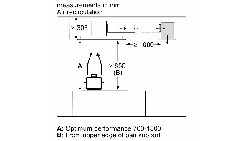
The appliance finds it more difficult to draw in the
cooking vapours the further away they are from the
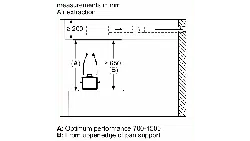
hotplate. For optimum performance, a maximum dis-
tance of 1500mm is recommended.
The width of the extractor hood must correspond at
least with the width of the hob.
To optimally detect the cooking vapours, install the
appliance in the middle of the hob.
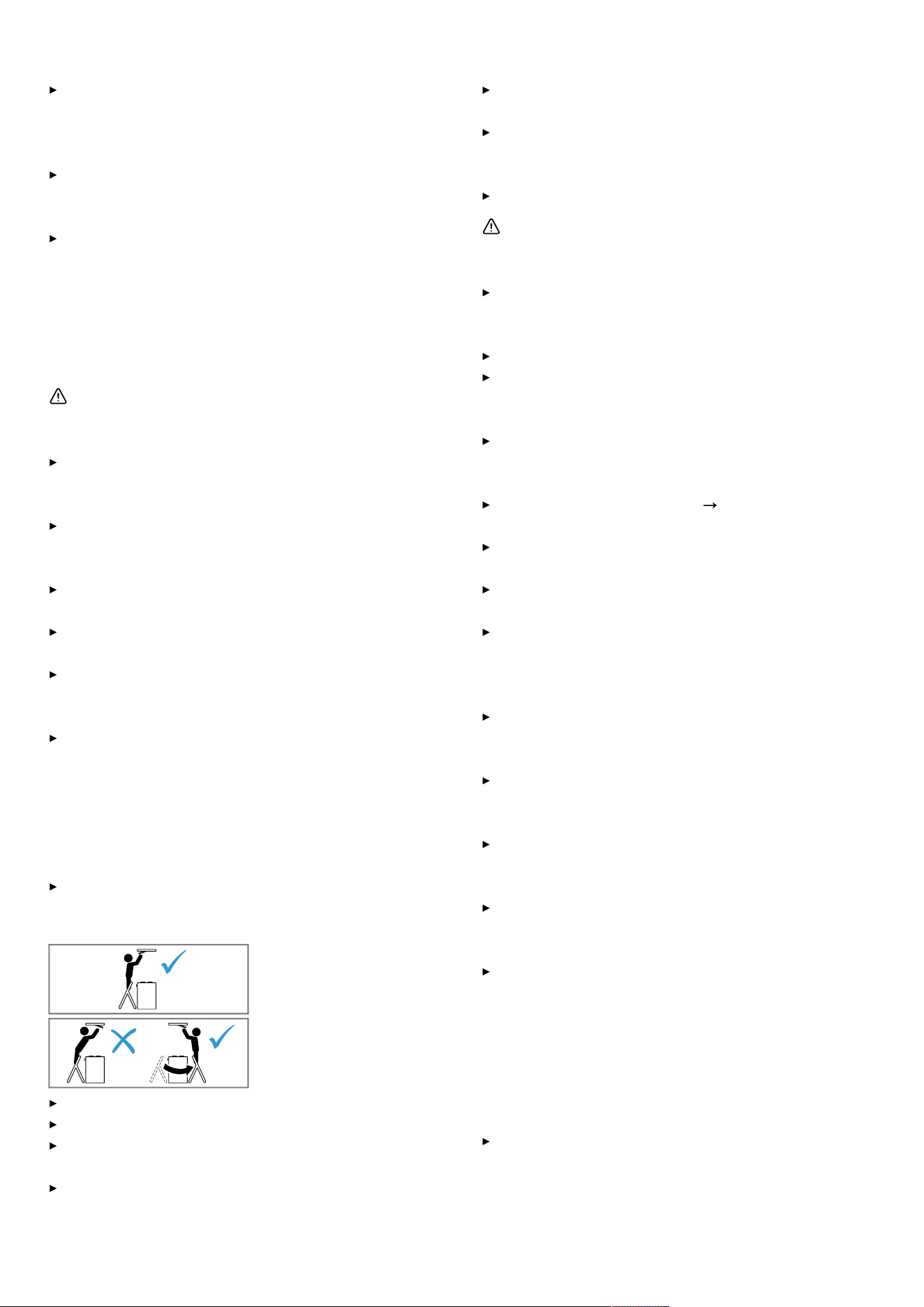
16.8 Installation
Checking the ceiling
1.
Check whether the ceiling is horizontal and ad-
equately load-bearing.
The maximum weight of the appliance is 40kg.
Do not fit the appliance directly onto plasterboard (or
similar lightweight materials) in a suspended ceiling.
2.
Drill the hole depth in accordance with the length of
the screws.
3.
Install the appliance with a fixing material which is suf-
ficiently stable and has been adjusted accordingly for
both the structural conditions and the weight of the
appliance.
4.
Check the cut-out area for existing cables of other ap-
pliances.
Preparing the ceiling
1.
Cover the hob to prevent damage.
2.
Determine the position of the appliance and, thereby,
the centre based on the position of the hob.
3.
Ensure that there are no electrical wires, gas pipes or
water pipes in the area where holes are to be drilled.
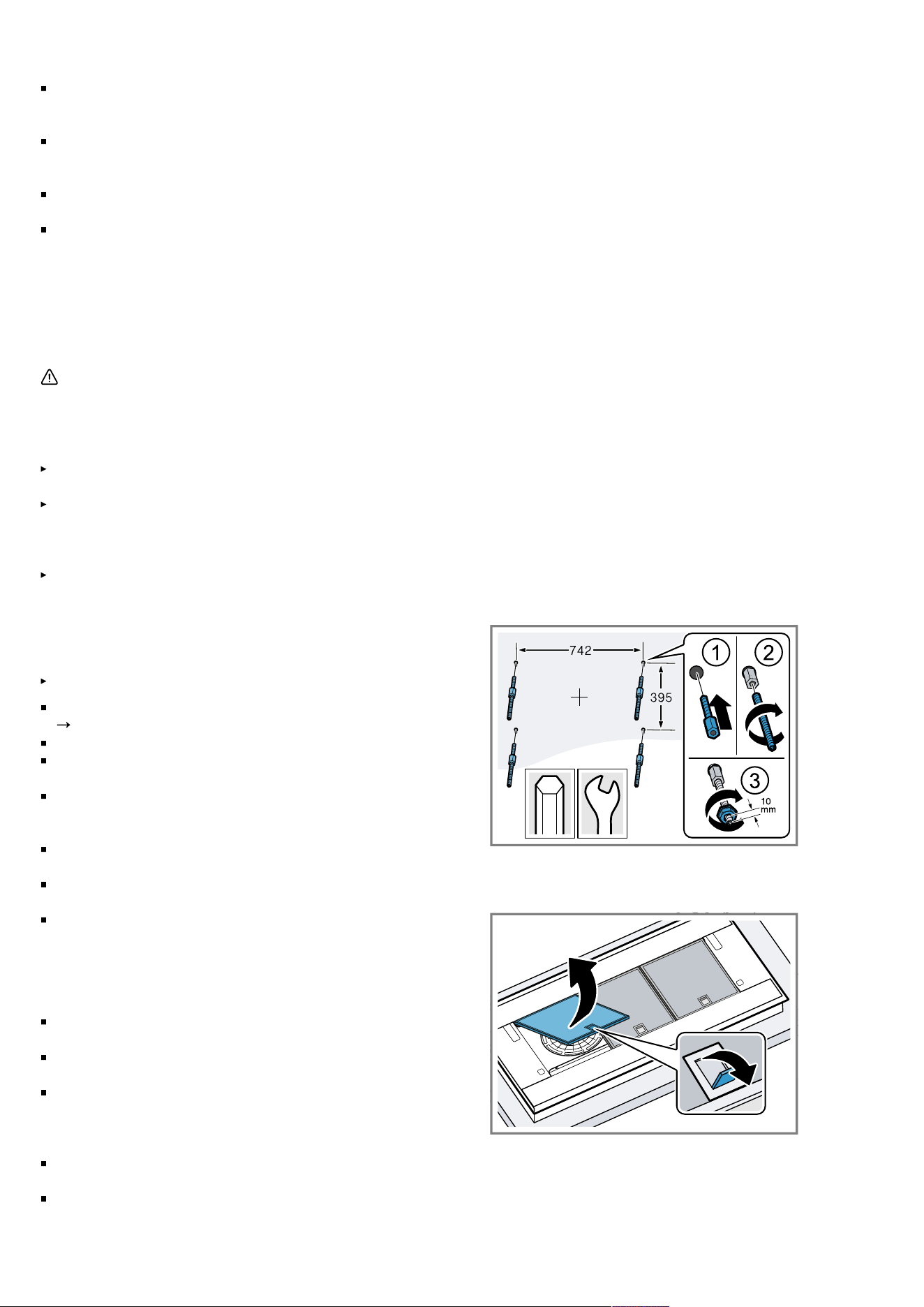
4.
Drill four holes with a diameter of 6 mm for the fixing.
5.
Drill the hole depth in accordance with the length of
the screws.
Screw the fastening screws into the ceiling.
6.
Screw in the threaded rods.
7.
Screw the nuts approx.10mm onto the threaded
rods.
4
13
Preparing the appliance
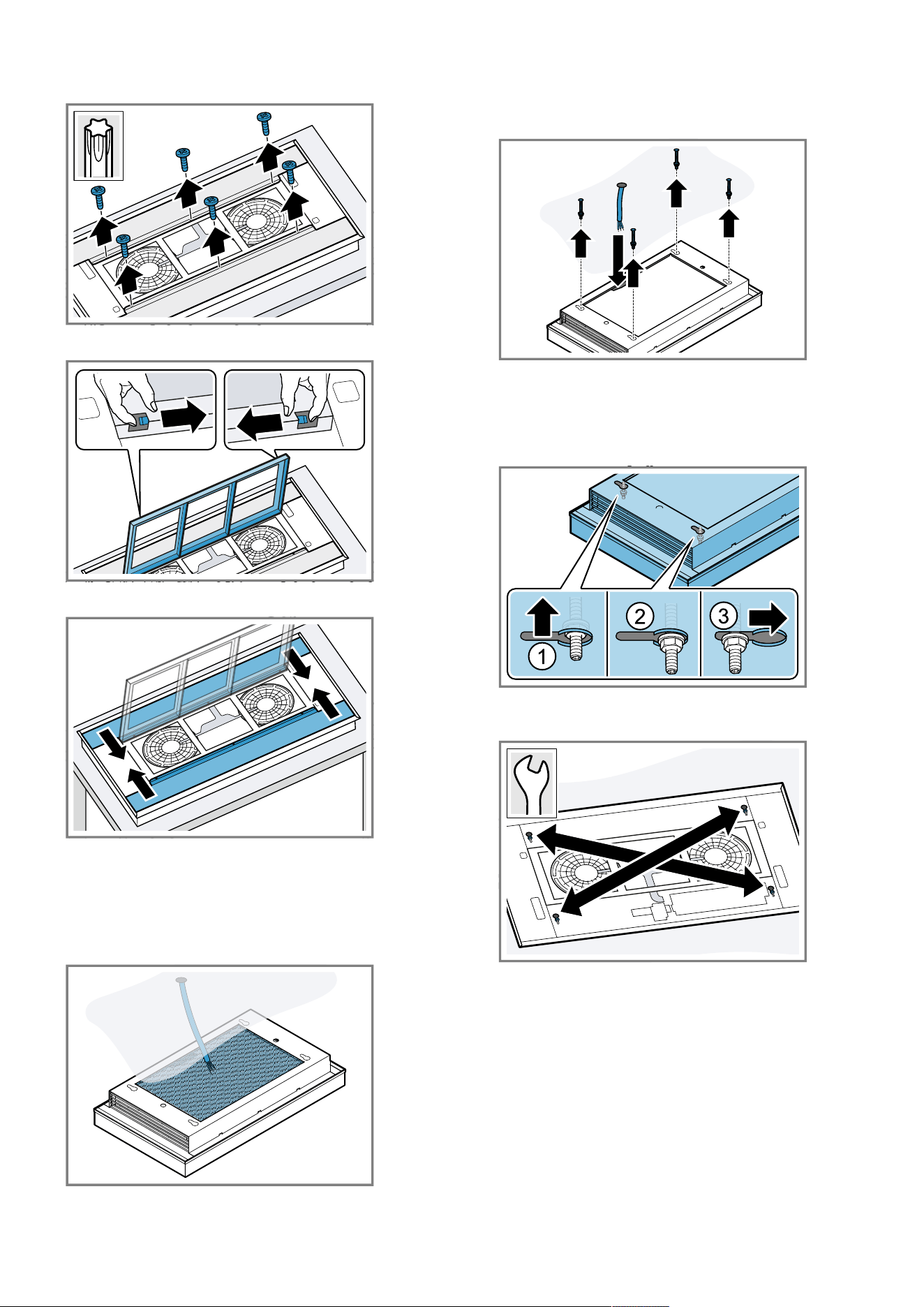
1.
Remove the grease filters.
To avoid causing damage, do not bend the grease fil-
ters.
17
en Installation instructions
2.
Loosen the screws on the side covers.
20
3.
Open the odour filter cartridge.
4.
Push the side covers inwards and remove them.
5.
Close the odour filter cartridge.
Hanging the appliance
1.
Lift the appliance by the corners and turn it over.
2.
Position the cable that is provided on-site in the
marked area on the appliance.
3.
Guide the cable that is provided on-site through the
opening and hook the appliance into the fastening
screws on the ceiling.
4.
Push the appliance as far as it will go into the four
key hole openings using the guide sleeves.
5.
Move the appliance and lower it further so that the
collar nuts are positioned on the edge of the guide
sleeves.
6.
Carefully tighten the diagonally opposite collar nuts
until the appliance is flush-mounted on the ceiling.
13
Tighten the collar nuts one at a time so that the appli-
ance does not tilt when doing so.
Connecting the appliance
Requirement: Ensure that the protection against contact
is guaranteed during installation.
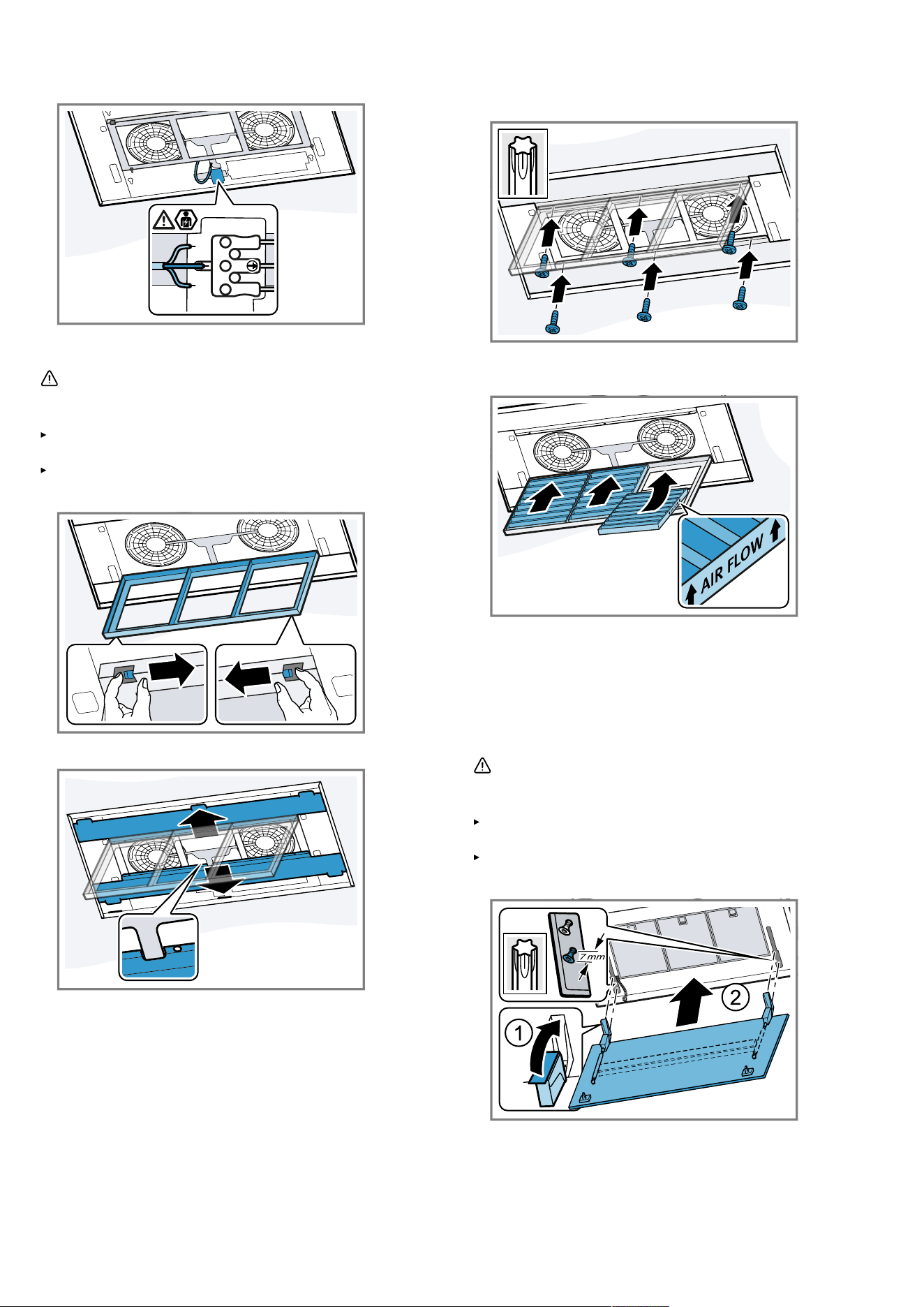
1.
Guide the cable that is provided on-site through the
opening in the appliance.
Maintain the bending radius of the cable that is
provided on-site for connecting the appliance.
The cable must remain doubly insulated. You should
therefore strip the cable as little as possible upstream
of the connecting terminal.
18
Installation instructions en
2.
Insert the on-site cable into the terminal plug.
LN
Installing covers
WARNING‒Risk of injury!
Components inside the appliance may have sharp
edges.
Wear protective gloves.
Risk of injury when opening and closing the hinges.
Keep your hands away from the hinges.
1.
Open the odour filter cartridge.
2.
Insert the side covers.
3.
Push the side covers in the direction of the appliance
frame and screw them firmly in place.
20
4.
Remove the new odour filter from the packaging.
5.
Insert the odour filter into the odour filter cartridge.
Insert the odour filter in the correct direction.
6.
Close the odour filter cartridge.
7.
Fit the grease filters.
To avoid causing damage, do not bend the grease fil-
ters.
Fitting the filter cover
WARNING‒Risk of injury!
Components inside the appliance may have sharp
edges.
Wear protective gloves.
Risk of injury when opening and closing the hinges.
Keep your hands away from the hinges.
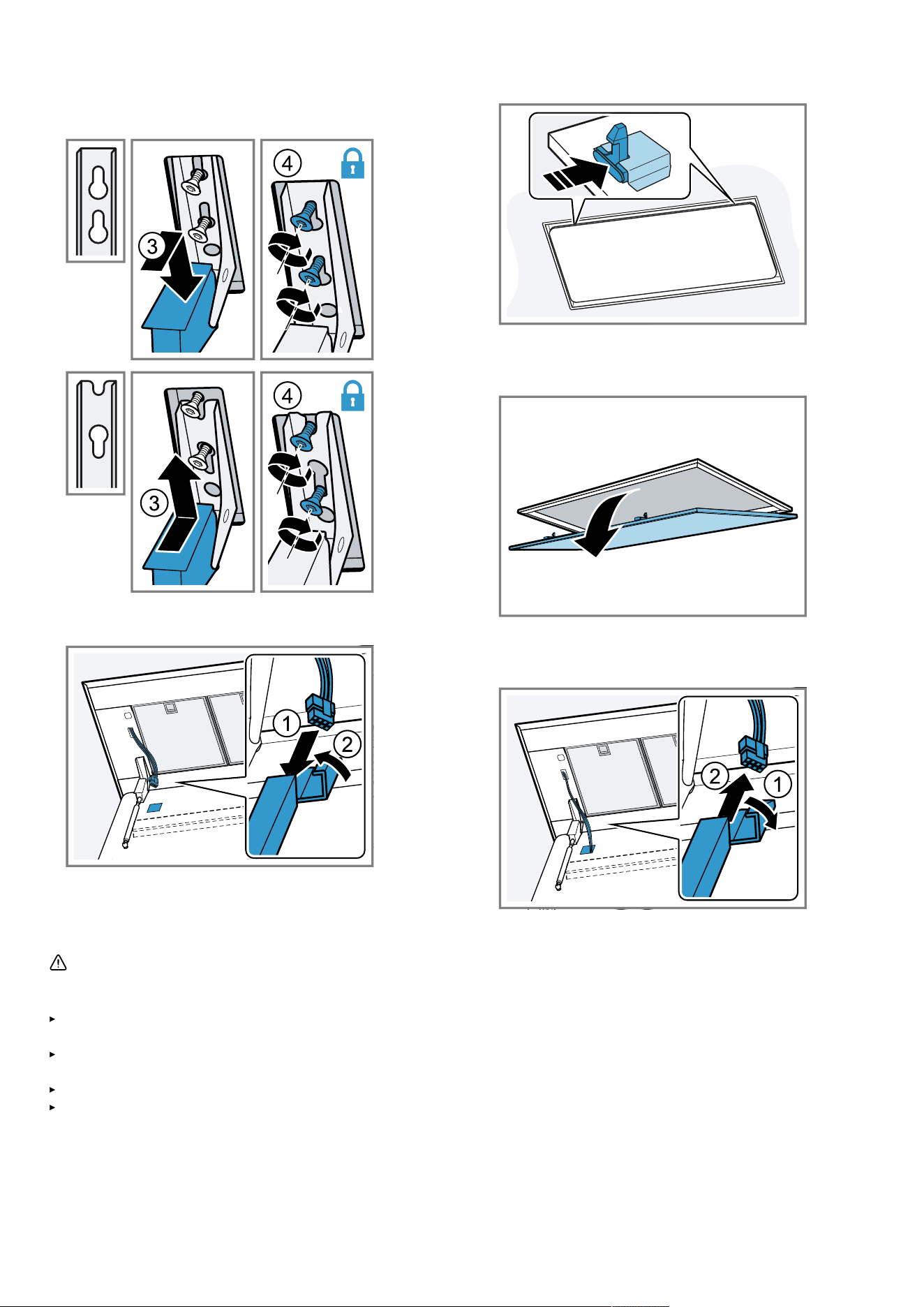
1.
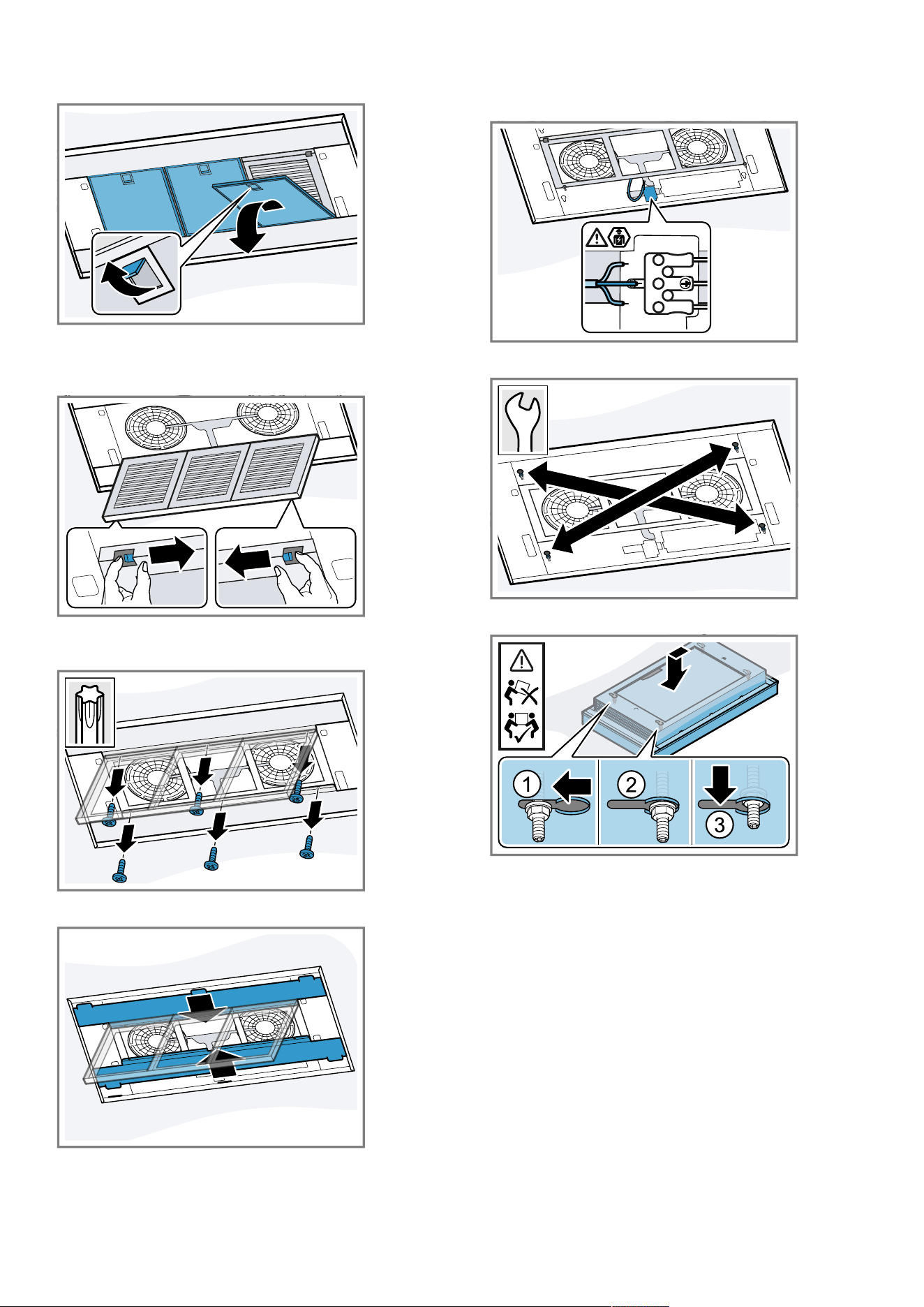
Open the hinges on the filter cover.
25
19
en Installation instructions
2.
Mount the filter cover on the designated screws and
push it backwards/forwards depending on the key
hole opening into the narrow section.
3.
Tighten the fastening screws on the hinges.
4.
Connect the appliance-side cable for the lighting.
5.
Swing the filter cover up and ensure that it engages.
6.
Connect the appliance to the power supply.
Removing the appliance
WARNING‒Risk of injury!
Components inside the appliance may have sharp
edges.
Wear protective gloves.
Risk of injury when opening and closing the hinges.
Keep your hands away from the hinges.
The appliance is heavy.
To move the appliance, twopeople are required.
Use only suitable tools and equipment.
1.
Disconnect the appliance from the power supply.
2.
Open the locking mechanisms on the filter cover.
To prevent the filter cover from swinging down sud-
denly, hold onto the filter cover firmly with two hands.
3.
Open the filter cover by pulling it downwards.
4.
Swing down the filter cover.
Open the filter cover fully and without pulling on it.
5.
Remove the appliance-side cable for the lighting.
6.
Undo the screws on the hinges up to approx.7mm.
Do not loosen them fully.
7.
Unhook and remove the filter cover.
20
Installation instructions en
8.
Remove the grease filters.
To avoid causing damage, do not bend the grease fil-
ters.
9.
Open the odour filter cartridge.
10.
Remove the odour filter.
11.
Loosen the screws on the side covers.
20
12.
Remove the side covers.
13.
Close the odour filter cartridge.
14.
Loosen the cable that is provided on-site from the ter-
minal clamp.
LN
15.
Carefully loosen the diagonally opposite screws.
13
16.
Disconnect the appliance from the key hole opening.
17.
Slowly take the appliance down.
21
Register your product online
neff-home.com
BSH Hausgeräte GmbH
Carl-Wery-Straße 34
81739 München, GERMANY
Valid within Great Britain:
Imported to Great Britain by
BSH Home Appliances Ltd.
Grand Union House
Old Wolverton Road
Wolverton, Milton Keynes
MK12 5PT
United Kingdom
*9001521594*
9001521594 (050417) REG25
en