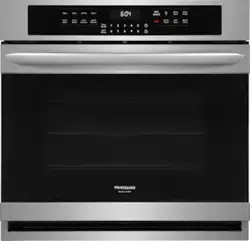
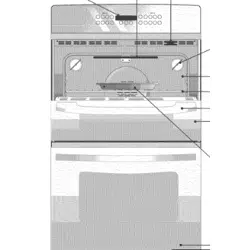
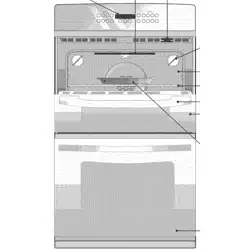
1. Bake - Use to enter normal baking temperatures for recipes that call for regular baking.
2. Broil - Selects normal broil function for direct heat cooking.
3. Air Fry - Uses hot air for great tasting crispy results without all the oil.
4. Warm - Use to keep cooked foods at serving temperature.
5. Conv Bake - Circulates the oven heat evenly and continuously for baking foods.
6. Conv Roast - Uses a convection fan to gently brown meats and poultry and seal in the juices.
7. Convect Convert - Converts standard bake temperatures to convection temperature in convection bake feature.
8. Quick Preheat - Best used for single rack baking with packaged convenience foods and foods made from scratch.
9. Timer On-Off - Use with number keys to set time, and to start and cancel the minute timer. The minute timer does not start or stop any cooking function.
10. Add 1 Min -Use to add additional minutes to the timer.
11. 0 through 9 keys - Use to set timer, temperature, and time of day.
12. Set Clock - Use set the time of day.
13. Oven Lock - Use to lock out oven controls
14. OK/START - Use to start cooking functions and when setting the clock.
15. Oven Light - Use to turn on internal light. Will turn on when the oven door is opened.
16. Delay Start - Add to Quick Preheat, Bake, Conv Bake, Conv Roast, and Self Clean to program a Delay Start and Warm.
17. Meat Probe - Use when cooking meat like roasts, hams or poultry to cook to the desired internal temperature without any guesswork.
18. OFF - Use to turn off all cooking functions.
19. Bread Proof - Maintains a warm environment useful for rising of yeast-leavened products.
20. Self Clean - Use to set self-clean cycle between 2 and 4hrs.
21. Steam Clean - Use as a time saving method for cleaning light soils.
Setting the Clock
When the appliance is first plugged in or when the power supply to the appliance has been interrupted, the display will flash 12:00. The time of day must first be set before operating the oven.
To Set Clock to 1:30:
Press Set Clock.
Enter 1 3 0 using numeric keys.
Press OK/START.
Setting 12-Hour or 24-Hour display mode
The clock display mode allows you to select 12-hr or 24-hr modes. The factory pre-set clock display mode is 12 hours.
To set 12-hr or 24-hr display mode:
Press and hold Set Clock for 6 seconds.
Press self clean to toggle between 12-Hr day or 24-Hr day display modes (Figure 8).
Press OK/START to accept the choice.
Setting Timer
The minute timer allows you to track your cooking times without interfering with the cooking process. The timer may be set from a minimum time of 1 minute to a maximum of 11 hours and 59 minutes.
To set timer for 5 minutes:
Press Timer on-off.
Enter 5 using numeric keypad.
Press Timer On-Off to start the timer. When set time ends, END will show in the display and the control will sound a beep three times every 30 seconds until Timer On-Off key is pressed.
To cancel the timer when active, press Timer OnOff again.
Quick Preheat
Quick Preheat is available for single rack baking with packaged and convenience foods and can be programmed for temperatures between 170°F and 550°F. Follow the recipe or package directions for food preparation time and temperature. When quick preheat is complete, a reminder tone will sound and food should be placed in the oven.
During quick preheat function, the bake burner will cycle on and off. The convection fan will turn on and stay on until quick preheat is canceled. Depending on your preference for doneness cooking times may vary. Watch food closely
To set the preheat temperature for 350°F:
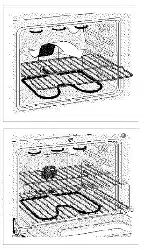
Arrange the interior oven racks.
Press Quick Preheat. 350 will appear in the display.
Press OK/START.
350 and PREHEAT will be displayed while the oven is preheating.
Press OFF when baking is complete or to cancel the preheat feature.
To change preheat temperature while oven is preheating (ex: changing from 350°F to 425°F):
Press Quick Preheat. 350 will appear in the display
Enter the new preheat temperature. Press 4 2 5.
Press OK/START. 425 will show in the display.
When baking is complete, press OFF.
Setting Bake
Bake cooks with heat that rises from the oven bottom. The heat and air circulate naturally in the oven. A reminder tone will sound indicating when the set bake temperature is reached and to place the food in the oven.
Bake may be set for any oven temperature between 170°F (77°C) to 550°F (288°C).
To set Bake for (default) oven temperature of 350°F:
Press Bake.
350° and PREHEAT will appear in the display. Once oven reaches set temperature the PREHEAT message disappears.
Press START.
To cancel Bake at any time, press OFF.
To change the oven temperature to 425°F when the oven is baking:
Enter new temperature of 4 2 5 using numeric keys.
Press OK/START.
To cancel Bake at any time, press OFF
Important: The oven will bake no longer than 12 hours. If you wish to bake for a longer period, see “Setting 12-Hour or 24-Hour display mode” on page 14 for detailed information
CARE AND CLEANING
Remove spills and any heavy soiling as soon as possible. Regular cleaning will reduce the difficulty of major cleaning later
Surface or area
cleaning recommendation
Aluminum and vinyl
Using a soft cloth, clean with mild dish detergent and water. Rinse with clean water, dry and polish with a soft, clean cloth .
Painted and plastic control knobs Painted body parts Painted decorative trims
Using a soft cloth, clean with mild dish detergent and water or a 50/50 solution of vinegar and water. Rinse with clean water, dry and polish with a soft, clean cloth . Glass cleaners may be used, but do not apply directly to surface; spray onto cloth and wipe .
Control panel
Using a soft cloth, clean with mild dish detergent and water or a 50/50 solution of vinegar and water. Do not spray liquids directly on the oven control and display area . Do not use large amounts of water on the control panel - excess water on the control area may cause damage to the appliance . Do not use other liquid cleaners, abrasive cleaners, scouring pads, or paper towels - they will damage the finish
Control knobs
Using a soft cloth, clean with mild dish detergent and water or a 50/50 solution of vinegar and water. To remove control knobs: turn to the OFF position, grasp firmly, and pull off the shaft . To replace knobs after cleaning, line up the OFF markings and push the knobs into place .
Stainless Steel
Using a soft cloth, clean with mild dish detergent and water or a 50/50 solution of vinegar and water. Rinse with clean water, dry with a soft clean cloth . Do not use cleaners containing abrasives, chlorides, chlorine, or ammonia
Smudge Proof™ Stainless Steel Black Stainless Steel
Using a soft cloth, clean with mild dish detergent and water or a 50/50 solution of vinegar and water. Rinse with clean water, dry with a soft clean cloth . Do not use appliance cleaner, stainless steel cleaner, or cleaner containing abrasives, chlorides, chlorine, or ammonia . These cleaners may damage the finish .
Surface or Area
Cleaning Recommendation
Porcelain-enameled broiler pan and insert
Porcelain door liner
Porcelain body parts
Rinse with clean water and a damp cloth . Scrub gently with a soapy, non-abrasive scouring pad to remove most spots . Rinse with a 50/50 solution of clean water and ammonia . If necessary, cover difficult spots with an ammonia-soaked paper towel for 30 to 40 minutes . Rinse and wipe dry with a clean cloth . Remove all cleaners or future heating could damage the porcelain . Do not allow food spills with a high sugar or acid content (milk, tomatoes, sauerkraut, fruit juices or pie filling) to remain on porcelain surfaces . These spills may cause a dull spot even after cleaning .
Self-cleaning oven interior
Before setting a self-clean cycle, clean soils from the oven frame, areas outside the oven door gasket, and the small area at the front center of the oven bottom . See “Self Clean” on page 23 .
Oven door
Use mild dish detergent and water or a 50/50 solution of vinegar and water to clean the top, sides, and front of the oven door. Rinse well . Glass cleaner may be used on the outside glass of the door. Ceramic smoothtop cleaner or polish may be used on the interior door glass Do not immerse the door in water Do not spray or allow water or cleaners to enter the door vents . Do not use oven cleaners, cleaning powders, or any harsh abrasive cleaning materials on the outside of the oven door.
Do not clean the oven door gasket . The oven door gasket is made of a woven material which is essential for a good seal . Do not rub, damage, or remove this gasket .
General Cleaning
Refer to the table at the beginning of this chapter for more information about cleaning specific parts of the oven.
Follow these cleaning precautions:
• Allow the oven to cool before cleaning.
• Wear rubber gloves when cleaning the appliance manually.
Remove soils using hot, soapy water. Do not allow food spills with a high sugar or acid content (such as milk, tomatoes, sauerkraut, fruit juices or pie filling) to remain on the surface as they may cause a dull spot even after cleaning. Remove spillovers and heavy soiling as soon as possible. Regular cleaning will reduce the effort required for major cleaning later
Cleaning Porcelain Enamel Oven
The oven interior is porcelain on steel, it is safe to clean using oven cleaners.
To remove heavy soil:
Allow a dish of ammonia to sit in the oven overnight or for several hours with the oven door closed. Clean softened dirt spots using hot, soapy water. Rinse well with water and a clean cloth.
If soil remains, use a nonabrasive scouring pad or a nonabrasive cleaner. If necessary, use an oven cleaner following manufacturer’s instructions. Do not mix ammonia with other cleaners.
Clean any soil from the oven frame, the door liner outside the oven door gasket and the small area at the front center of the oven bottom. Clean with hot, soapy water. Rinse well using clean water and a cloth.
Broiler Pan Cleaning Tips
To prevent grease from baking on, remove the broiler pan from the oven as soon as cooking is completed. Use oven mitts because the broiler pan is extremely hot. Pour off grease. Soak the pan in hot, soapy water.
Clean the broiler pan as soon as possible after each use. If necessary, use soap-filled steel wool pads. Heavy scouring may scratch the grid.
Aluminum Foil, Aluminum Utensils, and Oven Liners
• Protective liners—Do not use aluminum foil to line the oven bottom. The high heat of the oven can melt these materials to the oven cavity and ruin the oven. These types of materials can also reduce the effectiveness of the air circulation in the oven and produce poor baking results. Only use aluminum foil as recommended in this manual. Improper installation of these liners may result in risk of electric shock or fire.
• Aluminum utensils - The melting point of aluminum is much lower than that of other metals. Care must be taken when aluminum pots or pans are used.
• Oven racks - Do not use aluminum foil to cover the oven racks. Using a liner in the oven restricts the heat and air flow needed to obtain the best possible cooking results for any oven.
Replacing the Oven Light
The interior oven light is located at the rear of the oven cavity and is covered by a glass shield. The glass shield must be in place whenever the oven is in use (Figure 28).
To replace the oven interior light bulb:
Turn electrical power off at the main source or unplug the appliance.
Remove interior oven light shield by turning a quarter turn counter-clockwise.
Replace bulb with a new T-4 type Halogen 25 watt appliance bulb.
Replace glass oven light shield by rotating clockwise.
Turn power back on again at the main source (or plug the appliance back in).
Be sure to reset the time of day on the clock
Removing and Replacing the Oven Door
To remove the oven door:
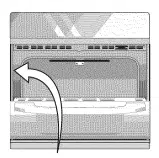
1. Open oven door completely, horizontal with floor (Figure 29).
2. Pull up the lock located on each hinge support toward front of the oven until the lock stops. You may have to apply a little upward pressure on the lock to pull it up (Figure 30 and Figure 31).
3. Grasp the door by the sides, and close the door until the door frame makes contact with the unlocked hinges.
4. Pull the bottom of the door toward you while rotating the top of the door toward the appliance to completely disengage the hinge levers (Figure 32).
To replace the oven door:
1. Firmly grasp both sides of oven door along the door sides. Do not use the oven door handle (Figure 32).
2. Hold the oven door at the same angle as the removal position. Carefully insert the hinge levers into the oven frame until you feel the hinge levers are seated into the hinge notches. The hinge arms must be fully seated into the hinge notches before the oven door can be fully opened. (Figure 32).
3. Fully open the oven door, horizontal with floor (Figure 29).
4. Push the door hinge locks up toward and into the oven frame on both left and right oven door hinges to the locked position (Figure 30).
5. Close the oven door.
Caring for Your Glide Racks
To lubricate the glide rack:
1. Remove the rack from the oven and place the rack on a large flat surface covered with newspaper or scrap cloth. Fully extend the rack.
2. Wipe away debris and crumbs from the glide track using a cloth or sponge.
3. Shake graphite lubrication very well before applying. Apply to loading guides, and rotation pin. Repeat on both sides of the glide rack.
4. Extend and return the glide rack several times along the tracks to distribute the lubrication.
5. Turn the rack upside down and apply graphite lubrication to the insides of the loading guides.
6. Extend and return the glide rack several times along the tracks to distribute the lubrication.
7. Apply a thin layer of cooking oil to the bottom of the “V” and the glide channels. Keeping the frame sides lightly lubricated allows the entire rack to slide easily when changing rack positions.
8. Replace rack in oven right-side up.
BEFORE YOU CALL
Oven Baking
For best cooking results, preheat the oven before baking cookies, breads, cakes, pies, pastries, etc. There is no need to preheat the oven for roasting meat or baking casseroles. The cooking times and temperatures needed to bake a product may vary slightly from your previously owned appliance.
Baking Problems and Solutions Baking Problems
Baking Problems
Causes
Corrections
Cookies and biscuits burn on the bottom.
Cookies and biscuits put into oven before oven is preheated.
Allow oven to preheat to desired temperature before placing food in oven.
Choose pan sizes that will permit at least 2” of air space
Cakes too dark on top or bottom
Cakes put in oven before oven is preheated.
Allow oven to preheat to the selected temperature before placing food in the oven.
Rack position too high or too low.
Use proper rack position for baking needs.
Oven too hot.
Set oven temperature 25°F (13°C) lower than recommended.
Cakes not done in center
Oven too hot.
Set oven temperature 25°F (13°C) lower than recommended.
Incorrect pan size.
Use pan size suggested in recipe.
Pan not centered in oven.
Use proper rack position and place pan so there are at least 2” (5.1 cm) of space on all sides of pan.
Glass cookware slow heat conductor.
Reduce temperature and increase cook time or use shiny bakeware.
Cakes not level.
Oven not level.
Place a marked glass measuring cup filled with water on the center of the oven rack. If the water level is uneven, refer to the installation instructions for leveling the oven
Pan too close to oven wall or rack overcrowded.
Use proper rack position and place pan so there are at least 2” (5.1 cm) of space on all sides of pan.
Pan warped.
Do not use pans that are dented or warped.
Oven light left on while baking.
Do not leave the oven light on while baking.
Foods not done when cooking time is over.
Oven too cool.
Set oven temperature 25°F (13°C) higher than suggested and bake for the recommended time.
Oven overcrowded.
Be sure to remove all pans from the oven except the ones to be used for baking.
Oven door opened too frequently
Open oven door only after the shortest recommended baking time.
Problem
cause / Solution
Entire appliance does not operate
Appliance not connected . Check your fuse box or breaker box to make sure the circuit is active .
Electrical power outage . Check house lights to be sure . Call your local electric company for service outage information .
oven Problems
Problem
cause / Solution
Poor baking results .
Many factors affect baking results . Use proper oven rack position . Center food in the oven and space pans to allow air to circulate . Preheat the oven to the set temperature before placing food in the oven . Try adjusting the recipe's recommended temperature or baking time . See “Adjusting the Oven Temperature” on page 26 if you feel the oven is too hot or too cool .
Flames inside oven or smoking from oven vent .
Excessive spills in oven . Grease or food spilled onto the oven bottom or oven cavity. Wipe up excessive spills before starting the oven . If flames or excessive smoke are present when using broil, see “Setting Broil” on page 20
Air Fry causing smoke
When using the air fry tray place a baking sheet on a rack below to catch any drippings and prevent them from causing smoke from the oven bottom .
Oven smokes excessively when broiling
Incorrect setting . Follow the “Using the Broil Feature” instructions on page 20 .
Meat too close to the broil element or burner. Reposition the broil pan to provide proper clearance between the meat and broil element or burner. Remove excess fat from meat . Cut remaining fatty edges to prevent curling, but do not cut into lean
Grease build up on oven surfaces . Regular cleaning is necessary when broiling frequently. Grease or food splatters will cause excessive smoking .
Oven control panel beeps and displays any F or E code error.
Oven control has detected a fault or error condition . To clear the error, press the OFF key on the control panel . Once the error code is cleared, try the bake or broil function . If the F or E code error repeats, turn off the power to appliance, wait 5 minutes, and then repower the appliance . Set the clock with correct time of day. Try the bake or broil function again . If the fault recurs, press the OFF key to clear.
Convection fan does not rotate .
Oven door is open . The convection fan will turn off if the oven door is opened when convection is active . Close the oven door.
Self-Clean Problems
Problem
Cause / Solution
Self clean does not work .
Oven control not set properly. See “Self Clean” on page 31 .
Oven racks discolored or do not slide easily.
Oven racks left in oven cavity during self clean . Remove oven racks from oven cavity before starting a self-clean cycle . Clean by using a mild abrasive cleaner following manufacturer's instructions . Rinse with clean water, dry, and replace in oven .
Soil not completely removed after self clean .
Self clean was interrupted . Review instructions on “Self Clean” on page 31 . Excessive spills on oven bottom . Remove excessive spills before starting self clean
Failure to clean soil from the oven frame, the door liner outside the oven door gasket, and the small area at the front center of the oven bottom . These areas are not in the self-cleaning area, but get hot enough to burn on residue . Clean these areas before starting the self-cleaning cycle . Burned-on residue can be cleaned with a stiff nylon brush and water or a nylon scrubber. Be careful not to damage the oven gasket .
other Problems
Problem
cause / Solution
Appliance is not level .
If the floor is sagging or sloping, contact a carpenter to correct the situation
Kitchen cabinet alignment may make range appear not level . Be sure cabinets are square and have sufficient room for appliance clearance .
Cannot move appliance easily. Appliance must be accessible for service .
Cabinets not square or are built in too tightly. Contact the builder or installer to make the appliance accessible .
Oven light does not work .
Be sure the oven light is secure in the socket . See “Replacing the Oven Light” on page 37